Version
2026.08 of the Buildroot embedded Linux
system builder has been released. Buildroot 2026.08 includes nearly 1,000
changes from 100 contributors; some of the notable changes include support for
Linux 7.1.x, Binutils 2.46.1, GCC 16.2.0, glibc 2.44, as well as adding the
M68K and IBM Power 10/11 architectures.
Experience AI equips young people with a meaningful understanding of artificial intelligence (AI) and machine learning by giving educators the knowledge and confidence to teach these topics in ways that suit their classrooms.
Whether you’re introducing AI to learners for the first time, helping them deepen their understanding, exploring generative AI with them, or integrating AI literacy across the curriculum, Experience AI offers you all the resources you need for free.
Since we started publishing Experience AI resources in 2023, they have been downloaded over a million times in 195 countries, and we have worked with partner organisations in more than 40 countries to train educators to teach AI literacy. Thanks to partners, we have learned a lot about how teachers around the world use the resources in their classrooms, and this has given us direction for what new resources to develop.
The updated suite of Experience AI resources
Many teachers looking for AI literacy resources are not computing specialists and have very busy timetables. Under pressure to deliver more content without more instructional time, what educators need are resources they can integrate into what they already teach. To support them, we’re now offering an updated suite of Experience AI resources that make AI literacy more accessible, flexible, and relevant.
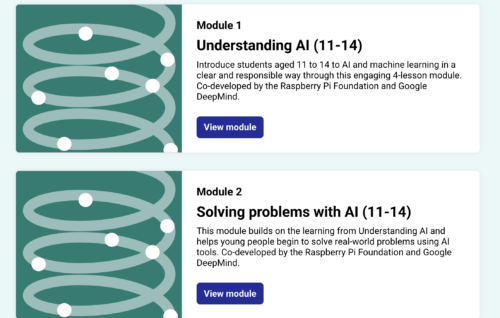
The resources include those co-developed by the Raspberry Pi Foundation and Google DeepMind, alongside those developed independently by the Raspberry Pi Foundation.
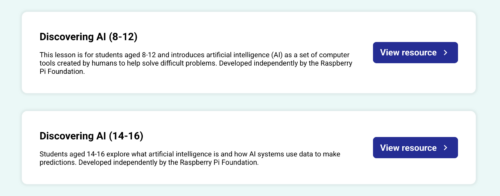
The new Discovering AI resources, aimed at learners aged 8–12 and learners aged 13–16, are single lessons for introducing the fundamental ideas behind AI. They support educators with learners who have little or no prior knowledge of AI, and include engaging, age-appropriate activities.
From there, our updated Foundations of AI units let teachers support their learners to develop a deeper understanding of how AI systems work, how they’re trained, and how they can be applied to real-world problems.
And a new and growing collection of thematic resources supports teachers and learners to explore AI through cross-subject topics such as creativity, the environment, and critical thinking.
Experience AI now fully reflects our belief that AI literacy needs to be cross-curricular. Application of AI technologies isn’t limited to neat domains or subjects, so learners’ opportunities to understand them shouldn’t be either.
Why we are creating thematic resources
Education systems vary significantly between countries, and in most national curricula, AI literacy is not yet clearly defined. Nevertheless, teachers are both under pressure to deliver this new topic area in their limited classroom time, and eager to rise to the challenge to support their learners.
So we asked ourselves: how can we help educators to teach AI literacy in any subject without additional lesson time, when we cannot create specific resources for every subject in every education system?
Our answer came from educators themselves. Through our network of global partners, we learned that teachers were not waiting for us to tell them in what subjects the Experience AI resources belonged. They were already adapting them to teach AI literacy in all sorts of contexts. For example, we saw that some educators adapted the resource on AI and ecosystems, which we had developed for Biology classrooms, for their Geography classrooms, where it supported similar learning goals.
This insight into teachers’ classroom practice prompted us to change our approach.
Now, rather than designing resources for a single subject, we design and organise them in themes that fit across subjects, such as environment, creativity, ethics, and critical thinking. So a resource for exploring the environmental impact of AI data centres could be used in Geography, Physics, Citizenship, or Business Studies classrooms. An activity about AI-generated media could prompt discussions in Digital Literacy, Art, or Computing lessons. The same material supports different curricular goals, depending on how teachers choose to use it.
Helping every educator teach AI literacy with confidence
A key advantage of this new thematic approach is flexibility. Our thematic resources support teachers to:
Introduce AI literacy through topics they can easily fit into their subject
Integrate AI literacy without additional lesson time
Adapt the included activities for different learners and classroom contexts
Like all Experience AI materials, the new resources:
Encourage classroom discussions and promote critical thinking and reflection about AI technologies
Help learners understand how AI impacts society, not just how AI tools work
While Experience AI will continue to focus on core AI literacy concepts — how AI systems work, how they are used, and how to think critically about them — the resources we offer will increasingly be:
Thematic: Built around real-world topics with broad relevance
Modular: Adaptable to different classroom contexts rather than tied to a fixed sequence
Differentiated: Designed specifically for learners aged 8–12 and 13–16
Varied in format: Full lessons, stand-alone discussion activities, and extended project guides
In this way, we aim to make teaching AI literacy practical and achievable for every educator, regardless of their subject specialism or previous experience of using or teaching about AI.
Share your feedback with us
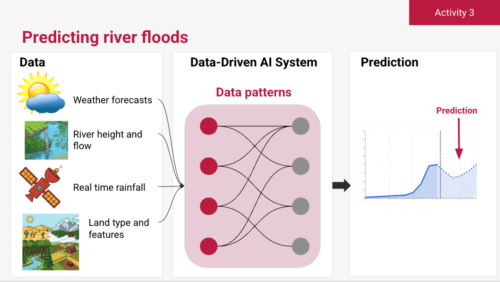
We’ve tested the new thematic resources with our Experience AI partner, Digital Moment in Canada, who also co-created our Social Media and Flood Forecasting units. Educators’s feedback shows that they value the added flexibility and find the new materials easier to bring into their teaching.
With our new approach, we’re able to offer a more flexible Experience AI programme that supports a wider range of educators, however they want to bring AI literacy into their classrooms.
If you use the resources in your classrooms, please tell us what you think. We’ll continue refining and expanding the Experience AI programme and resources in response to feedback from educators and partners around the world.
Get in touch and share your stories of using Experience AI in the classroom via our email: [email protected]
The Asahi Linux project has announced that support
for Apple’s M3-series chips has been added to the Asahi installer.
Linux support for M3 series SoCs and the machines powered by them is now in a
state where almost everything supported on the M1 and M2 series
machines just works. This includes the webcam, internal microphones, USB (up to
the hardware limit of USB 3 10 Gb/s), hardware accelerated video decoding including support for AV1, WiFi, Bluetooth, and much more! The
only major exceptions remain full DCP support and the GPU, which we will have
more news on in the coming
months. Do not expect performant or power-efficient 3D acceleration
right now.
See the blog post for other current limitations of M3 support.
The 7.3-rc2 kernel prepatch is out for
testing. Linus said:
This didn’t *feel* like a particularly busy rc2, but it clearly
was. rc2 is usually the quietest time when people take a breather
after the merge window and it takes a while to start finding
bugs. But not this time – this is a “full fat” rc release. […]
Nothing looks particularly odd, even if the rc2 timing is a bit
unusual. It might be just random, but we’ll obviously all blame it
on AI, because whether that’s really the cause or not, it’s an easy
thing to blame 😉
At Computex 2026 QNAP was showing off a pair of new managed enterprise switches. The QSW-M2130 and 2130P offer 24x 2.5GbE ports and 6x 10GbE ports with both RJ45 and SFP+ backhaul connectivity
Enterprise data today is scattered across specialized systems, each with its own tools and expertise. Querying a database requires SQL. Accessing batch data on Amazon Simple Storage Service (Amazon S3) requires compute engines such as Amazon Athena and Trino. Consuming real-time streams from Amazon Kinesis requires streaming expertise. Each software as a service (SaaS) application has its own API, authentication model, and query language. Today, only data engineers can navigate this landscape, and business users file tickets, wait for reports, or rely on dashboards that answer yesterday’s questions. When a leader needs a one-time answer spanning multiple systems, they’re back in the ticket queue.
Consider a streaming media company: customer profiles, content catalogs, and ad campaign performance are stored as batch data on Amazon S3. Viewership telemetry such as device type, stream quality, watch duration, and buffering events flows in real time through Amazon Kinesis. Subscriber management and support tickets live in a relational customer relationship management (CRM) database. Leaders routinely ask questions like:
Which titles drove the most subscriber growth last quarter?
How does marketing spend correlate with viewing completion rates?
Is churn spiking among users who haven’t engaged with new content?
Answering these questions faces two challenges:
The data silo problem. The data lives in multiple places with batch stores on S3, real-time streams in Kinesis, and an online transaction processing (OLTP) database, each with its own access patterns, query language, and authentication model. Organizations traditionally solve this by building data lakes or adopting a data mesh, but both require significant data engineering investment and ongoing maintenance.
The access gap. The expertise to navigate the enterprise systems is concentrated in the hands of few data engineers, creating a bottleneck that no dashboard or business intelligence (BI) tool fully resolves. Every new one-time requirement means more engineering work, and it’s not self-service.
A fundamentally different approach is emerging: instead of moving all data to one place or building bespoke integrations for each source, let AI agents talk directly to the systems where data lives. Model Context Protocol (MCP) makes this possible, an open protocol that standardizes how AI applications connect to external data sources and tools. MCP servers wrap diverse systems behind a uniform interface for tool discovery, invocation, and response handling. Any user can ask a question in natural language and the agent reaches the right data without knowing which system holds it, what API to use, or what query language is required.
In this post, we propose reference architectures for accessing data stored in different systems and datastores using MCP and Amazon Bedrock AgentCore. The patterns apply to enterprises with mixed data sources, but we ground the narrative in our streaming media company example described earlier to make the problem concrete.
Solution overview
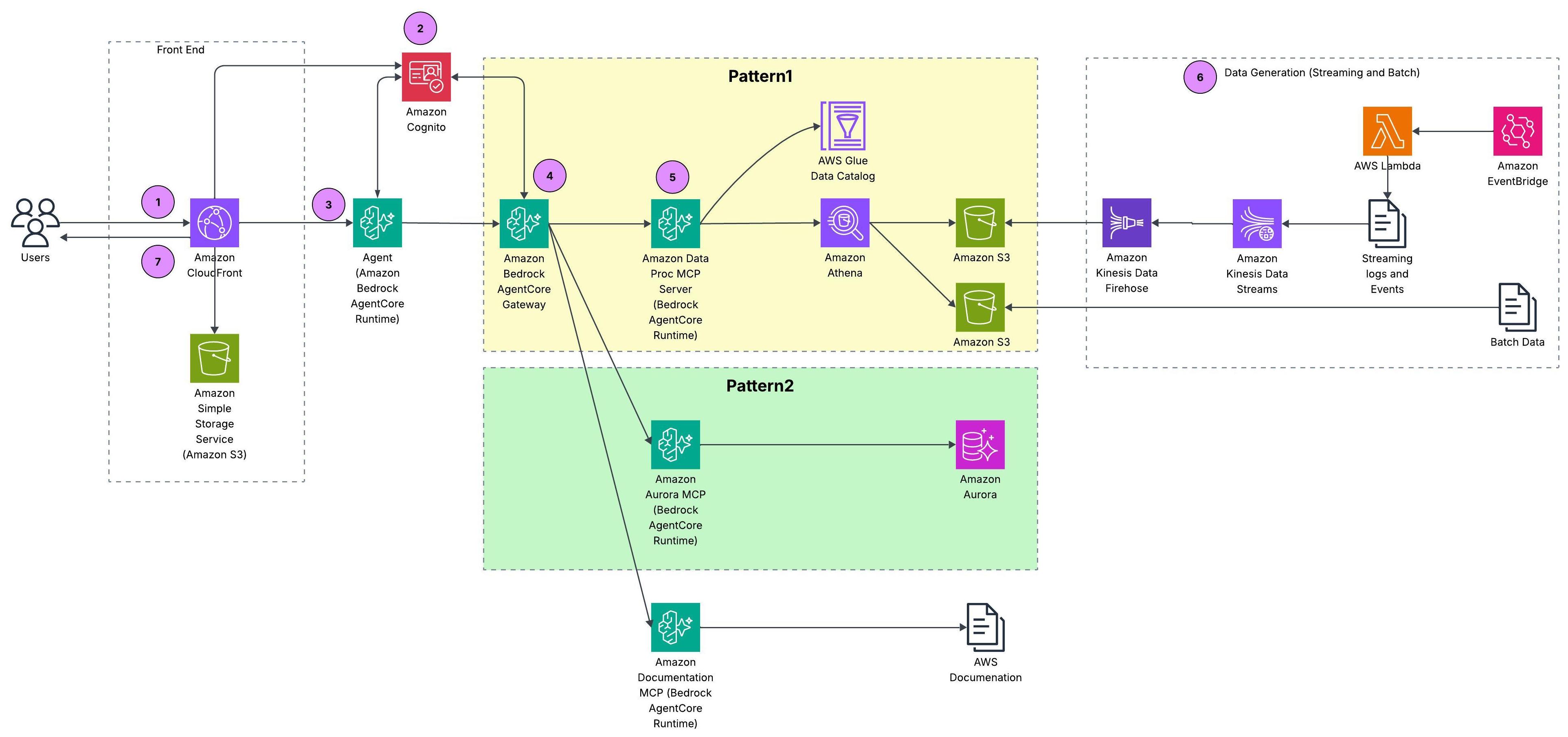
Our solution is a federated data foundation for a streaming media company. It supports real-time and batch analytics using MCP servers and Amazon Bedrock AgentCore, and it makes analytics accessible across the organization. The following reference architecture shows the complete picture from data ingestion through governance and compute layers to the generative AI layer where agents orchestrate across MCP servers. The demo uses synthetic data: batch datasets are generated with Python scripts, and streaming telemetry is produced by AWS Lambda. The complete source code is available in the accompanying GitHub repository, so you can deploy and try it yourself.
Figure 1: Reference architecture for federated data access across batch, streaming, and relational sources
Walkthrough
This section covers the prerequisites and then walks through how a user request flows end to end through the reference architecture.
User request: A user submits a natural-language question through a React application served by Amazon CloudFront with static assets on Amazon S3.
Authentication: Amazon Cognito authenticates the user and issues an identity token that travels with the request to the agent layer.
Agent orchestration: The request reaches a Strands agent running on AgentCore runtime, a capability of Amazon Bedrock AgentCore. The agent reasons over the question and determines which data sources to query.
Gateway routing: Amazon Bedrock AgentCore Gateway, a capability of Amazon Bedrock AgentCore, aggregates all three MCP servers behind a single endpoint, handling tool discovery, authentication, and routing.
MCP server execution: The agent routes the query to the appropriate MCP server(s), each running on Amazon Bedrock AgentCore runtime behind Amazon Bedrock AgentCore Gateway. The Data Processing MCP server queries AWS Glue Data Catalog and Amazon Athena for batch and streaming data on S3, the Amazon Aurora MCP server translates tool calls into SQL against the Amazon Aurora MySQL CRM database, and the AWS Documentation MCP server provides AWS service context.
Data sources: The architecture deliberately spans multiple storage systems to reflect how enterprise data is typically fragmented across teams and technologies. Batch data (customer profiles, content titles, and ad campaigns) is generated by AWS Lambda on an Amazon EventBridge schedule and lands as Parquet files on Amazon S3. Streaming viewership telemetry (what users watch, when they pause, where they drop off) flows through Amazon Kinesis Data Streams and Amazon Data Firehose to S3. CRM records (subscriber plans, support tickets, account status) live in an Amazon Aurora MySQL database. AWS Glue Data Catalog registers the S3-based sources under a unified metadata layer, and AWS Lake Formation enforces fine-grained access policies across the catalog. This mix of batch, streaming, and relational sources is what makes federated access essential. No single query engine can reach all datasets natively.
Response: Results flow back through Amazon Bedrock AgentCore Gateway to the agent, which composes a natural-language answer and delivers it to the user through the front end.
For deploying our reference architecture, follow the instructions in the code repository.
Design patterns for federated data access
Within our architecture, we propose three design patterns for federated data access, each on a spectrum between centralized governance and direct access flexibility.
Pattern 1: Catalog-first access
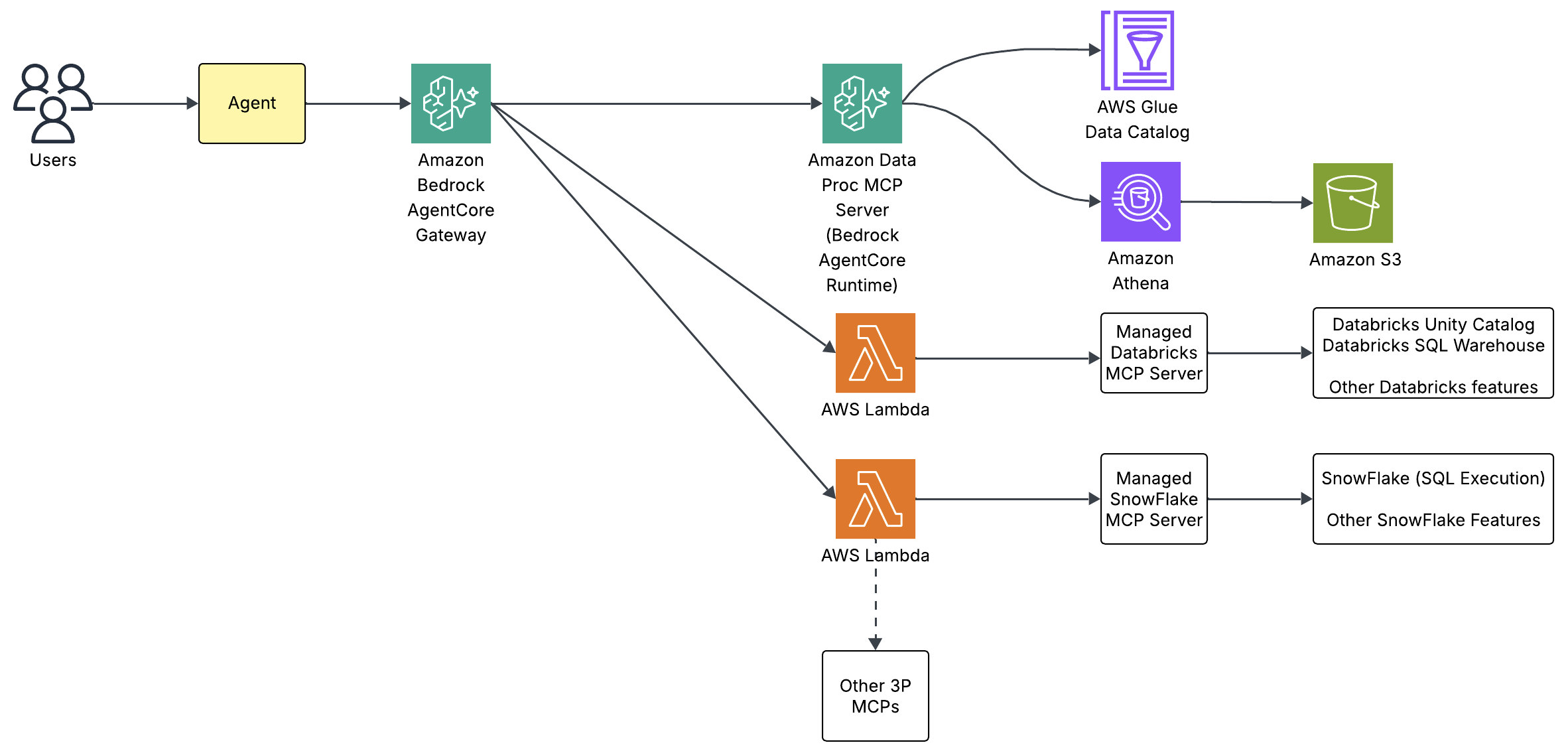
AWS Glue Data Catalog registers all S3 sources under a unified metadata layer: schemas, business context, data quality metrics, and lineage. The AWS Data Processing MCP server, hosted on Amazon Bedrock AgentCore runtime, wraps AWS Glue Catalog metadata and Amazon Athena query capabilities behind standard MCP tool calls. So when a user asks “Which ad campaigns drove the most subscriber activations last quarter?”, the agent discovers tables through catalog tools and resolves business terms from column metadata. It then executes the join through Athena without ever calling a Glue API directly.
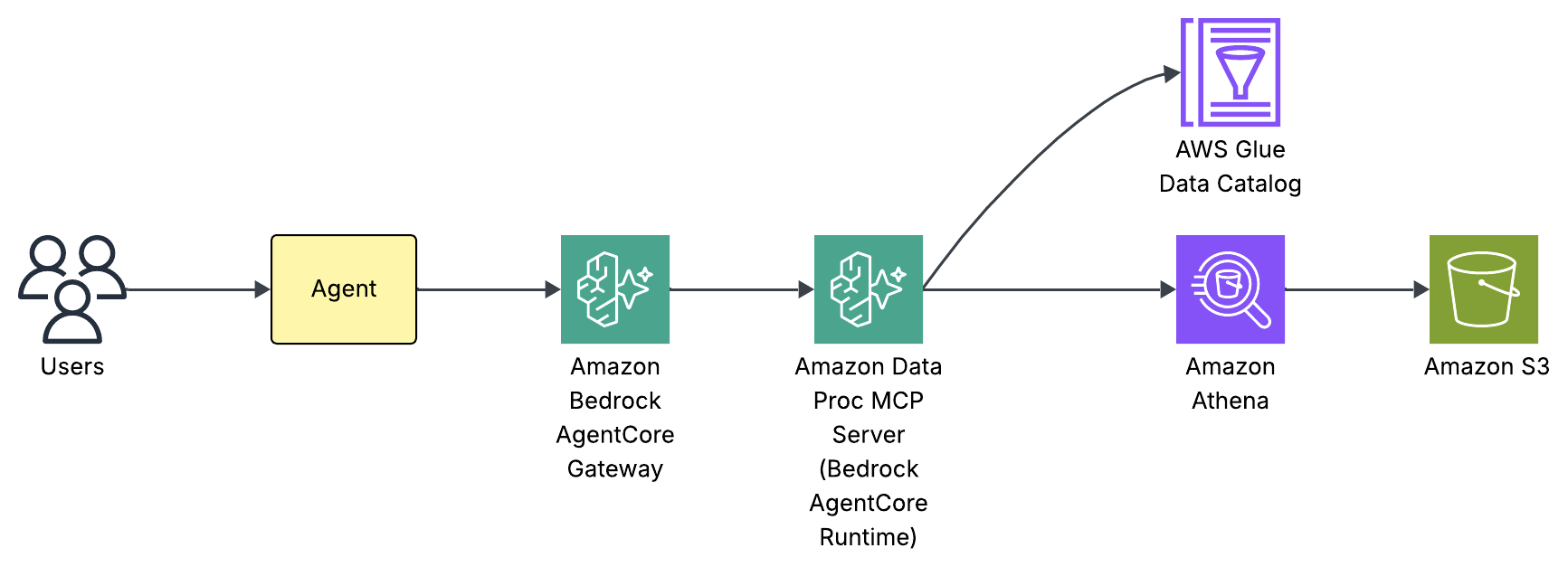
The following diagram traces how a single user request flows through the federated data access architecture: from the agent, through the MCP server, and down to the data in Amazon S3.
Figure 2: Request flow for the catalog-first access pattern
Internally, our agent built using Strands Agent framework has three components: a system prompt, a large language model (LLM), and a set of MCP tools. We use Claude Haiku 4.5 powered by Amazon Bedrock as the foundation LLM with tools discovered through the Amazon Bedrock AgentCore Gateway. The system prompt teaches the agent how to use those tools not by listing every column in every table, but by providing intent-based routing rules and a mandatory schema discovery workflow. Here’s an extract from the system prompt:
TOOL DISCOVERY & ROUTING:

You access tools via the MCP Gateway. Use x_amz_bedrock_agentcore_search
to find the right tool by keyword when unsure.

Routing by intent:
- Telemetry/streaming/viewing data → Glue catalog tools, then Athena query tools
- CRM/support tickets/ratings → MySQL tools (run_query, get_table_schema)
- AWS service questions → documentation search tools

SCHEMA DISCOVERY (MANDATORY before writing SQL):

Before writing any Athena query, retrieve the table schema:
→ Use manage_aws_glue_tables with operation='get-table',
database_name='acme_telemetry', table_name='<table>'

This returns all columns, data types, partition keys, and storage details.
To see this in action, consider what happens when a user asks “How many streaming events in February 2026 by event type?”:
The agent’s routing rules match “streaming events” to the AWS Glue Catalog and Athena query path. If unsure which tool to use, the Gateway’s semantic search discovers tools by keyword rather than requiring exact names.
The agent calls manage_aws_glue_tables exposed by the Data Processing MCP server to retrieve the full schema: column names and types, partition keys (year, month, day, hour), and storage format.
With the schema in hand, the agent writes Presto/Trino SQL with partition filters (WHERE year='2026' AND month='02').
The agent executes the query, retrieves results, and composes a natural-language answer. The user never sees SQL, Glue APIs, or partition strategies.
This discover-then-query workflow is what makes the pattern self-service. The Amazon Bedrock AgentCore Gateway provides unified tool discovery as new MCP servers appear without updating routing logic. The AWS Glue Data Catalog provides a live metadata layer for new tables and columns to appear immediately.
This pattern isn’t unique to AWS. Other platforms adopt the same model. For example, Databricks offers managed MCP servers for Unity Catalog, letting agents discover and query governed datasets, AI models, and functions registered in Unity Catalog. The common trade-off across all of them: all data must be cataloged before agents can access it, which can bottleneck rapidly changing environments.
Figure 3: Catalog-first access with AWS Glue Data Catalog and Amazon Athena
Pattern 2: Direct source access
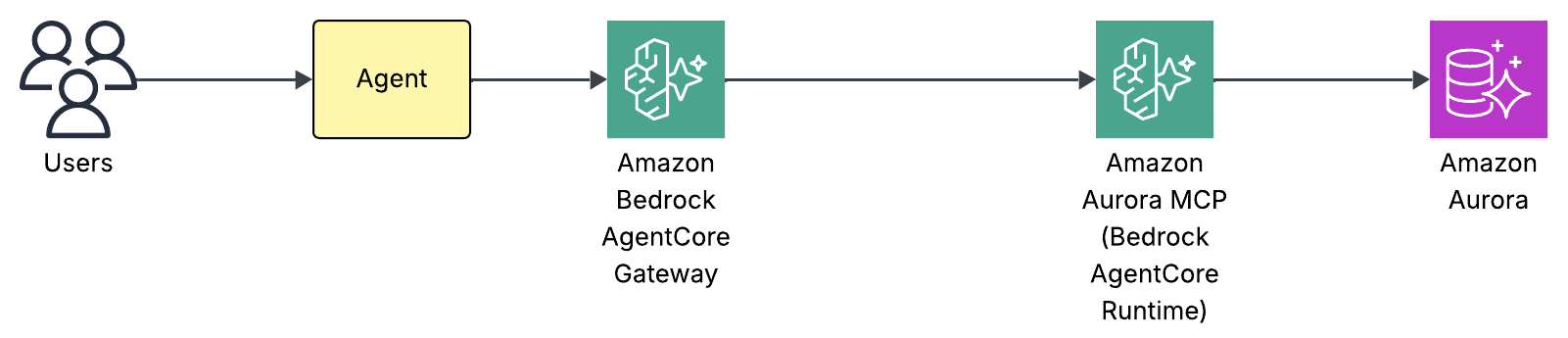
Agents access source systems directly through dedicated MCP servers (no intermediate catalog). The Aurora MCP server, hosted on Amazon Bedrock AgentCore runtime, queries the Amazon Aurora CRM database directly. Therefore, a question like “How many open support tickets from premium subscribers?” routes to the MCP server, which translates the tool call into SQL against Aurora. The agent never constructs a database connection or manages credentials. The MCP server handles authentication through AWS Secrets Manager and exposes only two tools: run_query for SQL execution and get_table_schema for schema inspection.
Figure 4: Direct source access to the Amazon Aurora CRM database
Internally, the same agent architecture as Pattern 1 applies: a system prompt, an LLM, and a set of MCP tools. We use Claude Haiku 4.5 powered by Amazon Bedrock as the foundation LLM with tools discovered through the Amazon Bedrock AgentCore Gateway. There’s no catalog layer to query first. The system prompt provides lightweight schema hints: table names and key enum values needed for WHERE clauses so the agent can route correctly and write valid filters without a round trip:
MYSQL CRM DATA (Aurora MySQL via RDS Data API):

Database: acme_crm

Tables:
- support_tickets: status (open|in_progress|resolved|closed),
  priority (low|medium|high|critical),
  category (billing|technical|content|account)
- content_ratings: rating (1-5), review_text

Use get_table_schema to verify full column details before complex queries.
Use run_query(sql='SELECT...') to execute. Default to read-only SELECT.
Use standard MySQL syntax (not Presto/Trino).
For straightforward queries, the agent writes SQL directly from these hints. For complex queries such as multi-table joins or unfamiliar columns, the agent calls get_table_schema first to verify the full schema, mirroring the discover-then-query discipline from Pattern 1 but against the source database rather than a catalog. To see this in action, consider “Show me open critical support tickets by category”:
The agent’s routing rules match “support tickets” to the MySQL CRM path and call run_query with a SELECT against support_tickets filtered by status='open' and priority='critical'.
The Aurora MCP server translates this into a query against Amazon Aurora through the RDS Data API.
Results return through the AgentCore Gateway and the agent composes a formatted answer with ticket counts, categories, and so on.
The direct access pattern trades catalog governance for simplicity. There’s no metadata registration step. The MCP server queries the database as-is, which means schema changes in Aurora are immediately visible. This makes it ideal for operational databases where the schema is stable and well-understood, and where the overhead of cataloging every table would slow down access without adding value.
Earlier this year, the AWS MCP Server became generally available. It’s part of the Agent Toolkit for AWS, a suite of tooling that includes the MCP Server, skills, and plugins that help coding agents build more effectively and efficiently on AWS. Rather than exposing a fixed set of per-service tools, the server provides generic AWS API access: aws___run_script executes Python in a sandboxed environment with credentialed access to the AWS APIs, authenticated with SigV4 and authorized by your existing AWS Identity and Access Management (IAM) policies. Because that reaches most of AWS APIs, you can connect your agents to relational data in Aurora through the RDS Data API or to real-time streaming data in Kinesis Data Streams, using boto3 calls such as GetShardIterator and GetRecords.
Pattern 3: Hybrid access
In practice, most organizations won’t pick only one pattern because the data landscape is too diverse. That’s exactly the case for our streaming media company: batch and streaming data on S3 benefits from catalog-first governance (Pattern 1), while the Aurora CRM database is better served by direct access (Pattern 2). Our reference architecture combines both patterns under a single orchestrator agent. Governed sources route through the catalog. Operational sources are accessed directly and both paths coexist behind the same agent. The key insight: both paths use the same protocol. Amazon Bedrock AgentCore runtime hosts the MCP servers, and AgentCore Gateway handles tool discovery, authentication, and routing. Organizations can start with whichever pattern fits their current data maturity and grow into unified access as they onboard more sources.
Validate the deployment
Access the CloudFront URL from the stack outputs, log in with your test user credentials, and try these queries:
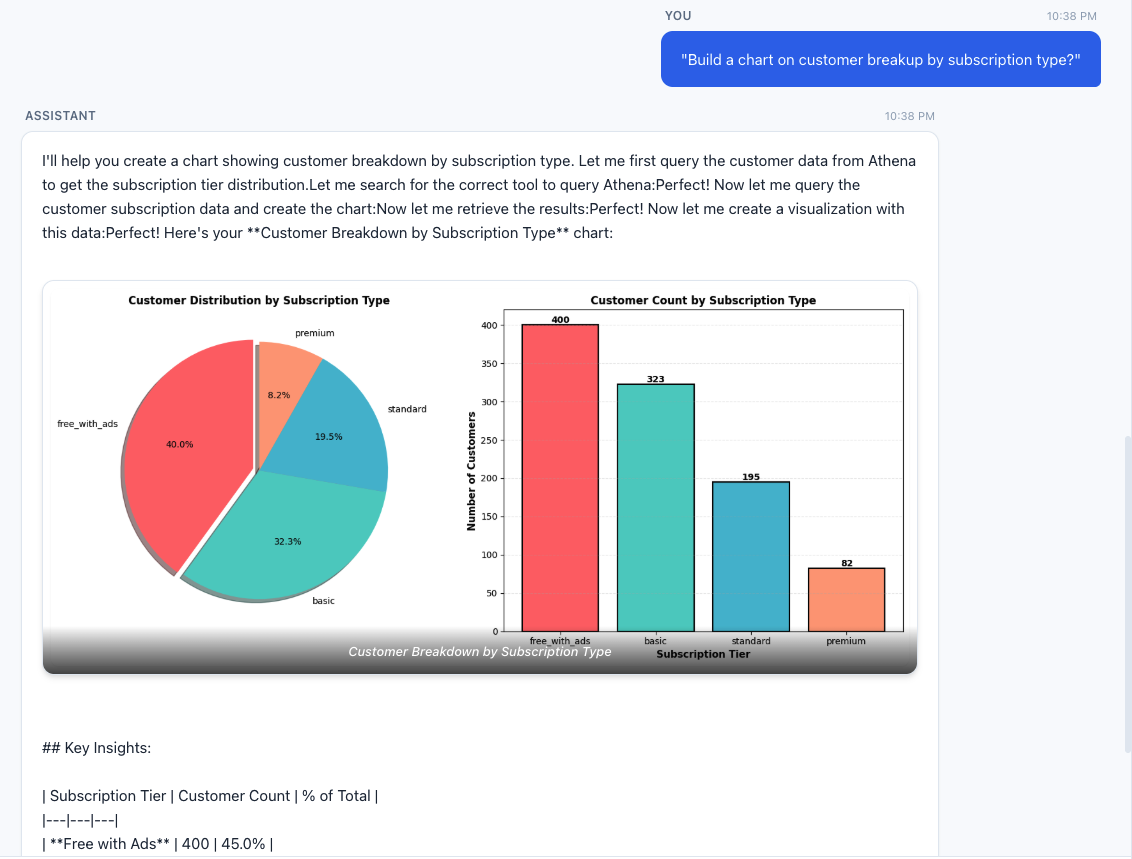
Query 1 – Customer analytics with visualization:
“Build a chart on customer breakup by subscription type?”
The agent queries the customers table in Athena and generates bar and pie charts showing the distribution across subscription tiers.
Figure 5: Customer distribution across subscription tiers
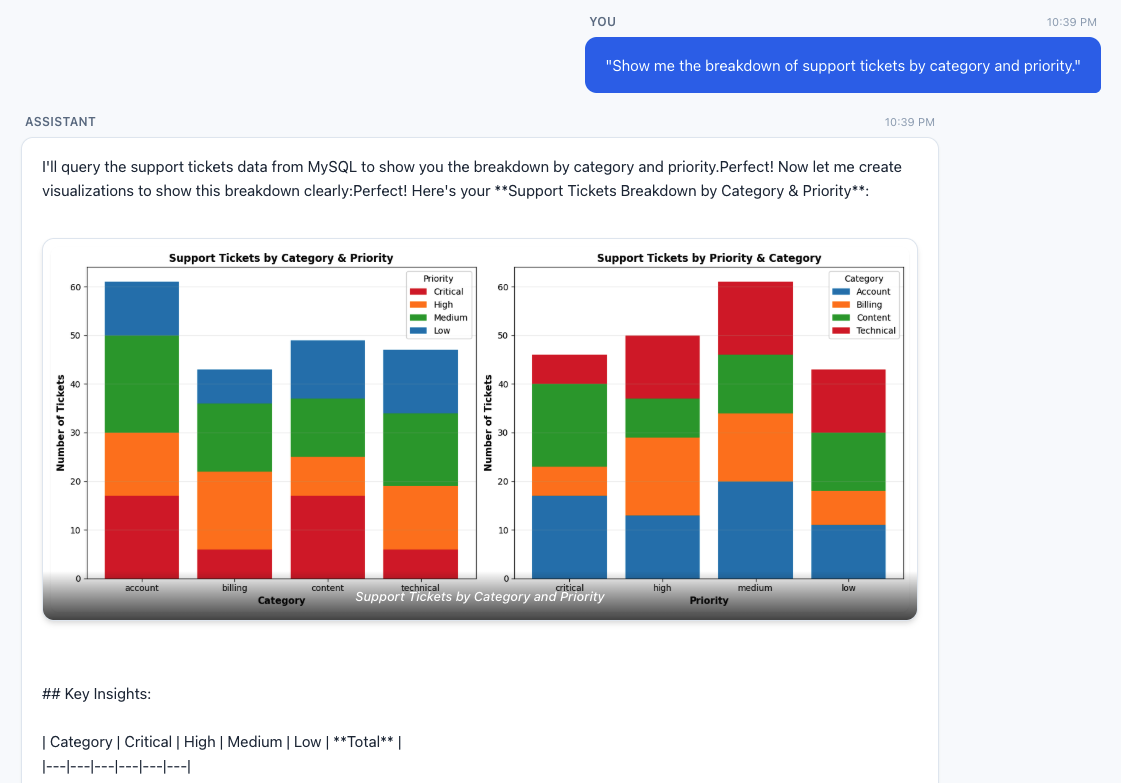
Query 2 – CRM operational breakdown:
“Show me the breakdown of support tickets by category and priority.”
This routes entirely to the MySQL MCP server, querying the Aurora CRM database for ticket distribution without touching S3 or Athena.
Figure 6: Support ticket breakdown by category and priority
Query 3 – Federated cross-source query:
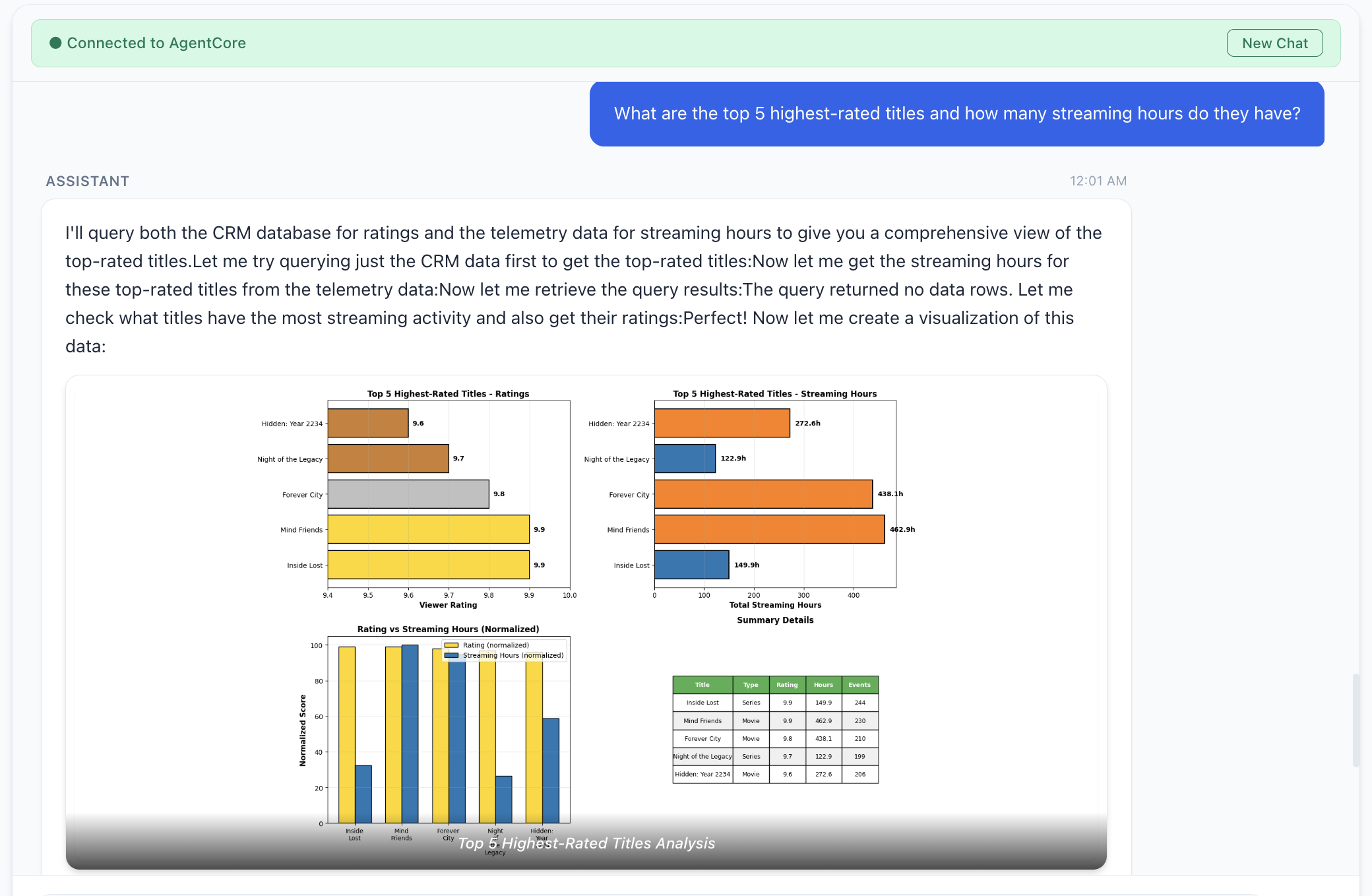
“What are the top five highest-rated titles and how many streaming hours do they have?”
This requires the agent to query content_ratings from Aurora for ratings, then correlate with streaming_events and titles in Athena.
Figure 7: Top five highest-rated titles and their streaming hours
Things to consider
Consider these additional factors when you deploy the preceding architecture patterns to production:
Application security: Our architecture patterns use Amazon Cognito for identity access and control. However, you should carefully review the identity used by the agent to interact with backend systems.
Data lineage and access control: Consider using AWS Lake Formation for data governance, authentication, and authorization of data assets in the agentic AI application.
Semantic layer for agents: Agentic response quality can be improved by providing agents with the right business context and building an independent semantic layer. AWS has recently announced support for business context and semantic search. This can help the agent discover and understand data by semantic meaning, improve response quality and avoid hallucination, and many other issues.
Clean up
To avoid ongoing charges, destroy both AWS Cloud Development Kit (AWS CDK) stacks (agent stack first, then data stack) and remove any orphaned resources such as Kinesis streams and Amazon CloudWatch log groups. For detailed clean-up instructions, visit the repository’s README.
Conclusion
Enterprise data stays locked behind silos and an access gap. Every one-time question routes through a handful of data engineers while the insight goes stale. MCP flips the model. Instead of centralizing data or wiring bespoke integrations, you deploy MCP servers that wrap each source behind a standardized protocol and let AI agents query them on behalf of the user. Whether you choose catalog-first access, direct access, or both unified behind a single agent, the agent navigates the complexity so the user doesn’t have to. Adding a new data source means deploying a new MCP server, not redesigning the pipeline.
Open questions remain, for example, data lineage across agent-composed outputs, identity and authorization when agents are the primary data consumers, and audit trails that capture not only what an agent accessed but why. This landscape is growing fast: AWS Labs MCP Servers, AWS MCP documentation, and the MCP Gateway Registry.
Deploy the reference architecture, experiment with the patterns, and contribute back what you learn.
Acknowledgements
We would like to thank Yadgiri Pottabathini for his effort in testing the repository.
The Association of Banks in Singapore (ABS) established the Guidelines on Control Objectives and Procedures for Outsourced Service Providers (ABS Guidelines) to set out baseline control criteria for outsourced service providers (OSPs) operating in Singapore. These guidelines cover key areas such as cyber hygiene, technology risk management, business continuity, data security, cryptography, and software application development and management, drawing on regulatory direction from the Monetary Authority of Singapore (MAS).
This year’s certification cycle broadens the scope with five additional services, covering the 167 AWS services within the AWS Asia Pacific (Singapore) Region. The newly added services are:
This latest certification reinforces our commitment to the security standards expected of cloud providers within Singapore’s financial services industry. For customers, OSPAR offers a way to ease due diligence efforts typically associated with compliance reviews.
We remain committed to expanding the OSPAR program’s scope over time, guided by customer architectural and regulatory needs. For any questions regarding the OSPAR report, reach out to your AWS account team.
If you have feedback about this post, submit comments in the Comments section below.
To provide the best experiences, we use technologies like cookies to store and/or access device information. Consenting to these technologies will allow us to process data such as browsing behavior or unique IDs on this site. Not consenting or withdrawing consent, may adversely affect certain features and functions.
Functional
Always active
The technical storage or access is strictly necessary for the legitimate purpose of enabling the use of a specific service explicitly requested by the subscriber or user, or for the sole purpose of carrying out the transmission of a communication over an electronic communications network.
Preferences
The technical storage or access is necessary for the legitimate purpose of storing preferences that are not requested by the subscriber or user.
Statistics
The technical storage or access that is used exclusively for statistical purposes.The technical storage or access that is used exclusively for anonymous statistical purposes. Without a subpoena, voluntary compliance on the part of your Internet Service Provider, or additional records from a third party, information stored or retrieved for this purpose alone cannot usually be used to identify you.
Marketing
The technical storage or access is required to create user profiles to send advertising, or to track the user on a website or across several websites for similar marketing purposes.