Once again there is a brand-new release under the tree from the
Ruby programming-language project: Ruby 4.0
has been released with many new features and improvements. Notable
changes include the experimental Ruby Box
feature for in-process isolation of classes and modules, a new
just-in-time compiler called ZJIT, and improvements to Ruby’s
parallel-execution mechanism (Ractor). There are a number of language
changes as well. See the documentation
for Ruby 4.0 for more.
Security updates have been issued by Fedora (httpd, retroarch, and roundcubemail), Oracle (container-tools:rhel8, grafana, httpd, kernel, python3.12, python39:3.9, thunderbird, and uek-kernel), and SUSE (cheat, go-sendxmpp, and kernel).
Managing and scaling data streams efficiently is a cornerstone of success for many organizations. Apache Kafka is a leading platform for real-time data streaming, offering unmatched scalability and reliability. However, setting up and scaling Kafka clusters can be challenging, requiring significant time, expertise, and resources. Amazon Managed Streaming for Apache Kafka (MSK) helps you build and run production applications on Apache Kafka without needing Kafka infrastructure management expertise or having to deal with the complex overhead associated with setting up and running Apache Kafka on your own.
Amazon MSK Provisioned supports both Standard brokers and Express brokers. Express brokers are designed for higher throughput, faster scalability, and lower operational overhead, while Standard brokers offer more granular control and configuration flexibility. While Amazon MSK significantly reduces cluster management overhead, teams still perform routine tasks such as topic management, partition management, and implementing specific configurations to meet their business requirements.
To further simplify these day-to-day operations, you can use Kiro Command Line Interface (CLI) along with the MSK Model Context Protocol (MCP) server for a more intuitive approach to cluster management. These tools enable teams to perform administrative tasks and operational activities using natural language commands. Whether you’re managing topics, monitoring cluster health, or implementing specific configurations, the ability to use plain English commands makes these tasks more accessible to both experienced administrators and developers new to Kafka.
In this post, we demonstrate how Kiro CLI and the MSK MCP server can streamline your Kafka management. Through practical examples and demonstrations, we show you how to use these tools to perform common administrative tasks efficiently while maintaining robust security and reliability.
Understanding the Model Context Protocol advantage
The MCP is an emerging open standard that defines how artificial intelligence (AI) agents can securely access and interact with external tools, data sources, and services. Rather than requiring developers learn intricate API syntax across multiple services, MCP enables AI assistants to understand your environment contextually and provide intelligent guidance. A Kiro CLI agent is an AI-powered assistant in the command-line interface that understands your code and environment to execute tasks, generate code, and automate workflows through natural language interactions. Together, Kiro CLI and the Model Context Protocol (MCP) enable teams to manage their MSK clusters using natural language, making cluster administration more intuitive and accessible.
The Amazon MSK MCP Server provides essential cluster administration capabilities including describing clusters, updating configurations, and monitoring broker health status. By combining these capabilities with Kiro CLI’s ability to interact with native Kafka command-line tools, teams gain comprehensive visibility into their Apache Kafka environment. Through this unified approach, users can manage both control plane operations via the MCP server and data plane operations, like topic management, through Kiro CLI’s interface with Kafka tools. This integration enables teams to monitor, manage, and optimize their clusters through conversational interactions while maintaining enterprise-grade security through AWS Identity and Access Management (IAM) and fine-grained access controls.
Prerequisites
For this walkthrough, you should have the following prerequisites:
An AWS account – If you don’t have an account, you can create one.
AWS CLI installed and configured on your computer.
Amazon MSK cluster. You could use this Amazon CloudFormation template to deploy one if you done have one already in your account.
Configure Kiro CLI with Amazon MSK MCP server
Installation and configuration The following section covers the steps required to install and configure Amazon MSK MCP server.
Install required dependencies Complete the following steps to install required dependencies:
Install the uv package manager if you haven’t already:
# macOS/Linux
curl -LsSf  | sh

# Windows
powershell -c "irm  | iex“
Install Python 3.10 or newer:
uv python install 3.10
Configure the MCP server Complete the following instructions to set up Kiro CLI on your host machine and access the Amazon MSK MCP server. Configure the Amazon MSK MCP server in your Kiro CLI configuration. Edit the MCP configuration file at ~/.aws/.kiro/mcp.json:
MacOS Installation
For MacOS, the mcp.json file should be as follows:
For further details on installation, refer to the Installation section in the Amazon MSK MCP server README.md.
Start Kiro CLI to verify the MCP server is properly configured using the following command: kiro-cli
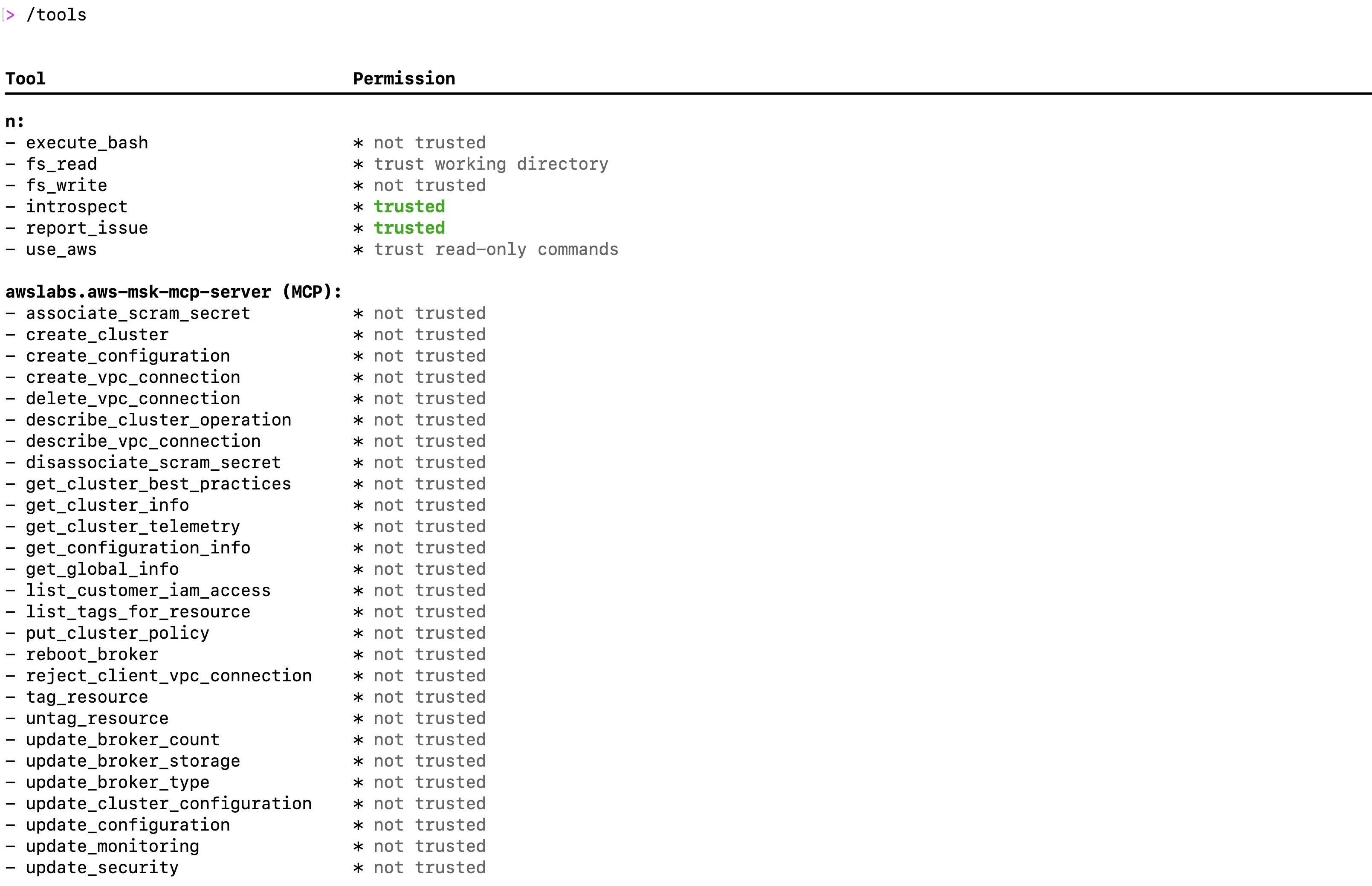
Once logged into Kiro CLI, type the following command to check all the MSK mcp server tools are available as shown in the following screenshot: /tools
Installing and configuring Kafka CLI
To perform data plane operations on your Amazon MSK cluster, you need the Kafka command-line tools configured correctly. In the following video demonstration, we show how developers and administrators can use Kiro CLI to streamline the installation and configuration of Kafka command-line tools, enabling seamless interaction with their MSK cluster through natural language commands.
Evaluate cluster best practices
Maintaining a healthy and efficient Apache Kafka cluster requires adherence to established best practices, from proper replication factors to optimal resource utilization. Amazon MSK implements many of these best practices by default, but ongoing monitoring and adjustment are essential for production workloads. In the following demonstration, we show how Kiro CLI can help you evaluate your cluster’s configuration against recommended best practices, identify potential issues, and receive actionable recommendations for optimization. Watch the following demo video as we use natural language queries to assess MSK clusters against AWS recommended best practices and identify topics with replication factors not configured according to best practices and fix them.
Responding to health notifications: Optimizing topic configurations for high availability
Amazon MSK’s health notifications serve as crucial alerts to maintain optimal cluster performance and reliability. For customers using MSK Provisioned with Standard brokers, they may receive notifications about critical configuration parameters such as MinISR and replication factor settings that could impact application resilience. In this section, we demonstrate how Kiro CLI can help you quickly respond to a health notification regarding MinISR (Minimum In-Sync Replicas) and replication factor configurations. Watch as we use natural language commands to identify topics with suboptimal settings, understand their current configurations, and implement the recommended changes to confirm high availability during infrastructure maintenance or recovery events. This real-world scenario showcases how Kiro CLI simplifies the process of maintaining robust Kafka operations while following AWS best practices.
Managing cluster-level configurations: Streamlining parameter updates with natural language
Apache Kafka clusters often require configuration adjustments to meet specific security requirements and use cases. While Amazon MSK provides default configurations, there are situations when you need to customize security parameters like allow.everyone.if.no.acl.found to implement proper access controls and strengthen your cluster’s security posture. In this demonstration, we show how Kiro CLI with MSK MCP server simplifies the process of updating cluster-level configurations.
Instead of opening multiple CLI commands or console screens, you see how natural language instructions can be used to understand current security settings, evaluate the impact of changes, and implement configuration updates seamlessly across your MSK cluster. By setting allow.everyone.if.no.acl.found to false, we confirm that explicit ACL permissions are required for all operations, enhancing the security of your Kafka deployment.
Conclusion
In this post, we demonstrated how Kiro CLI and MSK MCP server make Apache Kafka cluster management more accessible through natural language commands. By transforming complex Kafka operations into simple conversational interactions, these tools enable both experienced administrators and newcomers to efficiently manage their MSK clusters. From routine tasks to addressing configuration challenges, this approach reduces operational complexity and allows teams to focus more on developing innovative streaming applications.
About the authors
Kalyan Janaki is Senior Big Data & Analytics Specialist with Amazon Web Services. He helps customers architect and build highly scalable, performant, and secure cloud-based solutions on AWS.
Aarjvi Desaiis a Technical Account Manager at Amazon Web Services, based in San Francisco Bay Area, where she helps customers solve cloud challenges and build scalable, reliable solutions. Her areas of focus include cloud technologies, architecture best practices, and operational excellence.
Sandhya Khanderia is Sr. Technical Account Manager and Data analytics specialist. She works with AWS customers and provides ongoing support and technical guidance to help plan and build solutions using best practices and proactively keep customers’ AWS environments operationally healthy.
Ankit Mishra is a Senior Solutions Architect at Amazon Web Services, where he supports healthcare and life sciences customers around the globe. He is passionate about helping organizations design and build secure, scalable, reliable, and cost-effective cloud solutions. Outside of work, Ankit enjoys spending quality time with his young daughters. Feel free to connect with him on LinkedIn.
Another year has reached its conclusion. That can only mean one thing: the
time has come to take a look back at the
predictions we made in January and evaluate just how badly they turned
out. Much to our surprise, not all of our predictions were entirely
accurate. It has been a wild year in the Linux community and beyond, to
say the least.
The systemd v259
release was announced on December 17, just three months after
v258. It is a more modest release but still includes a number of
important changes such as a new option for the run0 command
(an alternative to sudo), ability to mount user home directories from the host in virtual
machines, as well as under-the-hood changes with dlopen()
for library linking, the ability to compile systemd with musl libc,
and more.
Security updates have been issued by AlmaLinux (container-tools:rhel8, grafana, opentelemetry-collector, and thunderbird), Red Hat (kernel), and SUSE (cheat, libsoup, mariadb, mozjs52, python310, python315, qemu, rsync, and zk).
Urban VPN Proxy targets conversations across ten AI platforms: ChatGPT, Claude, Gemini, Microsoft Copilot, Perplexity, DeepSeek, Grok (xAI), Meta AI.
For each platform, the extension includes a dedicated “executor” script designed to intercept and capture conversations. The harvesting is enabled by default through hardcoded flags in the extension’s configuration.
There is no user-facing toggle to disable this. The only way to stop the data collection is to uninstall the extension entirely.
[…]
The data collection operates independently of the VPN functionality. Whether the VPN is connected or not, the harvesting runs continuously in the background.
[…]
What gets captured:
Every prompt you send to the AI
Every response you receive
To provide the best experiences, we use technologies like cookies to store and/or access device information. Consenting to these technologies will allow us to process data such as browsing behavior or unique IDs on this site. Not consenting or withdrawing consent, may adversely affect certain features and functions.
Functional
Always active
The technical storage or access is strictly necessary for the legitimate purpose of enabling the use of a specific service explicitly requested by the subscriber or user, or for the sole purpose of carrying out the transmission of a communication over an electronic communications network.
Preferences
The technical storage or access is necessary for the legitimate purpose of storing preferences that are not requested by the subscriber or user.
Statistics
The technical storage or access that is used exclusively for statistical purposes.The technical storage or access that is used exclusively for anonymous statistical purposes. Without a subpoena, voluntary compliance on the part of your Internet Service Provider, or additional records from a third party, information stored or retrieved for this purpose alone cannot usually be used to identify you.
Marketing
The technical storage or access is required to create user profiles to send advertising, or to track the user on a website or across several websites for similar marketing purposes.
 Kalyan Janaki is Senior Big Data & Analytics Specialist with Amazon Web Services. He helps customers architect and build highly scalable, performant, and secure cloud-based solutions on AWS.

 Ankit Mishra is a Senior Solutions Architect at Amazon Web Services, where he supports healthcare and life sciences customers around the globe. He is passionate about helping organizations design and build secure, scalable, reliable, and cost-effective cloud solutions. Outside of work, Ankit enjoys