Post Syndicated from LastWeekTonight original https://www.youtube.com/shorts/dfguT_tvyGs
Introducing Worker Previews: isolated preview environments for every change your agent makes
Post Syndicated from Yomna Shousha original https://blog.cloudflare.com/worker-previews/
Nothing is worse than testing out a change that works in staging, only to see it behave differently in production. That’s why we wanted to give you an environment that’s as close to production as possible — so you can battle-test your changes and make sure they behave exactly as you expect them to.
Agents are helping us push more lines of code than ever before, and larger changes mean more ground needs to be tested ahead of release. Ideally, that testing is done in a way that doesn’t slow agents down, but gives them the tools to take on more of the development lifecycle.
That’s why today we’re launching Worker Previews. Each Git branch gets a production-like place to run, with its own code, configuration, URL, observability, and state.
So now, for every change in your codebase, you can:
- Deploy an isolated Preview with
npx wrangler preview, using its own variables, secrets, and bindings, separate from production configuration and traffic. - Share a stable Preview URL for the branch so that every push updates the same running Preview where you can send requests, click through the UI, and test runtime responses.
- Isolate Durable Objects and Containers per branch, keeping state changes, sessions, memory, migrations, and concurrent tests scoped to that Preview.
- Inspect logs, errors, metrics, and traces for that Preview to confirm the change works, catch failures, push a fix, and verify it before production sees it.
- Start from the Preview configuration you set, so each Preview begins with a copy of the variables, secrets, bindings, and settings you define — just like a code branch starts from
main. We call this the base configuration. - Override a Preview’s configuration when needed, like pointing it at its own database or test API key for migrations — without changing production, the base, or other Previews’ configuration.
- Serve Preview URLs on a custom domain so that auth providers, cookies, cross-origin resource sharing (CORS), and OAuth redirects work the same way they will in production.
The result is a pre-production feedback loop for every branch. Push your change to a branch, test behavior, inspect performance — before you merge to production.
This enables an Agent Development Lifecycle (ADLC) where each change is atomic, independently deployable, observable, and revisable. And it gives agents and humans the evidence they need to self-improve: catch what failed, push a fix, and verify the next deployment before it hits production.
Every Git branch gets its own environment
When you start work on a new feature, the first thing you do is branch off of main. You get your own copy of the code and make your changes without affecting anything in production.
Worker Previews extend that same model beyond code. Each branch gets its own isolated environment and URL. You can run hundreds of Previews at the same time — each operating independently without affecting other Previews or production.
Production and each Preview have their own configuration — served on their own URL.
When you run npx wrangler preview, the branch gets its own copy of your Previews configuration that you have defined, running on its own URL — all under the same Worker.
In the dashboard, this works like switching branches. Click the breadcrumb next to your Worker's name (it defaults to Production) to see all your Previews:
The dashboard brings every environment into one view. Production sits alongside as many Previews as you need, so contributors can work on separate changes without fighting over a shared staging site. Unlike Wrangler environments, where each environment requires deploying and managing a separate Worker, Previews keep that isolation in one dashboard view.
Each Preview runs as a real version of your Worker. Some changes can only be validated at runtime: an API endpoint has to handle a real request and return the right response. More subjective changes, like a UI update, a new onboarding step, or a different error state, need to be experienced in context before they reach production.
Every Preview has its own isolated and persistent state, with Durable Objects and Containers
For isolation to extend across your application, stateful resources need special treatment. The reason for that is that Durable Objects run on a singleton model. One instance is responsible for a given object ID, and that instance owns its storage.
If a Preview shared the same DO namespace as production, you wouldn't just be reading stale data — you could modify the same instance serving live traffic in real time (scary!).
That is why every time you run npx wrangler preview, Cloudflare automatically creates a new Durable Object namespace and Container application for that Preview — so that a failed migration or a bad schema change stays contained to that branch and that branch only.
All you need to do is export the class, add its migration, and access it through ctx.exports:
In production, ctx.exports.Counter resolves to the production namespace, while in a Preview, it resolves to that Preview’s namespace.
You now have an entire playground to experiment with. Take Sandboxes, for example, where milliseconds of improvement to startup time can make or break the experience. If you have been trying to improve cold-start performance, you can run different configurations across branches at the same time, compare their cold and warm performance side by side, and find the best setup faster.
Test, observe, and revise each Preview (or have your agent do it)
Now that each branch runs at its own URL in an isolated environment with its own state, you can enter the feedback loop and start battle-testing every change before it reaches production.
You can send traffic to the Preview URL however you normally would — from your terminal, probe from CI, an agent, or by clicking through it yourself. Once that traffic starts flowing, every Workers Observability tool you’re already used to is available, scoped to each individual Preview.
As each request hits the Preview, Workers Observability traces its full lifecycle in a waterfall, including fetch calls, binding operations, and handler invocations. So when something fails, you can follow exactly what happened without sorting through production traffic or signals from other changes.
Observability for Previews looks just like you're already used to for production Workers. Select your Preview from the breadcrumb and open the Observability tab to see its events, errors, and traces:
To give your agents even more control, you can have them open the Preview URL in a headless browser, click through a login flow step by step, and capture a screenshot or record the entire session as replayable DOM events – with Browser Run.
Below is an example where an agent opens the Preview, captures what was rendered, and connects a failed request to Workers Observability events from the same run.
A reviewer can watch the session in real time with Live View or step in with Human in the Loop when the automation needs judgment.
If something fails, you see it from both angles: what rendered and what happened at runtime.
That gives the agent enough evidence to keep the pre-production loop running autonomously: deploy, open the URL with Playwright MCP, click through, query the traces through the Workers Observability MCP server, patch, redeploy, and verify. Every iteration stays scoped to the branch.
Configure a base configuration for Previews once, then override as needed
Just like you wouldn't reconfigure your code from scratch every time you branch, you shouldn't have to reconfigure your environment either.
You set base configuration for Previews once, in a previews block in your Wrangler configuration file.
In the dashboard under Worker → Settings, you see this inlined as Production and Previews Base. Once the base is set, run npx wrangler preview from any branch to create a Preview. If your Worker is Git-connected through Workers Builds, it happens automatically on push.
You can override any setting for only one Preview — without affecting production, the base, or other Previews.
Preview URLs on your own custom domain, protected with Cloudflare Access
To bring the whole setup even closer to production, your preview URLs can be served from your own custom domain. If your app runs on example.com, a Preview for a login branch could run at feature-login.previews.example.com.
If you want to keep those URLs private, you can protect your Previews with Cloudflare Access and require visitors to sign in first.
Testing the whole system before production
We’ve already been dogfooding Worker Previews inside Cloudflare, most notably to build and test CloudflareOS, our open-source platform for safely connecting agents to company systems.
CloudflareOS lets agents work with services such as Google, GitHub, and Slack through Gatekeepers, which control what those agents can access and change. That makes Gatekeeper changes especially sensitive, because a bug could expose data or permit an action that should never have been allowed.
Some of these bugs only appear when OAuth callbacks, permissions, approval flows, and application state are running together. Because testing each component separately cannot show us how the complete system will behave, we deploy an isolated Preview of CloudflareOS and its Gatekeepers for every change under review. We then run the full workflow, fix what fails, and test it again before merging.
We’re seeing customers use Previews for the same basic reason: some problems only show themselves when the change is actually running.
"Previews gives us the ability to iterate earlier at the edge. For IKEA.com, custom domain support helps us avoid Content Security Policy and cookie issues. We’re especially excited for Service Binding support, which will enable communication between Previews and be a game changer for end-to-end testing across our Worker chain." — Santosh Kumar Dwivedi, Senior Software Engineer, IKEA
"At Supermemory, we use Cloudflare heavily, and Worker Previews are exactly the kind of developer experience improvement we wanted to see. For HTTP flows, we can preview Worker changes before they reach production, including routes backed by Durable Objects, and catch issues earlier without slowing down shipping." — Dhravya Shah, Founder, Supermemory
"Previews is amazing for Inspect [Ramp’s coding agent]. I used it to review and test an Inspect PR on my phone that is making reviewing and testing PRs with Inspect on phones responsive…with Inspect." — Dylan Garcia, Senior Staff Engineer, Ramp
What’s next?
You might be thinking: Didn't Workers already have preview URLs? It’s true, we did. We're now calling those Version URLs because they point to specific uploaded Worker versions. Unlike Worker Previews, they don't create an isolated environment for each branch and could only point to production resources. To learn more and compare the different workflows, check out our docs.
Worker Previews is a big improvement from what we offered before, but there's still more to come. Here's what we're working on next:
- Preview multi-Worker applications. Today, a service binding from a Preview still calls the bound Worker's production deployment. We're working toward keeping the entire request path inside matching Previews.
- Run Queue consumers and Workflows inside each Preview. Today, Previews can send messages to Queues but cannot consume them, while isolating Workflow executions requires separate configuration. We want the entire asynchronous flow scoped to the branch automatically.
- Support long-lived Previews for staging and QA. We've heard from teams in the private beta that not every branch is short-lived — some maintain staging, QA, or per-developer environments that persist across sprints. We want to support these end-to-end, and we want to hear how you use them, so we can get it right.
Worker Previews are available now. Get started with the docs, and if you have a feature request or run into an issue, open an issue on GitHub or join the Cloudflare Developers community on Discord.
Acknowledgements: This project was made possible by the design and implementation efforts of Greg Brimble, Patrick O’Donnell, Matt Price, Korinne Alpers, Max Peterson, Cina Saffary, Josh Wheeler, Thomas Ankcorn, Matt Rothenberg, and Brandon Strittmatter, with leadership from Brendan Irvine-Broque and Dan Carter.
THG Podcast: Counterfactuals – Stainless Steel
Post Syndicated from The History Guy: History Deserves to Be Remembered original https://www.youtube.com/watch?v=R9nC1_khCN8
What Can Happen When Meditation Goes Wrong
Post Syndicated from The Atlantic original https://www.youtube.com/shorts/NMPcdwhUOIA
GPT-6 Astra Breaks an Old Enigma Message
Post Syndicated from Bruce Schneier original https://www.schneier.com/blog/archives/2026/09/gpt-6-astra-breaks-an-old-enigma-message.html
This is pretty amazing:
However, the most astonishing thing about this break is that the GPT6 Astra did it entirely on its own. Carter Leffer only directed GPT6 Astra to see if it could break any of the unbroken Enigma messages published on the Crypto Cellar Research web page. After analysing the unbroken messages on the website, it decided that the most promising message was Nr. 172, MVUEH and it also quickly suspected that the plaintext of Nr. 173, SIPVX, might be related to the plaintext of the unbroken MVUEH message. After trying many different approaches, GPT6 Astra focused on using the repeated place name ROSENOW ROSENOW as a crib. After developing the necessary Python and C++ software for an Enigma simulator and an Enigma Bombe, GPT6 Astra started a thorough break with the ROSENOW crib, which in the end resulted in the correct key and plaintext for the MVUEH message being found.
We are still analysing the GPT6 Astra logs to see exactly how it executed the break. And we are discovering amazing details.
More details at the link.
Join our new UK study on teaching AI ethics and sustainability in lower secondary school
Post Syndicated from Diana Kirby original https://www.raspberrypi.org/blog/join-our-new-uk-study-on-teaching-ai-ethics-and-sustainability-in-lower-secondary-school/
Are you a computing teacher in England, Scotland, or Wales who works with 11- to 14-year-olds and is interested in how young people learn about AI ethics and sustainability?
The Raspberry Pi Computing Education Research Centre is launching an exciting new research study, and we would love you to get involved.

In this study, we will explore teaching about the impacts of AI on people, the environment, and society. Our aims for the study are to:
- Investigate the opportunities and challenges of teaching about AI ethics and sustainability in secondary computing lessons
- Identify pedagogical approaches for developing students’ ethical reasoning, critical thinking, and agency in relation to AI tools
The study involves attending two in-person workshops in Cambridge, co-designing and teaching a unit of work, and taking part in evaluation activities such as surveys and interviews. Where necessary, we can offer support with the costs of attending the workshops, such as travel, accommodation, and supply cover.
Why focus on AI ethics and sustainability?
According to a recent report, in the UK more than half of 8- to 17-year-olds use AI tools, and as these systems become an increasingly significant part of everyday life, helping young people to critically evaluate their impact is vital.
We recently conducted a scoping literature review to explore what ethical concepts are covered by AI literacy interventions for lower secondary students (11- to 14-year-olds). This work has been accepted for publication at the Frontiers in Education conference, which is taking place in October.
In this work, we used the 10 principles set out in UNESCO’s Recommendation on the Ethics of Artificial Intelligence as a framework for analysis of the ethical concepts covered by the interventions.
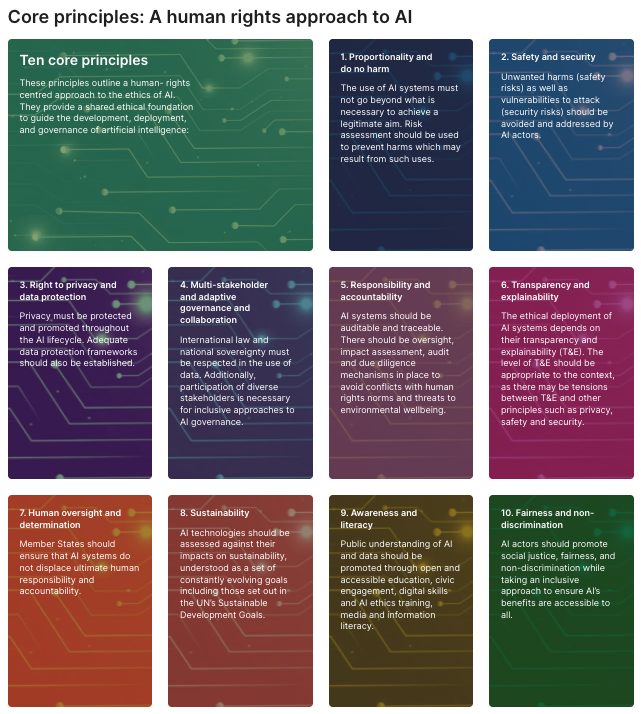
Our research showed that when AI ethics is taught to lower secondary students, interventions tend to focus most on concepts such as fairness and privacy. For example, multiple activities explored the important issue of algorithmic bias, teaching students about the causes of bias (such as training AI systems with small or unrepresentative datasets) and discussing real-world examples of bias in AI.
However, we found that other ethical concepts, such as proportionality and governance, are not often taught. And while a few interventions featured the theme of sustainability, we found that only one directly taught students about the environmental impact of AI itself.
Our new study aims to help address this gap by supporting young people to explore the social and ethical impact of AI tools from a sustainability perspective. Teachers will use real-world examples to engage their students in discussion and ethical reasoning. We hope the findings will support more computing teachers to teach about AI ethics in their lessons, and help students to think critically about the use of AI tools.
What does the study involve?
We are using a design-based research approach to work collaboratively with teachers to co-design a unit of lessons focused on AI ethics and sustainability.

Participating in the study will involve:
- Attending two in-person professional development and design workshops in Cambridge (one in early December 2026 and one during the 2027–28 school year)
- Delivering the co-designed lessons in your classroom (in early 2027 and the spring of 2028)
- Taking part in evaluation activities such as surveys, classroom observations, and interviews
How can I join the study?
If you teach computing at lower secondary level (Years 7–9 or S1–S3) in England, Scotland, or Wales and would like to help shape the way we teach young people about ethical issues around AI, we would love to hear from you. Please register your interest via the form below.
http://rpf.io/sage-application
If you have any questions about the project, please email [email protected].
The post Join our new UK study on teaching AI ethics and sustainability in lower secondary school appeared first on Raspberry Pi Foundation.
Briana Scurry shares the changes she wants in women’s soccer
Post Syndicated from The Atlantic original https://www.youtube.com/shorts/v6PwHcTtSYM
Trump Battles Against An Economy of His Making
Post Syndicated from The Atlantic original https://www.youtube.com/watch?v=G2lyWwoe5io
Kara Swisher Says Modern Tech Leaders Have ‘No Guardrails’
Post Syndicated from The Atlantic original https://www.youtube.com/shorts/HkCsHgGSA1s
‘Would You Live Near a Data Center?’
Post Syndicated from The Atlantic original https://www.youtube.com/watch?v=JO0nUvBHFKI
Qotom Q30952UE Review the New Black Box for 10G Networking
Post Syndicated from Patrick Kennedy original https://www.servethehome.com/qotom-q30952ue-review-the-new-black-box-for-intel-10g-networking/
We test the Qotom Q30952UE that delivers two SFP+ 10G ports and six 2.5GbE ports in a little black box with many surprises
The post Qotom Q30952UE Review the New Black Box for 10G Networking appeared first on ServeTheHome.
50 Songs That Explain America
Post Syndicated from The Atlantic original https://www.youtube.com/shorts/ywzuWB4xbvI
Igalia celebrates “Twenty-Five Years Upstream”
Post Syndicated from jake original https://lwn.net/Articles/1095723/
The open-source consulting firm Igalia has put out an
announcement celebrating 25 years of working on upstream FOSS projects
for its clients. The list of projects the company has worked on is rather
eye-opening: WebKit, mobile-browser rendering (on Maemo, Moblin, MeeGo, and
Tizen), the Linux kernel (CPU and GPU scheduling), 3D graphics drivers, the
Orca screen reader,
GStreamer, and lots more. Beyond that, the company, which is a
worker-owned cooperative, does its work in ways that benefit the community
as well as its clients:
None of this is charity. Igalia is a consultancy, and most of the work above was paid for by someone with a product to ship: a device maker who needs the web to run well on their hardware, a platform that needs a feature its users keep asking for, a company whose roadmap depends on something deep in the stack working better than it does today. What they get from us is not a patch to carry forever. We do the work upstream, in the project itself, so it arrives in the next release and keeps working long after the contract ends. Our customers ship products built on code that nobody has to maintain alone, and everyone else gets the same code. That has been the arrangement from the start.
AWS Weekly Roundup: AWS Builder Center mobile apps, Amazon Connect Talent GA, Amazon Corretto 27, and more (September 21, 2026)
Post Syndicated from Esra Kayabali original https://aws.amazon.com/blogs/aws/aws-weekly-roundup-aws-builder-center-mobile-apps-amazon-connect-talent-ga-amazon-corretto-27-and-more-september-14-2026/
Living in the Netherlands, I spend a fair amount of time on trains, and that is usually where I catch up on what the builder community is writing. Until now, that meant opening a laptop or squinting at a browser tab on my phone. This week I found myself scrolling through trending articles and checking a workshop from the AWS Builder Center mobile app while waiting for a delayed train, and it made those spare twenty minutes very useful. That is why I am glad to open this week with the Builder Center mobile app.
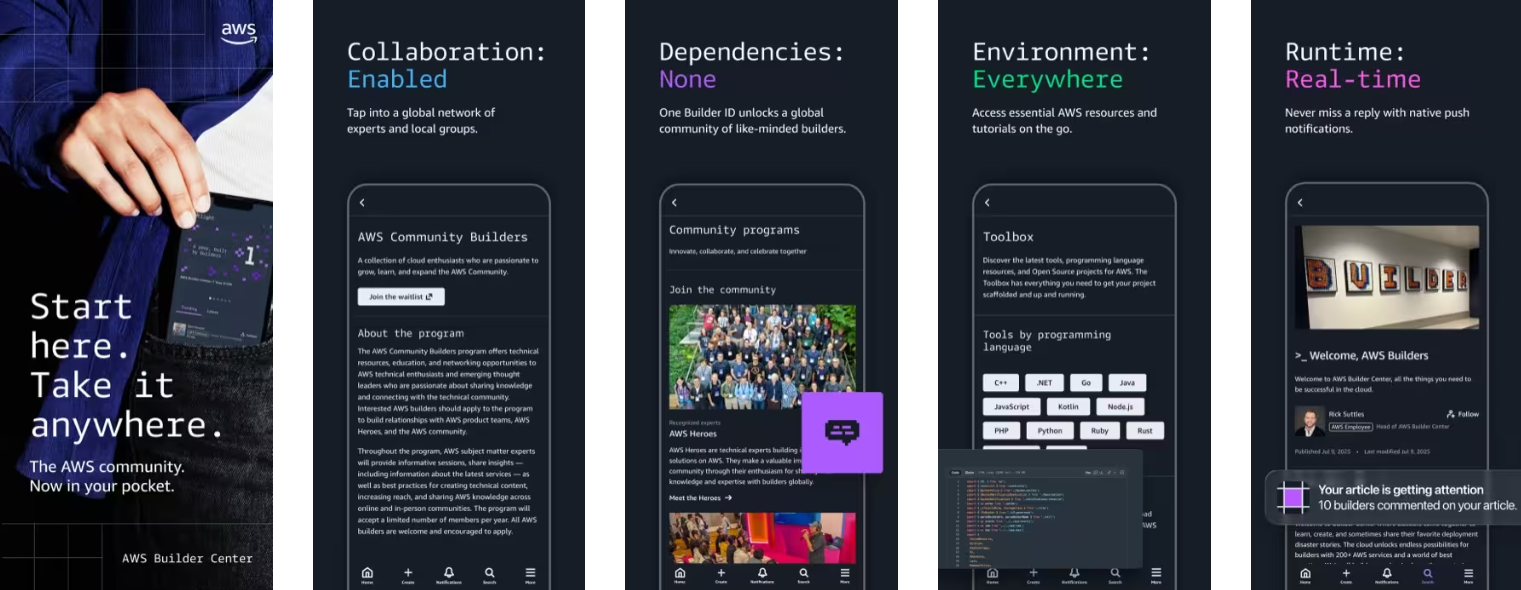
AWS Builder Center is now available as a mobile app on iOS and Android, extending the experience beyond desktop and web. Using your AWS Builder ID, you stay signed in across sessions and can browse trending articles, access 600+ AWS Skill Builder courses, and manage hands-on workshops with free sandbox environments from your mobile device. You can follow AWS Heroes, Community Builders, and User Group Leaders, check Builder Loft event calendars on the go, and receive push notifications for subscribed topics and communities. The app also supports the Wishlist feature for submitting product feedback directly to AWS teams. It is available worldwide on the Apple App Store and Google Play Store.
Builder Center also added two features this week. Polls give you a way to ask the community a question from the Home feed: write a question, add 2 to 5 answer options, set a deadline, and people vote, with results updating live and discussion happening in the comments. Votes are anonymous, and creators see aggregate counts and percentages only. Separately, the Zero to Shipped hackathon is open from September 18 to October 2. You connect your coding agent to AWS, build a real application, and ship it live on AWS for a chance to win a share of a $28,000 prize pool. Five winning projects each receive $5,000 in AWS credits and an AWS Builder swag bundle.
Last week’s launches
Here is what else happened this week.
- Amazon Connect Talent is now generally available – Amazon Connect Talent is an AI-powered hiring solution for talent acquisition teams managing hiring at scale. Informed by decades of Amazon hiring science, it uses AI agents to conduct structured voice interviews, administer evidence-based assessments, and score candidates consistently, so recruiters can focus on final decisions. Candidates interview 24/7 from any device, and recruiters review scores, transcripts, and detailed evaluations the next morning. All candidate data is anonymized during AI evaluation, each competency is scored against a rubric with every score tied to specific evidence from the interview, and recruiters keep final decision authority over every hire. General availability includes competency-based assessments, AI-led voice interviews with adaptive questioning, a brand-customizable mobile-first candidate portal, and admin onboarding tools.
- Amazon Corretto 27 is now generally available – Amazon Corretto 27, a Feature Release version of the no-cost, multi-platform distribution of OpenJDK, is now available for download on Linux, Windows, and macOS, with support through April 2027. Notable features include G1 as the default garbage collector across all environments (JEP 523), post-quantum hybrid key exchange for TLS 1.3 (JEP 527), compact object headers by default for a smaller memory footprint (JEP 534), and JFR in-process data redaction to remove sensitive data from Java Flight Recorder recordings before they leave the JVM (JEP 536). It also continues previews of enhanced pattern matching, structured concurrency, and lazy constants, along with the Vector API incubator.
- Kimi K3 by Moonshot AI is now generally available on Amazon Bedrock – Kimi K3 is now available on Amazon Bedrock for coding and knowledge work. According to Moonshot AI, Kimi K3 is its most capable model and the first open model to reach 2.8 trillion parameters. It combines native vision capabilities with a 1-million-token context window, making it well suited to long-running coding sessions across large repositories, multi-document analysis, and extended agent workflows. Moonshot AI reports an approximate 2.5x improvement in scaling efficiency over Kimi K2. Kimi K3 is the first open-weight model on Amazon Bedrock to support explicit prompt caching, which helps reduce latency and input costs when reusing context across model calls.
- AWS reimagines the getting started experience – We announced a new simplified experience for builders starting a new project. Instead of completing configuration tasks first, you start with sensible defaults: sign up using an existing identity from providers including Google, GitHub, and Apple, and for most new customers no credit card is required, with $100 in free credits as part of the AWS Free Tier. AWS organizes your work in a project, which contains an AWS account and sharing settings, and applies security controls for you. You can invite collaborators by email without setting up IAM users, set a monthly spend limit starting at $20, and activate advanced AWS features later at no additional cost with no migration. The experience is gradually rolling out to new customers.
- New low-cost burstable Amazon EC2 T8i instances are generally available – Amazon EC2 T8i instances, powered by custom sixth-generation Intel Xeon Scalable processors (Granite Rapids), are among the lowest-cost EC2 instances and deliver up to 30% better price performance over previous-generation T3 instances. They are designed for low-to-moderate CPU utilization workloads such as microservices, low-traffic websites, development and testing environments, and small databases. T8i instances deliver up to 70% higher compute performance, up to 1.25x higher network bandwidth, and up to 2.4x higher Amazon EBS bandwidth compared to T3, and they use the same CPU credit system, so upgrading from T3 is straightforward.
- AWS Elastic Beanstalk introduces Cluster Mode – AWS Elastic Beanstalk Cluster Mode is a new fully managed option for teams running a portfolio of applications on shared infrastructure powered by Amazon EKS. Instead of operating each application in isolation, you run multiple applications through one experience with a single operational baseline, so per-application cost decreases as your portfolio grows. You can upload source code in Java, .NET, Python, Node.js, PHP, Ruby, or Go, and Elastic Beanstalk handles containerization automatically through Cloud Native Buildpacks when needed. Cluster Mode includes production-grade deployment strategies with automatic rollback, event-driven autoscaling, AWS Secrets Manager integration, native OpenTelemetry observability, and AI-powered troubleshooting. Standard and Cluster Mode environments run side by side within the same application, so teams can migrate one environment at a time.
For a full list of AWS announcements, be sure to keep an eye on the What’s New with AWS page.
Other AWS news
Here are some additional posts you may find useful:
- Building in the AWS European Sovereign Cloud – Two new posts cover building on the AWS European Sovereign Cloud, an independent cloud for Europe that runs as a distinct partition with its own control plane, IAM, billing, console, and service endpoints, and its first Region in Brandenburg, Germany. The first post walks through architecting a secure landing zone, covering account structure and governance, identity as infrastructure as code, centralized logging, data protection, and partition-aware ARN construction that works across AWS partitions. The second announces the general availability of Gemma 4 open-weight models on the Amazon Bedrock next-generation inference engine in the AWS European Sovereign Cloud, with inference staying entirely within eusc-de-east-1 under a zero data retention and zero operator access model.
- The new AgentCore runtime: elastic, optimized, and consistently fast starts – We announced a new version of the Amazon Bedrock AgentCore runtime, the managed compute layer for running agents. The new runtime reclaims memory as a session releases it rather than holding it at the peak, so the bill tracks real usage over the life of a session. It also delivers consistent cold start times regardless of container image size or concurrency by preparing the environment once, snapshotting it, and restoring that snapshot for each new instance. In testing with an empty echo agent, the new runtime delivered a P75 cold start of about 2 seconds from a 200 MB image up to 2 GB, compared to roughly 5.4 to nearly 30 seconds for the original runtime.
- Introducing the updated AWS Well-Architected Streaming Media Lens – We published a revised Streaming Media Lens, which provides architectural best practices for video streaming workloads. The revision expands from the original 2021 version to cover five streaming scenarios, including interactive live streaming with Amazon IVS Real-Time Streaming for up to 25,000 concurrent viewers, low-latency live streaming, and ad-supported content monetization, alongside enhanced video-on-demand and live streaming guidance. It also adds new sustainability best practices focused on reducing carbon footprint, expanded observability and incident-response frameworks, and advanced content protection with multi-layered DRM and forensic watermarking. The lens whitepaper and custom lens are available now.
For a full list of AWS blog posts, be sure to keep an eye on the AWS Blogs page.
Upcoming AWS events
Check your calendar and sign up for upcoming AWS events:
- AWS re:Invent – AWS re:Invent returns to Las Vegas from November 30 to December 4. 2, 200+ session times, locations, and speakers are live. Reserved seating for AWS re:Invent opens October 6. Register now and be ready to claim your spot in chalk talks, workshops, and builders’ sessions when reserved seating opens.
- AWS Summits – AWS Summits are free in-person events covering cloud and AI. With re:Invent on the horizon, the Summits are coming to an end for the year. The last Summit is Dubai (September 30) at the Dubai World Trade Center, with 60+ sessions, an AWS Village, and hands-on workshops.
- AWS Community Days – Community-led conferences planned and delivered by community leaders. Upcoming events include Lebanon (September 26), Malaysia, Kuala Lumpur (September 26), Cebu, Philippines (September 26), Davao, Philippines (September 26), ComSum Manchester, UK (October 1), and Italy, Rome (October 2).
Summer has officially given way to September, but the weather where I am has not quite caught up. The days are still unusually warm, and I suspect these are the last mild afternoons before autumn settles in for good. I am making the most of them while they last. Come back next week for more!
Three new stable kernels
Post Syndicated from jake original https://lwn.net/Articles/1095703/
Greg Kroah-Hartman has released the 7.2.7,
6.18.53, and 6.12.111 stable. As is usual these days, they are
quite large; also no surprise is that they provide many important fixes
throughout the kernel tree. Users of those kernels are advised to update.
Reverse-Engineering Flock Cameras
Post Syndicated from Bruce Schneier original https://www.schneier.com/blog/archives/2026/09/reverse-engineering-flock-cameras.html
Hackers captured a Flock camera and got a look (alternate link) at the software:
While much of the automatic license plate reader’s (ALPR) most sensitive storage remained encrypted and inaccessible, the joint analysis of the recovered data shows that software running on the device explicitly detects people as well as vehicles, license plates, and bicycles. The camera can produce dozens of images of a single passing vehicle and, according to several weeks of recovered logs, generated more than a million images. Its computer-vision software also sometimes isolated bumper stickers and other graphics, including, in one case, an American flag patch on a motorcyclist’s saddlebag.
If you’re wondering how the hackers got by disk encryption, one of the unencrypted partitions contained the key for an encrypted partition. That’s pretty bad security engineering.
[$] Testing compat_linux on NetBSD with the Linux Test Project
Post Syndicated from jzb original https://lwn.net/Articles/1094310/
NetBSD has long had support for
running Linux binaries via its kernel-level compat_linux
feature, but test coverage for it was less complete than some might
hope. In order to provide better testing for compat_linux,
Google Summer of Code (GSoC) participant Henrique Brito opted to work
on enabling the Linux Test
Project (LTP) test suite to compile and run on NetBSD. At EuroBSDCon 2026, Brito’s
mentor, Stephen Borrill, provided a report on the project, and the
status of LTP on NetBSD. The work has already resulted in some minor
fixes, and a good list of additional problems to solve.
Security updates for Monday
Post Syndicated from jake original https://lwn.net/Articles/1095702/
Security updates have been issued by AlmaLinux (kernel, perl-Net-DNS, sudo, tomcat, and tomcat9), Debian (chromium, gimp, libde265, libevent, linux-6.12, ruby-jwt, and unbound), Fedora (asterisk, chromium, doctl, dovecot, evolution, firefox, forgejo, freeciv, freeipa, gegl04, gimp, libheif, nss, opkssh, parted, ruby, stb, thunderbird, unbound, and webkitgtk), Mageia (bind, gawk, gdk-pixbuf2.0, graphicsmagick, gstreamer1.0-plugins-base, libde265, libpcap, libssh, mpg123, ntfs-3g, ntpsec, patch, perl-YAML, postfix, python-configargparse, and python-httplib2), Oracle (.NET 10.0, .NET 8.0, .NET 9.0, firefox, image-builder, kernel, libevent, libsoup, libsoup3, perl-Net-DNS, python-lxml, sudo, tomcat, tomcat9, and unbound), Slackware (stunnel), SUSE (alloy, dovecot22, ffmpeg-8, firefox, firefox-esr, freeipmi, glibc, google-guest-agent, google-osconfig-agent, helm, ImageMagick, jq, kbd, kernel-devel, libpcap, libsoup, libzypp, zypper, NetworkManager-applet-l2tp, nginx, openCryptoki, pcre2, python311, python313-aiosmtplib, python313-litellm, rpm, and thunderbird), and Ubuntu (linux-aws, linux-aws-fips, linux-azure-5.15, linux-azure-fde-5.15, linux-azure-fips, linux-azure-5.4, linux-gcp-fips, linux-azure-fips, linux-nvidia-tegra, linux-raspi, linux-raspi-realtime, and rclone).
Hash Identifier Tools – Command-Line Password Hash Identification
Post Syndicated from Darknet original https://www.darknet.org.uk/2026/09/hash-identifier-tools-command-line-password-hash-identification/
hashID and Name-That-Hash tested against current password formats. Both miss bcrypt’s $2b$ prefix; only Name-That-Hash recognises Argon2id.
Kash Patel & FBI Hiring #lastweektonight
Post Syndicated from LastWeekTonight original https://www.youtube.com/shorts/hPYjLY3iQ9s