Post Syndicated from xkcd.com original https://xkcd.com/3018/
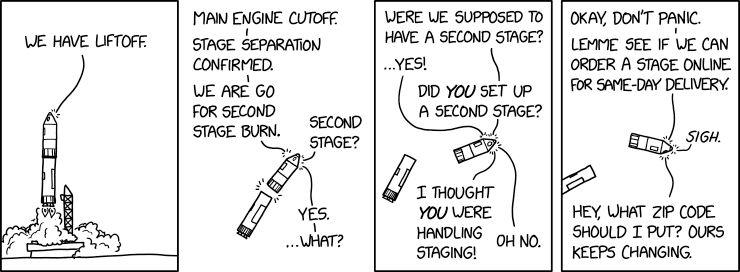
Post Syndicated from xkcd.com original https://xkcd.com/3018/
Post Syndicated from daroc original https://lwn.net/Articles/1000097/
Earlier today, one of our subscribers, anselm, posted the one millionth item in our database during a discussion in the comments about the GPL. One million articles and comments is a big milestone — one representing twenty two years of work by both the editors of LWN and the community. I think reaching this milestone on Thanksgiving is a lovely coincidental reminder of how far LWN has come, and how that wouldn’t have been possible without your support. So thank you for reading.
Post Syndicated from Eric Smith original https://www.servethehome.com/raidendigit-lightone-25gbe-thunderbolt-adapter-nvidia/
This is the RaidenDigit LightONE, a nice dock that adds 25GbE connectivity to Thunderbolt equipped machines
The post RaidenDigit LightONE 25GbE Thunderbolt Adapter appeared first on ServeTheHome.
Post Syndicated from The History Guy: History Deserves to Be Remembered original https://www.youtube.com/watch?v=5aBcL-Qcybo
Post Syndicated from digiblur DIY original https://www.youtube.com/watch?v=WkF93yd2tyE
Post Syndicated from jake original https://lwn.net/Articles/998793/
The long-awaited release of the GNU Image
Manipulation Program (GIMP) 3.0 is on the way, marking the first
major update since version 2.10 was
released in April 2018. It now features a GTK 3 user interface and GIMP 3.0
introduces significant changes to the core platform and plugins. This
release also brings performance and usability improvements, as well as more
compatibility with Wayland and complex input sources.
Post Syndicated from jake original https://lwn.net/Articles/1000084/
Security updates have been issued by Debian (firefox-esr, netatalk, and thunderbird), Fedora (firefox, libsoup3, mingw-glib2, mingw-libsoup, mingw-python-waitress, mingw-python3, nss, perl-Module-ScanDeps, php, and python-aiohttp), Mageia (dcmtk, golang, iptraf-ng, libsndfile, microcode, php, postgresql15 & postgresql13, rapidjson, tomcat, wget, and zbar), Red Hat (openssl and openssl-fips-provider, toolbox, and webkit2gtk3), SUSE (firefox, frr, glib2, hplip, kernel, neomutt-20241114, ovmf, python-aiohttp, python-virtualenv, python310-tornado6, qemu, webkit2gtk3, and xen), and Ubuntu (mpg123 and vim).
Post Syndicated from Talks at Google original https://www.youtube.com/watch?v=Iaqjwmxbsug
Post Syndicated from The Atlantic original https://www.youtube.com/watch?v=lY5r3hjeP2M
Post Syndicated from The History Guy: History Deserves to Be Remembered original https://www.youtube.com/watch?v=0PPRIUR3GN0
Post Syndicated from John Lee original https://www.servethehome.com/nvidia-bluefield-3-self-hosted-version-arm-dpu/
There is a special NVIDIA BlueField-3 DPU that is a self-hosted version for those applications where the DPU is the system’s host
The post NVIDIA BlueField-3 Self-Hosted Version appeared first on ServeTheHome.
Post Syndicated from Giovanni Matteo Fumarola original https://aws.amazon.com/blogs/big-data/amazon-emr-streamlines-big-data-processing-with-simplified-amazon-s3-glacier-access/
Amazon S3 Glacier serves several important audit use cases, particularly for organizations that need to retain data for extended periods due to regulatory compliance, legal requirements, or internal policies. S3 Glacier is ideal for long-term data retention and archiving of audit logs, financial records, healthcare information, and other compliance-related data. Its low-cost storage model makes it economically feasible to store vast amounts of historical data for extended periods of time. The data immutability and encryption features of S3 Glacier uphold the integrity and security of stored audit trails, which is crucial for maintaining a reliable chain of evidence. The service supports configurable vault lock policies, allowing organizations to enforce retention rules and prevent unauthorized deletion or modification of audit data. The integration of S3 Glacier with AWS CloudTrail also provides an additional layer of auditing for all API calls made to S3 Glacier, helping organizations monitor and log access to their archived data. These features make S3 Glacier a robust solution for organizations needing to maintain comprehensive, tamper-evident audit trails for extended periods while managing costs effectively.
S3 Glacier offers significant cost savings for data archiving and long-term backup compared to standard Amazon Simple Storage Service (Amazon S3) storage. It provides multiple storage tiers with varying access times and costs, allowing optimization based on specific needs. By implementing S3 Lifecycle policies, you can automatically transition data from more expensive Amazon S3 tiers to cost-effective S3 Glacier storage classes. Its flexible retrieval options enable further cost optimization by choosing slower, less expensive retrieval for non-urgent data. Additionally, Amazon offers discounts for data stored in S3 Glacier over extended periods, making it particularly cost-effective for long-term archival storage. These features allow organizations to substantially reduce storage costs, especially for large volumes of infrequently accessed data, while meeting compliance and regulatory requirements. For more details, see Understanding S3 Glacier storage classes for long-term data storage.
Prior to Amazon EMR 7.2, EMR clusters couldn’t directly read from or write to the S3 Glacier storage classes. This limitation made it challenging to process data stored in S3 Glacier as part of EMR jobs without first transitioning the data to a more readily accessible Amazon S3 storage class.
The inability to directly access S3 Glacier data meant that workflows involving both active data in Amazon S3 and archived data in S3 Glacier were not seamless. Users often had to implement complex workarounds or multi-step processes to include S3 Glacier data in their EMR jobs. Without built-in S3 Glacier support, organizations couldn’t take full advantage of the cost savings in S3 Glacier for large-scale data analysis tasks on historical or infrequently accessed data.
Although S3 Lifecycle policies could move data to S3 Glacier, EMR jobs couldn’t easily incorporate this archived data into their processing without manual intervention or separate data retrieval steps.
The lack of seamless S3 Glacier integration made it challenging to implement a truly unified data lake architecture that could efficiently span across hot, warm, and cold data tiers.These limitations often required users to implement complex data management strategies or accept higher storage costs to keep data readily accessible for Amazon EMR processing. The improvements in Amazon EMR 7.2 aimed to address these issues, providing more flexibility and cost-effectiveness in big data processing across various storage tiers.
In this post, we demonstrate how to set up and use Amazon EMR on EC2 with S3 Glacier for cost-effective data processing.
With the release of Amazon EMR 7.2.0, significant improvements have been made in handling S3 Glacier objects:
AmazonS3Exceptions from occurring when attempting to access S3 Glacier objects that have a restore operation in progress.fs.s3a.glacier.read.restored.objects, offers three options for managing S3 Glacier objects:
These enhancements provide you with greater flexibility and control over how Amazon EMR interacts with S3 Glacier storage, improving both performance and cost-effectiveness in data processing workflows.
Amazon EMR 7.2.0 and later versions offer improved integration with S3 Glacier storage, enabling cost-effective data analysis on archived data. In this post, we walk through the following steps to set up and test this integration:
fs.s3a.glacier.read.restored.objects property to READ_RESTORED_GLACIER_OBJECTS. This enables Amazon EMR to properly handle restored S3 Glacier objects.Consider the following best practices:
By implementing this integration, organizations can significantly reduce storage costs while maintaining the ability to analyze historical data when needed. This approach is particularly beneficial for large-scale data lakes and long-term data retention scenarios.
The setup requires the following prerequisites:
Create an S3 bucket with different S3 Glacier objects as listed in the following code:
For more information, refer to Creating a bucket and Setting an S3 Lifecycle configuration on a bucket.
The following is the list of objects:
The content of the objects is as follows:
For more information about S3 Glacier Instance Retrieval objects, see Appendix A at the end of this post. The objects are listed as follows:
The objects include the following contents:
To set different storage classes for objects in different folders, use the –storage-class parameter when uploading objects or change the storage class after upload:
For more information about S3 Glacier Flexible Retrieval objects, see Appendix B at the end of this post. The objects are listed as follows:
The objects include the following contents:
To set different storage classes for objects in different folders, use the –storage-class parameter when uploading objects or change the storage class after upload:
For more information about S3 Glacier Deep Archive objects, see Appendix C at the end of this post. The objects are listed as follows:
The objects include the following contents:
To set different storage classes for objects in different folders, use the –storage-class parameter when uploading objects or change the storage class after upload:
List the bucket contents with the following code:
Complete the following steps to create an EMR Cluster:
For more information and detailed steps, see Tutorial: Getting started with Amazon EMR.
For additional resources, refer to Plan, configure and launch Amazon EMR clusters, Configure IAM service roles for Amazon EMR permissions to AWS services and resources, and Use security configurations to set up Amazon EMR cluster security.
Make sure that your EMR cluster has the necessary permissions to access Amazon S3 and S3 Glacier, and that it’s configured to work with the storage classes you plan to use in your demonstration.
In this section, we provide code to perform different queries.
Use the following code to create a table:
Before you restore the S3 Glacier objects, run the following queries:
This option throws an exception reading the S3 Glacier storage class objects:
Perform the following queries after restoring S3 Glacier objects:
The integration of Amazon EMR with S3 Glacier storage marks a significant advancement in big data analytics and cost-effective data management. By bridging the gap between high-performance computing and long-term, low-cost storage, this integration opens up new possibilities for organizations dealing with vast amounts of historical data.
As data continues to grow exponentially, the Amazon EMR and S3 Glacier integration provides a powerful toolset for organizations to balance performance, cost, and compliance. It enables data-driven decision-making on historical data without the overhead of maintaining it in high-cost, readily accessible storage.
By following the steps outlined in this post, data engineers and analysts can unlock the full potential of their archived data, turning cold storage into a valuable asset for business intelligence and long-term analytics strategies.
As we move forward in the era of big data, solutions like this Amazon EMR and S3 Glacier integration will play a crucial role in shaping how organizations manage, store, and derive value from their ever-growing data assets.
 Giovanni Matteo Fumarola is the Senior Manager for EMR Spark and Iceberg group. He is an Apache Hadoop Committer and PMC member. He has been focusing in the big data analytics space since 2013.
 Narayanan Venkateswaran is an Engineer in the AWS EMR group. He works on developing Hive in EMR. He has over 17 years of work experience in the industry across several companies including Sun Microsystems, Microsoft, Amazon and Oracle. Narayanan also holds a PhD in databases with focus on horizontal scalability in relational stores.
 Karthik Prabhakar is a Senior Analytics Architect for Amazon EMR at AWS. He is an experienced analytics engineer working with AWS customers to provide best practices and technical advice in order to assist their success in their data journey.
S3 Glacier Instant Retrieval objects store long-lived archive data accessed once a quarter with instant retrieval in milliseconds. These are not distinguished from S3 Standard object, and there is no option to restore them as well. The key difference between S3 Glacier Instant Retrieval and standard S3 object storage lies in their intended use cases, access speeds, and costs:
S3 Glacier Flexible Retrieval (previously known simply as S3 Glacier) is an Amazon S3 storage class for archival data that is rarely accessed but still needs to be preserved long-term for potential future retrieval at a very low cost. It’s optimized for scenarios where occasional access to data is required but immediate access is not critical. The key differences between S3 Glacier Flexible Retrieval and standard Amazon S3 storage are as follows:
S3 Glacier Deep Archive is the lowest-cost storage class of Amazon S3, designed for data that is rarely accessed and intended for long-term retention. It’s the most cost-effective option within Amazon S3 for data that can tolerate longer retrieval times, making it ideal for deep archival storage. It’s a perfect solution for organizations with data that must be retained but not frequently accessed, such as regulatory compliance data, historical archives, and large datasets stored purely for backup. The key differences between S3 Glacier Deep Archive and standard Amazon S3 storage are as follows:
Post Syndicated from Explosm.net original https://explosm.net/comics/thanksgiving
New Cyanide and Happiness Comic
Post Syndicated from Danilo Poccia original https://aws.amazon.com/blogs/aws/amazon-fsx-for-lustre-unlocks-full-network-bandwidth-and-gpu-performance/
Today, we are announcing support for Elastic Fabric Adapter (EFA) and NVIDIA GPUDirect Storage (GDS) on Amazon FSx for Lustre. EFA is a network interface for Amazon EC2 instances that makes it possible to run applications requiring high levels of inter-node communications at scale. GDS is a technology that creates a direct data path between local or remote storage and GPU memory. With these enhancements, Amazon FSx for Lustre with EFA/GDS support provides up to 12 times higher (up to 1200 Gbps) per-client throughput compared to the previous FSx for Lustre version.
You can use FSx for Lustre to build and run the most performance demanding applications, such as deep learning training, drug discovery, financial modeling, and autonomous vehicle development. As datasets grow and new technologies emerge, you can adopt increasingly powerful GPU and HPC instances such as Amazon EC2 P5, Trn1, and Hpc7a. Until now, when accessing FSx for Lustre file systems, the use of traditional TCP networking limited throughput to 100 Gbps for individual client instances. This adoption is driving the need for FSx for Lustre file systems to provide the performance necessary to optimally utilize the increasing network bandwidth of these cutting-edge EC2 instances when accessing large datasets.
With EFA and GDS support in FSx for Lustre, you can now achieve up to 1,200 Gbps throughput per client instance (twelve times more throughput than previously) when using P5 GPU instances and NVIDIA CUDA in your applications.
With this new capability, you can fully utilize the network bandwidth of the most powerful compute instances and accelerate your machine learning (ML) and HPC workloads. EFA enhances performance by bypassing the operating system and using the AWS Scalable Reliable Datagram (SRD) protocol to optimize data transfer. GDS further improves performance by enabling direct data transfer between the file system and GPU memory, bypassing the CPU and eliminating redundant memory copies.
Let’s see how this works in practice.
Creating an Amazon FSx for Lustre file system with EFA enabled
To get started, in the Amazon FSx console, I choose Create file system and then Amazon FSx for Lustre.
I enter a name for the file system. In the Deployment and storage type section, I select Persistent, SSD and the new with EFA enabled option. I select 1000 MB/s/TiB in the Throughput per unit of storage section. With these settings, I enter 4.8 TiB for Storage capacity, which is the minimum supported with these settings.

For networking, I use the default virtual private cloud (VPC) and an EFA-enabled security group. I leave all other options to their default values.

I review all the options and proceed to create the file system. After a few minutes, the file system is ready to be used.
Mounting an Amazon FSx for Lustre file system with EFA enabled from an Amazon EC2 instance
In the Amazon EC2 console, I choose Launch instance, enter a name for the instance, and select the Ubuntu Amazon Machine Image (AMI). For Instance type, I select trn1.32xlarge.

In Network settings, I edit the default settings and select the same subnet used by the FSx Lustre file system. In Firewall (security groups), I select three existing security groups: the EFA-enabled security group used by the FSx for Lustre file system, the default security group, and a security group that provides Secure Shell (SSH) access.

In Advanced network configuration, I select ENA and EFA as Interface type. Without this setting, the instance would use traditional TCP networking and the connection with the FSx for Lustre file system would still be limited to 100 Gbps in throughput.

To have more throughput, I can add more EFA network interfaces, depending on the instance type.
I launch the instance and, when the instance is ready, I connect using EC2 Instance Connect and follow the instructions for installing the Lustre client in the FSx for Lustre User Guide and configuring EFA clients.
Then, I follow the instructions for mounting an FSx for Lustre file system from an EC2 instance.
I create a folder to use as mount point:
I select the file system in the FSx console and lookup the DNS name and Mount name. Using these values, I mount the file system:
EFA is automatically used when you access an EFA-enabled file system from client instances that support EFA and are using Lustre version 2.15 or higher.
Things to know
EFA and GDS support is available today with no additional cost on new Amazon FSx for Lustre file systems in all AWS Regions where persistent 2 is offered. FSx for Lustre automatically uses EFA when customers access an EFA-enabled file system from client instances that support EFA, without requiring any additional configuration. For a list of EC2 client instances that support EFA, see supported instance types in the Amazon EC2 User Guide. This network specifications table describes network bandwidths and EFA support for instance types in the accelerated computing category.
To use EFA-enabled instances with FSx for Lustre file systems, you must use Lustre 2.15 clients on Ubuntu 22.04 with kernel 6.8 or higher.
Note that your client instances and your file systems must be located in the same subnet within your Amazon Virtual Private Cloud (Amazon VPC) connection.
GDS is automatically supported on EFA-enabled file systems. To use GDS with your FSx for Lustre file systems, you need the NVIDIA Compute Unified Device Architecture (CUDA) package, the open source NVIDIA driver, and the NVIDIA GPUDirect Storage Driver installed on your client instance. These packages come preinstalled on the AWS Deep Learning AMI. You can then use your CUDA-enabled application to use GPUDirect storage for data transfer between your file system and GPUs.
When planning your deployment, note that EFA-enabled file systems have larger minimum storage capacity increments than file systems that are not EFA-enabled. For instance, if you choose the 1,000 MB/s/TiB throughput tier, the minimum storage capacity for EFA-enabled file systems starts at 4.8 TiB as compared to 1.2TB for FSx for Lustre file systems not enabling EFA. If you’re looking to migrate your existing workloads, you can use AWS DataSync to move your data from an existing file system to a new one that supports EFA and GDS.
For maximum flexibility, FSx for Lustre maintains compatibility with both EFA and non-EFA workloads. When accessing an EFA-enabled file system, traffic from non-EFA client instances automatically flows over traditional TCP/IP networking using Elastic Network Adapter (ENA), allowing seamless access for all workloads without any additional configuration.
To learn more about EFA and GDS support on FSx for Lustre, including detailed setup instructions and best practices, visit the Amazon FSx for Lustre documentation. Get started today and experience the fastest storage performance available for your GPU instances in the cloud.
— Danilo
Update 11/27: post updated to reflect 12x throughput
Post Syndicated from Explosm.net original https://explosm.net/comics/prosthetic-hand
New Cyanide and Happiness Comic
Post Syndicated from Raks Khare original https://aws.amazon.com/blogs/big-data/develop-a-business-chargeback-model-within-your-organization-using-amazon-redshift-multi-warehouse-writes/
Amazon Redshift is a fast, petabyte-scale, cloud data warehouse that tens of thousands of customers rely on to power their analytics workloads. Thousands of customers use Amazon Redshift data sharing to enable instant, granular, and fast data access shared across Redshift provisioned clusters and serverless workgroups. This allows you to scale your read workloads to thousands of concurrent users without having to move or copy data.
Now, we are announcing general availability (GA) of Amazon Redshift multi-data warehouse writes through data sharing. This new capability allows you to scale your write workloads and achieve better performance for extract, transform, and load (ETL) workloads by using different warehouses of different types and sizes based on your workload needs. You can make your ETL job runs more predictable by distributing them across different data warehouses with just a few clicks. Other benefits include the ability to monitor and control costs for each data warehouse, and enabling data collaboration across different teams because you can write to each other’s databases. The data is live and available across all warehouses as soon as it’s committed, even when it’s written to cross-account or cross-Region. To learn more about the reasons for using multiple warehouses to write to same databases, refer to this previous blog on multi-warehouse writes through datasharing.
As organizations continue to migrate workloads to AWS, they are also looking for mechanisms to manage costs efficiently. A good understanding of the cost of running your business workload, and the value that business workload brings to the organization, allows you to have confidence in the efficiency of your financial management strategy in AWS.
In this post, we demonstrate how you can develop a business chargeback model by adopting the multi-warehouse architecture of Amazon Redshift using data sharing. You can now attribute cost to different business units and at the same time gain more insights to drive efficient spending.
In this use case, we consider a fictional retail company (AnyCompany) that operates several Redshift provisioned clusters and serverless workgroups, each specifically tailored to a particular business unit—such as the sales, marketing, and development teams. AnyCompany is a large enterprise organization that previously migrated large volumes of enterprise workloads into Amazon Redshift, and now is in the process of breaking data silos by migrating business-owned workloads into Amazon Redshift. AnyCompany has a highly technical community of business users, who want to continue to have autonomy on the pipelines that enrich the enterprise data with their business centric data. The enterprise IT team wants to break data siloes and data duplication as a result, and despite this segregation in workloads, they mandate all business units to access a shared centralized database, which will further help in data governance by the centralized enterprise IT team. In this intended architecture, each team is responsible for data ingestion and transformation before writing to the same or different tables residing in the central database. To facilitate this, teams will use their own Redshift workgroup or cluster for computation, enabling separate chargeback to respective cost centers.
In the following sections, we walk you through how to use multi-warehouse writes to ingest data to the same databases using data sharing and develop an end-to-end business chargeback model. This chargeback model can help you attribute cost to individual business units, have higher visibility on your spending, and implement more cost control and optimizations.
The following diagram illustrates the solution architecture.

The workflow includes the following steps:
ETL_Audit, residing in the Audit schema in the primary ETL storage.The high-level steps to implement this architecture are as follows:
To follow along with this post, you should have the following prerequisites:
Refer to Getting started with multi-warehouse for the most up-to-date information.
In this section, we show how to set up the primary ETL producer cluster to store your data.
Complete the following steps to connect to the producer:

In the query editor v2, you can see all the warehouses you have access to in the left pane. You can expand them to see their databases.
Complete the following steps to create your database objects to share:
prod.You may need to refresh your page to be able to see it.
ETL schema to share with the Sales and Marketing consumer warehouses. These are standard DDL statements coming from the AWS Labs TPCDS DDL file with modified table names.SALES schema to share with the Sales consumer warehouse:MARKETING schema to share with the Marketing consumer warehouse:Create datashares for the Sales and Marketing business units with the following command:
To add objects with permissions to the datashare, use the grant syntax, specifying the datashare you want to grant the permissions to.
ETL schema:SALES schema:MARKETING schema:Now you can grant access to tables to the datashare using the grant syntax, specifying the permissions and the datashare.
select and insert scoped privileges on the etl_audit_logs table to the Sales and Marketing datashares:all privileges on all tables in the SALES schema to the Sales datashare:all privileges on all tables in the MARKETING schema to the Marketing datashare:You can optionally choose to include new objects to be automatically shared. The following code will automatically add new objects in the etl, sales, and marketing schemas to the two datashares:
You can grant permissions to the Sales and Marketing namespaces by specifying the namespace IDs. There are two ways to find namespace IDs:
select current_namespace; on both consumersYou can then grant access to the other namespace with the following command (change the consumer namespace to the namespace UID of your own Sales and Marketing warehouse):
Complete the following steps to set up and run an ETL job:
etl_audit_logs table in the ETLAt this point, you’re ready to set up your Sales consumer warehouse to start writing data to the shared objects in the ETL producer namespace.
Complete the following steps to create your database:
show datashares; to see etl and sales datashares as well as the datashare producer’s namespace.Specifying with permissions allows you to grant granular permissions to individual database users and roles. Without this, if you grant usage permissions on the datashare database, users and roles get all permissions on all objects within the datashare database.
In this section, we show you how to write to the datashare database using the use <database_name> command and using three-part notation: <database_name>.<schem_name>.<table_name>.
Let’s try the use command method first. Run the following command:
Complete the following steps to ingest the data:
sales schema:etl_audit_logs table in the producer’s etl schema. To insert the data, let’s try three-part notation this time:Now, you’re ready to set up your Marketing consumer warehouse to start writing data to the shared objects in the ETL producer namespace. The following steps are similar to the ones previously completed while setting up the Sales warehouse consumer.
Complete the following steps to create your database:
show datashares; to see the etl and marketing datashares as well as the datashare producer’s namespace.In this section, we show you how to write to the datashare database by calling a stored procedure.
Complete the following steps to set up and run an ETL job:
etl_audit_logs table in the ETL schema of the producer’s namespace.At this point, you’ve completed ingesting the data to the primary ETL namespace. You can query the tables in the etl, sales, and marketing schemas from both the ETL producer warehouse and Sales and Marketing consumer warehouses and see the same data.
Because the business units’ specific workloads have been isolated to dedicated consumers, you can now attribute the cost based on compute capacity utilization. The compute capacity in Redshift Serverless is measured in Redshift Processing Units (RPUs) and metered for the workloads that you run in RPU-seconds on a per-second basis. A Redshift administrator can use the SYS_SERVERLESS_USAGE view on individual consumer workgroups to view the details of Redshift Serverless usage of resources and related cost.
For example, to get the total charges for RPU hours used for a time interval, run the following query on the Sales and Marketing business units’ respective consumer workgroups:
When you’re done, remove any resources that you no longer need to avoid ongoing charges:
In this post, we showed you how you can isolate business units’ specific workloads to multiple consumer warehouses writing the data to the same producer database. This solution has the following benefits:
You can engage an Amazon Redshift specialist to answer questions, and discuss how we can further help your organization.
 Raks Khare is a Senior Analytics Specialist Solutions Architect at AWS based out of Pennsylvania. He helps customers across varying industries and regions architect data analytics solutions at scale on the AWS platform. Outside of work, he likes exploring new travel and food destinations and spending quality time with his family.
 Poulomi Dasgupta is a Senior Analytics Solutions Architect with AWS. She is passionate about helping customers build cloud-based analytics solutions to solve their business problems. Outside of work, she likes travelling and spending time with her family.
 Saurav Das is part of the Amazon Redshift Product Management team. He has more than 16 years of experience in working with relational databases technologies and data protection. He has a deep interest in solving customer challenges centered around high availability and disaster recovery.
Post Syndicated from BP Yau original https://aws.amazon.com/blogs/big-data/unlocking-near-real-time-analytics-with-petabytes-of-transaction-data-using-amazon-aurora-zero-etl-integration-with-amazon-redshift-and-dbt-cloud/
While customers can perform some basic analysis within their operational or transactional databases, many still need to build custom data pipelines that use batch or streaming jobs to extract, transform, and load (ETL) data into their data warehouse for more comprehensive analysis.
Zero-ETL integration with Amazon Redshift reduces the need for custom pipelines, preserves resources for your transactional systems, and gives you access to powerful analytics. Within seconds of transactional data being written into Amazon Aurora (a fully managed modern relational database service offering performance and high availability at scale), the data is seamlessly made available in Amazon Redshift for analytics and machine learning. The data in Amazon Redshift is transactionally consistent and updates are automatically and continuously propagated.
Amazon Redshift is a fast, scalable, secure, and fully managed cloud data warehouse that makes it simple and cost-effective to analyze all your data using standard SQL and your existing ETL, business intelligence (BI), and reporting tools. Together with price-performance, Amazon Redshift offers capabilities such as serverless architecture, machine learning integration within your data warehouse and secure data sharing across the organization.
dbt helps manage data transformation by enabling teams to deploy analytics code following software engineering best practices such as modularity, continuous integration and continuous deployment (CI/CD), and embedded documentation.
dbt Cloud is a hosted service that helps data teams productionize dbt deployments. dbt Cloud offers turnkey support for job scheduling, CI/CD integrations; serving documentation, native git integrations, monitoring and alerting, and an integrated developer environment (IDE) all within a web-based UI.
In this post, we explore how to use Aurora MySQL-Compatible Edition Zero-ETL integration with Amazon Redshift and dbt Cloud to enable near real-time analytics. By using dbt Cloud for data transformation, data teams can focus on writing business rules to drive insights from their transaction data to respond effectively to critical, time sensitive events. This enables the line of business (LOB) to better understand their core business drivers so they can maximize sales, reduce costs, and further grow and optimize their business.
Let’s consider TICKIT, a fictional website where users buy and sell tickets online for sporting events, shows, and concerts. The transactional data from this website is loaded into an Aurora MySQL 3.05.0 (or a later version) database. The company’s business analysts want to generate metrics to identify ticket movement over time, success rates for sellers, and the best-selling events, venues, and seasons. Analysts can use this information to provide incentives to buyers and sellers who frequently use the site, to attract new users, and to drive advertising and promotions.
The Zero-ETL integration between Aurora MySQL and Amazon Redshift is set up by using a CloudFormation template to replicate raw ticket sales information to a Redshift data warehouse. After the data is in Amazon Redshift, dbt models are used to transform the raw data into key metrics such as ticket trends, seller performance, and event popularity. These insights help analysts make data-driven decisions to improve promotions and user engagement.
The following diagram illustrates the solution architecture at a high-level.

To implement this solution, complete the following steps:
This post provides a CloudFormation template as a general guide. You can review and customize it to suit your needs. Some of the resources that this stack deploys incur costs when in use.
The CloudFormation template provisions the following components
To create your resources:

This automatically launches CloudFormation in your AWS account with a template. It prompts you to sign in as needed. You can view the CloudFormation template from within the console.
Stack creation can take up to 30 minutes.
NamespaceNamePortNumberRDSPasswordRDSUsernameRedshiftClusterSecurityGroupNameRedshiftPasswordRedshiftUsernameVPCWorkinggroupnameZeroETLServicesRoleNameArn
To create a target database using Redshift query editor V2:
integration_id from the svv_integration system table.integration_id from the preceding step to create a new database from the integration.The integration between Aurora MYSQL and the Amazon Redshift Serverless data warehouse is now complete.
You’re now ready to populate source data in Amazon Aurora MYSQL.
You can use your favorite query editor installed on either an Amazon Elastic Compute Cloud (Amazon EC2) instance or your local system to interact with Aurora MYSQL. However, you need to provide access to Aurora MYSQL from the machine where the query editor is installed. To achieve this, modify the security group inbound rules to allow the IP address of your machine and make Aurora publicly accessible.
To populate source data:
The following are common errors associated with load from Amazon S3:
aws_default_s3_role parameter in the database cluster parameter group to the role Amazon Resource Name (ARN) that has the necessary Amazon S3 access permissions.Error 63985 (HY000): S3 API returned error: Missing Credentials: Cannot instantiate S3 Client),
To validate the source data
aurora_zeroetl, schema demodb and you should see 7 tables being created.Connect dbt Cloud to Amazon Redshift

Redshift 5439.dev.
dbt_zetl. dbt Cloud automatically generates a schema name for you. By convention, this is dbt_<first-initial><last-name>. This is the schema connected directly to your development environment, and it’s where your models will be built when running dbt within the Cloud integrated development environment (IDE).
When you develop in dbt Cloud, you can use git to version control your code. For the purposes of this post, use a dbt Cloud-hosted managed repository.
To set up a managed repository:
dbt-zeroetl.
Now that you have a repository configured, initialize your project and start developing in dbt Cloud.
To start development in dbt Cloud:


add-redshift-models. You need to create a new branch because the main branch is set to read-only mode.dbt_project.yml.dbt_project.yml at the bottom of the file. Change example to staging and make sure the materialized value is set to table.models:
my_new_project:
# Applies to all files under models/example/
staging:
materialized: table
dept_finance, then choose Create.
sources.yml, then choose Create.Be aware that the operation database created on your Amazon Redshift data warehouse is a special read only database and you cannot directly connect to it to create objects. You need to connect to another regular database and use three-part notation as defined in sources.yml to query data from it.
staging_event.sql, then choose Create.staging_sales.sql, then choose Create.rpt_finance_qtr_total_sales_by_event.sql, then choose Create.rpt_finance_qtr_top_event_by_sales.sql, then choose Create.

dbt_zetl schema with the staging_event and staging_sales tables and rpt_finance_qtr_top_event_by_sales and rpt_finance_qtr_total_sales_by_event views in it.
Adding tests to a project helps validate that your models are working correctly.
To add tests to your project:
models/schema.yml.dbt test, dbt iterates through your YAML files and constructs a query for each test. Each query will return the number of records that fail the test. If this number is 0, then the test is successful.By adding documentation to your project, you can describe your models in detail and share that information with your team.
To add documentation:


Now that you’ve built your models, you need to commit the changes you made to the project so that the repository has your latest code.
To commit the changes:
Add Aurora zero-ETL integration with Redshift models.
Use dbt Cloud’s Scheduler to deploy your production jobs confidently and build observability into your processes. You’ll learn to create a deployment environment and run a job in the following steps.
To create a deployment environment:

Production.
Jobs are a set of dbt commands that you want to run on a schedule.
To create and run a job:
Production run, and link to the environment you just created.dbt build
When you’re finished, delete the CloudFormation stack since some of the AWS resources in this walkthrough incur a cost if you continue to use them. Complete the following steps:
In this post, we showed you how to set up Amazon Aurora MySQL Zero-ETL integration from Aurora MySQL to Amazon Redshift, which eliminates complex data pipelines and enables near real-time analytics on transactional and operational data. We also showed you how to build dbt models on Aurora MySQL Zero-ETL integration tables in Amazon Redshift to transform the data to get insight.
We look forward to hearing from you about your experience. If you have questions or suggestions, leave a comment.
 BP Yau is a Sr Partner Solutions Architect at AWS. His role is to help customers architect big data solutions to process data at scale. Before AWS, he helped Amazon.com Supply Chain Optimization Technologies migrate its Oracle data warehouse to Amazon Redshift and build its next generation big data analytics platform using AWS technologies.
 Saman Irfan is a Senior Specialist Solutions Architect at Amazon Web Services, based in Berlin, Germany. She collaborates with customers across industries to design and implement scalable, high-performance analytics solutions using cloud technologies. Saman is passionate about helping organizations modernize their data architectures and unlock the full potential of their data to drive innovation and business transformation. Outside of work, she enjoys spending time with her family, watching TV series, and staying updated with the latest advancements in technology.
 Raghu Kuppala is an Analytics Specialist Solutions Architect experienced working in the databases, data warehousing, and analytics space. Outside of work, he enjoys trying different cuisines and spending time with his family and friends.
 Neela Kulkarni is a Solutions Architect with Amazon Web Services. She primarily serves independent software vendors in the Northeast US, providing architectural guidance and best practice recommendations for new and existing workloads. Outside of work, she enjoys traveling, swimming, and spending time with her family.
Post Syndicated from Mulugeta Mammo original https://aws.amazon.com/blogs/big-data/intel-accelerators-on-amazon-opensearch-service-improve-price-performance-on-vector-search-by-up-to-51/
This post is co-written with Mulugeta Mammo and Akash Shankaran from Intel.
Today, we’re excited to announce the availability of Intel Advanced Vector Extensions 512 (AVX-512) technology acceleration on vector search workloads when you run OpenSearch 2.17+ domains with the 4th generation Intel Xeon Intel instances on the Amazon OpenSearch Service. When you run OpenSearch 2.17 domains on C/M/R 7i instances, you can gain up to 51% in vector search performance at no additional cost compared to previous R5 Intel instances.
Increasingly, application builders are using vector search to improve the search quality of their applications. This modern technique involves encoding content into numerical representations (vectors) that can be used to find similarities between content. For instance, it’s used in generative AI applications to match user queries to semantically similar knowledge articles providing context and grounding for generative models to perform tasks. However, vector search is computationally intensive, and higher compute and memory requirements can lead to higher costs than traditional search. Therefore, cost optimization levers are important to achieve a favorable balance of cost vs. benefit.
OpenSearch Service is a managed service for the OpenSearch search and analytics suite, which includes support for vector search. By running your OpenSearch 2.17+ domains on C/M/R 7i instances, you can achieve up to a 51% price-performance gain compared to the past R5 instances on OpenSearch Service. As we discuss in this post, this launch offers improvements to your infrastructure total cost of ownership (TCO) and savings.
Let’s understand how these technologies come together through the building of a simple generative AI application. First, you bring vector search online by using machine learning (ML) models to encode your content (such as text, image or audio) into vectors. You then index these vectors into an OpenSearch Service domain, enabling real-time content similarity search that can be scaled to search billions of vectors in milliseconds. These vector searches provide contextually relevant insights, which can be further enriched by AI for hyper-personalization and integrated with generative models to power chatbots.
Vector search use cases extend beyond generative AI applications. Use cases include image to semantic search, and recommendations such as the following real-world use case from Amazon Music. The Amazon Music application uses vectorization to encode 100 million songs into vectors that represent both music tracks and customer preferences. These vectors are then indexed in OpenSearch, which manages over a billion vectors and handles up to 7,100 vector queries per second to analyze user listening behavior and provide real-time recommendations.
The indexing and search processes are computationally intensive, requiring calculations between vectors that are typically represented as 128–2,048 dimensions (numerical values). The Intel Xeon Scalable processors found on the 7th generation Intel instances use Intel AVX-512 to increase the speed and efficiency of vector operations through the following features:
OpenSearch Services R7i Instances with Intel AVX-512 are an excellent choice for OpenSearch vector workloads. They offer a high CPU-to-memory ratio, which further maximizes the compute potential while providing ample memory.
To verify just how much faster the new R7i instances perform, you can run OpenSearch benchmarks firsthand. Using your OpenSearch 2.17 domain, create a k-NN index configured to use either the Lucene or FAISS engine. Use the OpenSearch Benchmark with the public Cohere 10M 768D dataset to replicate the benchmarks published in this post. Replicate these tests using the older R5 instances as the baseline.
In the following sections, we present the benchmarks that demonstrate the 51% price-performance gains between the R7i and the R5 instances.
In this post, we define price-performance as the number of documents that can be indexed or search queries executed given a fixed budget ($1), taking into account the instance cost. The following are results of price-performance with the Cohere 10M dataset.
Up to a 44% improvement in price-performance is observed when using the Lucene engine and upgrading from R5 to R7i instances. The difference between the blue and orange bars in the following graphs illustrates the gains contributed by AVX512 acceleration.

We also examine results from the same tests performed on k-NN indexes configured on the FAISS engine. Up to 51% price-performance gains is achieved on index performance simply by upgrading from r5 to r7i instances. Again, the difference between the blue and orange bar demonstrates the additional gains contributed by AVX512.

In addition to price-performance gains, search response times also improved by upgrading R5 to R7i instances with AVX512. P90 and P99 latencies were lower by 33% and 38%, respectively.

The FAISS engine has the added benefit of AVX-512 acceleration with FP16 quantized vectors. With FP16 quantization, vectors are compressed to half the size, reducing memory and storage requirements and in turn infrastructure costs. AVX-512 contributes to further price-performance gains.
If you’re looking to modernize search experiences on OpenSearch Service while potentially lowering costs, try out the OpenSearch vector engine on OpenSearch Service C7i, M7i, or R7i instances. Built on 4th Gen Intel Xeon processors, the latest Intel instances provide advanced features like Intel AVX-512 accelerators, improved CPU performance, and higher memory bandwidth than the previous generation, which makes them an excellent choice for optimizing your vector search workloads on OpenSearch Service.
Credits to: Vesa Pehkonen, Noah Staveley, Assane Diop, Naveen Tatikonda
Mulugeta Mammo is a Senior Software Engineer, and currently leads the OpenSearch Optimization team at Intel.
Vamshi Vijay Nakkirtha is a software engineering manager working on the OpenSearch Project and Amazon OpenSearch Service. His primary interests include distributed systems.
Akash Shankaran is a Software Architect and Tech Lead in the Xeon software team at Intel working on OpenSearch. He works on pathfinding opportunities and enabling optimizations within databases, analytics, and data management domains.
Dylan Tong is a Senior Product Manager at Amazon Web Services. He leads the product initiatives for AI and machine learning (ML) on OpenSearch including OpenSearch’s vector database capabilities. Dylan has decades of experience working directly with customers and creating products and solutions in the database, analytics and AI/ML domain. Dylan holds a BSc and MEng degree in Computer Science from Cornell University.
Performance varies by use, configuration, and other factors. Learn more on the Performance Index website.
Your costs and results may vary.
Intel technologies may require enabled hardware, software, or service activation.
Post Syndicated from Vinicius Senger original https://aws.amazon.com/blogs/devops/amazon-q-developer-eclipse-preview/
Today marks an exciting milestone for Eclipse developers everywhere: we’re thrilled to announce the public preview of Amazon Q Developer in the Eclipse IDE. This integration brings the power of AI-driven development directly into one of the most popular development environments. In this blog post, we’ll explore some of its game-changing features, and show you how this fusion of traditional IDE and cutting-edge AI can supercharge your development tasks across the software development lifecycle.
As I sit down to write this announcement, I can’t help but feel a wave of nostalgia mixed with excitement. This is one of the most requested IDEs for Amazon Q Developer and I can see why. Like many developers of my generation, Eclipse was where I cut my teeth in Java programming. I remember downloading that bulky IDE, waiting for what felt like an eternity as it installed, and then staring at the workspace, both intimidated and thrilled by the possibilities it presented.
Eclipse has been a stalwart in the world of software development for over two decades now. It’s been there through the evolution of Java, from the early days of J2SE to the modern Java Platform. For countless developers, it’s been more than just an IDE – it’s been a trusty companion on our coding journeys.
But times have changed. The landscape of software development is evolving at a rapid pace, and at the heart of this revolution is Generative AI. We’re witnessing a paradigm shift in how we approach coding, testing, and deploying applications. And today, I’m thrilled to announce a game-changing integration that brings together the familiar comfort of Eclipse with the cutting-edge capabilities of Amazon Q Developer.
Amazon Q Developer is the most capable AI-powered assistant for software development that reimagines the experience across the entire software development lifecycle, making it easier and faster to build, secure, manage, and optimize applications on AWS. By bringing this powerhouse directly into Eclipse, we’re not just adding a feature – we’re opening up a new world of possibilities for Java developers. Whether you’re a seasoned Java veteran or just starting your development journey, Amazon Q Developer in Eclipse is set to become your indispensable generative AI-assistant that accelerates tasks across the software development lifecycle, including coding.
During the public preview, Eclipse developers will be able to chat with Amazon Q Developer about their project and code faster with inline code suggestions. By leveraging Amazon Q Developer customizations they’ll be able to receive tailored responses that conform to their team’s internal tools and services, helping developers build faster while enhancing productivity across the entire software development lifecycle. Let’s take a look at some of the features that will be available to you during public preview.
Inline code suggestions is an excellent starting point for experiencing Amazon Q Developer AI-powered capabilities. As you type, Amazon Q Developer analyzes your code, comments, and naming conventions to provide context-aware suggestions. Note, that the more comprehensive and well-organized your code documentation is, the more accurate and helpful Amazon Q Developer’s suggestions will be.

The Amazon Q Developer chat interface serves as a versatile tool for various development needs. You can request code snippet suggestions, ask questions about your project, or seek guidance on implementing specific functionalities. For example, you could ask for sample code to calculate a Fast Fourier Transform in Java or seek assistance in enhancing a database class with additional fields using UUID.

You can also seamlessly integrate code snippets into your chat interactions with Amazon Q Developer. By selecting a code fragment and sending it to the chat window (by right-clicking in the editor and selecting Amazon Q > Send To Prompt), you can ask specific questions about the code or request modifications, enabling a more interactive and context-aware coding experience.

You can also use the right-click menu to ask Amazon Q Developer to explain, refactor, fix, or optimize a selected fragment of code.
With customizations, Amazon Q Developer can assist with software development in ways that conform to your team’s internal libraries, proprietary algorithmic techniques, and enterprise code style. Customizations must first be configured by an administrator; they can then be selected in the IDE using the menu in the Amazon Q Developer panel. For more information, please refer to the user guide.
The Amazon Q Developer plugin for Eclipse IDE preview represents a significant step forward in enhancing the development experience within this trusted platform. By integrating AI-powered tools such as inline suggestions and chat, Amazon Q Developer empowers developers to work more efficiently across different programming tasks. Whether you’re maintaining legacy code, building new features, or troubleshooting complex issues, Amazon Q Developer streamlines your workflow, allowing you to focus on what matters most — writing great code.
To get started, install the Amazon Q Developer plugin into your Eclipse IDE.
Post Syndicated from Talks at Google original https://www.youtube.com/watch?v=dR0DlY7qh1c