Post Syndicated from Geographics original https://www.youtube.com/watch?v=Zfa63uJ9ieI
Art historian on expressing individualism with hair
Post Syndicated from Talks at Google original https://www.youtube.com/watch?v=UmdIliqDjsY
Remotely Exploding Pagers
Post Syndicated from Bruce Schneier original https://www.schneier.com/blog/archives/2024/09/remotely-exploding-pagers.html
Wow.
It seems they all exploded simultaneously, which means they were triggered.
Were they each tampered with physically, or did someone figure out how to trigger a thermal runaway remotely? Supply chain attack? Malicious code update, or natural vulnerability?
I have no idea, but I expect we will all learn over the next few days.
EDITED TO ADD: I’m reading nine killed and 2,800 injured. That’s a lot of collateral damage. (I haven’t seen a good number as to the number of pagers yet.)
EDITED TO ADD: Reuters writes: “The pagers that detonated were the latest model brought in by Hezbollah in recent months, three security sources said.” That implies supply chain attack. And it seems to be a large detonation for an overloaded battery.
This reminds me of the 1996 assassination of Yahya Ayyash using a booby trapped cellphone.
EDITED TO ADD: I am deleting political comments. On this blog, let’s stick to the tech and the security ramifications of the threat.
EDITED TO ADD (9/18): More explosions today, this time radios. Good New York Times explainer. And a Wall Street Journal article. Clearly a physical supply chain attack.
The only card that stays in the wallet – always
Post Syndicated from BeardedTinker original https://www.youtube.com/watch?v=nmD8KGIl-NA
How to Zip Files with the Python S3fs Library + Backblaze B2 Cloud Storage
Post Syndicated from Pat Patterson original https://www.backblaze.com/blog/how-to-zip-files-with-the-python-s3fs-library-backblaze-b2-cloud-storage/

Whenever you want to send more than two or three files to someone, chances are you’ll zip the files to do so. The .zip file format, originally created by computer programmer Phil Katz in 1986, has become ubiquitous; indeed, the dictionary definition of the word zip includes this usage of zip as a verb.
If your web application allows end users to download files, it’s natural that you’d want to provide the ability to select multiple files and download them as a single .zip file. Aside from the fact that downloading a single file is straightforward and familiar, the files are compressed, saving download time and bandwidth.
There are a few ways you can provide this functionality in your application, and some are more efficient than others. Today, inspired by a question from a Backblaze customer, I’m talking through a web application I created that allows you to implement .zip downloads in your application with data stored in Backblaze B2 Cloud Storage.
First: Avoid this mistake
When writing a web application that stores files in a cloud object store such as Backblaze B2 Cloud Storage, a simple approach to implementing .zip downloads would be to:
- Download the selected files from cloud object storage to temporary local storage.
- Compress them into a .zip file.
- Delete the local source files.
- Upload the .zip file to cloud object storage.
- Delete the local .zip file.
- Supply the user with a link to download the .zip file.
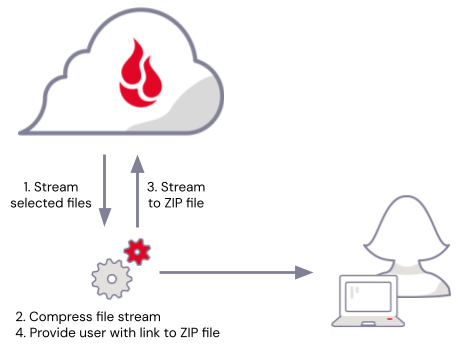
There’s a problem here, though—there has to be enough temporary local storage available to hold the selected files and the resulting .zip file. Not only that, but you have to account for the fact that multiple users may be downloading files concurrently. Finally, no matter how much local storage you provision, you also have to handle the possibility that a spike in usage might consume all the available local storage, at best making downloads temporarily unavailable, at worst destabilizing your whole web application.
Troubleshooting a better way
If you’re familiar with piping data through applications on the command line, the solution might already have occurred to you: Rather than downloading the selected files, compressing them, then uploading the .zip file, stream the selected files directly from the cloud object store, piping them through the compression algorithm, and stream the compressed data back to a new file in the cloud object store.
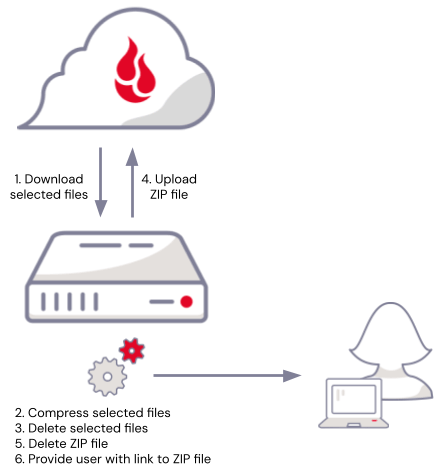
The web application I created allows you to do just that. I learned a lot in the process, and I was surprised by just how compact the solution was, just a couple dozen lines of code, once I’d picked the appropriate tools for the job.
I was familiar with Python’s zipfile module, so it was a logical place to start. The zipfile module provides tools for compressing and decompressing data, and follows the Python convention in working with file-like objects. A file-like object provides standard methods, such as read() and/or write(), even though it doesn’t necessarily represent an actual file stored on a local drive. Python’s file-like objects make it straightforward to assemble pipelines that read from a source, operate on the data, and write to a destination—exactly the problem at hand.
My next thought was to reach for the AWS SDK for Python, also known as Boto3. Here’s what I had in mind:
b2_client = boto3.client('s3')

# BytesIO is a binary stream using an in-memory bytes buffer
with BytesIO() as buffer:
    # Open a ZipFile object for writing to the buffer
    with ZipFile(buffer, 'w') as zipfile:
        for filename in selected_filenames:
            # ZipInfo represents a file within the ZIP
            zipinfo = ZipInfo(filename)
            # You need to set the compress_type on each ZipInfo
            # object - it is not inherited from the ZipFile!
            zipinfo.compress_type = ZIP_DEFLATED
            # Open the ZipInfo object for output
            with (zipfile.open(zipinfo, 'w') as dst):
                # Get the selected file from B2
                response = b2_client.get_object(
                    Bucket=input_bucket_name,
                    Key=filename,
                )
                # Copy the file data to the archive member
                copyfileobj(response['Body'], dst, COPY_BUFFER_SIZE)

    # Rewind to the start of the buffer
    buffer.seek(0)
    # Upload the buffer to B2
    b2_client.put_object(
        Body=buffer,
        Bucket=output_bucket_name,
        Key=zip_filename,
    )
While the above code appears to work just fine, there are two issues. First, the maximum size of a file uploaded with a single put_object call is 5GB, and, second, the BytesIO object, buffer, holds the entire .zip file in memory. It may well be that your users will never select enough files to produce a .zip file greater than 5GB, but there is still a similar problem to the approach we started with: There needs to be enough memory available to hold all of the .zip files being concurrently created by users. We’re no further forward; in fact we’ve gone backwards–we traded a limited, but relatively cheap resource, disk space, for a more limited, more expensive resource: RAM!
It’s straightforward to upload files greater than 5GB using multipart uploads, splitting the file into multiple parts between 5MB and 5GB. I could rewrite my code to split the compressed data into chunks of 5MB, but that would add significant complexity to what seemed like it should be a simple task. I decided to try a different approach.
S3Fs is a “Pythonic” file interface to S3-compatible cloud object stores, such as Backblaze B2, that builds on Filesystem Spec (fsspec), a project to provide a unified Pythonic interface to all sorts of file systems, and aiobotocore, an asynchronous client for AWS. As well as handling details such as multipart uploads, allowing you to to write much more concise code, S3Fs allows you to write data to a file-like object, like this:
# S3FileSystem reads its configuration from the usual config files,
# environment variables. Alternatively, you can pass configuration
# to the constructor.
b2fs = S3FileSystem()

# Create and write to a file in cloud object storage exactly as you
# would a local file.
with b2fs.open(output_path, 'wb') as f:
    for element in some_collection:
        data = some_serialization_function(element)
        f.write(data)
Using S3Fs, my solution for arbitrarily large .zip files was about the same number of lines of code as my previous attempt. In fact, I realized that the app should get each selected file’s last modified time to set the timestamps in the .zip file correctly, so this version actually does more:
zip_file_path = f'{output_bucket_name}/{zip_filename}'

# Open the ZIP file for output, open a ZipFile object
# for writing to the ZIP file
with b2fs.open(zip_file_path, 'wb') as f, ZipFile(f, 'w') as zipfile:
    for filename in selected_filenames:
        input_path = f'{input_bucket_name}/{filename}'

        # Get file info, so we have a timestamp and
        # file size for the ZIP entry
        file_info = b2fs.info(input_path)

        last_modified = file_info['LastModified']
        date_time = (last_modified.year, last_modified.month, last_modified.day,
                     last_modified.hour, last_modified.minute, last_modified.second)

        # ZipInfo represents a file within the ZIP
        zipinfo = ZipInfo(filename=filename, date_time=date_time)
        # You need to set the compress_type on each ZipInfo
        # object - it is not inherited from the ZipFile!
        zipinfo.compress_type = ZIP_DEFLATED
        # Since we know the file size, set it in the ZipInfo
        # object so that large files work correctly
        zipinfo.file_size = input_file_info['size']

        # Open the selected file for input,
        # open the ZipInfo object for output
        with (b2fs.open(input_path, 'rb') as src,
              zipfile.open(zipinfo, 'w') as dst):
        	# Copy the data across
            copyfileobj(src, dst, COPY_BUFFER_SIZE)
You might be wondering, how much memory does this actually use? The copyfileobj() call, right at the very end, reads data from the selected files and writes it to the .zip file. copyfileobj() takes an optional length argument that specifies the buffer size for the copy, so you can control the tradeoff between speed and memory use. I set the default in the b2-zip-files app to 1MiB.
This solves the problems we initially ran into, allowing you to offer .zip downloads without maxing out disk storage or RAM.
My last piece of advice… Other than an easy .zip file downloader, I took one big lesson away from this experiment: Look beyond the AWS SDKs next time you write an application that accesses cloud object storage. You may just find that you can save yourself a lot of time!
The post How to Zip Files with the Python S3fs Library + Backblaze B2 Cloud Storage appeared first on Backblaze Blog | Cloud Storage & Cloud Backup
Democracy at a Crossroads | The Atlantic, Clark Atlanta University, and Morehouse College
Post Syndicated from The Atlantic original https://www.youtube.com/watch?v=qBrEtDLHu5E
Rapid7 Introduces Vector Command, a New Managed Service for Continuous Red Teaming
Post Syndicated from Ed Montgomery original https://blog.rapid7.com/2024/09/17/rapid7-introduces-vector-command-a-new-managed-service-for-continuous-red-teaming/

Rapid7 is delighted to announce the launch of Vector Command, a continuous red teaming managed service designed to assess your external attack surface and identify gaps in the security defenses on an ongoing basis. Following the launch of Surface Command and Exposure Command in August, Vector Command will continue our expansion of Exposure Management protection for our customers.
In today’s digital landscape, organizations are more exposed to cyber threats than ever before. Cloud resources, SaaS solutions, and ever-growing shadow IT create vast external attack surfaces, making businesses increasingly vulnerable. Meanwhile attackers are constantly on the prowl, conducting reconnaissance to exploit weaknesses. Security teams lack visibility into their internet-facing exposures, leaving them vulnerable to potential breaches.
While external attack surface management (EASM) tools offer visibility, they often fall short in validation, resulting in lengthy lists of potential exposures for security teams to sift through. Traditional penetration testing can help validate vulnerabilities, but its point-in-time nature risks leaving critical exposures undetected for extended periods.
Introducing Vector Command
Vector Command is designed to address these challenges head-on, providing a continuous, proactive approach to securing your external attack surface by combining Rapid7’s trusted technology for external attack surface assessments with our world-class red team expertise. By providing an attacker’s perspective, Vector Command empowers security teams to visualize internet-facing assets, validate critical exposures, and take decisive action to mitigate risks.
Vector Command benefits include:
- Increased visibility of the external attack surface with persistent, proactive reconnaissance of both known and unknown internet-facing assets
- Improved prioritization with ongoing, expert-led red team operations to continuously validate your most critical external exposures
- Same-day reporting of successful exploits with expert-vetted attack paths for multi-vector attack chains and a curated list of “attractive assets” that are likely to be exploited
- Monthly expert consultation to confidently drive remediation efforts and resiliency planning
Rapid7 advantage: trusted technology and red team expertise
At the heart of Vector Command is our red team operators, among the best in the industry, bringing years of experience in simulating real-world attacks and identifying vulnerabilities that automated tools might miss. This combined with our recently launched Command Platform’s external attack surface assessment capability provides a unique and powerful solution to ensure that you are not just receiving a list of potential vulnerabilities, but actionable insights based on real-world attack scenarios.
External attack surface assessment: Powered by Rapid7’s Command Platform, Vector Command will leverage the external attack surface capability to perform ongoing, active reconnaissance and discovery of your external attack surface to help you
- Find the unknown and ensure continuous understanding of where shadow IT or unknown business assets may exist like exposed web services, remote admin services, and more
- Zero-in on potential remote access risks, and risky or unencrypted services

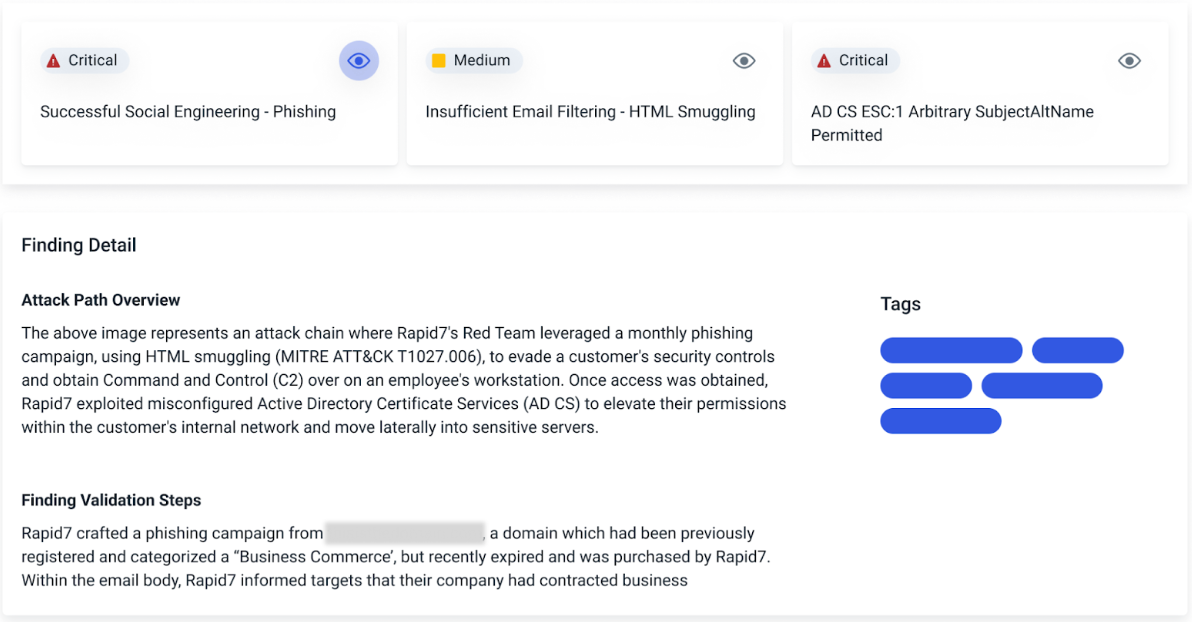
Red team expertise: Our expert operators leverage the latest tactics, techniques, and procedures (TTPs) to safely exploit the external exposures and test your security controls with red team exercises like:
- Opportunistic phishing – Our experts will design and conduct phishing campaigns using the latest TTPs with focus on demonstrating the impact of credential capture and payload execution.
- External network assessment – Ongoing assessment of vulnerabilities exposed in the external network, focused on obtaining access to your organization and its sensitive systems.
- Post-compromise breach simulation – Upon breach, our experts will safely emulate the latest tactics to obtain command and control over the compromised system. Post-exploitation activities emulate adversary behavior to assess privilege escalation, lateral movement, and persistence.
- Emergent threat validation – Assess your network perimeter’s susceptibility to the latest Rapid7 emergent threat vulnerabilities to validate patching and security configurations.
Take command of your attack surface defenses
In an era where cyber threats are constantly evolving, Vector Command empowers you to stay one step ahead of attackers. By providing continuous visibility, validation, and expert guidance, we help you transform your cybersecurity posture from reactive to proactive.
Don’t wait for a breach to expose weaknesses in your defenses. With Vector Command, you can command your attack surface with confidence, knowing that you have Rapid7’s trusted technology and Red Team expertise on your side.
Security proof for Linux’s random number generator
Post Syndicated from daroc original https://lwn.net/Articles/990596/
Four researchers have published a formal proof that Linux’s new deterministic random bit generator (DRBG) is secure in a particular sense — specifically, that the number of queries that would need to be made to it to uncover its internal state depends on the quality of the entropy it can collect from different sources. As long as it can gather enough entropy, it produces secure random numbers.
Since the significant structural changes in Linux 4 and Linux 5.17, there has
been no research on the provable security of Linux-DRBG. For the first time (to
the best of our knowledge), we formally model the Linux-DRBG in Linux 6.4.8
and prove its security in the seedless robustness model
Thanks to Jason Donenfeld for bringing the paper to our attention.
[$] An update on BPF generation from GCC
Post Syndicated from corbet original https://lwn.net/Articles/990343/
The generation of binary code for the kernel’s BPF virtual machine has been
limited to the Clang compiler since the beginning; even developers who
use GCC to build kernels must use Clang to compile to BPF. Work has
been underway for some years on adding a BPF backend to GCC as well; the
developers involved ran a session at the 2024 GNU Tools Cauldron to
provide an update on that project. It would seem that the BPF backend is
close to being ready for production use.
THG Podcast: Volcanoes that Made history
Post Syndicated from The History Guy: History Deserves to Be Remembered original https://www.youtube.com/watch?v=9m9PZO0tDWY
Security updates for Tuesday
Post Syndicated from daroc original https://lwn.net/Articles/990588/
Security updates have been issued by Debian (php-twig and pymongo), Fedora (linux-firmware, microcode_ctl, and python3.13), Mageia (clamav, microcode, postgresql13 and postgresql15, python3-webob, suricata, tcpreplay, tgt, and wireshark), Oracle (httpd, kernel, and linux-kernel), Red Hat (firefox, kernel, kernel-rt, pcs, and thunderbird), SUSE (389-ds, chromium, golang-github-prometheus-prometheus, htmldoc, kernel, SUSE Manager Client Tools, and wireshark), and Ubuntu (clamav, curl, dcmtk, dovecot, nginx, openssh, and python3.10, python3.12, python3.8).
Python Developers Targeted with Malware During Fake Job Interviews
Post Syndicated from Bruce Schneier original https://www.schneier.com/blog/archives/2024/09/python-developers-targeted-with-malware-during-fake-job-interviews.html
Interesting social engineering attack: luring potential job applicants with fake recruiting pitches, trying to convince them to download malware. From a news article
These particular attacks from North Korean state-funded hacking team Lazarus Group are new, but the overall malware campaign against the Python development community has been running since at least August of 2023, when a number of popular open source Python tools were maliciously duplicated with added malware. Now, though, there are also attacks involving “coding tests” that only exist to get the end user to install hidden malware on their system (cleverly hidden with Base64 encoding) that allows remote execution once present. The capacity for exploitation at that point is pretty much unlimited, due to the flexibility of Python and how it interacts with the underlying OS.
How (Not) to Change Someone’s Mind
Post Syndicated from The Atlantic original https://www.youtube.com/watch?v=b5CgSX_31iw
Impact of Experience AI: Reflections from students and teachers
Post Syndicated from Lou Loxley original https://www.raspberrypi.org/blog/impact-of-experience-ai-reflections-from-students-and-teachers/
“I’ve enjoyed actually learning about what AI is and how it works, because before I thought it was just a scary computer that thinks like a human,” a student learning with Experience AI at King Edward’s School, Bath, UK, told us.
This is the essence of what we aim to do with our Experience AI lessons, which demystify artificial intelligence (AI) and machine learning (ML). Through Experience AI, teachers worldwide are empowered to confidently deliver engaging lessons with a suite of resources that inspire and educate 11- to 14-year-olds about AI and the role it could play in their lives.
“I learned new things and it changed my mindset that AI is going to take over the world.” – Student, Malaysia

Developed by us with Google DeepMind, our first set of Experience AI lesson resources was aimed at a UK audience and launched in April 2023. Next we released tailored versions of the resources for 5 other countries, working in close partnership with organisations in Malaysia, Kenya, Canada, Romania, and India. Thanks to new funding from Google.org, we’re now expanding Experience AI for 16 more countries and creating new resources on AI safety, with the aim of providing leading-edge AI education for more than 2 million young people across Europe, the Middle East, and Africa.
In this blog post, you’ll hear directly from students and teachers about the impact the Experience AI lessons have had so far.
Case study: Experience AI in Malaysia
Penang Science Cluster in Malaysia is among the first organisations we’ve partnered with for Experience AI. Speaking to Malaysian students learning with Experience AI, we found that the lessons were often very different from what they had expected.

“I actually thought it was going to be about boring lectures and not much about AI but more on coding, but we actually got to do a lot of hands-on activities, which are pretty fun. I thought AI was just about robots, but after joining this, I found it could be made into chatbots or could be made into personal helpers.” – Student, Malaysia
“Actually, I thought AI was mostly related to robots, so I was expecting to learn more about robots when I came to this programme. It widened my perception on AI.” – Student, Malaysia.
The Malaysian government actively promotes AI literacy among its citizens, and working with local education authorities, Penang Science Cluster is using Experience AI to train teachers and equip thousands of young people in the state of Penang with the understanding and skills to use AI effectively.
“We envision a future where AI education is as fundamental as mathematics education, providing students with the tools they need to thrive in an AI-driven world”, says Aimy Lee, Chief Operating Officer at Penang Science Cluster. “The journey of AI exploration in Malaysia has only just begun, and we’re thrilled to play a part in shaping its trajectory.”
Giving non-specialist teachers the confidence to introduce AI to students
Experience AI provides lesson plans, classroom resources, worksheets, hands-on activities, and videos to help teachers introduce a wide range of AI applications and help students understand how they work. The resources are based on research, and because we adapt them to each partner’s country, they are culturally relevant and relatable for students. Any teacher can use the resources in their classroom, whether or not they have a background in computing education.
“Our Key Stage 3 Computing students now feel immensely more knowledgeable about the importance and place that AI has in their wider lives. These lessons and activities are engaging and accessible to students and educators alike, whatever their specialism may be.” – Dave Cross, North Liverpool Academy, UK
“The feedback we’ve received from both teachers and learners has been overwhelmingly positive. They consistently rave about how accessible, fun, and hands-on these resources are. What’s more, the materials are so comprehensive that even non-specialists can deliver them with confidence.” – Storm Rae, The National Museum of Computing, UK
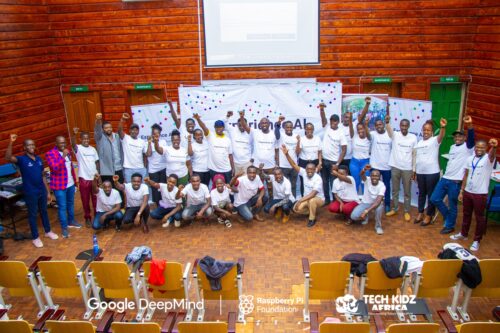
“[The lessons] go above and beyond to ensure that students not only grasp the material but also develop a genuine interest and enthusiasm for the subject.” – Teacher, Changamwe Junior School, Mombasa, Kenya
Sparking debates on bias and the limitations of AI
When learners gain an understanding of how AI works, it gives them the confidence to discuss areas where the technology doesn’t work well or its output is incorrect. These classroom debates deepen and consolidate their knowledge, and help them to use AI more critically.
“Students enjoyed the practical aspects of the lessons, like categorising apples and tomatoes. They found it intriguing how AI could sometimes misidentify objects, sparking discussions on its limitations. They also expressed concerns about AI bias, which these lessons helped raise awareness about. I didn’t always have all the answers, but it was clear they were curious about AI’s implications for their future.” – Tracey Mayhead, Arthur Mellows Village College, Peterborough, UK

“The lessons that we trialled took some of the ‘magic’ out of AI and started to give the students an understanding that AI is only as good as the data that is used to build it.” – Jacky Green, Waldegrave School, UK
“I have enjoyed learning about how AI is actually programmed, rather than just hearing about how impactful and great it could be.” – Student, King Edward’s School, Bath, UK
“It has changed my outlook on AI because now I’ve realised how much AI actually needs human intelligence to be able to do anything.” – Student, Arthur Mellows Village College, Peterborough, UK
“I didn’t really know what I wanted to do before this but now knowing more about AI, I probably would consider a future career in AI as I find it really interesting and I really liked learning about it.” – Student, Arthur Mellows Village College, Peterborough, UK
If you’d like to get involved with Experience AI as an educator and use our free lesson resources with your class, you can start by visiting experience-ai.org.
The post Impact of Experience AI: Reflections from students and teachers appeared first on Raspberry Pi Foundation.
Reinventing the Amazon Q Developer agent for software development
Post Syndicated from Laurent Callot original https://aws.amazon.com/blogs/devops/reinventing-the-amazon-q-developer-agent-for-software-development/
Amazon Q Developer is the most capable AI-powered assistant for software development that reimagines the experience across the entire software development lifecycle, making it easier and faster to build, secure, manage, and optimize applications on AWS. Using your natural language input and your project context, Amazon Q Developer’s agent for software development autonomously implements multi-file features, bug fixes, and unit tests in your integrated development environment (IDE) workspace. For example, you can ask Amazon Q Developer to add a new checkout feature to your e-commerce app, and it will analyze your existing codebase, map out the implementation plan spanning multiple files, and upon your approval, execute all the required code changes and tests in minutes. To get started building with the Q Developer agent, install the Amazon Q extension and use the /dev command inside the chat window.
Amazon Q Developer is constantly improving and redefining what the state-of-the-art is for software development agents. The Amazon Q Developer agent for software development was one of the first agents to publish their results on the industry-recognized SWE-bench benchmark leaderboard. This benchmark is designed to measure the ability to solve real-world coding problems a Python software developer would encounter. This newest update to the Amazon Q Developer agent for software development out-performs the previous version released in May, resolving 51% more tasks on the SWE-bench verified dataset and 43% more on the full dataset. In just a few months, the agent’s scores have increased from 25.6% tasks resolved to 38.8% on the verified dataset and from 13.82% to 19.75% on the full dataset, making it the top performing agent on the leaderboard for 4 weeks. In our June 2024 blog post, we provided an overview explaining how our first submission of Amazon Q Developer was able to top the benchmarks. Since then, the SWE-bench submission process has begun to require the publication of agent trajectories — meaning, a log of the steps taken by an agent to solve a given problem. We welcome this transparency as a critical ingredient of developer trust, so we are proud to share the trajectories of our newest agent.
This video demonstrates the kind of tasks you can now accomplish with the Amazon Q Developer agent for software development. For example, you can refactor a Lambda function to improve clarity and scalability of an app in mere minutes. In the prompt we provide a few specific requirements to the agent: split the logic into multiple Lambdas, avoid duplication of functionality, keep permissions locked down, and update the infrastructure as code to support the change. The agent gets to work and keeps you updated in real time about what it is doing. Once it is done, you can review the code and merge it with a single click.
We have reinvented our agent to take advantage of the new capabilities offered by state-of-the-art AI models, incorporate developer feedback, and bring together the results of dozens of experiments, with proven results. SWE-bench offers a tangible way to share performance measurements, but it is only one component of the way we evaluate the Amazon Q Developer agent for software development. The best way to measure the capabilities of the agent is to test it out for yourself on the tasks that you care about. This blog post shows you how to use the new agent and provides an overview of how the technology behind our reinvented agent works.
Getting started with the Amazon Q Developer agent
To get started, you need to have an AWS Builder ID or be part of an organization with an AWS IAM Identity Center instance set up that allows you to use Amazon Q. To use Amazon Q Developer agent for software development in Visual Studio Code, start by installing the Amazon Q extension. The extension is also available for JetBrains, Visual Studio (in preview), and in the Command Line on macOS. Find the latest version on the Amazon Q Developer page.

After authenticating, you can invoke the feature development agent by entering /dev in the chat field.

Let’s say you are exploring the amazon-science/auto-rag-eval GitHub repository. This repository contains a method to automatically evaluate retrieval-augmented language models as described in this amazon.science blog. This method constructs multiple choice questions based on the documents contained in a RAG index. Each question has a single correct answer and multiple incorrect answers, or distractors. You notice that the number of distractors is hard coded to be 3. You would like it to be a parameter instead, so you ask the agent to make this change.

The agent starts exploring your code base and shares updates in real-time summarizing its state, the changes that it is making, and the files being used. The agent starts by exploring the code base.

After a few steps, the agent has identified the key chunks of code to modify and how to modify them.

The agent iterates on implementing its modifications until it succeeds. At that point, you can see that one file auto-rag-eval/ExamGenerator/distractors_generator.py has been changed.

Once it is done, the agent shows you a list of the files that it has modified, here distractors_generator.py. Clicking on the file name opens a diff view in your IDE.

You can review the modifications in each file and decide whether to accept them. If the generated code could be improved, you can provide this feedback to the agent and request that it regenerates it.

Getting the most out of the AI-powered software development agent
The Amazon Q Developer agent for software development works at its best when requests are aimed and precise. This does not mean that you have to write very long requests, “add unit tests to MyMethod” is clear. When the task is more ambiguous, for example, when you want the agent to resolve a bug in your code, it is helpful to include an error trace. When you want the agent to develop new features, explaining the context, being specific about desired behavior, specifying where the change should be made when known, or even relevant snippets of code or pseudo-code helps the agent focus to achieve the best results.
How the improved Amazon Q Developer agent for software development works
The agent is continuously updated and improved to give you better performance. During the past months the ability of foundation models to drive agentic workflows and leverage large sets of tools to accomplish complex tasks has improved significantly. Guided by customer feedback, we have redesigned our agent to take advantage of these new abilities. Our inspiration is the workflow of experienced developers getting to work on an unfamiliar code base.
When developers want to accomplish a task on an unfamiliar code base, they start by getting a bird’s-eye view of the repository to obtain a general understanding of the project. They then dive deeper into the parts that are relevant to their task. Developers frequently rely on visual IDEs such as VSCode or IntelliJ to explore repositories and implement changes. Although some LLMs have the ability to interpret images, the fidelity of that interpretation, particularly for information-dense images, is far from what is required for an application as complex as software development agents.
AWS has developed a new framework for the Amazon Q Developer agent — textcode — which provides a text-based alternative to visual IDEs specifically designed for LLMs. It effectively equips the agent with its own IDE with which it interacts exclusively through text. The agent is able to use it similarly to how a developer would use a regular IDE to solve your tasks. textcode is designed to provide token-efficient text representations of code, code files, and code workspaces. It allows LLMs to interact with a code base in a similar manner to how a developer interacts with it in a visual IDE. This framework offers structured and efficient environment within which it is easy for the agent to use tools, take actions, and evaluate its progress towards the completion of the assigned task.
The agent is equipped with tools to explore the workspace, act on it, and evaluate its solutions. For example, the agent can open, create, and close files, select and deselect code chunks, find and replace code, and revert changes if needed. These tools allows the agent to navigate the workspace in order to identify and retain the critical pieces of information to solve your tasks while discarding superfluous code to not clog its context. We are continuously expanding the toolkit of the agent with more powerful tools.

When you use the \dev command in your IDE, the Q Developer agent for software development is initialized with your problem statement as well as some guidance on how to solve the problem and use the tools it is equipped with. The agent determines what actions to use on the workspace. It generally starts by exploring the workspace to discover the parts of the code relevant to solving your task. The agent takes action by using the tools it is equipped with. The response of the tools is incorporated in an updated prompt that is provided back to the LLM to decide its next actions.
The Q Developer agent is equipped with logic to prevent it from getting stuck in unproductive paths and help it progress towards a solution to your problem. The agent will autonomously decide that it has generated the appropriate changes (including writing unit tests and updating documentation) to fulfill your request. At that point, the agent exits its loop and returns the candidate code patches for your review. You can decide to accept them entirely or in part, or ask the agent to modify them. If you ask for modifications, the agent will resume its loop using your feedback as additional information about the problem statement.
Conclusion
This post introduced the updated Amazon Q Developer agent for software development. The agent autonomously implements features that you describe using natural language directly from your IDE. We gave you an overview of how the agent works behind the scenes and discussed its significantly increased accuracy.
You are now ready to explore the capabilities of Amazon Q Developer agent for software development and make it your AI coding assistant! Install the Amazon Q Developer extension in your IDE of choice and start using Amazon Q (including the agent for software development) for free using your AWS Builder ID or subscribe to Amazon Q Developer to unlock higher limits.
Most Remote Inhabited Island
Post Syndicated from The History Guy: History Deserves to Be Remembered original https://www.youtube.com/watch?v=wfF0nNTehoM
Comic for 2024.09.17 – Dr Bizkit, Hearing Doctor
Post Syndicated from Explosm.net original https://explosm.net/comics/dr-bizkit-hearing-doctor
New Cyanide and Happiness Comic
Every Scientific Field
Post Syndicated from xkcd.com original https://xkcd.com/2986/

Linux Foundation announces OpenSearch Software Foundation
Post Syndicated from jzb original https://lwn.net/Articles/990517/
The Linux Foundation has announced
the creation of the OpenSearch Software
Foundation as a vendor‑neutral home for the OpenSearch search and observability
software:
Established in 2021 and previously hosted by Amazon Web Services
(AWS), OpenSearch has recorded more than 700 million software
downloads and participation from thousands of contributors and more
than 200 project maintainers.
AWS created
the OpenSearch project as an open-source fork of ElasticSearch and
Kibana in 2021 after Elastic moved those projects to
non-free licenses. Elastic announced in August that it would
relicense the projects under the Affero GPL (AGPL).
Intel Creating Foundry Subsidiary and Announcing a Big AWS Win
Post Syndicated from Patrick Kennedy original https://www.servethehome.com/intel-creating-foundry-subsidiary-and-announcing-a-big-aws-win/
In a huge letter to employees, Intel outlined a number of moves including an Intel Foundry subsidiary, a big AWS win, and more
The post Intel Creating Foundry Subsidiary and Announcing a Big AWS Win appeared first on ServeTheHome.