Methodology for incident response on generative AI workloads

Post Syndicated from Anna McAbee original https://aws.amazon.com/blogs/security/methodology-for-incident-response-on-generative-ai-workloads/

The AWS Customer Incident Response Team (CIRT) has developed a methodology that you can use to investigate security incidents involving generative AI-based applications. To respond to security events related to a generative AI workload, you should still follow the guidance and principles outlined in the AWS Security Incident Response Guide. However, generative AI workloads require that you also consider some additional elements, which we detail in this blog post.

We start by describing the common components of a generative AI workload and discuss how you can prepare for an event before it happens. We then introduce the Methodology for incident response on generative AI workloads, which consists of seven elements that you should consider when triaging and responding to a security event on a generative AI workload. Lastly, we share an example incident to help you explore the methodology in an applied scenario.

Components of a generative AI workload

As shown in Figure 1, generative AI applications include the following five components:

  • An organization that owns or is responsible for infrastructure, generative AI applications, and the organization’s private data.
  • Infrastructure within an organization that isn’t specifically related to the generative AI application itself. This can include databases, backend servers, and websites.
  • Generative AI applications, which include the following:
    • Foundation models – AI models with a large number of parameters and trained on a massive amount of diverse data.
    • Custom models – models that are fine-tuned or trained on an organization’s specific data and use cases, tailored to their unique requirements.
    • Guardrails – mechanisms or constraints to help make sure that the generative AI application operates within desired boundaries. Examples include content filtering, safety constraints, or ethical guidelines.
    • Agents – workflows that enable generative AI applications to perform multistep tasks across company systems and data sources.
    • Knowledge bases – repositories of domain-specific knowledge, rules, or data that the generative AI application can access and use.
    • Training data – data used to train, fine-tune, or augment the generative AI application’s models, including data for techniques such as retrieval augmented generation (RAG).

      Note: Training data is distinct from an organization’s private data. A generative AI application might not have direct access to private data, although this is configured in some environments.

    • Plugins – additional software components or extensions that you can integrate with the generative AI application to provide specialized functionalities or access to external services or data sources.
  • Private data refers to the customer’s privately stored, confidential data that the generative AI resources or applications aren’t intended to interact with during normal operation.
  • Users are the identities that can interact with or access the generative AI application. They can be human or non-human (such as machines).

Figure 1: Common components of an AI/ML workload

Figure 1: Common components of an AI/ML workload

Prepare for incident response on generative AI workloads

You should prepare for a security event across three domains: people, process, and technology. For a summary of how to prepare, see the preparation items from the Security Incident Response Guide. In addition, your preparation for a security event that’s related to a generative AI workload should include the following:

Important: Logs can contain sensitive information. To help protect this information, you should set up least privilege access to these logs, like you do for your other security logs. You can also protect sensitive log data with data masking. In Amazon CloudWatch, you can mask data natively through log group data protection policies.

Methodology for incident response on generative AI workloads

After you complete the preparation items, you can use the Methodology for incident response on generative AI workloads for active response, to help you rapidly triage an active security event involving a generative AI application.

The methodology has seven elements, which we detail in this section. Each element describes a method by which the components can interact with another component or a method by which a component can be modified. Consideration of these elements will help guide your actions during the Operations phase of a security incident, which includes detection, analysis, containment, eradication, and recovery phases.

  • Access – Determine the designed or intended access patterns for the organization that hosts the components of the generative AI application, and look for deviations or anomalies from those patterns. Consider whether the application is accessible externally or internally because that will impact your analysis.

    To help you identify anomalous and potential unauthorized access to your AWS environment, you can use Amazon GuardDuty. If your application is accessible externally, the threat actor might not be able to access your AWS environment directly and thus GuardDuty won’t detect it. The way that you’ve set up authentication to your application will drive how you detect and analyze unauthorized access.

    If evidence of unauthorized access to your AWS account or associated infrastructure exists, determine the scope of the unauthorized access, such as the associated privileges and timeline. If the unauthorized access involves service credentials—for example, Amazon Elastic Compute Cloud (Amazon EC2) instance credentials—review the service for vulnerabilities.

  • Infrastructure changes – Review the supporting infrastructure, such as servers, databases, serverless computing instances, and internal or external websites, to determine if it was accessed or changed. To investigate infrastructure changes, you can analyze CloudTrail logs for modifications of in-scope resources, or analyze other operating system logs or database access logs.
  • AI changes – Investigate whether users have accessed components of the generative AI application and whether they made changes to those components. Look for signs of unauthorized activities, such as the creation or deletion of custom models, modification of model availability, tampering or deletion of generative AI logging capabilities, tampering with the application code, and removal or modification of generative AI guardrails.
  • Data store changes – Determine the designed or intended data access patterns, whether users accessed the data stores of your generative AI application, and whether they made changes to these data stores. You should also look for the addition or modification of agents to a generative AI application.
  • Invocation – Analyze invocations of generative AI models, including the strings and file inputs, for threats, such as prompt injection or malware. You can use the OWASP Top 10 for LLM as a starting point to understand invocation related threats, and you can use invocation logs to analyze prompts for suspicious patterns, keywords, or structures that might indicate a prompt injection attempt. The logs also capture the model’s outputs and responses, enabling behavioral analysis to help identify uncharacteristic or unsafe model behavior indicative of a prompt injection. You can use the timestamps in the logs for temporal analysis to help detect coordinated prompt injection attempts over time and collect information about the user or system that initiated the model invocation, helping to identify the source of potential exploits.
  • Private data – Determine whether the in-scope generative AI application was designed to have access to private or confidential data. Then look for unauthorized access to, or tampering with, that data.
  • Agency – Agency refers to the ability of applications to make changes to an organization’s resources or take actions on a user’s behalf. For example, a generative AI application might be configured to generate content that is then used to send an email, invoking another resource or function to do so. You should determine whether the generative AI application has the ability to invoke other functions. Then, investigate whether unauthorized changes were made or if the generative AI application invoked unauthorized functions.

The following table lists some questions to help you address the seven elements of the methodology. Use your answers to guide your response.

Topic Questions to address
Access Do you still have access to your computing environment?
Is there continued evidence of unauthorized access to your organization?
Infrastructure changes Were supporting infrastructure resources accessed or changed?
AI changes Were your AI models, code, or resources accessed or changed?
Data store changes Were your data stores, knowledge bases, agents, plugins, or training data accessed or tampered with?
Invocation What data, strings, or files were sent as input to the model?
What prompts were sent?
What responses were produced?
Private data What private or confidential data do generative AI resources have access to?
Was private data changed or tampered with?
Agency Can the generative AI application resources be used to start computing services in an organization, or do the generative AI resources have the authority to make changes?
Were unauthorized changes made?

Example incident

To see how to use the methodology for investigation and response, let’s walk through an example security event where an unauthorized user compromises a generative AI application that’s hosted on AWS by using credentials that were exposed on a public code repository. Our goal is to determine what resources were accessed, modified, created, or deleted.

To investigate generative AI security events on AWS, these are the main log sources that you should review:

Access

Analysis of access for a generative AI application is similar to that for a standard three-tier web application. To begin, determine whether an organization has access to their AWS account. If the password for the AWS account root user was lost or changed, reset the password. Then, we strongly recommended that you immediately enable a multi-factor authentication (MFA) device for the root user—this should block a threat actor from accessing the root user.

Next, determine whether unauthorized access to the account persists. To help identify mutative actions logged by AWS Identity and Access Management (IAM) and AWS Security Token Service (Amazon STS), see the Analysis section of the Compromised IAM Credentials playbook on GitHub. Lastly, make sure that access keys aren’t stored in public repositories or in your application code; for alternatives, see Alternatives to long-term access keys.

Infrastructure changes

To analyze the infrastructure changes of an application, you should consider both the control plane and data plane. In our example, imagine that Amazon API Gateway was used for authentication to the downstream components of the generative AI application and that other ancillary resources were interacting with your application. Although you could review control plane changes to these resources in CloudTrail, you would need additional logging to be turned on to review changes made on the operating system of the resource. The following are some common names for control plane events that you could find in CloudTrail for this element:

  • ec2:RunInstances
  • ec2:StartInstances
  • ec2:TerminateInstances
  • ecs:CreateCluster
  • cloudformation:CreateStack
  • rds:DeleteDBInstance
  • rds:ModifyDBClusterSnapshotAttribute

AI changes

Unauthorized changes can include, but are not limited to, system prompts, application code, guardrails, and model availability. Internal user access to the generative AI resources that AWS hosts are logged in CloudTrail and appear with one of the following event sources:

  • amazonaws.com
  • amazonaws.com
  • amazonaws.com
  • amazonaws.com

The following are a couple examples of the event names in CloudTrail that would represent generative AI resource log tampering in our example scenario:

  • bedrock:PutModelInvocationLoggingConfiguration
  • bedrock:DeleteModelInvocationLoggingConfiguration

The following are some common event names in CloudTrail that would represent access to the AI/ML model service configuration:

  • bedrock:GetFoundationModelAvailability
  • bedrock:ListProvisionedModelThroughputs
  • bedrock:ListCustomModels
  • bedrock:ListFoundationModels
  • bedrock:ListProvisionedModelThroughput
  • bedrock:GetGuardrail
  • bedrock:DeleteGuardrail

In our example scenario, the unauthorized user has gained access to the AWS account. Now imagine that the compromised user has a policy attached that grants them full access to all resources. With this access, the unauthorized user can enumerate each component of Amazon Bedrock and identify the knowledge base and guardrails that are part of the application.

The unauthorized user then requests model access to other foundation models (FMs) within Amazon Bedrock and removes existing guardrails. The access to other foundation models could indicate that the unauthorized user intends to use the generative AI application for their own purposes, and the removal of guardrails minimizes filtering or output checks by the model. AWS recommends that you implement fine-grained access controls by using IAM policies and resource-based policies to restrict access to only the necessary Amazon Bedrock resources, AWS Lambda functions, and other components that the application requires. Also, you should enforce the use of MFA for IAM users, roles, and service accounts with access to critical components such as Amazon Bedrock and other components of your generative AI application.

Data store changes

Typically, you use and access a data store and knowledge base through model invocation, and for Amazon Bedrock, you include the API call bedrock:InvokeModel.

However, if an unauthorized user gains access to the environment, they can create, change, or delete the data sources and knowledge bases that the generative AI applications integrate with. This could cause data or model exfiltration or destruction, as well as data poisoning, and could create a denial-of-service condition for the model. The following are some common event names in CloudTrail that would represent changes to AI/ML data sources in our example scenario:

  • bedrock:CreateDataSource
  • bedrock:GetKnowledgeBase
  • bedrock:DeleteKnowledgeBase
  • bedrock:CreateAgent
  • bedrock:DeleteAgent
  • bedrock:InvokeAgent
  • bedrock:Retrieve
  • bedrock:RetrieveAndGenerate

For the full list of possible actions, see the Amazon Bedrock API Reference.

In this scenario, we have established that the unauthorized user has full access to the generative AI application and that some enumeration took place. The unauthorized user then identified the S3 bucket that was the knowledge base for the generative AI application and uploaded inaccurate data, which corrupted the LLM. For examples of this vulnerability, see the section LLM03 Training Data Poisoning in the OWASP TOP 10 for LLM Applications.

Invocation

Amazon Bedrock uses specific APIs to register model invocation. When a model in Amazon Bedrock is invoked, CloudTrail logs it. However, to determine the prompts that were sent to the generative AI model and the output response that was received from it, you must have configured model invocation logging.

These logs are crucial because they can reveal important information, such as whether a threat actor tried to get the model to divulge information from your data stores or release data that the model was trained or fine-tuned on. For example, the logs could reveal if a threat actor attempted to prompt the model with carefully crafted inputs that were designed to extract sensitive data, bypass security controls, or generate content that violates your policies. Using the logs, you might also learn whether the model was used to generate misinformation, spam, or other malicious outputs that could be used in a security event.

Note: For services such as Amazon Bedrock, invocation logging is disabled by default.  We recommend that you enable data events and model invocation logging for generative AI services, where available. However, your organization might not want to capture and store invocation logs for privacy and legal reasons. One common concern is users entering sensitive data as input, which widens the scope of assets to protect. This is a business decision that should be taken into consideration.

In our example scenario, imagine that model invocation wasn’t enabled, so the incident responder couldn’t collect invocation logs to see the model input or output data for unauthorized invocations. The incident responder wouldn’t be able to determine the prompts and subsequent responses from the LLM. Without this logging enabled, they also couldn’t see the full request data, response data, and metadata associated with invocation calls.

Event names in model invocation logs that would represent model invocation logging in Amazon Bedrock include:

  • bedrock:InvokeModel
  • bedrock:InvokeModelWithResponseStream
  • bedrock:Converse
  • bedrock:ConverseStream

The following is a sample log entry for Amazon Bedrock model invocation logging:

Figure 2: sample model invocation log including prompt and response

Figure 2: sample model invocation log including prompt and response

Private data

From an architectural standpoint, generative AI applications shouldn’t have direct access to an organization’s private data. You should classify data used to train a generative AI application or for RAG use as data store data and segregate it from private data, unless the generative AI application uses the private data (for example, in the case where a generative AI application is tasked to answer questions about medical records for a patient). One way to help make sure that an organization’s private data is segregated from generative AI applications is to use a separate account and to authenticate and authorize access as necessary to adhere to the principle of least privilege.

Agency

Excessive agency for an LLM refers to an AI system that has too much autonomy or decision-making power, leading to unintended and potentially harmful consequences. This can happen when an LLM is deployed with insufficient oversight, constraints, or alignment with human values, resulting in the model making choices that diverge from what most humans would consider beneficial or ethical.

In our example scenario, the generative AI application has excessive permissions to services that aren’t required by the application. Imagine that the application code was running with an execution role with full access to Amazon Simple Email Service (Amazon SES). This could allow for the unauthorized user to send spam emails on the users’ behalf in response to a prompt. You could help prevent this by limiting permission and functionality of the generative AI application plugins and agents. For more information, see OWASP Top 10 for LLM, evidence of LLM08 Excessive Agency.

During an investigation, while analyzing the logs, both the sourceIPAddress and the userAgent fields will be associated with the generative AI application (for example, sagemaker.amazonaws.com, bedrock.amazonaws.com, or q.amazonaws.com). Some examples of services that might commonly be called or invoked by other services are Lambda, Amazon SNS, and Amazon SES.

Conclusion

To respond to security events related to a generative AI workload, you should still follow the guidance and principles outlined in the AWS Security Incident Response Guide. However, these workloads also require that you consider some additional elements.

You can use the methodology that we introduced in this post to help you address these new elements. You can reference this methodology when investigating unauthorized access to infrastructure where the use of generative AI applications is either a target of unauthorized use, the mechanism for unauthorized use, or both. The methodology equips you with a structured approach to prepare for and respond to security incidents involving generative AI workloads, helping you maintain the security and integrity of these critical applications.

For more information about best practices for designing your generative AI application, see Generative AI for the AWS Security Reference Architecture. For information about tactical mitigations for a common generative AI application, see the Blueprint for secure design and anti-pattern mitigation.

If you have feedback about this post, submit comments in the Comments section below. If you have questions about this post, start a new thread on the AWS Security, Identity, & Compliance re:Post or contact AWS Support.
 

Anna McAbee


Anna McAbee

Anna is a Security Specialist Solutions Architect focused on financial services, generative AI, and incident response at AWS. Outside of work, Anna enjoys Taylor Swift, cheering on the Florida Gators football team, wine tasting, and traveling the world.
Steve De Vera


Steve De Vera

Steve is a manager in the AWS Customer Incident Response Team (CIRT). He is passionate about American-style BBQ and is a certified competition BBQ judge. He has a dog named Brisket.
AJ Evans


AJ Evans

AJ is a Security Engineer with the AWS Customer Incident Response Team (CIRT). He uses his experience as a former U.S. Secret Service Special Agent, where he focused on financial crimes and network intrusions, to protect AWS customers. When he’s not responding to the latest cyber threats, AJ enjoys gaming, playing music, building custom PCs, and 3D printing his own creations.
Jennifer Paz


Jennifer Paz

Jennifer is a Security Engineer with over a decade of experience, currently serving on the AWS Customer Incident Response Team (CIRT). Jennifer enjoys helping customers tackle security challenges and implementing complex solutions to enhance their security posture. When not at work, Jennifer is an avid walker, jogger, pickleball enthusiast, traveler, and foodie, always on the hunt for new culinary adventures.

AWS Weekly Roundup: Oracle Database@AWS, Amazon RDS, AWS PrivateLink, Amazon MSK, Amazon EventBridge, Amazon SageMaker and more

Post Syndicated from Matheus Guimaraes original https://aws.amazon.com/blogs/aws/aws-weekly-roundup-oracle-databaseaws-amazon-rds-aws-privatelink-amazon-msk-amazon-eventbridge-amazon-sagemaker-and-more/

Hello, everyone!

It’s been an interesting week full of AWS news as usual, but also full of vibrant faces filling up the rooms in a variety of events happening this month.

Let’s start by covering some of the releases that have caught my attention this week.

My Top 3 AWS news of the week

Amazon RDS for MySQL zero-ETL integrations is now generally available and it comes with exciting new features. You are now able to configure zero-ETL integrations in your AWS CloudFormation templates, and you also now have the ability to set up multiple integrations from a source Amazon RDS for MySQL database with up to five Amazon Redshift warehouses. Lastly, you can now also apply data filters which determine which database and tables get automatically replicated. Read this blog post where I review aspects of this release and show you how to get started with data filtering if you want to know more. Incidentally, this release pairs well with another release this week: Amazon Redshift now allows you to alter the sort keys of tables replicated via zero-ETL integrations.

Oracle Database@AWS has been announced as part of a strategic partnership between Amazon Web Services (AWS) and Oracle. This offering allows customers to access Oracle Autonomous Database and Oracle Exadata Database Service directly within AWS simplifying cloud migration for enterprise workloads. Key features include zero-ETL integration between Oracle and AWS services for real-time data analysis, enhanced security, and optimized performance for hybrid cloud environments. This collaboration addresses the growing demand for multi-cloud flexibility and efficiency. It will be available in preview later in the year with broader availability in 2025 as it expands to new Regions.

Amazon OpenSearch Service now supports version 2.15, featuring improvements in search performance, query optimization, and AI-powered application capabilities. Key updates include radial search for vector space queries, optimizations for neural sparse and hybrid search, and the ability to enable vector and hybrid search on existing indexes. Additionally, it also introduces new features like a toxicity detection guardrail and an ML inference processor for enriching ingest pipelines. Read this guide to see how you can upgrade your Amazon OpenSearch Service domain.

So simple yet so good
These releases are simple in nature, but have a big impact.

AWS Resource Access Manager (RAM) now supports AWS PrivateLink – With this release, you can now securely share resources across AWS accounts with private connectivity, without exposing traffic to the public internet. This integration allows for more secure and streamlined access to shared services via VPC endpoints, improving network security and simplifying resource sharing across organizations.

AWS Network Firewall now supports AWS PrivateLink – another security quick-win, you can now securely access and manage Network Firewall resources without exposing traffic to the public internet.

AWS IAM Identity Center now enables users to customize their experience – You can set the language and visual mode preferences, including dark mode for improved readability and reduced eye strain. This update supports 12 different languages and enables users to adjust their settings for a more personalized experience when accessing AWS resources through the portal​.

Others
Amazon EventBridge Pipes now supports customer managed KMS keys – Amazon EventBridge Pipes now supports customer-managed keys for server-side encryption. This update allows customers to use their own AWS Key Management Service (KMS) keys to encrypt data when transferring between sources and targets, offering more control and security over sensitive event data. The feature enhances security for point-to-point integrations without the need for custom integration code. See instructions on how to configure this in the updated documentation. 

AWS Glue Data Catalog now supports enhanced storage optimization for Apache Iceberg tables – This includes automatic removal of unnecessary data files, orphan file management, and snapshot retention. These optimizations help reduce storage costs and improve query performance by continuously monitoring and compacting tables, making it easier to manage large-scale datasets stored in Amazon S3. See this Big Data blog post for a deep dive into this new feature.

Amazon MSK Replicator now supports the replication of Kafka topics across clusters while preserving identical topic names – This simplifies cross-cluster replication processes allowing users to replicate data across regions without needing to reconfigure client applications. This reduces setup complexity and enhances support for more seamless failovers in multi-cluster streaming architectures​. See this Amazon MSK Replicator developer guide to learn more about it.

Amazon SageMaker introduces sticky session routing for inference – This allows requests from the same client to be directed to the same model instance for the duration of a session improving consistency and reducing latency, particularly in real-time inference scenarios like chatbots or recommendation systems, where session-based interactions are crucial​. Read about how to configure it in this documentation guide.

Events
The AWS GenAI Lofts continue to pop up around the world! This week, developers in San Francisco had the opportunity to attend two very exciting events at the AWS Gen AI Loft in San Francisco including the “Generative AI on AWS” meetup last Tuesday, featuring discussions about extended reality, future AI tools, and more. Then things got playful on Thursday with the demonstration of an Amazon Bedrock-powered MineCraft bot and AI video game battles! If you’re around San Francisco before October 19th make sure to check out the schedule to see the list of events that you can join.

AWS GenAI Loft San Francisco talk

Make sure to check out the AWS GenAI Loft in Sao Paulo, Brazil, which opened recently, and the AWS GenAI Loft in London, which opens September 30th. You can already start registering for events before they fill up including one called “The future of development” that offers a whole day of targeted learning for developers to help them accelerate their skills.

Our AWS communities have also been very busy throwing incredible events! I was privileged to be a speaker at AWS Community Day Belfast where I got to finally meet all of the organizers of this amazing thriving community in Northern Ireland. If you haven’t been to a community day, I really recommend you check them out! You are sure to leave energized by the dedication and passion from communities leaders like Matt Coulter, Kristi Perreault, Matthew Wilson, Chloe McAteer, and their community members – not to mention the smiles all around. 🙂

AWS Community Belfast organizers and codingmatheus

Certifications
If you’ve been postponing taking an AWS certification exam, now is the perfect time! Register free for the AWS Certified: Associate Challenge before December 12, 2024 and get a 50% discount voucher to take any of the following exams: AWS Certified Solutions Architect – Associate, AWS Certified Developer – Associate, AWS Certified SysOps Administrator – Associate, or AWS Certified Data Engineer – Associate. My colleague Jenna Seybold has posted a collection of study material for each exam; check it out if you’re interested.

Also, don’t forget that the brand new AWS Certified AI Practitioner exam is now available. It is in beta stage, but you can already take it. If you pass it before February 15, 2025, you get an Early Adopter badge to add to your collection.

Conclusion
I hope you enjoyed the news this week!

Keep learning!

[$] Fedora evicts WolfSSL

Post Syndicated from jzb original https://lwn.net/Articles/989687/

The Fedora
Engineering Steering Committee
(FESCo) has voted to
immediately remove the WolfSSL package from all of Fedora’s
repositories due to its maintainer failing to gain approval to package
a new cryptography library for Fedora. Its brief travels through
Fedora’s package system highlights gaps in documentation, as well as
in the package‑review process. The good news is that this may stir
Fedora to improve its documentation and revive a formal security
team.

Create security observability using generative AI with Security Lake and Amazon Q in QuickSight

Post Syndicated from Priyank Ghedia original https://aws.amazon.com/blogs/security/create-security-observability-using-generative-ai-with-security-lake-and-amazon-q-in-quicksight/

Generative artificial intelligence (AI) is now a household topic and popular across various public applications. Users enter prompts to get answers to questions, write code, create images, improve their writing, and synthesize information. As people become familiar with generative AI, businesses are looking for ways to apply these concepts to their enterprise use cases in a simple, scalable, and cost-effective way. These same needs are shared by a variety of security stakeholders. For example, if security directors want to summarize their security posture in natural language, a security architect will need to triage alerts or findings and investigate AWS CloudTrail logs to identify high priority remediation actions or detect potential threat actors by identifying potentially malicious activity. There are many ways to deploy solutions for these use cases.

In this blog post, we review a fully serverless solution for querying data stored in Amazon Security Lake using natural language (human language) with Amazon Q in QuickSight. This solution has multiple use cases, such as generating visualizations and querying vulnerability information for vulnerability management using tools such as Amazon Inspector that feed into AWS Security Hub. The solution helps reduce the time from detection to investigation by using natural language to query CloudTrail logs and Amazon Virtual Private Cloud (VPC) Flow Logs, resulting in quicker response to threats in your environment.

Amazon Security Lake is a fully managed security data lake service that automatically centralizes security data from AWS environments, software as a service (SaaS) providers, and on-premises and cloud sources into a purpose-built data lake that’s stored in your AWS account. The data lake is backed by Amazon Simple Storage Service (Amazon S3) buckets, and you retain ownership over your data. Security Lake converts ingested data into Apache Parquet format and a standard open source schema called the Open Cybersecurity Schema Framework (OCSF). With OCSF support, Security Lake normalizes and combines security data from AWS and a broad range of enterprise security data sources.

Amazon QuickSight is a cloud-scale business intelligence (BI) service that delivers insights to stakeholders, wherever they are. QuickSight connects to your data in the cloud and combines data from a variety of different sources. With QuickSight, users can meet varying analytic needs from the same source of truth through interactive dashboards, reports, natural language queries, and embedded analytics. With Amazon Q in QuickSight, business analysts and users can use natural language to build, discover, and share meaningful insights.

The recent announcements for Amazon Q in QuickSight, Security Lake, and the OCSF present a unique opportunity to apply generative AI to fully managed hybrid multi-cloud security related logs and findings from over 100 independent software vendors and partners.

Solution overview

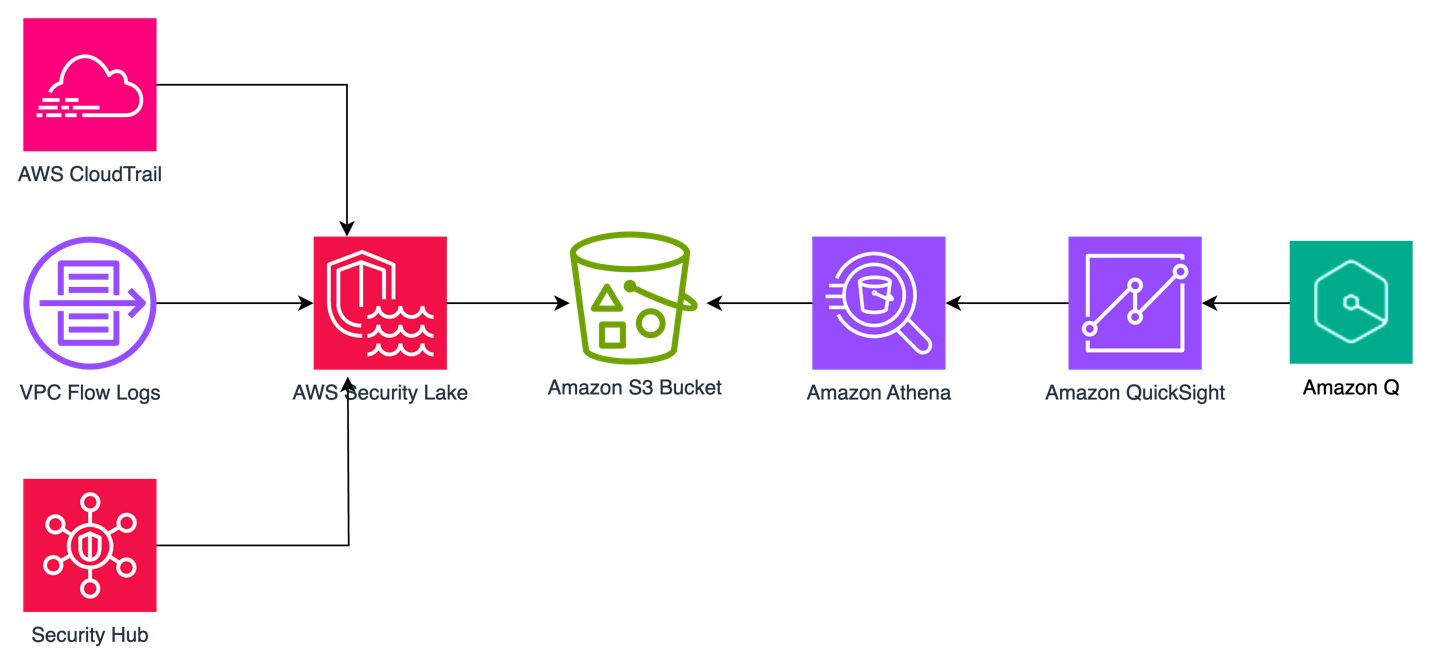
The solution uses Security Lake as the data lake which has native ingestion for CloudTrail, VPC Flow Logs, and Security Hub findings as shown in Figure 1. Logs from these sources are sent to S3 buckets in your AWS account and are maintained by Security Lake. We then create Amazon Athena views from tables created by Security Lake for Security Hub findings, CloudTrail logs, and VPC Flow Logs to define the interesting fields from each of the log sources. Each of these views are ingested into a QuickSight dataset. From these datasets, we generate analyses and dashboards. We use Amazon Q topics to label columns in the dataset that are human-readable and create a named entity to present contextual and multi-visual answers in response to questions. After the topics are created, users can perform their analysis using Q topics, QuickSight analyses, or QuickSight dashboards.

Figure 1: Solution architecture

Figure 1: Solution architecture

You can use the rollup AWS Region feature in Security Lake to aggregate logs from multiple Regions into a single Region. Specifying a rollup Region can help you adhere to regional compliance requirements. If you use rollup Regions, you must set up the solution described in this post for datasets only in rollup Regions. If you don’t use a rollup Region, you must deploy this solution for each Region you that want to collect data from.

Prerequisites

To implement the solution described in this post, you must meet the following requirements:

  1. Basic understanding of Security Lake, Athena, and QuickSight.
  2. Security Lake is already deployed and accepting CloudTrail management events, VPC Flow Logs, and Security Hub findings as sources. If you haven’t deployed Security Lake yet, we recommend following the best practices established in the security reference architecture.
  3. This solution uses Security Lake data source version 2 to create the dashboards and visualizations. If you aren’t already using data source version 2, you will see a banner in your Security Lake console with instructions to update.
  4. An existing QuickSight deployment that will be used to visualize Security Lake data or an account that is able to sign up for QuickSight to create visualizations.
  5. QuickSight Author Pro and Reader Pro licenses are needed for using Amazon Q features in QuickSight. Non-pro Authors and Readers can still access Q topics if an Author Pro or Admin Pro user shares the topic with them. Non-pro Authors and Readers can also access data stories if a Reader Pro, Author Pro, or Admin Pro shares one with them. Review Generative AI features supported by each QuickSight licensing tiers.
  6. AWS Identity and Access Manager (IAM) permissions for QuickSight, Athena, Lake Formation, Security Lake, and AWS Resource Access Manager.

In the following section, we walk through the steps to ingest Security Lake data into QuickSight using Athena views and then using Amazon Q in QuickSight to create visualizations and query data using natural language.

Provide cross-account query access

In alignment with our security reference architecture, it’s a best practice to isolate the Security Lake account from the accounts that are running the visualization and querying workloads. It’s recommended that QuickSight for security use cases be deployed in the security tooling account. See How to visualize Amazon Security Lake findings with Amazon QuickSight for information on how to set up cross-account query access. Follow the steps in the Configure a Security Lake subscriber section and configure Athena to visualize your data section.

When you get to the create resource link steps, create a resource link for data source version 2 for Security Hub, CloudTrail, and VPC flow log tables for a total of three resource links. The way to identify data source version 2 tables is by their name; it ends in _2_0. For example:

  • amazon_security_lake_table_us_east_1_sh_findings_2_0
  • amazon_security_lake_table_us_east_1_cloud_trail_mgmt_2_0
  • amazon_security_lake_table_us_east_1_vpc_flow_2_0

For the remainder of this post, we will be referencing the database name security_lake_visualization and the resource link names for Security Hub findings, CloudTrail logs, and VPC Flow Logs respectively, as shown in Figure 2:

  • securitylake_shared_resourcelink_securityhub_2_0_us_east_1
  • securitylake_shared_resourcelink_cloudtrail_2_0_us_east_1
  • securitylake_shared_resourcelink_vpcflow_2_0_us_east_1

Figure 2: Lake Formation table snapshot

Figure 2: Lake Formation table snapshot

We will call the QuickSight account the visualization account. If you plan to use same account as the Security Lake delegated administrator and QuickSight, then skip this step and go to the next section where you will create views in Athena.

Create views in Athena

A view in Athena is a logical table that helps simplify your queries by working with only a subset of the relevant data. Follow these steps to create three views in Athena, one each for Security Hub findings, CloudTrail logs, and the VPC Flow Logs in the visualization account.

These queries default to the previous week’s data starting from the previous day, but you can change the time frame by modifying the last line in the query from 8 to the number of days you prefer. Keep in mind that there is a limitation on the size of each SPICE table of 1 TB. If you want to limit the volume of data, you can delete the rows that you find unnecessary. We included the fields customers have identified as relevant to reduce the burden of writing the parsing details yourself.

To create views:

  1. Sign in to the AWS Management Console in the visualization account and navigate to the Athena console.
  2. If a Security Lake rollup Region is used, select the rollup Region.
  3. Choose Launch Query Editor.
  4. If this is the first time you’re using Athena, you will need to choose a bucket to store your query results.
    1. Choose Edit Settings.
    2. Choose Browse S3.
    3. Search for your bucket name.
    4. Select the radio button next to the name of your bucket.
    5. Select Choose.
  5. For Data Source, select AWSDataCatalog.
  6. Select Database as security_lake_visualization. If you used a different name for the database for cross account query access, then select that database.

    Figure 3: Athena database selection

    Figure 3: Athena database selection

  7. Copy the query for the security_hub_view from the GitHub repo for this post. If you’re using a different name for the database and table resource link than the one specified in this post, edit the FROM statement at the bottom of the query to reflect the correct names.
  8. Paste the query in the query editor and then choose Run. The name of the view is set in the first line of the query which is security_insights_security_hub_vw2.
  9. To confirm this view was created correctly, choose the three dots next to the view that was created and select Preview View.

    Figure 4: Previewing the view

    Figure 4: Previewing the view

  10. Repeat steps 5–9 to create the CloudTrail and VPC Flow Logs views. The queries for each can be found in the GitHub repo.

    Figure 5: Athena views

    Figure 5: Athena views

Create QuickSight dataset

Now that you’ve created the views, use Athena as the data source to create a dataset in QuickSight. Repeat these steps for the Security Hub findings, CloudTrail logs, and VPC Flow Logs. Start by creating a dataset for the Security Hub findings.

To configure permissions on tables:

  1. Sign in to the QuickSight console in the visualization account. If a Security Lake rollup Region is used, select the rollup Region.
  2. If this is the first time you’re using QuickSight, you must sign up for a QuickSight subscription.
  3. Although there are multiple ways to sign in to QuickSight, we used IAM based access to build the dashboards. To use QuickSight with Athena and Lake Formation, you first need to authorize connections through Lake Formation.
  4. When using a cross-account configuration with AWS Glue Data Catalog, you need to configure permissions on tables that are shared through Lake Formation. For the use case in this post, use the following steps to grant access on the cross-account tables in the Glue Catalog. You must perform these steps for each of the Security Hub, CloudTrail, and VPC Flow Logs tables that you created in the preceding cross-account query access section. Because granting permissions on a resource link doesn’t grant permissions on the target (linked) database or table, you will grant permission twice, once to the target (linked table) and then to the resource link.
    1. In the Lake Formation console, navigate to the Tables section and select the resource link for the Security Hub table. For example:

      securitylake_shared_resourcelink_securityhub_2_0_us_east_1

    2. Select Actions. Under Permissions, select Grant on target.
    3. For the next step, you need the Amazon Resource Name (ARN) of the QuickSight users or groups that need access to the table. To obtain the ARN through the AWS Command Line Interface (AWS CLI), run following commands (replacing account ID and Region with that of the visualization account.) You can use AWS CloudShell for this purpose.
      1. For users

        aws quicksight list-users --aws-account-id 111122223333 --namespace default --region us-east-1

      2. For groups

        aws quicksight list-groups --aws-account-id 111122223333 --namespace default --region us-east-1

    4. After you have the ARN of the user or group, copy it and go back to the LakeFormation console Grant on Target page. For Principals, select SAML users and groups, and then add the QuickSight user’s ARN.

      Figure 6: Selecting principals

      Figure 6: Selecting principals

    5. For LF-Tags or catalog resources, keep the default settings.

      Figure 7: Table grant on target permissions

      Figure 7: Table grant on target permissions

    6. For Table permissions, select Select for both Table Permissions and Grantable Permissions, and then choose Grant.

      Figure 8: Selecting table permissions

      Figure 8: Selecting table permissions

    7. Navigate back to the Tables section and select the resource link for the Security Hub table. For example:

      securitylake_shared_resourcelink_securityhub_2_0_us_east_1

    8. Select Actions. This time under Permissions, and then choose Grant.
    9. For Principals, select SAML users and groups, and then add the QuickSight user’s ARN captured earlier.
    10. For the LF-Tags or catalog resources section, use the default settings.
    11. For Resource link permissions choose Describe for both Table Permissions and Grantable Permissions.
    12. Repeat steps a–k for the CloudTrail and VPC Flow Logs resource links.

To create datasets from views:

  1. After permissions are in place, you create three datasets from the views created earlier. Because both Quicksight and Lake Formation are Regional services, verify that you’re using QuickSight in the same Region where Lake Formation is sharing the data. The simplest way to determine your Region is to check the QuickSight URL in your web browser. The Region will be at the beginning of the URL, such as us-east-1. To change the Region, select the settings icon in the top right of the QuickSight screen and select the correct Region from the list of available Regions in the drop-down menu.
  2. Navigate back to the QuickSight console.
  3. Select Datasets, and then choose New dataset.
  4. Select Athena from the list of available data sources.
  5. Enter a Data source name, for example security_lake_securityhub_dataset and leave the Athena workgroup as [primary]. Choose Create data source.
  6. At the Choose your table prompt, for Catalog, select AwsDataCatalog. For Database, select security_lake_visualization. If you used a different name for the database for cross-account query access, then select that database. For Tables, select the view name security_insights_security_hub_vw2 to build your dashboards for Security Hub findings. Then choose Select.

    Figure 9: Choose a table during QuickSight dataset creation

    Figure 9: Choose a table during QuickSight dataset creation

  7. At the Finish dataset creation prompt, select Import to SPICE for quicker analytics. Choose Visualize. This will create a new dataset in QuickSight using the name of the Athena view, which is security_insights_security_hub_vw2. You will be taken to the Analysis page, exit out of it.
  8. Go back to the QuickSight console and repeat steps 3–8 for the CloudTrail and VPC Flow Log datasets.

Create a topic

Now that you have created a dataset, you can create a topic. Q topics are collections of one or more datasets that represent a subject area for your business users to ask questions. Topics allow users to ask questions in natural language and to build visualizations using natural language.

To create a Q topic:

  1. Navigate to the QuickSight console.
  2. Choose Topics in the left navigation pane.

    Figure 10: QuickSight navigation pane

    Figure 10: QuickSight navigation pane

  3. Choose New topic. Create one topic each for the Security Hub findings, CloudTrail logs, and VPC Flow Logs

    Figure 11: QuickSight topic creation

    Figure 11: QuickSight topic creation

  4. On the New topic page, do the following:
    1. For Topic name, enter a descriptive name for the topic. Name the first one SecurityHubTopic. Your business users will identify the topic by this name and use it to ask questions.
    2. For Description, enter a description for the topic. Your users can use this description to get more details about the topic.
    3. Choose Continue.
  5. On the Add data to topic page, choose the dataset you created in the Create a QuickSight dataset section. Start with the Security Hub dataset security_insights_security_hub_vw2.
  6. Choose Continue. It will take a few minutes to create the topic.
  7. Now that your topic has been created, navigate to the Data tab of the topic.
  8. Your Data Fields sub-tab should be selected already. If not, choose Data Fields.

    Figure 12: Topics data fields

    Figure 12: Topics data fields

  9. For each of the fields in the list, turn on Include to make sure that all fields are included. For this example, we selected all fields, but you can adjust the included columns as needed for your use case. Note, you might see a banner at the top of the page indicating that the indexing is in progress. Depending on the size of your data, it might take some time for Q to make those fields available for querying. Most of the time, indexing is complete in less than 15 minutes.
  10. Review the Synonyms column. These alternate representations of your column name are automatically generated by Amazon Q. You can add and remove synonyms as needed for your use case.
  11. At this point, you’re ready to ask questions about your data using Amazon Q in QuickSight. Choose Ask a question about SecurityHubTopic at the top of the page.

    Figure 13: Ask questions using Q

    Figure 13: Ask questions using Q

  12. You can now ask questions about Security Hub findings in the prompt. Enter Show me findings with compliance status failed along with control id.

    Figure 14: Q answers

    Figure 14: Q answers

  13. Under the question, you will see how it was interpreted by QuickSight.
  14. Repeat steps 1–13 to create CloudTrail and VPC Flow Log QuickSight topics.

Create named entities for your topics

Now that you’ve created your topics, you will now add named entities. Named entities are optional, but we’re using them in the solution to help make queries more effective. The information contained in named entities, the ordering of fields, and their ranking make it possible to present contextual, multi-visual answers in response to even vague questions.

To create a named entity:

  1. In the QuickSight console, navigate to Topics.
  2. Select the Security Hub topic that you created in the previous section.
  3. Under the Data tab, select the Named Entity subtab, and choose Add Named Entity.

    Figure 15: Named entity subtab

    Figure 15: Named entity subtab

  4. Enter Security Findings as the entity name.
  5. Select the following datafields: Status, Metadata Product Name, Finding Info Title, Region, Severity, Cloud Account Uid, Time Dt, Compliance Status, and AccountId. The order of the fields helps Q to prioritize the data, so rearrange your data fields as needed.

    Figure 16: Security hub finding names entity creation

    Figure 16: Security hub finding names entity creation

  6. Choose Save in the top right corner to save your results.
  7. Repeat steps 1–6 with the CloudTrail dataset using the following datafields: API operation, Time Dt, Region, Status, AccountId, API Response Error, Actor User Credential Uid, Actor User Name, Actor User Type, Api Service Name, Actor Idp Name, Cloud Provider, Session Issuer, and Unmapped.

    Figure 17: CloudTrail named entity creation

    Figure 17: CloudTrail named entity creation

  8. Repeat steps 1–6 with the VPC Flow Log dataset using the following datafields: Src Endpoint IP, Src Endpoint Port, Dst Endpoint IP, Dst Endpoint Port, Connection Info Direction, Traffic Bytes, Action, Accountid, Time Dt, and Region.

    Figure 18: VPC Flow log named entity creation

    Figure 18: VPC Flow log named entity creation

Create visualizations using natural language

After your topic is done indexing, you can start creating visualizations using natural language. In QuickSight, an analysis is the same thing as a dashboard, but is only accessible by the authors. You can keep it private and make it as robust and detailed as you want. When you decide to publish it, the shared version is called a dashboard.

To create visualizations:

  1. Open the QuickSight console and navigate to the Analysis tab.
  2. In the top right, select New analysis.
  3. Select the dataset you created previously, it will have the same naming convention as the Athena view. For reference, the Athena view query created a Security Hub dataset called security_insights_security_hub_vw2.
  4. Validate the information about the data set you’re going to use in the analysis and choose USE IN ANALYSIS.
  5. On the pop up, select the interactive sheet option and choose Create.
  6. For datasets that have a corresponding Q topic, which you created in a previous step, choose Build visual at the top of the screen.

    Figure 19: Build visual using natural language

    Figure 19: Build visual using natural language

  7. Enter your prompt and choose BUILD. For example, enter findings with product security hub group by control id include count. Q automatically generates a visualization.

    Figure 20: Q response

    Figure 20: Q response

  8. To add to your dashboard, choose ADD TO ANALYSIS to see your new visualization module in your current analysis.
  9. The supplied questions are targeted towards a Security Hub findings topic, where you can ask questions about your security hub findings data. For example, show all Security Hub findings for critical severity for a specific resource or ARN.
  10. If you use Amazon Inspector for software vulnerability management and you want to monitor top common vulnerabilities and exposures (CVEs) affecting your organization, choose Build visual and enter show all ACTIVE findings with product inspector group by Title add count in the prompt. We used the keyword ACTIVE because ACTIVE is a finding state in Security Hub that indicates the finding is still active as per the finding source and Amazon Inspector has not closed the finding yet. If Amazon Inspector has closed the finding, the finding will have a state of ARCHIVED.

    Figure 21: Q Response for an Amazon Inspector findings question

    Figure 21: Q Response for an Amazon Inspector findings question

  11. After you add visualization to the analysis, you can customize it further using various QuickSight visualization options.
  12. To add the remaining datasets, which allows you to visualize data from multiple datasets in a single view, select the dropdown in the left navigation under Dataset.
    1. Select Add a new dataset.
    2. Search the name of the remaining datasets you created previously.
    3. Select anywhere on the name of the dataset to make the radial button blue for the single dataset you want to add. Choose Select.
  13. Repeat steps 7–12 in this section to add all the corresponding datasets you created previously.

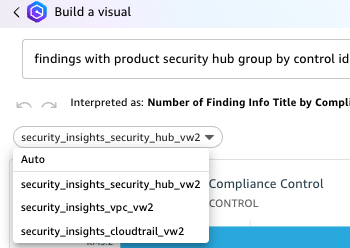
Note: When you add additional datasets to the same Analysis and use Build visual to generate visualizations using natural language, the corresponding datasets with Q Topics are populated in the drop down under the prompt. Be sure to choose the correct dataset when asking questions.

Figure 22: Choosing a QuickSight dataset

Figure 22: Choosing a QuickSight dataset

To create dashboards:

  1. After you’ve created the visual and are ready to publish the analysis as a dashboard, select PUBLISH in the top right corner.
    1. Enter a name for your dashboard.
    2. Choose Publish Dashboard.
  2. After your dashboard is published, your users can ask questions about the data through the dashboard as well. This dashboard can be shared with other users. Users with QuickSight Reader Pro licenses can ask questions using Amazon Q.

To ask questions using the dashboard:

  1. Navigate to the Dashboards section on the left navigation.
  2. Select the dashboard you previously published.
  3. Select Ask a question about [Topic Name] at the top of the screen. A module will open from the side of your screen. Questions can only be addressed to a single topic. To change the topic, select the name of the topic and a drop-down will appear. Select the name of the current topic to see other options and select the topic you want to ask a question about. For this example, select CloudTrailTopic.

    Figure 23: Selecting a topic

    Figure 23: Selecting a topic

  4. Enter a question in the prompt. For this example, enter show top API operations in the last 24 hours with accessdenied.

    Figure 24: CloudTrail question 1

    Figure 24: CloudTrail question 1

  5. Enter show all activity by user johndoe in the last 3 days.

    Figure 25: CloudTrail question 2

    Figure 25: CloudTrail question 2

  6. Q will automatically build a small dashboard based on the questions provided.
  7. Now change the topic to VPCFlowTopic as described in step 3.
  8. Enter show me the top 5 dst ip by bytes for outbound traffic with dst port 443.

    Figure 26: VPC Flow Log question

    Figure 26: VPC Flow Log question

You can build executive summaries using QuickSight data stories, which also use generative AI. Data stories use Amazon Q prompts and visuals to produce a draft that incorporates the details that you provide. For example, you can create a data story about how a specific CVE affects your organization by asking Q questions, then add visuals from analyses you already created.

Conclusion

In this blog post, you learned how to use generative AI for your security use cases. We showed you how to use cross-account query access to allow a QuickSight visualization account to subscribe to Security Lake data for Security Hub findings, CloudTrail logs, and VPC Flow Logs. We then provided instructions for creating, Athena views, QuickSight datasets, Q topics, named entities, and for using natural language to build dashboards and query your data. You can customize the Athena views to create, update, or delete columns and column names as needed for your use case. You can also customize the Q topics and named entities to use naming conventions and structure responses based on your organization’s needs.

 
If you have feedback about this post, submit comments in the Comments section below. If you have questions about this post, contact AWS Support.

Priyank Ghedia
Priyank Ghedia

Priyank is a Senior Security Specialist Solutions Architect focused on threat detection and incident response. Priyank helps customers meet their security visibility and response objectives by building architectures using AWS security services and tools. Before AWS, he spent eight years advising customers on global networking and security operations.
Matt Meck
Matt Meck

Matt is a Sr. Worldwide Security Specialist in New York, covering the AWS Detection and Response domain and advises customers on how they can enhance their security posture and shares feedback to service teams about how AWS can enhance its services. Hiking, competitive soccer, skiing, and being with friends and family are his favorite pass times.
Anthony Harvey
Anthony Harvey

Anthony is a Senior Security Specialist Solutions Architect for AWS in the worldwide public sector group. Prior to joining AWS, he was a chief information security officer in local government for half a decade. He has a passion for figuring out how to do more with less and using that mindset to enable customers in their security journey.

Valkey 8.0.0 released

Post Syndicated from jzb original https://lwn.net/Articles/990490/

Version 8.0.0 of
the Valkey open-source in-memory data
store is now available. This is the first major release of Valkey
since the project forked from Redis in March of this year:

While this is a major version, Valkey takes command set compatibility
seriously: Valkey 8.0.0 makes no backwards incompatible changes to the
existing command syntax or their responses. Your existing tools and
custom software will be able to immediately take advantage of Valkey
8.0.0. Since Valkey 8.0.0 does make some small changes to previously
undefined behaviors, it’s wise to read
the release notes
. Additionally, because this version makes changes in how the
software uses threading, you may want to re-evaluate your cluster’s
infrastructure to achieve the highest performance.

Amazon OpenSearch Service: Managed and community driven

Post Syndicated from Jon Handler original https://aws.amazon.com/blogs/big-data/amazon-opensearch-service-managed-and-community-driven/

I’ve always loved the problem of search. At its core, search is about receiving a question, understanding that question, and then retrieving the best answer for it. A long time ago, I did an AI robotics project for my PhD that married a library of plan fragments to a real-world situation, through search. I’ve worked on and built a commercial search engine from the ground up in a prior job. And in my career at AWS, I’ve worked as a solutions architect, helping our customers adopt our search services in all their incarnations.

Like many developers, I share a passion for open source. This stems partly from my academic background, where scholars work for the greater good, building upon and benefiting from previous achievements in their fields. I’ve used and contributed to numerous open source technologies, ranging from small projects with a single purpose to large-scale initiatives with passionate, engaged communities. The search community has its own, special and academic flavor, because search itself is related to long-standing academic endeavors like information retrieval, psychology, and (symbolic) AI. Open source software has played a prominent role in this community. Search technology has been democratized, especially over the past 10–15 years, through open source projects like Apache Lucene, Apache Solr, Apache License, 2.0 version of Elasticsearch, and OpenSearch.

It’s that context that makes me so excited that today the Linux Foundation announced the OpenSearch Software Foundation. As part of the creation of the OpenSearch Foundation, AWS has transferred ownership of OpenSearch to the Linux Foundation. At the launch of the project in April of 2021, in introducing OpenSearch, we spoke of our desire to “ensure users continue to have a secure, high-quality, fully open source search and analytics suite with a rich roadmap of new and innovative functionality.” We’ve maintained that desire and commitment, and with this transfer, are deepening that commitment, and bringing in the broader community with open governance to help with that goal.

There are two key points regarding this announcement: first, nothing is changing if you’re a customer of Amazon OpenSearch Service; second a lot is changing on the open source side, and that’s a net benefit for the service. We’re moving into a future that includes an acceleration in innovation for the OpenSearch Project, driven by deeper collaboration and participation with the community. Ultimately, that’s going to come to the service and benefit our AWS customers.

Amazon OpenSearch Service: How we’ve worked

Amazon’s focus from the beginning was to work on OpenSearch in the open. Our first task was to release a working code base with code import and renaming capabilities. We launched OpenSearch1.0 in July 2021, followed by renaming our managed service to Amazon OpenSearch Service in September 2021. With the launch of Amazon OpenSearch Service, we announced support for OpenSearch 1.0 as an engine choice.

As our team at Amazon and the community grew and innovated in the OpenSearch Project, we brought those changes to Amazon OpenSearch Service along with support for the corresponding versions. At AWS, we embraced open source by jointly publishing and discussing ideas, RFCs,and feature requests with the community. As time passed and the project progressed, we onboarded community maintainers and accepted contributions from various sources within and outside AWS.

As an Amazon OpenSearch Service customer, you’ll continue to see updates and new versions flowing from open source to our managed service. You’ll also experience ongoing innovation driven by our investment in growing the project, its community, and code base.

Today the OpenSearch project has significant momentum, with more than 700 million software downloads and participation from thousands of contributors and more than 200 project maintainers. The OpenSearch Software Foundation launches with support from premier members AWS, SAP, and Uber and general members Aiven, Aryn, Atlassian, Canonical, Digital Ocean, Eliatra, Graylog, NetApp® Instaclustr, and Portal26.

Amazon OpenSearch Service: Going forward

This announcement doesn’t change anything for Amazon OpenSearch Service. Amazon remains committed to innovating for and contributing to the OpenSearch Project, with a growing number of committers and maintainers. If anything, this innovation will accelerate with broader and deeper participation bringing more diverse ideas from the global community. At the core of this commitment is our founding and continuing desire to “ensure users continue to have a secure, high-quality, fully open source search and analytics suite with a rich roadmap of new and innovative functionality.” We plan to continue closely working with the project, contributing code improvements and bringing those improvements to our managed service.

This announcement doesn’t change how you connect with or use Amazon OpenSearch Service. OpenSearch Service will continue to be a fully managed service, providing OpenSearch and OpenSearch Dashboards at service-provided endpoints, and with the full suite of existing managed-service features. If you’re using Amazon OpenSearch Service, you won’t need to change anything. There won’t be any licensing changes or cost changes driven by the move to a foundation.

Amazon will continue bringing its expertise to the project, funding new innovations where our customers need them the most, such as cloud-native large scale distributed systems, search, analytics, machine learning and AI. The Linux Foundation will also facilitate collaboration with other open source organizations such as Cloud Native Computing Foundation (CNCF), which is instrumental for cloud-native, open source projects. Our goal will remain to solve some of the most challenging customer problems, open source first. Finally, given the open source nature of the product we think there’s a big opportunity and are excited to partner with our customers to solve their problems together, in code.

We’ve always encouraged our customers to participate in the OpenSearch Project. Now, the project has a well-defined structure and management with the governing board, and technical steering committee, each staffed with members from diverse backgrounds, both in and out of Amazon. The governing board will look after the project’s funding and management, the technical steering committee will take care of the technical direction of the project. This opens the door wider for you to directly participate in shaping the technology you’re using in our managed service. If you’re an Amazon OpenSearch Service customer, the project welcomes your contributions, big or small, from filing issues and feature requests to commenting on RFCs and contributing code.

Conclusion

This is an exciting time, for the project, for the community, and for Amazon OpenSearch Service. As an AWS customer, you don’t need to make any changes in use, and there aren’t any changes in the Apache License, 2.0 or the pricing. But, moving to the Linux Foundation will help bring the spirit of cooperation from the open source world to the technology and from there to Amazon OpenSearch Service. As search continues to mature, together we’ll continue to get better at understanding questions, and providing relevant results.

You can read more about the OpenSearch Foundation announcement on the AWS Open Source blog.


About the author

Jon Handler is the Director of Solutions Architecture for Search Services at Amazon Web Services, based in Palo Alto, CA. Jon works closely with OpenSearch and Amazon OpenSearch Service, providing help and guidance to a broad range of customers who have search and log analytics workloads for OpenSearch. Prior to joining AWS, Jon’s career as a software developer included four years of coding a large-scale, eCommerce search engine. Jon holds a Bachelor of the Arts from the University of Pennsylvania, and a Master of Science and a Ph. D. in Computer Science and Artificial Intelligence from Northwestern University.

Introducing the APRA CPS 230 AWS Workbook for Australian financial services customers

Post Syndicated from Krish De original https://aws.amazon.com/blogs/security/introducing-the-apra-cps-230-aws-workbook-for-australian-financial-services-customers/

The Australian Prudential Regulation Authority (APRA) has established the CPS 230 Operational Risk Management standard to verify that regulated entities are resilient to operational risks and disruptions. CPS 230 requires regulated financial entities to effectively manage their operational risks, maintain critical operations during disruptions, and manage the risks associated with service providers.

Amazon Web Services (AWS) is excited to announce the launch of the AWS Workbook for the APRA CPS 230 standard to support AWS customers as they work to meet applicable CPS 230 requirements. The workbook describes operational resilience, AWS and the Shared Responsibility Model, AWS compliance programs, and relevant AWS services and whitepapers that relate to regulatory requirements.

This workbook is complementary to the AWS User Guide to Financial Services Regulations and Guidelines in Australia and is available through AWS Artifact.

As the regulatory environment continues to evolve, we’ll provide further updates regarding AWS offerings in this area on the AWS Security Blog and the AWS Compliance page. The AWS Workbook for the APRA CPS 230 adds to the resources AWS provides about financial services regulation across the world. You can find more information on cloud-related regulatory compliance at the AWS Compliance Center. You can also reach out to your AWS account manager for help finding the resources you need.

 
If you have feedback about this post, submit comments in the Comments section below. If you have questions about this post, contact AWS Support.

Krish De
Krish De

Krish is a Principal Solutions Architect with a focus on financial services. He works with AWS customers, their regulators, and AWS teams to safely accelerate customers’ cloud adoption, with prescriptive guidance on governance, risk, and compliance. Krish has over 20 years of experience working in governance, risk, and technology across the financial services industry in Australia, New Zealand, and the United States.

The collective thoughts of the interwebz