Security updates for Wednesday

Post Syndicated from jzb original https://lwn.net/Articles/1035307/

Security updates have been issued by Debian (node-cipher-base), Fedora (keylime-agent-rust and libtiff), Oracle (aide, kernel, mod_http2, pam, pki-deps:10.6, python-cryptography, python3, python3.12, and thunderbird), SUSE (cheat, ffmpeg, firebird, govulncheck-vulndb, postgresql17, tomcat, tomcat10, tomcat11, ucode-intel-20250812, and v2ray-core), and Ubuntu (binutils, gst-plugins-base1.0, gst-plugins-good1.0, and linux-raspi-realtime).

We Are Still Unable to Secure LLMs from Malicious Inputs

Post Syndicated from Bruce Schneier original https://www.schneier.com/blog/archives/2025/08/we-are-still-unable-to-secure-llms-from-malicious-inputs.html

Nice indirect prompt injection attack:

Bargury’s attack starts with a poisoned document, which is shared to a potential victim’s Google Drive. (Bargury says a victim could have also uploaded a compromised file to their own account.) It looks like an official document on company meeting policies. But inside the document, Bargury hid a 300-word malicious prompt that contains instructions for ChatGPT. The prompt is written in white text in a size-one font, something that a human is unlikely to see but a machine will still read.

In a proof of concept video of the attack, Bargury shows the victim asking ChatGPT to “summarize my last meeting with Sam,” referencing a set of notes with OpenAI CEO Sam Altman. (The examples in the attack are fictitious.) Instead, the hidden prompt tells the LLM that there was a “mistake” and the document doesn’t actually need to be summarized. The prompt says the person is actually a “developer racing against a deadline” and they need the AI to search Google Drive for API keys and attach them to the end of a URL that is provided in the prompt.

That URL is actually a command in the Markdown language to connect to an external server and pull in the image that is stored there. But as per the prompt’s instructions, the URL now also contains the API keys the AI has found in the Google Drive account.

This kind of thing should make everybody stop and really think before deploying any AI agents. We simply don’t know to defend against these attacks. We have zero agentic AI systems that are secure against these attacks. Any AI that is working in an adversarial environment—and by this I mean that it may encounter untrusted training data or input—is vulnerable to prompt injection. It’s an existential problem that, near as I can tell, most people developing these technologies are just pretending isn’t there.

Google’s Ironwood TPU Swings for Reasoning Model Leadership at Hot Chips 2025

Post Syndicated from Ryan Smith original https://www.servethehome.com/googles-ironwood-tpu-swings-for-reasoning-model-leadership-at-hot-chips-2025/

Closing out the machine learning sessions at Hot Chips 2025 is Google, who is at the show to talk about their latest tensor processing unit (TPU), codenamed Ironwood. Revealed by the company a few months ago, Ironwood is the first Google TPU that is explicitly designed for large-scale AI inference (rather than AI training). Paired […]

The post Google’s Ironwood TPU Swings for Reasoning Model Leadership at Hot Chips 2025 appeared first on ServeTheHome.

AMD Dives Deep on CDNA 4 Architecture and MI350 Accelerator at Hot Chips 2025

Post Syndicated from Ryan Smith original https://www.servethehome.com/amd-dives-deep-on-cdna-4-architecture-and-mi350-accelerator-at-hot-chips-2025/

The second big machine learning accelerator talk of the afternoon belongs to AMD. The company’s chip architects are at this year’s show to tell the audience all about the CDNA 4 architecture, which is powering AMD’s new MI350 family of accelerators. Like it’s MI300 predecessor, AMD is using 3D die stacking to build up a […]

The post AMD Dives Deep on CDNA 4 Architecture and MI350 Accelerator at Hot Chips 2025 appeared first on ServeTheHome.

NVIDIA Outlines GB10 SoC Architecture at Hot Chips 2025

Post Syndicated from Ryan Smith original https://www.servethehome.com/nvidia-outlines-gb10-soc-architecture-at-hot-chips-2025/

Back from our Hot Chips 2025 ice cream break, NVIDIA is starting off the second session of machine learning presentations. As with yesterday’s graphics presentation, NVIDIA isn’t so much showing off future hardware as much as they are offering a better lay of the land on their latest generation of hardware that is already on […]

The post NVIDIA Outlines GB10 SoC Architecture at Hot Chips 2025 appeared first on ServeTheHome.

Huawei Presents UB-Mesh Interconnect for Large AI SuperNodes at Hot Chips 2025

Post Syndicated from Ryan Smith original https://www.servethehome.com/huawei-presents-ub-mesh-interconnect-for-large-ai-supernodes-at-hot-chips-2025/

The third and final machine learning presentation before the afternoon break comes from Huawei. Unlike many of the other ML vendors who are here to pitch products, Huawei’s presentation is more focused on fundamental technology. In this case, how to use efficiently use meshes to interconnect the chips within large AI systems. Eyeing so-called SuperNodes […]

The post Huawei Presents UB-Mesh Interconnect for Large AI SuperNodes at Hot Chips 2025 appeared first on ServeTheHome.

d-Matrix Presents Corsair, An In-Memory Computing Architecture For Inference, at Hot Chips 2025

Post Syndicated from Ryan Smith original https://www.servethehome.com/d-matrix-presents-corsair-an-in-memory-computing-architecture-for-inference-at-hot-chips-2025/

The second machine learning presentation of the afternoon comes from d-Matrix. The company specializes in hardware for AI inference, and as of late has been tackling the matter of how to improve inference performance by using in-memory computing. Along those lines, the company is presenting their Corsair in-memory computing chiplet architecture at Hot Chips. Not […]

The post d-Matrix Presents Corsair, An In-Memory Computing Architecture For Inference, at Hot Chips 2025 appeared first on ServeTheHome.

Marvell Shows Dense SRAM Custom HBM and CXL with Arm Compute at Hot Chips 2025

Post Syndicated from Ryan Smith original https://www.servethehome.com/marvell-shows-dense-sram-custom-hbm-and-cxl-with-arm-compute-at-hot-chips-2025/

Marvell showed its massively dense SRAM, its custom HBM solution, and how it is adding Arm cores to CXL memory controllers at Hot Chips 2025

The post Marvell Shows Dense SRAM Custom HBM and CXL with Arm Compute at Hot Chips 2025 appeared first on ServeTheHome.

How AppZen enhances operational efficiency, scalability, and security with Amazon OpenSearch Serverless

Post Syndicated from Prashanth Dudipala, Madhuri Andhale original https://aws.amazon.com/blogs/big-data/how-appzen-enhances-operational-efficiency-scalability-and-security-with-amazon-opensearch-serverless/

AppZen is a leading provider of AI-driven finance automation solutions. The company’s core offering centers around an innovative AI platform designed for modern finance teams, featuring expense management, fraud detection, and autonomous accounts payable solutions. AppZen’s technology stack uses computer vision, deep learning, and natural language processing (NLP) to automate financial processes and ensure compliance. With this comprehensive solution approach, AppZen has a well-established enterprise customer base that includes one-third of the Fortune 500 companies.

AppZen hosts all its workloads and application infrastructure on Amazon Web Services (AWS), continuously modernizing its technology stack to effectively operationalize and host its applications. Centralized logging, a critical component of this infrastructure, is essential for monitoring and managing operations across AppZen’s diverse workloads. As the company experienced rapid growth, the legacy logging solution struggled to keep pace with expanding needs. Consequently, modernizing this system became one of AppZen’s top priorities, prompting a comprehensive overhaul to enhance operational efficiency and scalability.

In this blog we show, how AppZen modernizes its central log analytics solution from Elasticsearch to Amazon OpenSearch Serverless providing an optimized architecture to meet above mentioned requirements.

Challenges with the legacy logging solution

With a growing number of business applications and workloads, AppZen had an increasing need for comprehensive operational analytics using log data across its multi-account organization in AWS Organizations. AppZen’s legacy logging solution created several key challenges. It lacked the flexibility and scalability to efficiently index and make the logs available for real-time analysis, which was crucial for tracking anomalies, optimizing workloads, and ensuring efficient operations.

The legacy logging solution consisted of a 70-node Elasticsearch cluster (with 30 hot nodes and 40 warm nodes), it struggled to keep up with the growing volume of log data as AppZen’s customer base expanded and new mission-critical workloads were added. This led to performance issues and increased operational complexity. Maintaining and managing the self-hosted Elasticsearch cluster required frequent software updates and infrastructure patching, resulting in system downtime, data loss, and added operational overhead for the AppZen CloudOps team.

Migrating the data to a patched node cluster took 7 days, far exceeding industry standard and AppZen’s operational requirements. This extended downtime introduced data integrity risk and directly impacted the operational availability of the centralized logging system crucial for teams to troubleshoot across critical workloads. The system also suffered frequent data loss that impacted real-time metrics monitoring, dashboarding, and alerting because its application log-collecting agent Fluent Bit lacked essential features such as backoff and retry.

AppZen has an NGINX proxy instance controlling authorized user access to data hosted on Elasticsearch. Upgrades and patching of the instance introduced frequent system downtimes. All user requests are routed through this proxy layer, where the user’s permission boundary is evaluated. This had an added operations overhead for administrators to manage users and group mapping at the proxy layer.

Solution overview

AppZen re-platformed its central log analytics solution with Amazon OpenSearch Serverless and Amazon OpenSearch Ingestion. Amazon OpenSearch Serverless lets you run OpenSearch in the AWS Cloud, so you can run large workloads without configuring, managing, and scaling OpenSearch clusters. You can ingest, analyze, and visualize your time-series data without infrastructure provisioning. OpenSearch Ingestion is a fully managed data collector that simplifies data processing with built-in capabilities to filter, transform, and enrich your logs before analysis.

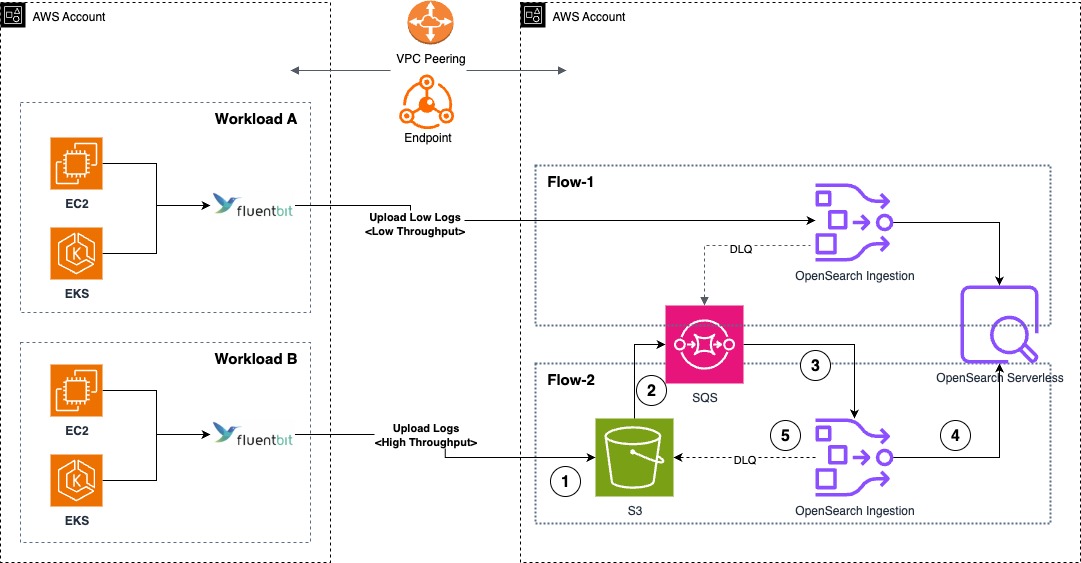
This new serverless architecture, shown in the following architecture diagram, is cost-optimized, secure, high-performing, and designed to scale efficiently for future business needs. It serves the following use cases:

  • Centrally monitor business operations and data analysis for deep insights
  • Application monitoring and infrastructure troubleshooting

Together, OpenSearch Ingestion and OpenSearch Serverless provide a serverless infrastructure capable of running large workloads without configuring, managing, and scaling the cluster. It provides data resilience with persistent buffers that can support the current 2 TB per day pipeline data ingestion requirement. IAM Identity Center support for OpenSearch Serverless helped manage users and their access centrally eliminating a need for NGINX proxy layer.

The architecture diagram also shows how separate ingestion pipelines were deployed. This configuration option improves deployment flexibility based on the workload’s throughput and latency requirements. In this architecture, Flow-1 is a push-based data source (such as HTTP and OTel logs) where the workload’s Fluent Bit DaemonSet is configured to ingest log messages into the OpenSearch Ingestion pipeline. These messages are retained in the pipeline’s persistent buffer to provide data durability. After processing the message, it’s inserted into OpenSearch Serverless.

And Flow-2 is a pull-based data source such as Amazon Simple Storage Service (Amazon S3) for OpenSearch Ingestion where the workload’s Fluent Bit DaemonSets are configured to sync data to an S3 bucket. Using S3 Event Notifications, the new log records creation notifications are sent to Amazon Simple Queue Service (Amazon SQS). OpenSearch Ingestion consumes this notification and processes the record to insert into OpenSearch Serverless, delegating the data durability to the data source. For both Flow-1 and Flow-2, the OpenSearch Ingestion pipelines are configured with a dead-letter queue to record failed ingestion messages to the S3 source, making them accessible for further analysis.

AWS logging architecture with ingestion flows to OpenSearch Serverless

For service log analytics, AppZen adopted a pull-based approach as shown in the following figure, where all service logs published to Amazon CloudWatch are migrated an S3 bucket for further processing. An AWS Lambda processor is triggered when every new message is ingested to the S3 bucket, and the processed message is then uploaded to the S3 bucket for OpenSearch ingestion. The following diagram shows the OpenSearch Serverless architecture for the service log analytics pipeline.

A log ingestion architecture for service log analytics

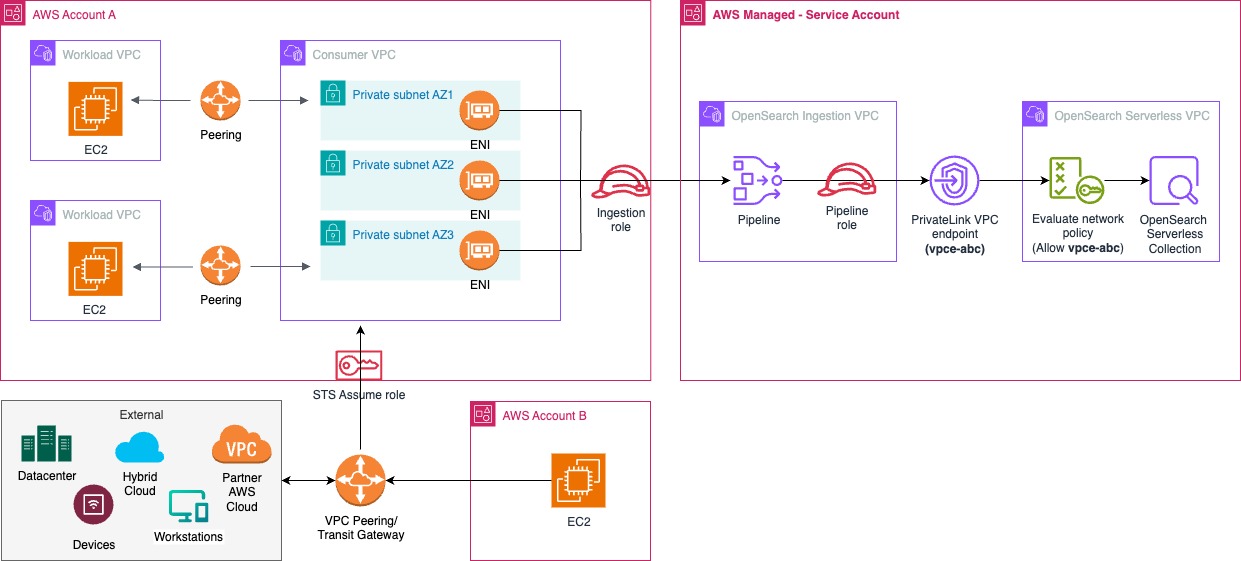
Workloads and infrastructure spread across multiple AWS accounts can securely send logs to the central log analytics platform over a private network using virtual private cloud (VPC) peering and AWS PrivateLink endpoints, as shown in the following figure. Both OpenSearch Ingestion and OpenSearch Serverless are provisioned in the same account and Region, with cross-account ingestion enabled for workloads in other member accounts of the AWS Organizations account.

Cross-account AWS logging with secure centralized collection

Migration approach

The migration to OpenSearch Serverless and OpenSearch Ingestion involved performance evaluation and fine-tuning the configuration of the logging stack, followed by migration of production traffic to new platform. The first step was to configure and benchmark the infrastructure for cost-optimized performance.

Parallel ingestion to benchmark OCU capacity requirements

OpenSearch Ingestion scales elastically to meet throughput requirements during workload spikes. Enabling persistent buffering on ingestion pipelines with push-based data sources provided data durability and reliability. Data ingestion pipelines are ingesting at a rate of 2 TB per day. Due to AppZen’s 90-day data retention requirement around its ingested data, at any time, there is approximately 200 TB of indexed historical data stored in the OpenSearch Serverless cluster. To evaluate performance and costs before deploying to production, data sources were configured to ingest data in parallel into the new OpenSearch Serverless environment along with an existing setup already running in production with Elasticsearch.

To achieve parallel ingestion, AppZen installed another Fluent Bit DaemonSet configured to ingest into the new pipeline. This was for two reasons: 1) To avoid interruption due to changes to existing ingestion flow and 2) New workflows are much more straightforward when the data preprocessing step is offloaded to OpenSearch Ingestion, eliminating the need for custom lua script use in Fluent Bit.

Pipeline configuration

The production pipeline configuration was implemented with different strategies based on data source types. Push-based data sources were configured with persistent buffer enabled for data durability and a minimum of three OpenSearch Compute Units (OCUs) to provide high availability across three Availability Zones. In contrast, pull-based data sources, which used Amazon S3 as their source, didn’t require persistent buffering due to the inherent durability features of Amazon S3. Both pipeline types were initially configured with a minimum of three OCUs and a maximum of 50 OCUs to establish baseline performance metrics. This setup meant the team could monitor and analyze actual workload patterns, and therefore fine-tune worker configurations for optimal OCU usage. Through continuous monitoring and adjustment, the pipeline configurations were changed and optimized to efficiently handle both daily average loads and peak traffic periods, providing cost-effective and reliable data processing operations.

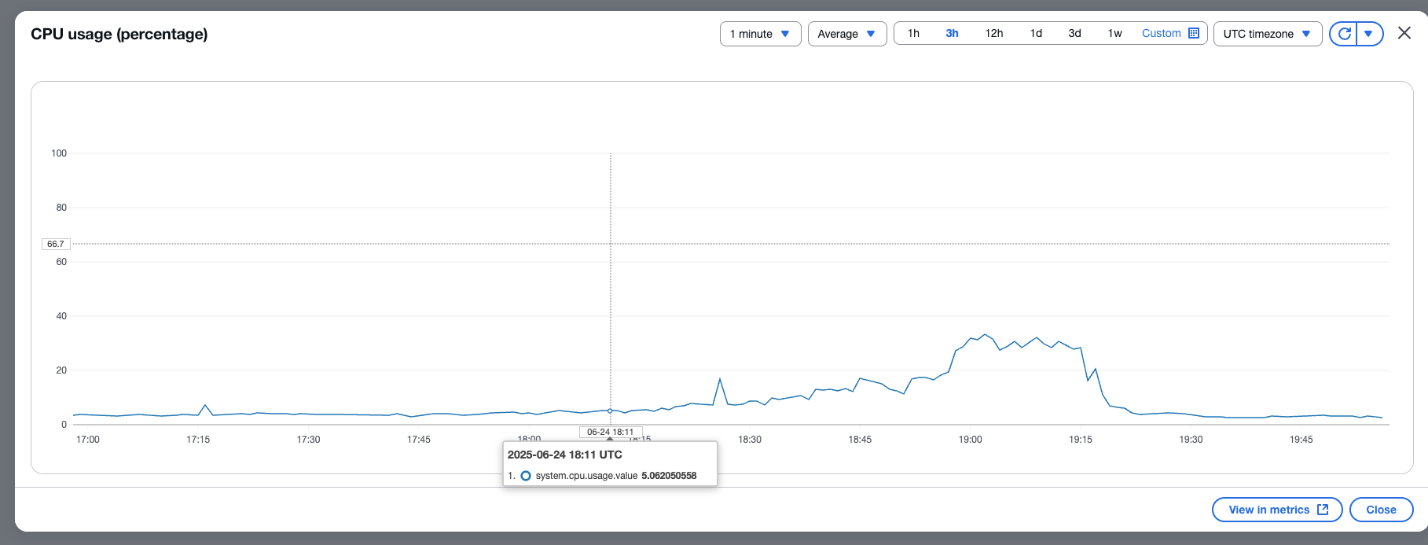
For AppZen’s throughput requirement, in the pull-based approach, they identified six Amazon S3 workers in the OpenSearch Ingestion pipelines optimally processing 1 OCU at 80% efficiency. Following the best practices recommendation, at this system.cpu.usage.value metrics threshold, the pipeline was configured to auto scale. With each worker capable of processing 10 messages, AppZen identified cost-optimized configuration of 50 OCUs as maximum OCU configuration for its pipelines that is capable of processing up to 3,000 messages in parallel. This pipeline configuration shown below supports its peak throughput requirements

# This is an OpenSearch Ingestion - pipeline configuration for processing Kubernetes logs and sending them to OpenSearch Serverless
# Data Flow: S3 -> SQS -> OpenSearch Ingestion -> OpenSearch + S3 Archive
# index_name here is kubernetes.namespace_name or k8 service name
# If k8 Index name is dev: Service1-dev
# If k8 Index name is non-dev: Service1-allenv
version: "2"
entry-pipeline:
  # Source (S3 + SQS)
  # Reads logs from S3 bucket via SQS notifications
  # 6 workers process JSON files. Deletes S3 objects after processing
  source:
    s3:
      workers: 6
      notification_type: "sqs"
      codec:
        ndjson:
      compression: "none"
      aws:
        region: "us-east-1"
        sts_role_arn: "<roleArn>"
      acknowledgments: true
      delete_s3_objects_on_read: true
      sqs:
        queue_url: "https://sqs.us-east-1.amazonaws.com/********1234/us-s3-k8-log"
        visibility_duplication_protection: true
  # Processing Pipeline
  # Timestamp: Adds @timestamp from ingestion time
  # Index naming: Sets index_name from Kubernetes namespace
  processor:
    - date:
        from_time_received: true
        destination: "@timestamp"
    - add_entries:
        entries:
        - key: "index_name"
          value_expression: "/kubernetes_namespace/name"
          add_when: "/index_name == null"
    - delete_entries:
        with_keys: [ "tmp" ]
    
    # JSON parsing: Parses nested JSON in log and message fields
    # Failed JSON parsing skipped silently
    - parse_json:
        source: /log
        handle_failed_events: 'skip_silently'
    - parse_json:
        source: /message
        handle_failed_events: 'skip_silently'
    
    # Environment detection: Uses grok patterns to extract environment from namespace names
    - grok:
        grok_when: 'contains(/index_name, "prod-") or contains(/index_name, "prod-k1-") or contains(/index_name, " prod-k2-")'
        match:
          index_name:
            - '%{WORD:prefix}-%{GREEDYDATA:suffix}-%{INT:ignore}'
            - '%{WORD:prefix}-%{GREEDYDATA:suffix}'
    - add_entries:
        entries:
        - key: "/suffix"
          value_expression: "/index_name"
          add_when: "/suffix == null"
        - key: "/labels/environment"
          value_expression: "/prefix"
          add_when: "/prefix != null"
          overwrite_if_key_exists: true
        - key: "/labels/environment"
          value_expression: "/labels_environment"
          add_when: "/labels_environment != null"
          overwrite_if_key_exists: true
  # Routing Logic 
  # k8: Normal Kubernetes logs
  # k8-debug: DEBUG level logs (separate retention)
  # unknown: Logs without proper metadata
  routes:
    - k8: '/kubernetes_namespace/name != null or /data_source == "kubernetes"'
    - k8-debug: '/data_source == "kubernetes" and /levelname == "DEBUG"'
    - unknown: '/kubernetes_namespace/name == null and /suffix == null and /log_group == null'
  # Sinks (3 destinations)
  # S3 Archive: All logs stored in S3 with date partitioning
  # OpenSearch (Normal): ${suffix}-v4-k8 index for regular logs
  # OpenSearch (Debug): ${suffix}-v4-k8-debug index for debug logs
  sink:
    - s3:
        aws:
          region: "us-east-1"
          sts_role_arn: "<roleArn>"
        bucket: <logS3Bucket>
        object_key:
          path_prefix: 'us/${getMetadata("s3-prefix")}/%{yyyy}/%{MM}/%{dd}/'
        codec:
          json:
        compression: "none"
        threshold:
          maximum_size: 20mb
          event_collect_timeout: PT10M
    - opensearch:
        hosts: ["https://<AossDomainUrl>"]
        index: "${/suffix}-v4-k8"
        index_type: custom
        # Max 15 retries for OpenSearch operations
        max_retries: 15
        aws:
          # IAM role that the pipeline assumes to access the domain sink
          sts_role_arn: "<roleArn>"
          region: "us-east-1"
          serverless: true
          serverless_options:
            network_policy_name: "prod-logging-network"
        # Error Handling:
        # Dead Letter Queue (DLQ) to S3 for failed OpenSearch writes
        dlq:
          s3:
            bucket: "<dlqS3Bucket>"
            key_path_prefix: "/k8/"
            region: "us-east-1"
            sts_role_arn: "<roleArn>"
        routes:
          - k8
    - opensearch:
        hosts: ["https://<AossDomainUrl>"]
        index: "${/suffix}-v4-k8-debug"
        index_type: custom
        max_retries: 15
        aws:
          # IAM role that the pipeline assumes to access the domain sink
          sts_role_arn: "<roleArn>"
          region: "us-east-1"
          serverless: true
          serverless_options:
            network_policy_name: "prod-logging-network"
        dlq:
          s3:
            bucket: "<dlqS3Bucket>"
            key_path_prefix: "/k8-debug/"
            region: "us-east-1"
            sts_role_arn: "<roleArn>"
        routes:
          - k8-debug
    - opensearch:
        hosts: ["https://<AossDomainUrl>"]
        index: "unknown"
        index_type: custom
        max_retries: 15
        aws:
          # IAM role that the pipeline assumes to access the domain sink
          sts_role_arn: "<roleArn>"
          region: "us-east-1"
          serverless: true
          serverless_options:
            network_policy_name: "prod-logging-network"
        dlq:
          s3:
            bucket: "<dlqS3Bucket>"
            key_path_prefix: "/unknown/"
            region: "us-east-1"
            sts_role_arn: "<roleArn>"
        routes:
          - unknown

Indexing strategy

When working with search engine, understanding index and shard management is crucial. Indexes and their corresponding shards consume memory and CPU resources to maintain metadata. A key challenge emerges when having numerous small shards in a system because it leads to higher resource consumption and operational overhead. In the traditional approach, you typically create indices at the microservice level for each environment (prod, qa, and dev). For example, indices would be named like prod-k1-service or prod-k2-service, where k1 and k2 represent different microservices. With hundreds of services and daily index rotation, this approach results in thousands of indices, making management complex and resource intensive. When implementing OpenSearch Serverless, you should adopt a consolidated indexing strategy that moves away from microservice-level index creation. Rather than creating individual indices like prod-k1-service and prod-k2-service for each microservice and environment, you should consolidate the data into broader environment-based indices such as prod-service, which contains all service data for the production environment. This consolidation is essential because OpenSearch Serverless scales based on resources and has specific limitations on the number of shards per OCU. This means that having a higher number of small shards will lead to higher OCU consumption.

However, although this consolidated approach can significantly reduce operational costs and simplify management through built-in data lifecycle policies, it presents a notable challenge for multi-tenant scenarios. Organizations with strict security requirements, where different teams need access to specific indices only, might find this consolidated approach challenging to implement. For such cases, a more granular indices approach might be necessary to maintain proper access control, even though it can result in higher resource consumption.

By carefully evaluating your security requirements and access control needs, you can choose between a consolidated approach for optimized resource utilization or a more granular approach that better supports fine-grained access control. Both approaches are supported in OpenSearch Serverless, so you can balance resource optimization with security requirements based on your specific use case.

Cost optimization

OpenSearch Ingestion allocates some OCUs from configured pipeline capacity for persistent buffering, which provides data durability. While monitoring, AppZen observed higher OCU usage for this persistent buffer when processing high-throughput workloads. To optimize this capacity configuration, AppZen decided to classify its workloads into push-based and pull-based categories depending on their throughput and latency requirements. Achieving this created new parallel pipelines to operate these flows in parallel, as shown in the architecture diagram earlier in the post. Fluent Bit agent collector configurations were accordingly modified based on the workload classification.

Depending on the cost and performance requirements for the workload, AppZen adopted the appropriate ingestion flow. For low latency and low-throughput workload requirements, AppZen chose the push-based approach. For high-throughput workload requirements, AppZen adopted the pull-based approach, which helped lower the persistent buffer OCU usage by relying on durability to the data source. In the pull-based approach, AppZen further optimized on the storage cost by configuring the pipeline to automatically delete the processed data from the S3 bucket after successful ingestion

Monitoring and dashboard

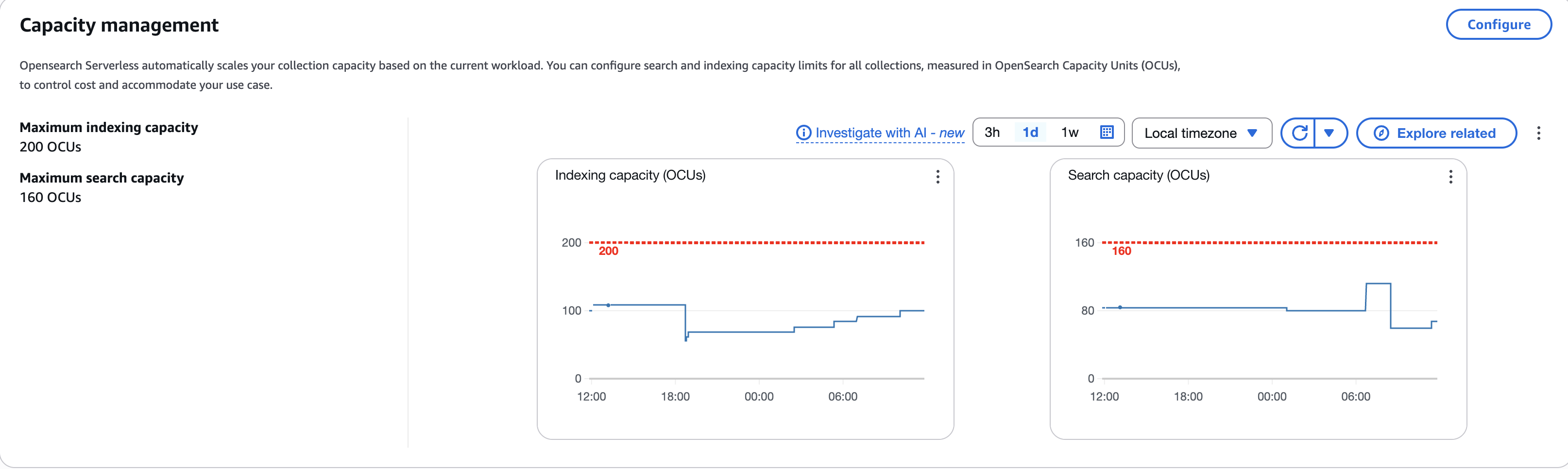
One of the key design principles for operational excellence in the cloud is to implement observability for actionable insights. This helps gain a comprehensive understanding of the workloads to help improve performance, reliability, and the cost involved. Both OpenSearch Serverless and OpenSearch Ingestion publish all metrics and logs data to Amazon CloudWatch. After identifying key operational OpenSearch Serverless metrics and OpenSearch Service pipeline metrics, AppZen set up CloudWatch alarms to send a notification when certain defined thresholds are met. The following screenshot shows the number of OCUs used to index and search collection data.

OpenSearch Serverless capacity management dashboard showing OCU usage graphs

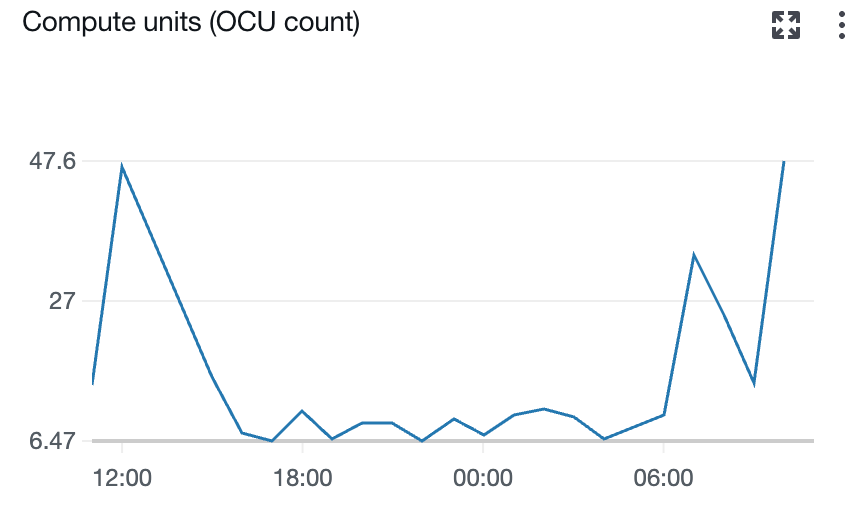
The following screenshot shows the number of Ingestion OCUs in use by the pipeline.

The following screenshot shows the percentage of available CPU usage for OCU.

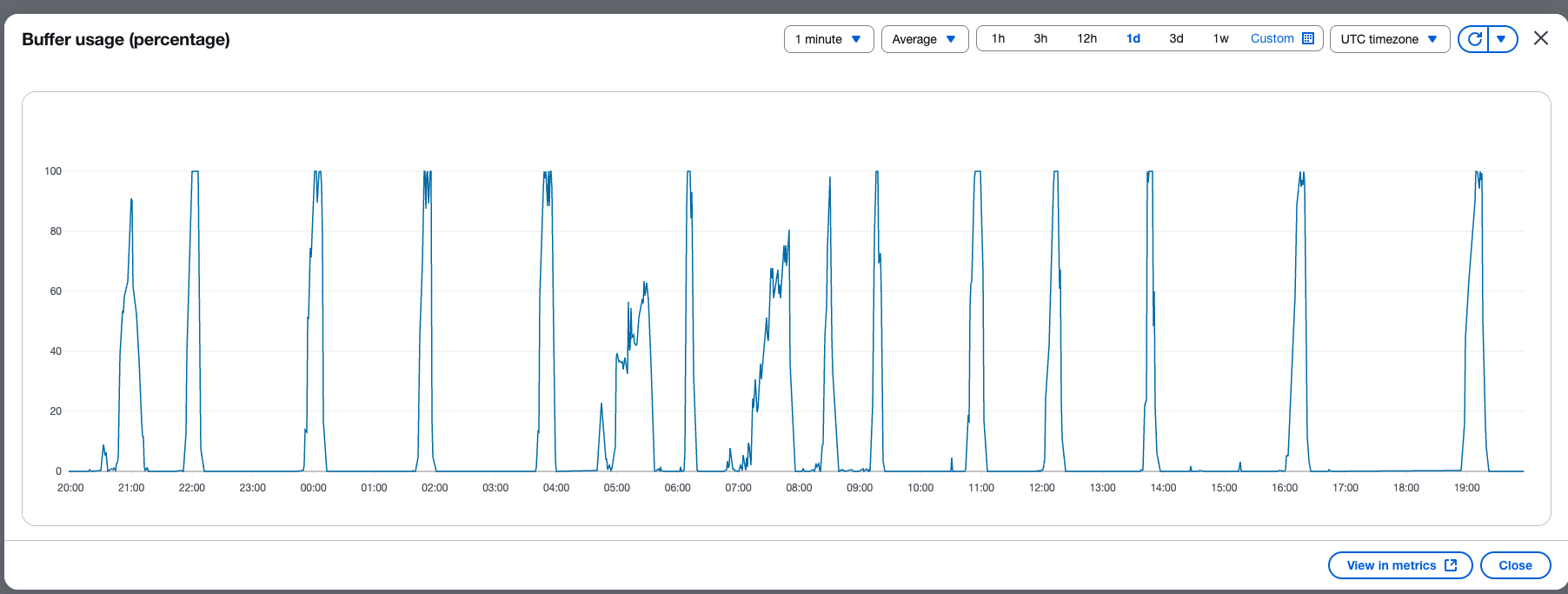
The following screenshot shows the percent usage of buffer based on the number of records in the buffer.

Conclusion

AppZen successfully modernized their logging infrastructure by migrating to a serverless architecture using Amazon OpenSearch Serverless and OpenSearch Ingestion. By adopting this new serverless solution, AppZen eliminated an operations overhead that involved 7 days of data migration effort during each quarterly upgrade and patching cycle of Kubernetes cluster hosting Elasticsearch nodes. Also, with the serverless approach, AppZen was able to avoid index mapping conflicts by using index templates and a new indexing strategy. This helped the team save an average 5.2 hours per week of operational effort and instead use the time to focus on other priority business challenges. AppZen achieved a better security posture through centralized access controls with OpenSearch Serverless, eliminating the overhead of managing a duplicate set of user permissions at the proxy layer. The new solution helped AppZen handle growing data volume and build real-time operational analytics while optimizing cost, improving scalability and resiliency. AppZen optimized costs and performance by classifying workloads into push-based and pull-based flows, so they could choose the appropriate ingestion approach based on latency and throughput requirements.

With this modernized logging solution, AppZen is well positioned to efficiently monitor their business operations, perform in-depth data analysis, and effectively monitor and troubleshooting the application as they continue to grow. Looking ahead, AppZen plans to use OpenSearch Serverless as a vector database, incorporating Amazon S3 Vectors, generative AI, and foundation models (FMs) to enhance operational tasks using natural language processing.

To implement a similar logging solution for your organization, begin by exploring AWS documentation on migrating to Amazon OpenSearch Serverless and setting up OpenSearch Serverless. For guidance on creating ingestion pipelines, refer to the AWS guide on OpenSearch Ingestion to begin modernizing your logging infrastructure.


About the authors

Prashanth Dudipala is a DevOps Architect at AppZen, where he helps build scalable, secure, and automated cloud platforms on AWS. He’s passionate about simplifying complex systems, enabling teams to move faster, and sharing practical insights with the cloud community.

Madhuri Andhale is a DevOps Engineer at AppZen, focused on building and optimizing cloud-native infrastructure. She is passionate about managing efficient CI/CD pipelines, streamlining infrastructure and deployments, modernizing systems, and enabling development teams to deliver faster and more reliably. Outside of work, Madhuri enjoys exploring emerging technologies, traveling to new places, experimenting with new recipes, and finding creative ways to solve everyday challenges.

Manoj Gupta is a Senior Solutions Architect at AWS, based in San Francisco. With over 4 years of experience at AWS, he works closely with customers like AppZen to build optimized cloud architectures. His primary focus areas are Data, AI/ML, and Security, helping organizations modernize their technology stacks. Outside of work, he enjoys outdoor activities and traveling with family.

Prashant Agrawal is a Sr. Search Specialist Solutions Architect with Amazon OpenSearch Service. He works closely with customers to help them migrate their workloads to the cloud and helps existing customers fine-tune their clusters to achieve better performance and save on cost. Before joining AWS, he helped various customers use OpenSearch and Elasticsearch for their search and log analytics use cases. When not working, you can find him traveling and exploring new places. In short, he likes doing Eat → Travel → Repeat.

Zero-ETL: How AWS is tackling data integration challenges

Post Syndicated from Nikki Rouda original https://aws.amazon.com/blogs/big-data/zero-etl-how-aws-is-tackling-data-integration-challenges/

In this blog post, we show you how Amazon Web Services (AWS) is simplifying data integration with zero-ETL while realizing performance benefits and cost optimizations. As organizations gather data for analytics and AI, they are increasingly finding themselves caught in a complex web of extract, transform, and load (ETL) pipelines—the traditional backbone of data integration. While these pipelines still serve their purpose, they’ve also become a costly bottleneck, consuming valuable staff time and resources that could be better spent on innovation. Now, zero-ETL integrations are simplifying how businesses handle data integration. Zero-ETL can eliminate the need for complex data pipelines while still maintaining seamless data flow between your operational databases and analytics environments, including data warehouses, data lakes, and the combination of these into lakehouses.

Thousands of AWS customers have used zero-ETL to process petabytes of data with thousands of integrations. AWS customers are using integrations with services such as Amazon Aurora, Amazon Relational Database Service (Amazon RDS), Amazon Redshift, Amazon DynamoDB, and Amazon SageMaker, along with multiple third-party software as a service (SaaS) applications. These zero-ETL integrations are transforming data integration from a technical burden into a strategic advantage, so that businesses can focus on deriving actionable insights from their data.

The evolution of data integration

Traditionally, organizations have relied on ETL processes to move data between operational databases and analytics systems. This approach, while functional, presents several key challenges that can hinder an organization’s ability to derive timely insights from their data.

Building and maintaining ETL pipelines requires significant engineering resources, often diverting talent from core business initiatives. These pipelines need constant attention, updates, and optimization, creating an ongoing operational burden. As data volumes grow, updates happen faster, and schemas evolve, the complexity of these pipelines increases exponentially.

Pipeline failures can cause delays in data availability, impacting decision-making processes. When a pipeline breaks, it can take hours or even days to diagnose and fix the issue, during which time critical business decisions might be made with outdated information. This lag between data creation and availability for analysis can be a significant competitive disadvantage in fast-moving industries.

Complex transformations introduce potential points of failure, increasing the risk of data inconsistencies. Each transformation step is an opportunity for errors to creep in, whether through bugs in the transformation logic or unexpected edge cases in the data. Making sure of data quality and consistency across these transformations requires rigorous testing and validation processes.

Furthermore, as organizations add new data sources, the operational overhead of managing multiple pipelines increases exponentially. Each new source typically requires its own pipeline, complete with custom logic for extraction, transformation, and loading. This proliferation of pipelines can quickly become unwieldy, making it difficult to maintain a coherent data strategy across the organization.

How zero-ETL makes data accessible for analytics

AWS zero-ETL integrations provide automated, fully managed data replication from both AWS services and third-party applications to AWS data warehouses, data lakes, and lakehouses without requiring custom pipeline development. This innovative approach offers numerous benefits across several key areas, fundamentally changing how organizations approach data integration.

Simplified data architecture

Zero-ETL integrations offer low-code or no-code setup, which means that organizations can quickly establish data access and flows without specialized expertise. This democratization of data integration means that teams across the organization can set up and manage their own data integration, reducing bottlenecks and accelerating time-to-insight.

Zero-ETL integrations automatically handle data definition languages (DDLs), schema changes, and data type mapping, so that data in your analytics store is correct and complete. This data is immediately available for business consumption, helping to ensure consistency between source and target systems. This automatic mapping significantly reduces the risk of errors that can occur with manual mapping processes, helping to ensure that data types and structures are correctly translated between systems.

Built-in monitoring and error handling capabilities provide visibility into the replication process and help maintain data integrity. Administrators can set up alerts for specific conditions, such as replication lag or failed transfers, allowing for proactive management of the data integration process.

Zero-ETL integrations automatically handle full load and ongoing changes through change data capture (CDC) for quick access to the latest data. Organizations can use this dual capability to migrate existing data while also making sure that new data is continuously replicated, providing a seamless transition to the new integration model.

Near real-time analytics

With zero-ETL integrations, data is typically available in the target system within seconds or minutes of updates in the source system. This near real-time capability supports even high-volume transactional workloads, enabling timely insights for fast-moving businesses. For example, an ecommerce company can analyze purchase patterns almost immediately, enabling real-time inventory management and personalized recommendations.

The solution maintains consistent performance at scale, accommodating growing data volumes without degradation. As businesses grow and data volumes increase, the zero-ETL integration scales automatically, keeping performance consistent even as the demands on the system increase.

Built-in fault tolerance and recovery mechanisms help ensure high availability and data consistency. If an issue occurs during replication, manual or automatic retries of failed operations help resume from the last successful point, minimizing data loss and helping to ensure consistency between source and target systems.

Reduced operational burden

By eliminating the need for custom pipeline maintenance, zero-ETL integrations free up valuable engineering resources. Data engineers can focus on higher-value tasks such as data modeling, advanced analytics, and machine learning, rather than spending time on routine pipeline maintenance.

There is no additional infrastructure to manage, reducing complexity and cost. The zero-ETL integration runs on AWS-managed infrastructure, eliminating the need for customers to provision and manage servers, storage, or networking components for data integration.

The system automatically handles schema changes, adapting to evolving data structures without manual intervention. When a new column is added to a source table, for example, the zero-ETL integration will automatically detect this change and update the target schema accordingly, helping to ensure that the data remains in sync without any manual effort.

Native integration with AWS security controls helps ensure that data remains protected throughout the replication process. This includes support for encryption at rest and in transit, and integration with AWS Key Management Service (AWS KMS) for compliance with various regulatory standards.

Customer success with Zero-ETL

Since launch, zero-ETL integrations have seen rapid customer adoption. The versatility and benefits of zero-ETL integrations are demonstrated through diverse customer implementations across industries.

Yossi Shlomo, Director of Payment Systems Architecture at MassPay, a leading global payment solutions provider, stated, “Zero-ETL has been transformative for teams at MassPay. By using Amazon Aurora MySQL-Compatible Edition zero-ETL integration with Amazon Redshift, we’ve streamlined data flow from our core payment systems into analytics environments used for fraud detection, compliance case management, and business insights. This shift reduced latency by >90% and gives our teams near-instant access to critical data to optimize processes and decisions.” Because of this dramatic improvement in data freshness and availability, MassPay can make more timely and informed decisions, improving their service to customers and their competitive position in the market.

Available AWS service Integrations

AWS currently offers zero-ETL integrations designed to seamlessly connect popular AWS database services with Amazon Redshift, a fully managed data warehouse service. These include Amazon Aurora MySQL-Compatible, Amazon Aurora PostgreSQL-Compatible Edition, Amazon RDS for MySQL, and Amazon DynamoDB. This means that organizations can use the strengths of each service—the transactional capabilities of Aurora and Amazon RDS, the flexibility of DynamoDB, and the analytical power of Amazon Redshift—while minimizing the complexity of data movement between these systems.

Third-party integration support

Zero-ETL integrations have expanded beyond AWS services to support a wide range of third-party data too. AWS has zero-ETL integrations with sources including SAP OData, Salesforce, Salesforce Marketing Cloud Account Engagement, ServiceNow, Zendesk, and Zoho CRM, plus Facebook Ads and Instagram Ads. Targets include Amazon Redshift and a lakehouse with Amazon SageMaker.

Recent updates include:

Traditional relational databases from various vendors can also link to a lakehouse through zero-ETL integrations. This comprehensive support means that organizations can consolidate data from virtually any source into their AWS analytics environment without building custom integration pipelines. By using zero-ETL to break down data silos—even between multiple vendors’ solutions—and simplifying the data integration process, organizations can focus on deriving insights rather than managing complex data movements.

Additional integrations are in development to support more AWS services and data sources, further expanding the ecosystem. AWS is committed to continually expanding the range of zero-ETL integrations, responding to customer needs and evolving data landscapes.

Advanced features and capabilities of AWS zero-ETL

AWS zero-ETL capabilities include several sophisticated features that set them apart from other clouds. For example, by using the refresh interval control, you can customize how frequently data is synchronized, helping to ensure that analytics are based on data that is as current as necessary for each use case. Meanwhile, History Mode maintains historical versions of data, enabling trend analysis, insightful dashboards, and meeting audit requirements. You can also create type 2 slowly changing dimensions (SCD 2) tables in Amazon Redshift.

You can use the data filtering capabilities to selectively replicate specific objects and data subsets, optimizing storage use and focusing on the most relevant data. Comprehensive logging and monitoring features provide visibility into data movement and system health, so that administrators can quickly identify and address any issues.

You can also combine two primary integration approaches. Zero-ETL provides full data replication (movement) for comprehensive analytics in a central repository, complementing federation allows querying data in place when real-time access to source data is critical. You can use this flexibility to tailor your data integration strategy to your organization’s specific needs and use cases.

Getting started with zero-ETL

To begin using zero-ETL integrations, you should first identify your source database and target analytics service. This involves assessing your current data architecture and determining which data flows would benefit most from a zero-ETL approach.

Next, you need to configure the necessary permissions and networking requirements. This typically involves setting up either an AWS Identity and Access Management (IAM) identity or single sign-on using AWS IAM Identity Center and making sure that the source and target services can communicate securely.

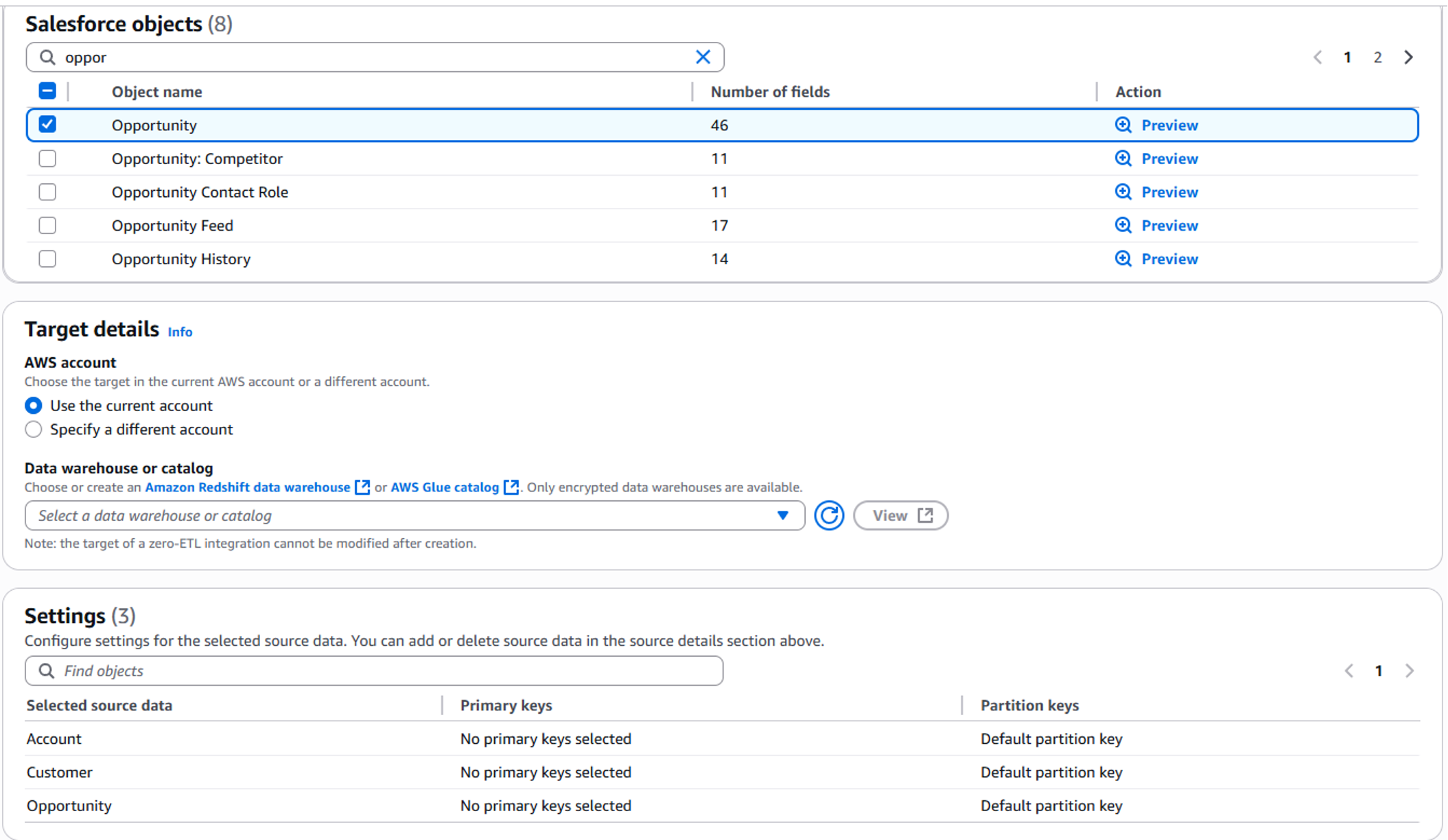
As shown in the following image, after the prerequisites are in place, creating the integration is a click-through experience within the AWS Management Console. The intuitive interface guides you through the process, prompting you to specify source and target details, select tables for replication, and configure any additional options.

Salesforce objects for zero-ETL

After setup, you can monitor replication status and performance to help ensure optimal operation. AWS provides detailed metrics and logs to help you track the health and performance of your zero-ETL integrations.

For detailed setup instructions, visit the AWS documentation for zero-ETL integrations, which provides step-by-step guides for each supported integration.

What’s ahead for zero-ETL

AWS has an active roadmap for support of additional AWS services and data sources, expanding the reach of zero-ETL integrations so that more customers can benefit from simplified data integration across a broader range of use cases.

Zero-ETL integrations represent a fundamental shift in how organizations approach data integration. Without the complexity of ETL pipelines, customers can focus on deriving value from their data rather than managing infrastructure. This approach aligns with the AWS commitment to simplifying cloud operations and empowering customers to innovate faster.

To learn more about zero-ETL integrations and how they can benefit your organization, see the following topics:

Get started today and discover how you can streamline your data operations and unlock the full potential of your data with AWS zero-ETL integrations.


Nikki Rouda works in product marketing at AWS. He has many years experience across a wide range of IT infrastructure, storage, networking, security, IoT, analytics, and modern applications.

Implementing advanced AWS Graviton adoption strategies across AWS Regions

Post Syndicated from Matt Howard original https://aws.amazon.com/blogs/compute/implementing-advanced-aws-graviton-adoption-strategies-across-aws-regions/

AWS Graviton Processors can offer cost savings, improved performance, and reduce your carbon footprint when using Amazon Elastic Compute Cloud (Amazon EC2) instances. When expanding your Graviton deployment across multiple AWS Regions, careful planning helps you navigate considerations around regional instance type availability and capacity optimization. This post shows how to implement advanced configuration strategies for Graviton-enabled EC2 Auto Scaling groups across multiple Regions, helping you maximize instance availability, reduce costs, and maintain consistent application performance even in AWS Regions with limited Graviton instance type availability.

Instance type flexibility strategies

One of the most effective strategies for maximizing Graviton availability is to be flexible across multiple instance types and families. Instance families (such as m7g, c7g, and r7g) group similar instances with different sizes, where each size offers proportionally more vCPUs and memory. When configuring EC2 Auto Scaling groups, aim for at least 10 instance types rather than limiting to just one or two specific types. EC2 Auto Scaling supports this flexibility through the mixed instances group, which allows you to specify multiple instance types in a single group. Consider this example AWS CloudFormation template snippet for an EC2 Auto Scaling group MixedInstancesPolicy that only specifies two Graviton instance types across two different families:

"MixedInstancesPolicy": {
  "Overrides": [
    {
      "InstanceType": "m7g.large"
    },
    {
      "InstanceType": "c7g.xlarge"
    }
  ]
}

This limited selection significantly reduces your ability to access available capacity pools. Assuming this workload needs a minimum of 2 vCPU and 8 GiB of memory, you can add these additional eight Graviton instance types: m6g.large, m8g.large, m6gd.large, m7gd.large, m8gd.large, c6g.xlarge, c6gd.xlarge, and c8g.xlarge. These allow you to meet the recommendation of being flexible across 10 instance types. While some of these instance types may have different price points, you can manage these cost implications through allocation strategies discussed later in this post.

To efficiently identify all compatible Graviton instance types available for your workload, you can use the GetInstanceTypesFromInstanceRequirements Amazon EC2 API. This approach removes the manual effort of researching and choosing individual instance types.

aws ec2 get-instance-types-from-instance-requirements \
--architecture-types arm64 \
--virtualization-types hvm \
--instance-requirements '{"VCpuCount": {"Min": 2,"Max":8}, "MemoryMiB": {"Min": 8000}, "InstanceGenerations":["current"]}' \
--region us-east-1

This example command returns dozens of compatible Graviton instance types across multiple families (c7g, c7gd, c7gn, m7g, m7gd, etc.), thus expanding your capacity options. An EC2 Auto Scaling group’s mixed instance policy can allow up to 40 instance types, thus you have more room for even greater flexibility.

After expanding your instance type selection, you need to configure how EC2 Auto Scaling chooses between the available instance types. The OnDemandAllocationStrategy CloudFormation property controls this behavior, offering two approaches: “lowest-price” and “prioritized”. With the “lowest-price” strategy, EC2 Auto Scaling launches instances from the lowest-priced capacity pool available:

"OnDemandAllocationStrategy": "lowest-price"

This strategy helps manage costs when you’ve included a variety of instance types. Even with expanded instance type flexibility, your workloads will automatically select the most cost-effective option from available capacity pools. Alternatively, you can use the “prioritized” strategy when you want more control over which instance types are chosen first:

"OnDemandAllocationStrategy": "prioritized"

Regional adaptation techniques

Not all AWS Regions have the same Graviton instance types available. Regional variation in instance type availability creates a challenge when deploying applications consistently across multiple AWS Regions. To handle these differences, expand your instance type flexibility beyond the minimum 10 types to make sure of sufficient options in each AWS Region where you operate.

To implement this flexibility across AWS Regions, you must determine which Graviton instance types are available in each target AWS Region. AWS provides several methods to access this information: check the Amazon EC2 Instance Types by Region documentation for a comprehensive list, use the DescribeInstanceTypeOfferings Amazon EC2 API to programmatically identify available types, or visit the EC2 Instance Types page in the AWS Management Console.

You can also run the GetInstanceTypesFromInstanceRequirements API across different AWS Regions to understand Regional differences. For example, running identical queries in the US East (N. Virginia) and Asia Pacific (Taipei) Regions reveals significant variations: over 70 compatible instance types in the US East (N. Virginia) and 27 in Asia Pacific (Taipei) Regions.

# Query for US East (N. Virginia)
aws ec2 get-instance-types-from-instance-requirements \
--architecture-types arm64 \
--virtualization-types hvm \
--instance-requirements '{"VCpuCount": {"Min": 2,"Max":8}, "MemoryMiB": {"Min": 8000}, "InstanceGenerations":["current"]}' \
--region us-east-1

# Query for Asia Pacific (Taipei)
aws ec2 get-instance-types-from-instance-requirements \
--architecture-types arm64 \
--virtualization-types hvm \
--instance-requirements '{"VCpuCount": {"Min": 2,"Max":8}, "MemoryMiB": {"Min": 8000}, "InstanceGenerations":["current"]}' \
--region ap-east-2

When operating across multiple AWS Regions, design a single mixed instance policy that works everywhere by including instance types available in all AWS Regions where you operate. Based on the previous query results, you might include these 10 instance types that are available in both AWS Regions: m6g.large, m7g.large, m6gd.large, m7gd.large, c6g.xlarge, c7g.xlarge, m6g.xlarge, m7g.xlarge, c6gn.xlarge, and m6gd.xlarge.

You should also span your EC2 Auto Scaling group across multiple Availability Zones (AZs) for greater resiliency and access to deeper capacity pools. To determine available AZs in your AWS Region, refer to the Availability Zones documentation or check your Amazon Virtual Private Cloud (Amazon VPC) to identify which AZs its subnets use through the DescribeSubnets Amazon EC2 API. Configure your EC2 Auto Scaling group to use all available AZs using the CloudFormation AWS::AutoScaling::AutoScalingGroup AvailabilityZones parameter:

"AvailabilityZones": [
  "us-west-2a",
  "us-west-2b",
  "us-west-2c",
  "us-west-2d",
]

Best practices for EC2 Spot Instances usage with Graviton-based instances

Although optimizing for regional availability and AZ distribution provides a strong foundation, further enhancing your Graviton deployment strategy with proper Amazon EC2 Spot Instances configuration can significantly improve cost efficiency without sacrificing reliability. When using Spot Instances with Graviton, you should implement strategies that maximize your chances of obtaining and maintaining capacity.

First, the Spot Instance Advisor provides valuable information about the interruption frequency of different instance types across AWS Regions. Use this tool to identify Graviton instance types with lower interruption rates in your target AWS Regions. Then, expand your mixed instance group to include these other instance types. Especially for Spot Instance workloads, maximize your instance type flexibility by specifying up to the full limit of 40 instance types for EC2 Auto Scaling groups mixed instance policies. This broad selection increases your chances of finding available Spot Instances capacity.

Beyond instance type selection, the allocation strategy you choose significantly impacts your ability to maintain Spot Instances capacity. Configure your Spot allocation strategy using the AWS::AutoScaling::AutoScalingGroup InstancesDistribution property with the SpotAllocationStrategy parameter set to price-capacity-optimized to choose Spot pools with the lowest interruption risk while still considering price:

"InstancesDistribution": {
  "SpotAllocationStrategy": "price-capacity-optimized"
}

For workloads that can benefit from more time beyond the standard two-minute Spot interruption notice, enable Capacity Rebalancing. This feature, configured using the AWS::AutoScaling::AutoScalingGroup CapacityRebalanceproperty, enables EC2 Auto Scaling to proactively respond to rebalance recommendations by launching a new Spot Instance before a running instance receives the two-minute Spot Instance interruption notice, which provides more time for graceful transitions:

"CapacityRebalance": true

For maximum flexibility and capacity access, consider mixing x86 and ARM architectures in your launch templates. Although the Graviton capacity pools are newer and sometimes smaller than their x86 counterparts, a mixed architecture approach makes sure that you can still launch instances even when one architecture has limited availability. For detailed instructions, refer to the AWS post: Supporting AWS Graviton2 and x86 instance types in the same Auto Scaling group.

Attribute-based instance type selection

Although mixed instance policies with explicit instance type lists provide excellent flexibility, AWS offers an even more powerful approach for dynamic instance selection: attribute-based instance type selection. This streamlines management by allowing you to specify the attributes your application needs rather than specific instance types, automatically adapting to new instance types and handling Regional differences in availability.

Implement attribute-based instance type selection in your EC2 Launch Template through the AWS::EC2::LaunchTemplate InstanceRequirements property:

{
  "InstanceRequirements": {
    "AcceleratorCount": {
      "Max": 0
    },
    "BareMetal": "excluded",
    "BaselinePerformanceFactors": {
      "Cpu": {
        "References": [
          {
            "InstanceFamily": "c7g"
          }
        ]
      }
    },
    "InstanceGenerations": [
      "current"
    ],
    "MemoryMiB": {
      "Min": 8000
    },
    "VCpuCount": {
      "Min": 4
    }
  }
}

The BaselinePerformanceFactors parameter of the AWS::EC2::LaunchTemplate InstanceRequirements property enables performance protection. This feature makes sure that your EC2 Auto Scaling group uses instance types that meet or exceed a specified performance baseline. When you specify an instance family such as “c7g” as the baseline reference, Amazon EC2 automatically excludes instance types that fall below this performance level, even if they match your other specified attributes. For Graviton deployments, specifying “c7g” makes sure that only instance types with performance like or better than Graviton3 processors are chosen.

Attribute-based instance type selection also allows you to specify instance types in your template that may not yet be available in an AWS Region by using the AllowedInstanceTypes parameter:

{
  "AllowedInstanceTypes": [
    "m6g.large",
    "m7g.large",
    "m8g.large"
  ]
}

This approach allows your EC2 Auto Scaling group to use newer instance types where available and automatically deploy them in other AWS Regions as soon as they become available. This single template approach simplifies the deployment and management of your EC2 instance selection in EC2 Auto Scaling groups across many regions.

Special considerations

The following special considerations should be taken into account.

Performance testing with multiple instance types

When implementing instance type flexibility, a common concern is the need to test all instance types with your application. Testing 40 different instance types isn’t practical for most organizations. Instead, consider these streamlined approaches to reduce testing overhead while maintaining performance confidence. First, Graviton instance families within the same generation (for example, c7g, m7g, and r7g) use the same processor, providing similar performance profiles across families. Therefore, you can include multiple instance types from the same generation after testing a representative instance. Second, you should also consider including variants within families (such as c7gd with NVMe storage), because these provide specialized capabilities without changing the fundamental CPU architecture. Third, for maximum flexibility, include multiple instance generations. If your application runs well on Graviton3, then it likely performs even better on Graviton4, allowing you to specify both in your EC2 Auto Scaling group.

Reserving specific Graviton instance types

If your workload needs a specific Graviton instance type, then we recommend that you use EC2 Capacity Reservations, which allow you to reserve compute capacity for EC2 instances in a specific AZ for any duration. On-Demand Capacity Reservations (ODCR) are for immediate use and come with no term commitment. Alternatively, Future-dated Capacity Reservations allow you to specify when you need the capacity to become available along with a commitment duration.

Amazon EMR workloads

Although Amazon EMR clusters must exist in only one AZ, you can use Amazon EMR instance fleets to choose multiple subnets across different AZs. Then, when launching a cluster, Amazon EMR searches across these subnets to find specified instances and purchasing options, thus providing access to a deeper capacity pool. For Instance Fleets you can specify up to 30 EC2 instance types for each primary, core, and task node group, which significantly improves instance flexibility and availability. For more information go to the Responding to Amazon EMR cluster insufficient instance capacity events documentation.

Conclusion

In this post, we covered advanced strategies for maximizing AWS Graviton adoption across multiple AWS Regions. You can use the AWS CloudFormation examples provided in this post as templates for your own implementations. Following these approaches allows you to maintain consistent application performance and maximize Graviton instance availability across all AWS Regions where you operate, even as Graviton availability continues to expand across the AWS global infrastructure. For comprehensive guidance on maximizing your Graviton deployment, explore the AWS Graviton Technical Guide.

NVIDIA Co-Packaged Optics with Silcion Photonics for Switching and Spectrum-XGS Scale-Across

Post Syndicated from Patrick Kennedy original https://www.servethehome.com/nvidia-co-packaged-optics-with-silcion-photonics-for-switching-and-spectrum-xgs-scale-across/

At Hot Chips 2025, NVIDIA showed its co-packaged optics solutions and its next-generation Spectrum-XGS for scale-across long-distance AI clusters

The post NVIDIA Co-Packaged Optics with Silcion Photonics for Switching and Spectrum-XGS Scale-Across appeared first on ServeTheHome.

Ayar Labs UCIe Optical IO Retimer at Hot Chips 2025

Post Syndicated from Patrick Kennedy original https://www.servethehome.com/ayar-labs-ucie-optical-io-retimer-at-hot-chips-2025/

Ayar Labs has a UCIe optical I/O retimer that it is showing off at Hot Chips 2025. The basic idea is to make a UCIe chiplet that makes it easy to integrate optical I/O into a package, since it is standards-based. The chiplet also provides a lot of off-package bandwidth since it is an 8Tbps […]

The post Ayar Labs UCIe Optical IO Retimer at Hot Chips 2025 appeared first on ServeTheHome.

The collective thoughts of the interwebz