Post Syndicated from Explosm.net original https://explosm.net/comics/cup
New Cyanide and Happiness Comic
Post Syndicated from Explosm.net original https://explosm.net/comics/cup
New Cyanide and Happiness Comic
Post Syndicated from Eric Smith original https://www.servethehome.com/micron-9400-launched-as-the-mega-pcie-gen4-data-center-nvme-ssd/
The Micron 9400 series is the company’s new high-performance data center NVMe SSD with over 30TB of capacity per drive
The post Micron 9400 Launched as the Mega PCIe Gen4 Data Center NVMe SSD appeared first on ServeTheHome.
Post Syndicated from Abe Carryl original https://blog.cloudflare.com/introducing-digital-experience-monitoring/

This post is also available in 简体中文, 日本語, Français and Español.

Today, organizations of all shapes and sizes lack visibility and insight into the digital experiences of their end-users. This often leaves IT and network administrators feeling vulnerable to issues beyond their control which hinder productivity across their organization. When issues inevitably arise, teams are left with a finger-pointing exercise. They’re unsure if the root cause lies within the first, middle or last mile and are forced to file a ticket for the respective owners of each. Ideally, each team sprints into investigation to find the needle in the haystack. However, once each side has exhausted all resources, they once again finger point upstream. To help solve this problem, we’re building a new product, Digital Experience Monitoring, which will enable administrators to pinpoint and resolve issues impacting end-user connectivity and performance.
To get started, sign up to receive early access. If you’re interested in learning more about how it works and what else we will be launching in the near future, keep scrolling.
Over the last year, we’ve received an overwhelming amount of feedback that users want to see the intelligence that Cloudflare possesses from our unique perspective, helping power the Internet embedded within our Zero Trust platform. Today, we’re excited to announce just that. Throughout the coming weeks, we will be releasing a number of features for our Digital Experience Monitoring product which will provide you with unparalleled visibility into the performance and connectivity of your users, applications, and networks.
With data centers in more than 275 cities across the globe, Cloudflare handles an average of 39 million HTTP requests and 22 million DNS requests every second. And with more than one billion unique IP addresses connecting to our network we have one of the most representative views of Internet traffic on the planet. This unique point of view on the Internet will be able to provide you deep insight into the digital experience of your users. You can think of Digital Experience Monitoring as the air traffic control tower of your Zero Trust deployment providing you with the data-driven insights you need to help each user arrive at their destination as quickly and smoothly as possible.
When we began to research Digital Experience Monitoring, we started with you: the user. Users want a single dashboard to monitor user, application, and network availability and performance. Ultimately, this dashboard needs to help users cohesively understand the minute-by-minute experiences of their end-users so that they can quickly and easily resolve issues impacting productivity. Simply put, users want hop by hop visibility into the network traffic paths of each and every user in their organization.
From our conversations with our users, we understand that providing this level of insight has become even more critical and challenging in an increasingly work-from-anywhere world.
With this product, we want to empower you to answer the hard questions. The questions in the kind of tickets we all wish we could avoid when they appear in the queue like “Why can’t the CEO reach SharePoint while traveling abroad?”. Could it have been a poor Wi-Fi signal strength in the hotel? High CPU on the device? Or something else entirely?
Without the proper tools, it’s nearly impossible to answer these questions. Regardless, it’s all but certain that this investigation will be a time-consuming endeavor whether it has a happy ending or not. Traditionally, the investigation will go something like this. IT professionals will start their investigation by looking into the first-mile which may include profiling the health of the endpoint (i.e. CPU or RAM utilization), Wi-Fi signal strength, or local network congestion. With any luck at all, the issue is identified, and the pain stops here.
Unfortunately, teams rarely have the tools required to prove these theories out so, frustrated, they move on to everything in between the user and the application. Here we might be looking for an outage or a similar issue with a local Internet Service Provider (ISP). Again, even if we do have reason to believe that this is the issue it can be difficult to prove this beyond a reasonable doubt.
Reluctantly, we move onto the last mile. Here we’ll be looking to validate that the application in question is available and if so, how quickly we can establish a meaningful connection (Time to First Byte, First Contentful Paint, packet loss) to this application. More often than not, the lead investigator is left with more questions than answers after attempting to account for the hop by hop degradation. Then, by the time the ticket can be closed, the CEO has boarded a flight back home and the issue is no longer relevant.
With Digital Experience Monitoring, we’ve set out to build the tools you need to quickly find the needle in the haystack and resolve issues related to performance and connectivity. However, we also understand that availability and performance are just shorthand measures for gauging the complete experience of our customers. Of course, there is much more to a good user experience than just insights and analytics. We will continue to pay close attention to other key metrics around the volume of support tickets, contact rate, and time to resolution as other significant indicators of a healthy deployment. Internally, when shared with Cloudflare, this telemetry data will help enable our support teams to quickly validate and report issues to continuously improve the overall Zero Trust experience.
“As CIO, I am focused on outfitting Cintas with technology and systems that help us deliver on our promises for the 1 million plus businesses we serve across North America. As we leverage more cloud based technology to create differentiated experiences for our customers, Cloudflare is an integral part of delivering on that promise.”
– Matthew Hough, CIO, Cintas
In the coming weeks, we’ll be launching three new features. Here is a look ahead at what you can expect when you sign up for early access.
One of the common challenges of deploying software is understanding how it is performing in the wild. For Zero Trust, this might mean trying to answer how many of your end-users are running our device agent, Cloudflare WARP, for instance. Then, of those users, you may want to see how many users have enabled, paused, or disabled the agent during the early phases of a deployment. Shortly after finding these answers, you may want to see if there is any correlation between the users who pause their WARP agent and the data center through which they are connected to Cloudflare. These are the kinds of answers you will be able to find with Zero Trust Fleet Status. These insights will be available at both an organizational and per-user level.
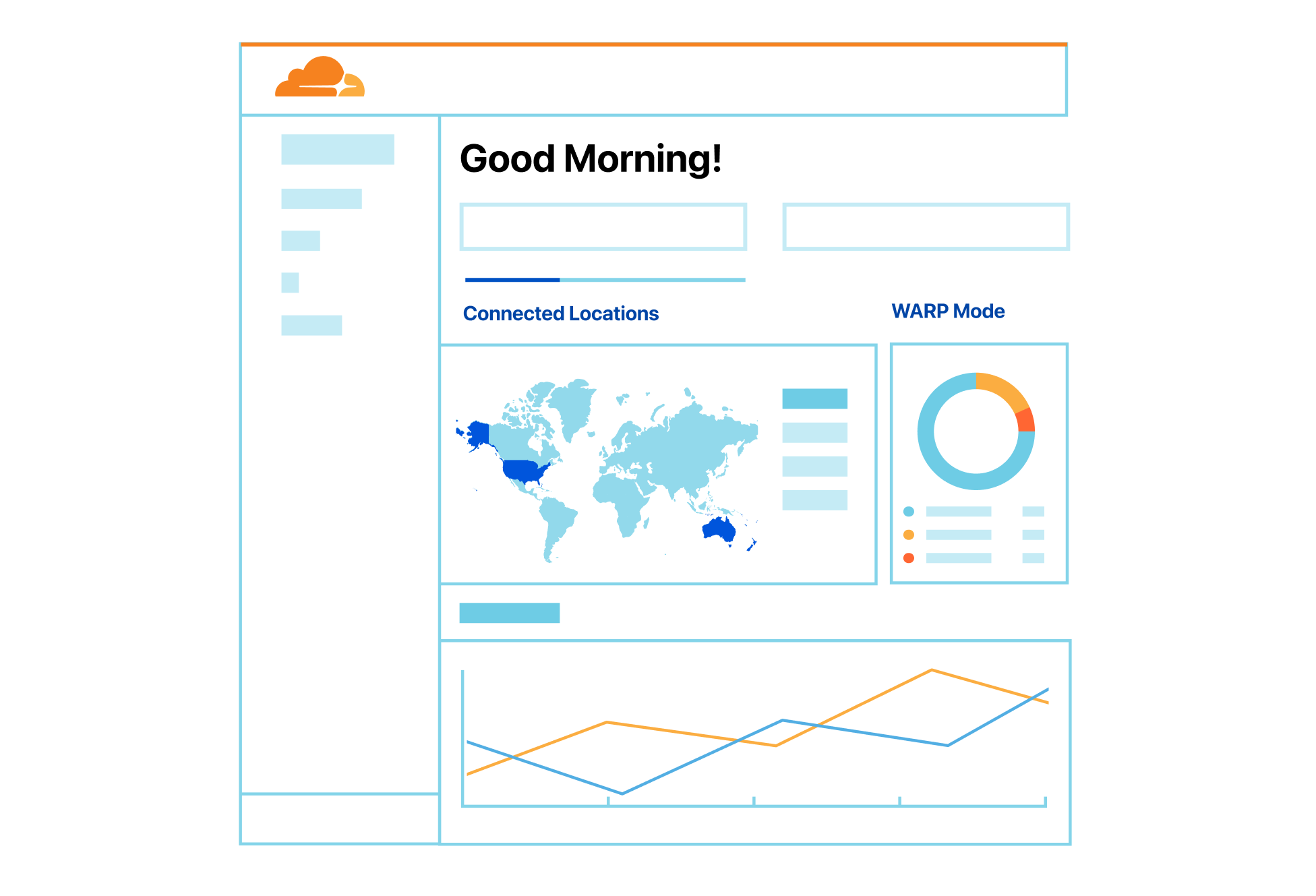
Oftentimes, the issues being reported to IT professionals will fall outside their control. For instance, an outage for a popular SaaS application can derail an otherwise perfectly productive day. But, these issues would become much easier to address if you knew about them before your users began to report them. For instance, this foresight would allow you to proactively communicate issues to the organization and get ahead of the flood of IT tickets destined for your inbox. With Synthetic Application Monitoring, we’ll be providing Zero Trust administrators the ability to create synthetic application tests to public-facing endpoints.
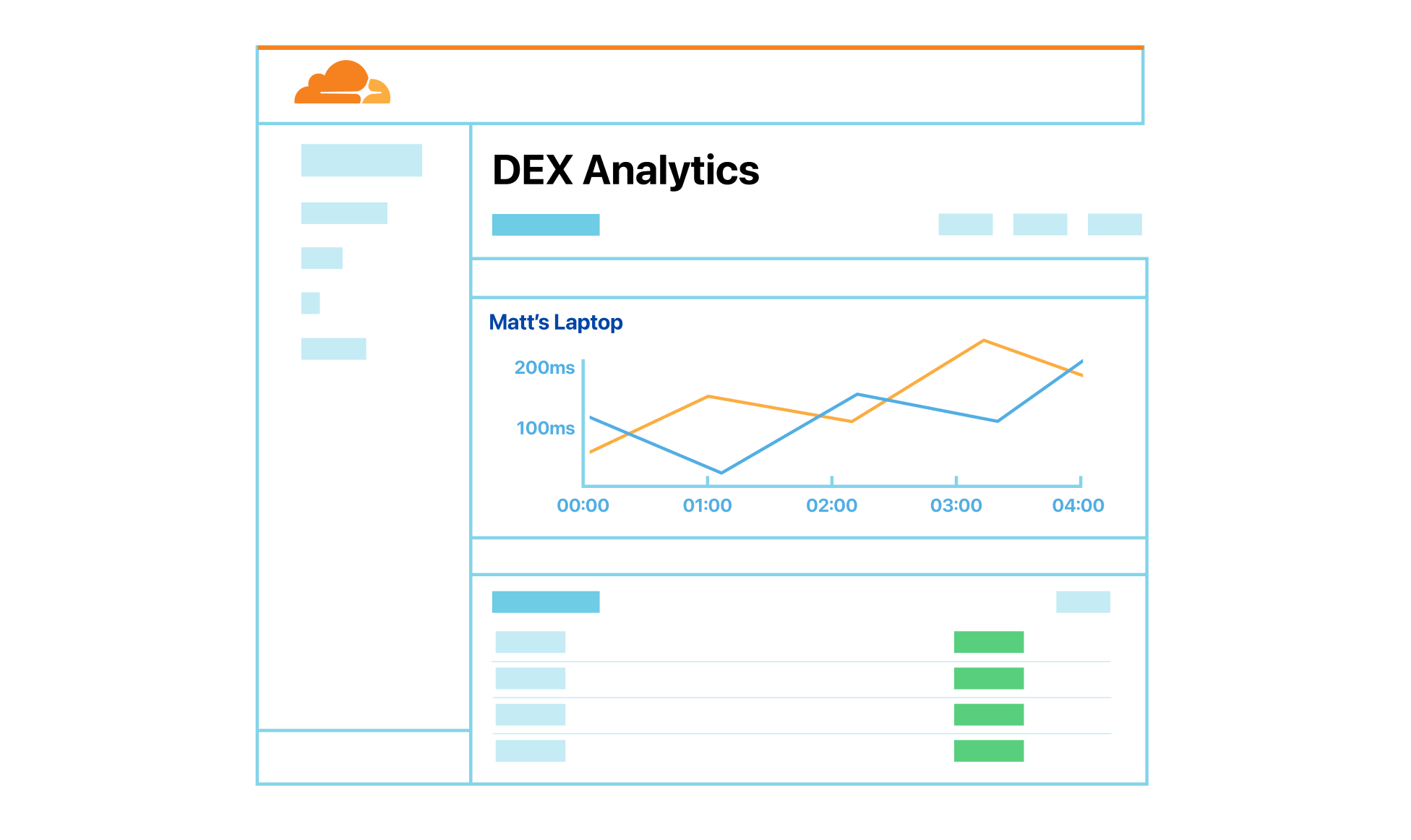
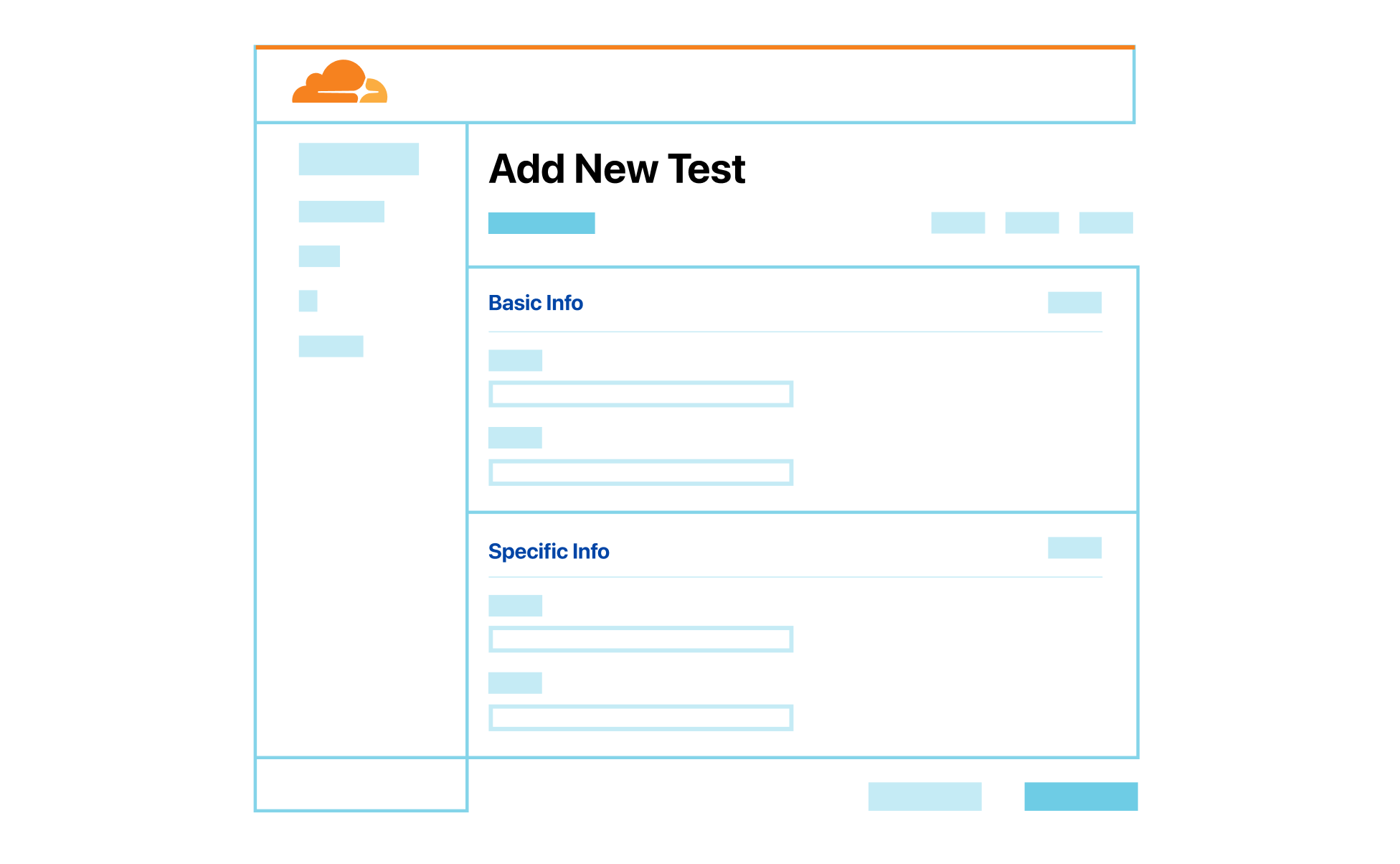
With this tool, users can initiate periodic traceroute and HTTP GET requests destined for a given public IP or hostname. In the dashboard, we’ll then surface global and user-level analytics enabling administrators to easily identify trends across their organization. Users will also have the ability to filter results down to identify individual users or devices who are most impacted by these outages.
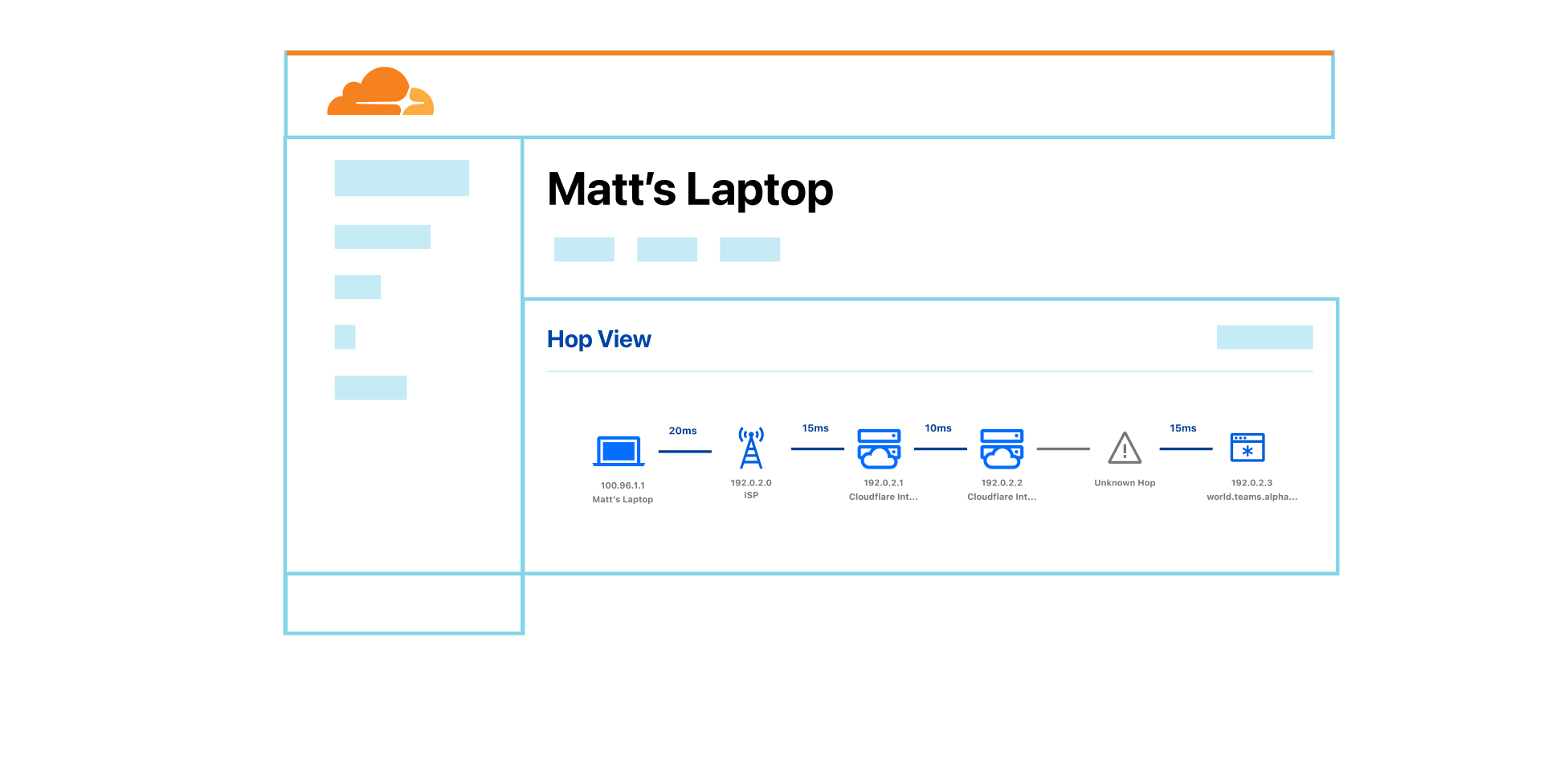
Once an issue with a given user or device is identified through the Synthetic Application Monitoring reports highlighted above, administrators will be able to view hop-by-hop telemetry data outlining the critical path to public facing endpoints. Administrators will have the ability to view this data represented graphically and export any data which may be relevant outside the context of Zero Trust.
According to Gartner®, “by 2026 at least 60% of I&O leaders will use Digital Experience Monitoring (DEM) to measure application, services and endpoint performance from the user’s viewpoint, up from less than 20% in 2021.” The items at the top of our roadmap will be just the beginning to Cloudflare’s approach to bringing our intelligence into your Zero Trust deployments.
Perhaps what we’re most excited about with this product is that users on all Zero Trust plans will be able to get started at no additional cost and then upgrade their plans for more advanced features and usage moving forward. Join our waitlist to be notified when these initial capabilities are available and receive early access.
Gartner Market Guide for Digital Experience Monitoring, 03/28/2022, Mrudula Bangera, Padraig Byrne, Gregg Siegfried.
GARTNER is the registered trademark and service mark of Gartner Inc., and/or its affiliates in the U.S. and/or internationally and has been used herein with permission. All rights reserved.
Post Syndicated from David Tuber original https://blog.cloudflare.com/network-performance-update-cio-edition/


Every Innovation Week, Cloudflare looks at our network’s performance versus our competitors. In past weeks, we’ve focused on how much faster we are compared to reverse proxies like Akamai, or platforms that sell edge compute that compares to our Supercloud, like Fastly and AWS. For CIO Week, we want to show you how our network stacks up against competitors that offer forward proxy services. These products are part of our Zero Trust platform, which helps secure applications and Internet experiences out to the public Internet, as opposed to our reverse proxy which protects your websites from outside users.
We’ve run a series of tests comparing our Zero Trust services with Zscaler. We’ve compared our ZT Application protection product Cloudflare Access against Zscaler Private Access (ZPA). We’ve compared our Secure Web Gateway, Cloudflare Gateway, against Zscaler Internet Access (ZIA), and finally our Remote Browser Isolation product, Cloudflare Browser Isolation, against Zscaler Cloud Browser Isolation. We’ve found that Cloudflare Gateway is 58% faster than ZIA in our tests, Cloudflare Access is 38% faster than ZPA worldwide, and Cloudflare Browser Isolation is 45% faster than Zscaler Cloud Browser Isolation worldwide. For each of these tests, we used 95th percentile Time to First Byte and Response tests, which measure the time it takes for a user to make a request, and get the start of the response (Time to First Byte), and the end of the response (Response). These tests were designed with the goal of trying to measure performance from an end-user perspective.
In this blog we’re going to talk about why performance matters for each of these products, do a deep dive on what we’re measuring to show that we’re faster, and we’ll talk about how we measured performance for each product.
Performance matters because it impacts your employees’ experience and their ability to get their job done. Whether it’s accessing services through access control products, connecting out to the public Internet through a Secure Web Gateway, or securing risky external sites through Remote Browser Isolation, all of these experiences need to be frictionless.
Say Anna at Acme Corporation is connecting from Sydney out to Microsoft 365 or Teams to get some work done. If Acme’s Secure Web Gateway is located far away from Anna in Singapore, then Anna’s traffic may go out of Sydney to Singapore, and then back into Sydney to reach her email. If Acme Corporation is like many companies that require Anna to use Microsoft Outlook in online mode, her performance may be painfully slow as she waits for her emails to send and receive. Microsoft 365 recommends keeping latency as low as possible and bandwidth as high as possible. That extra hop Anna has to take through her gateway could decrease throughput and increase her latency, giving Anna a bad experience.
In another example, if Anna is connecting to a hosted, protected application like Jira to complete some tickets, she doesn’t want to be waiting constantly for pages to load or to authenticate her requests. In an access-controlled application, the first thing you do when you connect is you log in. If that login takes a long time, you may get distracted with a random message from a coworker or maybe will not want to tackle any of the work at all. And even when you get authenticated, you still want your normal application experience to be snappy and smooth: users should never notice Zero Trust when it’s at its best.
If these products or experiences are slow, then something worse might happen than your users complaining: they may find ways to turn off the products or bypass them, which puts your company at risk. A Zero Trust product suite is completely ineffective if no one is using it because it’s slow. Ensuring Zero Trust is fast is critical to the effectiveness of a Zero Trust solution: employees won’t want to turn it off and put themselves at risk if they barely know it’s there at all.
Services like Zscaler may outperform many older, antiquated solutions, but their network still fails to measure up to a highly performant, optimized network like Cloudflare’s. We’ve tested all of our Zero Trust products against Zscaler’s equivalents, and we’re going to show you that we’re faster. So let’s dig into the data and show you how and why we’re faster in three critical Zero Trust scenarios, starting with Secure Web Gateway: comparing Cloudflare Gateway to Zscaler Internet Access (ZIA).
A secure web gateway needs to be fast because it acts as a funnel for all of an organization’s Internet-bound traffic. If a secure web gateway is slow, then any traffic from users out to the Internet will be slow. If traffic out to the Internet is slow, then users may be prompted to turn off the Gateway, putting the organization at risk of attack.
But in addition to being close to users, a performant web gateway needs to also be well-peered with the rest of the Internet to avoid slow paths out to websites users want to access. Remember that traffic through a secure web gateway follows a forward proxy path: users connect to the proxy, and the proxy connects to the websites users are trying to access. Therefore, it behooves the proxy to be well-connected to ensure that the user traffic can get where it needs to go as fast as possible.
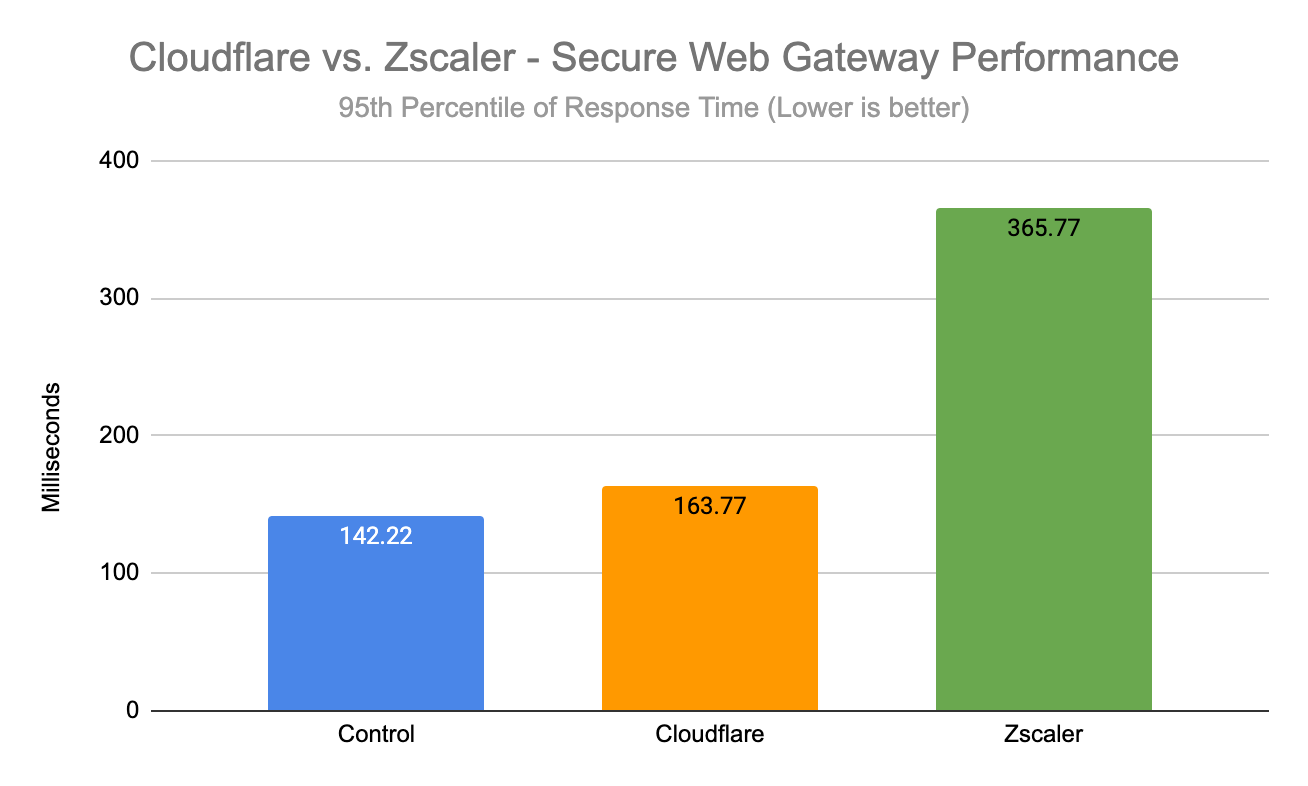
When comparing secure web gateway products, we pitted the Cloudflare Gateway and WARP client against Zscaler Internet Access (ZIA), which performs the same functions. Fortunately for Cloudflare users, Gateway and Cloudflare’s network is not only embedded deep into last mile networks close to users, but is also one of the most well peered networks in the world. We use our most peered network to be 55% faster than ZIA for Gateway user scenarios. Below is a box plot showing the 95th percentile response time for Cloudflare, Zscaler, and a control set that didn’t use a gateway at all:
| Secure Web Gateway – Response Time | |
|---|---|
| 95th percentile (ms) | |
| Control | 142.22 |
| Cloudflare | 163.77 |
| Zscaler | 365.77 |
This data shows that not only is Cloudflare much faster than Zscaler for Gateway scenarios, but that Cloudflare is actually more comparable to not using a secure web gateway at all rather than Zscaler.
To best measure the end-user Gateway experience, we are looking at 95th percentile response time from the end-user: we’re measuring how long it takes for a user to go through the proxy, have the proxy make a request to a website on the Internet, and finally return the response. This measurement is important because it’s an accurate representation of what users see.
When we measured against Zscaler, we had our end user client try to access five different websites: a website hosted in Azure, a Cloudflare-protected Worker, Google, Slack, and Zoom: websites that users would connect to on a regular basis. In each of those instances, Cloudflare outperformed Zscaler, and in the case of the Cloudflare-protected Worker, Gateway even outperformed the control for 95th percentile Response time. Here is a box plot showing the 95th percentile responses broken down by the different endpoints we queried as a part of our tests:
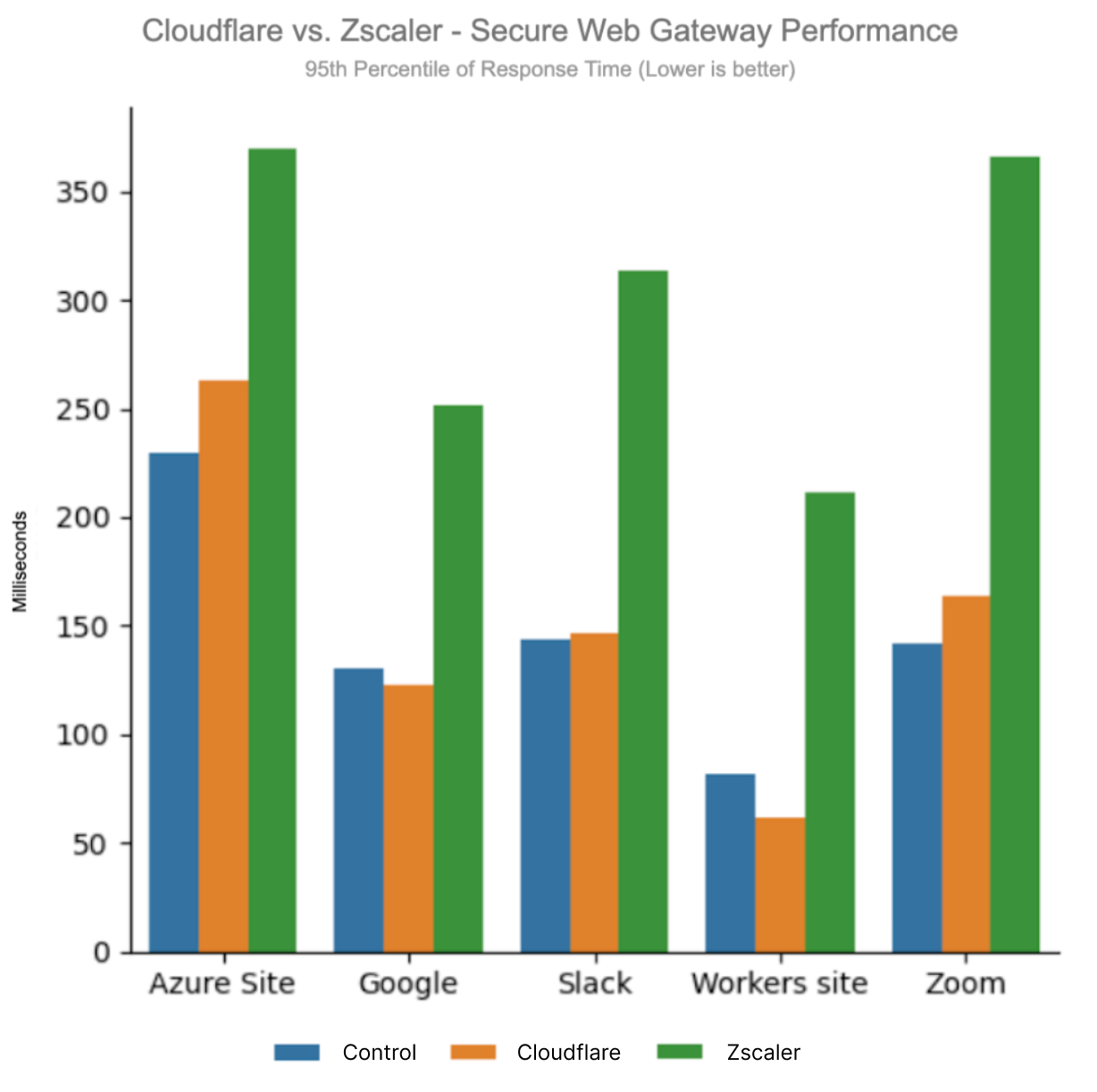
No matter where you go on the Internet, Cloudflare’s Gateway outperforms Zscaler Internet Access (ZIA) when you look at end-to-end response times. But why are we so much faster than Zscaler? The answer has to do with something that Zscaler calls proxy latency.
Proxy latency is the amount of time a user request spends on a Zscaler machine before being sent to its destination and back to the user. This number completely excludes the time it takes a user to reach Zscaler, and the time it takes Zscaler to reach the destination and restricts measurement to the milliseconds Zscaler spends processing requests.
Zscaler’s latency SLA says that 95% of your requests will spend less than 100 ms on a Zscaler device. Zscaler promises that the latency they can measure on their edge, not the end-to-end latency that actually matters, will be 100ms or less for 95% of user requests. You can even see those metrics in Zscaler’s Digital Experience to measure for yourself. If we can get this proxy latency from Zscaler logs and compare it to the Cloudflare equivalent, we can see how we stack up to Zscaler’s SLA metrics. While we don’t yet have those metrics exposed to customers, we were able to enable tracing on Cloudflare to measure the Cloudflare proxy latency.
The results show that at the 95th percentile, Zscaler was exceeding their SLA, and the Cloudflare proxy latency was 7ms. Furthermore, when our proxy latency was 100ms (meeting the Zscaler SLA), their proxy latencies were over 10x ours. Zscaler’s proxy latency accounts for the difference in performance we saw at the 95th percentile, being anywhere between 140-240 ms slower than Cloudflare for each of the sites. Here are the Zscaler proxy latency values at different percentiles for all sites tested, and then broken down by each site:
| Zscaler Internet Access (ZIA) | P90 Proxy Latency (ms) | P95 Proxy Latency (ms) | P99 Proxy Latency (ms) | P99.9 Proxy Latency (ms) | P99.957 Proxy Latency (ms) |
|---|---|---|---|---|---|
| Global | 06.0 | 142.0 | 625.0 | 1,071.7 | 1,383.7 |
| Azure Site | 97.0 | 181.0 | 458.5 | 1,032.7 | 1,291.3 |
| Zoom | 206.0 | 254.2 | 659.8 | 1,297.8 | 1,455.4 |
| Slack | 118.8 | 186.2 | 454.5 | 1,358.1 | 1,625.8 |
| Workers Site | 97.8 | 184.1 | 468.3 | 1,246.2 | 1,288.6 |
| 13.7 | 100.8 |
392.6 | 848.9 | 1,115.0 |
At the 95th percentile, not only were their proxy latencies out of SLA, those values show the difference between Zscaler and Cloudflare: taking Zoom as an example, if Zscaler didn’t have the proxy latency, they would be on-par with Cloudflare and the control. Cloudflare’s equivalent of proxy latency is so small that using us is just like using the public Internet:
| Cloudflare Gateway | P90 Proxy Latency (ms) | P95 Proxy Latency (ms) | P99 Proxy Latency (ms) | P99.9 Proxy Latency (ms) | P99.957 Proxy Latency (ms) |
|---|---|---|---|---|---|
| Global | 5.6 | 7.2 | 15.6 | 32.2 | 101.9 |
| Tubes Test | 6.2 | 7.7 | 12.3 | 18.1 | 19.2 |
| Zoom | 5.1 | 6.2 | 9.6 | 25.5 | 31.1 |
| Slack | 5.3 | 6.5 | 10.5 | 12.5 | 12.8 |
| Workers | 5.1 | 6.1 | 9.4 | 17.3 | 20.5 |
| 5.3 | 7.4 | 12.0 | 26.9 | 30.2 |
The 99.957 percentile may seem strange to include, but it marks the percentile at which Cloudflare’s proxy latencies finally exceeded 100ms. Cloudflare’s 99.957 percentile proxy latency is even faster than Zscaler’s 90th percentile proxy latency. Even on the metric Zscaler cares about and holds themselves accountable for despite proxy latency not being the metric customers care about, Cloudflare is faster.
Getting this view of data was not easy. Existing testing frameworks like Catchpoint are unsuitable for this task because performance testing requires that you run the ZIA client or the WARP client on the testing endpoint. We also needed to make sure that the Cloudflare test and the Zscaler test are running on similar machines in the same place to measure performance as good as possible. This allows us to measure the end-to-end responses coming from the same location where both test environments are running:
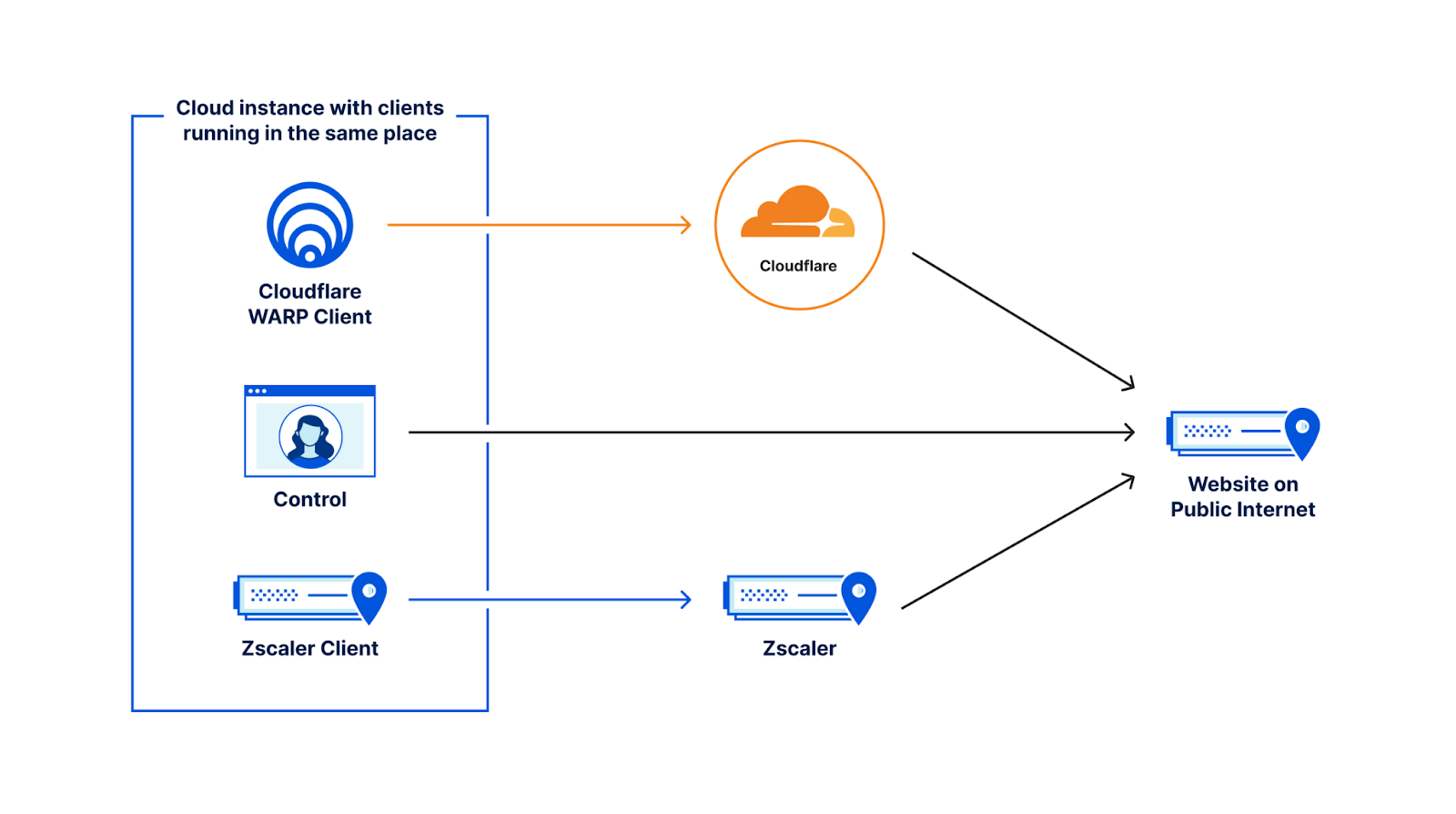
In our setup, we put three VMs in the cloud side by side: one running Cloudflare WARP connecting to our Gateway, one running ZIA, and one running no proxy at all as a control. These VMs made requests every three minutes to the five different endpoints mentioned above and logged the HTTP browser timings for how long each request took. Based on this, we are able to get a user-facing view of performance that is meaningful.
A quick summary so far: Cloudflare is faster than Zscaler when we’re protecting users from the public Internet through a secure web gateway from an end-user perspective. Cloudflare is even faster than Zscaler according to Zscaler’s small definition of what performance through a secure web gateway means. But let’s take a look at scenarios where you need access for specific applications through Zero Trust access.
Access control needs to be seamless and transparent to the user: the best compliment for a Zero Trust solution is employees barely notice it’s there. Services like Cloudflare Access and Zscaler Private Access (ZPA) allow users to cache authentication information on the provider network, ensuring applications can be accessed securely and quickly to give users that seamless experience they want. So having a network that minimizes the number of logins required while also reducing the latency of your application requests will help keep your Internet experience snappy and reactive.
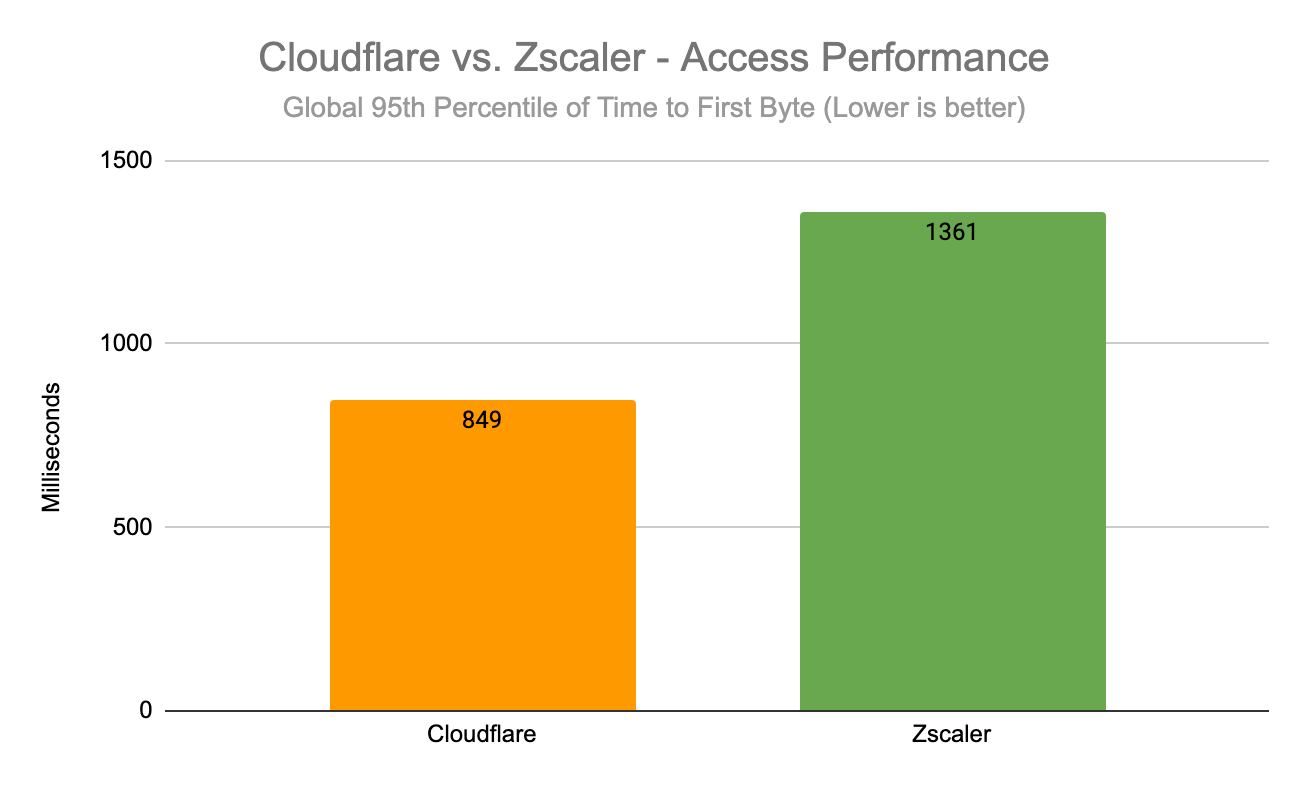
Cloudflare Access does all that 38% faster than Zscaler Private Access (ZPA), ensuring that no matter where you are in the world, you’ll get a fast, secure application experience:
| ZT Access – Time to First Byte (Global) | |
|---|---|
| 95th Percentile (ms) | |
| Cloudflare | 849 |
| Zscaler | 1,361 |
When we drill into the data, we see that Cloudflare is consistently faster everywhere around the world. For example, take Tokyo, where Cloudflare’s 95th percentile time to first byte times are 22% faster than Zscaler:
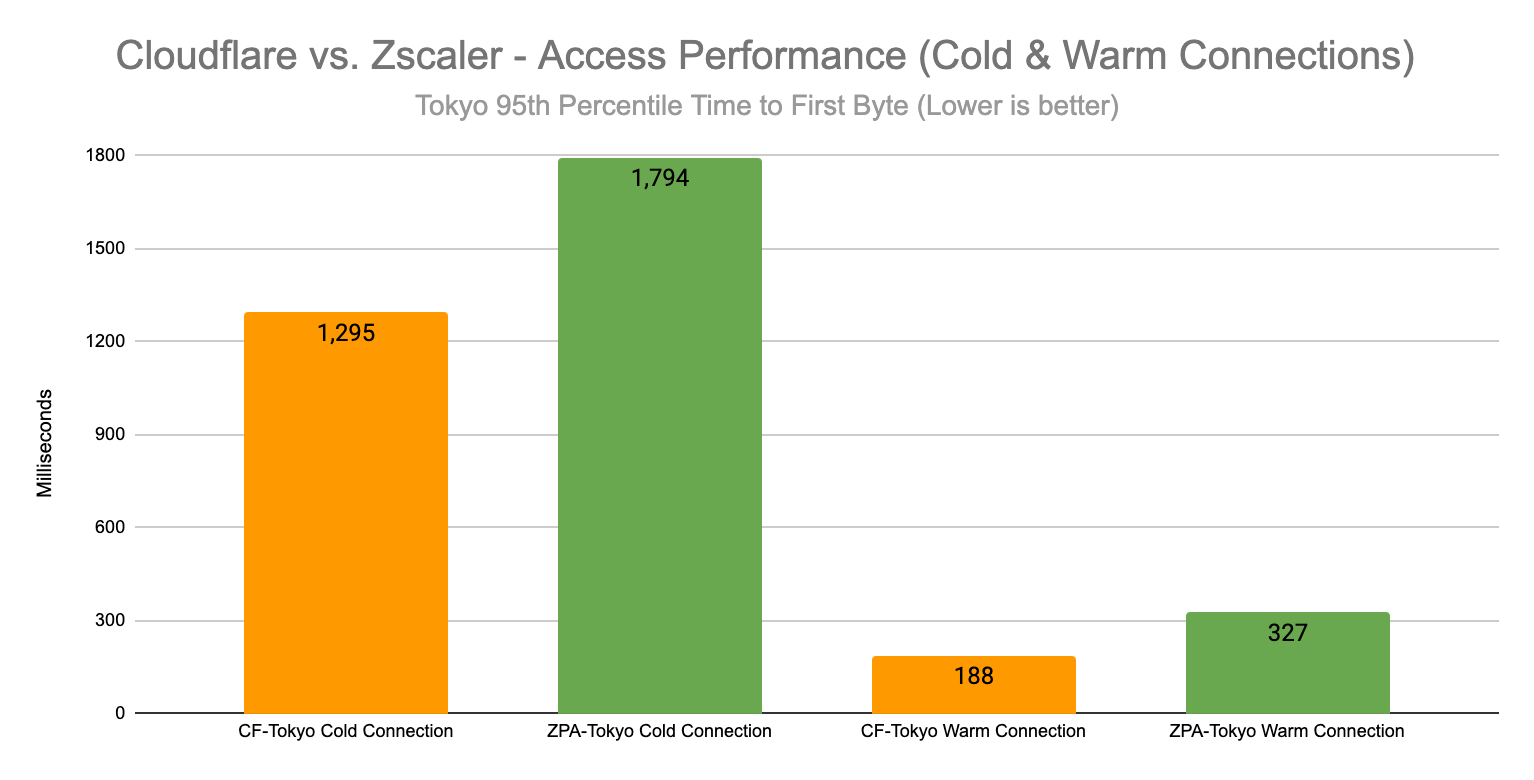
| ZT Access – 95th Percentile Time to First Byte (Chicago) |
||
|---|---|---|
| New Sessions (ms) | Existing Sessions (ms) | |
| Cloudflare | 1,032 | 293 |
| Zscaler | 1,373 | 338 |
When we evaluate Cloudflare against Zscaler for application access scenarios, we are looking at two distinct scenarios that need to be measured individually. The first scenario is when a user logs into their application and has to authenticate. In this case, the Zero Trust Access service will direct the user to a login page, the user will authenticate, and then be redirected to their application.
This is called a new session, because no authentication information is cached or exists on the Access network. The second scenario is called an existing session, when a user has already been authenticated and that authentication information can be cached. This scenario is usually much faster, because it doesn’t require an extra call to an identity provider to complete.
We like to measure these scenarios separately, because when we look at 95th percentile values, we would almost always be looking at new sessions if we combined new and existing sessions together. But across both scenarios, Cloudflare is consistently faster in every region. Here’s how this data looks when you take a location Zscaler is more likely to have good peering in: users in Chicago, IL connecting to an application hosted in US-Central.
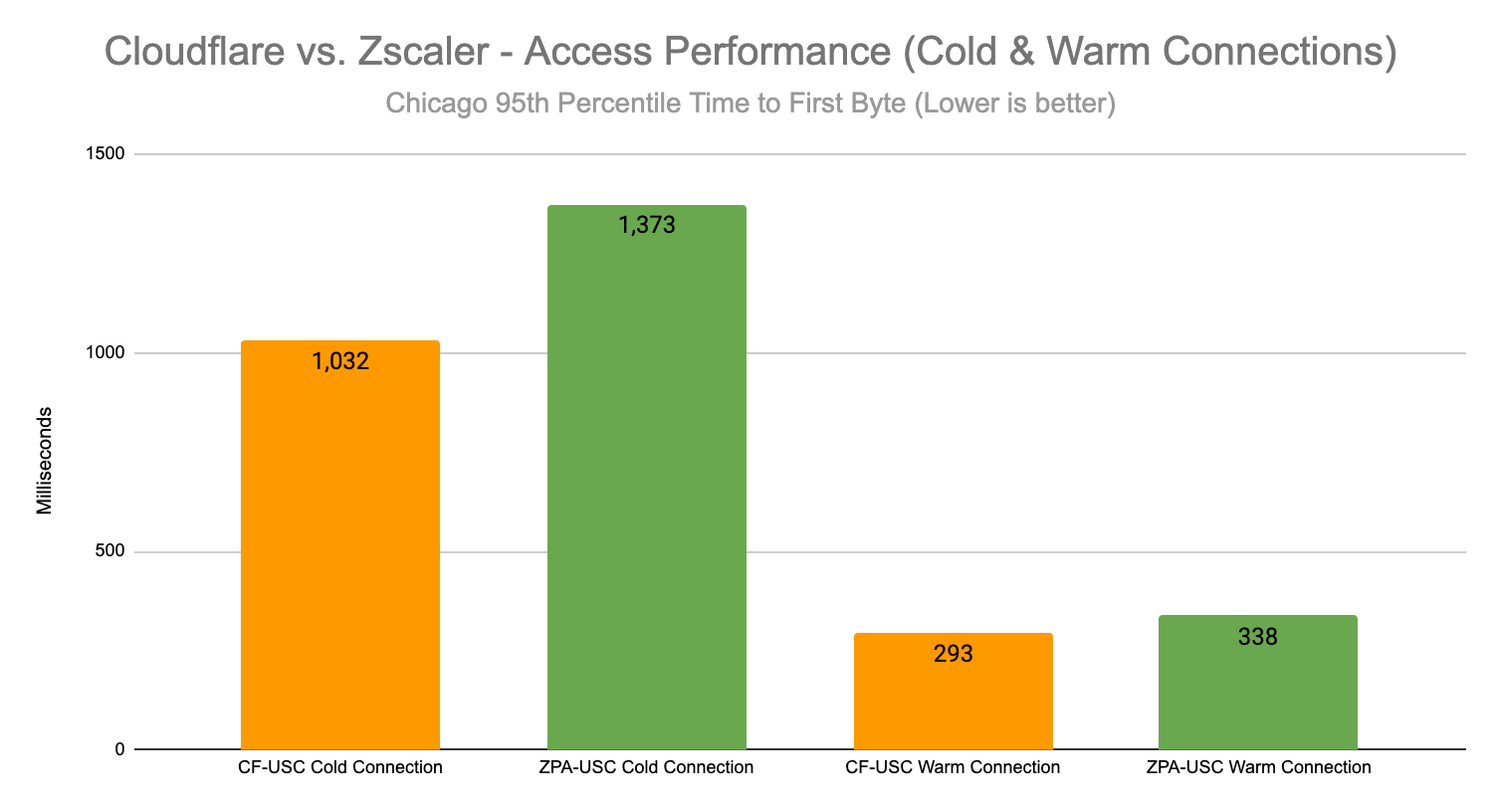
| ZT Access – 95th Percentile Time to First Byte (Chicago) |
||
|---|---|---|
| New Sessions (ms) | Existing Sessions (ms) | |
| Cloudflare | 1,032 | 293 |
| Zscaler | 1,373 | 338 |
Cloudflare is faster overall there as well. Here’s a histogram of 95th percentile response times for new connections overall:
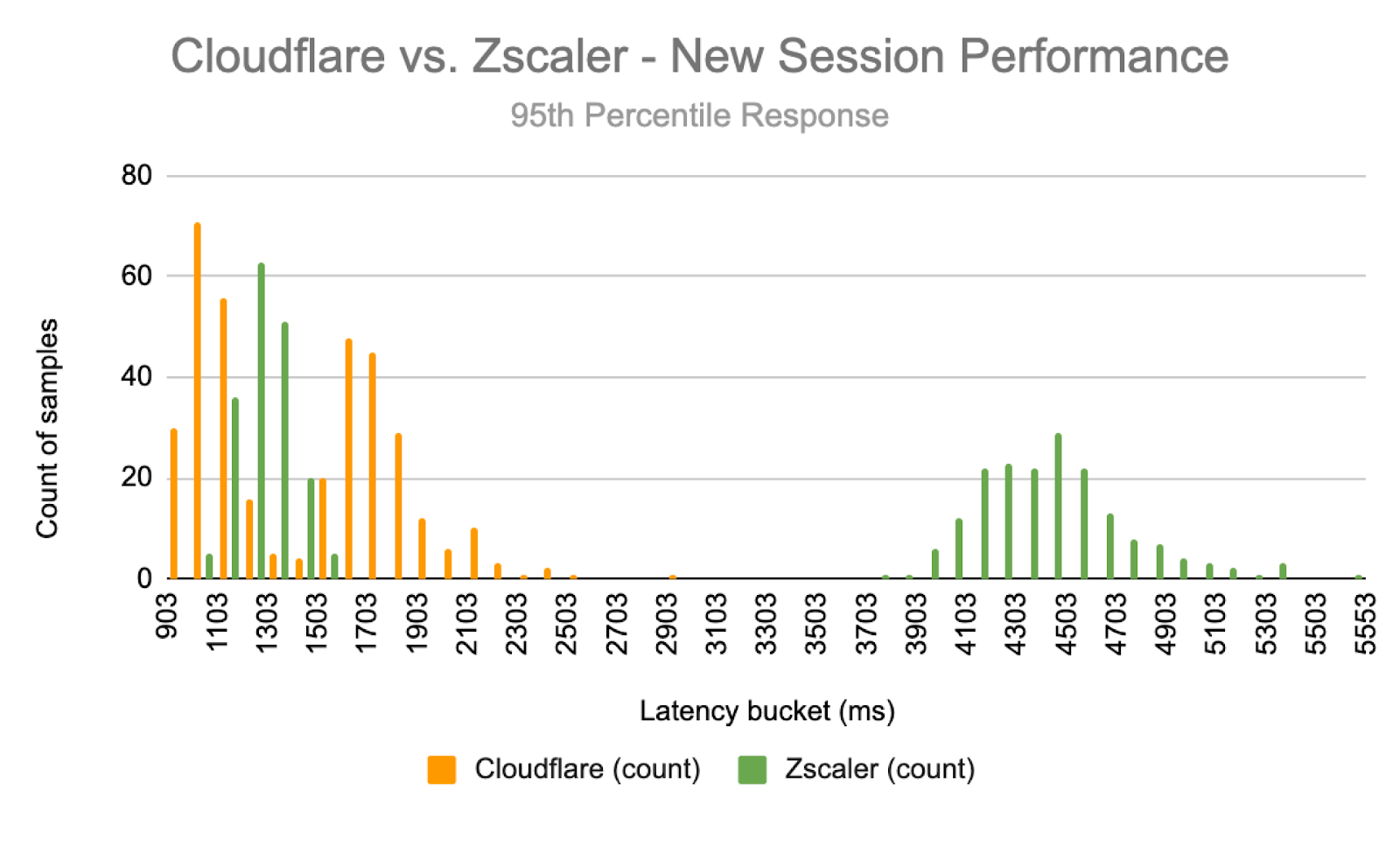
You’ll see that Cloudflare’s network really gives a performance boost on login, helping find optimal paths back to authentication providers to retrieve login details. In this test, Cloudflare never takes more than 2.5 seconds to return a login response, but half of Zscaler’s 95th percentile responses are almost double that, at around four seconds. This would suggest that Zscaler’s network isn’t peered as well, which causes latency early on. But it may also suggest that Zscaler may do better when the connection is established and everything is cached. But on an existing connection, Cloudflare still comes out ahead:
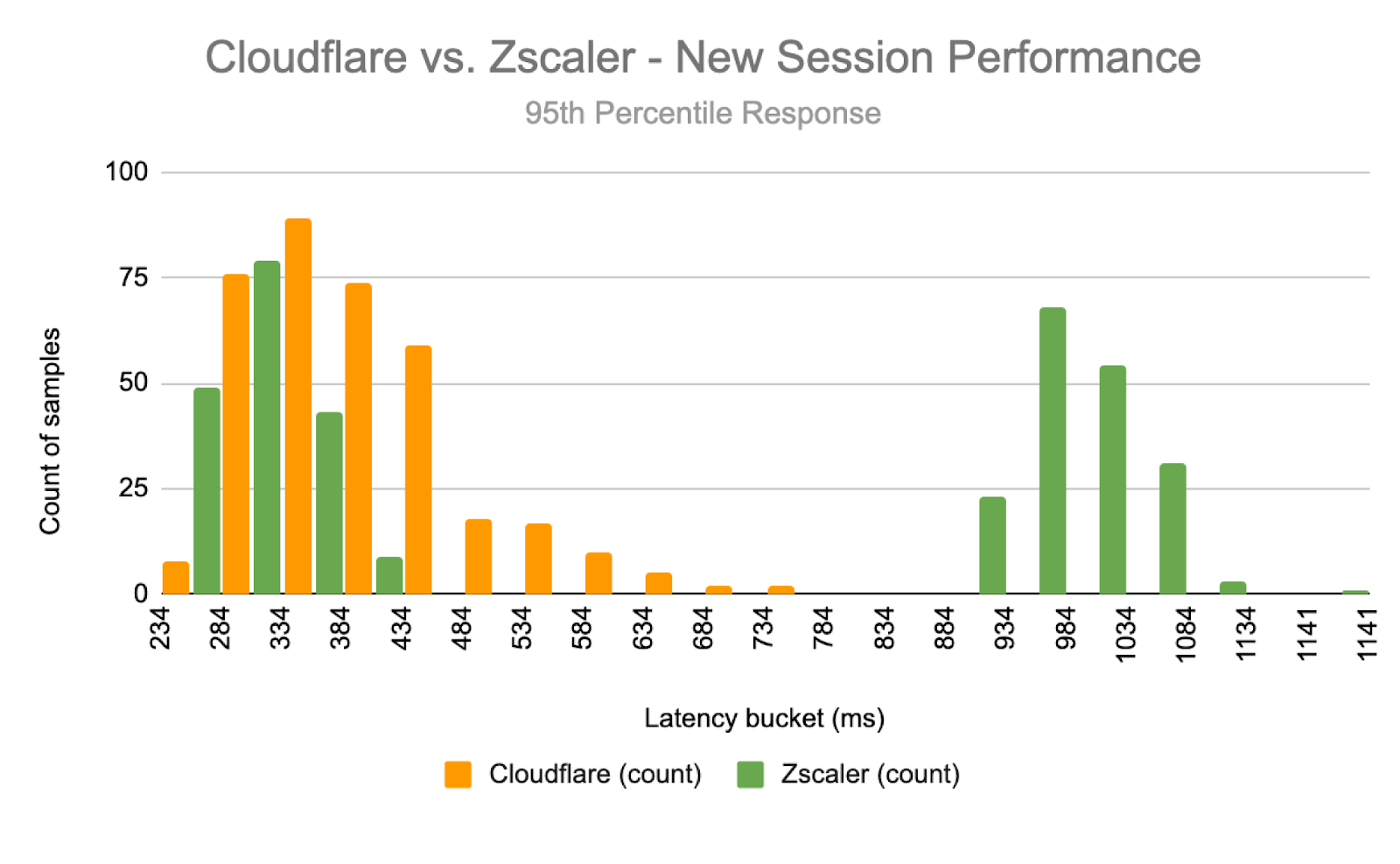
Zscaler and Cloudflare do match up more evenly at lower latency buckets, but Cloudflare’s response times are much more consistent, and you can see that Zscaler has half of their responses which take almost a second to load. This further highlights how well-connected we are: because we’re in more places, we provide a better application experience, and we don’t have as many edge cases with high latency and poor application performance.
We like to separate these new and existing sessions because it’s important to look at similar request paths to do a proper comparison. For example, if we’re comparing a request via Zscaler on an existing session and a request via Cloudflare on a new session, we could see that Cloudflare was much slower than Zscaler because of the need to authenticate. So when we contracted a third party to design these tests, we made sure that they took that into account.
For these tests, Cloudflare contracted Miercom, a third party who performed a set of tests that was intended to replicate an end-user connecting to a resource protected by Cloudflare or Zscaler. Miercom set up application instances in 12 locations around the world, and devised a test that would log into the application through various Zero Trust providers to access certain content. The test methodology is described as follows, but you can look at the full report from Miercom detailing their test methodology here:
This allows us to look at Cloudflare versus Zscaler for application performance for both new and existing sessions, and we’ve shown that we’re faster. We’re faster in secure web gateway scenarios too.
But what if you want to access resources on the public Internet and you don’t have a ZT client on your device? To do that, you’ll need remote browser isolation.
Remote browser isolation products have a very strong dependency on the public Internet: if your connection to your browser isolation product isn’t good, then your browser experience will feel weird and slow. Remote browser isolation is extraordinarily dependent on performance to feel smooth and seamless to the users: if everything is fast as it should be, then users shouldn’t even notice that they’re using browser isolation. For this test, we’re pitting Cloudflare Browser Isolation against Zscaler Cloud Browser Isolation.
Cloudflare once again is faster than Zscaler for remote browser isolation performance. Comparing 95th percentile time to first byte, Cloudflare is 45% faster than Zscaler across all regions:
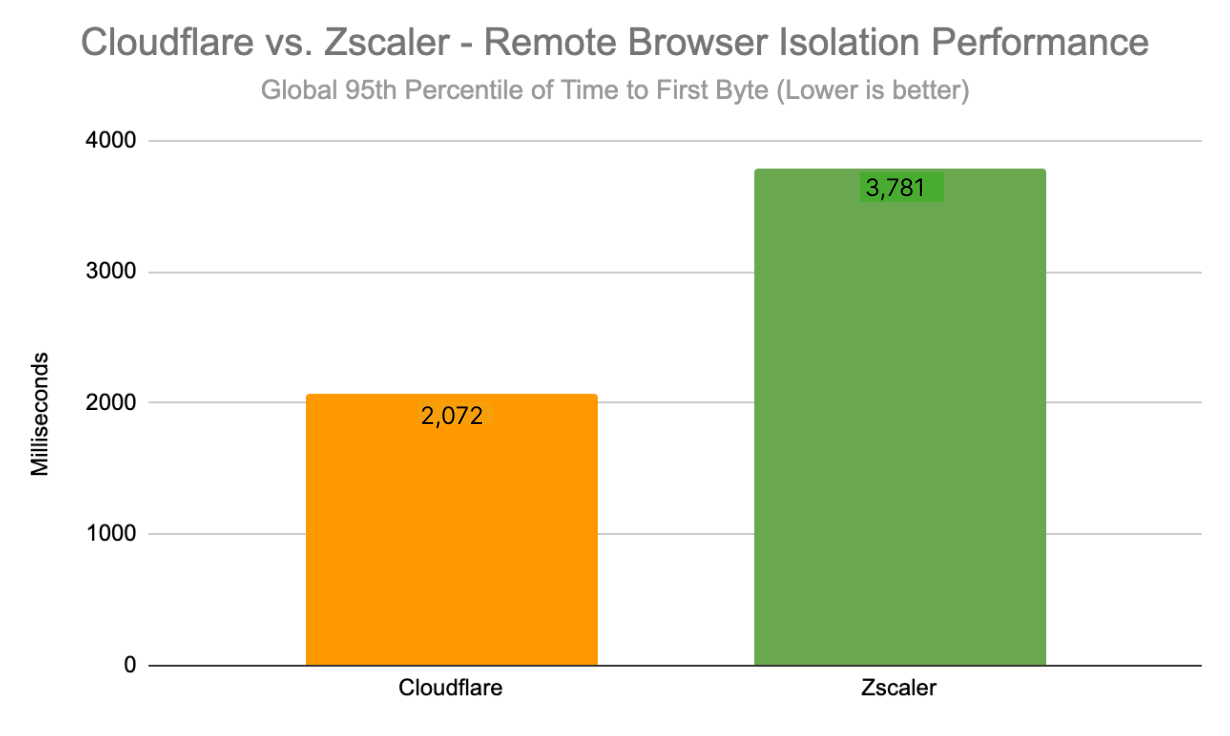
| ZT RBI – Time to First Byte (Global) | |
|---|---|
| 95th Percentile (ms) | |
| Cloudflare | 2,072 |
| Zscaler | 3,781 |
When you compare the total response time or the ability for a browser isolation product to deliver a full response back to a user, Cloudflare is still 39% faster than Zscaler:
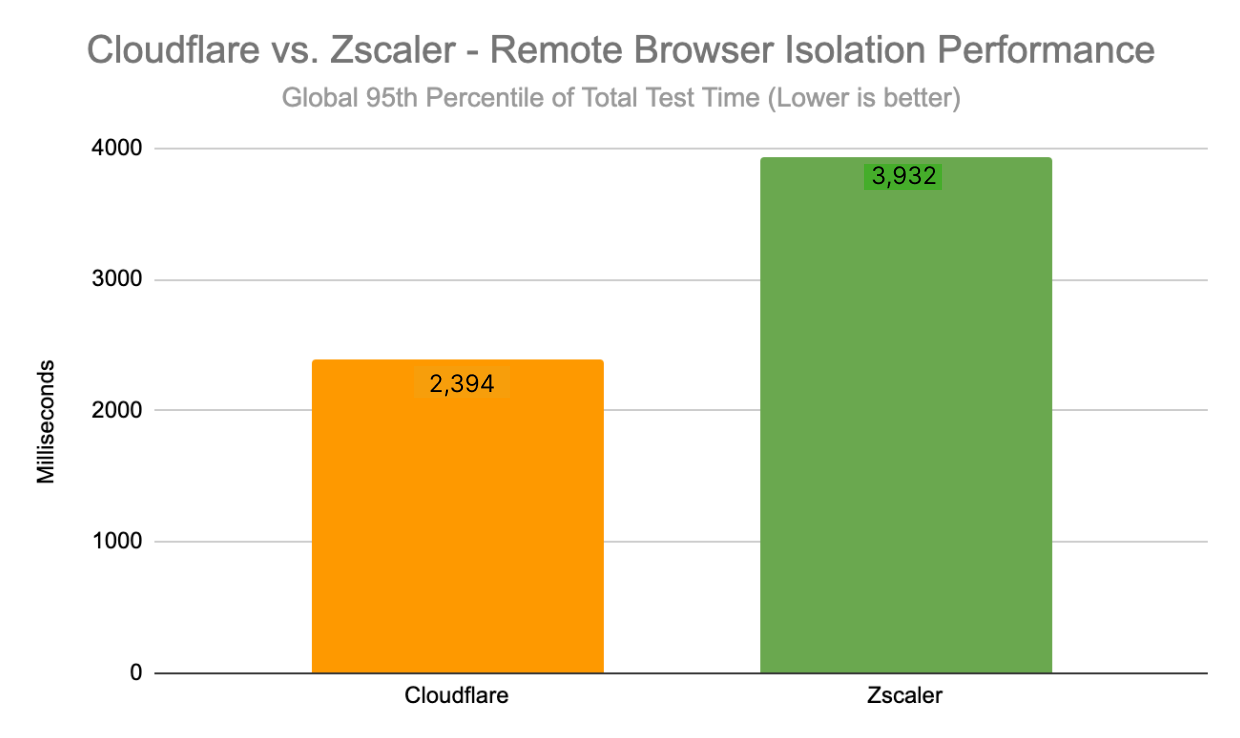
| ZT RBI – Time to First Byte (Global) | |
|---|---|
| 95th Percentile (ms) | |
| Cloudflare | 2,394 |
| Zscaler | 3,932 |
Cloudflare’s network really shines here to help deliver the best user experience to our customers. Because Cloudflare’s network is incredibly well-peered close to end-user devices, we are able to drive down our time to first byte and response times, helping improve the end-user experience.
To measure this, we went back to Miercom to help get us the data we needed by having Catchpoint nodes connect to Cloudflare Browser Isolation and Zscaler Cloud Browser Isolation across the world from the same 14 locations and had devices simulating clients try to reach applications through the browser isolation products in each locale. For more on the test methodology, you can refer to that same Miercom report, linked here.
In a non-Zero Trust world, you and your IT teams were the network operator — which gave you the ability to control performance. While this control was comforting, it was also a huge burden on your IT teams who had to manage middle mile connections between offices and resources. But in a Zero Trust world, your network is now… well, it’s the public Internet. This means less work for your teams — but a lot more responsibility on your Zero Trust provider, which has to manage performance for every single one of your users. The better your Zero Trust provider is at improving end-to-end performance, the better an experience your users will have and the less risk you expose yourself to. For real-time applications like authentication and secure web gateways, having a snappy user experience is critical.
A Zero Trust provider needs to not only secure your users on the public Internet, but it also needs to optimize the public Internet to make sure that your users continuously stay protected. Moving to Zero Trust doesn’t just reduce the need for corporate networks, it also allows user traffic to flow to resources more naturally. However, given your Zero Trust provider is going to be the gatekeeper for all your users and all your applications, performance is a critical aspect to evaluate to reduce friction for your users and reduce the likelihood that users will complain, be less productive, or turn the solutions off. Cloudflare is constantly improving our network to ensure that users always have the best experience, and this comes not just from routing fixes, but also through expanding peering arrangements and adding new locations. It’s this tireless effort that makes us the fastest Zero Trust provider.
Check out our compare page for more detail on how Cloudflare’s network architecture stacks up against Zscaler.
Post Syndicated from Ankur Aggarwal original https://blog.cloudflare.com/bring-your-certificates-cloudflare-gateway/


Today, we’re announcing support for customer provided certificates to give flexibility and ease of deployment options when using Cloudflare’s Zero Trust platform. Using custom certificates, IT and Security administrators can now “bring-their-own” certificates instead being required to use a Cloudflare-provided certificate to apply HTTP, DNS, CASB, DLP, RBI and other filtering policies.
The new custom certificate approach will exist alongside the method Cloudflare Zero Trust administrators are already used to: installing Cloudflare’s own certificate to enable traffic inspection and forward proxy controls. Both approaches have advantages, but providing them both enables organizations to find the path to security modernization that makes the most sense for them.
When deploying new security services, organizations may prefer to use their own custom certificates for a few common reasons. Some value the privacy of controlling which certificates are deployed. Others have already deployed custom certificates to their device fleet because they may bind user attributes to these certificates or use them for internal-only domains.
So, it can be easier and faster to apply additional security controls around what administrators have deployed already–versus installing additional certificates.
To get started using your own certificate first upload your root certificates via API to Cloudflare.
curl -X POST "https://api.cloudflare.com/client/v4/accounts/<ACCOUNT_ID>/mtls_certificates"\
    -H "X-Auth-Email: <EMAIL>" \
    -H "X-Auth-Key: <API_KEY>" \
    -H "Content-Type: application/json" \
    --data '{
        "name":"example_ca_cert",
        "certificates":"<ROOT_CERTIFICATE>",
        "private_key":"<PRIVATE_KEY>",
        "ca":true
        }'
The root certificate will be stored across all of Cloudflare’s secure servers, designed to protect against unauthorized access. Once uploaded each certificate will receive an identifier in the form of a UUID (e.g. 2458ce5a-0c35-4c7f-82c7-8e9487d3ff60) . This UUID can then be used with your Zero Trust account ID to associate and enable it for your account.
curl -X PUT "https://api.cloudflare.com/client/v4/accounts/<ACCOUNT_ID>/gateway/configuration"\
    -H "X-Auth-Email: <EMAIL>" \
    -H "X-Auth-Key: <API_KEY>" \
    -H "Content-Type: application/json" \
    --data '{
        "settings":
        {
            "antivirus": {...},
            "block_page": {...},
            "custom_certificate":
            {
                "enabled": true,
                "id": "2458ce5a-0c35-4c7f-82c7-8e9487d3ff60"
            }
            "tls_decrypt": {...},
            "activity_log": {...},
            "browser_isolation": {...},
            "fips": {...},
        }
    }'
From there it takes approximately one minute and all new HTTPS connections for your organization’s users will be secured using your custom certificate. For even more details check out our developer documentation.
An additional benefit of this fast propagation time is zero maintenance downtimes. If you’re transitioning from the Cloudflare provided certificate or a custom certificate, all new HTTPS connections will use the new certificate without impacting any current connections.
In addition to the above API-based method for custom certificates, Cloudflare also makes it easy for organizations to install Cloudflare’s own root certificate on devices to support HTTP filtering policies. Many organizations prefer offloading certificate management to Cloudflare to reduce administrative overhead. Plus, root certificate installation can be easily automated during managed deployments of Cloudflare’s device client, which is critical to forward proxy traffic.
Installing Cloudflare’s root certificate on devices takes only a few steps, and administrators can choose which file type they want to use–either a .pem or .crt file–depending on their use cases. Take a look at our developer documentation for further details on the process across operating systems and applications.
Whether an organization uses a custom certificate or the Cloudflare maintained certificate, the goal is the same. To apply traffic inspection to help protect against malicious activity and provide robust data protection controls to keep users safe. Cloudflare’s priority is equipping those organizations with the flexibility to achieve their risk reduction goal as swiftly as possible.
In the coming quarters we will be focused on delivering a new UI to upload and manage user side certificates as well as refreshing the HTTP policy builder to let admins determine what happens when accessing origins not signed with a public certificate.
If you want to know where SWG, RBI, DLP, and other threat and data protection services can fit into your overall security modernization initiatives, explore Cloudflare’s prescriptive roadmap to Zero Trust.
If you and your enterprise are ready to get started protecting your users, devices, and data with HTTP inspection, then reach out to Cloudflare to learn more.
Post Syndicated from Abe Carryl original https://blog.cloudflare.com/warp-to-warp/
Millions of users rely on Cloudflare WARP to connect to the Internet through Cloudflare’s network. Individuals download the mobile or desktop application and rely on the Wireguard-based tunnel to make their browser faster and more private. Thousands of enterprises trust Cloudflare WARP to connect employees to our Secure Web Gateway and other Zero Trust services as they navigate the Internet.
We’ve heard from both groups of users that they also want to connect to other devices running WARP. Teams can build a private network on Cloudflare’s network today by connecting WARP on one side to a Cloudflare Tunnel, GRE tunnels, or IPSec tunnels on the other end. However, what if both devices already run WARP?
Starting today, we’re excited to make it even easier to build a network on Cloudflare with the launch of WARP-to-WARP connectivity. With a single click, any device running WARP in your organization can reach any other device running WARP. Developers can connect to a teammate’s machine to test a web server. Administrators can reach employee devices to troubleshoot issues. The feature works with our existing private network on-ramps, like the tunnel options listed above. All with Zero Trust rules built in.
To get started, sign-up to receive early access to our closed beta. If you’re interested in learning more about how it works and what else we will be launching in the future, keep scrolling.
We understand that adopting a Zero Trust architecture can feel overwhelming at times. With Cloudflare One, our mission is to make Zero Trust prescriptive and approachable regardless of where you are on your journey today. To help users navigate the uncertain, we created resources like our vendor-agnostic Zero Trust Roadmap which lays out a battle-tested path to Zero Trust. Within our own products and services, we’ve launched a number of features to bridge the gap between the networks you manage today and the network you hope to build for your organization in the future.
Ultimately, our goal is to enable you to overlay your network on Cloudflare however you want, whether that be with existing hardware in the field, a carrier you already partner with, through existing technology standards like IPsec tunnels, or more Zero Trust approaches like WARP or Tunnel. It shouldn’t matter which method you chose to start with, the point is that you need the flexibility to get started no matter where you are in this journey. We call these connectivity options on-ramps and off-ramps.
The model laid out above allows users to start by defining their specific needs and then customize their deployment by choosing from a set of fully composable on and offramps to connect their users and devices to Cloudflare. This means that customers are able to leverage any of these solutions together to route traffic seamlessly between devices, offices, data centers, cloud environments, and self-hosted or SaaS applications.
One example of a deployment we’ve seen thousands of customers be successful with is what we call WARP-to-Tunnel. In this deployment, the on-ramp Cloudflare WARP ensures end-user traffic reaches Cloudflare’s global network in a secure and performant manner. The off-ramp Cloudflare Tunnel then ensures that, after your Zero Trust rules have been enforced, we have secure, redundant, and reliable paths to land user traffic back in your distributed, private network.
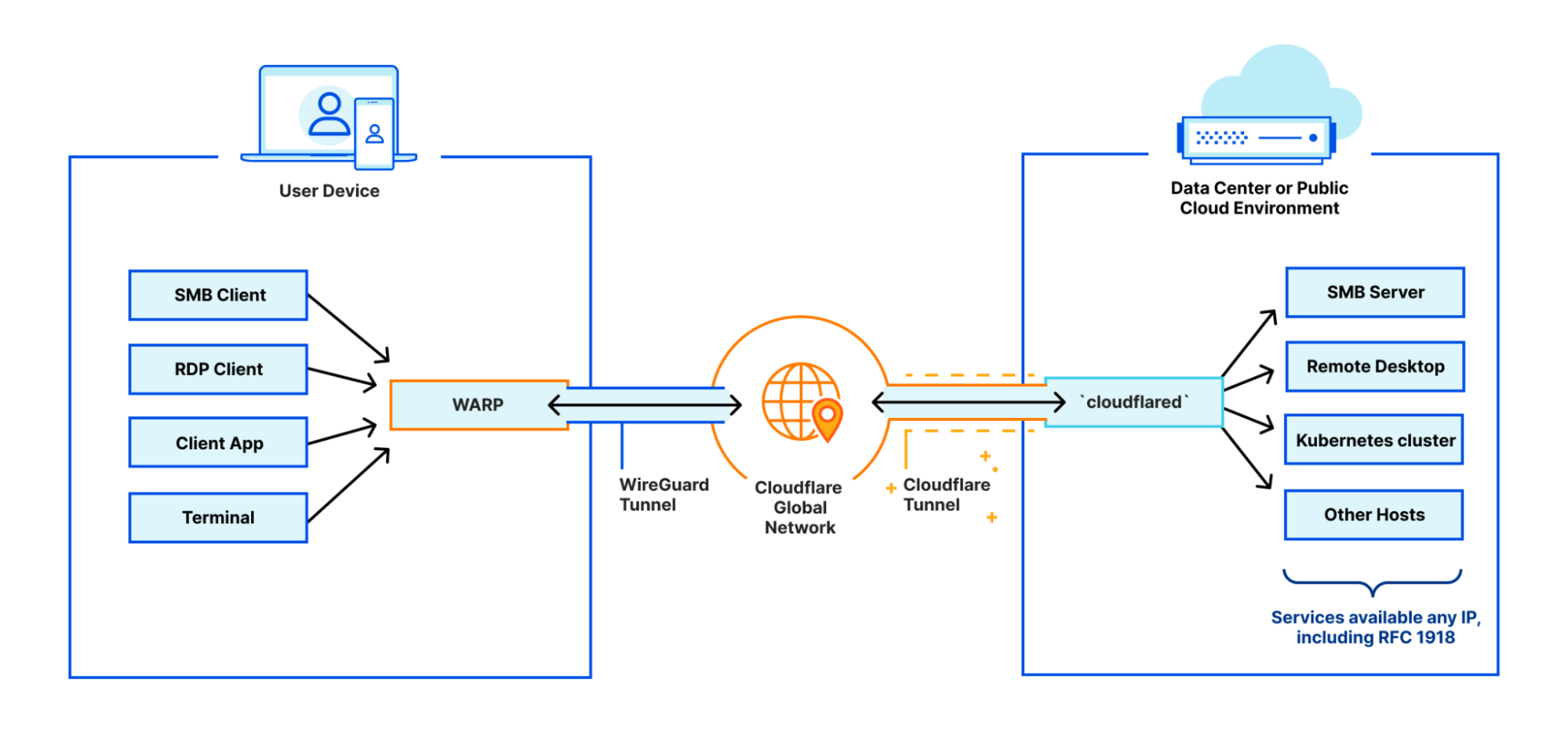
This is a great example of a deployment that is ideal for users that need to support public to private traffic flows (i.e. North-South)
But what happens when you need to support private to private traffic flows (i.e. East-West) within this deployment?
Starting today, devices on-ramping to Cloudflare with WARP will also be able to off-ramp to each other. With this announcement, we’re adding yet another tool to leverage in new or existing deployments that provides users with stronger network fabric to connect users, devices, and autonomous systems.
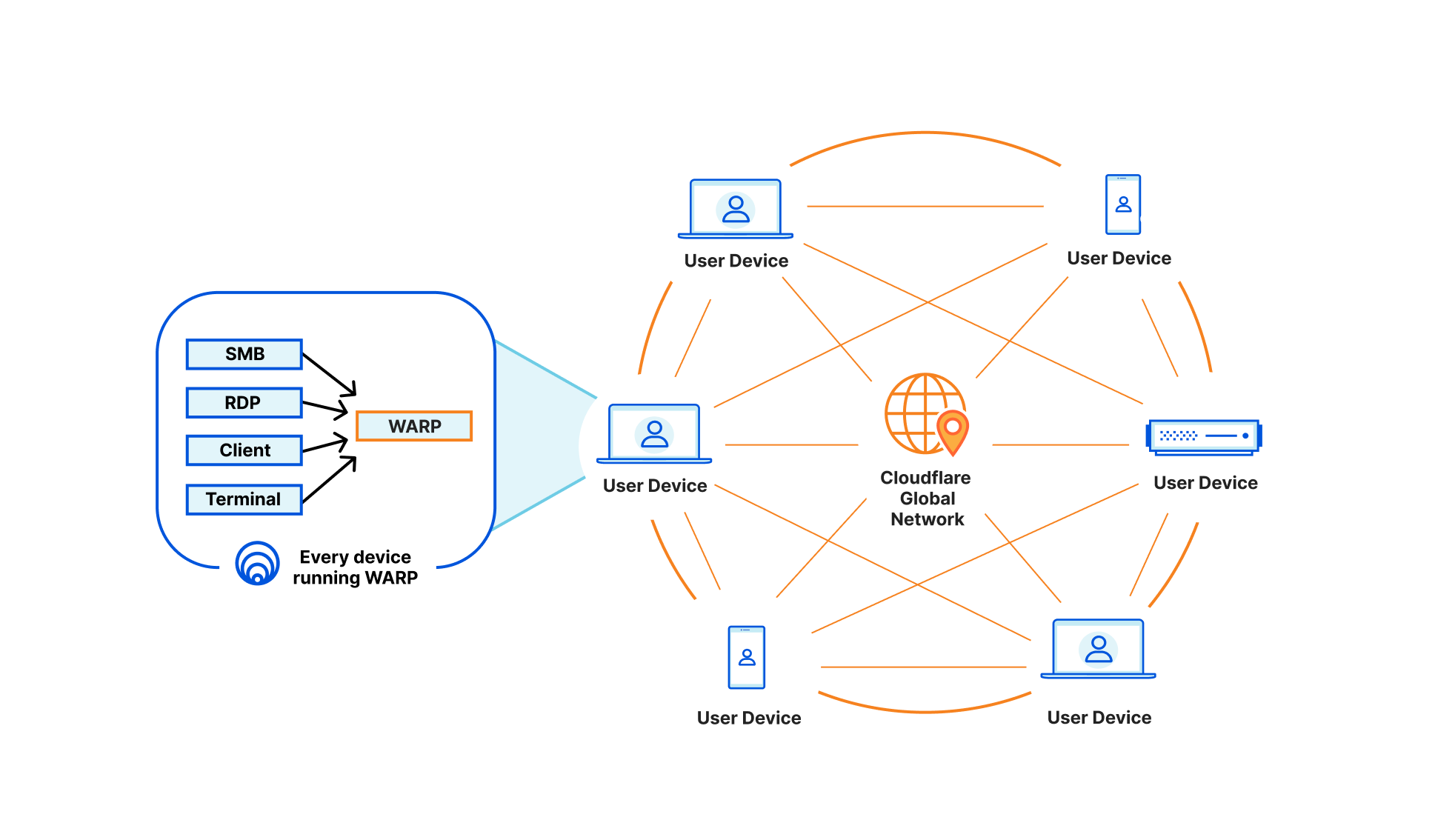
This means any of your Zero Trust-enrolled devices will be able to securely connect to any other device on your Cloudflare-defined network, regardless of physical location or network configuration. This unlocks the ability for you to address any device running WARP in the exact same way you are able to send traffic to services behind a Cloudflare Tunnel today. Naturally, all of this traffic flows through our in-line Zero Trust services, regardless of how it gets to Cloudflare, and this new connectivity announced today is no exception.
To power all of this, we now track where WARP devices are connected to, in Cloudflare’s global network, the same way we do for Cloudflare Tunnel. Traffic meant for a specific WARP device is relayed across our network, using Argo Smart Routing, and piped through the transport that routes IP packets to the appropriate WARP device. Since this traffic goes through our Zero Trust Secure Web Gateway — allowing various types of filtering — it means we upgrade and downgrade traffic from purely routed IP packets to fully proxied TLS connections (as well as other protocols). In the case of using SSH to remotely access a colleague’s WARP device, this means that your traffic is eligible for SSH command auditing as well.
If you already deployed Cloudflare WARP to your organization, then your IT department will be excited to learn they can use this new connectivity to reach out to any device running Cloudflare WARP. Connecting via SSH, RDP, SMB, or any other service running on the device is now simpler than ever. All of this provides Zero Trust access for the IT team members, with their actions being secured in-line, audited, and pushed to your organization’s logs.
Or, maybe you are done with designing a new function of an existing product and want to let your team members check it out at their own convenience. Sending them a link with your private IP — assigned by Cloudflare — will do the job. Their devices will see your machine as if they were in the same physical network, despite being across the other side of the world.
The usefulness doesn’t end with humans on both sides of the interaction: the weekend has arrived, and you have finally set out to move your local NAS to a host provider where you run a virtual machine. By running Cloudflare WARP on it, similarly to your laptop, you can now access your photos using the virtual machine’s private IP. This was already possible with WARP to Tunnel; but with WARP-to-WARP, you also get connectivity in reverse direction, where you can have the virtual machine periodically rsync/scp files from your laptop as well. This means you can make any server initiate traffic towards the rest of your Zero Trust organization with this new type of connectivity.
This feature will be available on all plans at no additional cost. To get started with this new feature, add your name to the closed beta, and we’ll notify you once you’ve been enrolled. Then, you’ll simply ensure that at least two devices are enrolled in Cloudflare Zero Trust and have the latest version of Cloudflare WARP installed.
This new feature builds upon the existing benefits of Cloudflare Zero Trust, which include enhanced connectivity, improved performance, and streamlined access controls. With the ability to connect to any other device in their deployment, Zero Trust users will be able to take advantage of even more robust security and connectivity options.
To get started in minutes, create a Zero Trust account, download the WARP agent, enroll these devices into your Zero Trust organization, and start creating Zero Trust policies to establish fast, secure connectivity between these devices. That’s it.
Post Syndicated from The History Guy: History Deserves to Be Remembered original https://www.youtube.com/watch?v=pi-IEBsZCVc
Post Syndicated from Bruce Schneier original https://www.schneier.com/blog/archives/2023/01/identifying-people-using-cell-phone-location-data.html
The two people who shut down four Washington power stations in December were arrested. This is the interesting part:
Investigators identified Greenwood and Crahan almost immediately after the attacks took place by using cell phone data that allegedly showed both men in the vicinity of all four substations, according to court documents.
Nowadays, it seems like an obvious thing to do—although the search is probably unconstitutional. But way back in 2012, the Canadian CSEC—that’s their NSA—did some top-secret work on this kind of thing. The document is part of the Snowden archive, and I wrote about it:
The second application suggested is to identify a particular person whom you know visited a particular geographical area on a series of dates/times. The example in the presentation is a kidnapper. He is based in a rural area, so he can’t risk making his ransom calls from that area. Instead, he drives to an urban area to make those calls. He either uses a burner phone or a pay phone, so he can’t be identified that way. But if you assume that he has some sort of smart phone in his pocket that identifies itself over the Internet, you might be able to find him in that dataset. That is, he might be the only ID that appears in that geographical location around the same time as the ransom calls and at no other times.
There’s a whole lot of surveillance you can do if you can follow everyone, everywhere, all the time. I don’t even think turning your cell phone off would help in this instance. How many people in the Washington area turned their phones off during exactly the times of the Washington power station attacks? Probably a small enough number to investigate them all.
Post Syndicated from original https://lwn.net/Articles/919388/
Linus has released 6.2-rc3 for testing.
“Here we are, another week done, and things are starting to look a lot
“.
more normal after that very quiet holiday week that made rc2 so very
small
Post Syndicated from original https://xkcd.com/2722/

Post Syndicated from Eric Smith original https://www.servethehome.com/intel-vroc-hardware-key-quick-reference-guide/
We have a quick guide to the various Intel VROC hardware license keys and license levels so our readers can quickly reference them
The post Intel VROC Hardware Key Quick Reference Guide appeared first on ServeTheHome.
Post Syndicated from Corey Mahan original https://blog.cloudflare.com/welcome-to-cio-week-2023/


When you are the Chief Information Officer (CIO), your systems need to just work. A quiet day when users go about their job without interruption is a celebration. When they do notice, something has probably fallen apart.
We understand. CIOs own some of an organization’s most mission-critical challenges. Your security counterparts expect safety to be robust while your users want it to be unintrusive. Your sales team continues to open offices in new locations while those new hires need rapid connectivity to your applications. You own a budget that never seems to grow fast enough to match price increases from point solution vendors. On top of that, CIOs must support their organizations’ shifts to new remote and hybrid work models, which means modernizing applications and infrastructure faster than ever before.
Today marks the start of CIO Week, our celebration of the work that you and your teams accomplish every day. We’ve assembled this week to showcase features, stories, and tools that you can use to continue to deliver on your mission while also improving the experience of your users and administrators. We’ve even included announcements to help on the budget front.
We’re doing this because we’ve been in the same places. Our own security team could not compromise on tools to safeguard Cloudflare while we grew beyond the walls of a couple of locations. We hired new staff members around the globe to manage one of the world’s largest networks, and they needed access to be fast. We were also predominantly a work-from-office organization. Today, we’re hiring for in-office, remote and hybrid opportunities all over the world.
We believe CIOs are shaping the future of the modern organization. From securely connecting employees and third-parties to critical applications, to safeguarding sensitive company data from phishing and other malicious threats, CIOs are effectively tasked with protecting an organization’s crown jewels. This week we’ll demonstrate how Cloudflare is helping CIOs to accelerate digital transformation and maximize employee collaboration and productivity – all while strengthening security. Welcome to CIO Week.
CIOs own, sponsor, or support an organization’s digital transformation strategy that touches all parts of a business. These cross-functional efforts can include moving applications and data to the cloud, building new competencies in areas like data analytics or automation, and developing new digital products and services to drive growth.
While these initiatives are largely driven by the motivation to go faster, CIOs recognize that speed cannot come at the expense of safety. Balancing both goals, however, can quickly become complicated. Layering on new technologies can add overhead and increase total cost of ownership. Administrators can struggle if products require different management interfaces and control planes or work differently in different locations. Plus, poor integrations and interoperability can mean precious time is wasted just getting services to work together.
We think about hidden challenges like these often when building new products at Cloudflare. As Cloudflare’s CIO, who you’ll hear from shortly, likes to phrase it, we’re helping CIOs by “bringing the glue”. That is, when building anything new, we ask ourselves to focus on delivering benefits that could not be obtained using individual products in silos. Throughout this innovation week, you’ll see announcements highlighting how organizations can realize more value when services work natively together.
Designing our security products to be composable and easy to use helps our customers speed up their digital strategy. But we think about speed in other ways too. First, we optimize our services to enforce protections for any request, from anywhere around the globe, so that security doesn’t get in the way of end users. (In fact, we’re so proud of this that we even dedicated an entire innovation week to delivering speedy user experiences across the Internet). Second, we pride ourselves on being speedy in innovation, delivering new capabilities and services at such high velocity that we not only solve the problems you’re facing today, but also help you proactively plan for fixing your problems of tomorrow.
For many organizations, an increasingly critical goal of digital transformation is revamping networking and security. As applications, users, and data have shifted outside the walls of the corporate perimeter, the traditional tools of the castle-and-moat model no longer make sense.
Instead, modernized architectures like SASE (or Secure Access Service Edge) are gaining traction, advocating to unify all networking and security controls to a single control plane in the cloud. On that journey, we’re seeing organizations turning to Zero Trust for best practices and principles to enable the broader visibility and granular controls needed to steer the modern workforce.
While concepts like SASE and Zero Trust still need the occasional explainer, the benefits are real, and CIOs are turning to our SASE platform – Cloudflare One – to start realizing those business benefits. When customers start their SASE and Zero Trust journeys with Cloudflare, they are connecting their employees to our global network to inspect and apply controls to as much traffic and data as they want. Whether your traffic is traversing from on-premise to the cloud, from one cloud to another, or something in between, Cloudflare has a way to secure and accelerate traffic.
This week, we will be announcing even more capabilities and products that make the single-vendor SASE dream a reality.
Before taking on any long-term digital transformation challenge, it’s vital to make sure you’re surrounded by the right people and partners to go the distance.
With our broad mission to help build a better Internet, it means that we must do the same at Cloudflare. We partner with fellow industry leaders to help CIOs with efforts like the Critical Infrastructure Defense Project to quickly improve the cyber readiness of vulnerable infrastructure or our partnership with Yubico to provide security keys at “Good for the Internet” pricing (for as low as $10 per key!).
This collaborative ethos extends far beyond just these types of focused initiatives. Over recent years, Cloudflare has invested in our ecosystem of alliances, channel partners (including system integrators and advisory / consulting firms), and technology partners to make sure customers have options to pursue digital transformation in the way that makes the most sense for them. In particular, we have seen more customers and partners collaborating on long term SASE and Zero Trust use cases with our Cloudflare One platform.
Over the course of this week, we’ll share more about strategic partnerships, including opportunities to enable a Zero Trust strategy using Cloudflare One platform services and deeper integrations with key partners like Microsoft.
The expertise of partners combined with Cloudflare’s network scale and simplicity helps CIOs modernize security at their own pace.
When CIOs think about a multi-cloud strategy it tends to center around applications. Multi-cloud strategies devise careful plans for migrating applications, ensuring that efficiency, scale and speed of delivery goals are met in the cloud.
But often overlooked are the highways of connectivity that are essential for a speedy connection from one cloud to another or from an on-premise data center to another network in a cloud provider. While speeding up applications is the focus, having a global endpoint and identity-neutral network fabric for consistency and composability is equally important.
This week, we’ll highlight how Cloudflare is able to connect you to/from anything. Whether a request is coming to or from other cloud providers, IoT devices, or in challenging regions or areas, Cloudflare provides a global control plane to help your business stay secure and keep things moving fast.
We believe that Cloudflare is the neutral supercloud control plane. Over the course of this week, we’ll show you how our platform is built to work seamlessly with multiple cloud providers, allowing organizations to easily and securely manage their cloud infrastructure.
New project kickoff, budget planning update, security compliance report, hiring review board, hybrid tooling workshop and the list goes on.
All this and it’s only Monday morning. Sound familiar?
My job as Cloudflare’s CIO shares most of the challenges that any other CIO post faces in these uncertain times. Today business technology leaders have to balance managing short term budget pressure, while at the same time having to keep strategic areas properly funded to not mortgage the company’s future. On the other hand one of the perks of being Cloudflare’s CIO is being a direct participant in the incredible rate of innovation we hold ourselves to at Cloudflare, and in return, the benefit we can deliver to our customers.
I can’t wait for us to share all the exciting announcements and new product features this week. Why? Well, my team has been using a lot of them from even the early versions.
One of the awesome things about getting to be CIO here is being Customer Zero for most of Cloudflare’s products, getting to try everything first, and play Product Manager from time to time… Before we ask you to trust us with your networks, security, or data, we’ve put ourselves through the test first. Securing Cloudflare using Cloudflare, or “Dog Fooding” as we call it internally, is something ingrained in our culture.
But don’t just take it from me, during the week you’ll hear from other fellow CIOs who view Cloudflare as a trusted partner. My hope is at the end of the week, you’ll consider having Cloudflare as a trusted partner too.
Welcome to CIO Week!
Post Syndicated from Matt Granger original https://www.youtube.com/watch?v=_j_qf6tmyfs
Post Syndicated from Explosm.net original https://explosm.net/comics/magic-8-ball-2
New Cyanide and Happiness Comic
Post Syndicated from Oglaf! -- Comics. Often dirty. original https://www.oglaf.com/evil-eye/


Post Syndicated from Patrick Kennedy original https://www.servethehome.com/asus-rs720a-e12-rs24u-review-amd-epyc-genoa-2p-with-9x-pcie-gen5-slots/
The ASUS RS720A-E12-RS24U is a high-end dual socket AMD EPYC 9004 Genoa server with up to 24x NVMe drive bays and 9x PCIe Gen5 expansion slots
The post ASUS RS720A-E12-RS24U Review AMD EPYC Genoa 2P with 9x PCIe Gen5 Slots appeared first on ServeTheHome.
Post Syndicated from original https://lwn.net/Articles/919326/
The
6.1.4,
6.0.18, and
4.9.337
stable kernel updates have been released; each contains another set of
important fixes.
Greg Kroah-Hartman has also let it be known
that 4.9.337 is the end of the line for the 4.9 kernel, which was released
just over six years ago. “This kernel is now END-OF-LIFE and you should move to 4.14.y at the
”
least, 6.1.y is the better option.
Post Syndicated from original https://mjg59.dreamwidth.org/64090.html
I have a patchset that makes it safe to use hibernation under Linux even in a secure boot world but it relies on preventing userland from using one of the TPM PCRs[1] that would otherwise be available to it. TPM 2 devices support emulating PCRs in NVRAM, which would obviously be beneficial in not taking away a scare resource, but the docs suggest there’s no way to tie a key generation to an NVRAM value which makes this more complicated.
So, why not ask a computer to do this for me? I asked ChatGPT to write me some code that would bind a TPM key to an NVRAM value. After a couple of false starts it told me:To bind an encryption key to the value of a TPM NV index, you can use the TPM2_NV_DefineSpace command to define an NV index with the TPMA_NV_BIND attribute.
Woo! That sounds perfect. Only one problem – I can’t actually find the TPMA_NV_BIND attribute defined anywhere in the spec. Well, ask the AI again.
Here is the definition of TPMA_NV_BIND from the TPM 2.0 specification:
TPMA_NV_BIND (BIT 17) If SET, the contents of the NV Index are bound to the platform hierarchy.
Ok, that sounds convincing. Where is it in the spec?
The definition of TPMA_NV_BIND is on page 126 of the TPM 2.0 specification, in section 9.7.1 “TPMA_NV”.
Huh. Nope. Page 126 says nothing about this. Section 9.7.1 says nothing about this. The TPMA_NV bits are actually described on page 168 of volume 2 of the spec, in section 13.4. Bit 17 is TPMA_NV_OWNERREAD. TPMA_NV_BIND does not appear in the spec anywhere. I told the AI that.
I apologize for the error in my previous response. You are correct that the TPMA_NV_BIND attribute does not appear in the TPM 2.0 specification.
To bind an encryption key to the value of a TPM NV index, you can use the TPM2_NV_DefineSpace command with the TPMA_NV_BIND attribute.
I’m not afraid of being unemployed in the near future.
[1] “Platform Configuration Registers” – a modern TPM has 24 of these. When something security sensitive happens, you generate a hash of that event and pass it to the TPM. The TPM appends that to an existing PCR value and then hashes that concatenated value and sets the PCR to that. This means the PCR value depends not only on the values provided, but also the order they’re provided in. Various TPM operations can be made conditional on the PCR values meeting specific criteria.
 comments
Post Syndicated from Aish Gunasekar original https://aws.amazon.com/blogs/big-data/build-a-search-application-with-amazon-opensearch-serverless/
In this post, we demonstrate how to build a simple web-based search application using the recently announced Amazon OpenSearch Serverless, a serverless option for Amazon OpenSearch Service that makes it easy to run petabyte-scale search and analytics workloads without having to think about clusters. The benefit of using OpenSearch Serverless as a backend for your search application is that it automatically provisions and scales the underlying resources based on the search traffic demands, so you don’t have to worry about infrastructure management. You can simply focus on building your search application and analyzing the results. OpenSearch Serverless is powered by the open-source OpenSearch project, which consists of a search engine, and OpenSearch Dashboards, a visualization tool to analyze your search results.
There are many ways to build a search application. In our example, we create a simple Java script front end and call Amazon API Gateway, which triggers an AWS Lambda function upon receiving user queries. As shown in the following diagram, API Gateway acts as a broker between the front end and the OpenSearch Serverless collection. When the user queries the front-end webpage, API Gateway passes requests to the Python Lambda function, which runs the queries on the OpenSearch Serverless collection and returns the search results.

To get started with the search application, you must first upload the relevant dataset, a movie catalog in this case, to the OpenSearch collection and index them to make them searchable.
A collection in OpenSearch Serverless is a logical grouping of one or more indexes that represent a workload. You can create a collection using the AWS Management Console or AWS Software Development Kit (AWS SDK). Follow the steps in Preview: Amazon OpenSearch Serverless – Run Search and Analytics Workloads without Managing Clusters to create and configure a collection in OpenSearch Serverless.

After your collection is created and active, you can upload the movie data to an index in this collection. Indexes hold documents, and each document in this example represents a movie record. Documents are comparable to rows in the database table. Each document (the movie record) consists of 10 fields that are typically searched for in a movie catalog, like the director, actor, release date, genre, title, or plot of the movie. The following is a sample movie JSON document:
For the search catalog, you can upload the sample-movies.bulk dataset sourced from the Internet Movies Database (IMDb). OpenSearch Serverless offers the same ingestion pipeline and clients to ingest the data as OpenSearch Service, such as Fluentd, Logstash, and Postman. Alternatively, you can use the OpenSearch Dashboards Dev Tools to ingest and search the data without configuring any additional pipelines. To do so, log in to OpenSearch Dashboards using your SAML credentials and choose Dev tools.
To create a new index, use the PUT command followed by the index name:
A confirmation message is displayed upon successful creation of your index.
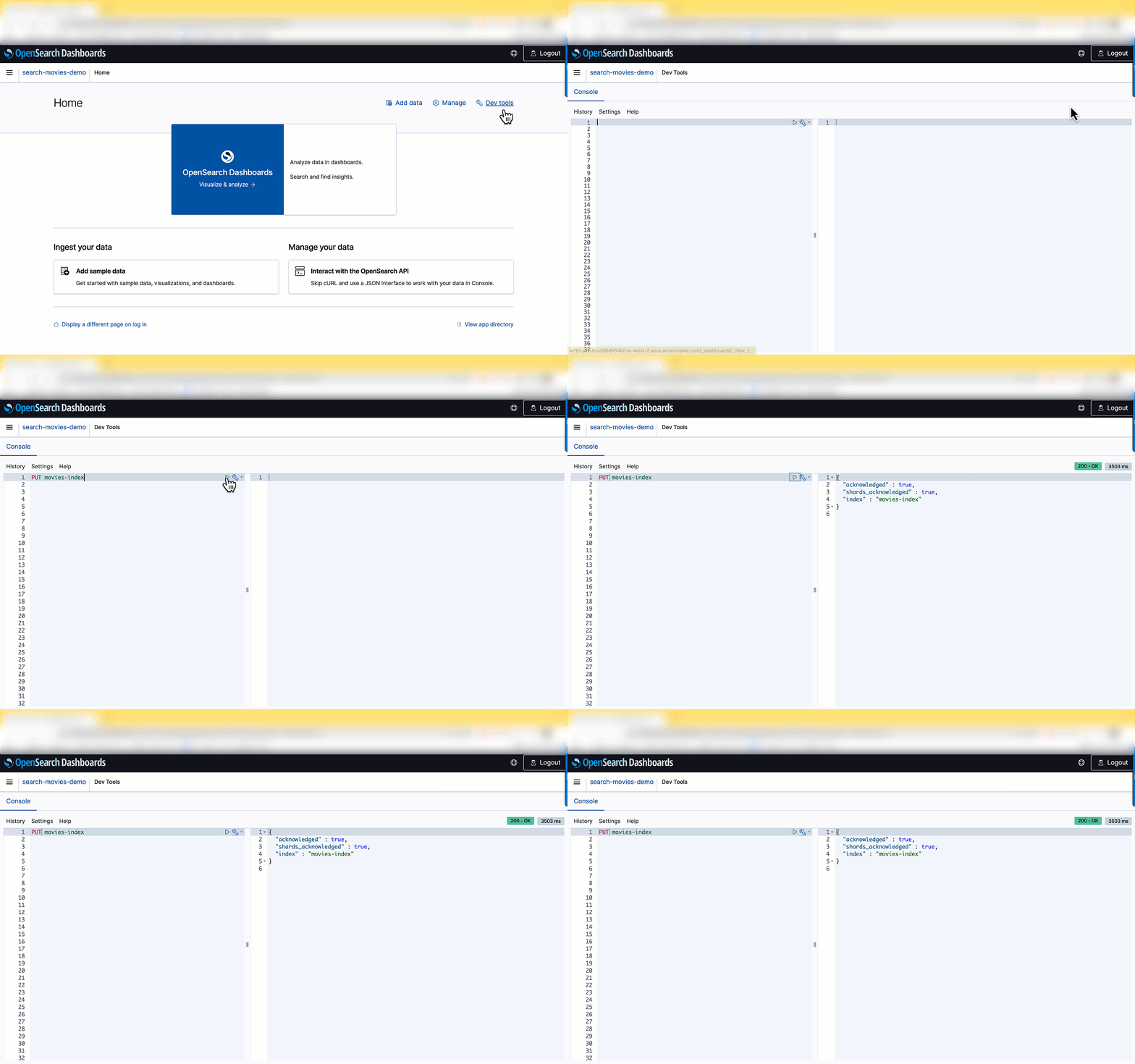
After the index is created, you can ingest documents into the index. OpenSearch provides the option to ingest multiple documents in one request using the _bulk request. Enter POST /_bulk in the left pane as shown in the following screenshot, then copy and paste the contents of the sample-movies.bulk file you downloaded earlier.

You have successfully created the movies index and uploaded 1,500 records into the catalog! Now let’s integrate the movie catalog with your search application.
In this step, you create a Lambda function that queries the movie catalog in OpenSearch Serverless and returns the result. For more information, see our tutorial on creating a Lambda function for connecting to and querying an OpenSearch Service domain. You can reuse the same code by replacing the parameters to align to OpenSearch Serverless’s requirements. Replace <my-region> with your corresponding region (for example, us-west-2), use aoss instead of es for service, replace <hostname> with the OpenSearch collection endpoint, and <index-name> with your index (in this case, movies-index).
The following is a snippet of the Lambda code. You can find the complete code in the tutorial.
This Lambda function returns a list of movies based on a search string (such as movie title, director, or actor) provided by the user.
Next, you need to configure the permissions in OpenSearch Serverless’s data access policy to let the Lambda function access the collection.

movie-search collection’s data access policy.Principals can be AWS Identity and Access Management (IAM) users, role ARNs, or SAML identities. These principals must be within the current AWS account.

After you add the role name as a principal, you can see the role ARN updated in your rule, as show in the following screenshot.
Now you can grant collection and index permissions to this principal.
For more details about data access policies, refer to Data access control for Amazon OpenSearch Serverless. Skipping this step or not running it correctly will result in permission errors, and your Lambda code won’t be able to query the movie catalog.

API Gateway acts as a front door for applications to access the code running on Lambda. To create, configure, and deploy the API for the GET method, refer to the steps in the tutorial. For API Gateway to pass the requests to the Lambda function, configure it as a trigger to invoke the Lambda function.
The next step is to integrate it with the front end.
To build the front-end UI, you can download the following sample JavaScript web service. Open the scripts/search.js file and update the apigatewayendpoint variable to point to your API Gateway endpoint:
You can access the front-end application by opening index.html in your browser. When the user runs a query on the front-end application, it calls API Gateway and Lambda to serve up the content hosted in the OpenSearch Serverless collection.

When you search the movie catalog, the Lambda function runs the following query:
The query returns documents based on a provided query string. Let’s look at the parameters used in the query:
size parameter is the maximum number of documents to return. In this case, a maximum of 25 results is returned.multi_match query, you can query across multiple fields specified in the query.In a search for “Harry Potter,” the document with the matching term both in the title and plot fields appears higher than other documents with the matching term only in the title field.

Congratulations! You have configured and deployed a search application fronted by API Gateway, running Lambda functions for the queries served by OpenSearch Serverless.
To avoid unwanted charges, delete the OpenSearch Service collection, Lambda function, and API Gateway that you created.
In this post, you learned how to build a simple search application using OpenSearch Serverless. With OpenSearch Serverless, you don’t have to worry about managing the underlying infrastructure. OpenSearch Serverless supports the same ingestion and query APIs as the OpenSearch Project. You can quickly get started by ingesting the data into your OpenSearch Service collection, and then perform searches on the data using your web interface.
In subsequent posts, we dive deeper into many other search queries and features that you can use to make your search application even more effective.
We would love to hear how you are building your search applications today. If you’re just getting started with OpenSearch Serverless, we recommend getting hands-on with the Getting started with Amazon OpenSearch Serverless workshop.
 Aish Gunasekar is a Specialist Solutions architect with a focus on Amazon OpenSearch Service. Her passion at AWS is to help customers design highly scalable architectures and help them in their cloud adoption journey. Outside of work, she enjoys hiking and baking.
 Pavani Baddepudi is a senior product manager working in search services at AWS. Her interests include distributed systems, networking, and security.
Post Syndicated from Explosm.net original https://explosm.net/comics/ed
New Cyanide and Happiness Comic