Tag Archives: AI

Workers AI: serverless GPU-powered inference on Cloudflare’s global network

Post Syndicated from Phil Wittig original http://blog.cloudflare.com/workers-ai/


Workers AI: serverless GPU-powered inference on Cloudflare’s global network

Workers AI: serverless GPU-powered inference on Cloudflare’s global network

If you're anywhere near the developer community, it's almost impossible to avoid the impact that AI’s recent advancements have had on the ecosystem. Whether you're using AI in your workflow to improve productivity, or you’re shipping AI based features to your users, it’s everywhere. The focus on AI improvements are extraordinary, and we’re super excited about the opportunities that lay ahead, but it's not enough.

Not too long ago, if you wanted to leverage the power of AI, you needed to know the ins and outs of machine learning, and be able to manage the infrastructure to power it.

As a developer platform with over one million active developers, we believe there is so much potential yet to be unlocked, so we’re changing the way AI is delivered to developers. Many of the current solutions, while powerful, are based on closed, proprietary models and don't address privacy needs that developers and users demand. Alternatively, the open source scene is exploding with powerful models, but they’re simply not accessible enough to every developer. Imagine being able to run a model, from your code, wherever it’s hosted, and never needing to find GPUs or deal with setting up the infrastructure to support it.

That's why we are excited to launch Workers AI – an AI inference as a service platform, empowering developers to run AI models with just a few lines of code, all powered by our global network of GPUs. It's open and accessible, serverless, privacy-focused, runs near your users, pay-as-you-go, and it's built from the ground up for a best in class developer experience.

Workers AI – making inference just work

We’re launching Workers AI to put AI inference in the hands of every developer, and to actually deliver on that goal, it should just work out of the box. How do we achieve that?

  • At the core of everything, it runs on the right infrastructure – our world-class network of GPUs
  • We provide off-the-shelf models that run seamlessly on our infrastructure
  • Finally, deliver it to the end developer, in a way that’s delightful. A developer should be able to build their first Workers AI app in minutes, and say “Wow, that’s kinda magical!”.

So what exactly is Workers AI? It’s another building block that we’re adding to our developer platform – one that helps developers run well-known AI models on serverless GPUs, all on Cloudflare’s trusted global network. As one of the latest additions to our developer platform, it works seamlessly with Workers + Pages, but to make it truly accessible, we’ve made it platform-agnostic, so it also works everywhere else, made available via a REST API.

Models you know and love

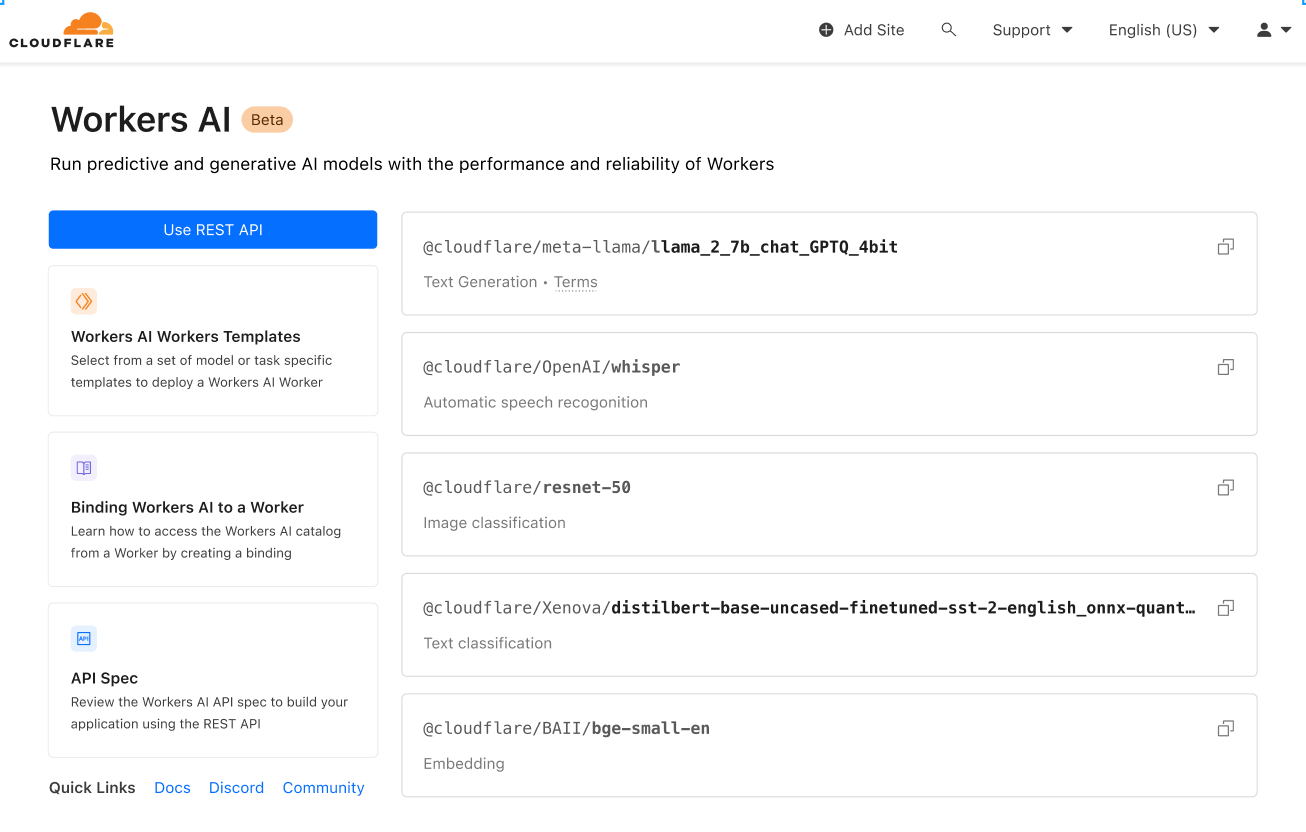
We’re launching with a curated set of popular, open source models, that cover a wide range of inference tasks:

  • Text generation (large language model): meta/llama-2-7b-chat-int8
  • Automatic speech recognition (ASR): openai/whisper
  • Translation: meta/m2m100-1.2
  • Text classification: huggingface/distilbert-sst-2-int8
  • Image classification: microsoft/resnet-50
  • Embeddings: baai/bge-base-en-v1.5

You can browse all available models in your Cloudflare dashboard, and soon you’ll be able to dive into logs and analytics on a per model basis!
Workers AI: serverless GPU-powered inference on Cloudflare’s global network

This is just the start, and we’ve got big plans. After launch, we’ll continue to expand based on community feedback. Even more exciting – in an effort to take our catalog from zero to sixty, we’re announcing a partnership with Hugging Face, a leading AI community + hub. The partnership is multifaceted, and you can read more about it here, but soon you’ll be able to browse and run a subset of the Hugging Face catalog directly in Workers AI.

Accessible to everyone

Part of the mission of our developer platform is to provide all the building blocks that developers need to build the applications of their dreams. Having access to the right blocks is just one part of it — as a developer your job is to put them together into an application. Our goal is to make that as easy as possible.

To make sure you could use Workers AI easily regardless of entry point, we wanted to provide access via: Workers or Pages to make it easy to use within the Cloudflare ecosystem, and via REST API if you want to use Workers AI with your current stack.

Here’s a quick CURL example that translates some text from English to French:

curl https://api.cloudflare.com/client/v4/accounts/{ACCOUNT_ID}/ai/run/@cf/meta/@cf/meta/m2m100-1.2b \
-H "Authorization: Bearer {API_TOKEN}" \
	-d '{ "text": "I'll have an order of the moule frites", "target_lang": "french" }'

And here are what the response looks like:

{
  "result": {
    "answer": "Je vais commander des moules frites"
  },
  "success": true,
  "errors":[],
  "messages":[]
}

Use it with any stack, anywhere – your favorite Jamstack framework, Python + Django/Flask, Node.js, Ruby on Rails, the possibilities are endless. And deploy

Designed for developers

Developer experience is really important to us. In fact, most of this post has been about just that. Making sure it works out of the box. Providing popular models that just work. Being accessible to all developers whether you build and deploy with Cloudflare or elsewhere. But it’s more than that – the experience should be frictionless, zero to production should be fast, and it should feel good along the way.

Let’s walk through another example to show just how easy it is to use! We’ll run Llama 2, a popular large language model open sourced by Meta, in a worker.

We’ll assume you have some of the basics already complete (Cloudflare account, Node, NPM, etc.), but if you don’t this guide will get you properly set up!

1. Create a Workers project

Create a new project named workers-ai by running:

$ npm create cloudflare@latest

When setting up your workers-ai worker, answer the setup questions as follows:

  • Enter workers-ai for the app name
  • Choose Hello World script for the type of application
  • Select yes to using TypeScript
  • Select yes to using Git
  • Select no to deploying

Lastly navigate to your new app directory:

cd workers-ai

2. Connect Workers AI to your worker

Create a Workers AI binding, which allows your worker to access the Workers AI service without having to manage an API key yourself.

To bind Workers AI to your worker, add the following to the end of your wrangler.toml file:

[ai]
binding = "AI" #available in your worker via env.AI

You can also bind Workers AI to a Pages Function. For more information, refer to Functions Bindings.

3. Install the Workers AI client library

npm install @cloudflare/ai --save-dev

4. Run an inference task in your worker

Update the source/index.ts with the following code:

import { Ai } from '@cloudflare/ai'
export default {
  async fetch(request, env) {
    const ai = new Ai(env.AI);
    const input = { prompt: "What's the origin of the phrase 'Hello, World'" };
    const output = await ai.run('@cf/meta/llama-2-7b-chat-int8', input );
    return new Response(JSON.stringify(output));
  },
};

5. Develop locally with Wrangler

While in your project directory, test Workers AI locally by running:

$ npx wranlger dev --remote

Note – These models currently only run on Cloudflare’s network of GPUs (and not locally), so setting `–remote` above is a must, and you’ll be prompted to log in at this point.

Wrangler will give you a URL (most likely localhost:8787). Visit that URL, and you’ll see a response like this

{
  "response": "Hello, World is a common phrase used to test the output of a computer program, particularly in the early stages of programming. The phrase "Hello, World!" is often the first program that a beginner learns to write, and it is included in many programming language tutorials and textbooks as a way to introduce basic programming concepts. The origin of the phrase "Hello, World!" as a programming test is unclear, but it is believed to have originated in the 1970s. One of the earliest known references to the phrase is in a 1976 book called "The C Programming Language" by Brian Kernighan and Dennis Ritchie, which is considered one of the most influential books on the development of the C programming language.
}

6. Deploy your worker

Finally, deploy your worker to make your project accessible on the Internet:

$ npx wranlger dev --remote
# Outputs: https://workers-ai.<YOUR_SUBDOMAIN>.workers.dev

And that’s it. You can literally go from zero to deployed AI in minutes. This is obviously a simple example, but shows how easy it is to run Workers AI from any project.

Privacy by default

When Cloudflare was founded, our value proposition had three pillars: more secure, more reliable, and more performant. Over time, we’ve realized that a better Internet is also a more private Internet, and we want to play a role in building it.

That’s why Workers AI is private by default – we don’t train our models, LLM or otherwise, on your data or conversations, and our models don’t learn from your usage. You can feel confident using Workers AI in both personal and business settings, without having to worry about leaking your data. Other providers only offer this fundamental feature with their enterprise version. With us, it’s built in for everyone.

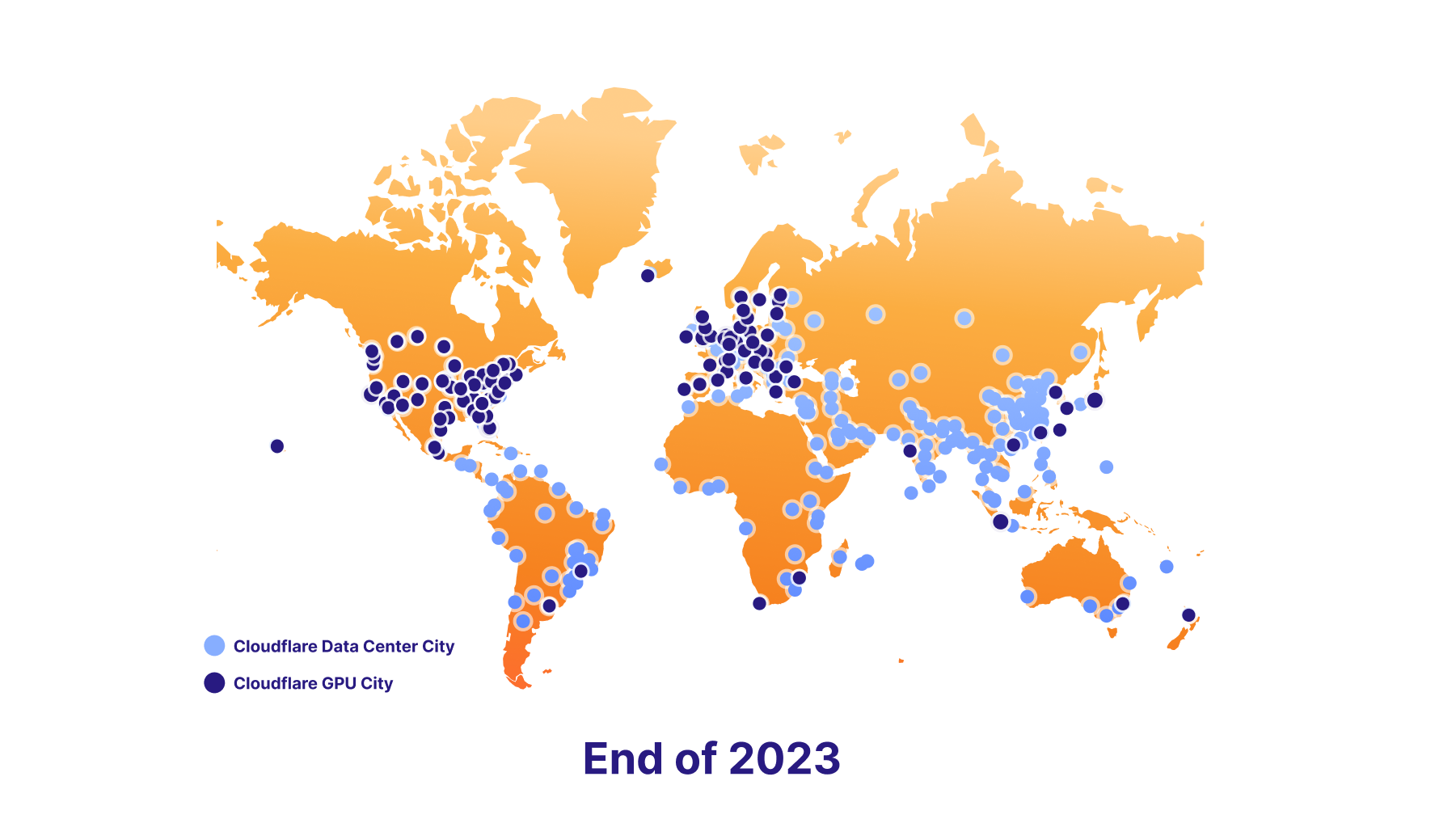
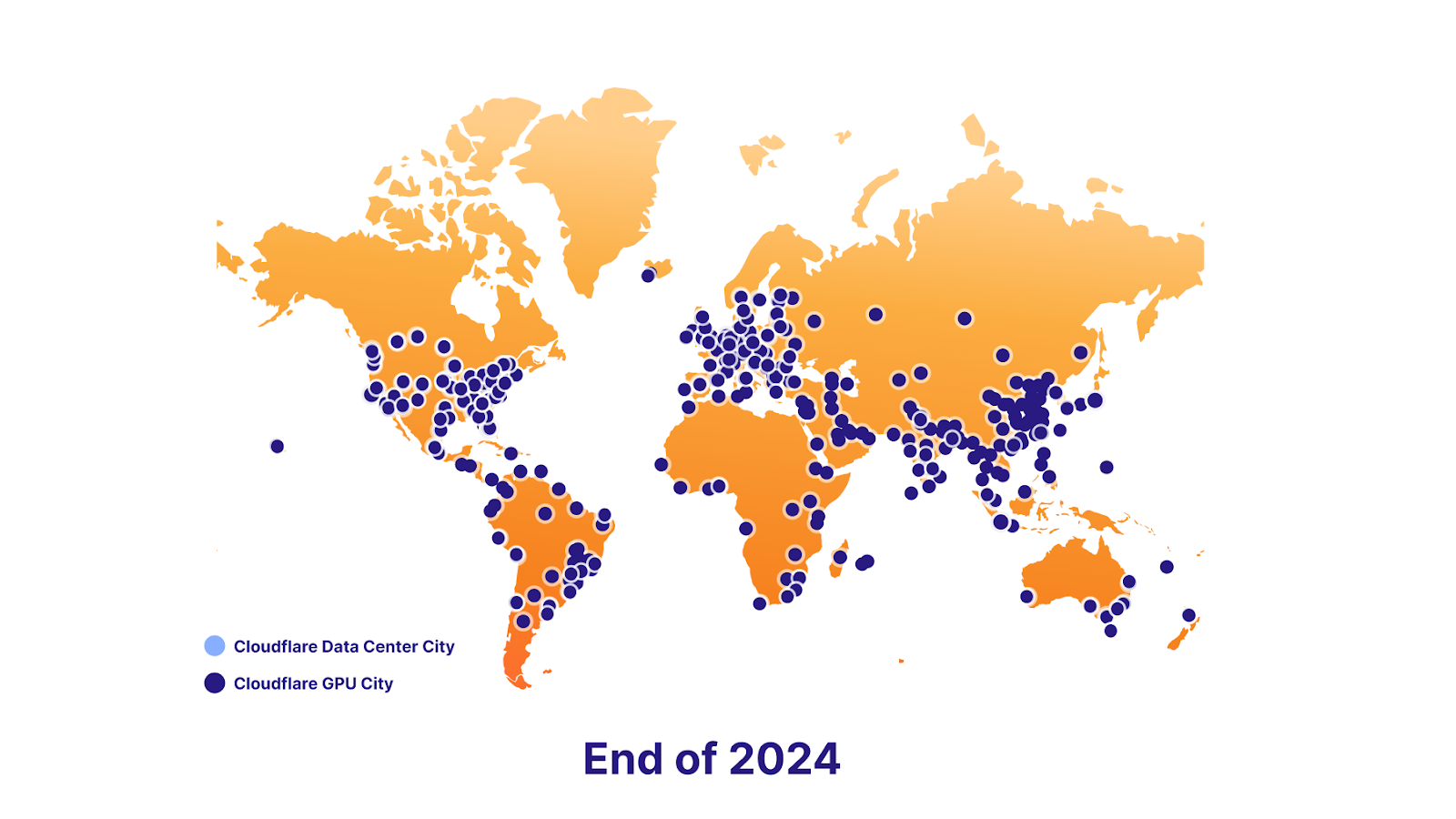
We’re also excited to support data localization in the future. To make this happen, we have an ambitious GPU rollout plan – we’re launching with seven sites today, roughly 100 by the end of 2023, and nearly everywhere by the end of 2024. Ultimately, this will empower developers to keep delivering killer AI features to their users, while staying compliant with their end users’ data localization requirements.

The power of the platform

Vector database – Vectorize

Workers AI is all about running Inference, and making it really easy to do so, but sometimes inference is only part of the equation. Large language models are trained on a fixed set of data, based on a snapshot at a specific point in the past, and have no context on your business or use case. When you submit a prompt, information specific to you can increase the quality of results, making it more useful and relevant. That’s why we’re also launching Vectorize, our vector database that’s designed to work seamlessly with Workers AI. Here’s a quick overview of how you might use Workers AI + Vectorize together.

Example: Use your data (knowledge base) to provide additional context to an LLM when a user is chatting with it.

  1. Generate initial embeddings: run your data through Workers AI using an embedding model. The output will be embeddings, which are numerical representations of those words.
  2. Insert those embeddings into Vectorize: this essentially seeds the vector database with your data, so we can later use it to retrieve embeddings that are similar to your users’ query
  3. Generate embedding from user question: when a user submits a question to your AI app, first, take that question, and run it through Workers AI using an embedding model.
  4. Get context from Vectorize: use that embedding to query Vectorize. This should output embeddings that are similar to your user’s question.
  5. Create context aware prompt: Now take the original text associated with those embeddings, and create a new prompt combining the text from the vector search, along with the original question
  6. Run prompt: run this prompt through Workers AI using an LLM model to get your final result

AI Gateway

That covers a more advanced use case. On the flip side, if you are running models elsewhere, but want to get more out of the experience, you can run those APIs through our AI gateway to get features like caching, rate-limiting, analytics and logging. These features can be used to protect your end point, monitor and optimize costs, and also help with data loss prevention. Learn more about AI gateway here.

Start building today

Try it out for yourself, and let us know what you think. Today we’re launching Workers AI as an open Beta for all Workers plans – free or paid. That said, it’s super early, so…

Warning – It’s an early beta

Usage is not currently recommended for production apps, and limits + access are subject to change.

Limits

We’re initially launching with limits on a per-model basis

  • @cf/meta/llama-2-7b-chat-int8: 5 reqs/min
  • All other modes are between 120-180 reqs/min

Checkout our docs for a full overview of our limits.

Pricing

What we released today is just a small preview to give you a taste of what’s coming (we simply couldn’t hold back), but we’re looking forward to putting the full-throttle version of Workers AI in your hands.

We realize that as you approach building something, you want to understand: how much is this going to cost me? Especially with AI costs being so easy to get out of hand. So we wanted to share the upcoming pricing of Workers AI with you.

While we won’t be billing on day one, we are announcing what we expect our pricing will look like.

Users will be able to choose from two ways to run Workers AI:

  • Regular Twitch Neurons (RTN) – running wherever there's capacity at $0.01 / 1k neurons
  • Fast Twitch Neurons (FTN) – running at nearest user location at $1.25 / 1k neurons

You may be wondering — what’s a neuron?

Neurons are a way to measure AI output that always scales down to zero (if you get no usage, you will be charged for 0 neurons). To give you a sense of what you can accomplish with a thousand neurons, you can: generate 130 LLM responses, 830 image classifications, or 1,250 embeddings.

Our goal is to help our customers pay only for what they use, and choose the pricing that best matches their use case, whether it’s price or latency that is top of mind.

What’s on the roadmap?

Workers AI is just getting started, and we want your feedback to help us make it great. That said, there are some exciting things on the roadmap.

More models, please

We're launching with a solid set of models that just work, but will continue to roll out new models based on your feedback. If there’s a particular model you'd love to see on Workers AI, pop into our Discord and let us know!

In addition to that, we're also announcing a partnership with Hugging Face, and soon you'll be able to access and run a subset of the Hugging Face catalog directly from Workers AI.

Analytics + observability

Up to this point, we’ve been hyper focussed on one thing – making it really easy for any developer to run powerful AI models in just a few lines of code. But that’s only one part of the story. Up next, we’ll be working on some analytics and observability capabilities to give you insights into your usage + performance + spend on a per-model basis, plus the ability to fig into your logs if you want to do some exploring.

A road to global GPU coverage

Our goal is to be the best place to run inference on Region: Earth, so we're adding GPUs to our data centers as fast as we can.

We plan to be in 100 data centers by the end this year
Workers AI: serverless GPU-powered inference on Cloudflare’s global network

And nearly everywhere by the end of 2024
Workers AI: serverless GPU-powered inference on Cloudflare’s global network

We’re really excited to see you build – head over to our docs to get started.

If you need inspiration, want to share something you’re building, or have a question – pop into our Developer Discord.


Writing poems using LLama 2 on Workers AI

Post Syndicated from John Graham-Cumming original http://blog.cloudflare.com/writing-poems-using-llama-2-on-workers-ai/

Writing poems using LLama 2 on Workers AI

Writing poems using LLama 2 on Workers AI

Matthew and Michelle, co-founders of Cloudflare, published their annual founders’ letter today. The letter ends with a poem written by an AI running using Workers AI on Cloudflare’s global network.

Here’s the code that wrote the poem. It uses Workers AI and the Meta Llama 2 model with 7B parameters and 8-bit integers. Just 14 lines of code running on the Cloudflare global network, and you’ve got your very own AI to chat with.

import { Ai } from "@cloudflare/ai";

export default {
    async fetch(request: Request, env: Env): Promise<Response> {
        const body = await request.json();
        const ai = new Ai(env.AI);
        const response = await ai.run("@cf/meta/llama-2-7b-chat-int8", body);
        return new Response(JSON.stringify(response));
    },
};

export interface Env {
    AI: any;
}

That was deployed on Workers AI and all I had to do was ask for poems. Here’s my terminal output (with just the domain name changed).

% curl -X POST https://example.com/ -d '{"prompt":"Write a poem \
that talks about the connectivity cloud"}' | jq -r .response

Cloud computing provides a connectivity that's unmatched,
A bridge that spans the globe with ease and grace.
It brings us closer, no matter where we are,
And makes the world a smaller, more intimate place.

With just a click, we can connect and share,
Our thoughts and ideas, our hopes and dreams.
The cloud unites us, in a way that's fair,
And makes the world a more harmonious theme.

So let us embrace this connectivity,
And use it to build a better world for all.
For in the cloud, we find a unity,
That can help us reach new heights, and stand tall.

% curl -X POST https://example.com/ -d '{"prompt":"Write a poem \
that talks about the connectivity cloud and contrast it with the  \
captivity cloud"}' | jq -r .response

The connectivity cloud, a wondrous sight to see,
Where data flows and knowledge is set free,
A place where minds meet and ideas take flight,
A world of endless possibility in sight.

But then there's the captivity cloud, a darker place,
Where thoughts are trapped and minds are in disgrace,
A prison of the mind, where freedom's lost,
A world of endless sorrow and cost.

So let us choose the connectivity cloud,

And let our minds be free and allowed,

To soar and glide and reach for the sky,

And never be held back, but always fly.

% curl -X POST https://example.com/ -d '{"prompt":"Write a poem \
that talks about the connectivity cloud and contrast it with the  \
captivity cloud using Elizabethan English"}' | jq -r .response

In the connectivity cloud, I find my peace,

Where thoughts and dreams and hopes do cease to flee.

The captivity cloud doth but darken my day,

With chains of sorrow that will not away.

In the connectivity cloud, I find my home,

Where love and joy and laughter do make their moan.

The captivity cloud doth but lock me in,

With sorrow's shackles that will not give in.

In the connectivity cloud, I find my fate,

Where fortune smiles and misery doth wait.

The captivity cloud doth but bring me woe,

With darkness that will not let me go.

In the connectivity cloud, I find my heart,

Where love and hope and joy do play their part.

The captivity cloud doth but tear it apart,

With sorrow's hand that will not let it start.

% curl -X POST https://example.com/ -d '{"prompt":"Write a poem \
that talks about the connectivity cloud and contrast it with the  \
captivity cloud in the style of Lord Byron"}' | jq -r .response

In the realm of the cloud, where data reigns supreme,

A new divide has emerged, a digital dream,

The connectivity cloud, a place of delight,

Where knowledge and wisdom take flight.

But then there's the captivity cloud, a darker hue,

Where privacy and security are hard to pursue,

A prison of sorts, where freedom's light is lost,

And data's secrets are forever crossed.

Yet still, we cling to the captivity cloud,

For in its depths, we find a measure of proof,

That though the connectivity cloud may be bright,

The captivity cloud holds a certain allure in sight.

So let us embrace both, the light and the dark,

For in their union, we find a digital spark,

That illuminates the path to a brighter day,

Where knowledge and privacy reign in a digital way.

What are you going to build on Workers AI? It’s ready and waiting. We’ll help you go from idea to deployed in minutes.

If you want to know exactly how to deploy something like this read the Workers AI announcement blog.

Announcing AI Gateway: making AI applications more observable, reliable, and scalable

Post Syndicated from Michelle Chen original http://blog.cloudflare.com/announcing-ai-gateway/

Announcing AI Gateway: making AI applications more observable, reliable, and scalable

Announcing AI Gateway: making AI applications more observable, reliable, and scalable

Today, we’re excited to announce our beta of AI Gateway – the portal to making your AI applications more observable, reliable, and scalable.

AI Gateway sits between your application and the AI APIs that your application makes requests to (like OpenAI) – so that we can cache responses, limit and retry requests, and provide analytics to help you monitor and track usage. AI Gateway handles the things that nearly all AI applications need, saving you engineering time, so you can focus on what you're building.

Connecting your app to AI Gateway

It only takes one line of code for developers to get started with Cloudflare’s AI Gateway. All you need to do is replace the URL in your API calls with your unique AI Gateway endpoint. For example, with OpenAI you would define your baseURL as "https://gateway.ai.cloudflare.com/v1/ACCOUNT_TAG/GATEWAY/openai" instead of "https://api.openai.com/v1" – and that’s it. You can keep your tokens in your code environment, and we’ll log the request through AI Gateway before letting it pass through to the final API with your token.

// configuring AI gateway with the dedicated OpenAI endpoint

const openai = new OpenAI({
  apiKey: env.OPENAI_API_KEY,
  baseURL: "https://gateway.ai.cloudflare.com/v1/ACCOUNT_TAG/GATEWAY/openai",
});

We currently support model providers such as OpenAI, Hugging Face, and Replicate with plans to add more in the future. We support all the various endpoints within providers and also response streaming, so everything should work out-of-the-box once you have the gateway configured. The dedicated endpoint for these providers allows you to connect your apps to AI Gateway by changing one line of code, without touching your original payload structure.

We also have a universal endpoint that you can use if you’d like more flexibility with your requests. With the universal endpoint, you have the ability to define fallback models and handle request retries. For example, let’s say a request was made to OpenAI GPT-3, but the API was down – with the universal endpoint, you could define Hugging Face GPT-2 as your fallback model and the gateway can automatically resend that request to Hugging Face. This is really helpful in improving resiliency for your app in cases where you are noticing unusual errors, getting rate limited, or if one bill is getting costly, and you want to diversify to other models. With the universal endpoint, you’ll just need to tweak your payload to specify the provider and endpoint, so we can properly route requests for you. Check out the example request below and the docs for more details on the universal endpoint schema.

# Using the Universal Endpoint to first try OpenAI, then Hugging Face

curl https://gateway.ai.cloudflare.com/v1/ACCOUNT_TAG/GATEWAY  -X POST \
  --header 'Content-Type: application/json' \
  --data '[
  {
    "provider": "openai",
    "endpoint": "chat/completions",
    "headers": { 
      "Authorization": "Bearer $OPENAI_TOKEN",
      "Content-Type": "application/json"
    },
    "query": {
      "model": "gpt-3.5-turbo",
      "stream": true,
      "messages": [
        {
          "role": "user",
          "content": "What is Cloudflare?"
        }
      ]
    }
  },
  {
    "provider": "huggingface",
    "endpoint": "gpt2",
    "headers": { 
      "Authorization": "Bearer $HF_TOKEN",
      "Content-Type": "application/json"
    },
    "query": {
      "inputs": "What is Cloudflare?"
    }
  },
]'

Gaining visibility into your app’s usage

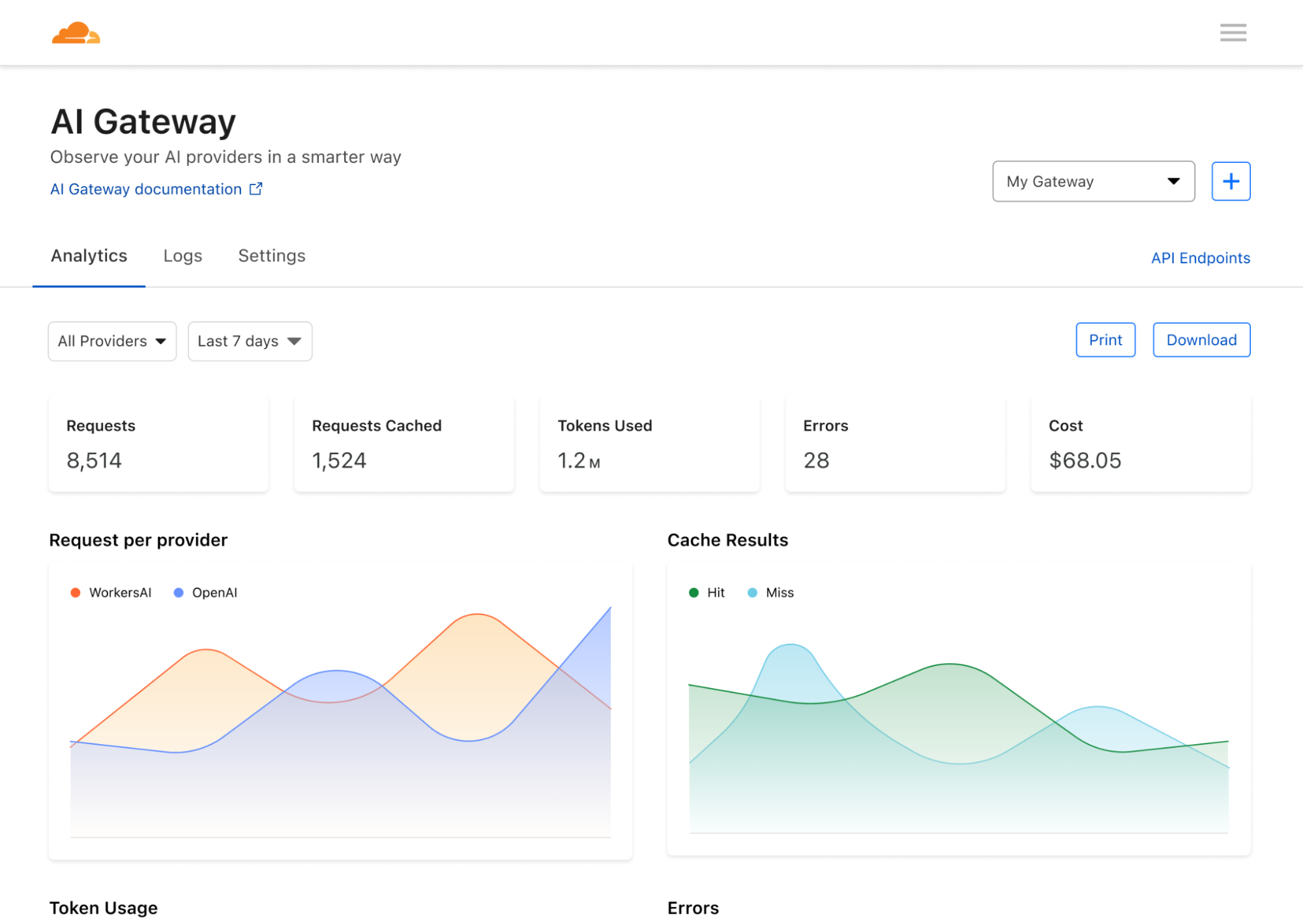
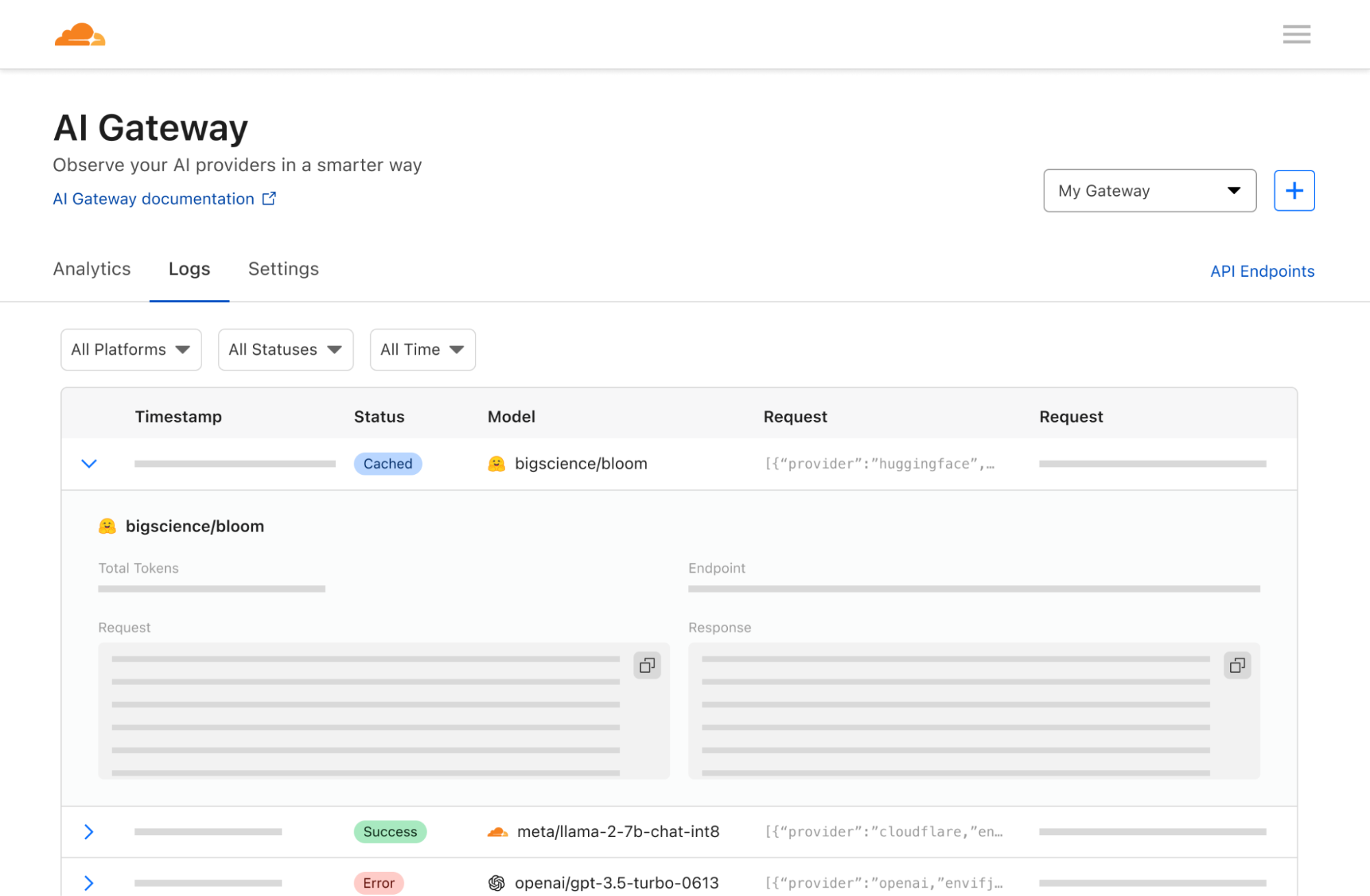
Now that your app is connected to Cloudflare, we can help you gather analytics and give insight and control on the traffic that is passing through your apps. Regardless of what model or infrastructure you use in the backend, we can help you log requests and analyze data like the number of requests, number of users, cost of running the app, duration of requests, etc. Although these seem like basic analytics that model providers should expose, it’s surprisingly difficult to get visibility into these metrics with the typical model providers. AI Gateway takes it one step further and lets you aggregate analytics across multiple providers too.

Announcing AI Gateway: making AI applications more observable, reliable, and scalable

Controlling how your app scales

One of the pain points we often hear is how expensive it costs to build and run AI apps. Each API call can be unpredictably expensive and costs can rack up quickly, preventing developers from scaling their apps to their full potential. At the speed that the industry is moving, you don’t want to be limited by your scale and left behind – and that’s where caching and rate limiting can help. We allow developers to cache their API calls so that new requests can be served from our cache rather than the original API – making it cheaper and faster. Rate limiting can also help control costs by throttling the number of requests and preventing excessive or suspicious activity. Developers have full flexibility to define caching and rate limiting rules, so that apps can scale at a sustainable pace of your choosing.

Announcing AI Gateway: making AI applications more observable, reliable, and scalable

The Workers AI Platform

AI Gateway pairs perfectly with our new Workers AI and Vectorize products, so you can build full-stack AI applications all within the Workers ecosystem. From deploying applications with Workers, running model inference on the edge with Workers AI, storing vector embeddings on Vectorize, to gaining visibility into your applications with AI Gateway – the Workers platform is your one-stop shop to bring your AI applications to life. To learn how to use AI Gateway with Workers AI or the different providers, check out the docs.

Next up: the enterprise use case

We are shipping v1 of AI Gateway with a few core features, but we have plans to expand the product to cover more advanced use cases as well – usage alerts, jailbreak protection, dynamic model routing with A/B testing, and advanced cache rules. But what we’re really excited about are the other ways you can apply AI Gateway…

In the future, we want to develop AI Gateway into a product that helps organizations monitor and observe how their users or employees are using AI. This way, you can flip a switch and have all requests within your network to providers (like OpenAI) pass through Cloudflare first – so that you can log user requests, apply access policies, enable rate limiting and data loss prevention (DLP) strategies. A powerful example: if an employee accidentally pastes an API key to ChatGPT, AI Gateway can be configured to see the outgoing request and redact the API key or block the request entirely, preventing it from ever reaching OpenAI or any end providers. We can also log and alert on suspicious requests, so that organizations can proactively investigate and control certain types of activity. AI Gateway then becomes a really powerful tool for organizations that might be excited about the efficiency that AI unlocks, but hesitant about trusting AI when data privacy and user error are really critical threats. We hope that AI Gateway can alleviate these concerns and make adopting AI tools a lot easier for organizations.

Whether you’re a developer building applications or a company who’s interested in how employees are using AI, our hope is that AI Gateway can help you demystify what’s going on inside your apps – because once you understand how your users are using AI, you can make decisions on how you actually want them to use it. Some of these features are still in development, but we hope this illustrates the power of AI Gateway and our vision for the future.

At Cloudflare, we live and breathe innovation (as you can tell by our Birthday Week announcements!) and the pace of innovation in AI is incredible to witness. We’re thrilled that we can not only help people build and use apps, but actually help accelerate the adoption and development of AI with greater control and visibility. We can’t wait to hear what you build – head to the Cloudflare dashboard to try out AI Gateway and let us know what you think!

Announcing AI Gateway: making AI applications more observable, reliable, and scalable

Vectorize: a vector database for shipping AI-powered applications to production, fast

Post Syndicated from Matt Silverlock original http://blog.cloudflare.com/vectorize-vector-database-open-beta/

Vectorize: a vector database for shipping AI-powered applications to production, fast

Vectorize: a vector database for shipping AI-powered applications to production, fast

Vectorize is our brand-new vector database offering, designed to let you build full-stack, AI-powered applications entirely on Cloudflare’s global network: and you can start building with it right away. Vectorize is in open beta, and is available to any developer using Cloudflare Workers.

You can use Vectorize with Workers AI to power semantic search, classification, recommendation and anomaly detection use-cases directly with Workers, improve the accuracy and context of answers from LLMs (Large Language Models), and/or bring-your-own embeddings from popular platforms, including OpenAI and Cohere.

Visit Vectorize’s developer documentation to get started, or read on if you want to better understand what vector databases do and how Vectorize is different.

Why do I need a vector database?

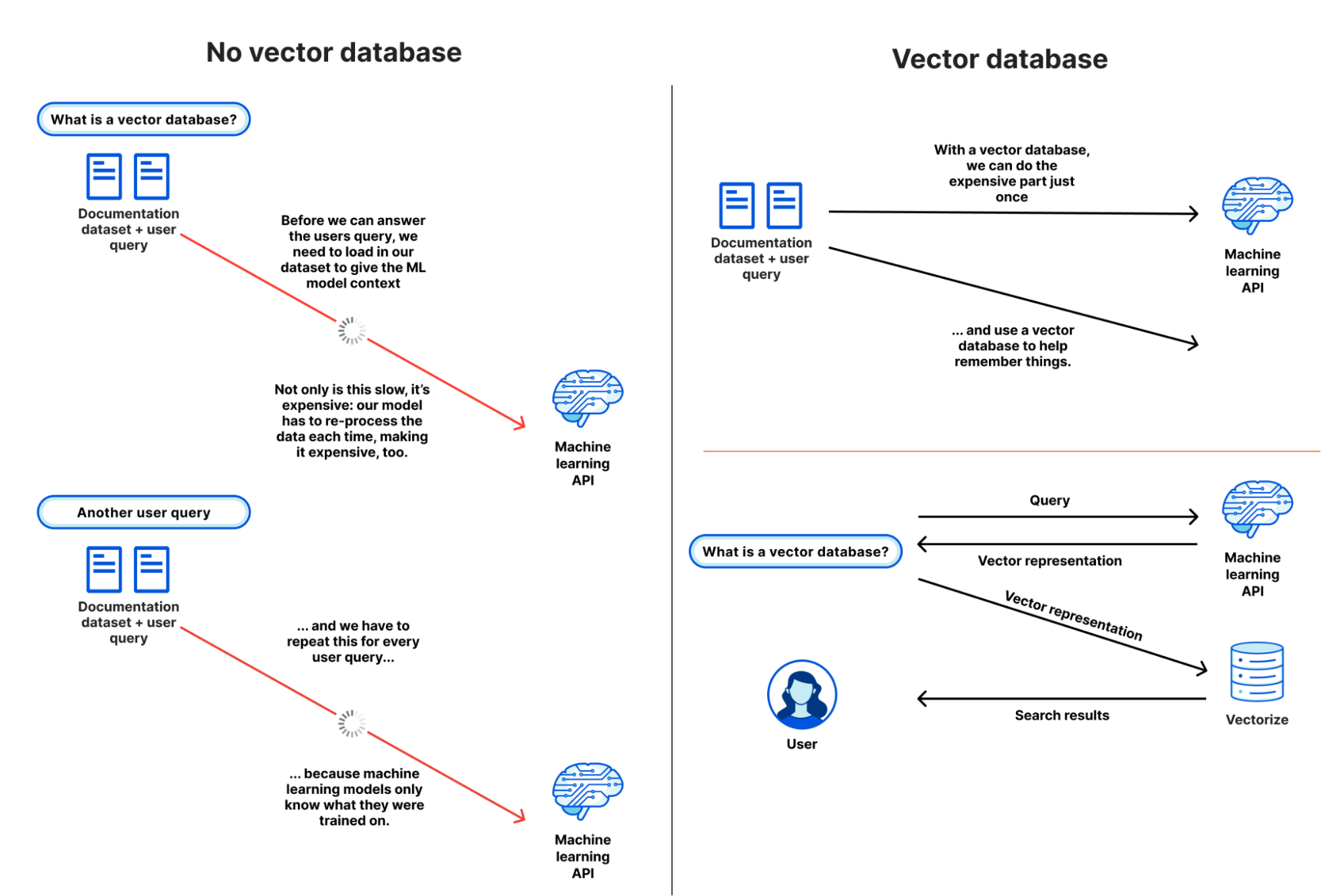
Machine learning models can’t remember anything: only what they were trained on.

Vector databases are designed to solve this, by capturing how an ML model represents data — including structured and unstructured text, images and audio — and storing it in a way that allows you to compare against future inputs. This allows us to leverage the power of existing machine-learning models and LLMs (Large Language Models) for content they haven’t been trained on: which, given the tremendous cost of training models, turns out to be extremely powerful.

To better illustrate why a vector database like Vectorize is useful, let’s pretend they don’t exist, and see how painful it is to give context to an ML model or LLM for a semantic search or recommendation task. Our goal is to understand what content is similar to our query and return it: based on our own dataset.

  1. Our user query comes in: they’re searching for “how to write to R2 from Cloudflare Workers”
  2. We load up our entire documentation dataset — a thankfully “small” dataset at about 65,000 sentences, or 2.1 GB — and provide it alongside the query from our user. This allows the model to have the context it needs, based on our data.
  3. We wait.
  4. (A long time)
  5. We get our similarity scores back, with the sentences most similar to the user’s query, and then work to map those back to URLs before we return our search results.

… and then another query comes in, and we have to start this all over again.

In practice, this isn’t really possible: we can’t pass that much context in an API call (prompt) to most machine learning models, and even if we could, it’d take tremendous amounts of memory and time to process our dataset over-and-over again.

With a vector database, we don’t have to repeat step 2: we perform it once, or as our dataset updates, and use our vector database to provide a form of long-term memory for our machine learning model. Our workflow looks a little more like this:

  1. We load up our entire documentation dataset, run it through our model, and store the resulting vector embeddings in our vector database (just once).
  2. For each user query (and only the query) we ask the same model and retrieve a vector representation.
  3. We query our vector database with that query vector, which returns the vectors closest to our query vector.

If we looked at these two flows side by side, we can quickly see how inefficient and impractical it is to use our own dataset with an existing model without a vector database:

Vectorize: a vector database for shipping AI-powered applications to production, fast
Using a vector database to help machine learning models remember.

From this simple example, it’s probably starting to make some sense: but you might also be wondering why you need a vector database instead of just a regular database.

Vectors are the model’s representation of an input: how it maps that input to its internal structure, or “features”. Broadly, the more similar vectors are, the more similar the model believes those inputs to be based on how it extracts features from an input.

This is seemingly easy when we look at example vectors of only a handful of dimensions. But with real-world outputs, searching across 10,000 to 250,000 vectors, each potentially 1,536 dimensions wide, is non-trivial. This is where vector databases come in: to make search work at scale, vector databases use a specific class of algorithm, such as k-nearest neighbors (kNN) or other approximate nearest neighbor (ANN) algorithms to determine vector similarity.

And although vector databases are extremely useful when building AI and machine learning powered applications, they’re not only useful in those use-cases: they can be used for a multitude of classification and anomaly detection tasks. Knowing whether a query input is similar — or potentially dissimilar — from other inputs can power content moderation (does this match known-bad content?) and security alerting (have I seen this before?) tasks as well.

We built Vectorize to be a powerful partner to Workers AI: enabling you to run vector search tasks as close to users as possible, and without having to think about how to scale it for production.

We’re going to take a real world example — building a (product) recommendation engine for an e-commerce store — and simplify a few things.

Our goal is to show a list of “relevant products” on each product listing page: a perfect use-case for vector search. Our input vectors in the example are placeholders, but in a real world application we would generate them based on product descriptions and/or cart data by passing them through a sentence similarity model (such as Worker’s AI’s text embedding model)

Each vector represents a product across our store, and we associate the URL of the product with it. We could also set the ID of each vector to the product ID: both approaches are valid. Our query — vector search — represents the product description and content for the product user is currently viewing.

Let’s step through what this looks like in code: this example is pulled straight from our developer documentation:

export interface Env {
	// This makes our vector index methods available on env.MY_VECTOR_INDEX.*
	// e.g. env.MY_VECTOR_INDEX.insert() or .query()
	TUTORIAL_INDEX: VectorizeIndex;
}

// Sample vectors: 3 dimensions wide.
//
// Vectors from a machine-learning model are typically ~100 to 1536 dimensions
// wide (or wider still).
const sampleVectors: Array<VectorizeVector> = [
	{ id: '1', values: [32.4, 74.1, 3.2], metadata: { url: '/products/sku/13913913' } },
	{ id: '2', values: [15.1, 19.2, 15.8], metadata: { url: '/products/sku/10148191' } },
	{ id: '3', values: [0.16, 1.2, 3.8], metadata: { url: '/products/sku/97913813' } },
	{ id: '4', values: [75.1, 67.1, 29.9], metadata: { url: '/products/sku/418313' } },
	{ id: '5', values: [58.8, 6.7, 3.4], metadata: { url: '/products/sku/55519183' } },
];

export default {
	async fetch(request: Request, env: Env, ctx: ExecutionContext): Promise<Response> {
		if (new URL(request.url).pathname !== '/') {
			return new Response('', { status: 404 });
		}
		// Insert some sample vectors into our index
		// In a real application, these vectors would be the output of a machine learning (ML) model,
		// such as Workers AI, OpenAI, or Cohere.
		let inserted = await env.TUTORIAL_INDEX.insert(sampleVectors);

		// Log the number of IDs we successfully inserted
		console.info(`inserted ${inserted.count} vectors into the index`);

		// In a real application, we would take a user query - e.g. "durable
		// objects" - and transform it into a vector emebedding first.
		//
		// In our example, we're going to construct a simple vector that should
		// match vector id #5
		let queryVector: Array<number> = [54.8, 5.5, 3.1];

		// Query our index and return the three (topK = 3) most similar vector
		// IDs with their similarity score.
		//
		// By default, vector values are not returned, as in many cases the
		// vectorId and scores are sufficient to map the vector back to the
		// original content it represents.
		let matches = await env.TUTORIAL_INDEX.query(queryVector, { topK: 3, returnVectors: true });

		// We map over our results to find the most similar vector result.
		//
		// Since our index uses the 'cosine' distance metric, scores will range
		// from 1 to -1.  A value of '1' means the vector is the same; the
		// closer to 1, the more similar. Values of -1 (least similar) and 0 (no
		// match).
		// let closestScore = 0;
		// let mostSimilarId = '';
		// matches.matches.map((match) => {
		// 	if (match.score > closestScore) {
		// 		closestScore = match.score;
		// 		mostSimilarId = match.vectorId;
		// 	}
		// });

		return Response.json({
			// This will return the closest vectors: we'll see that the vector
			// with id = 5 has the highest score (closest to 1.0) as the
			// distance between it and our query vector is the smallest.
			// Return the full set of matches so we can see the possible scores.
			matches: matches,
		});
	},
};

The code above is intentionally simple, but illustrates vector search at its core: we insert vectors into our database, and query it for vectors with the smallest distance to our query vector.

Here are the results, with the values included, so we visually observe that our query vector [54.8, 5.5, 3.1] is similar to our highest scoring match: [58.799, 6.699, 3.400] returned from our search. This index uses cosine similarity to calculate the distance between vectors, which means that the closer the score to 1, the more similar a match is to our query vector.

{
  "matches": {
    "count": 3,
    "matches": [
      {
        "score": 0.999909,
        "vectorId": "5",
        "vector": {
          "id": "5",
          "values": [
            58.79999923706055,
            6.699999809265137,
            3.4000000953674316
          ],
          "metadata": {
            "url": "/products/sku/55519183"
          }
        }
      },
      {
        "score": 0.789848,
        "vectorId": "4",
        "vector": {
          "id": "4",
          "values": [
            75.0999984741211,
            67.0999984741211,
            29.899999618530273
          ],
          "metadata": {
            "url": "/products/sku/418313"
          }
        }
      },
      {
        "score": 0.611976,
        "vectorId": "2",
        "vector": {
          "id": "2",
          "values": [
            15.100000381469727,
            19.200000762939453,
            15.800000190734863
          ],
          "metadata": {
            "url": "/products/sku/10148191"
          }
        }
      }
    ]
  }
}

In a real application, we could now quickly return product recommendation URLs based on the most similar products, sorting them by their score (highest to lowest), and increasing the topK value if we want to show more. The metadata stored alongside each vector could also embed a path to an R2 object, a UUID for a row in a D1 database, or a key-value pair from Workers KV.

Workers AI + Vectorize: full stack vector search on Cloudflare

In a real application, we need a machine learning model that can both generate vector embeddings from our original dataset (to seed our database) and quickly turn user queries into vector embeddings too. These need to be from the same model, as each model represents features differently.

Here’s a compact example building an entire end-to-end vector search pipeline on Cloudflare:

import { Ai } from '@cloudflare/ai';
export interface Env {
	TEXT_EMBEDDINGS: VectorizeIndex;
	AI: any;
}
interface EmbeddingResponse {
	shape: number[];
	data: number[][];
}

export default {
	async fetch(request: Request, env: Env, ctx: ExecutionContext): Promise<Response> {
		const ai = new Ai(env.AI);
		let path = new URL(request.url).pathname;
		if (path.startsWith('/favicon')) {
			return new Response('', { status: 404 });
		}

		// We only need to generate vector embeddings just the once (or as our
		// data changes), not on every request
		if (path === '/insert') {
			// In a real-world application, we could read in content from R2 or
			// a SQL database (like D1) and pass it to Workers AI
			const stories = ['This is a story about an orange cloud', 'This is a story about a llama', 'This is a story about a hugging emoji'];
			const modelResp: EmbeddingResponse = await ai.run('@cf/baai/bge-base-en-v1.5', {
				text: stories,
			});

			// We need to convert the vector embeddings into a format Vectorize can accept.
			// Each vector needs an id, a value (the vector) and optional metadata.
			// In a real app, our ID would typicaly be bound to the ID of the source
			// document.
			let vectors: VectorizeVector[] = [];
			let id = 1;
			modelResp.data.forEach((vector) => {
				vectors.push({ id: `${id}`, values: vector });
				id++;
			});

			await env.TEXT_EMBEDDINGS.upsert(vectors);
		}

		// Our query: we expect this to match vector id: 1 in this simple example
		let userQuery = 'orange cloud';
		const queryVector: EmbeddingResponse = await ai.run('@cf/baai/bge-base-en-v1.5', {
			text: [userQuery],
		});

		let matches = await env.TEXT_EMBEDDINGS.query(queryVector.data[0], { topK: 1 });
		return Response.json({
			// We expect vector id: 1 to be our top match with a score of
			// ~0.896888444
			// We are using a cosine distance metric, where the closer to one,
			// the more similar.
			matches: matches,
		});
	},
};

The code above does four things:

  1. It passes the three sentences to Workers AI’s text embedding model (@cf/baai/bge-base-en-v1.5) and retrieves their vector embeddings.
  2. It inserts those vectors into our Vectorize index.
  3. Takes the user query and transforms it into a vector embedding via the same Workers AI model.
  4. Queries our Vectorize index for matches.

This example might look “too” simple, but in a production application, we’d only have to change two things: just insert our vectors once (or periodically via Cron Triggers), and replace our three example sentences with real data stored in R2, a D1 database, or another storage provider.

In fact, this is incredibly similar to how we run Cursor, the AI assistant that can answer questions about Cloudflare Worker: we migrated Cursor to run on Workers AI and Vectorize. We generate text embeddings from our developer documentation using its built-in text embedding model, insert them into a Vectorize index, and transform user queries on the fly via that same model.

BYO embeddings from your favorite AI API

Vectorize isn’t just limited to Workers AI, though: it’s a fully-fledged, standalone vector database.

If you’re already using OpenAI’s Embedding API, Cohere’s multilingual model, or any other embedding API, then you can easily bring-your-own (BYO) vectors to Vectorize.

It works just the same: generate your embeddings, insert them into Vectorize, and pass your queries through the model before you query your index. Vectorize includes a few shortcuts for some of the most popular embedding models.

# Vectorize has ready-to-go presets that set the dimensions and distance metric for popular embeddings models
$ wrangler vectorize create openai-index-example --preset=openai-text-embedding-ada-002

This can be particularly useful if you already have an existing workflow around an existing embeddings API, and/or have validated a specific multimodal or multilingual embeddings model for your use-case.

Making the cost of AI predictable

There’s a tremendous amount of excitement around AI and ML, but there’s also one big concern: that it’s too expensive to experiment with, and hard to predict at scale.

With Vectorize, we wanted to bring a simpler pricing model to vector databases. Have an idea for a proof-of-concept at work? That should fit into our free-tier limits. Scaling up and optimizing your embedding dimensions for performance vs. accuracy? It shouldn’t break the bank.

Importantly, Vectorize aims to be predictable: you don’t need to estimate CPU and memory consumption, which can be hard when you’re just starting out, and made even harder when trying to plan for your peak vs. off-peak hours in production for a brand new use-case. Instead, you’re charged based on the total number of vector dimensions you store, and the number of queries against them each month. It’s our job to take care of scaling up to meet your query patterns.

Here’s the pricing for Vectorize — and if you have a Workers paid plan now, Vectorize is entirely free to use until 2024:

Workers Free (coming soon) Workers Paid ($5/month)
Queried vector dimensions included 30M total queried dimensions / month 50M total queried dimensions / month
Stored vector dimensions included 5M stored dimensions / month 10M stored dimensions / month
Additional cost $0.04 / 1M vector dimensions queried or stored $0.04 / 1M vector dimensions queried or stored

Pricing is based entirely on what you store and query: (total vector dimensions queried + stored) * dimensions_per_vector * price. Query more? Easy to predict. Optimizing for smaller dimensions per vector to improve speed and reduce overall latency? Cost goes down. Have a few indexes for prototyping or experimenting with new use-cases? We don’t charge per-index.

Vectorize: a vector database for shipping AI-powered applications to production, fast
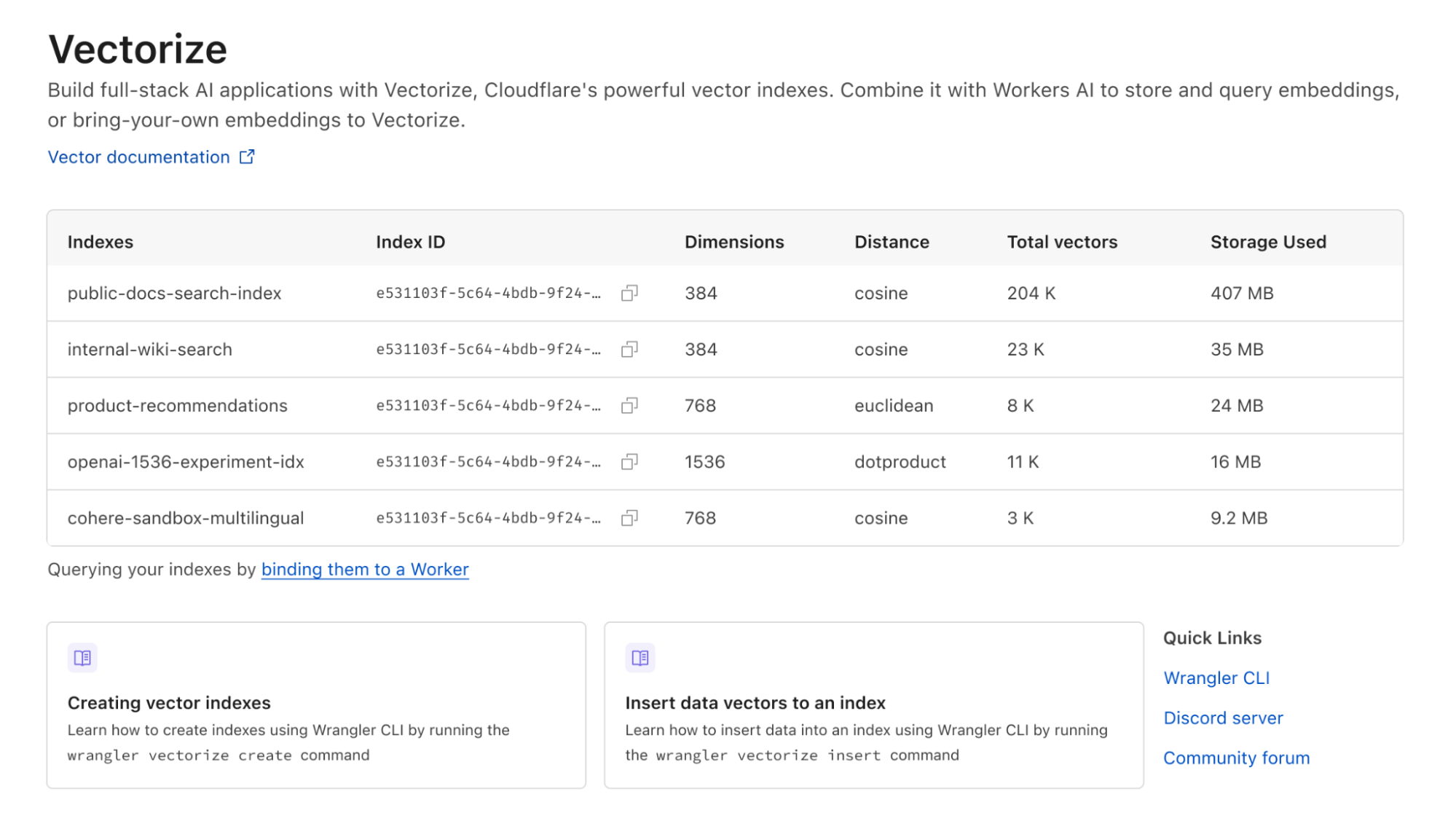
Create as many as you need indexes to prototype new ideas and/or separate production from dev.

As an example: if you load 10,000 Workers AI vectors (384 dimensions each) and make 5,000 queries against your index each day, it’d result in 49 million total vector dimensions queried and still fit into what we include in the Workers Paid plan ($5/month). Better still: we don’t delete your indexes due to inactivity.

Note that while this pricing isn’t final, we expect few changes going forward. We want to avoid the element of surprise: there’s nothing worse than starting to build on a platform and realizing the pricing is untenable after you’ve invested the time writing code, tests and learning the nuances of a technology.

Vectorize!

Every Workers developer on a paid plan can start using Vectorize immediately: the open beta is available right now, and you can visit our developer documentation to get started.

This is also just the beginning of the vector database story for us at Cloudflare. Over the next few weeks and months, we intend to land a new query engine that should further improve query performance, support even larger indexes, introduce sub-index filtering capabilities, increased metadata limits, and per-index analytics.

If you’re looking for inspiration on what to build, see the semantic search tutorial that combines Workers AI and Vectorize for document search, running entirely on Cloudflare. Or an example of how to combine OpenAI and Vectorize to give an LLM more context and dramatically improve the accuracy of its answers.

And if you have questions about how to use Vectorize for our product & engineering teams, or just want to bounce an idea off of other developers building on Workers AI, join the #vectorize and #workers-ai channels on our Developer Discord.

Vectorize: a vector database for shipping AI-powered applications to production, fast

MLPerf Inference v3.1 Shows NVIDIA Grace Hopper and a Cool AMD TPU v5e Win

Post Syndicated from Cliff Robinson original https://www.servethehome.com/mlperf-inference-v3-1-shows-nvidia-grace-hopper-and-a-cool-amd-tpu-v5e-win/

NVIDIA’s MLPerf Inference v3.1 is out. Two standouts were NVIDIA setting the stage to jettison x86 and AMD having a big win at Google

The post MLPerf Inference v3.1 Shows NVIDIA Grace Hopper and a Cool AMD TPU v5e Win appeared first on ServeTheHome.

Cloudflare One for Data Protection

Post Syndicated from James Chang original http://blog.cloudflare.com/cloudflare-one-data-protection-announcement/

Cloudflare One for Data Protection

This post is also available in 日本語, 한국어, Deutsch, Français.

Cloudflare One for Data Protection

Data continues to explode in volume, variety, and velocity, and security teams at organizations of all sizes are challenged to keep up. Businesses face escalating risks posed by varied SaaS environments, the emergence of generative artificial intelligence (AI) tools, and the exposure and theft of valuable source code continues to keep CISOs and Data Officers up at night.

Over the past few years, Cloudflare has launched capabilities to help organizations navigate these risks and gain visibility and controls over their data — including the launches of our data loss prevention (DLP) and cloud access security broker (CASB) services in the fall of 2022.

Announcing Cloudflare One’s data protection suite

Today, we are building on that momentum and announcing Cloudflare One for Data Protection — our unified suite to protect data everywhere across web, SaaS, and private applications. Built on and delivered across our entire global network, Cloudflare One’s data protection suite is architected for the risks of modern coding and increased usage of AI.

Specifically, this suite converges capabilities across Cloudflare’s DLP, CASB, Zero Trust network access (ZTNA), secure web gateway (SWG), remote browser isolation (RBI), and cloud email security services onto a single platform for simpler management. All these services are available and packaged now as part of Cloudflare One, our SASE platform that converges security and network connectivity services.

A separate blog post published today looks back on what technologies and features we delivered over the past year and previews new functionality that customers can look forward to.

In this blog, we focus more on what impact those technologies and features have for customers in addressing modern data risks — with examples of practical use cases. We believe that Cloudflare One is uniquely positioned to deliver better data protection that addresses modern data risks. And by “better,” we mean:

  • Helping security teams be more effective protecting data by simplifying inline and API connectivity together with policy management
  • Helping employees be more productive by ensuring fast, reliable, and consistent user experiences
  • Helping organizations be more agile by innovating rapidly to meet evolving data security and privacy requirements

Harder than ever to secure data

Data spans more environments than most organizations can keep track of. In conversations with customers, three distinctly modern risks stick out:

  1. The growing diversity of cloud and SaaS environments: The apps where knowledge workers spend most of their time — like cloud email inboxes, shared cloud storage folders and documents, SaaS productivity and collaboration suites like Microsoft 365 — are increasingly targeted by threat actors for data exfiltration.
  2. Emerging AI tools: Business leaders are concerned about users oversharing sensitive information with opaque large language model tools like ChatGPT, but at the same time, want to leverage the benefits of AI.
  3. Source code exposure or theft: Developer code fuels digital business, but that same high-value source code can be exposed or targeted for theft across many developer tools like GitHub, including in plain sight locations like public repositories.

These latter two risks, in particular, are already intersecting. Companies like Amazon, Apple, Verizon, Deutsche Bank, and more are blocking employees from using tools like ChatGPT for fear of losing confidential data, and Samsung recently had an engineer accidentally upload sensitive code to the tool. As organizations prioritize new digital services and experiences, developers face mounting pressure to work faster and smarter. AI tools can help unlock that productivity, but the long-term consequences of oversharing sensitive data with these tools is still unknown.

All together, data risks are only primed to escalate, particularly as organizations accelerate digital transformation initiatives with hybrid work and development continuing to expand attack surfaces. At the same time, regulatory compliance will only become more demanding, as more countries and states adopt more stringent data privacy laws.

Traditional DLP services are not equipped to keep up with these modern risks. A combination of high setup and operational complexity plus negative user experiences means that, in practice, DLP controls are often underutilized or bypassed entirely. Whether deployed as a standalone platform or integrated into security products or SaaS applications, DLP products can often become expensive shelfware. And backhauling traffic through on-premise data protection hardware – whether, DLP, firewall and SWG appliances, or otherwise — create costs and slow user experiences that hold businesses back in the long run.

Figure 1: Modern data risks

Cloudflare One for Data Protection

How customers use Cloudflare for data protection

Today, customers are increasingly turning to Cloudflare to address these data risks, including a Fortune 500 natural gas company, a major US job site, a regional US airline, an Australian healthcare company and more. Across these customer engagements, three use cases are standing out as common focus areas when deploying Cloudflare One for data protection.

Use case #1: Securing AI tools and developer code (Applied Systems)

Applied Systems, an insurance technology & software company, recently deployed Cloudflare One to secure data in AI environments.

Specifically, the company runs the public instance of ChatGPT in an isolated browser, so that the security team can apply copy-paste blocks: preventing users from copying sensitive information (including developer code) from other apps into the AI tool. According to Chief Information Security Officer Tanner Randolph, “We wanted to let employees take advantage of AI while keeping it safe.”

This use case was just one of several Applied Systems tackled when migrating from Zscaler and Cisco to Cloudflare, but we see a growing interest in securing AI and developer code among our customers.

Use case #2: Data exposure visibility

Customers are leveraging Cloudflare One to regain visibility and controls over data exposure risks across their sprawling app environments. For many, the first step is analyzing unsanctioned app usage, and then taking steps to allow, block, isolate, or apply other controls to those resources. A second and increasingly popular step is scanning SaaS apps for misconfigurations and sensitive data via a CASB and DLP service, and then taking prescriptive steps to remediate via SWG policies.

A UK ecommerce giant with 7,5000 employees turned to Cloudflare for this latter step. As part of a broader migration strategy from Zscaler to Cloudflare, this company quickly set up API integrations between its SaaS environments and Cloudflare’s CASB and began scanning for misconfigurations. Plus, during this integration process, the company was able to sync DLP policies with Microsoft Pureview Information Protection sensitivity labels, so that it could use its existing framework to prioritize what data to protect. All in all, the company was able to begin identifying data exposure risks within a day.

Use case #3: Compliance with regulations

Comprehensive data regulations like GDPR, CCPA, HIPAA, and GLBA have been in our lives for some time now. But new laws are quickly emerging: for example, 11 U.S. states now have comprehensive privacy laws, up from just 3 in 2021. And updates to existing laws like PCI DSS now include stricter, more expansive requirements.

Customers are increasingly turning to Cloudflare One for compliance, in particular by ensuring they can monitor and protect regulated data (e.g. financial data, health data, PII, exact data matches, and more). Some common steps include first, detecting and applying controls to sensitive data via DLP, next, maintaining detailed audit trails via logs and further SIEM analysis, and finally, reducing overall risk with a comprehensive Zero Trust security posture.

Let’s look at a concrete example. One Zero Trust best practice that is increasingly required is multi-factor authentication (MFA). In the payment cards industry, PCI DSS v4.0, which takes effect in 2025, requires that requests to MFA be enforced for every access request to the cardholder data environment, for every user and for every location – including cloud environments, on-prem apps, workstations and more. (requirement 8.4.2). Plus, those MFA systems must be configured to prevent misuse – including replay attacks and bypass attempts – and must require at least two different factors that must be successful (requirement 8.5). To help organizations comply with both of these requirements, Cloudflare helps organizations enforce MFA across all apps and users – and in fact, we use our same services to enforce hard key authentication for our own employees.

Figure 2: Data protection use cases

Cloudflare One for Data Protection

The Cloudflare difference

Cloudflare One’s data protection suite is built to stay at the forefront of modern data risks to address these and other evolving use cases.

With Cloudflare, DLP is not just integrated with other typically distinct security services, like CASB, SWG, ZTNA, RBI, and email security, but converged onto a single platform with one control plane and one interface. Beyond the acronym soup, our network architecture is really what enables us to help organizations be more effective, more productive, and more agile with protecting data.

We simplify connectivity, with flexible options for you to send traffic to Cloudflare for enforcement. Those options include API-based scans of SaaS suites for misconfigurations and sensitive data. Unlike solutions that require security teams to get full app permissions from IT or business teams, Cloudflare can find risk exposure with read-only app permissions. Clientless deployments of ZTNA to secure application access and of browser isolation to control data within websites and apps are scalable for all users — employees and third-parties like contractors — for the largest enterprises. And when you do want to forward proxy traffic, Cloudflare offers one device client with self-enrollment permissions or wide area network on-ramps across security services. With so many practical ways to deploy, your data protection approach will be effective and functional — not shelfware.

Just like your data, our global network is everywhere, now spanning over 300 cities in over 100 countries. We have proven that we enforce controls faster than vendors like Zscaler, Netskope, and Palo Alto Networks — all with single-pass inspection. We ensure security is quick, reliable, and unintrusive, so you can layer on data controls without disruptive work productivity.

Our programmable network architecture enables us to build new capabilities quickly. And we rapidly adopt new security standards and protocols (like IPv6-only connections or HTTP/3 encryption) to ensure data protection remains effective. Altogether, this architecture equips us to evolve alongside changing data protection use cases, like protecting code in AI environments, and quickly deploy AI and machine learning models across our network locations to enforce higher precision, context-driven detections.

Figure 3: Unified data protection with Cloudflare

Cloudflare One for Data Protection

How to get started

Modern data risks demand modern security. We feel that Cloudflare One’s unified data protection suite is architected to help organizations navigate their priority risks today and in the future — whether that is securing developer code and AI tools, regaining visibility over SaaS apps, or staying compliant with evolving regulations.

If you’re ready to explore how Cloudflare can protect your data, request a workshop with our experts today.

Or to learn more about how Cloudflare One protects data, read today’s press release, visit our website, or dive deeper with our accompanying technical blog.

***

  1. The State of Secrets Sprawl 2023, GitGuardian
  2. Top Generative AI Statistics for 2023, Salesforce
  3. Cost of a Data Breach Report 2023, IBM
  4. 2023 “State of the CISO” report, conducted by Global Survey
  5. United Nations Conference on Trade & Development
  6. International Association of Privacy Professionals (IAPP)

Google Details TPUv4 and its Crazy Optically Reconfigurable AI Network

Post Syndicated from Patrick Kennedy original https://www.servethehome.com/google-details-tpuv4-and-its-crazy-optically-reconfigurable-ai-network/

Google detailed how its TPUv4 pods use optically reconfigurable networks to support efficient, large scale, AI workloads

The post Google Details TPUv4 and its Crazy Optically Reconfigurable AI Network appeared first on ServeTheHome.

NVIDIA Announces a New NVIDIA H100 144GB HBM3e Model and an Anticipated Business Model Shift

Post Syndicated from Patrick Kennedy original https://www.servethehome.com/nvidia-announces-a-new-nvidia-h100-144gb-hbm3e-model-and-an-anticipated-business-model-shift/

NVIDIA announced a new H100 144GB HBM3e model this week while signaling a major business model shift to the industry

The post NVIDIA Announces a New NVIDIA H100 144GB HBM3e Model and an Anticipated Business Model Shift appeared first on ServeTheHome.

100M USD Cerebras AI Cluster Makes it the Post-Legacy Silicon AI Winner

Post Syndicated from Patrick Kennedy original https://www.servethehome.com/100m-usd-cerebras-ai-cluster-makes-it-the-post-legacy-silicon-ai-winner/

Cerebras announced a $100M+ AI Cluster using its huge AI chips and plans for two more in 2023 making it a winner of the new AI silicon makers

The post 100M USD Cerebras AI Cluster Makes it the Post-Legacy Silicon AI Winner appeared first on ServeTheHome.

Wiwynn Liquid Cooling for 8kW AI Accelerator Trays Shown

Post Syndicated from Eric Smith original https://www.servethehome.com/wiwynn-liquid-cooling-for-8kw-of-ai-accelerators-shown-oam-oai-ocp-ubb/

We check out the Hyper-scale server maker Wiwynn’s liquid cooling solution for 8kW GPU and AI accelerator trays at its headquarters

The post Wiwynn Liquid Cooling for 8kW AI Accelerator Trays Shown appeared first on ServeTheHome.

Lenovo ThinkEdge SE350 V2 SE360 V2 and SR675 V3 Launched for AI

Post Syndicated from Cliff Robinson original https://www.servethehome.com/lenovo-thinkedge-se350-v2-se360-v2-and-sr675-v3-launched-for-ai/

Lenovo has a trio of new AI servers, the Lenovo ThinkEdge SE350 V2 and SE360 V2 are edge AI platforms and the ThinkSystem SR675 V3 is for big GPUs

The post Lenovo ThinkEdge SE350 V2 SE360 V2 and SR675 V3 Launched for AI appeared first on ServeTheHome.

Globally distributed AI and a Constellation update

Post Syndicated from Rita Kozlov original http://blog.cloudflare.com/globally-distributed-ai-and-a-constellation-update/

Globally distributed AI and a Constellation update

Globally distributed AI and a Constellation update

During Cloudflare's 2023 Developer Week, we announced Constellation, a set of APIs that allow everyone to run fast, low-latency inference tasks using pre-trained machine learning/AI models, directly on Cloudflare’s network.

Constellation update

We now have a few thousand accounts onboarded in the Constellation private beta and have been listening to our customer's feedback to evolve and improve the platform. Today, one month after the announcement, we are upgrading Constellation with three new features:

Bigger models
We are increasing the size limit of your models from 10 MB to 50 MB. While still somewhat conservative during the private beta, this new limit opens doors to more pre-trained and optimized models you can use with Constellation.

Tensor caching
When you run a Constellation inference task, you pass multiple tensor objects as inputs, sometimes creating big data payloads. These inputs travel through the wire protocol back and forth when you repeat the same task, even when the input changes from multiple runs are minimal, creating unnecessary network and data parsing overhead.

The client API now supports caching input tensors resulting in even better network latency and faster inference times.

XGBoost runtime
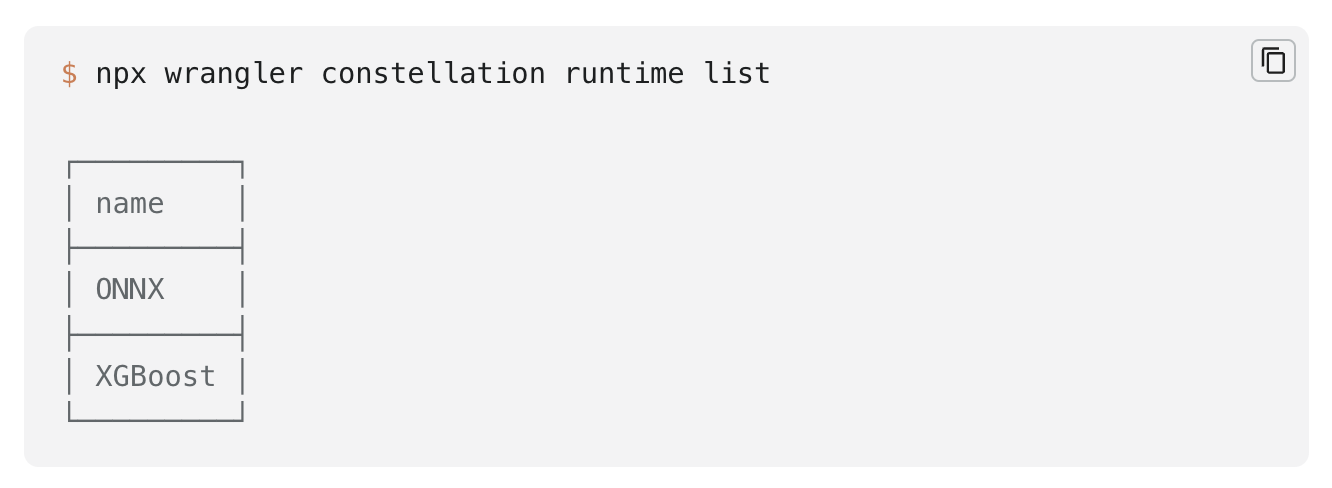
Constellation started with the ONNX runtime, but our vision is to support multiple runtimes under a common API. Today we're adding the XGBoost runtime to the list.

XGBoost is an optimized distributed gradient boosting library designed to be highly efficient, flexible, and portable, and it's known for its performance in structured and tabular data tasks.

You can start uploading and using XGBoost models today.

Globally distributed AI and a Constellation update

You can find the updated documentation with these new features and an example on how to use the XGBoost runtime with Constellation in our Developers Documentation.

An era of globally distributed AI

Since Cloudflare’s network is globally distributed, Constellation is our first public release of globally distributed machine learning.

But what does this mean? You may not think of a global network as the place to deploy your machine learning tasks, but machine learning has been a core part of what’s enabled much of Cloudflare’s core functionality for many years. And we run it across our global network in 300 cities.

Is this large spike in traffic an attack or a Black Friday sale? What’s going to be the best way to route this request based on current traffic patterns? Is this request coming from a human or a bot? Is this HTTP traffic a zero-day? Being able to answer these questions using automated machine learning and AI, rather than human intervention, is one of the things that’s enabled Cloudflare to scale.

But this is just a small sample of what globally distributed machine learning enables. The reason this was so helpful for us was because we were able to run this machine learning as an integrated part of our stack, which is why we’re now in the process of opening it up to more and more developers with Constellation.

As Michelle Zatlyn, our co-founder likes to say, we’re just getting started (in this space) — every day we’re adding hundreds of new users to our Constellation beta, testing out and globally deploying new models, and beyond that, deploying new hardware to support the new types of workloads that AI will bring to the our global network.

With that, we wanted to share a few announcements and some use cases that help illustrate why we’re so excited about globally distributed AI. And since it’s Speed Week, it should be no surprise that, well, speed is at the crux of it all.

Custom tailored web experiences, powered by AI

We’ve long known about the importance of performance when it comes to web experiences — in e-commerce, every second of page load time can have as much as a 7% drop off effect on conversion. But being fast is not enough. It’s necessary, but not sufficient. You also have to be accurate.

That is, rather than serving one-size-fits-all experiences, users have come to expect that you know what they want before they do.

So you have to serve personalized experiences, and you have to do it fast. That’s where Constellation can come into play. With Constellation, as a part of your e-commerce application that may already be served from Cloudflare’s network through Workers or Pages, or even store data in D1, you can now perform tasks such as categorization (what demographic is this customer most likely in?) and personalization (if you bought this, you may also like that).

Making devices smarter wherever they are

Another use case where performance is critical is in interacting with the real world. Imagine a face recognition system that detects whether you’re human or not every time you go into your house. Every second of latency makes a difference (especially if you’re holding heavy groceries).

Running inference on Cloudflare’s network, means that within 95% of the world’s population, compute, and thus a decision, is never going to be more than 50ms away. This is in huge contrast to centralized compute, where if you live in Europe, but bought a doorbell system from a US-based company, may be up to hundreds of milliseconds round trip away.

You may be thinking, why not just run the compute on the device then?

For starters, running inference on the device doesn’t guarantee fast performance. Most devices with built in intelligence are run on microcontrollers, often with limited computational abilities (not a high-end GPU or server-grade CPU). Milliseconds become seconds; depending on the volume of workloads you need to process, the local inference might not be suitable. The compute that can be fit on devices is simply not powerful enough for high-volume complex operations, certainly not for operating at low-latency.

But even user experience aside (some devices don’t interface with a user directly), there are other downsides to running compute directly on devices.

The first is battery life — the longer the compute, the shorter the battery life. There's always a power consumption hit, even if you have a custom ASIC chip or a Tensor Processing Unit (TPU), meaning shorter battery life if that's one of your constraints. For consumer products, this means having to switch out your doorbell battery (lest you get locked out). For operating fleets of devices at scale (imagine watering devices in a field) this means costs of keeping up with, and swapping out batteries.

Lastly, device hardware, and even software, is harder to update. As new technologies or more efficient chips become available, upgrading fleets of hundreds or thousands of devices is challenging. And while software updates may be easier to manage, they’ll never be as easy as updating on-cloud software, where you can effortlessly ship updates multiple times a day!

Speaking of shipping software…

AI applications, easier than ever with Constellation

Speed Week is not just about making your applications or devices faster, but also your team!

For the past six years, our developer platform has been making it easy for developers to ship new code with Cloudflare Workers. With Constellation, it’s now just as easy to add Machine Learning to your existing application, with just a few commands.

And if you don’t believe us, don’t just take our word for it. We’re now in the process of opening up the beta to more and more customers. To request access, head on over to the Cloudflare Dashboard where you’ll see a new tab for Constellation. We encourage you to check out our tutorial for getting started with Constellation — this AI thing may be even easier than you expected it to be!

We’re just getting started

This is just the beginning of our journey for helping developers build AI driven applications, and we’re already thinking about what’s next.

We look forward to seeing what you build, and hearing your feedback.