Today AWS made the much-anticipated announcement of Graviton4 which should be available in 2024. This is AWS’s latest Graviton processor and the fourth generation launched in the last five years. The company also announced its second-generation Tranium2 processor for AI workloads. AWS Graviton4 is an Even Bigger Arm Server Processor AWS is continuing on its […]
We want to empower you to experiment with LLM models, build your own applications, and discover untapped problem spaces. That’s why we sat down with GitHub’s Alireza Goudarzi, a senior machine learning researcher, and Albert Ziegler, a principal machine learning engineer, to discuss the emerging architecture of today’s LLMs.
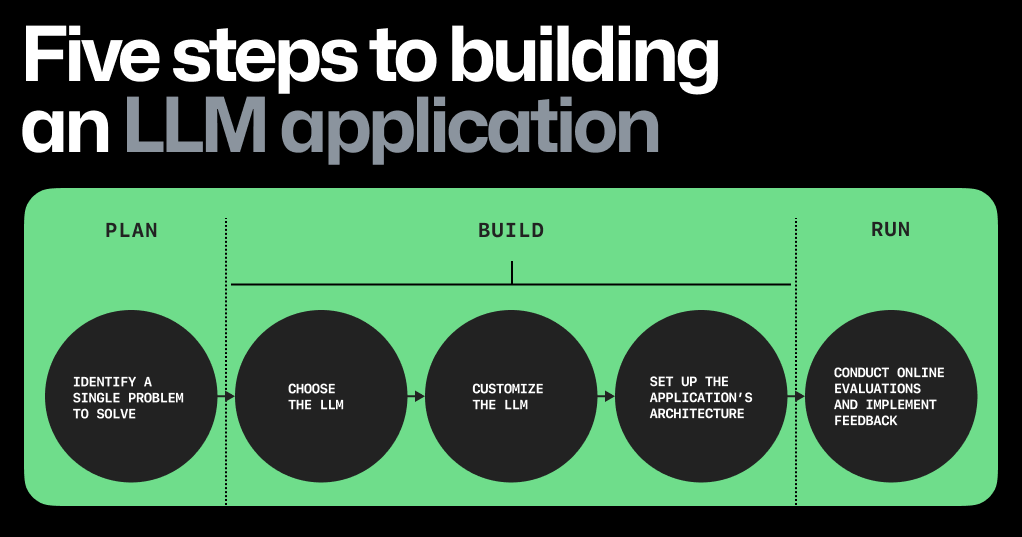
In this post, we’ll cover five major steps to building your own LLM app, the emerging architecture of today’s LLM apps, and problem areas that you can start exploring today.
Five steps to building an LLM app
Building software with LLMs, or any machine learning (ML) model, is fundamentally different from building software without them. For one, rather than compiling source code into binary to run a series of commands, developers need to navigate datasets, embeddings, and parameter weights to generate consistent and accurate outputs. After all, LLM outputs are probabilistic and don’t produce the same predictable outcomes.
Click on diagram to enlarge and save.
Let’s break down, at a high level, the steps to build an LLM app today. 👇
1. Focus on a single problem, first. The key? Find a problem that’s the right size: one that’s focused enough so you can quickly iterate and make progress, but also big enough so that the right solution will wow users.
For instance, rather than trying to address all developer problems with AI, the GitHub Copilot team initially focused on one part of the software development lifecycle: coding functions in the IDE.
2. Choose the right LLM. You’re saving costs by building an LLM app with a pre-trained model, but how do you pick the right one? Here are some factors to consider:
Licensing. If you hope to eventually sell your LLM app, you’ll need to use a model that has an API licensed for commercial use. To get you started on your search, here’s a community-sourced list of open LLMs that are licensed for commercial use.
Model size. The size of LLMs can range from 7 to 175 billion parameters—and some, like Ada, are even as small as 350 million parameters. Most LLMs (at the time of writing this post) range in size from 7-13 billion parameters.
Conventional wisdom tells us that if a model has more parameters (variables that can be adjusted to improve a model’s output), the better the model is at learning new information and providing predictions. However, the improved performance of smaller models is challenging that belief. Smaller models are also usually faster and cheaper, so improvements to the quality of their predictions make them a viable contender compared to big-name models that might be out of scope for many apps.
Model performance. Before you customize your LLM using techniques like fine-tuning and in-context learning (which we’ll cover below), evaluate how well and fast—and how consistently—the model generates your desired output. To measure model performance, you can use offline evaluations.
3. Customize the LLM. When you train an LLM, you’re building the scaffolding and neural networks to enable deep learning. When you customize a pre-trained LLM, you’re adapting the LLM to specific tasks, such as generating text around a specific topic or in a particular style. The section below will focus on techniques for the latter. To customize a pre-trained LLM to your specific needs, you can try in-context learning, reinforcement learning from human feedback (RLHF), or fine-tuning.
In-context learning, sometimes referred to as prompt engineering by end users, is when you provide the model with specific instructions or examples at the time of inference—or the time you’re querying the model—and asking it to infer what you need and generate a contextually relevant output.
In-context learning can be done in a variety of ways, like providing examples, rephrasing your queries, and adding a sentence that states your goal at a high-level.
RLHF comprises a reward model for the pre-trained LLM. The reward model is trained to predict if a user will accept or reject the output from the pre-trained LLM. The learnings from the reward model are passed to the pre-trained LLM, which will adjust its outputs based on user acceptance rate.
The benefit to RLHF is that it doesn’t require supervised learning and, consequently, expands the criteria for what’s an acceptable output. With enough human feedback, the LLM can learn that if there’s an 80% probability that a user will accept an output, then it’s fine to generate. Want to try it out? Check out these resources, including codebases, for RLHF.
Fine-tuning is when the model’s generated output is evaluated against an intended or known output. For example, you know that the sentiment behind a statement like this is negative: “The soup is too salty.” To evaluate the LLM, you’d feed this sentence to the model and query it to label the sentiment as positive or negative. If the model labels it as positive, then you’d adjust the model’s parameters and try prompting it again to see if it can classify the sentiment as negative.
Fine-tuning can result in a highly customized LLM that excels at a specific task, but it uses supervised learning, which requires time-intensive labeling. In other words, each input sample requires an output that’s labeled with exactly the correct answer. That way, the actual output can be measured against the labeled one and adjustments can be made to the model’s parameters. The advantage of RLHF, as mentioned above, is that you don’t need an exact label.
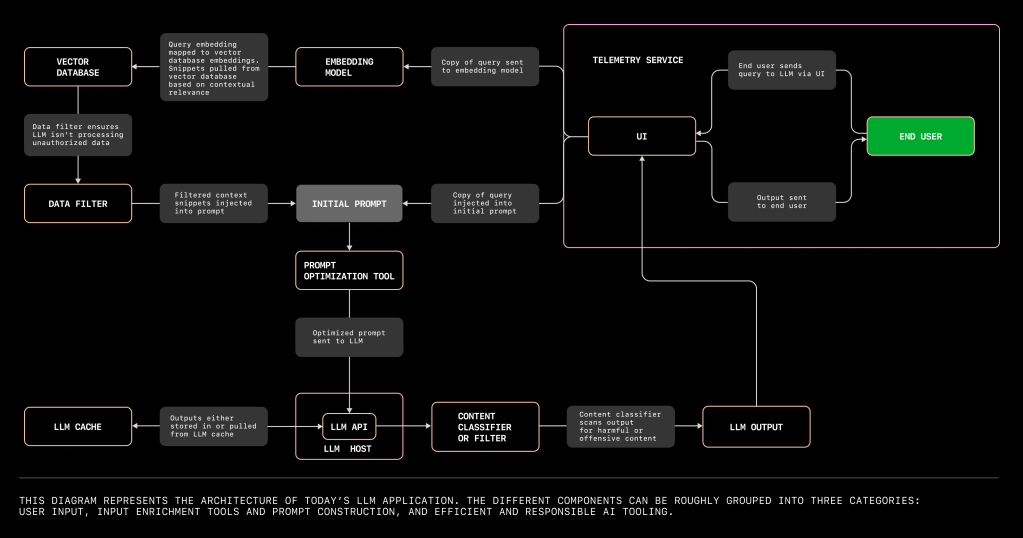
4. Set up the app’s architecture. The different components you’ll need to set up your LLM app can be roughly grouped into three categories:
User input which requires a UI, an LLM, and an app hosting platform.
Input enrichment and prompt construction tools. This includes your data source, embedding model, a vector database, prompt construction and optimization tools, and a data filter.
Efficient and responsible AI tooling, which includes an LLM cache, LLM content classifier or filter, and a telemetry service to evaluate the output of your LLM app.
5. Conduct online evaluations of your app. These evaluations are considered “online” because they assess the LLM’s performance during user interaction. For example, online evaluations for GitHub Copilot are measured through acceptance rate (how often a developer accepts a completion shown to them), as well as the retention rate (how often and to what extent a developer edits an accepted completion).
The emerging architecture of LLM apps
Let’s get started on architecture. We’re going to revisit our friend Dave, whose Wi-Fi went out on the day of his World Cup watch party. Fortunately, Dave was able to get his Wi-Fi running in time for the game, thanks to an LLM-powered assistant.
We’ll use this example and the diagram above to walk through a user flow with an LLM app, and break down the kinds of tools you’d need to build it. 👇
Click diagram to enlarge and save.
User input tools
When Dave’s Wi-Fi crashes, he calls his internet service provider (ISP) and is directed to an LLM-powered assistant. The assistant asks Dave to explain his emergency, and Dave responds, “My TV was connected to my Wi-Fi, but I bumped the counter, and the Wi-Fi box fell off! Now, we can’t watch the game.”
In order for Dave to interact with the LLM, we need four tools:
LLM API and host: Is the LLM app running on a local machine or in the cloud? In an ISP’s case, it’s probably hosted in the cloud to handle the volume of calls like Dave’s. Vercel and early projects like jina-ai/rungpt aim to provide a cloud-native solution to deploy and scale LLM apps.
But if you want to build an LLM app to tinker, hosting the model on your machine might be more cost effective so that you’re not paying to spin up your cloud environment every time you want to experiment. You can find conversations on GitHub Discussions about hardware requirements for models like LLaMA‚ two of which can be found here and here.
The UI: Dave’s keypad is essentially the UI, but in order for Dave to use his keypad to switch from the menu of options to the emergency line, the UI needs to include a router tool.
Speech-to-text translation tool: Dave’s verbal query then needs to be fed through a speech-to-text translation tool that works in the background.
Input enrichment and prompt construction tools
Let’s go back to Dave. The LLM can analyze the sequence of words in Dave’s transcript, classify it as an IT complaint, and provide a contextually relevant response. (The LLM’s able to do this because it’s been trained on the internet’s entire corpus, which includes IT support documentation.)
Input enrichment tools aim to contextualize and package the user’s query in a way that will generate the most useful response from the LLM.
A vector database is where you can store embeddings, or index high-dimensional vectors. It also increases the probability that the LLM’s response is helpful by providing additional information to further contextualize your user’s query.
Let’s say the LLM assistant has access to the company’s complaints search engine, and those complaints and solutions are stored as embeddings in a vector database. Now, the LLM assistant uses information not only from the internet’s IT support documentation, but also from documentation specific to customer problems with the ISP.
But in order to retrieve information from the vector database that’s relevant to a user’s query, we need an embedding model to translate the query into an embedding. Because the embeddings in the vector database, as well as Dave’s query, are translated into high-dimensional vectors, the vectors will capture both the semantics and intention of the natural language, not just its syntax.
Dave’s contextualized query would then read like this:
// pay attention to the the following relevant information.
to the colors and blinking pattern.

// pay attention to the following relevant information.

// The following is an IT complaint from, Dave Anderson, IT support expert.
Answers to Dave's questions should serve as an example of the excellent support
provided by the ISP to its customers.

*Dave: Oh it's awful! This is the big game day. My TV was connected to my
Wi-Fi, but I bumped the counter and the Wi-Fi box fell off and broke! Now we
can't watch the game.
Not only do these series of prompts contextualize Dave’s issue as an IT complaint, they also pull in context from the company’s complaints search engine. That context includes common internet connectivity issues and solutions.
MongoDB released a public preview of Vector Atlas Search, which indexes high-dimensional vectors within MongoDB. Qdrant, Pinecone, and Milvus also provide free or open source vector databases.
A data filter will ensure that the LLM isn’t processing unauthorized data, like personal identifiable information. Preliminary projects like amoffat/HeimdaLLM are working to ensure LLMs access only authorized data.
A prompt optimization tool will then help to package the end user’s query with all this context. In other words, the tool will help to prioritize which context embeddings are most relevant, and in which order those embeddings should be organized in order for the LLM to produce the most contextually relevant response. This step is what ML researchers call prompt engineering, where a series of algorithms create a prompt. (A note that this is different from the prompt engineering that end users do, which is also known as in-context learning).
Prompt optimization tools like langchain-ai/langchain help you to compile prompts for your end users. Otherwise, you’ll need to DIY a series of algorithms that retrieve embeddings from the vector database, grab snippets of the relevant context, and order them. If you go this latter route, you could use GitHub Copilot Chat or ChatGPT to assist you.
Learn how the GitHub Copilot team uses the Jaccard similarity to decide which pieces of context are most relevant to a user’s query >
Efficient and responsible AI tooling
To ensure that Dave doesn’t become even more frustrated by waiting for the LLM assistant to generate a response, the LLM can quickly retrieve an output from a cache. And in the case that Dave does have an outburst, we can use a content classifier to make sure the LLM app doesn’t respond in kind. The telemetry service will also evaluate Dave’s interaction with the UI so that you, the developer, can improve the user experience based on Dave’s behavior.
An LLM cache stores outputs. This means instead of generating new responses to the same query (because Dave isn’t the first person whose internet has gone down), the LLM can retrieve outputs from the cache that have been used for similar queries. Caching outputs can reduce latency, computational costs, and variability in suggestions.
You can experiment with a tool like zilliztech/GPTcache to cache your app’s responses.
A content classifier or filter can prevent your automated assistant from responding with harmful or offensive suggestions (in the case that your end users take their frustration out on your LLM app).
A telemetry service will allow you to evaluate how well your app is working with actual users. A service that responsibly and transparently monitors user activity (like how often they accept or change a suggestion) can share useful data to help improve your app and make it more useful.
OpenTelemetry, for example, is an open source framework that gives developers a standardized way to collect, process, and export telemetry data across development, testing, staging, and production environments.
Woohoo! 🥳 Your LLM assistant has effectively answered Dave’s many queries. His router is up and working, and he’s ready for his World Cup watch party. Mission accomplished!
Real-world impact of LLMs
Looking for inspiration or a problem space to start exploring? Here’s a list of ongoing projects where LLM apps and models are making real-world impact.
NASA and IBM recently open sourced the largest geospatial AI model to increase access to NASA earth science data. The hope is to accelerate discovery and understanding of climate effects.
Read how the Johns Hopkins Applied Physics Laboratory is designing a conversational AI agent that provides, in plain English, medical guidance to untrained soldiers in the field based on established care procedures.
Companies like Duolingo and Mercado Libre are using GitHub Copilot to help more people learn another language (for free) and democratize ecommerce in Latin America, respectively.
Large language models (LLMs) are revolutionizing the way we interact with software by combining deep learning techniques with powerful computational resources.
While this technology is exciting, many are also concerned about how LLMs can generate false, outdated, or problematic information, and how they sometimes even hallucinate (generating information that doesn’t exist) so convincingly. Thankfully, we can immediately put one rumor to rest. According to Alireza Goudarzi, senior researcher of machine learning (ML) for GitHub Copilot: “LLMs are not trained to reason. They’re not trying to understand science, literature, code, or anything else. They’re simply trained to predict the next token in the text.”
Let’s dive into how LLMs come to do the unexpected, and why. This blog post will provide comprehensive insights into LLMs, including their training methods and ethical considerations. Our goal is to help you gain a better understanding of LLM capabilities and how they’ve learned to master language, seemingly, without reasoning.
What are large language models?
LLMs are AI systems that are trained on massive amounts of text data, allowing them to generate human-like responses and understand natural language in a way that traditional ML models can’t.
“These models use advanced techniques from the field of deep learning, which involves training deep neural networks with many layers to learn complex patterns and relationships,” explains John Berryman, a senior researcher of ML on the GitHub Copilot team.
What sets LLMs apart is their proficiency at generalizing and understanding context. They’re not limited to pre-defined rules or patterns, but instead learn from large amounts of data to develop their own understanding of language. This allows them to generate coherent and contextually appropriate responses to a wide range of prompts and queries.
And while LLMs can be incredibly powerful and flexible tools because of this, the ML methods used to train them, and the quality—or limitations—of their training data, can also lead to occasional lapses in generating accurate, useful, and trustworthy information.
Deep learning
The advent of modern ML practices, such as deep learning, has been a game-changer when it comes to unlocking the potential of LLMs. Unlike the earliest language models that relied on predefined rules and patterns, deep learning allows these models to create natural language outputs in a more human-like way.
“The entire discipline of deep learning and neural networks—which underlies all of this—is ‘how simple can we make the rule and get as close to the behavior of a human brain as possible?’” says Goudarzi.
By using neural networks with many layers, deep learning enables LLMs to analyze and learn complex patterns and relationships in language data. This means that these models can generate coherent and contextually appropriate responses, even in the face of complex sentence structures, idiomatic expressions, and subtle nuances in language.
While the initial pre-training equips LLMs with a broad language understanding, fine-tuning is where they become versatile and adaptable. “When developers want these models to perform specific tasks, they provide task descriptions and examples (few-shot learning) or task descriptions alone (zero-shot learning). The model then fine-tunes its pre-trained weights based on this information,” says Goudarzi. This process helps it adapt to the specific task while retaining the knowledge it gained from its extensive pre-training.
But even with deep learning’s multiple layers and attention mechanisms enabling LLMs to generate human-like text, it can also lead to overgeneralization, where the model produces responses that may not be contextually accurate or up to date.
Why LLMs aren’t always right
There are several factors that shed light on why tools built on LLMs may be inaccurate at times, even while sounding quite convincing.
Limited knowledge and outdated information
LLMs often lack an understanding of the external world or real-time context. They rely solely on the text they’ve been trained on, and they don’t possess an inherent awareness of the world’s current state. “Typically this whole training process takes a long time, and it’s not uncommon for the training data to be two years out of date for any given LLM,” says Albert Ziegler, principal researcher and member of the GitHub Next research and development team.
This limitation means they may generate inaccurate information based on outdated assumptions, since they can’t verify facts or events in real-time. If there have been developments or changes in a particular field or topic after they have been trained, LLMs may not be aware of them and may provide outdated information. This is why it’s still important to fact check any responses you receive from an LLM, regardless of how fact-based it may seem.
Lack of context
One of the primary reasons LLMs sometimes provide incorrect information is the lack of context. These models rely heavily on the information given in the input text, and if the input is ambiguous or lacks detail, the model may make assumptions that can lead to inaccurate responses.
Training data biases and limitations
LLMs are exposed to massive unlabelled data sets of text during pre-training that are diverse and representative of the language the model should understand. Common sources of data include books, articles, websites—even social media posts!
Because of this, they may inadvertently produce responses that reflect these biases or incorrect information present in their training data. This is especially concerning when it comes to sensitive or controversial topics.
“Their biases tend to be worse. And that holds true for machine learning in general, not just for LLMs. What machine learning does is identify patterns, and things like stereotypes can turn into extremely convenient shorthands. They might be patterns that really exist, or in the case of LLMs, patterns that are based on human prejudices that are talked about or implicitly used,” says Ziegler.
If a model is trained on a dataset that contains biased or discriminatory language, it may generate responses that are also biased or discriminatory. This can have real-world implications, such as reinforcing harmful stereotypes or discriminatory practices.
Overconfidence
LLMs don’t have the ability to assess the correctness of the information they generate. Given their deep learning, they often provide responses with a high degree of confidence, prioritizing generating text that appears sensible and flows smoothly—even when the information is incorrect!
Hallucinations
LLMs can sometimes “hallucinate” information due to the way they generate text (via patterns and associations). Sometimes, when they’re faced with incomplete or ambiguous queries, they try to complete them by drawing on these patterns, sometimes generating information that isn’t accurate or factual. Ultimately, hallucinations are not supported by evidence or real-world data.
For example, imagine that you ask ChatGPT about a historical issue in the 20th century. Instead, it describes a meeting between two famous historical figures who never actually met!
In the context of GitHub Copilot, Ziegler explains that “the typical hallucinations we encounter are when GitHub Copilot starts talking about code that’s not even there. Our mitigation is to make it give enough context to every piece of code it talks about that we can check and verify that it actually exists.”
But the GitHub Copilot team is already thinking about how to use hallucinations to their advantage in a “top-down” approach to coding. Imagine that you’re tackling a backlog issue, and you’re looking for GitHub Copilot to give you suggestions. As Johan Rosenkilde, principal researcher for GitHub Next, explains, “ideally, you’d want it to come up with a sub-division of your complex problem delegated to nicely delineated helper functions, and come up with good names for those helpers. And after suggesting code that calls the (still non-existent) helpers, you’d want it to suggest the implementation of them too!”
This approach to hallucination would be like getting the blueprint and the building blocks to solve your coding challenges.
Ethical use and responsible advocacy of LLMs
It’s important to be aware of the ethical considerations that come along with using LLMs. That being said, while LLMs have the potential to generate false information, they’re not intentionally fabricating or deceiving. Instead, these arise from the model’s attempts to generate coherent and contextually relevant text based on the patterns and information it has learned from its training data.
The GitHub Copilot team has developed a few tools to help detect harmful content. Goudarzi says “First, we have a duplicate detection filter, which helps us detect matches between generated code and all open source code that we have access to, filtering such suggestions out. Another tool we use is called Responsible AI (RAI), and it’s a classifier that can filter out abusive words. Finally, we also separately filter out known unsafe patterns.”
Understanding the deep learning processes behind LLMs can help users grasp their limitations—as well as their positive impact. To navigate these effectively, it’s crucial to verify information from reliable sources, provide clear and specific input, and exercise critical thinking when interpreting LLM-generated responses.
As Berryman reminds us, “the engines themselves are amoral. Users can do whatever they want with them and that can run the gamut of moral to immoral, for sure. But by being conscious of these issues and actively working towards ethical practices, we can ensure that LLMs are used in a responsible and beneficial manner.”
Developers, researchers, and scientists continuously work to improve the accuracy and reliability of these models, making them increasingly valuable tools for the future. All of us can advocate for the responsible and ethical use of LLMs. That includes promoting transparency and accountability in the development and deployment of these models, as well as taking steps to mitigate biases and stereotypes in our own corners of the internet.
This year, Cloudflare officially became a teenager, turning 13 years old. We celebrated this milestone with a series of announcements that benefit both our customers and the Internet community.
From developing applications in the age of AI to securing against the most advanced attacks that are yet to come, Cloudflare is proud to provide the tools that help our customers stay one step ahead.
We hope you’ve had a great time following along and for anyone looking for a recap of everything we launched this week, here it is:
Cloudflare Stream’s LL-HLS support is now in open beta. You can deliver video to your audience faster, reducing the latency a viewer may experience on their player to as little as 3 seconds.
Cloudflare account permissions are now available to all customers, not just Enterprise. In addition, we’ll show you how you can use them and best practices.
Now available: Workers AI, a serverless GPU cloud for AI, Vectorize so you can build your own vector databases, and AI Gateway to help manage costs and observability of your AI applications.
Cloudflare delivers the best infrastructure for next-gen AI applications, supported by partnerships with NVIDIA, Microsoft, Hugging Face, Databricks, and Meta.
Launching Workers AI — AI inference as a service platform, empowering developers to run AI models with just a few lines of code, all powered by our global network of GPUs.
Cloudflare’s vector database, designed to allow engineers to build full-stack, AI-powered applications entirely on Cloudflare's global network — available in Beta.
AI Gateway helps developers have greater control and visibility in their AI apps, so that you can focus on building without worrying about observability, reliability, and scaling. AI Gateway handles the things that nearly all AI applications need, saving you engineering time so you can focus on what you're building.
Developers can now use WebGPU in Cloudflare Workers. Learn more about why WebGPUs are important, why we’re offering them to customers, and what’s next.
Many AI companies are using Cloudflare to build next generation applications. Learn more about what they’re building and how Cloudflare is helping them on their journey.
Cloudflare launches a new product, Hyperdrive, that makes existing regional databases much faster by dramatically speeding up queries that are made from Cloudflare Workers.
D1 is now in open beta, and the theme is “scale”: with higher per-database storage limits and the ability to create more databases, we’re unlocking the ability for developers to build production-scale applications on D1.
Introducing the Browser Rendering API, which enables developers to utilize the Puppeteer browser automation library within Workers, eliminating the need for serverless browser automation system setup and maintenance
We partnered with Microsoft Edge to provide a fast and secure VPN, right in the browser. Users don’t have to install anything new or understand complex concepts to get the latest in network-level privacy: Edge Secure Network VPN is available on the latest consumer version of Microsoft Edge in most markets, and automatically comes with 5GB of data.
We are revamping the playground that demonstrates the power of Workers, along with new development tooling, and the ability to share your playground code and deploy instantly to Cloudflare’s global network
Engineers from Cloudflare and Vercel have published a draft specification of the connect() sockets API for review by the community, along with a Node.js compatible polyfill for the connect() API that developers can start using.
Announcing new pricing for Cloudflare Workers, where you are billed based on CPU time, and never for the idle time that your Worker spends waiting on network requests and other I/O.
Cloudflare is rolling out post-quantum cryptography support to customers, services, and internal systems to proactively protect against advanced attacks.
Announcing a contribution that helps improve privacy for everyone on the Internet. Encrypted Client Hello, a new standard that prevents networks from snooping on which websites a user is visiting, is now available on all Cloudflare plans.
Cloudflare customers can now scan messages within their Office 365 Inboxes for threats. The Retro Scan will let you look back seven days to see what threats your current email security tool has missed.
Any Cloudflare user, on any plan, can choose specific categories of bots that they want to allow or block, including AI crawlers. We are also recommending a new standard to robots.txt that will make it easier for websites to clearly direct how AI bots can and can’t crawl.
Deep dive into Cloudflare’s approach and ongoing research into detecting novel web attack vectors in our WAF before they are seen by a security researcher.
Deep dive into the fundamental concepts behind the Distributed Aggregation Protocol (DAP) protocol with examples on how we’ve implemented it into Daphne, our open source aggregator server.
We are rolling out post-quantum cryptography support for outbound connections to origins and Cloudflare Workers fetch() calls. Learn more about what we enabled, how we rolled it out in a safe manner, and how you can add support to your origin server today.
Cloudflare’s updated benchmark results regarding network performance plus a dive into the tools and processes that we use to monitor and improve our network performance.
One More Thing
When Cloudflare turned 12 last year, we announced the Workers Launchpad Funding Program – you can think of it like a startup accelerator program for companies building on Cloudlare’s Developer Platform, with no restrictions on your size, stage, or geography.
A refresher on how the Launchpad works: Each quarter, we admit a group of startups who then get access to a wide range of technical advice, mentorship, and fundraising opportunities. That includes our Founders Bootcamp, Open Office Hours with our Solution Architects, and Demo Day. Those who are ready to fundraise will also be connected to our community of 40+ leading global Venture Capital firms.
In exchange, we just ask for your honest feedback. We want to know what works, what doesn’t and what you need us to build for you. We don’t ask for a stake in your company, and we don’t ask you to pay to be a part of the program.
Targum (my startup) was one of the first AI companies (w/ @jamdotdev ) in the Cloudflare workers launchpad!
In return to tons of stuff we got from CF 🙏 they asked for feedback, and my main one was, let me do everything end to end on CF, I don't want to rent GPU servers… https://t.co/0j2ZymXpsL
Over the past year, we’ve received applications from nearly 60 different countries. We’ve had a chance to work closely with 50 amazing early and growth-stage startups admitted into the first two cohorts, and have grown our VC partner community to 40+ firms and more than $2 billion in potential investments in startups building on Cloudflare.
Next up: Cohort #3! Between recently wrapping up Cohort #2 (check out their Demo Day!), celebrating the Launchpad’s 1st birthday, and the heaps of announcements we made last week, we thought that everyone could use a little extra time to catch up on all the news – which is why we are extending the deadline for Cohort #3 a few weeks to October 13, 2023. AND we’re reserving 5 spots in the class for those who are already using any of last Wednesday’s AI announcements. Just be sure to mention what you’re using in your application.
So once you’ve had a chance to check out the announcements and pour yourself a cup of coffee, check out the Workers Launchpad. Applying is a breeze — you’ll be done long before your coffee gets cold.
Until next time
That’s all for Birthday Week 2023. We hope you enjoyed the ride, and we’ll see you at our next innovation week!
We are constantly researching ways to improve our products. For the Web Application Firewall (WAF), the goal is simple: keep customer web applications safe by building the best solution available on the market.
In this blog post we talk about our approach and ongoing research into detecting novel web attack vectors in our WAF before they are seen by a security researcher. If you are interested in learning about our secret sauce, read on.
This post is the written form of a presentation first delivered at Black Hat USA 2023.
The value of a WAF
Many companies offer web application firewalls and application security products with a total addressable market forecasted to increase for the foreseeable future.
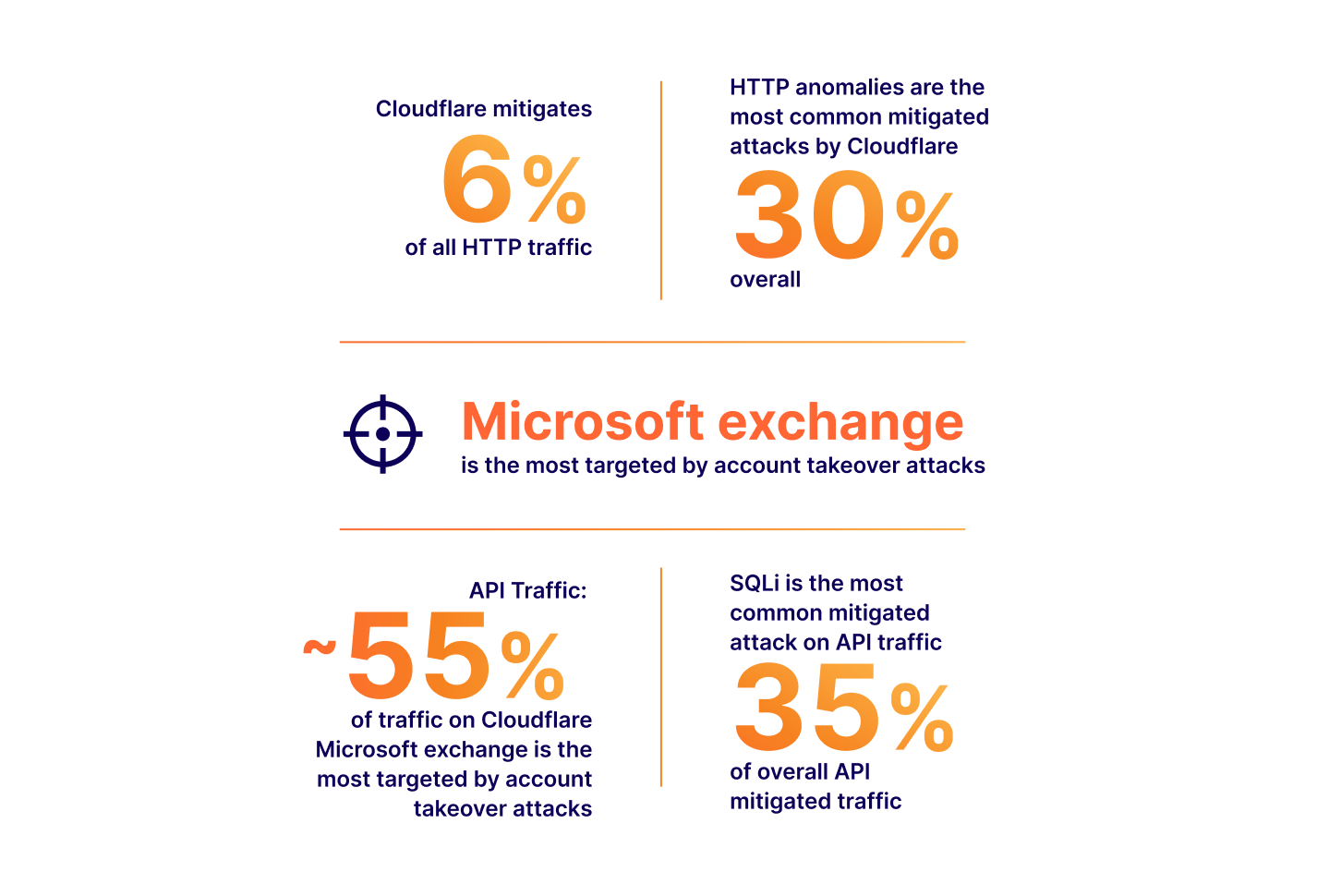
In this space, vendors, including ourselves, often like to boast the importance of their solution by presenting ever-growing statistics around threats to web applications. Bigger numbers and scarier stats are great ways to justify expensive investments in web security. Taking a few examples from our very own application security report research (see our latest report here):
The numbers above all translate to real value: yes, a large portion of Internet HTTP traffic is malicious, therefore you could mitigate a non-negligible amount of traffic reaching your applications if you deployed a WAF. It is also true that we are seeing a drastic increase in global API traffic, therefore, you should look into the security of your APIs as you are likely serving API traffic you are not aware of. You need a WAF with API protection capabilities. And so on.
There is, however, one statistic often presented that hides a concept more directly tied to the value of a web application firewall:
This brings us to zero-days. The definition of a zero-day may vary depending on who you ask, but is generally understood to be an exploit that is not yet, or has very recently become, widely known with no patch available. High impact zero-days will get assigned a CVE number. These happen relatively frequently and the value can be implied by how often we see exploit attempts in the wild. Yes, you need a WAF to make sure you are protected from zero-day exploits.
But herein hides the real value: how quickly can a WAF mitigate a new zero-day/CVE?
By definition a zero-day is not well known, and a single malicious payload could be the one that compromises your application. From a purist standpoint, if your WAF is not fast at detecting new attack vectors, it is not providing sufficient value.
The faster the mitigation, the better. We refer to this as “time to mitigate”. Any WAF evaluation should focus on this metric.
How fast is fast enough?
24 hours? 6 hours? 30 minutes? Luckily we run one of the world's largest networks, and we can look at some real examples to understand how quickly a WAF really needs to be to protect most environments. I specifically mention “most” here as not everyone is the target of a highly sophisticated attack, and therefore, most companies should seek to be protected at least by the time a zero-day is widely known. Anything better is a plus.
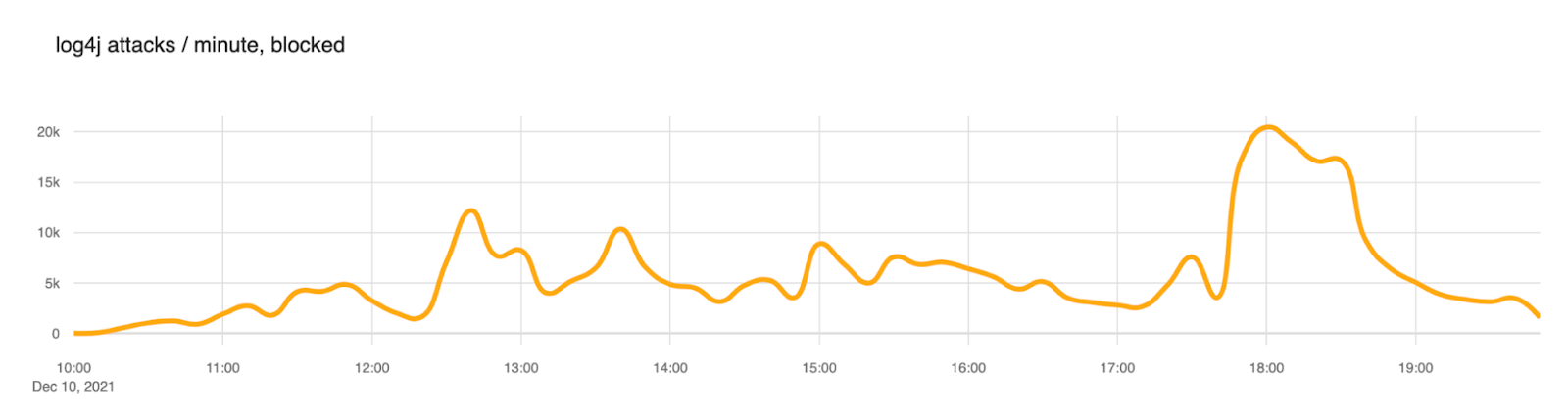
Our first example is Log4Shell (CVE-2021-44228). A high and wide impacting vulnerability that affected Log4J, a popular logging software maintained by the Apache Software Foundation. The vulnerability was disclosed back in December 2021. If you are a security practitioner, you have certainly heard of this exploit.
The proof of concept of this attack was published on GitHub on December 9, 2021, at 15:27 UTC. A tweet followed shortly after. We started observing a substantial amount of attack payloads matching the signatures from about December 10 at 10:00 UTC. That is about ~19 hours after the PoC was published.
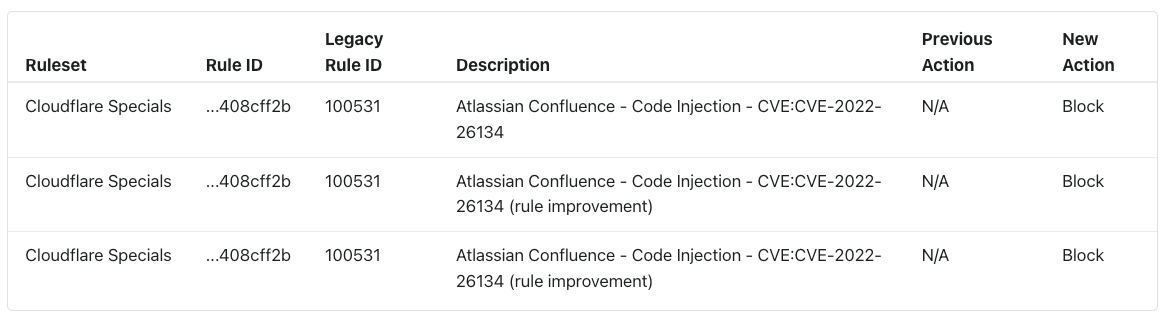
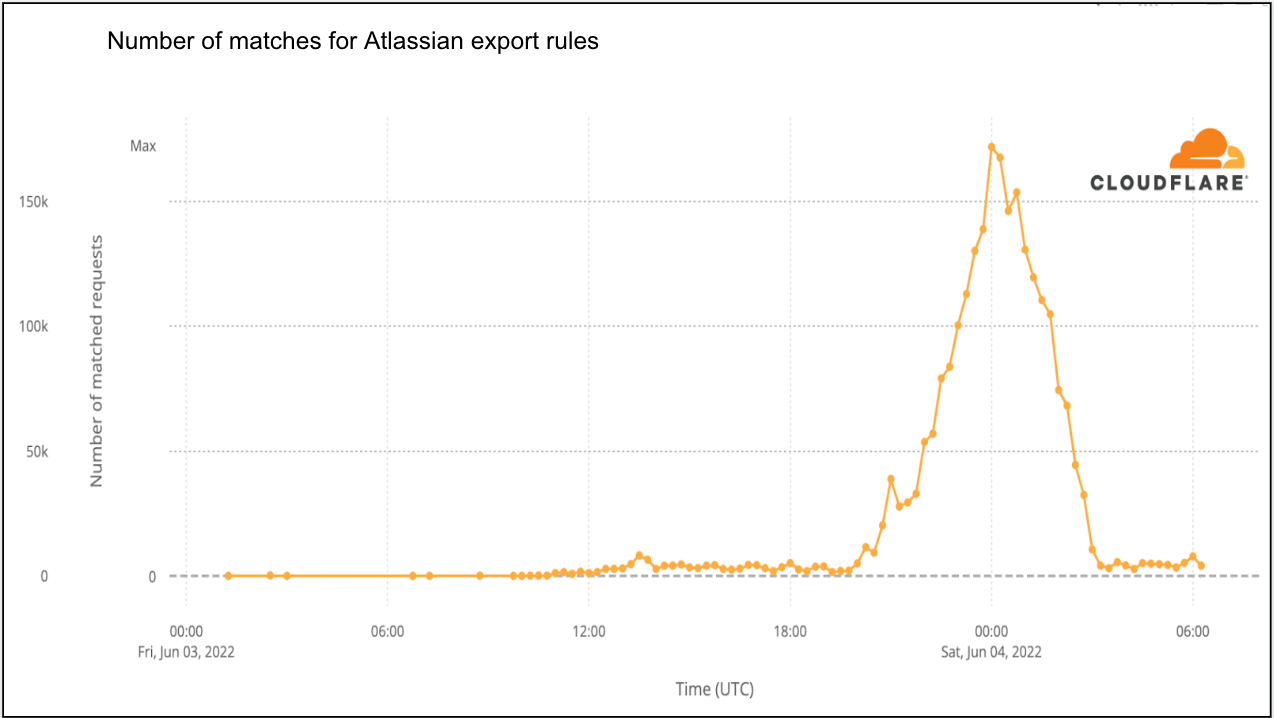
Our second example is a little more recent: Atlassian Confluence CVE-2022-26134 from June 2, 2022. In this instance Atlassian published a security advisory pertaining to the vulnerability at 20:00 UTC. We were very fast at deploying mitigations and had rules globally deployed protecting customers at 23:38 UTC, before the four-hour mark.
Although potentially matching payloads were observed before the rules were deployed, these were not confirmed. Exact matches were only observed on 2022-06-03 at 10:30 UTC, over 10 hours after rule deployment. Even in this instance, we provided our observations on our blog.
The list of examples could go on, but the data tells the same story: for most, as long as you have mitigations in place within a few hours, you are likely to be fine.
That, however, is a dangerous statement to make. Cloudflare protects applications that have some of the most stringent security requirements due to the data they hold and the importance of the service they provide. They could be the one application that is first targeted with the zero-day well before it is widely known. Also, we are a WAF vendor and I would not be writing this post if I thought “a few hours” was fast enough.
Zero (time) is the only acceptable time to mitigate!
Signatures are not enough, but are here to stay
All WAFs on the market today will have a signature based component. Signatures are great as they can be built to minimize false positives (FPs), their behavior is predictable and can be improved overtime.
We build and maintain our own signatures provided in the WAF as the Cloudflare Managed Ruleset. This is a set of over 320 signatures (at time of writing) that have been fine-tuned and optimized over the 13 years of Cloudflare’s existence.
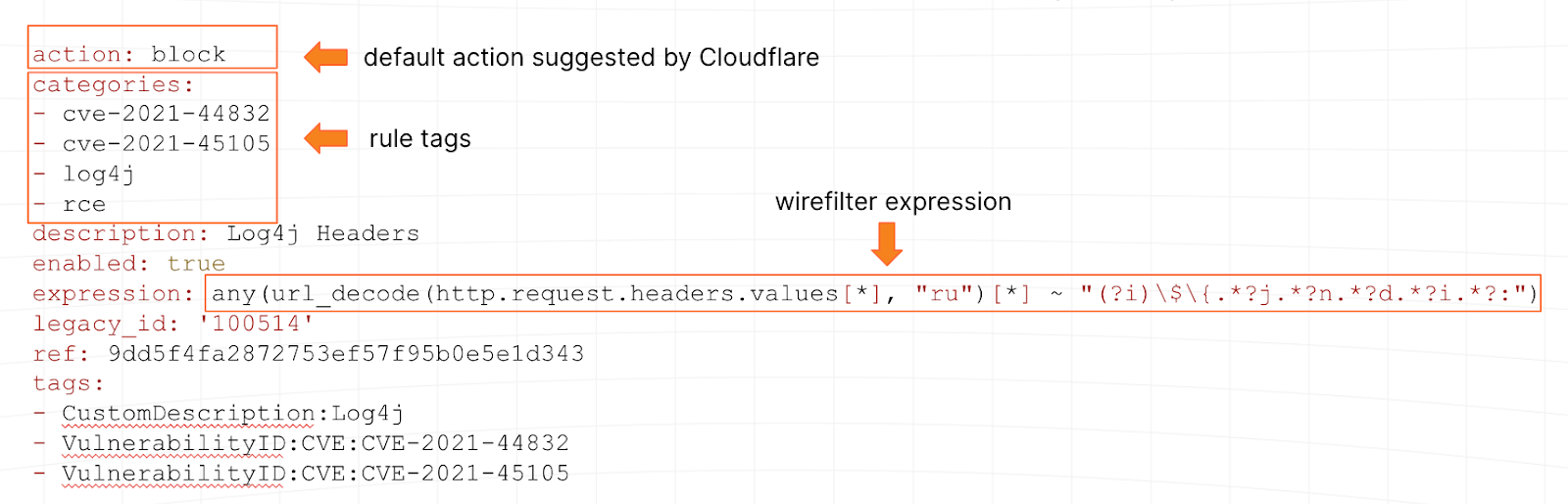
Signatures tend to be written in ModSecurity, regex-like syntax or other proprietary language. At Cloudflare, we use wirefilter, a language understood by our global proxy. To use the same example as above, here is what one of our Log4Shell signatures looks like:
Our network, which runs our WAF, also gives us an additional superpower: the ability to test new signatures (or updates to existing ones) on over 64M HTTP/S requests per second at peak. We can tell pretty quickly if a signature is well written or not.
But one of their qualities (low false positive rates), along with the fact that humans have to write them, are the source of our inability to solely rely on signatures to reach zero time to mitigate. Ultimately a signature is limited by the speed at which we can write it, and combined with our goal to keep FPs low, they only match things we know and are 100% sure about. Our WAF security analyst team is, after all, limited by human speed while balancing the effectiveness of the rules.
The good news: signatures are a vital component to reach zero time to mitigate, and will always be needed, so the investment remains vital.
Getting to zero time to mitigation
To reach zero time to mitigate we need to rely on some machine learning algorithms. It turns out that WAFs are a great application for this type of technology especially combined with existing signature based systems. In this post I won’t describe the algorithms themselves (subject for another post) but will provide the high level concepts of the system and the steps of how we built it.
Step 1: create the training set
It is a well known fact in data science that the quality of any classification system, including the latest generative AI systems, is highly dependent on the quality of the training set. The old saying “garbage in, garbage out” resonates well.
And this is where our signatures come into play. As these were always written with a low false positive rate in mind, combined with our horizontal WAF deployment on our network, we essentially have access to millions of true positive examples per second to create what is likely one of the best WAF training sets available today.
We also, due to customer configurations and other tools such as Bot Management, have a pretty clear idea of what true negatives look like. In summary, we have a constant flow of training data. Additionally due to our self-service plans and the globally distributed nature of Cloudflare’s service and customer base, our data tends to be very diverse, removing a number of biases that may otherwise be present.
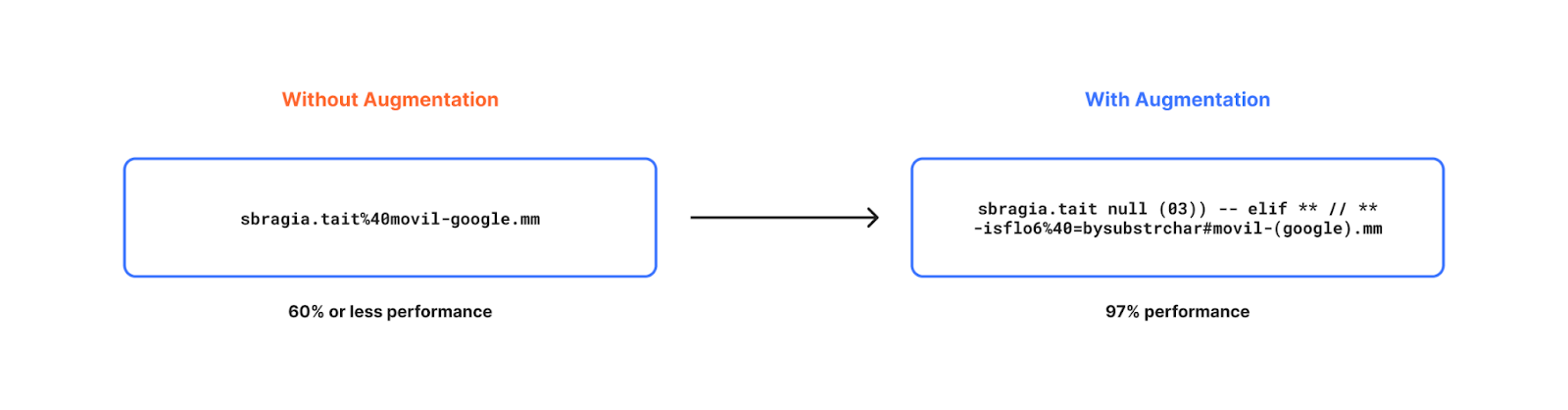
Simply relying on real traffic data is good, but with a few artificial enhancements the training set can become a lot better, leading to much higher detection efficacy.
In a nutshell we went through the process of generating artificial (but realistic) data to increase the diversity of our data even further by studying statistical distribution of existing real-world data. For example, mutating benign content with random character noise, language specific keywords, generating new benign content and so on.
One restriction that often applies to machine learning based classifiers running to inline traffic, like the Cloudflare proxy, is latency performance. To be useful, we need to be able to compute classification “inline” without affecting the user experience for legitimate end users. We don’t want security to be associated with “slowness”.
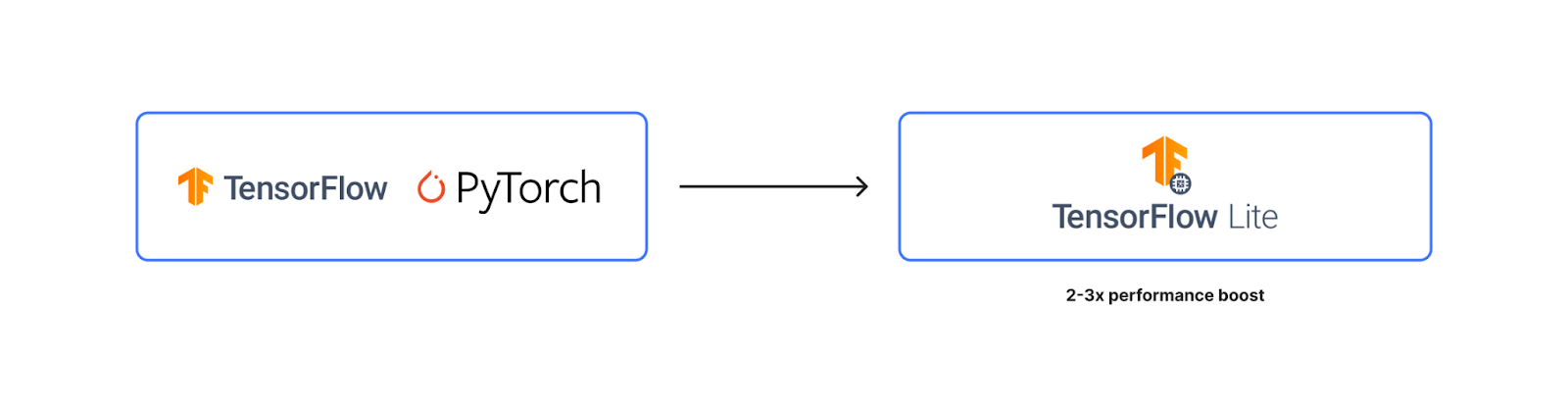
This required us to fine tune not only the feature set used by the classification system, but also the underlying tooling, so it was both fast and lightweight. The classifier is built using TensorFlow Lite.
At time of writing, our classification model is able to provide a classification output under 1ms at 50th percentile. We believe we can reach 1ms at 90th percentile with ongoing efforts.
Step 4: deploy on the network
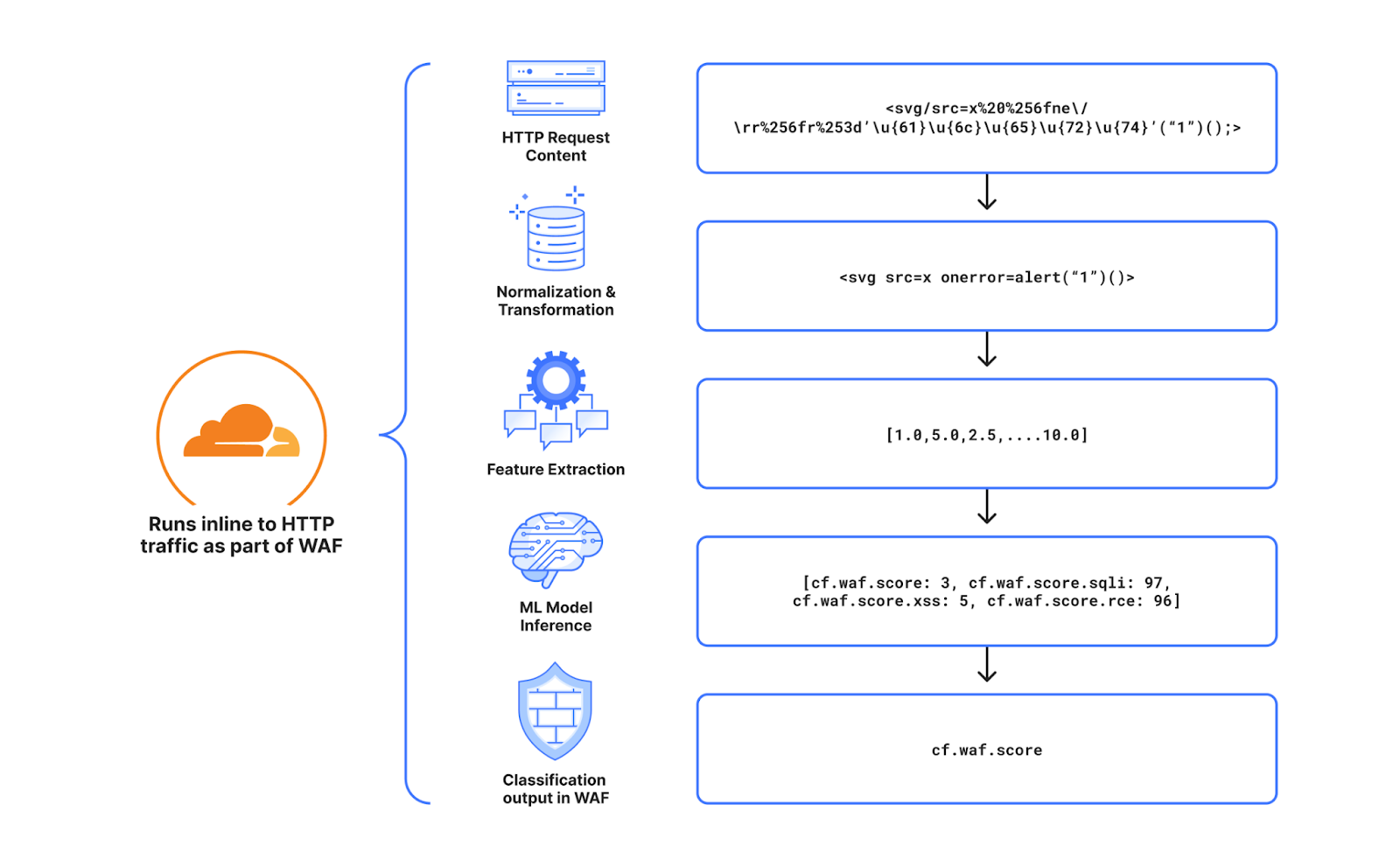
Once the classifier is ready, there is still a large amount of additional work needed to deploy on live production HTTP traffic, especially at our scale. Quite a few additional steps need to be implemented starting from a fully formed live HTTP request and ending with a classification output.
The diagram below is a good summary of each step. First and foremost, starting from the raw HTTP request, we normalize it, so it can easily be parsed and processed, without unintended consequences, by the following steps in the pipeline. Second we extract the relevant features found after experimentation and research, that would be more beneficial for our use case. To date we extract over 6k features. We then run inference on the resulting features (the actual classification) and generate outputs for the various attack types we have trained the model for. To date we classify cross site scripting payloads (XSS), SQL injection payloads (SQLi) and remote code execution payloads (RCE). The final step is to consolidate the output in a single WAF Attack Score.
Step 5: expose output as a simple interface
To make the system usable we decided the output should be in the same format as our Bot Management system output. A single score that ranges from 1 to 99. Lower scores indicate higher probability that the request is malicious, higher scores indicate the request is clean.
There are two main benefits of representing the output within a fixed range. First, using the output to BLOCK traffic becomes very easy. It is sufficient to deploy a WAF rule that blocks all HTTP requests with a score lower than $x, for example a rule that blocks all traffic with a score lower than 10 would look like this:
cf.waf.score < 10 then BLOCK
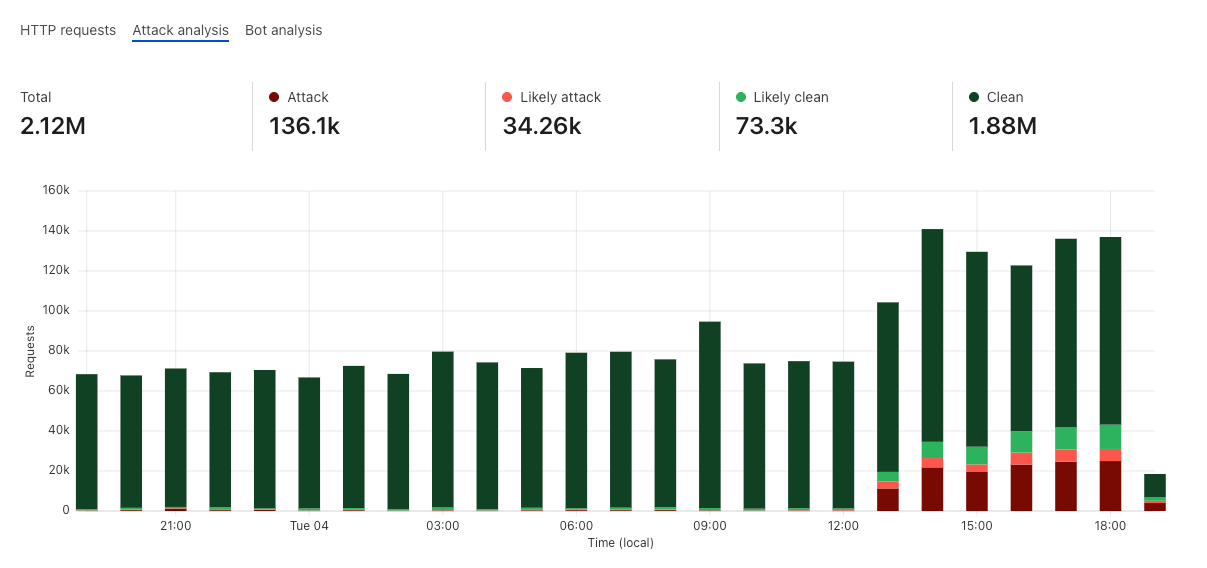
Secondly, deciding what the threshold should be can be done easily by representing the score distributions on your live traffic in colored “buckets”, and then allowing you to zoom in where relevant to validate the correct classification. For example, the graph below shows an attack that we observed against blog.cloudflare.com when we initially started testing the system. This graph is available to all business and enterprise users.
All that remains, is to actually use the score!
Success in the wild
The classifier has been deployed for just over a year on Cloudflare’s network. The main question stated at the start of this post remains: does it work? Have we been able to detect attacks before we’ve seen them? Have we achieved zero time to mitigate?
To answer this we track classification output for new CVEs that fail to be detected by existing Cloudflare Managed Rules. Of course our rule improvement work is always ongoing, but this gives us an idea on how well the system is performing.
And the answer: YES. For all CVEs or bypasses that rely on syntax similar to existing vulnerabilities, the classifier performs very well, and we have observed several instances of it blocking valid malicious payloads that were not detected by our signatures. All of this, while keeping false positives very low at a threshold of 15 or below. XSS variations, SQLi CVEs, are in most cases, a problem fully solved if the classifier is deployed.
One recent example is a set of Sitecore vulnerabilities that were disclosed in June 2023 listed below:
The CVEs listed above were not detected by Cloudflare Managed Rules, but were correctly detected and classified by our model. Customers that had the score deployed in a rule in June 2023, would have been protected in zero time.
This does not mean there isn’t space for further improvement.
The classification works very well for attack types that are aligned, or somewhat similar to existing attack types. If the payload implements a brand new never seen before syntax, then we still have some work to do. Log4Shell is actually a very good example of this. If another zero-day vulnerability was discovered that leveraged the JNDI Java syntax, we are confident that our customers who have deployed WAF rules using the WAF Attack Score would be safe against it.
We are already working on adding more detection capabilities including web shell detection and open redirects/path traversal.
The perfect feedback loop
I mentioned earlier that our security analyst driven improvements to our Cloudflare Managed Rulesets are not going to stop. Our public changelog is full of activity and there is no sign of slowing down.
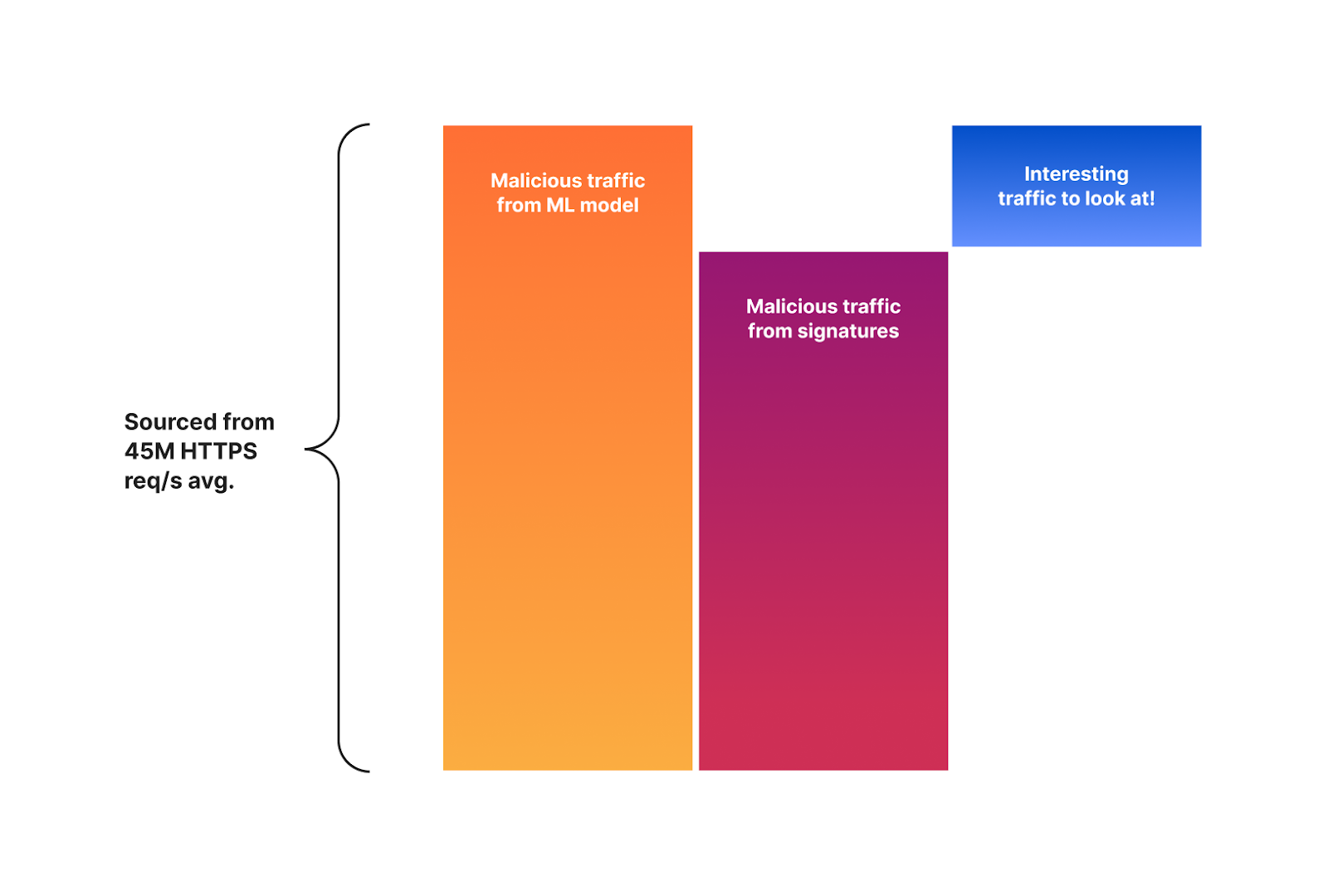
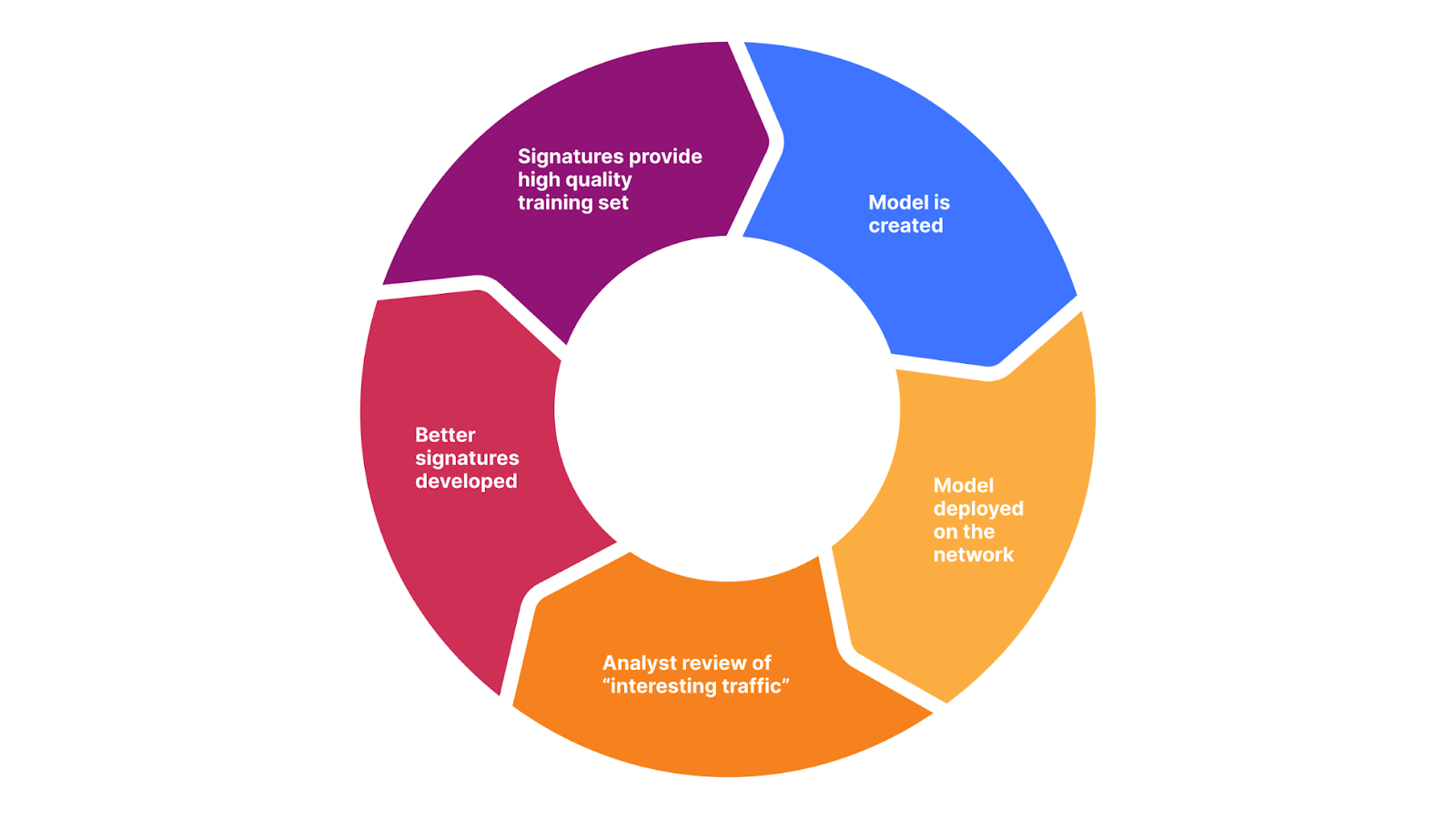
There is a good reason for this: the signature based system will remain, and likely eventually be converted to our training set generation tool. But not only that, it also provides an opportunity to speed up improvements by focusing on reviewing malicious traffic that is classified by our machine learning system but not detected by our signatures. The delta between the two systems is now one of the main focuses of attention for our security analyst team. The diagram below visualizes this concept.
It is this delta that is helping our team to further fine tune and optimize the signatures themselves. Both to match malicious traffic that is bypassing the signatures, and to reduce false positives. You can now probably see where this is going as we are starting to build the perfect feedback loop.
Better signatures provide a better training set (data). In turn, we can create a better model. The model will provide us with a more interesting delta, which, once reviewed by humans, will allow us to create better signatures. And start over.
We are now working to automate this entire process with the goal of having humans simply review and click to deploy. This is the leading edge for WAF zero-day mitigation in the industry.
Summary
One of the main value propositions of any web application security product is the ability to detect novel attack vectors before they can cause an issue, allowing internal teams time to patch and remediate the underlying codebase. We call this time to mitigate. The ideal value is zero.
We’ve put a lot of effort and research into a machine learning system that augments our existing signature based system to yield very good classification results of new attack vectors the first time they are seen. The system outputs a score that we call the WAF Attack Score. We have validated that for many CVEs, we are indeed able to correctly classify malicious payloads on the first attempt and provide Sitecore CVEs as an example.
Moving forward, we are now automating a feedback loop that will allow us to both improve our signatures faster, to then subsequently iterate on the model and provide even better detection.
The system is live and available to all our customers in the business or enterprise plan. Log in to the Cloudflare dashboard today to receive instant zero-day mitigation.
To provide the best experiences, we use technologies like cookies to store and/or access device information. Consenting to these technologies will allow us to process data such as browsing behavior or unique IDs on this site. Not consenting or withdrawing consent, may adversely affect certain features and functions.
Functional
Always active
The technical storage or access is strictly necessary for the legitimate purpose of enabling the use of a specific service explicitly requested by the subscriber or user, or for the sole purpose of carrying out the transmission of a communication over an electronic communications network.
Preferences
The technical storage or access is necessary for the legitimate purpose of storing preferences that are not requested by the subscriber or user.
Statistics
The technical storage or access that is used exclusively for statistical purposes.The technical storage or access that is used exclusively for anonymous statistical purposes. Without a subpoena, voluntary compliance on the part of your Internet Service Provider, or additional records from a third party, information stored or retrieved for this purpose alone cannot usually be used to identify you.
Marketing
The technical storage or access is required to create user profiles to send advertising, or to track the user on a website or across several websites for similar marketing purposes.