Tag Archives: AWS for VMware

Introducing Amazon Elastic VMware Service for running VMware Cloud Foundation on AWS

Post Syndicated from Micah Walter original https://aws.amazon.com/blogs/aws/introducing-amazon-elastic-vmware-service-for-running-vmware-cloud-foundation-on-aws/

Today, we’re announcing the general availability of Amazon Elastic VMware Service (Amazon EVS), a new AWS service that lets you run VMware Cloud Foundation (VCF) environments directly within your Amazon Virtual Private Cloud (Amazon VPC). With Amazon EVS, you can deploy fully functional VCF environments in just hours using a guided workflow, while running your VMware workloads on qualified Amazon Elastic Compute Cloud (Amazon EC2) bare metal instances and seamlessly integrating with AWS services such as Amazon FSx for NetApp ONTAP.

Many organizations running VMware workloads on premises want to move to the cloud to benefit from improved scalability, reliability, and access to cloud services, but migrating these workloads often requires substantial changes to applications and infrastructure configurations. Amazon EVS lets customers continue using their existing VMware expertise and tools without having to re-architect applications or change established practices, thereby simplifying the migration process while providing access to AWS’s scale, reliability, and broad set of services.

With Amazon EVS, you can run VMware workloads directly in your Amazon VPC. This gives you full control over your environments while being on AWS infrastructure. You can extend your on-premises networks and migrate workloads without changing IP addresses or operational runbooks, reducing complexity and risk.

Key capabilities and features

Amazon EVS delivers a comprehensive set of capabilities designed to streamline your VMware workload migration and management experience. The service enables seamless workload migration without the need for replatforming or changing hypervisors, which means you can maintain your existing infrastructure investments while moving to AWS. Through an intuitive, guided workflow on the AWS Management Console, you can efficiently provision and configure your EVS environments, significantly reducing the complexity to migrate your workloads to AWS.

With Amazon EVS, you can deploy a fully functional VCF environment running on AWS in a few hours. This process eliminates many of the manual steps and potential configuration errors that often occur during traditional deployments. Furthermore, with Amazon EVS you can optimize your virtualization stack on AWS. Given the VCF environment runs inside your VPC, you have full full administrative access to the environment and the associated management appliances. You also have the ability to integrate third-party solutions, from external storage such as Amazon FSx for NetApp ONTAP or Pure Cloud Block Store or backup solutions such as Veeam Backup and Replication.

The service also gives you the ability to self-manage or work with AWS Partners to build, manage, and operate your environments. This provides you with flexibility to match your approach with your overall goals.

Setting up a new VCF environment

Organizations can streamline their setup process by ensuring they have all the necessary pre-requisites in place ahead of creating a new VCF environment. These prerequisites include having an active AWS account, configuring the appropriate AWS Identity and Access Management (IAM) permissions, and setting up a Amazon VPC with sufficient CIDR space and two Route Server endpoints, with each endpoint having its own peer. Additionally, customers will need to have their VMware Cloud Foundation license keys ready, secure Amazon EC2 capacity reservations specifically for i4i.metal instances, and prepare their VLAN subnet information planning.

To help ensure a smooth deployment process, we’ve provided a Getting started hub, which you can access from the EVS homepage as well as a comprehensive guide in our documentation. By following these preparation steps, you can avoid potential setup delays and ensure a successful environment creation.
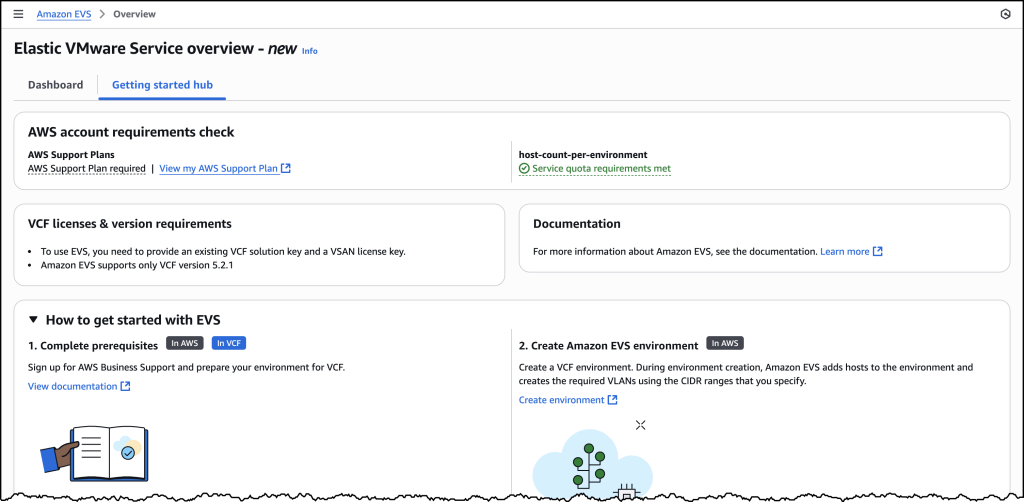
Screenshots of EVS onboarding

Let’s walk through the process of setting up a new VCF environment using Amazon EVS.
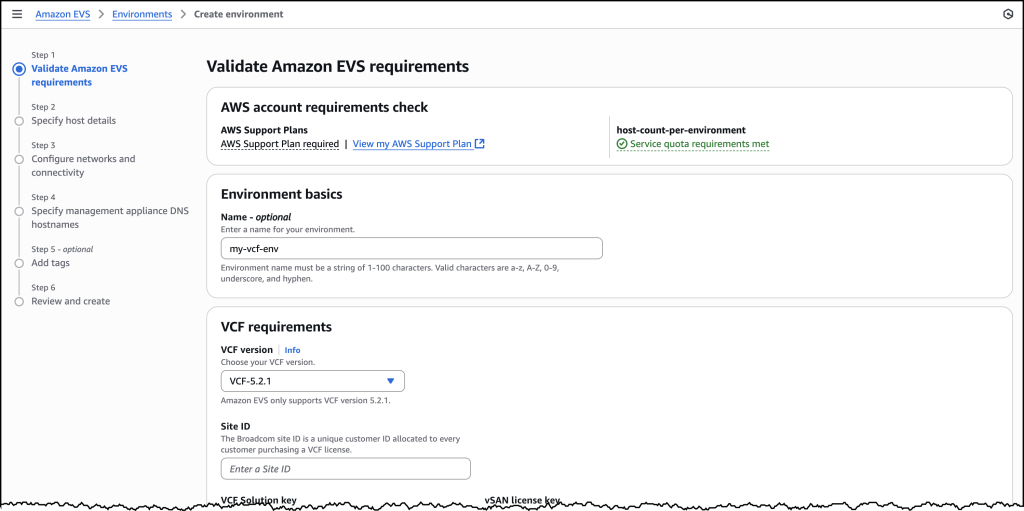
Screenshots of EVS onboarding

You will need to provide your Site ID, which is allocated by Broadcom when purchasing VCF licenses, along with your license keys. To ensure a successful initial deployment, you should verify you have sufficient licensing coverage for a minimum of 256 cores. This translates to at least four i4i.metal instances, with each instance providing 64 physical cores.

This licensing requirement helps you maintain optimal performance and ensures your environment meets the necessary infrastructure specifications. By confirming these requirements upfront, you can avoid potential deployment delays and ensure a smooth setup process.
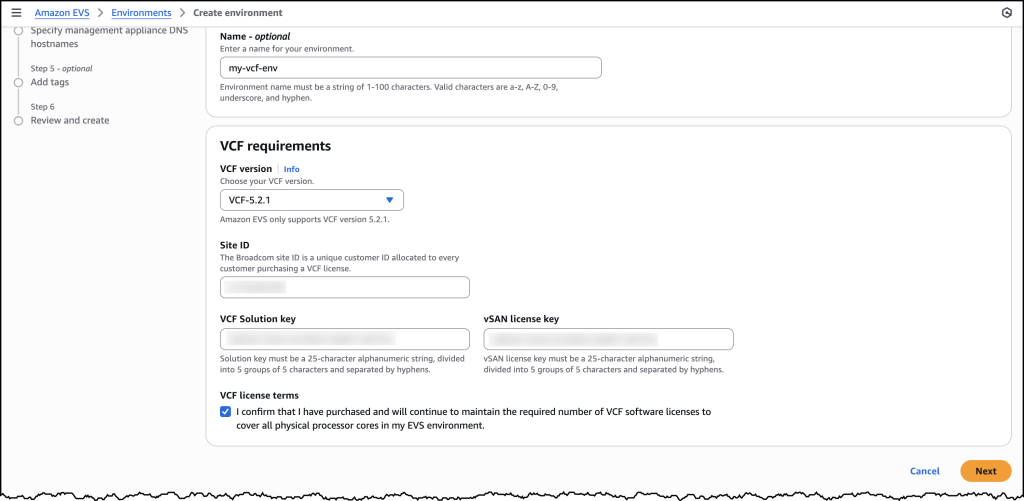
Screenshots of EVS onboarding

Once you have provided all the required details, you will be prompted to specify your host details. These are the underlying Amazon EC2 instances that your VCF environment will get deployed in.
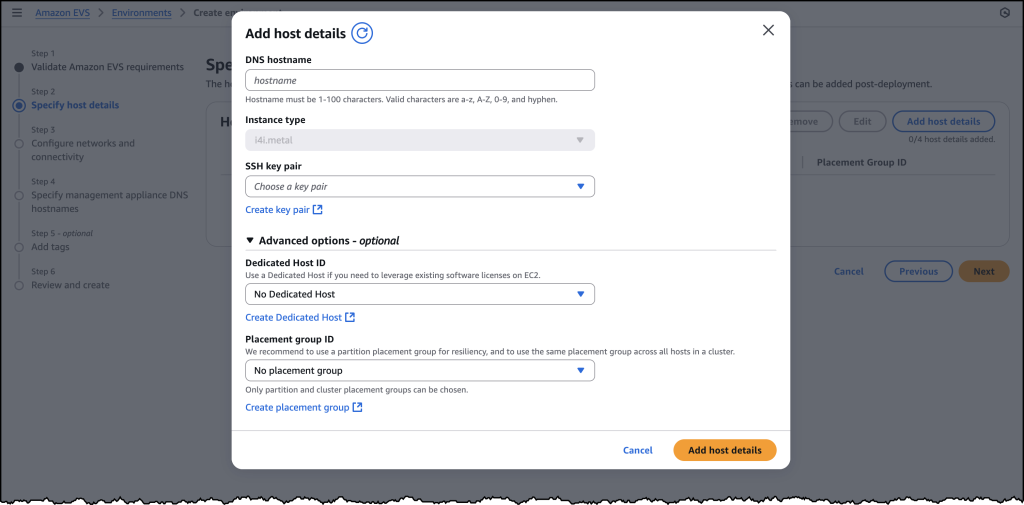
Screenshots of EVS onboarding

Once you have filled out details for each of your host instances, you will need to configure your networking and management appliance DNS details. For further information on how to create a new VCF environment on Amazon EVS, follow the documentation here.
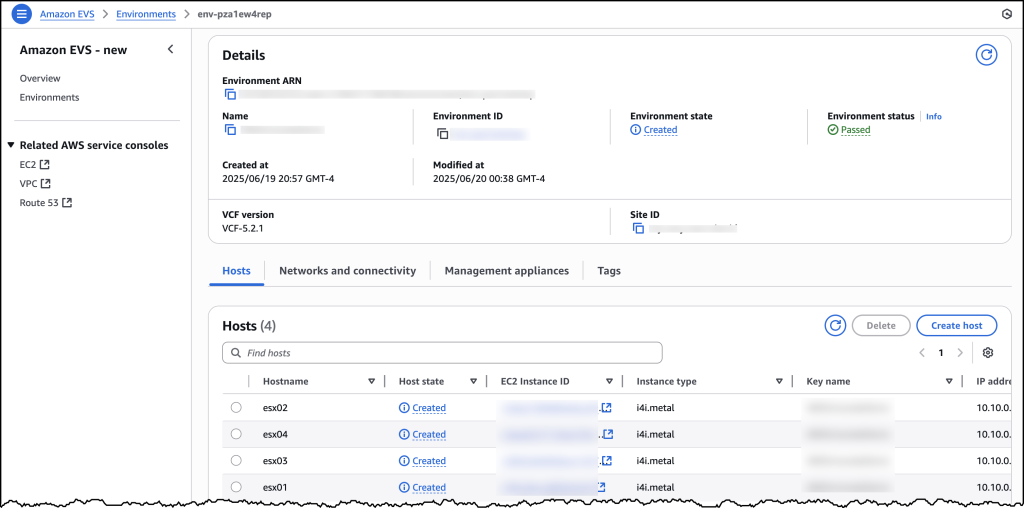
Screenshots of EVS onboarding

After you have created your VCF environment, you will be able to look over all of the host and configuration details through the AWS Console.

Additional things to know

Amazon EVS currently supports VCF version 5.2.1 and runs on i4i.metal instances. Future releases will expand VCF versions, licensing options, and more instance type support to provide even more flexibility for your deployments.

Amazon EVS provides flexible storage options. Your Amazon EVS local Instance storage is powered by VMware’s vSAN solution, which pools local disks across multiple ESXi hosts into a single distributed datastore. To scale your storage, you can leverage external Network File System (NFS) or iSCSI-based storage solutions. For example, Amazon FSx for NetApp ONTAP is particularly well-suited for use as an NFS datastore or shared block storage over iSCSI.

Additionally, Amazon EVS makes connecting your on-premises environments to AWS simple. You can connect from on-premises vSphere environment into Amazon EVS using a Direct Connect connection or a VPN that terminates into a transit gateway. Amazon EVS also manages the underlying connectivity from your VLAN subnets into your VMs.

AWS provides comprehensive support for all AWS services deployed by Amazon EVS, handling direct customer support while engaging with Broadcom for advanced support needs. Customers must maintain AWS Business Support on accounts running the service.

Availability and pricing

Amazon EVS is now generally available in US East (N. Virginia), US East (Ohio), US West (Oregon), Europe (Frankfurt), Europe (Ireland), and Asia Pacific (Tokyo) AWS Regions, with additional Regions coming soon. Pricing is based on the Amazon EC2 instances and AWS resources you use, with no minimum fees or upfront commitments.

To learn more, visit the Amazon EVS product page.

Migrate and modernize VMware workloads with AWS Transform for VMware

Post Syndicated from Kiran Reid original https://aws.amazon.com/blogs/architecture/migrate-and-modernize-vmware-workloads-with-aws-transform-for-vmware/

On May 15, 2025, AWS unveiled a game-changing solution: AWS Transform for VMware. This innovative service tackles head-on the longstanding challenges of cloud migration, ushering in a new era of streamlined, efficient transitions to the AWS Cloud. By significantly reducing manual effort and accelerating the migration of critical VMware workloads, AWS Transform for VMware is set to revolutionize how organizations approach their cloud journey.

Since its general availability announcement, AWS Transform for VMware has ignited enthusiasm across industries, with organizations eager to leverage its capabilities to accelerate their VMware workload migration and modernization initiatives. As we dive into the intricacies of this transformative technology, we’ll uncover how AWS Transform for VMware is not just simplifying migrations, but reshaping the very landscape of cloud adoption and digital transformation.

The VMware migration challenge

Moving enterprise workloads to the cloud isn’t just a technical challenge – it’s a business transformation that demands precision, speed, and minimal disruption. Years of established operational processes have often led to complex environments with poorly documented configurations, inconsistent security practices, and heavy reliance on institutional knowledge. Technical teams must navigate intricate application dependencies, coordinate across multiple stakeholders, and maintain business continuity while executing these transformational projects. The lack of comprehensive documentation and clear understanding of system inter-dependencies frequently results in extended migration timelines and increased project risks. Additionally, the need to balance ongoing operations with migration activities presents challenges. Achieving proper knowledge transfer adds another layer of complexity to these critical initiatives.

Solution overview

Let’s explore how AWS Transform for VMware simplifies application discovery, automates network conversion, and orchestrates complex migrations through its comprehensive architecture in the following diagram.

To understand how these capabilities work together, let’s examine each component of the architecture.

Streamlined discovery and assessment

The journey begins with a thorough discovery and assessment of your VMware environment (1). AWS Transform for VMware (4) supports multiple discovery methods. One option is RVTools for VMware inventory collection. For customers running VMware NSX, there’s optional import/export functionality. Additionally, AWS Application Discovery Service offers both agent-based and agentless discovery options (2) to gather and collect data and dependencies for migration.

The Inventory Discovery capability (5) collects crucial data from your source environment and stores it securely in Amazon Simple Storage Service (Amazon S3) buckets (12) within the AWS Migration Discovery Account (7). This data forms the foundation for informed migration planning and is further processed by AWS Application Discovery Service (15) in the AWS Migration Planning Account. AWS Transform works together with these services to provide a single place to track migration progress and collect server inventory and dependency data, which is essential for successful application grouping and wave planning.

Intelligent network conversion and wave planning

With a comprehensive understanding of your environment, AWS Transform for VMware moves to the next critical phase. The Network Migration capability (19) automates the creation of AWS CloudFormation templates (13, 26) to set up the target network infrastructure. These templates ensure your cloud environment closely mirrors your source setup, simplifying the setup for the migration.

Meanwhile, the Wave Planning capability (6) uses advanced graph neural networks to analyze application dependencies and plan optimal migration waves. This minimizes complex portfolio and application dependency analysis, and provides ready-to-migrate wave plans, resulting in smooth migrations.

Enhanced security and compliance

Security remains paramount throughout the migration process. AWS Key Management Service (AWS KMS) (8, 16, 26) provides robust encryption for stored data, conversation history, and artifacts. By default, AWS managed keys are used, with the option to use customer managed keys (CMKs) for additional control.

AWS Organizations (9) enables centralized management across multiple AWS accounts, and AWS CloudTrail (14, 26) captures and logs API activities for a complete audit trail. Access control is managed through AWS Identity and Access Management (IAM) (26), providing centralized access management across AWS accounts.

Amazon CloudWatch (10, 26) continuously monitors AWS Transform service activities, resource utilization, and operational metrics within the management account, providing full visibility and control throughout the migration process. AWS Identity Center (11) further enhances security by providing centralized access management across all AWS accounts involved in the migration.

Orchestrated migration execution

When it’s time to execute the migration, AWS Transform orchestrates the end-to-end migration by coordinating across various AWS tools and services (20). The AWS Application Migration Service (25) replicates servers from your source environment to Amazon Elastic Compute Cloud (Amazon EC2) instances (21) in the AWS Migration Target Account (18), based on the carefully planned waves and groupings.

The AWS Replication Agent (2) works in tandem with AWS Application Migration Service to ensure efficient and reliable data transfer. Amazon Elastic Block Store (Amazon EBS) (21) provides the necessary storage for the migrated virtual machines, ensuring optimal performance and scalability.

Flexible network configuration

AWS Transform for VMware offers two networking models to suit different requirements:

  • Hub-and-spoke model – AWS Transit Gateway (23) connects virtual private clouds (VPCs) through a central hub VPC with shared NAT gateways. This model is ideal for centralized management and shared services.
  • Isolated model – Each VPC operates independently with no connectivity established. This approach is designed for customers with existing AWS network infrastructure, enabling you to manually connect the new VPCs to your existing network topology.

VPCs (22) created by AWS Transform match your on-premises network segments, providing a seamless transition. NAT gateways (24) provide outbound internet access for private subnets, maintaining security while enabling necessary connectivity. In hub-and-spoke architectures, centralized NAT gateways in the hub VPC can serve multiple spoke VPCs, optimizing costs and simplifying management. For isolated VPC deployments, dedicated NAT gateways must be provisioned within each VPC requiring internet access. In all cases, you must configure route tables to enable egress traffic flow through the NAT gateways

For complete setup instructions and requirements, refer to the AWS Transform User Guide.

Additional considerations

AWS Transform for VMware discovery workspaces are available globally (3). For the most up-to-date information on supported Regions, refer to AWS Services by Region (17).

Throughout the migration process, Amazon S3 buckets (12, 26) in both the AWS Migration Discovery Account and AWS Migration Target Account store key migration artifacts. These include inventory data, dependency mappings, wave plans, and application groupings, as well as Infrastructure as Code templates (AWS CloudFormation and AWS Cloud Development Kit) and per-wave migration plans.

Customers Benefits

AWS Transform for VMware delivers significant advantages:

  • Reduced manual effort – It minimizes human error and frees up valuable IT resources through automation
  • Enhanced accuracy – You can use AI-driven dependency mapping and wave planning for optimal migration strategies
  • Improved collaboration – Centralized management and tracking foster better cross-team coordination
  • Cost optimization – You can right-size instances and take advantage of AWS’s flexible pricing models for immediate and long-term savings
  • Future-proofing – It opens up the opportunity for ongoing modernization and innovation on the AWS Cloud platform

Always review and follow your organization’s security requirements, compliance obligations, and AWS security best practices when implementing any migration solution. For detailed security guidance, consult the AWS Security Documentation and your organization’s security team.

Pricing

AWS Transform accelerates migration and modernization projects for VMware workloads with agentic AI capabilities. Currently, we offer our core features—including assessment and transformation—at no cost* to AWS customers. This allows you to speed up your migration and modernization journey without upfront expenses.

*No cost refers to the AWS Transform service itself. Standard charges apply for AWS services and resources used during migrations.

Summary and Next Steps

AWS Transform for VMware empowers organizations to overcome the complexities of VMware migration and modernization. By providing a comprehensive, automated approach, it enables faster, more reliable transitions to the AWS Cloud. This new service offers the tools and capabilities needed to navigate the changing VMware landscape confidently.

The architecture we explored demonstrates how AWS Transform for VMware tackles key challenges:

  • Streamlines discovery and assessment processes
  • Automates network conversion and intelligent wave planning
  • Orchestrates migration execution with minimal disruption
  • Enhances security and compliance throughout the migration
  • Provides centralized management and monitoring
  • Offers flexible networking options to suit diverse requirements

Ready to accelerate your VMware migration journey? Visit the AWS Transform for VMware product page to learn more and get started today. Check out the following interactive demo of AWS Transform for VMware. If you’re exporting your network configuration from a VMware NSX environment, also refer to Exporting network configuration data with Import/Export for NSX. Our team of experts is ready to guide you through your migration and modernization initiatives, helping you unlock the full potential of the AWS Cloud.


About the authors

Accelerate the modernization of Mainframe and VMware workloads with AWS Transform

Post Syndicated from Matheus Guimaraes original https://aws.amazon.com/blogs/aws/accelerate-the-modernization-of-mainframe-and-vmware-workloads-with-aws-transform/

Generative AI has brought many new possibilities to organizations. It has equipped them with new abilities to retire technical debt, modernize legacy systems, and build agile infrastructure to help unlock the value that is trapped in their internal data. However, many enterprises still rely heavily on legacy IT infrastructure, particularly mainframes and VMware-based systems. These platforms have been the backbone of critical operations for decades, but they hinder organizations’ ability to innovate, scale effectively, and reduce technical debt in an era where cloud-first strategies dominate. The need to modernize these workloads is clear, but the journey has traditionally been complex and risky.

The complexity spans multiple dimensions. Financially, organizations face mounting licensing costs and expensive migration projects. Technically, they must untangle legacy dependencies while meeting compliance requirements. Organizationally, they must manage the transition of teams who’ve built careers around legacy systems and navigate undocumented institutional knowledge.

AWS Transform directly addresses these challenges with purpose-built agentic AI that accelerates and de-risks your legacy modernization. It automates the assessment, planning, and transformation of both mainframe and VMware workloads into cloud based architectures, streamlining the entire process. Through intelligent insights, automated code transformation, and human-in-the-loop workflows, organizations can now tackle even the most challenging modernization projects with greater confidence and efficiency.

Mainframe workload migration
AWS Transform for mainframe is the first agentic AI service for modernizing mainframe workloads at scale. The specialized mainframe agent accelerates mainframe modernization by automating complex, resource-intensive tasks across every phase of modernization — from initial assessment to final deployment. It streamlines the migration of legacy applications built on IBM z/OS Db2, including COBOL, CICS, DB2, and VSAM, to modern cloud environments–cutting modernization timelines from years to months.

Let’s look at a few examples of how AWS Transform can help you through different aspects of the migration process.

Code analysis – AWS Transform provides comprehensive insights into your codebase, automatically examining mainframe codebases, creating detailed dependency graphs, measuring code complexity, and identifying component relationships

Documentation – AWS Transform for mainframe creates comprehensive technical and functional documentation of mainframe applications, preserving critical knowledge about features, program logic, and data flows. You can interact with the generated documentation through an AI-powered chat interface to discover and retrieve information quickly.

Business rule extraction – AWS Transform extracts and presents complex logic in plain language so you can gain visibility into business processes embedded within legacy applications. This enables both business and technical stakeholders to gain a greater understanding of application functionality.

Code decomposition – AWS Transform offers sophisticated code decomposition tools, including interactive dependency graphs and domain separation capabilities, enabling users to visualize and modify relationships between components while identifying key business functions. The solution also streamlines migration planning through an interactive wave sequence planner that considers user preferences to generate optimized migration strategies.

Modernization Wave Planning – With its specialized agent, AWS Transform for mainframe creates prioritized modernization wave sequences based on code and data dependencies, code volume, and business priorities. It enables modernization teams to make data-driven, customized migration plans that align to their specific organizational needs.

Code refactoring – AWS Transform can refactor millions of lines of mainframe code in minutes, converting COBOL, VSAM, and DB2 systems into modern Java Spring Boot applications while maintaining functional equivalence and transforming CICS transactions into web services and JCL batch processes into Groovy scripts. The solution provides high-quality output through configurable settings and bundled runtime capabilities, producing Java code that emphasizes readability, maintainability, and technical excellence.

Deployments – AWS Transform provides customizable deployment templates that streamline the deployment process through user-defined inputs. For added efficiency, the solution bundles the selected runtime version with the migrated application, enabling seamless deployment as a complete package.

By integrating intelligent documentation analysis, business rules extraction, and human-in-the-loop collaboration capabilities, AWS Transform helps organizations accelerate their mainframe transformation while reducing risk and maintaining business continuity.

VMware modernization
With rapid changes in VMware licensing and support model, organizations are increasingly exploring alternatives despite the difficulties associated with migrating and modernizing VMware workloads. This is aggravated by the fact that the accumulation of technical debt typically creates complex, poorly documented environments managed by multiple teams, leading to vendor lock-in and collaboration challenges that hinder migration efforts further.

AWS Transform is the first agentic AI service for VMware modernization of its kind that helps you to overcome those difficulties. It can offset risk and accelerate the modernization of VMware workloads by automating application discovery, dependency mapping, migration planning, network conversion, and EC2 instance optimization, reducing manual effort and accelerating cloud adoption.

The process is organized into four phases: inventory discovery, wave planning, network conversion, and server migration. It uses agentic AI capabilities to analyze and map complex VMware environments, converting network configurations into AWS built-in constructs and helps you to orchestrate dependency-aware migration waves for seamless cutovers. In addition, it also provides a collaborative web interface that keeps AWS teams, partners, and customers aligned throughout the modernization journey.

Let’s take a quick tour to see how this works.

Setting up
Before you can start using the service, you must first enable it by navigating to the AWS Transform console. AWS Transform requires AWS IAM Identity Center (IdC) to manage users and setup appropriate permissions. If you don’t yet have IdC set up it will ask you to configure it first and return to the AWS Transform console later to continue the process.

With IdC available, you can then proceed to choosing the encryption settings. AWS Transform gives you the option to use a default AWS managed key or you can use your own custom keys through AWS Key Management Service (AWS KMS).

After completing this step, AWS Transform will be enabled. You can manage admin access to the console by navigating to Users and using the search box to find them. You must create users or groups in IdC first if they don’t already exist. The service console will help admins provision users who will get access to the web app. Each provisioned user receives an email with a link to set password and get their personalized URL for the webapp.

You interact with AWS Transform through a dedicated web experience. To get the url, navigate to Settings where you can check your configurations and copy the links to the AWS Transform web experience where you and your teams can start using the service.

Discovery
AWS Transform can discover your VMware environment either automatically through AWS Application Discovery Service collectors or you can provide your own data by importing existing RVTools export files.

To get started, choose the Create or select connectors task and provide the account IDs for one or more AWS accounts that will be used for discovery. This will generate links that you can follow to authorize each account for usage within AWS Transform. You can then move on to the Perform discovery task, where you can choose to install AWS Application Discovery Service collectors or upload your own files such as exports from RVTools.

Provisioning
The steps for the provisioning phase are similar to the ones described earlier for discovery. You connect target AWS accounts by entering their account IDs and validating the authorization requests which will then enable the next steps such as the Generate VPC configuration step. Here, you can import your RVTools files or NSX exports from Import/Export from NSX, if applicable, and enable AWS Transform to understand your networking requirements.

You should then continue working through the job plan until you reach the point where it’s ready to deploy your Amazon Virtual Private Cloud (Amazon VPC). All the infrastructure as code (IaC) code is stored in Amazon Simple Storage Service (Amazon S3) buckets in the target AWS account.

Review the proposed changes and, if you’re happy, start the deployment process of the AWS resources to the target accounts.

Deployment
AWS Transform requires you to set up AWS Application Migration Service (MGN) in the target AWS accounts to automate the migration process. Choose the Initiate VM migration task and use the link to navigate to the service console, then follow the instructions to configure it.

After setting up service permissions, you’ll proceed to the implementation phase of the waves created by AWS Transform and start the migration process. For each wave, you’ll first be asked to make various choices such as setting the sizing preference and tenancy for the Amazon Elastic Compute Cloud (Amazon EC2) instances. Confirm your selections and continue following the instructions given by AWS Transform until you reach the Deploy replication agents stage, where you can start the migration for that wave.

After you start the waves migration process, you can switch to the dashboard at any time to check on progress.

With its agentic AI capabilities, AWS Transform offers a powerful solution for accelerating and de-risking mainframe and VMware modernization workloads. By automating complex assessment and transformation processes, AWS Transform reduces the time associated with legacy system migration while minimizing the potential for errors and business disruption enabling more agile, efficient, and future-ready IT environments within your organization.

Things to know
Availability –  AWS Transform for mainframe is available in US East (N. Virginia) and Europe (Frankfurt) Regions. AWS Transform for VMware offers different availability options for data collection and migrations. Please refer to the AWS Transform for VMware FAQ for more details.

Pricing –  Currently, we offer our core features—including assessment and transformation—at no cost to AWS customers.

Here are a few links for further reading.

Dive deeper into mainframe modernization and learn more about about AWS Transform for mainframe.

Explore more about VMware modernization and how to get started with your VMware migration journey.

Check out this interactive demo of AWS Transform for mainframe and this interactive demo of AWS Transform for VMware.

Matheus Guimaraes | @codingmatheus


How is the News Blog doing? Take this 1 minute survey!

(This survey is hosted by an external company. AWS handles your information as described in the AWS Privacy Notice. AWS will own the data gathered via this survey and will not share the information collected with survey respondents.)

Accelerate large-scale modernization of .NET, mainframe, and VMware workloads using Amazon Q Developer

Post Syndicated from Krishna Parab original https://aws.amazon.com/blogs/devops/accelerate-large-scale-modernization-of-net-mainframe-and-vmware-workloads-using-amazon-q-developer/

Software runs the world – not just the new software applications built in modern languages and deployed on the most optimized cloud infrastructure, but also legacy software built over years and barely understood by the teams that inherit them. These legacy applications may have snowballed into monolithic blocks or may be fragmented across siloed on-premises infrastructure. The significant maintenance, security, and compliance challenges caused can create lasting implications for business performance and competitiveness. Therefore, transformation of legacy applications using modern languages, new frameworks, and cloud services has become an organizational imperative.

Application modernization challenges

Modernization of software applications is a long and painful journey – requiring large teams of developers, domain experts, and consultants who first need to understand the application landscape, devise strategic modernization plans, and then tactically implement the plans in phases, typically over a span of many years. This process is linear, slow, and complex. Traditional labor-intensive modernization approaches incur significant costs and take years to leverage new cloud technologies and innovations for business-critical applications.

Generative AI can help with intelligent automation, domain expertise, and scalability to transform modernization journeys.

Introducing Amazon Q Developer transformation capabilities

Q Developer transformation capabilities powered by LLMs and domain-expert agents support human-agent interaction via an IDE experience for individual developers and a web experience for multifunctional teams.

Amazon Q Developer transformation capabilities

Amazon Q Developer, the most capable generative AI–powered assistant for software development, is now the first generative AI-powered assistant for large-scale modernization and migration of .NET, mainframe, and VMware workloads. This extends Q Developer’s transformation capabilities for Java upgrades launched in April 2024 to new types of workloads. Q Developer combines both foundational models and specialized tools based on AI and automated reasoning via autonomous agents that tackle workload-specific modernization steps spanning analysis, planning, and implementation.

Multifunctional teams, including consultants, IT experts, workload domain experts, and developers, can use a unified web experience to offload transformation tasks to Amazon Q Developer agents and transform hundreds of workloads at a time. The agents can port .NET Framework to cross-platform Linux-ready .NET, modernize COBOL applications on mainframes to Java applications on AWS, or virtualized workloads on VMware to scalable workloads on EC2. The modernization teams engage with Q Developer using natural language and share transformation objectives, code repositories, and context. Q Developer agents analyze artifacts like code segments, dependencies, and integrations, applying expertise from prior modernizations. They propose customized plans tailored to codebases, resource utilization, and objectives. The teams can then review, adjust, and approve the plans with iterative engagement with the agents. After the plans are approved, the agents implement the transformation keeping the modernization teams updated on milestones completed and blockers needing human guidance. The transformation journey is an interactive process between the modernization team and Q Developer, with modernization team maintaining control and visibility over the transformation.

Human team members interact with Q Developer generative AI agents using natural language chat.

Natural language chat with Q Developer AI agents

Faster, scalable, and better modernization

Amazon Q Developer enhances transformation in three primary ways – acceleration, scalability, and quality.

Amazon Q Developer automates and accelerates complex, multi-step processes. Agents conduct assessment and discovery of legacy artifacts to build documentation and dependency maps that improve the understanding of source assets. Most large-scale modernization projects are done in waves that need to be carefully planned. The agents develop modernization wave plans based on source dependencies, stated project goals, and teams can review and approve the plans. Thereafter, the goal-seeking autonomous agents handle implementation complexities to execute the plans. Customers using Amazon Q Developer can modernize Windows .NET applications to Linux up to four times faster than traditional methods and help customers realize up to 40% savings in licensing costs. Migration Planning for the sequence to transform monolith z/OS COBOL application code that takes months to accomplish with human subject matter experts, Amazon Q Developer generates in minutes. Q Developer agents convert on-premises VMware network configurations into modern AWS equivalents in hours vs. the weeks required with traditional manual approaches. The shorter time spent on manual modernization means more freedom for your team to focus on innovation.

Modernization has traditionally been a linear journey with multiple steps and dependencies on cross-functional teams with limited mechanisms for collaboration. This limits teams’ ability to tackle large-scale projects. Amazon Q Developer addresses the challenges by task parallelization and web-based collaboration. Multiple generative AI agents work simultaneously on tasks. Large monolithic applications can be decomposed along business functions like engineering, marketing, sales applications, and transformed in parallel. A unified web-based experience for large-scale transformation means multi-functional team members can collaborate with the autonomous agents, and review and approve key decisions in one place, enabling teams to execute larger and more complex projects in a given time.

Finally, the quality of transformation manifested in functional equivalence, security, and resilience of modernized applications determines the business outcomes like project ROI and operational performance. To ensure transformation quality, you need expertise in languages and frameworks like COBOL, Java, .NET; specialized steps like code base analysis, monolith decomposition, code refactoring, network translation; and domains like mainframe, virtualization, and cloud. You may not have the requisite expertise in your team. That is where Amazon Q Developer can help. Q Developer agents are trained with specific domain expertise to identify code dependencies and frameworks, replace deprecated code, upgrade to new language frameworks, incorporate security best practices, and validate upgraded workloads using workload-tailored plans. Your team can examine the agents’ recommendations, make informed decisions, and guide the modernization journey towards better outcomes like enhanced security, compliance, and performance.

Q Developer supports modernization of .NET Framework applications to cross-platform .NET applications, mainframe-based COBOL applications to Java applications on AWS, on-premises VMware workloads to workloads on EC2, and Java v8/11/17 to Java17/21.

Workloads supported by Amazon Q Developer transformation capabilities

Next steps

Amazon Q Developer transformation capabilities are now available in preview. To learn more, please visit Q Developer web page featuring short demo videos and documentation that can get you started. Read the AWS News blogs that walk you through the unified web experience and IDE experience. Dive deeper into the transformation of specific workloads by reading the workload-specific blogs related to transformation of .NET, mainframe, and VMware workloads.

About the author:

Elio Damaggio

Krishna Parab

Krishna B. Parab leads product marketing for Amazon Q Developer transformation capabilities. He has over 13 years of experience in product marketing and prior experience in engineering and product management. He has led marketing for Cisco Cloud, ServiceNow service management SaaS, Arm Pelion IoT platform, Automation Anywhere RPA platform, and AWS Mainframe Modernization service. Krishna’s educational background includes BTech, MS, and MBA degrees from IIT Bombay, UT Austin, and University of Michigan, respectively.

Elio Damaggio

Elio Damaggio

Elio Damaggio is the product lead for the transformation capabilities of Amazon Q Developer. With more than 15 years in tech, 11 patents, and a PhD in Computer Science, he is now looking for exciting ways to empower developers through AI.

Announcing Amazon Q Developer transformation capabilities for .NET, mainframe, and VMware workloads (preview)

Post Syndicated from Prasad Rao original https://aws.amazon.com/blogs/aws/announcing-amazon-q-developer-transformation-capabilities-for-net-mainframe-and-vmware-workloads-preview/

Today, we’re announcing the public preview of new Amazon Q Developer transformation capabilities for .NET, mainframe, and VMware workloads

Amazon Q Developer accelerates large-scale transformation of enterprise workloads with domain-expert generative AI agents supervised by modernization teams in a unified collaborative web experience.

Using the transformation capabilities of Amazon Q Developer, modernization teams can deliver large and complex projects, accelerating .NET porting, mainframe modernization, and VMware migration, while enhancing application security, resilience, performance, and scalability.

In this post, I give you a quick tour of the Amazon Q Developer transformation web experience.

Getting started with Amazon Q Developer transformation web experience
My organization’s Amazon Q Developer administrator previously provided me access to the web experience. The prerequisites are that I need to be part of the Amazon Q Developer Pro Tier subscription and a member of my organization’s AWS IAM Identity Center.

I sign in to the web experience using my credentials and create a new workspace. I’m presented with a page to create a transformation job with Amazon Q Developer.

I choose Ask Q to create a job, and it presents me with three options to choose from for creating a transformation job: Mainframe modernization, .NET modernization, and VMware migration.

Amazon Q Developer works collaboratively with me throughout the transformation journey spanning assessment, planning, and migration and modernization. I can add other team members to work alongside me, and Amazon Q Developer seamlessly integrates as a dependable part of my team. Amazon Q Developer helps me through every step of the transformation, including asset discovery, codebase analysis, wave planning, code refactoring, addressing incompatibilities, and implementing network automation.

Let’s have a closer look at the transformation process of each of the three workloads.

Porting of .NET applications from Windows to Linux
To start, I ask Amazon Q Developer to create a job for .NET modernization.

Amazon Q Developer provides a default name for the .NET modernization job and asks me if I would like to change anything before it creates the job. I continue with the default name and choose Create Job.

After the request is initiated, I can see the transformation steps and their progress in the left-side pane labeled Job Plan. On the right-side pane, I can see the details in the Dashboard section, any activities pending for me to act on in the Collaboration section, and the sequence of actions that have occurred in the Worklog section.

To begin the assessment, I connect Amazon Q Developer to my source code repositories using the steps outlined in the documentation. I was able to ask Amazon Q Developer about these steps, to receive in-product guidance as I progressed.

After connecting the source code repositories, Amazon Q Developer discovers the supported .NET applications. It then prepares for the transformation process by requesting from me specific inputs, such as selecting the target .NET version and choosing which repositories need to be transformed.

I provide the required inputs, save the information and choose Send to Q.

Amazon Q Developer automatically ports .NET applications I selected to the target version and commits the transformed code to a new branch in my repository when the task is complete, preserving the original source code. I can monitor the transformation’s progress on the Dashboard.

Modernization of mainframe applications
Now, let’s explore how Amazon Q Developer assists in the modernization of mainframe applications.

I ask Amazon Q Developer to create a new job for mainframe modernization. I see four phases in the Job Plan: Kick off modernization, Analyze code, Decompose code, and Plan migration wave.

I kick off the modernization by connecting my Amazon Web Services (AWS) account and specifying the resource location of mainframe applications by following the steps in the documentation.

Amazon Q Developer then analyzes the codebase, maps dependencies, and creates detailed documentation.

Next, Amazon Q Developer works with me to decompose my large monolith into simple and more loosely coupled business domains. I provide input on the files I need to group into different domains, and Amazon Q Developer decomposes them accordingly.

Then, using built-in mainframe and cloud domain expertise, Amazon Q Developer proposes a wave plan that I can review, update, and approve.

After approval, Amazon Q Developer implements automated refactoring of COBOL to Java, providing alerts when it needs input and status updates for tracking.

As you can see, Amazon Q Developer reduces timelines for large-scale assessment and modernization of mainframe applications through automated code analysis, documentation, decomposition, iterative planning, and refactoring.

Migration of VMware workloads
Let’s now examine how Amazon Q Developer helps me in migrating VMware applications.

I ask Amazon Q Developer to create a new job, and it creates an initial job plan for me to migrate my VMware virtual machines to Amazon Elastic Compute Cloud (Amazon EC2).

A typical VMware migration job consists of data discovery, application grouping, network migration and server migration steps. As the job progresses, Amazon Q Developer dynamically updates job plans and adds new steps, based on continual learning.

To discover on-premises data, I have an option to upload exports from tools such as RVtools, or I can use the AWS Application Discovery Service agentless or agent-based collectors to collect on-premises, server, and network traffic data.

Amazon Q Developer analyzes the discovered data, classifies it, and provides me a summary that includes data completeness indicators such as whether it has received enough network connection data to optimally group application servers and generate wave plans.

Amazon Q Developer then works collaboratively with me to build migration waves. It automatically suggests the waves and provides me with an option to edit by downloading the recommendations and uploading the new file.

Next, I select a target AWS account and ask Amazon Q Developer to use the uploaded network configuration to generate my AWS network. Amazon Q Developer translates the on-premises VMware network to generate the corresponding AWS network constructs.

Amazon Q Developer continues to work in collaboration with me to deploy the generated network and verifies its reach ability and performs reachability testing.

When the network migration is complete, Amazon Q Developer lets me select the waves I want to migrate. It prompts me to set Amazon EC2 instance preferences and generates a migration plan combining its previously generated artifacts. I can review and edit this plan according to my needs before uploading it to Amazon Q Developer to initiate migration with AWS Application Migration Service.

During the migration, I can track the overall transformation progress, including the state of network deployment and individual servers and waves, using the dashboard.

Join the preview
The transformation capabilities of Amazon Q Developer are available today in preview with an Amazon Q Developer Pro Tier subscription. To get started, visit the Amazon Q Developer User Guide.

Prasad