All posts by Prasad Rao

Happy New Year! AWS Weekly Roundup: 10,000 AIdeas Competition, Amazon EC2, Amazon ECS Managed Instances and more (January 5, 2026)

Post Syndicated from Prasad Rao original https://aws.amazon.com/blogs/aws/happy-new-year-aws-weekly-roundup-10000-aideas-competition-amazon-ec2-amazon-ecs-managed-instances-and-more-january-5-2026/

Happy New Year! I hope the holidays gave you time to recharge and spend time with your loved ones.

Like every year, I took a few weeks off after AWS re:Invent to rest and plan ahead. I used some of that downtime to plan the next cohort for Become a Solutions Architect (BeSA). BeSA is a free mentoring program that I, along with a few other Amazon Web Services (AWS) employees, volunteer to host as a way to help people excel in their cloud and AI careers. We’re kicking off a 6-week cohort on “Agentic AI on AWS” starting February 21, 2026. Visit the BeSA website to learn more.

There is still time to submit your idea for the Global 10,000 AIdeas Competition and compete for $250,000 in cash prizes, AWS credits, and recognition, including potential featured placement at AWS re:Invent 2026 and across AWS channels.

You will gain hands-on experience with next-generation AI development tools, connect with innovators globally, and access technical enablement through biweekly workshops, AWS User Groups, and AWS Builder Center resources.

The deadline is January 21, 2026, and no code is required yet. If you’re selected as a semifinalist, you’ll build your app then. Your finished app needs to use Kiro for at least part of development, stay within AWS Free Tier limits, and be completely original and not yet published.

If you haven’t yet caught up with all the new releases and announcements from AWS re:Invent 2025, check out our top announcements post or watch the keynotes, innovation talks, and breakout sessions on-demand.

Launches from the last few weeks
I’d like to highlight some launches that got my attention since our last Week in Review on December 15, 2025:

  • Amazon EC2 M8gn and M8gb instances – New M8gn and M8gb instances are powered by AWS Graviton4 processors to deliver up to 30% better compute performance than AWS Graviton3 processors. M8gn instances feature the latest 6th generation AWS Nitro Cards, and offer up to 600 Gbps network bandwidth, the highest network bandwidth among network-optimized EC2 instances. M8gb offer up to 150 Gbps of Amazon EBS bandwidth to provide higher EBS performance compared to same-sized equivalent Graviton4-based instances.
  • AWS Direct Connect supports resilience testing with AWS Fault Injection Service – You can now use AWS Fault Injection Service to test how your applications handle Direct Connect Border Gateway Protocol (BGP) failover in a controlled environment. For example, you can validate that traffic routes to redundant virtual interfaces when a primary virtual interface’s BGP session is disrupted and your applications continue to function as expected.
  • New AWS Security Hub controls in AWS Control Tower – AWS Control Tower now supports 176 additional Security Hub controls in the Control Catalog, covering use cases including security, cost, durability, and operations. With this launch, you can search, discover, enable, and manage these controls directly from AWS Control Tower to govern additional use cases across your multi-account environment.
  • AWS Transform supports network conversion for hybrid data center migrations – You can now use AWS Transform for VMware to automatically convert networks from hybrid data centers. This removes manual network mapping for environments running both VMware and other workloads. The service analyzes VLANs and IP ranges across all exported source networks and maps them to AWS constructs such as virtual private clouds (VPCs), subnets, and security groups.
  • NVIDIA Nemotron 3 Nano available on Amazon Bedrock – Amazon Bedrock now supports NVIDIA Nemotron 3 Nano 30B A3B model, NVIDIA’s latest breakthrough in efficient language modeling that delivers high reasoning performance, built-in tool calling support, and extended context processing with 256K token context window.
  • Amazon EC2 supports Availability Zone ID across its APIs – You can specify the Availability Zone ID (AZ ID) parameter directly in your Amazon EC2 APIs to guarantee consistent placement of resources. AZ IDs are consistent and static identifiers that represent the same physical location across all AWS accounts, helping you optimize resource placement. Prior to this launch, you had to use an AZ name while creating a resource, but these names could map to different physical locations. This mapping made it difficult to ensure resources were always co-located, especially when operating with multiple accounts.
  • Amazon ECS Managed Instances supports Amazon EC2 Spot Instances – Amazon ECS Managed Instances now supports Amazon EC2 Spot Instances, extending the range of capabilities available with AWS managed infrastructure. You can use spare EC2 capacity at up to 90% discount compared to On-Demand prices for fault-tolerant workloads in Amazon ECS Managed Instances.

See AWS What’s New for more launch news that I haven’t covered here. That’s all for this week. Check back next Monday for another Weekly Roundup!

Here’s to a fantastic start to 2026. Happy building!

– Prasad

AWS Transform announces full-stack Windows modernization capabilities

Post Syndicated from Prasad Rao original https://aws.amazon.com/blogs/aws/aws-transform-announces-full-stack-windows-modernization-capabilities/

Earlier this year in May, we announced the general availability of AWS Transform for .NET, the first agentic AI service for modernizing .NET applications at scale. During the early adoption period of the service, we received valuable feedback indicating that, in addition to .NET application modernization, you would like to modernize SQL Server and legacy UI frameworks. Your applications typically follow a three-tier architecture—presentation tier, application tier, and database tier—and you need a comprehensive solution that can transform all of these tiers in a coordinated way.

Today, based on your feedback, we’re excited to announce AWS Transform for full-stack Windows modernization, to offload complex, tedious modernization work across the Windows application stack. You can now identify application and database dependencies and modernize them in an orchestrated way through a centralized experience.

AWS Transform accelerates full-stack Windows modernization by up to five times across application, UI, database, and deployment layers. Along with porting .NET Framework applications to cross-platform .NET, it migrates SQL Server databases to Amazon Aurora PostgreSQL-Compatible Edition with intelligent stored procedure conversion and dependent application code refactoring. For validation and testing, AWS Transform deploys applications to Amazon Elastic Compute Cloud (Amazon EC2) Linux or Amazon Elastic Container Service (Amazon ECS), and provides customizable AWS CloudFormation templates and deployment configurations for production use. AWS Transform has also added capabilities to modernize ASP.NET Web Forms UI to Blazor.

There is much to explore, so in this post I’ll provide the first look at AWS Transform for full-stack Windows modernization capabilities across all layers.

Create a full-stack Windows modernization transformation job
AWS Transform connects to your source code repositories and database servers, analyzes application and database dependencies, creates modernization waves, and orchestrates full-stack transformations for each wave.

To get started with AWS Transform, I first complete the onboarding steps outlined in the getting started with AWS Transform user guide. After onboarding, I sign in to the AWS Transform console using my credentials and create a job for full-stack Windows modernization.

Create a new job for Windows Modernization
Create a new job by choosing SQL Server Database Modernization

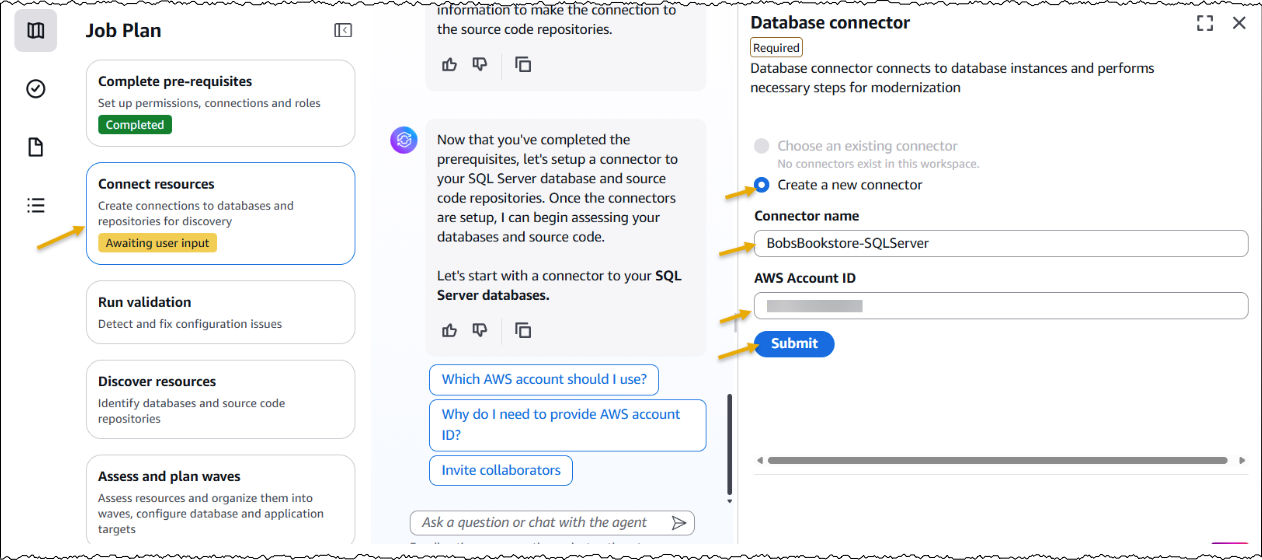
After creating the job, I complete the prerequisites. Then, I configure the database connector for AWS Transform to securely access SQL Server databases running on Amazon EC2 and Amazon Relational Database Service (Amazon RDS). The connector can connect to multiple databases within the same SQL Server instance.

Create new database connector by adding connector name and AWS Account ID

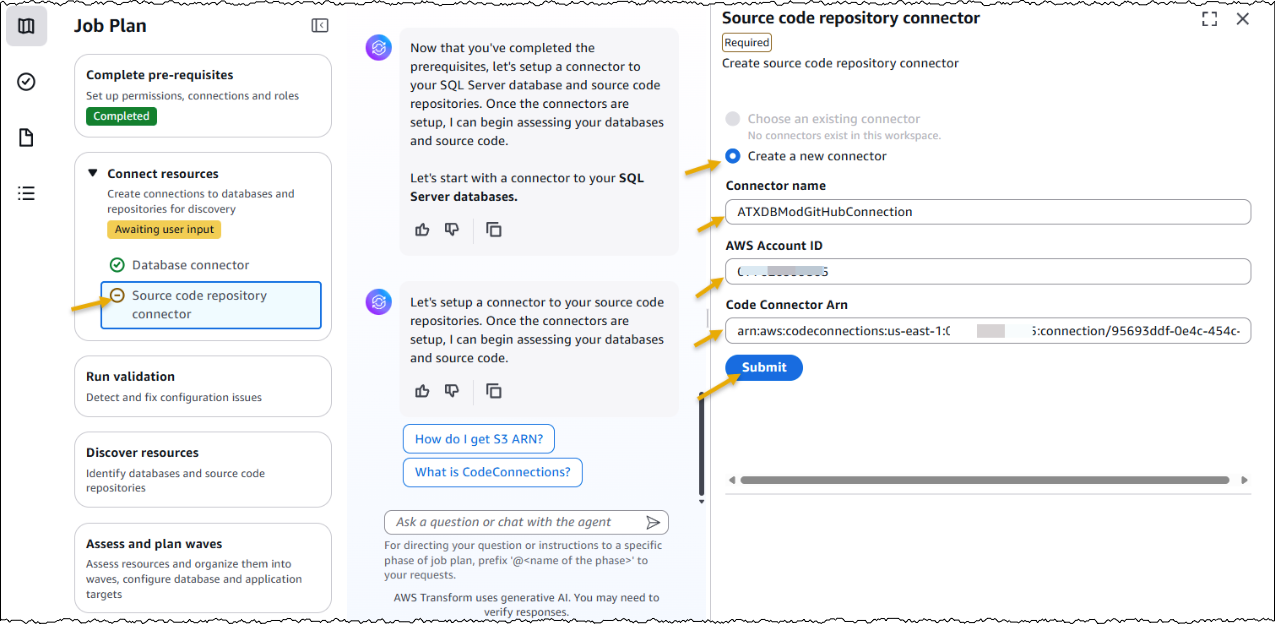
Next, I set up a connector to connect to my source code repositories.

Add a source code connector by adding Connection name, AWS Account ID and Code Connector Arn

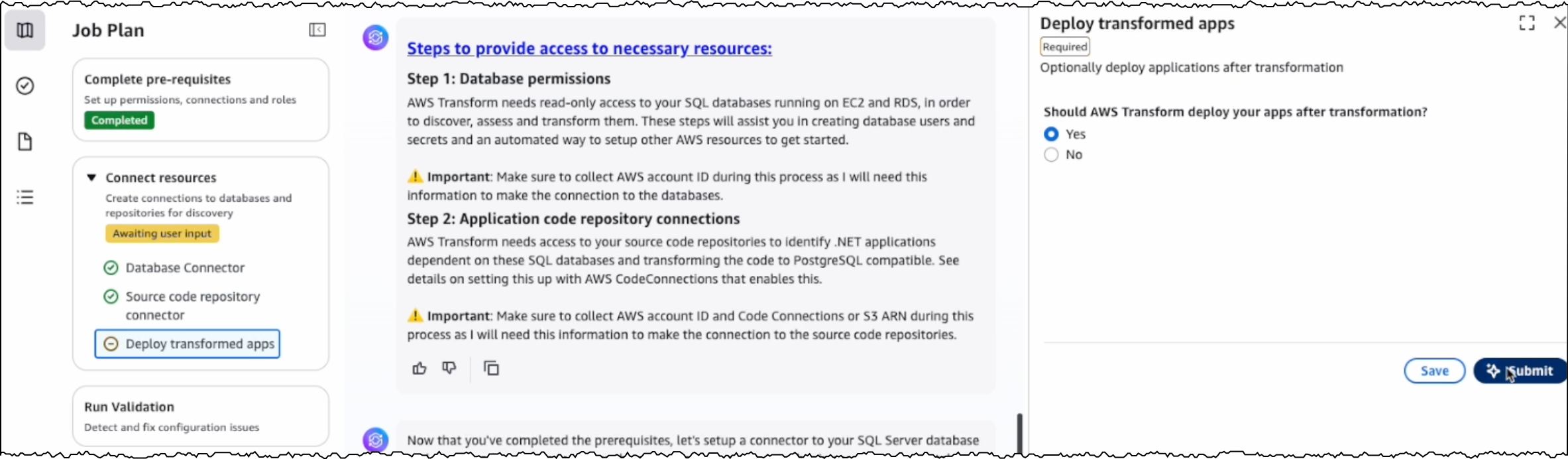
Furthermore, I have the option to choose if I would like AWS Transform to deploy the transformed applications. I choose Yes and provide the target AWS account ID and AWS Region for deploying the applications. The deployment option can be configured later as well.

Choose if you would like to deploy transformed apps

After the connectors are set up, AWS Transform connects to the resources and runs the validation to verify IAM roles, network settings, and related AWS resources.

After the successful validation, AWS Transform discovers databases and their associated source code repositories. It identifies dependencies between databases and applications to create waves for transforming related components together. Based on this analysis, AWS Transform creates a wave-based transformation plan.

Start assessment for discovered database and source code repositories

Assessing database and dependent applications
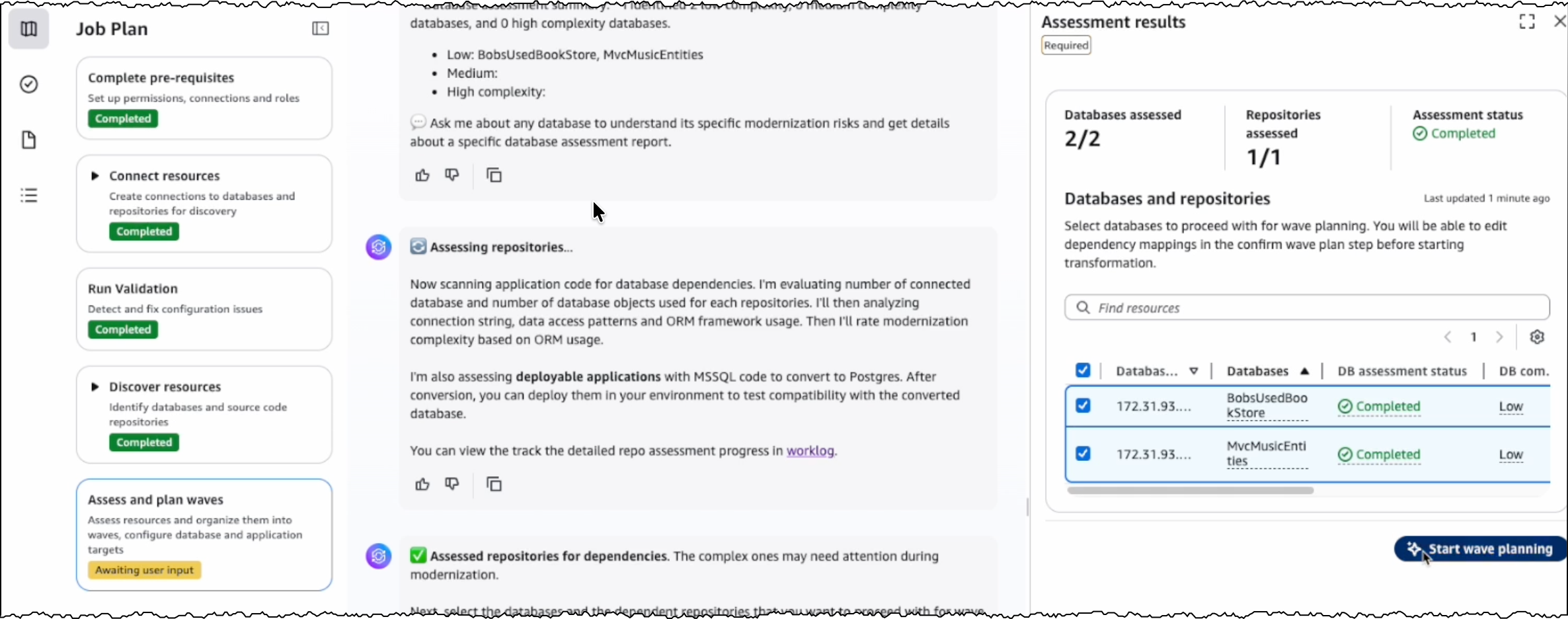
For the assessment, I review the databases and source code repositories discovered by AWS Transform and choose the appropriate branches for code repositories. AWS Transform scans these databases and source code repositories, then presents a list of databases along with their dependent .NET applications and transformation complexity.

Start wave planning of asessed databases and dependent repositories

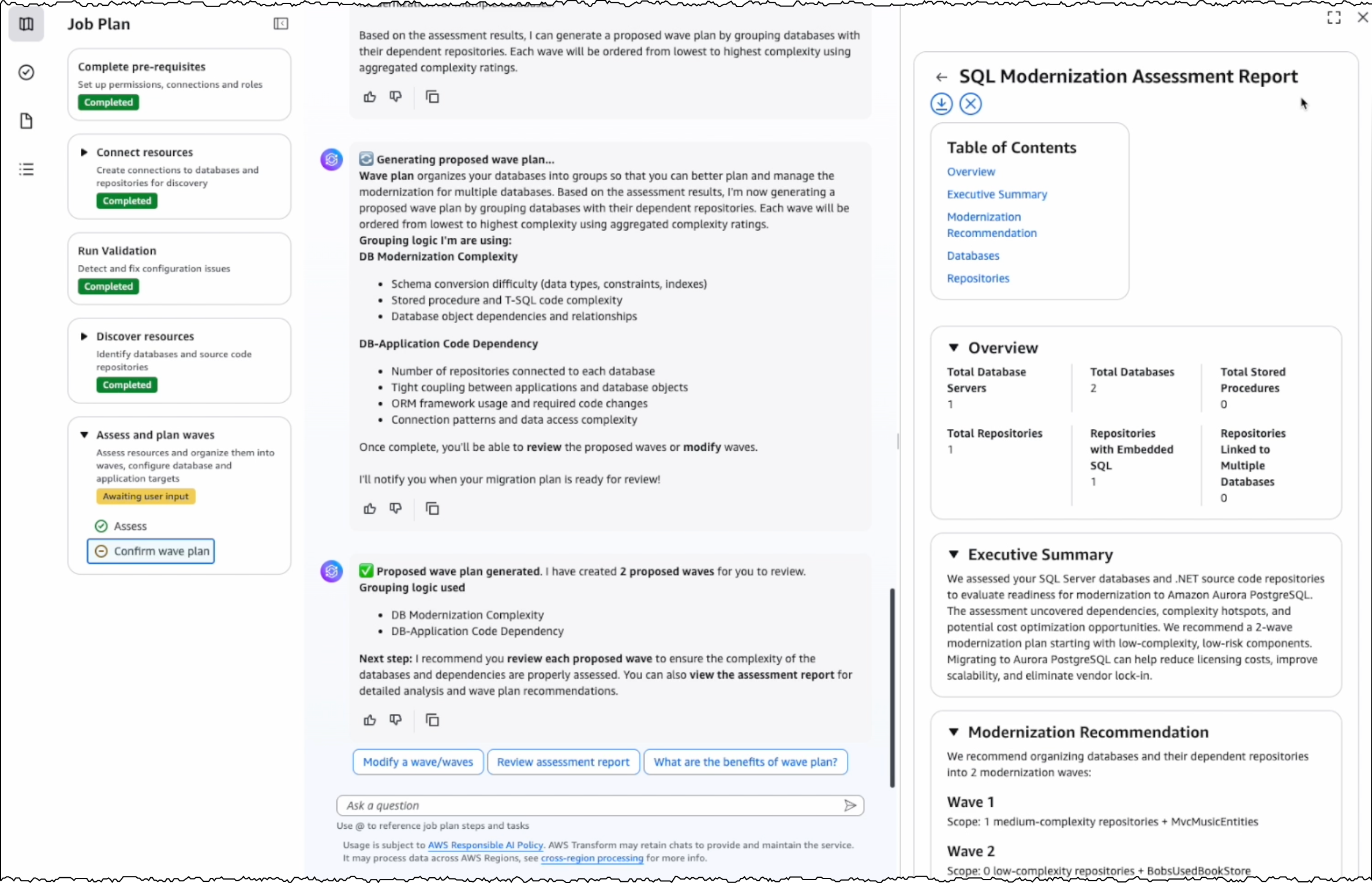
I choose the target databases and repositories for modernization. AWS Transform analyzes these selections and generates a comprehensive SQL Modernization Assessment Report with a detailed wave plan. I download the report to review the proposed modernization plan. The report includes an executive summary, wave plan, dependencies between databases and code repositories, and complexity analysis.

View SQL Modernization Assessment Report

Wave transformation at scale
The wave plan generated by AWS Transform consists of four steps for each wave. First, it converts the SQL Server schema to PostgreSQL. Second, it migrates the data. Third, it transforms the dependent .NET application code to make it PostgreSQL compatible. Finally, it deploys the application for testing.

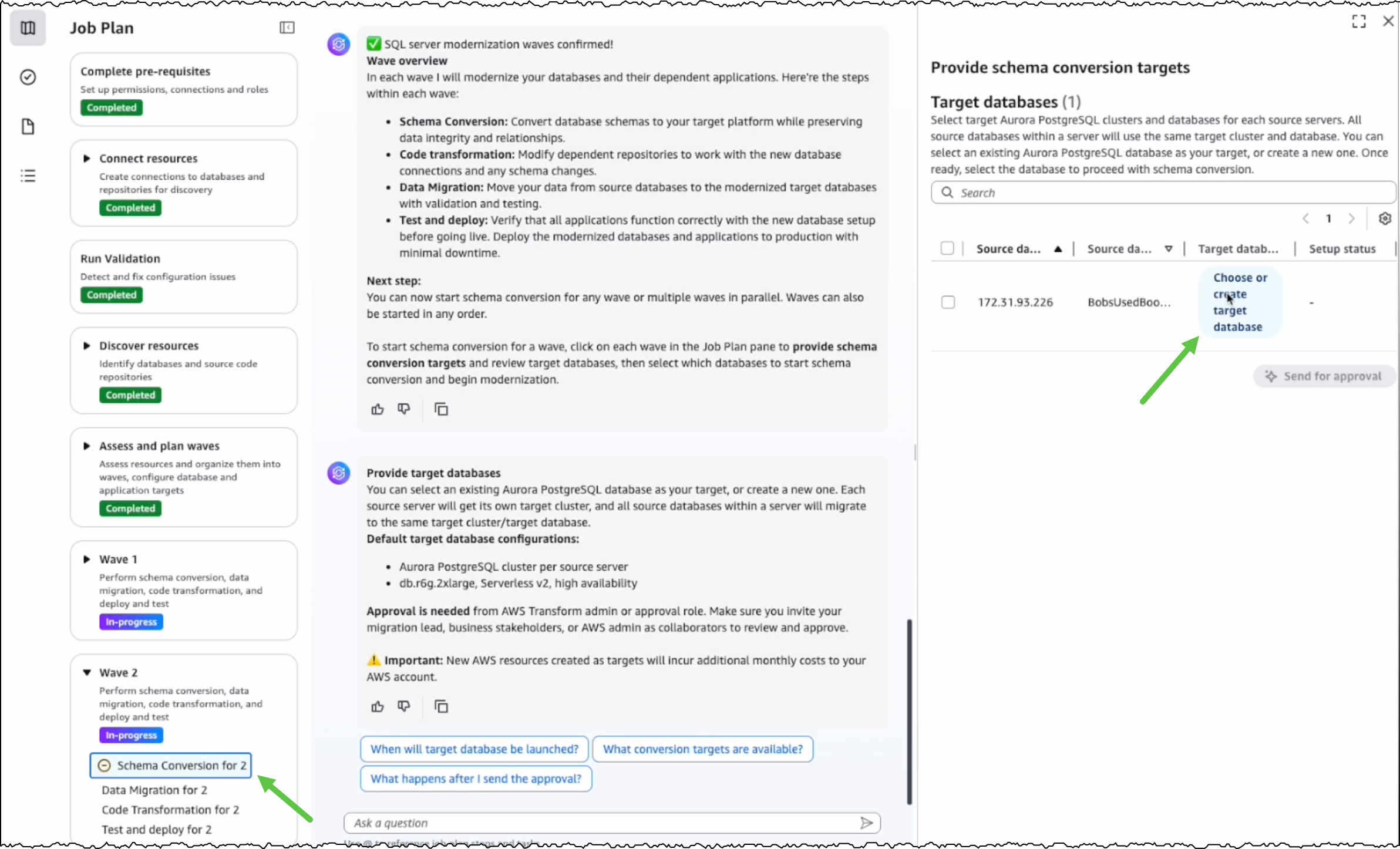
Before converting the SQL Server schema, I can either create a new PostgreSQL database or choose an existing one as the target database.

Choose or create target database

After I choose the source and target databases, AWS Transform generates conversion reports for my review. AWS Transform converts the SQL Server schema to PostgreSQL-compatible structures, including tables, indexes, constraints, and stored procedures.

Download Schema conversion reports

For any schema that AWS Transform can’t automatically convert, I can manually address them in the AWS Database Migration Service (AWS DMS) console. Alternatively, I can fix them in my preferred SQL editor and update the target database instance.

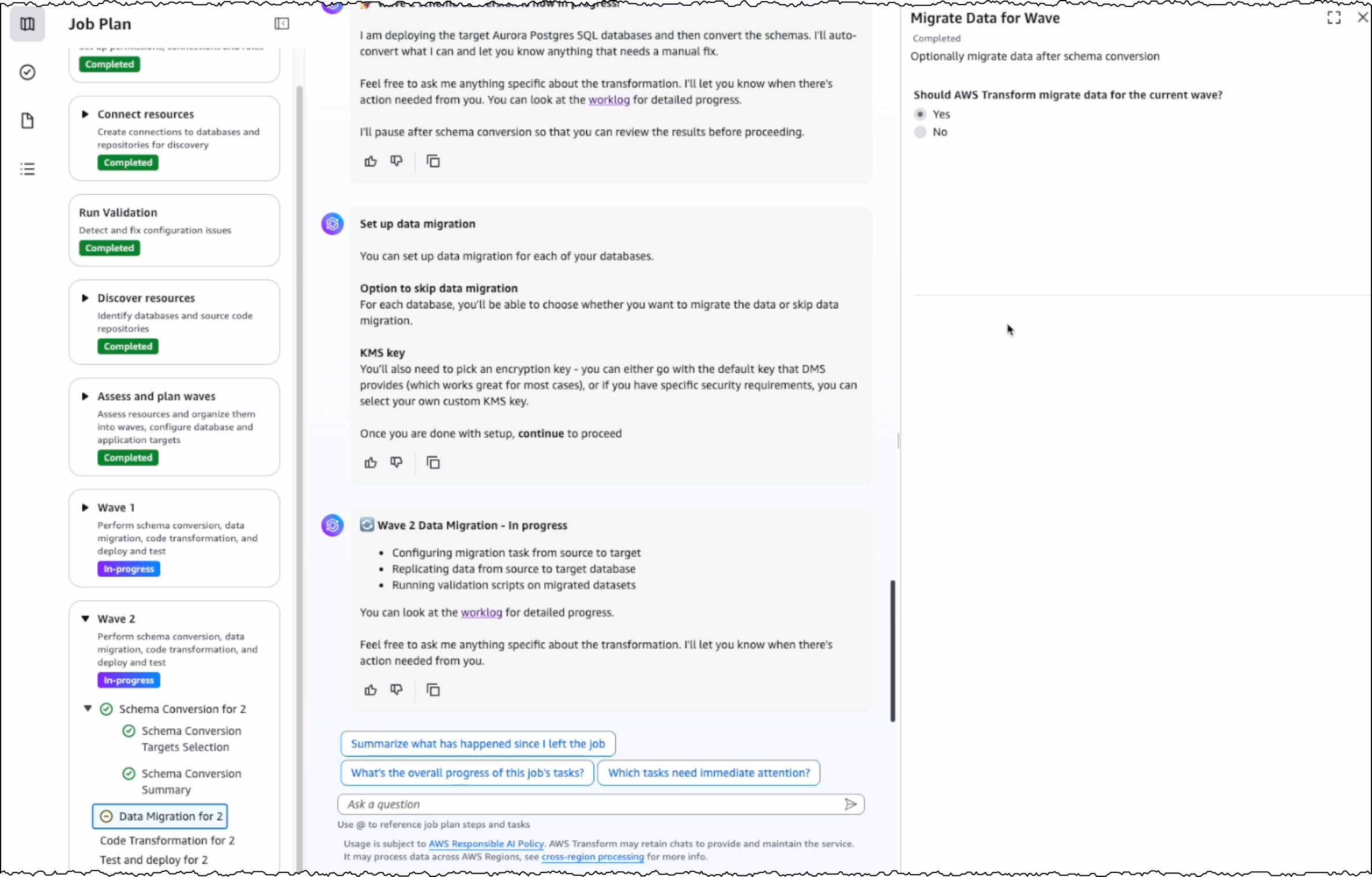
After completing schema conversion, I have the option to proceed with data migration, which is an optional step. AWS Transform uses AWS DMS to migrate data from my SQL Server instance to the PostgreSQL database instance. I can choose to perform data migration later, after completing all transformations, or work with test data by loading it into my target database.

Choose if you would like to migrate data

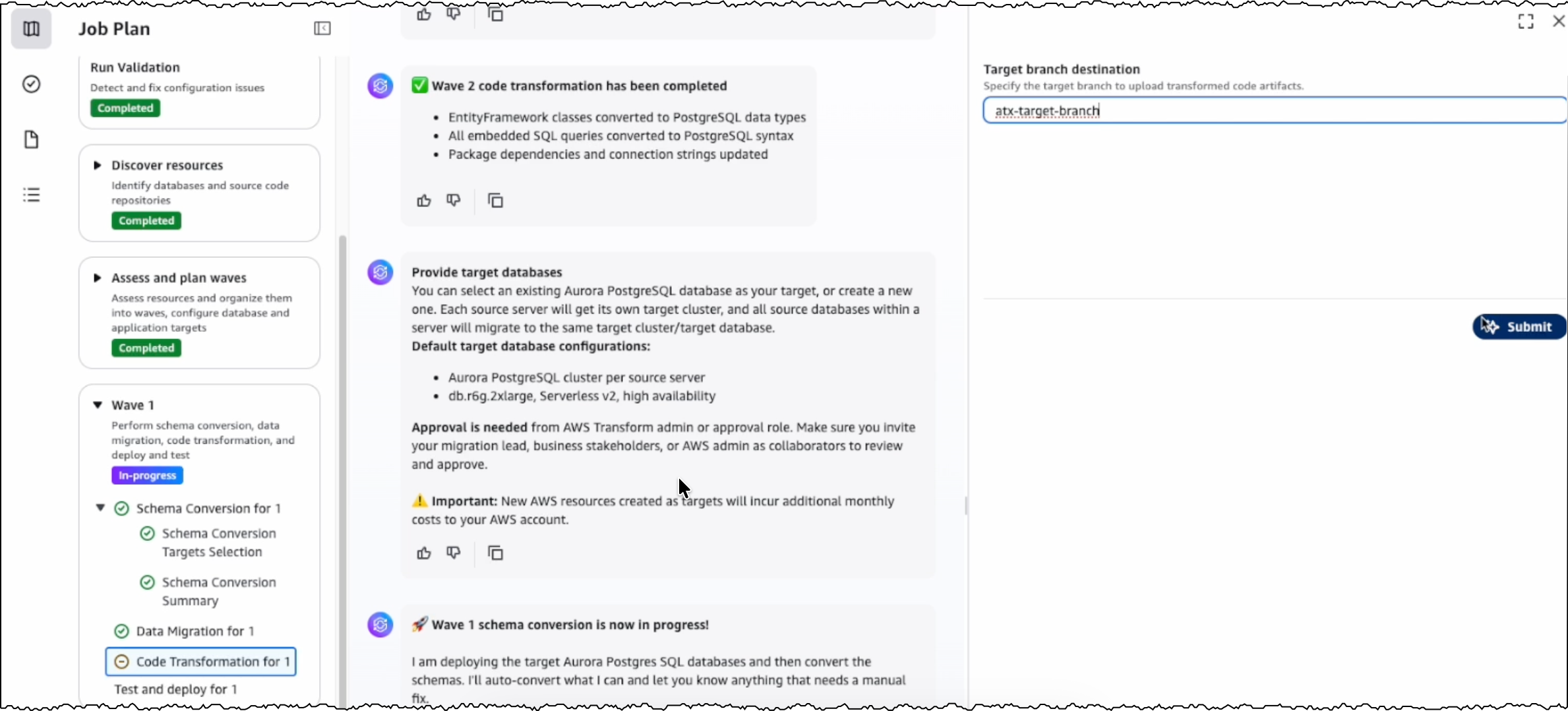
The next step is code transformation. I specify a target branch for AWS Transform to upload the transformed code artifacts. AWS Transform updates the codebase to make the application compatible with the converted PostgreSQL database.

Specify target branch destination for transformed codebase

With this release, AWS Transform for full-stack Windows modernization supports only codebases in .NET 6 or later. For codebases in .NET Framework 3.1+, I first use AWS Transform for .NET to port them to cross-platform .NET. I’ll expand on this in a following section.

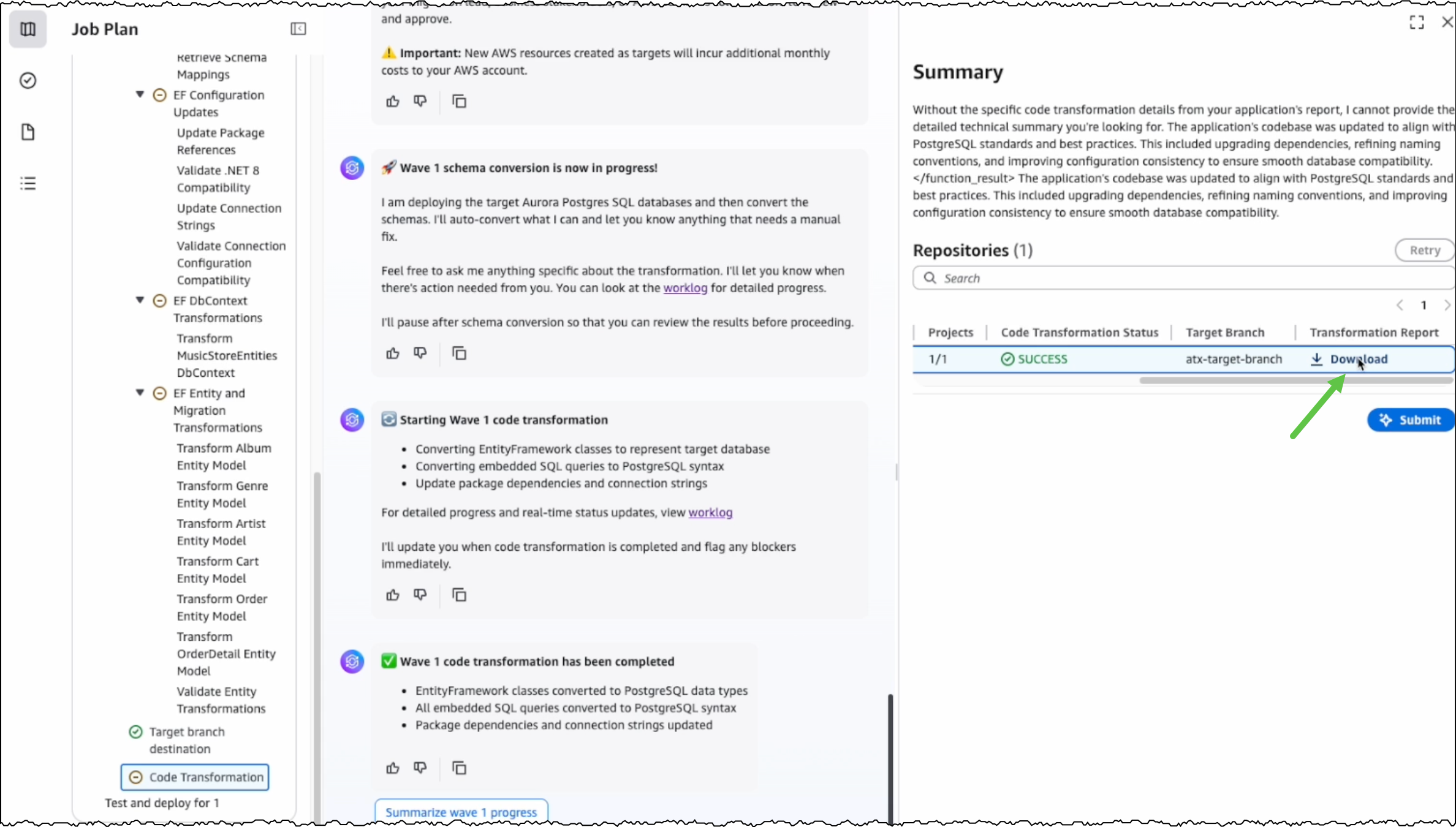
After the conversion is completed, I can view the source and target branches along with their code transformation status. I can also download and review the transformation report.

Download transformation report

Modernizing .NET Framework applications with UI layer
One major feature we’re releasing today is the modernization of UI frameworks from ASP.NET Web Forms to Blazor. This is added to existing support for modernizing model-view-controller (MVC) Razor views to ASP.NET Core Razor views.

As mentioned previously, if I have a .NET application in legacy .NET Framework, then I continue using AWS Transform for .NET to port it to cross-platform .NET. For legacy applications with UIs built on ASP.NET Web Forms, AWS Transform now modernizes the UI layer to Blazor along with porting the backend code.

AWS Transform for .NET converts ASP.NET Web Forms projects to Blazor on ASP.NET Core, facilitating the migration of ASP.NET websites to Linux. The UI modernization feature is enabled by default in AWS Transform for .NET on both the AWS Transform web console and Visual Studio extension.

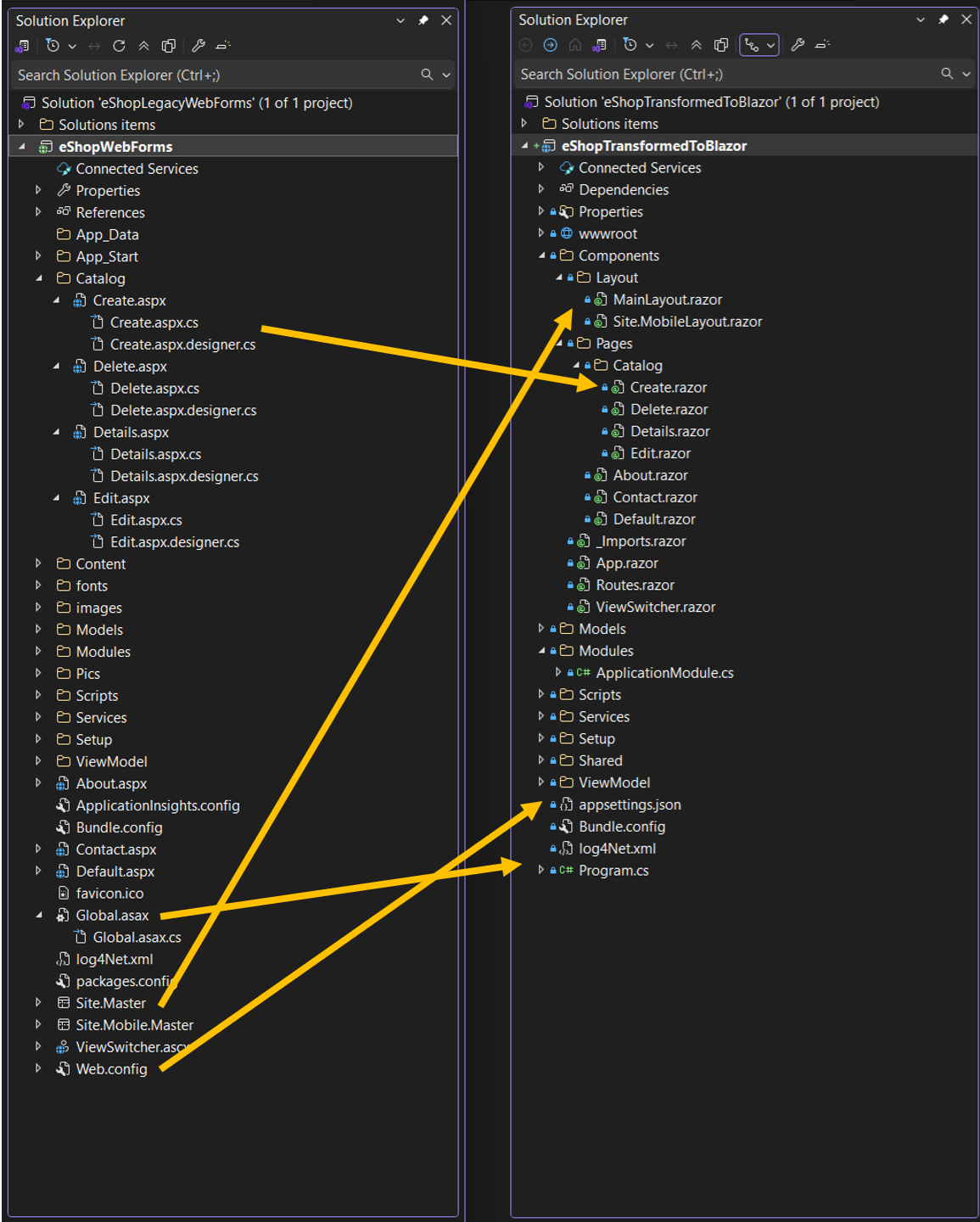
During the modernization process, AWS Transform handles the conversion of ASPX pages, ASCX custom controls, and code-behind files, implementing them as server-side Blazor components rather than web assembly. The following project and file changes are made during the transformation:

From To Description
*.aspx, *.ascx *.razor .aspx pages and .ascx custom controls become .razor files
Web.config appsettings.json Web.config settings become appsettings.json settings
Global.asax Program.cs Global .asax code becomes Program.cs code
*.master *layout.razor Master files become layout.razor files

Image showcasing how the specific project files are transformed

Other new features in AWS Transform for .NET
Along with UI porting, AWS Transform for .NET has added support for more transformation capabilities and enhanced developer experience. These new features include the following:

  • Port to .NET 10 and .NET Standard – AWS Transform now supports porting to .NET 10, the latest Long-Term Support (LTS) release, which was released on November 11, 2025. It also supports porting class libraries to .NET Standard, a formal specification for a set of APIs that are common across all .NET implementations. Furthermore, AWS Transform is now available with AWS Toolkit for Visual Studio 2026.
  • Editable transformation report – After the assessment is complete, you can now view and customize the transformation plan based on your specific requirements and preferences. For example, you can update package replacement details.
  • Real-time transformation updates with estimated remaining time – Depending on the size and complexity of the codebase, AWS Transform can take some time to complete the porting. You can now track transformation updates in real-time along with the estimated remaining time.
  • Next steps markdown – After the transformation is complete, AWS Transform now generates a next steps markdown file with the remaining tasks to complete the porting. You can use this as a revised plan to repeat the transformation with AWS Transform or use AI code-companions to complete the porting.

Things to know
Some more things to know are:

  • AWS Regions – AWS Transform for full-stack Windows modernization is generally available today in the US East (N. Virginia) Region. For Regional availability and future roadmap, visit the AWS Capabilities by Region.
  • Pricing – Currently, there is no added charge for Windows modernization features of AWS Transform. Any resources you create or continue to use in your AWS account using the output of AWS Transform are billed according to their standard pricing. For limits and quotas, refer to the AWS Transform User Guide.
  • SQL Server versions supported – AWS Transform supports the transformation of SQL Server versions from 2008 R2 through 2022, including all editions (Express, Standard, and Enterprise). SQL Server must be hosted on Amazon RDS or Amazon EC2 in the same Region as AWS Transform.
  • Entity Framework versions supported – AWS Transform supports the modernization of Entity Framework versions 6.3 through 6.5 and Entity Framework Core 1.0 through 8.0.
  • Getting started – To get started, visit AWS Transform for full-stack Windows modernization User Guide.

Prasad

AWS Weekly Roundup: Amazon Bedrock, AWS Outposts, Amazon ECS Managed Instances, AWS Builder ID, and more (October 6, 2025)

Post Syndicated from Prasad Rao original https://aws.amazon.com/blogs/aws/aws-weekly-roundup-amazon-bedrock-aws-outposts-amazon-ecs-managed-instances-aws-builder-id-and-more-october-6-2025/

Last week, Anthropic’s Claude Sonnet 4.5—the world’s best coding model according to SWE-Bench – became available in Amazon Q command line interface (CLI) and Kiro. I’m excited about this for two reasons:

First, a few weeks ago I spent 4 intensive days with a global customer delivering an AI-assisted development workshop, where I experienced firsthand how Amazon Q CLI boosts developer productivity. During the workshop, the customer was able to add a new feature in their application within a day using Amazon Q CLI, which would have traditionally taken them at least a couple of weeks. With Anthropic’s Claude Sonnet 4.5 in Amazon Q CLI, I know developer productivity will be enhanced further.

Second, I’ve started preparing for my code talk at AWS re:Invent 2025, where my co-speaker and I will show live coding to modernize a legacy codebase using Kiro. I can’t wait to use Anthropic’s Claude Sonnet 4.5 in Kiro to create a live demo. If you want to see this demo and over a thousand other sessions on cloud and AI, join us at AWS re:Invent 2025 in Las Vegas from December 1–5.

Last week’s launches
Here are some launches that got my attention:

  • Availability of Claude Sonnet 4.5 in Amazon Bedrock – Anthropic’s most intelligent model, best for coding and complex agents, is now available in Amazon Bedrock. By using Claude Sonnet 4.5 in Amazon Bedrock, developers gain access to a fully managed service that not only provides a unified API for foundation models (FMs) but keeps their data under complete control with enterprise-grade tools for security, and optimization.
  • AWS Outposts supports third-party storage integration with Dell and HPE – AWS Outposts third-party storage integration now includes Dell PowerStore and HPE Alletra Storage MP B10000 systems, joining the list of existing integrations with NetApp on-premises enterprise storage arrays and Pure Storage FlashArray. This integration serves three key purposes. First, it helps you maintain your existing storage infrastructure while migrating VMware workloads to AWS. Second, it helps you meet strict data residency requirements by keeping your data on premises while using AWS services. Third, it means you can use AWS Outposts with third-party storage arrays through AWS tooling.
  • Amazon ECS Managed Instances now available – Amazon ECS Managed Instances for containerized applications is a new fully managed compute option for Amazon ECS designed to eliminate infrastructure management overhead while giving you access to the full capabilities of Amazon EC2. ECS Managed Instances helps you quickly launch and scale your workloads while enhancing performance and reducing your total cost of ownership.
  • Application map is now generally available for Amazon CloudWatch – Amazon CloudWatch now helps you monitor large-scale distributed applications by automatically discovering and organizing services into groups based on configurations and their relationships. With this new application performance monitoring (APM) capability, you can quickly visualize which applications and dependencies to focus on while troubleshooting your distributed applications.
  • Amazon Bedrock AgentCore Model Context Protocol (MCP) server now available – With built-in support for runtime, gateway integration, identity management, and agent memory, the AgentCore MCP server is purpose-built to speed up creation of components compatible with Bedrock AgentCore. You can use the AgentCore MCP server for rapid prototyping, production AI solutions, or to scale your agent infrastructure.

Additional Updates
Here are some additional news items and blog posts that I found interesting:

  • AWS Builder ID now supports Sign in with Google – You can now create an AWS Builder ID using sign in with Google. AWS Builder ID is a personal profile that provides access to AWS applications including Kiro, AWS Builder Center, AWS Training and Certification, AWS re:Post and AWS Startups.
  • AWS API MCP Server v1.0.0 release – AWS API MCP server acts as a bridge between AI assistants and AWS services enabling foundation models to interact with any AWS API through natural language by creating and executing syntactically correct CLI commands. The AWS API MCP Server is open-source and available now on AWS Labs GitHub repository.
  • AWS Knowledge MCP Server now generally available – The AWS Knowledge server gives AI agents and MCP clients access to authoritative knowledge, including documentation, blog posts, What’s New announcements, and Well-Architected best practices, in an LLM-compatible format. With this release, the server also includes knowledge about the regional availability of AWS APIs and CloudFormation resources.
  • AWS Transform now enables Terraform for VMware network automation – AWS Transform now offers Terraform as an additional option to generate network infrastructure code automatically from VMware environments. The service converts your source network definitions into reusable Terraform modules, complementing current AWS CloudFormation and AWS Cloud Development Kit (CDK) support.

Upcoming AWS events
Check your calendar and sign up for upcoming AWS events:

  • AWS AI Agent Global Hackathon – This is your chance to dive deep into our powerful generative AI stack and create something truly awesome. From September 8th to October 20th, you have the opportunity to create AI agents using AWS suite of AI services, competing for over $45,000 in prizes and exclusive go-to-market opportunities.
  • AWS Gen AI Lofts – You can learn AWS AI products and services with exclusive sessions, meet industry-leading experts, and have valuable networking opportunities with investors and peers. Register in your nearest city: Paris (October 7–21), London (Oct 13–21), and Tel Aviv (November 11–19).
  • AWS Community Days – Join community-led conferences that feature technical discussions, workshops, and hands-on labs led by expert AWS users and industry leaders from around the world: Munich (October 7), Budapest (October 16).

You can browse all upcoming AWS events and AWS startup events.

That’s all for this week. Check back next Monday for another Weekly Roundup!

Prasad

AWS Weekly Roundup: Single GPU P5 instances, Advanced Go Driver, Amazon SageMaker HyperPod and more (August 18, 2025)

Post Syndicated from Prasad Rao original https://aws.amazon.com/blogs/aws/aws-weekly-roundup-single-gpu-p5-instances-advanced-go-driver-amazon-sagemaker-hyperpod-and-more-august-18-2025/

Let me start this week’s update with something I’m especially excited about – the upcoming BeSA (Become a Solutions Architect) cohort. BeSA is a free mentoring program that I host along with a few other AWS employees on a volunteer basis to help people excel in their cloud careers. Last week, the instructors’ lineup was finalized for the 6-week cohort starting September 6. The cohort will focus on migration and modernization on AWS. Visit the BeSA website to learn more.

Another highlight for me last week was the announcement of six new AWS Heroes for their technical leadership and exceptional contributions to the AWS community. Read the full announcement to learn more about these community leaders.

Last week’s launches
Here are some launches from last week that got my attention:

  • Amazon EC2 Single GPU P5 instances are now generally available — You can right-size your machine learning (ML) and high performance computing (HPC) resources cost-effectively with the new Amazon Elastic Compute Cloud (Amazon EC2) P5 instance size with one NVIDIA H100 GPU.
  • AWS Advanced Go Driver is generally available — You can now use the AWS Advanced Go Driver with Amazon Relational Database Service (Amazon RDS) and Amazon Aurora PostgreSQL-Compatible and MySQL-Compatible database clusters for faster switchover and failover times, Federated Authentication, and authentication with AWS Secrets Manager or AWS Identity and Access Management (IAM). You can install the PostgreSQL and MySQL packages for Windows, Mac, or Linux, by following the installation guides in GitHub.
  • Expanded support for Cilium with Amazon EKS Hybrid Nodes — Cilium is a Cloud Native Computing Foundation (CNCF) graduated project that provides core networking capabilities for Kubernetes workloads. Now, you can receive support from AWS for a broader set of Cilium features when using Cilium with Amazon EKS Hybrid Nodes including application ingress, in-cluster load balancing, Kubernetes network policies, and kube-proxy replacement mode.
  • Amazon SageMaker AI now supports P6e-GB200 UltraServers — You can accelerate training and deployment of foundational models (FMs) at trillion-parameter scale by using up to 72 NVIDIA Blackwell GPUs under one NVLink domain with the new P6e-GB200 UltraServer support in Amazon SageMaker HyperPod and Model Training.
  • Amazon SageMaker HyperPod now supports fine-grained quota allocation of compute resources, topology-aware-scheduling of LLM tasks and custom Amazon Machine Images (AMIs) — You can allocate fine-grained compute quota for GPU, Trainium accelerator, vCPU, and vCPU memory within an instance to optimize compute resource distribution. With topology-aware scheduling, you can schedule your large language model (LLM) tasks on an optimal network topology to minimize network communication and enhance training efficiency. Using custom AMIs, you can deploy clusters with pre-configured, security-hardened environments that meet your specific organizational requirements.

Additional updates
Here are some additional news items and blog posts that I found interesting:

Upcoming AWS events
Check your calendars and sign up for upcoming AWS and AWS Community events:

  • AWS re:Invent 2025 (December 1-5, 2025, Las Vegas) — The AWS flagship annual conference offering collaborative innovation through peer-to-peer learning, expert-led discussions, and invaluable networking opportunities.
  • AWS Summits — Join free online and in-person events that bring the cloud computing community together to connect, collaborate, and learn about AWS. Coming up soon are summits in Johannesburg (August 20) and Toronto (September 4).
  • AWS Community Days — Join community-led conferences that feature technical discussions, workshops, and hands-on labs led by expert AWS users and industry leaders from around the world: Adria (September 5), Baltic (September 10), Aotearoa (September 18), and South Africa (September 20).

Join the AWS Builder Center to learn, build, and connect with builders in the AWS community. Browse here for upcoming in-person and virtual developer-focused events.

That’s all for this week. Check back next Monday for another Weekly Roundup!

Prasad

AWS Weekly Roundup: Amazon Aurora DSQL, MCP Servers, Amazon FSx, AI on EKS, and more (June 2, 2025)

Post Syndicated from Prasad Rao original https://aws.amazon.com/blogs/aws/aws-weekly-roundup-amazon-aurora-dsql-mcp-servers-amazon-fsx-ai-on-eks-and-more-june-2-2025/

It’s AWS Summit Season! AWS Summits are free in-person events that take place across the globe in major cities, bringing cloud expertise to local communities. Each AWS Summit features keynote presentations highlighting the latest innovations, technical sessions, live demos, and interactive workshops led by Amazon Web Services (AWS) experts. Last week, events took place at AWS Summit Tel Aviv and AWS Summit Singapore.

The following photo shows the packed keynote at AWS Summit Tel Aviv.

AWS Summit Tel Aviv Keynote

Find an AWS Summit near you and join thousands of AWS customers and cloud professionals taking the next step in their cloud journey.

Last week, the announcement that piqued my interest most was the general availability of Amazon Aurora DSQL, which was introduced in preview at re:Invent 2024. Aurora DSQL is the fastest serverless distributed SQL database that enables you to build always available applications with virtually unlimited scalability, the highest availability, and zero infrastructure management.

Aurora DSQL active-active distributed architecture is designed for 99.99% single-Region and 99.999% multi-Region availability with no single point of failure and automated failure recovery. This means your applications can continue to read and write with strong consistency, even in the rare case an application is unable to connect to a Region cluster endpoint.

Single and multi region deployment of Amazon Aurora DSQL

What’s more fascinating is the journey behind building Aurora DSQL, a story that goes beyond the technology in the pursuit of engineering efficiency. Read the full story in Dr. Werner Vogels’ blog post, Just make it scale: An Aurora DSQL story.

Last week’s launches
Here are the other launches that got my attention:

  • Announcing new Model Context Protocol (MCP) servers for AWS Serverless and Containers – MCP servers are now available for AWS Lambda, Amazon Elastic Container Service (Amazon ECS), Amazon Elastic Kubernetes Service (Amazon EKS), and Finch. With MCP servers, you can get from idea to production faster by giving your AI assistants access to an up-to-date framework on how to correctly interact with your AWS service of choice. To download and try out the open source MCP servers, visit the aws-labs GitHub repository.
  • Announcing the general availability of Amazon FSx for Lustre Intelligent-Tiering – FSx for Lustre Intelligent-Tiering, a new storage class, automatically optimizes costs by tiering cold data to the applicable lower-cost storage tier based on access patterns and includes an optional SSD read cache to improve performance for your most latency-sensitive workloads.
  • Amazon FSx for NetApp ONTAP now supports write-back mode for ONTAP FlexCache volumes – Write-back mode is a new ONTAP capability that helps you achieve faster performance for your write-intensive workloads that are distributed across multiple AWS Regions and on-premises file systems.
  • AWS Network Firewall Adds Support for Multiple VPC Endpoints – AWS Network Firewall now supports configuring up to 50 Amazon Virtual Private Cloud (Amazon VPC) endpoints per Availability Zone for a single firewall. This new capability gives you more options to scale your Network Firewall deployment across multiple VPCs, using a centralized security policy.
  • Cost Optimization Hub now supports Savings Plans and reservations preferences – You can now use Cost Optimization Hub, a feature within the Billing and Cost Management Console, to configure preferred Savings Plans and reservation term and payment options preferences, so you can see your resulting recommendations and savings potential based on your preferred commitments.
  • AWS Neuron introduces NxD Inference GA, new features, and improved tools – With the release of Neuron 2.23, the NxD Inference library (NxDI) moves from beta to general availability and is now recommended for all multi-chip inference use cases. Neuron 2.23 also introduces new training capabilities, including context parallelism and Odds Ratio Preference Optimization (ORPO), and adds support for PyTorch 2.6 and JAX 0.5.3.
  • AWS Pricing Calculator, now generally available, supports discounts and purchase commitment – We announced the general availability of the AWS Pricing Calculator in the AWS console. You can now create more accurate and comprehensive cost estimates by providing two types of cost estimates: cost estimation for a workload, and estimation of a full AWS bill. You can also import your historical usage or create net new usage when creating a cost estimate. Additionally, with the new rate configuration inclusive of both pricing discounts and purchase commitments, you can gain a clearer picture of potential savings and cost optimizations for your cost scenarios.
  • AWS CDK Toolkit Library is now generally available – AWS CDK Toolkit Library provides programmatic access to core AWS CDK functionalities such as synthesis, deployment, and destruction of stacks. You can use this library to integrate CDK operations directly into your applications, custom CLIs, and automation workflows, offering greater flexibility and control over infrastructure management.
  • Announcing Red Hat Enterprise Linux for AWS – Red Hat Enterprise Linux (RHEL) for AWS, starting with RHEL 10, is now generally available, combining Red Hat’s enterprise-grade Linux software with native AWS integration. RHEL for AWS is built to achieve optimum performance of RHEL running on AWS.

For a full list of AWS announcements, be sure to keep an eye on the What’s New with AWS? page.

Additional updates
Here are some additional projects, blog posts, and news items that you might find interesting:

  • Introducing AI on EKS: powering scalable AI workloads with Amazon EKS – AI on EKS is a new open source initiative from AWS designed to help you deploy, scale, and optimize AI/ML workloads on Amazon EKS. AI on EKS repository includes deployment-ready blueprints for distributed training, LLM inference, generative AI pipelines, multi-model serving, agentic AI, GPU and Neuron-specific benchmarks, and MLOps best practices.
  • Revolutionizing earth observation with geospatial foundation models on AWS – Emerging transformer-based vision models for geospatial data—also called geospatial foundation models (GeoFMs)—offer a new and powerful technology for mapping the earth’s surface at a continental scale. This post explores how Clay Foundation’s Clay foundation model can be deployed for large-scale inference and fine-tuning on Amazon SageMaker. You can use the ready-to-deploy code samples to get started quickly with deploying GeoFMs in your own applications on AWS.

High level solution flow for inference and fine tuning using Geospatial Foundation Models

  • Going beyond AI assistants: Examples from Amazon.com reinventing industries with generative AI – Non-conversational applications offer unique advantages, such as higher latency tolerance, batch processing, and caching, but their autonomous nature requires stronger guardrails and exhaustive quality assurance compared to conversational applications, which benefit from real-time user feedback and supervision. This post examines four diverse Amazon.com examples of non-conversational generative AI applications.

Upcoming AWS events
Check your calendars and sign up for these upcoming AWS events:

  • AWS Summits – Join free online and in-person events that bring the cloud computing community together to connect, collaborate, and learn about AWS. Register in your nearest city: Stockholm (June 4), Sydney (June 4–5), Hamburg (June 5), Washington (June 10–11), Madrid (June 11), Milan (June 18), Shanghai (June 19–20), and Mumbai (June 19).
  • AWS re:Inforce – Mark your calendars for AWS re:Inforce (June 16–18) in Philadelphia, PA. AWS re:Inforce is a learning conference focused on AWS security solutions, cloud security, compliance, and identity.
  • AWS Community Days – Join community-led conferences that feature technical discussions, workshops, and hands-on labs led by expert AWS users and industry leaders from around the world: Milwaukee, USA (June 5), Mexico (June 14), Nairobi, Kenya (June 14), and Colombia (June 28).

That’s all for this week. Check back next Monday for another Weekly Roundup!

Prasad

AWS Transform for .NET, the first agentic AI service for modernizing .NET applications at scale

Post Syndicated from Prasad Rao original https://aws.amazon.com/blogs/aws/aws-transform-for-net-the-first-agentic-ai-service-for-modernizing-net-applications-at-scale/

I started my career as a .NET developer and have seen .NET evolve over the last couple of decades. Like many of you, I also developed multiple enterprise applications in .NET Framework that ran only on Windows. I fondly remember building my first enterprise application with .NET Framework. Although it served us well, the technology landscape has significantly shifted. Now that there is an open source and cross-platform version of .NET that can run on Linux, these legacy enterprise applications built on .NET Framework need to be ported and modernized.

The benefits of porting to Linux are compelling: applications cost 40 percent less to operate because they save on Windows licensing costs, run 1.5–2 times faster with improved performance, and handle growing workloads with 50 percent better scalability. Having helped port several applications, I can say the effort is worth the rewards.

However, porting .NET Framework applications to cross-platform .NET is a labor-intensive and error-prone process. You have to perform multiple steps, such as analyzing the codebase, detecting incompatibilities, implementing fixes while porting the code, and then validating the changes. For enterprises, the challenge becomes even more complex because they might have hundreds of .NET Framework applications in their portfolio.

At re:Invent 2024, we previewed this capability as Amazon Q Developer transformation capabilities for .NET to help port your .NET applications at scale. The experience is available as a unified web experience for at-scale transformation and within your integrated development environment (IDE) for individual project and solution porting.

Now that we’ve incorporated your valuable feedback and suggestions, we’re excited to announce today the general availability of AWS Transform for .NET. We’ve also added new capabilities to support projects with private NuGet packages, port model-view-controller (MVC) Razor views to ASP .NET Core Razor views, and execute the ported unit tests.

I’ll expand on the key new capabilities in a moment, but let’s first take a quick look at the two porting experiences of AWS Transform for .NET.

Large-scale porting experience for .NET applications
Enterprise digital transformation is typically driven by central teams responsible for modernizing hundreds of applications across multiple business units. Different teams have ownership of different applications and their respective repositories. Success requires close coordination between these teams and the application owners and developers across business units. To accelerate this modernization at scale, AWS Transform for .NET provides a web experience that enables teams to connect directly to source code repositories and efficiently transform multiple applications across the organization. For select applications requiring dedicated developer attention, the same agent capabilities are available to developers as an extension for Visual Studio IDE.

Let’s start by looking at how the web experience of AWS Transform for .NET helps port hundreds of .NET applications at scale.

Web experience of AWS Transform for .NET
To get started with the web experience of AWS Transform, I onboard using the steps outlined in the documentation, sign in using my credentials, and create a job for .NET modernization.

Create a new job for .NET Transformation

AWS Transform for .NET creates a job plan, which is a sequence of steps that the agent will execute to assess, discover, analyze, and transform applications at scale. It then waits for me to set up a connector to connect to my source code repositories.

Setup connector to connect to source code repository

After the connector is in place, AWS Transform begins discovering repositories in my account. It conducts an assessment focused on three key areas: repository dependencies, required private packages and third-party libraries, and supported project types within your repositories.

Based on this assessment, it generates a recommended transformation plan. The plan orders repositories according to their last modification dates, dependency relationships, private package requirements, and the presence of supported project types.

AWS Transform for .NET then prepares for the transformation process by requesting specific inputs, such as the target branch destination, target .NET version, and the repositories to be transformed.

To select the repositories to transform, I have two options: use the recommended plan or customize the transformation plan by selecting repositories manually. For selecting repositories manually, I can use the UI or download the repository mapping and upload the customized list.

select the repositories to transform

AWS Transform for .NET automatically ports the application code, builds the ported code, executes unit tests, and commits the ported code to a new branch in my repository. It provides a comprehensive transformation summary, including modified files, test outcomes, and suggested fixes for any remaining work.

While the web experience helps accelerate large-scale porting, some applications may require developer attention. For these cases, the same agent capabilities are available in the Visual Studio IDE.

Visual Studio IDE experience of AWS Transform for .NET
Now, let’s explore how AWS Transform for .NET works within Visual Studio.

To get started, I install the latest version of AWS Toolkit extension for Visual Studio and set up the prerequisites.

I open a .NET Framework solution, and in the Solution Explorer, I see the context menu item Port project with AWS Transform for an individual project.

Context menu for Port project with AWS Transform in Visual Studio

I provide the required inputs, such as the target .NET version and the approval for the agents to autonomously transform code, execute unit tests, generate a transformation summary, and validate Linux-readiness.

Transformation summary after the project is transformed in Visual Studio

I can review the code changes made by the agents locally and continue updating my codebase.

Let’s now explore some of the key new capabilities added to AWS Transform for .NET.

Support for projects with private NuGet package dependencies 
During preview, only projects with public NuGet package dependencies were supported. With general availability, we now support projects with private NuGet package dependencies. This has been one of the most requested features during the preview.

The feature I really love is that AWS Transform can detect cross-repository dependencies. If it finds the source code of my private NuGet package, it automatically transforms that as well. However, if it can’t locate the source code, in the web experience, it provides me the flexibility to upload the required NuGet packages.

AWS Transform displays the missing package dependencies that need to be resolved. There are two ways to do this: I can either use the provided PowerShell script to create and upload packages, or I can build the application locally and upload the NuGet packages from the packages folder in the solution directory.

Upload packages to resolve missing dependencies

After I upload the missing NuGet packages, AWS Transform is able to resolve the dependencies. It’s best to provide both the .NET Framework and cross platform .NET versions of the NuGet packages. If the cross platform .NET version is not available, then at a minimum the .NET Framework version is required for AWS Transform to add it as an assembly reference and proceed for transformation.

Unit test execution
During preview, we supported porting unit tests from .NET Framework to cross-platform .NET. With general availability, we’ve also added support for executing unit tests after the transformation is complete.

After the transformation is complete and the unit tests are executed, I can see the results in the dashboard and view the status of the tests at each individual test project level.

Dashboard after successful transformation in web showing exectuted unit tests

Transformation visibility and summary
After the transformation is complete, I can download a detailed report in JSON format that gives me a list of transformed repositories, details about each repository, and the status of the transformation actions performed for each project within a repository. I can view the natural language transformation summary at the project level to understand AWS Transform output with project-level granularity. The summary provides me with an overview of updates along with key technical changes to the codebase.

detailed report of transformed project highlighting transformation summary of one of the project

Other new features
Let’s have a quick look at other new features we’ve added with general availability:

  • Support for porting UI layer – During preview, you could only port the business logic layers of MVC applications using AWS Transform, and you had to port the UI layer manually. With general availability, you can now use AWS Transform to port MVC Razor views to ASP.NET Core Razor views.
  • Expanded connector support – During preview, you could connect only to GitHub repositories. Now with general availability, you can connect to GitHub, GitLab, and Bitbucket repositories.
  • Cross repository dependency – When you select a repository for transformation, dependent repositories are automatically selected for transformation.
  • Download assessment report – You can download a detailed assessment report of the identified repositories in your account and private NuGet packages referenced in these repositories.
  • Email notifications with deep links – You’ll receive email notifications when a job’s status changes to completed or stopped. These notifications include deep links to the transformed code branches for review and continued transformation in your IDE.

Things to know
Some additional things to know are:

  • Regions – AWS Transform for .NET is generally available today in the Europe (Frankfurt) and US East (N. Virginia) Regions.
  • Pricing – Currently, there is no additional charge for AWS Transform. Any resources you create or continue to use in your AWS account using the output of AWS Transform will be billed according to their standard pricing. For limits and quotas, refer to the documentation.
  • .NET versions supported – AWS Transform for .NET supports transforming applications written using .NET Framework versions 3.5+, .NET Core 3.1, and .NET 5+, and the cross-platform .NET version, .NET 8.
  • Application types supported – AWS Transform for .NET supports porting C# code projects of the following types: console application, class library, unit tests, WebAPI, Windows Communication Foundation (WCF) service, MVC, and single-page application (SPA).
  • Getting started – To get started, visit AWS Transform for .NET User Guide.
  • Webinar – Join the webinar Accelerate .NET Modernization with Agentic AI to experience AWS Transform for .NET through a live demonstration.

– Prasad


How is the News Blog doing? Take this 1 minute survey!

(This survey is hosted by an external company. AWS handles your information as described in the AWS Privacy Notice. AWS will own the data gathered via this survey and will not share the information collected with survey respondents.)

Detailed geographic information for all AWS Regions and Availability Zones is now available

Post Syndicated from Prasad Rao original https://aws.amazon.com/blogs/aws/now-available-geography-information-for-all-aws-regions-and-availability-zones/

Starting today, you can get more granular visibility of geographic location information for AWS Regions and AWS Availability Zones (AZs). This detailed information will help you choose the Regions and AZs that align with your regulatory, compliance, and operational requirements.

We continue to expand the AWS global infrastructure to meet your business requirements and now have 114 AZs across 36 Regions. We have announced plans to add 12 more AZs and four Regions in New Zealand, Kingdom of Saudi Arabia, Taiwan, and the AWS European Sovereign Cloud.

One of the things we’ve learned from our customers is the need to have more visibility into the specific location of infrastructure within an AWS Region. This is important for customers in highly regulated industries such as the financial industry or gaming, where there are specific requirements for the physical placement of infrastructure. For example, FanDuel, a leading sports gaming company based in the U.S., is scaling into new markets across the U.S. and Canada. They are taking advantage of the improved geographic transparency to make more informed decisions and ensure they’re meeting data residency requirements as they scale their business quickly.

Geographies for AWS Regions
To find the geographic information for your Region, you can visit the AWS Global Infrastructure Regions and Availability Zones page. Once you navigate to this page, you can choose any tab on the map and scroll to the bottom to review the geographic information for each Region. See the following image for an example showing the North America Regions. As would be expected, the infrastructure for the US West (Oregon) Region is located in the United States of America, and the Canada (Central) Region is located in Canada.

Geographies for Availability Zones
To find the specific geographic information for an AZ, you can visit the AWS Regions and Availability Zones page in AWS Documentation. Choose the Region you’re interested in and you’ll find a table showing you the geography for that Region. As you see in the following screenshot, the infrastructure of the AZ with AZ ID use1-az1 is located in Virginia, United States of America.

Geographies_AZs

Stay tuned
We will update these pages to reflect new geographic information as we continue to grow our AWS Global infrastructure footprint and add more AWS Regions and AZs.

Quick links
To learn more, visit the AWS Global Infrastructure Regions and Availability Zones page or AWS Regions and Availability Zones in AWS Documentation, and send feedback to AWS re:Post or through your usual AWS Support contacts.

Prasad


How is the News Blog doing? Take this 1 minute survey!

(This survey is hosted by an external company. AWS handles your information as described in the AWS Privacy Notice. AWS will own the data gathered via this survey and will not share the information collected with survey respondents.)

AWS Weekly Roundup: AWS Pi Day, Amazon Bedrock multi-agent collaboration, Amazon SageMaker Unified Studio, Amazon S3 Tables, and more

Post Syndicated from Prasad Rao original https://aws.amazon.com/blogs/aws/aws-weekly-roundup-aws-pi-day-amazon-bedrock-multi-agent-collaboration-amazon-sagemaker-unified-studio-amazon-s3-tables-and-more/

Thanks to everyone who joined us for the fifth annual AWS Pi Day on March 14. Since its inception in 2021, commemorating the Amazon Simple Storage Service (Amazon S3) 15th anniversary, AWS Pi Day has grown into a flagship event highlighting the transformative power of cloud technologies in data management, analytics, and AI.

This year’s virtual event featured in-depth discussions with Amazon Web Services (AWS) product teams showcasing our continued innovation in helping customers build robust data foundations for analytics and AI workloads.

Missed the live event? You can still access all content on-demand at the event page. Whether you’re developing data lakehouses, training AI models, creating generative AI applications, or optimizing analytics workloads, the shared insights will help you maximize the value of your data.

Last week’s launches
Here are some launches that got my attention during the previous week.

Amazon Bedrock now supports multi-agent collaboration – With the availability of multi-agent collaboration in Amazon Bedrock, you can create networks of specialized agents that communicate and coordinate under the guidance of a supervisor agent. You can build, deploy, and manage networks of AI agents that work together to execute complex, multi-step workflows efficiently.

Availability of fully managed DeepSeek-R1 model in Amazon Bedrock – AWS is the first cloud service provider (CSP) to deliver DeepSeek-R1 as a fully managed, generally available model. Use the capabilities of DeepSeek-R1 for your generative AI applications with a single API through this fully managed service in Amazon Bedrock.

Amazon SageMaker Unified Studio is now generally available – You can now use Amazon SageMaker Unified Studio as your single data and AI development environment, where you can find and access all of your organization’s data and work using the best tools for your specific needs. With the new simplified permissions management, you can easily bring your existing AWS resources into the unified studio. You’ll be able to find, access, and query your organization’s data and AI assets while collaborating with your team to securely build and share your analytics and AI artifacts—from data and models to generative AI applications.

Amazon Bedrock’s capabilities now generally available within Amazon SageMaker Unified Studio – SageMaker Unified Studio brings selected capabilities from Amazon Bedrock into SageMaker. You can now rapidly prototype, customize, and share generative AI applications using foundation models (FMs) and advanced features such as Amazon Bedrock Knowledge BasesAmazon Bedrock GuardrailsAmazon Bedrock Agents, and Amazon Bedrock Flows to create tailored solutions aligned with your requirements and responsible AI guidelines all within SageMaker.

Amazon S3 Tables integration with Amazon SageMaker Lakehouse is now generally availableAmazon S3 Tables now seamlessly integrate with Amazon SageMaker Lakehouse, making it easy for you to query and join S3 Tables with data in S3 data lakes, Amazon Redshift data warehouses, and third-party data sources. S3 Tables deliver the first cloud object store with built-in Apache Iceberg support.

Amazon S3 Tables now support create and query table operations directly from the S3 console using Amazon Athena – Amazon S3 Tables adds create and query table support in the S3 console. With this new feature, you can now create a table, populate it with data, and query it directly from the S3 console using Amazon Athena, making it easier to get started and analyze data in S3 table buckets.

Amazon S3 reduces pricing for S3 object tagging by 35% – Amazon S3 reduces pricing for S3 object tagging by 35% in all AWS Regions to $0.0065 per 10,000 tags per month. Object tags are key-value pairs applied to S3 objects that can be created, updated, or deleted at any time during the lifetime of the object.

Serverless Land Patterns available in Visual Studio CodeServerless Land‘s extensive application pattern library is now available directly into the Visual Studio Code (VS Code) IDE, making it easier for developers to build serverless applications. This integration eliminates the need to switch between your development environment and external resources when building serverless architectures by enabling you to browse, search, and implement pre-built serverless patterns directly in VS Code IDE.

Amplify Hosting Announces Skew Protection SupportAWS Amplify Hosting now offers Skew Protection, a feature that guarantees version consistency across your deployments. This feature ensures frontend requests are always routed to the correct server backend version—eliminating version skew and making deployments more reliable.

Amazon Route 53 Traffic Flow introduces a new visual editor to improve DNS policy editingAmazon Route 53 Traffic Flow now offers an enhanced user interface for improved DNS traffic policy editing. With this release, you can more easily understand and change the way traffic is routed between users and endpoints using the new features of the visual editor.

From community.aws
Here are some of my favorite posts from community.aws. Create your AWS Builder ID to start sharing your tips and connect with fellow builders. Your Builder ID is a universal login credential that gives you access, beyond the AWS Management Console, to AWS tools and resources, including over 600 free training courses, community features, and developer tools such as Amazon Q Developer.

Seamless SQL Server Recovery on EC2 with AWS Systems Manager (Greg Vinton) – This guide explains how to use the AWSEC2-RestoreSqlServerDatabaseWithVss automation runbook to restore a Microsoft SQL Server database on an Amazon Elastic Compute Cloud (Amazon EC2) instance.

Secure Deployment Strategies in Amazon EKS with Azure DevOps (Abhishek Nanda) – Build and Deploy containerized applications on Amazon Elastic Kubernetes Service (Amazon EKS) using Azure DevOps.

Connect Your Favorite LLM Client to Bedrock (Qinjie Zhang) – It’s common to use desktop applications like MSTY, Chatbox AI, LM Studio to simplify the use of Large Language Models (LLM) models. This blog provides a step-by-step guide on how you can connect your favorite local LLM clients to Amazon Bedrock.

From PHP to Python with the help of Amazon Q Developer (Ricardo Sueiras) – In this blog post, Ricardo showcases how to use Amazon Q Developer CLI to refactor code from one programming language to another.

Upcoming AWS events
Check your calendars and sign up for these upcoming AWS events:

AWS Community Days – Join community-led conferences that feature technical discussions, workshops, and hands-on labs led by expert AWS users and industry leaders from around the world: Milan, Italy (April 2), Bay Area – Security Edition (April 4), Timișoara, Romania (April 10), and Prague, Czech Republic (April 29).

AWS Innovate: Generative AI + Data – Join a free online conference focusing on generative AI and data innovations in Latin America on April 8.

AWS Summits – The AWS Summit season is coming along! Join free online and in-person events that bring the cloud computing community together to connect, collaborate, and learn about AWS. Register in your nearest city: Paris (April 9), Amsterdam (April 16), London (April 30), and Poland (May 5).

AWS re:Inforce (June 16–18) – Our annual learning event devoted to all things AWS Cloud security in Philadelphia, PA. Registration opens in March, so be ready to join more than 5,000 security builders and leaders.

AWS DevDays are free, technical events where developers can learn about some of the hottest topics in cloud computing. DevDays offer hands-on workshops, technical sessions, live demos, and networking with AWS technical experts and your peers. Register to access AWS DevDays sessions on demand.

That’s all for this week. Check back next Monday for another Weekly Roundup!

Prasad

This post is part of our Weekly Roundup series. Check back each week for a quick roundup of interesting news and announcements from AWS!

How is the News Blog doing? Take this 1 minute survey!

(This survey is hosted by an external company. AWS handles your information as described in the AWS Privacy Notice. AWS will own the data gathered via this survey and will not share the information collected with survey respondents.)

Introducing Buy with AWS: an accelerated procurement experience on AWS Partner sites, powered by AWS Marketplace

Post Syndicated from Prasad Rao original https://aws.amazon.com/blogs/aws/introducing-buy-with-aws-an-accelerated-procurement-experience-on-aws-partner-sites-powered-by-aws-marketplace/

Today, we are announcing Buy with AWS, a new way to discover and purchase solutions available in AWS Marketplace from AWS Partner sites. You can use Buy with AWS to accelerate and streamline your product procurement process on websites outside of Amazon Web Services (AWS). This feature provides you the ability to find, try, and buy solutions from Partner websites using your AWS account

AWS Marketplace is a curated digital store for you to find, buy, deploy, and manage cloud solutions from Partners. Buy with AWS is another step towards AWS Marketplace making it easy for you to find and procure the right Partner solutions, when and where you need them. You can conveniently find and procure solutions in AWS Marketplace, through integrated AWS service consoles, and now on Partner websites.

Accelerate cloud solution discovery and evaluation

You can now discover solutions from Partners available for purchase through AWS Marketplace as you explore solutions on the web beyond AWS.

Look for products that are “Available in AWS Marketplace” when browsing on Partner sites, then accelerate your evaluation process with fast access to free trials, demo requests, and inquiries for custom pricing.

For example, I want to evaluate Wiz to see how it can help with my cloud security requirements. While browsing the Wiz website, I come across a page where I see “Connect Wiz with Amazon Web Services (AWS)”.

Wiz webpage featuring Buy With AWS

I choose Try with AWS. It asks me to sign in to my AWS account if I’m not signed in already. I’m then presented with a Wiz and AWS co-branded page for me to sign up for the free trial.

Wiz and AWS co-branded page to sign up for free trial using Buy with AWS through AWS Marketplace

The discovery experience that you see will vary depending on type of the Partner website you’re shopping from. Wiz is an example of how Buy with AWS can be implemented by an independent software vendor (ISV). Now, let’s look at an example of an AWS Marketplace Channel Partner, or reseller, who operates a storefront of their own.

I browse to the Bytes storefront with product listings from AWS Marketplace. I have the option to filter and search from the curated product listings, which are available in AWS Marketplace, on the Bytes site.

Bytes storefront with product listings from AWS Marketplace

I choose View Details for Fortinet and see an option to Request Private Offer from AWS.

Bytes storefront with option to Request Private Offer for Fortinet from AWS Marketplace

As you can tell, on a Channel Partner site, you can browse curated product listings available in AWS Marketplace, filter products, and request custom pricing using your AWS account directly from their website.

Streamline product procurement on AWS Partner sites
I had a seamless experience using Buy with AWS to access a free trial for Wiz and browse through the Bytes storefront to request a private offer.

Now I want to try Databricks for one of the applications I’m building. I sign up for a Databricks trial through their website.

Database homepage after login with option to Upgrade

I chose Upgrade and see Databricks is available in AWS Marketplace, which gives me the option to Buy with AWS.

Option to upgrade to Databricks premium using Buy with AWS feature of AWS marketplace

I choose Buy with AWS, and after I sign in to my AWS account, I land on a Databricks and AWS Marketplace co-branded procurement page.

Databricks and AWS co-branded page to subscribe using Buy with AWS

I complete the purchase on the co-branded procurement page and continue to set up my Databricks account.

Databricks and AWS co-branded page after subscribing using Buy with AWS

As you can tell, I didn’t have to navigate the challenge of managing procurement processes for multiple vendors. I also didn’t have to speak with a sales representative or onboard a new vendor in my billing system, which would have required multiple approvals and delayed the overall process.

Access centralized billing and benefits through AWS Marketplace
Because Buy with AWS purchases are transacted through and managed in AWS Marketplace, you also benefit from the post-purchase experience of AWS Marketplace, including consolidated AWS billing, centralized subscription management, and access to cost optimization tools.

For example, through the AWS Billing and Cost Management console, I can centrally manage all my AWS purchases, including Buy with AWS purchases, from one dashboard. I can easily access and process invoices for all of my organization’s AWS purchases. I also need to have valid AWS Identity and Access Management (IAM) permissions to manage subscriptions and make a purchase through AWS Marketplace.

AWS Marketplace not only simplifies my billing but also helps in maintaining governance over spending by helping me manage purchasing authority and subscription access for my organization with centralized visibility and controls. I can manage my budget with pricing flexibility, cost transparency, and AWS cost management tools.

Buy with AWS for Partners
Buy with AWS enables Partners who sell or resell products in AWS Marketplace to create new solution discovery and buying experiences for customers on their own websites. By adding call to action (CTA) buttons to their websites such as “Buy with AWS”, “Try free with AWS”, “Request private offer”, and “Request demo”, Partners can help accelerate product evaluation and the path-to-purchase for customers.

By integrating AWS Marketplace APIs, Partners can display products from the AWS Marketplace catalog, allow customers to sort and filter products, and streamline private offers. Partners implementing Buy with AWS can access AWS Marketplace creative and messaging resources for guidance on building their own web experiences. Partners who implement Buy with AWS can access metrics for insights into engagement and conversion performance.

The Buy with AWS onboarding guide in the AWS Marketplace Management Portal details how Partners can get started.

Learn more
Visit the Buy with AWS page to learn more and explore Partner sites that offer Buy with AWS.

To learn more about selling or reselling products using Buy with AWS on your website, visit:

Prasad

Announcing Amazon Q Developer transformation capabilities for .NET (preview)

Post Syndicated from Prasad Rao original https://aws.amazon.com/blogs/aws/announcing-amazon-q-developer-transformation-capabilities-for-net-preview/

.NET Framework, introduced in 2002, runs only on Windows and although it’s still supported, it’s no longer in active development. However, cross-platform .NET, launched in 2016, is open source, runs on Linux, and is lightweight and higher performing. It receives regular updates, with new features and performance improvements every year. By porting your .NET applications from .NET Framework to cross-platform .NET, you can migrate from Windows to Linux. As a result, you can not only take advantage of the latest innovations in the .NET platform, you can also reduce your Microsoft licensing spend.

At Amazon Web Services (AWS), we have been helping you port and modernize your .NET applications from Windows to Linux with tools such as Porting Assistant for .NET, AWS Toolkit for .NET Refactoring, and AWS Microservice Extractor for .NET.

Today, we’re announcing the public preview of new Amazon Q Developer transformation capabilities for .NET, mainframe, and VMware workloads.

In this post, I introduce you to Amazon Q Developer .NET transformation capabilities, a new generative AI–powered experience for porting your .NET Framework applications to cross-platform .NET within your integrated development environment (IDE).

Amazon Q Developer transform for .NET automatically analyzes the codebase, generates a transformation plan, and executes transformation tasks. These tasks include upgrading and replacing NuGet packages and APIs, rewriting deprecated and inefficient code components, and porting to cross-platform .NET.

Let’s see it in action!

Porting a .NET Framework application to cross-platform .NET
I’m using Visual Studio in this walkthrough because Amazon Q Developer transform for .NET is available as a Visual Studio extension. I install the latest version of AWS Toolkit with Amazon Q and sign in using the AWS IAM Identity Center credentials provided by my organization.

Getting started with AWS Toolkit with Amazon Q by connecting to IAM Identity Center

I open a .NET Framework solution that I need to port to the latest long-term support (LTS) version of supported cross-platform .NET, which is currently .NET 8. In the Solution Explorer, the option to transform is available as a context menu item for both the entire solution and individual projects. Depending on the size and complexity of the application, I can transform the entire application at once or transform the projects in the application step-by-step. In this walkthrough, I showcase the transformation of one of the projects of the solution.

I choose the context menu for one of the projects, and then choose Port Project with Amazon Q Developer.

Context menu of Solution Explorer to choose Port project with Amazon Q Developer

This opens a dialog where I choose additional projects to transform and select the target .NET version. I select .NET 8 and choose Confirm to proceed with the transformation.

Popup of Port project with Q Developer

I see the status in the Code Transformation Plan window and the progress in Amazon Q Developer Code Transformation Hub window.

Though I have selected only one project to transform, all dependent projects will also be transformed by Amazon Q Developer. The selected project and its dependent projects are combined to form a decomposable buildable unit. This is to make sure that the codebase after the transformation is in a successful build state.

Code Transformation Plan Window and AmazonQ Developer Code Transformation Hub Window

Amazon Q Developer first builds the project locally and then copies the selected code and dependencies to a secure and ephemeral sandbox environment in AWS for processing. You can use customer managed keys for encrypting your code in this environment.

Amazon Q Developer analyzes the codebase and generates a transformation plan. It then kicks off the transformation workflow and steps through the plan iteratively for each project in the transformation plan. For each project, it upgrades NuGet packages and APIs, updates the startup or runtime configuration, rewrites deprecated code, and debugs errors.

Showing transformation progress in Amazon Q Developer Code Transformation Hub

After the transformation is complete, I choose Transformation Summary by Q Developer to see the summary. I see the transformation status as succeeded. For each project, it shows Files changed, Packages updated, APIs changed, and Linux porting status. In the Linux porting status column, I can see if the project is ported automatically or needs inputs to resolve any pending issues.

Code Transformation Status as Succeeded

I can download the Linux readiness report to look into the issues that require manual resolution.

Screenshot showing download Linux readiness report

All the code changes are done in the sandbox, and I can review them before applying the updates to my local working repository. To manually review the changes done by Amazon Q Developer, I choose View Diff view and then choose Show changes for one of the files in the Amazon Q Developer Transformation Hub window.

Screnshot showing difference between updated and original code

After reviewing the changes, I choose Accept suggested changes in the Transformation Summary by Q Developer window to apply changes to my local working repository.

Screenshot showing Accept suggested changes

I can now continue to work on my local working repository to fix the pending issues in the Linux readiness report and then use the same steps to transform the remaining projects iteratively.

Things to know

  • Availability – Amazon Q Developer transformation capabilities for .NET porting are available today in preview with Amazon Q Developer Pro Tier subscription.
  • .NET versions supported – Amazon Q Developer transformation capabilities for .NET supports transforming applications written using .NET Framework versions 3.5+, .NET Core 3.1, and .NET 5+ to the currently supported cross-platform .NET versions such as .NET 8 and .NET 9.
  • Application types supported – Amazon Q Developer transformation capabilities for .NET supports porting C# code projects of the following types: console application, class library, unit tests, web API, Windows Communication Foundation (WCF) service, and business logic layers of Model View Controller (MVC) and Single Page Application (SPA). However, the UI layer such as Razor Views and WebForms are not ported. Also, only the projects with Microsoft authored NuGet package dependencies are supported. For .NET Framework applications dependent on Internet Information Server (IIS), only default IIS configurations are supported for porting to cross-platform .NET.

To get started, install AWS Toolkit for Visual Studio and follow instructions in the documentation to port and upgrade your .NET applications.

Prasad

Announcing Amazon Q Developer transformation capabilities for .NET, mainframe, and VMware workloads (preview)

Post Syndicated from Prasad Rao original https://aws.amazon.com/blogs/aws/announcing-amazon-q-developer-transformation-capabilities-for-net-mainframe-and-vmware-workloads-preview/

Today, we’re announcing the public preview of new Amazon Q Developer transformation capabilities for .NET, mainframe, and VMware workloads

Amazon Q Developer accelerates large-scale transformation of enterprise workloads with domain-expert generative AI agents supervised by modernization teams in a unified collaborative web experience.

Using the transformation capabilities of Amazon Q Developer, modernization teams can deliver large and complex projects, accelerating .NET porting, mainframe modernization, and VMware migration, while enhancing application security, resilience, performance, and scalability.

In this post, I give you a quick tour of the Amazon Q Developer transformation web experience.

Getting started with Amazon Q Developer transformation web experience
My organization’s Amazon Q Developer administrator previously provided me access to the web experience. The prerequisites are that I need to be part of the Amazon Q Developer Pro Tier subscription and a member of my organization’s AWS IAM Identity Center.

I sign in to the web experience using my credentials and create a new workspace. I’m presented with a page to create a transformation job with Amazon Q Developer.

I choose Ask Q to create a job, and it presents me with three options to choose from for creating a transformation job: Mainframe modernization, .NET modernization, and VMware migration.

Amazon Q Developer works collaboratively with me throughout the transformation journey spanning assessment, planning, and migration and modernization. I can add other team members to work alongside me, and Amazon Q Developer seamlessly integrates as a dependable part of my team. Amazon Q Developer helps me through every step of the transformation, including asset discovery, codebase analysis, wave planning, code refactoring, addressing incompatibilities, and implementing network automation.

Let’s have a closer look at the transformation process of each of the three workloads.

Porting of .NET applications from Windows to Linux
To start, I ask Amazon Q Developer to create a job for .NET modernization.

Amazon Q Developer provides a default name for the .NET modernization job and asks me if I would like to change anything before it creates the job. I continue with the default name and choose Create Job.

After the request is initiated, I can see the transformation steps and their progress in the left-side pane labeled Job Plan. On the right-side pane, I can see the details in the Dashboard section, any activities pending for me to act on in the Collaboration section, and the sequence of actions that have occurred in the Worklog section.

To begin the assessment, I connect Amazon Q Developer to my source code repositories using the steps outlined in the documentation. I was able to ask Amazon Q Developer about these steps, to receive in-product guidance as I progressed.

After connecting the source code repositories, Amazon Q Developer discovers the supported .NET applications. It then prepares for the transformation process by requesting from me specific inputs, such as selecting the target .NET version and choosing which repositories need to be transformed.

I provide the required inputs, save the information and choose Send to Q.

Amazon Q Developer automatically ports .NET applications I selected to the target version and commits the transformed code to a new branch in my repository when the task is complete, preserving the original source code. I can monitor the transformation’s progress on the Dashboard.

Modernization of mainframe applications
Now, let’s explore how Amazon Q Developer assists in the modernization of mainframe applications.

I ask Amazon Q Developer to create a new job for mainframe modernization. I see four phases in the Job Plan: Kick off modernization, Analyze code, Decompose code, and Plan migration wave.

I kick off the modernization by connecting my Amazon Web Services (AWS) account and specifying the resource location of mainframe applications by following the steps in the documentation.

Amazon Q Developer then analyzes the codebase, maps dependencies, and creates detailed documentation.

Next, Amazon Q Developer works with me to decompose my large monolith into simple and more loosely coupled business domains. I provide input on the files I need to group into different domains, and Amazon Q Developer decomposes them accordingly.

Then, using built-in mainframe and cloud domain expertise, Amazon Q Developer proposes a wave plan that I can review, update, and approve.

After approval, Amazon Q Developer implements automated refactoring of COBOL to Java, providing alerts when it needs input and status updates for tracking.

As you can see, Amazon Q Developer reduces timelines for large-scale assessment and modernization of mainframe applications through automated code analysis, documentation, decomposition, iterative planning, and refactoring.

Migration of VMware workloads
Let’s now examine how Amazon Q Developer helps me in migrating VMware applications.

I ask Amazon Q Developer to create a new job, and it creates an initial job plan for me to migrate my VMware virtual machines to Amazon Elastic Compute Cloud (Amazon EC2).

A typical VMware migration job consists of data discovery, application grouping, network migration and server migration steps. As the job progresses, Amazon Q Developer dynamically updates job plans and adds new steps, based on continual learning.

To discover on-premises data, I have an option to upload exports from tools such as RVtools, or I can use the AWS Application Discovery Service agentless or agent-based collectors to collect on-premises, server, and network traffic data.

Amazon Q Developer analyzes the discovered data, classifies it, and provides me a summary that includes data completeness indicators such as whether it has received enough network connection data to optimally group application servers and generate wave plans.

Amazon Q Developer then works collaboratively with me to build migration waves. It automatically suggests the waves and provides me with an option to edit by downloading the recommendations and uploading the new file.

Next, I select a target AWS account and ask Amazon Q Developer to use the uploaded network configuration to generate my AWS network. Amazon Q Developer translates the on-premises VMware network to generate the corresponding AWS network constructs.

Amazon Q Developer continues to work in collaboration with me to deploy the generated network and verifies its reach ability and performs reachability testing.

When the network migration is complete, Amazon Q Developer lets me select the waves I want to migrate. It prompts me to set Amazon EC2 instance preferences and generates a migration plan combining its previously generated artifacts. I can review and edit this plan according to my needs before uploading it to Amazon Q Developer to initiate migration with AWS Application Migration Service.

During the migration, I can track the overall transformation progress, including the state of network deployment and individual servers and waves, using the dashboard.

Join the preview
The transformation capabilities of Amazon Q Developer are available today in preview with an Amazon Q Developer Pro Tier subscription. To get started, visit the Amazon Q Developer User Guide.

Prasad

Announcing a visual update to the AWS Management Console (preview)

Post Syndicated from Prasad Rao original https://aws.amazon.com/blogs/aws/announcing-a-visual-update-to-the-aws-management-console-preview/

Today, we are announcing a visual update to the AWS Management Console in preview. We are rolling out this update by using the latest version of Cloudscape, the Amazon Web Services (AWS) design system used to build intuitive, inclusive, and meaningful AWS experiences at scale.

In this post, I describe how the visual update makes it easier for you to scan content, focus on the key information, and find what you are looking for more effectively while preserving the familiar and consistent experience of the AWS Management Console.

AWS Management console home page - previous

AWS Management console home page - Visual Update

Improved readability
A revised typography scale and improved treatment of headings result in a stronger visual hierarchy, which helps you to better locate and understand your data. A refined use of color and weight across text elements help you differentiate key pieces of information faster. For example, you’ll see that labels in form fields are now more prominent, which eases scanning. The same applies to keys in key-value pairs and sections across components, such as service navigation, expandable elements, and tabs.

Cloudfront distribution console screenshot - Previous vs Visual Update

We improved the color palette, made it more vibrant, and simplified the color treatment of interactive elements. For example, secondary buttons, links, tokens, and interactive states for numerous interface elements are now blue, making it easier for you to interact with the content on the screen and contributing to improving task efficiency.

Screenshot showing improved color - Previous vs Visual Update

Improved focus in light and dark mode
Reduced visual complexity supports user focus. We replaced drop shadows with a new thinner stroke on main content wrappers, such as cards, panels, and containers, and unified the use of border styles across components. This reduces visual noise and optimizes the space inside the layout. Shadows are now reserved to add emphasis on specific interactive and transient elements, which helps simplify visual depth and improves the overall content hierarchy.

Screenshot showing improved focus - Previous vs Visual Update

We also released updates to dark mode to address the need for clearer differentiation between elements on the page. These changes include an update to the color ramp and improved contrast between interactive states across components.

Screenshot comparing dark mode of AWS Management Console home page - Previous vs Visual Update

Modernized interface
We modernized the interface while retaining familiarity to continue to offer predictable and recognizable experiences across AWS. The user experience is now easier on the eyes, thanks to the use of rounder shapes, brighter colors, and improved layout treatment. These updates create a smoother, more natural appearance, making the interface more visually pleasing.

To deliver a more delightful experience and support visual storytelling, we also introduced a whole new family of illustrations and motion while still offering the highest accessibility standards.

Example of an illustration introduced

Improved information density
We optimized information density by reducing unused space, leading to more content visible on the screen. Related data is now displayed closer together, reinforcing visual grouping. Space within content wrappers such as cards and containers has been minimized, so you can consume more information at once. The new layout is centered and wider, optimizing the experience to serve larger screen sizes than before. The visual update makes it easier to consume information, which creates a better and friendlier experience within the AWS Management Console.

Showing Improved information density on AWS Lambda Create Function Screen - Previous vs Visual Update

Showing Improved information density in tabular format - Previous vs Visual Update

Additionally, we introduced Toolbar, a new way to navigate and access contextual tools and features. This helps you perform your tasks while maximizing the amount of content available on screen.

Screenshot of toolbar introduced

Improved consistency
The interface is now more distinctive and consistent. Refreshed colors, iconography, and shapes help deliver a more dynamic and expressive experience while reinforcing a unified and cohesive journey across all AWS experiences.

Available now
You can start experiencing the visual update now in selected consoles across all AWS Regions by visiting the AWS Management Console. We’ll be extending the update across all services. Thanks to the new visual treatment, you can now benefit from an experience that’s more readable and intuitive and that contributes to improved overall task efficiency.

AWS Weekly Roundup: G6e instances, Karpenter, Amazon Prime Day metrics, AWS Certifications update and more (August 19, 2024)

Post Syndicated from Prasad Rao original https://aws.amazon.com/blogs/aws/aws-weekly-roundup-g6e-instances-karpenter-amazon-prime-day-metrics-aws-certifications-update-and-more-august-19-2024/

You know what I find more exciting than the Amazon Prime Day sale? Finding out how Amazon Web Services (AWS) makes it all happen. Every year, I wait eagerly for Jeff Barr’s annual post to read the chart-topping metrics. The scale never ceases to amaze me.

This year, Channy Yun and Jeff Barr bring us behind the scenes of how AWS powered Prime Day 2024 for record-breaking sales. I will let you read the post for full details, but one metric that blows my mind every year is that of Amazon Aurora. On Prime Day, 6,311 Amazon Aurora database instances processed more than 376 billion transactions, stored 2,978 terabytes of data, and transferred 913 terabytes of data.

Amazon Box with checkbox showing a record breaking prime day event powered by AWS

Other news I’m excited to share is that registration is open for two new AWS Certification exams. You can now register for the beta version of the AWS Certified AI Practitioner and AWS Certified Machine Learning Engineer – Associate. These certifications are for everyone—from line-of-business professionals to experienced machine learning (ML) engineers—and will help individuals prepare for in-demand artificial intelligence and machine learning (AI/ML) careers. You can prepare for your exam by following a four-step exam prep plan for AWS Certified AI Practitioner and AWS Certified Machine Learning Engineer – Associate.

Last week’s launches
Here are some launches that got my attention:

General availability of Amazon Elastic Compute Cloud (Amazon EC2) EC2 G6e instances – Powered by NVIDIA L40S Tensor Core GPUs, G6e instances can be used for a wide range of ML and spatial computing use cases. You can use G6e instances to deploy large language models (LLMs) with up to 13B parameters and diffusion models for generating images, video, and audio.

Release of Karpenter 1.0 – Karpenter is a flexible, efficient, and high-performance Kubernetes compute management solution. You can use Karpenter with Amazon Elastic Kubernetes Service (Amazon EKS) or any conformant Kubernetes cluster. To learn more, visit the Karpenter 1.0 launch post.

Drag-and-drop UI for Amazon SageMaker Pipelines – With this launch, you can now quickly create, execute, and monitor an end-to-end AI/ML workflow to train, fine-tune, evaluate, and deploy models without writing code. You can drag and drop various steps of the workflow and connect them together in the UI to compose an AI/ML workflow.

Split, move and modify Amazon EC2 On-Demand Capacity Reservations – With the new capabilities for managing Amazon EC2 On-Demand Capacity Reservations, you can split your Capacity Reservations, move capacity between Capacity Reservations, and modify your Capacity Reservation’s instance eligibility attribute. To learn more about these features, refer to Split off available capacity from an existing Capacity Reservation.

Document-level sync reports in Amazon Q Business – This new feature of Amazon Q Business provides you with a comprehensive document-level report including granular indexing status, metadata, and access control list (ACL) details for every document processed during a data source sync job. You have the visibility of the status of the documents Amazon Q Business attempted to crawl and index as well as the ability to troubleshoot why certain documents were not returned with the expected answers.

Landing zone version selection in AWS Control Tower – Starting with landing zone version 3.1 and above, you can update or reset in-place your landing zone on the current version, or upgrade to a version of your choice. To learn more, visit Select a landing zone version in the AWS Control Tower user guide.

Launch of AWS Support Official channel on AWS re:Post – You now have access to curated content for operating at scale on AWS, authored by AWS Support and AWS Managed Services (AMS) experts. In this new channel, you can find technical solutions for complex problems, operational best practices, and insights into AWS Support and AMS offerings. To learn more, visit the AWS Support Official channel on re:Post.

For a full list of AWS announcements, be sure to keep an eye on the What’s New at AWS page.

Regional expansion of AWS Services
Here are some of the expansions of AWS services into new AWS Regions that happened this week:

Amazon VPC Lattice is now available in 7 additional RegionsAmazon VPC Lattice is now available in US West (N. California), Africa (Cape Town), Europe (Milan), Europe (Paris), Asia Pacific (Mumbai), Asia Pacific (Seoul), and South America (São Paulo). With this launch, Amazon VPC Lattice is now generally available in 18 AWS Regions.

Amazon Q in QuickSight is now available in 5 additional Regions Amazon Q in QuickSight is now generally available in Asia Pacific (Mumbai), Canada (Central), Europe (Ireland), Europe (London), and South America (São Paulo), in addition to the existing US East (N. Virginia), US West (Oregon), and Europe (Frankfurt) Regions.

AWS Wickr is now available in the Europe (Zurich) RegionAWS Wickr adds Europe (Zurich) to the US East (N. Virginia), Asia Pacific (Singapore), Asia Pacific (Sydney), Asia Pacific (Tokyo), Canada (Central), Europe (London), Europe (Frankfurt), and Europe (Stockholm) Regions that it’s available in.

You can browse the full list of AWS Services available by Region.

Upcoming AWS events
Check your calendars and sign up for these AWS events:

AWS re:Invent 2024 – Dive into the first-round session catalog. Explore all the different learning opportunities at AWS re:Invent this year and start building your agenda today. You’ll find sessions for all interests and learning styles.

AWS Summits – The 2024 AWS Summit season is starting to wrap up! Join free online and in-person events that bring the cloud computing community together to connect, collaborate, and learn about AWS. Register in your nearest city: Jakarta (September 5), and Toronto (September 11).

AWS Community Days – Join community-led conferences that feature technical discussions, workshops, and hands-on labs led by expert AWS users and industry leaders from around the world: Colombia (August 24), New York (August 28), Belfast (September 6), and Bay Area (September 13).

AWS GenAI Lofts – Meet AWS AI experts and attend talks, workshops, fireside chats, and Q&As with industry leaders. All lofts are free and are carefully curated to offer something for everyone to help you accelerate your journey with AI. There are lofts scheduled in San Francisco (August 14–September 27), São Paulo (September 2–November 20), London (September 30–October 25), Paris (October 8–November 25), and Seoul (November).

You can browse all upcoming in-person and virtual events.

That’s all for this week. Check back next Monday for another Weekly Roundup!

Prasad

This post is part of our Weekly Roundup series. Check back each week for a quick roundup of interesting news and announcements from AWS!

Amazon Q Apps, now generally available, enables users to build their own generative AI apps

Post Syndicated from Prasad Rao original https://aws.amazon.com/blogs/aws/amazon-q-apps-now-generally-available-enables-users-to-build-their-own-generative-ai-apps/

When we launched Amazon Q Business in April 2024, we also previewed Amazon Q Apps. Amazon Q Apps is a capability within Amazon Q Business for users to create generative artificial intelligence (generative AI)–powered apps based on the organization’s data. Users can build apps using natural language and securely publish them to the organization’s app library for everyone to use.

After collecting your feedback and suggestions during the preview, today we’re making Amazon Q Apps generally available. We’re also adding some new capabilities that were not available during the preview, such as API for Amazon Q Apps and the ability to specify data sources at the individual card level.

I’ll expand on the new features in a moment, but let’s first look into how to get started with Amazon Q Apps.

Transform conversations into reusable apps
Amazon Q Apps allows users to generate an app from their conversation with Amazon Q Business. Amazon Q Apps intelligently captures the context of conversation to generate an app tailored to specific needs. Let’s see it in action!

As I started writing this post, I thought of getting help from Amazon Q Business to generate a product overview of Amazon Q Apps. After all, Amazon Q Business is for boosting workforce productivity. So, I uploaded the product messaging documents to an Amazon Simple Storage Service (Amazon S3) bucket and added it as a data source using Amazon S3 connector for Amazon Q Business.

I start my conversation with the prompt:

I’m writing a launch post for Amazon Q Apps.
Here is a short description of the product: Employees can create lightweight, purpose-built Amazon Q Apps within their broader Amazon Q Business application environment.
Generate an overview of the product and list its key features.

Amazon Q Business Chat

After starting the conversation, I realize that creating a product overview given a product description would also be useful for others in the organization. I choose Create Amazon Q App to create a reusable and shareable app.

Amazon Q Business automatically generates a prompt to create an Amazon Q App and displays the prompt to me to verify and edit if need be:

Build an app that takes in a short text description of a product or service, and outputs an overview of that product/service and a list of its key features, utilizing data about the product/service known to Q.

Amazon Q Apps Creator

I choose Generate to continue the creation of the app. It creates a Product Overview Generator app with four cards—two input cards to get user inputs and two output cards that display the product overview and its key features.

Product Overview Generator App

I can adjust the layout of the app by resizing the cards and moving them around.

Also, the prompts for the individual text output cards are automatically generated so I can view and edit them. I choose the edit icon of the Product Overview card to see the prompt in the side panel.

In the side panel, I can also select the source for the text output card to generate the output using either large language model (LLM) knowledge or approved data sources. For the approved data sources, I can select one or more data sources that are configured for this Amazon Q Business application. I select the Marketing (Amazon S3) data source I had configured for creating this app.

Edit Text Output Card Prompt and select source

As you would notice, I generated a fully functional app from the conversation itself without having to make any changes to the base prompt or the individual text output card prompts.

I can now publish this app to the organization’s app library by choosing Publish. But before publishing the app, let’s look at another way to create Amazon Q apps.

Create generative AI apps using natural language
Instead of using conversation in Amazon Q Business as a starting point to create an app, I can choose Apps and use my own words to describe the app I want to create. Or I can try out the prompts from one of the preconfigured examples.

Amazon Q App

I can enter the prompt to fit the purpose and choose Generate to create the app.

Share apps with your team
Once you’re happy with both layouts and prompts, and are ready to share the app, you can publish the app to a centralized app library to give access to all users of this Amazon Q Business application environment.

Amazon Q Apps inherits the robust security and governance controls from Amazon Q Business, ensuring that data sources, user permissions, and guardrails are maintained. So, when other users run the app, they only see responses based on data they have access to in the underlying data sources.

For the Product Overview Generator app I created, I choose Publish. It displays the preview of the app and provides an option to select up to three labels. Labels help classify the apps by departments in the organization or any other categories. After selecting the labels, I choose Publish again on the preview popup.

Publish Amazon Q App

The app will instantly be available in the Amazon Q Apps library for others to use, copy, and build on top of. I choose Library to browse the Amazon Q Apps Library and find my Product Overview Generator app.

Amazon Q Apps Library

Customize apps in the app library for your specific needs
Amazon Q Apps allows users to quickly scale their individual or team productivity by customizing and tailoring shared apps to their specific needs. Instead of starting from scratch, users can review existing apps, use them as-is, or modify them and publish their own versions to the app library.

Let’s browse the app library and find an app to customize. I choose the label General to find apps in that category.

Document Editing Assistant App

I see a Document Editing Assistant app that reviews documents to correct grammatical mistakes. I would like to create a new version of the app to include a document summary too. Let’s see how we can do it.

I choose Open, and it opens the app with an option to Customize.

Open Document Editing Assistant App

I choose Customize, and it creates a copy of the app for me to modify it.

Customize App

I update the Title and Description of the app by choosing the edit icon of the app title.

I can see the original App Prompt that was used to generate this app. I can copy the prompt and use it as the starting point to create a similar app by updating it to include a description of the functionality that I would like to add and have Amazon Q Apps Creator take care of it. Or I can continue modifying this copy of the app.

There is an option to edit or delete existing cards. For example, I can edit the prompt of the Edited Document text output card by choosing the edit icon of the card.

Edit Text Output Card Prompt

To add more features, you can add more cards, such as a user input, text output, file upload, or preconfigured plugin by your administrator. The file upload card, for example, can be used to provide a file as another data source to refine or fine-tune the answers to your questions. The plugin card can be used, for example, to create a Jira ticket for any action item that needs to be performed as a follow-up.

I choose Text output to add a new card that will summarize the document. I enter the title as Document Summary and prompt as follows:

Summarize the key points in @Upload Document in a couple of sentences

Add Text Output Card

Now, I can publish this customized app as a new app and share it with everyone in the organization.

What did we add after the preview?

As I mentioned, we have used your feedback and suggestions during the preview period to add new capabilities. Here are the new features we have added:

Specify data sources at card level – As I have shown while creating the app, you can specify data sources you would like the output to be generated from. We added this feature to improve the accuracy of the responses.

Your Amazon Q business instance can have multiple data sources configured. However, to create an app, you might need only a subset of these data sources, based on the use case. So now you can choose specific data sources for each of the text output cards in your app. Or if your usecase requires, you can configure the text output cards to use LLM knowledge instead of using any data sources.

Amazon Q Apps API – You can now create and manage Amazon Q Apps programmatically with APIs for managing apps, app library and app sessions. This allows you to integrate all the functionalities of Amazon Q Apps into the tools and applications of your choice.

Things to know:

  • Regions – Amazon Q Apps is generally available today in the Regions where Amazon Q Business is available, which are the US East (N. Virginia) and US West (Oregon) Regions.
  • Pricing – Amazon Q Apps is available with the Amazon Business Pro subscription ($20 per user per month), which gives users access to all the features of Amazon Q Business.
  • Learning resources – To learn more, visit Amazon Q Apps in the Amazon Q Business User Guide.

–  Prasad