Anyone overwhelmed by their to-do list wishes they could be in two places at once. Backblaze’s newest feature—currently in beta—might not be able to grant that wish, but it will soon offer something similarly useful: The new Cloud Replication feature means data can be in two places at once, solving a whole suite of issues that keep IT teams up at night.
The Background: What Is Backblaze Cloud Replication?
Cloud Replication will enable Backblaze customers to store files in multiple regions, or create multiple copies of files in one region, across the Backblaze Storage Cloud. Simply set replication rules via web UI or API on a bucket. Once the rules are set, any data uploaded to that bucket will automatically be replicated into a destination bucket either in the same region or another region. If it sounds easy, that’s because it is—even the English majors in our Marketing department have mastered this one.
The Why: What Can Cloud Replication Do for You?
There are three key use cases for Cloud Replication:
Protecting data for security, compliance, and continuity purposes.
Bringing data closer to distant teams or customers for faster access.
Providing version protection for testing and staging in deployment environments.
Redundancy for Compliance and Continuity
This is the top use case for cloud replication, and will likely have value for almost any enterprise with advanced backup strategies.
Whether you are concerned about natural disasters, political instability, or complying with possible government, industry, or board regulations—replicating data to another geographic region can check a lot of boxes easily and efficiently. Especially as enterprises move completely into the cloud, data redundancy will increasingly be a requirement for:
Modern business continuity and disaster recovery plans.
Industry and board compliance efforts centered on concentration risk issues.
Data residency requirements stemming from regulations like GDPR.
The gold standard for backup strategies has long been a 3-2-1 approach. The core principles of 3-2-1, originally developed for an on-premises world, still hold true, and today they are being applied in even more robust ways to an increasingly cloud-based world. Cloud replication is a natural evolution for organizations that are storing much more or even all of their data in the cloud or plan to in the future. It enables you to implement the core principles of 3-2-1, including redundancy and geographic separation, all in the cloud.
Data Proximity
If you have teams, customers, or workflows spread around the world, bringing a copy of your data closer to where work gets done can minimize speed-of-light limitations. Especially for media-heavy teams in game development and postproduction, seconds can make the difference in keeping creative teams operating smoothly. And because you can automate replication and use metadata to track accuracy and process, you can remove some manual steps from the process where errors and data loss tend to crop up.
Testing and Staging
Version control and smoke testing are nothing new, but when you’re controlling versions of large applications or trying to keep track of what’s live and what’s in testing, you might need a tool with more horsepower and options for customization. Cloud Replication can serve these needs.
You can easily replicate objects between buckets dedicated for production, testing, or staging if you need to use the same data and maintain the same metadata. This allows you to observe best practices and automate replication between environments.
The Status: When Can I Get My Hands on Cloud Replication?
Cloud Replication kicked off in beta in early April and our team and early testers have been breaking in the feature since then.
Here’s how things are lined up:
April 18: Phase One (Underway)
Phase one is a limited release that is currently underway. We’ve only unlocked new file replication in this release—meaning testers have to upload new data to test functionality.
May 24 (Projected): Phase Two
We’ll be unlocking the “existing file” Cloud Replication functionality at this time. This means users will be able to set up replication rules on existing buckets to see how replication will work for their business data.
Early June (Projected): General Availability
We’ll open the gates completely on June 7 with full functionality, yeehaw!
Want to Learn More About Cloud Replication?
Stay in the know about Cloud Replication availability—click here to get notified first.
If you want to dig into how this feature works via the CLI and API and learn about some of the edge cases, special circumstances, billing implications, and lookouts—our draft Cloud Replication documentation can be accessed here. We also have some help articles walking through how to create rules via the web application here.
Otherwise, we look forward to sharing more when this feature is fully baked and ready for consumption.
Spring is in the air here in the Northern Hemisphere, and a developer’s fancy lightly turns to new projects. Whether you’ve already discovered how astonishingly easy it is to work with Backblaze B2 Cloud Storage or not, we hope you find this collection of handy tips, tricks, and resources useful—many of the techniques apply no matter where you are storing data. But first, let’s have a little fun…
Backblaze Developer Meetup
Whether you call yourself a developer, software engineer, or programmer, if you are a Backblaze B2 customer or are just Backblaze B2-curious and want to hang out in person with like-minded folks, here’s your chance. Backblaze is hosting its very first developer meetup on May 24th from 6–8 p.m. in downtown San Mateo, California. We’ll be joined by Gleb Budman, CEO and Co-founder of Backblaze, members of our Engineering team, our Developer Evangelism team, sales engineers, product managers, and more. There’ll be snacks, drinks, prizes, and more. Space is limited, so please sign up for a spot using this Google Form by May 13th and we’ll let you know if there’s space.
Join Us at GlueCon 2022
Are you going to GlueCon 2022? Backblaze will be there! GlueCon is a developer-centric event that will be held in Broomfield, Colorado on May 18th and 19th, 2022. Backblaze is the partner sponsor of the event and Pat Patterson, our chief technical evangelist, will deliver one of the keynotes. There’s still time to learn more and sign up for GlueCon 2022, but act now!
Tips and Tricks
Here’s a collection of tips and tricks we’ve published over the last few months. You can take them as written or use your imagination as to what other problems you can solve.
Media Transcoding With Backblaze B2 and Vultr Cloud Compute
Your task is simple: allow users to upload video from their mobile or desktop device and then make that video available to a wide variety of devices anywhere in the world. We walk you through how we built a very simple video sharing site with Backblaze B2 and Vultr’s Infrastructure Cloud using Vultr’s Cloud Compute instances for the application servers and their new Optimized Cloud Compute instances for the transcoding workers. This includes setup instructions for Vultr and sample code in GitHub.
Free Image Hosting With Cloudflare and Backblaze B2
Discover how the combination of Cloudflare and Backblaze B2 allows you to create your own, personal 10GB image hosting site for free. You start out using Cloudflare Transform Rules to give you access to HTTP traffic at the CDN edge server. This allows you to manipulate the URI path, query string, and HTTP headers of incoming requests and outgoing responses. We provide step-by-step instructions on how to setup both Cloudflare and Backblaze B2 and leave the rest up to you.
Building a Multiregion Origin Store With Backblaze B2 and Fastly Compute@Edge
Compute@Edge is a serverless computing environment built on the same caching platform as the Fastly Deliver@Edge CDN. Serverless computing removes provisioning, configuration, maintenance, and scaling from the equation. One place where this technology can be used is in serving your own data from multiple Backblaze B2 regions—in other words, serve it from the closest or most available location. Learn how to create a Compute@Edge application and connect it to Backblaze B2 buckets making your data available anywhere.
Using a Cloudflare Worker to Send Notifications on Backblaze B2 Events
When building an application, a common requirement is to be able to send a notification of an event (e.g., a user uploading a file) so that an application can take some action (e.g., processing the file). Learn how you can use a Cloudflare Worker to send event notifications to a wide range of recipients, allowing great flexibility when building integrations with Backblaze B2.
Coming soon on our blog, we’ll provide a developer quick start kit using Python that you can use with the Backblaze S3 Compatible API to store and access data in B2 Cloud Storage. The quick start kit includes:
A sample application with open-source code on GitHub.
Video code walk-throughs of the sample application.
Hosted sample data.
Guided instructions that walk you through downloading the sample code, running it yourself, and then using the code as you see fit, including incorporating it into your own applications.
Launching in mid-May; stay tuned!
Wrap-up
Hopefully you’ve found a couple of things you can try out using Backblaze B2 Cloud Storage. Join the many developers around the world who have discovered how easy it can be to work with Backblaze B2. If you have any questions, you can visit www.backblaze.com/help.html to use our Knowledge Base, chat with our customer support, or submit a customer support request. Of course, you’ll find lots of other developers online who are more than willing to help as well. Good luck and invent something awesome.
A long time ago, in a galaxy far, far away, Backblaze began collecting and storing statistics about the hard drives it uses to store customer data. As of the end of Q1 2022, Backblaze was monitoring 211,732 hard drives and SSDs in our data centers around the universe. Of that number, there were 3,860 boot drives, leaving us with 207,872 data drives under management. This report will focus on those data drives. We will review the hard drive failure rates for those drive models that were active as of the end of Q1 2022, and we’ll also look at their lifetime failure statistics. In between, we will dive into the failure rates of the active drive models over time. Along the way, we will share our observations and insights on the data presented and, as always, we look forward to you doing the same in the comments section at the end of the report.
As of the end of Q1 2022, Backblaze was monitoring 207,872 hard drives used to store data. For our evaluation, we removed 394 drives from consideration as they were either used for testing purposes or were drive models which did not have at least 60 active drives. This leaves us with 207,478 hard drives to analyze for this report. The chart below contains the results of our analysis for Q1 2022.
In reviewing the Q1 2022 table above and the data that lies underneath, we offer a few observations and caveats:
“The Force is strong with this one.”3 The 6TB Seagate (model: ST6000DX000) continues to defy time with zero failures during Q1 2022 despite an average age of nearly seven years (83.7 months). 98% of the drives (859) were installed within the same two-week period back in Q1 2015. The youngest 6TB drive in the entire cohort is a little over four years old. The 4TB Toshiba (model: MD04ABA400V) also had zero failures during Q1 2022 and the average age (82.3 months) is nearly as old as the Seagate drives, but the Toshiba cohort has only 97 drives. Still, they’ve averaged just one drive failure per year over their Backblaze lifetime.
“Great, kid, don’t get cocky.”4 There were a number of padawan drives (in average age) that also had zero drive failures in Q1 2022. The two 16TB WDC drives (models: WUH721816ALEL0 and WUH721816ALEL4) lead the youth movement with an average age of 5.9 and 1.5 months respectively. Between the two models, there are 3,899 operational drives and only one failure since they were installed six months ago. A good start, but surely not Jedi territory yet.
“I find your lack of faith disturbing.”5 You might have noticed the AFR for Q1 2022 of 24.31% for the 8TB HGST drives (model: HUH728080ALE604). The drives are young with an average age of two months, and there are only 76 drives with a total of 4,504 drive days. If you find the AFR bothersome, I do in fact find your lack of faith disturbing, given the history of stellar performance in the other HGST drives we employ. Let’s see where we are in a couple of quarters.
“Try not. Do or do not. There is no try.”6 The saga continues for the 14TB Seagate drives (model: ST14000NM0138). When we last saw this drive, the Seagate/Dell/Backblaze alliance continued to work diligently to understand why the failure rate was stubbornly high. Unusual it is for this model, and the team has employed multiple firmware tweaks over the past several months with varying degrees of success. Patience.
“I like firsts. Good or bad, they’re always memorable.”7
We have been delivering quarterly and annual Drive Stats reports since Q1 2015. Along the way, we have presented multiple different views of the data to help provide insights into our operational environment and the hard drives in that environment. Today we’d like to offer a different way to visualize comparing the average age of many of the different models we currently use versus the annualized failure rate of each of those drive models: the Drive Stats Failure Square:
“…many of the truths that we cling to depend on our viewpoint.”8
Each point on the Drive Stats Failure Square represents a hard drive model in operation in our environment as of 3/31/2022 and lies at the intersection of the average age of that model and the annualized failure rate of that model. We only included drive models with a lifetime total of one million drive days or with a confidence interval of all drive models included being 0.6 or less.
The resulting chart is divided into four equal quadrants, which we will categorize as follows:
Quadrant I: Retirees. Drives in this quadrant have performed well, but given their current high AFR level they are first in line to be replaced.
Quadrant II: Winners. Drives in this quadrant have proven themselves to be reliable over time. Given their age, we need to begin planning for their replacement, but there is no need to panic.
Quadrant III: Challengers. Drives in this quadrant have started off on the right foot and don’t present any current concerns for replacement. We will continue to monitor these drive models to ensure they stay on the path to the winners quadrant instead of sliding off to quadrant IV.
Quadrant IV: Muddlers. Drives in this quadrant should be replaced if possible, but they can continue to operate if their failure rates remain at their current rate. The redundancy and durability built into the Backblaze platform protects data from the higher failure rates of the drives in this quadrant. Still, these drives are a drain on data center and operational resources.
“Difficult to see; always in motion is the future.”9
Obviously, the Winners quadrant is the desired outcome for all of the drive models we employ. But every drive basically starts out in either quadrant III or IV and moves from there over time. The chart below shows how the drive models in quadrant II (Winners) got there.
Each drive model is represented by a snake-like line (Snakes on a plane!?) which shows the AFR of the drive model as the average age of the fleet increased over time. Interestingly, each of the six models currently in quadrant II has a different backstory. For example, who could have predicted that the 6TB Seagate drive (model: ST6000DX000) would have ended up in the Winners quadrant given its less than auspicious start in 2015. And that drive was not alone; the 8TB Seagate drives (models: ST8000NM0055 and ST8000DM002) experienced the same behavior.
This chart can also give us a visual clue as to the direction of the annualized failure rate over time for a given drive model. For example, the 10TB Seagate drive seems more interested in moving into the Retiree quadrant over the next quarter or so and as such its replacement priority could be increased.
“In my experience, there’s no such thing as luck.”11
In the quarterly Drive Stats table at the start of this report, there is some element of randomness which can affect the results. For example, whether a drive is reported as a failure on the 31st of March at 11:59 p.m. or at 12:01 a.m. on April 1st can have a small effect on the results. Still, the quarterly results are useful in surfacing unexpected failure rate patterns, but the most accurate information regarding a given drive model is captured in the lifetime annualized failures rates.
The chart below shows the lifetime annualized failure rates of all the drive models in production as of March 31, 2022.
The lifetime annualized failure rate for all the drives listed above is 1.39%. That was down from 1.40% at the end of 2021. One year ago (3/31/2021), the lifetime AFR was 1.49%.
When looking at the lifetime failure table above, any drive models with less than 500,000 drive days or a confidence interval greater than 1.0% do not have enough data to be considered an accurate portrayal of their performance in our environment. The 8TB HGST drives (model: HUH728080ALE604) and the 16TB Toshiba drives (model: MG08ACA16TA) are good examples of such drives. We list these drives for completeness as they are also listed in the quarterly table at the beginning of this review.
Given the criteria above regarding drive days and confidence intervals, the best performing drive in our environment for each manufacturer is:
HGST: 12TB, model: HUH721212ALE600. AFR: 0.33%
Seagate: 12TB model: ST12000NM001G. AFR 0.63%
WDC: 14TB model: WUH721414ALE6L4. AFR: 0.33%
Toshiba: 16TB model: MG08ACA16TEY. AFR 0.70%
“I never ask that question until after I’ve done it!”13
For those of you interested in how we produce this report, the data we used is available on our Hard Drive Test Data webpage. You can download and use this data for free for your own purpose. All we ask are three things: 1) you cite Backblaze as the source if you use the data, 2) you accept that you are solely responsible for how you use the data, and 3) you do not sell the data itself to anyone; it is free.
Good luck and let us know if you find anything interesting. And no, it’s not a trap.
Quotes Referenced
“The greatest teacher, failure is.”—Yoda, “The Last Jedi”
“Always pass on what you have learned.”—Yoda, “Return of the Jedi”
“The Force is strong with this one.”—Darth Vader, “A New Hope”
“Great, kid, don’t get cocky.”—Han Solo, “A New Hope”
“I find your lack of faith disturbing.”—Darth Vader, “A New Hope”
“Try not. Do or do not. There is no try.”—Yoda, “The Empire Strikes Back”
“I like firsts. Good or bad, they’re always memorable.”—Ahsoka Tano, “The Mandalorian”
“…many of the truths that we cling to depend on our viewpoint.”—Obi-Wan Kenobi, “Return of the Jedi”
“Difficult to see; always in motion is the future.”—Yoda, “The Empire Strikes Back”
“Your focus determines your reality.”—Qui-Gon Jinn, “The Phantom Menace”
“In my experience, there’s no such thing as luck.”—Obi-Wan Kenobi, “A New Hope”
“You have failed me for the last time…”—Darth Vader, “The Empire Strikes Back”
“I never ask that question until after I’ve done it!”—Han Solo, “The Force Awakens”
If you’ve stumbled upon this blog, chances are you already know that you need to be backing up your data to protect your home or business. Maybe you’re a hobbyist with over 1,000 digital movies in your collection and you lie awake at night, worrying about what would happen if your toddler spills juice on your NAS (let’s face it, toddlers are data disasters waiting to happen). Or you’re a media and entertainment professional worried about keeping archives of your past projects on an on-premises device. Or maybe that tornado that hit your area last week caused you to think twice about keeping all of your data on-premises.
Whether you have a background in IT or not, the many different configuration options for your backup software and cloud storage can be confusing. Today, we’re hoping to clear up one common question when it comes to backup strategies—understanding the difference between file-level and block-level incremental backups.
Refresher: Full vs. Incremental Backups
First things first, let’s define what we’re dealing with: the difference between full and incremental backups. The first step in any backup plan is to perform a full backup of your data. Plan to do this on a slow day because it can take a long time and hog a lot of bandwidth. Of course, if you’re a Backblaze customer, you can also use the Backblaze Fireball to get your data into Backblaze B2 Cloud Storage without taking up precious internet resources.
You should plan on regularly performing full backups because it’s always a good idea to have a fresh, full copy of your entire data set. Some people perform full backups weekly, some might do them monthly or even less often; it’s up to you as you plan your backup strategy.
Then, typically, incremental backups are performed in between your full backups. Want to know more about the difference between full and incremental backups and the considerations for each? Check out our recent blog post on the different types of backups.
What’s the Diff: File-level vs. Block-level Incremental Backups
Let’s take it to the next level. Incremental backups back up what has been changed or added since your last full backup. Within the category of incremental backups, there are two standard options: file-level and block-level incremental backups. Many backup tools and devices, like network attached storage (NAS) devices, offer these options in the configuration settings, so it’s important to understand the difference. After you decide which type of incremental backup is best for you, check your backup software or device’s support articles to see if you can configure this setting for yourself.
File-level Incremental Backups
When a file-level incremental backup is performed and a file has been modified, the entire file is copied to your backup repository. This takes longer than performing a block-level backup because your backup software will scan all your files to see which ones have changed since the last full backup and will then back up the entire modified file again.
Imagine that you have a really big file and you make one small change to that file; with file-level backups, the whole file is re-uploaded. This likely sounds pretty inefficient, but there are some advantages to a file-level backup:
It’s simple and straightforward.
It allows you to pick and choose the files you want backed up.
You can include or exclude certain file types or easily back up specific directories.
File-level backups might be the right choice for you if you’re a home techie who wants to back up their movie collection, knowing that those files are not likely to change. Or it could be a good fit for a small business with a small amount of data that isn’t frequently modified.
The diagram below illustrates this concept. This person performs their full backup on Sundays and Wednesdays. (To be clear, we’re not recommending this cadence—it’s just for demonstration purposes.) This results in a 100% copy of their data to a backup repository like Backblaze B2 Cloud Storage. On Monday, part of a file is changed (the black triangle) and a new file is added (the red square). The file-level incremental backup uploads the new file (the red square) and the entire file that has changed (the grey square with the black triangle). On Tuesday, another file is changed (the purple triangle). When the file-level incremental backup is performed, it adds the entire file (the grey square with the purple triangle) to the backup repository. On Wednesday, a new full backup is run, which creates a complete copy of the source data (including all your previously changed and added data) and stores that in the cloud. This starts the cycle of full backups to incremental backups over again.
Click to expand.
Block-level Incremental Backups
Block-level incremental backups do not copy the entire file if only a portion of it has changed. With this option, only the changed part of the file is sent to the backup repository. Because of this, block-level backups are faster and require less storage space. If you’re backing up to cloud storage, obviously this will help you save on storage costs.
Let’s return to our scenario where full backups are performed on Sundays and Wednesdays, but this time, block-level incrementals are being run in between. When the first block-level incremental backup is run on Monday, the backup software copies just the changed piece of data in the file (the black triangle) and the new data (the red square). In the Tuesday backup, the additional modified data in another file (the purple triangle) is also added to the backup repository. On Wednesday, the new full backup results in a fresh copy of the full data set to the cloud.
Click to expand.
Block-level incremental backups take a snapshot of the running volume and data is read from the snapshot. This allows files to be copied even if they’re currently in use in a running software program, and it also reduces the impact on your machine’s performance while the backup is running.
This backup type works better than file-level incremental backups when you have a large number of files or files that often change. If you don’t need to pick and choose which files to specifically include or exclude in your backup, it’s generally best to use block-level incremental backups, as they’re more efficient.
The only drawbacks to block-level incremental backups are that recovery may take longer, since your backup software will need to recover each piece of modified data and rebuild the file. And, because this style of incremental backup uploads modified data in pieces and parts, if one of those pieces becomes corrupted or is unable to be recovered, it could affect your ability to recover the whole file. For this reason (and plenty of other good reasons), it’s important to regularly include full backups in your backup strategy and not just count on incremental backups perpetually.
Ready to Get Started?
No matter which method of incremental backup you decide is right for you, you can take advantage of Backblaze’s extremely affordable B2 Cloud Storage at just $5/TB/month. Back up your servers or your NAS in a matter of minutes and enjoy the peace of mind that comes with knowing you’re protected from a data disaster.
When building an application or solution on Backblaze B2 Cloud Storage, a common requirement is to be able to send a notification of an event (e.g., a user uploading a file) so that an application can take some action (e.g., processing the file). In this blog post, I’ll explain how you can use a Cloudflare Worker to send event notifications to a wide range of recipients, allowing great flexibility when building integrations with Backblaze B2.
Why Use a Proxy to Send Event Notifications?
Event notifications are useful whenever you need to ensure that a given event triggers a particular action. For example, last month, I explained how a video sharing site running on Vultr’s Infrastructure Cloud could store raw and transcoded videos in Backblaze B2. In that example, when a user uploaded a video to a Backblaze B2 bucket via the web application, the web app sent a notification to a Worker app instructing the Worker to read the raw video file from the bucket, transcode it, and upload the processed file back to Backblaze B2.
A drawback of this approach is that, if we were to create a mobile app to upload videos, we would have to copy the notification logic into the mobile app. As the system grows, so does the maintenance burden. Each new app needs code to send notifications and, worse, if we need to add a new field to the notification message, we have to update all of the apps. If, instead, we move the notification logic from the web application to a Cloudflare Worker, we can send notifications on Backblaze B2 events from a single location, regardless of the origin of the request. This pattern of wrapping an API with a component that presents the exact same API but adds its own functionality is known as a proxy.
Cloudflare Workers: A Brief Introduction
Cloudflare Workers provides a serverless execution environment that allows you to create applications that run on Cloudflare’s global edge network. A Cloudflare Worker application intercepts all HTTP requests destined for a given domain, and can return any valid HTTP response. Your Worker can create that HTTP response in any way you choose. Workers can consume a range of APIs, allowing them to directly interact with the Cloudflare cache, manipulate globally unique Durable Objects, perform cryptographic operations, and more.
Cloudflare Workers often, but not always, implement the proxy pattern, sending outgoing HTTP requests to servers on the public internet in the course of servicing incoming requests. If we implement a proxy that intercepts requests from clients to Backblaze B2, it could both forward those requests to Backblaze B2 and send notifications of those requests to one or more recipient applications.
This example focuses on proxying requests to the Backblaze S3 Compatible API, and can be used with any S3 client application that works with Backblaze B2 by simply changing the client’s endpoint configuration.
Implementing a similar proxy for the B2 Native API is much simpler, since B2 Native API requests are secured by a bearer token rather than a signature. A B2 Native API proxy would simply copy the incoming request, including the bearer token, changing only the target URL. Look out for a future blog post featuring a B2 Native API proxy.
Proxying Backblaze B2 Operations With a Cloudflare Worker
S3 clients send HTTP requests to the Backblaze S3 Compatible API over a TLS-secured connection. Each request includes the client’s Backblaze Application Key ID (access key ID in AWS parlance) and is signed with its Application Key (secret access key), allowing Backblaze B2 to authenticate the client and verify the integrity of the request. The signature algorithm, AWS Signature Version 4 (SigV4), includes the Host header in the signed data, ensuring that a request intended for one recipient cannot be redirected to another. Unfortunately, this is exactly what we want to happen in this use case!
Our proxy Worker must therefore validate the signature on the incoming request from the client, and then create a new signature that it can include in the outgoing request to the Backblaze B2 endpoint. Note that the Worker must be configured with the same Application Key and ID as the client to be able to validate and create signatures on the client’s behalf.
Here’s the message flow:
A user performs an action in a Backblaze B2 client application, for example, uploading an image.
The client app creates a signed request, exactly as it would for Backblaze B2, but sends it to the Cloudflare Worker rather than directly to Backblaze B2.
The Worker validates the client’s signature, and creates its own signed request.
The Worker sends the signed request to Backblaze B2.
Backblaze B2 validates the signature, and processes the request.
Backblaze B2 returns the response to the Worker.
The Worker forwards the response to the client app.
The Worker sends a notification to the webhook recipient.
The recipient takes some action based on the notification.
These steps are illustrated in the diagram below.
The validation and signing process imposes minimal overhead, even for requests with large payloads, since the signed data includes a SHA-256 digest of the request payload, included with the request in the x-amz-content-sha256 HTTP header, rather than the payload itself. The Worker need not even read the incoming request payload into memory, instead passing it to the Cloudflare Fetch API to be streamed directly to the Backblaze B2 endpoint.
The Worker returns Backblaze B2’s response to the client unchanged, and creates a JSON-formatted webhook notification containing the following parameters:
contentLength: Size of the request body, if there was one, in bytes.
contentType: Describes the request body, if there was one. For example, image/jpeg.
method: HTTP method, for example, PUT.
signatureTimestamp: Request timestamp included in the signature.
status: HTTP status code returned from B2 Cloud Storage, for example 200 for a successful request or 404 for file not found.
url: The URL requested from B2 Cloud Storage, for example, https://s3.us-west-004.backblazeb2.com/my-bucket/hello.txt.
The Worker submits the notification to Cloudflare for asynchronous processing, so that the response to the client is not delayed. Once the interaction with the client is complete, Cloudflare POSTs the notification to the webhook recipient.
Prerequisites
If you’d like to follow the steps below to experiment with the proxy yourself, you will need to:
Sign up for a CloudflareWorkers account. You’ll be able to publish Workers to the default *.workers.dev subdomain free of charge, or to your own paid domain.
1. Creating a Cloudflare Worker Based on the Proxy Code
The Cloudflare Worker B2 Webhook GitHub repository contains full source code and configuration details. You can use the repository as a template for your own Worker using Cloudflare’s wrangler CLI. You can change the Worker name (my-proxy in the sample code below) as you see fit:
wrangler generate my-proxy

https://github.com/backblaze-b2-samples/cloudflare-b2-proxy

cd my-proxy
2. Configuring and Deploying the Cloudflare Worker
You must configure AWS_ACCESS_KEY_ID and AWS_S3_ENDPOINT in wrangler.toml before you can deploy the Worker. Configuring WEBHOOK_URL is optional—you can set it to empty quotes if you just want a vanity URL for Backblaze B2.
[vars]
AWS_ACCESS_KEY_ID = "<your b2 application key id>"
AWS_S3_ENDPOINT = "</your><your endpoint - e.g. s3.us-west-001.backblazeb2.com>"
AWS_SECRET_ACCESS_KEY = "Remove this line after you make AWS_SECRET_ACCESS_KEY a secret in the UI!"
WEBHOOK_URL = "<e.g. https://api.example.com/webhook/1 >"
Note the placeholder for AWS_SECRET_ACCESS_KEY in wrangler.toml. All variables used in the Worker must be set before the Worker can be published, but you should not save your Backblaze B2 application key to the file (see the note below). We work around these constraints by initializing AWS_SECRET_ACCESS_KEY with a placeholder value.
Use the CLI to publish the Worker project to the Cloudflare Workers environment:
wrangler publish
Now log in to the Cloudflare dashboard, navigate to your new Worker, and click the Settings tab, Variables, then Edit Variables. Remove the placeholder text, and paste your Backblaze B2 Application Key as the value for AWS_SECRET_ACCESS_KEY. Click the Encrypt button, then Save. The environment variables should look similar to this:
Finally, you must remove the placeholder line from wrangler.toml. If you do not do so, then the next time you publish the Worker, the placeholder value will overwrite your Application Key.
Why Not Just Set AWS_SECRET_ACCESS_KEY in wrangler.toml?
You should never, ever save secrets such as API keys and passwords in source code files. It’s too easy to forget to remove sensitive data from source code before sharing it either privately or, worse, on a public repository such as GitHub.
You can access the Worker via its default endpoint, which will have the form https://my-proxy.<your-workers-subdomain>.workers.dev, or create a DNS record in your own domain and configure a route associating the custom URL with the Worker.
If you try accessing the Worker URL via the browser, you’ll see an error message:
<Error>

  <Code>AccessDenied</Code>

  <Message>

    Unauthenticated requests are not allowed for this api

  </Message>

</Error>
This is expected—the Worker received the request, but the request did not contain a signature.
3. Configuring the Client Application
The only change required in your client application is the S3 endpoint configuration. Set it to your Cloudflare Worker’s endpoint rather than your Backblaze account’s S3 endpoint. As mentioned above, the client continues to use the same Application Key and ID as it did when directly accessing the Backblaze S3 Compatible API.
4. Implementing a Webhook Consumer
The webhook consumer must accept JSON-formatted messages via HTTP POSTs at a public endpoint accessible from the Cloudflare Workers environment. The webhook notification looks like this:
You might implement the webhook consumer in your own application or, alternatively, use an integration platform such as IFTTT, Zapier, or Pipedream to trigger actions in downstream systems. I used Pipedream to create a workflow that logs each Backblaze B2 event as a new row in a Google Sheet. Watch it in action in this short video:
Put the Proxy to Work!
The Cloudflare Worker/Backblaze B2 Proxy can be used as-is in a wide variety of integrations—anywhere you need an event in Backblaze B2 to trigger an action elsewhere. At the same time, it can be readily adapted for different requirements. Here are a few ideas.
In this initial implementation, the client uses the same credentials to access the Worker as the Worker uses to access Backblaze B2. It would be straightforward to use different credentials for the upstream and downstream connections, ensuring that clients can’t bypass the Worker and access Backblaze B2 directly.
POSTing JSON data to a webhook endpoint is just one of many possibilities for sending notifications. You can integrate the worker with any system accessible from the Cloudflare Workers environment via HTTP. For example, you could use a stream-processing platform such as Apache Kafka to publish messages reliably to any number of consumers, or, similarly, send a message to an Amazon Simple Notification Service (SNS) topic for distribution to SNS subscribers.
As a final example, the proxy has full access to the request and response payloads. Rather than sending a notification to a separate system, the worker can operate directly on the data, for example, transparently compressing incoming uploads and decompressing downloads. The possibilities are endless.
Editor’s Note: SoDA and Backblaze will be at NAB 2022 and would love to tell you more about our joint solution—offering data analysis and movement, FREE during initial migration—at NAB. Set up a meeting here.
Moving all your stuff is one of the most paralyzing projects imaginable. Which is why professional movers are amazing: one tackles the dishes, a couple folks hit the mattresses and closets. And there’s one guy (probably the rookie) who gets assigned to the junk drawers and odd gadgets. Suddenly, your old house is empty and your life is safe and orderly in boxes moving across the country.
Now imagine moving your businesses’ most valuable data across the country or the world—whether it’s the organization, the security, the budgeting, or all of the above and then some—it can be absolutely paralyzing, even when your current data storage approach is holding you back and you know you need to make a change.
This is where SoDA comes in.
Essentially your professional movers in the cloud, the SoDA team analyzes your cloud or on-prem infrastructure and then orchestrates the movement, replication, or syncing of data to wherever you want it to go—limiting any downtime in the process and ensuring your data is secure in flight and structured exactly as you need it in its new home. If deciding where to send data is an issue, they’ll use the analysis of your existing setup to scope the best solution by value for your business.
The Backblaze and SoDA Partnership leverages SoDA’s data movement services to unlock Backblaze B2 Cloud Storage’s value for more businesses. The partnership offers the following benefits:
A cost analysis of your existing storage infrastructure.
A “dry run” feature that compares existing storage costs to new storage costs and any transfer costs so you “know before you go.”
The ability to define policies for how the data should move and where.
Flexibility to move, copy, sync, or archive data to Backblaze B2.
Migration and management via the Backblaze S3 Compatible API—easily migrate data, and then develop and manage both on-prem and cloud data via the API going forward.
Why Should You Try Backblaze and SoDA?
First: Backblaze will pay for SoDA’s services for any customer who agrees to migrate 10TB or more and commit to maintaining at least 10TB in Backblaze B2 for a minimum of one year.*
People don’t believe this when we tell them, but we’ll say it again: You won’t receive an invoice for your initial data migration, ever.
If that’s not reason enough to run a proof of concept, here’s more to think about:
Moving a couple of files to the cloud is easy peasy. But what happens if you have billions of files structured in multiple folders across multiple storage locations? You could use legacy tools or command line tools, but all of the scripting and resource management for the data in flight will be on you. You’re smart enough to do it, but if someone else is willing to pay the metaphorical movers, why deal with the hassle?
With SoDA, you do not have to worry about any of it. You define your source locations, define your destination Backblaze B2 bucket and start a transfer. SoDA takes care of the rest. That is truly easy peasy.
An Example of the Backlaze and SoDA Value Proposition
One customer we recently worked with was managing data in their own data center and having issues with reliability and SLAs for current customers. They needed availability at 99.999% as well as cost-effectiveness for future scaling. They identified Backblaze B2 as a provider that checked both boxes and Backblaze recommended SoDA for the move. The customer migrated 1PB of data (over a billion files) into B2 Cloud Storage. Other than making the decision and pointing where the data should go, the customer didn’t have to lift a finger.
Try It Today
If you’re not convinced yet, the SoDA and Backblaze teams are ready to make your life easier at any time. You can schedule a meeting here. Or you can check out the Quickstart guide to explore the solution today.
The impact of the war in Ukraine is evolving in real time, particularly when it comes to the ransomware landscape. Needless to say, it dominated the ransomware conversation throughout Q1 2022. This quarter, we’re digging into some of the consequences from the invasion and what it means for you in addition to a few broader domestic developments.
Why? Staying up to date on ransomware trends can help you prepare your security infrastructure in the short and long term to protect your valuable data. In this series, we share five key takeaways based on what we saw over the previous quarter. Here’s what we observed in Q1 2022.
This post is a part of our ongoing series on ransomware. Take a look at our other posts for more information on how businesses can defend themselves against a ransomware attack, and more.
1. Sanctions and International Attention May Have Depressed Some Ransomware Activity
Following the ground invasion, ransomware attacks seemed to go eerily quiet especially when government officials predicted cyberattacks could be a key tactic. That’s not to say attacks weren’t being carried out without being reported, but the radio silence was notable enough that a few media outlets wondered why.
International attention may be one reason—cybercriminals tend to be wary of the spotlight. Having the world’s eyes on a region where much cybercrime originates seems to have pushed cybercriminals into the shadows. The sanctions imposed on Russia have made it more difficult for cybercrime syndicates based in the country to receive, convert, and disperse payment from victims. The war also may have caused some chaos within ransomware syndicates and fomented fears that cyberinsurers would not pay for claims. As a result, we’ve seen a slowing of ransomware incidents in the first quarter, but that may not last.
Key Takeaway: While ransomware attacks may be down short-term, no one should be lulled into thinking the threat is gone, especially with government agencies on high alert and warnings from the highest levels that businesses should still be on guard.
2. Long-term Socioeconomic Impacts Could Trigger a New Wave of Cybercrime
As part of their ongoing analysis, cyber security consultants Coveware, illustrated how the socioeconomic precarity caused by sanctions could lead to a larger number of people turning to cybercrime as a way to support themselves. In their reporting, they analyzed the number of trained cyber security professionals who they’d expect to be out of work given Russia’s rising unemployment rate in order to estimate a pool of potential new ransomware operators. To double the number of individuals currently acting as ransomware operators, they found that only 7% of the newly unemployed workforce would have to convert to cybercrime.
They note, however, that it remains to be seen what impact a larger labor pool would have since new entrants looking for fast cash may not be as willing to put in the time and effort to carry out big game tactics that typified the first half of 2021. As such, Coveware would expect to see an increase in attacks on small to medium-sized enterprises (which already make up the largest portion of ransomware victims today) and a decline in ransom demands with new operators hoping to make paying up more attractive for victims.
Key Takeaway: If the threat materializes, new entrants to the ransomware game are likely to try to fly under the radar, which means we would expect to see a larger number of small to medium-sized businesses targeted with ransoms that won’t make headlines, but that nonetheless hurt the businesses affected.
3. One Ransomware Operator Paid the Price for Russian Allegiance; Others Declared Neutrality
In February, ransomware group Conti declared their support for Russian actions and threatened to retaliate against Western entities targeting Russian infrastructure. But Conti appears to have miscalculated the loyalty of its affiliates, many of whom are likely pro-Ukraine. The declaration backfired when one of their affiliates leaked chat logs following the announcement. Shortly after, LockBit, another prolific ransomware group, took a cue from Conti’s blunder, declaring neutrality and swearing off any attacks against Russia’s many enemies. Their reasoning? Surprisingly inclusive for an organized crime syndicate:
“Our community consists of many nationalities of the world, most of our pentesters are from the CIS including Russians and Ukrainians, but we also have Americans, Englishmen, Chinese, French, Arabs, Jews, and many others in our team… We are all simple and peaceful people, we are all Earthlings.”
As we know, the ransomware economy is a wide, interconnected network of actors with varying political allegiances. The actions of LockBit may assuage some fears that Russia would be able to weaponize the cybercrime groups that have been allowed to operate with impunity within its borders, but that’s no reason to rest easy.
Key Takeaway: LockBit’s actions and words reinforce the one thing we know for sure about cybercriminals: Despite varying political allegiances, they’re unified by money and they will come after it if it’s easy for the taking.
4. CISA Reports the Globalized Threat of Ransomware Increased in 2021
The U.S. Cybersecurity and Infrastructure Security Agency (CISA) released a statement in March summarizing the trends they saw throughout 2021. They outlined a number of tactics that we saw throughout the year as well, including:
Targeting attacks on holidays and weekends.
Targeting managed service providers.
Targeting backups stored in on-premises devices and in the cloud.
Among others, these tactics pose a threat to critical infrastructure, healthcare, financial institutions, education, businesses, and nonprofits globally.
Key Takeaway: The advisory outlines 18 mitigation strategies businesses and organizations can take to protect themselves from ransomware, including some of the top strategies as we see it: protecting cloud storage by backing up to multiple locations, requiring MFA for access, and encrypting data in the cloud.
5. Russia Could Use Ransomware to Offset Sanctions
Despite our first observation that ransomware attacks slowed somewhat early in the quarter, the Financial Crimes Enforcement Network (FinCEN) issued an alert in March that Russia may employ state-sponsored actors to evade sanctions and bring in cryptocurrency by ramping up attacks. They warned financial institutions, specifically, to be vigilant against these threats to help thwart attempts by state-sponsored Russian actors to extort ransomware payments.
The warnings follow an increase in phishing and distributed denial-of-service (DDoS) attacks that have persisted throughout the year and increased toward the end of February into March as reported by Google’s Threat Analysis Group. In reports from ThreatPost covering the alert as well as Google’s observations, cybersecurity experts seemed doubtful that ransomware payouts would make much of a dent in alleviating the sanctions, and noted that opportunities to use ransomware were more likely on an individual level.
Key Takeaway: The warnings serve as a reminder that both individual actors and state-sponsored entities have ransomware tools at their disposal to use as a means to retaliate against sanctions or simply support themselves, and that the best course of action is to shore up defenses before the anticipated threats materialize.
What This All Means for You
The changing political landscape will continue to shape the ransomware economy in new and unexpected ways. Being better prepared to avoid or mitigate the effects of ransomware makes more and more sense when you can’t be sure what to expect. Ransomware protection doesn’t have to be costly or confusing. Check out our ransomware protection solutions to get started.
Over the past 15 years, Backblaze has established a track record of transparency by sharing everything we can about our work, from publishing our Drive Stats to exploring how we grew our business. After becoming a publicly traded company this past November, we now have a whole new set of opportunities to maintain our commitment to transparency.
Today, I wanted to share in-depth information about a few things we just did and plan to do: In short, the Backblaze founders converted some of our company shares to make them available for sale via 10b5-1 automatic trading plans that were adopted back in February. These plans arrange for automatic sales to occur each trading day over the next 12 months. Importantly, the founders have aligned to each sell the same number of shares and, following the sales from these 10b5-1 plans, would each still hold over 80% of their current shares and jointly continue to hold the majority of the voting control. (If you’re not familiar with some of those terms or concepts, don’t worry, they’re new to many of us, too. We’ll explain in greater detail below.)
Why share this information today? Partially because we’re required to in other channels: When management converts shares from Class B to Class A, a Form 4 must be filed with the Securities and Exchange Commission (SEC). These filings are then typically picked up by financial reporting bots and further shared across financial media to inform shareholders.
But what we are sharing here goes beyond the SEC requirements. We’re doing so because of our commitment to transparency and to provide an easier to grasp (hopefully) explanation of the news.
The Details:
The five original founders have aligned to convert an equal, limited portion of their Class B shares of Backblaze stock to Class A shares. Class B shares at Backblaze provide greater voting power and are held by every person who held stock or stock options pre-IPO. However class B shares cannot be sold on the market, which is why they need to be converted to Class A in order to execute stock sales.
We are converting these shares for future sale under our 10b5-1 plans. 10b5-1 plans are a standard approach for any employee at a publicly traded company who is considered an “insider” to sell shares while avoiding many of the risks related to insider trading. It’s a set-it-and-forget-it plan you put into action and then pretty much leave alone. The plans schedule share sales at set intervals and times regardless of market fluctuations or business news. We implemented these plans in late February 2022, during the Company’s open trading window, and the sales will likely begin May 10, 2022, when the IPO lockup period expires.
Each founder’s 10b5-1 plan is set up to sell 2,000 shares every trading day for approximately 12 months. Here, too, the founders have aligned to each sell the same number of their shares every day—I’ll explain why a little later.
What Does This Mean?
When the sales under the 10b5-1 plans are summed up at the end of the 12 month period, this should be a relatively minor transaction. But we’re aware of the potential perception of founding members selling shares, so we wanted to explain our motivations and their implications more plainly here:
We intend to sell only a small portion of our holdings over the next year and therefore remain significant holders of Backblaze shares after these sales are complete.
We continue to have a positive long-term outlook for the company. Simply put: As founders, we invested a lot in Backblaze almost 15 years ago (when we founded the business in 2007 we contributed both money and time, working without salaries and then for very low pay in the early years) and we’d like to square up some of that investment. This is an opportunity for us to recoup some of our original inputs while also diversifying our finances in a way that feels balanced to us. More on that last thought in the next bullet:
Because we’re invested in the long term success of the business and the mutual success of our investors, we’ve structured our 10b5-1 selling plans to minimize price impact through low volume, daily sales. We’ve aligned our sales as a founding team to achieve this approach, even though it could make for less financial upside for us.
Some readers might wonder why we are selling equal amounts. While there might be a few of you who read our S-1 in full, we understand that ~200 pages is a little long and you may have missed our explanation of the founders’ salary tontine. It’s so well-written though, I’ll just quote it here:
“Early on, we grew our team by hiring co-workers from previous companies who we trusted with what we consider to be our lives and livelihood—our customers’ data… Most of us went entirely without salary for more than a year in order to spend all of Backblaze’s resources building products our customers would love. In the spirit of that original bond, we formed a salary tontine where, until the public offering is finalized, a core group of the original founders and some other very early employees agreed to make the same salary. This solidarity helped us build and sustain our culture through the first 14 years of our evolution.”
The spirit that formed that original understanding—which included equivalent stock ownership among the founders—has persisted beyond the IPO and continues to inform the founders’ treatment of compensation and stock sales. That is why we’re selling equal amounts.
Other readers might wonder if we are trying to “time the market.” No. We created very simple 10b5-1 plans in late February. The plans begin when the IPO lockup expires and stretch into mid-2023. Thus, this has nothing to do with the stock price today or any attempt to try to “time the market.”
From the outside, SEC regulations and financial mechanisms can seem overly complicated and, when read in regulatory filings, somewhat gloomy. But the story here is simple: The other founders and I remain committed to the long-term success of Backblaze. We would also like to realize some of our very long-term investment as we do so. Hopefully the information we’ve shared here helps clarify the picture for you.
If you’d like to dig deeper, you can always access our company filings at https://ir.backblaze.com or in the EDGAR filings database on the SEC website, sec.gov. If you’re an investor and you’d like to ask any questions about the information above or any other topics, you can submit questions about our next earnings beginning one week prior to our call; watch for a forthcoming press release on this topic.
Your data is valuable. Whether you’re sequencing genomes, managing a media powerhouse, or running your own business, you need fast, affordable, ready access to it in order to achieve your goals. But, you can’t get the most out of your data if it’s locked-in to a provider where it’s hard to manage or time-consuming to retrieve. Unfortunately, due to egress fees and closed, “all-in-one” platforms, vendor lock-in is currently trapping too many companies.
Backblaze can help: Universal Data Migration, a new service launched today, covers all data transfer costs, including legacy provider egress fees, and manages data migration from any legacy on-premises or cloud source. In short, your migration to Backblaze B2 Cloud Storage is on us.
Many of the businesses we’ve spoken to about this didn’t believe that the service was free at first. But seriously—you will never see an invoice for your transfer fees, any egress fees levied by your legacy vendor when you pull data out, or for the assistance in moving data.
If you’re still in doubt, read on to learn more about how Universal Data Migration can help you say goodbye to vendor lock-in, cold delays, and escalating storage costs, and hello to B2 Cloud Storage gains, all without fears of cost, complexity, downtime, or data loss.
How Does Universal Data Migration Work?
Backblaze has curated a set of integrated services to handle migrations from pretty much every source, including:
Public cloud storage
Servers
Network attached storage (NAS)
Storage area networks (SAN)
Tape/LTO solutions
Cloud drives
We cover data transfer and egress costs and facilitate the migration to Backblaze B2 Cloud Storage. The turnkey service expands on our earlier Cloud to Cloud Migration services as well as transfers via internet and the Backblaze Fireball rapid ingest devices. These offerings are now rolled up into one universal service.
“I thought moving my files would be the hardest part of the process, and it’s why I never really thought about switching providers before, but it was easy.”
—Tristan Pelligrino, Co-founder, Motion
We do ask that companies who use the service commit to maintaining at least 10TB in Backblaze B2 for a minimum of one year, but we expect that our cloud storage pricing—a quarter the cost of comparable services—and our interoperability with other cloud services, will keep new customers happy for that first year and beyond.
Outside of specifics that will vary by your unique infrastructure and workflows, migration types include:
Cloud to cloud: Reads from public cloud storage or a cloud drive (e.g., Amazon S3 or Google Drive) and writes to Backblaze B2 via inter-cloud bandwidth.
On-premises to cloud: Reads from a server, NAS, or SAN and writes to Backblaze B2 over optimized cloud pipes or via Backblaze’s 96TB Fireball rapid ingest device.
LTO/tape to cloud: Reads tape media, from reel cassettes to cartridges and more, and writes to Backblaze B2 via a high-speed, direct connection.
Backblaze also supports simple internet transfers for moving files over your existing bandwidth—with multi-threading to maximize speed.
How Much Does Universal Data Migration Cost?
Not to sound like a broken record, but this is the best part—the service is entirely free to you. You’ll never receive a bill. Backblaze incurs all data transfer and legacy vendor egress or download fees for inbound migrations >10TB with a one-year commitment. It’s pretty cool that we can help save you money; it’s even cooler that we can help more businesses build the tech stacks they want using unconflicted providers to truly get the most out of their data.
Fortune Media Reduces Storage Costs by Two-thirds With Universal Data Migration
After divesting from its parent company, Fortune Media rebuilt its technology infrastructure and moved many services, including data storage, to the cloud. However, the initial tech stack was expensive, difficult to use, and not 100% reliable.
Backblaze B2 offered a more reliable and cost-effective solution for both hot cloud storage and archiving. In addition, the platform’s ease of use would give Fortune’s geographically-dispersed video editors a modern, self-service experience, and it was easier for the IT team to manage.
Using Backblaze’s Cloud to Cloud Migration, now part of Universal Data Migration, the team transferred over 300TB of data from their legacy provider in less than a week with zero downtime, business disruption, or egress costs, and was able to cut overall storage costs by two-thirds.
“In the cloud space, the biggest complaint that we hear from clients is the cost of egress and storage. With Backblaze, we saved money on the migration, but also overall on the storage and the potential future egress of this data.”
—Tom Kehn, Senior Solutions Architect at CHESA, Fortune Media’s technology systems integrator
Even More Benefits
What else do you get with Universal Data Migration? Additional benefits include:
Truly universal migrations: Secure data mobility from practically any source.
Support along the way: Simple, turnkey services with solution engineer support to help ensure easy success.
Safe and speedy transfers: Proven to securely transfer millions of objects and petabytes of data, often in just days.
Ready to Get Started?
The Universal Data Migration service is generally available now. To qualify, organizations must migrate and commit to maintaining at least 10TB in Backblaze B2 for a minimum of one year. For more information or to set up a free proof of concept, contact the Backblaze Sales team.
Last week, we announced enhancements to our partner program that make working with Backblaze even easier for current and future partners. We shared a deep dive into the first new offering—Backblaze B2 Reserve—on Friday, and today, we’re digging into another key element: the Backblaze Partner API. The Backblaze Partner API enables independent software vendors (ISVs) participating in Backblaze’s Alliance Partner program to add Backblaze B2 Cloud Storage as a seamless backend extension within their own platform.
Read on to learn more about the Backblaze Partner API and what it means for existing and potential Alliance Partners.
What Is the Backblaze Partner API?
With the Backblaze Partner API, ISVs participating in Backblaze’s Alliance Partner program can programmatically provision accounts, run reports, and create a bundled solution or managed service which employs B2 Cloud Storage on the back end while delivering a unified experience to their users.
By unlocking an improved customer experience, the Partner API allows Alliance Partners to build additional cloud services into their product portfolio to generate new revenue streams and/or grow existing margin.
Why Develop the Backblaze Partner API?
We heard frequently from our existing partners that they wanted to provide a more seamless experience for their customers when it came to offering a cloud storage tier. Specifically, they wanted to keep customers on their site rather than requiring them to go elsewhere as part of the sign up experience. We built the Partner API to deliver this enhanced customer experience while also helping our partners extend their services and expand their offerings.
“Our customers produce thousands of hours of content daily, and, with the shift to leveraging cloud services like ours, they need a place to store both their original and transcoded files. The Backblaze Partner API allows us to expand our cloud services and eliminate complexity for our customers—giving them time to focus on their business needs, while we focus on innovations that drive more value.”
—Murad Mordukhay, CEO, Qencode
What Does the Partner API Do, Specifically?
To create the Backblaze Partner API, we exposed existing functionality to allow partners to automate tasks like creating and ejecting member accounts, managing Groups, and leveraging system-generated reports to get granular billing and usage information—outlining user tasks individually so users can be billed more accurately for what they’ve used.
The API calls are:
Account creation (adding Group members).
Organizing accounts in Groups.
Listing Groups.
Listing Group members.
Ejecting Group members.
Once the Partner API is configured, developers can use the Backblaze S3 Compatible API or the Backblaze B2 Native API to manage Group members’ Backblaze B2 accounts, including: uploading, downloading, and deleting files, as well as creating and managing the buckets that hold files.
How to Get Started With the Backblaze Partner API
If you’re familiar with Backblaze, getting started is straightforward:
Create an Application Key and set up Partner API calls.
Check out our documentation for more detailed information on getting started with the Backblaze Partner API. You can also reach out to us via email at any time to schedule a meeting to discuss how the Backblaze Partner API can help you create an easier customer experience.
Yesterday, we announced enhancements to our partner program that make working with Backblaze even easier for current and prospective partners. Today, we’re digging into a key offering from that program: Backblaze B2 Reserve. Backblaze B2 Reserve brings more value to the Backblaze community of Channel Partners and opens up our easy, affordable cloud storage to many more.
Read on to learn more about Backblaze B2 Reserve and what it means for existing and potential Channel Partners.
What Is Backblaze B2 Reserve?
Predictable, affordable pricing is our calling card, but for a long time our Channel Partners have had a harder time than other customers when it came to accessing this value. Backblaze B2 Reserve brings them a capacity-based, annualized SKU which works seamlessly with channel billing models. The offering also provides seller incentives, Tera-grade support, and expanded migration services to empower the channel’s acceleration of cloud storage adoption and revenue growth.
Why Launch Backblaze B2 Reserve?
Short story, we heard a lot of feedback from our partners about how much they loved working with Backblaze B2 Cloud Storage, except for the service’s pricing model—which limited their ability to promote it to customers. Backblaze B2 is charged on a consumption-based model, meaning you only pay for what you use. This works great for many of our customers who value pay-as-you-go pricing, but not as well for those who value fixed, predictable, monthly or annual bills.
Customers who are more accustomed to planning for storage provisioning want to pay for cloud storage on a capacity-based model similar to how they would for on-premises storage. They buy what they expect to use up front, and their systems and processes are set up to utilize storage in that way. Additionally, the partners who include Backblaze B2 as part of packages they sell to their customers wanted predictable pricing to make things easier in their sales processes.
Backblaze B2 Reserve is a pricing package built to answer these needs—serving the distributors and value-added resellers who want to be able to present B2 Cloud Storage to their current and prospective customers.
How Does Backblaze B2 Reserve Work?
The Backblaze B2 Reserve offering is capacity-based, starting at 20TB, with key features, including:
Free egress up to the amount of storage purchased per month.
A customer can purchase more storage by buying 10TB add ons. If you’re interested in participating or just want to learn more, you can reach out to us via email to schedule a meeting.
How Is Backblaze B2 Reserve Different From Backblaze B2?
The main difference between Backblaze B2 Reserve and Backblaze B2 is the way the service is packaged and sold. Backblaze B2 uses a consumption model—you pay for what you use. Backblaze B2 Reserve uses a capacity model—you pay for a specific amount of storage up front.
“Backblaze’s ease and reliability, paired with their price leadership, has always been attractive, but having their pricing aligned with our business model will bring them into so many more conversations we’re having across the types of customers we work with.”
—Mike Winkelmann, Cinesys-Oceana
Ready to Get Started?
If you’re going to NAB, April 23-27th, we’ll be there, and we’d love to see you—click here to book a meeting. We’ll also be at the Channel Partners Conference, April 11-14th. Otherwise, reach out to us via email to schedule a chat. Let’s talk about how the new program can move your business forward.
Here at Backblaze, we can definitively say that we get by with a little (okay, a lot of) help from our friends. We’ve always been committed to building an open, transparent, and interoperable ecosystem which has helped us grow an incredible partner network. We provide easy, affordable, and trusted cloud storage as a neutral partner, and they provide all manner of services, products, and solutions that use our storage. But there’s always room for improvement, right?
Which is why, today, we’re enhancing our partner program with two major new offerings:
Backblaze B2 Reserve: A predictable, capacity pricing model to empower our Channel Partners.
Backblaze Partner API: A new API that empowers our Alliance Partners to easily integrate and manage B2 Cloud Storage within their products and platforms.
Read on to learn a bit more about each component, and stay tuned throughout this week and next for deeper dives into each element.
Capacity Pricing With Backblaze B2 Reserve
Backblaze B2 Reserve is a new offering for our Channel Partners. Predictable, affordable pricing is our calling card, but for a long time our Channel Partners had a harder time than other customers when it came to accessing this value. Backblaze B2 Reserve brings them a capacity-based, annualized SKU which works seamlessly with channel billing models. The offering also provides seller incentives, Tera-grade support, and expanded migration services to empower the channel’s acceleration of cloud storage adoption and revenue growth.
The key benefits include:
Enhanced margin opportunity and a predictable pricing model.
Easier conversations with customers accustomed to an on-premises or capacity model.
Discounts and seller incentives.
The program is capacity based, starting at 20TB, with key features, including:
Free egress up to the amount of storage purchased per month.
It’s all of the same great functionality folded in. Partners get more margin, seller incentives, and a predictable growth model for customers.
“Backblaze’s ease and reliability, paired with their price leadership, has always been attractive, but having their pricing aligned with our business model will bring them into so many more conversations we’re having across the types of customers we work with.”
—Mike Winkelmann, Owner of CineSys Inc.
User Management and Usage Reporting With the Backblaze Partner API
The Backblaze Partner API empowers independent software vendors participating in Backblaze’s Alliance Partner Program to add Backblaze B2 Cloud Storage as a seamless backend extension within their own platform, where they can programmatically provision accounts, run reports, and create a bundled solution or managed service for a unified user experience. By unlocking an improved customer experience for the partner, the Partner API allows Alliance Partners to build additional cloud services into their product portfolio to generate new revenue streams and/or grow existing margin.
Features of the Partner API include:
Account provisioning.
Managing a practically unlimited number of accounts or groups.
Comprehensive usage reporting.
In using the Partner API, partners can offer a proprietary branded, bundled solution with a unified bill, or create a solution that is “Powered by Backblaze B2.”
“Our customers produce thousands of hours of content daily, and, with the shift to leveraging cloud services like ours, they need a place to store both their original and transcoded files. The Backblaze Partner API allows us to expand our cloud services and eliminate complexity for our customers—giving them time to focus on their business needs, while we focus on innovations that drive more value.”
—Murad Mordukhay, CEO at Qencode
Other Benefits
To unlock the value inherent in Backblaze B2 Reserve and the Partner API, Backblaze is offering free migration to help customers painlessly copy or migrate their data from practically any source into B2 Cloud Storage.
This service supports truly free data mobility without complexity or downtime, including coverage of all data transfer costs and any egress fees charged by legacy vendors. Stay tuned for more on this feature that benefits both partners and all of our customers.
The addition of Tera support brings the benefit of a four-hour target response time for email support and named customer contacts to ensure that partners and their end users can troubleshoot at speed.
What’s Next?
These are the first of many features and programs that Backblaze will be rolling out this year to make our partners’ experience working with us better. Tomorrow, we’ll dive deeper into the Backblaze B2 Reserve offering. On Monday, we’ll offer more detail on the Backblaze Partner API feature. In the coming months, we’ll be sharing even more. Stay tuned.
Want to Learn More?
Reach out to us via email to schedule a meeting. If you’re going to the Channel Partners Conference, April 11–14th, we’ll be there and we’d love to see you! If not, reach out and we’d be happy to start a conversation about how the new program can move your business forward.
If you are responsible for the day-to-day maintenance of a medical office’s IT systems, including data backups, your job has never been more important. Since offices started shifting to electronic health records, managing IT systems for medical practices has presented a unique set of challenges—the amount of data you have to manage has grown, data is subject to HIPAA regulations, and recently, your data became even more of a target for cybercriminals as they zeroed in on health facilities over the course of the COVID-19 pandemic.
In 2020, 560 healthcare facilities were affected by ransomware according to a report by Emsisoft, a cybersecurity firm. Medical offices manage high volumes of personally identifiable information like social security numbers and patient data, and, as IT managers of medical offices can probably attest, they may not have the resources to afford dedicated cybersecurity staff, making them attractive to cybercriminals looking for vulnerable targets.
But, HIPAA requirements and cybersecurity aren’t the only reason to back up your medical practice’s data—your data is one of your most important assets and making sure it’s safe and accessible keeps your practice running smoothly.
Whether you outsource some of your IT tasks, like backups, to a managed service provider (MSP) or you manage everything in house with network attached storage (NAS) or other hardware, understanding backup best practices and the different cloud options available can help you make the best decisions to protect your important data.
In this guide for backing up medical offices, learn more about:
Records retention.
Backup strategies.
Backing up NAS devices.
Working with MSPs.
How Long Should a Medical Office Keep Records?
One of the first pieces of the puzzle to understand when planning your data backup strategy is how long you’ll need to keep medical records and the regulatory requirements that govern retention.
Unfortunately, there’s no standard timeline, and there are a lot of factors to consider. Each state has different rules and statute limitations. Some federal regulations apply as well. And different patients will fall under different guidelines—namely, you’ll probably want to retain records longer for minors. The easiest answer is to retain records for as long as the strictest rule applies.
Start to develop your retention policy by checking the state and federal regulations that may apply to your practice. The American Health Information Management Association provides a comprehensive guide on all of the state, federal, accreditation agency, and other regulations that apply to retention requirements here.
With all of these moving parts and an ever-growing data set, managing data storage for medical offices within budget can be a notorious balancing act. But, today, affordable cloud storage is making it easier for medical practices to establish much simpler and more robust retention strategies rather than fine-tuning and calibrating their strategies to manage data with limited on-premises resources.
What Is the HIPAA Regulation for Storage of Medical Records?
A common misconception is that HIPAA stipulates retention requirements for medical records. HIPAA does not govern how long medical records must be retained, but it does govern how long HIPAA-related documentation must be retained. Any HIPAA-related documentation, including things like policies, procedures, authorization forms, etc., must be retained for six years according to guidance in HIPAA policy § 164.316(b)(2)(i) on time limits. Some states may have longer or shorter retention periods. If your state’s period is shorter, HIPAA supersedes state regulations.
How Long Does a Medical Office Need to Keep Insurance EOBs?
Explanations of benefits, or EOBs, are documents from insurance providers that explain the amounts insurance providers will pay for services. Retention periods for these documents vary by state as well. Additionally, insurance providers may stipulate how long records must be kept.
The 3-2-1 Backup Strategy
If understanding how long you need to keep records is the first step in structuring your medical practice’s backup plan, the second is understanding what a good backup strategy looks like.
The 3-2-1 backup strategy is a tried and true method for protecting data. It means keeping at least three copies of your data on two different media (i.e. devices) with at least one off-site, generally in the cloud. For a medical office, we can use a simple X-ray file as an example. That file should live on two different devices on-premises, let’s say a machine reserved for storing X-rays which backs up to a NAS device. That’s two copies. If you then back up your NAS device to cloud storage, that’s your third, off-site copy.
The Benefits of Backing Up Your Medical Office
You might wonder why you need three copies. There are some compelling benefits that make a strong case for using a 3-2-1 strategy rather than hoping for the best with fewer copies of your data.
Fast access to files. When you accidentally delete a file, you can restore it quickly from either your on-site or cloud backup. And if you need a file while you’re away from your desk, you can simply log in to your cloud backup and access it immediately.
Quick recoveries from computer crashes. Keeping one copy on-site means you can quickly restore files if one of your machines crashes. You can start up another computer and get immediate access, or you can restore all of the files to a replacement computer.
Reliable recoveries from damage and disaster. Floods, fires, and other disasters do happen. With a copy off-site, your data is one less thing you have to worry about in that unfortunate event. You can access your files remotely if needed and restore them completely when you are able.
Safe recoveries from ransomware attacks. Keeping an off-site copy in the cloud, especially if you take advantage of features like Object Lock, can better prepare you to recover from a ransomware attack.
Compliance with regulatory requirements. As mentioned above, medical practices are subject to retention regulations. Using a cloud backup solution that offers AES encryption helps your practice achieve compliance.
What Are the HIPAA Regulations for Backups and Disaster Recovery?
The HIPAA Security Final Rule, which went into full effect in 2005, and the HITECH Act of 2009 outline specific requirements for how medical practices protect the privacy and security of patient information. The HIPAA text that applies to backups and disaster recovery can be found here and the HITECH Act can be found here. There are three main requirements:
Medical offices must have a data backup plan. The rule states that you must “maintain retrievable exact copies of electronic protected health information.”
Data at rest must be encrypted.
Medical offices must have a disaster recovery plan where data can be restored in a loss event.
You also need to document these procedures and test them regularly. Cloud backups help you achieve compliance with HIPAA and HITECH by keeping a copy of your data off-site while still retrievable.
Using NAS for Medical Offices
Many medical offices rely on NAS to manage their data on-site. NAS is essentially a computer connected to a network that provides file-based data storage services to other devices on the network. The primary strength of NAS is how simple it is to set up and deploy.
NAS is frequently the next step up for a small practice that is using external hard drives or direct attached storage, which can be especially vulnerable to drive failure. Moving up to NAS offers medical offices and independent practitioners a number of benefits, including:
The ability to share files locally and remotely.
24/7 file availability.
Data redundancy.
Integrations with cloud storage that provides a location for necessary, automatic data backups.
If you’re interested in upgrading to NAS, check out our Complete NAS Guide for advice on provisioning the right NAS for your needs and getting the most out of it after you buy it.
Hybrid Cloud Strategy for Medical Practices: NAS + Cloud Storage
Most NAS devices come with cloud storage integrations that enable businesses to adopt a hybrid cloud strategy for their data. A hybrid cloud strategy uses a private cloud and public cloud in combination. To expand on that a bit, a hybrid cloud refers to a cloud environment made up of a mixture of typically on-premises, private cloud resources combined with third-party public cloud resources that use some kind of orchestration between them. In this case, your NAS device serves as the on-premises private cloud, as it’s dedicated to only you or your practice, and then you connect it to the public cloud.
Some cloud providers are already integrated with NAS systems. (Backblaze B2 Cloud Storage is integrated with NAS systems from Synology and QNAP, for example.) Check if your preferred NAS system is already integrated with a cloud storage provider to ensure setting up cloud backup, storage, and sync is as easy as possible.
Your NAS should come with a built-in backup manager, like Hyper Backup from Synology or Hybrid Backup Sync from QNAP. Once you download and install the appropriate backup manager app, you can configure it to send backups to your preferred cloud provider. You can also fine-tune the behavior of the backup jobs, including what gets backed up and how often.
Now, you can send backups to the cloud as a third, off-site backup and use your cloud instance to access files anywhere in the world with an internet connection.
Using an MSP for Medical Practices
Many medical practices choose to outsource some or all IT services to an MSP. Making the decision of whether or not to hire an MSP will depend on your individual circumstances and comfort level. Either way, coming to the conversation with an understanding of your backup needs and the cloud backup landscape can help.
When seeking out an MSP, make sure to ask about the cloud provider they’re using and how they charge for storage and data transfer. And if you’re not using an MSP, compare costs from different cloud providers to make sure you’re getting the most for your investment in backing up your data.
Cloud Storage and Your Medical Practice
Whether you’re managing your data infrastructure in house with NAS or other hardware, or you’re planning to outsource your IT needs to an MSP, cloud storage should be part of your backup strategy. To recap, having a third copy of your data off-site in the cloud gives you a number of benefits, including:
Fast access to your files.
Quick recoveries from computer crashes.
Reliable recoveries from natural disasters and theft.
Protection from ransomware.
Compliance with HIPAA requirements and other federal and state regulations.
Have questions about choosing a cloud storage provider to back up your medical practice? Let us know in the comments. Ready to get started? Click here to get your first 10GB free with Backblaze B2.
You know your file system. You love your file system (suspend your disbelief for a moment). You can find what you need (mostly). The hierarchy makes sense (kind of). Anyway—the point is, it’s convenient and it works.
You also know object storage offers scalability and cost savings that you’d love to tap into to either replace or extend your on-premises file servers or NAS. But how do you move your data to the cloud safely and securely without overhauling your entire file system to work with object storage?
Through a new partnership with CTERA, you can extend your corporate file system to Backblaze B2 Cloud Storage while maintaining all of your existing permissions, file structures, and security protocols.
The joint solution unlocks meaningful opportunities for small and medium-sized enterprises. Through the partnership, you can:
Store all of your unstructured data in one centralized place, while maintaining instant and reliable access.
Retire legacy file servers and NAS devices along with the time and expense required to maintain them.
Empower a remote workforce and multi-site collaboration.
Establish a resilient disaster recovery, business continuity, and ransomware mitigation plan.
Optimize your budget with pay-as-you-go cloud storage pricing that’s a quarter the price of equivalent offerings.
“If you’re tired of buying new equipment every three years; replacing hard drives; paying for maintenance, or power, or space in a data center; and all of the headaches of managing remote user access, then the CTERA and Backblaze partnership is perfect for you. The setup is incredibly easy and the immediate budget and staffing relief will give you resources to tackle new opportunities. You’ll never have to—or want to—upgrade your NAS again.”
—Nilay Patel, VP of Sales, Backblaze
Users across your enterprise have access to shared files via their Windows, Mac, or mobile devices, and data generated at the edge is automatically backed up to Backblaze B2 and accessible across your organization. The flexibility and extensibility of the Backblaze B2 + CTERA partnership consolidates your remote IT infrastructure and reduces the burden on your IT team to manage remote devices.
For customers that have distributed sites across the U.S. and EU, regions can be defined within CTERA and Backblaze B2 to ensure data is GDPR compliant. CTERA also offers an SDK for developers, enabling them to automatically configure Edge Filers and synchronize to Backblaze B2 Cloud Storage using infrastructure as code.
“We’re seeing a massive shift from traditional NAS to cloud NAS, from edge to core access, as organizations evolve and expand. CTERA is committed to providing the widest choice of cloud to our customers. The Backblaze-CTERA partnership establishes a compelling, new, cost-effective storage option for companies that wish to tier their data to the cloud for redundancy and collaboration.”
—Oded Nagel, Chief Strategy Officer, CTERA
About CTERA
CTERA is the edge-to-cloud file services leader, powering more than 50,000 connected sites and millions of corporate users. CTERA offers the industry’s most feature-rich global file system, enabling enterprises to centralize file access from any edge location or device without compromising performance or security. The CTERA Enterprise File Services Platform makes it easy for organizations to consolidate legacy NAS, backup and disaster recovery systems, and collaboration platforms while reducing costs by up to 80% versus legacy solutions. CTERA is trusted by the world’s largest companies, including McDonald’s, GE, Unilever, and Live Nation, as well as the U.S. Department of Defense and other government organizations worldwide.
Interested in Learning More?
Join us for a webinar on April 27, 2022 at 8 a.m. PST/11 a.m. EST to discover how to tier your file structure intelligently into Backblaze B2 with CTERA—register here. Anyone interested in exploring the solution today can check out the CTERA Solution Brief.
No developer likes to feel stuck with a cloud vendor, especially when you’re paying for the trap. Being locked in because the expense of moving is prohibitive or the risk of service disruption is too great can be singularly frustrating. Unfortunately, Gavin Wade, Founder and CEO of CloudSpot, found himself in exactly that position.
Gavin shared how he restructured his cloud architecture (containing more than 700TB of images under management), enabling him to:
Cut storage costs in half.
Slow the rate at which storage costs compound by half.
Cut data transfer costs by 90%.
Lower breakeven customer volume.
Increase margins.
What Is CloudSpot?
CloudSpot is a software as a service (SaaS) business platform based in Irvine, CA that makes professional photographers’ lives easier. The CloudSpot app allows photographers to deliver images digitally to clients in beautiful galleries through a seamless system.
Amazon Web Services gave CloudSpot free credits for storage. When those credits ran out, CloudSpot would have happily left to avoid escalating storage costs but felt trapped by high egress fees.
“We had a few internal conversations where we concluded that we were stuck with Amazon. That’s never a good feeling in business.”
—Gavin Wade, Founder & CEO, CloudSpot
How CloudSpot Solved for Escalating Storage Costs
In the short term, CloudSpot’s development team, led by their vice president of engineering, took a few key steps to manage costs:
They untangled their monolithic system into a cluster of microservices.
They moved to a Kubernetes environment where images upload directly to storage, then CloudSpot’s microservices retroactively query the data they need.
The transition to microservices made their infrastructure more nimble, but Gavin still had to reluctantly cut key promotional offers like free migration for prospective customers in order to maintain margins.
When Cost-cutting Measures Still Don’t Suffice
Even after optimizing workflows, storage costs continued to snowball. Namely:
The service grew—customers were uploading five times the previous year’s volume.
Gavin wanted to position the company for triple-digit growth in the upcoming year.
They decided to move their production data to Backblaze B2 Cloud Storage. The potential ROI of switching to Backblaze B2 was too substantial to ignore for a data-heavy startup, and Backblaze’s Cloud to Cloud Migration service allowed them to move 700TB of data in one day with zero transfer fees.
Migrating Storage Clouds Without Service Disruption
CloudSpot’s data is accessed frequently, and the CloudSpot development team had to make sure customers saw no disruptions. To do so, they supported both environments—on Amazon S3 and Backblaze B2—simultaneously for one week to ensure everything was working. Then, they disabled uploads to Amazon S3 and redirected new uploads to Backblaze B2.
“It was like changing the tires on a car while it’s flying down the road at 100 mph,” but a change that resulted in no loss of operational efficiency, speed, or reliability.
—Gavin Wade, Founder & CEO, CloudSpot
Cloud to Cloud Migration Is Not Out of Reach
Like many developers, Gavin thought he was trapped in a walled garden with Amazon S3. Improving CloudSpot’s workflows unlocked the switch to Backblaze B2, enabling CloudSpot to:
Structure workflows using best-of-breed providers.
Reintroduce free migration.
Grow margins.
Demonstrate savvy decision-making to future investors.
“Software margins are expected to be high. If you can take a big cut of that, it allows you to scale more rapidly. It just makes our story so much better, especially as a SaaS business looking to scale, grow, and raise capital.”
—Gavin Wade, Founder & CEO, CloudSpot
Bob Graw, Director of IT for CallTrackingMetrics, a leading marketing automation platform, put words to a concern that’s increasingly troubling for businesses of all sizes: “If the data center gets wiped out, what happens to our business?”
Lately, high profile cloud outages happen at a regular clip, and the only thing you can count on is that systems will fail at some point. Savvy IT leaders work from that assumption regardless of their primary cloud provider, because they know redundant fail-safes should always be part of your plan.
Bob shared how CallTrackingMetrics outage-proofed their data by establishing a vendor-independent, multi-cloud system. Read on to learn how they did it.
About CallTrackingMetrics
CallTrackingMetrics is a conversation analytics platform that enables marketers to drive data-backed advertising strategies, track every conversion, and optimize ad spend. Customers can discover which marketing campaigns are generating leads and conversions, and use that data to automate lead flows and create better buyer experiences—across all communication channels. More than 100,000 users around the globe trust CallTrackingMetrics to align their sales and marketing teams around every customer touchpoint.
CallTrackingMetrics has been recognized in Inc. Magazine’s 5000 list of fastest-growing private companies and best places to work, and as a leader on G2 and Gartner for call tracking and marketing attribution software.
Multi-cloud Storage Protects Data From Disasters
As CallTrackingMetrics’ data grew over the years, so did their data backups. They stored more than a petabyte of backups with one vendor. It was a strategy they grew less comfortable with over time. Their concerns included:
Operating with a single point of failure.
Becoming locked in with one vendor.
Maintaining compliance with data regulations.
Diversifying their storage infrastructure within budget.
CallTrackingMetrics generates 3TB of backups daily from the volume of data gathered through their platform.
Multi-cloud Solves for a Single Point of Failure
Bob had thought about diversifying CallTrackingMetrics’ storage infrastructure for years, and as outages continued apace, he decided to pull the trigger. He sought out an additional storage vendor where CallTrackingMetrics could store a redundant copy of their backups for disaster recovery and business continuity. “You should always have at least two viable, ready to go backups. It costs real money, but if you can’t come back to life in a disaster scenario, it is basically game over,” Bob explained.
They planned to mirror data from their diversified cloud provider in Backblaze B2, creating a robust multi-cloud strategy. With data backups in two places, they would be better protected from outages and disasters.
“We trust the Backblaze technology. I’d be very surprised if I ever lost data with Backblaze.”
—Bob Graw, Senior Software Engineer, CallTrackingMetrics
Multi-cloud Solves for Vendor Lock-in
Diversifying storage providers came with the added benefit of solving for vendor lock-in. “We did not want to be stuck with one cloud provider forever,” Bob said. Addressing storage was only one part of that strategy, though. They also intentionally avoided using specific services from their diversified cloud vendor like elastic search and databases to keep their data portable. That way, “We could really take our system to anybody that provides compute or storage, and we would be fine,” Bob said.
Solving for Compliance
Some of CallTrackingMetrics’ clients work in highly regulated industries, so compliance with regulations like HIPAA and GDPR was important for them to maintain when searching for a new storage provider. Those regulations stipulate how data is stored, the security protocols in place to protect data, and data retention requirements. “We feel like Backblaze is very secure, and we rely on Backblaze being secure so that our backups are safe and we stay compliant,” Bob said.
CallTrackingMetrics’ analytics console.
Solving for Budget Concerns
Bob and CallTrackingMetrics Founder, Todd Fisher, had both used Backblaze Personal Backup for years, so that familiarity opened the door. But the Backblaze Cloud to Cloud Migration service sealed the deal. Due to high data transfer fees, “Getting out of our previous provider isn’t cheap,” Bob said. But with data transfer fees covered through the Cloud to Cloud Migration service, they addressed one of their primary concerns—staying within budget. On top of an easy migration, after making the switch, Bob saw an immediate 50% savings on his storage bill thanks to Backblaze’s affordable, single-tier pricing.
“With Backblaze, the benefits are threefold: We like the cost savings, we like that our eggs aren’t all in one basket, and Backblaze is super simple to use.”
—Bob Graw, Senior Software Engineer, CallTrackingMetrics
Cloud Storage Helps Leading Marketing Platform Level Up
Now that CallTrackingMetrics has a multi-cloud system to protect their data from outages, they can focus on solving for the next challenge—getting better visibility into their overall cloud usage. With the savings they recouped from moving backups to Backblaze B2, Bob was able to invest in Lacework, software that helps with automation to protect their multi-cloud environment.
Since announcing the Backblaze + Vultr partnership last year, we’ve seen our mutual customers build a wide variety of applications combining Vultr’s Infrastructure Cloud with Backblaze B2 Cloud Storage, taking advantage of zero-cost data transfer between Vultr and Backblaze. This week, Vultr announced Optimized Cloud Compute instances, virtual machines pairing dedicated best-in-class AMD CPUs with just the right amount of RAM and NVMe SSDs.
To mark the occasion, I built a demonstration that both showcases this new capability and gives you an example application to adapt to your own use cases.
Imagine you’re creating the next big video sharing site—CatTube—a spin-off of Catblaze, your feline-friendly backup service. You’re planning all sorts of amazing features, but the core of the user experience is very familiar:
A user uploads a video from their mobile or desktop device.
The user’s video is available for viewing on a wide variety of devices, from anywhere in the world.
Let’s take a high-level look at how this might work…
Transcoding Explained: How Video Sharing Sites Make Videos Shareable
The user will upload their video to a web application from their browser or a mobile app. The web application must store the uploaded user videos in a highly scalable, highly available service—enter Backblaze B2 Cloud Storage. Our customers store, in the aggregate, petabytes of media data including video, audio, and still images.
But, those videos may be too large for efficient sharing and streaming. Today’s mobile devices can record video with stunning quality at 4K resolution, typically 3840 × 2160 pixels. While 4K video looks great, the issue is that even with compression, it’s a lot of data—about 1MB per second. Not all of your viewers will have that kind of bandwidth available, particularly if they’re on the move.
So, CatTube, in common with other popular video sharing sites, will need to convert raw uploaded video to one or more standard, lower-resolution formats, a process known as transcoding.
Transcoding is a very different workload from running a web application’s backend. Where an application server requires high I/O capability, but relatively little CPU power, transcoding is extremely CPU-intensive. You decide that you’ll need two sets of machines for CatTube—application servers and workers. The worker machines can be optimized for the transcoding task, taking advantage of the fastest available CPUs.
For these tasks, you need appropriate cloud compute instances. I’ll walk you through how I implemented CatTube as a very simple video sharing site with Backblaze B2 and Vultr’s Infrastructure Cloud using Vultr’s Cloud Compute instances for the application servers and their new Optimized Cloud Compute instances for the transcoding workers.
Building a Video Sharing Site With Backblaze B2 + Vultr
The video sharing example comprises a web application, written in Python using the Django web framework, and a worker application, also written in Python, but using the Flask framework.
Here’s how the pieces fit together:
The user uploads a video from their browser to the web app.
The web app uploads the raw video to a private bucket on Backblaze B2.
The web app sends a message to the worker instructing it to transcode the video.
The worker downloads the raw video to local storage and transcodes it, also creating a thumbnail image.
The worker uploads the transcoded video and thumbnail to Backblaze B2.
The worker sends a message to the web app with the addresses of the input and output files in Backblaze B2.
Viewers around the world can enjoy the video.
These steps are illustrated in the diagram below.
Click to enlarge.
There’s a more detailed description in the Backblaze B2 Video Sharing Example GitHub repository, as well as all of the code for the web application and the worker. Feel free to fork the repository and use the code as a starting point for your own projects.
Here’s a short video of the system in action:
Some Caveats:
Note that this is very much a sample implementation. The web app and the worker communicate via HTTP—this works just fine for a demo, but doesn’t account for the worker being too busy to receive the message. Nor does it scale to multiple workers. In a production implementation, these issues would be addressed by the components communicating via an asynchronous messaging system such as Kafka. Similarly, this sample transcodes to a single target format: 720p. A real video sharing site would transcode the raw video to a range of formats and resolutions.
Want to Try It for Yourself?
Vultr’s new Cloud Compute Optimized instances are a perfect match for CPU-intensive tasks such as media transcoding. Zero-cost ingress and egress between Backblaze B2 and Vultr’s Infrastructure Cloud allow you to build high performance, scalable applications to satisfy a global audience. Sign up for Backblaze B2 and Vultr’s Infrastructure Cloud today, and get to work!
The move to a virtualized environment is a logical step for many companies. Yet, physical systems are still a major part of today’s IT environments even as virtualization becomes more commonplace. With ransomware on the rise, backups are more critical than ever whether you operate a physical or virtual environment, or both.
Catalogic provides robust protection solutions for both physical and virtual environments. Now, through a new partnership, Backblaze B2 Cloud Storage integrates seamlessly with Catalogic DPX, Catalogic’s enterprise data protection software, and CloudCasa by Catalogic, Catalogic’s Kubernetes backup solution, providing joint customers with a secure, fast, and scalable backup target.
Join Troy Liljedahl, Solutions Engineer Manager at Backblaze, and William Bush, Field CTO at Catalogic Software, as they demonstrate how easy it is to store your backups in cloud object storage and protect them with Object Lock.
The partnership enables companies to:
Protect enterprise environments and cloud native applications from ransomware via immutable, air-gapped backups.
Enable hybrid backup and cloud archive solutions to achieve a 3-2-1 backup strategy.
Back up both virtual and physical environments in a single cloud platform.
Restore single files or directories from VMware and Microsoft Hyper-V agentless backups.
Reduce restore times from hours to minutes.
“Backblaze and Catalogic together offer a powerful solution to provide cost-effective protection against ransomware and data loss. Instead of having to wait days to recover data from the cloud, Backblaze guarantees speed premiums with a 99.9% uptime SLA and no cold delays. We deliver high performance, S3-compatible, plug-n-play cloud object storage at a 75% lower cost than our competitors.”
—Nilay Patel, VP of Sales and Partnerships, Backblaze
The joint solution helps companies achieve immutability and compliance via Object Lock, ensuring backup and archive data can’t be deleted, overwritten, or altered for as long as the lock is set.
About Catalogic
Catalogic Software is a modern data protection company providing innovative backup and recovery solutions including its flagship DPX product, enabling IT organizations to protect, secure, and leverage their data. Catalogic’s CloudCasa offers cloud data protection, backup, and disaster recovery as a service for Kubernetes applications and cloud data services.
“Our new partnership with Backblaze ensures the most common backup and restore challenges such as ransomware protection, exceeding backup windows, and expensive tape maintenance costs are a thing of the past. The Backblaze B2 Cloud Storage platform provides a cost-effective, long-term storage solution allowing data to remain under an organization’s control for compliance or data governance reasons while also considering the ubiquity of ransomware and the importance of protecting against an attack.”
—Sathya Sankaran, COO, Catalogic
How to Get Started With Backblaze B2 + Catalogic
Backblaze B2 Cloud Storage integrates seamlessly with Catalogic DPX and CloudCasa to accelerate and achieve recovery time and recovery point objectives (RTO and RPO) SLAs, from DPX agent-based server backups, agentless VM backups, or direct filer backups via NDMP.
After creating your Backblaze B2 account if you don’t already have one, joint customers can select Backblaze B2 as their target backup destination in the Catalogic UI.
In the DPX console, navigate to the Devices tab.In the CloudCasa console, navigate to My Storage and add storage.
Interested in Learning More?
Join us for a webinar on March 23, 2022 at 8 a.m. PST to discover how to back up and protect your enterprise environments and Kubernetes instances—register here.
An hour from Queens. An hour from Jersey. Two hours from Staten Island. That’s how long it would take Molecule VFX IT staff to travel from their homes to the closet in Manhattan that housed the team’s LTO device. All those hours, just to spend five minutes switching out one tape.
It was a huge waste of time, not to mention subway fares. The hassle of tape wasn’t the only reason Molecule decided to make their production workflows fully cloud-based, but the IT team certainly doesn’t mind skipping that trip these days.
Moving production entirely to the cloud allowed Molecule to unlock the value of their artists’ time as well as the IT staff to support them, and save money in the process. If your media team has been contemplating a fully cloud-based workflow, read on to learn how Molecule did it—including how they managed to maintain the ability to move data from the cloud back to tape on demand without maintaining on-premises tape infrastructure.
About Molecule VFX
Molecule VFX is a visual effects studio based in New York and Los Angeles that provides the elemental building blocks to tell a customer’s story. They have been servicing episodic television and feature films, like the Apple TV series, “Dickinson,” and the Hulu series, “Only Murders in the Building,” since 2005.
Molecule’s Case for the Cloud
Visual effects artists want to be able to hop into a new script, work on it, render it, review it, QC it, and call it done. Their work is the most valuable element of the business. Anything that gets in the way of that or slows down the workflow directly impacts the company’s success, and an on-premises system was doing exactly that.
With IT staff working from home, LTO maintenance tied them up for hours—time that could have been spent helping Molecule’s visual effects artists create.
Beyond tape, the team managed a whole system of machines, networks, and switches. Day-to-day issues could knock out the company’s ability to get work done for entire days.
They knew moving to the cloud would optimize staff time and mitigate those outages, but it didn’t happen overnight. Because much of their business already happens in the digital workspace, Molecule had been slowly moving to the cloud over the past few years. The shift to remote work due to the COVID-19 pandemic accelerated their transition.
Work from the Amazon Original Movie, “Bliss,” featuring Owen Wilson.
Strategies for Moving VFX Workflows to the Cloud
Molecule’s Full Stack Software Architect, Ben Zenker, explained their approach. Through the process, he identified a few key strategies that made the transition a success, including:
Taking a phased approach while deciding between hybrid and fully cloud-based workflows.
Reading the fine print when comparing providers.
Rolling their own solutions where possible.
Thoroughly testing workflows.
Repurposing on-premises infrastructure.
1. Take a Phased Approach
Early in the transition, the Molecule team was still using the tape system and an on-premises Isilon server for some workloads. Because they were still deciding if they were going to have a hybrid system or go fully cloud, they took an ad hoc approach to identifying what data was going to be in Backblaze B2 Cloud Storage and what production infrastructure was going to be in CoreWeave, a cloud compute partner that specializes in VFX workloads. Ben explained, “Once we decided definitively we wanted to be fully in the cloud, connecting CoreWeave and Backblaze was simple—if it was on CoreWeave, it was getting backed up in Backblaze B2 nightly.”
2. Read the Fine Print
The team planned to sync incremental backups to the cloud every night. That meant their data would change every day as staff deleted or updated files. They figured out early on that retention minimums were a non-starter. Some cloud providers charge for deleted data for 30, 60, or even 90 days, meaning Molecule would be forced to pay for storage on data they had deleted months ago. But not all cloud providers are transparent about their retention policies. Molecule took the time to track down these policies and compare costs.
“Backblaze was the only service that met our business requirements without a retention minimum.”
—Ben Zenker, Full Stack Software Architect, Molecule VFX
3. Roll Your Own Solutions Where Possible
The team creates a lot of their own web tools to interact with other technology, so it was a relatively easy lift to set up rclone commands to run syncs of their production data nightly to Backblaze B2. Using rclone, they also built a variable price reporting tool so that higher ups could easily price out different projects and catch potential problems like a runaway render.
“There are hundreds of options that you can pass into rclone, so configuring it involved some trial and error. Thankfully it’s open-source, and Backblaze has documentation. I made some small tweaks and additions to the tool myself to make it work better for us.”
—Ben Zenker, Full Stack Software Architect, Molecule VFX
4. Test and Test Again
In reflecting on the testing phase they went through, Ben acknowledges he could have been more liberal. He noted, “I went into it a little cautious because I didn’t want to end up incurring big charges for a test, but Backblaze has all sorts of safeguards in place. You can set price limits and caps, which was great for the testing period.”
5. Repurpose On-premises Infrastructure
The on-premises Isilon server and the physical tape system are no longer part of the active project workflow. They still utilized those devices to host some core services for a time—a firewall, authentication, and a VPN that some members used. In the end, they decided to fully retire all on-premises infrastructure, but repurposing the on-premises infrastructure allowed them to maximize its useful life.
But What If Clients Demand Tape?
While Molecule is more than happy to have modernized their workflows in the cloud, there are still some clients—and major clients at that—who require that contractors save final projects on tape for long-term storage. It no longer made sense to have staff trained on how to use the LTO system, so when a customer asked for a tape copy, they reached out to Backblaze for advice.
They needed a turnkey solution that they didn’t have to manage, and they definitely didn’t want to have to resort to reinvesting and managing tape hardware. Backblaze partner, TapeArk, fit the bill. TapeArk typically helps clients get data off of tape and into the cloud, but in this case they reversed the process. Molecule sent them a secure token to the exact piece of data they needed. TapeArk managed the download, put it on tape, and shipped it to the client.
If Molecule needs to send tape copies to clients in the future, they have an easy, hands-off solution and they don’t have to maintain an LTO system for infrequent use. Ben was grateful for the partnership and easy solution.
Work from the Apple TV series, “Dickinson,” featuring Hailee Steinfeld.
Cloud Workflows Free Up a Month of Time
Now that the staff no longer has to manage an LTO tape system, the team has recouped at least 30 payroll days a year that can be dedicated to supporting artists. Ben noted that with the workflows in the cloud, the nature of the IT workload has changed, and the team definitely appreciates having that time back to respond to changing demands.
Ready to move your VFX workflows to the cloud? Start testing today with 10GB of data storage free from Backblaze B2.
If you made your way here to the Backblaze blog, you probably understand the value of backing up your data. Data disasters, like ransomware attacks, floods, and fires, can easily cost a business thousands of dollars in recovery expenses. But whether you’re an IT professional or a small or medium-sized business owner, what you may not realize is that knowing you need to back up is just the first step.
Next, you have to think about what kind of backup strategy you should have in place. Specifically, there are four different types of backups that you need to consider:
Full backups.
Incremental backups.
Synthetic full backups.
Differential backups.
Some of our integration tools, like MSP360 and Veeam, let you configure the type of backup you want to perform, so it’s important to understand the difference. Choosing the right backup type also means maximizing efficiency, as simply performing a full backup of your data on a daily basis would take up too much bandwidth and storage, resulting in unnecessary extra costs.
Not sure what kind of backup you need to do? In this post, learn the differences and when each should be used.
First Things First: Full Backups
A full backup is the very first backup you create of your data. You start with nothing—no backup—and then you make a complete copy of your data. It will probably take a while, because you’re starting from nothing, making this your longest backup job.
Full Backup Pros and Cons
You can see how it would be time-consuming to do a full backup each time, right? Who has time for that? In the time you’re taking to do a full backup each day, you could be balancing your bank account, reorganizing your closet, or let’s be honest here, playing Wordle (guilty). Plus, you would likely need a lot of extra bandwidth and storage to be able to run a full backup everyday.
However, full backups are also the best option for recovery, because they contain all the files you need. Because your full backup is a clone of your data, it’s super important to encrypt them. Backblaze B2 Cloud Storage stores the data you put in it. You can choose to upload only encrypted data or use a third-party integration to encrypt data before transmission to Backblaze B2 Cloud Storage. We also support server-side encryption (SSE) using the 256-bit Advanced Encryption Standard (AES-256), with multiple key management options. Don’t forget this essential step!
You should think about how often to do your full backups, given that they are the safest recovery option but also the most time-consuming and expensive to complete. Some people do full backups daily; some do them weekly; and some complete them monthly, or even less often. It all depends on your backup strategy plan and how you balance your needs for data security vs. your resources, like time, funds, etc. For example, in the image below, this person has decided to do their full backup on a Sunday. Their source data is copied exactly as-is into the cloud. This provides them the security of a 100% true copy of their data.
Click to expand.
TLDR Version:
100% true copy of data.
Best for file restoration in terms of data fidelity.
Expensive.
Slow.
Now, Just the Changes: Incremental Backups
Once you have your full backup, you have a baseline for any subsequent backups. For reasons already explained, it’s probably not efficient for you to do a full backup each time. That’s where incremental backups come in.
Incremental backups copy the data that has changed or has been added since your last full backup and then, any newly changed or added data since the previous incremental backup. Now, there are two different types of incremental backups: file-level and block-level, but let’s keep things simple here and save that topic for a future blog post, shall we?
Let’s take a look at the image below. This person performs their full backups on Sundays and Wednesdays so that they always have a fairly recent complete copy of their data. Then, on the other days of the week, they perform incremental backups. (To be clear, we’re not recommending this cadence—it’s just for demonstration purposes.) Here’s a step-by-step overview of the process:
Sunday: A full backup is created.
Monday: After the full backup on Sunday, one file is changed (the purple triangle) and one new file is added (the red square). Both of these changes are uploaded to the backup repository in the cloud.
Tuesday: An additional new file is created (the second red square). This one piece of new data is sent to the cloud. You can see how incremental backups are backing up only new or changed data one piece at a time.
Wednesday: A new full backup is run, which creates a complete copy of the source data (including all your previously changed and added data) and stores that in the cloud. This starts the cycle of full backups to incremental backups over again.
Click to expand.
Note that there is another consideration here—whether you want your full backups to overwrite your existing backup repository or whether you would like to keep the previous versions of your files for extra security. Keeping an archive of your previous versions takes up more space (and therefore costs more) but it can be helpful to have an archive for some length of time (called your “retention period”). On the other hand, some backup providers charge retention minimums where they continue to bill you for data deleted before a certain time frame—make sure to read the terms and conditions carefully so you’re not stuck paying for deleted backups. Again, this all differs according to your data security needs. Some people keep archives going back a month. Some may keep an archive for a full year’s worth of previous versions. It’s all up to you.
Incremental Backup Pros and Cons
In a disaster recovery scenario, your restore will consist of your full backup and all of the incremental backups you’ve made. If you’ve made a lot of changes to your data since your last full backup, your restore could take some time, as it progresses through this “chain” of incremental changes. In other words, if you are only doing full backups monthly or less often and you add or change a lot of data in between, your recovery will take a long time because the restore will first process your last full backup and then each piece of incrementally changed or added data.
Another downside is that your recovery could be compromised by any missing or damaged files, which would break your “chain” of backups and would make recovery of those files impossible. For this reason (and because having a fairly recent full backup is always a good idea), it’s important to do full backups regularly so you have a “fresh” full copy of your data to work from.
Determining how often and when to do your full backups, as well as deciding how many previous versions of your backups you want to keep, is a strategic decision that should take into consideration your typical operating conditions, your risk factors, your budget, and your time. For instance, you could perform a full backup on Sundays and incremental backups Monday-Saturday. Or, you may not even perform full backups as often as that; it’s important to think about your data and how often it changes.
TLDR Version:
Takes up little space.
Cost-saving.
Slower recoveries.
Corrupted files compromise the backup.
A Better Way: Synthetic Full Backups
We’ve already talked about the need to perform regular full backups, even if (and especially if) you’re using incremental backups. We’ve also discussed how regular full backups can be time-consuming. Synthetic full backups may give you the best of all worlds. They make use of incremental backups to create a more efficient full backup experience.
In a synthetic full backup, your backup software takes your previous full backup and all the incremental backups you’ve created over a set period of time and combines them into a new full, synthesized backup. Your new synthetic backup contains the same data as an active full backup. The only difference is how the new backup is created. Instead of copying your source data to create a new, full backup, the synthetic full backup includes the unchanged data from the source plus all the incremental backups of changed data.
In the diagram below, our hypothetical Backblaze customer performed a full backup on Sunday and an incremental backup on Monday and Tuesday. On Wednesday, their backup software performed a synthetic full backup by taking the previous backups from the backup repository and forging them into a new data set that is also a faithful copy of the source data. In other words, the synthetic full backup is completed in the cloud by merging the backups in the cloud, rather than referring to the source data.
Click to expand.
Synthetic Full Backup Pros and Cons
Synthetic full backups are much faster than normal, active full backups. And because they contain a 100% copy of your data, they serve as the starting point for any subsequent incremental backups, thus resetting your backup chain.
Your backup software may have an option in your settings that needs to be turned on to enable synthetic full backups, so be sure to check out your tool’s help resources to locate this option. You will also be able to define when that synthetic full backup should be created. Put some thought into this, considering when and how often your data gets changed. Because your synthetic full backup is based on the interim incremental backups, it’s still somewhat at risk of being corrupted if one of the incremental backups is damaged.
However, since synthetic backups are much faster to create, you can regularly create new synthetic full backups to reduce that risk. For instance, let’s say you create your first full backup on Sunday. Then, Monday-Saturday you create incremental backups of your changed data. On the next Sunday, your system creates a synthetic full backup by combining the unchanged data from the first full backup plus all of the incremental backups completed during the week.
Ultimately, synthetic full backups allow you to create full backups more often, without hogging up precious bandwidth or storage space. And, having a full backup of your data is always the best way to protect your business from a data disaster.
Some of Backblaze’s integration partners support synthetic full backups, including MSP360 and Veeam, so be sure to check your backup tool’s help articles to see if this option is available to you.
TLDR Version:
Less time-consuming.
Saves on storage costs.
Not as effective if lots of changes are made.
Still relies on incremental backups.
A Specialized Solution: Differential Backups
There’s another kind of backup to be aware of. Differential backups are popular for database applications like Microsoft SQL but not used frequently otherwise. Differential backups look at the last full backup only, and they collect the changes from the full backup. As you make changes to your original data set (the one in the full backup), your differential backup grows.
In our visual below, the full backup takes place on a Sunday. Each time the differential backup runs, it “looks back” to the full backup to see what has changed from the original source data. Again, changes can be modified files (like our purple triangle) or new files (like our red squares). It adds these changes to the backup repository in a cumulative way, which means differential backups can grow to be quite large.
Click to expand.
Differential Backup Pros and Cons
Like incremental backups, differential backups are much faster to perform than a full backup. To perform a recovery from a differential backup, you just need the full backup and the latest differential backup. So differential backup restores can be quite fast. But the overall differential backup can take up a large amount of storage space, as the changed files are uploaded to the backup repository until a new full backup is done. Hence, they don’t necessarily offer cost savings in the way of storage.
Lastly, differential backups are used so infrequently that they almost don’t merit mention here, but we wanted to include them to present a full picture of the different kinds of backups out there.
TLDR Version:
Good solution for database applications like SQL.
Faster recoveries.
Not cost-effective.
Requires regular full backups as a base.
As you can see, there is a lot to think about when developing your backup strategy. Backblaze is here to help and demystify the process. Learn more about our backup and archive solutions and get started with our free 10GB offer today.
To provide the best experiences, we use technologies like cookies to store and/or access device information. Consenting to these technologies will allow us to process data such as browsing behavior or unique IDs on this site. Not consenting or withdrawing consent, may adversely affect certain features and functions.
Functional
Always active
The technical storage or access is strictly necessary for the legitimate purpose of enabling the use of a specific service explicitly requested by the subscriber or user, or for the sole purpose of carrying out the transmission of a communication over an electronic communications network.
Preferences
The technical storage or access is necessary for the legitimate purpose of storing preferences that are not requested by the subscriber or user.
Statistics
The technical storage or access that is used exclusively for statistical purposes.The technical storage or access that is used exclusively for anonymous statistical purposes. Without a subpoena, voluntary compliance on the part of your Internet Service Provider, or additional records from a third party, information stored or retrieved for this purpose alone cannot usually be used to identify you.
Marketing
The technical storage or access is required to create user profiles to send advertising, or to track the user on a website or across several websites for similar marketing purposes.
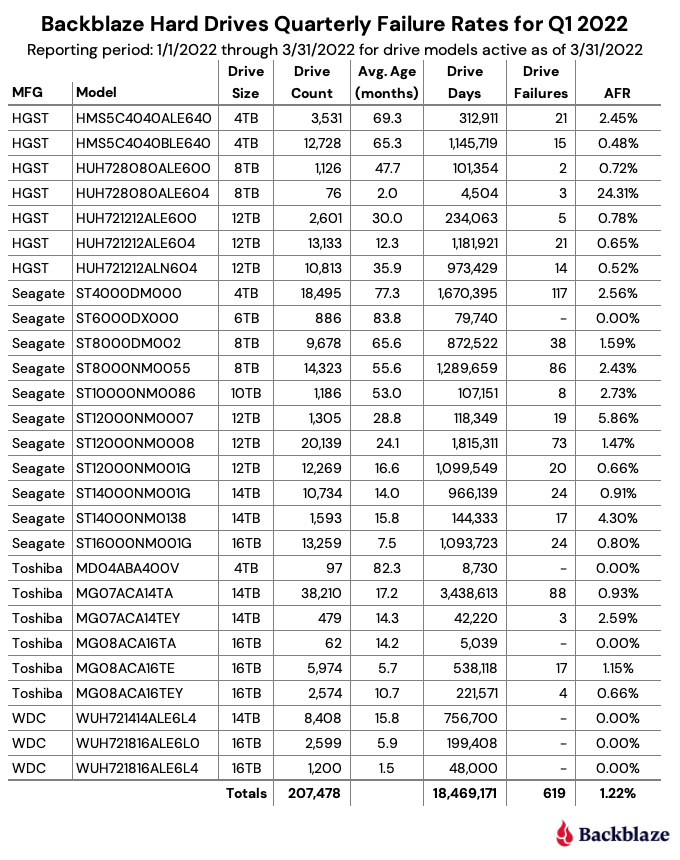
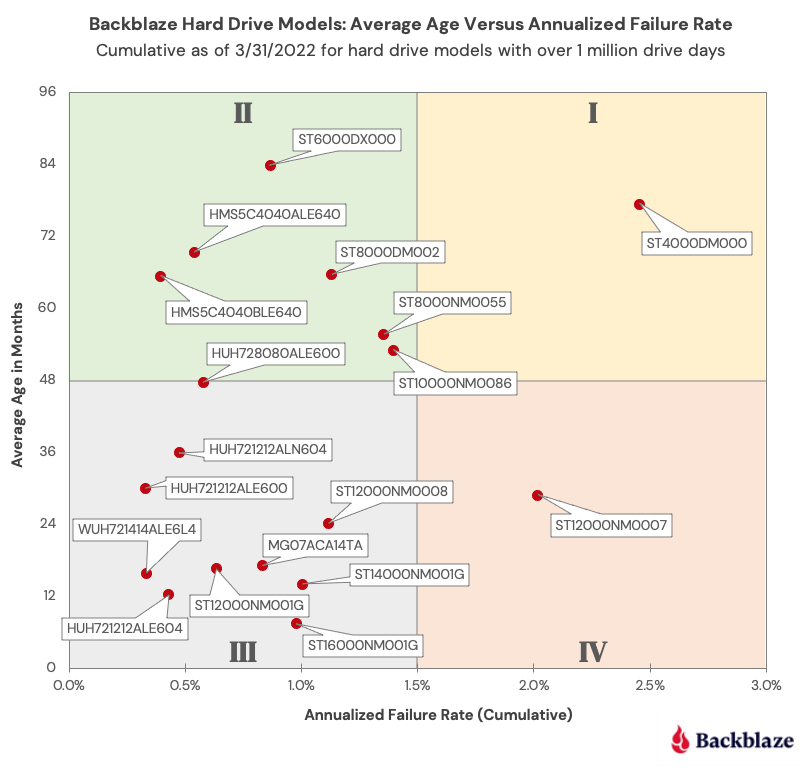
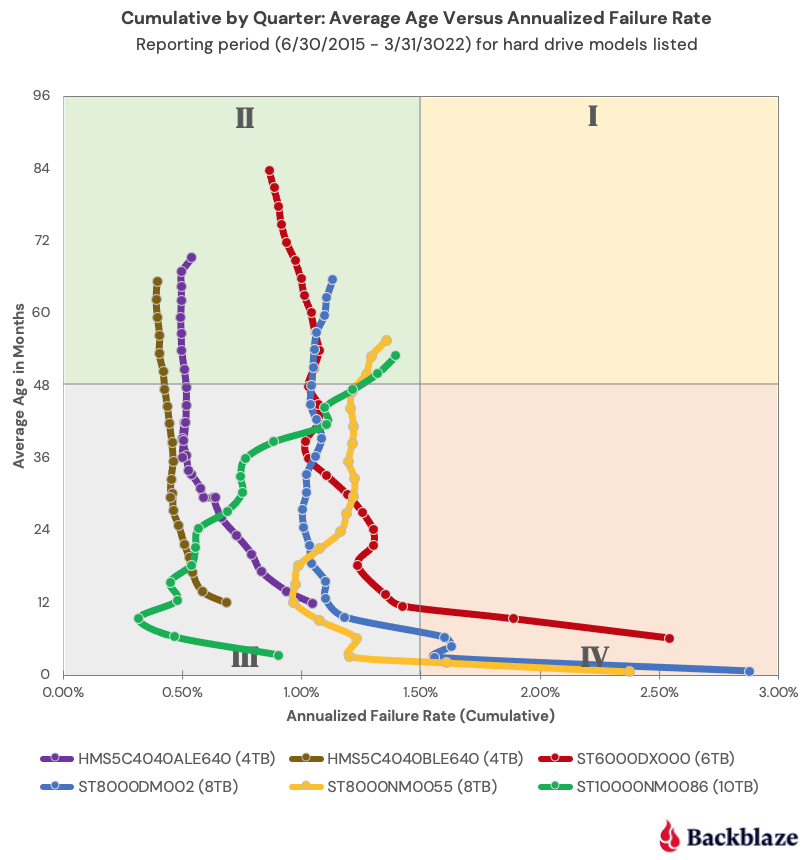

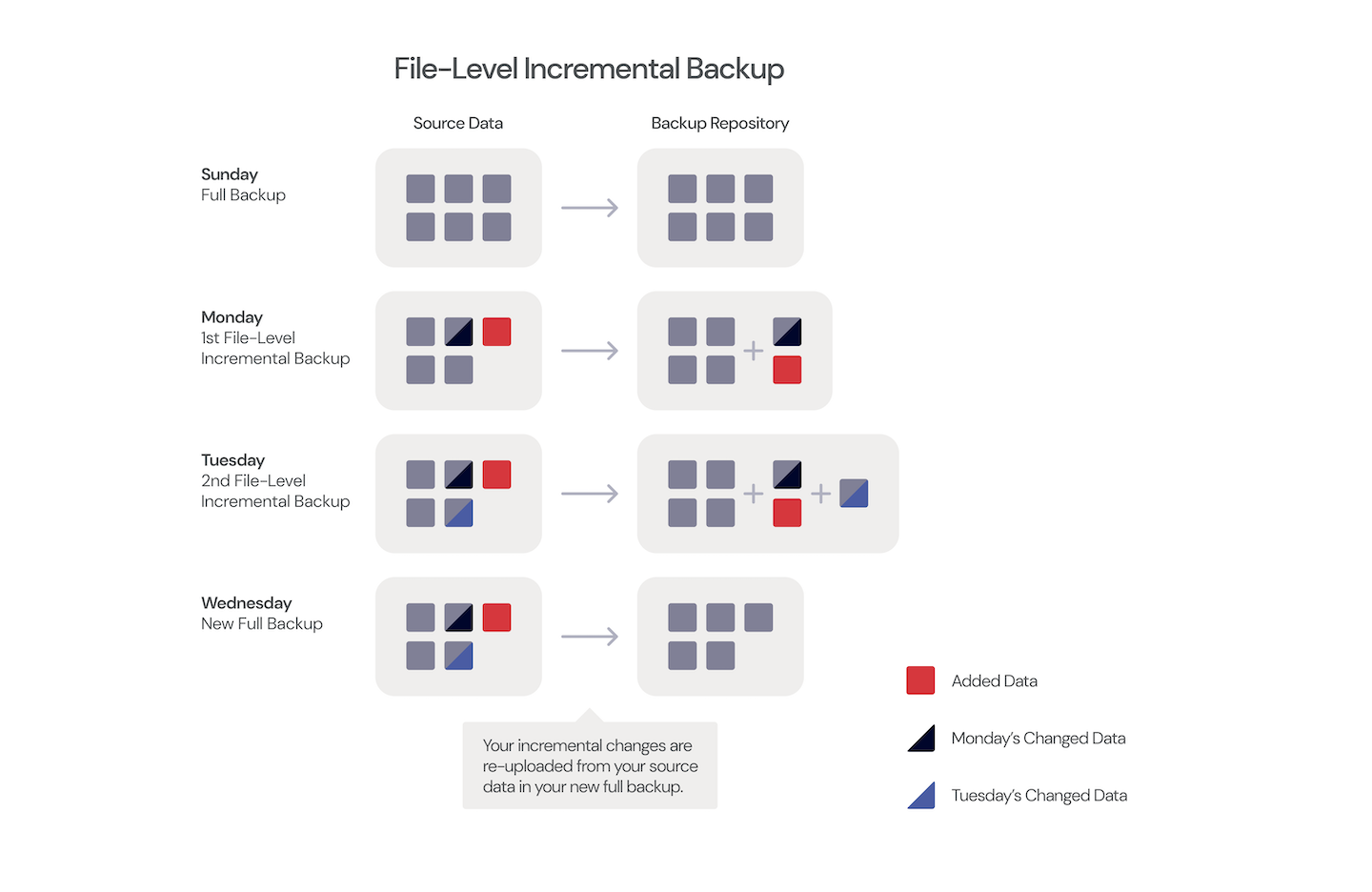
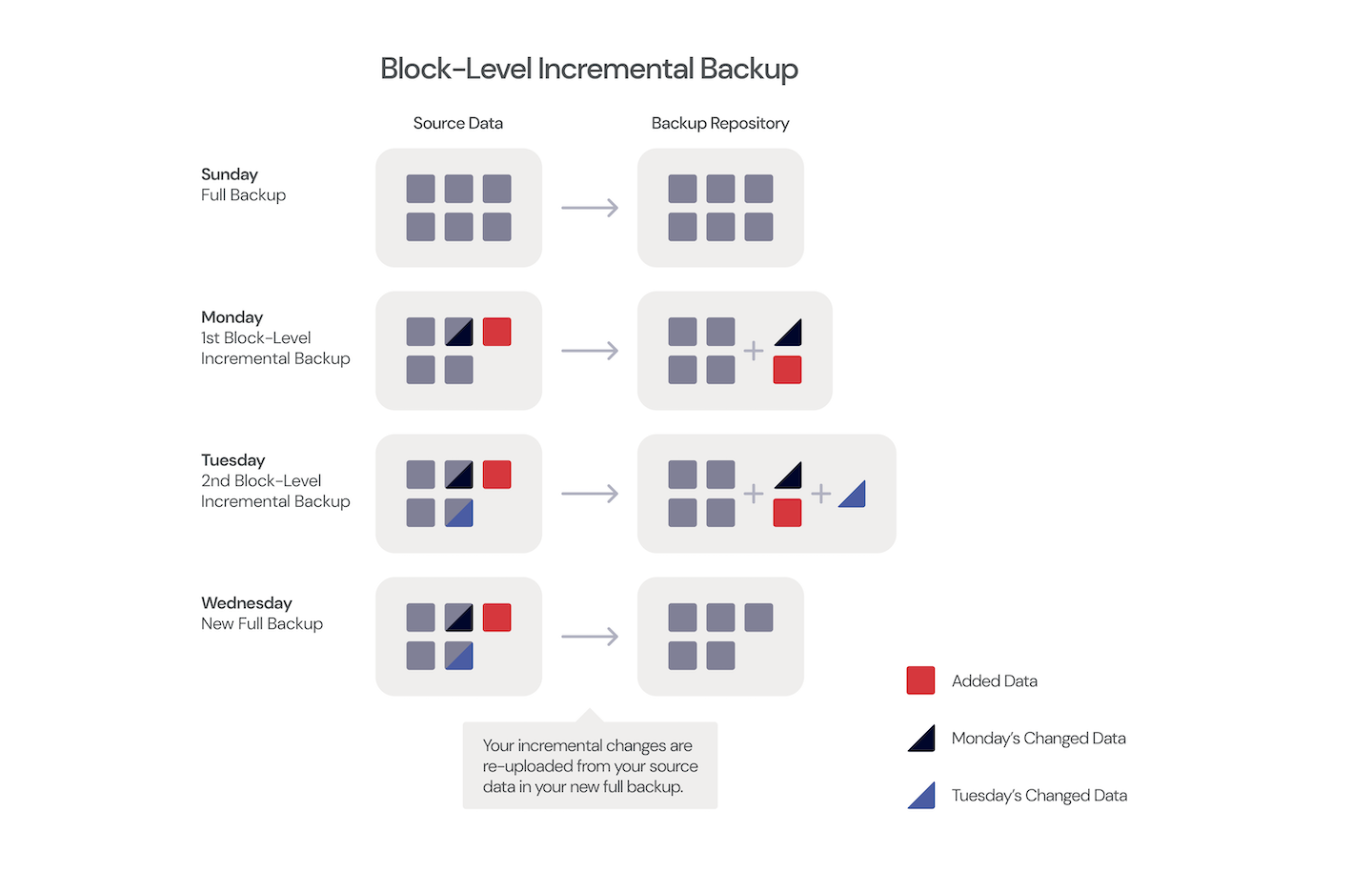
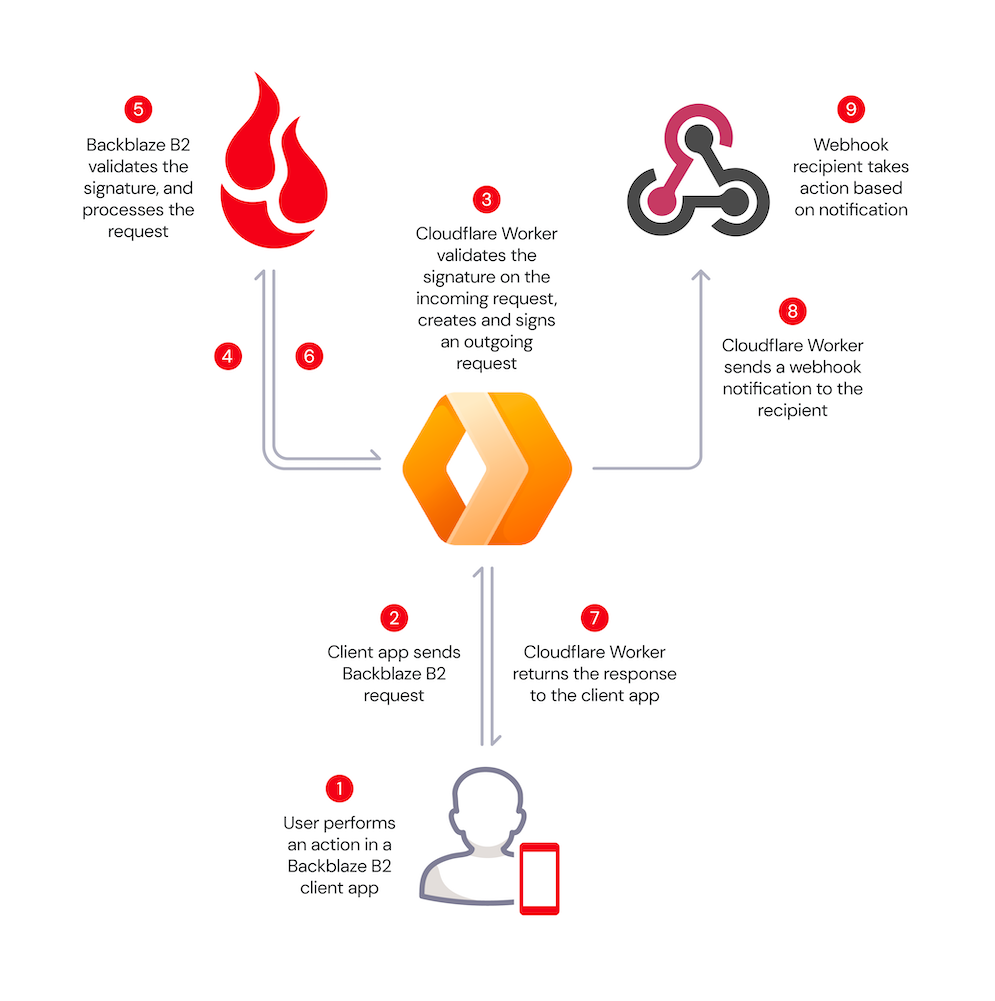
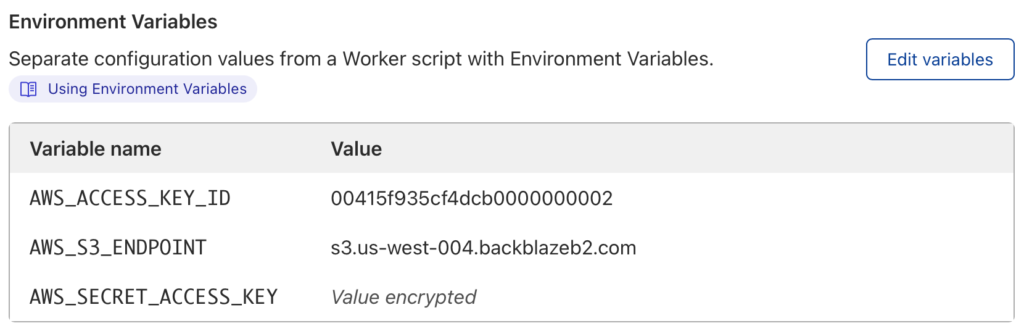

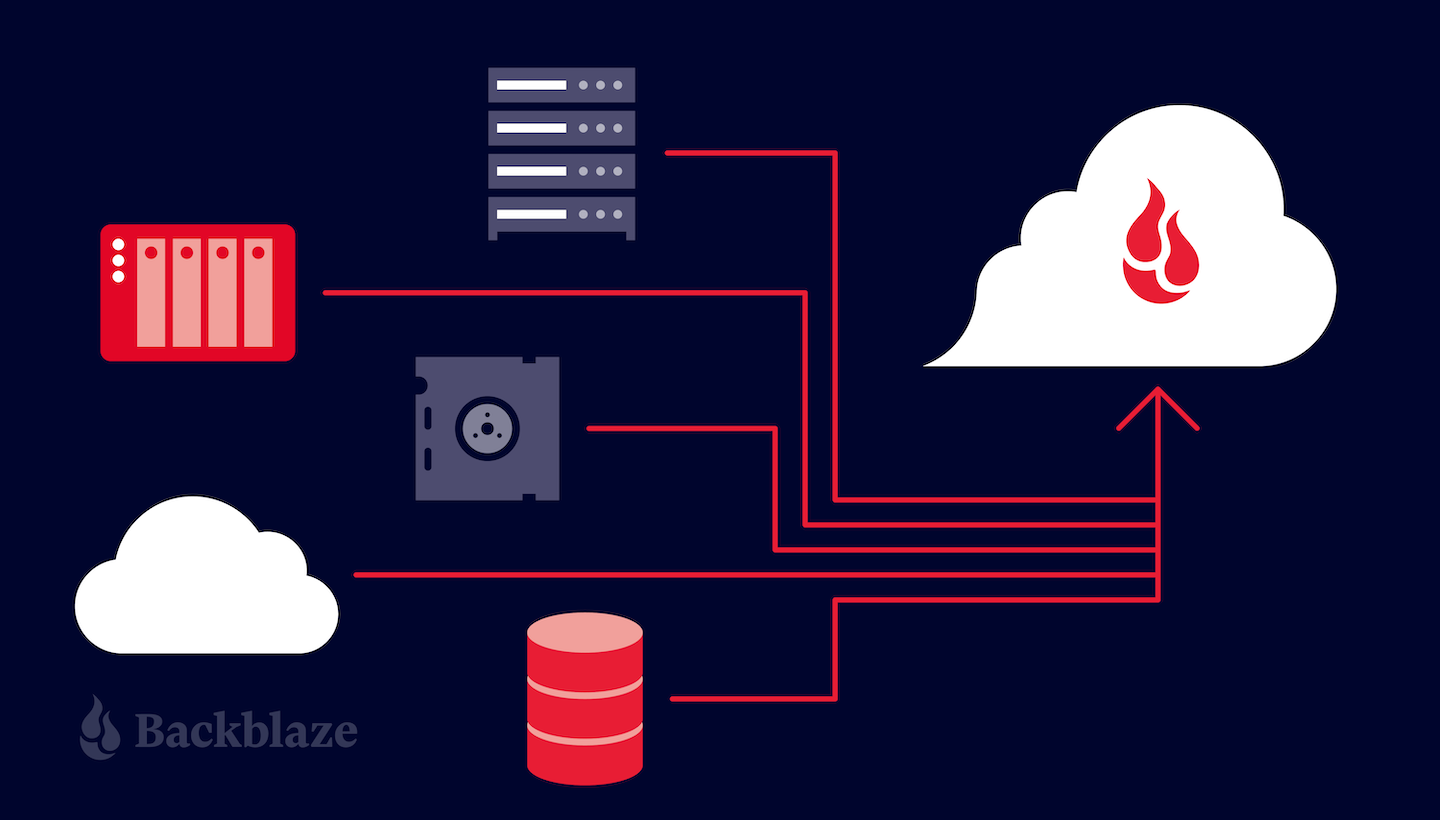




 list of fastest-growing private companies and best places to work, and as a leader on G2 and Gartner for call tracking and marketing attribution software.
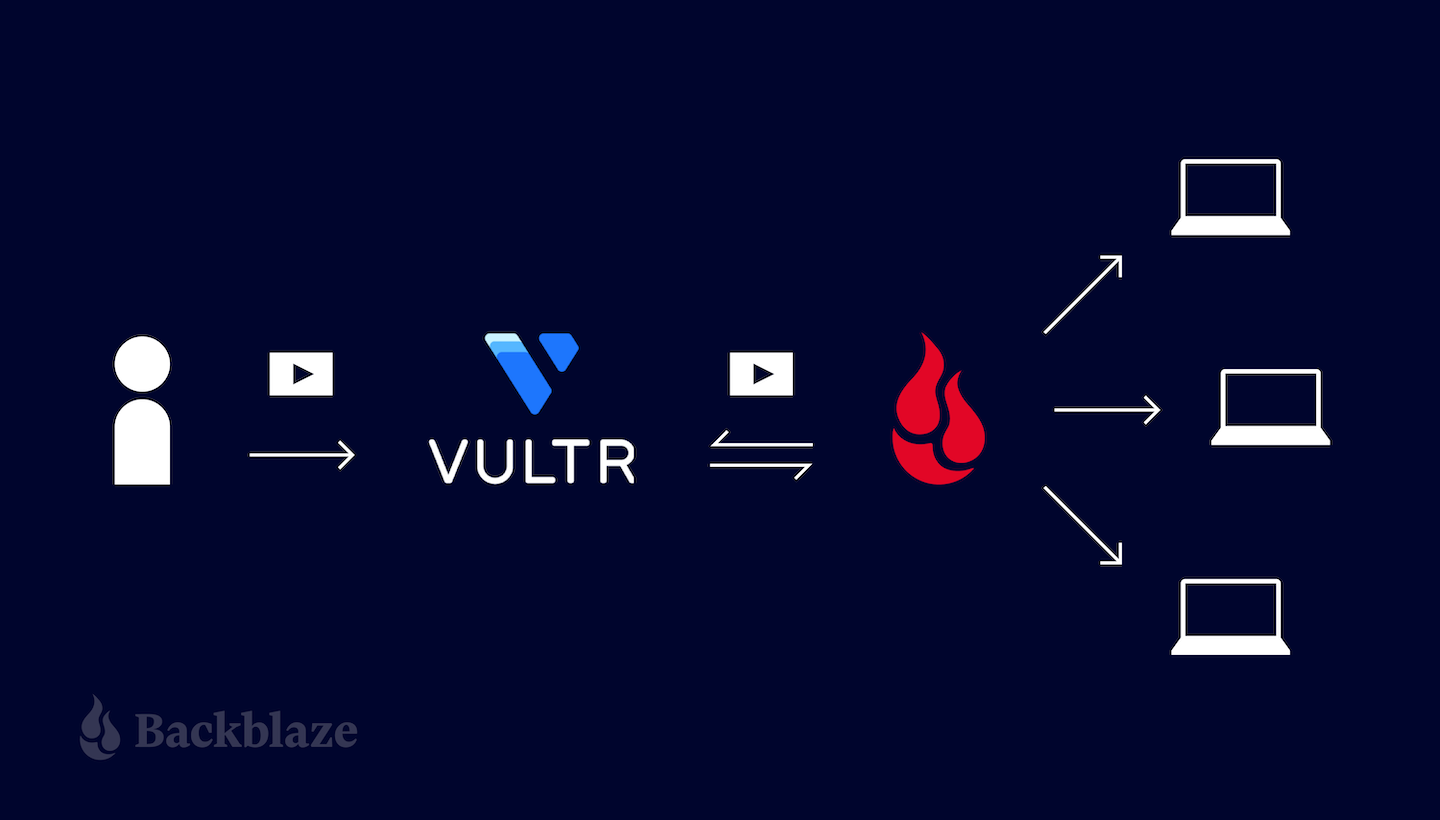
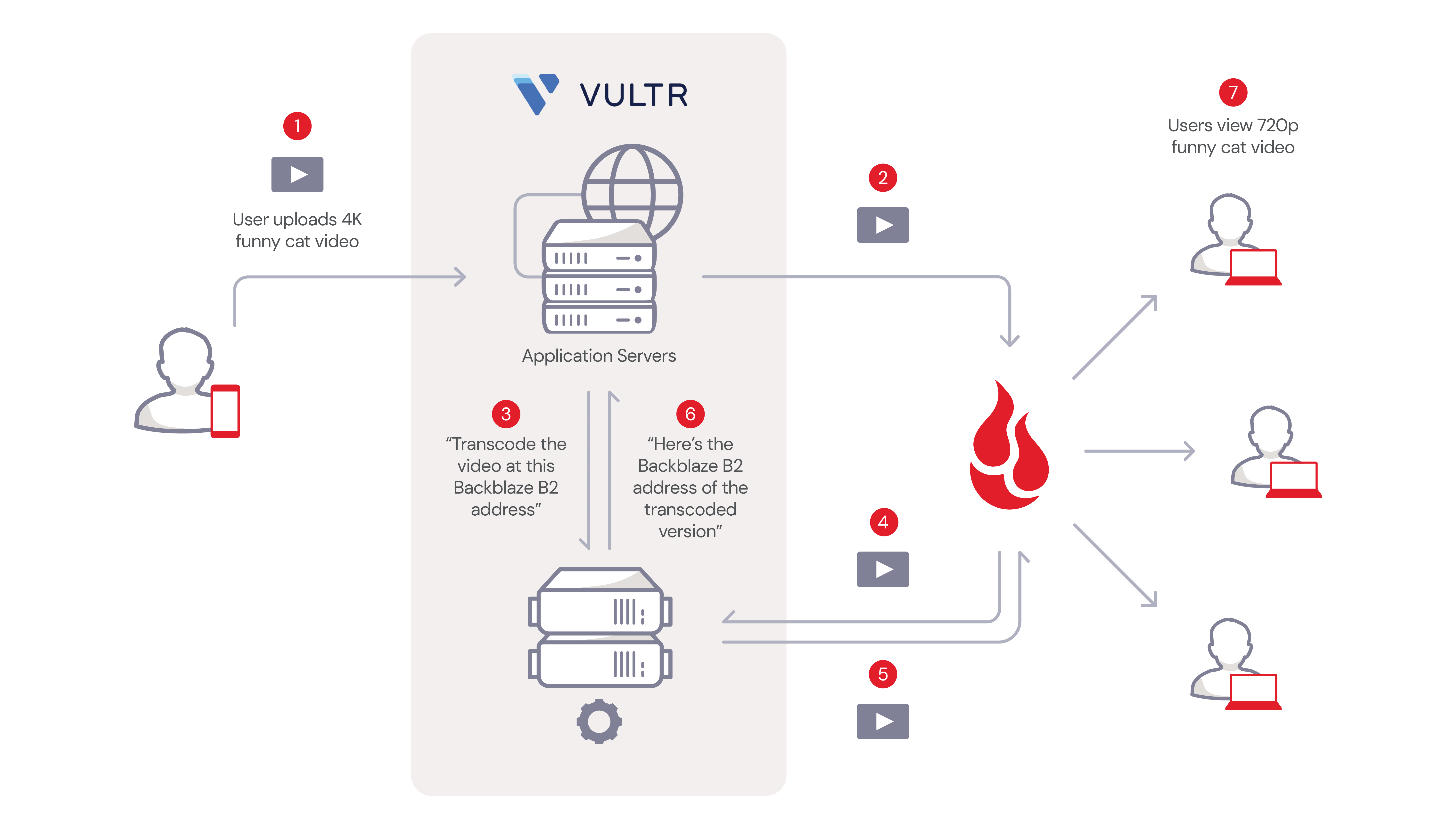

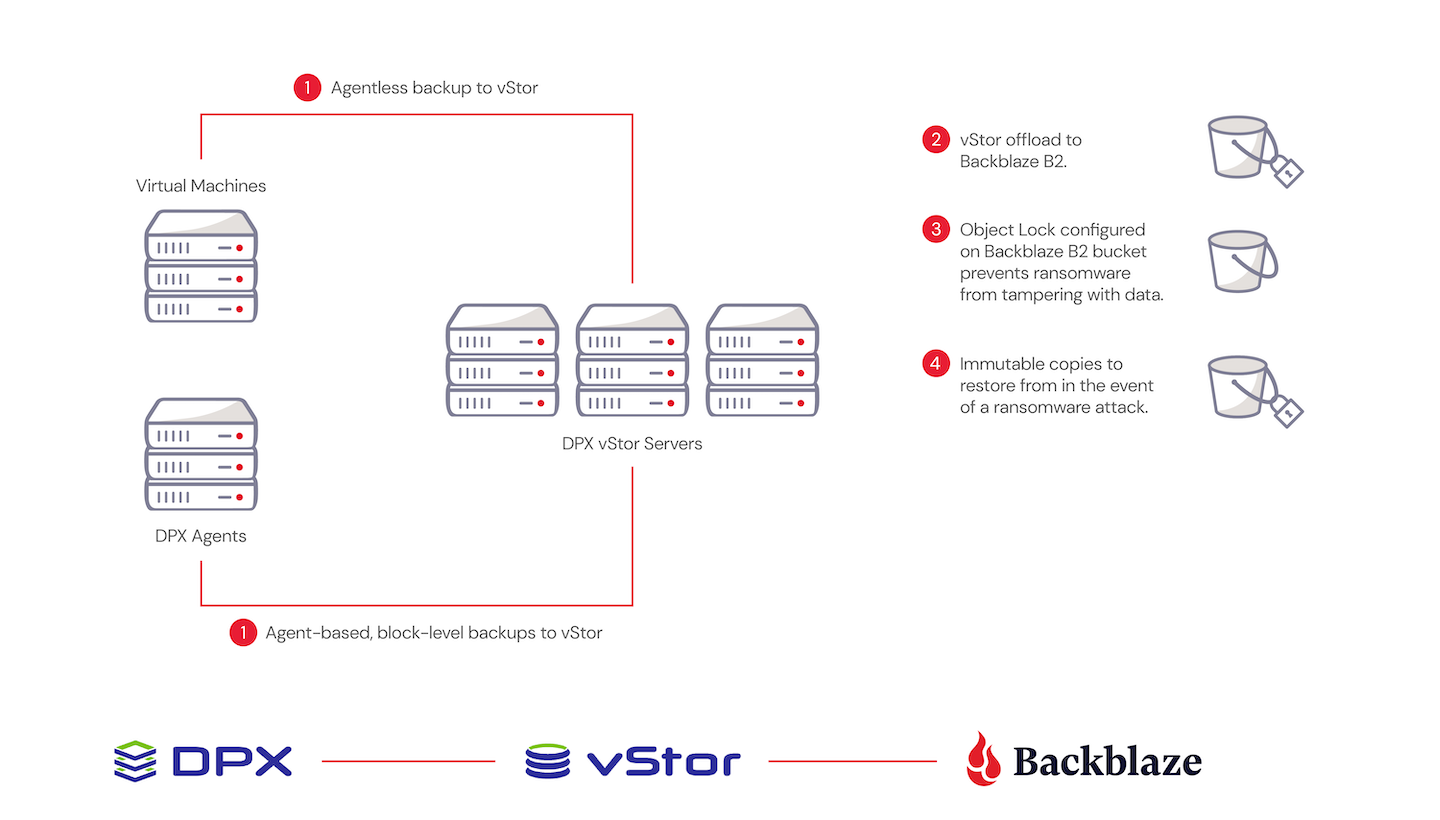
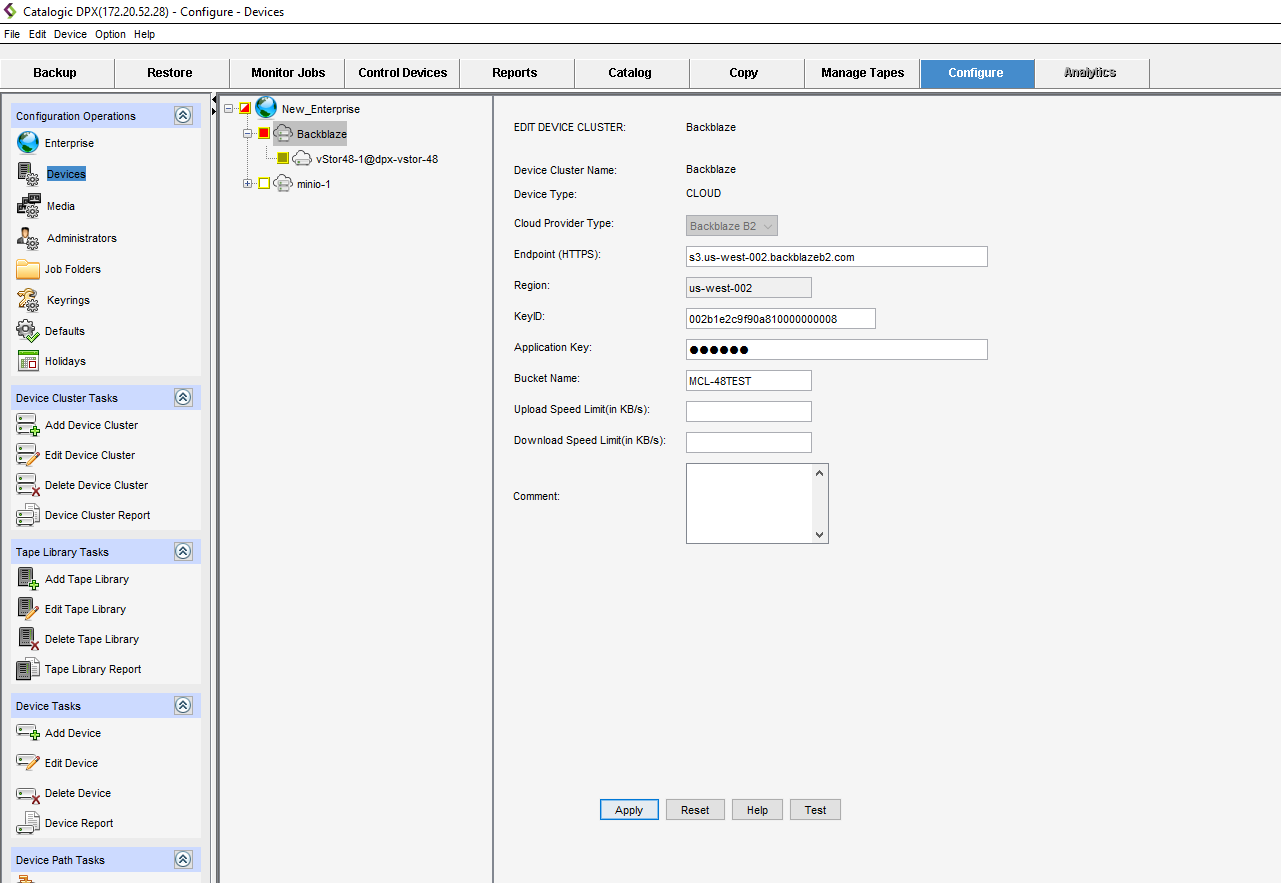
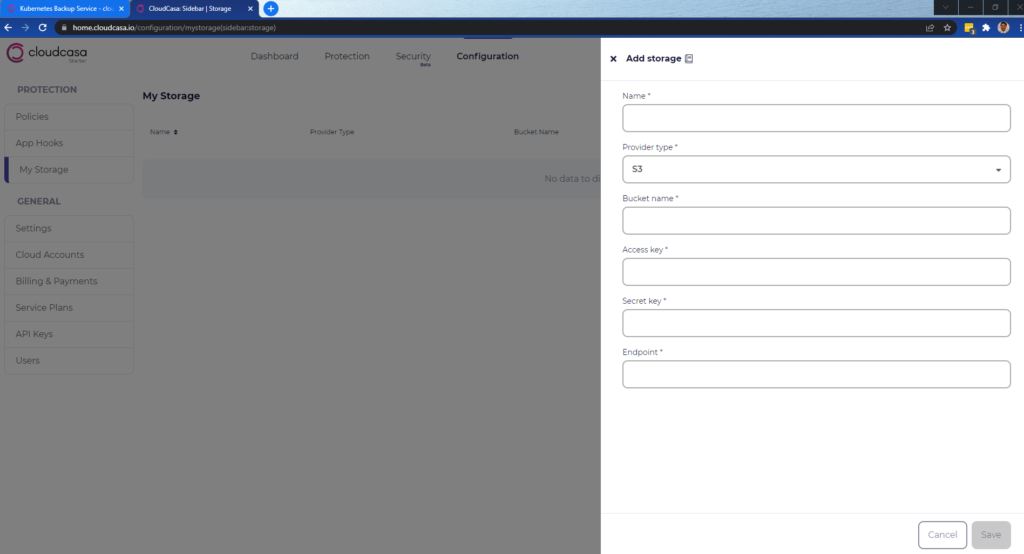



 100% true copy of data.
 Expensive.

