Tag Archives: Best practices

Choosing between messaging services for serverless applications

Post Syndicated from James Beswick original https://aws.amazon.com/blogs/compute/choosing-between-messaging-services-for-serverless-applications/

Most serverless application architectures use a combination of different AWS services, microservices, and AWS Lambda functions. Messaging services are important in allowing distributed applications to communicate with each other, and are fundamental to most production serverless workloads.

Messaging services can improve the resilience, availability, and scalability of applications, when used appropriately. They can also enable your applications to communicate beyond your workload or even the AWS Cloud, and provide extensibility for future service features and versions.

In this blog post, I compare the primary messaging services offered by AWS and how you can use these in your serverless application architectures. I also show how you use and deploy these integrations with the AWS Serverless Application Model (AWS SAM).

Examples in this post refer to code that can be downloaded from this GitHub repository. The README.md file explains how to deploy and run each example.

Overview

Three of the most useful messaging patterns for serverless developers are queues, publish/subscribe, and event buses. In AWS, these are provided by Amazon SQS, Amazon SNS, and Amazon EventBridge respectively. All of these services are fully managed and highly available, so there is no infrastructure to manage. All three integrate with Lambda, allowing you to publish messages via the AWS SDK and invoke functions as targets. Each of these services has an important role to play in serverless architectures.

SNS enables you to send messages reliably between parts of your infrastructure. It uses a robust retry mechanism for when downstream targets are unavailable. When the delivery policy is exhausted, it can optionally send those messages to a dead-letter queue for further processing. SNS uses topics to logically separate messages into channels, and your Lambda functions interact with these topics.

SQS provides queues for your serverless applications. You can use a queue to send, store, and receive messages between different services in your workload. Queues are an important mechanism for providing fault tolerance in distributed systems, and help decouple different parts of your application. SQS scales elastically, and there is no limit to the number of messages per queue. The service durably persists messages until they are processed by a downstream consumer.

EventBridge is a serverless event bus service, simplifying routing events between AWS services, software as a service (SaaS) providers, and your own applications. It logically separates routing using event buses, and you implement the routing logic using rules. You can filter and transform incoming messages at the service level, and route events to multiple targets, including Lambda functions.

Integrating an SQS queue with AWS SAM

The first example shows an AWS SAM template defining a serverless application with two Lambda functions and an SQS queue:
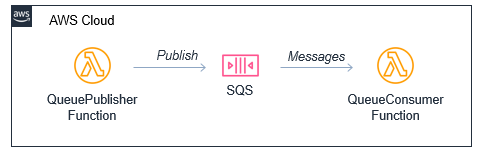
Producer-consumer example

You can declare an SQS queue in an AWS SAM template with the AWS::SQS::Queue resource:

  MySqsQueue:
    Type: AWS::SQS::Queue

To publish to the queue, the publisher function must have permission to send messages. Using an AWS SAM policy template, you can apply policy that enables send messaging to one specific queue:

      Policies:
        - SQSSendMessagePolicy:
            QueueName: !GetAtt MySqsQueue.QueueName

The AWS SAM template passes the queue name into the Lambda function as an environment variable. The function uses the sendMessage method of the AWS.SQS class to publish the message:

const AWS = require('aws-sdk')
AWS.config.region = process.env.AWS_REGION 
const sqs = new AWS.SQS({apiVersion: '2012-11-05'})

// The Lambda handler
exports.handler = async (event) => {
  // Params object for SQS
  const params = {
    MessageBody: `Message at ${Date()}`,
    QueueUrl: process.env.SQSqueueName
  }
  
  // Send to SQS
  const result = await sqs.sendMessage(params).promise()
  console.log(result)
}

When the SQS queue receives the message, it publishes to the consuming Lambda function. To configure this integration in AWS SAM, the consumer function is granted the SQSPollerPolicy policy. The function’s event source is set to receive messages from the queue in batches of 10:

  QueueConsumerFunction:
    Type: AWS::Serverless::Function 
    Properties:
      CodeUri: code/
      Handler: consumer.handler
      Runtime: nodejs12.x
      Timeout: 3
      MemorySize: 128
      Policies:  
        - SQSPollerPolicy:
            QueueName: !GetAtt MySqsQueue.QueueName
      Events:
        MySQSEvent:
          Type: SQS
          Properties:
            Queue: !GetAtt MySqsQueue.Arn
            BatchSize: 10

The payload for the consumer function is the message from SQS. This is an array of messages up to the batch size, containing a body attribute with the publishing function’s MessageBody. You can see this in the CloudWatch log for the function:

CloudWatch log result

Integrating an SNS topic with AWS SAM

The second example shows an AWS SAM template defining a serverless application with three Lambda functions and an SNS topic:

SNS fanout to Lambda functions

You declare an SNS topic and the subscribing Lambda functions with the AWS::SNS:Topic resource:

  MySnsTopic:
    Type: AWS::SNS::Topic
    Properties:
      Subscription:
        - Protocol: lambda
          Endpoint: !GetAtt TopicConsumerFunction1.Arn    
        - Protocol: lambda
          Endpoint: !GetAtt TopicConsumerFunction2.Arn

You provide the SNS service with permission to invoke the Lambda functions but defining an AWS::Lambda::Permission for each:

  TopicConsumerFunction1Permission:
    Type: 'AWS::Lambda::Permission'
    Properties:
      Action: 'lambda:InvokeFunction'
      FunctionName: !Ref TopicConsumerFunction1
      Principal: sns.amazonaws.com

The SNSPublishMessagePolicy policy template grants permission to the publishing function to send messages to the topic. In the function, the publish method of the AWS.SNS class handles publishing:

const AWS = require('aws-sdk')
AWS.config.region = process.env.AWS_REGION 
const sns = new AWS.SNS({apiVersion: '2012-11-05'})

// The Lambda handler
exports.handler = async (event) => {
  // Params object for SNS
  const params = {
    Message: `Message at ${Date()}`,
    Subject: 'New message from publisher',
    TopicArn: process.env.SNStopic
  }
  
  // Send to SQS
  const result = await sns.publish(params).promise()
  console.log(result)
}

The payload for the consumer functions is the message from SNS. This is an array of messages, containing subject and message attributes from the publishing function. You can see this in the CloudWatch log for the function:
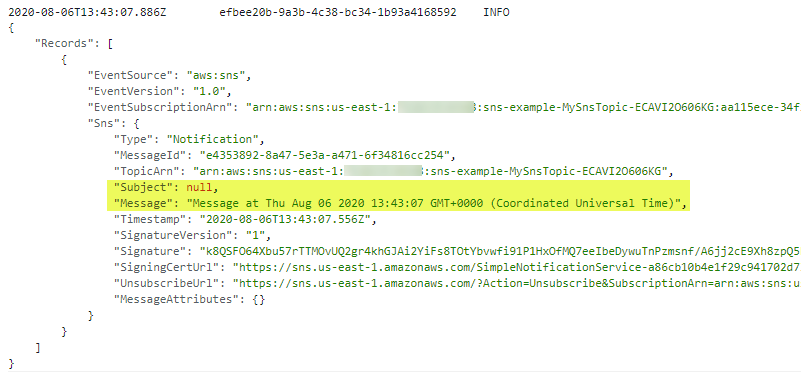
CloudWatch log result

Differences between SQS and SNS configurations

SQS queues and SNS topics offer different functionality, though both can publish to downstream Lambda functions.

An SQS message is stored on the queue for up to 14 days until it is successfully processed by a subscriber. SNS does not retain messages so if there are no subscribers for a topic, the message is discarded.

SNS topics may broadcast to multiple targets. This behavior is called fan-out. It can be used to parallelize work across Lambda functions or send messages to multiple environments (such as test or development). An SNS topic can have up to 12,500,000 subscribers, providing highly scalable fan-out capabilities. The targets may include HTTP/S endpoints, SMS text messaging, SNS mobile push, email, SQS, and Lambda functions.

In AWS SAM templates, you can retrieve properties such as ARNs and names of queues and topics, using the following intrinsic functions:

Amazon SQS Amazon SNS
Channel type Queue Topic
Get ARN !GetAtt MySqsQueue.Arn !Ref MySnsTopic
Get name !GetAtt MySqsQueue.QueueName !GetAtt MySnsTopic.TopicName

Integrating with EventBridge in AWS SAM

The third example shows the AWS SAM template defining a serverless application with two Lambda functions and an EventBridge rule:

EventBridge integration with AWS SAM

The default event bus already exists in every AWS account. You declare a rule that filters events in the event bus using the AWS::Events::Rule resource:

  EventRule: 
    Type: AWS::Events::Rule
    Properties: 
      Description: "EventRule"
      EventPattern: 
        source: 
          - "demo.event"
        detail: 
          state: 
            - "new"
      State: "ENABLED"
      Targets: 
        - Arn: !GetAtt EventConsumerFunction.Arn
          Id: "ConsumerTarget"

The rule describes an event pattern specifying matching JSON attributes. Events that match this pattern are routed to the list of targets. You provide the EventBridge service with permission to invoke the Lambda functions in the target list:

  PermissionForEventsToInvokeLambda: 
    Type: AWS::Lambda::Permission
    Properties: 
      FunctionName: 
        Ref: "EventConsumerFunction"
      Action: "lambda:InvokeFunction"
      Principal: "events.amazonaws.com"
      SourceArn: !GetAtt EventRule.Arn

The AWS SAM template uses an IAM policy statement to grant permission to the publishing function to put events on the event bus:

  EventPublisherFunction:
    Type: AWS::Serverless::Function
    Properties:
      CodeUri: code/
      Handler: publisher.handler
      Timeout: 3
      Runtime: nodejs12.x
      Policies:
        - Statement:
          - Effect: Allow
            Resource: '*'
            Action:
              - events:PutEvents      

The publishing function then uses the putEvents method of the AWS.EventBridge class, which returns after the events have been durably stored in EventBridge:

const AWS = require('aws-sdk')
AWS.config.update({region: 'us-east-1'})
const eventbridge = new AWS.EventBridge()

exports.handler = async (event) => {
  const params = {
    Entries: [ 
      {
        Detail: JSON.stringify({
          "message": "Hello from publisher",
          "state": "new"
        }),
        DetailType: 'Message',
        EventBusName: 'default',
        Source: 'demo.event',
        Time: new Date 
      }
    ]
  }
  const result = await eventbridge.putEvents(params).promise()
  console.log(result)
}

The payload for the consumer function is the message from EventBridge. This is an array of messages, containing subject and message attributes from the publishing function. You can see this in the CloudWatch log for the function:

CloudWatch log result

Comparing SNS with EventBridge

SNS and EventBridge have many similarities. Both can be used to decouple publishers and subscribers, filter messages or events, and provide fan-in or fan-out capabilities. However, there are differences in the list of targets and features for each service, and your choice of service depends on the needs of your use-case.

EventBridge offers two newer capabilities that are not available in SNS. The first is software as a service (SaaS) integration. This enables you to authorize supported SaaS providers to send events directly from their EventBridge event bus to partner event buses in your account. This replaces the need for polling or webhook configuration, and creates a highly scalable way to ingest SaaS events directly into your AWS account.

The second feature is the Schema Registry, which makes it easier to discover and manage OpenAPI schemas for events. EventBridge can infer schemas based on events routed through an event bus by using schema discovery. This can be used to generate code bindings directly to your IDE for type-safe languages like Python, Java, and TypeScript. This can help accelerate development by automating the generation of classes and code directly from events.

This table compares the major features of both services:

Amazon SNS Amazon EventBridge
Number of targets 10 million (soft) 5
Availability SLA 99.9% 99.99%
Limits 100,000 topics. 12,500,000 subscriptions per topic. 100 event buses. 300 rules per event bus.
Publish throughput Varies by Region. Soft limits. Varies by Region. Soft limits.
Input transformation No Yes – see details.
Message filtering Yes – see details. Yes, including IP address matching – see details.
Message size maximum 256 KB 256 KB
Billing Per 64 KB
Format Raw or JSON JSON
Receive events from AWS CloudTrail No Yes
Targets HTTP(S), SMS, SNS Mobile Push, Email/Email-JSON, SQS, Lambda functions. 15 targets including AWS Lambda, Amazon SQS, Amazon SNS, AWS Step Functions, Amazon Kinesis Data Streams, Amazon Kinesis Data Firehose.
SaaS integration No Yes – see integrations.
Schema Registry integration No Yes – see details.
Dead-letter queues supported Yes No
FIFO ordering available No No
Public visibility Can create public topics Cannot create public buses
Pricing $0.50/million requests + variable delivery cost + data transfer out cost. SMS varies. $1.00/million events. Free for AWS events. No charge for delivery.
Billable request size 1 request = 64 KB 1 event = 64 KB
AWS Free Tier eligible Yes No
Cross-Region You can subscribe your AWS Lambda functions to an Amazon SNS topic in any Region. Targets must be in the same Region. You can publish across Regions to another event bus.
Retry policy
  • For SQS/Lambda, exponential backoff over 23 days.
  • For SMTP, SMS and Mobile push, exponential backoff over 6 hours.
At-least-once event delivery to targets, including retry with exponential backoff for up to 24 hours.

Conclusion

Messaging is an important part of serverless applications and AWS services provide queues, publish/subscribe, and event routing capabilities. This post reviews the main features of SNS, SQS, and EventBridge and how they provide different capabilities for your workloads.

I show three example applications that publish and consume events from the three services. I walk through AWS SAM syntax for deploying these resources in your applications. Finally, I compare differences between the services.

To learn more building decoupled architectures, see this Learning Path series on EventBridge. For more serverless learning resources, visit https://serverlessland.com.

Architecture Patterns for Red Hat OpenShift on AWS

Post Syndicated from Ryan Niksch original https://aws.amazon.com/blogs/architecture/architecture-patterns-for-red-hat-openshift-on-aws/

Editor’s note: Although this blog post and its accompanying code make use of the word “Master,” Red Hat is making open source code more inclusive by eradicating “problematic language.” Read more about this.

Introduction

Red Hat OpenShift is an application platform that provides customers with turnkey application platform that is much more than a simple Kubernetes orchestration.

OpenShift customers choose AWS as their cloud of choice because of the efficiency, security, and reliability, scalability, and elasticity it provides. Customers seeking to modernize their business, process, and application stacks are drawn to the rich AWS service and feature sets.

As such, we see some customers migrate from on-premises to AWS or exist in a hybrid context with application workloads running in various locations. For OpenShift customers, this poses a few questions and considerations:

  • What are the recommendations for the best way to deploy OpenShift on AWS?
  • How is this different from what customers were used to on-premises?
  • How does this ensure resilience and availability?
  • Do customers need a multi-region, multi-account approach?

For hybrid customers, there are assumptions and misconceptions:

  • Where does the control plane exist?
  •  Is there replication, and if so, what are the considerations and ramifications?

In this post I will run through some of the more common questions and patterns for OpenShift on AWS, while looking at some of the terminology and conceptual differences of AWS. I’ll explore migration and hybrid use cases and address some misconceptions.

OpenShift building blocks

On AWS, OpenShift 4x is the norm. To that effect, I will focus on OpenShift 4, but many of the considerations will apply to both OpenShift 3 and OpenShift 4.

Let’s unpack some of the OpenShift building blocks. An OpenShift cluster consists of Master, infrastructure, and worker nodes. The Master forms the control plane and infrastructure nodes cater to a routing layer and additional functions, such as logging, monitoring etc. Worker nodes are the nodes that customer application container workloads will exist on.

When deployed on-premises, OpenShift nodes will be placed in separate network subnets. Depending on distance, latency, etc., a single OpenShift cluster may span two data centers that have some nodes in a subnet in one data center and other subnets in a different data center. This applies to customers with data centers within a few miles of each other with high-speed connectivity. An alternative would be an OpenShift cluster in each data center.

AWS concepts and terminology

At AWS, the concept of “region” is a geolocation, such as EMEA (Europe, Middle East, and Africa) or APAC (Asian Pacific) rather than a data center or specific building. An Availability Zone (AZ) is the closest construct on AWS that maps to a physical data center. Within each region you will find multiple (typically three or more) AZs. Note that a single AZ will contain multiple physical data centers but we treat it as a single point of failure. For example, an event that impacts an AZ would be expected to impact all the data centers within that AZ. To this effect, customers should deploy workloads spanning multiple AZs to protect against any event that would impact a single AZ.

Read more about Regions, Availability Zones, and Edge Locations.

Deploying OpenShift

When deploying an OpenShift cluster on AWS, we recommend starting with three Master nodes spread across three AWS AZs and three worker nodes spread across three AZs. This allows for the combination of resilience and availably constructs provided by AWS as well as Red Hat OpenShift. The OpenShift installer provides a means of deploying the underlying AWS infrastructure in two ways: IPI Installer-provisioned infrastructure and UPI user-provisioned infrastructure. Both Red Hat and AWS collect customer feedback and use this to drive recommended patterns that are then included in the OpenShift installer. As such, the OpenShift installer IPI mode becomes a living reference architecture for deploying OpenShift on AWS.

Deploying OpenShift

The installer will require inputs for the environment on which it’s being deployed. In this case, since I am deploying on AWS, I will need to provide the AWS region, AZs, or subnets that related to the AZs, as well as EC2 instance type. The installer will then generate a set of ignition files that will be used during the deployment of OpenShift:

apiVersion: v1
baseDomain: example.com 
controlPlane: 
  hyperthreading: Enabled   
  name: master
  platform:
    aws:
      zones:
      - us-west-2a
      - us-west-2b
      - us-west-2c
      rootVolume:
        iops: 4000
        size: 500
        type: io1
      type: m5.xlarge 
  replicas: 3
compute: 
- hyperthreading: Enabled 
  name: worker
  platform:
    aws:
      rootVolume:
        iops: 2000
        size: 500
        type: io1 
      type: m5.xlarge
      zones:
      - us-west-2a
      - us-west-2b
      - us-west-2c
  replicas: 3
metadata:
  name: test-cluster 
networking:
  clusterNetwork:
  - cidr: 10.128.0.0/14
    hostPrefix: 23
  machineNetwork:
  - cidr: 10.0.0.0/16
  networkType: OpenShiftSDN
  serviceNetwork:
  - 172.30.0.0/16
platform:
  aws:
    region: us-west-2 
    userTags:
      adminContact: jdoe
      costCenter: 7536
pullSecret: '{"auths": ...}' 
fips: false 
sshKey: ssh-ed25519 AAAA... 

What does this look like at scale?

For larger implementations, we would see additional worker nodes spread across three or more AZs. As more worker nodes are added, use of the control plane increases. Initially scaling up the Amazon Elastic Compute Cloud (EC2) instance type to a larger instance type is an effective way of addressing this. It’s possible to add more Master nodes, and we recommend that an odd number of nodes are maintained. It is more common to see scaling out of the infrastructure nodes before there is a need to scale Masters. For large-scale implementations, infrastructure functions such as the router, monitoring, and logging functions can be moved to separate EC2 instances from the Master nodes, as well as from each other. It is important to spread the routing layer across multiple AZs, which is critical to maintaining availability and resilience.

The process of resource separation is now controlled by infrastructure machine sets within OpenShift. An infrastructure machine set would need to be defined, then the infrastructure role edited to be moved from the default to this new infrastructure machine set. Read about this in greater detail.

OpenShift in a multi-account context

Using AWS accounts as a means of separation is a common well-architected pattern. AWS Organizations and AWS Control Tower are services that are commonly adopted as part of a multi-account strategy. This is very much the case when looking to enable teams to use their own accounts and when an account vending process is needed to cater for self-service account provisioning.

OpenShift in a multi-account context

OpenShift clusters are deployed into multiple accounts. An OpenShift dev cluster is deployed into an AWS Dev account. This account would typically have AWS Developer Support associated with it. A separate production OpenShift cluster would be provisioned into an AWS production account with AWS Enterprise Support. Enterprise support provides for faster support case response times, and you get the benefit of dedicated resources such as a technical account manager and solutions architect.

CICD pipelines and processes are then used to control the application life cycle from code to dev to production. The pipelines would push the code to different OpenShift cluster end points at different stages of the life cycle.

Hybrid use case implementation

A common misconception of hybrid implementations is that there is a single cluster or control plan that has worker nodes in various locations. For example, there could be a cluster where the Master and infrastructure nodes are deployed in one location, but also worker nodes registered with this cluster that exist on-premises as well as in the cloud.

Having a single customer control plane for a hybrid implementation, even if technically possible, introduces undesired risks.

There is the potential to take multiple environments with very different resilience characteristics and make them interdependent of each other. This can result in performance and reliability issues, and these may increase not only the possibility of the risk manifesting, but also increase in the impact or blast radius.

Instead, hybrid implementations will see separate OpenShift clusters deployed into various locations. A customer may deploy clusters on-premises to cater for a workload that can’t be migrated to the cloud in the short term. Separate OpenShift clusters can then deployed into accounts in AWS for workloads on the cloud. Customers can also deploy separate OpenShift clusters in different AWS regions to cater for proximity to the consuming customer.

Though adding multiple clusters doesn’t add significant administrative overhead, there is a desire to be able to gain visibility and telemetry to all the deployed clusters from a central location. This may see the OpenShift clusters registered with Red Hat Advanced Cluster Manager for Kubernetes.

Summary

Take advantage of the IPI model, not only as a guide but to also save time. Make AWS Organizations, AWS Control Tower, and the AWS Service catalog part of your cloud and hybrid strategies. These will not only speed up migrations but also form building blocks for a modernized business with a focus of enabling prescriptive self-service. Consider Red Hat advanced cluster manager for multi cluster management.

Using Lambda layers to simplify your development process

Post Syndicated from James Beswick original https://aws.amazon.com/blogs/compute/using-lambda-layers-to-simplify-your-development-process/

Serverless developers frequently import libraries and dependencies into their AWS Lambda functions. While you can zip these dependencies as part of the build and deployment process, in many cases it’s easier to use layers instead. In this post, I explain how layers work, and how you can build and include layers in your own applications.

This blog post references the Happy Path application, which shows how to build a flexible backend to a photo-processing web application. To learn more, refer to Using serverless backends to iterate quickly on web apps – part 1. This code in this post is available at this GitHub repo.

Overview of Lambda layers

A Lambda layer is an archive containing additional code, such as libraries, dependencies, or even custom runtimes. When you include a layer in a function, the contents are extracted to the /opt directory in the execution environment. You can include up to five layers per function, which count towards the standard Lambda deployment size limits.

Layers are deployed as immutable versions, and the version number increments each time you publish a new layer. When you include a layer in a function, you specify the layer version you want to use. Layers are automatically set as private, but they can be shared with other AWS accounts, or shared publicly. Permissions only apply to a single version of a layer.

Using layers can make it faster to deploy applications with the AWS Serverless Application Model (AWS SAM) or the Serverless framework. By moving runtime dependencies from your function code to a layer, this can help reduce the overall size of the archive uploaded during a deployment.

Creating a layer containing the AWS SDK

The AWS SDK allows you to interact programmatically with AWS services using one of the supported runtimes. The Lambda service includes the AWS SDK so you can use it without explicitly importing in your deployment package.

However, there is no guarantee of the version provided in the execution environment. The SDK is upgraded frequently to support new AWS services and features. As a result, the version may change at any time. You can see the current version used by Lambda by declaring an instance of the SDK and logging out the version method:

Logging out the version method

For production workloads, it’s best practice to lock the version of the AWS SDK used in your functions. You can achieve this by including the SDK with your code package. Once you include this library, your code always uses the version in the deployment package and not the version included in the Lambda service.

A serverless application may consist of many functions, which all use a common SDK version. Instead of bundling the SDK with each function deployment, you can create a layer containing the SDK. The effect of this is to reduce the size of the uploaded archive, which makes your deployments faster.

To create an AWS SDK layer:

  1. First, clone this blog post’s GitHub repo. From a terminal window, execute:
    git clone https://github.com/aws-samples/aws-lambda-layers-aws-sam-examples
    cd ./aws-sdk-layer
  2. This directory contains an AWS SAM template and Node.js package.json file. Install the package.json contents:
    npm install
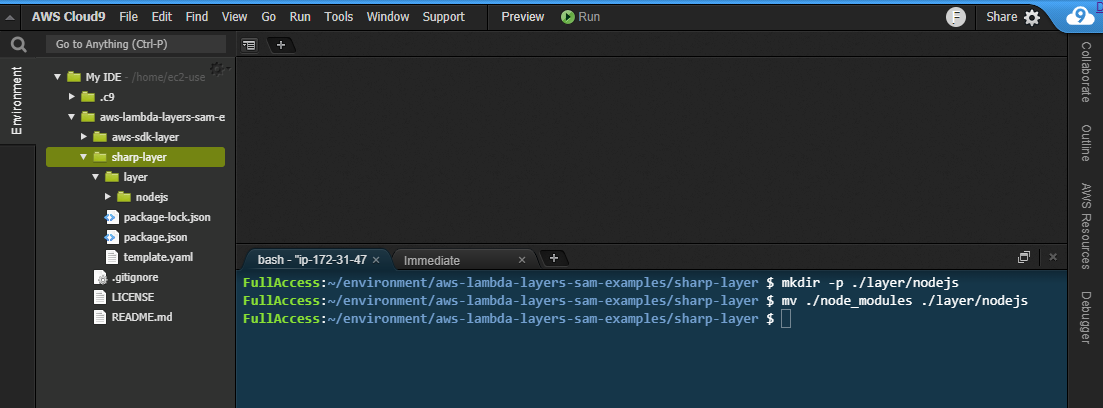
  3. Create the layer directory defined in the AWS SAM template and the nodejs directory required by Lambda. Next, move the node_modules directory:
    mkdir -p ./layer/nodejs
    mv ./node_modules ./layer/nodejs
  4. Next, deploy the AWS SAM template to create the layer:
    sam deploy --guided
  5. For the Stack name, enter “aws-sdk-layer”. Enter your preferred AWS Region and accept the other defaults.
  6. After the deployment completes, the new Lambda layer is available to use. Run this command to see the available layers:aws lambda list-layersaws lambda list-layers output

After adding a layer to a function, you can use console.log to log out the AWS SDK version. This shows that the function is now using the SDK version in the layer instead of the version provided by the Lambda service:

Use the SDK layer instead of the bundled layer

Creating layers with OS-specific binaries

Many code libraries include binaries that are operating-system specific. When you build packages on your local development machine, by default the binaries for that operating system are used. These may not be the right binaries for Lambda, which runs on Amazon Linux. If you are not using a compatible operating system, you must ensure you include Linux binaries in the layer.

The simplest way to package these libraries correctly is to use AWS Cloud9. This is an IDE in the AWS Cloud, which runs on Amazon EC2. After creating an environment, you can clone a git repository directly to the local storage of the instance, and run the necessary build scripts.

The Happy Path application resizes images using the Sharp npm library. This library uses libvips, which is written in C, so the compilation is operating system-specific. By creating a layer containing this library, it simplifies the packaging and deployment of the consuming Lambda function.

To create a Sharp layer using AWS Cloud9:

  1. Navigate to the AWS Cloud9 console.
  2. Choose Create environment.
  3. Enter the name “My IDE” and choose Next step.
  4. Accept all the default and choose Next step.
  5. Review the settings and choose Create environment.
  6. In the terminal panel, enter:
    git clone https://github.com/aws-samples/aws-lambda-layers-aws-sam-examples
    cd ./aws-lambda-layers-aws-sam-examples/sharp-layer
    npm installCreating a layer in Cloud9
  7. From a terminal window, ensure you are in the directory where you cloned this post’s GitHub repo. Execute the following commands:cd ./sharp-layer
    npm install
    mkdir -p ./layer/nodejs
    mv ./node_modules ./layer/nodejsCreating the layer in Cloud9
  8. Next, deploy the AWS SAM template to create the layer:
    sam deploy --guided
  9. For the Stack name, enter “sharp-layer”. Enter your preferred AWS Region and accept the other defaults. After the deployment completes, the new Lambda layer is available to use.

In some runtimes, you can specify a local set of packages for development, and another set for production. For example, in Node.js, the package.json file allows you to specify two sections for dependencies. If your development machine uses a different operating system to Lambda, and therefore uses different binaries, you can use package.json to resolve this. In the Happy Path Resizer function, which uses the Sharp layer, the package.json refers to a local binary for development.

Adding development dependencies to package.json

AWS SAM defines Lambda functions with the AWS::Serverless::Function resource. Layers are defined as a property of functions, as a list of layer ARNs including the version:

  MyLambdaFunction:
    Type: AWS::Serverless::Function 
    Properties:
      CodeUri: myFunction/
      Handler: app.handler
      MemorySize: 128
      Layers:
        - !Ref SharpLayerARN

Sharing a layer

Layers are private to your account by default but you can optionally share with other AWS accounts or make a layer public. You cannot share layers via the AWS Management Console but instead use the AWS CLI.

To share a layer, use add-layer-version-permission, specifying the layer name, version, AWS Region, and principal:

aws lambda add-layer-version-permission \
  --layer-name node-sharp \
  --principal '*' \
  --action lambda:GetLayerVersion \
  --version-number 3 
  --statement-id public 
  --region us-east-1

In the principal parameter, specify an individual account ID or use an asterisk to make the layer public. The CLI responds with a RevisionId containing the current revision of the policy:

add-layer-version output

You can check the permissions associated with a layer version by calling get-layer-version-policy with the layer name and version:

aws lambda get-layer-version-policy \
  --layer-name node-sharp \
  --version-number 3 \
  --region us-east-1

get-layer-version-policy output

Similarly, you can delete permissions associated with a layer version by calling remove-layer-vesion-permission with the layer name, statement ID, and version:

aws lambda remove-layer-version-permission \
 -- layer-name node-sharp \
 -- statement-id public \
 -- version-number 3

Once the permissions are removed, calling get-layer-version-policy results in an error:

Error invoking after removal

Conclusion

Lambda layers provide a convenient and effective way to package code libraries for sharing with Lambda functions in your account. Using layers can help reduce the size of uploaded archives and make it faster to deploy your code.

Layers can contain packages using OS-specific binaries, providing a convenient way to distribute these to developers. While layers are private by default, you can share with other accounts or make a layer public. Layers are published as immutable versions, and deleting a layer has no effect on deployed Lambda functions already using that layer.

To learn more about using Lambda layers, visit the documentation, or see how layers are used in the Happy Path web application.

Introducing the AWS Best Practices for Security, Identity, & Compliance Webpage and Customer Polling Feature

Post Syndicated from Marta Taggart original https://aws.amazon.com/blogs/security/introducing-aws-best-practices-security-identity-compliance-webpage-and-customer-polling-feature/

The AWS Security team has made it easier for you to find information and guidance on best practices for your cloud architecture. We’re pleased to share the Best Practices for Security, Identity, & Compliance webpage of the new AWS Architecture Center. Here you’ll find top recommendations for security design principles, workshops, and educational materials, and you can browse our full catalog of self-service content including blogs, whitepapers, videos, trainings, reference implementations, and more.

We’re also running polls on the new AWS Architecture Center to gather your feedback. Want to learn more about how to protect account access? Or are you looking for recommendations on how to improve your incident response capabilities? Let us know by completing the poll. We will use your answers to help guide security topics for upcoming content.

Poll topics will change periodically, so bookmark the Security, Identity, & Compliance webpage for easy access to future questions, or to submit your topic ideas at any time. Our first poll, which asks what areas of the Well-Architected Security Pillar are most important for your use, is available now. We look forward to hearing from you.

If you have feedback about this post, submit comments in the Comments section below.

Want more AWS Security how-to content, news, and feature announcements? Follow us on Twitter.

Author

Marta Taggart

Marta is a Seattle-native and Senior Program Manager in AWS Security, where she focuses on privacy, content development, and educational programs. Her interest in education stems from two years she spent in the education sector while serving in the Peace Corps in Romania. In her free time, she’s on a global hunt for the perfect cup of coffee.