Tag Archives: Best practices

Running cost optimized Spark workloads on Kubernetes using EC2 Spot Instances

Post Syndicated from Emma White original https://aws.amazon.com/blogs/compute/running-cost-optimized-spark-workloads-on-kubernetes-using-ec2-spot-instances/

This post is written by Kinnar Sen, Senior Solutions Architect, EC2 Spot 

Apache Spark is an open-source, distributed processing system used for big data workloads. It provides API operations to perform multiple tasks such as streaming, extract transform load (ETL), query, machine learning (ML), and graph processing. Spark supports four different types of cluster managers (Spark standalone, Apache Mesos, Hadoop YARN, and Kubernetes), which are responsible for scheduling and allocation of resources in the cluster. Spark can run with native Kubernetes support since 2018 (Spark 2.3). AWS customers that have already chosen Kubernetes as their container orchestration tool can also choose to run Spark applications in Kubernetes, increasing the effectiveness of their operations and compute resources.

In this post, I illustrate the deployment of scalable, resilient, and cost optimized Spark application using Kubernetes via Amazon Elastic Kubernetes Service (Amazon EKS) and Amazon EC2 Spot Instances. Learn how to save money on big data workloads by implementing this solution.

Overview

Amazon EC2 Spot Instances

Amazon EC2 Spot Instances let you take advantage of unused EC2 capacity in the AWS Cloud. Spot Instances are available at up to a 90% discount compared to On-Demand Instance prices. Capacity pools are a group of EC2 instances that belong to particular instance family, size, and Availability Zone (AZ). If EC2 needs capacity back for On-Demand Instance usage, Spot Instances can be interrupted by EC2 with a two-minute notification. There are many graceful ways to handle the interruption to ensure that the application is well architected for resilience and fault tolerance. This can be automated via the application and/or infrastructure deployments. Spot Instances are ideal for stateless, fault tolerant, loosely coupled and flexible workloads that can handle interruptions.

Amazon Elastic Kubernetes Service

Amazon EKS is a fully managed Kubernetes service that makes it easy for you to run Kubernetes on AWS without needing to install, operate, and maintain your own Kubernetes control plane. It provides a highly available and scalable managed control plane. It also provides managed worker nodes, which let you create, update, or terminate shut down worker nodes for your cluster with a single command. It is a great choice for deploying flexible and fault tolerant containerized applications. Amazon EKS supports creating and managing Amazon EC2 Spot Instances using Amazon EKS-managed node groups following Spot best practices. This enables you to take advantage of the steep savings and scale that Spot Instances provide for interruptible workloads running in your Kubernetes cluster. Using EKS-managed node groups with Spot Instances requires less operational effort compared to using self-managed nodes. In addition to launching Spot Instances in managed node groups, it is possible to specify multiple instance types in EKS managed node groups. You can find more in this blog.

Apache Spark and Kubernetes

When a spark application is submitted to the Kubernetes cluster the following happens:

  • A Spark driver is created.
  • The driver and the run within pods.
  • The Spark driver then requests for executors, which are scheduled to run within pods. The executors are managed by the driver.
  • The application is launched and once it completes, the executor pods are cleaned up. The driver pod persists the logs and remains in a completed state until the pod is cleared by garbage collection or manually removed. The driver in a completed stage does not consume any memory or compute resources.

Spark Deployment on Kubernetes Cluster

When a spark application runs on clusters managed by Kubernetes, the native Kubernetes scheduler is used. It is possible to schedule the driver/executor pods on a subset of available nodes. The applications can be launched either by a vanilla ‘spark submit’, a workflow orchestrator like Apache Airflow or the spark operator. I use vanilla ‘spark submit’ in this blog. is also able to schedule Spark applications on EKS clusters as described in this launch blog, but Amazon EMR on EKS is out of scope for this post.

Cost optimization

For any organization running big data workloads there are three key requirements: scalability, performance, and low cost. As the size of data increases, there is demand for more compute capacity and the total cost of ownership increases. It is critical to optimize the cost of big data applications. Big Data frameworks (in this case, Spark) are distributed to manage and process high volumes of data. These frameworks are designed for failure, can run on machines with different configurations, and are inherently resilient and flexible.

If Spark deploys on Kubernetes, the executor pods can be scheduled on EC2 Spot Instances and driver pods on On-Demand Instances. This reduces the overall cost of deployment – Spot Instances can save up to 90% over On-Demand Instance prices. This also enables faster results by scaling out executors running on Spot Instances. Spot Instances, by design, can be interrupted when EC2 needs the capacity back. If a driver pod is running on a Spot Instance, which is interrupted then the application fails and the application must be re-submitted. To avoid this situation, the driver pod can be scheduled on On-Demand Instances only. This adds a layer of resiliency to the Spark application running on Kubernetes. To cost optimize the deployment, all the executor pods are scheduled on Spot Instances as that’s where the bulk of compute happens. Spark’s inherent resiliency has the driver launch new executors to replace the ones that fail due to Spot interruptions.

There are a couple of key points to note here.

  • The idea is to start with minimum number of nodes for both On-Demand and Spot Instances (one each) and then auto-scale usingCluster Autoscaler and EC2 Auto Scaling  Cluster Autoscaler for AWS provides integration with Auto Scaling groups. If there are not sufficient resources, the driver and executor pods go into pending state. The Cluster Autoscaler detects pods in pending state and scales worker nodes within the identified Auto Scaling group in the cluster using EC2 Auto Scaling.
  • The scaling for On-Demand and Spot nodes is exclusive of one another. So, if multiple applications are launched the driver and executor pods can be scheduled in different node groups independently per the resource requirements. This helps reduce job failures due to lack of resources for the driver, thus adding to the overall resiliency of the system.
  • Using EKS Managed node groups
    • This requires significantly less operational effort compared to using self-managed nodegroup and enables:
      • Auto enforcement of Spot best practices like Capacity Optimized allocation strategy, Capacity Rebalancing and use multiple instances types.
      • Proactive replacement of Spot nodes using rebalance notifications.
      • Managed draining of Spot nodes via re-balance recommendations.
    • The nodes are auto-labeled so that the pods can be scheduled with NodeAffinity.
      • eks.amazonaws.com/capacityType: SPOT
      • eks.amazonaws.com/capacityType: ON_DEMAND

Now that you understand the products and best practices of used in this tutorial, let’s get started.

Tutorial: running Spark in EKS managed node groups with Spot Instances

In this tutorial, I review steps, which help you launch cost optimized and resilient Spark jobs inside Kubernetes clusters running on EKS. I launch a word-count application counting the words from an Amazon Customer Review dataset and write the output to an Amazon S3 folder. To run the Spark workload on Kubernetes, make sure you have eksctl and kubectl installed on your computer or on an AWS Cloud9 environment. You can run this by using an AWS IAM user or role that has the AdministratorAccess policy attached to it, or check the minimum required permissions for using eksctl. The spot node groups in the Amazon EKS cluster can be launched both in a managed or a self-managed way, in this post I use the former. The config files for this tutorial can be found here. The job is finally launched in cluster mode.

Create Amazon S3 Access Policy

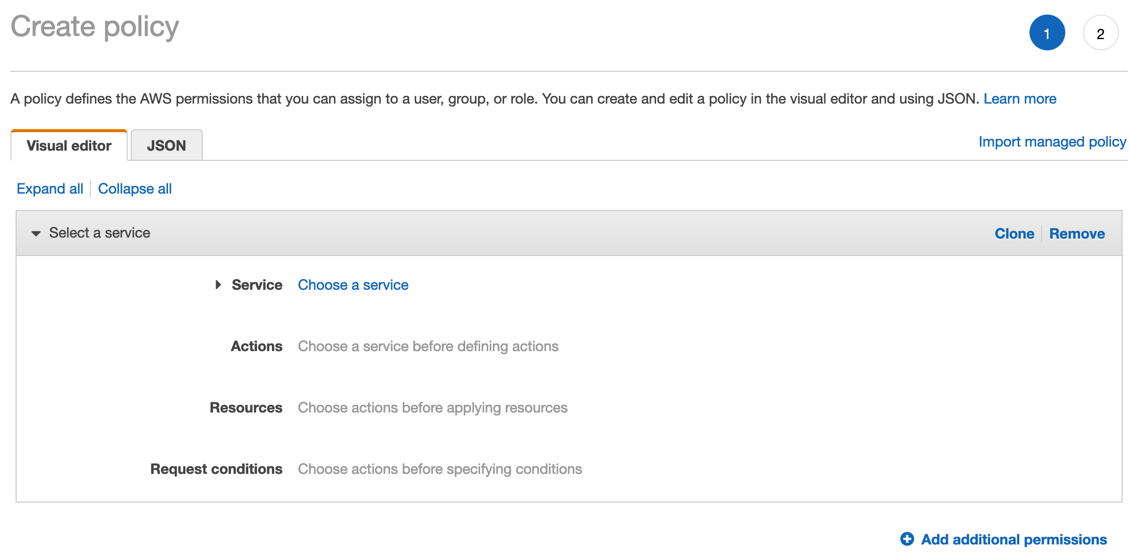
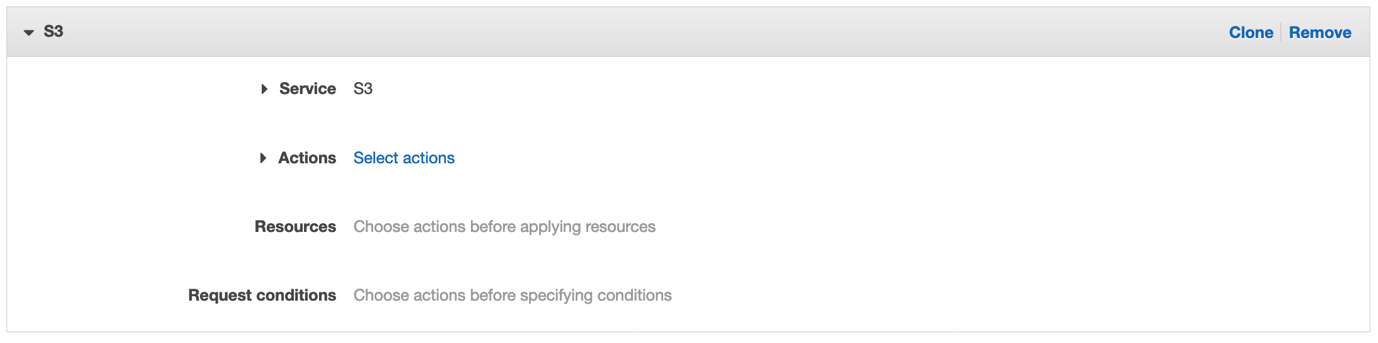
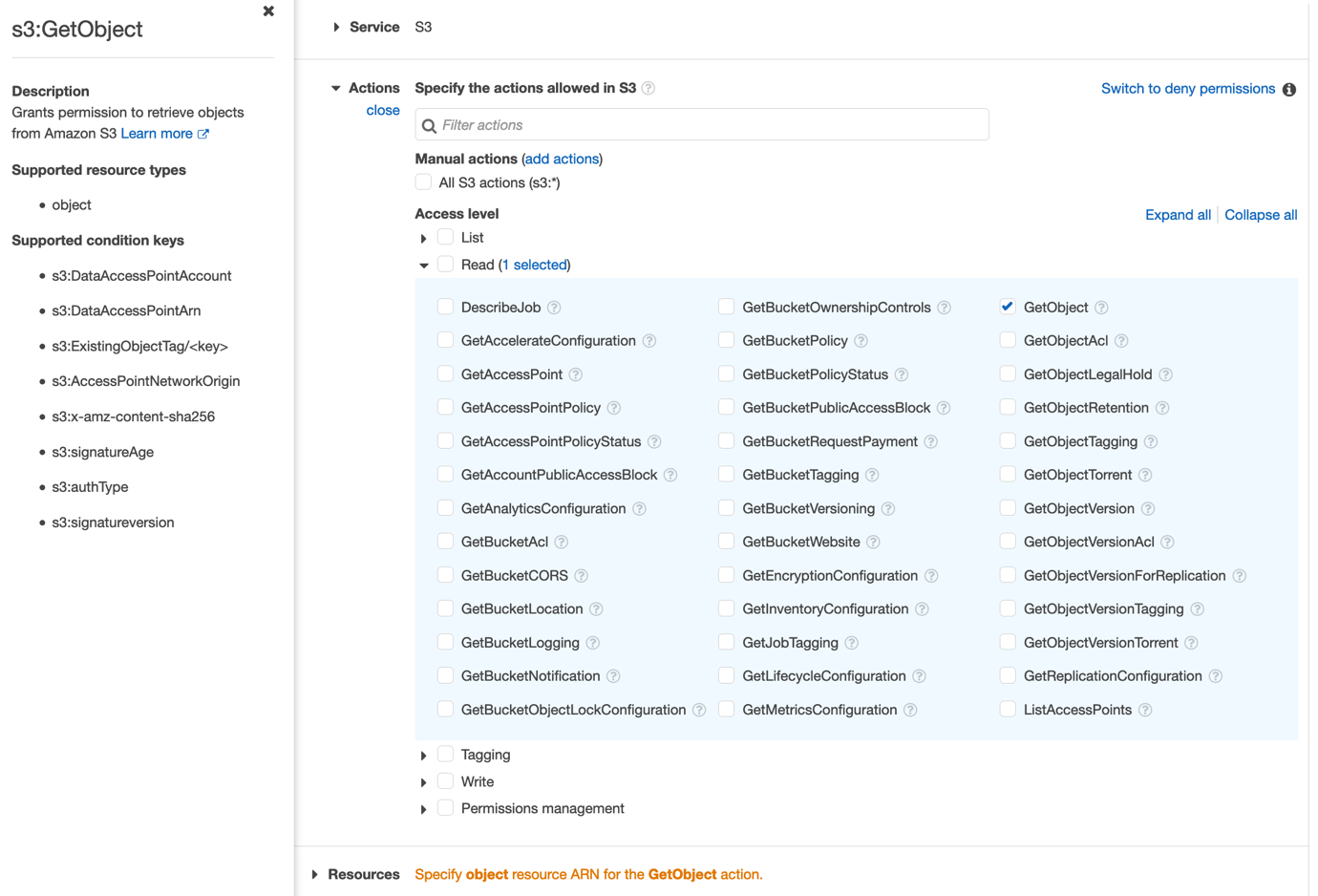
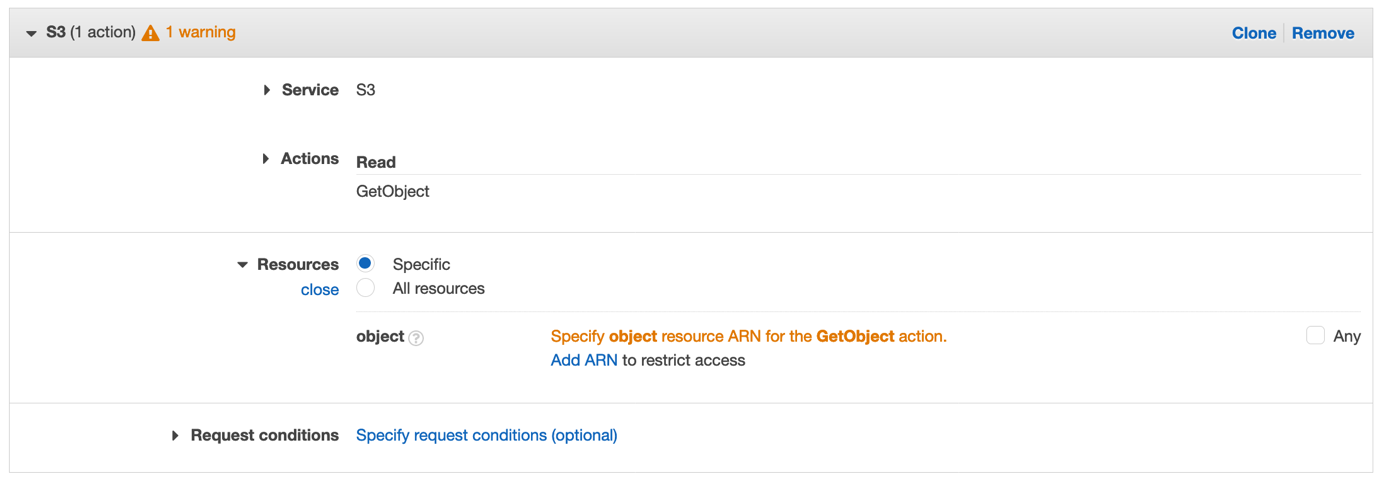
First, I must create an Amazon S3 access policy to allow the Spark application to read/write from Amazon S3. Amazon S3 Access is provisioned by attaching the policy by ARN to the node groups. This associates Amazon S3 access to the NodeInstanceRole and, hence, the node groups then have access to Amazon S3. Download the Amazon S3 policy file from here and modify the <<output folder>> to an Amazon S3 bucket you created. Run the following to create the policy. Note the ARN.

aws iam create-policy --policy-name spark-s3-policy --policy-document file://spark-s3.json

Cluster and node groups deployment

Create an EKS cluster using the following command:

eksctl create cluster –name= sparkonk8 --node-private-networking  --without-nodegroup --asg-access –region=<<AWS Region>>

The cluster takes approximately 15 minutes to launch.

Create the nodegroup using the nodeGroup config file. Replace the <<Policy ARN>> string using the ARN string from the previous step.

eksctl create nodegroup -f managedNodeGroups.yml

Scheduling driver/executor pods

The driver and executor pods can be assigned to nodes using affinity. PodTemplates can be used to configure the detail, which is not supported by Spark launch configuration by default. This feature is available from Spark 3.0.0, requiredDuringScheduling node affinity is used to schedule the driver and executor jobs. Sample podTemplates have been uploaded here.

Launching a Spark application

Create a service account. The spark driver pod uses the service account to create and watch executor pods using Kubernetes API server.

kubectl create serviceaccount spark
kubectl create clusterrolebinding spark-role --clusterrole='edit'  --serviceaccount=default:spark --namespace=default

Download the Cluster Autoscaler and edit it to add the cluster-name. 

curl -LO https://raw.githubusercontent.com/kubernetes/autoscaler/master/cluster-autoscaler/cloudprovider/aws/examples/cluster-autoscaler-autodiscover.yaml

Install the Cluster AutoScaler using the following command:

kubectl apply -f cluster-autoscaler-autodiscover.yaml

Get the details of Kubernetes master to get the head URL.

kubectl cluster-info 

command output

Use the following instructions to build the docker image.

Download the application file (script.py) from here and upload into the Amazon S3 bucket created.

Download the pod template files from here. Submit the application.

bin/spark-submit \
--master k8s://<<MASTER URL>> \
--deploy-mode cluster \
--name 'Job Name' \
--conf spark.eventLog.dir=s3a:// <<S3 BUCKET>>/logs \
--conf spark.eventLog.enabled=true \
--conf spark.history.fs.inProgressOptimization.enabled=true \
--conf spark.history.fs.update.interval=5s \
--conf spark.kubernetes.container.image=<<ECR Spark Docker Image>> \
--conf spark.kubernetes.container.image.pullPolicy=IfNotPresent \
--conf spark.kubernetes.driver.podTemplateFile='../driver_pod_template.yml' \
--conf spark.kubernetes.executor.podTemplateFile='../executor_pod_template.yml' \
--conf spark.kubernetes.authenticate.driver.serviceAccountName=spark \
--conf spark.dynamicAllocation.enabled=true \
--conf spark.dynamicAllocation.shuffleTracking.enabled=true \
--conf spark.dynamicAllocation.maxExecutors=100 \
--conf spark.dynamicAllocation.executorAllocationRatio=0.33 \
--conf spark.dynamicAllocation.sustainedSchedulerBacklogTimeout=30 \
--conf spark.dynamicAllocation.executorIdleTimeout=60s \
--conf spark.driver.memory=8g \
--conf spark.kubernetes.driver.request.cores=2 \
--conf spark.kubernetes.driver.limit.cores=4 \
--conf spark.executor.memory=8g \
--conf spark.kubernetes.executor.request.cores=2 \
--conf spark.kubernetes.executor.limit.cores=4 \
--conf spark.hadoop.fs.s3a.impl=org.apache.hadoop.fs.s3a.S3AFileSystem \
--conf spark.hadoop.fs.s3a.connection.ssl.enabled=false \
--conf spark.hadoop.fs.s3a.fast.upload=true \
s3a://<<S3 BUCKET>>/script.py \
s3a://<<S3 BUCKET>>/output 

A couple of key points to note here

  • podTemplateFile is used here, which enables scheduling of the driver pods to On-Demand Instances and executor pods to Spot Instances.
  • Spark provides a mechanism to allocate dynamically resources dynamically based on workloads. In the latest release of Spark (3.0.0), dynamicAllocation can be used with Kubernetes cluster manager. The executors that do not store, active, shuffled files can be removed to free up the resources. DynamicAllocation works well in tandem with Cluster Autoscaler for resource allocation and optimizes resource for jobs. We are using dynamicAllocation here to enable optimized resource sharing.
  • The application file and output are both in Amazon S3.

Output Files in S3

  • Spark Event logs are redirected to Amazon S3. Spark on Kubernetes creates local temporary files for logs and removes them once the application completes. The logs are redirected to Amazon S3 and Spark History Server can be used to analyze the logs. Note, you can create more instrumentation using tools like Prometheus and Grafana to monitor and manage the cluster.

Spark History Server + Dynamic Allocation

Observations

EC2 Spot Interruptions

The following diagram and log screenshot details from Spark History server showcases the behavior of a Spark application in case of an EC2 Spot interruption.

Four Spark applications launched in parallel in a cluster and one of the Spot nodes was interrupted. A couple of executor pods were terminated shut down in three of the four applications, but due to the resilient nature of Spark new executors were launched and the applications finished almost around the same time.
The Spark Driver identified the shut down executors, which handled the shuffle files and relaunched the tasks running on those executors.
Spark jobs

The Spark Driver identified the shut down executors, which handled the shuffle files and relaunched the tasks running on those executors.

Dynamic Allocation

Dynamic Allocation works with the caveat that it is an experimental feature.

dynamic allocation

Cost Optimization

Cost Optimization is achieved in several different ways from this tutorial.

  • Use of 100% Spot Instances for the Spark executors
  • Use of dynamicAllocation along with cluster autoscaler does make optimized use of resources and hence save cost
  • With the deployment of one driver and executor nodes to begin with and then scaling up on demand reduces the waste of a continuously running cluster

Cluster Autoscaling

Cluster Autoscaling is triggered as it is designed when there are pending (Spark executor) pods.

The Cluster Autoscaler logs can be fetched by:

kubectl logs -f deployment/cluster-autoscaler -n kube-system —tail=10  

Cluster Autoscaler Logs 

Cleanup

If you are trying out the tutorial, run the following steps to make sure that you don’t encounter unwanted costs.

Delete the EKS cluster and the nodegroups with the following command:

eksctl delete cluster --name sparkonk8

Delete the Amazon S3 Access Policy with the following command:

aws iam delete-policy --policy-arn <<POLICY ARN>>

Delete the Amazon S3 Output Bucket with the following command:

aws s3 rb --force s3://<<S3_BUCKET>>

Conclusion

In this blog, I demonstrated how you can run Spark workloads on a Kubernetes Cluster using Spot Instances, achieving scalability, resilience, and cost optimization. To cost optimize your Spark based big data workloads, consider running spark application using Kubernetes and EC2 Spot Instances.


Operating Lambda: Anti-patterns in event-driven architectures – Part 3

Post Syndicated from James Beswick original https://aws.amazon.com/blogs/compute/operating-lambda-anti-patterns-in-event-driven-architectures-part-3/

In the Operating Lambda series, I cover important topics for developers, architects, and systems administrators who are managing AWS Lambda-based applications. This three-part section discusses event-driven architectures and how these relate to Lambda-based applications.

Part 1 covers the benefits of the event-driven paradigm and how it can improve throughput, scale, and extensibility. Part 2 explains some of the design principles and best practices that can help developers gain the benefits of building Lambda-based applications. This post explores anti-patterns in event-driven architectures.

Lambda is not a prescriptive service and provides broad functionality for you to build applications as needed. While this flexibility is important to customers, there are some designs that are technically functional but suboptimal from an architecture standpoint.

The Lambda monolith

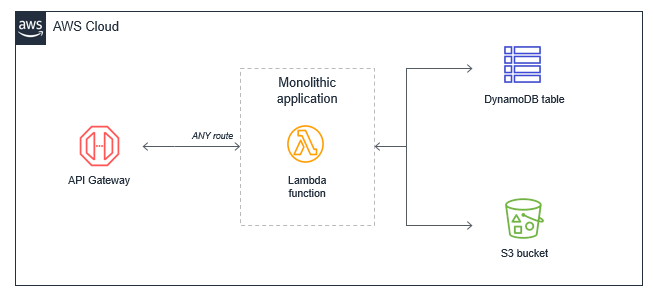
In many applications migrated from traditional servers, Amazon EC2 instances or AWS Elastic Beanstalk applications, developers “lift and shift” existing code. Frequently, this results in a single Lambda function that contains all of the application logic that is triggered for all events. For a basic web application, for example, a monolithic Lambda function handles all Amazon API Gateway routes and integrates with all necessary downstream resources:

Monolithic Lambda application

This approach has several drawbacks:

  • Package size: The Lambda function may be much larger because it contains all possible code for all paths, which makes it slower for the Lambda service to download and run.
  • Harder to enforce least privilege: The function’s IAM role must grant permissions for all resources needed for all paths, making the permissions very broad. Many paths in the functional monolith do not need all the permissions that have been granted.
  • Harder to upgrade: In a production system, any upgrades to the single function are more risky and could cause the entire application to stop working. Upgrading a single path in the Lambda function is an upgrade to the entire function.
  • Harder to maintain: It’s more difficult to have multiple developers working on the service since it’s a monolithic code repository. It also increases the cognitive burden on developers and makes it harder to create appropriate test coverage for code.
  • Harder to reuse code: Typically, it can be harder to separate libraries from monoliths, making code reuse more difficult. As you develop and support more projects, this can make it harder to support the code and scale your team’s velocity.
  • Harder to test: As the lines of code increase, it becomes harder to unit all the possible combinations of inputs and entry points in the code base. It’s generally easier to implement unit testing for smaller services with less code.

The preferred alternative is to decompose the monolithic Lambda function into individual microservices, mapping a single Lambda function to a single, well-defined task. In this example web application with a few API endpoints, the resulting microservice-based architecture is based on the API routes.

Microservice architecture

The process of decomposing a monolith depends upon the complexity of your workload. Using strategies like the strangler pattern, you can migrate code from larger code bases to microservices. There are many potential benefits to running a Lambda-based application this way:

  • Package sizes can be optimized for only the code needed for a single task, which helps make the function more performant, and may reduce running cost.
  • IAM roles can be scoped to precisely the access needed by the microservice, making it easier to enforce the principles of least privilege. In controlling the blast radius, using IAM roles this way can give your application a stronger security posture.
  • Easier to upgrade: you can apply upgrades at a microservice level without impacting the entire workload. Upgrades occur at the functional level, not at the application level, and you can implement canary releases to control the rollout.
  • Easier to maintain: adding new features is usually easier when working with a single small service than a monolithic with significant coupling. Frequently, you implement features by adding new Lambda functions without modifying existing code.
  • Easier to reuse code: when you have specialized functions that perform a single task, it’s often easier to copy these across multiple projects. Building a library of generic specialized functions can help accelerate development in future projects.
  • Easier to test: unit testing is easier when there are few lines of code and the range of potential inputs for a function is smaller.
  • Lower cognitive load for developers since each development team has a smaller surface area of the application to understand. This can help accelerate onboarding for new developers.

To learn more, read “Decomposing the Monolith with Event Storming”.

Lambda as orchestrator

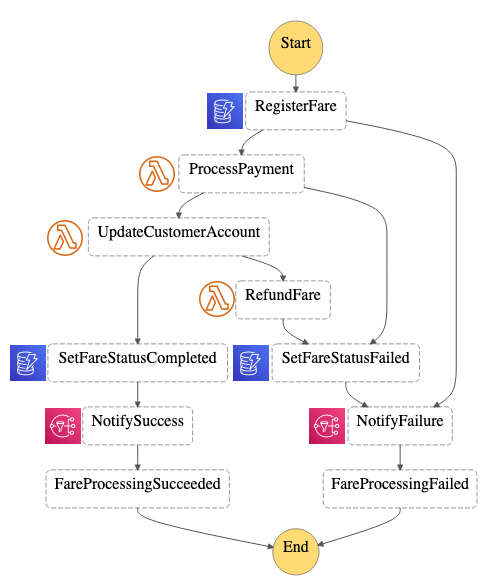
Many business workflows result in complex workflow logic, where the flow of operations depends on multiple factors. In an ecommerce example, a payments service is an example of a complex workflow:

  • A payment type may be cash, check, or credit card, all of which have different processes.
  • A credit card payment has many possible states, from successful to declined.
  • The service may need to issue refunds or credits for a portion or the entire amount.
  • A third-party service that processes credit cards may be unavailable due to an outage.
  • Some payments may take multiple days to process.

Implementing this logic in a Lambda function can result in ‘spaghetti code’ that’s different to read, understand, and maintain. It can also become fragile in production systems. The complexity is compounded if you must handle error handling, retry logic, and inputs and outputs processing. These types of orchestration functions are an anti-pattern in Lambda-based applications.

Instead, use AWS Step Functions to orchestrate these workflows using a versionable, JSON-defined state machine. State machines can handle nested workflow logic, errors, and retries. A workflow can also run for up to 1 year, and the service can maintain different versions of workflows, allowing you to upgrade production systems in place. Using this approach also results in less custom code, making an application easier to test and maintain.

While Step Functions is generally best-suited for workflows within a bounded context or microservice, to coordinate state changes across multiple services, instead use Amazon EventBridge. This is a serverless event bus that routes events based upon rules, and simplifies orchestration between microservices.

Recursive patterns that cause invocation loops

AWS services generate events that invoke Lambda functions, and Lambda functions can send messages to AWS services. Generally, the service or resource that invokes a Lambda function should be different to the service or resource that the function outputs to. Failure to manage this can result in invocation loops.

For example, a Lambda function writes an object to an Amazon S3 object, which in turn invokes the same Lambda function via a put event. The invocation causes a second object to be written to the bucket, which invokes the same Lambda function:

Event loops in Lambda-based applications

While the potential for infinite loops exists in most programming languages, this anti-pattern has the potential to consume more resources in serverless applications. Both Lambda and S3 automatically scale based upon traffic, so the loop may cause Lambda to scale to consume all available concurrency and S3 to continue to write objects and generate more events for Lambda. In this situation, you can press the “Throttle” button in the Lambda console to scale the function concurrency down to zero and break the recursion cycle.

This example uses S3 but the risk of recursive loops also exists in Amazon SNS, Amazon SQS, Amazon DynamoDB, and other services. In most cases, it is safer to separate the resources that produce and consume events from Lambda. However, if you need a Lambda function to write data back to the same resource that invoked the function, ensure that you:

  • Use a positive trigger: For example, an S3 object trigger may use a naming convention or meta tag that is only triggered on the first invocation. This prevents objects written from the Lambda function from invoking the same Lambda function again. See the S3-to-Lambda translation application for an example of this mechanism.
  • Use reserved concurrency: Setting the function’s reserved concurrency to a lower limit prevents the function from scaling concurrently beyond that limit. It does not prevent the recursion, but limits the resources consumed as a safety mechanism. This can be useful during the development and test phases.
  • Use Amazon CloudWatch monitoring and alarming: By setting an alarm on a function’s concurrency metric, you can receive alerts if the concurrency suddenly spikes and take appropriate action.

Lambda functions calling Lambda functions

Functions enable encapsulation and code reuse. Most programming languages support the concept of code synchronously calling functions within a code base. In this case, the caller waits until the function returns a response. This model does not generally adapt well to serverless development.

For example, consider a simple ecommerce application consisting of three Lambda functions that process an order:

Ecommerce example with three functions

In this case, the Create order function calls the Process payment function, which in turn calls the Create invoice function. While this synchronous flow may work within a single application on a server, it introduces several avoidable problems in a distributed serverless architecture:

  • Cost: With Lambda, you pay for the duration of an invocation. In this example, while the Create invoice functions runs, two other functions are also running in a wait state, shown in red on the diagram.
  • Error handling: In nested invocations, error handling can become more complex. Either errors are thrown to parent functions to handle at the top-level function, or functions require custom handling. For example, an error in Create invoice might require the Process payment function to reverse the charge, or it may instead retry the Create invoice process.
  • Tight coupling: Processing a payment typically takes longer than creating an invoice. In this model, the availability of the entire workflow is limited by the slowest function.
  • Scaling: The concurrency of all three functions must be equal. In a busy system, this uses more concurrency than would otherwise be needed.

In serverless applications, there are two common approaches to avoid this pattern. First, use an SQS queue between Lambda functions. If a downstream process is slower than an upstream process, the queue durably persists messages and decouples the two functions. In this example, the Create order function publishes a message to an SQS queue, and the Process payment function consumes messages from the queue.

The second approach is to use AWS Step Functions. For complex processes with multiple types of failure and retry logic, Step Functions can help reduce the amount of custom code needed to orchestrate the workflow. As a result, Step Functions orchestrates the work and robustly handles errors and retries, and the Lambda functions contain only business logic.

Synchronous waiting within a single Lambda function

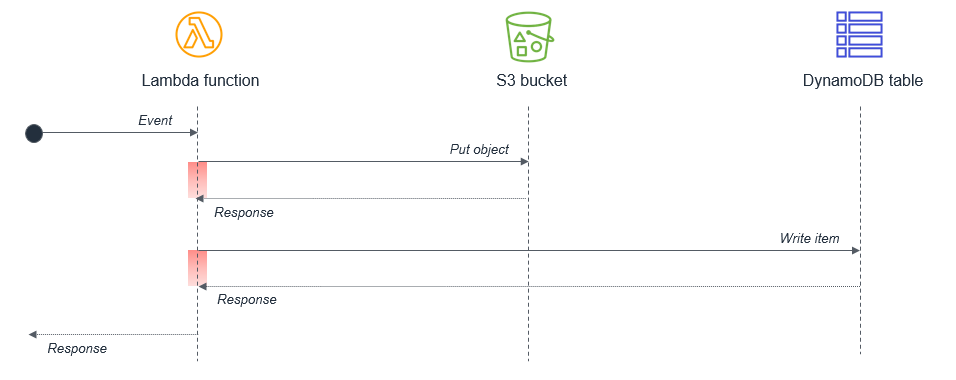
Within a single Lambda, ensure that any potentially concurrent activities are not scheduled synchronously. For example, a Lambda function might write to an S3 bucket and then write to a DynamoDB table:

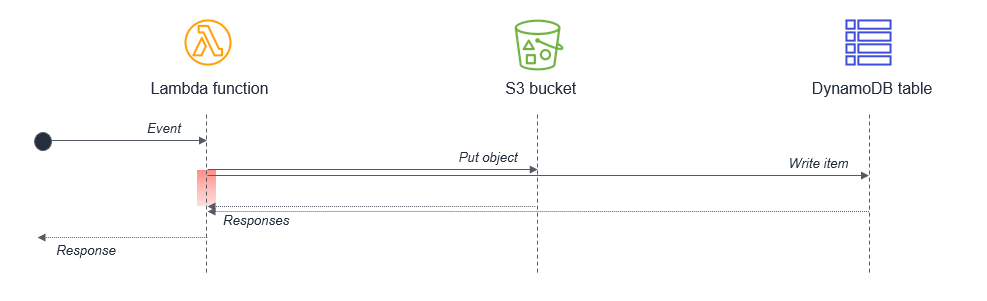
The wait states, shown in red in the diagram, are compounded because the activities are sequential. If the tasks are independent, they can be run in parallel, which results in the total wait time being set by the longest-running task.

Parallel tasks in Lambda functions

In cases where the second task depends on the completion of the first task, you may be able to reduce the total waiting time and the cost of execution by splitting the Lambda functions:

Splitting tasks over two functions

In this design, the first Lambda function responds immediately after putting the object to the S3 bucket. The S3 service invokes the second Lambda function, which then writes data to the DynamoDB table. This approach minimizes the total wait time in the Lambda function executions.

To learn more, read the “Serverless Applications Lens” from the AWS Well-Architected Framework.

Conclusion

This post discusses anti-patterns in event-driven architectures using Lambda. I show some of the issues when using monolithic Lambda functions or custom code to orchestrate workflows. I explain how to avoid recursive architectures that may cause invocation loops and why you should avoid calling functions from functions. I also explain different approaches to handling waiting in functions to minimize cost.

For more serverless learning resources, visit Serverless Land.

How to monitor Windows and Linux servers and get internal performance metrics

Post Syndicated from Emma White original https://aws.amazon.com/blogs/compute/how-to-monitor-windows-and-linux-servers-and-get-internal-performance-metrics/

This post was written by Dean Suzuki, Senior Solutions Architect.

Customers who run Windows or Linux instances on AWS frequently ask, “How do I know if my disks are almost full?” or “How do I know if my application is using all the available memory and is paging to disk?” This blog helps answer these questions by walking you through how to set up monitoring to capture these internal performance metrics.

Solution overview

If you open the Amazon EC2 console, select a running Amazon EC2 instance, and select the Monitoring tab  you can see Amazon CloudWatch metrics for that instance. Amazon CloudWatch is an AWS monitoring service. The Monitoring tab (shown in the following image) shows the metrics that can be measured external to the instance (for example, CPU utilization, network bytes in/out). However, to understand what percentage of the disk is being used or what percentage of the memory is being used, these metrics require an internal operating system view of the instance. AWS places an extra safeguard on gathering data inside a customer’s instance so this capability is not enabled by default.

EC2 console showing Monitoring tab

To capture the server’s internal performance metrics, a CloudWatch agent must be installed on the instance. For Windows, the CloudWatch agent can capture any of the Windows performance monitor counters. For Linux, the CloudWatch agent can capture system-level metrics. For more details, please see Metrics Collected by the CloudWatch Agent. The agent can also capture logs from the server. The agent then sends this information to Amazon CloudWatch, where rules can be created to alert on certain conditions (for example, low free disk space) and automated responses can be set up (for example, perform backup to clear transaction logs). Also, dashboards can be created to view the health of your Windows servers.

There are four steps to implement internal monitoring:

  1. Install the CloudWatch agent onto your servers. AWS provides a service called AWS Systems Manager Run Command, which enables you to do this agent installation across all your servers.
  2. Run the CloudWatch agent configuration wizard, which captures what you want to monitor. These items could be performance counters and logs on the server. This configuration is then stored in AWS System Manager Parameter Store
  3. Configure CloudWatch agents to use agent configuration stored in Parameter Store using the Run Command.
  4. Validate that the CloudWatch agents are sending their monitoring data to CloudWatch.

The following image shows the flow of these four steps.

Process to install and configure the CloudWatch agent

In this blog, I walk through these steps so that you can follow along. Note that you are responsible for the cost of running the environment outlined in this blog. So, once you are finished with the steps in the blog, I recommend deleting the resources if you no longer need them. For the cost of running these servers, see Amazon EC2 On-Demand Pricing. For CloudWatch pricing, see Amazon CloudWatch pricing.

If you want a video overview of this process, please see this Monitoring Amazon EC2 Windows Instances using Unified CloudWatch Agent video.

Deploy the CloudWatch agent

The first step is to deploy the Amazon CloudWatch agent. There are multiple ways to deploy the CloudWatch agent (see this documentation on Installing the CloudWatch Agent). In this blog, I walk through how to use the AWS Systems Manager Run Command to deploy the agent. AWS Systems Manager uses the Systems Manager agent, which is installed by default on each AWS instance. This AWS Systems Manager agent must be given the appropriate permissions to connect to AWS Systems Manager, and to write the configuration data to the AWS Systems Manager Parameter Store. These access rights are controlled through the use of IAM roles.

Create two IAM roles

IAM roles are identity objects that you attach IAM policies. IAM policies define what access is allowed to AWS services. You can have users, services, or applications assume the IAM roles and get the assigned rights defined in the permissions policies.

To use System Manager, you typically create two IAM roles. The first role has permissions to write the CloudWatch agent configuration information to System Manager Parameter Store. This role is called CloudWatchAgentAdminRole.

The second role only has permissions to read the CloudWatch agent configuration from the System Manager Parameter Store. This role is called CloudWatchAgentServerRole.

For more details on creating these roles, please see the documentation on Create IAM Roles and Users for Use with the CloudWatch Agent.

Attach the IAM roles to the EC2 instances

Once you create the roles, you attach them to your Amazon EC2 instances. By attaching the IAM roles to the EC2 instances, you provide the processes running on the EC2 instance the permissions defined in the IAM role. In this blog, you create two Amazon EC2 instances. Attach the CloudWatchAgentAdminRole to the first instance that is used to create the CloudWatch agent configuration. Attach CloudWatchAgentServerRole to the second instance and any other instances that you want to monitor. For details on how to attach or assign roles to EC2 instances, please see the documentation on How do I assign an existing IAM role to an EC2 instance?.

Install the CloudWatch agent

Now that you have setup the permissions, you can install the CloudWatch agent onto the servers that you want to monitor. For details on installing the CloudWatch agent using Systems Manager, please see the documentation on Download and Configure the CloudWatch Agent.

Create the CloudWatch agent configuration

Now that you installed the CloudWatch agent on your server, run the CloudAgent configuration wizard to create the agent configuration. For instructions on how to run the CloudWatch Agent configuration wizard, please see this documentation on Create the CloudWatch Agent Configuration File with the Wizard. To establish a command shell on the server, you can use AWS Systems Manager Session Manager to establish a session to the server and then run the CloudWatch agent configuration wizard. If you want to monitor both Linux and Windows servers, you must run the CloudWatch agent configuration on a Linux instance and on a Windows instance to create a configuration file per OS type. The configuration is unique to the OS type.

To run the Agent configuration wizard on Linux instances, run the following command:

sudo /opt/aws/amazon-cloudwatch-agent/bin/amazon-cloudwatch-agent-config-wizard

To run the Agent configuration wizard on Windows instances, run the following commands:

cd "C:\Program Files\Amazon\AmazonCloudWatchAgent"

amazon-cloudwatch-agent-config-wizard.exe

Note for Linux instances: do not select to collect the collectd metrics in the agent configuration wizard unless you have collectd installed on your Linux servers. Otherwise, you may encounter an error.

Review the Agent configuration

The CloudWatch agent configuration generated from the wizard is stored in Systems Manager Parameter Store. You can review and modify this configuration if you need to capture extra metrics. To review the agent configuration, perform the following steps:

  1. Go to the console for the System Manager service.
  2. Click Parameter store on the left hand navigation.
  3. You should see the parameter that was created by the CloudWatch agent configuration program. For Linux servers, the configuration is stored in: AmazonCloudWatch-linux and for Windows servers, the configuration is stored in:  AmazonCloudWatch-windows.

System Manager Parameter Store: Parameters created by CloudWatch agent configuration wizard

  1. Click on the parameter’s hyperlink (for example, AmazonCloudWatch-linux) to see all the configuration parameters that you specified in the configuration program.

In the following steps, I walk through an example of modifying the Windows configuration parameter (AmazonCloudWatch-windows) to add an additional metric (“Available Mbytes”) to monitor.

  1. Click the AmazonCloudWatch-windows
  2. In the parameter overview, scroll down to the “metrics” section and under “metrics_collected”, you can see the Windows performance monitor counters that will be gathered by the CloudWatch agent. If you want to add an additional perfmon counter, then you can edit and add the counter here.
  3. Press Edit at the top right of the AmazonCloudWatch-windows Parameter Store page.
  4. Scroll down in the Value section and look for “Memory.”
  5. After the “% Committed Bytes In Use”, put a comma “,” and then press Enter to add a blank line. Then, put on that line “Available Mbytes” The following screenshot demonstrates what this configuration should look like.

AmazonCloudWatch-windows parameter contents and how to add a new metric to monitor

  1. Press Save Changes.

To modify the Linux configuration parameter (AmazonCloudWatch-linux), you perform similar steps except you click on the AmazonCloudWatch-linux parameter. Here is additional documentation on creating the CloudWatch agent configuration and modifying the configuration file.

Start the CloudWatch agent and use the configuration

In this step, start the CloudWatch agent and instruct it to use your agent configuration stored in System Manager Parameter Store.

  1. Open another tab in your web browser and go to System Manager console.
  2. Specify Run Command in the left hand navigation of the System Manager console.
  3. Press Run Command
  4. In the search bar,
    • Select Document name prefix
    • Select Equal
    • Specify AmazonCloudWatch (Note the field is case sensitive)
    • Press enter

System Manager Run Command's command document entry field

  1. Select AmazonCloudWatch-ManageAgent. This is the command that configures the CloudWatch agent.
  2. In the command parameters section,
    • For Action, select Configure
    • For Mode, select ec2
    • For Optional Configuration Source, select ssm
    • For optional configuration location, specify the Parameter Store name. For Windows instances, you would specify AmazonCloudWatch-windows for Windows instances or AmazonCloudWatch-linux for Linux instances. Note the field is case sensitive. This tells the command to read the Parameter Store for the parameter specified here.
    • For optional restart, leave yes
  3. For Targets, choose your target servers that you wish to monitor.
  4. Scroll down and press Run. The Run Command may take a couple minutes to complete. Press the refresh button. The Run Command configures the CloudWatch agent by reading the Parameter Store for the configuration and configure the agent using those settings.

For more details on installing the CloudWatch agent using your agent configuration, please see this Installing the CloudWatch Agent on EC2 Instances Using Your Agent Configuration.

Review the data collected by the CloudWatch agents

In this step, I walk through how to review the data collected by the CloudWatch agents.

  1. In the AWS Management console, go to CloudWatch.
  2. Click Metrics on the left-hand navigation.
  3. You should see a custom namespace for CWAgent. Click on the CWAgent Please note that this might take a couple minutes to appear. Refresh the page periodically until it appears.
  4. Then click the ImageId, Instanceid hyperlinks to see the counters under that section.

CloudWatch Metrics: Showing counters under CWAgent

  1. Review the metrics captured by the CloudWatch agent. Notice the metrics that are only observable from inside the instance (for example, LogicalDisk % Free Space). These types of metrics would not be observable without installing the CloudWatch agent on the instance. From these metrics, you could create a CloudWatch Alarm to alert you if they go beyond a certain threshold. You can also add them to a CloudWatch Dashboard to review. To learn more about the metrics collected by the CloudWatch agent, see the documentation Metrics Collected by the CloudWatch Agent.

Conclusion

In this blog, you learned how to deploy and configure the CloudWatch agent to capture the metrics on either Linux or Windows instances. If you are done with this blog, we recommend deleting the System Manager Parameter Store entry, the CloudWatch data and  then the EC2 instances to avoid further charges. If you would like a video tutorial of this process, please see this Monitoring Amazon EC2 Windows Instances using Unified CloudWatch Agent video.


Operating Lambda: Design principles in event-driven architectures – Part 2

Post Syndicated from James Beswick original https://aws.amazon.com/blogs/compute/operating-lambda-design-principles-in-event-driven-architectures-part-2/

In the Operating Lambda series, I cover important topics for developers, architects, and systems administrators who are managing AWS Lambda-based applications. This three-part section discusses event-driven architectures and how these relate to Lambda-based applications.

Part 1 covers the benefits of the event-driven paradigm and how it can improve throughput, scale and extensibility. This post explains some of the design principles and best practices that can help developers gain the benefits of building Lambda-based applications.

Overview

Many of the best practices that apply to software development and distributed systems also apply to serverless application development. The broad principles are consistent with the Well-Architected Framework. The overall goal is to develop workloads that are:

  • Reliable: offering your end users a high level of availability. AWS serverless services are reliable because they are also designed for failure.
  • Durable: providing storage options that meet the durability needs of your workload.
  • Secure: following best practices and using the tools provided to secure access to workloads and limit the blast radius, if any issues occur.
  • Performant: using computing resources efficiently and meeting the performance needs of your end users.
  • Cost-efficient: designing architectures that avoid unnecessary cost that can scale without overspending, and also be decommissioned, if necessary, without significant overhead.

When you develop Lambda-based applications, there are several important design principles that can help you build workloads that meet these goals. You may not apply every principle to every architecture and you have considerable flexibility in how you approach building with Lambda. However, they should guide you in general architecture decisions.

Use services instead of custom code

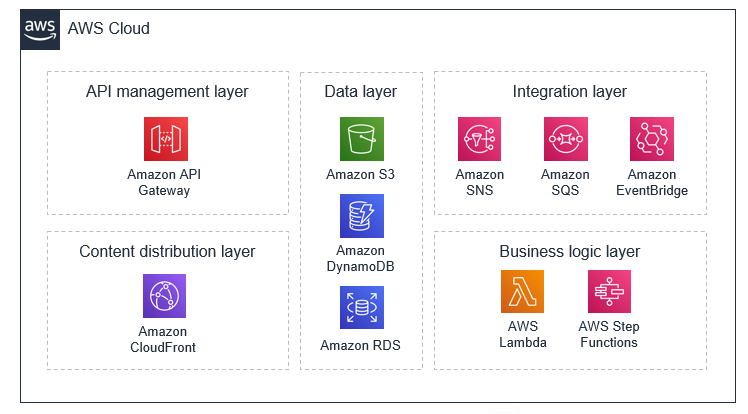
Serverless applications usually comprise several AWS services, integrated with custom code run in Lambda functions. While Lambda can be integrated with most AWS services, the services most commonly used in serverless applications are:

Category AWS service
Compute AWS Lambda
Data storage Amazon S3
Amazon DynamoDB
Amazon RDS
API Amazon API Gateway
Application integration Amazon EventBridge
Amazon SNS
Amazon SQS
Orchestration AWS Step Functions
Streaming data and analytics Amazon Kinesis Data Firehose

There are many well-established, common patterns in distributed architectures that you can build yourself or implement using AWS services. For most customers, there is little commercial value in investing time to develop these patterns from scratch. When your application needs one of these patterns, use the corresponding AWS service:

Pattern AWS service
Queue Amazon SQS
Event bus Amazon EventBridge
Publish/subscribe (fan-out) Amazon SNS
Orchestration AWS Step Functions
API Amazon API Gateway
Event streams Amazon Kinesis

These services are designed to integrate with Lambda and you can use infrastructure as code (IaC) to create and discard resources in the services. You can use any of these services via the AWS SDK without needing to install applications or configure servers. Becoming proficient with using these services via code in your Lambda functions is an important step to producing well-designed serverless applications.

Understanding the level of abstraction

The Lambda service limits your access to the underlying operating systems, hypervisors, and hardware running your Lambda functions. The service continuously improves and changes infrastructure to add features, reduce cost and make the service more performant. Your code should assume no knowledge of how Lambda is architected and assume no hardware affinity.

Similarly, the integration of other services with Lambda is managed by AWS with only a small number of configuration options exposed. For example, when API Gateway and Lambda interact, there is no concept of load balancing available since it is entirely managed by the services. You also have no direct control over which Availability Zones the services use when invoking functions at any point in time, or how and when Lambda execution environments are scaled up or destroyed.

This abstraction allows you to focus on the integration aspects of your application, the flow of data, and the business logic where your workload provides value to your end users. Allowing the services to manage the underlying mechanics helps you develop applications more quickly with less custom code to maintain.

Implementing statelessness in functions

When building Lambda functions, you should assume that the environment exists only for a single invocation. The function should initialize any required state when it is first started – for example, fetching a shopping cart from a DynamoDB table. It should commit any permanent data changes before exiting to a durable store such as S3, DynamoDB, or SQS. It should not rely on any existing data structures or temporary files, or any internal state that would be managed by multiple invocations (such as counters or other calculated, aggregate values).

Lambda provides an initializer before the handler where you can initialize database connections, libraries, and other resources. Since execution environments are reused where possible to improve performance, you can amortize the time taken to initialize these resources over multiple invocations. However, you should not store any variables or data used in the function within this global scope.

Lambda function design

Most architectures should prefer many, shorter functions over fewer, larger ones. Making Lambda functions highly specialized for your workload means that they are concise and generally result in shorter executions. The purpose of each function should be to handle the event passed into the function, with no knowledge or expectations of the overall workflow or volume of transactions. This makes the function agnostic to the source of the event with minimal coupling to other services.

Any global-scope constants that change infrequently should be implemented as environment variables to allow updates without deployments. Any secrets or sensitive information should be stored in AWS Systems Manager Parameter Store or AWS Secrets Manager and loaded by the function. Since these resources are account-specific, this allows you to create build pipelines across multiple accounts. The pipelines load the appropriate secrets per environment, without exposing these to developers or requiring any code changes.

Building for on-demand data instead of batches

Many traditional systems are designed to run periodically and process batches of transactions that have built up over time. For example, a banking application may run every hour to process ATM transactions into central ledgers. In Lambda-based applications, the custom processing should be triggered by every event, allowing the service to scale up concurrency as needed, to provide near-real time processing of transactions.

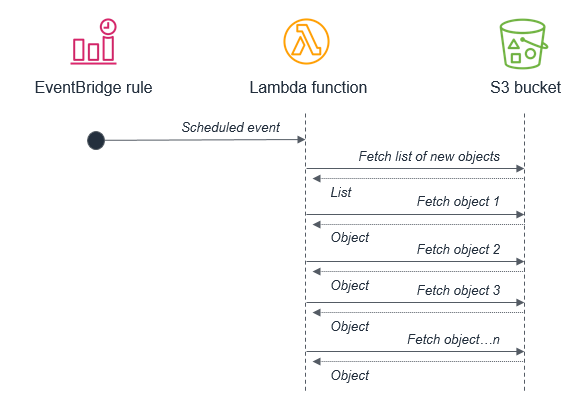
While you can run cron tasks in serverless applications by using scheduled expressions for rules in Amazon EventBridge, these should be used sparingly or as a last-resort. In any scheduled task that processes a batch, there is the potential for the volume of transactions to grow beyond what can be processed within the 15-minute Lambda timeout. If the limitations of external systems force you to use a scheduler, you should generally schedule for the shortest reasonable recurring time period.

For example, it’s not best practice to use a batch process that triggers a Lambda function to fetch a list of new S3 objects. This is because the service may receive more new objects in between batches than can be processed within a 15-minute Lambda function.

S3 fetch anti-pattern

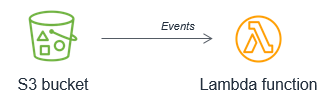
Instead, the Lambda function should be invoked by the S3 service each time a new object is put into the S3 bucket. This approach is significantly more scalable and also invokes processing in near-real time.

S3 to Lambda events

Orchestrating workflows

Workflows that involve branching logic, different types of failure models and retry logic typically use an orchestrator to keep track of the state of the overall execution. Avoid using Lambda functions for this purpose, since it results in tightly coupled groups of functions and services and complex code handling routing and exceptions.

With AWS Step Functions, you use state machines to manage orchestration. This extracts the error handling, routing, and branching logic from your code, replacing it with state machines declared using JSON. Apart from making workflows more robust and observable, it allows you to add versioning to workflows and make the state machine a codified resource that you can add to a code repository.

It’s common for simpler workflows in Lambda functions to become more complex over time, and for developers to use a Lambda function to orchestrate the flow. When operating a production serverless application, it’s important to identify when this is happening, so you can migrate this logic to a state machine.

Developing for retries and failures

AWS serverless services, including Lambda, are fault-tolerant and designed to handle failures. In the case of Lambda, if a service invokes a Lambda function and there is a service disruption, Lambda invokes your function in a different Availability Zone. If your function throws an error, the Lambda service retries your function.

Since the same event may be received more than once, functions should be designed to be idempotent. This means that receiving the same event multiple times does not change the result beyond the first time the event was received.

For example, if a credit card transaction is attempted twice due to a retry, the Lambda function should process the payment on the first receipt. On the second retry, either the Lambda function should discard the event or the downstream service it uses should be idempotent.

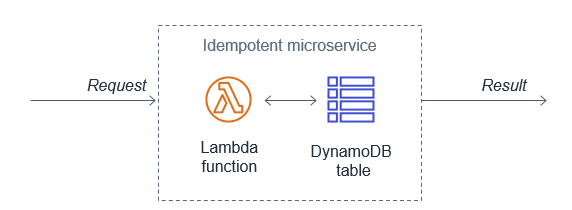
A Lambda function implements idempotency typically by using a DynamoDB table to track recently processed identifiers to determine if the transaction has been handled previously. The DynamoDB table usually implements a Time To Live (TTL) value to expire items to limit the storage space used.

Idempotent microservice

For failures within the custom code of a Lambda function, the service offers a number of features to help preserve and retry the event, and provide monitoring to capture that the failure has occurred. Using these approaches can help you develop workloads that are resilient to failure and improve the durability of events as they are processed by Lambda functions.

Conclusion

This post discusses the design principles that can help you develop well-architected serverless applications. I explain why using services instead of code can help improve your application’s agility and scalability. I also show how statelessness and function design also contribute to good application architecture. I cover how using events instead of batches helps serverless development, and how to plan for retries and failures in your Lambda-based applications.

Part 3 of this series will look at common anti-patterns in event-driven architectures and how to avoid building these into your microservices.

For more serverless learning resources, visit Serverless Land.

Best practices and advanced patterns for Lambda code signing

Post Syndicated from Cassia Martin original https://aws.amazon.com/blogs/security/best-practices-and-advanced-patterns-for-lambda-code-signing/

Amazon Web Services (AWS) recently released Code Signing for AWS Lambda. By using this feature, you can help enforce the integrity of your code artifacts and make sure that only trusted developers can deploy code to your AWS Lambda functions. Today, let’s review a basic use case along with best practices for lambda code signing. Then, let’s dive deep and talk about two advanced patterns—one for centralized signing and one for cross account layer validation. You can use these advanced patterns to use code signing in a distributed ownership model, where you have separate groups for developers writing code and for groups responsible for enforcing specific signing profiles or for publishing layers.

Secure software development lifecycle

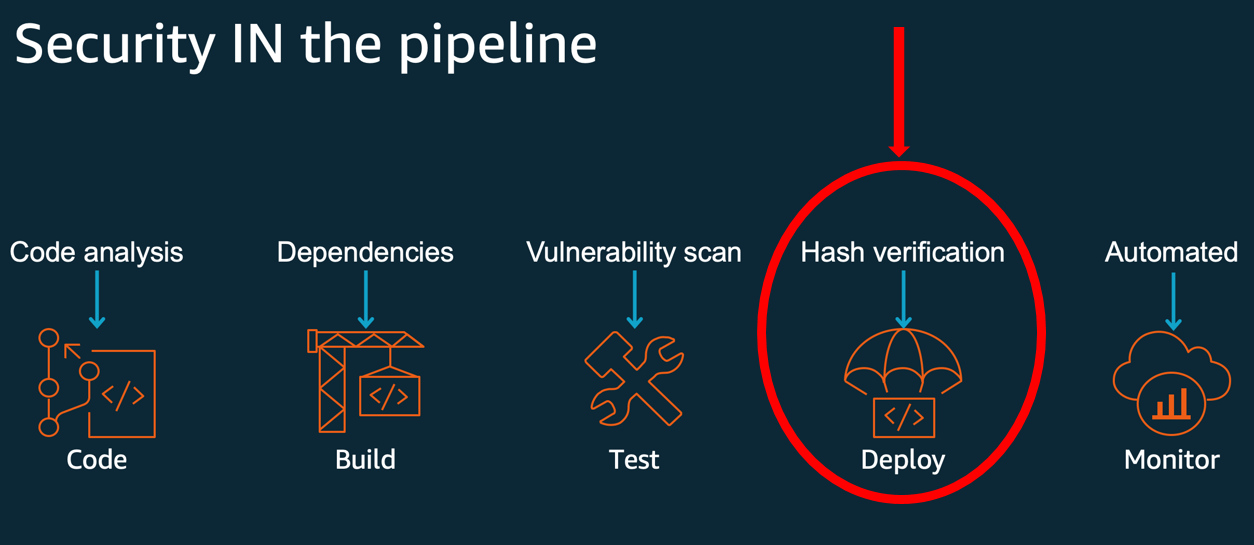
For context of what this capability gives you, let’s look at the secure software development lifecycle (SDLC). You need different kinds of security controls for each of your development phases. An overview of the secure SDLC development stages—code, build, test, deploy, and monitor—, along with applicable security controls, can be found in Figure 1. You can use code signing for Lambda to protect the deployment stage and give a cryptographically strong hash verification.

Figure 1: Code signing provides hash verification in the deployment phase of a secure SDLC

Figure 1: Code signing provides hash verification in the deployment phase of a secure SDLC

Adding Security into DevOps and Implementing DevSecOps Using AWS CodePipeline provide additional information on building a secure SDLC, with a particular focus on the code analysis controls.

Basic pattern:

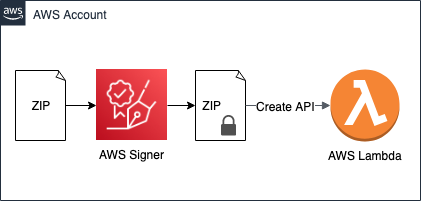
Figure 2 shows the basic pattern described in Code signing for AWS Lambda and in the documentation. The basic code signing pattern uses AWS Signer on a ZIP file and calls a create API to install the signed artifact in Lambda.

Figure 2: The basic code signing pattern

Figure 2: The basic code signing pattern

The basic pattern illustrated in Figure 2 is as follows:

  1. An administrator creates a signing profile in AWS Signer. A signing profile is analogous to a code signing certificate and represents a publisher identity. Administrators can provide access via AWS Identity and Access Management (IAM) for developers to use the signing profile to sign their artifacts.
  2. Administrators create a code signing configuration (CSC)—a new resource in Lambda that specifies the signing profiles that are allowed to sign code and the signature validation policy that defines whether to warn or reject deployments that fail the signature checks. CSC can be attached to existing or new Lambda functions to enable signature validations on deployment.
  3. Developers use one of the allowed signing profiles to sign the deployment artifact—a ZIP file—in AWS Signer.
  4. Developers deploy the signed deployment artifact to a function using either the CreateFunction API or the UpdateFunctionCode API.

Lambda performs signature checks before accepting the deployment. The deployment fails if the signature checks fail and you have set the signature validation policy in the CSC to reject deployments using ENFORCE mode.

Code signing checks

Code signing for Lambda provides four signature checks. First, the integrity check confirms that the deployment artifact hasn’t been modified after it was signed using AWS Signer. Lambda performs this check by matching the hash of the artifact with the hash from the signature. The second check is the source mismatch check, which detects if a signature isn’t present or if the artifact is signed by a signing profile that isn’t specified in the CSC. The third, expiry check, will fail if a signature is past its point of expiration. The fourth is the revocation check, which is used to see if anyone has explicitly marked the signing profile used for signing or the signing job as invalid by revoking it.

The integrity check must succeed or Lambda will not run the artifact. The other three checks can be configured to either block invocation or generate a warning. These checks are performed in order until one check fails or all checks succeed. As a security leader concerned about the security of code deployments, you can use the Lambda code signing checks to satisfy different security assurances:

  • Integrity – Provides assurance that code has not been tampered with, by ensuring that the signature on the build artifact is cryptographically valid.
  • Source mismatch – Provides assurance that only trusted entities or developers can deploy code.
  • Expiry – Provides assurance that code running in your environment is not stale, by making sure that signatures were created within a certain date and time.
  • Revocation – Allows security administrators to remove trust by invalidating signatures after the fact so that they cannot be used for code deployment if they have been exposed or are otherwise no longer trusted.

The last three checks are enforced only if you have set the signature validation policy—UntrustedArtifactOnDeployment parameter—in the CSC to ENFORCE. If the policy is set to WARN, then failures in any of the mismatch, expiry, and revocation checks will log a metric called a signature validation error in Amazon CloudWatch. The best practice for this setting is to initially set the policy to WARN. Then, you can monitor the warnings, if any, and update the policy to enforce when you’re confident in the findings in CloudWatch.

Centralized signing enforcement

In this scenario, you have a security administrators team that centrally manages and approves signing profiles. The team centralizes signing profiles in order to enforce that all code running on Lambda is authored by a trusted developer and isn’t tampered with after it’s signed. To do this, the security administrators team wants to enforce that developers—in the same account—can only create Lambda functions with signing profiles that the team has approved. By owning the signing profiles used by developer teams, the security team controls the lifecycle of the signatures and the ability to revoke the signatures. Here are instructions for creating a signing profile and CSC, and then enforcing their use.

Create a signing profile

To create a signing profile, you’ll use the AWS Command Line Interface (AWS CLI). Start by logging in to your account as the central security role. This is an administrative role that is scoped with permissions needed for setting up code signing. You’ll create a signing profile to use for an application named ABC. These example commands are written with prepopulated values for things like profile names, IDs, and descriptions. Change those as appropriate for your application.

To create a signing profile

  1. Run this command:
    aws signer put-signing-profile --platform-id "AWSLambda-SHA384-ECDSA" --profile-name profile_for_application_ABC
    

    Running this command will give you a signing profile version ARN. It will look something like arn:aws:signer:sa-east-1:XXXXXXXXXXXX:/signing-profiles/profile_for_application_ABC/XXXXXXXXXX. Make a note of this value to use in later commands.

    As the security administrator, you must grant the developers access to use the profile for signing. You do that by using the add-profile-permission command. Note that in this example, you are explicitly only granting permission for the signer:StartSigningJob action. You might want to grant permissions to other actions, such as signer:GetSigningProfile or signer:RevokeSignature, by making additional calls to add-profile-permission.

  2. Run this command, replacing <role-name> with the principal you’re using:
    aws signer add-profile-permission \
    --profile-name profile_for_application_ABC \
    --action signer:StartSigningJob \
    --principal <role-name> \
    --statement-id testStatementId
    

Create a CSC

You also want to make a CSCwith the signing profile that you, as the security administrator, want all your developers to use.

To create a CSC

Run this command, replacing <signing-profile-version-arn> with the output from Step 1 of the preceding procedure—Create a signing profile:

aws lambda create-code-signing-config \
--description "Application ABC CSC" \
--allowed-publishers SigningProfileVersionArns=<signing-profile-version-arn> \
--code-signing-policies "UntrustedArtifactOnDeployment"="Enforce"

Running this command will give you a CSCARN that will look something like arn:aws:lambda:sa-east-1:XXXXXXXXXXXX:code-signing-config:approved-csc-XXXXXXXXXXXXXXXXX. Make a note of this value to use later.

Write an IAM policy using the new CSC

Now that the security administrators team has created this CSC, how do they ensure that all the developers use it? Administrators can use IAM to grant access to the CreateFunction API, while using the new lambda:CodeSigningConfig condition key with the CSC ARN you created. This will ensure that developers can create functions only if code signing is enabled.

This IAM policy will allow the developer roles to create Lambda functions, but only when they are using the approved CSC. The additional clauses Deny the developers from creating their own signing profiles or CSCs, so that they are forced to use the ones provided by the central team.

To write an IAM policy

Run the following command. Replace <code-signing-config-arn> with the CSC ARN you created previously.

{
  "Version": "2012-10-17",
  "Statement": [
    {
      "Effect": "Allow",
      "Action": [
        "lambda:CreateFunction",
        "lambda:PutFunctionCodeSigningConfig"
      ],
      "Resource": "*",
      "Condition": {
        "ForAnyValue:StringEquals": {
          "lambda:CodeSigningConfig": ["<code-signing-config-arn>"]
          }
         }        
        },
       {
         "Effect": "Deny", 
         "Action": [
        "signer:PutSigningProfile",
        "lambda:DeleteFunctionCodeSigningConfig",
        "lambda:UpdateCodeSigningConfig",
        "lambda:DeleteCodeSigningConfig",
        "lambda:CreateCodeSigningConfig"
      ],
         "Resource": "*"
       }
  ]
}

Create a signed Lambda function

Now, the developers have permission to create new Lambda functions, but only if the functions are configured with the approved CSC. The approved CSC can specify the settings for Lambda signing policies, and lists exactly what profiles are approved for signing the function code with. This means that developers in that account will only be able to create functions if the functions are signed with a profile approved by the central team and the developer permissions have been added to the signing profile used.

To create a signed Lambda function

  1. Upload any Lambda code file to an Amazon Simple Storage Service (Amazon S3) bucket with the name main-function.zip. Note that your S3 bucket must be version enabled.
  2. Sign the zipped Lambda function using AWS Signer and the following command, replacing <lambda-bucket> and <version-string> with the correct details from your uploaded main-function.zip.
    aws signer start-signing-job \ 
    --source 's3={bucketName=<lambda-bucket>, version=<version-string>, key=main-function.zip}' \
    --destination 's3={bucketName=<lambda-bucket>, prefix=signed-}' \
    --profile-name profile_for_application_ABC
    

  3. Download the newly created ZIP file from your Lambda bucket. It will be called something like signed-XXXXXXX-XXXX-XXXX-XXXX-XXXXXXXXXXXX.zip.
  4. For convenience, rename it to signed-main-function.zip.
  5. Run the following command, replacing <lambda-role> with the ARN of your Lambda execution role, and replacing <code-signing-config-arn> with the result of the earlier procedure Create a CSC.
    aws lambda create-function \
        --function-name "signed-main-function" \
        --runtime "python3.8" \
        --role <lambda-role> \
        --zip-file "fileb://signed-main-function.zip" \
        --handler lambda_function.lambda_handler \ 
        --code-signing-config-arn <code-signing-config-arn>
    

Cross-account centralization

This pattern supports the use case where the security administrators and the developers are working in the same account. You might want to implement this across different accounts, which requires creating CSCs in specific accounts where developers need to deploy and update Lambda functions. To do this, you can use AWS CloudFormation StackSets to deploy CSCs. Stack sets allow you to roll out CloudFormation stacks across multiple AWS accounts. Use AWS CloudFormation StackSets for Multiple Accounts in an AWS Organization illustrates how to use an AWS CloudFormation template for deployment to multiple accounts.

The security administrators can detect and react to any changes to the stack set deployed CSCs by using drift detection. Drift detection is an AWS CloudFormation feature that detects unmanaged changes to the resources deployed using StackSets. To complete the solution, Implement automatic drift remediation for AWS CloudFormation using Amazon CloudWatch and AWS Lambda shares a solution for taking automated remediation when drift is detected in a CloudFormation stack.

Cross-account validation for Lambda layers

So far, you have the tools to sign your own Lambda code so that no one can tamper with it, and you’ve reviewed a pattern where one team creates and owns the signing profiles to be used by different developers. Let’s look at one more advanced pattern where you publish code as a signed Lambda layer in one account, and you then use it in a Lambda function in a separate account. A Lambda layer is an archive containing additional code that you can include in a function.

For this, let’s consider how to set up code signing when you’re using layers across two accounts. Layers allow you to use libraries in your function without needing to include them in your deployment package. It’s also possible to publish a layer in one account, and have a different account consume that layer. Let’s act as a publisher of a layer. In this use case, you want to use code signing so that consumers of your layer can have the security assurance that no one has tampered with the layer. Note that if you enable code signing to verify signatures on a layer, Lambda will also verify the signatures on the function code. Therefore, all of your deployment artifacts must be signed, using a profile listed in the CSC attached to the function.

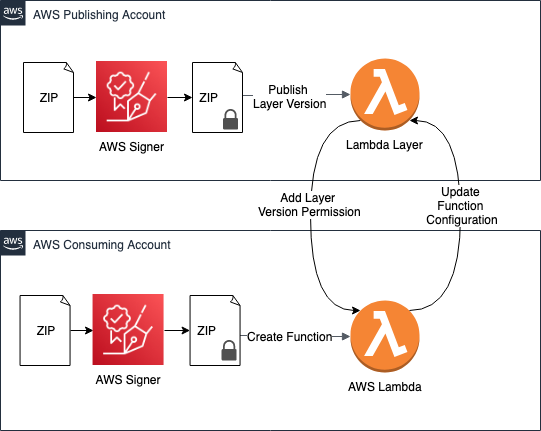
Figure 3 illustrates the cross-account layer pattern, where you sign a layer in a publishing account and a function uses that layer in another consuming account.

Figure 3: This advanced pattern supports cross-account layers

Figure 3: This advanced pattern supports cross-account layers

Here are the steps to build this setup. You’ll be logging in to two different accounts, your publishing account and your consuming account.

Make a publisher signing profile

Running this command will give you a profile version ARN. Make a note of the value returned to use in a later step.

To make a publisher signing profile

  1. In the AWS CLI, log in to your publishing account.
  2. Run this command to make a signing profile for your publisher:
    aws signer put-signing-profile --platform-id "AWSLambda-SHA384-ECDSA" --profile-name publisher_approved_profile1
    

Sign your layer code using signing profile

Next, you want to sign your layer code with this signing profile. For this example, use the blank layer code from this GitHub project. You can make your own layer by creating a ZIP file with all your code files included in a directory supported by your Lambda runtime. AWS Lambda layers has instructions for creating your own layer.

You can then sign your layer code using the signing profile.

To sign your layer code

  1. Name your Lambda layer code file blank-python.zip and upload it to your S3 bucket.
  2. Sign the zipped Lambda function using AWS Signer with the following command. Replace <lambda-bucket> and <version-string> with the details from your uploaded blank-python.zip.
    aws signer start-signing-job \ 
    --source 's3={bucketName=<lambda-bucket>, version=<version-string>, key=blank-python.zip}' \
    --destination 's3={bucketName=<lambda-bucket>, prefix=signed-}' \
    --profile-name publisher_approved_profile1
    

Publish your signed layer

Now publish the resulting, signed layer. Note that the layers themselves don’t have signature validation on deployment. However, the signatures will be checked when they’re added to a function.

To publish your signed layer

  1. Download your new signed ZIP file from your S3 bucket, and rename it signed-layer.zip.
  2. Run the following command to publish your layer:
    aws lambda publish-layer-version \
    --layer-name lambda_signing \
    --zip-file "fileb://signed-layer.zip" \
    --compatible-runtimes python3.8 python3.7        
    

This command will return information about your newly published layer. Search for the LayerVersionArn and make a note of it for use later.

Grant read access

For the last step in the publisher account, you must grant read access to the layer using the add-layer-version-permission command. In the following command, you’re granting access to an individual account using the principal parameter.

(Optional) You could instead choose to grant access to all accounts in your organization by using “*” as the principal and adding the organization-id parameter.

To grant read access

  • Run the following command to grant read access to your layer, replacing <consuming-account-id> with the account ID of your second account:
    aws lambda add-layer-version-permission \
    --layer-name lambda_signing \
    --version-number 1 \
    --statement-id for-consuming-account \
    --action lambda:GetLayerVersion \
    --principal <consuming-account-id> 	
    

Create a CSC

It’s time to switch your AWS CLI to work with the consuming account. This consuming account can create a CSC for their Lambda functions that specifies what signing profiles are allowed.

To create a CSC

  1. In the AWS CLI, log out from your publishing account and into your consuming account.
  2. The consuming account will need a signing profile of its own to sign the main Lambda code. Run the following command to create one:
    aws signer put-signing-profile --platform-id "AWSLambda-SHA384-ECDSA" --profile-name consumer_approved_profile1
    

  3. Run the following command to create a CSC that allows code to be signed either by the publisher or the consumer. Replace <consumer-signing-profile-version-arn> with the profile version ARN you created in the preceding step. Replace <publisher-signing-profile-version-arn> with the signing profile from the Make a publisher signing profile procedure. Make a note of the CSC returned by this command to use in later steps.
    aws lambda create-code-signing-config \
    --description "Allow layers from publisher" \
    --allowed-publishers SigningProfileVersionArns="<publisher-signing-profile-version-arn>,<consumer-signing-profile-version-arn>" \
    --code-signing-policies "UntrustedArtifactOnDeployment"="Enforce"
    

Create a Lambda function using the CSC

When creating the function that uses the signed layer, you can pass in the CSC that you created. Lambda will check the signature on the function code in this step.

To create a Lambda function

  1. Use your own lambda code function, or make a copy of blank-python.zip, and rename it consumer-main-function.zip.) Upload consumer-main-function.zip to a versioned S3 bucket in your consumer account.

    Note: If the S3 bucket doesn’t have versioning enabled, the procedure will fail.

  2. Sign the function with the signing profile of the consumer account. Replace <consumers-lambda-bucket> and <version-string> in the following command with the name of the S3 bucket you uploaded the consumer-main-function.zip to and the version.
    aws signer start-signing-job \ 
    --source 's3={bucketName=<consumers-lambda-bucket>, version=<version-string>, key=consumer-main-function.zip}' \
    --destination 's3={bucketName=<consumers-lambda-bucket>, prefix=signed-}' \
    --profile-name consumer_approved_profile1
    

  3. Download your new file and rename it to signed-consumer-main-function.zip.
  4. Run the following command to create a new Lambda function, replacing <lambda-role> with a valid Lambda execution role and <code-signing-config-arn> with the value returned from the previous procedure: Creating a CSC.
    aws lambda create-function \
        --function-name "signed-consumer-main-function" \
        --runtime "python3.8" \
        --role <lambda-role> \
        --zip-file "fileb://signed-consumer-main-function.zip" \
        --handler lambda_function.lambda_handler \ 
        --code-signing-config <code-signing-config-arn>
    

  5. Finally, add the signed layer from the publishing account into the configuration of that function. Run the following command, replacing <lamba-layer-arn> with the result from the preceding step Publish your signed layer.
    aws lambda update-function-configuration \
    --function-name "signed-consumer-main-function" \
    --layers "<lambda-layer-arn>"   
    

Lambda will check the signature on the layer code in this step. If the signature of any deployed layer artifact is corrupt, the Lambda function stops you from attaching the layer and deploying your code. This is true regardless of the mode you choose—WARN or ENFORCE. If you have multiple layers to add to your function, you must sign all layers invoked in a Lambda function.

This capability allows layer publishers to share signed layers. A publisher can sign all layers using a specific signing profile and ask all the layer consumers to use that signing profile as one of the allowed profiles in their CSCs. When someone uses the layer, they can trust that the layer comes from that publisher and hasn’t been tampered with.

Conclusion

You’ve learned some best practices and patterns for using code signing for AWS Lambda. You know how code signing fits in the secure SDLC, and what value you get from each of the code signing checks. You also learned two patterns for using code signing for distributed ownership—one for centralized signing and one for cross account layer validation. No matter your role—as a developer, as a central security team, or as a layer publisher—you can use these tools to help enforce the integrity of code artifacts in your organization.

You can learn more about Lambda code signing in Configure code signing for AWS Lambda.

If you have feedback about this post, submit comments in the Comments section below. If you have questions about this post, start a new thread on the AWS Lambda forum or contact AWS Support.

Want more AWS Security how-to content, news, and feature announcements? Follow us on Twitter.

Author

Cassia Martin

Cassia is a Security Solutions Architect in New York City. She works with large financial institutions to solve security architecture problems and to teach them cloud tools and patterns. Cassia has worked in security for over 10 years, and she has a strong background in application security.

Operating Lambda: Understanding event-driven architecture – Part 1

Post Syndicated from James Beswick original https://aws.amazon.com/blogs/compute/operating-lambda-understanding-event-driven-architecture-part-1/

In the Operating Lambda series, I cover important topics for developers, architects, and systems administrators who are managing AWS Lambda-based applications. This three-part series discusses event-driven architectures and how these relate to serverless applications.

Part 1 covers the benefits of the event-driven paradigm and how it can improve throughput, scale and extensibility, while also reducing complexity and the overall amount of code in an application.

Event-driven architectures have grown in popularity because they help address some of the inherent challenges in building the complex systems commonly used in modern organizations. This approach promotes the use of microservices, which are small, specialized services performing a narrow set of functions. A well-designed, Lambda-based application is compatible with the principles of microservice architectures.

How Lambda fits into the event-driven paradigm

Lambda is an on-demand compute service that runs custom code in response to events. Most AWS services generate events, and many can act as an event source for Lambda. Within Lambda, your code is stored in a code deployment package and contains an event handler. All interaction with the code occurs through the Lambda API and there is no direct invocation of functions from outside of the service. The main purpose of Lambda functions is to process events.

Lambda API triggers function code

Unlike traditional servers, Lambda functions do not run constantly. When a function is triggered by an event, this is called an invocation. Lambda functions are purposefully limited to 15 minutes in duration but on average, across all AWS customers, most invocations only last for less than a second. In some intensive compute operations, it may take several minutes to process a single event but in the majority of cases the duration is brief.

An event triggering a Lambda function could be almost anything, from an HTTP request via Amazon API Gateway, a schedule managed by an Amazon EventBridge rule, or an Amazon S3 notification. Even the simplest Lambda-based application uses at least one event.

Different Lambda event sources

The event itself is a JSON object that contains information about what happened. Events are facts about a change in the system state, they are immutable, and the time when they happen is significant. The first parameter of every Lambda handler contains the event. An event could be custom-generated from another microservice, such as new order generated in an ecommerce application:

Defining a console test event

The event may also be generated by an AWS service, such as Amazon SQS when a new message is available in a queue:

SQS test event

In either case, the event is passed to the Lambda function as the first parameter in the Lambda handler:

INIT code and event handler

  1. The code outside of the handler, also known as “INIT” code, is run before the handler. This is used for tasks like importing libraries or declaring and initializing global objects.
  2. The handler itself is a function that takes the event object. Regardless of runtime used in the Lambda function, the event is a JSON object.

For smaller applications, the difference between event-driven and request-driven applications may not be clear. As your applications develop more functionality and handle more traffic, this becomes more apparent. Request-driven applications typically use directed commands to coordinate downstream functions to complete an activity and are often tightly coupled. Event-driven applications create events that are observable by other services and systems, but the event producer is unaware of which consumers, if any, are listening. Typically, these are loosely coupled.

Most Lambda-based applications use a combination of AWS services for durably storing data and integrating with other system and services. In these applications, Lambda acts as glue between the services, providing business logic to transform data as it moves between services.

Grouping AWS serverless services into layers

Building Lambda-based applications follows many of the best practices of building any event-based architecture. A number of development approaches have emerged to help developers create event-driven systems. Event storming, which is an interactive approach to domain-driven design (DDD), is one popular methodology. As you explore the events in your workload, you can group these as bounded contexts to develop the boundaries of the microservices in your application.

To learn more about event-driven architectures, read “What is an Event-Driven Architecture?” and “What do you mean by Event-Driven?”

The benefits of event-driven architectures

Replacing polling and webhooks with events

Many traditional architectures frequently use polling and webhook mechanisms to communicate state between different components. Polling can be highly inefficient for fetching updates since there is a lag between new data becoming available and synchronization with downstream services. Webhooks are not always supported by other microservices that you want to integrate with. They may also require custom authorization and authentication configurations. In both cases, these integration methods are challenging to scale on-demand without additional work by development teams.

Polling and webhooks

Both of these mechanisms can be replaced by events, which can be filtered, routed, and pushed downstream to consuming microservices. This approach can result in less bandwidth consumption, CPU utilization, and potentially lower cost. These architectures can reduce complexity, since each functional unit is smaller and there is often less code.

Event communication

Event-driven architectures can also make it easier to design near-real-time systems, helping organizations move away from batch-based processing. Events are generated at the time when state in the application changes, so the custom code of a microservice should be designed to handle the processing of a single event. Since scaling is handled by the Lambda service, this architecture can handle significant increases in traffic without changing custom code. As events scale up, so does the compute layer that processes events.

Reducing complexity

Microservices enable developers and architects to decompose complex workflows. For example, an ecommerce monolith may be broken down into order acceptance and payment processes with separate inventory, fulfillment and accounting services. What may be complex to manage and orchestrate in a monolith becomes a series of decoupled services that communicate asynchronously with event messages.

Ecommerce microservices example

This approach also makes it possible to assemble services that process data at different rates. In this case, an order acceptance microservice can store high volumes of incoming orders by buffering the messages in an Amazon SQS queue.

A payment processing service, which is typically slower due to the complexity of handling payments, can take a steady stream of messages from the SQS queue. It can orchestrate complex retry and error handling logic using AWS Step Functions, and coordinate active payment workflows for hundreds of thousands of orders.

Improving scalability and extensibility

Microservices generate events that are typically published to messaging services like Amazon SNS and SQS. These behave like an elastic buffer between microservices and help handle scaling when traffic increases. Services like EventBridge can then filter and route messages depending upon the content of the event, as defined in rules. As a result, event-based applications can be more scalable and offer greater redundancy than monolithic applications.

This system is also highly extensible, allowing other teams to extend features and add functionality without impacting the order processing and payment processing microservices. By publishing events using EventBridge, this application integrates with existing systems, such as the inventory microservice, but also enables any future application to integrate as an event consumer. Producers of events have no knowledge of event consumers, which can help simplify the microservice logic.

To learn more, read “How event-driven architecture solves modern web app problems” and “How to Use Amazon EventBridge to Build Decoupled, Event-Driven Architectures”.

Trade-offs of event-driven architectures

Variable latency

Unlike monolithic applications, which may process everything within the same memory space on a single device, event-driven applications communicate across networks. This design introduces variable latency. While it’s possible to engineer applications to minimize latency, monolithic applications can almost always be optimized for lower latency at the expense of scalability and availability.

The serverless services in AWS are highly available, meaning that they operate in more than one Availability Zone in a Region. In the event of a service disruption, services automatically fail over to alternative Availability Zones and retry transactions. As a result, instead of a transaction failing, it may be completed successfully but with higher latency.

Workloads that require consistent low-latency performance, such as high-frequency trading applications in banks or submillisecond robotics automation in warehouses, are not good candidates for event-driven architecture.

Eventual consistency

An event represents a change in state. With many events flowing through different services in an architecture at any given point of time, such workloads are often eventually consistent. This makes it more complex to process transactions, handle duplicates, or determine the exact overall state of a system.

Some workloads are not well suited for event-driven architecture, due to the need for ACID properties. However, many workloads contain a combination of requirements that are eventually consistent (for example, total orders in the current hour) or strongly consistent (for example, current inventory). For those features needing strong data consistency, there are architecture patterns to support this.

Event-based architectures are designed around individual events instead of large batches of data. Generally, workflows are designed to manage the steps of an individual event or execution flow instead of operating on multiple events simultaneously. Real-time event processing is preferred to batch processing in event-driven systems, replacing a batch with many small incremental updates. While this can make workloads more available and scalable, it also makes it more challenging for events to have awareness of other events.

Returning values to callers

In many cases, event-based applications are asynchronous. This means that caller services do not wait for requests from other services before continuing with other work. This is a fundamental characteristic of event-driven architectures that enables scalability and flexibility. This means that passing return values or the result of a workflow is often more complex than in synchronous execution flows.

Most Lambda invocations in productions systems are asynchronous, responding to events from services like S3 or SQS. In these cases, the success or failure of processing an event is often more important than returning a value. Features such as dead letter queues (DLQs) in Lambda are provided to ensure you can identify and retry failed events, without needing to notify the caller.

For interactive workloads, such as web and mobile applications, the end user usually expects to receive a return value or a current status of a transaction. For these workloads, there are several design patterns that can provide rich eventing back to the caller. However, these implementations are more complex than using a traditional asynchronous return value.

Debugging across services and functions

Debugging event-driven systems is also different to solving problems with a monolithic application. With different systems and services passing events, it is often not possible to record and reproduce the exact state of multiple services when an error occurs. Since each service and function invocation has separate log files, it can be more complicated to determine what happened to a specific event that caused an error.

To learn more, read “Challenges with distributed systems” and “Implementing Microservices on AWS”.

Conclusion

Event-driven architectures have grown in popularity in modern organizations. This approach promotes the use of microservices, which can be designed as Lambda-based applications. This post discusses the benefits of the event-driven approach, along with the trade-offs involved.

Part 2 of this series will discuss design principles and the best practices for developing Lambda-based applications.

Techniques for writing least privilege IAM policies

Post Syndicated from Ben Potter original https://aws.amazon.com/blogs/security/techniques-for-writing-least-privilege-iam-policies/

In this post, I’m going to share two techniques I’ve used to write least privilege AWS Identity and Access Management (IAM) policies. If you’re not familiar with IAM policy structure, I highly recommend you read understanding how IAM works and policies and permissions.

Least privilege is a principle of granting only the permissions required to complete a task. Least privilege is also one of many Amazon Web Services (AWS) Well-Architected best practices that can help you build securely in the cloud. For example, if you have an Amazon Elastic Compute Cloud (Amazon EC2) instance that needs to access an Amazon Simple Storage Service (Amazon S3) bucket to get configuration data, you should only allow read access to the specific S3 bucket that contains the relevant data.

There are a number of ways to grant access to different types of resources, as some resources support both resource-based policies and IAM policies. This blog post will focus on demonstrating how you can use IAM policies to grant restrictive permissions to IAM principals to meet least privilege standards.

In AWS, an IAM principal can be a user, role, or group. These identities start with no permissions and you add permissions using a policy. In AWS, there are different types of policies that are used for different reasons. In this blog, I only give examples for identity-based policies that attach to IAM principals to grant permissions to an identity. You can create and attach multiple identity-based policies to your IAM principals, and you can reuse them across your AWS accounts. There are two types of managed policies. Customer managed policies are created and managed by you, the customer. AWS managed policies are provided as examples, cannot be modified, but can be copied, enhanced, and saved as Customer managed policies. The main elements of a policy statement are:

  • Effect: Specifies whether the statement will Allow or Deny an action.
  • Action: Describes a specific action or actions that will either be allowed or denied to run based on the Effect entered. API actions are unique to each service. For example, s3:ListBuckets is an Amazon S3 service API action that enables an IAM Principal to list all S3 buckets in the same account.
  • NotAction: Can be used as an alternative to using Action. This element will allow an IAM principal to invoke all API actions to a specific AWS service except those actions specified in this list.
  • Resource: Specifies the resources—for example, an S3 bucket or objects—that the policy applies to in Amazon Resource Name (ARN) format.
  • NotResource: Can be used instead of the Resource element to explicitly match every AWS resource except those specified.
  • Condition: Allows you to build expressions to match the condition keys and values in the policy against keys and values in the request context sent by the IAM principal. Condition keys can be service-specific or global. A global condition key can be used with any service. For example, a key of aws:CurrentTime can be used to allow access based on date and time.

Starting with the visual editor

The visual editor is my default starting place for building policies as I like the wizard and seeing all available services, actions, and conditions without looking at the documentation. If there is a complex policy with many services, I often look at the AWS managed policies as a starting place for the actions that are required, then use the visual editor to fine tune and check the resources and conditions.

The policy I’m going to walk you through creating is to grant an AWS Lambda function permission to get specific objects from Amazon S3, and put items in a specific table in Amazon DynamoDB. You can access the visual editor when you choose Create policy under policies in the IAM console, or add policies when viewing a role, group, or user as shown in Figure 1. If you’re not familiar with creating policies, you can follow the full instructions in the IAM documentation.

Figure 1: Use the visual editor to create a policy

Figure 1: Use the visual editor to create a policy

Begin by choosing the first service—S3—to grant access to as shown in Figure 2. You can only choose one service at a time, so you’ll need to add DynamoDB after.

Figure 2: Select S3 service

Figure 2: Select S3 service

Now you will see a list of access levels with the option to manually add actions. Expand the read access level to show all read actions that are supported by the Amazon S3 service. You can now see all read access level actions. For getting an object, check the box for GetObject. Selecting the ? next to an action expands information including a description, supported resource types, and supported condition keys as shown in Figure 3.

Figure 3: Expand Read in Access level, select GetObject, and select the ? next to GetObject

Figure 3: Expand Read in Access level, select GetObject, and select the ? next to GetObject

Expand Resources, you will see that the visual editor has listed object as that is the only resource supported by the GetObject action as shown in Figure 4.

Figure 4: Expand Resources

Figure 4: Expand Resources

Select Add ARN, which opens a dialogue to help you specify the ARN for the objects. Enter a bucket name—such as doc-example-bucket—and then the object name. For the object name you can use a wildcard (*) as a suffix. For example, to allow objects beginning with alpha you would enter alpha*. This is an important step. For this least privileged policy, you are restricting to a specific bucket, and an object prefix. You could even specify an individual object depending on your use case.

Figure 5: Enter bucket name and object name

Figure 5: Enter bucket name and object name

If you have multiple ARNs (bucket and objects) to allow, you can repeat the step.

Figure 6: ARN added for S3 object

Figure 6: ARN added for S3 object

The final step is to expand the request conditions, and choose Add condition. The Add request condition dialogue will open. Select the drop down next to Condition key to list the global condition keys, then the service level condition keys are listed after. You’ll see that there’s an s3:ExistingObjectTag condition that—as the name suggests—matches an existing object tag. You can use this condition key to allow the GetObject request only when the object tag meets your condition. That means you can tag your objects with a specific tag key and value pair, and your policy condition must match this key-value pair to allow the action to execute. When you’re using condition keys with multiple keys or values, you can use condition operators and evaluation logic. As shown in Figure 7, tag-key is entered directly below the condition key. This is the key of the tag to match. For the Operator, select StringEquals to match the tag exactly. Checking If exists tests at least one member of the set of request values, and at least one member of the set of condition key values. The Value to enter is the actual tag value: tag-value as shown in figure 7.

Figure 7: ARN added for S3 object

Figure 7: ARN added for S3 object

That’s it for adding the S3 action, as shown in figure 8.

Figure 8: S3 GetObject action with resource and conditions configured

Figure 8: S3 GetObject action with resource and conditions configured

Now you need to add the DynamoDB permissions by selecting Add additional permissions. Select Choose a service and then select DynamoDB. For actions, expand the Write access level, then choose PutItem.

Figure 9: Choose write access level

Figure 9: Choose write access level

Expand Resources and then select Add ARN. The dialogue that appears will help you build the ARN just like it did for the Amazon S3 service. Enter the Region, for example the ap-southeast-2 (Sydney) Region, the account ID, and the table name. Choosing Add will add the resource ARN to your policy.

Figure 10: Enter Region, account, and table name

Figure 10: Enter Region, account, and table name

Now it’s time to add conditions. Expand Request conditions and then choose Add condition.

There are many DynamoDB conditions that you could use, however you can choose dynamodb:LeadingKeys to represent the first key, or partition keys in a table. You can see from the documentation that a qualifier of For all values in request is recommend. For the Operator you can use StringEquals as your string is going to exactly match, then a Value can use a prefix with wildcard, such as alpha* as shown in figure 11.

Figure 11: Add request conditions

Figure 11: Add request conditions

Choosing Add will take you back to the main visual editor where you can choose Review policy to continue. Enter a name and description for the policy, and then choose Create policy.

You can now attach it to a role to test.

You can see in this example that a policy can use least privilege by using specific resources and conditions. Note that sometimes when you use the AWS Management Console, it requires additional permissions to provide information for the console experience.

Starting with AWS managed policies

AWS managed policies can be a good starting place to see the actions typically associated with a particular service or job function. For example, you can attach the AmazonS3ReadOnlyAccess policy to a role used by an Amazon EC2 instance that allows read-only access to all Amazon S3 buckets. It has an effect of Allow to allow access, and there are two actions that use wildcards (*) to allow all Get and List actions for S3—for example, s3:GetObject and s3:ListBuckets. The resource is a wildcard to allow all S3 buckets the account has access to. A useful feature of this policy is that it only allows read and list access to S3, but not to any other services or types of actions.

Let’s make our own custom IAM policy to make it least privilege. Starting with the action element, you can use the reference for Amazon S3 to see all actions, a description of what each action does, the resource type for each action, and condition keys for each action. Now let’s imagine this policy is used by an Amazon EC2 instance to fetch an application configuration object from within an S3 bucket. Looking at the descriptions for actions starting with Get you can see that the only action that we really need is GetObject. You can then use the resource element to restrict an action to a set of objects prefixed with config within a specific bucket.

         "Effect": "Allow",
         "Action": "s3:GetObject",
         "Resource": "arn:aws:s3::: <doc-example-bucket>/<config*>"

Now that you’ve reduced the scope of what this policy can do for service actions and resources, you can add a condition element that uses attribute based access control (ABAC) to define conditions based on attributes—in this case, a resource tag. In this example, when you’re reading objects from a single bucket, you can set specific conditions to further reduce the scope of permissions given to an IAM principal. There’s an s3:ExistingObjectTag condition that you can use to allow the GetObject request only when the object tag meets your condition. That means you can tag your objects with a specific tag key and value pair, and your IAM policy condition must match this key-value pair to allow the API action to successfully run. When you’re using condition keys with multiple keys or values, you can use condition operators and evaluation logic. You can see that ForAnyValue tests at least one member of the set of request values, and at least one member of the set of condition key values. Alternatively, you can use global condition keys that apply to all services:

         "Effect": "Allow",
         "Action": "s3:GetObject",
         "Resource": "arn:aws:s3:::<doc-example-bucket>/<config*>",
         "Condition": {
                "ForAnyValue:StringEquals": {
                    "s3:ExistingObjectTag/<tag-key>": "<tag-value>"
            }

In the preceding policy example, the condition element only allows s3:GetObject permissions if the object is tagged with a key of tag-key and a value of tag-value. While you’re experimenting, you can identify errors in your custom policies by using the IAM policy simulator or reviewing the errors messages recorded in AWS CloudTrail logs.

Conclusion

In this post, I’ve shown two different techniques that you can use to create least privilege policies for IAM. You can adapt these methods to create AWS Single Sign-On permission sets and AWS Organizations service control policies (SCPs). Starting with managed policies is a useful strategy when an AWS supplied managed policy already exists for your use case, and then to reduce the scope of what it can do through permissions. I tend to use the visual editor the most for editing policies because it saves looking up the resource and conditions for each action. I suggest that you start by reviewing the policies you’re already using. Start with policies that grant excessive permissions—like the example Administrator policy—and tie them back to the use case of the users or things that need the access. Use the last accessed information, IAM best practices, and look at the AWS Well-Architected best practices and AWS Well-Architected tool.

If you have feedback about this post, submit comments in the Comments section below.

Want more AWS Security how-to content, news, and feature announcements? Follow us on Twitter.

Author

Ben Potter

Ben is the global security leader for the AWS Well-Architected Framework and is responsible for sharing best practices in security with customers and partners. Ben is also an ambassador for the No More Ransom initiative helping fight cyber crime with Europol, McAfee, and law enforcement across the globe. You can learn more about him in this interview.

Tightening application security with Amazon CodeGuru

Post Syndicated from Brian Farnhill original https://aws.amazon.com/blogs/devops/tightening-application-security-with-amazon-codeguru/

Amazon CodeGuru is a developer tool powered by machine learning (ML) that provides intelligent recommendations for improving code quality and identifies an application’s most expensive lines of code. To help you find and remediate potential security issues in your code, Amazon CodeGuru Reviewer now includes an expanded set of security detectors. In this post, we discuss the new types of security issues CodeGuru Reviewer can detect.

Time to read 9 minutes
Services used Amazon CodeGuru

The new security detectors are now a feature in CodeGuru Reviewer for Java applications. These detectors focus on finding security issues in your code before you deploy it. They extend CodeGuru Reviewer by providing additional security-specific recommendations to the existing set of application improvements it already recommends. When an issue is detected, a remediation recommendation and explanation is generated. This allows you to find and remediate issues before the code is deployed. These findings can help in addressing the OWASP top 10 web application security risks, with many of the recommendations being based on specific issues customers have had in this space.

You can run a security scan by creating a repository analysis. CodeGuru Reviewer now provides an additional option to get both code and security recommendations for Java codebases. Selecting this option enables you to find potential security vulnerabilities before they are promoted to production, and support users remaining secure when using your service.

Types of security issues CodeGuru Reviewer detects

Previously, CodeGuru Reviewer helped address security by detecting potential sensitive information leaks (such as personally identifiable information or credit card numbers). The additional CodeGuru Reviewer security detectors expand on this by addressing:

  • AWS API security best practices – Helps you follow security best practices when using AWS APIs, such as avoiding hard-coded credentials in API calls
  • Java crypto library best practices – Identifies when you’re not using best practices for common Java cryptography libraries, such as avoiding outdated cryptographic ciphers
  • Secure web applications – Inspects code for insecure handling of untrusted data, such as not sanitizing user-supplied input to protect against cross-site scripting, SQL injection, LDAP injection, path traversal injection, and more
  • AWS Security best practices – Developed in collaboration with AWS Security, these best practices help bring our internal expertise to customers

Examples of new security findings

The following are examples of findings that CodeGuru Reviewer security detectors can now help you identify and resolve.

AWS API security best practices

AWS API security best practice detectors inspect your code to identify issues that can be caused by not following best practices related to AWS SDKs and APIs. An example of a detected issue in this category is using hard-coded AWS credentials. Consider the following code:

import com.amazonaws.auth.AWSCredentials;
import com.amazonaws.auth.BasicAWSCredentials;

static String myKeyId ="AKIAX742FUDUQXXXXXXX";
static String mySecretKey = "MySecretKey";

public static void main(String[] args) {
    AWSCredentials creds = getCreds(myKeyId, mySecretKey);
}

static AWSCredentials getCreds(String id, String key) {
    return new BasicAWSCredentials(id, key);}
}

In this code, the variables myKeyId and mySecretKey are hard-coded in the application. This may have been done to move quickly, but it can also lead to these values being discovered and misused.

In this case, CodeGuru Reviewer recommends using environment variables or an AWS profile to store these values, because these can be retrieved at runtime and aren’t stored inside the application (or its source code). Here you can see an example of what this finding looks like in the console:

An example of the CodeGuru reviewer finding for IAM credentials in the AWS console

The recommendation suggests using environment variables or an AWS profile instead, and that after you delete or rotate the affected key you monitor it with CloudWatch for any attempted use. Following the learn more link, you’ll see additional detail and recommended approaches for remediation, such as using the DefaultAWSCredentialsProviderChain. An example of how to remediate this in the preceding code is to update the getCreds() function:

import com.amazonaws.auth.DefaultAWSCredentialsProviderChain;

static AWSCredentials getCreds() {
    DefaultAWSCredentialsProviderChain creds =
        new DefaultAWSCredentialsProviderChain();
    return creds.getCredentials();
}

Java crypto library best practices

When working with data that must be protected, cryptography provides mechanisms to encrypt and decrypt the information. However, to ensure the security of this data, the application must use a strong and modern cipher. Consider the following code:

import javax.crypto.Cipher;

static final String CIPHER = "DES";

public void run() {
    cipher = Cipher.getInstance(CIPHER);
}

A cipher object is created with the DES algorithm. CodeGuru Reviewer recommends a stronger cipher to help protect your data. This is what the recommendation looks like in the console:

An example of the CodeGuru reviewer finding for encryption ciphers in the AWS console

Based on this, one example of how to address this is to substitute a different cipher:

static final String CIPHER ="RSA/ECB/OAEPPadding";

This is just one option for how it could be addressed. The CodeGuru Reviewer recommendation text suggests several options, and a link to documentation to help you choose the best cipher.

Secure web applications

When working with sensitive information in cookies, such as temporary session credentials, those values must be protected from interception. This is done by flagging the cookies as secure, which prevents them from being sent over an unsecured HTTP connection. Consider the following code:

import javax.servlet.http.Cookie;

public static void createCookie() {
    Cookie cookie = new Cookie("name", "value");
}

In this code, a new cookie is created that is not marked as secure. CodeGuru Reviewer notifies you that you could make a correction by adding:

cookie.setSecure(true);

This screenshot shows you an example of what the finding looks like.

An example CodeGuru finding that shows how to ensure cookies are secured.

AWS Security best practices

This category of detectors has been built in collaboration with AWS Security and assists in detecting many other issue types. Consider the following code, which illustrates how a string can be re-encrypted with a new key from AWS Key Management Service (AWS KMS):

import java.nio.ByteBuffer;
import com.amazonaws.services.kms.AWSKMS;
import com.amazonaws.services.kms.AWSKMSClientBuilder;
import com.amazonaws.services.kms.model.DecryptRequest;
import com.amazonaws.services.kms.model.EncryptRequest;

AWSKMS client = AWSKMSClientBuilder.standard().build();
ByteBuffer sourceCipherTextBlob = ByteBuffer.wrap(new byte[]{1, 2, 3, 4, 5, 6, 7, 8, 9, 0});

DecryptRequest req = new DecryptRequest()
                         .withCiphertextBlob(sourceCipherTextBlob);
ByteBuffer plainText = client.decrypt(req).getPlaintext();

EncryptRequest res = new EncryptRequest()
                         .withKeyId("NewKeyId")
                         .withPlaintext(plainText);
ByteBuffer ciphertext = client.encrypt(res).getCiphertextBlob();

This approach puts the decrypted value at risk by decrypting and re-encrypting it locally. CodeGuru Reviewer recommends using the ReEncrypt method—performed on the server side within AWS KMS—to avoid exposing your plaintext outside AWS KMS. A solution that uses the ReEncrypt object looks like the following code:

import com.amazonaws.services.kms.model.ReEncryptRequest;

ReEncryptRequest req = new ReEncryptRequest()
                           .withCiphertextBlob(sourceCipherTextBlob)
                           .withDestinationKeyId("NewKeyId");

client.reEncrypt(req).getCiphertextBlob();

This screenshot shows you an example of what the finding looks like.

An example CodeGuru finding to show how to avoid decrypting and encrypting locally when it's not needed

Detecting issues deep in application code

Detecting security issues can be made more complex by the contributing code being spread across multiple methods, procedures and files. This separation of code helps ensure humans work in more manageable ways, but for a person to look at the code, it obscures the end to end view of what is happening. This obscurity makes it harder, or even impossible to find complex security issues. CodeGuru Reviewer can see issues regardless of these boundaries, deeply assessing code and the flow of the application to find security issues throughout the application. An example of this depth exists in the code below:

import java.io.UnsupportedEncodingException;
import javax.servlet.http.Cookie;
import javax.servlet.http.HttpServletRequest;
import javax.servlet.http.HttpServletResponse;

private String decode(final String val, final String enc) {
    try {
        return java.net.URLDecoder.decode(val, enc);
    } catch (UnsupportedEncodingException e) {
        e.printStackTrace();
    }
    return "";
}

public void pathTraversal(HttpServletRequest request) throws IOException {
    javax.servlet.http.Cookie[] theCookies = request.getCookies();
    String path = "";
    if (theCookies != null) {
        for (javax.servlet.http.Cookie theCookie : theCookies) {
            if (theCookie.getName().equals("thePath")) {
                path = decode(theCookie.getValue(), "UTF-8");
                break;
            }
        }
    }
    if (!path.equals("")) {
        String fileName = path + ".txt";
        String decStr = new String(org.apache.commons.codec.binary.Base64.decodeBase64(
            org.apache.commons.codec.binary.Base64.encodeBase64(fileName.getBytes())));
        java.io.FileOutputStream fileOutputStream = new java.io.FileOutputStream(decStr);
        java.io.FileDescriptor fd = fileOutputStream.getFD();
        System.out.println(fd.toString());
    }
}

This code presents an issue around path traversal, specifically relating to the Broken Access Control rule in the OWASP top 10 (specifically CWE 22). The issue is that a FileOutputStream is being created using an external input (in this case, a cookie) and the input is not being checked for invalid values that could traverse the file system. To add to the complexity of this sample, the input is encoded and decoded from Base64 so that the cookie value isn’t passed directly to the FileOutputStream constructor, and the parsing of the cookie happens in a different function. This is not something you would do in the real world as it is needlessly complex, but it shows the need for tools that can deeply analyze the flow of data in an application. Here the value passed to the FileOutputStream isn’t an external value, it is the result of the encode/decode line and as such, is a new object. However CodeGuru Reviewer follows the flow of the application to understand that the input still came from a cookie, and as such it should be treated as an external value that needs to be validated. An example of a fix for the issue here would be to replace the pathTraversal function with the sample shown below:

static final String VALID_PATH1 = "./test/file1.txt";
static final String VALID_PATH2 = "./test/file2.txt";
static final String DEFAULT_VALID_PATH = "./test/file3.txt";

public void pathTraversal(HttpServletRequest request) throws IOException {
    javax.servlet.http.Cookie[] theCookies = request.getCookies();
    String path = "";
    if (theCookies != null) {
        for (javax.servlet.http.Cookie theCookie : theCookies) {
            if (theCookie.getName().equals("thePath")) {
                path = decode(theCookie.getValue(), "UTF-8");
                break;
            }
        }
    }
    String fileName = "";
    if (!path.equals("")) {
        if (path.equals(VALID_PATH1)) {
            fileName = VALID_PATH1;
        } else if (path.equals(VALID_PATH2)) {
            fileName = VALID_PATH2;
        } else {
            fileName = DEFAULT_VALID_PATH;
        }
        String decStr = new String(org.apache.commons.codec.binary.Base64.decodeBase64(
            org.apache.commons.codec.binary.Base64.encodeBase64(fileName.getBytes())));
        java.io.FileOutputStream fileOutputStream = new java.io.FileOutputStream(decStr);
        java.io.FileDescriptor fd = fileOutputStream.getFD();
        System.out.println(fd.toString());
    }
}

The main difference in this sample is that the path variable is tested against known good values that would prevent path traversal, and if one of the two valid path options isn’t provided, the third default option is used. In all cases the externally provided path is validated to ensure that there isn’t a path through the code that allows for path traversal to occur in the subsequent call. As with the first sample, the path is still encoded/decoded to make it more complicated to follow the flow through, but the deep analysis performed by CodeGuru Reviewer can follow this and provide meaningful insights to help ensure the security of your applications.

Extending the value of CodeGuru Reviewer

CodeGuru Reviewer already recommends different types of fixes for your Java code, such as concurrency and resource leaks. With these new categories, CodeGuru Reviewer can let you know about security issues as well, bringing further improvements to your applications’ code. The new security detectors operate in the same way that the existing detectors do, using static code analysis and ML to provide high confidence results. This can help avoid signaling non-issue findings to developers, which can waste time and erode trust in the tool.

You can provide feedback on recommendations in the CodeGuru Reviewer console or by commenting on the code in a pull request. This feedback helps improve the performance of the reviewer, so the recommendations you see get better over time.

Conclusion

Security issues can be difficult to identify and can impact your applications significantly. CodeGuru Reviewer security detectors help make sure you’re following security best practices while you build applications.

CodeGuru Reviewer is available for you to try. For full repository analysis, the first 30,000 lines of code analyzed each month per payer account are free. For pull request analysis, we offer a 90 day free trial for new customers. Please check the pricing page for more details. For more information, see Getting started with CodeGuru Reviewer.

About the author

Brian Farnhill

Brian Farnhill is a Developer Specialist Solutions Architect in the Australian Public Sector team. His background is building solutions and helping customers improve DevOps tools and processes. When he isn’t working, you’ll find him either coding for fun or playing online games.

Application integration patterns for microservices: Orchestration and coordination

Post Syndicated from James Beswick original https://aws.amazon.com/blogs/compute/application-integration-patterns-for-microservices-orchestration-and-coordination/

This post is courtesy of Stephen Liedig, Sr. Serverless Specialist SA.

This is the final blog post in the “Application Integration Patterns for Microservices” series. Previous posts cover asynchronous messaging for microservices, fan-out strategies, and scatter-gather design patterns.

In this post, I look at how to implement messaging patterns to help orchestrate and coordinate business workflows in our applications. Specifically, I cover two patterns:

  • Pipes and Filters, as presented in the book “Enterprise Integration Patterns: Designing, Building, and Deploying Messaging Solutions” (Hohpe and Woolf, 2004)
  • Saga Pattern, which is a design pattern for dealing with “long-lived transactions” (LLT), published by Garcia-Molina and Salem in 1987.

I discuss these patterns using the Wild Rydes example from this series.

Wild Rydes

Wild Rydes is a fictional technology start-up created to disrupt the transportation industry by replacing traditional taxis with unicorns. Several hands-on AWS workshops use the Wild Rydes scenario. It illustrates concepts such as serverless development, event-driven design, API management, and messaging in microservices.

Wild Rydes

This blog post explores the build process of the Wild Rydes workshop, to help you apply these concepts to your applications.

After completing a unicorn ride, the Wild Rydes customer application charges the customer. Once the driver submits a ride completion, an event triggers the following steps:

  • Registers the fare: registers the fare ride completion event.
  • Initiates the payment (via a payment service): calls a payment gateway for credit card pre-authorization. Using the pre-authorization code, it completes the payment transaction.
  • Updates customer accounting system: once the payment is processed, updates the Wild Rydes customer accounting system with the transaction detail.
  • Publishes “Fare Processed” event: sends a notification to interested components that the process is completed.

Each of the steps interfaces with separate systems – the Wild Rydes system, a third-party payment provider, and the customer accounting system. You could implement these steps inside a single component, but that would make it difficult to change and adapt. It’d also reduce the potential for components reuse within our application. Breaking down the steps into individual components allows you to build components with a single responsibility making it easier to manage each components dependencies and application lifecycle. You can be selective about how you implement the respective components, for example, different teams responsible for the development of the respective components may choose to use different languages. This is where the Pipes and Filters architectural pattern can help.

Pipes and filters

Hohpe and Woolf define Pipes and Filters as an “architectural style to divide a larger processing task into a sequence of smaller, independent processing steps (filters) that are connected by channels (pipes).”

Pipes and filters architecture

Pipes provide a communications channel that abstracts the consumer of messages sent through that channel. It decouples your filter from one another, so components only need to know the messaging channel, or endpoint, where they are sending messages. They do not know who, or what, is processing that message, or where the receiver is located on the network.

Amazon SQS provides a lightweight solution with the power and scale of messaging middleware. It is a simple, flexible, fully managed message queuing service for reliably and continuously exchanging large volume of messages. It has virtually limitless scalability and the ability to increase message throughput without pre-provisioning capacity.

You can create an SQS queue with this AWS CLI command:

aws sqs create-queue --queue-name MyQueue

For the fare processing scenario, you could implement a Pipes and Filters architectural pattern using AWS services. This uses two Amazon SQS queues and an Amazon SNS topic:

Pipes and filters pattern with AWS services

Amazon SQS provides a mechanism for decoupling the components. The filters only need to know to which queue to send the message, without knowing which component processes that message nor when it is processed. SQS does this in a secure, durable, and scalable way.

Despite the fact that none of the filters have a direct dependency on one another, there is still a degree of coupling at the pipe level. Changing execution order therefore forces you to update and redeploy your existing filters to point to a new pipe. In the Wild Rydes example, you can reduce the impact of this by defining an environment variable for the destination endpoint in AWS Lambda function configuration, rather than hardcoding this inside your implementations.

Dealing with failures and retries requires some consideration too. In Amazon SQS terms, this requires you to define configurations, such a message VisibilityTimeOut. The VisibilityTimeOut setting provides you with some transactional support. It ensures that the message is not removed from the queue until after you have finished processing the message and you explicitly delete it from the queue. Using Amazon SQS as an Event Source for AWS Lambda further simplifies that for you because the message polling implementation is managed by the service, so you don’t need to create an explicit implementation in your filter.

Amazon SQS helps deal with failures gracefully as it maintains a count of how many times a message is processed via ReceiveCount. By specifying a maxReceiveCount, you can limit the number of times a poisoned message gets processed. Combine this with a dead letter queue (DLQ), you can then move messages that have exceeded the maxReceiveCount number to the DLQ. Adding Amazon CloudWatch alarms on metrics such as ApproximateNumberOfMessagesVisible on the DLQ, you can proactively alert on system failures if the number of messages on the dead letter queue exceed and acceptable threshold.

Alternatively, you can model the fare payment scenario with AWS Step Functions. Step Functions externalizes the Pipes and Filters pattern. It extracts the coordination from the filter implementations into a state machine that orchestrates the sequence of events. Visual workflows allow you to change the sequence of execution without modifying code, reducing the amount of coupling between collaborating components.

Here is how you could model the fare processing scenario using Step Functions:

Fare processing with Step Functions

{
  "Comment": "StateMachine for Processing Fare Payments",
  "StartAt": "RegisterFare",
  "States": {
    "RegisterFare": {
      "Type": "Task",
      "Resource": "arn:aws:lambda:REGION:ACCOUNT_ID:function:RegisterFareFunction",
      "Next": "ProcessPayment"
    },
    "ProcessPayment": {
      "Type": "Task",
      "Resource": "arn:aws:lambda:REGION:ACCOUNT_ID:function:ChargeFareFunction",
      "Next": "UpdateCustomerAccount"
    },
    "UpdateCustomerAccount": {
      "Type": "Task",
      "Resource": "arn:aws:lambda:REGION:ACCOUNT_ID:function:UpdateCustomerAccountFunction",
      "Next": "PublishFareProcessedEvent"
    },
    "PublishFareProcessedEvent": {
      "Type": "Task",
      "Resource": "arn:aws:states:::sns:publish",
      "Parameters": {
        "TopicArn": "arn:aws:sns:REGION:ACCOUNT_ID:myTopic",
        "Message": {
          "Input": "Hello from Step Functions!"
        }
      },
      "End": true
    }
  }
}

AWS Step Functions allows you to easily build more sophisticated workflows. These could include decision points, parallel processing, wait states to pause the state machine execution, error handling, and retry logic. Error and Retry states help you simplify your component implementation by providing a framework for error handling and implementation exponential backoff on retries. You can define alternate execution paths if failures cannot be handled.

In this implementation, each of these states is a discrete transaction. Some implement database transactions when registering the fare, others are calling the third-party payment provider APIs, and internal APIs or programming interfaces when updating the customer accounting system.

Dealing with each of these transactions independently is relatively straightforward. But what happens if you require consistency across all steps so that either all or none of the transactions complete? How can you deal with consistency across multiple, distributed transactions? How do we deal with the temporal aspects of coordinating these potentially long running heterogeneous integrations?

Consistency across multiple, distributed transactions.

Cloud providers do not support Distributed Transaction Coordinators (DTC) or two-phase commit protocols responsible for coordinating transactions across multiple cloud resources. Therefore, you need a mechanism to explicitly coordinate multiple local transactions. This is where the saga pattern and AWS Step Functions can help.

A saga is a design pattern for dealing with “long-lived transactions” (LLT), published by Garcia-Molina and Salem in 1987, they define the concept of a saga as:

“LLT is a saga if it can be written as a sequence of transactions that can be interleaved with other transactions.” (Garcia-Molina, Salem 1987)

Fundamentally, saga can provide a failure management pattern to establish consistency across all of your distributed applications, by implementing a compensating transaction for each step in a series of functions. Compensating transactions allow you to back out of the changes that were previously committed in your series of functions, so that if one of your steps fails you can “undo” what you did before, and leave your system in stable state, devoid of side-effects.

AWS Step Functions provides a mechanism for implementing a saga pattern with the ability to build fully managed state machines that allow you to catch custom business exceptions and manage and share data across state transitions.

Infrastructure with service integrations

Figure 1: Using Step Functions’ Service Integrations for Amazon DynamoDB and Amazon SNS, you can further reduce the need for a custom AWS Lambda implementation to persist data to the database, or send a notification.

By using these capabilities, you can expand on the previous Fare Processing state machine and implementing compensating transaction states. If Register Fare fails, you may want to emit an event that invokes an external support function or generates a notification informing operators of the system the error.

If payment processing failed, you would want to ensure that the status is updated to reflect state change and then notify operators of the failed event. You might decide to refund customers, update the fare status and notify support, until you have been able to resolve issues with the customer accounting system. Regardless of the approach, Step Functions allows you to model a failure scenario that aligns with a more business-centric view of consistency.

Step Functions workflow results

If you want to see the full state machine implementation in Lab4 of Wild Rydes Asynchronous Messaging Workshop. The workshop guides you through building your own state machine so you can see how to apply the pattern to your own scenarios. There are also three other workshops you can walk through that cover the other patterns in the series.

Conclusion

Using Wild Rydes, I show how to use Amazon SQS and AWS Step Functions to decouple your application components and services. I show you how these services help to coordinate and orchestrate distributed components to build resilient and fault tolerant microservices architectures.

Take part in the Wild Rydes Asynchronous Messaging Workshop and learn about the other messaging patterns you can apply to microservices architectures, including fan-out and message filtering, topic-queue-chaining and load balancing (blog post), and scatter-gather.

The Wild Rydes Asynchronous Messaging Workshop resources are hosted on our AWS Samples GitHub repository, including the sample code for this blog post under Lab-4: Choreography and orchestration.

For a deeper dive into queues and topics and how to use these in microservices architectures, read:

  1. The AWS whitepaper, Implementing Microservices on AWS.
  2. Implementing enterprise integration patterns with AWS messaging services: point-to-point channels.
  3. Implementing enterprise integration patterns with AWS messaging services: publish-subscribe channels.
  4. Building Scalable Applications and Microservices: Adding Messaging to Your Toolbox.

For more information on enterprise integration patterns, see:

Application integration patterns for microservices: Running distributed RFQs

Post Syndicated from James Beswick original https://aws.amazon.com/blogs/compute/application-integration-patterns-running-distributed-rfqs/

This post is courtesy of Dirk Fröhner, Principal Solutions Architect.

The first blog in this series introduces asynchronous messaging for building loosely coupled systems that can scale, operate, and evolve individually. It considers messaging as a communications model for microservices architectures. Part 2 dives into fan-out strategies and applies the respective patterns to a concrete use case.

In this post, I look at how to apply messaging patterns to help coordinate distributed requests and responses. Specifically, I focus on a composite pattern called scatter-gather, as presented in the book “Enterprise Integration Patterns: Designing, Building, and Deploying Messaging Solutions” (Hohpe and Woolf, 2004).

I also show how a client can communicate with a backend via synchronous REST API operations while asynchronous messaging is applied internally for processing.

Overview

The use case is for Wild Rydes, a fictional application that replaces traditional taxis with unicorns. It’s used in several hands-on AWS workshops that illustrate serverless development concepts.

Wild Rydes wants to allow customers to initiate requests for quotation (RFQs) for their rides. This allows unicorns to make special offers to potential customers within a defined schedule. A customer can send their ride details and ask for quotations from all unicorns that are within a certain vicinity. The customer can then choose the best offer.

Wild Rydes

The scatter-gather pattern

The scatter-gather pattern can be used to implement this use-case on the server side. This pattern is ideal for requesting responses from multiple parties, then aggregating and processing that data.

As presented by Hohpe and Woolf, the scatter-gather pattern is a composite pattern that illustrates how to “broadcast a message to multiple recipients and re-aggregate the responses back into a single message”. The pattern is illustrated in the following diagram.

Scatter-gather architecture

The flow starts with the Requester to initiate the broadcast to all potential Responders. This can be architected in a loosely coupled manner using pub-sub messaging with Amazon SNS or Amazon MQ, as shown in this blog post.

All responders must send their answers somewhere for aggregation and processing. This can also be architected in a loosely coupled manner using a message queue with Amazon SQS or Amazon MQ, as described in this blog post.

The Aggregator component consumes the individual responses from the response queue. It forwards the aggregate to the Processor component for final processing. Both Aggregator and Processor can be part of the same application or process. If separated, they can be decoupled through messaging. The Requester can also be part of the same application or process as Aggregator and Processor.

Explaining the architecture and API

In this section, I walk through the use-case and explain how it can be architected and implemented. I show how the scatter-gather pattern works in the backend, and the client-to-backend communication.

Submit instant ride RFQ

To initiate such an RFQ, the customer app communicates with the ride booking service on the backend. The ride booking service exposes a REST API. By default, an RFQ runs for five minutes, but Wild Rydes is working on a feature to let a customer individually set that value.

A request to submit an instant-ride RFQ contains start and destination locations for the ride and the customer ID:

POST /<submit-instant-ride-rfq-resource-path> HTTP/1.1
...

{
    "from": "...",
    "to": "...",
    "customer": "..."
}

The RFQ is a lengthy process so the client app should not expect an immediate response. Instead, the API accepts the RFQ, creates an RFQ task resource, and returns to the client. The response contains a URL to request an update for the status. It also provides an estimated time for the end of the RFQ:

HTTP/1.1 202 Accepted
...

{
    "links": {
        "self": "http://.../<rfq-task-resource-path>",
        "...": "..."
    },
    "status": "running",
    "eta": "..."
}

The following architecture shows this interaction, excluding the process after a new RFQ is submitted.

Client app interaction

Processing the RFQ

The backend uses the scatter-gather pattern to publish the RFQ to unicorns and collect responses for aggregation and processing.

Backend architecture

1. The ride booking service acts as the requester in the scatter-gather pattern. Following a new RFQ from the client app, it publishes the details into an SNS topic. This topic is related to the location of the ride’s starting point since customers need quotes from unicorns within the vicinity. These messages are the green request messages.

2. The unicorn management service maintains instances of unicorn management resources and subscribes them to RFQ topics related to their current location. These resources receive the RFQ request messages and handle the interaction with the Wild Rydes unicorn app.

3. The unicorns in the vicinity are notified through the Wild Rydes unicorn app about the new RFQ and can react if they are available. Notification options between the unicorn management service and the Wild Rydes unicorn app include push notifications and web sockets.

4. Every addressed unicorn can now submit their quote. All quotes go back through the unicorn management resources and the unicorn management service into the RFQ response queue. They act as the responders in the sense of the scatter-gather pattern.

5. The ride booking service also acts as aggregator and processor in the sense of the scatter-gather pattern. It uses SQS to consume messages from an RFQ response queue that eventually contains the RFQ responses from the involved unicorns. It starts doing so immediately after it publishes the details of a new RFQ into the RFQ topic. The messages from the RFQ response queue relate to the blue response messages.

The ride booking service consumes all incoming responses from that queue. This continues until the deadline or all participating unicorns have answered, whatever occurs first. The aggregator responsibility can be as simple as persisting the details of each incoming RFQ response into an Amazon DynamoDB table.

To match incoming responses to the right RFQ, it uses a fundamental integration pattern, correlation ID. In this pattern, a requester adds a unique ID to an outgoing message and each responder is asked to forward this ID in their response.

Also, responders must know where to send their responses to. To keep this dynamic, there is another fundamental integration pattern: return address. It suggests that a requester adds meta information into outgoing messages that indicate the address for their responses. In this architecture, this is the ARN of the SQS queue that acts as the RFQ response queue. This supports an option to simplify the response management: the RFQ response queue is a dedicated queue per customer.

Lastly, the processor responsibility in the ride booking service reads the RFQ responses from the DynamoDB table. It converts the data to JSON for the Wild Rydes customer app.

Check RFQ status

During the RFQ processing, a customer may want to know how many responses have already arrived, or if the results are already available. After submitting an instant ride RFQ, the client receives a representation of the running task. It can use the self-link to request an update:

GET /<rfq-task-resource-path> HTTP/1.1

While the task is running, a response from the ride booking service comes back with the respective status value and the count of responses that have already arrived:

HTTP/1.1 200 OK
...

{
    "links": {
        "self": "http://.../<rfq-task-resource-path>",
        "...": "..."
    },
    "status": "running",
    "responses-received": 2,
    "eta": "..."
}

After the RFQ is completed

An RFQ is completed if either the time is up or all unicorns have answered. The result of the RFQ is then available to the customer. If the client requests an update to the task representation, the response indicates this by redirecting to the RFQ result:

HTTP/1.1 303 See Other
Location: <url-of-rfq-result-resource>

Requesting a representation of the results resource, the client receives the quotes of all the participating unicorns. The frontend customer app can visualize these accordingly:

HTTP/1.1 200 OK
...

{
    "links": { ... },
    "from": "...",
    "to": "...",
    "customer": "...",
    "quotes": [ ... ]
}

The ride booking service can also use means of active notifications to make the customer app aware once the RFQ result is ready, including the link to the RFQ result. Examples for this include push notifications and web sockets.

Conclusion

In this blog, I present the scatter-gather pattern, which is a composite pattern based on pub-sub and point-to-point messaging channels. It also employs correlation ID and return address. I show how this is implemented in the Wild Rydes example application. You can use this integration pattern for communication in your microservices.

I cover how synchronous API communication between end user client and backend can work along with asynchronous messaging for request processing internally.

To learn more:

For more serverless learning resources, visit https://serverlessland.com.

Integrating CloudEndure Disaster Recovery into your security incident response plan

Post Syndicated from Gonen Stein original https://aws.amazon.com/blogs/security/integrating-cloudendure-disaster-recovery-into-your-security-incident-response-plan/

An incident response plan (also known as procedure) contains the detailed actions an organization takes to prepare for a security incident in its IT environment. It also includes the mechanisms to detect, analyze, contain, eradicate, and recover from a security incident. Every incident response plan should contain a section on recovery, which outlines scenarios ranging from single component to full environment recovery. This recovery section should include disaster recovery (DR), with procedures to recover your environment from complete failure. Effective recovery from an IT disaster requires tools that can automate preparation, testing, and recovery processes. In this post, I explain how to integrate CloudEndure Disaster Recovery into the recovery section of your incident response plan. CloudEndure Disaster Recovery is an Amazon Web Services (AWS) DR solution that enables fast, reliable recovery of physical, virtual, and cloud-based servers on AWS. This post also discusses how you can use CloudEndure Disaster Recovery to reduce downtime and data loss when responding to a security incident, and best practices for maintaining your incident response plan.

How disaster recovery fits into a security incident response plan

The AWS Well-Architected Framework security pillar provides guidance to help you apply best practices and current recommendations in the design, delivery, and maintenance of secure AWS workloads. It includes a recommendation to integrate tools to secure and protect your data. A secure data replication and recovery tool helps you protect your data if there’s a security incident and quickly return to normal business operation as you resolve the incident. The recovery section of your incident response plan should define recovery point objectives (RPOs) and recovery time objectives (RTOs) for your DR-protected workloads. RPO is the window of time that data loss can be tolerated due to a disruption. RTO is the amount of time permitted to recover workloads after a disruption.

Your DR response to a security incident can vary based on the type of incident you encounter. For example, your DR plan for responding to a security incident such as ransomware—which involves data corruption—should describe how to recover workloads on your secondary DR site using a recovery point prior to the data corruption. This use case will be discussed further in the next section.

In addition to tools and processes, your security incident response plan should define the roles and responsibilities necessary during an incident. This includes the people and roles in your organization who perform incident mitigation steps, in addition to those who need to be informed and consulted. This can include technology partners, application owners, or subject matter experts (SMEs) outside of your organization who can offer additional expertise. DR-related roles for your incident response plan include:

  • A person who analyzes the situation and provides visibility to decision-makers.
  • A person who decides whether or not to trigger a DR response.
  • A person who actively triggers the DR response.

Be sure to include all of the stakeholders you identify in your documented security incident response procedures and runbooks. Test your plan to verify that the people in these roles have the pre-provisioned access they need to perform their defined role.

How to use CloudEndure Disaster Recovery during a security incident

CloudEndure Disaster Recovery continuously replicates your servers—including OS, system state configuration, databases, applications, and files—to a staging area in your target AWS Region. The staging area contains low-cost resources automatically provisioned and managed by CloudEndure Disaster Recovery. This reduces the cost of provisioning duplicate resources during normal operation. Your fully provisioned recovery environment is launched only during an incident or drill.

If your organization experiences a security incident that can be remediated using DR, you can use CloudEndure Disaster Recovery to perform failover to your target AWS Region from your source environment. When you perform failover, CloudEndure Disaster Recovery orchestrates the recovery of your environment in your target AWS Region. This enables quick recovery, with RPOs of seconds and RTOs of minutes.

To deploy CloudEndure Disaster Recovery, you must first install the CloudEndure agent on the servers in your environment that you want to replicate for DR, and then initiate data replication to your target AWS Region. Once data replication is complete and your data is in sync, you can launch machines in your target AWS Region from the CloudEndure User Console. CloudEndure Disaster Recovery enables you to launch target machines in either Test Mode or Recovery Mode. Your launched machines behave the same way in either mode; the only difference is how the machine lifecycle is displayed in the CloudEndure User Console. Launch machines by opening the Machines page, shown in the following figure, and selecting the machines you want to launch. Then select either Test Mode or Recovery Mode from the Launch Target Machines menu.
 

Figure 1: Machines page on the CloudEndure User Console

Figure 1: Machines page on the CloudEndure User Console

You can launch your entire environment, a group of servers comprising one or more applications, or a single server in your target AWS Region. When you launch machines from the CloudEndure User Console, you’re prompted to choose a recovery point from the Choose Recovery Point dialog box (shown in the following figure).

Use point-in-time recovery to respond to security incidents that involve data corruption, such as ransomware. Your incident response plan should include a mechanism to determine when data corruption occurred. Knowing how to determine which recovery point to choose in the CloudEndure User Console helps you minimize response time during a security incident. Each recovery point is a point-in-time snapshot of your servers that you can use to launch recovery machines in your target AWS Region. Select the latest recovery point before the data corruption to restore your workloads on AWS, and then choose Continue With Launch.
 

Figure 2: Selection of an earlier recovery point from the Choose Recovery Point dialog box

Figure 2: Selection of an earlier recovery point from the Choose Recovery Point dialog box

Run your recovered workloads in your target AWS Region until you’ve resolved the security incident. When the incident is resolved, you can perform failback to your primary environment using CloudEndure Disaster Recovery. You can learn more about CloudEndure Disaster Recovery setup, operation, and recovery by taking this online CloudEndure Disaster Recovery Technical Training.

Test and maintain the recovery section of your incident response plan

Your entire incident response plan must be kept accurate and up to date in order to effectively remediate security incidents if they occur. A best practice for achieving this is through frequently testing all sections of your plan, including your tools. When you first deploy CloudEndure Disaster Recovery, begin running tests as soon as all of your replicated servers are in sync on your target AWS Region. DR solution implementation is generally considered complete when all initial testing has succeeded.

By correctly configuring the networking and security groups in your target AWS Region, you can use CloudEndure Disaster Recovery to launch a test workload in an isolated environment without impacting your source environment. You can run tests as often as you want. Tests don’t incur additional fees beyond payment for the fully provisioned resources generated during tests.

Testing involves two main components: launching the machines you wish to test on AWS, and performing user acceptance testing (UAT) on the launched machines.

  1. Launch machines to test.
     
    Select the machines to test from the Machines page of the CloudEndure User Console by selecting the check box next to the machine. Then choose Test Mode from the Launch Target Machines menu, as shown in the following figure. You can select the latest recovery point or an earlier recovery point.
     
    Figure 3: Select Test Mode to launch selected machines

    Figure 3: Select Test Mode to launch selected machines


    The following figure shows the CloudEndure User Console. The Disaster Recovery Lifecycle column shows that the machines have been Tested Recently.

    Figure 4: Machines launched in Test Mode display purple icons in the Status column and Tested Recently in the Disaster Recovery Lifecycle column

    Figure 4: Machines launched in Test Mode display purple icons in the Status column and Tested Recently in the Disaster Recovery Lifecycle column

  2. Perform UAT testing.
     
    Begin UAT testing when the machine launch job is successfully completed and your target machines have booted.

After you’ve successfully deployed, configured, and tested CloudEndure Disaster Recovery on your source environment, add it to your ongoing change management processes so that your incident response plan remains accurate and up-to-date. This includes deploying and testing CloudEndure Disaster Recovery every time you add new servers to your environment. In addition, monitor for changes to your existing resources and make corresponding changes to your CloudEndure Disaster Recovery configuration if necessary.

How CloudEndure Disaster Recovery keeps your data secure

CloudEndure Disaster Recovery has multiple mechanisms to keep your data secure and not introduce new security risks. Data replication is performed using AES 256-bit encryption in transit. Data at rest can be encrypted by using Amazon Elastic Block Store (Amazon EBS) encryption with an AWS managed key or a customer key. Amazon EBS encryption is supported by all volume types, and includes built-in key management infrastructure that has no performance impact. Replication traffic is transmitted directly from your source servers to your target AWS Region, and can be restricted to private connectivity such as AWS Direct Connect or a VPN. CloudEndure Disaster Recovery is ISO 27001 and GDPR compliant and HIPAA eligible.

Summary

Each organization tailors its incident response plan to meet its unique security requirements. As described in this post, you can use CloudEndure Disaster Recovery to improve your organization’s incident response plan. I also explained how to recover from an earlier point in time when you respond to security incidents involving data corruption, and how to test your servers as part of maintaining the DR section of your incident response plan. By following the guidance in this post, you can improve your IT resilience and recover more quickly from security incidents. You can also reduce your DR operational costs by avoiding duplicate provisioning of your DR infrastructure.

Visit the CloudEndure Disaster Recovery product page if you would like to learn more. You can also view the AWS Raise the Bar on Data Protection and Security webinar series for additional information on how to protect your data and improve IT resilience on AWS.

If you have feedback about this post, submit comments in the Comments section below.

Want more AWS Security how-to content, news, and feature announcements? Follow us on Twitter.

Author

Gonen Stein

Gonen is the Head of Product Strategy for CloudEndure, an AWS company. He combines his expertise in business, cloud infrastructure, storage, and information security to assist enterprise organizations with developing and deploying IT resilience and business continuity strategies in the cloud.

Integrating AWS Outposts with existing security zones

Post Syndicated from Shubha Kumbadakone original https://aws.amazon.com/blogs/compute/integrating-aws-outposts-with-existing-security-zones/

This post is contributed by Santiago Freitas and Matt Lehwess.

AWS Outposts is a fully managed service that extends AWS infrastructure, services, APIs, and tools to your on-premises facility. This blog post explains how the resources created on an Outpost can be integrated with security zones of an existing infrastructure. Integrating Outposts with existing security zones is important for customers that segment their environment into multiple domains based on their security policy.

Background

It’s common for customers to have different security zones within their infrastructure. For example, a customer might have a DMZ security zone where internet facing systems are located, an extra-net security zone where systems used to communicate with business partners are hosted, and an internal security zone where the systems accessible only by employees operate.

As illustrated in the following figure, customers often use firewalls and network ACLs to perform packet inspection and filtering for traffic that flows between security zones. Customers also usually use similar security controls for traffic flowing between different application tiers.


Example of firewall being used for security zone segmentation

Enabling connectivity from an Outposts VPC to your on-premises network

During your Outpost deployment, AWS works with you to establish connectivity to your local network. During this installation process, AWS creates an address pool based on an IP range you assign to the Outpost out of your local network’s IP ranges. This address pool is known as a customer-owned IP address pool or CoIP pool.

When resources running on Outposts (like an EC2 instance) need to communicate with existing on-premises systems, you must assign an Elastic IP address to them. This Elastic IP address comes from the CoIP pool. The resources in your local area network (LAN), including firewalls and network ACLs, see the Elastic IP address as the source IP of the packets sent from the resources running on Outposts. This Elastic IP address is also used as the destination IP for traffic from your on-premises systems to the instance on the Outpost.

How to enable connectivity from an Outposts VPC to your on-premises network

With a typical Outpost deployment, as shown in the following diagram, the following items are required to enable connectivity from the Outpost’s VPC to your on-premises network:

  1. VPC routing: Routes to your on-premises network in the route table of the VPC’s Outpost subnet.
  2. CoIP pool: Assigned by you, the customer, and created by AWS at time of install, for example, 192.168.1.0/26 in the diagram. It’s used to allocate Elastic IP addresses that can then be associated with instances or other resources on the Outpost.
  3. Elastic IP address association: Customer configured, association of Elastic IP addresses from the CoIP pool with EC2 instances and other resources on the Outpost. For example, VPC IP 10.0.3.112 from instance Y has Elastic IP address 192.168.1.15 associated with it.
  4. Routing advertisement: The Outpost advertises the assigned CoIP range to the local devices within your on-premises network via Border Gateway Protocol (BGP). This is configured by AWS during installation and based on the CoIP pool IP range you provide.


AWS Outposts – typical network topology

Integrating Outposts with existing security zones

CoIP pools, and AWS Resource Access Manager (RAM) are used to facilitate the integration of Outposts with your existing security zones. AWS RAM lets you share your resources with AWS account or through AWS Organizations.

When AWS deploys your Outposts, you can ask AWS to create multiple CoIP pools. Each CoIP pool is configured with an IP range assigned by you during initial installation. If after the initial installation you need AWS to create additional CoIP pools for an existing Outpost, you can open a case with AWS Support and request the creation of additional pools.

CoIP pools are owned initially by the AWS account that owns the Outpost. In a multi-account Outpost deployment, you can share your customer-owned IP pool(s) with other AWS accounts in your AWS Organization using AWS RAM.

VPCs that have subnets on the Outpost must be created in the same account that owns the Outpost. After creation of these subnets within the Outpost account, AWS RAM can then be used to share these subnets with other accounts or organizational units that are in the same organization from AWS Organizations.

After you’ve shared the CoIP pool with the account where you’d like to run your workloads, and you’ve shared an Outpost subnet with that same account, users of that account can deploy resources in the shared Outpost subnet. For the Outposts resources that must communicate with resources in your existing infrastructure, users can assign Elastic IP addresses from one or more of the shared CoIP pools to those Outposts resources.

Multiple CoIP pools and the ability to share them and Outpost subnets with a particular account, gives you granular control over the IP range used by Outpost resources requiring connectivity to your on-premises LAN.

The following figure illustrates the sharing of a subnet and CoIP pool from Account 1, which is the account where the Outpost was initially deployed, with Account 2. As the CoIP pool was shared with Account 2, the users in Account 2 are able to assign an Elastic IP address to the EC2 instance running within Account 2.

AWS Outposts and VPC Sharing

Creating an AWS RAM resource share

The following screenshots demonstrate how to use AWS RAM to share a CoIP pool and a subnet with another account in the same organization from AWS Organizations.

Step 1. Navigate to the AWS RAM service page within the AWS Management Console, and click Create Resource Share. This step is done within the AWS account that owns the Outpost.

Step 2. Next, give the share an appropriate name.

Step 3. Select one or more subnets you’d like to share with your application owner’s account. In this case, select a subnet that exists in your VPC on the Outpost.

Step 4. In this case, share the CoIP range. You can find that in the resources type list.

Step 5. Select the Customer-owned Ipv4Pool resource type, and then select the CoIP to be shared. Selecting the the CoIP adds it to the list of shared resources along with the subnet selected earlier.

Step 6. Add the account number for the account you’d like to share the Outposts subnet and CoIP pool with.

Step 7. Click Create Resource. After clicking the Create Resource share button, you should see the resource share listed and be in the state “active.”

Now that you’ve successfully shared the subnet and CoIP pool with your application account (that’s in the same organization), you can now go in to that account and allocate an Elastic IP address from the CoIP pool. You can then assign the Elastic IP address to an instance launched in the subnet previously shared, which is on the Outpost.

Allocating and associating the Elastic IP address from your CoIP pool

Step 1. From within the application account, allocate an Elastic IP address from the CoIP pool. This is done by navigating to the VPC console, then to Elastic IP addresses, and then click Allocate Elastic IP address.

Step 2. Select Customer owned pool of IPv4 addresses, select the CoIP pool that’s been shared with this account previously, then click Allocate. You can see this step in the following image.

Step 3. You can now see the new Elastic IP address that has been allocated from the shared CoIP pool. You can now associate that Elastic IP address with an instance in our shared subnet.

Note: When using the AWS Management Console to allocate an Elastic IP address, the ElasticIP address is automatically allocated from the CoIPpool. If you’re using the AWS CLI, you have the option to select a specific Elastic IP address from the CoIP pool by using the --customer-owned-ipv4-pool <value> option.

Step 4. You can now associate the Elastic IP address of type CoIP with an instance. Click Associate after selecting the instance that is running on your Outpost in the shared subnet. This step is represented in the following image.

Step 5 – Once the operation is complete, you can see the CoIP Elastic IP address in the Elastic IP address console, and that it’s assigned to the instance that’s running in your shared subnet.

The steps preceding demonstrated how to share the Outpost with other accounts through the use of AWS Resource Access Manager, subnet sharing, and CoIP sharing.

Use case

Let’s apply the capabilities described prior into a design. A customer is running a 3-tier web application and would like to host the web and application tiers on Outposts. The database tier is hosted on the existing infrastructure. The application’s user traffic comes from the internet, through an external firewall towards the web tier hosted on the Outpost. Traffic between web and application tiers is secured with security groups and remains within the Outpost. Application servers connect to the database servers via the existing internal firewalls. The customer uses independent external and internal firewalls.

During the Outposts installation, the customer asks AWS to create two CoIP pools. The first CoIP pool, referenced in the following image as CoIP Web, is assigned the IP range 172.0.1.0/24. The second CoIP pool, referenced in the following image as CoIP App, is assigned the IP range 172.0.2.0/24. The customer then creates two additional AWS accounts, one for the web tier and another for the app tier. Within the account that owns the Outpost, the customer creates two VPCs and within each of those VPCs a subnet is created.

The subnet with IP address 10.0.1.0/24 is shared with the web tier account and the subnet with IP address 10.1.2.0/24 is shared with the app tier account. The customer then configures VPC peering between the VPCs to enable communication between the web and app tiers. VPC peering configuration is performed within the account that owns the Outposts.

Note: With VPC peering traffic between the VPCs remains within the Outpost. However, data transfer charges for VPC peering applies. This use-case could also be built with the web tier and app tier using different subnets within the same VPC to save on data transfer costs over VPC peering.

The following image shows initial setup with two CoIP pools, two accounts, and two VPCs.


Initial setup with two CoIP pools, two accounts and two VPCs

After the initial setup the customer then shares each CoIP pool with the appropriate account using AWS RAM. The customer can then create their web and application servers within the respective accounts. As shown in the prior image, the web server is assigned IP address 10.0.1.5 and the application server is assigned IP address 10.1.2.10. Each IP address is part of their respective VPC IP range and are reachable only within the Outpost at this point.

To enable the integration of the web and application servers with the existing infrastructure, the customer assigns an Elastic IP address from the CoIP pool shared with each account to their respective Amazon EC2 instances.

With this configuration, the customer can integrate the web and application servers into the existing security zones. To integrate the web servers, path “A” in the following image, the customer creates a rule in their external firewall that allows communication from any source (internet) to Elastic IP address 172.0.1.5 on port 443 (HTTPS) which has been assigned to the web server.

For the communication between the web and application servers, path “B” in the following image, the customer has configured VPC peering between the two VPCs and created the required security groups.

To integrate the application servers into the Internal Security Zone, path “C” in the following image, the customer has assigned Elastic IP address 172.0.2.10 to the application server and has configured a rule on the Internal Firewall allowing the IP range 172.0.2.0/24 that is assigned to the app CoIP pool to communicate with the database server.


End to end traffic flow from users to web tier and from app tier to database tier

In addition to setting up their Outposts as covered in the preceding details, to enable the communication between the Outposts hosted resources and the existing infrastructure you must create a custom route table and associate it with an Outpost subnet.

Conclusion

AWS Outposts extends AWS infrastructure, services, APIs, and tools to your on-premises facility. During deployment of your Outposts, AWS works with you to establish connectivity to your local network. This blog post builds upon this initial deployment of an Outpost to allow the Outpost’s resources to integrate into your existing security zones. The design is applicable for customers that segment their environment into multiple security zones.


Santiago Freitas is AWS Head of Technology for Central Eastern Europe (CEE), Middle East, North Africa (MENA), Sub Saharan Africa (SSA), Turkey (TUR), and Russia and Commonwealth of Independent States (RUS-CIS). Previously he was an AWS Global Solutions Architect for financial services. Before joining AWS, Santiago was a Distinguished Engineer at Cisco. He is based in Dubai, United Arab Emirates.
Matt is a Principal Developer Advocate for Amazon Web Services where he has spent the last 7 years working with AWS customers and partners, helping them to build best-in-class AWS networking solutions. He is co-author of the AWS Certified Advanced Networking Official Study Guide, as well as an Amazon Re:Invent speaker extraordinaire (5 years and counting!). His primary focus at AWS is to help evangelize AWS networking solutions and more recently, AWS Outposts.

Announcing Outposts and local gateway sharing for multi-account access

Post Syndicated from Shubha Kumbadakone original https://aws.amazon.com/blogs/compute/announcing-outposts-and-local-gateway-sharing-for-multi-account-access/

This post was contributed by James Devine, Sr. Outposts SA

AWS Outposts enables customers to run AWS services in their on-premises environments. With the release of Outposts and local gateway (LGW) sharing, customers can now configure multi-account access and sharing within an AWS Organization.

Prior to this release, an Outpost was only viable within a single AWS account. VPC sharing was the main way to enable multiple accounts to use Outposts capacity. With the release of Outposts and LGW sharing support, there is now additional functionality to enable multi-account access Outpost capacity within an AWS Organization.

Outposts and LGW sharing is facilitated through AWS Resource Access Manager (RAM). It enables Outposts and LGWs to be shared with AWS accounts within the same AWS Organization. The account that orders Outposts is the owner account that can create resource shares. The accounts that have access to the share are called consumer accounts. Each consumer account can create its own VPCs with subnets that reside on the shared Outpost.

This post will discuss how to start using this new functionality and considerations to take into account.

Use cases

Per AWS best practices, customers typically deploy a number of AWS accounts. Utilizing multiple accounts allows for reduced blast radius and the ability to provide infrastructure isolation by line of business, environment type, and even down to individual workloads. Outposts sharing enables customers to extend their existing AWS account structures to seamlessly integrate with Outposts.

Getting started – creating a resource share

Before any resources can be shared, the first step is to configure an AWS Organization (if one does not already exist). Outposts resources can only be shared with accounts under the same AWS Organization. The Outposts can reside in any account under an organization. For centralized management of Outposts, it is recommend to create a dedicated account, or set of accounts, to host Outposts.

Once an organization is created with member AWS accounts, resources shares can then be created. It’s possible to place multiple resources into a resource share. To facilitate Outposts, LGW, and customer-owned IP (CoIP) sharing, a single resource share can be created that includes all three resources. Principals can then be added to the resource share. The principals can be both organizational units (OUs) and individual AWS account IDs within the AWS Organization. In this case, I’ve shared all three resources with a consumer account ID as a principal, as demonstrated in the following screenshot.
Screen shot of resource sharing.

Sharing an Outpost

After an Outposts is provisioned, the logical Outpost ID can be shared with any account under the AWS Organization. The consumer account then has access to provision resources on the Outposts, such as Amazon EBS volumes and Outposts subnets, as well as launching instances on the shared Outpost.

From the AWS Management Console in the consumer account, I can see the shared Outposts ID, its associated Availability Zone, and the owner account ID.

From the AWS Management Console in the consumer account, I can see the shared Outposts ID, its associated Availability Zone, and the owner account ID.

Once the Outposts ID is selected, I can use the Actions drop down menu to create Outposts subnets and EBS volumes. I can also select Launch instance to provision instances on the Outpost.
Once the Outposts ID is selected, I can use the Actions drop down menu to create Outposts subnets and EBS volumes. I can also select Launch instance to provision instances on the Outpost.
Sharing an LGW

Each consumer account can create their own Outposts subnets within their own VPCs. LGW sharing enables the consumer account to create routes an Outposts subnet route table that has a shared LGW as the destination. This enables Outposts subnets in the consumer account to have communication with the on-premises network through the shared LGW.

The consumer account view shared LGWs, as shown in the following screenshot.

The consumer account view shared LGWs, as shown in the following screenshot.

The consumer account can then select VPCs within the account to associate with the LGW route table. This enables routing to on-premises if a CoIP is assigned to an instance.

This enables routing to on-premises if a CoIP is assigned to an instance.

Considerations

LGW and Outposts sharing is meant to enable sharing of resources between various accounts within a larger organizational structure. It is not suitable for multi-tenancy outside of an AWS Organization. Additional considerations around capacity planning, access, and local network connectivity should be taken into account.

Resources created in the consumer account are only visible from within the consumer account. The AWS account that owns the Outpost does not have the ability to view instances, EBS volumes, VPCs, subnets, or any other resource created within the consumer account. Since the consumer account is part of an AWS Organization, it is possible to use the default OrganizationAccountAccessRole role that is created by AWS Organizations. This allows for visibility and management of Outpost resources across the AWS Organization.

Capacity information is not shared with the consumer account. However, it is possible to use cross-account CloudWatch metric sharing. Outposts utilization metrics from the account that owns the Outpost can be shared with the consumer account. This allows the consumer account to see what capacity is available on the shared Outposts. I’ve configured the cross-account sharing, and from my consumer account I can see that there is ample c5.xlarge capacity on the shared Outposts.

I’ve configured the cross-account sharing, and from my consumer account I can see that there is ample c5.xlarge capacity on the shared Outposts.

If a principal (consumer account or organizational unit) no longer requires access to Outposts capacity, the resource share can be deleted through RAM in the primary Outposts account. It is important to note that this does not delete subnets, EBS volumes, instances, or other resources running on the shared Outposts. Proper cleanup of Outposts resources within the consumer account (EBS volumes, instances, subnets, etc.) should be planned for whenever removing principals from a resource share to ensure that the capacity is released.

Conclusion 

In the blog post, I described the Outposts and LGW sharing capabilities and demonstrated how they can be used to enable multi-account sharing of an Outpost within an AWS Organization. These new capabilities unlock even more customer use cases and allow for stronger blast-radius and account isolation. It’s exciting to see continued functionality come to Outposts! You can start using LGW and Outposts sharing today. There’s no need to upgrade or modify your Outposts in any way to take advantage of this new and exciting functionality.

Getting started with DevOps automation

Post Syndicated from Jared Murrell original https://github.blog/2020-10-29-getting-started-with-devops-automation/

This is the second post in our series on DevOps fundamentals. For a guide to what DevOps is and answers to common DevOps myths check out part one.

What role does automation play in DevOps?

First things first—automation is one of the key principles for accelerating with DevOps. As noted in my last blog post, it enables consistency, reliability, and efficiency within the organization, making it easier for teams to discover and troubleshoot problems. 

However, as we’ve worked with organizations, we’ve found not everyone knows where to get started, or which processes can and should be automated. In this post, we’ll discuss a few best practices and insights to get teams moving in the right direction.

A few helpful guidelines

The path to DevOps automation is continually evolving. Before we dive into best practices, there are a few common guidelines to keep in mind as you’re deciding what and how you automate. 

  • Choose open standards. Your contributors and team may change, but that doesn’t mean your tooling has to. By maintaining tooling that follows common, open standards, you can simplify onboarding and save time on specialized training. Community-driven standards for packaging, runtime, configuration, and even networking and storage—like those found in Kubernetes—also become even more important as DevOps and deployments move toward the cloud.
  • Use dynamic variables. Prioritizing reusable code will reduce the amount of rework and duplication you have, both now and in the future. Whether in scripts or specialized tools, securely using externally-defined variables is an easy way to apply your automation to different environments without needing to change the code itself.
  • Use flexible tooling you can take with you. It’s not always possible to find a tool that fits every situation, but using a DevOps tool that allows you to change technologies also helps reduce rework when companies change direction. By choosing a solution with a wide ecosystem of partner integrations that works with any cloud, you’ll be able to  define your unique set of best practices and reach your goals—without being restricted by your toolchain.

DevOps automation best practices

Now that our guidelines are in place, we can evaluate which sets of processes we need to automate. We’ve broken some best practices for DevOps automation into four categories to help you get started. 

1. Continuous integration, continuous delivery, and continuous deployment

We often think of the term “DevOps” as being synonymous with “CI/CD”. At GitHub we recognize that DevOps includes so much more, from enabling contributors to build and run code (or deploy configurations) to improving developer productivity. In turn, this shortens the time it takes to build and deliver applications, helping teams add value and learn faster. While CI/CD and DevOps aren’t precisely the same, CI/CD is still a core component of DevOps automation.

  • Continuous integration (CI) is a process that implements testing on every change, enabling users to see if their changes break anything in the environment. 
  • Continuous delivery (CD) is the practice of building software in a way that allows you to deploy any successful release candidate to production at any time.
  • Continuous deployment (CD) takes continuous delivery a step further. With continuous deployment, every successful change is automatically deployed to production. Since some industries and technologies can’t immediately release new changes to customers (think hardware and manufacturing), adopting continuous deployment depends on your organization and product.

Together, continuous integration and continuous delivery (commonly referred to as CI/CD) create a collaborative process for people to work on projects through shared ownership. At the same time, teams can maintain quality control through automation and bring new features to users with continuous deployment. 

2. Change management

Change management is often a critical part of business processes. Like the automation guidelines, there are some common principles and tooling that development and operations teams can use to create consistency.  

  • Version control: The practice of using version control has a long history rooted in helping people revert changes and learn from past decisions. From RCS to SVN, CVS to Perforce, ClearCase to Git, version control is a staple for enabling teams to collaborate by providing a common workflow and code base for individuals to work with. 
  • Change control: Along with maintaining your code’s version history, having a system in place to coordinate and facilitate changes helps to maintain product direction, reduces the probability of harmful changes to your code, and encourages a collaborative process.
  • Configuration management: Configuration management makes it easier for everyone to manage complex deployments through templates and manage changes at scale with proper controls and approvals.

3. ‘X’ as code

By now, you also may have heard of “infrastructure as code,” “configuration as code,” “policy as code,” or some of the other “as code” models. These models provide a declarative framework for managing different aspects of your operating environments through high level abstractions. Stated another way, you provide variables to a tool and the output is consistently the same, allowing you to recreate your resources consistently. DevOps implements the “as code” principle with several goals, including: an auditable change trail for compliance, collaborative change process via version control, a consistent, testable and reliable way of deploying resources, and as a way to lower the learning curve for new team members. 

  • Infrastructure as code (IaC) provides a declarative model for creating immutable infrastructure using the same versioning and workflow that developers use for source code. As changes are introduced to your infrastructure requirements, new infrastructure is defined, tested, and deployed with new configurations through automated declarative pipelines.
  • Platform as code (PaC) provides a declarative model for services similar to how infrastructure as code provides a framework for recreating the same infrastructure—allowing you to rapidly deploy services to existing infrastructure with high-level abstractions.
  • Configuration as code (CaC) brings the next level of declarative pipelining by defining the configuration of your applications as versioned resources.
  • Policy as code brings versioning and the DevOps workflow to security and policy management. 

4. Continuous monitoring

Operational insights are an invaluable component of any production environment. In order to understand the behaviors of your software in production, you need to have information about how it operates. Continuous monitoring—the processes and technology that monitor performance and stability of applications and infrastructure throughout the software lifecycle—provides operations teams with data to help troubleshoot, and development teams the information needed to debug and patch. This also leads into an important aspect of security, where DevSecOps takes on these principles with a security focus. Choosing the right monitoring tools can be the difference between a slight service interruption and a major outage. When it comes to gaining operational insights, there are some important considerations: 

  • Logging gives you a continuous stream of data about your business’ critical components. Application logs, infrastructure logs, and audit logs all provide important data that helps teams learn and improve products.
  • Monitoring provides a level of intelligence and interpretation to the raw data provided in logs and metrics. With advanced tooling, monitoring can provide teams with correlated insights beyond what the raw data provides.
  • Alerting provides proactive notifications to respective teams to help them stay ahead of major issues. When effectively implemented, these alerts not only let you know when something has gone wrong, but can also provide teams with critical debugging information to help solve the problem quickly.
  • Tracing takes logging a step further, providing a deeper level of application performance and behavioral insights that can greatly impact the stability and scalability of applications in production environments.

Putting DevOps automation into action

At this point, we’ve talked much about automation in the DevOps space, so is DevOps all about automation? Put simply, no. Automation is an important means to accomplishing this work efficiently between teams. Whether you’re new to DevOps or migrating from another set of automation solutions, testing new tooling with a small project or process is a great place to start. It will lay the foundation for scaling and standardizing automation across your entire organization, including how to measure effectiveness and progression toward your goals. 

Regardless of which toolset you choose to automate your DevOps workflow, evaluating your teams’ current workflows and the information you need to do your work will help guide you to your tool and platform selection, and set the stage for success. Here are a few more resources to help you along the way:

Want to see what DevOps automation looks like in practice? See how engineers at Wiley build faster and more securely with GitHub Actions.

Choosing between AWS Lambda data storage options in web apps

Post Syndicated from James Beswick original https://aws.amazon.com/blogs/compute/choosing-between-aws-lambda-data-storage-options-in-web-apps/

AWS Lambda is an on-demand compute service that powers many serverless applications. Lambda functions are ephemeral, with execution environments only existing for a brief time when the function is invoked. Many compute operations need access to external data for a variety of purposes. This includes importing third-party libraries, accessing machine learning models, or exporting the output of the compute operation.

Lambda provides a comprehensive range of storage options to meet the needs of web application developers. These include other AWS services such as Amazon S3 and Amazon EFS. There are also native storage options available, such as temporary storage or Lambda layers. In this blog post, I explain the differences between these options, and discuss common use-cases to help you choose for your own applications.

This post references the Happy Path web application series, and you can download the code for that application from the repository.

Amazon S3 – Object storage

Amazon S3 is an object storage service that scales elastically. It offers high availability and 11 9’s of durability. The service is ideal for storing unstructured data. This includes binary data, such as images or media, log files and sensor data.

Sample contents from an S3 bucket.

There are certain characteristics of S3 object storage that are important to remember. While S3 objects can be versioned, you cannot append data as you could in a file system. You have to store an entirely new version of an object. S3 also has a flat storage hierarchy that’s different to a file system. Instead of directories, you use folders to logically organize objects, by prefixing ‘foldername/’ in the key name.

S3 has important event integrations for serverless developers. It has a native integration with Lambda, which allows you to invoke a function in response to an S3 event. This can provide a scalable way to trigger application workflows when objects are created or deleted in S3. In the Happy Path application, the image-processing workflows are initiated by this event integration. To learn more about using S3 to trigger automated serverless workflows, visit the learning path.

S3 is often an important repository for an organization’s data lake. If your application writes data to S3 buckets, this can be a useful staging area for downstream processing. For analytics workloads, you can use AWS Glue to perform extract, transform, and loan (ETL) operations. To create ad hoc visualizations and business analysis reports, Amazon QuickSight can connect to your S3 buckets and produce interactive dashboards. To learn how to build business intelligence dashboards for your web application, visit the Innovator Island workshop.

S3 also provides object lifecycle management. This allows you to automatically change storage classes when certain conditions are met. For example, an application for uploading expenses could automatically archive PDFs after 1 year to Amazon S3 Glacier to reduce storage costs. In the Happy Path application, the original high-resolution uploads are stored in a separate bucket from the optimized distribution assets. To reduce storage costs, lifecycle management could be configured to automatically delete these original photo assets after 30 days.

Temporary storage with /tmp

The Lambda execution environment provides a file system for your code to use at /tmp. This space has a fixed size of 512 MB. The same Lambda execution environment may be reused by multiple Lambda invocations to optimize performance. The /tmp area is preserved for the lifetime of the execution environment and provides a transient cache for data between invocations. Each time a new execution environment is created, this area is deleted.

Consequently, this is intended as an ephemeral storage area. While functions may cache data here between invocations, it should be used only for data needed by code in a single invocation. It’s not a place to store data permanently, and is better-used to support operations required by your code.

Operationally, working with files in /tmp is the same as your local hard disk, and offers fast I/O throughput. For example, to unzip a file into this space in Python, use:

import os, zipfile
os.chdir('/tmp')
with zipfile.ZipFile(myzipfile, 'r') as zip:
    zip.extractall()

Lambda layers

Your Lambda functions may use additional libraries as part of the deployment package. You can bundle these in the deployment archive or optionally move to a layer instead. A Lambda function can have up to five layers, and is subject to the maximum deployment size of 50 MB (zipped). Packages in layers are available in the /opt directory during invocations. While layers are private to you by default, you can also share layers with other AWS accounts, or make layers public.

Lambda layers in the console

There are many benefits to using layers throughout the functions in your serverless application. It’s best practice to include the AWS SDK instead of depending on the version bundled with the Lambda service. This enables you to pin the version of the SDK. By using a layer, you don’t need to bundle the package with each function, which can increase your deployment package size and slow down deployments. You can create an AWS SDK layer and then include a reference to the layer in each function.

Layers can be an effective way to bundle large dependencies, or share compiled libraries with binaries that vary by operating system. For example, the Happy Path application uses the Sharp npm graphics library to process images. Similarly, the Innovator Island workshop uses the OpenCV library to perform image manipulation, and this is imported using a shared layer.

Layers are static once they are deployed. You can only change the contents of a layer by deploying a new version. Any Lambda function using the layer binds to a specific version and must be updated to change layer versions. To learn more, see using Lambda layers to simplify your development process.

Amazon EFS for Lambda

Amazon EFS is a fully managed, elastic, shared file system that integrates with other AWS services. It is durable storage option that offers high availability. You can now mount EFS volumes in Lambda functions, which makes it simpler to share data across invocations. The file system grows and shrinks as you add or delete data, so you do not need to manage storage limits.

EFS file system in the console.

The Lambda service mounts EFS file systems when the execution environment is prepared. This happens in parallel with other initialization operations so typically does not impact cold start latency. If the execution environment is warm from previous invocations, the mount is already prepared. To use EFS, your Lambda function must be in the same VPC as the file system.

EFS enables new capabilities for serverless applications. The file system is a dynamic binding for Lambda functions, unlike layers. This makes it useful for deploying code libraries where you want to always use the latest version. You configure the mount path when integrating the file system with your function, and then include packages from this location. Additionally, you can use this to include packages that exceed the limits of layers.

Due to its speed and support of standard file operations, EFS is also useful for ingesting or writing large numbers files durably. This can be helpful for zipping or unzipping large archives, for example. For appending to existing files, EFS is also a preferred option to using S3.

To learn more, see using Amazon EFS for AWS Lambda in your serverless applications.

Comparing the different data storage options

This table compares the characteristics of these four different data storage options for Lambda:

Amazon S3 /tmp Lambda Layers Amazon EFS
Maximum size Elastic 512 MB 50 MB Elastic
Persistence Durable Ephemeral Durable Durable
Content Dynamic Dynamic Static Dynamic
Storage type Object File system Archive File system
Lambda event source integration Native N/A N/A N/A
Operations supported Atomic with versioning Any file system operation Immutable Any file system operation
Object tagging Y N N N
Object metadata Y N N N
Pricing model Storage + requests + data transfer Included in Lambda Included in Lambda Storage + data transfer + throughput
Sharing/permissions model IAM Function-only IAM IAM + NFS
Source for AWS Glue Y N N N
Source for Amazon QuickSight Y N N N
Relative data access speed from Lambda Fast Fastest Fastest Very fast

Conclusion

Lambda is a flexible, on-demand compute service for serverless application. It supports a wide variety of workloads by providing a number of different data storage options.

In this post, I compare the capabilities and use-cases of S3, EFS, Lambda layers, and temporary storage for Lambda functions. There are benefits to each approach, as each type has different behaviors and characteristics. For web application developers, these storage types support different operations depending upon the needs of your serverless backend.

As the newest integration with Lambda, EFS now enables new workloads and capabilities. This includes sharing large code packages with Lambda, or durably operating on large numbers of files. It also opens up new possibilities for developers working on deep learning inference models.

To learn more about storage options available, visit the AWS Serverless homepage. For more serverless learning resources, visit https://serverlessland.com.

Optimizing the cost of serverless web applications

Post Syndicated from James Beswick original https://aws.amazon.com/blogs/compute/optimizing-the-cost-of-serverless-web-applications/

Web application backends are one of the most frequent types of serverless use-case for customers. The pay-for-value model can make it cost-efficient to build web applications using serverless tools.

While serverless cost is generally correlated with level of usage, there are architectural decisions that impact cost efficiency. The impact of these choices is more significant as your traffic grows, so it’s important to consider the cost-effectiveness of different designs and patterns.

This blog post reviews some common areas in web applications where you may be able to optimize cost. It uses the Happy Path web application as a reference example, which you can read about in the introductory blog post.

Serverless web applications generally use a combination of the services in the following diagram. I cover each of these areas to highlight common areas for cost optimization.

Serverless architecture by AWS service

The API management layer: Selecting the right API type

Most serverless web applications use an API between the frontend client and the backend architecture. Amazon API Gateway is a common choice since it is a fully managed service that scales automatically. There are three types of API offered by the service – REST APIs, WebSocket APIs, and the more recent HTTP APIs.

HTTP APIs offer many of the features in the REST APIs service, but the cost is often around 70% less. It supports Lambda service integration, JWT authorization, CORS, and custom domain names. It also has a simpler deployment model than REST APIs. This feature set tends to work well for web applications, many of which mainly use these capabilities. Additionally, HTTP APIs will gain feature parity with REST APIs over time.

The Happy Path application is designed for 100,000 monthly active users. It uses HTTP APIs, and you can inspect the backend/template.yaml to see how to define these in the AWS Serverless Application Model (AWS SAM). If you have existing AWS SAM templates that are using REST APIs, in many cases you can change these easily:

REST to HTTP API

Content distribution layer: Optimizing assets

Amazon CloudFront is a content delivery network (CDN). It enables you to distribute content globally across 216 Points of Presence without deploying or managing any infrastructure. It reduces latency for users who are geographically dispersed and can also reduce load on other parts of your service.

A typical web application uses CDNs in a couple of different ways. First, there is the distribution of the application itself. For single-page application frameworks like React or Vue.js, the build processes create static assets that are ideal for serving over a CDN.

However, these builds may not be optimized and can be larger than necessary. Many frameworks offer optimization plugins, and the JavaScript community frequently uses Webpack to bundle modules and shrink deployment packages. Similarly, any media assets used in the application build should be optimized. You can use tools like Lighthouse to analyze your web apps to find images that can be resized or compressed.

Optimizing images

The second common CDN use-case for web apps is for user-generated content (UGC). Many apps allow users to upload images, which are then shared with other users. A typical photo from a 12-megapixel smartphone is 3–9 MB in size. This high resolution is not necessary when photos are rendered within web apps. Displaying the high-resolution asset results in slower download performance and higher data transfer costs.

The Happy Path application uses a Resizer Lambda function to optimize these uploaded assets. This process creates two different optimized images depending upon which component loads the asset.

Image sizes in front-end applications

The upload S3 bucket shows the original size of the upload from the smartphone:

The distribution S3 bucket contains the two optimized images at different sizes:

Optimized images in the distribution S3 bucket

The distribution file sizes are 98–99% smaller. For a busy web application, using optimized image assets can make a significant difference to data transfer and CloudFront costs.

Additionally, you can convert to highly optimized file formats such as WebP to reduce file size even further. Not all browsers support this format, but you can use CSS on the frontend to fall back to other types if needed:

<img src="myImage.webp" onerror="this.onerror=null; this.src='myImage.jpg'">

The data layer

AWS offers many different database and storage options that can be useful for web applications. Billing models vary by service and Region. By understanding the data access and storage requirements of your app, you can make informed decisions about the right service to use.

Generally, it’s more cost-effective to store binary data in S3 than a database. First, when the data is uploaded, you can upload directly to S3 with presigned URLs instead of proxying data via API Gateway or another service.

If you are using Amazon DynamoDB, it’s best practice to store larger items in S3 and include a reference token in a table item. Part of DynamoDB pricing is based on read capacity units (RCUs). For binary items such as images, it is usually more cost-efficient to use S3 for storage.

Many web developers who are new to serverless are familiar with using a relational database, so choose Amazon RDS for their database needs. Depending upon your use-case and data access patterns, it may be more cost effective to use DynamoDB instead. RDS is not a serverless service so there are monthly charges for the underlying compute instance. DynamoDB pricing is based upon usage and storage, so for many web apps may be a lower-cost choice.

Integration layer

This layer includes services like Amazon SQS, Amazon SNS, and Amazon EventBridge, which are essential for decoupling serverless applications. Each of these have a request-based pricing component, where 64 KB of a payload is billed as one request. For example, a single SQS message with a 256 KB payload is billed as four requests. There are two optimization methods common for web applications.

1. Combine messages

Many messages sent to these services are much smaller than 64 KB. In some applications, the publishing service can combine multiple messages to reduce the total number of publish actions to SNS. Additionally, by either eliminating unused attributes in the message or compressing the message, you can store more data in a single request.

For example, a publishing service may be able to combine multiple messages together in a single publish action to an SNS topic:

  • Before optimization, a publishing service sends 100,000,000 1KB-messages to an SNS topic. This is charged as 100 million messages for a total cost of $50.00.
  • After optimization, the publishing service combines messages to send 1,562,500 64KB-messages to an SNS topic. This is charged as 1,562,500 messages for a total cost of $0.78.

2. Filter messages

In many applications, not every message is useful for a consuming service. For example, an SNS topic may publish to a Lambda function, which checks the content and discards the message based on some criteria. In this case, it’s more cost effective to use the native filtering capabilities of SNS. The service can filter messages and only invoke the Lambda function if the criteria is met. This lowers the compute cost by only invoking Lambda when necessary.

For example, an SNS topic receives messages about customer orders and forwards these to a Lambda function subscriber. The function is only interested in canceled orders and discards all other messages:

  • Before optimization, the SNS topic sends all messages to a Lambda function. It evaluates the message for the presence of an order canceled attribute. On average, only 25% of the messages are processed further. While SNS does not charge for delivery to Lambda functions, you are charged each time the Lambda service is invoked, for 100% of the messages.
  • After optimization, using an SNS subscription filter policy, the SNS subscription filters for canceled orders and only forwards matching messages. Since the Lambda function is only invoked for 25% of the messages, this may reduce the total compute cost by up to 75%.

3. Choose a different messaging service

For complex filtering options based upon matching patterns, you can use EventBridge. The service can filter messages based upon prefix matching, numeric matching, and other patterns, combining several rules into a single filter. You can create branching logic within the EventBridge rule to invoke downstream targets.

EventBridge offers a broader range of targets than SNS destinations. In cases where you publish from an SNS topic to a Lambda function to invoke an EventBridge target, you could use EventBridge instead and eliminate the Lambda invocation. For example, instead of routing from SNS to Lambda to AWS Step Functions, instead create an EventBridge rule that routes events directly to a state machine.

Business logic layer

Step Functions allows you to orchestrate complex workflows in serverless applications while eliminating common boilerplate code. The Standard Workflow service charges per state transition. Express Workflows were introduced in December 2019, with pricing based on requests and duration, instead of transitions.

For workloads that are processing large numbers of events in shorter durations, Express Workflows can be more cost-effective. This is designed for high-volume event workloads, such as streaming data processing or IoT data ingestion. For these cases, compare the cost of the two workflow types to see if you can reduce cost by switching across.

Lambda is the on-demand compute layer in serverless applications, which is billed by requests and GB-seconds. GB-seconds is calculated by multiplying duration in seconds by memory allocated to the function. For a function with a 1-second duration, invoked 1 million times, here is how memory allocation affects the total cost in the US East (N. Virginia) Region:

Memory (MB) GB/S Compute cost Total cost
128 125,000 $ 2.08 $ 2.28
512 500,000 $ 8.34 $ 8.54
1024 1,000,000 $ 16.67 $ 16.87
1536 1,500,000 $ 25.01 $ 25.21
2048 2,000,000 $ 33.34 $ 33.54
3008 2,937,500 $ 48.97 $ 49.17

There are many ways to optimize Lambda functions, but one of the most important choices is memory allocation. You can choose between 128 MB and 3008 MB, but this also impacts the amount of virtual CPU as memory increases. Since total cost is a combination of memory and duration, choosing more memory can often reduce duration and lower overall cost.

Instead of manually setting the memory for a Lambda function and running executions to compare duration, you can use the AWS Lambda Power Tuning tool. This uses Step Functions to run your function against varying memory configurations. It can produce a visualization to find the optimal memory setting, based upon cost or execution time.

Optimizing costs with the AWS Lambda Power Tuning tool

Conclusion

Web application backends are one of the most popular workload types for serverless applications. The pay-per-value model works well for this type of workload. As traffic grows, it’s important to consider the design choices and service configurations used to optimize your cost.

Serverless web applications generally use a common range of services, which you can logically split into different layers. This post examines each layer and suggests common cost optimizations helpful for web app developers.

To learn more about building web apps with serverless, see the Happy Path series. For more serverless learning resources, visit https://serverlessland.com.

Building a cross-account CI/CD pipeline for single-tenant SaaS solutions

Post Syndicated from Rafael Ramos original https://aws.amazon.com/blogs/devops/cross-account-ci-cd-pipeline-single-tenant-saas/

With the increasing demand from enterprise customers for a pay-as-you-go consumption model, more and more independent software vendors (ISVs) are shifting their business model towards software as a service (SaaS). Usually this kind of solution is architected using a multi-tenant model. It means that the infrastructure resources and applications are shared across multiple customers, with mechanisms in place to isolate their environments from each other. However, you may not want or can’t afford to share resources for security or compliance reasons, so you need a single-tenant environment.

To achieve this higher level of segregation across the tenants, it’s recommended to isolate the environments on the AWS account level. This strategy brings benefits, such as no network overlapping, no account limits sharing, and simplified usage tracking and billing, but it comes with challenges from an operational standpoint. Whereas multi-tenant solutions require management of a single shared production environment, single-tenant installations consist of dedicated production environments for each customer, without any shared resources across the tenants. When the number of tenants starts to grow, delivering new features at a rapid pace becomes harder to accomplish, because each new version needs to be manually deployed on each tenant environment.

This post describes how to automate this deployment process to deliver software quickly, securely, and less error-prone for each existing tenant. I demonstrate all the steps to build and configure a CI/CD pipeline using AWS CodeCommit, AWS CodePipeline, AWS CodeBuild, and AWS CloudFormation. For each new version, the pipeline automatically deploys the same application version on the multiple tenant AWS accounts.

There are different caveats to build such cross-account CI/CD pipelines on AWS. Because of that, I use AWS Command Line Interface (AWS CLI) to manually go through the process and demonstrate in detail the various configuration aspects you have to handle, such as artifact encryption, cross-account permission granting, and pipeline actions.

Single-tenancy vs. multi-tenancy

One of the first aspects to consider when architecting your SaaS solution is its tenancy model. Each brings their own benefits and architectural challenges. On multi-tenant installations, each customer shares the same set of resources, including databases and applications. With this mode, you can use the servers’ capacity more efficiently, which generally leads to significant cost-saving opportunities. On the other hand, you have to carefully secure your solution to prevent a customer from accessing sensitive data from another. Designing for high availability becomes even more critical on multi-tenant workloads, because more customers are affected in the event of downtime.

Because the environments are by definition isolated from each other, single-tenant solutions are simpler to design when it comes to security, networking isolation, and data segregation. Likewise, you can customize the applications per customer, and have different versions for specific tenants. You also have the advantage of eliminating the noisy-neighbor effect, and can plan the infrastructure for the customer’s scalability requirements. As a drawback, in comparison with multi-tenant, the single-tenant model is operationally more complex because you have more servers and applications to maintain.

Which tenancy model to choose depends ultimately on whether you can meet your customer needs. They might have specific governance requirements, be bound to a certain industry regulation, or have compliance criteria that influences which model they can choose. For more information about modeling your SaaS solutions, see SaaS on AWS.

Solution overview

To demonstrate this solution, I consider a fictitious single-tenant ISV with two customers: Unicorn and Gnome. It uses one central account where the tools reside (Tooling account), and two other accounts, each representing a tenant (Unicorn and Gnome accounts). As depicted in the following architecture diagram, when a developer pushes code changes to CodeCommit, Amazon CloudWatch Events  triggers the CodePipeline CI/CD pipeline, which automatically deploys a new version on each tenant’s AWS account. It ensures that the fictitious ISV doesn’t have the operational burden to manually re-deploy the same version for each end-customers.

Architecture diagram of a CI/CD pipeline for single-tenant SaaS solutions

For illustration purposes, the sample application I use in this post is an AWS Lambda function that returns a simple JSON object when invoked.

Prerequisites

Before getting started, you must have the following prerequisites:

Setting up the Git repository

Your first step is to set up your Git repository.

  1. Create a CodeCommit repository to host the source code.

The CI/CD pipeline is automatically triggered every time new code is pushed to that repository.

  1. Make sure Git is configured to use IAM credentials to access AWS CodeCommit via HTTP by running the following command from the terminal:
git config --global credential.helper '!aws codecommit credential-helper $@'
git config --global credential.UseHttpPath true
  1. Clone the newly created repository locally, and add two files in the root folder: index.js and application.yaml.

The first file is the JavaScript code for the Lambda function that represents the sample application. For our use case, the function returns a JSON response object with statusCode: 200 and the body Hello!\n. See the following code:

exports.handler = async (event) => {
    const response = {
        statusCode: 200,
        body: `Hello!\n`,
    };
    return response;
};

The second file is where the infrastructure is defined using AWS CloudFormation. The sample application consists of a Lambda function, and we use AWS Serverless Application Model (AWS SAM) to simplify the resources creation. See the following code:

AWSTemplateFormatVersion: '2010-09-09'
Transform: 'AWS::Serverless-2016-10-31'
Description: Sample Application.

Parameters:
    S3Bucket:
        Type: String
    S3Key:
        Type: String
    ApplicationName:
        Type: String
        
Resources:
    SampleApplication:
        Type: 'AWS::Serverless::Function'
        Properties:
            FunctionName: !Ref ApplicationName
            Handler: index.handler
            Runtime: nodejs12.x
            CodeUri:
                Bucket: !Ref S3Bucket
                Key: !Ref S3Key
            Description: Hello Lambda.
            MemorySize: 128
            Timeout: 10
  1. Push both files to the remote Git repository.

Creating the artifact store encryption key

By default, CodePipeline uses server-side encryption with an AWS Key Management Service (AWS KMS) managed customer master key (CMK) to encrypt the release artifacts. Because the Unicorn and Gnome accounts need to decrypt those release artifacts, you need to create a customer managed CMK in the Tooling account.

From the terminal, run the following command to create the artifact encryption key:

aws kms create-key --region <YOUR_REGION>

This command returns a JSON object with the key ARN property if run successfully. Its format is similar to arn:aws:kms:<YOUR_REGION>:<TOOLING_ACCOUNT_ID>:key/<KEY_ID>. Record this value to use in the following steps.

The encryption key has been created manually for educational purposes only, but it’s considered a best practice to have it as part of the Infrastructure as Code (IaC) bundle.

Creating an Amazon S3 artifact store and configuring a bucket policy

Our use case uses Amazon Simple Storage Service (Amazon S3) as artifact store. Every release artifact is encrypted and stored as an object in an S3 bucket that lives in the Tooling account.

To create and configure the artifact store, follow these steps in the Tooling account:

  1. From the terminal, create an S3 bucket and give it a unique name:
aws s3api create-bucket \
    --bucket <BUCKET_UNIQUE_NAME> \
    --region <YOUR_REGION> \
    --create-bucket-configuration LocationConstraint=<YOUR_REGION>
  1. Configure the bucket to use the customer managed CMK created in the previous step. This makes sure the objects stored in this bucket are encrypted using that key, replacing <KEY_ARN> with the ARN property from the previous step:
aws s3api put-bucket-encryption \
    --bucket <BUCKET_UNIQUE_NAME> \
    --server-side-encryption-configuration \
        '{
            "Rules": [
                {
                    "ApplyServerSideEncryptionByDefault": {
                        "SSEAlgorithm": "aws:kms",
                        "KMSMasterKeyID": "<KEY_ARN>"
                    }
                }
            ]
        }'
  1. The artifacts stored in the bucket need to be accessed from the Unicorn and Gnome Configure the bucket policies to allow cross-account access:
aws s3api put-bucket-policy \
    --bucket <BUCKET_UNIQUE_NAME> \
    --policy \
        '{
            "Version": "2012-10-17",
            "Statement": [
                {
                    "Action": [
                        "s3:GetBucket*",
                        "s3:List*"
                    ],
                    "Effect": "Allow",
                    "Principal": {
                        "AWS": [
                            "arn:aws:iam::<UNICORN_ACCOUNT_ID>:root",
                            "arn:aws:iam::<GNOME_ACCOUNT_ID>:root"
                        ]
                    },
                    "Resource": [
                        "arn:aws:s3:::<BUCKET_UNIQUE_NAME>"
                    ]
                },
                {
                    "Action": [
                        "s3:GetObject*"
                    ],
                    "Effect": "Allow",
                    "Principal": {
                        "AWS": [
                            "arn:aws:iam::<UNICORN_ACCOUNT_ID>:root",
                            "arn:aws:iam::<GNOME_ACCOUNT_ID>:root"
                        ]
                    },
                    "Resource": [
                        "arn:aws:s3:::<BUCKET_UNIQUE_NAME>/CrossAccountPipeline/*"
                    ]
                }
            ]
        }' 

This S3 bucket has been created manually for educational purposes only, but it’s considered a best practice to have it as part of the IaC bundle.

Creating a cross-account IAM role in each tenant account

Following the security best practice of granting least privilege, each action declared on CodePipeline should have its own IAM role.  For this use case, the pipeline needs to perform changes in the Unicorn and Gnome accounts from the Tooling account, so you need to create a cross-account IAM role in each tenant account.

Repeat the following steps for each tenant account to allow CodePipeline to assume role in those accounts:

  1. Configure a named CLI profile for the tenant account to allow running commands using the correct access keys.
  2. Create an IAM role that can be assumed from another AWS account, replacing <TENANT_PROFILE_NAME> with the profile name you defined in the previous step:
aws iam create-role \
    --role-name CodePipelineCrossAccountRole \
    --profile <TENANT_PROFILE_NAME> \
    --assume-role-policy-document \
        '{
            "Version": "2012-10-17",
            "Statement": [
                {
                    "Effect": "Allow",
                    "Principal": {
                        "AWS": "arn:aws:iam::<TOOLING_ACCOUNT_ID>:root"
                    },
                    "Action": "sts:AssumeRole"
                }
            ]
        }'
  1. Create an IAM policy that grants access to the artifact store S3 bucket and to the artifact encryption key:
aws iam create-policy \
    --policy-name CodePipelineCrossAccountArtifactReadPolicy \
    --profile <TENANT_PROFILE_NAME> \
    --policy-document \
        '{
            "Version": "2012-10-17",
            "Statement": [
                {
                    "Action": [
                        "s3:GetBucket*",
                        "s3:ListBucket"
                    ],
                    "Resource": [
                        "arn:aws:s3:::<BUCKET_UNIQUE_NAME>"
                    ],
                    "Effect": "Allow"
                },
                {
                    "Action": [
                        "s3:GetObject*",
                        "s3:Put*"
                    ],
                    "Resource": [
                        "arn:aws:s3:::<BUCKET_UNIQUE_NAME>/CrossAccountPipeline/*"
                    ],
                    "Effect": "Allow"
                },
                {
                    "Action": [ 
                        "kms:DescribeKey", 
                        "kms:GenerateDataKey*", 
                        "kms:Encrypt", 
                        "kms:ReEncrypt*", 
                        "kms:Decrypt" 
                    ], 
                    "Resource": "<KEY_ARN>",
                    "Effect": "Allow"
                }
            ]
        }'
  1. Attach the CodePipelineCrossAccountArtifactReadPolicy IAM policy to the CodePipelineCrossAccountRole IAM role:
aws iam attach-role-policy \
    --profile <TENANT_PROFILE_NAME> \
    --role-name CodePipelineCrossAccountRole \
    --policy-arn arn:aws:iam::<TENANT_ACCOUNT_ID>:policy/CodePipelineCrossAccountArtifactReadPolicy
  1. Create an IAM policy that allows to pass the IAM role CloudFormationDeploymentRole to CloudFormation and to perform CloudFormation actions on the application Stack:
aws iam create-policy \
    --policy-name CodePipelineCrossAccountCfnPolicy \
    --profile <TENANT_PROFILE_NAME> \
    --policy-document \
        '{
            "Version": "2012-10-17",
            "Statement": [
                {
                    "Action": [
                        "iam:PassRole"
                    ],
                    "Resource": "arn:aws:iam::<TENANT_ACCOUNT_ID>:role/CloudFormationDeploymentRole",
                    "Effect": "Allow"
                },
                {
                    "Action": [
                        "cloudformation:*"
                    ],
                    "Resource": "arn:aws:cloudformation:<YOUR_REGION>:<TENANT_ACCOUNT_ID>:stack/SampleApplication*/*",
                    "Effect": "Allow"
                }
            ]
        }'
  1. Attach the CodePipelineCrossAccountCfnPolicy IAM policy to the CodePipelineCrossAccountRole IAM role:
aws iam attach-role-policy \
    --profile <TENANT_PROFILE_NAME> \
    --role-name CodePipelineCrossAccountRole \
    --policy-arn arn:aws:iam::<TENANT_ACCOUNT_ID>:policy/CodePipelineCrossAccountCfnPolicy

Additional configuration is needed in the Tooling account to allow access, which you complete later on.

Creating a deployment IAM role in each tenant account

After CodePipeline assumes the CodePipelineCrossAccountRole IAM role into the tenant account, it triggers AWS CloudFormation to provision the infrastructure based on the template defined in the application.yaml file. For that, AWS CloudFormation needs to assume an IAM role that grants privileges to create resources into the tenant AWS account.

Repeat the following steps for each tenant account to allow AWS CloudFormation to create resources in those accounts:

  1. Create an IAM role that can be assumed by AWS CloudFormation:
aws iam create-role \
    --role-name CloudFormationDeploymentRole \
    --profile <TENANT_PROFILE_NAME> \
    --assume-role-policy-document \
        '{
            "Version": "2012-10-17",
            "Statement": [
                {
                    "Effect": "Allow",
                    "Principal": {
                        "Service": "cloudformation.amazonaws.com"
                    },
                    "Action": "sts:AssumeRole"
                }
            ]
        }'
  1. Create an IAM policy that grants permissions to create AWS resources:
aws iam create-policy \
    --policy-name CloudFormationDeploymentPolicy \
    --profile <TENANT_PROFILE_NAME> \
    --policy-document \
        '{
            "Version": "2012-10-17",
            "Statement": [
                {
                    "Action": "iam:PassRole",
                    "Resource": "arn:aws:iam::<TENANT_ACCOUNT_ID>:role/*",
                    "Effect": "Allow"
                },
                {
                    "Action": [
                        "iam:GetRole",
                        "iam:CreateRole",
                        "iam:DeleteRole",
                        "iam:AttachRolePolicy",
                        "iam:DetachRolePolicy"
                    ],
                    "Resource": "arn:aws:iam::<TENANT_ACCOUNT_ID>:role/*",
                    "Effect": "Allow"
                },
                {
                    "Action": "lambda:*",
                    "Resource": "*",
                    "Effect": "Allow"
                },
                {
                    "Action": "codedeploy:*",
                    "Resource": "*",
                    "Effect": "Allow"
                },
                {
                    "Action": [
                        "s3:GetObject*",
                        "s3:GetBucket*",
                        "s3:List*"
                    ],
                    "Resource": [
                        "arn:aws:s3:::<BUCKET_UNIQUE_NAME>",
                        "arn:aws:s3:::<BUCKET_UNIQUE_NAME>/*"
                    ],
                    "Effect": "Allow"
                },
                {
                    "Action": [
                        "kms:Decrypt",
                        "kms:DescribeKey"
                    ],
                    "Resource": "<KEY_ARN>",
                    "Effect": "Allow"
                },
                {
                    "Action": [
                        "cloudformation:CreateStack",
                        "cloudformation:DescribeStack*",
                        "cloudformation:GetStackPolicy",
                        "cloudformation:GetTemplate*",
                        "cloudformation:SetStackPolicy",
                        "cloudformation:UpdateStack",
                        "cloudformation:ValidateTemplate"
                    ],
                    "Resource": "arn:aws:cloudformation:<YOUR_REGION>:<TENANT_ACCOUNT_ID>:stack/SampleApplication*/*",
                    "Effect": "Allow"
                },
                {
                    "Action": [
                        "cloudformation:CreateChangeSet"
                    ],
                    "Resource": "arn:aws:cloudformation:<YOUR_REGION>:aws:transform/Serverless-2016-10-31",
                    "Effect": "Allow"
                }
            ]
        }'

The granted permissions in this IAM policy depend on the resources your application needs to be provisioned. Because the application in our use case consists of a simple Lambda function, the IAM policy only needs permissions over Lambda. The other permissions declared are to access and decrypt the Lambda code from the artifact store, use AWS CodeDeploy to deploy the function, and create and attach the Lambda execution role.

  1. Attach the IAM policy to the IAM role:
aws iam attach-role-policy \
    --profile <TENANT_PROFILE_NAME> \
    --role-name CloudFormationDeploymentRole \
    --policy-arn arn:aws:iam::<TENANT_ACCOUNT_ID>:policy/CloudFormationDeploymentPolicy

Configuring an artifact store encryption key

Even though the IAM roles created in the tenant accounts declare permissions to use the CMK encryption key, that’s not enough to have access to the key. To access the key, you must update the CMK key policy.

From the terminal, run the following command to attach the new policy:

aws kms put-key-policy \
    --key-id <KEY_ARN> \
    --policy-name default \
    --region <YOUR_REGION> \
    --policy \
        '{
             "Id": "TenantAccountAccess",
             "Version": "2012-10-17",
             "Statement": [
                {
                    "Sid": "Enable IAM User Permissions",
                    "Effect": "Allow",
                    "Principal": {
                        "AWS": "arn:aws:iam::<TOOLING_ACCOUNT_ID>:root"
                    },
                    "Action": "kms:*",
                    "Resource": "*"
                },
                {
                    "Effect": "Allow",
                    "Principal": {
                        "AWS": [
                            "arn:aws:iam::<GNOME_ACCOUNT_ID>:role/CloudFormationDeploymentRole",
                            "arn:aws:iam::<GNOME_ACCOUNT_ID>:role/CodePipelineCrossAccountRole",
                            "arn:aws:iam::<UNICORN_ACCOUNT_ID>:role/CloudFormationDeploymentRole",
                            "arn:aws:iam::<UNICORN_ACCOUNT_ID>:role/CodePipelineCrossAccountRole"
                        ]
                    },
                    "Action": [
                        "kms:Decrypt",
                        "kms:DescribeKey"
                    ],
                    "Resource": "*"
                }
             ]
         }'

Provisioning the CI/CD pipeline

Each CodePipeline workflow consists of two or more stages, which are composed by a series of parallel or serial actions. For our use case, the pipeline is made up of four stages:

  • Source – Declares CodeCommit as the source control for the application code.
  • Build – Using CodeBuild, it installs the dependencies and builds deployable artifacts. In this use case, the sample application is too simple and this stage is used for illustration purposes.
  • Deploy_Dev – Deploys the sample application on a sandbox environment. At this point, the deployable artifacts generated at the Build stage are used to create a CloudFormation stack and deploy the Lambda function.
  • Deploy_Prod – Similar to Deploy_Dev, at this stage the sample application is deployed on the tenant production environments. For that, it contains two actions (one per tenant) that are run in parallel. CodePipeline uses CodePipelineCrossAccountRole to assume a role on the tenant account, and from there, CloudFormationDeploymentRole is used to effectively deploy the application.

To provision your resources, complete the following steps from the terminal:

  1. Download the CloudFormation pipeline template:
curl -LO https://cross-account-ci-cd-pipeline-single-tenant-saas.s3.amazonaws.com/pipeline.yaml
  1. Deploy the CloudFormation stack using the pipeline template:
aws cloudformation deploy \
    --template-file pipeline.yaml \
    --region <YOUR_REGION> \
    --stack-name <YOUR_PIPELINE_STACK_NAME> \
    --capabilities CAPABILITY_IAM \
    --parameter-overrides \
        ArtifactBucketName=<BUCKET_UNIQUE_NAME> \
        ArtifactEncryptionKeyArn=<KMS_KEY_ARN> \
        UnicornAccountId=<UNICORN_TENANT_ACCOUNT_ID> \
        GnomeAccountId=<GNOME_TENANT_ACCOUNT_ID> \
        SampleApplicationRepositoryName=<YOUR_CODECOMMIT_REPOSITORY_NAME> \
        RepositoryBranch=<YOUR_CODECOMMIT_MAIN_BRANCH>

This is the list of the required parameters to deploy the template:

    • ArtifactBucketName – The name of the S3 bucket where the deployment artifacts are to be stored.
    • ArtifactEncryptionKeyArn – The ARN of the customer managed CMK to be used as artifact encryption key.
    • UnicornAccountId – The AWS account ID for the first tenant (Unicorn) where the application is to be deployed.
    • GnomeAccountId – The AWS account ID for the second tenant (Gnome) where the application is to be deployed.
    • SampleApplicationRepositoryName – The name of the CodeCommit repository where source changes are detected.
    • RepositoryBranch – The name of the CodeCommit branch where source changes are detected. The default value is master in case no value is provided.
  1. Wait for AWS CloudFormation to create the resources.

When stack creation is complete, the pipeline starts automatically.

For each existing tenant, an action is declared within the Deploy_Prod stage. The following code is a snippet of how these actions are configured to deploy the application on a different account:

RoleArn: !Sub arn:aws:iam::${UnicornAccountId}:role/CodePipelineCrossAccountRole
Configuration:
    ActionMode: CREATE_UPDATE
    Capabilities: CAPABILITY_IAM,CAPABILITY_AUTO_EXPAND
    StackName: !Sub SampleApplication-unicorn-stack-${AWS::Region}
    RoleArn: !Sub arn:aws:iam::${UnicornAccountId}:role/CloudFormationDeploymentRole
    TemplatePath: CodeCommitSource::application.yaml
    ParameterOverrides: !Sub | 
        { 
            "ApplicationName": "SampleApplication-Unicorn",
            "S3Bucket": { "Fn::GetArtifactAtt" : [ "ApplicationBuildOutput", "BucketName" ] },
            "S3Key": { "Fn::GetArtifactAtt" : [ "ApplicationBuildOutput", "ObjectKey" ] }
        }

The code declares two IAM roles. The first one is the IAM role assumed by the CodePipeline action to access the tenant AWS account, whereas the second is the IAM role used by AWS CloudFormation to create AWS resources in the tenant AWS account. The ParameterOverrides configuration declares where the release artifact is located. The S3 bucket and key are in the Tooling account and encrypted using the customer managed CMK. That’s why it was necessary to grant access from external accounts using a bucket and KMS policies.

Besides the CI/CD pipeline itself, this CloudFormation template declares IAM roles that are used by the pipeline and its actions. The main IAM role is named CrossAccountPipelineRole, which is used by the CodePipeline service. It contains permissions to assume the action roles. See the following code:

{
    "Action": "sts:AssumeRole",
    "Effect": "Allow",
    "Resource": [
        "arn:aws:iam::<TOOLING_ACCOUNT_ID>:role/<PipelineSourceActionRole>",
        "arn:aws:iam::<TOOLING_ACCOUNT_ID>:role/<PipelineApplicationBuildActionRole>",
        "arn:aws:iam::<TOOLING_ACCOUNT_ID>:role/<PipelineDeployDevActionRole>",
        "arn:aws:iam::<UNICORN_ACCOUNT_ID>:role/CodePipelineCrossAccountRole",
        "arn:aws:iam::<GNOME_ACCOUNT_ID>:role/CodePipelineCrossAccountRole"
    ]
}

When you have more tenant accounts, you must add additional roles to the list.

After CodePipeline runs successfully, test the sample application by invoking the Lambda function on each tenant account:

aws lambda invoke --function-name SampleApplication --profile <TENANT_PROFILE_NAME> --region <YOUR_REGION> out

The output should be:

{
    "StatusCode": 200,
    "ExecutedVersion": "$LATEST"
}

Cleaning up

Follow these steps to delete the components and avoid future incurring charges:

  1. Delete the production application stack from each tenant account:
aws cloudformation delete-stack --profile <TENANT_PROFILE_NAME> --region <YOUR_REGION> --stack-name SampleApplication-<TENANT_NAME>-stack-<YOUR_REGION>
  1. Delete the dev application stack from the Tooling account:
aws cloudformation delete-stack --region <YOUR_REGION> --stack-name SampleApplication-dev-stack-<YOUR_REGION>
  1. Delete the pipeline stack from the Tooling account:
aws cloudformation delete-stack --region <YOUR_REGION> --stack-name <YOUR_PIPELINE_STACK_NAME>
  1. Delete the customer managed CMK from the Tooling account:
aws kms schedule-key-deletion --region <YOUR_REGION> --key-id <KEY_ARN>
  1. Delete the S3 bucket from the Tooling account:
aws s3 rb s3://<BUCKET_UNIQUE_NAME> --force
  1. Optionally, delete the IAM roles and policies you created in the tenant accounts

Conclusion

This post demonstrated what it takes to build a CI/CD pipeline for single-tenant SaaS solutions isolated on the AWS account level. It covered how to grant cross-account access to artifact stores on Amazon S3 and artifact encryption keys on AWS KMS using policies and IAM roles. This approach is less error-prone because it avoids human errors when manually deploying the exact same application for multiple tenants.

For this use case, we performed most of the steps manually to better illustrate all the steps and components involved. For even more automation, consider using the AWS Cloud Development Kit (AWS CDK) and its pipeline construct to create your CI/CD pipeline and have everything as code. Moreover, for production scenarios, consider having integration tests as part of the pipeline.

Rafael Ramos

Rafael Ramos

Rafael is a Solutions Architect at AWS, where he helps ISVs on their journey to the cloud. He spent over 13 years working as a software developer, and is passionate about DevOps and serverless. Outside of work, he enjoys playing tabletop RPG, cooking and running marathons.

Unlocking Data from Existing Systems with a Serverless API Facade

Post Syndicated from Santiago Freitas original https://aws.amazon.com/blogs/architecture/unlocking-data-from-existing-systems-with-serverless-api-facade/

In today’s modern world, it’s not enough to produce a good product; it’s critical that your products and services are well integrated into the surrounding business ecosystem. Companies lose market share when valuable data about their products or services are locked inside their systems. Business partners and internal teams use data from multiple sources to enhance their customers’ experience.

This blog post explains an architecture pattern for providing access to data and functionalities from existing systems in a consistent way using well-defined APIs. It then covers what the API Facade architecture pattern looks like when implemented on AWS using serverless for API management and mediation layer.

Background

Modern applications are often developed with an application programming interface (API)-first approach. This significantly eases integrations with internal and third-party applications by exposing data and functionalities via well-documented APIs.

On the other hand, applications built several years ago have multiple interfaces and data formats which creates a challenge for integrating their data and functionalities into new applications. Those existing applications store vast amounts of historical data. Integrating their data to build new customer experiences can be very valuable.

Figure 1: Existing applications use a broad range of integration methods and data formats

API Facade pattern

When building modern APIs for existing systems, you can use an architecture pattern called API Facade. This pattern creates a layer that exposes well-structured and well-documented APIs northbound, and it integrates southbound with the required interfaces and protocols that existing applications use. This pattern is about creating a facade, which creates a consistent view from the perspective of the API consumer—usually an application developer, and ultimately another application.

In addition to providing a simple interface for complex existing systems, an API Facade allows you to protect future compatibility of your solution. This is because if the underlying systems are modified or replaced, the facade layer will remain the same. From the API consumer perspective, nothing will have changed.

The API facade consists of two layers: 1) API management layer; and 2) mediation layer.

Figure 2: Conceptual representation of API facade pattern.

Figure 2: Conceptual representation of API facade pattern.

The API management layer exposes a set of well-designed, well-documented APIs with associated URLs, request parameters and responses, a list of supported headers and query parameters, and possible error codes and descriptions. A developer portal is used to help API consumers discover which APIs are available, browse the API documentation, and register for—and immediately receive—an API key to build applications. The APIs exposed by this layer can be used by external as well as internal consumers and enables them to build applications faster.

The mediation layer is responsible for integration between API and underlying systems. It transforms API requests into formats acceptable for different systems and then process and transform underlying systems’ responses into response and data formats the API has promised to return to the API consumers. This layer can perform tasks ranging from simple data manipulations, such as converting a response from XML to JSON, to much more complex operations where an application-specific client is required to run in order to connect to existing systems.

API Facade pattern on AWS serverless platform

To build the API management and the mediation layer, you can leverage services from the AWS serverless platform.

Amazon API Gateway allows you to build the API management. With API Gateway you can create RESTful APIs and WebSocket APIs. It supports integration with the mediation layer running on containers on Amazon Elastic Container Service (ECS) or Amazon Elastic Kubernetes Service (EKS), and also integration with serverless compute using AWS Lambda. API Gateway allows you to make your APIs available on the Internet for your business partners and third-party developers or keep them private. Private APIs hosted within your VPC can be accessed by resources inside your VPC, or those connected to your VPC via AWS Direct Connect or Site-to-Site VPN. This allows you to leverage API Gateway for building the API management of the API facade pattern for internal and external API consumers.

When it comes to building the Mediation layer, AWS Lambda is a great choice as it runs your mediation code without requiring you to provision or manage servers. AWS Lambda hosts the code that ingests the request coming from the API management layer, processes it, and makes the required format and protocols transformations. It can connect to the existing systems, and then return the response to the API management layer to send it back to the system which originated the request. AWS Lambda functions run outside your VPC or they can be configured to access systems in your VPC or those running in your own data centers connected to AWS via Direct Connect or Site-to-Site VPN.

However, some of the most complex mediations may require a custom client or have the need to maintain a persistent connection to the backend system. In those cases, using containers, and specifically AWS Fargate, would be more suitable. AWS Fargate is a serverless compute engine for containers with support for Amazon ECS and Amazon EKS. Containers running on AWS Fargate can access systems in your VPC or those running in your own data centers via Direct Connect or Site-to-Site VPN.

When building the API Facade pattern using AWS Serverless, you can focus most of your resources writing the API definition and mediation logic instead of managing infrastructure. This makes it easier for the teams who own the existing applications that need to expose data and functionality to own the API management and mediation layer implementations. A team that runs an existing application usually knows the best way to integrate with it. This team is also better equipped to handle changes to the mediation layer, which may be required as a result of changes to the existing application. Those teams will then publish the API information into a developer portal, which could be made available as a central API repository provided by a company’s tools team.

The following figure shows the API Facade pattern built on AWS Serverless using API Gateway for the API management layer and AWS Lambda and Fargate for the mediation layer. It functions as a facade for the existing systems running on-premises connected to AWS via Direct Connect and Site-to-Site VPN. The APIs are also exposed to external consumers via a public API endpoint as well as to internal consumers within a VPC. API Gateway supports multiple mechanisms for controlling and managing access to your API.

Figure 3: API Facade pattern built on AWS Serverless

Figure 3: API Facade pattern built on AWS Serverless

To provide an example of a practical implementation of this pattern we can look into UK Open Banking. The Open Banking standard set the API specifications for delivering account information and payment initiation services banks such as HSBC had to implement. HSBC internal landscape is hugely varied and they needed to harness the power of multiple disparate on-premises systems while providing uniform API to the outside world. HSBC shared how they met the requirements on this re:Invent 2019 session.

Conclusion

You can build differentiated customer experiences and bring services to market faster when you integrate your products and services into the surrounding business ecosystem. Your systems can participate in a business ecosystem more effectively when they expose their data and capabilities via well-established APIs. The API Facade pattern enables existing systems that don’t offer well-established APIs natively to participate on this well-integrated business ecosystem. By building the API Facade pattern on the AWS serverless platform, you can focus on defining the APIs and the mediation layer code instead of spending resources on managing the infrastructure required to implement this pattern. This allows you to implement this pattern faster.

Architecting for database encryption on AWS

Post Syndicated from Jonathan Jenkyn original https://aws.amazon.com/blogs/security/architecting-for-database-encryption-on-aws/

In this post, I review the options you have to protect your customer data when migrating or building new databases in Amazon Web Services (AWS). I focus on how you can support sensitive workloads in ways that help you maintain compliance and regulatory obligations, and meet security objectives.

Understanding transparent data encryption

I commonly see enterprise customers migrating existing databases straight from on-premises to AWS without reviewing their design. This might seem simpler and faster, but they miss the opportunity to review the scalability, cost-savings, and feature capability of native cloud services. A straight lift and shift migration can also create unnecessary operational overheads, carry-over unneeded complexity, and result in more time spent troubleshooting and responding to events over time.

One example is when enterprise customers who are using Transparent Data Encryption (TDE) or Extensible Key Management (EKM) technologies want to reuse the same technologies in their migration to AWS. TDE and EKM are database technologies that encrypt and decrypt database records as the records are written and read to the underlying storage medium. Customers use TDE features in Microsoft SQL Server, Oracle 10g and 11g, and Oracle Enterprise Edition to meet requirements for data-at-rest encryption. This shouldn’t mean that TDE is the requirement. It’s infrequent that an organizational policy or compliance framework specifies a technology such as TDE in the actual requirement. For example, the Payment Card Industry Data Security Standard (PCI-DSS) standard requires that sensitive data must be protected using “Strong cryptography with associated key-management processes and procedures.” Nowhere does PCI-DSS endorse or require the use of a specific technology.

Understanding risks

It’s important that you understand the risks that encryption-at-rest mitigates before selecting a technology to use. Encryption-at-rest, in the context of databases, generally manages the risk that one of the disks used to store database data is physically stolen and thus compromised. In on-premises scenarios, TDE is an effective technology used to manage this risk. All data from the database—up to and including the disk—is encrypted. The database manages all key management and cryptographic operations. You can also use TDE with a hardware security module (HSM) so that the keys and cryptography for the database are managed outside of the database itself. In TDE implementations, the HSM is used only to manage the key encryption keys (KEK), and not the data encryption keys (DEK) themselves. The DEKs are in volatile memory in the database at runtime, and so the cryptographic operations occur on the database itself.

You can also use native operating system encryption technologies such as dm-crypt or LUKS (Linux Unified Key Setup). Dm-crypt is a full disk encryption (FDE) subsystem in Linux kernel version 2.6 and beyond. Dm-crypt can be used on its own or with LUKS as an extension to add more features. When using dm-crypt, the operating system kernel is responsible for encrypting and decrypting data as it’s written and read from the attached volumes. This would achieve the same outcome as TDE—data written and read to the disk volume is encrypted, and the risk related to physical disk compromise is managed. DEKs are in runtime memory of the machine running the database.

With some TDE implementations, you can encrypt tables, rows, columns, and cells with different DEKs to achieve granular separation of duties between operators. Customers can then configure TDE to authorize access to each DEK based on database login credentials and job function, helping to manage risks associated with unauthorized access. However, the most common configuration I’ve seen is to rely on whole database encryption when using TDE. This configuration gives similar protection against the identified risks as dm-crypt with LUKS used without an HSM, since the DEKs and KEKs are stored within the instance in both cases and the result is that the database data on disk is encrypted.

Using encryption to manage data at rest risks in AWS

When you move to AWS, you gain additional security capabilities that can simplify your security implementations. Since the announcement of the AWS Key Management Service (AWS KMS) in 2014, it has been tightly integrated with Amazon Elastic Block Store (Amazon EBS), Amazon Simple Storage Service (Amazon S3), and dozens of other services on AWS. This means that data is encrypted on disk by checking a single check box. Furthermore, you get the benefits of AWS KMS for key management and cryptographic operations, while being transparent to the Amazon Elastic Compute Cloud (Amazon EC2) instance where the data is being encrypted and decrypted. For simplicity, the authorization for access to the data is managed entirely by AWS Identity and Access Management (IAM) and AWS KMS key resource policies.

If you need more granular access control to the data, you can use the AWS Encryption SDK to encrypt data at the application layer. That provides the same effect as TDE cell-level protection, with a FIPS140-2 Level 2 validated HSM, as might be required by a recognizing standard.

If you must use a FIPS140-2 Level 3 validated HSM to meet more stringent compliance standards or regulations, then you can use the Custom Key Store capability of AWS KMS to achieve that—again in a transparent way. This option has a trade-off, as there is additional operational overhead in terms of managing an AWS CloudHSM cluster.

Many customers choose to migrate their database into the managed Amazon Relational Database Service (Amazon RDS), rather than managing the database instance themselves. Like the Amazon EC2 service, RDS uses Amazon EBS volumes for its data storage, and so can seamlessly use AWS KMS for encryption at rest functionality. When you do so, your management overhead for the protection of data-at-rest reduces to almost zero. This lets you focus on business value while AWS is responsible for the management of your database and the protection of the underlying data. The next section reviews this option and others in more detail.

You can review the available Amazon RDS database engines and versions via the Amazon RDS User Guide documentation, or by running the following AWS Command Line Interface (AWS CLI) command:

aws rds describe-db-engine-versions --query "DBEngineVersions[].DBEngineVersionDescription" --region <regionIdentifier>

Recommended Solutions

If you’re moving an existing database to AWS, you have the following solutions for data at rest encryption. I go into more detail for each option below.

Table 1 – Encryption options

Option Database management Host Encryption Key management
1 Amazon managed Amazon RDS Amazon EBS AWS KMS
2 Amazon managed Amazon RDS Amazon EBS AWS KMS Custom Key Store
3 Customer managed Amazon EC2 Amazon EBS AWS KMS
4 Customer managed Amazon EC2 Amazon EBS AWS KMS Custom Key Store
5 Customer managed Amazon EC2 Amazon EBS LUKS
6 Customer managed Amazon EC2 Database Database TDE
7 Customer managed Amazon EC2 Database CloudHSM

Option 1 – Using Amazon RDS with Amazon EBS encryption and key management provided by AWS KMS

This approach uses the Amazon RDS service where AWS manages the operating system and database engine. You can configure this service to be a highly scalable resource spanning multiple Availability Zones within an AWS Region to provide resiliency. AWS KMS manages the keys that are used to encrypt the attached Amazon EBS volumes at rest.

Note: This configuration is recommended as your default database encryption approach.

Benefits

  • No key management requirement on host; key management is automated and performed by AWS KMS
  • Meets FIPS140-2 Level 2 validation requirements
  • Simple vertical and horizontal scalability
  • Snapshots for recovery are encrypted automatically
  • AWS manages the patching, maintenance, and configuration of the operating system and database engine
  • Well-recognized configuration, with support offered through AWS Support
  • AWS KMS costs are comparatively low

Challenges

  • Dependent on Amazon RDS supported engines and versions
  • Might require additional controls to manage unauthorized access at table, row, column, or cell level

Option 2 – Using Amazon RDS with Amazon EBS encryption and key management provided by AWS KMS custom key store

This approach uses the Amazon RDS service where AWS manages the operating system and database engine. You can configure this service to be a highly scalable resource spanning multiple Availability Zones within a Region to provide resiliency. CloudHSM keys are used via AWS KMS service integration to encrypt the Amazon EBS volumes at rest.

Note: This configuration is recommended where FIPS140-2 Level 3 validation is a specified compliance requirement.

Benefits

  • No key management requirement on host; key management is performed by AWS KMS
  • Meets FIPS140-2 Level 3 validation requirements
  • Simple vertical and horizontal scalability
  • Snapshots for recovery are encrypted automatically
  • AWS manages the patching, maintenance, and configuration of the database engine
  • Well-recognized configuration with support offered through AWS Support

Challenges

  • Dependent on Amazon RDS supported engines and versions
  • You are responsible for provisioning, configuration, scaling, maintenance, and costs of running CloudHSM cluster
  • Might require additional controls to manage unauthorized access at table, row, column or cell level

Option 3 – Customer-managed database platform hosted on Amazon EC2 with Amazon EBS encryption and key management provided by KMS

In this approach, the key difference is that you’re responsible for managing the EC2 instances, operating systems, and database engines. You can still configure your databases to be highly scalable resources spanning multiple Availability Zones within a Region to provide resiliency, but it takes more effort. AWS KMS manages the keys that are used to encrypt the attached Amazon EBS volumes at rest.

Note: This configuration is recommended when Amazon RDS doesn’t support the desired database engine type or version.

Benefits

  • A 1:1 relationship for migration of database engine configuration
  • Key rotation and management is handled transparently by AWS
  • Data encryption keys are managed by the hypervisor, not by your EC2 instance
  • AWS KMS costs are comparatively low

Challenges

  • You’re responsible for patching and updates of the database engine and OS
  • Might require additional controls to manage unauthorized access at table, row, column, or cell level

Option 4 – Customer-managed database platform hosted on Amazon EC2 with Amazon EBS encryption and key management provided by KMS custom key store

In this approach, you are again responsible for managing the EC2 instances, operating systems, and database engines. You can still configure your databases to be highly scalable resources spanning multiple Availability Zones within a Region to provide resiliency, but it takes more effort. And similar to Option 2, CloudHSM keys are used via AWS KMS service integration to encrypt the Amazon EBS volumes at rest.

Note: This configuration is recommended when Amazon RDS doesn’t support the desired database engine type or version and when FIPS140-2 Level 3 compliance is required.

Benefits

  • A 1:1 relationship for migration of database engine configuration
  • Data encryption keys managed by the hypervisor, not by your EC2 instance
  • Keys managed by FIPS140-2 Level 3 validated HSM

Challenges

  • You’re responsible for provisioning, configuration, scaling, maintenance, and costs of running CloudHSM cluster
  • You’re responsible for patching and updates of the database engine and OS
  • Might require additional controls to manage unauthorized access at table, row, column, or cell level

Option 5 – Customer-managed database platform hosted on Amazon EC2 with Amazon EBS encryption and key management provided by LUKS

In this approach, you’re still responsible for managing the EC2 instances, operating systems, and database engines. You also need to install LUKS onto the Linux instance to manage the encryption of data on Amazon EBS.

Benefits

  • A 1:1 relationship for migration of database engine configuration
  • Transparent encryption is managed by OS with LUKS

Challenges

  • You’re responsible for patching and updates of the database engine and OS
  • Data encryption keys are managed directly on the EC2 instance, and not a dedicated key management system
  • Scaling must be vertical, which is slow and costly
  • LUKS is supported through open-source licensing
  • Support for backup and recovery is LUKS specific, and require additional consideration
  • Might require additional controls to manage unauthorized access at table, row, column or cell level

Note: This approach limits you to only Linux instances and requires the most technical knowledge and effort on your part. Options, such as BitLocker and SQL Server Always Encrypted, exist for Windows hosts, and the complexity and challenges are similar to those of LUKS.

Option 6 – Customer-managed database platform hosted on Amazon EC2 with database encryption and key management provided by TDE

In this approach, you’re still responsible for managing the EC2 instances, operating systems, and database engines. However, instead of encrypting the Amazon EBS volume where the database is stored, you use TDE wallet keys managed by the database engine to encrypt and decrypt records as they are stored and retrieved.

Benefits

  • A 1:1 relationship for migration of database engine configuration
  • Table, row, column, and cell level encryption are managed by TDE, reducing end point risks relating to unauthorized access

Challenges

  • You’re responsible for patching and updates of the database engine and OS
  • Costly license for TDE feature
  • Data encryption keys are managed directly on the EC2 instance
  • Scaling is dependent on TDE functionality and Amazon EC2 scaling
  • Support is split between AWS and a third-party database vendor
  • Cannot share snapshots

Note: This approach is not available with Amazon RDS.

Option 7 – Customer-managed database platform hosted on Amazon EC2 with database encryption performed by TDE and key management provided by CloudHSM

In this approach, you’re still responsible for managing the EC2 instances, operating systems, and database engines. However, instead of encrypting the Amazon EBS volume where the database is stored, you use TDE wallet keys managed by a CloudHSM cluster to encrypt and decrypt records as they are stored and retrieved.

Benefits

  • A 1:1 relationship for migration of database engine configuration
  • Wallet keys (KEK) are managed by a FIPS140-2 Level 3 validated HSM
  • Table, row, column, and cell level encryption are managed by TDE, reducing end point risks relating to unauthorized access

Challenges

  • You’re responsible for patching and updates of the database engine and OS
  • Costly license for TDE feature
  • You are responsible for provisioning, configuration, scaling, maintenance, and costs of running CloudHSM cluster
  • Integration and support of CloudHSM with TDE might vary
  • Scaling is dependent on TDE functionality, Amazon EC2 scaling, and CloudHSM cluster.
  • Data encryption keys are managed on EC2 instance
  • Support is split between AWS and a third-party database vendor
  • Cannot share snapshots

Note: This approach is not available with Amazon RDS.

Summary

While you can operate in AWS similar to how you operate in your on-premises environment, the preceding configurations and recommendations show how you can significantly reduce your challenges and increase your benefits by using cloud-native security services like AWS KMS, Amazon RDS, and CloudHSM. Specifically, using Amazon RDS with Amazon EBS volumes encrypted by AWS KMS provides a highly scalable, resilient, and secure way to manage your keys in AWS.

While there might be some architectural redesign and configuration work needed to move an on-premises database into Amazon RDS, you can leverage AWS services to help you meet your compliance requirements with less effort. By offloading the OS and database maintenance responsibility to AWS, you simultaneously reduce operational friction and increase security. By migrating this way, you can benefit from the scalability and resilience of the AWS global infrastructure and expertise. Lastly, to get started with migrating your database to AWS, I encourage you to use the AWS Database Migration Service.

If you have feedback about this post, submit comments in the Comments section below.

Want more AWS Security how-to content, news, and feature announcements? Follow us on Twitter.

Author

Jonathan Jenkyn

Jonathan is a Senior Security Growth Strategies Consultant with AWS Professional Services. He’s an active member of the People with Disabilities affinity group, and has built several Amazon initiatives supporting charities and social responsibility causes. Since 1998, he has been involved in IT Security at many levels, from implementation of cryptographic primitives to managing enterprise security governance. Outside of work, he enjoys running, cycling, fund-raising for the BHF and Ipswich Hospital Charity, and spending time with his wife and 5 children.

Author

Scott Conklin

Scott is a Senior Security Consultant with AWS Professional Services (Global Specialty Practice). Based out of Chicago with 4 years tenure, he is an avid distance runner, crypto nerd, lover of unicorns, and enjoys camping, nature, playing Minecraft with his 3 kids, and binge watching Amazon Prime with his wife.