Tag Archives: bots

How Cloudflare and IBM partner to help build a better Internet

Post Syndicated from David McClure original https://blog.cloudflare.com/ibm-keyless-bots/

How Cloudflare and IBM partner to help build a better Internet

How Cloudflare and IBM partner to help build a better Internet

In this blog post, we wanted to highlight some ways that Cloudflare and IBM Cloud work together to help drive product innovation and deliver services that address the needs of our mutual customers. On our blog, we often discuss exciting new product developments and how we are solving real-world problems in our effort to make the internet better and many of our customers and partners play an important role.

IBM Cloud and Cloudflare have been working together since 2018 to integrate Cloudflare application security and performance products natively into IBM Cloud. IBM Cloud Internet Services (CIS) has customers across a wide range of industry verticals and geographic regions but they also have several specialist groups building unique service offerings.

The IBM Cloud team specializes in serving clients in highly regulated industries, aiming to ensure their resiliency, performance, security and compliance needs are met. One group that we’ve been working with recently is IBM Cloud for Financial Services. This group extends the capabilities of IBM Cloud to help serve the complex security and compliance needs of banks, financial institutions and fintech companies.

Bot Management

As malicious bot attacks get more sophisticated and manual mitigations become more onerous, a dynamic and adaptive solution is required for enterprises running Internet facing workloads. With Cloudflare Bot Management on IBM Cloud Internet Services, we aim to help IBM clients protect their Internet properties from targeted application abuse such as account takeover attacks, inventory hoarding, carding abuse and more. Bot Management will be available in the second quarter of 2023.

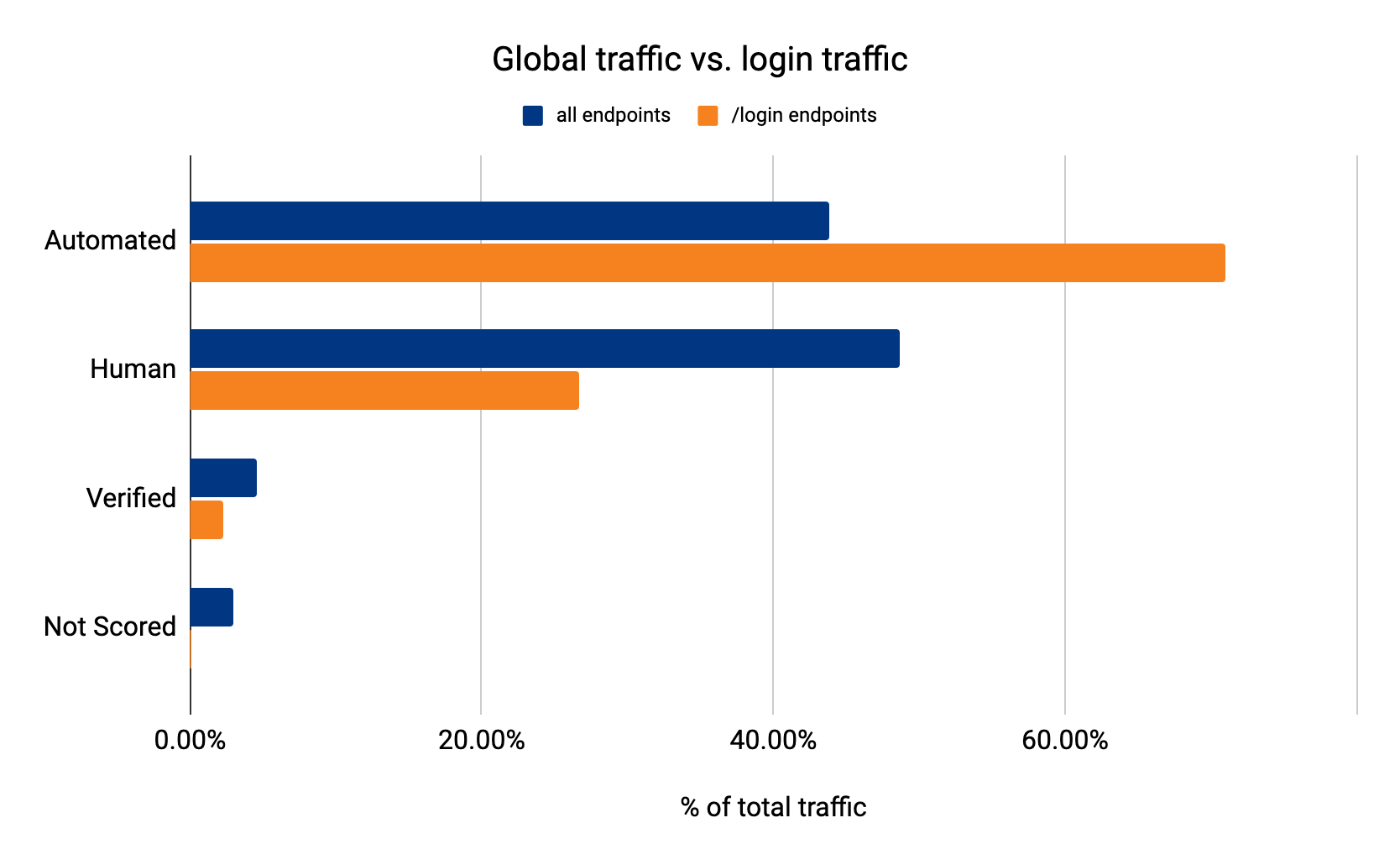
Threat actors specifically target financial services entities with Account Takeover Attacks, and this is where Cloudflare can help. As much as 71% of login requests we see come from bots (Source: Cloudflare Data) Cloudflare’s Bot Management is powered by a global machine learning model that analyses an average of 45 million HTTP requests a second to track botnets across our network. Cloudflare’s Bot Management solution has the potential to benefit all IBM CIS customers.

Supporting banks, financial institutions, and fintechs

IBM Cloud has been a leader when it comes to providing solutions for the financial services industry and has developed several key management solutions that are designed so clients only need to store their private keys in custom built devices.

The IBM CIS team wants to incorporate the right mix of security and performance, which necessitates the use of cloud-based DDoS, WAF, and Bot Management. Specifically, they wanted to incorporate the powerful security tools that were offered through IBM’s Enterprise-level Cloud Internet Services offerings. When using a cloud solution, it is necessary to proxy traffic which can create a potential challenge when it comes to managing private keys. While Cloudflare adopts strict controls to protect these keys, organizations in highly regulated industries may have security policies and compliance requirements that prevent them from sharing these private keys.

Enter Cloudflare’s Keyless SSL solution.

Cloudflare built Keyless SSL to allow customers to have total control over exactly where private keys are stored. With Keyless SSL and IBM’s key storage solutions, we aim to help enterprises benefit from the robust application protections available through Cloudflare’s WAF, including Cloudflare Bot Management, while still retaining control of their private keys.

“We aim to ensure our clients meet their resiliency, performance, security and compliance needs. The introduction of Keyless SSL and Bot Management security capabilities can further our collaborative accomplishments with Cloudflare and help enterprises, including those in regulated industries, to leverage cloud-native security and adaptive threat mitigation tools.”
Zane Adam, Vice President, IBM Cloud.

“Through our collaboration with IBM Cloud Internet Services, we get to draw on the knowledge and experience of IBM teams, such as the IBM Cloud for Financial Services team, and combine it with our incredible ability to innovate, resulting in exciting new product and service offerings.”
David McClure, Global Alliance Manager, Strategic Partnerships

If you want to learn more about how IBM leverages Cloudflare to protect their customers, visit: https://www.ibm.com/cloud/cloudflare

IBM experts are here to help you if you have any additional questions.

Announcing Cloudflare Fraud Detection

Post Syndicated from Adam Martinetti original https://blog.cloudflare.com/cloudflare-fraud-detection/

Announcing Cloudflare Fraud Detection

Announcing Cloudflare Fraud Detection

The world changed when the COVID-19 pandemic began. Everything moved online to a much greater degree: school, work, and, surprisingly, fraud. Although some degree of online fraud has existed for decades, the Federal Trade Commission reported consumers lost almost $8.8 billion in fraud in 2022 (an over 400% increase since 2019) and the continuation of a disturbing trend. People continue to spend more time alone than ever before, and that time alone makes them not just more targeted, but also more vulnerable to fraud. Companies are falling victim to these trends just as much as individuals: according to PWC’s Global Economic Crime and Fraud Survey, more than half of companies with at least $10 billion in revenue experienced some sort of digital fraud.

This is a familiar story in the world of bot attacks. Cloudflare Bot Management helps customers identify the automated tools behind online fraud, but it’s important to note that not all fraud is committed by bots. If the target is valuable enough, bad actors will contract out the exploitation of online applications to real people. Security teams need to look at more than just bots to better secure online applications and tackle modern, online fraud.

Today, we’re excited to announce Cloudflare Fraud Detection. Fraud Detection will give you precise, easy to use tools that can be deployed in seconds to any website on the Cloudflare network to help detect and categorize fraud. For every type of fraud we detect on your website, you will be able to choose the behavior that makes the most sense to you. While some customers will want to block fraudulent traffic at our edge, other customers may want to pass this information in headers to build integrations with their own app, or use our Cloudflare Workers platform to direct high risk users to load an alternate online experience with fewer capabilities.

The online fraud experience today

When we talk to organizations impacted by sophisticated, online fraud, the first thing we hear from frustrated security teams is that they know what they could do to stop fraud in a vacuum: they’ve proposed requiring email verification on signup, enforcing two-factor authentication for all logins, or blocking online purchases from anonymizing VPNs or countries they repeatedly see a disproportionately high number of charge-backs from. While all of these measures would undoubtedly reduce fraud, they would also make the user experience worse. The fear for every company is that a bad UX will mean slower adoption and less revenue, and that’s too steep a price to pay for most run-of-the-mill online fraud.

For those who’ve chosen to preserve that frictionless user experience and bear the cost of fraud, we see two big impacts: higher infrastructure costs and less efficient employees. Bad actors that abuse account creation endpoints or service availability endpoints often do so with floods of highly distributed HTTP requests, quickly moving through residential proxies to pass under IP based rate limiting rules. Without a way to identify fraudulent traffic with certainty, companies are forced to scale up their infrastructure to be able to serve new peaks in request traffic, even when they know the majority of this traffic is illegitimate. Engineering and Trust and Safety Teams suddenly have a whole new set of responsibilities: regularly banning IP addresses that will probably never be used again, routinely purging fraudulent data from over capacity databases, and even sometimes becoming de-facto fraud investigators. As a result, the organization incurs greater costs without any greater value to their customers.

Reduce modern fraud without hurting UX

Organizations have told us loud and clear that an effective fraud management solution needs to reliably stop bad actors before they can create fraudulent accounts, use stolen credit cards, or steal customer data all the while ensuring a frictionless user experience for real users. We are building novel and highly accurate detections, solving for the four common fraud types we hear the most demand for from businesses around the world:

  • Fake Account Creation: Bad actors signing up for many different accounts to gain access to promotional rewards, or more resources than a single user should have access to.
  • Account Takeover: Gaining unauthorized access to legitimate accounts, by means such as using stolen username and password combinations from other websites, guessing weak passwords, or abusing account recovery mechanisms.
  • Card Testing and Fraudulent Transactions: Testing the validity of stolen credit card details or using those same details to purchase goods or services.
  • Expediting: Obtaining limited availability goods or services by circumventing the normal user flow to complete orders more quickly than should be possible.

In order to trust your fraud management solution, organizations have to understand the decisions or predictions behind the detection of fraud. This is referred to as explainability. For example, it’s not enough to know a signup attempt was flagged as fraud. You need to know, for example, if a signup is fraudulent, exactly what field supplied by the user led us to think this was an issue, why it was an issue, and if it was part of a larger pattern. We will pass along this level of detail when we detect fraud so you can ensure we are only keeping the bad actors out.

Every business that deals with modern, online fraud has a different idea of what risks are acceptable, and a different preference for dealing with fraud once it’s been identified. To give customers maximum flexibility, we’re building Cloudflare’s fraud detection signals to be used individually, or combined with other Cloudflare security products in whichever way best fits each customer’s risk profile and use case, all while using the familiar Cloudflare Firewall Rules interface. Templated rules and suggestions will be available to provide guidance and help customers become familiar with the new features, but each customer will have the option of fully customizing how they want to protect each internet application. Customers can either block, rate-limit, or challenge requests at the edge, or send those signals upstream in request headers, to trigger custom in-application behavior.

Cloudflare provides application performance and security services to millions of sites, and we see 45 million HTTP requests per second on average. The massive diversity and volume of this traffic puts us in a unique position to analyze and defeat online fraud. Cloudflare Bot Management is already built to run our Machine Learning model that detects automated traffic on every request we see. To better tackle more challenging use cases like online fraud, we made our lightning fast Machine Learning even more performant. The typical Machine Learning model now executes in under 0.2 milliseconds, giving us the architecture we need to run multiple specific Machine Learning models in parallel without slowing down content delivery.

Stopping fake account creation and adding to Cloudflare’s defense in depth

Announcing Cloudflare Fraud Detection

The first problem our customers asked us to tackle is detecting fake account creation. Cloudflare is perfectly positioned to solve this because we see more account creation pages than anyone else. Using sampled fake account attack data from our customers, we started looking at signup submission data, and how threat intelligence curated by our Cloudforce One team might be helpful. We found that the data used in our Cloudflare One products was already able to identify 72% of fake accounts based on the signup details supplied by the bad actor, such as the email address or the domain they’re using in the attack. We are continuing to add more sources of threat intelligence data specific to fake accounts to get this number close to 100%. On top of these threat intelligence based rules, we are also training new machine learning models on this data as well, that will spot trends like popular fraud domains based on intelligence from the millions of domains we see across the Cloudflare network.

Making fraud inefficient by expediting detection

The second problem customers asked us to prioritize is expediting. As a reminder, expediting means visiting a succession of web pages faster than would be possible for a normal user, and sometimes skipping ahead in the order of web pages in order to efficiently exploit a resource.

For instance, let’s say that you have an Account Recovery page that is being spammed by a sophisticated group of bad actors, looking for vulnerable users they can steal reset tokens for. In this case, the fraudsters have access to a large number of valid email addresses and they’re testing which of these addresses may be used at your website. To prevent your account recovery process from being abused, we need to ensure that no single person can move through the account recovery process faster, or in a different order than a real person would.

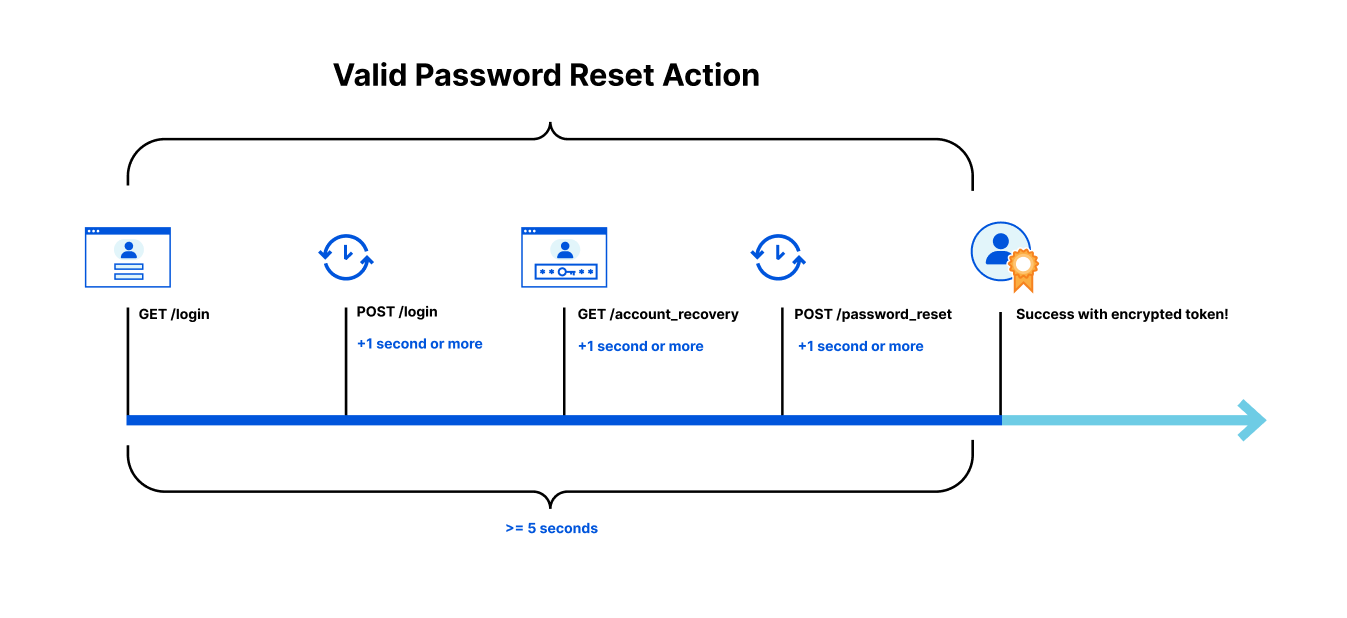
In order to complete a valid password reset action on your site, you may know that a user should have made:

  • A GET request to render your login page
  • A POST request to the login page (at least one second after receiving the login page HTML)
  • A GET request to render the Account Recovery page (at least one second after receiving the POST response)
  • A POST request to the password reset page (at least one second after receiving the Account Recovery page HTML)
  • Taken a total time of less than 5 seconds to complete the process

To solve this, we will rely on encrypted data stored by the user in a token to help us determine if the user has visited all the necessary pages needed in a reasonable amount of time to be performing sensitive actions on your site. If your account recovery process is being abused, the encrypted token we supply acts as a VIP pass, allowing only authorized users to successfully complete the password recovery process. Without a pass indicating the user has gone through the normal recovery flow in the correct order and time, they are denied entry to complete a password recovery. By forcing the bad actor to behave the same as a legitimate user, we make their task of checking which of their compromised email addresses might be registered at your site an impossibly slow process, forcing them to move on to other targets.

Announcing Cloudflare Fraud Detection

These are just two of the first techniques we use to identify and block fraud. We are also building Account Takeover and Carding Abuse detections that we will be talking about in the future on this blog. As online fraud continues to evolve, we will continue to build new and unique detections, leveraging Cloudflare’s unique position to help keep the internet safe.

Where do I sign up?

Cloudflare’s mission is to help build a better Internet, and that includes dealing with the evolution of modern online fraud. If you’re spending hours cleaning up after fraud, or are tired of paying to serve web traffic to bad actors, you can join in the Cloudflare Fraud Detection Early Access in the second half of 2023 by submitting your contact information here. Early Access customers can opt in to providing training data sets right away, making our models more effective for their use cases. You’ll also get test access to our newest models, and future fraud protection features as soon as they roll out.

Announcing Cloudflare Fraud Detection

More bots, more trees

Post Syndicated from Adam Martinetti original https://blog.cloudflare.com/more-bots-more-trees/

More bots, more trees

More bots, more trees

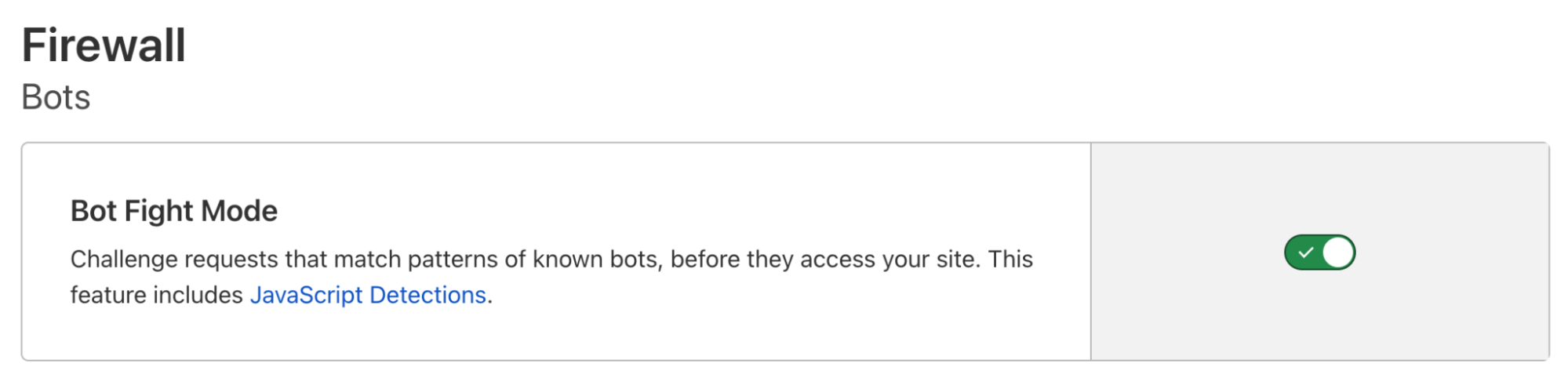
Once a year, we pull data from our Bot Fight Mode to determine the number of trees we can donate to our partners at One Tree Planted. It’s part of the commitment we made in 2019 to deter malicious bots online by redirecting them to a challenge page that requires them to perform computationally intensive, but meaningless tasks. While we use these tasks to drive up the bill for bot operators, we account for the carbon cost by planting trees.

This year when we pulled the numbers, we saw something exciting. While the number of bot detections has gone significantly up, the time bots spend in the Bot Fight Mode challenge page has gone way down. We’ve observed that bot operators are giving up quickly, and moving on to other, unprotected targets. Bot Fight Mode is getting smarter at detecting bots and more efficient at deterring bot operators, and that’s a win for Cloudflare and the environment.

What’s changed?

We’ve seen two changes this year in the Bot Fight Mode results. First, the time attackers spend in Bot Fight Mode challenges has reduced by 166%. Many bot operators are disconnecting almost immediately now from Cloudflare challenge pages. We expect this is because they’ve noticed the sharp cost increase associated with our CPU intensive challenge and given up. Even though we’re seeing individual bot operators give up quickly, Bot Fight Mode is busier than ever. We’re issuing six times more CPU intensive challenges per day compared to last year, thanks to a new detection system written using Cloudflare’s ruleset engine, detailed below.

How did we do this?

When Bot Fight Mode launched, we highlighted one of our core detection systems:

“Handwritten rules for simple bots that, however simple, get used day in, day out.”

Some of them are still very simple. We introduce new simple rules regularly when we detect new software libraries as they start to source a significant amount of traffic. However, we started to reach the limitations of this system. We knew there were sophisticated bots out there that we could identify easily, but they shared enough overlapping traits with good browser traffic that we couldn’t safely deploy new rules to block them safely without potentially impacting our customers’ good traffic as well.

To solve this problem, we built a new rules system written on the same highly performant Ruleset Engine that powers the new WAF, Transform Rules, and Cache Rules, rather than the old Gagarin heuristics engine that was fast but inflexible. This new framework gives us the flexibility we need to write highly complex rules to catch more elusive bots without the risk of interfering with legitimate traffic. The data gathered by these new detections are then labeled and used to train our Machine Learning engine, ensuring we will continue to catch these bots as their operators attempt to adapt.

What’s next?

We’ve heard from Bot Fight Mode customers that they need more flexibility. Website operators now expect a significant percentage of their legitimate traffic to come from automated sources, like service to service APIs. These customers are waiting to enable Bot Fight Mode until they can tell us what parts of their website it can run on safely. In 2023, we will give everyone the ability to write their own flexible Bot Fight Mode rules, so that every Cloudflare customer can join the fight against bots!

Update: Mangroves, Climate Change & economic development

More bots, more trees
Source: One Tree Planted

We’re also pleased to report the second tree planting project from our 2021 bot activity is now complete! Earlier this year, Cloudflare contributed 25,000 trees to a restoration project at Victoria Park in Nova Scotia.

For our second project, we donated 10,000 trees to a much larger restoration project on the eastern shoreline of Kumirmari island in the Sundarbans of West Bengal, India. In total, the project included more than 415,000 trees along 7.74 hectares of land in areas that have been degraded or deforested. The types of trees planted included Bain, Avicennia officianalis, Kalo Bain, and eight others.

The Sundarbans are located on the delta of the Ganges, Brahmaptura, and Meghna rivers on the Bay of Bengal, and are home to one of the world’s largest mangrove forests. The forest is not only a UNESCO World Heritage site, but also home to 260 bird species as well as a number of threatened species like the Bengal tiger, the estuarine crocodile, and Indian python. According to One Tree Planted, the Sundarbans are currently under threat from rising sea levels, increasing salinity in the water and soil, cyclonic storms, and flooding.

The Intergovernmental Panel on Climate Change (IPCC) has found that mangroves are critical to mitigating greenhouse gas (GHG) emissions and protecting coastal communities from extreme weather events caused by climate change. The Sundarbans mangrove forest is one of the world’s largest carbon sinks (an area that absorbs more carbon than it emits). One study suggested that coastal mangrove forests sequester carbon at a rate of two to four times that of a mature tropical or subtropical forest region.

One of the most exciting parts of this project was its focus on hiring and empowering local women. According to One Tree Planted, 75 percent of those involved in the project were women, including 85 women employed to monitor and manage the planting site over a five-month period. Participants also received training in the seed collection process with the goal of helping local residents lead mangrove planting from start to finish in the future.

More bots stopped, more trees planted!

Thanks to every Cloudflare customer who’s enabled Bot Fight Mode so far. You’ve helped make the Internet a better place by stopping malicious bots, and you’ve helped make the planet a better place by reforesting the Earth on bot operators’ dime. The more domains that use Bot Fight Mode, the more trees we can plant, so sign up for Cloudflare and activate Bot Fight Mode today!

Announcing Turnstile, a user-friendly, privacy-preserving alternative to CAPTCHA

Post Syndicated from Reid Tatoris original https://blog.cloudflare.com/turnstile-private-captcha-alternative/

Announcing Turnstile, a user-friendly, privacy-preserving alternative to CAPTCHA

Announcing Turnstile, a user-friendly, privacy-preserving alternative to CAPTCHA

Today, we’re announcing the open beta of Turnstile, an invisible alternative to CAPTCHA. Anyone, anywhere on the Internet, who wants to replace CAPTCHA on their site will be able to call a simple API, without having to be a Cloudflare customer or sending traffic through the Cloudflare global network. Sign up here for free.

There is no point in rehashing the fact that CAPTCHA provides a terrible user experience. It’s been discussed in detail before on this blog, and countless times elsewhere. The creator of the CAPTCHA has even publicly lamented that he “unwittingly created a system that was frittering away, in ten-second increments, millions of hours of a most precious resource: human brain cycles.” We hate it, you hate it, everyone hates it. Today we’re giving everyone a better option.

Turnstile is our smart CAPTCHA alternative. It automatically chooses from a rotating suite of non-intrusive browser challenges based on telemetry and client behavior exhibited during a session. We talked in an earlier post about how we’ve used our Managed Challenge system to reduce our use of CAPTCHA by 91%. Now anyone can take advantage of this same technology to stop using CAPTCHA on their own site.

UX isn’t the only big problem with CAPTCHA — so is privacy

While having to solve a CAPTCHA is a frustrating user experience, there is also a potential hidden tradeoff a website must make when using CAPTCHA. If you are a small site using CAPTCHA today, you essentially have one option: an 800 pound gorilla with 98% of the CAPTCHA market share. This tool is free to use, but in fact it has a privacy cost: you have to give your data to an ad sales company.

According to security researchers, one of the signals that Google uses to decide if you are malicious is whether you have a Google cookie in your browser, and if you have this cookie, Google will give you a higher score. Google says they don’t use this information for ad targeting, but at the end of the day, Google is an ad sales company. Meanwhile, at Cloudflare, we make money when customers choose us to protect their websites and make their services run better. It’s a simple, direct relationship that perfectly aligns our incentives.

Less data collection, more privacy, same security

In June, we announced an effort with Apple to use Private Access Tokens. Visitors using operating systems that support these tokens, including the upcoming versions of macOS or iOS, can now prove they’re human without completing a CAPTCHA or giving up personal data.

By collaborating with third parties like device manufacturers, who already have the data that would help us validate a device, we are able to abstract portions of the validation process, and confirm data without actually collecting, touching, or storing that data ourselves. Rather than interrogating a device directly, we ask the device vendor to do it for us.

Private Access Tokens are built directly into Turnstile. While Turnstile has to look at some session data (like headers, user agent, and browser characteristics) to validate users without challenging them, Private Access Tokens allow us to minimize data collection by asking Apple to validate the device for us. In addition, Turnstile never looks for cookies (like a login cookie), or uses cookies to collect or store information of any kind. Cloudflare has a long track record of investing in user privacy, which we will continue with Turnstile.

We are opening our CAPTCHA replacement to everyone

To improve the Internet for everyone, we decided to open up the technology that powers our Managed Challenge to everyone in beta as a standalone product called Turnstile.

Rather than try to unilaterally deprecate and replace CAPTCHA with a single alternative, we built a platform to test many alternatives and rotate new challenges in and out as they become more or less effective. With Turnstile, we adapt the actual challenge outcome to the individual visitor/browser. First we run a series of small non-interactive JavaScript challenges gathering more signals about the visitor/browser environment. Those challenges include proof-of-work, proof-of-space, probing for web APIs, and various other challenges for detecting browser-quirks and human behavior. As a result, we can fine-tune the difficulty of the challenge to the specific request.

Turnstile also includes machine learning models that detect common features of end visitors who were able to pass a challenge before. The computational hardness of those initial challenges may vary by visitor, but is targeted to run fast.

Swap out your existing CAPTCHA in a few minutes

You can take advantage of Turnstile and stop bothering your visitors with a CAPTCHA even without being on the Cloudflare network. While we make it as easy as possible to use our network, we don’t want this to be a barrier to improving privacy and user experience.

To switch from a CAPTCHA service, all you need to do is:

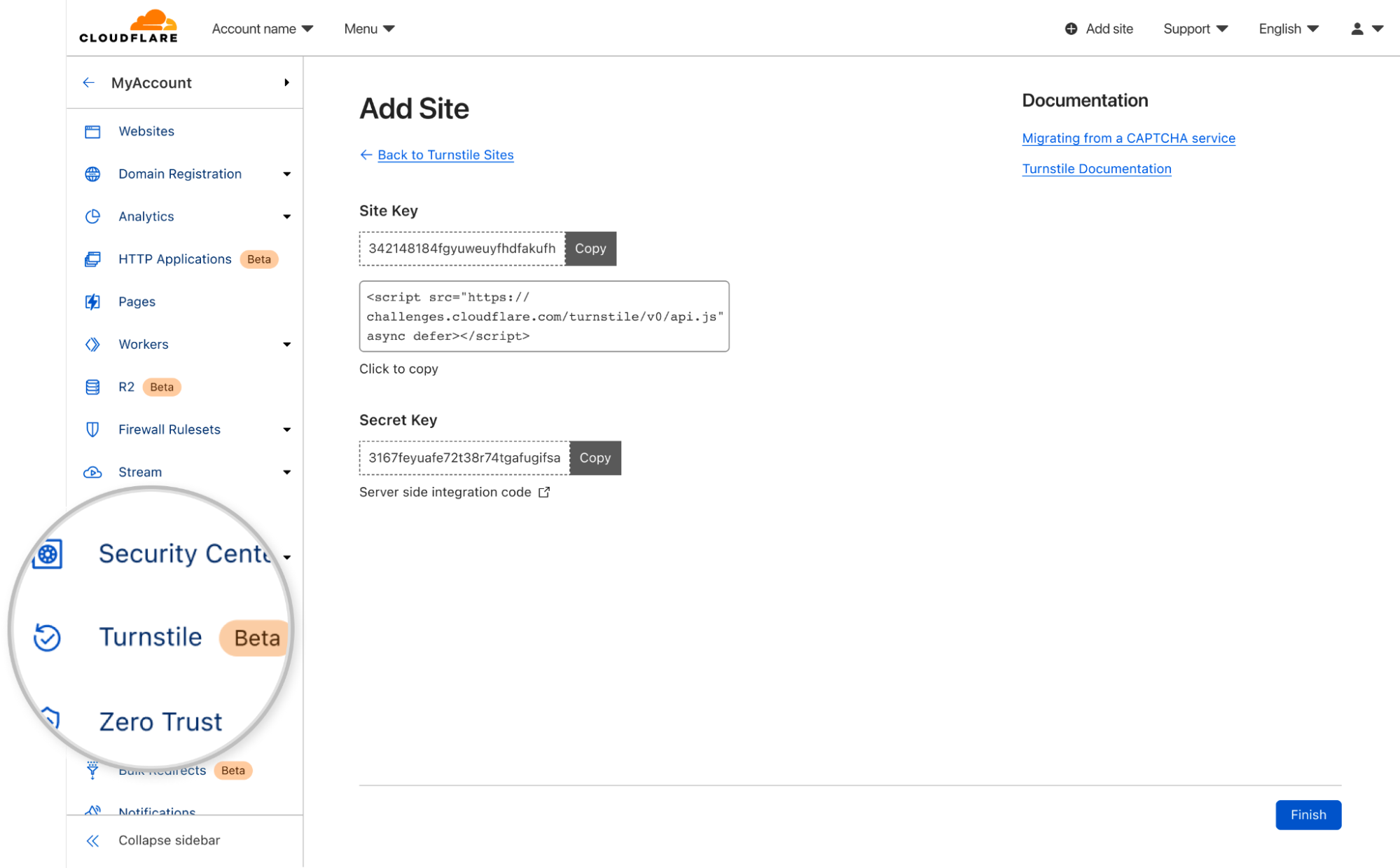
  1. Create a Cloudflare account, navigate to the `Turnstile` tab on the navigation bar, and get a sitekey and secret key.
  2. Copy our JavaScript from the dashboard and paste over your old CAPTCHA JavaScript.
  3. Update the server-side integration by replacing the old siteverify URL with ours.

There is more detail on the process below, including options you can configure, but that’s really it. We’re excited about the simplicity of making a change.

Announcing Turnstile, a user-friendly, privacy-preserving alternative to CAPTCHA

Deployment options and analytics

To use Turnstile, first create an account and get your site and secret keys.

Announcing Turnstile, a user-friendly, privacy-preserving alternative to CAPTCHA

Then, copy and paste our HTML snippet:

<script src="https://challenges.cloudflare.com/turnstile/v0/api.js" async defer></script>

Once the script is embedded, you can use implicit rendering. Here, the HTML is scanned for elements that have a cf-turnstile class:

<form action="/login" method="POST">
  <div class="cf-turnstile" data-sitekey="yourSiteKey"></div>
  <input type="submit">
</form>

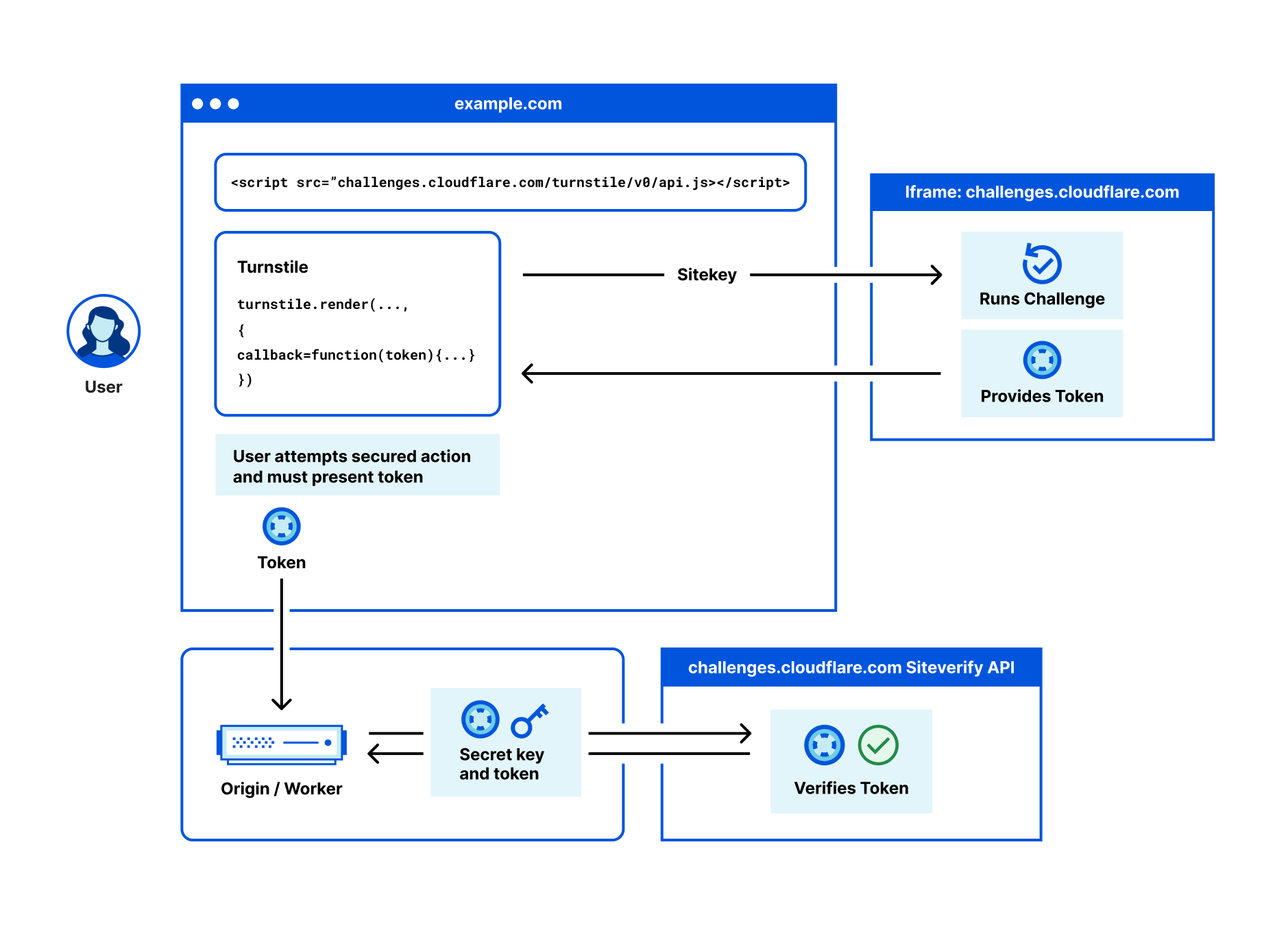
Once a challenge has been solved, a token is injected in your form, with the name cf-turnstile-response. This token can be used with our siteverify endpoint to validate a challenge response. A token can only be validated once, and a token cannot be redeemed twice. The validation can be done on the server side or even in the cloud, for example using a simple Workers fetch (see a demo here):

async function handleRequest() {
    // ... Receive token
    let formData = new FormData();
    formData.append('secret', turnstileISecretKey);
    formData.append('response', receivedToken);
 
    await fetch('https://challenges.cloudflare.com/turnstile/v0/siteverify',
        {
            body: formData,
            method: 'POST'
        });
    // ...
}

For more complex use cases, the challenge can be invoked explicitly via JavaScript:

<script>
    window.turnstileCallbackFunction = function () {
        const turnstileOptions = {
            sitekey: 'yourSitekey',
            callback: function(token) {
                console.log(`Challenge Success: ${token}`);
            }
        };
        turnstile.render('#container', turnstileOptions);
    };
</script>
<div id="container"></div>

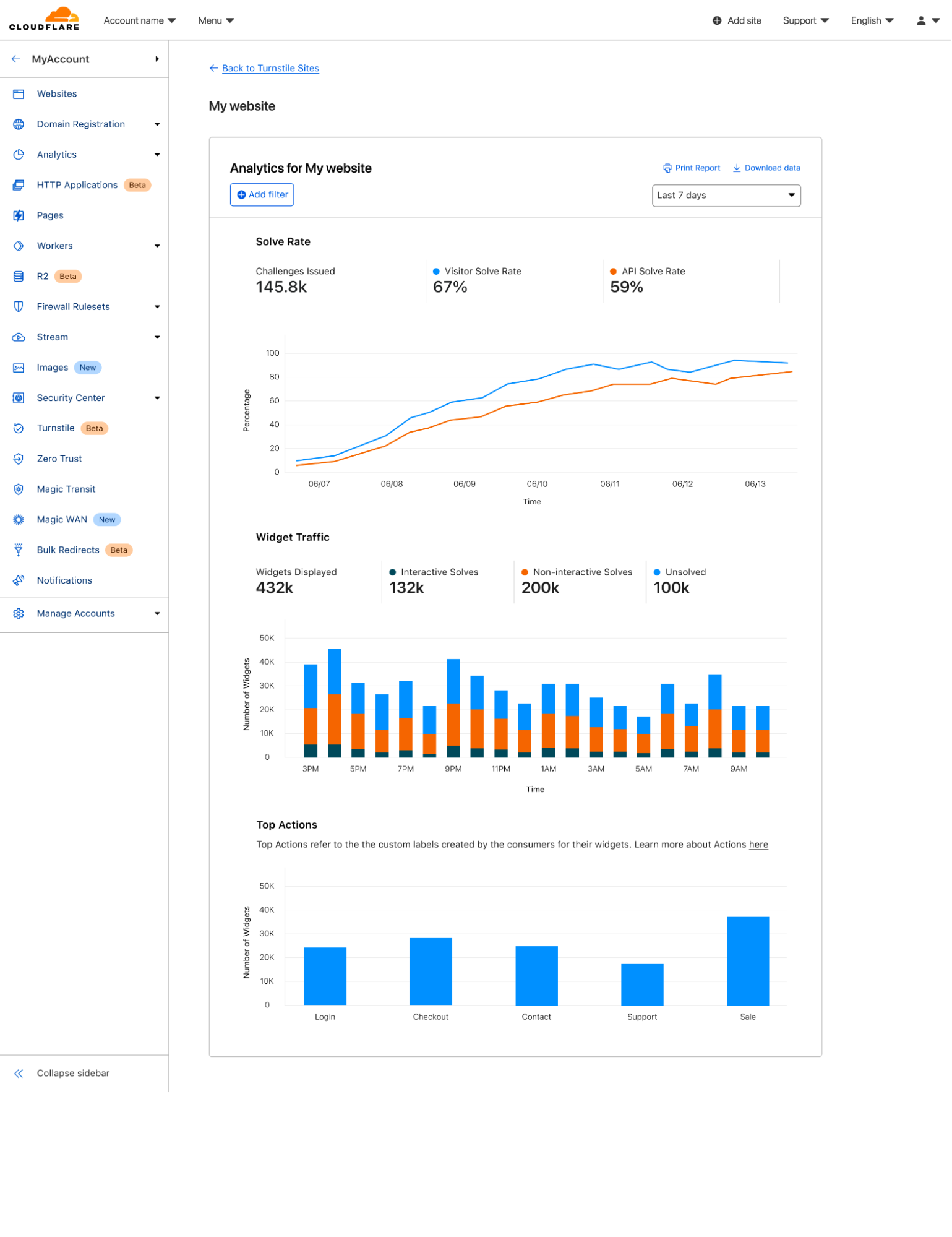
You can also create what we call ‘Actions’. Custom labels that allow you to distinguish between different pages where you’re using Turnstile, like a login, checkout, or account creation page.

Once you’ve deployed Turnstile, you can go back to the dashboard and see analytics on where you have widgets deployed, how users are solving them, and view any defined actions.

Announcing Turnstile, a user-friendly, privacy-preserving alternative to CAPTCHA

Why are we giving this away for free?

While this is sometimes hard for people outside to believe, helping build a better Internet truly is our mission. This isn’t the first time we’ve built free tools that we think will make the Internet better, and it won’t be the last. It’s really important to us.

So whether or not you’re a Cloudflare customer today, if you’re using a CAPTCHA, try Turnstile for free, instead. You’ll make your users happier, and minimize the data you send to third parties.

Visit this page to sign up for the best invisible, privacy-first, CAPTCHA replacement and to retrieve your Turnstile beta sitekey.

Crawler Hints supports Microsoft’s IndexNow in helping users find new content

Post Syndicated from Alex Krivit original https://blog.cloudflare.com/crawler-hints-supports-microsofts-indexnow-in-helping-users-find-new-content/

Crawler Hints supports Microsoft’s IndexNow in helping users find new content

Crawler Hints supports Microsoft’s IndexNow in helping users find new content

The web is constantly changing. Whether it’s news or updates to your social feed, it’s a constant flow of information. As a user, that’s great. But have you ever stopped to think how search engines deal with all the change?

It turns out, they “index” the web on a regular basis — sending bots out, to constantly crawl webpages, looking for changes. Today, bot traffic accounts for about 30% of total traffic on the Internet, and given how foundational search is to using the Internet, it should come as no surprise that search engine bots make up a large proportion of that what might come as a surprise is how inefficient the model is, though: we estimate that over 50% of crawler traffic is wasted effort.

This has a huge impact. There’s all the additional capacity that owners of websites need to bake into their site to absorb the bots crawling all over it. There’s the transmission of the data. There’s the CPU cost of running the bots. And when you’re running at the scale of the Internet, all of this has a pretty big environmental footprint.

Part of the problem, though, is nobody had really stopped to ask: maybe there’s a better way?

Right now, the model for indexing websites is the same as it has been since the 1990s: a “pull” model, where the search engine sends a crawler out to a website after a predetermined amount of time. During Impact Week last year, we asked: what about flipping the model on its head? What about moving to a push model, where a website could simply ping a search engine to let it know an update had been made?

There are a heap of advantages to such a model. The website wins: it’s not dealing with unnecessary crawls. It also makes sure that as soon as there’s an update to its content, it’s reflected in the search engine — it doesn’t need to wait for the next crawl. The website owner wins because they don’t need to manage distinct search engine crawl submissions. The search engine wins, too: it saves money on crawl costs, and it can make sure it gets the latest content.

Of course, this needs work to be done on both sides of the equation. The websites need a mechanism to alert the search engines; and the search engines need a mechanism to receive the alert, so they know when to do the crawl.

Crawler Hints — Cloudflare’s Solution for Websites

Solving this problem is why we launched Crawler Hints. Cloudflare sits in a unique position on the Internet — we’re serving on average 36 million HTTP requests per second. That represents a lot of websites. It also means we’re uniquely positioned to help solve this problem:  to help give crawlers hints about when they should recrawl if new content has been added or if content on a site has recently changed.

With Crawler Hints, we send signals to web indexers based on cache data and origin status codes to help them understand when content has likely changed or been added to a site. The aim is to increase the number of relevant crawls as well as drastically reduce the number of crawls that don’t find fresh content, saving bandwidth and compute for both indexers and sites alike, and improving the experience of using the search engines.

But, of course, that’s just half the equation.

IndexNow Protocol — the Search Engine Moves from Pull to Push

Websites alerting the search engine about changes is useless if the search engines aren’t listening — and they simply continue to crawl the way they always have. Of course, search engines are incredibly complicated, and changing the way they operate is no easy task.

The IndexNow Protocol is a standard developed by Microsoft, Seznam.cz and Yandex, and it represents a major shift in the way search engines operate. Using IndexNow, search engines have a mechanism by which they can receive signals from Crawler Hints. Once they have that signal, they can shift their crawlers from a pull model to a push model.

In a recent update, Microsoft has announced that millions of websites are now using IndexNow to signal to search engine crawlers when their content needs to be crawled and IndexNow was used to index/crawl about 7% of all new URLs clicked when someone is selecting from web search results.

On the Cloudflare side, since the release of Crawler Hints in October 2021, Crawler Hints has processed about six-hundred-billion signals to IndexNow.

That’s a lot of saved crawls.

How to enable Crawler Hints

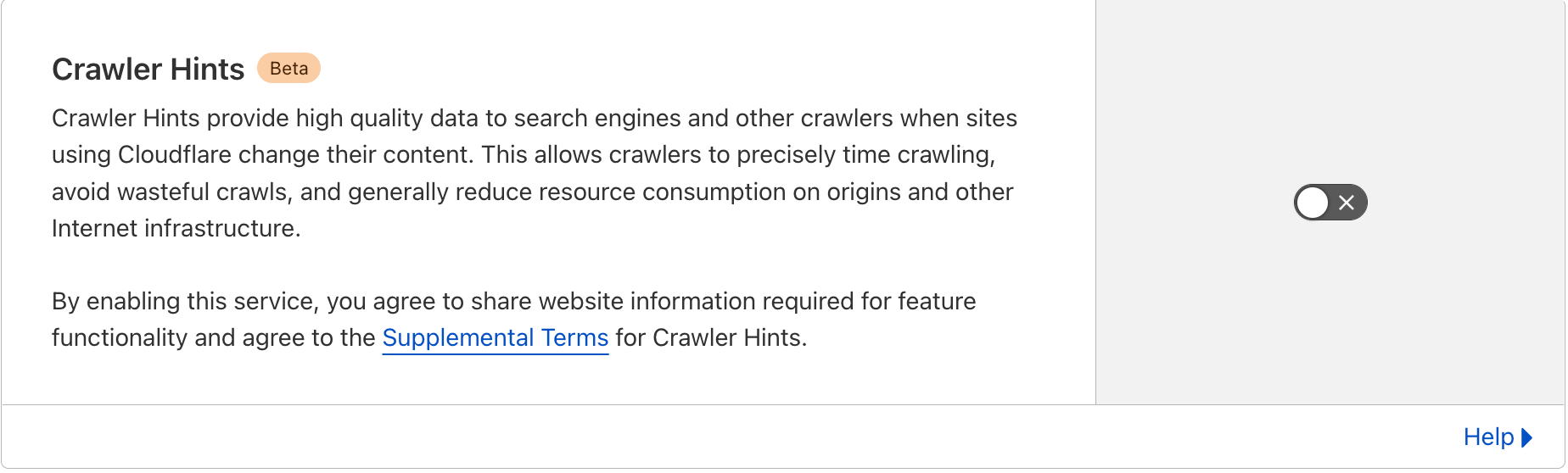
By enabling Crawler Hints on your website, with the simple click of a button, Cloudflare will take care of signaling to these search engines when your content has changed via the IndexNow API. You don’t need to do anything else!

Crawler Hints is free to use and available to all Cloudflare customers. If you’d like to see how Crawler Hints can benefit how your website is indexed by the world’s biggest search engines, please feel free to opt-into the service by:

  1. Sign in to your Cloudflare Account.
  2. In the dashboard, navigate to the Cache tab.
  3. Click on the Configuration section.
  4. Locate the Crawler Hints and enable.
Crawler Hints supports Microsoft’s IndexNow in helping users find new content

Upon enabling Crawler Hints, Cloudflare will share when content on your site has changed and needs to be re-crawled with search engines using the IndexNow protocol (this blog can help if you’re interested in finding out more about how the mechanism works).

What’s Next?

Going forward, because the benefits are so substantial for site owners, search operators, and the environment, we plan to start defaulting Crawler Hints on for all our customers. We’re also hopeful that Google, the world’s largest search engine and most wasteful user of Internet resources, will adopt IndexNow or a similar standard and lower the burden of search crawling on the planet.

When we think of helping to build a better Internet, this is exactly what comes to mind: creating and supporting standards that make it operate better, greener, faster. We’re really excited about the work to date, and will continue to work to improve the signaling to ensure the most valuable information is being sent to the search engines in a timely manner. This includes incorporating additional signals such as etags, last-modified headers, and content hash differences. Adding these signals will help further inform crawlers when they should reindex sites, and how often they need to return to a particular site to check if it’s been changed. This is only the beginning. We will continue testing more signals and working with industry partners so that we can help crawlers run efficiently with these hints.

And finally: if you’re on Cloudflare, and you’d like to be part of this revolution in how search engines operate on the web (it’s free!), simply follow the instructions in the section above.

35,000 new trees in Nova Scotia

Post Syndicated from Patrick Day original https://blog.cloudflare.com/35-000-new-trees-in-nova-scotia/

35,000 new trees in Nova Scotia

Cloudflare is proud to announce the first 35,000 trees from our commitment to help clean up bad bots (and the climate) have been planted.

35,000 new trees in Nova Scotia

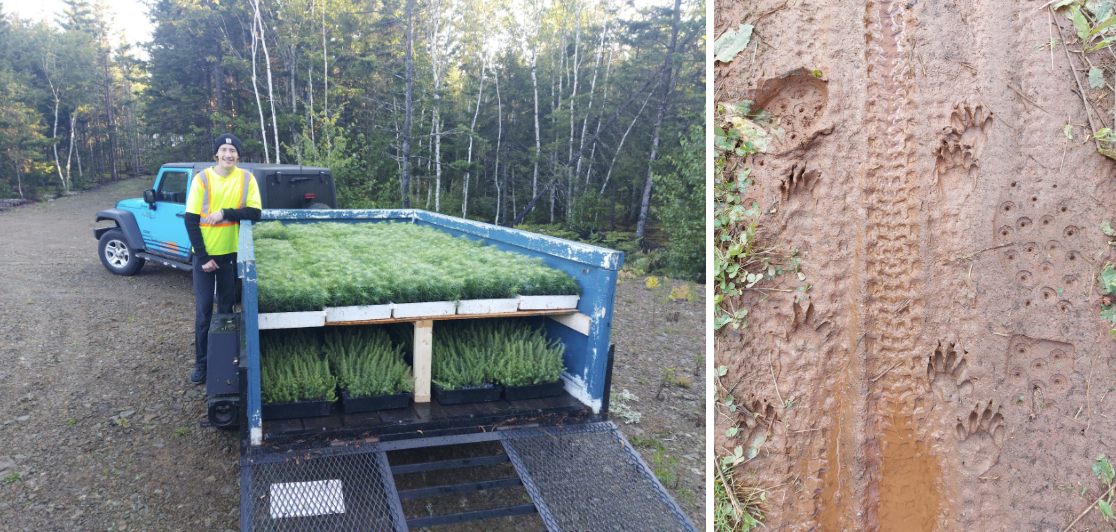
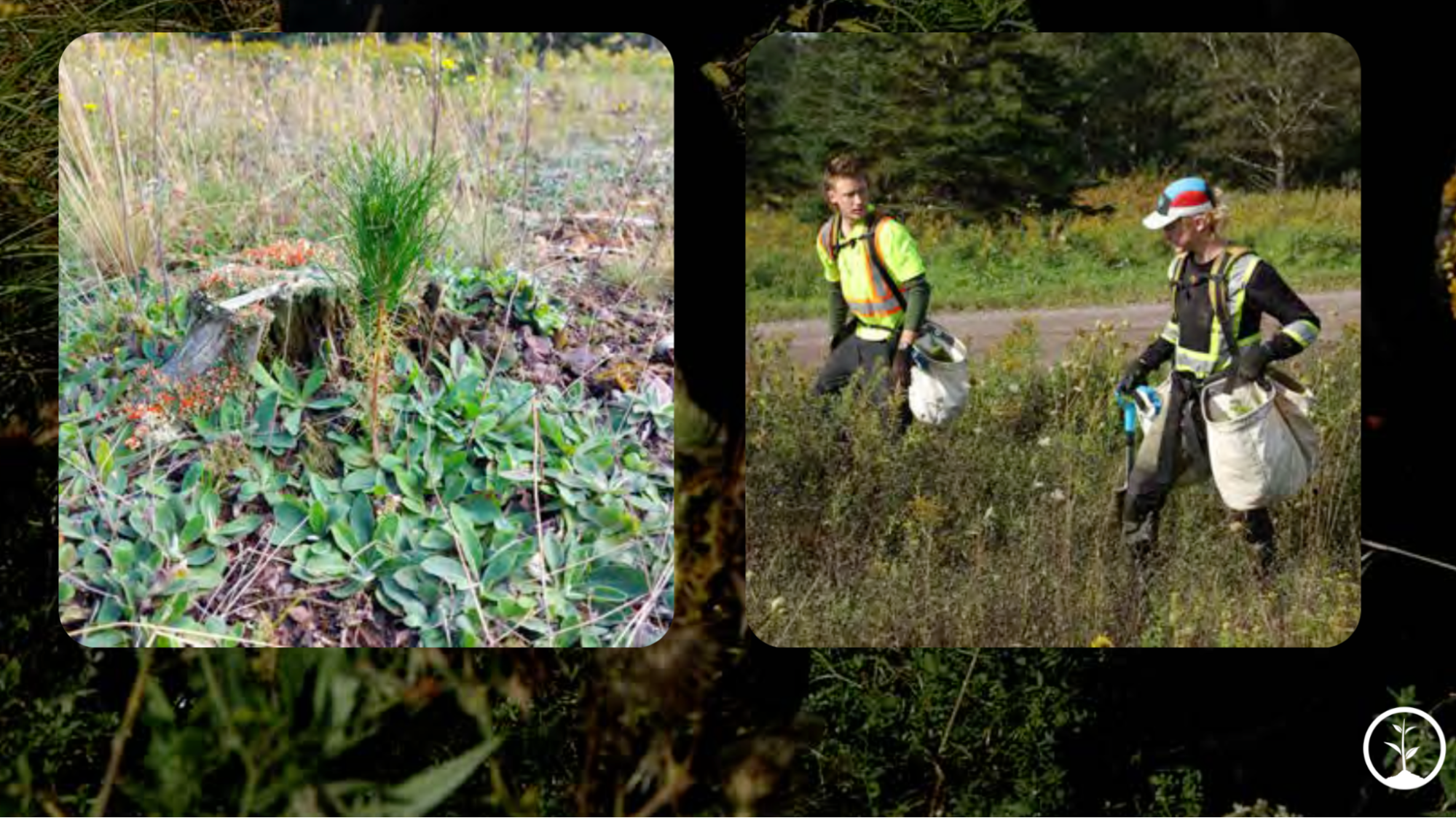
Working with our partners at One Tree Planted (OTP), Cloudflare was able to support the restoration of 20 hectares of land at Victoria Park in Nova Scotia, Canada. The 130-year-old natural woodland park is located in the heart of Truro, NS, and includes over 3,000 acres of hiking and biking trails through natural gorges, rivers, and waterfalls, as well as an old-growth eastern hemlock forest.

The planting projects added red spruce, black spruce, eastern white pine, eastern larch, northern red oak, sugar maple, yellow birch, and jack pine to two areas of the park. The first area was a section of the park that recently lost a number of old conifers due to insect attacks. The second was an area previously used as a municipal dump, which has since been covered by a clay cap and topsoil.

35,000 new trees in Nova Scotia

Our tree commitment began far from the Canadian woodlands. In 2019, we launched an ambitious tool called Bot Fight Mode, which for the first time fought back against bots, targeting scrapers and other automated actors.

Our idea was simple: preoccupy bad bots with nonsense tasks, so they cannot attack real sites. Even better, make these tasks computationally expensive to engage with. This approach is effective, but it forces bad actors to consume more energy and likely emit more greenhouse gasses (GHG). So in addition to launching Bot Fight Mode, we also committed to supporting tree planting projects to account for any potential environmental impact.

What is Bot Fight Mode?

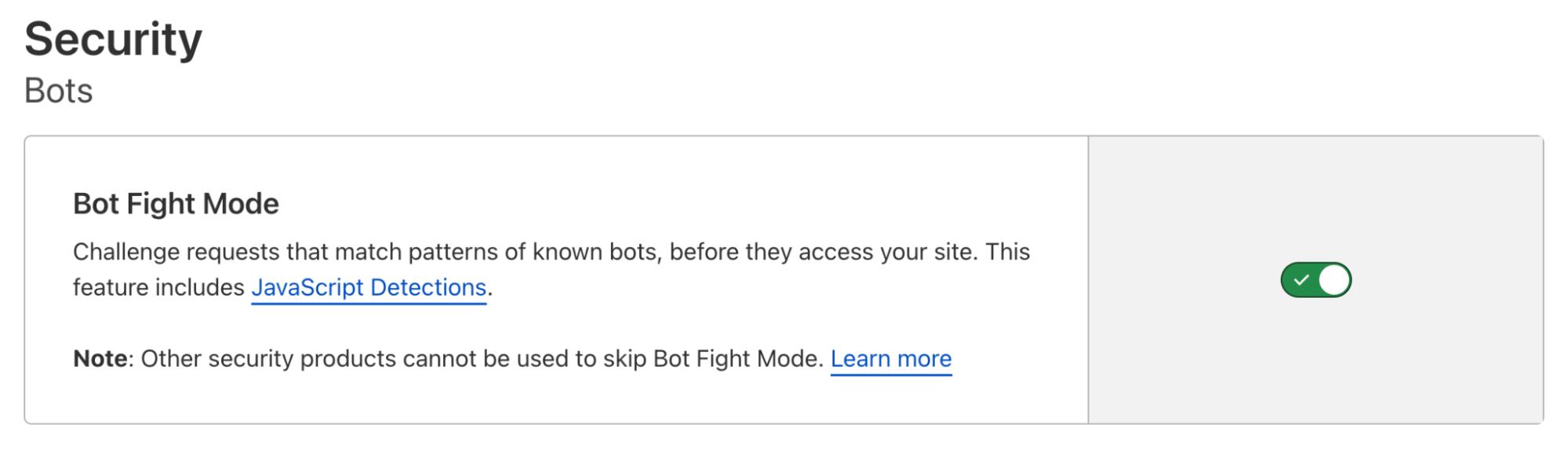
As soon as Bot Fight Mode is enabled, it immediately starts challenging bots that visit your site. It is available to all Cloudflare customers for free, regardless of plan.

35,000 new trees in Nova Scotia

When Bot Fight Mode identifies a bot, it issues a computationally expensive challenge to exhaust it (also called “tarpitting”). Our aim is to disincentivize attackers, so they have to find a new hobby altogether. When we tarpit a bot, we require a significant amount of compute time that will stall its progress and result in a hefty server bill. Sorry not sorry.

We do this because bots are leeches. They draw resources, slow down sites, and abuse online platforms. They also hack into accounts and steal personal data. Of course, we allowlist a small number of bots that are well-behaved, like Slack and Google. And Bot Fight Mode only acts on traffic from cloud and hosting providers (because that is where bots usually originate from).

Over 550,000 sites use Bot Fight Mode today! We believe this makes it the most widely deployed bot management solution in the world (though this is impossible to validate). Free customers can enable the tool from the dashboard and paid customers can use a special version, known as Super Bot Fight Mode.

How many trees? Let’s do the math 🚀

Now, the hard part: how can we translate bot challenges into a specific number of trees that should be planted? Fortunately, we can use a series of unit conversions, similar to those we use to calculate Cloudflare’s total GHG emissions.

We started with the following assumptions.

Table 1.

Measure Quantity Scaled Source
Energy used by a standard server 1,760.3 kWh / year To hours (0.2 kWh / hour) Go Climate
Emissions factor 0.33852 kgCO2e / kWh To grams (338.52 gCO2e / kWh) Go Climate
CO2 absorbed by a mature tree 48 lbsCO2e / year To kilograms (21 kgCO2e / year) One Tree Planted

Next, we selected a high-traffic day to model the rate and duration of bot challenges on our network. On May 23, 2021, Bot Fight Mode issued 2,878,622 challenges, which lasted an average of 50 seconds each. In total, bots spent 39,981 hours engaging with our network defenses, or more than four years of challenges in a single day!

We then converted that time value into kilowatt-hours (kWh) of energy based on the rate of power consumed by our generic server listed in Table 1 above.

39,981 (hours) x .2 (kWh/hour) = 7,996 (kWh)

Once we knew the total amount of energy consumed by bad bot servers, we used an emissions factor (the amount of greenhouse gasses emitted per unit of energy consumed) to determine total emissions.

7,996 (kwh) x 338.52 (gCO2e/kwh) = 2,706,805 (gCO2e)

If you have made it this far, clearly you like to geek out like we do, so for the sake of completeness, the unit commonly used in emissions calculations is carbon dioxide equivalent (CO2e), which is a composite unit for all six GHGs listed in the Kyoto Protocol weighted by Global Warming Potential.

The last conversion we needed was from emissions to trees. Our partners at OTP found that a mature tree absorbs roughly 21 kgCO2e per year. Based on our total emissions that translates to roughly 47,000 trees per server, or 840 trees per CPU core. However, in our original post, we also noted that given the time it takes for a newly planted tree to reach maturity, we would multiply our donation by a factor of 25.

In the end, over the first two years of the program, we calculated that we would need approximately 42,000 trees to account for all the individual CPU cores engaged in Bot Fight Mode. For good measure, we rounded up to an even 50,000.

We are proud that most of these trees are already in the ground, and we look forward to providing an update when the final 15,000 are planted.

A piece of the puzzle

“Planting trees will benefit species diversity of the existing forest, animal habitat, greening of reclamation areas as well as community recreation areas, and visual benefits along popular hiking/biking trail networks.”  
Stephanie Clement, One Tree Planted, Project Manager North America

Reforestation is an important part of protecting healthy ecosystems and promoting biodiversity. Trees and forests are also a fundamental part of helping to slow the growth of global GHG emissions.

However, we recognize there is no single solution to the climate crisis. As part of our mission to help build a better, more sustainable Internet, Cloudflare is investing in renewable energy, tools that help our customers understand and mitigate their own carbon footprints on our network, and projects that will help offset or remove historical emissions associated with powering our network by 2025.

Want to be part of our bots & trees effort? Enable Bot Fight Mode today! It’s available on our free plan and takes only a few seconds. By the time we made our first donation to OTP in 2021, Bot Fight Mode had already spent more than 3,000 years distracting bots.

Help us defeat bad bots and improve our planet today!

35,000 new trees in Nova Scotia

—-
For more information on Victoria Park, please visit https://www.victoriaparktruro.ca
For more information on One Tree Planted, please visit https://onetreeplanted.org
For more information on sustainability at Cloudflare, please visit www.cloudflare.com/impact

Internet Explorer, we hardly knew ye

Post Syndicated from David Belson original https://blog.cloudflare.com/internet-explorer-retired/

Internet Explorer, we hardly knew ye

Internet Explorer, we hardly knew ye

On May 19, 2021, a Microsoft blog post announced that “The future of Internet Explorer on Windows 10 is in Microsoft Edge” and that “the Internet Explorer 11 desktop application will be retired and go out of support on June 15, 2022, for certain versions of Windows 10.” According to an associated FAQ page, those “certain versions” include Windows 10 client SKUs and Windows 10 IoT. According to data from Statcounter, Windows 10 currently accounts for over 70% of desktop Windows market share on a global basis, so this “retirement” impacts a significant number of Windows systems around the world.

As the retirement date for Internet Explorer 11 has recently passed, we wanted to explore several related usage trends:

  • Is there a visible indication that use is declining in preparation for its retirement?
  • Where is Internet Explorer 11 still in the heaviest use?
  • How does the use of Internet Explorer 11 compare to previous versions?
  • How much Internet Explorer traffic is “likely human” vs. “likely automated”?
  • How do Internet Explorer usage patterns compare with those of Microsoft Edge, its replacement?

The long goodbye

Publicly released in January 2020, and automatically rolled out to Windows users starting in June 2020, Chromium-based Microsoft Edge has become the default browser for the Windows platform, intended to replace Internet Explorer. Given the two-year runway, and Microsoft’s May 2021 announcement, we would expect to see Internet Explorer traffic decline over time as users shift to Edge.

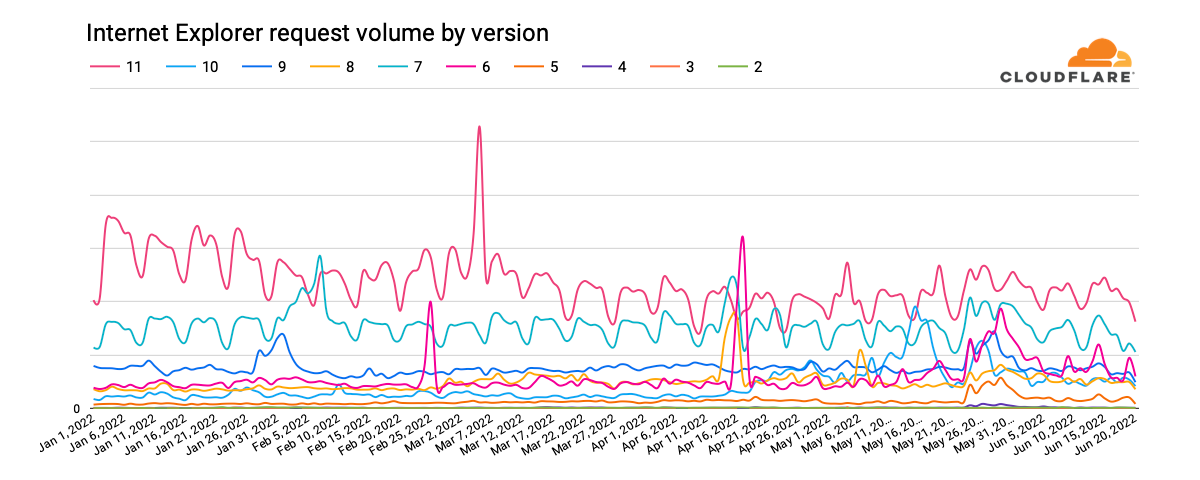
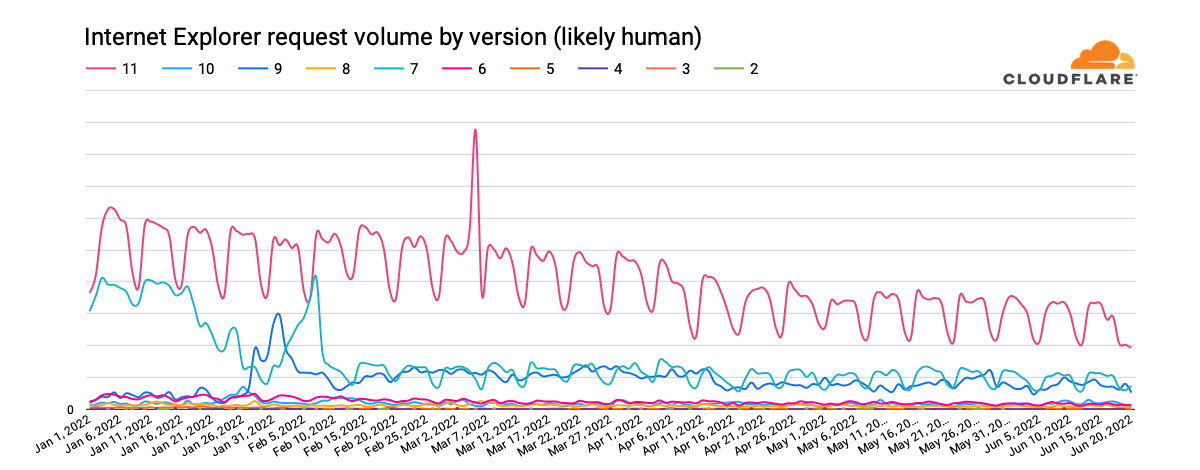
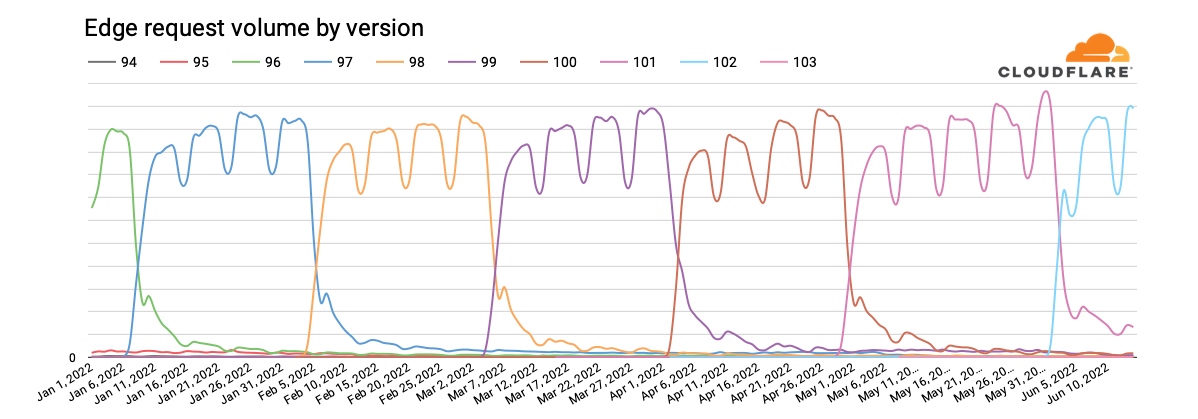
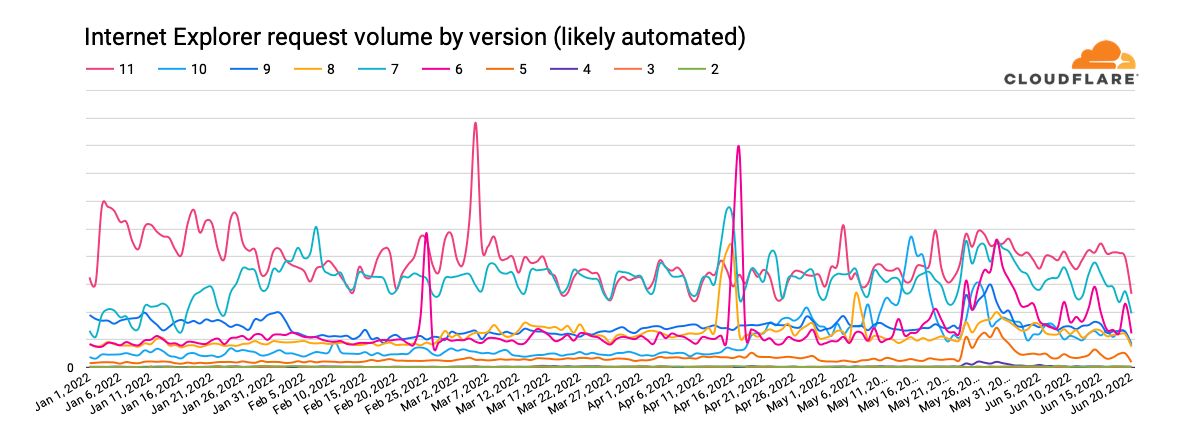
Looking at global request traffic to Cloudflare from Internet Explorer versions between January 1 and June 20, 2022, we see in the graph below that peak request volume for Internet Explorer 11 has declined by approximately one-third over that period. The clear weekly usage pattern suggests higher usage in the workplace than at home, and the nominal decline in traffic year-to-date suggests that businesses are not rushing to replace Internet Explorer with Microsoft Edge. However, we expect traffic from Internet Explorer 11 to drop more aggressively as Microsoft rolls out a two-phase plan to redirect users to Microsoft Edge, and then ultimately disable Internet Explorer. Having said that, we do not expect Internet Explorer 11 traffic to ever fully disappear for several reasons, including Microsoft Edge’s “IE Mode” representing itself as Internet Explorer 11, the ongoing usage of Internet Explorer 11 on Windows 8.1 and Windows 7 (which were out of scope for the retirement announcement), and automated (bot) traffic masquerading as Internet Explorer 11.

Internet Explorer, we hardly knew ye

It is also apparent in the graph above that traffic from earlier versions of Internet Explorer has never fully disappeared. (In fact, we still see several million requests each day from clients purporting to be Internet Explorer 2, which was released in November 1995 — over a quarter-century ago.) After version 11, Internet Explorer 7, first released in October 2006 and last updated in May 2009, generates the next largest volume of requests. Traffic trends for this version have remained relatively consistent. Internet Explorer 9 was the next largest traffic generator through late May, when Internet Explorer 6 seemed to stage a comeback. (Internet Explorer 7 saw a slight bump in traffic at that time as well.)

Where is Internet Explorer 11 used?

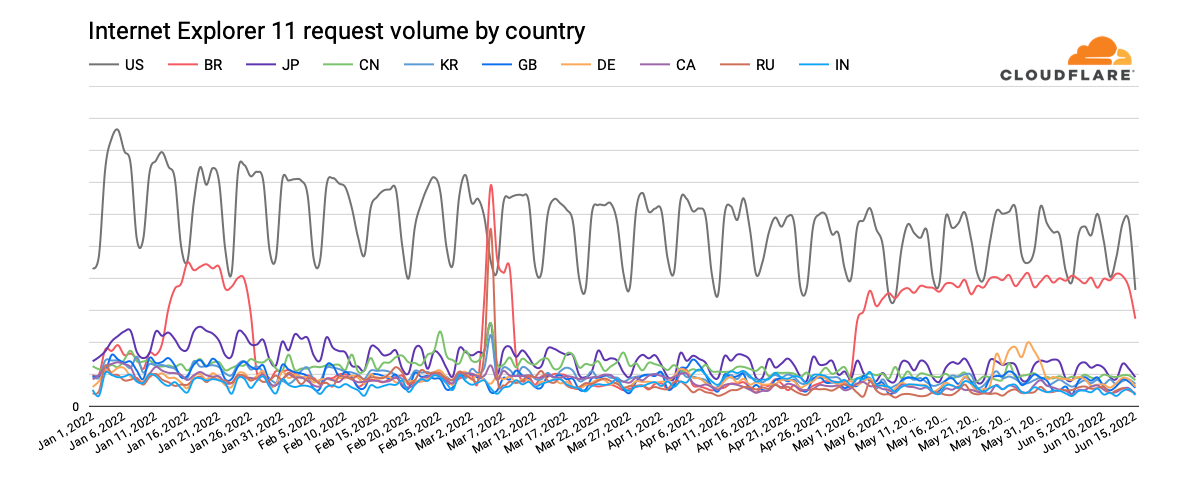
Perhaps unsurprisingly, the United States has accounted for the largest volume of Internet Explorer 11 requests year-to-date. Similar to the global observation above, daily peak request traffic has declined by approximately one-third. With request volume approximately one-fourth that seen in the United States, Japan ostensibly has the next largest Internet Explorer 11 user base. (And published reports note that Internet Explorer’s retirement is likely to cause Japan headaches ‘for months’” because local businesses and government agencies didn’t take action in the months ahead of the event.)

Internet Explorer, we hardly knew ye

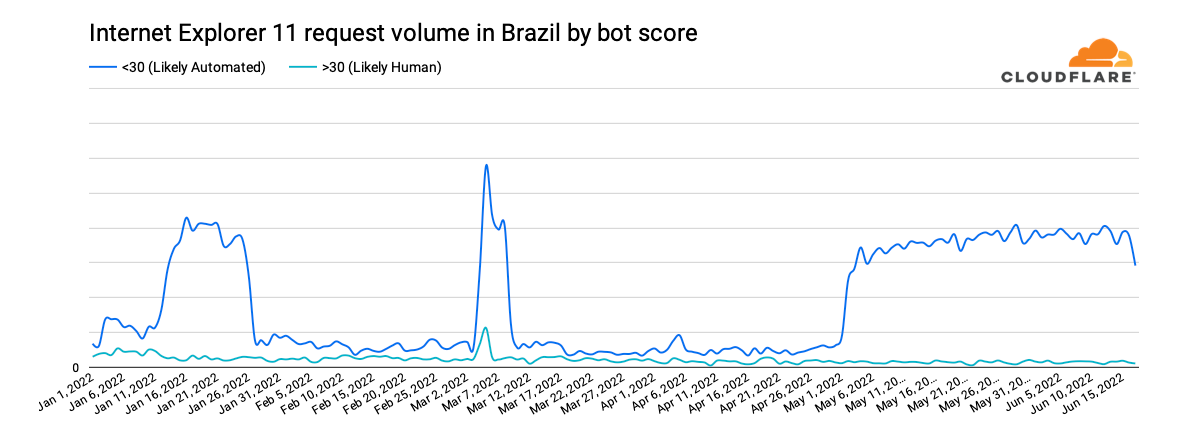
However, unusual shifts in Brazil’s request volume, seen in the graph above, are particularly surprising. For several weeks in January, Internet Explorer 11 traffic from the country appears to quadruple, with the same behavior seen from early May through mid-June, as well as a significant spike in March. Classifying the request traffic by bot score, as shown in the graph below, makes it clear that the observed increases are the result of automated (bot) traffic presenting itself as coming from Internet Explorer 11.

Internet Explorer, we hardly knew ye

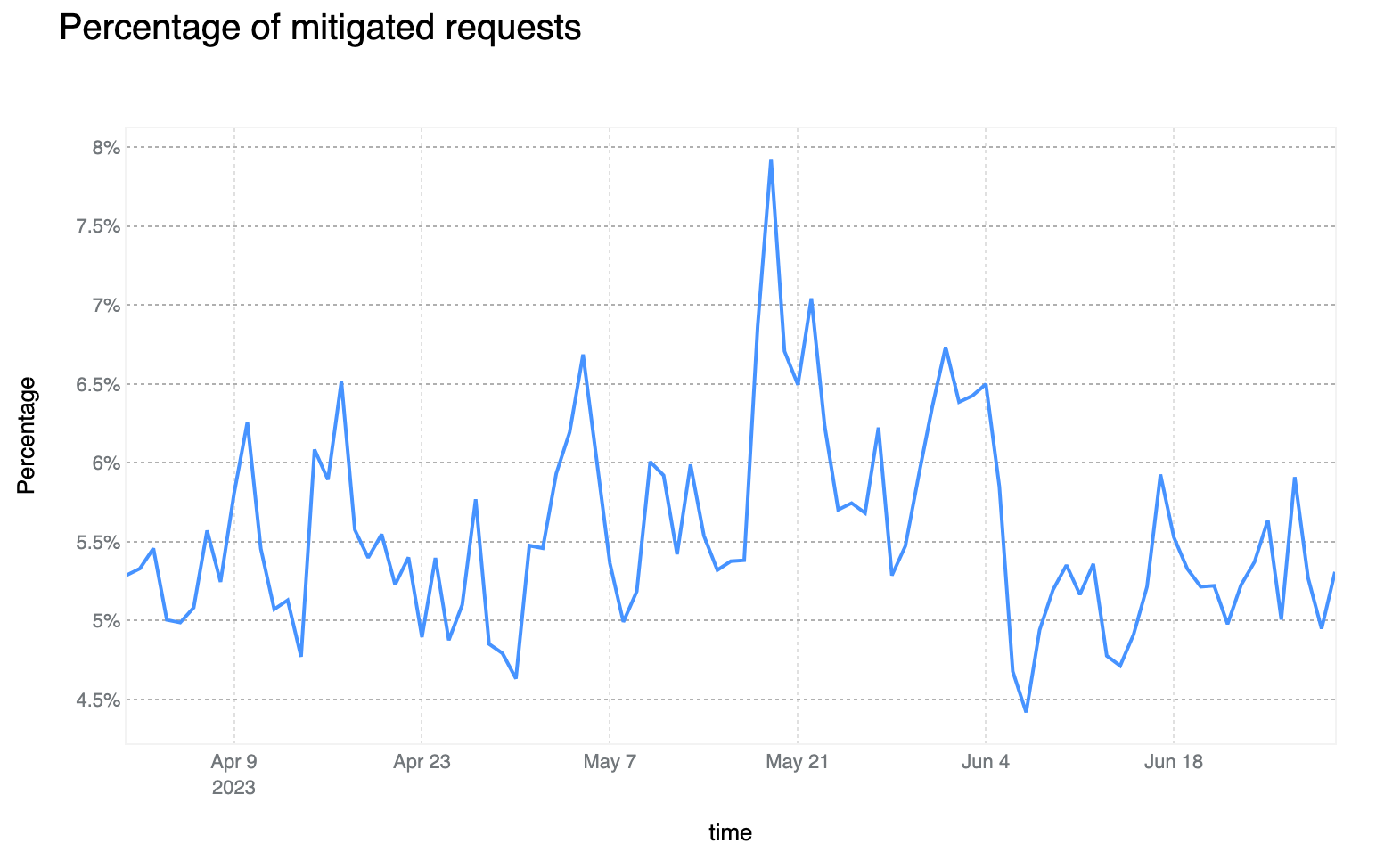
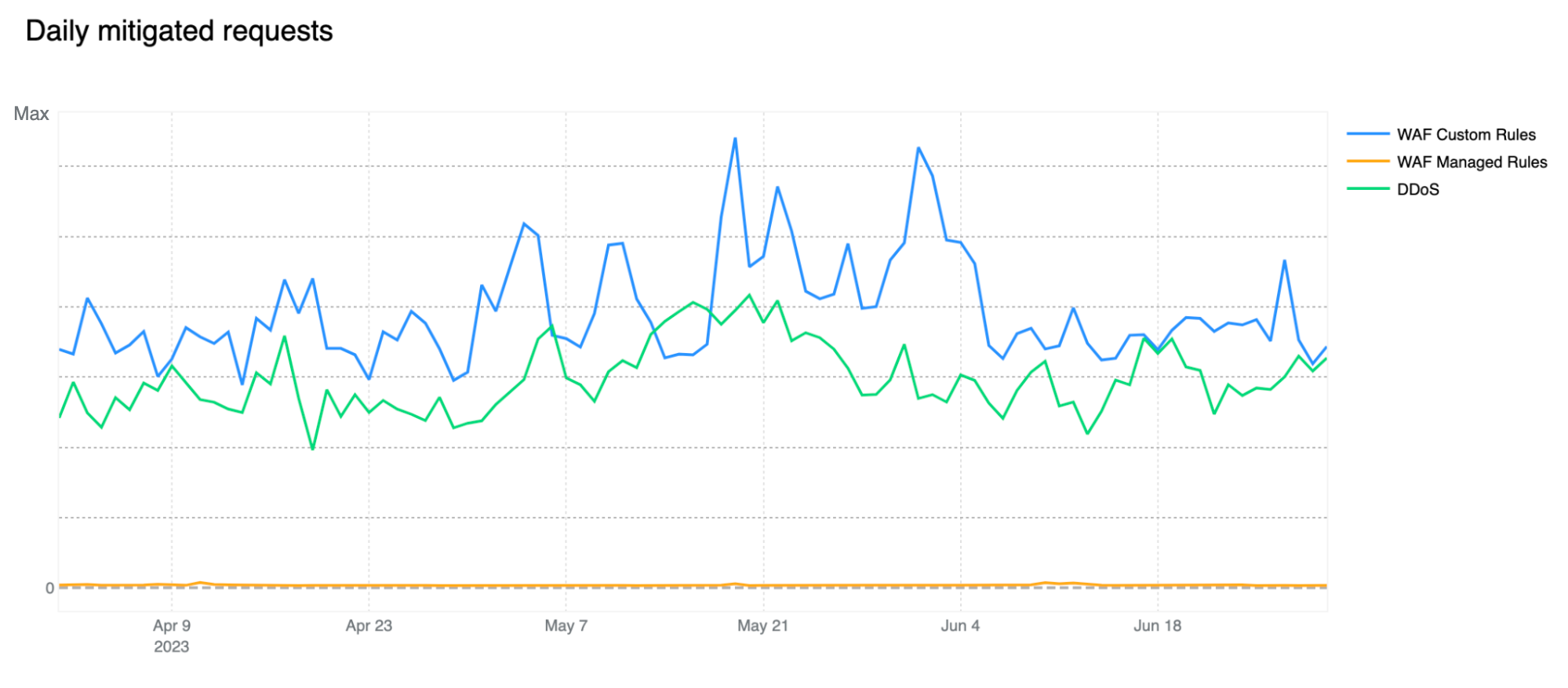
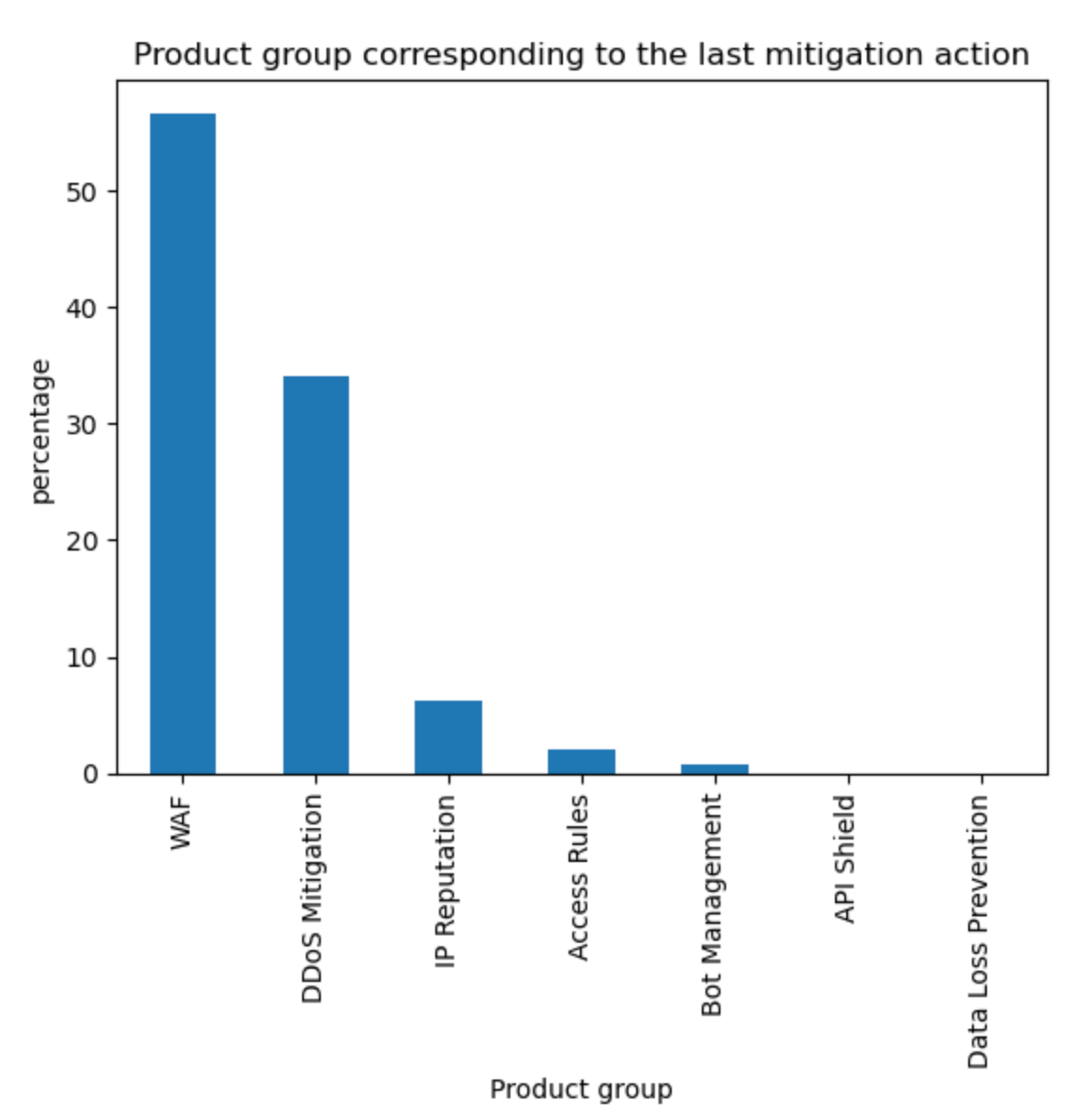
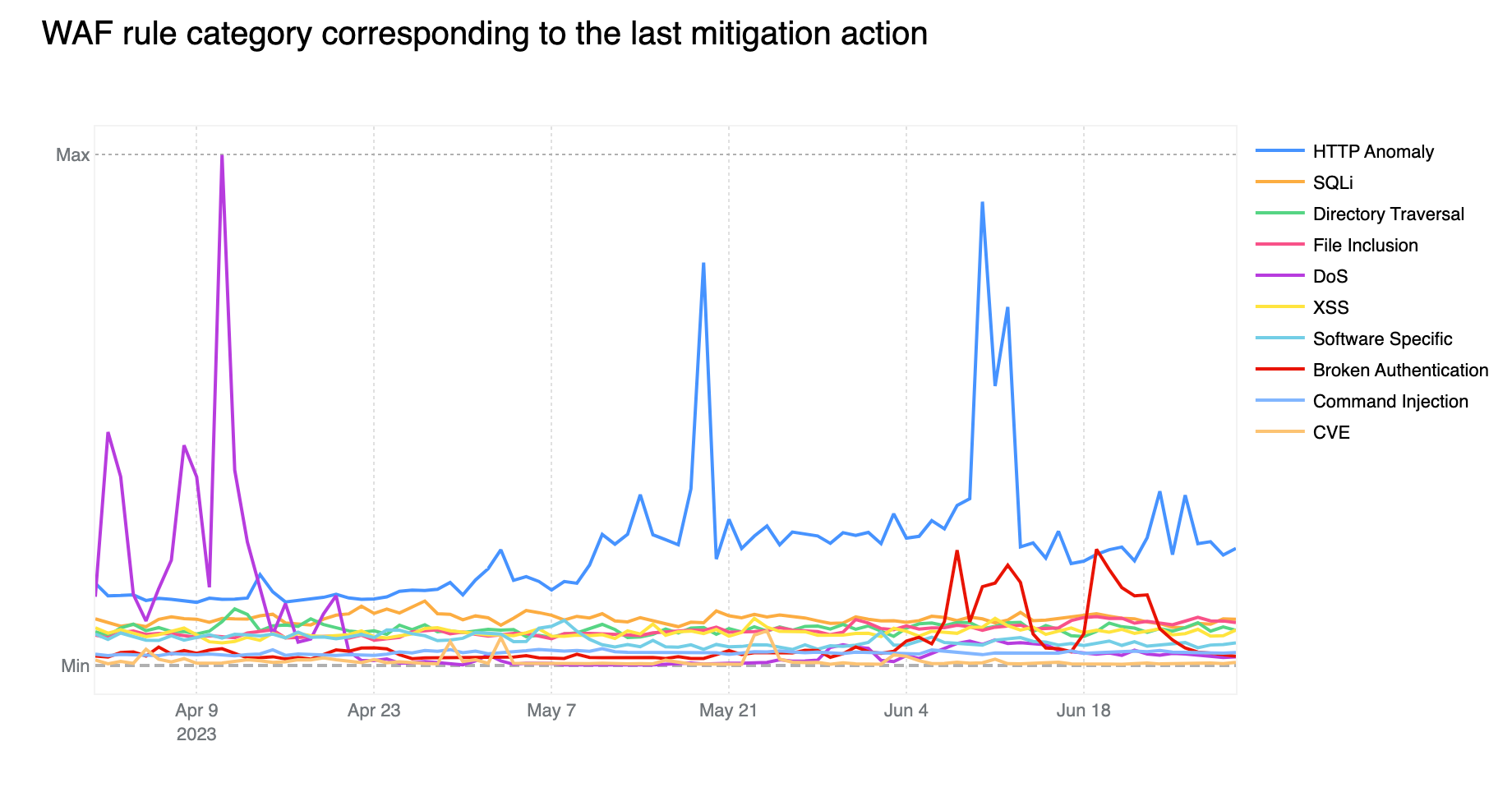
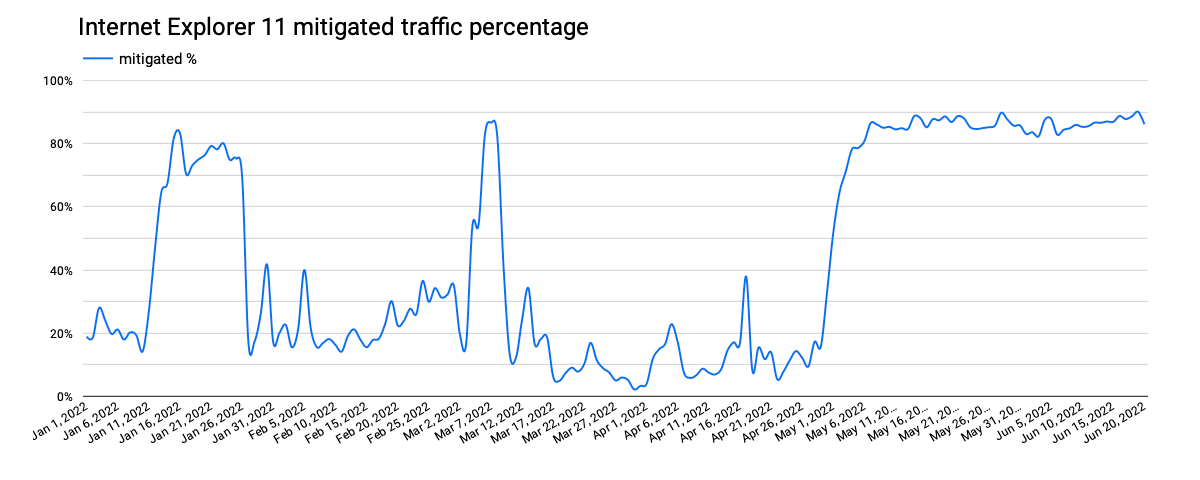
Further, analyzing this traffic to see what percentage of requests were mitigated by Cloudflare’s Web Application Firewall, we find that the times when the mitigation percentage increased, as shown in the graph below, align very closely with the periods where we observed the higher levels of automated (bot) traffic. This suggests that the spikes in Internet Explorer 11 traffic coming from Brazil that were seen over the last six months were from a botnet presenting itself as that version of the browser.

Internet Explorer, we hardly knew ye

Bot or not

Building on the Brazil analysis, breaking out the traffic for each version by associated bot score can help us better understand the residual traffic from long-deprecated versions of Internet Explorer shown above. For requests with a bot score that characterizes the traffic as “likely human”, the graph below shows clear weekly traffic patterns for versions 11 and 7, suggesting that the traffic is primarily driven by systems primarily in use on weekdays, likely by business users. For Internet Explorer 7, that traffic pattern becomes more evident starting in mid-February, after a significant decline in associated request volume.

Internet Explorer, we hardly knew ye

Interestingly, that decline in “likely human” Internet Explorer 7 request volume aligns with an increase in “likely automated” (bot) request volume for that version, visible in the graph below. Given that the “likely human” traffic didn’t appear to migrate to another version of Internet Explorer, the shift may be related to improvements to the machine learning model that powers bot detection that were rolled out in the January/February time frame. It is also interesting to note that “likely automated” request volume for both Internet Explorer 11 and 7 has been extremely similar since mid-March. It is not immediately clear why this is the case.

Internet Explorer, we hardly knew ye

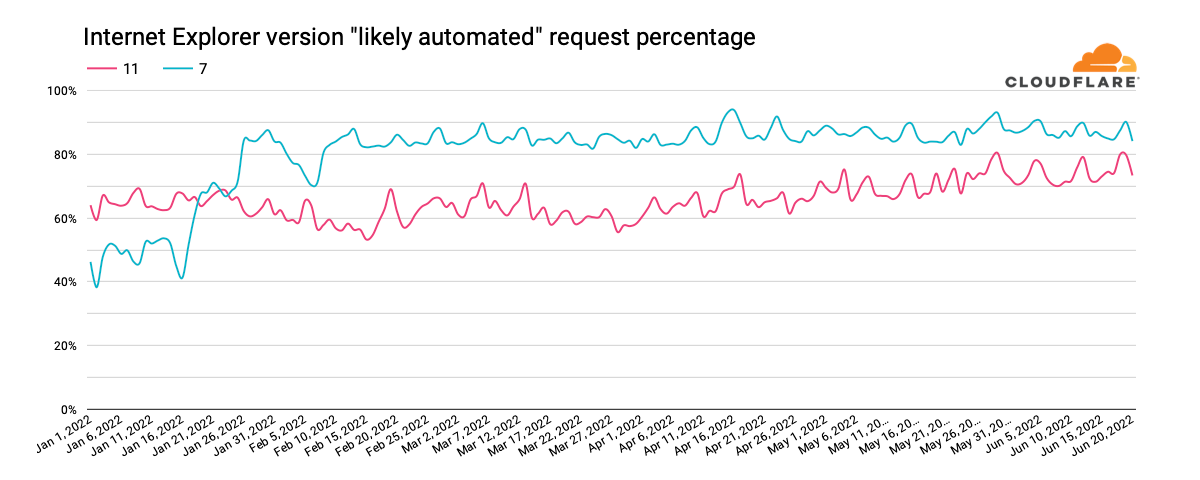
We can also use this data to understand what percentage of the traffic from a given version of Internet Explorer is likely to be automated (coming from bots). The graph below highlights the ratios for Internet Explorer 11 and 7. For version 11, we can see that the percentage has grown from around 60% at the start of 2022 to around 80% in June. For version 7, it starts the year in the 40% range, and more than doubles to over 80% in February and remains consistent at that level.

Internet Explorer, we hardly knew ye

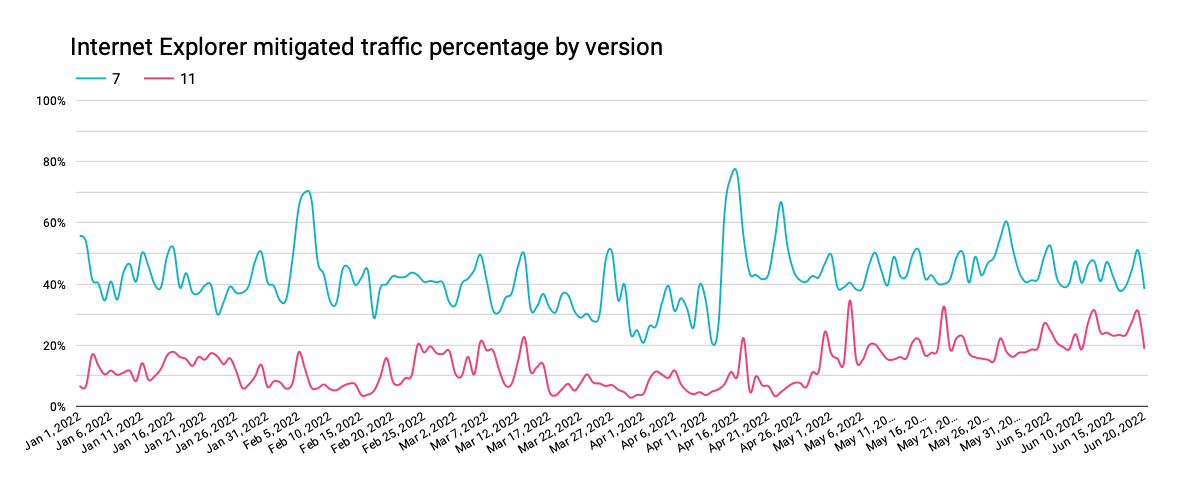
However, when we look at firewall mitigated traffic percentages, we don’t see the same clear alignment of trends as was visible for Brazil, as discussed above. In addition, only a fraction of the “likely automated” traffic was mitigated, suggesting that the automated traffic is split between being generated by bots and other non-malicious tools, such as performance testing.

Internet Explorer, we hardly knew ye

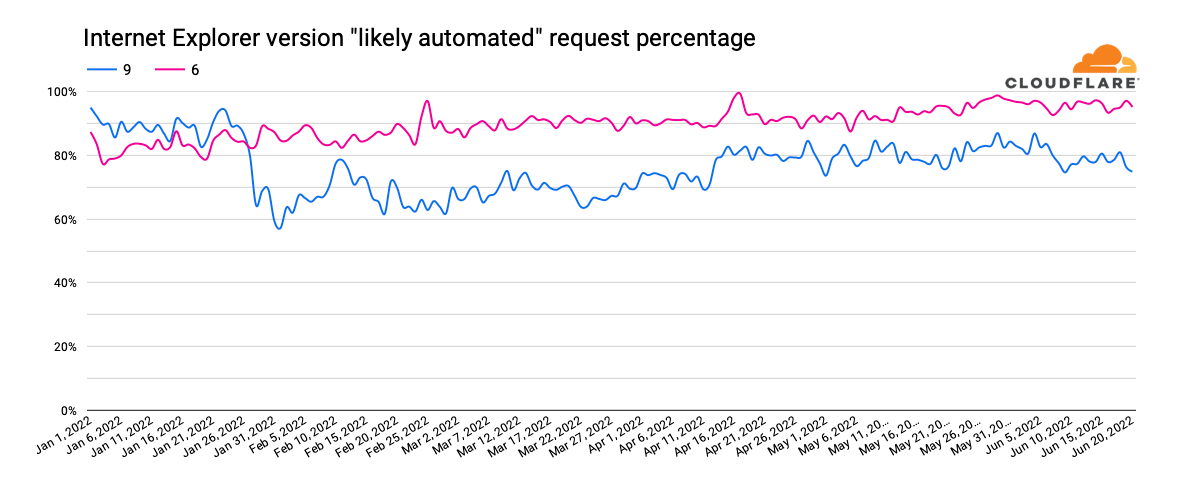
Internet Explorer versions 6 & 9 were also discussed above, with respect to driving the largest volume of requests. However, when we examine the “likely automated” request ratios for these two browsers, we find that most of their traffic appears to be bot-driven. Internet Explorer 6 started 2022 at around 80%, growing to 95% in June. In contrast, Internet Explorer 9 starts the year around 90%, drops to 60% at the end of January, and then gradually increases back to the 75-80% range.

Internet Explorer, we hardly knew ye

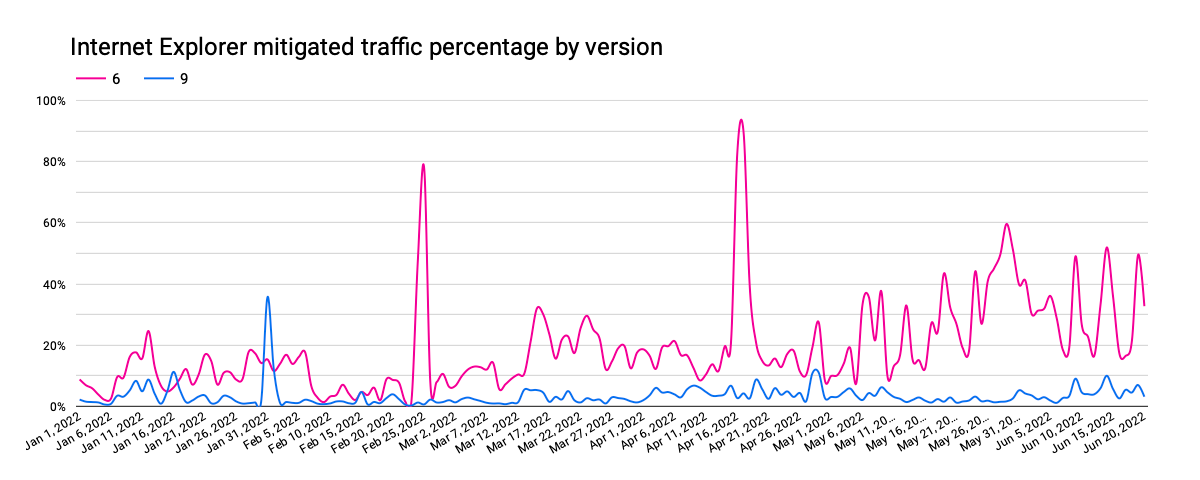
As Internet Explorer 6’s “likely automated” traffic has increased, the fraction of it that was mitigated has increased as well. The small bumps visible in the graph above align with the larger spikes in the graph below, potentially due to brief bursts of bot activity. In contrast, mitigated Internet Explorer 9 traffic has remained relatively consistent, even as its automated request percentage dropped and then gradually increased.

Internet Explorer, we hardly knew ye

For the oldest, long-deprecated versions of Internet Explorer, automated traffic frequently comprises more than 80% of request volume, reaching 100% on multiple days year-to-date. Mitigated traffic generally amounted to under 30% of request volume, although Internet Explorer 2 frequently increased to the 50% range, spiking as high as 90%.

Edging into the future

As Microsoft stated, “the future of Internet Explorer on Windows 10 is in Microsoft Edge.” Given that, we wanted to understand the usage patterns of Microsoft Edge. Similar to the analysis above, we looked at request volumes for the last ten versions of the browser year-to-date. The graph below clearly illustrates strong enterprise usage of edge, with weekday peaks, and lower traffic on the weekends. In addition, the four-week major release cycle cadence is clearly evident, with a long tail of usage extending across eight weeks due to enterprise customers who need an extended timeline to manage updates.

Internet Explorer, we hardly knew ye

Having said that, in analyzing the split by bot score for these Edge versions, we note that only around 80% of requests are classified as “likely human” for about eight weeks after a given version is released, after which it gradually tapers to around 60%. The balance is classified as “likely automated”, suggesting that those who develop bots and other automated processes recognize the value in presenting their user agents as the latest version of Microsoft’s web browser. For Edge, there does not appear to be any meaningful correlation between firewall mitigated traffic percentages and “likely automated” traffic percentages or the traffic cycles visible in the graph above.

Conclusion

Analyzing traffic trends from deprecated versions of Internet Explorer brought to mind the “I’m not dead yet” scene from Monty Python and the Holy Grail with these older versions of the browser claiming to still be alive, at least from a traffic perspective. However, categorizing this traffic to better understand the associated bot/human split showed that the majority of Internet Explorer traffic seen by Cloudflare, including for Internet Explorer 11, is apparently not coming from actual browser clients installed on user systems, but rather from bots and other automated processes. For the automated traffic, analysis of firewall mitigation activity shows that the percentage likely coming from malicious bots varies by version.

As Microsoft executes its planned two-phase approach for actively moving users off of Internet Explorer, it will be interesting to see how both request volumes and bot/human splits for the browser change over time – check back later this year for an updated analysis.

The end of the road for Cloudflare CAPTCHAs

Post Syndicated from Reid Tatoris original https://blog.cloudflare.com/end-cloudflare-captcha/

The end of the road for Cloudflare CAPTCHAs

The end of the road for Cloudflare CAPTCHAs

There is no point in rehashing the fact that CAPTCHA provides a terrible user experience. It’s been discussed in detail before on this blog, and countless times elsewhere. One of the creators of the CAPTCHA has publicly lamented that he “unwittingly created a system that was frittering away, in ten-second increments, millions of hours of a most precious resource: human brain cycles.” We don’t like them, and you don’t like them.

So we decided we’re going to stop using CAPTCHAs. Using an iterative platform approach, we have already reduced the number of CAPTCHAs we choose to serve by 91% over the past year.

Before we talk about how we did it, and how you can help, let’s first start with a simple question.

Why in the world is CAPTCHA still used anyway?

If everyone agrees CAPTCHA is so bad, if there have been calls to get rid of it for 15 years, if the creator regrets creating it, why is it still widely used?

The frustrating truth is that CAPTCHA remains an effective tool for differentiating real human users from bots despite the existence of CAPTCHA-solving services. Of course, this comes with a huge trade off in terms of usability, but generally the alternatives to CAPTCHA are blocking or allowing traffic, which will inherently increase either false positives or false negatives. With a choice between increased errors and a poor user experience (CAPTCHA), many sites choose CAPTCHA.

CAPTCHAs are also a safe choice because so many other sites use them. They delegate abuse response to a third party, and remove the risk from the website with a simple integration. Using the most common solution will rarely get you into trouble. Plug, play, forget.

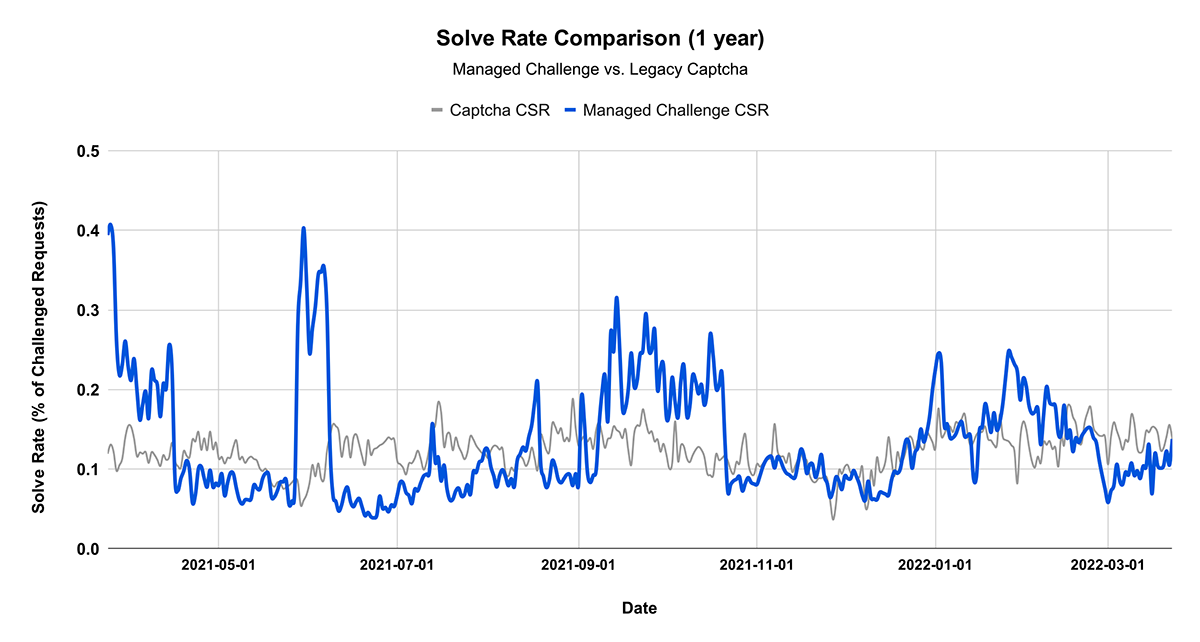
Lastly, CAPTCHA is useful because it has a long history of a known and stable baseline. We’ve tracked a metric called CAPTCHA (or Challenge) Solve Rate for many years. CAPTCHA solve rate is the number of CAPTCHAs solved, divided by the number of page loads. For our purposes both failing or not attempting to solve the CAPTCHA count as a failure, since in either case a user cannot access the content they want to. We find this metric to typically be stable for any particular website. That is, if the solve rate is 1%, it tends to remain at 1% over time. We also find that any change in solve rate – up or down – is a strong indicator of an attack in progress. Customers can monitor the solve rate and create alerts to notify them when it changes, then investigate what might be happening.

Many alternatives to CAPTCHA have been tried, including our own Cryptographic Attestation. However, to date, none have seen the amount of widespread adoption of CAPTCHAs. We believe attempting to replace CAPTCHA with a single alternative is the main reason why. When you replace CAPTCHA, you lose the stable history of the solve rate, and making decisions becomes more difficult. If you switch from deciphering text to picking images, you will get vastly different results. How do you know if those results are good or bad? So, we took a different approach.

Many solutions, not one

Rather than try to unilaterally deprecate and replace CAPTCHA with a single alternative, we built a platform to test many alternatives and see which had the best potential to replace CAPTCHA. We call this Cloudflare Managed Challenge.

The end of the road for Cloudflare CAPTCHAs

Managed Challenge is a smarter solution than CAPTCHA. It defers the decision about whether to serve a visual puzzle to a later point in the flow after more information is available from the browser. Previously, a Cloudflare customer could only choose between either a CAPTCHA or JavaScript Challenge as the action of a security or firewall rule. Now, the Managed Challenge option will decide to show a visual puzzle or other means of proving humanness to visitors based on the client behavior exhibited during a challenge and based on the telemetry we receive from the visitor. A customer simply tells us, “I want you (Cloudflare) to take appropriate actions to challenge this type of traffic as you see necessary.

With Managed Challenge, we adapt the actual challenge outcome to the individual visitor/browser. As a result, we can fine-tune the difficulty of the challenge itself and avoid showing visual puzzles to more than 90% of human requests, while at the same time presenting harder challenges to visitors that exhibit non-human behaviors.

When a visitor encounters a Managed Challenge, we first run a series of small non-interactive JavaScript challenges gathering more signals about the visitor/browser environment. This means we deploy in-browser detections and challenges at the time the request is made. Challenges are selected based on what characteristics the visitor emits and based on the initial information we have about the visitor. Those challenges include, but are not limited to, proof-of-work, proof-of-space, probing for web APIs, and various challenges for detecting browser-quirks and human behavior.

They also include machine learning models that detect common features of end visitors who were able to pass a CAPTCHA before. The computational hardness of those initial challenges may vary by visitor, but is targeted to run fast. Managed Challenge is also integrated into the Cloudflare Bot Management and Super Bot Fight Mode systems by consuming signals and data from the bot detections.

After our non-interactive challenges have been run, we evaluate the gathered signals. If by the combination of those signals we are confident that the visitor is likely human, no further action is taken, and the visitor is redirected to the destined page without any interaction required. However, in some cases, if the signal is weak, we present a visual puzzle to the visitor to prove their humanness. In the context of Managed Challenge, we’re also experimenting with other privacy-preserving means of attesting humanness, to continue reducing the portion of time that Managed Challenge uses a visual puzzle step.

We started testing Managed Challenge last year, and initially, we chose from a rotating subset of challenges, one of them being CAPTCHA. At the start, CAPTCHA was still used in the vast majority of cases. We compared the solve rate for the new challenge in question, with the existing, stable solve rate for CAPTCHA. We thus used CAPTCHA solve rate as a goal to work towards as we improved our CAPTCHA alternatives, getting better and better over time. The challenge platform allows our engineers to easily create, deploy, and test new types of challenges without impacting customers. When a challenge turns out to not be useful, we simply deprecate it. When it proves to be useful, we increase how often it is used. In order to preserve ground-truth, we also randomly choose a small subset of visitors to always solve a visual puzzle to validate our signals.

Managed Challenge performs better than CAPTCHA

The Challenge Platform now has the same stable solve rate as previously used CAPTCHAs.

The end of the road for Cloudflare CAPTCHAs

Using an iterative platform approach, we have reduced the number of CAPTCHAs we serve by 91%. This is only the start. By the end of the year, we will reduce our use of CAPTCHA as a challenge to less than 1%. By skipping the visual puzzle step for almost all visitors, we are able to reduce the visitor time spent in a challenge from an average of 32 seconds to an average of just one second to run our non-interactive challenges. We also see churn improvements: our telemetry indicates that visitors with human properties are 31% less likely to abandon a Managed Challenge than on the traditional CAPTCHA action.

Today, the Managed Challenge platform rotates between many challenges. A Managed Challenge instance consists of many sub-challenges: some of them are established and effective, whereas others are new challenges we are experimenting with. All of them are much, much faster and easier for humans to complete than CAPTCHA, and almost always require no interaction from the visitor.

Managed Challenge replaces CAPTCHA for Cloudflare

We have now deployed Managed Challenge across the entire Cloudflare network. Any time we show a CAPTCHA to a visitor, it’s via the Managed Challenge platform, and only as a benchmark to confirm our other challenges are performing as well.

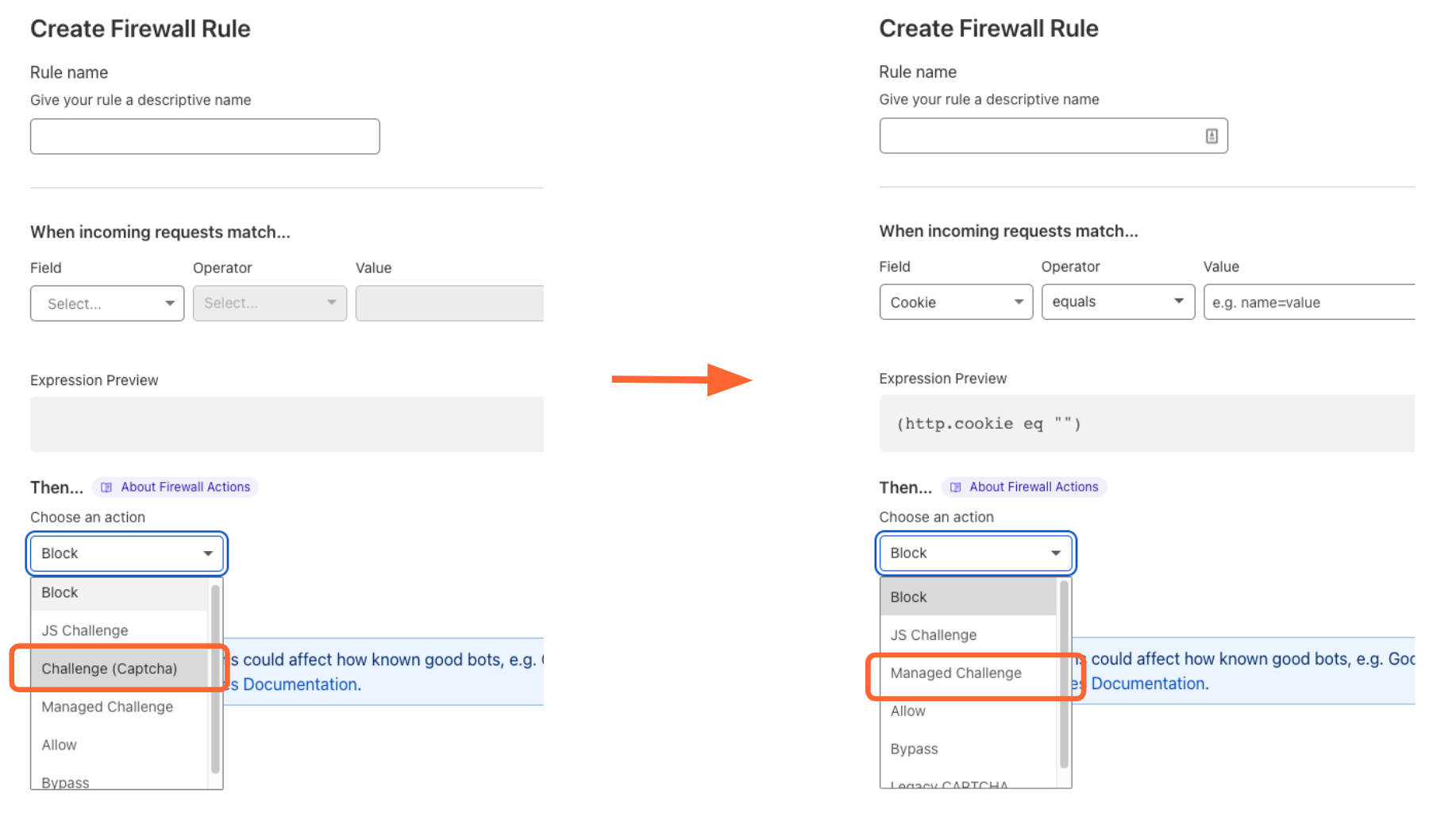
All Cloudflare customers can now choose Managed Challenge as a response option to any Firewall rule instead of CAPTCHA. We’ve also updated our dashboard to encourage all Cloudflare customers to make this choice.

The end of the road for Cloudflare CAPTCHAs

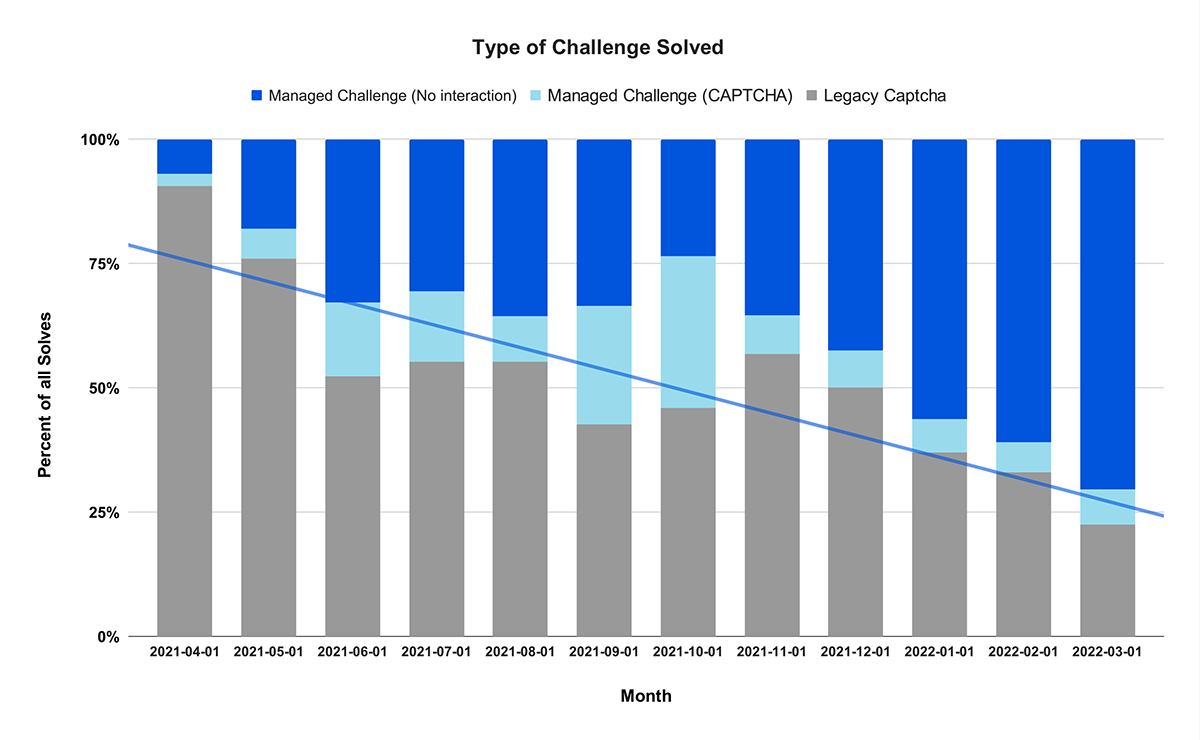
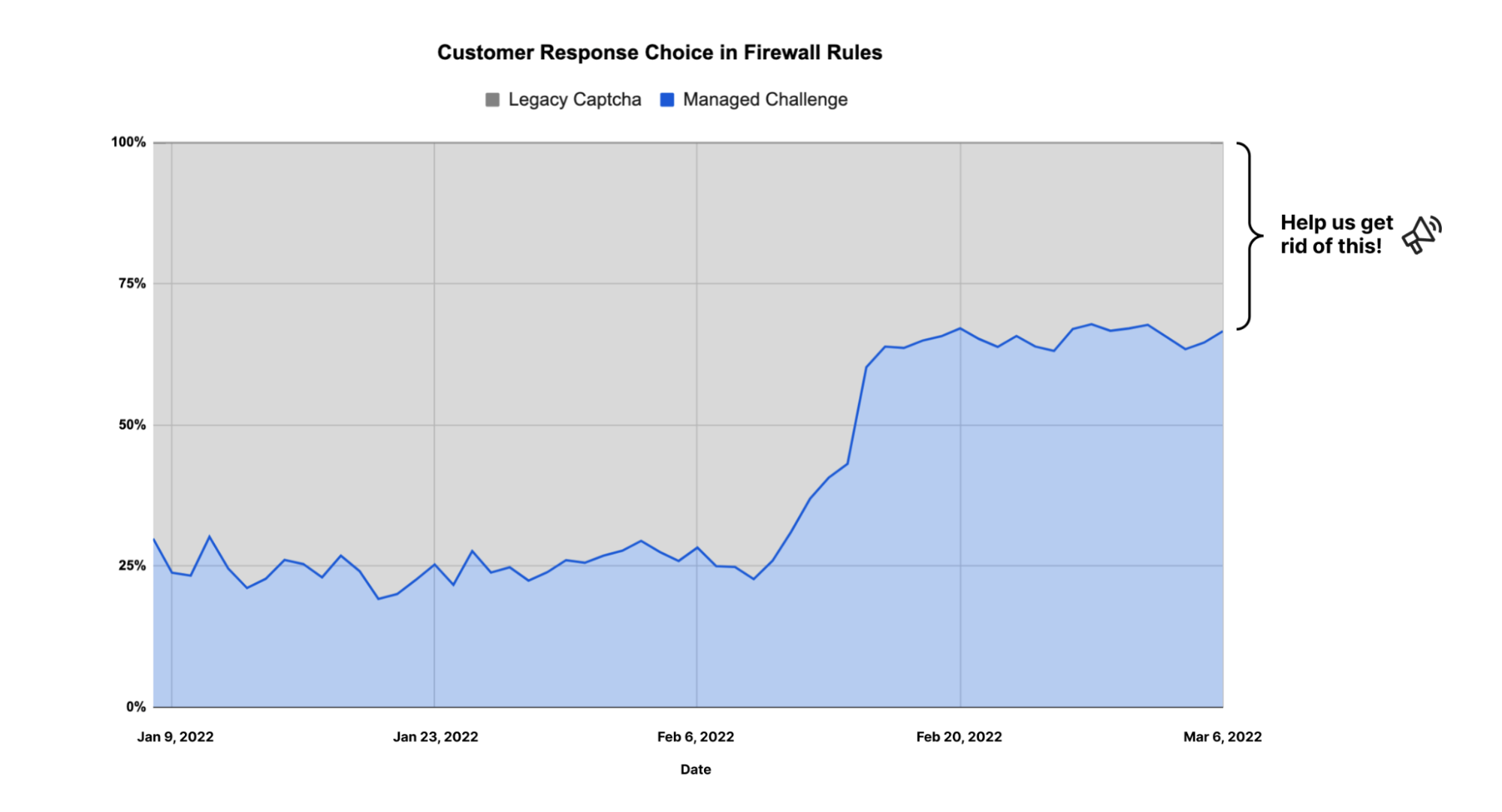
You’ll notice that we changed the name of the CAPTCHA option to ‘Legacy CAPTCHA’. This more accurately describes what CAPTCHA is: an outdated tool that we don’t think people should use. As a result, the usage of CAPTCHA across the Cloudflare network has dropped significantly, and usage of managed challenge has increased dramatically.

The end of the road for Cloudflare CAPTCHAs

As noted above, today CAPTCHA represents 9% of Managed Challenge solves (light blue), but that number will decrease to less than 1% by the end of the year. You’ll also see the gray bar above, which shows when our customers have chosen to show a CAPTCHA as a response to a Firewall rule triggering. We want that number to go to zero, but the good news is that 63% of customers now choose Managed Challenge rather than CAPTCHA when they create a Firewall rule with a challenge response action.

The end of the road for Cloudflare CAPTCHAs

We expect this number to increase further over time.

If you’re using the Cloudflare WAF, log into the Dashboard today and look at all of your Firewall rules. If any of your rules are using “Legacy CAPTCHA” as a response, please change it now! Select the “Managed Challenge” response option instead. You’ll give your users a better experience, while maintaining the same level of protection you have today. If you’re not currently a Cloudflare customer, stay tuned for ways you can reduce your own use of CAPTCHA.

Cloudflare Observability

Post Syndicated from Tanushree Sharma original https://blog.cloudflare.com/vision-for-observability/

Cloudflare Observability

Cloudflare Observability

Whether you’re a software engineer deploying a new feature, network engineer updating routes, or a security engineer configuring a new firewall rule: You need visibility to know if your system is behaving as intended — and if it’s not, to know how to fix it.

Cloudflare is committed to helping our customers get visibility into the services they have protected behind Cloudflare. Being a single pane of glass for all network activity has always been one of Cloudflare’s goals. Today, we’re outlining the future vision for Cloudflare observability.

What is observability?

Observability means gaining visibility into the internal state of a system. It’s used to give users the tools to figure out what’s happening, where it’s happening, and why.

At Cloudflare, we believe that observability has three core components: monitoring, analytics, and forensics. Monitoring measures the health of a system – it tells you when something is going wrong. Analytics give you the tools to visualize data to identify patterns and insights. Forensics helps you answer very specific questions about an event.

Observability becomes particularly important in the context of security to validate that any mitigating actions performed by our security products, such as Firewall or Bot Management, are not false positives. Was that request correctly classified as malicious? And if it wasn’t, which detection system classified it as such?

Cloudflare, additionally, has products to improve performance of applications and corporate networks and allow developers to write lightning fast code that runs on our global network. We want to be able to provide our customers with insights into every request, packet, and fetch that goes through Cloudflare’s network.

Monitoring and Notifying

Analytics are fantastic for summarizing data, but how do you know when to look at them? No one wants to sit on the dashboard clicking refresh over and over again just in case something looks off. That’s where notifications come in.

When we talk about something “looking off” on an analytics page, what we really mean is that there’s a significant change in your traffic or network which is reflected by spikes or drops in our analytics. Availability and performance directly affect end users, and our goal is to monitor and notify our customers as soon as we see things going wrong.

Cloudflare Observability

Today, we have many different types of notifications from Origin Error Rates, Security Events, and Advanced Security Events to Usage Based Billing and Health Checks. We’re continuously adding more notification types to have them correspond with our awesome analytics. As our analytics get more customizable, our notifications will as well.

There’s tons of different algorithms that can be used to detect spikes, including using burn rates and z-scores. We’re continuing to iterate on the algorithms that we use for detections to offer more variations, make them smarter, and make sure that our notifications are both accurate and not too noisy.

Analytics

So, you’ve received an alert from Cloudflare. What comes next?

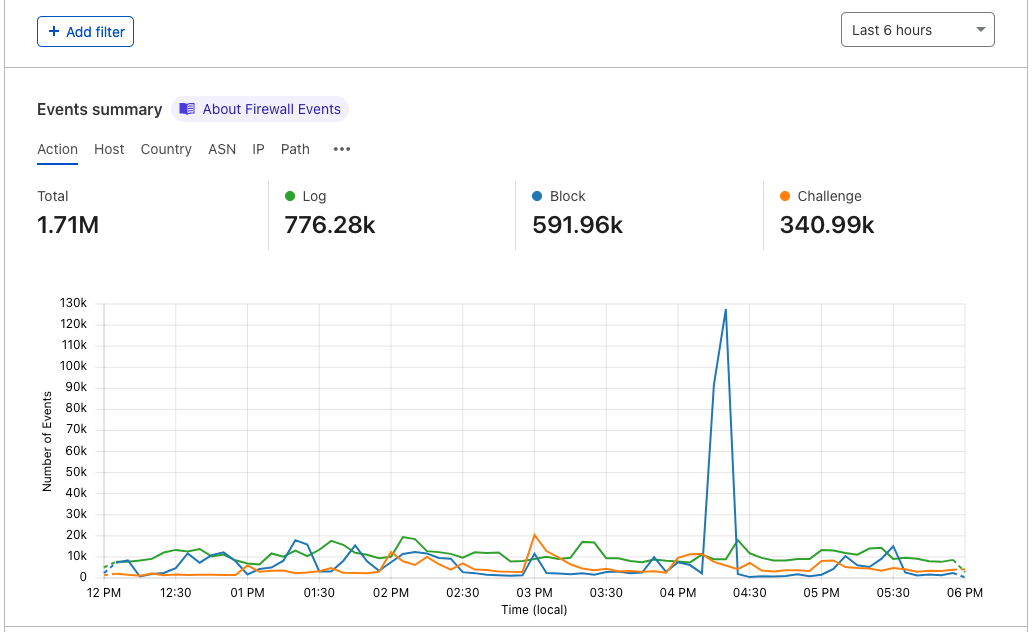
Analytics can be used to get a birds eye view of traffic or focus on specific types of events by adding filters and time ranges. After you receive an alert, we want to show you exactly what’s been triggered through graphs, high level metrics, and top Ns on the Cloudflare dashboard.

Whether you’re a developer, security analyst, or network engineer, the Cloudflare dashboard should be the spot for you to see everything you need. We want to make the dashboard more customizable to serve the diverse use cases of our customers. Analyze data by specifying a timeframe and filter through dropdowns on the dashboard, or build your own metrics and graphs that work alongside the raw logs to give you a clear picture of what’s happening.

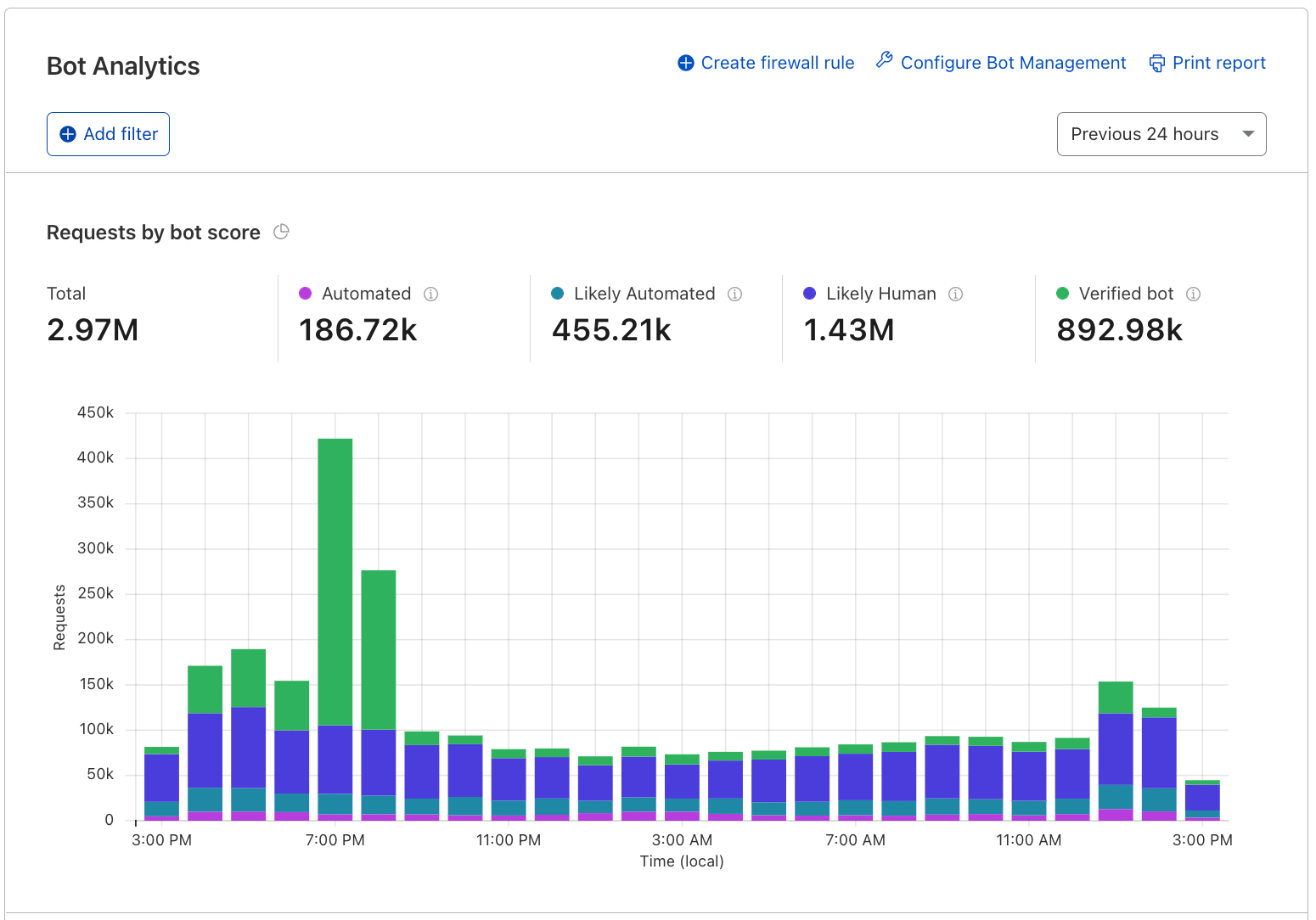
Focusing on security, we believe analytics are the best tool to build confidence before deploying security policies. Moving forward, we plan to layer all of our security related detection signals on top of HTTP analytics so you can use the dashboard to answer questions such as: if I were to block all requests that the WAF identifies as an XSS attack, what would I block?

Customers using our enterprise Bot Management may already be familiar with this experience, and as we improve it and build upon it further, all of our other security products will follow.

Cloudflare Observability

Analytics are a powerful tool to see high level patterns and identify anomalies that indicate that something unusual is happening. We’re working on new dashboards, customizations, and features that widen the use cases for our customers. Stay tuned!

Logs

Logs are used when you want to examine specific details about an event. They consist of a timestamp and fields that describe the event and are used to get visibility on a granular level when you need a play-by-play.

In each of our datasets, an event measures something different. For example, in HTTP request logs, an event is when an end user requests content from or sends content to a server. For Firewall logs, an event occurs when the Firewall takes an action on an HTTP request. There can be multiple Firewall events for each HTTP request.

Today, our customers access logs using Logpull, Logpush, or Instant Logs. Logpull and Logpush are great for customers that want to send their logs to third parties (like our Analytics Partners) to store, analyze, and correlate with other data sources. With Instant Logs, our customers can monitor and troubleshoot their traffic in real-time straight from the dashboard or CLI. We’re planning on building out more capabilities to dig into logs on Cloudflare. We’re hard at work on building log storage on R2 – but what’s next?

We’ve heard from customers that the activity log on the Firewall analytics dashboard is incredibly useful. We want to continue to bring the power of logs to the dashboard by adding the same functionality across our products. For customers that will store their logs on Cloudflare R2, this means that we can minimize the use of sampled data.
If you’re looking for something very specific, querying logs is also important, which is where forensics comes in. The goal is to let you investigate from high level analytics all the way down to individual logs lines that make them up. Given a unique identifier, such as the ray ID, you should be able to look up a single request, and then correlate it with all other related activity. Find out the client IP of that ray ID and from there, use cases are plentiful: what other requests from this IP are malicious? What paths did the client follow?

Tracing

Logs are really useful, but they don’t capture the context around a request. Traces show the end-to-end life cycle of a request from when a user requests a resource to each of the systems that are involved in its delivery. They’re another way of applying forensics to help you find something very specific.

These are used to differentiate each part of the application to identify where errors or bottlenecks are occurring. Let’s say that you have a Worker that performs a fetch event to your origin and a third party API. Analytics can show you average execution times and error rates for your Worker, but it doesn’t give you visibility into each of these operations.
Using wrangler dev and console.log statements are really helpful ways to test and debug your code. They bring some of the visibility that’s needed, but it can be tedious to instrument your code like this.
As a developer, you should have the tools to understand what’s going on in your applications so you can deliver the best experience to your end users. We can help you answer questions like: Where is my Worker execution failing? Which operation is causing a spike in latency in my application?

Putting it all together

Notifications, analytics, logs, and tracing each have their distinct use cases, but together, these are powerful tools to provide analysts and developers visibility. Looking forward, we’re excited to bring more and more of these capabilities on the Cloudflare dashboard.

We would love to hear from you as we build these features out. If you’re interested in sharing use cases and helping shape our roadmap, contact your account team!

Announcing Friendly Bots

Post Syndicated from Ben Solomon original https://blog.cloudflare.com/friendly-bots/

Announcing Friendly Bots

Announcing Friendly Bots

When someone mentions bots on the Internet, what’s your first reaction?

It’s probably negative. Most of us conjure up memories of CAPTCHAs, stolen passwords, or some other pain caused by bad bots.
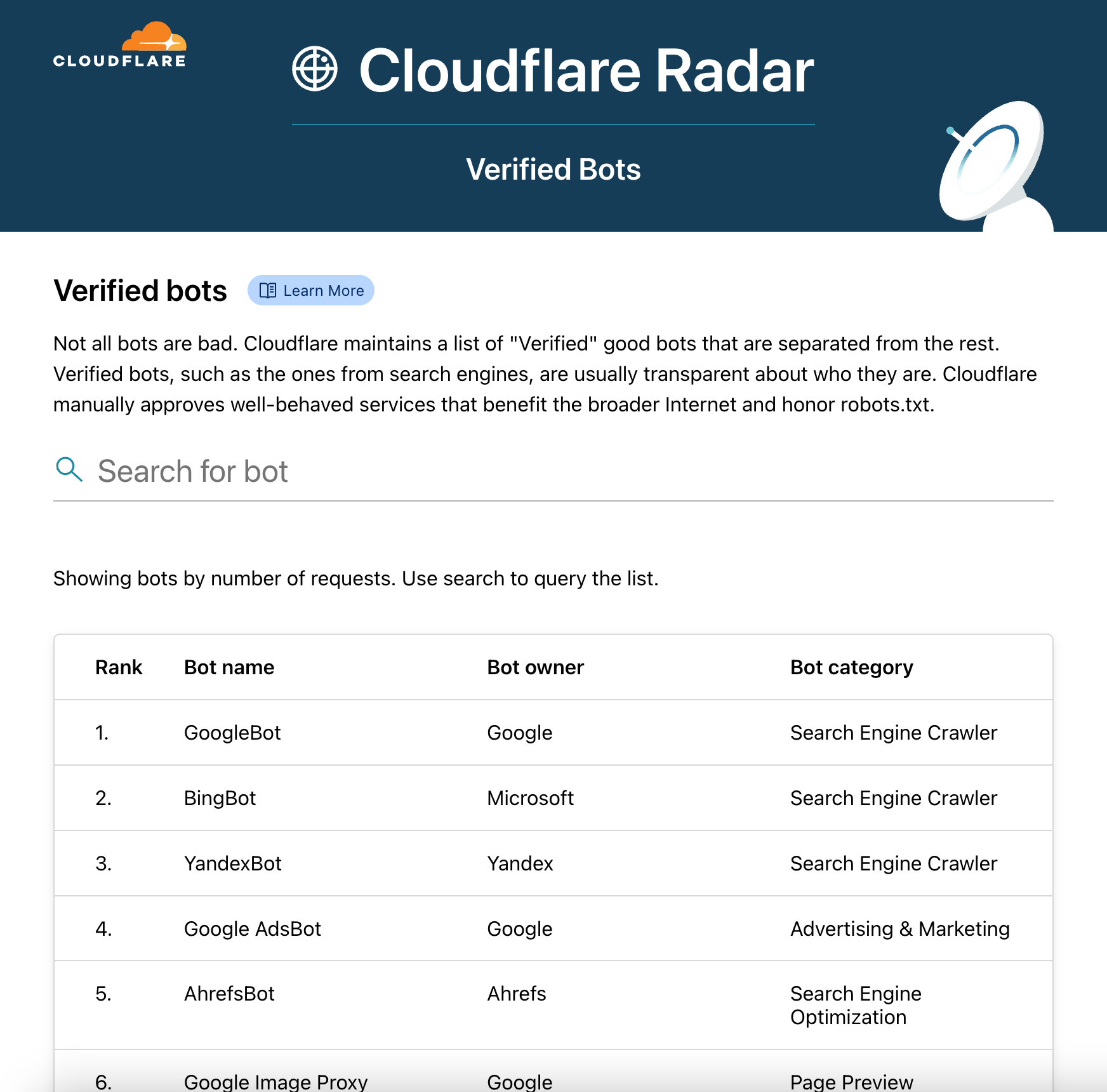
But the truth is, there are plenty of well-behaved bots on the Internet. These include Google’s search crawler and Stripe’s payment bot. At Cloudflare, we manually “verify” good bots, so they don’t get blocked. Our customers can choose to allowlist any bot that is verified. Unfortunately, new bots are popping up faster than we can verify them. So today we’re announcing a solution: Friendly Bots.
Let’s begin with some background.
How does a bot get verified?

We often find good bots via our public form. Anyone can submit a bot, but we prefer that bot operators complete the form to provide us with the information we need. We ask for some standard bits of information: your bot’s name, its public documentation, and its user agent (or regex). Then, we ask for information that will help us validate your bot. There are four common methods:

IP list
Send us a list of IP addresses used by your bot. This doesn’t have to be a static list — you can give us a dynamic page that changes — just provide us with the URL, and we’ll fetch updates every day. These IPs must be publicly documented and exclusive to your bot. If you provide a shared IP address (like one used by a proxy service), our systems will detect risk and refuse to cooperate. We want to avoid accidentally allowing other traffic.

rDNS
This one is fun. You’ve heard of DNS: the phone book of the Internet, which helps map domain names to IP addresses. rDNS works in the reverse, allowing us to take an IP address and deduce the domain name associated with it.

In other words: give us a hostname suffix, and in many cases we’ll be able to validate your bot’s identity!

User agent + ASN validation
In some cases, we can verify bots that consistently come from the same network (known as an “ASN”) with the same user agent. Note that we can’t always do this — traffic becomes easier to spoof — but we’re often confident enough to use this as a validation method.

Machine learning
This is the most flashy method. Cloudflare sees 32+ million requests every second, and we’ve been able to feed those requests into a model that can accurately profile good bots. If the previous validation methods don’t work for you, there’s a good chance we can use ML to spot your bot. But we need enough traffic (thousands of requests) to detect a usable pattern.

Announcing Friendly Bots

We usually approve Verified Bot requests within a few weeks, after taking some time to quality test and ensure everything is safe. But as mentioned before, we often have to reserve this process for trusted partners and larger bots, even though plenty of our users still need their bots allowlisted.

What if my bot isn’t a huge global service?

We keep our ears open (and our eyes on Twitter), so we know that folks want their own “personal” version of Verified Bots.

For example: let’s say you built your own monitoring service that crawls a few of your personal websites. It doesn’t make sense for us to verify this bot, because it doesn’t meet any of our criteria:

  1. Serve the broader Internet.
  2. Objectively demonstrate good behavior.
  3. Comply with Internet standards like robots.txt.

It’s your bot (and to you, it might be good!), but our other users might feel differently. Imagine if someone else’s bot could waltz into your infrastructure at any time!

Here’s another case. Perhaps Cloudflare has labeled a particular proxy as automated, possibly because a mix of humans and bots use the proxy to access the Internet. You may want to allow this traffic on your site without affecting other Cloudflare customers.

Lastly, if you work at a startup, your company may run automated services that haven’t reached the scale we require. But you still need a way to allowlist these services.

Announcing Friendly Bots

The bots described above, especially common services, are not bad. They deserve to sit in a state between bad and verified. They’re friendly.

And we’ve come up with a really cool way to help you manage them.

Our new feature, Friendly Bots, allows you to instantly auto-validate any traffic with the help of IP lists, rDNS, and more.

Announcing Friendly Bots

Here’s how it works: in the Cloudflare dashboard, tell us about your bot. You can point us toward a public IP list, give us a hostname suffix, or even select other methods like machine learning. Cloudflare’s anycast network allows us to run all of these mechanisms at each one of our data centers. This means you’ll have performant, secure, and scalable bot verification.

Build a collection of Friendly Bots and share them between your sites, creating custom policies that allow, rate limit, or log this type of traffic. You may just want to keep tabs on a particular bot; that’s fine. The response options are flexible and directly integrate with our Workers platform.

Announcing Friendly Bots

In the past, we’ve struggled to verify bots that did not crawl the web at a large scale. Why? Our system relies on a cache of verified traffic, ensuring that certain IPs or other data have widely shown good behavior on the Internet. This means that bots were sometimes difficult to verify if they did not make thousands of requests to Cloudflare. With Friendly Bots, we’ve eliminated that requirement, introducing a new, dynamic cache that optimizes for fun-sized projects.

The downstream benefits

Friendly Bots will streamline your dashboard experience. But there are a few hidden, downstream benefits we want to highlight:

Easier verification
Admittedly, it’s challenging to keep up with all the good bots on the Internet. In order to verify a bot, we’ve relied on manual submissions that may come weeks, or even months after a good bot is created. Friendly Bots will change all of that. If we notice many of our customers allowlisting a particular bot — say, a certain IP address or hostname suffix, our systems will automatically queue that bot for verification. We can intelligently use your Friendly Bots to help the rest of Cloudflare’s customers.

Instant feedback
In the past, users have been confused by the verification process. Do I need to provide documentation for my IPs? What about my user agent: can it change over time? If any piece of the validation data was broken, it could take us weeks to identify and fix.

That’s no longer the case. With Friendly Bots, we perform validation almost instantly. So if something isn’t right — perhaps your rDNS validation uses the wrong hostname — you’ll know immediately because the bot won’t be allowlisted. No more waiting to hear from our support team.

Better sourcing
Previously, we required bot operators (e.g., Google) to submit verification data themselves. If there was a bot you wanted to verify, but did not own, you were out of luck.

Friendly Bots eliminates this dependency on bot operators. Anyone who can find identifying information can register a bot on their site.

No arbitration
If a scraper shows up to your site, is that a good thing? To some, yes, because it’s exposure. To others, no, because that scraper may take data. This is a question we’ve carefully considered with every Verified Bots submission to date.

Now: it’s your choice to make. Friendly Bots puts the control in your hands, allowing you to categorize bots at a domain level. We’ll continue to verify bots at a global level (when behavior is objectively good).

Cloudflare Radar

Here’s a fun bonus: in addition to today’s Friendly Bots announcement, we’re also making some changes to Cloudflare Radar.

Beginning immediately, you can see a list of many Verified Bots in Radar. This is exciting; we’ve never published a detailed list like this before.

Announcing Friendly Bots

All data is updated in real time. As we verify new bots, they will appear here in the Radar module.

We’re also beginning to add specific Verified Bots to our Logs product. You’ll see them as Bot Tags, so a request might include the string “pinterest” if it came from Pinterest’s bot.

What’s next?

Our team is excited to launch Friendly Bots soon. We anticipate the impact will radiate throughout Bot Management, reducing false positives, improving crawl-ability, and generally stabilizing sites.

Announcing Friendly Bots

If you have Bot Management and want to give this new feature a try, please tell your account team (and we’ll be sure to include you in the early access period). You can also continue to tell us about bots that should be verified.

The Grinch Bot is Stealing Christmas!

Post Syndicated from Ben Solomon original https://blog.cloudflare.com/grinch-bot/

The Grinch Bot is Stealing Christmas!

The Grinch Bot is Stealing Christmas!

This week, a group of US lawmakers introduced the Stopping Grinch Bots Act — new legislation that could stop holiday hoarders on the Internet. This inspired us to put a spin on a Dr. Seuss classic:

Each person on the Internet liked Christmas a lot
But the Grinch Bot, built by the scalper did not!
The Grinch Bot hated Christmas! The whole Christmas season!
Now, please don’t ask why. No one quite knows the reason.

The Grinch Bot is Stealing Christmas!

Cloudflare stops billions of bad bots every day. As you might have guessed, we see all types of attacks, but none is more painful than a Grinch Bot attack. Join us as we take a closer look at this notorious holiday villain…

25 days seconds of Christmas

What is the Grinch Bot? Technically speaking, it’s just a program running on a computer, making automated requests that reach different websites. We’ve come to refer to these requests as “bots” on the Internet. Bots move quickly, leveraging the efficiency of computers to carry out tasks at scale. The Grinch Bot is a very special type that satisfies two conditions:

  1. It only pursues online inventory, attempting to purchase items before humans can complete their orders.
  2. It only operates during the holiday season.

Now, attackers use bots to perform these tasks all year long. But in these winter months, we like to use the term “Grinch Bot” as seasonal terminology.

The Grinch Bot strikes first around Black Friday. It knows that the best discounts come around Thanksgiving, and it loves to get a good deal. Exclusive items are always the first to go, so attackers use the Grinch Bot to cut every (virtual) line and checkpoint. Cloudflare detected nearly 1.5 trillion bot requests on Black Friday. That’s about half of all our traffic; but more on this in a bit.

The Grinch Bot is Stealing Christmas!

The Grinch Bot strikes again on Cyber Monday. As shoppers find gifts for their loved ones, bots are ten steps ahead — selecting “add to cart” automatically. Many bots have payment details ready (perhaps even stolen from your account!).

The Grinch Bot will buy 500 pairs of Lululemon joggers before you even get one. And it’ll do so in seconds.

Nearly 44% of traffic comes from bad bots

The Grinch Bot has friends working throughout the year, putting pressure on security teams and moving undetected. 43.8% of Internet traffic comes from these bots. When the holidays arrive, the Grinch Bot can ask its friends how to attack the largest sites. They have already been testing tactics for months.

The Grinch Bot is Stealing Christmas!

In response, many sites block individual IP addresses, groups of devices, or even entire countries. Other sites use Rate Limiting to reduce traffic volume. At Cloudflare, we’ve advocated not only for Rate Limiting, but also for a more sophisticated approach known as Bot Management, which dynamically identifies threats as they appear. Here’s a look at bot traffic before the holidays (1H 2021):

The Grinch Bot is Stealing Christmas!

When we looked at bot traffic on Black Friday, we found that it had surged to nearly 50%. Cloudflare Radar showed data close to 55% (if you want to include the good bots as well). Businesses tell us this is the most vulnerable time of the year for their sites.

Over 300 billion bots…

Bots are highly effective at scale. While humans can purchase one or two items within a few minutes, bots can purchase far more inventory with little effort.

During the year, Cloudflare observed over 300 billion bots try to “add to cart.” How did we find this? We ran our bot detection engines on every endpoint that contains the word “cart.” Keep in mind, most bots are stopped before they can even view item details. There are trillions of inventory hoarding bots that were caught earlier in their efforts by our Bot Management and security solutions.

Even worse, some bots want to steal your holiday funds. They skip the ecommerce sites and head right for your bank, where they test stolen credentials and try to break into your account. 71% of login traffic comes from bots:

The Grinch Bot is Stealing Christmas!

Bots operate at such an immense scale that they occasionally succeed. When this happens, they can break into accounts, retrieve your credit card information, and begin a holiday shopping spree.

Deck the halls with JS Challenges

We hate CAPTCHAs almost as much as we hate the Grinch Bot, so we built JS challenges as a lightweight, non-interactive alternative:

The Grinch Bot is Stealing Christmas!

Not surprisingly, we issue more JS Challenges when more bots reach our network. These challenges are traditionally a middle ground between taking no action and completely blocking requests. They offer a chance for suspicious looking requests to prove their legitimacy. Cloudflare issued over 35 billion JS Challenges over the shopping weekend.

Even more impressive, however, is the number of threats blocked around this time. On Black Friday, Cloudflare blocked over 150 billion threats:

The Grinch Bot is Stealing Christmas!

While we expected the Grinch Bot to make its move on Friday, we did not expect it to recede as it did on Cyber Monday. Bot traffic decreased as the shopping weekend continued. We like to think the Grinch Bot spent its time furiously trying to avoid blocks and JS Challenges, but eventually gave up.

Saving the Internet (and Christmas)

While large retailers can afford to purchase bot solutions, not every site is so fortunate. We decided to fix that.

Cloudflare’s Bot Fight Mode is a completely free tool that stops bots. You can activate it with one click, drawing on our advanced detection engines to protect your site. It’s easy:

The Grinch Bot is Stealing Christmas!

And Bot Fight Mode doesn’t just stop bots — it makes them pay. We unleash a tarpit challenge that preoccupies each bot with nonsense puzzles, ultimately handing bot operators a special gift: a massive server bill. We even plant trees to offset the carbon emissions of these expensive challenges. In fact, with so many bots stopped in the snow, there’s really just one thing left to say…

Every person on the Internet, the tall and the small, ⁣
Called out with joy that their shopping didn’t stall!
He hadn’t stopped Christmas from coming! It came!
Somehow or other, it came just the same!
And the Grinch Bot, with his grinch feet ice-cold in the snow, ⁣
Stood puzzling and puzzling. “How could it be so?”

Multi-User IP Address Detection

Post Syndicated from Alex Chen original https://blog.cloudflare.com/multi-user-ip-address-detection/

Multi-User IP Address Detection

Multi-User IP Address Detection

Cloudflare provides our customers with security tools that help them protect their Internet applications against malicious or undesired traffic. Malicious traffic can include scraping content from a website, spamming form submissions, and a variety of other cyberattacks. To protect themselves from these types of threats while minimizing the blocking of legitimate site visitors, Cloudflare’s customers need to be able to identify traffic that might be malicious.

We know some of our customers rely on IP addresses to distinguish between traffic from legitimate users and potentially malicious users. However, in many cases the IP address of a request does not correspond to a particular user or even device. Furthermore, Cloudflare believes that in the long term, the IP address will be an even more unreliable signal for identifying the origin of a request. We envision a day where IP will be completely unassociated with identity. With that vision in mind, multi-user IP address detection represents our first step: pointing out situations where the IP address of a request cannot be assumed to be a single user. This gives our customers the ability to make more judicious decisions when responding to traffic from an IP address, instead of indiscriminately treating that traffic as though it was coming from a single user.

Historically, companies commonly treated IP addresses like mobile phone numbers: each phone number in theory corresponds to a single person. If you get several spam calls within an hour from the same phone number, you might safely assume that phone number represents a single person and ignore future calls or even block that number. Similarly, many Internet security detection engines rely on IP addresses to discern which requests are legitimate and which are malicious.

However, this analogy is flawed and can present a problem for security. In practice, IP addresses are more like postal addresses because they can be shared by more than one person at a time (and because of NAT and CG-NAT the number of people sharing an IP can be very large!). Many existing Internet security tools accept IP addresses as a reliable way to distinguish between site visitors. However, if multiple visitors share the same IP address, security products cannot rely on the IP address as a unique identifying signal. Thousands of requests from thousands of different users need to be treated differently from thousands of requests from the same user. The former is likely normal traffic, while the latter is almost certainly automated, malicious traffic.

Multi-User IP Address Detection

For example, if several people in the same apartment building accessed the same site, it’s possible all of their requests would be routed through a middlebox operated by their Internet service provider that has only one IP address. But this sudden series of requests from the same IP address could closely resemble the behavior of a bot. In this case, IP addresses can’t be used by our customers to distinguish this activity from a real threat, leading them to mistakenly block or challenge their legitimate site visitors.

By adding multi-user IP address detection to Cloudflare products, we’re improving the quality of our detection techniques and reducing false positives for our customers.

Examples of Multi-User IP Addresses

Multi-user IP addresses take on many forms. When your company uses an enterprise VPN, for example, employees may share the same IP address when accessing external websites. Other types of VPNs and proxies also place multiple users behind a single IP address.

Another type of multi-user IP address originated from the core communications protocol of the Internet. IPv4 was developed in the 1980s. The protocol uses a 32-bit address space, allowing for over four billion unique addresses. Today, however, there are many times more devices than IPv4 addresses, meaning that not every device can have a unique IP address. Though IPv6 (IPv4’s successor protocol) solves the problem with 128-bit addresses (supporting 2128 unique addresses), IPv4 still routes the majority of Internet traffic (76% of human-only traffic is IPv4, as shown on Cloudflare Radar).

Multi-User IP Address Detection

To solve this issue, many devices in the same Local Area Network (LAN) can share a single Internet-addressable IP address to communicate with the public Internet, while using private Internet addresses to communicate within the LAN. Since private addresses are to be used only within a LAN, different LANs can number their hosts using the same private IP address space. The Internet gateway of the LAN does the Network Address Translation (NAT), namely takes messages which arrive on that single public IP and forwards them to the private IP of the appropriate device on their local network. In effect it’s similar to how everyone in an office building shares the same street address, and the front desk worker is responsible for sorting out what mail was meant for which person.

While NAT allows multiple devices behind the same Internet gateway to share the same public IP address, the explosive growth of the Internet population necessitated further reuse of the limited IPv4 address space. Internet Service Providers (ISPs) required users in different LANs to share the same IP address for their service to scale. Carrier-Grade Network Address Translation (CG-NAT) emerged as another solution for address space reuse. Network operators can use CG-NAT middleboxes to translate hundreds or thousands of private IPv4 addresses into a single (or pool of) public IPv4 address. However, this sharing is not without side-effects. CG-NAT results in IP addresses that cannot be tied to single devices, users, or broadband subscriptions, creating issues for security products that rely on the IP address as a way to distinguish between requests from different users.

What We Built

We built a tool to help our customers detect when a /24 IP prefix (set of IP addresses that have the same first 24 bits) is likely to contain multi-user IP addresses, so they can more finely tune the security rules that protect their websites. In order to identify multi-user IP prefixes, we leverage both internal data and public data sources. Within this data, we look at a few key parameters.

Multi-User IP Address Detection
Each TCP connection between a source (client) and a destination (server) is identified by 4 identifiers (source IP, source port, destination IP, destination port)

When an Internet user visits a website, the underlying TCP stack opens a number of connections in order to send and receive data from remote servers. Each connection is identified by a 4-tuple (source IP, source port, destination IP, destination port). Repeating requests from the same web client will likely be mapped to the same source port, so the number of distinct source ports can serve as a good indication of the number of distinct client applications. By counting the number of open source ports for a given IP address, you can estimate whether this address is shared by multiple users.

User agents provide device-reported information about themselves such as browser and operating system versions. For multi-user IP detection, you can count the number of distinct user agents in requests from a given IP. To avoid overcounting web clients per device, you can exclude requests that are identified as triggered by bots and we only count requests from user agents that are used by web browsers. There are some tradeoffs to this approach: some users may use multiple web browsers and some other users may have exactly the same user agent. Nevertheless, past research has shown that the number of unique web browser user agents is the best tradeoff to most accurately determine CG-NAT usage.

Mozilla/5.0 (X11; Linux x86_64; rv:92.0) Gecko/20100101 Firefox/92.0

For our inferences, we group IP addresses to their corresponding /24 IP prefix. The figure below shows the distribution of browser User Agents per /24 IP prefix, based on data accumulated over the period of a day. About 35% of the prefixes have more than 100 different browser clients behind them.

Multi-User IP Address Detection

Our service also uses other publicly available data sources to further refine the accuracy of our identification and to classify the type of multi-user IP address. For example, we collect data from PeeringDB, which is a database where network operators self-identify their network type, traffic levels, interconnection points, and peering policy. This data only covers a fraction of the Internet’s autonomous systems (ASes). To overcome this limitation, we use this data and our own data (number of requests per AS, number of websites in each AS) to infer AS type. We also use external data sources such as IRR to identify requests from VPNs and proxy servers.

These details (especially AS type) can provide more information on the type of multi-user IP address. For instance, CG-NAT systems are almost exclusively deployed by broadband providers, so by inferring the AS type (ISP, CDN, Enterprise, etc.), we can more confidently infer the type of each multi-user IP address. A scheduled job periodically executes code to pull data from these sources, process it, and write the list of multi-user IP addresses to a database. That IP info data is then ingested by another system that deploys it to Cloudflare’s edge, enabling our security products to detect potential threats with minimal latency.

To validate our inferences for which IP addresses are multi-user, we created a dataset relying on separate data and measurements which we believe are more reliable indicators. One method we used was running traceroute queries through RIPE Atlas, from each RIPE Atlas probe to the probe’s public IP address. By examining the traceroute hops, we can determine if an IP is behind a CG-NAT or another middlebox. For example, if an IP is not behind a CG-NAT, the traceroute should terminate immediately or just have one hop (likely a home NAT). On the other hand, if a traceroute path includes addresses within the RFC 6598 CGNAT prefix or other hops in the private or shared address space, it is likely the corresponding probe is behind CG-NAT.

To further improve our validation datasets, we’re also reaching out to our ISP partners to confirm the known IP addresses of CG-NATs. As we refine our validation data, we can more accurately tune our multi-user IP address inference parameters and provide a better experience to ISP customers on sites protected by Cloudflare security products.

The multi-user IP detection service currently recognizes approximately 500,000 unique multi-user IP addresses and is being tuned to further improve detection accuracy. Be on the lookout for an upcoming technical blog post, where we will take a deeper look at the system we built and the metrics collected after running this service for a longer period of time.

How Will This Impact Bot Management and Rate Limiting Customers?

Our initial launch will integrate multi-user IP address detection into our Bot Management and Rate Limiting products.

Multi-User IP Address Detection
The three modules that comprise the bot detection system. 

The Cloudflare Bot Management product has five detection mechanisms. The integration will improve three of the five: the machine learning (ML) detection mechanism, the heuristics engine, and the behavioral analysis models. Multi-user IP addresses and their types will serve as additional features to train our ML model. Furthermore, logic will be added to ensure multi-user IP addresses are treated differently in our other detection mechanisms. For instance, our behavioral analysis detection mechanism shouldn’t treat a series of requests from a multi-user IP the same as a series of requests from a single-user IP. There won’t be any new ways to see or interact with this feature, but you should expect to see a decrease in false positive bot detections involving multi-user IP addresses.

The integration with Rate Limiting will allow us to increase the set rate limiting threshold when receiving requests coming from multi-user IP addresses. The factor by which we increase the threshold will be conservative so as not to completely bypass the rate limit. However, the increased threshold should greatly reduce cases where legitimate users behind multi-user IP addresses are blocked or challenged.

Looking Forward

We plan to further integrate across all of Cloudflare’s products that rely upon IP addresses as a measure of uniqueness, including but not limited to DDoS Protection, Cloudflare One Intel, and Web Application Firewall.

We will also continue to make improvements to our multi-user IP address detection system to incorporate additional data sources and improve accuracy. One data source would allow us to get a fraction for the estimated number of subscribers over the total number of IPs advertised (owned) by an AS. ASes that have more estimated subscribers than available IPs would have to rely on CG-NAT to provide service to all subscribers.

As mentioned above, with the help of our ISP partners we hope to improve the validation datasets we use to test and refine the accuracy of our inferences. Additionally, our integration with Bot Management will also unlock an opportunity to create a feedback loop that further validates our datasets. The challenge solve rate (CSR) is a metric generated by Bot Management that indicates the proportion of requests that were challenged and solved (and thus assumed to be human). Examining requests with both high and low CSRs will allow us to check if the multi-user IP addresses we have initially identified indeed represent mostly legitimate human traffic that our customers should not block.

The continued adoption of IPv6 might someday make CG-NATs and other IPv4 sharing technologies irrelevant, as the address space will no longer be limited. This could reduce the prevalence of multi-user IP addresses. However, with the development of new networking technologies that obfuscate IP addresses for user privacy (for example, IPv6 randomized address assignment), it seems unlikely it will become any easier to tie an IP address to a single user. Cloudflare firmly believes that eventually, IP will be completely unassociated with identity.

Yet in the short term, we recognize that IP addresses still play a pivotal role for the security of our customers. By integrating this multi-user IP address detection capability into our products, we aim to deliver a more free and fluid experience for everyone using the Internet.

Deprecating the __cfduid cookie

Post Syndicated from Sergi Isasi original https://blog.cloudflare.com/deprecating-cfduid-cookie/

Deprecating the __cfduid cookie

Deprecating the __cfduid cookie

Cloudflare is deprecating the __cfduid cookie. Starting on 10 May 2021, we will stop adding a “Set-Cookie” header on all HTTP responses. The last __cfduid cookies will expire 30 days after that.

We never used the __cfduid cookie for any purpose other than providing critical performance and security services on behalf of our customers. Although, we must admit, calling it something with “uid” in it really made it sound like it was some sort of user ID. It wasn’t. Cloudflare never tracks end users across sites or sells their personal data. However, we didn’t want there to be any questions about our cookie use, and we don’t want any customer to think they need a cookie banner because of what we do.

The primary use of the cookie is for detecting bots on the web. Malicious bots may disrupt a service that has been explicitly requested by an end user (through DDoS attacks) or compromise the security of a user’s account (e.g. through brute force password cracking or credential stuffing, among others). We use many signals to build machine learning models that can detect automated bot traffic. The presence and age of the cfduid cookie was just one signal in our models. So for our customers who benefit from our bot management products, the cfduid cookie is a tool that allows them to provide a service explicitly requested by the end user.

The value of the cfduid cookie is derived from a one-way MD5 hash of the cookie’s IP address, date/time, user agent, hostname, and referring website — which means we can’t tie a cookie to a specific person. Still, as a privacy-first company, we thought: Can we find a better way to detect bots that doesn’t rely on collecting end user IP addresses?

For the past few weeks, we’ve been experimenting to see if it’s possible to run our bot detection algorithms without using this cookie. We’ve learned that it will be possible for us to transition away from using this cookie to detect bots. We’re giving notice of deprecation now to give our customers time to transition, while our bot management team works to ensure there’s no decline in quality of our bot detection algorithms after removing this cookie. (Note that some Bot Management customers will still require the use of a different cookie after April 1.)

While this is a small change, we’re excited about any opportunity to make the web simpler, faster, and more private.

Introducing Bot Analytics

Post Syndicated from Ben Solomon original https://blog.cloudflare.com/introducing-bot-analytics/

Introducing Bot Analytics

Introducing Bot Analytics

Bots — both good and bad — are everywhere on the Internet. Roughly 40% of Internet traffic is automated. Fortunately, Cloudflare offers a tool that can detect and block unwanted bots: we call it Bot Management. This is the most recent platform in our long history of detecting bots for our customers. In fact, Cloudflare has always offered some form of bot detection. Over the past two years, our team has focused on building advanced detection engines, innovating as bots become more sophisticated, and creating new features.

Today, we are releasing Bot Analytics to help you visualize your automated traffic.

Background

It’s worth including some background for those who are new to bots.

Many websites expect human behavior. When I shop online, I behave as anyone else would: I might search for a few items, read reviews when I find something interesting, and eventually complete an order. This is expected. It is a standard use of the Internet.

Introducing Bot Analytics

Unfortunately, without protection these sites can be ripe for exploitation. Those shoes I was looking at? They are limited edition sneakers that resell for five times the price. Sneaker hoarders clamor at the chance to buy a pair (or fifty). Or perhaps I just added a book to my cart: there are probably hundreds of online retailers that sell the same book, each one eager to offer the best price. These retailers desperately want to know what their competitors’ prices are.

You can see where this is going. While most humans make good use of the Internet, some use automated tools to perform abuse at scale. For example, attackers will deplete sneaker inventories by using automated bots to check out quickly. By the time humans click “add to cart,” bots have already paid for shipping. Humans hardly stand a chance. Similarly, online retailers keep track of their competitors with “price scraping” bots that collect pricing information. So when one retailer lowers a book price to $10, another retailer’s bot will respond by pricing at $9.99. This is how we end up with weird prices like $12.32 for toilet paper. Worst of all, malicious bots are incentivized to hide their identities. They’re hidden among us.

Introducing Bot Analytics

Not all bots are bad. Cloudflare maintains a list of verified good bots that we keep separated from the rest. Verified bots are usually transparent about who they are: DuckDuckGo, for example, publicly lists the IP addresses it uses for its search engine. This is a well-intentioned service that happens to be automated, so we verified it. We also verify bots for error monitoring and other tools.

Enter: Bot Analytics

Introducing Bot Analytics

As discussed earlier, we built a Bot Management platform that intelligently detects bots on the Internet, allowing our customers to block bad ones and allow good ones. If you’re curious about how our solution works, read here.

Beginning today, we are going to show you the bots that reach your website. You can see these bots with a new tool called Bot Analytics. It’s fast, accurate, and loaded with information. You can query data up to one month in the past with no noticeable lag. To accomplish this, we exposed the data with GraphQL and paired it with adaptive bitrate (ABR) technology to dynamically load content. If you already have Bot Management added to your Cloudflare account, Bot Analytics is included in your service. Open up your dashboard and let’s take a tour…

The Tour

First: where to go? Bot Analytics lives under the Firewall tab of the dashboard. Once you’re in the Firewall, go to “Overview” and click the second thumbnail on the left. Remember, Bot Management must be added to your account for full access to analytics.

Introducing Bot Analytics

It’s worth noting that Enterprise sites without Bot Management can see a snapshot of their bot traffic. This data is updated in real time and should help you determine if you have a bot problem. Generally speaking, if you have a double-digit percentage of automated traffic, you might be spending more on origin costs than you have to. More importantly, you might be losing revenue or sensitive information to inventory hoarding and credential stuffing.

“Requests by bot score” is the first section on the page. Here, we show traffic over time, but we split it vertically by the traffic type. Green segments represent verified bots, while shades of purple and blue show varying degrees of bot/human likelihood.

Introducing Bot Analytics

“Bot score distribution” is next. This shows similar data, but we display it horizontally without the notion of time. Use the slider below to filter on subsets of traffic and watch the rest of the page adapt.

Introducing Bot Analytics

We recommend that you use the slider to find your ideal bot threshold. In other words: what is the cutoff for suspicious traffic on your site? We generally consider traffic below 30 to be automated, but customers might choose to challenge traffic below 40 or block traffic below 10 (you can even do both!). You should set a threshold that is ambitious but not too aggressive. If your traffic looks like the example below, consider setting a threshold at a “drop off” point like 3 or 14. Why? Notice that the request density is very high near scores 1-2 and 12-13. Many of these requests will have similar characteristics, meaning that the scores immediately above them (3 and 14) offer some differentiating quality. These are the most promising places to segment your bot rules. Notably, not every graph is this pronounced.

Introducing Bot Analytics

“Bot score source” sits lower on the page. Here, you can examine the detection engines that are responsible for scoring your traffic. If you can’t remember the purpose of each engine, simply hover over the tooltip to view a brief description. Customers may wonder why some requests are flagged as “not computed.” This commonly occurs when Cloudflare has issued an error page on your behalf. Perhaps a visitor’s request was met with a gateway timeout (error 504), in which case Cloudflare responded with a branded error page. The error page would not have warranted a challenge or a block, so we did not spend time calculating a bot score. We published another blog post that provides an overview of the most common sources, including machine learning and heuristics.

Introducing Bot Analytics

“Top requests by source” is the final section of Bot Analytics. Although it’s not quite as colorful as the sections above, this section grounds Bot Analytics in highly specific data. You can filter or exclude request attributes, including IP addresses, user agents, and ASNs. In the next section, we’ll use this to spot a bot attack.

Let’s Spot A Bot Attack!

First, I’m going to use the “bot score source” tool to select the most obvious bot requests — those detected by our heuristics engine. This provides us with the following information, some of which has been redacted for privacy reasons:

Introducing Bot Analytics

I already suspect a correlation between a few of these attributes. First, the IP addresses all have very similar request counts. No human would access a site 22,000 times, and the uniformity across IPs 2-5 suggests foul play. Not surprisingly, the same pattern occurs for user agents on the right. User agents tell us about the browser and device associated with a particular request. When Bot Analytics shows this much uniformity and presents clear anomalies in country and ASN, I get suspicious (and you should too). I’m now going to filter on these anomalies to see if my instinct is right:

Introducing Bot Analytics

The trends hold true — to be sure, I briefly expanded the table and found nine separate IP addresses exhibiting the same behavior. This is likely an aggressive content scraper. Notably, it is not marked as a verified bot, so Bot Management issued the lowest possible score and flagged it as “automated.” At the top of Bot Analytics, I will narrow down the traffic and keep the time period at 24 hours:

Introducing Bot Analytics

The most severe attacks come and go. This traffic is clearly sustained, and my best guess is that someone is frequently scraping the homepage for content. This isn’t the most malicious of attacks, but content is still being taken. If I wanted to, I could set a firewall rule to target this bot score or any of the filters I used.

Try It Out

As a reminder, all Enterprise customers will be able to see a snapshot of their bot traffic. Even if you don’t have Bot Management for your site, visit the Firewall for some high-level insights that are updated in real time.

Introducing Bot Analytics

And for those of you with Bot Management — check out Bot Analytics! It’s live now, and we hope you’ll have fun using it. Keep your eyes open for new analytics features in the coming months.

Bot Attack trends for Jan-Jul 2020

Post Syndicated from Ricardo Pacheco original https://blog.cloudflare.com/bot-attack-trends-for-jan-jul-2020/

Bot Attack trends for Jan-Jul 2020

Bot Attack trends for Jan-Jul 2020

Now that we’re a long way through 2020, let’s take a look at automated traffic, which makes up almost 40% of total Internet traffic.

This blog post is a high-level overview of bot traffic on Cloudflare’s network. Cloudflare offers a comprehensive Bot Management tool for Enterprise customers, along with an effective free tool called Bot Fight Mode. Because of the tremendous amount of traffic that flows through our network each day, Cloudflare is in a unique position to analyze global bot trends.

In this post, we will cover the basics of bot traffic and distinguish between automated requests and other human requests (What Is A Bot?). Then, we’ll move on to a global overview of bot traffic around the world (A RoboBird’s Eye View, A Bot Day and Bots All Over The World), and dive into North American traffic (A Look into North American Traffic).  Lastly, we’ll finish with an overview of how the coronavirus pandemic affected global traffic, and we’ll take a deeper look at European traffic (Bots During COVID-19 In Europe).

On average, Cloudflare processes 18 million HTTP requests every second. This is a great opportunity to understand how bots shape the Internet, how much infrastructure is dedicated to these automated requests, and why our customers need a great bot management solution.

What Is A Bot?

Bot Attack trends for Jan-Jul 2020

Cloudflare groups traffic into four bot-related categories:

1. Verified
2. Definitely automated
3. Likely automated
4. Likely human

Our goal is to stop malicious and unwanted bots from harming our customers, while giving customers the opportunity to control how other automated traffic is managed.

We label each request that comes into Cloudflare with a “bot score” 1 through 99, where a lower score means that a request probably came from a bot. A higher score means that a request probably came from a human. This score is available in our Firewall, logs, and Workers, giving customers the flexibility to act on any score.

Cloudflare also maintains a challenge platform that customers can choose to deploy on suspected bots. You’ll recognize these as CAPTCHA challenges or JavaScript challenges. In fact, having the score available in Firewall Rules means that customers can take any action they choose. This platform can be used for mitigation, ensuring that unwanted traffic is stopped in its tracks.

To learn more about how Bot Management interacts with our firewall, check out our support page.

We track successes and failures during these challenges, which ultimately allows us to improve our detection systems. Assuming that our challenges are solvable by humans, effective detections should have low solve rates, given that they are usually presented to bots.

Bot Attack trends for Jan-Jul 2020

Verified bots are registered in an internal verified bot directory. These good bots power search engines and monitoring tools. Good bots enable our customers’ web pages to be found by search engines, for example.

For known non-verified bots (such as a scraper using a simple curl library), we keep a similar directory that is managed by our heuristics engine. If not otherwise verified, we consider requests caught by this engine to be definitely automated.

Our machine learning engine provides another way to identify potential bots. This engine identifies requests with a high probability of automation and marks them as likely automated. This detection mechanism benefits from models built on data from our global network.

If a request is not marked as automated, we mark it as likely human and pass along the bot score from our machine learning system.

We also have a behavioral analysis engine and a JavaScript detections engine. You can learn more about these systems by checking out Alex Bocharov’s previous post on Cloudflare Bot Management.

The two bot definitions for automated traffic are somewhat complementary. Requests caught by heuristic detections will not count towards machine learning detections. Requests that are reliably caught by our machine learning detections won’t need to be registered in our known heuristics bot directory. Because of this, we combine these two together when we discuss “automated traffic” in general.

A RoboBird’s Eye View

Data from this piece comes from information about Cloudflare’s customers, analyzed between January 15, 2020 and July 31, 2020.

First, let’s get a basic understanding of the traffic on our network.

Bot Attack trends for Jan-Jul 2020
Figure 1.1 Traffic type on Cloudflare’s network.

Figure 1.1 has a global breakdown regarding classification; 60.6% of traffic is likely human, 19.3% is likely automated, 18.1% is definitely automated and only 2.1% is from verified bots. In total, 39.5% of requests we score come from some kind of bot.

A Bot Day

Regular traffic fluctuates throughout the day. Do bots follow suit? Let’s check. Figure 2.1 represents traffic deviation from the average hourly traffic. An increase of 10% would mean that the hour is 10% busier than the average hour (measuring requests per hour). We include the total overall traffic in this chart to serve as a comparison to other types of traffic.

Bot Attack trends for Jan-Jul 2020
Figure 2.1 Hourly traffic as a deviation from the average hour.
Bot Attack trends for Jan-Jul 2020
Figure 2.2 Bot classification over an average day. 

We can clearly see a difference between human traffic and bot traffic. Human traffic varies heavily, but predictably, throughout the day. We can see a 15% decrease in human traffic early in the day, between midnight and 05:00 UTC, corresponding to the end of business hours in the Americas, and up to a 25% increase during business hours, 14:00 to 17:00 UTC, where traffic is highest. Conversely, bot traffic is more consistent. Slow hours still see a smaller drop than overall traffic, and busy hours are less busy. The difference between good and bad bots is also apparent: good bots are even more consistent, with small fluctuations in hourly traffic.

But why would this happen? A large portion of bots, good and bad, perform the same task across the Internet. Bad bots may be scraping websites or looking to infect unprotected machines, and they will do this with little intervention from human operators. Good bots could be doing some of these operations, but less frequently and in a more targeted fashion. A good bot scraping a website may be doing so to add it to a search engine, while a bad bot will do the same thing at a much higher rate, for other reasons.

A lot of bots follow business hours. For example, sneaker bots—focused on nabbing exclusive items from sneaker stores—will naturally be active when new products launch.

This difference in volume does not mean that our classifications are affected: our scores remain consistent throughout the day, as Figure 2.1 shows.

Bot Attack trends for Jan-Jul 2020
Figure 2.3 Daily traffic as a deviation from the average day. Grouped by day of week.
Bot Attack trends for Jan-Jul 2020
Figure 2.4 Bot classification over an average week.

We can also see that good bots don’t take weekends off. Weekdays and weekends have fairly marked differences for most traffic, but good bots keep a consistent schedule. Whereas a typical weekday is slightly above average, we can see a drop of about 4% in overall traffic. This does not fully apply to verified bots, which only see a small 1% drop in traffic.

Bots All Over The World

Now that we’ve taken a look at global traffic, let’s dig a little deeper.

Different regions have distinct traffic landscapes regarding automated traffic.

Bot Attack trends for Jan-Jul 2020
Figure 3.1 Traffic type by region.

Figure 3.1 breaks down traffic by region, letting us peek into where each type of traffic comes from. North America stands out as a major automated traffic source; over 50% of definitely automated traffic comes from there, and they also contribute almost 80% of all verified bot traffic. Europe makes up the second largest chunk of traffic, followed by Asia.

Bot Attack trends for Jan-Jul 2020
Figure 3.2 Traffic classification within each region.

Looking at regional breakdown of traffic in Figure 3.2, we can see just how much North American traffic is automated, well above the global average.

A Look into North American Traffic

As the largest source of automated traffic, North America deserves a closer look.

First, we’ll start with a breakdown of each country.

Bot Attack trends for Jan-Jul 2020
Figure 3.3 Percentage of traffic within North America.

Most of our requests in North America come from just three countries—the United States, Canada and Mexico. These account for 98% of all requests from North America, 97% of all requests from likely human sources and 100% of requests from verified bots. The United States alone accounts for 88% of total requests, 82% of requests from likely human sources, 96% of requests from definitely automated sources, 88% of requests from likely automated traffic sources and  98% of requests from verified bot.

However, this alone does not mean that the United States has an unusual amount of activity. These countries have a combined population of roughly 497 million people. The United States accounts for 66.5% of that, Mexico 25.9% and Canada 7.6%. With this context, we can see that the United States is overrepresented in terms of raw requests, but underrepresented in terms of how much of that traffic is likely to be human. Conversely, Canadian traffic is more likely to be human.

Let’s take another look at each country.

Bot Attack trends for Jan-Jul 2020
Figure 3.4 Percentage of traffic within each country.

Over half of the traffic from the United States is automated in some way, which is a clear departure from trends in Mexico and Canada.

American Bots

So far, we’ve seen how much the United States contributes to automated traffic. If we want to go deeper, a good place to start is by understanding how these bots get online. We can do this by examining the networks from which the traffic originates. Networks are identified by Autonomous System Numbers, or ASNs. These form the backbone of the Internet infrastructure.

Think of these as Internet Service Providers, but facing inward towards the network instead of outward towards end consumers. ISPs like Comcast and Verizon are examples of residential ASNs, where we expect mostly human traffic. Cloud providers such as Google and Amazon are also ASNs, but targeted towards cloud services. We expect most of these requests to be automated in some way.

Looking at traffic on the ASN level is important because we can identify cloud-based traffic, or traffic using residential proxies, among others.

Let’s take a look at which ASNs are associated with visitors in the United States. We’ll restrict ourselves to “eyeball” traffic, which is the term we use for requests coming from site visitors.

Bot Attack trends for Jan-Jul 2020
Figure 4.1 Top ASN in the United States.

From figure 4.1 we can clearly see the impact that cloud services have on traffic; 11.5% of all eyeball traffic comes from Amazon and Google.

Bot Attack trends for Jan-Jul 2020
Figure 4.2 Top ASN in the United States for verified bot traffic.

Verified bots operate in a different landscape, coming from cloud providers such as Amazon, Google, Microsoft, Advanced Hosting and Wowrack.

Bot Attack trends for Jan-Jul 2020
Figure 4.3 Top ASN in the United States for likely and definitely automated traffic.

Automated traffic has a variety of ASNs. Cloud providers such as Amazon, Google and Microsoft make up the 30% of automated traffic. Comcast also makes up a significant portion of traffic at 4.8%, indicating that some bots come from residential services.

Bots During COVID-19 In Europe

Lockdowns and limits on public events came as a consequence of the ongoing coronavirus pandemic. Many people have been working from home, and even those who do not have this option are using the Internet in new ways. Overall, this has meant that Cloudflare’s network has grown tremendously.

But how does this impact bot traffic? First let’s get an idea of how it impacted traffic in general. Countries were impacted by the virus at different times, so we expect to see differences, right?

Bot Attack trends for Jan-Jul 2020
Figure 5.1 Total traffic across all regions.

Figure 5.1 has just the traffic increase. Globally, we are seeing an average increase of 10%, while North America saw an increase of over 40% compared to the beginning of the year. Some regions did not change much, such as Africa and Asia, while others, such as Europe saw an increased period, but has since normalized to previous levels.

Let’s look at a few countries, so we can understand what this looks like.

Bot Attack trends for Jan-Jul 2020
Figure 5.2 Daily traffic evolution for Italy, the United Kingdom and Portugal, overlaid with Europe.

Figure 5.2 shows daily traffic relative to January 15, when data collection started. For comparison, we have overall European traffic, and three selected countries: Italy, the United Kingdom and Portugal. Italy was picked because it was one of the first countries in Europe to face the worst of the coronavirus and enact lockdown measures. The United Kingdom took another strategy, with an initial focus on herd immunity, and enacted measures later than the others. Portugal is somewhere in between, locking down later than Italy, in slightly different circumstances.

At the beginning of the year, traffic kept stable and fluctuations kept in line with the European average. As lockdown measures began, traffic increased. Italy was first out of these countries, rising a few weeks before the others, and keeping well above average. Eventually, all countries saw a growth in traffic, followed by a stabilization. Italy seems to have adjusted to a normal, with its growth in line with the European average. Portugal has also stabilized, but with busier weekdays. Conversely, the United Kingdom showed no signs of stopping, exceeding a growth of 40% compared to the beginning of the year.

Bot Attack trends for Jan-Jul 2020
Figure 5.3 Daily definitely automated traffic evolution for Italy, the United Kingdom and Portugal, overlaid with Europe.

Definitely automated traffic did not have that much of a pronounced variation. Italian traffic kept steady throughout, and Portugal had a rather large increase. The biggest one, however, was the United Kingdom, which tripled its initial count.

Bot Attack trends for Jan-Jul 2020
Figure 5.4 Verified bot traffic evolution for Italy, the United Kingdom and Portugal, overlaid with Europe. 

Verified bot traffic is steady, except in Italy, with a massive increase between March and May. What could be the cause of this? Are these a few zones, getting a massive number of requests?

Bot Attack trends for Jan-Jul 2020
Figure 5.5 Verified bot traffic in Italy for the top 10 000 zones, relative to January 15th 2020.

Well, no. If we only examine the top 10,000 zones (by total verified bot requests), we can still see a massive increase in traffic for other zones. So, what’s happening?

Let’s look at user agents. We can separate the top 10 user agents during the bump, and see how they evolve over time.

Bot Attack trends for Jan-Jul 2020
Figure 5.6 Verified bot traffic in Italy for the top 10 user agents, relative to January 15th 2020.

We can see that these 10 user agents are responsible for the majority of verified traffic coming from Italy.

Bot Attack trends for Jan-Jul 2020
Figure 5.7 Verified bot traffic in Italy for the top user agent, relative to January 15 2020.

In fact, most of this increase is from a single user agent. This instance of Google image proxy anonymizes image requests from Gmail, which explains its popularity.

Where does this increase come from? Did this bot suddenly appear and disappear?

Not quite. One thing to keep in mind when dealing with bots is that they cross borders easily. As a proxy service, this bot is making calls on behalf of the end user – people opening emails. These requests will originate from a data center, which can be anywhere in the world. To see this in action, let’s take a look at traffic for this bot in a few select countries.

Bot Attack trends for Jan-Jul 2020
Figure 5.8. Countries of origin for GoogleImageProxy.

We can see that the global average barely budges. It appears that Google may be moving image proxy traffic between data centers and during the period we observed above that traffic was coming from Italy.

Summary

With Cloudflare’s global reach, we’re in a position to understand how bots behave.

The first half of 2020 saw a massive increase in web traffic of around 35% since the beginning of the year, driven by the ongoing coronavirus pandemic, and some bots have taken advantage of it.

We explained how bot management works for our customers, and how we distinguish between likely automated and human traffic.

We showed an overview of how much of our global traffic is automated, and how bots change their behavior throughout the day and the week. Notably, 39.4% of all traffic Cloudflare processes comes from a suspected automated source.

A regional overview of automated traffic lets us know which regions were the source of traffic from likely automated agents. North America, Europe and Asia were the primary sources of traffic, and also of automated traffic in particular.

We then focused on North America, where the majority of automated traffic originates. The United States alone accounted for the majority of requests, over half of which come from automated sources.

To explore this further, we briefly dived into ASN traffic in the United States, so we could see where these requests were coming from. ASNs like Comcast and AT&T were the top ASNs for overall traffic, but unsurprisingly, data centers like Google and Amazon AWS were the main drivers of automated traffic.

Finally, we examined how the coronavirus has impacted traffic in Europe, with a deeper dive on Italian traffic. This led to some interesting insights on verified bot traffic, which saw a massive increase in Italy for a few months.

This post is a small peek into bot management at Cloudflare. In the future, we hope to expand this series of blog posts on bot management, exposing even more insights about bots on the Internet.

How a Customer’s Trust in Cloudflare Led to a Big Win against Bots

Post Syndicated from Kate Fleming original https://blog.cloudflare.com/how-a-customers-trust-in-cloudflare-led-to-a-big-win-against-bots/

How a Customer's Trust in Cloudflare Led to a Big Win against Bots

Key Points

  • Anyone with public-facing web properties is likely to have bot traffic on their website.
  • One type of bot that commonly targets eCommerce and online portals is a ‘scraper bot’.
  • Some scraper bots are good (such as those used by search engines to assess your website’s content to inform search results, or price comparison sites to help inform consumer decisions), however many are malicious, and will work to scrape not only images but also pricing data from your site for use by a competitor.
  • Many Bot Management providers will need to divert your traffic to a dedicated data centre to analyse your traffic and ‘scrub’ it clean from malicious bot traffic before sending it on to your site. While effective this will almost certainly add latency to the traffic’s ‘journey’ resulting in degraded user experience. Look for a technology partner with an expansive network who can scan your traffic in real time as it passes through any data centre on their network.
  • Good and bad scraper bots behave in largely the same way, making it difficult for bot protection systems to differentiate between the two. A common challenge with Bot Management solutions is that they can return a high number of false positives (legitimate bot or customer traffic blocked as though it were malicious). This can result in legitimate customers being challenged to various and repeated authentication challenges, or in extreme cases, blocked altogether. Look for a technology partner who can consistently return low rates of false positives on your traffic.

The Success Story

How a Customer's Trust in Cloudflare Led to a Big Win against Bots

I often joke that the key to understanding what that role of Customer Success is all about is to say: repeat the sentence again slowly… it’s there, in the name. Customer Success is, at its core, about making customers successful. And this is what makes our day, and makes us happy. Allow me to share a short story on how Cloudflare made a successful customer even more so with our Bot Management solution.

Once upon a time, an online property portal, let’s call them Property Portal, came to Cloudflare for our DDoS and WAF solution. We worked well together. The customer liked our ease of use and we delivered on our promise to provide performance and security to them. As Property Portal’s brand and digital footprint grew, so did the instances of malicious bot traffic, in particular ‘scraper bots’.

They say that imitation is the sincerest form of flattery. But when that imitation turns into someone else profiting off your IP, the shine starts to wear off, and that ‘imitation’ starts to become something more akin to outright theft. This is a challenge common to market leaders in the eCommerce and online portal space, where market leading organizations who pride themselves on presenting a solid portfolio of quality product offerings often find that competing sites seem to be not only replicating their content but matching or undercutting their prices in near real time.

Cloudflare wasn’t working with Property Portal when they first started facing these challenges, and as such, Property Portal engaged another party – at that time, one of the market leaders in the space – to provide a Bot Management solution for them.

At first pass, this seemed to solve the problem, however it wasn’t long before additional challenges became apparent:

  • performance was impacted slightly as this solution required traffic to be re-routed to a scrubbing centre to be ‘scrubbed’ of requests from bad bots before coming to their site;
  • a small percentage of malicious bots were still getting through and scraping valuable content of their website, and most damagingly;
  • Property Portal discovered that they were seeing a significant number of ‘false positives’, resulting in rising frustration for legitimate visitors (buyers, sellers and renters) repeatedly being asked to complete challenges in order to validate that they were human and not bots as they tried to navigate through the site.

During this time, Cloudflare released and matured our own Bot Management offering. Being aware that Property Portal weren’t seeing success from their existing solution, the account team began discussing the value of consolidating their bot solution with their DDoS and WAF offering from Cloudflare. We were given very clear success criteria which in technical terms, translated to the following:

  1. Don’t mess anything up, deprecate our user experience, or make us change our domains if we switch to you;
  2. Stop more of the bad traffic.;
  3. And most importantly, let more of the good users in, and stop challenging them as much as our current provider does (reduce the number of false positives).

We passed with flying colours. In addition, Property Portal was happy that they were able to consolidate additional services under one vendor.

For our side, Cloudflare now has the privilege of knowing that we are helping to improve the experience for many of Property Portal’s end customers, while at the same time working to protect their IP and hard work by keeping the ‘imitators’ and their scraper bots at a safe distance.

Happy Customer = Happy Customer Success Managers & Account Teams. Day made.

Would you like to know more?

Does any of the above feel familiar to you? Do your competitors have the uncanny ability to present near identical inventory, images or pricing to yours just as soon as you publish changes to your site? Or, are you keen to learn more in order to stay ahead of the bot armies?

Well, you’ve come to the right place, friend:

  • If you’re the self-serve type then take a look at our learning centre here and here, or our product pages. (And yes, we have a (good) chat bot there waiting to help you).
  • If ‘tuning in and geeking out’ is your preferred method of learning, then tune into the next episode of ‘Customers + Success’ on Cloudflare TV where I’ll be interviewing some of the people involved in this case, and hearing more about the challenges that this customer faced first-hand. The segment will air at 4PM PST October 21st / 7AM SGT October 22nd / 10AM AEST October 22nd, and will be appearing on the CFTV schedule in the next week.
  • Alternatively, if you consume your knowledge in old-fashioned human style feel free to contact us here. Someone from our team will be in touch to get you the answers you are looking for.