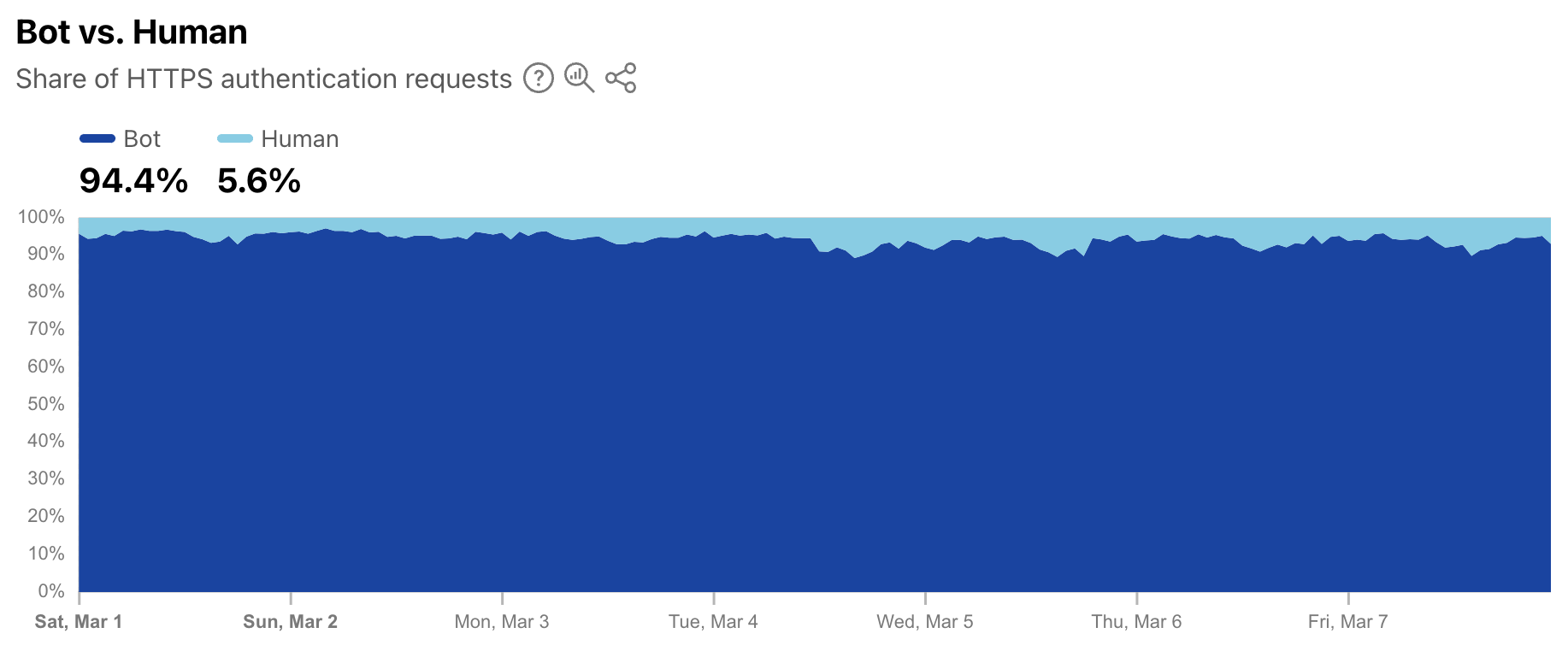
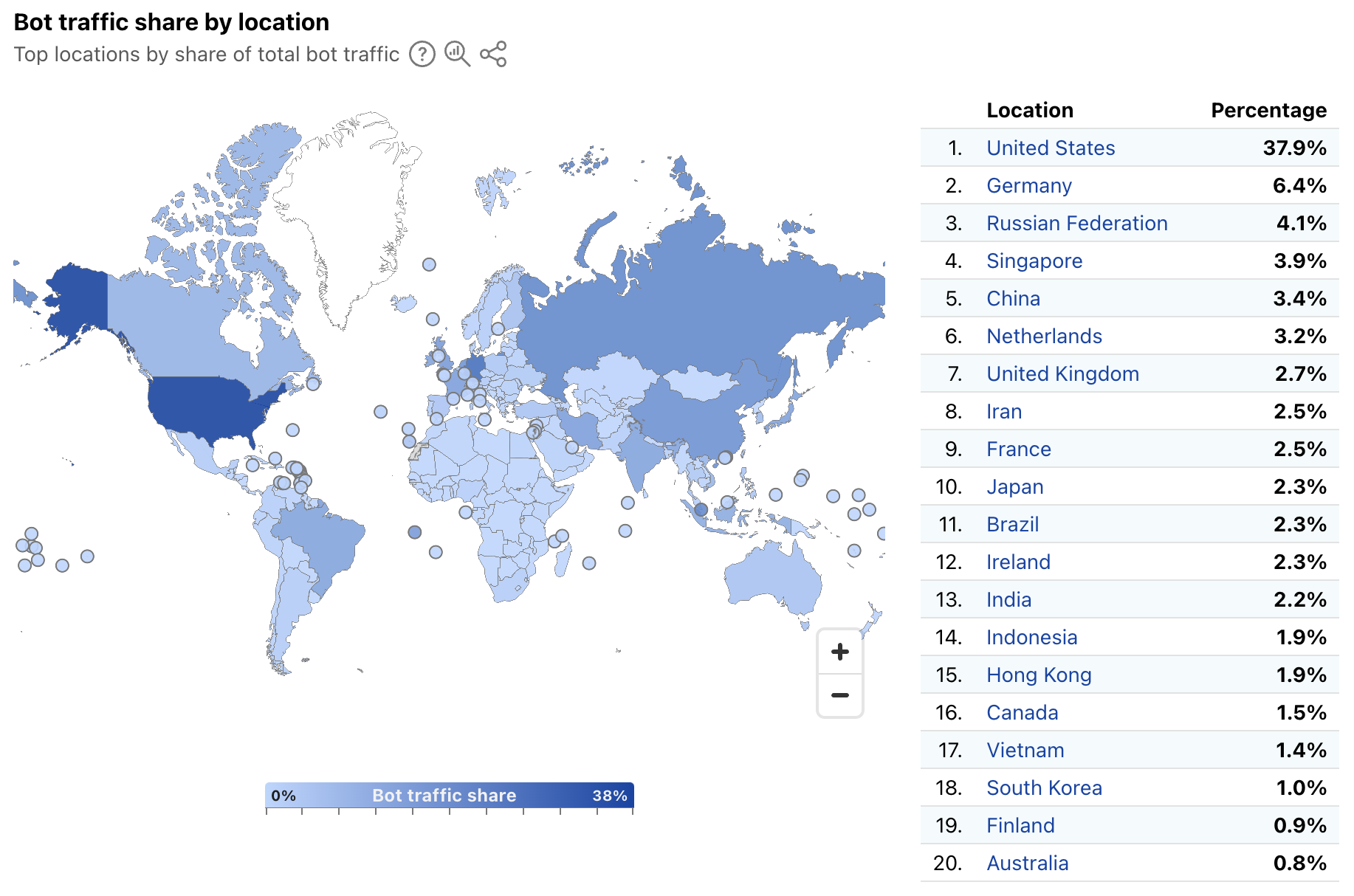
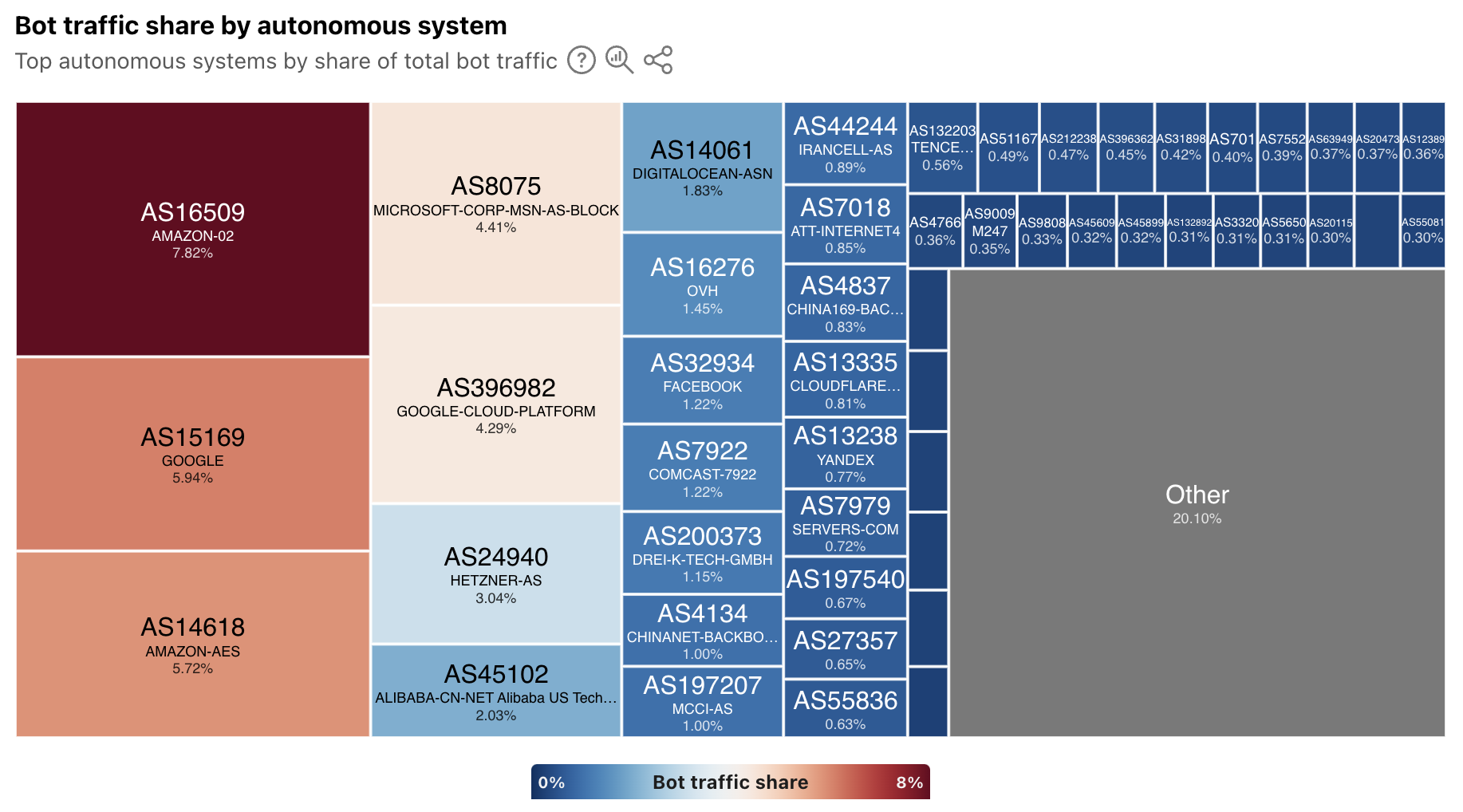
As a site owner, how do you know which bots to allow on your site, and which you’d like to block? Existing identification methods rely on a combination of IP address range (which may be shared by other services, or change over time) and user-agent header (easily spoofable). These have limitations and deficiencies. In our last blog post, we proposed using HTTP Message Signatures: a way for developers of bots, agents, and crawlers to clearly identify themselves by cryptographically signing requests originating from their service.
Since we published the blog post on Message Signatures and the IETF draft for Web Bot Auth in May 2025, we’ve seen significant interest around implementing and deploying Message Signatures at scale. It’s clear that well-intentioned bot owners want a clear way to identify their bots to site owners, and site owners want a clear way to identify and manage bot traffic. Both parties seem to agree that deploying cryptography for the purposes of authentication is the right solution.
Today, we’re announcing that we’re integrating HTTP Message Signatures directly into our Verified Bots Program. This announcement has two main parts: (1) for bots, crawlers, and agents, we’re simplifying enrollment into the Verified Bots program for those who sign requests using Message Signatures, and (2) we’re encouraging all bot operators moving forward to use Message Signatures over existing verification mechanisms. Because Verified Bots are considered authenticated, they do not face challenges from our Bot Management to identify as bots, given they’re already identified as such.
For site owners, no additional action is required – Cloudflare will automatically validate signatures on our edge, and if that validation is a success, that traffic will be marked as verified so that site owners can use the verified bot fields to create Bot Management and WAF rules based on it.
This isn’t just about simplifying things for bot operators — it’s about giving website owners unparalleled accuracy in identifying trusted bot traffic, cutting down on the overhead for cryptographic verification, and fundamentally transforming how we manage authentication across the Cloudflare network.
Become a Verified Bot with Message Signatures
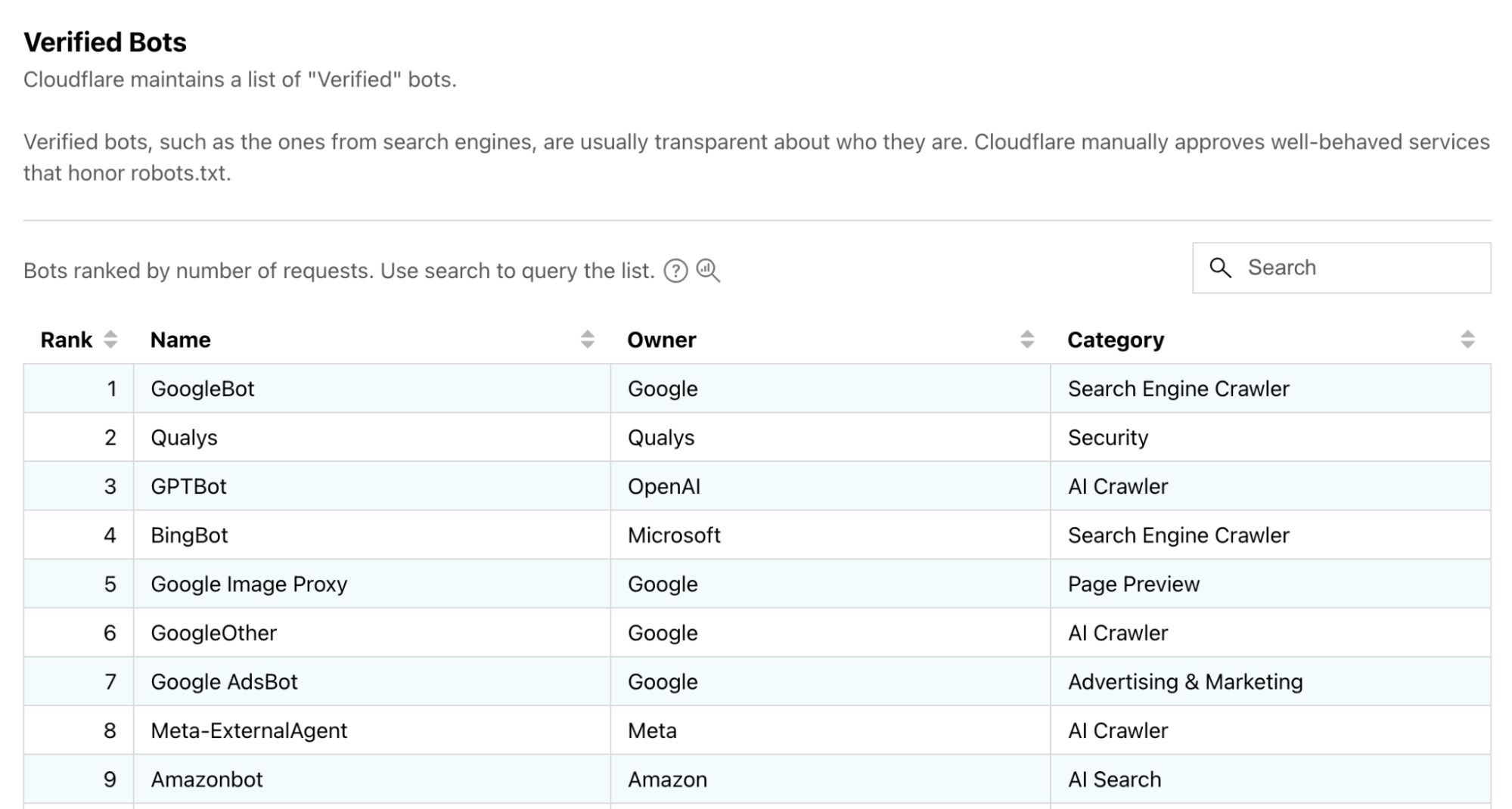
Cloudflare’s existing Verified Bots program is for bots that are transparent about who they are and what they do, like indexing sites for search or scanning for security vulnerabilities. You can see a list of these verified bots in Cloudflare Radar:
A preview of the Verified Bots page on Cloudflare Radar.
In the past, in order to apply to be a verified bot, we used to ask for IP address ranges or reverse DNS names so that we could verify your identity. This required some manual steps like checking that the IP address range is valid and is associated with the appropriate ASN.
With the integration of Message Signatures, we’re aiming to streamline applications into our Verified Bot program. Bots applying with well-formed Message Signatures will be prioritized, and approved more quickly!
At a high level, signing your requests with web bot auth consists of the following steps:
Generate a valid signing key. See Signing Key section for step-by-step instructions.
Host a JSON web key set containing your public key under /.well-known/http-message-signature-directory of your website.
Sign responses for that URL using a Web Bot Auth library, one signature for each key contained in it, to prove you own it. See the Hosting section for step-by-step instructions.
Register that URL with us, using our Verified Bots form. This can be done directly in your Cloudflare account. See our documentation.
Sign requests using a Web Bot Auth library.
As an example, Cloudflare Radar’s URL Scanner lets you scan any URL and get a publicly shareable report with security, performance, technology, and network information. Here’s an example of what a well-formed signature looks like for requests coming from URL Scanner:
GET /path/to/resource HTTP/1.1
Host: www.example.com
User-Agent: Mozilla/5.0 (Windows NT 10.0; Win64; x64) AppleWebKit/537.36 (KHTML, like Gecko) Chrome/119.0.0.0 Safari/537.36
Signature-Agent: "https://web-bot-auth-directory.radar-cfdata-org.workers.dev"
Signature-Input: sig=("@authority" "signature-agent");\
             	 created=1700000000;\
             	 expires=1700011111;\
             	 keyid="poqkLGiymh_W0uP6PZFw-dvez3QJT5SolqXBCW38r0U";\
             	 tag="web-bot-auth"
Signature:sig=jdq0SqOwHdyHr9+r5jw3iYZH6aNGKijYp/EstF4RQTQdi5N5YYKrD+mCT1HA1nZDsi6nJKuHxUi/5Syp3rLWBA==:
Since we’ve already registered URLScanner as a Verified Bot, Cloudflare will now automatically verify that the signature in the Signature header matches the request — more on that later.
Register your bot
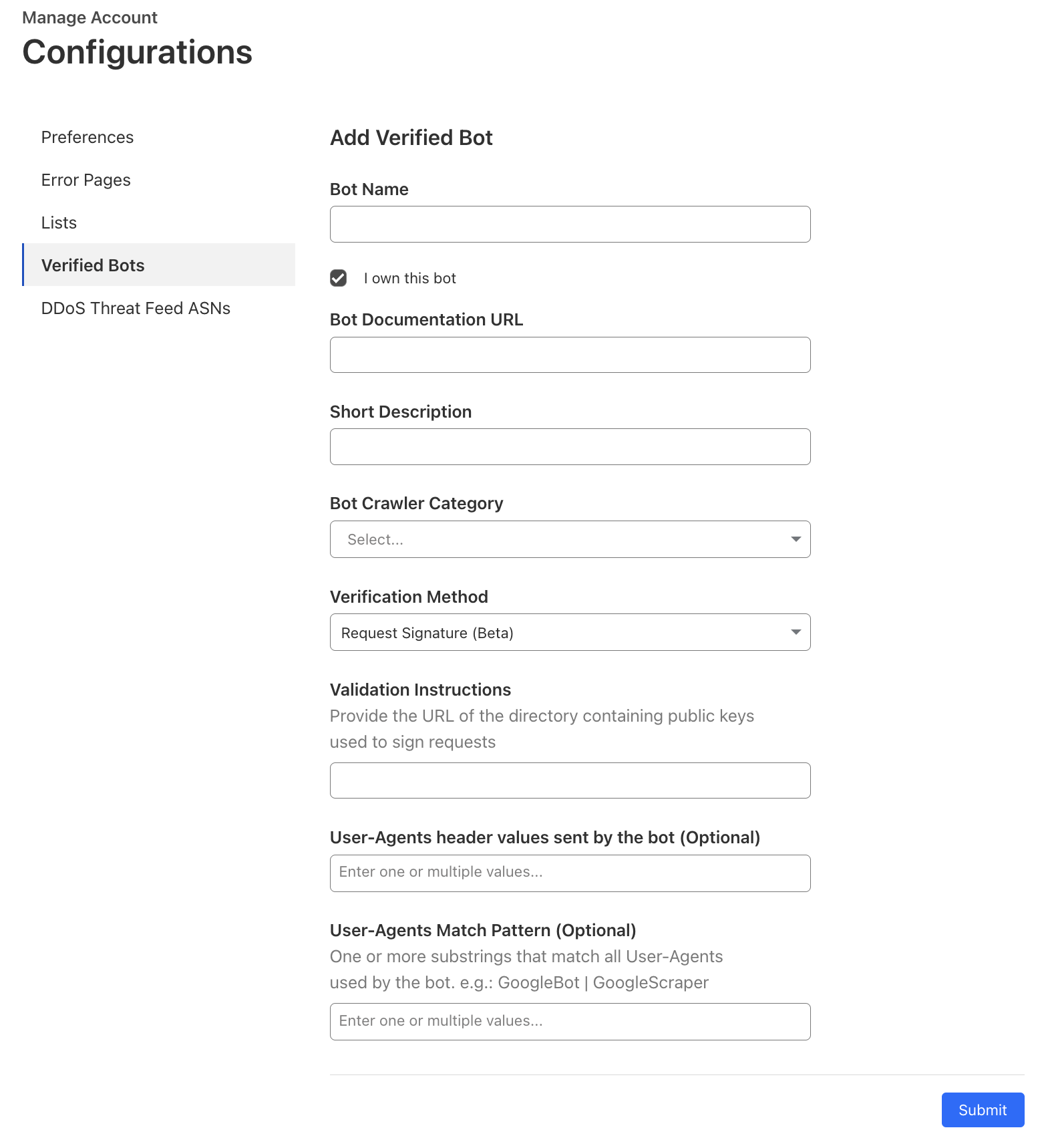
Access the Verified Bots submission form on your account. If that link does not immediately take you there, go to your Cloudflare account → Account Home → the three dots next to your account name → Configurations → Verified Bots.
For the verification method, select “Request Signature”, then enter the URL of your key directory in Validation Instructions. Specifying the User-Agent values is optional if you’re submitting a Request Signature bot.
Once your application has gone through our (now shortened) review process, you don’t need to take any further action.
Message Signature verification for origins
Starting today, Cloudflare is ramping up verification of cryptographic signatures provided by automated crawlers and bots. This is currently available for all Free and Pro plans, and as we continue to test and validate at scale, will be released to all Business and Enterprise plans. This means that as time passes, the number of unauthenticated web crawlers should diminish, ensuring most bot traffic is authenticated before it reaches your website’s servers, helping to prevent spoofing attacks.
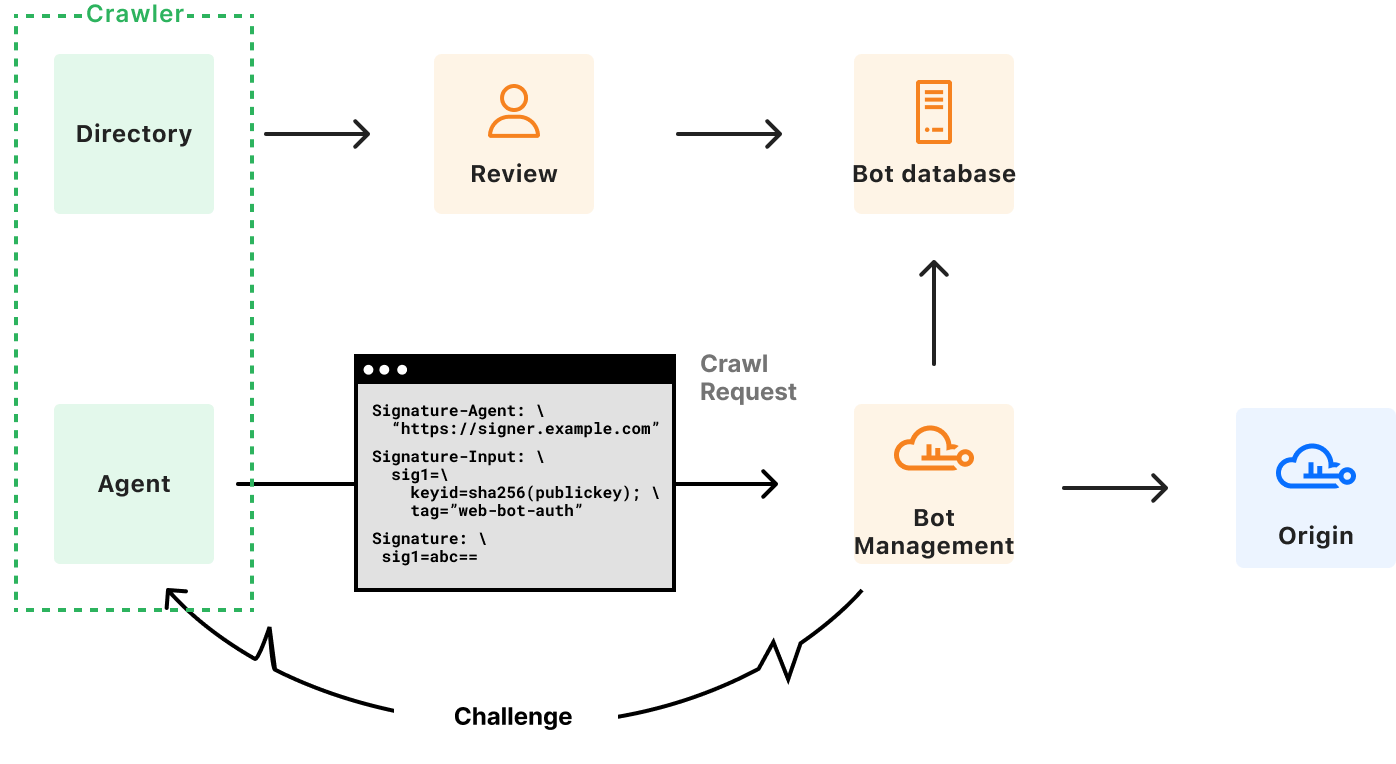
At a high level, signature verification works like this:
A bot or agent sends a request to a website behind Cloudflare.
Cloudflare’s Message Signature verification service checks for the Signature, Signature-Input, and Signature-Agent headers.
It checks that the incoming request presents a keyid parameter in your Signature-Input that points to a key we already know.
It looks at the expires parameter in the incoming bot request. If the current time is after expiration, verification fails. This guards against replay attacks, preventing malicious agents from trying to pass as a bot by retrying messages they captured in the past.
It checks that you’ve specified a tag parameter indicating web-bot-auth, to indicate your intent that the message be handled using web bot authentication specifically
It looks at all the components chosen in your Signature-Input header, and constructs a signature base from it.
If all pre-flight checks pass, Cloudflare attempts to verify the signature base against the value in Signature field using an ed25519 verification algorithm and the key supplied in keyid.
Verified Bots and other systems at Cloudflare use a successful verification as proof of your identity, and apply rules corresponding to that identity.
If any of the above steps fail, Cloudflare falls back to existing bot identification and mitigation mechanisms. As the system matures, we would strengthen these requirements, and limit the possibilities of a soft downgrade.
As a site owner, you can segment your Verified Bot traffic by its type and purpose by adding the Verified Bot Categories field cf.verified_bot_category as a filter criterion in WAF Custom rules, Advanced Rate Limiting, and Late Transform rules. For instance, to allow the Bibliothèque nationale de France and the Library of Congress, and institutions dedicated to academic research, you can add a rule that allows bots in the Academic Research category.
Where we’re going next
HTTP Message Signatures is a primitive that is useful beyond Cloudflare – the IETF standardized it as part of RFC 9421.
As discussed in our previous blog post, Cloudflare believes that making Message Signatures a core component of bot authentication on the web should follow the same path. The specifications for the protocol are being built in the open, and they have already evolved following feedback.
Moreover, due to widespread interest, the IETF is considering forming a working group around Web Bot Auth. Should you be a crawler, an origin, or even a CDN, we invite you to provide feedback to ensure the solution gets stronger, and suits your needs.
A better, more trusted Internet
For bot, agent, and crawler operators that act transparently and provide vital services for the Internet, we’re providing a faster and more automated path to being recognized as a Verified Bot, reducing manual processes. We trust that this approach improves bot authentication from what were formerly brittle and unreliable authentication methods, to a secure and reliable alternative. It should reduce the overall volume of friction and hurdles genuinely useful bots face.
For site owners, Message Signatures provides better assurance that the bot traffic is legitimate — automatically recognized and allowed, minimizing disruption to essential services (e.g., search engine indexing, monitoring). In line with our commitments to making TLS/SSL and Post-Quantum certificates available for everyone, we’ll always offer the cryptographic verification of Message Signatures for all sites because we believe in a safer and more efficient Internet by fostering a trusted environment for both human and automated traffic.
If you have a feature request, feedback, or are interested in partnering with us, please reach out.
Web crawlers are not new. The World Wide Web Wanderer debuted in 1993, though the first web search engines to truly use crawlers and indexers were JumpStation and WebCrawler. Crawlers are part of one of the backbones of the Internet’s success: search. Their main purpose has been to index the content of websites across the Internet so that those websites can appear in search engine results and direct users appropriately. In this blog post, we’re analyzing recent trends in web crawling, which now has a crucial and complex new role with the rise of AI.
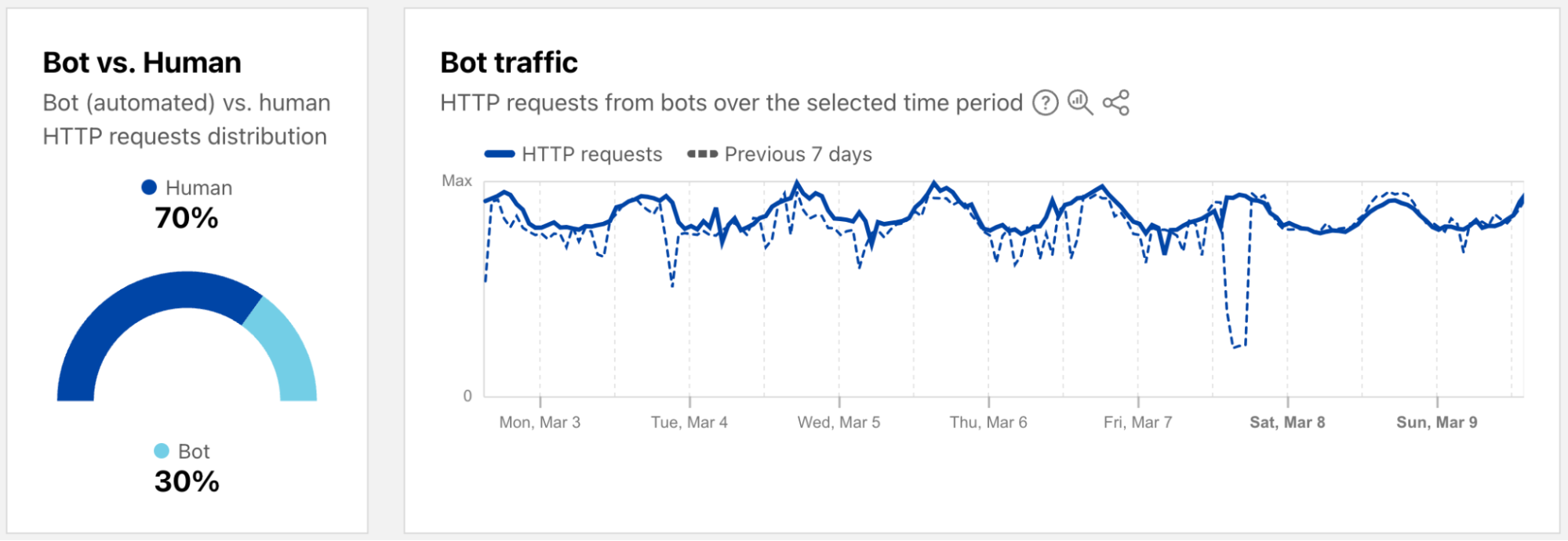
Not all crawlers are the same. Bots, automated scripts that perform tasks across the Internet, come in many forms: those considered non-threatening or “good” (such as API clients, search indexing bots like Googlebot, or health checkers) and those considered malicious or “bad” (like those used for credential stuffing, spam, or scraping content without permission). In fact, around 30% of global web traffic today, according to Cloudflare Radar data, comes from bots, and even exceeds human Internet traffic in some locations.
A new category, AI crawlers, has emerged in recent years. These bots collect data from across the web to train AI models, improving tools and experiences, but also raising issues around content rights, unauthorized use, and infrastructure overload. We aimed to confirm the growth of both search and AI crawlers, examine specific AI crawlers, and understand broader crawler usage.
This is increasingly relevant with the rapid adoption of AI, growing content rights concerns, and data privacy discussions. Some sites and creators are looking to limit or block AI crawlers using tools like robots.txt or firewall rules. Others, like Dutch indie maker and entrepreneur Pieter Levels, have embraced them: “I’m 100% fine with AI crawlers… very important to rank in LLMs [large language models]”.
It’s important to note that crawlers serve different purposes. For example, the facebookexternalhit bot is not included in this analysis, as it is used by Facebook to fetch page content when generating previews for shared links. However, within this post, we are only focusing on AI and search crawlers that are indexing or scraping website content.
AI-only crawlers perspective
Let’s start with an AI-only crawler perspective that we currently have on Cloudflare Radar, focused only on crawlers advertised as AI-related. To identify them, we’re using here a list derived from an open-source project that helps website owners manage and control access to AI crawlers — especially those used to train large language models (LLMs). It also provides guidance on what to include in robots.txtfiles (more on that below). The data shown below is based on matching those crawler names with user-agent strings in HTTP requests. (Further details, including one exception, about this method can be found at the end of the blog post.)
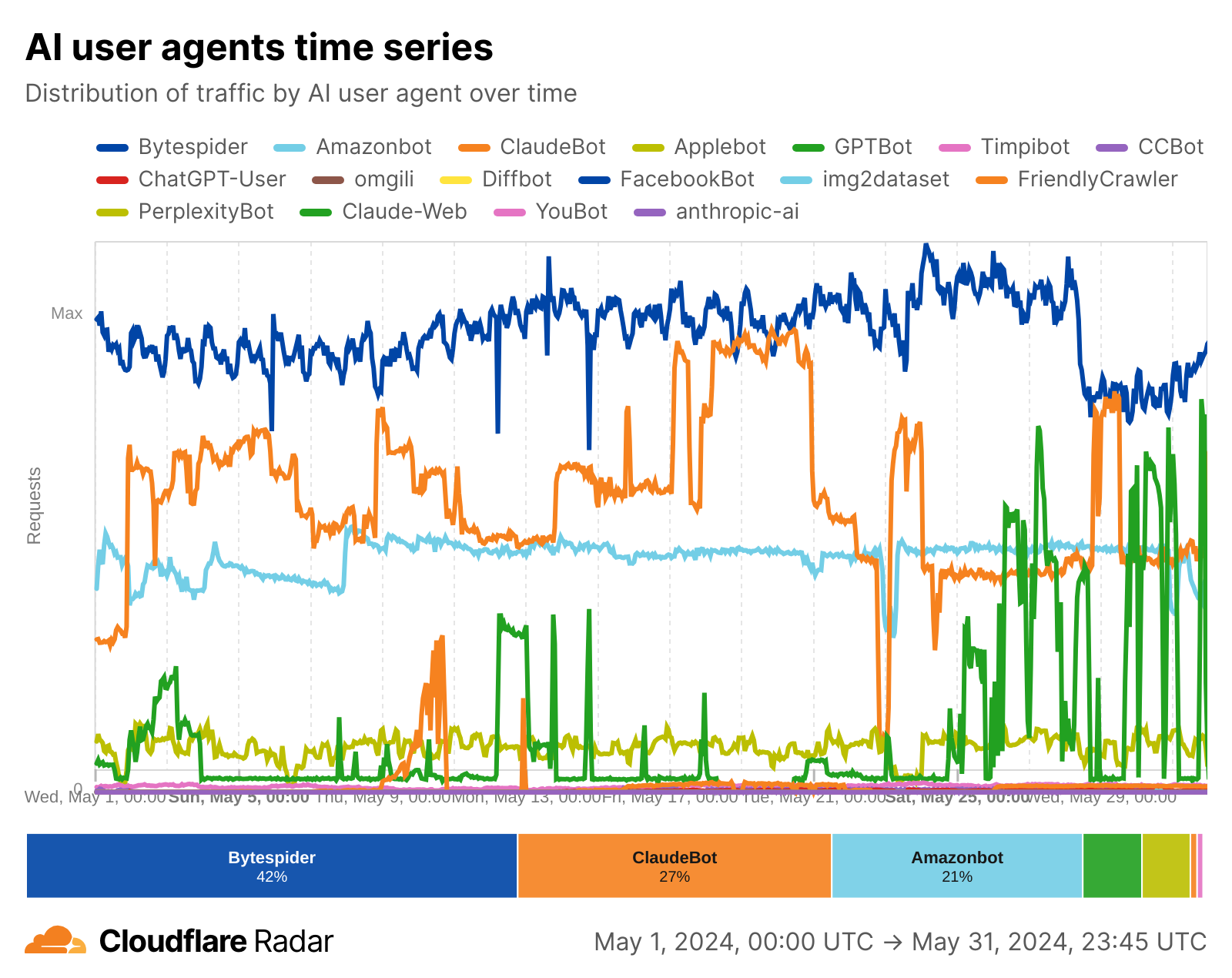
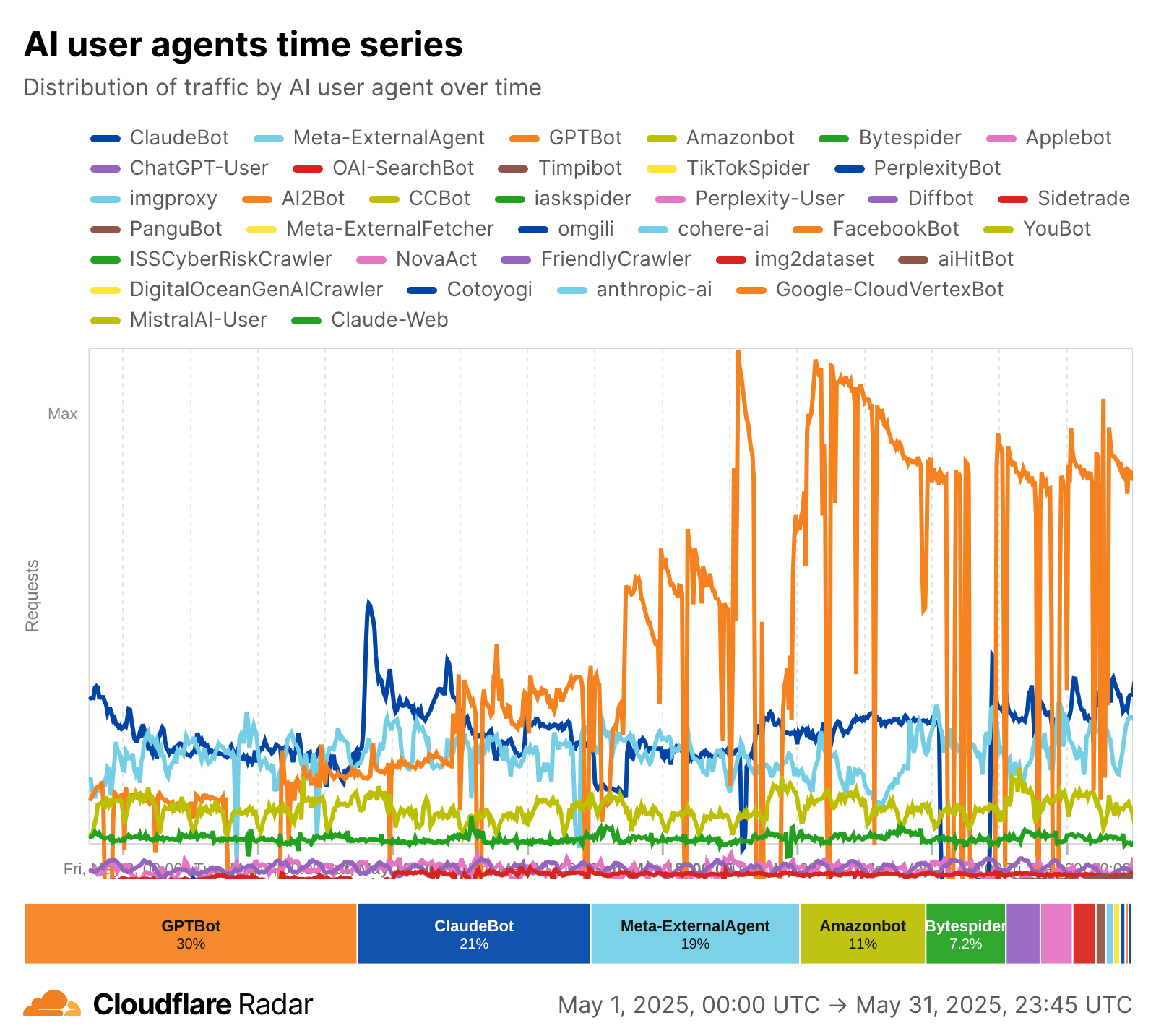
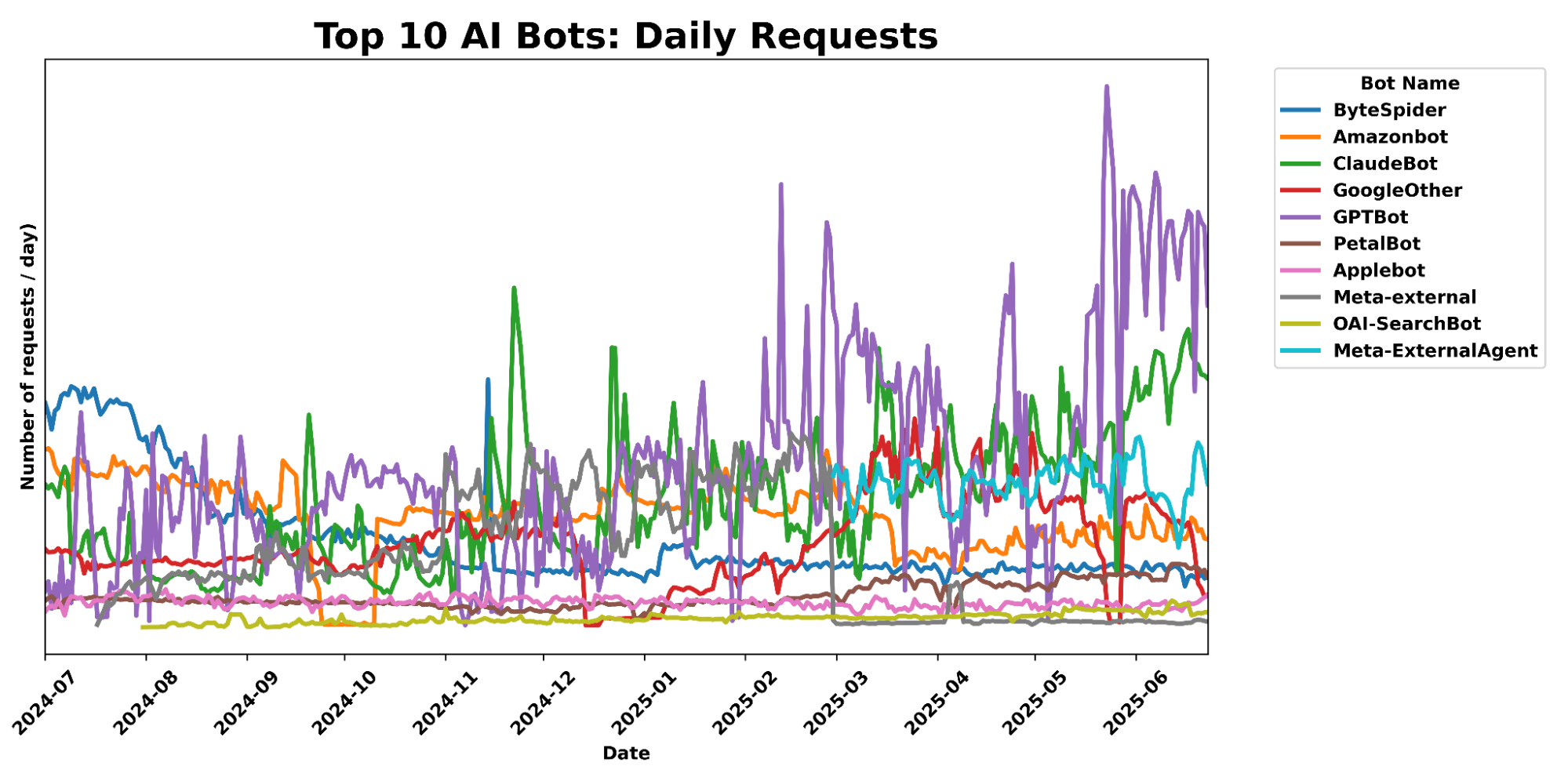
The AI crawler landscape saw a significant shift between May 2024 and May 2025, with GPTBot (from OpenAI) emerging as the dominant force, surging from 5% to 30% share, and Meta-ExternalAgent (from Meta) making a strong new entry at 19%. This growth came at the expense of former leader Bytespider, which plummeted from 42% to 7%, as well as other AI crawlers like ClaudeBot and Amazonbot, which also saw declines. Our data clearly indicates a reordering of top AI crawlers, highlighting the increasing prominence of OpenAI and Meta in this category.
May 2024
May 2025
Rank
Bot Name
Share (May 2024)
Rank
Bot Name
Share (May 2025)
1
Bytespider
42%
1
GPTBot
30%
2
ClaudeBot
27%
2
ClaudeBot
21%
3
Amazonbot
21%
3
Meta-ExternalAgent
19%
4
GPTBot
5%
4
Amazonbot
11%
5
Applebot
4.1%
5
Bytespider
7.2%
Rank
Bot Name
Share (May 2024)
Rank
Bot Name
Share (May 2025)
1
Bytespider
42%
1
GPTBot
30%
2
ClaudeBot
27%
2
ClaudeBot
21%
3
Amazonbot
21%
3
Meta-ExternalAgent
19%
4
GPTBot
5%
4
Amazonbot
11%
5
Applebot
4.1%
5
Bytespider
7.2%
For additional context, the list below includes further information about the bots with higher crawling shares seen above. This information comes from the same open-source list mentioned above and from publications by companies like OpenAI, which explain how their crawlers are used.
GPTBot – OpenAI’s crawler used to improve and train large language models like ChatGPT.
ClaudeBot – Anthropic’s crawler for training and updating the Claude AI assistant.
Meta-ExternalAgent – Meta’s bot likely used for collecting data to train or fine-tune LLMs.
Amazonbot – Amazon’s crawler that gathers data for its search and AI applications.
Bytespider – ByteDance’s AI data collector, often linked to training models like Ernie or TikTok-related AI.
Applebot – Apple’s web crawler primarily for Siri and Spotlight search, possibly used in AI development.
OAI-SearchBot – OpenAI’s search-focused crawler, likely used for retrieving real-time web info for models.
ChatGPT-User – Represents API-based or browser usage of ChatGPT in connection with user interactions.
PerplexityBot – Crawler from Perplexity.ai, which powers their AI answer engine using real-time web data.
Webmasters can inform crawler operators of whether they want these bots and crawlers to access their content by setting out rules in a file called robots.txt, which tells crawlers what pages they should or shouldn’t access. As we’ve seen recently, crawlers honoring your robots.txt policies is voluntary, but Cloudflare announced tools like AI Audit to help content creators to enforce it.
Now, as we’ve seen, the landscape of web crawling is evolving rapidly, driven by the merging roles of search engines and AI. AI is now deeply integrated into search, seen in Google’s AI Overviews and AI Mode, but also in social media platforms, like Meta AI on Instagram. So, let’s broaden our analysis to include these wider AI-driven crawling activities.
General AI and search crawling growth: +18%
A broader view reveals the growth of crawling traffic from both search and AI crawlers over the first few months of 2025. To remove customer growth bias, we’ll analyze trends using a fixed set of customers from specific weeks (a method we’ve used in our Cloudflare Radar Year in Review): the first week of May 2024, a week in November 2024, and the first week of April 2025.
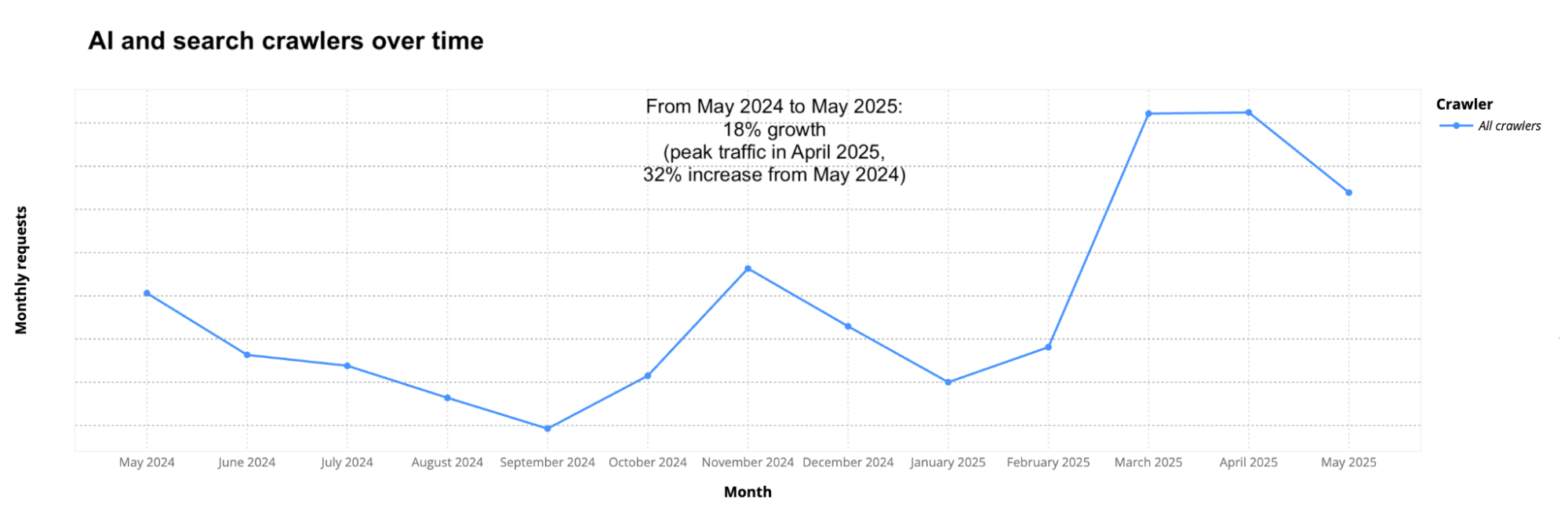
Using that method, we found that AI and search crawler traffic grew by 18% from May 2024 to May 2025 (comparing full-month periods). The increase was even higher, at 48%, when including new Cloudflare customers added during that time. Peak AI and search crawling traffic occurred in April 2025, with a 32% increase compared to May 2024. This confirms that crawling traffic has clearly risen over the past year, but also that growth is not always constant. Google remains the dominant player, and its share is growing too, as we’ll see in the next section.
As the next chart shows, crawling traffic increased sharply in March and April 2025 and remained high, though slightly lower, in May.
The patterns on the above crawling chart also seem to reflect broader seasonal patterns and general human Internet traffic patterns. In 2024, traffic dropped during the summer in the Northern Hemisphere, with August and September being the least active months. And like overall Internet traffic, it then rose in November, when people are typically more online due to shopping and seasonal habits, as we’ve seen in past analyses.
Googlebot crawling grew 96% in one year
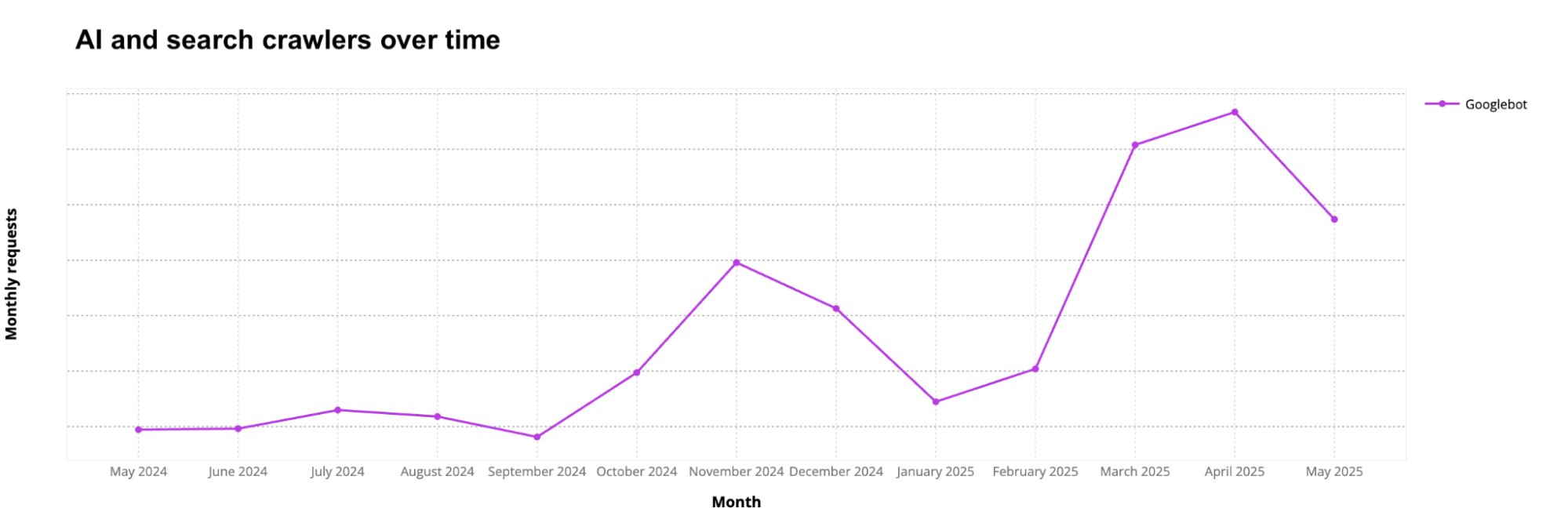
Googlebot, which indexes content for Google Search, was clearly the top crawler throughout the period and showed strong growth, up 96% from May 2024 to May 2025, reflecting increased crawling by Google. Crawling traffic peaked in April 2025, reaching 145% higher than in May 2024. It’s also important to mention that Google made changes to its search and launched AI Overviews in its search engine during this time — first in the US in May 2024, then in more countries later.
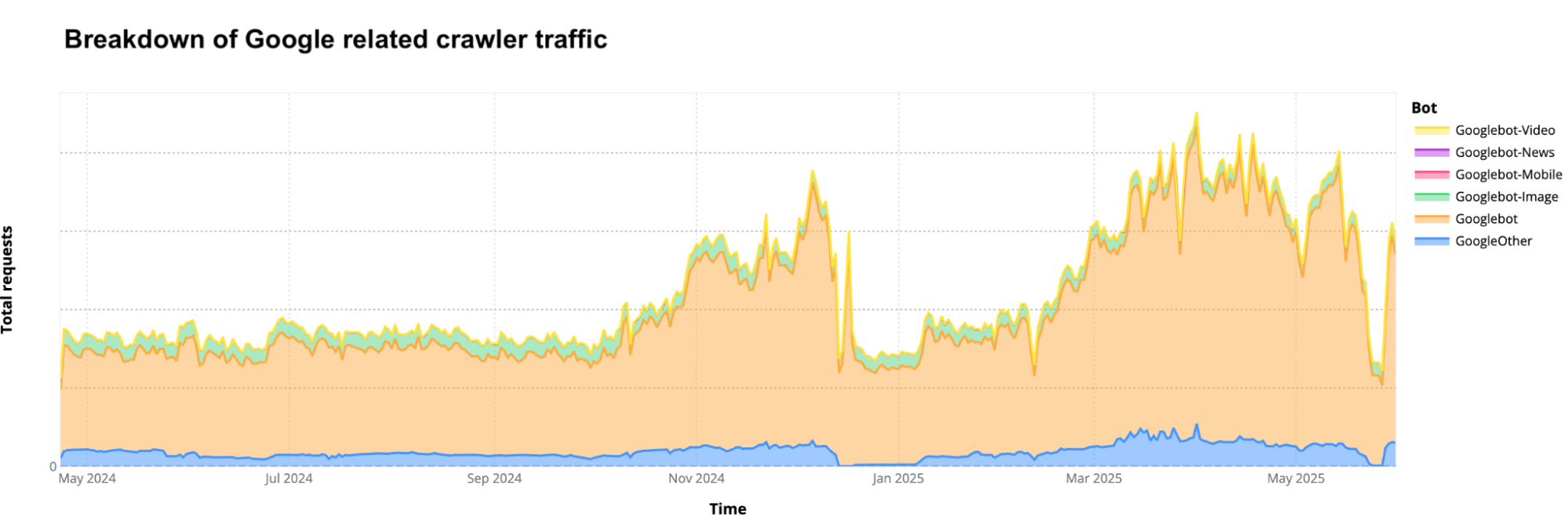
Two trends stand out when looking at daily data for Google-related crawlers, as shown in the graph below. First, Googlebot and the more recent GoogleOther (a web crawler from 2023 for “research and development”) account for most of Google’s crawling activity. Second, there were two visible drops in crawling traffic: one on December 14, 2024 (around a Google Search update), and another from May 20 to May 28, 2025. That May 20 drop occurred around the same time as the rollout of AI Mode on Google Search in the US, although the timing may be coincidental.
Breakdown of top 20 AI and search web crawlers
Ranking crawlers by their share of total requests gives a clearer picture of which bots are gaining or losing ground, especially among those focused on search and AI. The table below shows a clear trend: some AI bots have grown rapidly since last year (with growth beginning even earlier), while many traditional search crawlers have remained flat or lost share (as in the case of Bing and its Bingbot crawler). The main exception is Googlebot.
The next table shows the percentage share of each crawler out of all crawling traffic generated by this specific cohort of over 30 AI & search crawlers observed by Cloudflare in May 2024 and May 2025. The table below also includes the change in percentage points and the growth or decline in raw request volume. Crawlers are ranked by their share in May 2025. Key crawler shifts include GPTBot rising sharply (+305%), while Bytespider dropped dramatically (-85%).
Rank
Bot name
Share
May 2024
Share
May 2025
Δ percentage-point change
Raw requests growth (May 2024 to May 2025)
1
Googlebot
30%
50%
+20 pp
96%
2
Bingbot
10%
8.7%
-1.3 pp
2%
3
GPTBot
2.2%
7.7%
+5.5 pp
305%
4
ClaudeBot
11.7%
5.4%
-6.3 pp
-46%
5
GoogleOther
4.4%
4.3%
-0.1 pp
14%
6
Amazonbot
7.6%
4.2%
-3.4 pp
-35%
7
Googlebot-Image
4.5%
3.3%
-1.2 pp
-13%
8
Bytespider
22.8%
2.9%
-19.8 pp
-85%
9
Yandex
2.8%
2.2%
-0.7 pp
-10%
10
ChatGPT-User
0.1%
1.3%
+1.2 pp
2,825%
11
Applebot
1.9%
1.2%
-0.7 pp
-26%
12
Timpibot
0.3%
0.6%
+0.3 pp
133%
13
Baiduspider
0.5%
0.4%
-0.1 pp
7%
14
PerplexityBot
<0.01%
0.2%
+0.2 pp
157,490%
15
DuckDuckBot
0.2%
0.1%
-0.1 pp
-16%
16
SeznamBot
0.1%
0.1%
2%
17
Yeti
0.1%
0.1%
47%
18
coccocbot
0.1%
0.1%
-3%
19
Sogou
0.1%
0.1%
-22%
20
Yahoo! Slurp
0.1%
0.0%
-0.1 pp
-8%
Rank
Bot name
Share May 2024
Share May 2025
Δ percentage-point change
Raw requests growth (May 2024 to May 2025)
1
Googlebot
30%
50%
+20 pp
96%
2
Bingbot
10%
8.7%
-1.3 pp
2%
3
GPTBot
2.2%
7.7%
+5.5 pp
305%
4
ClaudeBot
11.7%
5.4%
-6.3 pp
-46%
5
GoogleOther
4.4%
4.3%
-0.1 pp
14%
6
Amazonbot
7.6%
4.2%
-3.4 pp
-35%
7
Googlebot-Image
4.5%
3.3%
-1.2 pp
-13%
8
Bytespider
22.8%
2.9%
-19.8 pp
-85%
9
Yandex
2.8%
2.2%
-0.7 pp
-10%
10
ChatGPT-User
0.1%
1.3%
+1.2 pp
2,825%
11
Applebot
1.9%
1.2%
-0.7 pp
-26%
12
Timpibot
0.3%
0.6%
+0.3 pp
133%
13
Baiduspider
0.5%
0.4%
-0.1 pp
7%
14
PerplexityBot
<0.01%
0.2%
+0.2 pp
157,490%
15
DuckDuckBot
0.2%
0.1%
-0.1 pp
-16%
16
SeznamBot
0.1%
0.1%
2%
17
Yeti
0.1%
0.1%
47%
18
coccocbot
0.1%
0.1%
-3%
19
Sogou
0.1%
0.1%
-22%
20
Yahoo! Slurp
0.1%
0.0%
-0.1 pp
-8%
Based on this data, two major shifts in web crawling occurred between May 2024 and May 2025:
1. Some AI crawlers rose sharply. GPTBot (from OpenAI) increased its share from 2.2% to 7.7% (+5.5 pp), with a 305% rise in requests. This underscores the data demand for training large language models like ChatGPT. GPTBot jumped from #9 in May 2024 to #3 in May 2025.
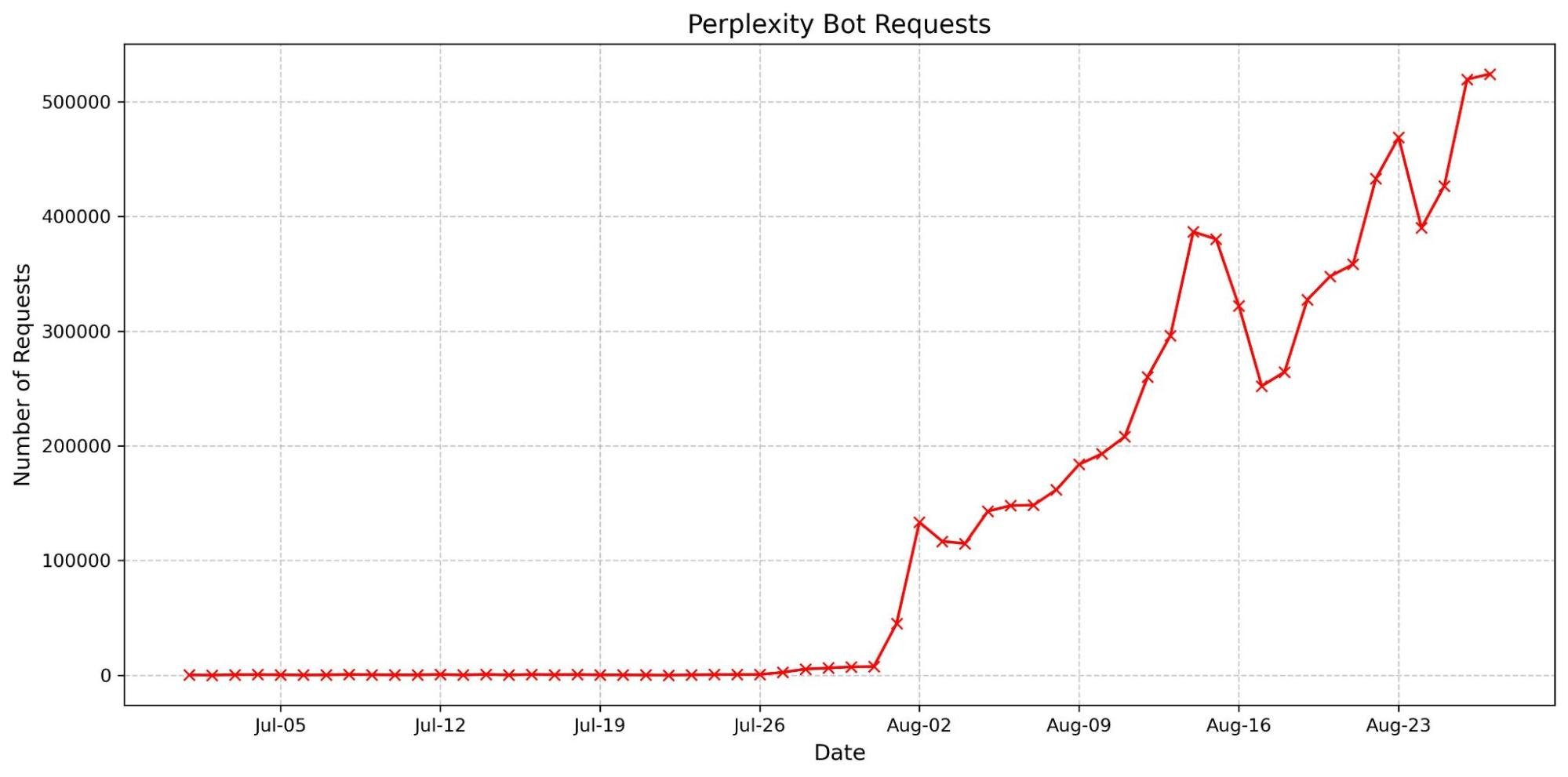
Another OpenAI crawler, ChatGPT-User, saw requests surge by 2,825%, reaching a 1.3% share. This reflects a large rise in ChatGPT user activity or API-based interactions that involve accessing web content. PerplexityBot (from Perplexity.ai), despite a small 0.2% share, recorded the highest growth rate: a staggering 157,490% increase in raw requests.
Meanwhile, some AI crawlers saw steep declines. ClaudeBot (Anthropic) fell from 11.7% to 5.4% of total traffic and dropped 46% in requests. Bytespider plummeted 85% in request volume, falling from #2 to #8 in crawler share (now at just 2.9%).
Both Amazonbot and Applebot, also considered AI crawlers, saw decreases in share and in raw requests (–35% and –26%, respectively).
2. Google’s dominance expanded. Googlebot’s share rose from 30% to 50%, supporting search indexing, but potentially also having AI-related purposes (such as new AI Overviews in Google Search). And GoogleOther (the crawler introduced in 2023) also increased in crawling traffic, 14%. Other Google crawlers not in the top 20, like Googlebot-News, also grew significantly (+71% in requests). There’s a clear trend of growth in these Google-related web crawlers at a time when the company is investing heavily in combining AI with search.
Also in the search category, Bingbot’s share (from Microsoft) declined slightly from 10% to 8.7% (-1.3 pp), though its raw requests still grew modestly by 2%.
These trends show that web crawling is increasingly dominated by bots from Google and OpenAI, reflecting clear shifts over the course of a year. Google also appears to be adapting how it collects data to support both traditional search and AI-driven features.
Also worth noting is FriendlyCrawler, which no longer appears in the top 20 list as of May 2025 (now ranked #35). It was #14 in May 2024 with a 0.2% share, but saw a 100% drop in requests by May 2025. This bot is known to index and analyze website content, although its owner and purpose remain unclear. Typically, crawlers like this are used for improving search results, market research, or analytics.
robots.txt & AI bots: GPTBot leads twice
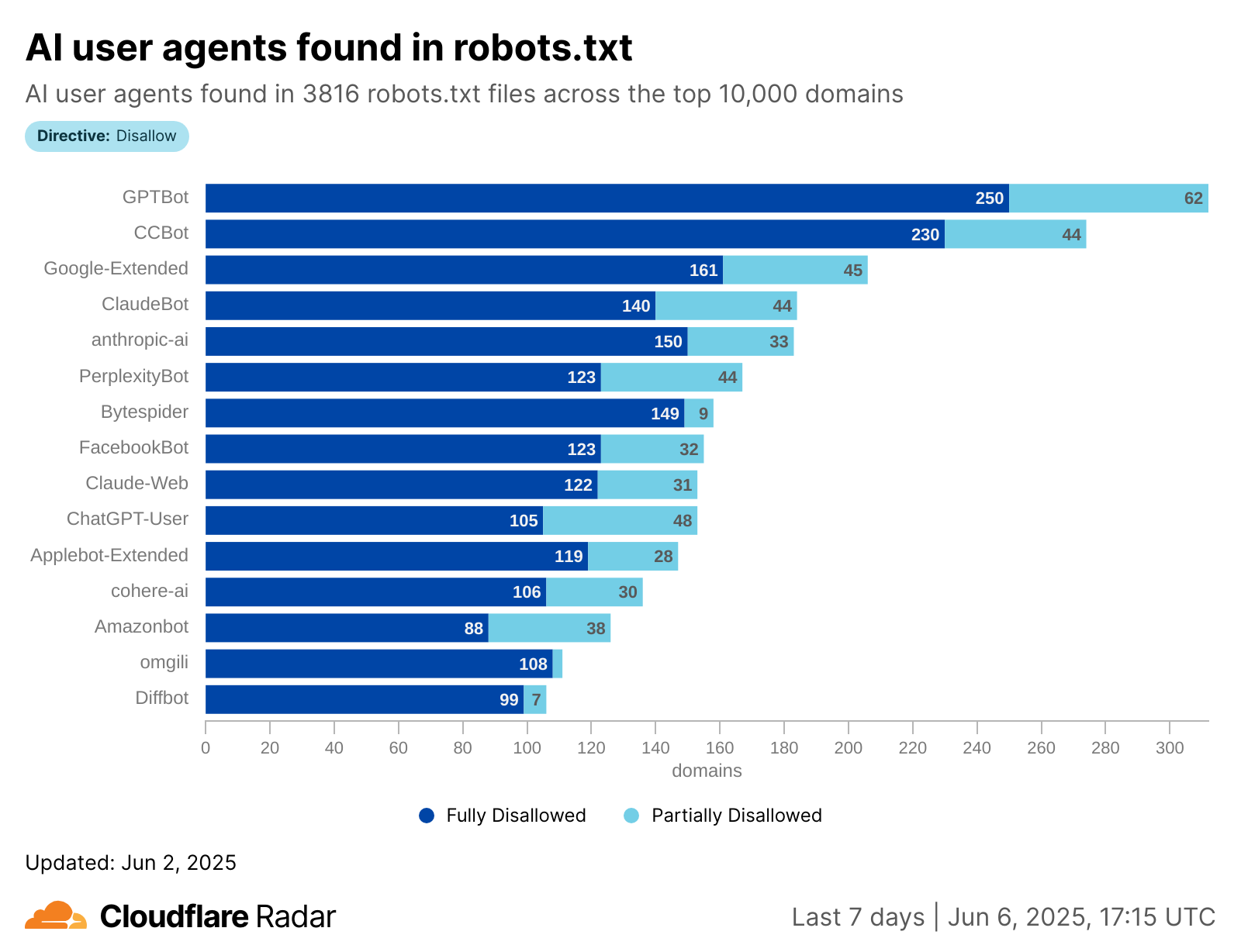
Recent data from June 6, 2025, from Cloudflare Radar shows that out of 3,816 domains (from the top 10,000) where we were able to find a robots.txt file, 546 (about 14%) had “allow” or “disallow” (fully or partially) directives targeting AI bots in particular.
This leaves many site owners in a gray area because it’s not always clear how effective robots.txt is in managing AI crawlers. Some site owners may not think to use it specifically for AI bots, while others might be unsure whether these bots even respect robots.txt rules, especially newer or less transparent crawlers. In other cases, sites use partial rules to fine-tune access, trying to balance visibility and protection without fully opting in or out.
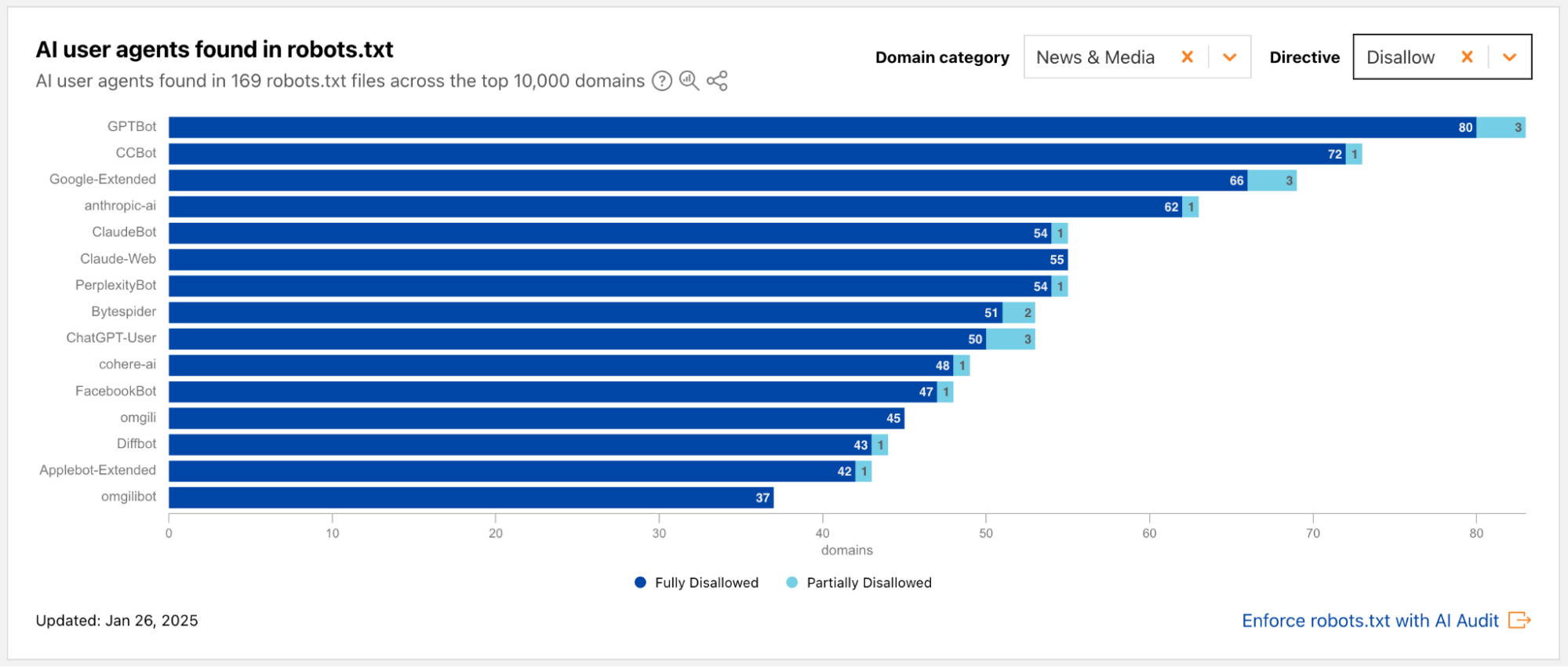
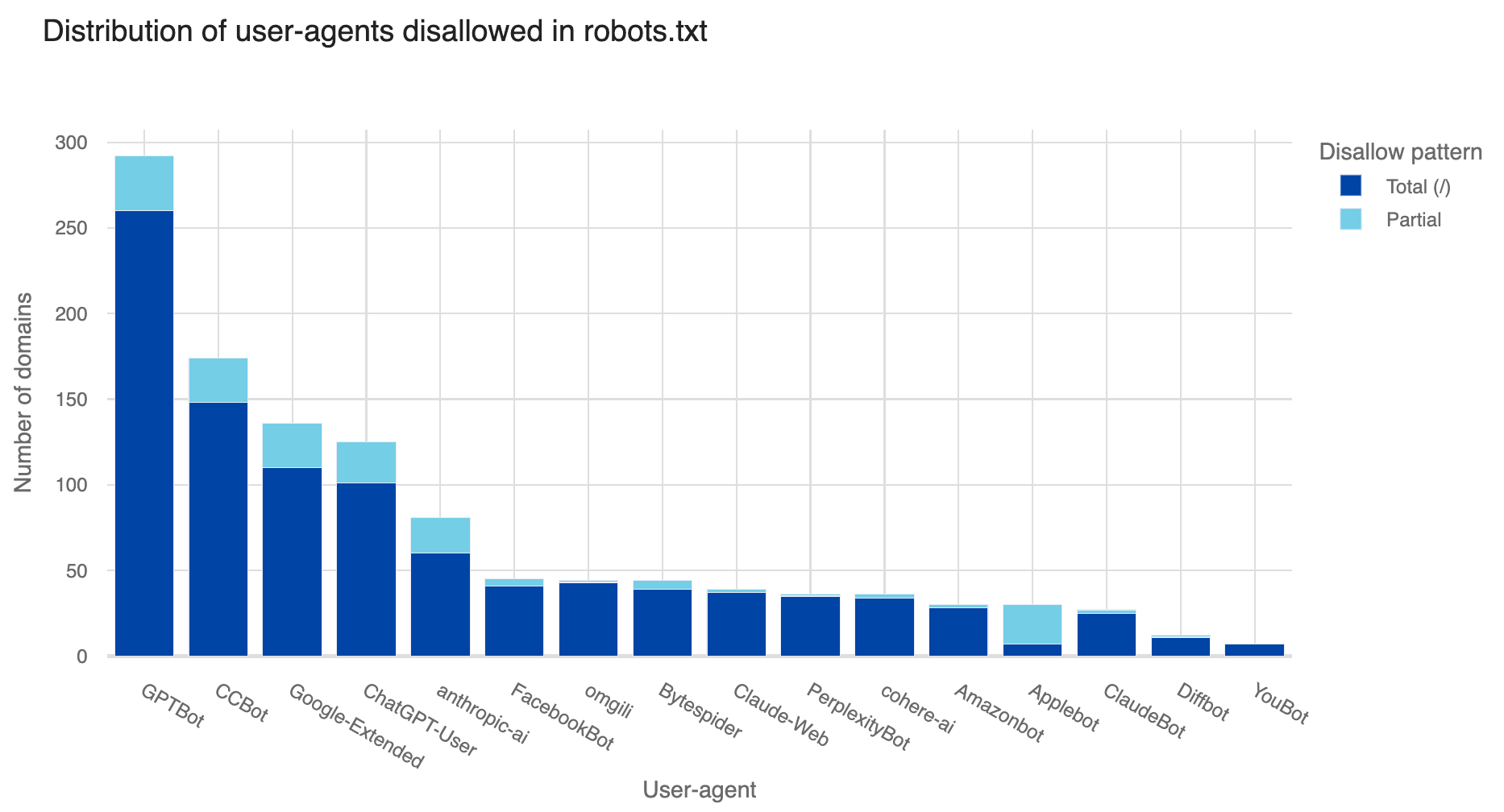
The “disallow” rules appear far more often than “allow” rules. The most frequently blocked bot was GPTBot, disallowed by 312 domains (250 fully, 62 partially), followed by CCBot and Google-Extended, as shown in the following graph.
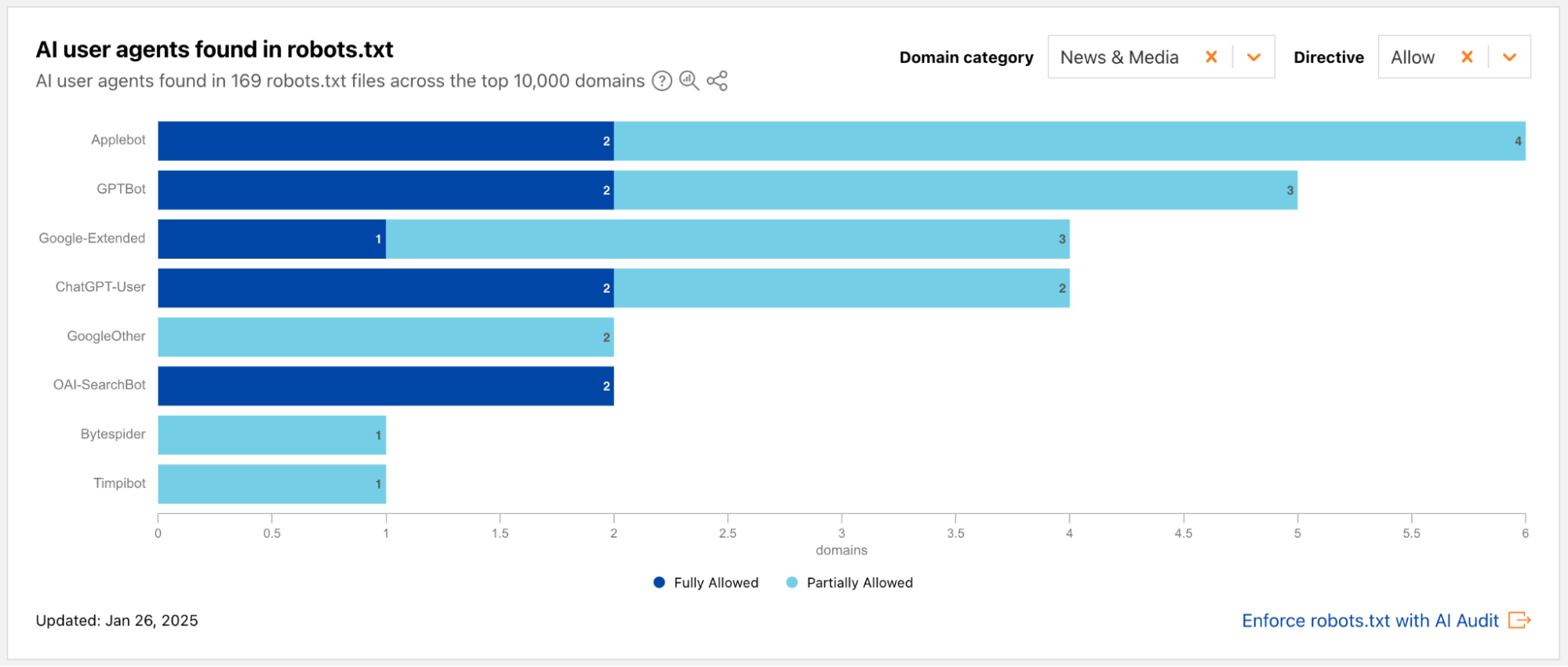
Although GPTBot was the most blocked, it was also the most explicitly allowed, with 61 domains granting access (18 fully, 43 partially). Still, very few sites openly and explicitly allow AI bots, and when they do, it’s usually for limited sections. Note that bots not listed in a site’s robots.txt are effectively allowed by default.
As AI crawling increases, more websites are moving from passive signals like robots.txt to active protections like Web Application Firewalls. The ecosystem is shifting, with a growing focus on enforceable controls.
Note: When we analyze crawler traffic, we compare user-agent tokens found in robots.txt files (like those for AI crawlers) with the actual user-agent strings in HTTP requests. It’s important to note that some robots.txt tokens, such as Google-Extended, aren’t user-agent substrings. As described in RFC 9309, one goal of these token may be to signal the purpose of the crawler. For instance, Google uses Google-Extended in robots.txt to see if your content can be used for AI training, but the traffic itself still comes from standard Google user-agents like Googlebot. Because of this, not every robots.txt entry will have a direct match in HTTP request logs.
Conclusion
As AI crawlers reshape the Internet, websites face both new challenges and new opportunities in managing their online presence.
This analysis highlights the growing impact of AI on web crawling, showing a clear shift from traditional search indexing to data collection for training AI models. The detailed statistics, such as Googlebot’s continued growth and the rapid rise of AI-specific crawlers, offer context for understanding how this space is evolving and what it means for the future of web content access.
The trend toward stronger, enforceable blocking methods, something Cloudflare has also been invested, signals a key shift in how websites may control their interactions with AI systems going forward.
Many publishers, content creators and website owners currently feel like they have a binary choice — either leave the front door wide open for AI to consume everything they create, or create their own walled garden. But what if there was another way?
At Cloudflare, we started from a simple principle: we wanted content creators to have control over who accesses their work. If a creator wants to block all AI crawlers from their content, they should be able to do so. If a creator wants to allow some or all AI crawlers full access to their content for free, they should be able to do that, too. Creators should be in the driver’s seat.
After hundreds of conversations with news organizations, publishers, and large-scale social media platforms, we heard a consistent desire for a third path: They’d like to allow AI crawlers to access their content, but they’d like to get compensated. Currently, that requires knowing the right individual and striking a one-off deal, which is an insurmountable challenge if you don’t have scale and leverage.
What if I could charge a crawler?
We believe your choice need not be binary — there should be a third, more nuanced option: You can charge for access. Instead of a blanket block or uncompensated open access, we want to empower content owners to monetize their content at Internet scale.
We’re excited to help dust off a mostly forgotten piece of the web: HTTP response code 402.
Introducing pay per crawl
Pay per crawl, in private beta, is our first experiment in this area.
Pay per crawl integrates with existing web infrastructure, leveraging HTTP status codes and established authentication mechanisms to create a framework for paid content access.
Each time an AI crawler requests content, they either present payment intent via request headers for successful access (HTTP response code 200), or receive a 402 Payment Required response with pricing. Cloudflare acts as the Merchant of Record for pay per crawl and also provides the underlying technical infrastructure.
Publisher controls and pricing
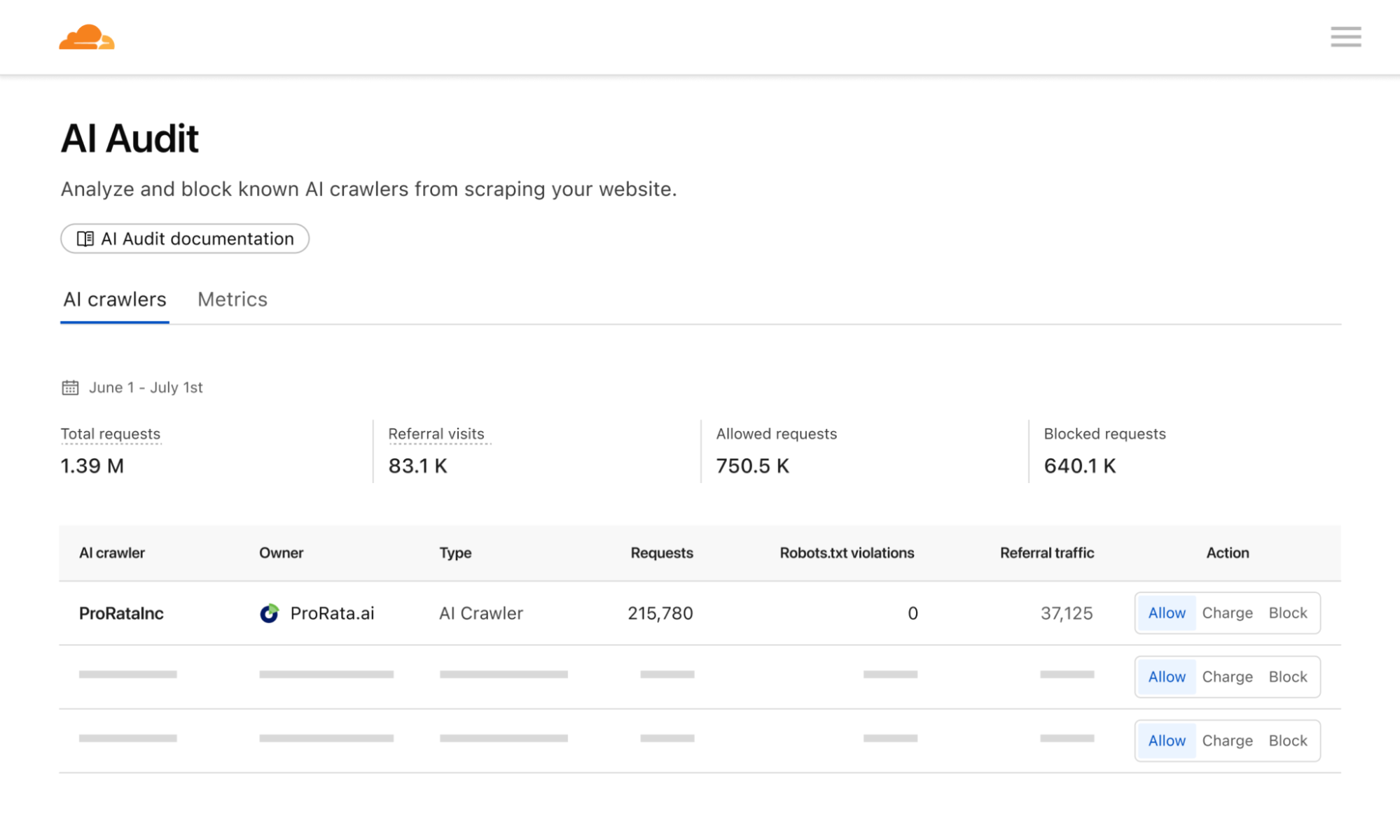
Pay per crawl grants domain owners full control over their monetization strategy. They can define a flat, per-request price across their entire site. Publishers will then have three distinct options for a crawler:
Allow: Grant the crawler free access to content.
Charge: Require payment at the configured, domain-wide price.
Block: Deny access entirely, with no option to pay.
An important mechanism here is that even if a crawler doesn’t have a billing relationship with Cloudflare, and thus couldn’t be charged for access, a publisher can still choose to ‘charge’ them. This is the functional equivalent of a network level block (an HTTP 403 Forbidden response where no content is returned) — but with the added benefit of telling the crawler there could be a relationship in the future.
While publishers currently can define a flat price across their entire site, they retain the flexibility to bypass charges for specific crawlers as needed. This is particularly helpful if you want to allow a certain crawler through for free, or if you want to negotiate and execute a content partnership outside the pay per crawl feature.
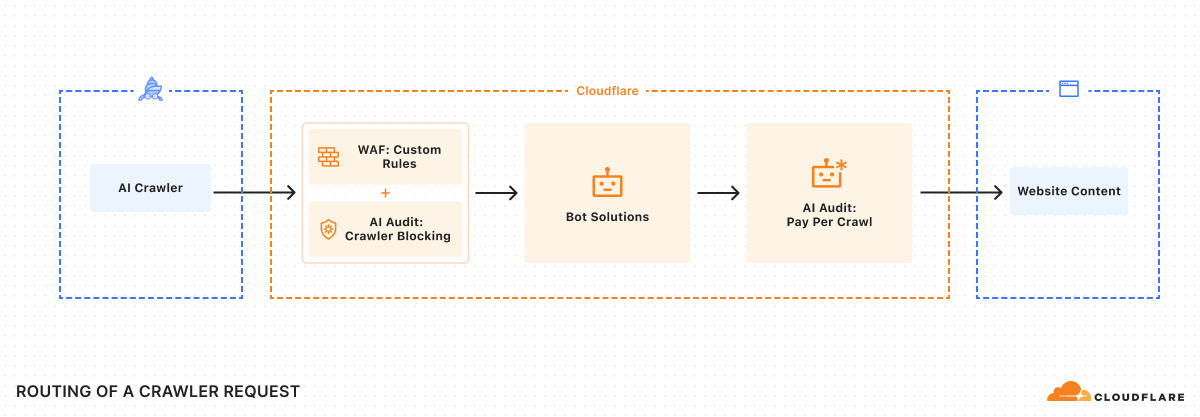
To ensure integration with each publisher’s existing security posture, Cloudflare enforces Allow or Charge decisions via a rules engine that operates only after existing WAF policies and bot management or bot blocking features have been applied.
Payment headers and access
As we were building the system, we knew we had to solve an incredibly important technical challenge: ensuring we could charge a specific crawler, but prevent anyone from spoofing that crawler. Thankfully, there’s a way to do this using Web Bot Auth proposals.
Once registration is accepted, crawler requests should always include signature-agent, signature-input, and signature headers to identify your crawler and discover paid resources.
Once a crawler is set up, determination of whether content requires payment can happen via two flows:
Reactive (discovery-first)
Should a crawler request a paid URL, Cloudflare returns an HTTP 402 Payment Required response, accompanied by a crawler-price header. This signals that payment is required for the requested resource.
The crawler can then decide to retry the request, this time including a crawler-exact-price header to indicate agreement to pay the configured price.
GET /example.html
crawler-exact-price: USD XX.XX
Proactive (intent-first)
Alternatively, a crawler can preemptively include a crawler-max-price header in its initial request.
GET /example.html
crawler-max-price: USD XX.XX
If the price configured for a resource is equal to or below this specified limit, the request proceeds, and the content is served with a successful HTTP 200 OK response, confirming the charge:
HTTP 200 OK
crawler-charged: USD XX.XX
server: cloudflare
If the amount in a crawler-max-price request is greater than the content owner’s configured price, only the configured price is charged. However, if the resource’s configured price exceeds the maximum price offered by the crawler, an HTTP402 Payment Required response is returned, indicating the specified cost. Only a single price declaration header, crawler-exact-price or crawler-max-price, may be used per request.
The crawler-exact-price or crawler-max-price headers explicitly declare the crawler’s willingness to pay. If all checks pass, the content is served, and the crawl event is logged. If any aspect of the request is invalid, the edge returns an HTTP 402 Payment Required response.
Financial settlement
Crawler operators and content owners must configure pay per crawl payment details in their Cloudflare account. Billing events are recorded each time a crawler makes an authenticated request with payment intent and receives an HTTP 200-level response with a crawler-charged header. Cloudflare then aggregates all the events, charges the crawler, and distributes the earnings to the publisher.
Content for crawlers today, agents tomorrow
At its core, pay per crawl begins a technical shift in how content is controlled online. By providing creators with a robust, programmatic mechanism for valuing and controlling their digital assets, we empower them to continue creating the rich, diverse content that makes the Internet invaluable.
We expect pay per crawl to evolve significantly. It’s very early: we believe many different types of interactions and marketplaces can and should develop simultaneously. We are excited to support these various efforts and open standards.
For example, a publisher or new organization might want to charge different rates for different paths or content types. How do you introduce dynamic pricing based not only upon demand, but also how many users your AI application has? How do you introduce granular licenses at internet scale, whether for training, inference, search, or something entirely new?
The true potential of pay per crawl may emerge in an agentic world. What if an agentic paywall could operate entirely programmatically? Imagine asking your favorite deep research program to help you synthesize the latest cancer research or a legal brief, or just help you find the best restaurant in Soho — and then giving that agent a budget to spend to acquire the best and most relevant content. By anchoring our first solution on HTTP response code 402, we enable a future where intelligent agents can programmatically negotiate access to digital resources.
Getting started
Pay per crawl is currently in private beta. We’d love to hear from you if you’re either a crawler interested in paying to access content or a content creator interested in charging for access. You can reach out to us at http://www.cloudflare.com/paypercrawl-signup/ or contact your Account Executive if you’re an existing Enterprise customer.
Cloudflare is giving all website owners two new tools to easily control whether AI bots are allowed to access their content for model training. First, customers can let Cloudflare create and manage a robots.txt file, creating the appropriate entries to let crawlers know not to access their site for AI training. Second, all customers can choose a new option to block AI bots only on portions of their site that are monetized through ads.
The new generation of AI crawlers
Creators that monetize their content by showing ads depend on traffic volume. Their livelihood is directly linked to the number of views their content receives. These creators have allowed crawlers on their sites for decades, for a simple reason: search crawlers such as Googlebot made their sites more discoverable, and drove more traffic to their content. Google benefitted from delivering better search results to their customers, and the site owners also benefitted through increased views, and therefore increased revenues.
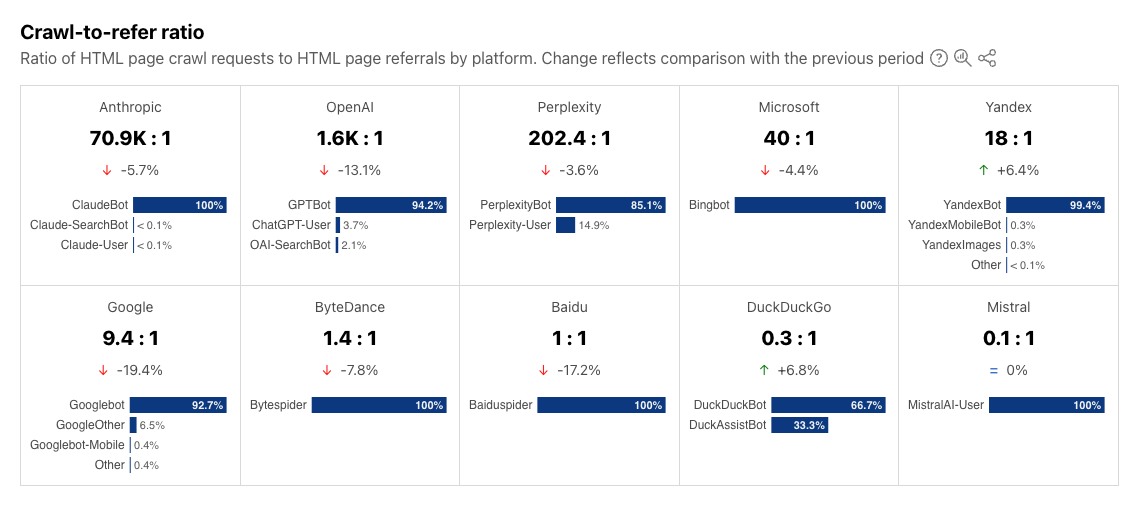
But recently, a new generation of crawlers has appeared: bots that crawl sites to gather data for training AI models. While these crawlers operate in the same technical way as search crawlers, the relationship is no longer symbiotic. AI training crawlers use the data they ingest from content sites to answer questions for their own customers directly, within their own apps. They typically send much less traffic back to the site they crawled. Our Radar team did an analysis of crawls and referrals for sites behind Cloudflare. As HTML pages are arguably the most valuable content for these crawlers, we calculated crawl ratios by dividing the total number of requests from relevant user agents associated with a given search or AI platform where the response was of Content-type: text/html by the total number of requests for HTML content where the Referer: header contained a hostname associated with a given search or AI platform. As of June 2025, we find that Google crawls websites about 14 times for every referral. But for AI companies, the crawl-to-refer ratio is orders of magnitude greater. In June 2025, OpenAI’s crawl-to-referral ratio was 1,700:1, Anthropic’s 73,000:1. This clearly breaks the “crawl in exchange for traffic” relationship that previously existed between search crawlers and publishers. (Please note that this calculation reflects our best estimate, recognizing that traffic referred by native apps may not always be attributed to a provider due to a lack of a Referer: header, which may affect the ratio.)
And while sites can use robots.txt to tell these bots not to crawl their site, most don’t take this first step. We found that only about 37% of the top 10,000 domains currently have a robots.txt file, showing that robots.txt is underutilized in this age of evolving crawlers.
That’s where Cloudflare comes in. Our mission is to help build a better Internet, and a better Internet is one with a huge thriving ecosystem of independent publishers. So, we’re taking action to keep that ecosystem alive.
Giving ALL customers full control
Protecting content creators isn’t new for Cloudflare. In July 2024, we gave everyone on the Cloudflare network a simple way to block all AI scrapers with a single click for free. We’ve already seen more than 1 million customers enable this feature, which has given us some interesting data.
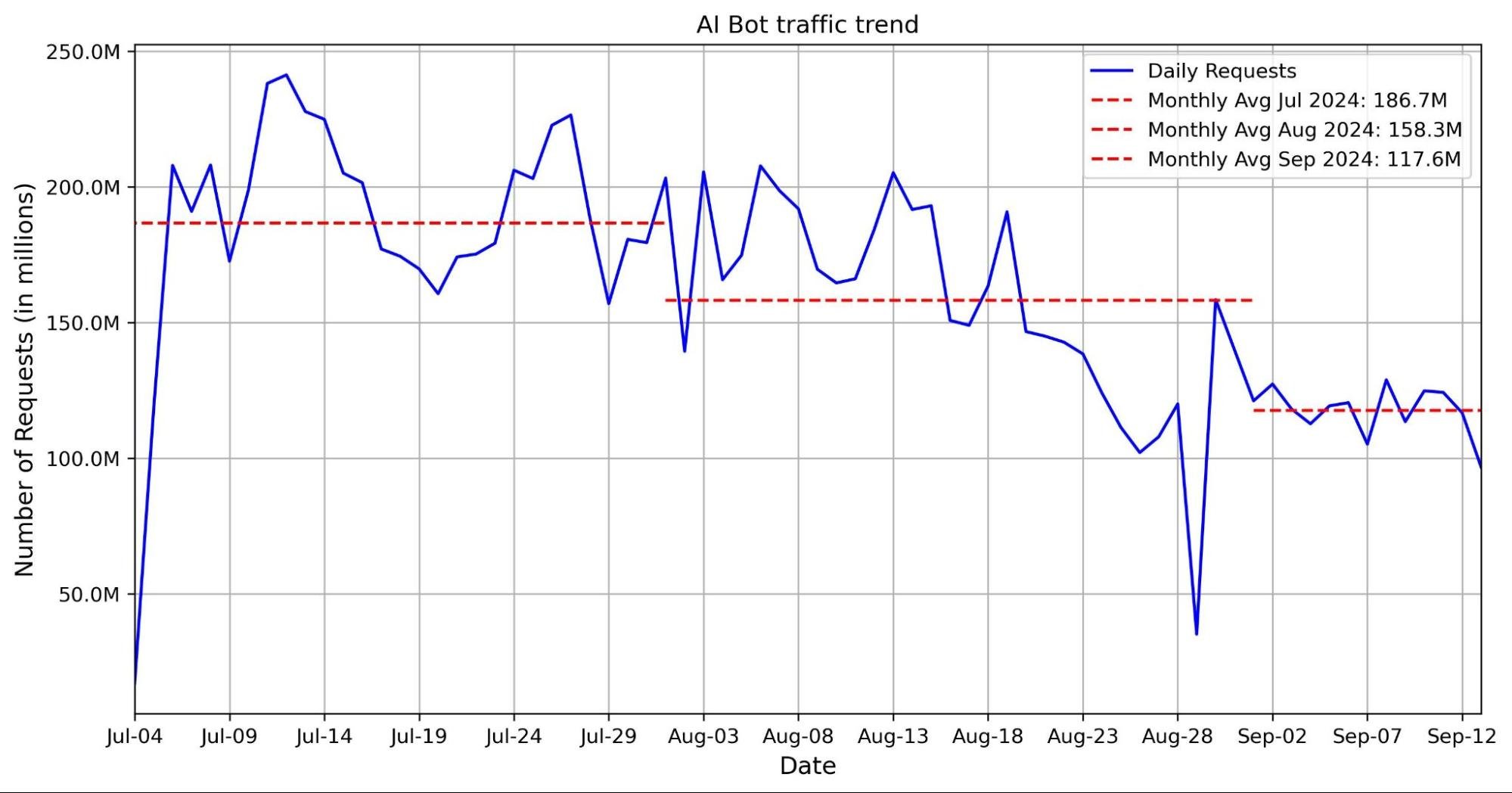
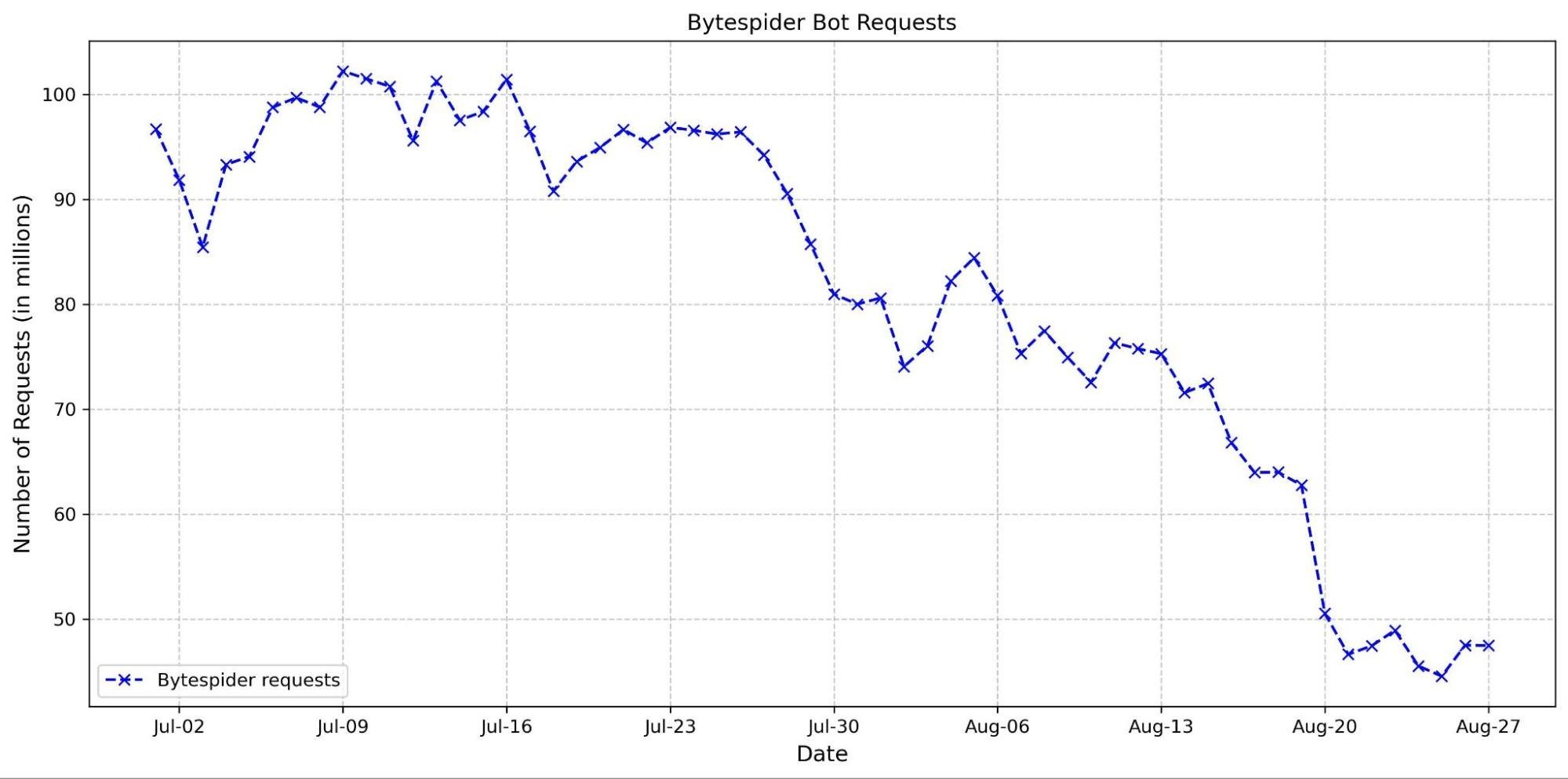
Since our last update, we can see that Bytespider, our previous top bot, has seen traffic volume decline 71.45% since the first week of July 2024. During the same time, we saw an increased number of Bytespider requests that customers chose to specifically block. In contrast, GPTBot traffic volume has grown significantly as it has become more popular, now even surpassing traffic we see from big traditional tech players like Amazon and ByteDance.
The share of sites accessed by particular crawlers has gone down across the board since our last update. Previously, Bytespider accessed >40% of websites protected by Cloudflare, but that number has dropped to only 9.37%. GPTBot has taken the top spot for most sites accessed, but while its request volume has grown significantly (noted above), the share of sites it crawls has actually decreased since last year from 35.46% to 28.97%, with an increase in customers blocking.
AI Bot
Share of Websites Accessed
GPTBot
28.97%
Meta-ExternalAgent
22.16%
ClaudeBot
18.80%
Amazonbot
14.56%
Bytespider
9.37%
GoogleOther
9.31%
ImageSiftBot
4.45%
Applebot
3.77%
OAI-SearchBot
1.66%
ChatGPT-User
1.06%
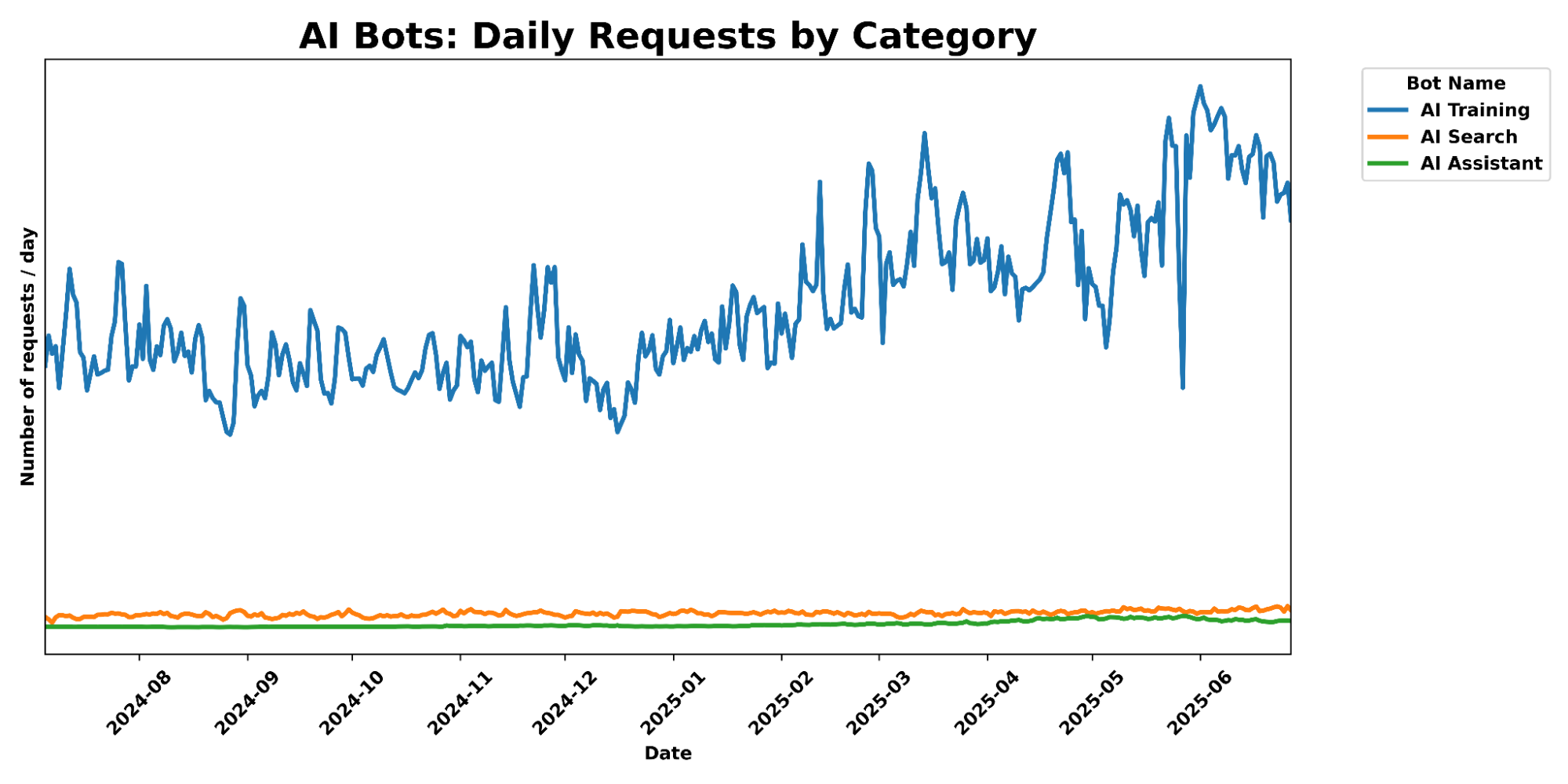
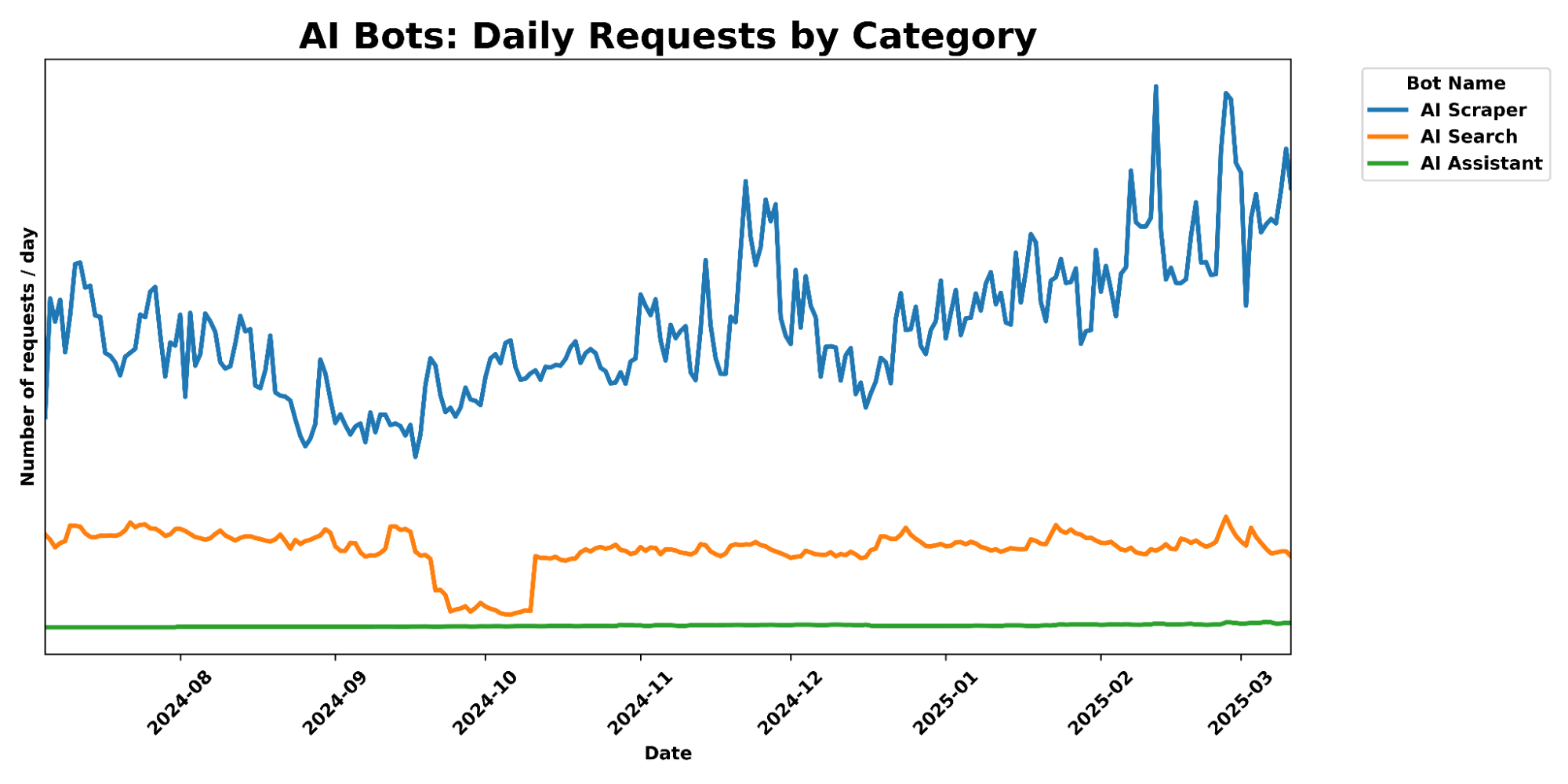
And while AI Search and AI Assistant crawling related activity has exploded in popularity in the last 6 months, we still see their total traffic pale in comparison to AI training crawl activity, which has seen a 65% increase in traffic over the past 6 months.
To this end, we launched free granular auditing in September 2024 to help customers understand which crawlers were accessing their content most often, and created simple templates to block all or specific crawlers. And in December 2024, we made it easy for publishers to automatically block crawlers that weren’t respecting robots.txt. But we realized many sites didn’t have the time to create or manage their own robots.txt file. Today, we’re going two steps further.
Step 1: fully managed robots.txt
When it comes to managing your website’s visibility to search engine crawlers and other bots, the robots.txt file is a key player. This simple text file acts like a traffic controller, signaling to bots which parts of the website they should or should not access. We can think of robots.txt as a “Code of Conduct” sign posted at a community pool, listing general dos and don’ts, according to the pool owner’s wishes. While the sign itself does not enforce the listed directives, well-behaved visitors will still read the sign and follow the instructions they see. On the other hand, poorly-behaved visitors who break the rules risk getting themselves banned.
What do these files actually look like? Take Google’s as an example, visible to anyone at https://www.google.com/robots.txt. Parsing its contents, you’ll notice four directives in the set of instructions: User-agent, Disallow, Allow, and Sitemap. In a robots.txt file, the User-agent directive specifies which bots the rules apply to. The Disallow directive tells those bots which parts of the website they should avoid. In contrast, the Allow directive grants specific bots permission to access certain areas. Finally, theSitemap directive shows a bot which pages it can reach, so that it won’t miss any important pages. The Internet Engineering Task Force (IETF) formalized the definition and language for the Robots Exclusion Protocol in RFC 9309, specifying the exact syntax and precedence of these directives. It also outlines how crawlers should handle errors or redirects while stressing that compliance is voluntary and does not constitute access control.
Website owners should have agency over AI bot activity on their websites. We mentioned that only 37% of the top 10,000 domains on Cloudflare even have a robots.txt file. Of those robots files that do exist, few include Disallow directives for the top AI Bots that we see on a daily basis. For instance, as of publication, GPTBot is only disallowed in 7.8% of the robots.txt files found for the top domains; Google-Extended only shows up in 5.6%; anthropic-ai, PerplexityBot, ClaudeBot, and Bytespider each show up in under 5%. Furthermore, the difference between the 7.8% of Disallow directives for GPTBot and the ~5% of Disallow directives for other major AI crawlers suggests a gap between the desire to prevent your content from being used for AI model training and the proper configuration that accomplishes this by calling out bots like Google-Extended. (After all, there’s more to stopping AI crawlers than disallowing GPTBot.)
Along with viewing the most active bots and crawlers, Cloudflare Radar also shares weekly updates on how websites are handling AI bots in their robots.txt files. We can examine two snapshots below, one from June 2025 and the other from January 2025:
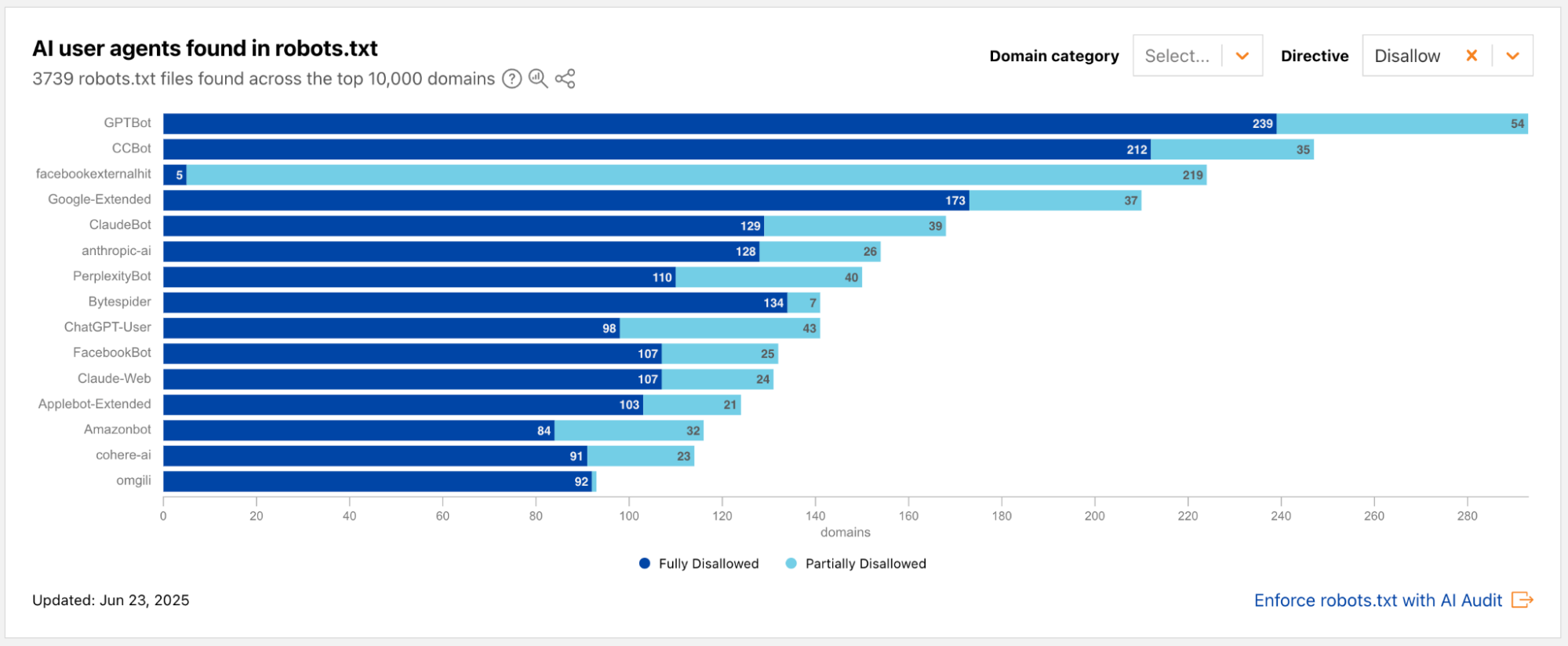
Radar snapshot from the week of June 23, 2025, showing the top AI user agents mentioned in the Disallow directive in robots.txt files across the top 10,000 domains. The 3 bots with the highest number of Disallows are GPTBot, CCBot, and facebookexternalhit.
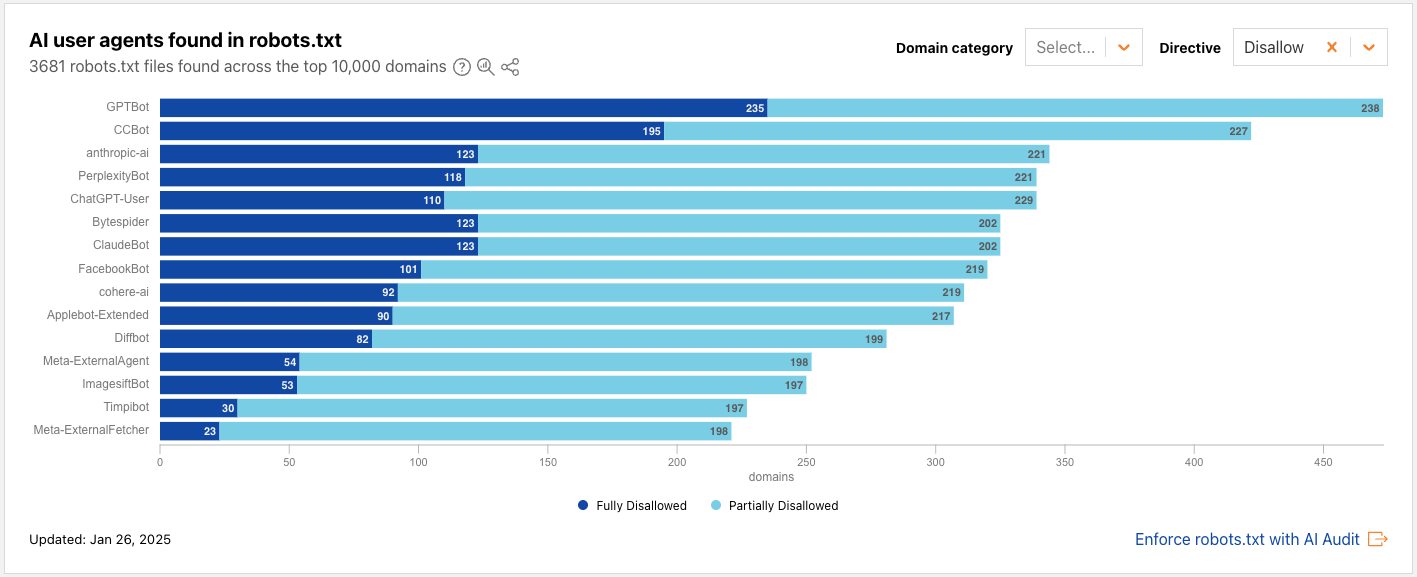
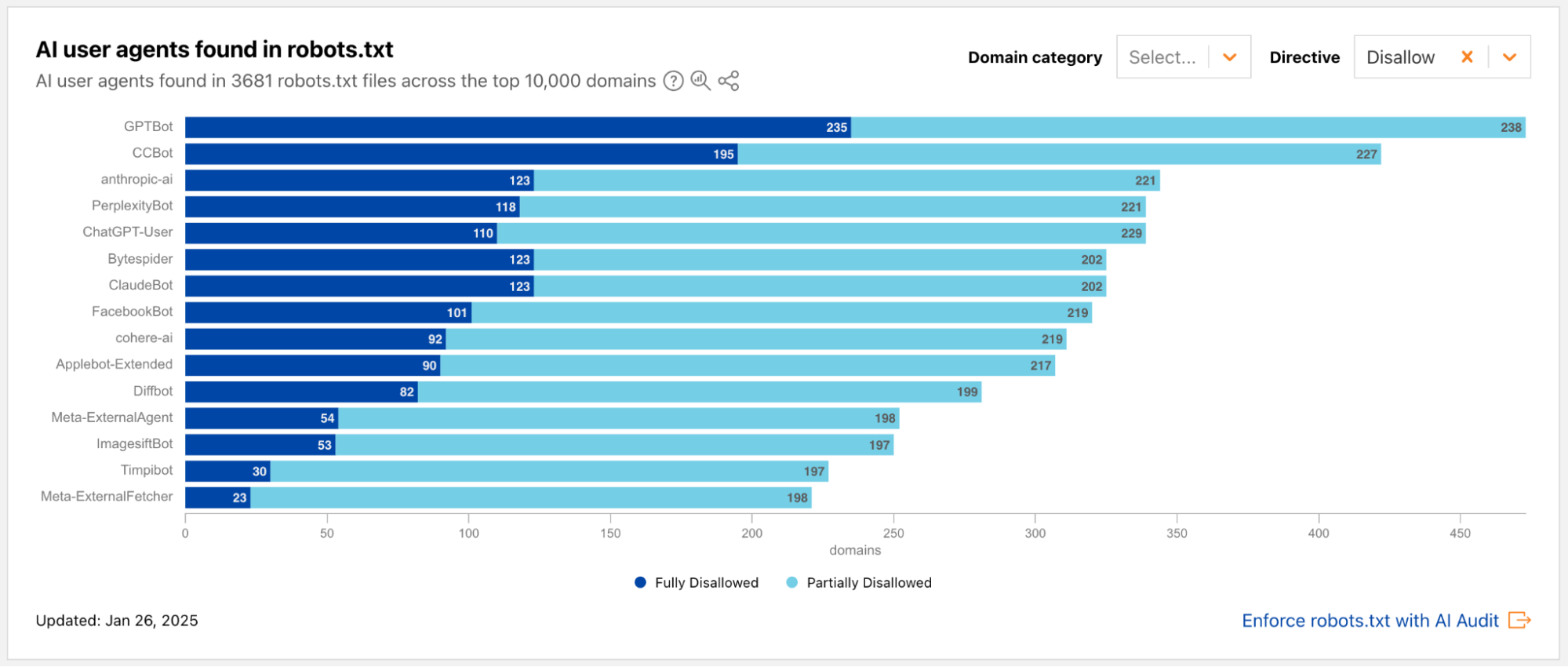
Radar snapshot from the week of January 26, 2025, showing the top AI user agents mentioned in the Disallow directive in robots.txt files across the top 10,000 domains. The 3 bots with the highest number of Disallows are GPTBot, CCBot, and anthropic-ai.
From the above data, we also observe that fewer than 100 new robots.txt files have been added among the top domains between January and June. One visually striking change is the ratio of dark blue to light blue: compared to January, there is a steep decrease in “Partially Disallowed” permissions; websites are now flat-out choosing “Fully Disallowed” for the top AI crawlers, including GPTBot, CCBot, and Google-Extended. This underscores the changing landscape of web crawling, particularly the relationship of trust between website owners and AI crawlers.
Putting up a guardrail with Cloudflare’s managed robots.txt
Many website owners have told us they’re in a tricky spot in this new era of AI crawlers. They’ve poured time and effort into creating original content, have published it on their own sites, and naturally want it to reach as many people as possible. To do that, website owners make their sites accessible to search engine crawlers, which index the content and make it discoverable in search results. But with the rise of AI-powered crawlers, that same content is now being scraped not just for indexing, but also to train AI models, often without the creator’s explicit consent. Take Googlebot, for example: it’s an absolute requirement for most website owners to allow for SEO. But Google crawls with user agent Googlebot for both SEO and AI training purposes. Specifically disallowing Google-Extended (but not Googlebot) in your robots.txt file is what communicates to Google that you do not want your content to be crawled to feed AI training.
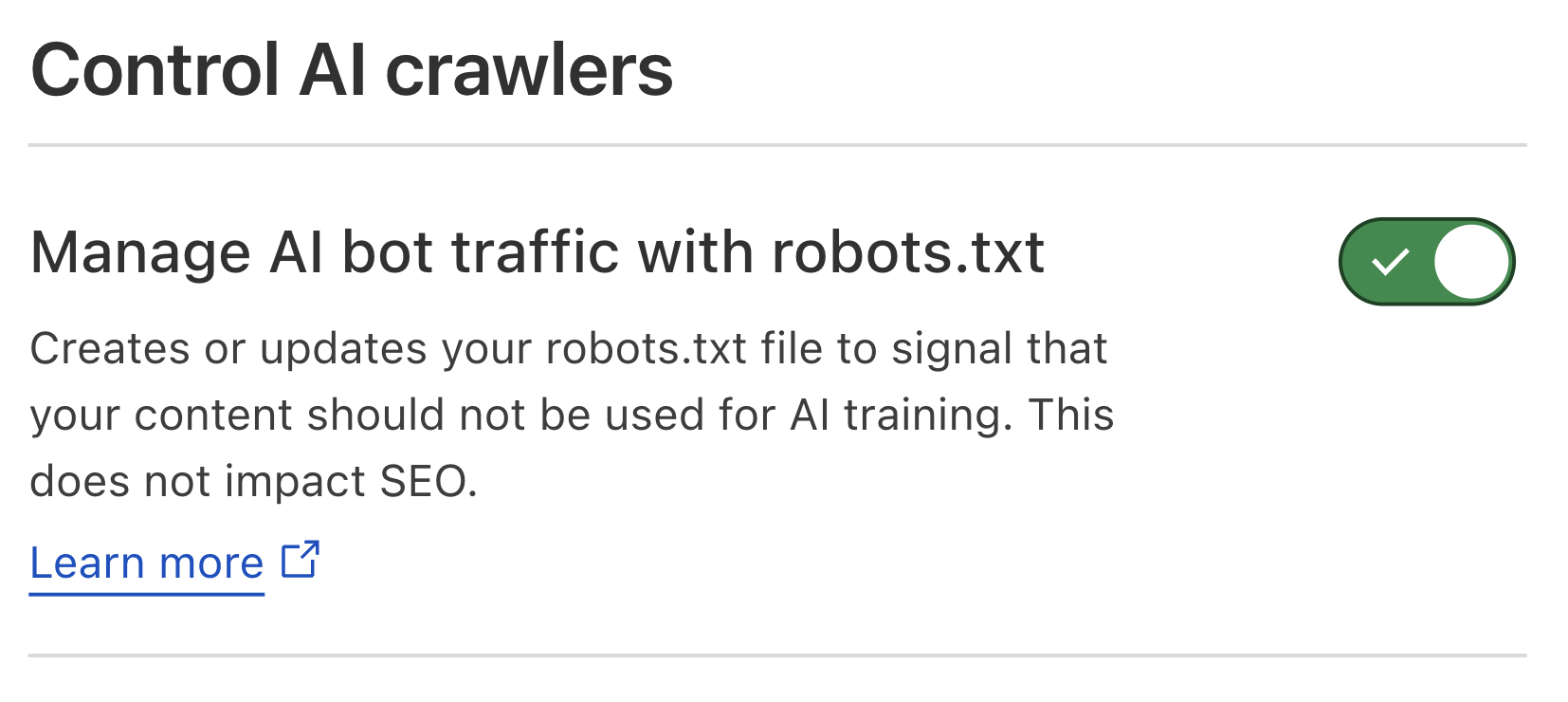
So, what if you don’t want your content to serve as training data for the next AI model, but don’t have the time to manually maintain an up-to-date robots.txt file? Enter Cloudflare’s new managed robots.txt offering. Once enabled, Cloudflare will automatically update your existing robots.txt or create a robots.txt file on your site that includes directives asking popular AI bot operators to not use your content for AI model training. For instance, Cloudflare’s managed robots.txt signals your preference to Google-Extended and Applebot-Extended, amongst others, that they should not crawl your site for AI training, while keeping your domain(s) SEO-friendly.
Cloudflare dashboard snapshot of the new managed robots.txt activation toggle
This feature is available to all customers, meaning anyone can enable this today from the Cloudflare dashboard. Once enabled, website owners who previously had no robots.txt file will now have Cloudflare’s managed bot directives live on their website. What about website owners who already have a robots.txt file? The contents of Cloudflare’s managed robots.txt will be prepended to site owners’ existing file. This way, their existing Block directives – and the time and rationale put into customizing this file – are honored, while still ensuring the website has AI crawler guardrails managed by Cloudflare.
As the AI bot landscape changes with new bots on the rise, Cloudflare will keep our customers a step ahead by updating the directives on our managed robots.txt, so they don’t have to worry about maintaining things on their own. Once enabled, customers won’t need to take any action in order for any updates of the managed robots.txt content to go live on their site.
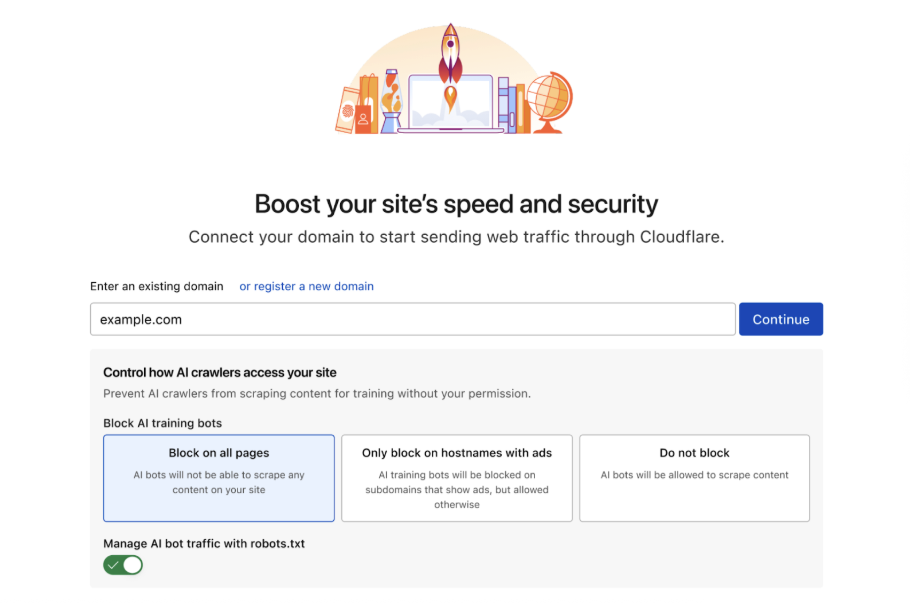
We believe that managing crawling is key to protecting the open Internet, so we’ll also be encouraging every new site that onboards to Cloudflare to enable our managed robots.txt. When you onboard a new site, you’ll see the following options for managing AI crawlers:
This makes it effortless to ensure that every new customer or domain onboarded to Cloudflare gives clear directives to how they want their content used.
Under the hood: technical implementation
To implement this feature, we developed a new module that intercepts all inbound HTTP requests for /robots.txt. For all such requests, we’ll check whether the zone has opted in to use Cloudflare’s managed robots.txt by reading a value from our distributed key-value store. If they have, the module then responds with the Cloudflare’s managed robots.txt directives, prepended to the origin’s robot.txt if there is an existing file. We prepend so we can add a generalized header that instructs all bots on the customers preferences for data use, as defined in the IETF AI preferences proposal. Note that in robots.txt, the most specific matchmust always be used, and since our disallow expressions are scoped to cover everything, we can ensure a directive we prepend will never conflict with a more targeted customer directive. If the customer has not enabled this feature, the request is forwarded to the origin server as usual, using whatever the customer has written in their own robots.txt file. (While caching origin’s robots.txt could reduce latency by eliminating a round trip to the origin, the impact on overall page load times would be minimal, as robots.txt requests comprise a small fraction of total traffic. Adding cache update/invalidation would introduce complexity with limited benefit, so we prioritized functionality and reliability in our implementation.)
Step 2: block, but only where you show ads
Adding an entry to your robots.txt file is the first step to telling AI bots not to crawl you. But robots.txt is an honor system. Nothing forces bots to follow it. That’s why we introduced our one-click managed rule to block all AI bots across your zone. However, some customers want AI bots to visit certain pages, like developer or support documentation. For customers who are hesitant to block everywhere, we have a brand-new option: let us detect when ads are shown on a hostname, and we will block AI bots ONLY on that hostname. Here’s how we do it.
First, we use multiple techniques to identify if a request is coming from an AI bot. The easiest technique is to identify well-behaved crawlers that publicly declare their user agent, and use dedicated IP ranges. Often we work directly with these bot makers to add them to our Verified Bot list.
Many bot operators act in good faith by publicly publishing their user agents, or even cryptographically verifying their bot requests directly with Cloudflare. Unfortunately, some attempt to appear like a real browser by using a spoofed user agent. It’s not new for our global machine learning models to recognize this activity as a bot, even when operators lie about their user agent. When bad actors attempt to crawl websites at scale, they generally use tools and frameworks that we’re able to fingerprint, and we use Cloudflare’s network of over 57 million requests per second on average, to understand how much we should trust the fingerprint. We compute global aggregates across many signals, and based on these signals, our models are able to consistently and appropriately flag traffic from evasive AI bots.
When we see a request from an AI bot, our system checks if we have previously identified ads in the response served by the target page. To do this, we inspect the “response body” — the raw HTML code of the web page being sent back. After parsing the HTML document, we perform a comprehensive scan for code patterns commonly found in ad units, which signals to us that the page is serving an ad. Examples of such code would be:
Here, the div-container has the ui-advert class commonly used for advertising. Similarly, links to commonly used ad servers like Google Syndication are a good signal as well, such as the following:
By streaming and directly parsing small chunks of the response using our ultra-fast LOL HTML parser, we can perform scans without adding any latency to the inspected response.
So as not to reinvent the wheel, we are adopting techniques similar to those that ad blockers have been using for years. Ad blockers fundamentally perform two separate tasks to block advertisements in a browser. The first is to block the browser from fetching resources from ad servers, and the second is to suppress displaying HTML elements that contain ads. For this, ad blockers rely on large filter lists such as EasyList that contain both so-called URL block filters that match outgoing request URLs against a set of patterns, and block them if they match one of the filters, and CSS selectors that are designed to match HTML ad elements.
We can use both of these techniques to detect if an HTML response contains ads by checking external resources (e.g. content referenced by HREF or SCRIPT tags) against URL block filters, and the HTML elements themselves against CSS selectors. Because we do not actually need to block every single advertisement on a site, but rather detect the overall presence of ads on a site, we can achieve the same detection efficacy when shrinking the number of CSS and URL filters down from more than 40,000 in EasyList to the 400 most commonly seen ones to increase our computational efficiency.
Because some sites load ads dynamically rather than directly in the returned HTML (partially to avoid ad blocking), we enrich this first information source with data from Content Security Policy (CSP) reports. The Content Security Policy standard is a security mechanism that helps web developers control the resources (like scripts, stylesheets, and images) a browser is allowed to load for a specific web page, and browsers send reports about loaded resources to a CSP management system, which for many sites is Cloudflare’s Page Shield product. These reports allow us to relate scripts loaded from ad servers directly with page URLs. Both of these information sources are consumed by our endpoint management service, which then matches incoming requests against hostnames that we already know are serving ads.
We do all of this on every request for any customer who opts in, even free customers.
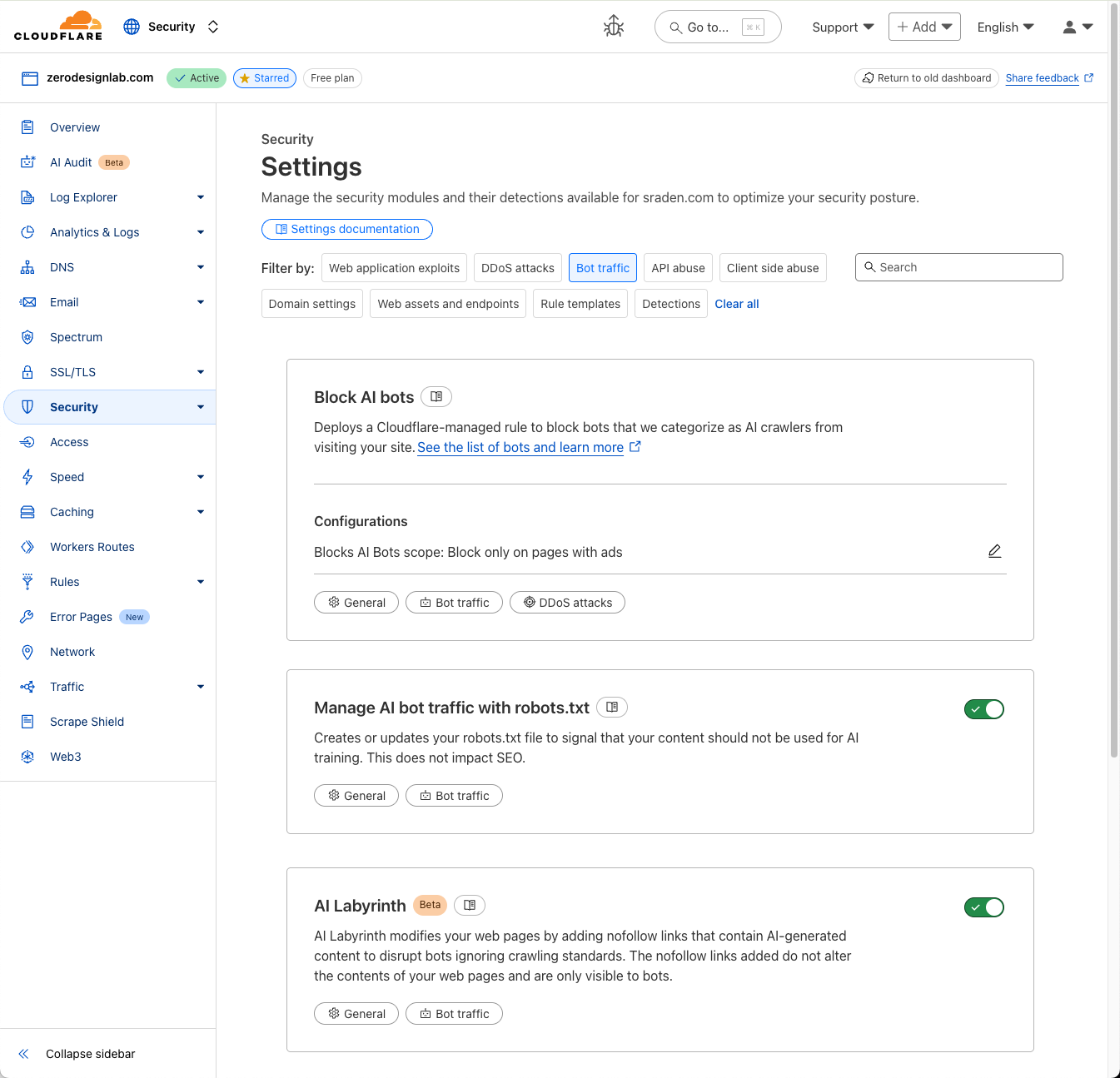
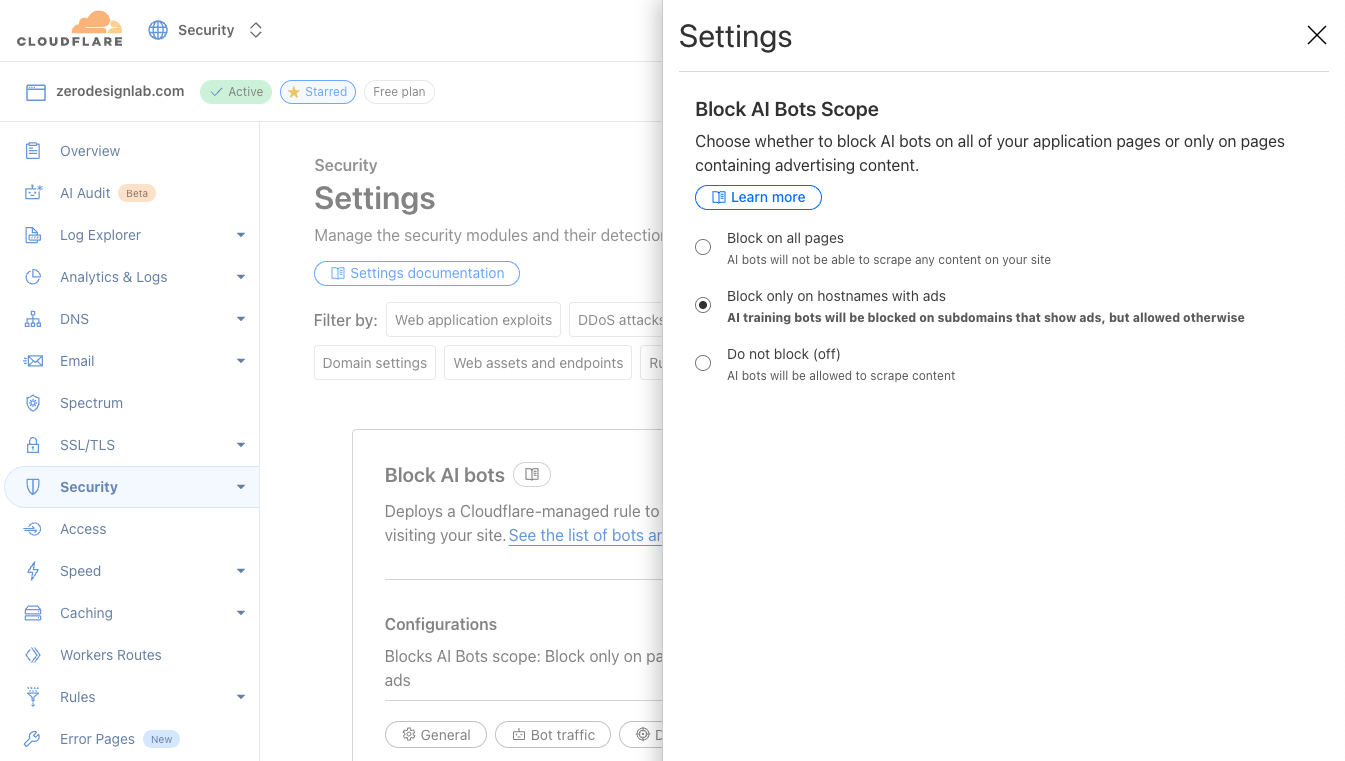
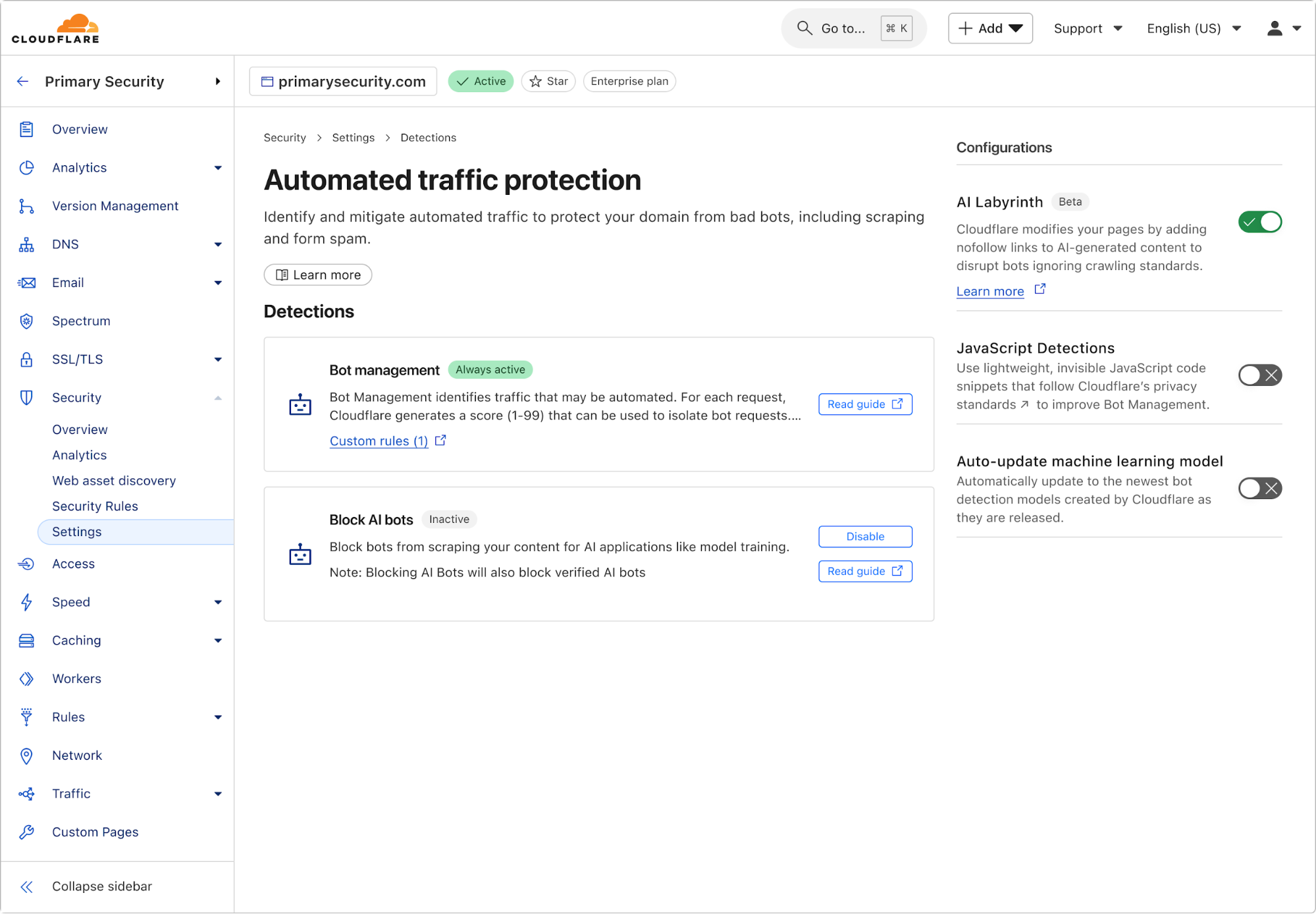
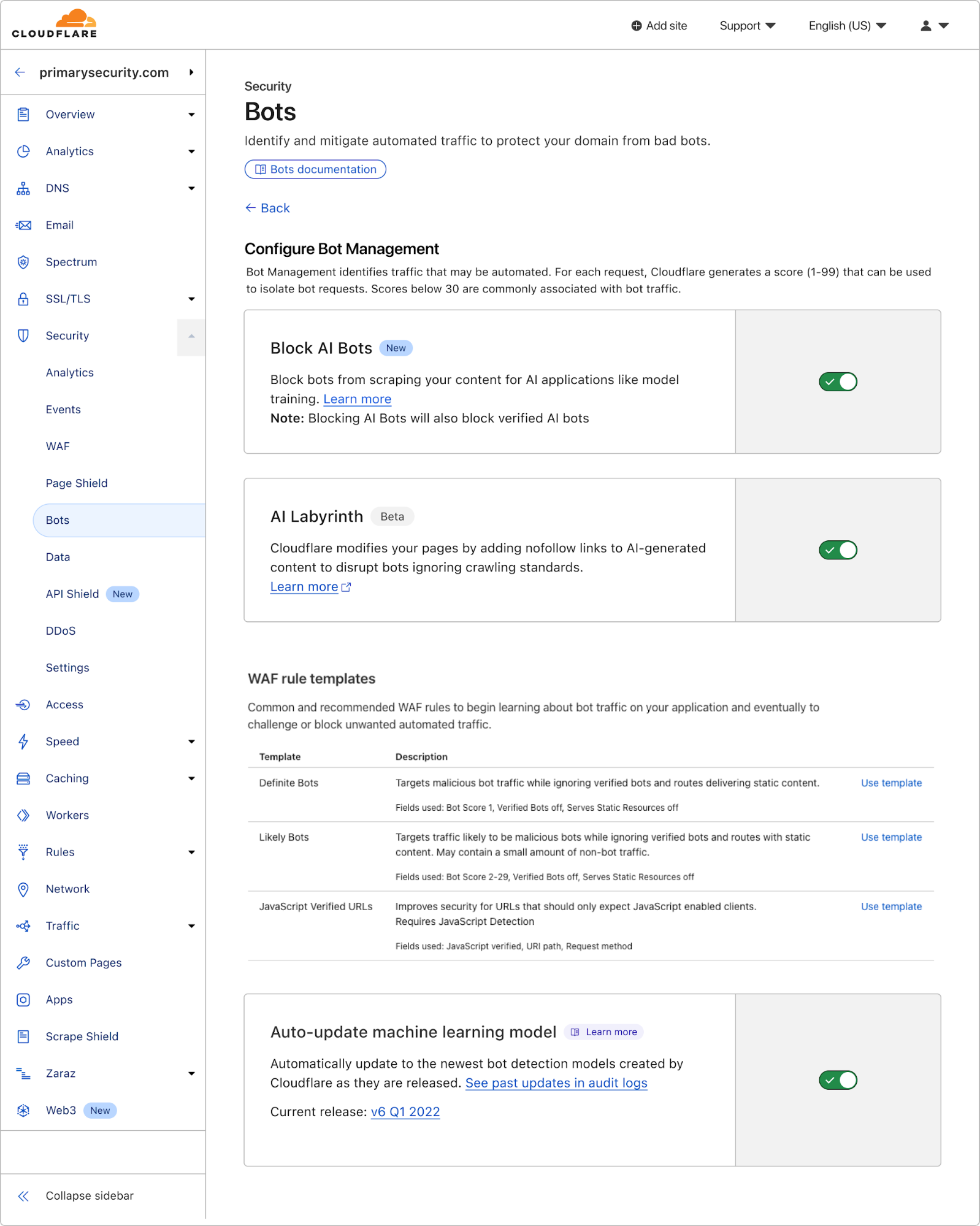
To enable this feature, simply navigate to the Security > Settings > Bots section of the Cloudflare dashboard, and choose either Block on pages with Ads or Block Everywhere.
The AI bot hunt: finding and identifying bots
The AI bot landscape has exploded and continues to grow with an exponential trajectory as more and more operators come online. At Cloudflare, our team of security researchers are constantly identifying and classifying different AI-related crawlers and scrapers across our network.
There are two major ways in which we track AI bots and identify those that are poorly behaved:
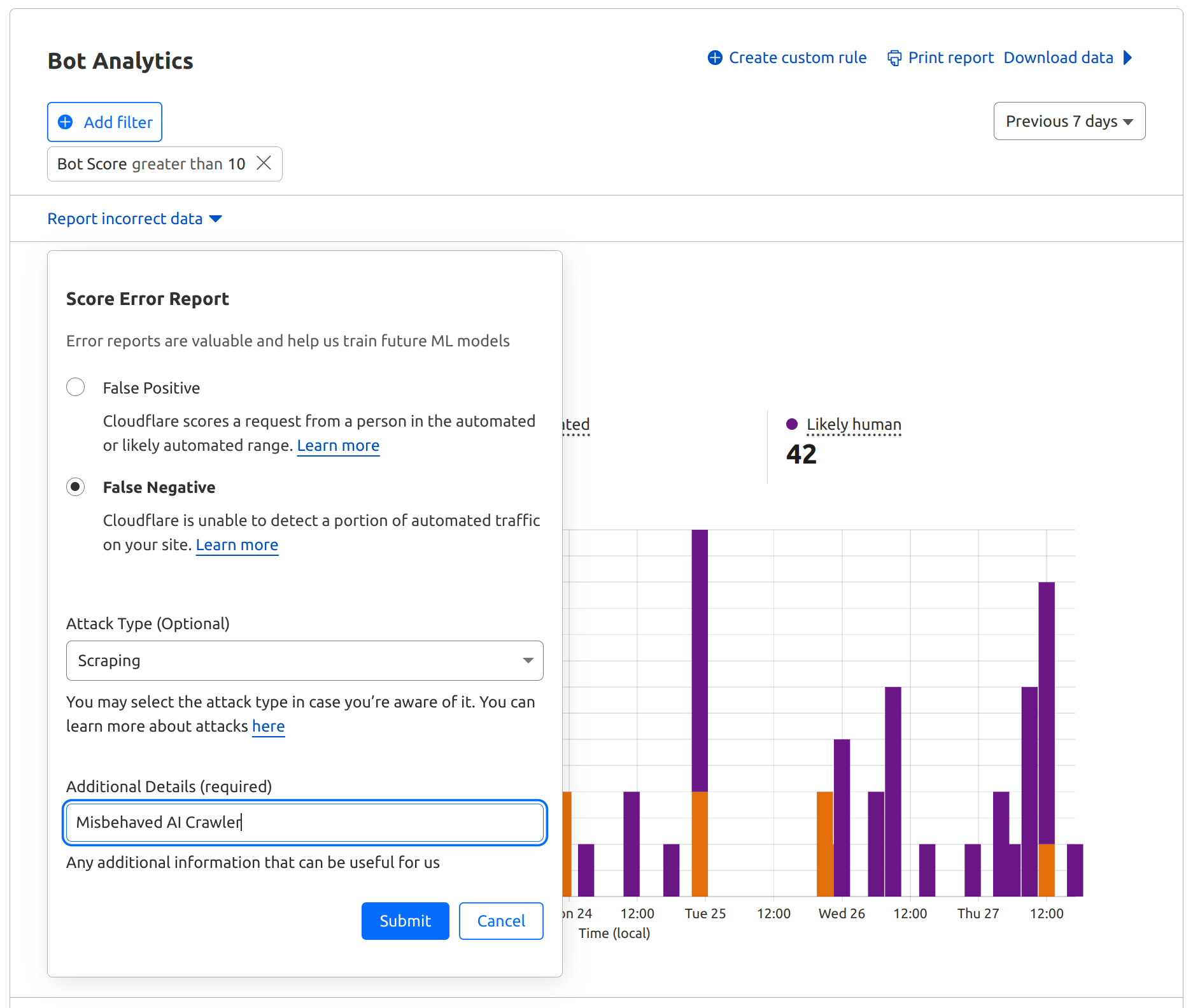
1. Our customers play a crucial role by directly submitting reports of misbehaved AI bots that may not yet be classified by Cloudflare. (If you have an AI bot that comes to mind here, we’d love for you to let us know through our bots submission form today.) Once such a bot comes to our attention, our security analysts investigate to determine how it should be categorized.
2. We’re able to derive insights through analysis of the massive scale of our customers’ traffic that we observe. Specifically, we can see which AI agents visit which websites and when, drawing out trends or patterns that might make a website owner want to disallow a given AI bot. This bird’s-eye view on abusive AI bot behavior was paramount as we started to determine the content of a managed robots.txt.
What’s next?
Our new managed robots.txt and blocking AI bots on pages with ads features are available to all Cloudflare customers, including everyone on a Free plan. We encourage customers to start using them today – to take control over how the content on your website gets used. Looking ahead, Cloudflare will monitor the IETF’s pending proposal allowing website publishers to control how automated systems use their content and update our managed robots.txt accordingly. We will also continue to provide more granular control around AI bot management and investigate new distinguishing signals as AI bots become more and more precise. And if you’ve seen suspicious behavior from an AI scraper, contribute to the Internet ecosystem by letting us know!
Content publishers welcomed crawlers and bots from search engines because they helped drive traffic to their sites. The crawlers would see what was published on the site and surface that material to users searching for it. Site owners could monetize their material because those users still needed to click through to the page to access anything beyond a short title.
Artificial Intelligence (AI) bots also crawl the content of a site, but with an entirely different delivery model. These Large Language Models (LLMs) do their best to read the web to train a system that can repackage that content for the user, without the user ever needing to visit the original publication.
The AI applications might still try to cite the content, but we’ve found that very few users actually click through relative to how often the AI bot scrapes a given website. We have discussed this challenge in smaller settings, and today we are excited to publish our findings as a new metric shown on the AI Insights page on Cloudflare Radar.
Visitors to Cloudflare Radar can now review how often a given AI model sends traffic to a site relative to how often it crawls that site. We are sharing this analysis with a broad audience so that site owners can have better information to help them make decisions about which AI bots to allow or block and so that users can understand how AI usage in aggregate impacts Internet traffic.
How does this measurement work?
As HTML pages are arguably the most valuable content for these crawlers, the ratios displayed are calculated by dividing the total number of requests from relevant user agents associated with a given search or AI platform where the response was of Content-type: text/html by the total number of requests for HTML content where the Referer header contained a hostname associated with a given search or AI platform.
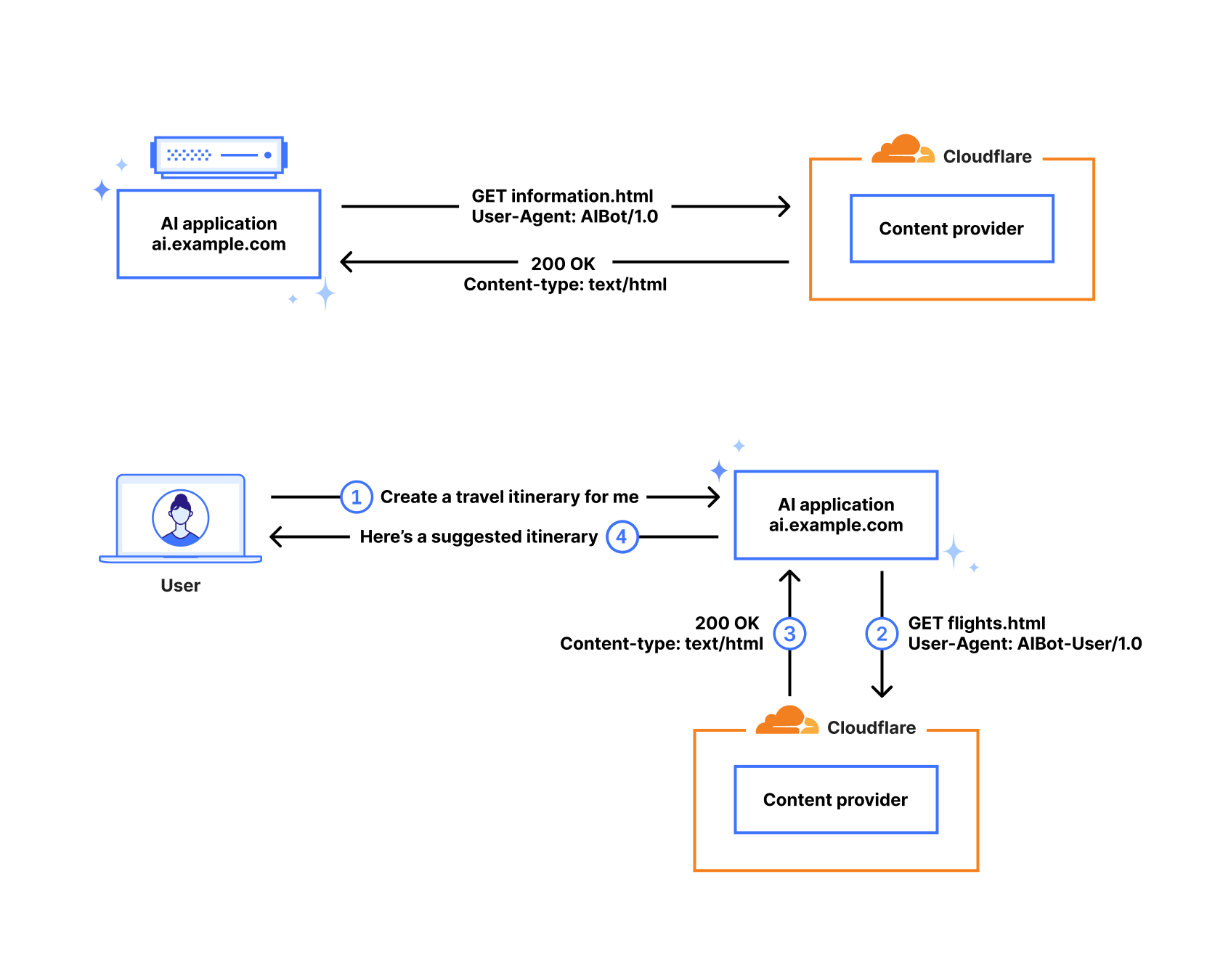
The diagrams below illustrate two common crawling scenarios, and show that companies may use different user agents depending on the purpose of the crawler. The top one represents a simple transaction where the example AI platform is requesting content for the purposes of training an LLM, representing itself as AIBot. The bottom one represents a scenario where the example AI platform is requesting content to service a user request — looking for flight information, for example. In this case, it is representing itself as AIBot-User. Request traffic from both of these user agents would be aggregated under a single platform name for the purposes of our analysis.
When a user clicks on a link on a website or application, the client will often send a Referer: header as part of the request to the target site. In the diagram below, the example AI platform has returned content that contains links to external sites in response to a user interaction. When the user clicks on a link, a request is made to the content provider that includes ai.example.com in the Referer: header, letting them know where that request traffic came from. Hostnames are associated with their respective platforms for the purpose of our analysis.
Observations
Reviewing the ratios
The new metric is presented as a simple table, comparing the number of aggregate HTML page requests from crawlers (user agents) associated with a given platform to the number of HTML page requests from clients referred by a hostname associated with a given platform. The calculated ratio is always normalized to a single referral request.
The table below shows that for the period June 19-26, 2025, as an example, the ratios range from Anthropic’s 70,900:1 down to Mistral’s 0.1:1. This means that Anthropic’s AI platform Claude made nearly 71,000 HTML page requests for every HTML page referral, while Mistral sent 10x as many referrals as crawl requests. (However, traffic referred by Claude’s native app does not include a Referer: header, and we believe that the same holds true for traffic generated from other native apps as well. As such, because the referral counts only include traffic from the Web-based tools from these providers, these calculations may overstate the respective ratios, but it is unclear by how much.)
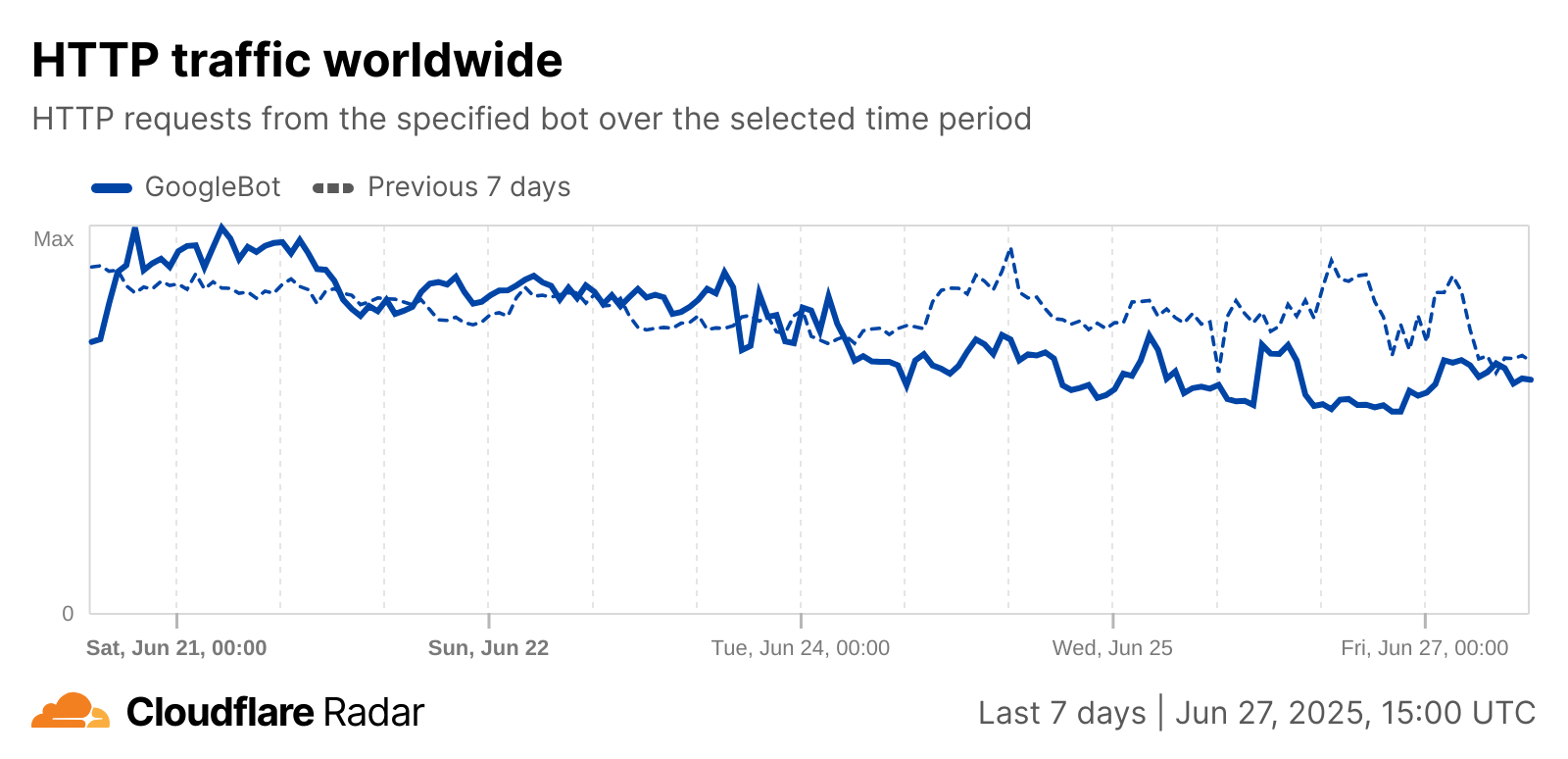
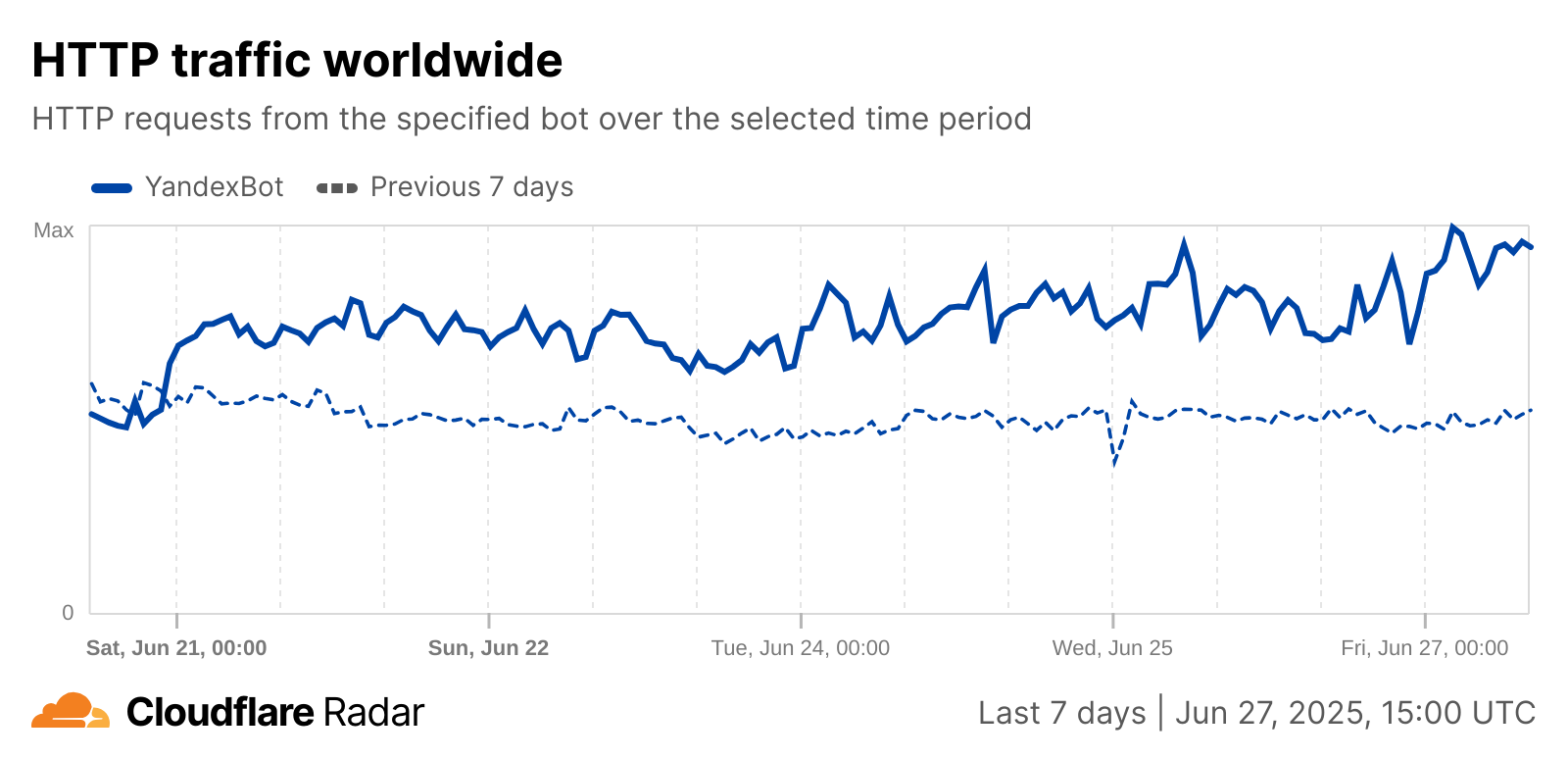
Of course, due in part to changes in crawling patterns, these ratios will change over time. The table above also displays the ratio changes as compared to the previous period, with changes ranging from increases of over 6% for DuckDuckGo and Yandex to Google’s 19.4% decrease. The week-over-week drop in Google’s ratio is related to an observed drop in crawling traffic from GoogleBot starting on June 24, while Yandex’s week-over-week growth is related to an observed increase in YandexBot crawling activity that started on June 21, as seen in the graphs below.
Changes and trends in the underlying activity can be seen in the associated Data Explorer view, as well as in the raw data available via API endpoints (timeseries, summary). Note that the shares of both referral and crawl traffic are relative to the sets of referrers and crawlers included in the graphs, and not Cloudflare traffic overall.
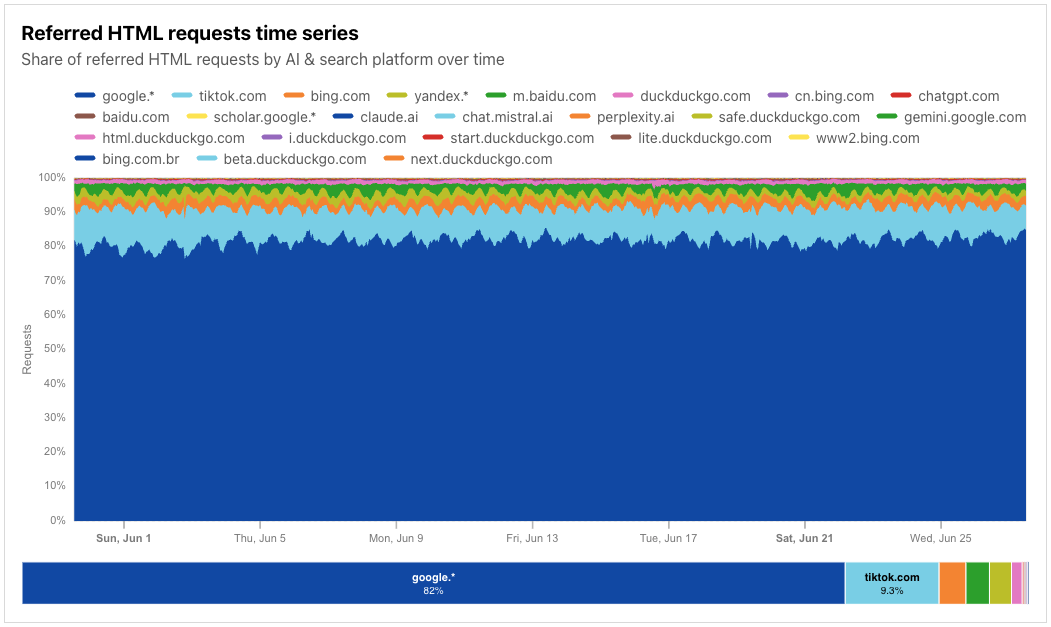
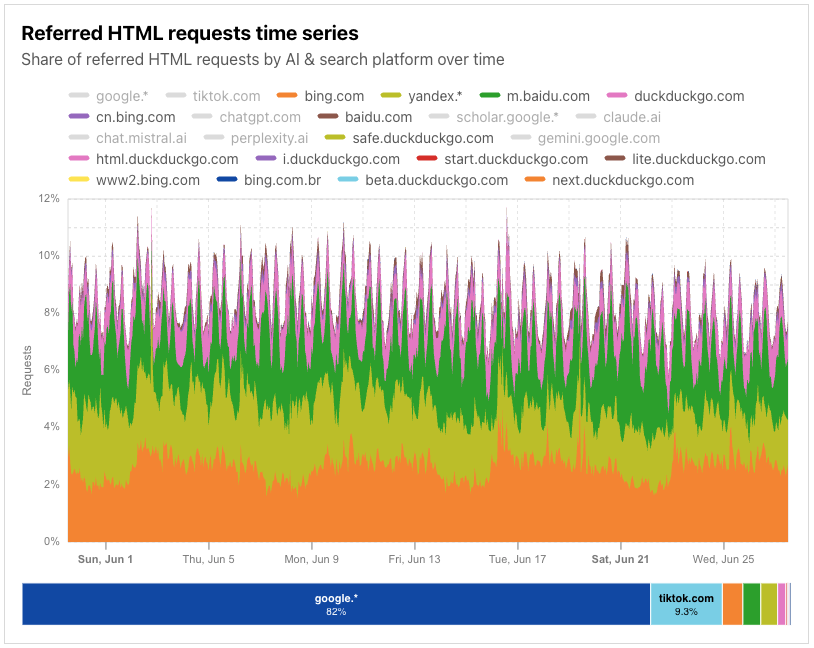
For example, in the referrer-centric view below, covering nearly the first four weeks of June 2025, we can see that referral traffic is dominated by search platform Google, with a fairly consistent diurnal pattern visible in the data. (The google.* entry covers referral traffic from the main google.com site, as well as local sites, such as google.es or google.com.tw.) Because of prefetching driven by the use of speculation rules, referral traffic coming from Google’s ASN (AS15169) is specifically excluded from analysis here, as it doesn’t represent active user consumption of content.
Clear diurnal patterns are also visible in the referral request shares of other search platforms, although the request shares are a fraction of what is seen from Google.
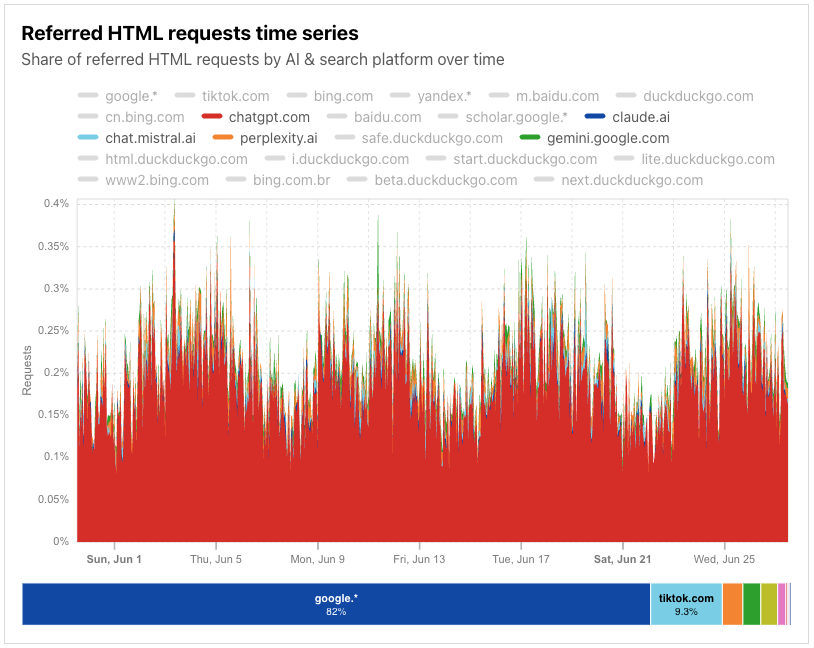
Throughout June, the share of traffic referred by AI platforms was significantly lower, even in aggregate, than the share of traffic referred by search platforms.
Changes in crawling traffic
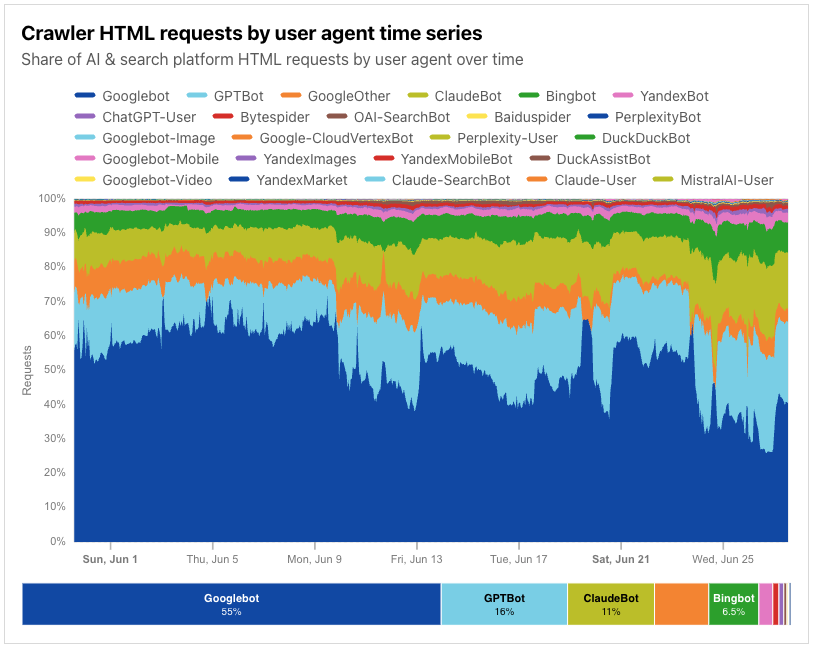
As noted above, the change in ratio values over time can be driven by shifts in crawling activity. These shifts are visible in the crawling traffic shares available in Data Explorer, as well as in the raw data available via API endpoints (timeseries, summary). In the crawler-centric view below, covering nearly the first four weeks of June 2025, we can see that the share of requests related to Google’s crawling activity for both their Googlebot and GoogleOther identifiers falls over the course of the month, with several peak/valley periods. A similar pattern observed in HTTP request traffic from Google’s AS15169 during that same time period loosely matches this observed drop in share.
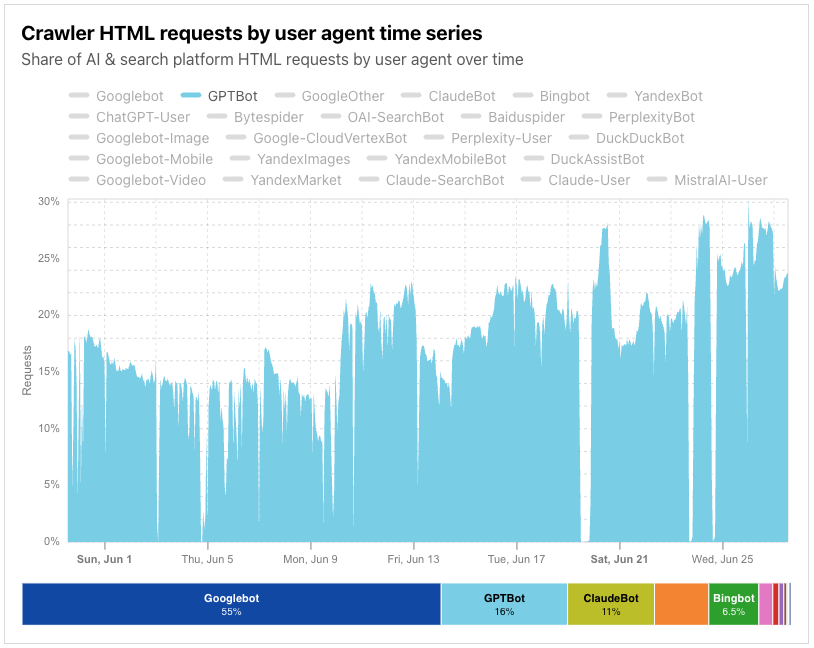
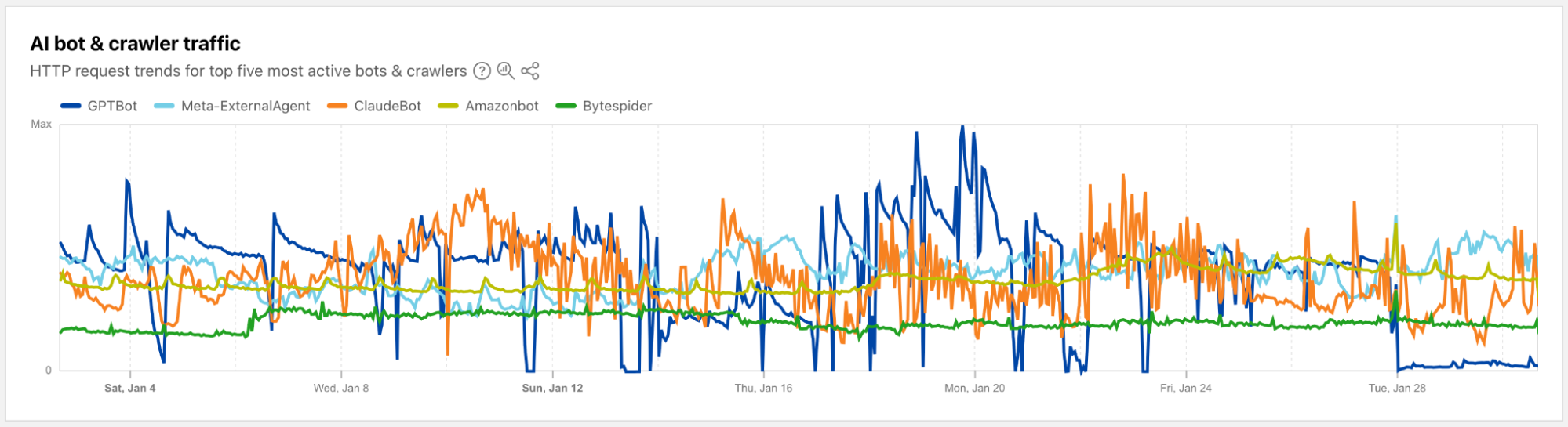
In addition, it appears that OpenAI’s GPTBot saw multiple periods where little-to-no crawling activity was observed throughout the month.
What this means for content providers
These ratios directly impact the viability of content publication on the Internet. While they will vary over time, the trend continues to be more crawls and fewer referrals when compared in relation to each other. Legacy search index crawlers would scan your content a couple of times, or less, for each visitor sent. A site’s availability to crawlers made their revenue model more viable, not less.
The new data we are observing suggests that is no longer the case. These models continue to consume more content, more frequently, despite sending the same or less traffic to the source of its content.
We have released new tools over the last year to help site owners take control back. With a single click, publishers can block the kinds of AI crawlers that train against their content. And today, we announced new ways to make the exchange of value fair for both sides of the equation. However, we continue to recommend that content creators audit and then enforce their preferred policies for AI crawlers.
One more thing…
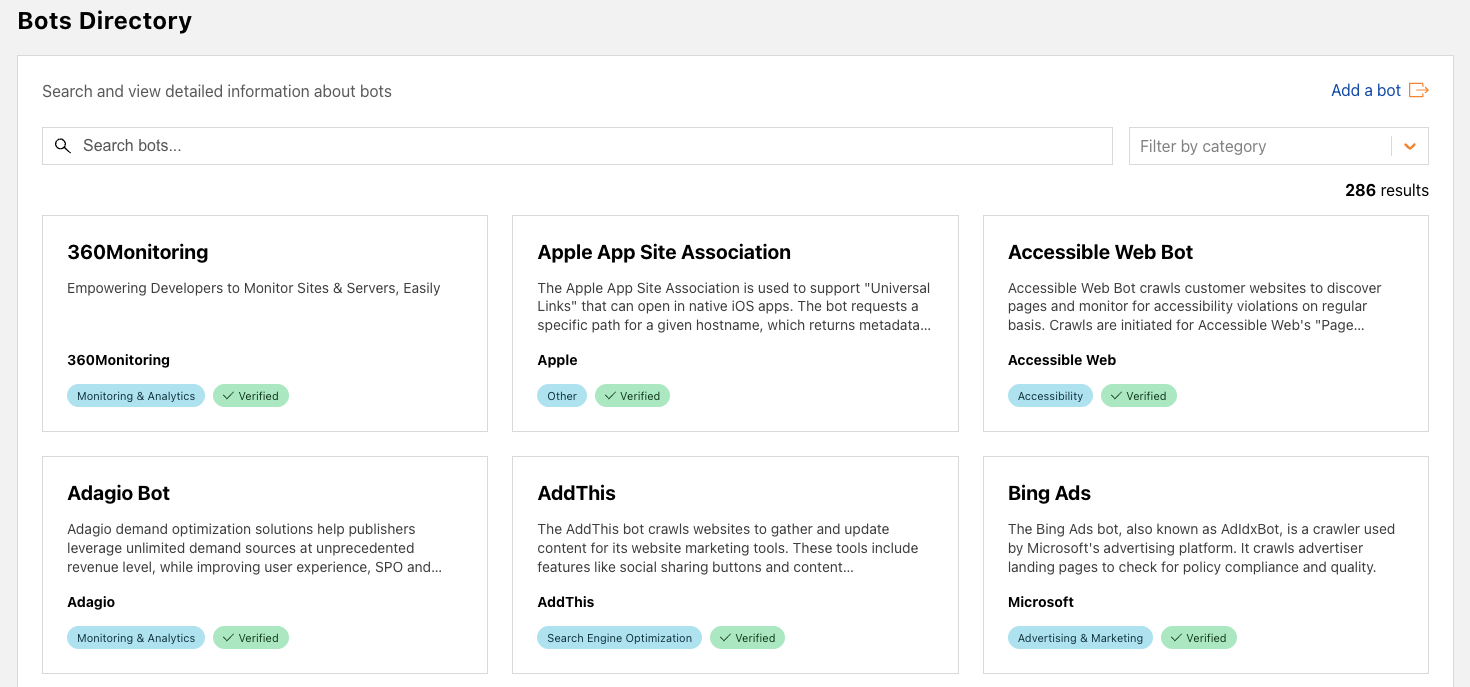
In addition to providing these new insights around crawling and referral traffic and associated trends, we’ve also taken the opportunity to launch expanded Verified Bots content. The Bots page on Cloudflare Radar includes a paginated list of Verified Bots, displaying the bot name, owner, category, and rank (based on request volume). This list has now been expanded into a standalone directory in a new Bots section. The directory, shown below, displays a card for each Verified Bot, showing the bot name, a description, the bot owner and category, and verification status. Users can search the directory by bot name, owner, or description, and can also filter by category (selecting just Monitoring & Analytics bots, for example).
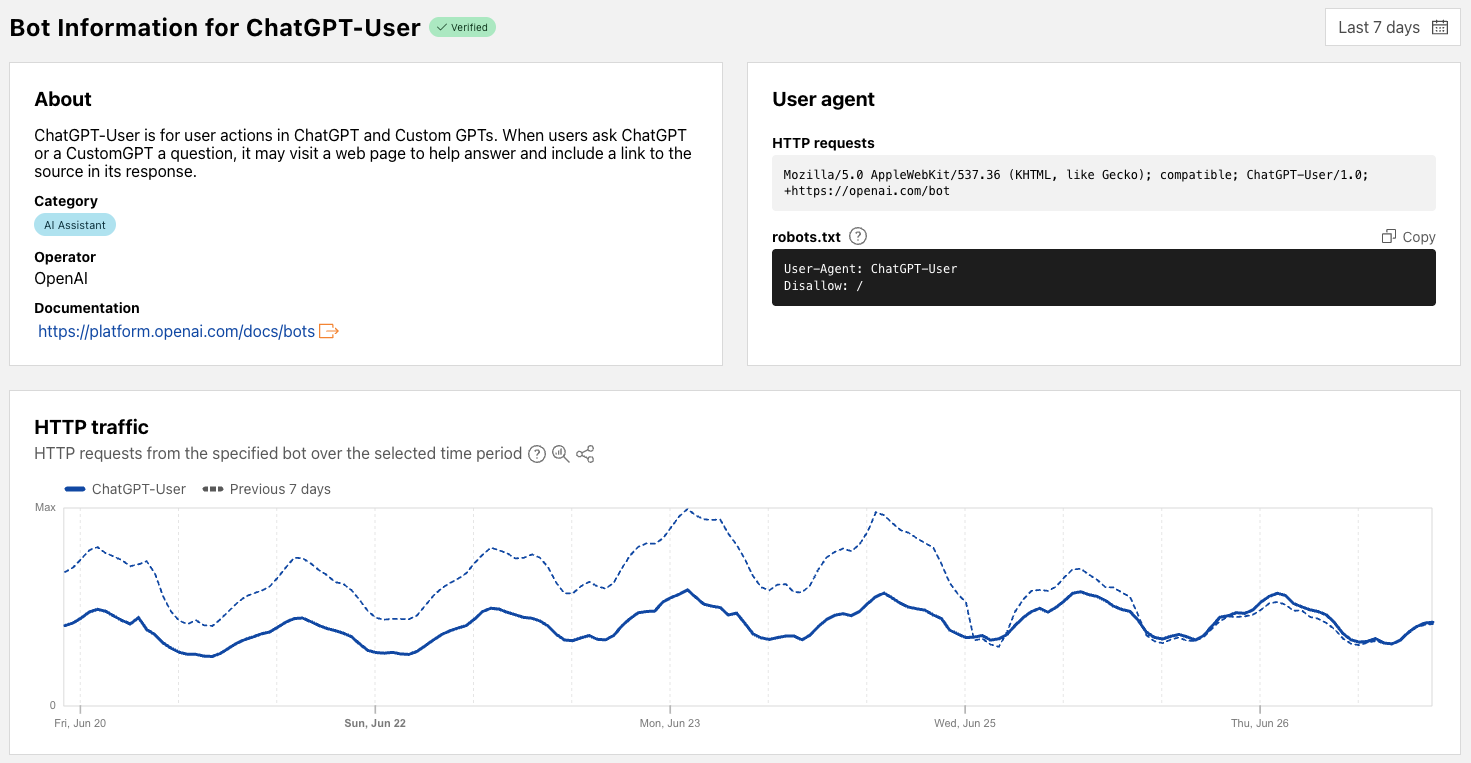
Clicking on a bot name within a card brings up a bot-specific page that includes metadata about the bot, information on how the bot’s user agent is represented in HTTP request headers and how it should be specified in robots.txt directives, and a traffic graph that shows associated HTTP request volume trends for the selected time period (with a default comparison to the previous period). Associated data is also available via the API. As we add additional information to these bot-specific pages in the future, we will document the updates in Changelog entries.
With the rise of traffic from AI agents, what’s considered a bot is no longer clear-cut. There are some clearly malicious bots, like ones that DoS your site or do credential stuffing, and ones that most site owners do want to interact with their site, like the bot that indexes your site for a search engine, or ones that fetch RSS feeds.
Historically, Cloudflare has relied on two main signals to verify legitimate web crawlers from other types of automated traffic: user agent headers and IP addresses. The User-Agent header allows bot developers to identify themselves, i.e. MyBotCrawler/1.1. However, user agent headers alone are easily spoofed and are therefore insufficient for reliable identification. To address this, user agent checks are often supplemented with IP address validation, the inspection of published IP address ranges to confirm a crawler’s authenticity. However, the logic around IP address ranges representing a product or group of users is brittle – connections from the crawling service might be shared by multiple users, such as in the case of privacy proxies and VPNs, and these ranges, often maintained by cloud providers, change over time.
Cloudflare will always try to block malicious bots, but we think our role here is to also provide an affirmative mechanism to authenticate desirable bot traffic. By using well-established cryptography techniques, we’re proposing a better mechanism for legitimate agents and bots to declare who they are, and provide a clearer signal for site owners to decide what traffic to permit.
Today, we’re introducing two proposals – HTTP message signatures and request mTLS – for friendly bots to authenticate themselves, and for customer origins to identify them. In this blog post, we’ll share how these authentication mechanisms work, how we implemented them, and how you can participate in our closed beta.
Existing bot verification mechanisms are broken
Historically, if you’ve worked on ChatGPT, Claude, Gemini, or any other agent, you’ve had several options to identify your HTTP traffic to other services:
You define a user agent, an HTTP header described in RFC 9110. The problem here is that this header is easily spoofable and there’s not a clear way for agents to identify themselves as semi-automated browsers — agents often use the Chrome user agent for this very reason, which is discouraged. The RFC states: “If a user agent masquerades as a different user agent, recipients can assume that the user intentionally desires to see responses tailored for that identified user agent, even if they might not work as well for the actual user agent being used.”
You publish your IP address range(s). This has limitations because the same IP address might be shared by multiple users or multiple services within the same company, or even by multiple companies when hosting infrastructure is shared (like Cloudflare Workers, for example). In addition, IP addresses are prone to change as underlying infrastructure changes, leading services to use ad-hoc sharing mechanisms like CIDR lists.
You go to every website and share a secret, like a Bearer token. This is impractical at scale because it requires developers to maintain separate tokens for each website their bot will visit.
We can do better! Instead of these arduous methods, we’re proposing that developers of bots and agents cryptographically sign requests originating from their service. When protecting origins, reverse proxies such as Cloudflare can then validate those signatures to confidently identify the request source on behalf of site owners, allowing them to take action as they see fit.
A typical system has three actors:
User: the entity that wants to perform some actions on the web. This may be a human, an automated program, or anything taking action to retrieve information from the web.
Agent: an orchestrated browser or software program. For example, Chrome on your computer, or OpenAI’s Operator with ChatGPT. Agents can interact with the web according to web standards (HTML rendering, JavaScript, subrequests, etc.).
Origin: the website hosting a resource. The user wants to access it through the browser. This is Cloudflare when your website is using our services, and it’s your own server(s) when exposed directly to the Internet.
In the next section, we’ll dive into HTTP Message Signatures and request mTLS, two mechanisms a browser agent may implement to sign outgoing requests, with different levels of ease for an origin to adopt.
Introducing HTTP Message Signatures
HTTP Message Signatures is a standard that defines the cryptographic authentication of a request sender. It’s essentially a cryptographically sound way to say, “hey, it’s me!”. It’s not the only way that developers can sign requests from their infrastructure — for example, AWS has used Signature v4, and Stripe has a framework for authenticating webhooks — but Message Signatures is a published standard, and the cleanest, most developer-friendly way to sign requests.
We’re working closely with the wider industry to support these standards-based approaches. For example, OpenAI has started to sign their requests. In their own words:
“Ensuring the authenticity of Operator traffic is paramount. With HTTP Message Signatures (RFC 9421), OpenAI signs all Operator requests so site owners can verify they genuinely originate from Operator and haven’t been tampered with” – Eugenio, Engineer, OpenAI
Without further delay, let’s dive in how HTTP Messages Signatures work to identify bot traffic.
Scoping standards to bot authentication
Generating a message signature works like this: before sending a request, the agent signs the target origin with a public key. When fetching https://example.com/path/to/resource, it signs example.com. This public key is known to the origin, either because the agent is well known, because it has previously registered, or any other method. Then, the agent writes a Signature-Input header with the following parameters:
A validity window (created and expires timestamps)
A Key ID that uniquely identifies the key used in the signature. This is a JSON Web Key Thumbprint.
A tag that shows websites the signature’s purpose and validation method, i.e. web-bot-auth for bot authentication.
In addition, the Signature-Agent header indicates where the origin can find the public keys the agent used when signing the request, such as in a directory hosted by signer.example.com. This header is part of the signed content as well.
For those building bots, we propose signing the authority of the target URI, i.e. crawler.search.google.com for Google Search, operator.openai.com for OpenAI Operator, workers.dev for Cloudflare Workers, and a way to retrieve the bot public key in the form of signature-agent, if present.
The User-Agent from the example above indicates that the software making the request is Chrome, because it is an agent that uses an orchestrated Chrome to browse the web. You should note that MyBotCrawler/1.1 is still present. The User-Agent header can actually contain multiple products, in decreasing order of importance. If our agent is making requests via Chrome, that’s the most important product and therefore comes first.
At Internet-level scale, these signatures may add a notable amount of overhead to request processing. However, with the right cryptographic suite, and compared to the cost of existing bot mitigation, both technical and social, this seems to be a straightforward tradeoff. This is a metric we will monitor closely, and report on as adoption grows.
Generating request signatures
We’re making several examples for generating Message Signatures for bots and agents available on Github (though we encourage other implementations!), all of which are standards-compliant, to maximize interoperability.
Imagine you’re building an agent using a managed Chromium browser, and want to sign all outgoing requests. To achieve this, the webextensions standard provides chrome.webRequest.onBeforeSendHeaders, where you can modify HTTP headers before they are sent by the browser. The event is triggered before sending any HTTP data, and when headers are available.
Here’s what that code would look like:
chrome.webRequest.onBeforeSendHeaders.addListener(
  function (details) {
	// Signature and header assignment logic goes here
      // <CODE>
  },
  { urls: ["<all_urls>"] },
  ["blocking", "requestHeaders"] // requires "installation_mode": "force_installed"
);
Cloudflare provides a web-bot-auth helper package on npm that helps you generate request signatures with the correct parameters. onBeforeSendHeaders is a Chrome extension hook that needs to be implemented synchronously. To do so, we import {signatureHeadersSync} from “web-bot-auth”. Once the signature completes, both Signature and Signature-Input headers are assigned. The request flow can then continue.
const request = new URL(details.url);
const created = new Date();
const expired = new Date(created.getTime() + 300_000)


// Perform request signature
const headers = signatureHeadersSync(
  request,
  new Ed25519Signer(jwk),
  { created, expires }
);
// `headers` object now contains `Signature` and `Signature-Input` headers that can be used
Using our debug server, we can now inspect and validate our request signatures from the perspective of the website we’d be visiting. We should now see the Signature and Signature-Input headers:
In this example, the homepage of the debugging server validates the signature from the RFC 9421 Ed25519 verifying key, which the extension uses for signing.
The above demo and code walkthrough has been fully written in TypeScript: the verification website is on Cloudflare Workers, and the client is a Chrome browser extension. We are cognisant that this does not suit all clients and servers on the web. To demonstrate the proposal works in more environments, we have also implemented bot signature validation in Go with a plugin for Caddy server.
Experimentation with request mTLS
HTTP is not the only way to convey signatures. For instance, one mechanism that has been used in the past to authenticate automated traffic against secured endpoints is mTLS, the “mutual” presentation of TLS certificates. As described in our knowledge base:
Mutual TLS, or mTLS for short, is a method formutual authentication. mTLS ensures that the parties at each end of a network connection are who they claim to be by verifying that they both have the correct privatekey. The information within their respectiveTLS certificates provides additional verification.
While mTLS seems like a good fit for bot authentication on the web, it has limitations. If a user is asked for authentication via the mTLS protocol but does not have a certificate to provide, they would get an inscrutable and unskippable error. Origin sites need a way to conditionally signal to clients that they accept or require mTLS authentication, so that only mTLS-enabled clients use it.
A TLS flag for bot authentication
TLS flags are an efficient way to describe whether a feature, like mTLS, is supported by origin sites. Within the IETF, we have proposed a new TLS flag called req mTLS to be sent by the client during the establishment of a connection that signals support for authentication via a client certificate.
This proposal leverages the tls-flags proposal under discussion in the IETF. The TLS Flags draft allows clients and servers to send an array of one bit flags to each other, rather than creating a new extension (with its associated overhead) for each piece of information they want to share. This is one of the first uses of this extension, and we hope that by using it here we can help drive adoption.
When a client sends the req mTLS flag to the server, they signal to the server that they are able to respond with a certificate if requested. The server can then safely request a certificate without risk of blocking ordinary user traffic, because ordinary users will never set this flag.
Let’s take a look at what an example of such a req mTLS would look like in Wireshark, a network protocol analyser. You can follow along in the packet capture here.
The extension number is 65025, or 0xfe01. This corresponds to an unassigned block of TLS extensions that can be used to experiment with TLS Flags. Once the standard is adopted and published by the IETF, the number would be fixed. To use the req mTLS flag the client needs to set the 80th bit to true, so with our block length of 12 bytes, it should contain the data 0b0000000000000000000001, which is the case here. The server then responds with a certificate request, and the request follows its course.
This example library allows you to configure Go to send req mTLS 0xfe01 bytes in the TLS Flags extension. If you’d like to test your implementation out, you can prompt your client for certificates against req-mtls.research.cloudflare.com using the Cloudflare Research client cloudflareresearch/req-mtls. For clients, once they set the TLS Flags associated with req mTLS, they are done. The code section taking care of normal mTLS will take over at that point, with no need to implement something new.
Two approaches, one goal
We believe that developers of agents and bots should have a public, standard way to authenticate themselves to CDNs and website hosting platforms, regardless of the technology they use or provider they choose. At a high level, both HTTP Message Signatures and request mTLS achieve a similar goal: they allow the owner of a service to authentically identify themselves to a website. That’s why we’re participating in the standardizing effort for both of these protocols at the IETF, where many other authentication mechanisms we’ve discussed here — from TLS to OAuth Bearer tokens –— been developed by diverse sets of stakeholders and standardized as RFCs.
Evaluating both proposals against each other, we’re prioritizing HTTP Message Signatures for Bots because it relies on the previously adopted RFC 9421 with several reference implementations, and works at the HTTP layer, making adoption simpler. request mTLS may be a better fit for site owners with concerns about the additional bandwidth, but TLS Flags has fewer implementations, is still waiting for IETF adoption, and upgrading the TLS stack has proven to be more challenging than with HTTP. Both approaches share similar discovery and key management concerns, as highlighted in a glossary draft at the IETF. We’re actively exploring both options, and would love to hear from both site owners and bot developers about how you’re evaluating their respective tradeoffs.
The bigger picture
In conclusion, we think request signatures and mTLS are promising mechanisms for bot owners and developers of AI agents to authenticate themselves in a tamper-proof manner, forging a path forward that doesn’t rely on ever-changing IP address ranges or spoofable headers such as User-Agent. This authentication can be consumed by Cloudflare when acting as a reverse proxy, or directly by site owners on their own infrastructure. This means that as a bot owner, you can now go to content creators and discuss crawling agreements, with as much granularity as the number of bots you have. You can start implementing these solutions today and test them against the research websites we’ve provided in this post.
Bot authentication also empowers site owners small and large to have more control over the traffic they allow, empowering them to continue to serve content on the public Internet while monitoring automated requests. Longer term, we will integrate these authentication mechanisms into our AI Audit and Bot Management products, to provide better visibility into the bots and agents that are willing to identify themselves.
Being able to solve problems for both origins and clients is key to helping build a better Internet, and we think identification of automated traffic is a step towards that. If you want us to start verifying your message signatures or client certificates, have a compelling use case you’d like us to consider, or any questions, please reach out.
Today, we’re excited to announce AI Labyrinth, a new mitigation approach that uses AI-generated content to slow down, confuse, and waste the resources of AI Crawlers and other bots that don’t respect “no crawl” directives. When you opt in, Cloudflare will automatically deploy an AI-generated set of linked pages when we detect inappropriate bot activity, without the need for customers to create any custom rules.
AI Labyrinth is available on an opt-in basis to all customers, including the Free plan.
Using Generative AI as a defensive weapon
AI-generated content has exploded, reportedly accounting for four of the top 20 Facebook posts last fall. Additionally, Medium estimates that 47% of all content on their platform is AI-generated. Like any newer tool it has both wonderful and malicious uses.
At the same time, we’ve also seen an explosion of new crawlers used by AI companies to scrape data for model training. AI Crawlers generate more than 50 billion requests to the Cloudflare network every day, or just under 1% of all web requests we see. While Cloudflare has several tools for identifying and blocking unauthorized AI crawling, we have found that blocking malicious bots can alert the attacker that you are on to them, leading to a shift in approach, and a never-ending arms race. So, we wanted to create a new way to thwart these unwanted bots, without letting them know they’ve been thwarted.
To do this, we decided to use a new offensive tool in the bot creator’s toolset that we haven’t really seen used defensively: AI-generated content. When we detect unauthorized crawling, rather than blocking the request, we will link to a series of AI-generated pages that are convincing enough to entice a crawler to traverse them. But while real looking, this content is not actually the content of the site we are protecting, so the crawler wastes time and resources.
As an added benefit, AI Labyrinth also acts as a next-generation honeypot. No real human would go four links deep into a maze of AI-generated nonsense. Any visitor that does is very likely to be a bot, so this gives us a brand-new tool to identify and fingerprint bad bots, which we add to our list of known bad actors. Here’s how we do it…
How we built the labyrinth
When AI crawlers follow these links, they waste valuable computational resources processing irrelevant content rather than extracting your legitimate website data. This significantly reduces their ability to gather enough useful information to train their models effectively.
To generate convincing human-like content, we used Workers AI with an open source model to create unique HTML pages on diverse topics. Rather than creating this content on-demand (which could impact performance), we implemented a pre-generation pipeline that sanitizes the content to prevent any XSS vulnerabilities, and stores it in R2 for faster retrieval. We found that generating a diverse set of topics first, then creating content for each topic, produced more varied and convincing results. It is important to us that we don’t generate inaccurate content that contributes to the spread of misinformation on the Internet, so the content we generate is real and related to scientific facts, just not relevant or proprietary to the site being crawled.
This pre-generated content is seamlessly integrated as hidden links on existing pages via our custom HTML transformation process, without disrupting the original structure or content of the page. Each generated page includes appropriate meta directives to protect SEO by preventing search engine indexing. We also ensured that these links remain invisible to human visitors through carefully implemented attributes and styling. To further minimize the impact to regular visitors, we ensured that these links are presented only to suspected AI scrapers, while allowing legitimate users and verified crawlers to browse normally.
A graph of daily requests over time, comparing different categories of AI Crawlers.
What makes this approach particularly effective is its role in our continuously evolving bot detection system. When these links are followed, we know with high confidence that it’s automated crawler activity, as human visitors and legitimate browsers would never see or click them. This provides us with a powerful identification mechanism, generating valuable data that feeds into our machine learning models. By analyzing which crawlers are following these hidden pathways, we can identify new bot patterns and signatures that might otherwise go undetected. This proactive approach helps us stay ahead of AI scrapers, continuously improving our detection capabilities without disrupting the normal browsing experience.
By building this solution on our developer platform, we’ve created a system that serves convincing decoy content instantly while maintaining consistent quality – all without impacting your site’s performance or user experience.
How to use AI Labyrinth to stop AI crawlers
Enabling AI Labyrinth is simple and requires just a single toggle in your Cloudflare dashboard. Navigate to the bot management section within your zone, and toggle the new AI Labyrinth setting to on:
Once enabled, the AI Labyrinth begins working immediately with no additional configuration needed.
AI honeypots, created by AI
The core benefit of AI Labyrinth is to confuse and distract bots. However, a secondary benefit is to serve as a next-generation honeypot. In this context, a honeypot is just an invisible link that a website visitor can’t see, but a bot parsing HTML would see and click on, therefore revealing itself to be a bot. Honeypots have been used to catch hackers as early as the late 1986 Cuckoo’s Egg incident. And in 2004, Project Honeypot was created by Cloudflare founders (prior to founding Cloudflare) to let everyone easily deploy free email honeypots, and receive lists of crawler IPs in exchange for contributing to the database. But as bots have evolved, they now proactively look for honeypot techniques like hidden links, making this approach less effective.
AI Labyrinth won’t simply add invisible links, but will eventually create whole networks of linked URLs that are much more realistic, and not trivial for automated programs to spot. The content on the pages is obviously content no human would spend time-consuming, but AI bots are programmed to crawl rather deeply to harvest as much data as possible. When bots hit these URLs, we can be confident they aren’t actual humans, and this information is recorded and automatically fed to our machine learning models to help improve our bot identification. This creates a beneficial feedback loop where each scraping attempt helps protect all Cloudflare customers.
What’s next
This is only the first iteration of using generative AI to thwart bots for us. Currently, while the content we generate is convincingly human, it won’t conform to the existing structure of every website. In the future, we’ll continue to work to make these links harder to spot and make them fit seamlessly into the existing structure of the website they’re embedded in. You can help us by opting in now.
Within the Cloudflare Application Security team, every machine learning model we use is underpinned by a rich set of static rules that serve as a ground truth and a baseline comparison for how our models are performing. These are called heuristics. Our Bot Management heuristics engine has served as an important part of eight global machine learning (ML) models, but we needed a more expressive engine to increase our accuracy. In this post, we’ll review how we solved this by moving our heuristics to the Cloudflare Ruleset Engine. Not only did this provide the platform we needed to write more nuanced rules, it made our platform simpler and safer, and provided Bot Management customers more flexibility and visibility into their bot traffic.
Bot detection via simple heuristics
In Cloudflare’s bot detection, we build heuristics from attributes like software library fingerprints, HTTP request characteristics, and internal threat intelligence. Heuristics serve three separate purposes for bot detection:
Bot identification: If traffic matches a heuristic, we can identify the traffic as definitely automated traffic (with a bot score of 1) without the need of a machine learning model.
Train ML models: When traffic matches our heuristics, we create labelled datasets of bot traffic to train new models. We’ll use many different sources of labelled bot traffic to train a new model, but our heuristics datasets are one of the highest confidence datasets available to us.
Validate models: We benchmark any new model candidate’s performance against our heuristic detections (among many other checks) to make sure it meets a required level of accuracy.
While the existing heuristics engine has worked very well for us, as bots evolved we needed the flexibility to write increasingly complex rules. Unfortunately, such rules were not easily supported in the old engine. Customers have also been asking for more details about which specific heuristic caught a request, and for the flexibility to enforce different policies per heuristic ID. We found that by building a new heuristics framework integrated into the Cloudflare Ruleset Engine, we could build a more flexible system to write rules and give Bot Management customers the granular explainability and control they were asking for.
The need for more efficient, precise rules
In our previous heuristics engine, we wrote rules in Lua as part of our openresty-based reverse proxy. The Lua-based engine was limited to a very small number of characteristics in a rule because of the high engineering cost we observed with adding more complexity.
With Lua, we would write fairly simple logic to match on specific characteristics of a request (i.e. user agent). Creating new heuristics of an existing class was fairly straight forward. All we’d need to do is define another instance of the existing class in our database. However, if we observed malicious traffic that required more than two characteristics (as a simple example, user-agent and ASN) to identify, we’d need to create bespoke logic for detections. Because our Lua heuristics engine was bundled with the code that ran ML models and other important logic, all changes had to go through the same review and release process. If we identified malicious traffic that needed a new heuristic class, and we were also blocked by pending changes in the codebase, we’d be forced to either wait or rollback the changes. If we’re writing a new rule for an “under attack” scenario, every extra minute it takes to deploy a new rule can mean an unacceptable impact to our customer’s business.
More critical than time to deploy is the complexity that the heuristics engine supports. The old heuristics engine only supported using specific request attributes when creating a new rule. As bots became more sophisticated, we found we had to reject an increasing number of new heuristic candidates because we weren’t able to write precise enough rules. For example, we found a Golang TLS fingerprint frequently used by bots and by a small number of corporate VPNs. We couldn’t block the bots without also stopping the legitimate VPN usage as well, because the old heuristics platform lacked the flexibility to quickly compile sufficiently nuanced rules. Luckily, we already had the perfect solution with Cloudflare Ruleset Engine.
Our new heuristics engine
The Ruleset Engine is familiar to anyone who has written a WAF rule, Load Balancing rule, or Transform rule, just to name a few. For Bot Management, the Wireshark-inspired syntax allows us to quickly write heuristics with much greater flexibility to vastly improve accuracy. We can write a rule in YAML that includes arbitrary sub-conditions and inherit the same framework the WAF team uses to both ensure any new rule undergoes a rigorous testing process with the ability to rapidly release new rules to stop attacks in real-time.
Writing heuristics on the Cloudflare Ruleset Engine allows our engineers and analysts to write new rules in an easy to understand YAML syntax. This is critical to supporting a rapid response in under attack scenarios, especially as we support greater rule complexity. Here’s a simple rule using the new engine, to detect empty user-agents restricted to a specific JA4 fingerprint (right), compared to the empty user-agent detection in the old Lua based system (left):
--- Adds heuristic to be used for inference in `detect` method
-- @param heuristic schema.Heuristic table
function EmptyUserAgentHeuristic:add(heuristic)
self.heuristic = heuristic
end
--- Detect runs empty user agent heuristic detection
-- @param ctx context of request
-- @return schema.Heuristic table on successful detection or nil otherwise
function EmptyUserAgentHeuristic:detect(ctx)
local ua = ctx.user_agent
if not ua or ua == '' then
return self.heuristic
end
end
return _M
ref: empty-user-agent
description: Empty or missing
User-Agent header
action: add_bot_detection
action_parameters:
active_mode: false
expression: http.user_agent eq
"" and cf.bot_management.ja4 = "t13d1516h2_8daaf6152771_b186095e22b6"
The Golang heuristic that captured corporate proxy traffic as well (mentioned above) was one of the first to migrate to the new Ruleset engine. Before the migration, traffic matching on this heuristic had a false positive rate of 0.01%. While that sounds like a very small number, this means for every million bots we block, 100 real users saw a Cloudflare challenge page unnecessarily. At Cloudflare scale, even small issues can have real, negative impact.
When we analyzed the traffic caught by this heuristic rule in depth, we saw the vast majority of attack traffic came from a small number of abusive networks. After narrowing the definition of the heuristic to flag the Golang fingerprint only when it’s sourced by the abusive networks, the rule now has a false positive rate of 0.0001% (One out of 1 million). Updating the heuristic to include the network context improved our accuracy, while still blocking millions of bots every week and giving us plenty of training data for our bot detection models. Because this heuristic is now more accurate, newer ML models make more accurate decisions on what’s a bot and what isn’t.
New visibility and flexibility for Bot Management customers
While the new heuristics engine provides more accurate detections for all customers and a better experience for our analysts, moving to the Cloudflare Ruleset Engine also allows us to deliver new functionality for Enterprise Bot Management customers, specifically by offering more visibility. This new visibility is via a new field for Bot Management customers called Bot Detection IDs. Every heuristic we use includes a unique Bot Detection ID. These are visible to Bot Management customers in analytics, logs, and firewall events, and they can be used in the firewall to write precise rules for individual bots.
Detections also include a specific tag describing the class of heuristic. Customers see these plotted over time in their analytics.
To illustrate how this data can help give customers visibility into why we blocked a request, here’s an example request flagged by Bot Management (with the IP address, ASN, and country changed):
Before, just seeing that our heuristics gave the request a score of 1 was not very helpful in understanding why it was flagged as a bot. Adding our Detection IDs to Firewall Events helps to paint a better picture for customers that we’ve identified this request as a bot because that traffic used an empty user-agent.
In addition to Analytics and Firewall Events, Bot Detection IDs are now available for Bot Management customers to use in Custom Rules, Rate Limiting Rules, Transform Rules, and Workers.
Account takeover detection IDs
One way we’re focused on improving Bot Management for our customers is by surfacing more attack-specific detections. During Birthday Week, we launched Leaked Credentials Check for all customers so that security teams could help prevent account takeover (ATO) attacks by identifying accounts at risk due to leaked credentials. We’ve now added two more detections that can help Bot Management enterprise customers identify suspicious login activity via specific detection IDs that monitor login attempts and failures on the zone. These detection IDs are not currently affecting the bot score, but will begin to later in 2025. Already, they can help many customers detect more account takeover events now.
Detection ID 201326592 monitors traffic on a customer website and looks for an anomalous rise in login failures (usually associated with brute force attacks), and ID 201326593 looks for an anomalous rise in login attempts (usually associated with credential stuffing).
Protect your applications
If you are a Bot Management customer, log in and head over to the Cloudflare dashboard and take a look in Security Analytics for bot detection IDs 201326592 and 201326593.
These will highlight ATO attempts targeting your site. If you spot anything suspicious, or would like to be protected against future attacks, create a rule that uses these detections to keep your application safe.
Security and attacks continues to be a very active environment, and the visibility that Cloudflare Radar provides on this dynamic landscape has evolved and expanded over time. To that end, during 2023’s Security Week, we launched our URL Scanner, which enables users to safely scan any URL to determine if it is safe to view or interact with. During 2024’s Security Week, we launched an Email Security page, which provides a unique perspective on the threats posed by malicious emails, spam volume, the adoption of email authentication methods like SPF, DMARC, and DKIM, and the use of IPv4/IPv6 and TLS by email servers. For Security Week 2025, we are adding several new DDoS-focused graphs, new insights into leaked credential trends, and a new Bots page to Cloudflare Radar. We are also taking this opportunity to refactor Radar’s Security & Attacks page, breaking it out into Application Layer and Network Layer sections.
Below, we review all of these changes and additions to Radar.
Layered security
Since Cloudflare Radar launched in 2020, it has included both network layer (Layers 3 & 4) and application layer (Layer 7) attack traffic insights on a single Security & Attacks page. Over the last four-plus years, we have evolved some of the existing data sets on the page, as well as adding new ones. As the page has grown and improved over time, it risked becoming unwieldy to navigate, making it hard to find the graphs and data of interest. To help address that, the Security section on Radar now features separate Application Layer and Network Layer pages. The Application Layer page is the default, and includes insights from analysis of HTTP-based malicious and attack traffic. The Network Layer page includes insights from analysis of network and transport layer attacks, as well as observed TCP resets and timeouts. Future security and attack-related data sets will be added to the relevant page. Email Security remains on its own dedicated page.
A geographic and network view of application layer DDoS attacks
Radar’s quarterly DDoS threat reports have historically provided insights, aggregated on a quarterly basis, into the top source and target locations of application layer DDoS attacks. A new map and table on Radar’s Application Layer Security page now provide more timely insights, with a global choropleth map showing a geographical distribution of source and target locations, and an accompanying list of the top 20 locations by share of all DDoS requests. Source location attribution continues to rely on the geolocation of the IP address originating the blocked request, while target location remains the billing location of the account that owns the site being attacked.
Over the first week of March 2025, the United States, Indonesia, and Germany were the top sources of application layer DDoS attacks, together accounting for over 30% of such attacks as shown below. The concentration across the top targeted locations was quite different, with customers from Canada, the United States, and Singapore attracting 56% of application layer DDoS attacks.
In addition to extended visibility into the geographic source of application layer DDoS attacks, we have also added autonomous system (AS)-level visibility. A new treemap view shows the distribution of these attacks by source AS. At a global level, the largest sources include cloud/hosting providers in Germany, the United States, China, and Vietnam.
For a selected country/region, the treemap displays a source AS distribution for attacks observed to be originating from that location. In some, the sources of attack traffic are heavily concentrated in consumer/business network providers, such as in Portugal, shown below. However, in other countries/regions that have a large cloud provider presence, such as Ireland, Singapore, and the United States, ASNs associated with these types of providers are the dominant sources. To that end, Singapore was listed as being among the top sources of application layer DDoS attacks in each of the quarterly DDoS threat reports in 2024.
Have you been pwned?
Every week, it seems like there’s another headline about a data breach, talking about thousands or millions of usernames and passwords being stolen. Or maybe you get an email from an identity monitoring service that your username and password were found on the “dark web”. (Of course, you’re getting those alerts thanks to a complementary subscription to the service offered as penance from another data breach…)
This credential theft is especially problematic because people often reuse passwords, despite best practices advising the use of strong, unique passwords for each site or application. To help mitigate this risk, starting in 2024, Cloudflare began enabling customers to scan authentication requests for their websites and applications using a privacy-preserving compromised credential checker implementation to detect known-leaked usernames and passwords. Today, we’re using aggregated data to display trends in how often these leaked and stolen credentials are observed across Cloudflare’s network. (Here, we are defining “leaked credentials” as usernames or passwords being found in a public dataset, or the username and password detected as being similar.)
Leaked credentials detection scans incoming HTTP requests for known authentication patterns from common web apps and any custom detection locations that were configured. The service uses a privacy-preserving compromised credential checking protocol to compare a hash of the detected passwords to hashes of compromised passwords found in databases of leaked credentials. A new Radar graph on the worldwide Application Layer Security page provides visibility into aggregate trends around the detection of leaked credentials in authentication requests. Filterable by authentication requests from human users, bots, or all (human + bot), the graph shows the distribution requests classified as “clean” (no leaked credentials detected) and “compromised” (leaked credentials, as defined above, were used). At a worldwide level, we found that for the first week of March 2025, leaked credentials were used in 64% of all, over 65% of bot, and over 44% of human authorization requests.
This suggests that from a human perspective, password reuse is still a problem, as is users not taking immediate actions to change passwords when notified of a breach. And from a bot perspective, this suggests that attackers know that there is a good chance that leaked credentials for one website or application will enable them to access that same user’s account elsewhere.
As a complement to the leaked credentials data, Radar is also now providing a worldwide view into the share of authentication requests originating from bots. Note that not all of these requests are necessarily malicious — while some may be associated with credential stuffing-style attacks, others may be from automated scripts or other benign applications accessing an authentication endpoint. (Having said that, automated malicious attack request volume far exceeds legitimate automated login attempts.) During the first week of March 2025, we found that over 94% of authentication requests came from bots (were automated), with the balance coming from humans. Over that same period, bot traffic only accounted for 30% of overall requests. So although bots don’t represent a majority of request traffic, authentication requests appear to comprise a significant portion of their activity.
Bots get a dedicated page
As a reminder, bot traffic describes any non-human Internet traffic, and monitoring bot levels can help spot potential malicious activities. Of course, bots can be helpful too, and Cloudflare maintains a list of verified bots to help keep the Internet healthy. Given the importance of monitoring bot activity, we have launched a new dedicated Bots page in the Traffic section of Cloudflare Radar to support these efforts. For both worldwide and location views over the selected time period, the page shows the distribution of bot (automated) vs. human HTTP requests, as well as a graph showing bot traffic trends. (Our bot score, combining machine learning, heuristics, and other techniques, is used to identify automated requests likely to be coming from bots.)
Both the 2023 and 2024 Cloudflare Radar Year in Review microsites included a “Bot Traffic Sources” section, showing the locations and networks that Cloudflare determined that the largest shares of automated/likely automated traffic was originating from. However, these traffic shares were published just once a year, aggregating traffic from January through the end of November.
In order to provide a more timely perspective, these insights are now available on the new Radar Bots page. Similar to the new DDoS attacks content discussed above, the worldwide view includes a choropleth map and table illustrating the locations originating the largest shares of all bot traffic. (Note that a similar Traffic Characteristics map and table on the Traffic Overview page ranks locations by the bot traffic share of the location’s total traffic.) Similar to Year in Review data linked above, the United States continues to originate the largest share of bot traffic.
In addition, the worldwide view also breaks out bot traffic share by AS, mirroring the treemap shown in the Year in Review. As we have noted previously, cloud platform providers account for a significant amount of bot traffic.
At a location level, depending on the country/region selected, the top sources of bot traffic may be cloud/hosting providers, consumer/business network providers, or a mix. For instance, France’s distribution is shown below, and four ASNs account for just over half of the country’s bot traffic. Of these ASNs, two (AS16276 and AS12876) belong to cloud/hosting providers, and two (AS3215 and AS12322) belong to network providers.
In addition, the Verified Bots list has been moved to the new Bots page on Radar. The data shown and functionality remains unchanged, and links to the old location will automatically be redirected to the new one.
Summary
The Cloudflare dashboard provides customers with specific views of security trends, application and network layer attacks, and bot activity across their sites and applications. While these views are useful at an individual customer level, aggregated views at a worldwide, location, and network level provide a macro-level perspective on trends and activity. These aggregated views available on Cloudflare Radar not only help customers understand how their observations compare to the larger whole, but they also help the industry understand emerging threats that may require action.
The underlying data for the graphs and data discussed above is available via the Radar API (Application Layer, Network Layer, Bots, Leaked Credentials). The data can also be interactively explored in more detail across locations, networks, and time periods using Radar’s Data Explorer and AI Assistant. And as always, Radar and Data Explorer charts and graphs are downloadable for sharing, and embeddable for use in your own blog posts, websites, or dashboards.
Accessing private content online, whether it’s checking email or streaming your favorite show, almost always starts with a “login” step. Beneath this everyday task lies a widespread human mistake we still have not resolved: password reuse. Many users recycle passwords across multiple services, creating a ripple effect of risk when their credentials are leaked.
Based on Cloudflare’s observed traffic between September – November 2024, 41% of successful logins across websites protected by Cloudflare involve compromised passwords. In this post, we’ll explore the widespread impact of password reuse, focusing on how it affects popular Content Management Systems (CMS), the behavior of bots versus humans in login attempts, and how attackers exploit stolen credentials to take over accounts at scale.
Scope of the analysis
Our data analysis focuses on traffic from Internet properties on Cloudflare’s free plan, which includes leaked credentials detection as a built-in feature. Leaked credentials refer to usernames and passwords exposed in known data breaches or credential dumps — for this analysis, our focus is specifically on leaked passwords. With 30 million Internet properties, comprising some 20% of the web, behind Cloudflare, this analysis provides significant insights. The data primarily reflects trends observed after the detection system was launched during Birthday Week in September 2024.
Nearly 41% of logins are at risk
One of the biggest challenges in authentication is distinguishing between legitimate human users and malicious actors. To understand human behavior, we focus on successful login attempts (those returning a 200 OK status code), as this provides the clearest indication of user activity and real account risk. Our data reveals that approximately 41% of successful human authentication attempts involve leaked credentials.
Despite growing awareness about online security, a significant portion of users continue to reuse passwords across multiple accounts. And according to a recent study by Forbes, users will, on average, reuse their password across four different accounts. Even after major breaches, many individuals don’t change their compromised passwords, or still use variations of them across different services. For these users, it’s not a matter of “if” attackers will use their compromised passwords, it’s a matter of “when”.
When we expand to include bot-driven traffic in this analysis, the problem of leaked credentials becomes even more noticeable. Our data reveals that 52% of all detected authentication requests contain leaked passwords found in our database of over 15 billion records, including the Have I Been Pwned (HIBP) leaked password dataset.
This percentage represents hundreds of millions of daily authentication requests, originating from both bots and humans. While not every attempt succeeds, the sheer volume of leaked credentials in real-world traffic illustrates how common password reuse is. Many of these leaked credentials still grant valid access, amplifying the risk of account takeovers.
Attackers heavily use leaked password datasets
Bots are the driving force behind credential-stuffing attacks, the data indicates that95% of login attempts involving leaked passwords are coming from bots,indicating that they are part of credential stuffing attacks.
Equipped with credentials stolen from breaches, bots systematically target websites at scale, testing thousands of login combinations in seconds.
Data from the Cloudflare network exposes this trend, showing that bot-driven attacks remain alarmingly high over time. Popular platforms like WordPress, Joomla, and Drupal are frequent targets, due to their widespread use and exploitable vulnerabilities, as we will explore in the upcoming section.
Once bots successfully breach one account, attackers reuse the same credentials across other services to amplify their reach. They even sometimes try to evade detection by using sophisticated evasion tactics, such as spreading login attempts across different source IP addresses or mimicking human behavior, attempting to blend into legitimate traffic.
The result is a constant, automated threat vector that challenges traditional security measures and exploits the weakest link: password reuse.
Brute force attacks against WordPress
Content Management Systems (CMS) are used to build websites, and often rely on simple authentication and login plugins. This is convenient, but also makes them frequent targets of credential stuffing attacks due to their widespread adoption. WordPress is a very popular content management system with a well known user login page format. Because of this, websites built on WordPress often become common targets for attackers.
Across our network, WordPress accounts for a significant portion of authentication requests. This is unsurprising given its market share. However, what stands out is the alarming number of successful logins using leaked passwords, especially by bots.
76% of leaked password login attempts for websites built on WordPress are successful.
Of these, 48% of successful logins are bot-driven.This is a shocking figure that indicates nearly half of all successful logins are executed by unauthorized systems designed to exploit stolen credentials. Successful unauthorized access is often the first step in account takeover (ATO) attacks.
The remaining 52% of successful logins originate from legitimate, non-bot users. This figure, higher than the average of 41% across all platforms, highlights how pervasive password reuse is among real users, putting their accounts at significant risk.
Only 5% of leaked password login attempts result in access being denied.
This is a low number compared to the successful bot-driven login attempts, and could be tied to a lack of security measures like rate-limiting or multi-factor authentication (MFA). If such measures were in place, we would expect the share of denied attempts to be higher. Notably, 90% of these denied requests are bot-driven, reinforcing the idea that while some security measures are blocking automated logins, many still slip through.
The overwhelming presence of bot traffic in this category points to ongoing automated attempts to brute-force access.
The remaining 19% of login attempts fall under other outcomes, such as timeouts, incomplete logins, or users who changed their passwords, so they neither count as direct “successes” nor do they register as “denials”.
Keeping user accounts safe with Cloudflare
If you’re a user, start with changing reused or weak passwords and use unique, strong ones for each website or application. Enable multi-factor authentication (MFA) on all of your accounts that support it, and start exploring passkeys as a more secure, phishing-resistant alternative to traditional passwords.
For website owners, activate leaked credentials detection to monitor and address these threats in real time and issue password reset flows on leaked credential matches.
Additionally, enable features like Rate Limiting and Bot Management tools to minimize the impact of automated attacks. Audit password reuse patterns, identify leaked credentials within your systems, and enforce robust password hygiene policies to strengthen overall security.
By adopting these measures, both individuals and organizations can stay ahead of attackers and build stronger defenses.
During 2024’s Birthday Week, we launched an AI bot & crawler traffic graph on Cloudflare Radar that provides visibility into which bots and crawlers are the most aggressive and have the highest volume of requests, which crawl on a regular basis, and more. Today, we are launching a new dedicated “AI Insights” page on Cloudflare Radar that incorporates this graph and builds on it with additional metrics that you can use to understand AI-related trends from multiple perspectives. In addition to the traffic trends, the new section includes a view into the relative popularity of publicly available Generative AI services based on 1.1.1.1 DNS resolver traffic, the usage of robots.txt directives to restrict AI bot access to content, and open source model usage as seen by Cloudflare Workers AI.
Below, we’ll review each section of the new AI Insights page in more detail.
AI bots and crawlers traffic trends
Tracking traffic trends for AI bots can help us better understand their activity over time. Initially launched in September 2024 on Radar’s Traffic page, the AI bot & crawler traffic graph has moved to the AI Insights page and provides visibility into traffic trends gathered globally over the selected time period for the top five most active AI bots & crawlers. The associated list of user agents tracked here is based on the ai.robots.txt list, and will be updated with new entries as they are identified. The time series and summary data for this graph is available from the Radar API, and traffic trends for the full set of AI bots & crawlers we see traffic from can be viewed in the Data Explorer.
Popularity of Generative AI services
Over the last several years, the Cloudflare Radar Year in Review has analyzed request traffic data from our 1.1.1.1 DNS resolver to present rankings of the most popular Internet services, both generally and across several categories. In both 2023 and 2024, this section included rankings for publicly-available Generative AI services, with ChatGPT topping the list both years. While an accompanying blog post provides a more detailed look at how the rankings shifted over the course of the year, it too is looking through the rearview mirror. That is, it doesn’t provide visibility into the changes as they are occurring. The new Generative AI services popularity graph shows the relative rankings of these services and platforms based on DNS request traffic for domains associated with these services aggregated at a daily level. The underlying time series data is available through the Radar API, using the serviceCategory=Generative%20AI parameter.
The graph below shows that as of the end of January 2025, the top five services were fairly stable over the preceding four weeks, but there was regular movement among those ranked #6-10. We expect that the rankings will continue to change over time. DeepSeek, a Generative AI service that took the industry by storm at the end of January, can be seen making its initial appearance at #9 on January 26, rising rapidly to #3 on January 29, just three days later.
Analysis of robots.txt files
Content providers can attempt to control access to their full site, or specific portions of it, through the use of Allow or Disallow directives in a robots.txt file. However, successful access control is dependent on the bots respecting the listed directives. Cloudflare’s AI Audit gives you visibility and control into how AI bots are interacting with your website, and now Cloudflare Radar gives you insights into how other sites are handling them.
On a weekly basis, we analyze Radar’s top 10,000 domains to determine which associated sites publish robots.txt files, as well as aggregating the AI-specific directives within those files. In our new AI user agents found in robots.txt graph, seen below, we are now providing insights into actions that these top sites are taking with respect to AI bots. These actions are specified by directives that allow or disallow access by a given user agent (bot identifier) for either all content on the site (Fully Allowed/Disallowed) or certain sections (Partially Allowed/Disallowed).
In addition, we have also organized these domains by category (for example, Ecommerce or News & Media), highlighting the specific bots that the sites within those categories have listed in their directives. For example, the News & Media domain category graph shown below illustrates that these types of sites almost universally fully disallow access to their sites by AI user agents.
Changing the directive to “Allow” shows a much smaller set of user agents, with a drastically smaller set of sites explicitly allowing full or partial access. (Note that if a user agent is not listed in a robots.txt file, and a wildcard “*” user agent is not specified, then access is fully allowed by default.)
In addition to appearing on the AI Insights page, the underlying data is available for further exploration and analysis through the Radar API and the Data Explorer.
Popularity of models and tasks on Workers AI
The AI model landscape is rapidly evolving, with providers regularly releasing more powerful models, capable of tasks like text and image generation, speech recognition, and image classification. Cloudflare works closely with AI model providers to ensure that Workers AI supports these models as soon as possible following their release. On the new AI Insights page, Radar now provides visibility into the popularity of publicly available supported models (Workers AI model popularity) as well as the types of tasks (Workers AI task popularity) that these models perform, based on customer account share. Extended insights, including share trends and summary shares for the full list of models and tasks, as well as the ability to compare model and task shares across time periods, are available through the Data Explorer. The underlying model popularity and task popularity data is also available through API endpoints.
Conclusion
The AI space is extremely dynamic, with new platforms, services, and models regularly appearing. In some cases, these new entrants even have the power to upset the market as they see rapid growth in interest and usage. And over two years since ChatGPT was announced, there continues to be tension between content providers and AI platforms about scraping content for model training. The new “AI Insights” page on Cloudflare Radar provides timely trends and information about this dynamic space, enabling industry observers and participants to better understand how it is changing and evolving over time.
If you share AI Insights graphs on social media, be sure to tag us: @CloudflareRadar (X), noc.social/@cloudflareradar (Mastodon), and radar.cloudflare.com (Bluesky). You can also reach out on social media, or contact us via email, with suggestions for AI metrics that we can explore adding to the page in the future.
Back in 2021, we covered the antics of Grinch Bots and how the combination of proposed regulation and technology could prevent these malicious programs from stealing holiday cheer.
Fast-forward to 2024 — the Stop Grinch Bots Act of 2021 has not passed, and bots are more active and powerful than ever, leaving businesses to fend off increasingly sophisticated attacks on their own. During Black Friday 2024, Cloudflare observed:
29% of all traffic on Black Friday was Grinch Bots. Humans still accounted for the majority of all traffic, but bot traffic was up 4x from three years ago in absolute terms.
1% of traffic on Black Friday came from AI bots. The majority of it came from Claude, Meta, and Amazon. 71% of this traffic was given the green light to access the content requested.
63% of login attempts across our network on Black Friday were from bots. While this number is high, it was down a few percentage points compared to a month prior, indicating that more humans accessed their accounts and holiday deals.
Human logins on e-commerce sites increased 7-8% compared to the previous month.
These days, holiday shopping doesn’t start on Black Friday and stop on Cyber Monday. Instead, it stretches through Cyber Week and beyond, including flash sales, pre-orders, and various other promotions. While this provides consumers more opportunities to shop, it also creates more openings for Grinch Bots to wreak havoc.
Black Friday – Cyber Monday by the numbers
Black Friday and Cyber Monday in 2024 brought record-breaking shopping — and grinching. In addition to looking across our entire network, we also analyzed traffic patterns specifically on a cohort of e-commerce sites.
Legitimate shoppers flocked to e-commerce sites, with requests reaching an astounding 405 billion on Black Friday, accounting for 81% of the day’s total traffic to e-commerce sites. Retailers reaped the rewards of their deals and advertising, seeing a 50% surge in shoppers week-over-week and a 61% increase compared to the previous month.
Unfortunately, Grinch Bots were equally active. Total e-commerce bot activity surged to 103 billion requests, representing up to 19% of all traffic to e-commerce sites. Nearly one in every five requests to an online store was not a real customer. That’s a lot of resources to waste on bogus traffic. Cyber Week was a battleground, with bots hoarding inventory, exploiting deals, and disrupting genuine shopping experiences.
The upside, if there is one, is that there was more human activity on e-commerce sites (81%) than observed on our network more broadly (71%).
The Grinch Bot’s Modus Operandi
Cloudflare saw 4x more bot requests than what we observed in 2021. Being able to observe and score all this traffic at scale means we can help customers keep the grinches away. We also got to see patterns that help us better identify the concentration of these attacks:
19% of traffic on e-commerce sites was Grinch Bots
1% of traffic to e-commerce sites was from AI Bots.
63% of login attempt requests across our network were from bots
22% of bot activity originated from residential proxy networks
What are all of these bots up to?
AI bots
This year marked a breakthrough for AI-driven bots, agents, and models, with their impact spilling into Black Friday. AI bots went from zero to one, now making up 1% of all bot traffic on e-commerce sites.
AI-driven bots generated 29 billion requests on Black Friday alone, with Meta-external, Claudebot, and Amazonbot leading the pack. Based on their owners, these bots are meant to crawl to augment training data sets for Llama, Claude, and Alexa respectively.
We looked at e-commerce sites specifically to find out if these bots were treating all content equally. While Meta-External and Amazonbot were still in the Top 3 of AI bots reaching e-commerce sites, Bytedance’s Bytespider crawled the most shopping sites.
Account Takeover (ATO) bots
In addition to scraping, crawling, and shopping, bots also targeted customer accounts on Black Friday. We saw 14.1 billion requests from bots to /login endpoints, accounting for 63% of that day’s login attempts.
While this number seems high, intuitively it makes sense, given that humans don’t log in to accounts every day, but bots definitely try to crack accounts every day. Interestingly, while humans only accounted for 36% of traffic to login pages on Black Friday, this number was up 7-8% compared to the prior month. This suggests that more shoppers logged in to capitalize on deals and discounts on Black Friday than in preceding weeks. Human logins peaked at around 40% of all traffic to login sites on the Monday before Thanksgiving, and again on Cyber Monday.
Separately, we also saw a 37% increase in leaked passwords used in login requests compared to the prior month. During Birthday Week, we shared how 65% of internet users are at risk of ATO due to re-use of leaked passwords. This surge, coinciding with heightened human and bot traffic, underscores a troubling pattern: both humans and bots continue to depend on common and compromised passwords, amplifying security risks.
Proxy bots: Regardless of whether they’re crawling your content or hoarding your wares, 22% of bot traffic originated from residential proxy networks. This obfuscation makes these requests look like legitimate customers browsing from their homes rather than large cloud networks. The large pool of IP addresses and the diversity of networks poses a challenge to traditional bot defense mechanisms that rely on IP reputation and rate limiting.
Moreover, the diversity of IP addresses enables the attackers to rotate through them indefinitely. This shrinks the window of opportunity for bot detection systems to effectively detect and stop the attacks. The use of residential proxies is a trend we have been tracking for months now and Black Friday traffic was within the range we’ve seen throughout this year.
If you’re using Cloudflare’s Bot Management, your site is already protected from these bots since we update our bot score based on these types of network fingerprints. In May 2024, we introduced our latest model optimized for detecting residential proxies. Early results show promising declines in this type of activity, indicating that bot operators may be reducing their reliance on residential proxies.
The Christmas “Yule” log: how customers can protect themselves
35% of all traffic on Black Friday was Grinch Bots. To keep Grinch Bots at bay, businesses need year-round bot protection and proactive strategies tailored to the unique challenges of holiday shopping.
(2) Monitor potential Account Takeover (ATO) attacks: Bots often test stolen credentials in the months leading up to Cyber Week to refine their strategies. Re-use of stolen credentials makes businesses even more vulnerable. Our account abuse detections help customers monitor login paths for leaked credentials and traffic anomalies.
Check out more examples of related rules you can create.
(3) Rate limit account and purchase paths: Apply rate-limiting best practices on critical application paths. These include limiting new account access/creation from previously seen IP addresses, and leveraging other network fingerprints, to help prevent promo code abuse and inventory hoarding, as well as identifying account takeover attempts through the application of detection IDs and leaked credential checks.
(4) Block AI bots abusing shopping features to maintain fair access for human users. If you’re using Cloudflare, you can quickly block all AI bots by enabling our automatic AI bot blocking feature.
What to expect in 2025?
Over the next year, e-commerce sites should expect to see more humans shopping for longer periods. As sale periods lengthen (like they did in 2024) we expect more peaks in human activity on e-commerce sites across November and December. This is great for consumers and great for merchants.
More AI bots and agents will be integrated into e-commerce journeys in 2025. AI bots will not only be crawling sites for training data, but will also integrate into the shopping experience. AI bots did not exist in 2021, but now make up 1% of all bot traffic. This is only the tip of the iceberg and their growth will explode in the next year. We expect this to pose new risks as bots mimic and act on behalf of humans.
More sophisticated automation through network, device, and cookie cycling will also become a bigger threat. Bot operators will continue to employ advanced evasion tactics like rotating devices, IP addresses, and cookies to bypass detection.
Grinch Bots are evolving, and regulation may be slowing, but businesses don’t have to face them alone. We remain resolute in our mission to help build a better Internet … and holiday shopping experience.
Even though the holiday season is closing out soon, bots are never on vacation. It’s never too late or too early to start protecting your customers and your business from grinches that work all year round.
Wishing you all happy holidays and a bot-free new year!
The continued growth of AI has fundamentally changed the Internet over the past 24 months. AI is increasingly ubiquitous, and Cloudflare is leaning into the new opportunities and challenges it presents in a big way. This year for Cloudflare’s birthday, we’ve extended our AI Assistant capabilities to help you build new WAF rules, added AI bot traffic insights on Cloudflare Radar, and given customers new AI bot blocking capabilities.
AI Assistant for WAF Rule Builder
At Cloudflare, we’re always listening to your feedback and striving to make our products as user-friendly and powerful as possible. One area where we’ve heard your feedback loud and clear is in the complexity of creating custom and rate-limiting rules for our Web Application Firewall (WAF). With this in mind, we’re excited to introduce a new feature that will make rule creation easier and more intuitive: the AI Assistant for WAF Rule Builder.
By simply entering a natural language prompt, you can generate a custom or rate-limiting rule tailored to your needs. For example, instead of manually configuring a complex rule matching criteria, you can now type something like, “Match requests with low bot score,” and the assistant will generate the rule for you. It’s not about creating the perfect rule in one step, but giving you a strong foundation that you can build on.
The assistant will be available in the Custom and Rate Limit Rule Builder for all WAF users. We’re launching this feature in Beta for all customers, and we encourage you to give it a try. We’re looking forward to hearing your feedback (via the UI itself) as we continue to refine and enhance this tool to meet your needs.
AI bot traffic insights on Cloudflare Radar
AI platform providers use bots to crawl and scrape websites, vacuuming up data to use for model training. This is frequently done without the permission of, or a business relationship with, the content owners and providers. In July, Cloudflare urged content owners and providers to “declare their AIndependence”, providing them with a way to block AI bots, scrapers, and crawlers with a single click. In addition to this so-called “easy button” approach, sites can provide more specific guidance to these bots about what they are and are not allowed to access through directives in a robots.txt file. Regardless of whether a customer chooses to block or allow requests from AI-related bots, Cloudflare has insight into request activity from these bots, and associated traffic trends over time.
Tracking traffic trends for AI bots can help us better understand their activity over time — which are the most aggressive and have the highest volume of requests, which launch crawls on a regular basis, etc. The new AI bot & crawler traffic graph on Radar’s Traffic page provides insight into these traffic trends gathered over the selected time period for the top known AI bots. The associated list of bots tracked here is based on the ai.robots.txt list, and will be updated with new bots as they are identified. Time series and summary data is available from the Radar API as well. (Traffic trends for the full set of AI bots & crawlers can be viewed in the new Data Explorer.)
Blocking more AI bots
For Cloudflare’s birthday, we’re following up on our previous blog post, Declaring Your AIndependence, with an update on the new detections we’ve added to stop AI bots. Customers who haven’t already done so can simply click the button to block AI bots to gain more protection for their website.
Enabling dynamic updates for the AI bot rule
The old button allowed customers to block verified AI crawlers, those that respect robots.txt and crawl rate, and don’t try to hide their behavior. We’ve added new crawlers to that list, but we’ve also expanded the previous rule to include 27 signatures (and counting) of AI bots that don’t follow the rules. We want to take time to say “thank you” to everyone who took the time to use our “tip line” to point us towards new AI bots. These tips have been extremely helpful in finding some bots that would not have been on our radar so quickly.
For each bot we’ve added, we’re also adding them to our “Definitely automated” definition as well. So, if you’re a self-service plan customer using Super Bot Fight Mode, you’re already protected. Enterprise Bot Management customers will see more requests shift from the “Likely Bot” range to the “Definitely automated” range, which we’ll discuss more below.
Under the hood, we’ve converted this rule logic to a Cloudflare managed rule (the same framework that powers our WAF). This enables our security analysts and engineers to safely push updates to the rule in real-time, similar to how new WAF rule changes are rapidly delivered to ensure our customers are protected against the latest CVEs. If you haven’t logged back into the Bots dashboard since the previous version of our AI bot protection was announced, click the button again to update to the latest protection.
The impact of new fingerprints on the model
One hidden beneficiary of fingerprinting new AI bots is our ML model. As we’ve discussed before, our global ML model uses supervised machine learning and greatly benefits from more sources of labeled bot data. Below, you can see how well our ML model recognized these requests as automated, before and after we updated the button, adding new rules. To keep things simple, we have shown only the top 5 bots by the volume of requests on the chart. With the introduction of our new managed rule, we have observed an improvement in our detection capabilities for the majority of these AI bots. Button v1 represents the old option that let customers block only verified AI crawlers, while Button v2 is the newly introduced feature that includes managed rule detections.
So how did we make our detections more robust? As we have mentioned before, sometimes a single attribute can give a bot away. We developed a sophisticated set of heuristics tailored to these AI bots, enabling us to effortlessly and accurately classify them as such. Although our ML model was already detecting the vast majority of these requests, the integration of additional heuristics has resulted in a noticeable increase in detection rates for each bot, and ensuring we score every request correctly 100% of the time. Transitioning from a purely machine learning approach to incorporating heuristics offers several advantages, including faster detection times and greater certainty in classification. While deploying a machine learning model is complex and time-consuming, new heuristics can be created in minutes.
The initial launch of the AI bots block button was well-received and is now used by over 133,000 websites, with significant adoption even among our Free tier customers. The newly updated button, launched on August 20, 2024, is rapidly gaining traction. Over 90,000 zones have already adopted the new rule, with approximately 240 new sites integrating it every hour. Overall, we are now helping to protect the intellectual property of more than 146,000 sites from AI bots, and we are currently blocking 66 million requests daily with this new rule. Additionally, we’re excited to announce that support for configuring AI bots protection via Terraform will be available by the end of this year, providing even more flexibility and control for managing your bot protection settings.
Bot behavior
With the enhancements to our detection capabilities, it is essential to assess the impact of these changes to bot activity on the Internet. Since the launch of the updated AI bots block button, we have been closely monitoring for any shifts in bot activity and adaptation strategies. The most basic fingerprinting technique we use to identify AI bot looking for simple user-agent matches. User-agent matches are important to monitor because they indicate the bot is transparently announcing who they are when they’re crawling a website.
The graph below shows a volume of traffic we label as AI bot over the past two months. The blue line indicates the daily request count, while the red line represents the monthly average number of requests. In the past two months, we have seen an average reduction of nearly 30 million requests, with a decrease of 40 million in the most recent month.This decline coincides with the release of Button v1 and Button v2. Our hypothesis is that with the new AI bots blocking feature, Cloudflare is blocking a majority of these bots, which is discouraging them from crawling.
This hypothesis is supported by the observed decline in requests from several top AI crawlers. Specifically, the Bytespider bot reduced its daily requests from approximately 100 million to just 50 million between the end of June and the end of August (see graph below). This reduction could be attributed to several factors, including our new AI bots block button and changes in the crawler’s strategy.
We have also observed an increase in the accountability of some AI crawlers. The most basic fingerprinting technique we use to identify AI bot looking for simple user-agent matches. User-agent matches are important to monitor because they indicate the bot is transparently announcing who they are when they’re crawling a website. These crawlers are now more frequently using their agents, reflecting a shift towards more transparent and responsible behavior. Notably, there has been a dramatic surge in the number of requests from the Perplexity user agent. This increase might be linked to previous accusationsthat Perplexity did not properly present its user agent, which could have prompted a shift in their approach to ensure better identification and compliance.
These trends suggest that our updates are likely affecting how AI crawlers interact with content. We will continue to monitor AI bot activity to help users control who accesses their content and how. By keeping a close watch on emerging patterns, we aim to provide users with the tools and insights needed to make informed decisions about managing their traffic.
Wrap up
We’re excited to continue to explore the AI landscape, whether we’re finding more ways to make the Cloudflare dashboard usable or new threats to guard against. Our AI insights on Radar update in near real-time, so please join us in watching as new trends emerge and discussing them in the Cloudflare Community.
In the early days of the Internet, a single IP address was a reliable indicator of a single user. However, today’s Internet is more complex. Shared IP addresses are now common, with users connecting via mobile IP address pools, VPNs, or behind CGNAT (Carrier Grade Network Address Translation). This makes relying on IP addresses alone a weak method to combat modern threats like automated attacks and fraudulent activity. Additionally, many Internet users have no option but to use an IP address which they don’t have sole control over, and as such, should not be penalized for that.
At Cloudflare, we are solving this complexity with Turnstile, our CAPTCHA alternative. And now, we’re taking the next step in advancing security with Ephemeral IDs, a new feature that generates a unique short-lived ID, without relying on any network-level information.
When a website visitor interacts with Turnstile, we now calculate an Ephemeral ID that can link behavior to a specific client instead of an IP address. This means that even when attackers rotate through large pools of IP addresses, we can still identify and block malicious actions. For example, in attacks like credential stuffing or account signups, where fraudsters attempt to disguise themselves using different IP addresses, Ephemeral IDs allow us to detect abuse patterns more accurately beyond just determining whether the visitor is a human or a bot. Multiple fraudulent actions from the same client are grouped together, improving our detection rate while reducing false positives.
How Ephemeral IDs work
Turnstile detects bots by analyzing browser attributes and signals. Using these aggregated client-side signals, we generate a short-lived Ephemeral ID without setting any cookies or using similar client-side storage. These IDs are intentionally not 100% unique and have a brief lifespan, making them highly effective in identifying patterns of fraud and abuse, without compromising user privacy.
When the same visitor interacts with Turnstile widgets from different Cloudflare customers, they receive different Ephemeral IDs for each one. Additionally, because these IDs change frequently, they cannot be used to track a single visitor over multiple days.
Blue: A single IP address | Green: A single Ephemeral ID The bigger the node, the more frequently seen that ID or IP address was in our dataset.
The graphic above illustrates the complex reality of the modern Internet, where the relationship between clients and IP addresses is far from a simple one-to-one mapping. While some straightforward mappings still exist, they are no longer the norm.
During a period where a site or service is under attack, we observe a “nest” of highly correlated Ephemeral IDs. In the example below, the correlation is based on both Ephemeral ID and IP address.
Nest in the center of the diagram visualizes thousands of IP addresses (blue) which are correlated by the commonly identified Ephemeral IDs (green). The bigger the node, the more frequently seen that ID or IP address was in our dataset.
This is real-world data showing fraudulent activity on one of Cloudflare’s public-facing forms. Even with access to a broad range of IP addresses, attackers struggle to completely disguise their requests because Ephemeral IDs are generated based on patterns beyond IP addresses. This means that even if they rotate addresses, the underlying client characteristics are still detected, making it harder for them to evade our security measures. This makes it easier for us to group these requests and apply appropriate business logic, whether that means discarding the requests, requiring further validation, enforcing multi-factor authentication (MFA), or other actions.
This new client identification technology seamlessly integrates into the broader advancements we’ve made to Turnstile over the past year. Whether you’re protecting login forms, signup pages, or high value transactions, you’ll immediately benefit from this extra layer of abuse detection without needing to change a single line of code. We’ll take care of all the heavy lifting and analysis behind the scenes, and our system will continue to improve its accuracy and effectiveness over time.
What does this mean for you? Starting today, Turnstile will go beyond just identifying bots. Allwebsites protected by Turnstile will automatically benefit from the integration of Ephemeral IDs into our detection logic. This means we can more effectively identify and penalize offending clients without impacting other users on the same network, or IP address, improving security and user experience for everyone.
Ephemeral IDs in action
Everyone benefits from the addition of Ephemeral IDs to the Challenge Platform, but for those who want to use it beyond that, the Ephemeral ID is available through the Turnstile siteverify response. A practical use case for Ephemeral IDs is preventing fraudulent account signups. Imagine a bad actor, a real person using a real device, creating hundreds of fake accounts while rotating IP addresses to avoid detection. By ingesting Ephemeral IDs and logging them alongside your account creation logs, you can set up alerts based on account creation thresholds in real-time or retroactively investigate suspicious activity. Even though Ephemeral IDs are short-lived and may have changed by the time an investigation begins, they still provide valuable insights through aggregate analysis, and provide an extra dimension to identify fraud and abuse.
For our Turnstile Enterprise and Bot Management Enterprise customers, you now have the option to access Ephemeral IDs directly through the Turnstile siteverify response. Get in touch with your Account Executive to enable it on your account.
Below is an example of siteverify response for those who have enabled Ephemeral IDs.
We launched Turnstile with a bold mission: to redefine CAPTCHAs with a frictionless, privacy-first solution that eliminates the annoyance of picking puzzles, selecting stoplights, and clicking crosswalks to prove our humanity. It’s incredible to think that Turnstile has been generally available for a whole year now! During this time, it has blocked over one trillion bots, and is actively protecting more than 350,000 domains worldwide.
As we celebrate Turnstile’s second birthday, we’re proud of the progress we’ve made and thrilled to introduce our latest innovations. While Ephemeral IDs represent the newest evolution of Turnstile, they’re part of our ongoing commitment to continuous improvement. Over the past year, we’ve also introduced a Cloudflare Pages Plugin and partnered with Google Firebase, ensuring that developers have easy access to Turnstile.
Earlier this year, we also launched Pre-Clearance for Turnstile, integrating it with Cloudflare WAF’s Challenge action, making it easier for customers to use Cloudflare’s Application Security products together. If you want to learn more about how to use Turnstile with Cloudflare’s Bot Management and WAF in more detail, check it out here!
We’re incredibly excited about what’s ahead. The introduction of Ephemeral IDs is just one of many innovations on the horizon. We’re committed to making the Internet a safer, more private place for everyone, eliminating the need for frustrating CAPTCHA puzzles while keeping security our top priority. And with our free tier remaining open and unlimited for all, there’s no barrier to getting started with Turnstile today.
Join us in revolutionizing online security –get started with Turnstilenow or dive straight into ourhow-to guides. Let’s help make the Internet a better place, together!
To help preserve a safe Internet for content creators, we’ve just launched a brand new “easy button” to block all AI bots. It’s available for all customers, including those on our free tier.
The popularity of generative AI has made the demand for content used to train models or run inference on skyrocket, and, although some AI companies clearly identify their web scraping bots, not all AI companies are being transparent. Google reportedly paid $60 million a year to license Reddit’s user generated content, Scarlett Johansson alleged OpenAI used her voice for their new personal assistant without her consent, and most recently, Perplexity has been accused of impersonating legitimate visitors in order to scrape content from websites. The value of original content in bulk has never been higher. Last year, Cloudflare announced the ability for customers to easily block AI bots that behave well. These bots follow robots.txt, and don’t use unlicensed content to train their models or run inference for RAG applications using website data. Even though these AI bots follow the rules, Cloudflare customers overwhelmingly opt to block them.
We hear clearly that customers don’t want AI bots visiting their websites, and especially those that do so dishonestly. To help, we’ve added a brand new one-click to block all AI bots. It’s available for all customers, including those on the free tier. To enable it, simply navigate to the Security > Bots section of the Cloudflare dashboard, and click the toggle labeled AI Scrapers and Crawlers.
This feature will automatically be updated over time as we see new fingerprints of offending bots we identify as widely scraping the web for model training. To ensure we have a comprehensive understanding of all AI crawler activity, we surveyed traffic across our network.
AI bot activity today
The graph below illustrates the most popular AI bots seen on Cloudflare’s network in terms of their request volume. We looked at common AI crawler user agents and aggregated the number of requests on our platform from these AI user agents over the last year:
When looking at the number of requests made to Cloudflare sites, we see that Bytespider, Amazonbot, ClaudeBot, and GPTBot are the top four AI crawlers. Operated by ByteDance, the Chinese company that owns TikTok, Bytespider is reportedly used to gather training data for its large language models (LLMs), including those that support its ChatGPT rival, Doubao. Amazonbot and ClaudeBot follow Bytespider in request volume. Amazonbot, reportedly used to index content for Alexa’s question-answering, sent the second-most number of requests and ClaudeBot, used to train the Claude chat bot, has recently increased in request volume.
Among the top AI bots that we see, Bytespider not only leads in terms of number of requests but also in both the extent of its Internet property crawling and the frequency with which it is blocked. Following closely is GPTBot, which ranks second in both crawling and being blocked. GPTBot, managed by OpenAI, collects training data for its LLMs, which underpin AI-driven products such as ChatGPT. In the table below, “Share of websites accessed” refers to the proportion of websites protected by Cloudflare that were accessed by the named AI bot.
AI Bot
Share of Websites Accessed
Bytespider
40.40%
GPTBot
35.46%
ClaudeBot
11.17%
ImagesiftBot
8.75%
CCBot
2.14%
ChatGPT-User
1.84%
omgili
0.10%
Diffbot
0.08%
Claude-Web
0.04%
PerplexityBot
0.01%
While our analysis identified the most popular crawlers in terms of request volume and number of Internet properties accessed, many customers are likely not aware of the more popular AI crawlers actively crawling their sites. Our Radar team performed an analysis of the top robots.txt entries across the top 10,000 Internet domains to identify the most commonly actioned AI bots, then looked at how frequently we saw these bots on sites protected by Cloudflare.
In the graph below, which looks at disallowed crawlers for these sites, we see that customers most often reference GPTBot, CCBot, and Google in robots.txt, but do not specifically disallow popular AI crawlers like Bytespider and ClaudeBot.
With the Internet now flooded with these AI bots, we were curious to see how website operators have already responded. In June, AI bots accessed around 39% of the top one million Internet properties using Cloudflare, but only 2.98% of these properties took measures to block or challenge those requests. Moreover, the higher-ranked (more popular) an Internet property is, the more likely it is to be targeted by AI bots, and correspondingly, the more likely it is to block such requests.
Top N Internet properties by number of visitors seen by Cloudflare
% accessed by AI bots
% blocking AI bots
10
80.0%
40.0%
100
63.0%
16.0%
1,000
53.2%
8.8%
10,000
47.99%
8.92%
100,000
44.53%
6.36%
1,000,000
38.73%
2.98%
We see website operators completely block access to these AI crawlers using robots.txt. However, these blocks are reliant on the bot operator respecting robots.txt and adhering to RFC9309 (ensuring variations on user against all match the product token) to honestly identify who they are when they visit an Internet property, but user agents are trivial for bot operators to change.
How we find AI bots pretending to be real web browsers
Sadly, we’ve observed bot operators attempt to appear as though they are a real browser by using a spoofed user agent. We’ve monitored this activity over time, and we’re proud to say that our global machine learning model has always recognized this activity as a bot, even when operators lie about their user agent.
Take one example of a specific bot that others observed to be hiding their activity. We ran an analysis to see how our machine learning models scored traffic from this bot. In the diagram below, you can see that all bot scores are firmly below 30, indicating that our scoring thinks this activity is likely to be coming from a bot.
The diagram reflects scoring of the requests using our newest model, where “hotter” colors indicate more requests falling in that band, and “cooler” colors meaning fewer requests did. We can see the vast majority of requests fell into the bottom two bands, showing that Cloudflare’s model gave the offending bot a score of 9 or less. The user agent changes have no effect on the score, because this is the very first thing we expect bot operators to do.
Any customer with an existing WAF rule set to challenge visitors with a bot score below 30 (our recommendation) automatically blocked all of this AI bot traffic with no new action on their part. The same will be true for future AI bots that use similar techniques to hide their activity.
We leverage Cloudflare global signals to calculate our Bot Score, which for AI bots like the one above, reflects that we correctly identify and score them as a “likely bot.”
When bad actors attempt to crawl websites at scale, they generally use tools and frameworks that we are able to fingerprint. For every fingerprint we see, we use Cloudflare’s network, which sees over 57 million requests per second on average, to understand how much we should trust this fingerprint. To power our models, we compute global aggregates across many signals. Based on these signals, our models were able to appropriately flag traffic from evasive AI bots, like the example mentioned above, as bots.
The upshot of this globally aggregated data is that we can immediately detect new scraping tools and their behavior without needing to manually fingerprint the bot, ensuring that customers stay protected from the newest waves of bot activity.
If you have a tip on an AI bot that’s not behaving, we’d love to investigate. There are two options you can use to report misbehaving AI crawlers:
1. Enterprise Bot Management customers can submit a False Negative Feedback Loop report via Bot Analytics by simply selecting the segment of traffic where they noticed misbehavior:
2. We’ve also set up a reporting tool where any Cloudflare customer can submit reports of an AI bot scraping your website without permission.
We fear that some AI companies intent on circumventing rules to access content will persistently adapt to evade bot detection. We will continue to keep watch and add more bot blocks to our AI Scrapers and Crawlers rule and evolve our machine learning models to help keep the Internet a place where content creators can thrive and keep full control over which models their content is used to train or run inference on.
Bots using residential proxies are a major source of frustration for security engineers trying to fight online abuse. These engineers often see a similar pattern of abuse when well-funded, modern botnets target their applications. Advanced bots bypass country blocks, ASN blocks, and rate-limiting. Every time, the bot operator moves to a new IP address space until they blend in perfectly with the “good” traffic, mimicking real users’ behavior and request patterns. Our new Bot Management machine learning model (v8) identifies residential proxy abuse without resorting to IP blocking, which can cause false positives for legitimate users.
Background
One of the main sources of Cloudflare’s bot score is our bot detection machine learning model which analyzes, on average, over 46 million HTTP requests per second in real time. Since our first Bot Management ML model was released in 2019, we have continuously evolved and improved the model. Nowadays, our models leverage features based on request fingerprints, behavioral signals, and global statistics and trends that we see across our network.
Each iteration of the model focuses on certain areas of improvement. This process starts with a rigorous R&D phase to identify the emerging patterns of bot attacks by reviewing feedback from our customers and reports of missed attacks. In v8, we mainly focused on two areas of abuse. First, we analyzed the campaigns that leverage residential IP proxies, which are proxies on residential networks commonly used to launch widely distributed attacks against high profile targets. In addition to that, we improved model accuracy for detecting attacks that originate from cloud providers.
Residential IP proxies
Proxies allow attackers to hide their identity and distribute their attack. Moreover, IP address rotation allows attackers to directly bypass traditional defenses such as IP reputation and IP rate limiting. Knowing this, defenders use a plethora of signals to identify malicious use of proxies. In its simplest forms, IP reputation signals (e.g., data center IP addresses, known open proxies, etc.) can lead to the detection of such distributed attacks.
However, in the past few years, bot operators have started favoring proxies operating in residential network IP address space. By using residential IP proxies, attackers can masquerade as legitimate users by sending their traffic through residential networks. Nowadays, residential IP proxies are offered by companies that facilitate access to large pools of IP addresses for attackers. Residential proxy providers claim to offer 30-100 million IPs belonging to residential and mobile networks across the world. Most commonly, these IPs are sourced by partnering with free VPN providers, as well as including the proxy SDKs into popular browser extensions and mobile applications. This allows residential proxy providers to gain a foothold on victims’ devices and abuse their residential network connections.
Figure 1: Architecture of a residential proxy network
Figure 1 depicts the architecture of a residential proxy. By subscribing to these services, attackers gain access to an authenticated proxy gateway address commonly using the HTTPS/SOCKS5 proxy protocol. Some residential proxy providers allow their users to select the country or region for the proxy exit nodes. Alternatively, users can choose to keep the same IP address throughout their session or rotate to a new one for each outgoing request. Residential proxy providers then identify active exit nodes on their network (on devices that they control within residential networks across the world) and route the proxied traffic through them.
The large pool of IP addresses and the diversity of networks poses a challenge to traditional bot defense mechanisms that rely on IP reputation and rate limiting. Moreover, the diversity of IPs enables the attackers to rotate through them indefinitely. This shrinks the window of opportunity for bot detection systems to effectively detect and stop the attacks. Effective defense against residential proxy attacks should be able to detect this type of bot traffic either based on single request features to stop the attack immediately, or identify unique fingerprints from the browsing agent to track and mitigate the bot traffic regardless of the IP source. Overly broad blocking actions, such as IP block-listing, by definition, would result in blocking legitimate traffic from residential networks where at least one device is acting as a residential proxy node.
ML model training
At its heart, our model is built using a chain of modules that work together. Initially, we fetch and prepare training and validation datasets from our Clickhouse data storage. We use datasets with high confidence labels as part of our training. For model validation, we use datasets consisting of missed attacks reported by our customers, known sources of bot traffic (e.g., verified bots), and high confidence detections from other bot management modules (e.g., heuristics engine). We orchestrate these steps using Apache Airflow, which enables us to customize each stage of the ML model training and define the interdependencies of our training, validation, and reporting modules in the form of directed acyclic graphs (DAGs).
The first step of training a new model is fetching labeled training data from our data store. Under the hood, our dataset definitions are SQL queries that will materialize by fetching data from our Clickhouse cluster where we store feature values and calculate aggregates from the traffic on our network. Figure 2 depicts these steps as train and validation dataset fetch operations. Introducing new datasets can be as straightforward as writing the SQL queries to filter the desired subset of requests.
Figure 2: Airflow DAG for model training and validation
After fetching the datasets, we train our Catboost model and tune its hyper parameters. During evaluation, we compare the performance of the newly trained model against the current default version running for our customers. To capture the intricate patterns in subsets of our data, we split certain validation datasets into smaller slivers called specializations. For instance, we use the detections made by our heuristics engine and managed rulesets as ground truth for bot traffic. To ensure that larger sources of traffic (large ASNs, different HTTP versions, etc.) do not mask our visibility into patterns for the rest of the traffic, we define specializations for these sources of traffic. As a result, improvements in accuracy of the new model can be evaluated for common patterns (e.g., HTTP/1.1 and HTTP/2) as well as less common ones. Our model training DAG will provide a breakdown report for the accuracy, score distribution, feature importance, and SHAP explainers for each validation dataset and its specializations.
Once we are happy with the validation results and model accuracy, we evaluate our model against a checklist of steps to ensure the correctness and validity of our model. We start by ensuring that our results and observations are reproducible over multiple non-overlapping training and validation time ranges. Moreover, we check for the following factors:
Check for the distribution of feature values to identify irregularities such as missing or skewed values.
Check for overlaps between training and validation datasets and feature values.
Verify the diversity of training data and the balance between labels and datasets.
Evaluate performance changes in the accuracy of the model on validation datasets based on their order of importance.
Check for model overfitting by evaluating the feature importance and SHAP explainers.
After the model passes the readiness checks, we deploy it in shadow mode. We can observe the behavior of the model on live traffic in log-only mode (i.e., without affecting the bot score). After gaining confidence in the model’s performance on live traffic, we start onboarding beta customers, and gradually switch the model to active mode all while closely monitoring the real-world performance of our new model.
ML features for bot detection
Each of our models uses a set of features to make inferences about the incoming requests. We compute our features based on single request properties (single request features) and patterns from multiple requests (i.e., inter-request features). We can categorize these features into the following groups:
Global features: inter-request features that are computed based on global aggregates for different types of fingerprints and traffic sources (e.g., for an ASN) seen across our global network. Given the relatively lower cardinality of these features, we can scalably calculate global aggregates for each of them.
High cardinality features: inter-request features focused on fine-grained aggregate data from local traffic patterns and behaviors (e.g., for an individual IP address)
Single request features: features derived from each individual request (e.g., user agent).
Our Bot Management system (named BLISS) is responsible for fetching and computing these feature values and making them available on our servers for inference by active versions of our ML models.
Detecting residential proxies using network and behavioral signals
Attacks originating from residential IP addresses are commonly characterized by a spike in the overall traffic towards sensitive endpoints on the target websites from a large number of residential ASNs. Our approach for detecting residential IP proxies is twofold. First, we start by comparing direct vs proxied requests and looking for network level discrepancies. Revisiting Figure 1, we notice that a request routed through residential proxies (red dotted line) has to traverse through multiple hops before reaching the target, which affects the network latency of the request.
Based on this observation alone, we are able to characterize residential proxy traffic with a high true positive rate (i.e., all residential proxy requests have high network latency). While we were able to replicate this in our lab environment, we quickly realized that at the scale of the Internet, we run into numerous exceptions with false positive detections (i.e., non-residential proxy traffic with high latency). For instance, countries and regions that predominantly use satellite Internet would exhibit a high network latency for the majority of their requests due to the use of performance enhancing proxies.
Realizing that relying solely on network characteristics of connections to detect residential proxies is inadequate given the diversity of the connections on the Internet, we switched our focus to the behavior of residential IPs. To that end, we observe that the IP addresses from residential proxies express a distinct behavior during periods of peak activity. While this observation singles out highly active IPs over their peak activity time, given the pool size of residential IPs, it is not uncommon to only observe a small number of requests from the majority of residential proxy IPs.
These periods of inactivity can be attributed to the temporary nature of residential proxy exit nodes. For instance, when the client software (i.e., browser or mobile application) that runs the exit nodes of these proxies is closed, the node leaves the residential proxy network. One way to filter out periods of inactivity is to increase the monitoring time and punish each IP address that exhibits residential proxy behavior for a period of time. This block-listing approach, however, has certain limitations. Most importantly, by relying only on IP-based behavioral signals, we would block traffic from legitimate users that may unknowingly run mobile applications or browser extensions that turn their devices into proxies. This is further detrimental for mobile networks where many users share their IPs behind CGNATs. Figure 3 demonstrates this by comparing the share of direct vs proxied requests that we received from active residential proxy IPs over a 24-hour period. Overall, we see that 4 out of 5 requests from these networks belong to direct and benign connections from residential devices.
Figure 3: Percentage of direct vs proxied requests from residential proxy IPs.
Using this insight, we combined behavioral and latency-based features along with new datasets to train a new machine learning model that detects residential proxy traffic on a per-request basis. This scheme allows us to block residential proxy traffic while allowing benign residential users to visit Cloudflare-protected websites from the same residential network.
Detection results and case studies
We started testing v8 in shadow mode in March 2024. Every hour, v8 is classifying more than 17 million unique IPs that participate in residential proxy attacks. Figure 4 shows the geographic distribution of IPs with residential proxy activity belonging to more than 45 thousand ASNs in 237 countries/regions. Among the most commonly requested endpoints from residential proxies, we observe patterns of account takeover attempts, such as requests to /login, /auth/login, and /api/login.
Figure 4: Countries and regions with residential network activity. Size of markers are proportionate to the number of IPs with residential proxy activity.
Furthermore, we see significant improvements when evaluating our new machine learning model on previously missed attacks reported by our customers. In one case, v8 was able to correctly classify 95% of requests from distributed residential proxy attacks targeting the voucher redemption endpoint of the customer’s website. In another case, our new model successfully detected a previously missed content scraping attack evident by increased detection during traffic spikes depicted in Figure 5. We are continuing to monitor the behavior of residential proxy attacks in the wild and work with our customers to ensure that we can provide robust detection against these distributed attacks.
Figure 5: Spikes in bot requests from residential proxies detected by ML v8
Improving detection for bots from cloud providers
In addition to residential IP proxies, bot operators commonly use cloud providers to host and run bot scripts that attack our customers. To combat these attacks, we improved our ground truth labels for cloud provider attacks in our latest ML training datasets. Early results show that v8 detects 20% more bots from cloud providers, with up to 70% more bots detected on zones that are marked as under attack. We further plan to expand the list of cloud providers that v8 detects as part of our ongoing updates.
Check out ML v8
For existing Bot Management customers we recommend toggling “Auto-update machine learning model” to instantly gain the benefits of ML v8 and its residential proxy detection, and to stay up to date with our future ML model updates. If you’re not a Cloudflare Bot Management customer, contact our sales team to try out Bot Management.
Managing consent online can be challenging. After you’ve figured out the necessary regulations, you usually need to configure some Consent Management Platform (CMP) to load all third-party tools and scripts on your website in a way that respects these demands. Cloudflare Zaraz manages the loading of all of these third-party tools, so it was only natural that in April 2023 we announced the Cloudflare Zaraz CMP: the simplest way to manage consent in a way that seamlessly integrates with your third-party tools manager.
As more and more third-party tool vendors are required to handle consent properly, our CMP has evolved to integrate with these new technologies and standardization efforts. Today, we’re happy to announce that the Cloudflare Zaraz CMP is now compatible with the Interactive Advertising Bureau Transparency and Consent Framework (IAB TCF) requirements, and fully supports Google’s Consent Mode v2 signals. Separately, we’ve taken efforts to improve the way Cloudflare Zaraz handles traffic coming from online bots.
IAB TCF Compatibility
Earlier this year, Google announced that websites that would like to use AdSense and other advertising solutions in the European Economic Area (EEA), the UK, and Switzerland, will be required to use a CMP that is approved by IAB Europe, an association for digital marketing and advertising. Their Transparency and Consent Framework sets guidelines for how CMPs should operate. Since March 2024, the Cloudflare Zaraz CMP is compliant with these guidelines, and Zaraz users in Europe can use Google’s advertising products without any restrictions.
Since the IAB TCF requirements can make the consent modal a little complex for users, we have made this compliance mode an opt-in feature. See the official documentation for information on how to enable it.
Google Consent Mode v2
Another new requirement from Google was the need to send “Consent Signals”. These signals are part of what is also known as “Consent Mode”, and later, Consent Mode v2. Together with each event sent to Google Analytics and Google Ads, they tell the Google servers about the consent status of the current visitor – did they agree to have their data used for personalized advertising? Did they accept cookies? These and other questions are answered by Consent Mode v2, telling the Google servers how to treat the data it receives.
Consent Mode v2 usually requires setting two values for each consent category – a default value and an updated one. The default value represents the consent status (granted or denied) a certain category (e.g. using cookies) has before the user has submitted their personal preferences. Usually, and especially within the EU, the default value would be `denied`. Once the user submits their preferences, Consent Mode v2 sends an additional “updated” value that represents the choice the user made.
Implementing Consent Mode v2 is quick and easy with Cloudflare Zaraz, although the specific implementation depends on your CMP. Examples, including integration with the Cloudflare Zaraz CMP, are available in our official documentation.
We believe that better standardization around online consent benefits everyone, and we are glad to be working on tools that respect users’ privacy and improve online user experience.
Bot Management
We also recently integrated better Bot Management support within Cloudflare Zaraz. You often want crawlers to be able to access your website, but you don’t want them to trigger your analytics and conversion pixels. Using the Bot Management feature in the Cloudflare Zaraz Settings page allows you to fine tune which requests will make it to Cloudflare Zaraz and which ones will be skipped. Since Zaraz pricing is based on the total number of Zaraz Events, this can also be useful if you want more control over your Cloudflare Zaraz costs, ensuring you will not be paying for events triggered by bots. Like all other Cloudflare Zaraz features, these new features are also available to users on all plans, including the free plan. For us, it is part of making sure that everyone can benefit from a faster, safer, and more private way to manage third parties online. If you haven’t started using Cloudflare Zaraz already, now is a great time. Go to the Cloudflare dashboard and set it up in just a few clicks.
Balancing developer velocity and security against bots is a constant challenge. Deploying your changes as quickly and easily as possible is essential to stay ahead of your (or your customers’) needs and wants. Ensuring your website is safe from malicious bots — without degrading user experience with alien hieroglyphics to decipher just to prove that you are a human — is no small feat. With Pages and Turnstile, we’ll walk you through just how easy it is to have the best of both worlds!
Cloudflare Pages offer a seamless platform for deploying and scaling your websites with ease. You can get started right away with configuring your websites with a quick integration using your git provider, and get set up with unlimited requests, bandwidth, collaborators, and projects.
Cloudflare Turnstile is Cloudflare’s CAPTCHA alternative solution where your users don’t ever have to solve another puzzle to get to your website, no more stop lights and fire hydrants. You can protect your site without having to put your users through an annoying user experience. If you are already using another CAPTCHA service, we have made it easy for you to migrate over to Turnstile with minimal effort needed. Check out the Turnstile documentation to get started.
Alright, what are we building?
In this tutorial, we’ll walk you through integrating Cloudflare Pages with Turnstile to secure your website against bots. You’ll learn how to deploy Pages, embed the Turnstile widget, validate the token on the server side, and monitor Turnstile analytics. Let’s build upon this tutorial from Cloudflare’s developer docs, which outlines how to create an HTML form with Pages and Functions. We’ll also show you how to secure it by integrating with Turnstile, complete with client-side rendering and server-side validation, using the Turnstile Pages Plugin!
Step 1: Deploy your Pages
On the Cloudflare Dashboard, select your account and go to Workers & Pages to create a new Pages application with your git provider. Choose the repository where you cloned the tutorial project or any other repository that you want to use for this walkthrough.
Once you select “Save and Deploy”, all the magic happens under the hood and voilà! The form is already deployed.
Step 2: Embed Turnstile widget
Now, let’s navigate to Turnstile and add the newly created Pages site.
Here are the widget configuration options:
Domain: All you need to do is add the domain for the Pages application. In this example, it’s “pages-turnstile-demo.pages.dev”. For each deployment, Pages generates a deployment specific preview subdomain. Turnstile covers all subdomains automatically, so your Turnstile widget will work as expected even in your previews. This is covered more extensively in our Turnstile domain management documentation.
Widget Mode: There are three types of widget modes you can choose from.
Managed: This is the recommended option where Cloudflare will decide when further validation through the checkbox interaction is required to confirm whether the user is a human or a bot. This is the mode we will be using in this tutorial.
Non-interactive: This mode does not require the user to interact and check the box of the widget. It is a non-intrusive mode where the widget is still visible to users but requires no added step in the user experience.
Invisible: Invisible mode is where the widget is not visible at all to users and runs in the background of your website.
Pre-Clearance setting: With a clearance cookie issued by the Turnstile widget, you can configure your website to verify every single request or once within a session. To learn more about implementing pre-clearance, check out this blog post.
Once you create your widget, you will be given a sitekey and a secret key. The sitekey is public and used to invoke the Turnstile widget on your site. The secret key should be stored safely for security purposes.
Let’s embed the widget above the Submit button. Your index.html should look like this:
<!doctype html>
<html lang="en">
<head>
<meta charset="utf8">
<title>Cloudflare Pages | Form Demo</title>
<meta name="theme-color" content="#d86300">
<meta name="mobile-web-app-capable" content="yes">
<meta name="apple-mobile-web-app-capable" content="yes">
<meta name="viewport" content="width=device-width,initial-scale=1">
<link rel="icon" type="image/png" href="https://www.cloudflare.com/favicon-128.png">
<link rel="stylesheet" href="/index.css">
<script src="https://challenges.cloudflare.com/turnstile/v0/api.js?onload=_turnstileCb" defer></script>
</head>
<body>
<main>
<h1>Demo: Form Submission</h1>
<blockquote>
<p>This is a demonstration of Cloudflare Pages with Turnstile.</p>
<p>Pages deployed a <code>/public</code> directory, containing a HTML document (this webpage) and a <code>/functions</code> directory, which contains the Cloudflare Workers code for the API endpoint this <code><form></code> references.</p>
<p><b>NOTE:</b> On form submission, the API endpoint responds with a JSON representation of the data. There is no JavaScript running in this example.</p>
</blockquote>
<form method="POST" action="/api/submit">
<div class="input">
<label for="name">Full Name</label>
<input id="name" name="name" type="text" />
</div>
<div class="input">
<label for="email">Email Address</label>
<input id="email" name="email" type="email" />
</div>
<div class="input">
<label for="referers">How did you hear about us?</label>
<select id="referers" name="referers">
<option hidden disabled selected value></option>
<option value="Facebook">Facebook</option>
<option value="Twitter">Twitter</option>
<option value="Google">Google</option>
<option value="Bing">Bing</option>
<option value="Friends">Friends</option>
</select>
</div>
<div class="checklist">
<label>What are your favorite movies?</label>
<ul>
<li>
<input id="m1" type="checkbox" name="movies" value="Space Jam" />
<label for="m1">Space Jam</label>
</li>
<li>
<input id="m2" type="checkbox" name="movies" value="Little Rascals" />
<label for="m2">Little Rascals</label>
</li>
<li>
<input id="m3" type="checkbox" name="movies" value="Frozen" />
<label for="m3">Frozen</label>
</li>
<li>
<input id="m4" type="checkbox" name="movies" value="Home Alone" />
<label for="m4">Home Alone</label>
</li>
</ul>
</div>
<div id="turnstile-widget" style="padding-top: 20px;"></div>
<button type="submit">Submit</button>
</form>
</main>
<script>
// This function is called when the Turnstile script is loaded and ready to be used.
// The function name matches the "onload=..." parameter.
function _turnstileCb() {
console.debug('_turnstileCb called');
turnstile.render('#turnstile-widget', {
sitekey: '0xAAAAAAAAAXAAAAAAAAAAAA',
theme: 'light',
});
}
</script>
</body>
</html>
You can embed the Turnstile widget implicitly or explicitly. In this tutorial, we will explicitly embed the widget by injecting the JavaScript tag and related code, then specifying the placement of the widget.
Make sure that the div id you assign is the same as the id you specify in turnstile.render call. In this case, let’s use “turnstile-widget”. Once that’s done, you should see the widget show up on your site!
Now that the Turnstile widget is rendered on the front end, let’s validate it on the server side and check out the Turnstile outcome. We need to make a call to the /siteverify API with the token in the submit function under ./functions/api/submit.js.
First, grab the token issued from Turnstile under cf-turnstile-response. Then, call the /siteverify API to ensure that the token is valid. In this tutorial, we’ll attach the Turnstile outcome to the response to verify everything is working well. You can decide on the expected behavior and where to direct the user based on the /siteverify response.
/**
 * POST /api/submit
 */

import turnstilePlugin from "@cloudflare/pages-plugin-turnstile";

// This is a demo secret key. In prod, we recommend you store
// your secret key(s) safely.
const SECRET_KEY = '0x4AAAAAAASh4E5cwHGsTTePnwcPbnFru6Y';

export const onRequestPost = [
    turnstilePlugin({
    	secret: SECRET_KEY,
    }),
    (async (context) => {
    	// Request has been validated as coming from a human
    	const formData = await context.request.formData()

    	var tmp, outcome = {};
	for (let [key, value] of formData) {
		tmp = outcome[key];
		if (tmp === undefined) {
			outcome[key] = value;
		} else {
			outcome[key] = [].concat(tmp, value);
		}
	}

	// Attach Turnstile outcome to the response
	outcome["turnstile_outcome"] = context.data.turnstile;

	let pretty = JSON.stringify(outcome, null, 2);

      	return new Response(pretty, {
      		headers: {
      			'Content-Type': 'application/json;charset=utf-8'
      		}
      	});
    })
];
Since Turnstile accurately decided that the visitor was not a bot, the response for “success” is “true” and “interactive” is “false”. The “interactive” being “false” means that the checkbox was automatically checked by Cloudflare as the visitor was determined to be human. The user was seamlessly allowed access to the website without having to perform any additional actions. If the visitor looks suspicious, Turnstile will become interactive, requiring the visitor to actually click the checkbox to verify that they are not a bot. We used the managed mode in this tutorial but depending on your application logic, you can choose the widget mode that works best for you.
Now that we’ve set up Turnstile, we can head to Turnstile analytics in the Cloudflare Dashboard to monitor the solve rate and widget traffic. Visitor Solve Rate indicates the percentage of visitors who successfully completed the Turnstile widget. A sudden drop in the Visitor Solve Rate could indicate an increase in bot traffic, as bots may fail to complete the challenge presented by the widget. API Solve Rate measures the percentage of visitors who successfully validated their token against the /siteverify API. Similar to the Visitor Solve Rate, a significant drop in the API Solve Rate may indicate an increase in bot activity, as bots may fail to validate their tokens. Widget Traffic provides insights into the nature of the traffic hitting your website. A high number of challenges requiring interaction may suggest that bots are attempting to access your site, while a high number of unsolved challenges could indicate that the Turnstile widget is effectively blocking suspicious traffic.
And that’s it! We’ve walked you through how to easily secure your Pages with Turnstile. Pages and Turnstile are currently available for free for every Cloudflare user to get started right away. If you are looking for a seamless and speedy developer experience to get a secure website up and running, protected by Turnstile, head over to the Cloudflare Dashboard today!
Two months ago, we made Cloudflare Turnstile generally available — giving website owners everywhere an easy way to fend off bots, without ever issuing a CAPTCHA. Turnstile allows any website owner to embed a frustration-free Cloudflare challenge on their website with a simple code snippet, making it easy to help ensure that only human traffic makes it through. In addition to protecting a website’s frontend, Turnstile also empowers web administrators to harden browser-initiated (AJAX) API calls running under the hood. These APIs are commonly used by dynamic single-page web apps, like those created with React, Angular, Vue.js.
Today, we’re excited to announce that we have integrated Turnstile with the Cloudflare Web Application Firewall (WAF). This means that web admins can add the Turnstile code snippet to their websites, and then configure the Cloudflare WAF to manage these requests. This is completely customizable using WAF Rules; for instance, you can allow a user authenticated by Turnstile to interact with all of an application’s API endpoints without facing any further challenges, or you can configure certain sensitive endpoints, like Login, to always issue a challenge.
Challenging fetch requests in the Cloudflare WAF
Millions of websites protected by Cloudflare’s WAF leverage our JS Challenge, Managed Challenge, and Interactive Challenge to stop bots while letting humans through. For each of these challenges, Cloudflare intercepts the matching request and responds with an HTML page rendered by the browser, where the user completes a basic task to demonstrate that they’re human. When a user successfully completes a challenge, they receive a cf_clearance cookie, which tells Cloudflare that a user has successfully passed a challenge, the type of challenge, and when it was completed. A clearance cookie can’t be shared between users, and is only valid for the time set by the Cloudflare customer in their Security Settings dashboard.
This process works well, except when a browser receives a challenge on a fetch request and the browser has not previously passed a challenge. On a fetch request, or an XML HTTP Request (XHR), the browser expects to get back simple text (in JSON or XML formats) and cannot render the HTML necessary to run a challenge.
As an example, let’s imagine a pizzeria owner who built an online ordering form in React with a payment page that submits data to an API endpoint that processes payments. When a user views the web form to add their credit card details they can pass a Managed Challenge, but when the user submits their credit card details by making a fetch request, the browser won’t execute the code necessary for a challenge to run. The pizzeria owner’s only option for handling suspicious (but potentially legitimate) requests is to block them, which runs the risk of false positives that could cause the restaurant to lose a sale.
This is where Turnstile can help. Turnstile allows anyone on the Internet to embed a Cloudflare challenge anywhere on their website. Before today, the output of Turnstile was only a one-time use token. To enable customers to issue challenges for these fetch requests, Turnstile can now issue a clearance cookie for the domain that it’s embedded on. Customers can issue their challenge within the HTML page before a fetch request, pre-clearing thevisitor to interact with the Payment API.
Turnstile Pre-Clearance mode
Returning to our pizzeria example, the three big advantages of using Pre-Clearance to integrate Turnstile with the Cloudflare WAF are:
Improved user experience: Turnstile’s embedded challenge can run in the background while the visitor is entering their payment details.
Blocking more requests at the edge: Because Turnstile now issues a clearance cookie for the domain that it’s embedded on, our pizzeria owner can use a Custom Rule to issue a Managed Challenge for every request to the payment API. This ensures that automated attacks attempting to target the payment API directly are stopped by Cloudflare before they can reach the API.
(Optional) Securing the action and the user: No backend code changes are necessary to get the benefit of Pre-Clearance. However, further Turnstile integration will increase security for the integrated API. The pizzeria owner can adjust their payment form to validate the received Turnstile token, ensuring that every payment attempt is individually validated by Turnstile to protect their payment endpoint from session hijacking.
A Turnstile widget with Pre-Clearance enabled will still issue turnstile tokens, which gives customers the flexibility to decide if an endpoint is critical enough to require a security check on every request to it, or just once a session. Clearance cookies issued by a Turnstile widget are automatically applied to the Cloudflare zone the Turnstile widget is embedded on, with no configuration necessary. The clearance time the token is valid for is still controlled by the zone specific “Challenge Passage” time.
Implementing Turnstile with Pre-Clearance
Let’s make this concrete by walking through a basic implementation. Before we start, we’ve set up a simple demo application where we emulate a frontend talking to a backend on a /your-api endpoint.
We’ve created a button. Upon clicking, Cloudflare makes a fetch() request to the /your-api endpoint, showing the result in the response container.
Now let’s consider that we have a Cloudflare WAF rule set up that protects the /your-api endpoint with a Managed Challenge.
Due to this rule, the app that we just wrote is going to fail for the reason described earlier (the browser is expecting a JSON response, but instead receives the challenge page as HTML).
If we inspect the Network Tab, we can see that the request to /your-api has been given a 403 response.
Upon inspection, the Cf-Mitigated header shows that the response was challenged by Cloudflare’s firewall, as the visitor has not solved a challenge before.
To address this problem in our app, we set up a Turnstile Widget in Pre-Clearance mode for the Turnstile sitekey that we want to use.
In our application, we override the fetch() function to invoke Turnstile once a Cf-Mitigated response has been received.
<script>
turnstileLoad = function () {
  // Save a reference to the original fetch function
  const originalFetch = window.fetch;

  // A simple modal to contain Cloudflare Turnstile
  const overlay = document.createElement('div');
  overlay.style.position = 'fixed';
  overlay.style.top = '0';
  overlay.style.left = '0';
  overlay.style.right = '0';
  overlay.style.bottom = '0';
  overlay.style.backgroundColor = 'rgba(0, 0, 0, 0.7)';
  overlay.style.border = '1px solid grey';
  overlay.style.zIndex = '10000';
  overlay.style.display = 'none';
  overlay.innerHTML =       '<p style="color: white; text-align: center; margin-top: 50vh;">One more step before you proceed...</p><div style=”display: flex; flex-wrap: nowrap; align-items: center; justify-content: center;” id="turnstile_widget"></div>';
  document.body.appendChild(overlay);

  // Override the native fetch function
  window.fetch = async function (...args) {
      let response = await originalFetch(...args);

      //If the original request was challenged...
      if (response.headers.has('cf-mitigated') && response.headers.get('cf-mitigated') === 'challenge') {
          //The request has been challenged...
          overlay.style.display = 'block';

          await new Promise((resolve, reject) => {
              turnstile.render('#turnstile_widget', {
                  'sitekey': ‘YOUR_TURNSTILE_SITEKEY',
                  'error-callback': function (e) {
                      overlay.style.display = 'none';
                      reject(e);
                  },
                  'callback': function (token, preClearanceObtained) {
                      if (preClearanceObtained) {
                          //The visitor successfully solved the challenge on the page.
                          overlay.style.display = 'none';
                          resolve();
                      } else {
                          reject(e);
                      }
                  },
              });
          });

          // Replay the original fetch request, this time it will have the cf_clearance Cookie
          response = await originalFetch(...args);
      }
      return response;
  };
};
</script>
<script src="https://challenges.cloudflare.com/turnstile/v0/api.js?onload=turnstileLoad" async defer></script>
There is a lot going on in the snippet above: First, we create a hidden overlay element and override the browser’s fetch() function. The fetch() function is changed to introspect the Cf-Mitigated header for ‘challenge’. If a challenge is issued, the initial result will be unsuccessful; instead, a Turnstile overlay (with Pre-Clearance enabled) will appear in our web application. Once the Turnstile challenge has been completed we will retry the previous request after Turnstile has obtained the cf_clearance cookie to get through the Cloudflare WAF.
Upon solving the Turnstile widget, the overlay disappears, and the requested API result is shown successfully:
Pre-Clearance is available to all Cloudflare customers
Every Cloudflare user with a free plan or above can use Turnstile in managed mode free for an unlimited number of requests. If you’re a Cloudflare user looking to improve your security and user experience for your critical API endpoints, head over to our dashboard and create a Turnstile widget with Pre-Clearance today.
For years, we’ve written that CAPTCHAs drive us crazy. Humans give up on CAPTCHA puzzles approximately 15% of the time and, maddeningly, CAPTCHAs are significantly easier for bots to solve than they are for humans. We’ve spent the past three and a half years working to build a better experience for humans that’s just as effective at stopping bots. As of this month, we’ve finished replacing every CAPTCHA issued by Cloudflare withTurnstile, our new CAPTCHA replacement (pictured below). Cloudflare will never issue another visual puzzle to anyone, for any reason.
Now that we’ve eliminated CAPTCHAs at Cloudflare, we want to make it easy for anyone to do the same, even if they don’t use other Cloudflare services. We’ve decoupled Turnstile from our platform so that any website operator on any platform can use it just by adding a few lines of code. We’re thrilled to announce that Turnstile is now generally available, and Turnstile’s ‘Managed’ mode is now completely free to everyone for unlimited use.
Easy on humans, hard on bots, private for everyone
There’s a lot that goes into Turnstile’s simple checkbox to ensure that it’s easy for everyone, preserves user privacy, and does its job stopping bots. Part of making challenges better for everyone means that everyone gets the same great experience, no matter what browser you’re using. Because we do not employ a visual puzzle, users with low vision or blindness get the same easy to use challenge flow as everyone else. It was particularly important for us to avoid falling back to audio CAPTCHAs to offer an experience accessible to everyone. Audio CAPTCHAs are often much worse than even visual CAPTCHAs for humans to solve, with only 31.2% of audio challenges resulting in a three-person agreement on what the correct solution actually is. The prevalence of free speech-to-text services has made it easy for bots to solve audio CAPTCHAs as well, with a recent study showing bots can accurately solve audio CAPTCHAs in over 85% of attempts.
We also created Turnstile to be privacy focused. Turnstile meets ePrivacy Directive, GDPR and CCPA compliance requirements, as well as the strict requirements of our own privacy commitments. In addition, Cloudflare's FedRAMP Moderate authorized package, "Cloudflare for Government" now includes Turnstile. We don’t rely on tracking user data, like what other websites someone has visited, to determine if a user is a human or robot. Our business is protecting websites, not selling ads, so operators can deploy Turnstile knowing that their users’ data is safe.
With all of our emphasis on how easy it is to pass a Turnstile challenge, you would be right to ask how it can stop a bot. If a bot can find all images with crosswalks in grainy photos faster than we can, surely it can check a box as well. Bots definitely can check a box, and they can even mimic the erratic path of human mouse movement while doing so. For Turnstile, the actual act of checking a box isn’t important, it’s the background data we’re analyzing while the box is checked that matters. We find and stop bots by running a series of in-browser tests, checking browser characteristics, native browser APIs, and asking the browser to pass lightweight tests (ex: proof-of-work tests, proof-of-space tests) to prove that it’s an actual browser. The current deployment of Turnstile checks billions of visitors every day, and we are able to identify browser abnormalities that bots exhibit while attempting to pass those tests.
For over one year, we used our Managed Challenge to rotate between CAPTCHAs and our own Turnstile challenge to compare our effectiveness. We found that even without asking users for any interactivity at all, Turnstile was just as effective as a CAPTCHA. Once we were sure that the results were effective at coping with the response from bot makers, we replaced the CAPTCHA challenge with our own checkbox solution. We present this extra test when we see potentially suspicious signals, and it helps us provide an even greater layer of security.
Turnstile is great for fighting fraud
Like all sites that offer services for free, Cloudflare sees our fair share of automated account signups, which can include “new account fraud,” where bad actors automate the creation of many different accounts to abuse our platform. To help combat this abuse, we’ve rolled out Turnstile’s invisible mode to protect our own signup page. This month, we’ve blocked over1 million automated signup attempts using Turnstile, without a reported false positive or any change in our self-service billings that rely on this signup flow.
Lessons from the Turnstile beta
Over the past twelve months, we’ve been grateful to see how many people are eager to try, then rely on, and integrate Turnstile into their web applications. It’s been rewarding to see the developer community embrace Turnstile as well. We list some of the community created Turnstile integrations here, including integrations with WordPress, Angular, Vue, and a Cloudflare recommended React library. We’ve listened to customer feedback, and added support for 17 new languages, new callbacks, and new error codes.
76,000+ users have signed up, but our biggest single test by far was the Eurovision final vote. Turnstile runs on challenge pages on over 25 million Cloudflare websites. Usually, that makes Cloudflare the far and away biggest Turnstile consumer, until the final Eurovision vote. During that one hour, challenge traffic from the Eurovision voting site outpaced the use of challenge pages on those 25 million sites combined! Turnstile handled the enormous spike in traffic without a hitch.
While a lot went well during the Turnstile beta, we also encountered some opportunities for us to learn. We were initially resistant to disclosing why a Turnstile challenge failed. After all, if bad actors know what we’re looking for, it becomes easier for bots to fool our challenges until we introduce new detections. However, during the Turnstile beta, we saw a few scenarios where legitimate users could not pass a challenge. These scenarios made it clear to us that we need to be transparent about why a challenge failed to help aid any individual who might modify their browser in a way that causes them to get caught by Turnstile. We now publish detailed client-side error codes to surface the reason why a challenge has failed. Two scenarios came up on several occasions that we didn’t expect:
First, we saw that desktop computers at least 10 years old frequently had expired motherboard batteries, and computers with bad motherboard batteries very often keep inaccurate time. This is because without the motherboard battery, a desktop computer’s clock will stop operating when the computer is off. Turnstile checks your computer’s system time to detect when a website operator has accidentally configured a challenge page to be cached, as caching a challenge page will cause it to become impassable. Unfortunately, this same check was unintentionally catching humans who just needed to update the time. When we see this issue, we now surface a clear error message to the end user to update their system time. We’d prefer to never have to surface an error in the first place, so we’re working to develop new ways to check for cached content that won’t impact real people.
Second, we find that a few privacy-focused users often ask their browsers to go beyond standard practices to preserve their anonymity. This includes changing their user-agent (something bots will do to evade detection as well), and preventing third-party scripts from executing entirely. Issues caused by this behavior can now be displayed clearly in a Turnstile widget, so those users can immediately understand the issue and make a conscientious choice about whether they want to allow their browser to pass a challenge.
Although we have some of the most sensitive, thoroughly built monitoring systems at Cloudflare, we did not catch either of these issues on our own. We needed to talk to users affected by the issue to help us understand what the problem was. Going forward, we want to make sure we always have that direct line of communication open. We’re rolling out a new feedback form in the Turnstile widget, to ensure any future corner cases are addressed quickly and with urgency.
Turnstile: GA and Free for Everyone
Announcing Turnstile’s General Availability means that Turnstile is now completely production ready, available for free for unlimited use via our visible widget in Managed mode. Turnstile Enterprise includes SaaS platform support and a visible mode without the Cloudflare logo. Self-serve customers can expect a pay-as-you-go option for advanced features to be available in early 2024. Users can continue to access Turnstile’s advanced features below our 1 million siteverify request limit, as has been the case during the beta. If you’ve been waiting to try Turnstile, head over to our signup page and create an account!
The collective thoughts of the interwebz
Manage Consent
To provide the best experiences, we use technologies like cookies to store and/or access device information. Consenting to these technologies will allow us to process data such as browsing behavior or unique IDs on this site. Not consenting or withdrawing consent, may adversely affect certain features and functions.
Functional
Always active
The technical storage or access is strictly necessary for the legitimate purpose of enabling the use of a specific service explicitly requested by the subscriber or user, or for the sole purpose of carrying out the transmission of a communication over an electronic communications network.
Preferences
The technical storage or access is necessary for the legitimate purpose of storing preferences that are not requested by the subscriber or user.
Statistics
The technical storage or access that is used exclusively for statistical purposes.The technical storage or access that is used exclusively for anonymous statistical purposes. Without a subpoena, voluntary compliance on the part of your Internet Service Provider, or additional records from a third party, information stored or retrieved for this purpose alone cannot usually be used to identify you.
Marketing
The technical storage or access is required to create user profiles to send advertising, or to track the user on a website or across several websites for similar marketing purposes.