Tag Archives: Cloudflare Queues

Dogfooding at scale: migrating cdnjs to Cloudflare’s Developer Platform

Post Syndicated from Simona Badoiu original https://blog.cloudflare.com/cdnjs-dev-platform-migration/

As of June 23, 2026, cdnjs, one of the Internet's busiest open-source CDNs, is running exclusively on Cloudflare’s Developer Platform. Along the way, cdnjs surfaced limits in the platform, and the platform grew to meet them.

cdnjs is a free, open-source content delivery network for JavaScript and CSS libraries. Instead of using a bundler or self-hosting jQuery, Bootstrap, or Lodash, you drop a <script> tag pointing to cdnjs.cloudflare.com and the library loads from Cloudflare's edge, instantly, anywhere in the world, with no signup, no API keys, and no rate limits. It's the infrastructure behind a significant portion of “intro to JavaScript” tutorials, CodePen demos, and Stack Overflow answers.

Community-driven, cdnjs is used on roughly 12% of all websites, a 48.3% share of the JavaScript CDN market. It serves an average of 108,000 requests per second, 9 billion per day, across more than 330 Cloudflare data centers, with a 98.6% cache hit rate. Pretty cool, Internet!

In 2011, when bundlers were exotic, npm was barely a year old, and "just drop a <script> tag" was how the web shipped JavaScript, Ryan Kirkman and Thomas Davis built cdnjs as a free, community-run mirror of every popular open-source library. 

Cloudflare stepped in to host it free of charge months later, and took over project maintenance in 2019. Back then, Cloudflare didn't have a mature Developer Platform that could fully sustain the entire cdnjs ecosystem. Fifteen years and a lot of building blocks later, the platform is mature enough to run cdnjs end to end, on Workers, Workflows, D1, Queues, Workers Cache, R2, KV, and Containers.

Why cdnjs has 9 billion requests a day 

The web has changed beyond recognition from those days. We have ES Modules (ESM), the standardized import / export syntax browsers understand natively. We have import maps, Vite, Bun, Turbopack. We have AI assistants that scaffold entire apps in seconds. Bundlers are everywhere. So why does a CDN for <script> tags still serve 9 billion requests a day?

One reason: LLMs love cdnjs. When ChatGPT, Claude, or Cursor scaffold a quick HTML demo, they reach for cdnjs because their training data is full of it. There have been 15 years of blog posts, GitHub READMEs, tutorial sites, and Q&A threads pointing to cdnjs.cloudflare.com. The URL pattern is consistent and versions are immutable — exactly the kind of dependency a model can produce reliably without hallucinating.

Every file on cdnjs has an SRI hash (we're still working on ensuring all the existing stored hashes match reality due to bugs in the old system), mirrors are auditable, and the whole project is open source. In a world increasingly worried about supply-chain attacks, an immutable, hash-verified mirror of well-known libraries is indispensable.

And it's free, forever, for everyone. No API keys. No rate limits. No "sign up to continue." That's a rare thing on today's Internet, and it's worth protecting.

Why we migrated

We didn't migrate because cdnjs was slow. We migrated because we want to keep improving it.

The previous architecture served users well: 98% cache hit, billions of requests, no outages. But internally, shipping anything new or fixing existing issues in how packages were processed was getting harder. Making a change meant coordinating deployments across GCP Functions, a VM, and Cloudflare. Observability was painful too.

The pain points  

In 2020, we migrated cdnjs to serverless, moving file serving onto Cloudflare Workers and KV, with a bare-metal origin as fallback. That change dramatically improved resilience and scalability, and let us pre-compress every asset with Brotli and gzip for smaller, faster responses, but only on the serving side.

The publishing side — the pipeline that watches npm and GitHub for new library versions, downloads them, processes them, and writes the results so cdnjs can serve them — stayed on Google Cloud Platform (GCP). At the time, Cloudflare Workers were designed for fast, short-lived HTTP requests; they didn't yet have the building blocks for a long-running, multi-step pipeline that fetches large tarballs, runs CPU-heavy compression, and orchestrates work over hours. Workflows, Queues, Durable Objects, R2, and Containers didn't exist yet.

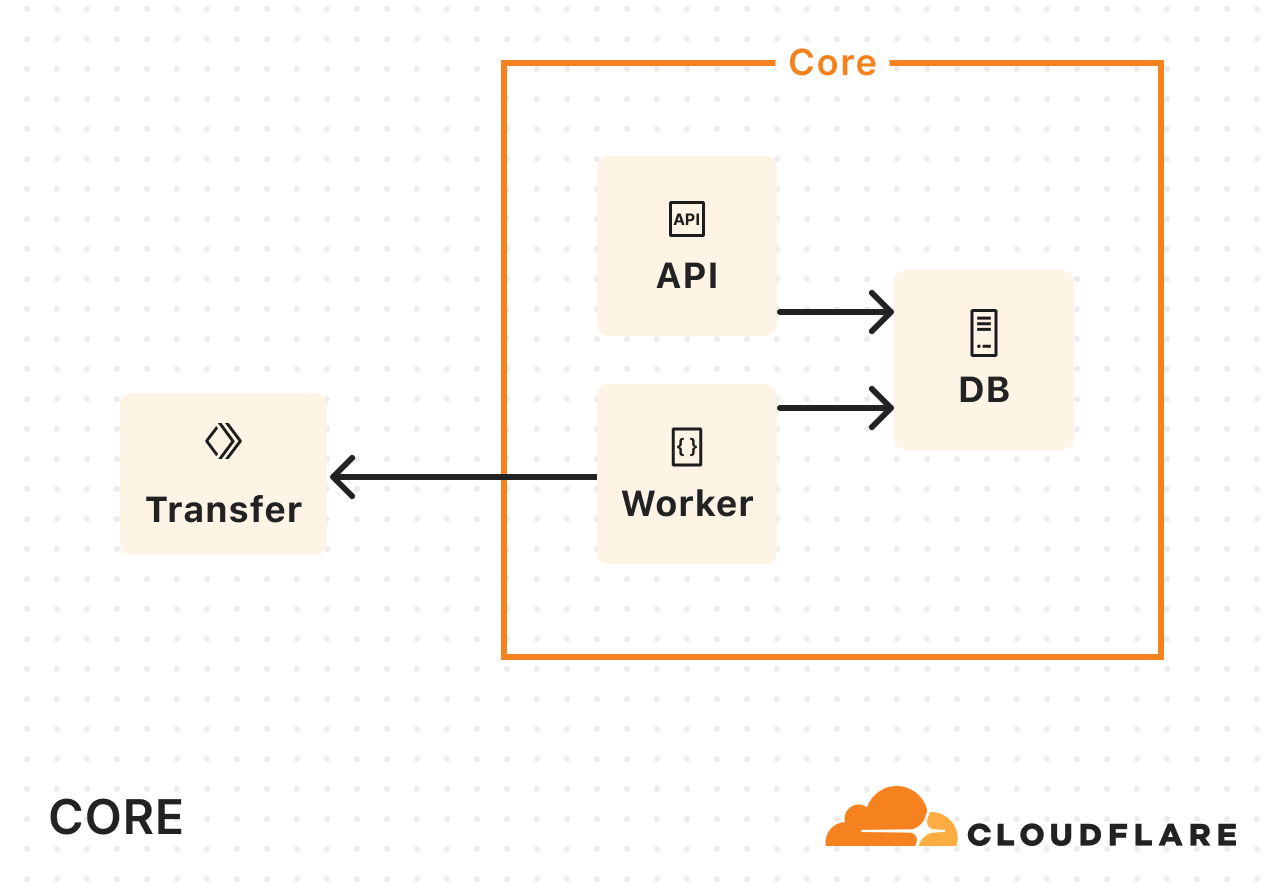
So we built the publishing bot on what was available: a chain of GCP Functions, a VM running git-sync, and a GitHub repository as the source of truth. It worked, but six years later, that architecture was showing its age. Here's a diagram of the previous architecture:


The architecture had five pain points. The one that hurt most was observability: debugging meant stitching logs together by hand. We'll start there.

  1. No shared trace
    A single package update could pass through Cloud Functions, Google Cloud Storage (GCS) object events, Pub/Sub topics, a git-sync VM, and Workers KV before a file reached a user. None of those systems shared a correlation ID. GCP Logging held one half of the story, Cloudflare Logpush held the other, and the two had no common key to join on.

    The problem wasn't outright failure, it was partial success. A version that processed cleanly, wrote to KV, and then silently failed to land in the GitHub repo would serve fine for weeks until someone noticed the two stores had diverged. There was no alert for that. There couldn't be, because nothing in the system knew the full pipeline state.

  2. Split-brain storage
    Files lived in two places at once: Workers KV at the edge (with a bare-metal origin as fallback) and a GitHub repository as the source of truth. The ingestion pipeline wrote to both at the end of every run. Neither was authoritative, and when they drifted, there was no clean way to reconcile them.
  3. Pipeline glued together with object events
    The ingestion pipeline was a chain of small GCP Cloud Functions, each doing one step and handing off to the next through shared storage. One function fetched the package's release archive from npm and dropped it in a bucket. The bucket firing a "new file" event triggered the next function, which unpacked it and wrote the results somewhere else, triggering the next, and so on. Storage was doing double duty as a message queue, with no dead-letter queue, no backlog visibility, and no clean replay when a step failed.
  4. 26 functions for 26 letters
    Just checking npm for updates required 26 Cloud Functions, one per letter of the alphabet. Each shard had its own deployment and its own logs, and the only way to know if the fleet was healthy was to check all 26.
  5. The GitHub repo GitHub couldn't serve
    A separate VM ran git-sync, mirroring every processed file into cdnjs/cdnjs. Years of releases pushed it past 1.1TB of packed storage, large enough that GitHub's own archive service refused to generate tarballs or zip downloads for it. Forking became impractical, clones were slow, and the .gitignore had grown to 274 hand-curated entries blocking broken or weirdly-versioned releases. It was a documented graveyard of everything the pipeline couldn't reasonably reject upstream.

    A genuine thank you to the GitHub team for hosting this giant for over a decade. They bore with us through years of storage growth, and the project wouldn't have survived without them.

    A quieter benefit that came with the migration is having fewer moving parts to secure. Cloud Functions, a git-sync VM, container images, GCS buckets, service-account keys — every one of those was a thing to secure, patch, and audit. Retiring the pipeline closed all of the recently opened cdnjs vulnerabilities.

How we re-built it

The new cdnjs architecture runs entirely on Cloudflare’s Developer Platform.

R2 is the single source of truth for file content. It has no practical size limit, so the files that couldn't fit in KV before, like source maps, big bundles, and font packs, now live alongside everything else. As a bonus, the S3 API makes the entire cdnjs catalog accessible to any S3 client. Maintain a mirror? Open an issue on the cdnjs repository and we'll set you up with read-only credentials.

KV stores only metadata now: package info, version lists, SRI hashes. KV is built for high read volume with infrequent writes, which is exactly the shape of metadata access.

In front of the Worker sits Workers Cache, a tiered cache Cloudflare launched this year. Before, we relied on a separate internal caching layer between the edge and the Worker. That layer is gone now, replaced by one owned by the Developer Platform, the same platform that runs the rest of cdnjs. One less moving part!

The new architecture also extends a long-standing partnership. DigitalOcean has hosted the cdnjs website for years as a sponsor; now it hosts the storage too. Every file published to R2 is mirrored to DigitalOcean Spaces: architecturally a disaster-recovery copy, operationally also a live fallback. The serving worker reads through to it whenever R2 can’t return a file. The chain is cache → R2 → DigitalOcean, so R2 having a bad day doesn't take cdnjs down. A Cloudflare-hosted origin still sits in the chain during the transition, but it will retire once the GitHub backfill lands in R2.

The ingestion pipeline is built on Cloudflare Workflows. Every ten minutes, a cron job triggers PackageUpdatesWorkflow, which checks npm and GitHub for new versions. For each new version found, it spawns a DownloadPackageWorkflow that fetches the tarball into R2, then a ProcessingWorkflow per file that extracts, minifies, and compresses. Finally, PublishingWorkflow writes the results to R2 and KV and updates the Algolia search index.

Because Workflows provides durable execution, the state of each step is preserved. If anything fails — a network timeout, a compression error — the workflow resumes from the last successful step.

The trickier piece is how we glue Workflows to the external compression container. We pre-compress text-based files to streamline the delivery process. But compression is too CPU-intensive for a Worker, so we hand it off to Cloudflare Containers, wait for compression to complete, and then pick up where we left off.

The pipeline has two kinds of waiting:

Per file: Each ProcessingWorkflow writes the uncompressed file to an R2 bucket, sends a job to a Queue, and hibernates. A Rust compression service running in the container picks it up, compresses it, and writes the result to another bucket. An R2 event notification wakes the workflow up so it can continue.

Per package: The parent workflow needs to wait for all its file children before moving on to publish. A package with thousands of files means thousands of children running in parallel. We use a small Durable Object as a counter: a parent increments on each child it spawns, children decrement when they finish. The parent wakes up when the counter reaches zero.

An overview of the new architecture, with R2 as the source of truth and Workflows running the pipeline:

Pushing the limits

Designing the new architecture was one challenge. Migrating the existing catalog into it, without disturbing a single file already in the wild, was another.

We'd actually tried this once before and had to roll back. The plan, back then, was to re-process old packages and write the results directly to R2, but the regenerated files didn't byte-match what KV had been serving. Minifiers and compressors aren't fully deterministic across versions, so the new outputs were correct but had different SRI hashes. For a CDN where users pin those hashes in their HTML, that's a serving break. So we rolled back, and now, we migrated the existing content from KV to R2 as-is instead of regenerating it.

That decision shifted the problem from "re-process millions of files" to "copy millions of files between accounts, without missing any." And that's where we ran into the Workers subrequest limit, capped at 1,000 per invocation on paid plans. A package with thousands of files would burn through it in one go. Parallelizing didn't help, since every Worker hits the same ceiling. So we sharded the migration by package name and fanned the work out across many invocations via Queues, whose at-least-once delivery guarantee meant no package could silently fall out of the migration.

We hit two platform limits during the migration: 1,000 subrequests per Worker invocation and 1,024 steps per Workflow. Instead of just working around them, we asked the Workers and Workflows teams to raise them — which they did. Subrequests now go up to 10 million on paid plans; Workflows now default to 10,000 steps, configurable to 25,000.

The cdnjs pipeline runs on the same building blocks anyone can use: Workers, Workflows, R2, KV, Queues, Containers, and Durable Objects. The limits we hit are limits we lifted for everyone. If the Cloudflare Developer Platform can serve 9 billion requests a day and publish packages with hundreds of thousands of compressed, minified files, it can probably run whatever you're building.

What’s next

There's an obvious next question hiding in all of this: could cdnjs also serve modern, browser-native ES modules? The same packages, transformed on publish, ready to import without a bundler. The architecture doesn't rule it out. The Workflows-plus-Containers pattern that pre-compresses files today would work just as well for transforming them. We're not committing to it, but it's the kind of thing that's now possible to consider, which wasn't true a year ago.

git commit -m "with love" --author="cdnjs team"

We follow every open issue on GitHub and we want your feedback. Don't hesitate to contribute and help make the Internet better for everyone.
Making Super Slurper 5x faster with Workers, Durable Objects, and Queues

Post Syndicated from Connor Maddox original https://blog.cloudflare.com/making-super-slurper-five-times-faster/

Super Slurper is Cloudflare’s data migration tool that is designed to make large-scale data transfers between cloud object storage providers and Cloudflare R2 easy. Since its launch, thousands of developers have used Super Slurper to move petabytes of data from AWS S3, Google Cloud Storage, and other S3-compatible services to R2.

But we saw an opportunity to make it even faster. We rearchitected Super Slurper from the ground up using our Developer Platform — building on Cloudflare Workers, Durable Objects, and Queues — and improved transfer speeds by up to 5x. In this post, we’ll dive into the original architecture, the performance bottlenecks we identified, how we solved them, and the real-world impact of these improvements.

Initial architecture and performance bottlenecks

Super Slurper originally shared its architecture with SourcingKit, a tool built to bulk import images from AWS S3 into Cloudflare Images. SourcingKit was deployed on Kubernetes and ran alongside the Images service. When we started building Super Slurper, we split it into its own Kubernetes namespace and introduced a few new APIs to make it easier to use for the object storage use case. This setup worked well and helped thousands of developers move data to R2.

However, it wasn’t without its challenges. SourcingKit wasn’t designed to handle the scale required for large, petabytes-scale transfers. SourcingKit, and by extension Super Slurper, operated on Kubernetes clusters located in one of our core data centers, meaning it had to share compute resources and bandwidth with Cloudflare’s control plane, analytics, and other services. As the number of migrations grew, these resource constraints became a clear bottleneck.

For a service transferring data between object storage providers, the job is simple: list objects from the source, copy them to the destination, and repeat. This is exactly how the original Super Slurper worked. We listed objects from the source bucket, pushed that list to a Postgres-based queue (pg_queue), and then pulled from this queue at a steady pace to copy objects over. Given the scale of object storage migrations, bandwidth usage was inevitably going to be high. This made it challenging to scale.

To address the bandwidth constraints operating solely in our core data center, we introduced Cloudflare Workers into the mix. Instead of handling the copying of data in our core data center, we started calling out to a Worker to do the actual copying:


As Super Slurper’s usage grew, so did our Kubernetes resource consumption. A significant amount of time during data transfers was spent waiting on network I/O or storage, and not actually doing compute-intensive tasks. So we didn’t need more memory or more CPU, we needed more concurrency.

To keep up with demand, we kept increasing the replica count. But eventually, we hit a wall. We were dealing with scalability challenges when running on the order of tens of pods when we wanted multiple orders of magnitude more.

We decided to rethink the entire approach from first principles, instead of leaning on the architecture we had inherited. In about a week, we built a rough proof of concept using Cloudflare Workers, Durable Objects, and Queues. We listed objects from the source bucket, pushed them into a queue, and then consumed messages from the queue to initiate transfers. Although this sounds very similar to what we did in the original implementation, building on our Developer Platform allowed us to automatically scale an order of magnitude higher than before.

  • Cloudflare Queues: Enables asynchronous object transfers and auto-scales to meet the number of objects being migrated.

  • Cloudflare Workers: Runs lightweight compute tasks without the overhead of Kubernetes and optimizes where in the world each part of the process runs for lower latency and better performance.

  • SQLite-backed Durable Objects (DOs): Acts as a fully distributed database, eliminating the limitations of a single PostgreSQL instance.

  • Hyperdrive: Provides fast access to historical job data from the original PostgreSQL database, keeping it as an archive store.

We ran a few tests and found that our proof of concept was slower than the original implementation for small transfers (a few hundred objects), but it matched and eventually exceeded the performance of the original as transfers scaled into the millions of objects. That was the signal we needed to invest the time to take our proof of concept to production.

We removed our proof of concept hacks, worked on stability, and found new ways to make transfers scale to even higher concurrency. After a few iterations, we landed on something we were happy with.

New architecture: Workers, Queues, and Durable Objects

Processing layer: managing the flow of migration


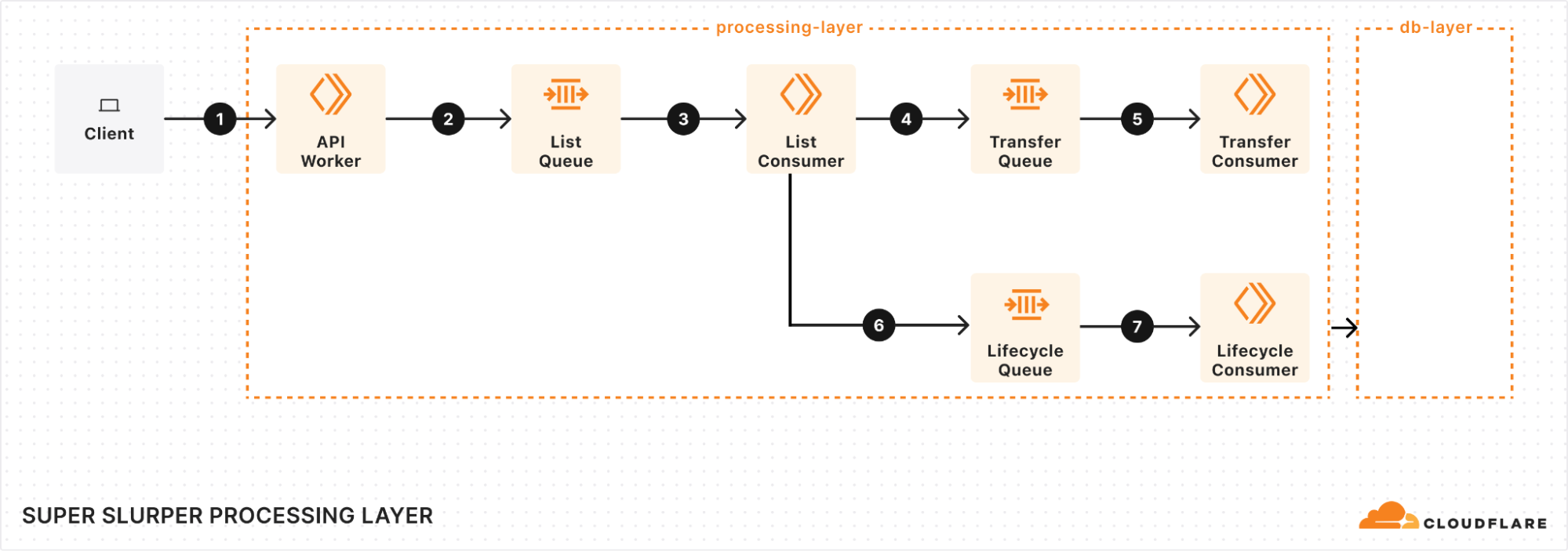
At the heart of our processing layer are queues, consumers, and workers. Here’s what the process looks like:

Kicking off a migration

When a client triggers a migration, it starts with a request sent to our API Worker. This worker takes the details of the migration, stores them in the database, and adds a message to the List Queue to start the process.

Listing source bucket objects

The List Queue Consumer is where things start to pick up. It pulls messages from the queue, retrieves object listings from the source bucket, applies any necessary filters, and stores important metadata in the database. Then, it creates new tasks by enqueuing object transfer messages into the Transfer Queue.

We immediately queue new batches of work, maximizing concurrency. A built-in throttling mechanism prevents us from adding more messages to our queues when unexpected failures occur, such as dependent systems going down. This helps maintain stability and prevents overload during disruptions.

Efficient object transfers

The Transfer Queue Consumer Workers pull object transfer messages from the queue, ensuring that each object is processed only once by locking the object key in the database. When the transfer finishes, the object is unlocked. For larger objects, we break them into manageable chunks and transfer them as multipart uploads.

Handling failures gracefully

Failures are inevitable in any distributed system, and we had to make sure we accounted for that. We implemented automatic retries for transient failures, so issues don’t interrupt the flow of the migration. But if something can’t be resolved with retries, the message goes into the Dead Letter Queue (DLQ), where it is logged for later review and resolution.

Job completion & lifecycle management

Once all the objects are listed and the transfers are in progress, the Lifecycle Queue Consumer keeps an eye on everything. It monitors the ongoing transfers, ensuring that no object is left behind. When all the transfers are complete, the job is marked as finished and the migration process wraps up.

Database layer: durable storage & legacy data retrieval


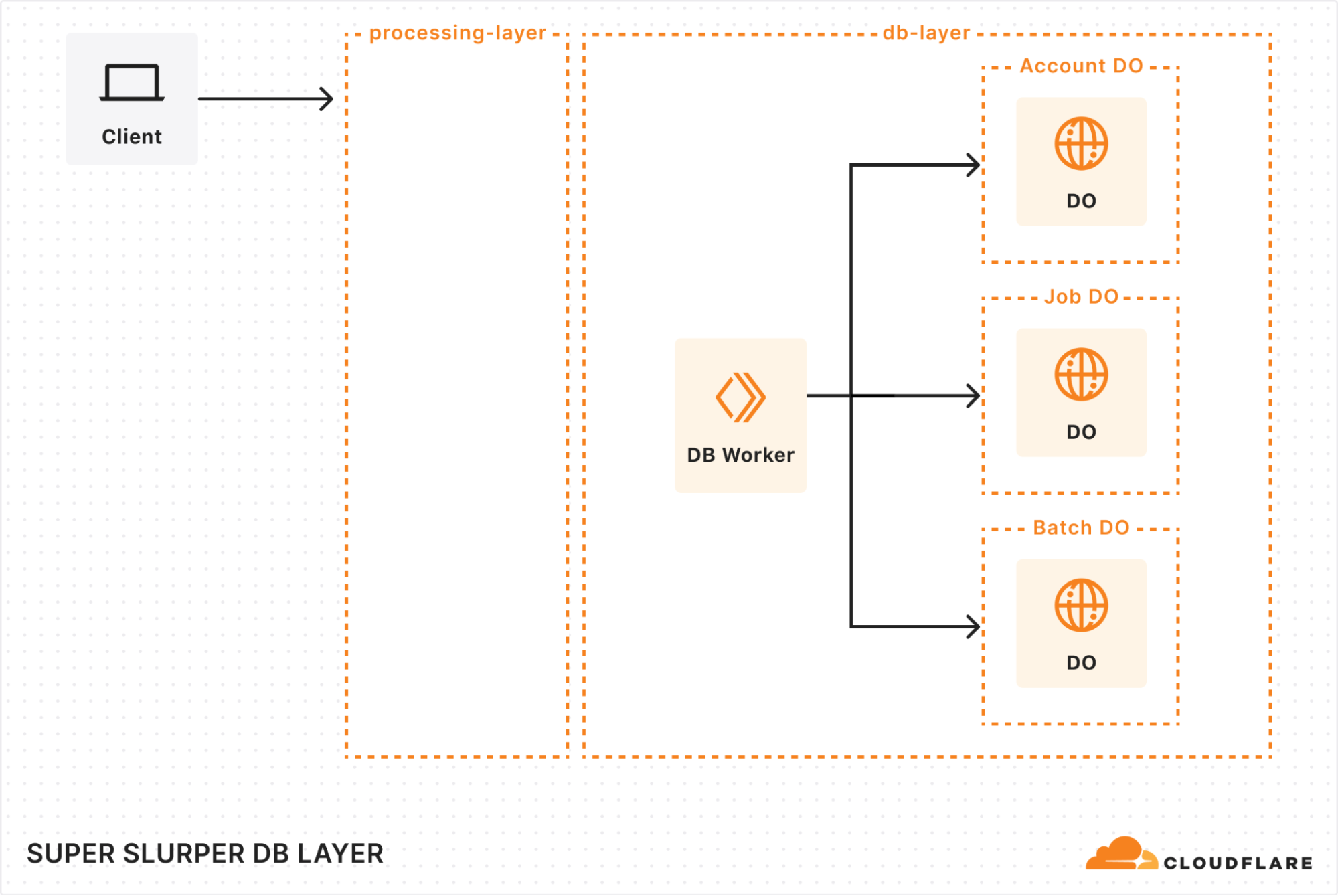
When building our new architecture, we knew we needed a robust solution to handle massive datasets while ensuring retrieval of historical job data. That’s where our combination of Durable Objects (DOs) and Hyperdrive came in.

Durable Objects

We gave each account a dedicated Durable Object to track migration jobs. Each job’s DO stores vital details, such as bucket names, user options, and job state. This ensured everything stayed organized and easy to manage. To support large migrations, we also added a Batch DO that manages all the objects queued for transfer, storing their transfer state, object keys, and any extra metadata.

As migrations scaled up to billions of objects, we had to get creative with storage. We implemented a sharding strategy to distribute request loads, preventing bottlenecks and working around SQLite DO’s 10 GB storage limit. As objects are transferred, we clean up their details, optimizing storage space along the way. It’s surprising how much storage a billion object keys can require!

Hyperdrive

Since we were rebuilding a system with years of migration history, we needed a way to preserve and access every past migration detail. Hyperdrive serves as a bridge to our legacy systems, enabling seamless retrieval of historical job data from our core PostgreSQL database. It’s not just a data retrieval mechanism, but an archive for complex migration scenarios.

Results: Super Slurper now transfers data to R2 up to 5x faster

So, after all of that, did we actually achieve our goal of making transfers faster?

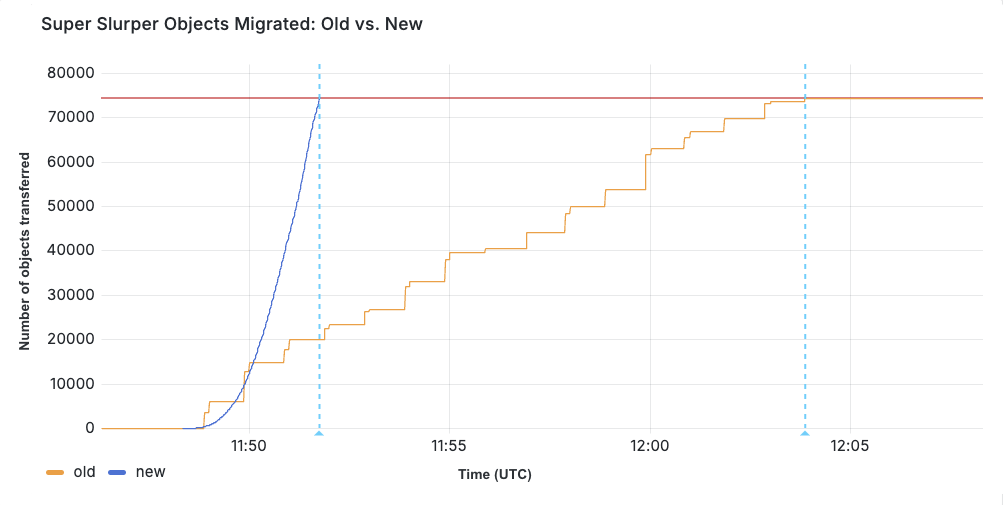
We ran a test migration of 75,000 objects from AWS S3 to R2. With the original implementation, the transfer took 15 minutes and 30 seconds. After our performance improvements, the same migration completed in just 3 minutes and 25 seconds.


When production migrations started using the new service in February, we saw even greater improvements in some cases, especially depending on the distribution of object sizes. Super Slurper has been around for about two years. But the improved performance has led to it being able to move much more data — 35% of all objects copied by Super Slurper happened just in the last two months.

Challenges

One of the biggest challenges we faced with the new architecture was handling duplicate messages. There were a couple of ways duplicates could occur:

  • Queues provides at-least-once delivery, which means consumers may receive the same message more than once to guarantee delivery.

  • Failures and retries could also create apparent duplicates. For example, if a request to a Durable Object fails after the object has already been transferred, the retry could reprocess the same object.

If not handled correctly, this could result in the same object being transferred multiple times. To solve this, we implemented several strategies to ensure each object was accurately accounted for and only transferred once:

  1. Since listing is sequential (e.g., to get object 2, you need the continuation token from listing object 1), we assign a sequence ID to each listing operation. This allows us to detect duplicate listings and prevent multiple processes from starting simultaneously. This is particularly useful because we don’t wait for database and queue operations to complete before listing the next batch. If listing 2 fails, we can retry it, and if listing 3 has already started, we can short-circuit unnecessary retries.

  2. Each object is locked when its transfer begins, preventing parallel transfers of the same object. Once successfully transferred, the object is unlocked by deleting its key from the database. If a message for that object reappears later, we can safely assume it has already been transferred if the key no longer exists.

  3. We rely on database transactions to keep our counts accurate. If an object fails to unlock, its count remains unchanged. Similarly, if an object key fails to be added to the database, the count isn’t updated, and the operation will be retried later.

  4. As a last failsafe, we check whether the object already exists in the target bucket and was published after the start of our migration. If so, we assume it was transferred by our process (or another) and safely skip it.


What’s next for Super Slurper?

We’re always exploring ways to make Super Slurper faster, more scalable, and even easier to use — this is just the beginning.

  • We recently launched the ability to migrate from any S3 compatible storage provider!

  • Data migrations are still currently limited to 3 concurrent migrations per account, but we want to increase that limit. This will allow object prefixes to be split up into separate migrations and run in parallel, drastically increasing the speed at which a bucket can be migrated. For more information on Super Slurper and how to migrate data from existing object storage to R2, refer to our documentation.

P.S. As part of this update, we made the API much simpler to interact with, so migrations can now be managed programmatically!

Durable Objects aren’t just durable, they’re fast: a 10x speedup for Cloudflare Queues

Post Syndicated from Josh Wheeler original https://blog.cloudflare.com/how-we-built-cloudflare-queues

Cloudflare Queues let a developer decouple their Workers into event-driven services. Producer Workers write events to a Queue, and consumer Workers are invoked to take actions on the events. For example, you can use a Queue to decouple an e-commerce website from a service which sends purchase confirmation emails to users. During 2024’s Birthday Week, we announced that Cloudflare Queues is now Generally Available, with significant performance improvements that enable larger workloads. To accomplish this, we switched to a new architecture for Queues that enabled the following improvements:

  • Median latency for sending messages has dropped from ~200ms to ~60ms

  • Maximum throughput for each Queue has increased over 10x, from 400 to 5000 messages per second

  • Maximum Consumer concurrency for each Queue has increased from 20 to 250 concurrent invocations


Median latency drops from ~200ms to ~60ms as Queues are migrated to the new architecture

In this blog post, we’ll share details about how we built Queues using Durable Objects and the Cloudflare Developer Platform, and how we migrated from an initial Beta architecture to a geographically-distributed, horizontally-scalable architecture for General Availability.

v1 Beta architecture

When initially designing Cloudflare Queues, we decided to build something simple that we could get into users’ hands quickly. First, we considered leveraging an off-the-shelf messaging system such as Kafka or Pulsar. However, we decided that it would be too challenging to operate these systems at scale with the large number of isolated tenants that we wanted to support.

Instead of investing in new infrastructure, we decided to build on top of one of Cloudflare’s existing developer platform building blocks: Durable Objects. Durable Objects are a simple, yet powerful building block for coordination and storage in a distributed system. In our initial v1 architecture, each Queue was implemented using a single Durable Object. As shown below, clients would send messages to a Worker running in their region, which would be forwarded to the single Durable Object hosted in the WNAM (Western North America) region. We used a single Durable Object for simplicity, and hosted it in WNAM for proximity to our centralized configuration API service.


One of a Queue’s main responsibilities is to accept and store incoming messages. Sending a message to a v1 Queue used the following flow:

  • A client sends a POST request containing the message body to the Queues API at /accounts/:accountID/queues/:queueID/messages

  • The request is handled by an instance of the Queue Broker Worker in a Cloudflare data center running near the client.

  • The Worker performs authentication, and then uses Durable Objects idFromName API to route the request to the Queue Durable Object for the given queueID

  • The Queue Durable Object persists the message to storage before returning a success back to the client.

Durable Objects handled most of the heavy-lifting here: we did not need to set up any new servers, storage, or service discovery infrastructure. To route requests, we simply provided a queueID and the platform handled the rest. To store messages, we used the Durable Object storage API to put each message, and the platform handled reliably storing the data redundantly.

Consuming messages

The other main responsibility of a Queue is to deliver messages to a Consumer. Delivering messages in a v1 Queue used the following process:

  • Each Queue Durable Object maintained an alarm that was always set when there were undelivered messages in storage. The alarm guaranteed that the Durable Object would reliably wake up to deliver any messages in storage, even in the presence of failures. The alarm time was configured to fire after the user’s selected max wait time, if only a partial batch of messages was available. Whenever one or more full batches were available in storage, the alarm was scheduled to fire immediately.

  • The alarm would wake the Durable Object, which continually looked for batches of messages in storage to deliver.

  • Each batch of messages was sent to a “Dispatcher Worker” that used Workers for Platforms dynamic dispatch to pass the messages to the queue() function defined in a user’s Consumer Worker


This v1 architecture let us flesh out the initial version of the Queues Beta product and onboard users quickly. Using Durable Objects allowed us to focus on building application logic, instead of complex low-level systems challenges such as global routing and guaranteed durability for storage. Using a separate Durable Object for each Queue allowed us to host an essentially unlimited number of Queues, and provided isolation between them.

However, using only one Durable Object per queue had some significant limitations:

  • Latency: we created all of our v1 Queue Durable Objects in Western North America. Messages sent from distant regions incurred significant latency when traversing the globe.

  • Throughput: A single Durable Object is not scalable: it is single-threaded and has a fixed capacity for how many requests per second it can process. This is where the previous 400 messages per second limit came from.

  • Consumer Concurrency: Due to concurrent subrequest limits, a single Durable Object was limited in how many concurrent subrequests it could make to our Dispatcher Worker. This limited the number of queue() handler invocations that it could run simultaneously.

To solve these issues, we created a new v2 architecture that horizontally scales across multiple Durable Objects to implement each single high-performance Queue.

v2 Architecture

In the new v2 architecture for Queues, each Queue is implemented using multiple Durable Objects, instead of just one. Instead of a single region, we place Storage Shard Durable Objects in all available regions to enable lower latency. Within each region, we create multiple Storage Shards and load balance incoming requests amongst them. Just like that, we’ve multiplied message throughput.


Sending a message to a v2 Queue uses the following flow:

  • A client sends a POST request containing the message body to the Queues API at /accounts/:accountID/queues/:queueID/messages

  • The request is handled by an instance of the Queue Broker Worker running in a Cloudflare data center near the client.

  • The Worker:

    • Performs authentication

    • Reads from Workers KV to obtain a Shard Map that lists available storage shards for the given region and queueID

    • Picks one of the region’s Storage Shards at random, and uses Durable Objects idFromName API to route the request to the chosen shard

  • The Storage Shard persists the message to storage before returning a success back to the client.

In this v2 architecture, messages are stored in the closest available Durable Object storage cluster near the user, greatly reducing latency since messages don’t need to be shipped all the way to WNAM. Using multiple shards within each region removes the bottleneck of a single Durable Object, and allows us to scale each Queue horizontally to accept even more messages per second. Workers KV acts as a fast metadata store: our Worker can quickly look up the shard map to perform load balancing across shards.

To improve the Consumer side of v2 Queues, we used a similar “scale out” approach. A single Durable Object can only perform a limited number of concurrent subrequests. In v1 Queues, this limited the number of concurrent subrequests we could make to our Dispatcher Worker. To work around this, we created a new Consumer Shard Durable Object class that we can scale horizontally, enabling us to execute many more concurrent instances of our users’ queue() handlers.


Consumer Durable Objects in v2 Queues use the following approach:

  • Each Consumer maintains an alarm that guarantees it will wake up to process any pending messages. v2 Consumers are notified by the Queue’s Coordinator (introduced below) when there are messages ready for consumption. Upon notification, the Consumer sets an alarm to go off immediately.

  • The Consumer looks at the shard map, which contains information about the storage shards that exist for the Queue, including the number of available messages on each shard.

  • The Consumer picks a random storage shard with available messages, and asks for a batch.

  • The Consumer sends the batch to the Dispatcher Worker, just like for v1 Queues.

  • After processing the messages, the Consumer sends another request to the Storage Shard to either “acknowledge” or “retry” the messages.

This scale-out approach enabled us to work around the subrequest limits of a single Durable Object, and increase the maximum supported concurrency level of a Queue from 20 to 250. 

The Coordinator and “Control Plane”

So far, we have primarily discussed the “Data Plane” of a v2 Queue: how messages are load balanced amongst Storage Shards, and how Consumer Shards read and deliver messages. The other main piece of a v2 Queue is the “Control Plane”, which handles creating and managing all the individual Durable Objects in the system. In our v2 architecture, each Queue has a single Coordinator Durable Object that acts as the brain of the Queue. Requests to create a Queue, or change its settings, are sent to the Queue’s Coordinator.


The Coordinator maintains a Shard Map for the Queue, which includes metadata about all the Durable Objects in the Queue (including their region, number of available messages, current estimated load, etc.). The Coordinator periodically writes a fresh copy of the Shard Map into Workers KV, as pictured in step 1 of the diagram. Placing the shard map into Workers KV ensures that it is globally cached and available for our Worker to read quickly, so that it can pick a shard to accept the message.

Every shard in the system periodically sends a heartbeat to the Coordinator as shown in steps 2 and 3 of the diagram. Both Storage Shards and Consumer Shards send heartbeats, including information like the number of messages stored locally, and the current load (requests per second) that the shard is handling. The Coordinator uses this information to perform autoscaling. When it detects that the shards in a particular region are overloaded, it creates additional shards in the region, and adds them to the shard map in Workers KV. Our Worker sees the updated shard map and naturally load balances messages across the freshly added shards. Similarly, the Coordinator looks at the backlog of available messages in the Queue, and decides to add more Consumer shards to increase Consumer throughput when the backlog is growing. Consumer Shards pull messages from Storage Shards for processing as shown in step 4 of the diagram.

Switching to a new scalable architecture allowed us to meet our performance goals and take Queues to GA. As a recap, this new architecture delivered these significant improvements:

  • P50 latency for writing to a Queue has dropped from ~200ms to ~60ms.

  • Maximum throughput for a Queue has increased from 400 to 5000 messages per second.

  • Maximum consumer concurrency has increased from 20 to 250 invocations.

What’s next for Queues

  • We plan on leveraging the performance improvements in the new beta version of Durable Objects which use SQLite to continue to improve throughput/latency in Queues.

  • We will soon be adding message management features to Queues so that you can take actions to purge messages in a queue, pause consumption of messages, or “redrive”/move messages from one queue to another (for example messages that have been sent to a Dead Letter Queue could be “redriven” or moved back to the original queue).

  • Work to make Queues the “event hub” for the Cloudflare Developer Platform:

    • Create a low-friction way for events emitted from other Cloudflare services with event schemas to be sent to Queues.

    • Build multi-Consumer support for Queues so that Queues are no longer limited to one Consumer per queue.

To start using Queues, head over to our Getting Started guide. 

Do distributed systems like Cloudflare Queues and Durable Objects interest you? Would you like to help build them at Cloudflare? We’re Hiring!