Tag Archives: Connectivity Cloud

Hyper-volumetric DDoS attacks skyrocket: Cloudflare’s 2025 Q2 DDoS threat report

Post Syndicated from Omer Yoachimik original https://blog.cloudflare.com/ddos-threat-report-for-2025-q2/

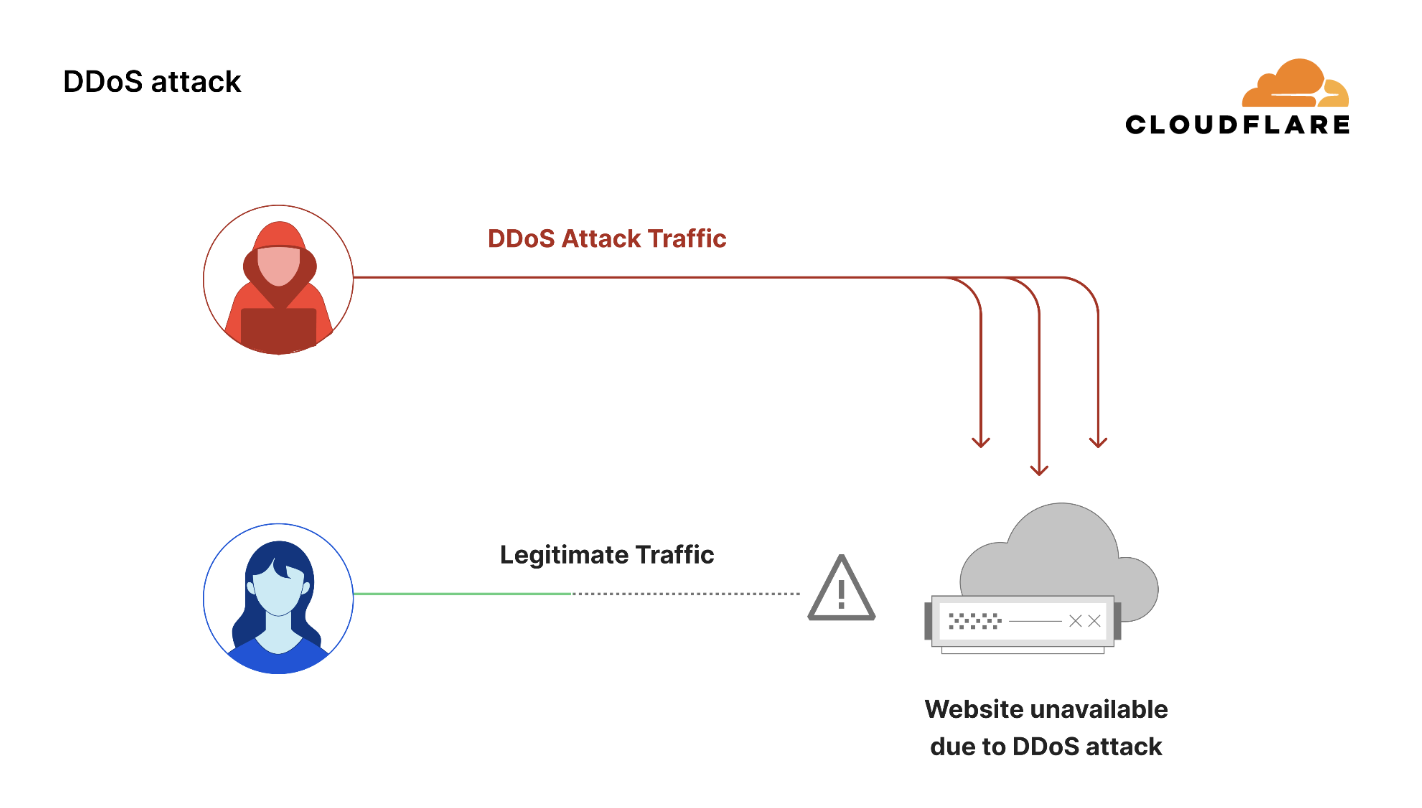
Welcome to the 22nd edition of the Cloudflare DDoS Threat Report. Published quarterly, this report offers a comprehensive analysis of the evolving threat landscape of Distributed Denial of Service (DDoS) attacks based on data from the Cloudflare network. In this edition, we focus on the second quarter of 2025. To view previous reports, visit www.ddosreport.com.

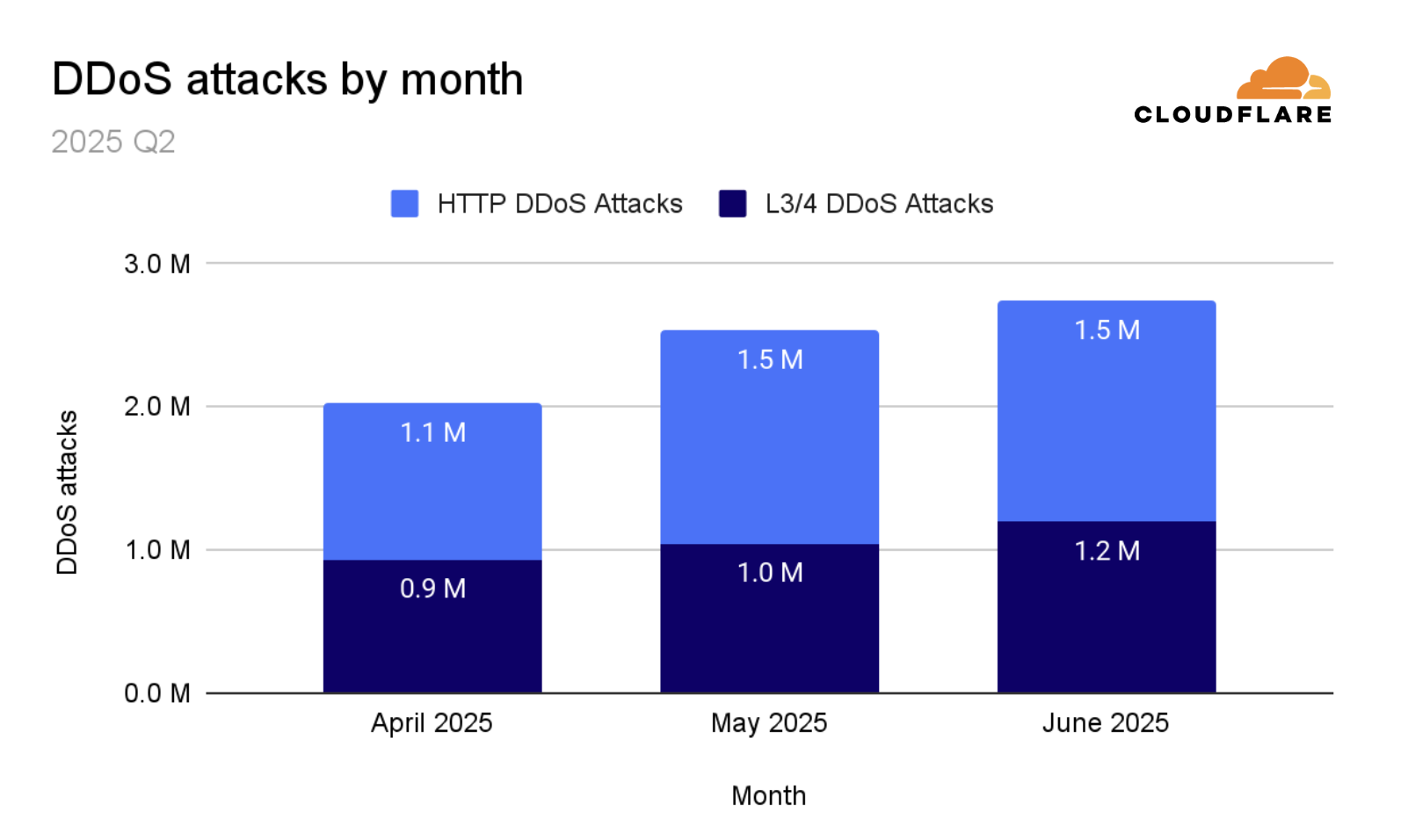
June was the busiest month for DDoS attacks in 2025 Q2, accounting for nearly 38% of all observed activity. One notable target was an independent Eastern European news outlet protected by Cloudflare, which reported being attacked following its coverage of a local Pride parade during LGBTQ Pride Month.

Key DDoS insights

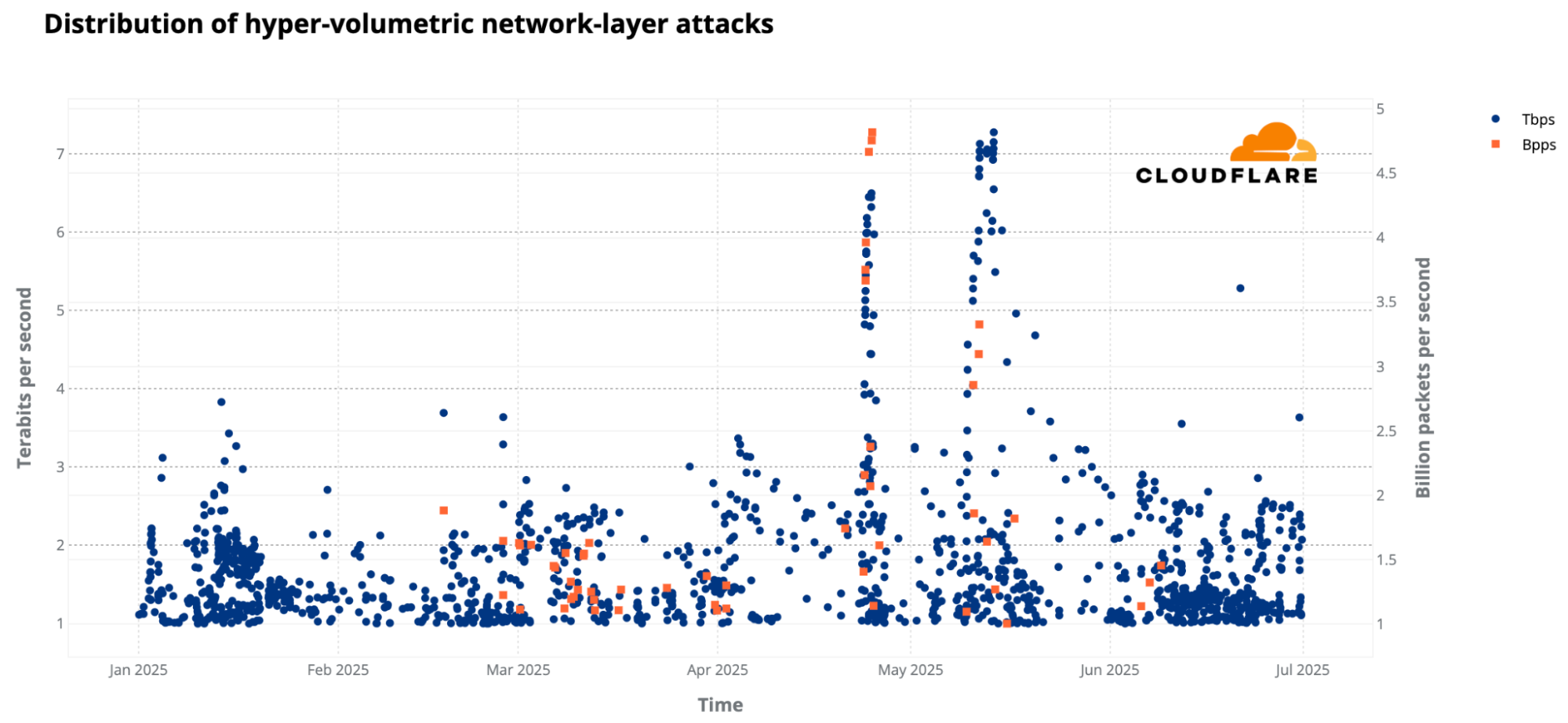
  • DDoS attacks continue to break records. During 2025 Q2, Cloudflare automatically blocked the largest ever reported DDoS attacks, peaking at 7.3 terabits per second (Tbps) and 4.8 billion packets per second (Bpps).

  • Overall, in 2025 Q2, hyper-volumetric DDoS attacks skyrocketed. Cloudflare blocked over 6,500 hyper-volumetric DDoS attacks, an average of 71 per day. 

  • Although the overall number of DDoS attacks dropped compared to the previous quarter — which saw an unprecedented surge driven by a large-scale campaign targeting Cloudflare’s network and critical Internet infrastructure protected by Cloudflare — the number of attacks in 2025 Q2 were still 44% higher than in 2024 Q2. Critical infrastructure continues to face sustained pressure, with the Telecommunications, Service Providers, and Carriers sector jumping again to the top as the most targeted industry.

All the attacks in this report were automatically detected and blocked by our autonomous defenses.


To learn more about DDoS attacks and other types of cyber threats, refer to our Learning Center. Visit Cloudflare Radar to view an interactive version of this report where you can drill down further. Radar also offers a free API for those interested in investigating Internet trends. You can also learn more about the methodologies used in preparing these reports.

DDoS attacks in numbers

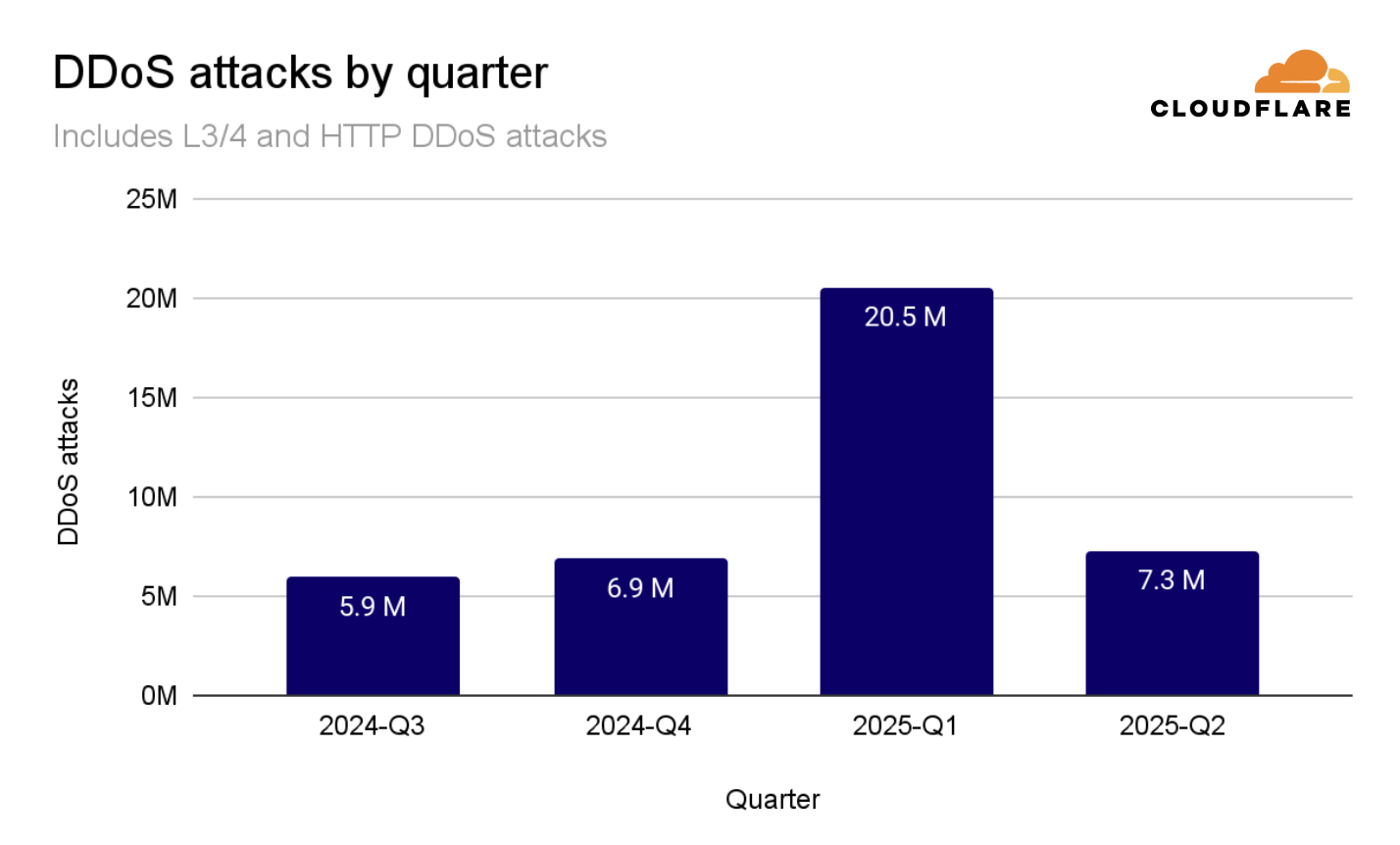
In 2025 Q2, Cloudflare mitigated 7.3 million DDoS attacks — down sharply from 20.5 million in Q1, when an 18-day campaign against Cloudflare’s own and other critical infrastructure protected by Cloudflare, drove 13.5 million of those attacks. 


DDoS attacks by quarter

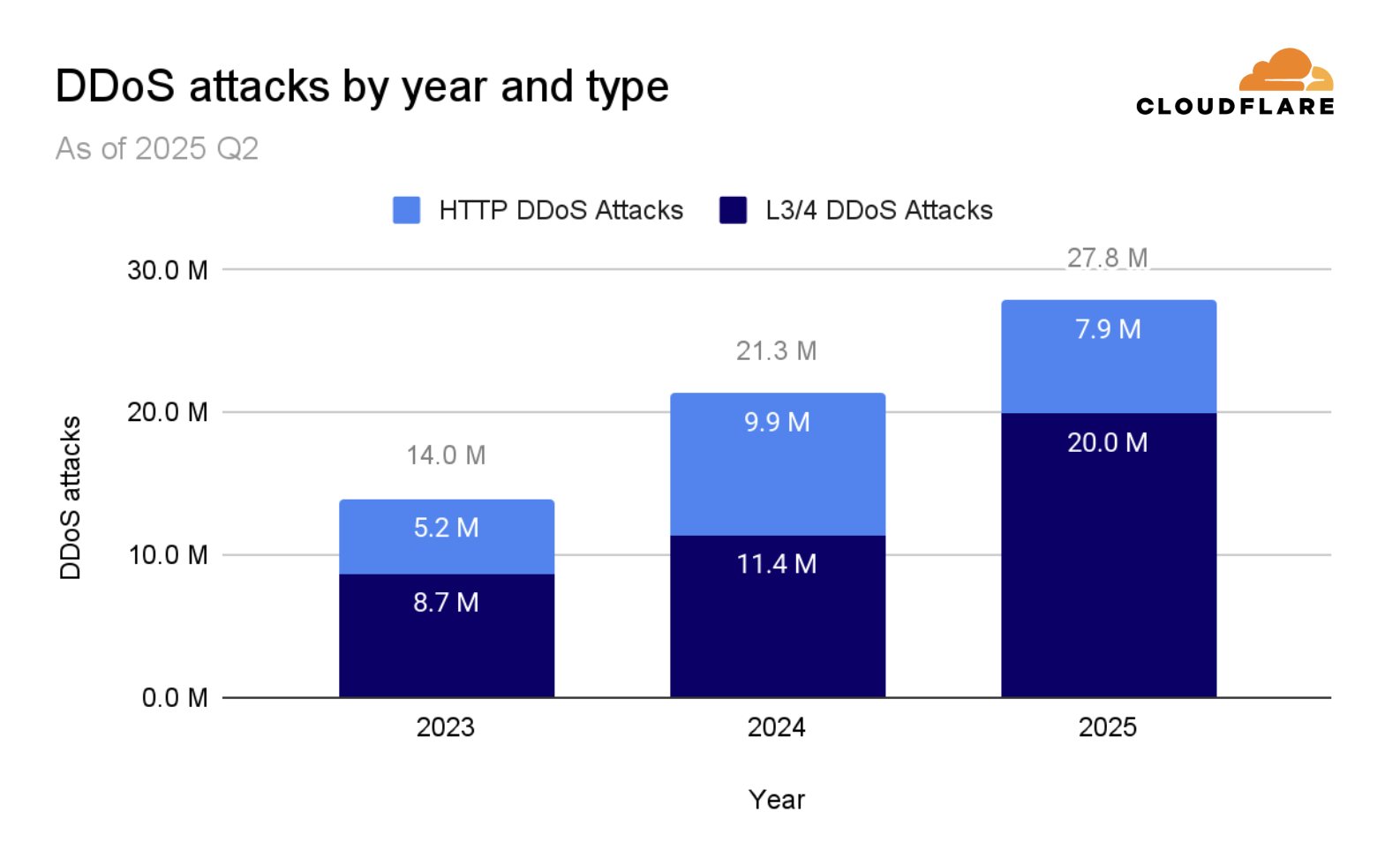
We’ve just crossed halfway through 2025, and so far Cloudflare has already blocked 27.8 million DDoS attacks, equivalent to 130% of all the DDoS attacks we blocked in the full calendar year 2024.


DDoS attacks by year

Breaking it down further, Layer 3/Layer 4 (L3/4) DDoS attacks plunged 81% quarter-over-quarter to 3.2 million, while HTTP DDoS attacks rose 9% to 4.1 million. Year-over-year changes remain elevated. Overall attacks were 44% higher than 2024 Q2, with HTTP DDoS attacks seeing the largest increase of 129% YoY.


DDoS attacks by month

Hyper-volumetric DDoS attacks

In 2025 Q2, Cloudflare blocked over 6,500 hyper-volumetric DDoS attacks, averaging 71 hyper-volumetric attacks per day. Hyper-volumetric attacks include L3/4 DDoS attacks exceeding 1 Bpps or 1 Tbps, and HTTP DDoS attacks exceeding 1 million requests per second (Mrps).

The number of hyper-volumetric DDoS attacks exceeding 100 million packets per second (pps) surged by 592% compared to the previous quarter, and the number exceeding 1 billion pps and 1 terabits per second (Tbps) doubled compared to the previous quarter. The number of HTTP DDoS attacks exceeding 1 million rps (rps) remained the same at around 20 million in total, an average of almost 220,000 attacks every day.


Hyper-volumetric DDoS attacks in 2025 Q2

Threat actors

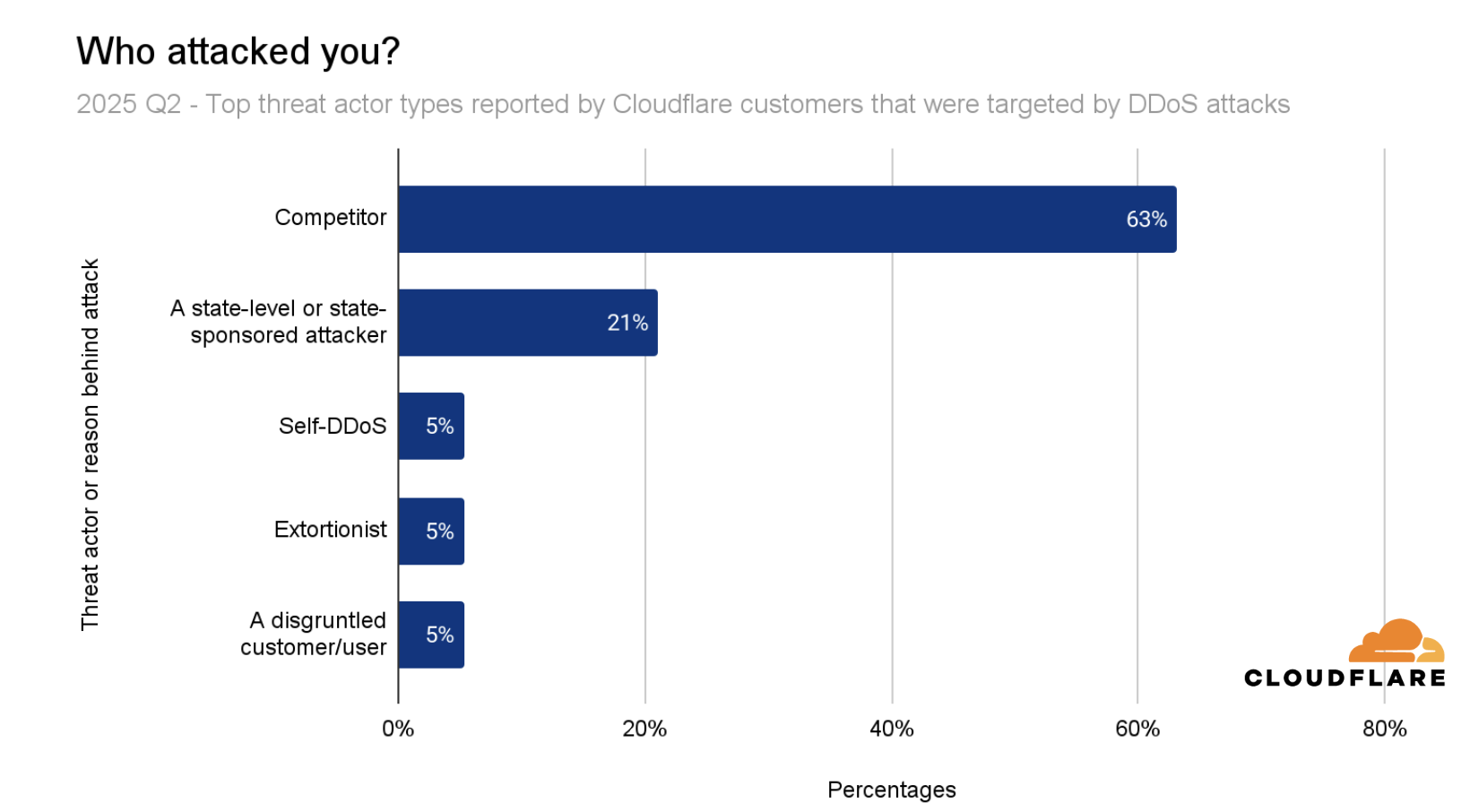
When asked who was behind the DDoS attacks they experienced in 2025 Q2, the majority (71%) of respondents said they didn’t know who attacked them. Of the remaining 29% of respondents that claimed to have identified the threat actor, 63% pointed to competitors, a pattern especially common in the Gaming, Gambling and Crypto industries. Another 21% attributed the attack to state-level or state-sponsored actors, while 5% each said they’d inadvertently attacked themselves (self-DDoS), were targeted by extortionists, or suffered an assault from disgruntled customers/users.


Top threat actors reported in 2025 Q2

Ransom DDoS attacks

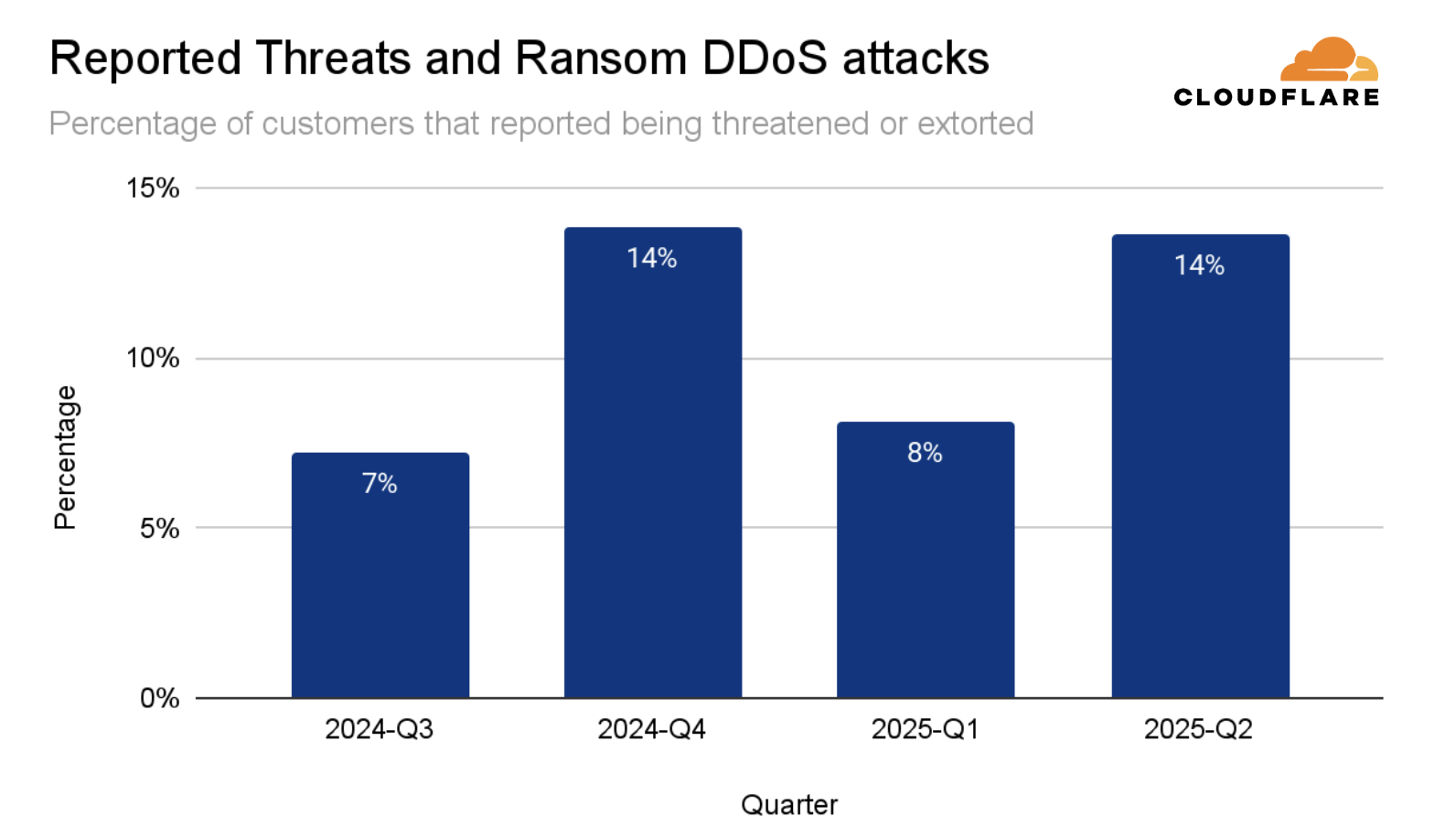
The percentage of attacked Cloudflare customers that reported being targeted by a Ransom DDoS attack or that were threatened increased by 68% compared to the previous quarter, and by 6% compared to the same quarter in 2024. 


Ransom DDoS attacks by quarter 2025 Q2

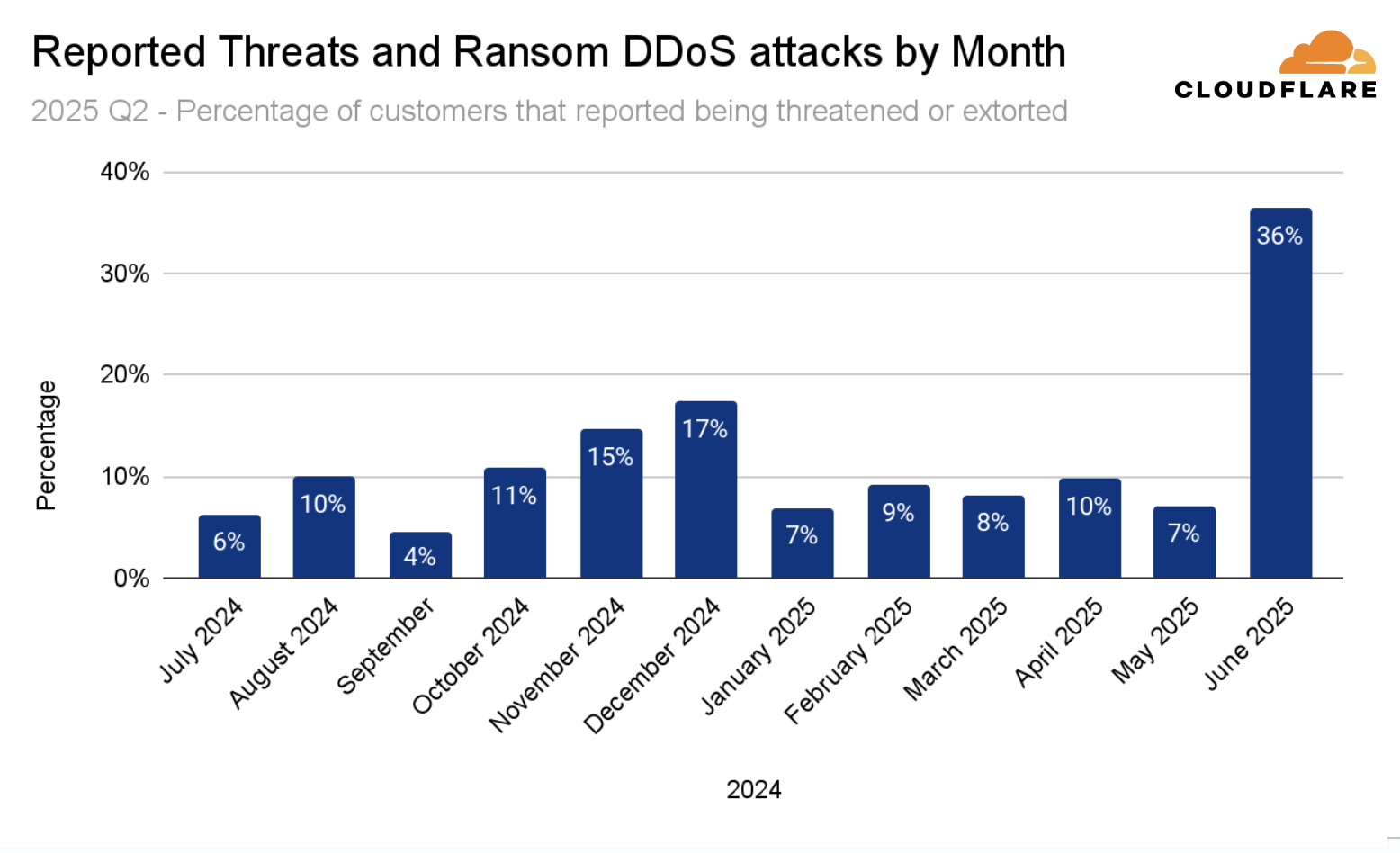
Diving deeper, Ransom DDoS attacks soared in June 2025. Around a third of respondents reported being threatened or subjected to Ransom DDoS attacks.


Ransom DDoS attacks by month 2025 Q2

Top attacked locations

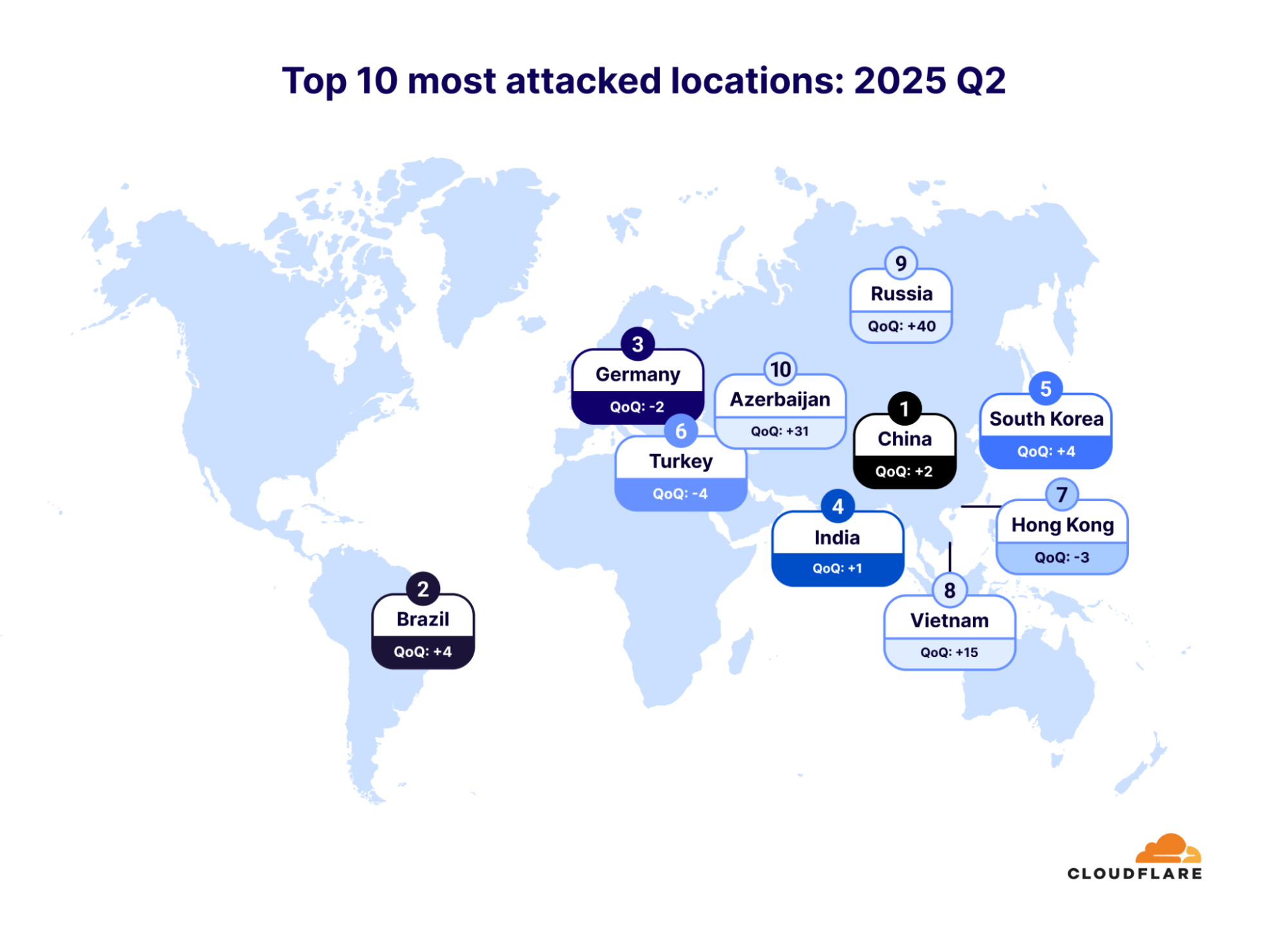
The ranking of the top 10 most attacked locations in 2025 Q2 shifted significantly. China climbed two spots to reclaim first place, Brazil jumped four spots to second place, Germany slipped two spaces to third place, India edged up one to fourth, and South Korea rose four to fifth. Turkey fell four places to sixth, Hong Kong dropped three to seventh, and Vietnam vaulted an astonishing fifteen spots into eighth. Meanwhile, Russia rocketed forty places to ninth, and Azerbaijan surged thirty-one to round out the top ten.


The locations most targeted by DDoS attacks for 2025 Q2

It’s important to note that these attacked locations are determined by the billing country of the Cloudflare customer whose services were targeted — not that those nations themselves are under attack. In other words, a high rank simply means more of our registered customers in that billing jurisdiction were targeted by DDoS traffic, rather than implying direct geopolitical targeting.

Top attacked industries

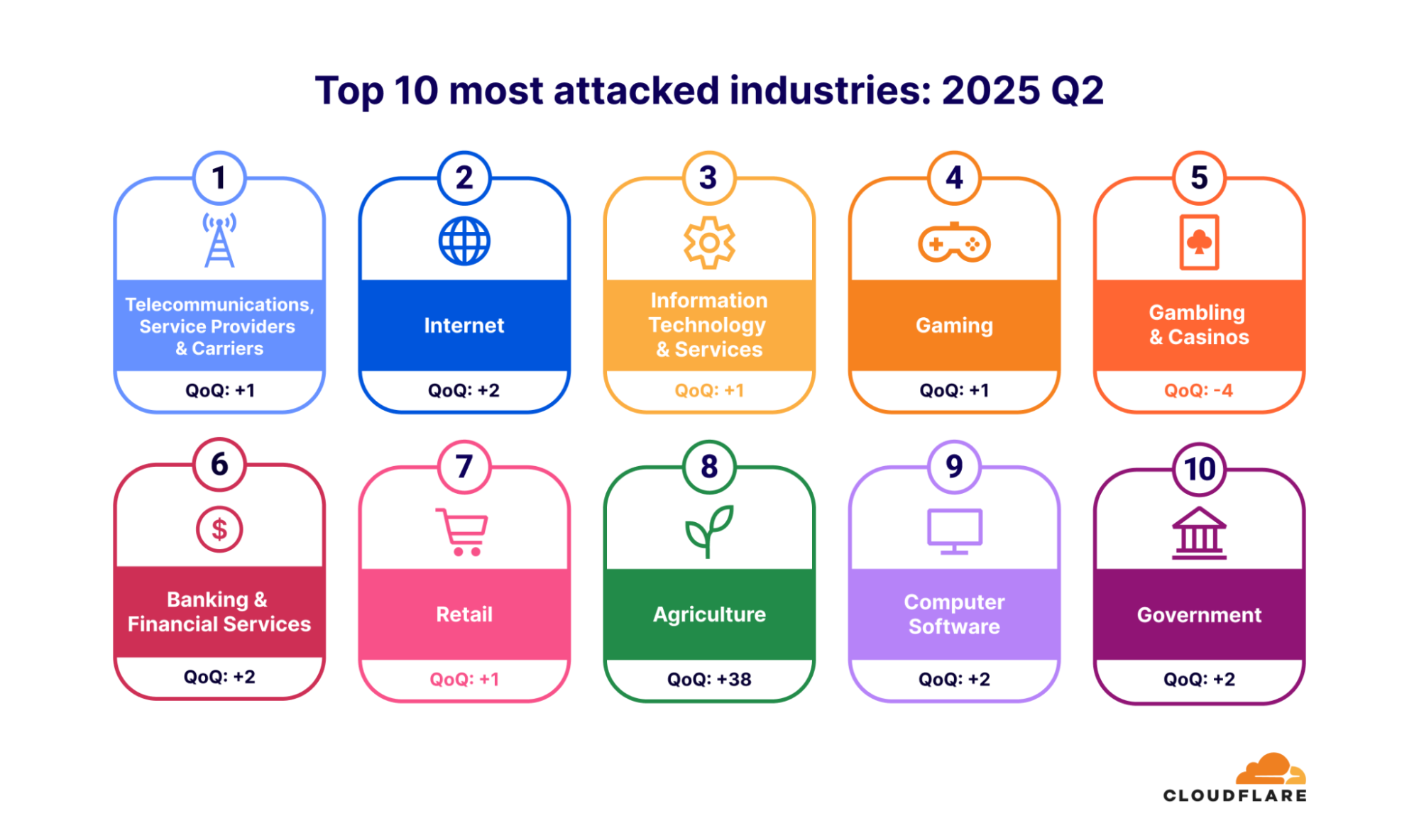
The ranking of the top 10 most attacked industries in 2025 Q2 also saw notable movement. Telecommunications, Service Providers and Carriers climbed one spot to claim first place, while the Internet sector jumped two spots to second place. Information Technology & Services held its placement as third most attacked, and Gaming rose one spot to fourth place. Gambling & Casinos slipped four spots to fifth place, and the Banking & Financial Services industry remained in sixth place. Retail inched up one spot to seventh place, and Agriculture made a dramatic 38-place leap into eighth. Computer Software climbed two spots to ninth place, and Government hopped two places to round out the top ten most attacked industries.


The top attacked industries of DDoS attacks for 2025 Q2

Top sources of DDoS attacks

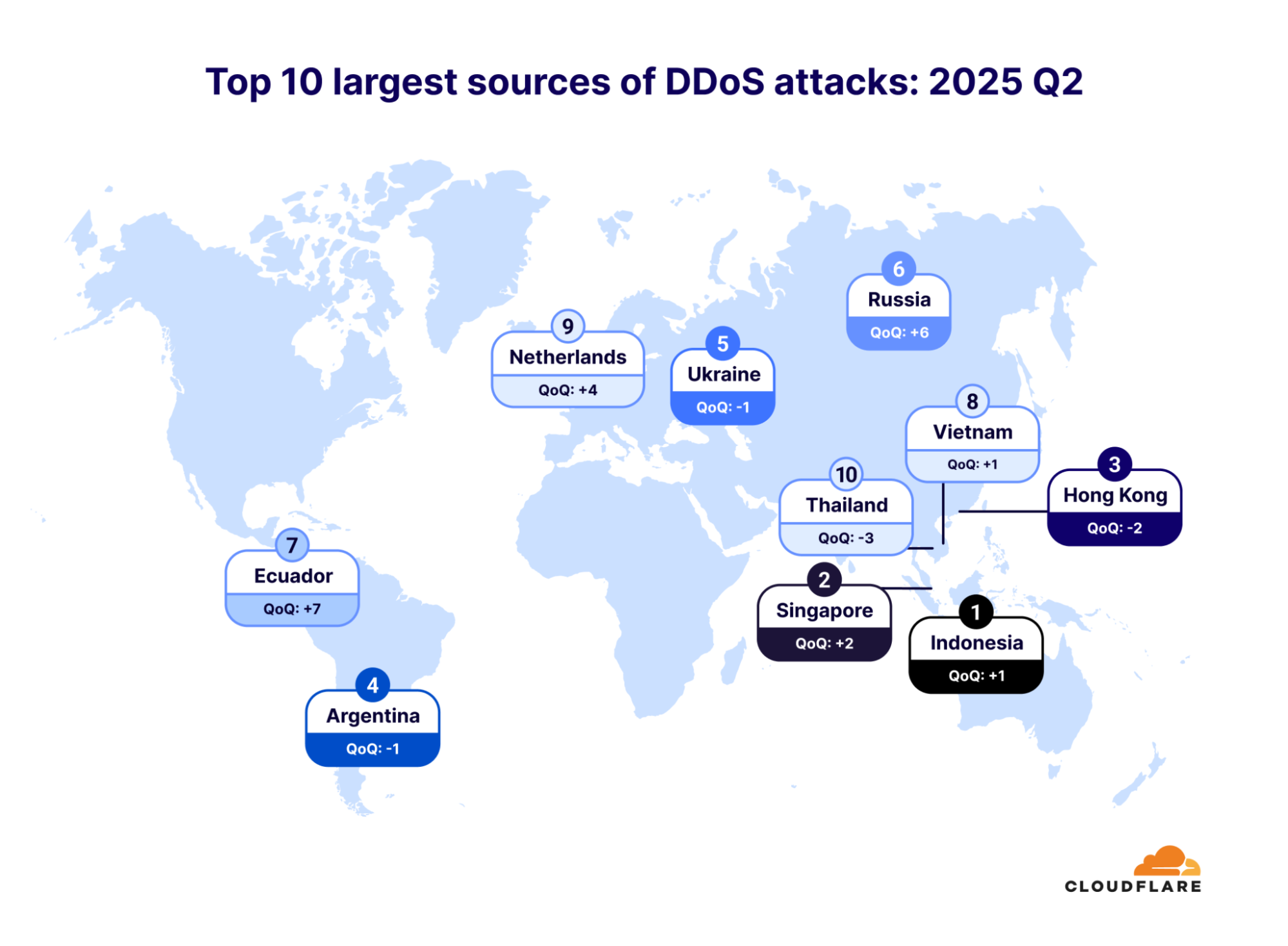
The ranking of the top 10 largest sources of DDoS attacks in 2025 Q2 also saw several shifts compared to the previous quarter. Indonesia climbed one spot to claim the first place, Singapore jumped two places to second place, Hong Kong dropped two places to third, Argentina slipped one space as fourth and Ukraine held on as the fifth-largest source of DDoS attacks. Russia surged six spots as the sixth-largest source, followed by Ecuador who jumped seven places. Vietnam inched up one place as the eighth-largest source. The Netherlands moved up four places as the ninth-largest source, and Thailand fell three places as the tenth-largest source of DDoS attacks.


The top sources of DDoS attacks for 2025 Q2

It’s important to note that these “source” rankings reflect where botnet nodes, proxy or VPN endpoints reside — not the actual location of threat actors. For L3/4 DDoS attacks, where IP spoofing is rampant, we geolocate each packet to the Cloudflare data center that first ingested and blocked it, drawing on our presence in over 330 cities for truly granular accuracy.

Top source networks of DDoS attacks

An ASN (Autonomous System Number) is a unique identifier assigned to a network or group of IP networks that operate under a single routing policy on the Internet. It’s used to exchange routing information between systems using protocols like BGP (Border Gateway Protocol).

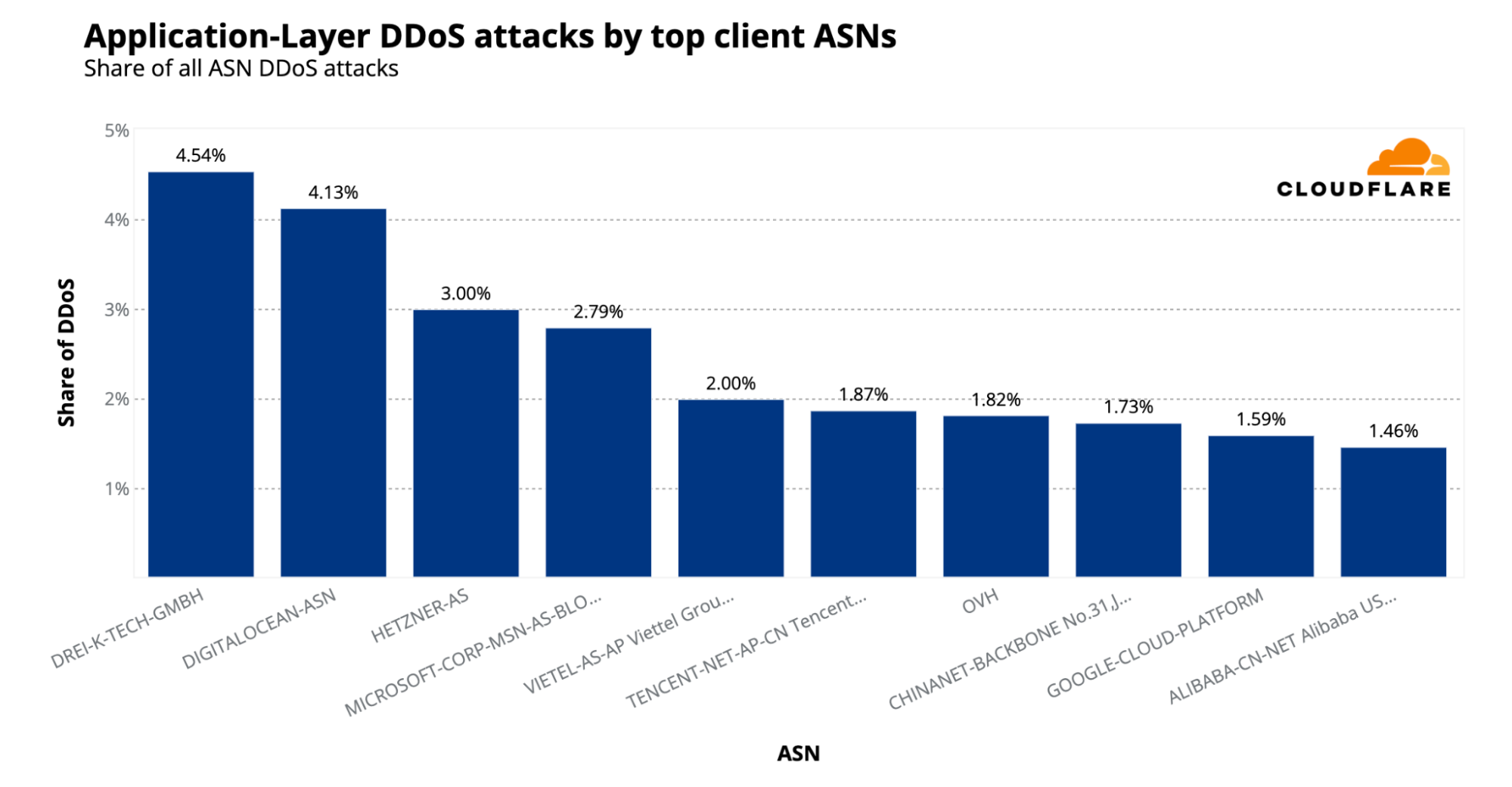
For the first time in about a year, the German-based Hetzner (AS24940) network dropped from the first place as the largest source of HTTP DDoS attack to the third place. In its place, Austrian-based Drei (AS200373) jumped 6 places as the number one largest source of HTTP DDoS attacks. The US-based DigitalOcean (AS14061) hopped one spot to the second place.


The top 10 ASN sources of HTTP DDoS attacks

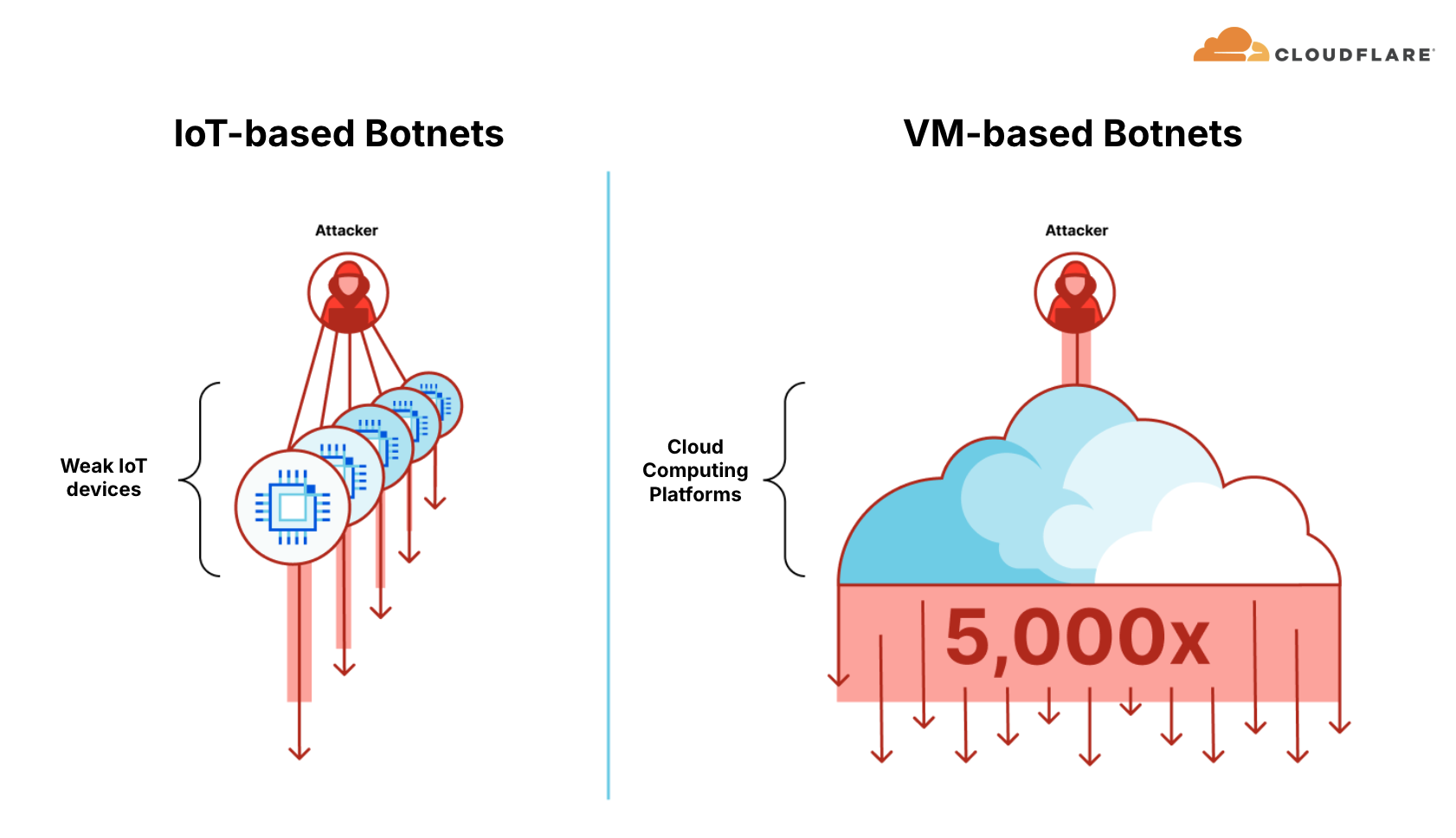
As can be seen in the chart above, 8 out of 10 ASNs listed offer virtual machines (VMs), hosting, or cloud services which indicate the common use of VM-based botnets. These botnets are estimated to be 5,000x stronger than IoT-based botnets. Only Drei (AS200373) and ChinaNet Backbone (AS4134) are primarily ISPs or telecom carriers without significant public VM/cloud offerings.


IoT-based botnets versus VM-based botnets

To help hosting providers, cloud computing providers and any Internet service providers identify and take down the abusive accounts that launch these attacks, we leverage Cloudflare’s unique vantage point to provide a free DDoS Botnet Threat Feed for Service Providers. Over 600 organizations worldwide have already signed up for this feed, and we’ve already seen great collaboration across the community to take down botnet nodes. This is possible thanks to the threat feed which provides these service providers a list of offending IP addresses from within their ASN that we see launching HTTP DDoS attacks. It’s completely free and all it takes is opening a free Cloudflare account, authenticating the ASN via PeeringDB, and then fetching the threat intelligence via API.

With a simple API call, service providers can get a list of offending IPs from within their network. An example response is provided below.

{
  "result": [
    {
      "cidr": "127.0.0.1/32",
      "date": "2024-05-05T00:00:00Z",
      "offense_count": 10000
    },
    // ... other entries ...
  ],
  "success": true,
  "errors": [],
  "messages": []
}

Example response from the free ISP DDoS Botnet Threat Feed API

Attack vectors

Defending against DDoS Botnets

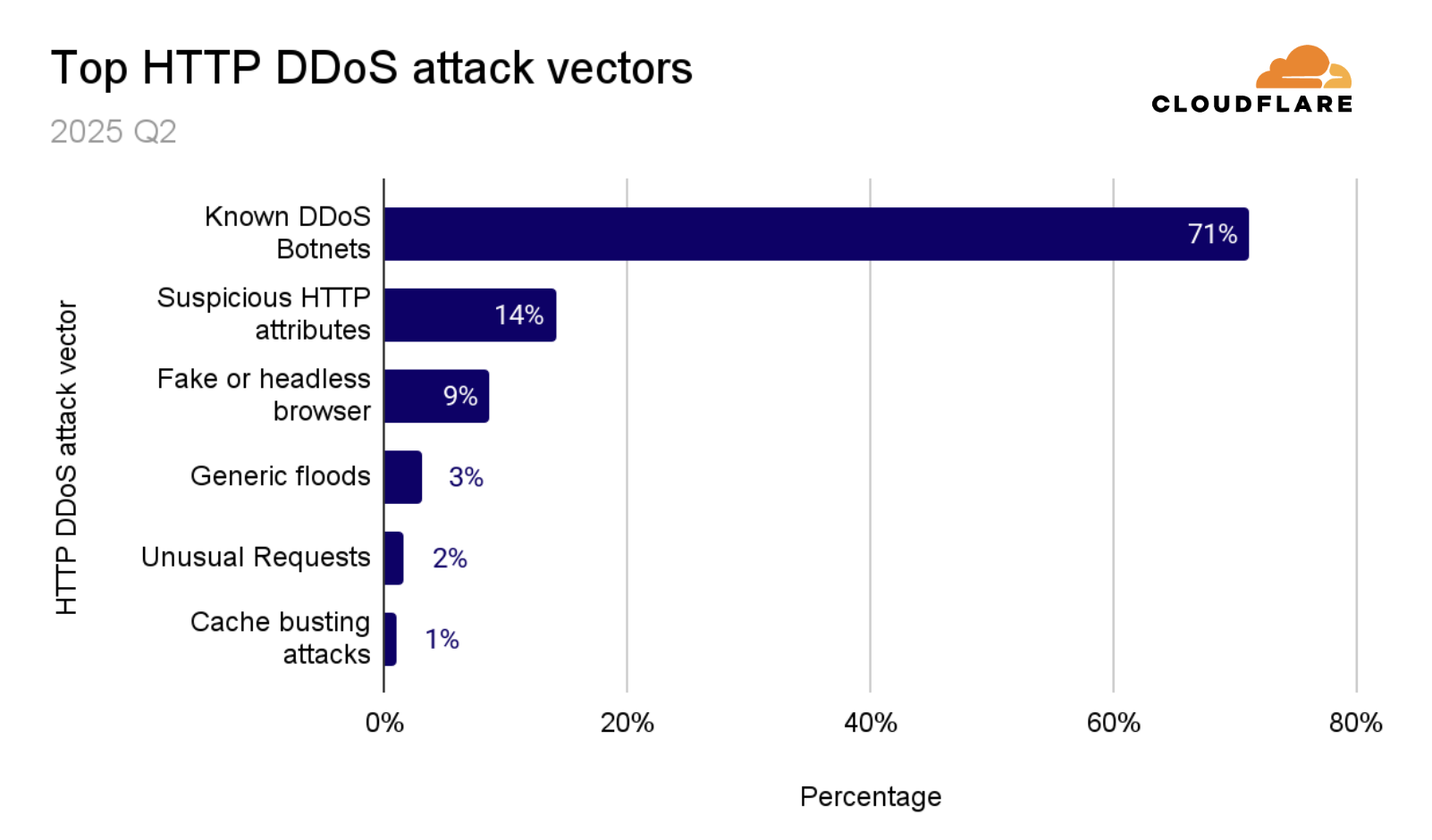
In Q2 2025, the majority (71%) of HTTP DDoS attacks were launched by known botnets. Rapid detection and blocking of these attacks was possible as a result of operating a massive network and seeing many different types of attacks and botnets. By leveraging real-time threat intelligence, our systems are able to incriminate DDoS botnets very fast, contributing to a more effective mitigation. Even if a DDoS botnet has been incriminated while targeting only one website or IP address, our entire network and customer base is immediately protected against it. This real-time threat intelligence system adapts with botnets as they morph and change nodes.


The top HTTP DDoS attack vectors for 2025 Q2

L3/4 attack vectors

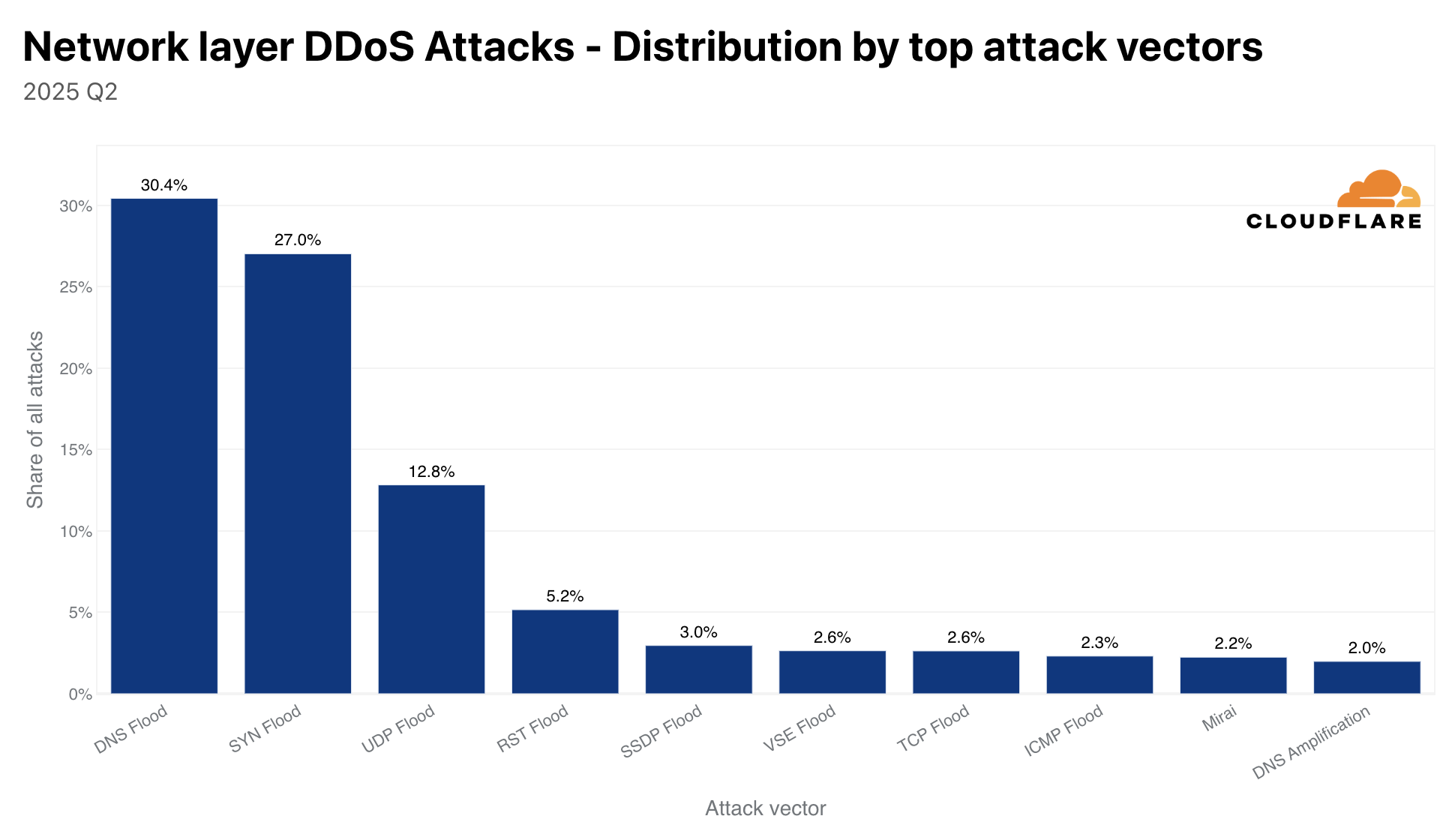
In Q2 2025, DNS flood attacks were the top L3/4 attack vector accounting for almost a third of all L3/4 DDoS attacks. SYN floods was the second most common attack vector, dipping from 31% in Q1 to 27% in Q2. 

In third place, UDP floods also grew meaningfully, rising from 9% in Q1 to 13% in Q2. RST floods, another form of TCP-based DDoS attacks, accounting for 5% of all L3/4 attacks, was the fourth most common vector. Rounding out the top five, SSDP floods edged into fifth place at 3% despite a decline from 4.3% last quarter, but enough to push the previously prevalent Mirai attacks (which fell from 18% in Q1 to just 2% in Q2) out of the top five altogether.


The top L3/4 DDoS attack vectors for 2025 Q2

Breakdown of the top 3 L3/4 DDoS attack vectors

Below are details about the top 3 most common L3/4 DDoS attacks. We provide recommendations on how organizations can avoid becoming a reflection and amplification element, and also recommendations on how to defend against these attacks whilst avoiding impact to legitimate traffic. Cloudflare’s customers are protected against these attacks.

DNS Flood Attack

  • Type: Flood

  • How it works: A DNS flood aims to overwhelm a DNS server with a high volume of DNS queries—either valid, random, or malformed—to exhaust CPU, memory, or bandwidth. Unlike amplification attacks, this is a direct flood aimed at degrading performance or causing outages, often over UDP port 53, but sometimes over TCP as well (especially for DNS-over-TCP or DNSSEC-enabled zones).

  • How to defend against the attack: Use Cloudflare DNS as primary or secondary, Cloudflare DNS Firewall and/or Cloudflare Magic Transit to absorb and mitigate query floods before they reach your origin. Cloudflare’s global network handles tens of millions of DNS queries per second with built-in DDoS filtering and query caching, blocking malformed or excessive traffic while answering legitimate requests.

  • How to avoid unintended impact: Avoid blocking all DNS traffic or disabling UDP port 53, which would break normal resolution. Rely on Cloudflare’s DNS-specific protection such as the Advanced DNS Protection system, and deploy DNSSEC-aware protection to handle TCP-based query floods safely.

SYN Flood Attack

  • Type: Flood

  • How it works: In a SYN flood, threat actors  send a large volume of TCP SYN packets—often with spoofed IP addresses—to initiate connections that are never completed. This leaves the target system with half-open connections, consuming memory and connection tracking resources, potentially exhausting server limits and preventing real clients from connecting.

  • How to defend against the attack: Use Cloudflare Magic Transit to intercept and mitigate TCP SYN floods at the edge. Cloudflare leverages SYN cookies, connection tracking, and behavioral analysis to distinguish real clients from spoofed or malicious sources, ensuring legitimate TCP connections are completed successfully. Using Cloudflare’s CDN/WAF services or Cloudflare Spectrum which are both reverse-proxy services for HTTP or TCP, respectively. Using a reverse-proxy basically eliminates the possible impact of TCP-based DDoS attacks.

  • How to avoid unintended impact: Blocking all SYN traffic or applying aggressive timeouts can block real users. Instead, rely on Cloudflare’s Advanced TCP protection system, which uses SYN rate shaping, anomaly detection, and spoofed-packet filtering to mitigate attacks without affecting genuine client connections.

UDP DDoS attack

  • Type: Flood

  • How it works: A high volume of UDP packets is sent to random or specific ports on the target IP address(es). It may attempt to saturate the Internet link or overwhelm its in-line appliances with more packets than it can handle in order to create disruption or an outage.

  • How to defend against the attack: Deploy cloud-based volumetric DDoS protection that can fingerprint attack traffic in real-time such as Cloudflare Magic Transit or Cloudflare Spectrum, apply smart rate-limiting on UDP traffic, and drop unwanted UDP traffic altogether with the Magic Firewall.

  • How to avoid unintended impact: Aggressive filtering may disrupt legitimate UDP services such as VoIP, video conferencing, or online games. Apply thresholds carefully.

Emerging threats

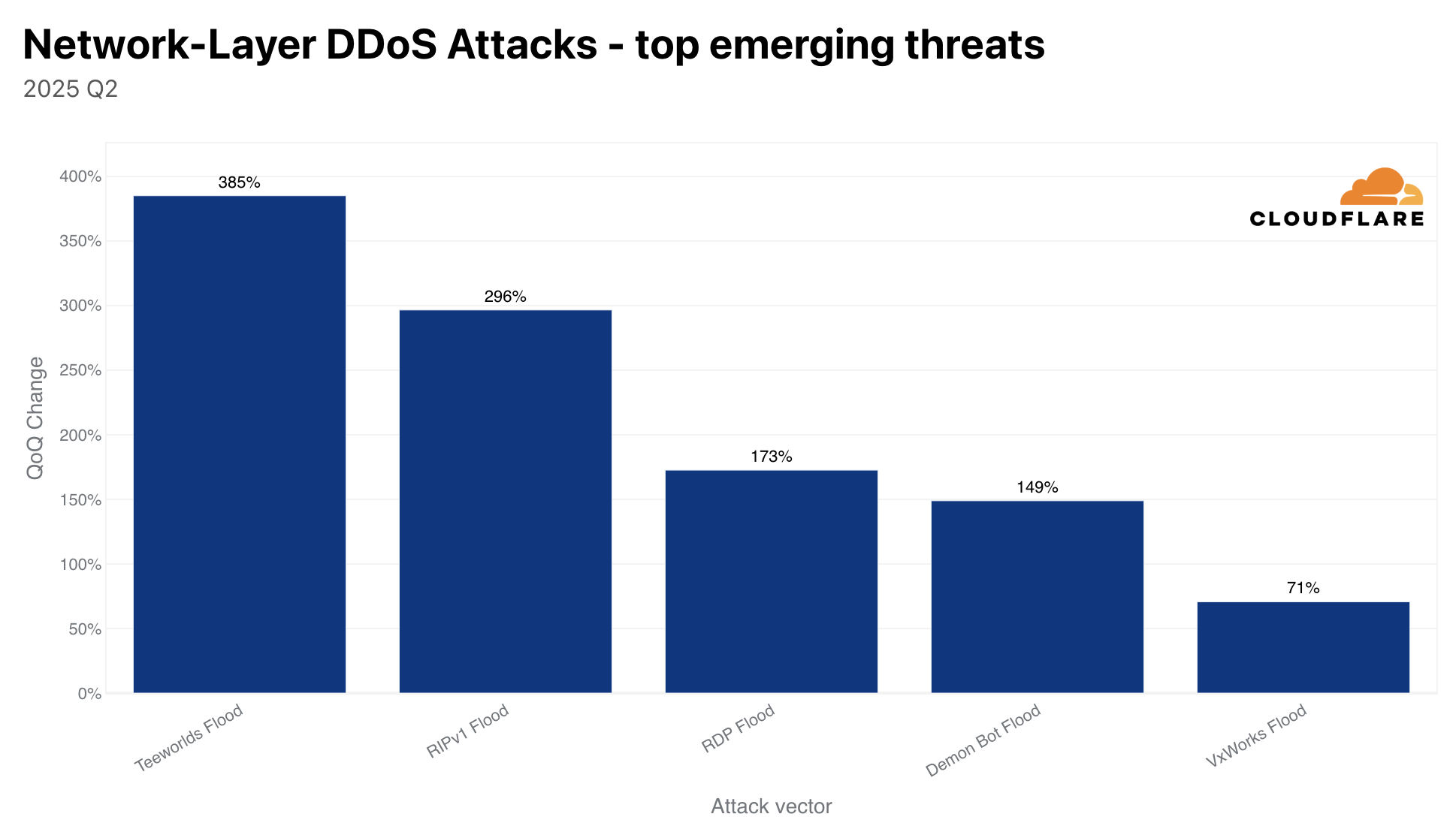
Among emerging L3/4 DDoS threats in 2025 Q2, Teeworlds flood saw the biggest spike. These attacks jumped 385% QoQ, followed by the RIPv1 flood, which surged 296%. RDP floods climbed by 173%, and Demon Bot floods increased by 149%. Even the venerable VxWorks flood made a comeback, rising 71% quarter-over-quarter. These dramatic upticks highlight threat actors’ ongoing experimentation with lesser-known and legacy protocols to evade standard defenses.


The top emerging threats for 2025 Q2

Breakdown of the top emerging threats

Below are details about the emerging threats for 2025 Q2, mostly recycling of very old attack vectors. We provide recommendations on how organizations can avoid becoming a reflection and amplification element, and also recommendations on how to defend against these attacks whilst avoiding impact to legitimate traffic. Cloudflare’s customers are protected against these attacks.

Teeworlds DDoS Attack

  • Type: Flood

  • How it works: Teeworlds is a fast-paced, open-source 2D multiplayer shooter game that uses a custom UDP-based protocol for real-time gameplay. Threat actors flood the target’s game server with spoofed or excessive UDP packets that mimic in-game actions or connection attempts. This can overwhelm server resources and cause lag or outages.

  • How to defend against the attack: Use Cloudflare Spectrum or Cloudflare Magic Transit to protect the servers. Cloudflare automatically detects and mitigates these types of attacks using real-time fingerprinting, blocking attack traffic while allowing real players through. Magic Transit also provides a packet-level firewall capability, the Magic Firewall which can be used to craft custom protection.

  • How to avoid unintended impact: When crafting custom rules, avoid blocking or aggressively rate-limiting UDP port 8303 directly as it can disrupt overall gameplay. Instead, rely on intelligent detection and mitigation services to avoid affecting legitimate users.


Teeworlds Screenshot Jungle. Source: Wikipedia

RIPv1 DDoS attack

  • Type: Reflection + (Low) Amplification

  • How it works: Exploits the Routing Information protocol version 1 (RIPv1), an old unauthenticated distance-vector routing protocol that uses UDP/520. Threat actors send spoofed routing updates to flood or confuse networks.

  • How to prevent becoming a reflection / amplification element: Disable RIPv1 on routers. Use RIPv2 with authentication where routing is needed.

  • How to defend against the attack: Block inbound UDP/520 from untrusted networks. Monitor for unexpected routing updates.

  • How to avoid unintended impact: RIPv1 is mostly obsolete; disabling it is generally safe. If legacy systems rely on it, validate routing behavior before changes.

RDP DDoS Attack

  • Type: Reflection + Amplification

  • How it works: The Remote Desktop Protocol (RDP) is used for remote access to Windows systems and typically runs over TCP port 3389. In some misconfigured or legacy setups, RDP can respond to unauthenticated connection attempts, making it possible to abuse for reflection or amplification. Threat actors send spoofed RDP initiation packets to exposed servers, causing them to reply to a victim, generating high volumes of unwanted traffic.

  • How to defend against the attack: Use Cloudflare Magic Transit to protect your network infrastructure. Magic Transit provides L3/L4 DDoS protection, filtering out spoofed or malformed RDP traffic before it reaches your origin. For targeted application-layer abuse, Cloudflare Gateway or Zero Trust Network Access (ZTNA) can help secure remote desktop access behind authenticated tunnels.

  • How to avoid unintended impact: Do not block TCP/3389 globally if RDP is actively used. Instead, restrict RDP access to known IPs or internal networks, or use Cloudflare Tunnel with Zero Trust Network Access (ZTNA) to remove public exposure altogether while maintaining secure access for legitimate users.

DemonBot DDoS Attack

  • Type: Botnet-based Flood

  • How it works: DemonBot is a malware strain that infects Linux-based systems—particularly unsecured IoT devices—via open ports or weak credentials. Once infected, devices become part of a botnet that can launch high-volume UDP, TCP, and application-layer floods. Attacks are typically command-and-control (C2) driven and can generate significant volumetric traffic, often targeting gaming, hosting, or enterprise services. To avoid infection, leverage antivirus software and domain filtering. 

  • How to defend against the attack: Use Cloudflare Magic Transit to absorb and filter large-scale network-layer floods before they reach your infrastructure. Cloudflare’s real-time traffic analysis and signature-based detection neutralize traffic originating from DemonBot-infected devices. For application-layer services, Cloudflare DDoS protection and WAF can mitigate targeted HTTP floods and connection abuse.

  • How to avoid unintended impact: Instead of broadly blocking traffic types or ports, rely on Cloudflare’s adaptive mitigation to distinguish between legitimate users and botnet traffic. Combine with IP reputation filtering, geo-blocking, and rate limiting to reduce false positives and maintain service availability.


VxWorks Flood DDoS Attack

  • Type: Flood (IoT-based)

  • How it works: VxWorks is a real-time operating system (RTOS) used in millions of embedded and IoT devices (e.g., routers, industrial controllers). Devices running outdated or misconfigured versions of VxWorks can be compromised and used to launch DDoS attacks. Once infected—often via public exploits or weak credentials—they send high volumes of UDP, TCP, or ICMP traffic to overwhelm targets, similar to traditional IoT botnets.

  • How to defend against the attack: Deploy Cloudflare Magic Transit to block volumetric traffic at the network edge. Cloudflare uses real-time fingerprinting and  proprietary heuristics to identify traffic from compromised VxWorks devices and mitigate it in real-time. For application services, Cloudflare’s DDoS mitigation and Gateway services provide additional protection against protocol-level abuse.

  • How to avoid unintended impact: Avoid over-blocking UDP or ICMP traffic, as it may disrupt legitimate diagnostics or real-time services. Instead, use Cloudflare’s intelligent filtering, rate limiting, and geo/IP reputation tools to safely mitigate attacks while avoiding impact to legitimate traffic.


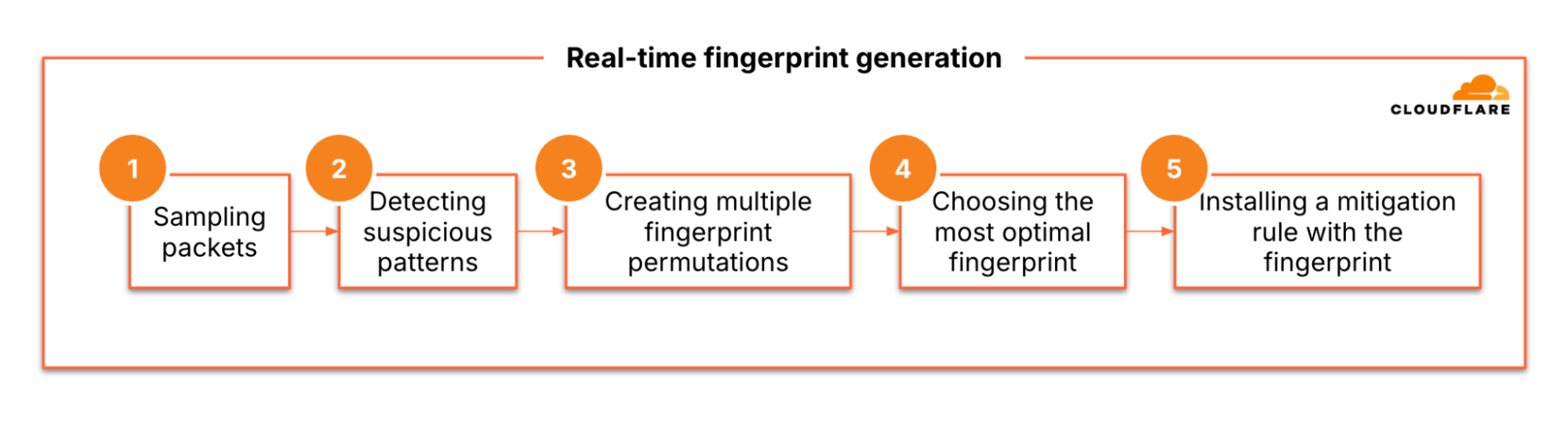
Cloudflare’s real-time fingerprint generation flow

Attack size & duration

Most DDoS attacks are small and short. In 2025 Q2, 94% of L3/4 DDoS attacks didn’t exceed 500 Mbps. Similarly, around 85% of L3/4 DDoS attacks didn’t exceed 50,000 pps. The majority of HTTP DDoS attacks are also small, 65% stay below 50K rps. “Small”, though, is a relative term.

An average modern server typically refers to a general-purpose physical or virtual machine with around 4–8 CPU cores (e.g. Intel Xeon Silver), 16–64 GB RAM, and a 1 Gbps NIC, running a Linux OS like Ubuntu or CentOS with NGINX or similar software. This setup can handle ~100,000–500,000 pps, up to ~940 Mbps throughput, and around 10,000–100,000 rps for static content or 500–1,000 rps for database-backed dynamic applications, depending on tuning and workload.

Assuming the server is unprotected by a cloud DDoS protection service, if it’s targeted by “small” DDoS attacks during peak time traffic rates, it is very likely that the server won’t be able to handle it. Even “small” DDoS attacks can cause significant impact to unprotected servers.


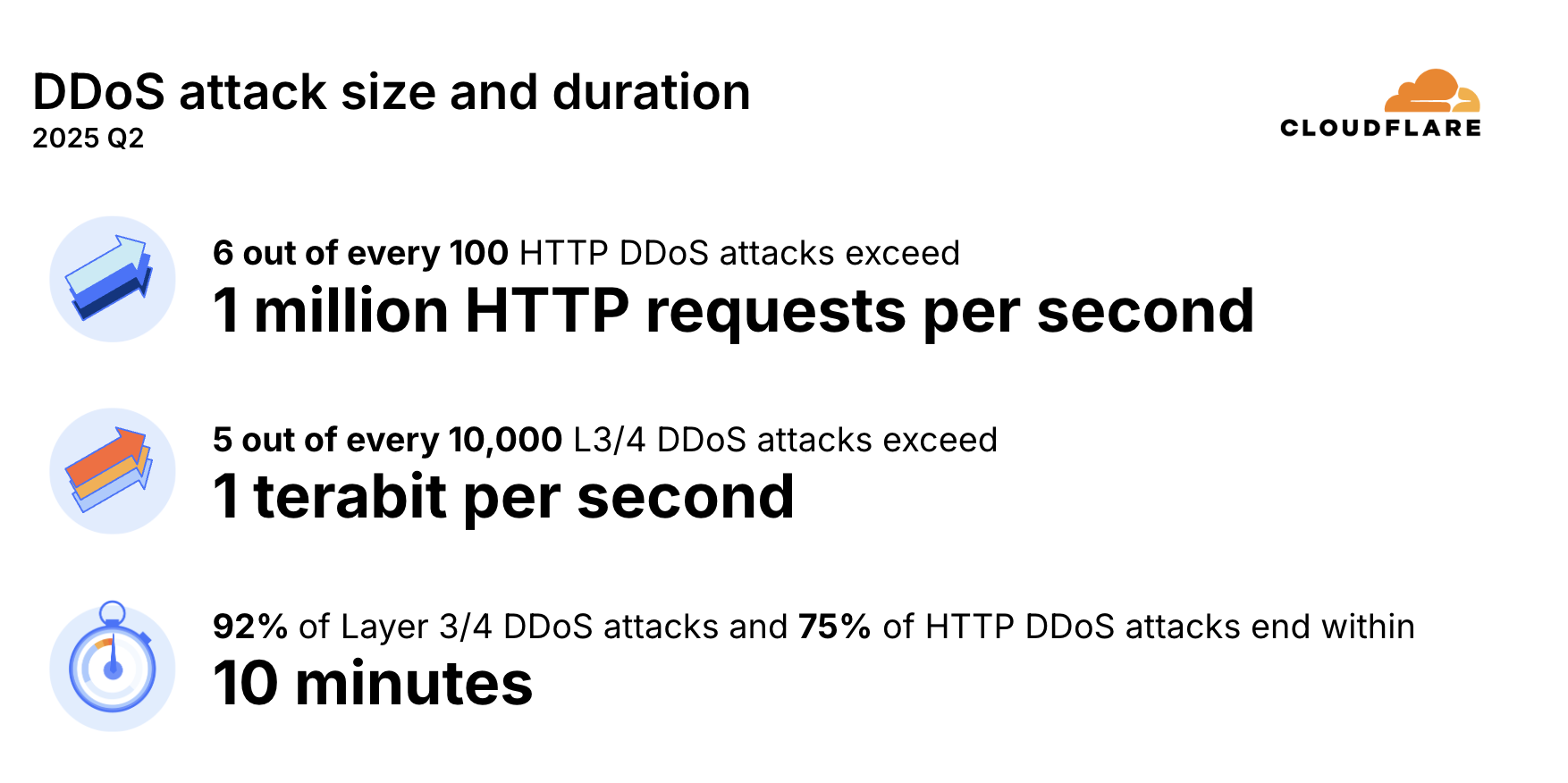
DDoS attacks size and duration in 2025 Q2

While the majority of DDoS attacks are small, hyper-volumetric DDoS attacks are increasing in size and frequency. 6 out of every 100 HTTP DDoS attacks exceed 1M rps, and 5 out of every 10,000 L3/4 DDoS attacks exceed 1 Tbps — a 1,150% QoQ increase.


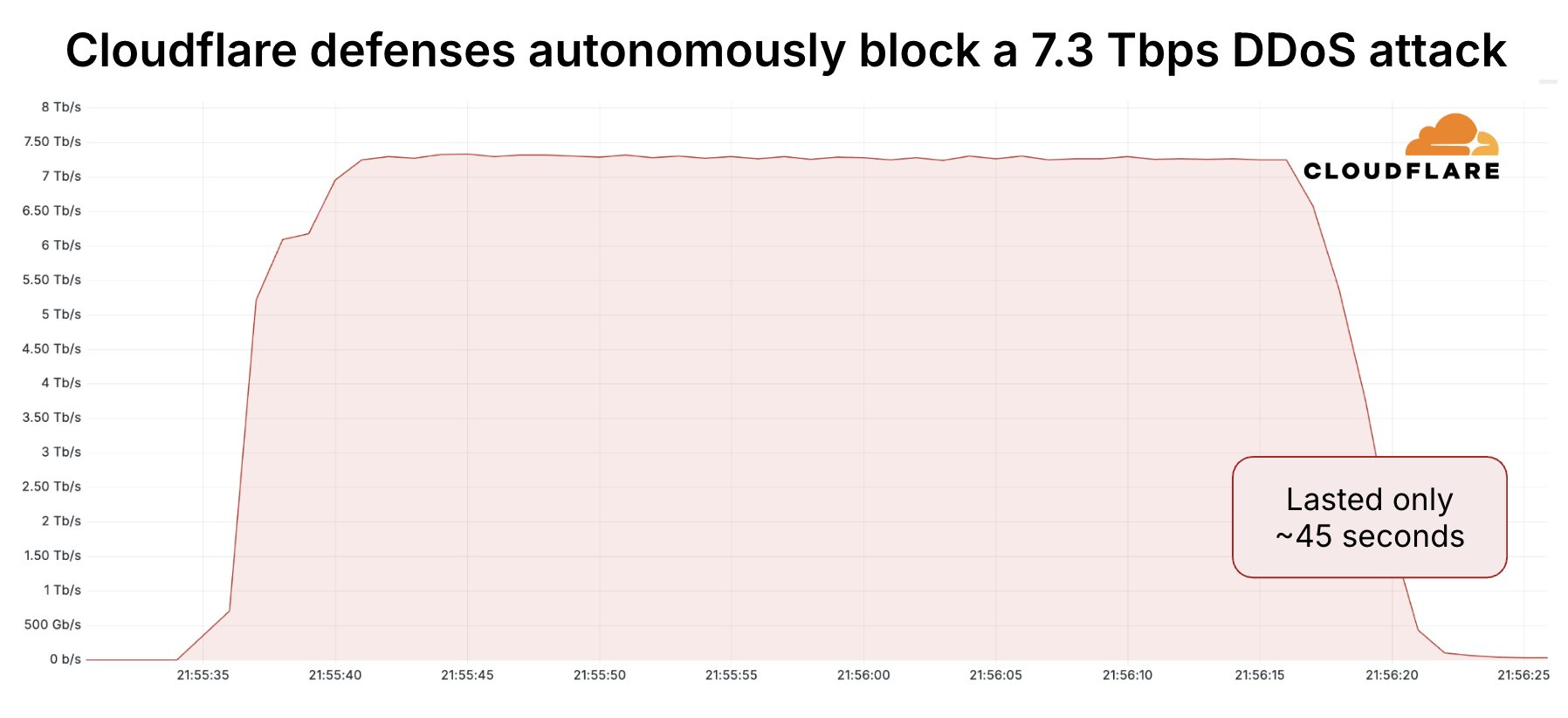
The largest attack in the world: 7.3 Tbps

Most DDoS attacks are short in duration, even the largest and most intense ones. Threat actors often rely on brief bursts of concentrated traffic—sometimes lasting as little as 45 seconds as seen with the monumental 7.3 Tbps DDoS attack — in an attempt to avoid detection, overwhelm targets and cause maximum disruption before defenses can fully activate. This tactic of short, high-intensity bursts makes detection and mitigation more challenging and underscores the need for always-on, real-time protection. Thankfully, Cloudflare’s autonomous DDoS defenses kick in immediately.

Helping build a better Internet

At Cloudflare, we’re committed to helping build a better Internet. A part of that mission is offering free, unmetered DDoS protection regardless of size, duration and quantity. We don’t just defend against DDoS attacks. The best defense is a good offense, and using our free ISP Botnet Threat Feed, we contribute to botnet takedowns. 

While many still adopt protection reactively or rely on outdated solutions, our data shows proactive, always-on security is far more effective. Powered by a global network with 388 Tbps capacity across 330+ cities, we provide automated, in-line, battle-proven defense against all types of DDoS attacks.

Cloudflare Log Explorer is now GA, providing native observability and forensics

Post Syndicated from Jen Sells original https://blog.cloudflare.com/logexplorer-ga/

We are thrilled to announce the General Availability of Cloudflare Log Explorer, a powerful new product designed to bring observability and forensics capabilities directly into your Cloudflare dashboard. Built on the foundation of Cloudflare’s vast global network, Log Explorer leverages the unique position of our platform to provide a comprehensive and contextualized view of your environment.

Security teams and developers use Cloudflare to detect and mitigate threats in real-time and to optimize application performance. Over the years, users have asked for additional telemetry with full context to investigate security incidents or troubleshoot application performance issues without having to forward data to third party log analytics and Security Information and Event Management (SIEM) tools. Besides avoidable costs, forwarding data externally comes with other drawbacks such as: complex setups, delayed access to crucial data, and a frustrating lack of context that complicates quick mitigation. 

Log Explorer has been previewed by several hundred customers over the last year, and they attest to its benefits: 

“Having WAF logs (firewall events) instantly available in Log Explorer with full context — no waiting, no external tools — has completely changed how we manage our firewall rules. I can spot an issue, adjust the rule with a single click, and immediately see the effect. It’s made tuning for false positives faster, cheaper, and far more effective.” 

“While we use Logpush to ingest Cloudflare logs into our SIEM, when our development team needs to analyze logs, it can be more effective to utilize Log Explorer. SIEMs make it difficult for development teams to write their own queries and manipulate the console to see the logs they need. Cloudflare’s Log Explorer, on the other hand, makes it much easier for dev teams to look at logs and directly search for the information they need.”

With Log Explorer, customers have access to Cloudflare logs with all the context available within the Cloudflare platform. Compared to external tools, customers benefit from: 

  • Reduced cost and complexity: Drastically reduce the expense and operational overhead associated with forwarding, storing, and analyzing terabytes of log data in external tools.

  • Faster detection and triage: Access Cloudflare-native logs directly, eliminating cumbersome data pipelines and the ingest lags that delay critical security insights.

  • Accelerated investigations with full context: Investigate incidents with Cloudflare’s unparalleled contextual data, accelerating your analysis and understanding of “What exactly happened?” and “How did it happen?”

  • Minimal recovery time: Seamlessly transition from investigation to action with direct mitigation capabilities via the Cloudflare platform.

Log Explorer is available as an add-on product for customers on our self serve or Enterprise plans. Read on to learn how each of the capabilities of Log Explorer can help you detect and diagnose issues more quickly.

Monitor security and performance issues with custom dashboards

Custom dashboards allow you to define the specific metrics you need in order to monitor unusual or unexpected activity in your environment.

Getting started is easy, with the ability to create a chart using natural language. A natural language interface is integrated into the chart create/edit experience, enabling you to describe in your own words the chart you want to create. Similar to the AI Assistant we announced during Security Week 2024, the prompt translates your language to the appropriate chart configuration, which can then be added to a new or existing custom dashboard.

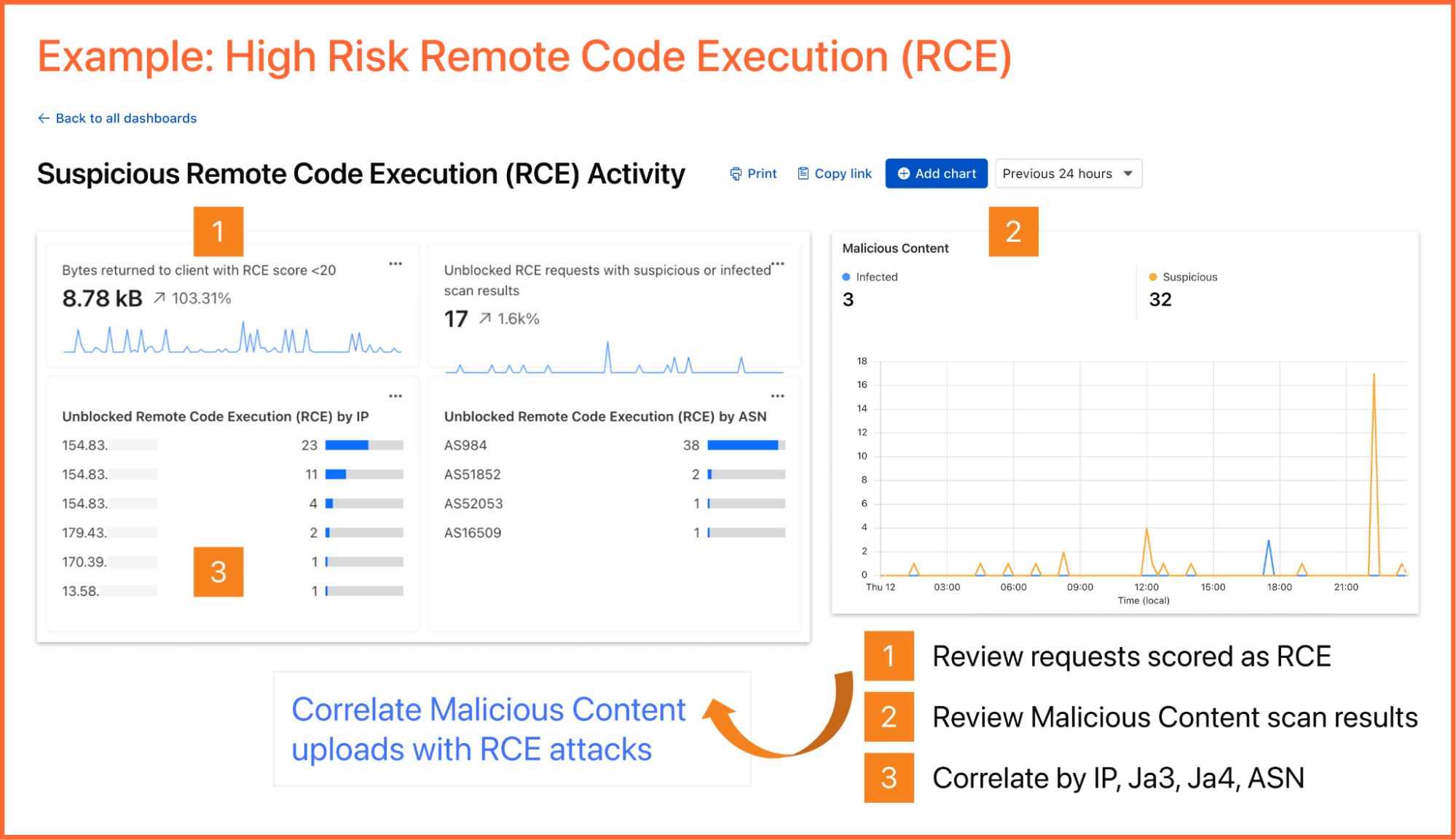
As an example, you can create a dashboard for monitoring for the presence of Remote Code Execution (RCE) attacks happening in your environment. An RCE attack is where an attacker is able to compromise a machine in your environment and execute commands. The good news is that RCE is a detection available in Cloudflare WAF.  In the dashboard example below, you can not only watch for RCE attacks, but also correlate them with other security events such as malicious content uploads, source IP addresses, and JA3/JA4 fingerprints. Such a scenario could mean one or more machines in your environment are compromised and being used to spread malware — surely, a very high risk incident!


A reliability engineer might want to create a dashboard for monitoring errors. They could use the natural language prompt to enter a query like “Compare HTTP status code ranges over time.” The AI model then decides the most appropriate visualization and constructs their chart configuration.

While you can create custom dashboards from scratch, you could also use an expert-curated dashboard template to jumpstart your security and performance monitoring. 

Available templates include: 

  • Bot monitoring: Identify automated traffic accessing your website

  • API Security: Monitor the data transfer and exceptions of API endpoints within your application

  • API Performance: See timing data for API endpoints in your application, along with error rates

  • Account Takeover: View login attempts, usage of leaked credentials, and identify account takeover attacks

  • Performance Monitoring: Identify slow hosts and paths on your origin server, and view time to first byte (TTFB) metrics over time

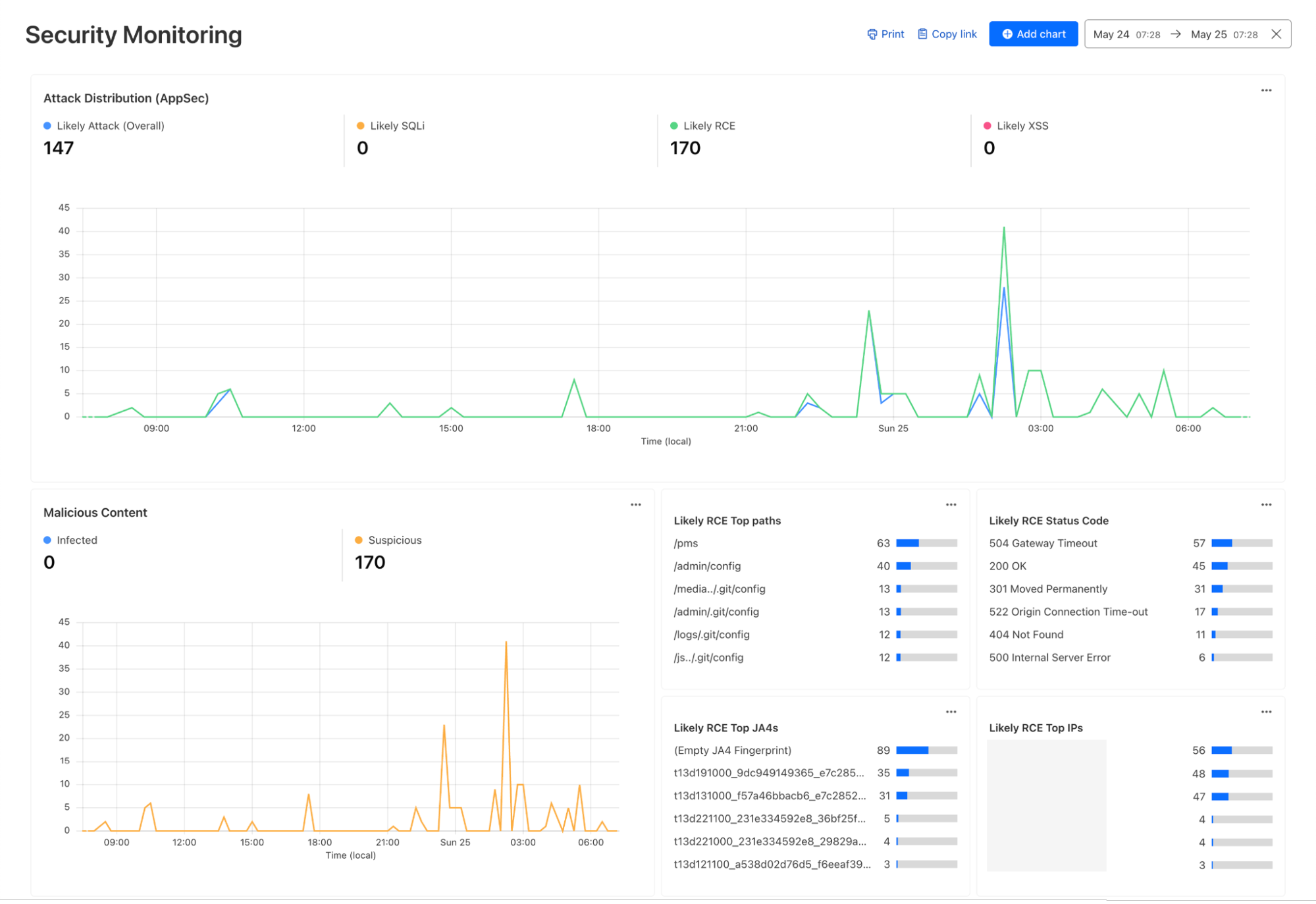
  • Security Monitoring: monitor attack distribution across top hosts and paths, correlate DDoS traffic with origin Response time to understand the impact of DDoS attacks.


Investigate and troubleshoot issues with Log Search 

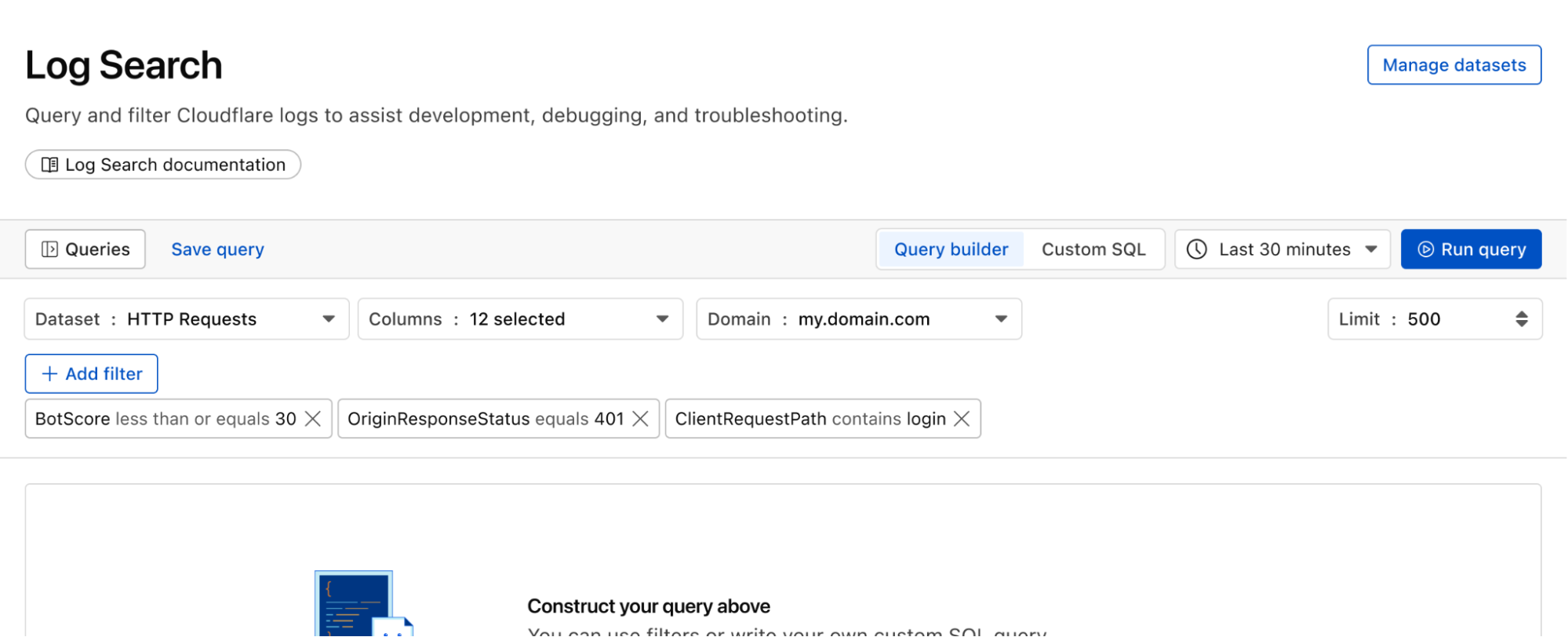
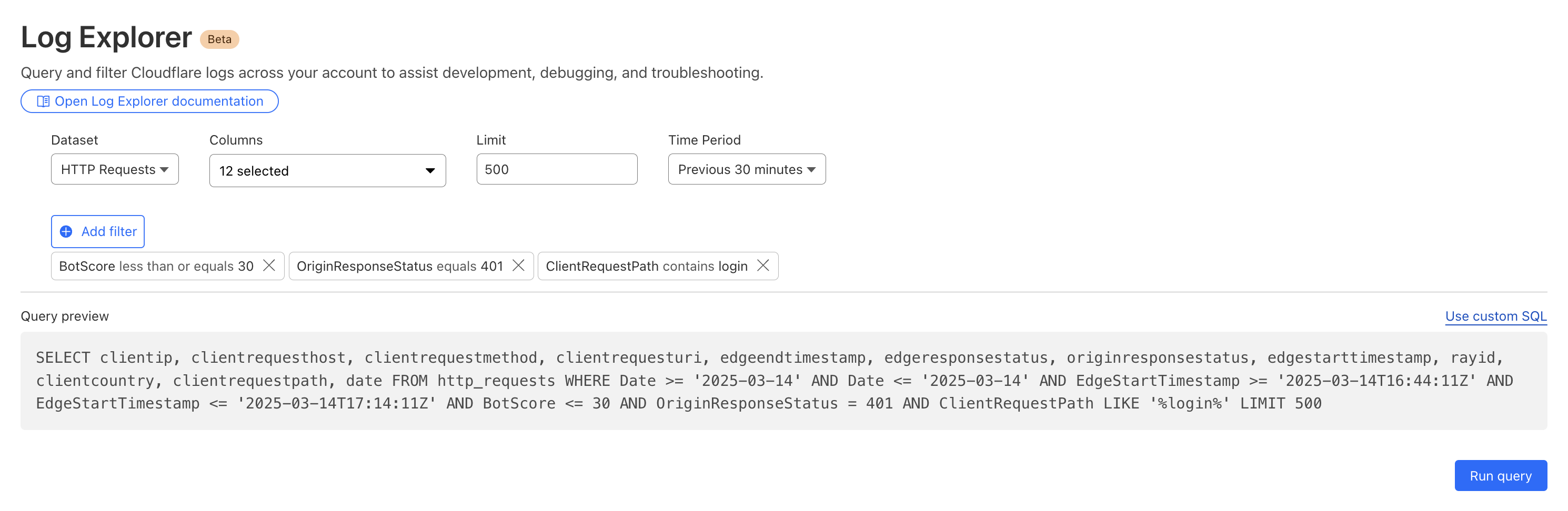
Continuing with the example from the prior section, after successfully diagnosing that some machines were compromised through the RCE issue, analysts can pivot over to Log Search in order to investigate whether the attacker was able to access and compromise other internal systems. To do that, the analyst could search logs from Zero Trust services, using context, such as compromised IP addresses from the custom dashboard, shown in the screenshot below: 


Log Search is a streamlined experience including data type-aware search filters, or the ability to switch to a custom SQL interface for more powerful queries. Log searches are also available via a public API


Save time and collaborate with saved queries

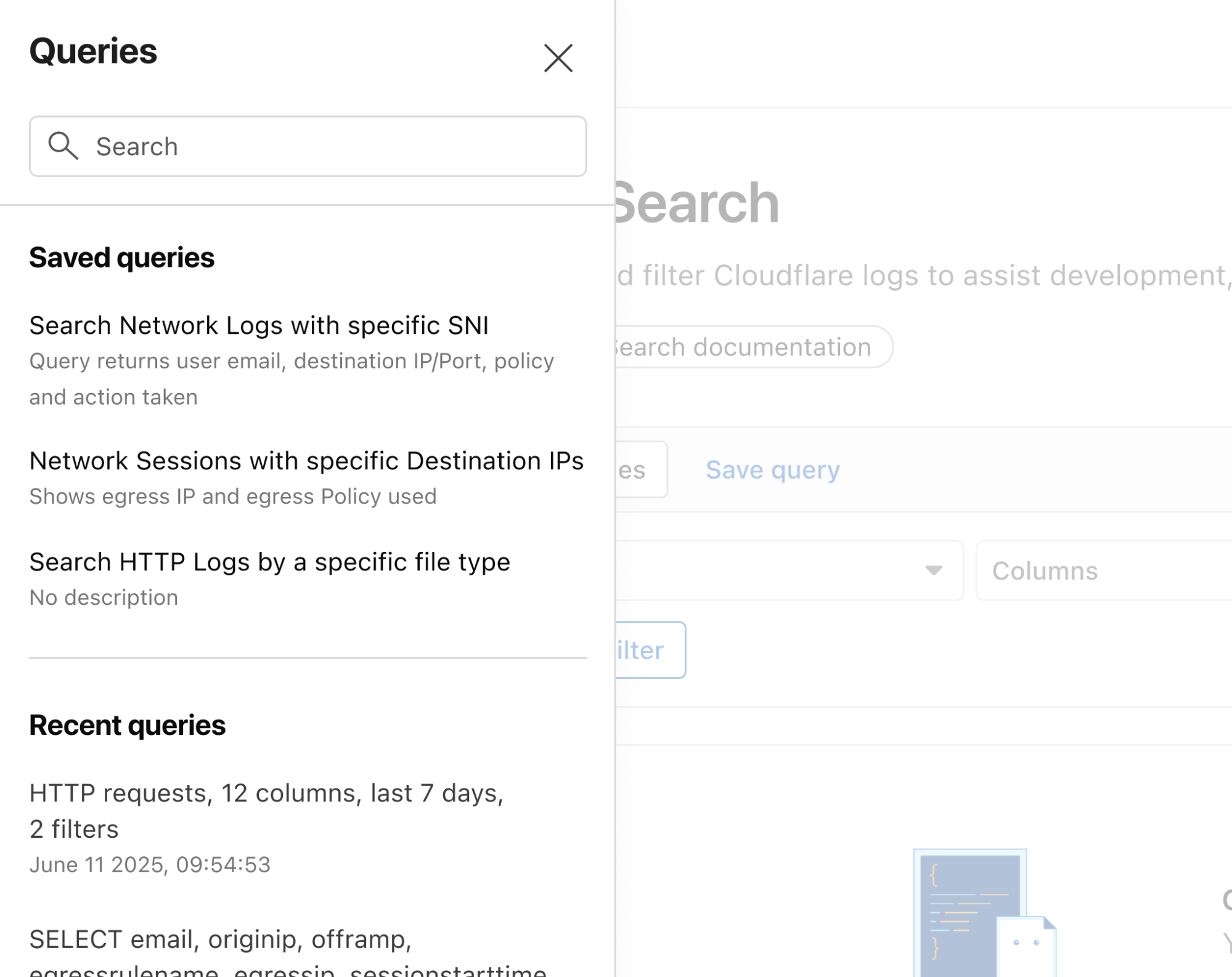
Queries built in Log Search can now be saved for repeated use and are accessible to other Log Explorer users in your account. This makes it easier than ever to investigate issues together. 


Monitor proactively with Custom Alerting (coming soon)

With custom alerting, you can configure custom alert policies in order to proactively monitor the indicators that are important to your business. 

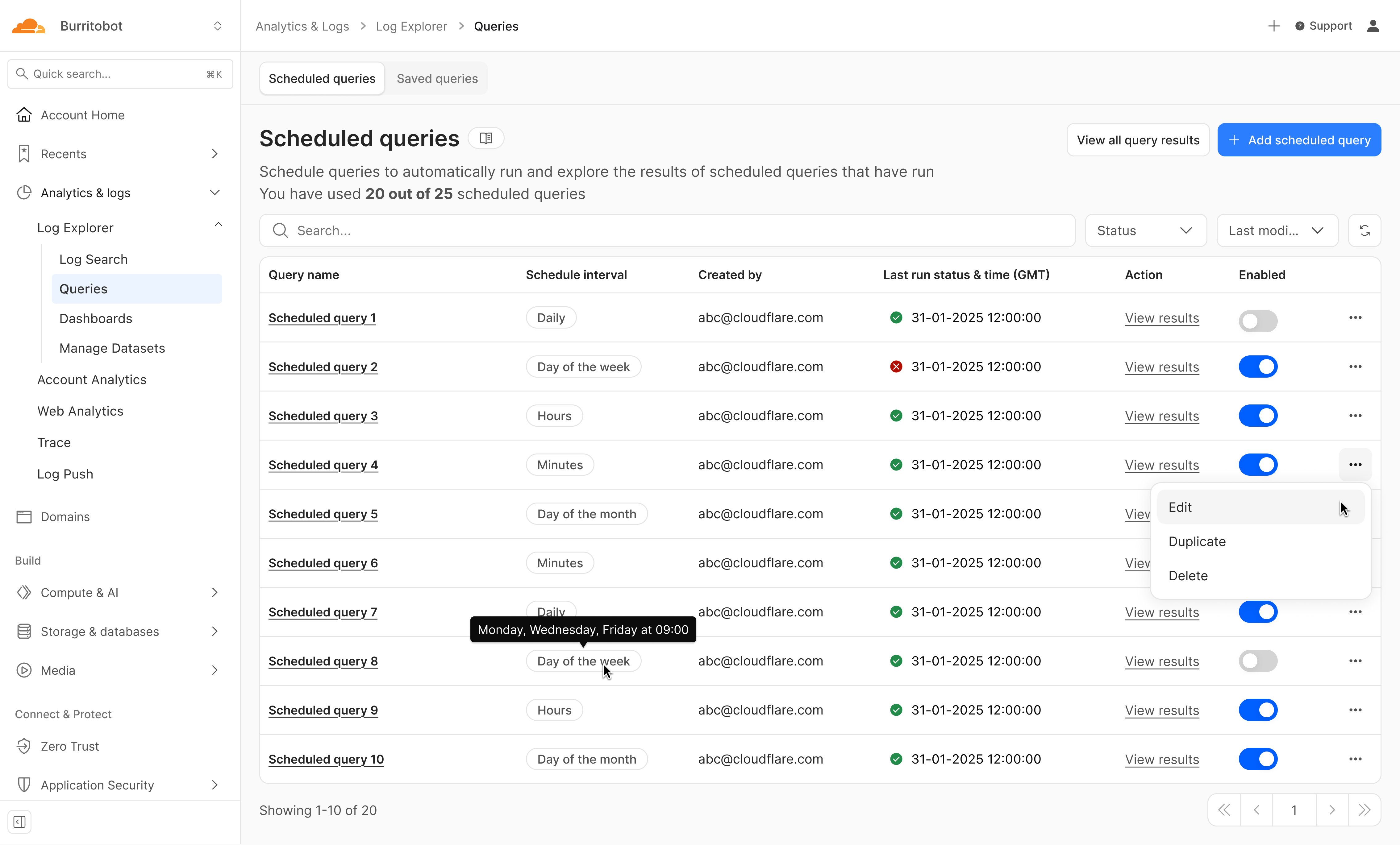
Starting from Log Search, define and test your query. From here you can opt to save and configure a schedule interval and alerting policy. The query will run automatically on the schedule you define.

Tracking error rate for a custom hostname

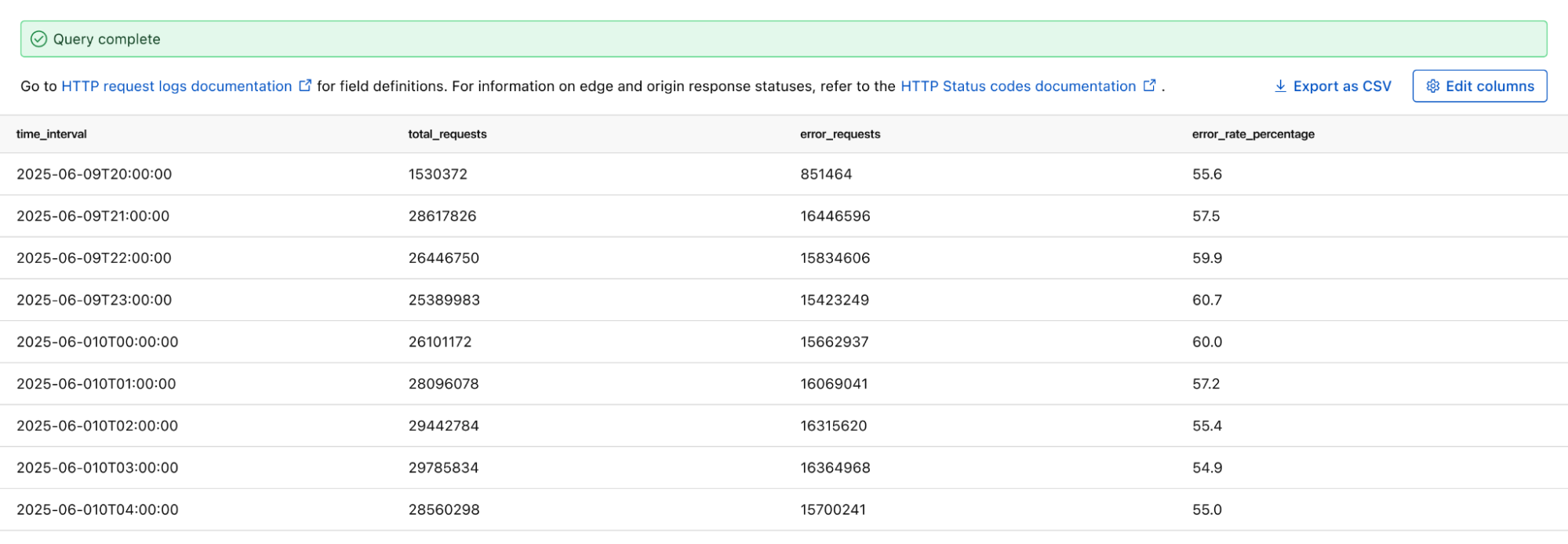
If you want to monitor the error rate for a particular host, you can use this Log Search query to calculate the error rate per time interval:

SELECT SUBSTRING(EdgeStartTimeStamp, 1, 14) || '00:00' AS time_interval,
       COUNT() AS total_requests,
       COUNT(CASE WHEN EdgeResponseStatus >= 500 THEN 1 ELSE NULL END) AS error_requests,
       COUNT(CASE WHEN EdgeResponseStatus >= 500 THEN 1 ELSE NULL END) * 100.0 / COUNT() AS error_rate_percentage
 FROM http_requests
WHERE EdgeStartTimestamp >= '2025-06-09T20:56:58Z'
  AND EdgeStartTimestamp <= '2025-06-10T21:26:58Z'
  AND ClientRequestHost = 'customhostname.com'
GROUP BY time_interval
ORDER BY time_interval ASC;

Running the above query returns the following results. You can see the overall error rate percentage in the far right column of the query results.


Proactively detect malware

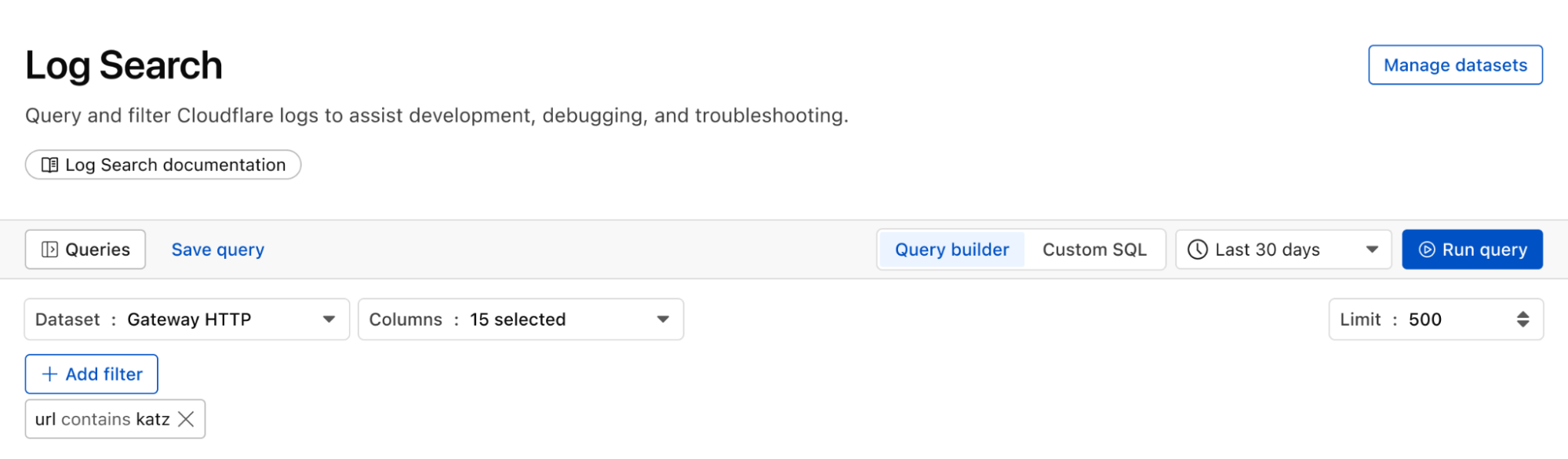
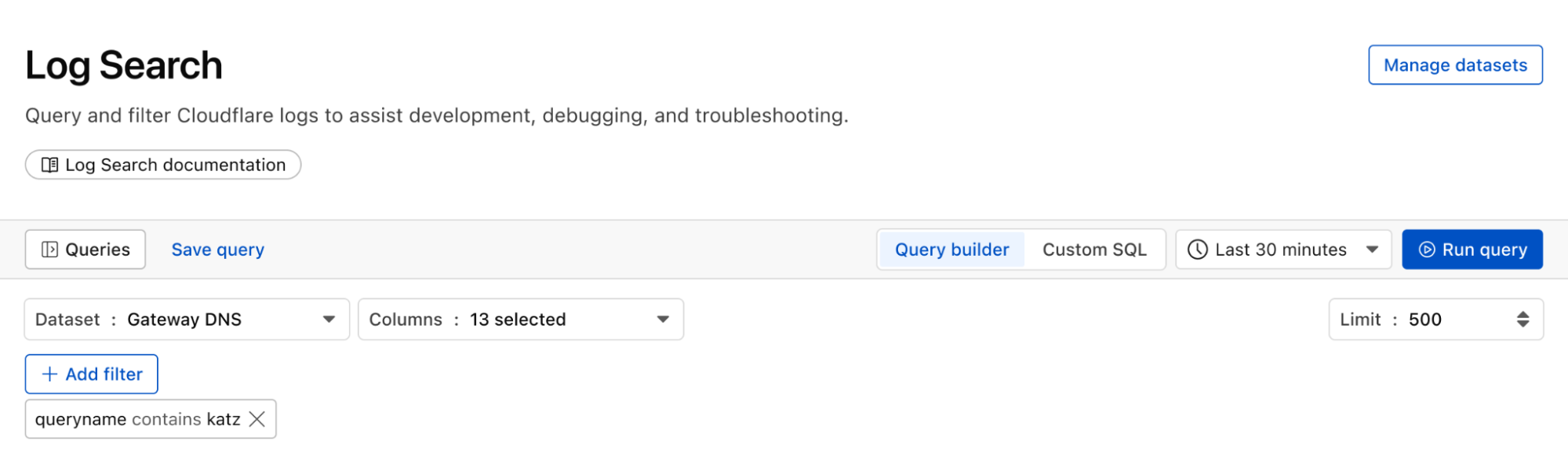
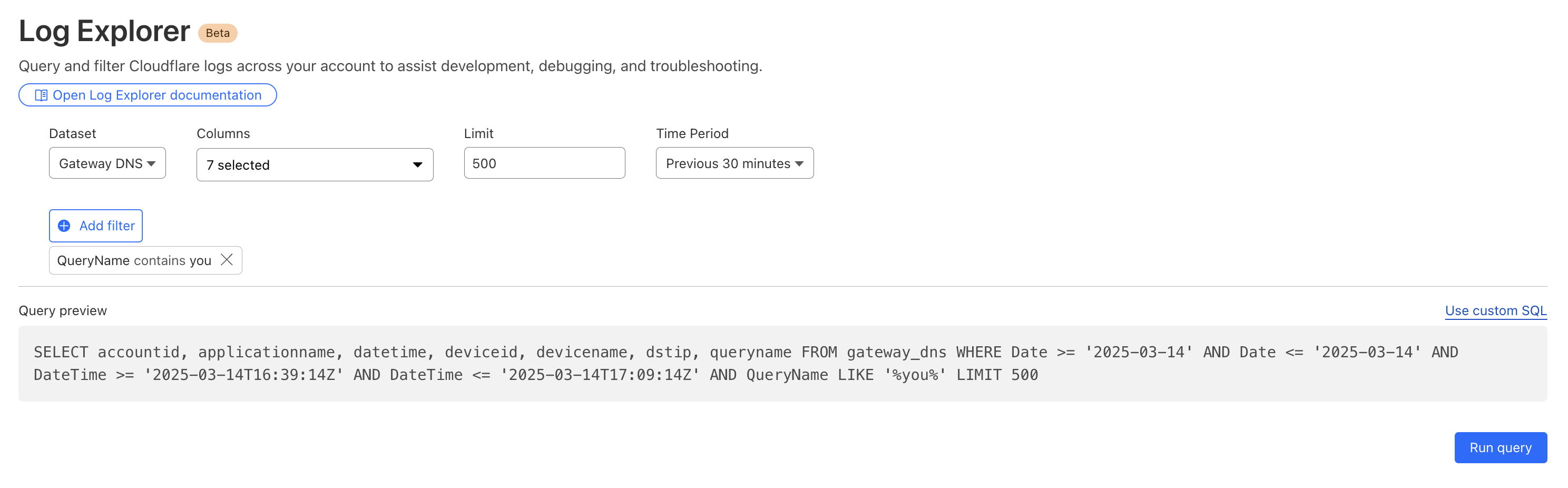
We can identify malware in the environment by monitoring logs from Cloudflare Secure Web Gateway. As an example, Katz Stealer is malware-as-a-service designed for stealing credentials. We can monitor DNS queries and HTTP requests from users within the company in order to identify any machines that may be infected with Katz Stealer malware. 


And with custom alerts, you can configure an alert policy so that you can be notified via webhook or PagerDuty.

Maintain audit & compliance with flexible retention (coming soon)

With flexible retention, you can set the precise length of time you want to store your logs, allowing you to meet specific compliance and audit requirements with ease. Other providers require archiving or hot and cold storage, making it difficult to query older logs. Log Explorer is built on top of our R2 storage tier, so historical logs can be queried as easily as current logs. 

How we built Log Explorer to run at Cloudflare scale

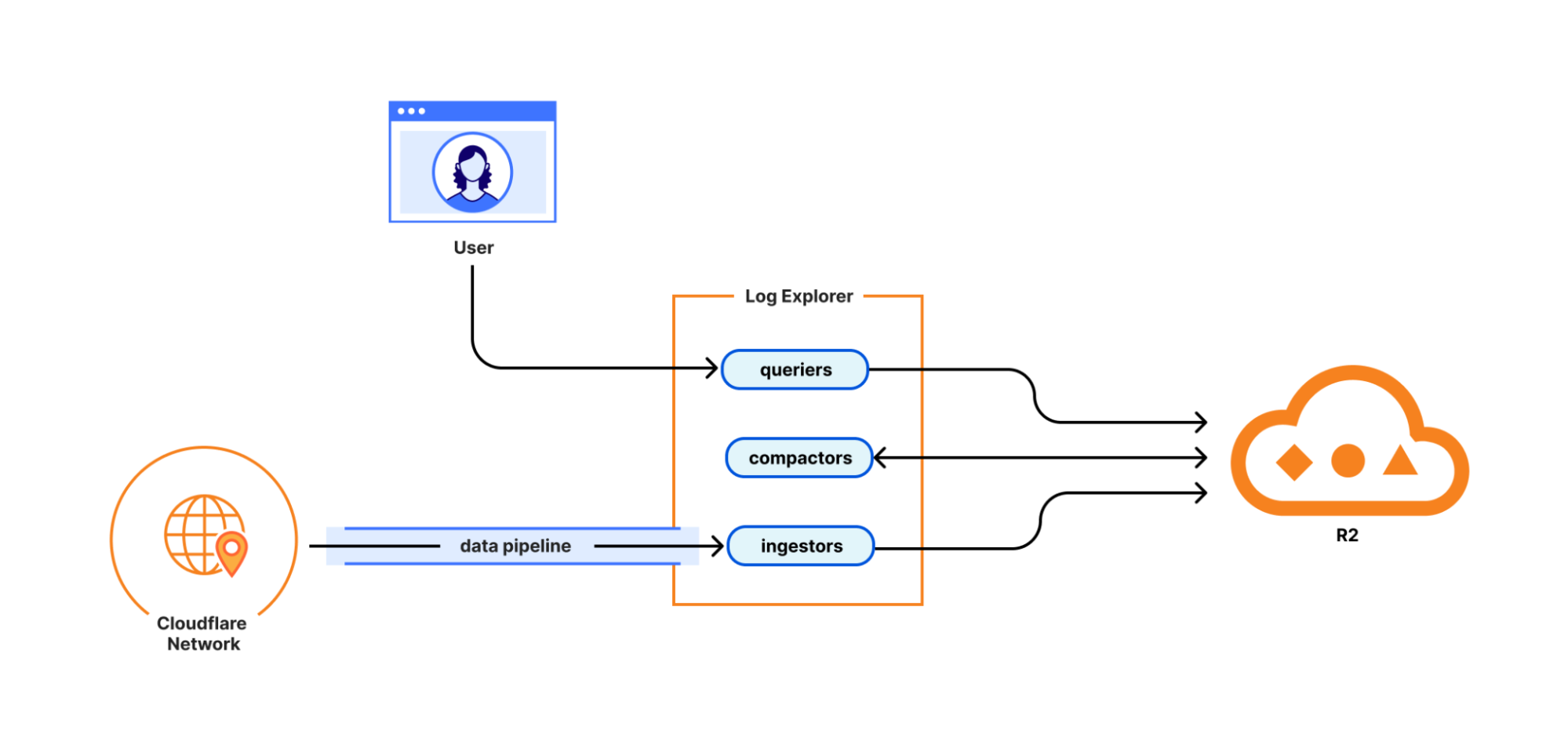
With Log Explorer, we have built a scalable log storage platform on top of Cloudflare R2 that lets you efficiently search your Cloudflare logs using familiar SQL queries. In this section, we’ll look into how we did this and how we solved some technical challenges along the way.

Log Explorer consists of three components: ingestors, compactors, and queriers. Ingestors are responsible for writing logs from Cloudflare’s data pipeline to R2. Compactors optimize storage files, so they can be queried more efficiently. Queriers execute SQL queries from users by fetching, transforming, and aggregating matching logs from R2.


During ingestion, Log Explorer writes each batch of log records to a Parquet file in R2. Apache Parquet is an open-source columnar storage file format, and it was an obvious choice for us: it’s optimized for efficient data storage and retrieval, such as by embedding metadata like the minimum and maximum values of each column across the file which enables the queriers to quickly locate the data needed to serve the query.

Log Explorer stores logs on a per-customer level, just like Cloudflare D1, so that your data isn’t mixed with that of other customers. In Q3 2025, per-customer logs will allow you the flexibility to create your own retention policies and decide in which regions you want to store your data.

But how does Log Explorer find those Parquet files when you query your logs? Log Explorer leverages the Delta Lake open table format to provide a database table abstraction atop R2 object storage. A table in Delta Lake pairs data files in Parquet format with a transaction log. The transaction log registers every addition, removal, or modification of a data file for the table – it’s stored right next to the data files in R2.

Given a SQL query for a particular log dataset such as HTTP Requests or Gateway DNS, Log Explorer first has to load the transaction log of the corresponding Delta table from R2. Transaction logs are checkpointed periodically to avoid having to read the entire table history every time a user queries their logs.

Besides listing Parquet files for a table, the transaction log also includes per-column min/max statistics for each Parquet file. This has the benefit that Log Explorer only needs to fetch files from R2 that can possibly satisfy a user query. Finally, queriers use the min/max statistics embedded in each Parquet file to decide which row groups to fetch from the file.

Log Explorer processes SQL queries using Apache DataFusion, a fast, extensible query engine written in Rust, and delta-rs, a community-driven Rust implementation of the Delta Lake protocol. While standing on the shoulders of giants, our team had to solve some unique problems to provide log search at Cloudflare scale.

Log Explorer ingests logs from across Cloudflare’s vast global network, spanning more than 330 cities in over 125 countries. If Log Explorer were to write logs from our servers straight to R2, its storage would quickly fragment into a myriad of small files, rendering log queries prohibitively expensive.

Log Explorer’s strategy to avoid this fragmentation is threefold. First, it leverages Cloudflare’s data pipeline, which collects and batches logs from the edge, ultimately buffering each stream of logs in an internal system named Buftee. Second, log batches ingested from Buftee aren’t immediately committed to the transaction log; rather, Log Explorer stages commits for multiple batches in an intermediate area and “squashes” these commits before they’re written to the transaction log. Third, once log batches have been committed, a process called compaction merges them into larger files in the background.

While the open-source implementation of Delta Lake provides compaction out of the box, we soon encountered an issue when using it for our workloads. Stock compaction merges data files to a desired target size S by sorting the files in reverse order of their size and greedily filling bins of size S with them. By merging logs irrespective of their timestamps, this process distributed ingested batches randomly across merged files, destroying data locality. Despite compaction, a user querying for a specific time frame would still end up fetching hundreds or thousands of files from R2.

For this reason, we wrote a custom compaction algorithm that merges ingested batches in order of their minimum log timestamp, leveraging the min/max statistics mentioned previously. This algorithm reduced the number of overlaps between merged files by two orders of magnitude. As a result, we saw a significant improvement in query performance, with some large queries that had previously taken over a minute completing in just a few seconds.

Follow along for more updates

We’re just getting started! We’re actively working on even more powerful features to further enhance your experience with Log Explorer. Subscribe to the blog and keep an eye out for more updates in our Change Log to our observability and forensics offering soon.

Get access to Log Explorer

To get access to Log Explorer, reach out for a consultation or contact your account manager. Additionally, you can read more in our Developer Documentation.
Cloudflare enables native monitoring and forensics with Log Explorer and custom dashboards

Post Syndicated from Jen Sells original https://blog.cloudflare.com/monitoring-and-forensics/

In 2024, we announced Log Explorer, giving customers the ability to store and query their HTTP and security event logs natively within the Cloudflare network. Today, we are excited to announce that Log Explorer now supports logs from our Zero Trust product suite. In addition, customers can create custom dashboards to monitor suspicious or unusual activity.

Every day, Cloudflare detects and protects customers against billions of threats, including DDoS attacks, bots, web application exploits, and more. SOC analysts, who are charged with keeping their companies safe from the growing spectre of Internet threats, may want to investigate these threats to gain additional insights on attacker behavior and protect against future attacks. Log Explorer, by collecting logs from various Cloudflare products, provides a single starting point for investigations. As a result, analysts can avoid forwarding logs to other tools, maximizing productivity and minimizing costs. Further, analysts can monitor signals specific to their organizations using custom dashboards.

Zero Trust dataset support in Log Explorer

Log Explorer stores your Cloudflare logs for a 30-day retention period so that you can analyze them natively and in a single interface, within the Cloudflare Dashboard. Cloudflare log data is diverse, reflecting the breadth of capabilities available.  For example, HTTP requests contain information about the client such as their IP address, request method, autonomous system (ASN), request paths, and TLS versions used. Additionally, Cloudflare’s Application Security WAF Detections enrich these HTTP request logs with additional context, such as the WAF attack score, to identify threats.

Today we are announcing that seven additional Cloudflare product datasets are now available in Log Explorer. These seven datasets are the logs generated from our Zero Trust product suite, and include logs from Access, Gateway DNS, Gateway HTTP, Gateway Network, CASB, Zero 

Trust Network Session, and Device Posture Results. Read on for examples of how to use these logs to identify common threats.

Investigating unauthorized access

By reviewing Access logs and HTTP request logs, we can reveal attempts to access resources or systems without proper permissions, including brute force password attacks, indicating potential security breaches or malicious activity.

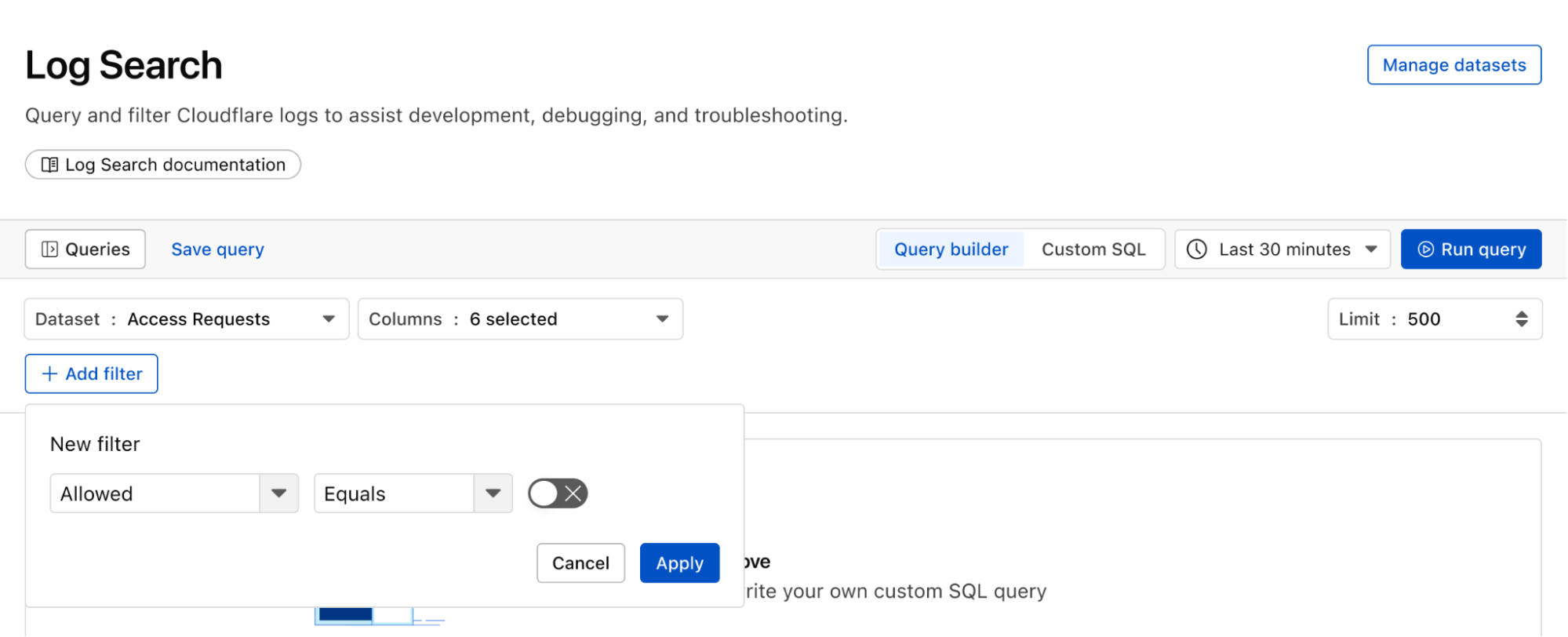
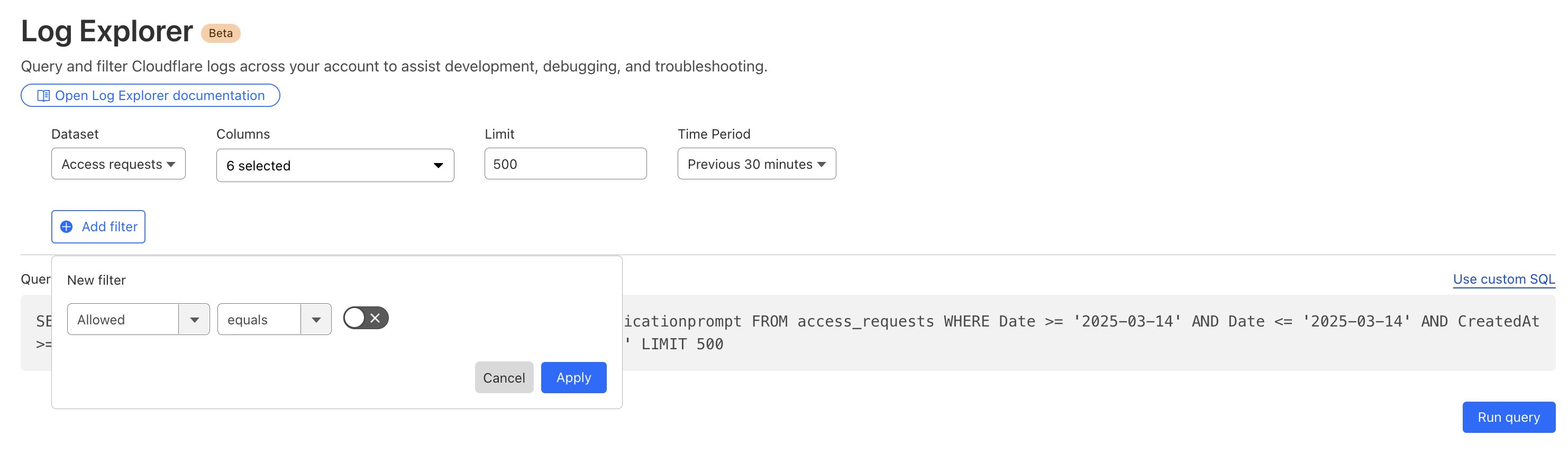
Below, we filter Access Logs on the Allowed field, to see activity related to unauthorized access.


By then reviewing the HTTP logs for the requests identified in the previous query, we can assess if bot networks are the source of unauthorized activity.


With this information, you can craft targeted Custom Rules to block the offending traffic. 

Detecting malware

Cloudflare’s Web Gateway can track which websites users are accessing, allowing administrators to identify and block access to malicious or inappropriate sites. These logs can be used to detect if a user’s machine or account is compromised by malware attacks. When reviewing logs, this may become apparent when we look for records that show a rapid succession of attempts to browse known malicious sites, such as hostnames that have long strings of seemingly random characters that hide their true destination. In this example, we can query logs looking for requests to a spoofed YouTube URL.


Monitoring what matters using custom dashboards

Security monitoring is not one size fits all. For instance, companies in the retail or financial industries worry about fraud, while every company is concerned about data exfiltration, of information like trade secrets. And any form of personally identifiable information (PII) is a target for data breaches or ransomware attacks.

While log exploration helps you react to threats, our new custom dashboards allow you to define the specific metrics you need in order to monitor threats you are concerned about. 

Getting started is easy, with the ability to create a chart using natural language. A natural language interface is integrated into the chart create/edit experience, enabling you to describe in your own words the chart you want to create. Similar to the AI Assistant we announced during Security Week 2024, the prompt translates your language to the appropriate chart configuration, which can then be added to a new or existing custom dashboard.

  • Use a prompt: Enter a query like “Compare status code ranges over time”. The AI model decides the most appropriate visualization and constructs your chart configuration.

  • Customize your chart: Select the chart elements manually, including the chart type, title, dataset to query, metrics, and filters. This option gives you full control over your chart’s structure. 

Video shows entering a natural language description of desired metric “compare status code ranges over time”, preview chart shown is a time series grouped by error code ranges, selects “add chart” to save to dashboard.

For more help getting started, we have some pre-built templates that you can use for monitoring specific uses. Available templates currently include: 

  • Bot monitoring: Identify automated traffic accessing your website

  • API Security: Monitor the data transfer and exceptions of API endpoints within your application

  • API Performance: See timing data for API endpoints in your application, along with error rates

  • Account Takeover: View login attempts, usage of leaked credentials, and identify account takeover attacks

  • Performance Monitoring: Identify slow hosts and paths on your origin server, and view time to first byte (TTFB) metrics over time

Templates provide a good starting point, and once you create your dashboard, you can add or remove individual charts using the same natural language chart creator. 

Video shows editing chart from an existing dashboard and moving individual charts via drag and drop.

Example use cases

Custom dashboards can be used to monitor for suspicious activity, or to keep an eye on performance and errors for your domains. Let’s explore some examples of suspicious activity that we can monitor using custom dashboards.

Take, for example, our use case from above: investigating unauthorized access. With custom dashboards, you can create a dashboard using the Account takeover template to monitor for suspicious login activity related to your domain.


As another example, spikes in requests or errors are common indicators that something is wrong, and they can sometimes be signals of suspicious activity. With the Performance Monitoring template, you can view origin response time and time to first byte metrics as well as monitor for common errors. For example, in this chart, the spikes in 404 errors could be an indication of an unauthorized scan of your endpoints.


Seamlessly integrated into the Cloudflare platform

When using custom dashboards, if you observe a traffic pattern or spike in errors that you would like to further investigate, you can click the button to “View in Security Analytics” in order to drill down further into the data and craft custom WAF rules to mitigate the threat.  


These tools, seamlessly integrated into the Cloudflare platform, will enable users to discover, investigate, and mitigate threats all in one place, reducing time to resolution and overall cost of ownership by eliminating the need to forward logs to third party security analysis tools. And because it is a native part of Cloudflare, you can immediately use the data from your investigation to craft targeted rules that will block these threats. 

What’s next

Stay tuned as we continue to develop more capabilities in the areas of observability and forensics, with additional features including: 

  • Custom alerts: create alerts based on specific metrics or anomalies

  • Scheduled query detections: craft log queries and run them on a schedule to detect malicious activity

  • More integration: further streamlining the journey between detect, investigate, and mitigate across the full Cloudflare platform.

How to get it

Current Log Explorer beta users get immediate access to the new custom dashboards feature. Pricing will be made available to everyone during Q2 2025. Between now and then, these features continue to be available at no cost.

Let us know if you are interested in joining our Beta program by completing this form, and a member of our team will contact you.

Watch on Cloudflare TV

The backbone behind Cloudflare’s Connectivity Cloud

Post Syndicated from Shozo Moritz Takaya original https://blog.cloudflare.com/backbone2024


The modern use of “cloud” arguably traces its origins to the cloud icon, omnipresent in network diagrams for decades. A cloud was used to represent the vast and intricate infrastructure components required to deliver network or Internet services without going into depth about the underlying complexities. At Cloudflare, we embody this principle by providing critical infrastructure solutions in a user-friendly and easy-to-use way. Our logo, featuring the cloud symbol, reflects our commitment to simplifying the complexities of Internet infrastructure for all our users.

This blog post provides an update about our infrastructure, focusing on our global backbone in 2024, and highlights its benefits for our customers, our competitive edge in the market, and the impact on our mission of helping build a better Internet. Since the time of our last backbone-related blog post in 2021, we have increased our backbone capacity (Tbps) by more than 500%, unlocking new use cases, as well as reliability and performance benefits for all our customers.

A snapshot of Cloudflare’s infrastructure

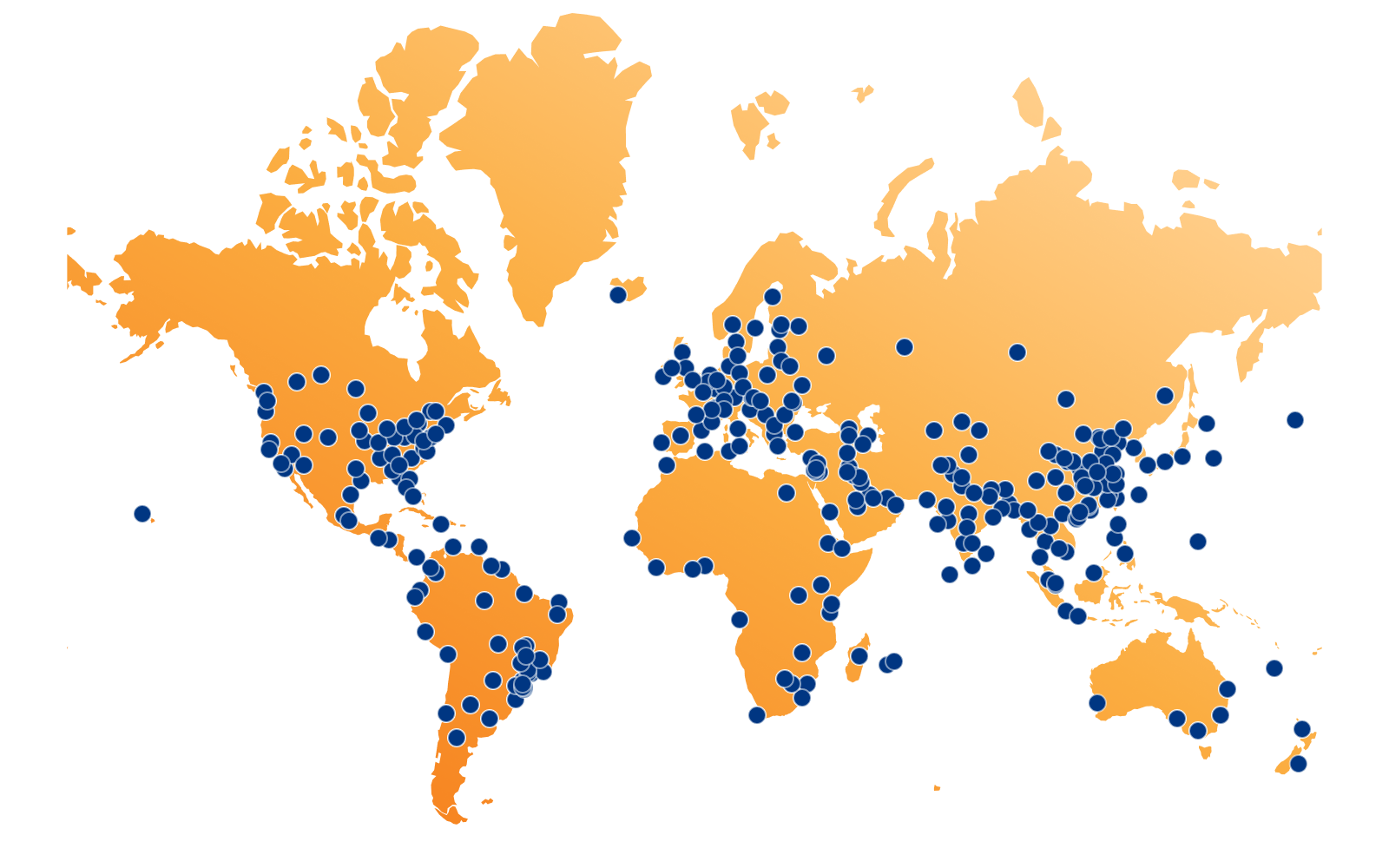
As of July 2024, Cloudflare has data centers in 330 cities across more than 120 countries, each running Cloudflare equipment and services. The goal of delivering Cloudflare products and services everywhere remains consistent, although these data centers vary in the number of servers and amount of computational power.

These data centers are strategically positioned around the world to ensure our presence in all major regions and to help our customers comply with local regulations. It is a programmable smart network, where your traffic goes to the best data center possible to be processed. This programmability allows us to keep sensitive data regional, with our Data Localization Suite solutions, and within the constraints that our customers impose. Connecting these sites, exchanging data with customers, public clouds, partners, and the broader Internet, is the role of our network, which is managed by our infrastructure engineering and network strategy teams. This network forms the foundation that makes our products lightning fast, ensuring our global reliability, security for every customer request, and helping customers comply with data sovereignty requirements.

Traffic exchange methods

The Internet is an interconnection of different networks and separate autonomous systems that operate by exchanging data with each other. There are multiple ways to exchange data, but for simplicity, we’ll focus on two key methods on how these networks communicate: Peering and IP Transit. To better understand the benefits of our global backbone, it helps to understand these basic connectivity solutions we use in our network.

  1. Peering: The voluntary interconnection of administratively separate Internet networks that allows for traffic exchange between users of each network is known as “peering”. Cloudflare is one of the most peered networks globally. We have peering agreements with ISPs and other networks in 330 cities and across all major Internet Exchanges (IX’s). Interested parties can register to peer with us anytime, or directly connect to our network with a link through a private network interconnect (PNI).
  2. IP transit: A paid service that allows traffic to cross or “transit” somebody else’s network, typically connecting a smaller Internet service provider (ISP) to the larger Internet. Think of it as paying a toll to access a private highway with your car.

The backbone is a dedicated high-capacity optical fiber network that moves traffic between Cloudflare’s global data centers, where we interconnect with other networks using these above-mentioned traffic exchange methods. It enables data transfers that are more reliable than over the public Internet. For the connectivity within a city and long distance connections we manage our own dark fiber or lease wavelengths using Dense Wavelength Division Multiplexing (DWDM). DWDM is a fiber optic technology that enhances network capacity by transmitting multiple data streams simultaneously on different wavelengths of light within the same fiber. It’s like having a highway with multiple lanes, so that more cars can drive on the same highway. We buy and lease these services from our global carrier partners all around the world.

Backbone operations and benefits

Operating a global backbone is challenging, which is why many competitors don’t do it. We take this challenge for two key reasons: traffic routing control and cost-effectiveness.

With IP transit, we rely on our transit partners to carry traffic from Cloudflare to the ultimate destination network, introducing unnecessary third-party reliance. In contrast, our backbone gives us full control over routing of both internal and external traffic, allowing us to manage it more effectively. This control is crucial because it lets us optimize traffic routes, usually resulting in the lowest latency paths, as previously mentioned. Furthermore, the cost of serving large traffic volumes through the backbone is, on average, more cost-effective than IP transit. This is why we are doubling down on backbone capacity in regions such as Frankfurt, London, Amsterdam, and Paris and Marseille, where we see continuous traffic growth and where connectivity solutions are widely available and competitively priced.

Our backbone serves both internal and external traffic. Internal traffic includes customer traffic using our security or performance products and traffic from Cloudflare’s internal systems that shift data between our data centers. Tiered caching, for example, optimizes our caching delivery by dividing our data centers into a hierarchy of lower tiers and upper tiers. If lower-tier data centers don’t have the content, they request it from the upper tiers. If the upper tiers don’t have it either, they then request it from the origin server. This process reduces origin server requests and improves cache efficiency. Using our backbone to transport the cached content between lower and upper-tier data centers and the origin is often the most cost-effective method, considering the scale of our network. Magic Transit is another example where we attract traffic, by means of BGP anycast, to the Cloudflare data center closest to the end user and implement our DDoS solution. Our backbone transports the clean traffic to our customer’s data center, which they connect through a Cloudflare Network Interconnect (CNI).

External traffic that we carry on our backbone can be traffic from other origin providers like AWS, Oracle, Alibaba, Google Cloud Platform, or Azure, to name a few. The origin responses from these cloud providers are transported through peering points and our backbone to the Cloudflare data center closest to our customer. By leveraging our backbone we have more control over how we backhaul this traffic throughout our network, which results in more reliability and better performance and less dependency on the public Internet.

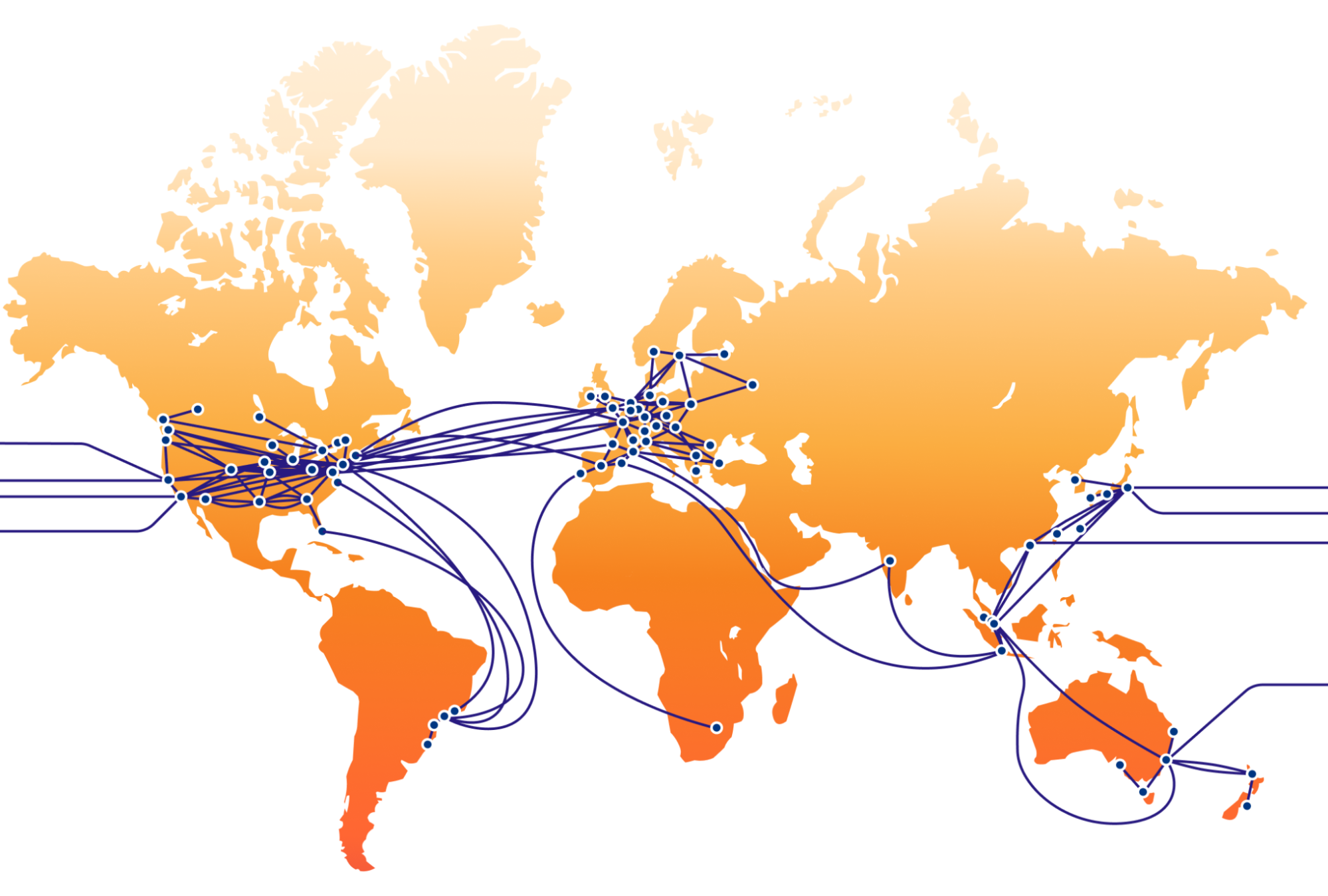
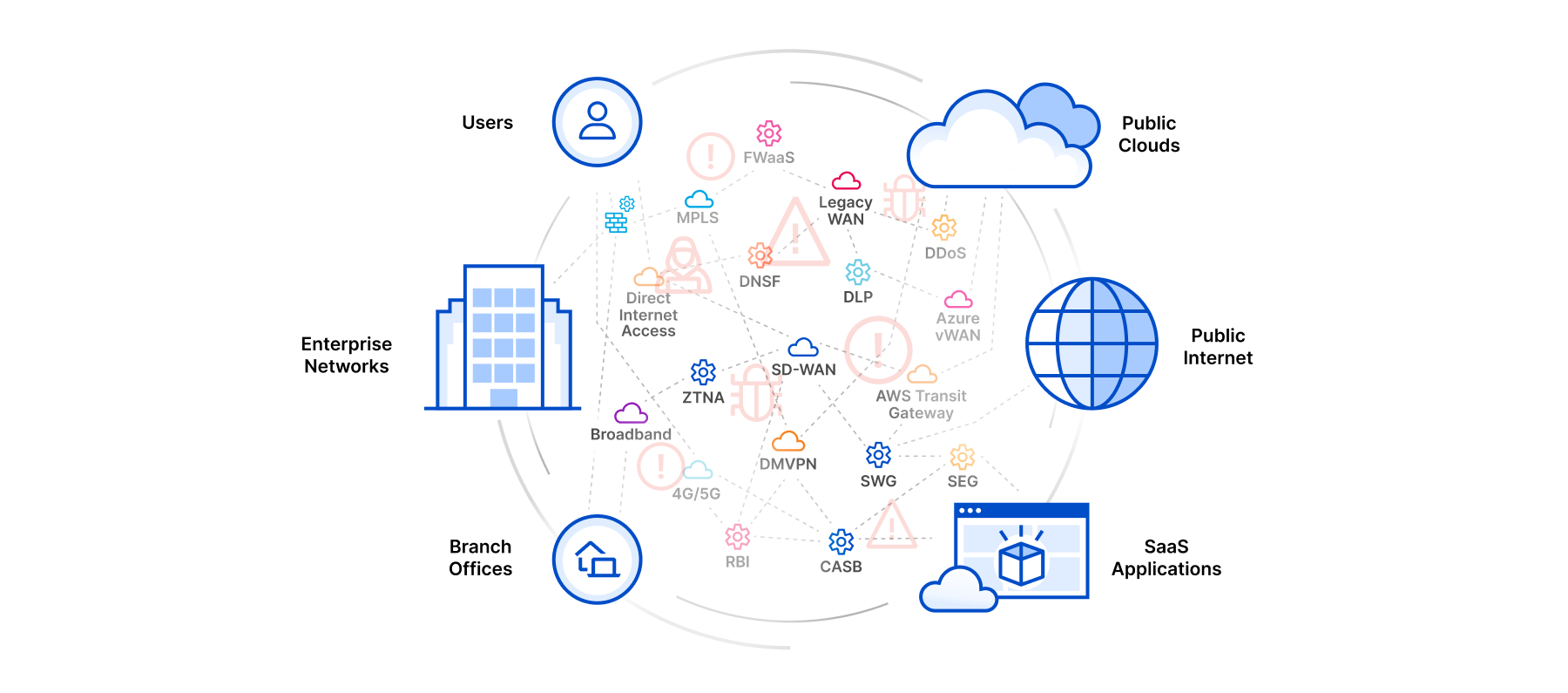
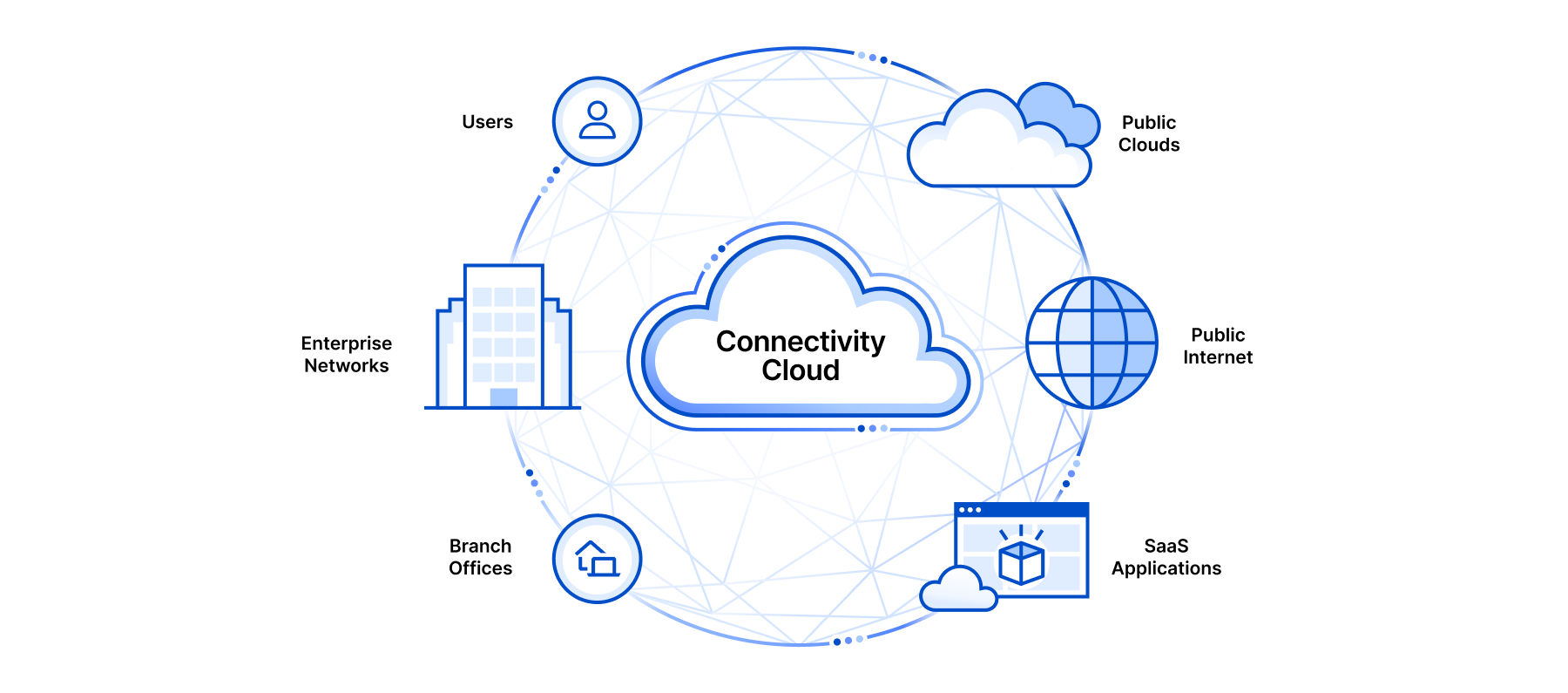
This interconnection between public clouds, offices, and the Internet with a controlled layer of performance, security, programmability, and visibility running on our global backbone is our Connectivity Cloud.

This map is a simplification of our current backbone network and does not show all paths

Expanding our network

As mentioned in the introduction, we have increased our backbone capacity (Tbps) by more than 500% since 2021. With the addition of sub-sea cable capacity to Africa, we achieved a big milestone in 2023 by completing our global backbone ring. It now reaches six continents through terrestrial fiber and subsea cables.

Building out our backbone within regions where Internet infrastructure is less developed compared to markets like Central Europe or the US has been a key strategy for our latest network expansions. We have a shared goal with regional ISP partners to keep our data flow localized and as close as possible to the end user. Traffic often takes inefficient routes outside the region due to the lack of sufficient local peering and regional infrastructure. This phenomenon, known as traffic tromboning, occurs when data is routed through more cost-effective international routes and existing peering agreements.

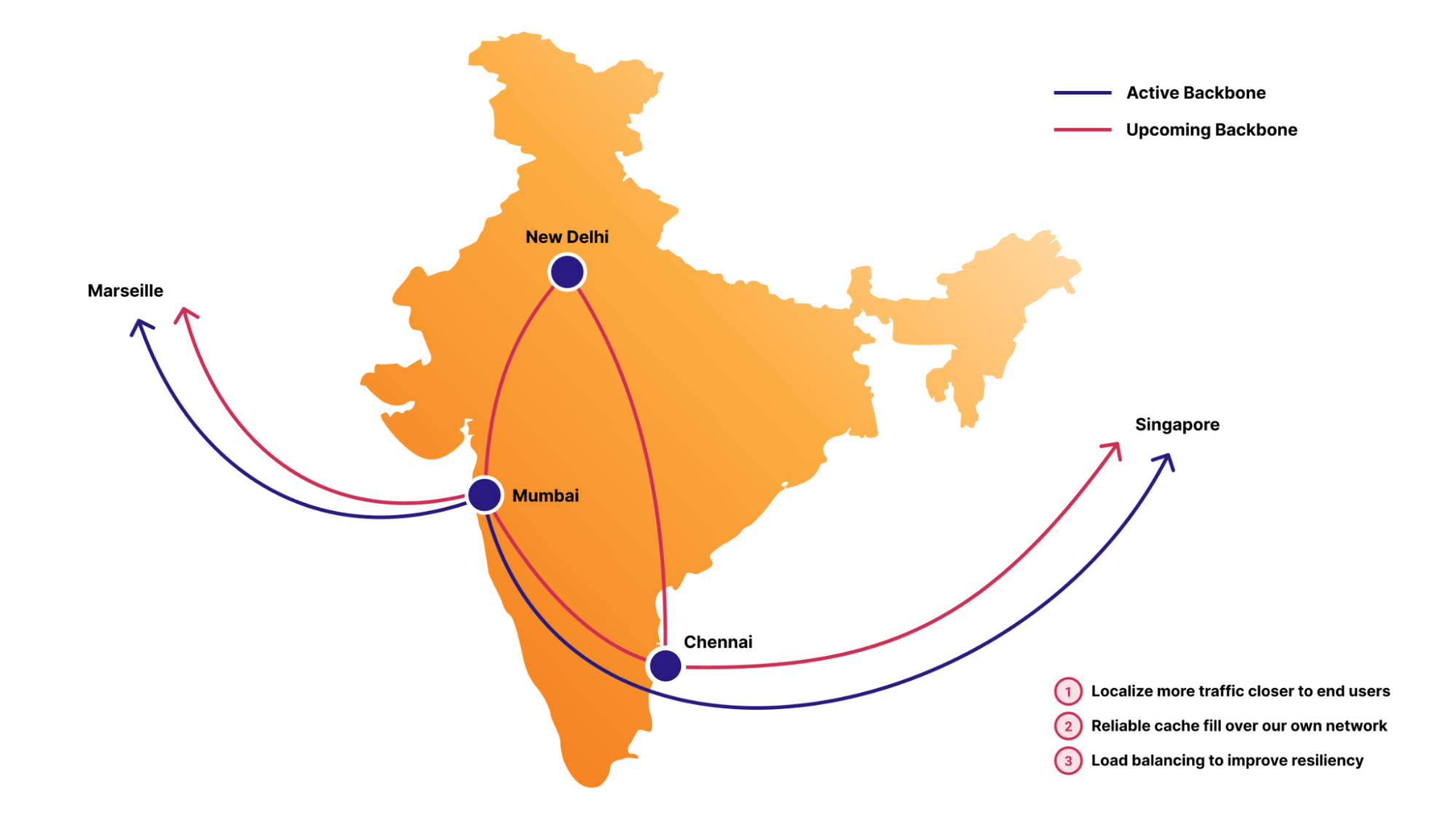
Our regional backbone investments in countries like India or Turkey aim to reduce the need for such inefficient routing. With our own in-region backbone, traffic can be directly routed between in-country Cloudflare data centers, such as from Mumbai to New Delhi to Chennai, reducing latency, increasing reliability, and helping us to provide the same level of service quality as in more developed markets. We can control that data stays local, supporting our Data Localization Suite (DLS), which helps businesses comply with regional data privacy laws by controlling where their data is stored and processed.

Improved latency and performance

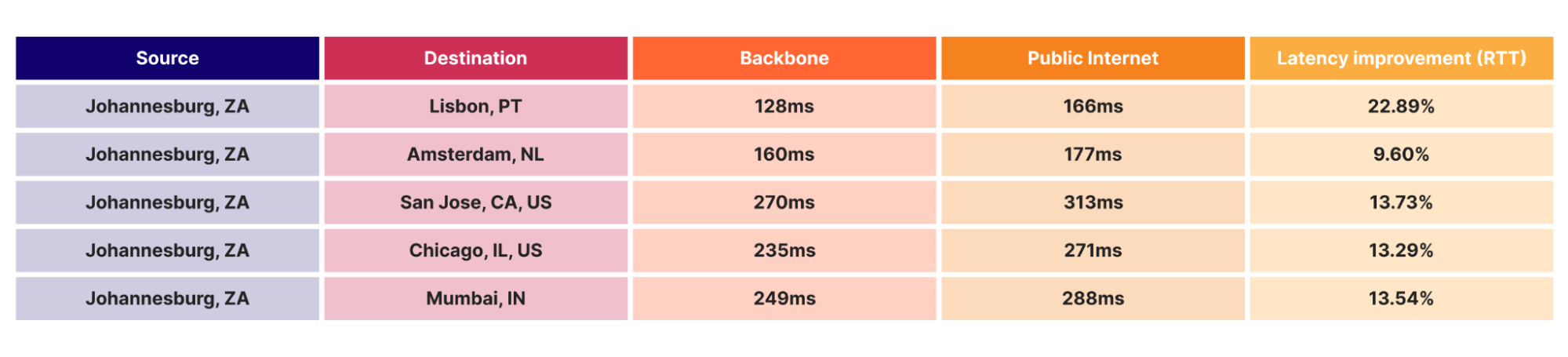
This strategic expansion has not only extended our global reach but has also significantly improved our overall latency. One illustration of this is that since the deployment of our backbone between Lisbon and Johannesburg, we have seen a major performance improvement for users in Johannesburg. Customers benefiting from this improved latency can be, for example, a financial institution running their APIs through us for real-time trading, where milliseconds can impact trades, or our Magic WAN users, where we facilitate site-to-site connectivity between their branch offices.

The table above shows an example where we measured the round-trip time (RTT) for an uncached origin fetch, from an end-user in Johannesburg to various origin locations, comparing our backbone and the public Internet. By carrying the origin request over our backbone, as opposed to IP transit or peering, local users in Johannesburg get their content up to 22% faster. By using our own backbone to long-haul the traffic to its final destination, we are in complete control of the path and performance. This improvement in latency varies by location, but consistently demonstrates the superiority of our backbone infrastructure in delivering high performance connectivity.

Traffic control

Consider a navigation system using 1) GPS to identify the route and 2) a highway toll pass that is valid until your final destination and allows you to drive straight through toll stations without stopping. Our backbone works quite similarly.

Our global backbone is built upon two key pillars. The first is BGP (Border Gateway Protocol), the routing protocol for the Internet, and the second is Segment Routing MPLS (Multiprotocol label switching), a technique for steering traffic across predefined forwarding paths in an IP network. By default, Segment Routing provides end-to-end encapsulation from ingress to egress routers where the intermediate nodes execute no route lookup. Instead, they forward traffic across an end-to-end virtual circuit, or tunnel, called a label-switched path. Once traffic is put on a label-switched path, it cannot detour onto the public Internet and must continue on the predetermined route across Cloudflare’s backbone. This is nothing new, as many networks will even run a “BGP Free Core” where all the route intelligence is carried at the edge of the network, and intermediate nodes only participate in forwarding from ingress to egress.

While leveraging Segment Routing Traffic Engineering (SR-TE) in our backbone, we can automatically select paths between our data centers that are optimized for latency and performance. Sometimes the “shortest path” in terms of routing protocol cost is not the lowest latency or highest performance path.

Supercharged: Argo and the global backbone

Argo Smart Routing is a service that uses Cloudflare’s portfolio of backbone, transit, and peering connectivity to find the most optimal path between the data center where a user’s request lands and your back-end origin server. Argo may forward a request from one Cloudflare data center to another on the way to an origin if the performance would improve by doing so. Orpheus is the counterpart to Argo, and routes around degraded paths for all customer origin requests free of charge. Orpheus is able to analyze network conditions in real-time and actively avoid reachability failures. Customers with Argo enabled get optimal performance for requests from Cloudflare data centers to their origins, while Orpheus provides error self-healing for all customers universally. By mixing our global backbone using Segment Routing as an underlay with Argo Smart Routing and Orpheus as our connectivity overlay, we are able to transport critical customer traffic along the most optimized paths that we have available.

So how exactly does our global backbone fit together with Argo Smart Routing? Argo Transit Selection is an extension of Argo Smart Routing where the lowest latency path between Cloudflare data center hops is explicitly selected and used to forward customer origin requests. The lowest latency path will often be our global backbone, as it is a more dedicated and private means of connectivity, as opposed to third-party transit networks.

Consider a multinational Dutch pharmaceutical company that relies on Cloudflare’s network and services with our SASE solution to connect their global offices, research centers, and remote employees. Their Asian branch offices depend on Cloudflare’s security solutions and network to provide secure access to important data from their central data centers back to their offices in Asia. In case of a cable cut between regions, our network would automatically look for the best alternative route between them so that business impact is limited.

Argo measures every potential combination of the different provider paths, including our own backbone, as an option for reaching origins with smart routing. Because of our vast interconnection with so many networks, and our global private backbone, Argo is able to identify the most performant network path for requests. The backbone is consistently one of the lowest latency paths for Argo to choose from.

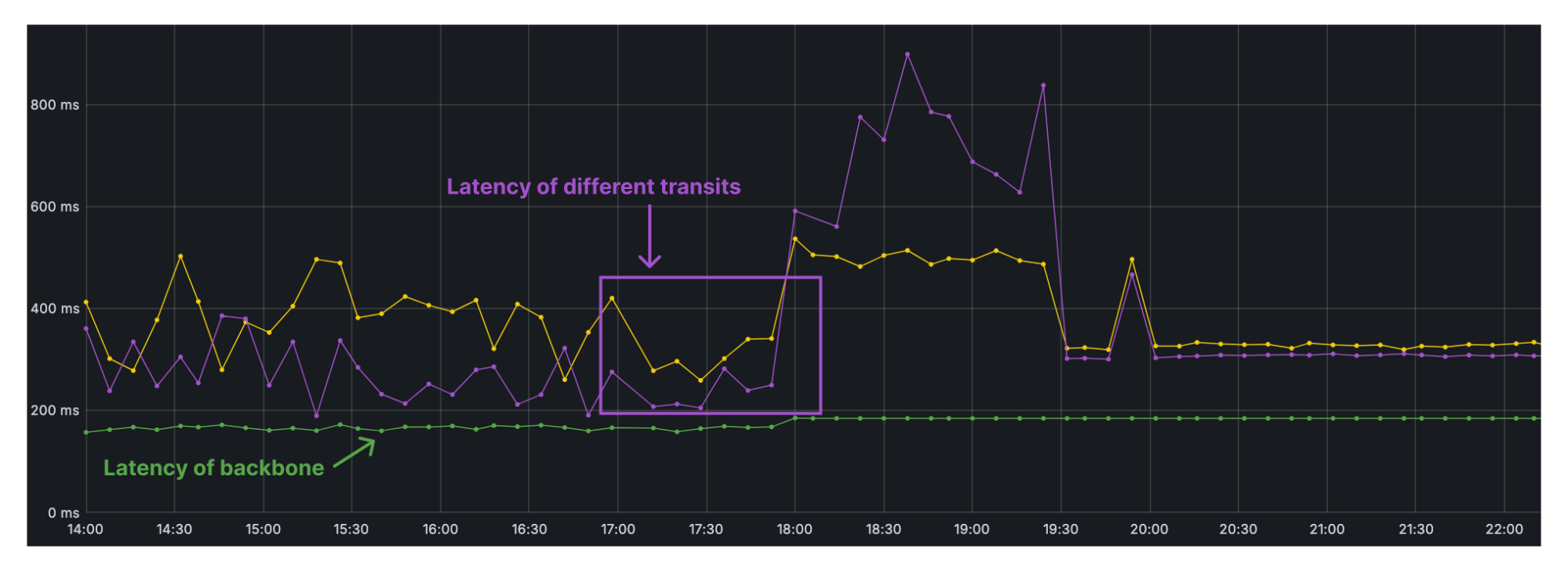
In addition to high performance, we care greatly about network reliability for our customers. This means we need to be as resilient as possible from fiber cuts and third-party transit provider issues. During a disruption of the AAE-1 (Asia Africa Europe-1) submarine cable, this is what Argo saw between Singapore and Amsterdam across some of our transit provider paths vs. the backbone.

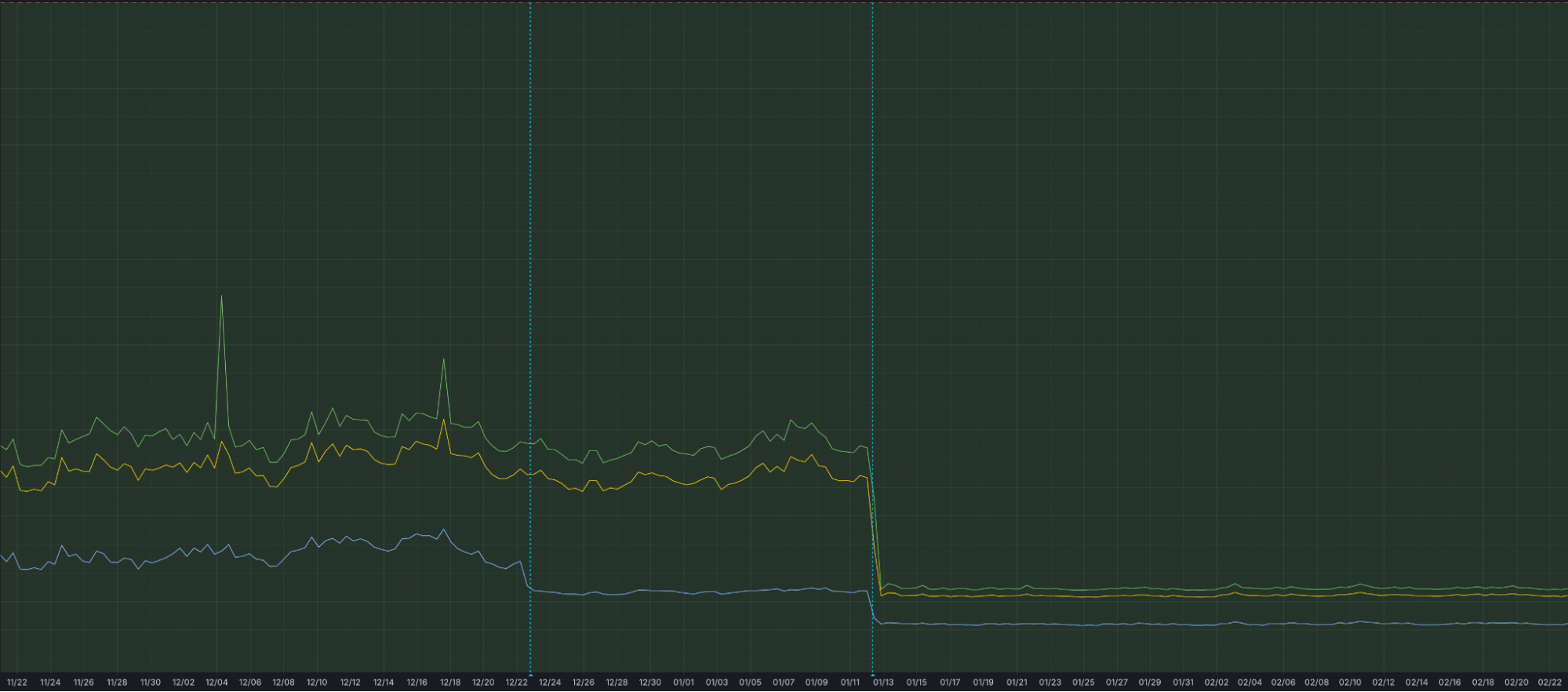
The large (purple line) spike shows a latency increase on one of our third-party IP transit provider paths due to congestion, which was eventually resolved following likely traffic engineering within the provider’s network. We saw a smaller latency increase (yellow line) over other transit networks, but still one that is noticeable. The bottom (green) line on the graph is our backbone, where round-trip time more or less remains flat throughout the event, due to our diverse backbone connectivity between Asia and Europe. Throughout the fiber cut, we remained stable at around 200ms between Amsterdam and Singapore. There was no noticeable network hiccup as was seen on the transit provider paths, so Argo actively leveraged the backbone for optimal performance.

Call to action

As Argo improves performance in our network, Cloudflare Network Interconnects (CNIs) optimize getting onto it. We encourage our Enterprise customers to use our free CNI’s as on-ramps onto our network whenever practical. In this way, you can fully leverage our network, including our robust backbone, and increase overall performance for every product within your Cloudflare Connectivity Cloud. In the end, our global network is our main product and our backbone plays a critical role in it. This way we continue to help build a better Internet, by improving our services for everybody, everywhere.

If you want to be part of our mission, join us as a Cloudflare network on-ramp partner to offer secure and reliable connectivity to your customers by integrating directly with us. Learn more about our on-ramp partnerships and how they can benefit your business here.

Welcome to Developer Week 2024

Post Syndicated from Rita Kozlov original https://blog.cloudflare.com/welcome-to-developer-week-2024


It’s time to ship. For us (that’s what Innovation Weeks are all about!), and also for our developers.

Shipping itself is always fun, but getting there is not always easy. Bringing something from idea to life requires many stars to align. That’s what this week is all about — helping developers, including the two million developers already building on our platform, bring their ideas to life.

The full-stack cloud

Building applications requires assembling many different components.

The frontend, the face of the application, must be intuitive, responsive, and visually appealing to engage users effectively. Behind the scenes, you need a backend to handle data processing, storage, and retrieval, ensuring smooth functionality and performance. On top of all that, in the past year AI has entered the chat, so to speak, and increasingly every application requires an element of AI, making it a crucial part of the stack.

The job of a good platform is to provide all these components, and any others you will need, to you, the developer.

Just as there’s nothing more frustrating than coming home from the grocery store and realizing you left out an ingredient, realizing a platform is missing a major component or piece of functionality is no different.

We view providing the tooling that developers need as a critical part of our job as a platform, which is why with every Developer Week, we make it our mission to provide you with more and more pieces you may need. This week is no different — you can expect us to announce more tools and primitives from the frontend to backend to AI.

However, our job doesn’t stop there. If a good platform provides the components, a great platform goes a step further than that.

The job of a great platform is not only to provide the components, but make sure they play well with each other in a way that makes your job as a developer easier. Our vision for the developer platform is exactly that: to anticipate not just the tools you need but also think about how they work with each other, and how they integrate into your development flow.

This week, you will see announcements and deep dives that expound on our vision for an integrated platform: pulling back the curtain on the way we expose services in Workers through bindings for an integrated developer experience, talking about our vision for a unified data platform, updating you on framework support, and more.

The connectivity cloud

While we’re excited for you to build on us as much as possible, we also realize that development projects are rarely greenfield. If you’ve been at this for a long time, chances are a large portion of your application already lives somewhere, whether on another cloud, or on-prem.

That’s why we’re constantly making it easier for you to connect to existing infrastructure or other providers, and working hard to make sure you can still reap the benefits of building on Cloudflare by making your application feel fast and global, regardless of where your backend is.

And vice versa, if your data is on us, but you need to access it from other providers, it’s not our job to keep it hostage in a captivity cloud by charging a tariff for egress.

The experimentation cloud

Before you start assembling components, or even coming up with a plan or a spec for it, there’s an important but overlooked step to the development process — experimentation.
Experimentation can take many forms. Experimentation can be in the form of prototyping an MVP before you spend months developing a product or a feature. If you’ve found yourself rewriting your entire personal website just to try out a new tool or framework, that’s also experimentation.
It’s easy to overlook experimentation as a part of the process, but innovation doesn’t happen without it, which is why it’s something we always want to encourage and support as a part of our platform.

That’s why offering a generous free tier is something that’s been a part of our DNA since the very beginning, and something you can expect to forever be a staple of our platform.

The demo to production cloud

Alright, you’ve got all the tools you need, you’ve had a chance to experiment, and at some point… it’s time to ship.

Shipping is exciting, but shipping is also vulnerable and scary. You’re exposing the thing you’ve been working hard on to the world to criticize. You’re exposing your code to a world of untested edge cases and abuse. You’re exposing your colleagues who are on call to the possibility of getting paged at 1 AM due to the code you released.

Of course, the wrong answer is not shipping.

The right answer is having a platform that supports you and holds your hand through the scary parts. This means a platform that can seamlessly scale from zero to sixty. A platform gives you the tools to test your code, and release it gradually to the world to help you gain confidence. Or a platform provides the observability you need when you are trying to figure out what’s gone wrong at 1 AM.

That’s why this week, you can look forward to some announcements from us that we hope will help you sleep better.

The demo to production cloud — for inference

We talked about some of the scary parts of deploying to production, and while all these apply to AI as well, building AI applications today, especially in production, presents its own unique set of challenges.

Almost every day you see a new AI demo go viral — from Sora to Devin, it’s easy and inspiring to imagine our world completely changed by AI. But if you’ve started actually playing with and implementing AI use cases, you know the harsh reality of making AI truly work. It requires a lot of trial and error to get the results you want — choosing a model, RAG, fine-tuning…

And that’s before you even go to production.

That’s when you encounter the real challenge — provisioning enough capacity to stay up, without over-provisioning and overpaying. This is the exact challenge we set out to solve from the early days of Workers — helping developers not worry about infrastructure, just the application they want to build.

With the recent rise of AI, we’ve noticed many of these challenges return. Thankfully, managing loads and infrastructure is what we’re good at here at Cloudflare. It’s what we’ve had practice at for over a decade of running our platform. It’s all just one giant scheduler.

Our vision for our AI platform is to help solve the exact challenges in deploying AI workloads that we’ve been helping developers solve for, well, any other type of workload. Whether you’re deploying directly on us with Workers AI, or another provider, we’ll help provide the tools you need to access the models you need, without overpaying for idle compute.

Don’t worry, it’s all going to be fine.

So what can you expect this week?

No one in my family can keep a secret — my sister cannot get me a birthday present without spoiling it the week before. For me, the anticipation and the look of surprise is part of the fun! My coworkers seem to have clued into this.

While I won’t give away too much, we’ve already teased out a few things last week (you can find some hints here, here and here), as well as in this blog post if you read closely (because as it turns out, I too, can’t help myself).

See you tomorrow!

Our series of announcements starts on Monday, April 1st. We look forward to sharing them with you here on our blog, and discussing them with you on Discord and X.

Birthday Week recap: everything we announced — plus an AI-powered opportunity for startups

Post Syndicated from Dina Kozlov original http://blog.cloudflare.com/birthday-week-2023-wrap-up/

Birthday Week recap: everything we announced — plus an AI-powered opportunity for startups

Birthday Week recap: everything we announced — plus an AI-powered opportunity for startups

This year, Cloudflare officially became a teenager, turning 13 years old. We celebrated this milestone with a series of announcements that benefit both our customers and the Internet community.

From developing applications in the age of AI to securing against the most advanced attacks that are yet to come, Cloudflare is proud to provide the tools that help our customers stay one step ahead.

We hope you’ve had a great time following along and for anyone looking for a recap of everything we launched this week, here it is:

Monday

What

In a sentence…

Switching to Cloudflare can cut emissions by up to 96%

Switching enterprise network services from on-prem to Cloudflare can cut related carbon emissions by up to 96%. 

Cloudflare Trace

Use Cloudflare Trace to see which rules and settings are invoked when an HTTP request for your site goes through our network. 

Cloudflare Fonts

Introducing Cloudflare Fonts. Enhance privacy and performance for websites using Google Fonts by loading fonts directly from the Cloudflare network. 

How Cloudflare intelligently routes traffic

Technical deep dive that explains how Cloudflare uses machine learning to intelligently route traffic through our vast network. 

Low Latency Live Streaming

Cloudflare Stream’s LL-HLS support is now in open beta. You can deliver video to your audience faster, reducing the latency a viewer may experience on their player to as little as 3 seconds. 

Account permissions for all

Cloudflare account permissions are now available to all customers, not just Enterprise. In addition, we’ll show you how you can use them and best practices. 

Incident Alerts

Customers can subscribe to Cloudflare Incident Alerts and choose when to get notified based on affected products and level of impact. 

Tuesday

What

In a sentence…

Welcome to the connectivity cloud

Cloudflare is the world’s first connectivity cloud — the modern way to connect and protect your cloud, networks, applications and users. 

Amazon’s $2bn IPv4 tax — and how you can avoid paying it 

Amazon will begin taxing their customers $43 for IPv4 addresses, so Cloudflare will give those \$43 back in the form of credits to bypass that tax. 

Sippy

Minimize egress fees by using Sippy to incrementally migrate your data from AWS to R2. 

Cloudflare Images

All Image Resizing features will be available under Cloudflare Images and we’re simplifying pricing to make it more predictable and reliable.  

Traffic anomalies and notifications with Cloudflare Radar

Cloudflare Radar will be publishing anomalous traffic events for countries and Autonomous Systems (ASes).

Detecting Internet outages

Deep dive into how Cloudflare detects Internet outages, the challenges that come with it, and our approach to overcome these problems. 

Wednesday

What

In a sentence…

The best place on Region: Earth for inference

Now available: Workers AI, a serverless GPU cloud for AI, Vectorize so you can build your own vector databases, and AI Gateway to help manage costs and observability of your AI applications. 

Cloudflare delivers the best infrastructure for next-gen AI applications, supported by partnerships with NVIDIA, Microsoft, Hugging Face, Databricks, and Meta.

Workers AI 

Launching Workers AI — AI inference as a service platform, empowering developers to run AI models with just a few lines of code, all powered by our global network of GPUs. 

Partnering with Hugging Face 

Cloudflare is partnering with Hugging Face to make AI models more accessible and affordable to users. 

Vectorize

Cloudflare’s vector database, designed to allow engineers to build full-stack, AI-powered applications entirely on Cloudflare's global network — available in Beta. 

AI Gateway

AI Gateway helps developers have greater control and visibility in their AI apps, so that you can focus on building without worrying about observability, reliability, and scaling. AI Gateway handles the things that nearly all AI applications need, saving you engineering time so you can focus on what you're building.


You can now use WebGPU in Cloudflare Workers

Developers can now use WebGPU in Cloudflare Workers. Learn more about why WebGPUs are important, why we’re offering them to customers, and what’s next. 

What AI companies are building with Cloudflare

Many AI companies are using Cloudflare to build next generation applications. Learn more about what they’re building and how Cloudflare is helping them on their journey. 

Writing poems using LLama 2 on Workers AI

Want to write a poem using AI? Learn how to run your own AI chatbot in 14 lines of code, running on Cloudflare’s global network. 

Thursday

What

In a sentence…

Hyperdrive

Cloudflare launches a new product, Hyperdrive, that makes existing regional databases much faster by dramatically speeding up queries that are made from Cloudflare Workers.

D1 Open Beta

D1 is now in open beta, and the theme is “scale”: with higher per-database storage limits and the ability to create more databases, we’re unlocking the ability for developers to build production-scale applications on D1.

Pages Build Caching

Build cache is a feature designed to reduce your build times by caching and reusing previously computed project components — now available in Beta. 

Running serverless Puppeteer with Workers and Durable Objects

Introducing the Browser Rendering API, which enables developers to utilize the Puppeteer browser automation library within Workers, eliminating the need for serverless browser automation system setup and maintenance

Cloudflare partners with Microsoft to power their Edge Secure Network

We partnered with Microsoft Edge to provide a fast and secure VPN, right in the browser. Users don’t have to install anything new or understand complex concepts to get the latest in network-level privacy: Edge Secure Network VPN is available on the latest consumer version of Microsoft Edge in most markets, and automatically comes with 5GB of data. 

Re-introducing the Cloudflare Workers playground

We are revamping the playground that demonstrates the power of Workers, along with new development tooling, and the ability to share your playground code and deploy instantly to Cloudflare’s global network

Cloudflare integrations marketplace expands

Introducing the newest additions to Cloudflare’s Integration Marketplace. Now available: Sentry, Momento and Turso. 

A Socket API that works across Javascript runtimes — announcing WinterCG spec and polyfill for connect()

Engineers from Cloudflare and Vercel have published a draft specification of the connect() sockets API for review by the community, along with a Node.js compatible polyfill for the connect() API that developers can start using.

New Workers pricing

Announcing new pricing for Cloudflare Workers, where you are billed based on CPU time, and never for the idle time that your Worker spends waiting on network requests and other I/O.

Friday

What

In a sentence…

Post Quantum Cryptography goes GA 

Cloudflare is rolling out post-quantum cryptography support to customers, services, and internal systems to proactively protect against advanced attacks. 

Encrypted Client Hello

Announcing a contribution that helps improve privacy for everyone on the Internet. Encrypted Client Hello, a new standard that prevents networks from snooping on which websites a user is visiting, is now available on all Cloudflare plans. 

Email Retro Scan 

Cloudflare customers can now scan messages within their Office 365 Inboxes for threats. The Retro Scan will let you look back seven days to see what threats your current email security tool has missed. 

Turnstile is Generally Available

Turnstile, Cloudflare’s CAPTCHA replacement, is now generally available and available for free to everyone and includes unlimited use. 

AI crawler bots

Any Cloudflare user, on any plan, can choose specific categories of bots that they want to allow or block, including AI crawlers. We are also recommending a new standard to robots.txt that will make it easier for websites to clearly direct how AI bots can and can’t crawl.

Detecting zero-days before zero-day

Deep dive into Cloudflare’s approach and ongoing research into detecting novel web attack vectors in our WAF before they are seen by a security researcher. 

Privacy Preserving Metrics

Deep dive into the fundamental concepts behind the Distributed Aggregation Protocol (DAP) protocol with examples on how we’ve implemented it into Daphne, our open source aggregator server. 

Post-quantum cryptography to origin

We are rolling out post-quantum cryptography support for outbound connections to origins and Cloudflare Workers fetch() calls. Learn more about what we enabled, how we rolled it out in a safe manner, and how you can add support to your origin server today. 

Network performance update

Cloudflare’s updated benchmark results regarding network performance plus a dive into the tools and processes that we use to monitor and improve our network performance. 

One More Thing

Birthday Week recap: everything we announced — plus an AI-powered opportunity for startups

When Cloudflare turned 12 last year, we announced the Workers Launchpad Funding Program – you can think of it like a startup accelerator program for companies building on Cloudlare’s Developer Platform, with no restrictions on your size, stage, or geography.

A refresher on how the Launchpad works: Each quarter, we admit a group of startups who then get access to a wide range of technical advice, mentorship, and fundraising opportunities. That includes our Founders Bootcamp, Open Office Hours with our Solution Architects, and Demo Day. Those who are ready to fundraise will also be connected to our community of 40+ leading global Venture Capital firms.

In exchange, we just ask for your honest feedback. We want to know what works, what doesn’t and what you need us to build for you. We don’t ask for a stake in your company, and we don’t ask you to pay to be a part of the program.


Over the past year, we’ve received applications from nearly 60 different countries. We’ve had a chance to work closely with 50 amazing early and growth-stage startups admitted into the first two cohorts, and have grown our VC partner community to 40+ firms and more than $2 billion in potential investments in startups building on Cloudflare.

Next up: Cohort #3! Between recently wrapping up Cohort #2 (check out their Demo Day!), celebrating the Launchpad’s 1st birthday, and the heaps of announcements we made last week, we thought that everyone could use a little extra time to catch up on all the news – which is why we are extending the deadline for Cohort #3 a few weeks to October 13, 2023. AND we’re reserving 5 spots in the class for those who are already using any of last Wednesday’s AI announcements. Just be sure to mention what you’re using in your application.
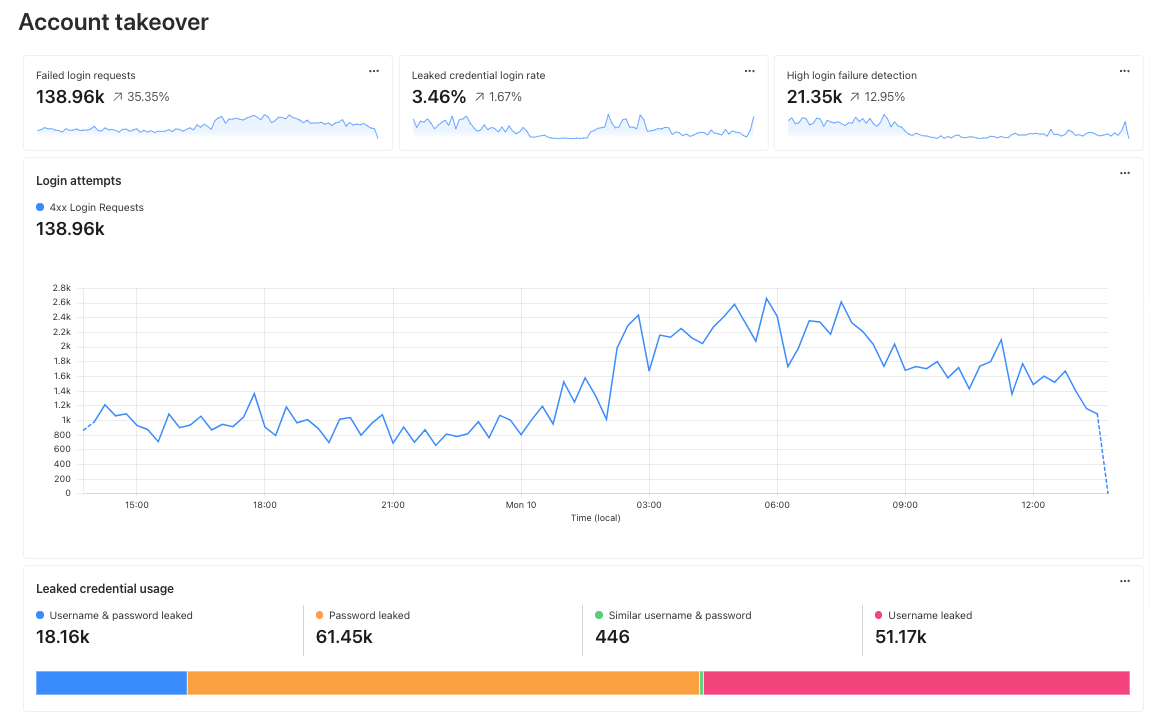
So once you’ve had a chance to check out the announcements and pour yourself a cup of coffee, check out the Workers Launchpad. Applying is a breeze — you’ll be done long before your coffee gets cold.

Until next time

That’s all for Birthday Week 2023. We hope you enjoyed the ride, and we’ll see you at our next innovation week!


Welcome to connectivity cloud: the modern way to connect and protect your clouds, networks, applications and users

Post Syndicated from Jen Taylor original http://blog.cloudflare.com/welcome-to-connectivity-cloud/

Welcome to connectivity cloud: the modern way to connect and protect your clouds, networks, applications and users

Welcome to connectivity cloud: the modern way to connect and protect your clouds, networks, applications and users

The best part of our job is the time we spend talking to Cloudflare customers. We always learn something new and interesting about their IT and security challenges.

In recent years, something about those conversations has changed. More and more, the biggest challenge customers tell us about isn’t something that’s easy to define. And it’s definitely not something you can address with an individual product or feature.

Rather, what we’re hearing from IT and security teams is that they are losing control of their digital environment.

This loss of control comes in a few flavors. They might express hesitance about adopting a new capability they know they need, because of compatibility concerns. Or maybe they’ll talk about how much time and effort it takes to make relatively simple changes, and how those changes take time away from more impactful work. If we had to sum the feeling up, it would be something like, “No matter how large my team or budget, it’s never enough to fully connect and protect the business.”

Does any of this feel familiar? If so, let us tell you that you are far from alone.

Welcome to connectivity cloud: the modern way to connect and protect your clouds, networks, applications and users

Reasons for loss of control

The rate of change in IT and security is accelerating, bringing with it dreaded complexity. IT and security teams are responsible for a wider variety of technological domains than they were in years past. Recent research from Forrester confirms these shifts: of teams responsible for securing in-office, remote, and hybrid workers, 52% only took that on in the past five years. Meanwhile, 46% gained responsibility for managing and securing public cloud applications in that time, and 53% were handed the thorny issue of regulatory compliance.

IT and security teams have been handed a monumental challenge: connect remote teams, on-premises teams and infrastructure, multiple cloud environments, SaaS apps, and more, so they function like a single, secure environment. But doing so is difficult for multiple reasons:

  • In most businesses, proprietary infrastructure, unique compliance needs, and semi-compatible processes and configurations make it hard to connect clouds, SaaS apps, web apps, and on-prem infrastructure. Those domains simply weren’t built to work together easily and securely.
  • Conway’s Law tells us that systems tend to match the communication structure of their organization. And, through no fault of their own, many IT and security teams are quite siloed.
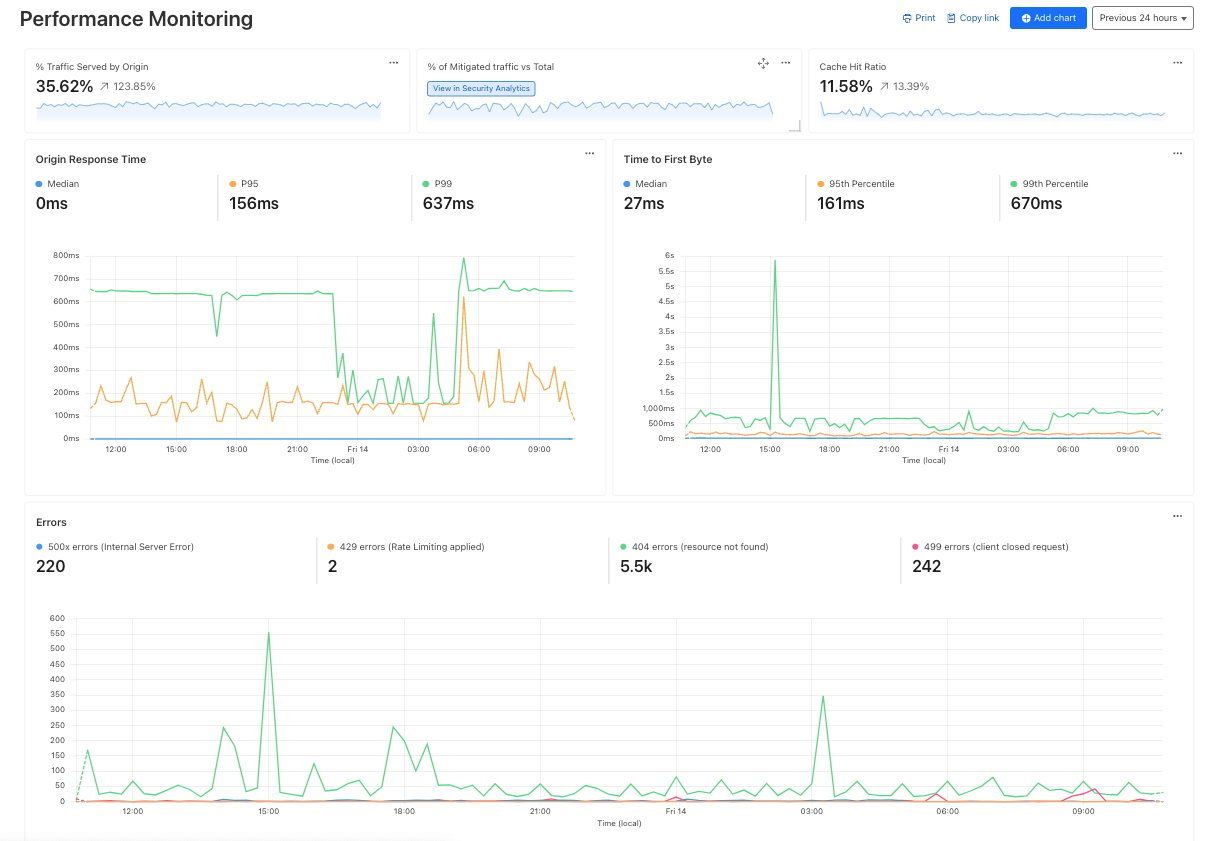
The circumstances are often ripe for IT and security to get bogged down with workarounds and tangled interdependencies.

Luckily, we’ve found a way forward.

Welcome to connectivity cloud: the modern way to connect and protect your clouds, networks, applications and users

Welcome to the connectivity cloud

Frequently, an important part of customer conversations is being able to read between the lines. When customers speak about loss of control, they seem to be quietly wishing for something they think doesn’t exist. What they want is a connective tissue for everything IT and security are responsible for — something that reduces complexity by working with everything in the environment, being available everywhere, and performing whatever security, networking, and development functions are needed.

Further research confirmed our suspicions. Surveys of IT and security leaders indicate that 72% would highly value a secure “any-to-any” cloud platform. And they said they would invest an average of 16% of their entire IT and security budget in such a platform.

That got us to thinking — what exactly would that sort of cloud platform look like? How would it accomplish everything it had to?

We’ve got answers to share: a connectivity cloud.

A connectivity cloud is a new approach for delivering the many services companies need to secure and connect their digital environment. It’s a unified, intelligent, platform of programmable cloud-native services that enable any-to-any connectivity between all networks (enterprise and internet), cloud environments, applications and users. It includes a huge array of security, performance, and developer services — not with an eye to replace everything everywhere, but with the ability to fit in wherever needed and consolidate many critical services onto a single platform.

A connectivity cloud is built around four fundamental principles.

  1. Deep integration — Organizations rely on the Internet to connect various elements of their digital environment with their workers, partners and customers. A connectivity cloud is integrated natively with the Internet and with enterprise networks, offering secure, low-latency, infinitely scalable connectivity between every user, application, and infrastructure. It’s as fast and straightforward as the Internet at its best, without the risk or uncertainty.
  2. Programmability — Every enterprise digital environment has proprietary infrastructure, multiple clouds, unique compliance needs, and other highly specific tooling, processes, and configurations. A connectivity cloud’s architecture provides limitless interoperability and customizable networking, letting it adapt to those unique needs while still providing consistent user experiences and efficient management.
  3. Platform intelligence — Organizations need a wide variety of services to connect and secure everything in their digital environment. But integrating everything is onerous, and trying to manage it all causes inefficiency and security gaps. A well-architected connectivity cloud has a wide range of services built in at a foundational level, and analyzes extremely high volumes and varieties of traffic in order to automatically update intelligence models.
  4. Simplicity — Too many IT and security services means too many dashboards, leading to inefficiency, poor visibility, and alert fatigue. While 100% consolidation onto one platform isn’t the answer, a connectivity cloud greatly reduces tool sprawl and dashboard overload by managing much more of the IT environment from a single pane of glass.

With these qualities, the connectivity cloud lets you add new services to your digital environment without losing even more control — and also helps restore control to what you’ve already got.

Welcome to connectivity cloud: the modern way to connect and protect your clouds, networks, applications and users

Cloudflare’s connectivity cloud

We’ll admit we’re predisposed to find those four qualities particularly important. From our earliest days, we’ve built our services based on the principles of integration, programmability, platform intelligence, and simplicity. And now, our overall portfolio is comprehensive enough to help customers achieve these benefits when tackling a huge array of security and IT needs.

Because of this approach, we’re proud to say that Cloudflare is the world’s first connectivity cloud.

But don’t take our word for it. Here are a few examples of customers that have used Cloudflare to help resolve their own crises of control:

Conrad Electric: Secure access for a global distributed workforce

A connectivity cloud’s programmability, deep network integration, and built-in intelligence make it ideal for delivering secure access to corporate resources.

The electronics retailer Conrad Electronic told us, “Just keeping people online created a series of administrative bottlenecks.” Nearly half of their 2,300 employees need to access corporate applications remotely. Enabling that access was burdensome: they had to deploy and configure VPN clients for each user.

Conrad Electronic now uses Cloudflare’s connectivity cloud to provide secure remote access to hundreds of corporate applications. Their management burden is significantly lower, with their team telling us they now have much more time per month to devote to improving their web operations. What’s more, their security posture is stronger: “We can restrict specific individuals or secure sensitive areas with a mouse click. Not having to maintain 1,000 VPN profiles improves our security and saves us time and money.”

Carrefour: Deliver and manage trusted customer-facing applications

A connectivity cloud’s threat intelligence, network integration, and unified interface also make it excellent at closing securing gaps and enabling secure application delivery on a global scale.

The multinational retail and wholesaling company Carrefour has a thriving and rapidly growing ecommerce presence. However, when cyber attacks ramped up, simply growing their security stack didn’t help. As their security team told us, “The interlacing of multiple tools complicated coordination and control of the architecture…additionally, the lack of integration across tools made investigating and resolving security and performance issues a complex and time-consuming effort.”

As part of their broader security transformation, they adopted Cloudflare’s connectivity cloud to prevent web exploits, zero-day threats, and malicious bot attacks. Doing so allowed them to replace five security tools from different vendors. And since then, they’ve reduced their incident resolution time by 75%.

Canva: Build innovative applications

Finally, a connectivity cloud’s programmability and network integration help it power innovative development in almost any context.

The global design juggernaut Canva is one example. Previously, they used a variety of developer platforms to run custom code at the network edge. But they found those services too time-consuming to use, and ran into limitations that held their innovation back.

Cloudflare’s connectivity cloud has become “a critical part of our software” They use the connectivity cloud’s developer services to build and run custom code, optimize page delivery for SEO, and time-limit content access. Recently, they told us “Thanks to Cloudflare, we can focus on growing our product and expanding into new markets with confidence, knowing that our platform is fast, reliable, and secure.”

What’s more, their experience has led to them also adopting Cloudflare’s for secure access and application delivery — a hugely gratifying example of a connectivity cloud operating at full power.

Learn more about the connectivity cloud

Customers are the inspiration for our innovation, and our connectivity cloud vision is no exception. We live to make things easier, faster, more secure and more connected – and it’s amazing to see how the connectivity cloud helps reduce complexity and increase security.
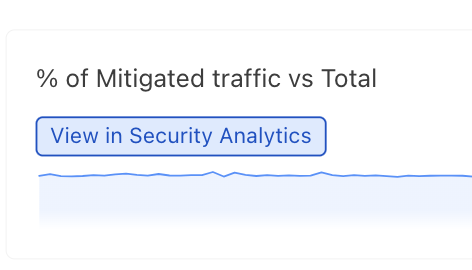
You can learn more about the connectivity cloud here — but we hope that’s just the beginning. Reach out to all of us at Cloudflare to ask questions and make suggestions — I look forward to continuing the conversation discovering ways we can continue to help customers on their secure, connected journey.

Welcome to connectivity cloud: the modern way to connect and protect your clouds, networks, applications and users