Tag Archives: beta

Introducing Cloudflare Secrets Store (Beta): secure your secrets, simplify your workflow

Post Syndicated from Mia Malden original https://blog.cloudflare.com/secrets-store-beta/

Every cloud platform needs a secure way to store API tokens, keys, and credentials — welcome, Cloudflare Secrets Store! Today, we are very excited to announce and launch Secrets Store in beta. We built Cloudflare Secrets Store to help our customers centralize management, improve security, and restrict access to sensitive values on the Cloudflare platform. 

Wherever secrets exist at Cloudflare – from our developer platform, to AI products, to Cloudflare One –  we’ve built a centralized platform that allows you to manage them in one place. 

We are excited to integrate Cloudflare Secrets Store with the whole portfolio of Cloudflare products, starting today with Cloudflare Workers. 

Securing your secrets across Workers

If you have a secret you want to use across multiple Workers, you can now use the Cloudflare Secrets Store to do so. You can spin up your store from the dashboard or by using Wrangler CLI:

wrangler secrets-store store create <name>

Then, create a secret:

wrangler secrets-store secret create <store-id>

Once the secret is created, you can specify the binding to deploy in a Worker immediately. 

secrets_store_secrets = [
{ binding = "'open_AI_KEY'", store_id= "abc123", secret_name = "open_AI_key"},
]

Last step – you can now reference the secret in code!

const openAIkey = await env.open_AI_key.get();

Environment variables and secrets were first launched in Cloudflare Workers back in 2020. Now, there are millions of local secrets deployed on Workers scripts. However, these are not all unique. Many of these secrets have duplicate values within a customer’s account. For example, a customer may reuse the same API token in ten different scripts, but since each secret is accessible only on the per-Worker level, that value would be stored in ten different local secrets. Plus, if you need to roll that secret, there is no seamless way to do so that preserves a single source of truth.

With thousands of secrets duplicated across scripts — each requiring manual creation and updates  — scoping secrets to individual Workers has created significant friction for developers. Additionally, because Workers secrets are created and deployed locally, any secret is accessible – in terms of creation, editing, and deletion – to anyone who has access to that script. 

Now, you can create account-level secrets and variables that can be shared across all Workers scripts, centrally managed and protected within the Secrets Store. 

Building a secure secrets manager

The most important feature of a Secret Store, of course, is to make sure that your secrets are stored securely. 

Once the secret is created, its value will not be readable by anyone, be it developers, admins, or Cloudflare employees. Only the permitted service will be able to use the value at runtime. 

This is why the first thing that happens when you deploy a new secret to Cloudflare is encrypting the secret prior to storing it in our database. We make sure your tokens are safe and protected using a two-level key hierarchy, where the root key never leaves a secure system. This is done by making use of DEKs (Data Encryption Keys) to encrypt your secrets and a separate KEK (Key Encryption Key) to encrypt the DEKs themselves. The data encryption keys are refreshed frequently, making the possibility and impact scope of a single DEK exposure very small. In the future, we will introduce periodic key rotations for our KEK and also provide a way for customers to have their own account-specific DEKs.

After the secrets are encrypted, there are two permissions checks when deploying a secret from the Secrets Store to a Worker. First, the user must have sufficient permissions to create the binding. Second, when the Worker makes a fetch call to retrieve the secret value, we verify that the Worker has an appropriate binding to access that secret. 

The secrets are automatically propagated across our network using Quicksilver – so that every secret is on every server– to ensure they’re immediately accessible and ready for the Worker to use. Wherever your Worker is deployed, your secrets will be, too. 

If you’d like to use a secret to secure your AI model keys before passing on to AI Gateway:

export default {
 async fetch(request, env, ctx) {
   const prompt = "Write me a pun about Cloudflare";
   const openAIkey = await env.open_AI_key.get();

   const response = await fetch("https://gateway.ai.cloudflare.com/v1/YOUR_ACCOUNT_TAG/openai/chat/completions", {
     method: "POST",
     headers: {
       "Content-Type": "application/json",
       "Authorization": `Bearer ${openAIkey}`,
     },
     body: JSON.stringify({
       model: "gpt-3.5-turbo",
       messages: [
         { role: "user", content: prompt }
       ],
       temperature: 0.8,
       max_tokens: 100,
     }),
   });

   const data = await response.json();
   const answer = data.choices?.[0]?.message?.content || "No pun found 😢";

   return new Response(answer, {
     headers: { "Content-Type": "text/plain" },
   });
 }
};

Cloudflare Secrets Store, with built-in RBAC

Now, a secret’s value can be updated once and applied everywhere — but not by everyone. Cloudflare Secrets Store uses role-based access control (RBAC) to ensure that only those with permission can view, create, edit, or delete secrets. Additionally, any changes to the Secrets Store are recorded in the audit logs, allowing you to track changes. 

Whereas per-Worker secrets are tied to the Workers account role, meaning that anyone who can modify the Worker can modify the secret, access to account-level secrets is restricted with more granular controls. This allows for differentiation between security admins who manage secrets and developers who use them in the code.


Secrets Store Admin

Secrets Store Reporter

Secrets Store Deployer

Create secrets


Update secrets


Delete secrets


View secrets metadata

Deploy secrets (i.e. bind to a Worker)


Each secret can also be scoped to a particular Cloudflare product to ensure the value is only used where it is meant to be. Today, the secrets are restricted to Workers by default, but once the Secrets Store supports multiple products, you’ll be able to specify where the secret can be used (e.g. “I only want this secret to be accessible through Firewall Rules”). 

What’s next for Secrets Store

Secrets Store will support all secrets across Cloudflare, including:

  • Cloudflare Access has service tokens to authenticate against your Zero Trust policies.

  • Transform Rules require sensitive values in the request headers to grant access or pass onto to something else.

  • AI Gateway relies upon secret keys from each provider to position Cloudflare between the end user and the AI model. 

…and more! 

Right now, to use a secret within a Worker, you have to create a binding for that specific secret. In the future, we’ll allow you to create a binding to the store itself so that the Worker can access any secret within that store. We’ll also allow customers to create multiple secret stores within their account so that they can manage secrets by group when creating access policies. 

Every Cloudflare account can create up to twenty secrets for free. We’re currently finalizing our pricing and will publish more details for each tier soon.

We’re thrilled to get Secrets Store into our customers’ hands and are excited to continue building it out to support more products and features as we work towards making Secrets Store GA.

Try it out today! 

Cloudflare Secrets Store with the Workers integration is available for all customers via UI and API today. For instructions to get started in the Cloudflare dashboard, take a look at our developer documentation

If you have any feedback or feature requests, we’d love for you to share those with us on this Google form.

Introducing Cloudy, Cloudflare’s AI agent for simplifying complex configurations

Post Syndicated from Alex Dunbrack original https://blog.cloudflare.com/introducing-ai-agent/

It’s a big day here at Cloudflare! Not only is it Security Week, but today marks Cloudflare’s first step into a completely new area of functionality, intended to improve how our users both interact with, and get value from, all of our products.

We’re excited to share a first glance of how we’re embedding AI features into the management of Cloudflare products you know and love. Our first mission? Focus on security and streamline the rule and policy management experience. The goal is to automate away the time-consuming task of manually reviewing and contextualizing Custom Rules in Cloudflare WAF, and Gateway policies in Cloudflare One, so you can instantly understand what each policy does, what gaps they have, and what you need to do to fix them.

Meet Cloudy, Cloudflare’s first AI agent

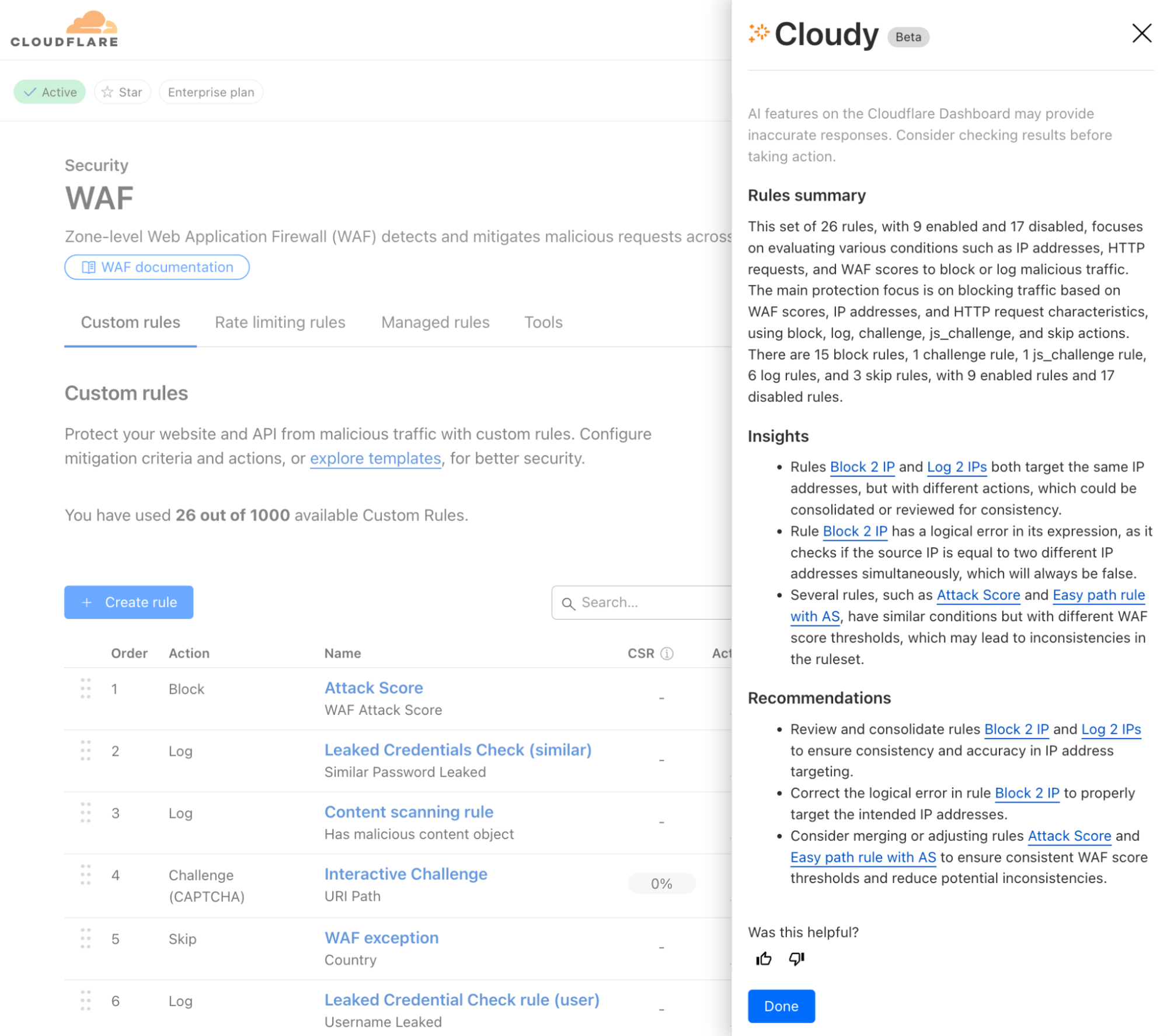
Our initial step toward a fully AI-enabled product experience is the introduction of Cloudy, the first version of Cloudflare AI agents, assistant-like functionality designed to help users quickly understand and improve their Cloudflare configurations in multiple areas of the product suite. You’ll start to see Cloudy functionality seamlessly embedded into two Cloudflare products across the dashboard, which we’ll talk about below.

And while the name Cloudy may be fun and light-hearted, our goals are more serious: Bring Cloudy and AI-powered functionality to every corner of Cloudflare, and optimize how our users operate and manage their favorite Cloudflare products. Let’s start with two places where Cloudy is now live and available to all customers using the WAF and Gateway products.

WAF Custom Rules

Let’s begin with AI-powered overviews of WAF Custom Rules. For those unfamiliar, Cloudflare’s Web Application Firewall (WAF) helps protect web applications from attacks like SQL injection, cross-site scripting (XSS), and other vulnerabilities. 

One specific feature of the WAF is the ability to create WAF Custom Rules. These allow users to tailor security policies to block, challenge, or allow traffic based on specific attributes or security criteria.

However, for customers with dozens or even hundreds of rules deployed across their organization, it can be challenging to maintain a clear understanding of their security posture. Rule configurations evolve over time, often managed by different team members, leading to potential inefficiencies and security gaps. What better problem for Cloudy to solve?


Powered by Workers AI, today we’ll share how Cloudy will help review your WAF Custom Rules and provide a summary of what’s configured across them. Cloudy will also help you identify and solve issues such as:

  • Identifying redundant rules: Identify when multiple rules are performing the same function, or using similar fields, helping you streamline your configuration.

  • Optimising execution order: Spot cases where rules ordering affects functionality, such as when a terminating rule (block/challenge action) prevents subsequent rules from executing.

  • Analysing conflicting rules: Detect when rules counteract each other, such as one rule blocking traffic that another rule is designed to allow or log.

  • Identifying disabled rules: Highlight potentially important security rules that are in a disabled state, helping ensure that critical protections are not accidentally left inactive.

Cloudy won’t just summarize your rules, either. It will analyze the relationships and interactions between rules to provide actionable recommendations. For security teams managing complex sets of Custom Rules, this means less time spent auditing configurations and more confidence in your security coverage.

Available to all users, we’re excited to show how Cloudflare AI Agents can enhance the usability of our products, starting with WAF Custom Rules. But this is just the beginning.

Cloudflare One Firewall policies


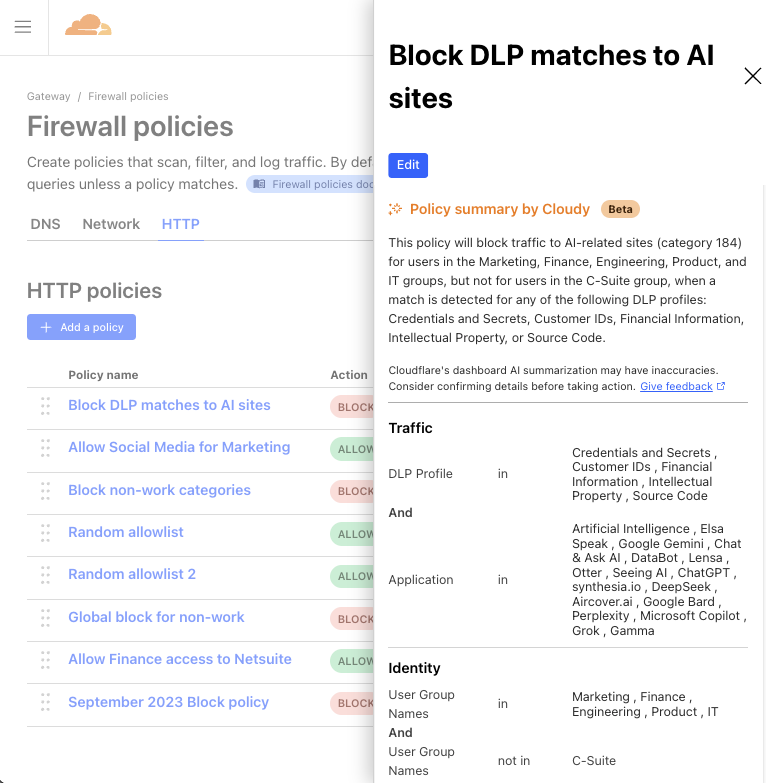
We’ve also added Cloudy to Cloudflare One, our SASE platform, where enterprises manage the security of their employees and tools from a single dashboard.

In Cloudflare Gateway, our Secure Web Gateway offering, customers can configure policies to manage how employees do their jobs on the Internet. These Gateway policies can block access to malicious sites, prevent data loss violations, and control user access, among other things.

But similar to WAF Custom Rules, Gateway policy configurations can become overcomplicated and bogged down over time, with old, forgotten policies that do who-knows-what. Multiple selectors and operators working in counterintuitive ways. Some blocking traffic, others allowing it. Policies that include several user groups, but carve out specific employees. We’ve even seen policies that block hundreds of URLs in a single step. All to say, managing years of Gateway policies can become overwhelming.

So, why not have Cloudy summarize Gateway policies in a way that makes their purpose clear and concise?

Available to all Cloudflare Gateway users (create a free Cloudflare One account here), Cloudy will now provide a quick summary of any Gateway policy you view. It’s now easier than ever to get a clear understanding of each policy at a glance, allowing admins to spot misconfigurations, redundant controls, or other areas for improvement, and move on with confidence.

Built on Workers AI

At the heart of our new functionality is Cloudflare Workers AI (yes, the same version that everyone uses!) that leverages advanced large language models (LLMs) to process vast amounts of information; in this case, policy and rules data. Traditionally, manually reviewing and contextualizing complex configurations is a daunting task for any security team. With Workers AI, we automate that process, turning raw configuration data into consistent, clear summaries and actionable recommendations.

How it works

Cloudflare Workers AI ingests policy and rule configurations from your Cloudflare setup and combines them with a purpose-built LLM prompt. We leverage the same publicly-available LLM models that we offer our customers, and then further enrich the prompt with some additional data to provide it with context. For this specific task of analyzing and summarizing policy and rule data, we provided the LLM:

  • Policy & rule data: This is the primary data itself, including the current configuration of policies/rules for Cloudy to summarize and provide suggestions against.

  • Documentation on product abilities: We provide the model with additional technical details on the policy/rule configurations that are possible with each product, so that the model knows what kind of recommendations are within its bounds.

  • Enriched datasets: Where WAF Custom Rules or CF1 Gateway policies leverage other ‘lists’ (e.g., a WAF rule referencing multiple countries, a Gateway policy leveraging a specific content category), the list item(s) selected must be first translated from an ID to plain-text wording so that the LLM can interpret which policy/rule values are actually being used.

  • Output instructions: We specify to the model which format we’d like to receive the output in. In this case, we use JSON for easiest handling.

  • Additional clarifications: Lastly, we explicitly instruct the LLM to be sure about its output, valuing that aspect above all else. Doing this helps us ensure that no hallucinations make it to the final output.

By automating the analysis of your WAF Custom Rules and Gateway policies, Cloudflare Workers AI not only saves you time but also enhances security by reducing the risk of human error. You get clear, actionable insights that allow you to streamline your configurations, quickly spot anomalies, and maintain a strong security posture—all without the need for labor-intensive manual reviews.

What’s next for Cloudy

Beta previews of Cloudy are live for all Cloudflare customers today. But this is just the beginning of what we envision for AI-powered functionality across our entire product suite.

Throughout the rest of 2025, we plan to roll out additional AI agent capabilities across other areas of Cloudflare. These new features won’t just help customers manage security more efficiently, but they’ll also provide intelligent recommendations for optimizing performance, streamlining operations, and enhancing overall user experience.

We’re excited to hear your thoughts as you get to meet Cloudy and try out these new AI features – send feedback to us at [email protected], or post your thoughts on X, LinkedIn, or Mastodon tagged with #SecurityWeek! Your feedback will help shape our roadmap for AI enhancement, and bring our users smarter, more efficient tooling that helps everyone get more secure.


Watch on Cloudflare TV

Automatic Audit Logs: new updates deliver increased transparency and accountability

Post Syndicated from Sahidya Devadoss original https://blog.cloudflare.com/introducing-automatic-audit-logs/

What are audit logs and why do they matter?

Audit logs are a critical tool for tracking and recording changes, actions, and resource access patterns within your Cloudflare environment. They provide visibility into who performed an action, what the action was, when it occurred, where it happened, and how it was executed. This enables security teams to identify vulnerabilities, ensure regulatory compliance, and assist in troubleshooting operational issues. Audit logs provide critical transparency and accountability. That’s why we’re making them “automatic” — eliminating the need for individual Cloudflare product teams to manually send events. Instead, audit logs are generated automatically in a standardized format when an action is performed, providing complete visibility and ensuring comprehensive coverage across all our products.

What’s new?

We’re excited to announce the beta release of Automatic Audit Logs — a system that unifies audit logging across Cloudflare products. This new system is designed to give you a complete and consistent view of your environment’s activity. Here’s how we’ve enhanced our audit logging capabilities:

  • Standardized logging: Previously, audit logs generation was dependent on separate internal teams, which could lead to gaps and inconsistencies. Now, audit logs are automatically produced in a seamless and standardized way, eliminating reliance on individual teams and ensuring consistency across all Cloudflare services.

  • Expanded Product Coverage: Automatic Audit Logs now extend our coverage from 62 to 111 products, boosting overall coverage from 75% to 95%. We now capture actions from key endpoints such as the /accounts, /zones, and /organizations APIs.

  • Granular Filtering: With uniformly formatted logs, you can quickly pinpoint specific actions, users, methods, and resources, making investigations faster and more efficient.

  • Enhanced Context and Transparency: Each log entry includes detailed context like the authentication method used, whether the action was performed via the API or Dashboard, and mappings to Cloudflare Ray IDs for better traceability.

  • Comprehensive Activity Capture: In addition to create, edit, and delete actions, the system now records GET requests and failed attempts, ensuring that no critical activity goes unnoticed.

This new system reflects Cloudflare’s commitment to building a safer, more transparent Internet. It also supports Cloudflare’s pledge to CISA’s Cybersecurity Commitment, reinforcing our dedication to increase our customers’ ability to gather evidence of cybersecurity intrusions.

Automatic Audit Logs (beta release) is available exclusively through the API

The journey of an audit log: how Cloudflare creates reliable, secure records

At Cloudflare, we’ve always made audit logs available through the Audit Log API, but the experience has not been very consistent.

Why? Individual product teams were responsible for creating and maintaining their audit logs. This resulted in inconsistencies, gaps in coverage, and a fragmented user experience

Recognizing the importance of reliable audit logs, we set out to improve coverage across all Cloudflare products. Our goal was to standardize, secure, and automate the process, giving users comprehensive insights into user-initiated actions while enhancing visibility and usability. Let’s take a closer look at how an audit log is created at Cloudflare.

Which APIs are audit logged? 

Audit logs are generated for all user requests made via the public API or the Cloudflare dashboard. While a few exceptions exist, such as GraphQL requests and static assets, the majority of user actions are captured.

When a user action occurs, the request is forwarded to our audit logging pipeline. This ensures logs are generated automatically for all products, close to the source of the action, and capturing the most relevant details.

For RESTful APIs that produce JSON, sanitized request bodies are logged to prevent any sensitive information from being included in the audit logs. For GET requests, which are typically read-only and may generate large responses, only the action performed and the resource accessed are logged, avoiding unnecessary overhead while still maintaining essential visibility.

Streaming HTTP requests

Any user-initiated action on Cloudflare, whether through the API or the Dashboard, is handled by the API Gateway. The HTTP request, along with its corresponding request and response data, is then forwarded to a Worker called the Audit Log Redactor. This allows audit logging to happen automatically without relying on internal teams to send events.

To minimise the latency, the API Gateway streams these requests to the redactor Worker via RPC (Remote Procedure Calls) using service bindings. This approach ensures the requests are successfully sent without going through a publicly-accessible URL.

Redacting sensitive information

Once the Worker receives the HTTP request, it references the Cloudflare OpenAPI Schema to handle sensitive information. OpenAPI is a widely adopted, machine-readable, and human-friendly specification format that is used to define HTTP APIs. It relies on JSON Schema to describe the API’s underlying data.  

Using the OpenAPI Schema, the redactor Worker identifies the corresponding API schema for the HTTP request. It then redacts any sensitive information, leaving only those explicitly marked as auditable in the schema. This redaction process ensures that no sensitive data progresses further down the pipeline while retaining enough information to debug and analyze how an action impacted a resource’s value.

Each Cloudflare product team defines its APIs within the OpenAPI schema and marks specific fields as auditable. This provides visibility into resource changes while safeguarding sensitive data.

Once redacted, the data moves through Cloudflare’s data pipeline. This pipeline includes several key components including Logfwdr, Logreceiver and Buftee buffers, where the sanitized data is eventually pushed, awaiting further processing.


Ingesting and building the audit log

The Ingestor service consumes messages from Buftee buffers and transforms individual requests into audit log records. Using a fixed schema, the Ingestor ensures that audit logs remain standardized across all Cloudflare products, regardless of scale.

Because API Gateway — the system from which the majority of Automatic Audit Logs are recorded, as noted above — handles tens of thousands of requests per second, the Ingestor was designed to process multiple requests concurrently. 


Plot of audit requests rate. x-axis indicates the time and y-axis indicates the total number of audit requests handled per second.

Enriching and storing the logs

From a security perspective, it is critical to capture who initiated a change and how they were authenticated. To achieve this, the audit log is enriched with user details and authentication information extracted from custom response headers.

Additional contextual details, such as the account name, are retrieved by making calls to internal services. To enhance performance, a read-through caching mechanism is used. The system checks the cache for responses first and if unavailable, it fetches the data from internal services and caches it for future use.

Once the audit logs are fully transformed and enriched, they are stored in a database in batches to prevent overwhelming the system. For the beta release, we are storing 30 days of audit logs in the database. This will be extended to 18 months for our GA (General Availability) release in the second half of 2025.

Sample audit log

Here is a complete sample audit log generated when an alert notification policy is updated. It provides all the essential details to answer the who, what, when, where, and how of the action.

Audit logs are always associated with an account, and some actions also include user and zone information when relevant. The action section outlines what changed and when, while the actor section provides context on who made the change and how it was performed, including whether it was done via the API or through the UI.

Information about the resource is also included, so you can easily identify what was altered (in this case, the Advanced Security Events Alert was updated). Additionally, raw API request details are provided, allowing users to trace the audit log back to a specific API call.

curl -X PUT https://api.cloudflare.com/client/v4/accounts/<account_id>/alerting/v3/policies/<policy_id> --data-raw '{...'}
       {
            "account": {
                "id": "<account_id>",
                "name": "Example account"
            },
            "action": {
                "description": "Update a Notification policy",
                "result": "success",
                "time": "2025-01-23T18:25:14.749Z",
                "type": "update"
            },
            "actor": {
                "context": "dash",
                "email": "[email protected]",
                "id": "<actor-id>",
                "ip_address": "127.0.0.1",
                "token": {},
                "type": "user"
            },
            "id": "<audit_log_id>",
            "raw": {
                "cf_ray_id": "<ray_id>",
                "method": "PUT",
                "status_code": 200,
                "uri": "/accounts/<account_id>/alerting/v3/policies/<policy_id>",
                "user_agent": "Postman"
            },
            "resource": {
                "id": "<resource-id>",
                "product": "alerting",
                "request": {
                    "alert_type": "clickhouse_alert_fw_ent_anomaly",
                    "enabled": false,
                    "filters": {
                        "services": [
                            "securitylevel",
                            "ratelimit",
                            "firewallrules"
                        ],
                        "zones": [
                            "<zone_id>"
                        ]
                    },
                    "name": "Advanced Security Events Alert"
                },
                "response": {
                    "id": "<resource_id>"
                },
                "scope": "accounts",
                "type": "policies"
            }

Upcoming enhancements

For General Availability (GA) we are focusing on developing a new user interface in the Dashboard for Automatic Audit Logs, extracting additional auditable fields for the audit logs — including system-initiated actions and user-level actions such as login events — and enabling audit log export via Logpush. In the longer term, we plan to introduce dashboards, trend analysis, and alerting features for audit logs to further enhance their utility and ease of use. By enhancing our audit log system, Cloudflare is taking another step toward empowering users to manage their environments with greater transparency, security, and efficiency. 

Get started with Automatic Audit Logs

Automatic Audit Logs are now available for testing. We encourage you to explore the new features and provide your valuable feedback.

Retrieve audit logs using the following endpoint:

/accounts/<account_id>/logs/audit?since=<date>&before=<date>

You can access detailed documentation for Automatic Audit Logs Beta API release here

Please note that the Beta release does not include updates to the Audit Logs UI in the Cloudflare Dashboard. The existing UI and API for the current audit logs will remain available until we Automatic Audit Logs reach General Availability.

We want your feedback: Your feedback is essential to improving Automatic Audit Logs. Please consider filling out a short survey.

Birthday Week recap: everything we announced — plus an AI-powered opportunity for startups

Post Syndicated from Dina Kozlov original http://blog.cloudflare.com/birthday-week-2023-wrap-up/

Birthday Week recap: everything we announced — plus an AI-powered opportunity for startups

Birthday Week recap: everything we announced — plus an AI-powered opportunity for startups

This year, Cloudflare officially became a teenager, turning 13 years old. We celebrated this milestone with a series of announcements that benefit both our customers and the Internet community.

From developing applications in the age of AI to securing against the most advanced attacks that are yet to come, Cloudflare is proud to provide the tools that help our customers stay one step ahead.

We hope you’ve had a great time following along and for anyone looking for a recap of everything we launched this week, here it is:

Monday

What

In a sentence…

Switching to Cloudflare can cut emissions by up to 96%

Switching enterprise network services from on-prem to Cloudflare can cut related carbon emissions by up to 96%. 

Cloudflare Trace

Use Cloudflare Trace to see which rules and settings are invoked when an HTTP request for your site goes through our network. 

Cloudflare Fonts

Introducing Cloudflare Fonts. Enhance privacy and performance for websites using Google Fonts by loading fonts directly from the Cloudflare network. 

How Cloudflare intelligently routes traffic

Technical deep dive that explains how Cloudflare uses machine learning to intelligently route traffic through our vast network. 

Low Latency Live Streaming

Cloudflare Stream’s LL-HLS support is now in open beta. You can deliver video to your audience faster, reducing the latency a viewer may experience on their player to as little as 3 seconds. 

Account permissions for all

Cloudflare account permissions are now available to all customers, not just Enterprise. In addition, we’ll show you how you can use them and best practices. 

Incident Alerts

Customers can subscribe to Cloudflare Incident Alerts and choose when to get notified based on affected products and level of impact. 

Tuesday

What

In a sentence…

Welcome to the connectivity cloud

Cloudflare is the world’s first connectivity cloud — the modern way to connect and protect your cloud, networks, applications and users. 

Amazon’s $2bn IPv4 tax — and how you can avoid paying it 

Amazon will begin taxing their customers $43 for IPv4 addresses, so Cloudflare will give those \$43 back in the form of credits to bypass that tax. 

Sippy

Minimize egress fees by using Sippy to incrementally migrate your data from AWS to R2. 

Cloudflare Images

All Image Resizing features will be available under Cloudflare Images and we’re simplifying pricing to make it more predictable and reliable.  

Traffic anomalies and notifications with Cloudflare Radar

Cloudflare Radar will be publishing anomalous traffic events for countries and Autonomous Systems (ASes).

Detecting Internet outages

Deep dive into how Cloudflare detects Internet outages, the challenges that come with it, and our approach to overcome these problems. 

Wednesday

What

In a sentence…

The best place on Region: Earth for inference

Now available: Workers AI, a serverless GPU cloud for AI, Vectorize so you can build your own vector databases, and AI Gateway to help manage costs and observability of your AI applications. 

Cloudflare delivers the best infrastructure for next-gen AI applications, supported by partnerships with NVIDIA, Microsoft, Hugging Face, Databricks, and Meta.

Workers AI 

Launching Workers AI — AI inference as a service platform, empowering developers to run AI models with just a few lines of code, all powered by our global network of GPUs. 

Partnering with Hugging Face 

Cloudflare is partnering with Hugging Face to make AI models more accessible and affordable to users. 

Vectorize

Cloudflare’s vector database, designed to allow engineers to build full-stack, AI-powered applications entirely on Cloudflare's global network — available in Beta. 

AI Gateway

AI Gateway helps developers have greater control and visibility in their AI apps, so that you can focus on building without worrying about observability, reliability, and scaling. AI Gateway handles the things that nearly all AI applications need, saving you engineering time so you can focus on what you're building.


You can now use WebGPU in Cloudflare Workers

Developers can now use WebGPU in Cloudflare Workers. Learn more about why WebGPUs are important, why we’re offering them to customers, and what’s next. 

What AI companies are building with Cloudflare

Many AI companies are using Cloudflare to build next generation applications. Learn more about what they’re building and how Cloudflare is helping them on their journey. 

Writing poems using LLama 2 on Workers AI

Want to write a poem using AI? Learn how to run your own AI chatbot in 14 lines of code, running on Cloudflare’s global network. 

Thursday

What

In a sentence…

Hyperdrive

Cloudflare launches a new product, Hyperdrive, that makes existing regional databases much faster by dramatically speeding up queries that are made from Cloudflare Workers.

D1 Open Beta

D1 is now in open beta, and the theme is “scale”: with higher per-database storage limits and the ability to create more databases, we’re unlocking the ability for developers to build production-scale applications on D1.

Pages Build Caching

Build cache is a feature designed to reduce your build times by caching and reusing previously computed project components — now available in Beta. 

Running serverless Puppeteer with Workers and Durable Objects

Introducing the Browser Rendering API, which enables developers to utilize the Puppeteer browser automation library within Workers, eliminating the need for serverless browser automation system setup and maintenance

Cloudflare partners with Microsoft to power their Edge Secure Network

We partnered with Microsoft Edge to provide a fast and secure VPN, right in the browser. Users don’t have to install anything new or understand complex concepts to get the latest in network-level privacy: Edge Secure Network VPN is available on the latest consumer version of Microsoft Edge in most markets, and automatically comes with 5GB of data. 

Re-introducing the Cloudflare Workers playground

We are revamping the playground that demonstrates the power of Workers, along with new development tooling, and the ability to share your playground code and deploy instantly to Cloudflare’s global network

Cloudflare integrations marketplace expands

Introducing the newest additions to Cloudflare’s Integration Marketplace. Now available: Sentry, Momento and Turso. 

A Socket API that works across Javascript runtimes — announcing WinterCG spec and polyfill for connect()

Engineers from Cloudflare and Vercel have published a draft specification of the connect() sockets API for review by the community, along with a Node.js compatible polyfill for the connect() API that developers can start using.

New Workers pricing

Announcing new pricing for Cloudflare Workers, where you are billed based on CPU time, and never for the idle time that your Worker spends waiting on network requests and other I/O.

Friday

What

In a sentence…

Post Quantum Cryptography goes GA 

Cloudflare is rolling out post-quantum cryptography support to customers, services, and internal systems to proactively protect against advanced attacks. 

Encrypted Client Hello

Announcing a contribution that helps improve privacy for everyone on the Internet. Encrypted Client Hello, a new standard that prevents networks from snooping on which websites a user is visiting, is now available on all Cloudflare plans. 

Email Retro Scan 

Cloudflare customers can now scan messages within their Office 365 Inboxes for threats. The Retro Scan will let you look back seven days to see what threats your current email security tool has missed. 

Turnstile is Generally Available

Turnstile, Cloudflare’s CAPTCHA replacement, is now generally available and available for free to everyone and includes unlimited use. 

AI crawler bots

Any Cloudflare user, on any plan, can choose specific categories of bots that they want to allow or block, including AI crawlers. We are also recommending a new standard to robots.txt that will make it easier for websites to clearly direct how AI bots can and can’t crawl.

Detecting zero-days before zero-day

Deep dive into Cloudflare’s approach and ongoing research into detecting novel web attack vectors in our WAF before they are seen by a security researcher. 

Privacy Preserving Metrics

Deep dive into the fundamental concepts behind the Distributed Aggregation Protocol (DAP) protocol with examples on how we’ve implemented it into Daphne, our open source aggregator server. 

Post-quantum cryptography to origin

We are rolling out post-quantum cryptography support for outbound connections to origins and Cloudflare Workers fetch() calls. Learn more about what we enabled, how we rolled it out in a safe manner, and how you can add support to your origin server today. 

Network performance update

Cloudflare’s updated benchmark results regarding network performance plus a dive into the tools and processes that we use to monitor and improve our network performance. 

One More Thing

Birthday Week recap: everything we announced — plus an AI-powered opportunity for startups

When Cloudflare turned 12 last year, we announced the Workers Launchpad Funding Program – you can think of it like a startup accelerator program for companies building on Cloudlare’s Developer Platform, with no restrictions on your size, stage, or geography.

A refresher on how the Launchpad works: Each quarter, we admit a group of startups who then get access to a wide range of technical advice, mentorship, and fundraising opportunities. That includes our Founders Bootcamp, Open Office Hours with our Solution Architects, and Demo Day. Those who are ready to fundraise will also be connected to our community of 40+ leading global Venture Capital firms.

In exchange, we just ask for your honest feedback. We want to know what works, what doesn’t and what you need us to build for you. We don’t ask for a stake in your company, and we don’t ask you to pay to be a part of the program.


Over the past year, we’ve received applications from nearly 60 different countries. We’ve had a chance to work closely with 50 amazing early and growth-stage startups admitted into the first two cohorts, and have grown our VC partner community to 40+ firms and more than $2 billion in potential investments in startups building on Cloudflare.

Next up: Cohort #3! Between recently wrapping up Cohort #2 (check out their Demo Day!), celebrating the Launchpad’s 1st birthday, and the heaps of announcements we made last week, we thought that everyone could use a little extra time to catch up on all the news – which is why we are extending the deadline for Cohort #3 a few weeks to October 13, 2023. AND we’re reserving 5 spots in the class for those who are already using any of last Wednesday’s AI announcements. Just be sure to mention what you’re using in your application.

So once you’ve had a chance to check out the announcements and pour yourself a cup of coffee, check out the Workers Launchpad. Applying is a breeze — you’ll be done long before your coffee gets cold.

Until next time

That’s all for Birthday Week 2023. We hope you enjoyed the ride, and we’ll see you at our next innovation week!


Race ahead with Cloudflare Pages build caching

Post Syndicated from Anni Wang original http://blog.cloudflare.com/race-ahead-with-build-caching/

Race ahead with Cloudflare Pages build caching

Race ahead with Cloudflare Pages build caching

Today, we are thrilled to release a beta of Cloudflare Pages support for build caching! With build caching, we are offering a supercharged Pages experience by helping you cache parts of your project to save time on subsequent builds.

For developers, time is not just money – it’s innovation and progress. When every second counts in crunch time before a new launch, the “need for speed” becomes critical. With Cloudflare Pages’ built-in continuous integration and continuous deployment (CI/CD), developers count on us to drive fast. We’ve already taken great strides in making sure we’re enabling quick development iterations for our users by making solid improvements on the stability and efficiency of our build infrastructure. But we always knew there was more to our build story.

Quick pit stops

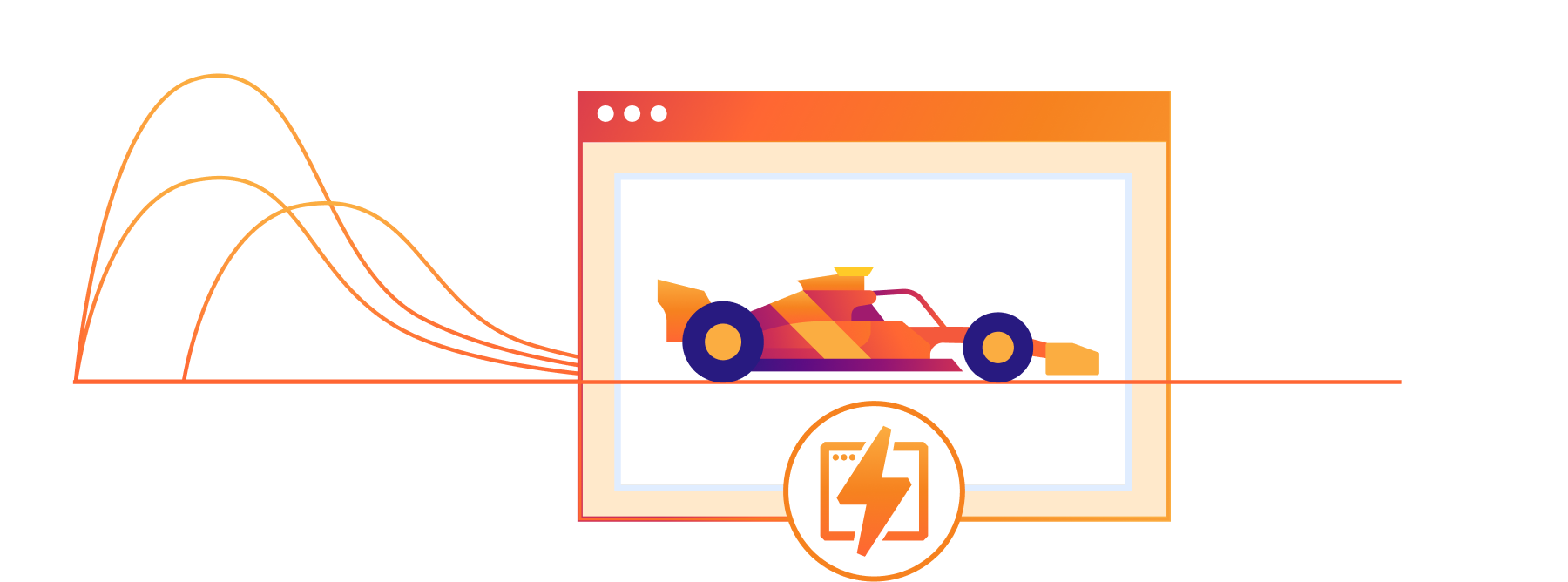
Build times can feel like a developer's equivalent of a time-out, a forced pause in the creative process—the inevitable pit stop in a high-speed formula race.

Long build times not only breaks the flow of individual developers, but it can also create a ripple effect across the team. It can slow down iterations and push back deployments. In the fast-paced world of CI/CD, these delays can drastically impact productivity and the delivery of products.

We want to empower developers to win the race, miles ahead of competition.

Mechanics of build caching

At its core, build caching is a mechanism that stores artifacts of a build, allowing subsequent builds to reuse these artifacts rather than recomputing them from scratch. By leveraging the cached results, build times can be significantly reduced, leading to a more efficient build process.

Previously, when you initiated a build, the Pages CI system would generate every step of the build process, even if most parts of the codebase remain unchanged between builds. This is the equivalent to changing out every single part of the car during a pit stop, irrespective of if anything needs replacing.

Build caching refines this process. Now, the Pages build system will detect if cached artifacts can be leveraged, restore the artifacts, then focus on only computing the modified sections of the code. In essence, build caching acts like an experienced pit crew, smartly skipping unnecessary steps and focusing only on what's essential to get you back in the race faster.

What are we caching?

It boils down to two components: dependencies and build output.

The Pages build system supports dependency caching for select package managers and build output caching for select frameworks. Check out our documentation for more information on what’s currently supported and what’s coming up.

Let’s take a closer look at what exactly we are caching.

Dependencies: upon initiating a build, the Pages CI system checks for cached artifacts from previous builds. If it identifies a cache hit for dependencies, it restores from cache to speed up dependency installation.

Build output: if a cache hit for build output is identified, Pages will only build the changed assets. This approach enables the long awaited incremental builds for supported JavaScript frameworks.

Race ahead with Cloudflare Pages build caching

Ready, set … go!

Build caching is now in beta, and ready for you to test drive!

In this release, the feature will support the node-based package managers npm, yarn, pnpm, as well as Bun. We’ve also ensured compatibility with the most popular frameworks that provide native incremental building support: Gatsby.js, Next.js and Astro – and more to come!

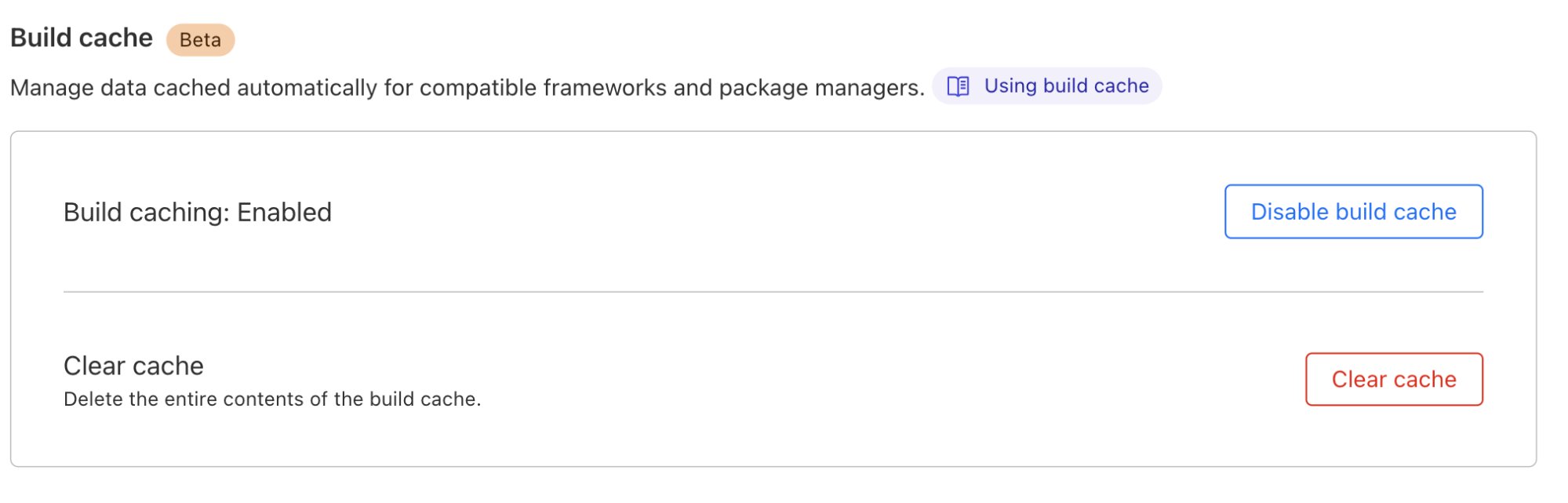
For you as a Pages user, interacting with build caching will be seamless. If you are working with an existing project, simply navigate to your project’s settings to toggle on Build Cache.

When you push a code change and initiate a build using Pages CI, build caching will kick-start and do its magic in the background.

Race ahead with Cloudflare Pages build caching

“Cache” us on Discord

Have questions? Join us on our Discord Server [link]. We will be hosting an “Ask Us Anything” session on October 2nd where you can chat live with members of our team! Your feedback on this beta is invaluable to us, so after testing out build caching, don't hesitate to share your experiences! Happy building!

Race ahead with Cloudflare Pages build caching

Cloudflare Queues: messages at your speed with consumer concurrency and explicit acknowledgement

Post Syndicated from Charles Burnett original http://blog.cloudflare.com/messages-at-your-speed-with-concurrency-and-explicit-acknowledgement/

Cloudflare Queues: messages at your speed with consumer concurrency and explicit acknowledgement

Cloudflare Queues: messages at your speed with consumer concurrency and explicit acknowledgement

Communicating between systems can be a balancing act that has a major impact on your business. APIs have limits, billing frequently depends on usage, and end-users are always looking for more speed in the services they use. With so many conflicting considerations, it can feel like a challenge to get it just right. Cloudflare Queues is a tool to make this balancing act simple. With our latest features like consumer concurrency and explicit acknowledgment, it’s easier than ever for developers to focus on writing great code, rather than worrying about the fees and rate limits of the systems they work with.

Queues is a messaging service, enabling developers to send and receive messages across systems asynchronously with guaranteed delivery. It integrates directly with Cloudflare Workers, making for easy message production and consumption working with the many products and services we offer.

What’s new in Queues?

Consumer concurrency

Oftentimes, the systems we pull data from can produce information faster than other systems can consume them. This can occur when consumption involves processing information, storing it, or sending and receiving information to a third party system. The result of which is that sometimes, a queue can fall behind where it should be. At Cloudflare, a queue shouldn't be a quagmire. That’s why we’ve introduced Consumer Concurrency.

With Concurrency, we automatically scale up the amount of consumers needed to match the speed of information coming into any given queue. In this way, customers no longer have to worry about an ever-growing backlog of information bogging down their system.

How it works

When setting up a queue, developers can set a Cloudflare Workers script as a target to send messages to. With concurrency enabled, Cloudflare will invoke multiple instances of the selected Worker script to keep the messages in the queue moving effectively. This feature is enabled by default for every queue and set to automatically scale.

Autoscaling considers the following factors when spinning up consumers:  the number of messages in a queue, the rate of new messages, and successful vs. unsuccessful consumption attempts.

If a queue has enough messages in it, concurrency will increase each time a message batch is successfully processed. Concurrency is decreased when message batches encounter errors. Customers can set a max_concurrency value in the Dashboard or via Wrangler, which caps out how many consumers can be automatically created to perform processing for a given queue.

Setting the max_concurrency value manually can be helpful in the following situations where producer data is provided in bursts, the datasource API is rate limited, and datasource API has higher costs with more usage.

Setting a max concurrency value manually allows customers to optimize their workflows for other factors beyond speed.

// in your wrangler.toml file


[[queues.consumers]]
  queue = "my-queue"

//max concurrency can be set to a number between 1 and 10
//this defines the total amount of consumers running simultaneously

max_concurrency = 7

To learn more about concurrency you can check out our developer documentation here.

Concurrency in practice

It’s baseball season in the US, and for many of us that means fantasy baseball is back! This year is the year we finally write a program that uses data and statistics to pick a winning team, as opposed to picking players based on “feelings” and “vibes”. We’re engineers after all, and baseball is a game of rules. If the Oakland A’s can do it, so can we!

So how do we put this together? We’ll need a few things:

  1. A list of potential players
  2. An API to pull historical game statistics from
  3. A queue to send this data to its consumer
  4. A Worker script to crunch the numbers and generate a score

A developer can pull from a baseball reference API into a Workers script, and from that worker pass this information to a queue. Historical data is… historical, so we can pull data into our queue as fast as the baseball API will allow us. For our list of potential players, we pull statistics for each game they’ve played. This includes everything from batting averages, to balls caught, to game day weather. Score!

//get data from a third party API and pass it along to a queue


const response = await fetch("http://example.com/baseball-stats.json");
const gamesPlayedJSON = await response.json();

for (game in gamesPlayedJSON){
//send JSON to your queue defined in your workers environment
env.baseballqueue.send(jsonData)
}

Our producer Workers script then passes these statistics onto the queue. As each game contains quite a bit of data, this results in hundreds of thousands of “game data” messages waiting to be processed in our queue. Without concurrency, we would have to wait for each batch of messages to be processed one at a time, taking minutes if not longer. But, with Consumer Concurrency enabled, we watch as multiple instances of our worker script invoked to process this information in no time!

Our Worker script would then take these statistics, apply a heuristic, and store the player name and a corresponding quality score into a database like a Workers KV store for easy access by your application presenting the data.

Explicit Acknowledgment

In Queues previously, a failure of a single message in a batch would result in the whole batch being resent to the consumer to be reprocessed. This resulted in extra cycles being spent on messages that were processed successfully, in addition to the failed message attempt. This hurts both customers and developers, slowing processing time, increasing complexity, and increasing costs.

With Explicit Acknowledgment, we give developers the precision and flexibility to handle each message individually in their consumer, negating the need to reprocess entire batches of messages. Developers can now tell their queue whether their consumer has properly processed each message, or alternatively if a specific message has failed and needs to be retried.

An acknowledgment of a message means that that message will not be retried if the batch fails. Only messages that were not acknowledged will be retried. Inversely, a message that is explicitly retried, will be sent again from the queue to be reprocessed without impacting the processing of the rest of the messages currently being processed.

How it works

In your consumer, there are 4 new methods you can call to explicitly acknowledge a given message: .ack(), .retry(), .ackAll(), .retryAll().

Both ack() and retry() can be called on individual messages. ack() tells a queue that the message has been processed successfully and that it can be deleted from the queue, whereas retry() tells the queue that this message should be put back on the queue and delivered in another batch.

async queue(batch, env, ctx) {
    for (const msg of batch.messages) {
	try {
//send our data to a 3rd party for processing
await fetch('https://thirdpartyAPI.example.com/stats', {
	method: 'POST',
	body: msg, 
	headers: {
		'Content-type': 'application/json'
}
});
//acknowledge if successful
msg.ack();
// We don't have to re-process this if subsequent messages fail!
}
catch (error) {
	//send message back to queue for a retry if there's an error
      msg.retry();
		console.log("Error processing", msg, error);
}
    }
  }

ackAll() and retryAll() work similarly, but act on the entire batch of messages instead of individual messages.

For more details check out our developer documentation here.

Explicit Acknowledgment in practice

In the course of making our Fantasy Baseball team picker, we notice that data isn’t always sent correctly from the baseball reference API. This results in data not being correctly parsed and rejected from our player heuristics.

Without Explicit Acknowledgment, the entire batch of baseball statistics would need to be retried. Thankfully, we can use Explicit Acknowledgment to avoid that, and tell our queue which messages were parsed successfully and which were not.

import heuristic from "baseball-heuristic";
export default {
  async queue(batch: MessageBatch, env: Env, ctx: ExecutionContext) {
    for (const msg of batch.messages) {
      try {
        // Calculate the score based on the game stats
        heuristic.generateScore(msg)
        // Explicitly acknowledge results 
        msg.ack()
      } catch (err) {
        console.log(err)
        // Retry just this message
        msg.retry()
      } 
    }
  },
};

Higher throughput

Under the hood, we’ve been working on improvements to further increase the amount of messages per second each queue can handle. In the last few months, that number has quadrupled, improving from 100 to over 400 messages per second.

Scalability can be an essential factor when deciding which services to use to power your application. You want a service that can grow with your business. We are always aiming to improve our message throughput and hope to see this number quadruple again over the next year. We want to grow with you.

What’s next?

As our service grows, we want to provide our customers with more ways to interact with our service beyond the traditional Cloudflare Workers workflow. We know our customers’ infrastructure is often complex, spanning across multiple services. With that in mind, our focus will be on enabling easy connection to services both within the Cloudflare ecosystem and beyond.

R2 as a consumer

Today, the only type of consumer you can configure for a queue is a Workers script. While Workers are incredibly powerful, we want to take it a step further and give customers a chance to write directly to other services, starting with R2. Coming soon, customers will be able to select an R2 bucket in the Cloudflare Dashboard for a Queue to write to directly, no code required. This will save valuable developer time by avoiding the initial setup in a Workers script, and any maintenance that is required as services evolve. With R2 as a first party consumer in Queues, customers can simply select their bucket, and let Cloudflare handle the rest.

HTTP pull

We're also working to allow you to consume messages from existing infrastructure you might have outside of Cloudflare. Cloudflare Queues will provide an HTTP API for each queue from which any consumer can pull batches of messages for processing. Customers simply make a request to the API endpoint for their queue, receive data they requested, then send an acknowledgment that they have received the data, so the queue can continue working on the next batch.

Always working to be faster

For the Queues team, speed is always our focus, as we understand our customers don't want bottlenecks in the performance of their applications. With this in mind the team will be continuing to look for ways to increase the velocity through which developers can build best in class applications on our developer platform. Whether it's reducing message processing time, the amount of code you need to manage, or giving developers control over their application pipeline, we will continue to implement solutions to allow you to focus on just the important things, while we handle the rest.

Cloudflare Queues is currently in Open Beta and ready to power your most complex applications.

Check out our getting started guide and build your service with us today!

We’ve shipped so many products the Cloudflare dashboard needed its own search engine

Post Syndicated from Emily Flannery original https://blog.cloudflare.com/quick-search-beta/

We've shipped so many products the Cloudflare dashboard needed its own search engine

We've shipped so many products the Cloudflare dashboard needed its own search engine

Today we’re proud to announce our first release of quick search for the Cloudflare dashboard, a beta version of our first ever cross-dashboard search tool to help you navigate our products and features. This first release is now available to a small percentage of our customers. Want to request early access? Let us know by filling out this form.

What we’re launching

We’re launching quick search to speed up common interactions with the Cloudflare dashboard. Our dashboard allows you to configure Cloudflare’s full suite of products and features, and quick search gives you a shortcut.

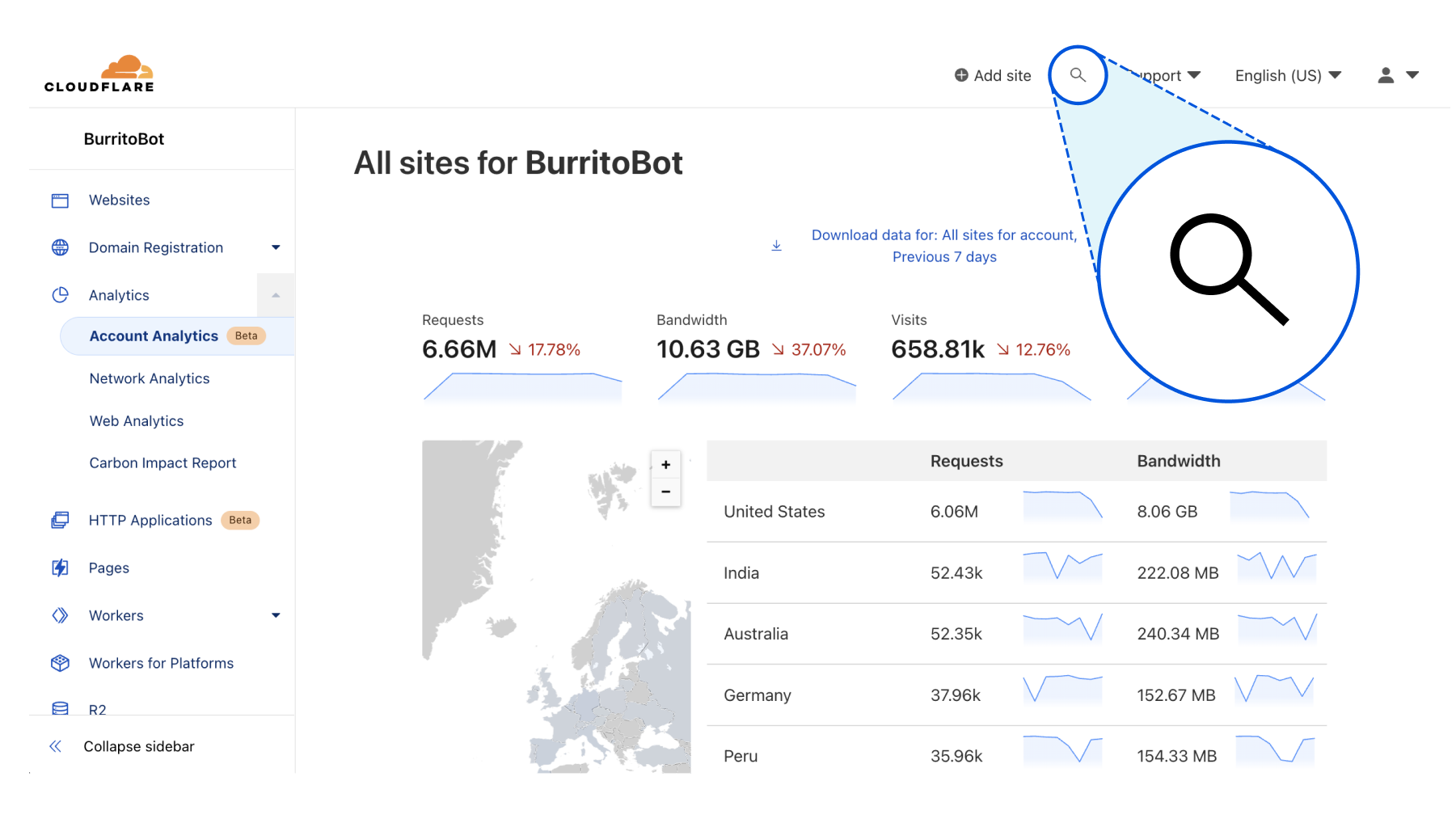
To get started, you can access the quick search tool from anywhere within the Cloudflare dashboard by clicking the magnifying glass button in the top navigation, or hitting Ctrl + K on Linux and Windows or ⌘ + K on Mac. (If you find yourself forgetting which key combination it is just remember that it’s or Ctrl-K-wik.) From there, enter a search term and then select from the results shown below.

We've shipped so many products the Cloudflare dashboard needed its own search engine
Access quick search from the top navigation bar, or use keyboard shortcuts Ctrl + K on Linux and Windows or ⌘ + K on Mac.

Current supported functionality

What functionality will you have access to? Below you’ll learn about the three core capabilities of quick search that are included in this release, as well as helpful tips for using the tool.

Search for a page in the dashboard

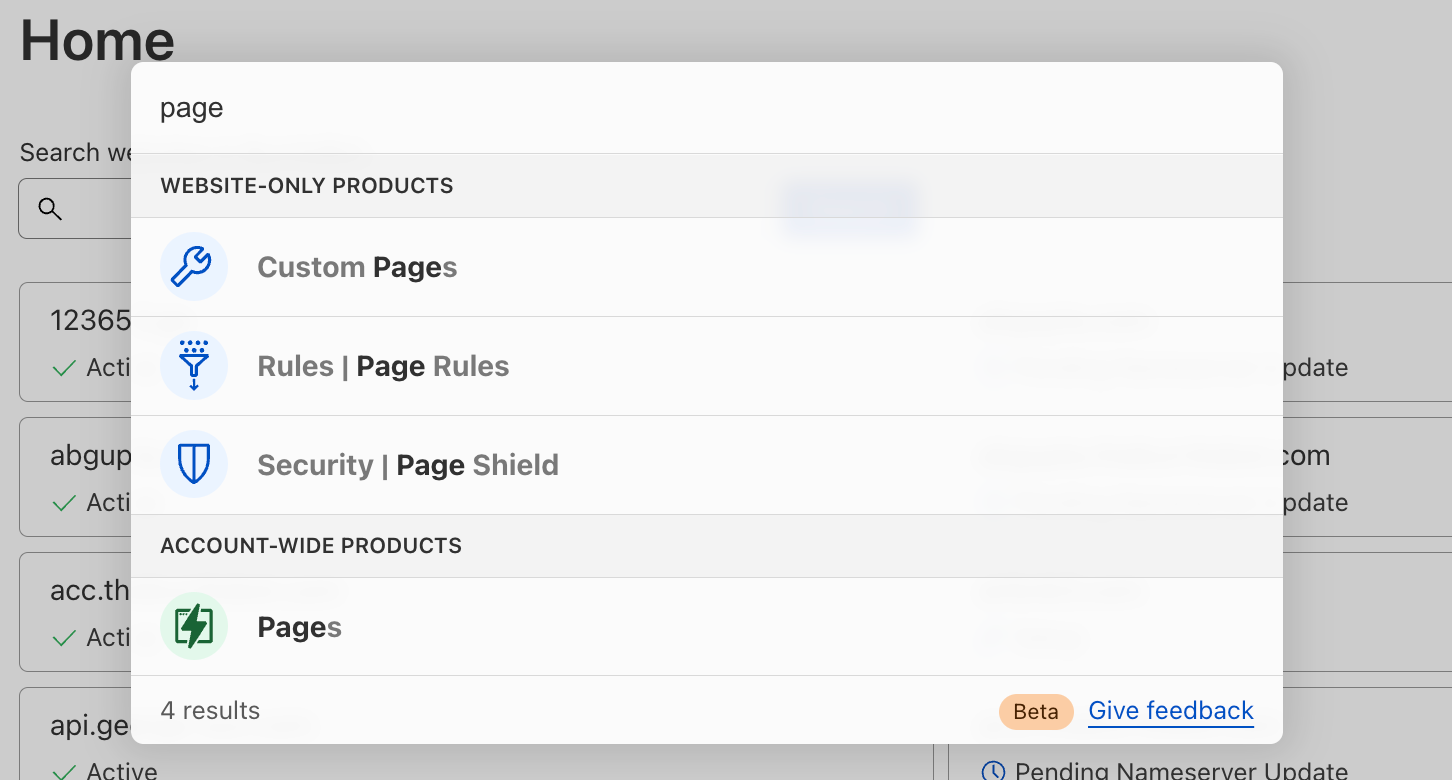
Start typing in the name of the product you’re looking for, and we’ll load matching terms after each key press. You will see results for any dashboard page that currently exists in your sidebar navigation. Then, just click the desired result to navigate directly there.

We've shipped so many products the Cloudflare dashboard needed its own search engine
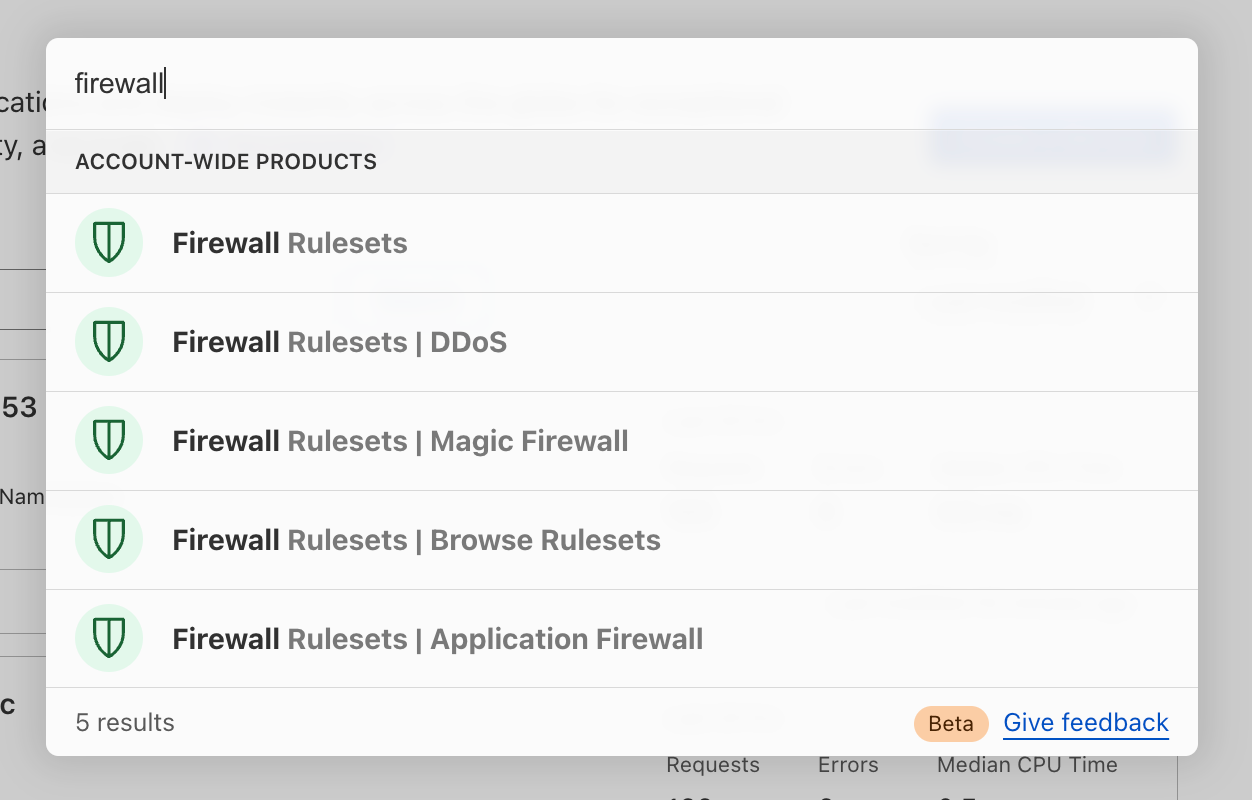
Search for “page” and you’ll see results categorized into “website-only products” and “account-wide products.”
We've shipped so many products the Cloudflare dashboard needed its own search engine
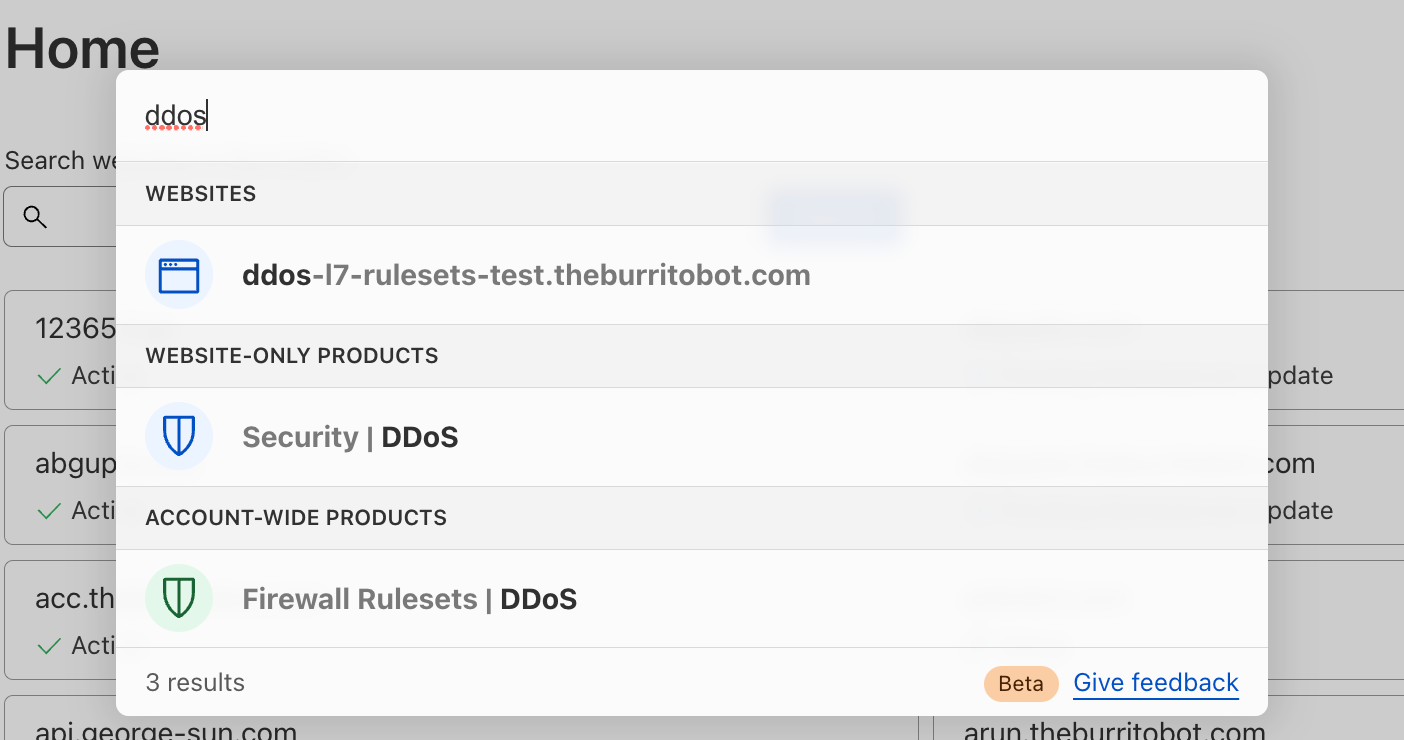
Search for “ddos” and you’ll see results categorized into “websites,” “website-only products” and “account-wide products.”

Search for website-only products

For our customers who manage a website or domain in Cloudflare, you have access to a multitude of Cloudflare products and features to enhance your website’s security, performance and reliability. Quick search can be used to easily find those products and features, regardless of where you currently are in the dashboard (even from within another website!).

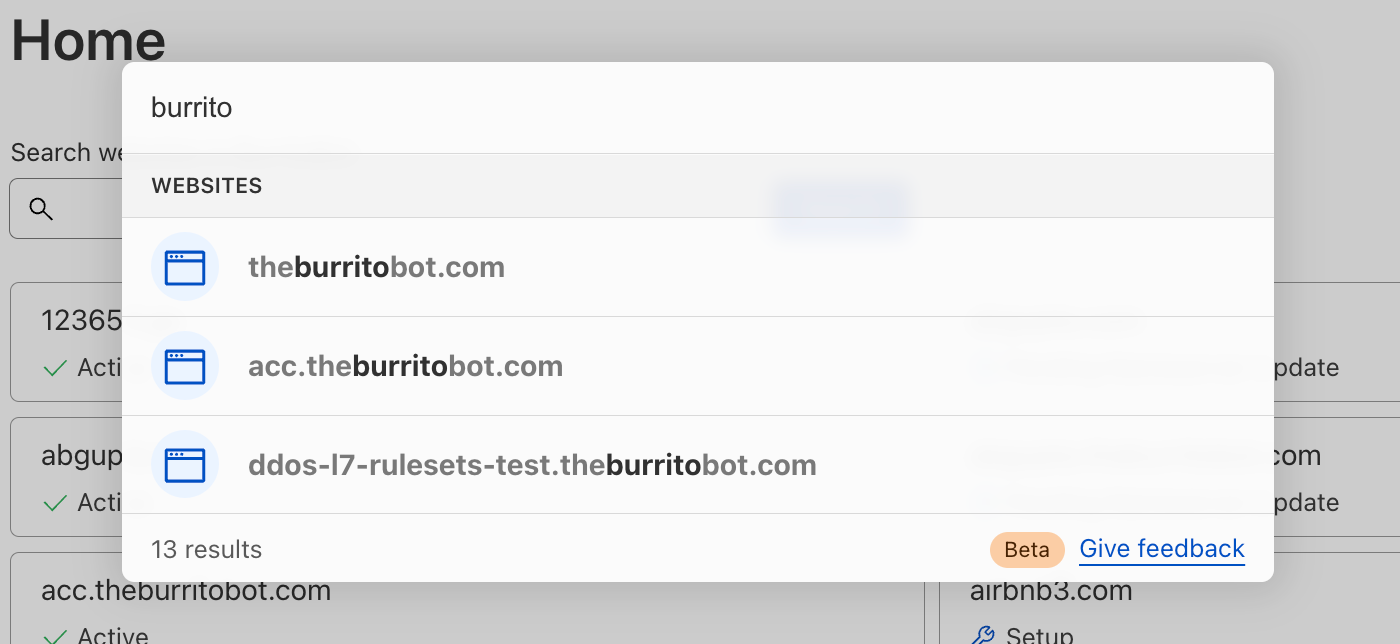
You may easily search for your website by name to navigate to your website’s Overview page:

We've shipped so many products the Cloudflare dashboard needed its own search engine

You may also navigate to the products and feature pages within your specific website(s). Note that you can perform a website-specific search from anywhere in your core dashboard using one of two different approaches, which are explained below.

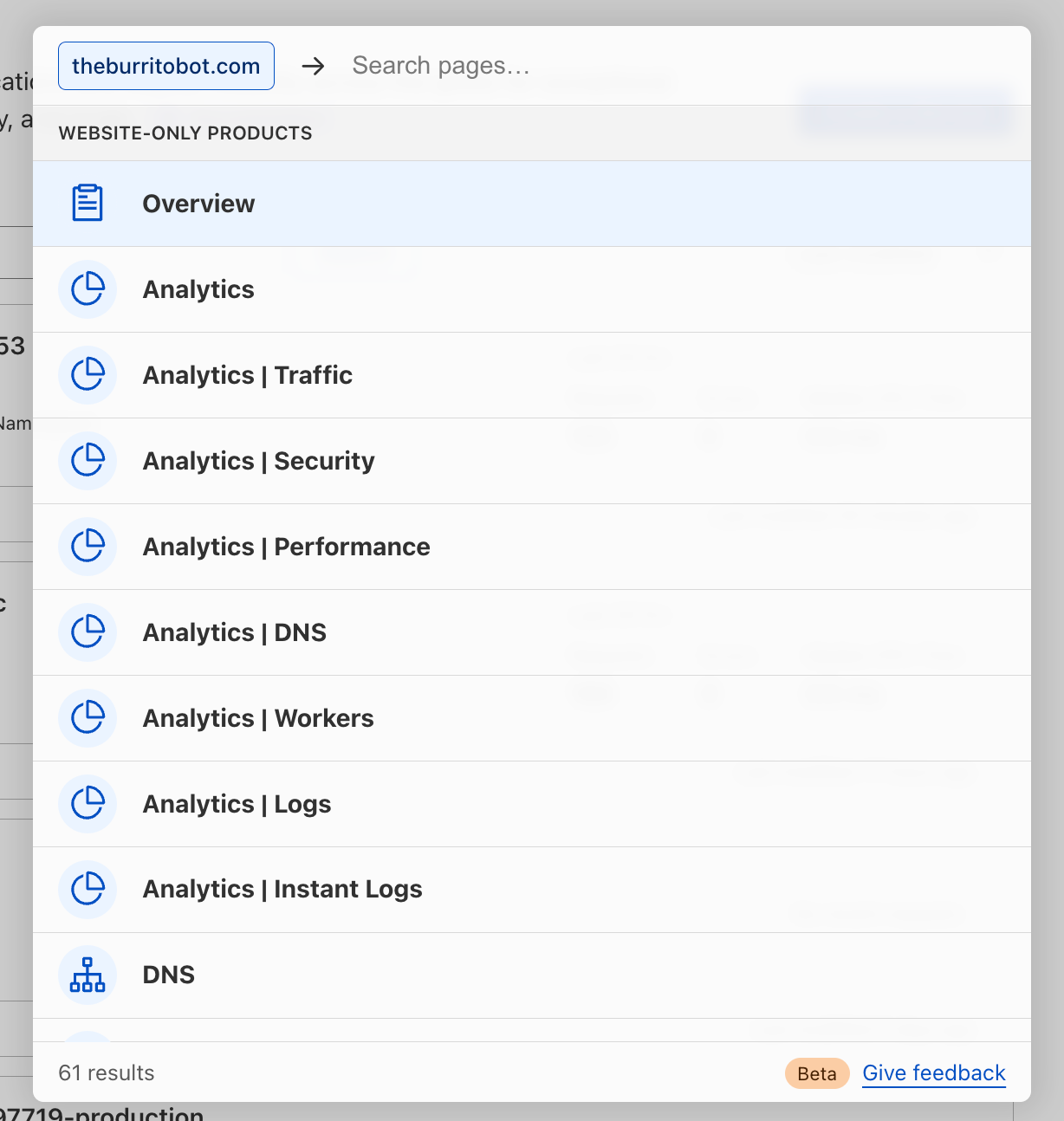
First, you may search first for your website by name, then navigate search results from there:

We've shipped so many products the Cloudflare dashboard needed its own search engine

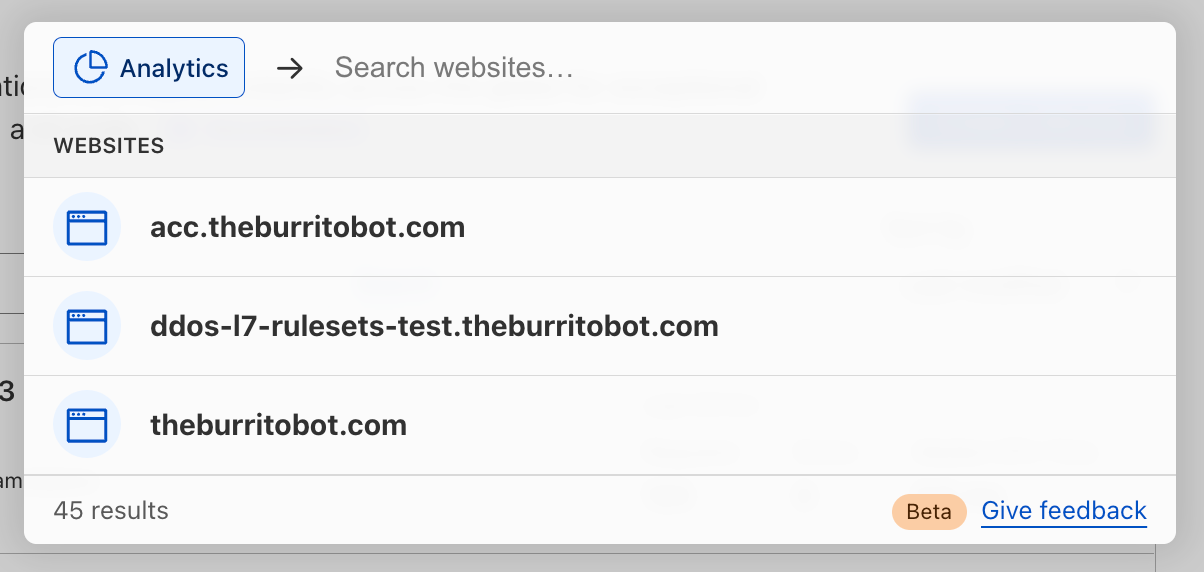
Alternatively, you may search first for the product or feature you’re looking for, then filter down by your website:

We've shipped so many products the Cloudflare dashboard needed its own search engine

Search for account-wide products

Many Cloudflare products and features are not tied directly to a website or domain that you have set up in Cloudflare, like Workers, R2, Magic Transit—not to mention their related sub-pages. Now, you may use quick search to more easily navigate to those sections of the dashboard.

We've shipped so many products the Cloudflare dashboard needed its own search engine

Here’s an overview of what’s next on our quick search roadmap (and not yet supported today):

  • Search results do not currently return results of product- and feature-specific names or configurations, such as Worker names, specific DNS records, IP addresses, Firewall Rules.
  • Search results do not currently return results from within the Zero Trust dashboard.
  • Search results do not currently return results for Cloudflare content living outside the dashboard, like Support or Developer documentation.

We’d love to hear what you think. What would you like to see added next? Let us know using the feedback link found at the bottom of the search window.

We've shipped so many products the Cloudflare dashboard needed its own search engine

Our vision for the future of the dashboard

We’re excited to launch quick search and to continue improving our dashboard experience for all customers. Over time, we’ll mature our search functionality to index any and all content you might be looking for — including search results for all product content, Support and Developer docs, extending search across accounts, caching your recent searches, and more.

Quick search is one of many important user experience improvements we are planning to tackle over the coming weeks, months and years. The dashboard is central to your Cloudflare experience, and we’re fully committed to making your experience delightful, useful, and easy. Stay tuned for an upcoming blog post outlining the vision for the Cloudflare dashboard, from our in-app home experience to our global navigation and beyond.

For now, keep your eye out for the little search icon that will help you in your day-to-day responsibilities in Cloudflare, and if you don’t see it yet, don’t worry—we can’t wait to ship it to you soon.

If you don’t yet see quick search in your Cloudflare dashboard, you can request early access by filling out this form.

Logs on R2: slash your logging costs

Post Syndicated from Tanushree Sharma original https://blog.cloudflare.com/logs-r2/

Logs on R2: slash your logging costs

Logs on R2: slash your logging costs

Hot on the heels of the R2 open beta announcement, we’re excited that Cloudflare enterprise customers can now use Logpush to store logs on R2!

Raw logs from our products are used by our customers for debugging performance issues, to investigate security incidents, to keep up security standards for compliance and much more. You shouldn’t have to make tradeoffs between keeping logs that you need and managing tight budgets. With R2’s low costs, we’re making this decision easier for our customers!

Getting into the numbers

Cloudflare helps customers at different levels of scale — from a few requests per day, up to a million requests per second. Because of this, the cost of log storage also varies widely. For customers with higher-traffic websites, log storage costs can grow large, quickly.

As an example, imagine a website that gets 100,000 requests per second. This site would generate about 9.2 TB of HTTP request logs per day, or 850 GB/day after gzip compression. Over a month, you’ll be storing about 26 TB (compressed) of HTTP logs.

For a typical use case, imagine that you write and read the data exactly once – for example, you might write the data to object storage before ingesting it into an alerting system. Compare the costs of R2 and S3 (note that this excludes costs per operation to read/write data).

Provider Storage price Data transfer price Total cost assuming data is read once
R2 $0.015/GB $0 $390/month
S3 (Standard, US East $0.023/GB $0.09/GB for first 10 TB; then $0.085/GB $2,858/month

In this example, R2 leads to 86% savings! It’s worth noting that querying logs is where another hefty price tag comes in because Amazon Athena charges based on the amount of data scanned. If your team is looking back through historical data, each query can be hundreds of dollars.

Many of our customers have tens to hundreds of domains behind Cloudflare and the majority of our Enterprise customers also use multiple Cloudflare products. Imagine how costs will scale if you need to store HTTP, WAF and Spectrum logs for all of your Internet properties behind Cloudflare.

For SaaS customers that are building the next big thing on Cloudflare, logs are important to get visibility into customer usage and performance. Your customer’s developers may also want access to raw logs to understand errors during development and to troubleshoot production issues. Costs for storing logs multiply and add up quickly!

The flip side: log retrieval

When designing products, one of Cloudflare’s core principles is ease of use. We take on the complexity, so you don’t have to. Storing logs is only half the battle, you also need to be able to access relevant logs when you need them – in the heat of an incident or when doing an in depth analysis.

Our product, Logpull, offers seven days of log retention and an easy to use API to access. Our customers love that Logpull doesn’t need any setup on third parties since it’s completely managed by Cloudflare. However, Logpull is limited in the retention of logs, the type of logs that we store (only HTTP request logs) and the amount of data that can be queried at one time.

We’re building tools for log retrieval that make it super easy to get your data out of R2 from any of our datasets. Similar to Logpull, we’ll start by supporting lookups by time period and rayId. From there, we’ll tackle more complex functions like returning logs within time X and Y that have 500 errors or where WAF action = block.

We’re looking for customers to join a closed beta for our Log Retrieval API. If you’re interested in testing it out, giving feedback and ultimately helping us shape the product sign up here.

Logs on R2: How to get started

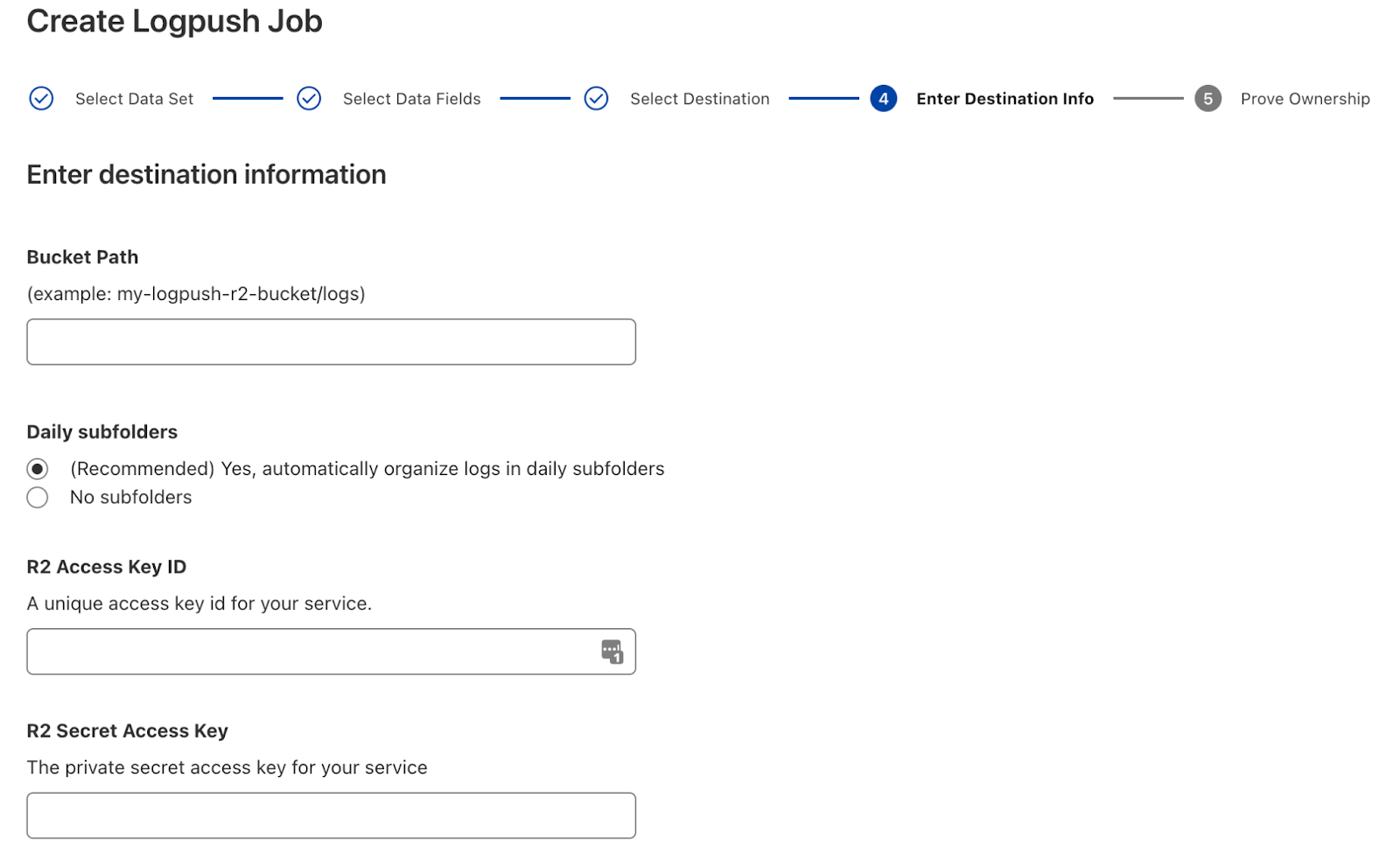
Enterprise customers first need to get R2 added to their contract. Reach out to your account team if this is something you’re interested in! Once enabled, create an R2 bucket for your logs and follow the Logpush setup flow to create your job.

Logs on R2: slash your logging costs

It’s that simple! If you have questions, our Logpush to R2 developer docs go into more detail.

More to come

We’re continuing to build out more advanced Logpush features with a focus on customization. Here’s a preview of what’s next on the roadmap:

  • New datasets: Network Analytics Logs, Workers Invocation Logs
  • Log filtering
  • Custom log formatting

We also have exciting plans to build out log analysis and forensics capabilities on top of R2. We want to make log storage tightly coupled to the Cloudflare dash so you can see high level analytics and drill down into individual log lines all in one view. Stay tuned to the blog for more!

Email Routing is now in open beta, available to everyone

Post Syndicated from Joao Sousa Botto original https://blog.cloudflare.com/email-routing-open-beta/

Email Routing is now in open beta, available to everyone

Email Routing is now in open beta, available to everyone

I won’t beat around the bush: we’ve moved Cloudflare Email Routing from closed beta to open beta 🎉

What does this mean? It means that there’s no waitlist anymore; every zone* in every Cloudflare account has Email Routing available to them.

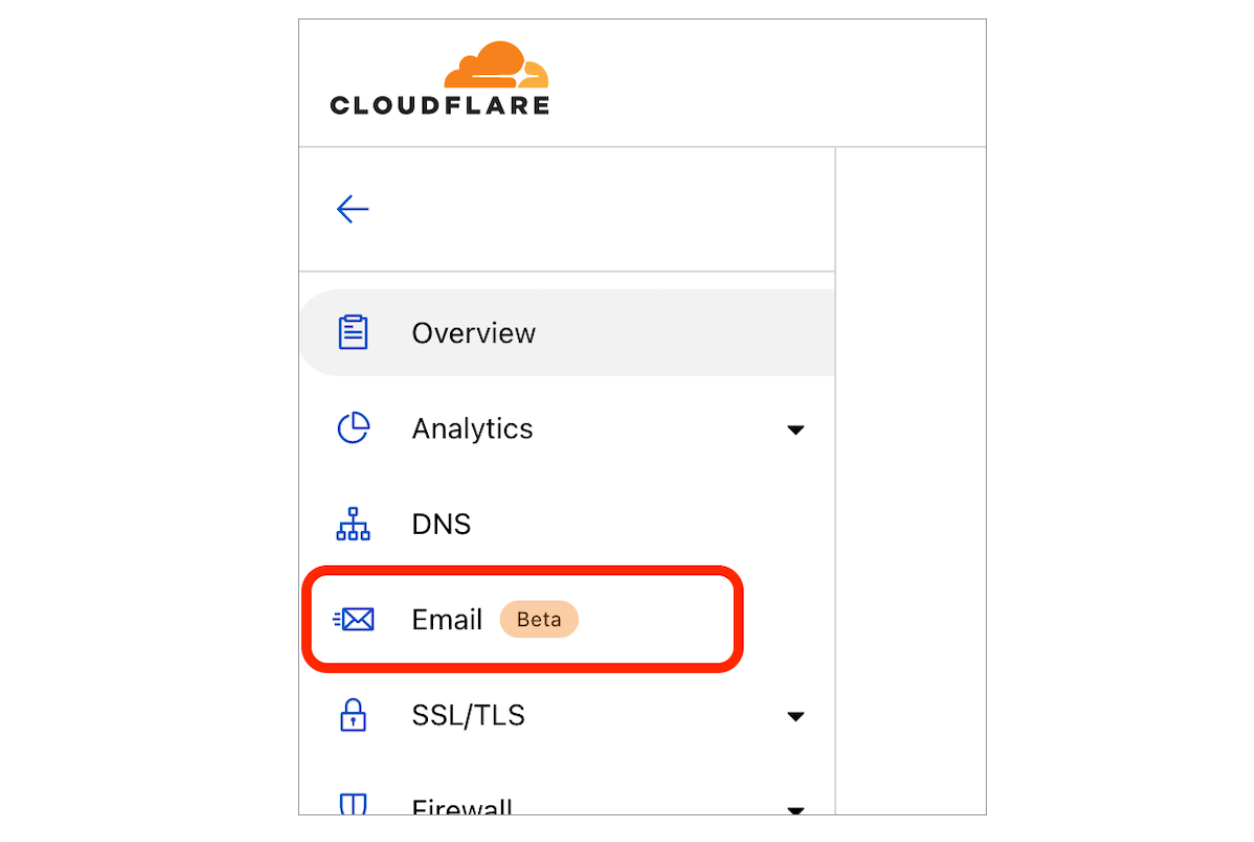
To get started just open one of the zones in your Cloudflare Dashboard and click on Email in the navigation pane.

Email Routing is now in open beta, available to everyone

Our journey so far

Back in September 2021, during Cloudflare’s Birthday Week, we introduced Email Routing as the simplest solution for creating custom email addresses for your domains without the hassle of managing multiple mailboxes.

Many of us at Cloudflare saw a need for this type of product, and we’ve been using it since before it had a UI. After Birthday Week, we started gradually opening it to Cloudflare customers that requested access through the wait list; starting with just a few users per week and gradually ramping up access as we found and fixed edge cases.

Most recently, with users wanting to set up Email Routing for more of their domains and with some of G Suite legacy users looking for an alternative to starting a subscription, we have been onboarding tens of thousands of new zones every day into the closed beta. We’re loving the adoption and the feedback!

Needless to say that with hundreds of thousands of zones from around the world in the Email Routing beta we uncovered many new use cases and a few limitations, a few of which still exist. But these few months of closed beta gave us the confidence to move to the next stage – open beta – which now makes Cloudflare Email Routing available to everyone, including free zones.

Thank you to all of you that were part of the closed beta and provided feedback. We couldn’t be more excited to welcome everyone else!

If you have any questions or feedback about this product, please come see us in the Cloudflare Community and the Cloudflare Discord.

___

*we do have a few limitations, such as not currently supporting Internationalized Domain Names (IDNs) and subdomains. Known limitations are listed in the documentation.