Post Syndicated from Fatima Ahmed original https://aws.amazon.com/blogs/security/how-to-replicate-secrets-aws-secrets-manager-multiple-regions/
On March 3, 2021, we launched a new feature for AWS Secrets Manager that makes it possible for you to replicate secrets across multiple AWS Regions. You can give your multi-Region applications access to replicated secrets in the required Regions and rely on Secrets Manager to keep the replicas in sync with the primary secret. In scenarios such as disaster recovery, you can read replicated secrets from your recovery Regions, even if your primary Region is unavailable. In this blog post, I show you how to automatically replicate a secret and access it from the recovery Region to support a disaster recovery plan.
With Secrets Manager, you can store, retrieve, manage, and rotate your secrets, including database credentials, API keys, and other secrets. When you create a secret using Secrets Manager, it’s created and managed in a Region of your choosing. Although scoping secrets to a Region is a security best practice, there are scenarios such as disaster recovery and cross-Regional redundancy that require replication of secrets across Regions. Secrets Manager now makes it possible for you to easily replicate your secrets to one or more Regions to support these scenarios.
With this new feature, you can create Regional read replicas for your secrets. When you create a new secret or edit an existing secret, you can specify the Regions where your secrets need to be replicated. Secrets Manager will securely create the read replicas for each secret and its associated metadata, eliminating the need to maintain a complex solution for this functionality. Any update made to the primary secret, such as a secret value updated through automatic rotation, will be automatically propagated by Secrets Manager to the replica secrets, making it easier to manage the life cycle of multi-Region secrets.
Note: Each replica secret is billed as a separate secret. For more details on pricing, see the AWS Secrets Manager pricing page.
Architecture overview
Suppose that your organization has a requirement to set up a disaster recovery plan. In this example, us-east-1 is the designated primary Region, where you have an application running on a simple AWS Lambda function (for the example in this blog post, I’m using Python 3). You also have an Amazon Relational Database Service (Amazon RDS) – MySQL DB instance running in the us-east-1 Region, and you’re using Secrets Manager to store the database credentials as a secret. Your application retrieves the secret from Secrets Manager to access the database. As part of the disaster recovery strategy, you set up us-west-2 as the designated recovery Region, where you’ve replicated your application, the DB instance, and the database secret.
To elaborate, the solution architecture consists of:
- A primary Region for creating the secret, in this case us-east-1 (N. Virginia).
- A replica Region for replicating the secret, in this case us-west-2 (Oregon).
- An Amazon RDS – MySQL DB instance that is running in the primary Region and configured for replication to the replica Region. To set up read replicas or cross-Region replicas for Amazon RDS, see Working with read replicas.
- A secret created in Secrets Manager and configured for replication for the replica Region.
- AWS Lambda functions (running on Python 3) deployed in the primary and replica Regions acting as clients to the MySQL DBs.
This architecture is illustrated in Figure 1.
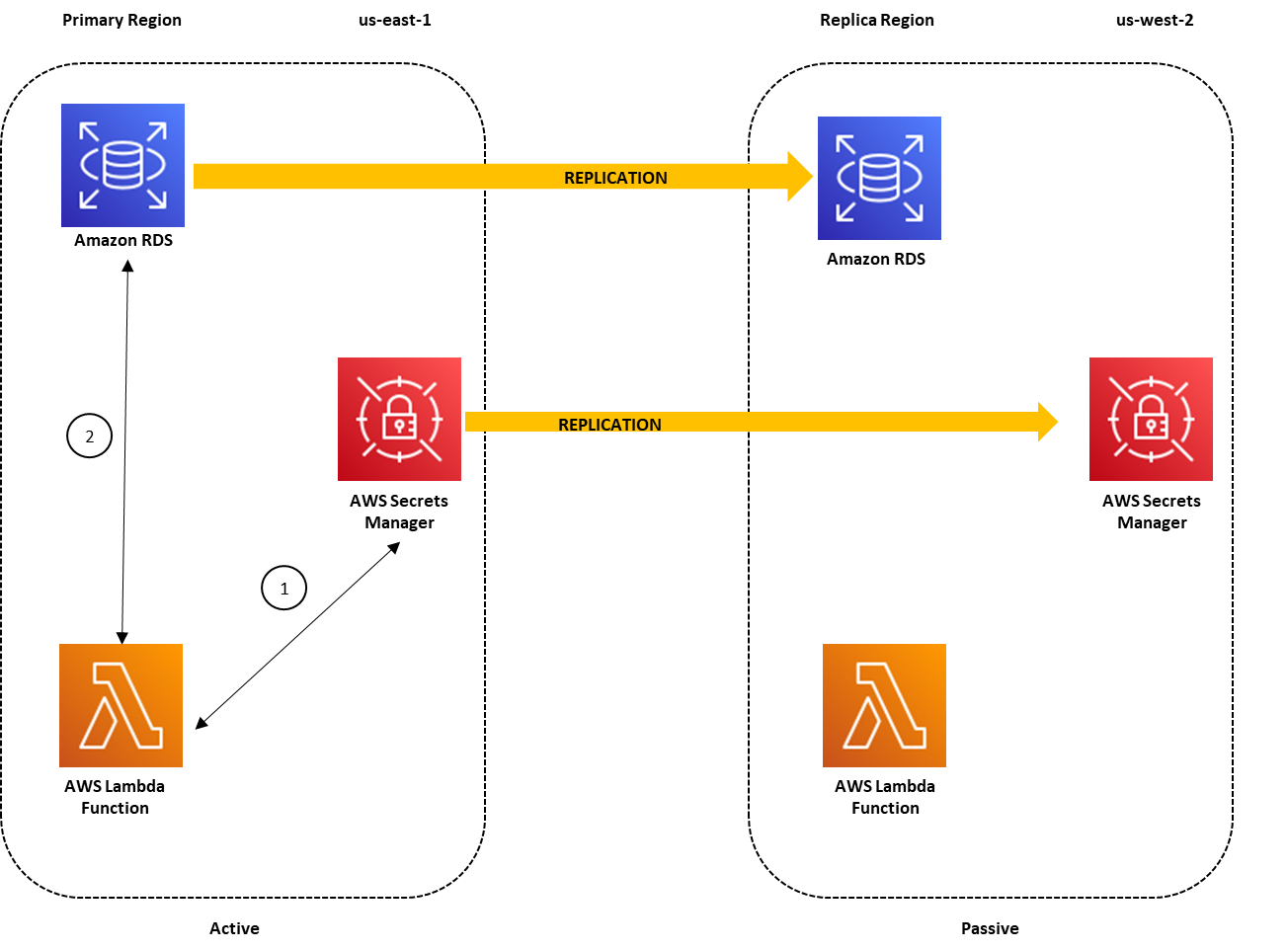
Figure 1: Architecture overview for a multi-Region secret replication with the primary Region active
In the primary region us-east-1, the Lambda function uses the credentials stored in the secret to access the database, as indicated by the following steps in Figure 1:
- The Lambda function sends a request to Secrets Manager to retrieve the secret value by using the GetSecretValue API call. Secrets Manager retrieves the secret value for the Lambda function.
- The Lambda function uses the secret value to connect to the database in order to read/write data.
The replicated secret in us-west-2 points to the primary DB instance in us-east-1. This is because when Secrets Manager replicates the secret, it replicates the secret value and all the associated metadata, such as the database endpoint. The database endpoint details are stored within the secret because Secrets Manager uses this information to connect to the database and rotate the secret if it is configured for automatic rotation. The Lambda function can also use the database endpoint details in the secret to connect to the database.
To simplify database failover during disaster recovery, as I’ll cover later in the post, you can configure an Amazon Route 53 CNAME record for the database endpoint in the primary Region. The database host associated with the secret is configured with the database CNAME record. When the primary Region is operating normally, the CNAME record points to the database endpoint in the primary Region. The requests to the database CNAME are routed to the DB instance in the primary Region, as shown in Figure 1.
During disaster recovery, you can failover to the replica Region, us-west-2, to make it possible for your application running in this Region to access the Amazon RDS read replica in us-west-2 by using the secret stored in the same Region. As part of your failover script, the database CNAME record should also be updated to point to the database endpoint in us-west-2. Because the database CNAME is used to point to the database endpoint within the secret, your application in us-west-2 can now use the replicated secret to access the database read replica in this Region. Figure 2 illustrates this disaster recovery scenario.
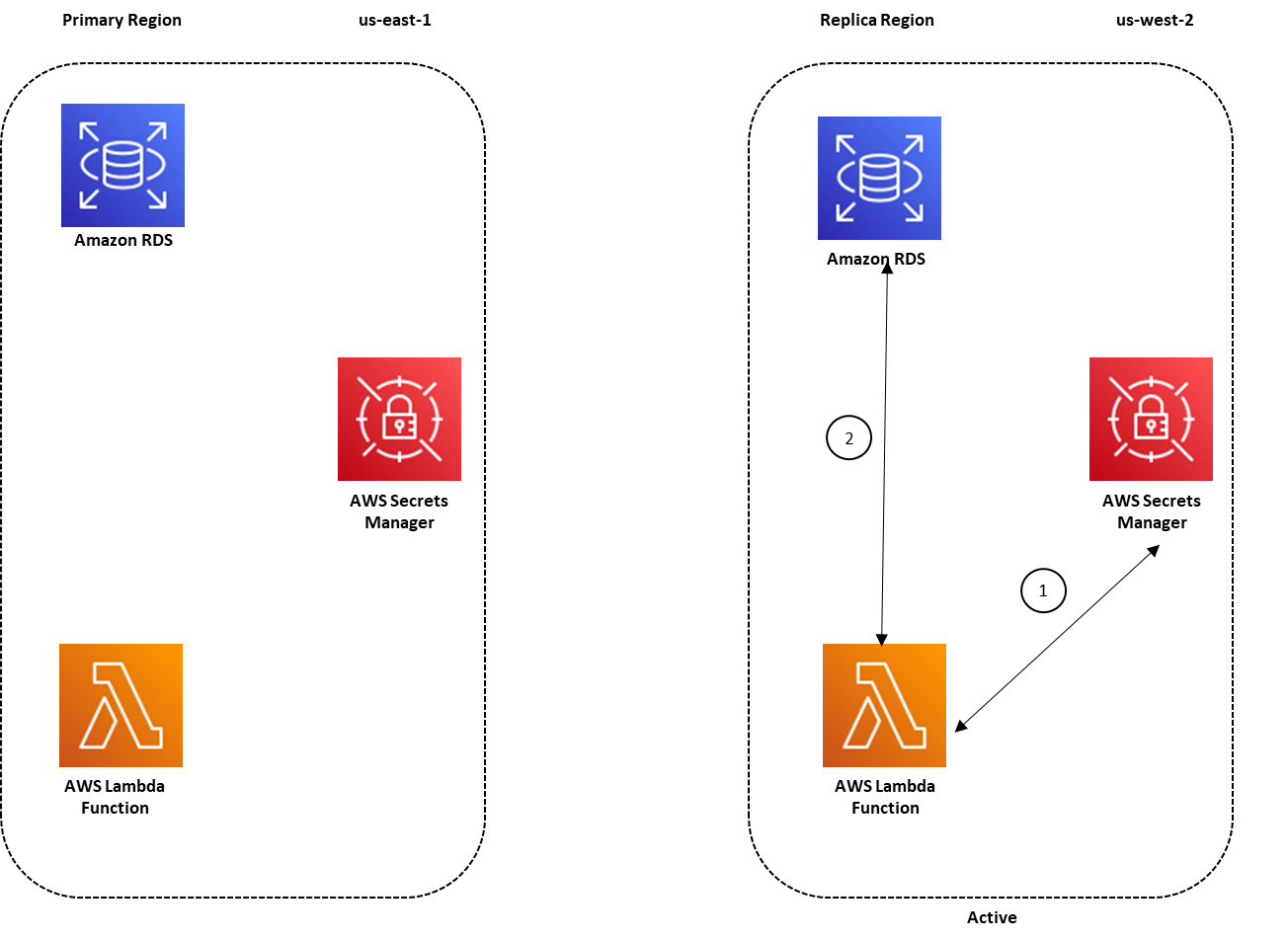
Figure 2: Architecture overview for a multi-Region secret replication with the replica Region active
Prerequisites
The procedure described in this blog post requires that you complete the following steps before starting the procedure:
- Configure an Amazon RDS DB instance in the primary Region, with replication configured in the replica Region.
- Configure a Route 53 CNAME record for the database endpoint in the primary Region.
- Configure the Lambda function to connect with the Amazon RDS database and Secrets Manager by following the procedure in this blog post.
- Sign in to the AWS Management Console using a role that has SecretsManagerReadWrite permissions in the primary and replica Regions.
Enable replication for secrets stored in Secrets Manager
In this section, I walk you through the process of enabling replication in Secrets Manager for:
- A new secret that is created for your Amazon RDS database credentials
- An existing secret that is not configured for replication
For the first scenario, I show you the steps to create a secret in Secrets Manager in the primary Region (us-east-1) and enable replication for the replica Region (us-west-2).
To create a secret with replication enabled
- In the AWS Management Console, navigate to the Secrets Manager console in the primary Region (N. Virginia).
- Choose Store a new secret.
- On the Store a new secret screen, enter the Amazon RDS database credentials that will be used to connect with the Amazon RDS DB instance. Select the encryption key and the Amazon RDS DB instance, and then choose Next.
- Enter the secret name of your choice, and then enter a description. You can also optionally add tags and resource permissions to the secret.
- Under Replicate Secret – optional, choose Replicate secret to other regions.

Figure 3: Replicate a secret to other Regions
- For AWS Region, choose the replica Region, US West (Oregon) us-west-2. For Encryption Key, choose Default to store your secret in the replica Region. Then choose Next.

Figure 4: Configure secret replication
- In the Configure Rotation section, you can choose whether to enable rotation. For this example, I chose not to enable rotation, so I selected Disable automatic rotation. However, if you want to enable rotation, you can do so by following the steps in Enabling rotation for an Amazon RDS database secret in the Secrets Manager User Guide. When you enable rotation in the primary Region, any changes to the secret from the rotation process are also replicated to the replica Region. After you’ve configured the rotation settings, choose Next.
- On the Review screen, you can see the summary of the secret configuration, including the secret replication configuration.

Figure 5: Review the secret before storing
- At the bottom of the screen, choose Store.
- At the top of the next screen, you’ll see two banners that provide status on:
- The creation of the secret in the primary Region
- The replication of the secret in the Secondary Region
After the creation and replication of the secret is successful, the banners will provide you with confirmation details.


At this point, you’ve created a secret in the primary Region (us-east-1) and enabled replication in a replica Region (us-west-2). You can now use this secret in the replica Region as well as the primary Region.
Now suppose that you have a secret created in the primary Region (us-east-1) that hasn’t been configured for replication. You can also configure replication for this existing secret by using the following procedure.
To enable multi-Region replication for existing secrets
- In the Secrets Manager console, choose the secret name. At the top of the screen, choose Replicate secret to other regions.

Figure 6: Enable replication for existing secrets
This opens a pop-up screen where you can configure the replica Region and the encryption key for encrypting the secret in the replica Region.
- Choose the AWS Region and encryption key for the replica Region, and then choose Complete adding region(s).

Figure 7: Configure replication for existing secrets
This starts the process of replicating the secret from the primary Region to the replica Region.
- Scroll down to the Replicate Secret section. You can see that the replication to the us-west-2 Region is in progress.

Figure 8: Review progress for secret replication
After the replication is successful, you can look under Replication status to review the replication details that you’ve configured for your secret. You can also choose to replicate your secret to more Regions by choosing Add more regions.

Figure 9: Successful secret replication to a replica Region


Update the secret with the CNAME record
Next, you can update the host value in your secret to the CNAME record of the DB instance endpoint. This will make it possible for you to use the secret in the replica Region without making changes to the replica secret. In the event of a failover to the replica Region, you can simply update the CNAME record to the DB instance endpoint in the replica Region as a part of your failover script
To update the secret with the CNAME record
- Navigate to the Secrets Manager console, and choose the secret that you have set up for replication
- In the Secret value section, choose Retrieve secret value, and then choose Edit.
- Update the secret value for the host with the CNAME record, and then choose Save.

Figure 10: Edit the secret value
- After you choose Save, you’ll see a banner at the top of the screen with a message that indicates that the secret was successfully edited.Because the secret is set up for replication, you can also review the status of the synchronization of your secret to the replica Region after you updated the secret. To do so, scroll down to the Replicate Secret section and look under Region Replication Status.

Figure 11: Successful secret replication for a modified secret


Access replicated secrets from the replica Region
Now that you’ve configured the secret for replication in the primary Region, you can access the secret from the replica Region. Here I demonstrate how to access a replicated secret from a simple Lambda function that is deployed in the replica Region (us-west-2).
To access the secret from the replica Region
- From the AWS Management Console, navigate to the Secrets Manager console in the replica Region (Oregon) and view the secret that you configured for replication in the primary Region (N. Virginia).

Figure 12: View secrets that are configured for replication in the replica Region
- Choose the secret name and review the details that were replicated from the primary Region. A secret that is configured for replication will display a banner at the top of the screen stating the replication details.

Figure 13: The replication status banner
- Under Secret Details, you can see the secret’s ARN. You can use the secret’s ARN to retrieve the secret value from the Lambda function or application that is deployed in your replica Region (Oregon). Make a note of the ARN.

Figure 14: View secret details


During a disaster recovery scenario when the primary Region isn’t available, you can update the CNAME record to point to the DB instance endpoint in us-west-2 as part of your failover script. For this example, my application that is deployed in the replica Region is configured to use the replicated secret’s ARN.
Let’s suppose your sample Lambda function defines the secret name and the Region in the environment variables. The REGION_NAME environment variable contains the name of the replica Region; in this example, us-west-2. The SECRET_NAME environment variable is the ARN of your replicated secret in the replica Region, which you noted earlier.

Figure 15: Environment variables for the Lambda function
In the replica Region, you can now refer to the secret’s ARN and Region in your Lambda function code to retrieve the secret value for connecting to the database. The following sample Lambda function code snippet uses the secret_name and region_name variables to retrieve the secret’s ARN and the replica Region values stored in the environment variables.
Alternately, you can simply use the Python 3 sample code for the replicated secret to retrieve the secret value from the Lambda function in the replica Region. You can review the provided sample codes by navigating to the secret details in the console, as shown in Figure 16.
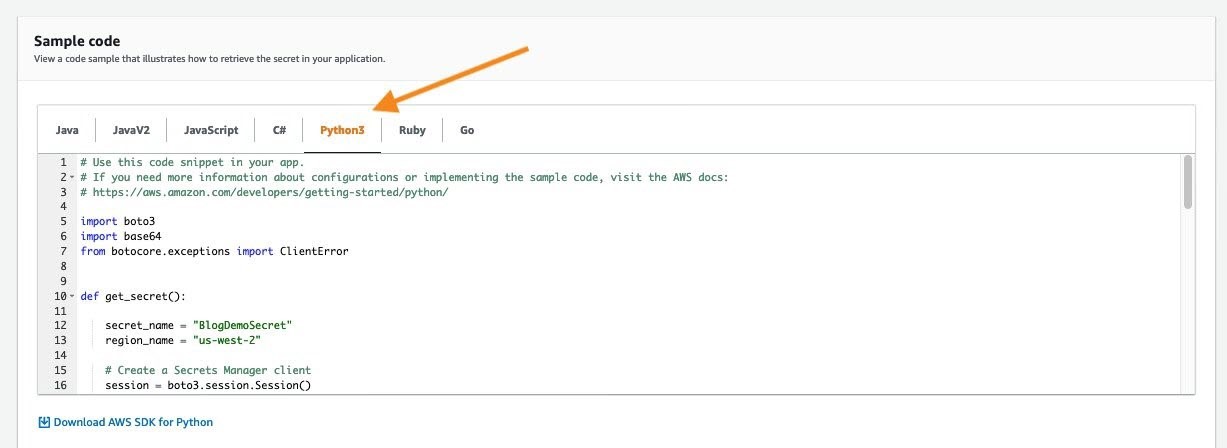
Figure 16: Python 3 sample code for the replicated secret
Summary
When you plan for disaster recovery, you can configure replication of your secrets in Secrets Manager to provide redundancy for your secrets. This feature reduces the overhead of deploying and maintaining additional configuration for secret replication and retrieval across AWS Regions. In this post, I showed you how to create a secret and configure it for multi-Region replication. I also demonstrated how you can configure replication for existing secrets across multiple Regions.
I showed you how to use secrets from the replica Region and configure a sample Lambda function to retrieve a secret value. When replication is configured for secrets, you can use this technique to retrieve the secrets in the replica Region in a similar way as you would in the primary Region.
You can start using this feature through the AWS Secrets Manager console, AWS Command Line Interface (AWS CLI), AWS SDK, or AWS CloudFormation. To learn more about this feature, see the AWS Secrets Manager documentation. If you have feedback about this blog post, submit comments in the Comments section below. If you have questions about this blog post, start a new thread on the AWS Secrets Manager forum.
Want more AWS Security how-to content, news, and feature announcements? Follow us on Twitter.


