Tag Archives: Innovation and Reinvention

A scalable, elastic database and search solution for 1B+ vectors built on LanceDB and Amazon S3

Post Syndicated from Audra Devoto original https://aws.amazon.com/blogs/architecture/a-scalable-elastic-database-and-search-solution-for-1b-vectors-built-on-lancedb-and-amazon-s3/

This post was co-authored with Owen Janson, Audra Devoto, and Christopher Brown of Metagenomi.

From CRISPR gene editing to industrial biocatalysis, enzymes power some of the most transformative technologies in healthcare, energy, and manufacturing. But discovering novel enzymes that can transform an industry — such as Cas9 for genome engineering — requires sifting through the billions of diverse enzymes encoded by organisms spanning the tree of life. Advances in DNA sequencing and metagenomics have enabled the growth of vast public and proprietary databases containing known protein sequences, but scanning through these collections to identify high value candidates is fundamentally a big data problem as well as a biological one.

At Metagenomi, we’re developing potentially curative therapeutics by using our extensive metagenomics database (MGXdb) to build a toolbox of novel gene editing systems. In this post, we highlight how Metagenomi is tackling the challenge of enzyme discovery at the billion protein scale by using the scalable infrastructure of Amazon Web Services (AWS) to build a high-performance protein database and search solution based on embeddings. By embedding every protein in our large proprietary database into a vector space, making the data accessible using LanceDB built on Amazon Simple Storage Service (Amazon S3), and accessed with AWS Lambda, we were able to transform enzyme discovery into a nearest neighbor search problem and rapidly access previously unexplored discovery space.

Solution overview

At the core of our solution is LanceDB. LanceDB is an open source vector database that enables rapid approximate nearest neighbor (ANN) searches on indexed vectors. LanceDB is particularly well suited for a serverless stack because it’s entirely file-based and is also compatible with Amazon S3 storage. As a result, we can store our database of embedded protein sequences on relatively low-cost Amazon S3, rather than a persistent disk storage such as Amazon Elastic Block Store (Amazon EBS). Instead of constantly running servers, all that is needed to rapidly query the database on-demand is a Lambda function that uses LanceDB to find nearest neighbors directly from the data on S3.

To overcome the challenge of ingesting and querying billions of vector embeddings representing Metagenomi’s large protein database, we devised a method for splitting the database into equal sized parts (folders) stored for low cost on Amazon S3 that can be indexed in parallel and searched with a map-reduce approach using Lambda. The following diagram illustrates this architecture.
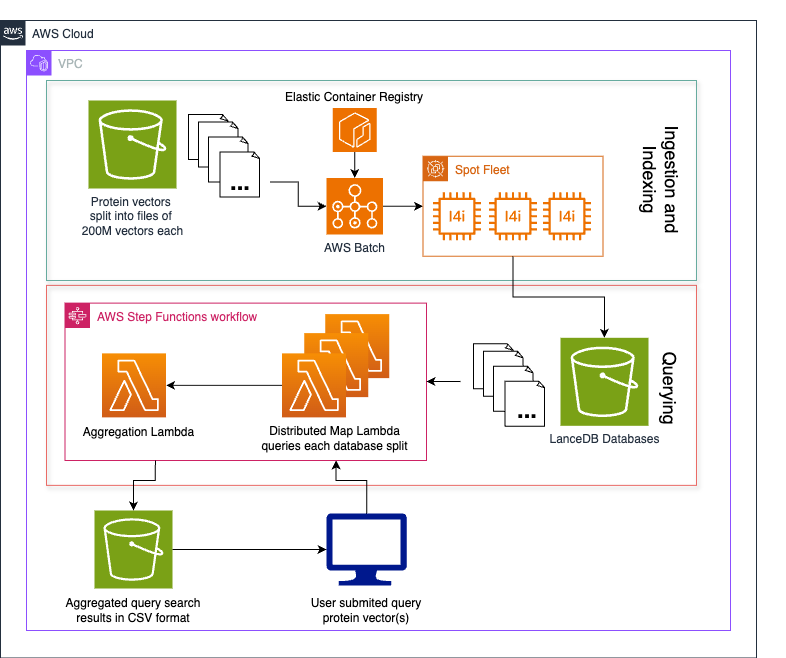
AWS architecture showing protein vector processing workflow with ECR, Lambda, and LanceDB

The process follows four steps:

  1. Data vectorization
  2. Data bucketing
  3. Indexing and ingesting data
  4. Querying the database

Data vectorization

To make use of LanceDB’s fast ANN search capabilities, the data must be in vector form. Our metagenomics database consists of billions of proteins, each a string of amino acids. To convert each protein into a vector that captures biologically meaningful information, we run them through a protein language model (pLM), capturing the model’s hidden layers as a vector representation of that protein. Many pLMs can be used to generate protein embeddings, depending on the desired biological information and computational requirements. Here, we use the AMPLIFY_350M model, a transformer encoder model that is fast enough to scale to our entire protein database. We perform a mean-pool of the final hidden layer of the model to produce a 960-dimension vector for each protein. These vectors and their respective unique protein IDs are then stored in HDF5 files.

Data bucketing

To turn our protein vectors into a searchable database, we use LanceDB to build an index suitable for quickly finding ANNs to a query. However, indexing can take a long time and is difficult to distribute across nodes. To speed up indexing, we first divide our data into roughly evenly sized buckets. We then assign each of our embedding HDF5 files to buckets of size roughly equal to 200 million total vectors using a best-fit bin packing algorithm. The exact size packing method used to bucket data depends on the number and dimension of the vectors, as well as their format. Each bucket is ingested into a separate table that will separately reside in a single LanceDB database object store on Amazon S3.
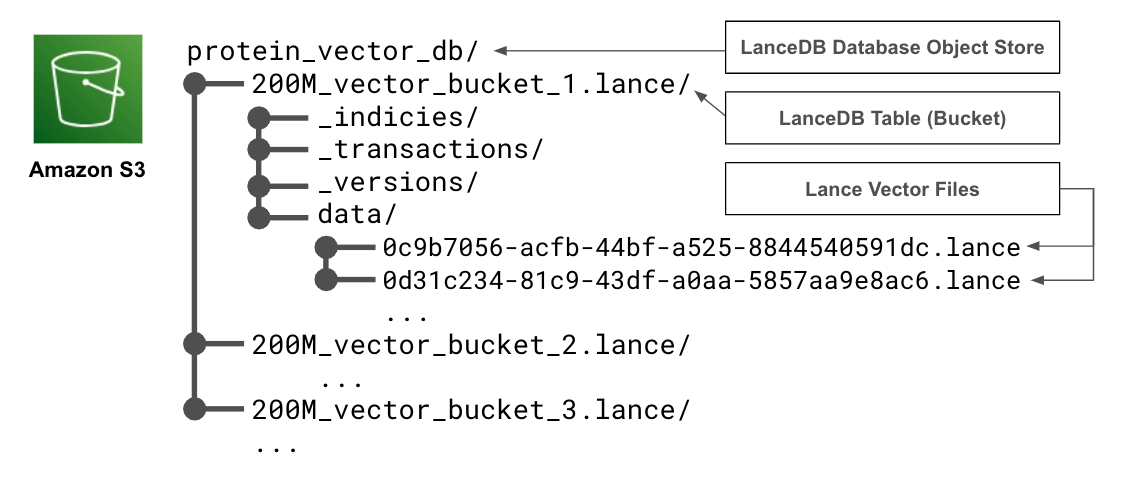
S3 bucket structure showing LanceDB database organization with vector buckets

By bucketing our data, we can produce several smaller databases that can be indexed on separate nodes in a much shorter amount of time. We can also add more data to our database incrementally as a new bucket, instead of reindexing all the existing data.

Ingesting and indexing bucketed data

After the vectorized data has been assigned to a bucket, it’s time to turn it into a LanceDB table and index it to enable fast ANN querying. The details on how to convert your specific data into a LanceDB table can be found in the LanceDB documentation. For each of our buckets of approximately 200 million vectors, we create a LanceDB table with an IVF-PQ index on the cosine distance. For indexing, we use several partitions equal to the square root of the number of inserted rows, and several sub vectors equal to the number of dimensions of our vectors divided by 16.

To make things smoother to query, we name each table after the bucket from which it was created and upload them to a single S3 directory such that their file structure indicates a single LanceDB database with multiple tables.

The following code snippet provides an example of how you might ingest vectors from an HDF5 file containing id and embedding columns into a LanceDB database and index for fast ANN searches based on cosine distance. The only requirements for running this snippet are python >= 3.9, as well as the lancedb, pyarrow, and h5py packages. It should be noted that this snippet was tested and developed using lancedb version 0.21.1 using the asynchronous LanceDB API.

from typing import List, Iterable
from itertools import islice
from math import sqrt
import pyarrow as pa
import datetime
import asyncio
import lancedb
import h5py

def batched(iterable: Iterable, n: int) -> Iterable[List]:
    """Yield batches of n items from iterable."""
    while batch := list(islice(iterable, n)):
        yield batch

async def vectors_to_db(
    vectors: str,
    db: str,
    table_name: str,
    vector_dim: int,
    ingestion_batch_size: int,
) -> int:
    """Ingest and index vectors from an HDF5 file into a LanceDB table.
    Args:
        vectors (str): An HDF5 file containing protein IDs and their
            960-dimension vector representations.
        db (str): Path to the LanceDB database.
        table_name (str): Name of the table to create.
        vector_dim (int): Dimension of the vectors.
    """
    # create db and table
    custom_schema = pa.schema(
        [
            pa.field("embedding", pa.list_(pa.float32(), vector_dim)),
            pa.field("id", pa.string()),
        ]
    )

    # count the total number of rows as they are added to the table
    total_rows = 0

    # open a connection to the new database and create a table
    with await lancedb.connect_async(db) as db_connection:
        with await db_connection.create_table(
            table_name, schema=custom_schema
        ) as table_connection:
            # open vectors file
            with h5py.File(vectors, "r") as vectors_handle:
                # create a generator over the rows
                rows = (
                    {"embedding": e, "id": i}
                    for e, i in zip(
                        vectors_handle["embedding"],
                        vectors_handle["id"],
                    )
                )

                # insert rows in batches to avoid memory issues
                for batch in batched(rows, ingestion_batch_size):
                    total_rows += len(batch)
                    await table_connection.add(batch)

            # optimize the table and remove old data
            await table_connection.optimize(
                cleanup_older_than=datetime.timedelta(days=0)
            )

            # configure the index for the table
            index_config = lancedb.index.IvfPq(
                distance_type="cosine",
                num_partitions=int(sqrt(total_rows)),
                num_sub_vectors=int(
                    vector_dim / 16
                ),
            )

            # index the table
            await table_connection.create_index(
                "embedding", config=index_config
            )

# ingest and index your data
asyncio.run(
    vectors_to_db(
        vectors="./my_vectors.h5",
        db="./test_db",
        table_name="bucket1",
        vector_dim=960,
        ingestion_batch_size=50000
    )
)

The task of vectorizing, ingesting, indexing each bucket could be parallelized over multiple AWS Batch jobs or run on a single Amazon Elastic Compute Cloud (Amazon EC2) instance.

Querying the database

After the data has been bucketed and ingested into a LanceDB database on Amazon S3, we need a way to query it. Because LanceDB can be queried directly from Amazon S3 using the LanceDB Python API, we can use Lambda functions to take a user-provided query vector and search for ANNs, then return the data to the user. However, because our data has been bucketed across several tables in the database, we need to search for nearest neighbors in each bucket and aggregate the results before passing them back to the user.

We implement the query workflow as an AWS Step Functions state machine that manages a query process for each bucket as Lambda processes, as well as a single Lambda process at the end that aggregates the data and writes the resulting ANNs to a .csv file on Amazon S3. However, this could also be implemented as a series of AWS Batch processes or even run locally. The following snippet shows how a process assigned to one bucket could run an ANN query against one of the database’s buckets, requiring only pandas and lancedb to run on python >= 3.9. As detailed before in the ingestion section, we use the asynchronous LanceDB API and lancedb package version 0.21.1.

from typing import List, Iterable
import asyncio
import lancedb
import pandas
import random

async def run_query_async(
    lancedb_s3_uri: str,
    table_name: str,
    q_vec: List[float],
    k: int,
    vec_col: str,
    n_probes: int,
    refine_factor: int,
) -> pandas.DataFrame:
    """Run a query on a LanceDB table.
    Args:
        lancedb_s3_uri (str): S3 URI of the LanceDB database.
        table_name (str): Name of the table to query.
        q_vec (List[float]): Query vector.
        k (int): Number of nearest neighbors to return.
        vec_col (str): Column name of the vector column.
        n_probes (int): Number of probes to use for the query.
        refine_factor (int): Refine factor for the query.
    Returns:
        pandas.DataFrame: DataFrame containing the approximate nearest
        neighbors to the query vector.
    """
    # open a connection to the database and table
    with await lancedb.connect_async(
        lancedb_s3_uri, storage_options={"timeout": "120s"}
    ) as db_connection:
        with await db_connection.open_table(table_name) as table_connection:
            # query the approximate nearest neighbors to the query vector
            df = (
                await table_connection.query()
                .nearest_to(q_vec)
                .column(vec_col)
                .nprobes(n_probes)
                .refine_factor(refine_factor)
                .limit(k)
                .distance_type("cosine")
                .to_pandas()
            )

    return df

# query the example bucket we produced in the last section
bucket1_df = asyncio.run(
    snippets.run_query_async(
        lancedb_s3_uri="s3://mg-analysis/owen/20250415_lancedb_snippet_testing/test_db/",
        table_name="bucket1",
        q_vec=[random.random() for _ in range(960)],
        k=3,
        vec_col="embedding",
        n_probes=1,
        refine_factor=1,
    )
)

The preceding query will return a panda DataFrame of the following structure:

embedding id _distance
[-5.124435, 4.242000, …] id_1 0.000000
[-5.783999, 4.340500, …] id_2 0.001000
[-6.932943, 3.394850, …] id_3 0.04020

Where the embedding column contains the vector representations of the nearest neighbors, the id column their IDs, and the _distance column their cosine distances to the queried vector.

After each bucket has been independently queried across nodes and each has returned a nearest neighbors DataFrame, the results must be merged and subset to return the user. The following snippet shows how you might do this.

def aggregate_nearest_neighbors(
    dfs: List[pandas.DataFrame], k: int
):
    """Aggregate the nearest neighbors for each query vector.
    Args:
        dfs (List[pandas.DataFrame]): A list of DataFrames containing the
            nearest neighbors queried from each bucket.
        k (int): The number of nearest neighbors to aggregate.
    Returns:
        pd.DataFrame: A DataFrame with the aggregated nearest neighbors.
    """
    # concatenate the DataFrames and get the top k nearest neighbors
    return (
        pandas.concat(dfs, ignore_index=True)
        .sort_values(by=["_distance"], ascending=True)
        .reset_index(drop=True)
        .head(k)
    )

# add the dataframes from querying each bucket to a list
dfs = [bucket1_df, bucket2_df, bucket3_df, bucket4_df, bucket_5]

# aggregate the nearest neighbors across all buckets
nearest_neighbors_all_buckets_df = aggregate_nearest_neighbors(dfs, 5)

Optimizing for large batches of queries

Though querying a LanceDB database directly from its S3 object store on Lambda works well for querying the ANNs of one or a few query vectors, some use cases might require querying thousands or even millions of vectors.

One solution we’ve found that scales well to large batches of queries is to modify the preceding query implementation such that it first downloads one of the database buckets to local storage, then queries it locally using the LanceDB API. Because database buckets can have a large storage footprint, this implementation is better suited for AWS Batch jobs than Lambda, and we recommend using optimized instance storage (for example, i4i instances) rather than EBS volumes. After all query Batch jobs finish, a final job can aggregate their results before returning to the user. Orchestration of parallel query jobs and the aggregation job can be done with Nextflow. Though this implementation will have significantly more overhead and latency from downloading the buckets to disk, it can handle larger batches of queries more efficiently and still requires no continuously running server-based database.

Benchmarking results

Indexing strategies and database split sizes depend on your personal need for performance. Consider the following general optimization guidance when customizing to your use case.

An example database created by Metagenomi consisted of 3.5 billion vector embeddings produced by AMPLIFY, of dimension 960. Ingesting and indexing these 3.5B vector embeddings in split sizes of 200M vectors on i4i.8xlarge instances took 108 total compute hours. Because this solution is serverless and can be queried directly from its S3 object store, the only fixed cost of this database is its storage footprint on Amazon S3 (for an indexed database of 3.5B vectors, this is approximately 12.9 TB). Lambda queries can be an exceptionally low-cost querying solution, with many queries costing fractions of a cent.

In general, larger database splits will be more cost effective to query but will result in longer runtimes and longer indexing times. We recommend scaling up database split sizes to the maximum size that results in an acceptable query return time for a single split while also considering limits of parallelization such as maximum concurrent Lambda functions running. Metagenomi identified database splits of 200M vectors each to yield an optimal trade-off in cost and runtime for both small and large queries. We recommend ingesting and indexing on storage-optimized instances, such as those in the i4i family, for optimal performance and cost savings. If querying is to be done on an instance using a disk-based database (as opposed to Lambda and Amazon S3), we also recommend using storage-optimized instances for queries. We found the Lambda implementation could quickly handle single queries requesting up to 50,000 ANNs, or multi queries of up to 100 sequences with fewer than 5 ANNs. Runtime increases linearly with the number of ANNs requested, as shown in the following graph.
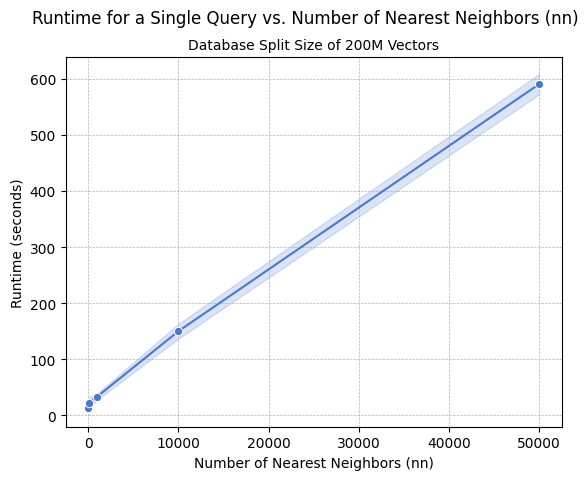
Line graph showing query runtime increasing with number of nearest neighbors

Conclusion

In this post, we showed how Metagenomi was able to store and query billions of protein embeddings at low cost using LanceDB implemented with Amazon S3 and AWS Lambda. This work expands on Metagenomi’s patient-driven mission to create curative genetic medicines by accelerating our discovery and engineering platform. Having quick access to the ANN embedding space of a query protein in seconds has enabled the integration of rapid search methods in our extensive analysis pipelines, accelerated the discovery of several diverse and novel enzyme families, and enabled protein engineering efforts by providing scientists with methods to generate and search embeddings on the fly. As Metagenomi continues to rapidly scale protein and DNA databases, horizontal scaling enabled by database splits that can be indexed and searched in parallel facilitates an embedding database solution that scales to future needs.

The solution outlined in this post focuses on vectors produced by a protein large language model (LLM) but can be applied to other vectorized datasets. To learn more about LanceDB integrated with Amazon S3, refer to the LanceDB documentation.

References

  1. Fournier, Quentin, et al. “Protein language models: is scaling necessary?.” bioRxiv (2024): 2024-09.

About the authors

Run high-availability long-running clusters with Amazon EMR instance fleets

Post Syndicated from Garima Arora original https://aws.amazon.com/blogs/big-data/run-high-availability-long-running-clusters-with-amazon-emr-instance-fleets/

AWS now supports high availability Amazon EMR on EC2 clusters with instance fleet configuration. With high availability instance fleet clusters, you now get the enhanced resiliency and fault tolerance of high availability architecture, along with the improved flexibility and intelligence in Amazon Elastic Compute Cloud (Amazon EC2) instance selection of instance fleets. Amazon EMR is a cloud big data platform for petabyte-scale data processing, interactive analysis, streaming, and machine learning (ML) using open source frameworks such as Apache Spark, Presto and Trino, and Apache Flink. Customers love the scalability and flexibility that Amazon EMR on EC2 offers. However, like most distributed systems running mission-critical workloads, high availability is a core requirement, especially for those with long-running workloads.

In this post, we demonstrate how to launch a high availability instance fleet cluster using the newly redesigned Amazon EMR console, as well as using an AWS CloudFormation template. We also go over the basic concepts of Hadoop high availability, EMR instance fleets, the benefits and trade-offs of high availability, and best practices for running resilient EMR clusters.

High availability in Hadoop

High availability (HA) provides continuous uptime and fault tolerance for a Hadoop cluster. The core components of Hadoop, like Hadoop Distributed File System (HDFS) NameNode and YARN ResourceManager, are single points of failure in clusters with a single primary node. In the event that any of them crash, the entire cluster goes down. High Availability removes this single point of failure by introducing redundant standby nodes that can quickly take over if the primary node fails.

In a high availability EMR cluster, one node serves as the active NameNode that handles client operations, and others act as standby NameNodes. The standby NameNodes constantly synchronize their state with the active one, enabling seamless failover to maintain service availability. To learn more, see Supported applications in an Amazon EMR Cluster with multiple primary nodes.

Key instance fleet differentiations

Amazon EMR recommends using the instance fleet configuration option for provisioning EC2 instances in EMR clusters because it offers a flexible and robust approach to cluster provisioning. Some key advantages include:

  • Flexible instance provisioning – Instance fleets provide a powerful and simple way to specify up to five EC2 instance types on the Amazon EMR console, or up to 30 when using the AWS Command Line Interface (AWS CLI) or API with an allocation strategy. This enhanced diversity helps optimize for cost and performance while increasing the likelihood of fulfilling capacity requirements.
  • Target capacity management – You can specify target capacities for On-Demand and Spot Instances for each fleet. Amazon EMR automatically manages the mix of instances to meet these targets, reducing operational overhead.
  • Improved availability – By spanning multiple instance types and purchasing options such as On-Demand and Spot, instance fleets are more resilient to capacity fluctuations in specific EC2 instance pools.
  • Enhanced Spot Instance handling – Instance fleets offer superior management of Spot Instances, including the ability to set timeouts and specify actions if Spot capacity can’t be provisioned.
  • Reliable cluster launches – You can configure your instance fleet to select multiple subnets for different Availability Zones, allowing Amazon EMR to find the best combination of instances and purchasing options across these zones to launch your cluster in. Amazon EMR will identify the best Availability Zone based on your configuration and available EC2 capacity and launch the cluster.

Prerequisites

Before you launch the high availability EMR instance fleet clusters, make sure you have the following:

  • Latest Amazon EMR release – We recommend that you use the latest Amazon EMR release to benefit from the highest level of resiliency and stability for your high availability clusters. High availability for instance fleets is supported with Amazon EMR releases 5.36.1, 6.8.1, 6.9.1, 6.10.1, 6.11.1, 6.12.0, and later.
  • Supported applications – High availability for instance fleets is supported for applications such as Apache Spark, Presto, Trino, and Apache Flink. Refer to Supported applications in an Amazon EMR Cluster with multiple primary nodes for the complete list of supported applications and their failover processes.

Launch a high availability instance fleet cluster using the Amazon EMR console

Complete the following steps on the Amazon EMR console to configure and launch a high availability EMR cluster with instance fleets:

  1. On the Amazon EMR console, create a new cluster.
  2. For Name, enter a name.
  3. For Amazon EMR release, choose the Amazon EMR release that supports high availability clusters with instance fleets. The setting will default to the latest available Amazon EMR release.

CreateHACluster-EMRRelease

  1. Under Cluster configuration, choose the desired instance types for the primary fleet. (You can select up to five when using the Amazon EMR console.)
  2. Select Use high availability to launch the cluster with three primary nodes.

CreateHACluster

  1. Choose the instance types and target On-Demand and Spot size for the core and task fleet according to your requirements.

InstanceFleet-CreateFleets

  1. Under Allocation strategy, select Apply allocation strategy.
    1. 1 We recommend that you select Price-capacity optimized for your allocation strategy for your cluster for faster cluster provisioning, more accurate Spot Instance allocation, and fewer Spot Instance interruptions.
  2. Under Networking, you can choose multiple subnets for different Availability Zones. This allows Amazon EMR to look across those subnets and launch the cluster in an Availability Zone that best suits your instance and purchasing option requirements.

allocationStrategy

  1. Review your cluster configuration and choose Create cluster.

Amazon EMR will launch your cluster in a few minutes. You can view the cluster details on the Amazon EMR console.
ClusterDetailPage

Launch a high availability cluster with AWS CloudFormation

To launch a high availability cluster using AWS CloudFormation, complete the following steps:

  1. Create a CloudFormation template with EMR resource type AWS::EMR::Cluster and JobFlowInstancesConfig property types MasterInstanceFleet, CoreInstanceFleet and (optional) TaskInstanceFleets. To launch a high availability cluster, configure TargetOnDemandCapacity=3, TargetSpotCapacity=0 for the primary instance fleet and weightedCapacity=1 for each instance type configured for the fleet. See the following code:
{
  "AWSTemplateFormatVersion": "2010-09-09",
  "Resources": {
    "cluster": {
      "Type": "AWS::EMR::Cluster",
      "Properties": {
        "Instances": {
          "Ec2SubnetIds": [
            "subnet-003c889b8379f42d1",
            "subnet-0382aadd4de4f5da9",
            "subnet-078fbbb77c92ab099"
          ],
          "MasterInstanceFleet": {
            "Name": "HAPrimaryFleet",
            "TargetOnDemandCapacity": 3,
            "TargetSpotCapacity": 0,
            "InstanceTypeConfigs": [
              {
                "InstanceType": "m5.xlarge",
                "WeightedCapacity": 1
              },
              {
                "InstanceType": "m5.2xlarge",
                "WeightedCapacity": 1
              },
              {
                "InstanceType": "m5.4xlarge",
                "WeightedCapacity": 1
              }
            ]
          },
          "CoreInstanceFleet": {
            "Name": "cfnCore",
            "InstanceTypeConfigs": [
              {
                "InstanceType": "m5.xlarge",
                "WeightedCapacity": 1
              },
              {
                "InstanceType": "m5.2xlarge",
                "WeightedCapacity": 2
              },
              {
                "InstanceType": "m5.4xlarge",
                "WeightedCapacity": 4
              }
            ],
            "LaunchSpecifications": {
              "SpotSpecification": {
                "TimeoutAction": "SWITCH_TO_ON_DEMAND",
                "TimeoutDurationMinutes": 20,
                "AllocationStrategy": "PRICE_CAPACITY_OPTIMIZED"
              }
            },
            "TargetOnDemandCapacity": "4",
            "TargetSpotCapacity": 0
          },
          "TaskInstanceFleets": [
            {
              "Name": "cfnTask",
              "InstanceTypeConfigs": [
                {
                  "InstanceType": "m5.xlarge",
                  "WeightedCapacity": 1
                },
                {
                  "InstanceType": "m5.2xlarge",
                  "WeightedCapacity": 2
                },
                {
                  "InstanceType": "m5.4xlarge",
                  "WeightedCapacity": 4
                }
              ],
              "LaunchSpecifications": {
                "SpotSpecification": {
                  "TimeoutAction": "SWITCH_TO_ON_DEMAND",
                  "TimeoutDurationMinutes": 20,
                  "AllocationStrategy": "PRICE_CAPACITY_OPTIMIZED"
                }
              },
              "TargetOnDemandCapacity": "0",
              "TargetSpotCapacity": 4
            }
          ]
        },
        "Name": "TestHACluster",
        "ServiceRole": "EMR_DefaultRole",
        "JobFlowRole": "EMR_EC2_DefaultRole",
        "ReleaseLabel": "emr-6.15.0",
        "PlacementGroupConfigs": [
          {
            "InstanceRole": "MASTER",
            "PlacementStrategy": "SPREAD"
          }
        ]
      }
    }
  }
}

Make sure to use an Amazon EMR release that supports high availability clusters with instance fleets.

  1. Create a CloudFormation stack with the preceding template:
aws cloudformation create-stack --stack-name HAInstanceFleetCluster --template-body file://cfn-template.json --region us-east-1
  1. Retrieve the cluster ID from the list-clusters response to use in the following steps. You can further filter this list based on filters like cluster status, creation date, and time.
aws emr list-clusters --query "Clusters[?Name=='<YourClusterName>']"
  1. Run the following describe-cluster command:
aws emr describe-cluster --cluster-id j-XXXXXXXXXXX --region us-east-1

If the high availability cluster was launched successfully, the describe-cluster response will return the state of the primary fleet as RUNNING and provisionedOnDemandCapacity as 3. By this point, all three primary nodes have been started successfully.

DescribeClusterResponse

Primary node failover with High Availability clusters

To fetch information on all EC2 instances for an instance fleet, use the list-instances command:

aws emr list-instances --cluster-id j-XXXXXXXXXXX --instance-fleet-type MASTER --region us-east-1

For high availability clusters, it will return three instances in RUNNING state for the primary fleet and other attributes like public and private DNS names.

PrimaryInstance-DescribeCluster

The following screenshot shows the instance fleet status on the Amazon EMR console.

Instancefleet status

Let’s examine two cases for primary node failover.

Case 1: One of the three primary instances is accidentally stopped

When an EC2 instance is accidentally stopped by a user, Amazon EMR detects this and performs a failover for the stopped primary node. Amazon EMR also attempts to launch a new primary node with the same private IP and DNS name to recover back the quorum. During this failover, the cluster remains fully operational, providing true resiliency to single primary node failures.

The following screenshots illustrate the instance fleet details.

InstanceFleetDetail-PrimaryInstanceTerminated

instanceFleerRecovery

This automatic recovery for primary nodes is also reflected in the MultiMasterInstanceGroupNodesRunning or MultiMasterInstanceGroupNodesRunningPercentage Amazon CloudWatch metric emitted by Amazon EMR for your cluster. The following screenshot shows an example of these metrics.

CloudwatchMetrics

Case 2: One of the three primary instances becomes unhealthy

If Amazon EMR continuously receives failures when trying to connect to a primary instance, it is deemed as unhealthy and Amazon EMR will attempt to replace it. Similar to case 1, Amazon EMR will perform a failover for the stopped primary node and also attempt to launch a new primary node with the same private IP and DNS name to recover the quorum.

UnhealthyPrimaryInstance
PrimaryInstanceFailover-2

If you list the instances for the primary fleet, the response will include information for the EC2 instance that was stopped by the user and the new primary instance that replaced it with the same private IP and DNS name.
DescribeClusterResponse-instanceFailover

The following screenshot shows an example of the CloudWatch metrics.

An instance can have connection failures for multiple reasons, including but not limited to disk space unavailable on the instance, critical cluster daemons like instance controller shut down with errors, high CPU utilization, and more. Amazon EMR is continuously improving its health monitoring criteria to better identify unhealthy nodes on an EMR cluster.

Considerations and best practices

The following are some of the key considerations and best practices for using EMR instance fleets to launch a high availability cluster with multiple primary nodes:

  • Use the latest EMR release – With the latest EMR releases, you get the highest level of resiliency and stability for your high availability EMR clusters with multiple primary nodes.
  • Configure subnets for high availability – Amazon EMR can’t replace a failed primary node if the subnet is oversubscribed (there aren’t any available private IP addresses in the subnet). This results in a cluster failure as soon as the second primary node fails. Limited availability of IP addresses in a subnet can also result in cluster launch or scaling failures. To avoid such scenarios, we recommend that you dedicate an entire subnet to an EMR cluster.
  • Configure core nodes for enhanced data availability – To minimize the risk of local HDFS data loss on your production clusters, we recommend that you set the dfs.replication parameter to 3 and launch at least four core nodes. Setting dfs.replication to 1 on clusters with fewer than four core nodes can lead to data loss if a single core node goes down. For clusters with three or fewer core nodes, set dfs.replication parameter to at least 2 to achieve sufficient HDFS data replication. For more information, see HDFS configuration.
  • Use an allocation strategy – We recommend enabling an allocation strategy option for your instance fleet cluster to provide faster cluster provisioning, more accurate Spot Instance allocation, and fewer Spot Instance interruptions.
  • Set alarms for monitoring primary nodes – You should monitor the health and status of primary nodes of your long-running clusters to maintain smooth operations. Configure alarms using CloudWatch metrics such as MultiMasterInstanceGroupNodesRunning, MultiMasterInstanceGroupNodesRunningPercentage, or MultiMasterInstanceGroupNodesRequested.
  • Integrate with EC2 placement groups – You can also choose to protect primary instances against hardware failures by using a placement group strategy for your primary fleet. This will spread the three primary instances across separate underlying hardware to avoid loss of multiple primary nodes at the same time in the event of a hardware failure. See Amazon EMR integration with EC2 placement groups for more details.

When setting up a high availability instance fleet cluster with Amazon EMR on EC2, it’s important to understand that all EMR nodes, including the three primary nodes, are launched within a single Availability Zone. Although this configuration maintains high availability within that Availability Zone, it also means that the entire cluster can’t tolerate an Availability Zone outage. To mitigate the risk of cluster failures due to Spot Instance reclamation, Amazon EMR launches the primary nodes using On-Demand instances, providing an additional layer of reliability for these critical components of the cluster.

Conclusion

This post demonstrated how you can use high availability with EMR on EC2 instance fleets to enhance the resiliency and reliability of your big data workloads. By using instance fleets with multiple primary nodes, EMR clusters can withstand failures and maintain uninterrupted operations, while providing enhanced instance diversity and better Spot capacity management within a single Availability Zone. You can quickly set up these high availability clusters using the Amazon EMR console or AWS CloudFormation, and monitor their health using CloudWatch metrics.

To learn more about the supported applications and their failover process, see Supported applications in an Amazon EMR Cluster with multiple primary nodes. To get started with this feature and launch a high availability EMR on EC2 cluster, refer to Plan and configure primary nodes.


About the Authors

Garima Arora is a Software Development Engineer for Amazon EMR at Amazon Web Services. She specializes in capacity optimization and helps build services that allow customers to run big data applications and petabyte-scale data analytics faster. When not hard at work, she enjoys reading fiction novels and watching anime.

Ravi Kumar is a Senior Product Manager Technical-ES (PMT) at Amazon Web Services, specialized in building exabyte-scale data infrastructure and analytics platforms. With a passion for building innovative tools, he helps customers unlock valuable insights from their structured and unstructured data. Ravi’s expertise lies in creating robust data foundations using open-source technologies and advanced cloud computing, that powers advanced artificial intelligence and machine learning use cases. A recognized thought leader in the field, he advances the data and AI ecosystem through pioneering solutions and collaborative industry initiatives. As a strong advocate for customer-centric solutions, Ravi constantly seeks ways to simplify complex data challenges and enhance user experiences. Outside of work, Ravi is an avid technology enthusiast who enjoys exploring emerging trends in data science, cloud computing, and machine learning.

Tarun Chanana is a Software Development Manager for Amazon EMR at Amazon Web Services.

How Volkswagen Autoeuropa built a data solution with a robust governance framework, simplifying access to quality data using Amazon DataZone

Post Syndicated from Dhrubajyoti Mukherjee original https://aws.amazon.com/blogs/big-data/how-volkswagen-autoeuropa-built-a-data-solution-with-a-robust-governance-framework-simplifying-access-to-quality-data-using-amazon-datazone/

This is a joint post co-authored with Martin Mikoleizig from Volkswagen Autoeuropa.

This second post of a two-part series that details how Volkswagen Autoeuropa, a Volkswagen Group plant, together with AWS, built a data solution with a robust governance framework using Amazon DataZone to become a data-driven factory. Part 1 of this series focused on the customer challenges, overall solution architecture and solution features, and how they helped Volkswagen Autoeuropa overcome their challenges. This post dives into the technical details, highlighting the robust data governance framework that enables ease of access to quality data using Amazon DataZone.

At Amazon, we work backward, a systematic way to vet ideas and create new products. The key tenet of this approach is to start by defining the customer experience, then iteratively work backward from that point until the team achieves clarity of thought around what to build. The first section of this post discusses how we aligned the technical design of the data solution with the data strategy of Volkswagen Autoeuropa. Next, we detail the governance guardrails of the Volkswagen Autoeuropa data solution. Finally, we highlight the key business outcomes.

Aligning the solution with the data strategy

At an early stage of the project, the Volkswagen Autoeuropa and AWS team identified that a data mesh architecture for the data solution aligns with the Volkswagen Autoeuropa’s vision of becoming a data-driven factory. With this in mind, the team implemented the following steps:

  • Define data domains – In a workshop, the team identified the data landscape and its distribution in Volkswagen Autoeuropa. Next, the team grouped the data assets of the organization along the lines of business and defined the data domains. Because Volkswagen Autoeuropa is at an early stage of their data mesh journey, defining data domains along the lines of business is the recommended approach. As the data solution evolves, Volkswagen Autoeuropa might consider other criteria such as business subdomains to define data domains. The team defined more than five data domains, such as production, quality, logistics, planning, and finance.
  • Identify pioneer cases – The team identified the pioneer use cases that onboard the data solution first, to validate its business value. The team identified two use cases. The first use case helps predict test results during the car assembly process. The second use case enables the creation of reports containing shop floor key metrics for different management levels. The following criteria were considered to identify these use cases:
    • Use cases that deliver measurable business value for Volkswagen Autoeuropa.
    • Use cases with high AWS maturity.
    • Use cases whose requirements can be met with the first release version of the data solution.
  • Onboard key data products – The team identified the key data products that enabled these two use cases and aligned to onboard them into the data solution. These data products belonged to data domains such as production, finance, and logistics. In addition, the team aligned on business metadata attributes that would help with data discovery. The data products are classified as either source-based data or consumer-based data. Source-based data is the unaltered, raw data that is generated from source systems (for example, quality data, safety data) and is useful for other business use cases. Consumer-based data is the aggregated and transformed data from source systems. Reuse of consumer-based data saves cost in extract, transform, and load (ETL) implementation and system maintenance.

In addition to the preceding steps, the team established a data quality framework to improve the quality of the data product registered in the data solution. The following table shows the mapping of the data mesh-based solution components to Amazon DataZone and AWS Glue features. The table also provides generic examples of the components in the automotive industry.

Data Solution Components AWS Service Features Generic Examples
Data domains Amazon DataZone projects and Amazon DataZone domain units Production, logistics
Use cases Amazon DataZone projects Smart manufacturing, predictive maintenance
Data products Amazon DataZone assets Sales data, sensor data
Business metadata Amazon DataZone glossaries and metadata forms Data product owner information, data refresh frequency
Data quality framework AWS Glue Data Quality  A quality score of 92%

Empowering teams with a governance framework

This section discusses the governance framework that was put in place to empower the teams at Volkswagen Autoeuropa by enhancing their analytics journey. It highlights the guardrails that enable ease of access to quality data.

Business metadata

Business metadata helps users understand the context of the data, which can lead to increased trust in the data. Moreover, establishing a common set of attributes of the data products promotes a consistent experience for the users. In addition to the business context, at Volkswagen Autoeuropa, the metadata includes information related to data classification and if the data contains personally identifiable information (PII). The data solution uses Amazon DataZone glossaries and metadata forms to provide business context to their data. Apart from the previous benefits, using the appropriate keywords in Amazon DataZone glossary terms and metadata forms can help with the search and filtering capability of data products in the Amazon DataZone data portal.

Data quality framework

The data quality framework is a comprehensive solution designed to streamline the process of data quality checks and publishing a quality score. It uses AWS Glue Data Quality to generate recommendation rulesets, run orchestrated jobs, store results, and send notifications. This framework can be seamlessly integrated into an AWS Glue job, providing a quality score for data pipeline jobs. The quality score of a data product is published in the Amazon DataZone data portal for consumers to evaluate. The key components of the solution are as follows:

  • Recommendation ruleset generation – The framework generates tailored rulesets based on metadata from the AWS Glue Data Catalog table, providing relevant and comprehensive quality checks.
  • Orchestrated job execution – Jobs are run in AWS Step Functions to perform data quality checks using the generated rulesets against data sources, evaluating data quality based on defined rules and criteria.
  • Result storage and notification – Results, including quality scores, quality status, and rulesets checked, are stored in an Amazon Simple Storage Service (Amazon S3) bucket, maintaining a historical record. End-users receive notifications with relevant details.
  • Data quality score publishing – The quality scores are published in the Amazon DataZone data portal, enabling consumers to access and evaluate data quality.
  • Subscription and quality score requirements – Consumers can subscribe to data sources or targets based on their desired quality score thresholds, making sure they receive data that meets their specific needs and standards.
  • Integration and extensibility – The framework is designed for seamless integration into existing AWS Glue jobs or data pipelines and provides a flexible and extensible architecture for customization and enhancement.

Federated governance

Federated governance empowers producer and consumer teams to operate independently while adhering to a central governance model. For the data solution at Volkswagen Autoeuropa, this meant a centralized team defined the governance guardrails and decentralized data teams employed those guardrails. The following are a few examples of how the team established federated governance in Volkswagen Autoeuropa:

  • Management of Amazon DataZone glossaries and metadata forms – In this mechanism, the Volkswagen Autoeuropa IT team defined the Amazon DataZone glossaries and metadata forms in a central manner. The data teams used them to publish the data assets in the Amazon DataZone. This provides consistency of business metadata across the organization. The following figure explains the process.
    The workflow in the Amazon DataZone data portal consists of the following steps:
    1. The data solution administrator belonging to the Volkswagen Autoeuropa IT team aligns with stakeholders such as data producers, data consumers, and source system owners, and maintains the business metadata using the Amazon DataZone glossaries and metadata forms.
    2. The producer project teams use the Amazon DataZone glossary terms and fill the Amazon DataZone metadata forms to enrich the inventory assets.
    3. After the business metadata is populated, the team publishes the assets in the Amazon DataZone data portal.
  • Management of Amazon DataZone project membership – In this scenario, the management of Amazon DataZone project membership is delegated to a designated administrator of the project. The following figure explains the process.
    The workflow consists of the following steps:
    1. The data solution administrator belonging to the Volkswagen Autoeuropa IT team provisions the Amazon DataZone project and environment using automation. The data solution administrator is the owner of the project.
    2. The data solution administrator delegates the management of the Amazon DataZone project membership to a designated administrator by assigning the owner role.
    3. The Amazon DataZone project administrator assigns the contributor role to eligible users.
    4. The users access the Amazon DataZone project and its assets from the Amazon DataZone data portal.

Authentication and authorization

The Amazon DataZone portal supports two types of authorizations: AWS Identity and Access Management (IAM) roles and AWS IAM Identity Center users. The data solution supports both of these authorization methods. The choice of authentication mechanism is a function of the type of authorization used for Amazon DataZone.

For IAM role authorization, an IAM role is created for each user, incorporating a prefix. Each data solution user role has a permission to list the Amazon DataZone domains (datazone:ListDomains) and to get the data portal login URL (datazone:GetIamPortalLoginUrl) in the Amazon DataZone AWS account. For reasons that are out of scope for this post, there could only be three SAML federated roles in an AWS account in the customer environment. As such, the team didn’t have a dedicated SAML federated role for each Amazon DataZone user. The data solution user role implemented a trust policy allowing the user’s AWS Security Token Service (AWS STS) federated user session principal Amazon Resource Name (ARN). If you don’t have limitations on the number of SAML federated roles per AWS account, you can make all data solution user roles SAML federated roles and update the trust policy accordingly.

For IAM Identity Center authorization, the configuration is done either at the AWS Organizations level or AWS account level in IAM Identity Center. Because there are currently no APIs available for identity source configuration in IAM Identity Center, the team followed the appropriate instructions to configure the identity source on the AWS Management Console.

After the chosen authorization option is activated, Amazon DataZone administrators grant the IAM principals (IAM role or IAM Identity Center user) access to the Amazon DataZone portal. For more details, refer to Manage users in the Amazon DataZone console.

Business outcomes

Volkswagen Autoeuropa and AWS established an iterative mechanism to enable the continuous growth of the data solution. This iterative improvement is expressed as a flywheel as shown in the following figure.

The outcome of each component of the flywheel powers the next component, creating a virtuous cycle. The data solution flywheel consists of five components:

  1. Data solution growth – The primary focus of the flywheel is to accelerate the growth of the data solution. This growth is measured by metrics such as number of data products, number of use cases onboarded into the solution, and number of users.
  2. Enhancing user experience – This component focuses on enhancing the user experience of the data solution. One way to measure the user experience is through user feedback surveys.
  3. Data solution use cases – Improved, positive user experience with the data solution contributes to the increased number of use cases that want to onboard the data solution.
  4. Data producers and consumers – As the number of use cases increases, so does the number of data producers and consumers. Data producers make data available to power the use cases. Data consumers use the data to drive the use cases.
  5. Selection of data products – After data producers onboard the data solution, they publish the assets in the Amazon DataZone data portal. This leads to a larger selection of data products. This, in turn, creates a positive experience for the data solution users.

In addition to the previous components, the positive user experience is reinforced by improving governance guardrails, increasing number of reusable assets, and maximizing operational excellence.

As of writing this post, Volkswagen Autoeuropa reduced the time to discover data from days to minutes using the data solution. This led to approximately 384 times improvement in data discovery time. Data access took several weeks before the Volkswagen Autoeuropa and AWS collaboration. With the help of the data solution powered by Amazon DataZone, the data access time was reduced to minutes. Overall, the data solution resulted in regaining between 48 hours and weeks of customer productivity over the course of a month.

The data solution powered by Amazon DataZone is driving measurable business impact for Volkswagen Autoeuropa. It enables Volkswagen Autoeuropa to deliver digital use cases faster, with less effort, and a higher overall quality. Volkswagen Autoeuropa believes that Amazon DataZone will be key in their journey to become a data-driven factory and to leverage AI.

Conclusion

This post explored how Volkswagen Autoeuropa built a robust and scalable data solution using Amazon DataZone. The first step was to align the solution with Volkswagen Autoeuropa’s overarching data strategy to drive business value.

The establishment of a comprehensive governance framework was central to this effort. This framework encompasses key components, such as business metadata, data quality, federated governance, access controls, and security, which maintain the trustworthiness and reliability of Volkswagen Autoeuropa’s data assets. The post highlighted the Volkswagen Autoeuropa data solution flywheel, showcasing how the solution enabled improved decision-making, increased operational efficiency, and accelerated digital transformation initiatives across the organization.

The data solution built at Volkswagen Autoeuropa is one of the first implementations within the Volkswagen Group and is a blueprint for other Volkswagen production plants.

“This project is a blueprint for other Volkswagen production plants. By involving the AWS team and using Amazon DataZone, we are able to govern our data centrally and make it accessible in an automated and secure way.”

– Daniel Madrid, Head of IT, Volkswagen Autoeuropa.

If you’re looking to harness the power of data mesh to drive innovation and business value within your organization, we’ve got you covered. In Strategies for building a data mesh-based enterprise solution on AWS, we dive deep into the key considerations and current recommendations to establish a robust, scalable, and well-governed data mesh on AWS. This documentation covers everything from aligning your data mesh with overall business strategy to implementing the data mesh strategy framework.

To get hands-on experience with real-world code examples, see our GitHub repository. This open source project provides a step-by-step blueprint for constructing a data mesh architecture using the powerful capabilities of Amazon DataZone, AWS Cloud Development Kit (AWS CDK), and AWS CloudFormation.


About the Authors

BDB-4558-DhrubaDhrubajyoti Mukherjee is a Cloud Infrastructure Architect with a strong focus on data strategy, data analytics, and data governance at AWS. He uses his deep expertise to provide guidance to global enterprise customers across industries, helping them build scalable and secure AWS solutions that drive meaningful business outcomes. Dhrubajyoti is passionate about creating innovative, customer-centric solutions that enable digital transformation, business agility, and performance improvement. An active contributor to the AWS community, Dhrubajyoti authors AWS Prescriptive Guidance publications, blog posts, and open source artifacts, sharing his insights and best practices with the broader community. Outside of work, Dhrubajyoti enjoys spending quality time with his family and exploring nature through his love of hiking mountains.

BDB-4558-RaviRavi Kumar is a Data Architect and Analytics expert at AWS, where he finds immense fulfilment in working with data. His days are dedicated to designing and analyzing complex data systems, uncovering valuable insights that drive business decisions. Outside of work, he unwinds by listening to music and watching movies, activities that allow him to recharge after a long day of data wrangling.

Martin Mikoleizig studied mechanical engineering and production technology at the RWTH Aachen University before starting to work in Dr. h.c. Ing. F. Porsche AG 2015 as a production planner for the engine assembly. Over several years as a Project Manager on Testing Technology for new engine models, he also introduced several innovations like human-machine collaborations and intelligent assistance systems. Starting in 2017, he was responsible for the shop floor IT team of the module lines in Zuffenhausen before he became responsible for the planning of the E-Drive assembly at Porsche. Additionally, he was responsible for the Digitalisation Strategy of the Production Ressort at Porsche. In October 2022, he was assigned to Volkswagen Autoeuropa in Portugal in the role of a Digital Transformation Manager for the plant, driving the digital transformation towards a data-driven factory.

BDB-4558-WeiWeizhou Sun is a Lead Architect at AWS, specializing in digital manufacturing solutions and IoT. With extensive experience in Europe, she has enhanced operational efficiencies, reducing latency and increasing throughput. Weizhou’s expertise includes industrial computer vision, predictive maintenance, and predictive quality, consistently delivering top performance and client satisfaction. A recognized thought leader in IoT and remote driving, she has contributed to business growth through innovations and open source work. Committed to knowledge sharing, Weizhou mentors colleagues and contributes to practice development. Known for her problem-solving skills and customer focus, she delivers solutions that exceed expectations. In her free time, Weizhou explores new technologies and fosters a collaborative culture.

BDB-4558-AjinkyaAjinkya Patil is a Senior Security Architect with AWS Professional Services, specializing in security consulting for customers in the automotive industry. Since joining AWS in 2019, he has played a key role in helping automotive companies design and implement robust security solutions on AWS. Ajinkya is an active contributor to the AWS community, having presented at AWS re:Inforce and authored articles for the AWS Security Blog and AWS Prescriptive Guidance. Outside of his professional pursuits, Ajinkya is passionate about travel and photography, often capturing the diverse landscapes he encounters on his journeys.

BDB-4558-AdjoaAdjoa Taylor has over 20 years of experience in industrial manufacturing, providing industry and technology consulting services, digital transformation, and solution delivery. Currently, Adjoa leads Product Centric Digital Transformation, enabling customers in solving complex manufacturing problems using smart factory and industry-leading transformation mechanisms. Most recently, she drives value with AI/ML and generative AI use cases for the plant floor. Adjoa is an experienced leader, having spent over 20 years of her career delivering projects in countries throughout North America, Latin America, Europe, and Asia. Adjoa brings deep experience across multiple business segments with a focus on business outcome-driven solutions. Adjoa is passionate about helping customers solve problems while realizing the art of the possible through implementing value-based solutions.

How Volkswagen Autoeuropa built a data mesh to accelerate digital transformation using Amazon DataZone

Post Syndicated from Dhrubajyoti Mukherjee original https://aws.amazon.com/blogs/big-data/how-volkswagen-autoeuropa-built-a-data-mesh-to-accelerate-digital-transformation-using-amazon-datazone/

This is a joint blog post co-authored with Martin Mikoleizig from Volkswagen Autoeuropa.

Volkswagen Autoeuropa is a Volkswagen Group plant that produces the T-Roc. The plant is located near Lisbon, Portugal and produces about 934 cars per day. In 2023, Volkswagen Autoeuropa represented 1.3% of the national GDP of Portugal and 4% in national export of goods impact with a sales volume of 3.3511 billion Euros. Volkswagen Autoeuropa aims to become a data-driven factory and has been using cutting-edge technologies to enhance digitalization efforts.

In this post, we discuss how Volkswagen Autoeuropa used Amazon DataZone to build a data marketplace based on data mesh architecture to accelerate their digital transformation. The data mesh, built on Amazon DataZone, simplified data access, improved data quality, and established governance at scale to power analytics, reporting, AI, and machine learning (ML) use cases. As a result, the data solution offers benefits such as faster access to data, expeditious decision making, accelerated time to value for use cases, and enhanced data governance.

Understanding Volkswagen Autoeuropa’s challenges

At the time of writing this post, Volkswagen Autoeuropa has already implemented more than 15 successful digital use cases in the context of real-time visualization, business intelligence, industrial computer vision, and AI.

Before the AWS partnership, Volkswagen Autoeuropa faced the following challenges.

  • Long lead time to access data – The digital use cases launched by Volkswagen Autoeuropa spent most of their project time getting access to the data that was relevant to their use cases. After the right data for the use case was found, the IT team provided access to the data through manual configuration. The lead time to access data was often from several days to weeks.
  • Insufficient data governance and auditing – Data was shared directly to use cases by copying it. Therefore, the IT team connected the data manually from their sources to the desired destinations multiple times. This process wasn’t centrally tracked to discover any information on the data sharing process. For example, if the data was copied in the past, how many use cases have access to the data, when access was granted, and who granted the access.
  • Redundant effort to process the same information – Because the IT team copied the data sources based on the exact use case requirements, they shared specific columns of the tables from the data. As additional use cases requested access to the same data with different column requirements, even more copies of the data were created.
  • Repeated process to establish security and governance guardrails – Each time the IT and the security team provided a connection to a new data source, they had to set up the security and governance guardrails. This required repeated manual effort.
  • Data quality issues – Because the data was processed redundantly and shared multiple times, there was no guarantee of or control over the quality of the data. This led to reduced trust in the data.
  • Absence of data catalog and metadata management – Data didn’t have any metadata associated with it, and so use cases couldn’t consume the data without further explanation from the data source owners and specialists. Furthermore, no process to discover new data existed. Similar to the consumption process, use cases would consult specialists to understand the context of the data and if it could provide value.

Envisioning a data solution for Volkswagen Autoeuropa

To address these challenges, Volkswagen Autoeuropa embarked on a bold vision. They envisioned a seamless data consumption process, similar to an online shopping experience. They envisioned a data marketplace where data users could browse and access high-quality, secure data with clear specifications, business context, and relevant attributes. This vision materialized into a project aimed at transforming data accessibility and governance as the foundation for the digital ecosystem. The vision to be realized: Data as seamless as online shopping.

In collaboration with Amazon Web Services (AWS), Volkswagen Autoeuropa joined the Enhanced Plant Onboarding Program of the Global Volkswagen Group’s Digital Production Platform (DPP EPO) strategy. Through this partnership, AWS and Volkswagen Autoeuropa created a data marketplace that significantly improved data availability.

In the discovery phase of the project, Volkswagen Autoeuropa and AWS evaluated several options to build the data solution. In the end, Volkswagen Autoeuropa chose a solution based on data mesh architecture using Amazon DataZone. Being a managed service, Amazon DataZone provided the necessary speed and agility to build the solution. At the same time, it led to higher operational efficiencies and lower operational overhead. The team adopted a data mesh architecture because the principles of the data mesh aligned with Volkswagen Autoeuropa’s vision of being a data driven factory.

Solution overview

This section describes the key features and architecture of the Volkswagen Autoeuropa data solution. The solution is based on a data mesh architecture.

Data solution features

The following figure shows the key capabilities of the Volkswagen Autoeuropa data solution.

The key capabilities of the solution are:

  • Data quality – In the solution, we’ve built a data quality framework to streamline the process of data quality checks and publishing quality scores. It uses AWS Glue Data Quality to generate recommendation rulesets, run orchestrated jobs, store results, and send notifications to users. This framework can be seamlessly integrated into AWS Glue jobs, providing a quality score for data pipeline jobs. In addition, the quality score is published in the Amazon DataZone data portal, allowing consumers to subscribe to the data based on its quality score.Assigning a quality score to the data helps build trust in the data, and shifts the responsibility of maintaining data quality to the data owner. As a result, the quality of the results delivered by these use cases improves.
  • Data registration – The producers sign in to the Amazon DataZone data portal using their AWS Identity and Access Management (IAM) credentials or single sign-on with integration through AWS IAM Identity Center. They register their data assets, which are stored in Amazon Simple Storage Service (Amazon S3), in the Amazon DataZone data catalog. The metadata of the data assets is stored in an AWS Glue catalog and made available in the business data catalog of Amazon DataZone and in the Amazon DataZone data source. The producers add business context such as business unit name, data owner contact information, and data refresh frequency using Amazon DataZone glossaries and metadata forms. In addition, they use generative AI capabilities to generate business metadata. After the business metadata is generated, they review the changes and modify the metadata if needed.Because all data products in Volkswagen Autoeuropa are now registered in the same location, the likelihood of data duplication is significantly reduced. Moreover, the data producers are improving the quality of the data by adding business context to it.
  • Data discovery – The consumers sign in to the Amazon DataZone data portal using their IAM credentials or single sign-on with integration through IAM Identity Center and search the data using keywords in the search bar. After the results are returned, they can further filter the results using glossary terms and project names. Finally, they review the business metadata of the data assets to evaluate if the data is relevant to their business use cases. They can check the quality score of the data assets and the refresh schedule for their use cases.With a data discovery capability in place, consumers can gain information about the data without the need to consult the source system owners or specialists.
  • Data access management – When the consumers find a data asset that’s relevant to their use case, they request access to it using the subscription feature of Amazon DataZone. Data is classified as public, internal, and confidential. For public and internal data assets, the access request is automatically approved. For confidential data assets, the data producer team reviews the access request and either accepts or rejects the subscription request.With a central place to manage data access, data owners can view which use cases have access to their data and when the access request was granted. The fine-grained access control feature of Amazon DataZone gives data owners granular control of their data at the row and column levels.
  • Data consumption – Upon approval of the subscription request, Amazon DataZone provisions the backend infrastructure to make the data accessible to the corresponding consumers. After this process is complete, the consumers can access the data through Amazon Athena using the deep link feature of Amazon DataZone. The data consumption pattern in Volkswagen Autoeuropa supports two use cases:
    • Cloud-to-cloud consumption – Both data assets and consumer teams or applications are hosted in the cloud.
    • Cloud-to-on-premises consumption – Data assets are hosted in the cloud and consumer use cases or applications are hosted on-premises.

Requirements specific to a use case requires access to the relevant data assets; sharing data to use cases using Amazon DataZone doesn’t require creating multiple copies. As a result, duplication and processing of data. Furthermore, by reducing the number of copies of the data, the overall quality of the data products improves. In addition, the backend automation of Amazon DataZone to make data available to use cases reduces the manual effort and improves the lead time to access data.

  • Single collaborative environment – The Amazon DataZone data portal provides a single collaborative environment to the users in Volkswagen Autoeuropa. Data consumers such as use case owners, data engineers, data scientists, and ML engineers can browse and request access to data assets. At the same time, data producers, such as use case owners and source system owners, can publish and curate their data in the Amazon DataZone data portal. This collaborative experience promotes teamwork and accelerates the realization of business value. Furthermore, the security and governance guardrails scales across the organization as the number of use cases increases.

Data solution architecture

The following figure displays the reference architecture of the data solution at Volkswagen Autoeuropa. In the next part of the post, we discuss how we arrived at the solution.

The architecture includes:

  1. The data from SAP applications, manufacturing execution systems (MES), and supervisory control and data acquisition (SCADA) systems is ingested into the producer accounts of Volkswagen Autoeuropa.
  2. In the producer account, raw data is transformed using AWS Glue. The technical metadata of the data is stored in AWS Glue catalog. The data quality is measured using the data quality framework. The data stored in Amazon Simple Storage Service (Amazon S3) is registered as an asset in the Amazon DataZone data catalog hosted in the central governance account.
  3. The central governance account hosts the Amazon DataZone domain and the related Amazon DataZone data portal. The AWS accounts of the data producers and consumers are associated with the Amazon DataZone domain. Amazon DataZone projects belonging to the data producers and consumers are created under the related Amazon DataZone domain units.
  4. Consumers of the data products sign in to the Amazon DataZone data portal hosted in the central governance account using their IAM credentials or single sign-on with integration through IAM Identity Center. They search, filter, and view asset information (for example, data quality, business, and technical metadata).
  5. After the consumer finds the asset they need, they request access to the asset using the subscription feature of Amazon DataZone. Based on the validity of the request, the asset owner approves or rejects the request.
  6. After the subscription request is granted and fulfilled, the asset is accessed in the consumer account for a one-time query using Athena and Microsoft Power BI applications hosted on premises. This consumption pattern can be extended for AI and machine learning (AI/ML) model development using Amazon SageMaker and reporting purposes using Amazon QuickSight.

User journey

After discussing the desired system with the use case teams and stakeholders and analyzing the current workflow, Volkswagen Autoeuropa grouped the user personas of the data solution into three main categories: data producer, data consumer, and data solution administrator. This sets the foundation for the desired user experience and what’s needed to achieve the solution goals.

Data producer

Data producers create the data products in the data solution. There are two types of data producers.

  • Data source owners – Data source owners publish the raw data in the Amazon DataZone data portal. These data products are attributed as source-based data.
  • Use case owners – Use case owners publish data that’s fit for consumption by other use cases. These data products are called consumer-based data.

The following figure shows the user journey of a data producer:


A data producer’s journey includes:

  1. Identify data of interest
    1. Identify data (Volkswagen Autoeuropa network).
    2. Perform data quality checks (Volkswagen Autoeuropa network).
  2. Connect data to the data solution
    1. Ingest data into the data solution (Amazon DataZone portal).
    2. Start process to connect data using AWS Glue.
  3. Locate the data source in the data solution
    1. Register data (Amazon DataZone portal).
    2. Add data to the inventory in Amazon DataZone.
  4. Add or edit metadata
    1. Add or edit metadata (Amazon DataZone portal).
    2. Publish data assets (Amazon DataZone portal).
  5. Approve or reject subscription request
    1. Review subscription requests.
  6. Maintain data assets
    1. Manage data assets (Amazon DataZone portal).

Data consumer

Data consumers use data for business analytics, machine learning, AI, and business reporting. Data consumers are data engineers, data scientists, ML engineers, and business users. The following diagram shows the journey of a data consumer.

A data consumer’s journey includes:

  1. Access Amazon DataZone portal
    1. Amazon DataZone portal – Access is granted based on the user’s assigned domain and projects.
  2. Search for data assets
    1. Data assets in Amazon DataZone portal – Search for data and brows the results by glossary terms or the project name. Use additional filters to refine the results.
  3. View business metadata
    1. Select a data asset to see additional information – Review the description, data quality score and metadata.
  4. Request access to data (subscribe)
    1. Subscribe to request access.
    2. After the subscription request is approved, review the data products that you have access to.
    3. Query the data to view and consume the data.
  5. Retrieve additional data
    1. Repeat the steps as needed to access and retrieve additional data.

Data solution administrator

Data solution administrators are responsible for performing administrative tasks on the data solution. The following figure shows the common tasks performed by the data solution administrator.

A data administrator’s journey includes:

  1. Manage projects
    1. Manage Amazon DataZone domain.
    2. Manage Amazon DataZone projects within the domain.
  2. Manage environment
    1. Set up the environment to manage the infrastructure.
  3. Manage business metadata glossary
    1. Manage and enable Amazon DataZone glossaries and metadata forms.
  4. Manage data assets
    1. Manage assets.
    2. Query the data to view and consume the data.
  5. Manage access to data solution
    1. Monitor and revoke access when appropriate.

Conclusion

In this post, you learned how Volkswagen Autoeuropa embarked on a bold vision to become a data driven factory. It shows how this vision was put into action by building a data solution based on data mesh architecture using Amazon DataZone. It highlights the key features and architecture of the data solutions and presents the user journey. As of writing this post, Volkswagen Autoeuropa reduced the data discovery time from days to minutes using the data solution. The time to access data took several weeks before the Volkswagen Autoeuropa and AWS collaboration. Now, with the help of the data solution, the data access time has been reduced to several minutes.

In May 2024, the team achieved a major milestone by successfully offering data on the data solution and transporting it instantly to Power BI, a process that previously took several weeks.

“After one year of work, we did the full roundtrip from offering data on our new data marketplace built using Amazon DataZone to transporting it instantly to third-party tools, a process that previously took several weeks. This was a big achievement for our team.”

– Jorge Paulino, Product owner of the data solution. Volkswagen Autoeuropa.

The next post of the two-part series details discusses how we built the solution, its technical details, and the business value created.

If you want to harness the agility and scalability of a data mesh architecture and Amazon DataZone to accelerate innovation and drive business value for your organization, we have the resources to get you started. Be sure to check out the AWS Prescriptive Guidance: Strategies for building a data mesh-based enterprise solution on AWS. This comprehensive guide covers the key considerations and best practices for establishing a robust, well-governed data mesh on AWS. From aligning your data mesh with overall business strategy to scaling the data mesh across your organization, this Prescriptive Guidance provides a clear roadmap to help you succeed.

If you’re curious to get hands-on, see the GitHub repository: Building an enterprise Data Mesh with Amazon DataZone, Amazon DataZone, AWS CDK, and AWS CloudFormation. This open source project delivers a step-by-step guide to build a data mesh architecture using Amazon DataZone, AWS Cloud Development Kit (AWS CDK), and AWS CloudFormation.


About the Authors

Dhrubajyoti Mukherjee is a Cloud Infrastructure Architect with a strong focus on data strategy, data analytics, and data governance at Amazon Web Services (AWS). He uses his deep expertise to provide guidance to global enterprise customers across industries, helping them build scalable and secure AWS solutions that drive meaningful business outcomes. Dhrubajyoti is passionate about creating innovative, customer-centric solutions that enable digital transformation, business agility, and performance improvement. An active contributor to the AWS community, Dhrubajyoti authors AWS Prescriptive Guidance publications, blog posts, and open-source artifacts, sharing his insights and best practices with the broader community. Outside of work, Dhrubajyoti enjoys spending quality time with his family and exploring nature through his love of hiking mountains.

Ravi Kumar is a Data Architect and Analytics expert at Amazon Web Services; he finds immense fulfillment in working with data. His days are dedicated to designing and analyzing complex data systems, uncovering valuable insights that drive business decisions. Outside of work, he unwinds by listening to music and watching movies, activities that allow him to recharge after a long day of data wrangling.

Martin Mikoleizig studied mechanical engineering and production technology at the RWTH Aachen University before starting to work in Dr. h.c. Ing. F. Porsche AG 2015 as a production planner for the engine assembly. In several years as a Project Manager on Testing Technology for new engine models he also introduced several innovations like human-machine-collaborations and intelligent assistance systems. From 2017, he was responsible for the Shopfloor IT team of the module lines in Zuffenhausen before he became responsible for the Planning of the E-Drive assembly at Porsche. Beside this he was responsible for the Digitalisation Strategy of the Production Ressort at Porsche. Since October 2022, he has been assigned to Volkswagen Autoeuropa in Portugal in the role of a Digital Transformation Manager for the plant driving the Digital Transformation towards a Data Driven Factory.

Weizhou Sun is a Lead Architect at Amazon Web Services, specializing in digital manufacturing solutions and IoT. With extensive experience in Europe, she has enhanced operational efficiencies, reducing latency and increasing throughput. Weizhou’s expertise includes Industrial Computer Vision, predictive maintenance, and predictive quality, consistently delivering top performance and client satisfaction. A recognized thought leader in IoT and remote driving, she has contributed to business growth through innovations and open-source work. Committed to knowledge sharing, Weizhou mentors colleagues and contributes to practice development. Known for her problem-solving skills and customer focus, she delivers solutions that exceed expectations. In her free time, Weizhou explores new technologies and fosters a collaborative culture.

Shameka Almond is an Advisory Consultant at Amazon Web Services. She works closely with enterprise customers to help them better understand the business impact and value of implementing data solutions, including data governance best practices. Shameka has over a decade of wide-ranging IT experience in the manufacturing and aerospace industries, and the nonprofit sector. She has supported several data governance initiatives, helping both public and private organizations identify opportunities for improvement and increased efficiency. Outside of the office she enjoys hosting large family gatherings, and supporting community outreach events dedicated to introducing students in K-12 to STEM.

Adjoa Taylor has over 20 years of experience in industrial manufacturing, providing industry and technology consulting services, digital transformation, and solution delivery. Currently Adjoa leads Product Centric Digital Transformation, enabling customers to solve complex manufacturing problems by leveraging Smart Factory and Industry leading transformation mechanisms. Most recently driving value with AI/ML and generative AI use-cases for the plant floor. Adjoa is an experienced leader spending over 20 years of her career delivering projects in countries throughout North America, Latin America, Europe, and Asia. Through prior roles, Adjoa brings deep experience across multiple business segments with a focus on business outcome driven solutions. Adjoa is passionate about helping customers solve problems while realizing the art of the possible via the right impacting value-based solution.