Tag Archives: service control policy

Governing and securing AWS PrivateLink service access at scale in multi-account environments

Post Syndicated from Anandprasanna Gaitonde original https://aws.amazon.com/blogs/security/governing-and-securing-aws-privatelink-service-access-at-scale-in-multi-account-environments/

Amazon Web Services (AWS) customers have been adopting the approach of using AWS PrivateLink to have secure communication to AWS services, their own internal services, and third-party services in the AWS Cloud. As these environments scale, the number of PrivateLink connections outbound to external services and inbound to internal services increase and are spread out across multiple accounts in virtual private clouds (VPCs). While AWS Identity and Access Management (IAM) policies allow you to control access to individual PrivateLink services, customers want centralized governance for the use of PrivateLink in adherence with organizational standards and security needs.

This post provides an approach for centralized governance for PrivateLink based services across your multi-account environment. It provides a way to create preventative controls through the use of service control policies (SCPs) and detective controls through event-driven automation. This allows your application teams to consume internal and external services while adhering to organization policies and provides a mechanism for centralized control as your AWS environment grows.

Scenarios faced by customers

Figure 1 shows an example customer environment comprising a multi-account structure created through AWS Organizations or using AWS Control Tower. There are separate organizational units (OUs) pertaining to different business units (BUs) with respective accounts. The business services’ account hosts several backend services that are utilized by consuming applications for their functionality. Since these services provide functionality to more than one internal application and will require access across VPC and account boundaries, these are exposed through AWS PrivateLink. One such service is shown in the business services account.

The customer has partners that provide services for integration with the customer’s application stack. The approved partner account provides a service that is approved for use by the cloud administration team. The NotApproved partner account provides services that are not approved within the customer’s organization. The customer has another OU dedicated to application teams. The application 1 account has an application that consumes the business service of the approved partner account. It is also planning to use the service from the NotApproved partner, which should be blocked. The application in the application 2 account is planning on using AWS services through interface endpoints as well as the approved partner account through PrivateLink integration.

Note: Throughout this post, “organization” is used to refer to an organization that you create and manage through AWS Organizations.

Figure 1: A multi-account customer environment

Figure 1: A multi-account customer environment

Current challenges

Access to individual PrivateLink connections can be controlled through IAM policies. At scale, however, different teams use and adopt PrivateLink for incoming and outgoing connections, and the number of VPC endpoint policies to create and manage increases. As mentioned in the problem statement presented in the introduction, as the customer environment scales and the number of PrivateLink connections increases, customers want centralized guardrails to manage PrivateLink resources at scale. For our example, the customer would like to put the following controls in place:

Preventative controls:

Use case 1:

  • Allow creation of VPC endpoints and allow access only to PrivateLink enabled AWS services.
  • Allow creation of VPC endpoints and initiating connection only to approved PrivateLink enabled third-party services.
  • Allow creation of VPC endpoints and initiating connection only to internal business services owned by accounts in the same organization.

Use case 2:

  • Allow only a cloud admin role to add permissions to connect to an endpoint service to prevent connections from external clients to internal VPC endpoint services.

Detective controls:

Use case 3:

  • Detect if connections are made to PrivateLink services exposed by AWS accounts not belonging to the customer’s organization.

Use case 4:

  • Detect if connections are made by external AWS accounts (not belonging to the customer’s organization) to PrivateLink services exposed for internal use by the customer’s AWS accounts.

This post presents a solution that uses SCPs, AWS CloudTrail, and AWS Config to achieve governance. When the solution is deployed in your account, the following components are created as part of the architecture, as shown in Figure 2.

Figure 2: Resources deployed in the customer environment by the solution

Figure 2: Resources deployed in the customer environment by the solution

The following architecture is now in place:

  • SCPs to provide preventative controls for the PrivateLink connections.
  • Amazon EventBridge rules that are configured to trigger based on events from API calls captured by CloudTrail in specified accounts within specified OUs.
  • EventBridge rules in member accounts to send events to the event bus in the Audit account, and a central EventBridge rule in that account to trigger an AWS Lambda function based on PrivateLink related API calls.
  • A Lambda function that receives the events and validates if the VPC endpoint API call is allowed for the PrivateLink service and notifies a cloud administrator if a policy is violated.
  • An AWS Config rule that checks if PrivateLink enabled VPC endpoint services created within your AWS accounts have enabled auto accept of client connections and disabled notifications.

Use cases and solution approach

This section walks through each use case and how the solution components are used to address each use case.

Preventative control

Use case 1: Allowing the creation of a VPC endpoint connection to only AWS services and approved internal and third-party PrivateLink services

This solution allows creating a VPC endpoint for only approved partner PrivateLink services, PrivateLink services internal to the organization, and AWS services. This is implemented using an SCP and can be enforced at the individual account or OU. The approved partner services as well as the internal accounts that can host allowed PrivateLink services can be specified during the solution deployment. Application teams operating in AWS accounts within the customer environment can then create VPC endpoints to PrivateLink services of approved partners or AWS services. However, they will not be able to create a VPC endpoint to an unapproved PrivateLink service, for example. This is shown in Figure 3.

Figure 3: Allowed and disallowed paths in PrivateLink connections by SCP

Figure 3: Allowed and disallowed paths in PrivateLink connections by SCP

The SCP that allows you to do this preventative control is shown in the following code snippet. In this example SCP policy, AllowedPrivateLinkPartnerService-ServiceName refers to the service name of the allowed partner PrivateLink. Also, the SCP allows the creation of VPC endpoints to internal PrivateLink services that are hosted in AllowedPrivateLinkAccount. Make sure that this SCP does not interfere with the other policies you created within your organization. The solution currently uses ec2:VpceServiceName and ec2:VpceServiceOwner conditions to identify the PrivateLink service of AWS services or a third-party partner. These conditions can be used in an SCP to control the creation of VPC endpoints:

{
  "Version": "2012-10-17",
  "Statement": [
    {
      "Condition": {
        "StringNotEquals": {
          "ec2:VpceServiceName": [
            "AllowedPrivateLinkPartnerService-ServiceName",
          ],
          "ec2:VpceServiceOwner": [
            "AllowedPrivateLinkAccount",
            "amazon"
          ]
        }
      },
      "Action": [
        "ec2:CreateVpcEndpoint"
      ],
      "Resource": "arn:aws:ec2:*:*:vpc-endpoint/*",
      "Effect": "Deny",
      "Sid": "SCPDenyPrivateLink"
    }
  ]
}

Use case 2: Allow only a cloud admin role to add permissions to connect to an endpoint service

This solution makes sure that PrivateLink services that are owned and created in AWS accounts of the customer cannot be connected to consumers unless it is allowed by the cloud administrator role. The cloud administrator can then make sure that only legitimate internal AWS accounts are allowed access to that service and restrict access from other accounts outside of the customer’s organization. This is achieved through the use of a service control policy that will restrict modifications of permissions of the PrivateLink endpoint service. This makes sure that individual teams are not able to use the Allow principals configuration to open access to other entities directly, and only a cloud administrator role with the right permissions can make that change.

{
  "Version": "2012-10-17",
  "Statement": [
  
      "Sid": "Statement1",
      "Effect": "Deny",
      "Action": [
        "ec2:ModifyVpcEndpointServicePermissions"
      ],
      "Resource": [
        "*"
      ],
      "Condition": {
        "StringNotEquals": {
          "aws:PrincipalArn": [
            "arn:aws:iam::*:role/CloudNetworkAdmin"
          ]
        }
      }
    }
  ]
}

This policy can help in achieving the access control, as shown in Figure 4. The cloud administrator uses the Allow principals configuration of the business services PrivateLink service to provide access only to the application 1 account. The SCP allows only the cloud administrator to make the modification and does not allow another member of the team from bypassing that process and adding a nonapproved client application account to access the internal PrivateLink service.

Figure 4: Centralized control on access to the internal PrivateLink service to the customer’s own accounts

Figure 4: Centralized control on access to the internal PrivateLink service to the customer’s own accounts

Detective controls

For detective controls, we discuss two use cases that are deployed as part of the solution and can be enabled and disabled based on the test that you want to perform.

Use case 3: Detecting if connections are made by external AWS accounts (not belonging to the customer’s organization) to PrivateLink services exposed by the customer’s AWS accounts

In this use case, the customer would like to detect if connections are made to their business services from accounts outside of its organization. The solution uses individual member account trails for capturing API calls across the multi-account structure and cross-account EventBridge integration. CloudTrail events from member accounts capture events when a PrivateLink service connection is accepted through the API call event AcceptVPCConnectionEndpoint and sent to the event bus in the audit account. This triggers a Lambda function that then captures the information of the entity requesting the connection and details of the PrivateLink service and sends a notification to the cloud administrator. This is shown in Figure 5.

Figure 5: Detecting the creation of a VPC endpoint or accepting a PrivateLink service connection using CloudTrail events in EventBridge

Figure 5: Detecting the creation of a VPC endpoint or accepting a PrivateLink service connection using CloudTrail events in EventBridge

Custom AWS Config rule for detective control

This detective control mechanism works in cases where PrivateLink services are configured to manually accept client connections. If the endpoint is configured to automatically accept connections, CloudTrail will not generate an event when a connection is accepted. AWS PrivateLink allows customers to configure connection notifications to send connection notification events to an Amazon Simple Notification Service (Amazon SNS) topic. Cloud administrators can get the notifications if they are subscribed to the SNS topic. However, if the notification configuration is removed by the member account, there is no way for the cloud administrator to have visibility for new connections and effectively apply governance requirements.

This solution employs an AWS Config rule to detect if PrivateLink services are created with the Auto Accept Connections setting enabled or without a connection notification configuration and flag it as noncompliant.

This is depicted in Figure 6.

Figure 6: Custom AWS Config rule and SNS notification deployed as part of the solution

Figure 6: Custom AWS Config rule and SNS notification deployed as part of the solution

When a PrivateLink service is created by one of the business services teams, an AWS Config organization rule in the audit account will detect the event, and the custom Lambda function will check if the connection notification configuration is present. If not, then the AWS Config rule will flag the resource as noncompliant. Cloud administrators can view these in the AWS Config dashboard or receive notifications configured through AWS Config.

Use case 4: Detecting if connections are made to PrivateLink services exposed by AWS accounts not belonging to the customer’s organization.

Using the same approach as presented in use case 3, connections made to PrivateLink services exposed by AWS accounts outside of the customer’s organization can be detected through the API call event from CloudTrail CreateVPCEndpoint. This event is sent to the centralized event bus and the Lambda function to check against the criteria and provide notifications to the cloud administrator.

Deploy and test the solution

This section walks through how to deploy and test our recommended solution.

Prerequisites

To deploy the solution, first follow these steps.

  1. In your AWS Organizations multi-account environment, go to the management account and enable trusted access for AWS CloudFormation, enable trusted access for AWS Config, and enable trusted access for CloudTrail.
  2. Identify an account in your organization to serve as the audit account and set it up as a delegated administrator for CloudFormation, AWS Config, and CloudTrail. Follow these steps to perform this step:
    1. Register a delegated administrator for CloudFormation.
    2. Perform the steps mentioned in step 1 of this post to register a delegated administrator for AWS Config.
    3. Register a delegated admin for CloudTrail.
  3. The solution uses the deployment of CloudFormation StackSets with self-managed permissions to set up the resources in the audit account. In order to enable this, create AWSCloudFormationStackSetAdministrationRole in the management account and AWSCloudFormationStackSetExecutionRole in the audit account by using the steps in the topic Grant self-managed permissions.
  4. In a separate AWS account that is different than your multi-account environment, create two PrivateLink VPC endpoint services as explained in the documentation. You can use this template to create a test PrivateLink VPC endpoint service. These will serve as two partner services, one of which is allowed, and another is untrusted and not allowed. Make note of their service names.

Figure 7: Simulated partner services (approved and not approved) in a separate test account

Figure 7: Simulated partner services (approved and not approved) in a separate test account

Deploying the solution

  1. Go to the management account of your AWS Organizations multi-account environment and use this CloudFormation template to deploy the solution, or choose the following Launch Stack button:

    Launch stack

    CloudFormation stacks can be deployed using the AWS CloudFormation console or using the AWS CLI.

  2. This initially displays the Create stack page. Leave the details entered by default, and then choose Next.
  3. On the Specify stack details page, enter the details for the input parameters for this solution. The following table shows the details that you will provide when setting up the CloudFormation template on the Specify stack details page on the CloudFormation console.

    AWSOrganizationsId Identifier for your organization. This can be obtained from your management account as described in the AWS Organizations User Guide.
    AdminRoleArn Role of the persona who is allowed to modify PrivateLink endpoint permissions.
    AllowedPrivateLinkAccounts AWS account IDs of accounts in your OU that host PrivateLink services.
    AllowedPrivateLinkPartnerServices Specify the service name of the approved PrivateLink services from partners. If you want to test with a simulated partner PrivateLink, take the service name of PrivateLink services created in Step 4 of the prerequisites as the partner services to which connections should be allowed. The unique service name of the partner’s PrivateLink service is provided by the partner to the customer so that they can connect to it.
    AuditAccountId AWS account ID of the audit account in your multi-account environment.
    PLOrganizationUnit OU identifier for the organizational unit where the solution will perform preventative and detective control.
    Figure 8: CloudFormation template input parameters for the solution as it appears on the console

    Figure 8: CloudFormation template input parameters for the solution as it appears on the console

  4. Choose Next and keep the defaults for the rest of the fields. Then, on the Review and create page, choose Submit to finish deploying the solution.

Testing the solution

Once the solution is deployed successfully, follow these steps to test the solution:

  1. For an account specified in the AllowedPrivateLinkAccounts parameter, create a VPC endpoint service as explained in the topic Create a service powered by AWS PrivateLink. Instead of creating this manually, use this CloudFormation template to create a test VPC endpoint service.
  2. Sign in to a member account within the OU that you specified in the CloudFormation template.
  3. From the member account, create a VPC endpoint connection to the internal PrivateLink service created in the account from Step 1. This connection will set up successfully because it is internal to the organization and therefore allowed by the SCP policy, and is not flagged to the cloud administrator as violating organization policy.
  4. From the member account, create a VPC endpoint connection to the AWS service that is supporting PrivateLink, such as AWS Key Management Service (AWS KMS). This connection will set up successfully because it is internal to the organization and therefore allowed by the SCP policy, and is not flagged to the cloud administrator as violating organization policy.
  5. From the member account, create a VPC endpoint connection to the PrivateLink service created in Step 4 of the prerequisites. This connection will set up successfully because it is internal to the organization and therefore allowed by the SCP policy, and is not flagged to the cloud administrator as violating organization policy.
  6. From the member account, create a VPC endpoint connection to the PrivateLink service created in Step 4 of the prerequisites and that is not an allowed partner service. This connection will fail because it is not allowed by the SCP policy.
  7. From an account outside of your organization, create a VPC endpoint connection to the internal PrivateLink service created in Step 1. The connection setup is successful, but the cloud administrator will see the internal PrivateLink service as NOT COMPLIANT because the connection from external clients is considered to be not compliant with organization requirements in this solution. This information allows the cloud admin to quickly find the noncompliant resource and work with the PrivateLink service owner team to remediate the issue.
  8. From the member account, create another VPC endpoint service without configuring the notification configuration, and leave the Acceptance required field unchecked. Navigate to the AWS Config console in the audit account and go to Aggregator->Rules. Check the evaluation of the rule starting with “OrgConfigRule-pl-governance-rule….” Once the evaluation is complete, it will indicate that this VPC endpoint service is NOT COMPLIANT, whereas the service created in Step 1 will show as COMPLIANT.

Considerations

  • The solution described here takes the approach of allowing all VPC endpoint connections from within a customer’s organization to the PrivateLink services in specified accounts and detecting and notifying all external ones. This can be modified based on your specific use cases and requirements.
  • The solution uses AWS Config rules that are applied to specific accounts of your organization, even though the solution is applied at an OU level. The AWS Config rules created in this solution are scoped to evaluate VPC endpoint services and should incur charges accordingly. Refer to the AWS Config pricing page to understand usage-based pricing for the service.
  • Other services, such AWS Lambda and Amazon EventBridge, also incur usage-based charges. Please verify that these are deleted to prevent incurring unnecessary charges.
  • SCP policies only affect member accounts. They do not apply to the management account, so actions denied through an SCP policy multi-account will still be allowed in the management account.

Cleanup

You can delete the solution by following these steps to avoid unnecessary charges:

  • Delete the CloudFormation stack created as part of Step 4 of the prerequisites.
  • Delete the CloudFormation stack of the main solution deployed in the management account as part of the Deploying the solution section.
  • Delete the CloudFormation stack created as part of Step 1 of Testing the solution.

Summary

As customers adopt AWS PrivateLink throughout their environment, the mechanisms discussed in this post provide a way for administrators to govern and secure their PrivateLink services at scale. This approach can help you create a scalable solution where interconnections are aligned to the organization’s guidelines and security requirements. While this solution presents an approach to governance, customers can tailor this solution to their unique organizational requirements.

 
If you have feedback about this post, submit comments in the Comments section below. If you have questions about this post, contact AWS Support.

Want more AWS Security news? Follow us on Twitter.

Author

Anandprasanna Gaitonde

Anand is a Principal Solutions Architect at AWS, responsible for helping customers design and operate Well-Architected solutions to help them adopt the AWS Cloud successfully. He focuses on AWS networking and serverless technologies to design and develop solutions in the cloud across industry verticals. He holds a master of engineering in computer science and a postgraduate degree in software enterprise management.

Siva Devabakthini

Siva Devabakthini

Siva is a Senior Solutions Architect at AWS who covers hyperscale customers in the AWS Digital Native Business segment. He focuses on AWS security, data analytics, and artificial intelligence and machine learning (AI/ML) technologies to design and develop solutions in the cloud. Outside of work, Siva loves traveling, trying different cuisines, and being outdoors with his family.

Emmanuel Isimah

Emmanuel Isimah

Emmanuel is a Senior Solutions Architect at AWS who covers hyperscale customers in the enterprise retail space. He has a background in networking, security, and containers. Emmanuel helps customers build and secure innovative cloud solutions, solving their business problems by using data-driven approaches. Emmanuel’s areas of depth include security and compliance, containers, and networking.

Get the full benefits of IMDSv2 and disable IMDSv1 across your AWS infrastructure

Post Syndicated from Saju Sivaji original https://aws.amazon.com/blogs/security/get-the-full-benefits-of-imdsv2-and-disable-imdsv1-across-your-aws-infrastructure/

The Amazon Elastic Compute Cloud (Amazon EC2) Instance Metadata Service (IMDS) helps customers build secure and scalable applications. IMDS solves a security challenge for cloud users by providing access to temporary and frequently-rotated credentials, and by removing the need to hardcode or distribute sensitive credentials to instances manually or programmatically. The Instance Metadata Service Version 2 (IMDSv2) adds protections; specifically, IMDSv2 uses session-oriented authentication with the following enhancements:

  • IMDSv2 requires the creation of a secret token in a simple HTTP PUT request to start the session, which must be used to retrieve information in IMDSv2 calls.
  • The IMDSv2 session token must be used as a header in subsequent IMDSv2 requests to retrieve information from IMDS. Unlike a static token or fixed header, a session and its token are destroyed when the process using the token terminates. IMDSv2 sessions can last up to six hours.
  • A session token can only be used directly from the EC2 instance where that session began.
  • You can reuse a token or create a new token with every request.
  • Session token PUT requests are blocked if they contain an X-forwarded-for header.

In a previous blog post, we explained how these new protections add defense-in-depth for third-party and external application vulnerabilities that could be used to try to access the IMDS.

You won’t be able to get the full benefits of IMDSv2 until you disable IMDSv1. While IMDS is provided by the instance itself, the calls to IMDS are from your software. This means your software must support IMDSv2 before you can disable IMDSv1. In addition to AWS SDKs, CLIs, and tools like the SSM agents supporting IMDSv2, you can also use the IMDS Packet Analyzer to pinpoint exactly what you need to update to get your instances ready to use only IMDSv2. These tools make it simpler to transition to IMDSv2 as well as launch new infrastructure with IMDSv1 disabled. All instances launched with AL2023 set the instance to provide only IMDSv2 (IMDSv1 is disabled) by default, with AL2023 also not making IMDSv1 calls.

AWS customers who want to get the benefits of IMDSv2 have told us they want to use IMDSv2 across both new and existing, long-running AWS infrastructure. This blog post shows you scalable solutions to identify existing infrastructure that is providing IMDSv1, how to transition to IMDSv2 on your infrastructure, and how to completely disable IMDSv1. After reviewing this blog, you will be able to set new Amazon EC2 launches to IMDSv2. You will also learn how to identify existing software making IMDSv1 calls, so you can take action to update your software and then require IMDSv2 on existing EC2 infrastructure.

Identifying IMDSv1-enabled EC2 instances

The first step in transitioning to IMDSv2 is to identify all existing IMDSv1-enabled EC2 instances. You can do this in various ways.

Using the console

You can identify IMDSv1-enabled instances using the IMDSv2 attribute column in the Amazon EC2 page in the AWS Management Console.

To view the IMDSv2 attribute column:

  1. Open the Amazon EC2 console and go to Instances.
  2. Choose the settings icon in the top right.
  3. Scroll down to IMDSv2, turn on the slider.
  4. Choose Confirm.

This gives you the IMDS status of your instances. A status of optional means that IMDSv1 is enabled on the instance and required means that IMDSv1 is disabled.

Figure 1: Example of IMDS versions for EC2 instances in the console

Figure 1: Example of IMDS versions for EC2 instances in the console

Using the AWS CLI

You can identify IMDSv1-enabled instances using the AWS Command Line Interface (AWS CLI) by running the aws ec2 describe-instances command and checking the value of HttpTokens. The HttpTokens value determines what version of IMDS is enabled, with optional enabling IMDSv1 and IMDSv2 and required means IMDSv2 is required. Similar to using the console, the optional status indicates that IMDSv1 is enabled on the instance and required indicates that IMDSv1 is disabled.

"MetadataOptions": {
                        "State": "applied", 
                        "HttpEndpoint": "enabled", 
                        "HttpTokens": "optional", 
                        "HttpPutResponseHopLimit": 1
                    },

[ec2-user@ip-172-31-24-101 ~]$ aws ec2 describe-instances | grep '"HttpTokens": "optional"' | wc -l
4

Using AWS Config

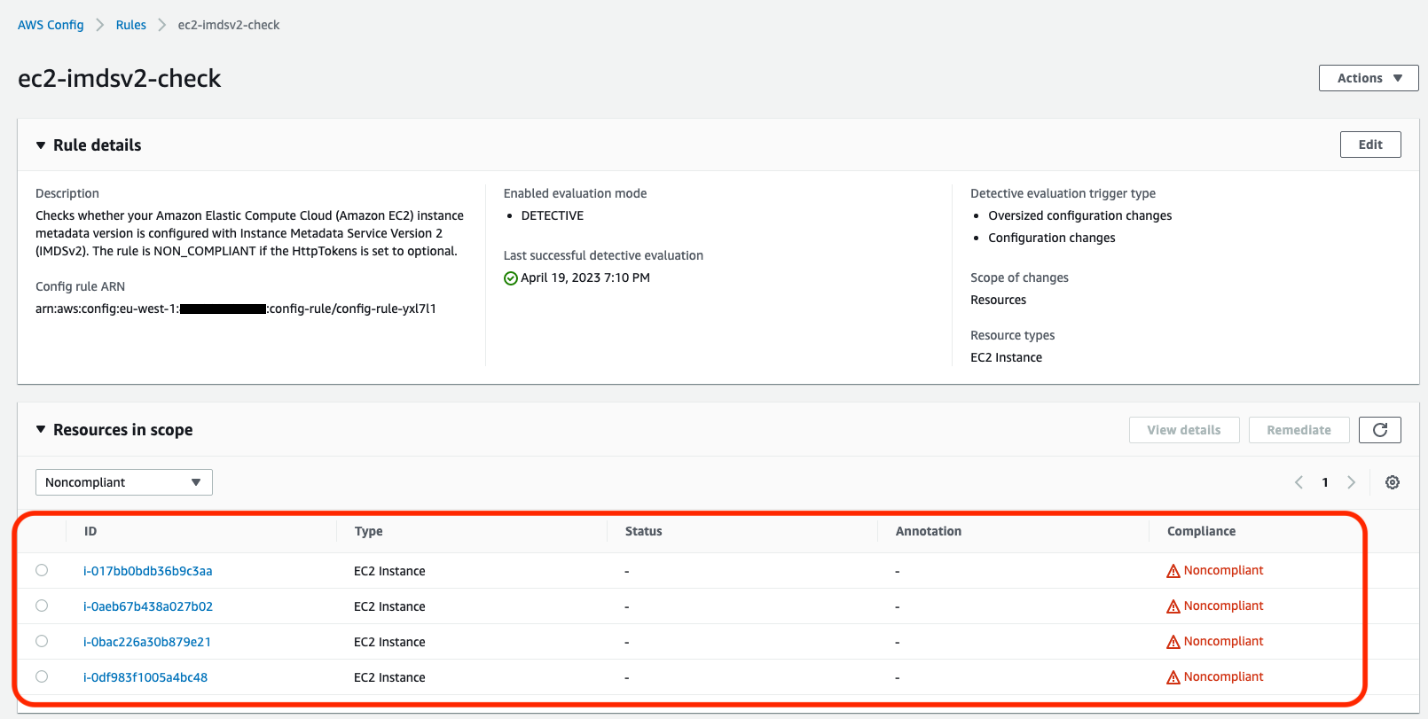
AWS Config continually assesses, audits, and evaluates the configurations and relationships of your resources on AWS, on premises, and on other clouds. The AWS Config rule ec2-imdsv2-check checks whether your Amazon EC2 instance metadata version is configured with IMDSv2. The rule is NON_COMPLIANT if the HttpTokens is set to optional, which means the EC2 instance has IMDSv1 enabled.

Figure 2: Example of noncompliant EC2 instances in the AWS Config console

Figure 2: Example of noncompliant EC2 instances in the AWS Config console

After this AWS Config rule is enabled, you can set up AWS Config notifications through Amazon Simple notification Service (Amazon SNS).

Using Security Hub

AWS Security Hub provides detection and alerting capability at the account and organization levels. You can configure cross-Region aggregation in Security Hub to gain insight on findings across Regions. If using AWS Organizations, you can configure a Security Hub designated account to aggregate findings across accounts in your organization.

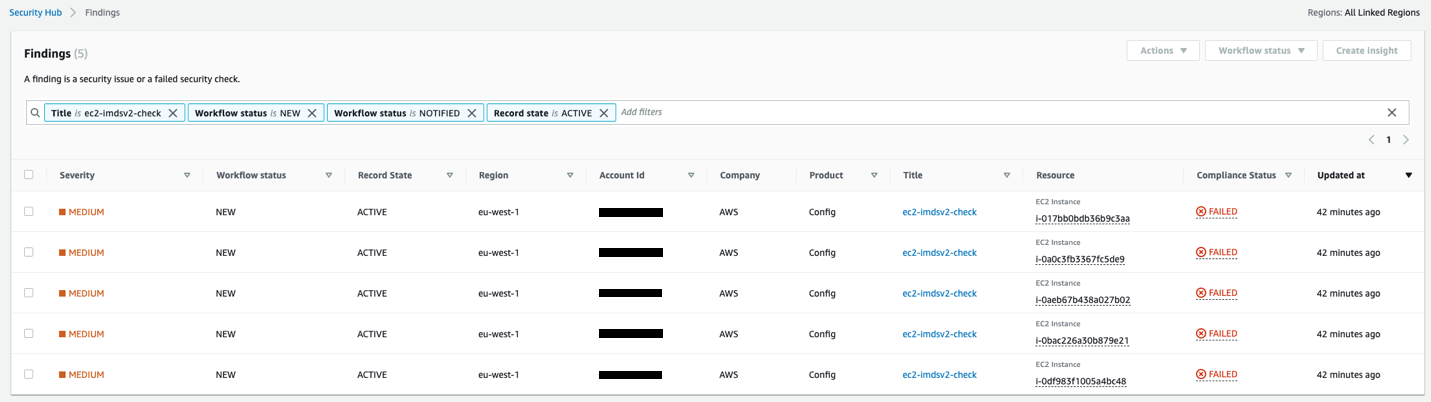
Security Hub has an Amazon EC2 control ([EC2.8] Amazon EC2 instances should use Instance Metadata Service Version 2 (IMDSv2)) that uses the AWS Config rule ec2-imdsv2-check to check if the instance metadata version is configured with IMDSv2. The rule is NON_COMPLIANT if the HttpTokens is set to optional, which means EC2 instance has IMDSv1 enabled.

Figure 3: Example of AWS Security Hub showing noncompliant EC2 instances

Figure 3: Example of AWS Security Hub showing noncompliant EC2 instances

Using Amazon Event Bridge, you can also set up alerting for the Security Hub findings when the EC2 instances are noncompliant for IMDSv2.

{
  "source": ["aws.securityhub"],
  "detail-type": ["Security Hub Findings - Imported"],
  "detail": {
    "findings": {
      "ProductArn": ["arn:aws:securityhub:us-west-2::product/aws/config"],
      "Title": ["ec2-imdsv2-check"]
    }
  }
}

Identifying if EC2 instances are making IMDSv1 calls

Not all of your software will be making IMDSv1 calls; your dependent libraries and tools might already be compatible with IMDSv2. However, to mitigate against compatibility issues in requiring IMDSv2 and disabling IMDSv1 entirely, you must check for remaining IMDSv1 calls from your software. After you’ve identified that there are instances with IMDSv1 enabled, investigate if your software is making IMDSv1 calls. Most applications make IMDSv1 calls at instance launch and shutdown. For long running instances, we recommend monitoring IMDSv1 calls during a launch or a stop and restart cycle.

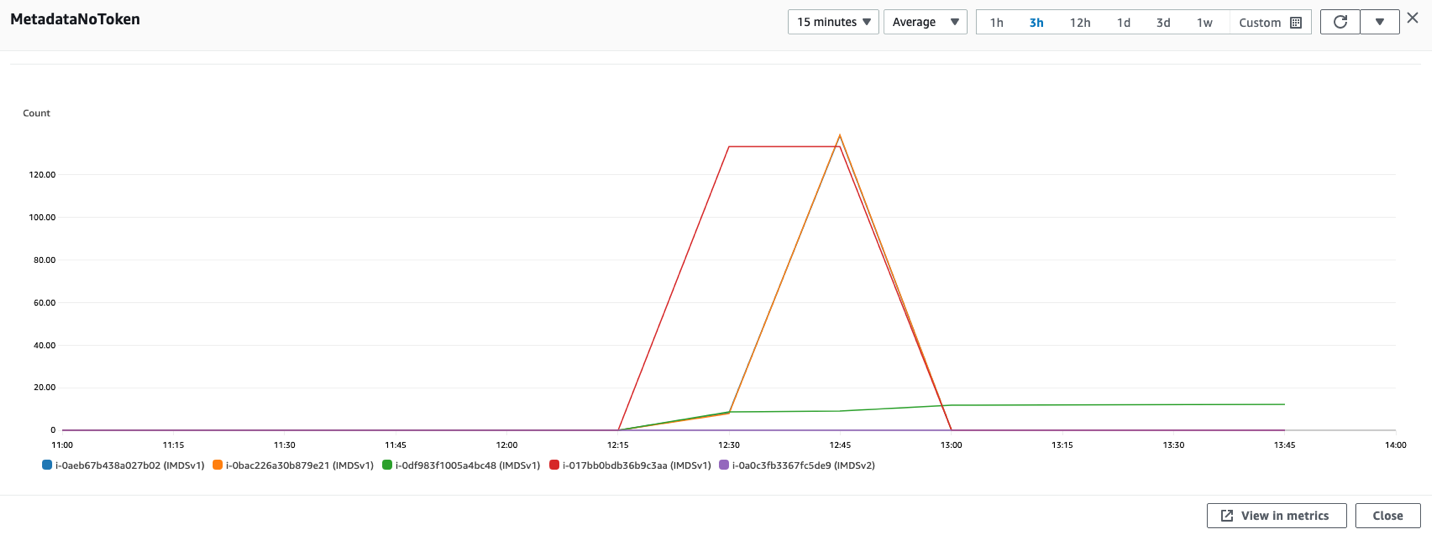
You can check whether your software is making IMDSv1 calls by checking the MetadataNoToken metric in Amazon CloudWatch. You can further identify the source of IMDSv1 calls by using the IMDS Packet Analyzer tool.

Steps to check IMDSv1 usage with CloudWatch

  1. Open the CloudWatch console.
  2. Go to Metrics and then All Metrics.
  3. Select EC2 and then choose Per-Instance Metrics.
  4. Search and add the Metric MetadataNoToken for the instances you’re interested in.
Figure 4: CloudWatch dashboard for MetadataNoToken per-instance metric

Figure 4: CloudWatch dashboard for MetadataNoToken per-instance metric

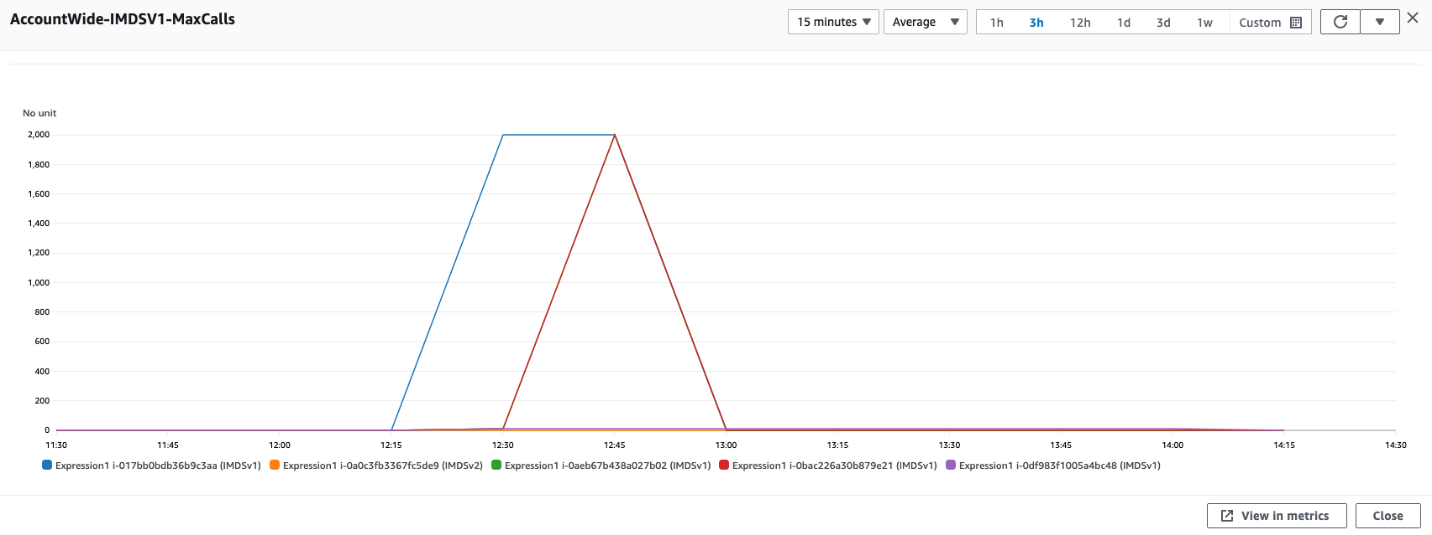
You can use expressions in CloudWatch to view account wide metrics.

SEARCH('{AWS/EC2,InstanceId} MetricName="MetadataNoToken"', 'Maximum')
Figure 5: Using CloudWatch expressions to view account wide metrics for MetadataNoToken

Figure 5: Using CloudWatch expressions to view account wide metrics for MetadataNoToken

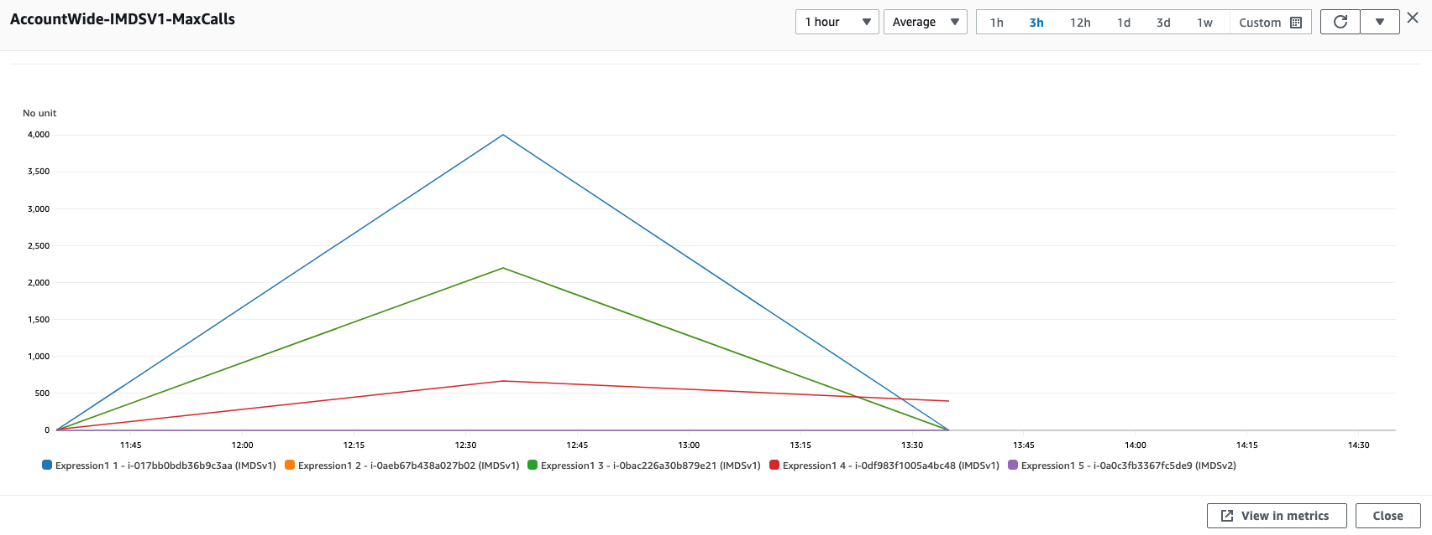
You can combine SEARCH and SORT expressions in CloudWatch to help identify the instances using IMDSv1.

SORT(SEARCH('{AWS/EC2,InstanceId} MetricName="MetadataNoToken"', 'Sum', 300), SUM, DESC, 10)
Figure 6: Another example of using CloudWatch expressions to view account wide metrics

Figure 6: Another example of using CloudWatch expressions to view account wide metrics

If you have multiple AWS accounts or use AWS Organizations, you can set up a centralized monitoring account using CloudWatch cross account observability.

IMDS Packet Analyzer

The IMDS Packet Analyzer is an open source tool that identifies and logs IMDSv1 calls from your software, including software start-up on your instance. This tool can assist in identifying the software making IMDSv1 calls on EC2 instances, allowing you to pinpoint exactly what you need to update to get your software ready to use IMDSv2. You can run the IMDS Packet Analyzer from a command line or install it as a service. For more information, see IMDS Packet Analyzer on GitHub.

Disabling IMDSv1 and maintaining only IMDSv2 instances

After you’ve monitored and verified that the software on your EC2 instances isn’t making IMDSv1 calls, you can disable IMDSv1 on those instances. For all compatible workloads, we recommend using Amazon Linux 2023, which offers several improvements (see launch announcement), including requiring IMDSv2 (disabling IMDSv1) by default.

You can also create and modify AMIs and EC2 instances to disable IMDSv1. Configure the AMI provides guidance on how to register a new AMI or change an existing AMI by setting the imds-support parameter to v2.0. If you’re using container services (such as ECS or EKS), you might need a bigger hop limit to help avoid falling back to IMDSv1. You can use the modify-instance-metadata-options launch parameter to make the change. We recommend testing with a hop limit of three in container environments.

To create a new instance

For new instances, you can disable IMDSv1 and enable IMDSv2 by specifying the metadata-options parameter using the run-instance CLI command.

aws ec2 run-instances
    --image-id <ami-0123456789example>
    --instance-type c3.large
    --metadata-options “HttpEndpoint=enabled,HttpTokens=required”

To modify the running instance

aws ec2 modify-instance-metadata-options \
--instance-id <instance-0123456789example> \
--http-tokens required \
--http-endpoint enabled

To configure a new AMI

aws ec2 register-image \
    --name <my-image> \
    --root-device-name /dev/xvda \
    --block-device-mappings DeviceName=/dev/xvda,Ebs={SnapshotId=<snap-0123456789example>} \
    --imds-support v2.0

To modify an existing AMI

aws ec2 modify-image-attribute \
    --image-id <ami-0123456789example> \
    --imds-support v2.0

Using the console

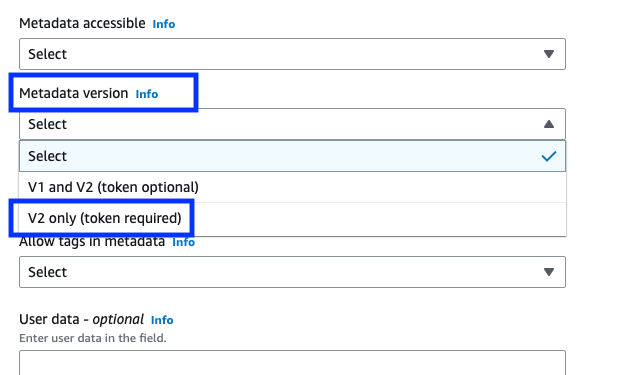
If you’re using the console to launch instances, after selecting Launch Instance from AWS Console, choose the Advanced details tab, scroll down to Metadata version and select V2 only (token required).

Figure 7: Modifying IMDS version using the console

Figure 7: Modifying IMDS version using the console

Using EC2 launch templates

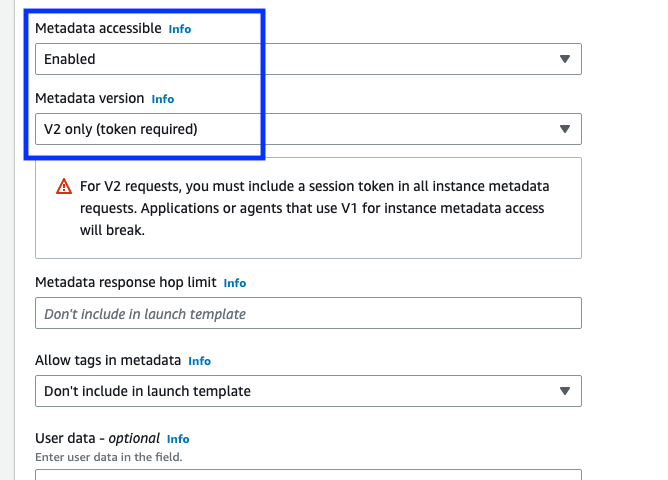
You can use an EC2 launch template as an instance configuration template that an Amazon Auto Scaling group can use to launch EC2 instances. When creating the launch template using the console, you can specify the Metadata version and select V2 only (token required).

Figure 8: Modifying the IMDS version in the EC2 launch templates

Figure 8: Modifying the IMDS version in the EC2 launch templates

Using CloudFormation with EC2 launch templates

When creating an EC2 launch template using AWS CloudFormation, you must specify the MetadataOptions property to use only IMDSv2 by setting HttpTokens as required.

In this state, retrieving the AWS Identity and Access Management (IAM) role credentials always returns IMDSv2 credentials; IMDSv1 credentials are not available.

{
"HttpEndpoint" : <String>,
"HttpProtocolIpv6" : <String>,
"HttpPutResponseHopLimit" : <Integer>,
"HttpTokens" : required,
"InstanceMetadataTags" : <String>
}

Using Systems Manager automation runbook

You can run the EnforceEC2InstanceIMDSv2 automation document available in AWS Systems Manager, which will enforce IMDSv2 on the EC2 instance using the ModifyInstanceMetadataOptions API.

  1. Open the Systems Manager console, and then select Automation from the navigation pane.
  2. Choose Execute automation.
  3. On the Owned by Amazon tab, for Automation document, enter EnforceEC2InstanceIMDSv2, and then press Enter.
  4. Choose EnforceEC2InstanceIMDSv2 document, and then choose Next.
  5. For Execute automation document, choose Simple execution.

    Note: If you need to run the automation on multiple targets, then choose Rate Control.

  6. For Input parameters, enter the ID of EC2 instance under InstanceId
  7. For AutomationAssumeRole, select a role.

    Note: To change the target EC2 instance, the AutomationAssumeRole must have ec2:ModifyInstanceMetadataOptions and ec2:DescribeInstances permissions. For more information about creating the assume role for Systems Manager Automation, see Create a service role for Automation.

  8. Choose Execute.

Using the AWS CDK

If you use the AWS Cloud Development Kit (AWS CDK) to launch instances, you can use it to set the requireImdsv2 property to disable IMDSv1 and enable IMDSv2.

new ec2.Instance(this, 'Instance', {
        // <... other parameters>
        requireImdsv2: true,
})

Using AWS SDK

The new clients for AWS SDK for Java 2.x use IMDSv2, and you can use the new clients to retrieve instance metadata for your EC2 instances. See Introducing a new client in the AWS SDK for Java 2.x for retrieving EC2 Instance Metadata for instructions.

Maintain only IMDSv2 EC2 instances

To maintain only IMDSv2 instances, you can implement service control policies and IAM policies that verify that users and software on your EC2 instances can only use instance metadata using IMDSv2. This policy specifies that RunInstance API calls require the EC2 instance use only IMDSv2. We recommend implementing this policy after all of the instances in associated accounts are free of IMDSv1 calls and you have migrated all of the instances to use only IMDSv2.

{
    "Version": "2012-10-17",
    "Statement": [
               {
            "Sid": "RequireImdsV2",
            "Effect": "Deny",
            "Action": "ec2:RunInstances",
            "Resource": "arn:aws:ec2:*:*:instance/*",
            "Condition": {
                "StringNotEquals": {
                    "ec2:MetadataHttpTokens": "required"
                }
            }
        }
    ]
} 

You can find more details on applicable service control policies (SCPs) and IAM policies in the EC2 User Guide.

Restricting credential usage using condition keys

As an additional layer of defence, you can restrict the use of your Amazon EC2 role credentials to work only when used in the EC2 instance to which they are issued. This control is complementary to IMDSv2 since both can work together. The AWS global condition context keys for EC2 credential control properties (aws:EC2InstanceSourceVPC and aws:EC2InstanceSourcePrivateIPv4) restrict the VPC endpoints and private IPs that can use your EC2 instance credentials, and you can use these keys in service control policies (SCPs) or IAM policies. Examples of these policies are in this blog post.

Conclusion

You won’t be able to get the full benefits of IMDSv2 until you disable IMDSv1. In this blog post, we showed you how to identify IMDSv1-enabled EC2 instances and how to determine if and when your software is making IMDSv1 calls. We also showed you how to disable IMDSv1 on new and existing EC2 infrastructure after your software is no longer making IMDSv1 calls. You can use these tools to transition your existing EC2 instances, and set your new EC2 launches, to use only IMDSv2.

If you have feedback about this post, submit comments in the Comments section below. If you have questions about this post, start a new thread on the AWS Compute re:Post or contact AWS Support.

Want more AWS Security news? Follow us on Twitter.
Saju Sivaji

Saju Sivaji

Saju is Senior Technical Program Manager with the AWS Security organization. When Saju isn’t managing security expectation programs to help raise the security bar for both internal and external customers, he enjoys travelling, racket sports, and bicycling.

Joshua Levinson

Joshua Levinson

Joshua is a Principal Product Manager at AWS on the Amazon EC2 team. He is passionate about helping customers with highly scalable features on EC2 and across AWS and enjoys the challenge of building simplified solutions to complex problems. Outside of work, he enjoys cooking, reading with his kids, and Olympic weightlifting.

How to use policies to restrict where EC2 instance credentials can be used from

Post Syndicated from Liam Wadman original https://aws.amazon.com/blogs/security/how-to-use-policies-to-restrict-where-ec2-instance-credentials-can-be-used-from/

Today AWS launched two new global condition context keys that make it simpler for you to write policies in which Amazon Elastic Compute Cloud (Amazon EC2) instance credentials work only when used on the instance to which they are issued. These new condition keys are available today in all AWS Regions, as well as AWS GovCloud and China partitions.

Using these new condition keys, you can write service control policies (SCPs) or AWS Identity and Access Management (IAM) policies that restrict the virtual private clouds (VPCs) and private IP addresses from which your EC2 instance credentials can be used, without hard-coding VPC IDs or IP addresses in the policy. Previously, you had to list specific VPC IDs and IP addresses in the policy if you wanted to use it to restrict where EC2 credentials were used. With this new approach, you can use less policy space and reduce the time spent on updates when your list of VPCs and network ranges changes.

In this blog post, we will show you how to use these new condition keys in an SCP and a resource policy to help ensure that the IAM role credentials assigned to your EC2 instances can only be used from the instances to which they were issued.

New global condition keys

The two new condition keys are as follows:

  • aws:EC2InstanceSourceVPC — This single-valued condition key contains the VPC ID to which an EC2 instance is deployed.
  • aws:EC2InstanceSourcePrivateIPv4 — This single-valued condition key contains the primary IPv4 address of an EC2 instance.

These new conditions are available only for use with credentials issued to an EC2 instance. You don’t have to make configuration changes to activate the new condition keys.

Let’s start by reviewing some existing IAM conditions and how to combine them with the new conditions. When requests are made to an AWS service over a VPC endpoint, the value of the aws:SourceVpc condition key is the ID of the VPC into which the endpoint is deployed. The value of the aws:VpcSourceIP condition key is the IP address from which the endpoint receives the request. The aws:SourceVpc and aws:VpcSourceIP keys are null when requests are made through AWS public service endpoints. These condition keys relate to dynamic properties of the network path by which your AWS Signature Version 4-signed request reached the API endpoint. For a list of AWS services that support VPC endpoints, see AWS services that integrate with AWS PrivateLink.

The two new condition keys relate to dynamic properties of the EC2 role credential itself. By using the two new credential-relative condition keys with the existing network path-relative aws:SourceVPC and aws:VpcSourceIP condition keys, you can create SCPs to help ensure that credentials for EC2 instances are only used from the EC2 instances to which they were issued. By writing policies that compare the two sets of dynamic values, you can configure your environment such that requests signed with an EC2 instance credential are denied if they are used anywhere other than the EC2 instance to which they were issued.

Policy examples

In the following SCP example, access is denied if the value of aws:SourceVpc is not equal to the value of aws:ec2InstanceSourceVPC, or if the value of aws:VpcSourceIp is not equal to the value of aws:ec2InstanceSourcePrivateIPv4. The policy uses aws:ViaAWSService to allow certain AWS services to take action on your behalf when they use your role’s identity to call services, such as when Amazon Athena queries Amazon Simple Storage Service (Amazon S3).

{
  "Version": "2012-10-17",
  "Statement": [
    {
      "Effect": "Deny",
      "Action": "*",
      "Resource": "*",
      "Condition": {
        "StringNotEquals": {
          "aws:ec2InstanceSourceVPC": "${aws:SourceVpc}"
        },
        "Null": {
          "ec2:SourceInstanceARN": "false"
        },
        "BoolIfExists": {
          "aws:ViaAWSService": "false"
        }
      }
    },
    {
      "Effect": "Deny",
      "Action": "*",
      "Resource": "*",
      "Condition": {
        "StringNotEquals": {
          "aws:ec2InstanceSourcePrivateIPv4": "${aws:VpcSourceIp}"
        },
        "Null": {
          "ec2:SourceInstanceARN": "false"
        },
        "BoolIfExists": {
          "aws:ViaAWSService": "false"
        }
      }
    }
  ]
}

Because we encase aws:SourceVpc and aws:VpcSourceIp in “${}” in these policies, they are treated as a variable using the value in the request being made. However, in the IAM policy language, the operator on the left side of a comparison is implicitly treated as a variable, while the operator on the right side must be explicitly declared as a variable. The “Null” operator on the ec2:SourceInstanceARN condition key is designed to ensure that this policy only applies to EC2 instance roles, and not roles used for other purposes, such as those used in AWS Lambda functions.

The two deny statements in this example form a logical “or” statement, such that either a request from a different VPC or a different IP address evaluates in a deny. But functionally, they act in an “and” fashion. To be allowed, a request must satisfy both the VPC-based and the IP-based conditions because failure of either denies the call. Because VPC IDs are globally unique values, it’s reasonable to use the VPC-based condition without the private IP condition. However, you should avoid evaluating only the private IP condition without also evaluating the VPC condition. Private IPs can be the same across different environments, so aws:ec2InstanceSourcePrivateIPv4 is safe to use only in conjunction with the VPC-based condition.

Note: SCPs do not grant IAM permissions; they only remove them. Thus, you must permit your EC2 instances to use AWS services by using IAM policies associated with their roles. For more information, see Determining whether a request is allowed or denied within an account.

If you have specific EC2 instance roles that you want to exclude from the statement, you can apply exception logic through tags or role names.

The following example applies to roles used as EC2 instance roles, except those with a tag of exception-to-vpc-ip where the value is equal to true by using the aws:PrincipalTag condition key. The three condition operators (StringNotEquals, Null, and BoolIfExists) in the same condition block are evaluated with a logical AND operation, and if either of the tests doesn’t evaluate, then the deny statement doesn’t apply. Hence, EC2 instance roles with a principal tag of exception-to-vpc-ip equal to true are not subject to this SCP.

{
  "Version": "2012-10-17",
  "Statement": [
    {
      "Effect": "Deny",
      "Action": "*",
      "Resource": "*",
      "Condition": {
        "StringNotEquals": {
          "aws:ec2InstanceSourceVPC": "${aws:SourceVpc}",
          "aws:PrincipalTag/exception-to-vpc-ip": "true"
        },
        "Null": {
          "ec2:SourceInstanceARN": "false"
        },
        "BoolIfExists": {
          "aws:ViaAWSService": "false"
        }
      }
    },
    {
      "Effect": "Deny",
      "Action": "*",
      "Resource": "*",
      "Condition": {
        "StringNotEquals": {
          "aws:ec2InstanceSourcePrivateIPv4": "${aws:VpcSourceIp}",
           "aws:principaltag/exception-to-vpc-ip": "true"
        },
        "Null": {
          "ec2:SourceInstanceARN": "false"
        },
        "BoolIfExists": {
          "aws:ViaAWSService": "false"
        }
      }
    }
  ]
}

You can apply exception logic to other attributes of your IAM roles. For example, you can use the aws:PrincipalArn condition key to exempt certain roles based on their AWS account. You can also specify where you want this SCP to be applied in your AWS Organizations organization. You can apply SCPs directly to accounts, organizational units, or organizational roots. For more information about inheritance when applying SCPs in Organizations, see Understanding policy inheritance.

You can also apply exception logic to your SCP statements at the IAM Action. The following example statement restricts an EC2 instance’s credential usage to only the instance from which it was issued, except for calls to IAM by using a NotAction element. You should use this exception logic if an AWS service doesn’t have a VPC endpoint, or if you don’t want to use VPC endpoints to access a particular service.

{
  "Version": "2012-10-17",
  "Statement": [
    {
      "Effect": "Deny",
      "NotAction": "iam:*",
      "Resource": "*",
      "Condition": {
        "StringNotEquals": {
          "aws:ec2InstanceSourceVPC": "${aws:SourceVpc}"
        },
        "Null": {
          "ec2:SourceInstanceARN": "false"
        },
        "BoolIfExists": {
          "aws:ViaAWSService": "false"
        }
      }
    },
    {
      "Effect": "Deny",
      "NotAction": "iam:*",
      "Resource": "*",
      "Condition": {
        "StringNotEquals": {
          "aws:ec2InstanceSourcePrivateIPv4": "${aws:VpcSourceIp}"
        },
        "Null": {
          "ec2:SourceInstanceARN": "false"
        },
        "BoolIfExists": {
          "aws:ViaAWSService": "false"
        }
      }
    }
  ]
}

Because these new condition keys are global condition keys, you can use the keys in all relevant AWS policy types, such as the following policy for an S3 bucket. When using this as a bucket policy, make sure to replace <DOC-EXAMPLE-BUCKET> with the ARN of your S3 bucket.

{
  "Version": "2012-10-17",
  "Statement": [
    {
      "Effect": "Deny",
      "Action": "s3:*",
      "Principal": {
        "AWS": "*"
      },
      "Resource": [
        "arn:aws:s3:::<DOC-EXAMPLE-BUCKET>/*",
        "arn:aws:s3::: <DOC-EXAMPLE-BUCKET>"
      ],
      "Condition": {
        "StringNotEquals": {
          "aws:ec2InstanceSourceVPC": "${aws:SourceVpc}"
        },
        "Null": {
          "ec2:SourceInstanceARN": "false"
        },
        "BoolIfExists": {
          "aws:ViaAWSService": "false"
        }
      }
    },
    {
      "Effect": "Deny",
      "Action": "*",
      "Principal": {
        "AWS": "*"
      },
      "Resource": [
        "arn:aws:s3::: <DOC-EXAMPLE-BUCKET> /*",
        "arn:aws:s3::: <DOC-EXAMPLE-BUCKET>"
      ],
      "Condition": {
        "StringNotEquals": {
          "aws:ec2InstanceSourcePrivateIPv4": "${aws:VpcSourceIp}"
        },
        "Null": {
          "ec2:SourceInstanceARN": "false"
        },
        "BoolIfExists": {
          "aws:ViaAWSService": "false"
        }
      }
    }
  ]
}

This policy restricts access to your S3 bucket to EC2 instance roles that are used only from the instance to which they were vended. Like the previous policy examples, there are two deny statements in this example to form a logical “or” statement but a functional “and” statement, because a request must come from the same VPC and same IP address of the instance that it was issued to, or else it evaluates to a deny.

Conclusion

In this blog post, you learned about the newly launched aws:ec2InstanceSourceVPC and aws:ec2InstanceSourcePrivateIPv4 condition keys. You also learned how to use them with SCPs and resource policies to limit the usage of your EC2 instance roles to the instances from which they originated when requests are made over VPC endpoints. Because these new condition keys are global condition keys, you can use them in all relevant AWS policy types. These new condition keys are available today in all Regions, as well as AWS GovCloud and China partitions.

If you have questions, comments, or concerns, contact AWS Support or start a new thread at AWS Identity and Access Management or Compute re:Post.

If you have feedback about this post, submit comments in the Comments section below.

Liam Wadman

Liam Wadman

Liam is a Solutions Architect with the Identity Solutions team. When he’s not building exciting solutions on AWS or helping customers, he’s often found in the hills of British Columbia on his Mountain Bike. Liam points out that you cannot spell LIAM without IAM.

Joshua Levinson

Joshua Levinson

Joshua is a Senior Product Manager at AWS on the EC2 team. He is passionate about helping customers with highly scalable features on EC2 and across AWS, and enjoys the challenge of building simplified solutions to complex problems. Outside of work, he enjoys cooking, reading with his kids, and Olympic weightlifting.