Post Syndicated from James M Snell original https://blog.cloudflare.com/a-better-web-streams-api/
Handling data in streams is fundamental to how we build applications. To make streaming work everywhere, the WHATWG Streams Standard (informally known as “Web streams”) was designed to establish a common API to work across browsers and servers. It shipped in browsers, was adopted by Cloudflare Workers, Node.js, Deno, and Bun, and became the foundation for APIs like fetch(). It’s a significant undertaking, and the people who designed it were solving hard problems with the constraints and tools they had at the time.
But after years of building on Web streams – implementing them in both Node.js and Cloudflare Workers, debugging production issues for customers and runtimes, and helping developers work through far too many common pitfalls – I’ve come to believe that the standard API has fundamental usability and performance issues that cannot be fixed easily with incremental improvements alone. The problems aren’t bugs; they’re consequences of design decisions that may have made sense a decade ago, but don’t align with how JavaScript developers write code today.
This post explores some of the fundamental issues I see with Web streams and presents an alternative approach built around JavaScript language primitives that demonstrate something better is possible.
In benchmarks, this alternative can run anywhere between 2x to 120x faster than Web streams in every runtime I’ve tested it on (including Cloudflare Workers, Node.js, Deno, Bun, and every major browser). The improvements are not due to clever optimizations, but fundamentally different design choices that more effectively leverage modern JavaScript language features. I’m not here to disparage the work that came before; I’m here to start a conversation about what can potentially come next.
The Streams Standard was developed between 2014 and 2016 with an ambitious goal to provide “APIs for creating, composing, and consuming streams of data that map efficiently to low-level I/O primitives.” Before Web streams, the web platform had no standard way to work with streaming data.
Node.js already had its own streaming API at the time that was ported to also work in browsers, but WHATWG chose not to use it as a starting point given that it is chartered to only consider the needs of Web browsers. Server-side runtimes only adopted Web streams later, after Cloudflare Workers and Deno each emerged with first-class Web streams support and cross-runtime compatibility became a priority.
The design of Web streams predates async iteration in JavaScript. The for await...of syntax didn’t land until ES2018, two years after the Streams Standard was initially finalized. This timing meant the API couldn’t initially leverage what would eventually become the idiomatic way to consume asynchronous sequences in JavaScript. Instead, the spec introduced its own reader/writer acquisition model, and that decision rippled through every aspect of the API.
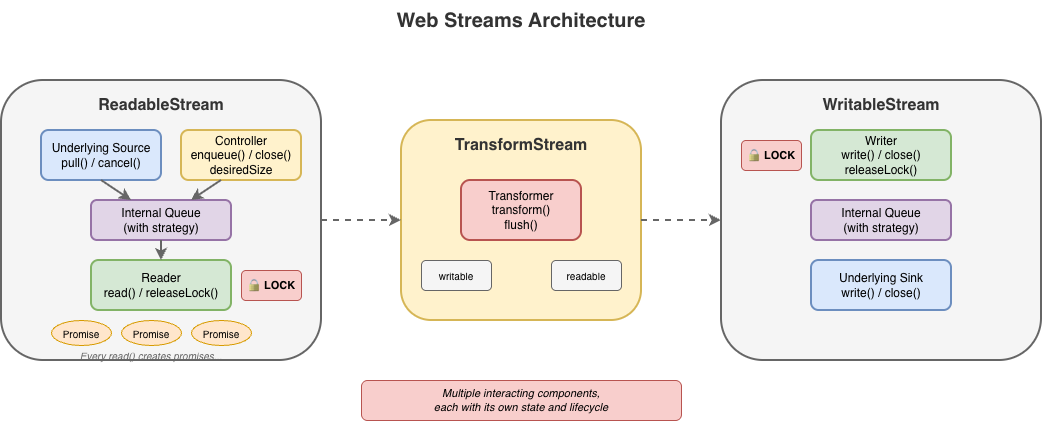
The most common task with streams is reading them to completion. Here’s what that looks like with Web streams:
// First, we acquire a reader that gives an exclusive lock
// on the stream...
const reader = stream.getReader();
const chunks = [];
try {
  // Second, we repeatedly call read and await on the returned
  // promise to either yield a chunk of data or indicate we're
  // done.
  while (true) {
    const { value, done } = await reader.read();
    if (done) break;
    chunks.push(value);
  }
} finally {
  // Finally, we release the lock on the stream
  reader.releaseLock();
}
You might assume this pattern is inherent to streaming. It isn’t. The reader acquisition, the lock management, and the { value, done } protocol are all just design choices, not requirements. They are artifacts of how and when the Web streams spec was written. Async iteration exists precisely to handle sequences that arrive over time, but async iteration did not yet exist when the streams specification was written. The complexity here is pure API overhead, not fundamental necessity.
Consider the alternative approach now that Web streams now do support for await...of:
const chunks = [];
for await (const chunk of stream) {
  chunks.push(chunk);
}
This is better in that there is far less boilerplate, but it doesn’t solve everything. Async iteration was retrofitted onto an API that wasn’t designed for it, and it shows. Features like BYOB (bring your own buffer) reads aren’t accessible through iteration. The underlying complexity of readers, locks, and controllers are still there, just hidden. When something does go wrong, or when additional features of the API are needed, developers find themselves back in the weeds of the original API, trying to understand why their stream is “locked” or why releaseLock() didn’t do what they expected or hunting down bottlenecks in code they don’t control.
Web streams use a locking model to prevent multiple consumers from interleaving reads. When you call getReader(), the stream becomes locked. While locked, nothing else can read from the stream directly, pipe it, or even cancel it – only the code that is actually holding the reader can.
This sounds reasonable until you see how easily it goes wrong:
async function peekFirstChunk(stream) {
  const reader = stream.getReader();
  const { value } = await reader.read();
  // Oops — forgot to call reader.releaseLock()
  // And the reader is no longer available when we return
  return value;
}

const first = await peekFirstChunk(stream);
// TypeError: Cannot obtain lock — stream is permanently locked
for await (const chunk of stream) { /* never runs */ }
Forgetting releaseLock() permanently breaks the stream. The locked property tells you that a stream is locked, but not why, by whom, or whether the lock is even still usable. Piping internally acquires locks, making streams unusable during pipe operations in ways that aren’t obvious.
The semantics around releasing locks with pending reads were also unclear for years. If you called read() but didn’t await it, then called releaseLock(), what happened? The spec was recently clarified to cancel pending reads on lock release – but implementations varied, and code that relied on the previous unspecified behavior can break.
That said, it’s important to recognize that locking in itself is not bad. It does, in fact, serve an important purpose to ensure that applications properly and orderly consume or produce data. The key challenge is with the original manual implementation of it using APIs like getReader() and releaseLock(). With the arrival of automatic lock and reader management with async iterables, dealing with locks from the users point of view became a lot easier.
For implementers, the locking model adds a fair amount of non-trivial internal bookkeeping. Every operation must check lock state, readers must be tracked, and the interplay between locks, cancellation, and error states creates a matrix of edge cases that must all be handled correctly.
BYOB (bring your own buffer) reads were designed to let developers reuse memory buffers when reading from streams, an important optimization intended for high-throughput scenarios. The idea is sound: instead of allocating new buffers for each chunk, you provide your own buffer and the stream fills it.
In practice, (and yes, there are always exceptions to be found) BYOB is rarely used to any measurable benefit. The API is substantially more complex than default reads, requiring a separate reader type (ReadableStreamBYOBReader) and other specialized classes (e.g. ReadableStreamBYOBRequest), careful buffer lifecycle management, and understanding of ArrayBuffer detachment semantics. When you pass a buffer to a BYOB read, the buffer becomes detached – transferred to the stream – and you get back a different view over potentially different memory. This transfer-based model is error-prone and confusing:
const reader = stream.getReader({ mode: 'byob' });
const buffer = new ArrayBuffer(1024);
let view = new Uint8Array(buffer);

const result = await reader.read(view);
// 'view' should now be detached and unusable
// (it isn't always in every impl)
// result.value is a NEW view, possibly over different memory
view = result.value; // Must reassign
BYOB also can’t be used with async iteration or TransformStreams, so developers who want zero-copy reads are forced back into the manual reader loop.
For implementers, BYOB adds significant complexity. The stream must track pending BYOB requests, handle partial fills, manage buffer detachment correctly, and coordinate between the BYOB reader and the underlying source. The Web Platform Tests for readable byte streams include dedicated test files just for BYOB edge cases: detached buffers, bad views, response-after-enqueue ordering, and more.
BYOB ends up being complex for both users and implementers, yet sees little adoption in practice. Most developers stick with default reads and accept the allocation overhead.
Most userland implementations of custom ReadableStream instances do not typically bother with all the ceremony required to correctly implement both default and BYOB read support in a single stream – and for good reason. It’s difficult to get right and most of the time consuming code is typically going to fallback on the default read path. The example below shows what a “correct” implementation would need to do. It’s big, complex, and error prone, and not a level of complexity that the typical developer really wants to have to deal with:
new ReadableStream({
    type: 'bytes',

    async pull(controller: ReadableByteStreamController) {
      if (offset >= totalBytes) {
        controller.close();
        return;
      }

      // Check for BYOB request FIRST
      const byobRequest = controller.byobRequest;

      if (byobRequest) {
        // === BYOB PATH ===
        // Consumer provided a buffer - we MUST fill it (or part of it)
        const view = byobRequest.view!;
        const bytesAvailable = totalBytes - offset;
        const bytesToWrite = Math.min(view.byteLength, bytesAvailable);

        // Create a view into the consumer's buffer and fill it
        // not critical but safer when bytesToWrite != view.byteLength
        const dest = new Uint8Array(
          view.buffer,
          view.byteOffset,
          bytesToWrite
        );

        // Fill with sequential bytes (our "data source")
        // Can be any thing here that writes into the view
        for (let i = 0; i < bytesToWrite; i++) {
          dest[i] = (offset + i) & 0xFF;
        }

        offset += bytesToWrite;

        // Signal how many bytes we wrote
        byobRequest.respond(bytesToWrite);

      } else {
        // === DEFAULT READER PATH ===
        // No BYOB request - allocate and enqueue a chunk
        const bytesAvailable = totalBytes - offset;
        const chunkSize = Math.min(1024, bytesAvailable);

        const chunk = new Uint8Array(chunkSize);
        for (let i = 0; i < chunkSize; i++) {
          chunk[i] = (offset + i) & 0xFF;
        }

        offset += chunkSize;
        controller.enqueue(chunk);
      }
    },

    cancel(reason) {
      console.log('Stream canceled:', reason);
    }
  });
When a host runtime provides a byte-oriented ReadableStream from the runtime itself, for instance, as the body of a fetch Response, it is often far easier for the runtime itself to provide an optimized implementation of BYOB reads, but those still need to be capable of handling both default and BYOB reading patterns and that requirement brings with it a fair amount of complexity.
Backpressure – the ability for a slow consumer to signal a fast producer to slow down – is a first-class concept in Web streams. In theory. In practice, the model has some serious flaws.
The primary signal is desiredSize on the controller. It can be positive (wants data), zero (at capacity), negative (over capacity), or null (closed). Producers are supposed to check this value and stop enqueueing when it’s not positive. But there’s nothing enforcing this: controller.enqueue() always succeeds, even when desiredSize is deeply negative.
new ReadableStream({
  start(controller) {
    // Nothing stops you from doing this
    while (true) {
      controller.enqueue(generateData()); // desiredSize: -999999
    }
  }
});
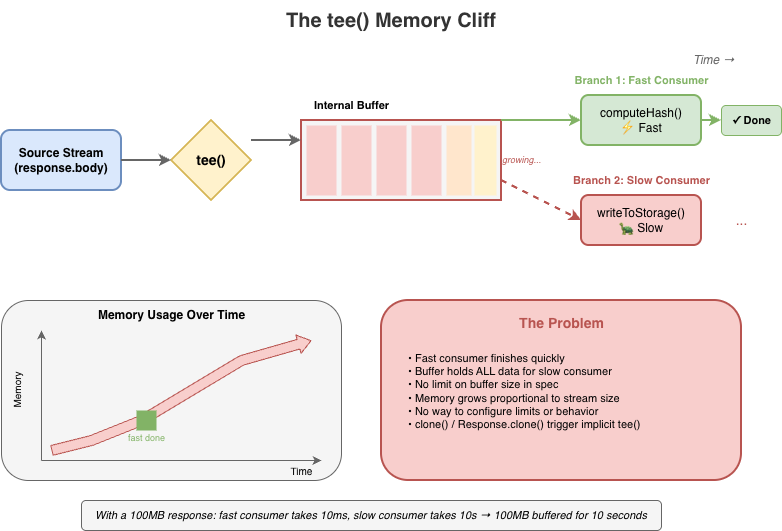
Stream implementations can and do ignore backpressure; and some spec-defined features explicitly break backpressure. tee(), for instance, creates two branches from a single stream. If one branch reads faster than the other, data accumulates in an internal buffer with no limit. A fast consumer can cause unbounded memory growth while the slow consumer catches up, and there’s no way to configure this or opt out beyond canceling the slower branch.
Web streams do provide clear mechanisms for tuning backpressure behavior in the form of the highWaterMark option and customizable size calculations, but these are just as easy to ignore as desiredSize, and many applications simply fail to pay attention to them.
The same issues exist on the WritableStream side. A WritableStream has a highWaterMark and desiredSize. There is a writer.ready promise that producers of data are supposed to pay attention but often don’t.
const writable = getWritableStreamSomehow();
const writer = writable.getWriter();

// Producers are supposed to wait for the writer.ready
// It is a promise that, when resolves, indicates that
// the writables internal backpressure is cleared and
// it is ok to write more data
await writer.ready;
await writer.write(...);
For implementers, backpressure adds complexity without providing guarantees. The machinery to track queue sizes, compute desiredSize, and invoke pull() at the right times must all be implemented correctly. However, since these signals are advisory, all that work doesn’t actually prevent the problems backpressure is supposed to solve.
The Web streams spec requires promise creation at numerous points, often in hot paths and often invisible to users. Each read() call doesn’t just return a promise; internally, the implementation creates additional promises for queue management, pull() coordination, and backpressure signaling.
This overhead is mandated by the spec’s reliance on promises for buffer management, completion, and backpressure signals. While some of it is implementation-specific, much of it is unavoidable if you’re following the spec as written. For high-frequency streaming – video frames, network packets, real-time data – this overhead is significant.
The problem compounds in pipelines. Each TransformStream adds another layer of promise machinery between source and sink. The spec doesn’t define synchronous fast paths, so even when data is available immediately, the promise machinery still runs.
For implementers, this promise-heavy design constrains optimization opportunities. The spec mandates specific promise resolution ordering, making it difficult to batch operations or skip unnecessary async boundaries without risking subtle compliance failures. There are many hidden internal optimizations that implementers do make but these can be complicated and difficult to get right.
While I was writing this blog post, Vercel’s Malte Ubl published their own blog post describing some research work Vercel has been doing around improving the performance of Node.js’ Web streams implementation. In that post they discuss the same fundamental performance optimization problem that every implementation of Web streams face:
“Or consider pipeTo(). Each chunk passes through a full Promise chain: read, write, check backpressure, repeat. An {value, done} result object is allocated per read. Error propagation creates additional Promise branches.
None of this is wrong. These guarantees matter in the browser where streams cross security boundaries, where cancellation semantics need to be airtight, where you do not control both ends of a pipe. But on the server, when you are piping React Server Components through three transforms at 1KB chunks, the cost adds up.
We benchmarked native WebStream pipeThrough at 630 MB/s for 1KB chunks. Node.js pipeline() with the same passthrough transform: ~7,900 MB/s. That is a 12x gap, and the difference is almost entirely Promise and object allocation overhead.”
– Malte Ubl, https://vercel.com/blog/we-ralph-wiggumed-webstreams-to-make-them-10x-faster
As part of their research, they have put together a set of proposed improvements for Node.js’ Web streams implementation that will eliminate promises in certain code paths which can yield a significant performance boost up to 10x faster, which only goes to prove the point: promises, while useful, add significant overhead. As one of the core maintainers of Node.js, I am looking forward to helping Malte and the folks at Vercel get their proposed improvements landed!
In a recent update made to Cloudflare Workers, I made similar kinds of modifications to an internal data pipeline that reduced the number of JavaScript promises created in certain application scenarios by up to 200x. The result is several orders of magnitude improvement in performance in those applications.
When fetch() returns a response, the body is a ReadableStream. If you only check the status and don’t consume or cancel the body, what happens? The answer varies by implementation, but a common outcome is resource leakage.
async function checkEndpoint(url) {
  const response = await fetch(url);
  return response.ok; // Body is never consumed or cancelled
}

// In a loop, this can exhaust connection pools
for (const url of urls) {
  await checkEndpoint(url);
}
This pattern has caused connection pool exhaustion in Node.js applications using undici (the fetch() implementation built into Node.js), and similar issues have appeared in other runtimes. The stream holds a reference to the underlying connection, and without explicit consumption or cancellation, the connection may linger until garbage collection – which may not happen soon enough under load.
The problem is compounded by APIs that implicitly create stream branches. Request.clone() and Response.clone() perform implicit tee() operations on the body stream – a detail that’s easy to miss. Code that clones a request for logging or retry logic may unknowingly create branched streams that need independent consumption, multiplying the resource management burden.
Now, to be certain, these types of issues are implementation bugs. The connection leak was definitely something that undici needed to fix in its own implementation, but the complexity of the specification does not make dealing with these types of issues easy.
“Cloning streams in Node.js’s fetch() implementation is harder than it looks. When you clone a request or response body, you’re calling tee() – which splits a single stream into two branches that both need to be consumed. If one consumer reads faster than the other, data buffers unbounded in memory waiting for the slow branch. If you don’t properly consume both branches, the underlying connection leaks. The coordination required between two readers sharing one source makes it easy to accidentally break the original request or exhaust connection pools. It’s a simple API call with complex underlying mechanics that are difficult to get right.” – Matteo Collina, Ph.D. – Platformatic Co-Founder & CTO, Node.js Technical Steering Committee Chair
tee() splits a stream into two branches. It seems straightforward, but the implementation requires buffering: if one branch is read faster than the other, the data must be held somewhere until the slower branch catches up.
const [forHash, forStorage] = response.body.tee();

// Hash computation is fast
const hash = await computeHash(forHash);

// Storage write is slow — meanwhile, the entire stream
// may be buffered in memory waiting for this branch
await writeToStorage(forStorage);
The spec does not mandate buffer limits for tee(). And to be fair, the spec allows implementations to implement the actual internal mechanisms for tee()and other APIs in any way they see fit so long as the observable normative requirements of the specification are met. But if an implementation chooses to implement tee() in the specific way described by the streams specification, then tee() will come with a built-in memory management issue that is difficult to work around.
Implementations have had to develop their own strategies for dealing with this. Firefox initially used a linked-list approach that led to O(n) memory growth proportional to the consumption rate difference. In Cloudflare Workers, we opted to implement a shared buffer model where backpressure is signaled by the slowest consumer rather than the fastest.
TransformStream creates a readable/writable pair with processing logic in between. The transform() function executes on write, not on read. Processing of the transform happens eagerly as data arrives, regardless of whether any consumer is ready. This causes unnecessary work when consumers are slow, and the backpressure signaling between the two sides has gaps that can cause unbounded buffering under load. The expectation in the spec is that the producer of the data being transformed is paying attention to the writer.ready signal on the writable side of the transform but quite often producers just simply ignore it.
If the transform’s transform() operation is synchronous and always enqueues output immediately, it never signals backpressure back to the writable side even when the downstream consumer is slow. This is a consequence of the spec design that many developers completely overlook. In browsers, where there’s only a single user and typically only a small number of stream pipelines active at any given time, this type of foot gun is often of no consequence, but it has a major impact on server-side or edge performance in runtimes that serve thousands of concurrent requests.
const fastTransform = new TransformStream({
  transform(chunk, controller) {
    // Synchronously enqueue — this never applies backpressure
    // Even if the readable side's buffer is full, this succeeds
    controller.enqueue(processChunk(chunk));
  }
});

// Pipe a fast source through the transform to a slow sink
fastSource
  .pipeThrough(fastTransform)
  .pipeTo(slowSink);  // Buffer grows without bound
What TransformStreams are supposed to do is check for backpressure on the controller and use promises to communicate that back to the writer:
const fastTransform = new TransformStream({
  async transform(chunk, controller) {
    if (controller.desiredSize <= 0) {
      // Wait on the backpressure to clear somehow
    }

    controller.enqueue(processChunk(chunk));
  }
});
A difficulty here, however, is that the TransformStreamDefaultController does not have a ready promise mechanism like Writers do; so the TransformStream implementation would need to implement a polling mechanism to periodically check when controller.desiredSize becomes positive again.
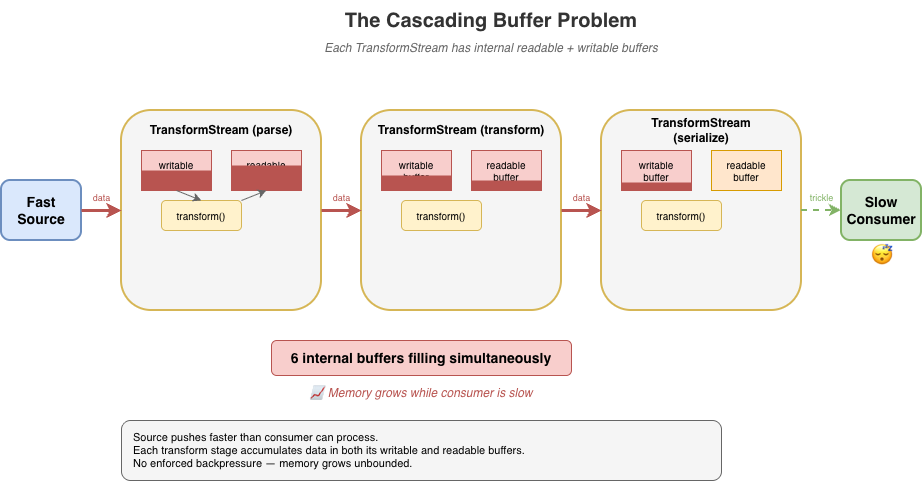
The problem gets worse in pipelines. When you chain multiple transforms – say, parse, transform, then serialize – each TransformStream has its own internal readable and writable buffers. If implementers follow the spec strictly, data cascades through these buffers in a push-oriented fashion: the source pushes to transform A, which pushes to transform B, which pushes to transform C, each accumulating data in intermediate buffers before the final consumer has even started pulling. With three transforms, you can have six internal buffers filling up simultaneously.
Developers using the streams API are expected to remember to use options like highWaterMark when creating their sources, transforms, and writable destinations but often they either forget or simply choose to ignore it.
source
  .pipeThrough(parse)      // buffers filling...
  .pipeThrough(transform)  // more buffers filling...
  .pipeThrough(serialize)  // even more buffers...
  .pipeTo(destination);    // consumer hasn't started yet
Implementations have found ways to optimize transform pipelines by collapsing identity transforms, short-circuiting non-observable paths, deferring buffer allocation, or falling back to native code that does not run JavaScript at all. Deno, Bun, and Cloudflare Workers have all successfully implemented “native path” optimizations that can help eliminate much of the overhead, and Vercel’s recent fast-webstreams research is working on similar optimizations for Node.js. But the optimizations themselves add significant complexity and still can’t fully escape the inherently push-oriented model that TransformStream uses.
Streaming server-side rendering (SSR) is a particularly painful case. A typical SSR stream might render thousands of small HTML fragments, each passing through the streams machinery:
// Each component enqueues a small chunk
function renderComponent(controller) {
  controller.enqueue(encoder.encode(`<div>${content}</div>`));
}

// Hundreds of components = hundreds of enqueue calls
// Each one triggers promise machinery internally
for (const component of components) {
  renderComponent(controller);  // Promises created, objects allocated
}
Every fragment means promises created for read() calls, promises for backpressure coordination, intermediate buffer allocations, and { value, done } result objects – most of which become garbage almost immediately.
Under load, this creates GC pressure that can devastate throughput. The JavaScript engine spends significant time collecting short-lived objects instead of doing useful work. Latency becomes unpredictable as GC pauses interrupt request handling. I’ve seen SSR workloads where garbage collection accounts for a substantial portion (up to and beyond 50%) of total CPU time per request. That’s time that could be spent actually rendering content.
The irony is that streaming SSR is supposed to improve performance by sending content incrementally. But the overhead of the streams machinery can negate those gains, especially for pages with many small components. Developers sometimes find that buffering the entire response is actually faster than streaming through Web streams, defeating the purpose entirely.
To achieve usable performance, every major runtime has resorted to non-standard internal optimizations for Web streams. Node.js, Deno, Bun, and Cloudflare Workers have all developed their own workarounds. This is particularly true for streams wired up to system-level I/O, where much of the machinery is non-observable and can be short-circuited.
Finding these optimization opportunities can itself be a significant undertaking. It requires end-to-end understanding of the spec to identify which behaviors are observable and which can safely be elided. Even then, whether a given optimization is actually spec-compliant is often unclear. Implementers must make judgment calls about which semantics they can relax without breaking compatibility. This puts enormous pressure on runtime teams to become spec experts just to achieve acceptable performance.
These optimizations are difficult to implement, frequently error-prone, and lead to inconsistent behavior across runtimes. Bun’s “Direct Streams” optimization takes a deliberately and observably non-standard approach, bypassing much of the spec’s machinery entirely. Cloudflare Workers’ IdentityTransformStream provides a fast-path for pass-through transforms but is Workers-specific and implements behaviors that are not standard for a TransformStream. Each runtime has its own set of tricks and the natural tendency is toward non-standard solutions, because that’s often the only way to make things fast.
This fragmentation hurts portability. Code that performs well on one runtime may behave differently (or poorly) on another, even though it’s using “standard” APIs. The complexity burden on runtime implementers is substantial, and the subtle behavioral differences create friction for developers trying to write cross-runtime code, particularly those maintaining frameworks that must be able to run efficiently across many runtime environments.
It is also necessary to emphasize that many optimizations are only possible in parts of the spec that are unobservable to user code. The alternative, like Bun “Direct Streams”, is to intentionally diverge from the spec-defined observable behaviors. This means optimizations often feel “incomplete”. They work in some scenarios but not in others, in some runtimes but not others, etc. Every such case adds to the overall unsustainable complexity of the Web streams approach which is why most runtime implementers rarely put significant effort into further improvements to their streams implementations once the conformance tests are passing.
Implementers shouldn’t need to jump through these hoops. When you find yourself needing to relax or bypass spec semantics just to achieve reasonable performance, that’s a sign something is wrong with the spec itself. A well-designed streaming API should be efficient by default, not require each runtime to invent its own escape hatches.
A complex spec creates complex edge cases. The Web Platform Tests for streams span over 70 test files, and while comprehensive testing is a good thing, what’s telling is what needs to be tested.
Consider some of the more obscure tests that implementations must pass:
-
Prototype pollution defense: One test patches
Object.prototype.then to intercept promise resolutions, then verifies thatpipeTo()andtee()operations don’t leak internal values through the prototype chain. This tests a security property that only exists because the spec’s promise-heavy internals create an attack surface. -
WebAssembly memory rejection: BYOB reads must explicitly reject ArrayBuffers backed by WebAssembly memory, which look like regular buffers but can’t be transferred. This edge case exists because of the spec’s buffer detachment model – a simpler API wouldn’t need to handle it.
-
Crash regression for state machine conflicts: A test specifically checks that calling
byobRequest.respond()afterenqueue()doesn’t crash the runtime. This sequence creates a conflict in the internal state machine — theenqueue()fulfills the pending read and should invalidate thebyobRequest, but implementations must gracefully handle the subsequentrespond()rather than corrupting memory in order to cover the very likely possibility that developers are not using the complex API correctly.
These aren’t contrived scenarios invented by test authors in total vacuum. They’re consequences of the spec’s design and reflect real world bugs.
For runtime implementers, passing the WPT suite means handling intricate corner cases that most application code will never encounter. The tests encode not just the happy path but the full matrix of interactions between readers, writers, controllers, queues, strategies, and the promise machinery that connects them all.
A simpler API would mean fewer concepts, fewer interactions between concepts, and fewer edge cases to get right resulting in more confidence that implementations actually behave consistently.
Web streams are complex for users and implementers alike. The problems with the spec aren’t bugs. They emerge from using the API exactly as designed. They aren’t issues that can be fixed solely through incremental improvements. They’re consequences of fundamental design choices. To improve things we need different foundations.
After implementing the Web streams spec multiple times across different runtimes and seeing the pain points firsthand, I decided it was time to explore what a better, alternative streaming API could look like if designed from first principles today.
What follows is a proof of concept: it’s not a finished standard, not a production-ready library, not even necessarily a concrete proposal for something new, but a starting point for discussion that demonstrates the problems with Web streams aren’t inherent to streaming itself; they’re consequences of specific design choices that could be made differently. Whether this exact API is the right answer is less important than whether it sparks a productive conversation about what we actually need from a streaming primitive.
Before diving into API design, it’s worth asking: what is a stream?
At its core, a stream is just a sequence of data that arrives over time. You don’t have all of it at once. You process it incrementally as it becomes available.
Unix pipes are perhaps the purest expression of this idea:
cat access.log | grep "error" | sort | uniq -cData flows left to right. Each stage reads input, does its work, writes output. There’s no pipe reader to acquire, no controller lock to manage. If a downstream stage is slow, upstream stages naturally slow down as well. Backpressure is implicit in the model, not a separate mechanism to learn (or ignore).
In JavaScript, the natural primitive for “a sequence of things that arrive over time” is already in the language: the async iterable. You consume it with for await...of. You stop consuming by stopping iteration.
This is the intuition the new API tries to preserve: streams should feel like iteration, because that’s what they are. The complexity of Web streams – readers, writers, controllers, locks, queuing strategies – obscures this fundamental simplicity. A better API should make the simple case simple and only add complexity where it’s genuinely needed.
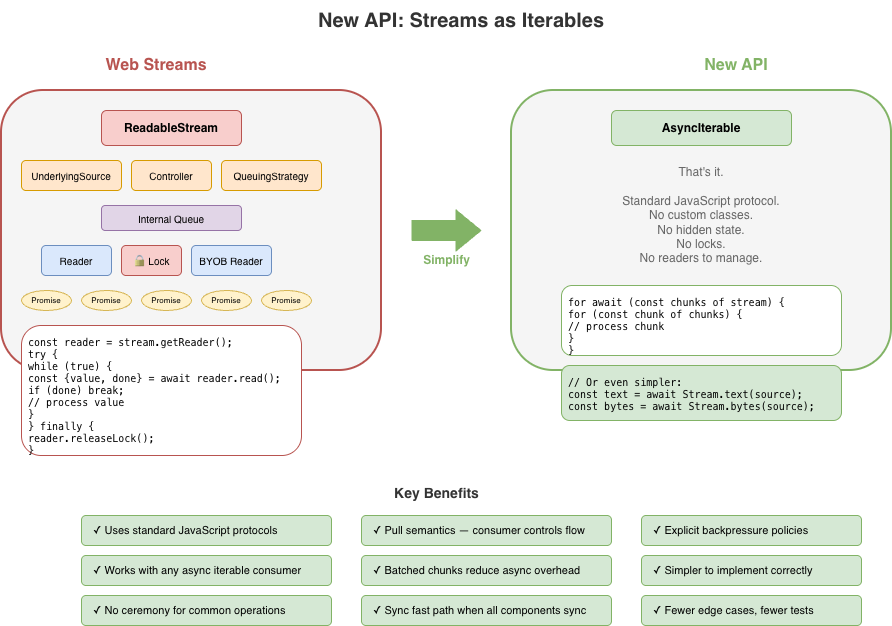
I built the proof-of-concept alternative around a different set of principles.
No custom ReadableStream class with hidden internal state. A readable stream is just an AsyncIterable<Uint8Array[]>. You consume it with for await...of. No readers to acquire, no locks to manage.
Transforms don’t execute until the consumer pulls. There’s no eager evaluation, no hidden buffering. Data flows on-demand from source, through transforms, to the consumer. If you stop iterating, processing stops.
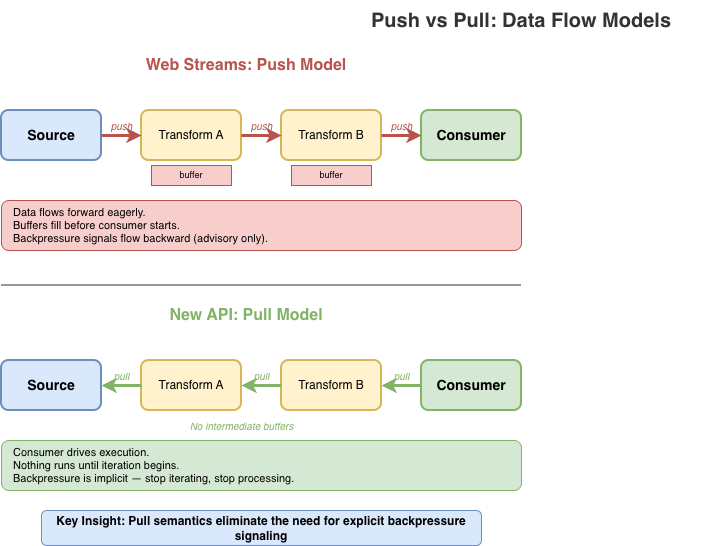
Backpressure is strict by default. When a buffer is full, writes reject rather than silently accumulating. You can configure alternative policies – block until space is available, drop oldest, drop newest – but you have to choose explicitly. No more silent memory growth.
Instead of yielding one chunk per iteration, streams yield Uint8Array[]: arrays of chunks. This amortizes the async overhead across multiple chunks, reducing promise creation and microtask latency in hot paths.
The API deals exclusively with bytes (Uint8Array). Strings are UTF-8 encoded automatically. There’s no “value stream” vs “byte stream” dichotomy. If you want to stream arbitrary JavaScript values, use async iterables directly. While the API uses Uint8Array, it treats chunks as opaque. There is no partial consumption, no BYOB patterns, no byte-level operations within the streaming machinery itself. Chunks go in, chunks come out, unchanged unless a transform explicitly modifies them.
The API recognizes that synchronous data sources are both necessary and common. The application should not be forced to always accept the performance cost of asynchronous scheduling simply because that’s the only option provided. At the same time, mixing sync and async processing can be dangerous. Synchronous paths should always be an option and should always be explicit.
In Web streams, creating a simple producer/consumer pair requires TransformStream, manual encoding, and careful lock management:
const { readable, writable } = new TransformStream();
const enc = new TextEncoder();
const writer = writable.getWriter();
await writer.write(enc.encode("Hello, World!"));
await writer.close();
writer.releaseLock();

const dec = new TextDecoder();
let text = '';
for await (const chunk of readable) {
  text += dec.decode(chunk, { stream: true });
}
text += dec.decode();
Even this relatively clean version requires: a TransformStream, manual TextEncoder and TextDecoder, and explicit lock release.
Here’s the equivalent with the new API:
import { Stream } from 'new-streams';

// Create a push stream
const { writer, readable } = Stream.push();

// Write data — backpressure is enforced
await writer.write("Hello, World!");
await writer.end();

// Consume as text
const text = await Stream.text(readable);
The readable is just an async iterable. You can pass it to any function that expects one, including Stream.text() which collects and decodes the entire stream.
The writer has a simple interface: write(), writev() for batched writes, end() to signal completion, and abort() for errors. That’s essentially it.
The Writer is not a concrete class. Any object that implements write(), end(), and abort() can be a writer making it easy to adapt existing APIs or create specialized implementations without subclassing. There’s no complex UnderlyingSink protocol with start(), write(), close(), and abort() callbacks that must coordinate through a controller whose lifecycle and state are independent of the WritableStream it is bound to.
Here’s a simple in-memory writer that collects all written data:
// A minimal writer implementation — just an object with methods
function createBufferWriter() {
  const chunks = [];
  let totalBytes = 0;
  let closed = false;

  const addChunk = (chunk) => {
    chunks.push(chunk);
    totalBytes += chunk.byteLength;
  };

  return {
    get desiredSize() { return closed ? null : 1; },

    // Async variants
    write(chunk) { addChunk(chunk); },
    writev(batch) { for (const c of batch) addChunk(c); },
    end() { closed = true; return totalBytes; },
    abort(reason) { closed = true; chunks.length = 0; },

    // Sync variants return boolean (true = accepted)
    writeSync(chunk) { addChunk(chunk); return true; },
    writevSync(batch) { for (const c of batch) addChunk(c); return true; },
    endSync() { closed = true; return totalBytes; },
    abortSync(reason) { closed = true; chunks.length = 0; return true; },

    getChunks() { return chunks; }
  };
}

// Use it
const writer = createBufferWriter();
await Stream.pipeTo(source, writer);
const allData = writer.getChunks();
No base class to extend, no abstract methods to implement, no controller to coordinate with. Just an object with the right shape.
Under the new API design, transforms should not perform any work until the data is being consumed. This is a fundamental principle.
// Nothing executes until iteration begins
const output = Stream.pull(source, compress, encrypt);

// Transforms execute as we iterate
for await (const chunks of output) {
  for (const chunk of chunks) {
    process(chunk);
  }
}
Stream.pull() creates a lazy pipeline. The compress and encrypt transforms don’t run until you start iterating output. Each iteration pulls data through the pipeline on demand.
This is fundamentally different from Web streams’ pipeThrough(), which starts actively pumping data from the source to the transform as soon as you set up the pipe. Pull semantics mean you control when processing happens, and stopping iteration stops processing.
Transforms can be stateless or stateful. A stateless transform is just a function that takes chunks and returns transformed chunks:
// Stateless transform — a pure function
// Receives chunks or null (flush signal)
const toUpperCase = (chunks) => {
  if (chunks === null) return null; // End of stream
  return chunks.map(chunk => {
    const str = new TextDecoder().decode(chunk);
    return new TextEncoder().encode(str.toUpperCase());
  });
};

// Use it directly
const output = Stream.pull(source, toUpperCase);
Stateful transforms are simple objects with member functions that maintain state across calls:
// Stateful transform — a generator that wraps the source
function createLineParser() {
  // Helper to concatenate Uint8Arrays
  const concat = (...arrays) => {
    const result = new Uint8Array(arrays.reduce((n, a) => n + a.length, 0));
    let offset = 0;
    for (const arr of arrays) { result.set(arr, offset); offset += arr.length; }
    return result;
  };

  return {
    async *transform(source) {
      let pending = new Uint8Array(0);

      for await (const chunks of source) {
        if (chunks === null) {
          // Flush: yield any remaining data
          if (pending.length > 0) yield [pending];
          continue;
        }

        // Concatenate pending data with new chunks
        const combined = concat(pending, ...chunks);
        const lines = [];
        let start = 0;

        for (let i = 0; i < combined.length; i++) {
          if (combined[i] === 0x0a) { // newline
            lines.push(combined.slice(start, i));
            start = i + 1;
          }
        }

        pending = combined.slice(start);
        if (lines.length > 0) yield lines;
      }
    }
  };
}

const output = Stream.pull(source, createLineParser());
For transforms that need cleanup on abort, add an abort handler:
// Stateful transform with resource cleanup
function createGzipCompressor() {
  // Hypothetical compression API...
  const deflate = new Deflater({ gzip: true });

  return {
    async *transform(source) {
      for await (const chunks of source) {
        if (chunks === null) {
          // Flush: finalize compression
          deflate.push(new Uint8Array(0), true);
          if (deflate.result) yield [deflate.result];
        } else {
          for (const chunk of chunks) {
            deflate.push(chunk, false);
            if (deflate.result) yield [deflate.result];
          }
        }
      }
    },
    abort(reason) {
      // Clean up compressor resources on error/cancellation
    }
  };
}
For implementers, there’s no Transformer protocol with start(), transform(), flush() methods and controller coordination passed into a TransformStream class that has its own hidden state machine and buffering mechanisms. Transforms are just functions or simple objects: far simpler to implement and test.
When a bounded buffer fills up and a producer wants to write more, there are only a few things you can do:
-
Reject the write: refuse to accept more data
-
Wait: block until space becomes available
-
Discard old data: evict what’s already buffered to make room
-
Discard new data: drop what’s incoming
That’s it. Any other response is either a variation of these (like “resize the buffer,” which is really just deferring the choice) or domain-specific logic that doesn’t belong in a general streaming primitive. Web streams currently always choose Wait by default.
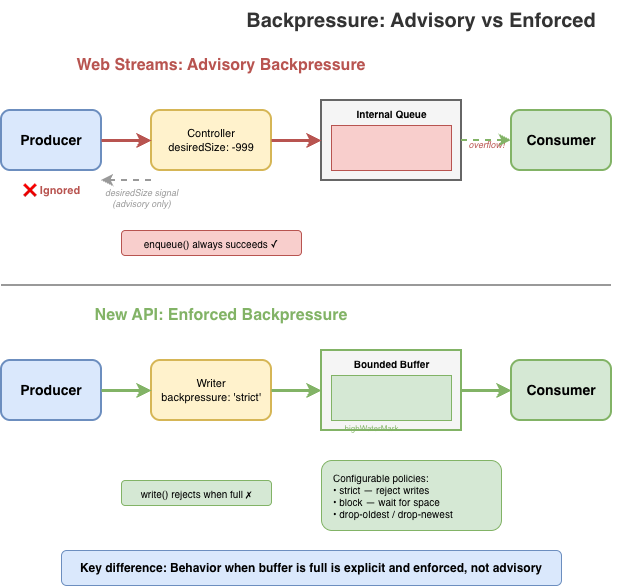
The new API makes you choose one of these four explicitly:
-
strict(default): Rejects writes when the buffer is full and too many writes are pending. Catches “fire-and-forget” patterns where producers ignore backpressure. -
block: Writes wait until buffer space is available. Use when you trust the producer to await writes properly. -
drop-oldest: Drops the oldest buffered data to make room. Useful for live feeds where stale data loses value. -
drop-newest: Discards incoming data when full. Useful when you want to process what you have without being overwhelmed.
const { writer, readable } = Stream.push({
  highWaterMark: 10,
  backpressure: 'strict' // or 'block', 'drop-oldest', 'drop-newest'
});
No more hoping producers cooperate. The policy you choose determines what happens when the buffer fills.
Here’s how each policy behaves when a producer writes faster than the consumer reads:
// strict: Catches fire-and-forget writes that ignore backpressure
const strict = Stream.push({ highWaterMark: 2, backpressure: 'strict' });
strict.writer.write(chunk1);  // ok (not awaited)
strict.writer.write(chunk2);  // ok (fills slots buffer)
strict.writer.write(chunk3);  // ok (queued in pending)
strict.writer.write(chunk4);  // ok (pending buffer fills)
strict.writer.write(chunk5);  // throws! too many pending writes

// block: Wait for space (unbounded pending queue)
const blocking = Stream.push({ highWaterMark: 2, backpressure: 'block' });
await blocking.writer.write(chunk1);  // ok
await blocking.writer.write(chunk2);  // ok
await blocking.writer.write(chunk3);  // waits until consumer reads
await blocking.writer.write(chunk4);  // waits until consumer reads
await blocking.writer.write(chunk5);  // waits until consumer reads

// drop-oldest: Discard old data to make room
const dropOld = Stream.push({ highWaterMark: 2, backpressure: 'drop-oldest' });
await dropOld.writer.write(chunk1);  // ok
await dropOld.writer.write(chunk2);  // ok
await dropOld.writer.write(chunk3);  // ok, chunk1 discarded

// drop-newest: Discard incoming data when full
const dropNew = Stream.push({ highWaterMark: 2, backpressure: 'drop-newest' });
await dropNew.writer.write(chunk1);  // ok
await dropNew.writer.write(chunk2);  // ok
await dropNew.writer.write(chunk3); // silently dropped// Share with explicit buffer management
const shared = Stream.share(source, {
highWaterMark: 100,
backpressure: 'strict'
});
const consumer1 = shared.pull();
const consumer2 = shared.pull(decompress);Instead of tee() with its hidden unbounded buffer, you get explicit multi-consumer primitives. Stream.share() is pull-based: consumers pull from a shared source, and you configure the buffer limits and backpressure policy upfront.
There’s also Stream.broadcast() for push-based multi-consumer scenarios. Both require you to think about what happens when consumers run at different speeds, because that’s a real concern that shouldn’t be hidden.
Not all streaming workloads involve I/O. When your source is in-memory and your transforms are pure functions, async machinery adds overhead without benefit. You’re paying for coordination of “waiting” that adds no benefit.
The new API has complete parallel sync versions: Stream.pullSync(), Stream.bytesSync(), Stream.textSync(), and so on. If your source and transforms are all synchronous, you can process the entire pipeline without a single promise.
// Async — when source or transforms may be asynchronous
const textAsync = await Stream.text(source);

// Sync — when all components are synchronous
const textSync = Stream.textSync(source);
Here’s a complete synchronous pipeline – compression, transformation, and consumption with zero async overhead:
// Synchronous source from in-memory data
const source = Stream.fromSync([inputBuffer]);

// Synchronous transforms
const compressed = Stream.pullSync(source, zlibCompressSync);
const encrypted = Stream.pullSync(compressed, aesEncryptSync);

// Synchronous consumption — no promises, no event loop trips
const result = Stream.bytesSync(encrypted);
The entire pipeline executes in a single call stack. No promises are created, no microtask queue scheduling occurs, and no GC pressure from short-lived async machinery. For CPU-bound workloads like parsing, compression, or transformation of in-memory data, this can be significantly faster than the equivalent Web streams code – which would force async boundaries even when every component is synchronous.
Web streams has no synchronous path. Even if your source has data ready and your transform is a pure function, you still pay for promise creation and microtask scheduling on every operation. Promises are fantastic for cases in which waiting is actually necessary, but they aren’t always necessary. The new API lets you stay in sync-land when that’s what you need.
The async iterator based approach provides a natural bridge between this alternative approach and Web streams. When coming from a ReadableStream to this new approach, simply passing the readable in as input works as expected when the ReadableStream is set up to yield bytes:
const readable = getWebReadableStreamSomehow();
const input = Stream.pull(readable, transform1, transform2);
for await (const chunks of input) {
  // process chunks
}
When adapting to a ReadableStream, a bit more work is required since the alternative approach yields batches of chunks, but the adaptation layer is as easily straightforward:
async function* adapt(input) {
  for await (const chunks of input) {
    for (const chunk of chunks) {
      yield chunk;
    }
  }
}

const input = Stream.pull(source, transform1, transform2);
const readable = ReadableStream.from(adapt(input));-
Unconsumed bodies: Pull semantics mean nothing happens until you iterate. No hidden resource retention. If you don’t consume a stream, there’s no background machinery holding connections open.
-
The
tee()memory cliff:Stream.share()requires explicit buffer configuration. You choose thehighWaterMarkand backpressure policy upfront: no more silent unbounded growth when consumers run at different speeds. -
Transform backpressure gaps: Pull-through transforms execute on-demand. Data doesn’t cascade through intermediate buffers; it flows only when the consumer pulls. Stop iterating, stop processing.
-
GC thrashing in SSR: Batched chunks (
Uint8Array[]) amortize async overhead. Sync pipelines viaStream.pullSync()eliminate promise allocation entirely for CPU-bound workloads.
The design choices have performance implications. Here are benchmarks from the reference implementation of this possible alternative compared to Web streams (Node.js v24.x, Apple M1 Pro, averaged over 10 runs):
|
Scenario |
Alternative |
Web streams |
Difference |
|
Small chunks (1KB × 5000) |
~13 GB/s |
~4 GB/s |
~3× faster |
|
Tiny chunks (100B × 10000) |
~4 GB/s |
~450 MB/s |
~8× faster |
|
Async iteration (8KB × 1000) |
~530 GB/s |
~35 GB/s |
~15× faster |
|
Chained 3× transforms (8KB × 500) |
~275 GB/s |
~3 GB/s |
~80–90× faster |
|
High-frequency (64B × 20000) |
~7.5 GB/s |
~280 MB/s |
~25× faster |
The chained transform result is particularly striking: pull-through semantics eliminate the intermediate buffering that plagues Web streams pipelines. Instead of each TransformStream eagerly filling its internal buffers, data flows on-demand from consumer to source.
Now, to be fair, Node.js really has not yet put significant effort into fully optimizing the performance of its Web streams implementation. There’s likely significant room for improvement in Node.js’ performance results through a bit of applied effort to optimize the hot paths there. That said, running these benchmarks in Deno and Bun also show a significant performance improvement with this alternative iterator based approach than in either of their Web streams implementations as well.
Browser benchmarks (Chrome/Blink, averaged over 3 runs) show consistent gains as well:
|
Scenario |
Alternative |
Web streams |
Difference |
|
Push 3KB chunks |
~135k ops/s |
~24k ops/s |
~5–6× faster |
|
Push 100KB chunks |
~24k ops/s |
~3k ops/s |
~7–8× faster |
|
3 transform chain |
~4.6k ops/s |
~880 ops/s |
~5× faster |
|
5 transform chain |
~2.4k ops/s |
~550 ops/s |
~4× faster |
|
bytes() consumption |
~73k ops/s |
~11k ops/s |
~6–7× faster |
|
Async iteration |
~1.1M ops/s |
~10k ops/s |
~40–100× faster |
These benchmarks measure throughput in controlled scenarios; real-world performance depends on your specific use case. The difference between Node.js and browser gains reflects the distinct optimization paths each environment takes for Web streams.
It’s worth noting that these benchmarks compare a pure TypeScript/JavaScript implementation of the new API against the native (JavaScript/C++/Rust) implementations of Web streams in each runtime. The new API’s reference implementation has had no performance optimization work; the gains come entirely from the design. A native implementation would likely show further improvement.
The gains illustrate how fundamental design choices compound: batching amortizes async overhead, pull semantics eliminate intermediate buffering, and the freedom for implementations to use synchronous fast paths when data is available immediately all contribute.
“We’ve done a lot to improve performance and consistency in Node streams, but there’s something uniquely powerful about starting from scratch. New streams’ approach embraces modern runtime realities without legacy baggage, and that opens the door to a simpler, performant and more coherent streams model.”
– Robert Nagy, Node.js TSC member and Node.js streams contributor
I’m publishing this to start a conversation. What did I get right? What did I miss? Are there use cases that don’t fit this model? What would a migration path for this approach look like? The goal is to gather feedback from developers who’ve felt the pain of Web streams and have opinions about what a better API should look like.
A reference implementation for this alternative approach is available now and can be found at https://github.com/jasnell/new-streams.
-
API Reference: See the API.md for complete documentation
-
Examples: The samples directory has working code for common patterns
I welcome issues, discussions, and pull requests. If you’ve run into Web streams problems I haven’t covered, or if you see gaps in this approach, let me know. But again, the idea here is not to say “Let’s all use this shiny new object!”; it is to kick off a discussion that looks beyond the current status quo of Web Streams and returns back to first principles.
Web streams was an ambitious project that brought streaming to the web platform when nothing else existed. The people who designed it made reasonable choices given the constraints of 2014 – before async iteration, before years of production experience revealed the edge cases.
But we’ve learned a lot since then. JavaScript has evolved. A streaming API designed today can be simpler, more aligned with the language, and more explicit about the things that matter, like backpressure and multi-consumer behavior.
We deserve a better stream API. So let’s talk about what that could look like.