Over the course of routine security research, Rapid7 researchers Jonathan Peterson, Cale Black, William Vu, and Adam Cammack discovered that the Akkadian Console (often referred to as “ACO”) version 4.7, a call manager solution, is affected by two vulnerabilities. The first, CVE-2021-35468, allows root system command execution with a single authenticated POST request, and CVE-2021-35467 allows for the decryption of data encrypted by the application, which results in the arbitrary creation of sessions and the uncovering of any other sensitive data stored within the application. Combined, an unauthenticated attacker could gain remote, root privileges to a vulnerable instance of Akkadian Console Server.
CWE-78: Improper Neutralization of Special Elements used in an OS Command (‘OS Command Injection’)
Fixed in Version 4.9
Product Description
Akkadian Console (ACO) is a call management system allowing users to handle incoming calls with a centralized management web portal. More information is available at the vendor site for ACO.
Credit
These issues were discovered by Jonathan Peterson (@deadjakk), Cale Black, William Vu, and Adam Cammack, all of Rapid7, and it is being disclosed in accordance with Rapid7’s vulnerability disclosure policy.
Exploitation
The following were observed and tested on the Linux build of the Akkadian Console Server, version 4.7.0 (build 1f7ad4b) (date of creation: Feb 2 2021 per naming convention).
CVE-2021-35467: Akkadian Console Server Hard-Coded Encryption Key
Using DnSpy to decompile the bytecode of ‘acoserver.dll’ on the Akkadian Console virtual appliance, Rapid7 researchers identified that the Akkadian Console was using a static encryption key, “0c8584b9-020b-4db4-9247-22dd329d53d7”, for encryption and decryption of sensitive data. Specifically, researchers observed at least the following data encrypted using this hardcoded string:
User sessions (the most critical of the set, as outlined below)
FTP Passwords
LDAP credentials
SMTP credentials
Miscellaneous service credentials
The string constant that is used to encrypt/decrypt this data is hard-coded into the ‘primary’ C# library. So anyone that knows the string, or can learn the string by interrogating a shipping version of ‘acoserver.dll’ of the server, is able to decrypt and recover these values.
In addition to being able to recover the saved credentials of various services, Rapid7 researchers were able to write encrypted user sessions for the Akkadian Console management portal with arbitrary data, granting access to administrative functionality of the application.
The hardcoded key as shown in the decompiled code of the ACO server
The TokenService of acoserver.dll uses a hardcoded string to encrypt and decrypt user session information, as well as other data in the application that uses the ‘Encrypt’ method.
As shown in the function below, the application makes use of an ECB cipher, as well as PKCS7 padding to decrypt (and encrypt) this sensitive data.
Decrypt function present in acoserver.dll viewed with DnSpy
The image below shows an encrypted and decrypted version of an ‘Authorization’ header displaying possible variables available for manipulation. Using a short python script, one is able to create a session token with arbitrary values and then use it to connect to the Akkadian web console as an authenticated user.
Successfully decrypted a session generated by the application
Using the decrypted values of a session token, a ‘custom’ token can be created, substituting whatever values we want with a recent timestamp to successfully authenticate to the web portal.
The figure below shows this technique being used to issue a request to a restricted web endpoint that responds with the encrypted passwords of the user account. Since the same password is used to encrypt most things in the application (sessions, saved passwords for FTP, backups, LDAP, etc.), we can decrypt the encrypted passwords sent back in the response by certain portions of the application:
Using the same private key to decrypt the encrypted admin password returned by the application
This vulnerability can be used with the next vulnerability, CVE-2021-35468, to achieve remote command execution.
CVE-2021-35468: Akkadian Console Server OS Command Injection
The Akkadian Console application provides SSL certificate generation. See the corresponding web form in the screenshot below:
The web functionality associated with the vulnerable endpoint
The way the application generates these certificates is by issuing a system command using ‘/bin/bash’ to run an unsanitized ‘openssl’ command constructed from the parameters of the user’s request.
The screenshot below shows this portion of the code as it exists within the decompiled ‘acoserver.dll’.
Vulnerable method as seen from DnSpy
Side Note: In newer versions (likely 4.7+), this “Authorization” header is actually validated. In older versions of the Akkadian Console, this API endpoint does not appear to actually enforce authorization and instead only checks for the presence of the “Authorization” header. Therefore in these older, affected versions, this endpoint and the related vulnerability could be accessed directly without the crafting of the header using CVE-2021-35467. Exact affected versions have not been researched.
The below curl command will cause the Akkadian Console server to itself run its own curl command (in the Organization field) and pipe the results to bash.
Once this is received by ACO, the named curl payload is executed, and a shell is spawned, but any operating system command can be executed.
Impact
CVE-2021-35467, by itself, can be exploited to allow an unauthenticated user administrative access to the application. Given that this device supports LDAP-related functionality, an attacker could then leverage this access to pivot to other assets in the organization via Active Directory via stored LDAP accounts.
CVE-2021-35468 could allow any authenticated user to execute operating system level commands with root privileges.
By combining CVE-2021-35467 and CVE-2021-35468, an unauthenticated user can first establish themselves as an authenticated user by crafting an arbitrary session, then execute commands on ACO’s host operating system as root. From there, the attacker can install any malicious software of their choice on the affected device.
Remediation
Users of Akkadian Console should update to 4.9, which has addressed these issues. In the absence of an upgrade, users of Akkadian Console version 4.7 or older should only expose the web interface to trusted networks — notably, not the internet.
Disclosure Timeline
April, 2021: Discovery by Jonathan Peterson and friends at Rapid7
Wed, Jun 16, 2021: Initial disclosure to the vendor
Wed, Jun 23, 2021: Updated details disclosed to the vendor
Tue, Jul 13, 2021: Vendor indicated that version 4.9 fixed the issues
Rapid7 researcher Arvind Vishwakarma discovered multiple vulnerabilities in the Fortress S03 WiFi Home Security System. These vulnerabilities could result in unauthorized access to control or modify system behavior, and access to unencrypted information in storage or in transit. CVE-2021-39276 describes an instance of CWE-287; specifically, it describes an insecure cloud API deployment which allows unauthenticated users to trivially learn a secret that can then be used to alter the system’s functionality remotely. It has an initial CVSS score of 5.3 (medium). CVE-2021-39277 describes an instance of CWE-294, a vulnerability where anyone within Radio Frequency (RF) signal range could capture and replay RF signals to alter systems behavior, and has an initial CVSS score of 5.7.
Product Description
The Fortress S03 WiFi Home Security System is a do it yourself (DIY) consumer grade home security system which leverages WiFi and RF communication to monitor doors, windows, and motion detection to spot possible intruders. Fortress can also electronically monitor the system for you, for a monthly fee. More information about the product can be found at the vendor’s website.
What follows are details regarding the two disclosed vulnerabilities. Generally speaking, these issues are trivially easy to exploit by motivated attackers who already have some knowledge of the target.
CVE-2021-39276: Unauthenticated API Access
If a malicious actor knows a user’s email address, they can use it to query the cloud-based API to return an International Mobile Equipment Identity (IMEI) number, which appears to also serve as the device’s serial number. The following post request structure is used to make this unauthenticated query and return the IMEI:
With a device IMEI number and the user’s email address, it is then possible for a malicious actor to make changes to the system, including disarming its alarm. To disarm the system, the following unauthenticated POST can be sent to the API:
CVE-2021-39277: Vulnerable to RF Signal Replay Attack
The system under test was discovered to be vulnerable to an RF replay attack. When a radio-controlled device has not properly implemented encryption or rotating key protections, this can allow an attacker to capture command-and-control signals over the air and then replay those radio signals in order to perform a function on an associated device.
As a test example, the RF signals used to communicate between the Key Fobs, Door/Window Contact Sensors, and the Fortress Console were identified in the 433 MHz band. Using a software defined radio (SDR) device, the researcher was able to capture normal operations of the device “arm” and “disarm” commands. Then, replaying the captured RF signal communication command would arm and disarm the system without further user interaction.
Impact
For CVE-2021-39276, an attacker can use a Fortress S03 user’s email address to easily disarm the installed home alarm without the user’s knowledge. While this is not usually much of a concern for random, opportunistic home invaders, this is particularly concerning when the attacker already knows the victim well, such as an ex-spouse or other estranged relationship partner.
CVE-2021-39277 presents similar problems but requires less prior knowledge of the victim, as the attacker can simply stake out the property and wait for the victim to use the RF-controlled devices within radio range. The attacker can then replay the “disarm” command later, without the victim’s knowledge.
Mitigations
In the absence of a patch or update, to work around the IMEI number exposure described in CVE-2021-39276, users could configure their alarm systems with a unique, one-time email address. Many email systems allow for “plus tagging” an email address. For example, a user could register “[email protected]” and treat that plus-tagged email address as a stand-in for a password.
For CVE-2021-39277, there seems to be very little a user can do to mitigate the effects of the RF replay issues, absent a firmware update to enforce cryptographic controls on RF signals. Users concerned about this exposure should avoid using key fobs and other RF devices linked to their home security systems.
Cybercriminals are innovative, always finding ways to adapt to new circumstances and opportunities. The proof of this can be seen in the rise of a certain variety of activity on the dark web: the sale of access to compromised networks.
This type of dark web activity has existed for decades, but it matured and began to truly thrive amid the COVID-19 global pandemic. The worldwide shift to a remote workforce gave cybercriminals more attack surface to exploit, which fueled sales on underground criminal websites, where buyers and sellers transfer network access to compromised enterprises and organizations to turn a profit.
Having witnessed this sharp rise in breach sales in the cybercriminal ecosystem, IntSights, a Rapid7 company, decided to analyze why and how criminals sell their network access, with an eye toward understanding how to prevent these network compromise events from happening in the first place.
During the process of researching and analyzing, we came across three surprising findings we thought worth highlighting. For a deeper dive, we recommend reading the full white paper, but let’s take a quick look at these discoveries here.
1. The massive gap between average and median breach sales prices
As part of our research, we took a close look at the pricing characteristics of breach sales in the criminal-to-criminal marketplace. Unsurprisingly, pricing varied considerably from one sale to another. A number of factors can influence pricing, including everything from the level of access provided to the value of the victim as a source of criminal revenue.
That said, we found an unexpectedly significant discrepancy between the average price and the median price across the 40 sales we analyzed. The average price came out to approximately $9,640 USD, while the median price was $3,000 USD.
In part, this gap can be attributed to a few unusually high prices among the most expensive offerings. The lowest price in our dataset was $240 USD for access to a healthcare organization in Colombia, but healthcare pricing tends to trend lower than other industries, with a median price of $700 in this sample. On the other end of the spectrum, the highest price was for a telecommunications service provider that came in at about $95,000 USD worth of Bitcoin.
Because of this discrepancy, IntSights researchers view the average price of $9,640 USD as a better indicator of the higher end of the price range, while the median price is more representative of typical pricing for these sales — $3,000 USD was also the single most common price. Nonetheless, it was fascinating to discover this difference and dig into the reasons behind it.
2. The numerical dominance of tech and telecoms victims
While the sales of network access are a cross-industry phenomenon, technology and telecommunications companies are the most common victims. Not only are they frequent targets, but their compromised access also commands some of the highest prices on the market.
In our sample, tech and telecoms represented 10 of the 46 victims, or 22% of those affected by industry. Out of the 10 most expensive offerings we analyzed, four were for tech and telecommunications organizations, and there were only two that had prices under $10,000 USD. A telecommunications service provider located in an unspecified Asian country also had the single most expensive offering in this sample at approximately $95,000 USD.
After investigating the reasoning behind this numerical dominance, IntSights researchers believe that the high value and high number of tech and telecommunications companies as breach victims stem from their usefulness in enabling further attacks on other targets. For example, a cybercriminal who gains access to a mobile service provider could conduct SIM swapping attacks on digital banking customers who use two-factor authentication via SMS.
These pricing standards were surprisingly expensive compared to other industries, but for good reason: the investment may cost more upfront but prove more lucrative in the long run.
3. The low proportion of retail and hospitality victims
As previously mentioned, we broke down the sales of network access based on the industries affected, and to our surprise, only 6.5% of victims were in retail and hospitality. This seemed odd, considering the popularity of the industry as a target for cybercrime. Think of all the headlines in the news about large retail companies falling victim to a breach that exposed millions of customer credentials.
We explored the reasoning behind this low proportion of victims in the space and came to a few conclusions. For example, we theorized that the main customers for these network access sales are ransomware operators, not payment card data collectors. Payment card data collection is likely a more optimal way to monetize access to a retail or hospitality business, whereas putting ransomware on a retail and hospitality network would actually “kill the goose that lays the golden eggs.”
We also found that the second-most expensive offering in this sample was for access to an organization supporting retail and hospitality businesses. The victim was a third party managing customer loyalty and rewards programs, and the seller highlighted how a buyer could monetize this indirect access to its retail and hospitality customer base. This victim may have been more valuable because, among other things, loyalty and rewards programs are softer targets with weaker security than credit cards and bank accounts; thus, they’re easier to defraud.
An OS command injection vulnerability in FortiWeb’s management interface (version 6.3.11 and prior) can allow a remote, authenticated attacker to execute arbitrary commands on the system, via the SAML server configuration page. This is an instance of CWE-78: Improper Neutralization of Special Elements used in an OS Command (‘OS Command Injection’) and has a CVSSv3 base score of 8.7. This vulnerability appears to be related to CVE-2021-22123, which was addressed in FG-IR-20-120.
Product Description
Fortinet FortiWeb is a web application firewall (WAF), designed to catch both known and unknown exploits targeting the protected web applications before they have a chance to execute. More about FortiWeb can be found at the vendor’s website.
An attacker, who is first authenticated to the management interface of the FortiWeb device, can smuggle commands using backticks in the “Name” field of the SAML Server configuration page. These commands are then executed as the root user of the underlying operating system. The affected code is noted below:
int move_metafile(char *path,char *name)
{
int iVar1;
char buf [512];
int nret;
snprintf(buf,0x200,"%s/%s","/data/etc/saml/shibboleth/service_providers",name);
iVar1 = access(buf,0);
if (iVar1 != 0) {
snprintf(buf,0x200,"mkdir %s/%s","/data/etc/saml/shibboleth/service_providers",name);
iVar1 = system(buf);
if (iVar1 != 0) {
return iVar1;
}
}
snprintf(buf,0x200,"cp %s %s/%s/%s.%s",path,"/data/etc/saml/shibboleth/service_providers",name,
"Metadata",&DAT_00212758);
iVar1 = system(buf);
return iVar1;
}
The HTTP POST request and response below demonstrates an example exploit of this vulnerability:
Finally, the results of the ‘touch’ command can be seen on the local command line of the FortiWeb device:
/# ls -l /tmp/vulnerable
-rw-r--r--    1 root     0                0 Jun 10 11:59 /tmp/vulnerable
/#
Impact
An attacker can leverage this vulnerability to take complete control of the affected device, with the highest possible privileges. They might install a persistent shell, crypto mining software, or other malicious software. In the unlikely event the management interface is exposed to the internet, they could use the compromised platform to reach into the affected network beyond the DMZ. Note, though, Rapid7 researchers were only able to identify less than three hundred total of these devices that appear to be exposing their management interfaces to the general internet.
Note that while authentication is a prerequisite for this exploit, this vulnerability could be combined with another authentication bypass issue, such as CVE-2020-29015.
Remediation
In the absence of a patch, users are advised to disable the FortiWeb device’s management interface from untrusted networks, which would include the internet. Generally speaking, management interfaces for devices like FortiWeb should not be exposed directly to the internet anyway — instead, they should be reachable only via trusted, internal networks, or over a secure VPN connection.
NEVER MISS A BLOG
Get the latest stories, expertise, and news about security today.
As penetration testers, we spend most of our time working with different types of networks, applications, and hardware devices. Physical security is another fun area we get to work in during physical social engineering penetration tests and red team engagements, which sometimes includes attempts to gain entry into facilities or sensitive areas within them.
Just like when we’re testing a virtual network’s defenses against intruders, pentesters need to put themselves in the mindset of attackers when testing physical security — and that means thinking creatively.
One classic method of gaining physical access is “tailgating,” where you wait for someone else to be going into or coming out of where you want to go, so you can follow them in before a door closes. To help pentesters simulate an attacker who can tailgate without suspiciously hovering around the door, we’ve come up with a neat little device to help with outward-opening doors with ferromagnetic metal frames, like steel entry doors. This tool is one more way pentesters can recreate the thought process of attackers — and help organizations outsmart them.
But first, of course, we want to caution that this is something that should only be used for legitimate purposes, when you have authorization or authority to do so. While we encourage other testers to try this out themselves and use it for customer engagements, this device is patent pending, and we request that you not manufacture, sell, or monetize it.
It’s it! What is it?
We start by placing our little door holder on the door frame, on the side of the door that opens:
When someone opens the door, it will push the long leaf of the hinge forward:
As the door opens further than the long leaf of the hinge, it falls back down behind the door:
And while the person who was exiting the door is hopefully on their merry way and not looking back to see if the door will close behind them, our little device will make sure it doesn’t:
More than one way to peel an orange
We’ve made a few versions of this using lock hasps. Another common hinge with a longer side would be your standard t-hinge. This one was made with a few bar-style neodymium magnets:
We’ve also made a miniature version using cup-style neodymium magnets:
Important tips
Neodymium magnets can slide around a good bit on smooth surfaces. Putting some grippy tape on the back of the magnet can help keep it from sliding around or scratching paint. Electrical tape and gorilla tape have worked well.
Likewise, having some padding on the leaf that contacts the door is important to prevent it from scratching paint.
Countermeasures
This tool makes it easier to enter a building or secure area by tailgating. By simulating an attacker with a high level of skill and ingenuity, the tool can help reveal weaknesses in organizations’ physical security protocols — and what countermeasures might be more effective.
If you have an electronic access control system, consider configuring it to trigger alerts if a door has been left open for too long. But the best place to start is to make sure your physical security policies and security awareness training educates staff about tailgating, encourages them not to let someone follow them in, and emphasizes making sure that doors close behind them.
NEVER MISS A BLOG
Get the latest stories, expertise, and news about security today.
It’s no secret that most organizations need to dramatically improve their incident detection and response and vulnerability management (VM) programs. How many major security breaches could organizations avert if they could detect and address them at the start, when they’re still just minor incidents?
Industry statistics show that actual mean-time-to-responses (MTTRs) for security incidents are very slow — measured in days, weeks, or more, not the minutes or hours necessary to dramatically reduce the risk of a significant breach. In fact, IBM’s Cost of a Data Breach report found that it took organizations an average of 207 days to detect, let alone address, cybersecurity incidents in 2020. Not surprisingly, in countless security breach retrospectives, the excessive exposure windows leading up to breaches are often found to be key contributors to the ultimate blast radii of these events.
SOAR to a better response
But what causes this excessive exposure? This depends on the organization and certainly can’t be attributed to any one thing, but practically every organization has too many security alerts and software vulnerabilities and not enough people or time to investigate or appropriately respond to them all.
So, what is the answer? More people? This is typically unrealistic, as candidates are hard to find and expensive once you do find them. Reduce the number of alerts? Sure, but which ones? If they require an investigation to differentiate false positives from true breaches, which alerts should you turn off?
Clearly a key part of the answer is to automate as much of the incident response and VM processes as possible. If you can respond to some of the alerts and vulnerabilities completely (or mostly) automatically, all the better!
This is what security orchestration, automation, and response (SOAR) systems, such as Rapid7’s InsightConnect, were created to do. But a SOAR platform on its own doesn’t solve the automation problem — it is just a platform, after all. Organizations also need the applications that run in and bring the SOAR platform to life. Sometimes called playbooks or workflows, these applications deliver the data, decisioning, integration, and communication necessary to automate incident response, as well as the processes necessary to prioritize and patch vulnerabilities.
But like the problem of rebuilding a plane while simultaneously flying it, how does a slammed IR, SOC, or VM team find the time to create these automation applications while continuing to address the issues that are continuously rolling in?
Strength in numbers: The power of crowdsourcing workflows
Increasingly, we believe the answer lies in crowdsourcing workflows from their SOAR product community.
One of the key values of SOAR platforms is that they’re in effect specialized security communities with which users can share, customize, and run incident response, VM, and other types of workflows. With InsightConnect, users can pull integrations and incident response and VM workflows from the Extension Library and apply them quickly and easily to the specific needs of the organization. But what really makes this library great is the current and future applications — workflows — that you can find and check out.
Building on the hundreds of existing workflows contributed by Rapid7’s security experts, SOC analysts, and incident responders, we’ve recently taken the Extension Library to the next level by opening it up to submissions from customers and partners. Recently, we released our Contribute an Extension online process. This highly curated workflow submission system enables Rapid7 customers and partners to safely share their favorite workflows with the community.
In the spirit of open source software, Rapid7 acts as the curator of these submissions and vets them for privacy, security, and basic utility. We believe this expanded Extension Library experience will help organizations energize their incident response and VM programs and, by applying best practices and automation, reduce the likelihood of experiencing a major security incident.
The variety of potential automation applications are only limited by the community’s imagination — they aren’t even limited to pure incident response or VM automations. Any processes that security teams do repetitively and largely manually are excellent candidates for automation. Most security teams could certainly do with some help energizing — and some fresh insights from fellow practitioners might just be the spark they need.
We have some concerns with the CMA in its current form, as well as recommendations for how to address them. Additionally, because Rapid7 has addressed similar issues relating to U.S. laws — particularly as relates to the U.S. equivalent of the CMA, the Computer Fraud and Abuse Act (CFAA) — for each section below, we’ve included a short comparison with U.S. law for those who are interested.
Restrictions on security testing tools and proof-of-concept code
One of the most concerning issues with the CMA is that it imperils dual-use open-source security testing tools and the sharing of proof-of-concept code.
Section 3A(2) of the CMA states:
(2) A person is guilty of an offence if he supplies or offers to supply any article believing that it is likely to be used to commit, or to assist in the commission of, an offence under section 1, 3 or 3ZA.
Security professionals rely on open source and other widely available security testing tools that let them emulate the activity of attackers, and exploiting proof-of-concept code helps organizations test whether their assets are vulnerable. These highly valued parts of robust security testing enable organizations to build defenses and understand the impacts of attacks.
Making these products open source helps keep them up-to-date with the latest attacker methodologies and ensures a broad range of organizations (not just well-resourced organizations) have access to tools to defend themselves. However, because they’re open source and widely available, these defensive tools could still be used by malicious actors for nefarious purposes.
The same issue applies to proof-of-concept exploit code. While the intent of the development and sharing of the code is defensive, there’s always a risk that malicious actors could access exploit code. But this makes the wide availability of testing tools all the more important, so organizations can identify and mitigate their exposure.
Rapid7’s recommendation
Interestingly, this is not an unknown issue — the Crown Prosecution Service (CPS) acknowledges it on their website. We’ve drawn from their guidance, as well as their Fraud Act guidelines, in drafting our recommended response, proposing that the Home Office consider modifying section 3A(2) of the CMA to exempt “articles” that are:
Capable of being used for legitimate purposes; and
Intended by the creator or supplier of the article to be used for a legitimate purpose; and
Widely available; unless
The article is deliberately developed or supplied for the sole purpose of committing a CMA offense.
If you’re concerned about creating a loophole in the law that can be exploited by malicious actors, rest assured the CMA would still retain 3A(1) as a means to prosecute those who supply articles with intent to commit CMA offenses.
Comparison with the CFAA
This issue doesn’t arise in the CFAA; however, the U.S. is subject to various export control rules that also restrict the sharing of dual-use security testing tools and proof-of-concept code.
Independent security research aims to reveal vulnerabilities in technical systems so organizations can deploy better defenses and mitigations. This offers a significant benefit to society, but the CMA makes no provision for legitimate, good-faith testing. While Section 1(1) acknowledges that you must have intent to access the computer without authorization, it doesn’t mention that the motive to do so must be malicious, only that the actor intended to gain access without authorization. The CMA states:
(1) A person is guilty of an offence if—
a) he causes a computer to perform any function with intent to secure access to any program or data held in any computer, or to enable any such access to be secured;
b) the access he intends to secure, or to enable to be secured, is unauthorised; and
c) he knows at the time when he causes the computer to perform the function that that is the case.
Many types of independent security research, including port scanning and vulnerability investigations, could meet that description. As frequently noted in the context of the CFAA, it’s often not clear what qualifies as authorization to access assets connected to the internet, and independent security researchers often aren’t given explicit authorization to access a system.
It’s worth noting that neither the National Crime Agency (NCA) or the CPS seem to be recklessly pursuing frivolous investigations or prosecutions of good-faith security research. Nonetheless, the current legal language does expose researchers to legal risk and uncertainty, and it would be good to see some clarity on the topic.
Rapid7’s recommendation
Creating effective legal protections for good-faith, legitimate security research is challenging. We must avoid inadvertently creating a backdoor in the law that provides a defense for malicious actors or permits activities that can create unintended harm. As legislators consider options on this, we strongly recommend considering the following questions:
How do you determine whether research is legitimate and justified? Some considerations include whether sensitive information was accessed, and if so, how much – is there a threshold for what might be acceptable? Was any damage or disruption caused by the action? Did the researcher demand financial compensation from the technology manufacturer or operator?
The term “good faith security research” means good faith testing or investigation to detect one or more security flaws or vulnerabilities in software, hardware, or firmware of a protected computer for the purpose of promoting the security or safety of the software, hardware, or firmware.
(A) The person carrying out such activity shall
(i) carry out such activity in a manner reasonably designed to minimize and avoid unnecessary damage or loss to property or persons;
(ii) take reasonable steps, with regard to any information obtained without authorization, to minimize the information the person obtains, retains, and discloses to only that information which the person reasonably believes is directly necessary to test, investigate, or mitigate a security flaw or vulnerability;
(iii) take reasonable steps to disclose any security vulnerability derived from such activity to the owner of the protected computer or the Cybersecurity and Infrastructure Security Agency prior to disclosure to any other party
(iv) wait a reasonable amount of time before publicly disclosing any security flaw or vulnerability derived from such activity, taking into consideration the following:
(I) the severity of the vulnerability,
(II) the difficulty of mitigating the vulnerability,
(III) industry best practices, and
(IV) the willingness and ability of the owner of the protected computer to mitigate the vulnerability;
(v) not publicly disclose information obtained without authorization that is
(I) a trade secret without the permission of the owner of the trade secret; or
(II) the personally identifiable information of another individual, without the permission of that individual; and
(vi) does not use a nonpublic security flaw or vulnerability derived from such activity for any primarily commercial purpose prior to disclosing the flaw or vulnerability to the owner of the protected computer or the [government vulnerability coordination body].
(B) For purposes of subsection (A), it is not a public disclosure to disclose a vulnerability or other information derived from good faith security research to the [government vulnerability coordination body].
What happens if a researcher does not find anything to report? Some proposals for reforming the CMA have suggested requiring coordinated disclosure as a predicate for a research carve out. This only works if the researcher actually finds something worth reporting. What happens if they do not? Is the research then not defensible?
Are we balancing the rights and safety of others with the need for security? For example, easing restrictions for threat intel investigators and security researchers may create a misalignment with existing privacy legislation. This may require balancing controls to protect the rights and safety of others.
The line between legitimate research and hack back
In discussions on CMA reform, we often hear the chilling effect on security research being lumped in with arguments for expanding authorities for threat intelligence gathering and operations. The latter sound alarmingly like requests for private-sector hack back (despite assertions otherwise). We believe it is critical that policymakers understand the distinction between acknowledging the importance of good-faith security research on the one hand and authorizing private-sector hack back on the other.
We understand private-sector hack back to mean an organization taking intrusive action against a cyber-attacker on technical assets or systems not owned or leased by the entity taking action or their client. While threat intel campaigners may disclaim hack back, in asking for authorization to take intrusive action on third-party systems — whether to better understand attacks, disrupt them, or even recapture lost data — they’re certainly satisfying the description of hack back and raising a number of concerns.
Rapid7 is strongly opposed to private-sector hack back. While we view both independent, good-faith security research and threat intelligence investigations as critical for security, we believe the two categories of activity need separate and distinct legal restrictions.
Good-faith security research is typically performed independently of manufacturers and operators in order to identify flaws or exposures in systems that provide opportunities for attackers. The goal is to remediate or mitigate these issues so that we reduce opportunities for attackers and decrease the risk for technology users. These activities often need to be undertaken without authorization to avoid blowback from manufacturers or operators that prioritize their reputation or profit above the security of their customers.
This activity is about protecting the safety and privacy of the many, and while researchers may take actions without authorization, they only do so on the technology of those ultimately responsible for both creating and mitigating the exposure. Without becoming aware of the issue, the technology provider and their users would continue to be exposed to risk.
In contrast, threat intel activities that involve interrogating or interacting with third-party assets prioritize the interests of a specific entity over those of other potential victims, whose compromised assets may have been leveraged in the attack. While threat intelligence can be very valuable in helping us understand how attackers behave — which can help others identify or prepare for attacks — data gathering and operations should be limited to assessing threats to assets that are owned or operated by the authorizing entity, or to non-invasive activities such as port scanning. More invasive activities can result in unintended consequences, including escalation of aggression, disruption or destruction for innocent third parties, and a quagmire of legal liability.
Because cyber attacks are criminal activity, if more investigation is needed, it should be undertaken with appropriate law enforcement involvement and oversight. We see no practical way to provide appropriate oversight or standards for the private sector to engage in this kind of activity.
Comparison to the CFAA
This issue also arises in the CFAA. In fact, it’s exacerbated by the CFAA enabling private entities to pursue civil causes of action, which mean technology manufacturers and operators can seek to apply the CFAA in private cases against researchers. This is often done to protect corporate reputations, likely at the expense of technology users who are being exposed to risk. These private civil actions chill security research and account for the vast majority of CFAA cases and lawsuit threats focused on research. One of Rapid7’s recommendations to the UK Home Office was that the CMA should not be updated to include civil liability.
Washington State has helped protect good-faith security research in its Cybercrime Act (Chapter 9A.90 RCW), which both addresses the issue of defining authorization and exempts white-hat security research.
At its core, the CMA effectively operates as a law prohibiting digital trespass and hinges on the concept of authorization. Four of the five classes of offenses laid out in the CMA involve “unauthorized” activities:
1. Unauthorised access to computer material.
2. Unauthorised access with intent to commit or facilitate commission of further offences.
3. Unauthorised acts with intent to impair, or with recklessness as to impairing, operation of computer, etc.
3ZA.Unauthorised acts causing, or creating risk of, serious damage
Unfortunately, the CMA does not define authorization (or the lack thereof), nor detail what authorization should look like. As a result, it can be hard to know with certainty where the legal line is truly being drawn in the context of the internet, where many users don’t read or understand lengthy terms of service, and data and services are often publicly accessible for a wide variety of novel uses.
Many people take the view that if something is accessible in public spaces on the internet, authorization to access it is inherently granted. In this view, the responsibility lies with the owner or operator to ensure that if they don’t want to grant access to something, they don’t make it publicly available.
That being the case, the question becomes how systems owners and operators can indicate a lack of authorization for accessing systems or information in a way that scales, while still enabling broad access and innovative use of online services. In the physical world, we have an expectation that both public and private spaces exist. If a space is private and the owners don’t want others to access it, they can indicate this through signage or physical barriers (walls, fences, or gates). Currently, there is no accepted, standard way for owners and operators to set out a “No Trespassing” sign for publicly accessible data or systems on the internet that truly serves the intended purpose.
Rapid7’s recommendation
While a website’s Terms of Service (TOS) can be legally enforceable in some contexts, in our opinion the Home Office should not take the position that violations of TOS alone qualify as “unauthorized acts.” TOS are almost always ignored by the vast majority of internet users, and ordinary internet behavior may routinely violate TOS (such as using a pseudonym where a real name is required).
Reading TOS also does not scale for internet-wide scanning, as in the case of automated port scanning and other services that analyze the status of millions of publicly accessible websites and online assets. In addition, if TOS is “authorization” for the purposes of the CMA, it gives the author of the TOS the power to define what is and isn’t a hacking crime under CMA section 1.
To address this lack of clarity, the CMA needs a clearer explanation of what constitutes authorization for accessing technical systems or information through the internet and other forms of connected communications.
Comparison with the CFAA
This issue absolutely exists with the CFAA and is at the core of many of the criticisms of the law. Multiple U.S. cases have rejected the notion that TOS violations alone qualify as “exceeding authorization” under the CFAA, creating a split in the courts. The U.S. Supreme Court’s recent decision on Van Buren v. United States confirmed TOS is an insufficient standard, noting that if TOS violations alone qualify as unauthorized act for computer crime purposes, “then millions of otherwise law-abiding citizens are criminals.”
Next steps
We hope the Home Office will take these concerns into consideration, both in terms of ensuring the necessary support for security testing tools and security research, and also in being cautious not to go so far with authorities that we open the door to abuses. We’ll continue to engage on these topics wherever possible to help policymakers navigate the nuances and keep advancing security.
Hot off the press, it’s another issue of the Patch Tuesday blog! While the number of vulnerabilities is low this month, there are a number of high risk items administrators will want to patch right away including a few that will require additional remediation steps. This Patch Tuesday also includes updates for three vulnerabilities that were publicly disclosed earlier this month. Let’s jump in.
Windows Elevation of Privilege Vulnerability aka HiveNightmare/SeriousSAM
https://msrc.microsoft.com/update-guide/vulnerability/CVE-2021-36934 With a public proof-of-concept having been available for some time, administrators should prioritize taking action on CVE-2021-36934. Remediation for this vulnerability requires volume shadow copies for system files to be deleted. This is due to the nature of the vulnerability, as the files with the vulnerable permissions could be restored from a backup and accessed even after the patch is installed. Microsoft indicates they took caution not to delete users’ backups, but the trade-off is that customers will need to do the chore themselves. We’ve updated our blog post with this additional information.
Windows LSA Spoofing Vulnerability aka ADV210003
https://msrc.microsoft.com/update-guide/vulnerability/CVE-2021-36942 Another high priority action for patching teams is CVE-2021-36942. This update patches one of the vectors used in the PetitPotam attack. After applying this update there are additional configurations required in order to protect systems from other attack vectors using registry keys. The InsightVM team has included detection for the registry keys needed to enable EPA and SMB Signing in addition to the normal update. Please see our blog post for more information.
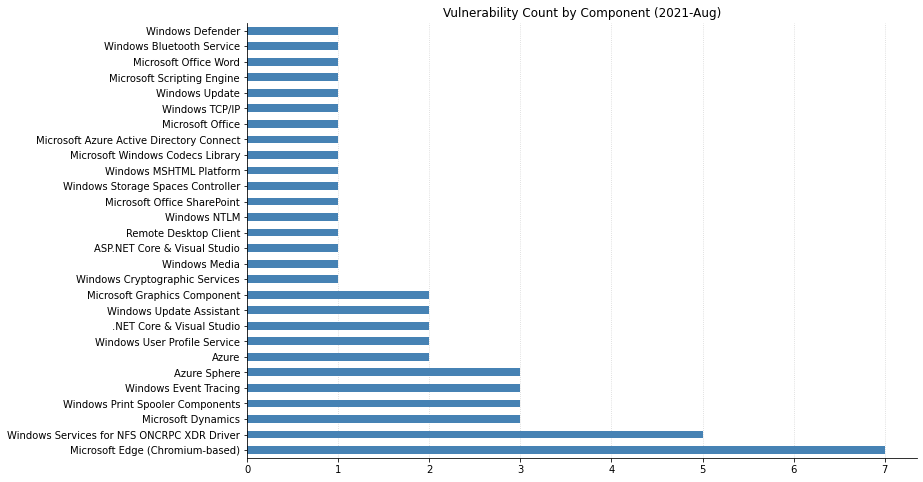
Windows Services for NFS ONCRPC XDR Driver Remote Code Execution Vulnerability
https://msrc.microsoft.com/update-guide/en-US/vulnerability/CVE-2021-26432 While Microsoft has not offered up any details for this vulnerability we can glean some info from the CVSS information. This remote code execution vulnerability is reachable from the network service with no authentication or user action required. There may not be an exploit available for this yet, but Microsoft indicates that “Exploitation [is] more likely”. Put this update near the top of your TODO list.
Windows TCP/IP Remote Code Execution Vulnerability
Every year or two, we see a policy proposal around authorizing private-sector hack back. The latest of these is legislation from two U.S. Senators, Daines and Whitehouse, and it would require the U.S. Department of Homeland Security (DHS) to “conduct a study on the potential benefits and risks of amending section 1030 of title 18, United States Code (commonly known as the ‘Computer Fraud and Abuse Act’), to allow private entities to take proportional actions in response to an unlawful network breach, subject to oversight and regulation by a designated Federal agency.”
While we believe the bill would be harmful and do not support the bill in any way, we do acknowledge that at least this legislation is attempting to address how hack back could work in practice and identifying the potential risks. This gets at the heart of one of the main issues with policy proposals for hack back — they rarely address how it would actually work in reality, and how opportunities for abuse or unintended harms would be handled.
Rapid7 does not believe it’s possible to provide sufficient oversight or accountability to make private-sector hack back viable without negative consequences. Further, the very fact that we’re once again discussing private-sector hack back as a possibility is extremely troubling.
When we say “hack back,” we’re referring to non-government organizations taking intrusive action against a cyber attacker on technical assets or systems not owned or leased by the person taking action or their client. This is generally illegal in countries that have anti-hacking laws.
The appeal of hack back is easy to understand. Organizations are subject to more frequent, varied, and costly attacks, often from cybercriminals who have no fear of reprisal or prosecution due to the existence of safe-haven nations that either can’t or won’t crack down on their activities. The scales feel firmly stacked in the favor of these cybercriminals, and it’s understandable that organizations want to shift that balance and give attackers reason to think again before targeting them.
Along these lines, arguments for hack back justify it in a number of ways, citing a desire to recapture lost data, better understand the nature of the attacks, neutralize threats, or use the method as a tit for tat. Hack back activities may be conflated with threat hunting, threat intelligence, or detection and response activities. Confusingly, some proponents for these activities are quick to decry hack back while simultaneously advocating for authority to take intrusive action on third-party assets without consent from their owners.
Hack back is also sometimes referred to as Active Defense or Active Cyber Defense. This can cause confusion, as these terms can also refer to other defensive measures that are not intrusive or conducted without consent from the technology owner. For example, active defense can also describe intrusion prevention systems or deception technologies designed to confuse attackers and gain greater intelligence on them, such as honeypots. Rapid7 encourages organizations to employ active defense techniques within their own environments.
Rapid7’s criticisms of hack back
While the reasons for advocating for private-sector hack back are easy to understand and empathize with, that doesn’t make the idea workable in practice. There’s a wealth of reasons why hack back is a bad idea.
Impracticalities of attribution and application
One of the most widely stated and agreed-upon tenets in security is that attribution is hard. In fact, in many cases, it’s essentially impossible to know for certain that we’ve accurately attributed an attack. Even when we find indications that point in a certain direction, it’s very difficult to ensure they’re not red herrings intentionally planted by the attacker, either to throw suspicion off themselves or specifically to incriminate another party.
We like to talk about digital fingerprints, but the reality is that there’s no such thing: In the digital world, pretty much anything can be spoofed or obfuscated with enough time, patience, skill, and resources. Attackers are constantly evolving their techniques to stay one step ahead of defenders and law enforcement, and the emergence of deception capabilities is just one example of this. So being certain we have the right actor before we take action is extremely difficult.
In addition, where do we draw the line in determining whether an actor or computing entity could be considered a viable target? For example, if someone is under attack from devices that are being controlled as part of a botnet, those devices – and their owners – are as much victims of the attacker as the target of the attack.
Rapid7’s Project Heisenberg observes exactly this phenomenon: The honeypots often pick up traffic from legitimate organizations whose systems have been compromised and leveraged in malicious activity. Should one of these compromised systems be used to attack an organization, and that organization then take action against those affected systems to neutralize the threat against themselves, that would mean the organization defending itself was revictimizing the entity whose systems were already compromised. Depending on the action taken, this could end up being catastrophic and costly for both organizations.
We must also take motivations into account, even though they’re often unclear or easy to misunderstand. For example, research projects that scan ports on the public-facing internet do so in order to help others understand the attack surface and reduce exposure and opportunities for attackers. This activity is benign and often results in security disclosures that have helped security professionals reduce their organization’s risk. However, it’s not unusual for these scans to encounter a perimeter monitoring tool, throwing up an alert to the security team. If an organization saw the alerts and, in their urgency to defend themselves, took a “shoot first, ask questions later” approach, they could end up attacking the researcher.
Impracticalities of limiting reach and impact
Many people have likened hack back to homeowners defending their property against intruders. They evoke images of malicious, armed criminals breaking into your home to do you and your loved ones harm. They call to you to arm yourself and stand bravely in defense, refusing to be a victim in your own home.
It’s an appealing idea — however, the reality is more akin to standing by your fence and spraying bullets out into the street, hoping to get lucky and stop an attacker as they flee the scene of the crime. With such an approach, even if you do manage to reach your attacker, you’re risking terrible collateral damage, too.
This is because the internet doesn’t operate in neatly defined and clearly demarcated boundaries. If we take action targeted at a specific actor or group of actors, it would be extremely challenging to ensure that action won’t unintentionally negatively impact innocent others. Not only should this concern lawmakers, it should also disincentivize participation. The potential negative consequences of a hack back gone awry could be far-reaching. We frequently discuss damage to equipment or systems, or loss of data, but in the age of the Internet of Things, negative consequences could include physical harm to individuals. And let’s not forget that cyberattacks can be considered acts of war.
Organizations that believe they can avoid negative outcomes in the majority of cases need to understand that even just one or two errors could be extremely costly. Imagine, for example, that a high-value target organization, such as a bank, undertakes 100 hack backs per year and makes a negatively impactful error on two occasions. A 2% fail rate may not seem that terrible — but if either or both of those errors resulted in compromise of another company or harm to a group of individuals, the hack-backer could see themselves tied up in expensive legal proceedings, reputational damage, and loss of trust. Attempts to make organizations exempt from this kind of legal action are problematic, as they raise the question of how we can spot and stop abuses.
Impracticalities of providing appropriate oversight
To date, proposals to legalize hack back have been overly broad and non-specific about how such activities should be managed, and what oversight would be required to ensure there are no abuses of the system. The Daines/Whitehouse bill tries to address this and alludes to a framework for oversight that would determine “which entities would be allowed to take such actions and under what circumstances.”
This seems to refer to an approach commonly advocated by proponents of hack back whereby a license or special authorization to conduct hack back activities is granted to vetted and approved entities. Some advocates have pointed to the example of how privateers were issued Letters of Marque to capture enemy ships — and their associated spoils. Putting aside fundamental concerns about taking as our standard a 200-year-old law passed during a time of prolonged kinetic war and effectively legalizing piracy, there are a number of pragmatic issues with how this would work in practice.
Indeed, creating a framework and system for such oversight is highly impractical and costly, raising many issues. The government would need to determine basic administrative issues, such as who would run it and how it would be funded. It would also need to identify a path to address far more complex issues around accountability and oversight to avoid abuses. For example, who will determine which activities are acceptable and where the line should be drawn? How would an authorizing agent ensure standards are met and maintained within approved organizations? Existing cybersecurity certification and accreditation schemes have long raised concerns, and these will only worsen when certification results in increased authorities for activities that can result in harm and escalation of aggressions on the internet.
When a government entity itself takes action against attackers, it does so with a high degree of oversight and accountability. They must meet evidentiary standards to prove the action is appropriate, and even then, there are parameters determining the types of targets they can pursue and the kinds of actions they can take. Applying the same level of oversight to the private sector is impractical. At the same time, authorizing the private sector to participate in these activities without this same level of oversight would undermine the checks and balances in place for the government and likely lead to unintended harms.
An authorizing agent cannot have eyes everywhere and at all times, so it would be highly impractical to create a system for oversight that would enable the governing authority to spot and stop accidental or intentional abuses of the system in real time. If the Daines/Whitehouse bill does pass (and we have no indication of that at present), I very much hope that DHS’s resulting report will reflect these issues or, if possible, provide adequate responses to address these concerns.
Impracticalities of legal liability and jurisdiction
These issues of practical execution also raise questions around who will bear the responsibility and liability if something goes wrong. For example, if a company hacks back and accidentally harms another organization or individual, the entity that undertook the hacking may incur expensive legal proceedings, reputational damage, and loss of trust. They could become embroiled in complicated and expensive multi-jurisdiction legal action, even if the company has a license to hack back in its home jurisdiction. In scenarios where hack back activities are undertaken by an organization or individual on behalf of a third party, both the agent and their client may bear these negative consequences. There may also be an argument that any licensing authority could also bear some of the liability.
Making organizations exempt from legal action around unintended consequences would be problematic and likely to result in more recklessness, as well as infringing on the rights of the victim organization. While the internet is a borderless space accessed from every country in the world, each of those countries has its own legal system and expects its citizens to abide by it. It would be very risky for companies and individuals who hack back to avoid running afoul of the laws of other countries or international bodies. When national governments take this kind of action, it tends to occur within existing international legal frameworks and under some regulatory oversight, but this may not apply in the private sector, again begging the question of where the liability rests.
It’s also worth noting that once one major power authorizes private-sector hack back, other governments will likely follow, and legal expectations or boundaries may vary. This raises questions of how governments will respond when their citizens are being attacked as part of a private-sector hack back gone wrong, and whether it will likely lead to escalation of political tensions.
Inequalities of applicability
Should a viable system be developed and hack back authorized, effective participation would likely be costly, as it would require specialist skills. Not every organization would be able to participate. If the authorization framework isn’t stringent, many organizations might try to participate with insufficient expertise, which would likely be ineffective, damaging, or both. At the same time, other organizations won’t have the maturity or budget to participate even in this way.
These are the same organizations that sit below the “cybersecurity poverty line” and can’t afford a great deal of in-house security expertise and technologies to protect themselves – in other words, these organizations are already highly vulnerable. As organizations that do have sufficient resources start to hack back, the cost of attacking these organizations will increase. Profit-motivated attackers will eventually shift toward targeting the less-resourced organizations that reside below the security poverty line. Rather than authorizing a measure as fraught with risk as hack back, we should instead be thinking about how to better protect these vulnerable organizations — for example, by subsidizing or incentivizing security hygiene.
The line between legitimate research and hack back
Those who follow Rapid7’s policy work will know that we’re big proponents of security research and have worked for many years to see greater recognition of its value and importance in public policy. It may come as a surprise to see us advocate so enthusiastically against hack back as, from a brief look, they have some things in common. In both cases, we’re talking about activity undertaken in the name of cybersecurity, which may be intrusive in nature and involve third-party assets without consent of the owner.
While independent, good-faith security research and threat intelligence investigations are both very valuable for security, they’re not the same thing, and we don’t believe we should view related legal restrictions in the same way for both.
Good-faith security research is typically performed independently of manufacturers and operators in order to identify flaws or exposures in systems that provide opportunities for attackers. The goal is to remediate or mitigate these issues so we can reduce opportunities for attackers and thus decrease the risk for technology users. This kind of research is generally about protecting the safety and privacy of the many, and while researchers may take actions without authorization, they only perform those actions on the technology of those ultimately responsible for both creating and mitigating the exposure. Without becoming aware of the issue, the technology provider and their users would continue to be exposed to risk.
Research may bypass authorization to sidestep issues arising from manufacturers and operators prioritizing their reputation or profit above the security of their customers. In contrast, threat intel investigations or operations that involve interrogating or interacting with third-party assets prioritize the interests of the specific entity undertaking or commissioning the activity, rather than other potential victims whose compromised assets may have been leveraged in the attack.
While threat intelligence can help us understand attacker behavior and identify or prepare for attacks, data gathering and operations should be limited only to assessing risks and threats to assets that are owned or operated by the entity authorizing the work, or to non-invasive activities such as port scanning. Because cyber attacks are criminal activity, if more investigation is needed, it should be undertaken with appropriate law enforcement involvement and oversight.
The path forward
It seems likely that the hack back debate will continue to come up as organizations strive to find new ways to repel attacks. I could make a snarky comment here about how organizations should perhaps focus instead on user awareness training, reducing their attack exposure, managing supply chain risk, proper segmentation, patching, Identity Access Management (IAM), and all the other things that make up a robust defense-in-depth program and that we frequently see fail, but I shall refrain. Cough cough.
We shall wait to see what happens with Senators Daines’ and Whitehouse’s “Study on Cyber-Attack Response Options Act’’ bill and hope that, if it passes, DHS will consider the concerns raised in this blog. The same is true for other policymakers as cybercrime is an international blight and governments around the world are subject to lobbying from entities looking to take a more active role in their defense. While we understand and sympathize with the desire to do more, take more control, and fight back, we urge policymakers to be mindful of the potential for catastrophe.
NEVER MISS A BLOG
Get the latest stories, expertise, and news about security today.
Here we are again, back for another day of Rapid7 expert debriefings and analysis for some of the most talked-about Black Hat sessions of this year. So without further delay, let’s take it away!
Get more DEF CON 2021 insights from our Research team on Tuesday, August 10
How do human behaviors — learned or learning — factor into incident response? Depending on the volume of stakeholders, your team may be under varying extremes of action bias. As in, are speedy actions being prioritized on vulnerabilities that don’t present a high risk profile? Is speed even possible if mitigating actions must suddenly be learned? Vendors have caught on, practicing “Security Theater”— peddling solutions to problems that might not present real risks.
Tangential to the previous topic, a question arises when exploring the weaponization of C2 channels: Due to the unlikelihood of an attack via, say, LDAP attributes when establishing C2, does it make sense to roll out an entirely new detection-and-response plan? Many different conditions must be met for an attacker to gain access in the wild, but teams might already have similar responses in place, on the off chance it happens.
Zooming out to a topic with broader public appeal, let’s consider how companies use — and abuse — our personal data. An 18-month test run by a professor and a group of students at Virginia Tech revealed how unlikely it is we’ll be able to predict which companies will abuse personal information after someone, say, creates login credentials for a TikTok account and the company launches cookie tracking for that person.
Vulnerability Risk Management
Key takeaways
Are Microsoft Exchange Servers creating an entirely new attack surface via Client Access Services (CAS)? Exchange architecture is incredibly complex, so it contains multitudes when it comes to vulnerabilities. CAS ties front-end and back-end services together, receiving the front-end request through a variety of protocols, including some extremely geriatric ones like POP3 and IMAP4. These legacy protocols are contributing to expanded attack surfaces.
Vulnerability Exploitability eXchange (VEX) helps teams rethink security advisories and what it means to be vulnerable. Essentially, it enables software providers to communicate they’re not affected by a vulnerability. Two advantages of VEX are 1) that creation and management of vulnerabilities are automated, and 2) that its results are machine-readable.
Open-source software (OSS) is incredible… and incredibly vulnerable. There are so many risks with OSS that a vendor might even put off patching a vulnerability — for whatever business reason — if alerted to it. There’s currently no mechanism to secure so many classes of vulnerabilities in OSS, but maybe there should be. Researchers should work together to create those class-eliminating mechanisms, ultimately reducing the lift when it comes to risk management.
Research and Policy
Key takeaways
What is Electromagnetic Fault Injection (EMFI)? It’s when hardware attackers use electromagnetism to hack hardware chips. When it comes to something like a car’s modern combustion engine, EMFI can be leveraged to change a vehicle’s performance, slithering past manufacturer-imposed security protocols. Some owners are beginning to “tune” chips with EMFI in order to push the limits of their vehicles.
There’s cause for concern that AI security products are simply repeating back to us the tables on which they were trained. If this is the case, can someone create more nefarious tables to sway AI security entities away from actual security? Attackers can now train explainable AI models on private data, turning them into the latest tool in their arsenals. Consider your attack surface expanded.
When companies export their technology beyond their own borders, it isn’t as easy as it sounds in a press release. Whereas policy constantly lagged behind technology, it’s starting to catch up as companies realize the cost of doing business with both digital authoritarians and digital democracies. Is proprietary tech compromised when entering a new country where it must adhere to each and every law imposed on it by local regulators?
Thanks for joining the Rapid7 team at another round of Black Hat debriefings. We hope to see you live and in person in Vegas next year. Until then, stay secure and stay safe!
The casino floor at Bally’s is a thrilling place, one that loads of hackers are familiar with from our time at DEF CON. One feature of these casinos is the unmistakable song of slots being played. Imagine a slot machine that costs a dollar to play, and pays out $75 if you win — what probability of winning would it take for you to play?
Naively, I’d guess most people’s answers are around “1 in 75” or maybe “1 in 74” if they want to turn a profit. One in 74 is a payout probability of about 1.37%. Now, at 1.37%, you turn a profit, on average, of $1 for 74 games — so how many times do you play? Probably not that many. You’re basically playing for free — but you’re not pulling much off $1 profit per 74 pulls. At least on average.
But what if that slot machine paid out about half the time, giving you $75 every other time you played? How many times would you play?
This is the game that ransomware operators are playing.
Playing Against the Profiteers
Between Wannacry, the Colonial Pipeline hack, and the recent Kaseya incident, everyone is now familiar with supply chain attacks — particularly those that use ransomware. As a result, ransomware has entered the public consciousness, and a natural question is: why ransomware? From an attacker’s perspective, the answer is simple: why not?
For the uninitiated, ransomware is a family of malware that encrypts files on a system and demands a payment to decrypt the files. Proof-of-concept ransomware has existed since at least 1996, but the attack vector really hit its stride with CryptoLocker’s innovative use of Bitcoin as a payment method. This allowed ransomware operators to perpetuate increasingly sophisticated attacks, including the 2017 WannaCry attack — the effects of which, according to the ransomware payment tracker Ransomwhere, are still being felt today.
Between the watering hole attacks and exploit kits of the Angler EK era and the recent spate of ransomware attacks targeting high-profile companies, the devastation of ransomware is being felt even by those outside of infosec. The topic of whether or not to pay ransoms — and whether or not to ban them — has sparked heated debate and commentary from folks like Tarah Wheeler and Ciaran Martin at the Brookings Institute, the FBI, and others in both industrial and academic circles. One noteworthy academic paper by Cartwright, Castro, and Cartwright uses game theory to ask the question of whether or not to pay.
Ransomware operators aren’t typically strategic actors with a long-term plan; rather, they’re profiteers who seek targets of opportunity. No target is too big or too small for these groups. Although these analyses differ in the details, they get the message right — if the ransomware operators don’t get paid, they won’t want to play the game anymore.
Warning: Math Ahead
According to Kaspersky, 56% of ransomware victims pay the ransom. Most other analyses put it around 50%, so we’ll use Kaspersky’s. In truth, it’s unlikely we have an accurate number for this, as many organizations specifically choose to pay the ransom in order to avoid public exposure of the incident.
If a ransomware attack costs some amount of money to launch and is successful some percentage of the time, the amount of money made from each attack is:
We call this the expected value of an attack.
It’s hard to know how many attacks are launched — and how many of those launched attacks actually land. Attackers use phishing, RDP exploits, and all kinds of other methods to gain initial access. For the moment, let’s ignore that problem and assume that every attack that gets launched lands. Ransomware that lands on a machine is successful about 54% of the time, and the probability of payment is 56%. Together, this means that the expected value of an attack is:
Given the average ransom payment is up to $312,493 as of 2020 — or using Sophos’s more conservative estimate, $170,404 — that means ransomware authors are turning a profit as long as the cost of an attack is less than $127,747.14 (or the more conservative $51,530.17). Based on some of the research that’s been done on the cost of attacks, where high-end estimates put it at around $4,200, we can start to see how a payout of almost 75 times the cost to play becomes an incentive.
In fact, because expected values are linear and the expected value is only for one play, we can see pretty quickly that in general, two attacks will give us double the value of one, and three will triple it. This means that if we let our payout be a random variable X, a ransomware operator’s expected value over an infinite number of attacks is… infinite.
Obviously, an infinite number of ransomware attacks is not reasonable, and there is a limit to the amount that any individual or business can pay over time before they just give up. But from an ideal market standpoint, the message is clear: While ransoms are being paid at these rates and sizes, the problem is only going to grow. Just like you’d happily play a slot machine that paid out almost half the time, attackers are happy to play a game that gets them paid more than 40% of the time, especially because the profits are so large.
Removing Incentives
So why would ransomware operators ever stop if, in an idealized model, there’s potentially infinite incentive to keep playing? A few reasons:
The value of payments is lower
The cost becomes prohibitive
The attacks don’t work
Nobody is paying
Out of the gate, we can more or less dismiss the notion that payment values will get lower. The only way to lower the value of the payment is to lower the value of Bitcoin to nearly zero. We’ve seen attempts to ban and regulate cryptocurrencies, but none of those have been successful.
In terms of the monetary cost, this is also pretty much a dead end for us. Even if we could remove all of the efficiencies and resilience of darknet markets, that would only remove the lowest-skill attackers from the equation. Other groups would still be capable of developing their own exploits and ransomware.
Ultimately, what our first two options have in common is that they deal, in a pretty direct way, with adversary capabilities. They leave room for adversaries to adapt and respond, ultimately trying to affect things that are in the control of attackers. This makes them much less desirable avenues for response.
So let’s look at the things that victims have control over: defenses and payments.
Defending Against Ransomware
Defending against ransomware is quite similar to defending against other attack types. In general, ransomware is not the first-stage payload delivered by an exploit; instead, it’s dropped by a loader. So the name of the game is to prevent code execution on endpoints. As security professionals, this is something we know quite well.
For ransomware, the majority of attacks come via a handful of vectors, which will be familiar to most security practitioners:
Phishing
Vulnerable services
Weak passwords, especially on Remote Desktop Protocol
Exploit kits
Many of these initial access vectors are things that can be kept in check with user training, vulnerability scans, and sound patching practices. Once initial access is established, many of these ransomware operators use software like WMI, PSExec, Powershell, and Cobalt Strike, in addition to commodity malware like Trickbot, to move laterally before hitting the entire network with ransomware.
Looking for these indicators of compromise is one way to limit the potential impact of ransomware. But of course, these techniques are hard to detect, and no organization is able to catch 100% of the bad things that are coming at them. So what do victims do when the worst happens?
Choosing Not to Pay
When ransomware attacks are successful, victims have two primary choices: pay or don’t. There are many follow-on decisions from each of these decisions, but the first and most critical decision (for the attacker) is whether or not to pay the ransom.
When people pay the ransom, they’re likely — though not guaranteed — to get their files back. However, because of the significant amounts of first stage implants and lateral movement associated with ransomware attacks, there’s still a lot of incident response work to be done beyond the return of the files. For many organizations, if they don’t have a suitable off-site backup in place, this may feel like an inevitable impact of this type of attack. As Tarah Wheeler pointed out, this is often something that can simply be written off as a business expense. Consequently, hackers get paid, companies get to write off the loss, and nobody learns a lesson.
As we discussed above, when you pay a ransom, you’re paying for the next attack, and according to reports from the UK’s NCSC, you may also be paying for human trafficking. None of us wants to be funding these attackers, but we want to protect our data. So how do we get away from paying?
As we mentioned before, preventing the attacks in the first place is the optimal outcome for us as defenders, but security solutions are never 100% effective. The easiest way not to pay is to have an off-site backup. That will let you invoke your normal incident response process but have your data intact. In many cases, this isn’t any more expensive than paying, and you’re guaranteed to get your data back.
In some cases, a decrypter is available for the ransomware. The decrypters can be used by victims to restore their files without paying the ransom. Organizations like No More Ransomware make decrypters available for free, saving organizations significant amounts of money paying for decryption keys.
Having a network configuration that makes lateral movement difficult will also reduce the “blast radius” of the attack and can help mitigate the spread. In these cases, you may be able to get away with reimaging a handful of employee laptops and accepting the loss. Ultimately, letting people write off their backups instead of their ransom payments encourages the switch to having sensible backup policies and discouraging these ransomware operators.
Why the Wheel Keeps Spinning
Ransomware remains a significant problem, and I hope we’ve demonstrated why: the incentives for everyone, including victims, are there to increase the number of ransomware attacks. Attackers who do more attacks will see more profits, which fund subsequent attacks. While victims can write off their payments, there’s no incentive to take steps to mitigate the impact of ransomware, so the problem will continue.
Crucially, ransomware attackers aren’t picky about their victims. They’re not nation-state actors who seek to target only the largest companies with the most intellectual property. Rather, they’re attackers of opportunity — their victim is anyone who lets their lever be pulled, and as long as the victims keep paying out often enough, attackers are happy to play.
NEVER MISS A BLOG
Get the latest stories, expertise, and news about security today.
OK, no big deal, we know how this goes. Once again, many of us are attending Black Hat in a virtual capacity as COVID-19 meanders its way out of our lives. The good news is that there’s an actual live component again this year in Las Vegas, and that’s progress. Here’s hoping that next year the pandemic will be more firmly in the rearview and any remaining travel trepidation will be a “2021 thing.”
So flip the on-switch to some neon lights if you got ‘em, and let’s get into what our Rapid7 experts thought were the biggest takeaways from a busy Day 1 of new tools, techniques, and up-to-the-minute information.
Want our daily Black Hat takeaways sent directly to your inbox?
Does it make sense for an organization to “roll its own SIEM”? Yes and no (because of course that’s the answer). For very specific use cases outside of the norm, it might make sense to start the often-herculean, cost-prohibitive task of building that cloud-native SIEM to best serve hyper-specific needs. But is it worth it to miss out on the high-quality, actionable intel a commercial vendor brings to the table?
When it comes to distributed malware, attackers are bypassing traditional detection. Return Oriented Programming (ROP — pronounced “rope”) grants attackers a bypass route through initial access points to get onto an endpoint faster and easier. However, the real endgame is to bypass that endpoint agent and hack the network at large.
Just how easy is it to hack a hotel? If you were the victim of a hotel hack, you might think a ghost had taken up residence in your room as your IoT-connected bed suddenly moves up and down. However, the proliferation of unprotected networks and IoT devices in modern hotels has created unprecedented opportunities for attackers to gain nefarious access. A back-to-basics approach might be the best way forward for the hospitality industry.
Vulnerability Risk Management
Key takeaways
Open Platform Communications (OPC) standards are a wondrous thing, allowing products across many industries to interact and exchange data efficiently. But is security a priority? When commercial vendors all along a supply chain start making their own customizations to the common legacy protocol, well, security isn’t so secure anymore.
Find an active-directory certificate vulnerability? Good luck getting it patched. These configuration-related instances are flaws that larger organizations might be hesitant to acknowledge. Check out this (extremely long, but informative) whitepaper on the subject — and the accompanying blog — from SpecterOps.
Printer vulnerabilities aren’t paper-thin. Windows Printer Spooler can offer up an attack surface that leads to an instance like the PrintDemon incident. Some of the larger vulnerabilities see attackers and exploit authors leveraging printer path names.
Research and Policy
Key takeaways
Let’s talk lasers — specifically, how attackers can use them to exploit vulnerabilities in hardware like bitcoin wallets. One would hope that the key material they’re storing in that wallet is secure. However, with a laser you can “look through” a silicon chip to confuse the CPU and bypass security checks.
Wondering how future information wars will be fought? By bots. Advanced bots, that is — those that leverage Generative Pre-Trained Transformer (GPT) language models like GPT-3. With this powerful tool, a small group of people could generate misinformation at scale, quickly spinning up thousands of fake social accounts creating individual posts that sound like actual human language. That’s scary.
As far as we know, AI cannot yet be arrested. However, threat actors can still run afoul of digital crime laws like the Computer Fraud and Abuse Act (CFAA) when they employ adversarial machine learning. This “poisoned data” results in systems learning things they shouldn’t. Current federal and state computer-crime laws need to reflect these more sophisticated AI attack methods so that, you know, the machines don’t win.
We’ll see you right back here tomorrow for Black Hat Day 2 insights and takeaways from the Rapid7 team!
Want our daily Black Hat takeaways sent directly to your inbox?
Late last month (July 2021), security researcher Topotam published a proof-of-concept (PoC) implementation of a novel NTLM relay attack christened “PetitPotam.” The technique used in the PoC allows a remote, unauthenticated attacker to completely take over a Windows domain with the Active Directory Certificate Service (AD CS) running — including domain controllers.
PetitPotam works by abusing Microsoft’s Encrypting File System Remote Protocol (MS-EFSRPC) to trick one Windows host into authenticating to another over LSARPC on TCP port 445. Successful exploitation means that the target server will perform NTLM authentication to an arbitrary server, allowing an attacker who is able to leverage the technique to do… pretty much anything they want with a Windows domain (e.g., deploy ransomware, create nefarious new group policies, and so on). The folks over at SANS ISC have a great write-up here.
According to Microsoft’s ADV210003 advisory, Windows users are potentially vulnerable to this attack if they are using Active Directory Certificate Services (AD CS) with any of the following services:
Certificate Authority Web Enrollment
Certificate Enrollment Web Service
NTLM relay attacks aren’t new — they’ve been around for decades. However, a few things make PetitPotam and its variants of higher interest than your more run-of-the-mill NTLM relay attack. As noted above, remote attackers don’t need credentials to make this thing work, but more importantly, there’s no user interaction required to coerce a target domain controller to authenticate to a threat actor’s server. Not only is this easier to do — it’s faster (though admittedly, well-known tools like Mimikatz are also extremely effective for gathering domain administrator-level service accounts). PetitPotam is the latest attack vector to underscore the fundamental fragility of the Active Directory privilege model.
Microsoft released an advisory with a series of updates in response to community concern about the attack — which, as they point out, is “a classic NTLM relay attack” that abuses intended functionality. Users concerned about the PetitPotam attack should review Microsoft’s guidance on mitigating NTLM relay attacks against Active Directory Certificate Services in KB500413. Since it looks like Microsoft will not issue an official fix for this vector, community researchers have added PetitPotam to a running list of “won’t fix” exploitable conditions in Microsoft products.
In general, to prevent NTLM relay attacks on networks with NTLM enabled, domain administrators should ensure that services that permit NTLM authentication make use of protections such as Extended Protection for Authentication (EPA) coupled with “Require SSL” for affected virtual sites, or signing features such as SMB signing. Implementing “Require SSL” is a critical step: Without it, EPA is ineffective.
As an NTLM relay attack, PetitPotam takes advantage of servers on which Active Directory Certificate Services (AD CS) is not configured with the protections mentioned above. Microsoft’s KB5005413: Mitigating NTLM Relay Attacks on Active Directory Certificate Services (AD CS) emphasizes that the primary mitigation for PetitPotam consists of three configuration changes (and an IIS restart). In addition to primary mitigations, Microsoft also recommends disabling NTLM authentication where possible, starting with domain controllers.
Disabling NTLM for Internet Information Services (IIS) on AD CS Servers in your domain running the “Certificate Authority Web Enrollment” or “Certificate Enrollment Web Service” services.
While not included in Microsoft’s official guidance, community researchers have tested using NETSH RPC filtering to block PetitPotam attacks with apparent success. Rapid7 research teams have not verified this behavior, but it may be an option for blocking the attack vector without negatively impacting local EFS functionality.
Rapid7 Customers
We are investigating approaches for adding assessment capabilities to InsightVM and Nexpose to determine exposure to PetitPotam relay attacks.
NEVER MISS A BLOG
Get the latest stories, expertise, and news about security today.
Recognizing this, the Institute for Security and Technology put together a comprehensive Ransomware Task Force (RTF) to identify new approaches to shift the dynamics of ransomware and reduce opportunities for attackers. The Ransomware Task Force involved more than 60 participants representing a wide range of expertise and experience, including from multiple governments, law enforcement, civil society and public policy nonprofits, and security advancement groups. From the private sector, organizations of all sizes participated, including many that have experienced ransomware attacks firsthand or that are involved in dealing with the fallout, such as cybersecurity companies, law firms, and cyber insurers. Rapid7 was among those that participated — I was one of the co-chairs, and my amazing colleagues, Bob Rudis, Tod Beardsley, and Scott King participated as well.
From the outset, the intent of the Task Force was to look at the issue holistically and come up with a comprehensive set of recommendations to deter and disrupt ransomware attackers, thereby helping organizations prepare for and respond to attacks at scale. Recognizing the scale and severity of the issue — and the need for systemic and societal responses — our target audience was policymakers and government leaders.
The Task Force recognized that ransomware is not a new topic, and we had no desire to rehash previous efforts. Instead, we sought to learn from them and, where appropriate, amplify and extend them, supporting the next period of growth on this thorny issue. Ransomware’s reach and impact are increasing, which has a serious impact on society. The effects are only likely to worsen without significant action from governments and other leaders.
Key recommendations
The final report issued by the Task Force makes 48 recommendations, broken into actions to deter, disrupt, prepare for, and respond to ransomware attacks. The recommendations are designed to work in concert with each other, though we recognize there are a large number of them, and many will take time to implement. In reality, though, there truly is no silver bullet for addressing ransomware, no one thing that will magically solve this problem. If we want to shift the dynamics in a meaningful way that makes it harder for attackers to succeed, we need to make adjustments in a range of areas. It’s also worth noting that the Task Force’s goal was to provide recommendations to government and other leaders, not to provide tactical, technical guidance.
Given there are 48 recommendations, and they are well set out in the report, I won’t go over them now. I’ll just highlight a few of the big themes and, where relevant, what’s happened since the launch of the report.
Make it a top priority
One of the biggest challenges we face with any discussion around cybercrime is that it’s often viewed as a niche technical problem, not as a broad societal issue. This has made it harder to get the required attention and investment in solutions. The Task Force called for senior political leaders to recognize ransomware for what it is: a national security issue and a major threat to our ways of life (Action 1.2.5, page 26). We also called for a whole-of-government approach whereby leaders would engage various stakeholders across the government to help ensure necessary action is taking place collaboratively across the board (Actions 1.2.1 and 1.2.2, page 23).
To take meaningful action to reduce ransomware attacks, we must acknowledge the geopolitical aspects. Firstly, the issue affects countries all around the world. Governments taking action should do so in coordination and cooperation in order to amplify the impact and hit attackers on multiple fronts at once (Actions 1.1.1 – 1.1.4, 1.2.6, pages 21-22, 26).
Secondly, and perhaps more crucially, one of the main advantages for attackers is the existence of nations that provide safe havens, because they’re either unwilling or unable to prosecute cybercriminals. This also makes it much harder for other countries to prosecute these criminals, and as such, ransomware attackers rarely seem to fear consequences for their actions.
The Task Force recommended that governments work together to tackle the issue of safe havens and adopt key practices to protect their citizens — or help them better protect themselves (Actions 1.3.1 and 1.3.2, page 27).
We’ve already seen some progress in this regard, as ransomware was raised at the recent G7 Summit, and the resulting communique included the following commitment from members:
“We also commit to work together to urgently address the escalating shared threat from criminal ransomware networks. We call on all states to urgently identify and disrupt ransomware criminal networks operating from within their borders, and hold those networks accountable for their actions.”
It will be interesting to see whether and how the G7 members will follow through on this commitment. I hope they’ll take action, build momentum, and recruit participation from other nations.
Reducing paths to revenue
As mentioned above, we’re seeing attackers demand higher and higher ransoms, which likely attracts other criminals to enter the market. Hopefully, the opposite is also true; if we reduce the opportunity to make money from ransomware, the number of attacks will decrease.
This rationale, coupled with discomfort over the idea of ransom payments being used to fund other types of organized crime — including human trafficking, child exploitation, and weapons trafficking — resulted in a great deal of discussion around the notion of banning ransom payments.
While the Task Force agreed that payments should be discouraged, the idea of a legal prohibition was challenging. Given the lack of real risk or friction for attackers, it’s likely that if payments were outlawed, attackers wouldn’t simply give up. Rather, they’d first play a game of chicken against victims, focusing on the organizations least likely to resist paying — namely providers of critical functions that can’t be disrupted without profound impact on society, or small-to-medium businesses that aren’t financially able to prepare for and weather an attack.
Given the concerns over these practicalities, the Task Force did not recommend banning payments. Rather, we looked at alternative ways of reducing the ease with which attackers realize a profit. There are two main paths to this: reducing the likelihood of victims making a payment, and making it technically harder for attackers to get their payment.
In terms of making victims think twice before making a payment, the RTF recommended a few measures:
Requiring the disclosure of payments(Action 4.2.4, page 46): This will help to build greater understanding of what is happening in the attack landscape and may enable law enforcement to build more information on attackers, or even recapture payments.
Requiring organizations to conduct cost-benefit analysis prior to making payments (Action 4.3.1 and 4.3.2, pages 47 and 48): This will encourage organizations to look into alternative options for resolution — for example, turning to the No More Ransom Project to seek decryption keys.
Creating a fund to assist certain organizations in recovery (Action 4.1.2, page 43): Often, organizations say the cost of recovery significantly outsizes that of the ransom, leaving them no choice but to give into their attacker’s demands. For qualifying organizations, this fund would rebalance the scales and give them a pragmatic alternative to paying the ransom.
On the other track — disrupting the system that facilitates the payment of ransoms — the RTF recommended that cryptocurrency exchanges, kiosks, and over-the-counter trading desks be required to comply with existing laws, such as Know Your Customer (KYC), Anti-Money Laundering (AML), and Combatting Financing of Terrorism (CFT) (Action 2.1.2, pages 29 and 30).
Better preparation, better response
During the explorations of the Task Force, it became apparent that part of the reason ransomware attacks are so successful is that many organizations don’t truly understand the threat, believe it’s relevant to them, or understand how to protect themselves. We repeatedly heard that, while there is a lot of information on ransomware, it’s overwhelming and often unhelpful. Many organizations don’t know what to focus on, and guidance may be oversimplified, overcomplicated, or insufficient.
With this in mind, one of our top recommendations was for the development of a ransomware framework that would cover measures for both preparing for and responding to attacks (Action 3.1.1, pages 35 and 36). The framework would need to be pragmatic, actionable, and address varying levels of sophistication and capability (Action 3.1.2, page 36). And because one of our main themes was around international cooperation, we also recommended there be a single source of truth adopted and promoted by multiple governments around the world. In fact, we recommended the framework be developed through both international and public-private collaboration. It should also be kept up to date to react to evolving ransomware attack trends.
Creating the framework is a lift, but it’s only part of the battle — you can’t drive adoption if you don’t also tackle the lack of awareness and understanding. As such, we also recommend that governments run high-profile awareness campaigns, partnering with organizations with reach into audiences that aren’t being well addressed today (Actions 3.2.1 and 3.2.2, pages 37 and 38). For example, many governments have toolkits or content aimed at small-to-medium businesses, but most leaders of these organizations seem largely unaware of the risk — until someone they know personally is hit by an attack.
The path forward
Unfortunately, ransomware continues to dominate headlines and harm organizations around the world. As a result, many governments are paying a great deal of attention to this issue and looking for solutions. I’m relieved to say the Ransomware Task Force’s report and recommendations have seen a fair bit of interest and support. For us, the next challenge is to keep the momentum going and help governments translate interest into action.
In the meantime, my colleagues at Rapid7 and I will continue to try to help our customers and community prepare for and respond to attacks. We’re working on some other content to help people better understand the dynamics of the issue, as well as the steps they can take to protect themselves or get involved in broader response efforts.
Today, Rapid7 is disclosing 9 vulnerabilities that affect 3 open-source projects: EspoCRM, Pimcore, and Akaunting. Right out of the gate, I’d like to give a special thanks to these 3 open-source project maintainers. While it’s never great to learn of new vulnerabilities in your own product, all 3 project maintainers accepted, validated, and provided fixes for these vulnerabilities within one day, which is amazing when it comes to vulnerability disclosure. EspoCRM was notified on May 4, 2021 and patched source on May 5; Akaunting, on May 13 and turned it around on May 14; and Pimcore validated their vulnerabilities on April 29 after learning about them on April 28, 2021. Nice work, all around.
Now, I’m not sure why open source is just so much faster than the typical proprietary software vuln-patching pipeline, at least for the disclosures I’ve been involved in. It might be because, in open source, you’re almost guaranteed to have your first communication with a hands-on-keyboard software engineer who is personally and emotionally invested in the software; whereas in proprietary land, first contact might be a lightly monitored support alias, staffed by a third-party provider. Rapid7’s vulnerability disclosure process assumes a minimum of 60 days for remediation of any vulnerability we report to a vendor, and I’d say about half the time, we’re looking at more like 90 to 120 days from report to disclosure — and, sometimes, we are left with the unhappy option of publishing without a fix in hand at all.
Of course, proprietary software occasionally offers fast turnaround times on validation and fixes to source, as well (SonicWall comes to mind), and proprietary vendors often have very good reason to take their time with acknowledging, fixing, testing, and releasing fixes; but the fact remains that what’s normal in open source communities — hyperfast turnaround on fixing reported vulnerabilities — is a rarity in proprietary software.
By the way, these aren’t one- or two-person passion projects. All 3 of these projects have real users, real customers of their attendant support services and cloud-hosted versions, and are undoubtedly the core applications supporting thousands of small to medium businesses running today. This popularity is the reason why Trevor and Wiktor took a look at them in the first place; they suspected these small-to-medium business applications haven’t seen a ton of attention from the eye of a penetration tester, and this blog post is a result of testing that hypothesis.
With that, I’ll stop picking on proprietary software vendors in general and switch gears to take a look at the specific vulnerabilities in these specific projects.
Common Vulnerability Classes
From this completely unscientific and statistically insignificant sampling of vulnerabilities, we can draw the deeply unsurprising conclusion that enterprise web applications tend to suffer from common web-application vulnerabilities. 3 are examples of persistent cross-site scripting (XSS), where a malicious user can plant a bit of browser-executable code in the application, which is designed to lie in wait and trigger when someone else comes along and loads that code, and 2 are SQL injection (SQLi) vulnerabilities, where the attacker uses the web application as a convoluted portal to issue direct commands to the backing database, usually to steal data or create powerful web-app users.
SQL injection used to be a nice way to get a command injection path to the underlying operating system, but that’s something of a rarity these days. But, 1 issue disclosed here is a command injection issue, which we rate as the highest critical vulnerability of the bunch, since it can allow the attacker to commandeer the operating system and do things like use it as a beachhead into the rest of the network, install a cryptominer or ransomware, or perform other nefarious lower-level actions.
The remaining vulnerabilities are: a denial-of-service vulnerability, where the attacker can crash the whole application with a naughty HTTP request; an authentication bypass, where the attacker can move from one logical group to another without authorization; and a weak password-reset vulnerability, where the attacker can abuse the “I forgot my password” function to source a phishing email from the application to a registered user.
The table below provides the salient information about the 9 vulnerabilities being disclosed today. Note that every vulnerability listed here was promptly fixed by the vendor in the typical open-source manner. In short: if you use any of these applications in your business and keep up on your updates, you already have the fixes. The rest of this post details the individual findings by Wiktor Sędkowski of Nokia and Trevor Christiansen of Rapid7, who worked together on this project and disclosed these issues through Rapid7’s vulnerability disclosure process.
We’re publishing these details today so other, similar web applications can be made aware of these vulnerability classes and take a look at their own codebases to make sure they’re not making the same mistakes. Thanks, Wiktor and Trevor!
CVE
Affected Project
CWE
Base CVSS
Status
CVE-2021-3539
EspoCRM v6.1.6
CWE-79 (Persistent XSS)
6.3 (Medium)
Fixed in version 6.1.7
CVE-2021-31867
Pimcore Customer Data Framework v3.0.0
CWE-89 (SQL Injection)
6.5 (Medium)
Fixed in v3.0.2
CVE-2021-31869
Pimcore AdminBundle v6.8.0
CWE-89 (SQL Injection)
6.5 (Medium)
Fixed in v6.9.4
CVE-2021-36800
Akaunting v2.1.12
CWE-94 (Code injection)
8.7 (High)
Fixed in Akaunting v2.1.13
CVE-2021-36801
Akaunting v2.1.12
CWE-639 (Auth bypass)
8.5 (High)
Fixed in Akaunting v2.1.13
CVE-2021-36802
Akaunting v2.1.12
CWE-248 (Uncaught Exception DoS)
6.5 (Medium)
Fixed in Akaunting v2.1.13
CVE-2021-36803
Akaunting v2.1.12
CWE-79 (Persistent XSS)
6.3 (Medium)
Fixed in Akaunting v2.1.13
CVE-2021-36804
Akaunting v2.1.12
CWE-640 (Weak Password Reset)
5.4 (Medium)
Fixed in Akaunting v2.1.13
CVE-2021-36805
Akaunting v2.1.12
CWE-79 (Persistent XSS)
5.2 (Medium)
Fixed in Akaunting v2.1.13
EspoCRM v6.1.6 (1 issue)
EspoCRM is an open-source customer relationship management (CRM) application used in all sorts of industries, although it seems to enjoy special success in the real estate sector. More about EspoCRM can be found at the vendor’s website.
CVE-2021-3539: EspoCRM Avatar Persistent XSS
Any user with default rights, which allows them to upload their own avatar, can abuse the API for this by providing executable Javascript code instead of an image. An example call to the API is detailed below:
Because EspoCRM allows administrators to install arbitrary, custom extensions, an attacker can leverage this XSS to silently coerce an administrator (who views the attacker’s avatar) to install a malicious extension, thus retaining permanent control of the web application, as seen in the screenshot below.
Pimcore Customer Data Framework v3.0.0 (1 issue)
Pimcore CDF is a component of the Pimcore platform and is a CRM enterprise application. More about Pimcore CDF can be found at the vendor’s website.
An SQL injection vulnerability exists in the Customer Management Framework Bundle, specifically in the SegmentAssignmentController.php component. The vulnerable code was introduced in commit 6fc8aff8f95fc168d173ef3b473760dd98d026c4 and is shown below.
`$id` is retrieved from the request parameters and then placed directly into the SQL query through the use of `sprintf` and then executed (as long as `$type` is something other than `object`). This allows a malicious actor to inject the SQL query through the use of a single quote `’`.
This vulnerability can be thought of as a Boolean-based Blind SQL Injection, as an exploit is unable to pull out data from the database directly, but has to piece together the information through a series of True/False requests.
This image below shows a request that tests if the integer 1 equals 1:
The response returns a `200 OK` along with the data that has an `id` of 137:
This second request tests if the integer 1 is equal to 2:
This time, the response is a `500 Internal Server Error` along with a stack trace.
Using these 2 queries, a malicious actor can automate the retrieval of information from the database. This last example shows a query to find the first character of the version from the database server.
Pimcore AdminBundle v6.8.0 (1 issue)
Pimcore AdminBundle is part of the core Pimcore platform, a Product Information Management (PIM) platform, which is closely related to the Enterprise Resource Planning (ERP) functions of a business. More about the Pimcore platform can be found at the vendor’s website.
Requests sent to `/admin/object/grid-proxy` are handled by `Bundles/AdminBundle/Controller/Admin/DataObject/DataObjectController.php` file, starting on line 1568, as shown below:
This file collects all the parameters (line 1586), then includes the parameters in a call to `prepareListingForGrid` shown below:
`prepareListingForGrid` is found in the previously mentioned `Pimcore/Bundles/AdminBundle/Helper/GridHelperService.php` file and starts on line 489. This function builds the SQL query from the provided parameters. The parameter `specificID` is vulnerable to SQL injection, since the `specificId` parameter data is concatenated directly into the string and then added to the `$conditionFilters` array, as shown below:
A request to the `grid-proxy` url is shown below. In this query, the `specificId` field is set to `1+or+’a’=’a’`. The response shows a content-length of 7546.
GET /admin/object/grid-proxy/classId=BS&[other params]&specificId=1+or+’a’=’a’&query=[other params] HTTP/1.1
This next request sets the `specificId` parameter to `1+or’a’=’b’`. As shown in the following image, the response length is now 47, and no records were returned.
By combining these 2 requests, a malicious actor can programmatically return data from the database by testing each character and monitoring the response. The image below shows an example of this by requesting the database version and checking if the first character of the version is equal to 8.
Akaunting v2.1.12 (6 issues)
Akaunting is an enterprise accounting system, providing a variety of services related to the normal day-to-day business operations, notably in the retail sector, such as invoicing and expense tracking. More about Akaunting can be found at the vendor’s website.
CVE-2021-36800: Akaunting OS Command Injection
The Akaunting application allows for PHP code sent to the application to be executed by the web server. This can lead to a shell directly on the host operating system. The vulnerability was introduced upon the creation of the `Money.php` file in the first commit, 1c01d2120941d99f758cf23be20fe5931bdd4a36. To exploit this vulnerability, the attacker must first be authenticated and already have permissions to add or modify sales invoices.
A POST sent to `/{company_id}/sales/invoices/{invoice_id}` with an `items[0][price]` that includes a PHP callable function is executed directly. The image below shows the post body, including a `items[0][price]` set to `phpinfo`. The response on the right shows the response, which includes the results from the application executing `phpinfo()`:
This is due to a lack of input sanitization in the Money.php middleware component. The following is the code responsible for the execution; as shown, it checks to see if what is received is callable and, if so, executes it.
protected function parseAmountFromCallable($amount)
{
if (!is_callable($amount)) {
return $amount;
}
return $amount();
}
CVE-2021-36801: Akaunting Authentication Bypass in Company Selection
A user is able to change the company their account is associated with, allowing them to view/modify information from another company. This vulnerability was introduced in the first commit of the application. To exploit this vulnerability, the attacker must first be authenticated as any user.
The first image shows that the user `Test_company_1` is associated with the company named `My Company`:
While logged in as the user `Test_company_1` we click on `Profile` to change the user settings:
By clicking on the `Save` button and intercepting the request, we can modify the `companies[0]` field to the `id` of another company. The image below shows changing the company information from 1 to 2 while updating the profile information:
Once done, viewing the dashboard shows that the associated company has been changed:
CVE-2021-36802: Akaunting DoS via User-Controlled ‘locale’ Variable
Any user can crash the Akaunting platform by supplying an invalid ‘locale’ variable as part of an otherwise well-formed HTTP POST request. This vulnerability was introduced in the first commit of the application. To exploit this vulnerability, the attacker must first be authenticated as any user.
The image below shows a post to `/2/settings/settings` with an invalid locale that is successfully processed without error:
Visiting any page will result in a 500 response:
CVE-2021-36803: Akaunting Avatar Persistent XSS
A user can inject HTML into the avatar upload process and trigger an XSS for anyone who views it, including high-privilege administrators of the application. This vulnerability was introduced in the first commit of the application. To exploit this vulnerability, the attacker must first be authenticated as any user.
The image below shows a post to `/{company_id}/auth/users/{user_id}` with HTML embedded in the image upload field:
The HTML is directly rendered on screen while accessing the avatar URL; e.g /{company_id}/uploads/{upload_id}:
CVE-2021-36804: Akaunting Password Reset Relay
Setting the host header while sending a Post to `/auth/forgot` endpoint changes the link generated by the application. An attacker can send a password-reset request for an existing user and modify the host header to point to a web server they control. If the user clicks on the password reset URL, the attacker will receive the password-reset token and can then set the password to something the attacker knows. This vulnerability was introduced in the first commit of the application. To exploit this vulnerability, the attacker must first know or guess the email address of a valid user.
The image below shows a post to the /auth/forgot endpoint, with the Host set to example.com:
The email sent by the application directs the user to the example.com domain with the password reset token.
Note that the root of this vulnerability is due to a design decision in the Laravel framework and how proxy headers are handled with respect to single instance and multi-tenant implementations. In other words, while CVE-2021-36804 is a (now fixed) vulnerability in Akaunting, other multi-tenant implementations involving Laravel should be aware that the default configuration of that framework is likely vulnerable to a similar issue. For more information on this design issue, please see Enlightn’s Host Injection Analyzer, Daniel Coulbourne’s tweet, and PR 5477 in the Laravel GitHub repository.
The Akaunting application allows for HTML to be written to the footer of a sales invoice and relies on its built-in “firewall” to prevent malicious code, such as XSS, from being accepted. The following example shows how specially crafted HTML code can bypass the filtering. This vulnerability was introduced in the first commit of the application. To exploit this vulnerability, the attacker must have the permissions to add or modify sales invoices.
A POST sent to `/{company_id}/sales/invoices/{invoice_id}` with a `footer` that includes the following HTML will execute the javascript:
The payload bypasses the firewall restrictions because of the `>` placed in the class attribute. The image below shows how this string is not matched against the regex designed to prevent XSS:
Remediation
For all of these issues, updating to the latest versions of the affected applications will resolve them. If updating is difficult or impossible due to external factors or custom, local changes, users of these applications can limit their exposure by not presenting their production instances to the internet directly — instead, expose them only to trusted internal networks with trusted insiders.
Alternatively, since these applications are open source, users can contact these projects directly for any help needed to backport a fix to their own running version. One way to discover the exact code changes is simply to look at the git diffs between the fixed version and the most immediately prior version, and the fixes should be fairly obvious to anyone familiar with the languages in which these applications are written. In general, fixing bugs is fairly straightforward once you know what the vulnerabilities are. Finding and proving out the bugs is the hard part, so thanks again to Wiktor and Trevor for their work here.
Sage X3 is a resource planning product designed by Sage Group which is designed to help established businesses plan out their business operations. But what if you wanted to do more than just manage resources? What if you wanted to hijack the resource server itself? Well wait no more, as thanks to the work of Aaron Herndon, Jonathan Peterson, William Vu, Cale Black, and Ryan Villarreal along with work from community contributor deadjakk, Metasploit now has an exploit module for CVE-2020-7388 and CVE-2020-7387, to allow unauthenticated attackers to gain SYSTEM level code execution on affected versions of Sage X3. This module should prove very useful on engagements both as a way to gain an initial foothold in a target network, as well as a way to elevate privileges to allow for more effective pivoting throughout the target network. More information on these vulnerabilities can be found in our detailed writeup post on our blog.
Help My Server is Raining Keys
Another great module that landed this week was an exploit for CVE-2021-27850 from Johannes Mortiz and Yann Castel aka Hakyac, which allows attackers to steal the HMAC key from applications that use a vulnerable version of the Apache Tapestry web framework. This HMAC key is particularly important in many applications as it is often used to sign important data within the application. However in the case of Apache Tapestry, one can actually take this even further and use the leaked HMAC key to exploit a separate Java deserialization vulnerability in Apache Tapestry to gain RCE using readily available gadgets such as CommonBeansUtil1 from ysoserial. Therefore this should be one to keep an eye out for and patch if you haven’t already.
PrintNightmare Improvements
Improvements have been made to the PrintNightmare module thanks to Spencer McIntyre to improve the way that Metasploit checks if a target is vulnerable or not, as well as to incorporate the \??\UNC\ bypass for the second and most recent patch at the time of writing. Additionally, a separate bug was fixed in Metasploit’s DCERPC library to prevent crashes when handling fragmented responses from the target server that could not fit into a single packet. These fixes should help ensure that not only is Metasploit able to better detect servers that are vulnerable to PrintNightmare, but also help target those servers that may not have fully applied all the appropriate patches and mitigations.
New module content (4)
Apache Tapestry HMAC secret key leak by Johannes Moritz and Hakyac, which exploits CVE-2021-27850 – This adds an auxiliary module that retrieves the secret HMAC key from applications that use a vulnerable version of the Apache Tapestry web framework. Retrieving this key will allow an attacker to sign objects in order to exploit a separate Java deserialization vulnerability in Apache Tapestry.
WordPress Plugin Backup Guard – Authenticated Remote Code Execution by Nguyen Van Khanh, Ron Jost, and Hakyac, which exploits CVE-2021-24155 – This adds a module that exploits an authenticated file upload vulnerability in the WordPress plugin, Backup Guard. For versions below v1.6.0, the plugin permits the upload of arbitrary php code due to insufficient checks on the file format. Once the file is uploaded, code execution can be achieved by requesting the file, located under the /wp-content/uploads/backup-guard directory.
#15403 from pingport80 – This makes changes to the Powershell session type to report its platform using a value consistent with the other session types. It also adds Powershell session support to some methods within the file mixin.
#15409 from zeroSteiner – An update has been made to the PrintNightmare module to improve the way that it checks if a target is vulnerable or not and to now automatically converts UNC paths to use the \??\UNC\host\path\to\dll format to bypass the second and most recent patch at the time of writing. Additionally a bug was fixed in the DCERPC library where data that was read would be incomplete when the response would not fit into a single fragment to ensure that the PrintNightmare module can now read long responses from the target such as when enumerating the installed printer drivers.
#15440 from bwatters-r7 – This PR updates the payloads gem to include updates to Kiwi. For more information, see rapid7/mimikatz#5 and rapid7/metasploit-payloads#490
Bugs fixed
#14683 from gwillcox-r7 – This replaces a cryptic exception raised by msfvenom when an incompatible EXE template file is used with a specific injection technique. The new exception validates whether the EXE is compatible and reports the reason it is not so the user can more easily understand the problem.
#15436 from sjanusz-r7 – Ensure that generated variable names aren’t Java keywords
#15443 from dwelch-r7 – Adds python3 support for the wmiexec external module auxiliary/scanner/smb/impacket/wmiexec
#15445 from zeroSteiner – Updates msfconsole’s output logs to only show the target’s ip when an exploit module is run, rather than a host-hash
Get it
As always, you can update to the latest Metasploit Framework with msfupdate
and you can get more details on the changes since the last blog post from
GitHub:
If you are a git user, you can clone the Metasploit Framework repo (master branch) for the latest.
To install fresh without using git, you can use the open-source-only Nightly Installers or the binary installers (which also include the commercial edition).
When we talk to customers about the Insight Platform and how to best support their evolving needs, they’re often not asking for another product, but rather a capability that enhances a current experience. Our customers have the core ingredients of a robust security program, but as their attack surfaces endlessly sprawl, they’re looking for ways to double down on the efficiency and streamlining of security operations they’re already experiencing from the platform today. Efficiency and streamlined operations are 2 areas where our team will continue to focus efforts in order to deliver value across Rapid7’s growing best-in-class portfolio, while enabling cross-capability experiences that improve security-team effectiveness.
Responding to emerging threats and vulnerabilities: Alerts are not enough
One of Rapid7’s greatest strengths is the fact that we have market-leading products in detection and response, cloud security, and vulnerability management. As we increasingly see customers leveraging our products, there are many similar expectations from those user bases. One that stands out is the expectation/demand that Rapid7 quickly respond to emerging threats and new vulnerabilities in a way that provides actionable context. We refer to this program as Emergent Threat Response. We spend a lot of time on this today, though we need to do more here for our customers to help them combat emerging threats. We’re often addressing and detailing out what we know and what we’re doing about high-profile threats (e.g. SolarWinds SUNBURST, Microsoft Exchange Zero-Day), and while our customers have responded very positively to this type of outreach, they have also asked for more of it!
We have a unique opportunity with customers to enable a 2-way conversation. Our customers need to improve signal-to-noise, and our Emergent Threat Response approach does help to accomplish that. We can do a lot more though, and with more intelligence on the internal and external threat landscape we can offer more context and treat more threats with Emergent Threat Response. We’re constantly obsessing over improving signal-to-noise, so we’re careful to pick our spots. However, while an emerging threat may only impact a very small percentage of machines across our customer base, impacted customers may categorize those machines as high-value assets. Customers may also have a lot of interest in a specific threat group and are eager to learn more about them and the detections we have available for their known techniques. In both of these use cases — whether we’re pushing our intelligence or allowing customers to pull it — we can maintain our high standards for signal-to-noise as long as we’re always prioritizing relevancy.
The Insight Platform + IntSights: Enriching alerts and driving contextualized intelligence
When customers are battling emergent threats, core alerts and vulnerability information is important; but our customers are increasingly looking to understand more about adversary groups, tactics and techniques, and why they were targeted. Today we have a very comprehensive view of our customers’ internal networks. This is incredibly helpful to power every product we provide, but investing in more scalable ways to connect this internal profile to an external view of the world increases our ability to deliver timely, relevant, and actionable intelligence. With IntSights joining the Rapid7 family, this aspiration has become a reality. Beyond the Emergent Threat Response use case we drilled into here, the platform will leverage IntSights’ contextualized external threat intelligence to power and strengthen our threat library, risk scoring, and vulnerability prioritization. We believe we can add/enhance capabilities across the portfolio to not only help our customers solve the security concerns of today, but also take a proactive approach to defend against the security concerns of tomorrow.
Learn more about what’s in store for the Insight Platform as Rapid7 welcomes IntSights.
The world is changing rapidly. We hear that phrase a lot. Throughout Q2 though, it really is true. Vaccines have been rolling out, to varying success depending on the part of the world, but there is optimism.
As Rapid7 offices begin to open up to our hard-working team members around the globe, we want to infuse some of that optimism into the latest and greatest new features and updates now available to InsightVM customers. The back half of the year will no doubt bring new threats (will ransomware attacks keep going bigger?), so let’s dive into what’s new so you can prepare and prosper.
Honorable mention
In our Q1 recap, we covered 2 releases that can each have significant positive impact on your operations, so they bear repeating here.
Kubernetes integration
Now available in InsightVM, you can now navigate directly to the new Kubernetes tab to initiate the Kubernetes monitor in DockerHub. Then, deploy it to your clusters to see data in Container VRM within InsightVM. You can also see monitor health and connection details via the Data Collection Management page.
Scoped Executive Summary Report
The Executive Summary Report in InsightVM has expanded its functionality so users can filter the report for at-a-glance views of priority items. Shape the report to access key metrics and communicate progress to desired goals and outcomes.
Dashboards, consoles, and panels, oh my!
The new releases and updates for the second quarter of 2021 were aimed at quick-look features that bolster our goal of providing customers with evolving ease-of-use functionalities and products that increasingly focus on at-a-glance convenience.
What’s new: Dialing up dashboard performance
Featuring new cards as well as new ways to filter cards, these features solve 3 distinct issues:
Gaining insights into Microsoft’s vulnerability patch cycle
Rapid7’s Patch Tuesday dashboard template now provides an easy way to stay up to date on information associated with deployment of new Microsoft patches and cycles. Why search around for news or insights when you can get them in the one-stop-shop where your team already receives updates and kicks off remediation efforts on the latest vulnerabilities?
Featuring new cards detailing the assets affected as well as trends, assessments, and biggest risks, you can now learn about and prioritize remediation efforts on all Microsoft vulnerabilities within this expanded InsightVM dashboard.
Hunting down fine-grained vulnerability-and-remediation details
New card #1: New vs remediated vulnerability comparison over time
Displays trends in remediated vulnerability findings for date ranges you specify.
New card #2: Average days to remediate by severity
Compares the average number of days needed to remediate a specific vulnerability against all vulnerabilities remediated for a week you specify.
New card #3: Number of unique vulnerabilities
Expandable table shows the number of all unique vulnerabilities in the Rapid7 database for which InsightVM has checks as well as the number of all unique vulnerabilities in the user’s environment.
New card #4: Asset type
Bar chart displays device type for assets in the scope you filter. Each bar shows the quantity of a group of os.type, sorted from left to right.
Filtering every card in a dashboard to focus the view on a group of assets or issues
If this were about finding the best way to navigate your way past a big city, we would say this new feature is the loop that takes you around the traffic vs taking the surface streets that often put you in the traffic.
You can now quickly filter all of your cards by applying a single query to your dashboard. Gone are the days of manually filtering each and every card just to focus your view on a group of assets or vulnerabilities. Long story short: You save more time by quickly filtering to your desired view.
What’s improved: Shortcuts to what you need
To continue the traffic analogy, getting somewhere faster than you’re used to is always a great thing. The latest InsightVM improvements help you do just that by addressing 3 issues:
Manually loading custom vulnerability checks
Now you can simply deploy a check, load it into the Security Console, then the console does the rest. Just load the check, start the scan, and the console will automatically push that check to whichever Scan Engine(s) you specify.
More context needed
Peek. Panel. Proof. What that actually means is InsightVM now offers at-a-glance context about a specific vulnerability via a “peek panel.” When a user clicks on an affected asset from the vulnerability details page, the panel opens to the right and displays the proof details.
Gaining results visibility
Teams assessing container image builds in their CI/CD pipeline can now see results in the InsightVM Container Security feature Builds tab.
We hope you have a successful quarter and a great season, wherever your business takes you. Until next time…
NEVER MISS A BLOG
Get the latest stories, expertise, and news about security today.
Microsoft has patched another 117 CVEs, returning to volumes seen in early 2021 and most of 2020. It would appear that the recent trend of approximately 50 vulnerability fixes per month was not indicative of a slowing pace. This month there were 13 vulnerabilities rated Critical with nearly the rest being rated Important. Thankfully, none of the updates published today require additional steps to remediate, so administrators should be able to rely on their normal patching process. Once CVE-2021-34527 has been remediated, priority should be to patch public facing DNS and Exchange servers, followed by Workstations, SharePoint servers, and finally Office applications.
It seems like the PrintNightmare is nearly over. While the past two weeks have been a frenzy for the security community there has been no new information since the end of last week when Microsoft made a final revision to their guidance on CVE-2021-34527. If you haven’t patched this yet, this is your daily reminder. For further details please see our blog on the topic.
Multiple Critical DNS Vulnerabilities Patched
Administrators should focus their efforts on the 11 vulnerabilities in Windows DNS server to reduce the most risk. The two most important of these vulnerabilities are CVE-2021-34494 and CVE-2021-33780. Exploitation of either of these vulnerabilities would result in Remote Code Execution with SYSTEM privileges without any user interaction via the network. Given the network exposure of DNS servers these vulnerabilities could prove to be troublesome if an exploit were to be developed. Microsoft lists CVE-2021-33780 as “Exploitation More Likely” so it may only be a matter of time before attackers attempt to make use of these flaws.
New Exchange Updates Available
Only 4 of the 7 Exchange CVEs being disclosed this month are new. The two most severe vulnerabilities were patched in back in April and were mistakenly not disclosed. This means that if you applied the April 2021 updates you will not need to take any action for CVE-2021-34473, CVE-2021-34523, or CVE-2021-33766. Of the 4 newly patched vulnerabilities the most notable is CVE-2021-31206, a remote code execution flaw discovered in the recent Pwn2Own competition.
Scripting Engine Exploited in the Wild
Exploitation of CVE-2021-34448 has been observed in the wild by researchers. There are no details on the frequency or spread of this exploit. This vulnerability requires the user to visit a link to download a malicious file. As with other vulnerabilities that require user interaction, strong security hygiene is the first line of defense.
Summary Tables
Here are this month’s patched vulnerabilities split by the product family.
On June 29, 2021, security researcher Michael Stepankin (@artsploit) posted details of CVE-2021-35464, a pre-auth remote code execution (RCE) vulnerability in ForgeRock Access Manager identity and access management software. ForgeRock front-ends web applications and remote access solutions in many enterprises.
ForgeRock has issued Security Advisory #202104 to provide information on this vulnerability and will be updating it if and when patches are available.
The weakness exists due to unsafe object deserialization via the Jato framework, with a disturbingly diminutive proof of concept that requires a single GET/POST request for code execution:
GET /openam/oauth2/..;/ccversion/Version?jato.pageSession=<serialized_object>
ForgeRock versions below 7.0 running on Java 8 are vulnerable and the weakness also exists in unpatched versions of the Open Identify Platform’s fork of OpenAM. ForgeRock/OIP installations running on Java 9 or higher are unaffected.
As of July 29, 2021 there are no patches for existing versions of ForgeRock Access Manager. Organizations must either upgrade to version 7.x or apply one of the following workarounds:
Option 1
Disable the VersionServlet mapping by commenting out the following section in the AM web.xml file (located in the /path/to/tomcat/webapps/openam/WEB-INF directory):
Block access to the ccversion endpoint using a reverse proxy or other method. On Apache Tomcat, ensure that access rules cannot be bypassed using known path traversal issues: Tomcat path traversal via reverse proxy mapping.
The upgrades remove the vulnerable /ccversion HTTP endpoint along with other HTTP paths that used the vulnerable Jato framework.
As of Tuesday, June 29, 2021, Rapid7 Labs has been able to identify just over 1,000 internet-facing systems that appear to be using ForgeRock’s OpenAM solution.
All organizations running ForgeRock OpenAM 7.0.x or lower (or are using the latest release of the Open Identify Platform’s fork of OpenAM) are urged to prioritize upgrading or applying the mitigations within an accelerated patch window if possible, and at the very least within the 30-day window if you are following the typical 30-60-90 day patch criticality cadence. Furthermore, organizations that are monitoring web application logs and OpenAM server logs should look for anomalous GET or POST request volume to HTTP path endpoints that include /ccversion in them.
To provide the best experiences, we use technologies like cookies to store and/or access device information. Consenting to these technologies will allow us to process data such as browsing behavior or unique IDs on this site. Not consenting or withdrawing consent, may adversely affect certain features and functions.
Functional
Always active
The technical storage or access is strictly necessary for the legitimate purpose of enabling the use of a specific service explicitly requested by the subscriber or user, or for the sole purpose of carrying out the transmission of a communication over an electronic communications network.
Preferences
The technical storage or access is necessary for the legitimate purpose of storing preferences that are not requested by the subscriber or user.
Statistics
The technical storage or access that is used exclusively for statistical purposes.The technical storage or access that is used exclusively for anonymous statistical purposes. Without a subpoena, voluntary compliance on the part of your Internet Service Provider, or additional records from a third party, information stored or retrieved for this purpose alone cannot usually be used to identify you.
Marketing
The technical storage or access is required to create user profiles to send advertising, or to track the user on a website or across several websites for similar marketing purposes.
![CVE-2021-3546[78]: Akkadian Console Server Vulnerabilities (FIXED)](https://blog.rapid7.com/content/images/2021/09/akkadian-vuln.jpg)
![CVE-2021-3546[78]: Akkadian Console Server Vulnerabilities (FIXED)](https://blog.rapid7.com/content/images/2021/09/image5.jpg)
![CVE-2021-3546[78]: Akkadian Console Server Vulnerabilities (FIXED)](https://blog.rapid7.com/content/images/2021/09/image3-1.png)
![CVE-2021-3546[78]: Akkadian Console Server Vulnerabilities (FIXED)](https://blog.rapid7.com/content/images/2021/09/image4-1.png)
![CVE-2021-3546[78]: Akkadian Console Server Vulnerabilities (FIXED)](https://blog.rapid7.com/content/images/2021/09/image2-1.png)
![CVE-2021-3546[78]: Akkadian Console Server Vulnerabilities (FIXED)](https://blog.rapid7.com/content/images/2021/09/image6.png)
![CVE-2021-3546[78]: Akkadian Console Server Vulnerabilities (FIXED)](https://blog.rapid7.com/content/images/2021/09/image1-2.png)
![CVE-2021-3927[67]: Fortress S03 WiFi Home Security System Vulnerabilities](https://blog.rapid7.com/content/images/2021/08/fortress-vuln.jpg)
![CVE-2021-3927[67]: Fortress S03 WiFi Home Security System Vulnerabilities](https://blog.rapid7.com/content/images/2021/08/image1.png)
![CVE-2021-3927[67]: Fortress S03 WiFi Home Security System Vulnerabilities](https://blog.rapid7.com/content/images/2021/08/image2-1.png)
![CVE-2021-3927[67]: Fortress S03 WiFi Home Security System Vulnerabilities](https://blog.rapid7.com/content/images/2021/08/image3.png)