Post Syndicated from corbet original https://lwn.net/Articles/1002827/
The LWN.net Weekly Edition for December 26, 2024 is available.
Post Syndicated from corbet original https://lwn.net/Articles/1002827/
The LWN.net Weekly Edition for December 26, 2024 is available.
Post Syndicated from The History Guy: History Deserves to Be Remembered original https://www.youtube.com/watch?v=YFoHrnKnQAk
Post Syndicated from Explosm.net original https://explosm.net/comics/baby-fever
New Cyanide and Happiness Comic
Post Syndicated from Grab Tech original https://engineering.grab.com/embracing-passwordless-authentication-with-passkey
This blog post introduces Passkey — our latest addition to the Grab app — a step towards a secure, passwordless future. It provides an in-depth look at this innovative authentication method that allows users to have full control over their security, making authentication seamless and phishing-resistant. By the end of this piece, you will understand why we developed Passkey, how it works, the challenges we overcame, and the benefits brought to us post-launch. Whether you’re a tech enthusiast, a cybersecurity follower, or a Grab user, this piece offers valuable insights into the passwordless authentication sphere and Grab’s commitment to user safety and comfort.
In the evolving world of digital security, Grab has always prioritised user account safety. A significant part of this involves exploring more secure and user-friendly authentication methods. Enter Grab’s Passkey — a major step towards passwordless authentication that leverages the Fast IDentity Online (FIDO) standard, giving users full control over their security, and making authentication seamless.
Traditionally, the authentication process primarily relies on passwords — a precarious practice given the vulnerability to various security threats, such as phishing, keystroke logging, and brute-force attacks. This downside leads to the pursuit of safer, more user-friendly alternatives. Among these is the introduction of passwordless authentication.
A passwordless authentication method eliminates the need for users to enter traditional passwords during the verification process. Instead, it employs alternatives like:
Recognising the limitations and security issues of traditional password-based authentication, we turned to a more secure, user-friendly solution – the passwordless authentication system. Among other methods, we are also enabling Passkey, built on the FIDO standard. This global standard fosters wider adoption and support from consumer brands, making Passkey a secure and convenient choice.
Given the rapidly evolving security threats in the digital space, we selected Passkey for its unique benefits in providing both enhanced security and a seamless user experience. Passkey offers enhanced security as it is phishing-resistant and doesn’t require secrets to be stored in Grab’s database. Instead, secrets are securely kept within the user’s device, putting the control in their hands and significantly reducing the chances of exposure.
Passkey technology is not only promising in theory but also successful in practice, as evidenced by its wider industry adoption. Consumers are adopting passkeys at a rapid pace in 2024. With large global consumer brands, such as Adobe, Amazon, Apple, Google, Hyatt, Nintendo, PayPal, Playstation, Shopify and TikTok enabling passkey technology for their users, more than 13 billion accounts can now leverage passkeys for sign-in.
In a recent FIDO Alliance independent study conducted on World Password Day 2024 across the U.S. and UK, findings reveal:
These trends clearly illustrate why we chose to implement Passkey as our passwordless solution.
There are three components of the passkey flow:
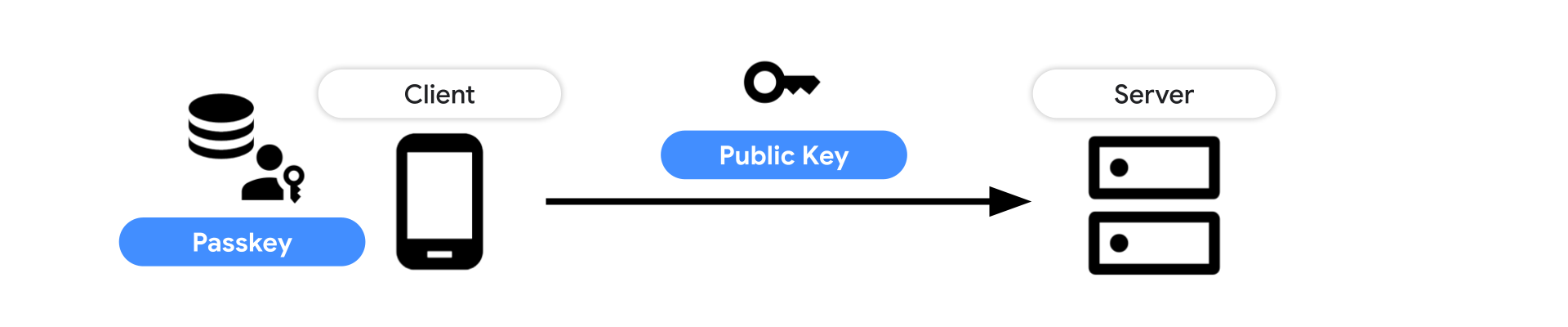
Google Password Manager: Stores, serves and synchronises passkeys on Android and Chrome. Passkeys are securely backed up and synced between Android devices where the user is signed using the same Google account, and available passkeys are listed.
iCloud Keychain: Synchronises the saved passkey to other Apple devices that run macOS, iOS, or iPadOS where the user is signed in using the same iCloud account.
In this section, we illustrate the usage of passkeys in several scenarios.
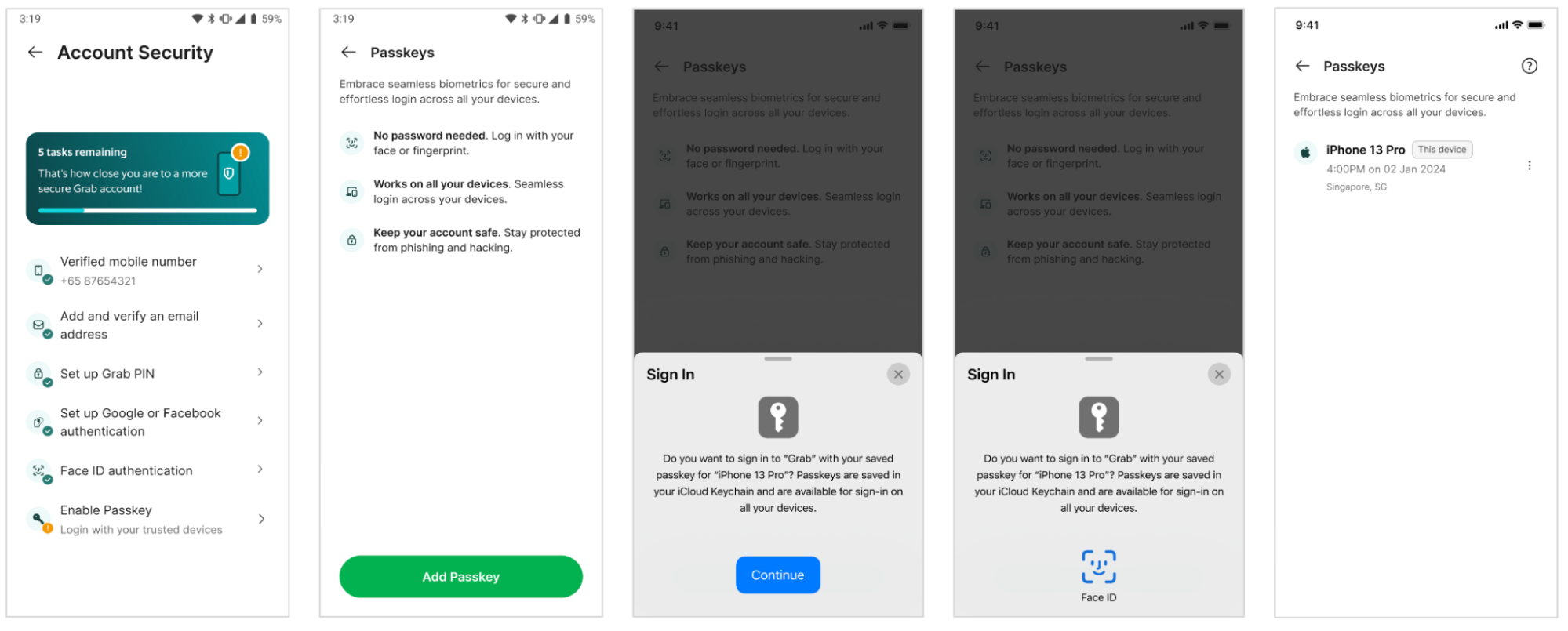

Frontend invokes WebAuthn API to create a passkey.
 const publicKeyCredentialCreationOptions = {
   challenge: *****,
   rp: {
     name: "Example",
     id: "example.com",
   },
   user: {
     id: *****,
     name: "john78",
     displayName: "John",
   },
   pubKeyCredParams: [{alg: -7, type: "public-key"},{alg: -257, type: "public-key"}],
   excludeCredentials: [{
     id: *****,
     type: 'public-key',
     transports: ['internal'],
   }],
   authenticatorSelection: {
     authenticatorAttachment: "platform",
     requireResidentKey: true,
   }
 };

 const credential = await navigator.credentials.create({
   publicKey: publicKeyCredentialCreationOptions
 });

 // Encode and send the credential to the server for verification.
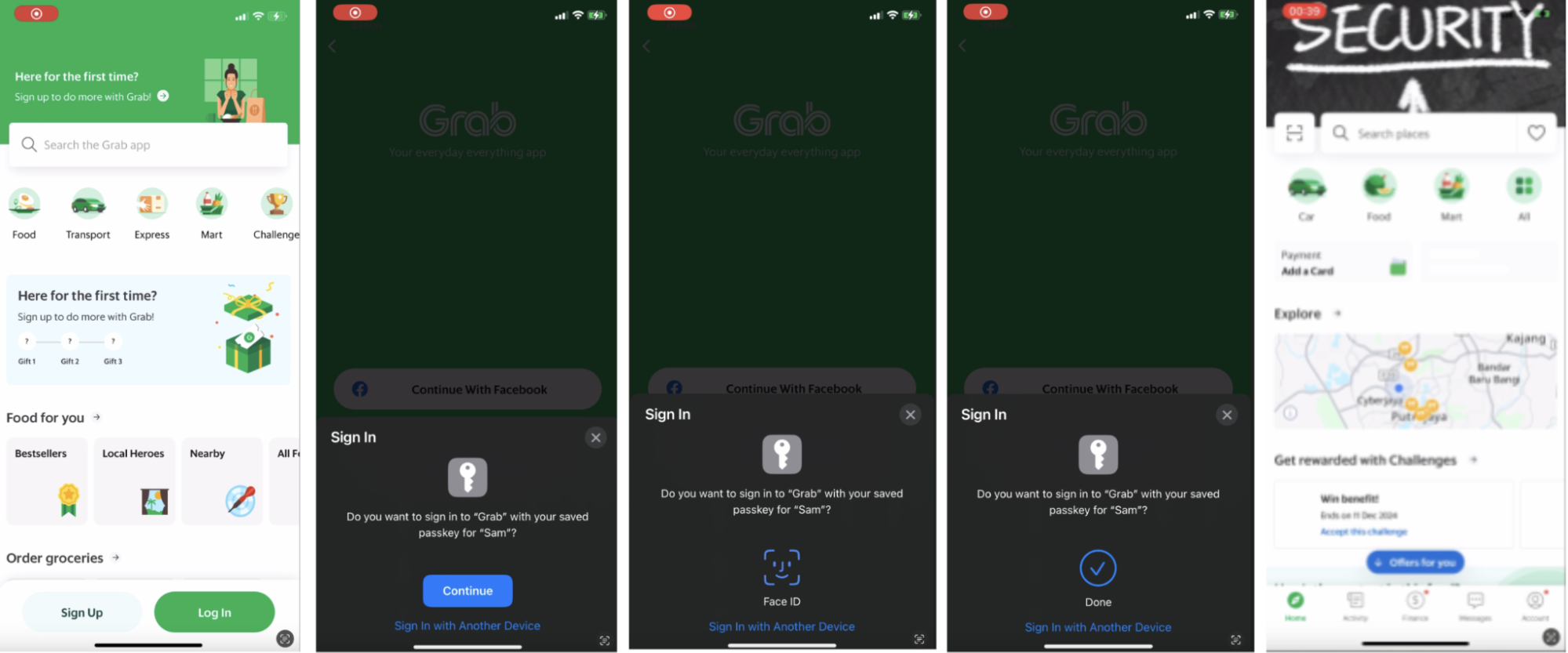
Thus, Passkey enhances the login experience, providing an optimal blend of security and seamless usability.
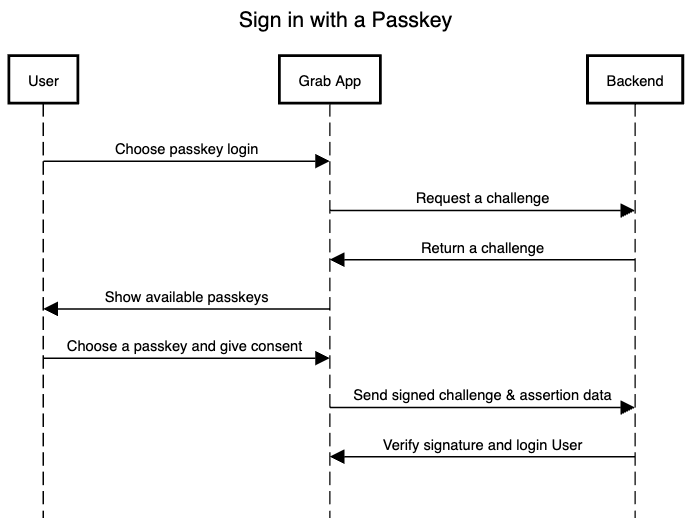
Frontend calls navigator.credentials.get() to initiate user authentication.
 // To abort a WebAuthn call, instantiate an `AbortController`.

 const abortController = new AbortController();

 const publicKeyCredentialRequestOptions = {
   // Server generated challenge
   challenge: ****,
   // The same RP ID as used during registration
   rpId: 'example.com',
 };

 const credential = await navigator.credentials.get({
   publicKey: publicKeyCredentialRequestOptions,
   signal: abortController.signal,
   // Specify 'conditional' to activate conditional UI
   mediation: 'conditional'
 });
A frictionless login paints a positive picture for our users. No more waiting for OTPs or struggling with cumbersome two-factor authentication. With the implementation of Passkey, users will enjoy a smoother, faster, and more secure login process.
In addition to delivering a frictionless user experience, passkeys provide heightened security compared to conventional authentication methods such as OTPs and passwords, which demand active credential management.
Using passkeys for authentication can lead to cost savings by cutting down or eliminating fees related to third-party authentication services, communication expenses, and messaging platforms. This strategy not only boosts security and user experience but also enhances the financial efficiency of the authentication process.
Moving forward, our focus is on enhancing, streamlining, and extending the capabilities of Passkey. We are enthusiastic about the evolution of passwordless authentication and are dedicated to ongoing investments in technologies that deliver the utmost user satisfaction and experience.
Leveraging passkeys for authentication provides heightened security, enhanced user experience, cost-effectiveness, decreased vulnerabilities, multi-factor authentication support, and simplified credential management. The future direction involves enhancing and broadening Passkey capabilities, with a dedication to investing in user-centric technologies that advance passwordless authentication. This commitment underscores the focus on delivering secure, efficient, and user-friendly authentication solutions for both existing and prospective users.
Looking ahead, based on the user adoption of Passkey and its anticipated impact on improving login convenience, we aim to explore the expansion of this feature to web login as well. We envision a scenario where users can leverage the power of their existing phone Passkey, no matter the operating system, thereby creating a truly seamless and secure login experience.
As we gather user feedback, analyse usage data, and delve into Passkey’s impact, we aim to identify growth opportunities and further enhance our understanding of this innovative feature’s transformative effect on app security. Stay tuned for updates on how we are revolutionising our approach to authentication, with a continuous focus on enhancing user convenience and security.
Grab is the leading superapp platform in Southeast Asia, providing everyday services that matter to consumers. More than just a ride-hailing and food delivery app, Grab offers a wide range of on-demand services in the region, including mobility, food, package and grocery delivery services, mobile payments, and financial services across 700 cities in eight countries.
Powered by technology and driven by heart, our mission is to drive Southeast Asia forward by creating economic empowerment for everyone. If this mission speaks to you, join our team today!
Post Syndicated from corbet original https://lwn.net/Articles/1002368/
It is often said that the definition of insanity is repeating the same
action and expecting different results. Be that as it may, LWN has
repeatedly started a new year with a set of predictions, only to have to
review how badly they went at the end. There was no break in that pattern
this year, so there is no help for it; the time has come to review
our 2024 predictions in the hope that they
came out better this time around.
Post Syndicated from jzb original https://lwn.net/Articles/1003462/
Security updates have been issued by Fedora (sympa and tomcat), Red Hat (kernel), and SUSE (poppler).
Post Syndicated from The History Guy: History Deserves to Be Remembered original https://www.youtube.com/watch?v=0mhhAW1RWig
Post Syndicated from E Lopez original https://www.servethehome.com/what-all-of-the-markings-on-sd-microsd-and-microsdxc-cards-mean/
A quick guide to what all of the markings on SD, microSD, and microSDXC cards mean including speeds, capacities, and more
The post What All of the Markings on SD microSD and microSDXC Cards Mean appeared first on ServeTheHome.
Post Syndicated from The History Guy: History Deserves to Be Remembered original https://www.youtube.com/watch?v=mhnbBtpSe4E
Post Syndicated from Explosm.net original https://explosm.net/comics/christmas-2024
New Cyanide and Happiness Comic
Post Syndicated from xkcd.com original https://xkcd.com/3029/

Post Syndicated from The History Guy: History Deserves to Be Remembered original https://www.youtube.com/watch?v=iKIU9tn4xEE
Post Syndicated from Crosstalk Solutions original https://www.youtube.com/watch?v=mtonw7wJ684
Post Syndicated from jzb original https://lwn.net/Articles/1002398/
The systemd v257 release brings a number of incremental
enhancements to various components and utilities for working with
Linux systems. This includes more support for varlink, automated
downloading of disk images at boot time, and a number of improvements
to the secure-boot process for unified kernel images (UKIs), which we
have covered in a separate
article.
Post Syndicated from corbet original https://lwn.net/Articles/1003381/
Security updates have been issued by AlmaLinux (containernetworking-plugins, edk2:20240524, gstreamer1-plugins-base, gstreamer1-plugins-good, kernel, libsndfile:1.0.31, mpg123:1.32.9, pam, php:8.1, php:8.2, python3.11, python3.11-urllib3, python3.12, python3.9:3.9.21, skopeo, and unbound:1.16.2), Debian (intel-microcode), Fedora (python3-docs and python3.12), Mageia (emacs), Red Hat (podman), and SUSE (gdb, govulncheck-vulndb, libparaview5_12, mozjs115, mozjs78, and vhostmd).
Post Syndicated from daroc original https://lwn.net/Articles/1001730/
The systemd project has been working for some time on
promoting
unified kernel
images (UKIs), a format that bundles a kernel, initial disk image, kernel command line, and
other associated data into a single file. The advantage of the format is the ability to
authenticate the entire collection with secure boot, which makes it easier for
end users to know that their operating system hasn’t been tampered with. The
downside is the lack of flexibility and increase in disk usage, since all of the
things packaged in a UKI must be updated together. But the
recent systemd 257 release (along with other changes to be covered in
a future article) includes some
major changes to the UKI format, and the rest of the boot process, that
partially mitigate those downsides. The release also includes improvements for
hardware-locked disk encryption, which may also help secure some computers.
Post Syndicated from Taylor Smith original https://blog.cloudflare.com/un-experimento-rapido-translating-cloudflare-stream-captions-with-workers-ai/
Cloudflare Stream launched AI-powered automated captions to transcribe English in on-demand videos in March 2024. Customers’ immediate next questions were about other languages — both transcribing audio from other languages, and translating captions to make subtitles for other languages. As the Stream Product Manager, I’ve thought a lot about how we might tackle these, but I wondered…
What if I just translated a generated VTT (caption file)? Can we do that? I hoped to use Workers AI to conduct a quick experiment to learn more about the problem space, challenges we may find, and what platform capabilities we can leverage.
There is a sample translator demo in Workers documentation that uses the “m2m100-1.2b” Many-to-Many multilingual translation model to translate short input strings. I decided to start there and try using it to translate some of the English captions in my Stream library into Spanish.
I started with my short demo video announcing the transcription feature. I wanted a Worker that could read the VTT captions file from Stream, isolate the text content, and run it through the model as-is.
The first step was parsing the input. A VTT file is a text file that contains a sequence of numbered “cues,” each with a number, a start and end time, and text content.
WEBVTT
X-TIMESTAMP-MAP=LOCAL:00:00:00.000,MPEGTS:900000

1
00:00:00.000 --> 00:00:02.580
Good morning, I'm Taylor Smith,

2
00:00:02.580 --> 00:00:03.520
the Product Manager for Cloudflare

3
00:00:03.520 --> 00:00:04.460
Stream. This is a quick

4
00:00:04.460 --> 00:00:06.040
demo of our AI-powered automatic

5
00:00:06.040 --> 00:00:07.580
subtitles feature. These subtitles

6
00:00:07.580 --> 00:00:09.420
were generated with Cloudflare WorkersAI

7
00:00:09.420 --> 00:00:10.860
and the Whisper Model,

8
00:00:10.860 --> 00:00:12.020
not handwritten, and it took

9
00:00:12.020 --> 00:00:13.940
just a few seconds.I started with a simple Worker that would fetch the VTT from Stream directly, run it through a function I wrote to deconstruct the cues, and return the timestamps and original text in an easier to review format.
export default {
  async fetch(request: Request, env: Env, ctx): Promise<Response> {
    // Step One: Get our input.
    const input = await fetch(PLACEHOLDER_VTT_URL)
      .then(res => res.text());

    // Step Two: Parse the VTT file and get the text
    const captions = vttToCues(input);

    // Done: Return what we have.
    return new Response(captions.map(c =>
      (`#${c.number}: ${c.start} --> ${c.end}: ${c.content.toString()}`)
    ).join('\n'));
  },
};
That returned this text:
#1: 0 --> 2.58: Good morning, I'm Taylor Smith,
#2: 2.58 --> 3.52: the Product Manager for Cloudflare
#3: 3.52 --> 4.46: Stream. This is a quick
#4: 4.46 --> 6.04: demo of our AI-powered automatic
#5: 6.04 --> 7.58: subtitles feature. These subtitles
#6: 7.58 --> 9.42: were generated with Cloudflare WorkersAI
#7: 9.42 --> 10.86: and the Whisper Model,
#8: 10.86 --> 12.02: not handwritten, and it took
#9: 12.02 --> 13.94: just a few seconds.As a proof of concept, I adapted a snippet from the demo into my Worker. In the example, the target language and input text are extracted from the user’s request. In my experiment, I decided to hardcode the languages. Also, I had an array of input objects, one for each cue, not just a string. After interpreting the caption input but before returning a response, I used a map callback to parallelize all the AI.run() calls to translate each cue, so they could execute asynchronously and in-place, then awaited them all to resolve. Ultimately, the AI inference call itself is the simplest part of the script.
await Promise.all(captions.map(async (q) => {
  const translation = await env.AI.run(
    "@cf/meta/m2m100-1.2b",
    {
      text: q.content,
      source_lang: "en",
      target_lang: "es",
    }
  );

  q.content = translation?.translated_text ?? q.content;
}));
Then the script returns the translated output in the format from before.
Of course, this is not a scalable or error-tolerant approach for production use because it doesn’t make affordances for rate limiting, failures, or processing bigger throughput. But for a few minutes of tinkering, it taught me a lot.
#1: 0 --> 2.58: Buen día, soy Taylor Smith.
#2: 2.58 --> 3.52: El gerente de producto de Cloudflare
#3: 3.52 --> 4.46: Rápido, esto es rápido
#4: 4.46 --> 6.04: La demostración de nuestro automático AI-powered
#5: 6.04 --> 7.58: Los subtítulos, estos subtítulos
#6: 7.58 --> 9.42: Generado con Cloudflare WorkersAI
#7: 9.42 --> 10.86: y el modelo de susurro,
#8: 10.86 --> 12.02: No se escribió, y se tomó
#9: 12.02 --> 13.94: Sólo unos segundos.
A few immediate observations: first, these results came back surprisingly quickly and the Workers AI code worked on the first try! Second, evaluating the quality of translation results is going to depend on having team members with expertise in those languages. Because — third, as a novice Spanish speaker, I can tell this output has some issues.
Cues 1 and 2 are okay, but 3 is not (“Fast, this is fast” from “[Cloudflare] Stream. This is a quick…”). Cues 5 through 9 had several idiomatic and grammatical issues, too. I theorized that this is because Stream splits the English captions into groups of 4 or 5 words to make them easy to read quickly in the overlay. But that also means sentences and grammatical constructs are interrupted. When those fragments go to the translation model, there isn’t enough context.
I speculated that reconstructing sentences would be the most effective way to improve translation quality, so I made that the one problem I attempted to solve within this exploration. I added a rough pre-processor in the Worker that tries to merge caption cues together and then splits them at sentence boundaries instead. In the process, it also adjusts the timing of the resulting cues to cover the same approximate timeframe.
Looking at each cue in order:
// Break this cue up by sentence-ending punctuation.
const sentences = thisCue.content.split(/(?<=[.?!]+)/g);

// Cut here? We have one fragment and it has a sentence terminator.
const cut = sentences.length === 1 && thisCue.content.match(/[.?!]/);
But if there’s a cue that splits into multiple sentences, cut it up and split the timing. Leave the final fragment to roll into the next cue:
else if (sentences.length > 1) {
  // Save the last fragment for later
  const nextContent = sentences.pop();

  // Put holdover content and all-but-last fragment into the content
  newContent += ' ' + sentences.join(' ');

  const thisLength = (thisCue.end - thisCue.start) / 2;

    result.push({
      number: newNumber,
      start: newStart,
      end: thisCue.start + (thisLength / 2), // End this cue early
      content: newContent,
    });

    // … then treat the next cue as a holdover
    cueLength = 1;
    newContent = nextContent;
    // Start the next consolidated cue halfway into this cue's original duration
    newStart = thisCue.start + (thisLength / 2) + 0.001;
    // Set the next consolidated cue's number to this cue's number
    newNumber = thisCue.number;
  }
}
Applying that to the input, it generates sentence-grouped output, visualized here in green:

There are only 3 “new” cues, each starts at the beginning of a sentence. The consolidated cues are longer and might be harder to read when overlaid on a video, but they are complete grammatical units:
#1: 0 --> 3.755:  Good morning, I'm Taylor Smith, the Product Manager for Cloudflare Stream.
#3: 3.756 --> 6.425:  This is a quick demo of our AI-powered automatic subtitles feature.
#5: 6.426 --> 12.5:  These subtitles were generated with Cloudflare Workers AI and the Whisper Model, not handwritten, and it took just a few seconds.
Translating this “prepared” input the same way as before:
#1: 0 --> 3.755: Buen día, soy Taylor Smith, el gerente de producto de Cloudflare Stream.
#3: 3.756 --> 6.425: Esta es una demostración rápida de nuestra función de subtítulos automáticos alimentados por IA.
#5: 6.426 --> 12.5: Estos subtítulos fueron generados con Cloudflare WorkersAI y el Modelo Whisper, no escritos a mano, y solo tomó unos segundos.
¡Mucho mejor! [Much better!]
To use these translated captions on a video, they need to be formatted back into a VTT with renumbered cues and properly formatted timestamps. Ultimately, the solution should automatically upload them back to Stream, too, but that is an established process, so I set it aside as out of scope. The final VTT result from my Worker is this:
WEBVTT

1
00:00:00.000 --> 00:00:03.754
Buen día, soy Taylor Smith, el gerente de producto de Cloudflare Stream.

2
00:00:03.755 --> 00:00:06.424
Esta es una demostración rápida de nuestra función de subtítulos automáticos alimentados por IA.

3
00:00:06.426 --> 00:00:12.500
Estos subtítulos fueron generados con Cloudflare WorkersAI y el Modelo Whisper, no escritos a mano, y solo tomó unos segundos.
I saved it to a file locally and, using the Cloudflare Dashboard, I added it to the video which you may have noticed embedded at the top of this post! Captions can also be uploaded via the API.
I tested this script on a variety of videos from many sources, including short social media clips, 30-minute video diaries, and even a few clips with some specialized vocabulary. Ultimately, I was surprised at the level of prototype I was able to build on my first afternoon with Workers AI. The translation results were very promising! In the process, I learned a few key things that I will be bringing back to product planning for Stream:
We have the tools. Workers AI has a model called “m2m100-1.2b” from Hugging Face that can do text translations between many languages. We can use it to translate the plain text cues from VTT files — whether we generate them or they are user-supplied. We’ll keep an eye out for new models as they are added, too.
Quality is prone to “copy-of-a-copy” effect. When auto-translating captions that were auto-transcribed, issues that impact the English transcription have a huge downstream impact on the translation. Editing the source transcription improves quality a lot.
Good grammar and punctuation counts. Translations are significantly improved if the source content is grammatically correct and punctuated properly. Punctuation is often missing when captions are auto-generated, but not always — I would like to learn more about how to predict that and if there are ways we can increase punctuation in the output of transcription jobs. My cue consolidator experiment returns giant walls of text if there’s no punctuation on the input.
Translate full sentences when possible. We split our transcriptions into cues of about 5 words for several reasons. However, this produces lower quality output when translated because it breaks grammatical constructs. Translation results are better with full sentences or at least complete fragments. This is doable, but easier said than done, particularly as we look toward support for additional input languages that use punctuation differently.
We will have blind spots when evaluating quality. Everyone on our team was able to adequately evaluate English transcriptions. Sanity-checking the quality of translations will require team members who are familiar with those languages. We state disclaimers about transcription quality and offer tips to improve it, but at least we know what we’re looking at. For translations, we may not know how far off we are in many cases. How many readers of this article objected to the first translation sample above?
Clear UI and API design will be important for these related but distinct workflows. There are two different flows being requested by Stream customers: “My audio is in English, please make translated subtitles” alongside “My audio is in another language, please transcribe captions as-is.” We will need to carefully consider how we shape user-facing interactions to make it really clear to a user what they are asking us to do.
Workers AI is really easy to use. Sheepishly, I will admit: although I read Stream’s code for the transcription feature, this was the first time I’ve ever used Workers AI on my own, and it was definitely the easiest part of this experiment!
Finally, as a product manager, it is important I remain focused on the outcome. From a certain point of view, this experiment is a bit of an XY Problem. The need is “I have audio in one language and I want subtitles in another.” Are there other avenues worth looking into besides “transcribe to captions, then restructure and translate those captions?” Quite possibly. But this experiment with Workers AI helped me identify some potential challenges to plan for and opportunities to get excited about!
I’ve cleaned up and shared the sample code I used in this experiment at https://github.com/tsmith512/vtt-translate/. Try it out and share your experience!
Post Syndicated from Bruce Schneier original https://www.schneier.com/blog/archives/2024/12/spyware-maker-nso-group-found-liable-for-hacking-whatsapp.html
A judge has found that NSO Group, maker of the Pegasus spyware, has violated the US Computer Fraud and Abuse Act by hacking WhatsApp in order to spy on people using it.
Jon Penney and I wrote a legal paper on the case.
Post Syndicated from Explosm.net original https://explosm.net/comics/replaced
New Cyanide and Happiness Comic
Post Syndicated from The Atlantic original https://www.youtube.com/watch?v=eBtvr97fzIM