All posts by Sharon Goldberg

Securing today for the quantum future: WARP client now supports post-quantum cryptography (PQC)

Post Syndicated from Sharon Goldberg original https://blog.cloudflare.com/post-quantum-warp/

The Internet is currently transitioning to post-quantum cryptography (PQC) in preparation for Q-Day, when quantum computers break the classical cryptography that underpins all modern computer systems.  The US National Institute of Standards and Technology (NIST) recognized the urgency of this transition, announcing that classical cryptography (RSA, Elliptic Curve Cryptography (ECC)) must be deprecated by 2030 and completely disallowed by 2035.

Cloudflare is well ahead of NIST’s schedule. Today, over 45% of human-generated Internet traffic sent to Cloudflare’s network is already post-quantum encrypted. Because we believe that a secure and private Internet should be free and accessible to all, we’re on a mission to include PQC in all our products, without specialized hardware, and at no extra cost to our customers and end users.

That’s why we’re proud to announce that Cloudflare’s WARP client now supports post-quantum key agreement — both in our free consumer WARP client 1.1.1.1, and in our enterprise WARP client, the Cloudflare One Agent

Post-quantum tunnels using the WARP client

This upgrade of the WARP client to post-quantum key agreement provides end users with immediate protection for their Internet traffic against harvest-now-decrypt-later attacks. The value proposition is clear — by tunneling your Internet traffic over the WARP client’s post-quantum MASQUE tunnels, you get immediate post-quantum encryption of your network traffic. And this holds even if the individual connections sent through the tunnel have not yet been upgraded to post-quantum cryptography.

Here’s how it works.

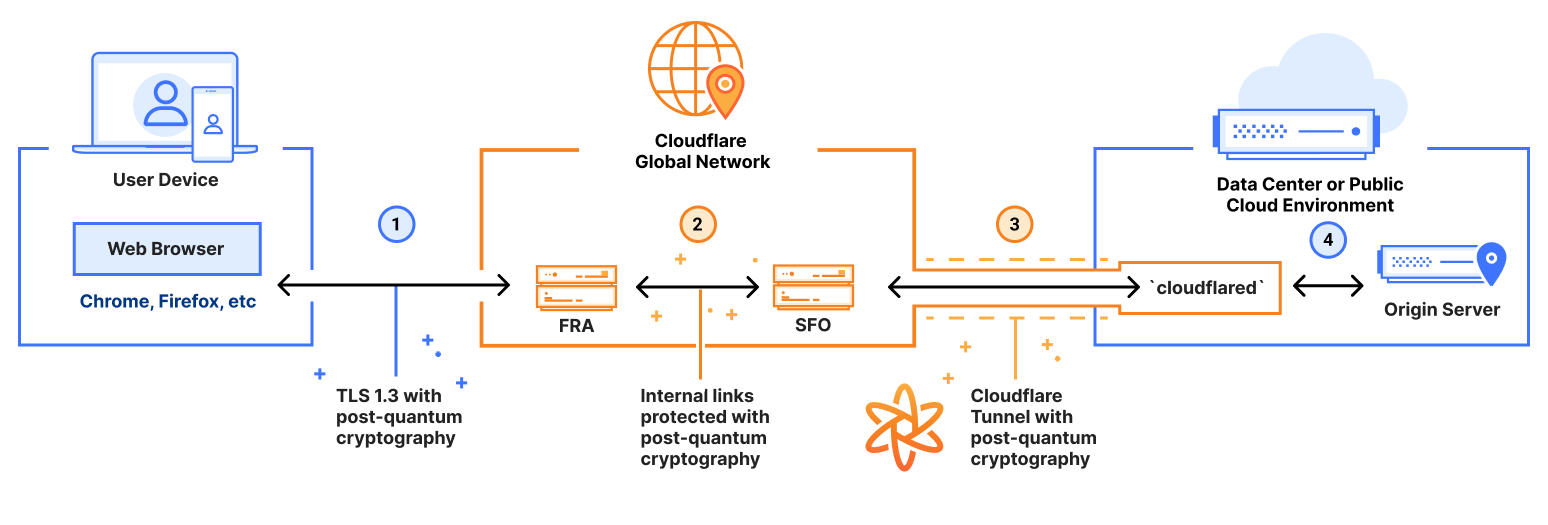
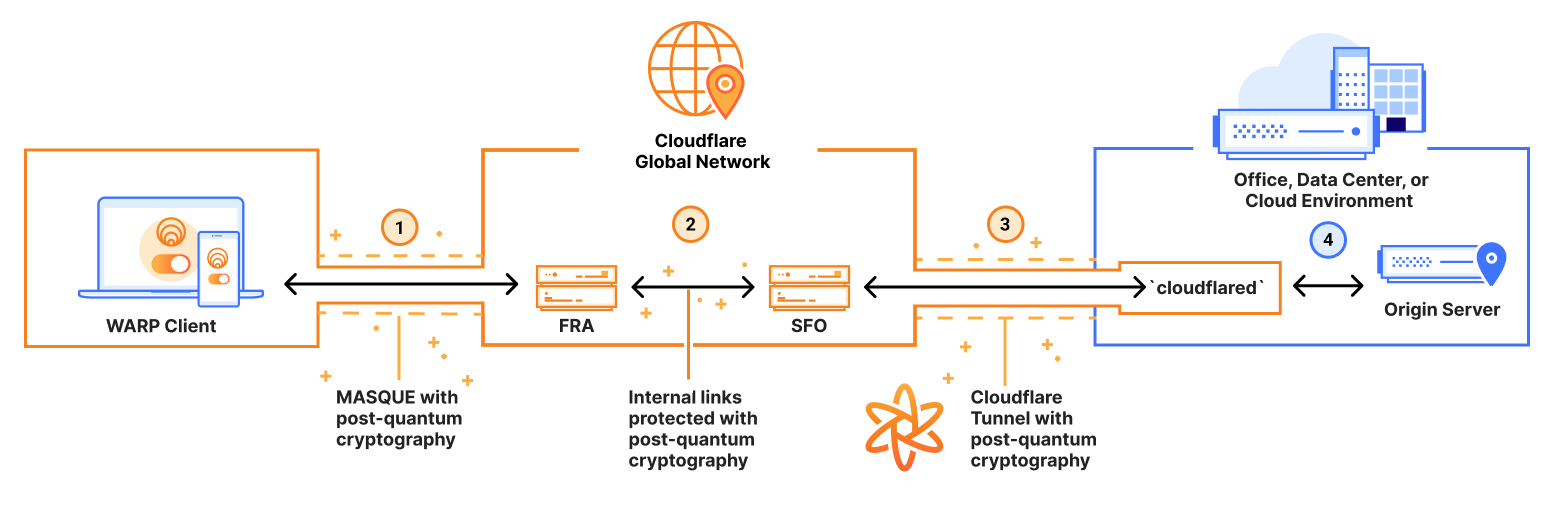
When the Cloudflare One Agent (our enterprise WARP client) connects employees to the internal corporate resources as part of the Cloudflare One Zero Trust platform, it now provides end-to-end quantum encryption of network traffic. As shown in the figure below, traffic from the WARP client is wrapped in a post-quantum encrypted MASQUE (Multiplexed Application Substrate over QUIC Encryption) tunnel, sent to Cloudflare’s global network network (link (1)). Cloudflare’s global network then forwards the traffic another set of post-quantum encrypted tunnels (link (2)), and then finally on to the internal corporate resource using a post-quantum encrypted Cloudflare Tunnel established using the cloudflared agent (which installed near the corporate resource) (link (3)). 


We have upgraded the Cloudflare One Agent to post-quantum key agreement, providing end-to-end post quantum protection for traffic sent to internal corporate resources. 

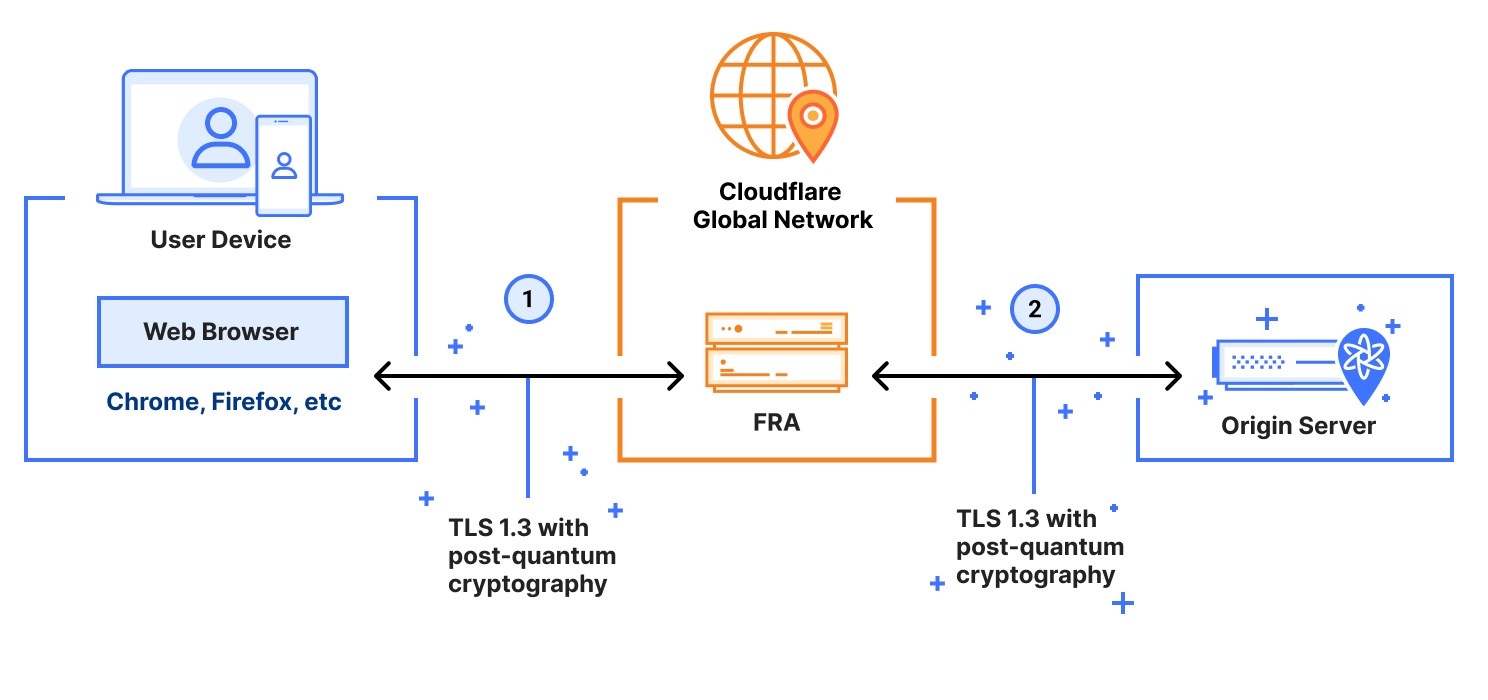
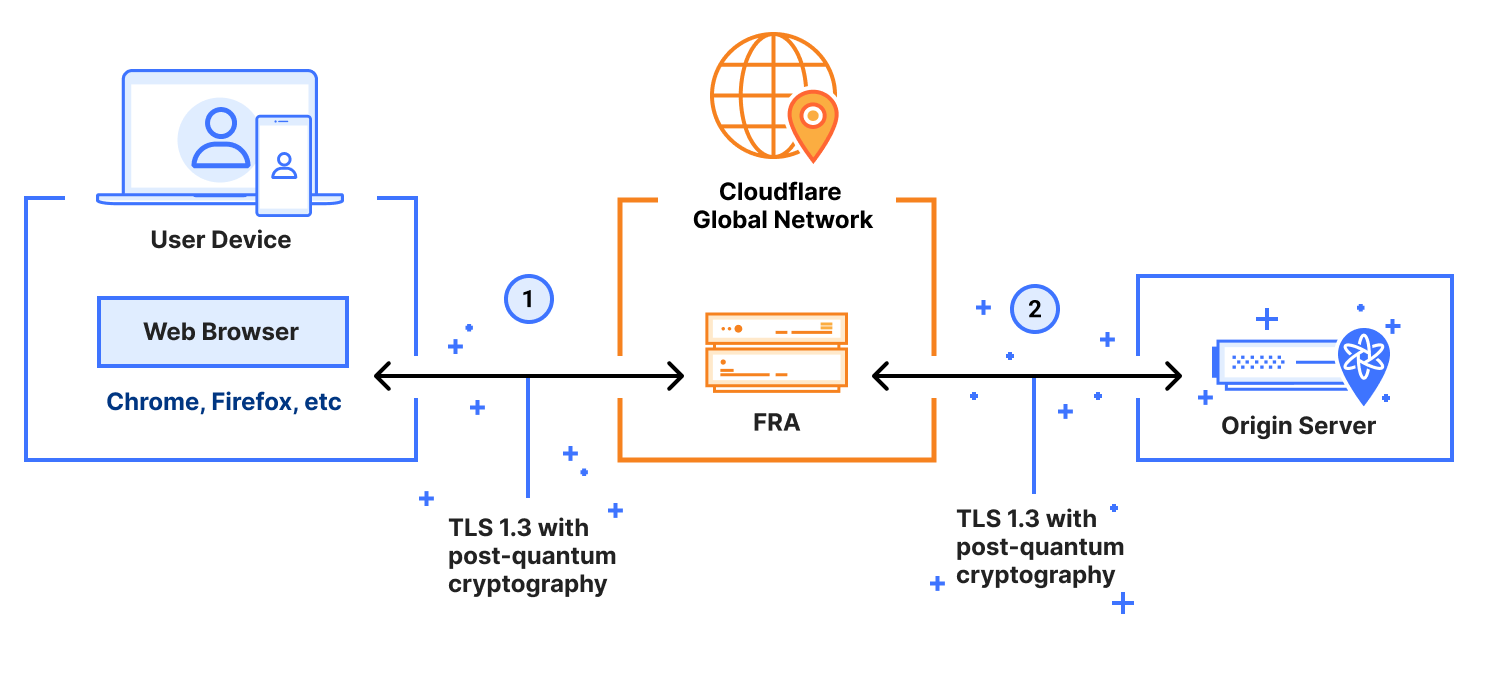
When an end user installs the consumer WARP Client (1.1.1.1), the WARP client wraps the end user’s network traffic in a post-quantum encrypted MASQUE tunnel. As shown in the figure below, the MASQUE tunnel protects the traffic on its way to Cloudflare’s global network (link (1)). Cloudflare’s global network then uses post-quantum encrypted tunnels to bring the traffic as close as possible to its final destination (link (2)). Finally, the traffic is forwarded over the public Internet to the origin server (i.e. its final destination). That final connection (link (3)) may or may not be post-quantum (PQ). It will not be PQ if the origin server is not PQ.  It will be PQ if the origin server is (a) upgraded to PQC, and (b) the end user is connecting to over a client that supports PQC (like Chrome, Edge or Firefox).  In the future, Automatic SSL/TLS will ensure that your entire connection will be PQ as long as the origin server is behind Cloudflare and supports PQ connections (even if your browser doesn’t).


Consumer WARP client (1.1.1.1) is now upgraded to post-quantum key agreement.

The cryptography landscape

Before we get into the details of our upgrade to the WARP client, let’s review the different cryptographic primitives involved in the transition to PQC. 

Key agreement is a method by which two or more parties can establish a shared secret key over an insecure communication channel. This shared secret can then be used to encrypt and authenticate subsequent communications. Classical key agreement in Transport Layer Security (TLS) typically uses the Elliptic Curve Diffie Hellman (ECDH) cryptographic algorithm, whose security can be broken by a quantum computer using Shor’s algorithm

We need post-quantum key agreement today to stop harvest-now-decrypt-later attacks, where attackers collect encrypted data today, and then decrypt it in future once powerful quantum computers become available. Any institution that deals with data that could still be valuable ten years in the future (governments, financial institutions, healthcare organizations, and more) should deploy PQ key agreement to prevent these attacks.

This is why we upgraded the WARP client to post-quantum key agreement.

Post-quantum key agreement is already quite mature and performant; our experiments have shown that deploying the post-quantumModule-Lattice-Based Key-Encapsulation Mechanism (ML-KEM) algorithm in hybrid mode (in parallel with classical ECDH) over TLS 1.3 is actually more performant than using TLS 1.2 with classical cryptography. 


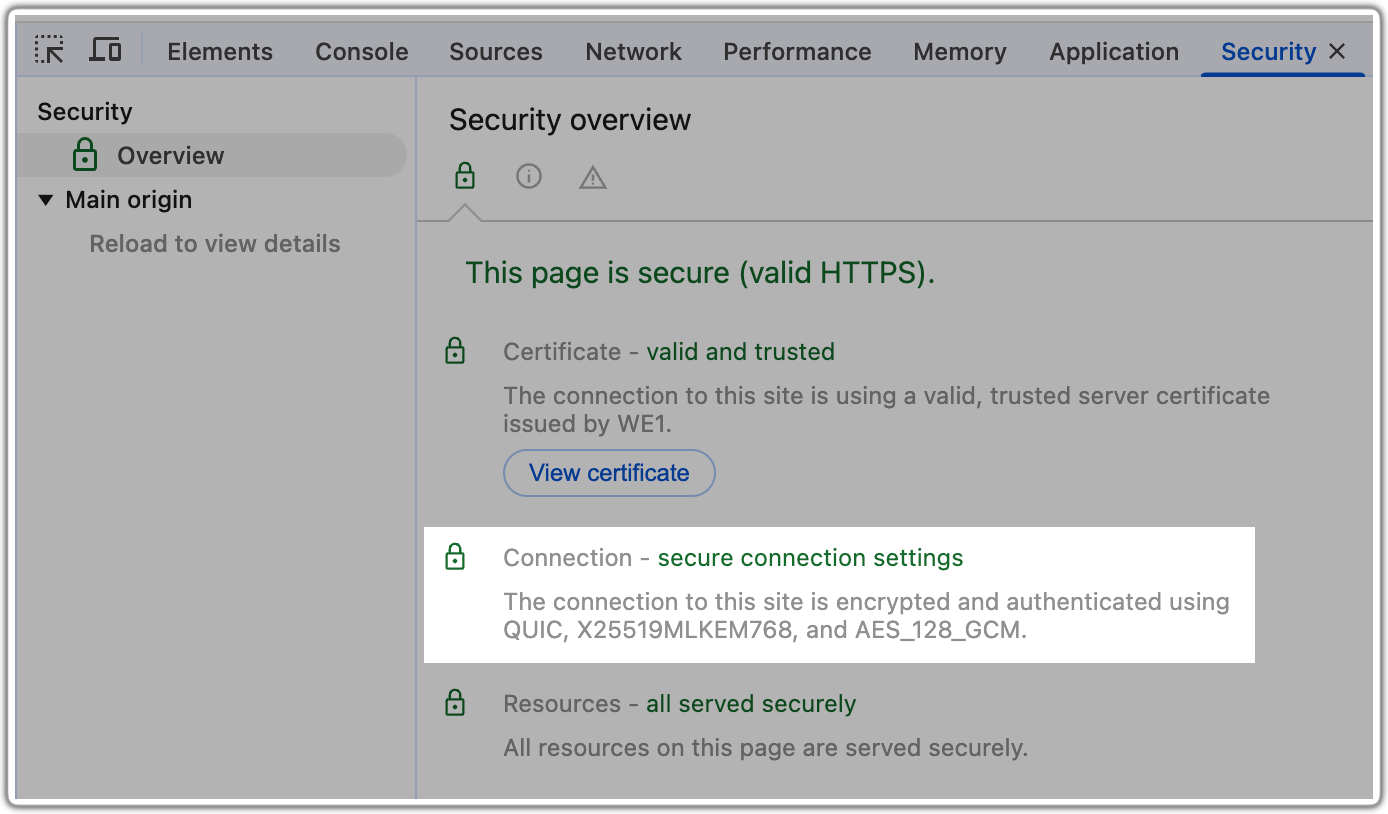
Over one-third of the human-generated traffic to our network uses TLS 1.3 with hybrid post-quantum key agreement (shown as X25519MLKEM768 in the screen capture above); in fact, if you’re on a Chrome, Edge or Firefox browser, you’re probably reading this blog right now over a PQ encrypted connection.

Post-quantum digital signatures and certificates, by contrast, are still in the process of being standardized for use in TLS and the Internet’s Public Key Infrastructure (PKI). PQ signatures and certificates are required to prevent an active attacker who uses a quantum computer to forge a digital certificate/signature and then uses it to decrypt or manipulate communications by impersonating a trusted server. As far as we know, we don’t have such attackers yet, which is why post-quantum signatures and certificates are not widely deployed across the Internet. We have not yet upgraded the WARP client to PQ signatures and certificates, but we plan to do so soon.

A unique challenge: PQC upgrade in the WARP client 

While Cloudflare is on the forefront of the PQC transition, a different kind of challenge emerged when we upgraded our WARP client. Unlike a server that we fully control and can hotfix at any time, our WARP client runs directly on end user devices. In fact, it runs on millions of end user devices that we do not control. This fundamental difference means that every time we update the WARP client, our release must work properly on the first try, with no room for error.

To make things even more challenging, we need to support the WARP client across five different operating systems (Windows, macOS, Linux, iOS, and Android/ChromeOS), while also ensuring consistency and reliability for both our consumer 1.1.1.1 WARP client and our Cloudflare One Agent. In addition, because the WARP client relies on the fairly new MASQUE protocol, which the industry only standardized in August 2022, we need to be extra careful to make sure our upgrade to post-quantum key agreement does not expose latent bugs or instabilities in the MASQUE protocol itself. 

All these challenges point to a slow and careful transition to PQC in the WARP client, while still supporting customers that want to immediately activate PQC. To accomplish this, we used three techniques: 

  1. temporary PQC downgrades, 

  2. gradual rollout across our WARP client population, and

  3. a Mobile Device Management (MDM) override. 

Let’s take a deep dive into each. 

Temporary PQC downgrades

As we roll out PQ key agreement in MASQUE to the WARP client, we want to make sure we don’t have WARP clients that struggle to connect due to an error, middlebox, or a latent implementation bug triggered by our PQC migration. One way to accomplish this level of robustness is to have clients downgrade to a classic cryptographic connection if they fail to negotiate a PQ connection.

To really understand this strategy, we need to review the concept of cryptographic downgrades. In cryptography, a downgrade attack is a cyber attack where an attacker forces a system to abandon a secure cryptographic algorithm in favor of an older, less secure, or even unencrypted one that allows the attacker to introspect on the communications. Thus, when newly rolling out a PQ encryption, it is standard practice to ensure that: if the client and server both support PQ encryption, it should not be possible for an attacker to downgrade their connection to a classic encryption. 

Thus, to prevent downgrade attacks, we should ensure that if the client and server both support PQC, but fail to negotiate a PQC connection, then the connection will just fail. However, while this prevents downgrade attacks, it also creates problems with robustness.

We cannot have both robustness (i.e. the ability for client to downgrade to a classical connection if the PQC fails) and security against downgrades (i.e. the client is forbidden to downgrade to classical cryptography once it supports PQC) at the same time. We have to choose one. For this reason, we opted for a phased approach.

  • Phase 1: Automated PQC downgrades. We start by choosing robustness at the cost of providing security against downgrade attacks.  In this phase, we support automated PQC downgrades — if a client fails to negotiate a PQC connection, it will downgrade to classical cryptography. That way, if there are bugs or other instability introduced by PQC, the client automatically downgrades to classical cryptography and the end user will not experience any issues. (Note: because MASQUE establishes a single very long-lived TLS connection only when the user logs in, an end user is unlikely to notice a downgrade.) 

  • Phase 2: PQC with security against downgrades. Then, once the rollout is stable and we are convinced that there are no issues interfering with PQC, we will choose security against downgrade attacks over robustness. In this phase, if a client fails to negotiate a PQC connection, the connection will just fail, which provides security against downgrade attacks.

To implement this phased approach, we introduced an API flag that the client uses to determine how it should initiate TLS handshakes, which has three states:

  • No PQC: The client initiates a TLS handshake using classical cryptography only. .

  • PQC downgrades allowed: The client initiates a TLS handshake using post-quantum key agreement. If the PQC handshake negotiation fails, the client downgrades to classical cryptography. This flag supports Phase 1 of our rollout. 

  • PQC only: The client initiates a TLS handshake using post-quantum key agreement cryptography. If the PQC handshake negotiation fails, the connection fails. This flag supports Phase 2 of our rollout.

The WARP desktop version 2025.5.893.0, iOS version 1.11 and Android version 2.4.2 all support post-quantum key agreement along with this API flag.

With this as our framework, the next question becomes: what timing makes sense for this phased approach?

Gradual rollout across the WARP client population

To limit the risk of errors or latent implementation bugs triggered by our PQC migration, we gradually rolled out PQC across our population of WARP clients.

In Phase 1 of our rollout, we prioritized robustness rather than security against downgrade attacks. Thus, initially the API flag is set to “No PQC” for our entire client population, and we gradually turn on the “PQC downgrades allowed” across groups of clients. As we do this, we monitor whether any clients downgrade from PQC to classical cryptography. At the time of this writing, we have completed the Phase 1 rollout to all of our consumer WARP (1.1.1.1) clients. We expect to complete Phase 1 for our Cloudflare One Agent by the end of 2025.

Downgrades are not expected during Phase 1. In fact, downgrades indicate that there may be a latent issue that we have to fix. If you are using a WARP client and encounter issues that you believe might be related to PQC, you can let us know by using the feedback button in the WARP client interface (by clicking the bug icon in the top-right corner of the WARP client application). Enterprise users can also file a support ticket for the Cloudflare One Agent.

We plan to enter Phase 2 — where the API flag is set to “PQC only” in order to provide security against downgrade attacks — by summer of mid 2026. 

MDM override

Finally, we know that some of our customers may not be willing to wait for us to complete this careful upgrade to PQC. So, those customers can activate PQC right now. 

We’ve built a Mobile Device Management (MDM) override for the Cloudflare One Agent. MDM allows organizations to centrally manage, monitor, and secure mobile devices that access corporate resources; it works on multiple types of devices, not just mobile devices. The override for the Cloudflare One Agent allows an administrator (with permissions to manage the device) to turn on PQC. To use the MDM post-quantum override, set the ‘enable_post_quantum’ MDM flag to true. This flag takes precedence over the signal from the API flag we described earlier, and will activate PQC without downgrades. With this setting, the client will only negotiate a PQC connection. And if the PQC negotiation fails, the connection will fail, which provides security against downgrade attacks. 

Ciphersuites, FIPS and Fedramp 

The Federal Risk and Authorization Management Program (FedRAMP) is a U.S. government standard for securing federal data in the cloud. Cloudflare has a FedRAMP certification that requires that we use cryptographic ciphersuites that comply with FIPS (Federal Information Processing Standards) for certain products that are inside our FIPS boundary.

Because the WARP client is inside Cloudflare’s FIPS boundary for our FedRAMP certification, we had to ensure it uses FIPS-compliant cryptography. For internal links (where Cloudflare controls both sides of the connection) within the FIPS boundary, we currently use a hybrid key agreement consisting of FIPS-compliant EDCH using the P256 Elliptic curve, in parallel with an early version of ML-KEM-768 (which we started using before the ML-KEM standards were finalized) — a key agreement called P256Kyber768Draft00. To observe this ciphersuite in action in your WARP client, you can use the warp-cli tunnel stats utility. Here’s an example of what we find when PQC is enabled:


And here is an example when PQC is not enabled:


PQC tunnels for everyone 

We believe that PQC should be available to everyone, without specialized hardware, at no additional cost. To that end, we’re proud to help shoulder the burden of the Internet’s upgrade to PQC.

A powerful strategy is to use tunnels protected by post-quantum key agreement to protect Internet traffic, in bulk, from harvest-now-decrypt-later attacks – even if the individual connections sent through the tunnel have not yet been upgraded to PQC. Eventually, we will upgrade these tunnels to also support post-quantum signatures and certificates, to stop active attacks by adversaries armed with quantum computers after Q-Day.

This staged approach keeps up with Internet standards. And the use of tunnels provides customers and end users with built-in cryptographic agility, so they can easily adapt to changes in the cryptographic landscape without a major architectural overhaul.

Cloudflare’s WARP client is just the latest tunneling technology that we’ve upgraded to post-quantum key agreement. You can try it out today for free on personal devices using our free consumer WARP client 1.1.1.1, or for your corporate devices using our free zero-trust offering for teams of under 50 users or a paid enterprise zero-trust or SASE subscription. Just download and install the client on your Windows, Linux, macOS, iOS, Android/ChromeOS device, and start protecting your network traffic with PQC.

Conventional cryptography is under threat. Upgrade to post-quantum cryptography with Cloudflare Zero Trust

Post Syndicated from Sharon Goldberg original https://blog.cloudflare.com/post-quantum-zero-trust/

Quantum computers are actively being developed that will eventually have the ability to break the cryptography we rely on for securing modern communications. Recent breakthroughs in quantum computing have underscored the vulnerability of conventional cryptography to these attacks. Since 2017, Cloudflare has been at the forefront of developing, standardizing, and implementing post-quantum cryptography to withstand attacks by quantum computers. 

Our mission is simple: we want every Cloudflare customer to have a clear path to quantum safety. Cloudflare recognizes the urgency, so we’re committed to managing the complex process of upgrading cryptographic algorithms, so that you don’t have to worry about it. We’re not just talking about doing it. Over 35% of the non-bot HTTPS traffic that touches Cloudflare today is post-quantum secure. 

The National Institute of Standards and Technology (NIST) also recognizes the urgency of this transition. On November 15, 2024, NIST made a landmark announcement by setting a timeline to phase out RSA and Elliptic Curve Cryptography (ECC), the conventional cryptographic algorithms that underpin nearly every part of the Internet today. According to NIST’s announcement, these algorithms will be deprecated by 2030 and completely disallowed by 2035.

At Cloudflare, we aren’t waiting until 2035 or even 2030. We believe privacy is a fundamental human right, and advanced cryptography should be accessible to everyone without compromise. No one should be required to pay extra for post-quantum security. That’s why any visitor accessing a website protected by Cloudflare today benefits from post-quantum cryptography, when using a major browser like Chrome, Edge, or Firefox. (And, we are excited to see a small percentage of (mobile) Safari traffic in our Radar data.) Well over a third of the human traffic passing through Cloudflare today already enjoys this enhanced security, and we expect this share to increase as more browsers and clients are upgraded to support post-quantum cryptography. 

While great strides have been made to protect human web traffic, not every application is a web application. And every organization has internal applications (both web and otherwise) that do not support post-quantum cryptography.  

How should organizations go about upgrading their sensitive corporate network traffic to support post-quantum cryptography?

That’s where today’s announcement comes in. We’re thrilled to announce the first phase of end-to-end quantum readiness of our Zero Trust platform, allowing customers to protect their corporate network traffic with post-quantum cryptography. Organizations can tunnel their corporate network traffic though Cloudflare’s Zero Trust platform, protecting it against quantum adversaries without the hassle of individually upgrading each and every corporate application, system, or network connection. 

More specifically, organizations can use our Zero Trust platform to route communications from end-user devices (via web browser or Cloudflare’s WARP device client) to secure applications connected with Cloudflare Tunnel, to gain end-to-end quantum safety, in the following use cases: 

  • Cloudflare’s clientless Access: Our clientless Zero Trust Network Access (ZTNA) solution verifies user identity and device context for every HTTPS request to corporate applications from a web browser. Clientless Access is now protected end-to-end with post-quantum cryptography.

  • Cloudflare’s WARP device client: By mid-2025, customers using the WARP device client will have all of their traffic (regardless of protocol) tunneled over a connection protected by post-quantum cryptography. The WARP client secures corporate devices by privately routing their traffic to Cloudflare’s global network, where Gateway applies advanced web filtering and Access enforces policies for secure access to applications. 

  • Cloudflare Gateway: Our Secure Web Gateway (SWG) — designed to inspect and filter TLS traffic in order to block threats and unauthorized communications — now supports TLS with post-quantum cryptography. 

In the remaining sections of this post, we’ll explore the threat that quantum computing poses and the challenges organizations face in transitioning to post-quantum cryptography. We’ll also dive into the technical details of how our Zero Trust platform supports post-quantum cryptography today and share some plans for the future.

Why transition to post-quantum cryptography and why now? 

There are two key reasons to adopt post-quantum cryptography now:

1. The challenge of deprecating cryptography

History shows that updating or removing outdated cryptographic algorithms from live systems is extremely difficult. For example, although the MD5 hash function was deemed insecure in 2004 and long since deprecated, it was still in use with the RADIUS enterprise authentication protocol as recently as 2024. In July 2024, Cloudflare contributed to research revealing an attack on RADIUS that exploited its reliance on MD5. This example underscores the enormous challenge of updating legacy systems — this difficulty in achieving crypto-agility — which will be just as demanding when it’s time to transition to post-quantum cryptography. So it makes sense to start this process now.

2. The “harvest now, decrypt later” threat

Even though quantum computers lack enough qubits to break conventional cryptography today, adversaries can harvest and store encrypted communications or steal datasets with the intent of decrypting them once quantum technology matures. If your encrypted data today could become a liability in 10 to 15 years, planning for a post-quantum future is essential. For this reason, we have already started working with some of the most innovative banks, ISPs, and governments around the world as they begin their journeys to quantum safety. 

The U.S. government is already addressing these risks. On January 16, 2025, the White House issued Executive Order 14144 on Strengthening and Promoting Innovation in the Nation’s Cybersecurity. This order requires government agencies to “regularly update a list of product categories in which products that support post-quantum cryptography (PQC) are widely available…. Within 90 days of a product category being placed on the list … agencies shall take steps to include in any solicitations for products in that category a requirement that products support PQC.

At Cloudflare, we’ve been researching, developing, and standardizing post-quantum cryptography since 2017. Our strategy is simple:

Simply tunnel your traffic through Cloudflare’s quantum-safe connections to immediately protect against harvest-now-decrypt-later attacks, without the burden of upgrading every cryptographic library yourself.

Let’s take a closer look at how the migration to post-quantum cryptography is taking shape at Cloudflare.

A two-phase migration to post-quantum cryptography

At Cloudflare, we’ve largely focused on migrating the TLS (Transport Layer Security) 1.3 protocol to post-quantum cryptography.   TLS primarily secures the communications for web applications, but it is also widely used to secure email, messaging, VPN connections, DNS, and many other protocols.  This makes TLS an ideal protocol to focus on when migrating to post-quantum cryptography.

The migration involves updating two critical components of TLS 1.3: digital signatures used in certificates and key agreement mechanisms. We’ve made significant progress on key agreement, but the migration to post-quantum digital signatures is still in its early stages.

Phase 1: Migrating key agreement

Key agreement protocols enable two parties to securely establish a shared secret key that they can use to secure and encrypt their communications. Today, vendors have largely converged on transitioning TLS 1.3 to support a post-quantum key exchange protocol known as ML-KEM (Module-lattice based Key-Encapsulation Mechanism Standard). There are two main reasons for prioritizing migration of key agreement:

  • Performance: ML-KEM performs well with the TLS 1.3 protocol, even for short-lived network connections.

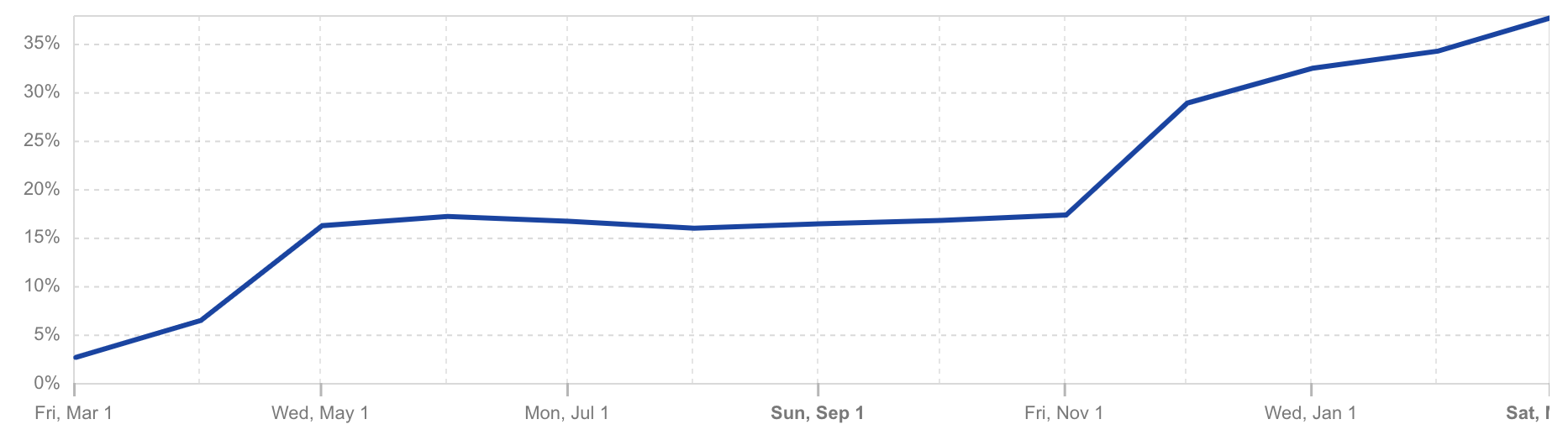
  • Security: Conventional cryptography is vulnerable to “harvest now, decrypt later” attacks. In this threat model, an adversary intercepts and stores encrypted communications today and later (in the future) uses a quantum computer to derive the secret key, compromising the communication. As of March 2025, well over a third of the human web traffic reaching the Cloudflare network is protected against these attacks by TLS 1.3 with hybrid ML-KEM key exchange.


Post-quantum encrypted share of human HTTPS request traffic seen by Cloudflare per Cloudflare Radar from March 1, 2024 to March 1, 2025. (Captured on March 13, 2025.)

Here’s how to check if your Chrome browser is using ML-KEM for key agreement when visiting a website: First, Inspect the page, then open the Security tab, and finally look for X25519MLKEM768 as shown here:


This indicates that your browser is using key-agreement protocol ML-KEM in combination with conventional elliptic curve cryptography on curve X25519. This provides the protection of the tried-and-true conventional cryptography (X25519) alongside the new post-quantum key agreement (ML-KEM).

Phase 2: Migrating digital signatures

Digital signatures are used in TLS certificates to validate the authenticity of connections — allowing the client to be sure that it is really communicating with the server, and not with an adversary that is impersonating the server. 

Post-quantum digital signatures, however, are significantly larger, and thus slower, than their current counterparts. This performance impact has slowed their adoption, particularly because they slow down short-lived TLS connections. 

Fortunately, post-quantum signatures are not needed to prevent harvest-now-decrypt-later attacks. Instead, they primarily protect against attacks by an adversary that is actively using a quantum computer to tamper with a live TLS connection. We still have some time before quantum computers are able to do this, making the migration of digital signatures a lower priority.

Nevertheless, Cloudflare is actively involved in standardizing post-quantum signatures for TLS certificates. We are also experimenting with their deployment on long-lived TLS connections and exploring new approaches to achieve post-quantum authentication without sacrificing performance. Our goal is to ensure that post-quantum digital signatures are ready for widespread use when quantum computers are able to actively attack live TLS connections.

Cloudflare Zero Trust + PQC: future-proofing security

The Cloudflare Zero Trust platform replaces legacy corporate security perimeters with Cloudflare’s global network, making access to the Internet and to corporate resources faster and safer for teams around the world. Today, we’re thrilled to announce that Cloudflare’s Zero Trust platform protects your data from quantum threats as it travels over the public Internet.  There are three key quantum-safe use cases supported by our Zero Trust platform in this first phase of quantum readiness.

Quantum-safe clientless Access

Clientless Cloudflare Access now protects an organization’s Internet traffic to internal web applications against quantum threats, even if the applications themselves have not yet migrated to post-quantum cryptography. (“Clientless access” is a method of accessing network resources without installing a dedicated client application on the user’s device. Instead, users connect and access information through a web browser.)


Here’s how it works today:

  • PQ connection via browser: (Labeled (1) in the figure.)
    As long as the user’s web browser supports post-quantum key agreement, the connection from the device to Cloudflare’s network is secured via TLS 1.3 with post-quantum key agreement.

  • PQ within Cloudflare’s global network: (Labeled (2) in the figure) 
    If the user and origin server are geographically distant, then the user’s traffic will enter Cloudflare’s global network in one geographic location (e.g. Frankfurt), and exit at another (e.g. San Francisco).  As this traffic moves from one datacenter to another inside Cloudflare’s global network, these hops through the network are secured via TLS 1.3 with post-quantum key agreement. 

  • PQ Cloudflare Tunnel: (Labeled (3) in the figure)
    Customers establish a Cloudflare Tunnel from their datacenter or public cloud — where their corporate web application is hosted — to Cloudflare’s network. This tunnel is secured using TLS 1.3 with post-quantum key agreement, safeguarding it from harvest-now-decrypt-later attacks.

Putting it together, clientless Access provides end-to-end quantum safety for accessing corporate HTTPS applications, without requiring customers to upgrade the security of corporate web applications.

Quantum-safe Zero Trust with Cloudflare’s WARP Client-to-Tunnel configuration (as a VPN replacement)

By mid-2025, organizations will be able to protect any protocol, not just HTTPS, by tunneling it through Cloudflare’s Zero Trust platform with post quantum cryptography, thus providing quantum safety as traffic travels across the Internet from the end-user’s device to the corporate office/data center/cloud environment.

Cloudflare’s Zero Trust platform is ideal for replacing traditional VPNs, and enabling Zero Trust architectures with modern authentication and authorization polices.  Cloudflare’s WARP client-to-tunnel is a popular network configuration for our Zero Trust platform: organizations deploy Cloudflare’s WARP device client on their end users’ devices, and then use Cloudflare Tunnel to connect to their corporate office, cloud, or data center environments.   


 Here are the details:  

  • PQ connection via WARP client (coming in mid-2025): (Labeled (1) in the figure)
    The WARP client uses the MASQUE protocol to connect from the device to Cloudflare’s global network. We are working to add support for establishing this MASQUE connection with TLS 1.3 with post-quantum key agreement, with a target completion date of mid-2025.  

  • PQ within Cloudflare’s global network:  (Labeled (2) in the figure)
    As traffic moves from one datacenter to another inside Cloudflare’s global network, each hop it takes through Cloudflare’s network is already secured with TLS 1.3 with post-quantum key agreement.

  • PQ Cloudflare Tunnel: (Labeled (3) in the figure)
    As mentioned above, Cloudflare Tunnel already supports post-quantum key agreement. 

Once the upcoming post-quantum enhancements to the WARP device client are complete, customers can encapsulate their traffic in quantum-safe tunnels, effectively mitigating the risk of harvest-now-decrypt-later attacks without any heavy lifting to individually upgrade their networks or applications.  And this provides comprehensive protection for any protocol that can be sent through these tunnels, not just for HTTPS!

Quantum-safe SWG (end-to-end PQC for access to third-party web applications)

A Secure Web Gateway (SWG) is used to secure access to third-party websites on the public Internet by intercepting and inspecting TLS traffic. 

Cloudflare Gateway is now a quantum-safe SWG for HTTPS traffic. As long as the third-party website that is being inspected supports post-quantum key agreement, then Cloudflare’s SWG also supports post-quantum key agreement. This holds regardless of the onramp that the customer uses to get to Cloudflare’s network (i.e. web browser, WARP device client, WARP Connector, Magic WAN), and only requires the use of a browser that supports post-quantum key agreement.


Cloudflare Gateway’s HTTPS SWG feature involves two post-quantum TLS connections, as follows:

  • PQ connection via browser: (Labeled (1) in the figure) 
    A TLS connection is initiated from the user’s browser to a data center in Cloudflare’s network that performs the TLS inspection. As long as the user’s web browser supports post-quantum key agreement, this connection is secured by TLS 1.3 with post-quantum key agreement.  

  • PQ connection to the origin server: (Labeled (2) in the figure) 
    A TLS connection is initiated from a datacenter in Cloudflare’s network to the origin server, which is typically controlled by a third party. The connection from Cloudflare’s SWG currently supports post-quantum key agreement, as long as the third party’s origin server also already supports post-quantum key agreement.  You can test this out today by using https://pq.cloudflareresearch.com/ as your third-party origin server. 

Put together, Cloudflare’s SWG is quantum-ready to support secure access to any third-party website that is quantum ready today or in the future. And this is true regardless of the onramp used to get end users’ traffic into Cloudflare’s global network!

The post-quantum future: Cloudflare’s Zero Trust platform leads the way

Protecting our customers from emerging quantum threats isn’t just a priority — it’s our responsibility. Since 2017, Cloudflare has been pioneering post-quantum cryptography through research, standardization, and strategic implementation across our product ecosystem.

Today marks a milestone: We’re launching the first phase of quantum-safe protection for our Zero Trust platform. Quantum-safe clientless Access and Secure Web Gateway are available immediately, with WARP client-to-tunnel network configurations coming by mid-2025. As we continue to advance the state of the art in post-quantum cryptography, our commitment to continuous innovation ensures that your organization stays ahead of tomorrow’s threats.  Let us worry about crypto-agility so that you don’t have to.

To learn more about how Cloudflare’s built-in crypto-agility can future-proof your business, visit our Post-Quantum Cryptography webpage.

Watch on Cloudflare TV

Introducing Access for Infrastructure: SSH

Post Syndicated from Sharon Goldberg original https://blog.cloudflare.com/intro-access-for-infrastructure-ssh

BastionZero joined Cloudflare in May 2024. We are thrilled to announce Access for Infrastructure as BastionZero’s native integration into our SASE platform, Cloudflare One. Access for Infrastructure will enable organizations to apply Zero Trust controls in front of their servers, databases, network devices, Kubernetes clusters, and more. Today, we’re announcing short-lived SSH access as the first available feature. Over the coming months we will announce support for other popular infrastructure access target types like Remote Desktop Protocol (RDP), Kubernetes, and databases.

Applying Zero Trust principles to infrastructure

Organizations have embraced Zero Trust initiatives that modernize secure access to web applications and networks, but often the strategies they use to manage privileged access to their infrastructure can be siloed, overcomplicated, or ineffective. When we speak to customers about their infrastructure access solution, we see common themes and pain points:

  • Too risky: Long-lived credentials and shared keys get passed around and inflate the risk of compromise, excessive permissions, and lateral movement

  • Too clunky: Manual credential rotations and poor visibility into infrastructure access slow down incident response and compliance efforts

Some organizations have dealt with the problem of privileged access to their infrastructure by purchasing a Privileged Access Management (PAM) solution or by building a homegrown key management tool. Traditional PAM solutions introduce audit logging and session recording features that capture user interactions with their servers and other infrastructure and/or centralized vaults that rotate keys and passwords for infrastructure every time a key is used. But this centralization can introduce performance bottlenecks, harm usability, and come with a significant price tag. Meanwhile, homegrown solutions are built from primitives provided by cloud providers or custom infrastructure-as-code solutions, and can be costly and tiresome to build out and maintain. 

We believe that organizations should apply Zero Trust principles to their most sensitive corporate resources, which naturally includes their infrastructure. That’s why we’re augmenting Cloudflare’s Zero Trust Network Access (ZTNA) service with Access to Infrastructure to support privileged access to sensitive infrastructure, and offering features that will look somewhat similar to those found in a PAM solution:

  • Access: Connect remote users to infrastructure targets via Cloudflare’s global network.

  • Authentication: Eliminate the management of credentials for servers, containers, clusters, and databases and replace them with SSO, MFA, and device posture

  • Authorization: Use policy-based access control to determine who can access what target, when, and under what role. 

  • Auditing: Provide command logs and session recordings to allow administrators to audit and replay their developers’ interactions with the organization’s infrastructure.

At Cloudflare, we are big believers that unified experiences produce the best security outcomes, and because of that, we are natively rebuilding each BastionZero feature into Cloudflare’s ZTNA service. Today, we will cover the recently-released feature for short-lived SSH access.

Secure Shell (SSH) and its security risks

SSH (Secure Shell) is a protocol that is commonly used by developers or system administrators to secure the connections used to remotely administer and manage (usually Linux/Unix) servers. SSH access to a server often comes with elevated privileges, including the ability to delete or exfiltrate data or to install or remove applications on the server. 

Modern enterprises can have tens, hundreds, or even thousands of SSH targets. Servers accessible via SSH can be targeted in cryptojacking or proxyjacking attacks. Manually tracking, rotating, and validating SSH credentials that grant access is a chore that is often left undone, which creates risks that these long-lived credentials could be compromised. There’s nothing stopping users from copying SSH credentials and sharing them with other users or transferring them to unauthorized devices.

Although many organizations will gate access to their servers to users that are inside their corporate network, this is no longer enough to protect against modern attackers. Today, the principles of Zero Trust demand that an organization also tracks who exactly is accessing their servers with SSH, and what commands they are running on those servers once they have access. In fact, the elevated privileges that come along with SSH access mean that compliance frameworks like SOC2, ISO27001, FedRAMP and others have criteria that require monitoring who has access with SSH and what exactly they are doing with that access. 

Introducing SSH with Access for Infrastructure

We’ve introduced SSH with Access for Infrastructure to provide customers with granular control over privileged access to servers via SSH. The feature provides improved visibility into who accessed what service and what they did during their SSH session, while also eliminating the risk and overhead associated with managing SSH credentials. Specifically, this feature enables organizations to:

  • Eliminate security risk and overhead of managing SSH keys and instead use short-lived SSH certificates issued by a Cloudflare-managed certificate authority (CA).

  • Author fine-grained policy to govern who can SSH to your servers and through which SSH user(s) they can log in as.

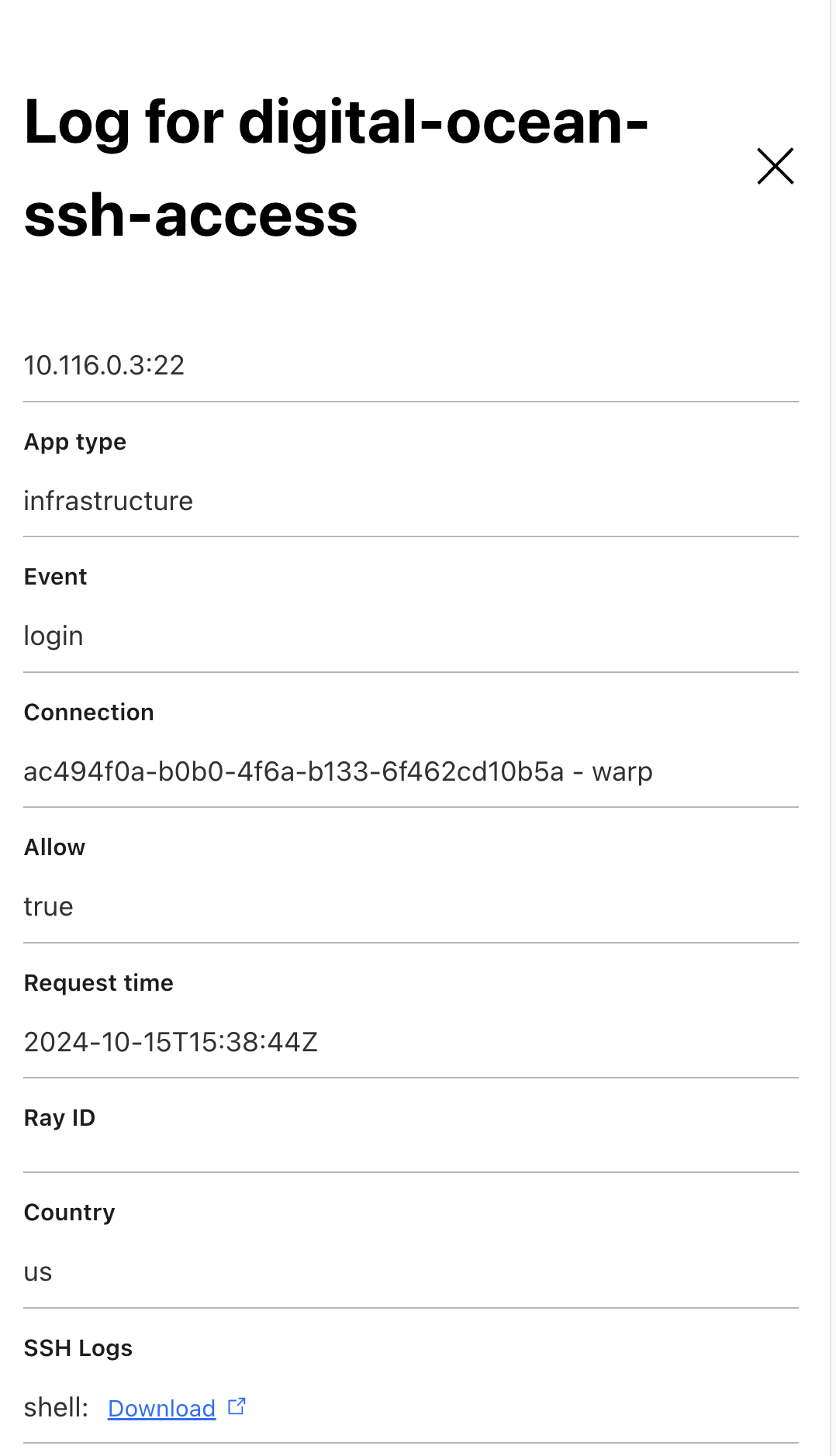
  • Monitor infrastructure access with Access and SSH command logs, supporting regulatory compliance and providing visibility in case of security breach.

  • Avoid changing end-user workflows. SSH with Access for Infrastructure supports whatever native SSH clients end users happen to be using. 

SSH with Access for Infrastructure is supported through one of the most common deployment models of Cloudflare One customers. Users can connect using our device client (WARP), and targets are made accessible using Cloudflare Tunnel (cloudflared or the WARP connector). This architecture allows customers with existing Cloudflare One deployments to enable this feature with little to no effort. The only additional setup will be configuring your target server to accept a Cloudflare SSH certificate.


Cloudflare One already offers multiple ways to secure organizations’ SSH traffic through network controls. This new SSH with Access for Infrastructure aims to incorporate the strengths of those existing solutions together with additional controls to authorize ports, protocols, and specific users as well as a much improved deployment workflow and audit logging capabilities.

Eliminating SSH credentials using an SSH CA

How does Access for Infrastructure eliminate your SSH credentials? This is done by replacing SSH password and SSH keys with an SSH Certificate Authority (CA) that is managed by Cloudflare. Generally speaking, a CA’s job is to issue certificates that bind an entity to an entity’s public key. Cloudflare’s SSH CA has a secret key that is used to sign certificates that authorize access to a target (server) via SSH, and a public key that is used by the target (server) to cryptographically validate these certificates. The public key for the SSH CA can be obtained by querying the Cloudflare API. And the secret key for the SSH CA is kept secure by Cloudflare and never exposed to anyone. 

To use SSH with Access for Infrastructure to grant access via SSH to a set of targets (i.e. servers), you need to instruct those servers to trust the Cloudflare SSH CA. Those servers will then grant access via SSH whenever they are presented with an SSH certificate that is validly signed by the Cloudflare SSH CA.

The same Cloudflare SSH CA is used to support SSH access for all of your developers and engineers to all your target servers. This greatly simplifies key management. You no longer need to manage long-lived SSH keys and passwords for individual end users, because access to targets with SSH is granted via certificates that are dynamically issued by the Cloudflare SSH CA. And, because the Cloudflare SSH CA issued short-lived SSH certificates that expire after 3 minutes, you also don’t have to worry about creating or managing long-lived SSH credentials that could be stolen by attackers. 

The 3-minute time window on the SSH certificate only applies to the time window during which the user has to authenticate to the target server; it does not apply to the length of the SSH session, which can be arbitrarily longer than 3 minutes. This 3-minute window was chosen because it was short enough to reduce the risk of security compromise and long enough to ensure that we don’t miss the time window of the user’s authentication to the server, especially if the user is on a slow connection.

Centrally managing policies down to the specific Linux user

One of the problems with traditional SSH is that once a user has an SSH key or password installed on a server, they will have access to that server forever — unless an administrator somehow remembers to remove their SSH key or password from the server in question. This leads to privilege creep, where too many people have standing access to too many servers, creating a security risk if an SSH key or password is ever stolen or leaked.

Instead, SSH with Access for Infrastructure allows you to centrally write policies in the Cloudflare dashboard specifying exactly what (set of) users has access to what (set of) servers. Users may be authenticated by SSO, MFA, device posture, location, and more, which provides better security than just authenticating them via long-lived SSH keys or passwords that could be stolen by attackers.

Moreover, the SSH certificates issued by the Cloudflare CA include a field called ValidPrinciples which indicates the specific Linux user (e.g. root, read-only, ubuntu, ec2-user) that can be assumed by the SSH connection. As such, you can write policies that specify the (set of) Linux users that a given (set of) end users may access on a given (set of) servers, as shown in the figure below. This allows you to centrally control the privileges that a given end user has when accessing a given target server. (The one caveat here is that the server must also be pre-configured to already know about the specific Linux user (e.g. root) that is specified in the policies and presented in the SSH certificate. Cloudflare is NOT managing the Linux users on your Linux servers.)

As shown below, you could write a policy that says users in Canada, the UK, and Australia that are authenticated with MFA and face recognition can access the root and ec2-user Linux users on a given set of servers in AWS.


How does Cloudflare capture SSH command logs?

Cloudflare captures SSH command logs because we built an SSH proxy that intercepts the SSH connections. The SSH proxy establishes one SSH connection between itself and the end user’s SSH client, and another SSH connection between itself and the target (server). The SSH proxy can therefore inspect the SSH commands and log them. 

SSH commands are encrypted at rest using a public key that the customer uploads via the Cloudflare API. Cloudflare cannot read SSH command logs at rest, but they can be extracted (in encrypted form) from the Cloudflare API and decrypted by the customer (who holds the corresponding private key). Instructions for uploading the encryption public key are available in our developer documentation.


How the SSH interception works under the hood

How does generic SSH work?

To understand how Cloudflare’s SSH proxy works, we first must review how a generic SSH connection is established.

First off, SSH runs over TCP, so to establish an SSH connection, we first need to complete a TCP handshake. Then, once the TCP handshake is complete, an SSH key exchange is needed to establish an ephemeral symmetric key between the client and the server that will be used to encrypt and authenticate their SSH traffic. The SSH key exchange is based on the server public key, also known as the hostkey. If you’ve ever used SSH, you’ve probably seen this message — that is the SSH server telling your SSH client to trust this hostkey for all future SSH interactions. (This is also known as TOFU or Trust On First Use.)


Finally, the client needs to authenticate itself to the server. This can be done using SSH passwords, SSH keys, or SSH certificates (as described above). SSH also has a mode called none, which means that the client does NOT need to authenticate itself to the server at all.

So how does Cloudflare’s SSH proxy work? 


To understand this, we note that whenever you set up SSH with Access for Infrastructure in the Cloudflare dashboard, you first need to create the set of targets (i.e. servers) that you want to make accessible via SSH. Targets can be defined by IP address or hostname. You then create an Access for Infrastructure application that captures the TCP ports (e.g. port 22) that SSH runs over for those targets, and write policies for those SSH connections, as we already described above and in our developer documentation.

This setup allows Cloudflare to know the set of IP addresses and ports for which it must intercept SSH traffic. Thus, whenever Cloudflare sees a TCP handshake with an IP address and port that must be intercepted, it sends traffic for that TCP connection to the SSH proxy. 

The SSH proxy leverages the client’s already authenticated identity from the WARP client, and enforces the configured Access for Infrastructure policies against it. If the policies do not allow the identity to connect to the target under the requested Linux user (e.g. root), the SSH proxy will reject the connection and log an Access denied event to the Access logs. Otherwise, if policies do allow the identity to connect, the the SSH proxy will establish the following two SSH connections: 

  1. SSH connection from SSH proxy to target

  2. SSH connection from end user’s SSH client (via Cloudflare’s WARP client) to SSH proxy

Let’s take a look at each of these SSH connections, and the cryptographic material used to set them up. 

To establish the SSH connection from SSH proxy to the target, the SSH proxy acts as a client in the SSH key exchange between itself and the target server. The handshake uses the target server’s hostkey to establish an ephemeral symmetric key between the client and the server that will encrypt and authenticate their SSH traffic. Next, the SSH proxy must authenticate itself to the target server. This is done by presenting the server with a short-lived SSH certificate, issued by the Cloudflare SSH CA, for the specified Linux user that is requested for this connection as we already described above. Because the target server has been configured to trust the Cloudflare SSH CA, the target server will be able to successfully validate the certificate and the SSH connection will be established.

To establish the SSH connection from the end-user’s SSH client to SSH proxy, the SSH proxy acts as a server in the SSH key exchange between itself and the end-user’s SSH client. 

To do this, the SSH proxy needs to inform the end user’s SSH client about the hostkey that will be used to establish this connection. But what hostkey should be used? We cannot use the same hostkey used by the target server, because that hostkey is the public key that corresponds to a private key that is known only to the target server, and not known to the SSH proxy. So, Cloudflare’s SSH proxy needs to generate its own hostkey. We don’t want the end user to randomly see warnings like the one shown below, so the SSH proxy should provide the same hostkey each time the user wants to access a given target server. But, if something does change with the hostkey of the target server, we do want the warning below to be shown. 


To achieve the desired behavior, the SSH proxy generates a hostkey and its corresponding private key by hashing together (a) a fixed secret value valid that associated with the customer account, along with (b) the hostkey that was provided by this target server (in the connection from SSH proxy to target server). This part of the design ensures that the end user only needs to see the TOFU notification the very first time it connects to the target server via WARP, because the same hostkey is used for all future connections to that target. And, if the hostkey of the target server does change as a result of a Monster-In-The-Middle attack, the warning above will be shown to the user.

Finally, during the SSH key exchange handshake from WARP client to SSH proxy, the SSH proxy informs that end user’s native SSH client that it is using none for client authentication. This means that the SSH client does NOT need to authenticate itself to the server at all. This part of the design ensures that the user need not enter any SSH passwords or store any SSH keys in its SSH configuration in order to connect to the target server via WARP. Also, this does not compromise security, because the SSH proxy has already authenticated the end user via Cloudflare’s WARP client and thus does not need to use the native SSH client authentication in the native SSH client.

Put this all together, and we have accomplished our goal of having end users authenticate to target servers without any SSH keys or passwords, using Cloudflare’s SSH CA instead. Moreover, we also preserve the desired behaviors of the TOFU notifications and warnings built into native SSH clients!

All the keys

Before we wrap up, let’s review the cryptographic keys you need in order to deploy SSH with Access for Infrastructure. There are two keys:

  1. Public key of the SSH CA. The private key of the SSH CA is only known to Cloudflare and not shared with anyone. The public key of the SSH CA is obtained from the Cloudflare API and must be installed on all your target servers. The same public key is used for all of your targets. This public key does not need to be kept secret.

  2. Private key for SSH command log encryption. To obtain logs of SSH commands, you need to generate a public-private key pair, and upload the public key to Cloudflare. The public key will be used to encrypt your SSH commands logs at REST. You need to keep the private key secret, and you can use it to decrypt your SSH command logs. 

That’s it! No other keys, passwords, or credentials to manage!

Try it out today

At Cloudflare, we are committed to providing the most comprehensive solution for ZTNA, which now also includes privileged access to sensitive infrastructure like servers accessed over SSH.

Organizations can now treat SSH like any other Access application and enforce strong MFA, device context, and policy-based access prior to granting user access. This allows organizations to consolidate their infrastructure access policies into their broader SSE or SASE architecture.

You can try out Access for Infrastructure today by following these instructions in our developer documentation. Access for Infrastructure is currently available free to teams of under 50 users, and at no extra cost to existing pay-as-you-go and Contract plan customers through an Access or Zero Trust subscription. Expect to hear about a lot more features from us as we continue to natively rebuild BastionZero’s technology into Cloudflare’s Access for Infrastructure service!

RADIUS/UDP vulnerable to improved MD5 collision attack

Post Syndicated from Sharon Goldberg original https://blog.cloudflare.com/radius-udp-vulnerable-md5-attack

The MD5 cryptographic hash function was first broken in 2004, when researchers demonstrated the first MD5 collision, namely two different messages X1 and X2 where MD5(X1) = MD5 (X2). Over the years, attacks on MD5 have only continued to improve, getting faster and more effective against real protocols. But despite continuous advancements in cryptography, MD5 has lurked in network protocols for years, and is still playing a critical role in some protocols even today.

One such protocol is RADIUS (Remote Authentication Dial-In User Service). RADIUS was first designed in 1991 – during the era of dial-up Internet – but it remains an important authentication protocol used for remote access to routers, switches, and other networking gear by users and administrators. In addition to being used in networking environments, RADIUS is sometimes also used in industrial control systems.  RADIUS traffic is still commonly transported over UDP in the clear, protected only by outdated cryptographic constructions based on MD5.

In this post, we present an improved attack against MD5 and use it to exploit all authentication modes of RADIUS/UDP apart from those that use EAP (Extensible Authentication Protocol). The attack allows a Monster-in-the-Middle (MitM) with access to RADIUS traffic to gain unauthorized administrative access to devices using RADIUS for authentication, without needing to brute force or steal passwords or shared secrets. This post discusses the attack and provides an overview of mitigations that network operators can use to improve the security of their RADIUS deployments.

RADIUS/UDP in Password Authentication Protocol (PAP) mode. Our attack also applies to RADIUS/UDP CHAP and RADIUS/UDP MS-CHAP authentication modes as well.

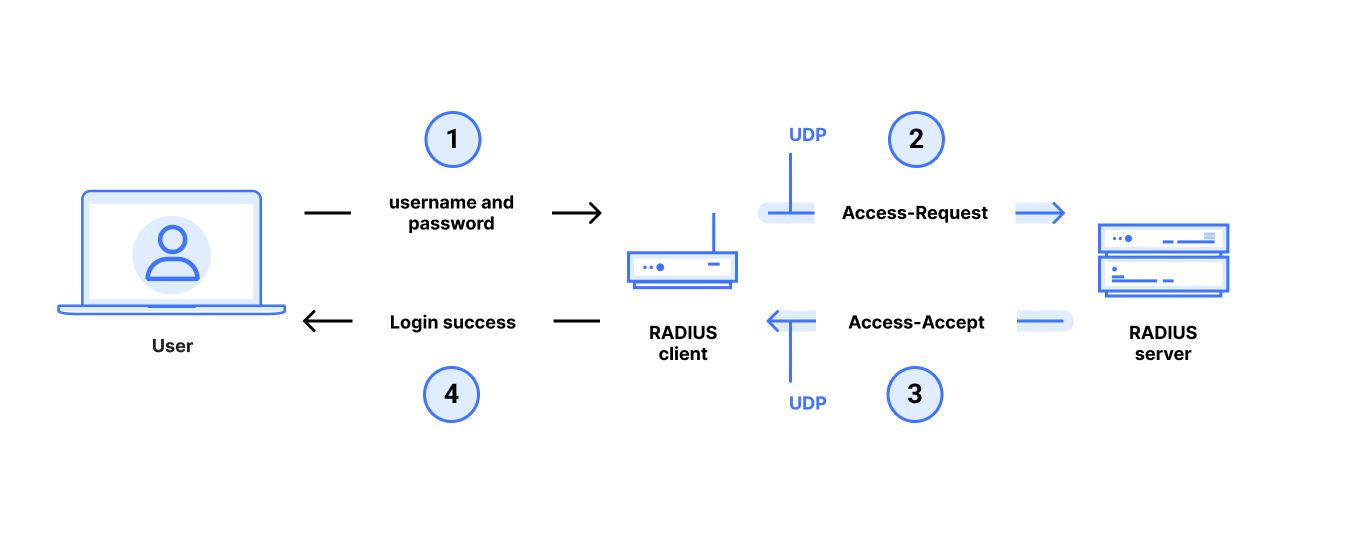
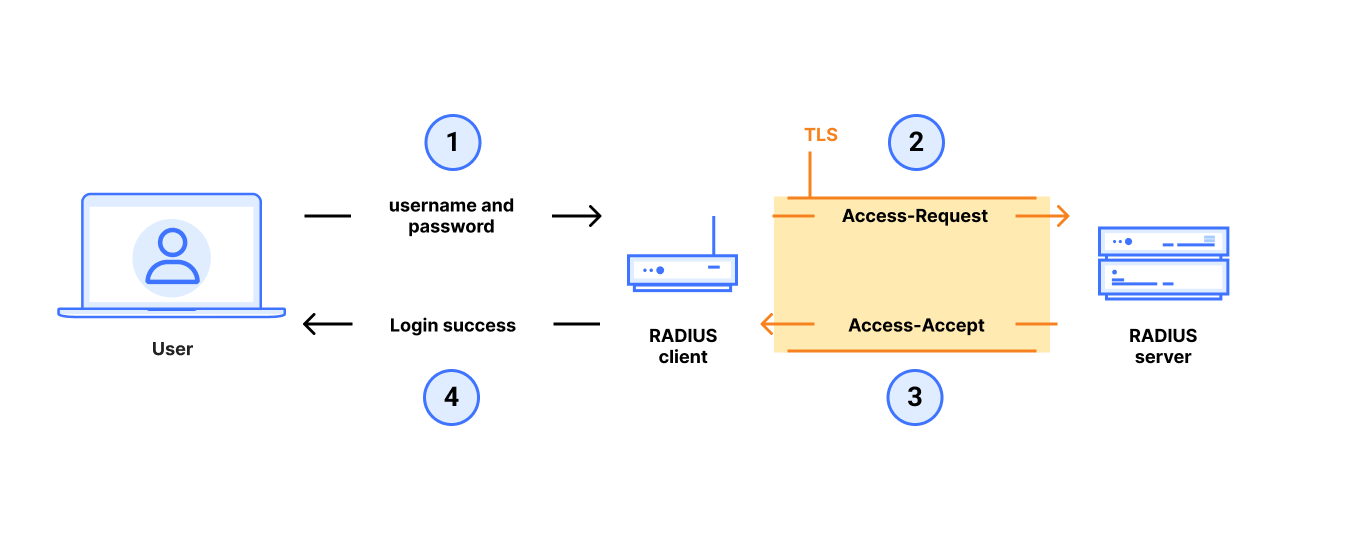
In a typical RADIUS use case, an end user gets administrative access to a router, switch, or other networked device by entering a username and password with administrator privileges at a login prompt. The target device runs a RADIUS client which queries a remote RADIUS server to determine whether the username and password are valid for login. This communication between the RADIUS client and RADIUS server is very sensitive: if an attacker can violate the integrity of this communication, it can control who can gain administrative access to the device, even if the connection between user and device is secure. An attacker that gains administrative access to a router or switch can redirect traffic, drop or add routes, and generally control the flow of network traffic. This makes RADIUS an important protocol for the security of modern networks.

Our understanding of cryptography and protocol design was fairly unrefined when RADIUS was first introduced in the 1990s. Despite this, the protocol hasn’t changed much, likely because updating RADIUS deployments can be tricky due to its use in legacy devices (e.g. routers) that are harder to upgrade.

RADIUS traffic is commonly sent over internal networks, and in our research we did not broadly measure how organizations configure it internally.  Anecdotal evidence suggests that RADIUS/UDP remains popular. (See our paper for some case studies of large organizations using RADIUS/UDP). While it is possible to send RADIUS over TLS (sometimes also called RADSEC), the Internet Engineering Task Force (IETF) still considers the specification for RADIUS/TLS to be “experimental”, and is currently still in the process of specifying RADIUS over TLS or DLTS as “standards track”.

RADIUS/TLS, also sometimes known as RADSEC

Prior to our work, there was no publicly-known attack exploiting MD5 to violate the integrity of the RADIUS/UDP traffic. However, attacks continue to get faster, cheaper, become more widely available, and become more practical against real protocols. Protocols that we thought might be “secure enough”, in spite of their reliance on outdated cryptography, tend to crack as attacks continue to improve over time.

In our attack, a MitM gains unauthorized access to a networked device by violating the integrity of communications between the device’s RADIUS client and its RADIUS server. In other words, our MitM attacker has access to RADIUS traffic and uses it to pivot into unauthorized access to the devices hosting the RADIUS clients that generated this RADIUS traffic. From there, the attacker can gain administrative access to the networking device and thus control the Internet traffic that flows through the network.

Overview of the Blast-RADIUS attack on RADIUS/UDP in PAP mode

This Blast-RADIUS attack was devised in collaboration with researchers at the University of California San Diego (UCSD), CWI Amsterdam, Microsoft, and BastionZero. In response, CERT has assigned CVE-2024-3596 and VU#456537 and worked with RADIUS vendors and developers to coordinate disclosure.

RADIUS/UDP and its ad hoc use of MD5

RADIUS/UDP has many modes, and our attacks work on all authentication modes except for those using EAP (Extensible Authentication Protocol).  To simplify exposition, we start by focusing on the RADIUS/UDP PAP (Password Authentication Protocol) authentication mode.

With RADIUS/UDP PAP authentication, the RADIUS client sends a username and password in an Access-Request packet to the RADIUS server over UDP.  The server drops the packet if its source IP address does not match a known client, but otherwise the Access-Request is entirely unauthenticated. This makes it vulnerable to modifications by a MitM.

The RADIUS server responds with either an Access-Reject, Access-Accept (or possibly also an Access-Challenge) packet sent to the RADIUS client over UDP.  These response packets are “authenticated” with an ad hoc “message authentication code (MAC)” to prevent modifications by an MitM. This “MAC” is based on MD5 and is called the Response Authenticator.

This ad hoc construction in the Response Authenticator attribute has been part of the RADIUS protocol since 1994. It was not changed in 1997, when HMAC was standardized in order to construct a provably-secure cryptographic MAC using a cryptographic hash function. It was not changed in 2004, when the first collisions in MD5 were found. And it is still part of the protocol today.

In this post, we’ll describe our improved attack on MD5 as it is used in the RADIUS Response Authenticator.

The RADIUS Response Authenticator

The Response Authenticator “authenticates” RADIUS responses via an ad hoc MD5 construction that involves concatenating several fields in the RADIUS request and response packets, appending a Secret shared between RADIUS client and RADIUS server, and then hashing the result with MD5. Specifically, the Response Authenticator is computed as

MD5( Code || ID || Len || Request Authenticator || Attributes || Secret )

where the Code, ID, Length, and Attributes are copied directly from the response packet, and Request Authenticator is a 16-byte random nonce and included in the corresponding request packet.

But the RADIUS Response Authenticator is not a good message authentication code (MAC). Here’s why:

  • First, let’s simplify the construction in the Response Authenticator as: the “MAC” on message X1 is computed as MD5 (X1 || Secret) where X1 is a message and Secret is the secret key for the “MAC”.
  • Next, we note that MD5 is vulnerable to length extension attacks. Namely, given MD5(X) for an unknown X, along with the length of X, then anyone who knows Y can compute MD5(X || Y).
    Length extension attacks are possible because of how MD5 processes inputs in consecutive blocks, and are the primary reason why HMAC was standardized in 1997.
  • This block-wise processing is also an issue for the Response Authenticator of RADIUS. If someone finds an MD5 collision, namely two different messages X1 and X2 such that MD5(X1) = MD5(x2), then it follows that MD5 (X1 || Secret) = MD5 (X2 || Secret).

This breaks the security of the “MAC”. Here’s how: consider an attacker that finds two messages X1 and X2 that are an MD5 collision. The attacker then learns the “MAC” on X1, which is
MD5 (X1 || Secret). Now the attacker can forge the “MAC” on X2 without ever needing to know the Secret, simply by reusing the “MAC” on X1. This attack violates the security definition of a message authentication code.

  • This attack is especially concerning since finding MD5 collisions has been possible since 2004.
    The first attacks on MD5 in 2004 produced so-called “identical prefix collisions” of the form
    MD5 (P || G1 || S) = MD5 (P || G2 || S), where P is a meaningful message, S is a meaningful message, and G1 and G2 are meaningless gibberish. This attack has since been made very fast and can now run on a regular consumer laptop in seconds. While this attack is a devastating blow for any cryptographic hash function, it’s still pretty difficult to use gibberish messages (with identical prefixes) to create practical attacks on real protocols like RADIUS.
    In 2007, a more powerful attack was presented, the “chosen-prefix collision attack”. This attack is slower and more costly, but allows the prefixes in the collision to be different, making it valuable for practical attacks on real protocols. In other words, the collision is of the form
    MD5 (P1 || G1 || S) = MD5 (P2 || G2 || S), where P1 and P2 are different freely-chosen meaningful messages, G1 and G2 are meaningless gibberish and S is a meaningful message. We will use an improved version of this attack to break the security of the RADIUS/UDP Response Authenticator.
    Roughly speaking, in our attack, P1 will correspond to a RADIUS Access-Reject, and P2 will correspond to a RADIUS Access-Accept, thus allowing us to break the security of the protocol by letting an unauthorized user log into a networking device running a RADIUS client.

Before we move on, note that in 2000, RFC2869 added support for HMAC-MD5 to RADIUS/UDP, using a new attribute called Message-Authenticator. HMAC thwarts attacks that use hash function collisions to break the security of a MAC, and HMAC is a secure MAC as long as the underlying hash function is a pseudorandom function. As of this writing, we have not seen a public attack demonstrating that HMAC-MD5 is not a good MAC.

Nevertheless, the RADIUS specifications state that Message-Authenticator is optional for all modes of RADIUS/UDP apart from those that use EAP (Extensible Authentication Protocol). Our attack is for non-EAP authentication modes of RADIUS/UDP using default setups that do not use Message-Authenticator. We further discuss Message-Authenticator and EAP later in this post.

Blast-RADIUS attack

Given that the ad hoc MD5 construction in the Response Authenticator is usually the only thing protecting the integrity of the RADIUS/UDP message, can we exploit it to break the security of the RADIUS/UDP protocol? Yes, we can.

But it wasn’t that easy. We needed to optimize and improve existing chosen-prefix collision attacks on MD5 to (a) make them fast enough to work on packets in flight, (b) respect the limitations imposed by the RADIUS protocol and (c) the RADIUS/UDP packet format.

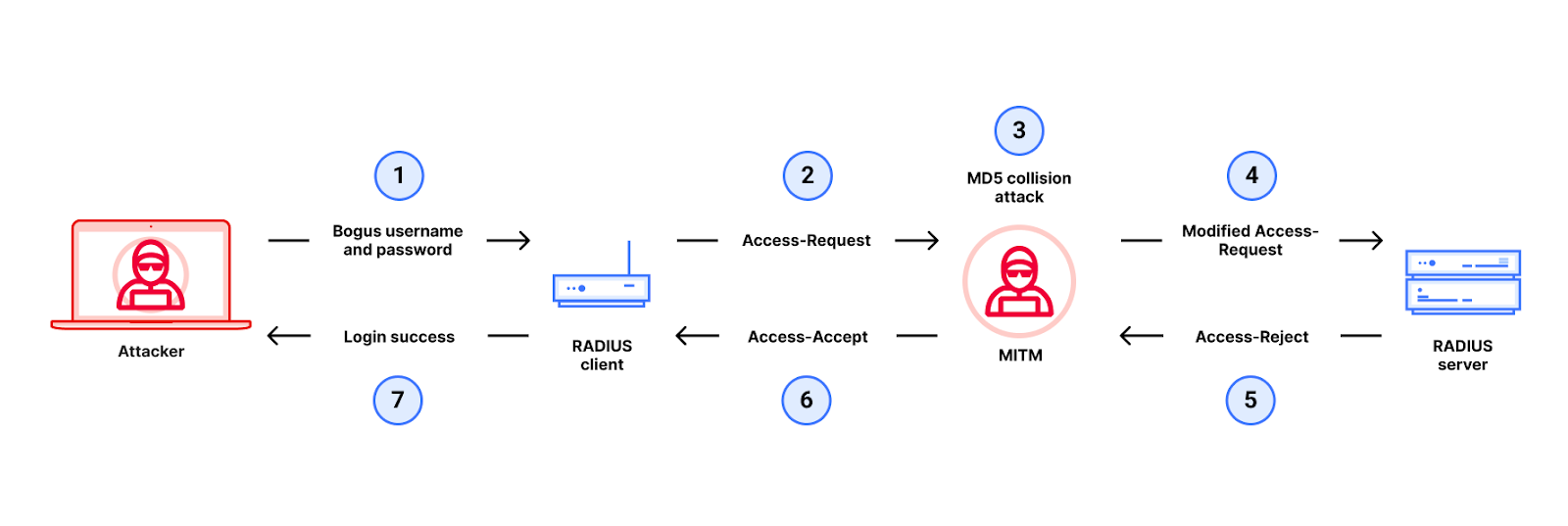
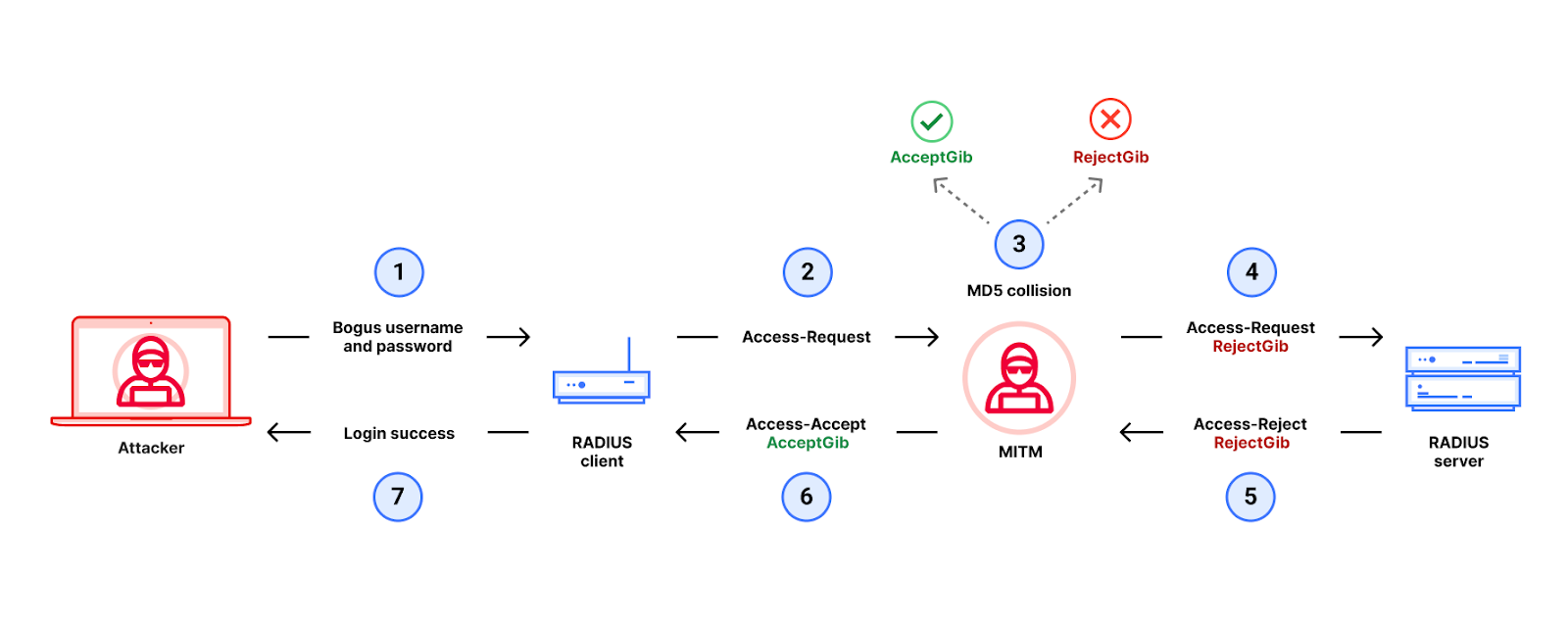
Here is how we did it. The attacker uses a MitM between a RADIUS client (e.g. a router) and RADIUS server to change an Access-Reject packet into an Access-Accept packet by exploiting weaknesses in MD5, thus gaining unauthorized access (to the router). The detailed flow of the attack is in the diagram below.

Details of the Blast-RADIUS attack

Let’s walk through each step of the attack.

1. First, the attacker tries to log in to the device running to the RADIUS client using a bogus username and password.

2. The RADIUS client sends an Access-Request packet that is intercepted by the MitM.

3. Next, the MitM then executes an MD5 chosen-prefix collision attack as follows:

Prefix P1 corresponds to attributes hashed with MD5 to produce the Response Authenticator of an Access-Reject packet. Prefix P2 corresponds to the attributes for an Access-Accept packet. The MitM can predict P1 and P2 simply by looking at the Access-Request packet that it intercepted.

Next, the attacker then runs the MD5 chosen-prefix collision attack to find the two gibberish blocks, G1 (the RejectGib shown in the figure above) and G2 (the AcceptGib) to obtain an MD5 collision between P1 || RejectGib and P2 || AcceptGib.

Now we need to get the collision gibberish into the RADIUS packets somehow.

4. To do this, we are going to use an optional RADIUS/UDP attribute called the Proxy-State.  The Proxy-State is an ideal place to stuff this gibberish because a RADIUS server must echo back any information it receives in a Proxy-State attribute from the RADIUS client. Even better for our attacker, the Proxy-State must also be hashed by MD5 in the corresponding response’s Response Authenticator.

Our MitM takes the gibberish RejectGib and adds it into the Access-Request packet that the MitM intercepted as multiple Proxy-State attributes.  For this to work, we had to ensure that our collision gibberish (RejectGib and AcceptGib) is properly formatted as multiple Proxy-State attributes. This is one novel cryptographic aspect of our attack that you read more about here.

Next, we are going to exploit the fact that the RADIUS server will echo back the gibberish in its response.

5. The RADIUS server receives the modified Access-Request and responds with an Access-Reject packet. This Access-Reject packet includes (a) the Proxy-State attributes containing the RejectGib and (b) a Response Authenticator computed as MD5 (P1 || RejectGib || Secret).

Note that we have successfully changed the input to the Response Authenticator to be one of the MD5 collisions found by the MitM!

6. Finally, the MitM intercepts the Access-Reject packet, and extracts the Response-Authenticator from the intercepted packet, and uses it to forge an Access-Accept packet using our MD5 collision.

The forged packet is (a) formatted as an Access-Accept packet that (b) has the AcceptGib in Proxy-State and (c) copies the Response Authenticator from the Access-Reject packet that the MitM intercepted from the server.

We have now used our MD5 collision to replace an Access-Reject with an Access-Accept.

7. The forged Access-Accept packet arrives at the RADIUS client, which accepts it because

the input to the Response Authenticator is P2 || AcceptGib

the Response-Authenticator is MD5 (P1 || RejectGib || Secret)

P1 || RejectGib is an MD5 collision with P2 || AcceptGib, which implies that

MD5 (P1 || RejectGib || Secret) = MD5 (P2 || AcceptGib || Secret)In other words, the Response-Authenticator on the forged Access-Accept packet is valid.

The attacker has successfully logged into the device.

But, the attack has to be fast.

For all of this to work, our MD5 collision attack had to be fast! If finding the collision takes too long, the client could time out while waiting for a response packet and the attack would fail.

Importantly, the attack cannot be precomputed. One of the inputs to the Response Authenticator is the Request Authenticator attribute, a 16-byte random nonce included in the request packet. Because the Request Authenticator is freshly chosen for every request, the MitM cannot predict the Request Authenticator without intercepting the request packet in flight.

Existing collision attacks on MD5 were too slow for realistic client timeouts; when we started our work, reported attacks took hours (or even up to a day) to find MD5 chosen-prefix collisions. So, we had to devise a new, faster attack on MD5.

To do this, our team improved existing chosen-prefix collision attacks on MD5 and optimized them for speed and space (in addition to figuring out how to make our collision gibberish fit into RADIUS Proxy-State attributes). We demonstrated an improved attack that can run in minutes on an aging cluster of about 2000 CPU cores ranging from 7 to 10 years old, plus four newer low-end GPUs at UCSD. Less than two months after we started this project, we could execute the attack in under five minutes, and validate (in a lab setting) that it works on popular commercial RADIUS implementations.

While many RADIUS devices (like the ones we tested in the lab) tolerate timeouts of five minutes, the default timeouts on most devices are closer to 30 or 60 seconds. Nevertheless, at this point, we had proved our attack. The attack is highly parallelizable. A sophisticated adversary would have easy access to better computing resources than we did, or could further optimize the attack using low-cost cloud compute resources, GPUs or hardware. In other words, a motivated attacker could use better computing resources to get our attack working against RADIUS devices with timeouts shorter than 5 minutes.

It was late January 2024. We had an attack that allows an attacker with MitM access to RADIUS/UDP traffic in PAP mode to gain unauthorized access to devices that use RADIUS to decide who should have administrative access to the device. We stopped our work, wrote up a paper, and got in touch with CERT to coordinate disclosure. In response, CERT has assigned CVE-2024-3596 and VU#456537 to this vulnerability, which affects all authentication modes of RADIUS/UDP apart from those that use EAP.

What’s next?

It’s never easy to update network protocols, especially protocols like RADIUS that have been widely used since the 1990s and enjoy multi-vendor support. Nevertheless, we hope this research will provide an opportunity for network operators to review the security of their RADIUS deployments, and to take advantage of patches released by many RADIUS vendors in response to our work.

Transitioning to RADIUS over TLS: Following our work, many more vendors now offer RADIUS over TLS (sometimes known as RADSEC), which wraps the entire RADIUS packet payload into a TLS stream sent from RADIUS client to RADIUS server. This is the best mitigation against our attack and any new MD5 attacks that might emerge.

Before implementing this mitigation, network operators should verify that they can upgrade both their RADIUS clients and their RADIUS servers to support RADIUS over TLS. There is a risk that legacy clients that cannot be upgraded or patched would still need to speak RADIUS/UDP.

Patches for RADIUS/UDP. There is also a new short-term mitigation for RADIUS/UDP.  In this post, we only cover mitigations for client-server deployments; see this new whitepaper by Alan DeKok for mitigations for more complex “multihop” RADIUS deployment that involve more parties than just a client and a server.

Earlier, we mentioned that the RADIUS specifications have a Message-Authenticator attribute that uses HMAC-MD5 and is optional for RADIUS/UDP modes that do not use EAP. The new mitigation involves making the Message-Authenticator a requirement for both request and response packets for all modes of RADIUS/UDP. The mitigation works because Message-Authenticator uses HMAC-MD5, which is not susceptible to our MD5 chosen-prefix collision attack.

Specifically:

  1. The recipient of any RADIUS/UDP packet must always require the packet to contain a Message-Authenticator, and must validate the HMAC-MD5 in the Message-Authenticator.
  2. RADIUS servers should send the Message-Authenticator as the first attribute in every Access-Accept or Access-Reject response sent by the RADIUS server.

There are a few things to watch out for when applying this patch in practice. Because RADIUS is a client-server protocol, we need to consider (a) the efficacy of the patch if it is not uniformly applied to all RADIUS clients and servers and (b) the risk of the patch breaking client-server compatibility.

Let’s first look at (a) efficacy. Patching only the client does not stop our attacks. Why? Because the mitigation requires the sender to include a Message-Authenticator in the packet, AND the recipient to require a Message-Authenticator to be present in the packet and to validate it. (In other words, both client and server have to change their behaviors.)   If the recipient does not require the Message-Authenticator to be present in the packet, the MitM could do a downgrade attack where it strips the Message-Authenticator from the packet and our attack would still work.  Meanwhile, there is some evidence (see this whitepaper by Alan DeKok) that patching only the server might be more effective, due to mitigation #2, sending the Message-Authenticator as the first attribute in the response packet.

Now let’s consider (b) the risk of breaking client-server compatibility.

Deploying the patch on clients is unlikely to break compatibility, because the RADIUS specifications have long required that RADIUS servers MUST be able to process any Message-Authenticator attribute sent by a RADIUS client. That said, we cannot rule out the existence of RADIUS servers that do not comply with this long-standing aspect of the specification, so we suggest testing against the RADIUS servers before patching clients.

On the other side, patching the server without breaking compatibility with legacy clients could be trickier. Commercial RADIUS servers are mostly built on one of a tiny number of implementations (like FreeRADIUS), and actively-maintained implementations should be up-to-date on mitigations. However, there is a wider set of RADIUS client implementations, some of which are legacy and difficult to patch. If an unpatched legacy client does not know how to send a Message Authenticator attribute, then the server cannot require it from that client without breaking backwards compatibility.

The bottom line is that for all of this to work, it is important to patch servers AND patch clients.

You can find more discussion on RADIUS/UDP mitigations in a new whitepaper by Alan DeKok, which also contains guidance on how to apply these mitigations to more complex “multihop” RADIUS deployments.

Isolating RADIUS traffic. It has long been a best practice to avoid sending RADIUS/UDP or RADIUS/TCP traffic in the clear over the public Internet. On internal networks, a best practice is to isolate RADIUS traffic in a restricted-access management VLAN or to tunnel it over TLS or IPsec. This is helpful because it makes RADIUS traffic more difficult for attackers to access, so that it’s harder to execute our attack. That said, an attacker may still be able to execute our attack to accomplish a privilege escalation if a network misconfiguration or compromise allows a MitM to access RADIUS traffic. Thus, the other mitigations we mention above are valuable even if RADIUS traffic is isolated.

Non-mitigations. While it is possible to use TCP as transport for RADIUS, RADIUS/TCP is experimental, and offers no benefit over RADIUS/UDP or RADIUS/TLS. (Confusingly, RADIUS/TCP is sometimes also called RADSEC; but in this post we only use RADSEC to describe RADIUS/TLS.) We discuss other non-mitigations in our paper.

A side note about EAP-TLS

When we were checking inside Cloudflare for internal exposure to the Blast-RADIUS attack, we found EAP-TLS used in certain office routers in our internal Wi-Fi networks. We ultimately concluded that these routers were not vulnerable to the attack. Nevertheless, we share our experience here to provide more exposition about the use of EAP (Extensible Authentication Protocol) and its implications for security. RADIUS uses EAP in several different modes which can be very complicated and are not the focus of this post. Still, we provide a limited sketch of EAP-TLS to show how it is different from RADIUS/TLS.

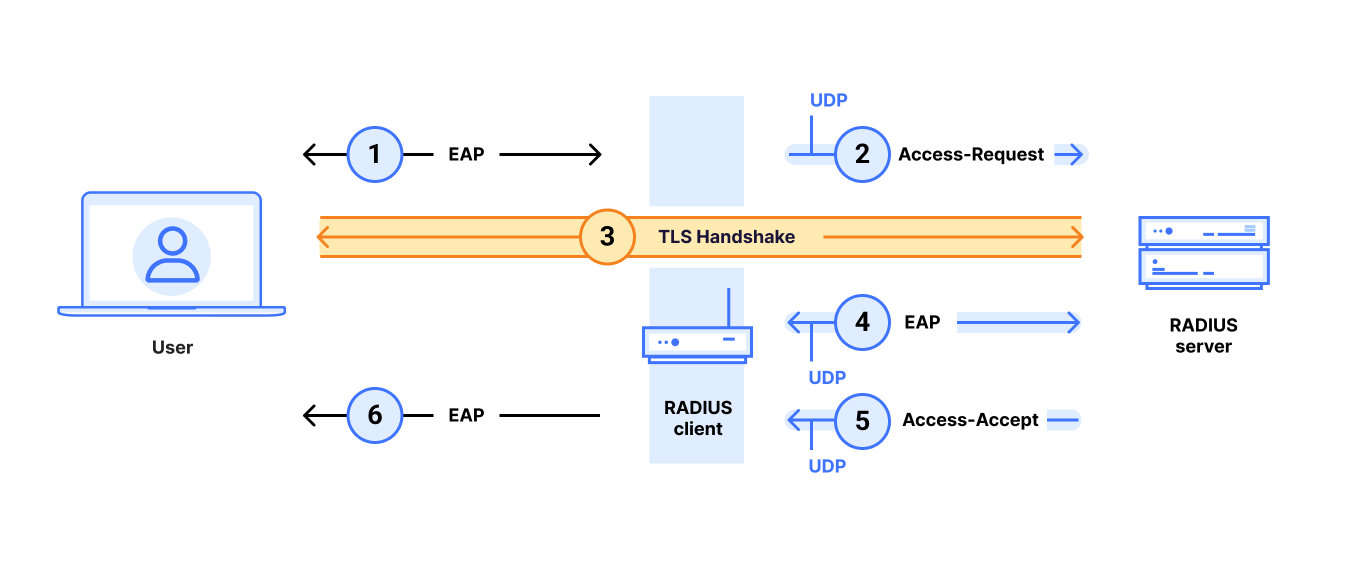
First, it is important to note that even though EAP-TLS and RADIUS/TLS have similar names, the two protocols are very different.  RADIUS/TLS encapsulates RADIUS traffic in TLS (as described above).  But EAP-TLS does not; in fact, EAP-TLS sends RADIUS traffic over UDP!

EAP-TLS only uses the TLS handshake to authenticate the user; the TLS handshake is executed between the user and the RADIUS server.  However, TLS is not used to encrypt or authenticate the RADIUS packets; the RADIUS client and RADIUS still communicate in the clear over UDP.

  1. The user initiates EAP authentication with the RADIUS client.
  2. The RADIUS client sends a RADIUS/UDP Access Request to the RADIUS server over UDP.
  3. The user and the Authentication Server engage in a TLS handshake. This TLS handshake may or may not be encapsulated inside RADIUS/UDP packets.
  4. The parties may communicate further.
  5. The RADIUS server sends the RADIUS client a RADIUS/UDP Access-Accept (or Access-Reject) packet over UDP.
  6. The RADIUS client indicates to the user that the EAP login was successful (or not).

As shown in the figure, with EAP-TLS the Access-Request and Access-Accept/Access-Reject are RADIUS/UDP messages. Therefore, there is a question as to whether a Blast-RADIUS attack can be executed against these RADIUS/UDP messages.

We have not demonstrated any attack against an implementation of EAP-TLS in RADIUS.

However, we cannot rule out the possibility that some EAP-TLS implementations could be vulnerable to a variant of our attack. This is due to ambiguities in the RADIUS specifications. At a high level, the issue is that:

  1. The RADIUS specifications require that any RADIUS/UDP packet with EAP attributes includes the HMAC-MD5 Message-Authenticator attribute, which would stop our attack.
  2. However, what happens if a MitM attacker strips the EAP attributes from the RADIUS/UDP response packet?  If the MitM could get away with stripping out the EAP attribute, it could also get away with stripping out the Message-Authenticator (which is optional for non-EAP modes of RADIUS/UDP), and a variant of the Blast-RADIUS attack might work. The ambiguity follows because the specifications are unclear on what the RADIUS client should do if it sent a request with an EAP attribute but got back a response without an EAP attribute and without a Message-Authenticator. See more details and specific quotes from the specifications in our paper.

Therefore, we emphasize that the recommended mitigation is RADIUS/TLS (also called RADSEC), which is different from EAP-TLS.

As a final note, we mentioned that the Cloudflare’s office routers that were using EAP-TLS were not vulnerable to the Blast-RADIUS attack. This is because these routers were set to run with local authentication, where both the RADIUS client and the RADIUS server are confined inside the router (thus preventing a MitM from gaining access to the traffic sent between RADIUS client and RADIUS server, preventing our attack). Nevertheless, we should note that this vendor’s routers have many settings, some of which involve using an external RADIUS server. Fortunately, this vendor is one of many that have recently released support for RADIUS/TLS (also called RADSEC).

Work in the IETF

The IETF is an important venue for standardizing network protocols like RADIUS. The IETF’s radext working group is currently considering an initiative to deprecate RADIUS/UDP and create a “standards track” specification of RADIUS over TLS or DTLS, that should help accelerate the deployment of RADIUS/TLS in the field. We hope that our work will accelerate the community’s ongoing efforts to secure RADIUS and reduce its reliance on MD5.