Today, we’re excited to share that Cloudflare has acquired Human Native, a UK-based AI data marketplace specializing in transforming multimedia content into searchable and useful data.
Human Native x Cloudflare
The Human Native team has spent the past few years focused on helping AI developers create better AI through licensed data. Their technology helps publishers and developers turn messy, unstructured content into something that can be understood, licensed and ultimately valued. They have approached data not as something to be scraped, but as an asset class that deserves structure, transparency and respect.
Access to high-quality data can lead to better technical performance. One of Human Native’s customers, a prominent UK video AI company, threw away their existing training data after achieving superior results with data sourced through Human Native. Going forward they are only training on fully licensed, reputably sourced, high-quality content.
This gives a preview of what the economic model of the Internet can be in the age of generative AI: better AI built on better data, with fair control, compensation and credit for creators.
The Internet needs new economic models
For the last 30 years, the open Internet has been based on a fundamental value exchange: creators create content, aggregators (such as search engines or social media) send traffic. Creators can monetize that traffic through advertisements, subscriptions or direct support. This is the economic loop that has powered the explosive growth of the Internet.
But it’s under real strain.
Crawl-to-referral ratios are skyrocketing, with 10s of thousands of AI and bot crawls per real human visitor, andit’s unclear how multipurpose crawlers are using the content they access.
The community of creators who publish on the Internet is a diverse group: news publishers, content creators, financial professionals, technology companies, aggregators and more. But they have one thing in common: They want to decide how their content is used by AI systems.
Cloudflare’s work in building AI Crawl Control and Pay Per Crawl is predicated on a simple philosophy: Content owners should get to decide how and when their content is accessed by others. Many of our customers want to optimize their brand and content to make sure it is in every training data set and shows up in every new search; others want to have more control and only allow access if there is direct compensation.
Our tools like AI Search, AI Crawl Control and Pay Per Crawl can help, wherever you land in that equation. The important thing is that the content owner gets to decide.
New tools for AI developers
With the Human Native team joining Cloudflare, we are accelerating our work in helping customers transform their content to be easily accessed and understood by AI bots and agents in addition to their traditional human audiences.
Crawling is complex, expensive in terms of engineering and compute to process the content, and has no guarantees of quality control. A crawled index can contain duplicates, spam, illegal material and many more headaches. Developers are left with messy, unstructured data.
We recently announced our work in building the AI Index, a powerful new way for both foundation model companies and agents to access content at scale.
Instead of sending crawlers blindly and repeatedly across the open Internet, AI developers will be able to connect via a pub/sub model: participating websites will expose structured updates whenever their content changes, and developers will be able to subscribe to receive those updates in real time.
This opens up new avenues for content creators to experiment with new business models.
Building the foundation for these new business models
Cloudflare is investing heavily in creating the foundations for these new business models, starting with x402.
We recently announced that we are creating the x402 Foundation, in partnership with Coinbase, to enable machine-to-machine transactions for digital resources.
Payments on the web have historically been designed for humans. We browse a merchant’s website, show intent by adding items to a cart, and confirm our intent to purchase by putting in our credit card information and clicking “Pay.” But what if you want to enable direct transactions between automated systems? We need protocols to allow machine-to-machine transactions.
Together, Human Native and Cloudflare will accelerate our work in building the basis of these new economic models for the Internet.
What’s next
The Internet works best when it is open, fair, and independently sustainable. We’re excited to welcome the Human Native team to Cloudflare, and even more excited about what we will build together to improve the foundations of the Internet in the age of AI.
If we want to keep the web open and thriving, we need more tools to express how content creators want their data to be used while allowing open access. Today the tradeoff is too limited. Either website operators keep their content open to the web and risk people using it for unwanted purposes, or they move their content behind logins and limit their audience.
To address the concerns our customers have today about how their content is being used by crawlers and data scrapers, we are launching the Content Signals Policy. This policy is a new addition to robots.txt that allows you to express your preferences for how your content can be used after it has been accessed.
What robots.txt does, and does not, do today
Robots.txt is a plain text file hosted on your domain that implements the Robots Exclusion Protocol. It allows you to instruct which crawlers and bots can access which parts of your site. Many crawlers and some bots obey robots.txt files, but not all do.
For example, if you wanted to allow all crawlers to access every part of your site, you could host a robots.txt file that has the following:
User-agent: *
Allow: /
A user-agent is how your browser, or a bot, identifies themselves to the resource they are accessing. In this case, the asterisk tells visitors that any user agent, on any device or browser, can access the content. The / in the Allow field tells the visitor that they can access any part of the site as well.
The robots.txt file can also include commentary by adding characters after # symbol. Bots and machines will ignore these comments, but it is one way to leave more human-readable notes to someone reviewing the file. Here is one example:
Website owners can make robots.txt more specific by listing certain user-agents (such as for only permitting certain bot user-agents or browser user-agents) and by stating which parts of a site they are or are not allowed to crawl. The example below tells bots to skip crawling the archives path.
User-agent: *
Disallow: /archives/
And the example here gets more specific, telling Google’s bot to skip crawling the archives path.
User-agent: Googlebot
Disallow: /archives/
This allows you to specify which crawlers are allowed and what parts of your site they can access. It does not, however, let them know what they are able to do with your content after accessing it. As many have realized, there needs to be a standard, machine-readable way to signal the rules of your road for how your data can be used even after it has been accessed.
That is what the Content Signals Policy allows you to express: your preferences for what a crawler can, and cannot do with your content.
Why are we launching the Content Signals Policy now?
There are companies that scrape vast troves of data from the Internet every day. There is a real cost to website operators to serve these data scrapers, in particular when they receive no compensation in return; we are experiencing a classic free-rider problem. This is only going to get worse: we expect bot traffic to exceed human traffic on the Internet by the end of 2029, and by 2031, we anticipate that bot activity alone will surpass the sum of current Internet traffic.
The de facto defaults of the Internet permitted this. The norm had been that your data would be ingested, but then you, the creator of that content, would get something in return: either referral traffic that you could monetize, or at a minimum some sort of attribution that cited you as the author. Think of the linkback in the early days of blogging, which was a way to give credit to the original creator of the work. No money changed hands, but that attribution drove future discovery and had intrinsic value. This norm has been embedded in many permissive licenses such as MIT and Creative Commons, each of which require attribution back to the original creator.
That world has changed; that scraped content is now sometimes used to economically compete against the original creator. It’s left many with an impossible choice: do you lock down access to your content and data, or accept the reality of fewer referrals and minimal attribution? If the only recourse is the former, the open transmission of ideas on the web is harmed and newer entrants to the AI ecosystem are put at an unfair disadvantage for their efforts to train new models.
The Cloudflare Content Signals Policy
The Content Signals Policy integrates into website operators’ robots.txt files. It is human-readable text following the # symbol to designate it as a comment. This policy defines three content signals – search, ai-input, and ai-train – and their relevance to crawlers.
A website operator can then optionally express their preferences via machine-readable content signals.
# As a condition of accessing this website, you agree to abide by the following content signals:

# (a)  If a content-signal = yes, you may collect content for the corresponding use.
# (b)  If a content-signal = no, you may not collect content for the corresponding use.
# (c)  If the website operator does not include a content signal for a corresponding use, the website operator neither grants nor restricts permission via content signal with respect to the corresponding use.

# The content signals and their meanings are:

# search: building a search index and providing search results (e.g., returning hyperlinks and short excerpts from your website's contents).  Search does not include providing AI-generated search summaries.
# ai-input: inputting content into one or more AI models (e.g., retrieval augmented generation, grounding, or other real-time taking of content for generative AI search answers).
# ai-train: training or fine-tuning AI models.

# ANY RESTRICTIONS EXPRESSED VIA CONTENT SIGNALS ARE EXPRESS RESERVATIONS OF RIGHTS UNDER ARTICLE 4 OF THE EUROPEAN UNION DIRECTIVE 2019/790 ON COPYRIGHT AND RELATED RIGHTS IN THE DIGITAL SINGLE MARKET.
There are three parts to this text:
The first paragraph explains to companies how to interpret any given content signal. “Yes” means go, “no” means stop, and the absence of a signal conveys no meaning. That final, neutral option is important: it lets website operators express a preference with respect to one content signal without requiring them to do so for another.
The second paragraph defines the content signals vocabulary. We kept the signals simple to make it easy for anyone accessing content to abide by them.
The final paragraph reminds those automating access to data that these content signals might have legal rights in various jurisdictions.
A website operator can then announce their specific preferences in machine-readable text using comma-delimited, ‘yes’ or ‘no’ syntax. If a website operator wants to allow search, disallow training, and expressed no preference regarding ai-input, they could include the following in their robots.txt:
If a website operator leaves the content signal for ai-input blank like in the above example, it does not mean they have no preference regarding that use; it just means they have not used this part of their robots.txt file to express it.
How to add content signals to your website
If you already know how to configure your robots.txt file, deploying content signals is as simple as adding the Content Signals Policy above and then defining your preferences via a content signal.
We want to make adopting content signals simple. Cloudflare customers have already turned on our managed robots.txt feature for over 3.8 million domains. By doing so, they have chosen to instruct companies that they do not want the content on those domains to be used for AI training. For these customers, we will update the robots.txt file that we already serve on their behalf to include the Content Signals Policy and the following signals:
Content-Signal: search=yes, ai-train=no
We will not serve an “ai-input” signal for our managed robots.txt customers. We don’t know their preference with respect to that signal, and we don’t want to guess.
Starting today, we also will serve the commented, human-readable Content Signals Policy for any free customer zone that does not have an existing robots.txt file. In practice, that means a request to robots.txt on that domain would return the comments that define what content signals are. These comments are ignored by crawlers. Importantly, it will not include any Allow or Disallow directives, nor will not serve any actual content signals. The users are the ones to choose and express their actual preferences if and when they are ready to do so. Customers with an existing robots.txt file will see no change.
Zones on a free plan can turn off the Content Signals Policy in the Security Settings section of the Cloudflare dashboard, as well as via the Overview section.
To create your own content signals, just copy and paste the text that we help you generate at ContentSignals.org into your robots.txt file, or immediately deploy via the Deploy to Cloudflare button. You can alternatively turn on our managed robots.txt feature if you would like to express your preference to disallow training.
It’s important to remember that content signals express preferences; they are not technical countermeasures against scraping. Some companies might simply ignore them. If you are a website publisher seeking to control what others do with your content, we think it is best to combine your content signals with WAF rules and Bot Management.
While these Cloudflare features aim to make it easier to use, we want to encourage adoption by anyone, anywhere. In order to promote this practice, we are releasing this policy under a CC0 License, which allows anyone to implement and use it freely.
What’s next
Our customers are fully in the driver’s seat for what crawlers they want to allow and what they’d like to block. Some want to write for the superintelligence, others want more control: we think they should be the ones to decide.
Content signals allow anyone to express how they want their content to be used after it has been accessed. Enabling the ability to express preferences was overdue.
We know there’s more work to do. Signaling the rules of the road only works if others recognize those rules. That’s why we’ll continue to work in standards bodies to develop and standardize solutions that meet the needs of our customers and are accepted by the broader Internet community.
We hope you’ll join us in these efforts: the open web is worth fighting for.
Cloudflare is partnering with Coinbase to create the x402 Foundation. This foundation’s mission will be to encourage the adoption of the x402 protocol, an updated framework that allows clients and services to exchange value on the web using a common language. In addition to today’s partnership, we are shipping a set of features to allow developers to use x402 in the Agents SDK and our MCP integrations, as well as proposing a new deferred payment scheme.
Payments in the age of agents
Payments on the web have historically been designed for humans. We browse a merchant’s website, show intent by adding items to a cart, and confirm our intent to purchase by inputting our credit card information and clicking “Pay.” But what if you want to enable direct transactions between digital services? We need protocols to allow machine-to-machine transactions.
Every day, sites on Cloudflare send out over a billion HTTP 402 response codes to bots and crawlers trying to access their content and e-commerce stores. This response code comes with a simple message: “Payment Required.”
Yet these 402 responses too often go unheard. One reason is a lack of standardization. Without a specification for how to format and respond to those response codes, content creators, publishers, and website operators lack adequate tools to convey their payment requests. x402 can give developers a clear, open protocol for websites and automated agents to negotiate payments across the globe.
A Primer on x402
Coinbase authored the x402 transaction flow, outlined below, to help machines pay directly for resources over HTTP:
A client attempts to access a resource gated by x402.
The server responds with the status code 402 Payment Required. The response body contains payment instructions including the payment amount and recipient.
The client requests the x402-gated resource with the payment authorization header.
The payment facilitator verifies the client’s payment payload and settles the transaction.
The server responds with the requested resource in the response, along with the payment response header that confirms the payment outcome.
This flow creates programmatic access to resources across the Internet. Clients and servers capable of interpreting the x402 protocol are able to transact without the need for accounts, subscriptions, or API keys.
x402 can be used to monetize traditional use cases, but also enables monetization of a new class of use cases. For example:
An assistant that is able to purchase accessories for your Halloween costume from multiple merchants.
An AI agent that pays per browser rendering session, instead of committing to a monthly subscription fee.
An autonomous stock trader that makes micropayments for a high quality real-time data feed to drive decisions.
Future versions of x402 could be agnostic of the payment rails, accommodating credit cards and bank accounts in addition to stablecoins.
Cloudflare’s pay per crawl: proposing the x402 deferred payment scheme
Agents and crawlers often require two important functions that already exist in much of today’s financial infrastructure: delayed settlement to account for disputes; and a single, aggregated payment to make their accounting simpler. For example, crawlers participating in our private beta of pay per crawl are able to crawl a vast number of pages easily, generate audit logs, and then be charged a single fee via a connected credit card or bank account at the end of each day.
To account for these types of payment scenarios, we’re proposing a new deferred payment scheme for the x402 protocol. This new scheme is specifically designed for agentic payments that don’t need immediate settlement and can be handled either through traditional payment methods or stablecoins. By proposing this addition, we’re helping to ensure that any compliant server can optionally decouple the cryptographic handshake from the payment settlement itself, giving agents and servers the ability to use pre-negotiated licensing agreements, batch settlements, or subscriptions.
We will be bringing this new deferred payment scheme to pay per crawl as we expand and evolve the private beta.
The Handshake Explained
Here’s our initial proposal for the handshake that could be released in the next major version of x402:
1. The Server’s Offer
Today, an unauthenticated or unauthorized client attempts to access a resource and receives a 402 Payment Required response. The server provides a payment commitment payload that the client can use to construct a re-request. This response is a machine-readable offer, and our proposal includes a new scheme of deferred.
Next, the client re-sends the request with a signed payload containing their payment commitment. The deferred scheme uses HTTP Message Signatures where a JWK-formatted public key is available in a hosted directory. The Signature-Input header clearly explains which parts of the request are included in the Signature to serve as cryptographic proof of the client’s intent, verifiable by the service provider without an on-chain transaction.
The resource server validates the signature and returns the content with a confirmation header. The server is responsible for attributing the payment to the account associated with the HTTP message signature, verifying the client’s identity and then delivering the content. In this scenario, there is no blockchain associated with the payments.
HTTP/1.1 200 OK
Content-Type: text/html
Payment-Response:
    scheme="deferred",
    network="example-network-provider",
    id="abc123",
    timestamp=1730872968
4. Payment Settlement
The server can now handle the settlement flexibly. The validated id from the handshake acts as a reference for the transaction. This approach enables a flexible use model without per-request overhead, allowing the server to roll up payments on a subscription, daily, or even batch basis. This creates a flexible framework where the cryptographic trust is established immediately, while the financial settlement can use traditional payment rails or stablecoins.
Cloudflare’s MCP servers, Agents SDK, and x402 payments
Running code is what moves an open convention from the theoretical to truly useful, and eventually to a recognized standard. Agents built using Cloudflare’s Agent SDK can now pay for resources with x402, and MCP servers can expose tools to be paid for via x402. To show how this works, we created the x402 playground, a live demo employing x402. The x402 playground is powered by the Agents SDK and has access to tools from MCP servers deployed on Cloudflare.
When you open the x402 playground, a new wallet is created and funded with Testnet USDC on a Base blockchain testnet. The agent, built with Agents SDK, has access to an MCP server with both free and paid tools.
import { McpServer } from "@modelcontextprotocol/sdk/server/mcp.js";
import { McpAgent } from "agents/mcp";
import { withX402 } from "agents/x402";

export class PayMCP extends McpAgent {
  server = withX402(
    new McpServer({ name: "PayMCP", version: "1.0.0" }),
    X402_CONFIG
  );

  async init() {
    // Paid tool
    this.server.paidTool(
      "square",
      "Squares a number",
      0.01, // Tool price
      {
        a: z.number()
      },
      {},
      async ({ number }) => {
        return { content: [{ type: "text", text: String(a ** 2) }] };
      }
    );

    // Free tool
    this.server.tool(
      "add-two-numbers",
      "Adds two numbers",
      {
        a: z.number(),
        b: z.number(),
      },
      async ({ a, b }) => {
        return { content: [{ type: 'text', text: String(a + b) }] };
      }
    );
  }
}
When the agent attempts to use a paid tool, the MCP server responds with a 402 Payment Required. The agent is able to interpret the payment instructions and prompt the human whether they want to proceed with the transaction. Building an x402-compatible client requires a basic wrapper on the tool call:
import { Agent } from "agents";
import { withX402Client } from "agents/x402";

export class MyAgent extends Agent {
  // Your Agent definitions...

  async onToolCall() {

    // Build the x402 client
    const x402Client = withX402Client(
      myMcpClient,
      { network: "base-sepolia", account: this.account }
    );

    // The first parameter becomes the confirmation callback.
    // We can set it to `null` if we want the agent to pay automatically.
    const res = await x402Client.callTool(
      this.onPaymentRequired,
      {
        name: toolName,
        arguments: toolArgs
    });
  }
}
This test agent draws down the funds from the wallet and sends the payment payload to the MCP server, which settles the transaction. The transactions can be specified to execute with or without human confirmation, allowing you to design the interface best suited for your application.
What’s next?
You can get started today by using the Agents SDK or by deploying your own MCP server.
We’ll continue to work closely with Coinbase to establish the x402 Foundation. Stay tuned for more announcements on the specifics of the structure very soon.
We believe in the value of open and interoperable protocols – which is why we are encouraging everyone to contribute to the x402 protocol directly. To get in touch with the team at Cloudflare working on x402, email us at [email protected].
Empowering content creators in the age of AI with smarter crawling controls and direct communication channels
Imagine you run a regional news site. Last month an AI bot scraped 3 years of archives in minutes — with no payment and little to no referral traffic. As a small company, you may struggle to get the AI company’s attention for a licensing deal. Do you block all crawler traffic, or do you let them in and settle for the few referrals they send?
It’s picking between two bad options.
Cloudflare wants to help break that stalemate. On July 1st of this year, we declared Content Independence Day based on a simple premise: creators deserve control of how their content is accessed and used. Today, we’re taking the next step in that journey by releasing AI Crawl Control to general availability — giving content creators and AI crawlers an important new way to communicate.
AI Crawl Control goes GA
Today, we’re rebranding our AI Audit tool as AI Crawl Control and moving it from beta to general availability. This reflects the tool’s evolution from simple monitoring to detailed insights and control over how AI systems can access your content.
The market response has been overwhelming: content creators across industries needed real agency, not just visibility. AI Crawl Control delivers that control.
Using HTTP 402 to help publishers license content to AI crawlers
Many content creators have faced a binary choice: either they block all AI crawlers and miss potential licensing opportunities and referral traffic; or allow them through without any compensation. Many content creators had no practical way to say “we’re open for business, but let’s talk terms first.”
Our customers are telling us:
We want to license our content, but crawlers don’t know how to reach us.
Blanket blocking feels like we’re closing doors on potential revenue and referral traffic.
We need a way to communicate our terms before crawling begins.
To address these needs, we are making it easier than ever to send customizable402 HTTP status codes.
Our private beta launch of Pay Per Crawl put the HTTP 402 (“Payment Required”) response codes to use, working in tandem with Web Bot Auth to enable direct payments between agents and content creators. Today, we’re making customizable 402 response codes available to every paid Cloudflare customer — not just pay per crawl users.
Here’s how it works: in AI Crawl Control, paying Cloudflare customers will be able to select individual bots to block with a configurable message parameter and send 402 payment required responses. Think: “To access this content, email [email protected] or call 1-800-LICENSE” or “Premium content available via API at api.yoursite.com/pricing.”
On an average day, Cloudflare customers are already sending over one billion 402 response codes. This shows a deep desire to move beyond blocking to open communication channels and new monetization models. With the 402 HTTP status code, content creators can tell crawlers exactly how to properly license their content, creating a direct path from crawling to a commercial agreement. We are excited to make this easier than ever in the AI Crawl Control dashboard.
How to customize your 402 status code with AI Crawl Control:
For Paid Plan Users:
When you block individual crawlers from the AI Crawl Control dashboard, you can now choose to send 402 Payment Required status codes and customize your message. For example: To access this content, email [email protected] or call 1-800-LICENSE.
The response will look like this:
The message can be configured from Settings in the AI Crawl Control Dashboard:
Beyond just blocking AI bots
This is just the beginning. We’re planning to add additional parameters that will let crawlers understand the content’s value, freshness, and licensing terms directly in the 402 response. Imagine crawlers receiving structured data about content quality and update frequency, for example, in addition to contact information.
Meanwhile, pay per crawl continues advancing through beta, giving content creators the infrastructure to automatically monetize crawler access with transparent, usage-based pricing.
What excites us most is the market shift we’re seeing. We’re moving to a world where content creators have clear monetization paths to become active participants in the development of rich AI experiences.
The 402 response is a bridge between two industries that want to work together: content creators whose work fuels AI development, and AI companies who need high-quality data. Cloudflare’s AI Crawl Control creates the infrastructure for these partnerships to flourish.
Many publishers, content creators and website owners currently feel like they have a binary choice — either leave the front door wide open for AI to consume everything they create, or create their own walled garden. But what if there was another way?
At Cloudflare, we started from a simple principle: we wanted content creators to have control over who accesses their work. If a creator wants to block all AI crawlers from their content, they should be able to do so. If a creator wants to allow some or all AI crawlers full access to their content for free, they should be able to do that, too. Creators should be in the driver’s seat.
After hundreds of conversations with news organizations, publishers, and large-scale social media platforms, we heard a consistent desire for a third path: They’d like to allow AI crawlers to access their content, but they’d like to get compensated. Currently, that requires knowing the right individual and striking a one-off deal, which is an insurmountable challenge if you don’t have scale and leverage.
What if I could charge a crawler?
We believe your choice need not be binary — there should be a third, more nuanced option: You can charge for access. Instead of a blanket block or uncompensated open access, we want to empower content owners to monetize their content at Internet scale.
We’re excited to help dust off a mostly forgotten piece of the web: HTTP response code 402.
Introducing pay per crawl
Pay per crawl, in private beta, is our first experiment in this area.
Pay per crawl integrates with existing web infrastructure, leveraging HTTP status codes and established authentication mechanisms to create a framework for paid content access.
Each time an AI crawler requests content, they either present payment intent via request headers for successful access (HTTP response code 200), or receive a 402 Payment Required response with pricing. Cloudflare acts as the Merchant of Record for pay per crawl and also provides the underlying technical infrastructure.
Publisher controls and pricing
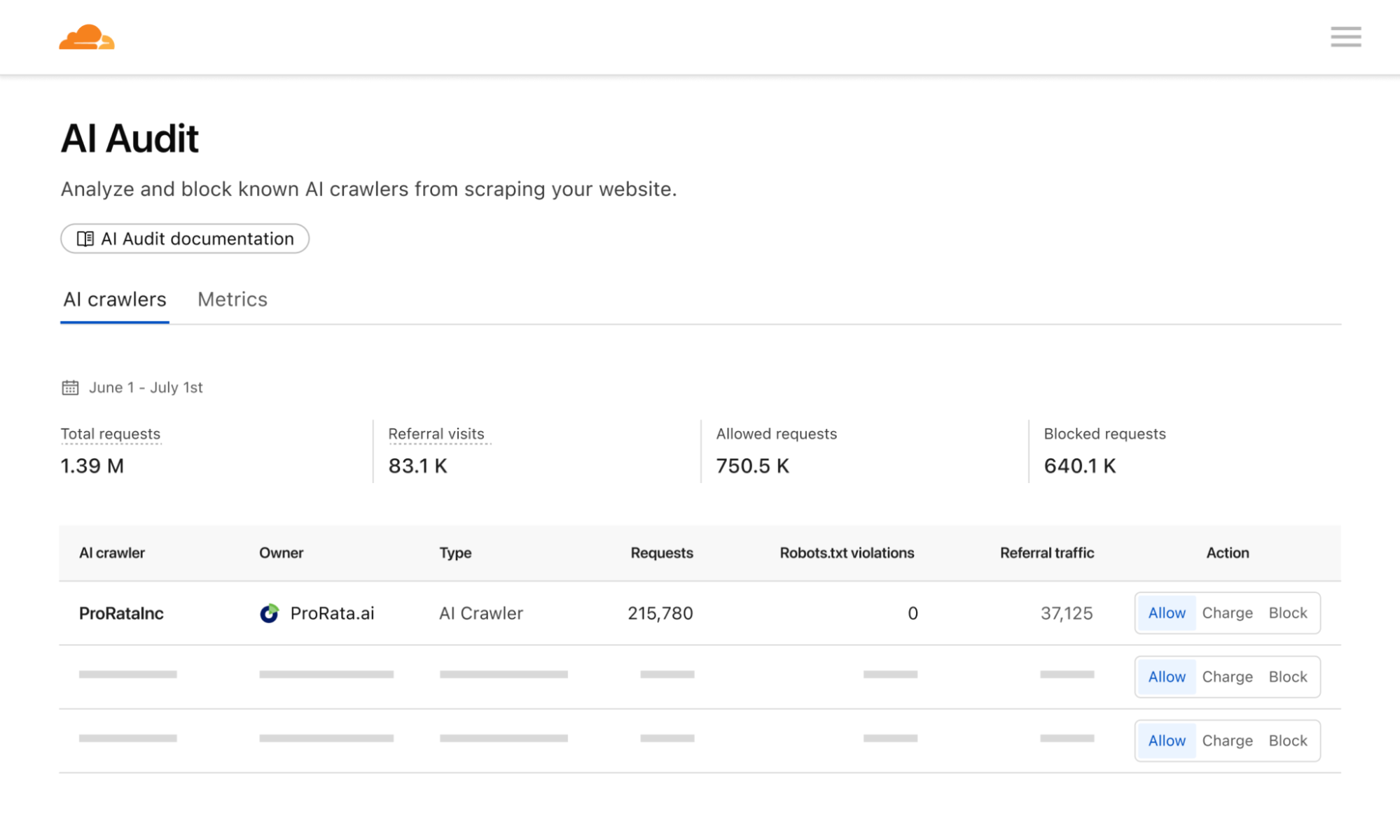
Pay per crawl grants domain owners full control over their monetization strategy. They can define a flat, per-request price across their entire site. Publishers will then have three distinct options for a crawler:
Allow: Grant the crawler free access to content.
Charge: Require payment at the configured, domain-wide price.
Block: Deny access entirely, with no option to pay.
An important mechanism here is that even if a crawler doesn’t have a billing relationship with Cloudflare, and thus couldn’t be charged for access, a publisher can still choose to ‘charge’ them. This is the functional equivalent of a network level block (an HTTP 403 Forbidden response where no content is returned) — but with the added benefit of telling the crawler there could be a relationship in the future.
While publishers currently can define a flat price across their entire site, they retain the flexibility to bypass charges for specific crawlers as needed. This is particularly helpful if you want to allow a certain crawler through for free, or if you want to negotiate and execute a content partnership outside the pay per crawl feature.
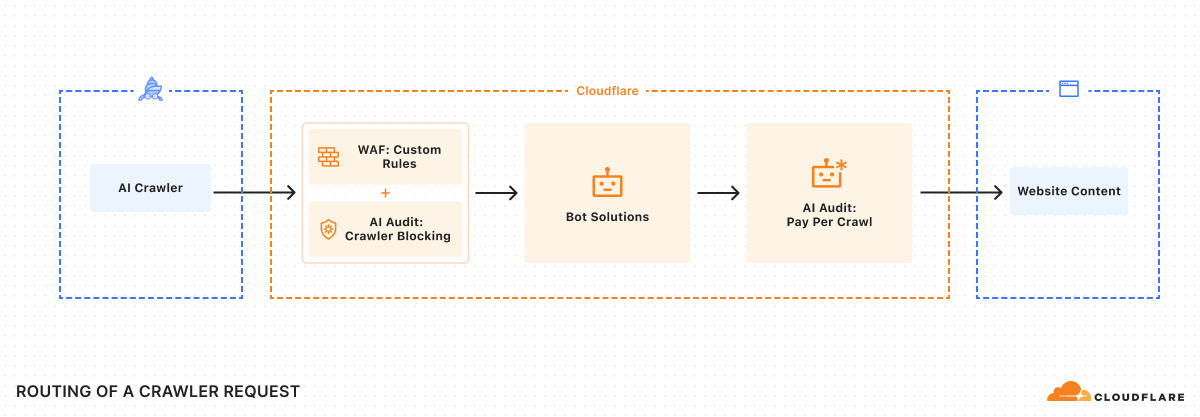
To ensure integration with each publisher’s existing security posture, Cloudflare enforces Allow or Charge decisions via a rules engine that operates only after existing WAF policies and bot management or bot blocking features have been applied.
Payment headers and access
As we were building the system, we knew we had to solve an incredibly important technical challenge: ensuring we could charge a specific crawler, but prevent anyone from spoofing that crawler. Thankfully, there’s a way to do this using Web Bot Auth proposals.
Once registration is accepted, crawler requests should always include signature-agent, signature-input, and signature headers to identify your crawler and discover paid resources.
Once a crawler is set up, determination of whether content requires payment can happen via two flows:
Reactive (discovery-first)
Should a crawler request a paid URL, Cloudflare returns an HTTP 402 Payment Required response, accompanied by a crawler-price header. This signals that payment is required for the requested resource.
The crawler can then decide to retry the request, this time including a crawler-exact-price header to indicate agreement to pay the configured price.
GET /example.html
crawler-exact-price: USD XX.XX
Proactive (intent-first)
Alternatively, a crawler can preemptively include a crawler-max-price header in its initial request.
GET /example.html
crawler-max-price: USD XX.XX
If the price configured for a resource is equal to or below this specified limit, the request proceeds, and the content is served with a successful HTTP 200 OK response, confirming the charge:
HTTP 200 OK
crawler-charged: USD XX.XX
server: cloudflare
If the amount in a crawler-max-price request is greater than the content owner’s configured price, only the configured price is charged. However, if the resource’s configured price exceeds the maximum price offered by the crawler, an HTTP402 Payment Required response is returned, indicating the specified cost. Only a single price declaration header, crawler-exact-price or crawler-max-price, may be used per request.
The crawler-exact-price or crawler-max-price headers explicitly declare the crawler’s willingness to pay. If all checks pass, the content is served, and the crawl event is logged. If any aspect of the request is invalid, the edge returns an HTTP 402 Payment Required response.
Financial settlement
Crawler operators and content owners must configure pay per crawl payment details in their Cloudflare account. Billing events are recorded each time a crawler makes an authenticated request with payment intent and receives an HTTP 200-level response with a crawler-charged header. Cloudflare then aggregates all the events, charges the crawler, and distributes the earnings to the publisher.
Content for crawlers today, agents tomorrow
At its core, pay per crawl begins a technical shift in how content is controlled online. By providing creators with a robust, programmatic mechanism for valuing and controlling their digital assets, we empower them to continue creating the rich, diverse content that makes the Internet invaluable.
We expect pay per crawl to evolve significantly. It’s very early: we believe many different types of interactions and marketplaces can and should develop simultaneously. We are excited to support these various efforts and open standards.
For example, a publisher or new organization might want to charge different rates for different paths or content types. How do you introduce dynamic pricing based not only upon demand, but also how many users your AI application has? How do you introduce granular licenses at internet scale, whether for training, inference, search, or something entirely new?
The true potential of pay per crawl may emerge in an agentic world. What if an agentic paywall could operate entirely programmatically? Imagine asking your favorite deep research program to help you synthesize the latest cancer research or a legal brief, or just help you find the best restaurant in Soho — and then giving that agent a budget to spend to acquire the best and most relevant content. By anchoring our first solution on HTTP response code 402, we enable a future where intelligent agents can programmatically negotiate access to digital resources.
Getting started
Pay per crawl is currently in private beta. We’d love to hear from you if you’re either a crawler interested in paying to access content or a content creator interested in charging for access. You can reach out to us at http://www.cloudflare.com/paypercrawl-signup/ or contact your Account Executive if you’re an existing Enterprise customer.
If you’re a marketer, advertiser, or a business owner that runs your own website, there’s a good chance you’ve used Google tags in order to collect analytics or measure conversions. A Google tag is a single piece of code you can use across your entire website to send events to multiple destinations like Google Analytics and Google Ads.
Historically, the common way to deploy a Google tag meant serving the JavaScript payload directly from Google’s domain. This can work quite well, but can sometimes impact performance and accurate data measurement. That’s why Google developed a way to deploy a Google tag using your own first-party infrastructure using server-side tagging. However, this server-side tagging required deploying and maintaining a separate server, which comes with a cost and requires maintenance.
That’s why we’re excited to be Google’s launch partner and announce our direct integration of Google tag gateway for advertisers, providing many of the same performance and accuracy benefits of server-side tagging without the overhead of maintaining a separate server.
Any domain proxied through Cloudflare can now serve your Google tags directly from that domain. This allows you to get better measurement signals for your website and can enhance your campaign performance, with early testers seeing on average an 11% uplift in data signals. The setup only requires a few clicks — if you already have a Google tag snippet on the page, no changes to that tag are required.
Oh, did we mention it’s free? We’ve heard great feedback from customers who participated in a closed beta, and we are excited to open it up to all customers on any Cloudflare plan today.
Combining Cloudflare’s security and performance infrastructure with Google tag’s ease of use
Google Tag Manager is the most used tag management solution: it makes a complex tagging ecosystem easy to use and requires less effort from web developers. That’s why we’re collaborating with the Ads measurement and analytics teams at Google to make the integration with Google tag gateway for advertisers as seamless and accessible as possible.
Site owners will have two options of where to enable this feature: in the Google tag console, or via the Cloudflare dashboard. When logging into the Google tag console, you’ll see an option to enable Google tag gateway for advertisers in the Admin settings tab.
Alternatively, if you already know your tag ID and have admin access to your site’s Cloudflare account, you can enable the feature, edit the measurement ID and path directly from the Cloudflare dashboard:
Improved performance and measurement accuracy
Before, if site owners wanted to serve first-party tags from their own domain, they had to set up a complex configuration: create a CNAME entry for a new subdomain, create an Origin Rule to forward requests, and a Transform Rule to include geolocation information.
This new integration dramatically simplifies the setup and makes it a one-click integration by leveraging Cloudflare’s position as a reverse proxy for your domain.
In Google Tag Manager’s Admin settings, you can now connect your Cloudflare account and configure your measurement ID directly in Google, and it will push your config to Cloudflare.
When you enable the Google tag gateway for advertisers, specific calls to Google’s measurement servers from your website are intercepted and re-routed through your domain. The result: instead of the browser directly requesting the tag script from a Google domain (e.g. www.googletagmanager.com), the request is routed seamlessly through your own domain (e.g. www.example.com/metrics).
Cloudflare acts as an intermediary for these requests. It first securely fetches the necessary Google tag JavaScript files from Google’s servers in the background, then serves these scripts back to the end user’s browser from your domain. This makes the request appear as a first-party request.
A bit more on how this works: When a browser requests https://example.com/gtag/js?id=G-XXXX, Cloudflare intercepts and rewrites the path into the original Google endpoint, preserving all query-string parameters and normalizing the Origin and Referer headers to match Google’s expectations. It then fetches the script on your behalf, and routes all subsequent measurement payloads through the same first-party proxy to the appropriate Google collection endpoints.
This setup also impacts how cookies are stored from your domain. A cookie is a small text file that a website asks your browser to store on your computer. When you visit other pages on that same website, or return later, your browser sends that cookie back to the website’s server. This allows the site to remember information about you or your preferences, like whether a user is logged in, items in a shopping cart, or, in the case of analytics and advertising, an identifier to recognize your browser across visits.
Traditionally, when your website loaded a script directly from a third-party domain like www.googletagmanager.com, any cookies set by that script were associated with the googletagmanager.com domain. From your website’s perspective, these are “third-party cookies.”
With Cloudflare’s integration with Google tag gateway for advertisers, the tag script itself is delivered from your own domain. When this script instructs the browser to set a cookie, the cookie is created and stored under your website’s domain.
How can I get started?
Detailed instructions to get started can be found here. You can also log in to your Cloudflare Dashboard, navigate to the Engagement Tab, and select Google tag gateway in the navigation to set it up directly in the Cloudflare dashboard.
Today, we are thrilled to announce the integration of the Coalition for Content Provenance and Authenticity (C2PA) provenance standard into Cloudflare Images. Content creators and publishers can seamlessly preserve the entire provenance chain — from how an image was created and by whom, to every subsequent edit — across the Cloudflare network.
What is the C2PA and the Content Authenticity Initiative?
When you hear the word provenance, you might have flashbacks to your high school Art History class. In that context, it means that the artwork you see at the Met in New York really came from the artist in question and isn’t a fake. Its provenance is how that piece of physical art changed possession over time, from the original artist all the way to the museum.
Digital content provenance builds upon this concept. It helps you understand how a piece of digital media — images, videos, PDFs, and more — was created and subsequently edited. The provenance of a photo I posted on Instagram might look like this: I took the picture with my iPhone, performed an auto-magic edit using Apple Photos’ editing tools, uploaded it to Instagram, cropped it using Instagram’s editing tools, and then posted it.
Why does digital content provenance matter? At a fundamental level, it’s an important way to give content creators credit for their work. Many photographers have had the experience of seeing their photograph or video go viral online, but with their name and attribution stripped away. In that scenario, the opportunities that might have accrued to the creator once the world saw their work don’t materialize. If you help ensure an artist or content creator gets credit for their work, that exposure could result in more career opportunities.
Digital content provenance can also be an important tool in understanding the world around us. If you see a video or a photo of a newsworthy event, you’d like to know if that photo was really taken at that particular location, or if it was from years prior at a different location. If you see a grainy picture of a UFO flying over New Jersey, knowing when and where that photo was taken is helpful information in understanding what is actually happening.
The C2PA is a project of the non-profit Joint Development Foundation and has developed technical specifications for attaching digital content provenance to a piece of media. The standards also specify how to cryptographically sign that manifest, thereby allowing anyone to verify that the manifest hasn’t been tampered with. The JSON manifests and the associated signatures are together referred to asContent Credentials.
The Adobe-led Content Authenticity Initiative, which has thousands of members across a variety of industries, aims to drive global adoption of Content Credentials.
Why integrate Content Credentials into Cloudflare Images?
Cloudflare Images allows you to build an effortlessly scalable and cost-effective image pipeline. With our new Content Credentials integration, you can now preserve existing Content Credentials, ensuring they remain intact from creation all the way to end-user delivery.
Many media organizations across the globe, such as the BBC, the New York Times, and Dow Jones, are members of the Content Authenticity Initiative. Imagine one of these news organizations wanted to include the Content Credentials of their photojournalist’s photos and allow anyone to verify the provenance of that image. Before now, even if the news organization was using a C2PA-compliant camera and editing flow, these credentials would frequently be stripped if the image was transformed by their CDN.
If you use Cloudflare, that is now a solved problem. In Cloudflare Images, you can now preserve Content Credentials when transforming images from remote sources. Enabling this integration will retain any existing Content Credentials that are embedded in the image.
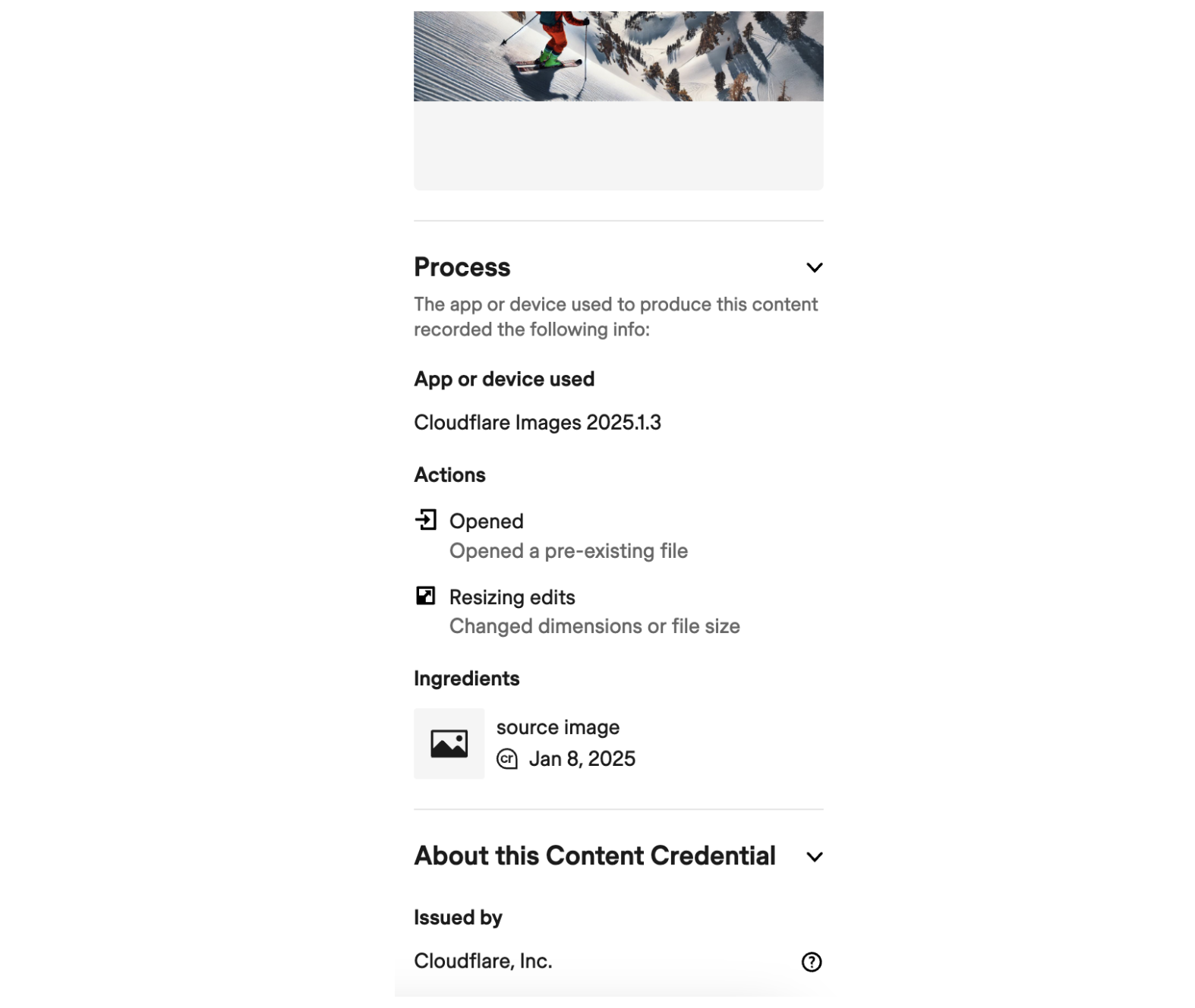
When you use Images to resize or change the file format to your images, these transformations will be cryptographically signed by Cloudflare. This ensures, for example, that the end-user who sees the photograph on your website can use an open-source verification service such as contentcredentials.org/verify to verify the full provenance chain.
How it works
Imagine you are a photojournalist using a Nikon camera that has C2PA-compliant signing. That photojournalist could opt to attach Content Credentials to their photo, identifying the key elements of the photograph such as the camera model, the original image size, and aperture settings.
Below is a simplified example of what a C2PA-compliant Content Credential for a photograph taken with that Nikon camera could look like.
Content Credentials are stored using JUMBF (JPEG Universal Metadata Box Format), which serves as a standardized container format for embedding metadata within files. You can think of it as an envelope system that packages together both the data about where a piece of digital content came from and how it changed, as well as the cryptographic signatures that can be used to verify that data.
The assertions, or facts about the content provenance, are typically written in JSON for a better developer experience. Note that this example deliberately simplifies the JUMBF box nesting and adds comments to make it easier to follow.
Now imagine that you want to use this photograph on your website.
If you’ve enabled the Preserve Content Credentials setting in Cloudflare, then that metadata is now preserved in Cloudflare Images.
If you use Cloudflare Images to dynamically resize or transform this image, then Cloudflare automatically appends and cryptographically signs any additional actions in that same manifest. Below we show what the new Content Credentials could look like.
In this example, the c2pa.action.resized entry describes a non-destructive transformation from one set of dimensions to another. This is included as a separate, independent assertion about this particular photograph.
Notice how there are two cryptographic signatures in this manifest, each referenced by signature_info. Since there were two entities involved in this example image — Nikon for the image’s creation, then Cloudflare for resizing it — both Nikon and Cloudflare independently signed their respective assertions about the content provenance.
In this example, the signature reference looks like this:
During the creation, editing, and resizing process of a piece of digital content, a unique hash of metadata is created for each action and then signed using a private key. The signature, along with the signer’s public certificate or reference to it, are contained in the JUMBF container as referenced by this JSON.
These hashes and signatures allow any open source verification tool to recalculate the hash, validate it against the signature, and check the certificate chain to ensure trustworthiness for each action taken on the image. This is what is meant by Content Credentials being tamper-evident: if any of these hashes and signatures fail to validate, it means that the metadata has been tampered with.
Each cryptographic signature is part of a Trust List, allowing anyone to verify the provenance chain across various entities, such as from a camera manufacturer to photo editing software to distribution across Cloudflare. More from the Content Authenticity Initiative:
Trust lists connect the end-entity certificate that signed a manifest back to the originating root CA. This is accomplished by supplying the subordinate public X.509 certificates forming the trust chain (the public X.509 certificate chain).
In order for Cloudflare to append the Content Credentials with any transformations, we needed to have a publicly available end-entity certificate and join this Trust List. Here we used DigiCert for our end-entity certificate and reference this certificate in the JSON manifests that we are now creating in production:
The end result is that news organizations, journalists, and content companies can now create an auditable chain of digital provenance whose claims can be verified using public-key cryptography.
cdn-cgi/image is a fixed prefix that identifies that this is a special path handled by a built-in Worker.
The OPTIONS parameter allows you to then transform the image — rotating it, changing the width, compressing it, and more.
SOURCE-IMAGE is the URL where your image is currently hosted.
To tie these together, I then have a new URL structure where I want to change the width and quality of the image I created in DALL-E and display this on my personal website. After uploading the image from DALL-E to one of my R2 buckets, I can create this URL:
Anyone can now verify its provenance using the Content Credentials Verify tool to see the result. The provenance chain is fully intact, even after using the Cloudflare Images transformation shown above to resize the image.
There are numerous open source command line tools that allow you to explore the full details of the Content Credentials. The C2PA Tool is created and maintained by the Content Authenticity Initiative. You can read more about the tool here and view the source code for it on GitHub.
There are two ways to install the tool: through a pre-built binary executable, or using Cargo Binstall if you have already installed Rust. Once installed, the C2PA Tool uses this syntax in your command line:
c2patool [OPTIONS] <PATH> [COMMAND]
If I navigate to the link of the image in my browser and save it to my downloads folder on my Mac, then I simply need to use the command -d (short for -detailed) to see the full details of the JSON manifest. Of course, you should change yourusername to your actual Mac username.
This allows you to not just trust, but verify, the details of the image transformation yourself.
How to start using Cloudflare Images with Content Credentials
It’s straightforward to start preserving Content Credentials. Log in to your Cloudflare dashboard and navigate to Images in the dashboard. From there, choose Transformations and choose a Zone where you want to enable this feature. Then toggle this option to on:
If the images you are transforming do not contain any Content Credentials, no action is taken. But if they do, we preserve those Content Credentials and attest to any transformations.
Looking ahead
We are excited to continue to partner with Adobe and many other organizations to extend support for preserving Content Credentials across our products and services. If you are interested in learning more, we’d love to hear from you: I’m @williamallen on X or on LinkedIn.
OpenAI announced support for WebRTC in their Realtime API on December 17, 2024. Combining their Realtime API with Cloudflare Calls allows you to build experiences that weren’t possible just a few days earlier.
Previously, interactions with audio and video AIs were largely single-player: only one person could be interacting with the AI unless you were in the same physical room. Now, applications built using Cloudflare Calls and OpenAI’s Realtime API can now support multiple users across the globe simultaneously seeing and interacting with a voice or video AI.
Have your AI join your video calls
Here’s what this means in practice: you can now invite ChatGPT to your next video meeting:
We built this into our Orange Meets demo app to serve as an inspiration for what is possible, but the opportunities are much broader.
In the not-too-distant future, every company could have a ‘corporate AI’ they invite to their internal meetings that is secure, private and has access to their company data. Imagine this sort of real-time audio and video interactions with your company’s AI:
“Hey ChatGPT, do we have any open Jira tickets about this?”
“Hey Company AI, who are the competitors in the space doing Y?”
“AI, is XYZ a big customer? How much more did they spend with us vs last year?”
There are similar opportunities if your application is built for consumers: broadcasts and global livestreams can become much more interactive. The murder mystery game in the video above is just one example: you could build your own to play live with your friends in different cities.
WebRTC vs. WebSockets
These interactive multimedia experiences are enabled by the industry adoption of WebRTC, which stands for Web Real-time Communication.
Many real-time product experiences have historically used Websockets instead of WebRTC. Websockets operate over a single, persistent TCP connection established between a client and server. This is useful for maintaining a data sync for text-based chat apps or maintaining the state of gameplay in your favorite video game. Cloudflare has extensive support for Websockets across our network as well as in our AI Gateway.
If you were building a chat application prior to WebSockets, you would likely have your client-side app poll the server every n seconds to see if there are new messages to be displayed. WebSockets eliminated this need for polling. Instead, the client and the server establish a persistent, long-running connection to send and receive messages.
However, once you have multiple users across geographies simultaneously interacting with voice and video, small delays in the data sync can become unacceptable product experiences. Imagine building an app that does real-time translation of audio. With WebSockets, you would need to chunk the audio input, so each chunk contains 100–500 milliseconds of audio. That chunking size, along with the head-of-line blocking, becomes the latency floor for your ability to deliver a real-time multimodal experience to your users.
WebRTC solves this problem by having native support for audio and video tracks over UDP-based channels directly between users, eliminating the need for chunking. This lets you stream audio and video data to an AI model from multiple users and receive audio and video data back from the AI model in real-time.
Realtime AI fanout using Cloudflare Calls
Historically, setting up the underlying infrastructure for WebRTC — servers for media routing, TURN relays, global availability — could be challenging.
Cloudflare Calls handles the entirety of this complexity for developers, allowing them to leverage WebRTC without needing to worry about servers, regions, or scaling. Cloudflare Calls works as a single mesh network that automatically connects each user to a server close to them. Calls can connect directly with other WebRTC-powered services such as OpenAI’s, letting you deliver the output with near-zero latency to hundreds or thousands of users.
Privacy and security also come standard: all video and audio traffic that passes through Cloudflare Calls is encrypted by default. In this particular demo, we take it a step further by creating a button that allows you to decide when to allow ChatGPT to listen and interact with the meeting participants, allowing you to be more granular and targeted in your privacy and security posture.
How we connected Cloudflare Calls to OpenAI’s Realtime API
“A Session in Cloudflare Calls correlates directly to a WebRTC PeerConnection. It represents the establishment of a communication channel between a client and the nearest Cloudflare data center, as determined by Cloudflare’s anycast routing …
Within a Session, there can be one or more Tracks. … [which] align with the MediaStreamTrack concept, facilitating audio, video, or data transmission.”
To include ChatGPT in our video conferencing demo, we needed to add ChatGPT as a track in an ongoing session. To do this, we connected to the Realtime API in Orange Meets:
This code sets up the bidirectional routing between the human’s session and ChatGPT, which would allow the humans to hear ChatGPT and ChatGPT to hear the humans.
You can review all the code for this demo app on GitHub.
Get started today
Give the Cloudflare Calls + OpenAI Realtime API demo a try for yourself and review how it was built via the source code on GitHub. Then get started today with Cloudflare Calls to bring real-time, interactive AI to your apps and services.
The collective thoughts of the interwebz
Manage Consent
To provide the best experiences, we use technologies like cookies to store and/or access device information. Consenting to these technologies will allow us to process data such as browsing behavior or unique IDs on this site. Not consenting or withdrawing consent, may adversely affect certain features and functions.
Functional
Always active
The technical storage or access is strictly necessary for the legitimate purpose of enabling the use of a specific service explicitly requested by the subscriber or user, or for the sole purpose of carrying out the transmission of a communication over an electronic communications network.
Preferences
The technical storage or access is necessary for the legitimate purpose of storing preferences that are not requested by the subscriber or user.
Statistics
The technical storage or access that is used exclusively for statistical purposes.The technical storage or access that is used exclusively for anonymous statistical purposes. Without a subpoena, voluntary compliance on the part of your Internet Service Provider, or additional records from a third party, information stored or retrieved for this purpose alone cannot usually be used to identify you.
Marketing
The technical storage or access is required to create user profiles to send advertising, or to track the user on a website or across several websites for similar marketing purposes.