Post Syndicated from original https://xkcd.com/2788/
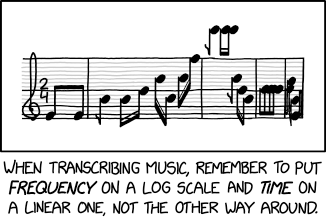
Post Syndicated from original https://xkcd.com/2788/
Post Syndicated from Will Taillac original https://www.servethehome.com/inland-td510-2tb-pcie-gen5-nvme-ssd-review/
We take a look at the Inland TD510. In our review, we see how this 2TB PCIe Gen5 NVMe SSD performs and discuss some trade-offs
The post Inland TD510 2TB PCIe Gen5 NVMe SSD Review appeared first on ServeTheHome.
Post Syndicated from Explosm.net original https://explosm.net/comics/agenda
New Cyanide and Happiness Comic
Post Syndicated from Oglaf! -- Comics. Often dirty. original https://www.oglaf.com/tips-advice-ideas/


Post Syndicated from Cliff Robinson original https://www.servethehome.com/intel-atom-c1100-series-arizona-beach-launched-silicom/
Intel stealth launched a new edge Atom line. The Intel Atom C1100 series spans 2-8 cores and has features like PCIe Gen4 onboard
The post Intel Atom C1100 Series Arizona Beach for Low Power CPE appeared first on ServeTheHome.
Post Syndicated from original https://lwn.net/Articles/934361/
“After 1 year, 9 months, and 28 days of development
“, Debian 12, codenamed “bookworm”, has been released. The announcement has lots of details about package versions for desktop environments (6 are supported), kernel version (Linux 6.1 series), other package versions (compilers, graphics tools, office suites, languages, and more), architectures supported (8 for real hardware and 5 for cloud services), blends, and lots more.
This release contains over 11,089 new packages for a total count of 64,419 packages, while over 6,296 packages have been removed as “obsolete”. 43,254 packages were updated in this release. The overall disk usage for “bookworm” is 365,016,420 kB (365 GB), and is made up of 1,341,564,204 lines of code.
“bookworm” has more translated man pages than ever thanks to our translators who have made man-pages available in multiple languages such as: Czech, Danish, Greek, Finnish, Indonesian, Macedonian, Norwegian (Bokmål), Russian, Serbian, Swedish, Ukrainian, and Vietnamese. All of the systemd man pages are now completely available in German.
See the Debian 12
release notes for additional information.
Post Syndicated from Matt Granger original https://www.youtube.com/watch?v=ZKwD5wm847s
Post Syndicated from Techmoan original https://www.youtube.com/watch?v=JN_XeVSKqSY
Post Syndicated from Светла Енчева original https://www.toest.bg/sedmitsata-5-10-yuni/

В България сме свикнали да не гледаме по-далече от носа си. Международните новини обикновено са забутани в края на новинарските емисии, освен ако не става дума за британското кралско семейство например. В последно време нашият „нос“ е станал толкова интересен, че съвсем не можем да откъснем поглед от него. Ново правителство, сериозни трусове в досегашните властови центрове, трусове и в подземния свят – понякога с летален изход…
Едно международно събитие от изминалата седмица обаче ще има огромни последствия, които ще засегнат и страната ни. Става дума за унищожаването на язовира „Нова Каховка“ край украинския град Херсон. Досега няма категорични доказателства дали съоръжението, което се намира под контрола на руските окупационни сили, е умишлено взривено от окупаторите, или стената му се е саморазрушила точно в началото на украинската контраофанзива. Язовирната стена обаче нямаше да се срути, ако я нямаше войната на Русия срещу Украйна.
Все още е трудно да си представим мащабите на бедствието, предизвикано от унищожаването на „Нова Каховка“. Украинският президент Володимир Зеленски го нарича „екоцид“. Не е лесно да се сетим за други катастрофични събития, причинени от човешка дейност, които водят до промяна на физическата карта на една държава. Южна Украйна вече няма да изглежда както преди. Не само десетки населени места са унищожени, а региони с плодородна земя ще се превърнат в пустини и в част от водни басейни. Вливането на Днепър в Черно море вече ще има различна форма.
Като стана дума за Черно море, последствията от тази катастрофа ще стигнат и до България. Защото в морето ще се излеят всички отрови и зарази, които Днепър отнесе по пътя си. Заедно с множество противопехотни мини, които ще се превърнат в опасност за плавателните съдове, за местното население и за туристите.
В тазседмичните си статии двете с Емилия Милчева се фокусираме върху „носа“ си, тоест България. Емилия разказва как Иван Гешев е сам на бала на чудовищата. Главният прокурор е изоставен от доскорошните си най-верни съюзници, които го поставиха на поста, за да могат да го използват като щит, бухалка и чадър. Съюзниците, както и парите, не миришат, нали? Злоупотребявайки с безконтролната си власт, Гешев се превърна в бреме и за онзи, който „си го избра“. Той отчаяно се бори да запази властта си, демонстрирайки по този начин още повече нейната безконтролност и избирателната ѝ употреба. Развръзката, смята Емилия, ще зависи от политическото благоразумие в името на целостта на новия кабинет.
Новият кабинет пък е тема на статията ми „Не пълно щастие, а редовно правителство“. От новото правителство като че ли никой не е щастлив, включително и личностите и политическите сили, които участват в него. Но политиката не е филм с щастлив край, а изкуство на възможното. Както казва Ицо Хазарта, ако в ресторанта има само боб и леща, колкото и да искаме пържола, няма да ни дадат. Добрата новина от изтичането на записа от закритото заседание на „Продължаваме промяната“ обаче е, че ръководството на партията действително си представя политиката като опит за промяна на света. От ПП си дават сметка, че участието в правителство с ГЕРБ може да означава политическата им смърт, но вярват, че има и други, които да продължат започнатото.
Александър Нуцов поставя българската политика в глобален контекст, разсъждавайки за протеста като любов към демокрацията. Според него протестите като форма на гражданска съпротива са лекарство срещу зловредни влияния в обществото. Той ни припомня личности, вдъхновили големи ненасилствени протестни движения. Първоначално се сещаме за Махатма Ганди и Мартин Лутър Кинг. Но преди да ни върне към България, Александър ни обръща внимание върху личности като камбоджанския будистки лидер Маха Госананда, Дезмънд Туту, който се бори срещу апартейда в ЮАР, Ригоберта Менчу, посветила се на човешките права в Гватемала, и Лейма Гбоуи, която отстоява правата на жените в Либерия.
Продължаваме на международна тема с втората част от статията на Атанас Шиников „Кориандър, лой, шамфъстък: как се хранят средновековните араби“. Ако не сте си похапнали добре, преди да я прочетете, отговорността си е ваша. Но ви предупреждавам, че ако не сте вегани или вегетарианци (понеже в Средновековието имотната част от населението доста набляга на животинските протеини), е силна вероятността да огладнеете. Въпреки че описаните рецепти не приличат на съвременна готварска книга, а са много по-фриволни и емоционални.
Вглеждайки се и в тукашните проблеми обаче, можем да виждаме по-далече от носа си. Връщаме се към България със статията на новата ни авторка Мирела Петкова „Невежеството не е блаженство, или различните лица на липсващото здравно и сексуално образование в България“. В България ранната бременност е нещо обичайно, но темата е маргинализирана, а дебатът – поляризиращ. Също така сме на първо място по аборти в Европа. Според авторката решението и на двата проблема се състои в адекватното сексуално образование, каквото обаче липсва в учебните планове. Тя разговаря с различни специалисти, които знаят как могат да се подобрят нещата. Ала за съжаление, учениците се оказват заложници на мащабни кампании, табуизиращи сексуалното образование.
Накрая – обичайните препоръки мен.
„София прайд“ е точно след една седмица – на 17 юни. Ако ще ходите, моля ви да не пренебрегвате правилата за безопасност. Защото, независимо какви са сексуалната ви ориентация, половата ви идентичност или външният ви вид, лица, които все питат реторично кой им пречи на ЛГБТИ хората, може да решат отново да „прочистват“ София от хора, приличащи им на различни.
Този път не ви поздравявам с някое весело пънкарско парче, защото разрушаването на язовира „Нова Каховка“ не ми излиза от главата. Припомням си любими песни на тема потоп. В тази връзка реших да споделя с вас едно концертно изпълнение на песента на Питър Гейбриъл от 1977 г. Here Comes the Flood. То е съкратена версия на оригинала, но изразява тази емоция, която ми се искаше да предам.
Надявам се да ви хареса. И приятно четене!
Post Syndicated from Explosm.net original https://explosm.net/comics/register
New Cyanide and Happiness Comic
Post Syndicated from digiblurDIY original https://www.youtube.com/watch?v=LntBYnE9IKc
Post Syndicated from digiblurDIY original https://www.youtube.com/watch?v=97yVBTNqyPI
Post Syndicated from digiblurDIY original https://www.youtube.com/watch?v=UIfCi06-xao
Post Syndicated from Brendan Watters original https://blog.rapid7.com/2023/06/09/metasploit-weekly-wrap-up-14/
It has been a busy few weeks in the security space; the MOVEit vulnerability filling our news feeds with dancing lemurs and a Barracuda vulnerability that has us all wondering how many shredders out there can handle a 1U appliance. Despite those very worthwhile distractions, Metasploit has made another strong release, with 3 new exploits, 1 new auxiliary module, and 2 new payloads!
Authors: Vitellozzo, h00die, and pwnie
Type: Auxiliary
Pull request: #18039 contributed by h00die
AttackerKB reference: CVE-2023-2825
Description: This adds an exploit that leverages an authenticated arbitrary file read on Github 16.0.0. This vulnerability is identified as CVE-2023-2825.
Author: catatonicprime
Type: Exploit
Pull request: #17936 contributed by catatonicprime
AttackerKB reference: CVE-2023-27350
Description: This adds an exploit module that leverages an authentication bypass to get remote code execution on PaperCut NG version 8.0.0 to 19.2.7 (inclusive), version 20.0.0 to 20.1.6 (inclusive), version 21.0.0 to 21.2.10 (inclusive) and version 22.0.0 to 22.0.8 (inclusive). This vulnerability is identified as CVE-2023-27350. Due to an improper access control in the SetupCompleted class, it is possible to bypass authentication and abuse the built-in scripting functionality for printers to obtain code execution as the SYSTEM user on Windows and the less privileged papercut user on Linux.
Authors: Dinh Hoang, Grant Willcox, and Simon Humbert
Type: Exploit
Pull request: #18018 contributed by gwillcox-r7
AttackerKB reference: CVE-2023-29084
Description: This adds an exploit module for CVE-2023-29084 which is an authenticated RCE in Zoho ManageEngine ADManager Plus. A remote attacker can leverage this vulnerability to execute OS commands by crafting a request to update the server’s configuration. The modified configuration’s value is restored by the exploit once it is completed. This exploit is incompatible with HTTP payloads due to the exploit modifying the HTTP proxy configuration of the server during exploitation.
Authors: Anonymous and Shelby Pace
Type: Exploit
Pull request: #18072 contributed by space-r7
AttackerKB reference: CVE-2023-1133
Description: A module has been added for CVE-2023-1133, an unauthenticated .NET deserialization vulnerability in Delta Electronics InfraSuite Device Master versions below v1.0.5 in the ParseUDPPacket() method of the ‘Device-Gateway-Status’ process. Successful exploitation leads to unauthenticated code execution as the user running the ‘Device-Gateway-Status’ process.
Author: zeroSteiner
Type: Payload
Pull request: #18044 contributed by zeroSteiner
Description: Add MIPS64 Linux Fetch Payloads
Author: rad10
Type: Payload
Pull request: #18002 contributed by rad10
Description: This adds a command payload module that creates a new privileged user on a *nix target system.
ms15_034_http_sys_memory_dump.rb module has been updated to improve its handling of the check_host function so that the information about target exploitability is more accurate.grafana_plugin_traversal module has been updated to support beta and pre-release versions of Grafana.check method so that users can appropriately check if a target is an Archer router or not.post/multi/manage/shell_to_meterpreter: one was caused by a lack of validation on the payload being used when using the PAYLOAD_OVERRIDE option to ensure the payload was valid, and one was caused by the module creating a handler but failing to pass the RHOST information along, causing the handler to run with an invalid configuration.bytes args is not allowed on Windows.post/multi/gather/aws_keys module to mark the platforms it is compatible with.exploits/multi/http/gitlab_github_import_rce_cve_2022_2992 module that prevent proper exception handling from occurring, and additional YARD documentation has been added for some related functions that were missing appropriate documentation on the exceptions they might throw.You can find the latest Metasploit documentation on our docsite at docs.metasploit.com.
As always, you can update to the latest Metasploit Framework with msfupdate
and you can get more details on the changes since the last blog post from
GitHub:
If you are a git user, you can clone the Metasploit Framework repo (master branch) for the latest.
To install fresh without using git, you can use the open-source-only Nightly Installers or the
binary installers (which also include the commercial edition).
Post Syndicated from BeardedTinker original https://www.youtube.com/watch?v=vLuvPqu8RNk
Post Syndicated from Bruce Schneier original https://www.schneier.com/blog/archives/2023/06/friday-squid-blogging-light-emitting-squid.html
It’s a Taningia danae:
Their arms are lined with two rows of sharp retractable hooks. And, like most deep-sea squid, they are adorned with light organs called photophores. They have some on the underside of their mantle. There are more facing upward, near one of their eyes. But it’s the photophores at the tip of two stubby arms that are truly unique. The size and shape of lemons—each nestled within a retractable lid like an eyeball in a socket—they are by far the largest photophores known to science.
As usual, you can also use this squid post to talk about the security stories in the news that I haven’t covered.
Read my blog posting guidelines here.
Post Syndicated from Technology Connextras original https://www.youtube.com/watch?v=wjny4u5THpU
Post Syndicated from Joshua Du Lac original https://aws.amazon.com/blogs/security/use-the-hosted-ui-or-create-a-custom-ui-in-amazon-cognito/
October 8, 2025: This blog post has been updated to include the Amazon Cognito managed login experience. The managed login experience has an updated look, additional features, and enhanced customization options.
September 8, 2023: It’s important to know that if you activate user sign-up in your user pool, anyone on the internet can sign up for an account and sign in to your apps. Don’t enable self-registration in your user pool unless you want to open your app to allow users to sign up.
June 9, 2023: Original publication date.
Amazon Cognito is an authentication, authorization, and user management service for your web and mobile applications. Your users can sign in directly through many different authentication methods, such as user accounts within Amazon Cognito or through social providers such as Facebook, Amazon, Apple, or Google. You can also configure federation through a third-party OpenID Connect (OIDC) or SAML 2.0 identity provider (IdP).
Amazon Cognito user pools are user directories that provide sign-up and sign-in functions for your application users, including federated authentication capabilities. A Cognito user pool has two primary UI options:
In this blog post, we review the benefits of using the managed login or creating a custom UI with the SDK and things to consider in determining which to choose for your application.
Managed login provides web interfaces for sign-up, sign-in, multi-factor authentication (MFA), password management, and passwordless and passkey sign-in capabilities in your user pool. The managed login provides an authorization server based on the OAuth 2.0 specification, and has a default implementation of user flows for sign-up and sign-in. Your application can redirect to the managed login, which will handle the user flows through the authorization code grant flow. The managed login also supports sign-in through social providers and federation from OIDC-compliant and SAML 2.0 providers. Amazon Cognito offers two visual modes and branding and customization experiences: managed login branding with branding editor and hosted UI (classic) branding.
Managed login branding with branding editor
Managed login branding provides an improved user experience with the most up-to-date authentication options for the user pool UI experience. Figure 1 shows managed login using the default branding settings.
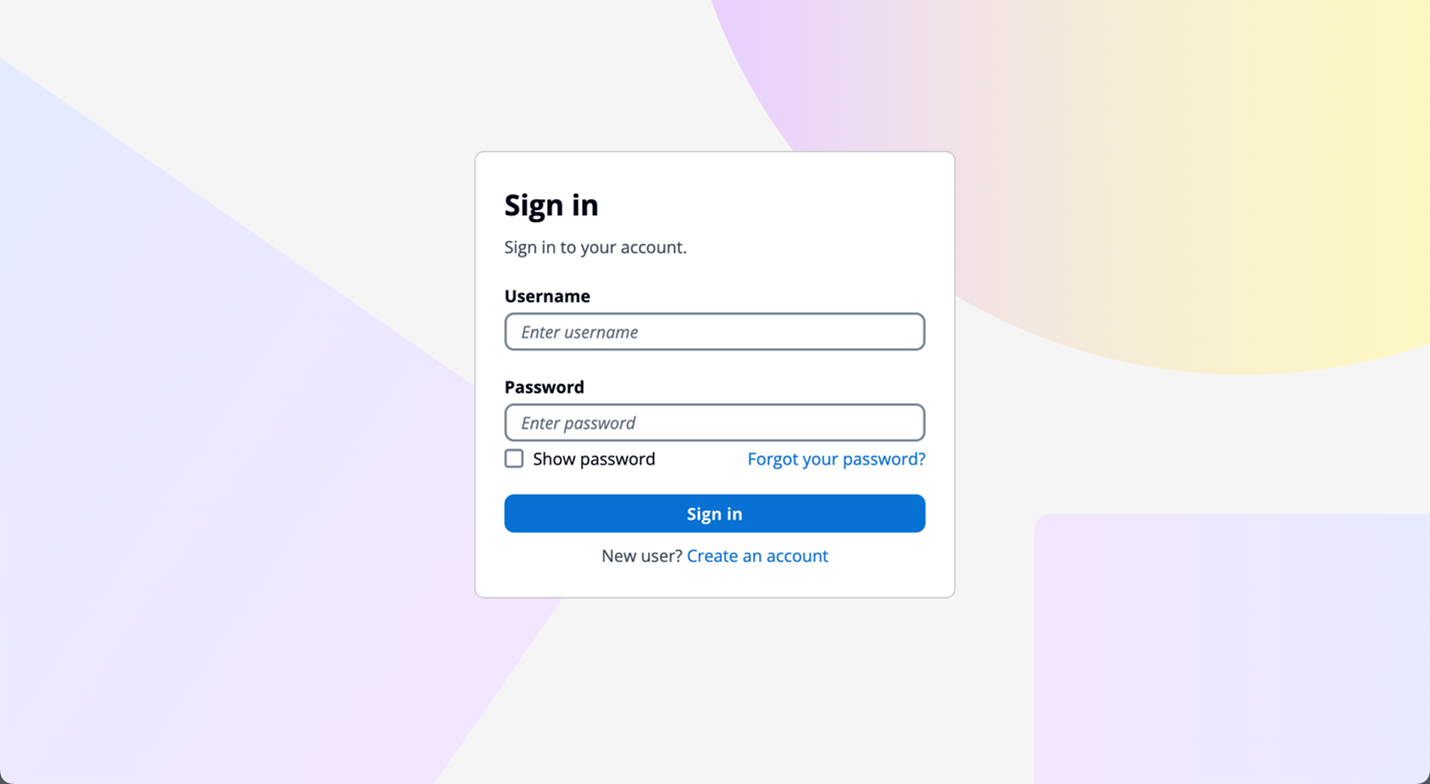
Figure 1: Managed login default branding settings
The branding editor is a no-code visual editor that you can use to customize the look and feel of the entire user journey. You can customize each user pool application client individually, and preview screens in real-time with different screen sizes, as shown in Figure 2.
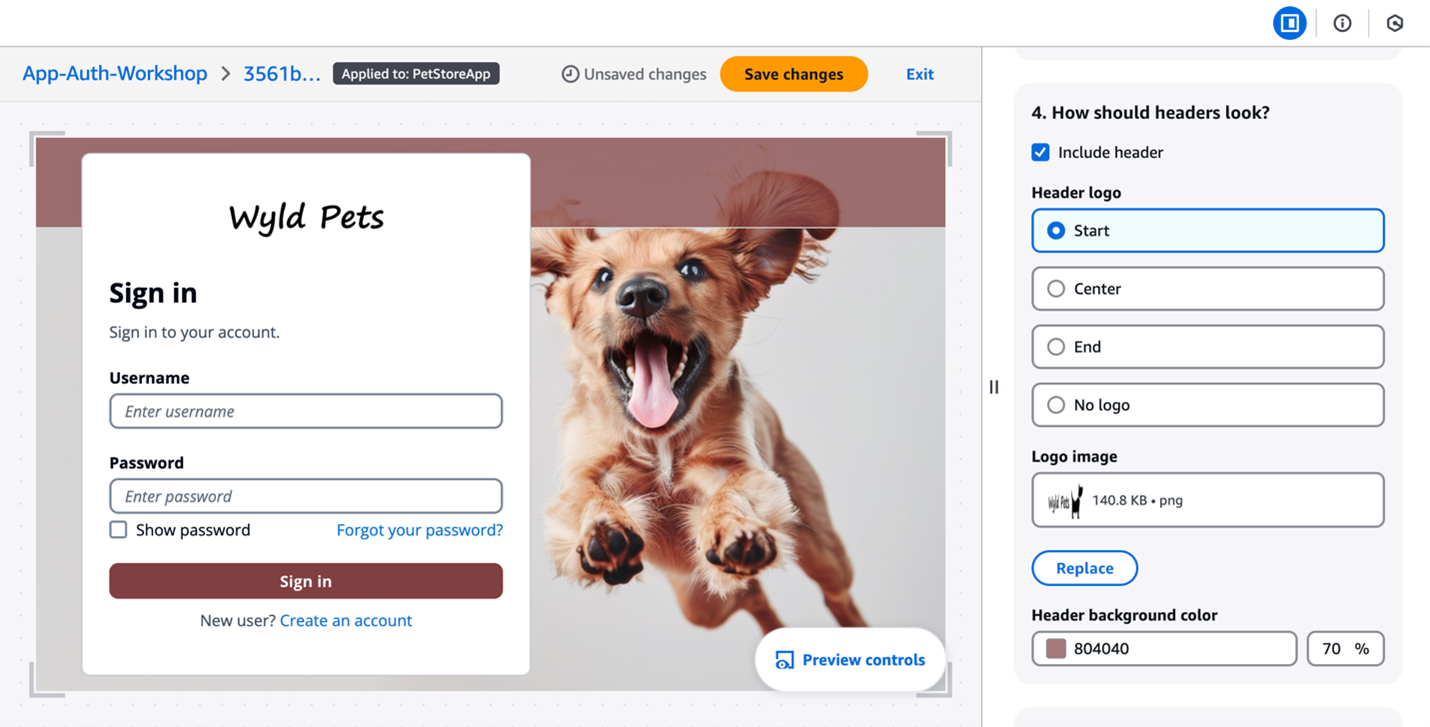
Figure 2: Customization in the Amazon Cognito branding editor (Image credits)
As shown in Figure 3, You can customize various components using the branding editor, including background, header and footer, buttons, focus state, icons, and more.
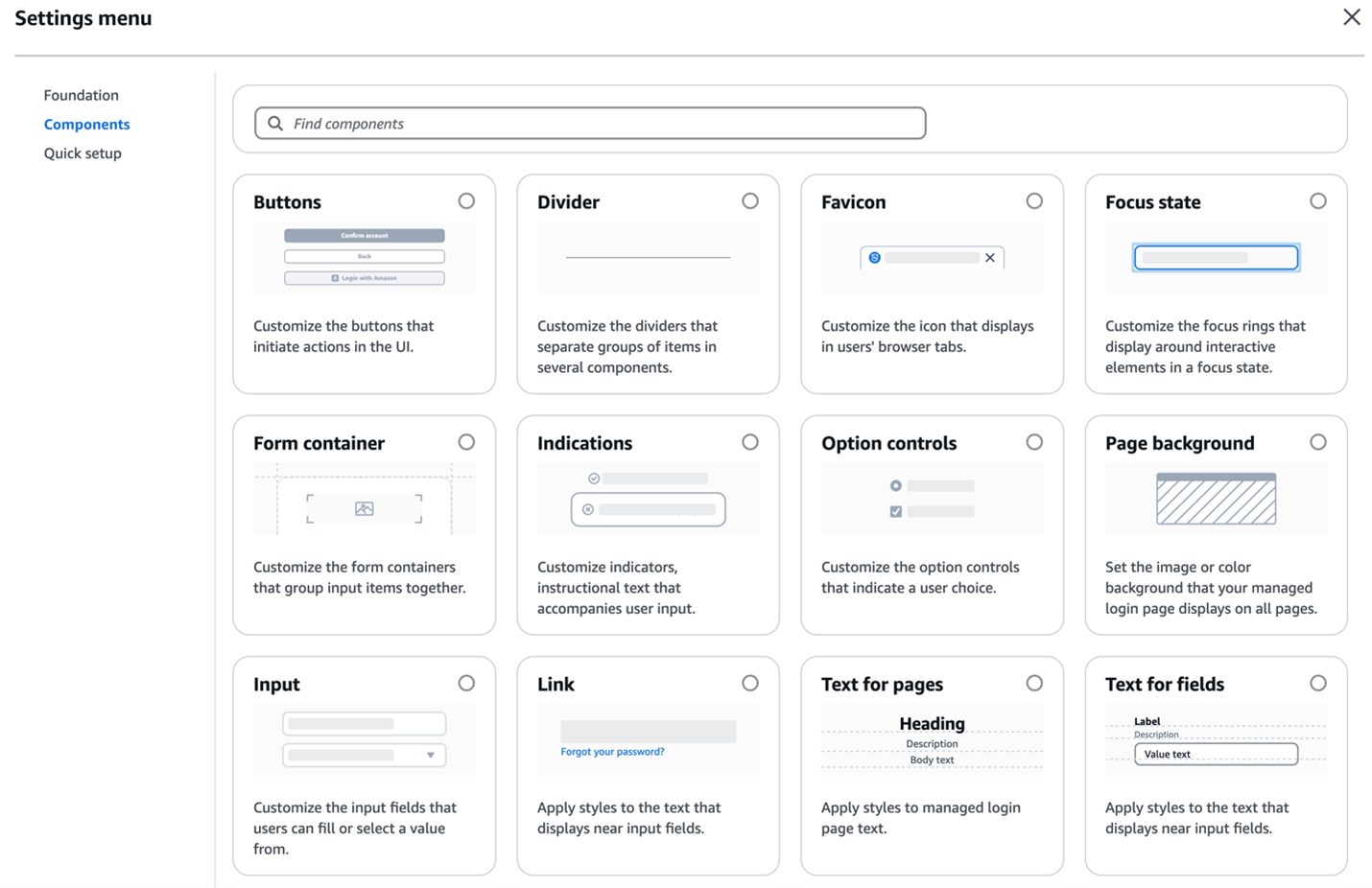
Figure 3: Various components customization options
Additionally, managed login branding adds support for passwordless sign-in with passkeys, email one-time-passwords (OTP) and SMS OTPs, as shown in Figure 4. After you enable passwordless login in your user pool, managed login branding adapts to curated user flows with users’ preferred authentication methods.
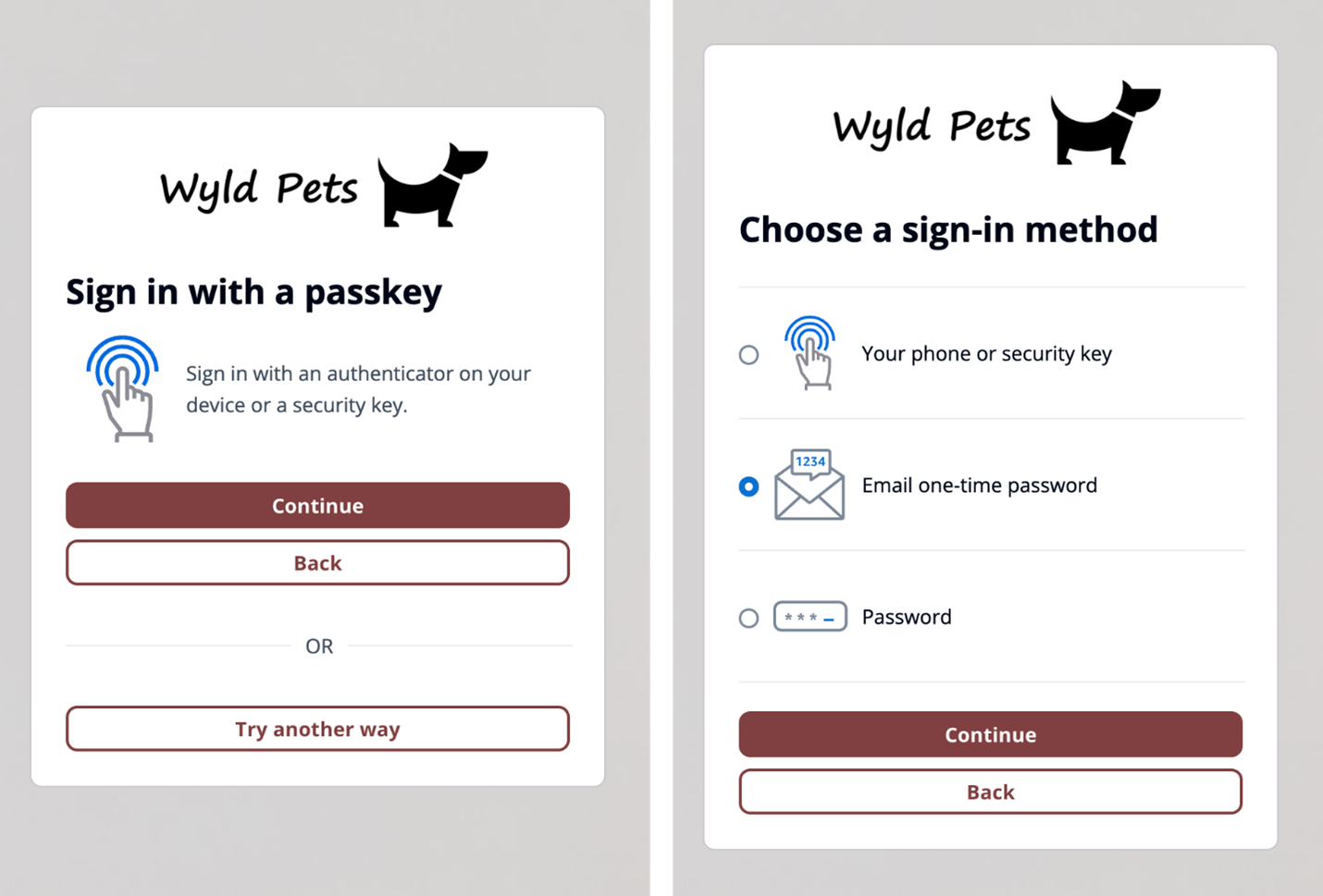
Figure 4: Sign in with passkey flow (left) and user-selected sign-in method flow (right)
Managed login branding also offers localization options in several languages (two are shown in Figure 5). You can add a lang query parameter in the link you distribute to users, and Amazon Cognito will set a cookie in users’ browsers with their language preference after the initial request.
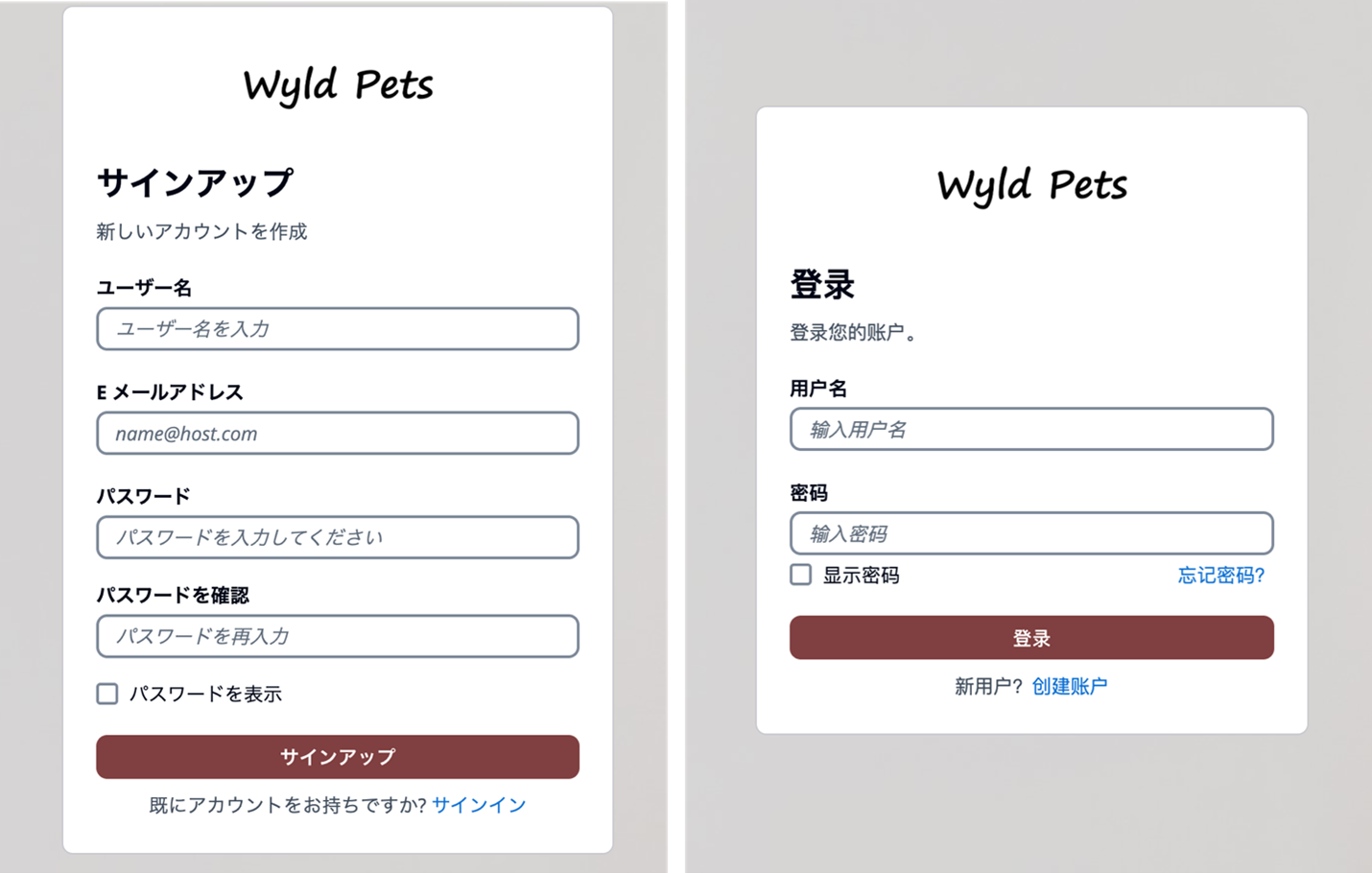
Figure 5: Cognito user sign up page in Japanese (left) and user sign in page in Simplified Chinese (right)
Hosted UI (classic) branding
For customers who prefer a traditional approach, Amazon Cognito continues to support the Hosted UI (classic) branding (shown in Figure 6) with basic customization where you can upload a CSS file to design the UI styling and upload a brand-specific logo. Hosted UI (classic) supports standard authentication flows with MFA and self-service sign up.
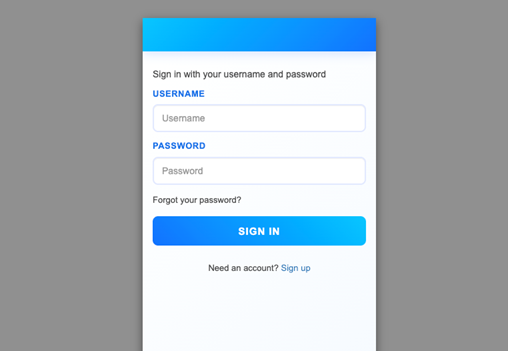
Figure 6: Hosted UI (classic) branding
The managed login branding with branding editor is available to Amazon Cognito user pools with Essentials and Plus feature tiers, and Hosted UI (classic) branding is available to most Cognito user pools including Lite tier. To learn more about Cognito feature tiers, visit Amazon Cognito pricing.
Security and compliance capabilities
Both managed login branding and Hosted UI (classic) branding are designed to help you meet your compliance and security requirements and your users’ needs. Managed login supports custom OAuth scopes and OAuth 2.0 flows. If you want single sign-on (SSO), you can use managed login to support a single login across many application clients, with browser session cookies for the same domain. Actions are logged in AWS CloudTrail, and you can use the logs for audit and reactionary automation. The managed login experience also supports the full suite of threat protection features for Amazon Cognito. For additional protection, managed login has support for AWS WAF web ACLs and for AWS WAF CAPTCHA, which can help protect your Cognito user pools from web-based exploits and unwanted bots.
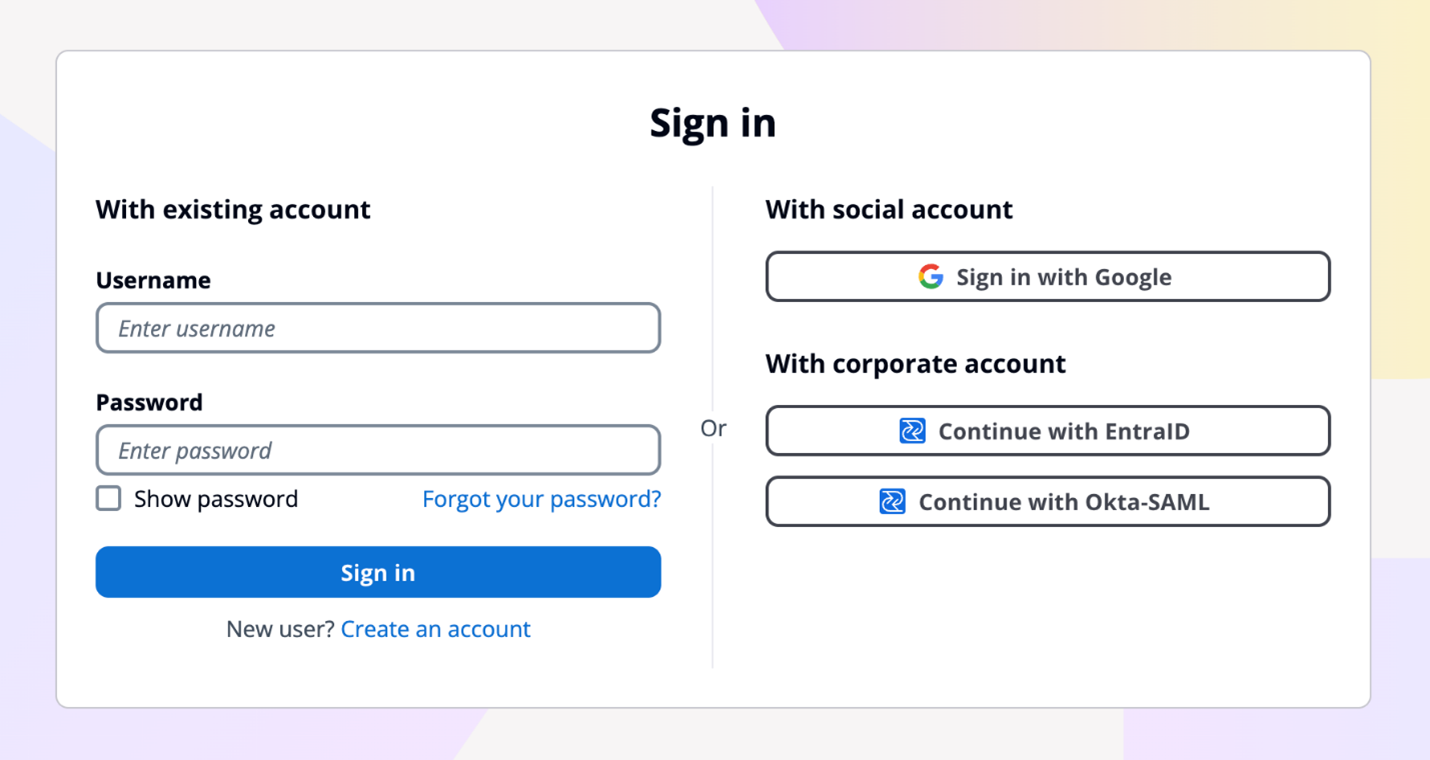
Figure 7: Example default managed login with several login providers enabled
For federation, managed login supports federation with third-party IdPs that support OIDC and SAML 2.0, as well as social IdPs, as shown in Figure 7. Identity providers are connected to your Amazon Cognito user pool. In managed login, users use a button to select the federation source, and redirection is automatic. With SAML and OIDC IdPs, you can also configure mapping by using the domain in the user’s email address. In this case, a single text field is visible to your application users to enter an email address, as shown in Figure 8, and the lookup and redirect to the appropriate SAML IdP is automatic, as described in Choosing SAML identity provider names.
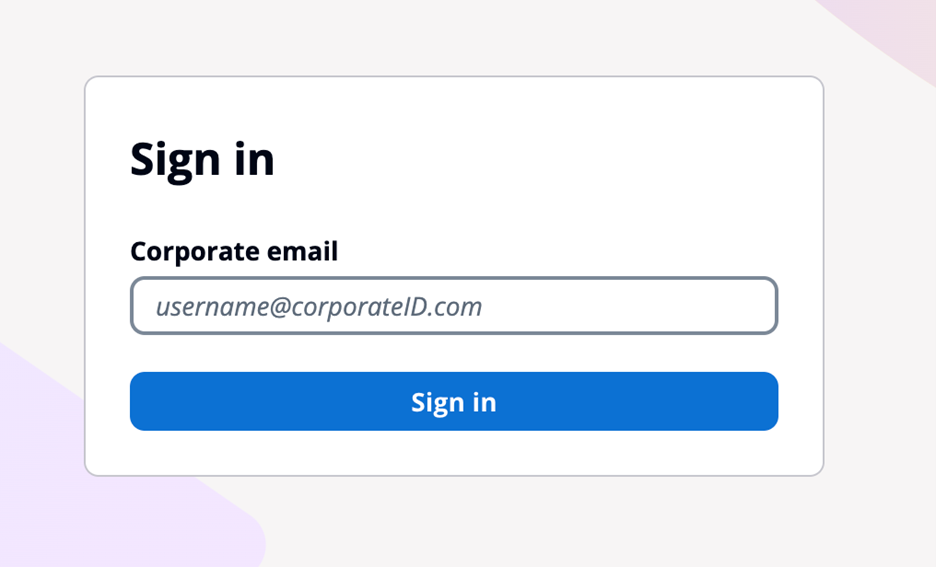
Figure 8: Managed login that links to corporate IdP through an email domain
Managed login integrates with Application Load Balancer (ALB) for web applications and works with AWS Amplify to enable social identity provider and enterprise federation (SAML and OIDC) capabilities. Beyond these integrations, Amazon Cognito user pools integrate with various AWS services (such as AWS AppSync), that require user authentication and authorization, and Amazon API Gateway through Cognito authorizers to secure your REST and HTTP endpoints.
You might choose to use managed login for many reasons. AWS fully manages the hosting, maintenance, and scaling of the managed login, which can contribute to the speed of go-to-market for customers. If your app requires OAuth 2.0 custom scopes, federation, social login, or native users with basic but customized branding and potentially numerous Amazon Cognito user pools, you might benefit from using managed login.
For more information about how to configure and use the hosted UI, see Using the Amazon Cognito hosted UI for sign-up and sign-in.
Creating a custom UI using the SDK for Amazon Cognito provides a host of benefits and features that can help you completely customize the UI for your application users. With a custom UI, you have complete control over the look and feel of the UI that your application users will land on, including designing your app to support multiple languages, and you can build and design custom authentication flows.
There are numerous features that are supported when you build a custom UI. As with the managed login, the APIs invoked from a custom UI using the SDK will create log entries in CloudTrail, and you can use the logs for audit and automation. You can also create a custom authentication flow for your users with a fully custom authentication experience beyond the those available in managed login.
In a custom UI, you can build custom session management and integrate with AWS WAF. A custom UI also works with the threat protection features of Amazon Cognito.
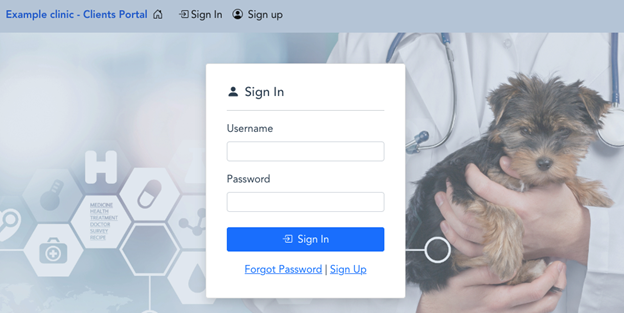
Figure 9: Example of a custom user interface
With a custom UI, such as the one shown in Figure 10, you can orchestrate a suite of sign-in options and sign-in flows for your users. For example, you can collect a user or tenant identifier at the beginning of the authentication flow and apply your own logic for user authentication flow, such as redirecting federated users to external IdPs, displaying a password prompt for local users, or directing users to create a new account if they don’t exist. You can also build flows to let a user choose alternative MFA methods if their preferred choices aren’t available.
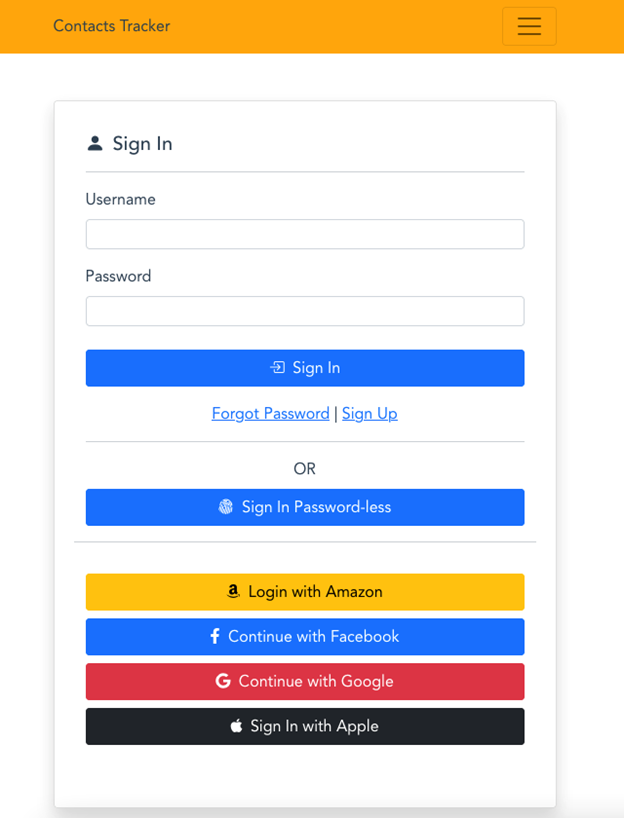
Figure 10: Custom UI example
When you build a custom UI, there is support for custom endpoints and proxies so that you have a wider range of options for management and consistency across application development as it relates to authentication. Custom authentication flows are only available in applications with a custom UI, which gives you the ability to make customized challenge prompts and answers to help you meet custom security requirements by using AWS Lambda triggers. For example, you could use it to implement OAuth 2.0 device grant flows. Lastly, a custom UI supports a remember device feature where you can add low-effort sign-in from trusted devices.
You might choose to build a custom UI with an SDK when full customization is a requirement or where you want to incorporate customized authentication flows using the custom authentication challenge Lambda triggers. A custom UI is a great choice if you aren’t required to use OAuth 2.0 flows and you have the resources to develop and implement a unique UI for your application users.
For more information about how to configure and use a custom UI, see Using the Amazon Cognito managed login for sign-up and sign-in. You can also visit the documentation on Building custom UIs with Amplify.
When deciding between Amazon Cognito managed login branding options and a custom UI, there are some unique differences that can help you determine which UI is best for your application needs. Managed login offers a modern, customizable authentication experience with advanced features like no-code visual customization, dark mode themes, and support for passwordless options. It supports OAuth 2.0 flows, custom OAuth scopes, the ability to sign in one time and access many Cognito application clients (using SSO), and full use of the Cognito threat protection features. For applications requiring complete control over the authentication experience and UX—including custom authentication flows, device fingerprinting, and reduced token expiration—a custom UI is the better choice. This option allows for full UI customization, implementation of custom authentication flows, and integration with specific frameworks or libraries not supported by managed login.
When making your decision, consider factors such as the level of customization required, specific authentication features needed, development resources available, integration requirements with other AWS services, security and compliance needs, and user experience priorities. Remember that your application authentication requirements and customer experience should take precedence over other considerations. You can use the following table to help select the best UI for your requirements.
|
Requirements |
Managed login |
Hosted UI (classic) |
Custom UI (SDK) |
|
OAuth 2.0 flows |
Supported |
Supported |
Not available |
|
Custom OAuth scopes |
Supported |
Supported |
Supported |
|
Customization of UI |
No-code branding designer |
Limited CSS customization |
Full custom control |
|
Custom user input forms |
Not available |
Not available |
Supported |
|
Custom authentication flow |
Not available |
Not available |
Supported |
|
Passwordless authentication flow |
Supported |
Not available |
Custom implementation available |
|
Localization with multiple languages |
Supported |
Not available |
Supported |
|
Login once across many app clients |
Supported |
Supported |
Not available |
|
Session expiration configurable under 1 hour |
Not available |
Not available |
Supported |
|
Trusted-device authentication |
Not available |
Not available |
Supported |
|
AWS WAF integration |
Supported |
Supported |
Supported |
|
Support for AWS WAF CAPTCHA |
Supported |
Supported |
Not available |
|
Ability to use a custom endpoint or proxy |
Not available |
Not available |
Supported |
|
AWS Application Load Balancer integration |
Supported |
Supported |
Not available |
Figure 11: Decision criteria matrix
In this post, you learned about using managed login, including its two branding options and creating a custom UI in Amazon Cognito and the many supported features and benefits of each. Each UI option targets a specific need. Choose from available options based on your list of requirements for authentication and the user sign-up and sign-in experience. You can use the information in this post as a reference as you add Amazon Cognito to your mobile and web applications for authentication.
Have a question? Contact us for general support services.
Post Syndicated from Lotfi Mouhib original https://aws.amazon.com/blogs/big-data/cost-monitoring-for-amazon-emr-on-amazon-eks/
Amazon EMR is the industry-leading cloud big data solution, providing a collection of open-source frameworks such as Spark, Hive, Hudi, and Presto, fully managed and with per-second billing. Amazon EMR on Amazon EKS is a deployment option allowing you to deploy Amazon EMR on the same Amazon Elastic Kubernetes Service (Amazon EKS) clusters that is multi-tenant and used by other applications, improving resource utilization, reducing cost, and simplifying infrastructure management. EMR on EKS provide you up to 5.37 times better performance than OSS Spark v3.3.1 with 76.8% cost savings. It also provides a wide variety of job submission methods, like an AWS API called StartJobRun, or through a declarative way with a Kubernetes controller through the AWS Controllers for Kubernetes for Amazon EMR on EKS.
This consolidation comes with a trade-off of increased difficulty measuring fine-grained costs for showback or chargeback by team or application. According to a CNCF and FinOps Foundation survey, 68% of Kubernetes users either rely on monthly estimates or don’t monitor Kubernetes costs at all. And for respondents reporting active Kubernetes cost monitoring, AWS Cost Explorer and Kubecost were ranked as the most popular tools being used.
Currently, you can distribute costs per tenant using a hard multi-tenancy with separate EKS clusters in dedicated AWS accounts or a soft multi-tenancy using separate node groups in a shared EKS cluster. To reduce costs and improve resource utilization, you can use namespace-based segregation, where nodes are shared across different namespaces. However, calculating and attributing costs to teams by workload or namespaces while taking into account compute optimization (like Saving Plans or Spot Instance cost) and the cost of AWS services like EMR on EKS is a challenging and non-trivial task.
In this post, we present a cost chargeback solution for EMR on EKS that combines the AWS-native capabilities of AWS Cost and Usage Reports (AWS CUR) alongside the in-depth Kubernetes cost visibility and insights using Kubecost on Amazon EKS.
A job in EMR on EKS incur costs mainly on two dimensions: compute resources and a marginal uplift charge for EMR on EKS usage. To track the cost associated with each of the dimensions, we use data from three sources:
The cost allocation process includes the following components:
The following diagram shows the overall architecture as well as how the different components interact with each other.
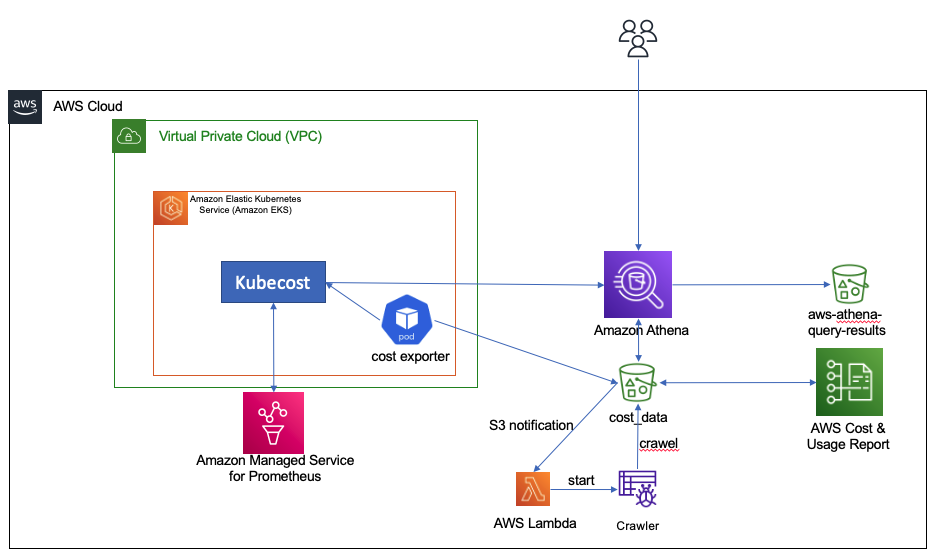
We provide a shell script to deploy our the tracking solution. The shell script configures the infrastructure using an AWS CloudFormation template, the AWS Command Line Interface (AWS CLI), and eksctl and kubectl commands. This script runs the following actions:
You need the following prerequisites:
This post assumes you already have an EKS cluster and run EMR on EKS jobs. If you don’t have an EKS cluster ready to test the solution, we suggest starting with a standard EMR on EKS blueprint that configures a cluster to submit EMR on EKS jobs.
To run the shell script, complete the following steps:
cost-tracking with the following command:cd cost-tracking
sh deploy-emr-eks-cost-tracking.sh REGION KUBECOST-VERSION EKS-CLUSTER-NAME ACCOUNT-ID
After you run the script, you’re ready to use Kubecost and the CUR data to understand the cost associated with your EMR on EKS jobs.
In this section, we show you how to analyze the compute cost that is retrieved from Kubecost, how to query EMR on EKS uplift data, and how to combine them to have a single consolidated view for the cost.
Kubecost offers various ways to track cost per Kubernetes object. For example, you can track cost by pod, controller, job, label, or deployment. It also allows you to understand the cost of idle resources, like Amazon Elastic Compute Cloud (Amazon EC2) instances that aren’t fully utilized by pods. In this post, we assume that no nodes are provisioned if no EMR on EKS job is running, and we use the Karpenter Cluster Autoscaler to provision nodes when jobs are submitted. Karpenter also does bin packing, which optimizes the EC2 resource utilization and in turn reduces the cost of idle resources.
To track compute cost associated with EMR on EKS pods, we query the Kubecost allocation API by passing pod and labels in the aggregate parameter. We use the emr-containers.amazonaws.com/job.id and emr-containers.amazonaws.com/virtual-cluster-id labels that are always present in executor and driver pods. The labels are used to filter Kubecost data to get only the cost associated with EMR on EKS pods. You can review various levels of granularity at the pod, job, and virtual cluster level to understand the cost of a driver vs. executor, or of using Spot Instances in jobs. You can also use the virtual cluster cost to understand the overall cost of a EMR on EMR when it’s used in a namespace that is used by applications other than EMR on EKS.
We also provide the instance_id, instance size, and capacity type (On-Demand or Spot) that was used to run the pod. This is retrieved through querying the Kubecost assets API. This data can be useful to understand how you run your jobs and which capacity you use more often.
The data about the cost of running the pods as well as the assets is retrieved with a Kubernetes CronJob that submits the request to the Kubecost API, joins the two data sources (allocation and assets data) on the instance_id, cleans the data, and stores it in Amazon S3 in CSV format.
The compute cost data has multiple fields that are of interest, including cpucost, ramcost (cost of memory), pvcost (cost of Amazon EBS storage), efficiency of use of CPU and RAM, as well as total cost, which represents the aggregate cost of all the resources used, either at pod, job, or virtual cluster level.
To view this data, complete the following steps:
athenacurcfn_c_u_r for the database and cost_data for the table.The following screenshot shows the query results.
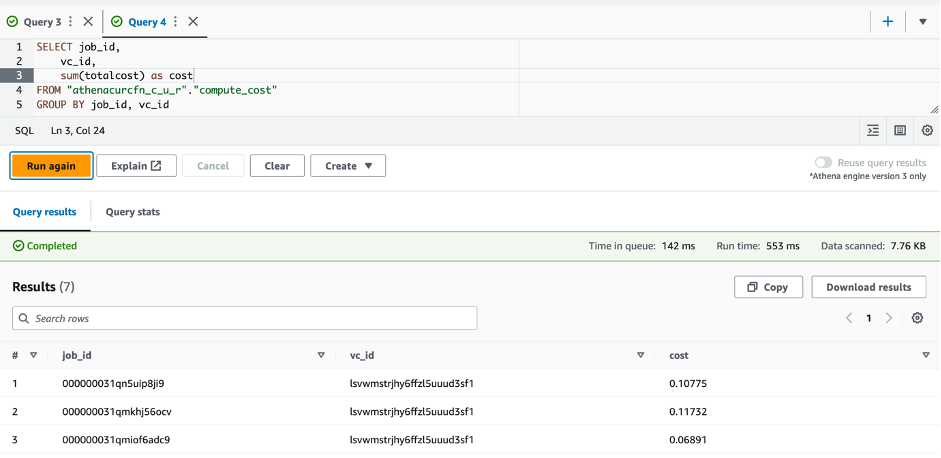
To query the data about information at the pod level, you can run the following SQL statement:

The cost associated with EMR on EKS uplift is available through AWS CUT and is stored in an S3 bucket. The script you ran in the setup step created an Athena table associated to the data in the S3 bucket. The following steps take you through how you can query the data:
athenacurcfn_c_u_r for the database and cur_data for the table.This query provides you with the cost per job. The following screenshot shows the results.
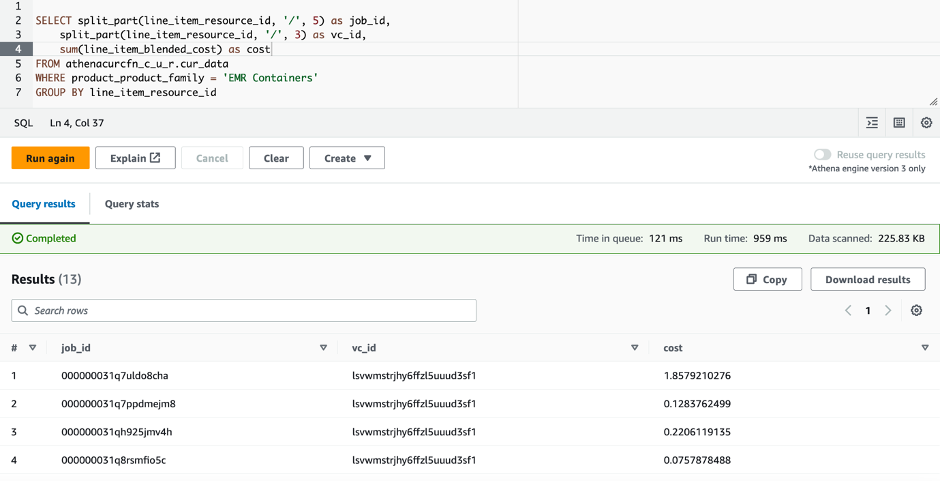
You will have to wait up to 24 hours for the CUR data to be available. As such, you should only run the preceding query after the CUR data is available and you have run the EMR on EKS jobs.
To view the overall cost and perform analysis on it, create a view in Athena as follows:
Now that the view is created, you can query and analyze the cost of running your EMR on EKS jobs:
The following screenshot shows an example output of the query on the created view.

Lastly, you can use QuickSight for a graphical high-level view on your EMR on EKS spend. The following screenshot shows an example dashboard.
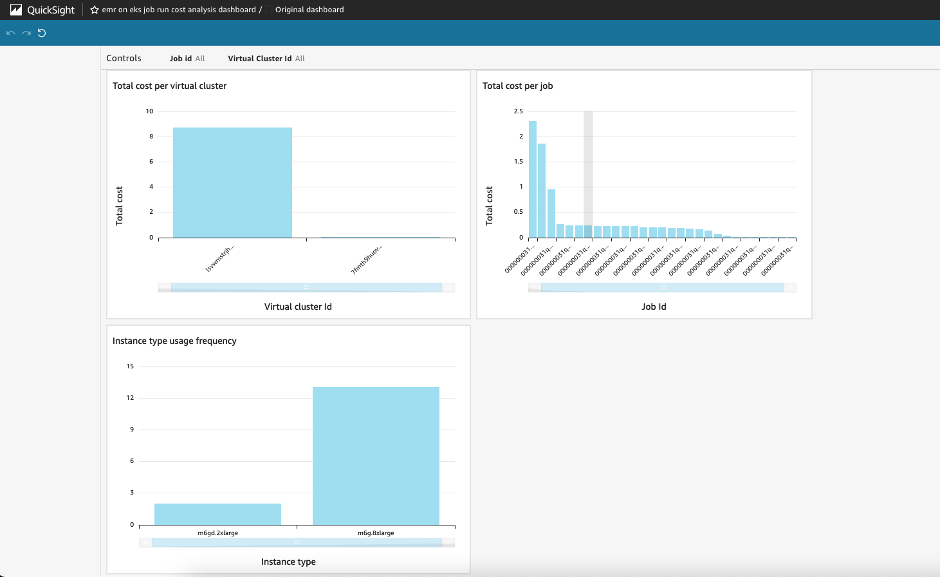
You can now adapt this solution to your specific needs and build your custom analysis.
Throughout this post, you deployed and configured the required infrastructure components to track cost for your EMR on EKS workloads. To avoid incurring additional charges for this solution, delete all the resources you created:
cost-data-REGION-ACCOUNT_ID and aws-athena-query-results-cur-REGION-ACCOUNT_ID.kubecost-cur-workgroup.emreks-compute-cost-exporter.In this post, we showed how you can use Kubecost capabilities alongside Cost and Usage Reports to closely monitor the costs for Amazon EMR on EKS per virtual cluster or per job. This solution allows you to achieve more granular costs for chargebacks using Athena, Amazon Managed Service for Prometheus, and QuickSight.
The solution presented steps to set up Cost and Usage Reports and Kubecost, and configure a CronJob on an hourly basis to get the cost of running pods spun by EMR on EKS. You can modify the presented solution to run at longer intervals or to collect data on different EKS clusters. You can also modify the Python script run by the CronJob to further clean data or reduce the amount of data stored by eliminating fields you don’t need. You can use the insights provided to drive cost optimization efforts over time, detect any increase of costs, and measure the impact of new deployments or particular events on resource usage and cost performance. For more information about integrating EMR on EKS in your existing Amazon EKS deployment, refer to Design considerations for Amazon EMR on EKS in a multi-tenant Amazon EKS environment
 Lotfi Mouhib is a Senior Solutions Architect working for the Public Sector team with Amazon Web Services. He helps public sector customers across EMEA realize their ideas, build new services, and innovate for citizens. In his spare time, Lotfi enjoys cycling and running.
 Hamza Mimi Principal Solutions Architect in the French Public sector team at Amazon Web Services (AWS). With a long experience in the telecommunications industry. He is currently working as a customer advisor on topics ranging from digital transformation to architectural guidance.
Post Syndicated from Shana Schipers original https://aws.amazon.com/blogs/big-data/choosing-an-open-table-format-for-your-transactional-data-lake-on-aws/
A modern data architecture enables companies to ingest virtually any type of data through automated pipelines into a data lake, which provides highly durable and cost-effective object storage at petabyte or exabyte scale. This data is then projected into analytics services such as data warehouses, search systems, stream processors, query editors, notebooks, and machine learning (ML) models through direct access, real-time, and batch workflows. Data in customers’ data lakes is used to fulfil a multitude of use cases, from real-time fraud detection for financial services companies, inventory and real-time marketing campaigns for retailers, or flight and hotel room availability for the hospitality industry. Across all use cases, permissions, data governance, and data protection are table stakes, and customers require a high level of control over data security, encryption, and lifecycle management.
This post shows how open-source transactional table formats (or open table formats) can help you solve advanced use cases around performance, cost, governance, and privacy in your data lakes. We also provide insights into the features and capabilities of the most common open table formats available to support various use cases.
You can use this post for guidance when looking to select an open table format for your data lake workloads, facilitating the decision-making process and potentially narrowing down the available options. The content of this post is based on the latest open-source releases of the reviewed formats at the time of writing: Apache Hudi v0.13.0, Apache Iceberg 1.2.0, and Delta Lake 2.3.0.
Data lakes offer one of the best options for cost, scalability, and flexibility to store data, allowing you to retain large volumes of structured and unstructured data at a low cost, and to use this data for different types of analytics workloads—from business intelligence reporting to big data processing, real-time analytics, and ML—to help guide better decisions.
Despite these capabilities, data lakes are not databases, and object storage does not provide support for ACID processing semantics, which you may require to effectively optimize and manage your data at scale across hundreds or thousands of users using a multitude of different technologies. For example:
These challenges have become particularly prevalent in use cases such as CDC (change data capture) from relational database sources, privacy regulations requiring deletion of data, and streaming data ingestion, which can result in many small files. Typical data lake file formats such as CSV, JSON, Parquet, or Orc only allow for writes of entire files, making the aforementioned requirements hard to implement, time consuming, and costly.
To help overcome these challenges, open table formats provide additional database-like functionality that simplifies the optimization and management overhead of data lakes, while still supporting storage on cost-effective systems like Amazon Simple Storage Service (Amazon S3). These features include:
In general, open table formats implement these features by storing multiple versions of a single record across many underlying files, and use a tracking and indexing mechanism that allows an analytics engine to see or modify the correct version of the records they are accessing. When records are updated or deleted, the changed information is stored in new files, and the files for a given record are retrieved during an operation, which is then reconciled by the open table format software. This is a powerful architecture that is used in many transactional systems, but in data lakes, this can have some side effects that have to be addressed to help you align with performance and compliance requirements. For instance, when data is deleted from an open table format, in some cases only a delete marker is stored, with the original data retained until a compaction or vacuum operation is performed, which performs a hard deletion. For updates, previous versions of the old values of a record may be retained until a similar process is run. This can mean that data that should be deleted isn’t, or that you store a significantly larger number of files than you intend to, increasing storage cost and slowing down read performance. Regular compaction and vacuuming must be run, either as part of the way the open table format works, or separately as a maintenance procedure.
The three most common and prevalent open table formats are Apache Hudi, Apache Iceberg, and Delta Lake. AWS supports all three of these open table formats, and in this post, we review the features and capabilities of each, how they can be used to implement the most common transactional data lake use cases, and which features and capabilities are available in AWS’s analytics services. Innovation around these table formats is happening at an extremely rapid pace, and there are likely preview or beta features available in these file formats that aren’t covered here. All due care has been taken to provide the correct information as of time of writing, but we also expect this information to change quickly, and we’ll update this post frequently to contain the most accurate information. Also, this post focuses only on the open-source versions of the covered table formats, and doesn’t speak to extensions or proprietary features available from individual third-party vendors.
We encourage you to use the high-level guidance in this post with the mapping of functional fit and supported integrations for your use cases. Combine both aspects to identify what table format is likely a good fit for a specific use case, and then prioritize your proof of concept efforts accordingly. Most organizations have a variety of workloads that can benefit from an open table format, but today no single table format is a “one size fits all.” You may wish to select a specific open table format on a case-by-case basis to get the best performance and features for your requirements, or you may wish to standardize on a single format and understand the trade-offs that you may encounter as your use cases evolve.
This post doesn’t promote a single table format for any given use case. The functional evaluations are only intended to help speed up your decision-making process by highlighting key features and attention points for each table format with each use case. It is crucial that you perform testing to ensure that a table format meets your specific use case requirements.
This post is not intended to provide detailed technical guidance (e.g. best practices) or benchmarking of each of the specific file formats, which are available in AWS Technical Guides and benchmarks from the open-source community respectively.
When choosing an open table format for your data lake, we believe that there are two critical aspects that should be evaluated:
The following table summarizes general features and considerations for each file format that you may want to take into account, regardless of your use case. In addition to this, it is also important to take into account other aspects such as the complexity of the table format and in-house skills.
| . | Apache Hudi | Apache Iceberg | Delta Lake | |
|---|---|---|---|---|
| Primary API |
|
|
|
|
| Write modes |
|
|
|
|
| Supported data file formats |
|
|
|
|
| File layout management |
|
|
|
|
| Query optimization |
|
|
|
|
| S3 optimizations |
|
|
|
|
| Table maintenance |
|
|
|
|
| Time travel |
|
|
|
|
| Schema evolution |
|
|
|
|
| Operations |
|
|
|
|
| Monitoring |
|
|
|
|
| Data Encryption |
|
|
|
|
| Configuration Options |
Extensive configuration options for customizing read/write behavior (such as index type or merge logic) and automatically performed maintenance and optimizations (such as file sizing, compaction, and cleaning) |
Configuration options for basic read/write behavior (Merge On Read or Copy On Write operation modes) |
Limited configuration options for table properties (for example, indexed columns) |
|
| Other |
|
|
|
|
| AWS Analytics Services Support* | ||||
| Amazon EMR | Read and write | Read and write | Read and write | |
| AWS Glue | Read and write | Read and write | Read and write | |
| Amazon Athena (SQL) | Read | Read and write | Read | |
| Amazon Redshift (Spectrum) | Read | Currently not supported | Read† | |
| AWS Glue Data Catalog‡ | Yes | Yes | Yes | |
* For table format support in third-party tools, consult the official documentation for the respective tool.
† Amazon Redshift only supports Delta Symlink tables (see Creating external tables for data managed in Delta Lake for more information).
‡ Refer to Working with other AWS services in the Lake Formation documentation for an overview of table format support when using Lake Formation with other AWS services.
Now let’s dive deep into specific use cases to understand the capabilities of each open table format.
In this section, we discuss the capabilities of each open table format for streaming ingestion, batch load and change data capture (CDC) use cases.
Streaming ingestion allows you to write changes from a queue, topic, or stream into your data lake. Although your specific requirements may vary based on the type of use case, streaming data ingestion typically requires the following features:
In this section, we talk about streaming ingestion where records are just inserted into files, and you aren’t trying to update or delete previous records based on changes. A typical example of this is time series data (for example sensor readings), where each event is added as a new record to the dataset. The following table summarizes the features.
| . | Apache Hudi | Apache Iceberg | Delta Lake |
| Functional fit |
|
|
|
| Considerations | Hudi’s default configurations are tailored for upserts, and need to be tuned for append-only streaming workloads. For example, Hudi’s automatic file sizing in the writer minimizes operational effort/complexity required to maintain read performance over time, but can add a performance overhead at write time. If write speed is of critical importance, it can be beneficial to turn off Hudi’s file sizing, write new data files for each batch (or micro-batch), then run clustering later to create better sized files for read performance (using a similar approach as Iceberg or Delta). |
|
|
| Supported AWS integrations |
|
|
|
| Conclusion | Good functional fit for all append-only streaming when configuration tuning for append-only workloads is acceptable. | Good fit for append-only streaming with larger micro-batch windows, and when operational overhead of table management is acceptable. | Good fit for append-only streaming with larger micro-batch windows, and when operational overhead of table management is acceptable. |
When streaming data with updates and deletes into a data lake, a key priority is to have fast upserts and deletes by being able to efficiently identify impacted files to be updated.
| . | Apache Hudi | Apache Iceberg | Delta Lake |
| Functional fit |
|
|
|
| Considerations |
|
|
|
| Supported AWS integrations |
|
|
|
| Conclusion | Good fit for lower-latency streaming with updates and deletes thanks to native support for streaming upserts, indexes for upserts, and automatic file sizing and compaction. | Good fit for streaming with larger micro-batch windows and when the operational overhead of table management is acceptable. | Can be used for streaming data ingestion with updates/deletes if latency is not a concern, because a Copy-On-Write strategy may not deliver the write performance required by low latency streaming use cases. |
Change data capture (CDC) refers to the process of identifying and capturing changes made to data in a database and then delivering those changes in real time to a downstream process or system—in this case, delivering CDC data from databases into Amazon S3.
In addition to the aforementioned general streaming requirements, the following are key requirements for efficient CDC processing:
Without support for the two CDC options, processing and applying CDC records correctly into a target table will require custom code. With a CDC engine, each tool likely has its own CDC record format (or payload). For example, Debezium and AWS Database Migration Service (AWS DMS) each have their own specific record formats, and need to be transformed differently. This must be considered when you are operating CDC at scale across many tables.
All three table formats allow you to implement CDC from a source database into a target table. The difference for CDC with each format lies mainly in the ease of implementing CDC pipelines and supported integrations.
| . | Apache Hudi | Apache Iceberg | Delta Lake |
| Functional fit |
|
|
|
| Considerations |
|
|
|
| Natively supported CDC formats |
|
|
|
| CDC tool integrations |
|
|
|
| Conclusion | All three formats can implement CDC workloads. Apache Hudi offers the best overall technical fit for CDC workloads as well as the most options for efficient CDC pipeline design: no-code/low-code with DeltaStreamer, third-party CDC tools offering native Hudi integration, or a Spark/Flink engine using CDC record payloads offered in Hudi. | ||
If your use case requires only periodic writes but frequent reads, you may want to use batch loads and optimize for read performance.
Batch loading data with updates and deletes is perhaps the simplest use case to implement with any of the three table formats. Batch loads typically don’t require low latency, allowing them to benefit from the operational simplicity of a Copy On Write strategy. With Copy On Write, data files are rewritten to apply updates and add new records, minimizing the complexity of having to run compaction or optimization table services on the table.
| . | Apache Hudi | Apache Iceberg | Delta Lake |
| Functional fit |
|
|
|
| Considerations |
|
|
|
| Supported AWS integrations |
|
|
|
| Conclusion | All three formats are well suited for batch loads. Apache Hudi supports the most configuration options and may increase the effort to get started, but provides lower operational effort due to automatic table management. On the other hand, Iceberg and Delta are simpler to get started with, but require some operational overhead for table maintenance. | ||
In this section, we discuss the capabilities of each open table format for common use cases when working with open table formats: optimizing read performance, incremental data processing and processing deletes to comply with privacy regulations.
The preceding sections primarily focused on write performance for specific use cases. Now let’s explore how each open table format can support optimal read performance. Although there are some cases where data is optimized purely for writes, read performance is typically a very important dimension on which you should evaluate an open table format.
Open table format features that improve query performance include the following:
| . | Apache Hudi | Apache Iceberg | Delta Lake |
| Functional fit |
|
|
|
| Considerations |
|
|
|
| Optimization & Maintenance Processes |
|
|
|
| Conclusion | For achieving good read performance, it’s important that your query engine supports the optimization features offered by the table formats. When using Spark, all three formats provide good read performance when properly configured. When using Trino (and therefore Athena as well), Iceberg will likely provide better query performance because the data skipping feature of Hudi and Delta is not supported in the Trino engine. Make sure to evaluate this feature support for your query engine of choice. | ||
At a high level, incremental data processing is the movement of new or fresh data from a source to a destination. To implement incremental extract, transform, and load (ETL) workloads efficiently, we need to be able to retrieve only the data records that have been changed or added since a certain point in time (incrementally) so we don’t need to reprocess unnecessary data (such as entire partitions). When your data source is an open table format table, we can take advantage of incremental queries to facilitate more efficient reads in these table formats.
| . | Apache Hudi | Apache Iceberg | Delta Lake |
| Functional fit |
|
|
|
| Considerations |
|
|
|
| Supported AWS integrations | Incremental queries are supported in:
|
Incremental queries supported in:
CDC view supported in:
|
CDF supported in:
|
| Conclusion | Best functional fit for incremental ETL pipelines using a variety of engines, without any storage overhead. | Good fit for implementing incremental pipelines using Spark if the overhead of creating views is acceptable. | Good fit for implementing incremental pipelines using Spark if the additional storage overhead is acceptable. |
Due to privacy regulations like the General Data Protection Regulation (GDPR) and California Consumer Privacy Act (CCPA), companies across many industries need to perform record-level deletes on their data lake for “right to be forgotten” or to correctly store changes to consent on how their customers’ data can be used.
The ability to perform record-level deletes without rewriting entire (or large parts of) datasets is the main requirement for this use case. For compliance regulations, it’s important to perform hard deletes (deleting records from the table and physically removing them from Amazon S3).
| . | Apache Hudi | Apache Iceberg | Delta Lake |
| Functional fit | Hard deletes are performed by Hudi’s automatic cleaner service. | Hard deletes can be implemented as a separate process. | Hard deletes can be implemented as a separate process. |
| Considerations | Hudi cleaner needs to be configured according to compliance requirements to automatically remove older file versions in time (within a compliance window), otherwise time travel or rollback operations could recover deleted records. | Previous snapshots need to be (manually) expired after the delete operation, otherwise time travel operations could recover deleted records. | The vacuum operation needs to be run after the delete, otherwise time travel operations could recover deleted records. |
| Conclusion | This use case can be implemented using all three formats, and in each case, you must ensure that your configuration or background pipelines implement the cleanup procedures required to meet your data retention requirements. | ||
Today, no single table format is the best fit for all use cases, and each format has its own unique strengths for specific requirements. It’s important to determine which requirements and use cases are most crucial and select the table format that best meets those needs.
To speed up the selection process of the right table format for your workload, we recommend the following actions:
Keep in mind that these open table formats are open source and rapidly evolve with new features and enhanced or new integrations, so it can be valuable to also take into consideration product roadmaps when deciding on the format for your workloads.
AWS will continue to innovate on behalf of our customers to support these powerful file formats and to help you be successful with your advanced use cases for analytics in the cloud. For more support on building transactional data lakes on AWS, get in touch with your AWS Account Team, AWS Support, or review the following resources:
 Shana Schipers is an Analytics Specialist Solutions Architect at AWS, focusing on big data. She supports customers worldwide in building transactional data lakes using open table formats like Apache Hudi, Apache Iceberg and Delta Lake on AWS.
 Ian Meyers is a Director of Product Management for AWS Analytics Services. He works with many of AWS largest customers on emerging technology needs, and leads several data and analytics initiatives within AWS including support for Data Mesh.

Carlos Rodrigues is a Big Data Specialist Solutions Architect at AWS. He helps customers worldwide building transactional data lakes on AWS using open table formats like Apache Hudi and Apache Iceberg.