Post Syndicated from The History Guy: History Deserves to Be Remembered original https://www.youtube.com/shorts/NEIRHsmesPs
Capital Vices
Post Syndicated from Oglaf! -- Comics. Often dirty. original https://www.oglaf.com/capitalvices/


Comic for 2025.10.11 – Parking
Post Syndicated from Explosm.net original https://explosm.net/comics/parking
New Cyanide and Happiness Comic
Matt & Steph – Review your shots LIVE
Post Syndicated from Matt Granger original https://www.youtube.com/watch?v=myw1D7lkyPY
Nikon Prime Lens HOLY TRINITY – Shoot Out!
Post Syndicated from Matt Granger original https://www.youtube.com/watch?v=YahHK0GXj4o
An Offer for Presidential Libraries #lastweektonight
Post Syndicated from LastWeekTonight original https://www.youtube.com/shorts/xQwGv4UYvbk
This is TOO GOOD
Post Syndicated from Matt Granger original https://www.youtube.com/watch?v=TXI36jOIrbI
CHECK THIS OUT!
Post Syndicated from Matt Granger original https://www.youtube.com/shorts/6U_aFAPTiOs
Beelink GTR9 Pro Review AMD Ryzen AI Max 395 System with 128GB and dual 10GbE
Post Syndicated from Patrick Kennedy original https://www.servethehome.com/beelink-gtr9-pro-review-amd-ryzen-ai-max-395-system-with-128gb-and-dual-10gbe/
In our Beelink GTR9 Pro review, we see why this AMD Ryzen AI Max+ 395 system is fast packed with an Apple-like design and great features
The post Beelink GTR9 Pro Review AMD Ryzen AI Max 395 System with 128GB and dual 10GbE appeared first on ServeTheHome.
Bought a car that was smoked in? Ozone generators can get rid of the odor
Post Syndicated from Technology Connextras original https://www.youtube.com/watch?v=RYKpKMFIdGQ
Time’s-up for Sony’s CD slot loaders
Post Syndicated from Techmoan original https://www.youtube.com/watch?v=EwWJRal2Ais
Седмицата (6–11 октомври)
Post Syndicated from Светла Енчева original https://www.toest.bg/sedmitsata-6-11-oktomvri/

Бях си намислила да спомена доста теми от изминалата седмица, но Елена Телбис е представила повечето от тях по-добре, отколкото бих могла, и така е допринесла този бюлетин да не достигне размерите на кратка повест. Затова започвам направо с рубриката на Е.Т.
„Аз пък искам затвор за ИТН“, казва Елена. Имам идея как да стане – ако законопроектът им, предвиждащ затвор за разпространение на информация за личния живот, стане реалност и продължат да я карат както досега, едни от първите, които би трябвало да се озоват зад решетките, са те. Само да припомня, че Лена Бориславова вече осъди Слави Трифонов на първа инстанция тъкмо за уронване на личния ѝ престиж като жена, майка и съпруга. Пък да беше само този случай…
Родната корупция може да е по-силна от държавата, но не и от природата. Наводненията в Елените и Царево са тъжно доказателство за това. В Царево една и съща трагедия се случва за втори път, защото въпреки уж ремонта, глътнал много пари, проблемът не е премахнат. Нали се сещате какво е да повтаряш едно и също, а да очакваш различен резултат?
Междувременно войната на Израел срещу „Хамас“ навърши две години. Познавам хора, които смятат, че убийството на над 67 000 палестинци, повечето от които цивилни, е оправдано. Както и такива, които смятат, че близо 1500 мирни посетители на фестивал са заслужавали да бъдат убити или взети за заложници, защото според тях Израел не трябва да съществува, ерго младежите са се забавлявали на грешното място. Моля, намерете ми друг свят – такъв, в който всеки човешки живот е ценност.
В навечерието на връчването на Нобеловата награда за мир Тръмп, на когото много му се щеше да вземе приза, съвсем се забърза да постигне споразумение между Израел и „Хамас“. Е, не го огря – признанието получи венецуелската опозиционна лидерка Мария Корина Мачадо.
Като стана дума за Тръмп обаче, се сетих как Бойко Борисов говори за сина му като за приятелско дете. На тази тема е и статията на Емилия Милчева „Питчингът на Бойко Борисов“. Ей така, както човек пита децата на приятелите си: „Как е баща ти, мина ли му ишиасът?“, председателят на ГЕРБ предлагал продължение на газопровода „Турски поток“ през България и сваляне на санкциите по „Магнитски“ на Владислав Горанов.
Емилия впрочем е най-редовната авторка в „Тоест“, а статиите ѝ при нас и в „Дойче Веле“ често се препечатват в други медии. Ако и вие като мен обичате да я четете (и гледате, когато е пред камера), имам добра новина за вас – тази събота тя ще участва във втория епизод от видеорубриката ни с Владислав Севов „Тоест разговаряме“. Разговорът с нея ще се излъчва на живо от 16:00 ч. в нашия YouTube канал.
И ако си мислите, че шуробаджанашкият манталитет е типичен само за нашите ширини, може би ще промените мнението си, след като прочетете статията на Анахит Хачикян „Братовчедски сделки в Европарламента“. Макар да няма предвид кръвни братовчеди, Анахит показва как изборът между максимата „Каквото се случва тук, си остава тук“ и даването на международна гласност на проблемите е деликатен не само за българските евродепутати, а и за представителите на всички държави членки.
Ако ви идва отвътре да напишете Европейският Парламент или пък Октомври, новата порция език на Павлина Върбанова на тема „Колко важна e главната буква“ ще ви понамести правописните чакри. Но няма смисъл да се тръшкате или самообвинявате – влиянието на английския език е проникнало дълбоко в нашия. Човешко е да правим такива грешки.
Като заговорихме за човешки неща, стигаме до рубриката ни „Тези хора“ с Ина Иванова, която ни среща с интересни личности, утвърждаващи по един или друг начин човешката ценност. Този път тя разговаря с психоложката Виолета Мартинова, която е основен двигател на филиала на Розовата къща в Пловдив, борейки се за съхраняването не само на живота и здравето, а и на човешкото достойнство на хората със зависимости.
Макар Нева Мичева да не го изтъква в прав текст, хуманистичната ѝ перспектива е от ключово значение за начина, по който гледа филми и говори за тях, както е видно и от новата ѝ статия за иберийската следа във фестивала „Сан Себастиан“. С нетърпение очаквам следващите ѝ публикации за фестивала.
Човешко нещо са и парите. Както и религията. В публикацията си „Да преведеш пари по заръката на Аллах“ Атанас Шиников ни отвежда на културологично пътешествие, за да разкрие връзките между трафикантите на бежанци през България, ИДИЛ, бившия главен прокурор Иван Гешев, философа от XII век Ибн Рушд, по-известен като Авероес, и Пророка Мохамед.
Докато сме на темата за парите, замисляли ли сте се кой и как би могъл да има достъп до финансите ви и изобщо да прави различни неща от ваше име, ако изпаднете в положение да не можете да се грижите за себе си? Сигурно остарявам, но напоследък ме вълнуват такива мисли. Затова се заех да търся информация и я обобщих в статията „Бели пълномощни за черни дни“.
Стигаме до традиционните ми препоръки.
Ако сте изкушени от фотографията, следващата събота може да се включите във Фотомаратона на „ФотоФабрика“ (много „фото“ стана, но не се сещам как да го кажа с по-малко), който ще се проведе в „Топлоцентрала“. Ще има и награди.
Напоследък, когато искам да избягам от безрадостната социално-политическа реалност, се отдавам на странно удоволствие – издирвам песни, чиято музика е вдъхновена от други песни. Нямам предвид кавъри, ремикси или семпли, а асоциативни връзки. Например Dreaming на Blondie е вдъхновена от… Dancing Queen на ABBA.
Още по-интересна е връзката на Life On Mars? на Дейвид Боуи с My Way на Франк Синатра. Оригиналът на My Way всъщност е песента Comme d’habitude на френския музикант Клод Франсоа. Боуи, който през 1968 г. още не се бил прочул, загубил конкурс за версия на Comme d’habitude на английски. Неговата демоверсия е записана директно върху оригинала, но пък си има клип. Та след като англоезичният вариант бил възложен на Синатра и My Way станал световен хит, Боуи направил Life On Mars? напук, като пародия.
Ако съм събудила интереса ви, ето още 10 песни, вдъхновени от други. Сега вие сте наред. Оставям ви с веселяшкия пънк (но със сериозно послание) на Blondie, с който започнах тази игра на музикални асоциации, като същевременно не пропускам да ви напомня, че ако ви харесва да ни четете, добра идея е да ни подкрепите.
Cisco Silicon One P200 and Cisco 8223 for 51.2T Scale Across Networking
Post Syndicated from Rohit Kumar original https://www.servethehome.com/cisco-silicon-one-p200-and-cisco-8223-for-51-2t-scale-across-networking/
The Cisco Silicon One P200 and Cisco 8223 are designed for scale-across networking for geographically distant AI clusters
The post Cisco Silicon One P200 and Cisco 8223 for 51.2T Scale Across Networking appeared first on ServeTheHome.
Building a real-time ICU patient analytics pipeline with AWS Lambda event source mapping
Post Syndicated from Priyanka Chaudhary original https://aws.amazon.com/blogs/big-data/building-a-real-time-icu-patient-analytics-pipeline-with-aws-lambda-event-source-mapping/
In hospital intensive care units (ICUs), continuous patient monitoring is critical. Medical devices generate vast amounts of real-time data on vital signs such as heart rate, blood pressure, and oxygen saturation. The key challenge lies in early detection of patient deterioration through vital sign trending. Healthcare teams must process thousands of data points daily per patient to identify concerning patterns, a task crucial for timely intervention and potentially life-saving care.
AWS Lambda event source mapping can help in this scenario by automatically polling data streams and triggering functions in real-time without additional infrastructure management. By using AWS Lambda for real-time processing of sensor data and storing aggregated results in secure data structures designed for large analytic datasets called Iceberg tables in Amazon Simple Storage Service (Amazon S3) buckets, medical teams can achieve both immediate alerting capabilities and gain long-term analytical insights, enhancing their ability to provide timely and effective care.
In this post, we demonstrate how to build a serverless architecture that processes real-time ICU patient monitoring data using Lambda event source mapping for immediate alert generation and data aggregation, followed by persistent storage in Amazon S3 with an Iceberg catalog for comprehensive healthcare analytics. The solution demonstrates how to handle high-frequency vital sign data, implement critical threshold monitoring, and create a scalable analytics platform that can grow with your healthcare organization’s needs and help monitor sensor alert fatigue in the ICU.
Architecture
The following architecture diagram illustrates a real-time ICU patient analytics system.
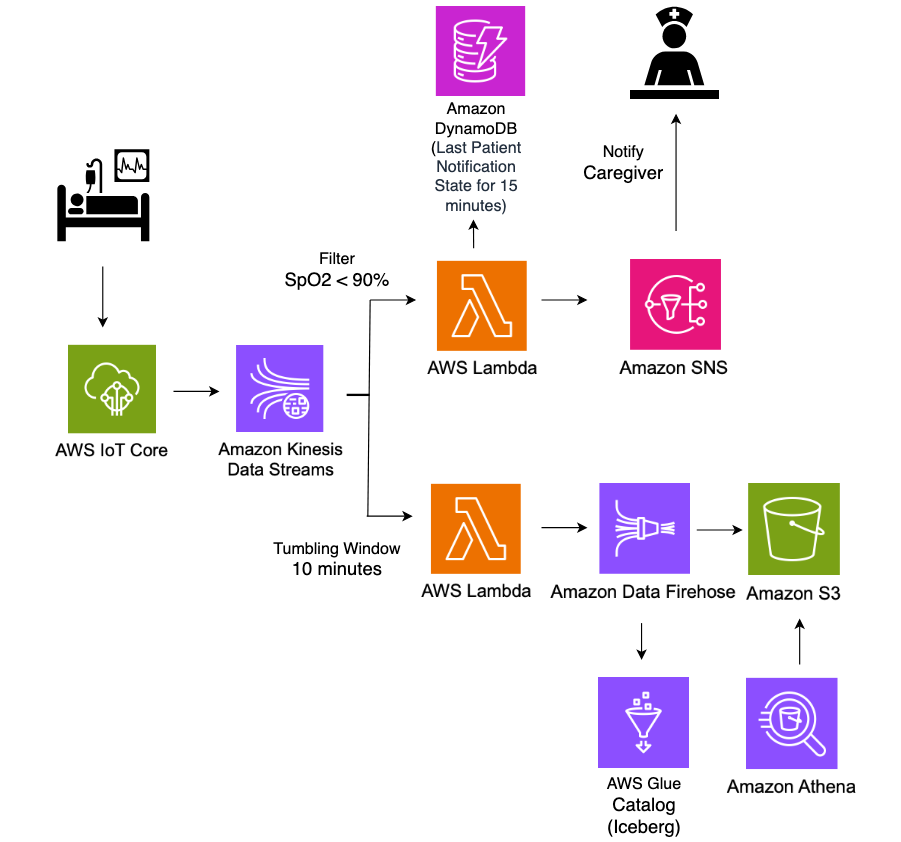
In this architecture, real-time patient monitoring data from hospital ICU sensors is ingested into AWS IoT Core, which then streams the data into Amazon Kinesis Data Streams. Two Lambda functions consume this streaming data concurrently for different purposes, both using Lambda event source mapping integration with Kinesis Data Streams. The first Lambda function uses the filtering feature of event source mapping to detect critical health events where SpO2(blood oxygen saturation) levels fall below 90%, immediately triggering notifications to caregivers through Amazon Simple Notification Service (Amazon SNS) for rapid response. The second Lambda function employs the tumbling window feature of event source mapping to aggregate sensor data over 10-minute time intervals. This aggregated data is then systematically stored in S3 buckets in Apache Iceberg format for historical analysis and reporting. The entire pipeline operates in a serverless manner, providing scalable, real-time processing of critical healthcare data while maintaining both immediate alerting capabilities and long-term data storage for analytics.
Amazon S3 data, with its support for Apache Iceberg table format, enables healthcare organizations to efficiently store and query large volumes of time-series patient data. This solution allows for complex analytical queries across historical patient data while maintaining high performance and cost efficiency.
Prerequisites
To implement the solution provided in this post, you should have the following:
- An active AWS account
- IAM permissions to deploy CloudFormation templates and provision AWS resources
- Python installed on your machine to run the ICU patient sensor data simulator code
Deploy a real-time ICU patient analytics pipeline using CloudFormation
You use AWS CloudFormation templates to create the resources for a real-time data analytics pipeline.
- To get started, Sign in to the console as Account user and select the appropriate Region.
- Download and launch CloudFormation template where you want to host the Lambda functions.
- Choose Next.
- On the Specify stack details page, enter a Stack name (for example, IoTHealthMonitoring).
- For Parameters, enter the following:
- IoTTopic: Enter the MQTT topic for your IoT devices (for example,
icu/sensors). - EmailAddress: Enter an email address for receiving notifications.
- IoTTopic: Enter the MQTT topic for your IoT devices (for example,
- Wait for the stack creation to complete. This process might take 5-10 minutes.
- After the CloudFormation stack completes, it creates following resources:
- An AWS IoT Core rule to capture data from the specified IoTTopic topic and routes it to Kinesis data stream.
- A Kinesis data stream for ingesting IoT sensor data.
- Two Lambda functions:
FilterSensorData: Monitors critical health metrics and sends alerts.AggregateSensorData: Aggregates sensor data in 10 minutes window.
- An Amazon DynamoDB table (
NotificationTimestamps) to store notification timestamps for rate limiting alerts. - An Amazon SNS topic and subscription to send email notifications for critical patient conditions.
- An Amazon Data Firehose delivery stream to deliver processed data to Amazon S3 using Iceberg format.
- Amazon S3 buckets to store sensor data.
- Amazon Athena and AWS Glue resources for the database and an Iceberg table for querying aggregated data.
- AWS Identity and Access Management (IAM) roles and policies to support required permissions for Amazon IoT rules, Lambda functions, and Data Firehose streams.
- Amazon CloudWatch log groups to record for Kinesis Firehose activity and Lambda functions.
Solution walkthrough
Now that you’ve deployed the solution, let’s review a functional walkthrough. First, simulate patient vital signs data and send it to AWS IoT Core using the following Python code on your local machine. To run this code successfully, ensure you have the necessary IAM permissions to publish messages to the IoT topic in the AWS account where the solution is deployed.
The following is the format of a sample ICU sensor message produced by the simulator.
Data is published to the icu/sensors IoT topic every 30 seconds for 10 different patients, creating a continuous stream of ICU patient monitoring data. Messages published to AWS IoT Core are passed to Kinesis Data Streams using the following message routing rule deployed by our solution.
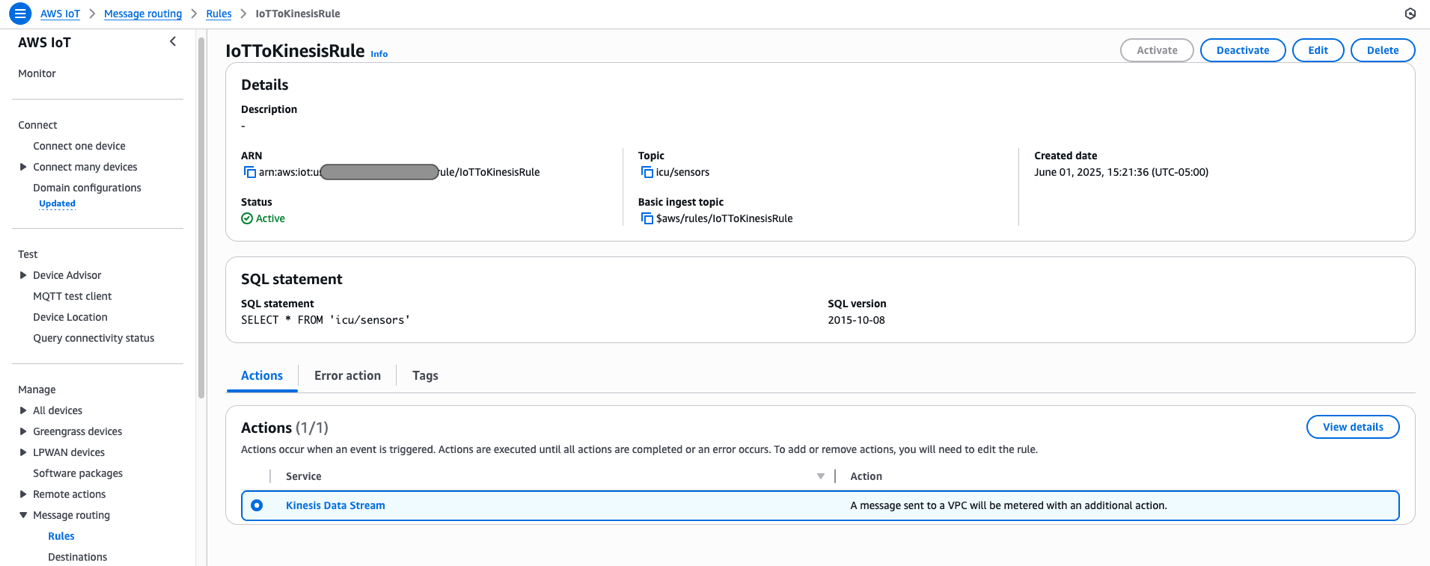
Two Lambda functions consume data from Data Streams concurrently, both using the Lambda event source mapping integration with Kinesis Data Streams.
Event source mapping
Lambda event source mapping automatically triggers Lambda functions in response to data changes from supported event sources like Amazon DynamoDB Streams, Amazon Kinesis Data Streams, Amazon Simple Queue Service (Amazon SQS), Amazon MQ, and Amazon Managed Streaming for Apache Kafka. This serverless integration works by having Lambda poll these sources for new records, which are then processed in configurable batch sizes ranging from 1 to 10,000 records. When new data is detected, Lambda automatically invokes the function synchronously, handling the scaling automatically based on the workload. The service supports at-least-once delivery and provides robust error handling through retry policies and dead-letter queues for failed events. Event source mappings can be fine-tuned through various parameters such as batch windows, maximum record age, and retry attempts, making them highly adaptable to different use cases. This feature is particularly valuable in event-driven architectures, so that customers can focus on business logic while AWS manages the complexities of event processing, scaling, and reliability.
Event source mapping uses tumbling windows and filtering to process and analyze data.
Tumbling windows
Tumbling windows in Lambda event processing enable data aggregation in fixed, non-overlapping time intervals, where each event belongs to exactly one window. This is ideal for time-based analytics and periodic reporting. When combined with event source mapping, this approach allows efficient batch processing of events within defined time periods (for example, 10-minute windows), enabling calculations such as average vital signs or cumulative fluid intake and output while optimizing function invocations and resource usage.
When you configure an event source mapping between Kinesis Data Streams and a Lambda function, use the Tumbling Window Duration setting, which appears in the trigger configuration in the Lambda console. The solution you deployed using the CloudFormation template includes the AggregateSensorData Lambda function, which uses a 10-minute tumbling window configuration. Depending on the volume of messages flowing through the Amazon Kinesis stream, the AggregateSensorData function can be invoked multiple times for each 10-minute window, sequentially, with the following attributes in the event supplied to the function.
- Window start and end: The beginning and ending timestamps for the current tumbling window.
- State: An object containing the state returned from the previous window, which is initially empty. The state object can contain up to 1 MB of data.
- isFinalInvokeForWindow: Indicates if this is the last invocation for the tumbling window. This only occurs once per window period.
- isWindowTerminatedEarly: A window ends early only if the state exceeds the maximum allowed size of 1 MB.
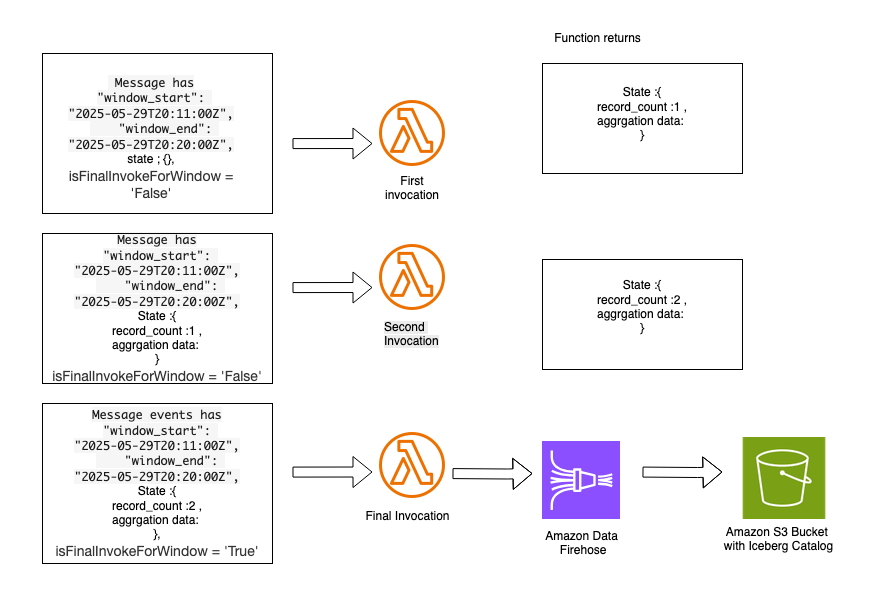
In a tumbling window, there is a series of Lambda invocations in the following pattern:
AggregateSensorData Lambda code snippet:
- The first invocation contains an empty state object in the event. The function returns a state object containing custom attributes that are specific to the custom logic in the aggregation.
- The second invocation contains the state object provided by the first Lambda invocation. This function returns an updated state object with new aggregated values. Subsequent invocations follow this same sequence. Following is a sample of the aggregated state, which can be supplied to subsequent Lambda invocations within the same 10-minute tumbling window.
- The final invocation in the tumbling window has the
isFinalInvokeForWindowflag set to the true. This contains the state returned by the most recent Lambda invocation. This invocation is responsible for passing aggregated state messages to the Data Firehose stream, which delivers data to the Amazon S3 bucket using Iceberg data format. - After the aggregated data is sent to Amazon S3, you can query the data using Athena.
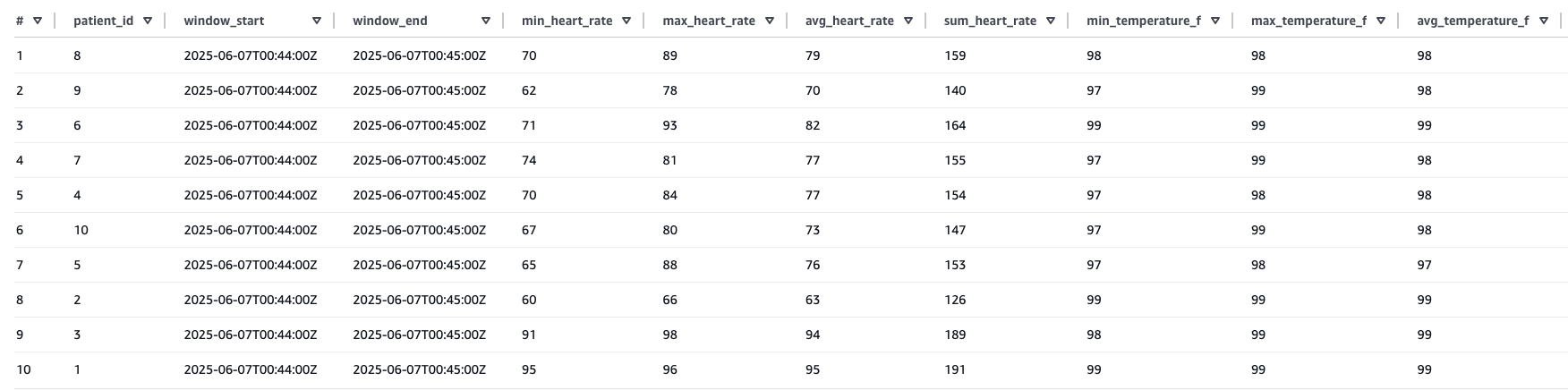
Sample result of the preceding Athena query:
Event source mapping with filtering
Lambda event source mapping with filtering optimizes data processing from sources like Amazon Kinesis by applying JSON pattern filtering before function invocation. This is demonstrated in the ICU patient monitoring solution, where the system filters for SpO2 readings from Kinesis Data Streams that are below 90%. Instead of processing all incoming data, the filtering capability is used to selectively processes only critical readings, significantly reducing costs and processing overhead. The solution uses DynamoDB for sophisticated state management, tracking low SpO2 events through a schema combining PatientID and timestamp-based keys within defined monitoring windows.
This state-aware implementation balances clinical urgency with operational efficiency by sending immediate Amazon SNS notifications when critical conditions are first detected while implementing a 15-minute alert suppression window to prevent alert fatigue among healthcare providers. By maintaining state across multiple Lambda invocations, the system helps ensure rapid response to potentially life-threatening situations while minimizing unnecessary notifications for the same patient condition. The integration of Lambda’event filtering, DynamoDB state management, and reliable alert delivery provided by Amazon SNS creates a robust, scalable healthcare monitoring solution that exemplifies how AWS services can be strategically combined to address complex requirements while balancing technical efficiency with clinical effectiveness.
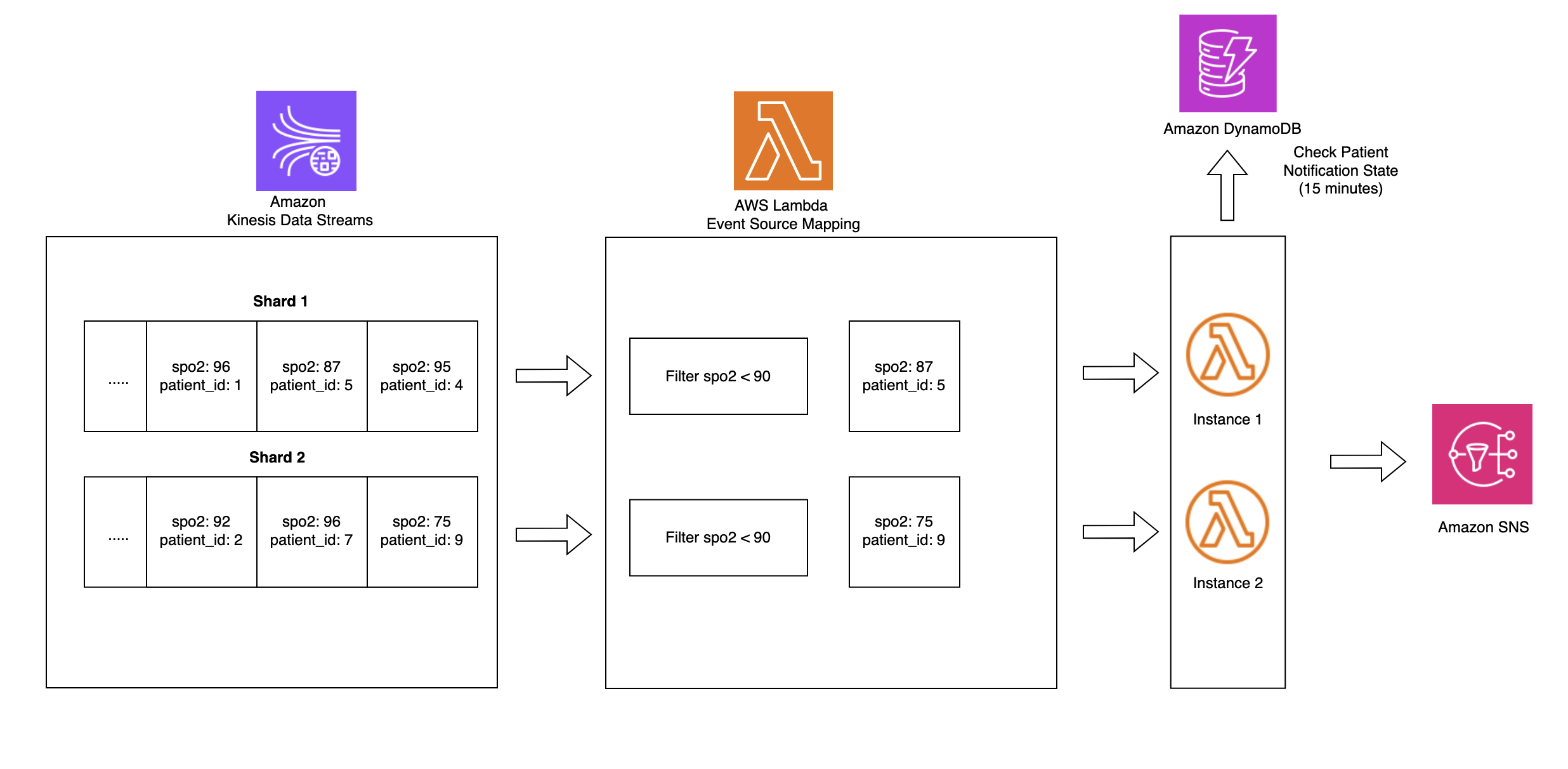
Filter sensor data Lambda code snippet:
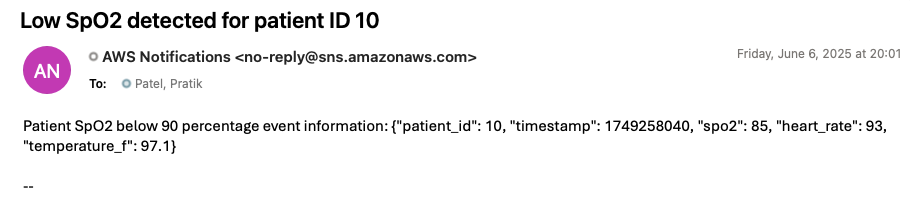
To generate an alert notification through the deployed solution, update the preceding simulator code by setting the SpO2 value to less than 90 and run it again. Within 1 minute, you should receive an alert notification at the email address you provided during stack creation. The following image is an example of an alert notification generated by the deployed solution.
Clean up
To avoid ongoing costs after completing this tutorial, delete the CloudFormation stack that you deployed earlier in this post. This will remove most of the AWS resources created for this solution. You might need to manually delete objects created in Amazon S3, because CloudFormation won’t remove non-empty buckets during stack deletion.
Conclusion
As demonstrated in this post, you can build a serverless real-time analytics pipeline for healthcare monitoring by using AWS IoT Core, Amazon S3 buckets with iceberg format, and Amazon Kinesis Data Streams integration with AWS Lambda event source mapping. This architectural approach eliminates the need for complex code while enabling rapid critical patient care alerts and data aggregation for analysis using Lambda. The solution is particularly valuable for healthcare organizations looking to modernize their patient monitoring systems with real-time capabilities. The architecture can be extended to handle various medical devices and sensor data streams, making it adaptable for different healthcare monitoring scenarios. This post presents one implementation approach, and organizations adopting this solution should ensure the architecture and code meets their specific application performance, security, privacy, and regulatory compliance needs.
If this post helps you or inspires you to solve a problem, we would love to hear about it!
About the authors
Friday Squid Blogging: Sperm Whale Eating a Giant Squid
Post Syndicated from Bruce Schneier original https://www.schneier.com/blog/archives/2025/10/friday-squid-blogging-sperm-whale-eating-a-giant-squid.html
As usual, you can also use this squid post to talk about the security stories in the news that I haven’t covered.
The $1,800 Luxury Walnut Burl Monitor from 1999
Post Syndicated from LGR original https://www.youtube.com/watch?v=RTE7_gqnSLk
Set up custom domains in Amazon Connect hosted with M365 Exchange Online or Google Workspace
Post Syndicated from Zip Zieper original https://aws.amazon.com/blogs/messaging-and-targeting/set-up-custom-domains-in-amazon-connect-hosted-with-m365-exchange-online-or-google-workspace/
Amazon Connect Email provides built-in capabilities that make it straightforward to prioritize, assign, and automate the resolution of customer service emails, improving customer satisfaction and agent productivity. With Amazon Connect Email, you can receive and respond to emails sent by customers to business addresses or submitted through web forms on your website or mobile app. You can configure auto-responses, prioritize emails, create or update cases, and route emails to the best available agent when agent assistance is required. Additionally, these capabilities work seamlessly with Amazon Connect outbound campaigns, helping you deliver proactive and personalized email communications.
Amazon Connect Email integrates with Amazon Simple Email Service to send, receive, and monitor emails for content marked as spam or containing viruses, delivery success rates, and sender reputation results.
This post guides you through setting up email in Amazon Connect by routing emails from your email server (Microsoft 365 or Google Workspace) to Amazon Simple Email Service (Amazon SES) SMTP endpoints using a custom email domain onboarded to Amazon SES. By configuring Amazon Connect with your custom email domain in Amazon SES, you can create a unified communication hub that enhances customer experience while simplifying agent workflows. The result is a more responsive, efficient contact center that meets customers where they are, whether they prefer speaking, chatting, or sending emails.
Use case overview
AnyCompany has invested heavily in its email infrastructure over the years, developing a robust and centralized email server that manages both internal and external email traffic. This unified system has become an integral part of their operations, streamlining communication across departments and with customers. AnyCompany has also established a public support email address that has gained significant recognition and trust among their customer base. This email address, featured prominently in all their product documentation, marketing materials, and customer communications, has become a cornerstone of their brand identity in customer support.
Now, AnyCompany faces the challenge of enhancing their customer support process by implementing an automated acknowledgment system for incoming support emails. However, they want to maintain their existing email setup due to its deep integration with internal workflows and the substantial investment it represents. Additionally, preserving their well-known support email address is crucial to protect the brand equity they’ve built over years of customer interactions.
By integrating Amazon Connect with their current email server, AnyCompany can create a seamless solution that addresses these complex requirements. With this integration, customers can continue sending emails to the familiar public support address (for example, [email protected]), maintaining consistency in their customer experience. When new emails are received, Amazon Connect can trigger automated acknowledgment messages, providing immediate assurance to customers that their inquiries have been received and are being processed.
This approach offers multiple benefits. It improves customer satisfaction by providing prompt responses and reduces the volume of follow-up emails. It also preserves AnyCompany’s significant investment in their existing email infrastructure, so they can continue using the centralized system for both internal and external communications. Perhaps most importantly, it maintains the brand recognition associated with their long-standing support email address, so customers can continue to use the contact point they’ve grown to trust over the years.
Solution overview
This post provides a contact center email solution with the following benefits:
- Customers continue to send emails to your custom domain
- Emails are routed through your primary email server to Amazon Connect (via Amazon SES)
- Agents receive and respond to emails within the Amazon Connect agent workspace
- Customers receive agent responses from your custom domain (via Amazon SES)
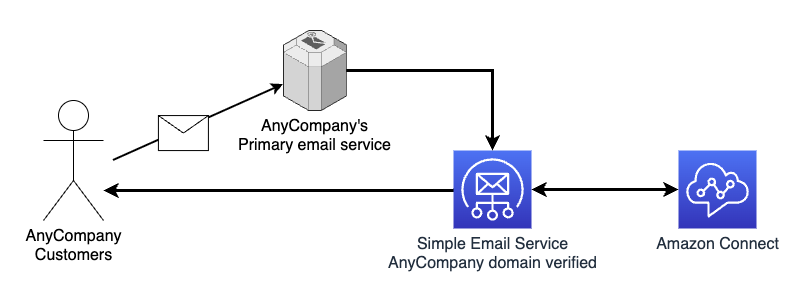
This solution involves three main steps:
- Configure Microsoft 365 or Google Workspace to route emails to Amazon Connect
- Verify your custom domain in Amazon SES to enable sending emails
- Onboard your email address in Amazon Connect to handle customer communications
Prerequisites
Before you begin, make sure you have the following prerequisites:
- Administrative access to modify your custom email domain’s DNS settings.
- Note – modifying MX records can impact email receiving for your primary domain (
example.com). It is highly recommended to create a subdomain (for example,testing.example.com) for testing to avoid impacting any email receiving on your primary domain or use the provided email domain that comes with the Amazon Connect instance (for example,@<instance-alias>.email.connect.aws).
- Note – modifying MX records can impact email receiving for your primary domain (
- Administrative access to modify your Microsoft 365 Exchange Online or Google Workspace Gmail configuration.
- AWS Identity and Access Management (IAM) access to Amazon SES and Amazon Connect on your AWS Management Console.
- An existing user in Amazon Connect with access to managing email flows, channels, and routing. For example, CallCenterManager can be used to perform actions related to user management, metrics, and routing. Or you can create a user with a custom scoped-down security profile.
- When setting up Amazon Simple Email Service for use with Amazon Connect your SES account will be in the sandbox mode, which works well for testing. You will need to request Amazon SES production access before you can fully utilize Amazon SES with Amazon Connect.
Configure Amazon SES
Part of creating a domain identity is configuring its DKIM-based verification. DomainKeys Identified Mail (DKIM) is an email authentication method that Amazon SES uses to verify domain ownership, and receiving mail servers use to validate email authenticity. To learn more, refer to Creating a domain identity.
Complete the following steps to configure your domain identity in Amazon SES:
- Open your AWS console and choose the AWS Region where your Amazon Connect instance is deployed.
- On the Amazon SES console, choose Identities under Configuration in the navigation pane.
- Choose Create identity and provide the following information:
- Choose Domain as the identity type.
- Enter your custom email domain name.
- Enable Use a custom MAIL FROM domain.
- Set MAIL FROM domain to
feedback. - Set Behavior on MX failure to Use default MAIL FROM domain.
- For DKIM verification, provide the following information (unless instructed otherwise):
- Choose Easy DKIM under Advanced DKIM settings.
- Choose RSA_2048_BIT for DKIM signing key length.
- Enable Publish DNS records to Route53 if applicable.
- Enable DKIM signatures.
- Choose Create identity.
Amazon SES will generate DNS records needed to verify the domain, including:
- DKIM CNAME records
- Custom MAIL FROM domain MX and TXT records
- DMARC TXT records
If the domain is hosted in Route 53, Amazon SES provides an option to automatically Publish DNS records to Route53. When your domain is hosted with Route 53, SES domain verification typically completes within a few minutes. You will see the status Verification pending, followed by Verified.
If the domain is not hosted in Route53, Amazon SES will present individual copy buttons per record as well as a CSV file download option. These records must be added to your DNS so Amazon SES can verify the domain.
After your externally managed DNS has been updated, return to the Amazon SES console and confirm that the identity status has changed to Verified. The time to complete this step is highly variable. You can choose to configure DKIM by using either Easy DKIM or Bring Your Own DKIM (BYODKIM), and depending on your choice, you will have to configure the signing key length of the private key. For detailed steps, refer to Creating a domain identity.
When you first setup Amazon SES, your account is placed in the SES sandbox which we use to prevent unauthorized or unintended sending. While in sandbox mode, you can only send mail to email addresses and domains you verify. After you receive Amazon SES production access for your custom domain, you can send and receive email to and from a valid email address without verification. For more information about the Amazon SES sandbox, refer to Request production access (Moving out of the Amazon SES sandbox).
For setup and testing purposes, complete the following steps to configure an email identity in Amazon SES:
- On the Amazon SES console, choose Identities under Configuration in the navigation pane.
- Choose Create identity and choose Email Address.
- Enter your work email address (you will need access to the inbox to verify ownership). This is the email address that Amazon Connect and Amazon SES will use to send and receive email while your SES account is in the sandbox.
- Click Create identity.
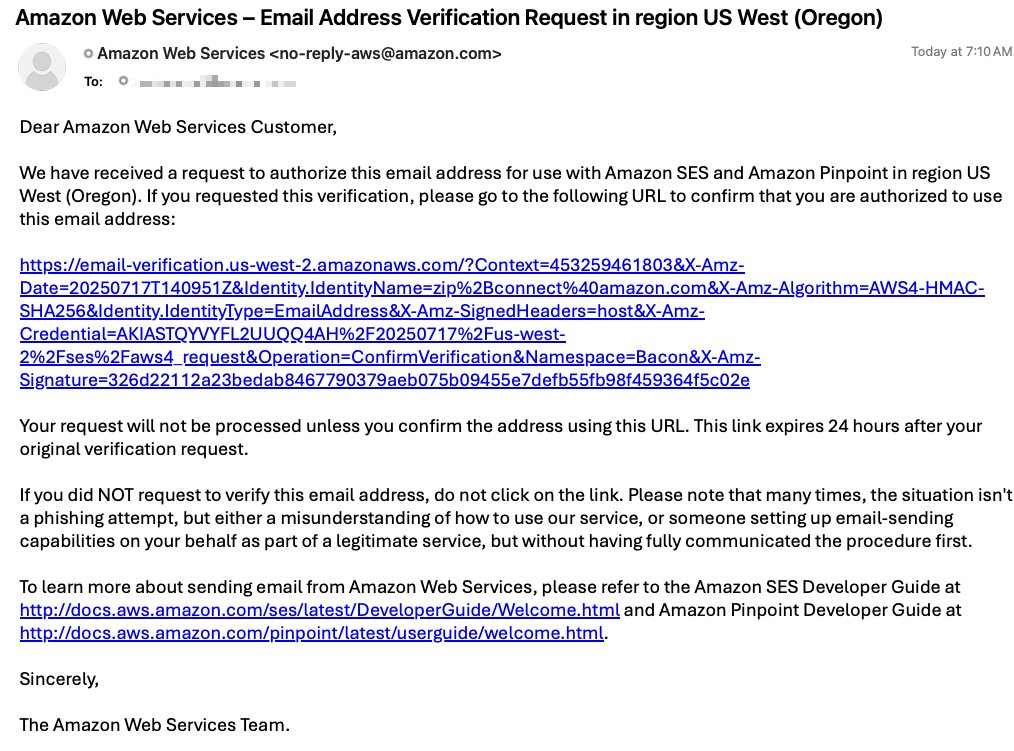
- Check your email inbox and click the link to verify this is an email address you control.
Configure Amazon Connect
Complete the following steps to configure Amazon Connect:
- On the Amazon Connect console, open your instance by clicking on Instance alias.
- Under Channels and communications, choose Email.
- Choose Add domain.
- Choose the domain you verified in Amazon SES.
- In your instance, choose Email addresses under Channels.
- Choose Create email address and provide the following information:
- Create an email address with the same name and domain as the inbound address your customers will use (
[email protected]). - Provide a friendly sender name that will appear in customer inboxes.
- Create a new flow or attach an existing flow to the custom domain email address (this flow will route inbound emails).
- Choose Save.
- Create an email address with the same name and domain as the inbound address your customers will use (
- Configure Outbound email configuration in your outbound queue:
- For Default email address, provide the email address you created earlier.
- For Outbound email flow, provide the email flow for outbound emails (this flow will route outbound emails).
- Choose Save.
Configure Microsoft 365 Exchange or Google Workspace
In this section, we provide step-by-step guidance to configure your primary email service with a rule (Microsoft) or route (Google) that sends inbound email addressed to a specific address(s) to Amazon Connect.
Option A: Microsoft 365 Exchange configuration
Complete the following steps to configure Microsoft 365 Exchange:
- Find the email receiving endpoint for your Region. For example,
inbound-smtp.us-west-2.amazonaws.com. - Create a connector in Exchange:
- Navigate to the Exchange admin center.
- Under Mail flow, choose Connectors.
- Choose Add a connector.
- Set Connection from to Office 365
- Set Connection to to Your organization’s email server.
- Choose Next.
- Name the connector to identify the Region.
- Choose Next.
- For Use of connector, select Only when I have a transport rule set up that redirects messages to this connector.
- For Routing, enter the SES email receiving endpoint.
- Choose the plus sign, then choose Next.
- For Security restrictions, select Always use Transport Layer Security (TLS) to secure the connection.
- Follow your internal process for this step. In this example, we select Any digital certificate, including self-signed certificates.
- Choose Next.
- For Validation email, enter a valid email address currently used in your Amazon Connect instance.
- Choose the plus sign, then choose Next.
This will send a test email address to that email address. No action needs to be taken with the test email. You should see the email validated and receive the validation test email in the agent workspace. - Review your connector configuration and choose Create connector.
Validate that the connector status is set to On, then proceed to the next steps.
- Create a mail flow rule to send your inbound email to Amazon Connect:
- Under Mail flow, choose Rules.
- Choose Add a rule¸ then choose Create a new rule.
- Name the rule.
- Set conditions to apply if the recipient is this person and choose the email address for Amazon Connect.
- Set the action to Redirect the message to and the following connector and choose your new connector.
- Choose Next.
- Set Rule mode to Enforce.
- Activate the rule immediately by specifying the current time.
- Set Match sender address in message to Header or envelope.
- Choose Next.
- Review your rule configuration and choose Finish.
After you confirm your rule is enabled, you can test your configuration.
Option B: Google Workspace Gmail configuration
Complete the following steps to configure with Google Workspace:
- Log into your Google Workspace admin account.
- Navigate to Gmail.
- Choose Hosts and choose Add Route.
- Configure the mail route:
- Provide a name indicating the Region.
- Enter the SES email receiving endpoint and port 25.
- Enable security options:
- Select Require mail to be transmitted via a secure (TLS) connection.
- Select Require CA signed certificate.
- Select Validate certificate hostname.
- Choose Test TLS connection.
- If the connection is successful, choose SAVE.
- Configure default routing:
- Navigate to Default routing and choose Configure.
- Enter the email address that should route to Amazon Connect.
- Change the route to the mail route you created.
- Select Perform this action on non-recognized and recognized addresses.
- Save and confirm the route is enabled.
Test your configuration
After you have completed the appropriate steps above, test both inbound (to Amazon Connect) and outbound (from Amazon Connect) message-flows.
Test inbound (to Amazon Connect)
Test your inbound configuration:
- Open your email application.
- Send a test email to the email address you configured to be sent to Amazon Connect.
- In the Amazon Connect agent workspace, accept the incoming email.
- Confirm the email received in your agent workspace matches the email address you configured to be sent to Amazon Connect.
Test outbound (to external recipient from Amazon Connect)
Test your outbound configuration:
- Log in to your Amazon Connect instance.
- Choose New email.
- Enter To address (use your work email address), Subject & Body.
- Alternatively, To address (use your work email address) and choose a Template.
- Click Send.
- Check your work email inbox for the message. Verify the email’s From address is the email address you configured to be sent from Amazon Connect.
Request Amazon SES production access
Once you have successfully tested email receiving and sending within Amazon Connect, request Amazon SES production access (see Moving out of the Amazon SES sandbox) in the Amazon SES Developer Guide. Importantly, you will not be able to send email from your domain via Amazon Connect until your account is removed from the SES sandbox.
Conclusion
In this post, we showed how to configure Amazon Connect to handle emails using your custom domain through Microsoft 365 or Google Workspace. This setup provides a seamless email experience for your customers while giving your agents the powerful tools available in the Amazon Connect agent workspace.
To get started with Amazon Connect Email, refer to the Amazon Connect Administrator Guide. For hands-on learners, the Amazon Connect Email Enablement Workshop provides guidance and exercises to configure Amazon Connect Email, set up email queues and routing rules, and discusses best practices for delivering exceptional email-based customer service.
Additional resources
For additional guidance and information, refer to the following resources:
- Amazon Connect Administrator Guide
- Amazon SES Developer Guide
- How Amazon Connect email works
- Amazon Connect Email Enablement Workshop
- Flows in Amazon Connect
About the authors
Boosting Unit Test Automation at Audible with Amazon Q Developer
Post Syndicated from Kirankumar Chandrashekar original https://aws.amazon.com/blogs/devops/boosting-unit-test-automation-at-audible-with-amazon-q-developer/
Audible, an Amazon company, is a leading producer and provider of audio storytelling. With a vast library of over 1,000,000 titles including audiobooks, podcasts, and Audible Originals with specific curated offerings available in each marketplace, Audible makes it easy to transform everyday moments into extraordinary opportunities for learning, imagination, and entertainment through immersive audio experiences. Robust testing is critical to ensure millions of end users enjoy a seamless experience across devices.
Remember the last time you inherited a software application codebase with minimal test coverage? Or perhaps you’ve written code in a rush to meet a deadline, promising yourself you’d add tests “later”? We’ve all been there. Testing is crucial but can often gets deprioritized when deadlines loom. That’s where Amazon Q Developer‘s agentic workflows come in, transforming the way developers approach test generation. This blog explores how Audible used Amazon Q Developer to boost their unit test coverage.
Business Use Case for Software Testing
In high velocity development environments, testing cycles can often times get compressed under tight deadlines, increasing quality risks. Amazon Q Developer transforms this paradigm by accelerating testing while maintaining comprehensive standards. Through automated test generation, edge case identification, and fix suggestions, teams execute thorough testing in reduced timeframes, delivering expedited releases, optimized QA resources, and enhanced production readiness.
Each function that does not have the appropriate testing implemented, represents the potential for a rework, bugs, and maintenance challenges. Additionally, inherited codebases present particular challenges: developers must choose between spending weeks writing tests for existing functionality or continuing the cycle of untested code.
Amazon Q Developer addresses these challenges by reducing the time and effort required for proper test coverage, transforming testing from a burdensome chore into a streamlined process that allows teams to focus on delivering new features while helping to ensure code quality.
Amazon Q Developer: Expanding test coverage for your codebase
Amazon Q Developer introduces an advanced approach to software testing generation through its agentic workflows. Unlike traditional test generation tools that produce generic tests, Amazon Q Developer analyzes your code’s intent, business logic, and edge cases. It doesn’t just generate tests; it creates meaningful test suites that validate your code’s behavior comprehensively.
Beyond the dedicated test generation workflow we’ll explore today, Amazon Q Developer offers multiple ways to assist with testing. You can use conversational prompts for test plan generation, request test improvements for existing code, or even pair-program with Amazon Q Developer as you write tests. The flexibility to integrate AI assistance throughout your testing workflow makes Amazon Q Developer a versatile companion for developers.
Amazon Q Developer workflow architecture
The following architecture diagram illustrates how Audible leveraged Amazon Q Developer for both test generation and code transformation:
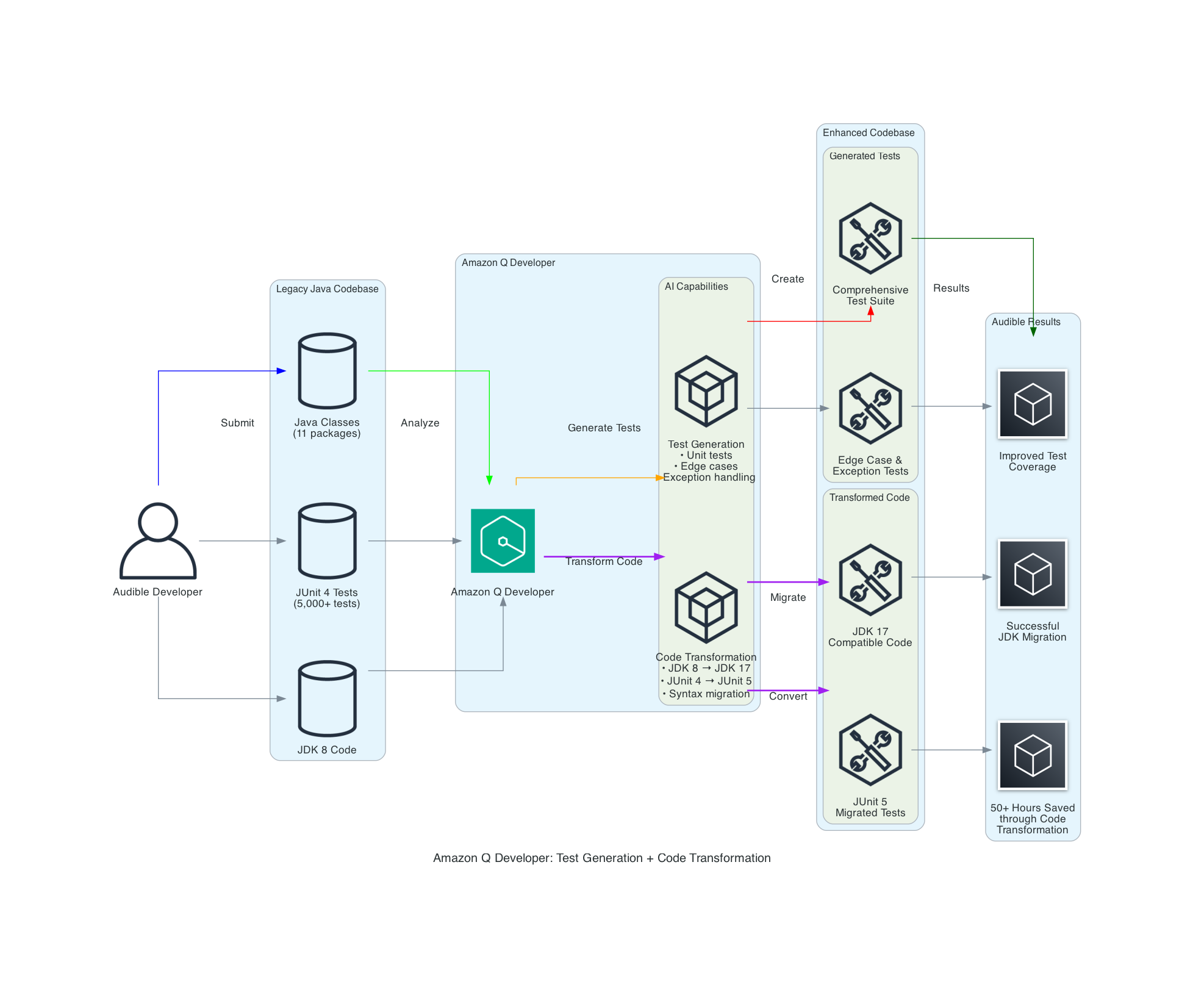
The Amazon Q Developer workflow demonstrates two key capabilities:
- Test Generation: Amazon Q Developer analyzes Java classes and creates comprehensive test suites including unit tests, edge case tests, and exception handling tests.
- Code Transformation: Amazon Q Developer performs automated migration tasks including
JDK 8toJDK 17/21upgrades, handling language version compatibility,JUnit 4toJUnit 5conversion, modernizing test framework syntax and annotations, syntax migration, updating deprecated APIs and code patterns.
What makes this workflow particularly powerful is how it combines AI capabilities with human expertise, allowing expert developers to leverage AI in their day-to-day workflow. Amazon Q Developer analyzes your codebase and uses it as a context, identifies edge cases, and performs automated transformations, while developers apply their domain knowledge to ensure the outputs align with business requirements and expected behavior.
Audible’s Approach to harness the potential of Amazon Q Developer
The Audible teams followed the below steps to harness Amazon Q Developer to boost test coverage.
Code Submission: The Audible team leveraged Amazon Q Developer to enhance their test coverage by generating additional unit tests for Java classes, including static methods and methods with existing test cases. This approach complemented their robust testing strategy. Amazon Q Developer has the ability to examine classes, methods, parameters, return types, and exceptions. Amazon Q Developer is helpful in automatically identifying unit tests to cover edge cases that can easily be overlooked, such as null input checks and empty string checks.
Targeted Requests: The Audible team specifically asked Amazon Q Developer to provide:
- Suggestions for unit tests to cover the given method within a Java class
- Recommendations for unit tests targeting untested edge cases
- Recommendations for test cases addressing error handling and exception scenarios
The Audible team achieved significant improvements using Amazon Q Developer for both test generation and code transformation. The key to their success was providing rich context along with targeted prompts in a systematic workflow.
Developer Workflow
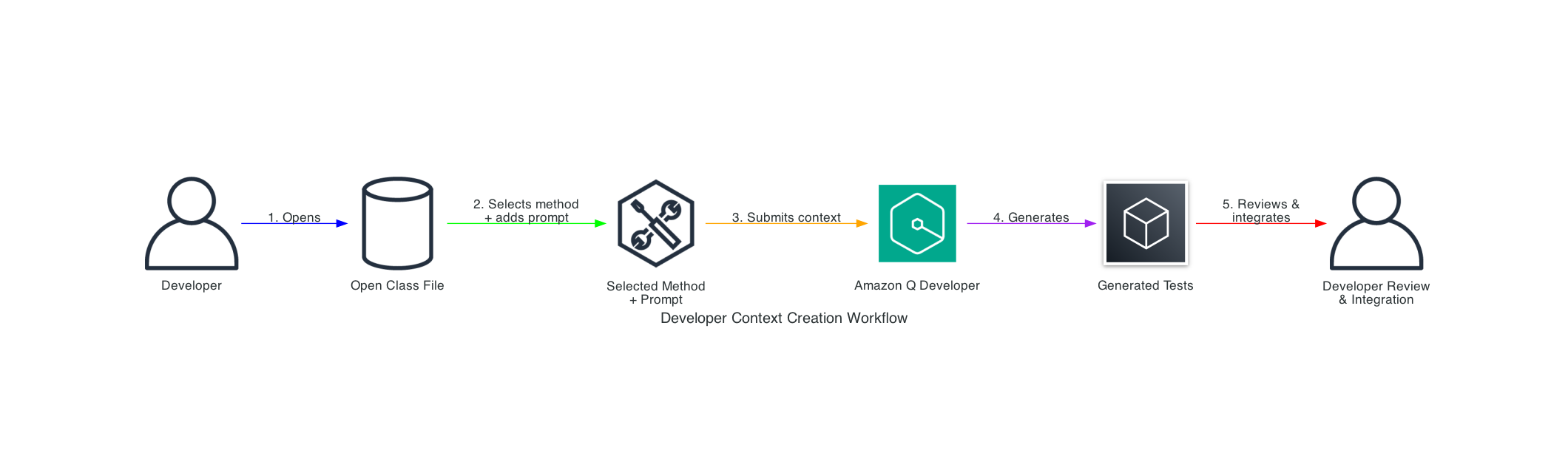
Audible adopts a human in the loop approach to review the output from automation tools. The above workflow shows the complete process: (1) open a class file in their IDE, (2) select a specific method and add their prompt, (3) submit this combined context to Amazon Q Developer, (4) receive generated tests, and (5) review and integrate the tests into their codebase.
Effective Prompts and Approach
The Audible team followed a structured approach, using targeted requests that Amazon Q Developer could act upon:
Code Submission: The team provided Java classes to Amazon Q Developer with code to generate tests for individual methods, including static methods and those that already had some tests but lacked full coverage. Amazon Q Developer examined classes, methods, parameters, return types, and exceptions, automatically identifying unit tests to cover edge cases like null input checks and empty string checks.
Below are generic Sample Prompts for Specific Requests:
Basic Test Generation:
Generate unit tests for the following Java method. Focus on covering all possible input scenarios and edge cases:

[method code here]

Please include tests for:
- Valid input scenarios
- Null input checks
- Empty string validations
- Exception handling
Edge Case Focus:
I have this method that processes user input. Can you suggest unit tests that cover edge cases I might have missed? Pay special attention to boundary conditions and error scenarios:

[method code here]
Manual Framework Migration (via Q Developer Chat):
Convert this JUnit 4 test to JUnit 5 format. Make sure to update annotations and use modern JUnit 5 features where appropriate:

[JUnit 4 test code here]
Note: While Amazon Q Developer’s code transformation feature can handle
JUnit4toJUnit5migration automatically across entire codebases, Audible also used the conversational interface for manual, targeted conversions as shown above. Both approaches are available. Refer to documentation for automated transformation details.
Test Generation: Based on the team’s requests, Amazon Q Developer generated specific test suggestions addressing these areas with appropriate assertions and test methods.
Implementation: The development team implemented the suggested tests after review.
Documentation: Amazon Q Developer has the ability to add comments to explain the purpose of the test, area of the functionality that the test is covering. In addition, Amazon Q Developer also has the ability to generate documentation related to other aspects like read-me files and project documentation.
Quantifiable Results
By leveraging Amazon Q Developer, the Audible team achieved:
- Over 10 key packages received comprehensive unit test coverage
- ~1 hour saved per test class (typically containing 8-10 individual tests)
- 5,000+ test cases successfully migrated from
JUnit4toJUnit5using both Amazon Q Developer’s code transformation and manual conversational assistance - 50+ hours of manual work saved during the
JDK8toJDK17migration using Amazon Q Developer’s code transformation - Reduced human errors through AI-assisted transformations
Key Capabilities Demonstrated
Amazon Q Developer excelled in several areas that can be overlooked in manual testing:
Comprehensive Exception Testing: Beyond standard null input checks and empty string validations, it automatically suggested tests for IllegalArgumentException, NullPointerException, and custom business exceptions, including verification of both exception throwing and specific error messages. This systematic approach made test coverage more complete and error handling more robust.
Automated Edge Case Detection: Amazon Q Developer made inline suggestions for null pointer exception handling without prompting, making the process smoother and faster.
Manual Framework Migration with AI Assistance: Amazon Q Developer’s pattern recognition accelerated the migration process through conversational assistance. The team could ask Amazon Q Developer through the chat to convert test syntax from JUnit4 to JUnit5 manually. For example, their previous setup had JUnit4 syntax with @UseDataProvider and @DataProvider annotations. All they had to do was highlight the code block, Send to Prompt, and ask Amazon Q Developer to make the test JUnit5 compatible. Within seconds, it generated a reliable JUnit5 test with ParameterizedTest annotation and Stream of Arguments that they could manually implement.
Contextual Analysis: Amazon Q Developer analyzes the existing codebase and recognized patterns and generated tests that matched the team’s coding style and testing conventions.
Conclusion
Amazon Q Developer transforms the test generation process from a time-consuming chore into a streamlined workflow, enabling teams to achieve comprehensive test coverage with minimal effort. This allows developers to focus on higher-value activities while improving code quality and reliability.
The business impact is substantial: As testing becomes less burdensome, teams naturally adopt better testing practices, creating a positive feedback loop that enhances overall code quality, and creates an opportunity for faster development cycles, and reduced time spent on maintenance.
To learn more about Amazon Q Developer’s features and pricing details, visit the Amazon Q Developer product page.
About the Authors

Kirankumar Chandrashekar is a Generative AI Specialist Solutions Architect at AWS, focusing on Next Generation Developer Experience tools like Q Developer, Kiro and Developer Productivity using AI. Bringing deep expertise in AWS cloud services, DevOps, modernization, and infrastructure as code, he helps customers accelerate their development cycles and elevate developer productivity through innovative AI-powered solutions. By leveraging Amazon Q Developer, he enables teams to build applications faster, automate routine tasks, and streamline development workflows. Kirankumar is dedicated to enhancing developer efficiency while solving complex customer challenges, and enjoys music, cooking, and traveling.

Alex Torres is a Senior Solutions Architect at AWS, supporting Amazon.com in architecting, designing, and building applications on AWS. With deep expertise in security, governance, and Agentic AI for developers, he helps customers leverage cutting-edge cloud technology to create products that shape people’s lives. Passionate about empowering teams to solve complex challenges through innovative AWS solutions, Alex is dedicated to driving customer success while maintaining the highest standards of security and governance. Outside of work, he enjoys cooking and hiking.

GK is a Senior Customer Solutions Manager and strategic customer advisor supporting Amazon as a customer of AWS. Over her four years at AWS, she has focused on improving developer productivity and advocating for Amazon’s needs across AWS services to enhance user experience and drive deeper alignment between the two organizations. Her work with advanced Amazon teams helps deliver solutions that ultimately benefit both internal and external AWS customers. GK is particularly interested in how GenAI is bridging the gap between developers and non-developers, and she spends much of her time solving challenges in GenAI and security. She is based in the San Francisco Bay Area and enjoys hiking and camping.

Aditi Joshi is a Software Engineer at Audible, working on expanding Audible’s presence across Amazon platforms. As a full-stack developer, she primarily works with web technologies, cloud services, and programming languages like JavaScript and Java to build and enhance cross-platform integration features, including recent projects like introducing Audible purchase capabilities in the Amazon iOS app. With expertise in user interface development, responsive design, and web technologies, she focuses on showcasing Audible offers and growing Audible’s visibility across Amazon’s ecosystem. Aditi is passionate about software architecture and user experience, focusing on building scalable systems with clean, efficient code. When not coding, Aditi enjoys traveling, practicing yoga, and listening to music.

Sam Park is a Software Development Engineer at Audible, focused on building Audible features across Amazon platforms. He has played a key role in enabling Audible purchases through Amazon Cart, as well as expanding Audible’s visibility within the Amazon iOS and Android apps. His work spans multiple touchpoints within the Amazon ecosystem, including Search, Product pages, Checkout, and Cart experiences. Sam is passionate about developing solutions that create intuitive customer experiences and leveraging GenAI to boost development efficiency and productivity. Outside of work, he enjoys traveling, playing basketball, and cheering on the Cleveland Cavaliers.
Presidential Libraries & Donald Trump #lastweektonight
Post Syndicated from LastWeekTonight original https://www.youtube.com/shorts/88YixeXbRMo
[$] Enhancing FineIBT
Post Syndicated from jake original https://lwn.net/Articles/1039633/
At the Linux
Security Summit Europe (LSS EU), Scott Constable and Sebastian
Österlund gave a talk on an enhancement to a control-flow integrity (CFI)
protection that was added to the kernel several years ago. The “FineIBT: Fine-grain Control-flow
Enforcement with Indirect Branch Tracking” mechanism was merged for
Linux 6.2 in early 2023 to harden the kernel against CFI attacks of various
sorts, but needed some fixes and
enhancements more recently. The talk looked at the CFI vulnerability
problem, FineIBT, and an enhanced version that is hoped to be able to unify
all of the disparate hardware and software mitigations to address both
regular and speculative CFI vulnerabilities.