Post Syndicated from Lorenzo Nicora original https://aws.amazon.com/blogs/big-data/part-1-optimize-checkpointing-in-your-amazon-managed-service-for-apache-flink-applications-with-buffer-debloating-and-unaligned-checkpoints/
This post is the first of a two-part series regarding checkpointing mechanisms and in-flight data buffering. In this first part, we explain some of the fundamental Apache Flink internals and cover the buffer debloating feature. In the second part, we focus on unaligned checkpoints.
Apache Flink is an open-source distributed engine for stateful processing over unbounded datasets (streams) and bounded datasets (batches). Amazon Managed Service for Apache Flink, formerly known as Amazon Kinesis Data Analytics, is the AWS service offering fully managed Apache Flink.
Apache Flink is designed for stateful processing at scale, for high throughput and low latency. It scales horizontally, distributing processing and state across multiple nodes, and is designed to withstand failures without compromising the exactly-once consistency it provides.
Internally, Apache Flink uses clever mechanisms to maintain exactly-once state consistency, while also optimizing for throughput and reduced latency. The default behavior works well for most use cases. Recent versions introduced two functionalities that can be optionally enabled to improve application performance under particular conditions: buffer debloating and unaligned checkpoints.
Buffer debloating and unaligned checkpoints can be enabled on Amazon Managed Service for Apache Flink version 1.15.
To understand how these functionalities can help and when to use them, we need to dive deep into some of the fundamental internal mechanisms of Apache Flink: checkpointing, in-flight data buffering, and backpressure.
Maintaining state consistency through failures with checkpointing
Apache Flink checkpointing periodically saves the internal application state for recovering in case of failure. Each of the distributed components of an application asynchronously snapshots its state to an external persistent datastore. The challenge is taking snapshots guaranteeing exactly-once consistency. A naïve “stop-the-world, take a snapshot” implementation would never meet the high throughput and low latency goals Apache Flink has been designed for.
Let’s walk through the process of checkpointing in a simple streaming application.
As shown in the following figure, Apache Flink distributes the work horizontally. Each operator (a node in the logical flow of your application, including sources and sinks) is split into multiple sub-tasks, based on its parallelism. The application is coordinated by a job manager. Checkpoints are periodically initiated by the job manager, sending a signal to all source operators’ sub-tasks.

On receiving the signal, each source sub-task independently snapshots its state (for example, the offsets of the Kafka topic it is consuming) to a persistent storage, and then broadcasts a special record called checkpoint barrier (“CB” in the following diagrams) to all outgoing streams. Checkpoint barriers work similarly to watermarks in Apache Flink, flowing in-bands, along with normal records. A barrier does not overtake normal records and is not overtaken.
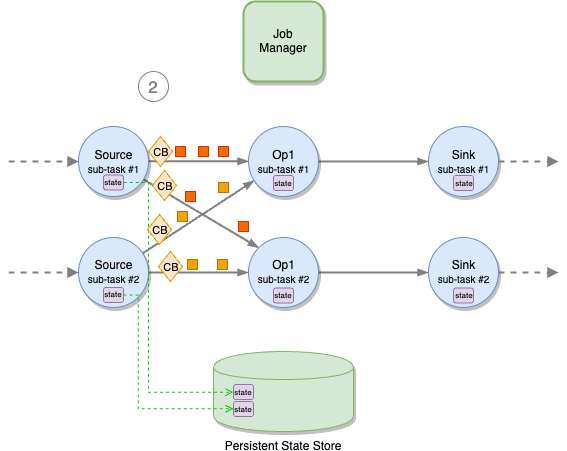
When a downstream operator’s sub-task receives all checkpoint barriers from all input channels, it starts snapshotting its state.
A sub-task does not pause processing while saving its state to the remote, persistent state backend. This is a two-phase operation. First, the sub-task takes a snapshot of the state, on the local file system or in memory, depending on application configuration. This operation is blocking but very fast. When the snapshot is complete, it restarts processing records, while the state is asynchronously saved to the external, persistent state store. When the state is successfully saved to the state store, the sub-task acknowledges to the job manager that its checkpointing is complete.
The time a sub-task spends on the synchronous and asynchronous parts of the checkpoint is measured by Sync Duration and Async Duration metrics, shown by the Apache Flink UI. It is then asynchronously sent to the backend. After the fast snapshot, the sub-task restarts processing messages. The backend notifies the sub-task when the state has been successfully saved. The sub-task, in turn, sends an acknowledgment to the job manager that checkpointing is complete.

Checkpoint barriers propagate through all operators, down to the sinks. When all sink sub-tasks have acknowledged the checkpoint to the job manager, the checkpoint is declared complete and can be used to recover the application, for example in case of failure.
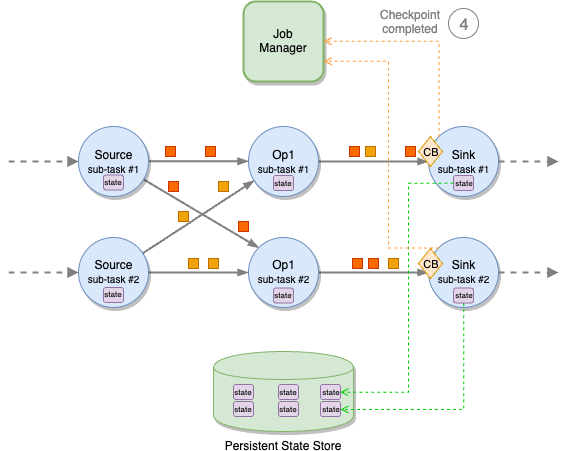
Checkpoint barrier alignment
A sub-task may receive different partitions of the same stream from different upstream sub-tasks, for example when a stream is repartitioned with a keyBy or a rebalance. Each upstream sub-task will emit a checkpoint barrier independently. To maintain exactly-once consistency, the sub-task must wait for the barriers to arrive on all input partitions before taking a snapshot of its state.
This phase is called checkpoint alignment. During the alignment, the sub-task stops processing records from the partitions it already received the barrier from and continues processing the partitions that are behind the barrier.
After the barriers from all upstream partitions have arrived, the sub-task takes the snapshot of its state and then broadcasts the barrier downstream.
The time spent by a sub-task while aligning barriers is measured by the Checkpoint Alignment Duration metric, shown by the Apache Flink UI.

In-flight data buffering
To optimize for throughput, Apache Flink tries to keep each sub-task always busy. This is achieved by transmitting records over the network in blocks and by buffering in-flight data. Note that this is data transmission optimization; Flink operators always process records one at the time.
Data is handed over between sub-tasks in units called network buffers. A network buffer has a fixed size, in bytes.
Sub-tasks also buffer in-flight input and output data. These buffers are called network buffer queues. Each queue is composed of multiple network buffers. Each sub-task has an input network buffer queue for each upstream sub-task and an output network buffer queue for each downstream sub-task.
Each record emitted by the sub-task is serialized, put into network buffers, and published to the output network buffer queue. To use all the available space, multiple messages can be packed into a single network buffer or split across subsequent network buffers.
A separate thread sends full network buffers over the network, where they are stored in the destination sub-task’s input network buffer queue.
When the destination sub-task thread is free, it deserializes the network buffers, rebuilds the records, and processes them one at a time.

Backpressure
If a sub-task can’t keep up with processing records at the same pace they are received, the input queue fills up. When the input queue is full, the upstream sub-task stops sending data.
Data accumulates in the sender’s output queue. When this is also full, the sender sub-task stops processing records, accumulating received data in its own input queue, and the effects propagates upstream.
This is the backpressure that Apache Flink uses to control the internal flow, preventing slow operators from being overwhelmed by slowing down the upstream flow. Backpressure is a safety mechanism to maximize the application throughput. It can be temporary, in case of an unexpected peak of ingested data, for example. If not temporary, it is usually the symptom—not the cause—that the application is not designed correctly or it has insufficient resources to process the workload.
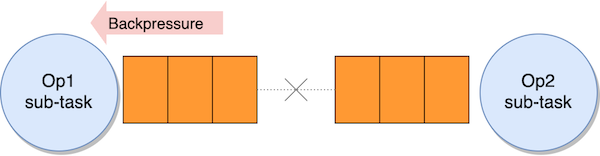
In-flight buffering and checkpoint barriers
As checkpoint barriers flow with normal records, they also flow in the network buffers, through the input and output queues. In normal conditions, barriers don’t overtake records, and they are never overtaken. If records are queueing up due to backpressure, checkpoint barriers are also stuck in the queue, taking longer time to propagate from the sources to the sinks, delaying the completion of the checkpoint.
In the second part of this series, we will see how unaligned checkpoints can let barriers overtake records under specific conditions. For now, let’s see how we can optimize the size of input and output queues with buffer debloating.
Buffer debloating to optimize in-flight data
The default network buffer queue size is a good compromise for most applications. You can modify this size, but it applies to all sub-tasks, and it may be difficult to optimize this one-size-fits-all across different operators.
Longer queues support bigger throughout, but they may slow down checkpoint barriers that have to go through longer queues, causing longer End to End Checkpoint Duration. Ideally, the amount of in-flight data should be adjusted based on the actual throughput.
In version 1.14, Apache Flink introduced buffer debloating, which can be enabled to adjust in-flight data of each sub-task, based on the current throughput the sub-task is processing, and periodically reassess and readjust it.
How buffer debloating helps your application
Consider a streaming application, ingesting records from a streaming source and publishing the results to a streaming destination after some transformations. Under normal conditions, the application is sized to process the incoming throughput smoothly. Our destination has limited capacity, for example a Kafka topic throttled via quotas, sufficient to handle the normal throughput, with some margin.

Imagine that the ingestion throughput has occasional peaks. These peaks exceed the limits of the streaming destination (throughput quota of the Kafka topic), which starts throttling.

Because the sink can’t process the full throughput, in-flight data accumulates upstream of the sink, causing backpressure on the upstream operator. The effect eventually propagates up to the source, and the source starts lagging behind the most recent record in the source stream.

As long this is a temporary condition, backpressure and lagging are not a problem per se, as long as the application is able to catch up when the peak has finished.
Unfortunately, accumulating in-flight data also slows down the propagation of the checkpoint barriers. Checkpoint End to End Duration goes up, and checkpoints may eventually time out.

The situation is even worse if the sink uses two-phase commit for exactly-once guarantees. For example, KafkaSink uses Kafka transactions committed on checkpoints. If checkpoints become too slow, transactions are committed later, significantly increasing the latency of any downstream consumer using a read-committed isolation level.
Slow checkpoints under backpressure may also cause a vicious cycle. A slowed-down application eventually crashes, and recovers from the last checkpoint that is quite old. This causes a long reprocessing that, in turn, induces more backpressure and even slower checkpoints.
In this case, buffer debloating can help by adjusting the amount of in-flight data based on the throughput each sub-task is actually processing. When a sub-task is throttled by backpressure, the amount of in-flight data is reduced, also reducing the time checkpoint barriers take to go through all operators. Checkpoint End to End Duration goes down, and checkpoints do not time out.
Buffer debloating internals
Buffer debloating estimates the throughput a sub-task is capable of processing, assuming no idling, and limits the upstream in-flight data buffers to contain just enough data to be processed in 1 second (by default).
For efficiency, network buffers in the queues are fixed. Buffer debloating caps the usable size of each network buffer, making it smaller when the sub-task is processing slowly.

The benefits of less in-flight data depends on whether Apache Flink is using standard checkpoint alignment, the default behavior described so far, or unaligned checkpoints. We will examine unaligned checkpoints in the second part of this series, but let’s see the effect of buffer debloating, briefly.
- With aligned checkpoints (default behavior) – Less in-flight data makes checkpoint barrier propagation faster, ultimately reducing the end-to-end checkpoint duration but also making it more predictable
- With unaligned checkpoints (optional) – Less in-flight data reduces the amount of in-flight records stored with the checkpoint, ultimately reducing the checkpoint size
What buffer debloating does not do
Note that the problem we are trying to solve is slow checkpointing (or excessive checkpointing size, with unaligned checkpoints). Buffer debloating helps making checkpointing faster.
Buffer debloating does not remove backpressure. Backpressure is the internal protective mechanism that Apache Flink uses when some part of the application is not able to cope with the incoming throughput. To reduce backpressure, you have to work on other aspects of the application. When backpressure is only temporary, for example under peak conditions, the only way of removing it would be sizing the end-to-end system for the peak, rather than normal workload. But this could be impossible or too expensive.
Buffer debloating helps reduce and keep checkpoint duration stable under exceptional and temporary conditions. If an application experiences backpressure under its normal workload, or checkpoints are too slow under normal conditions, you should investigate the implementation of your application to understand the root cause.
When the automatic throughput prediction fails
Buffer debloating doesn’t have any particular drawback, but in corner cases, the mechanism may incorrectly estimate the throughput, and the resulting amount of in-flight data may not be optimal.
Estimating the throughput is complex when an operator receives data from multiple upstream operators, connected streams or unions, with very different throughput. It may also take time to adjust to a sudden spike, causing a temporary suboptimal buffering.
- Too small in-flight data may reduce the throughput the sub-task can process (it will be idling), causing more backpressure upstream
- Too large buffers may slow down checkpointing and increase the checkpoint size (with unaligned checkpoints)
Conclusion
The checkpointing mechanism makes Apache Flink fault tolerant, providing exactly-once state consistency. In-flight data buffering and backpressure control the data flow within the distributed streaming application maximize the throughput. Apache Flink default behaviors and configurations are good for most workloads.
The effectiveness of buffer debloating depends on the characteristics of the workload and the application. The general recommendation is to test the functionality in a non-production environment with a realistic workload to verify it actually helps with your use case.
You can request to enable buffer debloating on your Amazon Managed Service for Apache Flink application.
Under particular conditions, the combined effect of backpressure and in-flight data buffering may slow down checkpointing, increase checkpointing size (with unaligned checkpoints), and even cause checkpoints to fail. In these cases, enabling unaligned checkpointing may help reduce checkpoint duration or size.
In the second part of this series, we will understand better unaligned checkpoints and how they can help your application checkpointing efficiently in presence of backpressure, especially in combination with buffer debloating.
About the Authors
 Lorenzo Nicora works as Senior Streaming Solution Architect at AWS, helping customers across EMEA. He has been building cloud-native, data-intensive systems for over 25 years, working in the finance industry both through consultancies and for FinTech product companies. He has leveraged open-source technologies extensively and contributed to several projects, including Apache Flink.
 Francisco Morillo is a Streaming Solutions Architect at AWS. Francisco works with AWS customers helping them design real-time analytics architectures using AWS services, supporting Amazon Managed Streaming for Apache Kafka (Amazon MSK) and AWS’s managed offering for Apache Flink.




 Ready to start planning your re:Invent? Browse the
 – The last in-person AWS Summit will be held in
 – Join a community-led conference run by AWS user group leaders in your region: