Tag Archives: Amazon Simple Notification Service (SNS)

Application integration patterns for microservices: Running distributed RFQs

Post Syndicated from James Beswick original https://aws.amazon.com/blogs/compute/application-integration-patterns-running-distributed-rfqs/

This post is courtesy of Dirk Fröhner, Principal Solutions Architect.

The first blog in this series introduces asynchronous messaging for building loosely coupled systems that can scale, operate, and evolve individually. It considers messaging as a communications model for microservices architectures. Part 2 dives into fan-out strategies and applies the respective patterns to a concrete use case.

In this post, I look at how to apply messaging patterns to help coordinate distributed requests and responses. Specifically, I focus on a composite pattern called scatter-gather, as presented in the book “Enterprise Integration Patterns: Designing, Building, and Deploying Messaging Solutions” (Hohpe and Woolf, 2004).

I also show how a client can communicate with a backend via synchronous REST API operations while asynchronous messaging is applied internally for processing.

Overview

The use case is for Wild Rydes, a fictional application that replaces traditional taxis with unicorns. It’s used in several hands-on AWS workshops that illustrate serverless development concepts.

Wild Rydes wants to allow customers to initiate requests for quotation (RFQs) for their rides. This allows unicorns to make special offers to potential customers within a defined schedule. A customer can send their ride details and ask for quotations from all unicorns that are within a certain vicinity. The customer can then choose the best offer.

Wild Rydes

The scatter-gather pattern

The scatter-gather pattern can be used to implement this use-case on the server side. This pattern is ideal for requesting responses from multiple parties, then aggregating and processing that data.

As presented by Hohpe and Woolf, the scatter-gather pattern is a composite pattern that illustrates how to “broadcast a message to multiple recipients and re-aggregate the responses back into a single message”. The pattern is illustrated in the following diagram.

Scatter-gather architecture

The flow starts with the Requester to initiate the broadcast to all potential Responders. This can be architected in a loosely coupled manner using pub-sub messaging with Amazon SNS or Amazon MQ, as shown in this blog post.

All responders must send their answers somewhere for aggregation and processing. This can also be architected in a loosely coupled manner using a message queue with Amazon SQS or Amazon MQ, as described in this blog post.

The Aggregator component consumes the individual responses from the response queue. It forwards the aggregate to the Processor component for final processing. Both Aggregator and Processor can be part of the same application or process. If separated, they can be decoupled through messaging. The Requester can also be part of the same application or process as Aggregator and Processor.

Explaining the architecture and API

In this section, I walk through the use-case and explain how it can be architected and implemented. I show how the scatter-gather pattern works in the backend, and the client-to-backend communication.

Submit instant ride RFQ

To initiate such an RFQ, the customer app communicates with the ride booking service on the backend. The ride booking service exposes a REST API. By default, an RFQ runs for five minutes, but Wild Rydes is working on a feature to let a customer individually set that value.

A request to submit an instant-ride RFQ contains start and destination locations for the ride and the customer ID:

POST /<submit-instant-ride-rfq-resource-path> HTTP/1.1
...

{
    "from": "...",
    "to": "...",
    "customer": "..."
}

The RFQ is a lengthy process so the client app should not expect an immediate response. Instead, the API accepts the RFQ, creates an RFQ task resource, and returns to the client. The response contains a URL to request an update for the status. It also provides an estimated time for the end of the RFQ:

HTTP/1.1 202 Accepted
...

{
    "links": {
        "self": "http://.../<rfq-task-resource-path>",
        "...": "..."
    },
    "status": "running",
    "eta": "..."
}

The following architecture shows this interaction, excluding the process after a new RFQ is submitted.

Client app interaction

Processing the RFQ

The backend uses the scatter-gather pattern to publish the RFQ to unicorns and collect responses for aggregation and processing.

Backend architecture

1. The ride booking service acts as the requester in the scatter-gather pattern. Following a new RFQ from the client app, it publishes the details into an SNS topic. This topic is related to the location of the ride’s starting point since customers need quotes from unicorns within the vicinity. These messages are the green request messages.

2. The unicorn management service maintains instances of unicorn management resources and subscribes them to RFQ topics related to their current location. These resources receive the RFQ request messages and handle the interaction with the Wild Rydes unicorn app.

3. The unicorns in the vicinity are notified through the Wild Rydes unicorn app about the new RFQ and can react if they are available. Notification options between the unicorn management service and the Wild Rydes unicorn app include push notifications and web sockets.

4. Every addressed unicorn can now submit their quote. All quotes go back through the unicorn management resources and the unicorn management service into the RFQ response queue. They act as the responders in the sense of the scatter-gather pattern.

5. The ride booking service also acts as aggregator and processor in the sense of the scatter-gather pattern. It uses SQS to consume messages from an RFQ response queue that eventually contains the RFQ responses from the involved unicorns. It starts doing so immediately after it publishes the details of a new RFQ into the RFQ topic. The messages from the RFQ response queue relate to the blue response messages.

The ride booking service consumes all incoming responses from that queue. This continues until the deadline or all participating unicorns have answered, whatever occurs first. The aggregator responsibility can be as simple as persisting the details of each incoming RFQ response into an Amazon DynamoDB table.

To match incoming responses to the right RFQ, it uses a fundamental integration pattern, correlation ID. In this pattern, a requester adds a unique ID to an outgoing message and each responder is asked to forward this ID in their response.

Also, responders must know where to send their responses to. To keep this dynamic, there is another fundamental integration pattern: return address. It suggests that a requester adds meta information into outgoing messages that indicate the address for their responses. In this architecture, this is the ARN of the SQS queue that acts as the RFQ response queue. This supports an option to simplify the response management: the RFQ response queue is a dedicated queue per customer.

Lastly, the processor responsibility in the ride booking service reads the RFQ responses from the DynamoDB table. It converts the data to JSON for the Wild Rydes customer app.

Check RFQ status

During the RFQ processing, a customer may want to know how many responses have already arrived, or if the results are already available. After submitting an instant ride RFQ, the client receives a representation of the running task. It can use the self-link to request an update:

GET /<rfq-task-resource-path> HTTP/1.1

While the task is running, a response from the ride booking service comes back with the respective status value and the count of responses that have already arrived:

HTTP/1.1 200 OK
...

{
    "links": {
        "self": "http://.../<rfq-task-resource-path>",
        "...": "..."
    },
    "status": "running",
    "responses-received": 2,
    "eta": "..."
}

After the RFQ is completed

An RFQ is completed if either the time is up or all unicorns have answered. The result of the RFQ is then available to the customer. If the client requests an update to the task representation, the response indicates this by redirecting to the RFQ result:

HTTP/1.1 303 See Other
Location: <url-of-rfq-result-resource>

Requesting a representation of the results resource, the client receives the quotes of all the participating unicorns. The frontend customer app can visualize these accordingly:

HTTP/1.1 200 OK
...

{
    "links": { ... },
    "from": "...",
    "to": "...",
    "customer": "...",
    "quotes": [ ... ]
}

The ride booking service can also use means of active notifications to make the customer app aware once the RFQ result is ready, including the link to the RFQ result. Examples for this include push notifications and web sockets.

Conclusion

In this blog, I present the scatter-gather pattern, which is a composite pattern based on pub-sub and point-to-point messaging channels. It also employs correlation ID and return address. I show how this is implemented in the Wild Rydes example application. You can use this integration pattern for communication in your microservices.

I cover how synchronous API communication between end user client and backend can work along with asynchronous messaging for request processing internally.

To learn more:

For more serverless learning resources, visit https://serverlessland.com.

Introducing Amazon SNS FIFO – First-In-First-Out Pub/Sub Messaging

Post Syndicated from Danilo Poccia original https://aws.amazon.com/blogs/aws/introducing-amazon-sns-fifo-first-in-first-out-pub-sub-messaging/

When designing a distributed software architecture, it is important to define how services exchange information. For example, the use of asynchronous communication decouples components and simplifies scaling, reducing the impact of changes and making it easier to release new features.

The two most common forms of asynchronous service-to-service communication are message queues and publish/subscribe messaging:

  • With message queues, messages are stored on the queue until they are processed and deleted by a consumer. On AWS, Amazon Simple Queue Service (SQS) provides a fully managed message queuing service with no administrative overhead.
  • With pub/sub messaging, a message published to a topic is delivered to all subscribers to the topic. On AWS, Amazon Simple Notification Service (SNS) is a fully managed pub/sub messaging service that enables message delivery to a large number of subscribers. Each subscriber can also set a filter policy to receive only the messages that it cares about.

You can use topics when you want to fan out messages to multiple applications, and queues when you want to send messages to one application. Using topics and queues together, you can decouple microservices, distributed systems, and serverless applications.

With SQS, you can use FIFO (First-In-First-Out) queues to preserve the order in which messages are sent and received, and to avoid that a message is processed more than once.

Introducing SNS FIFO Topics
Today, we are adding similar capabilities for pub/sub messaging with the introduction of SNS FIFO topics, providing strict message ordering and deduplicated message delivery to one or more subscribers.

FIFO topics manage ordering and deduplication similar to FIFO queues:

Ordering – You configure a message group by including a message group ID when publishing a message to a FIFO topic. For each message group ID, all messages are sent and delivered in order of their arrival. For example, to ensure the delivery of messages related to the same customer in order, you can publish these messages to the topic using the customer’s account number as the message group ID. There is no limit in the number of message groups with FIFO topics and queues. You don’t need to declare in advance the message group ID, any value will work. If you don’t have a logical distinction between messages, you can simply use the same message group ID for all and have a single group of ordered messages. The message group ID is passed to any subscribed FIFO queue.

Deduplication – Distributed systems (like SNS) and client applications sometimes generate duplicate messages. You can avoid duplicated message deliveries from the topic in two ways: either by enabling content-based deduplication on the topic, or by adding a deduplication ID to the messages that you publish. With message content-based deduplication, SNS uses a SHA-256 hash to generate the message deduplication ID using the body of the message. After a message with a specific deduplication ID is published successfully, there is a 5-minute interval during which any message with the same deduplication ID is accepted but not delivered. If you subscribe a FIFO queue to a FIFO topic, the deduplication ID is passed to the queue and it is used by SQS to avoid duplicate messages being received.

You can use FIFO topics and queues together to simplify the implementation of applications where the order of operations and events is critical, or when you cannot tolerate duplicates. For example, to process financial operations and inventory updates, or to asynchronously apply commands that you receive from a client device. FIFO queues can use message filtering in FIFO topics to selectively receive only a subset of messages rather than every message published to the topic.

How to Use SNS FIFO Topics
A common scenario where FIFO topics can help is when you receive updates that need to be processed in order. For example, I can use a FIFO topic to receive updates from an application where my customers edit their account profiles. Then, I subscribe an SQS FIFO queue to the FIFO topic, and use the queue as trigger for a Lambda function that applies the account updates to an Amazon DynamoDB table used by my Customer management system that needs to be kept in sync.

The decoupling introduced by the FIFO topic makes it easier to add new functionality with minimal impact to existing applications. For example, to reward my loyal customers with additional promotions, I add a new Loyalty application that is storing information in a relational database managed by Amazon Aurora. To keep the customer’s information stored in the Loyalty database in sync with my other applications, I can subscribe a new FIFO queue to the same FIFO topic, and add a new Lambda function that receives customer updates in the same order as they are generated, and applies them to the Loyalty database. In this way, I don’t need to change code and configuration of other applications to integrate the new Loyalty app.

First, I create two FIFO queues in the SQS console, leaving all options to their defaults:

  • The customer.fifo queue to process updates in my Customer management system.
  • The loyalty.fifo queue to help me collect and store customer updates for the Loyalty application.

In the SNS console, I create the updates.fifo topic. I select FIFO as type, and enable Content-based message deduplication.

Then,  I subscribe the customer.fifo and loyalty.fifo queues to the topic.

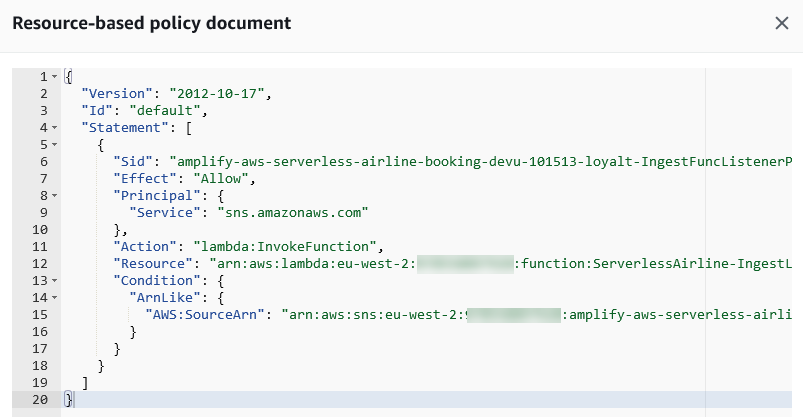
To be able to receive messages, I add a statement to the access policy of both queues granting the updates.fifo topic permissions to send messages to the queues. For example, for the customer.fifo queue the statement is:

{
  "Effect": "Allow",
  "Principal": {
    "Service": "sns.amazonaws.com"
  },
  "Action": "SQS:SendMessage",
  "Resource": "arn:aws:sqs:us-east-2:123412341234:customer.fifo",
  "Condition": {
    "ArnLike": {
      "aws:SourceArn": "arn:aws:sns:us-east-2:123412341234:updates.fifo"
    }
  }
}

Now, I use the SNS console to publish 4 messages in sequence. For all messages, I use the same message group ID. In this way, they are all in the same message group. The only part that is different is the message body, where I use in order:

  • Update One
  • Update Two
  • Update Three
  • Update One

In the SQS console, I see that only 3 messages have been delivered to the FIFO queues:

Why is that? When I created the FIFO topics, I enabled content-based deduplication. The 4 messages were sent within the 5-minute deduplication window. The last message has been recognized as a duplicate of the first one and has not been delivered to the subscribed queues.

Let’s see the actual messages in the queues. I use the AWS Command Line Interface (CLI) to receive the messages from SQS, and the jq command-line JSON processor to format the output and get only the Message in the Body.

Here are the messages in the customer.fifo queue:

$ aws sqs receive-message --queue-url https://sqs.us-east-2.amazonaws.com/123412341234/customer.fifo --max-number-of-messages 10 | jq '.Messages[].Body | fromjson | .Message'

"Update One"
"Update Two"
"Update Three"

And these are the messages in the loyalty.fifo queue:

$ aws sqs receive-message --queue-url https://sqs.us-east-2.amazonaws.com/123412341234/loyalty.fifo --max-number-of-messages 10 | jq '.Messages[].Body | fromjson | .Message'

"Update One"
"Update Two"
"Update Three"

As expected, the 3 messages with unique content have been delivered to both queues in the same order as they were sent.

Available Now
You can use SNS FIFO topics in all commercial regions. You can process up to 300 transactions per second (TPS) per FIFO topic or FIFO queue. With SNS, you pay only for what you use, you can find more information in the pricing page.

To learn more, please see the documentation.

Danilo

Building event-driven architectures with Amazon SNS FIFO

Post Syndicated from James Beswick original https://aws.amazon.com/blogs/compute/building-event-driven-architectures-with-amazon-sns-fifo/

This post is courtesy of Christian Mueller, Principal Solutions Architect.

Developers increasingly adopt event-driven architectures to decouple their distributed applications. Often, these events must be propagated in a strictly ordered manner to all subscribed applications. Using Amazon SNS FIFO topics and Amazon SQS FIFO queues, you can address use cases that require end-to-end message ordering, deduplication, filtering, and encryption.

In this blog post, I introduce a sample event-driven architecture. I walk through an implementation based on Amazon SNS FIFO topics and Amazon SQS FIFO queues.

Common requirements in event-driven-architectures

In event-driven architectures, data consistency is a common business requirement. This is often translated into technical requirements such as zero message loss and strict message ordering. For example, if you update your domain object rapidly, you want to be sure that all events are received by each subscriber in exactly the order they occurred. This way, the current domain object state is what each subscriber received as the latest update event. Similarly, all update events should be received after the initial create event.

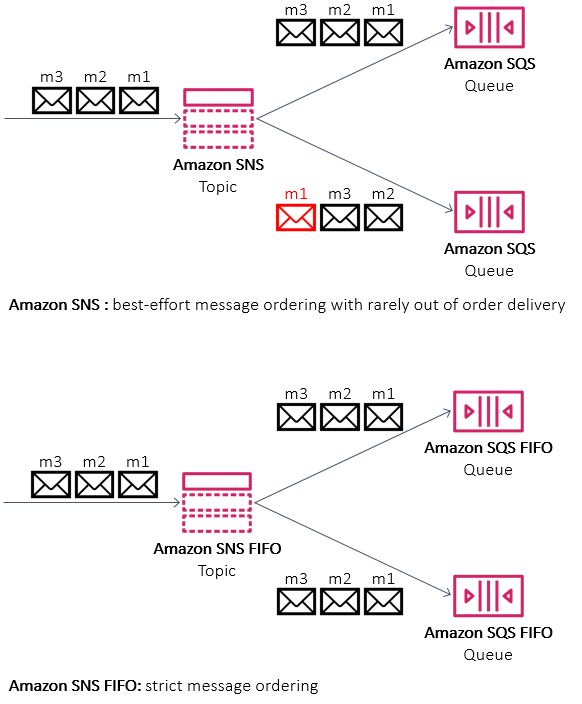
Before Amazon SNS FIFO, architects had to design applications to check if messages are received out of order before processing.

Comparing SNS and SNS FIFO

Another common challenge is preventing message duplicates when sending events to the messaging service. If an event publisher receives an error, such as a network timeout, the publisher does not know if the messaging service could receive and successfully process the message or not.

The client may retry, as this is the default behavior for some HTTP response codes in AWS SDKs. This can cause duplicate messages.

Before Amazon SNS FIFO, developers had to design receivers to be idempotent. In some cases, where the event cannot be idempotent, this requires the receiver to be implemented in an idempotent way. Often, this is done by adding a key-value store like Amazon DynamoDB or Amazon ElastiCache for Redis to the service. Using this approach, the receiver can track if the event has been seen before.

Exactly once processing and message deduplication

Exploring the recruiting agency example

This sample application models a recruitment agency with a job listings website. The application is composed of multiple services. I explain 3 of them in more detail.

Sample application architecture

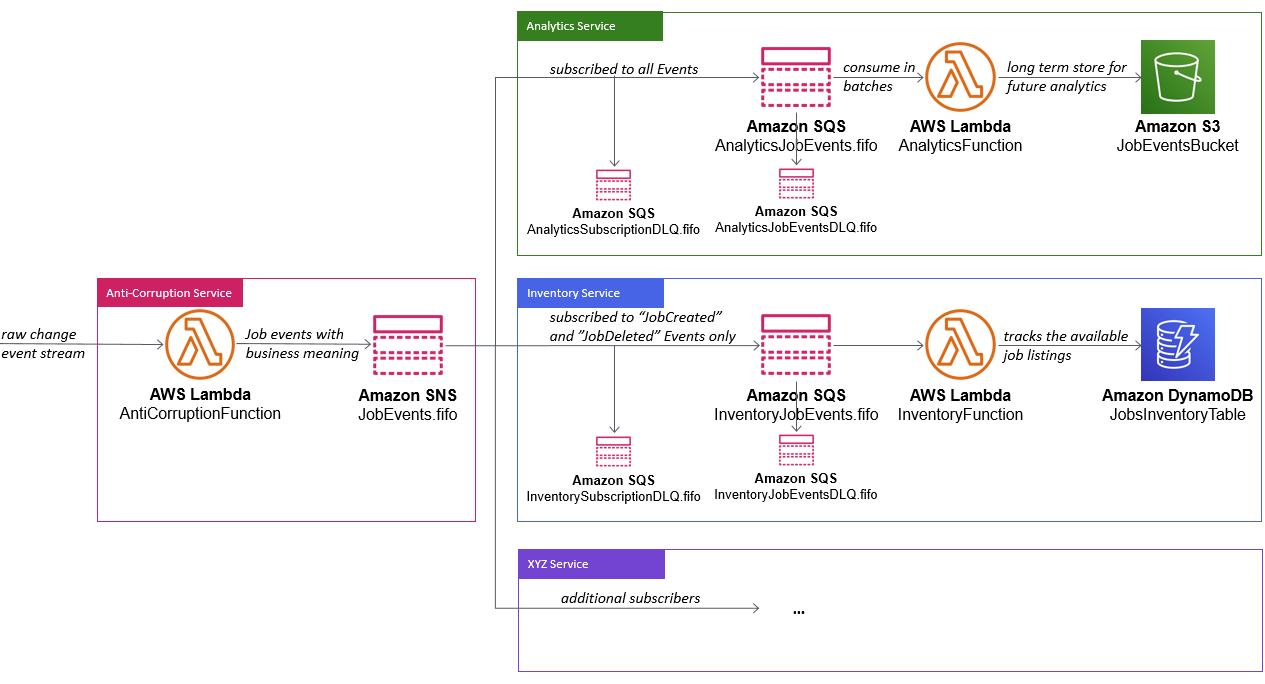
A custom service, the anti-corruption service, receives a change data capture (CDC) event stream of changes from a relational database. This service translates the low-level technical database events into meaningful business events for the domain services for easy consumption. These business events are sent to the SNS FIFO “JobEvents.fifo“ topic. Here, interested services subscribe to these events and process them asynchronously.

In this domain, the analytics service is interested in all events. It has an SQS FIFO “AnalyticsJobEvents.fifo” queue subscribed to the SNS FIFO “JobEvents.fifo“ topic. It uses SQS FIFO as event source for AWS Lambda, which processes and stores these events in Amazon S3. S3 is object storage service with high scalability, data availability, durability, security, and performance. This allows you to use services like Amazon EMR, AWS Glue or Amazon Athena to get insights into your data to extract value.

The inventory service owns an SQS FIFO “InventoryJobEvents.fifo” queue, which is subscribed to the SNS FIFO “JobEvents.fifo“ topic. It is only interested in “JobCreated” and “JobDeleted” events, as it only tracks which jobs are currently available and stores this information in a DynamoDB table. Therefore, it uses an SNS filter policy to only receive these events, instead of receiving all events.

This sample application focuses on the SNS FIFO capabilities, so I do not explore other services subscribed to the SNS FIFO topic. This sample follows the SQS best practices and SNS redrive policy recommendations and configures dead-letter queues (DLQ). This is useful in case SNS cannot deliver an event to the subscribed SQS queue. It also helps if the function fails to process an event from the corresponding SQS FIFO queue multiple times. As a requirement in both cases, the attached SQS DLQ must be an SQS FIFO queue.

Deploying the application

To deploy the application using infrastructure as code, it uses the AWS Serverless Application Model (SAM). SAM provides shorthand syntax to express functions, APIs, databases, and event source mappings. It is expanded into AWS CloudFormation syntax during deployment.

To get started, clone the “event-driven-architecture-with-sns-fifo” repository, from here. Alternatively, download the repository as a ZIP file from here and extract it to a directory of your choice.

As a prerequisite, you must have SAM CLI, Python 3, and PIP installed. You must also have the AWS CLI configured properly.

Navigate to the root directory of this project and build the application with SAM. SAM downloads required dependencies and stores them locally. Execute the following commands in your terminal:

git clone https://github.com/aws-samples/event-driven-architecture-with-amazon-sns-fifo.git
cd event-driven-architecture-with-amazon-sns-fifo
sam build

You see the following output:

Deployment output

Now, deploy the application:

sam deploy --guided

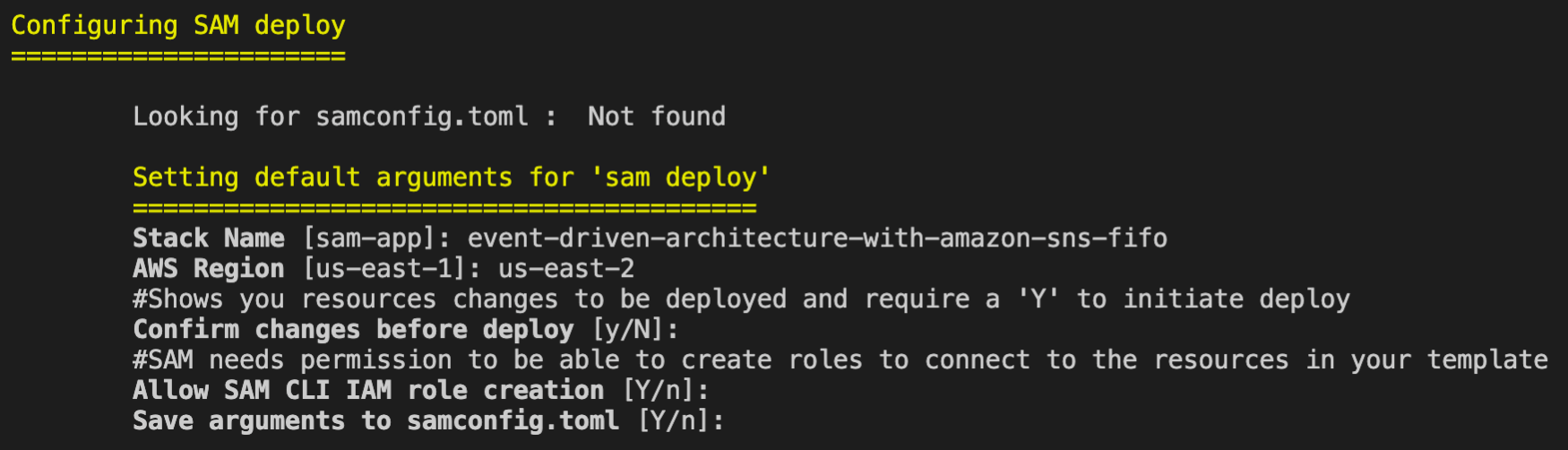
Provide arguments for the deployments, such as the stack name and preferred AWS Region:

SAM guided deployment

After a successful deployment, you see the following output:

Successful deployment message

Learning more about the implementation

I explore the three services forming this sample application, and how they use the features of SNS FIFO.

Anti-corruption service

The anti-corruption service owns the SNS FIFO “JobEvents.fifo” topic, where it publishes business events related to job postings. It uses an SNS FIFO topic, as end-to-end ordering per job ID is required. SNS FIFO is configured not to perform content-based deduplication, as I require a unique message deduplication ID for each event for deduplication. The corresponding definition in the SAM template looks like this:

  JobEventsTopic:
    Type: AWS::SNS::Topic
    Properties:
      TopicName: JobEvents.fifo
      FifoTopic: true
      ContentBasedDeduplication: false

For simplicity, the anti-corruption function in the sample application doesn’t consume an external database CDC stream. It uses Amazon CloudWatch Events as an event source to trigger the function every minute.

I provide the SNS FIFO topic Amazon Resource Name (ARN) as an environment variable in the function. This makes this function more portable to deploy in different environments and stages. The function’s AWS Identity and Access Management (IAM) policy grants permissions to publish messages to only this SNS topic:

  AntiCorruptionFunction:
    Type: AWS::Serverless::
    Properties:
      CodeUri: anti-corruption-service/
      Handler: app.lambda_handler
      Runtime: python3.7
      MemorySize: 256
      Environment:
        Variables:
          TOPIC_ARN: !Ref JobEventsTopic
      Policies:
        - SNSPublishMessagePolicy
            TopicName: !GetAtt JobEventsTopic.TopicName
      Events:
        Trigger:
          Type: 
          Properties:
            Schedule: 'rate(1 minute)'

The anti-corruption function uses features in the SNS publish API, which allows you to define a “MessageDeduplicationId” and a “MessageGroupId”. The “MessageDeduplicationId” is used to filter out duplicate messages, which are sent to SNS FIFO within in 5-minute deduplication interval. The “MessageGroupId” is required, as SNS FIFO processes all job events for the same message group in a strictly ordered manner, isolated from other message groups processed through the same topic.

Another important aspect in this implementation is the use of “MessageAttributes”. We define a message attribute with the name “eventType” and values like “JobCreated”, “JobSalaryUpdated”, and “JobDeleted”. This allows subscribers to define SNS filter policies to only receive certain events they are interested in:

import boto3
from datetime import datetime
import json
import os
import random
import uuid

TOPIC_ARN = os.environ['TOPIC_ARN']

sns = boto3.client('sns')

def lambda_handler(event, context):
    jobId = str(random.randrange(0, 1000))

    send_job_created_event(jobId)
    send_job_updated_event(jobId)
    send_job_deleted_event(jobId)
    return

def send_job_created_event(jobId):
    messageId = str(uuid.uuid4())

    response = sns.publish(
        TopicArn=TOPIC_ARN,
        Subject=f'Job {jobId} created',
        MessageDeduplicationId=messageId,
        MessageGroupId=f'JOB-{jobId}',
        Message={...},
        MessageAttributes = {
            'eventType': {
                'DataType': 'String',
                'StringValue': 'JobCreated'
            }
        }
    )
    print('sent message and received response: {}'.format(response))
    return

def send_job_updated_event(jobId):
    messageId = str(uuid.uuid4())

    response = sns.publish(...)
    print('sent message and received response: {}'.format(response))
    return

def send_job_deleted_event(jobId):
    messageId = str(uuid.uuid4())

    response = sns.publish(...)
    print('sent message and received response: {}'.format(response))
    return

Analytics service

The analytics service owns an SQS FIFO “AnalyticsJobEvents.fifo” queue which is subscribed to the SNS FIFO “JobEvents.fifo” topic. Following best practices, I define redrive policies for the SQS FIFO queue and the SNS FIFO subscription in the template:

  AnalyticsJobEventsQueue:
    Type: AWS::SQS::Queue
    Properties:
      QueueName: AnalyticsJobEvents.fifo
      FifoQueue: true
      RedrivePolicy:
        deadLetterTargetArn: !GetAtt AnalyticsJobEventsQueueDLQ.Arn
        maxReceiveCount: 3

  AnalyticsJobEventsQueueToJobEventsTopicSubscription:
    Type: AWS::SNS::Subscription
    Properties:
      Endpoint: !GetAtt AnalyticsJobEventsQueue.Arn
      Protocol: sqs
      RawMessageDelivery: true
      TopicArn: !Ref JobEventsTopic
      RedrivePolicy: !Sub '{"deadLetterTargetArn": "${AnalyticsJobEventsSubscriptionDLQ.Arn}"}'

The analytics function uses SQS FIFO as an event source for Lambda. The S3 bucket name is an environment variable for the function, which increases the code portability across environments and stages. The IAM policy for this function only grants permissions write objects to this S3 bucket:

  AnalyticsFunction:
    Type: AWS::Serverless::Function
    Properties:
      CodeUri: analytics-service/
      Handler: app.lambda_handler
      Runtime: python3.7
      MemorySize: 256
      Environment:
        Variables:
          BUCKET_NAME: !Ref AnalyticsBucket
      Policies:
        - S3WritePolicy:
            BucketName: !Ref AnalyticsBucket
      Events:
        Trigger:
          Type: SQS
          Properties:
            Queue: !GetAtt AnalyticsJobEventsQueue.Arn
            BatchSize: 10

View the function implementation at the GitHub repo.

Inventory service

The inventory service also owns an SQS FIFO “InventoryJobEvents.fifo” queue which is subscribed to the SNS FIFO “JobEvents.fifo” topic. It uses redrive policies for the SQS FIFO queue and the SNS FIFO subscription as well. This service is only interested in certain events, so uses an SNS filter policy to specify these events:

  InventoryJobEventsQueue:
    Type: AWS::SQS::Queue
    Properties:
      QueueName: InventoryJobEvents.fifo
      FifoQueue: true
      RedrivePolicy:
        deadLetterTargetArn: !GetAtt InventoryJobEventsQueueDLQ.Arn
        maxReceiveCount: 3

  InventoryJobEventsQueueToJobEventsTopicSubscription:
    Type: AWS::SNS::Subscription
    Properties:
      Endpoint: !GetAtt InventoryJobEventsQueue.Arn
      Protocol: sqs
      RawMessageDelivery: true
      TopicArn: !Ref JobEventsTopic
      FilterPolicy: '{"eventType":["JobCreated", "JobDeleted"]}'
      RedrivePolicy: !Sub '{"deadLetterTargetArn": "${InventoryJobEventsQueueSubscriptionDLQ.Arn}"}'

The inventory function also uses SQS FIFO as event source for Lambda. The DynamoDB table name is set as an environment variable, so the function can look up the name during initialization. The IAM policy grants read/write permissions for only this table:

  InventoryFunction:
    Type: AWS::Serverless::Function
    Properties:
      CodeUri: inventory-service/
      Handler: app.lambda_handler
      Runtime: python3.7
      MemorySize: 256
      Environment:
        Variables:
          TABLE_NAME: !Ref InventoryTable
      Policies:
        - DynamoDBCrudPolicy:
            TableName: !Ref InventoryTable
      Events:
        Trigger:
          Type: SQS
          Properties:
            Queue: !GetAtt InventoryJobEventsQueue.Arn
            BatchSize: 10

View the function implementation at the GitHub repo.

Conclusion

Amazon SNS FIFO topics can simplify the design of event-driven architectures and reduce custom code in building such applications.

By using the native integration with Amazon SQS FIFO queues, you can also build architectures that fan out to thousands of subscribers. This pattern helps achieve data consistency, deduplication, filtering, and encryption in near real time, using managed services.

For information on regional availability and service quotas, see SNS endpoints and quotas and SQS endpoints and quotas. For more information on the FIFO functionality, see SNS FIFO and SQS FIFO in their Developer Guides.

Optimizing the cost of serverless web applications

Post Syndicated from James Beswick original https://aws.amazon.com/blogs/compute/optimizing-the-cost-of-serverless-web-applications/

Web application backends are one of the most frequent types of serverless use-case for customers. The pay-for-value model can make it cost-efficient to build web applications using serverless tools.

While serverless cost is generally correlated with level of usage, there are architectural decisions that impact cost efficiency. The impact of these choices is more significant as your traffic grows, so it’s important to consider the cost-effectiveness of different designs and patterns.

This blog post reviews some common areas in web applications where you may be able to optimize cost. It uses the Happy Path web application as a reference example, which you can read about in the introductory blog post.

Serverless web applications generally use a combination of the services in the following diagram. I cover each of these areas to highlight common areas for cost optimization.

Serverless architecture by AWS service

The API management layer: Selecting the right API type

Most serverless web applications use an API between the frontend client and the backend architecture. Amazon API Gateway is a common choice since it is a fully managed service that scales automatically. There are three types of API offered by the service – REST APIs, WebSocket APIs, and the more recent HTTP APIs.

HTTP APIs offer many of the features in the REST APIs service, but the cost is often around 70% less. It supports Lambda service integration, JWT authorization, CORS, and custom domain names. It also has a simpler deployment model than REST APIs. This feature set tends to work well for web applications, many of which mainly use these capabilities. Additionally, HTTP APIs will gain feature parity with REST APIs over time.

The Happy Path application is designed for 100,000 monthly active users. It uses HTTP APIs, and you can inspect the backend/template.yaml to see how to define these in the AWS Serverless Application Model (AWS SAM). If you have existing AWS SAM templates that are using REST APIs, in many cases you can change these easily:

REST to HTTP API

Content distribution layer: Optimizing assets

Amazon CloudFront is a content delivery network (CDN). It enables you to distribute content globally across 216 Points of Presence without deploying or managing any infrastructure. It reduces latency for users who are geographically dispersed and can also reduce load on other parts of your service.

A typical web application uses CDNs in a couple of different ways. First, there is the distribution of the application itself. For single-page application frameworks like React or Vue.js, the build processes create static assets that are ideal for serving over a CDN.

However, these builds may not be optimized and can be larger than necessary. Many frameworks offer optimization plugins, and the JavaScript community frequently uses Webpack to bundle modules and shrink deployment packages. Similarly, any media assets used in the application build should be optimized. You can use tools like Lighthouse to analyze your web apps to find images that can be resized or compressed.

Optimizing images

The second common CDN use-case for web apps is for user-generated content (UGC). Many apps allow users to upload images, which are then shared with other users. A typical photo from a 12-megapixel smartphone is 3–9 MB in size. This high resolution is not necessary when photos are rendered within web apps. Displaying the high-resolution asset results in slower download performance and higher data transfer costs.

The Happy Path application uses a Resizer Lambda function to optimize these uploaded assets. This process creates two different optimized images depending upon which component loads the asset.

Image sizes in front-end applications

The upload S3 bucket shows the original size of the upload from the smartphone:

The distribution S3 bucket contains the two optimized images at different sizes:

Optimized images in the distribution S3 bucket

The distribution file sizes are 98–99% smaller. For a busy web application, using optimized image assets can make a significant difference to data transfer and CloudFront costs.

Additionally, you can convert to highly optimized file formats such as WebP to reduce file size even further. Not all browsers support this format, but you can use CSS on the frontend to fall back to other types if needed:

<img src="myImage.webp" onerror="this.onerror=null; this.src='myImage.jpg'">

The data layer

AWS offers many different database and storage options that can be useful for web applications. Billing models vary by service and Region. By understanding the data access and storage requirements of your app, you can make informed decisions about the right service to use.

Generally, it’s more cost-effective to store binary data in S3 than a database. First, when the data is uploaded, you can upload directly to S3 with presigned URLs instead of proxying data via API Gateway or another service.

If you are using Amazon DynamoDB, it’s best practice to store larger items in S3 and include a reference token in a table item. Part of DynamoDB pricing is based on read capacity units (RCUs). For binary items such as images, it is usually more cost-efficient to use S3 for storage.

Many web developers who are new to serverless are familiar with using a relational database, so choose Amazon RDS for their database needs. Depending upon your use-case and data access patterns, it may be more cost effective to use DynamoDB instead. RDS is not a serverless service so there are monthly charges for the underlying compute instance. DynamoDB pricing is based upon usage and storage, so for many web apps may be a lower-cost choice.

Integration layer

This layer includes services like Amazon SQS, Amazon SNS, and Amazon EventBridge, which are essential for decoupling serverless applications. Each of these have a request-based pricing component, where 64 KB of a payload is billed as one request. For example, a single SQS message with a 256 KB payload is billed as four requests. There are two optimization methods common for web applications.

1. Combine messages

Many messages sent to these services are much smaller than 64 KB. In some applications, the publishing service can combine multiple messages to reduce the total number of publish actions to SNS. Additionally, by either eliminating unused attributes in the message or compressing the message, you can store more data in a single request.

For example, a publishing service may be able to combine multiple messages together in a single publish action to an SNS topic:

  • Before optimization, a publishing service sends 100,000,000 1KB-messages to an SNS topic. This is charged as 100 million messages for a total cost of $50.00.
  • After optimization, the publishing service combines messages to send 1,562,500 64KB-messages to an SNS topic. This is charged as 1,562,500 messages for a total cost of $0.78.

2. Filter messages

In many applications, not every message is useful for a consuming service. For example, an SNS topic may publish to a Lambda function, which checks the content and discards the message based on some criteria. In this case, it’s more cost effective to use the native filtering capabilities of SNS. The service can filter messages and only invoke the Lambda function if the criteria is met. This lowers the compute cost by only invoking Lambda when necessary.

For example, an SNS topic receives messages about customer orders and forwards these to a Lambda function subscriber. The function is only interested in canceled orders and discards all other messages:

  • Before optimization, the SNS topic sends all messages to a Lambda function. It evaluates the message for the presence of an order canceled attribute. On average, only 25% of the messages are processed further. While SNS does not charge for delivery to Lambda functions, you are charged each time the Lambda service is invoked, for 100% of the messages.
  • After optimization, using an SNS subscription filter policy, the SNS subscription filters for canceled orders and only forwards matching messages. Since the Lambda function is only invoked for 25% of the messages, this may reduce the total compute cost by up to 75%.

3. Choose a different messaging service

For complex filtering options based upon matching patterns, you can use EventBridge. The service can filter messages based upon prefix matching, numeric matching, and other patterns, combining several rules into a single filter. You can create branching logic within the EventBridge rule to invoke downstream targets.

EventBridge offers a broader range of targets than SNS destinations. In cases where you publish from an SNS topic to a Lambda function to invoke an EventBridge target, you could use EventBridge instead and eliminate the Lambda invocation. For example, instead of routing from SNS to Lambda to AWS Step Functions, instead create an EventBridge rule that routes events directly to a state machine.

Business logic layer

Step Functions allows you to orchestrate complex workflows in serverless applications while eliminating common boilerplate code. The Standard Workflow service charges per state transition. Express Workflows were introduced in December 2019, with pricing based on requests and duration, instead of transitions.

For workloads that are processing large numbers of events in shorter durations, Express Workflows can be more cost-effective. This is designed for high-volume event workloads, such as streaming data processing or IoT data ingestion. For these cases, compare the cost of the two workflow types to see if you can reduce cost by switching across.

Lambda is the on-demand compute layer in serverless applications, which is billed by requests and GB-seconds. GB-seconds is calculated by multiplying duration in seconds by memory allocated to the function. For a function with a 1-second duration, invoked 1 million times, here is how memory allocation affects the total cost in the US East (N. Virginia) Region:

Memory (MB) GB/S Compute cost Total cost
128 125,000 $ 2.08 $ 2.28
512 500,000 $ 8.34 $ 8.54
1024 1,000,000 $ 16.67 $ 16.87
1536 1,500,000 $ 25.01 $ 25.21
2048 2,000,000 $ 33.34 $ 33.54
3008 2,937,500 $ 48.97 $ 49.17

There are many ways to optimize Lambda functions, but one of the most important choices is memory allocation. You can choose between 128 MB and 3008 MB, but this also impacts the amount of virtual CPU as memory increases. Since total cost is a combination of memory and duration, choosing more memory can often reduce duration and lower overall cost.

Instead of manually setting the memory for a Lambda function and running executions to compare duration, you can use the AWS Lambda Power Tuning tool. This uses Step Functions to run your function against varying memory configurations. It can produce a visualization to find the optimal memory setting, based upon cost or execution time.

Optimizing costs with the AWS Lambda Power Tuning tool

Conclusion

Web application backends are one of the most popular workload types for serverless applications. The pay-per-value model works well for this type of workload. As traffic grows, it’s important to consider the design choices and service configurations used to optimize your cost.

Serverless web applications generally use a common range of services, which you can logically split into different layers. This post examines each layer and suggests common cost optimizations helpful for web app developers.

To learn more about building web apps with serverless, see the Happy Path series. For more serverless learning resources, visit https://serverlessland.com.

Building resilient serverless patterns by combining messaging services

Post Syndicated from James Beswick original https://aws.amazon.com/blogs/compute/building-resilient-no-code-serverless-patterns-by-combining-messaging-services/

In “Choosing between messaging services for serverless applications”, I explain the features and differences between the core AWS messaging services. Amazon SQS, Amazon SNS, and Amazon EventBridge provide queues, publish/subscribe, and event bus functionality for your applications. Individually, these are robust, scalable services that are fundamental building blocks of serverless architectures.

However, you can also combine these services to solve specific challenges in distributed architectures. By doing this, you can use specific features of each service to build sophisticated patterns with little code. These combinations can make your applications more resilient and scalable, and reduce the amount of custom logic and architecture in your workload.

In this blog post, I highlight several important patterns for serverless developers. I also show how you use and deploy these integrations with the AWS Serverless Application Model (AWS SAM).

Examples in this post refer to code that can be downloaded from this GitHub repo. The README.md file explains how to deploy and run each example.

SNS to SQS: Adding resilience and throttling to message throughput

SNS has a robust retry policy that results in up to 100,010 delivery attempts over 23 days. If a downstream service is unavailable, it may be overwhelmed by retries when it comes back online. You can solve this issue by adding an SQS queue.

Adding an SQS queue between the SNS topic and its subscriber has two benefits. First, it adds resilience to message delivery, since the messages are durably stored in a queue. Second, it throttles the rate of messages to the consumer, helping smooth out traffic bursts caused by the service catching up with missed messages.

To build this in an AWS SAM template, you first define the two resources, and the SNS subscription:

  MySqsQueue:
    Type: AWS::SQS::Queue

  MySnsTopic:
    Type: AWS::SNS::Topic
    Properties:
      Subscription:
        - Protocol: sqs
          Endpoint: !GetAtt MySqsQueue.Arn

Finally, you provide permission to the SNS topic to publish to the queue, using the AWS::SQS::QueuePolicy resource:

  SnsToSqsPolicy:
    Type: AWS::SQS::QueuePolicy
    Properties:
      PolicyDocument:
        Version: "2012-10-17"
        Statement:
          - Sid: "Allow SNS publish to SQS"
            Effect: Allow
            Principal: "*"
            Resource: !GetAtt MySqsQueue.Arn
            Action: SQS:SendMessage
            Condition:
              ArnEquals:
                aws:SourceArn: !Ref MySnsTopic
      Queues:
        - Ref: MySqsQueue

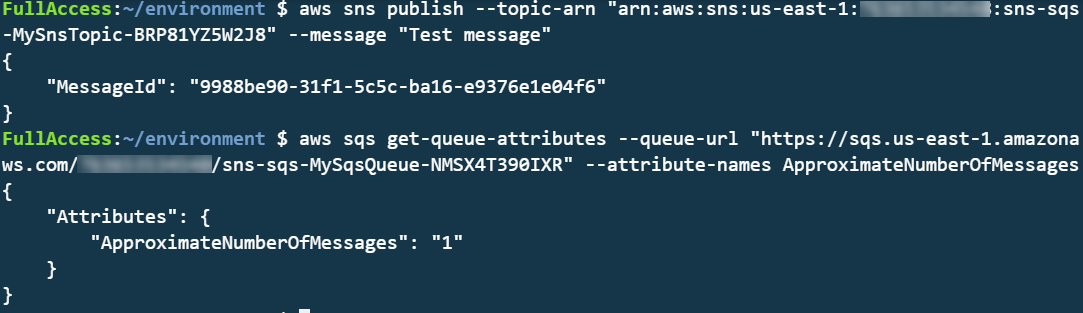
To test this, you can publish a message to the SNS topic and then inspect the SQS queue length using the AWS CLI:

aws sns publish --topic-arn "arn:aws:sns:us-east-1:123456789012:sns-sqs-MySnsTopic-ABC123ABC" --message "Test message"
aws sqs get-queue-attributes --queue-url "https://sqs.us-east-1.amazonaws.com/123456789012/sns-sqs-MySqsQueue- ABC123ABC " --attribute-names ApproximateNumberOfMessages

This results in the following output:

CLI output

Another usage of this pattern is when you want to filter messages in architectures using an SQS queue. By placing the SNS topic in front of the queue, you can use the message filtering capabilities of SNS. This ensures that only the messages you need are published to the queue. To use message filtering in AWS SAM, use the AWS:SNS:Subcription resource:

  QueueSubcription:
    Type: 'AWS::SNS::Subscription'
    Properties:
      TopicArn: !Ref MySnsTopic
      Endpoint: !GetAtt MySqsQueue.Arn
      Protocol: sqs
      FilterPolicy:
        type:
        - orders
        - payments 
      RawMessageDelivery: 'true'

EventBridge to SNS: combining features of both services

Both SNS and EventBridge have different characteristics in terms of targets, and integration with broader features. This table compares the major differences between the two services:

Amazon SNS Amazon EventBridge
Number of targets 10 million (soft) 5
Limits 100,000 topics. 12,500,000 subscriptions per topic. 100 event buses. 300 rules per event bus.
Input transformation No Yes – see details.
Message filtering Yes – see details. Yes, including IP address matching – see details.
Format Raw or JSON JSON
Receive events from AWS CloudTrail No Yes
Targets HTTP(S), SMS, SNS Mobile Push, Email/Email-JSON, SQS, Lambda functions 15 targets including AWS LambdaAmazon SQSAmazon SNSAWS Step FunctionsAmazon Kinesis Data StreamsAmazon Kinesis Data Firehose.
SaaS integration No Yes – see integration partners.
Schema Registry integration No Yes – see details.
Dead-letter queues supported Yes No
Public visibility Can create public topics Cannot create public buses
Cross-Region You can subscribe your AWS Lambda functions to an Amazon SNS topic in any Region. Targets must be same Region. You can publish across Region to another event bus.

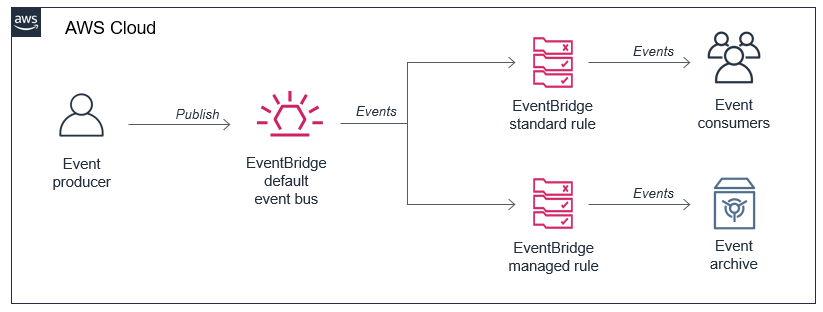
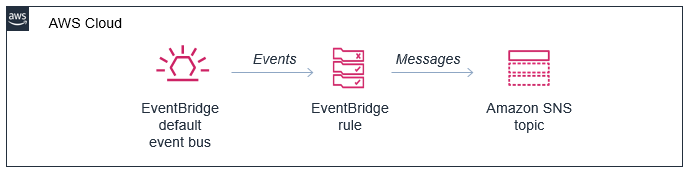
In this pattern, you configure an SNS topic as a target of an EventBridge rule:

SNS topic as a target for an EventBridge rule

In the AWS SAM template, you declare the resources in the preceding diagram as follows:

Resources:
  MySnsTopic:
    Type: AWS::SNS::Topic

  EventRule: 
    Type: AWS::Events::Rule
    Properties: 
      Description: "EventRule"
      EventPattern: 
        account: 
          - !Sub '${AWS::AccountId}'
        source:
          - "demo.cli"
      Targets: 
        - Arn: !Ref MySnsTopic
          Id: "SNStopic"

The default bus already exists in every AWS account, so there is no need to declare it. For the event bus to publish matching events to the SNS topic, you define permissions using the AWS::SNS::TopicPolicy resource:

  EventBridgeToToSnsPolicy:
    Type: AWS::SNS::TopicPolicy
    Properties: 
      PolicyDocument:
        Statement:
        - Effect: Allow
          Principal:
            Service: events.amazonaws.com
          Action: sns:Publish
          Resource: !Ref MySnsTopic
      Topics: 
        - !Ref MySnsTopic       

EventBridge has a limit of five targets per rule. In cases where you must send events to hundreds or thousands of targets, publishing to SNS first and then subscribing those targets to the topic works around this limit. Both services have different targets, and this pattern allows you to deliver EventBridge events to SMS, HTTP(s), email and SNS mobile push.

You can transform and filter the message using these services, often without needing an AWS Lambda function. SNS does not support input transformation but you can do this in an EventBridge rule. Message filtering is possible in both services but EventBridge provides richer content filtering capabilities.

AWS CloudTrail can log and monitor activity across services in your AWS account. It can be a useful source for events, allowing you to respond dynamically to objects in Amazon S3 or react to changes in your environment, for example. This natively integrates with EventBridge, allowing you to ingest events at scale from dozens of services.

Using EventBridge enables you to source events from outside your AWS account, offering integrations with a list of software as a service (SaaS) providers. This capability allows you to receive events from your accounts with SaaS providers like Zendesk, PagerDuty, and Auth0. These events are delivered to a partner event bus in your account, and can then be filtered and routed to an SNS topic.

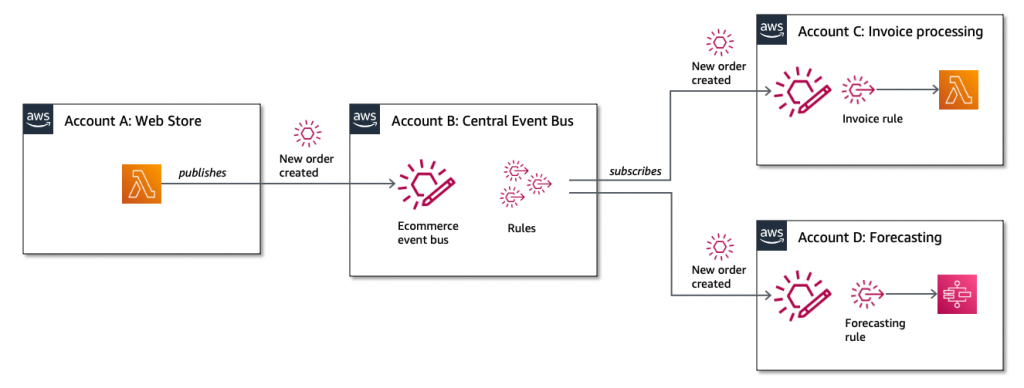
Additionally, this pattern allows you to deliver events to Lambda functions in other AWS accounts and in other AWS Regions. You can invoke Lambda from SNS topics in other Regions and accounts. It’s also possible to make SNS topics publicly read-only, making them extensible endpoints that other third parties can consume from. SNS has comprehensive access control, which you can incorporate into this pattern.

Cross-account publishing

EventBridge to SQS: Building fault-tolerant microservices

EventBridge can route events to targets such as microservices. In the case of downstream failures, the service retries events for up to 24 hours. For workloads where you need a longer period of time to store and retry messages, you can deliver the events to an SQS queue in each microservice. This durably stores those events until the downstream service recovers. Additionally, this pattern protects the microservice from large bursts of traffic by throttling the delivery of messages.

Fault-tolerant microservices architecture

The resources declared in the AWS SAM template are similar to the previous examples, but it uses the AWS::SQS::QueuePolicy resource to grant the appropriate permission to EventBridge:

  EventBridgeToToSqsPolicy:
    Type: AWS::SQS::QueuePolicy
    Properties:
      PolicyDocument:
        Statement:
        - Effect: Allow
          Principal:
            Service: events.amazonaws.com
          Action: SQS:SendMessage
          Resource:  !GetAtt MySqsQueue.Arn
      Queues:
        - Ref: MySqsQueue

Conclusion

You can combine these services in your architectures to implement patterns that solve complex challenges, often with little code required. This blog post shows three examples that implement message throttling and queueing, integrating SNS and EventBridge, and building fault tolerant microservices.

To learn more building decoupled architectures, see this Learning Path series on EventBridge. For more serverless learning resources, visit https://serverlessland.com.

Choosing between messaging services for serverless applications

Post Syndicated from James Beswick original https://aws.amazon.com/blogs/compute/choosing-between-messaging-services-for-serverless-applications/

Most serverless application architectures use a combination of different AWS services, microservices, and AWS Lambda functions. Messaging services are important in allowing distributed applications to communicate with each other, and are fundamental to most production serverless workloads.

Messaging services can improve the resilience, availability, and scalability of applications, when used appropriately. They can also enable your applications to communicate beyond your workload or even the AWS Cloud, and provide extensibility for future service features and versions.

In this blog post, I compare the primary messaging services offered by AWS and how you can use these in your serverless application architectures. I also show how you use and deploy these integrations with the AWS Serverless Application Model (AWS SAM).

Examples in this post refer to code that can be downloaded from this GitHub repository. The README.md file explains how to deploy and run each example.

Overview

Three of the most useful messaging patterns for serverless developers are queues, publish/subscribe, and event buses. In AWS, these are provided by Amazon SQS, Amazon SNS, and Amazon EventBridge respectively. All of these services are fully managed and highly available, so there is no infrastructure to manage. All three integrate with Lambda, allowing you to publish messages via the AWS SDK and invoke functions as targets. Each of these services has an important role to play in serverless architectures.

SNS enables you to send messages reliably between parts of your infrastructure. It uses a robust retry mechanism for when downstream targets are unavailable. When the delivery policy is exhausted, it can optionally send those messages to a dead-letter queue for further processing. SNS uses topics to logically separate messages into channels, and your Lambda functions interact with these topics.

SQS provides queues for your serverless applications. You can use a queue to send, store, and receive messages between different services in your workload. Queues are an important mechanism for providing fault tolerance in distributed systems, and help decouple different parts of your application. SQS scales elastically, and there is no limit to the number of messages per queue. The service durably persists messages until they are processed by a downstream consumer.

EventBridge is a serverless event bus service, simplifying routing events between AWS services, software as a service (SaaS) providers, and your own applications. It logically separates routing using event buses, and you implement the routing logic using rules. You can filter and transform incoming messages at the service level, and route events to multiple targets, including Lambda functions.

Integrating an SQS queue with AWS SAM

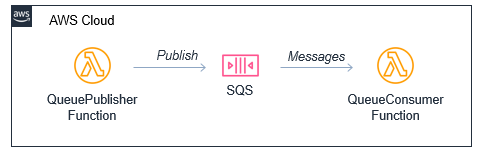
The first example shows an AWS SAM template defining a serverless application with two Lambda functions and an SQS queue:

Producer-consumer example

You can declare an SQS queue in an AWS SAM template with the AWS::SQS::Queue resource:

  MySqsQueue:
    Type: AWS::SQS::Queue

To publish to the queue, the publisher function must have permission to send messages. Using an AWS SAM policy template, you can apply policy that enables send messaging to one specific queue:

      Policies:
        - SQSSendMessagePolicy:
            QueueName: !GetAtt MySqsQueue.QueueName

The AWS SAM template passes the queue name into the Lambda function as an environment variable. The function uses the sendMessage method of the AWS.SQS class to publish the message:

const AWS = require('aws-sdk')
AWS.config.region = process.env.AWS_REGION 
const sqs = new AWS.SQS({apiVersion: '2012-11-05'})

// The Lambda handler
exports.handler = async (event) => {
  // Params object for SQS
  const params = {
    MessageBody: `Message at ${Date()}`,
    QueueUrl: process.env.SQSqueueName
  }
  
  // Send to SQS
  const result = await sqs.sendMessage(params).promise()
  console.log(result)
}

When the SQS queue receives the message, it publishes to the consuming Lambda function. To configure this integration in AWS SAM, the consumer function is granted the SQSPollerPolicy policy. The function’s event source is set to receive messages from the queue in batches of 10:

  QueueConsumerFunction:
    Type: AWS::Serverless::Function 
    Properties:
      CodeUri: code/
      Handler: consumer.handler
      Runtime: nodejs12.x
      Timeout: 3
      MemorySize: 128
      Policies:  
        - SQSPollerPolicy:
            QueueName: !GetAtt MySqsQueue.QueueName
      Events:
        MySQSEvent:
          Type: SQS
          Properties:
            Queue: !GetAtt MySqsQueue.Arn
            BatchSize: 10

The payload for the consumer function is the message from SQS. This is an array of messages up to the batch size, containing a body attribute with the publishing function’s MessageBody. You can see this in the CloudWatch log for the function:

CloudWatch log result

Integrating an SNS topic with AWS SAM

The second example shows an AWS SAM template defining a serverless application with three Lambda functions and an SNS topic:

SNS fanout to Lambda functions

You declare an SNS topic and the subscribing Lambda functions with the AWS::SNS:Topic resource:

  MySnsTopic:
    Type: AWS::SNS::Topic
    Properties:
      Subscription:
        - Protocol: lambda
          Endpoint: !GetAtt TopicConsumerFunction1.Arn    
        - Protocol: lambda
          Endpoint: !GetAtt TopicConsumerFunction2.Arn

You provide the SNS service with permission to invoke the Lambda functions but defining an AWS::Lambda::Permission for each:

  TopicConsumerFunction1Permission:
    Type: 'AWS::Lambda::Permission'
    Properties:
      Action: 'lambda:InvokeFunction'
      FunctionName: !Ref TopicConsumerFunction1
      Principal: sns.amazonaws.com

The SNSPublishMessagePolicy policy template grants permission to the publishing function to send messages to the topic. In the function, the publish method of the AWS.SNS class handles publishing:

const AWS = require('aws-sdk')
AWS.config.region = process.env.AWS_REGION 
const sns = new AWS.SNS({apiVersion: '2012-11-05'})

// The Lambda handler
exports.handler = async (event) => {
  // Params object for SNS
  const params = {
    Message: `Message at ${Date()}`,
    Subject: 'New message from publisher',
    TopicArn: process.env.SNStopic
  }
  
  // Send to SQS
  const result = await sns.publish(params).promise()
  console.log(result)
}

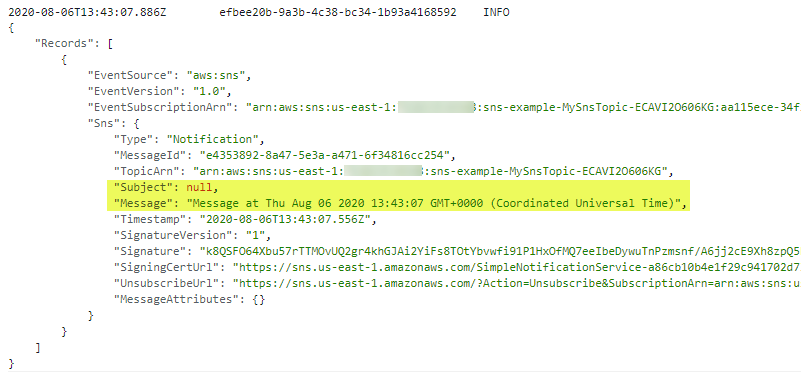
The payload for the consumer functions is the message from SNS. This is an array of messages, containing subject and message attributes from the publishing function. You can see this in the CloudWatch log for the function:

CloudWatch log result

Differences between SQS and SNS configurations

SQS queues and SNS topics offer different functionality, though both can publish to downstream Lambda functions.

An SQS message is stored on the queue for up to 14 days until it is successfully processed by a subscriber. SNS does not retain messages so if there are no subscribers for a topic, the message is discarded.

SNS topics may broadcast to multiple targets. This behavior is called fan-out. It can be used to parallelize work across Lambda functions or send messages to multiple environments (such as test or development). An SNS topic can have up to 12,500,000 subscribers, providing highly scalable fan-out capabilities. The targets may include HTTP/S endpoints, SMS text messaging, SNS mobile push, email, SQS, and Lambda functions.

In AWS SAM templates, you can retrieve properties such as ARNs and names of queues and topics, using the following intrinsic functions:

Amazon SQS Amazon SNS
Channel type Queue Topic
Get ARN !GetAtt MySqsQueue.Arn !Ref MySnsTopic
Get name !GetAtt MySqsQueue.QueueName !GetAtt MySnsTopic.TopicName

Integrating with EventBridge in AWS SAM

The third example shows the AWS SAM template defining a serverless application with two Lambda functions and an EventBridge rule:

EventBridge integration with AWS SAM

The default event bus already exists in every AWS account. You declare a rule that filters events in the event bus using the AWS::Events::Rule resource:

  EventRule: 
    Type: AWS::Events::Rule
    Properties: 
      Description: "EventRule"
      EventPattern: 
        source: 
          - "demo.event"
        detail: 
          state: 
            - "new"
      State: "ENABLED"
      Targets: 
        - Arn: !GetAtt EventConsumerFunction.Arn
          Id: "ConsumerTarget"

The rule describes an event pattern specifying matching JSON attributes. Events that match this pattern are routed to the list of targets. You provide the EventBridge service with permission to invoke the Lambda functions in the target list:

  PermissionForEventsToInvokeLambda: 
    Type: AWS::Lambda::Permission
    Properties: 
      FunctionName: 
        Ref: "EventConsumerFunction"
      Action: "lambda:InvokeFunction"
      Principal: "events.amazonaws.com"
      SourceArn: !GetAtt EventRule.Arn

The AWS SAM template uses an IAM policy statement to grant permission to the publishing function to put events on the event bus:

  EventPublisherFunction:
    Type: AWS::Serverless::Function
    Properties:
      CodeUri: code/
      Handler: publisher.handler
      Timeout: 3
      Runtime: nodejs12.x
      Policies:
        - Statement:
          - Effect: Allow
            Resource: '*'
            Action:
              - events:PutEvents      

The publishing function then uses the putEvents method of the AWS.EventBridge class, which returns after the events have been durably stored in EventBridge:

const AWS = require('aws-sdk')
AWS.config.update({region: 'us-east-1'})
const eventbridge = new AWS.EventBridge()

exports.handler = async (event) => {
  const params = {
    Entries: [ 
      {
        Detail: JSON.stringify({
          "message": "Hello from publisher",
          "state": "new"
        }),
        DetailType: 'Message',
        EventBusName: 'default',
        Source: 'demo.event',
        Time: new Date 
      }
    ]
  }
  const result = await eventbridge.putEvents(params).promise()
  console.log(result)
}

The payload for the consumer function is the message from EventBridge. This is an array of messages, containing subject and message attributes from the publishing function. You can see this in the CloudWatch log for the function:

CloudWatch log result

Comparing SNS with EventBridge

SNS and EventBridge have many similarities. Both can be used to decouple publishers and subscribers, filter messages or events, and provide fan-in or fan-out capabilities. However, there are differences in the list of targets and features for each service, and your choice of service depends on the needs of your use-case.

EventBridge offers two newer capabilities that are not available in SNS. The first is software as a service (SaaS) integration. This enables you to authorize supported SaaS providers to send events directly from their EventBridge event bus to partner event buses in your account. This replaces the need for polling or webhook configuration, and creates a highly scalable way to ingest SaaS events directly into your AWS account.

The second feature is the Schema Registry, which makes it easier to discover and manage OpenAPI schemas for events. EventBridge can infer schemas based on events routed through an event bus by using schema discovery. This can be used to generate code bindings directly to your IDE for type-safe languages like Python, Java, and TypeScript. This can help accelerate development by automating the generation of classes and code directly from events.

This table compares the major features of both services:

Amazon SNS Amazon EventBridge
Number of targets 10 million (soft) 5
Availability SLA 99.9% 99.99%
Limits 100,000 topics. 12,500,000 subscriptions per topic. 100 event buses. 300 rules per event bus.
Publish throughput Varies by Region. Soft limits. Varies by Region. Soft limits.
Input transformation No Yes – see details.
Message filtering Yes – see details. Yes, including IP address matching – see details.
Message size maximum 256 KB 256 KB
Billing Per 64 KB
Format Raw or JSON JSON
Receive events from AWS CloudTrail No Yes
Targets HTTP(S), SMS, SNS Mobile Push, Email/Email-JSON, SQS, Lambda functions. 15 targets including AWS LambdaAmazon SQSAmazon SNSAWS Step FunctionsAmazon Kinesis Data StreamsAmazon Kinesis Data Firehose.
SaaS integration No Yes – see integrations.
Schema Registry integration No Yes – see details.
Dead-letter queues supported Yes No
FIFO ordering available No No
Public visibility Can create public topics Cannot create public buses
Pricing $0.50/million requests + variable delivery cost + data transfer out cost. SMS varies. $1.00/million events. Free for AWS events. No charge for delivery.
Billable request size 1 request = 64 KB 1 event = 64 KB
AWS Free Tier eligible Yes No
Cross-Region You can subscribe your AWS Lambda functions to an Amazon SNS topic in any Region. Targets must be in the same Region. You can publish across Regions to another event bus.
Retry policy
  • For SQS/Lambda, exponential backoff over 23 days.
  • For SMTP, SMS and Mobile push, exponential backoff over 6 hours.
At-least-once event delivery to targets, including retry with exponential backoff for up to 24 hours.

Conclusion

Messaging is an important part of serverless applications and AWS services provide queues, publish/subscribe, and event routing capabilities. This post reviews the main features of SNS, SQS, and EventBridge and how they provide different capabilities for your workloads.

I show three example applications that publish and consume events from the three services. I walk through AWS SAM syntax for deploying these resources in your applications. Finally, I compare differences between the services.

To learn more building decoupled architectures, see this Learning Path series on EventBridge. For more serverless learning resources, visit https://serverlessland.com.