Post Syndicated from Medha Shree original https://aws.amazon.com/blogs/architecture/architecting-ai-powered-resilience-framework-on-aws/
When your production system goes down, you often discover the hard way that your resilience testing missed critical dependencies. Building an AI-powered resilience framework on AWS helps you find those weaknesses before your customers do.
Your systems don’t fail because your infrastructure isn’t resilient. They fail because resilience is assumed, not proven. Every deployment introduces new dependencies, every configuration change creates untested paths, and every gap between design intent and runtime behavior is a risk waiting to surface. In a world where customers expect always-on availability, the cost of discovering these weaknesses in production isn’t just technical. It’s measured in revenue lost, trust eroded, and events that were entirely preventable.
In this post, you’ll learn how to architect and implement a five-layer AI-powered resilience framework that automatically discovers dependencies, generates targeted experiments, and integrates with your existing Continuous Integration/Continuous Deployment (CI/CD) pipelines. First, we’ll explore the key challenges in resilience testing. Then, we’ll walk through the five-layer architecture that solves these challenges. Finally, we’ll show you how to implement this, with phased rollout guidance for pilot, expansion, and organization-wide deployment.
Traditional resilience testing can take weeks because the information needed is naturally spread across architecture diagrams, runbooks, code repositories, and team knowledge that evolves with every deployment. Designing meaningful chaos experiments on top of that requires specialized expertise that most teams don’t have on hand. Here’s how this AI-powered framework discovers your infrastructure dependencies in hours and generates targeted experiments without requiring specialized knowledge.
Combining AWS Resilience Hub, AWS Fault Injection Service, Amazon Bedrock AgentCore, and AWS Systems Manager work together to discover infrastructure dependencies in hours, tailor experiments to your specific architecture, and identify weaknesses before they affect customers.
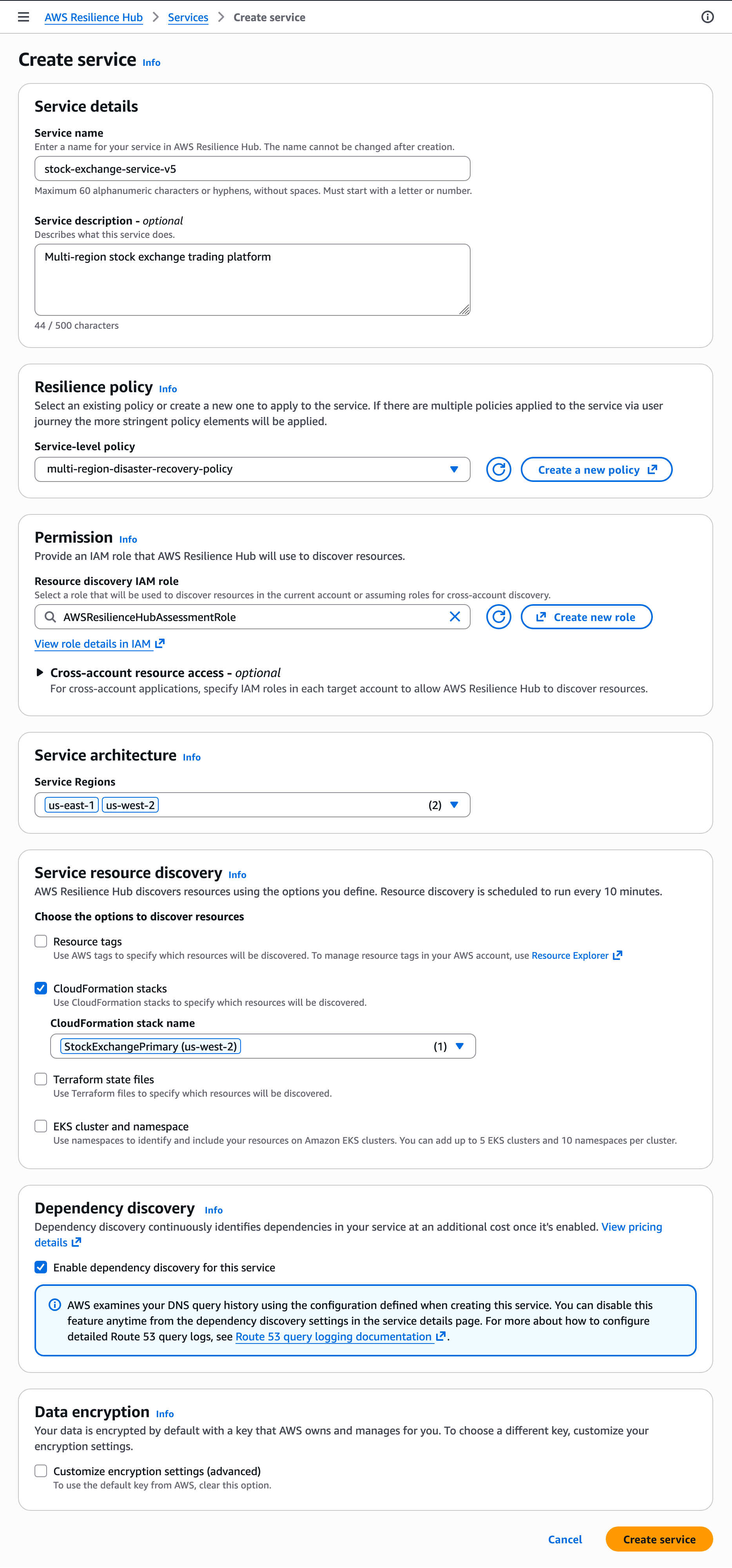
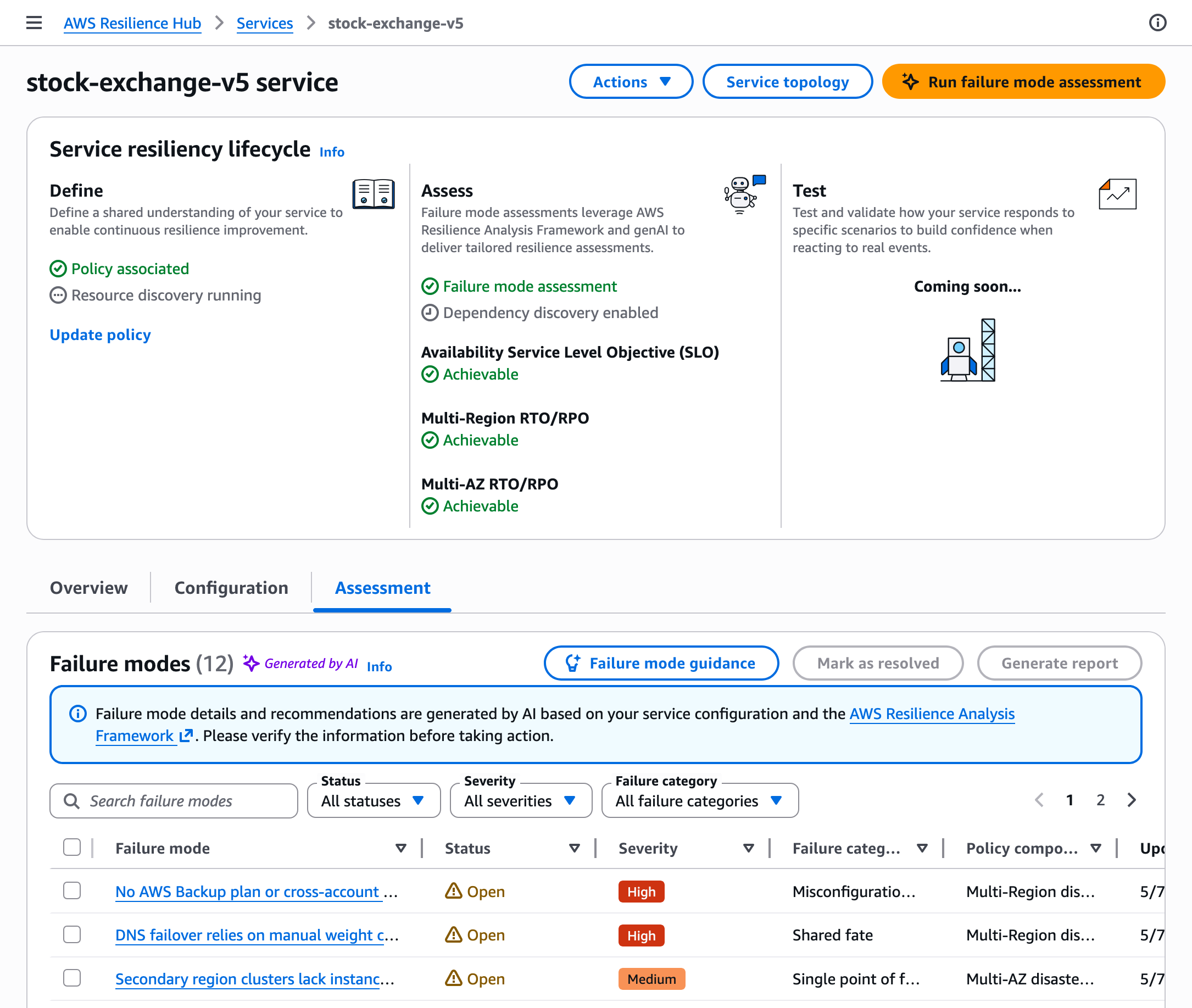
With the next generation of AWS Resilience Hub now providing native dependency discovery and generative AI-powered failure mode analysis, this framework extends those capabilities by automating experiment generation, embedding resilience testing into your CI/CD pipelines, and creating a continuous validation loop through custom AI agents hosted on Amazon Bedrock AgentCore.
Key concepts
Before diving into the architecture, here are the key terms used throughout this post:
- Chaos engineering — The discipline of experimenting on a system to build confidence in its ability to withstand turbulent conditions in production.
- Mean time to resolution (MTTR) — The average time to restore service after a failure.
- Recovery Time Objective (RTO) — The maximum acceptable downtime for your application.
- Recovery Point Objective (RPO) — The maximum acceptable data loss, measured in time.
- Shift-left — Testing earlier in the development cycle to catch issues before they reach production.
- Circuit breaker — An automated mechanism that detects service failures and helps prevent cascading outages by temporarily blocking requests to failing services.
- Canary deployment — A technique where changes roll out to a small percentage of users first to validate functionality before full deployment.
Who this is for
This post targets cloud architects, DevOps engineers, and Site Reliability Engineering (SRE) teams responsible for system reliability. You should understand AWS services, distributed systems architecture, and CI/CD pipelines. While chaos engineering experience helps, it’s not required. This framework reduces the expertise barrier that traditionally prevented adoption.
Resilience testing challenges
When infrastructure changes happen quickly, documentation tends to lag behind. A routing change to the payment service might not get reflected in the architecture diagrams, leaving single points of failure (like a single-Availability Zone authentication dependency) undocumented and untested. The payment service calls a legacy authentication API that only runs in one Availability Zone, a critical single point of failure. But documentation doesn’t reflect this because someone made a “quick fix” three weeks ago and forgot to update the diagrams.
Distributed systems contain hundreds of interconnected components. Tracking every dependency manually becomes impractical when you deploy changes continuously. Documentation created last month already misses dozens of new dependencies.
Resilience testing can be challenging without dedicated specialists to design meaningful experiments. Resilience testing is most effective when it’s tailored to your actual architecture and runs continuously. Generic fault injection and one-off test runs can leave gaps, especially as your system changes over time.
The expertise barrier stops many organizations entirely. Effective chaos engineering demands understanding distributed systems architecture, failure mode analysis, experiment scope management, and safe experiment design. Without this specialized knowledge, you either avoid resilience testing or run superficial tests that miss critical vulnerabilities.
According to the 2024 IBM Security Services Benchmark Report, organizations with mature response capabilities reduce their MTTR by approximately 50% and achieve cost savings of up to 58% per event when compared to organizations with less mature capabilities. Yet Gartner research shows that 68% of organizations cite increasing system complexity as their reason for adopting chaos engineering, while 50% admit they weren’t prepared when failures occurred.
This framework automates discovery. Automated discovery reduces infrastructure mapping from weeks to hours, typically completing initial assessment in 2–4 hours for single-account environments with thousands of resources. Subsequent runs process only the changes tracked by AWS Config, so your architecture map stays current without manual effort. Agents hosted on AgentCore Runtime analyze your AWS CloudFormation templates, code repositories, and runtime behavior to identify every connection, including hidden dependencies that manual audits miss. Experiment templates analyze your specific architecture and produce targeted tests that validate your actual failure modes, removing the need for specialized chaos engineering expertise. Continuous integration into your CI/CD pipelines catches regressions before they reach production, shifting resilience from a one-time project into an ongoing practice embedded in your development workflow.
Solution overview
The framework addresses these gaps by automatically discovering infrastructure dependencies and continuously validating resilience as the system changes. AI agents, hosted on AgentCore Runtime for secure, scalable execution, discover system dependencies automatically, analyze architectural patterns, and create targeted experiments based on your actual risk profiles. Testing scales across your application portfolio while lowering the expertise barrier.

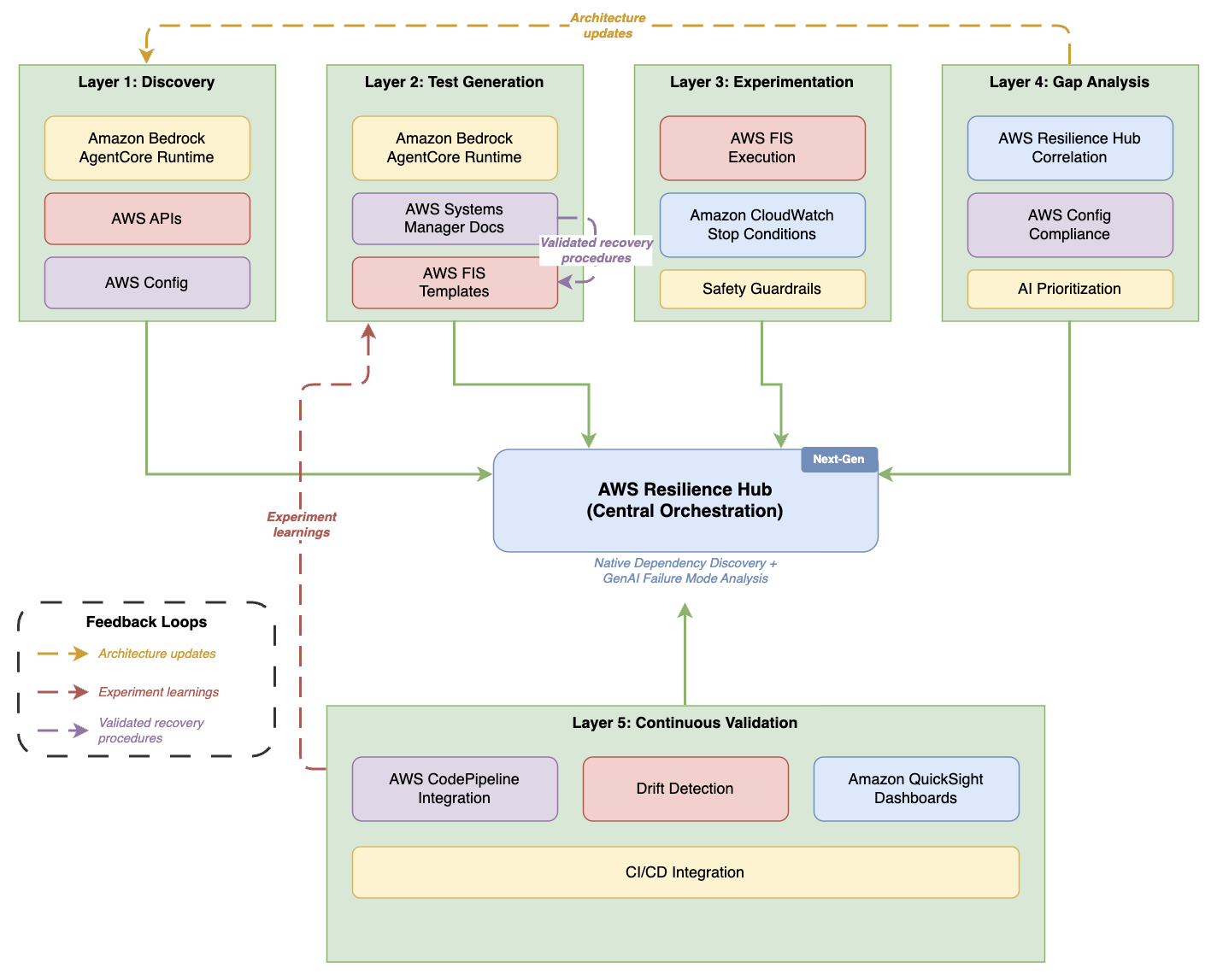
Figure 1. Five-layer AI-powered resilience architecture
Five-layer architecture diagram with AWS Resilience Hub — labeled “Next-Gen” with native dependency discovery and generative AI failure mode analysis — as the central orchestration hub. Layers 1–4 (Discovery, Test Generation, Experimentation, Gap Analysis) sit across the top, each connecting down to the hub. Layer 5 (Continuous Validation) sits below with CI/CD, drift detection, and dashboards. Three dashed feedback loops overlay the diagram: Gap Analysis feeds “Architecture updates” back to Discovery, Continuous Validation sends “Experiment learnings” up to Test Generation, and SSM Docs feeds “Validated recovery procedures” into FIS Templates within the Test Generation layer.
Each layer builds on the previous one, creating a comprehensive validation strategy. This architecture aligns with the AWS Well-Architected Reliability Pillar, specifically the Test reliability best practice area. Discovery maps your infrastructure. Test generation creates relevant experiments from that map. Experimentation executes those tests safely. Gap analysis identifies what needs fixing. Continuous validation helps verify that improvements persist as your systems evolve.
Now that you understand the overall strategy, let’s examine each layer in detail, starting with how the discovery layer automatically maps your infrastructure.
Discovery layer
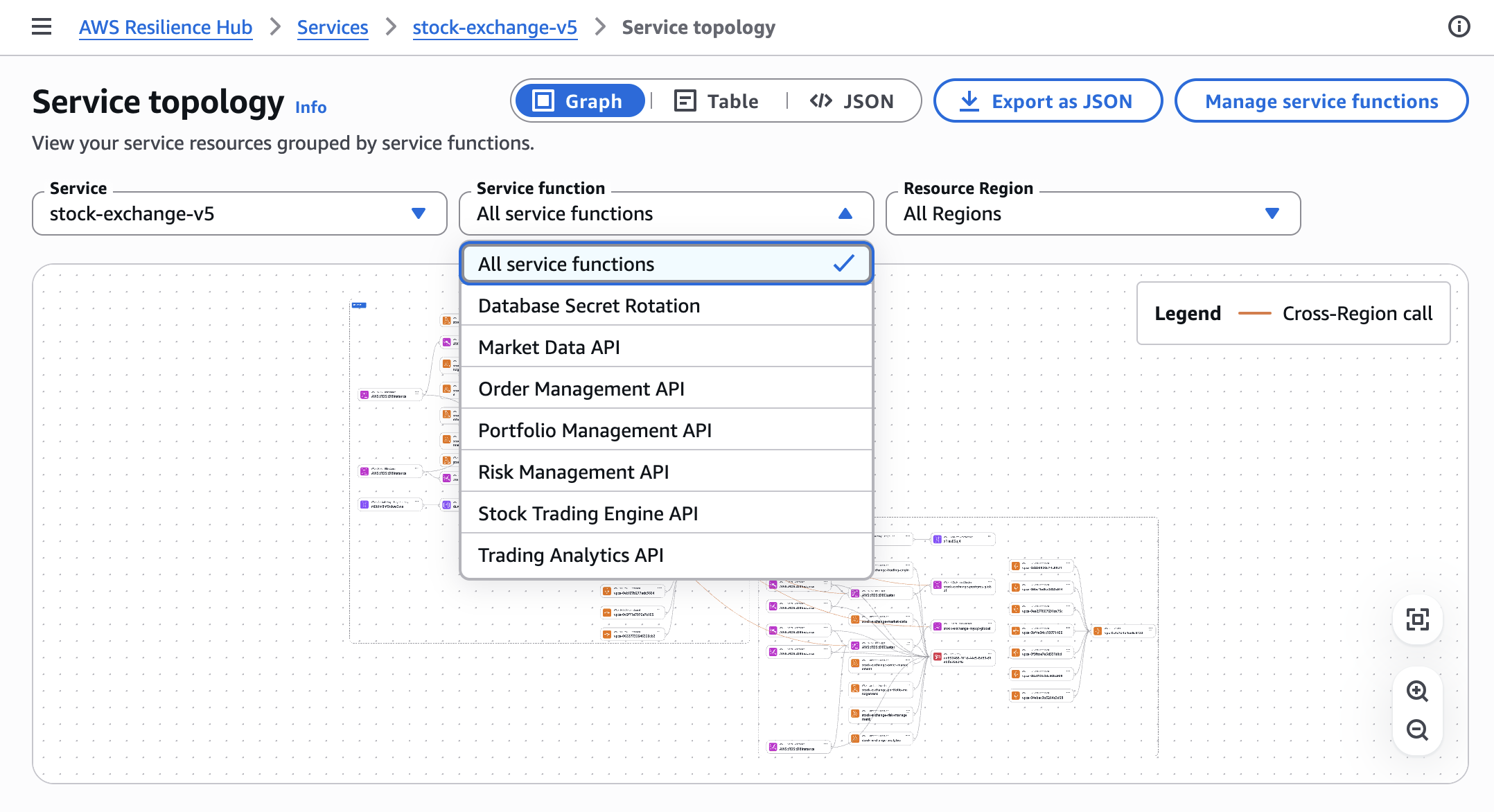
The discovery layer forms the foundation by automatically identifying infrastructure components and their dependencies. The next generation of AWS Resilience Hub provides native dependency discovery that identifies AWS services, internal endpoints, and third-party endpoints your applications rely on. A custom agent deployed on Amazon Bedrock AgentCore (with read permissions to AWS APIs) extends this native discovery with code-level analysis, scanning your code repositories for hard-coded dependencies, connection strings, timeout configurations, and retry logic that infrastructure-level discovery alone cannot detect. A custom agent deployed on Amazon Bedrock AgentCore (with read permissions to AWS APIs) handles infrastructure discovery. Amazon Bedrock AgentCore Runtime provides dedicated MicroVM session isolation, supports long-running discovery sessions up to eight hours, and handles scaling and security without requiring you to manage infrastructure. The runtime’s built-in observability (traces, logs, and metrics) integrates natively with your existing Amazon CloudWatch dashboards without additional instrumentation.
The AgentCore-hosted agent queries services including Amazon Elastic Compute Cloud (Amazon EC2), Amazon Relational Database Service (Amazon RDS), AWS Lambda, Amazon DynamoDB, and Amazon Simple Storage Service (Amazon S3) to build comprehensive inventory. It analyzes AWS CloudFormation templates and Terraform configurations to understand your intended architecture, and accesses code repositories to identify hard-coded dependencies, connection strings, and timeout configurations in your applications. AWS Config provides configuration data and tracks changes over time. This discovery completes in 2–4 hours for environments with thousands of resources.
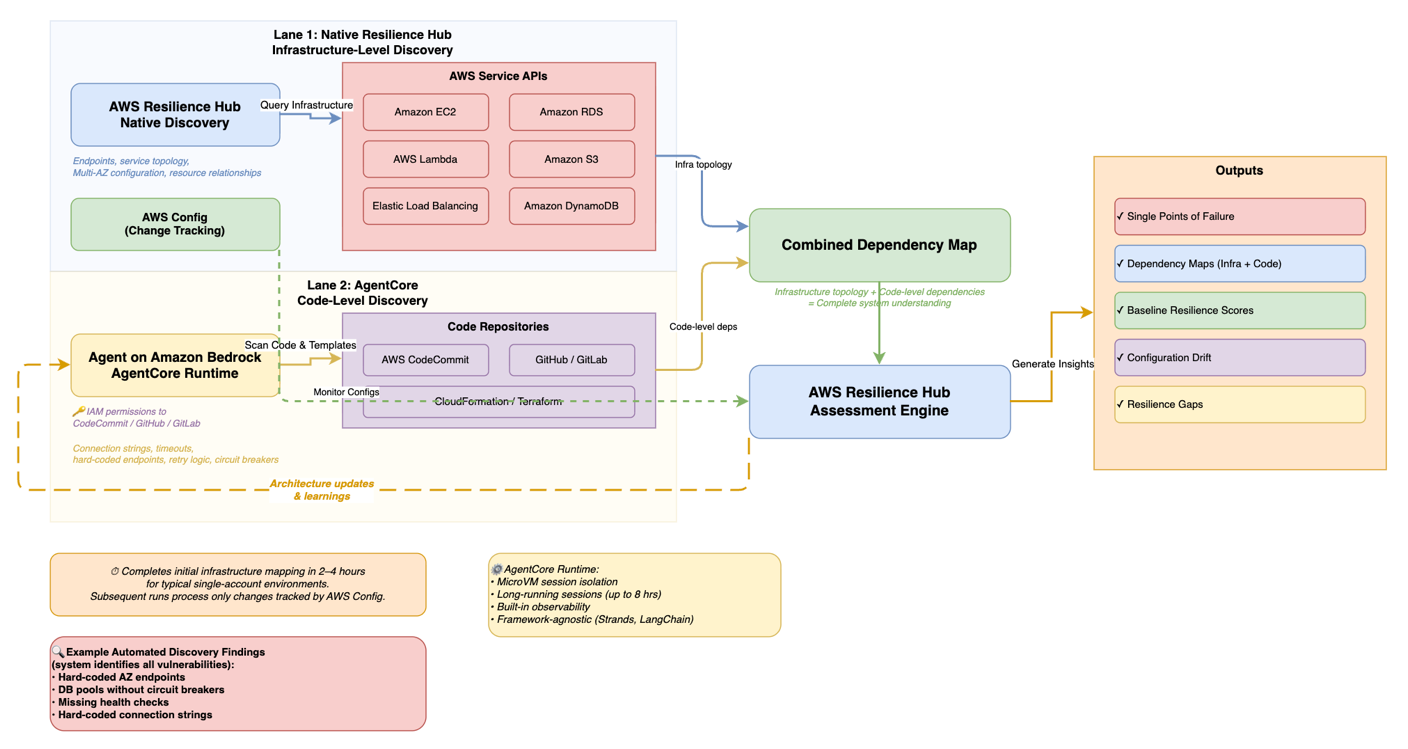
Figure 2. AI-powered discovery workflow
Workflow diagram organized in two swim lanes. Lane 1 (blue) shows AWS Resilience Hub native infrastructure-level discovery querying AWS service APIs (Amazon EC2, Amazon RDS, AWS Lambda, Amazon S3, Elastic Load Balancing, Amazon DynamoDB) for service topology, endpoints, and Multi-AZ configuration. Lane 2 (yellow) shows an agent on Amazon Bedrock AgentCore performing code-level discovery — scanning repositories (CodeCommit, GitHub, GitLab via IAM permissions) and analyzing CloudFormation/Terraform templates for connection strings, timeouts, and circuit breakers. Both lanes feed into a combined dependency map, which flows into the AWS Resilience Hub assessment engine. Outputs include single points of failure, dependency maps (infrastructure + code), baseline resilience scores, configuration drift, and resilience gaps. AWS Config monitors configurations in parallel. A dashed feedback arrow loops from the assessment engine back to the AgentCore agent labeled “Architecture updates & learnings.” Initial mapping completes in 2–4 hours for typical single-account environments; subsequent runs process only changes tracked by AWS Config.
Test generation layer
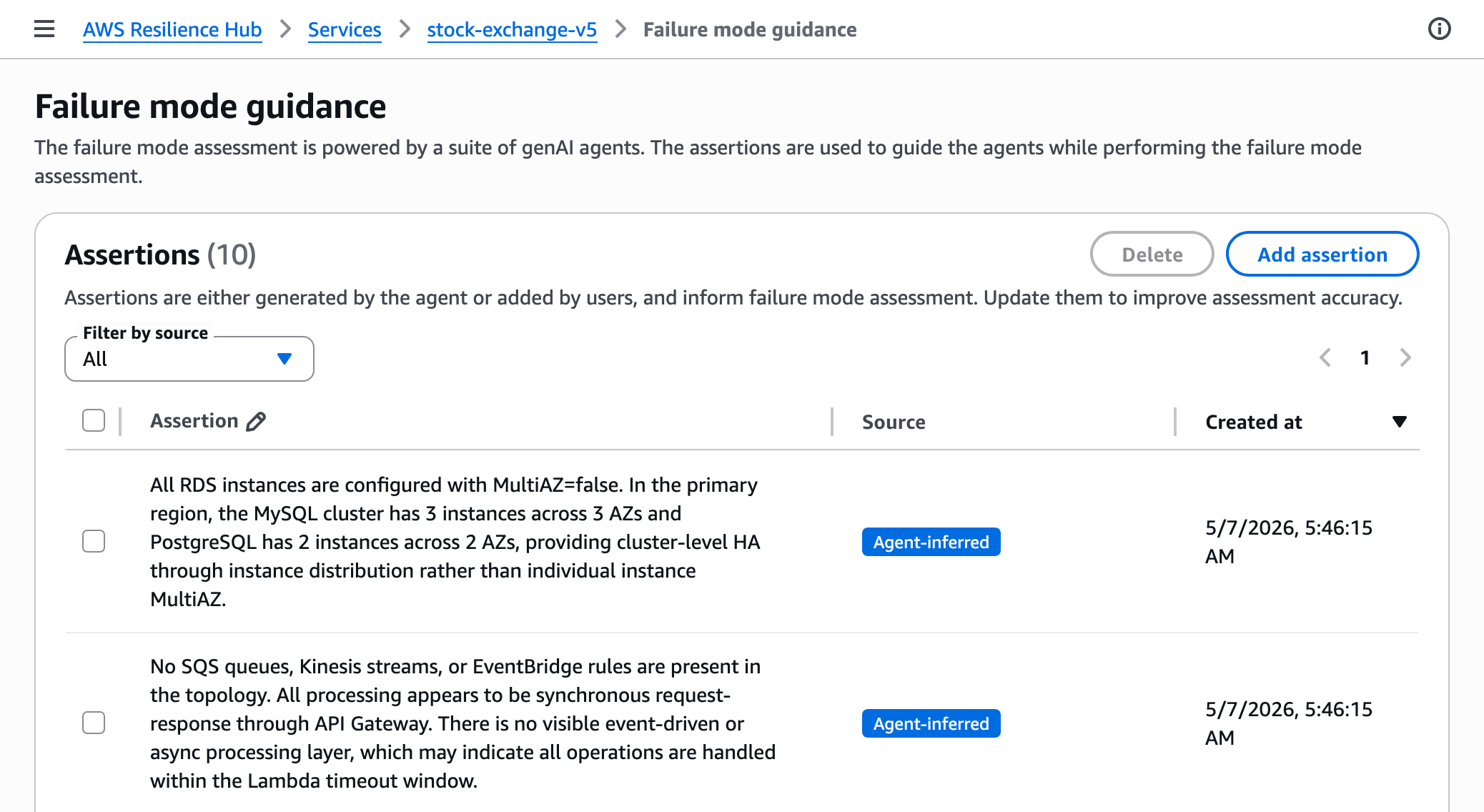
While the next generation of Resilience Hub includes a generative AI-powered failure mode assessment that identifies potential weaknesses through static analysis, this test generation layer converts those recommendations into executable AWS Fault Injection Service experiment templates, complete with safety guardrails, progressive scope expansion, and business impact scoring tailored to your specific architecture.
Building on the discovered infrastructure, the test generation layer creates targeted chaos experiments for your specific architecture. The agent hosted on AgentCore Runtime uses Amazon Bedrock foundation models to analyze your infrastructure context, combined with the RTO, RPO, and availability targets you define in AWS Resilience Hub, to identify single points of failure and produce hypothesis-driven test scenarios aligned with your business requirements. Each hypothesis is scored by potential business impact, prioritizing experiments for customer-facing systems and components where architectural patterns indicate high-availability intent. Each experiment includes business impact scoring based on your application tier definitions in AWS Resilience Hub, architectural patterns (such as internet-facing load balancers and Amazon API Gateway endpoints), dependency analysis, and AWS resource tags. This makes sure experiments prioritize your customer-facing systems and highest-impact components. Using the code repository analysis from the discovery layer, the system detects when your applications use Amazon RDS Multi-AZ but lack proper connection retry handling, and designs database failover tests that validate your actual recovery mechanisms rather than generic network disruption tests.
For your production environments, implement a manual approval workflow where your infrastructure teams review experiment templates before execution. AWS Step Functions orchestrates approval gates. Step Functions is a workflow management service that coordinates multiple AWS services into serverless workflows.
Experimentation layer
After creating targeted experiments, the experimentation layer runs chaos tests with multi-layered safety guardrails on your infrastructure. AWS Fault Injection Service executes chaos tests with built-in safety mechanisms. Experiments start with minimal scope (affecting only 1% of your resources) and expand progressively based on your risk tolerance and validation results (for example, 1% → 5% → 10% → 25%). This follows progressive deployment strategies recommended in the AWS Well-Architected Reliability Pillar, similar to canary deployments where changes roll out incrementally to limit blast radius. Amazon CloudWatch alarms serve as stop conditions that halt experiments before they violate your Service Level Agreements (SLAs), which are contracts defining expected uptime and performance. Set alarm thresholds well below your SLA limits. If your SLA allows 1% error rate, configure stop conditions to trigger at 0.1%.
Gap analysis layer
After your experiments complete, the gap analysis layer processes results to identify weaknesses and prioritize remediation. AWS Resilience Hub correlates experiment outcomes with your resilience policies, categorizing gaps across architectural, operational, data protection, and testing dimensions. Each gap receives a priority score based on severity (how badly this violates your resilience policy), likelihood (how often this failure mode occurs), and business impact (the cost if this failure occurs in your environment).
Continuous validation layer
The continuous validation layer integrates resilience testing into your development workflow. The right approach depends on your deployment velocity and testing goals.
For most teams, a lightweight policy-as-code check (using tools like Open Policy Agent to validate Infrastructure as Code and Dockerfiles) runs in seconds and fits naturally in your CI/CD pipeline for every commit. This catches basic configuration issues, like missing health checks or single-AZ deployments, before code reaches staging.
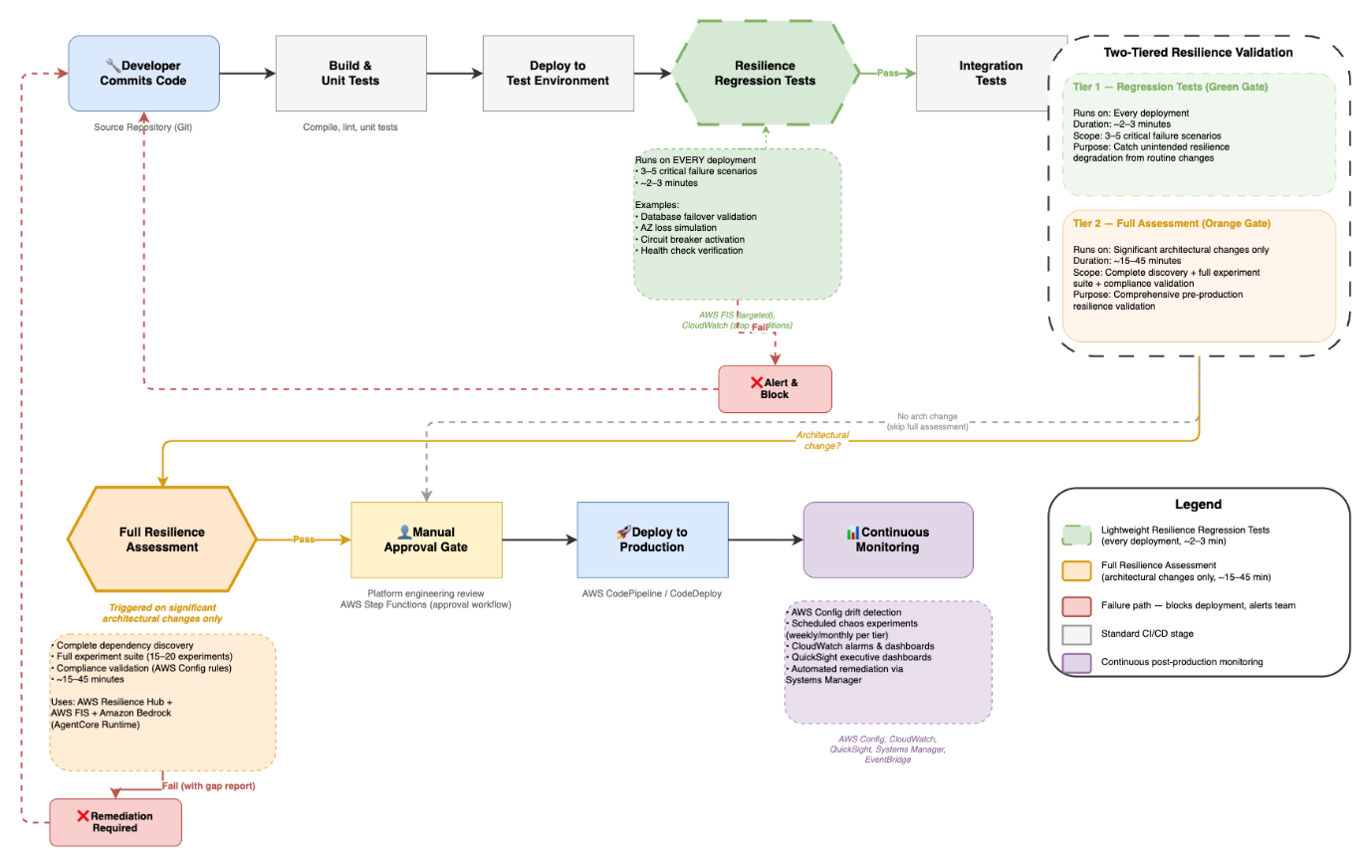
Full resilience assessments are better suited as a pre-production gate, triggered on significant architectural changes rather than every commit. For routine deployments, lightweight resilience regression tests (validating a focused set of critical failure scenarios like database failover, Availability Zone loss, and circuit breaker activation) run automatically to catch unintended resilience degradation from code or configuration changes. This two-tiered approach gives you comprehensive safety validation for major changes and continuous regression coverage for everyday deployments, without slowing your pipeline. Your new code and infrastructure changes trigger automated resilience assessments that identify potential weaknesses during development rather than after deployment, embedding this shift-left strategy directly into your CI/CD workflow.
The policy-as-code check adds seconds to each pipeline run. Full resilience assessments add approximately 2–3 minutes per experiment.
AWS Config drift detection identifies manual changes that bypass your deployment pipelines, helping keep your architecture aligned with tested configurations.
Figure 3. Resilience testing in the CI/CD pipeline
Flowchart showing a CI/CD pipeline with two-tiered resilience testing. The top row shows the standard pipeline flow: Developer Commits Code → Build & Unit Tests → Deploy to Test Environment → Resilience Regression Tests (green hexagon gate, runs 3–5 critical scenarios in ~2–3 minutes on every deployment) → Integration Tests → Deploy to Staging. From staging, if an architectural change is detected, the flow drops to a second row: Full Resilience Assessment (orange hexagon gate, runs 15–20 experiments over ~15–45 minutes using AWS Resilience Hub, FIS, and Bedrock) → Manual Approval Gate → Deploy to Production → Continuous Monitoring. If no architectural change occurred, staging skips directly to the approval gate. Both resilience gates have failure paths (red) that block deployment and loop back to the developer. A legend and a side panel summarize the two tiers.
Continuous improvement through feedback
Experiment results feed back into the discovery and test generation layers, creating a continuous improvement cycle. When experiments reveal undocumented dependencies, the discovery layer updates your architecture map. When remediation actions successfully resolve failure patterns, Systems Manager automation documents capture these procedures for future use. The Bedrock agent analyzes experiment outcomes to refine hypothesis generation, deprioritizing consistently passing scenarios and focusing on emerging risk areas as your architecture evolves.
Key benefits
Now that you’ve seen how each layer works together, let’s examine the concrete benefits this architecture brings to your organization.
Faster infrastructure discovery: Manual infrastructure discovery requires significant effort across distributed teams, including cataloging resources, tracing dependencies, and validating configurations. Automated discovery reduces this from weeks to hours by programmatically querying cloud service APIs, analyzing infrastructure-as-code templates, and mapping dependencies. After implementation, the framework scales across your application portfolio without proportionally increasing staffing.
Removes expertise barrier: Without chaos engineering specialists, you can implement resilience testing using automated scenarios. Start with the AWS Fault Injection Service Scenarios Library for common failure patterns, then expand with scenarios specific to your architecture and customize based on your application’s specific failure modes.
Proactive risk identification: Automated discovery reveals critical single points of failure that manual audits consistently miss, including hard-coded endpoints, missing circuit breakers, and absent health checks. The system identifies vulnerabilities across your infrastructure and prioritizes them by business impact, so your teams can focus remediation on the highest-risk items first.
Faster recovery through automated remediation: Automated remediation reduces your mean time to resolution by removing manual intervention for common failure patterns in your environments. AWS Systems Manager automation documents codify recovery procedures discovered during chaos experiments. When Amazon CloudWatch alarms detect failure patterns in your systems, AWS Systems Manager automatically executes remediation actions, handling issues faster than manual response.
Continuous resilience validation: Integrating resilience assessments into your CI/CD pipelines catches regressions before production deployment, maintaining resilience as your system evolves rather than treating it as a one-time validation.
Framework components
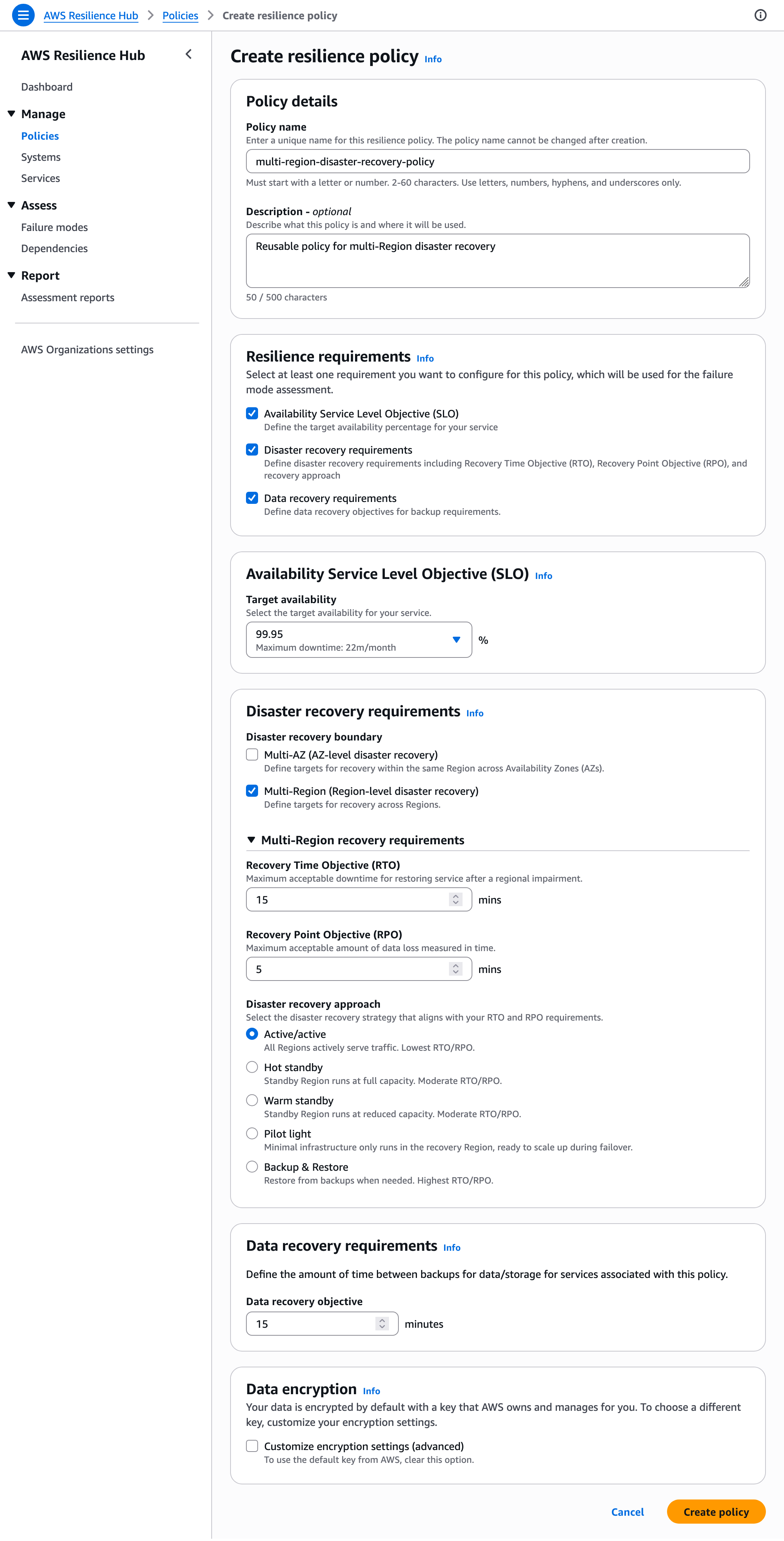
AWS Resilience Hub serves as the central orchestration layer, defining your resilience policies, running assessments, and tracking improvements. Define RTO and RPO targets for each application tier based on your business impact analysis.
Amazon Bedrock delivers the AI capabilities that power discovery and test creation. AgentCore Runtime provides the managed hosting layer, handling session isolation, scaling, identity management, and observability, so your agent runs securely in production without infrastructure overhead.
Deploy a custom agent on Amazon Bedrock AgentCore, a framework-agnostic managed runtime that supports agents built with Strands, LangChain, or custom Python. The agent uses Amazon Bedrock to analyze your infrastructure context against architectural patterns, AWS documentation, and best practices. AgentCore Runtime’s built-in tool gateway provides controlled, secure access to your AWS APIs during discovery.
AWS Fault Injection Service runs controlled chaos experiments with built-in safety mechanisms on your infrastructure. Pre-built actions cover common failure scenarios: terminating Amazon EC2 instances, injecting network latency, throttling API calls, failing over Amazon RDS databases, and disrupting Availability Zone connectivity in your environments.
AWS Systems Manager extends your resilience framework beyond the default AWS Fault Injection Service actions. You can create custom automation documents that codify recovery procedures and transform manual runbooks into automated self-healing responses. When you build custom actions, you take on responsibility for proper rollback procedures and service state restoration. Design these with the same rigor you’d apply to your production runbooks.
AWS Config continuously monitors your resource configurations and tracks changes. AWS Config rules validate that your resources comply with resilience policies. For example, they verify your Amazon RDS instances use Multi-AZ deployment and confirm your Auto Scaling groups span multiple Availability Zones.
Prerequisites
To implement this framework, you’ll need:
- AWS account with administrative access.
- AWS Identity and Access Management (IAM) permissions for: AWS Resilience Hub, AWS Fault Injection Service, Amazon Bedrock AgentCore, AWS Systems Manager, and AWS Config. For each service, follow the principle of least privilege. Refer to the respective service documentation for minimum required permissions.
- The Amazon Bedrock AgentCore Starter Toolkitcreates broad dev/test permissions by default. Scope these down to least-privilege before production deployment.
- AWS Command Line Interface (AWS CLI) installed and configured.
- Basic understanding of AWS CloudFormation or Terraform.
- Non-critical application available for testing.
- Estimated time: 4–6 hours for pilot implementation (with a team of 2–3 engineers who have working knowledge of your AWS environment).
- Cost awareness: This implementation creates billable AWS resources including AWS Resilience Hub, AWS Fault Injection Service, Amazon Bedrock AgentCore, AWS Systems Manager, AWS Config, and Amazon CloudWatch. Follow the cleanup procedures after testing to avoid ongoing charges.
Getting started
A phased rollout builds confidence before expanding scope if you’re new to chaos engineering.
Pilot phase (1–2 weeks, 2–3 engineers)
- Select a non-critical application with well-understood architecture from your portfolio.
- Enable AWS Config across the regions where your application runs.
- Package your discovery agent code using Strands, LangChain, or custom Python.
- Deploy the packaged agent on Amazon Bedrock AgentCore using the Amazon Bedrock AgentCore Starter Toolkit. AgentCore Runtime handles the compute, session management, and security so you can focus on the agent logic and discovery scope. The runtime maintains stateful working context (including tool state and memory) across the multi-step infrastructure discovery workflow.
- Run a baseline resilience assessment in AWS Resilience Hub to identify initial architectural gaps. Resilience Hub evaluates your architecture against Well-Architected best practices and establishes your starting resilience posture. The Bedrock agent you deploy in the next step builds on this baseline, discovering undocumented dependencies and generating targeted experiments that go beyond standard recommendations.
Verify: Check the AWS Resilience Hub console for a completed assessment report showing baseline resilience scores and identified gaps. You should see a resilience score for each disruption type (AZ, Region, Application) and a list of recommended actions.
Expansion phase (4–6 weeks, cross-functional team)
- Expand to 3–5 applications across different tiers after validating safety with your pilot.
- Configure automated test creation to develop experiments specific to each of your application’s architectures.
- Run controlled chaos experiments starting with 1% scope during your low-traffic periods.
Verify: Review the AWS Fault Injection Service console for experiment status “Completed” and check Amazon CloudWatch metrics to confirm the 1% scope was applied without triggering stop conditions.
- Analyze results to identify common patterns across your applications.
Enterprise scale (8–12 weeks, dedicated resilience team)
- Expand resilience assessments in your CI/CD pipelines to comprehensive, multi-account validation.
- Configure centralized reporting across organizational units.
- Set up cross-account experiment coordination.
- Distribute shared experiment templates across organizational units using AWS Organizations.
- Deploy distributed worker pools for parallel testing across your multiple applications.
- Implement executive dashboards using Amazon QuickSight to track resilience trends across your portfolio.
When to move to enterprise patterns
Consider adopting the enterprise deployment patterns in the next section when you meet any of these criteria:
- You manage dozens of applications across multiple AWS accounts.
- Multiple business units require differentiated resilience policies based on varying risk tolerances, compliance requirements, or customer SLAs.
- Compliance requirements demand centralized audit trails across accounts.
- Your testing cadence exceeds what a single-account setup can handle.
Design considerations for enterprise deployment
When you’re ready to scale beyond initial pilots, consider these enterprise deployment patterns that handle the unique challenges of managing resilience testing across large organizations.
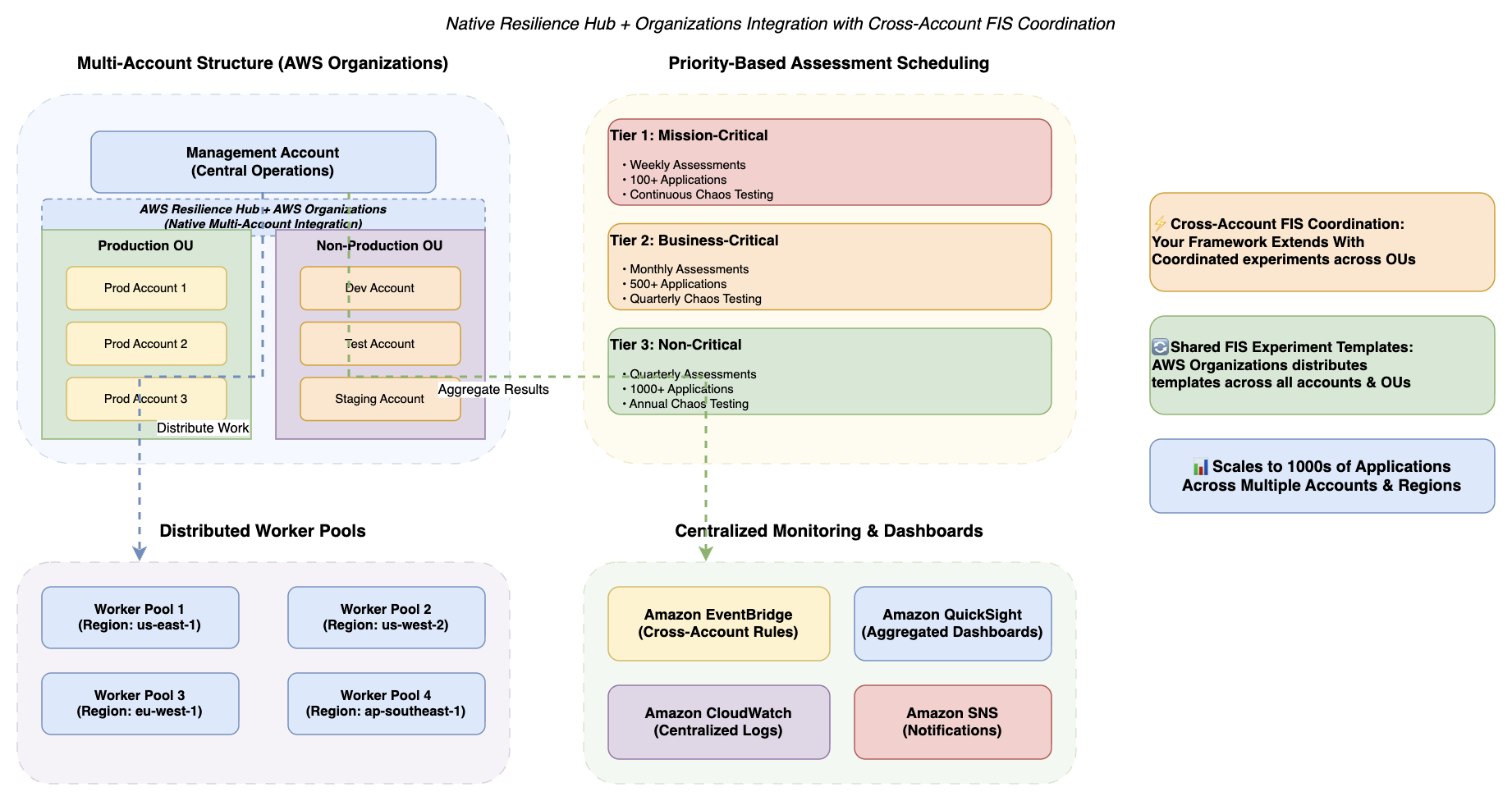
Figure 4. Enterprise scalability patterns
Diagram showing multi-account structure with native AWS Resilience Hub and AWS Organizations integration. A central management account connects to Production and Non-Production organizational units with distributed application accounts. The framework extends this native integration with cross-account FIS coordination (coordinated experiments across OUs) and shared FIS experiment templates distributed via Organizations. Priority-based scheduling shows Tier 1 Mission-Critical (weekly assessments, 100+ applications), Tier 2 Business-Critical (monthly assessments, 500+ applications), and Tier 3 Non-Critical (quarterly assessments, 1000+ applications). Distributed worker pools operate across multiple AWS regions (us-east-1, us-west-2, eu-west-1, ap-southeast-1) with centralized monitoring via Amazon EventBridge, Amazon QuickSight dashboards, Amazon CloudWatch logs, and Amazon SNS notifications.
Multi-account architecture
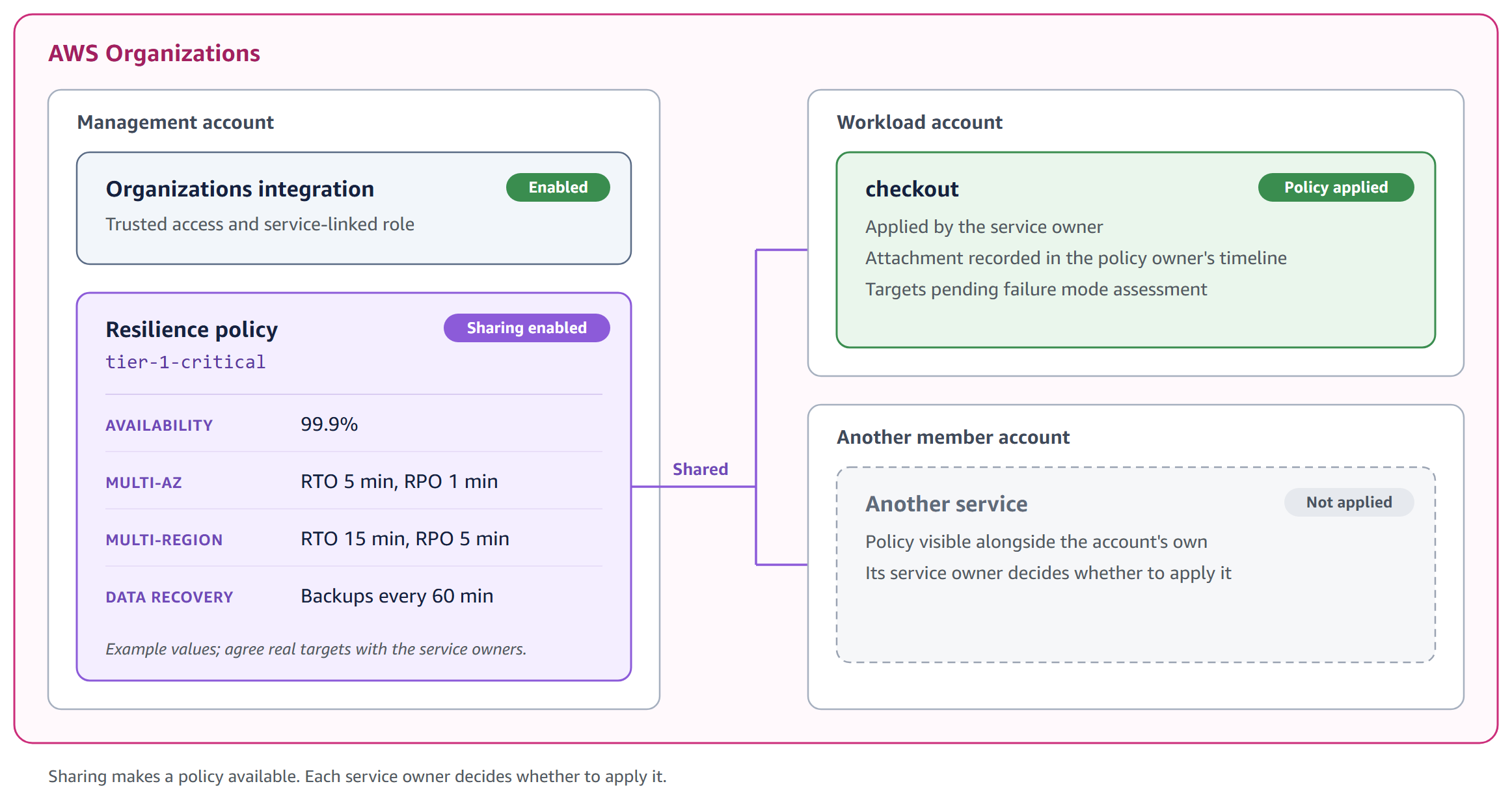
The next generation of AWS Resilience Hub supports modular resilience policies that you can assign at the system, user journey, or service level. Choose this multi-account strategy if you manage more than 100 applications across different business units. When you have thousands of applications, assessing your workloads simultaneously from a single account becomes impractical. Implement a hub-and-spoke model (a centralized architecture pattern where a central “hub” account manages shared services while “spoke” accounts contain individual workloads) with centralized resilience testing infrastructure and distributed application ownership. Deploy AWS Resilience Hub and AWS Fault Injection Service in your central management account. Your production accounts contain application workloads and local AWS Config recorders. The next generation of AWS Resilience Hub natively integrates with AWS Organizations, enabling central teams to define resilience policies and monitor posture across all accounts and regions from a single dashboard. This framework extends native multi-account visibility with cross-account experiment coordination and shared experiment templates across organizational units. For guidance on structuring your multi-account environment, see Best practices for a multi-account environment and the Organizing Your AWS Environment Using Multiple Accounts whitepaper.
Tiered resilience policies
Not every workload justifies the same resilience investment. Implement tiered resilience based on your business impact analysis. For example, mission-critical applications might target stricter recovery objectives (such as RTO < 15 minutes, RPO < 5 minutes, 99.99% availability) with comprehensive quarterly chaos experiments, while business-critical applications might set moderate targets (such as RTO < 1 hour, RPO < 15 minutes, 99.9% availability) with monthly validation, and non-critical applications might accept longer recovery windows with quarterly assessments. This tiered strategy optimizes costs by focusing resilience investments on your highest-impact workloads.
Security and compliance
Under the AWS Shared Responsibility Model, AWS is responsible for security of the cloud (infrastructure), while you are responsible for security in the cloud (your configurations, data, and access management). The controls described below are your responsibility to configure and maintain. Encrypt your data at rest using AWS Key Management Service (AWS KMS) with customer-managed keys. Implement separate encryption keys per environment to limit the scope of unauthorized access in your infrastructure. Enforce Transport Layer Security 1.3 (TLS 1.3), a cryptographic protocol that secures data transmission, for data in transit. AWS CloudTrail delivers complete audit trails of your resilience operations. Automated compliance monitoring through AWS Security Hub (which continuously evaluates resources against standards including CIS AWS Foundations Benchmark, PCI DSS, and AWS Foundational Security Best Practices), combined with AWS Config conformance packs, streamlines evidence collection for Service Organization Control 2 Type II (SOC 2 Type II), International Organization for Standardization 27001 (ISO 27001), Payment Card Industry Data Security Standard (PCI DSS), and Digital Operational Resilience Act (DORA), an EU regulation requiring financial institutions to test operational resilience.
AI agent security: The Amazon Bedrock AgentCore-hosted agent operates with scoped IAM roles following least-privilege principles. AgentCore Runtime’s MicroVM session isolation makes sure that each discovery session runs in a dedicated, ephemeral environment with no cross-session data leakage. The agent’s infrastructure access is read-only during discovery and cannot modify resources. Amazon Bedrock interactions occur within your AWS account boundary, and no customer data is used for training purposes. For additional guardrails, you can configure Amazon Bedrock Guardrails to filter agent outputs and enforce responsible AI policies.
Note: This framework supports your compliance efforts but does not guarantee compliance with any regulatory framework. Compliance is a shared responsibility. Consult your legal and compliance teams and qualified auditors to validate that your implementation meets your specific regulatory obligations.
Addressing common concerns
Progressive scope expansion and automated stop conditions help you verify experiments reveal weaknesses without causing outages in your environments. Starting with 1% of your resources limits potential impact to statistically insignificant traffic. Organizations have validated this strategy using progressive scope expansion and automated stop conditions.
Automated scenarios remove the expertise barrier. The AI-powered analysis examines your specific architecture to develop targeted experiments rather than demanding you design tests manually. AWS CloudTrail provides comprehensive audit trails of your chaos experiments, which can help support due diligence documentation for resilience testing. This evidence can contribute to your compliance documentation for SOC 2, ISO 27001, and other frameworks relevant to your organization. For financial services, the framework supports DORA scenario testing requirements.
Clean up
To avoid ongoing charges, delete the resources you created during implementation:
- Delete your AWS Fault Injection Service experiment templates. Warning: This permanently removes experiment history and results. Consider exporting experiment data before deletion if you need to retain this information for compliance or analysis purposes.
- Remove your Amazon Bedrock AgentCore agent deployment, runtime endpoints, and associated configurations.
- Delete your AWS Systems Manager automation documents. Warning: This removes your automation runbooks permanently. Back up any custom runbooks you may want to reuse in future implementations.
- Remove your Amazon CloudWatch alarms created for stop conditions.
- Delete any AWS Step Functions state machines created for approval workflows.
- Remove any Open Policy Agent configurations deployed for IaC validation.
- Delete Amazon QuickSight dashboards created for resilience tracking (if applicable). Warning: This removes resilience trend data and operational insights. Export dashboard data or save analysis snapshots before deletion.
- Remove Amazon EventBridge rules and Amazon SNS topics created for notifications (if applicable).
Your AWS Resilience Hub and AWS Config continue incurring minimal costs. Consider retaining them for ongoing resilience validation.
Conclusion
In this post, I showed you how to build a five-layer AI-powered resilience framework that automatically discovers dependencies, generates targeted experiments, and integrates with your CI/CD pipelines. Building on the next generation of AWS Resilience Hub’s native dependency discovery and generative AI-powered failure mode analysis, this framework adds automated experiment generation through Amazon Bedrock AgentCore, controlled execution via AWS Fault Injection Service, and continuous CI/CD validation through AWS Systems Manager, creating an end-to-end resilience pipeline that goes from discovery to prevention.
The next frontier is shifting even earlier, scanning your Infrastructure as Code and application code for resilience anti-patterns before a single resource is deployed. When your CI/CD pipeline can flag a missing circuit breaker or a single-AZ dependency at the pull request stage, prevention becomes truly proactive.
The progressive strategy (starting with your single application pilot, expanding to multiple applications, then scaling organization-wide) builds confidence while demonstrating value at each phase. Organizations often realize positive return on investment through prevented events and reduced MTTR.
The framework makes resilience testing accessible to you, removing the expertise barrier that traditionally prevented adoption. Start with the pilot phase outlined earlier and expand to your mission-critical systems as confidence builds.
Ready to get started? Pick a non-critical application from your portfolio, deploy the discovery agent, and run your first assessment this week. Then share what you found. We’d love to hear about the hidden dependencies your team uncovered.
Have you implemented chaos engineering in your organization? What challenges did you face? Share your experience in the comments below.
Next steps
For the latest Resilience Hub capabilities including native dependency discovery and generative AI-powered failure mode analysis, see Introducing the next generation of AWS Resilience Hub and the next generation documentation.
Start with the resources most relevant to where you are in your resilience journey:
If you’re just getting started:
- For more information about resilience policies and assessment capabilities, see AWS Resilience Hub documentation.
- For hands-on experience with chaos engineering, see AWS Fault Injection Service Workshop.
If you’re ready to build:
- For information about creating fault injection experiments using natural language through Amazon Bedrock, see Chaos engineering made clear: Generate AWS FIS experiments using natural language through Amazon Bedrock.
- For information about assessing application resilience with AWS Resilience Hub and AWS CodePipeline, see Continually assessing application resilience with AWS Resilience Hub and AWS CodePipeline.
- For additional fault injection experiment templates, see AWS Fault Injection Service Template Library.
If you’re scaling to production: 6. For information about hosting production AI agents at scale, see Amazon Bedrock AgentCore 7. For sample agent code and deployment templates, see the Amazon Bedrock AgentCore Starter Toolkit.
Systems will face failures. Discover and fix weaknesses before your customers experience them by shifting your resilience testing from reactive response to proactive prevention.
If you have questions or need guidance implementing the framework, contact AWS or reach out to your AWS Solutions Architect.
About the author