Tag Archives: Edge Rules

Cloudflare Snippets are now Generally Available

Post Syndicated from Nikita Cano original https://blog.cloudflare.com/snippets/

Program your traffic at the edge — fast, flexible, and free

Cloudflare Snippets are now generally available (GA) for all paid plans, giving you a fast, flexible way to control HTTP traffic using lightweight JavaScript “code rules” — at no extra cost.

Need to transform headers dynamically, fine-tune caching, rewrite URLs, retry failed requests, replace expired links, throttle suspicious traffic, or validate authentication tokens? Snippets provide a production-ready solution built for performance, security, and control.

With GA, we’re introducing a new code editor to streamline writing and testing logic. This summer, we’re also rolling out an integration with Secrets Store — enabling you to bind and manage sensitive values like API keys directly in Snippets, securely and at scale.

What are Snippets?

Snippets bring the power of JavaScript to Cloudflare Rules, letting you write logic that runs before a request reaches your origin or after a response returns from upstream. They’re ideal when built-in rule actions aren’t quite enough. While Cloudflare Rules let you define traffic logic without code, Snippets extend that model with greater flexibility for advanced scenarios.

Think of Snippets as the ultra-fast “code layer” of Cloudflare Rules: the Ruleset Engine evaluates your rules and invokes your code, which then runs on the Workers runtime.

Key capabilities of Snippets:

Best of all? Snippets are included at no extra cost for Pro, Business, and Enterprise plans — with no usage-based fees.

The journey to GA: How Snippets became production-grade

Cloudflare Snippets started as a bold idea: bring the power of JavaScript-based logic to Cloudflare Rules, without the complexity of a full-stack developer platform.

Over the past two years, Snippets have evolved into a production-ready “code rules” solution, shaping the future of HTTP traffic control.

2022: Cloudflare Snippets were announced during Developer Week as a solution for users needing flexible HTTP traffic modifications without a full Worker.

2023: Alpha launch — hundreds of users tested Snippets for high-performance traffic logic.

2024: 7x traffic growth, processing 17,000 requests per second. Terraform support and production-grade backend were released.

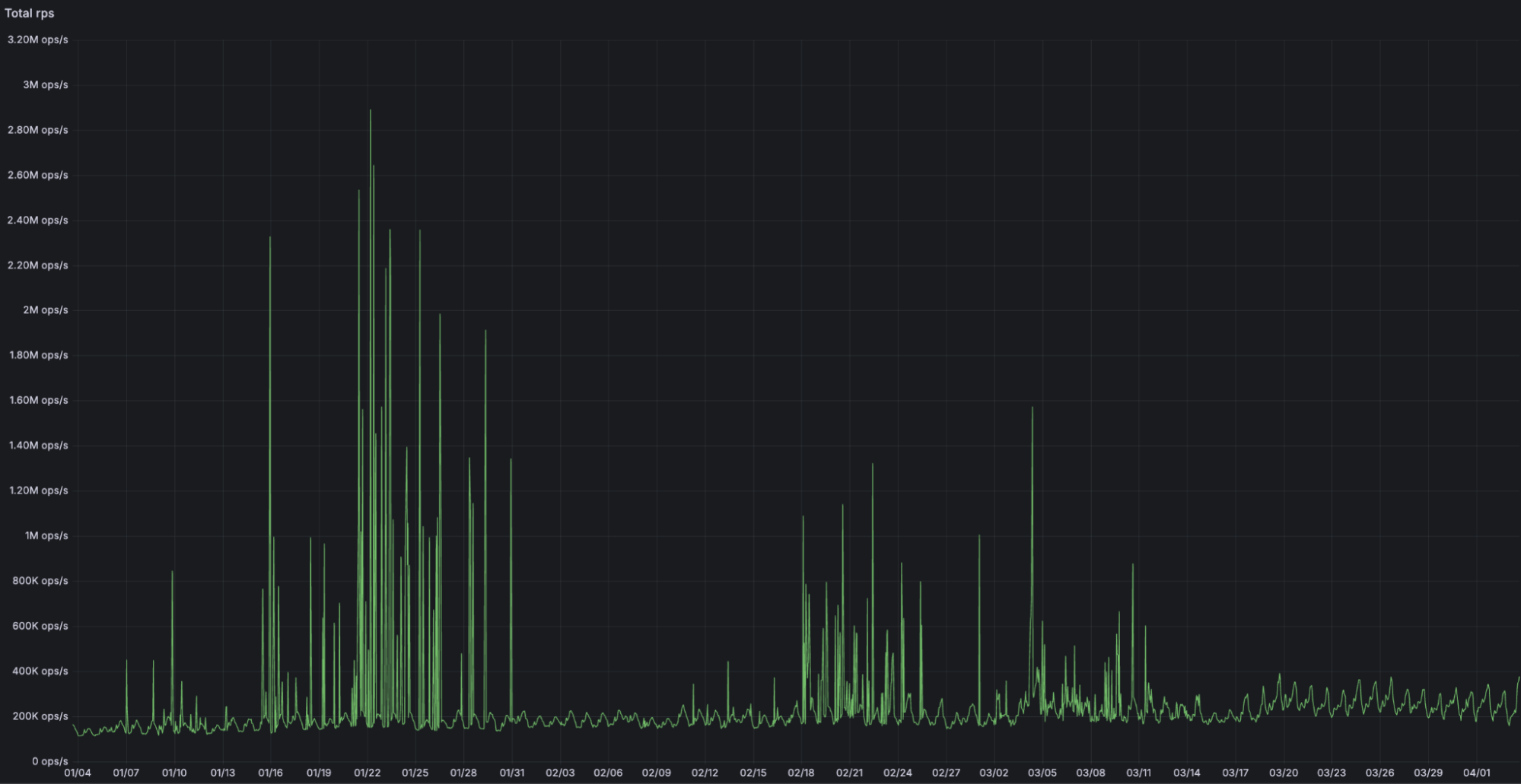
2025: General Availability — Snippets introduces a new code editor, increased limits alongside other Cloudflare Rules products, integration with Trace, and a production-grade experience built for scale, handling over 2 million requests per second at peak. Integration with the Secrets Store is rolling out this summer.

New: Snippets + Trace

Cloudflare Trace now shows exactly which Snippets were triggered on a request. This makes it easier to debug traffic behavior, verify logic execution, and understand how your Snippets interact with other products in the request pipeline.

Whether you’re fine-tuning header logic or troubleshooting a routing issue, Trace gives you real-time insight into how your edge logic behaves in production.

Coming soon: Snippets + Secrets Store

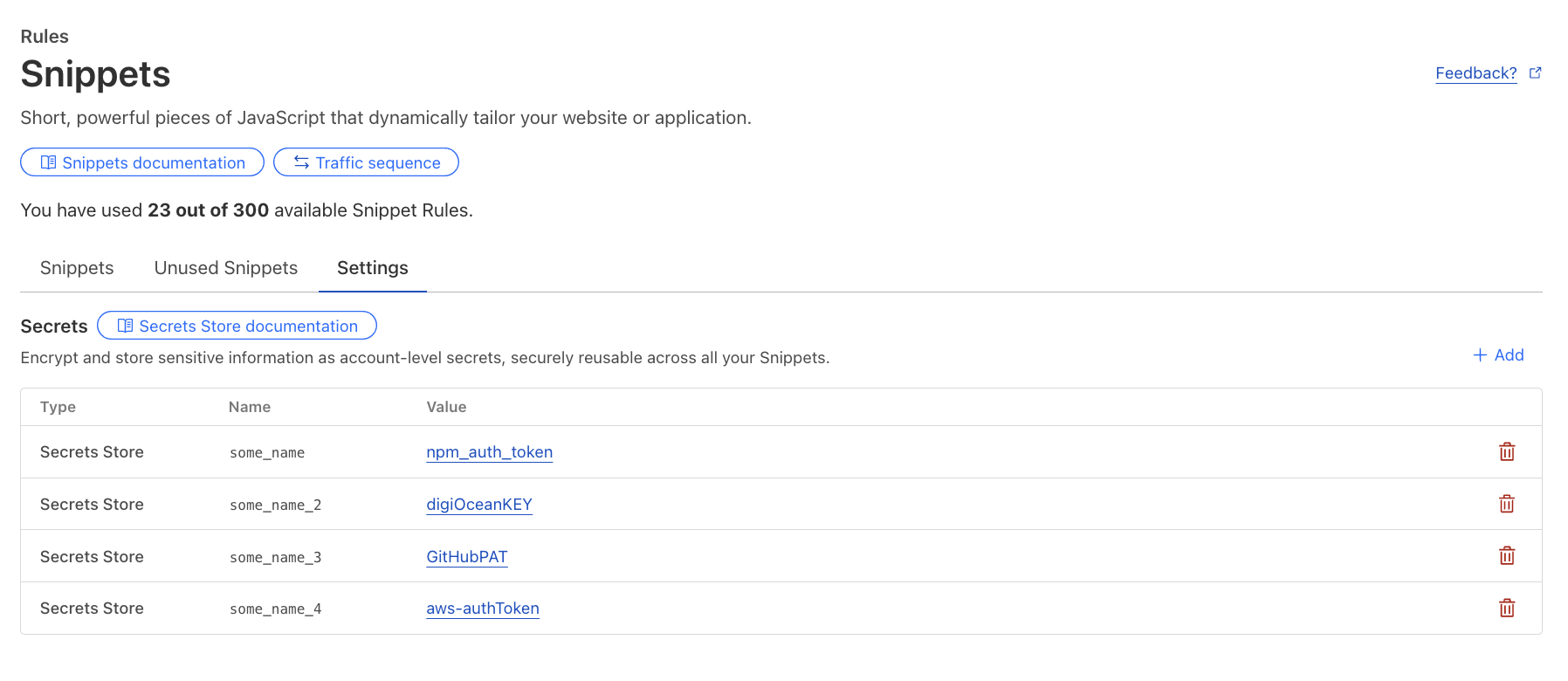
In the third quarter, you’ll be able to securely access API keys, authentication tokens, and other sensitive values from Secrets Store directly in your Snippets. No more plaintext secrets in your code, no more workarounds.
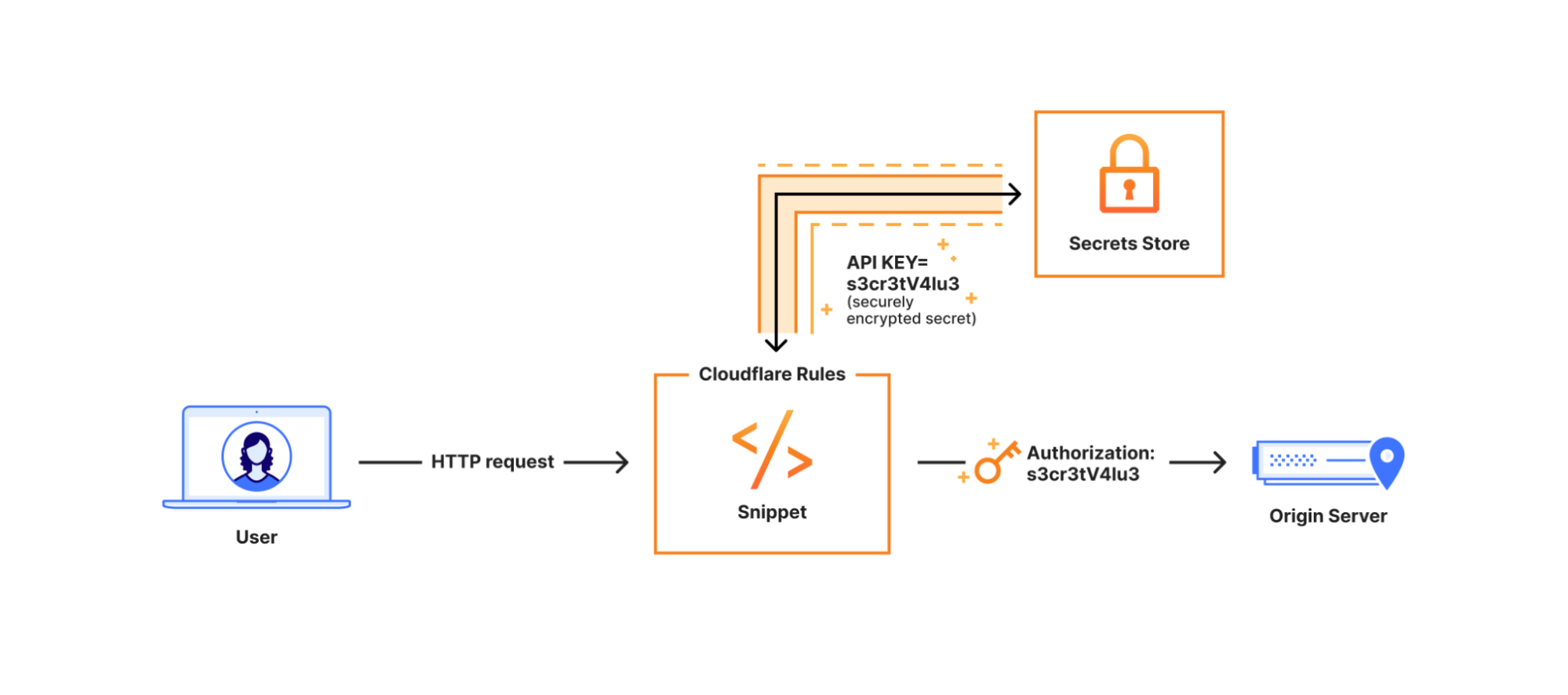

Once rolled out, secrets can be configured for Snippets via the dashboard or API under the new “Settings” button.

When to use Snippets vs. Cloudflare Workers

Snippets are fast, flexible, and free, but how do they compare to Cloudflare Workers? Both allow you to programmatically control traffic. However, they solve different problems:

Feature

Snippets

Workers

Execute scripts based on request attributes (headers, geolocation, cookies, etc.)

Modify HTTP requests/responses or serve a different response

Add, remove, or rewrite headers dynamically

Cache assets at the edge

Route traffic dynamically between origins

Authenticate requests, pre-sign URLs, run A/B testing

Perform compute-intensive tasks (e.g., AI inference, image processing)

Store persistent data (e.g., KV, Durable Objects, D1)

Deploy via CLI (Wrangler)

Use TypeScript, Python, Rust or other programming languages

Use Snippets when:

  • You need ultra-fast conditional traffic modifications directly on Cloudflare’s network.

  • You want to extend Cloudflare Rules beyond built-in actions.

  • You need free, unlimited invocations within the execution limits.

  • You are migrating from VCL, Akamai’s EdgeWorkers, or on-premise logic.

Use Workers when:

  • Your application requires state management, Developer Platform product integrations, or high compute limits.

  • You are building APIs, full-stack applications, or complex workflows.

  • You need logging, debugging tools, CLI support, and gradual rollouts.

Still unsure? Check out our detailed guide for best practices.

Snippets in action: real-world use cases

Below are practical use cases demonstrating Snippets. Each script can be dynamically triggered using our powerful Rules language, so you can granularly control which requests your Snippets will be applied to.

1. Dynamically modify headers

Inject custom headers, remove unnecessary ones, and tweak values on the fly:

export default {
  async fetch(request) {
    const timestamp = Date.now().toString(16); // convert timestamp to HEX
    const modifiedRequest = new Request(request, { headers: new Headers(request.headers) });
    modifiedRequest.headers.set("X-Hex-Timestamp", timestamp); // send HEX timestamp to upstream

    const response = await fetch(modifiedRequest);
    const newResponse = new Response(response.body, response); // make response from upstream immutable

    newResponse.headers.append("x-snippets-hello", "Hello from Cloudflare Snippets"); // add new response header
    newResponse.headers.delete("x-header-to-delete"); // delete response header
    newResponse.headers.set("x-header-to-change", "NewValue"); // replace the value of existing response header

    return newResponse;
  },
};

2. Serve a custom maintenance page

Route traffic to a maintenance page when your origin is undergoing planned maintenance:

export default {
    async fetch(request) { // for all matching requests, return predefined HTML response with 503 status code
        return new Response(`
            <!DOCTYPE html>
            <html lang="en">
            <head>
                <meta charset="UTF-8">
                <title>We'll Be Right Back!</title>
                <style> body { font-family: Arial, sans-serif; text-align: center; padding: 20px; } </style>
            </head>
            <body>
                <h1>We'll Be Right Back!</h1>
                <p>Our site is undergoing maintenance. Check back soon!</p>
            </body>
            </html>
        `, { status: 503, headers: { "Content-Type": "text/html" } });
    }
};

3. Retry failed requests to a backup origin

Ensure reliability by automatically rerouting requests when your primary origin returns an unexpected response:

export default {
  async fetch(request) {
    const response = await fetch(request); // send original request to the origin

    if (!response.ok && !response.redirected) { // if response is not 200 OK or a redirect, send to another origin
      const newRequest = new Request(request); // clone the original request to construct a new request
      newRequest.headers.set("X-Rerouted", "1"); // add a header to identify a re-routed request at the new origin
      const url = new URL(request.url); // clone the original URL
      url.hostname = "backup.example.com"; // send request to a different origin / hostname
      return await fetch(url, newRequest); // serve response from the backup origin
    }

    return response; // otherwise, serve response from the primary origin
  },
};

4. Redirect users based on their location

Send visitors to region-specific sites for better localization:

export default {
    async fetch(request) {
        const country = request.cf.country; // identify visitor's country using request.cf property
        const redirectMap = { US: "https://example.com/us", EU: "https://example.com/eu" }; // define redirects for each country
        if (redirectMap[country]) return Response.redirect(redirectMap[country], 301); // redirect on match
        return fetch(request); // otherwise, proceed to upstream normally
    }
};

Getting started with Snippets

Snippets are available right now in the Cloudflare dashboard under Rules > Snippets:

  1. Go to Rules → Snippets.

  2. Use prebuilt templates or write your own JavaScript code.

  3. Configure a flexible rule to trigger your Snippet.

  4. Test and deploy instantly.

  5. Automate via API or Terraform.

Try Snippets today

Cloudflare Snippets are now generally available, bringing fast, cost-free, and intelligent HTTP traffic control to all paid plans.

With native integration into Cloudflare Rules and Terraform — and Secrets Store integration coming this summer — Snippets provide the most efficient way to manage advanced traffic logic at scale.

Explore Snippets in the Cloudflare Dashboard and start optimizing your traffic with lightweight, flexible rules that enhance performance and reduce complexity.
Improved Bot Management flexibility and visibility with new high-precision heuristics

Post Syndicated from Curtis Lowder original https://blog.cloudflare.com/bots-heuristics/

Within the Cloudflare Application Security team, every machine learning model we use is underpinned by a rich set of static rules that serve as a ground truth and a baseline comparison for how our models are performing. These are called heuristics. Our Bot Management heuristics engine has served as an important part of eight global machine learning (ML) models, but we needed a more expressive engine to increase our accuracy. In this post, we’ll review how we solved this by moving our heuristics to the Cloudflare Ruleset Engine. Not only did this provide the platform we needed to write more nuanced rules, it made our platform simpler and safer, and provided Bot Management customers more flexibility and visibility into their bot traffic.   

Bot detection via simple heuristics

In Cloudflare’s bot detection, we build heuristics from attributes like software library fingerprints, HTTP request characteristics, and internal threat intelligence. Heuristics serve three separate purposes for bot detection: 

  1. Bot identification: If traffic matches a heuristic, we can identify the traffic as definitely automated traffic (with a bot score of 1) without the need of a machine learning model. 

  2. Train ML models: When traffic matches our heuristics, we create labelled datasets of bot traffic to train new models. We’ll use many different sources of labelled bot traffic to train a new model, but our heuristics datasets are one of the highest confidence datasets available to us.   

  3. Validate models: We benchmark any new model candidate’s performance against our heuristic detections (among many other checks) to make sure it meets a required level of accuracy.

While the existing heuristics engine has worked very well for us, as bots evolved we needed the flexibility to write increasingly complex rules. Unfortunately, such rules were not easily supported in the old engine. Customers have also been asking for more details about which specific heuristic caught a request, and for the flexibility to enforce different policies per heuristic ID.  We found that by building a new heuristics framework integrated into the Cloudflare Ruleset Engine, we could build a more flexible system to write rules and give Bot Management customers the granular explainability and control they were asking for. 

The need for more efficient, precise rules

In our previous heuristics engine, we wrote rules in Lua as part of our openresty-based reverse proxy. The Lua-based engine was limited to a very small number of characteristics in a rule because of the high engineering cost we observed with adding more complexity.

With Lua, we would write fairly simple logic to match on specific characteristics of a request (i.e. user agent). Creating new heuristics of an existing class was fairly straight forward. All we’d need to do is define another instance of the existing class in our database. However, if we observed malicious traffic that required more than two characteristics (as a simple example, user-agent and ASN) to identify, we’d need to create bespoke logic for detections. Because our Lua heuristics engine was bundled with the code that ran ML models and other important logic, all changes had to go through the same review and release process. If we identified malicious traffic that needed a new heuristic class, and we were also blocked by pending changes in the codebase, we’d be forced to either wait or rollback the changes. If we’re writing a new rule for an “under attack” scenario, every extra minute it takes to deploy a new rule can mean an unacceptable impact to our customer’s business. 

More critical than time to deploy is the complexity that the heuristics engine supports. The old heuristics engine only supported using specific request attributes when creating a new rule. As bots became more sophisticated, we found we had to reject an increasing number of new heuristic candidates because we weren’t able to write precise enough rules. For example, we found a Golang TLS fingerprint frequently used by bots and by a small number of corporate VPNs. We couldn’t block the bots without also stopping the legitimate VPN usage as well, because the old heuristics platform lacked the flexibility to quickly compile sufficiently nuanced rules. Luckily, we already had the perfect solution with Cloudflare Ruleset Engine. 

Our new heuristics engine

The Ruleset Engine is familiar to anyone who has written a WAF rule, Load Balancing rule, or Transform rule, just to name a few. For Bot Management, the Wireshark-inspired syntax allows us to quickly write heuristics with much greater flexibility to vastly improve accuracy. We can write a rule in YAML that includes arbitrary sub-conditions and inherit the same framework the WAF team uses to both ensure any new rule undergoes a rigorous testing process with the ability to rapidly release new rules to stop attacks in real-time. 

Writing heuristics on the Cloudflare Ruleset Engine allows our engineers and analysts to write new rules in an easy to understand YAML syntax. This is critical to supporting a rapid response in under attack scenarios, especially as we support greater rule complexity. Here’s a simple rule using the new engine, to detect empty user-agents restricted to a specific JA4 fingerprint (right), compared to the empty user-agent detection in the old Lua based system (left): 

Old

New

local _M = {}

local EmptyUserAgentHeuristic = {

   heuristic = {},

}

EmptyUserAgentHeuristic.__index = EmptyUserAgentHeuristic

--- Creates and returns empty user agent heuristic

-- @param params table contains parameters injected into EmptyUserAgentHeuristic

-- @return EmptyUserAgentHeuristic table

function _M.new(params)

   return setmetatable(params, EmptyUserAgentHeuristic)

end

--- Adds heuristic to be used for inference in `detect` method

-- @param heuristic schema.Heuristic table

function EmptyUserAgentHeuristic:add(heuristic)

   self.heuristic = heuristic

end

--- Detect runs empty user agent heuristic detection

-- @param ctx context of request

-- @return schema.Heuristic table on successful detection or nil otherwise

function EmptyUserAgentHeuristic:detect(ctx)

   local ua = ctx.user_agent

   if not ua or ua == '' then

      return self.heuristic

   end

end

return _M

ref: empty-user-agent

      description: Empty or missing

User-Agent header

      action: add_bot_detection

      action_parameters:

        active_mode: false

      expression: http.user_agent eq

"" and cf.bot_management.ja4 = "t13d1516h2_8daaf6152771_b186095e22b6"

The Golang heuristic that captured corporate proxy traffic as well (mentioned above) was one of the first to migrate to the new Ruleset engine. Before the migration, traffic matching on this heuristic had a false positive rate of 0.01%. While that sounds like a very small number, this means for every million bots we block, 100 real users saw a Cloudflare challenge page unnecessarily. At Cloudflare scale, even small issues can have real, negative impact.

When we analyzed the traffic caught by this heuristic rule in depth, we saw the vast majority of attack traffic came from a small number of abusive networks. After narrowing the definition of the heuristic to flag the Golang fingerprint only when it’s sourced by the abusive networks, the rule now has a false positive rate of 0.0001% (One out of 1 million).  Updating the heuristic to include the network context improved our accuracy, while still blocking millions of bots every week and giving us plenty of training data for our bot detection models. Because this heuristic is now more accurate, newer ML models make more accurate decisions on what’s a bot and what isn’t.

New visibility and flexibility for Bot Management customers 

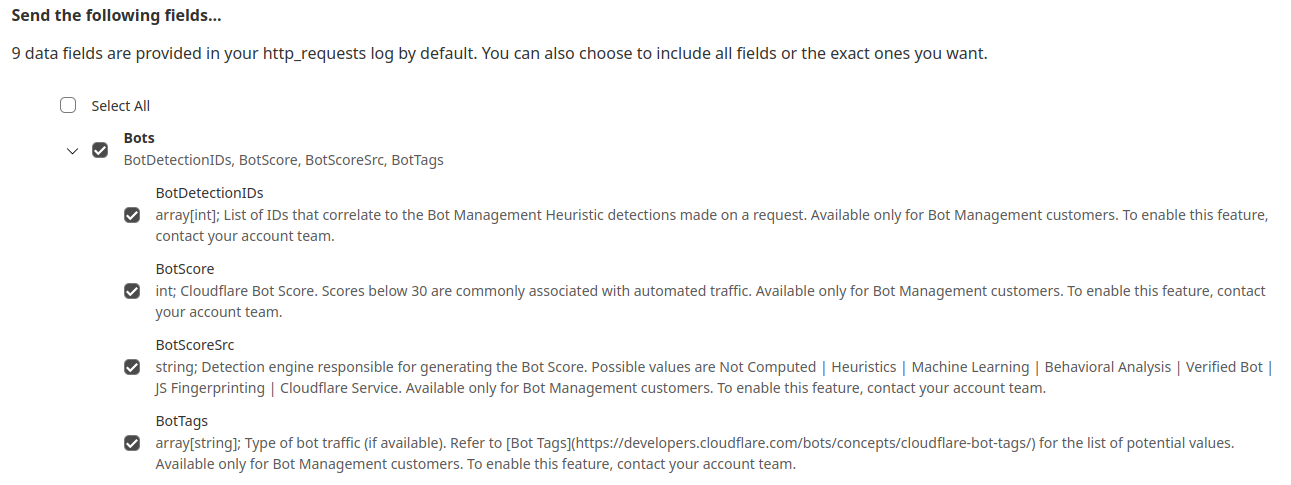
While the new heuristics engine provides more accurate detections for all customers and a better experience for our analysts, moving to the Cloudflare Ruleset Engine also allows us to deliver new functionality for Enterprise Bot Management customers, specifically by offering more visibility. This new visibility is via a new field for Bot Management customers called Bot Detection IDs. Every heuristic we use includes a unique Bot Detection ID. These are visible to Bot Management customers in analytics, logs, and firewall events, and they can be used in the firewall to write precise rules for individual bots. 


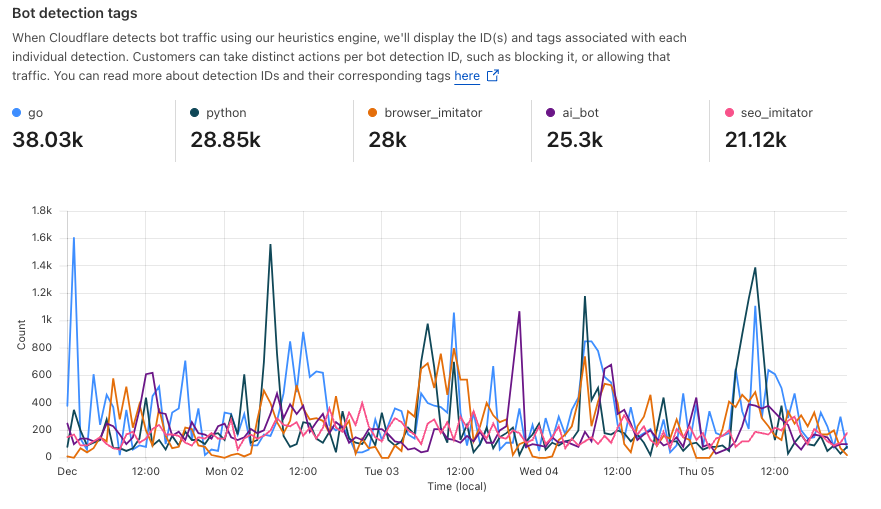
Detections also include a specific tag describing the class of heuristic. Customers see these plotted over time in their analytics.


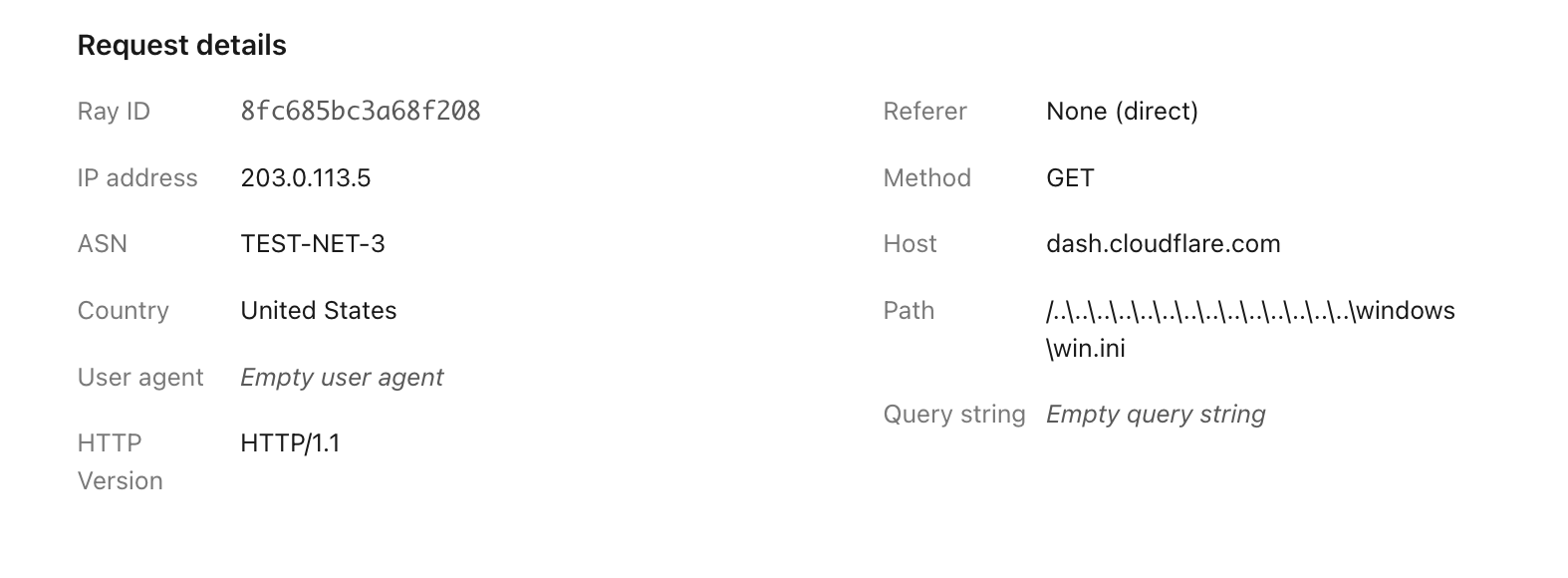
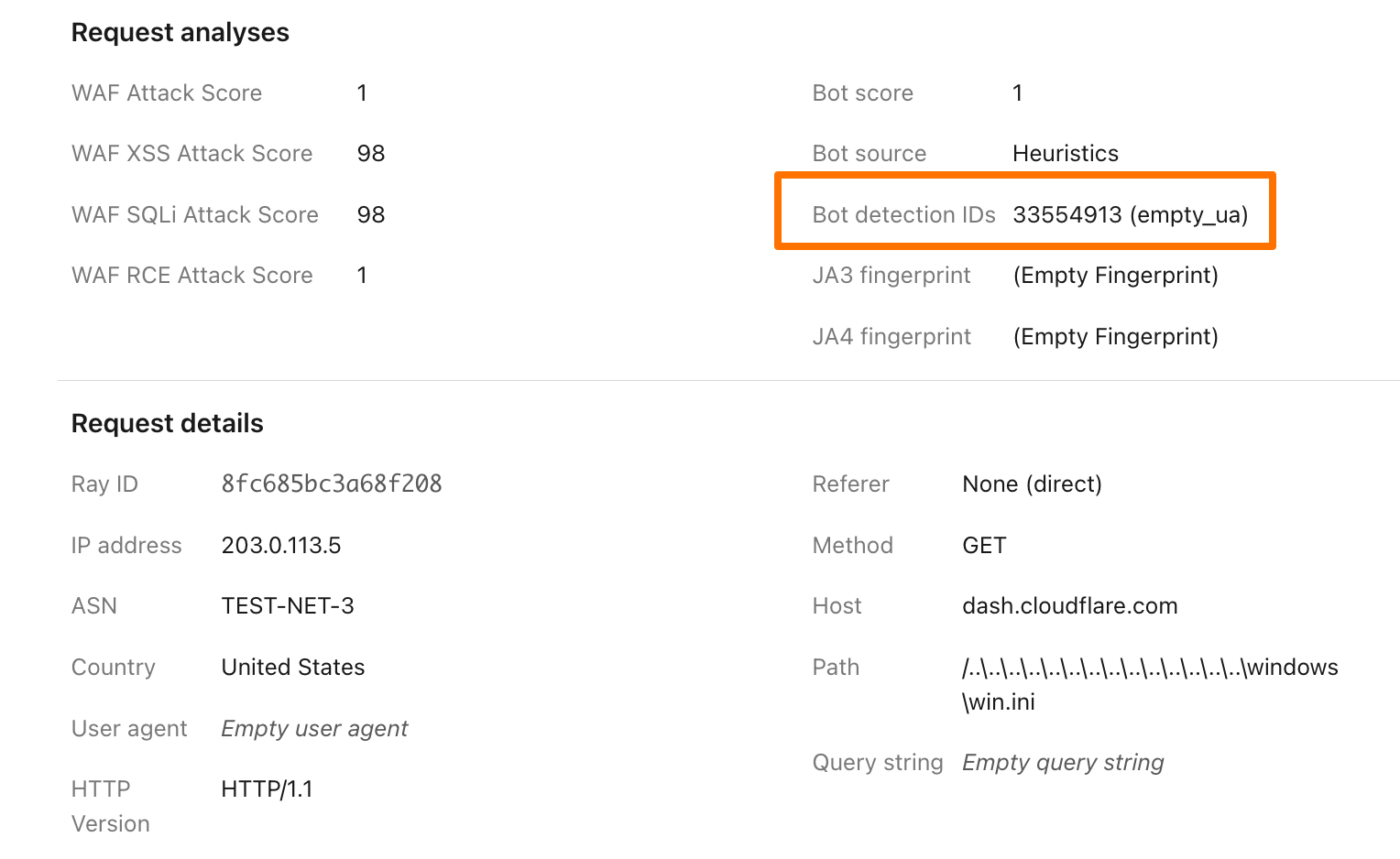
To illustrate how this data can help give customers visibility into why we blocked a request, here’s an example request flagged by Bot Management (with the IP address, ASN, and country changed):


Before, just seeing that our heuristics gave the request a score of 1 was not very helpful in understanding why it was flagged as a bot. Adding our Detection IDs to Firewall Events helps to paint a better picture for customers that we’ve identified this request as a bot because that traffic used an empty user-agent.


In addition to Analytics and Firewall Events, Bot Detection IDs are now available for Bot Management customers to use in Custom Rules, Rate Limiting Rules, Transform Rules, and Workers. 

Account takeover detection IDs

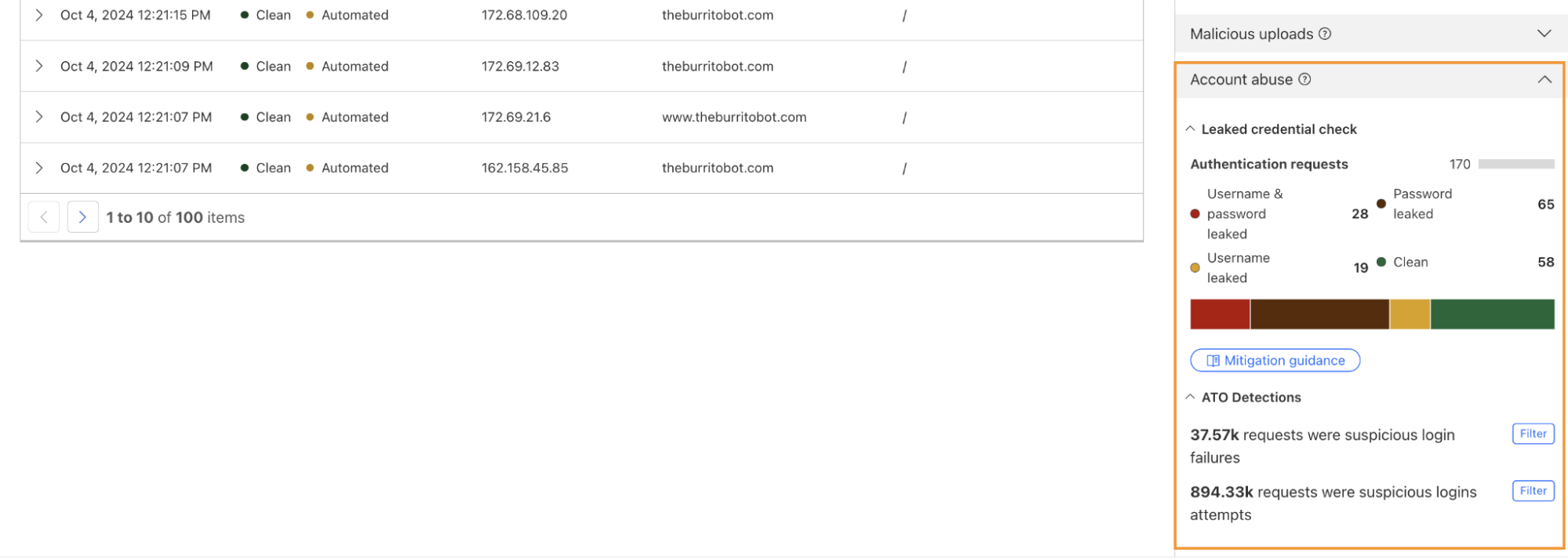
One way we’re focused on improving Bot Management for our customers is by surfacing more attack-specific detections. During Birthday Week, we launched Leaked Credentials Check for all customers so that security teams could help prevent account takeover (ATO) attacks by identifying accounts at risk due to leaked credentials. We’ve now added two more detections that can help Bot Management enterprise customers identify suspicious login activity via specific detection IDs that monitor login attempts and failures on the zone. These detection IDs are not currently affecting the bot score, but will begin to later in 2025. Already, they can help many customers detect more account takeover events now.

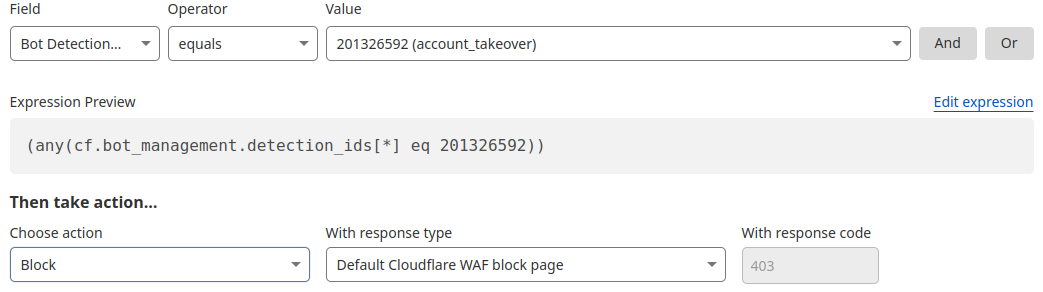
Detection ID 201326592 monitors traffic on a customer website and looks for an anomalous rise in login failures (usually associated with brute force attacks), and ID 201326593 looks for an anomalous rise in login attempts (usually associated with credential stuffing). 


Protect your applications

If you are a Bot Management customer, log in and head over to the Cloudflare dashboard and take a look in Security Analytics for bot detection IDs 201326592 and 201326593.

These will highlight ATO attempts targeting your site. If you spot anything suspicious, or would like to be protected against future attacks, create a rule that uses these detections to keep your application safe.

Simplify cloud routing and object storage configurations with Cloud Connector

Post Syndicated from Nikita Cano original https://blog.cloudflare.com/cloud-connector


Introduction

As part of Cloudflare’s mission to help build a better Internet, we’re continuously integrating with other networks and service providers, ensuring ease of use for anyone, anywhere, anytime.

Today, we’re excited to announce Cloud Connector – a brand-new way to put Cloudflare in front of popular public cloud services, protecting your assets, accelerating applications, and routing your traffic between multiple cloud providers seamlessly.

Cloud Connector is a natural extension of Cloudflare’s Connectivity Cloud, which aims to simplify and secure the complex web of connections across today’s enterprises. Imagine Origin Rules, but managed by Cloudflare, available for all plans, created with just a few clicks, and working out of the box without the need for additional rules. It allows you to route traffic to different public clouds without complicated workarounds. This means you can now direct specific requests to AWS S3, Google Cloud Storage, Azure Blob Storage, or our own R2, even if these services are not set as the DNS target for your hostname.

Whether you’re an e-commerce site looking to route image traffic to the best-performing cloud storage for faster load times, a media company distributing video content efficiently across various cloud providers, or a developer wanting to simplify backend configurations, Cloud Connector is designed for you. It’s available for all Cloudflare plans, with a particular focus on Free, Pro, and Business customers.

The Host header challenge

Before Cloud Connector, many of our Free, Pro, and Business customers faced a significant challenge: it was not straightforward to route traffic for the same hostname to one or more cloud providers on the backend. Something as simple as directing example.com/images to AWS S3 while keeping the rest of your site served by your origin web servers required multiple non-trivial steps to accomplish. Some users changed their setups, leveraging either Workers, chaining hostnames, or explored putting other service providers in front of their cloud destinations. While functional, this approach added complexity and increased effort, leading to frustration.

Enterprise customers had Host Header and Resolve Override features to manage this, but the security and abuse risks associated with Host Header modification kept these features out of reach for everyone else.

Simplifying multi-cloud routing

Today, we’re excited to unveil Cloud Connector, designed to address these challenges head-on.

Imagine you’re managing a website where images are stored on AWS S3, videos on Google Cloud Storage, and static assets on Azure Blob Storage. Traditionally, routing traffic to these different providers would involve a series of complex steps and configurations. With Cloud Connector, this process is streamlined. You can seamlessly direct traffic for your hostname to multiple origins with just a few clicks. The setup is straightforward and doesn’t require any advanced configurations or additional rules.

For instance, you can now direct example.com/images to a specific R2 bucket in your Cloudflare account effortlessly. This feature, previously exclusive to Enterprise customers, is now available to all users, ensuring that everyone can benefit from simplified cloud routing.

How to configure

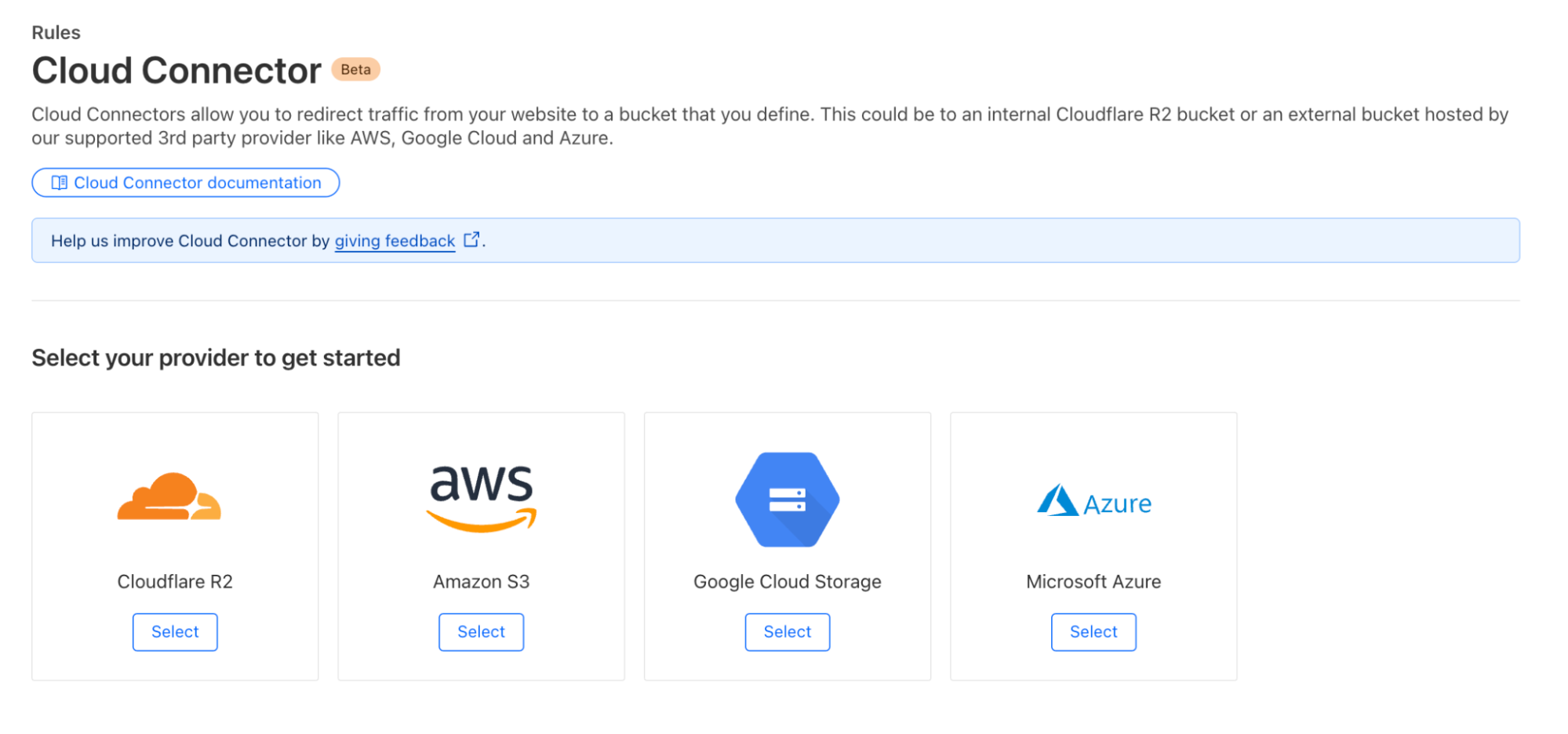
Getting started with Cloud Connector is easy. Navigate to the Rules > Cloud Connector tab in your zone dashboard. From there, select your cloud provider:

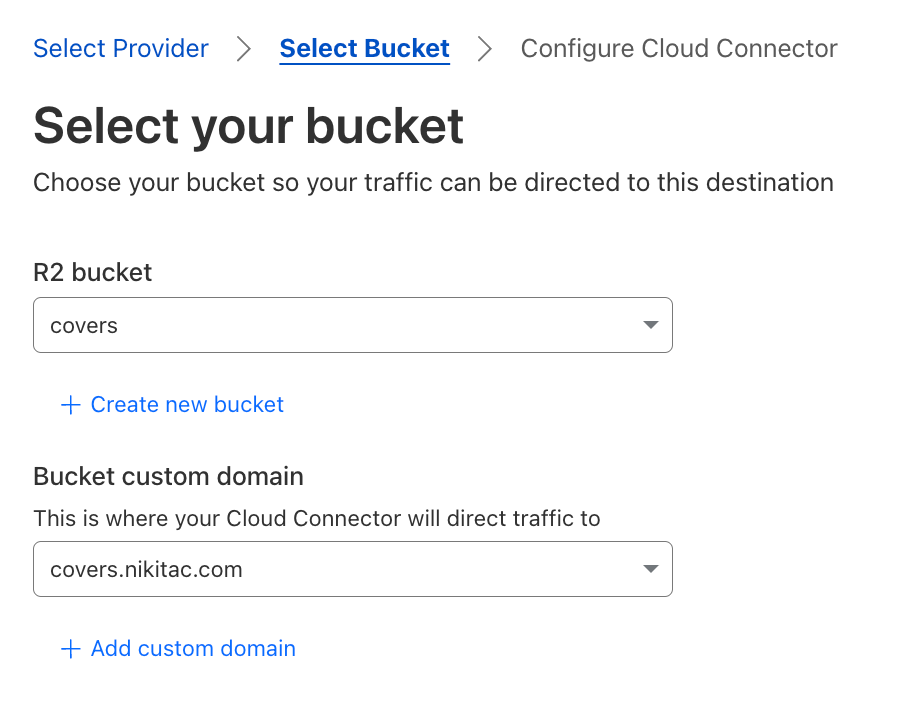
You’ll be presented with an interface where you can configure the destination hostname of your object storage bucket. Ensure that your bucket URL matches the expected schema for your cloud provider, such as .amazonaws.com for AWS S3 or storage.googleapis.com for Google Cloud Storage. In case of R2, your bucket needs to be public and associated with a custom domain:

Once you’ve configured your bucket, the next step is to determine which traffic is routed by Cloud Connector. Using the familiar rule builder interface that powers all our Rules products, you can filter requests based on hostname, URI path, headers, cookies, source IP, AS number, and more.

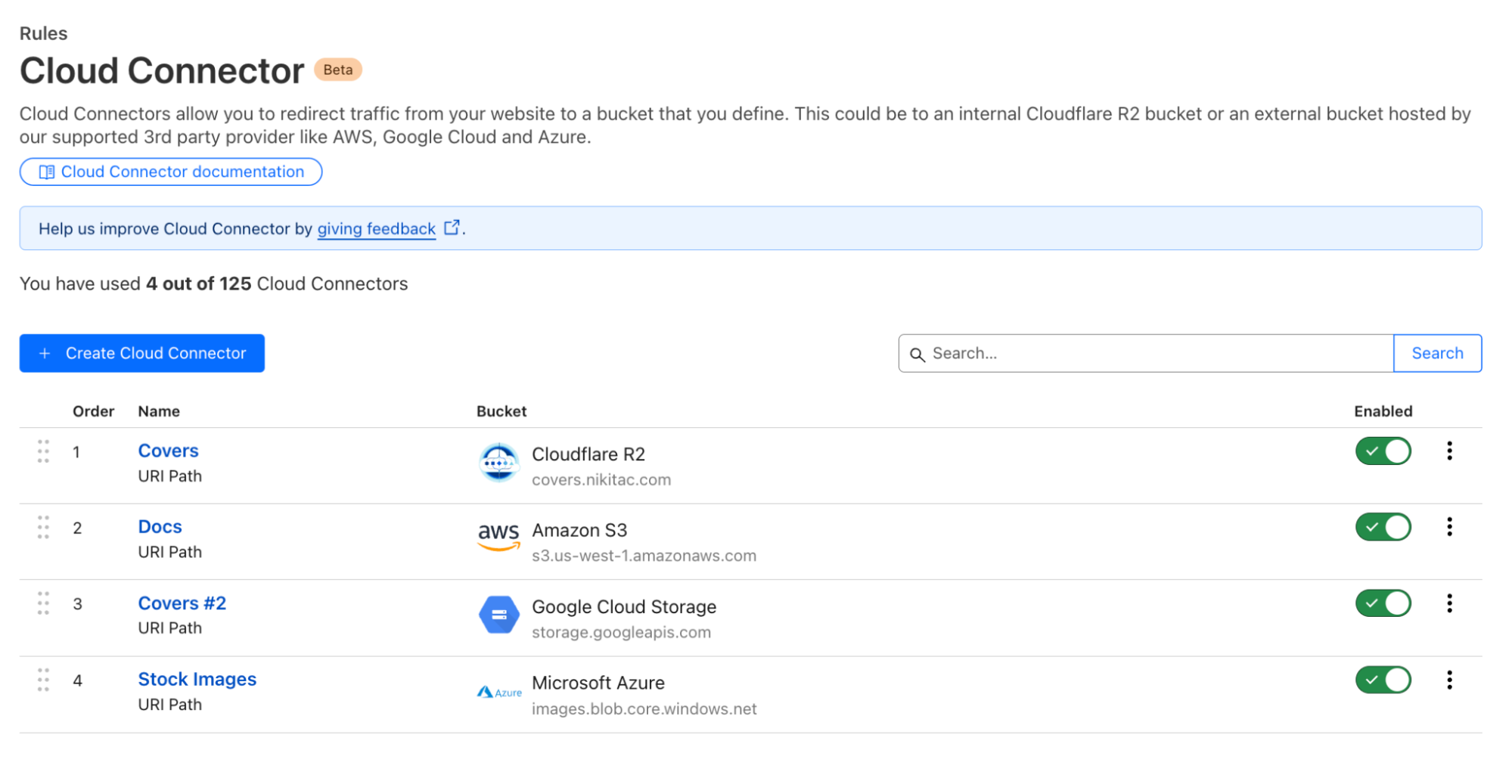
After configuring, deploy your rule, and it will be immediately effective:

Cloud Connector is intentionally placed at the end of the Ruleset Engine phase sequence to ensure it works out of the box, even if there are active origin or configuration rules with matching criteria.

Cloud Connector simplifies your setup, allowing you to focus on what matters most: delivering a seamless experience for your users. By leveraging Cloudflare’s built-in security, your assets are automatically protected, and direct traffic routing optimizes application performance, accelerating load times and reducing your cloud bandwidth costs.

Behind the scenes: how Cloud Connector works

To build Cloud Connector, we leveraged our powerful, high performance Ruleset Engine and integrated it with various cloud providers, ensuring compatibility and optimal performance. Throughout this process, we were focused on making the setup as intuitive as possible, reducing the need for additional configurations and making it accessible to users of all technical backgrounds.

At its core, Cloud Connector builds on Cloudflare’s existing Ruleset Engine, the same technology that powers Origin Rules. Origin Rules typically operate during the http_request_origin phase, where they manage how requests are routed to different origins. A phase, in Cloudflare’s system, represents a specific stage in the life of a request where rulesets can be executed. Each phase has a dedicated purpose, with rules defined at the account and zone levels to control different aspects of a request’s journey through our network.

Phases are essential because they allow us to apply actions at precise points in the request flow. For example, the http_request_origin phase focuses on routing, ensuring that traffic is directed to the correct origin based on the rules you set. By defining specific phases, we can optimize performance and enforce security measures at the right time without overlap or conflicts between different actions.

Rather than creating an entirely new system, we extended the existing “route” action within Ruleset Engine to handle a specific set of pre-approved cloud provider endpoints, such as AWS S3, Google Cloud Storage, Azure Blob Storage, and Cloudflare R2.

To maintain the modularity of our system and avoid introducing product-specific abstractions into our core Ruleset Engine control plane, we developed a thin API translator layer on Workers. This layer acts as an intermediary between the user-facing Cloud Connector API and the underlying Ruleset Engine API.

When a user creates a Cloud Connector rule, it’s translated on the backend into a series of existing Ruleset Engine-based actions. For instance, if a user sets up a rule to route traffic to an AWS S3 bucket, our system translates this into actions that adjust the host header and origin settings to point to the S3 endpoint. This allows a single Cloud Connector rule to be decomposed into multiple rules within a zone’s entry point ruleset.

These rules are processed in reverse order, adhering to a “last rule wins” approach. This ensures that the final matching rule determines the traffic’s routing, preserving the behavior users expect. For example, if traffic is routed to an AWS S3 bucket, the system will first match the traffic based on the URI, then disable SSL if necessary, and finally route to the S3 origin. Once the appropriate rule is matched, a “skip” action is invoked to prevent any further rules from altering the traffic, which prevents unintended behavior like disabling SSL for traffic routed to a different cloud provider.

When users retrieve their Cloud Connector rules, the system reverses this process, reconstructing the original actions from the decomposed rules. This ensures that users see their configurations as they originally defined them, without needing to understand the underlying complexities.

To support Cloud Connector’s unique requirements, we introduced a new request phase, http_request_cloud_connector. As the final request phase, this ensures that Cloud Connector rules have the last say in traffic routing decisions. This priority prevents conflicts with other routing rules, ensuring that traffic is securely and accurately routed according to the user’s intent.

Cloudflare is committed to building Cloudflare products on Cloudflare, leveraging existing technologies while innovating to meet new challenges. By building on Origin Rules and Workers, introducing the http_request_cloud_connector phase, and creating a thin API translation layer, we’ve developed a solution that simplifies multi-cloud routing without compromising on performance or security.

What’s next for Cloud Connector?

The current version of Cloud Connector is just the beginning. Our vision extends far beyond supporting object storage. In the future, we aim to support all kinds of HTTP cloud services, including load balancers, compute services, and more. We want Cloud Connector to be the primary way for Cloudflare users to discover and manage the cloud services they use across multiple providers.

Imagine being able to configure secure traffic routing to any cloud service without having to worry about DNS settings, Host headers, or SSL implementation. Our goal is to make Cloud Connector a comprehensive tool that simplifies the entire process, ensuring that you can focus on what matters most: building and scaling your web applications.

Get started

Cloud Connector is available in beta to all plans and is completely free. The rollout has started this month (August) and will be gradually released to all users throughout 2024. Once rolled out, users will start seeing this new product under the Rules > Cloud Connector tab of their zone dashboard. No beta access registration is required.

Learn more

Learn more about setting up and using Cloud Connector in developer documentation. Share your feedback in community forums – your opinion is invaluable and directly influences our product and design decisions, helping us to make Rules products even better.

Transform Rules:”Requests, Transform and Roll Out!”

Post Syndicated from Ming Xue original https://blog.cloudflare.com/transform-rules-requests-transform-and-roll-out/

Transform Rules:

Transform Rules:

Applications expect specific inputs in order to perform optimally. Techniques used to shape inputs to meet an application’s requirements might include normalizing the URLs to conform to a consistent formatting standard, rewriting the URL’s path and query based on different conditions and logic, and/or modifying headers to indicate an application’s specific information. These are expensive to run and complex to manage. Cloudflare can help you to offload the heavy lifting of modifying requests for your servers with Transform Rules. In this blog we will cover the nuts and bolts of the functionality.

Origin server🤒 : Thank you so much for offloading that for me, Cloudflare

Cloudflare edge servers😎 : No problem, buddy, I have taken care of that for you

Why do people need Transform Rules?

When it comes to modifying an HTTP/HTTPS request with normalization, rewriting the URLs, and/or modifying headers, Cloudflare users often use Cloudflare Workers, code they craft that runs on Cloudflare’s edge.

Cloudflare Workers open the door to many possibilities regarding the amount of work that can be done for your applications, close to where your end users are located. It provides a serverless execution environment that allows you to create application functionality without configuring or maintaining infrastructure. However, using a Worker to modify the request is kind of like wearing a diving suit in a kiddie pool. Therefore, a simple tool to modify requests without Workers has long been wanted.

Transform Rules:

It’s in this context that we looked at the most common request modifications that customers were making, and built out Transform Rules to cover them. Once Transform Rules were announced we anticipated they’d become the favourite tool in our customers’ tool box.

What do Transform Rules do?

  • URL Normalization: normalizes HTTP requests to a standard format which then allows you to predictably write security rule filters.
  • URL Rewrite: static and dynamic rewrites of the URL’s path and/or query string based on various attributes of the request.
  • Header Modify: add or remove static or dynamic headers (based on Cloudflare specific attributes) to requests based on different various attributes of the request.

URL Normalization

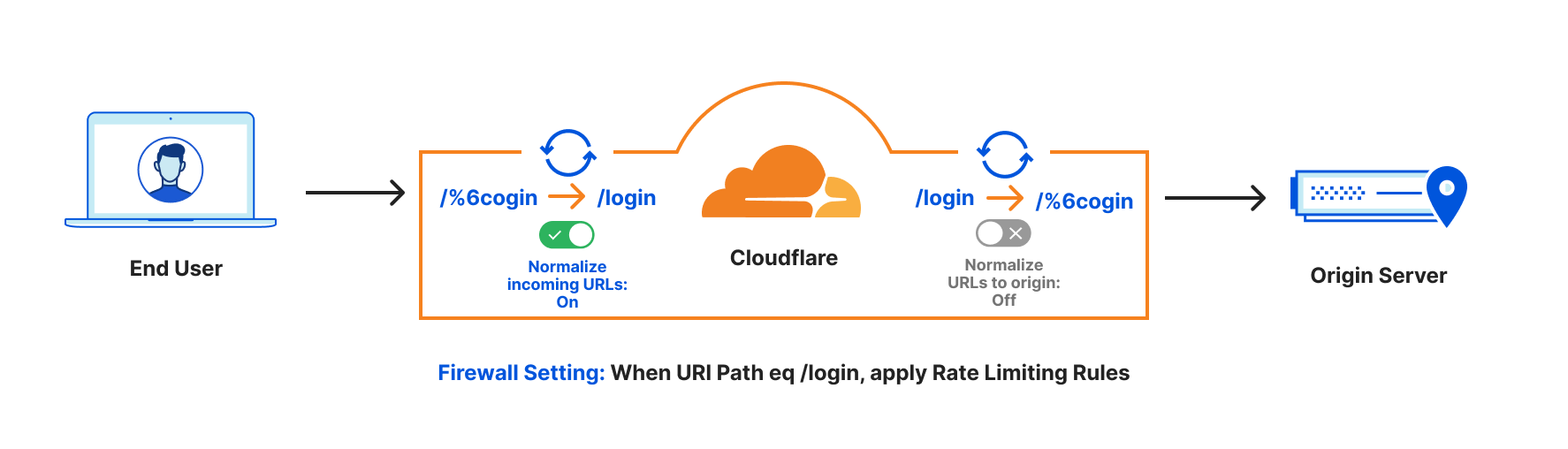
Bad actors on the Internet often encode your URLs to attack your applications because encoded URLs can bypass some security rules. URL Normalization transforms the request URL from encoded to unencoded before Cloudflare’s security features, so no one can bypass the firewall rules you configure.

For example, say you had a rate limiting rule for the path “/login” but someone sent the request as “/%6cogin”. Illustrated below:

You😤: Rate Limiting for https://www.example.com/login to avoid brute force attacks.

Attacker😈: You think you can stop me? I will issue massive requests to https://www.example.com/%6cogin to bypass your rate limiting rule.

Without URL Normalization, the request would bypass the rate limiting rule, but with URL Normalization the request is converted from the URL path /%6cogin to /login before the rule is applied.

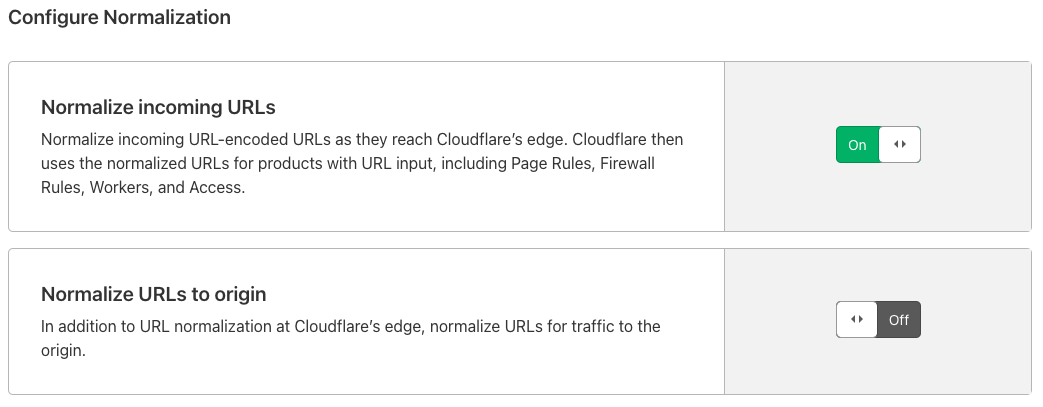
By default, URL Normalization is enabled for all the zones on Cloudflare at Cloudflare’s edge, and disabled when going to origins. This means incoming URLs will be decoded to standard format before any Cloudflare security execution. When going back to the origins, we will use the original URL. In this way, no encoded URL can bypass security features and the origin also can see the original URL.

Transform Rules:
Transform Rules:

The default settings are flexible to adjust if you need. This FAQ page has more information about URL Normalization.

URL Rewrite

When talking about URL Rewrites, we always want to distinguish them from URL Redirects. They are like twins. Rewrites is a server-side modification of the URL before it is fully processed by the web server. This will not change what is seen in the user’s browser. Redirects forward URLs to other locations via a 301 or 302 HTTP status code. This will change what is seen in the user’s browser. You can do a URL Redirect with “Forwarding URL” in Cloudflare Pages Rules. Page Rules trigger actions whenever a request matches one of the URL patterns you define.

Transform Rules come into play when we need to use URL Rewrite. This allows you to rewrite a URL’s path and/or query string based on the logic of your applications. The rewrite can be a fixed string (which we call ‘static’) or a computed string (called ‘dynamic’) based on various attributes of a request, like the country it came from, the referrer, or parts of the path. These rewrites come before products such as Firewall Rules, Page Rules, and Cloudflare Workers.

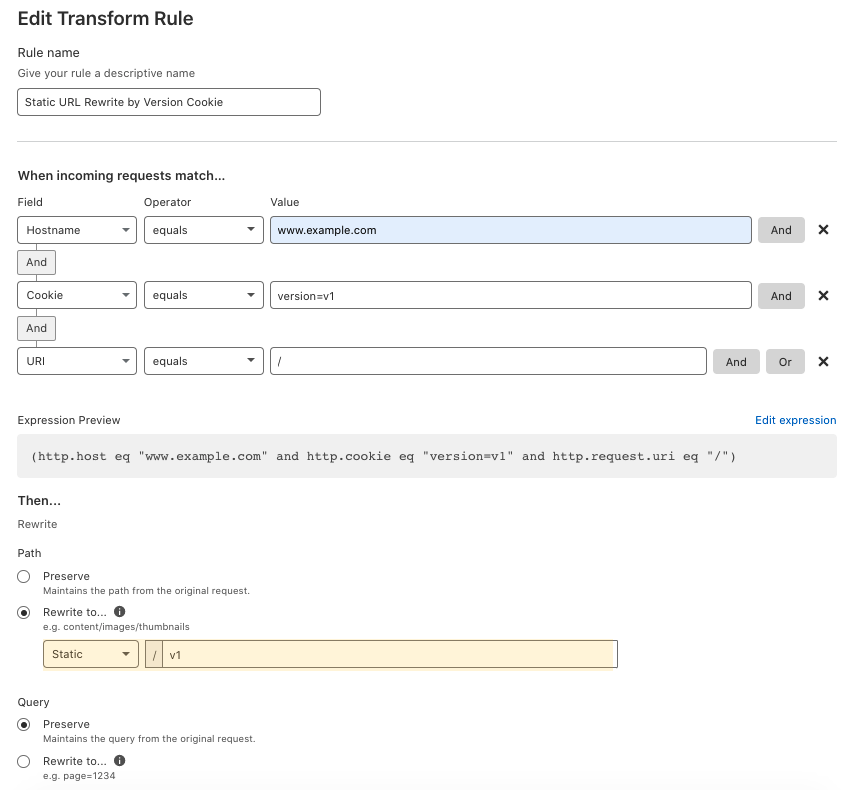
Static URL Rewrite Example

When visiting www.example.com with a cookie of version=v1, you want to rewrite the URL to www.example.com/v1 when going to the origin server. In this case, the end-user facing URL will not change, but the content will be the /v1’s content. This is a static URL rewrite. It only does rewrites when end users visit the URL www.example.com with cookie version=v1. It can help you to do A/B testing when rolling out new content.

Transform Rules:

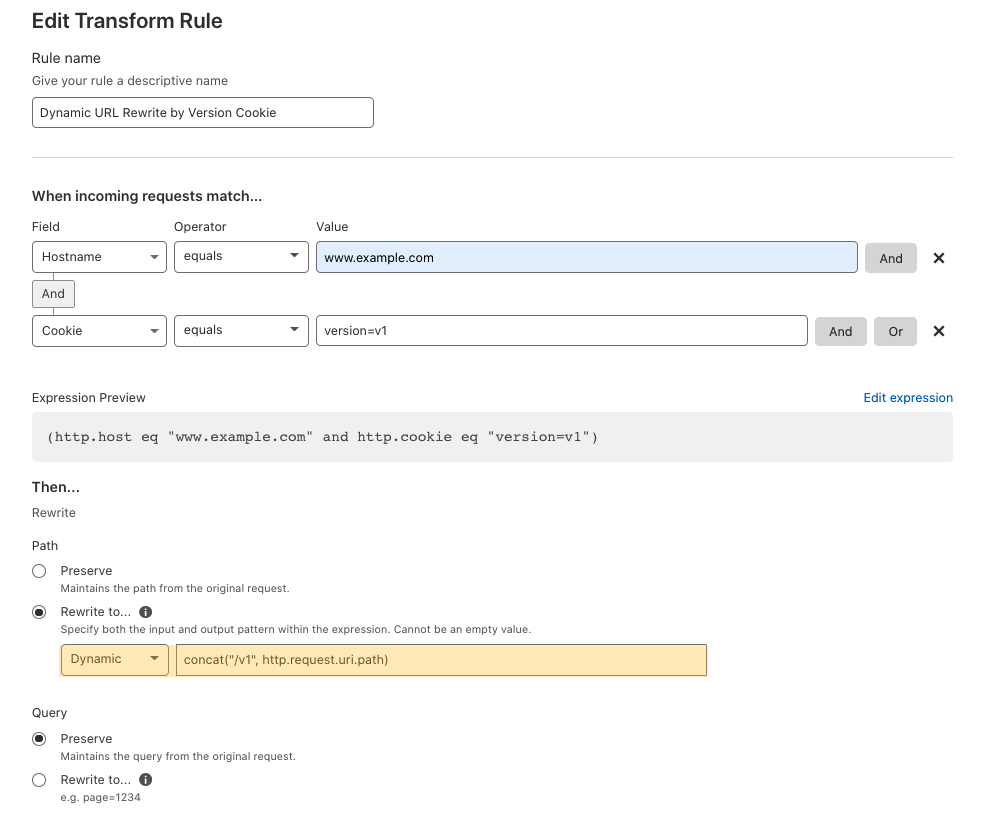
Dynamic URL Rewrite Example

When visiting any URL of www.example.com with a cookie of version=v1, you want to rewrite the request by adding /v1/ to the beginning of the URL for v1 content, when going to the origin server.

In this use case, when end users visit www.example.com/Literaturelibrary/book1314 with cookie version=v1, Cloudflare will rewrite the URL to www.example.com/v1/Literaturelibrary/book1314.

When end users visit www.example.com/fictionlibrary/book52/line43/universe with cookie version=v1, Cloudflare will rewrite the URL to www.example.com/v1/fictionlibrary/book52/line43/universe.

Transform Rules:

In this case, the URL visible in the client’s browser will not change, but the content returned will be from the /v1 location. This is a dynamic URL rewrite, so it applies the rewrite to all URLs when end users visit with the cookie.

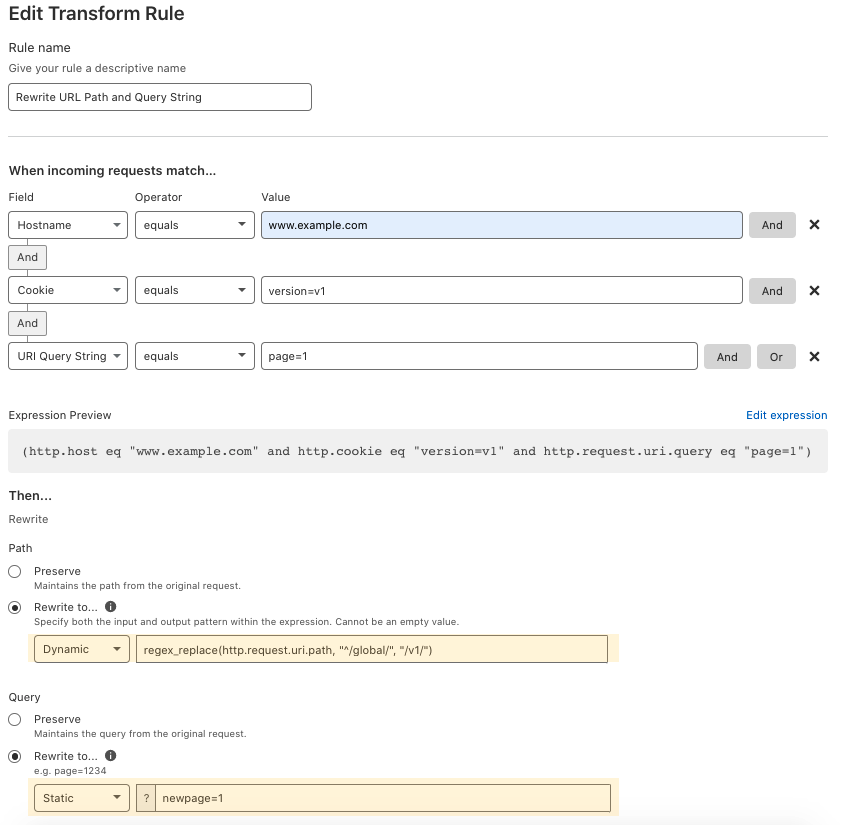
Another Dynamic URL Rewrite Example

When visiting any URL of www.example.com with a cookie of version=v1 and query string of page=1 that has /global in the beginning of the URL, this rule rewrites the request by replacing /global in the beginning for the URL with /v1 and updates the query string to newpage=1, when going to the origin server.

When end users visit www.example.com/global/Literaturelibarary/book1013?page=1 with cookie of version=v1, Cloudflare will rewrite the URL to www.example.com/v1/Literaturelibarary/book1013?newpage=1.

And when end users visit www.example.com/global/fictionlibarary/book52/line43/universe?page=1 with cookie of version=v1, Cloudflare will rewrite the URL to www.example.com/v1/fictionlibarary/book52/line43/universe?newpage=1.

Transform Rules:

In this case, the end-user facing URLs will not change, but the content will be v1’s content. This is a dynamic URL rewrite, so it applies the rewrite to all URLs when end users visit with the cookie of version=v1 and a query string of page=1.

Header Modify

Adding/removing request headers of the requests when going to origin servers. This is one of the most requested features of customers using Cloudflare Workers, especially those sending the Bot Score as a request header to origin. You can use this feature to add/remove strings and non-strings, and static or dynamic request header values.

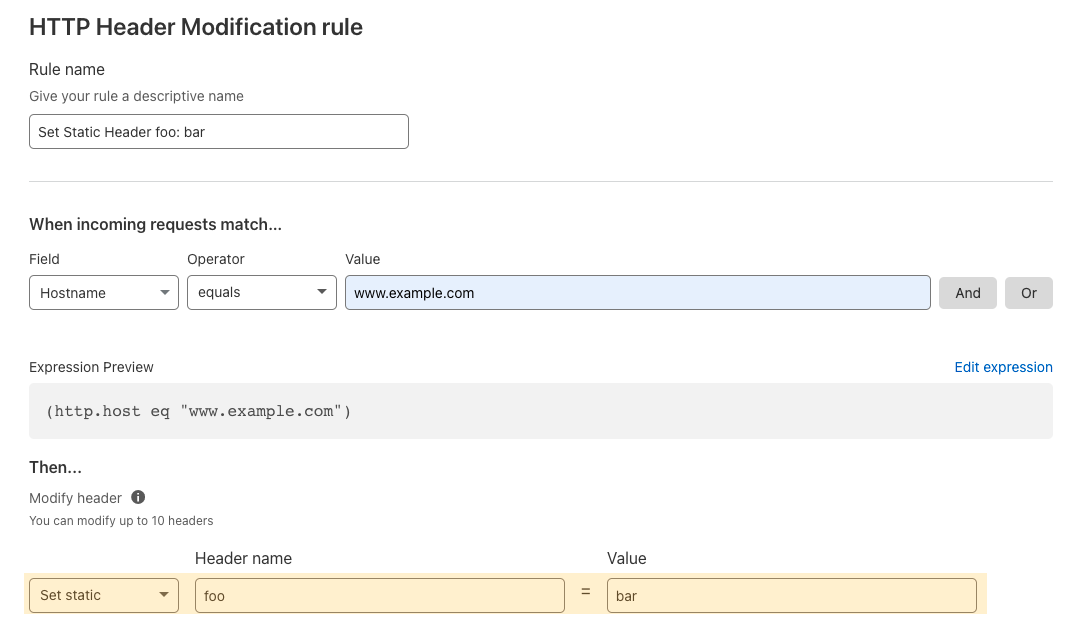
Set Static header: Adds a static header and value to the request and sends it to the origin.

For example, add a request header such as foo: bar only when the requests have the hostname of www.example.com.

Transform Rules:

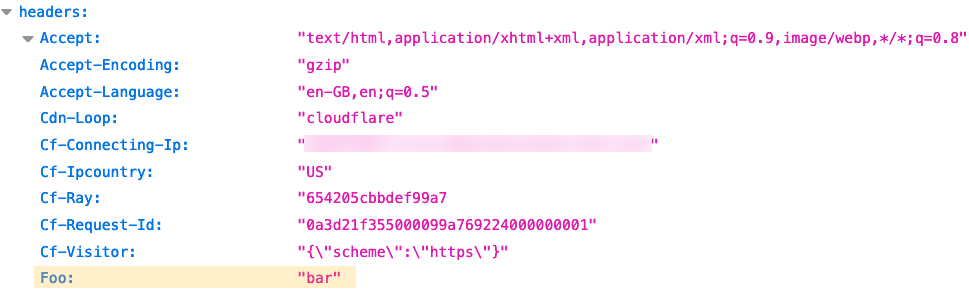
With the above setting, Cloudflare appends a static header Foo: bar to your origin when this rule triggers. Here is what the origin should see.

Transform Rules:

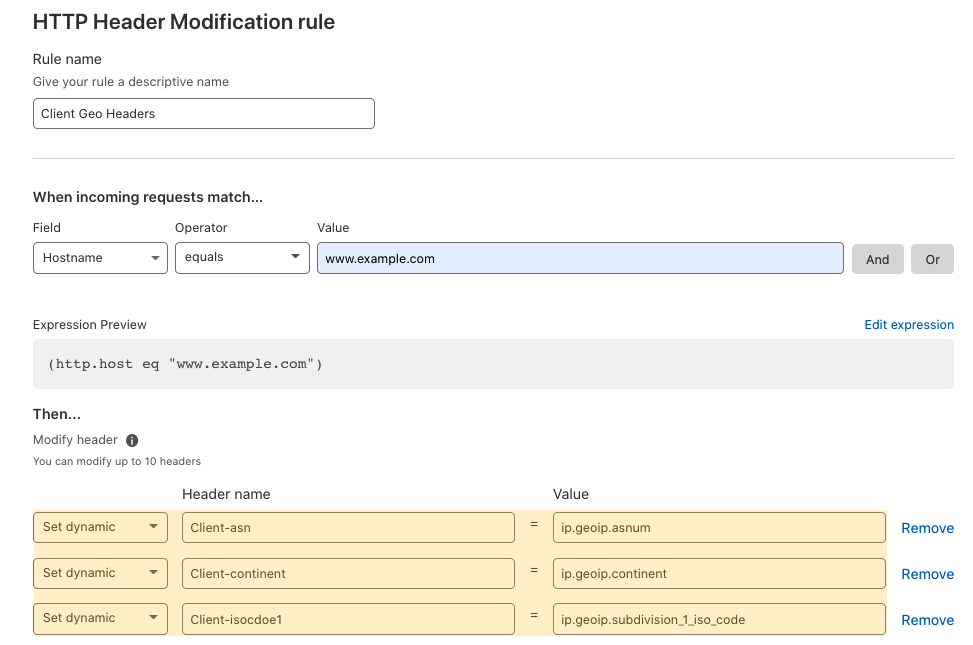
Set Dynamic header : Adds a dynamic header value from the computed field, like the end user’s geolocation.

Transform Rules:

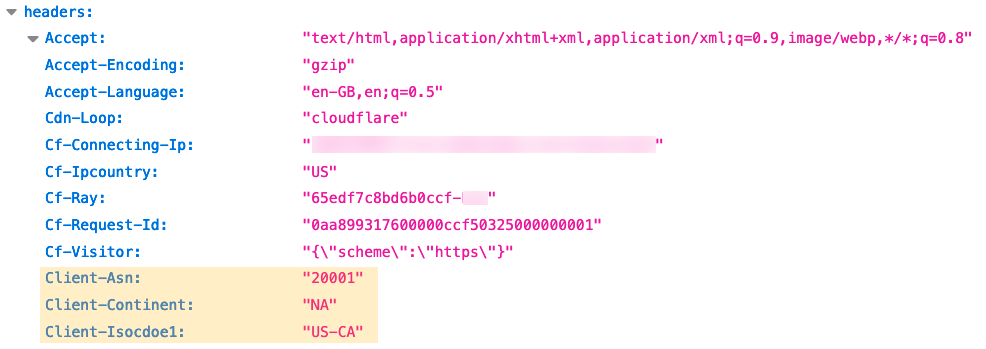
The dynamic request headers are added.

Transform Rules:

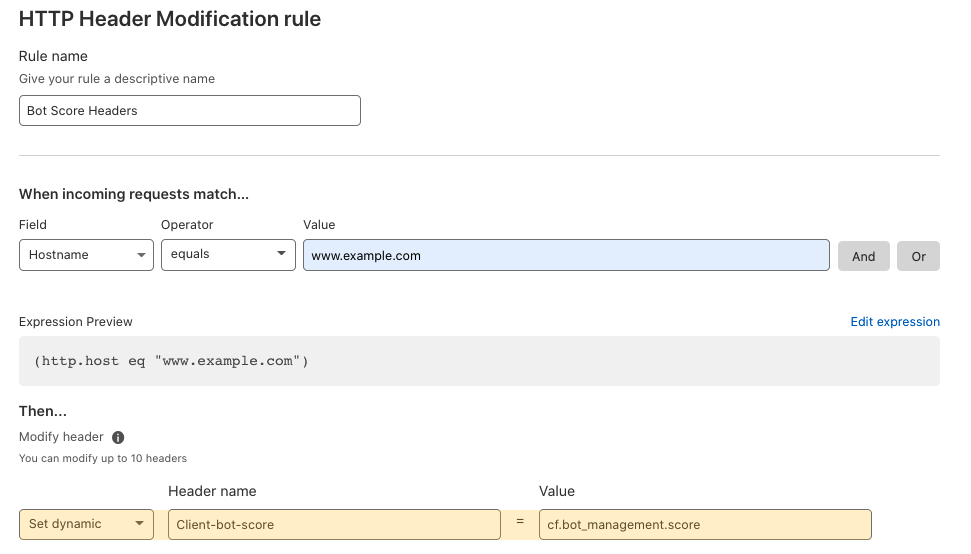
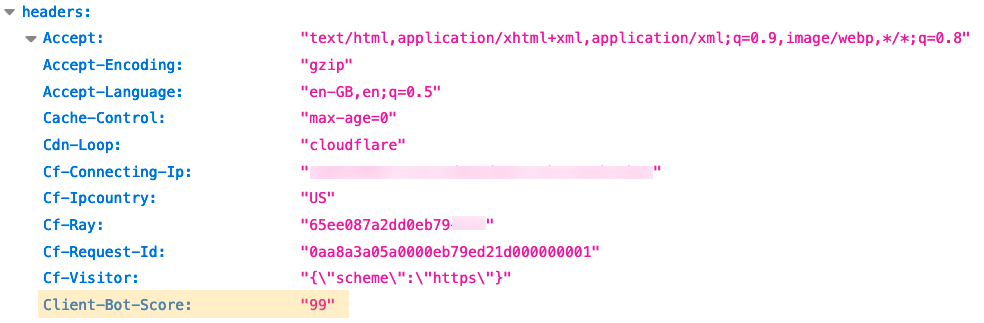
Set Dynamic Bot Management headers: Cloudflare Bot Management protects applications from bad bot traffic by scoring each request with a “bot score” from 1 to 99. With Bot Management enabled, we can send the bot score to the origin server as a request header via Transform Rules.

Transform Rules:

The bot score header is added.

Transform Rules:

It has never been easier

With Transform Rules, you can modify the request with URL Normalization, URL Rewrites, and HTTP Header Modification with easy settings to power your application. There’s no script required for Cloudflare to offload those duties from your origin servers. Just like Optimus Prime says “Autobots, transform and roll out!”, Cloudflare says “Requests, transform and roll out!”.

Try out the latest Transform Rules yourself today.