Tag Archives: Foundational (100)

How to get read-only visibility into the AWS Control Tower console

Post Syndicated from Bruno Mendez original https://aws.amazon.com/blogs/security/how-to-get-read-only-visibility-into-aws-control-tower-console/

When you audit an environment governed by AWS Control Tower, having visibility into the AWS Control Tower console allows you to collect important configuration information, but currently there isn’t a read-only role installed by AWS Control Tower. In this post, I will show you how to create a custom permission set by using both a managed AWS policy and a custom permissions policy. This custom permission set will allow you to get the visibility you need, while still enforcing the principle of least privilege. You will have access to the read-only information you need, without asking your administrator to provide the attestation.

AWS Control Tower sets up AWS Single Sign-On (AWS SSO) with a native default directory. AWS Control Tower comes with a set of preconfigured permission sets available out-of-the-box. A permission set is a collection of administrator-defined policies that AWS SSO uses to determine a user’s effective permissions to access a specific AWS account. Permission sets can contain an AWS inline policy and you can also attach AWS managed policies. When you assign a permission set to a user or group in an account, AWS SSO creates an IAM role in the AWS account, configures the inline and AWS managed policies, and creates the trust policies that allow the assigned users to assume the role through AWS SSO.

To learn more about inline and AWS managed policies, see Managed Policies and Inline Policies and the IAM User Guide on AWS managed policies for job functions.

To create a custom permission set for AWS Control Tower

  1. Log into your AWS Control Tower environment as an administrator.
  2. Choose the AWS Single Sign-On service, then choose AWS accounts.
  3. On the AWS Accounts pane, choose the Permission sets tab, then choose Create permission set, as shown in the following figure.

    Figure 1: Permission sets tab in the SSO console

    Figure 1: Permission sets tab in the SSO console

  4. Select Create a custom permission set and enter a name in the Name field (in this example, I named mine Audit-enhanced), then enter text in the Description field, as shown in figure 2.

    Figure 2: AWS Single Sign-On console – Create new permission set workflow

    Figure 2: AWS Single Sign-On console – Create new permission set workflow

  5. Choose a value for Session duration (in this example I set the duration to 1 hour). Optionally, you can set a relay state (in this example, I left it blank), and select both Attach AWS managed policies and Create a custom permissions policy, as shown in the following figure.

    Figure 3: AWS Single Sign-On console – Setting additional permission set configurations

    Figure 3: AWS Single Sign-On console – Setting additional permission set configurations

  6. In the Attach AWS Managed policies dashboard, in the search bar, enter audit and select the SecurityAudit managed policy, as shown in figure 4.

    Figure 4: AWS Single Sign-On console – Attaching AWS managed policy

    Figure 4: AWS Single Sign-On console – Attaching AWS managed policy

  7. Copy the following JSON policy to your clipboard.
    
    {
                "Version": "2012-10-17",
                "Statement": [
                    {
                        "Effect": "Allow",
                        "Action": [
                          "controltower:Get*",
                          "controltower:List*",
                          "controltower:Describe*",
                          "sso:getpermissionset",
                          "sso:DescribeRegisteredRegions",
                          "sso:ListDirectoryAssociations",
                          "sso-directory:DescribeDirectory"		
                        ],
                        "Resource": "*"
                    }
                ]
         }
    

    This policy grants the following read-level permissions: Get, List, Describe API actions. This is the additional set of permissions necessary to enhance the SecurityAudit role, so that you can gain visibility into the AWS Control Tower console.

  8. Scroll down to the Create a custom permissions policy dashboard, paste the policy you previously copied into the field, as shown in figure 5, then choose Create.

    Figure 5: AWS Single Sign-On console – Entering JSON code for custom permission policy

    Figure 5: AWS Single Sign-On console – Entering JSON code for custom permission policy

Now, when you go to the Permission sets tab, you should see your newly created custom permission set.

To assign the newly created permission set access to your AWS Control Tower master account

  1. On the AWS organization tab, select the box for your AWS Control Tower master account (in this example, the account newControlTower), then choose Assign users, as shown in figure 6.

    Figure 6: AWS Single Sign-On console – AWS organization tab – Assign access workflow

    Figure 6: AWS Single Sign-On console – AWS organization tab – Assign access workflow

  2. On the Users tab, select your user (in this example, CT Tester) as shown in figure 7, and choose Next: Permission sets.

    Figure 7: AWS Single Sign-On console – Users tab – Assigning access to your user

    Figure 7: AWS Single Sign-On console – Users tab – Assigning access to your user

  3. Select the box next to the custom permission set you created earlier (in this example, Audit-enhanced), and choose Finish, as shown in figure 8.

    Figure 8: AWS Single Sign-On console – Select permission sets

    Figure 8: AWS Single Sign-On console – Select permission sets

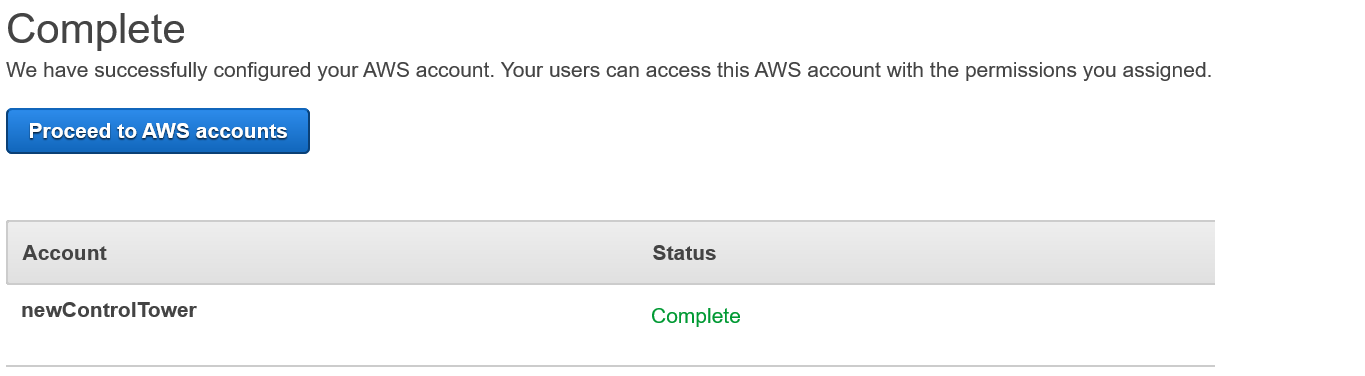
You should see a Complete page, and the newControlTower account will show Status as Complete, as shown in figure 9.

Figure 9: AWS Single Sign-On console – Successful completion of permission set assignment

Figure 9: AWS Single Sign-On console – Successful completion of permission set assignment

You now have a permission set that enhances your SecurityAuditor role and gives you read-only visibility into your AWS Control Tower environment.

Summary

In this post, we’ve detailed how to enhance an “audit-like” role to incorporate additional permissions by using a custom permission set in AWS SSO, while enforcing the principle of least privilege to gain read-only capabilities into the AWS Control Tower console.

For more information on the technologies mentioned in this post, see the following links:

If you have feedback about this post, submit comments in the Comments section below.

Want more AWS Security how-to content, news, and feature announcements? Follow us on Twitter.

Author

Bruno Mendez

Bruno joined AWS as a Security Consultant in 2019 and has since worked with several global customers to enable and strengthen their cloud security posture as they embarked in their cloud transformational journeys. Bruno enjoys architecting, assessing, automating, improving, and discussing security. Outside of work Bruno loves playing soccer on the weekends and spending time with the family.

Updated IRAP reference architectures and consumer guidance for Australian public sector organizations building workloads at PROTECTED level

Post Syndicated from Michael Stringer original https://aws.amazon.com/blogs/security/updated-irap-reference-architectures-consumer-guidance-australian-public-sector-organizations-building-workloads-protected-level/

In July 2020, we announced that 92 Amazon Web Services (AWS) services had successfully assessed compliant with the Australian government’s Information Security Registered Assessors Program (IRAP) for operating workloads at the PROTECTED level. This enables organizations to use AWS to build a wide range of applications and services for the benefit of all residents of Australia.

We’re excited to announce the publication of the Reference Architectures for ISM PROTECTED Workloads in the AWS Cloud whitepaper and the AWS Consumer Guide that are now available in the IRAP documentation package in AWS Artifact. The material provides additional guidance to customers seeking to secure their workloads in AWS Cloud in accordance with the requirements of the Australian government’s Information Security Manual (ISM).

The new Reference Architectures for ISM PROTECTED Workloads in the AWS Cloud whitepaper contains five example patterns that demonstrate how ISM PROTECTED AWS services work together to support the following use cases:

The AWS Consumer Guide is an independently authored guide by Foresight IT Consulting that provides cloud consumers with practical guidance on the use of AWS for PROTECTED workloads.

The AWS IRAP PROTECTED documentation helps individual agencies simplify the process of adopting AWS services. It enables individual agencies to complete their own assessments and adopt AWS for a broader range of services.

For the full list of services assessed for PROTECTED workloads, see the services in scope page (select the IRAP tab). The assessed AWS services are available within the existing AWS Asia-Pacific (Sydney) Region.

If you have questions about our PROTECTED assessment or would like to inquire about how to use AWS for your highly sensitive workloads, contact your account team.

If you have feedback about this post, submit comments in the Comments section below.

Want more AWS Security how-to content, news, and feature announcements? Follow us on Twitter.

Author

Michael Stringer

Michael is a Security Specialist Solutions Architect in the AWS ANZ Public Sector team, based in Melbourne, Australia. He works closely with public sector agencies to make sure they implement effective security controls as part of their AWS cloud adoption.

Improving security as part of accelerated data center migrations

Post Syndicated from Stephen Bowie original https://aws.amazon.com/blogs/security/improving-security-as-part-of-accelerated-data-center-migrations/

Approached correctly, cloud migrations are a great opportunity to improve the security and stability of your applications. Many organizations are looking for guidance on how to meet their security requirements while moving at the speed that the cloud enables. They often try to configure everything perfectly in the data center before they migrate their first application. At AWS Managed Services (AMS), we’ve observed that successful migrations establish a secure foundation in the cloud landing zone then iterate from there. We think it’s important to establish a secure foundation in your cloud landing zone, and then refine and improve your security as you grow.

Customers who take a pragmatic, risk-based approach are able to innovate and move workloads more quickly to the cloud. The organizations that migrate fastest start by understanding the shared responsibility model. In the shared responsibility model, Amazon Web Services (AWS) takes responsibility for delivering security controls that might have been the responsibility of customers operating within their legacy data center. Customers can concentrate their activities on the security controls they remain responsible for. The modern security capabilities provided by AWS make this easier.

The most efficient way to migrate is to move workloads to the cloud as early as possible. After the workloads are moved, you can experiment with security upgrades and new security capabilities available in the cloud. This lets you migrate faster and consistently evolve your security approach. The sooner you focus on applying foundational security in the cloud, the sooner you can begin refining and getting comfortable with cloud security and making improvements to your existing workloads.

For example, we recently helped a customer migrate servers that weren’t sufficiently hardened to the Center for Internet Security (CIS) benchmarks. The customer could have attempted hardening on premises before their migration. That would have required spinning up dedicated infrastructure resources in their data center—a complex and costly, resource-intensive proposition.

Instead, we migrated their application to the cloud as it was, took snapshots of the servers, and ran the snapshots on an easy-to-deploy, low-cost instance of Amazon Elastic Compute Cloud (Amazon EC2). Using the snapshots, we ran scripts to harden those servers and brought their security scores up to over 90 percent against the CIS benchmarks.

Using this method to migrate let the customer migrate their existing system to the cloud quickly, then test hardening methods against the snapshots. If the application hadn’t run properly after hardening, the customer could have continued running on the legacy OS while fixing the issues at their own pace. Fortunately, the application ran seamlessly on the hardened snapshot of the OS. The customer switched to the hardened infrastructure without incurring downtime and with none of the risks or costs of trying to do it in their data center.

Migrations are great opportunities to uplift the security of your infrastructure and applications. It’s often more efficient to try migrating and break something rather than attempting to get everything right before starting. For example, dependence on legacy protocols, such as Server Message Block (SMB) v1, should be fixed by the customer or their migration partner as part of the initial migration. The same is true for servers missing required endpoint security agents. AWS Professional Services and AMS help customers identify these risks during migrations, and help them to isolate and mitigate them as an integral part of the migration.

The key is to set priorities appropriately. Reviewing control objectives early in the process is essential. Many on-premises data centers operate on security policies that are 20 years old or more. Legacy policies often clash with current security best practices, or lack the ability to take advantage of security capabilities that are native to the cloud. Mapping objectives to cloud capabilities can provide opportunities to meet or exceed existing security policies by using new controls and tools. It can also help identify what’s critical to fix right away.

In many cases, controls can be retired because cloud security makes them irrelevant. For example, in AMS, privileged credentials, such as Local Administrator and sudo passwords are either randomized or made unusable via policy. This removes the need to manage and control those types of credentials. Using AWS Directory Service for Microsoft Active Directory reduces the risk exposure of domain controllers for the resource forest and automates activities, such as patching, that would otherwise require privileged access. By using AWS Systems Manager to automate common operational tasks, 96 percent of our operations are performed via automation. This significantly reduced the need for humans to access infrastructure. This is one of the Well Architected design principles.

It’s also important to address the people and process aspects of security. Although the cloud can improve your security posture, you should implement current security best practices to help mitigate new risks that might emerge in the future. Migration is a great opportunity to refresh and practice your security response process, and take advantage of the increased agility and automation of security capabilities in the cloud. At AMS, we welcome every opportunity to simulate security events with our customers as part of a joint game day, allowing our teams to practice responding to security events together.

Or as John Brigden, Vice President of AMS, recently said in a blog post, “Traditional, centralized IT prioritized security and control over speed and flexibility. Outsourced IT could exacerbate this problem by adding layers of bureaucracy to the system. The predictable result was massive growth in shadow IT. Cloud-native, role-based solutions such as AWS Identity and Access Manager (IAM), Amazon CloudWatch, and AWS CloudTrail work together to enable enterprise governance and security with appropriate flexibility and control for users.”

In most cases, if it’s possible to migrate even a small application to the cloud early, it will be more efficient and less costly than waiting until all security issues have been addressed before migrating. To learn how using AMS to operate in the cloud can deliver a 243 percent return on investment, download the Forrester Total Economic Impact™ study.

You can use native AWS and third-party security services to inspect and harden your infrastructure. Most importantly, you can get a feel for security operations in the cloud—how things change, how they stay the same, and what is no longer a concern. When it comes to accelerating your migration securely, let the cloud do the heavy lifting.

If you have feedback about this post, submit comments in the Comments section below. If you have questions about this post, start a new thread on the AWS Migration & Transfer forums or contact AWS Support.

Want more AWS Security how-to content, news, and feature announcements? Follow us on Twitter.

Author

Stephen Bowie

Based in Seattle, Stephen leads the AMS Security team, a global team of engineers who live and breathe security, striving around the clock to keep our customers safe. Stephen’s 20-year career in security includes time with Deloitte, Microsoft, and Cutter & Buck. Outside of work, he is happiest sailing, travelling, or watching football with his family.

Introducing the AWS Best Practices for Security, Identity, & Compliance Webpage and Customer Polling Feature

Post Syndicated from Marta Taggart original https://aws.amazon.com/blogs/security/introducing-aws-best-practices-security-identity-compliance-webpage-and-customer-polling-feature/

The AWS Security team has made it easier for you to find information and guidance on best practices for your cloud architecture. We’re pleased to share the Best Practices for Security, Identity, & Compliance webpage of the new AWS Architecture Center. Here you’ll find top recommendations for security design principles, workshops, and educational materials, and you can browse our full catalog of self-service content including blogs, whitepapers, videos, trainings, reference implementations, and more.

We’re also running polls on the new AWS Architecture Center to gather your feedback. Want to learn more about how to protect account access? Or are you looking for recommendations on how to improve your incident response capabilities? Let us know by completing the poll. We will use your answers to help guide security topics for upcoming content.

Poll topics will change periodically, so bookmark the Security, Identity, & Compliance webpage for easy access to future questions, or to submit your topic ideas at any time. Our first poll, which asks what areas of the Well-Architected Security Pillar are most important for your use, is available now. We look forward to hearing from you.

If you have feedback about this post, submit comments in the Comments section below.

Want more AWS Security how-to content, news, and feature announcements? Follow us on Twitter.

Author

Marta Taggart

Marta is a Seattle-native and Senior Program Manager in AWS Security, where she focuses on privacy, content development, and educational programs. Her interest in education stems from two years she spent in the education sector while serving in the Peace Corps in Romania. In her free time, she’s on a global hunt for the perfect cup of coffee.

TISAX scope broadened

Post Syndicated from Kevin Quaid original https://aws.amazon.com/blogs/security/tisax-scope-broadened/

The Trusted Information Security Assessment Exchange (TISAX) provides automotive industry organizations the assurance needed to build secure applications and services on the cloud. In late June, AWS achieved the assessment objectives required for data with a very high need for protection according to TISAX criteria.

We’re happy to announce this broadened scope of our TISAX certification today, September 3, the same day that Ferdinand Porsche, credited with originating VW’s Beetle, pioneering hybrid electric-gasoline technology, and founding the Porsche car company, was born 145 years ago.

Automotive customers and their entire supply chain rely on AWS, including Volkswagen’s global supply chain comprised of 122 manufacturing plants and 1,500 suppliers. This certification evidences that the AWS information management systems meet industry standards.

“We rely on our partners and suppliers to achieve a unified level of information security established by TISAX. AWS recognizes the importance of this bar and demonstrates innovation by expanding program scope to include additional regions, control domains, and protection levels.”
    –Stefan Arnold, Director Technology & Acceleration, Porsche

AWS completed a scope extension assessment against TISAX very high protection level (AL 3) for five additional regions. The seven regions in scope include Frankfurt, Ireland, US West (Oregon), US East (Ohio), US East (North Virginia), Canada, and Seoul. Control domains in scope expanded to include data protection.

TISAX was established by the German Association of the Automotive Industry (VDA) and is governed by the European Network Exchange (ENX). The assessment was conducted and accredited by an audit provider, and the results are retrievable from the ENX Portal. The scope ID and assessment ID are SP208R and AYZ38F-1, respectively.

For more information, see Trusted Information Security Assessment Exchange.

If you have feedback about this post, submit comments in the Comments section below.

Want more AWS Security how-to content, news, and feature announcements? Follow us on Twitter.

Author

Kevin Quaid

Kevin leads expansion initiatives for security assurance, supporting customers using and migrating to AWS. He previously managed datacenter site selection and qualification for AWS infrastructure. He is passionate about leveraging his decade-plus risk management experience at Amazon to drive innovation and cloud adoption.

New third-party test compares Amazon GuardDuty to network intrusion detection systems

Post Syndicated from Tim Winston original https://aws.amazon.com/blogs/security/new-third-party-test-compares-amazon-guardduty-to-network-intrusion-detection-systems/

A new whitepaper is available that summarizes the results of tests by Foregenix comparing Amazon GuardDuty with network intrusion detection systems (IDS) on threat detection of network layer attacks. GuardDuty is a cloud-centric IDS service that uses Amazon Web Services (AWS) data sources to detect a broad range of threat behaviors. Security engineers need to understand how Amazon GuardDuty compares to traditional solutions for network threat detection. Assessors have also asked for clarity on the effectiveness of GuardDuty for meeting compliance requirements, like Payment Card Industry (PCI) Data Security Standard (DSS) requirement 11.4, which requires intrusion detection techniques to be implemented at critical points within a network.

A traditional IDS typically relies on monitoring network traffic at specific network traffic control points, like firewalls and host network interfaces. This allows the IDS to use a set of preconfigured rules to examine incoming data packet information and identify patterns that closely align with network attack types. Traditional IDS have several challenges in the cloud:

  • Networks are virtualized. Data traffic control points are decentralized and traffic flow management is a shared responsibility with the cloud provider. This makes it difficult or impossible to monitor all network traffic for analysis.
  • Cloud applications are dynamic. Features like auto-scaling and load balancing continuously change how a network environment is configured as demand fluctuates.

Most traditional IDS require experienced technicians to maintain their effective operation and avoid the common issue of receiving an overwhelming number of false positive findings. As a compliance assessor, I have often seen IDS intentionally de-tuned to address the false positive finding reporting issue when expert, continuous support isn’t available.

GuardDuty analyzes tens of billions of events across multiple AWS data sources, such as AWS CloudTrail, Amazon Virtual Private Cloud (Amazon VPC) flow logs, and Amazon Route 53 DNS logs. This gives GuardDuty the ability to analyze event data, such as AWS API calls to AWS Identity and Access Management (IAM) login events, which is beyond the capabilities of traditional IDS solutions. Monitoring AWS API calls from CloudTrail also enables threat detection for AWS serverless services, which sets it apart from traditional IDS solutions. However, without inspection of packet contents, the question remained, “Is GuardDuty truly effective in detecting network level attacks that more traditional IDS solutions were specifically designed to detect?”

AWS asked Foregenix to conduct a test that would compare GuardDuty to market-leading IDS to help answer this question for us. AWS didn’t specify any specific attacks or architecture to be implemented within their test. It was left up to the independent tester to determine both the threat space covered by market-leading IDS and how to construct a test for determining the effectiveness of threat detection capabilities of GuardDuty and traditional IDS solutions which included open-source and commercial IDS.

Foregenix configured a lab environment to support tests that used extensive and complex attack playbooks. The lab environment simulated a real-world deployment composed of a web server, a bastion host, and an internal server used for centralized event logging. The environment was left running under normal operating conditions for more than 45 days. This allowed all tested solutions to build up a baseline of normal data traffic patterns prior to the anomaly detection testing exercises that followed this activity.

Foregenix determined that GuardDuty is at least as effective at detecting network level attacks as other market-leading IDS. They found GuardDuty to be simple to deploy and required no specialized skills to configure the service to function effectively. Also, with its inherent capability of analyzing DNS requests, VPC flow logs, and CloudTrail events, they concluded that GuardDuty was able to effectively identify threats that other IDS could not natively detect and required extensive manual customization to detect in the test environment. Foregenix recommended that adding a host-based IDS agent on Amazon Elastic Compute Cloud (Amazon EC2) instances would provide an enhanced level of threat defense when coupled with Amazon GuardDuty.

As a PCI Qualified Security Assessor (QSA) company, Foregenix states that they consider GuardDuty as a qualifying network intrusion technique for meeting PCI DSS requirement 11.4. This is important for AWS customers whose applications must maintain PCI DSS compliance. Customers should be aware that individual PCI QSAs might have different interpretations of the requirement, and should discuss this with their assessor before a PCI assessment.

Customer PCI QSAs can also speak with AWS Security Assurance Services, an AWS Professional Services team of PCI QSAs, to obtain more information on how customers can leverage AWS services to help them maintain PCI DSS Compliance. Customers can request Security Assurance Services support through their AWS Account Manager, Solutions Architect, or other AWS support.

We invite you to download the Foregenix Amazon GuardDuty Security Review whitepaper to see the details of the testing and the conclusions provided by Foregenix.

If you have feedback about this post, submit comments in the Comments section below. If you have questions about this post, start a new thread on the Amazon GuardDuty forum or contact AWS Support.

Want more AWS Security how-to content, news, and feature announcements? Follow us on Twitter.

Author

Tim Winston

Tim is long-time security and compliance consultant and currently a PCI QSA with AWS Security Assurance Services.

Discover sensitive data by using custom data identifiers with Amazon Macie

Post Syndicated from Kayla Jing original https://aws.amazon.com/blogs/security/discover-sensitive-data-by-using-custom-data-identifiers-with-amazon-macie/

As you put more and more data in the cloud, you need to rely on security automation to keep it secure at scale. AWS recently launched Amazon Macie, a fully managed service that uses machine learning and pattern matching to help you detect, classify, and better protect your sensitive data stored in the AWS Cloud.

Many data breaches are not the result of malicious activity from unauthorized users, but rather from mistakes made by authorized users. To monitor and manage the security of sensitive data, you must first be able to identify it. In this post, we show you how to use custom data identifiers with Macie to identify sensitive data. Once you know what’s sensitive, you can start designing security controls that operate at scale to monitor and remediate risk automatically.

Macie comes with a set of managed data identifiers that you can use to discover many types of sensitive data. These are somewhat generic and broadly applicable to many organizations. What makes Macie unique is its ability to help you address specific data needs. Macie enables you to expand your sensitive data detection through the new custom data identifiers. Custom data identifiers can be used to highlight organizational proprietary data, intellectual property, and specific scenarios.

Custom Data Identifiers in Macie help you find and identify sensitive data based on your own organization’s specific needs. In this post, we show you a step-by-step walkthrough of how to define and run custom data identifiers to automatically discover specific, sensitive data. Before you begin using Custom Data Identifiers, you need to enable Macie and configure detailed logging. Follow these instructions to enable Macie and follow these instructions to configure detailed logging, if you haven’t done that already.

When to use the Custom Data Identifier resource

To begin, imagine you’re an IT administrator for a manufacturing company that’s headquartered in France. Your company has acquired a few additional local subsidiaries, including an R&D facility in São Paulo, Brazil. The company is migrating to AWS, and in the process is classifying registration information, employee information, and product data into encrypted and non-encrypted storage.

You want to identify sensitive data for the following three scenarios:

  • SIRET-NIC: SIRET-NIC is a unique number assigned to businesses in France. This number is issued by their National Institute of Statistics (INSEE) when a business is registered. A sample file that contains SIRET-NIC information is shown in the following figure. Each record in the file includes the GUID, employee name, employee email, the company name, the date it was issued, and the SIRET-NIC number.

    Figure 1: SIRET-NIC dataset

    Figure 1: SIRET-NIC dataset

  • Brazil CPF (Cadastro de Pessoas Físicas – Natural Persons Register): CPF is a unique number assigned by the Brazilian revenue agency to people subject to taxes in the country. Each of your employees residing in the Brazilian office has a CPF.
  • Prototyping naming convention: Your company has products that are publicly available, but also products that are still in the prototyping stage and should be kept confidential. A sample file that contains Brazil CPF numbers and the prototype names is shown in the following figure.

    Figure 2: Brazil CPF and prototype number dataset

    Figure 2: Brazil CPF and prototype number dataset

Configure the Custom Data Identifier resource in the Macie console

To use custom data identifiers to identify your organization’s sensitive information, you must:

  1. Create custom data identifiers.
  2. Create a job to scan your Amazon Simple Storage Service (Amazon S3) bucket to locate the data patterns that match your custom data identifiers.
  3. Respond to the returned results.

The following steps introduce you to the Custom Data Identifier resource in Macie.

Designing Custom Data Identifiers for use with Amazon Macie

In the previous section you discovered 3 scenarios that your company will like to protect SIRET-NIC, Brazil CPF, and your prototyping naming convention. You now need to first create a specific REGEX pattern for each of these scenarios. There are different syntaxes and dialects of regular expression languages. Amazon Macie supports a subset of the Perl Compatible Regular Expressions (PCRE) library, and you can learn more about it in Regex support in custom data identifiers section. Once the patterns are ready, follow the instructions below to create the custom data identifiers.

Creating Custom Data Identifiers in Amazon Macie

  1. Sign in to the AWS Management Console.
  2. Enter Amazon Macie in the AWS services search box.
  3. Choose Amazon Macie.
  4. In the navigation pane on the left-hand side, under Settings, choose Custom data identifiers as shown in the following figure.

    Figure 3: Custom data identifiers console

    Figure 3: Custom data identifiers console

Create a custom data identifier

  1. Choose Create on the custom data identifier console.
  2. Name: Enter a name for your custom data identifier. Make it descriptive so you know what it does. For example, enter SIRET-NIC for the SIRET-NIC number you use.
  3. Description: Enter a description of the custom data identifier.
  4. Regular expression (regex): Define the pattern you want to identify. Use a Regular Expression (“regex”) to create the desired pattern. For example, a SIRET-NIC number contains 14 digits—9 numbers followed by a hyphen and then 5 more numbers. The first part, 9 numbers, can stay together or separated by spaces into 3 groups of 3. The specific regex pattern for this is \b(\d{3}\s?){2}\d{3}\-\d{5}\b
  5. Keywords: Define expressions that identify the text to match. The SIRET-NIC number itself is publicly accessible information. But in your case, you want to encrypt the information about the company that was registered during the month the acquisition happened (April 2020), thus the information will not leak to your competitors. So, the keywords here will be all the days in April.
  6. (Optional) Ignore words: Use this box to enter text that you want to be ignored. In this example scenario, you know your security training materials always use an example SIRET-NICs of 12345789-12345 and 000000000-00000. You can enter these values here, so that your security training materials are not flagged as sensitive data containing SIRET-NICs.
  7. Maximum match distance: Use this box to define the proximity between the result and the keywords. If you enter 20, Macie will provide results that include the specified keyword and 20 characters on either side of it.

Note: Do not select Submit yet. After entering the settings and before selecting Submit, you should test your custom data identifier with sample data to confirm that it works.

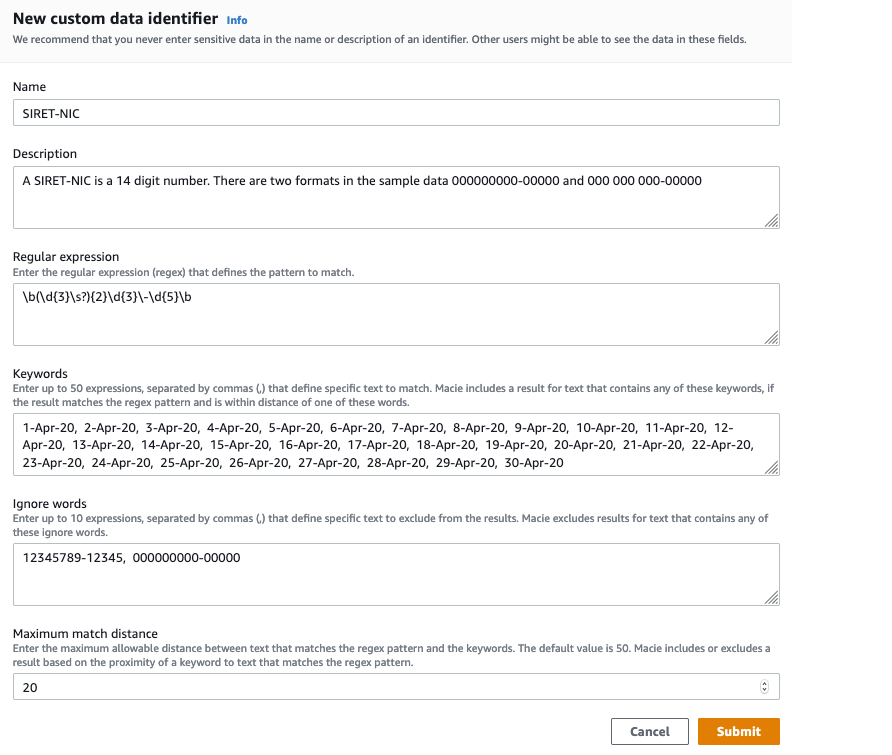
With all the attributes set, your console will look like what is shown in Figure 4.

Figure 4: SIRET-NIC custom data identifier creation

Figure 4: SIRET-NIC custom data identifier creation

Test your SIRET-NIC custom data identifier

Use the Evaluate section on the right-hand panel of the Macie console to confirm that the regex pattern and other configurations for your custom data identifier are correct.

Follow the steps below to use the Evaluate section.

  1. Enter test data in the sample data box.
  2. Select Submit. There will be one match per record in the file if the configurations are correct and your custom data identifier is ready.The following figure is an example of the Evaluate section using test data. The test data has 3 records, each record has 5 fields which are GUID, employee name, employee email, company name, date SIRET-NIC was issued, and the SIRET-NIC number.

    Figure 5: Evaluate, showing sample data

    Figure 5: Evaluate, showing sample data

  3. After verifying your SIRET-NIC custom data identifier works in the Evaluate section, now select Submit on the New custom data identifier window to create the custom data identifier.

Create a Brazil CPF Custom Data Identifier

Congrats on creating your first custom data identifier! Now use the same steps to create and test custom data identifiers for the Brazil CPF and prototyping naming convention scenarios. The Brazil CPF number usually shows up in the format of 000.000.000-00.

Use the following values for the Brazil CPF scenario, as shown in the following figure:

  • Name: Brazil CPF
  • Description: The format for Brazil CPF in our sample data is 000.000.000-00
  • Regular expression: \b(\d{3}\.){2}\d{3}\-\d{2}\b

    Figure 6: Brazil CPF custom data identifier

    Figure 6: Brazil CPF custom data identifier

Create a Prototype Name Custom Data Identifier

Assume that your company has a very strict and regular naming scheme for prototype part numbers. It is P, followed by a hyphen, and then 2 letters and 4 digits. E.g., P-AB1234. You want to identify objects in S3 that contain references to private prototype parts. This is a small pattern, and so if we’re not careful it will cause Macie to flag objects that do not actually contain one of our prototype numbers. We suggest adding \b at the beginning and the end of the regular expression. The \b symbol means a “word boundary” and word boundaries are basically whitespace, punctuation, or other things that are not letters and numbers. With \b, you limit the pattern so that you only match if the entire word matches the pattern. For example, P-AB1234 will match the pattern, but STEP-AB123456 and P-XY123 will not match the pattern. This gives you finer grained control and reduces false positives.

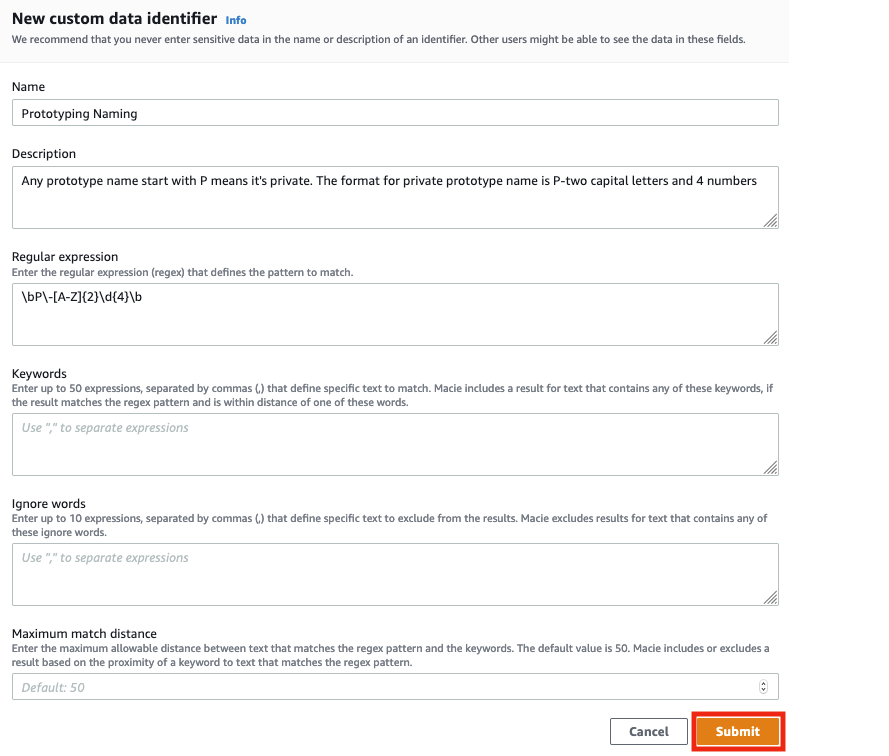
Use the following values for the prototyping name scenario, as shown in the following figure:

  • Name: Prototyping Naming
  • Description: Any prototype name start with P means it’s private. The format for private prototype name is P-2 capital letters and 4 numbers
  • Regular expression: \bP\-[A-Z]{2}\d{4}\b
Figure 7: Prototyping naming custom data identifier

Figure 7: Prototyping naming custom data identifier

You should now see a page like the following figure, indicating that the SIRET-NIC, Brazil CPF, and Prototyping Naming custom data identifiers are successfully configured.

Figure 8: Successfully configured custom data identifier

Figure 8: Successfully configured custom data identifier

Set up a Test Bucket to Demonstrate Macie

Before we can see Macie do its work, we have to create a bucket with some test data that we can scan. We’ve provided some sample data files that you can download. Follow these instructions to create a test bucket and load our test data into the test bucket.

  1. Download the sample data and unzip it.
  2. Sign in to the AWS Management Console and open the Amazon S3 console at https://console.aws.amazon.com/s3/.
  3. Choose Create bucket. The Create bucket wizard opens.
  4. In Bucket name, enter a DNS-compliant name for your bucket. The bucket name must:
    • Be unique across all of Amazon S3.
    • Be between 3 and 63 characters long.
    • Not contain uppercase characters.
    • Start with a lowercase letter or number.

    We created a bucket called bucketformacieuse; you have to choose another name because this one is already taken by us.

  5. In Region, choose the AWS Region where you want the bucket to reside.
  6. Select Create, to finish the bucket creation.
  7. Open the bucket you just created and upload the two Excel files you downloaded in step 1.

Use Macie to create a job to scan your data

Now you can create a job to scan your Amazon S3 bucket to detect and locate the data patterns defined in the SIRET-NIC, Brazil CPF, and Prototyping Naming custom data identifiers.

To create a job

  1. In the navigation pane, choose Jobs, and then select Create Job on the upper right.
  2. Select Amazon S3 buckets: Select the S3 bucket you want to analyze. In this case, we are using the bucket previously created, bucketformacieuse.
  3. Review Amazon S3 buckets: Verify that you selected the S3 bucket you want the job to scan and analyze.
  4. Scope: Select your scope. For this example, choose the One-time job option as your scope. The scope specifies how often you want the job to run. This can be either a one-time job or a scheduled job. If you choose a scheduled job, you can define how often you want your job to scan your Amazon S3 bucket.
  5. Custom data identifiers: Select the 3 custom data identifiers you created to be associated with this job, and then select Next. This is shown in the following figure.

    Figure 9: Select your custom data identifiers

    Figure 9: Select your custom data identifiers

  6. Name and description: Enter a name and description for the job.
  7. Review and create: Review and verify all your settings, and then select Create.

You now have a job in Macie to scan the Amazon S3 buckets you’ve chosen using the 3 custom data identifiers you created. More information about creating jobs is available in Running sensitive data discovery jobs in Amazon Macie.

Respond to results

Macie will help you be secure when you’re effectively responding to the findings that it produces. For our example, we’ll show you how to review your findings manually. You can look at your findings by bucket, type, or job, or see a collective summary of all findings. In this example, let’s look at all findings.

To review your results

  1. In the navigation pane on the left-hand side, choose Findings. Findings include the severity, the type, the resources affected, and when the findings were last updated.
  2. The following figure shows an example of the results you might see on the findings page. There are two findings for the selected job. The compagnie_français.csv and the empresa_brasileira.csv files contain the custom data identifiers that you created earlier and added to the job.

    Figure 10: Findings

    Figure 10: Findings

  3. Let’s look at the details of one of the findings so you can review the results. From the page showing the 4r findings, select the file that contains your custom data identifier for the Brazil CPF: empresa_brasileira.csv. The number of custom data identifiers found in the document is shown in the Result section on the right, as shown in the following figure.

    Figure 11: Findings detail page for the Brazil CPF custom data identifiers

    Figure 11: Findings detail page for the Brazil CPF custom data identifiers

  4. Now look at the findings details for the compagnie_français.csv file. It shows the number of custom data identifiers found in the file. In this case Macie found 13 SIRET-NIC numbers as shown in the following figure.

    Figure 12: Findings page for the French company file

    Figure 12: Findings page for the French company file

  5. If you configured detailed logging, the results will be saved in the Amazon S3 bucket you specified. The S3 bucket location can be found in the Details section after Detailed result location as shown in the preceding figure.

Now that you’ve used Macie and the Custom Data Identifiers resource to obtain these findings, you can identify what data to place in encrypted storage, and what can be placed in non-encrypted storage when migrating to AWS. Macie and custom data identifiers provide an automated tool to help you enhance protection of your sensitive data by providing you the information to help detect and classify your data in the AWS Cloud.

Using Macie at Scale

Custom Data Identifiers help you tell Macie what to look for. As you move more and more data to the cloud, you’ll need to make new identifiers and new rules. As your rules and identifiers grow you will need to create automation that responds to things that are found. For example, perhaps a lambda function turns on encryption in a bucket when it finds sensitive data in that bucket. Or perhaps a function automatically applies tags to buckets where sensitive data is found, and those buckets and their owners start to appear on reports for audit and compliance. Once you’ve done this at small scale, think about how you will automate responses at larger scale.

Conclusion

The new Custom Data Identifier resource in the newly enhanced Macie can help you detect, classify, and protect sensitive data types unique to your organization. This post focused on the functionality and use of custom data identifiers to automatically discover sensitive data stored in Amazon S3. You can also review the managed data identifiers to see a list of personally identifiable information (PII) that Macie can detect by default. Visit What is Amazon Macie? to learn more.

If you have feedback about this post, submit comments in the Comments section below. If you have questions about this post, start a new thread on the Amazon Macie forum or contact AWS Support.

Want more AWS Security how-to content, news, and feature announcements? Follow us on Twitter.

Author

Kayla Jing

Kayla is a Solutions Architect at Amazon Web Services based out of Seattle. She has experience in data science with a focus on Data Analytics and Machine Learning.

Author

Joshua Choung

Joshua is a Solutions Architect based out of Seattle. He works with customers to provide architectural and technical guidance and training on their AWS cloud journey.

Author

Laura Reith

Laura is a Solutions Architect at Amazon Web Services. Before AWS, she worked as a Solutions Architect in Taiwan focusing on physical security and retail analytics.