Tag Archives: Netflix

Keeping Netflix Reliable Using Prioritized Load Shedding

Post Syndicated from Netflix Technology Blog original https://netflixtechblog.com/keeping-netflix-reliable-using-prioritized-load-shedding-6cc827b02f94

How viewers are able to watch their favorite show on Netflix while the infrastructure self-recovers from a system failure

By Manuel Correa, Arthur Gonigberg, and Daniel West

Getting stuck in traffic is one of the most frustrating experiences for drivers around the world. Everyone slows to a crawl, sometimes for a minor issue or sometimes for no reason at all. As engineers at Netflix, we are constantly reevaluating how to redesign traffic management. What if we knew the urgency of each traveler and could selectively route cars through, rather than making everyone wait?

In Netflix engineering, we’re driven by ensuring Netflix is there when you need it to be. Yet, as recent as last year, our systems were susceptible to metaphorical traffic jams; we had on/off circuit breakers, but no progressive way to shed load. Motivated by improving the lives of our members, we’ve introduced priority-based progressive load shedding.

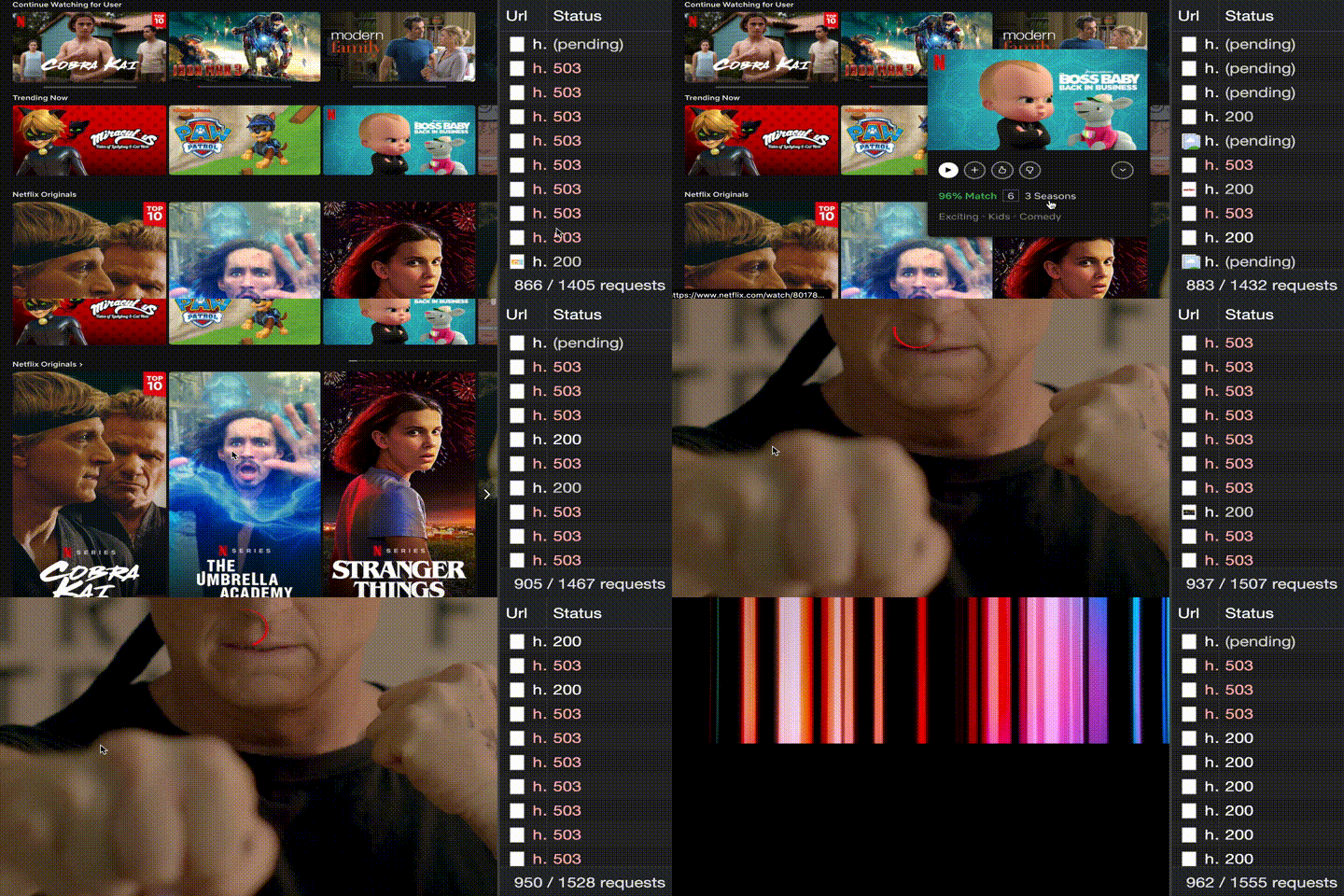
The animation below shows the behavior of the Netflix viewer experience when the backend is throttling traffic based on priority. While the lower priority requests are throttled, the playback experience remains uninterrupted and the viewer is able to enjoy their title. Let’s dig into how we accomplished this.

Failure can occur due to a myriad of reasons: misbehaving clients that trigger a retry storm, an under-scaled service in the backend, a bad deployment, a network blip, or issues with the cloud provider. All such failures can put a system under unexpected load, and at some point in the past, every single one of these examples has prevented our members’ ability to play. With these incidents in mind, we set out to make Netflix more resilient with these goals:

  1. Consistently prioritize requests across device types (Mobile, Browser, and TV)
  2. Progressively throttle requests based on priority
  3. Validate assumptions by using Chaos Testing (deliberate fault injection) for requests of specific priorities

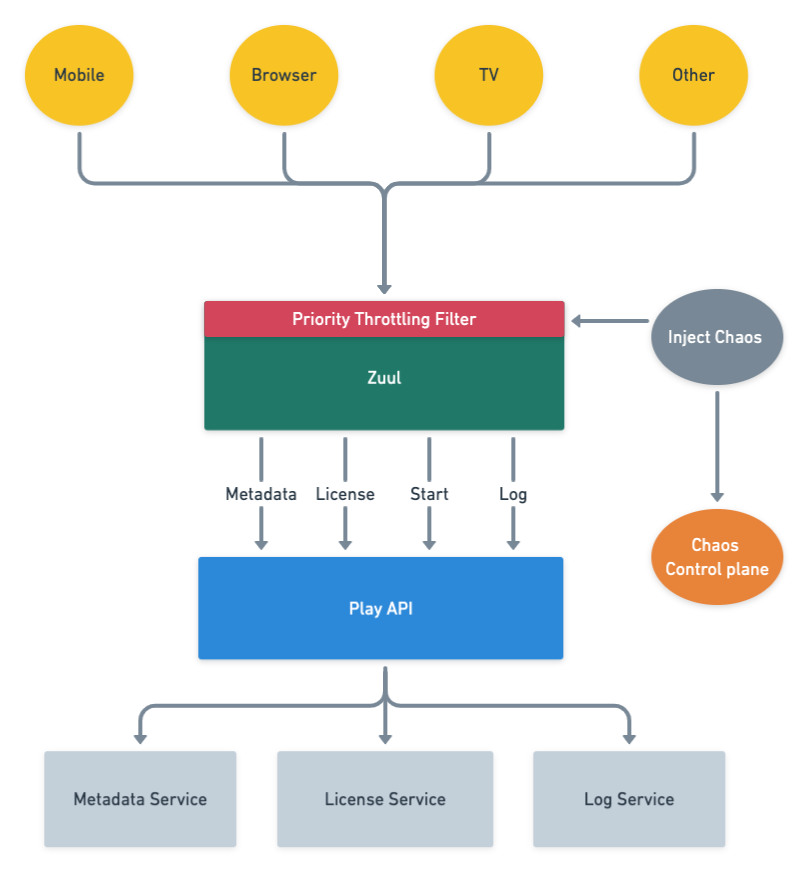
The resulting architecture that we envisioned with priority throttling and chaos testing included is captured below.

High level playback architecture with priority throttling and chaos testing

Building a request taxonomy

We decided to focus on three dimensions in order to categorize request traffic: throughput, functionality, and criticality. Based on these characteristics, traffic was classified into the following:

  • NON_CRITICAL: This traffic does not affect playback or members’ experience. Logs and background requests are examples of this type of traffic. These requests are usually high throughput which contributes to a large percentage of load in the system.
  • DEGRADED_EXPERIENCE: This traffic affects members’ experience, but not the ability to play. The traffic in this bucket is used for features like: stop and pause markers, language selection in the player, viewing history, and others.
  • CRITICAL: This traffic affects the ability to play. Members will see an error message when they hit play if the request fails.

Using attributes of the request, the API gateway service (Zuul) categorizes the requests into NON_CRITICAL, DEGRADED_EXPERIENCE and CRITICAL buckets, and computes a priority score between 1 to 100 for each request given its individual characteristics. The computation is done as a first step so that it is available for the rest of the request lifecycle.

Most of the time, the request workflow proceeds normally without taking the request priority into account. However, as with any service, sometimes we reach a point when either one of our backends is in trouble or Zuul itself is in trouble. When that happens requests with higher priority get preferential treatment. The higher priority requests will get served, while the lower priority ones will not. The implementation is analogous to a priority queue with a dynamic priority threshold. This allows Zuul to drop requests with a priority lower than the current threshold.

Finding the best place to throttle traffic

Zuul can apply load shedding in two moments during the request lifecycle: when it routes requests to a specific back-end service (service throttling) or at the time of initial request processing, which affects all back-end services (global throttling).

Service throttling

Zuul can sense when a back-end service is in trouble by monitoring the error rates and concurrent requests to that service. Those two metrics are approximate indicators of failures and latency. When the threshold percentage for one of these two metrics is crossed, we reduce load on the service by throttling traffic.

Global throttling

Another case is when Zuul itself is in trouble. As opposed to the scenario above, global throttling will affect all back-end services behind Zuul, rather than a single back-end service. The impact of this global throttling can cause much bigger problems for members. The key metrics used to trigger global throttling are CPU utilization, concurrent requests, and connection count. When any of the thresholds for those metrics are crossed, Zuul will aggressively throttle traffic to keep itself up and healthy while the system recovers. This functionality is critical: if Zuul goes down, no traffic can get through to our backend services, resulting in a total outage.

Introducing priority-based progressive load shedding

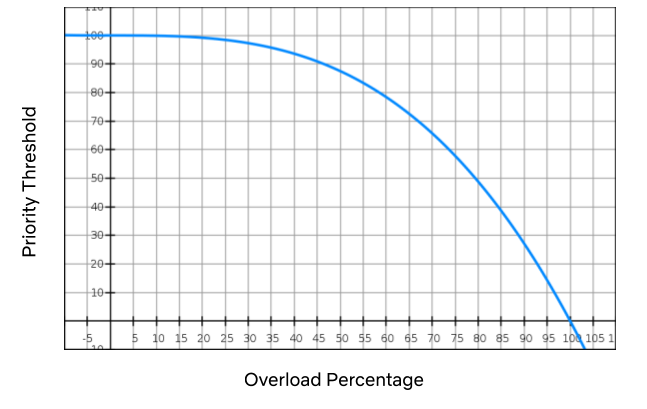
Once we had the prioritization piece in place, we were able to combine it with our load shedding mechanism to dramatically improve streaming reliability. When we’re in a bad situation (i.e. any of the thresholds above are exceeded), we progressively drop traffic, starting with the lowest priority. A cubic function is used to manage the level of throttling. If things get really, really bad the level will hit the sharp side of the curve, throttling everything.

The graph above is an example of how the cubic function is applied. As the overload percentage increases (i.e. the range between the throttling threshold and the max capacity), the priority threshold trails it very slowly: at 35%, it’s still in the mid-90s. If the system continues to degrade, we hit priority 50 at 80% exceeded and then eventually 10 at 95%, and so on.

Given that a relatively small amount of requests impact streaming availability, throttling low priority traffic may affect certain product features but will not prevent members pressing “play” and watching their favorite show. By adding progressive priority-based load shedding, Zuul can shed enough traffic to stabilize services without members noticing.

Handling retry storms

When Zuul decides to drop traffic, it sends a signal to devices to let them know that we need them to back off. It does this by indicating how many retries they can perform and what kind of time window they can perform them in. For example:

{ “maxRetries” : <max-retries>, “retryAfterSeconds”: <seconds> }

Using this backpressure mechanism, we can stop retry storms much faster than we could in the past. We automatically adjust these two dials based on the priority of the request. Requests with higher priority will retry more aggressively than lower ones, also increasing streaming availability.

Validating which requests are right for the job

To validate our request taxonomy assumptions on whether a specific request fell into the NON_CRITICAL, DEGRADED, or CRITICAL bucket, we needed a way to test the user’s experience when that request was shed. To accomplish this, we leveraged our internal failure injection tool (FIT) and created a failure injection point in Zuul that allowed us to shed any request based on a supplied priority. This enabled us to manually simulate a load shedded experience by blocking ranges of priorities for a specific device or member, giving us an idea of which requests could be safely shed without impacting the user.

Continually ensuring those requests are still right for the job

One of the goals here is to reduce members’ pain by shedding requests that are not expected to affect the user’s streaming experience. However, Netflix changes quickly and requests that were thought to be noncritical can unexpectedly become critical. In addition, Netflix has a wide variety of client devices, client versions, and ways to interact with the system. To make sure we weren’t causing members pain when throttling NON_CRITICAL requests in any of these scenarios, we leveraged our infrastructure experimentation platform ChAP.

This platform allows us to stage an A/B experiment that will allocate a small number of production users to either a control or treatment group for 45 minutes while throttling a range of priorities for the treatment group. This lets us capture a variety of live use cases and measure the impact to their playback experience. ChAP analyzes the members’ KPIs per device to determine if there is a deviation between the control and the treatment groups.

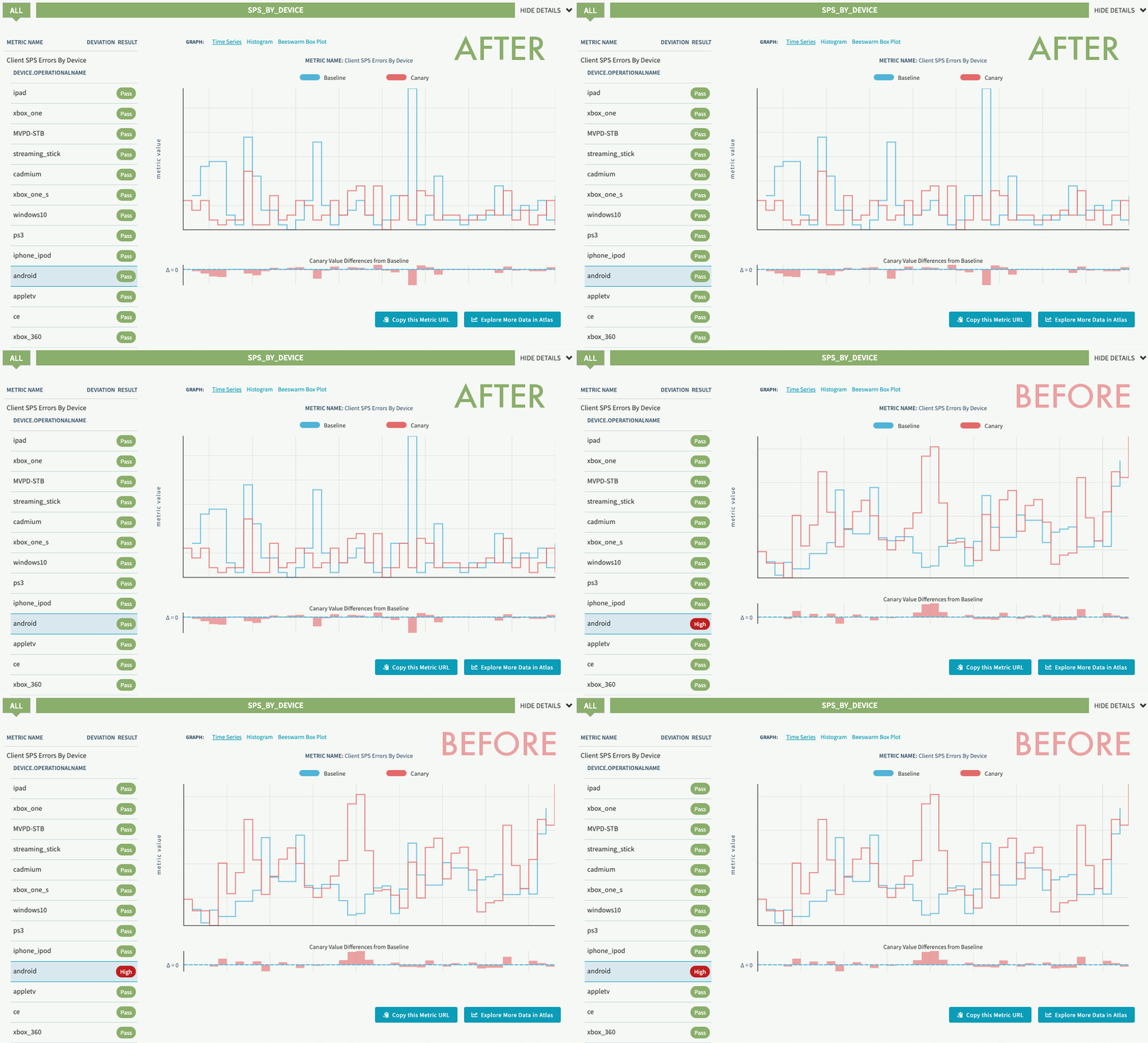
In our first experiment, we detected a race condition in both Android and iOS devices for a low priority request that caused sporadic playback errors. Since we practice continuous experimentation, once the initial experiments were run and the bugs were fixed, we scheduled them to run on a periodic basis. This allows us to detect regressions early and keep users streaming.

Experiment regression detection before and after fix (SPS indicates streaming availability)

Reaping the benefits

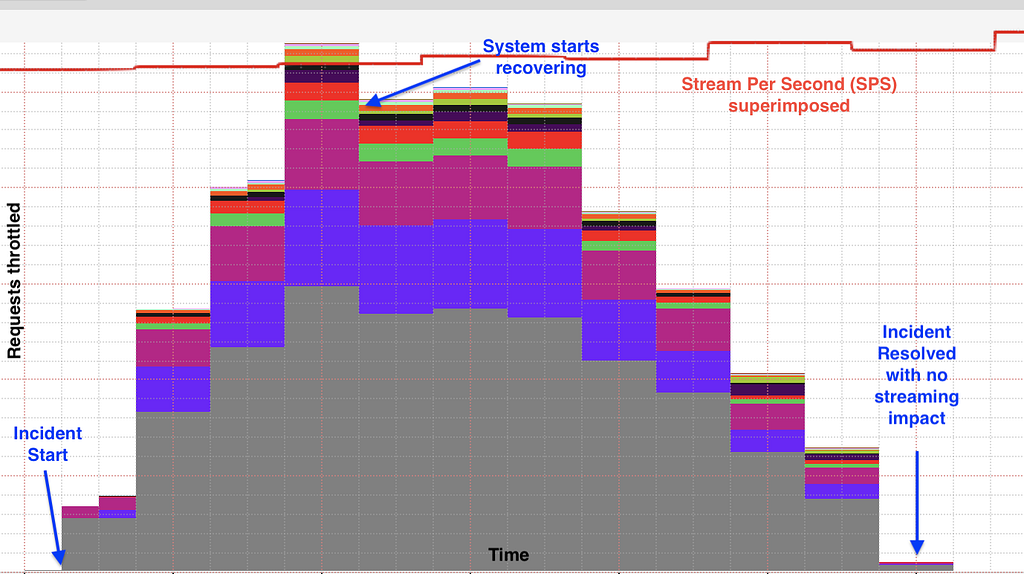
In 2019, before progressive load shedding was in place, the Netflix streaming services experienced an outage that resulted in a sizable percentage of members who were not able to play for a period of time. In 2020, days after the implementation was deployed, the team started seeing the benefit of the solution. Netflix experienced a similar issue with the same potential impact as the outage seen in 2019. Unlike then, Zuul’s progressive load shedding kicked in and started shedding traffic until the service was in a healthy state without impacting members’ ability to play at all.

The graph below shows a stable streaming availability metric stream per second (SPS) while Zuul is performing progressive load shedding based on request priority during the incident. The different colors in the graph represent requests with different priority being throttled.

Members were happily watching their favorite show on Netflix while the infrastructure was self-recovering from a system failure.

We are not done yet

For future work, the team is looking into expanding the use of request priority for other use cases like better retry policies between devices and back-ends, dynamically changing load shedding thresholds, tuning the request priorities using Chaos Testing as a guiding principle, and other areas that will make Netflix even more resilient.

If you’re interested in helping Netflix stay up in the face of shifting systems and unexpected failures, reach out to us. We’re hiring!


Keeping Netflix Reliable Using Prioritized Load Shedding was originally published in Netflix TechBlog on Medium, where people are continuing the conversation by highlighting and responding to this story.
A Day in the Life of a Content Analytics Engineer

Post Syndicated from Netflix Technology Blog original https://netflixtechblog.com/a-day-in-the-life-of-a-content-analytics-engineer-eb0250b993be

Part of our series on who works in Analytics at Netflix — and what the role entails

by Rocio Ruelas

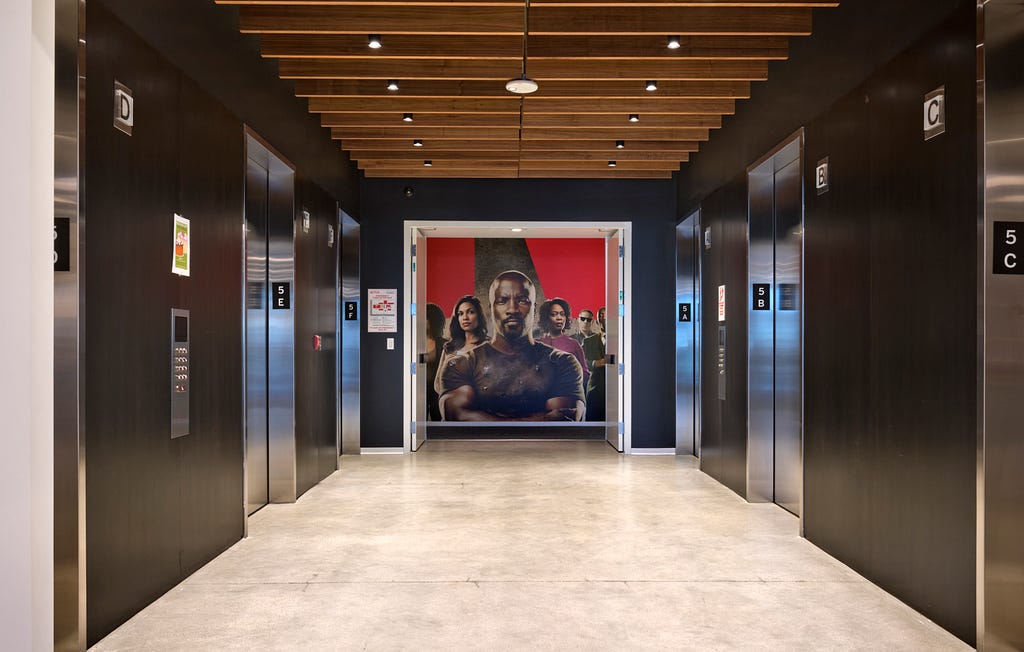
Back when we were all working in offices, my favorite days were Monday, Wednesday, and Friday. Those were the days with the best hot breakfast, and I’ve always been a sucker for free food. I started the day by arriving at the LA office right before 8am and finding a parking spot close to the entrance. I would greet the familiar faces at the reception desk and take a moment to check out which Netflix Original was currently being projected across the lobby. Take the elevator uninterrupted up to the top floor. Grab myself a plate of scrambled eggs, salsa, and bacon. Pour myself some coffee. Then sit at a small table next to the floor-to-ceiling windows with a clear view of the Hollywood sign.

My morning journey from lobby to elevators to breakfast (Photo Credit: Netflix)

During the day, the LA office buzzes with excitement and conversation. My time in the morning is like the calm before the storm — a chance to reflect before my head is full of numbers and figures. I often think about all the things that led me to becoming a Netflix employee. From my family immigrating to the United States from Mexico when I was very young to the teachers and professors that encouraged a low income student like me to dream big. It has been a journey and I’m grateful to be at a place that values the voice I bring to the table.

At the time of posting we’re working from home due to the pandemic, so my days look a bit different: The hot breakfasts are not as consistent and conversations are mainly with my dog. We still find ways to keep connected, but I for one am looking forward to when the office is fully open and I can look out to the Hollywood sign again.

Ok. But what do I actually do? (Besides eating breakfast)

What do I do at Netflix?

I’m a Senior Analytics Engineer on the Content and Marketing Analytics Research team. My team focuses on innovating and maintaining the metrics Netflix uses to understand performance of our shows and films on the service. We partner closely with the business strategy team to provide as much information as we can to our content executives, so that — combined with their industry experience — they can make the best decisions for Netflix.

Being an Analytics Engineer is like being a hybrid of a librarian 📚 and a Swiss army knife 🛠️: Two good things to have on hand when you’re not quite sure what you will need. Like a librarian, I have access to an encyclopedia of knowledge about our content data and have become the resident expert in one of our most important internal metrics. And like a Swiss army knife, I possess a multitude of tools to get the job done — be it SQL, Jupyter Notebooks, Tableau, or Google Sheets.

One of my favorite things about being an Analytics Engineer is the variety. I have some days where I am brainstorming and collaborating with amazing colleagues and other days where I can put my headphones on to work out a tough problem or build a dashboard.

One of my current projects involves understanding how viewing habits have evolved over the past several years. We started out with a small working group where we brainstormed the key questions to address, what data we could use to answer said questions, and came up with a work plan for how the analysis might take shape. Then I put on my headphones and got to work, writing SQL and using Tableau to present the data in a useful way. We met frequently to discuss our findings and iterate on the analysis. The great thing about these working groups is that we each contribute different skills and ideas. We benefit from both our individual strengths and our willingness to collaborate — Our values of Selflessness and Inclusion, in action.

How did I become interested in Analytics?

I did not set out from the start to be an Analyst. I never had a 5 year plan and my path has been a winding one.

Yours truly, featuring part of my extensive Netflix apparel collection

In college, I majored in Physics because it was “the science that explains all the other sciences”. But what I ended up liking most about it was the math. Between that and the fact that there aren’t many entry-level physics jobs, I pursued a PhD in Applied Mathematics. This turned out to be a wise choice as I avoided entering the workforce right before the 2008 recession.

I loved grad school. The lectures, the research, and most of all the lifelong friendships. But as much as I enjoyed being a student, the academic track wasn’t for me. So without much of a plan I headed back home to California after graduation.

Looking around to see what I could do with my Applied Math background, I quickly settled on Data Science. I wasn’t well versed in it but I knew it was in demand. I started my new data science career as an analyst at a small marketing company. I had an incredible boss who encouraged me to learn new skills on the job. I honed my SQL and Python skills and implemented a clustering model. I also got my first introduction to working for an actual business.

Later on I went to Hulu to grow in the core skills of a data scientist. But while the predictive modeling I was doing was interesting and challenging, I missed being close to the business. As an analyst, I got to attend more meetings with the decision makers and be part of the conversation.

So by the time the opportunity arose to interview for a position at Netflix, I had figured out that Analytics was the best area for me.

It has been a journey and I’m grateful to be at a place that values the voice I bring to the table.

Why Netflix?

Growing up I watched a lot of TV. I mean a lot of TV. But I never thought I could actually work in the TV and Film business. I feel incredibly fortunate to be working at a job I am passionate about and to be at a company that brings joy to people around the world.

Even though I’d been a loyal Netflix customer since the DVD days, I had not heard about their unique culture until I started interviewing. When I did read the culture doc (which I recently learned is also published in Spanish and 12 other languages!), it sounded pretty intimidating. Phrases like “high performance” and “dream team” made me imagine an almost gladiator-style workplace. But I quickly learned this wasn’t the case. Through a combination of my existing network, the interview process, and other online resources about the company, I found that folks are actually very friendly and helpful! Everyone just wants to do their best work and help you do your best work too. Think more The Great British Baking Show and less Hell’s Kitchen. Selflessness really is embraced as an important Netflix value.

Having been here for 3 years now, I can say that working at Netflix is really special. The company is always evolving, big decisions are made in a transparent way, and I’m encouraged to voice my thoughts. But the single most important factor is the people. My Content Analytics teammates continuously impress me not only with their quality of work, but also with their kindness and mutual trust. This foundation makes innovating more fun, lets us be open about our passions outside of work, and means we genuinely enjoy each other’s company. That balance is crucial for me and is why this truly is the place where I can do my best work.

If this post resonates with you and you’d like to explore opportunities with Netflix, check out our analytics site, search open roles, and learn about our culture. You can also find more stories like this here.


A Day in the Life of a Content Analytics Engineer was originally published in Netflix TechBlog on Medium, where people are continuing the conversation by highlighting and responding to this story.
Building Netflix’s Distributed Tracing Infrastructure

Post Syndicated from Netflix Technology Blog original https://netflixtechblog.com/building-netflixs-distributed-tracing-infrastructure-bb856c319304

by Maulik Pandey

Our Team — Kevin Lew, Narayanan Arunachalam, Elizabeth Carretto, Dustin Haffner, Andrei Ushakov, Seth Katz, Greg Burrell, Ram Vaithilingam, Mike Smith and Maulik Pandey

@Netflixhelps Why doesn’t Tiger King play on my phone?” — a Netflix member via Twitter

This is an example of a question our on-call engineers need to answer to help resolve a member issue — which is difficult when troubleshooting distributed systems. Investigating a video streaming failure consists of inspecting all aspects of a member account. In our previous blog post we introduced Edgar, our troubleshooting tool for streaming sessions. Now let’s look at how we designed the tracing infrastructure that powers Edgar.

Distributed Tracing: the missing context in troubleshooting services at scale

Prior to Edgar, our engineers had to sift through a mountain of metadata and logs pulled from various Netflix microservices in order to understand a specific streaming failure experienced by any of our members. Reconstructing a streaming session was a tedious and time consuming process that involved tracing all interactions (requests) between the Netflix app, our Content Delivery Network (CDN), and backend microservices. The process started with manual pull of member account information that was part of the session. The next step was to put all puzzle pieces together and hope the resulting picture would help resolve the member issue. We needed to increase engineering productivity via distributed request tracing.

If we had an ID for each streaming session then distributed tracing could easily reconstruct session failure by providing service topology, retry and error tags, and latency measurements for all service calls. We could also get contextual information about the streaming session by joining relevant traces with account metadata and service logs. This insight led us to build Edgar: a distributed tracing infrastructure and user experience.

Figure 1. Troubleshooting a session in Edgar

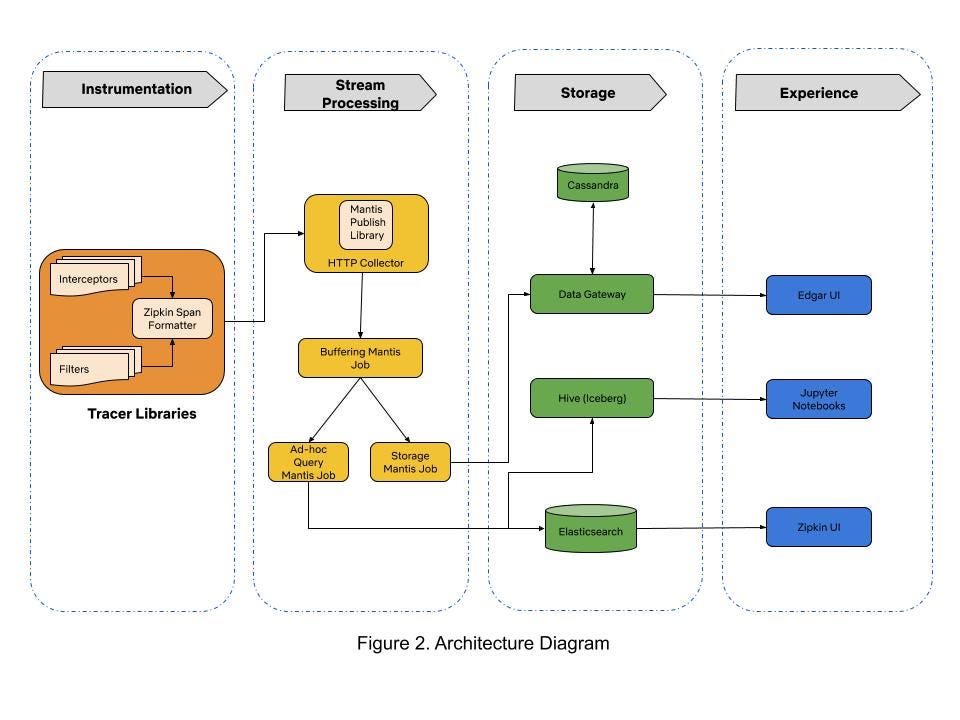
When we started building Edgar four years ago, there were very few open-source distributed tracing systems that satisfied our needs. Our tactical approach was to use Netflix-specific libraries for collecting traces from Java-based streaming services until open source tracer libraries matured. By 2017, open source projects like Open-Tracing and Open-Zipkin were mature enough for use in polyglot runtime environments at Netflix. We chose Open-Zipkin because it had better integrations with our Spring Boot based Java runtime environment. We use Mantis for processing the stream of collected traces, and we use Cassandra for storing traces. Our distributed tracing infrastructure is grouped into three sections: tracer library instrumentation, stream processing, and storage. Traces collected from various microservices are ingested in a stream processing manner into the data store. The following sections describe our journey in building these components.

Trace Instrumentation: how will it impact our service?

That is the first question our engineering teams asked us when integrating the tracer library. It is an important question because tracer libraries intercept all requests flowing through mission-critical streaming services. Safe integration and deployment of tracer libraries in our polyglot runtime environments was our top priority. We earned the trust of our engineers by developing empathy for their operational burden and by focusing on providing efficient tracer library integrations in runtime environments.

Distributed tracing relies on propagating context for local interprocess calls (IPC) and client calls to remote microservices for any arbitrary request. Passing the request context captures causal relationships between microservices during runtime. We adopted Open-Zipkin’s B3 HTTP header based context propagation mechanism. We ensure that context propagation headers are correctly passed between microservices across a variety of our “paved road” Java and Node runtime environments, which include both older environments with legacy codebases and newer environments such as Spring Boot. We execute the Freedom & Responsibility principle of our culture in supporting tracer libraries for environments like Python, NodeJS, and Ruby on Rails that are not part of the “paved road” developer experience. Our loosely coupled but highly aligned engineering teams have the freedom to choose an appropriate tracer library for their runtime environment and have the responsibility to ensure correct context propagation and integration of network call interceptors.

Our runtime environment integrations inject infrastructure tags like service name, auto-scaling group (ASG), and container instance identifiers. Edgar uses this infrastructure tagging schema to query and join traces with log data for troubleshooting streaming sessions. Additionally, it became easy to provide deep links to different monitoring and deployment systems in Edgar due to consistent tagging. With runtime environment integrations in place, we had to set an appropriate trace data sampling policy for building a troubleshooting experience.

Stream Processing: to sample or not to sample trace data?

This was the most important question we considered when building our infrastructure because data sampling policy dictates the amount of traces that are recorded, transported, and stored. A lenient trace data sampling policy generates a large number of traces in each service container and can lead to degraded performance of streaming services as more CPU, memory, and network resources are consumed by the tracer library. An additional implication of a lenient sampling policy is the need for scalable stream processing and storage infrastructure fleets to handle increased data volume.

We knew that a heavily sampled trace dataset is not reliable for troubleshooting because there is no guarantee that the request you want is in the gathered samples. We needed a thoughtful approach for collecting all traces in the streaming microservices while keeping low operational complexity of running our infrastructure.

Most distributed tracing systems enforce sampling policy at the request ingestion point in a microservice call graph. We took a hybrid head-based sampling approach that allows for recording 100% of traces for a specific and configurable set of requests, while continuing to randomly sample traffic per the policy set at ingestion point. This flexibility allows tracer libraries to record 100% traces in our mission-critical streaming microservices while collecting minimal traces from auxiliary systems like offline batch data processing. Our engineering teams tuned their services for performance after factoring in increased resource utilization due to tracing. The next challenge was to stream large amounts of traces via a scalable data processing platform.

Mantis is our go-to platform for processing operational data at Netflix. We chose Mantis as our backbone to transport and process large volumes of trace data because we needed a backpressure-aware, scalable stream processing system. Our trace data collection agent transports traces to Mantis job cluster via the Mantis Publish library. We buffer spans for a time period in order to collect all spans for a trace in the first job. A second job taps the data feed from the first job, does tail sampling of data and writes traces to the storage system. This setup of chained Mantis jobs allows us to scale each data processing component independently. An additional advantage of using Mantis is the ability to perform real-time ad-hoc data exploration in Raven using the Mantis Query Language (MQL). However, having a scalable stream processing platform doesn’t help much if you can’t store data in a cost efficient manner.

Storage: don’t break the bank!

We started with Elasticsearch as our data store due to its flexible data model and querying capabilities. As we onboarded more streaming services, the trace data volume started increasing exponentially. The increased operational burden of scaling ElasticSearch clusters due to high data write rate became painful for us. The data read queries took an increasingly longer time to finish because ElasticSearch clusters were using heavy compute resources for creating indexes on ingested traces. The high data ingestion rate eventually degraded both read and write operations. We solved this by migrating to Cassandra as our data store for handling high data ingestion rates. Using simple lookup indices in Cassandra gives us the ability to maintain acceptable read latencies while doing heavy writes.

In theory, scaling up horizontally would allow us to handle higher write rates and retain larger amounts of data in Cassandra clusters. This implies that the cost of storing traces grows linearly to the amount of data being stored. We needed to ensure storage cost growth was sub-linear to the amount of data being stored. In pursuit of this goal, we outlined following storage optimization strategies:

  1. Use cheaper Elastic Block Store (EBS) volumes instead of SSD instance stores in EC2.
  2. Employ better compression technique to reduce trace data size.
  3. Store only relevant and interesting traces by using simple rules-based filters.

We were adding new Cassandra nodes whenever the EC2 SSD instance stores of existing nodes reached maximum storage capacity. The use of a cheaper EBS Elastic volume instead of an SSD instance store was an attractive option because AWS allows dynamic increase in EBS volume size without re-provisioning the EC2 node. This allowed us to increase total storage capacity without adding a new Cassandra node to the existing cluster. In 2019 our stunning colleagues in the Cloud Database Engineering (CDE) team benchmarked EBS performance for our use case and migrated existing clusters to use EBS Elastic volumes. By optimizing the Time Window Compaction Strategy (TWCS) parameters, they reduced the disk write and merge operations of Cassandra SSTable files, thereby reducing the EBS I/O rate. This optimization helped us reduce the data replication network traffic amongst the cluster nodes because SSTable files were created less often than in our previous configuration. Additionally, by enabling Zstd block compression on Cassandra data files, the size of our trace data files was reduced by half. With these optimized Cassandra clusters in place, it now costs us 71% less to operate clusters and we could store 35x more data than our previous configuration.

We observed that Edgar users explored less than 1% of collected traces. This insight leads us to believe that we can reduce write pressure and retain more data in the storage system if we drop traces that users will not care about. We currently use a simple rule based filter in our Storage Mantis job that retains interesting traces for very rarely looked service call paths in Edgar. The filter qualifies a trace as an interesting data point by inspecting all buffered spans of a trace for warnings, errors, and retry tags. This tail-based sampling approach reduced the trace data volume by 20% without impacting user experience. There is an opportunity to use machine learning based classification techniques to further reduce trace data volume.

While we have made substantial progress, we are now at another inflection point in building our trace data storage system. Onboarding new user experiences on Edgar could require us to store 10x the amount of current data volume. As a result, we are currently experimenting with a tiered storage approach for a new data gateway. This data gateway provides a querying interface that abstracts the complexity of reading and writing data from tiered data stores. Additionally, the data gateway routes ingested data to the Cassandra cluster and transfers compacted data files from Cassandra cluster to S3. We plan to retain the last few hours worth of data in Cassandra clusters and keep the rest in S3 buckets for long term retention of traces.

Table 1. Timeline of Storage Optimizations

Secondary advantages

In addition to powering Edgar, trace data is used for the following use cases:

Application Health Monitoring

Trace data is a key signal used by Telltale in monitoring macro level application health at Netflix. Telltale uses the causal information from traces to infer microservice topology and correlate traces with time series data from Atlas. This approach paints a richer observability portrait of application health.

Resiliency Engineering

Our chaos engineering team uses traces to verify that failures are correctly injected while our engineers stress test their microservices via Failure Injection Testing (FIT) platform.

Regional Evacuation

The Demand Engineering team leverages tracing to improve the correctness of prescaling during regional evacuations. Traces provide visibility into the types of devices interacting with microservices such that changes in demand for these services can be better accounted for when an AWS region is evacuated.

Estimate infrastructure cost of running an A/B test

The Data Science and Product team factors in the costs of running A/B tests on microservices by analyzing traces that have relevant A/B test names as tags.

What’s next?

The scope and complexity of our software systems continue to increase as Netflix grows. We will focus on following areas for extending Edgar:

  • Provide a great developer experience for collecting traces across all runtime environments. With an easy way to to try out distributed tracing, we hope that more engineers instrument their services with traces and provide additional context for each request by tagging relevant metadata.
  • Enhance our analytics capability for querying trace data to enable power users at Netflix in building their own dashboards and systems for narrowly focused use cases.
  • Build abstractions that correlate data from metrics, logging, and tracing systems to provide additional contextual information for troubleshooting.

As we progress in building distributed tracing infrastructure, our engineers continue to rely on Edgar for troubleshooting streaming issues like “Why doesn’t Tiger King play on my phone?”. Our distributed tracing infrastructure helps in ensuring that Netflix members continue to enjoy a must-watch show like Tiger King!

We are looking for stunning colleagues to join us on this journey of building distributed tracing infrastructure. If you are passionate about Observability then come talk to us.


Building Netflix’s Distributed Tracing Infrastructure was originally published in Netflix TechBlog on Medium, where people are continuing the conversation by highlighting and responding to this story.

Introducing the first video in our new series, Verified, featuring Netflix’s Jason Chan

Post Syndicated from Stephen Schmidt original https://aws.amazon.com/blogs/security/introducing-first-video-new-series-verified-featuring-netflix-jason-chan/

The year has been a profoundly different one for us all, and like many of you, I’ve been adjusting, both professionally and personally, to this “new normal.” Here at AWS we’ve seen an increase in customers looking for secure solutions to maintain productivity in an increased work-from-home world. We’ve also seen an uptick in requests for training; it’s clear, a sense of community and learning are critically important as workforces physically distance.

For these reasons, I’m happy to announce the launch of Verified: Presented by AWS re:Inforce. I’m hosting this series, but I’ll be joined by leaders in cloud security across a variety of industries. The goal is to have an open conversation about the common issues we face in securing our systems and tools. Topics will include how the pandemic is impacting cloud security, tips for creating an effective security program from the ground up, how to create a culture of security, emerging security trends, and more. Learn more by following me on Twitter (@StephenSchmidt), and get regular updates from @AWSSecurityInfo. Verified is just one of the many ways we will continue sharing best practices with our customers during this time. You can find more by reading the AWS Security Blog, reviewing our documentation, visiting the AWS Security and Compliance webpages, watching re:Invent and re:Inforce playlists, and/or reviewing the Security Pillar of Well Architected.

Our first conversation, above, is with Jason Chan, Vice President of Information Security at Netflix. Jason spoke to us about the security program at Netflix, his approach to hiring security talent, and how Zero Trust enables a remote workforce. Jason also has solid insights to share about how he started and grew the security program at Netflix.

“In the early days, what we were really trying to figure out is how do we build a large-scale consumer video-streaming service in the public cloud, and how do you do that in a secure way? There wasn’t a ton of expertise in that, so when I was building the security team at Netflix, I thought, ‘how do we bring in folks from a variety of backgrounds, generalists … to tackle this problem?’”

He also gave his view on how a growing security team can measure ROI. “I think it’s difficult to have a pure equation around that. So what we try to spend our time doing is really making sure that we, as a team, are aligned on what is the most important—what are the most important assets to protect, what are the most critical risks that we’re trying to prevent—and then make sure that leadership is aligned with that, because, as we all know, there’s not unlimited resources, right? You can’t hire an unlimited number of folks or spend an unlimited amount of money, so you’re always trying to figure out how do you prioritize, and how do you find where is going to be the biggest impact for your value?”

Check out Jason’s full interview above, and stay tuned for further videos in this series. If you have an idea or a topic you’d like covered in this series, please drop us a comment below. Thanks!

Want more AWS Security how-to content, news, and feature announcements? Follow us on Twitter.

Author

Steve Schmidt

Steve is Vice President and Chief Information Security Officer for AWS. His duties include leading product design, management, and engineering development efforts focused on bringing the competitive, economic, and security benefits of cloud computing to business and government customers. Prior to AWS, he had an extensive career at the Federal Bureau of Investigation, where he served as a senior executive and section chief. He currently holds 11 patents in the field of cloud security architecture. Follow Steve on Twitter.

How Our Paths Brought Us to Data and Netflix

Post Syndicated from Netflix Technology Blog original https://netflixtechblog.com/how-our-paths-brought-us-to-data-and-netflix-4eced44a6872

Part of our series on who works in Analytics at Netflix — and what the role entails

by Julie Beckley & Chris Pham

This Q&A provides insights into the diverse set of skills, projects, and culture within Data Science and Engineering (DSE) at Netflix through the eyes of two team members: Chris Pham and Julie Beckley.

Photo from a team curling offsite — There’s us to the right!

[Chris] Julie and I joined the Streaming DSE team at Netflix a few years ago and have been close colleagues and friends since then. At work, we regularly lean on each other for help based on our respective areas of expertise — I bring my breadth of big data tools and technologies while Julie has been building statistical models for the past decade. Outside of work, we share a love of good food and coffee, exchanging tips on making espresso.

1. What was your path to working in data?

[Julie] I took a traditional path to data science. Since mathematics was my favorite subject in school, I decided to pursue it for my bachelors degree at McGill University (while indulging in French culture in the beautiful city of Montreal). Over the course of the four years it became clear that I enjoyed combining analytical skills with solving real world problems, so a PhD in Statistics was a natural next step. After completing my education, I was still not certain whether I wanted a job in academia or industry. I took a role as a Research Staff Member at IBM Research, which served as a middle ground with a joint focus on real world applications, academic research, and even allowed me to teach a graduate Machine Learning course! I then transitioned to a full industry role at Netflix.

[Chris] I initially wanted to build a career in consulting after receiving my graduate degree in Economics because I had a passion for analytical problem solving and statistical modeling. A role in data science eventually seemed like a natural transition, but it wasn’t without its hurdles: With my consulting background, I had to go through a few other roles first while learning how to code on the side. A lot of my learning and training was self-guided until 2016, when a manager at my last company took a chance on me and helped me make the rare transfer from a role in HR to Data Science.

2. Tell me about some of the exciting projects you’re a part of.

[Julie] Chris and I have the same primary stakeholders (or engineering team that we support): Encoding Technologies. They are continuously innovating compression algorithms to efficiently send high quality audio and video files to our customers over the internet. I focus on improving experimentation methodology to test how well the newest files are working: do they need less bits to stream while providing a higher video quality? Do they cause less errors? My work is typically developed in R or Python. I love the cross-functional nature of my work, as it allows me to learn from others and creatively explore new statistical methodologies to improve the Netflix service.

[Chris] When I first started working with Encoding Technologies, there was so much data waiting to be translated into actionable insights. It was fun starting from almost nothing and transforming all of that data into self-serve tools and dashboards for the team to understand their contribution to the Netflix streaming experience. These projects have involved using Spark, Python, SQL, Tableau, and Jupyter notebooks. Over the last year, I’ve spent a lot of time analyzing data to inform how we roll out new encoding innovations to the diverse ecosystem of devices that stream Netflix.

3. How do your projects impact the business at Netflix?

[Julie] Encoding experimentation (and more broadly, streaming experimentation) is critical for ensuring our customers have a good Quality of Experience when watching Netflix. In other words, the content you’re about to watch needs to load quickly with high video quality. When we test new encodes, we need effective data science methods to quickly and accurately understand whether customers are having a better experience. With these insights, the engineering teams can quickly understand what’s working well and what needs to be improved. It’s super exciting to see the impact of my work when I hear from friends and family that Netflix is streaming well for them!

[Chris] There’s a lot of things to consider when we roll out a new compression algorithm. Which devices get this treatment? What is the benefit to the streaming experience? Is the benefit uniform, or do certain cohorts of members — such as those who stream over a cellular connection — benefit more? How does a decision of this scale affect the efficiency of our globally distributed content delivery network, Open Connect? It’s one big optimization problem that requires balancing several different factors. Streaming DSE is at the center of it all, bringing together different teams at Netflix and using data to drive decisions that impact our members around the world.

4. What does it take to succeed at Netflix in a data role?

[Julie] One of the special things about working at Netflix is that a diverse set of skills and backgrounds is truly appreciated, since there are many ways to add value to the company. From my experience, being proactive in pushing forward on your ideas is key. The values in the Netflix culture document allow for a framework where everyone is a leader to work well — this is because we expect initiative, direct and candid feedback, and transparency in everything we do. This leads to a great environment where I am constantly challenged, learning, and receiving constructive feedback on how I can do better!

[Chris] I think a big part of our jobs is continuously thinking about how data can benefit our stakeholders. Julie and I will never know as much about video and audio compression algorithms as our talented Encoding Technologies team, but we should be the ones most familiar with the data: How to access, analyze, and visualize it; how to transform it into metrics that act as strong and accurate proxies for a member’s experience; and how to guide others to draw the right conclusions from data so they can act on it. Writing memos is a big part of Netflix culture, which I’ve found has been helpful for sharing ideas, soliciting feedback, and documenting project details. So writing well, especially the ability to translate technical concepts for a non-technical audience, is also very useful.

5. What piece of advice would you pass along to those just starting out their career in data?

[Julie] One piece of advice I would pass along (and wish I could give to my younger self) is not to stress and try to plan every step of your data science career. Your career is long (and unpredictable!), so as long as you work hard and stay motivated, it will move in an exciting direction.

[Chris] Everyone wants to build fancy models or tools, but fewer are willing to do the foundational things like cleaning the data and writing the documentation. I’ve found that volunteering and being proactive (no matter the task) has been an effective way of building trust with others, and it opened my career up to many more opportunities early on.

If this post resonates with you and you’d like to explore opportunities with Netflix, check out our analytics site, search open roles, and learn about our culture. You can also find more stories like this here.


How Our Paths Brought Us to Data and Netflix was originally published in Netflix TechBlog on Medium, where people are continuing the conversation by highlighting and responding to this story.
Analytics at Netflix: Who we are and what we do

Post Syndicated from Netflix Technology Blog original https://netflixtechblog.com/analytics-at-netflix-who-we-are-and-what-we-do-7d9c08fe6965

Analytics at Netflix: Who We Are and What We Do

An Introduction to Analytics and Visualization Engineering at Netflix

by Molly Jackman & Meghana Reddy

Explained: Season 1 (Photo Credit: Netflix)

Across nearly every industry, there is recognition that data analytics is key to driving informed business decision-making. But there is far less agreement on what that term “data analytics” actually means — or what to call the people responsible for the work.

Even within Netflix, we have many groups that do some form of data analysis, including business strategy and consumer insights. But here we are talking about Netflix’s Data Science and Engineering group, which specializes in analytics at scale. The group has technical, engineering-oriented roles that fall under two broad category titles: “Analytics Engineers” and “Visualization Engineers.” In this post, we refer to these two titles collectively as the “analytics role.” These professionals come from a wide range of backgrounds and bring different skills to their work, while sharing a common drive to generate and scale business impact through data.

Individuals in these roles possess deep business context and are thought leaders alongside their business counterparts. This enables them to fully understand where their partners are coming from.

What’s the purpose of the analytics role at Netflix?

When you think about data at Netflix, what comes to mind? Oftentimes it is our content recommendation algorithm or the online delivery of video to your device at home. Both are integral parts of the business, but far from the whole picture. Data is used to inform a wide range of questions — ‘How can we make the product experience even better?’, ‘Which shows and films bring the most joy to our members?’, ‘Who can we partner with to expand access to our service in new markets?’. Our Analytics and Visualization Engineers are taking on these and other big questions for the company, informing decision-making across every corner of the business.

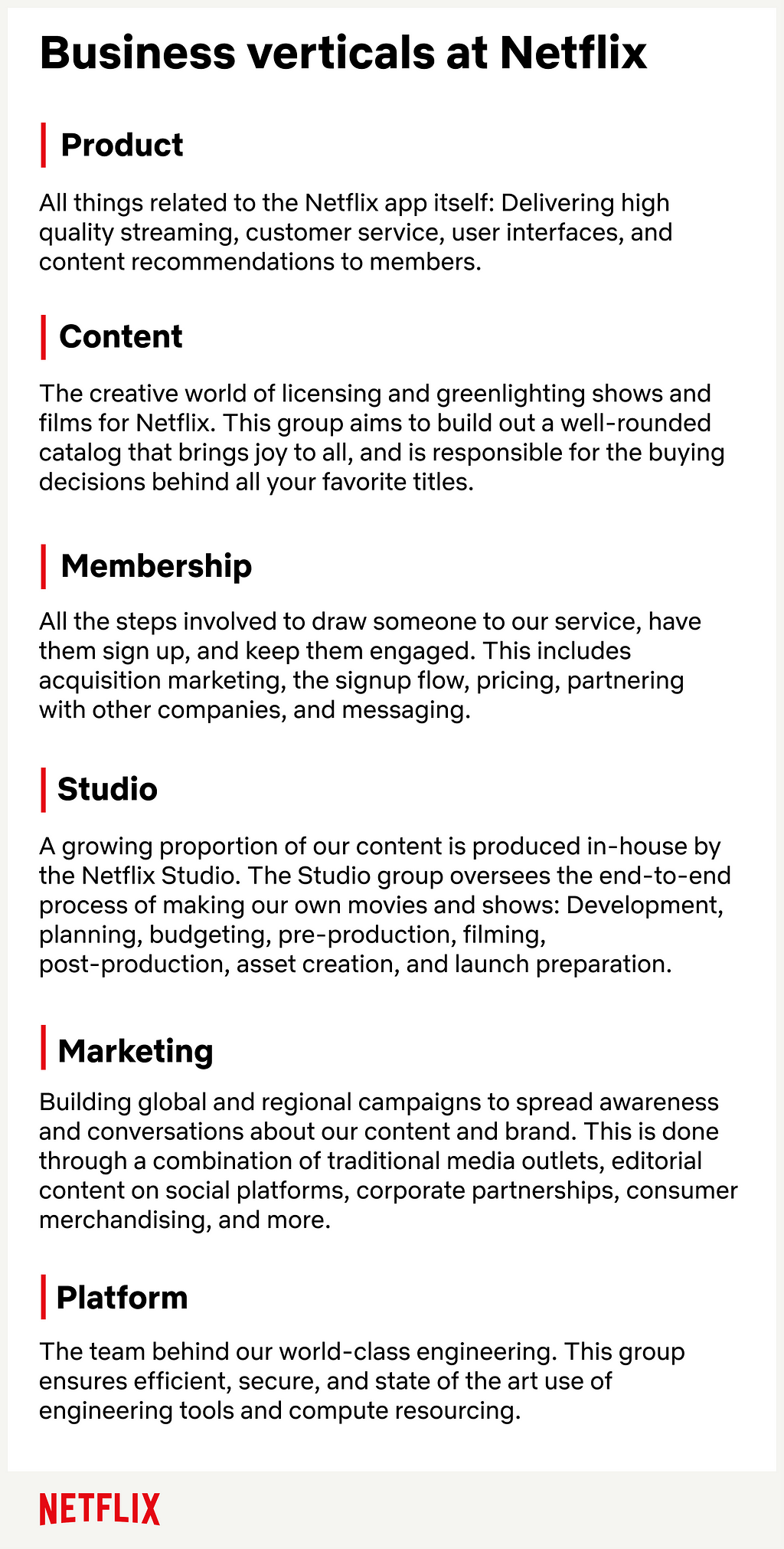
We align our analytic teams with business area verticals

Since the problem space is so varied, we align our analytics professionals with the listed business area verticals rather than organizing them within a single functional horizontal. The expectation is that individuals in these roles possess deep business context and are thought leaders alongside their business counterparts. This enables them to fully understand where their partners are coming from. It also means Analytics and Visualization Engineers are a specialized resource and a rare commodity. There are many more questions and stakeholders than analytics team members, and the job is not to take on every request. Instead, these individual contributors are given freedom to choose their projects and are responsible for prioritizing the ones that will have the most business impact (and deprioritizing the rest). This requires a lot of judgment and embodies our “context not control” culture.

“OK, but what do they actually do…?”

What does the job entail?

You’ve probably caught on to some common themes: People in the analytics role are highly connected to the business, solve end-to-end problems, and are directly responsible for improving business outcomes. But what makes this group really shine are their differences. They come from lots of backgrounds, which yields different perspectives on how to approach problems. We use the catch-all titles of Analytics and Visualization Engineers so as to not get too hung up on specific credentials. Instead, people are empowered to leverage their unique skills to make Netflix better.

A couple other defining characteristics of the role are full ownership of the problem (in Netflix lingo, you are the “informed captain” of your space) and creating trustworthy outputs. These are only possible through the one-two punch of deep business context 👊 and technical excellence 👊. Full ownership often means building new data pipelines, navigating complex schemas and large data sets, developing or improving metrics for business performance, and creating intuitive visualizations and dashboards — always with an eye towards actionable insights.

We use the catch-all titles of Analytics and Visualization Engineers so as to not get too hung up on specific credentials. Instead, people are empowered to leverage their unique skills to make Netflix better.

Because these professionals vary in their expertise, so too does their day-to-day. Below are three broadly defined personas to help illustrate some of the different backgrounds, motivations, and activities of individuals in the analytics role at Netflix. Many of our colleagues have come in with expertise that spans multiple personas. Others have grown into new areas as part of their professional development at Netflix. Ultimately, these skills are all on a continuum, some broad and some deep, and these are just a few examples of such expertise. So if you find yourself connecting with any part of these descriptions, the analytics role could be for you.

  • The Analyst is motivated by delivering metrics, findings, or dashboards that drive analytical insights and business decisions. They love to communicate their discoveries to nontechnical audiences, explain caveats, and debate analytic choices and strategic implications with peers and stakeholders. Their expertise is descriptive analytic methodology, but they have the necessary tools to be scrappy (e.g. coding, math, stats), and do what’s required to answer the highest priority business questions.
  • The Engineer enjoys making data available by piping it in from new sources in optimal ways, building robust data models, prototyping systems, and doing project-specific engineering. They’re still analysts at heart but, similar to data engineers, they have a deep understanding of data warehouse capabilities and are pros at data processing optimization and performance tuning. Being at this intersection of disciplines allows them to produce full-stack outputs, layering visualizations and analytics on their projects.
  • The Visualizer is passionate about the scalability, beauty, and functionality of dashboards and their capability for telling a visual story. They also have an eye for principled engineering, i.e. managing the data under the surface. They want to pick the perfect chart type for the narrative while also focusing on delivering key analytic insights. They may use industry tools (e.g. Tableau, Looker, Power BI) to their fullest extent, developing a deeper understanding of analytics by examining these tools under the hood. Or they may create sophisticated visuals from scratch and build the type of custom UI that enterprise tools don’t offer (e.g. JavaScript web apps).

Introducing Analytics at Netflix

Whether you’re a data professional, student, or Netflix enthusiast, we invite you to meet our stunning colleagues and hear their stories. If this series resonates with you and you’d like to explore opportunities with us, check out our analytics site, search open roles, and learn about our culture.

Welcome to Analytics at Netflix!

Related Posts:


Analytics at Netflix: Who we are and what we do was originally published in Netflix TechBlog on Medium, where people are continuing the conversation by highlighting and responding to this story.

Edgar: Solving Mysteries Faster with Observability

Post Syndicated from Netflix Technology Blog original https://netflixtechblog.com/edgar-solving-mysteries-faster-with-observability-e1a76302c71f

Edgar helps Netflix teams troubleshoot distributed systems efficiently with the help of a summarized presentation of request tracing, logs, analysis, and metadata.

by Elizabeth Carretto

Everyone loves Unsolved Mysteries. There’s always someone who seems like the surefire culprit. There’s a clear motive, the perfect opportunity, and an incriminating footprint left behind. Yet, this is Unsolved Mysteries! It’s never that simple. Whether it’s a cryptic note behind the TV or a mysterious phone call from an unknown number at a critical moment, the pieces rarely fit together perfectly. As mystery lovers, we want to answer the age-old question of whodunit; we want to understand what really happened.

For engineers, instead of whodunit, the question is often “what failed and why?” When a problem occurs, we put on our detective hats and start our mystery-solving process by gathering evidence. The more complex a system, the more places to look for clues. An engineer can find herself digging through logs, poring over traces, and staring at dozens of dashboards.

All of these sources make it challenging to know where to begin and add to the time spent figuring out what went wrong. While this abundance of dashboards and information is by no means unique to Netflix, it certainly holds true within our microservices architecture. Each microservice may be easy to understand and debug individually, but what about when combined into a request that hits tens or hundreds of microservices? Searching for key evidence becomes like digging for a needle in a group of haystacks.

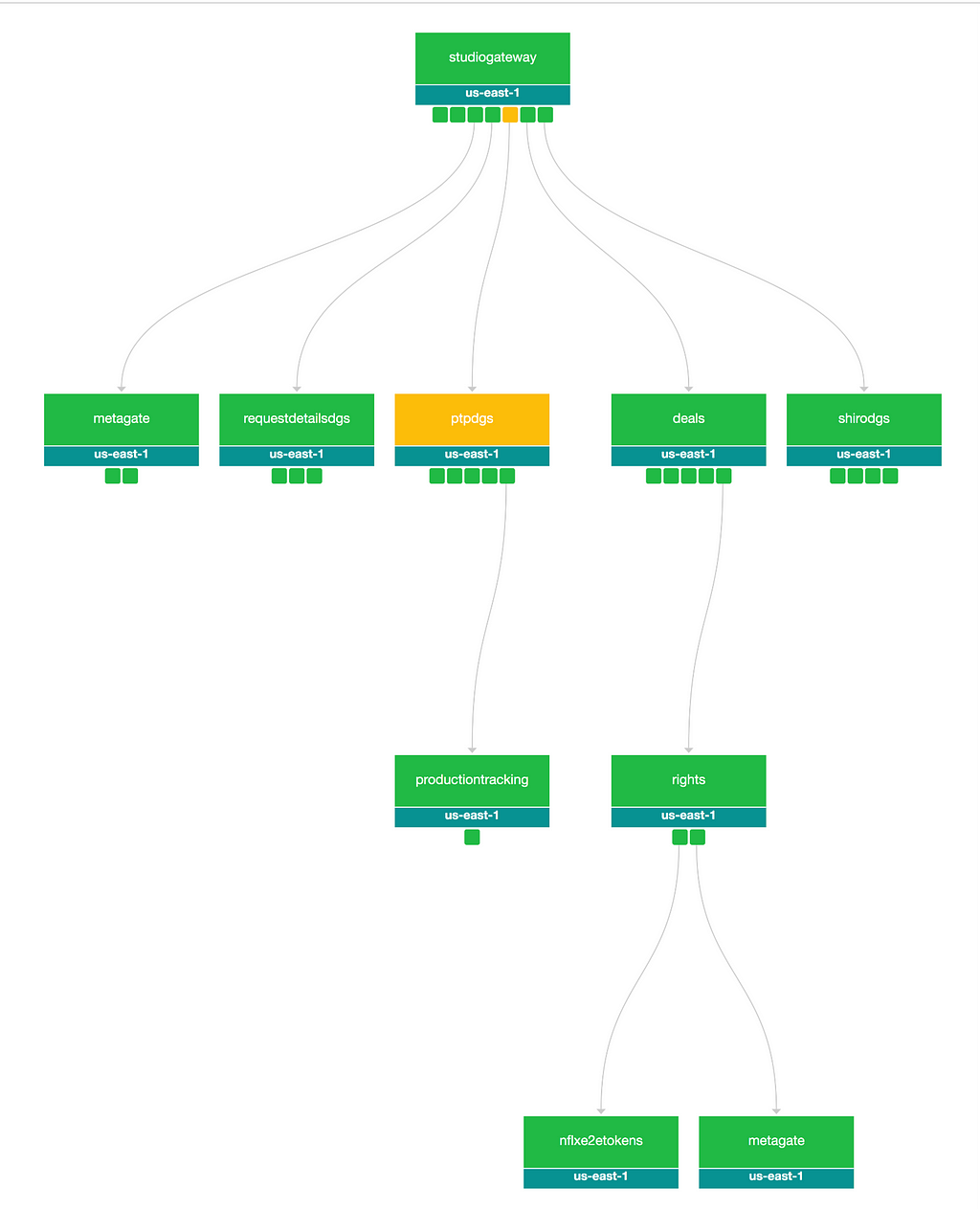
Example call graph in Edgar

In some cases, the question we’re answering is, “What’s happening right now??” and every second without resolution can carry a heavy cost. We want to resolve the problem as quickly as possible so our members can resume enjoying their favorite movies and shows. For teams building observability tools, the question is: how do we make understanding a system’s behavior fast and digestible? Quick to parse, and easy to pinpoint where something went wrong even if you aren’t deeply familiar with the inner workings and intricacies of that system? At Netflix, we’ve answered that question with a suite of observability tools. In an earlier blog post, we discussed Telltale, our health monitoring system. Telltale tells us when an application is unhealthy, but sometimes we need more fine-grained insight. We need to know why a specific request is failing and where. We built Edgar to ease this burden, by empowering our users to troubleshoot distributed systems efficiently with the help of a summarized presentation of request tracing, logs, analysis, and metadata.

What is Edgar?

Edgar is a self-service tool for troubleshooting distributed systems, built on a foundation of request tracing, with additional context layered on top. With request tracing and additional data from logs, events, metadata, and analysis, Edgar is able to show the flow of a request through our distributed system — what services were hit by a call, what information was passed from one service to the next, what happened inside that service, how long did it take, and what status was emitted — and highlight where an issue may have occurred. If you’re familiar with platforms like Zipkin or OpenTelemetry, this likely sounds familiar. But, there are a few substantial differences in how Edgar approaches its data and its users.

  • While Edgar is built on top of request tracing, it also uses the traces as the thread to tie additional context together. Deriving meaningful value from trace data alone can be challenging, as Cindy Sridharan articulated in this blog post. In addition to trace data, Edgar pulls in additional context from logs, events, and metadata, sifting through them to determine valuable and relevant information, so that Edgar can visually highlight where an error occurred and provide detailed context.
  • Edgar captures 100% of interesting traces, as opposed to sampling a small fixed percentage of traffic. This difference has substantial technological implications, from the classification of what’s interesting to transport to cost-effective storage (keep an eye out for later Netflix Tech Blog posts addressing these topics).
  • Edgar provides a powerful and consumable user experience to both engineers and non-engineers alike. If you embrace the cost and complexity of storing vast amounts of traces, you want to get the most value out of that cost. With Edgar, we’ve found that we can leverage that value by curating an experience for additional teams such as customer service operations, and we have embraced the challenge of building a product that makes trace data easy to access, easy to grok, and easy to gain insight by several user personas.

Tracing as a foundation

Logs, metrics, and traces are the three pillars of observability. Metrics communicate what’s happening on a macro scale, traces illustrate the ecosystem of an isolated request, and the logs provide a detail-rich snapshot into what happened within a service. These pillars have immense value and it is no surprise that the industry has invested heavily in building impressive dashboards and tooling around each. The downside is that we have so many dashboards. In one request hitting just ten services, there might be ten different analytics dashboards and ten different log stores. However, a request has its own unique trace identifier, which is a common thread tying all the pieces of this request together. The trace ID is typically generated at the first service that receives the request and then passed along from service to service as a header value. This makes the trace a great starting point to unify this data in a centralized location.

A trace is a set of segments representing each step of a single request throughout a system. Distributed tracing is the process of generating, transporting, storing, and retrieving traces in a distributed system. As a request flows between services, each distinct unit of work is documented as a span. A trace is made up of many spans, which are grouped together using a trace ID to form a single, end-to-end umbrella. A span:

  • Represents a unit of work, such as a network call from one service to another (a client/server relationship) or a purely internal action (e.g., starting and finishing a method).
  • Relates to other spans through a parent/child relationship.
  • Contains a set of key value pairs called tags, where service owners can attach helpful values such as urls, version numbers, regions, corresponding IDs, and errors. Tags can be associated with errors or warnings, which Edgar can display visually on a graph representation of the request.
  • Has a start time and an end time. Thanks to these timestamps, a user can quickly see how long the operation took.

The trace (along with its underlying spans) allows us to graphically represent the request chronologically.

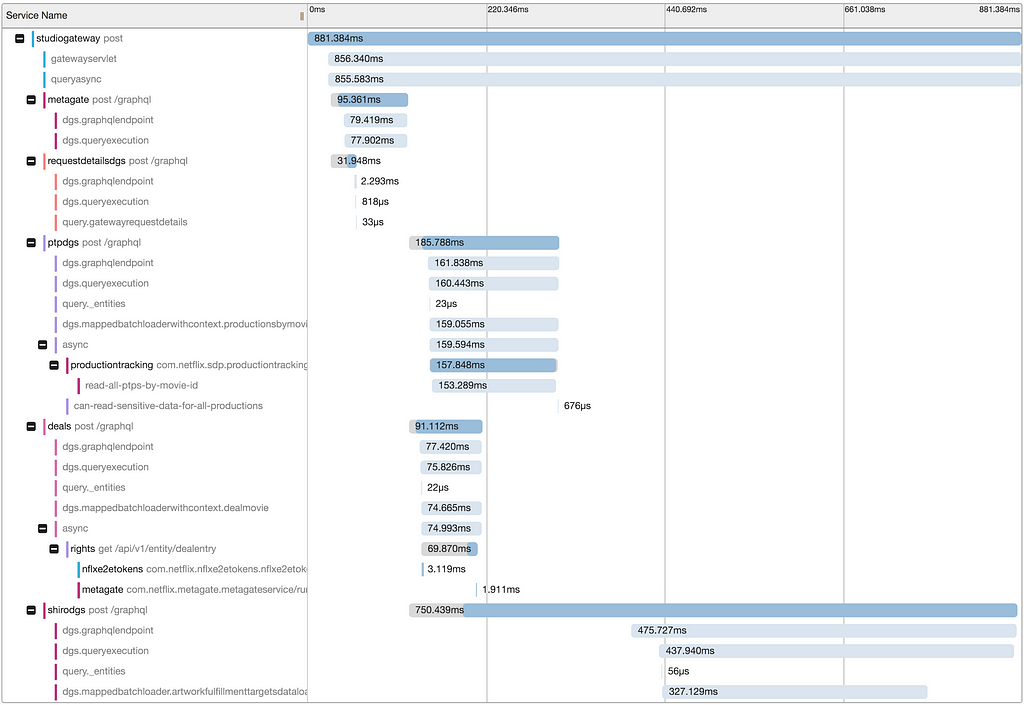
Sample timeline view of a trace, based on Jaegar UI’s timeline view

Adding context to traces

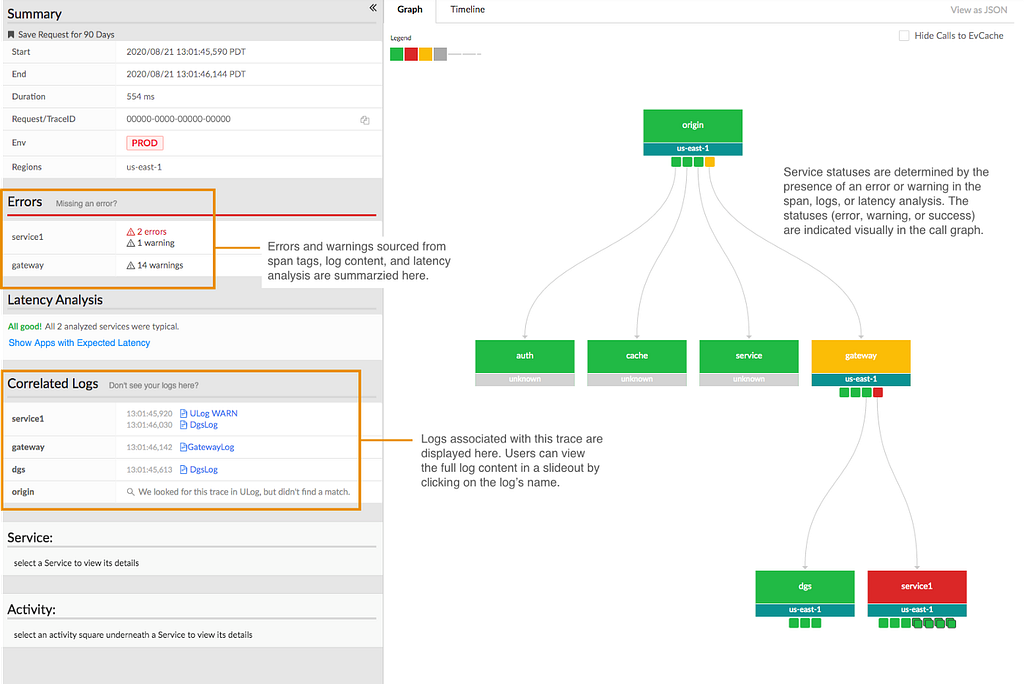
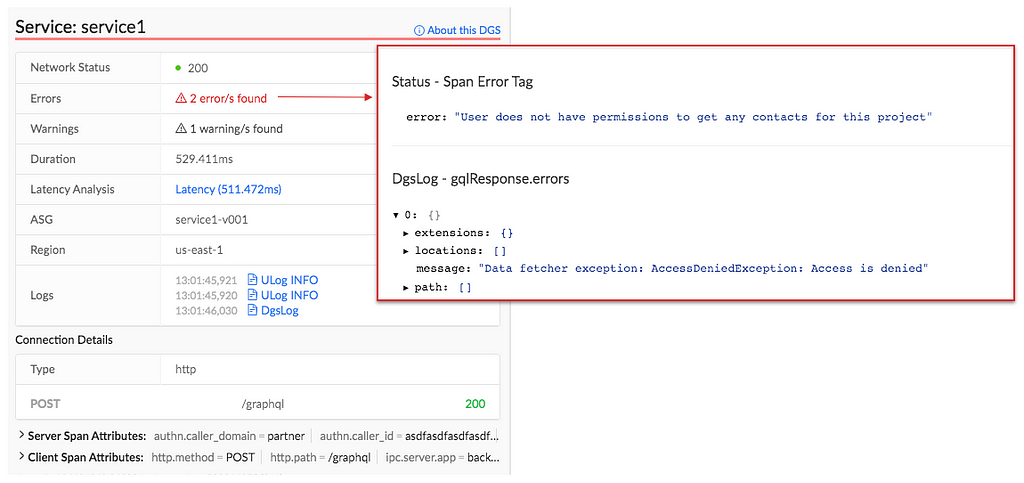
With distributed tracing alone, Edgar is able to draw the path of a request as it flows through various systems. This centralized view is extremely helpful to determine which services were hit and when, but it lacks nuance. A tag might indicate there was an error but doesn’t fully answer the question of what happened. Adding logs to the picture can help a great deal. With logs, a user can see what the service itself had to say about what went wrong. If a data fetcher fails, the log can tell you what query it was running and what exact IDs or fields led to the failure. That alone might give an engineer the knowledge she needs to reproduce the issue. In Edgar, we parse the logs looking for error or warning values. We add these errors and warnings to our UI, highlighting them in our call graph and clearly associating them with a given service, to make it easy for users to view any errors we uncovered.

Example view of errors associated with a service, including an error parsed from a log

With the trace and additional context from logs illustrating the issue, one of the next questions may be how does this individual trace fit into the overall health and behavior of each service. Is this an anomaly or are we dealing with a pattern? To help answer this question, Edgar pulls in anomaly detection from a partner application, Telltale. Telltale provides Edgar with latency benchmarks that indicate if the individual trace’s latency is abnormal for this given service. A trace alone could tell you that a service took 500ms to respond, but it takes in-depth knowledge of a particular service’s typical behavior to make a determination if this response time is an outlier. Telltale’s anomaly analysis looks at historic behavior and can evaluate whether the latency experienced by this trace is anomalous. With this knowledge, Edgar can then visually warn that something happened in a service that caused its latency to fall outside of normal bounds.

Sample latency analysis

Edgar should reduce burden, not add to it

Presenting all of this data in one interface reduces the footwork of an engineer to uncover each source. However, discovery is only part of the path to resolution. With all the evidence presented and summarized by Edgar, an engineer may know what went wrong and where it went wrong. This is a huge step towards resolution, but not yet cause for celebration. The root cause may have been identified, but who owns the service in question? Many times, finding the right point of contact would require a jump into Slack or a company directory, which costs more time. In Edgar, we have integrated with our services to provide that information in-app alongside the details of a trace. For any service configured with an owner and support channel, Edgar provides a link to a service’s contact email and their Slack channel, smoothing the hand-off from one party to the next. If an engineer does need to pass an issue along to another team or person, Edgar’s request detail page contains all the context — the trace, logs, analysis — and is easily shareable, eliminating the need to write a detailed description or provide a cascade of links to communicate the issue.

Edgar’s request detail page

A key aspect of Edgar’s mission is to minimize the burden on both users and service owners. With all of its data sources, the sheer quantity of data could become overwhelming. It is essential for Edgar to maintain a prioritized interface, built to highlight errors and abnormalities to the user and assist users in taking the next step towards resolution. As our UI grows, it’s important to be discerning and judicious in how we handle new data sources, weaving them into our existing errors and warnings models to minimize disruption and to facilitate speedy understanding. We lean heavily on focus groups and user feedback to ensure a tight feedback loop so that Edgar can continue to meet our users’ needs as their services and use cases evolve.

As services evolve, they might change their log format or use new tags to indicate errors. We built an admin page to give our service owners that configurability and to decouple our product from in-depth service knowledge. Service owners can configure the essential details of their log stores, such as where their logs are located and what fields they use for trace IDs and span IDs. Knowing their trace and span IDs is what enables Edgar to correlate the traces and logs. Beyond that though, what are the idiosyncrasies of their logs? Some fields may be irrelevant or deprecated, and teams would like to hide them by default. Alternatively, some fields contain the most important information, and by promoting them in the Edgar UI, they are able to view these fields more quickly. This self-service configuration helps reduce the burden on service owners.

Initial log configuration in Edgar

Leveraging Edgar

In order for users to turn to Edgar in a situation when time is of the essence, users need to be able to trust Edgar. In particular, they need to be able to count on Edgar having data about their issue. Many approaches to distributed tracing involve setting a sample rate, such as 5%, and then only tracing that percentage of request traffic. Instead of sampling a fixed percentage, Edgar’s mission is to capture 100% of interesting requests. As a result, when an error happens, Edgar’s users can be confident they will be able to find it. That’s key to positioning Edgar as a reliable source. Edgar’s approach makes a commitment to have data about a given issue.

In addition to storing trace data for all requests, Edgar implemented a feature to collect additional details on-demand at a user’s discretion for a given criteria. With this fine-grained level of tracing turned on, Edgar captures request and response payloads as well as headers for requests matching the user’s criteria. This adds clarity to exactly what data is being passed from service to service through a request’s path. While this level of granularity is unsustainable for all request traffic, it is a robust tool in targeted use cases, especially for errors that prove challenging to reproduce.

As you can imagine, this comes with very real storage costs. While the Edgar team has done its best to manage these costs effectively and to optimize our storage, the cost is not insignificant. One way to strengthen our return on investment is by being a key tool throughout the software development lifecycle. Edgar is a crucial tool for operating and maintaining a production service, where reducing the time to recovery has direct customer impact. Engineers also rely on our tool throughout development and testing, and they use the Edgar request page to communicate issues across teams.

By providing our tool to multiple sets of users, we are able to leverage our cost more efficiently. Edgar has become not just a tool for engineers, but rather a tool for anyone who needs to troubleshoot a service at Netflix. In Edgar’s early days, as we strove to build valuable abstractions on top of trace data, the Edgar team first targeted streaming video use cases. We built a curated experience for streaming video, grouping requests into playback sessions, marked by starting and stopping playback for a given asset. We found this experience was powerful for customer service operations as well as engineering teams. Our team listened to customer service operations to understand which common issues caused an undue amount of support pain so that we could summarize these issues in our UI. This empowers customer service operations, as well as engineers, to quickly understand member issues with minimal digging. By logically grouping traces and summarizing the behavior at a higher level, trace data becomes extremely useful in answering questions like why a member didn’t receive 4k video for a certain title or why a member couldn’t watch certain content.

An example error viewing a playback session in Edgar

Extending Edgar for Studio

As the studio side of Netflix grew, we realized that our movie and show production support would benefit from a similar aggregation of user activity. Our movie and show production support might need to answer why someone from the production crew can’t log in or access their materials for a particular project. As we worked to serve this new user group, we sought to understand what issues our production support needed to answer most frequently and then tied together various data sources to answer those questions in Edgar.

The Edgar team built out an experience to meet this need, building another abstraction with trace data; this time, the focus was on troubleshooting production-related use cases and applications, rather than a streaming video session. Edgar provides our production support the ability to search for a given contractor, vendor, or member of production staff by their name or email. After finding the individual, Edgar reaches into numerous log stores for their user ID, and then pulls together their login history, role access change log, and recent traces emitted from production-related applications. Edgar scans through this data for errors and warnings and then presents those errors right at the front. Perhaps a vendor tried to login with the wrong password too many times, or they were assigned an incorrect role on a production. In this new domain, Edgar is solving the same multi-dashboarded problem by tying together information and pointing its users to the next step of resolution.

An example error for a production-related user

What Edgar is and is not

Edgar’s goal is not to be the be-all, end-all of tools or to be the One Tool to Rule Them All. Rather, our goal is to act as a concierge of troubleshooting — Edgar should quickly be able to guide users to an understanding of an issue, as well usher them to the next location, where they can remedy the problem. Let’s say a production vendor is unable to access materials for their production due to an incorrect role/permissions assignment, and this production vendor reaches out to support for assistance troubleshooting. When a support user searches for this vendor, Edgar should be able to indicate that this vendor recently had a role change and summarize what this role change is. Instead of being assigned to Dead To Me Season 2, they were assigned to Season 1! In this case, Edgar’s goal is to help a support user come to this conclusion and direct them quickly to the role management tool where this can be rectified, not to own the full circle of resolution.

Usage at Netflix

While Edgar was created around Netflix’s core streaming video use-case, it has since evolved to cover a wide array of applications. While Netflix streaming video is used by millions of members, some applications using Edgar may measure their volume in requests per minute, rather than requests per second, and may only have tens or hundreds of users rather than millions. While we started with a curated approach to solve a pain point for engineers and support working on streaming video, we found that this pain point is scale agnostic. Getting to the bottom of a problem is costly for all engineers, whether they are building a budget forecasting application used heavily by 30 people or a SVOD application used by millions.

Today, many applications and services at Netflix, covering a wide array of type and scale, publish trace data that is accessible in Edgar, and teams ranging from service owners to customer service operations rely on Edgar’s insights. From streaming to studio, Edgar leverages its wealth of knowledge to speed up troubleshooting across applications with the same fundamental approach of summarizing request tracing, logs, analysis, and metadata.

As you settle into your couch to watch a new episode of Unsolved Mysteries, you may still find yourself with more questions than answers. Why did the victim leave his house so abruptly? How did the suspect disappear into thin air? Hang on, how many people saw that UFO?? Unfortunately, Edgar can’t help you there (trust me, we’re disappointed too). But, if your relaxing evening is interrupted by a production outage, Edgar will be behind the scenes, helping Netflix engineers solve the mystery at hand.

Keeping services up and running allows Netflix to share stories with our members around the globe. Underneath every outage and failure, there is a story to tell, and powerful observability tooling is needed to tell it. If you are passionate about observability then come talk to us.


Edgar: Solving Mysteries Faster with Observability was originally published in Netflix TechBlog on Medium, where people are continuing the conversation by highlighting and responding to this story.

Optimized shot-based encodes for 4K: Now streaming!

Post Syndicated from Netflix Technology Blog original https://netflixtechblog.com/optimized-shot-based-encodes-for-4k-now-streaming-47b516b10bbb

by Aditya Mavlankar, Liwei Guo, Anush Moorthy and Anne Aaron

Netflix has an ever-expanding collection of titles which customers can enjoy in 4K resolution with a suitable device and subscription plan. Netflix creates premium bitstreams for those titles in addition to the catalog-wide 8-bit stream profiles¹. Premium features comprise a title-dependent combination of 10-bit bit-depth, 4K resolution, high frame rate (HFR) and high dynamic range (HDR) and pave the way for an extraordinary viewing experience.

The premium bitstreams, launched several years ago, were rolled out with a fixed-bitrate ladder, with fixed 4K resolution bitrates — 8, 10, 12 and 16 Mbps — regardless of content characteristics. Since then, we’ve developed algorithms such as per-title encode optimizations and per-shot dynamic optimization, but these innovations were not back-ported on these premium bitstreams. Moreover, the encoding group of pictures (GoP) duration (or keyframe period) was constant throughout the stream causing additional inefficiency due to shot boundaries not aligning with GoP boundaries.

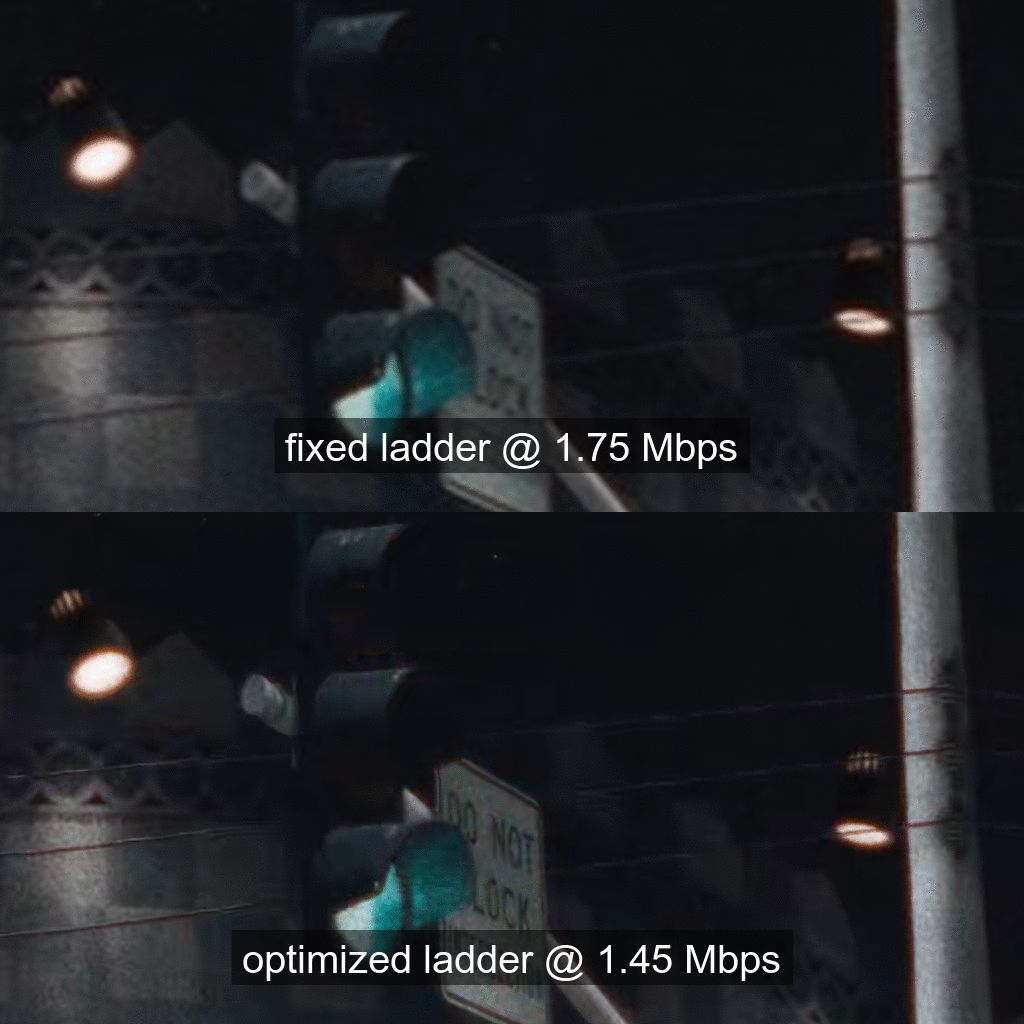
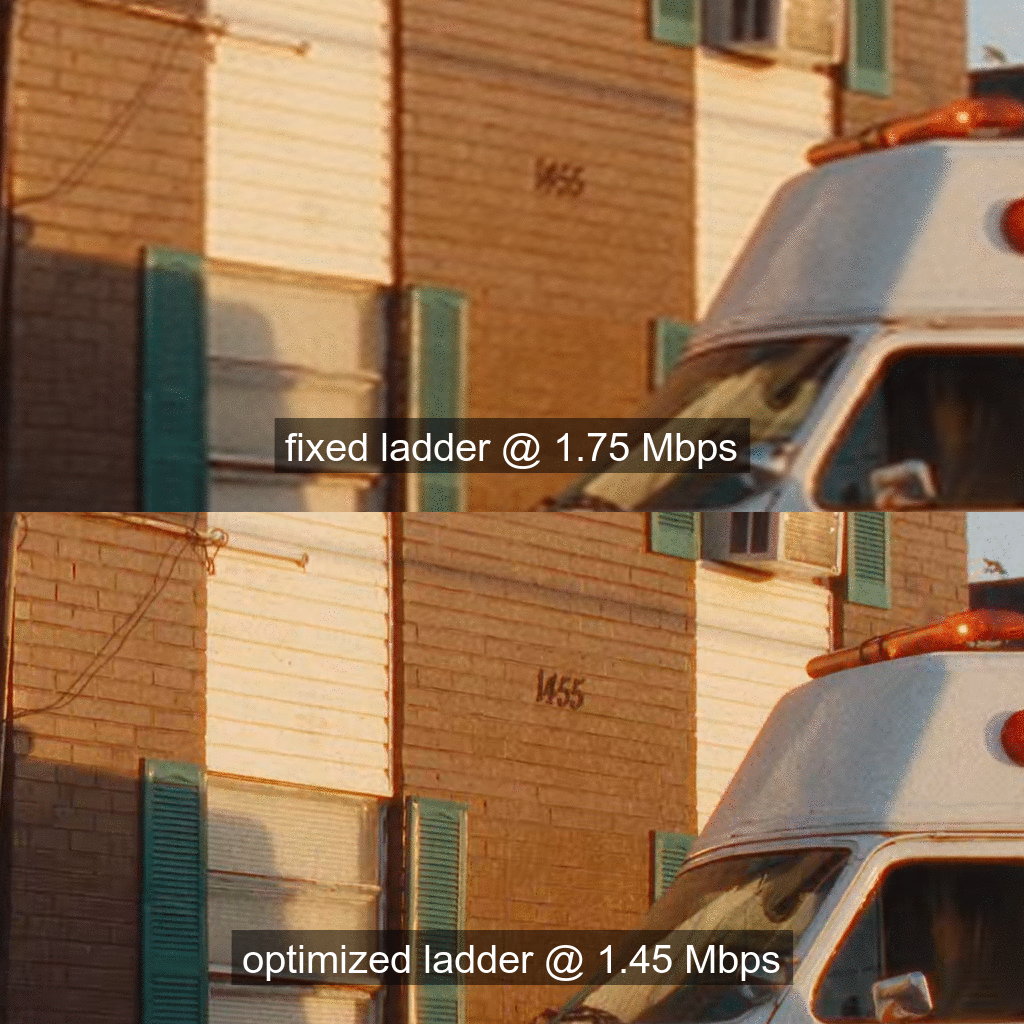
As the number of 4K titles in our catalog continues to grow and more devices support the premium features, we expect these video streams to have an increasing impact on our members and the network. We’ve worked hard over the last year to leapfrog to our most advanced encoding innovations — shot-optimized encoding and 4K VMAF model — and applied those to the premium bitstreams. More specifically, we’ve improved the traditional 4K and 10-bit ladder by employing

In this blog post, we present benefits of applying the above-mentioned optimizations to standard dynamic range (SDR) 10-bit and 4K streams (some titles are also HFR). As for HDR, our team is currently developing an HDR extension to VMAF, Netflix’s video quality metric, which will then be used to optimize the HDR streams.

¹ The 8-bit stream profiles go up to 1080p resolution.

Bitrate versus quality comparison

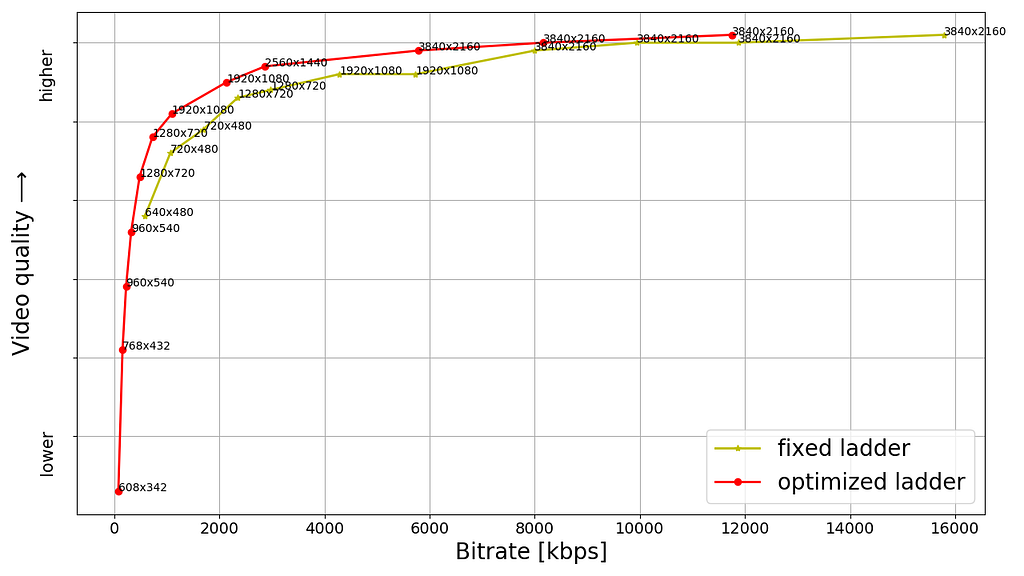
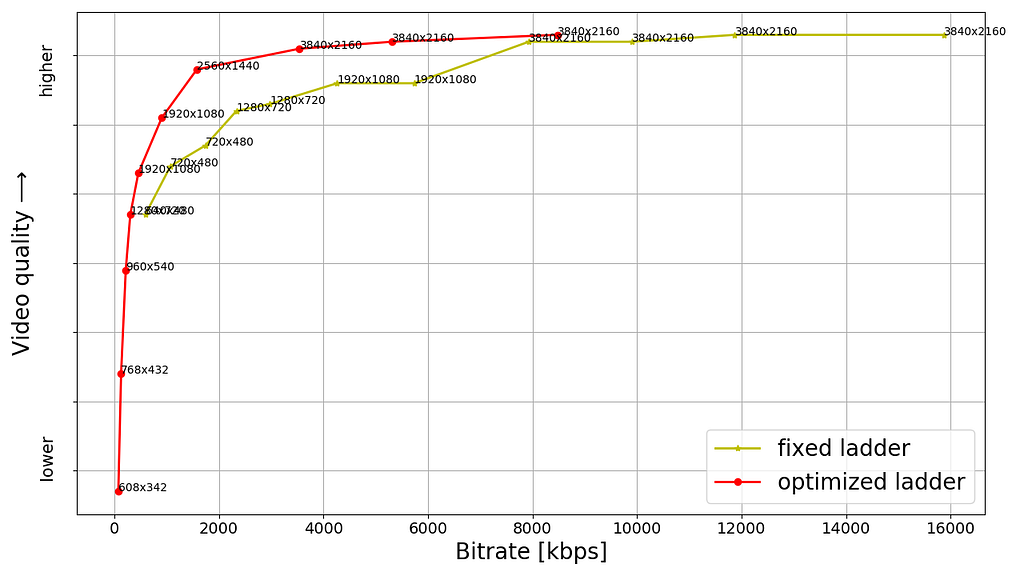
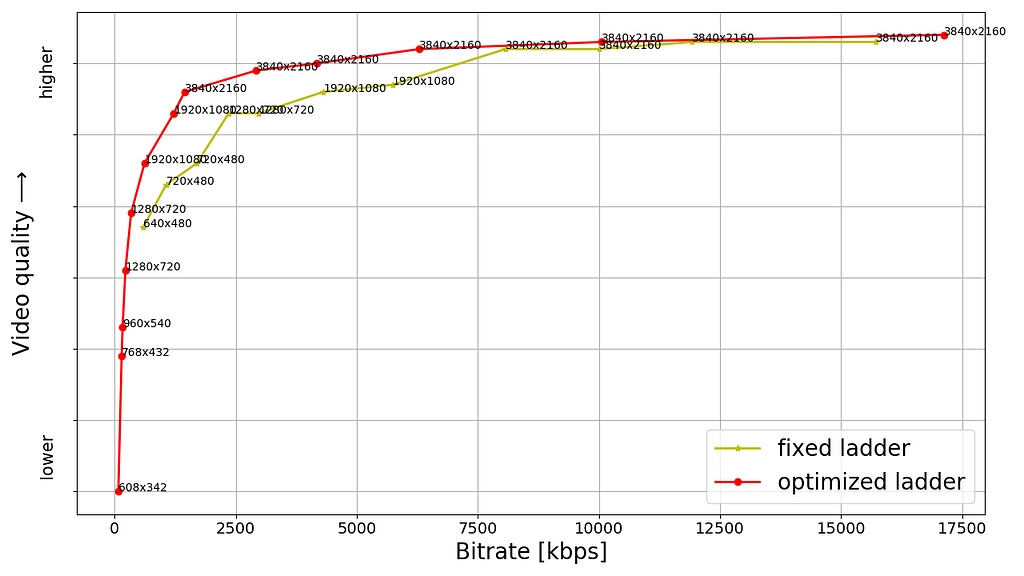
For a sample of titles from the 4K collection, the following plots show the rate-quality comparison of the fixed-bitrate ladder and the optimized ladder. The plots have been arranged in decreasing order of the new highest bitrate — which is now content adaptive and commensurate with the overall complexity of the respective title.

Fig. 1: Example of a thriller-drama episode showing new highest bitrate of 11.8 Mbps
Fig. 2: Example of a sitcom episode with some action showing new highest bitrate of 8.5 Mbps
Fig. 3: Example of a sitcom episode with less action showing new highest bitrate of 6.6 Mbps
Fig. 4: Example of a 4K animation episode showing new highest bitrate of 1.8 Mbps

The bitrate as well as quality shown for any point is the average for the corresponding stream, computed over the duration of the title. The annotation next to the point is the corresponding encoding resolution; it should be noted that video received by the client device is decoded and scaled to the device’s display resolution. As for VMAF score computation, for encoding resolutions less than 4K, we follow the VMAF best practice to upscale to 4K assuming bicubic upsampling. Aside from the encoding resolution, each point is also associated with an appropriate pixel aspect ratio (PAR) to achieve a target 16:9 display aspect ratio (DAR). For example, the 640×480 encoding resolution is paired with a 4:3 PAR to achieve 16:9 DAR, consistent with the DAR for other points on the ladder.

The last example, showing the new highest bitrate to be 1.8 Mbps, is for a 4K animation title episode which can be very efficiently encoded. It serves as an extreme example of content adaptive ladder optimization — it however should not to be interpreted as all animation titles landing on similar low bitrates.

The resolutions and bitrates for the fixed-bitrate ladder are pre-determined; minor deviation in the achieved bitrate is due to rate control in the encoder implementation not hitting the target bitrate precisely. On the other hand, each point on the optimized ladder is associated with optimal bit allocation across all shots with the goal of maximizing a video quality objective function while resulting in the corresponding average bitrate. Consequently, for the optimized encodes, the bitrate varies shot to shot depending on relative complexity and overall bit budget and in theory can reach the respective codec level maximum. Various points are constrained to different codec levels, so receivers with different decoder level capabilities can stream the corresponding subset of points up to the corresponding level.
The fixed-bitrate ladder often appears like steps — since it is not title adaptive it switches “late” to most encoding resolutions and as a result the quality stays flat within that resolution even with increasing bitrate. For example, two 1080p points with identical VMAF score or four 4K points with identical VMAF score, resulting in wasted bits and increased storage footprint.

On the other hand, the optimized ladder appears closer to a monotonically increasing curve — increasing bitrate results in an increasing VMAF score. As a side note, we do have some additional points, not shown in the plots, that are used in resolution limited scenarios — such as a streaming session limited to 720p or 1080p highest encoding resolution. Such points lie under (or to the right of) the convex hull main ladder curve but allow quality to ramp up in resolution limited scenarios.

Challenging-to-encode content

For the optimized ladders we have logic to detect quality saturation at the high end, meaning an increase in bitrate not resulting in material improvement in quality. Once such a bitrate is reached it is a good candidate for the topmost rung of the ladder. An additional limit can be imposed as a safeguard to avoid excessively high bitrates.

Sometimes we ingest a title that would need more bits at the highest end of the quality spectrum — even higher than the 16 Mbps limit of the fixed-bitrate ladder. For example,

  • a rock concert with fast-changing lighting effects and other details or
  • a wildlife documentary with fast action and/or challenging spatial details.

This scenario is generally rare. Nevertheless, below plot highlights such a case where the optimized ladder exceeds the fixed-bitrate ladder in terms of the highest bitrate, thereby achieving an improvement in the highest quality.

As expected, the quality is higher for the same bitrate, even when compared in the low or medium bitrate regions.

Fig. 5: Example of a movie with action and great amount of rich spatial details showing new highest bitrate of 17.2 Mbps

Visual examples

As an example, we compare the 1.75 Mbps encode from the fixed-bitrate ladder with the 1.45 Mbps encode from the optimized ladder for one of the titles from our 4K collection. Since 4K resolution entails a rather large number of pixels, we show 1024×512 pixel cutouts from the two encodes. The encodes are decoded and scaled to a 4K canvas prior to extracting the cutouts. We toggle between the cutouts so it is convenient to spot differences. We also show the corresponding full frame which helps to get a sense of how the cutout fits in the corresponding video frame.

Fig. 6: Pristine full frame — the purpose is to give a sense of how below cutouts fit in the frame
Fig. 7: Toggling between 1024×512 pixel cutouts from two encodes as annotated. Corresponding to pristine frame shown in Figure 6.
Fig. 8: Pristine full frame — the purpose is to give a sense of how below cutouts fit in the frame
Fig. 9: Toggling between 1024×512 pixel cutouts from two encodes as annotated. Corresponding to pristine frame shown in Figure 8.
Fig. 10: Pristine full frame — the purpose is to give a sense of how below cutouts fit in the frame
Fig. 11: Toggling between 1024×512 pixel cutouts from two encodes as annotated. Corresponding to pristine frame shown in Figure 10.
Fig. 12: Pristine full frame — the purpose is to give a sense of how below cutouts fit in the frame
Fig. 13: Toggling between 1024×512 pixel cutouts from two encodes as annotated. Corresponding to pristine frame shown in Figure 12.
Fig. 14: Pristine full frame — the purpose is to give a sense of how below cutouts fit in the frame
Fig. 15: Toggling between 1024×512 pixel cutouts from two encodes as annotated. Corresponding to pristine frame shown in Figure 14.

As can be seen, the encode from the optimized ladder delivers crisper textures and higher detail for less bits. At 1.45 Mbps it is by no means a perfect 4K rendition, but still very commendable for that bitrate. There exist higher bitrate points on the optimized ladder that deliver impeccable 4K quality, also for less bits compared to the fixed-bitrate ladder.

Compression and bitrate ladder improvements

Even before testing the new streams in the field, we observe the following advantages of the optimized ladders vs the fixed ladders, evaluated over 100 sample titles:

  • Computing the Bjøntegaard Delta (BD) rate shows 50% gains on average over the fixed-bitrate ladder. Meaning, on average we need 50% less bitrate to achieve the same quality with the optimized ladder.
  • The highest 4K bitrate on average is 8 Mbps which is also a 50% reduction compared to 16 Mbps of the fixed-bitrate ladder.
  • As mobile devices continue to improve, they adopt premium features (other than 4K resolution) like 10-bit and HFR. These video encodes can be delivered to mobile devices as well. The fixed-bitrate ladder starts at 560 kbps which may be too high for some cellular networks. The optimized ladder, on the other hand, has lower bitrate points that are viable in most cellular scenarios.
  • The optimized ladder entails a smaller storage footprint compared to the fixed-bitrate ladder.
  • The new ladder considers adding 1440p resolution (aka QHD) points if they lie on the convex hull of rate-quality tradeoff and most titles seem to get the 1440p treatment. As a result, when averaged over 100 titles, the bitrate required to jump to a resolution higher than 1080p (meaning either QHD or 4K) is 1.7 Mbps compared to 8 Mbps of the fixed-bitrate ladder. When averaged over 100 titles, the bitrate required to jump to 4K resolution is 3.2 Mbps compared to 8 Mbps of the fixed-bitrate ladder.

Benefits to members

At Netflix we perform A/B testing of encoding optimizations to detect any playback issues on client devices as well as gauge the benefits experienced by our members. One set of streaming sessions receives the default encodes and the other set of streaming sessions receives the new encodes. This in turn allows us to compare error rates as well as various metrics related to quality of experience (QoE). Although our streams are standard compliant, the A/B testing can and does sometimes find device-side implementations with minor gaps; in such cases we work with our device partners to find the best remedy.

Overall, while A/B testing these new encodes, we have seen the following benefits, which are in line with the offline evaluation covered in the previous section:

  • For members with high-bandwidth connections we deliver the same great quality at half the bitrate on average.
  • For members with constrained bandwidth we deliver higher quality at the same (or even lower) bitrate — higher VMAF at the same encoding resolution and bitrate or even higher resolutions than they could stream before. For example, members who were limited by their network to 720p can now be served 1080p or higher resolution instead.
  • Most streaming sessions start with a higher initial quality.
  • The number of rebuffers per hour go down by over 65%; members also experience fewer quality drops while streaming.
  • The reduced bitrate together with some Digital Rights Management (DRM) system improvements (not covered in this blog) result in reducing the initial play delay by about 10%.

Next steps

We have started re-encoding the 4K titles in our catalog to generate the optimized streams and we expect to complete in a couple of months. We continue to work on applying similar optimizations to our HDR streams.

Acknowledgements

We thank Lishan Zhu for help rendered during A/B testing.

This is a collective effort on the part of our larger team, known as Encoding Technologies, and various other teams that we have crucial partnerships with, such as:

If you are passionate about video compression research and would like to contribute to this field, we have an open position.


Optimized shot-based encodes for 4K: Now streaming! was originally published in Netflix TechBlog on Medium, where people are continuing the conversation by highlighting and responding to this story.