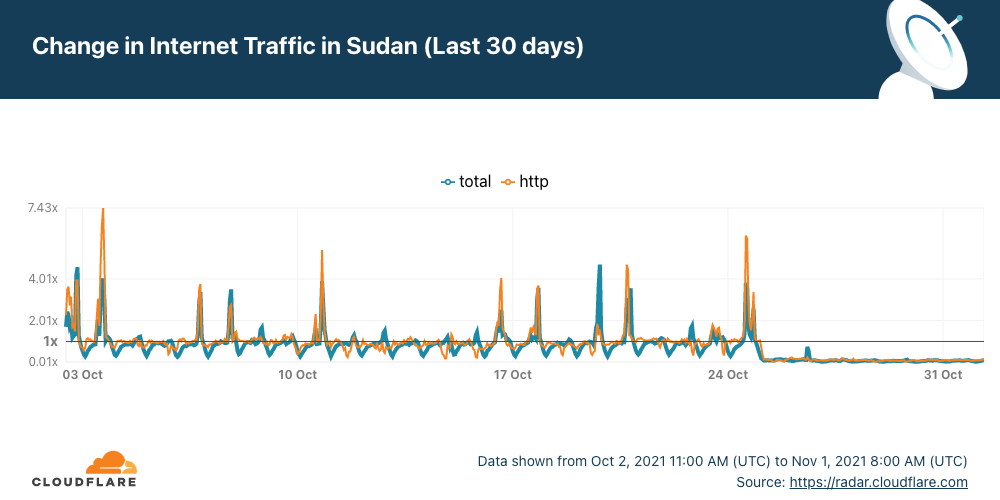
It’s not every day that there is no Internet access in an entire country. In the case of Sudan, it has been five days without Internet after political turmoil that started last Monday, October 25, 2021 (as we described).
The outage continues with almost a flat line and just a trickle of Internet traffic from Sudan. Cloudflare Radar shows that the Internet in Sudan is still almost completely cut off.
There was a blip of traffic on Tuesday at ~14:00 UTC, for about one hour, but it flattened out again, and it continues like that — anyone can track the evolution on the Sudan page of Cloudflare Radar.
Internet shutdowns are not that rare
Internet disruptions, including shutdowns and social media restrictions, are common occurrences in some countries and Sudan is one where this happens more frequently than most countries according to Human Rights Watch. In our June blog, we talked about Sudan when the country decided to shut down the Internet to prevent cheating in exams, but there were situations in the past more similar to this days-long shutdown — something that usually happens when there’s political unrest.
The country’s longest recorded network disruption was back in 2018, when Sudanese authorities cut off access to social media (and messaging apps like WhatsApp) for 68 consecutive days from December 21, 2018 to February 26, 2019. There was a full mobile Internet shutdown reported from June 3 to July 9, 2019 that lasted 36 days.
You can keep an eye on Cloudflare Radar to monitor how we see the Internet traffic globally and in every country.
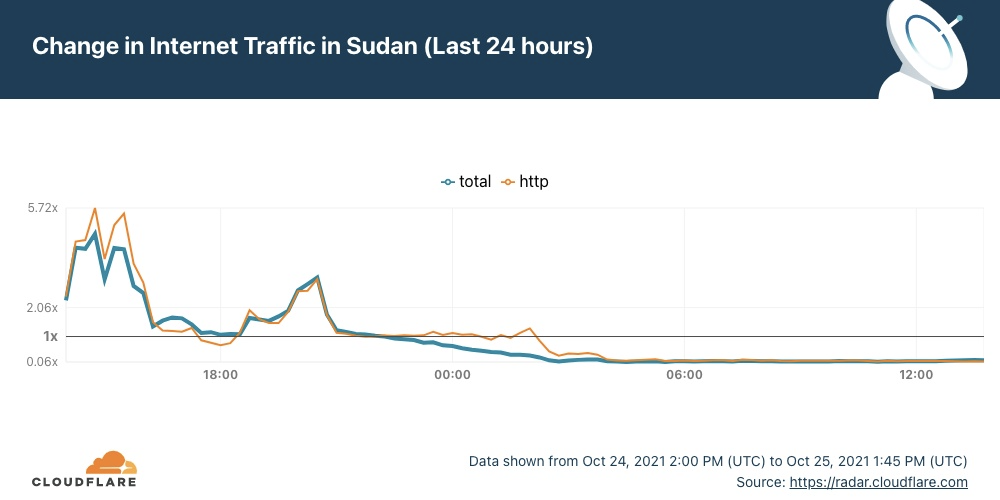
Today, October 25, following political turmoil, Sudan woke up without Internet access.
In our June blog, we talked about Sudan when the country decided to shut down the Internet to prevent cheating in exams.
Now, the disruption seems to be for other reasons. AP is reporting that “military forces … detained at least five senior Sudanese government figures.”. This afternoon (UTC) several media outlets confirmed that Sudan’s military dissolved the transitional government in a coup that shut down mobile phone networks and Internet access.
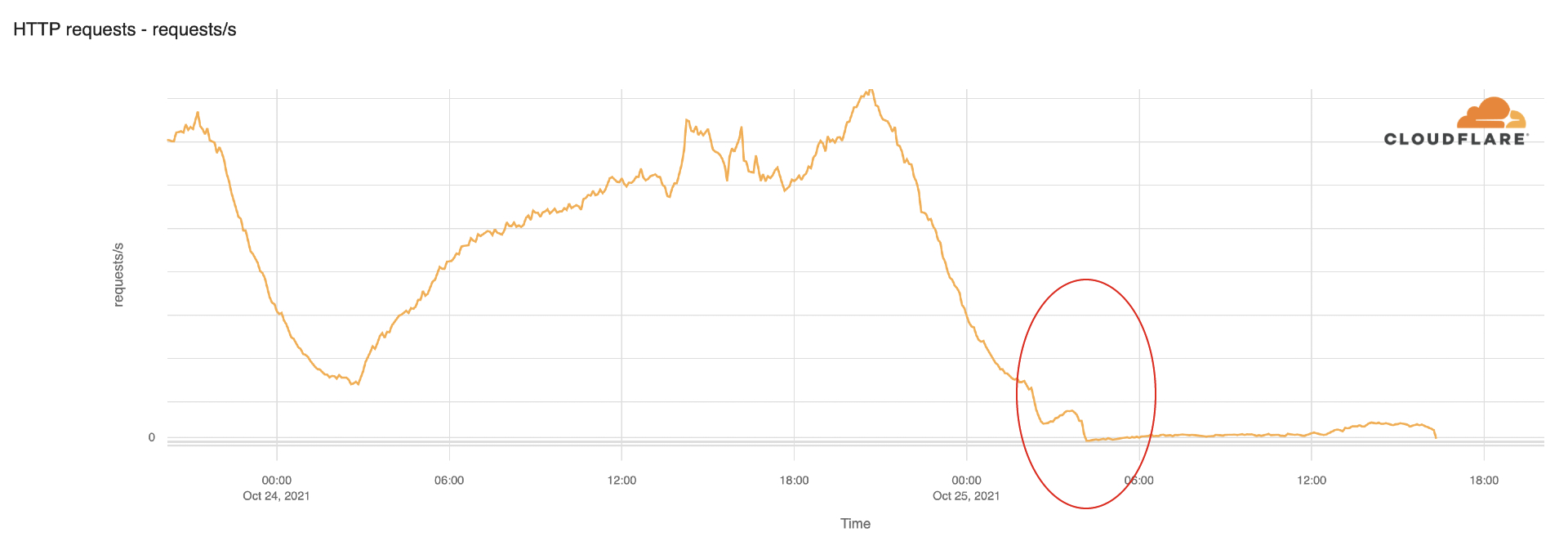
Cloudflare Radar allows anyone to track Internet traffic patterns around the world. The dedicated page for Sudan clearly shows that this Monday, when the country was waking up, the Internet traffic went down and continued that trend through the afternoon (16:00 local time, 14:00 UTC).
We dug in a little more on the HTTP traffic data. It usually starts increasing after 06:00 local time (04:00 UTC). But this Monday morning, traffic was flat, and the trend continued in the afternoon (there were no signs of the Internet coming back at 18:00 local time).
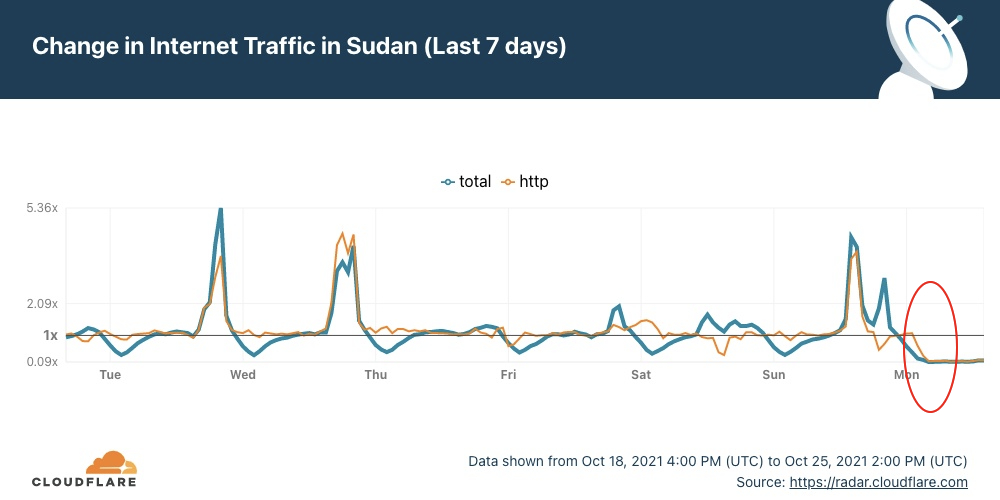
When comparing today with the last seven days’ pattern, we see that today’s drop is abrupt and unusual.
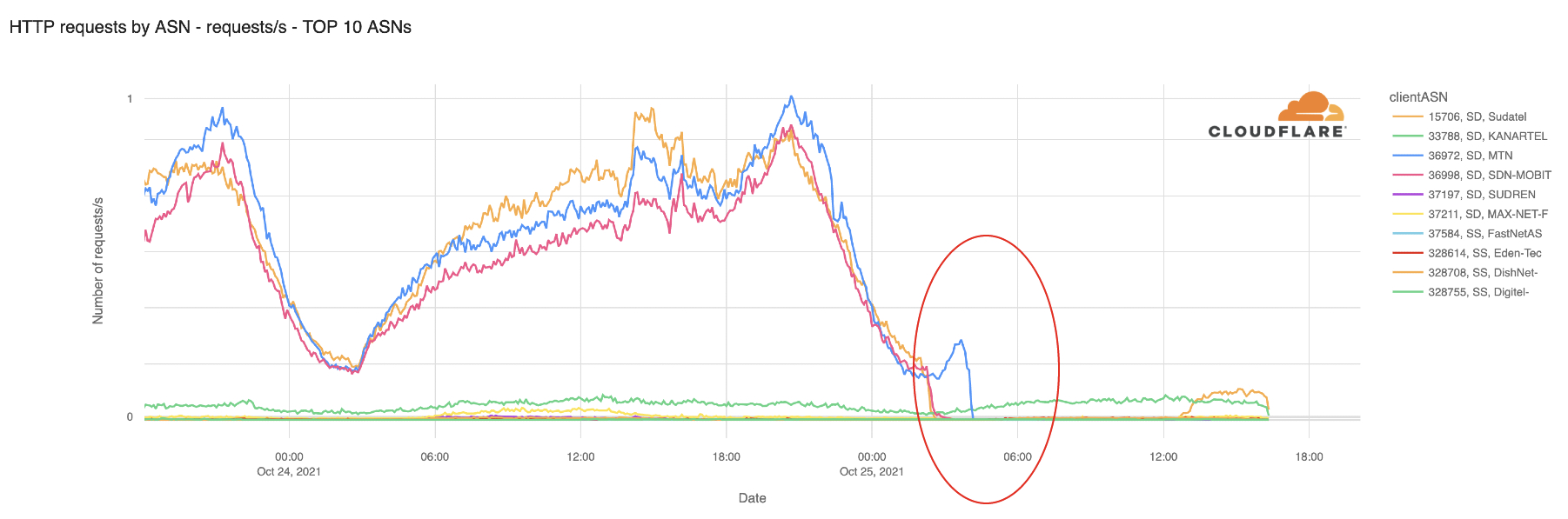
We can see the same pattern when looking at HTTP traffic by ASN (Autonomous Systems Number). The shutdown affects all the major ISPs from Sudan.
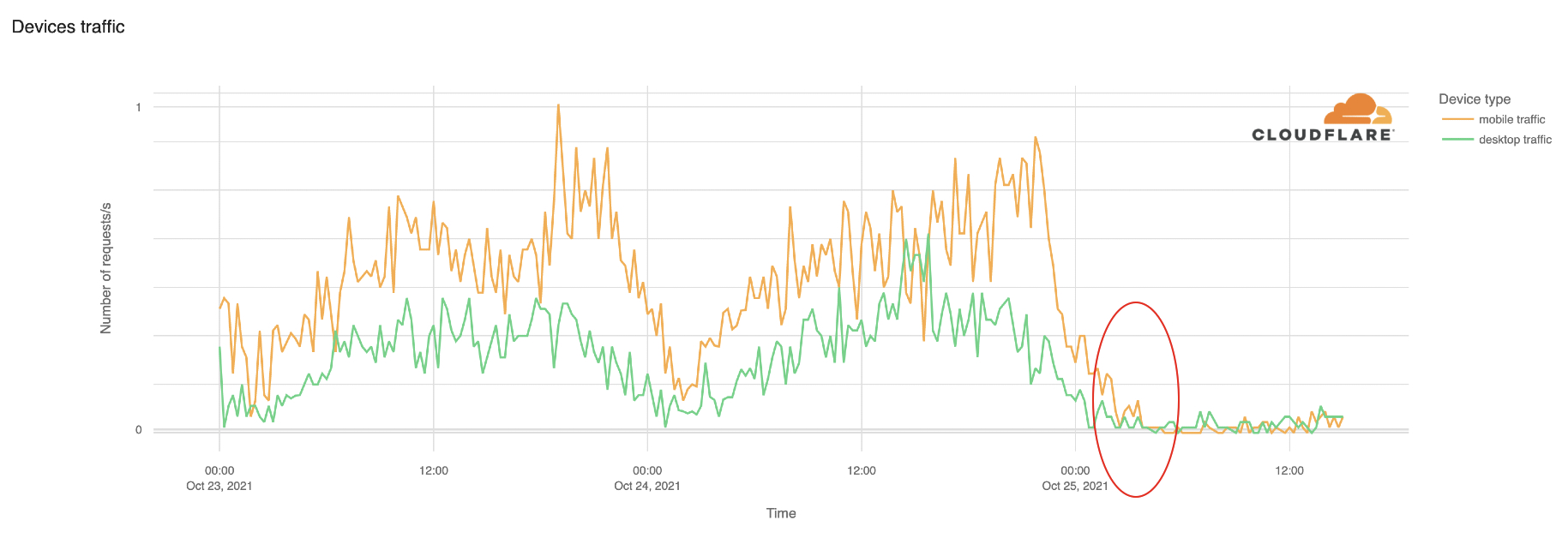
Two weeks ago, we compared mobile traffic worldwide using Cloudflare Radar, and Sudan was one of the most mobile-friendly countries on the planet, with 83% of Internet traffic coming from mobile devices. Today, both mobile and desktop traffic was disrupted.
Using Cloudflare Radar, we can also see a change in Layer 3&4 DDoS attacks because of the lack of data.
You can keep an eye on Cloudflare Radar to monitor how we see the Internet traffic globally and in every country.
It’s been a few days now since Facebook, Instagram, and WhatsApp went AWOL and experienced one of the most extended and rough downtime periods in their existence.
When that happened, we reported our bird’s-eye view of the event and posted the blog Understanding How Facebook Disappeared from the Internet where we tried to explain what we saw and how DNS and BGP, two of the technologies at the center of the outage, played a role in the event.
In the meantime, more information has surfaced, and Facebook has published a blog post giving more details of what happened internally.
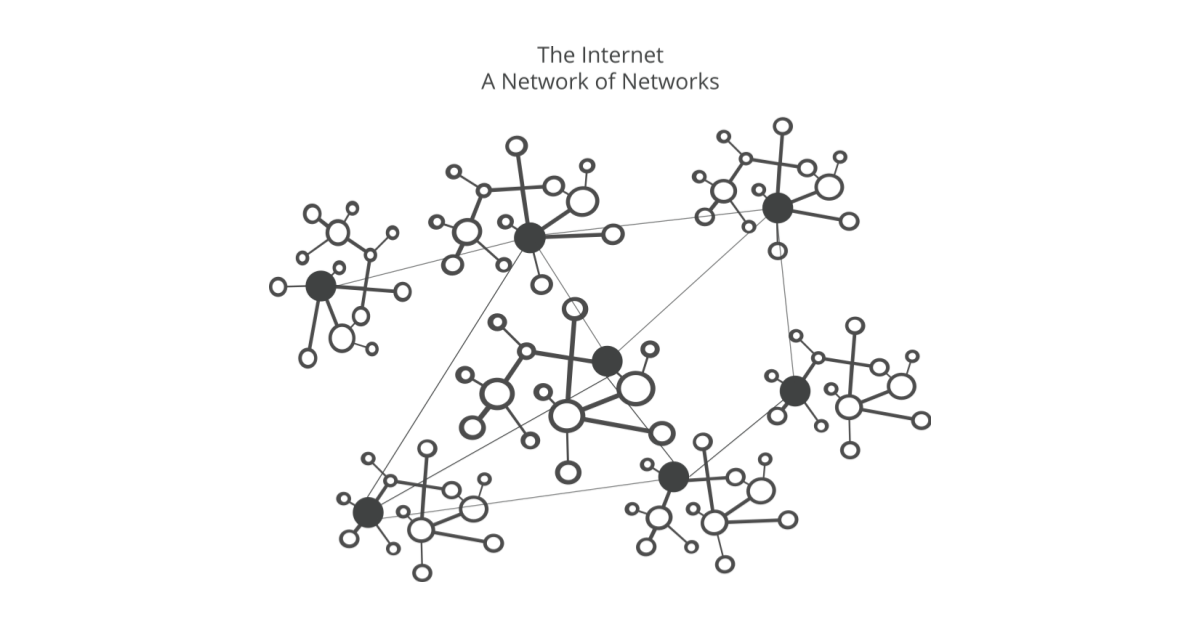
As we said before, these events are a gentle reminder that the Internet is a vast network of networks, and we, as industry players and end-users, are part of it and should work together.
In the aftermath of an event of this size, we don’t waste much time debating how peers handled the situation. We do, however, ask ourselves the more important questions: “How did this affect us?” and “What if this had happened to us?” Asking and answering these questions whenever something like this happens is a great and healthy exercise that helps us improve our own resilience.
Today, we’re going to show you how the Facebook and affiliate sites downtime affected us, and what we can see in our data.
1.1.1.1
1.1.1.1 is a fast and privacy-centric public DNS resolver operated by Cloudflare, used by millions of users, browsers, and devices worldwide. Let’s look at our telemetry and see what we find.
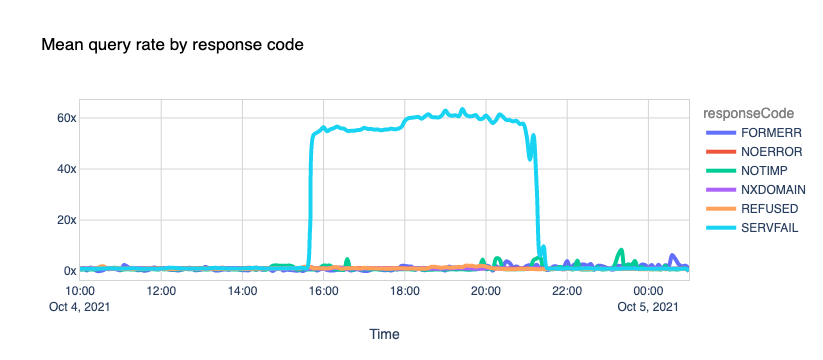
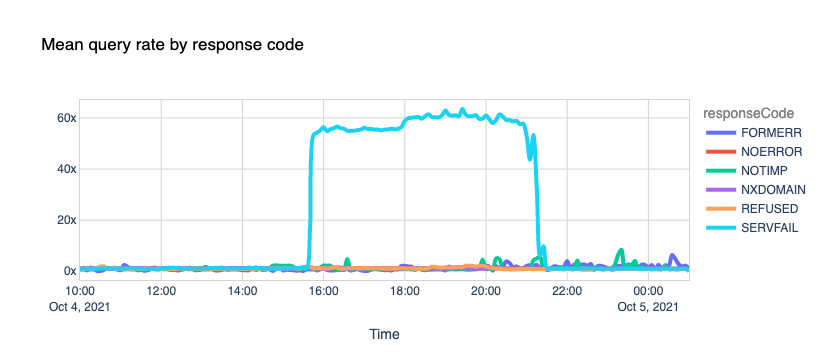
First, the obvious. If we look at the response rate, there was a massive spike in the number of SERVFAIL codes. SERVFAILs can happen for several reasons; we have an excellent blog called Unwrap the SERVFAIL that you should read if you’re curious.
In this case, we started serving SERVFAIL responses to all facebook.com and whatsapp.com DNS queries because our resolver couldn’t access the upstream Facebook authoritative servers. About 60x times more than the average on a typical day.
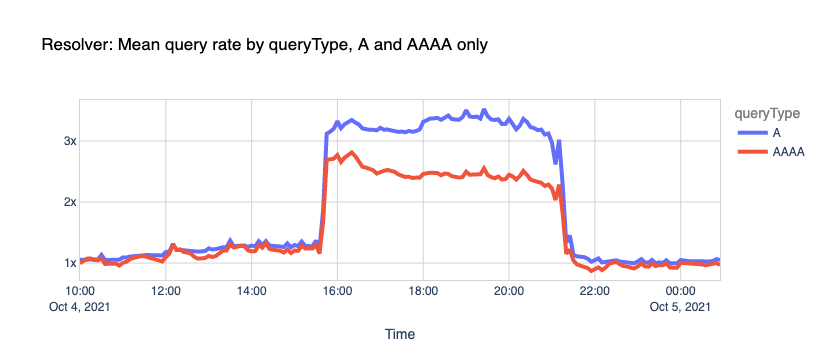
If we look at all the queries, not specific to Facebook or WhatsApp domains, and we split them by IPv4 and IPv6 clients, we can see that our load increased too.
As explained before, this is due to a snowball effect associated with applications and users retrying after the errors and generating even more traffic. In this case, 1.1.1.1 had to handle more than the expected rate for A and AAAA queries.
Here’s another fun one.
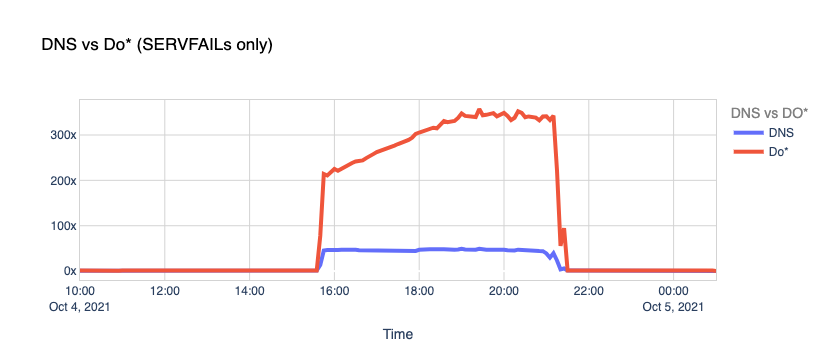
DNS vs. DoT and DoH. Typically, DNS queries and responses are sent in plaintext over UDP (or TCP sometimes), and that’s been the case for decades now. Naturally, this poses security and privacy risks to end-users as it allows in-transit attacks or traffic snooping.
With DNS over TLS (DoT) and DNS over HTTPS, clients can talk DNS using well-known, well-supported encryption and authentication protocols.
Our learning center has a good article on “DNS over TLS vs. DNS over HTTPS” that you can read. Browsers like Chrome, Firefox, and Edge have supported DoH for some time now, WAP uses DoH too, and you can even configure your operating system to use the new protocols.
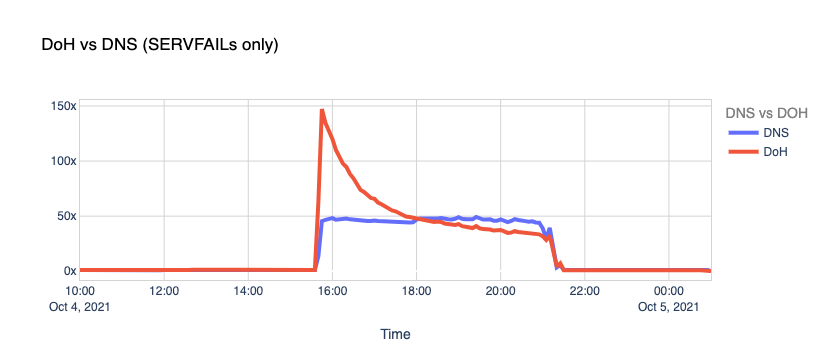
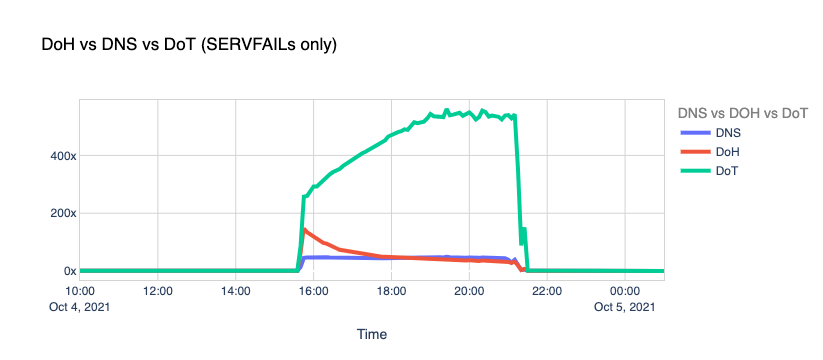
When Facebook went offline, we saw the number of DoT+DoH SERVFAILs responses grow by over x300 vs. the average rate.
So, we got hammered with lots of requests and errors, causing traffic spikes to our 1.1.1.1 resolver and causing an unexpected load in the edge network and systems. How did we perform during this stressful period?
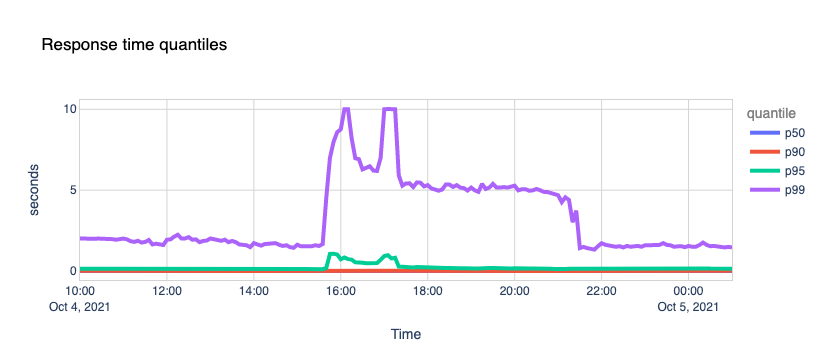
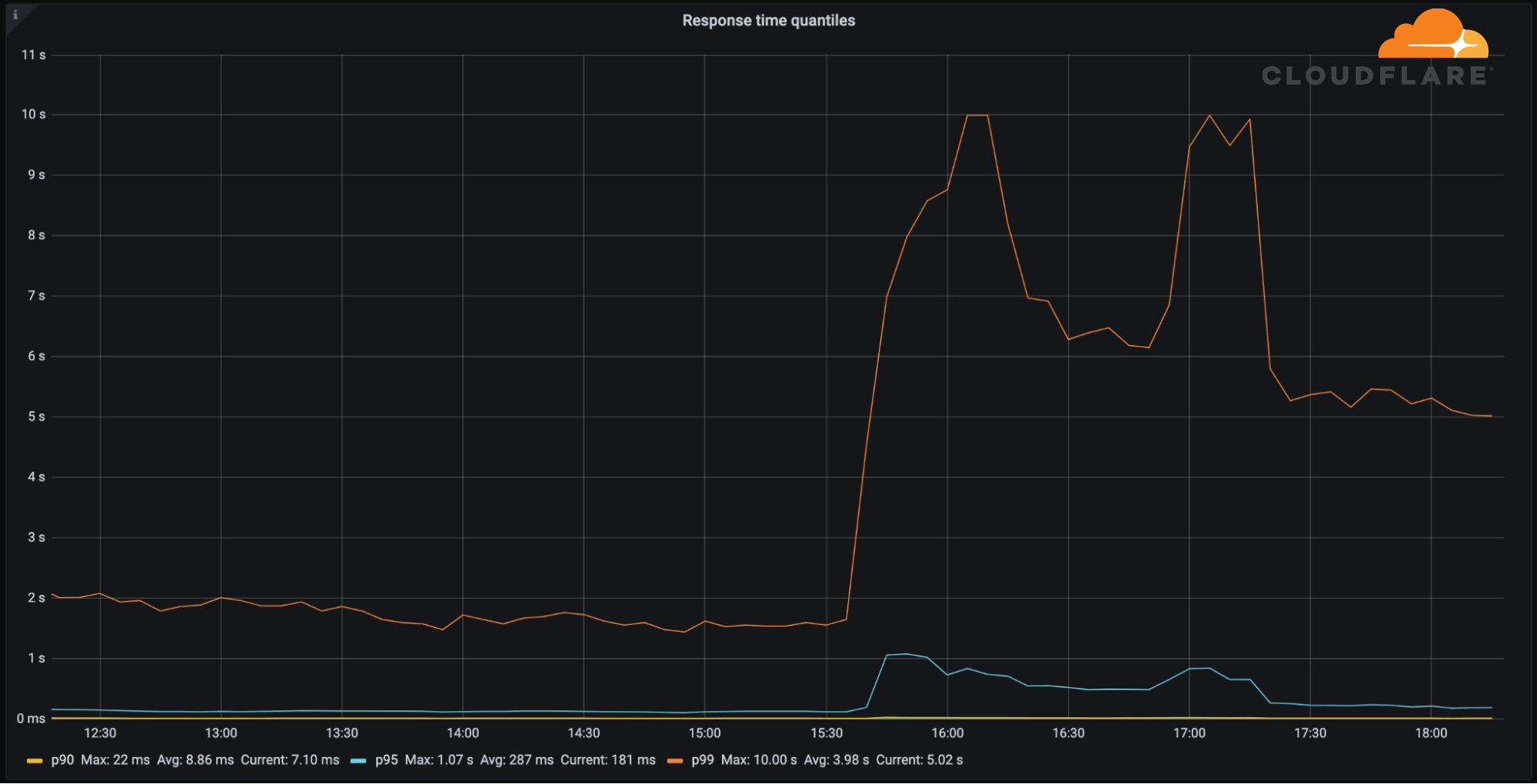
Quite well. 1.1.1.1 kept its cool and continued serving the vast majority of requests around the famous 10ms mark. An insignificant fraction of p95 and p99 percentiles saw increased response times, probably due to timeouts trying to reach Facebook’s nameservers.
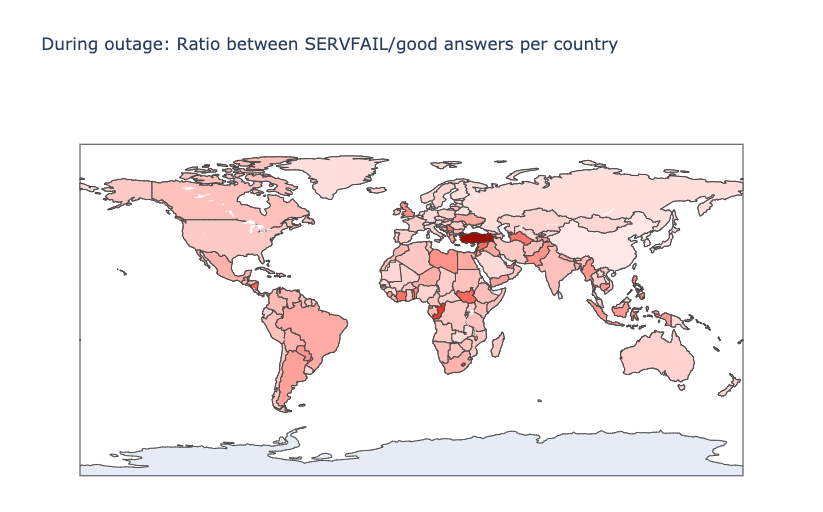
Another interesting perspective is the distribution of the ratio between SERVFAIL and good DNS answers, by country. In theory, the higher this ratio is, the more the country uses Facebook. Here’s the map with the countries that suffered the most:
Here’s the top twelve country list, ordered by those that apparently use Facebook, WhatsApp and Instagram the most:
Country
SERVFAIL/Good Answers ratio
Turkey
7.34
Grenada
4.84
Congo
4.44
Lesotho
3.94
Nicaragua
3.57
South Sudan
3.47
Syrian Arab Republic
3.41
Serbia
3.25
Turkmenistan
3.23
United Arab Emirates
3.17
Togo
3.14
French Guiana
3.00
Impact on other sites
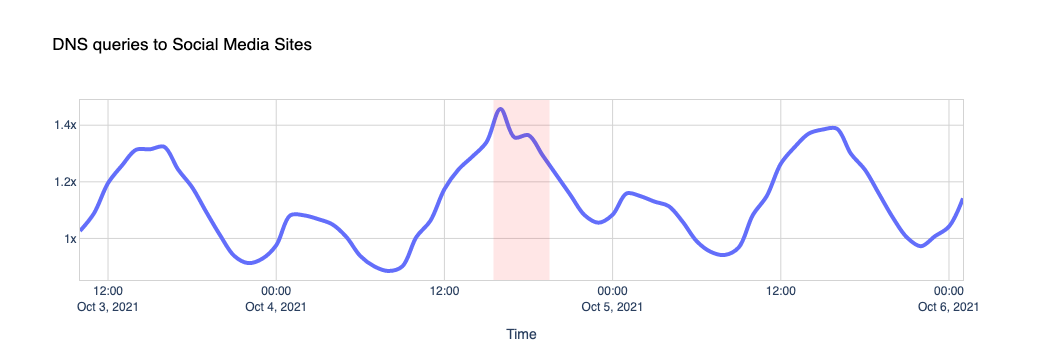
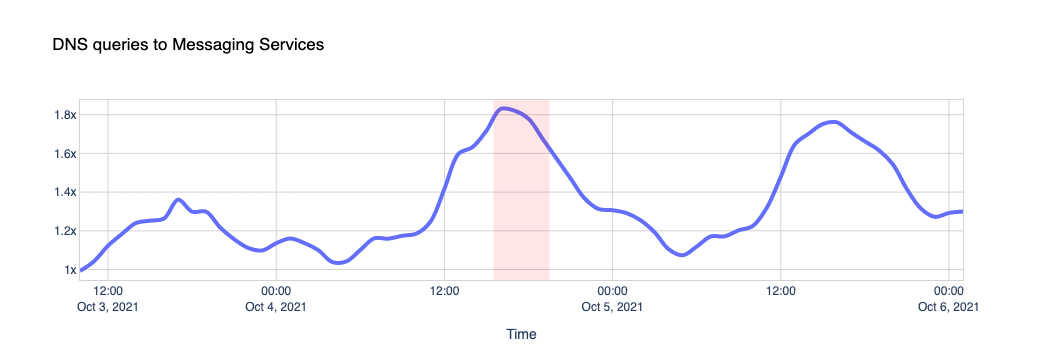
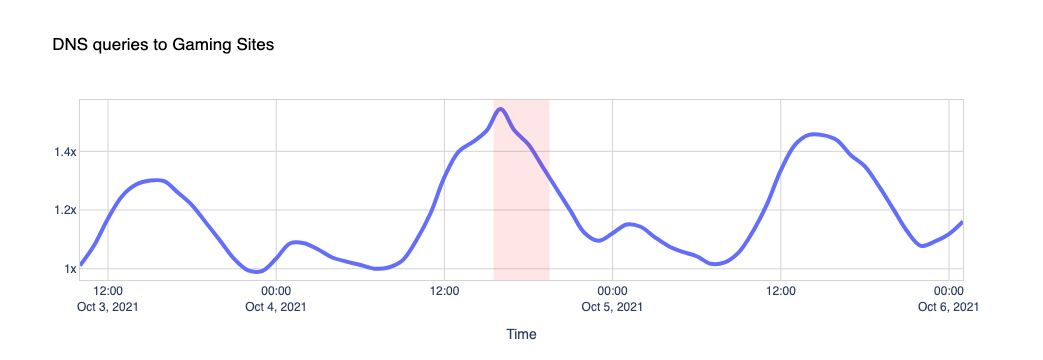
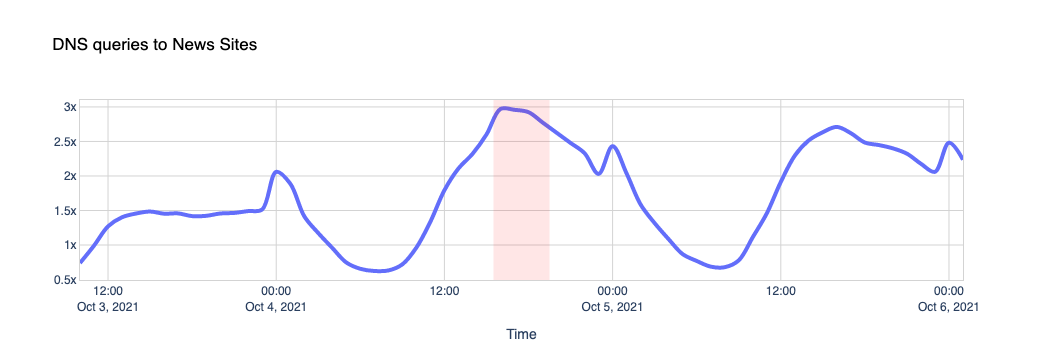
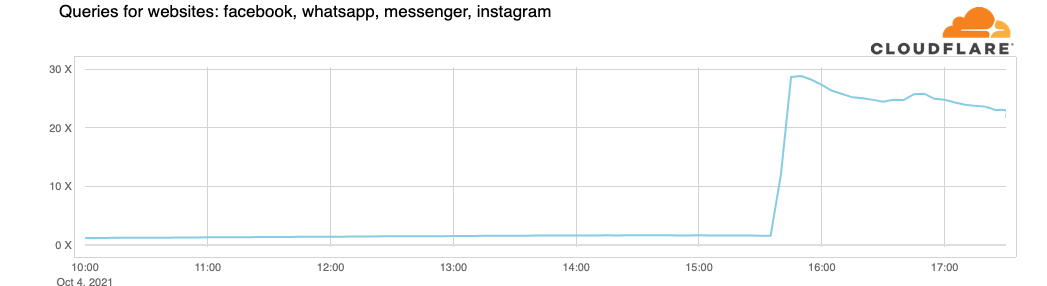
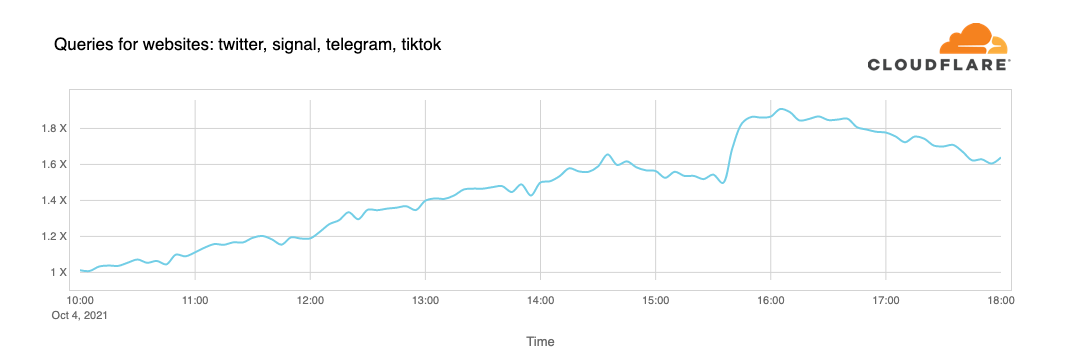
When Facebook, Instagram, and WhatsApp aren’t around, the world turns to other places to look for information on what’s going on, other forms of entertainment or other applications to communicate with their friends and family. Our data shows us those shifts. While Facebook was going down, other services and platforms were going up.
To get an idea of the changing traffic patterns we look at DNS queries as an indicator of increased traffic to specific sites or types of site.
Here are a few examples.
Other social media platforms saw a slight increase in use, compared to normal.
Traffic to messaging platforms like Telegram, Signal, Discord and Slack got a little push too.
Nothing like a little gaming time when Instagram is down, we guess, when looking at traffic to sites like Steam, Xbox, Minecraft and others.
And yes, people want to know what’s going on and fall back on news sites like CNN, New York Times, The Guardian, Wall Street Journal, Washington Post, Huffington Post, BBC, and others:
Attacks
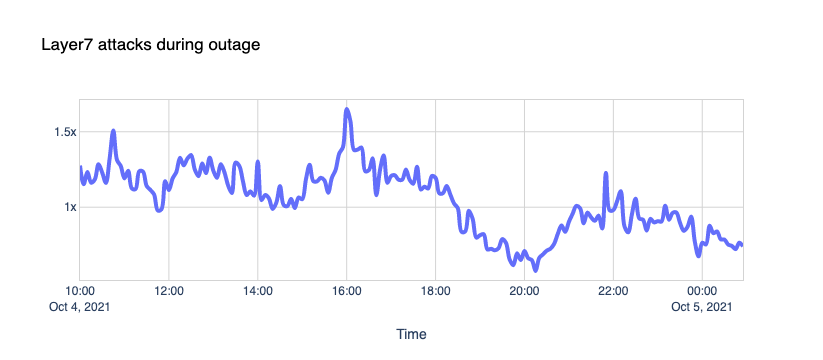
One could speculate that the Internet was under attack from malicious hackers. Our Firewall doesn’t agree; nothing out of the ordinary stands out.
Network Error Logs
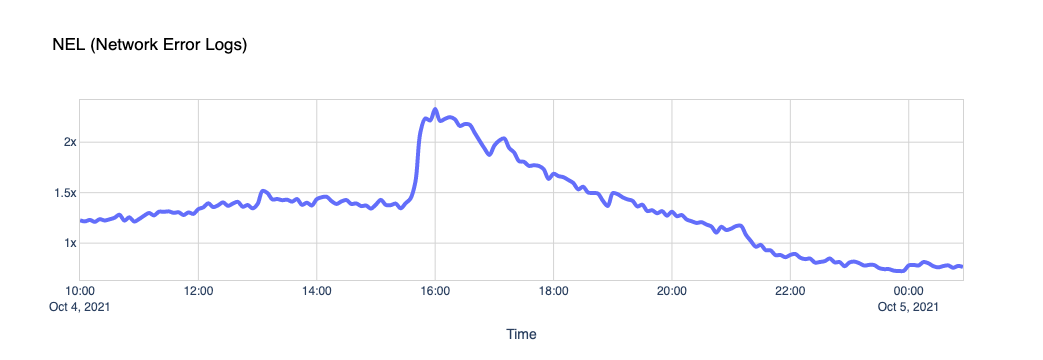
Network Error Logging, NEL for short, is an experimental technology supported in Chrome. A website can issue a Report-To header and ask the browser to send reports about network problems, like bad requests or DNS issues, to a specific endpoint.
Cloudflare uses NEL data to quickly help triage end-user connectivity issues when end-users reach our network. You can learn more about this feature in our help center.
If Facebook is down and their DNS isn’t responding, Chrome will start reporting NEL events every time one of the pages in our zones fails to load Facebook comments, posts, ads, or authentication buttons. This chart shows it clearly.
WARP
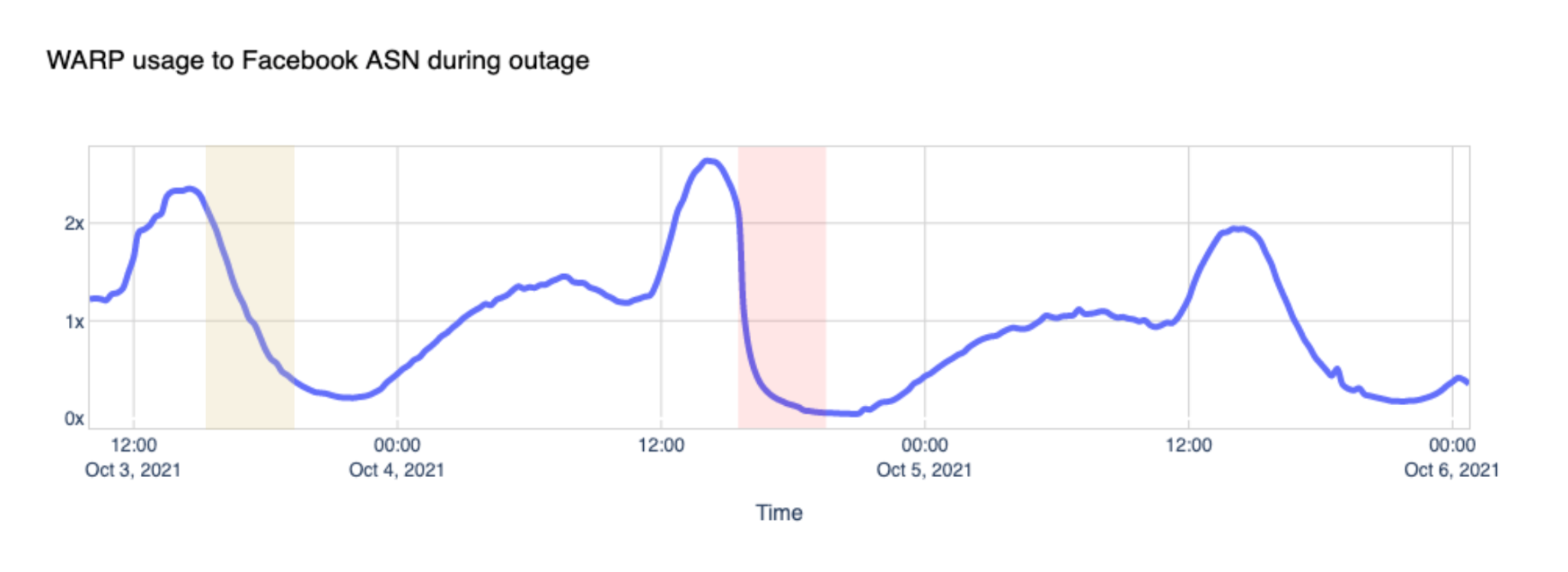
Cloudflare announced WARP in 2019, and called it “A VPN for People Who Don’t Know What V.P.N. Stands For” and offered it for free to its customers. Today WARP is used by millions of people worldwide to securely and privately access the Internet on their desktop and mobile devices. Here’s what we saw during the outage by looking at traffic volume between WARP and Facebook’s network:
You can see how the steep drop in Facebook ASN traffic coincides with the start of the incident and how it compares to the same period the day before.
Our own traffic
People tend to think of Facebook as a place to visit. We log in, and we access Facebook, we post. It turns out that Facebook likes to visit us too, quite a lot. Like Google and other platforms, Facebook uses an army of crawlers to constantly check websites for data and updates. Those robots gather information about websites content, such as its titles, descriptions, thumbnail images, and metadata. You can learn more about this on the “The Facebook Crawler” page and the Open Graph website.
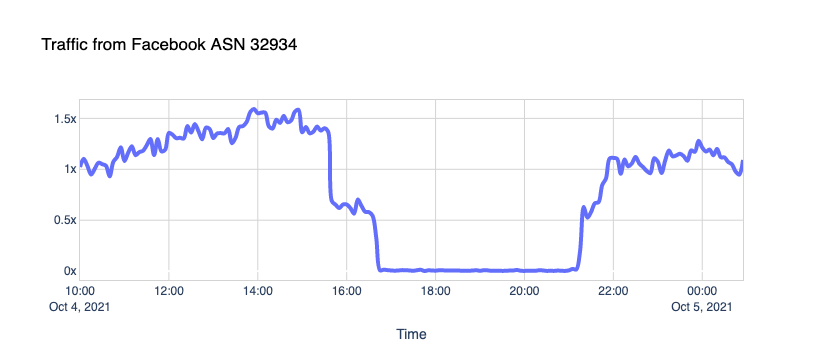
Here’s what we see when traffic is coming from the Facebook ASN, supposedly from crawlers, to our CDN sites:
The robots went silent.
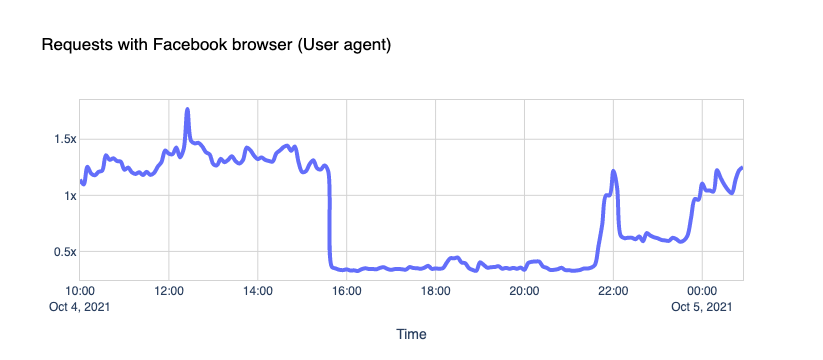
What about the traffic coming to our CDN sites from Facebook User-Agents? The gap is indisputable.
We see about 30% of a typical request rate hitting us. But it’s not zero; why is that?
We’ll let you know a little secret. Never trust User-Agent information; it’s broken. User-Agent spoofing is everywhere. Browsers, apps, and other clients deliberately change the User-Agent string when they fetch pages from the Internet to hide, obtain access to certain features, or bypass paywalls (because pay-walled sites want sites like Facebook to index their content, so that then they get more traffic from links).
Fortunately, there are newer, and privacy-centric standards emerging like User-Agent Client Hints.
Core Web Vitals
Core Web Vitals are the subset of Web Vitals, an initiative by Google to provide a unified interface to measure real-world quality signals when a user visits a web page. Such signals include Largest Contentful Paint (LCP), First Input Delay (FID), and Cumulative Layout Shift (CLS).
We use Core Web Vitals with our privacy-centric Web Analytics product and collect anonymized data on how end-users experience the websites that enable this feature.
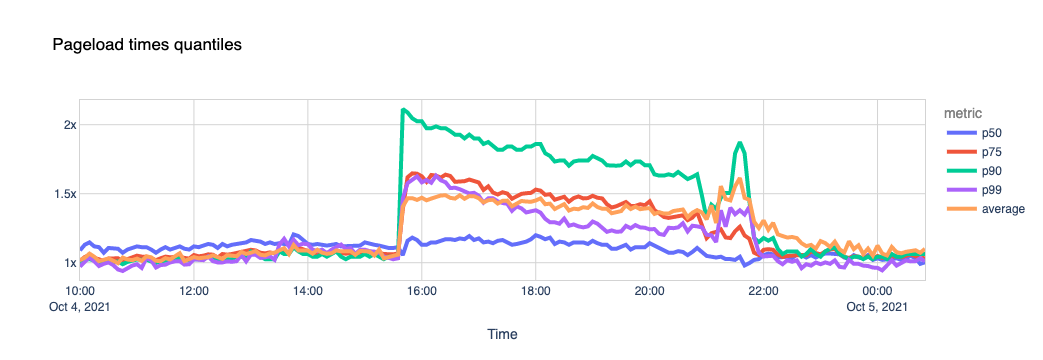
One of the metrics we can calculate using these signals is the page load time. Our theory is that if a page includes scripts coming from external sites (for example, Facebook “like” buttons, comments, ads), and they are unreachable, its total load time gets affected.
We used a list of about 400 domains that we know embed Facebook scripts in their pages and looked at the data.
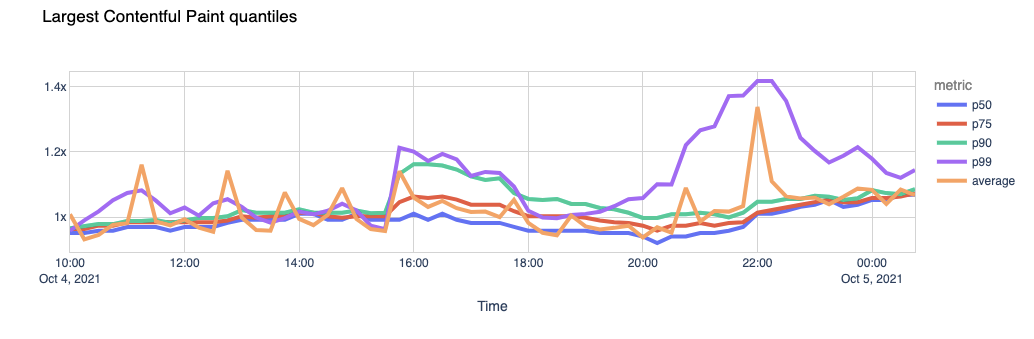
Now let’s look at the Largest Contentful Paint. LCP marks the point in the page load timeline when the page’s main content has likely loaded. The faster the LCP is, the better the end-user experience.
Again, the page load experience got visibly degraded.
The outcome seems clear. The sites that use Facebook scripts in their pages took 1.5x more time to load their pages during the outage, with some of them taking more than 2x the usual time. Facebook’s outage dragged the performance of some other sites down.
Conclusion
When Facebook, Instagram, and WhatsApp went down, the Web felt it. Some websites got slower or lost traffic, other services and platforms got unexpected load, and people lost the ability to communicate or do business normally.
“Facebook can’t be down, can it?”, we thought, for a second.
Today at 1651 UTC, we opened an internal incident entitled “Facebook DNS lookup returning SERVFAIL” because we were worried that something was wrong with our DNS resolver 1.1.1.1. But as we were about to post on our public status page we realized something else more serious was going on.
Social media quickly burst into flames, reporting what our engineers rapidly confirmed too. Facebook and its affiliated services WhatsApp and Instagram were, in fact, all down. Their DNS names stopped resolving, and their infrastructure IPs were unreachable. It was as if someone had “pulled the cables” from their data centers all at once and disconnected them from the Internet.
How’s that even possible?
Meet BGP
BGP stands for Border Gateway Protocol. It’s a mechanism to exchange routing information between autonomous systems (AS) on the Internet. The big routers that make the Internet work have huge, constantly updated lists of the possible routes that can be used to deliver every network packet to their final destinations. Without BGP, the Internet routers wouldn’t know what to do, and the Internet wouldn’t work.
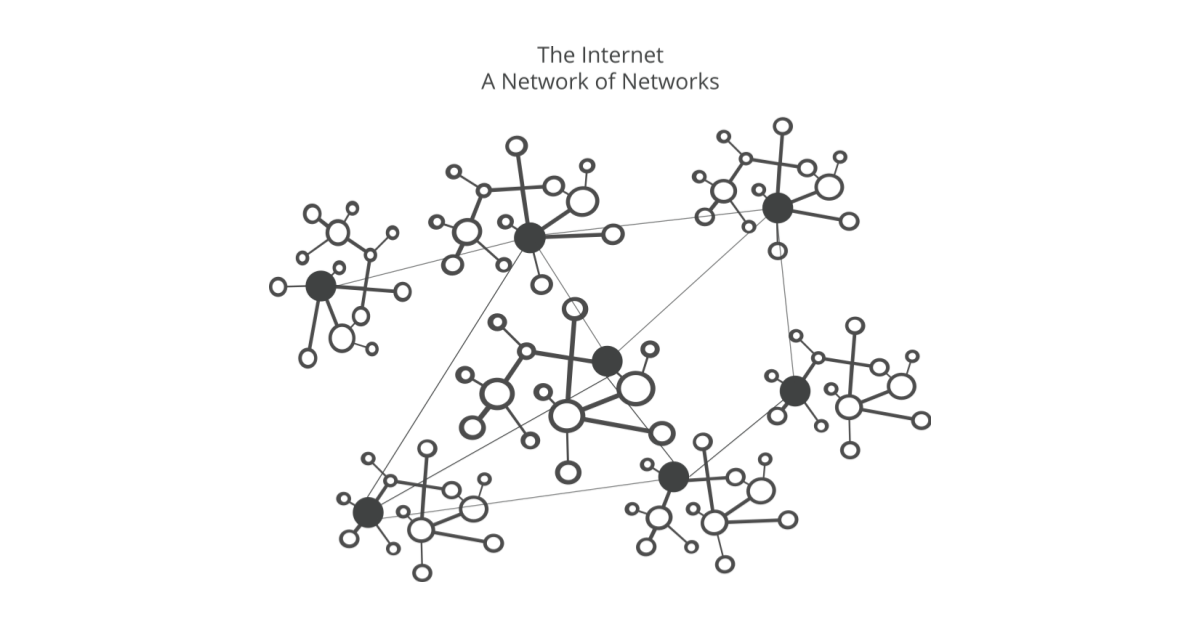
The Internet is literally a network of networks, and it’s bound together by BGP. BGP allows one network (say Facebook) to advertise its presence to other networks that form the Internet. As we write Facebook is not advertising its presence, ISPs and other networks can’t find Facebook’s network and so it is unavailable.
The individual networks each have an ASN: an Autonomous System Number. An Autonomous System (AS) is an individual network with a unified internal routing policy. An AS can originate prefixes (say that they control a group of IP addresses), as well as transit prefixes (say they know how to reach specific groups of IP addresses).
Cloudflare’s ASN is AS13335. Every ASN needs to announce its prefix routes to the Internet using BGP; otherwise, no one will know how to connect and where to find us.
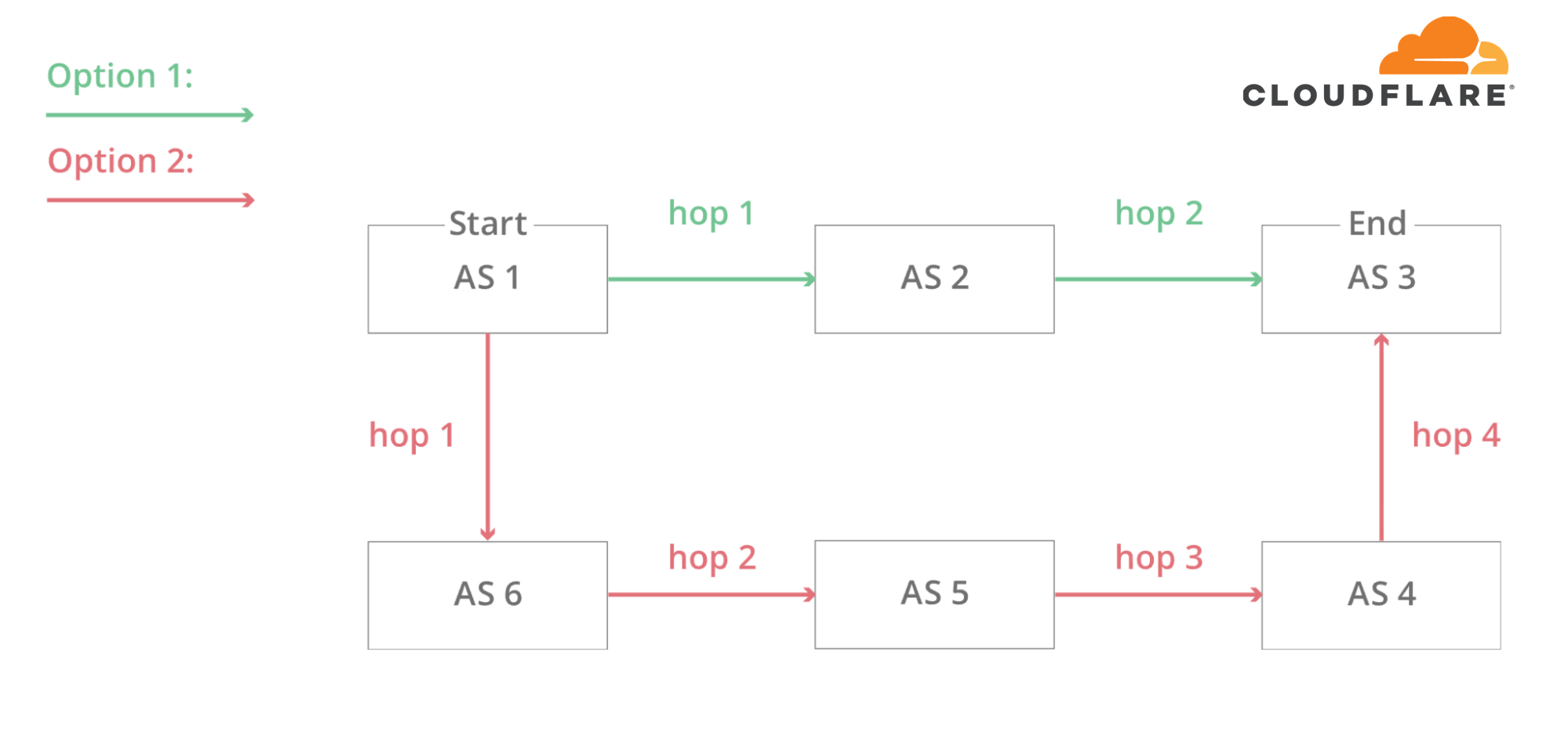
In this simplified diagram, you can see six autonomous systems on the Internet and two possible routes that one packet can use to go from Start to End. AS1 → AS2 → AS3 being the fastest, and AS1 → AS6 → AS5 → AS4 → AS3 being the slowest, but that can be used if the first fails.
At 1658 UTC we noticed that Facebook had stopped announcing the routes to their DNS prefixes. That meant that, at least, Facebook’s DNS servers were unavailable. Because of this Cloudflare’s 1.1.1.1 DNS resolver could no longer respond to queries asking for the IP address of facebook.com or instagram.com.
route-views>show ip bgp 185.89.218.0/23
% Network not in table
route-views>

route-views>show ip bgp 129.134.30.0/23
% Network not in table
route-views>
Meanwhile, other Facebook IP addresses remained routed but weren’t particularly useful since without DNS Facebook and related services were effectively unavailable:
route-views>show ip bgp 129.134.30.0
BGP routing table entry for 129.134.0.0/17, version 1025798334
Paths: (24 available, best #14, table default)
  Not advertised to any peer
  Refresh Epoch 2
  3303 6453 32934
    217.192.89.50 from 217.192.89.50 (138.187.128.158)
      Origin IGP, localpref 100, valid, external
      Community: 3303:1004 3303:1006 3303:3075 6453:3000 6453:3400 6453:3402
      path 7FE1408ED9C8 RPKI State not found
      rx pathid: 0, tx pathid: 0
  Refresh Epoch 1
route-views>
We keep track of all the BGP updates and announcements we see in our global network. At our scale, the data we collect gives us a view of how the Internet is connected and where the traffic is meant to flow from and to everywhere on the planet.
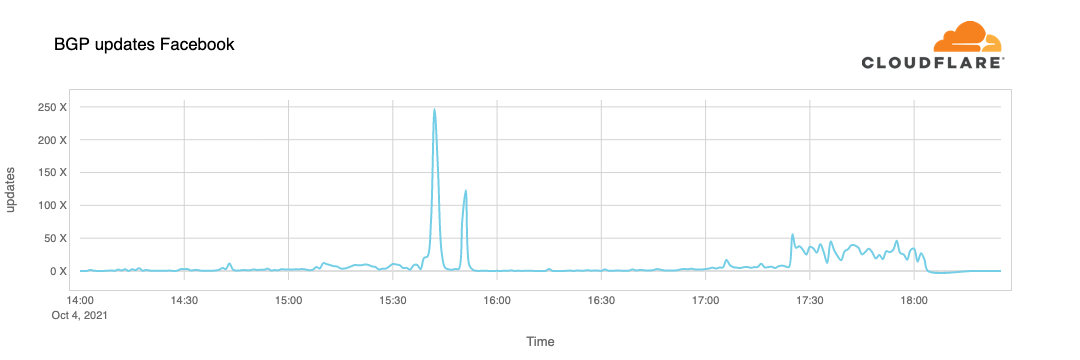
A BGP UPDATE message informs a router of any changes you’ve made to a prefix advertisement or entirely withdraws the prefix. We can clearly see this in the number of updates we received from Facebook when checking our time-series BGP database. Normally this chart is fairly quiet: Facebook doesn’t make a lot of changes to its network minute to minute.
But at around 15:40 UTC we saw a peak of routing changes from Facebook. That’s when the trouble began.
If we split this view by routes announcements and withdrawals, we get an even better idea of what happened. Routes were withdrawn, Facebook’s DNS servers went offline, and one minute after the problem occurred, Cloudflare engineers were in a room wondering why 1.1.1.1 couldn’t resolve facebook.com and worrying that it was somehow a fault with our systems.
With those withdrawals, Facebook and its sites had effectively disconnected themselves from the Internet.
DNS gets affected
As a direct consequence of this, DNS resolvers all over the world stopped resolving their domain names.
➜  ~ dig @1.1.1.1 facebook.com
;; ->>HEADER<<- opcode: QUERY, status: SERVFAIL, id: 31322
;facebook.com.			IN	A
➜  ~ dig @1.1.1.1 whatsapp.com
;; ->>HEADER<<- opcode: QUERY, status: SERVFAIL, id: 31322
;whatsapp.com.			IN	A
➜  ~ dig @8.8.8.8 facebook.com
;; ->>HEADER<<- opcode: QUERY, status: SERVFAIL, id: 31322
;facebook.com.			IN	A
➜  ~ dig @8.8.8.8 whatsapp.com
;; ->>HEADER<<- opcode: QUERY, status: SERVFAIL, id: 31322
;whatsapp.com.			IN	A
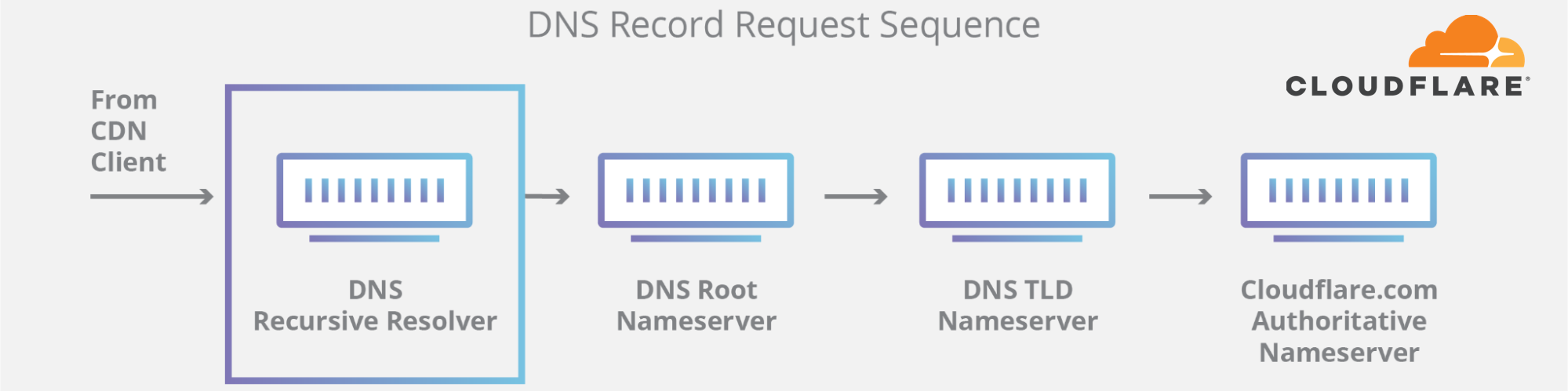
This happens because DNS, like many other systems on the Internet, also has its routing mechanism. When someone types the https://facebook.com URL in the browser, the DNS resolver, responsible for translating domain names into actual IP addresses to connect to, first checks if it has something in its cache and uses it. If not, it tries to grab the answer from the domain nameservers, typically hosted by the entity that owns it.
If the nameservers are unreachable or fail to respond because of some other reason, then a SERVFAIL is returned, and the browser issues an error to the user.
Again, our learning center provides a good explanation on how DNS works.
Due to Facebook stopping announcing their DNS prefix routes through BGP, our and everyone else’s DNS resolvers had no way to connect to their nameservers. Consequently, 1.1.1.1, 8.8.8.8, and other major public DNS resolvers started issuing (and caching) SERVFAIL responses.
But that’s not all. Now human behavior and application logic kicks in and causes another exponential effect. A tsunami of additional DNS traffic follows.
This happened in part because apps won’t accept an error for an answer and start retrying, sometimes aggressively, and in part because end-users also won’t take an error for an answer and start reloading the pages, or killing and relaunching their apps, sometimes also aggressively.
This is the traffic increase (in number of requests) that we saw on 1.1.1.1:
So now, because Facebook and their sites are so big, we have DNS resolvers worldwide handling 30x more queries than usual and potentially causing latency and timeout issues to other platforms.
Fortunately, 1.1.1.1 was built to be Free, Private, Fast (as the independent DNS monitor DNSPerf can attest), and scalable, and we were able to keep servicing our users with minimal impact.
The vast majority of our DNS requests kept resolving in under 10ms. At the same time, a minimal fraction of p95 and p99 percentiles saw increased response times, probably due to expired TTLs having to resort to the Facebook nameservers and timeout. The 10 seconds DNS timeout limit is well known amongst engineers.
Impacting other services
People look for alternatives and want to know more or discuss what’s going on. When Facebook became unreachable, we started seeing increased DNS queries to Twitter, Signal and other messaging and social media platforms.
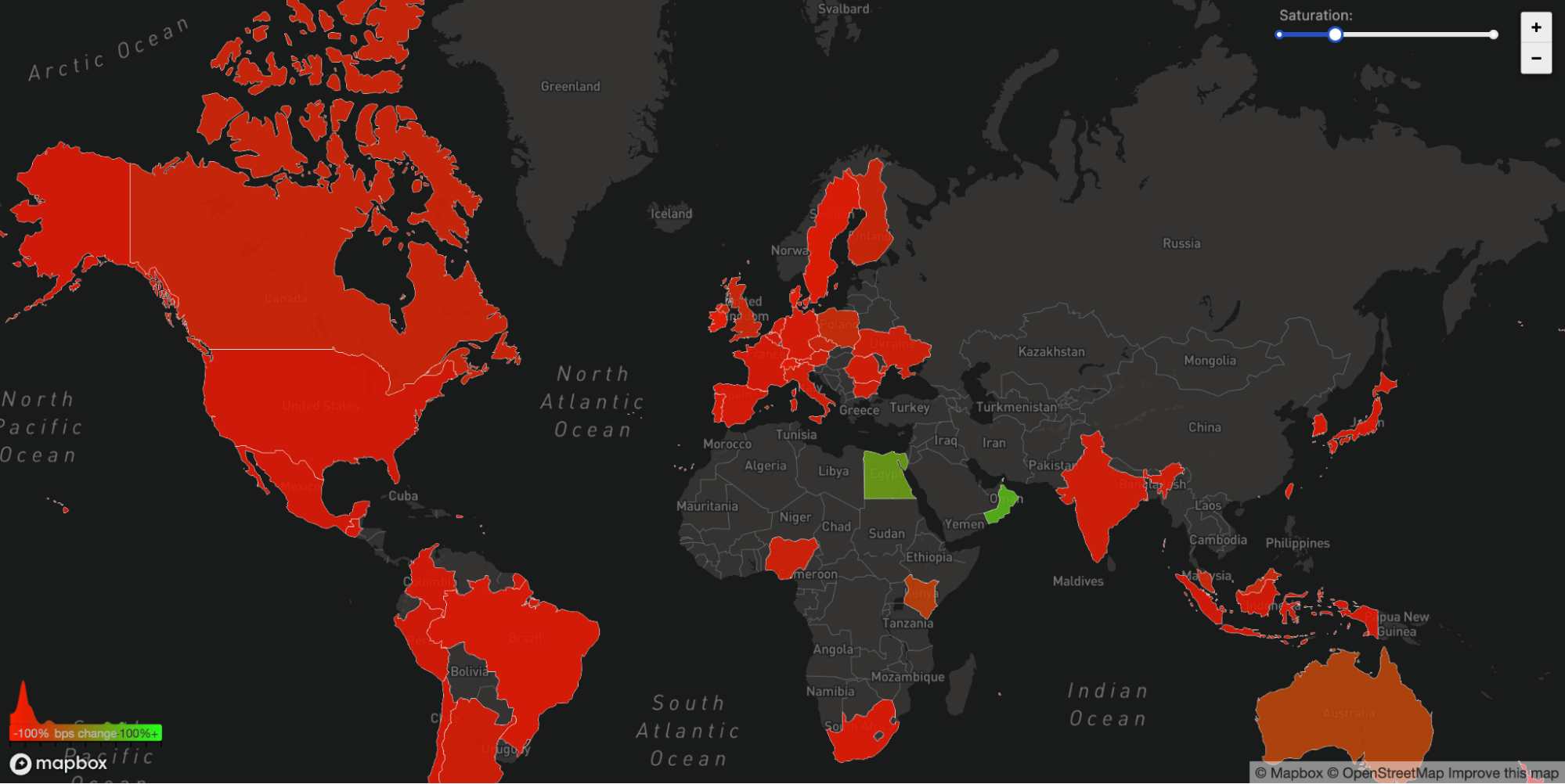
We can also see another side effect of this unreachability in our WARP traffic to and from Facebook’s affected ASN 32934. This chart shows how traffic changed from 15:45 UTC to 16:45 UTC compared with three hours before in each country. All over the world WARP traffic to and from Facebook’s network simply disappeared.
The Internet
Today’s events are a gentle reminder that the Internet is a very complex and interdependent system of millions of systems and protocols working together. That trust, standardization, and cooperation between entities are at the center of making it work for almost five billion active users worldwide.
Update
At around 21:00 UTC we saw renewed BGP activity from Facebook’s network which peaked at 21:17 UTC.
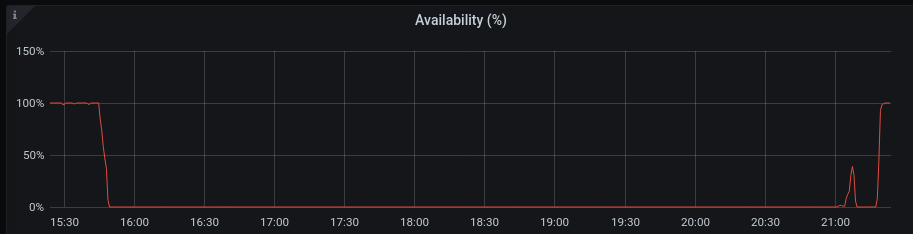
This chart shows the availability of the DNS name ‘facebook.com’ on Cloudflare’s DNS resolver 1.1.1.1. It stopped being available at around 15:50 UTC and returned at 21:20 UTC.
Undoubtedly Facebook, WhatsApp and Instagram services will take further time to come online but as of 22:28 UTC Facebook appears to be reconnected to the global Internet and DNS working again.
An analysis of the Cloudflare API availability incident on 2020-11-02
When we review design documents at Cloudflare, we are always on the lookout for Single Points of Failure (SPOFs). Eliminating these is a necessary step in architecting a system you can be confident in. Ironically, when you’re designing a system with built-in redundancy, you spend most of your time thinking about how well it functions when that redundancy is lost.
On November 2, 2020, Cloudflare had an incident that impacted the availability of the API and dashboard for six hours and 33 minutes. During this incident, the success rate for queries to our API periodically dipped as low as 75%, and the dashboard experience was as much as 80 times slower than normal. While Cloudflare’s edge is massively distributed across the world (and kept working without a hitch), Cloudflare’s control plane (API & dashboard) is made up of a large number of microservices that are redundant across two regions. For most services, the databases backing those microservices are only writable in one region at a time.
Each of Cloudflare’s control plane data centers has multiple racks of servers. Each of those racks has two switches that operate as a pair—both are normally active, but either can handle the load if the other fails. Cloudflare survives rack-level failures by spreading the most critical services across racks. Every piece of hardware has two or more power supplies with different power feeds. Every server that stores critical data uses RAID 10 redundant disks or storage systems that replicate data across at least three machines in different racks, or both. Redundancy at each layer is something we review and require. So—how could things go wrong?
In this post we present a timeline of what happened, and how a difficult failure mode known as a Byzantine fault played a role in a cascading series of events.
2020-11-02 14:43 UTC: Partial Switch Failure
At 14:43, a network switch started misbehaving. Alerts began firing about the switch being unreachable to pings. The device was in a partially operating state: network control plane protocols such as LACP and BGP remained operational, while others, such as vPC, were not. The vPC link is used to synchronize ports across multiple switches, so that they appear as one large, aggregated switch to servers connected to them. At the same time, the data plane (or forwarding plane) was not processing and forwarding all the packets received from connected devices.
This failure scenario is completely invisible to the connected nodes, as each server only sees an issue for some of its traffic due to the load-balancing nature of LACP. Had the switch failed fully, all traffic would have failed over to the peer switch, as the connected links would’ve simply gone down, and the ports would’ve dropped out of the forwarding LACP bundles.
Six minutes later, the switch recovered without human intervention. But this odd failure mode led to further problems that lasted long after the switch had returned to normal operation.
2020-11-02 14:44 UTC: etcd Errors begin
The rack with the misbehaving switch included one server in our etcd cluster. We use etcd heavily in our core data centers whenever we need strongly consistent data storage that’s reliable across multiple nodes.
In the event that the cluster leader fails, etcd uses the RAFT protocol to maintain consistency and establish consensus to promote a new leader. In the RAFT protocol, cluster members are assumed to be either available or unavailable, and to provide accurate information or none at all. This works fine when a machine crashes, but is not always able to handle situations where different members of the cluster have conflicting information.
In this particular situation:
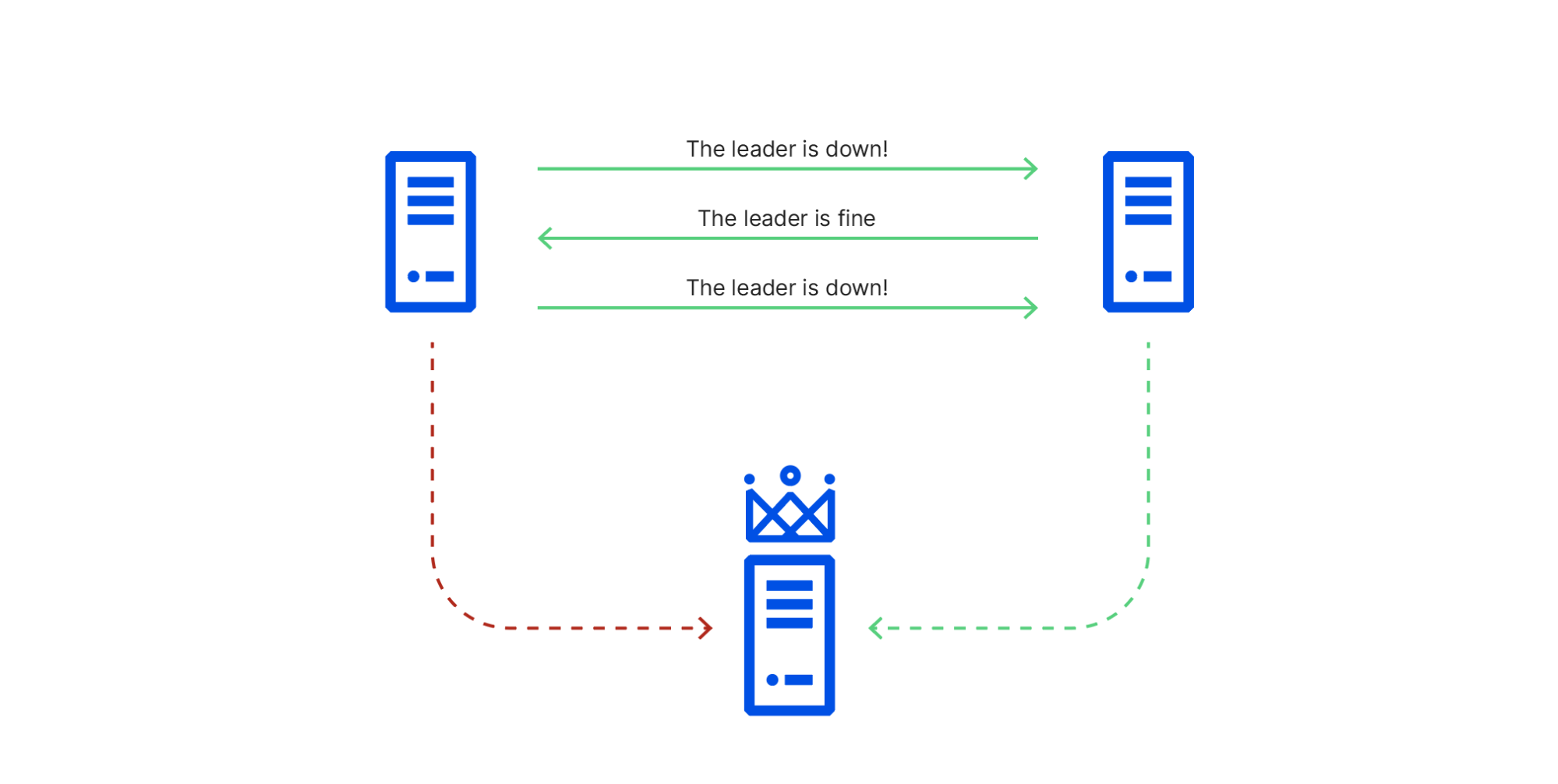
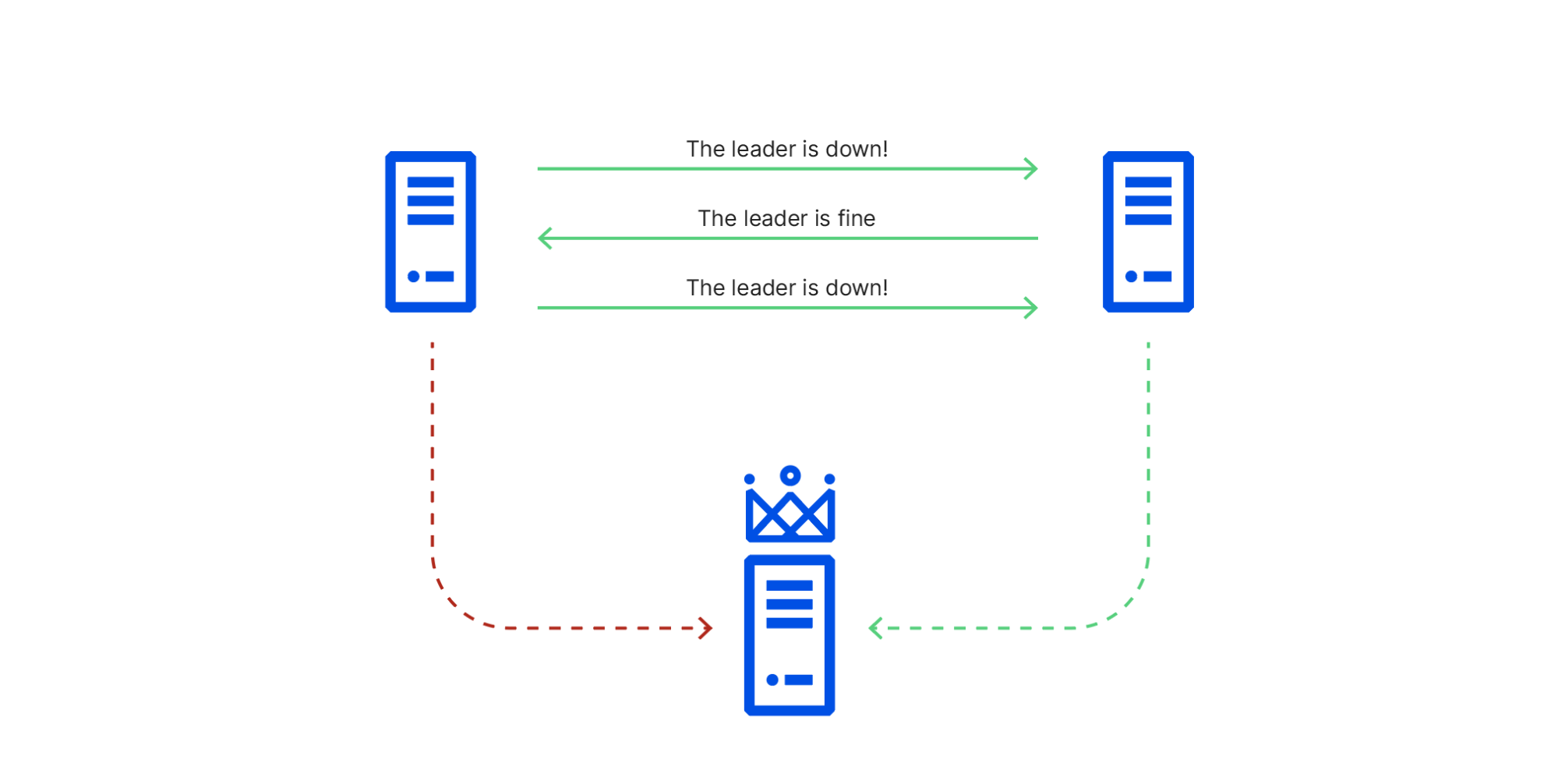
Network traffic between node 1 (in the affected rack) and node 3 (the leader) was being sent through the switch in the degraded state,
Network traffic between node 1 and node 2 were going through its working peer, and
Network traffic between node 2 and node 3 was unaffected.
This caused cluster members to have conflicting views of reality, known in distributed systems theory as a Byzantine fault. As a consequence of this conflicting information, node 1 repeatedly initiated leader elections, voting for itself, while node 2 repeatedly voted for node 3, which it could still connect to. This resulted in ties that did not promote a leader node 1 could reach. RAFT leader elections are disruptive, blocking all writes until they’re resolved, so this made the cluster read-only until the faulty switch recovered and node 1 could once again reach node 3.
2020-11-02 14:45 UTC: Database system promotes a new primary database
Cloudflare’s control plane services use relational databases hosted across multiple clusters within a data center. Each cluster is configured for high availability. The cluster setup includes a primary database, a synchronous replica, and one or more asynchronous replicas. This setup allows redundancy within a data center. For cross-datacenter redundancy, a similar high availability secondary cluster is set up and replicated in a geographically dispersed data center for disaster recovery. The cluster management system leverages etcd for cluster member discovery and coordination.
When etcd became read-only, two clusters were unable to communicate that they had a healthy primary database. This triggered the automatic promotion of a synchronous database replica to become the new primary. This process happened automatically and without error or data loss.
There was a defect in our cluster management system that requires a rebuild of all database replicas when a new primary database is promoted. So, although the new primary database was available instantly, the replicas would take considerable time to become available, depending on the size of the database. For one of the clusters, service was restored quickly. Synchronous and asynchronous database replicas were rebuilt and started replicating successfully from primary, and the impact was minimal.
For the other cluster, however, performant operation of that database required a replica to be online. Because this database handles authentication for API calls and dashboard activities, it takes a lot of reads, and one replica was heavily utilized to spare the primary the load. When this failover happened and no replicas were available, the primary was overloaded, as it had to take all of the load. This is when the main impact started.
Reduce Load, Leverage Redundancy
At this point we saw that our primary authentication database was overwhelmed and began shedding load from it. We dialed back the rate at which we push SSL certificates to the edge, send emails, and other features, to give it space to handle the additional load. Unfortunately, because of its size, we knew it would take several hours for a replica to be fully rebuilt.
A silver lining here is that every database cluster in our primary data center also has online replicas in our secondary data center. Those replicas are not part of the local failover process, and were online and available throughout the incident. The process of steering read-queries to those replicas was not yet automated, so we manually diverted API traffic that could leverage those read replicas to the secondary data center. This substantially improved our API availability.
The Dashboard
The Cloudflare dashboard, like most web applications, has the notion of a user session. When user sessions are created (each time a user logs in) we perform some database operations and keep data in a Redis cluster for the duration of that user’s session. Unlike our API calls, our user sessions cannot currently be moved across the ocean without disruption. As we took actions to improve the availability of our API calls, we were unfortunately making the user experience on the dashboard worse.
This is an area of the system that is currently designed to be able to fail over across data centers in the event of a disaster, but has not yet been designed to work in both data centers at the same time. After a first period in which users on the dashboard became increasingly frustrated, we failed the authentication calls fully back to our primary data center, and kept working on our primary database to ensure we could provide the best service levels possible in that degraded state.
2020-11-02 21:20 UTC Database Replica Rebuilt
The instant the first database replica rebuilt, it put itself back into service, and performance resumed to normal levels. We re-ramped all of the services that had been turned down, so all asynchronous processing could catch up, and after a period of monitoring marked the end of the incident.
Redundant Points of Failure
The cascade of failures in this incident was interesting because each system, on its face, had redundancy. Moreover, no system fully failed—each entered a degraded state. That combination meant the chain of events that transpired was considerably harder to model and anticipate. It was frustrating yet reassuring that some of the possible failure modes were already being addressed.
A team was already working on fixing the limitation that requires a database replica rebuild upon promotion. Our user sessions system was inflexible in scenarios where we’d like to steer traffic around, and redesigning that was already in progress.
This incident also led us to revisit the configuration parameters we put in place for things that auto-remediate. In previous years, promoting a database replica to primary took far longer than we liked, so getting that process automated and able to trigger on a minute’s notice was a point of pride. At the same time, for at least one of our databases, the cure may be worse than the disease, and in fact we may not want to invoke the promotion process so quickly. Immediately after this incident we adjusted that configuration accordingly.
Byzantine Fault Tolerance (BFT) is a hot research topic. Solutions have been known since 1982, but have had to choose between a variety of engineering tradeoffs, including security, performance, and algorithmic simplicity. Most general-purpose cluster management systems choose to forgo BFT entirely and use protocols based on PAXOS, or simplifications of PAXOS such as RAFT, that perform better and are easier to understand than BFT consensus protocols. In many cases, a simple protocol that is known to be vulnerable to a rare failure mode is safer than a complex protocol that is difficult to implement correctly or debug.
The first uses of BFT consensus were in safety-critical systems such as aircraft and spacecraft controls. These systems typically have hard real time latency constraints that require tightly coupling consensus with application logic in ways that make these implementations unsuitable for general-purpose services like etcd. Contemporary research on BFT consensus is mostly focused on applications that cross trust boundaries, which need to protect against malicious cluster members as well as malfunctioning cluster members. These designs are more suitable for implementing general-purpose services such as etcd, and we look forward to collaborating with researchers and the open source community to make them suitable for production cluster management.
We are very sorry for the difficulty the outage caused, and are continuing to improve as our systems grow. We’ve since fixed the bug in our cluster management system, and are continuing to tune each of the systems involved in this incident to be more resilient to failures of their dependencies. If you’re interested in helping solve these problems at scale, please visit cloudflare.com/careers.
Today CenturyLink/Level(3), a major ISP and Internet bandwidth provider, experienced a significant outage that impacted some of Cloudflare’s customers as well as a significant number of other services and providers across the Internet. While we’re waiting for a post mortem from CenturyLink/Level(3), I wanted to write up the timeline of what we saw, how Cloudflare’s systems routed around the problem, why some of our customers were still impacted in spite of our mitigations, and what appears to be the likely root cause of the issue.
Increase In Errors
At 10:03 UTC our monitoring systems started to observe an increased number of errors reaching our customers’ origin servers. These show up as “522 Errors” and indicate that there is an issue connecting from Cloudflare’s network to wherever our customers’ applications are hosted.
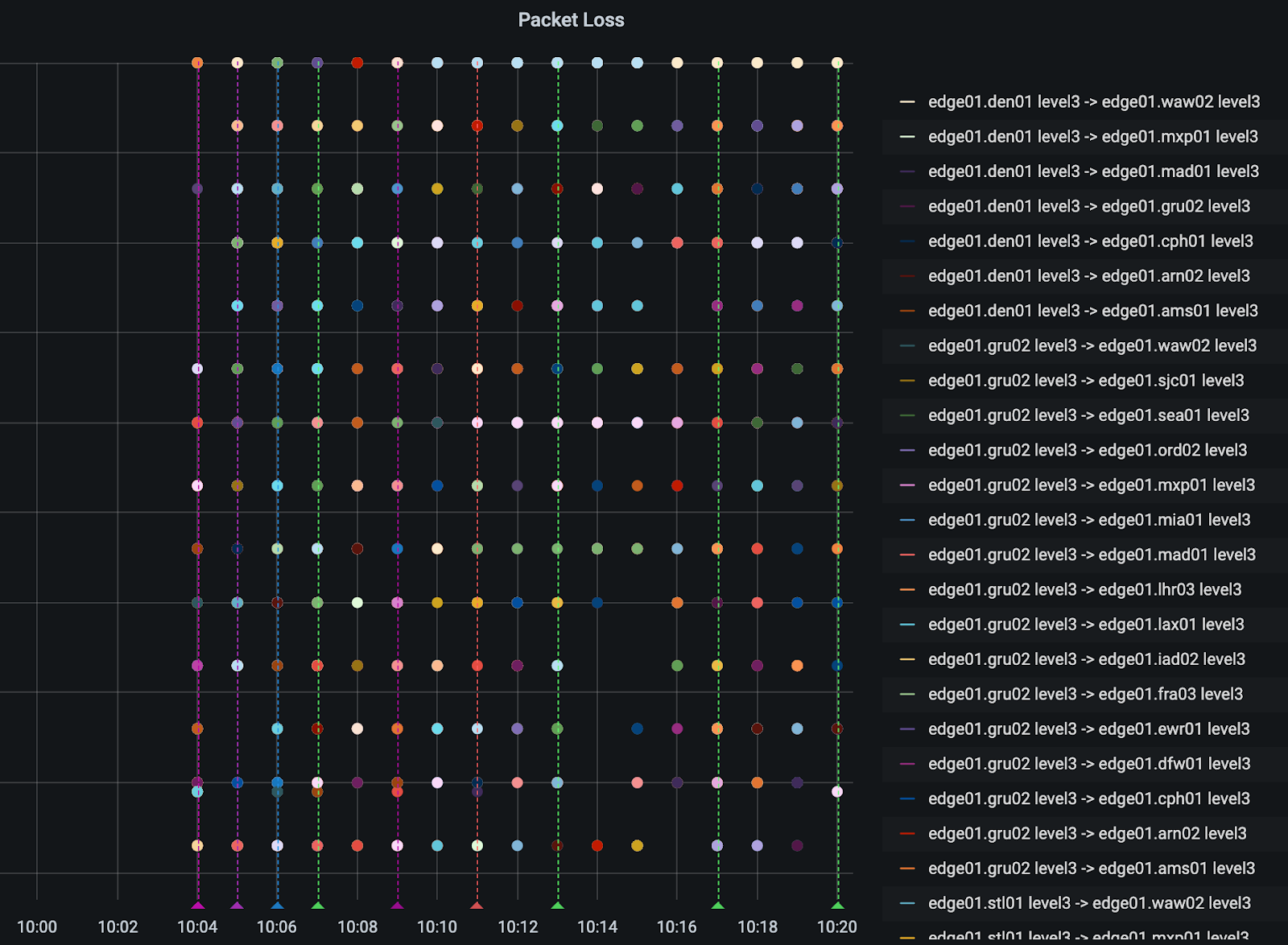
Cloudflare is connected to CenturyLink/Level(3) among a large and diverse set of network providers. When we see an increase in errors from one network provider, our systems automatically attempt to reach customers’ applications across alternative providers. Given the number of providers we have access to, we are generally able to continue to route traffic even when one provider has an issue.
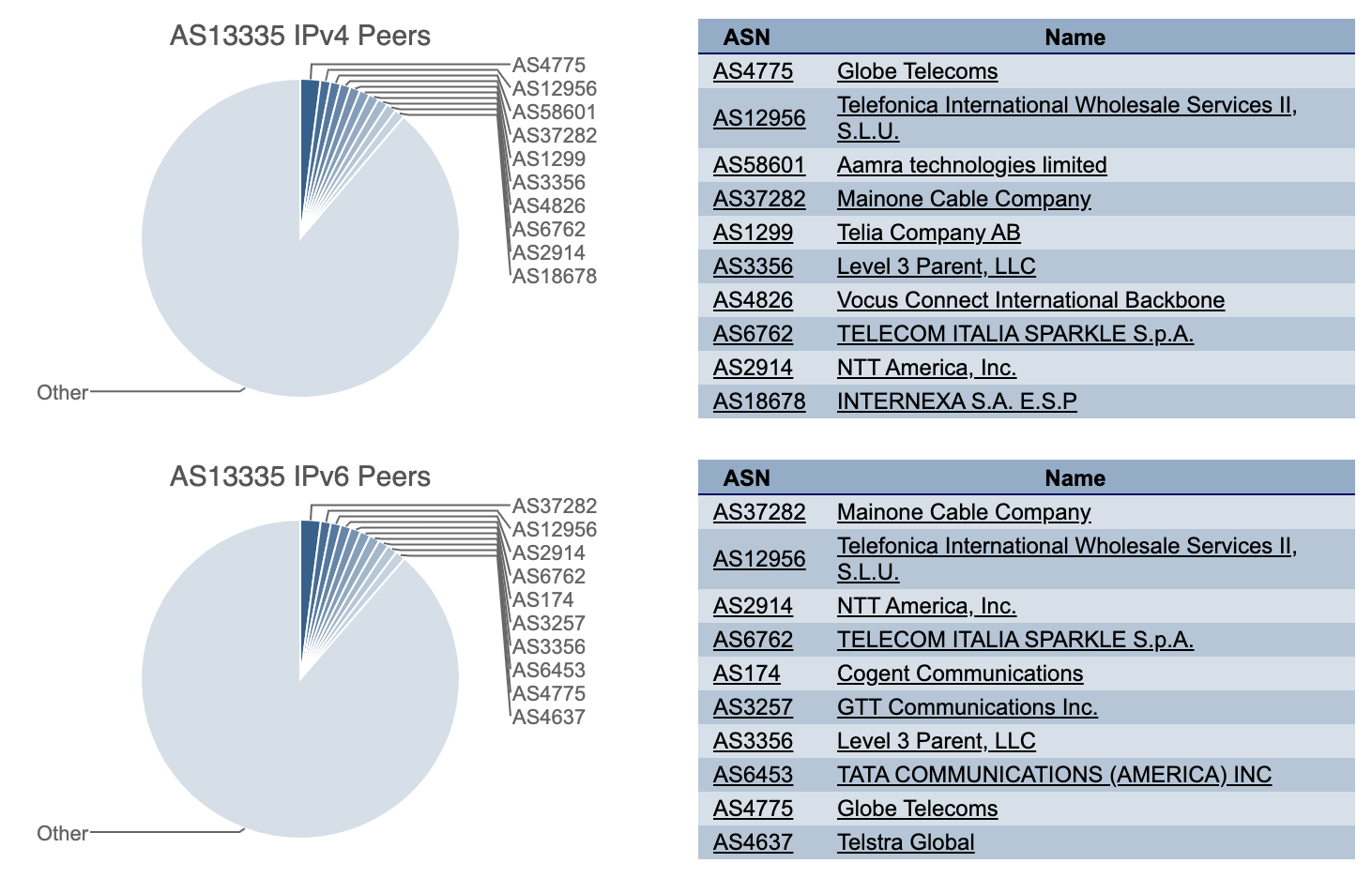
In this case, beginning within seconds of the increase in 522 errors, our systems automatically rerouted traffic from CenturyLink/Level(3) to alternate network providers we connect to including Cogent, NTT, GTT, Telia, and Tata.
Our Network Operations Center was also alerted and our team began taking additional steps to mitigate any issues our automated systems weren’t automatically able to address beginning at 10:09 UTC. We were successful in keeping traffic flowing across our network for most customers and end users even with the loss of CenturyLink/Level(3) as one of our network providers.
Dashboard Cloudflare’s automated systems recognizing the damage to the Internet caused by the CenturyLink/Level(3) failure and automatically routing around it.
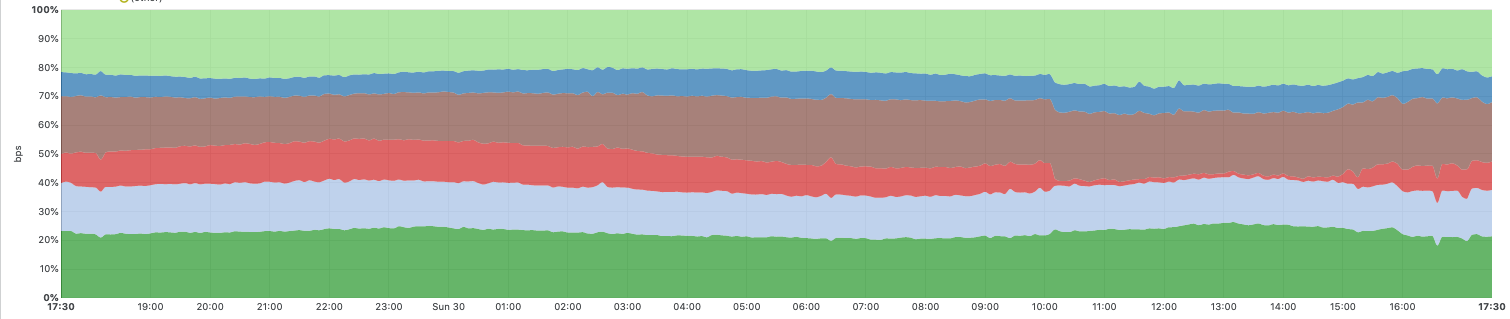
The graph below shows traffic between Cloudflare’s network and six major tier-1 networks that are among the network providers we connect to. The red portion shows CenturyLink/Level(3) traffic, which dropped to near-zero during the incident. You can also see how we automatically shifted traffic to other network providers during the incident to mitigate the impact and ensure traffic continued to flow.
Traffic across six major tier-1 networks that are among the network providers Cloudflare connects to. CenturyLink/Level(3) in red.
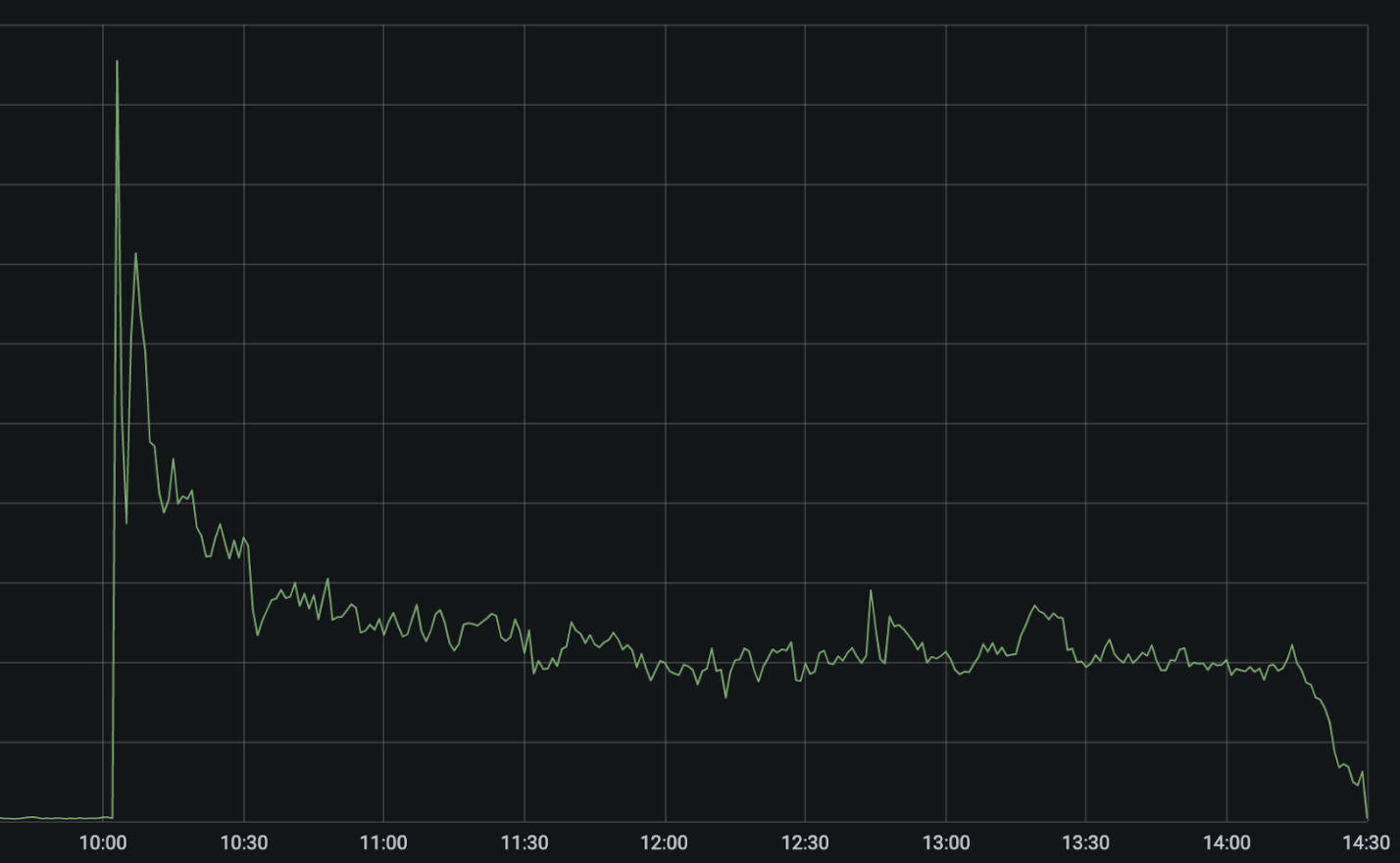
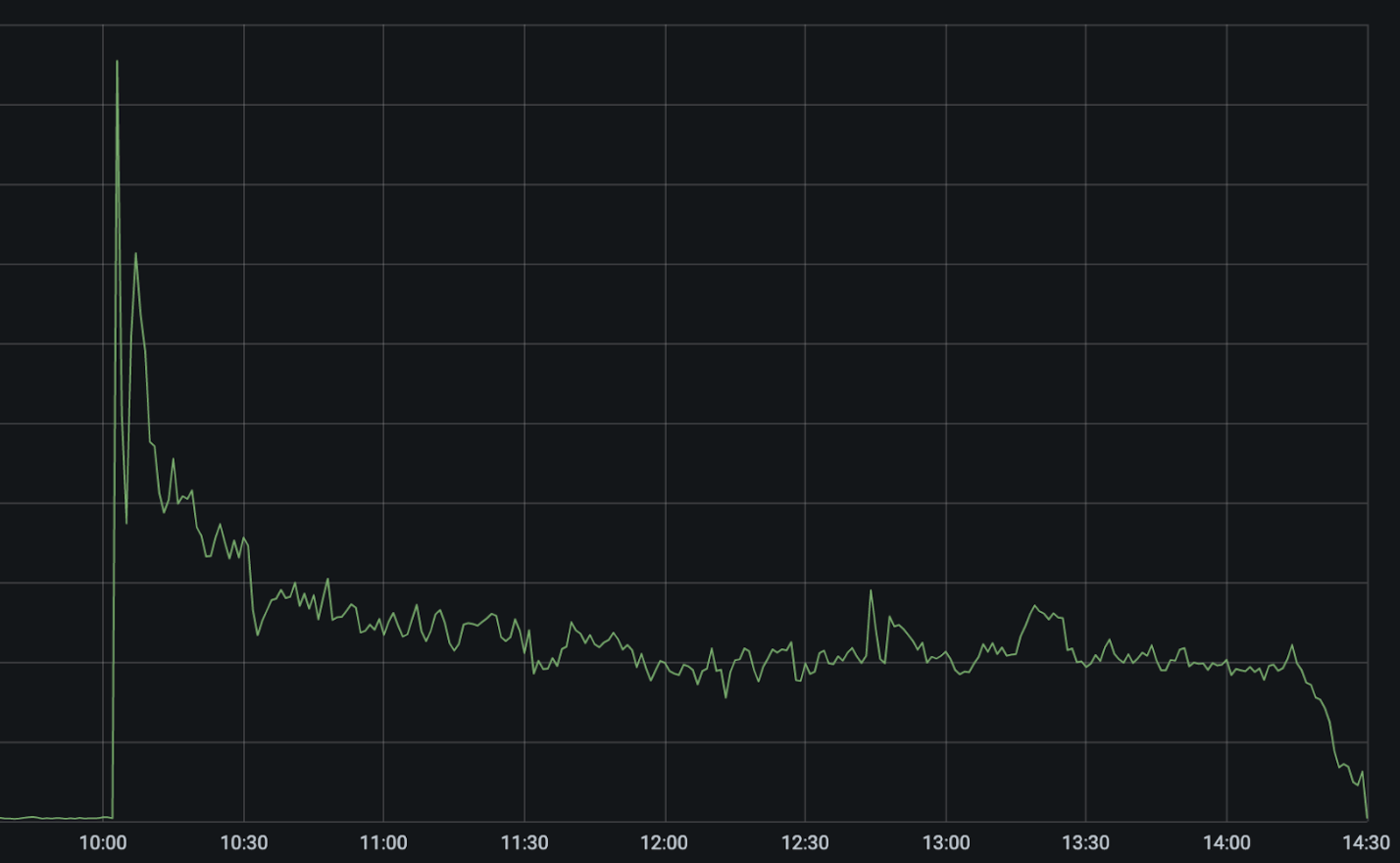
The following graph shows 522 errors (indicating our inability to reach customers’ applications) across our network during the time of the incident.
The sharp spike up at 10:03 UTC was the CenturyLink/Level(3) network failing. Our automated systems immediately kicked in to attempt to reroute and rebalance traffic across alternative network providers, causing the errors to drop in half immediately and then fall to approximately 25 percent of the peak as those paths were automatically optimized.
Between 10:03 UTC and 10:11 UTC our systems automatically disabled CenturyLink/Level(3) in the 48 cities where we’re connected to them and rerouted traffic across alternate network providers. Our systems take into account capacity on other providers before shifting out traffic in order to prevent cascading failures. This is why the failover, while automatic, isn’t instantaneous in all locations. Our team was able to apply additional manual mitigations to reduce the number of errors another 5 percent.
Why Did the Errors Not Drop to Zero?
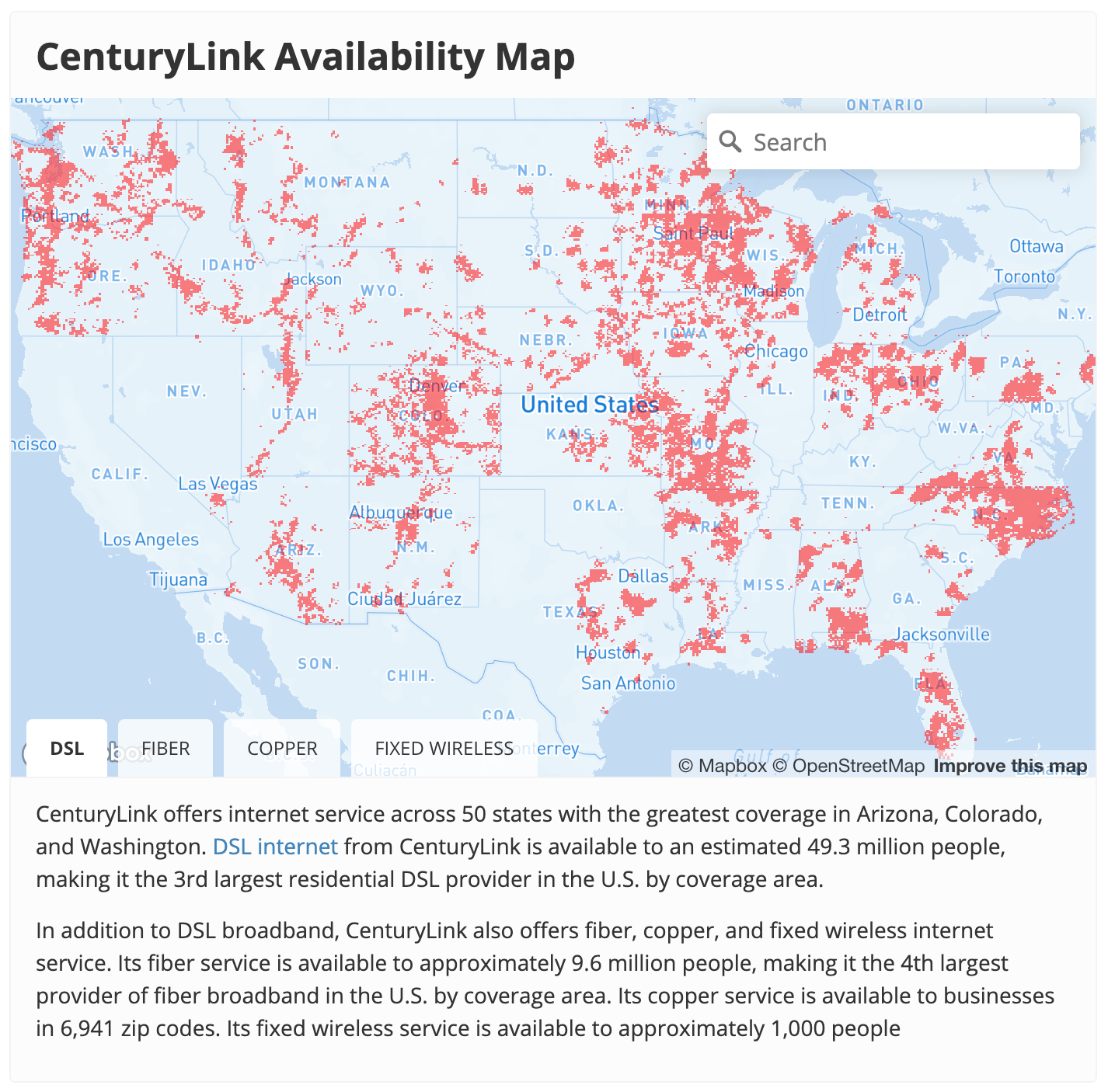
Unfortunately, there were still an elevated number of errors indicating we were still unable to reach some customers. CenturyLink/Level(3) is among the largest network providers in the world. As a result, many hosting providers only have single-homed connectivity to the Internet through their network.
To use the old Internet as a “superhighway” analogy, that’s like only having a single offramp to a town. If the offramp is blocked, then there’s no way to reach the town. This was exacerbated in some cases because CenturyLink/Level(3)’s network was not honoring route withdrawals and continued to advertise routes to networks like Cloudflare’s even after they’d been withdrawn. In the case of customers whose only connectivity to the Internet is via CenturyLink/Level(3), or if CenturyLink/Leve(3) continued to announce bad routes after they’d been withdrawn, there was no way for us to reach their applications and they continued to see 522 errors until CenturyLink/Level(3) resolved their issue around 14:30 UTC.
The same was a problem on the other (“eyeball”) side of the network. Individuals need to have an onramp onto the Internet’s superhighway. An onramp to the Internet is essentially what your ISP provides. CenturyLink is one of the largest ISPs in the United States.
Because this outage appeared to take all of the CenturyLink/Level(3) network offline, individuals who are CenturyLink customers would not have been able to reach Cloudflare or any other Internet provider until the issue was resolved. Globally, we saw a 3.5% drop in global traffic during the outage, nearly all of which was due to a nearly complete outage of CenturyLink’s ISP service across the United States.
So What Likely Happened Here?
While we will not know exactly what happened until CenturyLink/Level(3) issue a post mortem, we can see clues from BGP announcements and how they propagated across the Internet during the outage. BGP is the Border Gateway Protocol. It is how routers on the Internet announce to each other what IPs sit behind them and therefore what traffic they should receive.
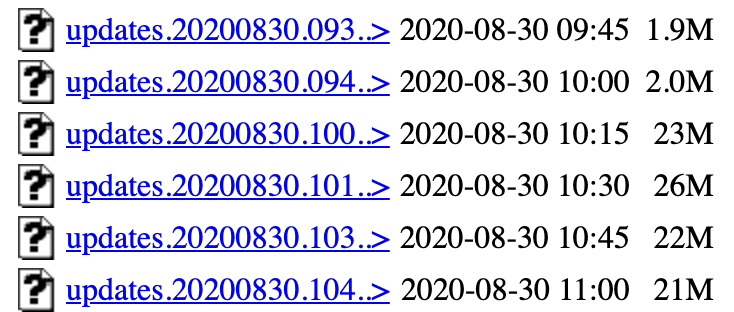
Starting at 10:04 UTC, there were a significant number of BGP updates. A BGP update is the signal a router makes to say that a route has changed or is no longer available. Under normal conditions, the Internet sees about 1.5MBs – 2MBs of BGP updates every 15 minutes. At the start of the incident, the number of BGP updates spiked to more than 26MBs of BGP updates per 15 minute period and stayed elevated throughout the incident.
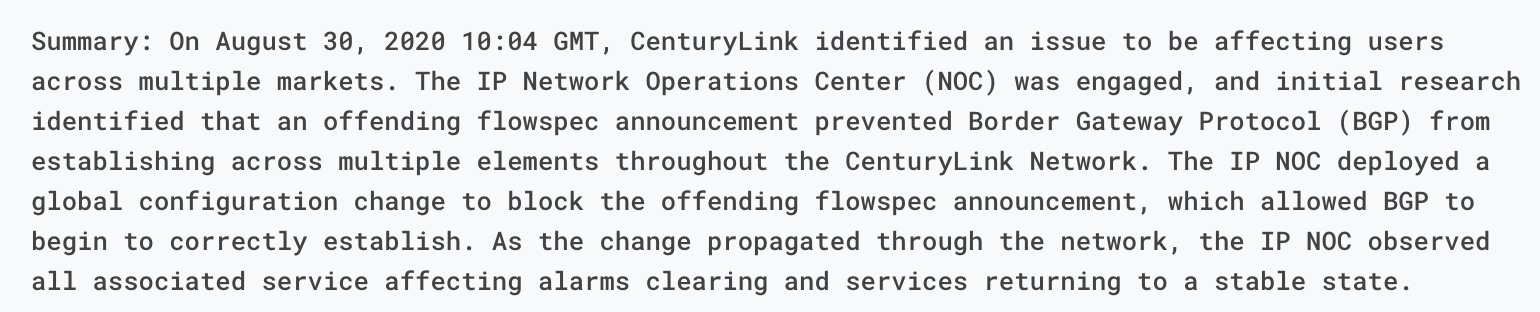
These updates show the instability of BGP routes inside the CenturyLink/Level(3) backbone. The question is what would have caused this instability. The CenturyLink/Level(3) status update offers some hints and points at a flowspec update as the root cause.
What’s Flowspec?
In CenturyLink/Level(3)’s update they mention that a bad Flowspec rule caused the issue. So what is Flowspec? Flowspec is an extension to BGP, which allows firewall rules to be easily distributed across a network, or even between networks, using BGP. Flowspec is a powerful tool. It allows you to efficiently push rules across an entire network almost instantly. It is great when you are trying to quickly respond to something like an attack, but it can be dangerous if you make a mistake.
At Cloudflare, early in our history, we used to use Flowspec ourselves to push out firewall rules in order to, for instance, mitigate large network-layer DDoS attacks. We suffered our own Flowspec-induced outage more than 7 years ago. We no longer use Flowspec ourselves, but it remains a common protocol for pushing out network firewall rules.
We can only speculate what happened at CenturyLink/Level(3), but one plausible scenario is that they issued a Flowspec command to try to block an attack or other abuse directed at their network. The status report indicates that the Flowspec rule prevented BGP itself from being announced. We have no way of knowing what that Flowspec rule was, but here’s one in Juniper’s format that would have blocked all BGP communications across their network.
route DISCARD-BGP {
   match {
      protocol tcp;
      destination-port 179;
   }
 then discard;
}
Why So Many Updates?
A mystery remains, however, why global BGP updates stayed elevated throughout the incident. If the rule blocked BGP then you would expect to see an increase in BGP announcements initially and then they would fall back to normal.
One possible explanation is that the offending Flowspec rule came near the end of a long list of BGP updates. If that were the case, what may have happened is that every router in CenturyLink/Level(3)’s network would receive the Flowspec rule. They would then block BGP. That would cause them to stop receiving the rule. They would start back up again, working their way through all the BGP rules until they got to the offending Flowspec rule again. BGP would be dropped again. The Flowspec rule would no longer be received. And the loop would continue, over and over.
One challenge of this is that on every cycle, the queue of BGP updates would continue to increase within CenturyLink/Level(3)’s network. This may have gotten to a point where the memory and CPU of their routers was overloaded, causing an additional set of challenges to getting their network back online.
Why Did It Take So Long to Fix?
This was a significant global Internet outage and, undoubtedly, the CenturyLink/Level(3) team received immediate alerts. They are a very sophisticated network operator with a world class Network Operations Center (NOC). So why did it take more than four hours to resolve?
Again, we can only speculate. First, it may have been that the Flowspec rule and the significant load that large number of BGP updates imposed on their routers made it difficult for them to login to their own interfaces. Several of the other tier-1 providers took action, it appears at CenturyLink/Level(3)’s request, to de-peer their networks. This would have limited the number of BGP announcements being received by the CenturyLink/Level(3) network and helped give it time to catch up.
Second, it also may have been that the Flowspec rule was not issued by CenturyLink/Level(3) themselves but rather by one of their customers. Many network providers will allow Flowspec peering. This can be a powerful tool for downstream customers wishing to block attack traffic, but can make it much more difficult to track down an offending Flowspec rule when something goes wrong.
Finally, it never helps when these issues occur early on a Sunday morning. Networks the size and scale of CenturyLink/Level(3)’s are extremely complicated. Incidents happen. We appreciate their team keeping us informed with what was going on throughout the incident. #hugops
The collective thoughts of the interwebz
Manage Consent
To provide the best experiences, we use technologies like cookies to store and/or access device information. Consenting to these technologies will allow us to process data such as browsing behavior or unique IDs on this site. Not consenting or withdrawing consent, may adversely affect certain features and functions.
Functional
Always active
The technical storage or access is strictly necessary for the legitimate purpose of enabling the use of a specific service explicitly requested by the subscriber or user, or for the sole purpose of carrying out the transmission of a communication over an electronic communications network.
Preferences
The technical storage or access is necessary for the legitimate purpose of storing preferences that are not requested by the subscriber or user.
Statistics
The technical storage or access that is used exclusively for statistical purposes.The technical storage or access that is used exclusively for anonymous statistical purposes. Without a subpoena, voluntary compliance on the part of your Internet Service Provider, or additional records from a third party, information stored or retrieved for this purpose alone cannot usually be used to identify you.
Marketing
The technical storage or access is required to create user profiles to send advertising, or to track the user on a website or across several websites for similar marketing purposes.