Post Syndicated from Explosm.net original https://explosm.net/comics/wont-learn-anything
New Cyanide and Happiness Comic
Post Syndicated from Explosm.net original https://explosm.net/comics/wont-learn-anything
New Cyanide and Happiness Comic
Post Syndicated from The History Guy: History Deserves to Be Remembered original https://www.youtube.com/watch?v=1LrZNMsgtVY
Post Syndicated from Patrick Kennedy original https://www.servethehome.com/sambanova-sn40l-rdu-for-trillion-parameter-ai-models/
This is the SambaNova SN40L a dataflow architecture AI accelerator with 520MB of SRAM, 64GB of HBM, and 1.5TB of DDR memory
The post SambaNova SN40L RDU for Trillion Parameter AI Models appeared first on ServeTheHome.
Post Syndicated from Patrick Kennedy original https://www.servethehome.com/nvidia-blackwell-platform-at-hot-chips-2024/
At Hot Chips 2024, we got another look at the NVIDIA Blackwell platform which will be the company’s big AI chip in 2025
The post NVIDIA Blackwell Platform at Hot Chips 2024 appeared first on ServeTheHome.
Post Syndicated from Patrick Kennedy original https://www.servethehome.com/openai-keynote-on-building-scalable-ai-infrastructure/
At Hot Chips 2024, OpenAI has an hour-long keynote about why building scalable AI infrastructure is important, and what is needed to do so
The post OpenAI Keynote on Building Scalable AI Infrastructure appeared first on ServeTheHome.
Post Syndicated from Atulsing Patil original https://aws.amazon.com/blogs/security/2024-iso-and-csa-star-certificates-now-available-with-three-additional-services/
Amazon Web Services (AWS) successfully completed an onboarding audit with no findings for ISO 9001:2015, 27001:2022, 27017:2015, 27018:2019, 27701:2019, 20000-1:2018, and 22301:2019, and Cloud Security Alliance (CSA) STAR Cloud Controls Matrix (CCM) v4.0. Ernst and Young CertifyPoint auditors conducted the audit and reissued the certificates on July 22, 2024. The objective of the audit was to assess the level of compliance with the requirements of the applicable international standards.
During the audit, we added the following three AWS services to the scope of the certification:
For a full list of AWS services that are certified under ISO and CSA Star, see the AWS ISO and CSA STAR Certified page. Customers can also access the certifications in the AWS Management Console through AWS Artifact.
If you have feedback about this post, submit comments in the Comments section below.
Post Syndicated from corbet original https://lwn.net/Articles/987320/
The developers of the Pidgin chat program
have announced that
a malicious plugin had been listed on its third-party plugins list for over
one month. This plugin included a key logger and could capture
screenshots.
It went unnoticed at the time that the plugin was not providing any
source code and was only providing binaries for download. Going
forward, we will be requiring that all plugins that we link to have
an OSI Approved Open Source License and that some level of due
diligence has been done to verify that the plugin is safe for
users.
Post Syndicated from Crosstalk Solutions original https://www.youtube.com/watch?v=9QIBLBNR6RA
Post Syndicated from Patrick Kennedy original https://www.servethehome.com/intel-xeon-6-soc-for-the-edge-hello-granite-rapids-d/
In 2025 Intel Xeon D will get HUGE with the Intel Xeon 6 Granite Rapids-D platform. 100GbE, AMX, media encoders, 8-channel memory, and more
The post Intel Xeon 6 SoC for the Edge Hello Granite Rapids-D appeared first on ServeTheHome.
Post Syndicated from Patrick Kennedy original https://www.servethehome.com/sk-hynix-ai-specific-computing-memory-solution-aimx-xpu-at-hot-chips-2024/
SK Hynix showed off its AiMX-xPU concept at Hot Chips 2024 for more efficient LLM inference compute being done in-memory
The post SK Hynix AI-Specific Computing Memory Solution AiMX-xPU at Hot Chips 2024 appeared first on ServeTheHome.
Post Syndicated from Patrick Kennedy original https://www.servethehome.com/tenstorrent-blackhole-and-metalium-for-standalone-ai-processing/
At Hot Chips 2024, we got more information on the Tenstorrent Blackhole, a RISC-V based AI accelerator that uses 10x 400GbE for interconnect
The post Tenstorrent Blackhole and Metalium For Standalone AI Processing appeared first on ServeTheHome.
Post Syndicated from Monica Alcalde Angel original https://aws.amazon.com/blogs/big-data/copy-and-mask-pii-between-amazon-rds-databases-using-visual-etl-jobs-in-aws-glue-studio/
Moving and transforming data between databases is a common need for many organizations. Duplicating data from a production database to a lower or lateral environment and masking personally identifiable information (PII) to comply with regulations enables development, testing, and reporting without impacting critical systems or exposing sensitive customer data. However, manually anonymizing cloned information can be taxing for security and database teams.
You can use AWS Glue Studio to set up data replication and mask PII with no coding required. AWS Glue Studio visual editor provides a low-code graphic environment to build, run, and monitor extract, transform, and load (ETL) scripts. Behind the scenes, AWS Glue handles underlying resource provisioning, job monitoring, and retries. There’s no infrastructure to manage, so you can focus on rapidly building compliant data flows between key systems.
In this post, I’ll walk you through how to copy data from one Amazon Relational Database Service (Amazon RDS) for PostgreSQL database to another, while scrubbing PII along the way using AWS Glue. You will learn how to prepare a multi-account environment to access the databases from AWS Glue, and how to model an ETL data flow that automatically masks PII as part of the transfer process, so that no sensitive information will be copied to the target database in its original form. By the end, you’ll be able to rapidly build data movement pipelines between data sources and targets, that can hide PII in order to protect individual identities, without needing to write code.
The following diagram illustrates the solution architecture:

The solution uses AWS Glue as an ETL engine to extract data from the source Amazon RDS database. Built-in data transformations then scrub columns containing PII using pre-defined masking functions. Finally, the AWS Glue ETL job inserts privacy-protected data into the target Amazon RDS database.
This solution employs multiple AWS accounts. Having multi-account environments is an AWS best practice to help isolate and manage your applications and data. The AWS Glue account shown in the diagram is a dedicated account that facilitates the creation and management of all necessary AWS Glue resources. This solution works across a broad array of connections that AWS Glue supports, so you can centralize the orchestration in one dedicated AWS account.
It is important to highlight the following notes about this solution:
To implement this solution, this guide walks you through the following steps:
For this walkthrough, we’re using Amazon RDS for PostgreSQL 13.14-R1. Note that the solution will work with other versions and database engines that support the same JDBC driver versions as AWS Glue. See JDBC connections for further details.
To follow along with this post, you should have the following prerequisites:
All TCP and TCP ports (0-65535) to allow AWS Glue to communicate with its components.The following figure shows a self-referencing inbound rule needed on the AWS Glue account security group.

| VPC | Private subnet | |
|---|---|---|
| Source account | 10.2.0.0/16 | 10.2.10.0/24 |
| AWS Glue account | 10.1.0.0/16 | 10.1.10.0/24 |
| Target account | 10.3.0.0/16 | 10.3.10.0/24 |
enableDnsHostnames and enableDnsSupport are set to true on each VPC. For details, see Using DNS with your VPC.The following diagram illustrates the environment with all prerequisites:

To streamline the process of setting up the prerequisites, you can follow the directions in the README file on this GitHub repository.
For this example, both source and target databases contain a customer table with the exact same structure. The former is prepopulated with data as shown in the following figure:

The AWS Glue ETL job you will create focuses on masking sensitive information within specific columns. These are last_name, email, phone_number, ssn and notes.
If you want to use the same table structure and data, the SQL statements are provided in the GitHub repository.
When creating an AWS Glue ETL job, provide the AWS IAM role, VPC ID, subnet ID, and security groups needed for AWS Glue to access the JDBC databases. See AWS Glue: How it works for further details.
In our example, the role, groups, and other information are in the dedicated AWS Glue account. However, for AWS Glue to connect to the databases, you need to enable access to source and target databases from your AWS Glue account’s subnet and security group.
To enable access, first you inter-connect the VPCs. This can be done using VPC peering or AWS Transit Gateway. For this example, we use VPC peering. Alternatively, you can use an S3 bucket as an intermediary storage location. See Setting up network access to data stores for further details.
Follow these steps:
Complete the following steps in the AWS VPC console:
After completing the preceding steps, the list of peering connections on the AWS Glue account should look like the following figure:
 Note that source and target account VPCs are not peered together. Connectivity between the two accounts isn’t needed.
This step will enable traffic from the AWS Glue account VPC to the VPC subnets associate to the databases in the source and target accounts.
Complete the following steps in the AWS VPC console:
For instructions on how to update route tables, see Work with route tables.
This step is required to allow traffic from the AWS Glue account’s security group to the source and target security groups associated to the databases.
For instructions on how to update security groups, see Work with security groups.
Complete the following steps in the AWS VPC console:
PostgreSQL and Source, the AWS Glue account security group.The following diagram shows the environment with connectivity enabled from the AWS Glue account to the source and target accounts:
The next task is to create the AWS Glue components to synchronize the source and target database schemas with the AWS Glue Data Catalog.
Follow these steps:
Connections enable AWS Glue to access your databases. The main benefit of creating AWS Glue connections is that connections save time by not making you have to specify all connection details every time you create a job. You can then reuse connections when creating jobs in AWS Glue Studio without having to manually enter connection details each time. This makes the job creation process more consistent and faster.
Complete these steps on the AWS Glue account:
You can find the database-endpoint on the Amazon RDS console on the source account.

Source DB connection-Postgresql.Target DB connection-Postgresql.Now you have two connections, one for each Amazon RDS database.
AWS Glue crawlers allow you to automate data discovery and cataloging from data sources and targets. Crawlers explore data stores and auto-generate metadata to populate the Data Catalog, registering discovered tables in the Data Catalog. This helps you to discover and work with the data to build ETL jobs.
To create a crawler for each Amazon RDS database, complete the following steps on the AWS Glue account:
Source PostgreSQL database crawler. 
Source DB Connection - Postgresql.sourcedb/cx/% where sourcedb is the name of the database, and cx the schema with the customer table.sourcedb-postgresql.Target PostgreSQL database crawler.Target DB Connection-Postgresql, and for Include path enter targetdb/cx/%.targetdb-postgresql.Now you have two crawlers, one for each Amazon RDS database, as shown in the following figure: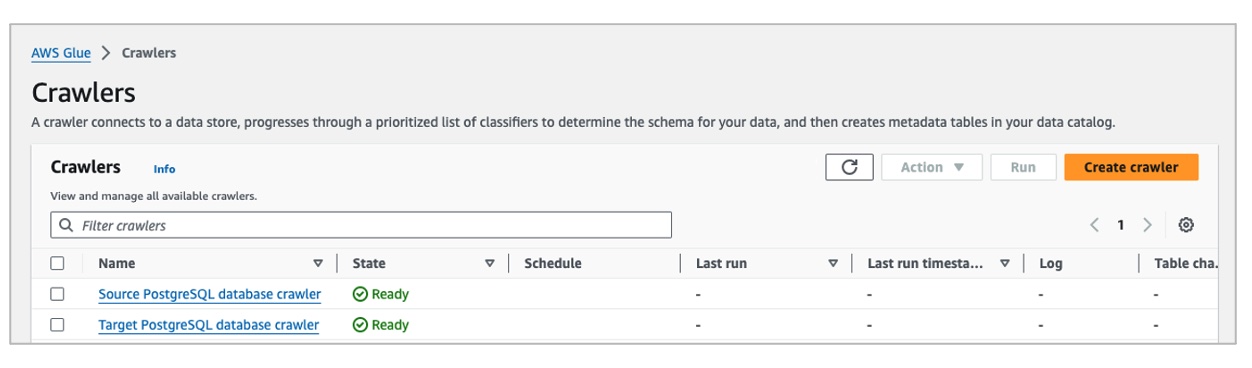
Next, run the crawlers. When you run a crawler, the crawler connects to the designated data store and automatically populates the Data Catalog with metadata table definitions (columns, data types, partitions, and so on). This saves time over manually defining schemas.
From the Crawlers list, select both Source PostgreSQL database crawler and Target PostgreSQL database crawler, and choose Run.
When finished, each crawler creates a table in the Data Catalog. These tables are the metadata representation of the customer tables.
You now have all the resources to start creating AWS Glue ETL jobs!
The proposed ETL job runs four tasks:
Let’s jump into AWS Glue Studio to create the AWS Glue ETL job.

Add a node to connect to the Amazon RDS source database:
sourcedb-postgresql database and source_cx_customer table from the Data Catalog as shown in the following figure:
To detect and mask PII, select Detect Sensitive Data node from the Transforms tab.
Let’s take a deeper look into the Transform options on the properties panel for the Detect Sensitive Data node:

Selecting Find sensitive data in each row allows you to specify fine-grained action overrides. If you know your data, with fine-grained actions you can exclude certain columns from detection. You can also customize the entities to detect for every column in your dataset and skip entities that you know aren’t in specific columns. This allows your jobs to be more performant by eliminating unnecessary detection calls for those entities and perform actions unique to each column and entity combination.
In our example, we know our data and we want to apply fine-grained actions to specific columns, so let’s select Find sensitive data in each row. We’ll explore fine-grained actions further below.
In our example, again because we know the data, let’s select Select specific patterns. For Selected patterns, choose Person’s name, Email Address, Credit Card, Social Security Number (SSN) and US Phone as shown in the following figure. Note that some patterns, such as SSNs, apply specifically to the United States and might not detect PII data for other countries. But there are available categories applicable to other countries, and you can also use regular expressions in AWS Glue Studio to create detection entities to help meet your needs.

High).**** as the Redaction Text.Choose Add to specify the fine-grained action for each entity as shown in the following figure:
When the Detect Sensitive Data node runs, it converts the id column to string type and it adds a column named DetectedEntities with PII detection metadata to the output. We don’t need to store such metadata information in the target table, and we need to convert the id column back to integer, so let’s add a Change Schema transform node to the ETL job, as shown in the following figure. This will make these changes for us.
Note: You must select the DetectedEntities Drop checkbox for the transform node to drop the added field.
The last task for the ETL job is to establish a connection to the target database and insert the data with PII masked:
targetdb-postgresql and target_cx_customer, as shown in the following figure.
ETL - Replicate customer data.Monitor the job until it successfully finishes from Job run monitoring on the navigation pane.
Connect to the Amazon RDS target database and verify that the replicated rows contain the scrubbed PII data, confirming sensitive information was masked properly in transit between databases as shown in the following figure:
And that’s it! With AWS Glue Studio, you can create ETL jobs to copy data between databases and transform it along the way without any coding. Try other types of sensitive information for securing your sensitive data during replication. Also try adding and combining multiple and heterogenous data sources and targets.
To clean up the resources created:
aws-glue-assets-account_id-region in its name, where account-id is your AWS Glue account ID, and region is the AWS Region you used.In this post, you learned how to use AWS Glue Studio to build an ETL job that copies data from one Amazon RDS database to another and automatically detects PII data and masks the data in-flight, without writing code.
By using AWS Glue for database replication, organizations can eliminate manual processes to find hidden PII and bespoke scripting to transform it by building centralized, visible data sanitization pipelines. This improves security and compliance, and speeds time-to-market for test or analytics data provisioning.
Monica Alcalde Angel is a Senior Solutions Architect in the Financial Services, Fintech team at AWS. She works with Blockchain and Crypto AWS customers, helping them accelerate their time to value when using AWS. She lives in New York City, and outside of work, she is passionate about traveling.
Post Syndicated from Veliswa Boya original https://aws.amazon.com/blogs/aws/aws-weekly-roundup-s3-conditional-writes-aws-lambda-jaws-pankration-and-more-august-26-2024/
The AWS User Group Japan (JAWS-UG) hosted JAWS PANKRATION 2024 themed ‘No Border’. This is a 24-hour online event where AWS Heroes, AWS Community Builders, AWS User Group leaders, and others from around the world discuss topics ranging from cultural discussions to technical talks. One of the speakers at this event, Kevin Tuei, an AWS Community Builder based in Kenya, highlighted the importance of building in public and sharing your knowledge with others, a very fitting talk for this kind of event.

Last week’s launches
Here are some launches that got my attention during the previous week.
Amazon S3 now supports conditional writes – We’ve added support for conditional writes in Amazon S3 which check for existence of an object before creating it. With this feature, you can now simplify how distributed applications with multiple clients concurrently update data in parallel across shared datasets. Each client can conditionally write objects, making sure that it does not overwrite any objects already written by another client.
AWS Lambda introduces recursive loop detection APIs – With the recursive loop detection APIs you can now set recursive loop detection configuration on individual AWS Lambda functions. This allows you to turn off recursive loop detection on functions that intentionally use recursive patterns, avoiding disruption of these workloads. Using these APIs, you can avoid disruption to any intentionally recursive workflows as Lambda expands support of recursive loop detection to other AWS services. Configure recursive loop detection for Lambda functions through the Lambda Console, the AWS command line interface (CLI), or Infrastructure as Code tools like AWS CloudFormation, AWS Serverless Application Model (AWS SAM), or AWS Cloud Development Kit (CDK). This new configuration option is supported in AWS SAM CLI version 1.123.0 and CDK v2.153.0.
General availability of Amazon Bedrock batch inference API – You can now use Amazon Bedrock to process prompts in batch to get responses for model evaluation, experimentation, and offline processing. Using the batch API makes it more efficient to run inference with foundation models (FMs). It also allows you to aggregate responses and analyze them in batches. To get started, visit Run batch inference.
Other AWS news
Launched in July 2024, AWS GenAI Lofts is a global tour designed to foster innovation and community in the evolving landscape of generative artificial intelligence (AI) technology. The lofts bring collaborative pop-up spaces to key AI hotspots around the world, offering developers, startups, and AI enthusiasts a platform to learn, build, and connect. The events are ongoing. Find a location near you and be sure to attend soon.

Upcoming AWS events
AWS Summits – These are free online and in-person events that bring the cloud computing community together to connect, collaborate, and learn about AWS. Whether you’re in the Americas, Asia Pacific & Japan, or EMEA region, learn more about future AWS Summit events happening in your area. On a personal note, I look forward to being one of the keynote speakers at the AWS Summit Johannesburg happening this Thursday. Registrations are still open and I look forward to seeing you there if you’ll be attending.
AWS Community Days – Join an AWS Community Day event just like the one I mentioned at the beginning of this post to participate in technical discussions, workshops, and hands-on labs led by expert AWS users and industry leaders from your area. If you’re in New York, there’s an event happening in your area this week.
You can browse all upcoming in-person and virtual events here.
That’s all for this week. Check back next Monday for another Weekly Roundup!
– Veliswa
Post Syndicated from Brownell Combs original https://aws.amazon.com/blogs/security/summer-2024-soc-report-now-available-with-177-services-in-scope/
We continue to expand the scope of our assurance programs at Amazon Web Services (AWS) and are pleased to announce that the Summer 2024 System and Organization Controls (SOC) 1 report is now available. The report covers 177 services over the 12-month period of July 1, 2023–June 30, 2024, so that customers have a full year of assurance with the report. This report demonstrates our continuous commitment to adhere to the heightened expectations for cloud service providers.
Going forward, we will issue SOC reports covering a 12-month period each quarter as follows:
| Report | Period covered |
| Spring SOC 1, 2, and 3 | April 1–March 31 |
| Summer SOC 1 | July 1–June 30 |
| Fall SOC 1, 2, and 3 | October 1–September 30 |
| Winter SOC 1 | January 1–December 31 |
Customers can download the Summer 2024 SOC report through AWS Artifact, a self-service portal for on-demand access to AWS compliance reports. Sign in to AWS Artifact in the AWS Management Console, or learn more at Getting Started with AWS Artifact.
AWS strives to continuously bring services into the scope of its compliance programs to help you meet your architectural and regulatory needs. If you have questions or feedback about SOC compliance, reach out to your AWS account team.
To learn more about our compliance and security programs, see AWS Compliance Programs. As always, we value your feedback and questions; reach out to the AWS Compliance team through the Contact Us page.
If you have feedback about this post, submit comments in the Comments section below.
Post Syndicated from Patrick Kennedy original https://www.servethehome.com/ibm-telum-ii-processor-and-spyre-ai-updates-at-hot-chips-2024/
The new IBM Telum II is the company’s next-gen IBM Z mainframe processor with built-in AI and DPU. The company also has a Spyre AI processor
The post IBM Telum II Processor and Spyre AI Updates at Hot Chips 2024 appeared first on ServeTheHome.
Post Syndicated from jzb original https://lwn.net/Articles/987311/
The FreeBSD Foundation has announced that Germany’s Sovereign Tech
Fund (STF) has agreed to invest €686,400 toward improvements in the
FreeBSD project’s infrastructure, security, regulatory compliance, and
developer experience:
The work commissioned by STF also aligns closely with the recent
August
9, 2024 summary report released by the U.S. Office of the
National Cyber Director (ONCD), consolidating feedback from the 2023
request for information on key priorities for securing the open source
software ecosystem. By enhancing security controls and SBOM tooling,
the FreeBSD Foundation is helping to keep FreeBSD at the forefront of
improved vulnerability disclosure mechanisms and secure software
foundations.
Post Syndicated from corbet original https://lwn.net/Articles/986892/
The genksyms tool has long been buried deeply within the kernel’s
build system; it is one of the two C-code parsers shipped with the kernel
(the other being the
horrifying kernel-doc script). It is a key part of how the
kernel’s module-loading infrastructure works. While genksyms has
quietly done its job for decades, that period may soon be coming to an end.
It would seem that genksyms is not up to the task of handling Rust
code, so Sami Tolvanen is proposing
a new tool to handle this task going forward.
Post Syndicated from jake original https://lwn.net/Articles/987309/
Security updates have been issued by Debian (chromium, python-html-sanitizer, and trafficserver), Fedora (nginx, nginx-mod-fancyindex, nginx-mod-modsecurity, nginx-mod-naxsi, nginx-mod-vts, python-webob, python3-docs, python3.11, python3.12, python3.9, and zabbix), Red Hat (bind, bind and bind-dyndb-ldap, bind9.16, httpd, kernel, kernel-rt, and nodejs:20), SUSE (caddy, chromium, chromium, gn, rust-bindgen, cockpit, fetchmail, gdcm, gh, keybase-client, libhtp, libofx, nano, plasma5-workspace, python-nltk, python-notebook, xen, and znc), and Ubuntu (linux-azure, linux-azure-4.15, linux-azure-5.4, and linux-oracle-5.15).
Post Syndicated from Patrick Kennedy original https://www.servethehome.com/intel-lunar-lake-for-ai-pcs-at-hot-chips-2024/
In its presentation at Hot Chips 2024, we learned more about the upcoming Intel Lunar Lake SoC for AI PCs and some of the updates to the chip
The post Intel Lunar Lake for AI PCs at Hot Chips 2024 appeared first on ServeTheHome.
Post Syndicated from Patrick Kennedy original https://www.servethehome.com/snapdragon-x-elite-qualcomm-oryon-cpu-design-and-architecture-hot-chips-2024-arm/
At Hot Chips 2024, we got to learn more about the Qualcomm Oryon CPU design and the architecture underpinning the Snapdragon X Elite
The post Snapdragon X Elite Qualcomm Oryon CPU Design and Architecture Hot Chips 2024 appeared first on ServeTheHome.