Meta AI Acceleration in the Next-Gen Meta MTIA for Recommendation Inference

Post Syndicated from Patrick Kennedy original https://www.servethehome.com/meta-ai-acceleration-in-the-next-gen-meta-mtia-for-recommendation-inference-risc-v/

The next-gen Meta MTIA is a custom RISC-V accelerator for the company’s recommendation model AI inference workloads deployed this year

The post Meta AI Acceleration in the Next-Gen Meta MTIA for Recommendation Inference appeared first on ServeTheHome.

Attribute Amazon EMR on EC2 costs to your end-users

Post Syndicated from Raj Patel original https://aws.amazon.com/blogs/big-data/attribute-amazon-emr-on-ec2-costs-to-your-end-users/

Amazon EMR on EC2 is a managed service that makes it straightforward to run big data processing and analytics workloads on AWS. It simplifies the setup and management of popular open source frameworks like Apache Hadoop and Apache Spark, allowing you to focus on extracting insights from large datasets rather than the underlying infrastructure. With Amazon EMR, you can take advantage of the power of these big data tools to process, analyze, and gain valuable business intelligence from vast amounts of data.

Cost optimization is one of the pillars of the Well-Architected Framework. It focuses on avoiding unnecessary costs, selecting the most appropriate resource types, analyzing spend over time, and scaling in and out to meet business needs without overspending. An optimized workload maximizes the use of all available resources, delivers the desired outcome at the most cost-effective price point, and meets your functional needs.

The current Amazon EMR pricing page shows the estimated cost of the cluster. You can also use AWS Cost Explorer to get more detailed information about your costs. These views give you an overall picture of your Amazon EMR costs. However, you may need to attribute costs at the individual Spark job level. For example, you might want to know the usage cost in Amazon EMR for the finance business unit. Or, for chargeback purposes, you might need to aggregate the cost of Spark applications by functional area. After you have allocated costs to individual Spark jobs, this data can help you make informed decisions to optimize your costs. For instance, you could choose to restructure your applications to utilize fewer resources. Alternatively, you might opt to explore different pricing models like Amazon EMR on EKS or Amazon EMR Serverless.

In this post, we share a chargeback model that you can use to track and allocate the costs of Spark workloads running on Amazon EMR on EC2 clusters. We describe an approach that assigns Amazon EMR costs to different jobs, teams, or lines of business. You can use this feature to distribute costs across various business units. This can assist you in monitoring the return on investment for your Spark-based workloads.

Solution overview

The solution is designed to help you track the cost of your Spark applications running on EMR on EC2. It can help you identify cost optimizations and improve the cost-efficiency of your EMR clusters.

The proposed solution uses a scheduled AWS Lambda function that operates on a daily basis. The function captures usage and cost metrics, which are subsequently stored in Amazon Relational Database Service (Amazon RDS) tables. The data stored in the RDS tables is then queried to derive chargeback figures and generate reporting trends using Amazon QuickSight. The utilization of these AWS services incurs additional costs for implementing this solution. Alternatively, you can consider an approach that involves a cron-based agent script installed on your existing EMR cluster, if you want to avoid the use of additional AWS services and associated costs for building your chargeback solution. This script stores the relevant metrics in an Amazon Simple Storage Service (Amazon S3) bucket, and uses Python Jupyter notebooks to generate chargeback numbers based on the data files stored in Amazon S3, using AWS Glue tables.

The following diagram shows the current solution architecture.

Solution Architecture

The workflow consists of the following steps:

  1. A Lambda function gets the following parameters from Parameter Store, a capability of AWS Systems Manager:
    {
      "yarn_url": "http://dummy.compute-1.amazonaws.com:8088/ws/v1/cluster/apps",
      "tbl_applicationlogs_lz": "public.emr_applications_execution_log_lz",
      "tbl_applicationlogs": "public.emr_applications_execution_log",
      "tbl_emrcost": "public.emr_cluster_usage_cost",
      "tbl_emrinstance_usage": "public.emr_cluster_instances_usage",
      "emrcluster_id": "j-xxxxxxxxxx",
      "emrcluster_name": "EMR_Cost_Measure",
      "emrcluster_role": "dt-dna-shared",
      "emrcluster_linkedaccount": "xxxxxxxxxxx",
      "postgres_rds": {
        "host": "xxxxxxxxx.amazonaws.com",
        "dbname": "postgres",
        "user": "postgresadmin",
        "secretid": "postgressecretid"
      }
    }

  2. The Lambda function extracts Spark application run logs from the EMR cluster using the Resource Manager API. The following metrics are extracted as part of the process: vcore-seconds, memory MB-seconds, and storage GB-seconds.
  3. The Lambda function captures the daily cost of EMR clusters from Cost Explorer.
  4. The Lambda function also extracts EMR On-Demand and Spot Instance usage data using the Amazon Elastic Compute Cloud (Amazon EC2) Boto3 APIs.
  5. Lambda function loads these datasets into an RDS database.
  6. The cost of running a Spark application is determined by the amount of CPU resources it uses, compared to the total CPU usage of all Spark applications. This information is used to distribute the overall cost among different teams, business lines, or EMR queues.

The extraction process runs daily, extracting the previous day’s data and storing it in an Amazon RDS for PostgreSQL table. The historical data in the table needs to be purged based on your use case.

The solution is open source and available on GitHub.

You can use the AWS Cloud Development Kit (AWS CDK) to deploy the Lambda function, RDS for PostgreSQL data model tables, and a QuickSight dashboard to track EMR cluster cost at the job, team, or business unit level.

The following schema show the tables used in the solution which are queried by QuickSight to populate the dashboard.

  • emr_applications_execution_log_lz or public.emr_applications_execution_log – Storage for daily run metrics for all jobs run on the EMR cluster:
    • appdatecollect – Log collection date
    • app_id – Spark job run ID
    • app_name – Run name
    • queue – EMR queue in which job was run
    • job_state – Job running state
    • job_status – Job run final status (Succeeded or Failed)
    • starttime – Job start time
    • endtime – Job end time
    • runtime_seconds – Runtime in seconds
    • vcore_seconds – Consumed vCore CPU in seconds
    • memory_seconds – Memory consumed
    • running_containers – Containers used
    • rm_clusterid – EMR cluster ID
  • emr_cluster_usage_cost – Captures Amazon EMR and Amazon EC2 daily cost consumption from Cost Explorer and loads the data into the RDS table:
    • costdatecollect – Cost collection date
    • startdate – Cost start date
    • enddate – Cost end date
    • emr_unique_tag – EMR cluster associated tag
    • net_unblendedcost – Total unblended daily dollar cost
    • unblendedcost – Total unblended daily dollar cost
    • cost_type – Daily cost
    • service_name – AWS service for which the cost incurred (Amazon EMR and Amazon EC2)
    • emr_clusterid – EMR cluster ID
    • emr_clustername – EMR cluster name
    • loadtime – Table load date/time
  • emr_cluster_instances_usage – Captures the aggregated resource usage (vCores) and allocated resources for each EMR cluster node, and helps identify the idle time of the cluster:
    • instancedatecollect – Instance usage collect date
    • emr_instance_day_run_seconds – EMR instance active seconds in the day
    • emr_region – EMR cluster AWS Region
    • emr_clusterid – EMR cluster ID
    • emr_clustername – EMR cluster name
    • emr_cluster_fleet_type – EMR cluster fleet type
    • emr_node_type – Instance node type
    • emr_market – Market type (on-demand or provisioned)
    • emr_instance_type – Instance size
    • emr_ec2_instance_id – Corresponding EC2 instance ID
    • emr_ec2_status – Running status
    • emr_ec2_default_vcpus – Allocated vCPU
    • emr_ec2_memory – EC2 instance memory
    • emr_ec2_creation_datetime – EC2 instance creation date/time
    • emr_ec2_end_datetime – EC2 instance end date/time
    • emr_ec2_ready_datetime – EC2 instance ready date/time
    • loadtime – Table load date/time

Prerequisites

You must have the following prerequisites before implementing the solution:

  • An EMR on EC2 cluster.
  • The EMR cluster must have a unique tag value defined. You can assign the tag directly on the Amazon EMR console or using Tag Editor. The recommended tag key is cost-center along with a unique value for your EMR cluster. After you create and apply user-defined tags, it can take up to 24 hours for the tag keys to appear on your cost allocation tags page for activation
  • Activate the tag in AWS Billing. It takes about 24 hours to activate the tag if not done before. To activate the tag, follow these steps:
    • On the AWS Billing and Cost Management console, choose Cost allocation tags from navigation pane.
    • Select the tag key that you want to activate.
    • Choose Activate.
  • The Spark application’s name should follow the standardized naming convention. It consists of seven components separated by underscores: <business_unit>_<program>_<application>_<source>_<job_name>_<frequency>_<job_type>. These components are used to summarize the resource consumption and cost in the final report. For example: HR_PAYROLL_PS_PSPROD_TAXDUDUCTION_DLY_LD, FIN_CASHRECEIPT_GL_GLDB_MAIN_DLY_LD, or MKT_CAMPAIGN_CRM_CRMDB_TOPRATEDCAMPAIGN_DLY_LD. The application name must be supplied with the spark submit command using the --name parameter with the standardized naming convention. If any of these components don’t have a value, hardcode the values with the following suggested names:
    • frequency
    • job_type
    • Business_unit
  • The Lambda function should be able to connect to Cost Explorer, connect to the EMR cluster through the Resource Manager APIs, and load data into the RDS for PostgreSQL database. To do this, you need to configure the Lambda function as follows:
    • VPC configuration – The Lambda function should be able to access the EMR cluster, Cost Explorer, AWS Secrets Manager, and Parameter Store. If access is not in place already, you can do this by creating a virtual private cloud (VPC) that includes the EMR cluster and create VPC endpoint for Parameter Store and Secrets Manager and attach it to the VPC. Because there is no VPC endpoint available for Cost Explorer and in order to have Lambda connect to Cost Explorer, a private subnet and a route table are required to send VPC traffic to public NAT gateway. If your EMR cluster is in public subnet, you must create a private subnet including a custom route table and a public NAT gateway, which will allow the Cost Explorer connection to flow from the VPC private subnet. Refer to How do I set up a NAT gateway for a private subnet in Amazon VPC? for setup instructions and attach the newly created private subnet to the Lambda function explicitly.
    • IAM role – The Lambda function needs to have an AWS Identity and Access Management (IAM) role with the following permissions: AmazonEC2ReadOnlyAccess, AWSCostExplorerFullAccess, and AmazonRDSDataFullAccess. This role will be created automatically during AWS CDK stack deployment; you don’t need to set it up separately.
  • The AWS CDK should be installed on AWS Cloud9 (preferred) or another development environment such as VSCode or Pycharm. For more information, refer to Prerequisites.
  • The RDS for PostgreSQL database (v10 or higher) credentials should be stored in Secrets Manager. For more information, refer to Storing database credentials in AWS Secrets Manager.

Create RDS tables

Create the data model tables mentioned in emr-cost-rds-tables-ddl.sql by logging in to postgres rds manually into the public schema.

Use DBeaver or any compatible SQL clients to connect to the RDS instance and validate the tables have been created.

Deploy AWS CDK stacks

Complete the steps in this section to deploy the following resources using the AWS CDK:

  • Parameter Store to store required parameter values
  • IAM role for the Lambda function to help connect to Amazon EMR and underlying EC2 instances, Cost Explorer, CloudWatch, and Parameter Store
  • Lambda function
  1. Clone the GitHub repo:
    git clone [email protected]:aws-samples/attribute-amazon-emr-costs-to-your-end-users.git

  2. Update the following the environment parameters in cdk.context.json (this file can be found in the main directory):
    1. yarn_urlYARN ResourceManager URL to read job run logs and metrics. This URL should be accessible within the VPC where Lambda would be deployed.
    2. tbl_applicationlogs_lz – RDS temp table to store EMR application run logs.
    3. tbl_applicationlogs – RDS table to store EMR application run logs.
    4. tbl_emrcost – RDS table to capture daily EMR cluster usage cost.
    5. tbl_emrinstance_usage – RDS table to store EMR cluster instance usage info.
    6. emrcluster_id – EMR cluster instance ID.
    7. emrcluster_name – EMR cluster name.
    8. emrcluster_tag – Tag key assigned to EMR cluster.
    9. emrcluster_tag_value – Unique value for EMR cluster tag.
    10. emrcluster_role – Service role for Amazon EMR (EMR role).
    11. emrcluster_linkedaccount – Account ID under which the EMR cluster is running.
    12. postgres_rds – RDS for PostgreSQL connection details.
    13. vpc_id – VPC ID in which the EMR cluster is configured and the cost metering Lambda function would be deployed.
    14. vpc_subnets – Comma-separated private subnets ID associated with the VPC.
    15. sg_id – EMR security group ID.

The following is a sample cdk.context.json file after being populated with the parameters:

{
  "yarn_url": "http://dummy.compute-1.amazonaws.com:8088/ws/v1/cluster/apps",
  "tbl_applicationlogs_lz": "public.emr_applications_execution_log_lz",
  "tbl_applicationlogs": "public.emr_applications_execution_log",
  "tbl_emrcost": "public.emr_cluster_usage_cost",
  "tbl_emrinstance_usage": "public.emr_cluster_instances_usage",
  "emrcluster_id": "j-xxxxxxxxxx",
  "emrcluster_name": "EMRClusterName",
  "emrcluster_tag": "EMRClusterTag",
  "emrcluster_tag_value": "EMRClusterUniqueTagValue",
  "emrcluster_role": "EMRClusterServiceRole",
  "emrcluster_linkedaccount": "xxxxxxxxxxx",
  "postgres_rds": {
    "host": "xxxxxxxxx.amazonaws.com",
    "dbname": "dbname",
    "user": "username",
    "secretid": "DatabaseUserSecretID"
  },
  "vpc_id": "xxxxxxxxx",
  "vpc_subnets": "subnet-xxxxxxxxxxx",
  "sg_id": "xxxxxxxxxx"
}

You can choose to deploy the AWS CDK stack using AWS Cloud9 or any other development environment according to your needs. For instructions to set up AWS Cloud9, refer to Getting started: basic tutorials for AWS Cloud9.

  1. Go to AWS Cloud9 and choose File and Upload local files upload the project folder.
  2. Deploy the AWS CDK stack with the following code:
    cd attribute-amazon-emr-costs-to-your-end-users/
    pip install -r requirements.txt
    cdk deploy –-all

The deployed Lambda function requires two external libraries: psycopg2 and requests. The corresponding layer needs to be created and assigned to the Lambda function. For instructions to create a Lambda layer for the requests module, refer to Step-by-Step Guide to Creating an AWS Lambda Function Layer.

Creation of the psycopg2 package and layer is tied to the Python runtime version of the Lambda function. Provided that the Lambda function uses the Python 3.9 runtime, complete the following steps to create the corresponding layer package for peycopog2:

  1. Download psycopg2_binary-2.9.9-cp39-cp39-manylinux_2_17_x86_64.manylinux2014_x86_64.whl from https://pypi.org/project/psycopg2-binary/#files.
  2. Unzip and move the contents to a directory named python:
    zip ‘python’ directory

  3. Create a Lambda layer for psycopg2 using the zip file.
  4. Assign the layer to the Lambda function by choosing Add a layer in the deployed function properties.
  5. Validate the AWS CDK deployment.

Your Lambda function details should look similar to the following screenshot.

Lambda Function Screenshot

On the Systems Manager console, validate the Parameter Store content for actual values.

The IAM role details should look similar to the following code, which allows the Lambda function access to Amazon EMR and underlying EC2 instances, Cost Explorer, CloudWatch, Secrets Manager, and Parameter Store:

{
  "Version": "2012-10-17",
  "Statement": [
    {
      "Action": [
        "ce:GetCostAndUsage",
        "ce:ListCostAllocationTags",
        "ec2:AttachNetworkInterface",
        "ec2:CreateNetworkInterface",
        "ec2:DeleteNetworkInterface",
        "ec2:DescribeInstanceTypes",
        "ec2:DescribeInstances",
        "ec2:DescribeNetworkInterfaces",
        "elasticmapreduce:Describe*",
        "elasticmapreduce:List*",
        "ssm:Describe*",
        "ssm:Get*",
        "ssm:List*"
      ],
      "Resource": "*",
      "Effect": "Allow"
    },
    {
      "Action": [
        "logs:CreateLogGroup",
        "logs:CreateLogStream",
        "logs:DescribeLogStreams",
        "logs:PutLogEvents"
      ],
      "Resource": "arn:aws:logs:*:*:*",
      "Effect": "Allow"
    },
    {
      "Action": "secretsmanager:GetSecretValue",
      "Resource": "arn:aws:secretsmanager:*:*:*",
      "Effect": "Allow"
    }
  ]
}

Test the solution

To test the solution, you can run a Spark job that combines multiple files in the EMR cluster, and you can do this by creating separate steps within the cluster. Refer to Optimize Amazon EMR costs for legacy and Spark workloads for more details on how to add the jobs as steps to EMR cluster.

  1. Use the following sample command to submit the Spark job (emr_union_job.py).
    It takes in three arguments:

    1. <input_full_path> – The Amazon S3 location of the data file that is read in by the Spark job. The path should not be changed. The input_full_path is s3://aws-blogs-artifacts-public/artifacts/BDB-2997/sample-data/input/part-00000-a0885743-e0cb-48b1-bc2b-05eb748ab898-c000.snappy.parquet
    2. <output_path> – The S3 folder where the results are written to.
    3. <number of copies to be unioned> – By changing the input to the Spark job, you can make sure the job runs for different amounts of time and also change the number of Spot nodes used.
spark-submit --deploy-mode cluster --name HR_PAYROLL_PS_PSPROD_TAXDUDUCTION_DLY_LD s3://aws-blogs-artifacts-public/artifacts/BDB-2997/scripts/emr_union_job.py s3://aws-blogs-artifacts-public/artifacts/BDB-2997/sample-data/input/part-00000-a0885743-e0cb-48b1-bc2b-05eb748ab898-c000.snappy.parquet s3://<output_bucket>/<output_path>/ 6

spark-submit --deploy-mode cluster --name FIN_CASHRECEIPT_GL_GLDB_MAIN_DLY_LD s3://aws-blogs-artifacts-public/artifacts/BDB-2997/scripts/emr_union_job.py s3://aws-blogs-artifacts-public/artifacts/BDB-2997/sample-data/input/part-00000-a0885743-e0cb-48b1-bc2b-05eb748ab898-c000.snappy.parquet s3://<output_bucket>/<output_path>/ 12

The following screenshot shows the log of the steps run on the Amazon EMR console.

EMR Steps Execution

  1. Run the deployed Lambda function from the Lambda console. This loads the daily application log, EMR dollar usage, and EMR instance usage details into their respective RDS tables.

The following screenshot of the Amazon RDS query editor shows the results for public.emr_applications_execution_log.

public.emr_applications_execution_log

The following screenshot shows the results for public.emr_cluster_usage_cost.

public.emr_cluster_usage_cost

The following screenshot shows the results for public.emr_cluster_instances_usage.

public.emr_cluster_instances_usage

Cost can be calculated using the preceding three tables based on your requirements. In the following SQL query, you calculate the cost based on relative usage of all applications in a day. You first identify the total vcore-seconds CPU consumed in a day and then find out the percentage share of an application. This drives the cost based on overall cluster cost in a day.

Consider the following example scenario, where 10 applications ran on the cluster for a given day. You would use the following sequence of steps to calculate the chargeback cost:

  1. Calculate the relative percentage usage of each application (consumed vcore-seconds CPU by app/total vcore-seconds CPU consumed).
  2. Now you have the relative resource consumption of each application, distribute the cluster cost to each application. Let’s assume that the total EMR cluster cost for that date is $400.
app_id app_name runtime_seconds vcore_seconds % Relative Usage Amazon EMR Cost ($)
application_00001 app1 10 120 5% 19.83
application_00002 app2 5 60 2% 9.91
application_00003 app3 4 45 2% 7.43
application_00004 app4 70 840 35% 138.79
application_00005 app5 21 300 12% 49.57
application_00006 app6 4 48 2% 7.93
application_00007 app7 12 150 6% 24.78
application_00008 app8 52 620 26% 102.44
application_00009 app9 12 130 5% 21.48
application_00010 app10 9 108 4% 17.84

A sample chargeback cost calculation SQL query is available on the GitHub repo.

You can use the SQL query to create a report dashboard to plot multiple charts for the insights. The following are two examples created using QuickSight.

The following is a daily bar chart.

Cost Daily Bar Chart

The following shows total dollars consumed.

Cost Pie chart

Solution cost

Let’s assume we’re calculating for an environment that runs 1,000 jobs daily, and we run this solution daily:

  • Lambda costs – One run requires 30 Lambda function invocations per month.
  • Amazon RDS cost – The total number of records in the public.emr_applications_execution_log table for a 30-day month would be 30,000 records, which translates to 5.72 MB of storage. If we consider the other two smaller tables and storage overhead, the overall monthly storage requirement would be approximately 12 MB.

In summary, the solution cost according to the AWS Pricing Calculator is $34.20/year, which is negligible.

Clean up

To avoid ongoing charges for the resources that you created, complete the following steps:

  • Delete the AWS CDK stacks:
    cdk destroy –-all

  • Delete the QuickSight report and dashboard, if created.
  • Run the following SQL to drop the tables:
    drop table public.emr_applications_execution_log_lz;
    drop table public.emr_applications_execution_log;
    drop table public.emr_cluster_usage_cost;
    drop table public.emr_cluster_instances_usage;

Conclusion

With this solution, you can deploy a chargeback model to attribute costs to users and groups using the EMR cluster. You can also identify options for optimization, scaling, and separation of workloads to different clusters based on usage and growth needs.

You can collect the metrics for a longer duration to observe trends on the usage of Amazon EMR resources and use that for forecasting purposes.

If you have any thoughts or questions, leave them in the comments section.


About the Authors

Raj Patel is AWS Lead Consultant for Data Analytics solutions based out of India. He specializes in building and modernising analytical solutions. His background is in data warehouse/data lake – architecture, development and administration. He is in data and analytical field for over 14 years.

Ramesh DPRamesh Raghupathy is a Senior Data Architect with WWCO ProServe at AWS. He works with AWS customers to architect, deploy, and migrate to data warehouses and data lakes on the AWS Cloud. While not at work, Ramesh enjoys traveling, spending time with family, and yoga.

Gaurav JainGaurav Jain is a Sr Data Architect with AWS Professional Services, specialized in big data and helps customers modernize their data platforms on the cloud. He is passionate about building the right analytics solutions to gain timely insights and make critical business decisions. Outside of work, he loves to spend time with his family and likes watching movies and sports.

Dipal Mahajan is a Lead Consultant with Amazon Web Services based out of India, where he guides global customers to build highly secure, scalable, reliable, and cost-efficient applications on the cloud. He brings extensive experience on Software Development, Architecture and Analytics from industries like finance, telecom, retail and healthcare.

Call for nominations: Ubuntu Community Council

Post Syndicated from jzb original https://lwn.net/Articles/987406/

Nominations are now
open
for people interested in joining the Ubuntu
Community Council
, “the highest governance body of the Ubuntu
project
“. Any Ubuntu Member can
apply from now until Sunday, September 22 at 23:59 UTC.

The Ubuntu project turned 20 this year, but is still in constant
flux. The advent of new communication platforms, new projects under
our umbrella, and the ever-growing popularity of the project requires
our community to evolve. We need to make sure Ubuntu is set to tackle
the challenges of the next 20 years. It needs a strong and active
community council to guide the project forwards.

See Merlijn Sebrechts’s blog
post
, “A year in the Ubuntu community council”, for an overview of
what it’s like to serve on the council.

[$] NIST finalizes post-quantum encryption standards

Post Syndicated from daroc original https://lwn.net/Articles/973231/

On August 13, the US National Institute of Standards and Technology (NIST)

published
the final form of its new post-quantum cryptographic standards. One
key-exchange mechanism and two digital-signature schemes are now officially
sanctioned by the institute. Adopting the new standards should be fairly
painless for most developers, but the overhead added by the schemes could pose
challenges for some applications.

Assessing Container Images Across Private Registries with InsightCloudSec

Post Syndicated from Josh O'Brien original https://blog.rapid7.com/2024/08/27/assessing-container-images-across-private-registries-with-insightcloudsec/

Assessing Container Images Across Private Registries with InsightCloudSec

In the rapidly evolving landscape of software development and deployment, containerization has emerged as a game-changing technology and a de-facto foundation for the majority of modern applications. Containers allow developers to package applications and their dependencies into a single, portable unit, ensuring consistency across various environments. As the adoption of container technology has grown, so too has the importance of securing these environments. One significant advancement in this space is the growing number of organizations leveraging private container registries to benefit from added security, customization, and performance.

The Role of Private Container Registries

Containers, while powerful, are not without their risks. Because they package an application along with its dependencies, any vulnerabilities in those dependencies are carried over into the containerized environment. Private container registries are secure repositories where organizations can store, manage, and share their container images. These registries offer enhanced control over who can access and modify the container images, making them ideal for organizations with stringent security requirements or those handling sensitive data.

Organizations Choose Private Container RegistriesOrganizations choose private container registries for several reasons:

Security: Private registries offer the ability to control access to container images, reducing the risk of unauthorized access or tampering. This is particularly crucial for industries like finance, healthcare, and government, where data security is paramount.

Compliance: Many industries are subject to regulations that require strict control over software and data. Private registries help organizations meet these compliance requirements by providing audit trails, access controls, and other security features.

Customization: Private registries allow organizations to tailor the registry environment to their specific needs, such as integrating with their existing DevOps tools and workflows.

Performance: Hosting container images in a private registry can reduce latency and improve performance, especially for organizations with geographically distributed teams or when working in environments with limited internet connectivity.

These registries provide the foundation for secure and efficient container management, but they are only one piece of the security puzzle.

Extending InsightCloudSec Container Vulnerability Coverage to Private Registries

To ensure customers can continuously assess the security of their container images wherever they’re stored, we’ve recently extended InsightCloudSec support to both “as-a-service” and self-hosted private registries. The platform now automatically scans container images stored in private registries as they are uploaded or modified, providing real-time insights into potential risks.

Key Benefits of Extending Vulnerability Assessment to Private Registries

Extending vulnerability assessment coverage to private container registries offers several key benefits:

  1. Comprehensive Security: Ensure that all containers, whether public or private, are secure and free from vulnerabilities.
  2. Continuous Compliance: Helps maintain and prove compliance by ensuring that container images meet security standards before they are deployed.
  3. Automated DevSecOps: Allows organizations to automate security checks as part of their DevOps processes, enabling a seamless shift to DevSecOps.
  4. Risk Mitigation: Mitigate risks before they reach production environments, reducing the likelihood of security breaches.

Supported Registries at Launch

On launch registry support includes, but is not limited to:

Beyond those listed above, any registry that supports username/password authentication and/or API key authentication is covered out of the box. We’ll continue to add support for additional providers over time, but if you have a specific request, be sure to reach out and let us know!

Want to get started scanning your private registries? Right this way.

If you’re interested in learning more about scanning private registries with InsightCloudSec, be sure to check out our docs page. We’re constantly adding support for additional registries and expanding our vulnerability coverage, so keep an eye out for future blogs on the matter soon!

What’s in Store at Summit ‘24?

Post Syndicated from Michael Kammer original https://blog.zabbix.com/whats-in-store-at-summit-24/28649/

October means different things to different people – it’s springtime in the Southern Hemisphere, autumn in the Northern Hemisphere, and Summit time if you’re a member of the Zabbix community! Summit time, of course, means the biggest of all Zabbix events, gathering the global Zabbix community in one place to have fun together and learn as much as we can from each other. Zabbix Summit 2024 will take place on October 3-5 in Riga at the Radisson Blu Hotel Latvija. Keep reading to find out more about what you can expect this year.

All new main stage presentations

During Zabbix Summit 2024, you’ll be able to catch a variety of presentations from top industry thought leaders. You’ll learn all about the latest Zabbix features, explore use cases from multiple industries, check out the latest integrations, and have the chance to get your questions answered during live Q&A sessions.

The Summit agenda will feature speeches on nearly any Zabbix-related topic that you can imagine, but this year we’ll also have a fresh focus on the potential of artificial intelligence, with presentations on topics like “New Approaches to Reduce Alert Noise with Zabbix and AIOps” and “Leveraging AI for Synthetic Web Monitoring” as well as a more business-focused group of speeches covering topics related to open-source integration and Zabbix for MSPs.

Hands-on learning in Zabbix Summit workshops

Zabbix Summit workshops are the ideal place to put the theory you learn during presentations into practice. You can check out the latest features and use cases in action, while performing a variety of real-world tasks under the guidance of workshop hosts and their assistants – many of whom are also featured presenters at this year’s Summit.

All you’ll need to do is bring your own laptop – depending on the topic covered in the particular workshop, an SSH client and a web browser may also be required. All workshop sessions will take place on the morning of October 5 (Day 2 of the Summit) and will begin at 10AM.

Zabbix Certified Training sessions and exams

Do you have a lifetime of monitoring experience, but are too shy to let everyone know it? When you attend Zabbix Summit 2024, you’ll be able to prove your skills as a Zabbix specialist or professional by taking part in Zabbix Certified Training sessions and exams. If you’re looking for more specific topics to dive into, the following one-day courses will also be held from October 2 through October 4:

  • Automation and Integration with Zabbix API
  • Advanced Problem and Anomaly Detection with Zabbix
  • Advanced Zabbix Data Pre-Processing
  • Advanced Zabbix SNMP Monitoring

If you don’t mind extending your stay in Riga just a bit longer (and seriously, why would you?), you’ll also be able to take the full Zabbix Certified Specialist or Professional courses scheduled for October 9-13. Please remember that you can choose more than one training course, and it’s possible to attend the courses (without the 10% Summit discount) even if you’re not attending the Summit.

You can sign up for all training sessions and exams here.

The Zabbix Summit Feedback and Testimonial corner

Just as at last year’s Summit, you’ll be able to share your Zabbix story with the rest of the Zabbix community at our Feedback and Testimonial corner. Sharing a testimonial or leaving a review will give you a chance to collect a piece of exclusive Zabbix Summit 2024 merchandise!

Exclusive items, cool new designs, and unique gadgets at our merchandise shop

Speaking of merch, you’ll be pleased to know that not only will exclusive Zabbix Summit merchandise be available at a special stand throughout the event, but we’ll also have an online platform that will allow you to pre-order your merchandise and pick it up at the Summit. We’ve got 5 exclusive new t-shirt designs, 4 fresh sock designs, brand-new beanies, and the usual assortment of gadgets, hoodies, and other merch that our fans have come to know and love – most of which has also gotten a new look for this year’s Summit as well.

Three incredible Zabbix Summit 2024 networking events

There’s a lot to take in and consider at a Zabbix Summit, but don’t worry – we’ve also made sure to give you plenty of time to network with your fellow Zabbix fans by organizing three big events that you won’t want to miss!

  • The Zabbix Summit 2024 welcome event will be held at the famous National Library of Latvia – or as Latvians call it, “The Castle of Light.” You’ll enjoy tasty beverages, delicious food, and a guided tour of the library as you mingle with fellow Zabbix enthusiasts and industry experts, making this the perfect way to kick off this year’s Summit.
  • You’ll want to prepare yourself for a truly unforgettable experience as the Zabbix Summit main event unfolds. We’re sure that you’ll find Riga’s famous Fantadroms Concert and Event Space to be the ideal place to forge valuable connections with like-minded professionals – while indulging in a unique array of culinary delights, refreshing beverages, and great music.
  • After all that, we’ll send you on your way with a closing event that will be the perfect grand finale to a Summit that you won’t soon forget! Located in the heart of Old Riga, Burzma is a food hall that spans 1,500 square meters across the entire fourth floor of a bustling shopping mall. With stunning rooftop views to inspire your dining experience, Burzma offers 10 restaurants and a bar serving up a diverse range of culinary delights.

A chance to see where the magic happens during our Open-Door day

In what has become a popular tradition, Zabbix will host an Open-Door day on Thursday, October 3 from 1PM to 3PM local time. You’ll be able to chat with Zabbix team members, tour our headquarters, and take part in a fun activity designed to help you learn more about Zabbix.

Booths galore!

As usual, the Zabbix team will have multiple booths in the conference hall where you can meet our engineers and developers and get your questions answered by the people who know best. Our Summit sponsors will have booths of their own as well, where you can enjoy a unique opportunity to interact with them on a personal level and get the lowdown on the solutions they offer.

Special events for support customers

All Zabbix support customers are invited to meet our team at a special Zabbix client lunch on October 3 at 14:00 (EEST), with the exact location to be announced at a later date. What’s more, Enterprise and Global support customers are also invited to the Zabbix roadmap Q&A session with Zabbix CEO and Founder Alexei Vladishev on October 5 at 10AM. You’ll learn about our software development plans and be able to raise questions or make suggestions based on your experience – definitely an opportunity you won’t want to miss!

Which Zabbix Summit ticket is right for you?

If you want to enjoy the full Zabbix Summit experience (conference, accommodation, food, even airport transfers), the Full Participation ticket package is definitely for you.

For loyal users who have contributed so much to our product over the years, the Zabbix Fan package is definitely the way to go – it includes everything you’ll get with the Full Participation package, plus a special official fan package that will guarantee you bragging rights in your office once you return from Riga.

If you’re only there for the sessions, the Hall only pass is ideal. If you enjoy both learning and networking with our team and enthusiasts from around the world, we think you’ll find the Hall and Networking pass to be perfect for your needs.

Want to bring a friend or partner along to the summit? No problem — get a Zabbix Summit Travel Companion pass for them so you can stay together and attend networking events, while we handle the rest of their Riga experience.

The Companion pass includes 3 nights’ accommodation in the Radisson Blu Latvija hotel (in the same room as the Summit attendee), 3 breakfasts, and 3 networking events, but that’s not all – we’ll also include an exclusive tour of Riga on October 4 with an English-speaking guide.

The tour features a visit to the Ethnographic Open-Air Museum of Latvia, and runs from approximately 10AM to 4PM, including lunch and some workshop activities at the museum. You can learn more about the museum here.

Visit this page to sign up for the ticket package of your choice.

Livestreaming on YouTube

We hope to see you soon in Riga, but if you can’t make it, don’t worry – as in previous years, we’re going to be livestreaming the speeches on our YouTube channel! Stay tuned for more details.

The post What’s in Store at Summit ‘24? appeared first on Zabbix Blog.

Broadcom AI Compute ASIC with Optical Attach Detailed at Hot Chips 2024

Post Syndicated from Patrick Kennedy original https://www.servethehome.com/broadcom-ai-compute-asic-with-optical-attach-detailed-at-hot-chips-2024/

In one of the coolest presentations at Hot Chips 2024 so far, Broadcom showed co-packaged silicon photonics for switches and AI ASICs

The post Broadcom AI Compute ASIC with Optical Attach Detailed at Hot Chips 2024 appeared first on ServeTheHome.

Chimera Sandbox: A scalable experimentation and development platform for Notebook services

Post Syndicated from Grab Tech original https://engineering.grab.com/chimera-sandbox

Key to innovation and improvement in machine learning (ML) models is the ability for rapid iteration. Our team, Chimera, part of the Artificial Intelligence (AI) Platform team, provides the essential compute infrastructure, ML pipeline components, and backend services. This support enables our ML engineers, data scientists, and data analysts to efficiently experiment and develop ML solutions at scale.

With a commitment to leveraging the latest Generative AI (GenAI) technologies, Grab is enhancing productivity tools for all Grabbers. Our Chimera Sandbox, a scalable Notebook platform, facilitates swift experimentation and development of ML solutions, offering deep integration with our AI Gateway. This enables easy access to various Large Language Models (LLMs) (both proprietary and open source), ensuring scalability, compliance, and access control are managed seamlessly.

What is Chimera Sandbox?

Chimera Sandbox is a Notebook service platform. It allows users to launch multiple notebook and visualisation services for experimentation and development. The platform offers an extremely quick onboarding process enabling any Grabber to start learning, exploring and experimenting in just a few minutes. This inclusivity and ease of use have been key in driving the adoption of the platform across different teams within Grab and empowering all Grabbers to be GenAI-ready.

One significant challenge in harnessing ML for innovation, whether for technical experts or non-technical enthusiasts, has been the accessibility of resources. This includes GPU instances and specialised services for developing LLM-powered applications. Chimera Sandbox addresses this head-on by offering an extensive array of compute instances, both with and without GPU support, thus removing barriers to experimentation. Its deep integration with Grab’s suite of internal ML tools transforms the way users approach ML projects. Users benefit from features like hyperparameter tuning, tracking ML training metadata, accessing diverse LLMs through Grab’s AI Gateway, and experimenting with rich datasets from Grab’s data lake. Chimera Sandbox ensures that users have everything they need at their fingertips. This ecosystem not only accelerates the development process but also encourages innovative approaches to solving complex problems.

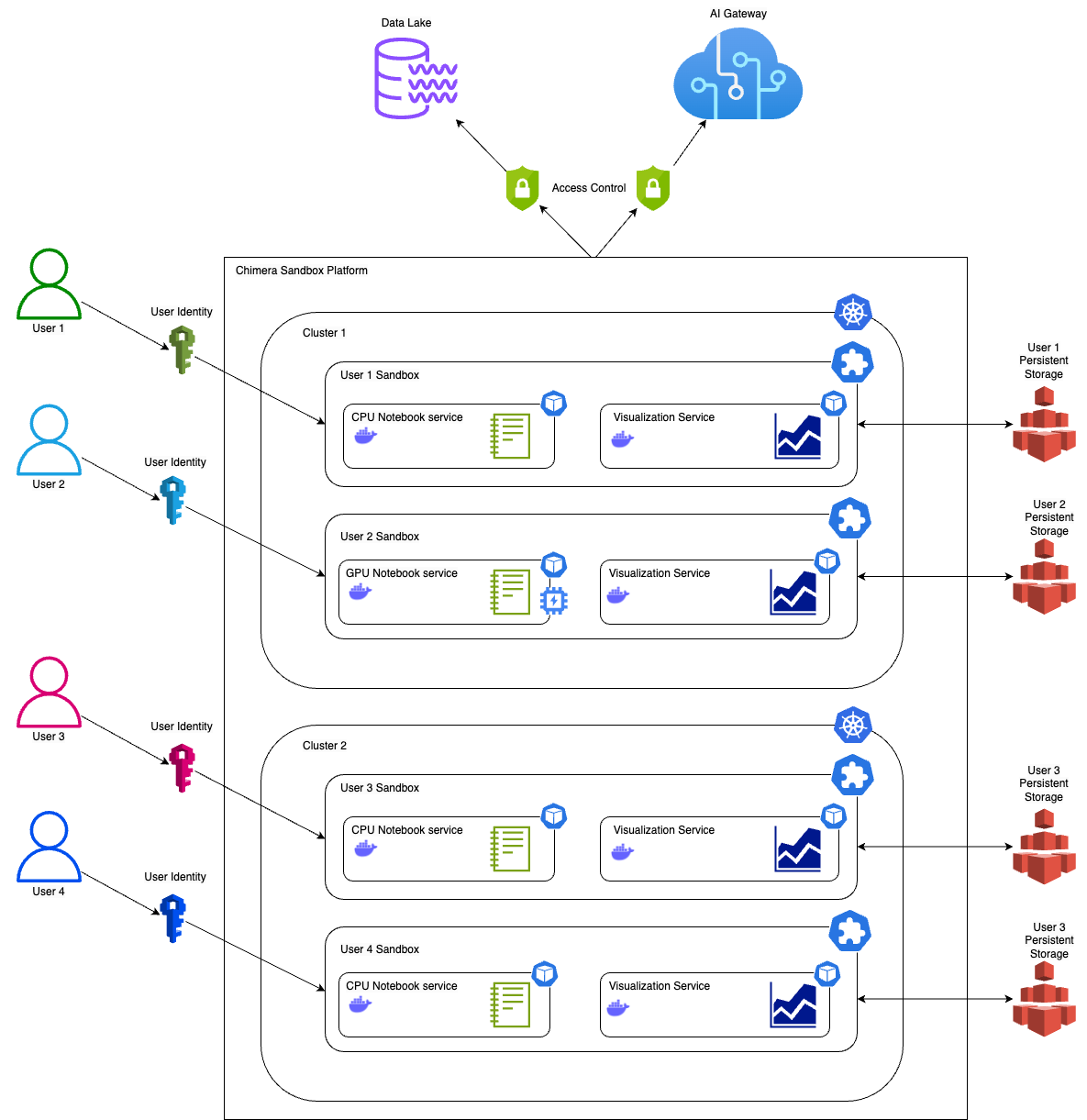
The underlying compute infrastructure of the Chimera Sandbox platform is Grab’s very own battle-tested, highly scalable ML compute infrastructure running on multiple Kubernetes clusters. Each cluster can scale up to thousands of nodes at peak times gracefully. This scalability ensures that the platform can handle the high computational demands of ML tasks. The robustness of Kubernetes ensures that the platform remains stable, reliable, and highly available even under heavy load. At any point in time, there can be hundreds of data scientists, ML engineers and developers experimenting and developing on the Chimera Sandbox platform.

Figure 1. Chimera Sandbox Platform.
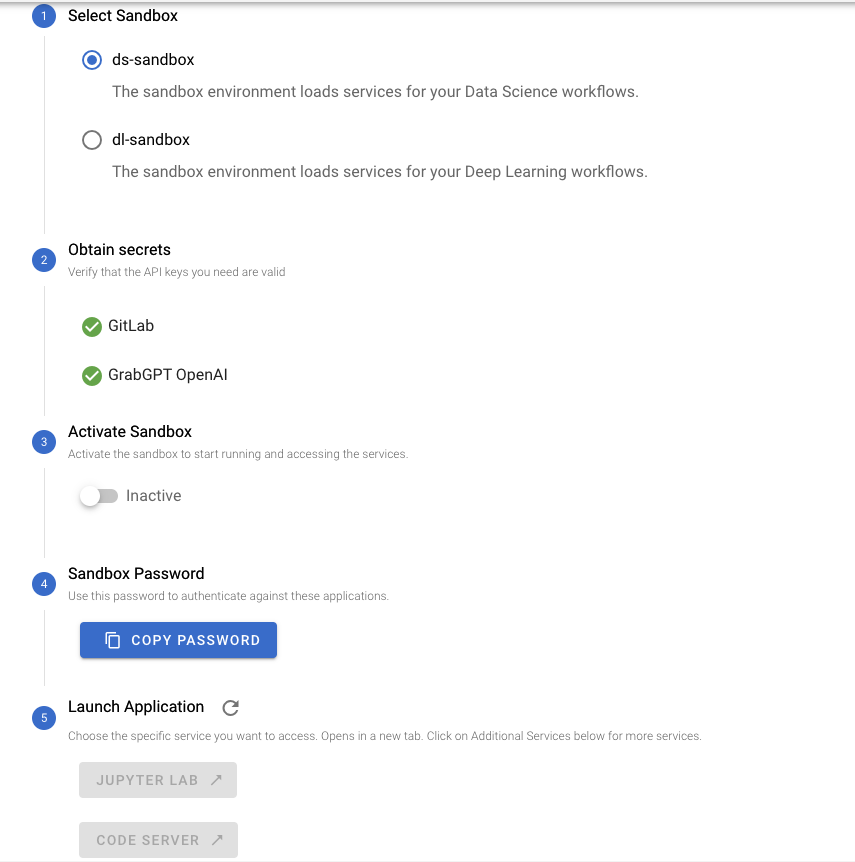
Figure 2. UI for Starting Chimera Sandbox.

Best of both worlds

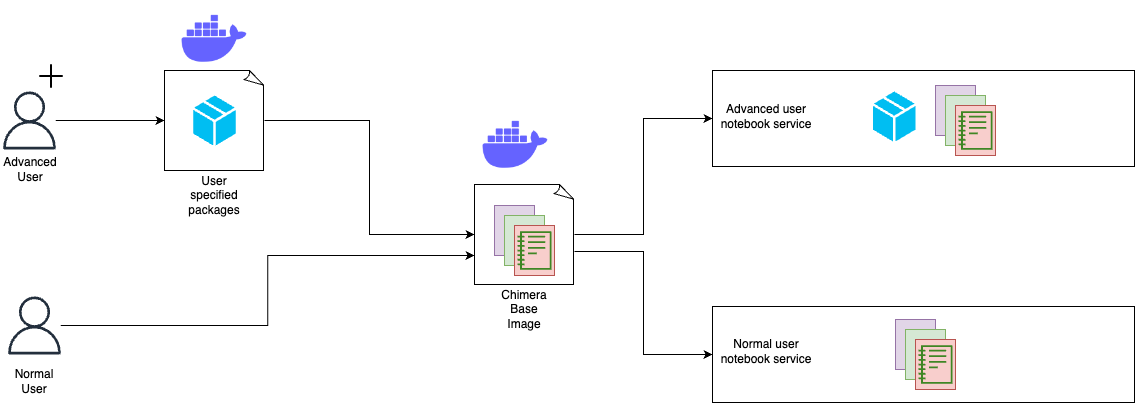
Chimera Sandbox is suitable for both new users who want to explore and experiment ML solutions and advanced users who want to have full control over the Notebook services they run. Users can launch Notebook services using default Docker images provided by the Chimera Sandbox platform. These images come pre-loaded with popular data science and ML libraries and various Grab internal systems integrations. Chimera also provides basic Docker images from which the users can use as base images to build their own customised Notebook service Docker images. Once the images are built, the users can configure their Notebook services to use their custom Docker images. This ensures their Notebook environment can be exactly the way they want them to be.

Figure 3. Users are able to customise their Notebook service with additional packages.

Real-time collaboration

The Chimera Sandbox platform also features a real-time collaboration feature. This feature fosters a collaborative environment where users can exchange ideas and work together on projects.

CPU and GPU choices

Chimera Sandbox offers a wide variety of CPU and GPU choices to cater to specific needs, whether it is a CPU, memory, or GPU intensive experimentation. This flexibility allows users to choose the most suitable computational resources for their tasks, ensuring optimal performance and efficiency.

Deep integration with Spark

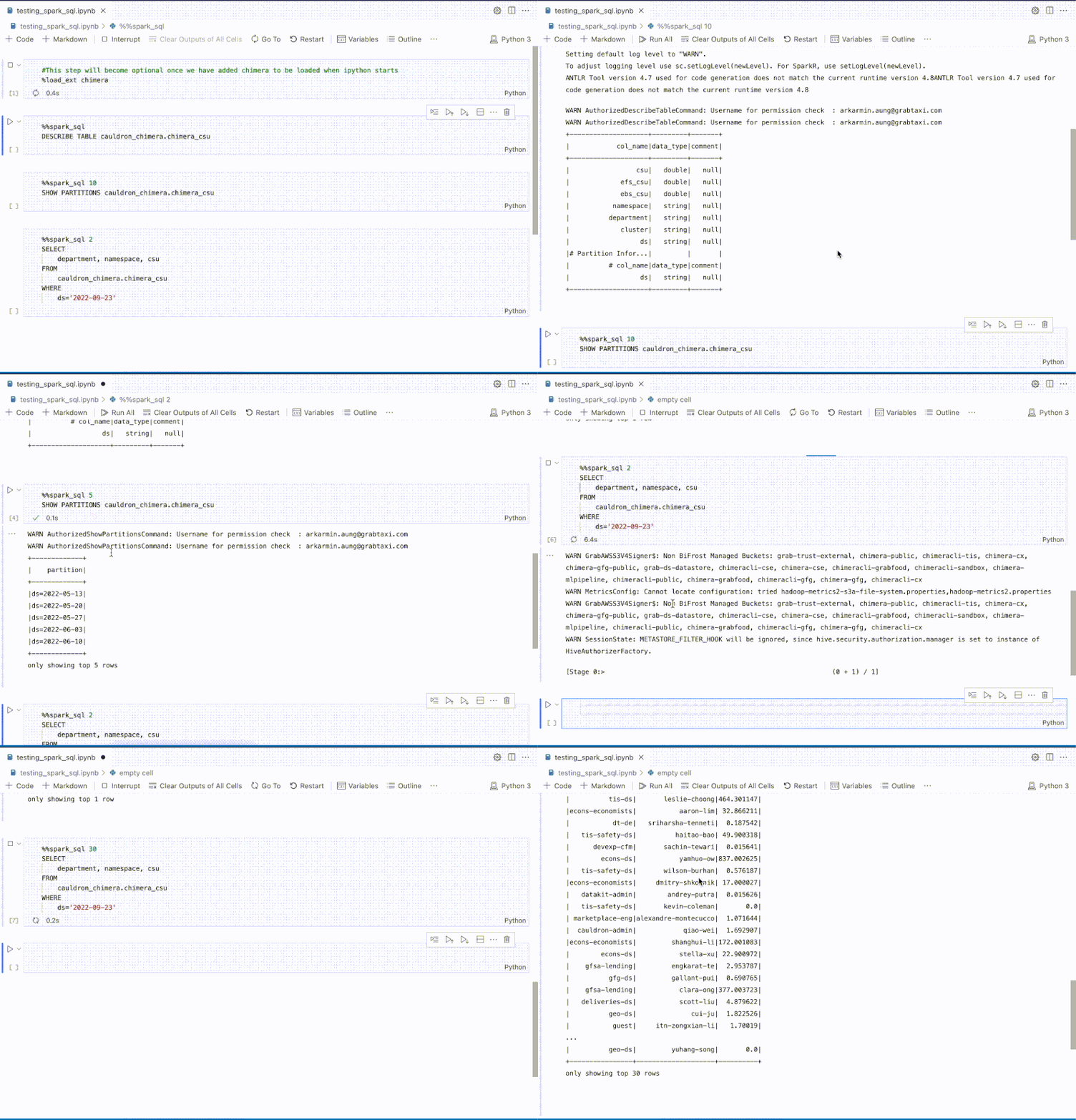
The platform is deeply integrated with internal Spark engines, enabling users to experiment building extract, transform, and load (ETL) jobs with data from Grab’s data lake. Integrated helpers such as SparkConnect Kernel and %%spark_sql magic cell, provide a faster developer experience, which can execute Spark SQL queries without needing to write additional code to start a Spark session and query.

Figure 4. %%spark_sql magic cell enables users to quickly explore data with Spark.

In addition to Magic Cell, the Chimera Sandbox offers advanced Spark functionalities. Users can write PySpark code using pre-configured and configurable Spark clients in the runtime environment. The underlying computation engine leverages Grab’s custom Spark-on-Kubernetes operator, enabling support for large-scale Spark workloads. This high-code capability complements the low-code Magic Cell feature, providing users with a versatile data processing environment.

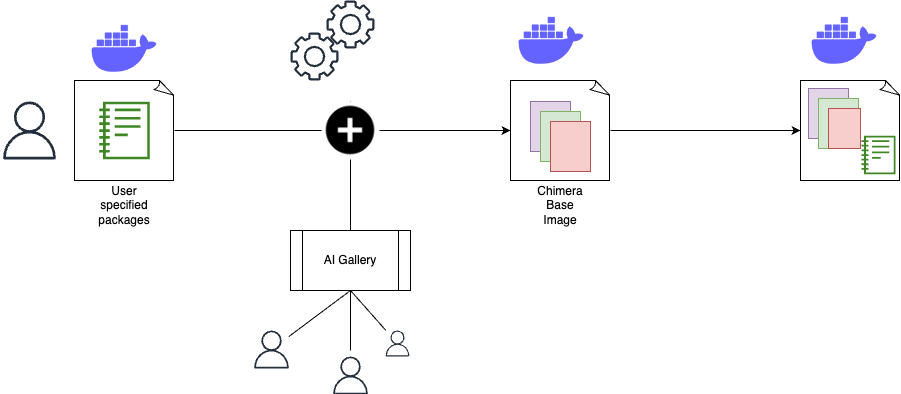
Chimera Sandbox features an AI Gallery to guide and accelerate users to start experimenting with ML solutions or building GenAI-powered applications. This is especially useful for new or novice users who are keen to explore what they can do on the Chimera Sandbox platform. With Chimera Sandbox, users are not just presented with a bare bones compute solution but rather are provided with ways to do ML tasks right from Chimera Sandbox Notebooks. This approach saves users from the hassle of having to piece together the examples from the public internet, which may not work on the platform. These ready-to-run and comprehensive notebooks in the AI Gallery assure users that they can run end-to-end examples without a hitch. Based on these examples, the users can only extend their experimentations and development for their specific needs. Not only that, these tutorials and notebooks exhibit the platform capabilities and integrations available on the platform in an interactive manner rather than having the users refer to a separate documentation.

Lastly, the AI Gallery encourages contributions from other Grabbers, fostering a collaborative environment. Users who are enthusiastic about creating educational contents on Chimera Sandbox can effectively share their work with other Grabbers.

Figure 5. Including AI Gallery in user specified sandbox images.

Integration with various LLM services

Notebook users on Chimera Sandbox can easily tap into a plethora of LLMs, both open source and proprietary models, without any additional setup via our AI Gateway. The platform takes care of access mechanisms and endpoints for various LLM services so that the users can easily use their favourite libraries to create LLM-powered applications and conduct experimentations. This seamless integration with LLMs enables users to focus on their GAI-powered ideas rather than having to worry about underlying logistics and technicalities of using different LLMs.

More than a notebook service

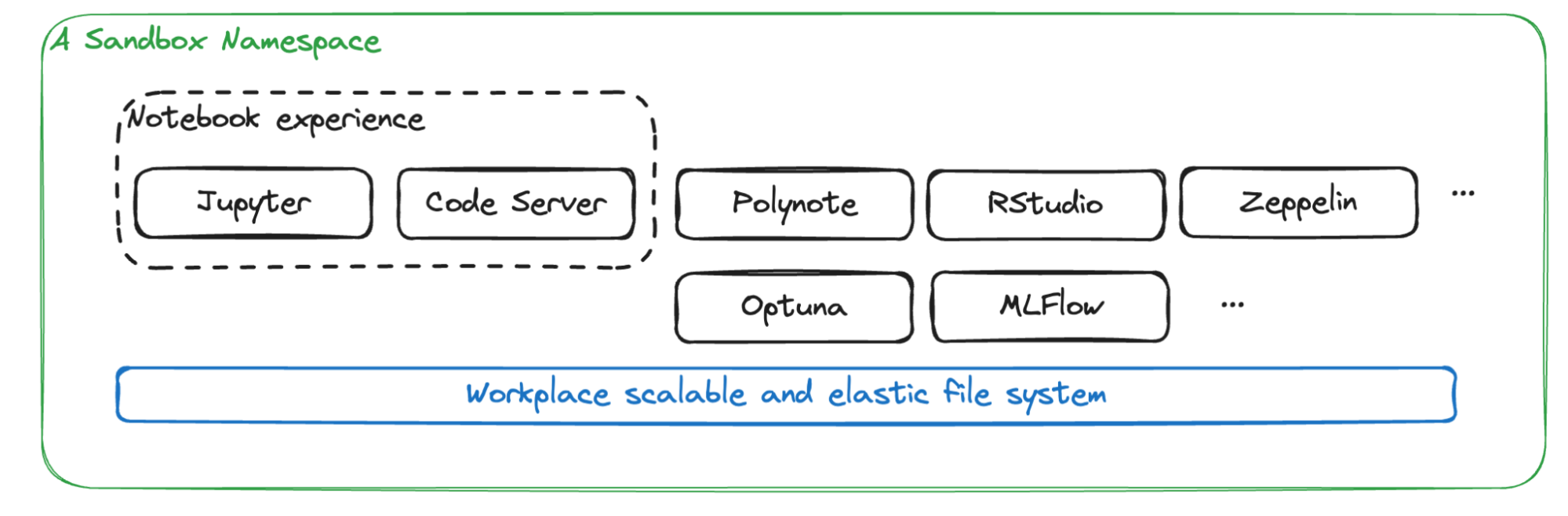
While Notebook is the most popular service on the platform, Chimera Sandbox offers much more than just notebook capabilities. It serves as a comprehensive namespace workspace equipped with a suite of ML/AI tools. Alongside notebooks, users can access essential ML tools such as Optuna for hyperparameter tuning, MLflow for experiment tracking, and other tools including Zeppelin, RStudio, Spark history, Polynote, and LabelStudio. All these services use a shared storage system, creating a tailored workspace for ML and AI tasks.

Figure 6. A Sandbox namespace with its out-of-the-box services.

Additionally, the Sandbox framework allows for the seamless integration of more services into personal workspaces. This high level of flexibility significantly enhances the capabilities of the Sandbox platform, making it an ideal environment for diverse ML and AI applications.

Cost attribution

For a multi-tenanted platform such as Chimera Sandbox, it is crucial to provide users information on how much they have spent with their experimentations. Cost showback and chargeback capabilities are of utmost importance for a platform on which users can launch Notebook services that use accelerated instances with GPUs. The platform provides cost attribution to individual users, so each user knows exactly how much they are spending on their experimentations and can make budget-conscious decisions. This transparency in cost attribution encourages responsible usage of resources and helps users manage their budgets effectively.

Growth and future plans

In essence, Chimera Sandbox is more than just a tool; it’s a catalyst for innovation and growth, empowering Grabbers to explore the frontiers of ML and AI. By providing an inclusive, flexible, and powerful platform, Chimera Sandbox is helping shape the future of Grab, making every Grabber not just ready but excited to contribute to the AI-driven transformation of our products and services.

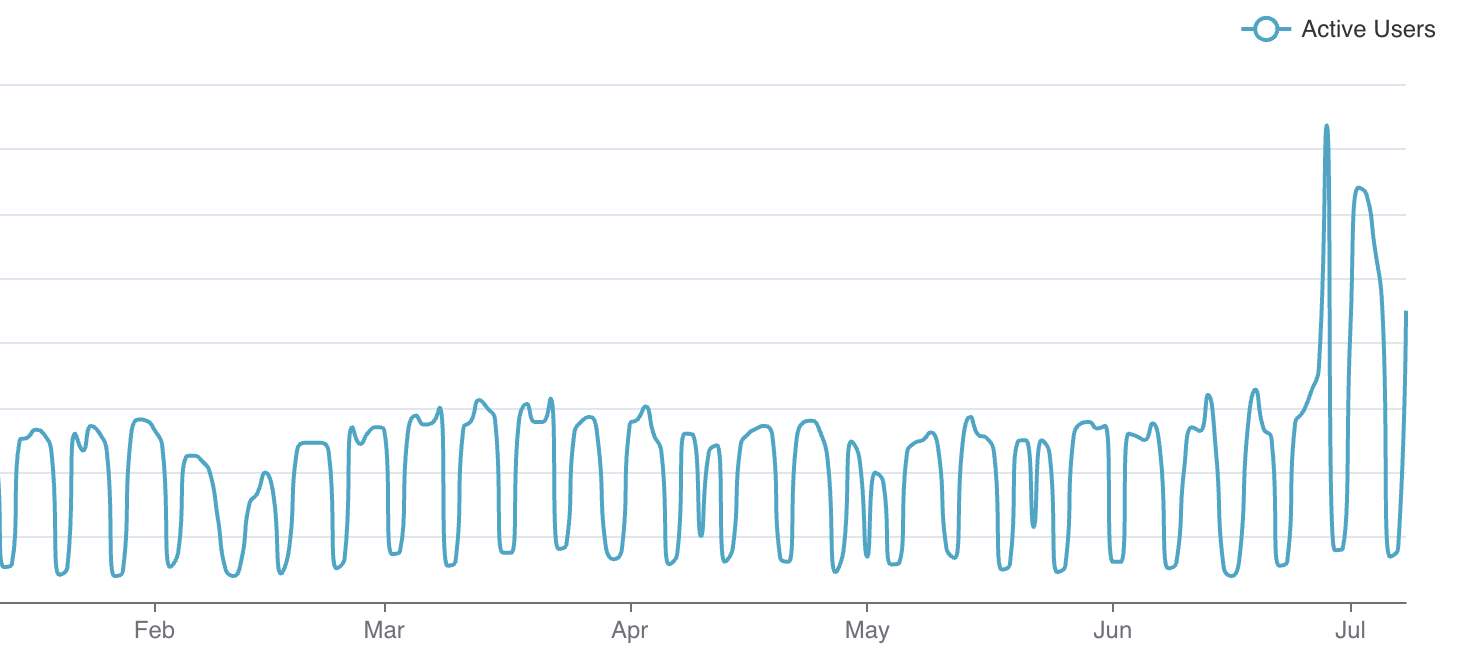
In July and August of this year, teams were given the opportunity to intensively learn and experiment with AI. Since then, we have observed hockey stick growth on the Chimera Sandbox platform. We are enabling massive experimentation across different teams at Grab to experiment and work on different GAI-powered applications.

Figure 7. Chimera Sandbox daily active users.

Our future plans include mechanisms for better notebook discovery, collaboration and usability, and the ability to enable users to schedule their notebooks right from Chimera Sandbox. These enhancements aim to improve the user experience and make the platform even more versatile and powerful.

Join us

Grab is the leading superapp platform in Southeast Asia, providing everyday services that matter to consumers. More than just a ride-hailing and food delivery app, Grab offers a wide range of on-demand services in the region, including mobility, food, package and grocery delivery services, mobile payments, and financial services across 700 cities in eight countries.

Powered by technology and driven by heart, our mission is to drive Southeast Asia forward by creating economic empowerment for everyone. If this mission speaks to you, join our team today!