All posts by Veliswa Boya

AWS Weekly Roundup: Kiro CLI latest features, AWS European Sovereign Cloud, EC2 X8i instances, and more (January 19, 2026)

Post Syndicated from Veliswa Boya original https://aws.amazon.com/blogs/aws/aws-weekly-roundup-kiro-cli-latest-features-aws-european-sovereign-cloud-ec2-x8i-instances-and-more-january-19-2026/

At the end of 2025 I was happy to take a long break to enjoy the incredible summers that the southern hemisphere provides. I’m back and writing my first post in 2026 which also happens to be my last post for the AWS News Blog (more on this later).

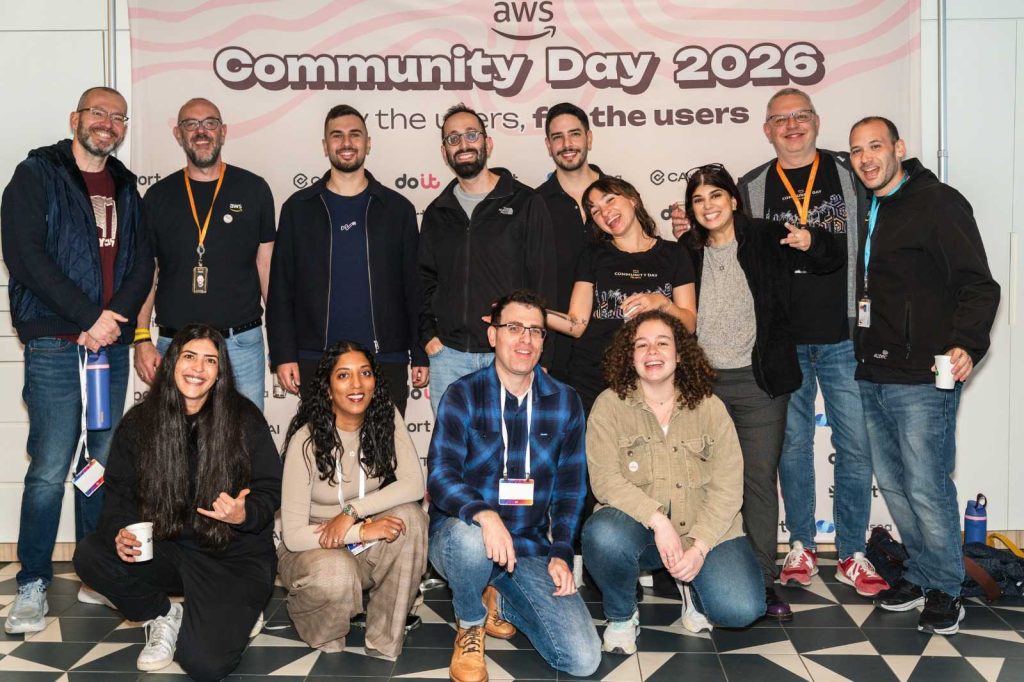
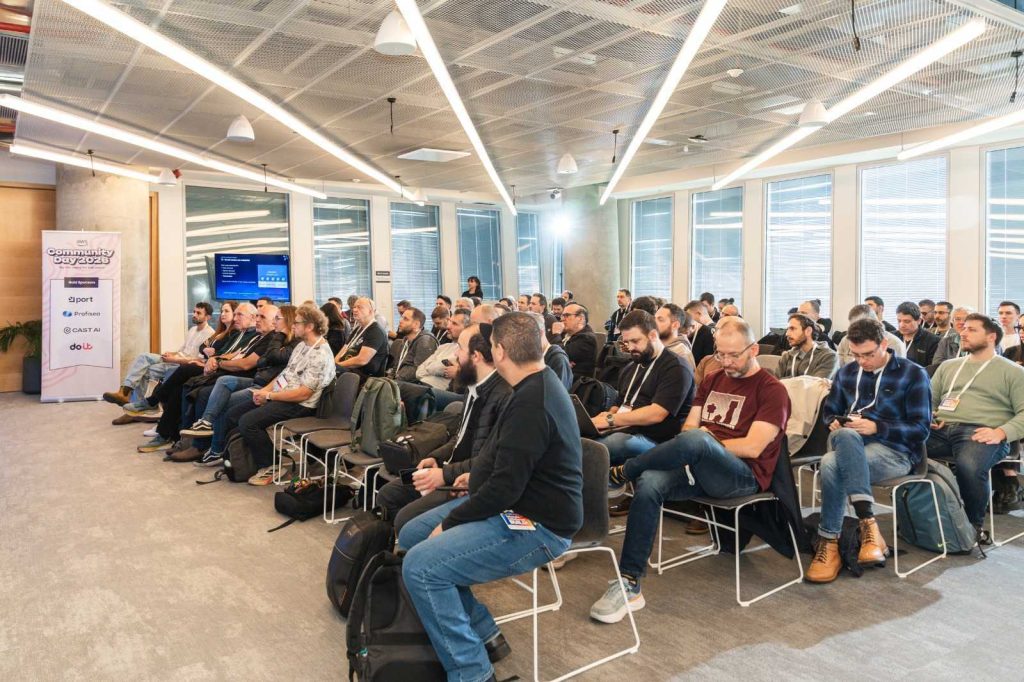
The AWS community is starting the year strong with various AWS re:invent re:Caps being hosted around the globe, with some communities already hosting their AWS Community Day events, the AWS Community Day Tel Aviv 2026 was hosted last week.
Last week’s launches
Here are last week’s launches that caught my attention:

  • Kiro CLI latest features – Kiro CLI now has granular controls for web fetch URLs, keyboard shortcuts for your custom agents, enhanced diff views, and much more. With these enhancements, you can now use allowlists or blocklists to restrict which URLs the agent can access, ensure a frictionless experience when working with multiple specialized agents in a single session, to name a few.
  • AWS European Sovereign Cloud – Following an announcement in 2023 of plans to build a new, independent cloud infrastructure, last week we announced the general availability of the AWS European Sovereign Cloud to all customers. The cloud is ready to meet the most stringent sovereignty requirements of European customers with a comprehensive set of AWS services.
  • Amazon EC2 X8i instancesPreviously launched in preview at AWS re:Invent 2025, last week we announced the general availability of new memory-optimized Amazon Elastic Compute Cloud (Amazon EC2) X8i instances. These instances are powered by custom Intel Xeon 6 processors with a sustained all-core turbo frequency of 3.9 GHz, available only on AWS. These SAP certified instances deliver the highest performance and fastest memory bandwidth among comparable Intel processors in the cloud.

Additional updates
These projects, blog posts, and news articles also caught my attention:

  • 5 core features in Amazon Quick Suite – AWS VP Agentic AI Swami Sivasubramanian talks about how he uses Amazon Quick Suite for just about everything. In October 2025 we announced Amazon Quick Suite, a new agentic teammate that quickly answers your questions at work and turns insights into actions for you. Amazon Quick Suite has become one of my favorite productivity tools, helping me with my research on various topics in addition to providing me with multiple perspectives on a topic.
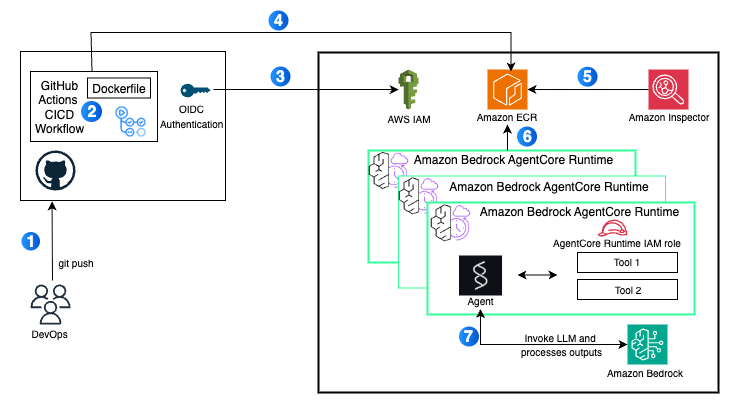
  • Deploy AI agents on Amazon Bedrock AgentCore using GitHub Actions – Last year we announced Amazon Bedrock AgentCore, a flexible service that helps you seamlessly create and manage AI agents across different frameworks and models, whether hosted on Amazon Bedrock or other environments. Learn how to use a GitHub Actions workflow to automate the deployment of AI agents on AgentCore Runtime. This approach delivers a scalable solution with enterprise-level security controls, providing complete continuous integration and delivery (CI/CD) automation.
Upcoming AWS events
Join us January 28 or 29 (depending on your time zone) for Best of AWS re:Invent, a free virtual event where we bring you the most impactful announcements and top sessions from AWS re:Invent. Jeff Barr, AWS VP and Chief Evangelist, will share his highlights during the opening session.

There is still time until January 21 to compete for $250,000 in prizes and AWS credits in the Global 10,000 AIdeas Competition (yes, the second letter is an I as in Idea, not an L as in like). No code required yet: simply submit your idea, and if you’re selected as a semifinalist, you’ll build your app using Kiro within AWS Free Tier limits. Beyond the cash prizes and potential featured placement at AWS re:Invent 2026, you’ll gain hands-on experience with next-generation AI tools and connect with innovators globally.

Earlier this month, the 2026 application for the Community Builders program launched. The application is open until January 21st, midnight PST so here’s your last chance to ensure that you don’t miss out.

If you’re interested in these opportunities, join the AWS Builder Center to learn with builders in the AWS community.

With that, I close one of my most meaningful chapters here at AWS. It’s been an absolute pleasure to write for you and I thank you for taking the time to read the work that my team and I pour our absolute hearts into. I’ve grown from the close collaborations with the launch teams and the feedback from all of you. The Sub-Sahara Africa (SSA) community has grown significantly, and I want to dedicate more time focused on this community, I’m still at AWS and I look forward to meeting at an event near you!

Check back next Monday for another Weekly Roundup!
Veliswa Boya

Amazon S3 Storage Lens adds performance metrics, support for billions of prefixes, and export to S3 Tables

Post Syndicated from Veliswa Boya original https://aws.amazon.com/blogs/aws/amazon-s3-storage-lens-adds-performance-metrics-support-for-billions-of-prefixes-and-export-to-s3-tables/

Today, we’re announcing three new capabilities for Amazon S3 Storage Lens that give you deeper insights into your storage performance and usage patterns. With the addition of performance metrics, support for analyzing billions of prefixes, and direct export to Amazon S3 Tables, you have the tools you need to optimize application performance, reduce costs, and make data-driven decisions about your Amazon S3 storage strategy.

New performance metric categories
S3 Storage Lens now includes eight new performance metric categories that help identify and resolve performance constraints across your organization. These are available at organization, account, bucket, and prefix levels. For example, the service helps you identify small objects in a bucket or prefix that can  slow down application performance. This can be mitigated by batching small objects or using the Amazon S3 Express One Zone storage class for higher performance small object workloads.

To access the new performance metrics, you need to enable performance metrics in the S3 Storage Lens advanced tier when creating a new Storage Lens dashboard or editing an existing configuration.

Metric category Details Use case Mitigation
Read request size Distribution of read request sizes (GET) by day Identify dataset with small read request patterns that slow down performance Small request: Batch small objects or use Amazon S3 Express One Zone for high-performance small object workloads
Write request size Distribution of write request sizes (PUT, POST, COPY, and UploadPart) by day Identify dataset with small write request patterns that slow down performance Large request: Parallelize requests, use MPU or use AWS CRT
Storage size Distribution of object sizes Identify dataset with small small objects that slow down performance Small object sizes: Consider bundling small objects
Concurrent PUT 503 errors Number of 503s due to concurrent PUT operation on same object Identify prefixes with concurrent PUT throttling that slow down performance For single writer, modify retry behavior or use Amazon S3 Express One Zone. For multiple writers, use consensus mechanism or use Amazon S3 Express One Zone
Cross-Region data transfer Bytes transferred and requests sent across Region, in Region Identify potential performance and cost degradation due to cross-Region data access Co-locate compute with data in the same AWS Region
Unique objects accessed Number or percentage of unique objects accessed per day Identify datasets where small subset of objects are being frequently accessed. These can be moved to higher performance storage tier for better performance Consider moving active data to Amazon S3 Express One Zone or other caching solutions
FirstByteLatency (existing Amazon CloudWatch metric) Daily average of first byte latency metric The daily average per-request time from the complete request being received to when the response starts to be returned
TotalRequestLatency (existing Amazon CloudWatch metric) Daily average of Total Request Latency The daily average elapsed per request time from the first byte received to the last byte sent

How it works
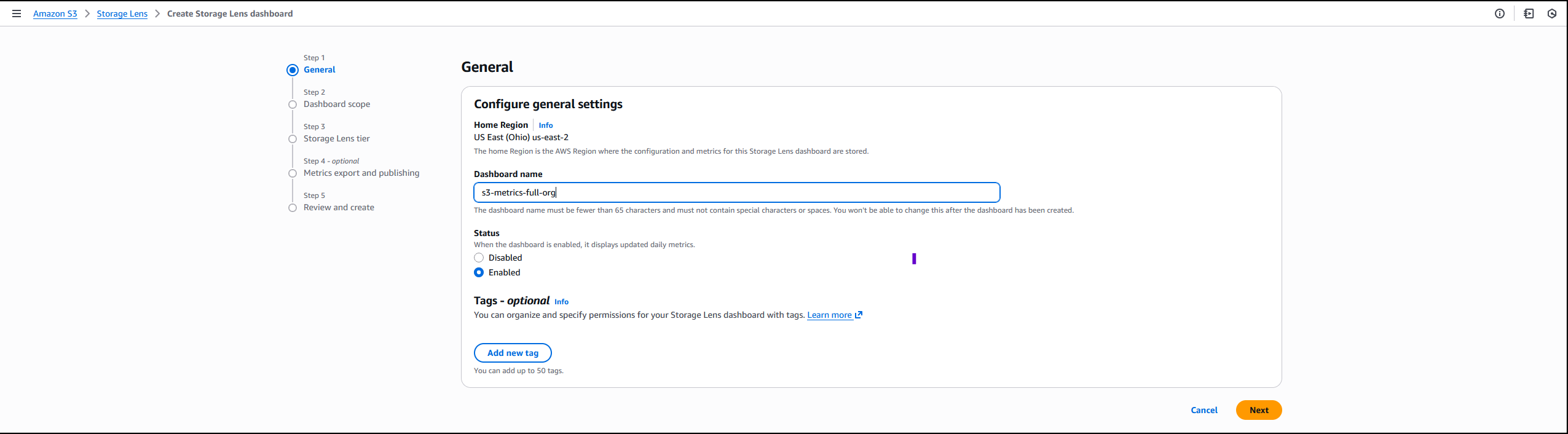
On the Amazon S3 console I choose Create Storage Lens dashboard to create a new dashboard. You can also edit an existing dashboard configuration. I then configure general settings such as providing a Dashboard name, Status, and the optional Tags. Then, I choose Next.


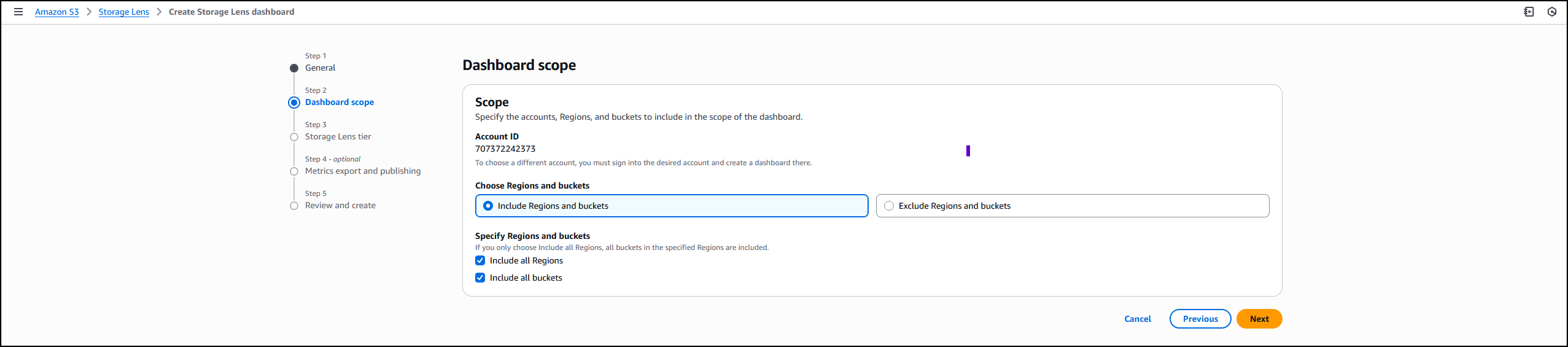
Next, I define the scope of the dashboard by selecting Include all Regions and Include all buckets and specifying the Regions and buckets to be included.


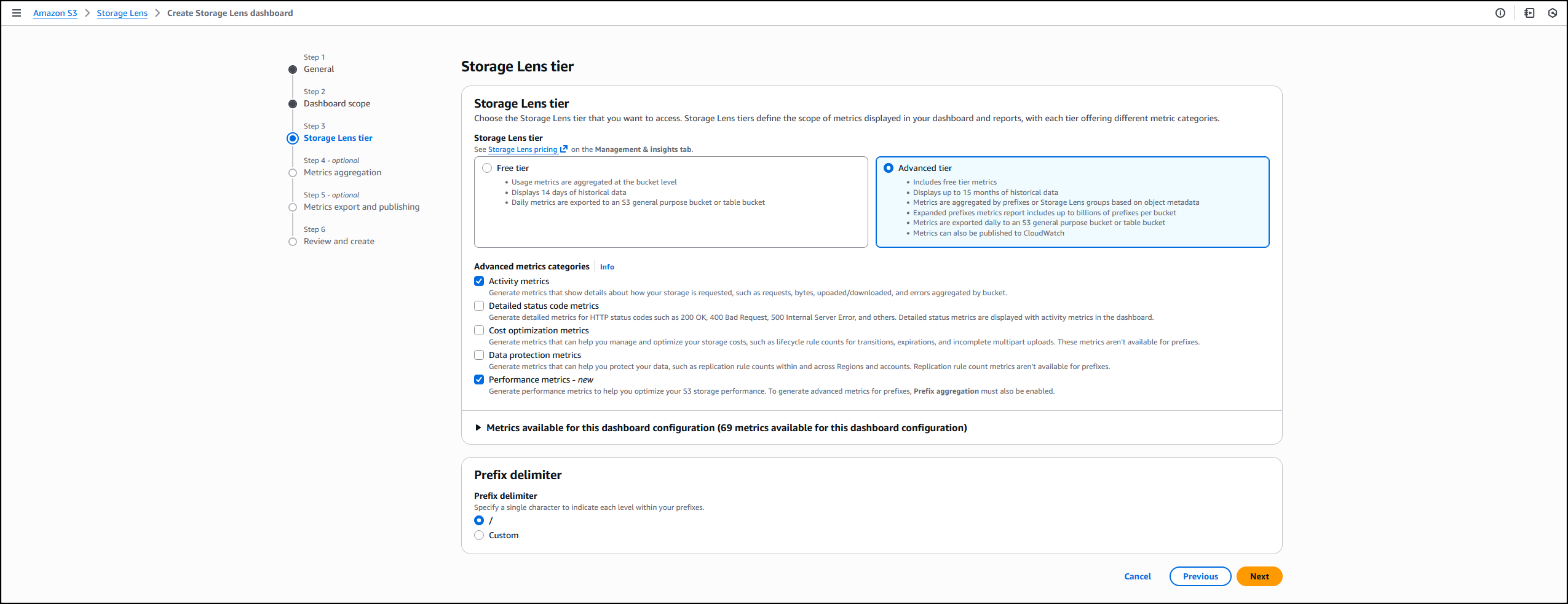
I opt in to the Advanced tier in the Storage Lens dashboard configuration, select Performance metrics, then choose Next.


Next, I select Prefix aggregation as an additional metrics aggregation, then leave the rest of the information as default before I choose Next.


I select the Default metrics report, then General purpose bucket as the bucket type, and then select the Amazon S3 bucket in my AWS account as the Destination bucket. I leave the rest of the information as default, then select Next.


I review all the information before I choose Submit to finalize the process.


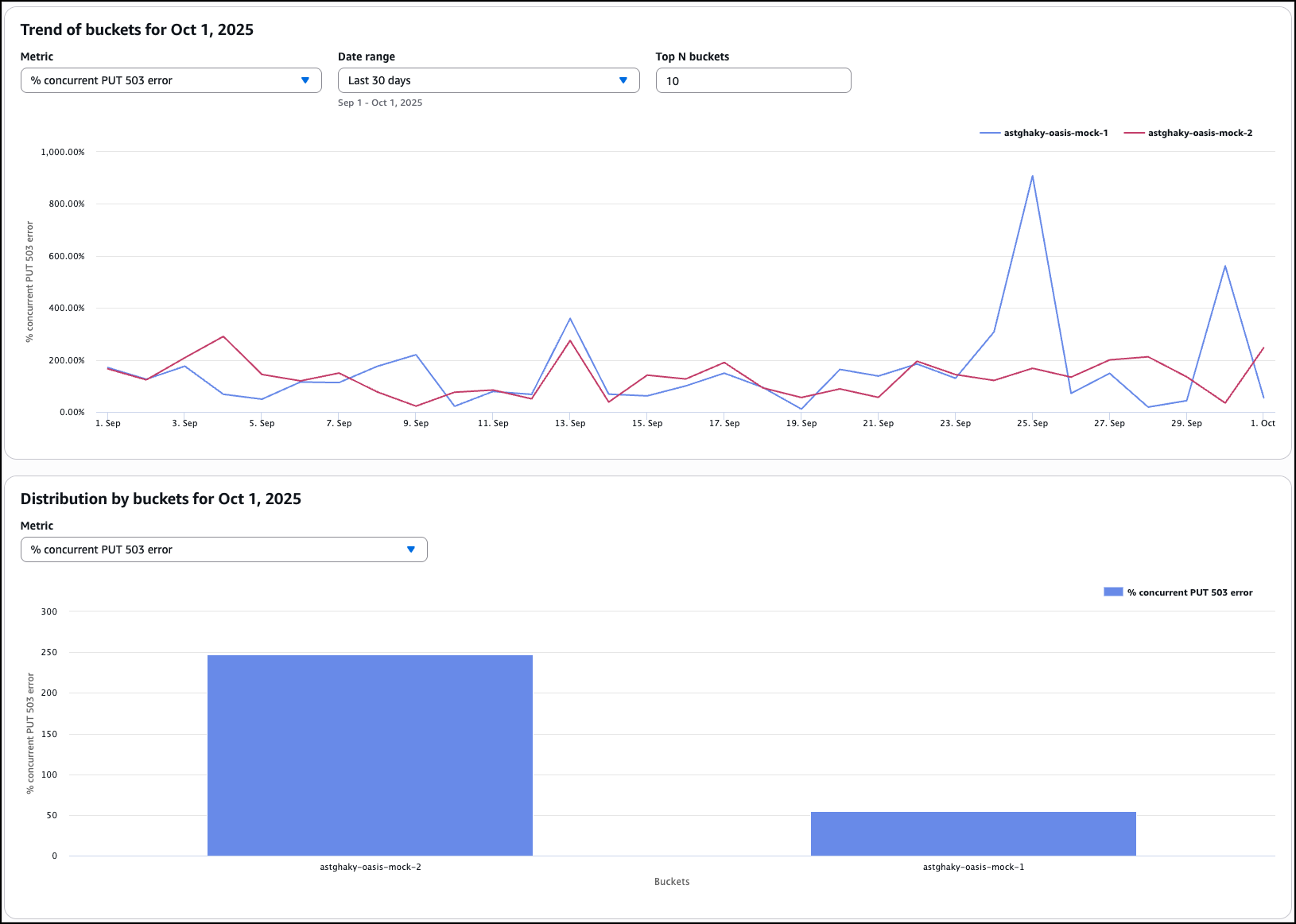
After it’s enabled, I’ll receive daily performance metrics directly in the Storage Lens console dashboard. You can also choose to export report in CSV or Parquet format to any bucket in your account or publish to Amazon CloudWatch. The performance metrics are aggregated and published daily and will be available at multiple levels: organization, account, bucket, and prefix. In this dropdown menu, I choose the % concurrent PUT 503 error for the Metric, Last 30 days for the Date range, and 10 for the Top N buckets.


The Concurrent PUT 503 error count metric tracks the number of 503 errors generated by simultaneous PUT operations to the same object. Throttling errors can degrade application performance. For a single writer, modify retry behavior or use higher performance storage tier such as Amazon S3 Express One Zone to mitigate concurrent PUT 503 errors. For multiple writers scenario, use a consensus mechanism to avoid concurrent PUT 503 errors or use higher performance storage tier such as Amazon S3 Express One Zone.

Complete analytics for all prefixes in your S3 buckets
S3 Storage Lens now supports analytics for all prefixes in your S3 buckets through a new Expanded prefixes metrics report. This capability removes previous limitations that restricted analysis to prefixes meeting a 1% size threshold and a maximum depth of 10 levels. You can now track up to billions of prefixes per bucket for analysis at the most granular prefix level, regardless of size or depth.

The Expanded prefixes metrics report includes all existing S3 Storage Lens metric categories: storage usage, activity metrics (requests and bytes transferred), data protection metrics, and detailed status code metrics.

How to get started
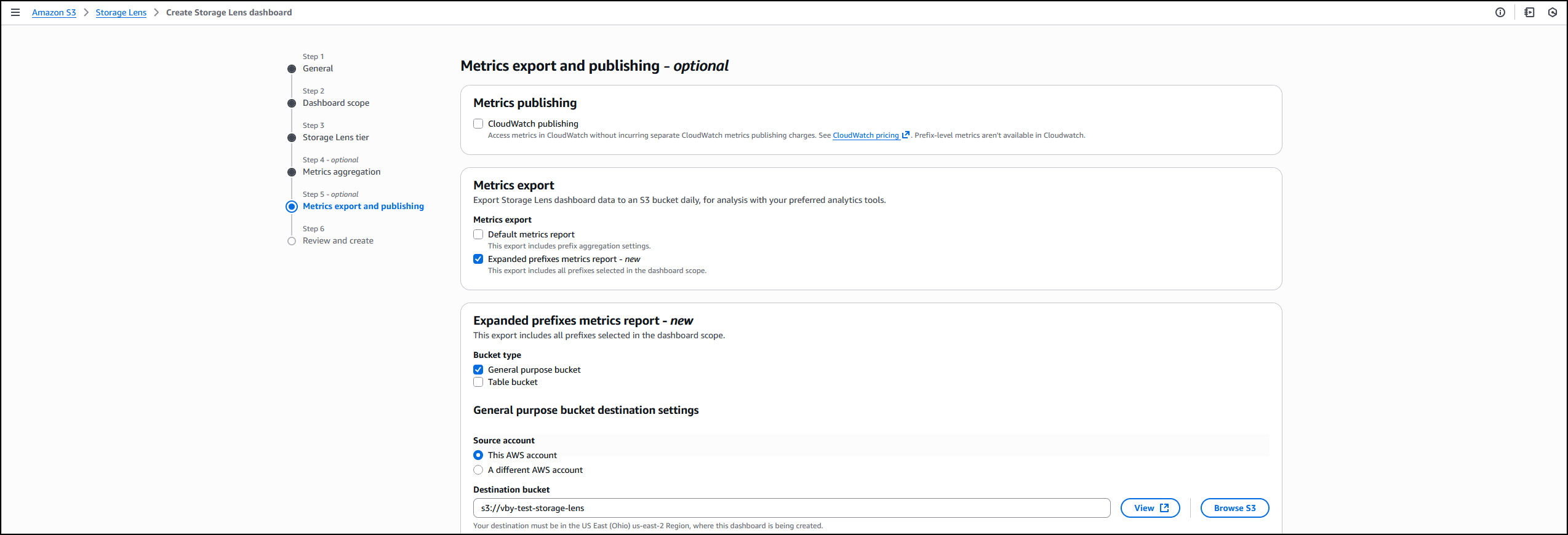
I follow the same steps outlined in the How it works section to create or update the Storage Lens dashboard. In Step 4 on the console, where you select export options, you can select the new Expanded prefixes metrics report. Thereafter, I can export the expanded prefixes metrics report in CSV or Parquet format to any general purpose bucket in my account for efficient querying of my Storage Lens data.


Good to know
This enhancement addresses scenarios where organizations need granular visibility across their entire prefix structure. For example, you can identify prefixes with incomplete multipart uploads to reduce costs, track compliance across your entire prefix structure for encryption and replication requirements, and detect performance issues at the most granular level.

Export S3 Storage Lens metrics to S3 Tables
S3 Storage Lens metrics can now be automatically exported to S3 Tables, a fully managed feature on AWS with built-in Apache Iceberg support. This integration provides daily automatic delivery of metrics to AWS managed S3 Tables for immediate querying without requiring additional processing infrastructure.

How to get started
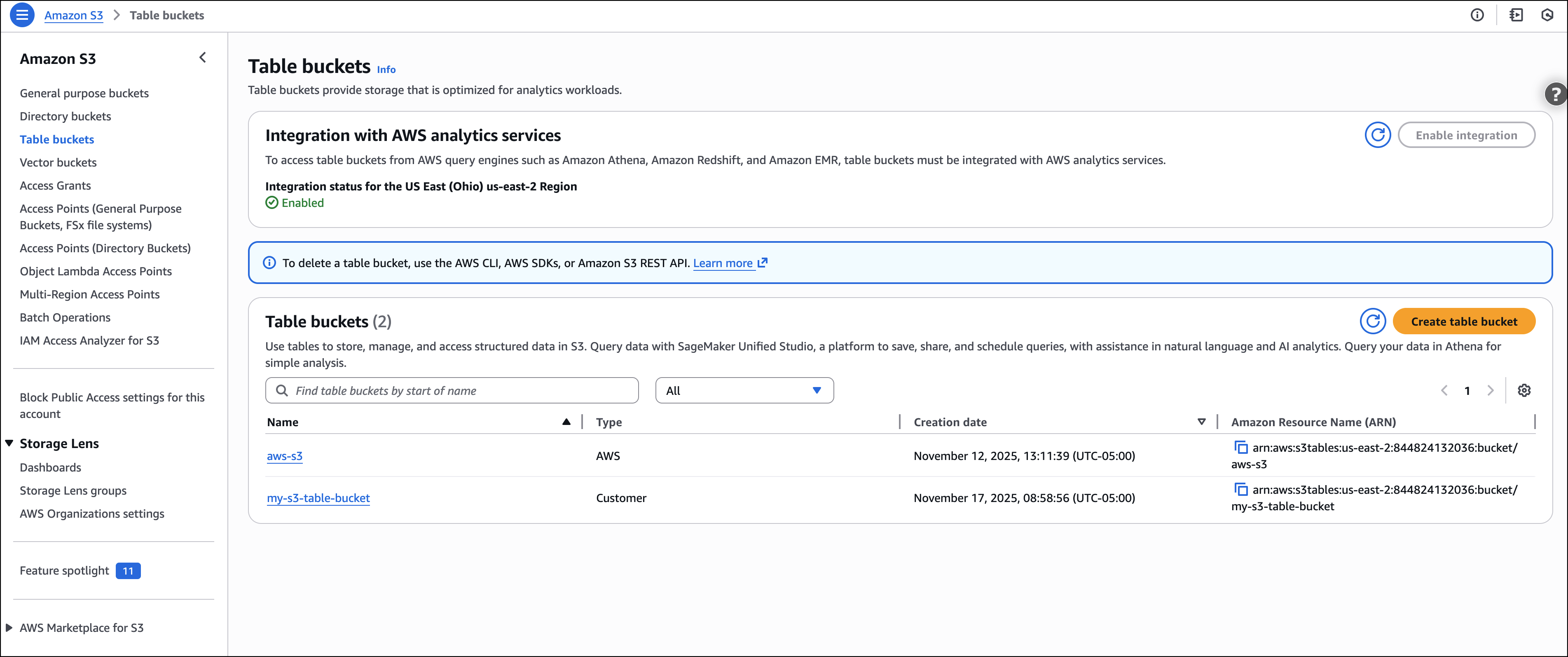
I start by following the process outlined in Step 5 on the console, where I choose the export destination. This time, I choose Expanded prefixes metrics report. In addition to General purpose bucket, I choose Table bucket.

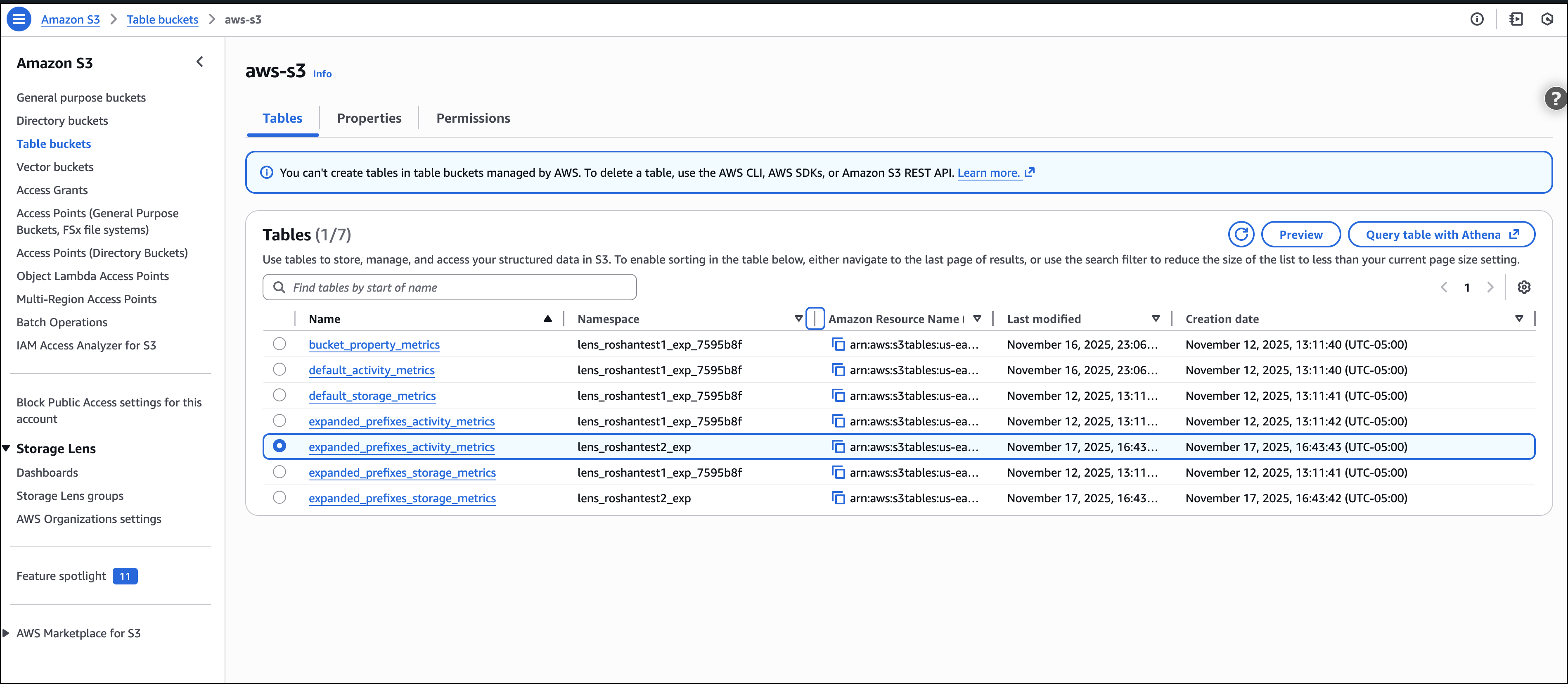
The new Storage Lens metrics are exported to new tables in an AWS managed bucket aws-s3.


I select the expanded_prefixes_activity_metrics table to view API usage metrics for expanded prefix reports.


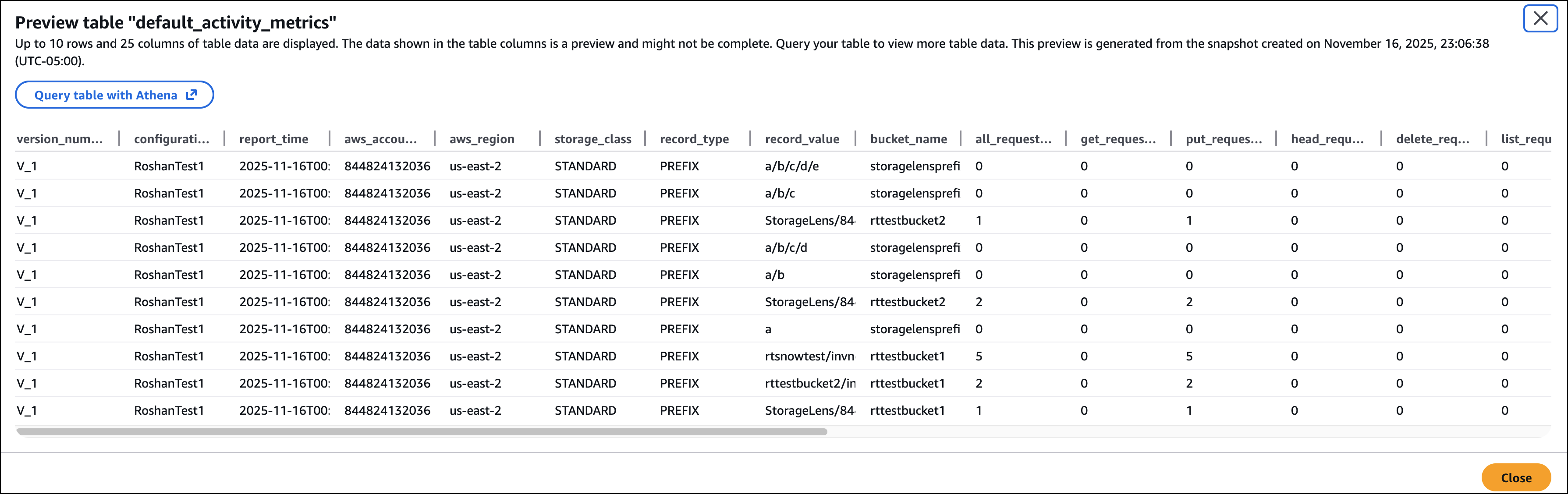
I can preview the table on the Amazon S3 console or use Amazon Athena to query the table.


Good to know
S3 Tables integration with S3 Storage Lens simplifies metric analysis using familiar SQL tools and AWS analytics services such as Amazon Athena, Amazon QuickSight, Amazon EMR, and Amazon Redshift, without requiring a data pipeline. The metrics are automatically organized for optimal querying, with custom retention and encryption options to suit your needs.

This integration enables cross-account and cross-Region analysis, custom dashboard creation, and data correlation with other AWS services. For example, you can combine Storage Lens metrics with S3 Metadata to analyze prefix-level activity patterns and identify objects in prefixes with cold data that are eligible for transition to lower-cost storage tiers.

For your agentic AI workflows, you can use natural language to query S3 Storage Lens metrics in S3 Tables with the S3 Tables MCP Server. Agents can ask questions such as ‘which buckets grew the most last month?’ or ‘show me storage costs by storage class’ and get instant insights from your observability data.

Now available
All three enhancements are available in all AWS Regions where S3 Storage Lens is currently offered (except the China Regions and AWS GovCloud (US)).

These features are included in the Amazon S3 Storage Lens Advanced tier at no additional charge beyond standard advanced tier pricing. For the S3 Tables export, you pay only for S3 Tables storage, maintenance, and queries. There is no additional charge for the export functionality itself.

To learn more about Amazon S3 Storage Lens performance metrics, support for billions of prefixes, and export to S3 Tables, refer to the Amazon S3 user guide. For pricing details, visit the Amazon S3 pricing page.

Veliswa Boya.

Amazon FSx for NetApp ONTAP now integrates with Amazon S3 for seamless data access

Post Syndicated from Veliswa Boya original https://aws.amazon.com/blogs/aws/amazon-fsx-for-netapp-ontap-now-integrates-with-amazon-s3-for-seamless-data-access/

Today, we’re announcing the ability to access your data in Amazon FSx for NetApp ONTAP file systems using Amazon Simple Storage Service (Amazon S3). With this capability, you can use your enterprise file data to augment generative AI applications with Amazon Bedrock Knowledge Bases for Retrieval Augmented Generation (RAG), train machine learning (ML) models with Amazon SageMaker, generate insights with Amazon S3 integrated third-party services, use comprehensive research capabilities in AI-powered business intelligence (BI) tools such as Amazon Quick Suite, and run analyses using Amazon S3 based cloud-native applications, all while your file data continues to reside in your FSx for NetApp ONTAP file system.

Amazon FSx for NetApp ONTAP is the first and fully AWS managed NetApp ONTAP file system in the cloud to migrate on-premises applications that rely on NetApp ONTAP or other network-attached storage (NAS) appliances to AWS without having to change how you manage your data. FSx for NetApp ONTAP provides the popular capabilities, high performance, and data management APIs of ONTAP file systems with the added benefits of the AWS Cloud, such as simplified management, on-demand scaling, and seamless integration with other AWS services.

Over the years, AWS has developed a broad range of industry-leading AI, ML, and analytics services and applications that work with data in Amazon S3 that organizations use to innovate faster, discover new insights, and make even better data-driven decisions. However, some organizations want to use these services with their enterprise file data stored in NetApp ONTAP or other NAS appliances.

How to get started
You can create and attach an S3 Access Point to your FSx for ONTAP file system using the Amazon FSx console, the AWS Command Line Interface (AWS CLI), or the AWS SDK.

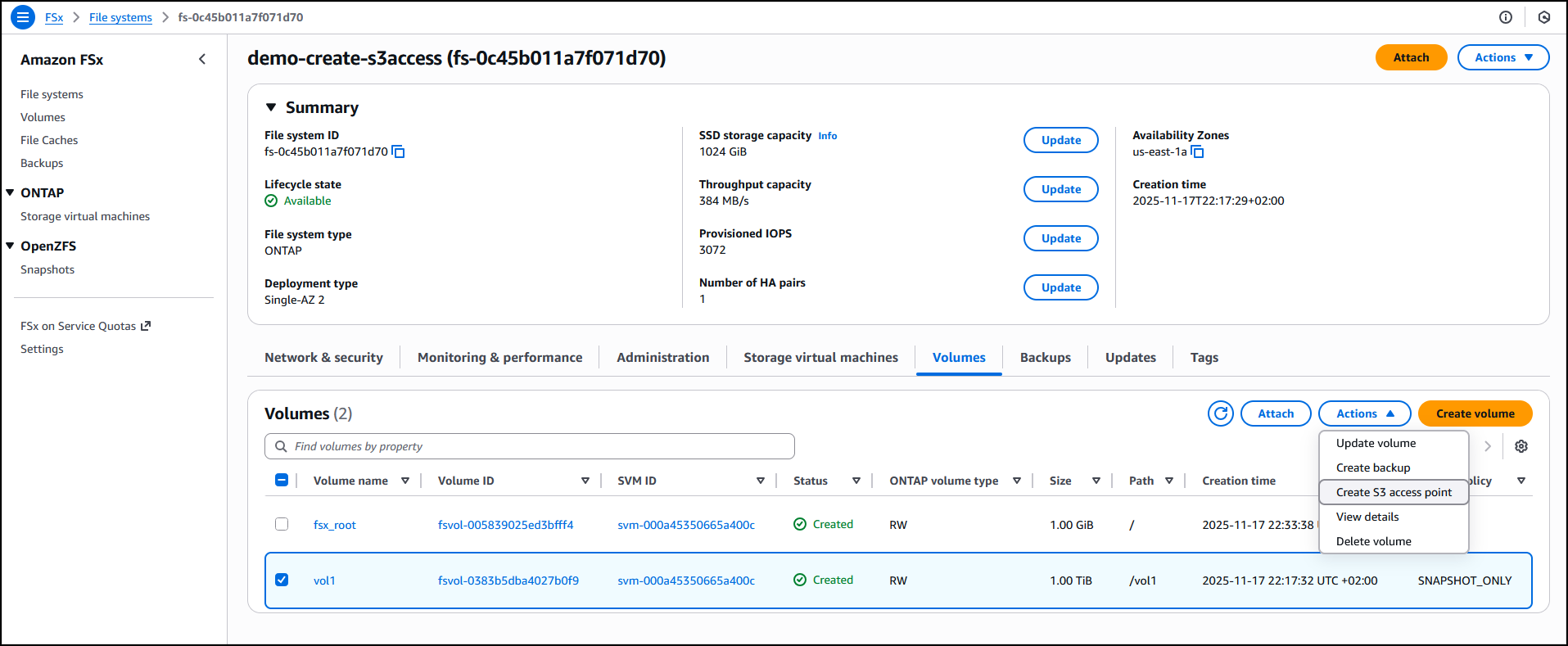
I have an existing FSx for ONTAP file system demo-create-s3access which I created by following the steps in the Creating file systems in the FSx for ONTAP documentation. Using the Amazon FSx console I now choose the file system ID fs-0c45b011a7f071d70 to access the full details of the file system.

I’ll attach the access point to the volume of the file system. I choose the volume vol1 and then select Create S3 Access Point from the Actions dropdown menu.


I enter details such as the access point name, the type of file system user identity and the network configuration, then choose Create s3 Access Point to finalize the process.


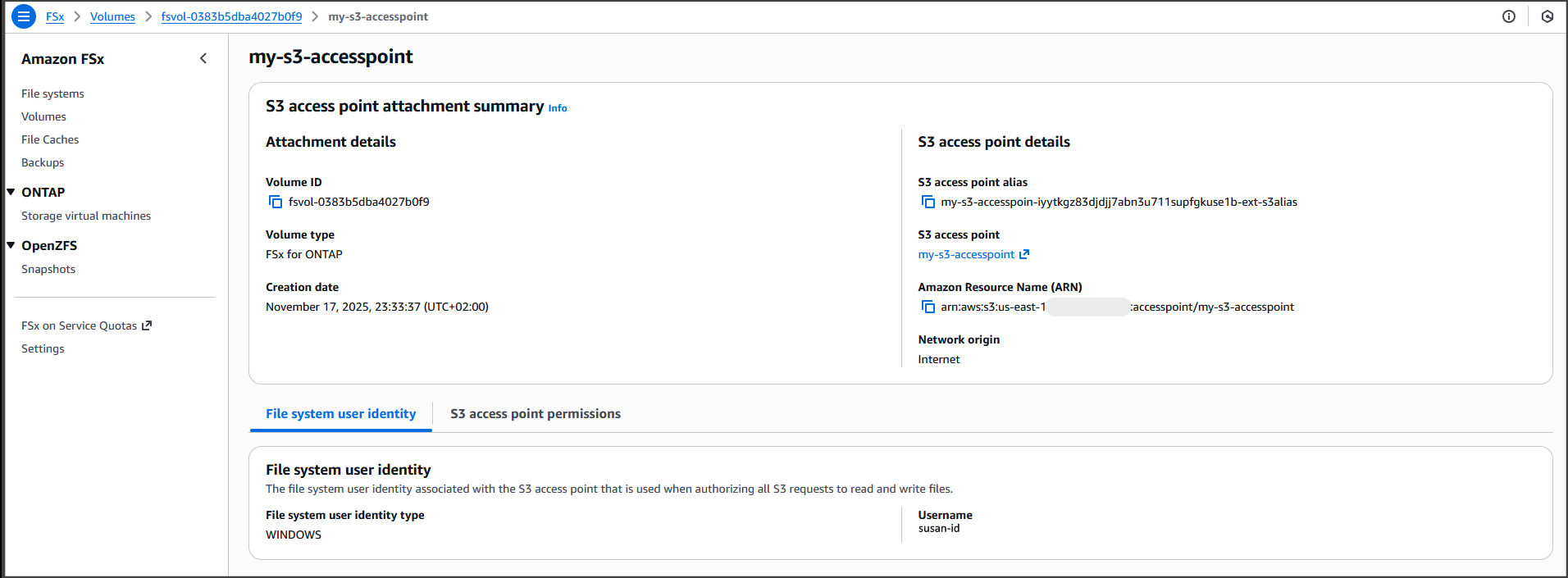
After it’s created, the access point my-s3-accesspoint is ready to allow access to the file data stored in my file system demo-create-s3access from Amazon S3. Amazon Access Points are S3 endpoints that can be attached to Amazon FSx volumes and used to perform Amazon S3 object operations.


I can now bring proprietary data stored in the file system demo-create-s3access to Amazon S3 for use in applications that work with Amazon S3 while my file data continues to reside in the FSx for NetApp ONTAP file system using the access point my-s3-accesspoint (this data remains accessible through the file protocols).

For the walkthrough in this post, I’ll integrate with Quick Suite.

Integrating decades of enterprise file data with the latest AI powered BI tools on AWS
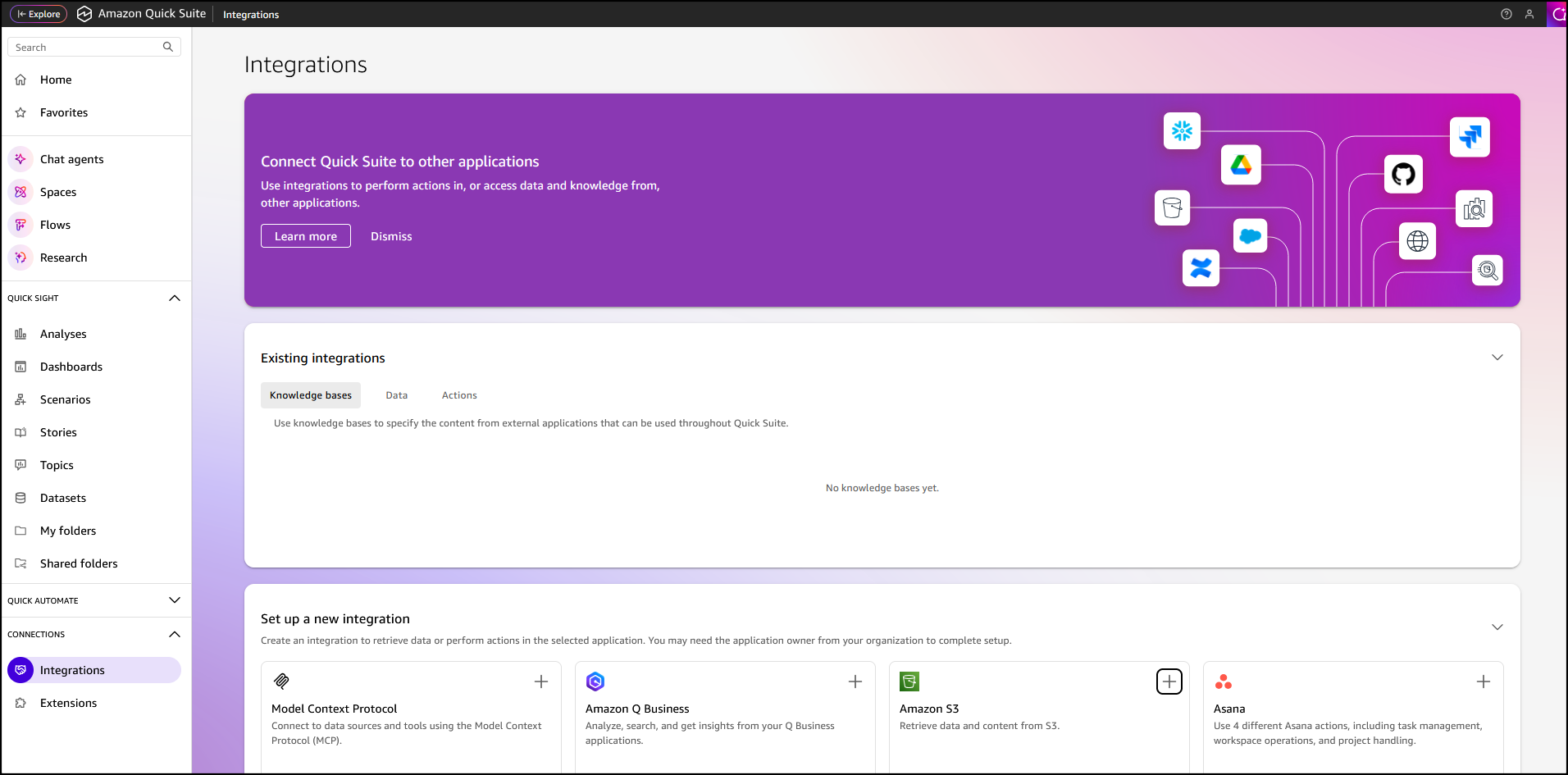
In the Quick Suite Console, in the left navigation pane, I choose Connections, then select Integrations. Before you begin, make sure that you have the correct permissions to the Amazon S3 AWS resource. You can control the AWS resources that Quick Suite can access by following the Amazon Quick Suite user guide.


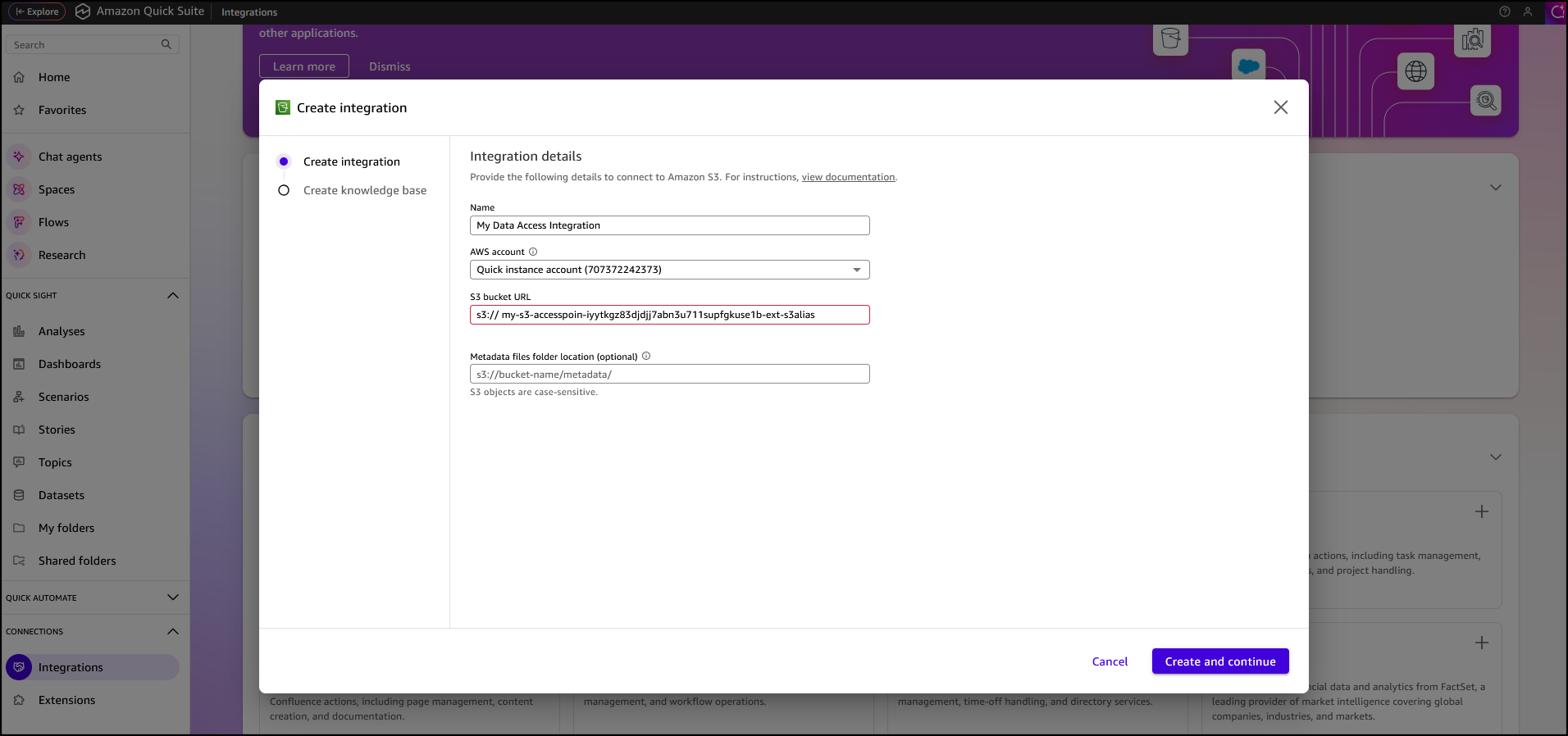
After I’ve selected the Amazon S3 integration I enter my Amazon S3 Access Point alias as the S3 bucket URL, leave the rest of the information as default, then choose Create and continue.


I finalize the process by providing the Name of the knowledge base, the Description, then choose Create.


After the knowledge base has been created it’s automatically synchronized, it’s now available for interaction.


I want to learn more about the AWS European Sovereign Cloud so I’ve updated the file system (accessed through the S3 Access Point my-s3-accesspoin-iyytkgz83djdjj7abn3u711supfgkuse1b-ext-s3alias) with the AWS whitepaper on this topic. In the chat in Amazon Quick Suite. I start asking the first question “do we have any documentation on the europe sovereignty cloud?“. To answer my question, the chat agent accesses and analyzes various types of data sources I have permission to use, including uploaded files in my current conversation, spaces I have access to, knowledge bases from my integrations, and more.

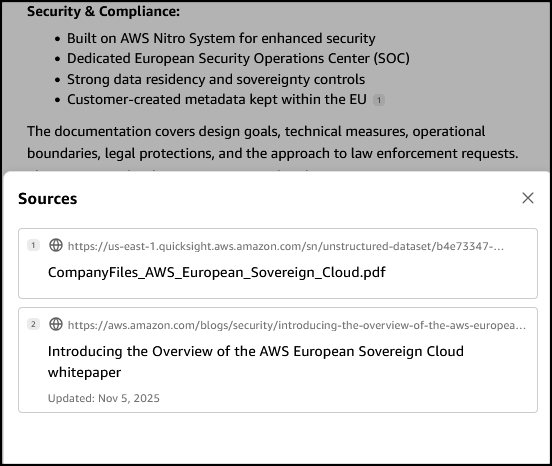
When I verify the source, I see that the document I uploaded to my file system is listed as one of the sources.

Other use cases of Amazon S3 Access Points for Amazon FSx for NetApp ONTAP
Earlier, we looked at use cases such as connecting an organization’s proprietary file data to Amazon Quick Suite for advanced business intelligence. Additionally, Amazon S3 Access Points for Amazon FSx for NetApp ONTAP can be used to seamlessly integrate enterprise file data with comprehensive analytics services, such as Amazon Athena for serverless SQL queries or AWS Glue for ETL processing, to name a few.

Amazon S3 Access Points for Amazon FSx for NetApp ONTAP are also suitable for data access from serverless compute workloads that are cloud-native with containerized microservices that require flexible access to shared enterprise datasets, such as configuration files, reference data, content libraries, model artifacts, and application assets.

Now available
You can get started today using the Amazon FSx console, AWS CLI, or AWS SDK to attach Amazon S3 Access Points to your Amazon FSx for NetApp ONTAP file systems. The feature is available in the following AWS Regions: Africa (Cape Town), Asia Pacific (Hong Kong, Hyderabad, Jakarta, Melbourne, Mumbai, Osaka, Seoul, Singapore, Sydney, Tokyo), Canada (Central, Calgary), Europe (Frankfurt, Ireland, London, Milan, Paris, Spain, Stockholm, Zurich), Israel (Tel Aviv), Middle East (Bahrain, UAE), South America (Sao Paulo), US East (N. Virginia, Ohio), and US West (N. California Oregon). You’re billed by Amazon S3 for the requests and data transfer costs through your S3 Access Point, in addition to your standard Amazon FSx charges. Learn more on the Amazon FSx for NetApp ONTAP pricing page.

PS: Writing a blog post at AWS is always a team effort, even when you see only one name under the post title. In this case, I want to thank Luke Miller, for his expertise and generous help with technical guidance, which made this overview possible and comprehensive.

Veliswa Boya.

AWS Control Tower introduces a Controls Dedicated experience

Post Syndicated from Veliswa Boya original https://aws.amazon.com/blogs/aws/aws-control-tower-introduces-a-controls-dedicated-experience/

Today, we’re announcing a Controls Dedicated experience in AWS Control Tower. With this feature, you can use Amazon Web Services (AWS) managed controls without the need to set up resources you don’t need, which means you get started faster if you already have an established multi-account environment and want to use AWS Control Tower only for its managed controls. The Controls Dedicated experience gives you seamless access to the comprehensive collection of managed controls in the Control Catalog to incrementally enhance your governance stance.

Until now, customers were required to adopt and configure many recommended best practices which meant implementing a full AWS landing zone at the time of setting up a multi-account environment. This setup included defining the prescribed organizational structure, required services, and more, in AWS Control Tower to start using landing zone. This approach is helpful to ensure a well-architected multi-account environment, however, for customers who already have an established, well-architected multi-account environment and only want to use AWS managed controls, it was more challenging for them to adopt AWS Control Tower. The new Controls Dedicated experience provides a faster and more flexible way of using AWS Control Tower.

How it works
Here’s how I define managed controls using the Controls Dedicated experience in AWS Control Tower in one of my accounts.

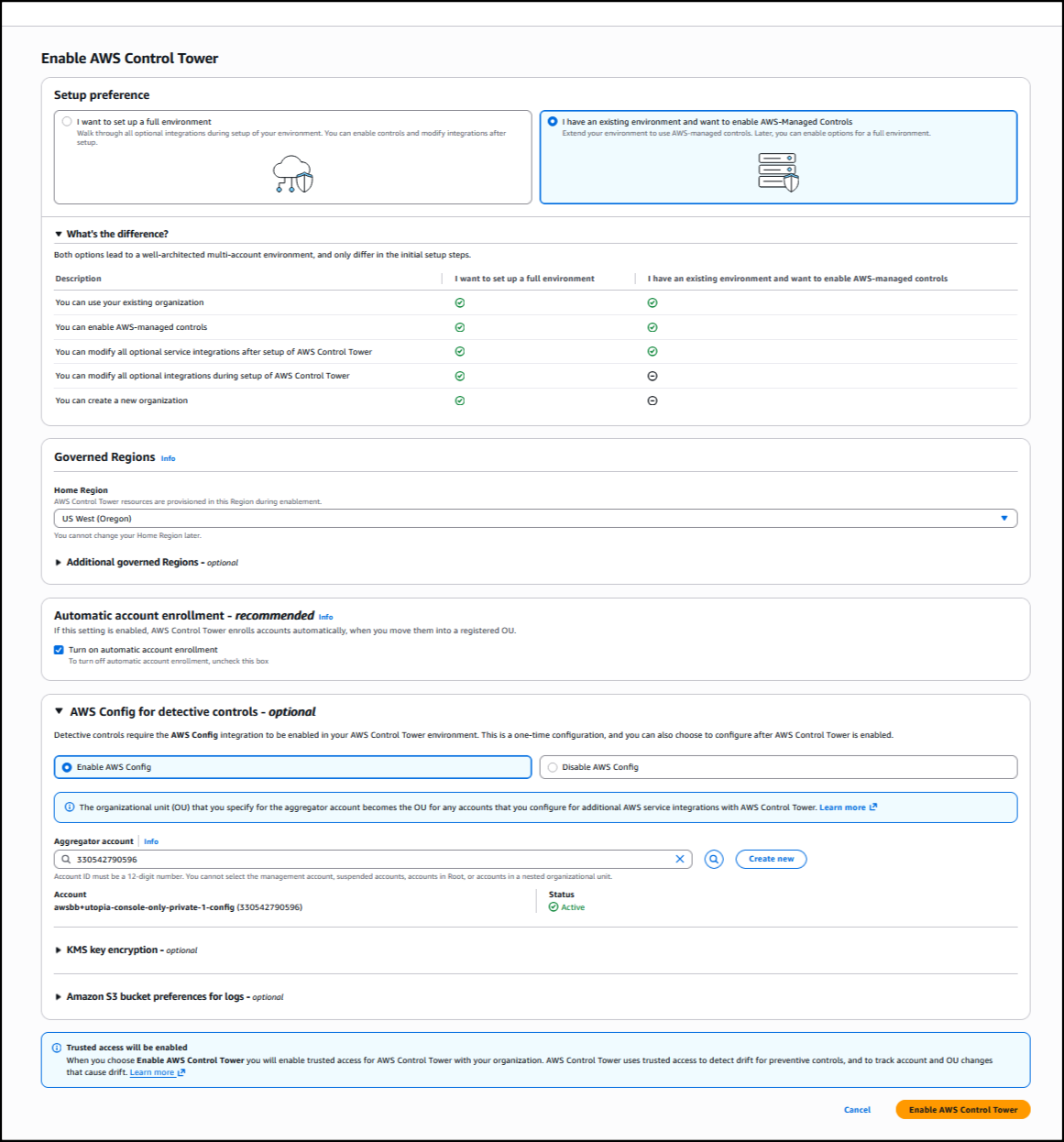
I start by choosing Enable AWS Control Tower on the AWS Control Tower landing page.

I have the option to set up a full environment, or only set up controls using the Controls Dedicated experience. I opt to set up controls by choosing I have an existing environment and want to enable AWS Managed Controls. Next, I set up the rest of the information, such as choosing the Home Region from the dropdown list so that AWS Control Tower resources are provisioned in this Region during enablement. I also select Turn on automatic account enrollment for AWS Control Tower to enroll accounts automatically when I move them into a registered organization unit. The rest of the information is optional; I choose Enable AWS Control Tower to finalize the process, and the landing zone setup begins.

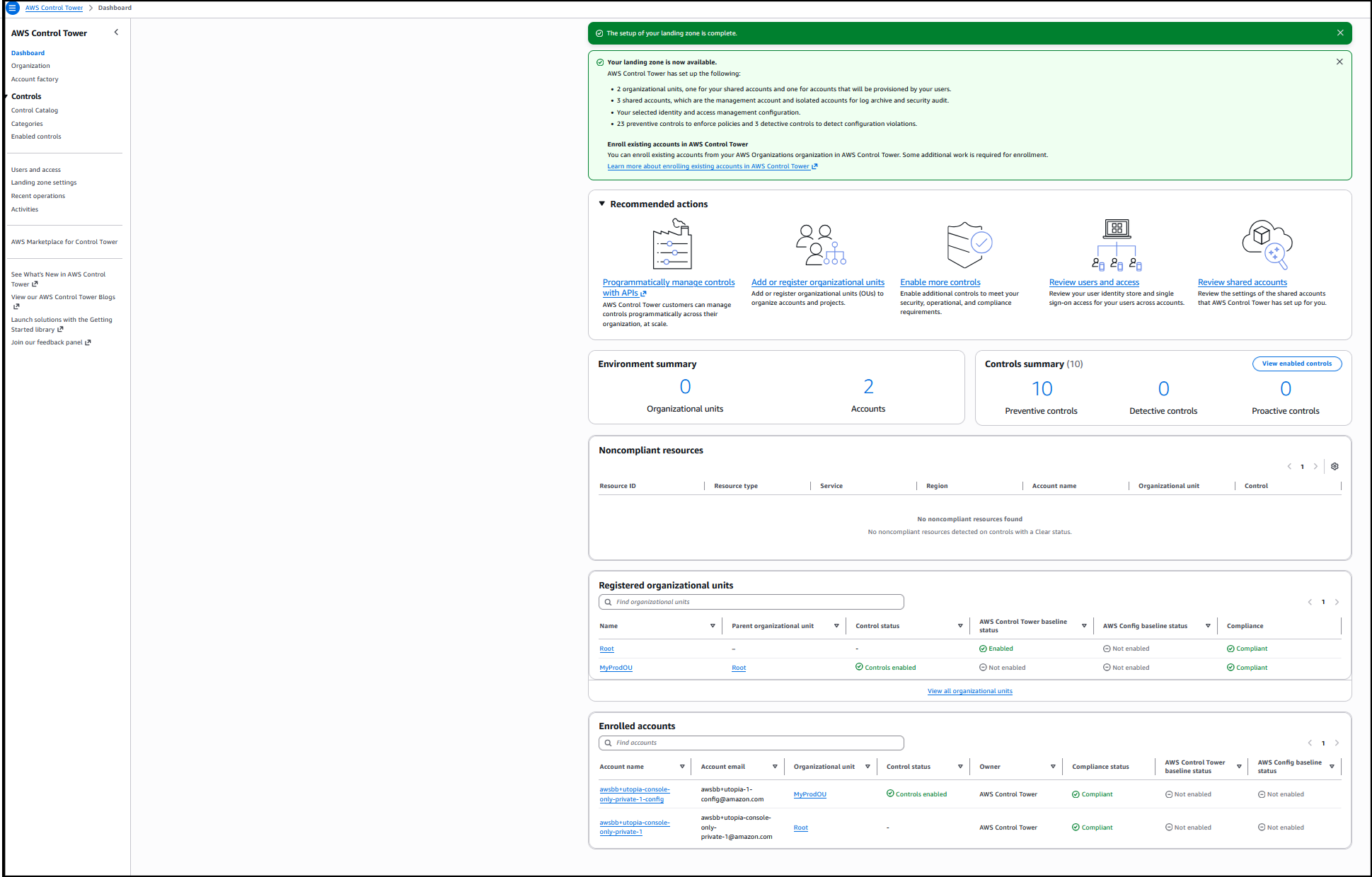
Behind the scenes, AWS Control Tower installed the required service-linked AWS Identity and Access Management (IAM) roles, and to use detective controls, service-linked Config Recorder in AWS Config in the account where I’m deploying the AWS managed controls. The setup is completed, and now I have all the infrastructure required to use the controls in this account. The dashboard gives a summary of the environment such as the organizational units that were created, the shared accounts, the selected IAM configuration, the preventive controls to enforce policies, and detective controls to detect configuration violations.


I choose View enabled controls for a list of all controls that were installed during this process.

Good to know
Usually, an existing AWS Organizations account is required before you can use AWS Control Tower. If you’re using the console to create controls and don’t already have an Organizations account, one will be set up on your behalf.

Earlier, I mentioned a service-linked Config Recorder. With a service-linked Config Recorder, AWS Control Tower prevents the resource types needed for deployed managed controls from being altered. You have flexibility and the ability to keep your own Config Recorders, and only the configuration items for the resource types that are required by your managed detective controls will be enabled, which optimizes your AWS Config costs.

Now available
Controls Dedicated experience in AWS Control Tower is available today in all AWS Regions where AWS Control Tower is available.

To learn more, visit our AWS Control Tower page. For more information related to pricing, refer to AWS Control Tower pricing. Send feedback to AWS re:Post for AWS Control Tower or through your usual AWS Support contacts.

Veliswa.

Accelerate large-scale AI applications with the new Amazon EC2 P6-B300 instances

Post Syndicated from Veliswa Boya original https://aws.amazon.com/blogs/aws/accelerate-large-scale-ai-applications-with-the-new-amazon-ec2-p6-b300-instances/

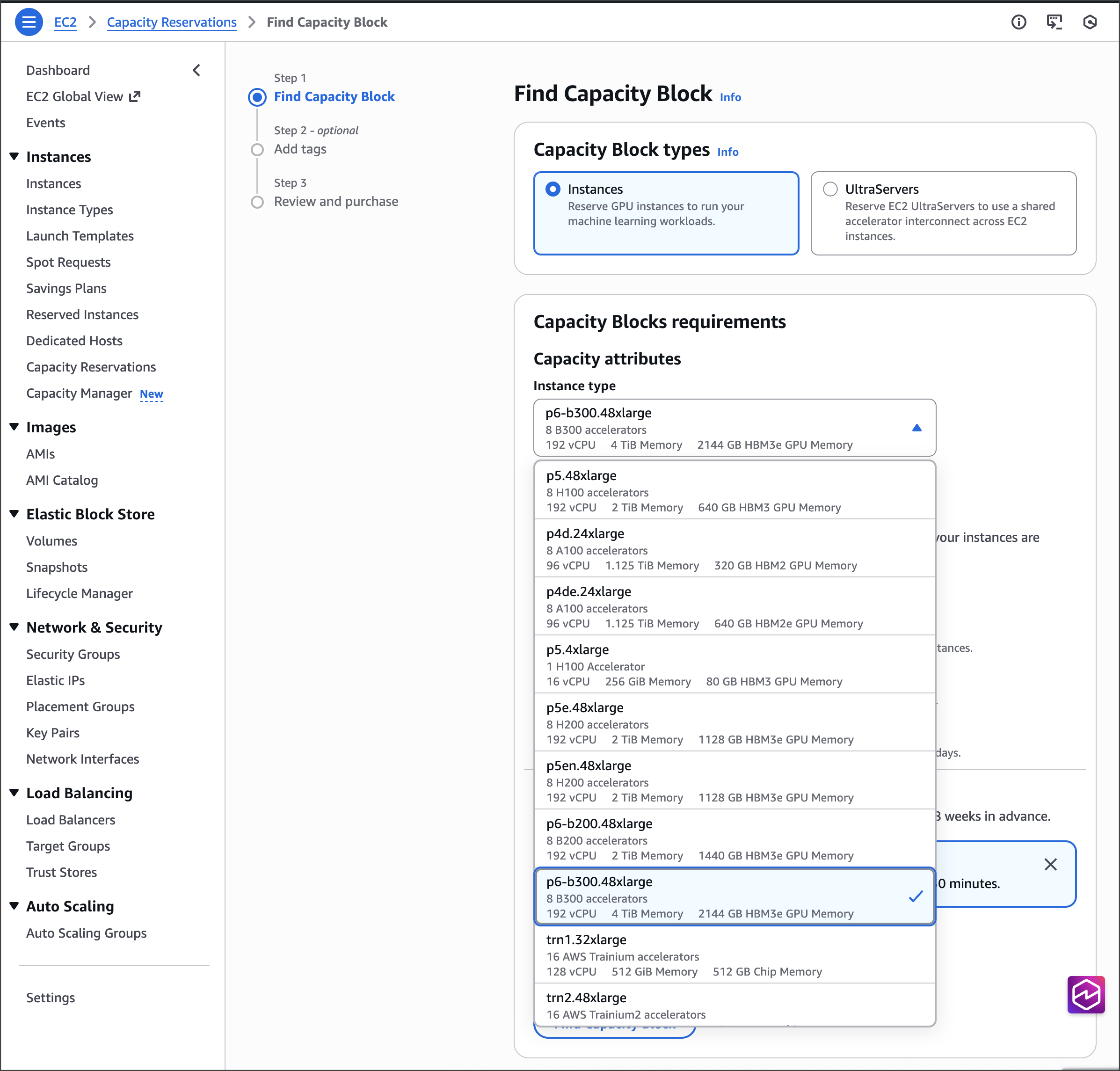
Today, we’re announcing the general availability of Amazon Elastic Compute Cloud (Amazon EC2) P6-B300 instances, our next-generation GPU platform accelerated by NVIDIA Blackwell Ultra GPUs. These instances deliver 2 times more networking bandwidth, and 1.5 times more GPU memory compared to previous generation instances, creating a balanced platform for large-scale AI applications.

With these improvements, P6-B300 instances are ideal for training and serving large-scale AI models, particularly those employing sophisticated techniques such as Mixture of Experts (MoE) and multimodal processing. For organizations working with trillion-parameter models and requiring distributed training across thousands of GPUs, these instances provide the perfect balance of compute, memory, and networking capabilities.

Improvements made compared to predecessors
The P6-B300 instances deliver 6.4Tbps Elastic Fabric Adapter (EFA) networking bandwidth, supporting efficient communication across large GPU clusters. These instances feature 2.1TB of GPU memory, allowing large models to reside within a single NVLink domain, which significantly reduces model sharding and communication overhead. When combined with EFA networking and the advanced virtualization and security capabilities of AWS Nitro System, these instances provide unprecedented speed, scale, and security for AI workloads.

The specs for the EC2 P6-B300 instances are as follows.

Instance size VCPUs System memory GPUs GPU memory GPU-GPU interconnect EFA network bandwidth ENA bandwidth EBS bandwidth Local storage
P6-B300.48xlarge 192 4TB 8x B300 GPU 2144GB HBM3e 1800 GB/s 6.4 Tbps 300 Gbps 100 Gbps 8x 3.84TB

Good to know
In terms of persistent storage, AI workloads primarily use a combination of high performance persistent storage options such as Amazon FSx for Lustre, Amazon S3 Express One Zone, and Amazon Elastic Block Store (Amazon EBS), depending on price performance considerations. For illustration, the dedicated 300Gbps Elastic Network Adapter (ENA) networking on P6-B300 enables high-throughput hot storage access with S3 Express One Zone, supporting large-scale training workloads. If you’re using FSx for Lustre, you can now use EFA with GPUDirect Storage (GDS) to achieve up to 1.2Tbps of throughput to the Lustre file system on the P6-B300 instances to quickly load your models.

Available now
The P6-B300 instances are now available through Amazon EC2 Capacity Blocks for ML and Savings Planin the US West (Oregon) AWS Region.
For on-demand reservation of P6-B300 instances, please reach out to your account manager. As usual with Amazon EC2, you pay only for what you use. For more information, refer to Amazon EC2 Pricing. Check out the full collection of accelerated computing instances to help you start migrating your applications.

To learn more, visit our Amazon EC2 P6-B300 instances page. Send feedback to AWS re:Post for EC2 or through your usual AWS Support contacts.

– Veliswa

Secure EKS clusters with the new support for Amazon EKS in AWS Backup

Post Syndicated from Veliswa Boya original https://aws.amazon.com/blogs/aws/secure-eks-clusters-with-the-new-support-for-amazon-eks-in-aws-backup/

Today, we’re announcing support for Amazon EKS in AWS Backup to provide the capability to secure Kubernetes applications using the same centralized platform you trust for your other Amazon Web Services (AWS) services. This integration eliminates the complexity of protecting containerized applications while providing enterprise-grade backup capabilities for both cluster configurations and application data. AWS Backup is a fully managed service to centralize and automate data protection across AWS and on-premises workloads. Amazon Elastic Kubernetes Service (Amazon EKS) is a fully managed Kubernetes service to manage availability and scalability of the Kubernetes clusters. With this new capability, you can centrally manage and automate data protection across your Amazon EKS environments alongside other AWS services.

Until now, for backups, customers relied on custom solutions or third-party tools to back up their EKS clusters, requiring complex scripting and maintenance for each cluster. The support for Amazon EKS in AWS Backup eliminates this overhead by providing a single, centralized, and policy-driven solution that protects both EKS clusters (Kubernetes deployments and resources) and stateful data (stored in Amazon Elastic Block Store (Amazon EBS), Amazon Elastic File System (Amazon EFS), and Amazon Simple Storage Service (Amazon S3) only) without the need to manage custom scripts across clusters. For restores, customers were previously required to restore their EKS backups to a target EKS cluster which was either the source EKS cluster, or a new EKS cluster, requiring that an EKS cluster infrastructure is provisioned ahead of time prior to the restore. With this new capability, during a restore of EKS cluster backups, customers also have the option to create a new EKS cluster based on previous EKS cluster configuration settings and restore to this new EKS cluster, with AWS Backup managing the provisioning of the EKS cluster on the customer’s behalf.

This support includes policy-based automation for protecting single or multiple EKS clusters. This single data protection policy provides a consistent experience across all services AWS Backup supports. It allows creation of immutable backups to prevent malicious or inadvertent changes, helping customers meet their regulatory compliance needs. In case there is a customer data loss or cluster downtime event, customers can easily recover their EKS cluster data from encrypted, immutable backups using an easy-to-use interface and maintain business continuity of running their EKS clusters at scale.

How it works
Here’s how I set up support for on-demand backup of my EKS cluster in AWS Backup. First, I’ll show a walkthrough of the backup process, then demonstrate a restore of the EKS cluster.

Backup
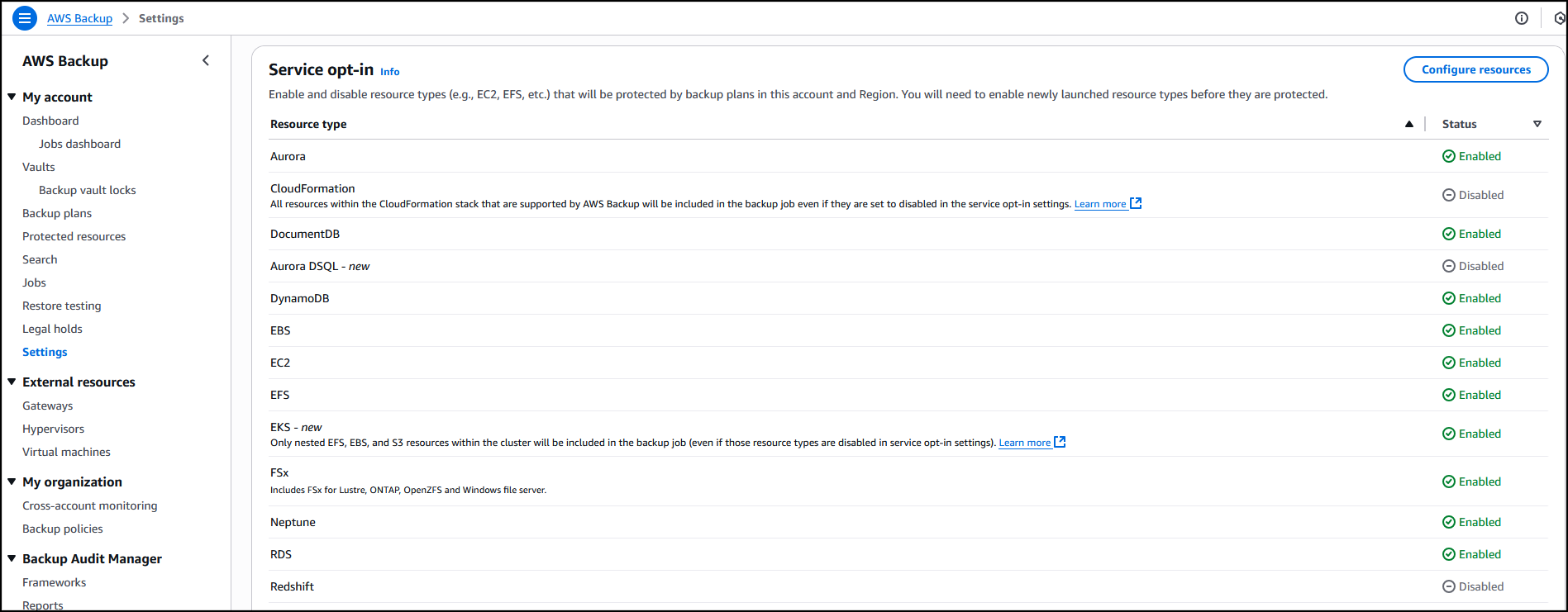
In the AWS Backup console, in the left navigation pane, I choose Settings and then Configure resources to opt in to enable protection of EKS clusters in AWS Backup.

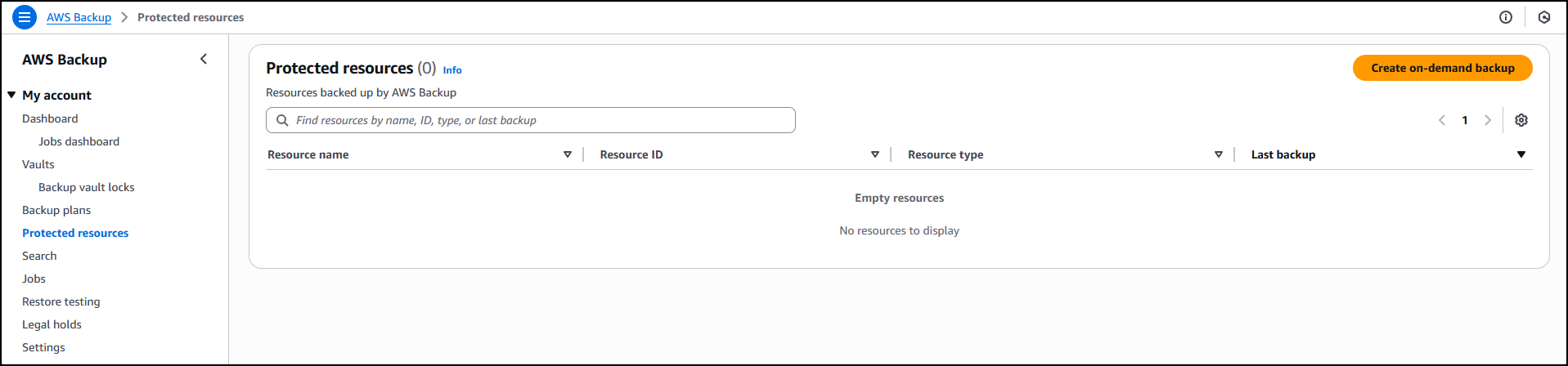
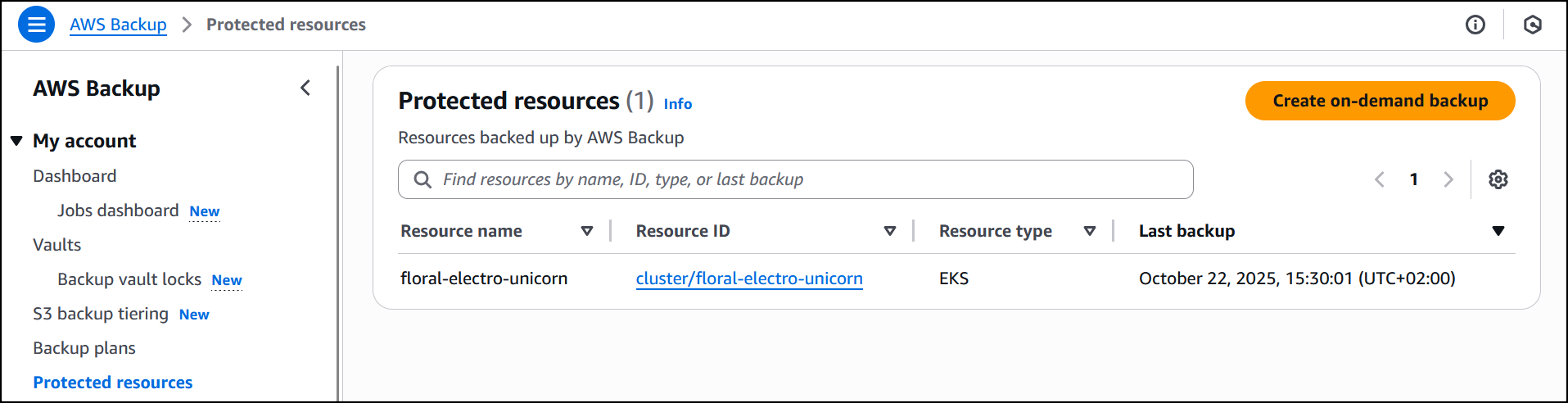
Now that I’ve enabled Amazon EKS, in Protected resources I choose Create on-demand backup to create a backup for my already existing EKS cluster floral-electro-unicorn.

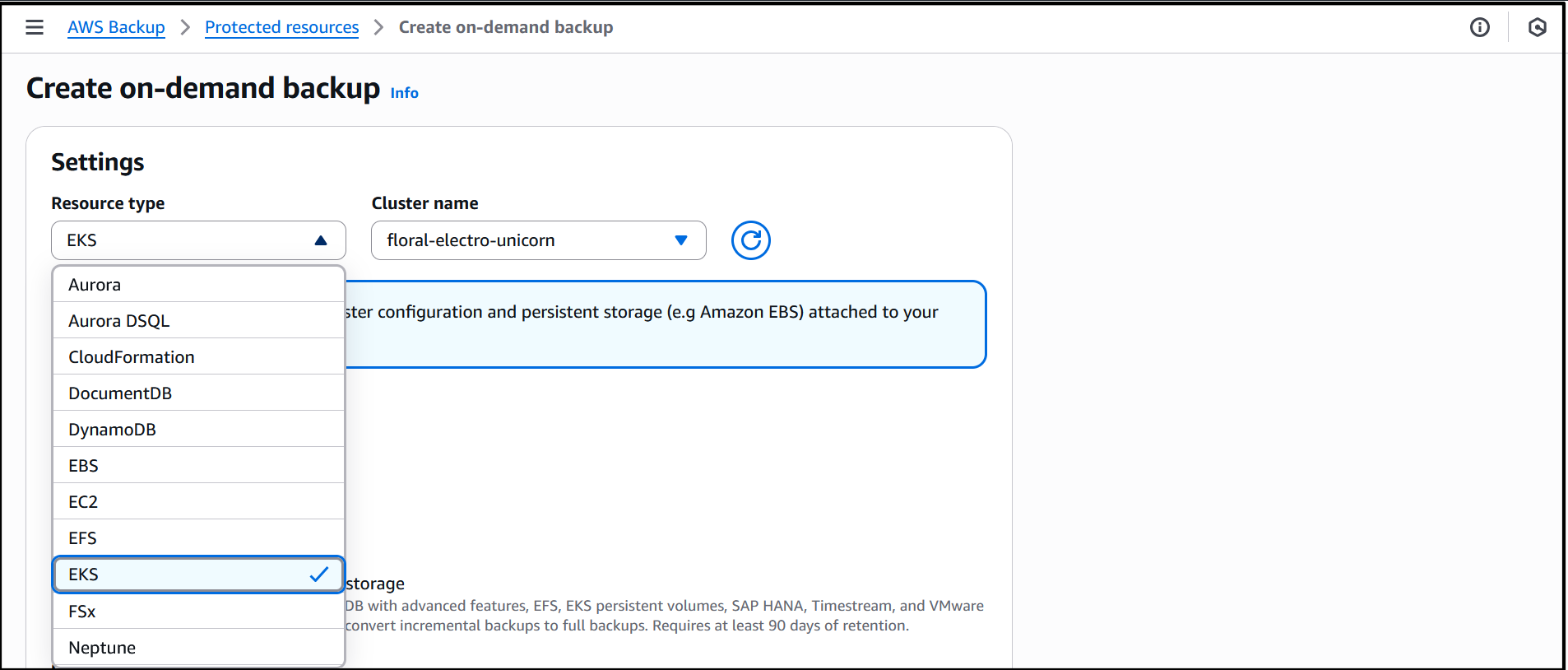
Enabling EKS in Settings ensures that it shows up as a Resource type when I create on-demand backup for the EKS cluster. I proceed to select the EKS resource type and the cluster.

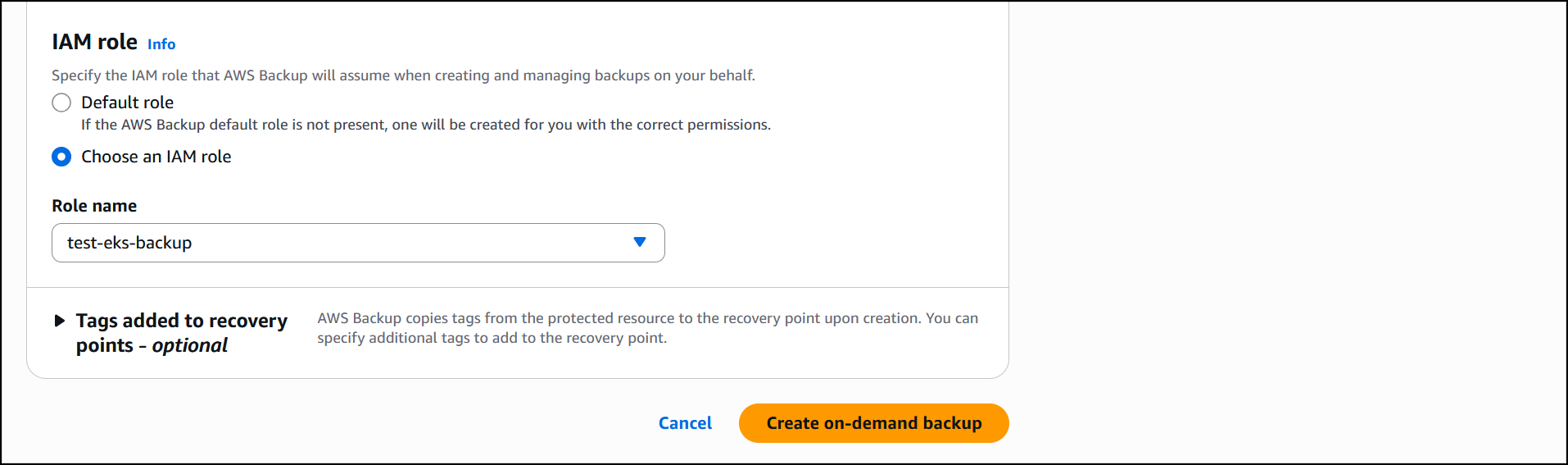
I leave the rest of the information as default, then select Choose an IAM role to select a role (test-eks-backup) that I’ve created and customized with the necessary permissions for AWS Backup to assume when creating and managing backups on my behalf. I choose Create on-demand backup to finalize the process.


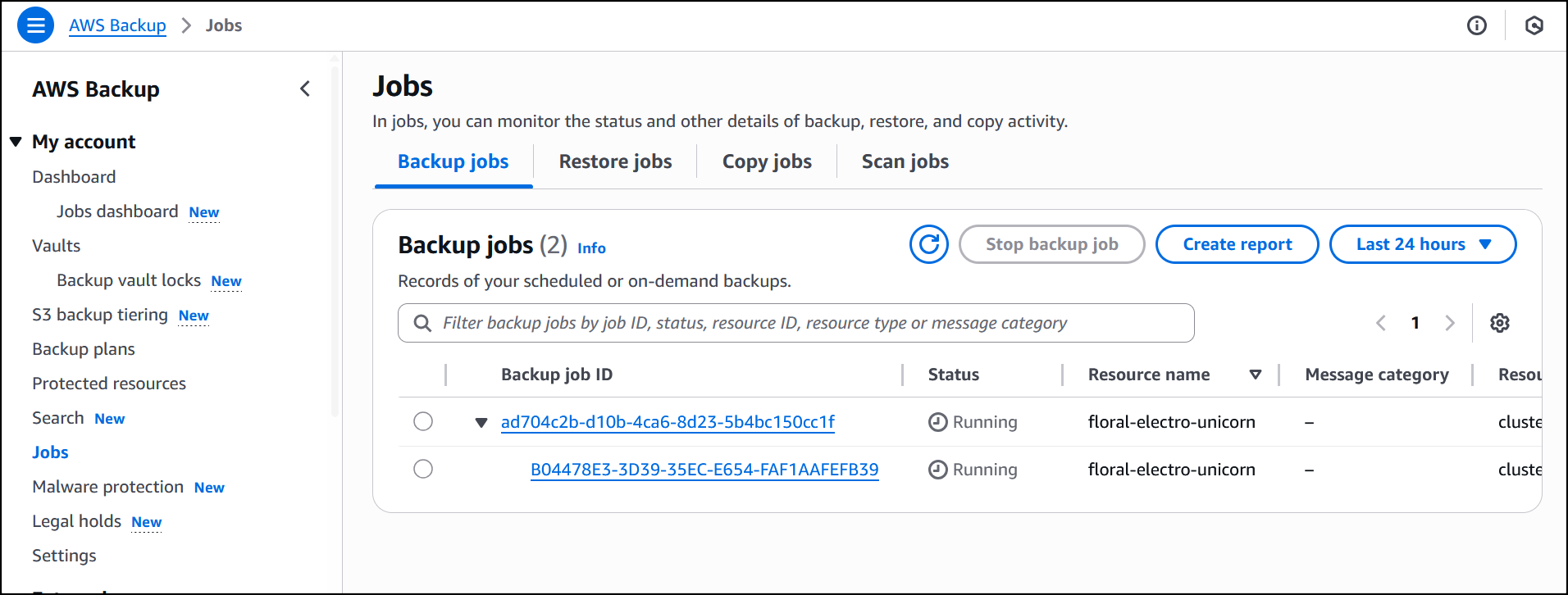
The job is initiated, and it will start running to back up both the EKS cluster state and the persistent volumes. If Amazon S3 buckets are attached to the backup, you’ll need to add the additional Amazon S3 backup permissions AWSBackupServiceRolePolicyForS3Backup to your role. This policy contains the permissions necessary for AWS Backup to back up any Amazon S3 bucket, including access to all objects in a bucket and any associated AWS KMS key.


The job is completed successfully and now EKS clusterfloral-electro-unicorn is backed up by AWS Backup.


Restore
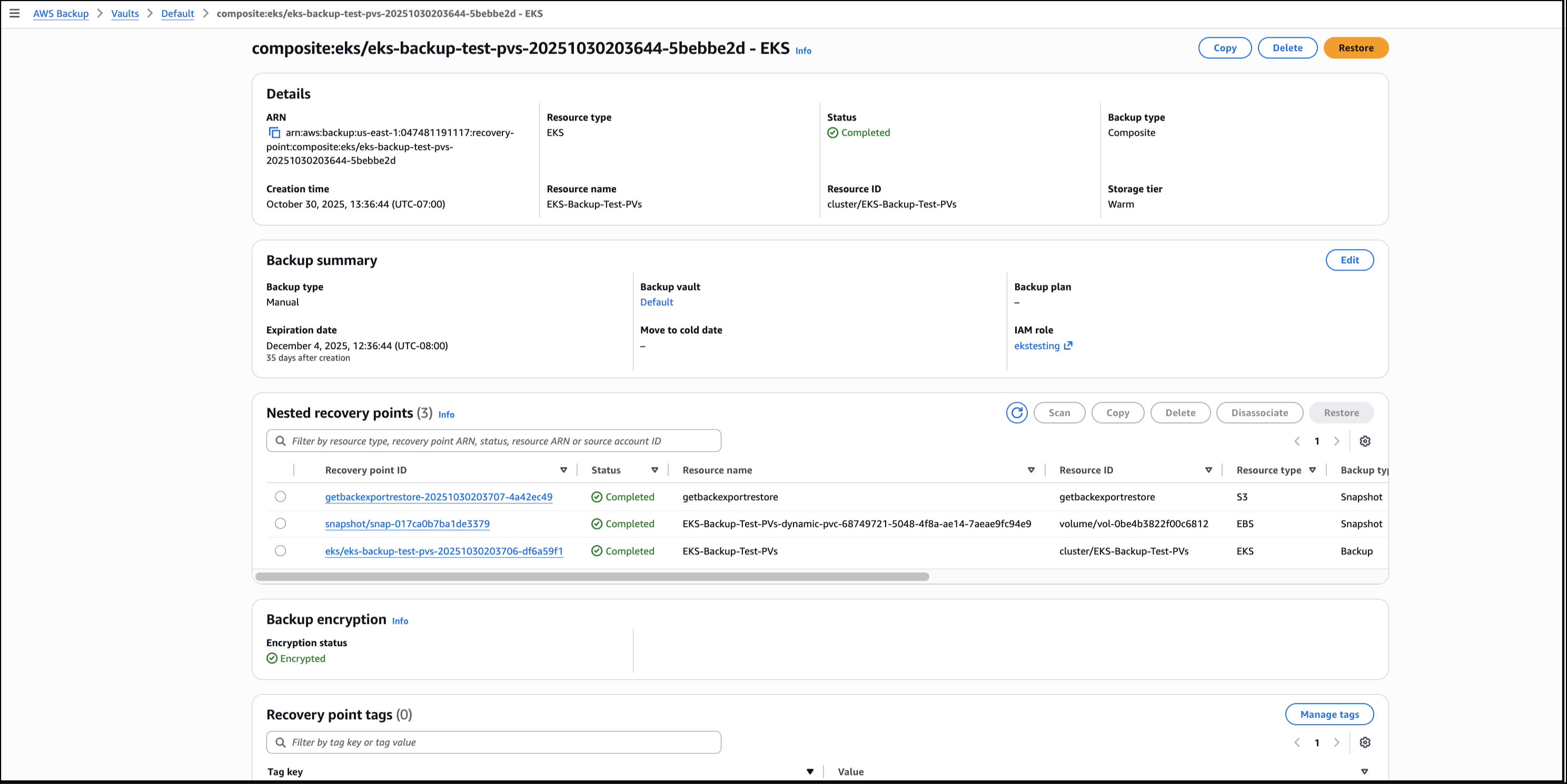
Using the AWS Backup Console, I choose the EKS backup composite recovery point to start the process of restoring the EKS cluster backups, then choose Restore.


I choose Restore full EKS cluster to restore the full EKS backup. To restore to an existing cluster, I Choose an existing cluster then select the cluster from the drop-down list. I choose the Default order as the order in which individual Kubernetes resources will be restored.

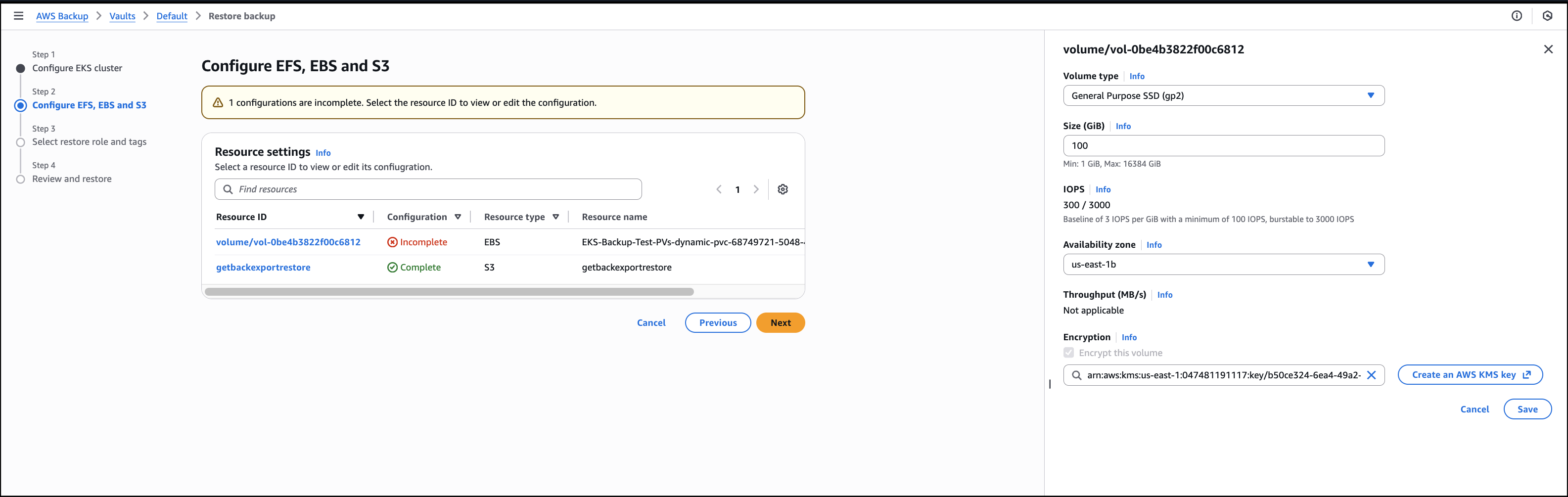
I then configure the restore for the persistent storage resources, that will be restored alongside my EKS clusters.


Next, I Choose an IAM role to execute the restore action. The Protected resource tags checkbox is selected by default and I’ll leave it as is, then choose Next.

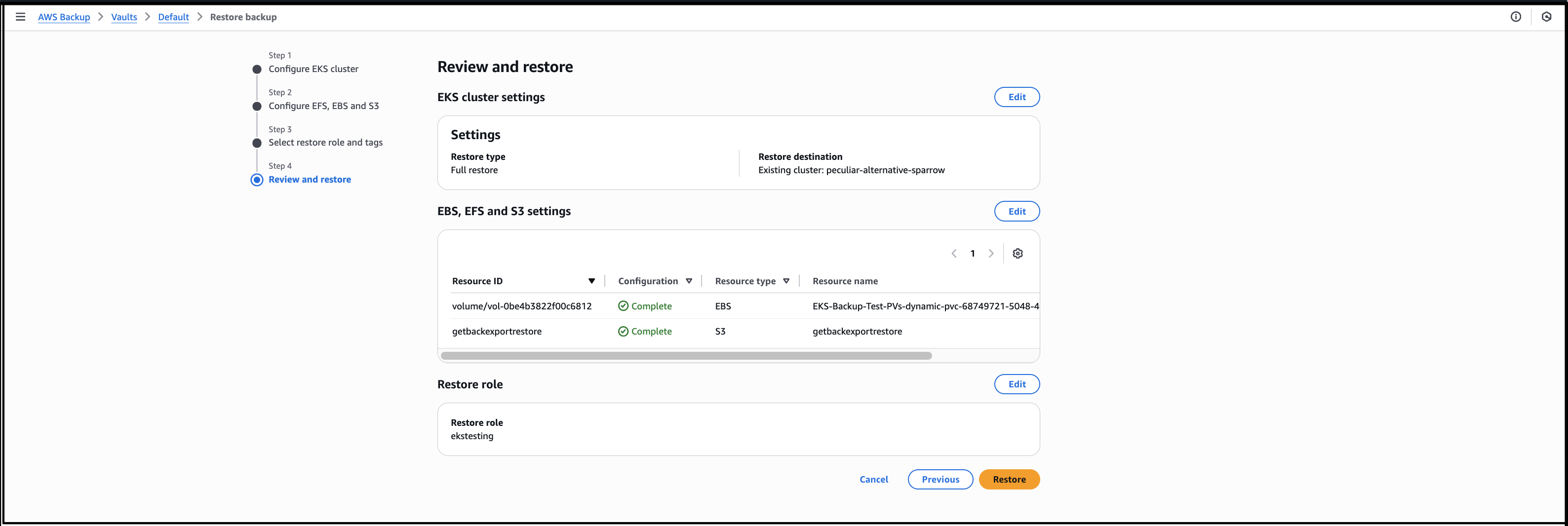
I review all the information before I finalize the process by choosing Restore, to start the job.


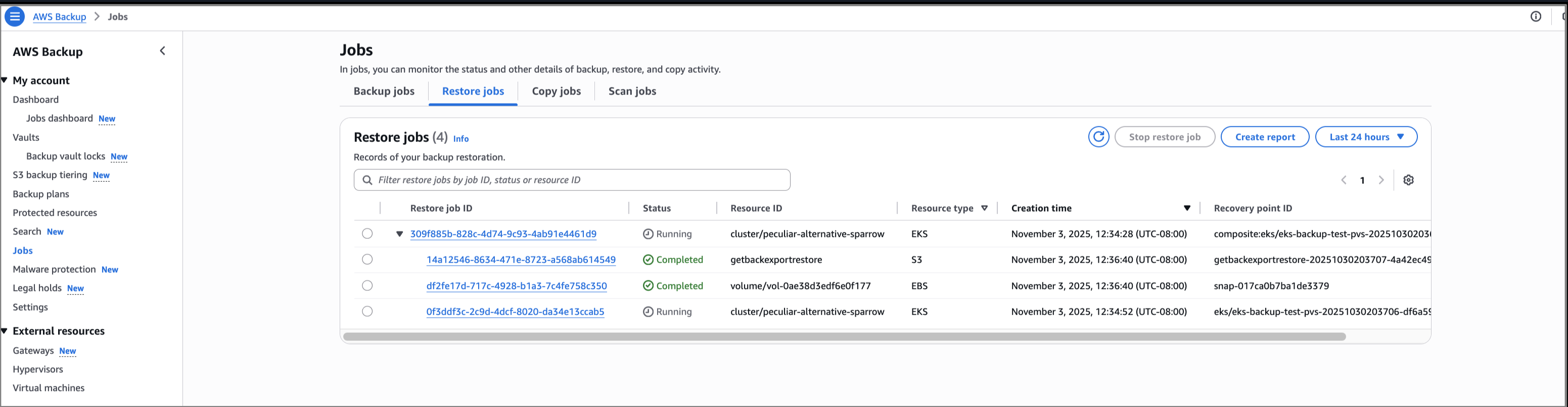
Selecting the drop-down arrow gives details of the restore status for both the EKS cluster state and persistent volumes attached. In this walkthrough, all the individual recovery points are restored successfully. If portions of the backup fail, it’s possible to restore the successfully backed up persistent stores (for example, Amazon EBS volumes) and cluster configuration settings individually. However, it’s not possible to restore full EKS backup. The successfully backed up resources will be available for restore, listed as nested recovery points under the EKS cluster recovery point. If there’s a partial failure, there will be a notification of the portion(s) that failed.


Benefits
Here are some of the benefits provided by the support for Amazon EKS in AWS Backup:

  • A fully managed multi-cluster backup experience, removing the overhead associated with managing custom scripts and third-party solutions.
  • Centralized, policy-based backup management that simplifies backup lifecycle management and makes it seamless to back up and recover your application data across AWS services, including EKS.
  • The ability to store and organize your backups with backup vaults. You assign policies to the backup vaults to grant access to users to create backup plans and on-demand backups but limit their ability to delete recovery points after they’re created.

Good to know
The following are some helpful facts to know:

  • Use either the AWS Backup Console, API, or AWS Command Line Interface (AWS CLI) to protect EKS clusters using AWS Backup. Alternatively, you can create an on-demand backup of the cluster after it has been created.
  • You can create secondary copies of your EKS backups across different accounts and AWS Regions to minimize risk of accidental deletion.
  • Restoration of EKS backups is available using the AWS Backup Console, API, or AWS CLI.
  • Restoring to an existing cluster will not override the Kubernetes versions, or any data as restores are non-destructive. Instead, there will be a restore of the delta between the backup and source resource.
  • Namespaces can only be restored to an existing cluster to ensure a successful restore as Kubernetes resources may be scoped at the cluster level.

Voice of the customer

Srikanth Rajan, Sr. Director of Engineering at Salesforce said “Losing a Kubernetes control plane because of software bugs or unintended cluster deletion can be catastrophic without a solid backup and restore plan. That’s why it’s exciting to see AWS rolling out the new EKS Backup and Restore feature, it’s a big step forward in closing a critical resiliency gap for Kubernetes platforms.”

Now available
Support for Amazon EKS in AWS Backup is available today in all AWS commercial Regions (except China) and in the AWS GovCloud (US) where AWS Backup and Amazon EKS are available. Check the full Region list for future updates.

To learn more, check out the AWS Backup product page and the AWS Backup pricing page.

Try out this capability for protecting your EKS clusters in AWS Backup and let us know what you think by sending feedback to AWS re:Post for AWS Backup or through your usual AWS Support contacts.

Veliswa.

AWS Weekly Roundup: Kiro waitlist, EBS Volume Clones, EC2 Capacity Manager, and more (October 20, 2025)

Post Syndicated from Veliswa Boya original https://aws.amazon.com/blogs/aws/aws-weekly-roundup-kiro-waitlist-ebs-volume-clones-ec2-capacity-manager-and-more-october-20-2025/

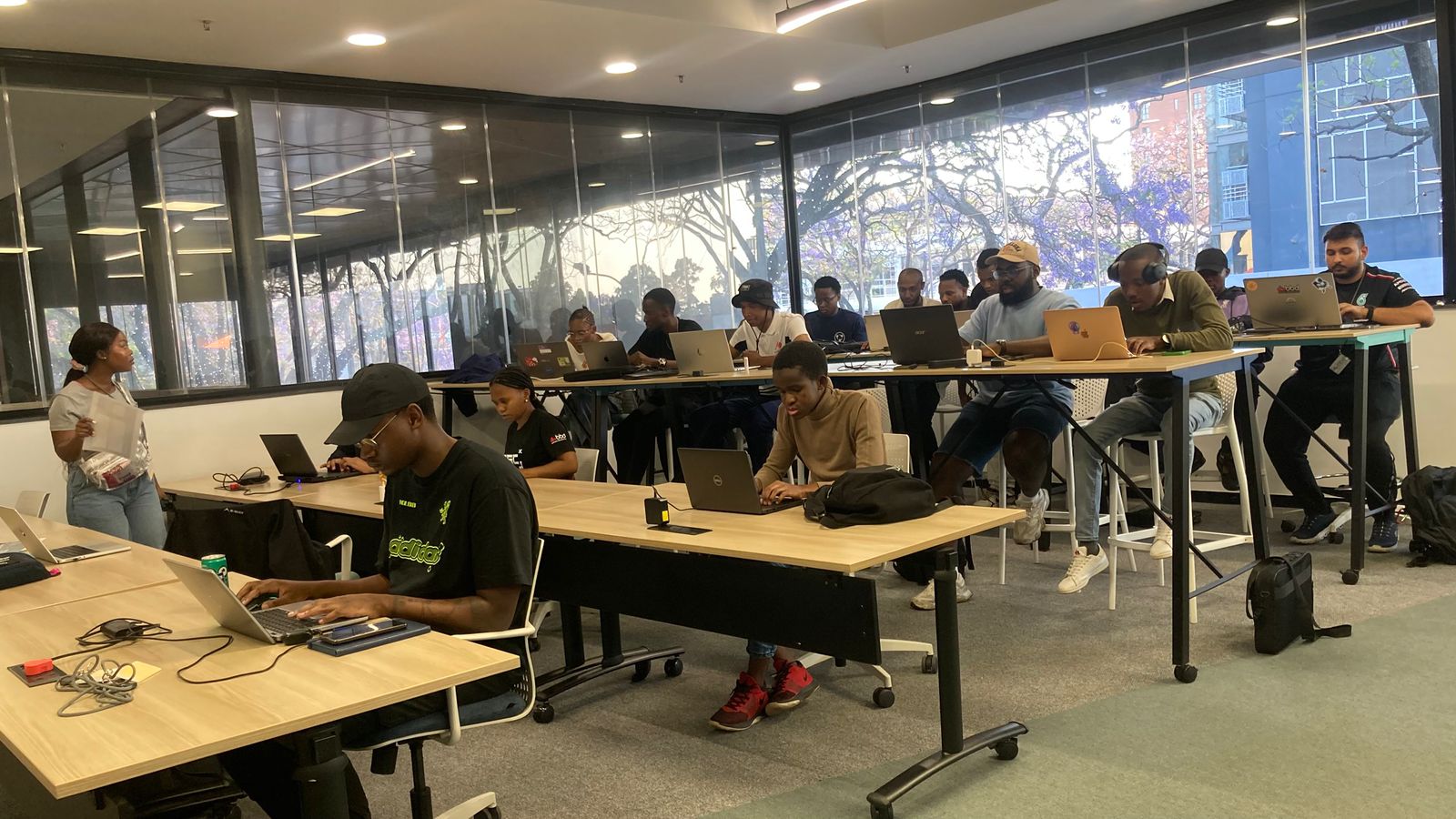
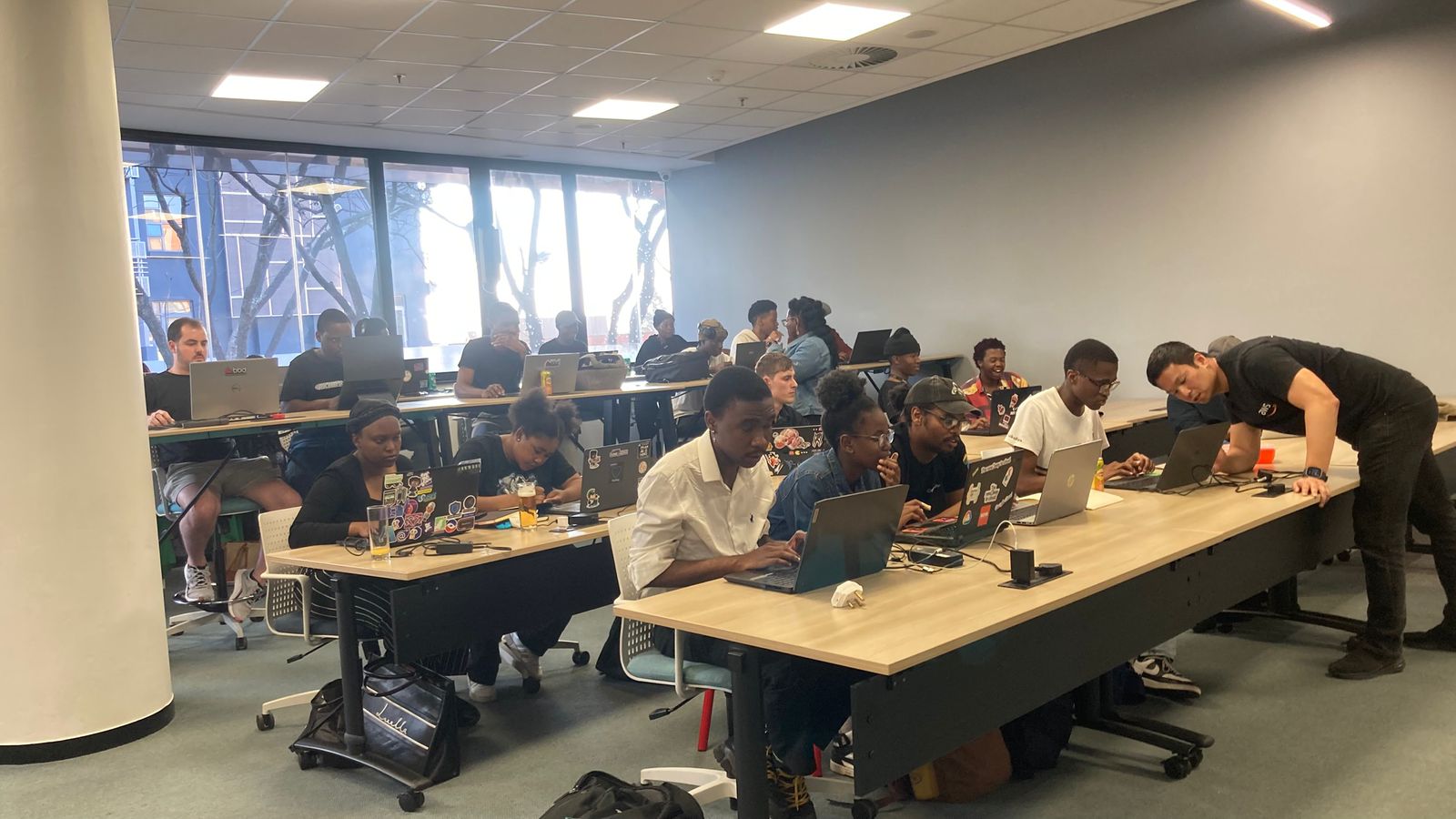
I’ve been inspired by all the activities that tech communities around the world have been hosting and participating in throughout the year. Here in the southern hemisphere we’re starting to dream about our upcoming summer breaks and closing out on some of the activities we’ve initiated this year. The tech community in South Africa is participating in Amazon Q Developer coding challenges that my colleagues and I are hosting throughout this month as a fun way to wind down activities for the year. The first one was hosted in Johannesburg last Friday with Durban and Cape Town coming up next.

Last week’s launches
These are the launches from last week that caught my attention:

Additional updates
I thought these projects, blog posts, and news items were also interesting:

Upcoming AWS events
Keep a look out and be sure to sign up for these upcoming events:

AWS re:Invent 2025 (December 1-5, 2025, Las Vegas) — AWS flagship annual conference offering collaborative innovation through peer-to-peer learning, expert-led discussions, and invaluable networking opportunities.

Join the AWS Builder Center to learn, build, and connect with builders in the AWS community. Browse here for upcoming in-person and virtual developer-focused events.

That’s all for this week. Check back next Monday for another Weekly Roundup!
Veliswa.

Best performance and fastest memory with the new Amazon EC2 R8i and R8i-flex instances

Post Syndicated from Veliswa Boya original https://aws.amazon.com/blogs/aws/best-performance-and-fastest-memory-with-the-new-amazon-ec2-r8i-and-r8i-flex-instances/

Today, we’re announcing general availability of the new eighth generation, memory optimized Amazon Elastic Compute Cloud (Amazon EC2) R8i and R8i-flex instances powered by custom Intel Xeon 6 processors, available only on AWS. They deliver the highest performance and fastest memory bandwidth among comparable Intel processors in the cloud. These instances deliver up to 15 percent better price performance, 20 percent higher performance, and 2.5 times more memory throughput compared to previous generation instances.

With these improvements, R8i and R8i-flex instances are ideal for a variety of memory intensive workloads such as SQL and NoSQL databases, distributed web scale in-memory caches (Memcached and Redis), in-memory databases such as SAP HANA, and real-time big data analytics (Apache Hadoop and Apache Spark clusters). For a majority of the workloads that don’t fully utilize the compute resources, the R8i-flex instances are a great first choice to achieve an additional 5 percent better price performance and 5 percent lower prices.

Improvements made to both instances compared to their predecessors
In terms of performance, R8i and R8i-flex instances offer 20 percent better performance than R7i instances, with even higher gains for specific workloads. These instances are up to 30 percent faster for PostgreSQL databases, up to 60 percent faster for NGINX web applications, and up to 40 percent faster for AI deep learning recommendation models compared to previous generation R7i instances, with sustained all-core turbo frequency now reaching 3.9 GHz (compared to 3.2 GHz in the previous generation). They also feature a 4.6x larger L3 cache and significantly better memory throughput, offering 2.5 times higher memory bandwidth than the seventh generation. With this higher performance across all the vectors, you can run a greater number of workloads while keeping costs down.

R8i instances now scale up to 96xlarge with up to 384 vCPUs and 3TB memory (versus 48xlarge sizes in the seventh generation), helping you to scale up database applications. R8i instances are SAP certified to deliver 142,100 aSAPS, which is highest among all comparable machines in on premises and cloud environments, delivering exceptional performance for your mission-critical SAP workloads. R8i-flex instances offer the most common sizes, from large to 16xlarge, and are a great first choice for applications that don’t fully utilize all compute resources. Both R8i and R8i-flex instances use the latest sixth generation AWS Nitro Cards, delivering up to two times more network and Amazon Elastic Block Storage (Amazon EBS) bandwidth compared to the previous generation, which greatly improves network throughput for workloads handling small packets, such as web, application, and gaming servers.

R8i and R8i-flex instances also support bandwidth configuration with 25 percent allocation adjustments between network and Amazon EBS bandwidth, enabling better database performance, query processing, and logging speeds. Additional enhancements include FP16 datatype support for Intel AMX to support workloads such as deep learning training and inference and other artificial intelligence and machine learning (AI/ML) applications.

The specs for the R8i instances are as follows.

Instance size
vCPUs
Memory (GiB)
Network bandwidth (Gbps)
EBS bandwidth (Gbps)
r8i.large 2 16 Up to 12.5 Up to 10
r8i.xlarge 4 32 Up to 12.5 Up to 10
r8i.2xlarge 8 64 Up to 15 Up to 10
r8i.4xlarge 16 128 Up to 15 Up to 10
r8i.8xlarge 32 256 15 10
r8i.12xlarge 48 384 22.5 15
r8i.16xlarge 64 512 30 20
r8i.24xlarge 96 768 40 30
r8i.32xlarge 128 1024 50 40
r8i.48xlarge 192 1536 75 60
r8i.96xlarge 384 3072 100 80
r8i.metal-48xl 192 1536 75 60
r8i.metal-96xl 384 3072 100 80

The specs for the R8i-flex instances are as follows.

Instance size
vCPUs
Memory (GiB)
Network bandwidth (Gbps)
EBS bandwidth (Gbps)
r8i-flex.large 2 16 Up to 12.5 Up to 10
r8i-flex.xlarge 4 32 Up to 12.5 Up to 10
r8i-flex.2xlarge 8 64 Up to 15 Up to 10
r8i-flex.4xlarge 16 128 Up to 15 Up to 10
r8i-flex.8xlarge 32 256 Up to 15 Up to 10
r8i-flex.12xlarge 48 384 Up to 22.5 Up to 15
r8i-flex.16xlarge 64 512 Up to 30 Up to 20

When to use the R8i-flex instances
As stated earlier, R8i-flex instances are more affordable versions of the R8i instances, offering up to 5 percent better price performance at 5 percent lower prices. They’re designed for workloads that benefit from the latest generation performance but don’t fully use all compute resources. These instances can reach up to the full CPU performance 95 percent of the time and work well for in-memory databases, distributed web scale cache stores, mid-size in-memory analytics, real-time big data analytics, and other enterprise applications. R8i instances are recommended for more demanding workloads that need sustained high CPU, network, or EBS performance such as analytics, databases, enterprise applications, and web scale in-memory caches.

Available now
R8i and R8i-flex instances are available today in the US East (N. Virginia), US East (Ohio), US West (Oregon), and Europe (Spain) AWS Regions. As usual with Amazon EC2, you pay only for what you use. For more information, refer to Amazon EC2 Pricing. Check out the full collection of memory optimized instances to help you start migrating your applications.

To learn more, visit our Amazon EC2 R8i instances page and Amazon EC2 R8i-flex instances page. Send feedback to AWS re:Post for EC2 or through your usual AWS Support contacts.

– Veliswa

AWS Weekly Roundup: OpenAI models, Automated Reasoning checks, Amazon EVS, and more (August 11, 2025)

Post Syndicated from Veliswa Boya original https://aws.amazon.com/blogs/aws/aws-weekly-roundup-openai-models-automated-reasoning-checks-amazon-evs-and-more-august-11-2025/

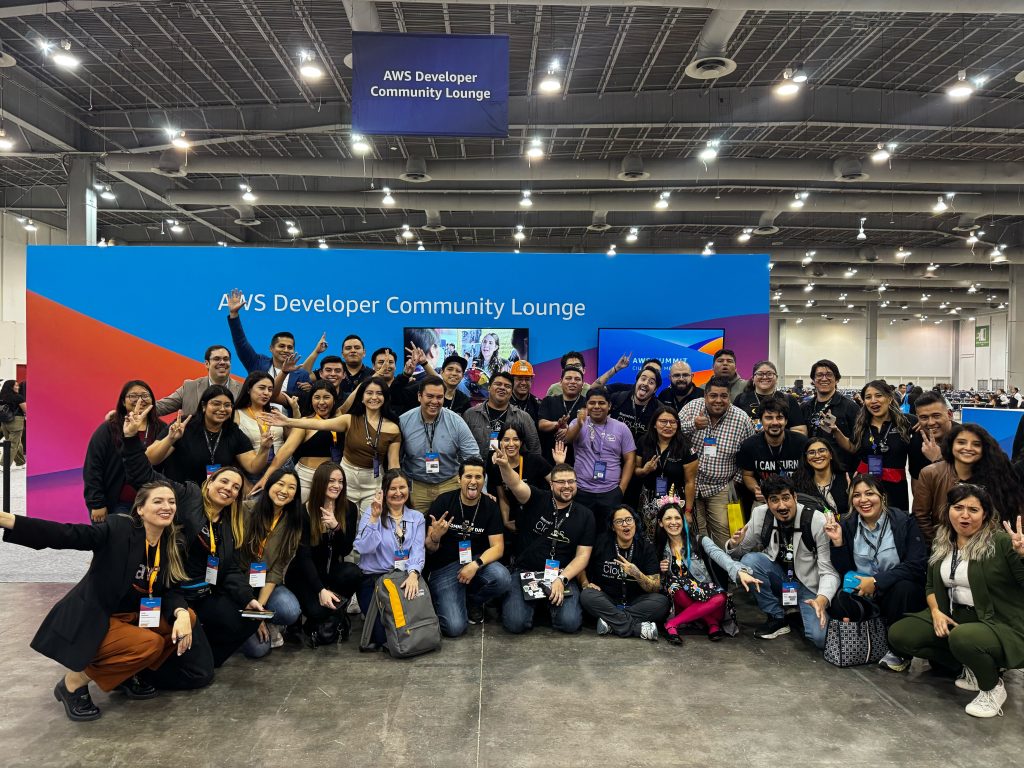
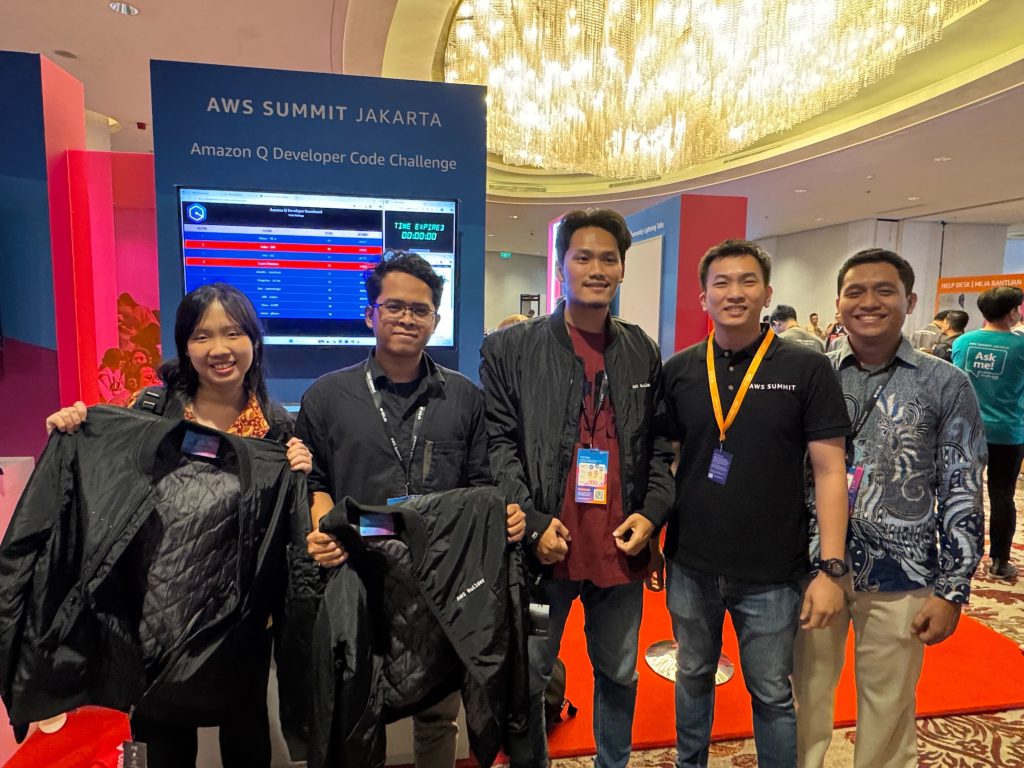
AWS Summits in the northern hemisphere have mostly concluded but the fun and learning hasn’t yet stopped for those of us in other parts of the globe. The community, customers, partners, and colleagues enjoyed a day of learning and networking last week at the AWS Summit Mexico City and the AWS Summit Jakarta.


Last week’s launches
These are the launches from last week that caught my attention:

  • OpenAI open weight models on AWSOpenAI open weight models (gpt-oss-120b and gpt-oss-20b) are now available on AWS. These open weight models excel at coding, scientific analysis, and mathematical reasoning, with performance comparable to leading alternatives.
  • Amazon Elastic VMware Service — Amazon Elastic VMware Service (Amazon EVS), a new AWS service that lets you run VMware Cloud Foundation (VCF) environments directly within your Amazon Virtual Private Cloud (Amazon VPC), is now generally available.
  • Automated Reasoning checks — Automated Reasoning checks, a new Amazon Bedrock Guardrails policy that was previewed during AWS re:Invent, is now generally available. Automated Reasoning checks helps you validate the accuracy of content generated by foundation models (FMs) against a domain knowledge. Read more in Danilo’s post on how this can help prevent factual errors that can be caused by AI hallucinations.
  • Multi-Region application recovery service — In this post, Sébastien writes about the announcement of Amazon Application Recovery Controller (ARC) Region switch, a fully managed, highly available capability that enables organizations to plan, practice, and orchestrate Region switches with confidence, eliminating the uncertainty around cross-Region recovery operations.

Additional updates
I thought these projects, blog posts, and news items were also interesting:

Upcoming AWS events
Keep a look out and be sure to sign up for these upcoming events:

AWS re:Invent 2025 (December 1-5, 2025, Las Vegas) — AWS’s flagship annual conference offering collaborative innovation through peer-to-peer learning, expert-led discussions, and invaluable networking opportunities.

AWS Summits — Join free online and in-person events that bring the cloud computing community together to connect, collaborate, and learn about AWS. Coming up soon are the summits at São Paulo (August 13) and Johannesburg (August 20).

AWS Community Days — Join community-led conferences that feature technical discussions, workshops, and hands-on labs led by expert AWS users and industry leaders from around the world: Australia (August 15), Adria (September 5), Baltic (September 10), Aotearoa (September 18), and South Africa (September 20).

Join the AWS Builder Center to learn, build, and connect with builders in the AWS community. Browse here for upcoming in-person and virtual developer-focused events.

That’s all for this week. Check back next Monday for another Weekly Roundup!
Veliswa.

AWS Backup adds new Multi-party approval for logically air-gapped vaults

Post Syndicated from Veliswa Boya original https://aws.amazon.com/blogs/aws/aws-backup-adds-new-multi-party-approval-for-logically-air-gapped-vaults/

Today, we’re announcing the general availability of a new capability that integrates AWS Backup logically air-gapped vaults with Multi-party approval to provide access to your backups even when your AWS account is inaccessible due to inadvertent or malicious events. AWS Backup is a fully managed service that centralizes and automates data protection across AWS services and hybrid workloads. It provides core data protection features, ransomware recovery capabilities, and compliance insights and analytics for data protection policies and operations.

As a backup administrator, you use AWS Backup logically air-gapped vaults to securely share backups across accounts and organizations, logically isolate your backup storage, and support direct restore to help reduce recovery time following an inadvertent or malicious event. However, if a bad or unintended actor gains root access to your backup account or the management account of your organization, your backups suddenly become inaccessible, even though they’re still safely stored in the logically air-gapped vault. While traditional account recovery involved working through support channels, AWS Backup with Multi-party approval delivers immediate access to recovery tools, empowering you with faster resolution times and greater control over your recovery timeline.

Multi-party approval for AWS Backup logically air-gapped vaults adds an additional layer of protection for you to recover your application data even when your AWS account becomes completely inaccessible. Using Multi-party approval, you can create approval teams which consist of highly trusted individuals in your organization, then associate them with your logically air-gapped vault. If you get locked out of your AWS accounts due to inadvertent or malicious actions, you can request your own approval team to authorize sharing of your vault from any account, even those outside your AWS Organizations account. Once approved, you gain authorized access to your backups and can begin your recovery process.

How it works
Multi-party approval for AWS Backup logically air-gapped vaults combines the security of logically air-gapped vaults with the governance of Multi-party approval to create a recovery mechanism that works even when your AWS account is compromised. Here’s how it works:

1. Approval team creation
First, you create an approval team in your AWS Organizations management account. If the management account is new, first create an AWS Identity and Access Management (IAM) Identity Center instance before creating the approval team. The approval team consists of trusted individuals (IAM Identity Center users) who will be authorized to approve vault sharing requests. Each approver receives an invitation to join the approval team through a new Approval portal.

2. Vault association
When your approval team is active, you share it with accounts that own logically air-gapped vaults using AWS Resource Access Manager (AWS RAM) to safeguard against requests for approval from arbitrary accounts. Backup administrators can then associate this approval team with new or existing logically air-gapped vaults.

3. Protection against compromise
If your AWS account becomes compromised or inaccessible, you can request access to your backups from a different account (a clean recovery account). This request includes the Amazon Resource Name (ARN) of the logically air-gapped vault in the format arn:aws:backup:<region>:<account>:backup-vault:<name> and an optional vault name and comment.

4. Multi-party approval
The request is sent to the approval team, who review it through the approval portal. When the minimum required number of approvers authorize the request, the vault is automatically shared with the requesting account. All requests and approvals are comprehensively logged in AWS CloudTrail.

5. Recovery process
With access granted, you can immediately start restoring or copying your data in the new recovery account without waiting for your compromised account to be remediated.

This approach provides an entirely separate authentication path to access and recover your backups, completely independent of your AWS account credentials. Even if the bad actor has root access to your account, they can’t prevent the approval team-based recovery process.

1. Create a new logically air-gapped vault
To create a new logically air-gapped vault, provide a name, tags (optional), and vault lock properties.

2. Assign an approval team
When the vault has been created, choose Assign approval team to assign it with an existing approval team.

Choose an existing approval team from the drop-down menu then select Submit to finalize the assignment.

Now your approval team is assigned to your logically air-gapped vault.

Good to know
It’s essential to test your recovery process before an actual emergency:

  1. From a different AWS account, use the AWS Backup console or API to request sharing of your logically air-gapped vault by providing the vault ID and ARN.
  2. Request approval of your request from the approval team.
  3. Once approved, verify that you can access and restore backups from the vault in your testing account.

As a best practice, monitor the health of your approval team regularly using AWS Backup Audit Manager to ensure they have sufficient active participants to meet your approval threshold.

Multi-party approval for enhanced cloud governance
Today, we’re also announcing the general availability of a new capability that AWS account administrators can use to add Multi-party approval to their product offerings. As highlighted in this post, AWS Backup is the first service to integrate this capability. With Multi-party approval, administrators can enable application owners to guard sensitive service operations with a distributed review process.

Good to know
Multi-party approval provides several significant security advantages:

  • Distributed decision-making, eliminating single points of failure
  • Full auditability through AWS CloudTrail integration
  • Protection against compromised credentials
  • Formal governance for compliance-sensitive operations
  • Consistent approval experience across integrated services

Now available

Multi-party approval is available today in all AWS Regions where AWS Organizations is available. Multi-party approval for AWS Backup logically air-gapped vaults is available in all AWS Regions where AWS Backup is available.

Veliswa.

Amazon FSx for Lustre launches new storage class with the lowest-cost and only fully elastic Lustre file storage

Post Syndicated from Veliswa Boya original https://aws.amazon.com/blogs/aws/amazon-fsx-for-lustre-adds-new-storage-class-with-the-lowest-cost-and-only-fully-elastic-lustre-file-storage/

Seismic imaging is a geophysical technique used to create detailed pictures of the Earth’s subsurface structure. It works by generating seismic waves that travel into the ground, reflect off various rock layers and structures, and return to the surface where they’re detected by sensitive instruments known as geophones or hydrophones. The huge volumes of acquired data often reach petabytes for a single survey and this presents significant storage, processing, and management challenges for researchers and energy companies.

Customers who run these seismic imaging workloads or other high performance computing (HPC) workloads, such as weather forecasting, advanced driver-assistance system (ADAS) training, or genomics analysis, already store the huge volumes of data on either hard disk drive (HDD)-based or a combination of HDD and solid state drive (SSD) file storage on premises. However, as these on premises datasets and workloads scale, customers find it increasingly challenging and expensive due to the need to make upfront capital investments to keep up with performance needs of their workloads and avoid running out of storage capacity.

Today, we’re announcing the general availability of the Amazon FSx for Lustre Intelligent-Tiering, a new storage class that delivers virtually unlimited scalability, the only fully elastic Lustre file storage, and the lowest cost Lustre file storage in the cloud. With a starting price of less than $0.005 per GB-month, FSx for Lustre Intelligent-Tiering offers the lowest cost high-performance file storage in the cloud, reducing storage costs for infrequently accessed data by up to 96 percent compared to other managed Lustre options. Elasticity means you no longer need to provision storage capacity upfront because your file system will grow and shrink as you add or delete data, and you pay only for the amount of data you store.

FSx for Lustre Intelligent-Tiering automatically optimizes costs by tiering cold data to the applicable lower-cost storage tier based on access patterns and includes an optional SSD read cache to improve performance for your most latency sensitive workloads. Intelligent-Tiering delivers high performance whether you’re starting with gigabytes of experimental data or working with large petabyte-scale datasets for your most demanding artificial intelligence/machine learning (AI/ML) and HPC workloads. With the flexibility to adjust your file system’s performance independent of storage, Intelligent-Tiering delivers up to 34 percent better price performance than on premises HDD file systems. The Intelligent-Tiering storage class is optimized for HDD-based or mixed HDD/SSD workloads that have a combination of hot and cold data. You can migrate and run such workloads to FSx for Lustre Intelligent-Tiering without application changes, eliminating storage capacity planning and management, while paying only for the resources that you use.

Prior to this launch, customers used the FSx for Lustre SSD storage class to accelerate ML and HPC workloads that need all-SSD performance and consistent low-latency access to all data. However, many workloads have a combination of hot and cold data and they don’t need all-SSD storage for colder portions of the data. FSx for Lustre is increasingly used in AI/ML workloads to increase graphics processing unit (GPU) utilization, and now it’s even more cost optimized to be one of the options for these workloads.

FSx for Lustre Intelligent-Tiering
Your data moves between three storage tiers (Frequent Access, Infrequent Access, and Archive) with no effort on your part, so you get automatic cost savings with no upfront costs or commitments. The tiering works as follows:

Frequent Access – Data that has been accessed within the last 30 days is stored in this tier.

Infrequent Access – Data that hasn’t been accessed for 30 – 90 days is stored in this tier, at a 44 percent cost reduction from Frequent Access.

Archive – Data that hasn’t been accessed for 90 or more days is stored in this tier, at a 65 percent cost reduction compared to Infrequent Access.

Regardless of the storage tier, your data is stored across multiple AWS Availability Zones for redundancy and availability, compared to typical on-premises implementations, which are usually confined within a single physical location. Additionally, your data can be retrieved instantly in milliseconds.

Creating a file system
I can create a file system using the AWS Management Console, AWS Command Line Interface (AWS CLI), API, or AWS CloudFormation. On the console, I choose Create file system to get started.


I select Amazon FSx for Lustre and choose Next.


Now, it’s time to enter the rest of the information to create the file system. I enter a name (veliswa_fsxINT_1) for my file system, and for deployment and storage class, I select Persistent, Intelligent-Tiering. I choose the desired Throughput capacity and the Metadata IOPS. The SSD read cache will be automatically configured by FSx for Lustre based on the specified throughput capacity. I leave the rest as the default, choose Next, and review my choices to create my file system.

With Amazon FSx for Lustre Intelligent-Tiering, you have the flexibility to provision the necessary performance for your workloads without having to provision any underlying storage capacity upfront.


I wanted to know which values were editable after creation, so I paid closer attention before finalizing the creation of the file system. I noted that Throughput capacity, Metadata IOPS, Security groups, SSD read cache, and a few others were editable later. After I start running the ML jobs, it might be necessary to increase the throughput capacity based on the volumes of data I’ll be processing, so this information is important to me.

The file system is now available. Considering that I’ll be running HPC workloads, I anticipate that I’ll be processing high volumes of data later, so I’ll increase the throughput capacity to 24 GB/s. After all, I only pay for the resources I use.


The SSD read cache is scaled automatically as your performance needs increase. You can adjust the cache size any time independently in user-provisioned mode or disable the read cache if you don’t need low-latency access.


Good to know

  • FSx for Lustre Intelligent-Tiering is designed to deliver up to multiple terabytes per second of total throughput.
  • FSx for Lustre with Elastic Fabric Adapter (EFA)/GPU Direct Storage (GDS) support provides up to 12x (up to 1200 Gbps) higher per-client throughput compared to the previous FSx for Lustre systems.
  • It can deliver up to tens of millions of IOPS for writes and cached reads. Data in the SSD read cache has submillisecond time-to-first-byte latencies, and all other data has time-to-first-byte latencies in the range of tens of milliseconds.

Now available
Here are a couple of things to keep in mind:

FSx Intelligent-Tiering storage class is available in the new FSx for Lustre file systems in the US East (N. Virginia, Ohio), US West (N. California, Oregon), Canada (Central), Europe (Frankfurt, Ireland, London, Stockholm), and Asia Pacific (Hong Kong, Mumbai, Seoul, Singapore, Sydney, Tokyo) AWS Regions.

You pay for data and metadata you store on your file system (GB/months). When you write data or when you read data that is not in the SSD read cache, you pay per operation. You pay for the total throughput capacity (in MBps/month), metadata IOPS (IOPS/month), and SSD read cache size for data and metadata (GB/month) you provision on your file system. To learn more, visit the Amazon FSx for Lustre Pricing page. To learn more about Amazon FSx for Lustre including this feature, visit the Amazon FSx for Lustre page.

Give Amazon FSx for Lustre Intelligent-Tiering a try in the Amazon FSx console today and send feedback to AWS re:Post for Amazon FSx for Lustre or through your usual AWS Support contacts.

Veliswa.


How is the News Blog doing? Take this 1 minute survey!

(This survey is hosted by an external company. AWS handles your information as described in the AWS Privacy Notice. AWS will own the data gathered via this survey and will not share the information collected with survey respondents.)

AWS Weekly Roundup: Claude 4 in Amazon Bedrock, EKS Dashboard, community events, and more (May 26, 2025)

Post Syndicated from Veliswa Boya original https://aws.amazon.com/blogs/aws/aws-weekly-roundup-claude-4-in-amazon-bedrock-eks-dashboard-community-events-and-more-may-26-2025/

As the tech community we continue to have many opportunities to learn and network with other like-minded folks. This past week AWS customers attended the AWS Summit Dubai for an action-packed day featuring live demos, hands-on experiences with cutting-edge AI/ML tools, and more. Right here in South Africa I attended the Data & AI Community in Durban for a day of inspiration and learning from the community. In India, the AWS Community Day Bengaluru brought together hundreds of passionate tech enthusiasts for a day of learning and networking.

Last week’s launches
Here are the launches that got my attention:

For a full list of AWS announcements, be sure to keep an eye on the What’s New with AWS? page.

Additional updates
Here are some additional projects, blog posts, and news items that you might find interesting:

Upcoming AWS events
Check your calendars and sign up for these upcoming AWS events:

  • AWS Summits – Join free online and in-person events that bring the cloud computing community together to connect, collaborate, and learn about AWS. Register in your nearest city: Tel Aviv (May 28), Singapore (May 29), Stockholm (June 4), Sydney (June 4–5), Washington (June 10-11), and Madrid (June 11).
  • AWS re:Inforce – Mark your calendars for AWS re:Inforce (June 16–18) in Philadelphia, PA. AWS re:Inforce is a learning conference focused on AWS security solutions, cloud security, compliance, and identity.
  • AWS Community Days – Join community-led conferences that feature technical discussions, workshops, and hands-on labs led by expert AWS users and industry leaders from around the world: Milwaukee, USA (June 5), and Nairobi, Kenya (June 14).

That’s all for this week. Check back next Monday for another Weekly Roundup!

Veliswa.

Reduce your operational overhead today with Amazon CloudFront SaaS Manager

Post Syndicated from Veliswa Boya original https://aws.amazon.com/blogs/aws/reduce-your-operational-overhead-today-with-amazon-cloudfront-saas-manager/

Today, I’m happy to announce the general availability of Amazon CloudFront SaaS Manager, a new feature that helps software-as-a-service (SaaS) providers, web development platform providers, and companies with multiple brands and websites efficiently manage delivery across multiple domains. Customers already use CloudFront to securely deliver content with low latency and high transfer speeds. CloudFront SaaS Manager addresses a critical challenge these organizations face: managing tenant websites at scale, each requiring TLS certificates, distributed denial-of-service (DDoS) protection, and performance monitoring.

With CloudFront Saas Manager, web development platform providers and enterprise SaaS providers who manage a large number of domains will use simple APIs and reusable configurations that use CloudFront edge locations worldwide, AWS WAF, and AWS Certificate Manager. CloudFront SaaS Manager can dramatically reduce operational complexity while providing high-performance content delivery and enterprise-grade security for every customer domain.

How it works
In CloudFront, you can use multi-tenant SaaS deployments, a strategy where a single CloudFront distribution serves content for multiple distinct tenants (users or organizations). CloudFront SaaS Manager uses a new template-based distribution model called a multi-tenant distribution to serve content across multiple domains while sharing configuration and infrastructure. However, if supporting single websites or application, a standard distribution would be better or recommended.

A template distribution defines the base configuration that will be used across domains such as origin configurations, cache behaviors, and security settings. Each template distribution has a distribution tenant to represent domain-specific origin paths or origin domain names including web access control list (ACL) overrides and custom TLS certificates.

Optionally, multiple distribution tenants can use the same connection group that provides the CloudFront routing endpoint that serves content to viewers. DNS records point to the CloudFront endpoint of the connection group using a Canonical Name Record (CNAME).

To learn more, visit Understand how multi-tenant distributions work in the Amazon CloudFront Developer Guide.

CloudFront SaaS Manager in action
I’d like to give you an example to help you understand the capabilities of CloudFront SaaS Manager. You have a company called MyStore, a popular e-commerce platform that helps your customer easily set up and manage an online store. MyStore’s tenants already enjoy outstanding customer service, security, reliability, and ease-of-use with little setup required to get a store up and running, resulting in 99.95 percent uptime for the last 12 months.

Customers of MyStore are unevenly distributed across three different pricing tiers: Bronze, Silver, and Gold, and each customer is assigned a persistent mystore.app subdomain. You can apply these tiers to different customer segments, customized settings, and operational Regions. For example, you can add AWS WAF service in the Gold tier as an advanced feature. In this example, MyStore has decided not to maintain their own web servers to handle TLS connections and security for a growing number of applications hosted on their platform. They are evaluating CloudFront to see if that will help them reduce operational overhead.

Let’s find how as MyStore you configure your customer’s websites distributed in multiple tiers with the CloudFront SaaS Manager. To get started, you can create a multi-tenant distribution that acts as a template corresponding to each of the three pricing tiers the MyStore offers: Bronze, Sliver, and Gold shown in Multi-tenant distribution under the SaaS menu on the Amazon CloudFront console.

To create a multi-tenant distribution, choose Create distribution and select Multi-tenant architecture if you have multiple websites or applications that will share the same configuration. Follow the steps to provide basic details such as a name for your distribution, tags, and wildcard certificate, specify origin type and location for your content such as a website or app, and enable security protections with AWS WAF web ACL feature.

When the multi-tenant distribution is created successfully, you can create a distribution tenant by choosing Create tenant in the Distribution tenants menu in the left navigation pane. You can create a distribution tenant to add your active customer to be associated with the Bronze tier.

Each tenant can be associated with up to one multi-tenant distribution. You can add one or more domains of your customers to a distribution tenant and assign custom parameter values such as origin domains and origin paths. A distribution tenant can inherit the TLS certificate and security configuration of its associated multi-tenant distribution. You can also attach a new certificate specifically for the tenant, or you can override the tenant security configuration.

When the distribution tenant is created successfully, you can finalize this step by updating a DNS record to route traffic to the domain in this distribution tenant and creating a CNAME pointed to the CloudFront application endpoint. To learn more, visit Create a distribution in the Amazon CloudFront Developer Guide.

Now you can see all customers in each distribution tenant to associate multi-tenant distributions.

By increasing customers’ business needs, you can upgrade your customers from Bronze to Silver tiers by moving those distribution tenants to a proper multi-tenant distribution.

During the monthly maintenance process, we identify domains associated with inactive customer accounts that can be safely decommissioned. If you’ve decided to deprecate the Bronze tier and migrate all customers who are currently in the Bronze tier to the Silver tier, then you can delete a multi-tenant distribution to associate the Bronze tier. To learn more, visit Update a distribution or Distribution tenant customizations in the Amazon CloudFront Developer Guide.

By default, your AWS account has one connection group that handles all your CloudFront traffic. You can enable Connection group in the Settings menu in the left navigation pane to create additional connection groups, giving you more control over traffic management and tenant isolation.

To learn more, visit Create custom connection group in the Amazon CloudFront Developer Guide.

Now available
Amazon CloudFront SaaS Manager is available today. To learn about, visit CloudFront SaaS Manager product page and documentation page. To learn about SaaS on AWS, visit AWS SaaS Factory.

Give CloudFront SaaS Manager a try in the CloudFront console today and send feedback to AWS re:Post for Amazon CloudFront or through your usual AWS Support contacts.

Veliswa.
_______________________________________________

How is the News Blog doing? Take this 1 minute survey!

(This survey is hosted by an external company. AWS handles your information as described in the AWS Privacy Notice. AWS will own the data gathered via this survey and will not share the information collected with survey respondents.)

AWS Weekly Roundup: Anthropic Claude 3.7, JAWS Days, cross-account access, and more (March 3, 2025)

Post Syndicated from Veliswa Boya original https://aws.amazon.com/blogs/aws/aws-weekly-roundup-anthropic-claude-3-7-jaws-days-cross-account-access-and-more-march-3-2025/

I have fond memories of the time I built an application live at the AWS GenAI Loft London last September. AWS GenAI Lofts are back in locations such as San Francisco, Berlin, and more, to continue providing collaborative spaces and immersive experiences for startups and developers. Find a loft near you for hands-on access to AI products and services, events, workshops, and networking opportunities, that you can’t miss!

Last week’s launches
Here are some launches that got my attention during the previous week.

Four ways to grant cross-account access in AWS — For some situations, you might want to enable centralized operations across multiple AWS accounts or share resources across teams, or projects within your teams. In these cases, you may be concerned about security, availability, or the manageability of granting this cross-account access. We’ve announced four ways to grant cross-account access in AWS and detail each of the methods and its unique trade-offs.

Amazon ECS adds support for additional IAM condition keys — We’ve launched eight new service-specific condition keys for Identity and Access Management (IAM). These new condition keys let you create IAM policies as well as srvice control policies (SCPs) to better enforce your organizational policies in containerized environments. You can use IAM condition keys to author policies that enforce access control based on API request context.

AWS Chatbot is now named Amazon Q Developer — AWS Chatbot has been renamed to Amazon Q Developer, representing an enhancement to developer productivity through generative AI-powered capabilities. Furthermore, this update is an enhancement of our chat-based DevOps capabilities. By combining the proven functionality of AWS Chatbot with the generative AI capabilities of Amazon Q, we’re providing developers with more intuitive, efficient tools for cloud resource management.

Anthropic’s Claude 3.7 Sonnet hybrid reasoning model is now available in Amazon Bedrock — We’re expanding the foundation models (FM) offerings of Amazon Bedrock and we’ve announced the availability of Anthropic’s Claude 3.7 Sonnet FM in Amazon Bedrock. Claude 3.7 Sonnet is Anthropic’s most intelligent model to date. It stands out as their first hybrid reasoning model capable of producing quick responses or extended thinking, meaning it can work through difficult problems using careful, step-by-step reasoning.

Other AWS news
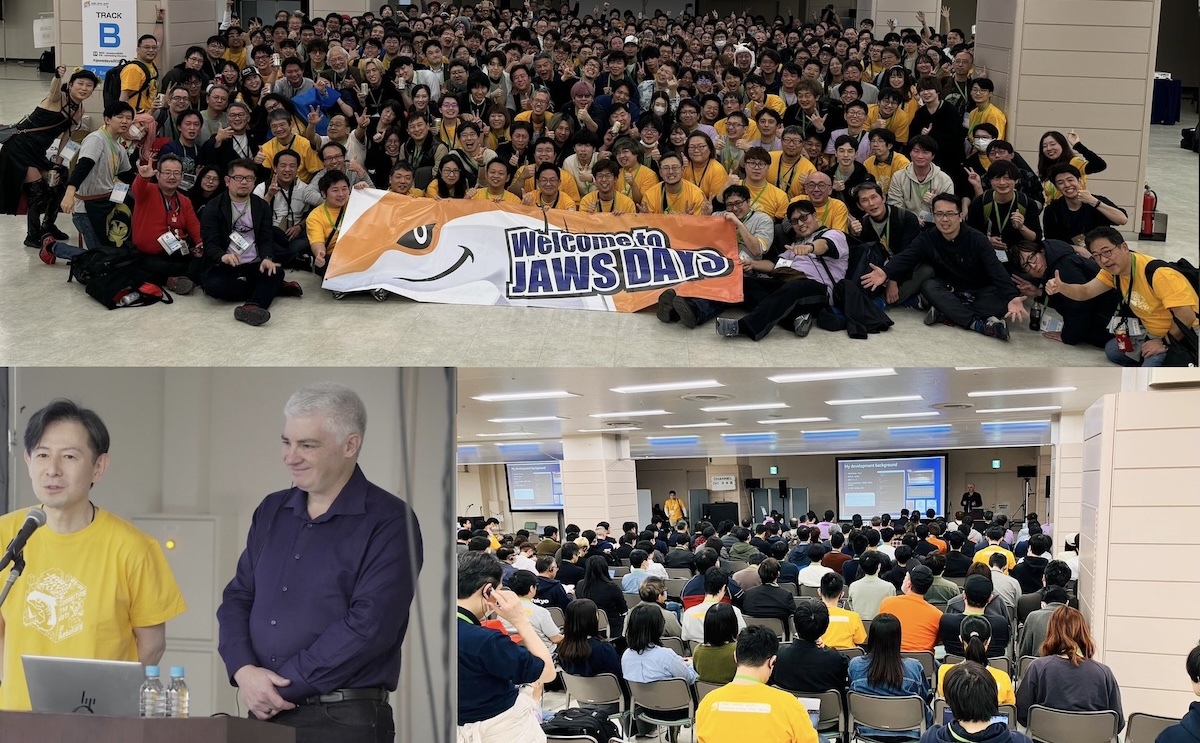
JAWS-UG (Japan AWS User Group) is the largest AWS user group in the world, and holds JAWS Days every year with over a thousand participants from Japan, Korea, Taiwan, and Hong Kong. The March 1st event started with a keynote speech on next-generation development by Jeff Barr (VP of AWS Evangelism), and included over 100 technical and community experience sessions, lightning talks, and workshops such as Game Days, Builders Card Challenges, and networking parties. If you want to experience the most active AWS community event in the world, I recommend attending next year.


Amazon Q Developer now generally available in Amazon SageMaker Canvas — Announced as available in preview at AWS reinvent 2024, Amazon Q Developer is now generally available in Amazon SageMaker Canvas to help you build machine learning (ML) models using natural language.

Applications for the 2025 AWS Cloud Club Captains Program are still open through March 6th. AWS Cloud Clubs are student-led groups for post-secondary and independent students, 18 years old and over. Find a club near you on the Meetup page.

From community.aws
Here are some of my favorite posts from community.aws:

DevSecOps on AWS: Secure, Automate, and Have a Laugh Along the Way – Discover how DevSecOps on AWS transforms your development pipeline by integrating security from the very first commit to production deployment, by Ahmed Mohamed.

Find out how to earn 100 percent free AWS certification vouchers in Opportunity to earn free AWS Certification Vouchers, published by Anand Joshi.

In the post, Boost SaaS Onboarding & Retention with AWS AI & Automation, Kaumudi Tiwari details how to navigate endless forms, generic guides, and a cluttered interface when signing up for a new software as a service (SaaS) platform.

My colleague Dennis Traub has published helpful step-by-step guides on how to use reasoning capabilities with Anthropic’s Claude 3.7 Sonnet in your C#/.NET, Java, JavaScript, or Python applications. Find these posts and much more generative AI-related content in the Gen AI Space on community.aws.

Upcoming AWS events
Check your calendars and sign up for these upcoming AWS events:

AWS Community Days – Join community-led conferences that feature technical discussions, workshops, and hands-on labs led by expert AWS users and industry leaders from around the world: Milan, Italy (April 2), Bay Area – Security Edition (April 4), Timișoara, Romania (April 10), and Prague, Czech Republic (April 29).

AWS Innovate: Generative AI + Data – Join a free online conference focusing on generative AI and data innovations. Available in multiple geographic regions: APJC and EMEA (March 6), North America (March 13), Greater China Region (March 14), and Latin America (April 8).

AWS Summits – Join free online and in-person events that bring the cloud computing community together to connect, collaborate, and learn about AWS. Register in your nearest city: Paris (April 9), Amsterdam (April 16), London (April 30), and Poland (May 5).

AWS re:Inforce – AWS re:Inforce (June 16–18) in Philadelphia, PA, is our annual learning event devoted to all things AWS Cloud security. Registration opens in March, so be ready to join more than 5,000 security builders and leaders.

AWS DevDays are free, technical events where developers can learn about some of the hottest topics in cloud computing. DevDays offer hands-on workshops, technical sessions, live demos, and networking with AWS technical experts and your peers. Register to access AWS DevDays sessions on demand.

Create your AWS Builder ID and reserve your alias. Builder ID is a universal login credential that gives you access—beyond the AWS Management Console—to AWS tools and resources, including over 600 free training courses, community features, and developer tools such as Amazon Q Developer.

AWS Training and Certification hosts free training events, both online and in-person, that help you get the most out of the AWS Cloud. Register to gain foundational cloud knowledge or dive deep in a technical area. Join AWS experts for training events that meet your goals, such as AWS Discovery Days, in-person. and virtual events at AWS Skills Centers including the one in Cape Town.

You can browse all upcoming in-person and virtual events here.

That’s all for this week. Check back next Monday for another Weekly Roundup!
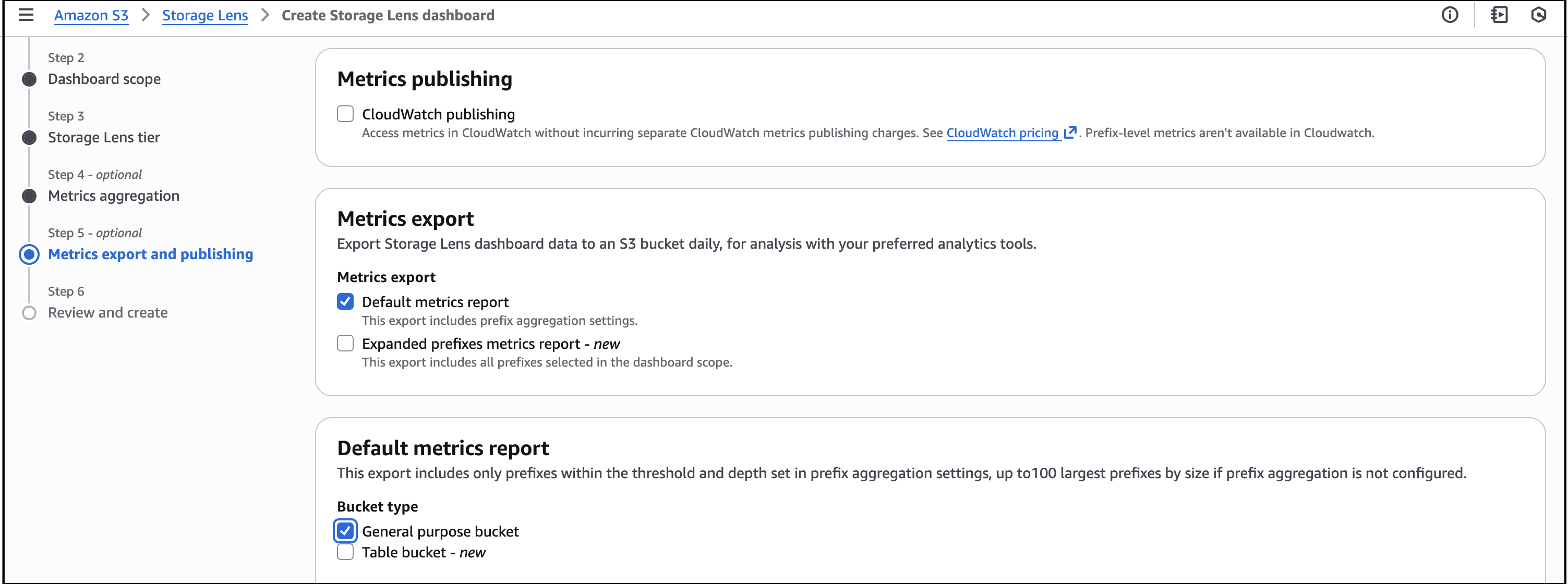
– Veliswa

This post is part of our Weekly Roundup series. Check back each week for a quick roundup of interesting news and announcements from AWS!

How is the News Blog doing? Take this 1 minute survey!

Solve complex problems with new scenario analysis capability in Amazon Q in QuickSight

Post Syndicated from Veliswa Boya original https://aws.amazon.com/blogs/aws/solve-complex-problems-with-new-scenario-analysis-capability-in-amazon-q-in-quicksight/

Today, we announced a new capability of Amazon Q in QuickSight that helps users perform scenario analyses to find answers to complex problems quickly. This AI-assisted data analysis experience helps business users find answers to complex problems by guiding them step-by-step through in-depth data analysis—suggesting analytical approaches, automatically analyzing data, and summarizing findings with suggested actions—using natural language prompts. This new capability eliminates hours of tedious and error-prone manual work traditionally required to perform analyses using spreadsheets or other alternatives. In fact, Amazon Q in QuickSight enables business users to perform complex scenario analysis up to 10x faster than spreadsheets. This capability expands upon existing data Q&A capabilities of Amazon QuickSight so business professionals can start their analysis by simply asking a question.

How it works
Business users are often faced with complex questions that have traditionally required specialized training and days or weeks of time analyzing data in spreadsheets or other tools to address. For example, let’s say you’re a franchisee with multiple locations to manage. You might use this new capability in Amazon Q in QuickSight to ask, “How can I help our new Chicago store perform as well as the flagship store in New York?” Using an agentic approach, Amazon Q would then suggest analytical approaches needed to address the underlying business goal, automatically analyze data, and present results complete with visualizations and suggested actions. You can conduct this multistep analysis in an expansive analysis canvas, giving you the flexibility to make changes, explore multiple analysis paths simultaneously, and adapt to situations over time.

This new analysis experience is part of Amazon QuickSight meaning it can read from QuickSight dashboards which connect to sources such as Amazon Athena, Amazon Aurora, Amazon Redshift, Amazon Simple Storage Service (Amazon S3), and Amazon OpenSearch Service. Specifically, this new experience is part of Amazon Q in QuickSight, which allows it to seamlessly integrate with other generative business intelligence (BI) capabilities such as data Q&A. You can also upload either a .csv or a single-table, single-sheet .xlsx file to incorporate into your analysis.

Here’s a visual walkthrough of this new analysis experience in Amazon Q in QuickSight.

I’m planning a customer event, and I’ve received an Excel spreadsheet of all who’ve registered to attend the event. I want to learn more about the attendees, so I analyze the spreadsheet and ask a few questions. I start by describing what I want to explore.

I upload the spreadsheet to start my analysis. Firstly, I want to understand how many people have registered for the event.

To design an agenda that’s suitable for the audience, I want to understand the various roles that will be attending. I select on the + icon to add a new block for asking a question following along the thread from the previous block.

I can continue to ask more questions. However, there are suggested questions for analyzing my data even further, and I now select one of these suggested questions. I want to increase marketing efforts at companies that don’t currently have a lot of attendees in this case, companies with fewer than two attendees.

Amazon Q executes the required analysis and keeps me updated of the progress. Step 1 of the process identifies companies that have fewer than two attendees and lists them.

Step 2 gives an estimate of how many more attendees I might get from each company if marketing efforts are increased.

In Step 3 I can see the potential increase in total attendees (including the percentage increase) in line with the increase in marketing efforts.

Lastly, Step 4 goes even further to highlight companies I should prioritize for these increased marketing efforts.

To increase the potential number of attendees even more, I wanted to change the analysis to identify companies with fewer than three attendees instead of two attendees. I choose the AI sparkle icon in the upper right to launch a modal that I then use to provide more context and make specific changes to the previous result.


This change resulted in new projections, and I can choose to consider them for my marketing efforts or keep to the previous projections.


Now available
Amazon Q in QuickSight Pro users can use this new capability in preview in the following AWS Regions at launch: US East (N. Virginia) and US West (Oregon). Get started with a free 30-day trial of QuickSight today. To learn more, visit the Amazon QuickSight User Guide. You can submit your questions to AWS re:Post for Amazon QuickSight, or through your usual AWS Support contacts.

Veliswa.

Amazon SageMaker Lakehouse and Amazon Redshift supports zero-ETL integrations from applications

Post Syndicated from Veliswa Boya original https://aws.amazon.com/blogs/aws/introducing-amazon-sagemaker-lakehouse-support-for-zero-etl-integrations-from-applications/

Today, we announced the general availability of Amazon SageMaker Lakehouse and Amazon Redshift support for zero-ETL integrations from applications. Amazon SageMaker Lakehouse unifies all your data across Amazon Simple Storage Service (Amazon S3) data lakes and Amazon Redshift data warehouses, helping you build powerful analytics and AI/ML applications on a single copy of data. SageMaker Lakehouse gives you the flexibility to access and query your data in-place with all Apache Iceberg compatible tools and engines. Zero-ETL is a set of fully managed integrations by AWS that minimizes the need to build ETL data pipelines for common ingestion and replication use cases. With zero-ETL integrations from applications such as Salesforce, SAP, and Zendesk, you can reduce time spent building data pipelines and focus on running unified analytics on all your data in Amazon SageMaker Lakehouse and Amazon Redshift.

As organizations rely on an increasingly diverse array of digital systems, data fragmentation has become a significant challenge. Valuable information is often scattered across multiple repositories, including databases, applications, and other platforms. To harness the full potential of their data, businesses must enable access and consolidation from these varied sources. In response to this challenge, users build data pipelines to extract and load (EL) from multiple applications into centralized data lakes and data warehouses. Using zero-ETL, you can efficiently replicate valuable data from your customer support, relationship management, and enterprise resource planning (ERP) applications for analytics and AI/ML to datalakes and data warehouses, saving you weeks of engineering effort needed to design, build, and test data pipelines.

Prerequisites

  • An Amazon SageMaker Lakehouse catalog configured through AWS Glue Data Catalog and AWS Lake Formation.
  • An AWS Glue database that is configured for Amazon S3 where the data will be stored.
  • A secret in AWS Secret Manager to use for the connection to the data source. The credentials must contain the username and password that you use to sign in to your application.
  • An AWS Identity and Access Management (IAM) role for the Amazon SageMaker Lakehouse or Amazon Redshift job to use. The role must grant access to all resources used by the job, including Amazon S3 and AWS Secrets Manager.
  • A valid AWS Glue connection to the desired application.

How it works – creating a Glue connection prerequisite
I start by creating a connection using the AWS Glue console. I opt for a Salesforce integration as the data source.

Next, I provide the location of the Salesforce instance to be used for the connection, together with the rest of the required information. Be sure to use the .salesforce.com domain instead of .force.com. Users can choose between two authentication methods, JSON Web Token (JWT), which is obtained through Salesforce access tokens, or OAuth login through the browser.

I review all the information and then choose Create connection.

After I sign into the Salesforce instance through a popup (not shown here), the connection is successfully created.

How it works – creating a zero-ETL integration
Now that I have a connection, I choose zero-ETL integrations from the left navigation panel, then choose Create zero-ETL integration.

First I choose the source type for my integration – in this case Salesforce so I can use my recently created connection.

Next, I select objects from the data source that I want to replicate to the target database in AWS Glue.

While in the process of adding objects, I can quickly preview both data and metadata to confirm that I am selecting the correct object.

By default, zero-ETL integration will synchronize data from the source to the target every 60 minutes. However, you can change this interval to reduce the cost of replication for cases that do not require frequent updates.

I review and then choose Create and launch integration.

The data in the source (Salesforce instance) has now been replicated to the target database salesforcezeroETL in my AWS account. This integration has two phases. Phase 1: initial load will ingest all the data for the selected objects and may take between 15 min to a few hours depending on the size of the data in these objects. Phase 2: incremental load will detect any changes (such as new records, updated records, or deleted records) and apply these to the target.

Each of the objects that I selected earlier has been stored in its respective table within the database. From here I can view the Table data for each of the objects that have been replicated from the data source.

Lastly, here’s a view of the data in Salesforce. As new entities are created, or existing entities are updated or changed in Salesforce, the data changes will synchronize to the target in AWS Glue automatically.

Now available
Amazon SageMaker Lakehouse and Amazon Redshift support for zero-ETL integrations from applications is now available in US East (N. Virginia), US East (Ohio), US West (Oregon), Asia Pacific (Hong Kong), Asia Pacific (Singapore), Asia Pacific (Sydney), Asia Pacific (Tokyo), Europe (Frankfurt), Europe (Ireland), and Europe (Stockholm) AWS Regions. For pricing information, visit the AWS Glue pricing page.

To learn more, visit our AWS Glue User Guide. Send feedback to AWS re:Post for AWS Glue or through your usual AWS Support contacts. Get started by creating a new zero-ETL integration today.

– Veliswa

New APIs in Amazon Bedrock to enhance RAG applications, now available

Post Syndicated from Veliswa Boya original https://aws.amazon.com/blogs/aws/new-apis-in-amazon-bedrock-to-enhance-rag-applications-now-available/

Amazon Bedrock is a fully managed service that offers a choice of high-performing foundation models (FMs) from leading AI companies like AI21 Labs, Anthropic, Cohere, Meta, Mistral AI, Stability AI, and Amazon through a single API, along with a broad set of capabilities you need to build generative AI applications with security, privacy, and responsible AI. Amazon Bedrock Knowledge Bases is a fully managed service that empowers developers to create highly accurate, low latency, secure, and customizable generative AI applications cost effectively. Amazon Bedrock Knowledge Bases connects foundation models (FMs) to a company’s internal data using Retrieval Augmented Generation (RAG). RAG helps FMs deliver more relevant, accurate, and customized responses.

In this post, we detail two announcements related to Amazon Bedrock Knowledge Bases:

  • Support for custom connectors and ingestion of streaming data.
  • Support for reranking models.

Support for custom connectors and ingestion of streaming data
Today, we announced support for custom connectors and ingestion of streaming data in Amazon Bedrock Knowledge Bases. Developers can now efficiently and cost-effectively ingest, update, or delete data directly using a single API call, without the need to perform a full sync with the data source periodically or after every change. Customers are increasingly developing RAG-based generative AI applications for various use cases such as chatbots and enterprise search. However, they face challenges in keeping the data up-to-date in their knowledge bases so that the end users of the applications always have access to the latest information. The current process of data synchronization is time-consuming, requiring a full sync every time new data is added or removed. Customers also face challenges in integrating data from unsupported sources, such as Google Drive or Quip, into their knowledge base. Typically, to make this data available in Amazon Bedrock Knowledge Bases, they must first move it to a supported source, such as Amazon Simple Storage Service (Amazon S3), and then start the ingestion process. This extra step not only creates additional overhead but also introduces delays in making the data accessible for querying. Additionally, customers who want to use streaming data (for example, news feeds or Internet of Things (IoT) sensor data) face delays in real-time data availability due to the need to store the data in a supported data source before ingestion. As customers scale up their data, these inefficiencies and delays can become significant operational bottlenecks and increase costs. Keeping all these challenges in mind, it’s important to have a more efficient and cost-effective way to ingest and manage data from various sources to ensure that the knowledge base is up-to-date and available for querying in real-time. With support for custom connector and ingestion of streaming data, customers can now use direct APIs to efficiently add, check the status of, and delete data, without the need to list and sync the entire dataset.

How it works
Custom connectors and ingestion of streaming data can be accessed using the Amazon Bedrock console or the AWS SDK.

  1. Add Document
    The Add Document API is used to add new files to the knowledge base without having to perform a full sync after the document has been added. Customers can add content by specifying the Amazon S3 path of the document, the text content to add as a document to the source, or as a Base64-encoded string. For example:

    PUT /knowledgebases/KB12345678/datasources/DS12345678/documents HTTP/1.1
    Content-type: application/json
    {
      "documents": [{
        "content": {
          "dataSourceType": "CUSTOM",
          "custom": {
            "customDocumentIdentifier": {
              "id": "MyDocument"
            },
            "inlineContent": {
              "textContent": {
                "data": "Hello world!"
              },
              "type": "TEXT"
            },
            "sourceType": "IN_LINE"
          }
        }
      }]
    }
    
  2. Delete Document
    The Delete Document API is used to delete data from the knowledge base without needing to perform a full sync after the document has been deleted. For example:

    POST /knowledgebases/KB12345678/datasources/DS12345678/documents/deleteDocuments/ HTTP/1.1
    Content-type: application/json
    {
      "documentIdentifiers": [{
        "custom": {
          "id": "MyDocument"
        },
        "dataSourceType": "CUSTOM"
      }]
    }
  3. List Document(s)
    The List Document API returns a list of records that match the criteria that is specified in the request parameters. For example:

    POST /knowledgebases/KB12345678/datasources/DS12345678/documents/ HTTP/1.1
    Content-type: application/json 
    {
      "maxResults": 10
    }
  4. Get Document
    The Get Document API returns information about the document(s) that match the criteria that is specified in the request parameters. For example:

    POST /knowledgebases/KB12345678/datasources/DS12345678/documents/getDocuments/ HTTP/1.1
    Content-type: application/json
    {
      "documentIdentifiers": [{
        "custom": {
          "id": "MyDocument"
        },
        "dataSourceType": "CUSTOM"
      }]
    }

Now available
Support for custom connectors and ingestion of streaming data in Amazon Bedrock Knowledge Bases is available today in all AWS Regions where Amazon Bedrock Knowledge Bases is available. Check the Region list for details and future updates. To learn more about Amazon Bedrock Knowledge Bases, visit the Amazon Bedrock product page. For pricing details, review the Amazon Bedrock pricing page.

Send feedback to AWS re:Post for Amazon Bedrock or through your usual AWS contacts, and engage with the generative AI builder community at community.aws.

Support for reranking models
Today we also announced the new Rerank API in Amazon Bedrock to offer developers a way to use reranking models to enhance the performance of their RAG-based applications by improving the relevance and accuracy of responses. Semantic search, supported by vector embeddings, embeds documents and queries into a semantic high-dimension vector space where texts with related meanings are nearby in the vector space and therefore semantically similar, so that it returns similar items even if they don’t share any words with the query. Semantic search is used in RAG applications because the relevance of retrieved documents to a user’s query plays a critical role in providing accurate responses and RAG applications retrieve a range of relevant documents from the vector store.

However, semantic search has limitations in prioritizing the most suitable documents based on user preferences or query context especially when the user query is complex, ambiguous, or involves nuanced context. This can lead to retrieving documents that are only partially relevant to the user’s question. This leads to another challenge where proper citation and attribution of sources is not attributed to the correct sources, leading to loss of trust and transparency in the RAG-based application. To address these limitations, future RAG systems should prioritize developing robust ranking algorithms that can better understand user intent and context. Additionally, it is important to focus on improving source credibility assessment and citation practices to confirm the reliability and transparency of the generated responses.

Advanced reranking models solve for these challenges by prioritizing the most relevant content from a knowledge base for a query and additional context to ensure that foundation models receive the most relevant content, which leads to more accurate and contextually appropriate responses. Reranking models may reduce response generation costs by prioritizing the information that is sent to the generation model.

How it works
At launch, we’re supporting Amazon Rerank 1.0 and Cohere Rerank 3.5 reranking models. For the walkthrough, I will use the Amazon Rerank 1.0 model, I will start by requesting access to this model.


Once access has been granted, I create a knowledge base using the existing Amazon Bedrock Knowledge Bases Console experience (an API process is also available as an alternative). The knowledge base contains two data sources; a music playlist, and a list of films.


As soon as the knowledge base has been created I edit the Service Role to add the policy that contains the bedrock:Rerank action. The API takes the user query as the input along with the list of documents that needs to be reranked. The output will be a reranked prioritized list of documents.

{
    "Version": "2012-10-17",
    "Statement": [
        {
            "Sid": "Statement1",
            "Effect": "Allow",
            "Action": [
                "bedrock:InvokeModel"
            ],
            "Resource": [
                "arn:aws:bedrock:us-west-2::foundation-model/amazon.rerank-v1:0"
            ]
        },
        {
            "Sid": "Statement2",
            "Effect": "Allow",
            "Action": [
                "bedrock:Rerank"
            ],
            "Resource": [
                "*"
            ]
        }
    ]
}

The last step is to sync the data sources to index their contents for searching. A sync can take between a few minutes to a few hours.

The knowledge base is ready for use. The RetrieveAndGenerate API reranks the results retrieved from the vector datastore based on their relevance with the query.

To contrast, I ran the same query against the same data in a separate account that doesn’t have the Rerank API. The outcome is that results aren’t reranked on their relevance with the query. This could affect performance and compromise the accuracy of the responses.

Now available
The Rerank API in Amazon Bedrock is available today in the following AWS Regions: US West (Oregon), Canada (Central), Europe (Frankfurt), and Asia Pacific (Tokyo). Check the Region list for details and future updates. Rerank API can be used independently to rerank documents even if you are not using Amazon Bedrock Knowledge Bases. To learn more about Amazon Bedrock Knowledge Bases, visit the Amazon Bedrock product page. For pricing details, review the Amazon Bedrock pricing page.

Send feedback to AWS re:Post for Amazon Bedrock or through your usual AWS contacts, and engage with the generative AI builder community at community.aws.

Veliswa.

Track performance of serverless applications built using AWS Lambda with Application Signals

Post Syndicated from Veliswa Boya original https://aws.amazon.com/blogs/aws/track-performance-of-serverless-applications-built-using-aws-lambda-with-application-signals/

In November 2023, we announced Amazon CloudWatch Application Signals, an AWS built-in application performance monitoring (APM) solution, to solve the complexity associated with monitoring performance of distributed systems for applications hosted on Amazon EKS, Amazon ECS, and Amazon EC2. Application Signals automatically correlates telemetry across metrics, traces, and logs, to speed up troubleshooting and reduce application disruption. By providing an integrated experience for analyzing performance in the context of your applications, Application Signals gives you improved productivity focusing on the applications that support your most critical business functions.

Today we’re announcing the availability of Application Signals for AWS Lambda to eliminate the complexities of manual setup and performance issues required to assess application health for Lambda functions. With CloudWatch Application Signals for Lambda, you can now collect application golden metrics (the incoming and outgoing volume of requests, latency, faults, and errors).

AWS Lambda abstracts away the complexity of the underlying infrastructure, enabling you to focus on building your application without having to monitor server health. This allows you to shift your focus toward monitoring the performance and health of your applications, which is necessary to operate your applications at peak performance and availability. This requires deep visibility into performance insights such as volume of transactions, latency spikes, availability drops, and errors for your critical business operations and application programming interfaces (APIs).

Previously, you had to spend significant time correlating disjointed logs, metrics, and traces across multiple tools to establish the root cause of anomalies, increasing mean time to recovery (MTTR) and operational costs. Additionally, building your own APM solutions with custom code or manual instrumentation using open source (OSS) libraries was time-consuming, complex, operationally expensive, and often resulted in increased cold start times and deployment challenges when managing large fleets of Lambda functions. Now, you can use Application Signals to seamlessly monitor and troubleshoot health and performance issues in serverless applications, without requiring any manual instrumentation or code changes from your application developers.

How it works
Using the pre-built, standardized dashboards of Application Signals, you can identify the root cause of performance anomalies in just a few clicks by drilling down into performance metrics for critical business operations and APIs. This helps you visualize application topology which shows interactions between the function and its dependencies. In addition, you can define Service Level Objectives (SLOs) on your applications to monitor specific operations that matter most to you. An example of an SLO could be to set a goal that a webpage should render within 2000 ms 99.9 percent of the time in a rolling 28-day interval.

Application Signals auto-instruments your Lambda function using enhanced AWS Distro for OpenTelemetry (ADOT) libraries. This delivers better performance such as lower cold start latency,
memory consumption, and function invocation duration, so you can quickly monitor your applications.

I have an existing Lambda function appsignals1 and I will configure Application Signals in the Lambda Console to collect various telemetry on this application.

In the Configuration tab of the function I select Monitoring and operations tools to enable both the Application signals and the Lambda service traces.

I have an application myAppSignalsApp that has this Lambda function attached as a resource. I’ve defined an SLO for my application to monitor specific operations that matter most to me. I’ve defined a goal that states that the application executes within 10 ms 99.9 percent of the time in a rolling 1-day interval.

It can take 5-10 minutes for Application Signals to discover the function after it’s been invoked. As a result you’ll need to refresh the Services page before you can see the service.

Now I’m in the Services page and I can see a list of all my Lambda functions that have been discovered by Application Signals. Any telemetry that is emitted will be displayed here.

I can then visualize the complete application topology from the Service Map and quickly spot anomalies across my service’s individual operations and dependencies, using the newly collected metrics of volume of requests, latency, faults, and errors. To troubleshoot, I can click into any point in time for any application metric graph to discover correlated traces and logs related to that metric, to quickly identify if issues impacting end users are isolated to an individual task or deployment.

Available now
Amazon CloudWatch Application Signals for Lambda is now generally available and you can start using it today in all AWS Regions where Lambda and Application Signals are available. Today, Application Signals is available for Lambda functions that use Python and Node.js managed runtimes. We’ll continue to add support for other Lambda runtimes in near future.

To learn more, visit the AWS Lambda developer guide and Application Signals developer guide. You can submit your questions to AWS re:Post for Amazon CloudWatch, or through your usual AWS Support contacts.

Veliswa.

Run your compute-intensive and general purpose workloads sustainably with the new Amazon EC2 C8g, M8g instances

Post Syndicated from Veliswa Boya original https://aws.amazon.com/blogs/aws/run-your-compute-intensive-and-general-purpose-workloads-sustainably-with-the-new-amazon-ec2-c8g-m8g-instances/

Today we’re announcing general availability of the Amazon Elastic Compute Cloud (Amazon EC2) C8g and M8g instances.

C8g instances are AWS Graviton4 based and are ideal for compute-intensive workloads such as high performance computing (HPC), batch processing, gaming, video encoding, scientific modeling, distributed analytics, CPU-based machine learning (ML) inference, and ad serving.

Also Graviton4 based, M8g instances provide the best price performance for general purpose workloads. M8g instances are ideal for applications such as application servers, microservices, gaming servers, mid-size data stores, and caching fleets.

Now looking at some of the improvements that we have made available in both these instances. C8g and M8g instances offer larger instance sizes with up to three times more vCPUs (up to 48xl), three times the memory (up to 384GB for C8g and up to 768GB for M8g), 75 percent more memory bandwidth, and two times more L2 cache over equivalent 7g instances. This helps you to process larger amounts of data, scale up your workloads, improve time to results, and lower your total cost of ownership (TCO). These instances also offer up to 50 Gbps network bandwidth and up to 40 Gbps Amazon Elastic Block Storage (Amazon EBS) bandwidth compared to up to 30 Gbps network bandwidth and up to 20 Gbps Amazon EBS bandwidth on Graviton3-based instances. Similar to R8g instances, C8g and M8g instances offer two bare metal sizes (metal-24xl and metal-48xl). You can right size your instances and deploy workloads that benefit from direct access to physical resources.

The specs for the C8g instances are as follows.

Instance size
vCPUs
Memory (GiB)
Network bandwidth (Gbps)
EBS bandwidth (Gbps)
c8g.medium 1 2 Up to 12.5 Up to 10
c8g.large 2 4 Up to 12.5 Up to 10
c8g.xlarge 4 8 Up to 12.5 Up to 10
c8g.2xlarge 8 16 Up to 15 Up to 10
c8g.4xlarge 16 32 Up to 15 Up to 10
c8g.8xlarge 32 64 15 10
c8g.12xlarge 48 96 22.5 15
c8g.16xlarge 64 128 30 20
c8g.24xlarge 96 192 40 30
c8g.48xlarge 192 384 50 40
c8g.metal-24xl 96 192 40 30
c8g.metal-48xl 192 384 50 40

The specs for the M8g instances are as follows.

Instance size
vCPUs
Memory (GiB)
Network bandwidth (Gbps)
EBS bandwidth (Gbps)
m8g.medium 1 4 Up to 12.5 Up to 10
m8g.large 2 8 Up to 12.5 Up to 10
m8g.xlarge 4 16 Up to 12.5 Up to 10
m8g.2xlarge 8 32 Up to 15 Up to 10
m8g.4xlarge 16 64 Up to 15 Up to 10
m8g.8xlarge 32 128 15 10
m8g.12xlarge 48 192 22.5 15
m8g.16xlarge 64 256 30 20
m8g.24xlarge 96 384 40 30
m8g.48xlarge 192 768 50 40
m8g.metal-24xl 96 384 40 30
m8g.metal-48xl 192 768 50 40

Good to know

  • AWS Graviton4 processors offer enhanced security with always-on memory encryption, dedicated caches for every vCPU, and support for pointer authentication.
  • These instances are built on the AWS Nitro System which is a rich collection of building blocks that offloads many of the traditional virtualization functions to dedicated hardware and software. It delivers high performance, high availability, and high security, thus reducing virtualization overhead.
  • The C8g and M8g instances are ideal for Linux-based workloads including containerized and microservices-based applications such as those running on Amazon Elastic Kubernetes Service (Amazon EKS) and Amazon Elastic Container Service (Amazon ECS), as well as applications written in popular programming languages such as C/C++, Rust, Go, Java, Python, .NET Core, Node.js, Ruby, and PHP.

Available now
C8g and M8g instances are available today in the US East (N. Virginia), US East (Ohio), US West (Oregon), and Europe (Frankfurt) AWS Regions. As usual with Amazon EC2, you pay only for what you use. For more information, see Amazon EC2 Pricing. Check out the collection of AWS Graviton resources to help you start migrating your applications to Graviton instance types. You can also visit the AWS Graviton Fast Start program to begin your Graviton adoption journey.

To learn more, visit our Amazon EC2 instances page, and please send feedback to AWS re:Post for EC2 or through your usual AWS Support contacts.

– Veliswa

AWS Weekly Roundup: S3 Conditional writes, AWS Lambda, JAWS Pankration, and more (August 26, 2024)

Post Syndicated from Veliswa Boya original https://aws.amazon.com/blogs/aws/aws-weekly-roundup-s3-conditional-writes-aws-lambda-jaws-pankration-and-more-august-26-2024/

The AWS User Group Japan (JAWS-UG) hosted JAWS PANKRATION 2024 themed ‘No Border’. This is a 24-hour online event where AWS Heroes, AWS Community Builders, AWS User Group leaders, and others from around the world discuss topics ranging from cultural discussions to technical talks. One of the speakers at this event, Kevin Tuei, an AWS Community Builder based in Kenya, highlighted the importance of building in public and sharing your knowledge with others, a very fitting talk for this kind of event.

Last week’s launches
Here are some launches that got my attention during the previous week.

Amazon S3 now supports conditional writes – We’ve added support for conditional writes in Amazon S3 which check for existence of an object before creating it. With this feature, you can now simplify how distributed applications with multiple clients concurrently update data in parallel across shared datasets. Each client can conditionally write objects, making sure that it does not overwrite any objects already written by another client.

AWS Lambda introduces recursive loop detection APIs – With the recursive loop detection APIs you can now set recursive loop detection configuration on individual AWS Lambda functions. This allows you to turn off recursive loop detection on functions that intentionally use recursive patterns, avoiding disruption of these workloads. Using these APIs, you can avoid disruption to any intentionally recursive workflows as Lambda expands support of recursive loop detection to other AWS services. Configure recursive loop detection for Lambda functions through the Lambda Console, the AWS command line interface (CLI), or Infrastructure as Code tools like AWS CloudFormation, AWS Serverless Application Model (AWS SAM), or AWS Cloud Development Kit (CDK). This new configuration option is supported in AWS SAM CLI version 1.123.0 and CDK v2.153.0.

General availability of Amazon Bedrock batch inference API – You can now use Amazon Bedrock to process prompts in batch to get responses for model evaluation, experimentation, and offline processing. Using the batch API makes it more efficient to run inference with foundation models (FMs). It also allows you to aggregate responses and analyze them in batches. To get started, visit Run batch inference.

Other AWS news
Launched in July 2024, AWS GenAI Lofts is a global tour designed to foster innovation and community in the evolving landscape of generative artificial intelligence (AI) technology. The lofts bring collaborative pop-up spaces to key AI hotspots around the world, offering developers, startups, and AI enthusiasts a platform to learn, build, and connect. The events are ongoing. Find a location near you and be sure to attend soon.

Upcoming AWS events
AWS Summits – These are free online and in-person events that bring the cloud computing community together to connect, collaborate, and learn about AWS. Whether you’re in the Americas, Asia Pacific & Japan, or EMEA region, learn more about future AWS Summit events happening in your area. On a personal note, I look forward to being one of the keynote speakers at the AWS Summit Johannesburg happening this Thursday. Registrations are still open and I look forward to seeing you there if you’ll be attending.

AWS Community Days – Join an AWS Community Day event just like the one I mentioned at the beginning of this post to participate in technical discussions, workshops, and hands-on labs led by expert AWS users and industry leaders from your area. If you’re in New York, there’s an event happening in your area this week.

You can browse all upcoming in-person and virtual events here.

That’s all for this week. Check back next Monday for another Weekly Roundup!
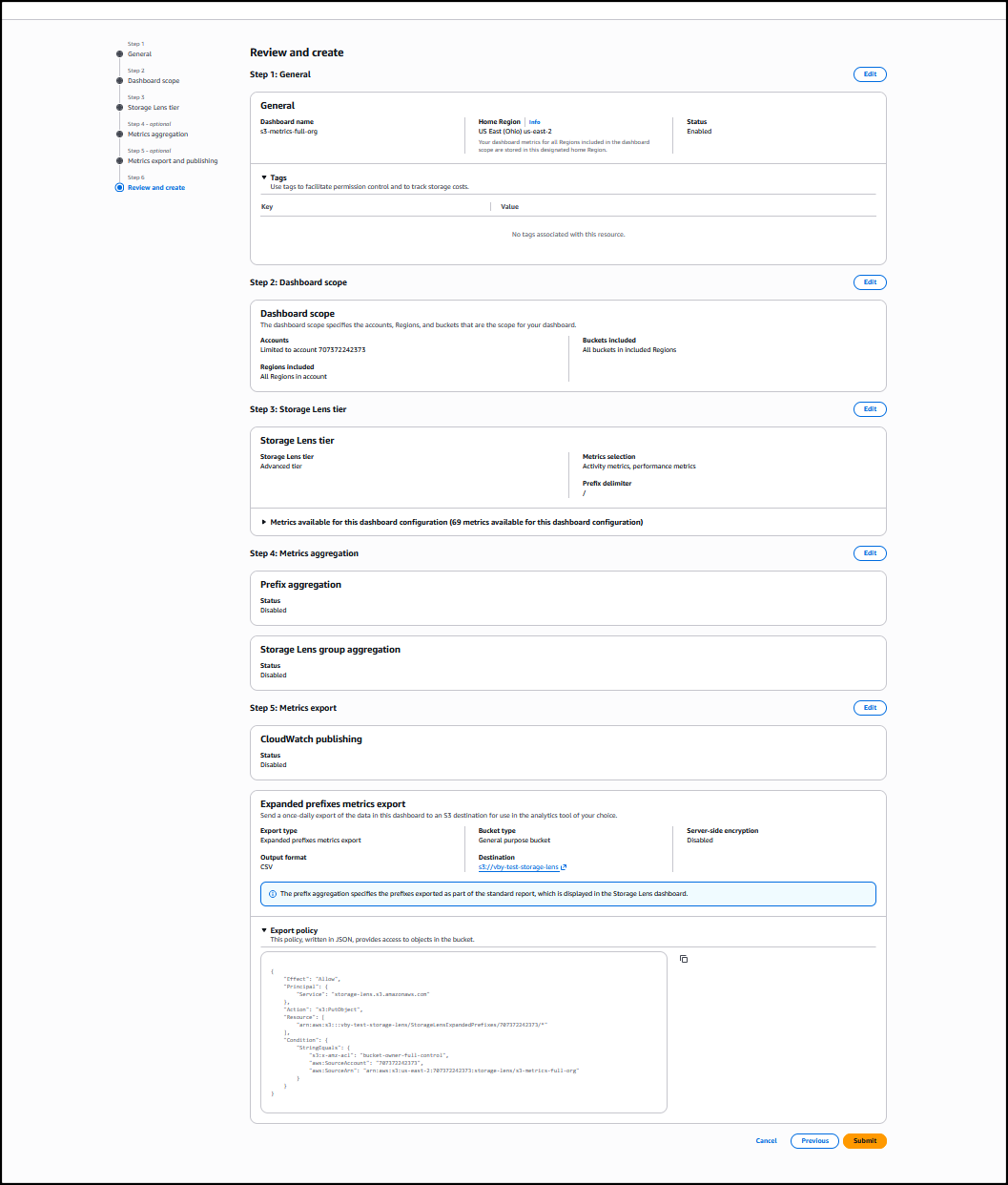
– Veliswa