Post Syndicated from Anand Komandooru original https://aws.amazon.com/blogs/architecture/mcp-went-stateless-is-your-aws-mcp-server-deployment-well-architected/
On July 28, 2026, MCP published its largest revision since launch, making the protocol core stateless and bringing remote MCP servers into alignment with AWS Well-Architected Framework best practices. The initialize handshake is gone, and so is the Mcp-Session-Id header that clients had to echo on every later request. Every request now carries its own protocol version and client context. A client’s first message can be the actual tool call, and any server instance can respond to it. If your MCP server was built for the session-based protocol, the sticky sessions, shared session stores, and custom observability plumbing it required are no longer necessary. If you run behind Amazon Bedrock AgentCore Gateway, protocol management and backward compatibility are handled for you. This post is for teams managing the full deployment stack themselves.
If a client wants to know what a server supports before calling it, a new server/discover method returns the supported protocol versions, capabilities, and identity in a single response. Servers must implement it per the MCP 2026-07-28 specification, but calling it is optional for the client.
This matters on AWS because the old design fought horizontal scaling. A session lived on whichever instance issued it. Running more than one instance meant either pinning clients with sticky routing or externalizing session state to a shared store. Both were correct for that protocol. With the new protocol, neither is required. This post maps the MCP 2026-07-28 specification against the Well-Architected Agentic AI Lens and recommends migrating, because the new protocol achieves natively what the old one could only achieve through compensating infrastructure.
One thing to settle up front, because it drives everything else: stateless describes the protocol, not your application. Stateful use cases still work.
Think of it as a coat check. Under the old protocol the server was a valet who remembered your face, which meant you had to keep dealing with that same valet and nobody else could help you. Now you get a numbered ticket, and any attendant can serve you because the ticket carries the reference. When a server needs continuity across calls, a tool returns an identifier for the stored state. The model includes that identifier on the calls that follow. The state stays in your datastore. The model carries only the key. This is ordinary REST discipline. It has an advantage over the old model. The identifier sits in the model’s context rather than hidden in a header. The model can reason about it and thread it across tools.
What changes in your architecture
The following table compares the deployment patterns the session-based protocol required against the patterns the stateless core now supports.
| Before (session-based) | After (2026-07-28 stateless) |
| Elastic Load Balancing Application Load Balancer (ALB) stickiness so each session reaches the same instance. | Plain round-robin. Delete the stickiness configuration. |
| Session state in Amazon DynamoDB or Amazon ElastiCache. | No session store. Server-minted identifiers passed as tool arguments. |
| Parse request bodies at the gateway to route by method. | Route and throttle on the Mcp-Method and Mcp-Name headers. |
| AWS Lambda required workarounds for the stateful handshake. | AWS Lambda is a natural fit. Request in, response out. |
| Refetch tool lists per session. No caching story. | Cache with ttlMs and cacheScope, the protocol’s built-in freshness fields. |
| Bolt-on tracing per implementation. Proprietary protocol logging channel. | W3C Trace Context in _meta for distributed tracing. stderr or OpenTelemetry for logging. Protocol logging is deprecated. |
Rely on stream resumption (Last-Event-ID) for broken responses. |
Make tools idempotent. Clients re-issue broken calls. |
 Don’t delete yet if you serve 2025-era clients. The 2026-07-28 spec includes a backward-compatible lane that preserves session semantics for older clients. Your ALB stickiness rules and session store (DynamoDB/ElastiCache) must remain in place until you stop serving pre-2026-07-28 clients.
Action: Instrument your gateway to log protocol version per request. Set a sunset date for the legacy lane and communicate it to client teams. Only decommission session infrastructure after traffic on the old version reaches zero. This guidance applies to session infrastructure built to compensate for the old protocol’s requirements. Managed hosts that offer session features by design for specific use cases are not in scope.
One behavioral change to plan for. Servers can no longer push a request to a client mid-call, which is how confirmations, sampling, and root queries used to work over a held-open stream. The spec replaces that pattern with Multi Round-Trip Requests (MRTR). A server that needs input returns an input_required result containing an inputRequests map. This map holds elicitations, sampling calls, or root queries, and an opaque requestState token. The client fulfills the requests, then re-sends the original call with inputResponses and the echoed requestState. Any instance can pick that up because requestState carries all the context the server needs to resume. No shared session store is required. The server does not hold the connection open. This is what makes the pattern work on AWS Lambda.
The Well-Architected view
The AWS Well-Architected Agentic AI Lens already prescribes standardized protocol-based integration as a best practice. For more detail, refer to Establish standardized tool integration protocols (MCP, A2A). What follows is not new guidance but a reading of how the MCP 2026-07-28 specification makes those best practices genuinely achievable for a remote MCP server, pillar by pillar.
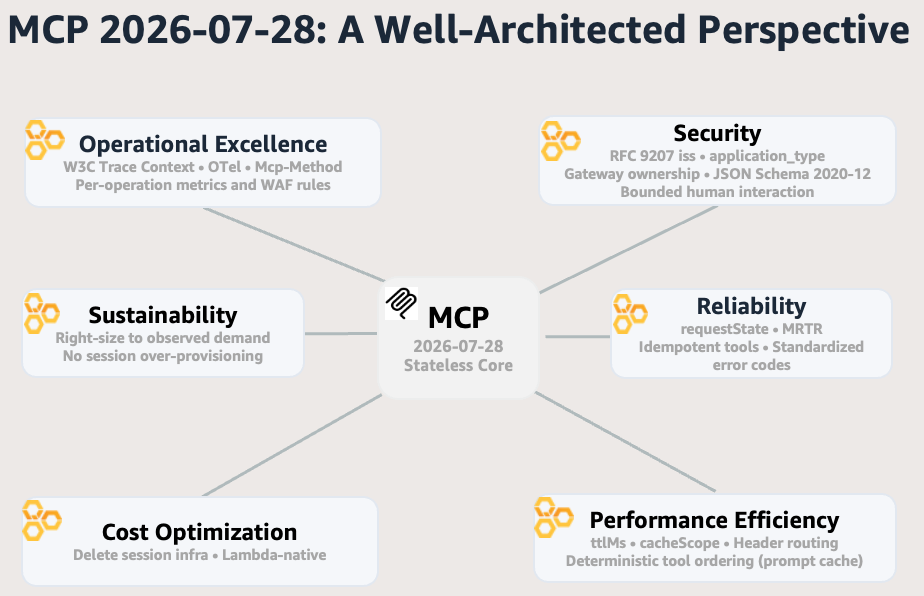
Figure 1: How the MCP 2026-07-28 specification maps to the Well-Architected Agentic AI Lens pillars
Operational excellence. The Lens identifies observability as the foundation for operating agents. If you cannot trace a decision end to end, you cannot debug, optimize, or audit it. The 2026-07-28 spec builds observability into the protocol itself. Three changes make this concrete:
- Tracing. Every request carries W3C Trace Context keys in _meta (
traceparent,tracestate,baggage), so it traces end to end through any OpenTelemetry-compatible backend, including Amazon CloudWatch. The Lens prescribes end-to-end tracing and telemetry for agent operations. - Operational signals without body parsing. The Mcp-Method and Mcp-Name headers expose the operation type on every POST, and every response carries a required resultType field (
completeorinput_required). Gateways and observability tools get unambiguous per-operation signals for metrics, alarms, and AWS WAF rules without inspecting payloads. The result directly addresses the Lens recommendation for implementing metrics and monitoring for agent-specific patterns. - Standardized logging. MCP’s proprietary protocol logging is deprecated in favor of
stderrand OpenTelemetry. The Lens makes the same recommendation: implement structured logging through standardized, queryable formats.
Security. The Lens treats agent security as harder than traditional service security: agents act autonomously with delegated credentials, and their inputs (including state identifiers) are visible to, and potentially manipulable by, the model. MCP’s 2026-07-28 spec hardens the protocol surface against these risks. Five changes strengthen the security posture:
- Issuer validation. Clients must validate the iss parameter per RFC 9207, confirming which authorization server produced a response. The Lens calls for the same discipline under strong authentication for agent identities.
- Client type declaration. Clients must declare application_type at registration so a desktop or CLI client is not mistaken for a web app, verifying authentication mechanisms match the client’s security profile. The same Lens best practice applies: strong authentication for agent identities. (Note: Dynamic Client Registration itself is now deprecated in favor of Client ID Metadata Documents.)
- Bounded human interaction. A server can prompt a user only while it is handling that user’s request, through the Multi Round-Trip Requests pattern. This is a protocol-enforced constraint that bounds when human interaction can occur, aligning with the Lens’s human-in-the-loop controls for critical decisions.
- Ownership enforcement. Because state identifiers are visible to the model, servers must enforce ownership on every call. The protocol will not stop a caller from presenting an identifier that is not theirs, so the Lens best practice for tool authorization at the gateway applies: validate that the requesting identity owns the resource it references. The same discipline applies to requestState tokens: the spec requires servers to treat them as untrusted input and protect their integrity with HMAC or AEAD, rejecting any token that fails verification.
- Schema validation. Tool input and output schemas are now validated against JSON Schema 2020-12, giving servers a formal contract for rejecting malformed or injected arguments before execution. This maps to the Lens requirement to validating tool inputs at the boundary.
Reliability. Agents hold multi-step context that is expensive to reconstruct after failure, making reliability harder than in traditional services. MCP’s 2026-07-28 spec addresses this at the protocol layer. Four changes reduce that fragility:
- Stateless transport. The spec removes protocol-level sessions, so any instance can serve any request. Instance loss is a non-event. Retries need no session affinity, and scale-in never drains sessions. The protocol embodies the failure-isolation philosophy at the protocol layer without additional infrastructure.
- Continuation tokens. Interrupted multi-step interactions resume through requestState, an opaque continuation token the server returns and the client echoes on retry. This embodies the Lens principle of designing workflows in stages with incremental recovery.
- Idempotent retry. Stream resumability was removed, so a broken response stream loses the in-flight payload and the client must re-issue the call. The mitigation is the same idempotent task execution pattern the Lens prescribes for retryable agent actions: make tools idempotent so re-issued requests produce no duplicate side effects.
- Standardized error codes. The spec allocates error code ranges (-32000 to -32019 implementation-defined, -32020 to -32099 reserved for MCP), giving clients and gateways a canonical signal set for retry, backoff, and circuit-breaking decisions. Gateways can now implement standardized communication protocols.
Performance efficiency. Redundant data fetches and per-interaction protocol overhead are the two main performance drags the Lens identifies in agentic workloads. MCP’s 2026-07-28 spec addresses both at the protocol layer. Three changes reduce that overhead:
- Protocol-declared caching. Two fields are now required on list and resource-read results:
ttlMs(how many milliseconds a response stays fresh) andcacheScope(whether shared intermediaries can cache it or only the requesting client). Tool lists now return in deterministic order, allowing LLM prompt-cache hits across calls. The protocol now delivers what the Lens recommends under optimizing inference-time performance for agent workloads. - Freshness semantics. Clients and MCP-aware gateways can cache responses using protocol-declared freshness (
ttlMs+cacheScope), the same data-type-specific TTL discipline the Lens recommends under protocol-declared freshness semantics, without guessing at staleness. - Header-based routing. Routing and throttling decisions now live in HTTP headers (
Mcp-Method,Mcp-Name) rather than parsed message bodies, reducing per-interaction overhead in line with what the Lens prescribes for efficient protocol-based agent communications.
Cost optimization. The Lens identifies always-on infrastructure serving bursty agent traffic as the highest source of idle cost in an agent stack. MCP’s stateless architecture eliminates an entire category of that cost: session infrastructure.
- Delete session infrastructure. Audit for anything that exists only to preserve sessions (ElastiCache clusters, sticky-routing rules, session-replication logic) and delete it. This follows the same principle the Lens applies to cost-optimizing tool serving through serverless and resource sharing. Infrastructure that runs constantly to serve unpredictable traffic should be replaced with consumption-based patterns that scale to zero. A two-node Amazon ElastiCache (cache.t4g.micro) session store is about $23/month (AWS Pricing Calculator, July 2026). The larger saving is eliminating an entire class of infrastructure and the operational burden around it. Sticky routing costs capacity too by distributing load unevenly, and the savings scale with the size of your fleet.
- Serverless as first-class pattern. AWS Lambda has no sticky routing and no persistent connections. A session-based MCP server meant externalizing state to a shared store. Even a “session-free” mode still paid for the mandatory handshake. With the 2026-07-28 stateless core, request in, response out is exactly what AWS Lambda does natively. Serverless MCP moves from workaround to first-class pattern, delivering what the Lens recommends for cost-optimizing tool serving through serverless and resource sharing.
Sustainability. The Lens identifies static provisioning for bursty agent traffic as the primary source of wasted infrastructure capacity. The 2026-07-28 spec’s stateless architecture eliminates the structural reasons for that over-provisioning.
- No more pinned-session capacity. The spec’s stateless design means no instance holds a session, so no instance needs to stay warm for one. Right-size against your actual traffic pattern rather than a theoretical peak, the same principle the Lens applies to appropriately scaling compute, networking, and data dependencies for agent workloads. Instance-agnostic routing means the fleet you do keep can run closer to its real utilization, instead of padding for the instances that happened to hold long-lived sessions.
The AWS Well-Architected Agentic AI Lens articulated these best practices as general principles for agentic workloads. The fact that a major protocol revision, designed independently, converges on the same architectural shape is evidence that the framework captures something real about how reliable distributed systems need to work.
What to watch
The architectural shift creates its own operational surface. These are the areas where the new defaults need deliberate attention rather than passive adoption.
Long-lived streams did not disappear. The subscriptions/listen method consolidates change notifications into a single opt-in POST-response stream, so check idle timeouts across your load balancer, proxy, and compute tier if your servers use it.
Deprecations with a clock. The spec deprecated Roots, Sampling, Logging, and the HTTP+SSE transport with a twelve-month floor before removal. The earliest any of these can be removed is July 2027. It also removed ping, logging/setLevel, and notifications/roots/list_changed outright, and moved log level into per-request _meta. The suggested migration paths:
- Pass directories through tool parameters or resource URIs instead of Roots.
- Integrate directly with LLM provider APIs instead of Sampling.
- Log to
stderror OpenTelemetry instead of protocol-level Logging. - Migrate HTTP+SSE to Streamable HTTP.
Plan the exits now rather than at the deadline.
MCP Apps puts server-supplied HTML inside your host. Pre-declared UI resource templates, mandatory iframe sandboxing, and auditable JSON-RPC communication between the iframe and host all help. But treat template review as mandatory before deployment, and decide deliberately which servers in your fleet can ship UI at all.
cacheScope is a multi-tenant disclosure risk. Setting cacheScope: "public" on a response that contains tenant-specific data lets shared intermediaries serve one tenant’s list to another. Default to "private" and widen deliberately only for responses that are genuinely identical across callers.
Built-in protection against future breaks
Three mechanisms shipped alongside the stateless core to prevent a repeat of this kind of breaking change.
A feature lifecycle policy gives every feature an Active, Deprecated, or Removed state. Nothing can be removed until at least twelve months after it is deprecated. An extensions framework lets new capabilities ship as opt-in extensions that prove themselves outside the core. That is where Tasks landed after its experimental version needed a redesign. And no Standards Track proposal can reach Final status without a matching scenario in the conformance suite. This is the same suite the official SDKs are validated against.
The handshake and session removal were a deliberate, one-time break to fix the foundation. From here, what you build against 2026-07-28 comes with documented notice periods.
Self-check
Run these ten questions against your own deployment before you decide whether, and how, to migrate.
- Can any instance of your server handle any request, with no session affinity at the load balancer?
- Have you deleted everything that existed only to preserve a protocol session?
- Do your list responses set
ttlMsandcacheScopedeliberately, and does your gateway route on headers rather than parsed bodies? - Does every client validate
iss, and does every server enforce ownership per identifier rather than trusting the identifier itself? - Do you have a firm date to stop supporting 2025-11-25 clients?
- Have you replaced server-initiated pushes with Multi Round-Trip Requests so no instance holds a connection open for client input?
- Are your tools idempotent so clients can safely re-issue any broken call?
- Do you propagate W3C Trace Context end-to-end and emit logs through
stderror OpenTelemetry instead of MCP protocol logging? - Are you still paying for session infrastructure (DynamoDB, ElastiCache, sticky routing) that nothing uses?
- Do you have a governance policy for MCP Apps before any server in your fleet exposes one?
A “no” to any of these is where the new spec pays off. Each maps to the pillar sections earlier in this post. Start with the migration path that follows, run your server against the official conformance suite, and use the related AWS resources at the end to plan the change.
Migration path
You do not need to move immediately. Protocol versions are frozen snapshots, and a client and server only need to share one, so 2025-11-25 servers keep working with clients that still speak it. But hosts retire old versions on their own timeline, the community is already moving (GitHub’s MCP Server shipped support ahead of the release), and 2025-11-25 is now frozen. Future capabilities and fixes land on 2026-07-28 or later.
For a new server, target 2026-07-28 directly: stateless from the start, explicit identifiers, and no dependence on Roots, Sampling, or MCP Logging.
For an existing server, work through these steps in order:
- Upgrade the SDK and opt in. Speaking the new revision is never automatic.
- Audit for session assumptions and migrate off the experimental Tasks API if you used it (Tasks is now an official extension with a redesigned interface).
- Plan the deprecation exits (Roots, Sampling, Logging, HTTP+SSE) and change the resource-not-found error code from
-32002to-32602. - Collect the infrastructure savings by deleting session stores, sticky-routing rules, and handshake infrastructure.
For a platform or gateway team: add header-based routing and per-operation throttling on Mcp-Method, honor ttlMs and cacheScope in your caching layer. Also propagate W3C Trace Context, and set a policy for MCP Apps before the first server in your fleet ships one.
Validate before you ship. The official conformance suite covers the new behaviors, and protocol inspectors can pin 2026-07-28 to test your server against exactly what clients will send. Start in a test environment, then promote to production once the suite passes.
Conclusion
The session-based protocol was correct for the constraints it operated under, but those constraints are gone. If you are deploying MCP servers on AWS, the 2026-07-28 specification is the Well-Architected path forward. Migrate your servers, sunset your legacy lane, and delete the infrastructure that existed only to compensate for a protocol limitation that no longer applies.


 Anand Komandooru is a Principal Cloud Architect at AWS. He joined AWS Professional Services organization in 2021 and helps customers build cloud-native applications on AWS cloud. He has over 20 years of experience building software and his favorite Amazon leadership principle is “
 Rama Krishna Ramaseshu is a Senior Application Architect at AWS. He joined AWS Professional Services in 2022 and with close to two decades of experience in application development and software architecture, he empowers customers to build well architected solutions within the AWS cloud. His favorite Amazon leadership principle is “
 Sachin Vighe is a Senior DevOps Architect at AWS. He joined AWS Professional Services in 2020, and specializes in designing and architecting solutions within the AWS cloud to guide customers through their DevOps and Cloud transformation journey. His favorite leadership principle is “
 Molly Wu is an Associate Cloud Developer at AWS. She joined AWS Professional Services in 2023 and specializes in assisting customers in building frontend technologies in AWS cloud. Her favorite leadership principle is “
 Andrew Yankowsky is a Security Consultant at AWS. He joined AWS Professional Services in 2023, and helps customers build cloud security capabilities and follow security best practices on AWS. His favorite leadership principle is “


 Anand Komandooru is a Senior Cloud Architect at AWS. He joined AWS Professional Services organization in 2021 and helps customers build cloud-native applications on AWS cloud. He has over 20 years of experience building software and his favorite Amazon leadership principle is “
 Li Liu is a Senior Database Specialty Architect with the Professional Services team at Amazon Web Services. She helps customers migrate traditional on-premise databases to the AWS Cloud. She specializes in database design, architecture, and performance tuning.
 Neil Potter is a Senior Cloud Application Architect at AWS. He works with AWS customers to help them migrate their workloads to the AWS Cloud. He specializes in application modernization and cloud-native design and is based in New Jersey.
 Vivek Shrivastava is a Principal Data Architect, Data Lake in AWS Professional Services. He is a big data enthusiast and holds 14 AWS Certifications. He is passionate about helping customers build scalable and high-performance data analytics solutions in the cloud. In his spare time, he loves reading and finds areas for home automation.