All posts by Matteo Luigi Restelli

Announcing the new AWS CDK EKS v2 L2 Constructs

Post Syndicated from Matteo Luigi Restelli original https://aws.amazon.com/blogs/devops/announcing-the-new-aws-cdk-eks-v2-l2-constructs/

Introduction

Today, we’re announcing the release of aws-eks-v2 construct, a new alpha version of AWS Cloud Development Kit (CDK) L2 construct for Amazon Elastic Kubernetes Service (EKS). This construct represents a significant change in how developers can define and manage their EKS environments using infrastructure as code. While maintaining the powerful capabilities of its predecessor library for creating and managing EKS clusters, this alpha release introduces key architectural improvements that enhance both flexibility and maintainability.

The AWS Cloud Development Kit (AWS CDK) is an open-source software development framework that enables you to define your cloud infrastructure using familiar programming languages and deploy it through AWS CloudFormation.
The CDK uses constructs – a layered abstraction concept where Layer 1 (L1) constructs map directly to CloudFormation resources, while Layer 2 (L2) constructs provide intuitive APIs, helper functions, best-practice defaults, and generate a lot of the boilerplate code and glue logic for you. This layered approach means you can seamlessly move between high-level abstractions for common use cases and low-level resource definitions when you need fine-grained control. The result is an Infrastructure as Code (IaC) experience that helps you maintain productivity while ensuring you have access to the full power of AWS services when you need it.
You can read more about constructs and their benefits in the CDK user guide.

In this post we’ll explore:

  • The reasoning behind the creation of a new L2 construct for EKS and the improvements introduced by this new library
  • How to use the new EKS v2 construct

Background

Amazon EKS is a managed Kubernetes service that makes it easy to run Kubernetes on AWS without needing to manage the control plane or nodes. EKS automatically handles critical tasks like patching, node provisioning, and upgrades. You can run EKS using EC2 instances for worker nodes, AWS Fargate for serverless containers, or a combination of both, providing the flexibility to choose the right compute option for your workloads.

While the existing EKS L2 construct has served customers well, we identified opportunities to further enhance the developer experience and operational efficiency based on their feedback. The new aws-eks-v2 construct delivers significant improvements through native AWS CloudFormation resources, modern Access Entry-based authentication, and enhanced architectural flexibility. Key benefits include reduced deployment overhead, simplified cluster access management, support for multiple EKS clusters within a single stack, and granular control over resource creation with features like the optional kubectl Lambda handler.
These improvements help customers build and manage their EKS infrastructure more efficiently while maintaining the robust functionality they expect from AWS CDK constructs.

Using the L2

Given that this construct is in the alpha stage, you’ll need to install and import the construct using the experimental construct libraries process. During the alpha stage, the CDK team is actively gathering customer feedback and iterating on the implementation. Once the construct meets our bar for general availability, we’ll integrate it directly into the AWS CDK core library, making it as easily accessible as our other L1 and L2 constructs. This approach allows us to rapidly deliver new capabilities while ensuring they meet the high standards our customers expect.

Deploying EKS Cluster with Default Configuration

Let’s explore how to create an Amazon EKS cluster using AWS CDK aws-eks-v2 construct with minimal configuration requirements. The following example demonstrates the most straightforward way to define an EKS cluster, leveraging the power of CDK’s opinionated defaults.
Creating a new cluster is done using the Cluster construct. The only required property is the Kubernetes version.

import * as eksv2 from '@aws-cdk/aws-eks-v2-alpha';

// Creating an EKS Cluster with default properties
const eksCluster = new eksv2.Cluster(this, 'EksCluster', {
    version: eksv2.KubernetesVersion.V1_32
});

This translates in the following Architecture as shown in figure 1:
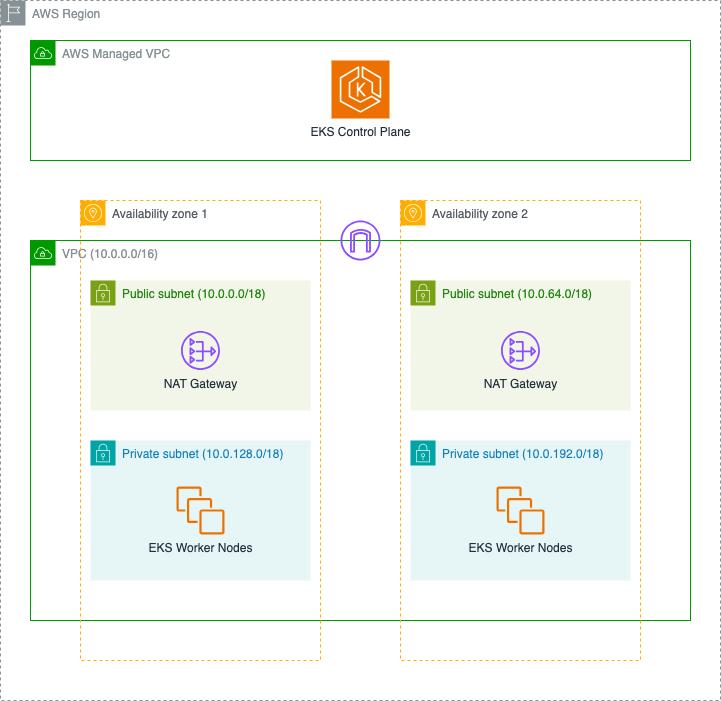
L2 CDK Construct v2 for EKS - Default Architecture

Figure 1 – L2 CDK construct v2 for EKS, Default Architecture

  • Amazon Virtual Private Cloud (VPC) – A logically isolated section of the AWS Cloud that spans across two Availability Zones, equipped with an Internet Gateway to enable secure communication with the internet. This multi-AZ design helps ensure your applications remain available even if an Availability Zone experiences issues.
  • Amazon EKS Control Plane – A fully managed Kubernetes control plane deployed in an AWS-managed VPC , providing high availability and automatic version management for the Kubernetes control plane components.
  • Public Subnet Infrastructure – Two public subnets, each with its own NAT Gateway Instance, enabling your cluster components to securely access the internet for essential operations like pulling container images and downloading updates. These NAT Gateways provide a secure outbound path while protecting your workloads from direct internet exposure.
  • Private Subnet Configuration – Two private subnets optimized for running your EKS worker nodes, offering enhanced security by isolating your workloads from direct internet access while maintaining the ability to communicate with AWS services and the internet through the NAT Gateways.
  • IAM Security Foundation – A comprehensive set of IAM roles and policies that implement the principle of least privilege:
    • Control plane service role that enables EKS to manage AWS resources on your behalf
    • Node IAM role that allows worker nodes to interact with other AWS services and join the EKS cluster

You can also use FargateCluster to provision a cluster that uses only Fargate workers.

import * as eksv2 from '@aws-cdk/aws-eks-v2-alpha';

// Creating an EKS Cluster with default properties and Fargate workers
const eksFargateCluster = new eksv2.FargateCluster(this, 'EksFargateCluster', {
   version: eksv2.KubernetesVersion.V1_32,
});

To help our customers maintain better control over their cluster access patterns, the Kubectl Handler is not automatically deployed with the default configuration. You can easily enable this functionality by configuring the kubectlProviderOptions property when you need kubectl access management as shown below.

import * as eksv2 from '@aws-cdk/aws-eks-v2-alpha';
import { KubectlV32Layer } from '@aws-cdk/lambda-layer-kubectl-v32'

// Creating an EKS Cluster with default properties and kubectl handler
const eksCluster = new eksv2.Cluster(this, 'EksCluster', {
   version: eksv2.KubernetesVersion.V1_32,
   kubectlProviderOptions: {
      kubectlLayer: new KubectlV32Layer(this, 'KubectlLayer')
   },
});

Deploying EKS Cluster with AutoMode

EKS Auto Mode represents a significant advancement in how Amazon EKS manages compute capacity for Kubernetes clusters. This intelligent capacity management system automatically provisions and scales node groups based on workload demands, removing the need for manual capacity planning.

When you create a new cluster with the aws-eks-v2 construct, EKS Automode is activated by default, by means that DefaultCapacityType.AUTOMODE is automatically set as the default capacity type for the EKS Cluster. If you prefer, you can specify the defaultCapacityType to AutoMode:

import * as eksv2 from '@aws-cdk/aws-eks-v2-alpha';

// Creating an EKS Cluster with AutoMode
const eksCluster = new eksv2.Cluster(this, 'EksCluster', {
   version: eksv2.KubernetesVersion.V1_32,
   defaultCapacityType: eksv2.DefaultCapacityType.AUTOMODE, // default value
});

After deploying the Stack containing the construct instance, in the EKS Console you’ll be able to see that an EKS Cluster has been created with AutoMode enabled:
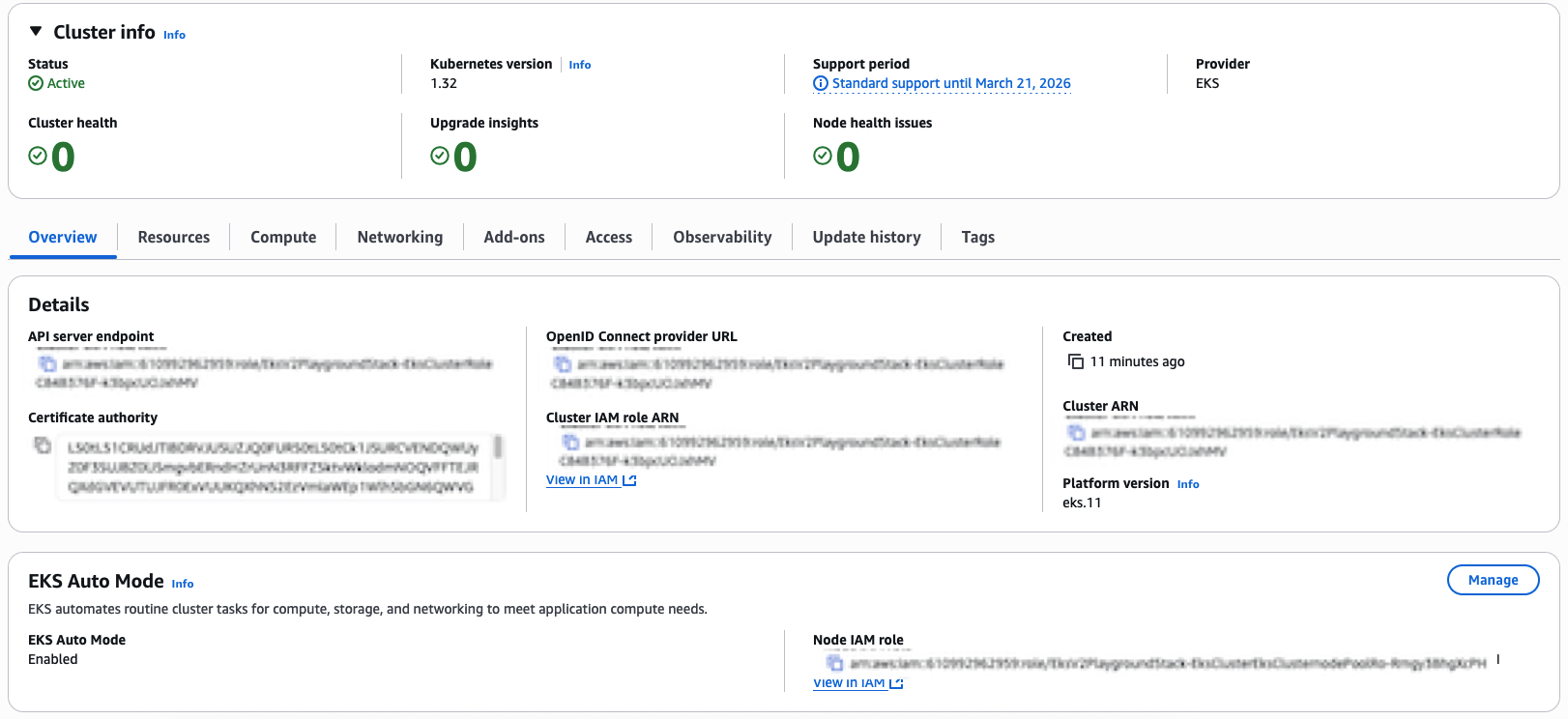
EKS Cluster Deployed with Automode

Figure 2 – EKS Cluster Deployed with Automode

Auto Mode enhances your Amazon EKS experience by automatically configuring two strategically designed node pools out of the box:

  • A system node pool optimized for running critical cluster system components and add-ons, ensuring reliable cluster operations.
  • A general node pool specifically tuned for your application workloads, providing the flexibility needed for diverse containerized applications.

You can configure which node pools to enable through the compute property:

import * as eksv2 from '@aws-cdk/aws-eks-v2-alpha';

// Creating an EKS Cluster with Automode and selecting nodePools
const eksCluster = new eksv2.Cluster(this, 'EksCluster', {
   version: eksv2.KubernetesVersion.V1_32,
   defaultCapacityType: eksv2.DefaultCapacityType.AUTOMODE,
   compute: {
      nodePools: ['system', 'general-purpose'],
   },
});

Deploying EKS Cluster with Managed Node Groups

Amazon EKS Managed Node Groups deliver a seamless compute management experience for your Kubernetes clusters. This powerful capability eliminates operational complexity by automating the end-to-end lifecycle of Amazon EC2 instances that power your containerized applications.
Behind the scenes, Amazon EKS managed node groups intelligently orchestrate these changes, ensuring zero-disruption to your applications through graceful node draining. The service automatically leverages the latest Amazon EKS-optimized AMIs, providing a secure and optimized foundation for your workloads.

By setting defaultCapacityType to NODEGROUP, customers can leverage the traditional managed node group management approach:

import * as eksv2 from '@aws-cdk/aws-eks-v2-alpha';

// Creating an EKS Cluster with Managed Node Groups and default instance types
const eksCluster = new eksv2.Cluster(this, 'EksCluster', {
   version: eksv2.KubernetesVersion.V1_32,
   defaultCapacityType: eksv2.DefaultCapacityType.NODEGROUP,
});

By default, when using DefaultCapacityType.NODEGROUP, this library will allocate a managed node group with two m5.large instances.
After deploying the above code, you can check the EKS Console to see that an EKS Cluster has been deployed as shown in figure 3:
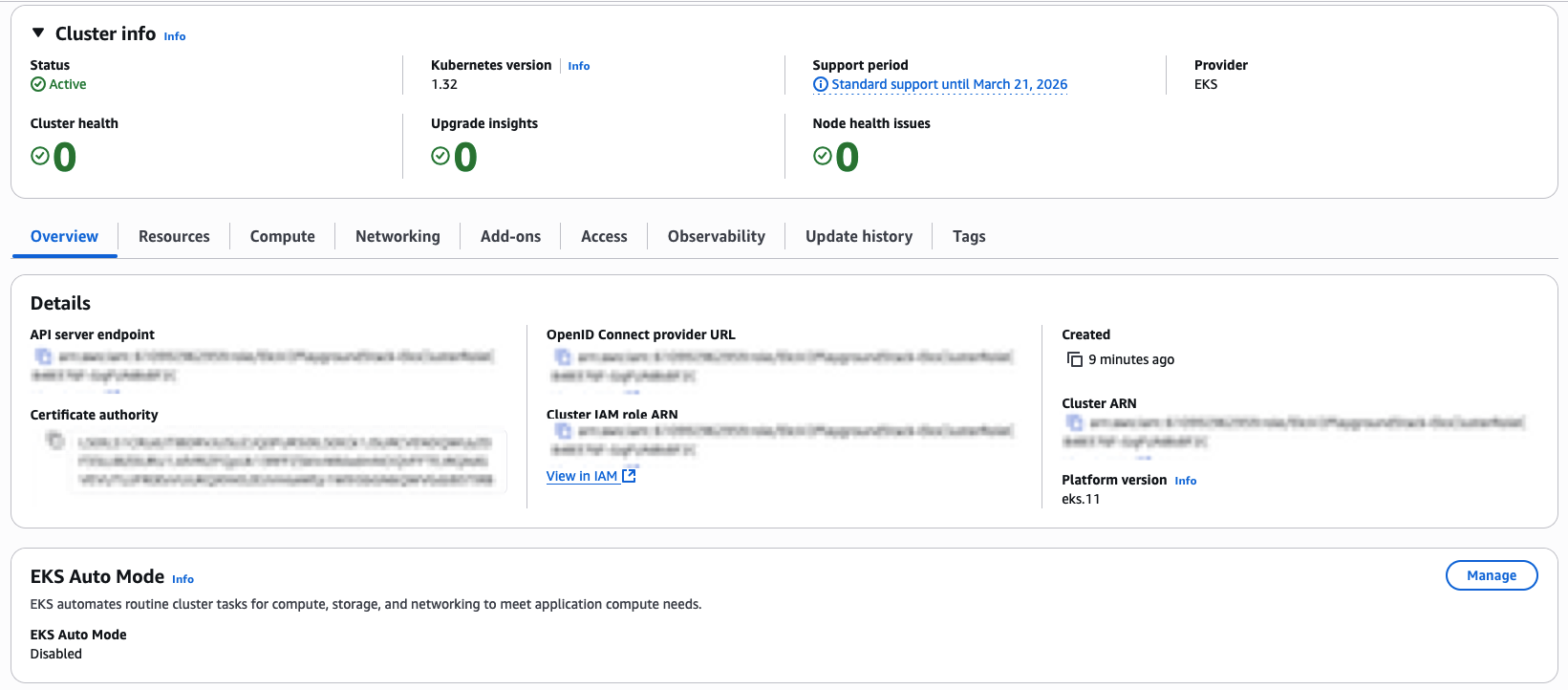
EKS Cluster Deployed with Managed Node Groups

Figure 3 – EKS Cluster Deployed with Managed Node Groups

You can also check the Compute tab and see the Managed Node Group Configuration as shown in figure 4:

EKS Cluster Managed Node Group Default Configuration

Figure 4 – EKS Cluster Managed Node Group Default Configuration

If you want to have control over instance types of a Managed Node Group, you can specify the default EC2 type as property of the construct:

import * as eksv2 from '@aws-cdk/aws-eks-v2-alpha';
import * as ec2 from 'aws-cdk-lib/aws-ec2'

// Creating an EKS Cluster with Managed Node Groups and specific instance types
const eksCluster = new eksv2.Cluster(this, 'EksCluster', {
   version: eksv2.KubernetesVersion.V1_32,
   defaultCapacityType: eksv2.DefaultCapacityType.NODEGROUP,
   defaultCapacity: 5,
   defaultCapacityInstance: ec2.InstanceType.of(ec2.InstanceClass.M5, ec2.InstanceSize.SMALL),
});

You can also specify additional customizations after the EKS cluster declaration, via the addNodegroupCapacity method:

import * as eksv2 from '@aws-cdk/aws-eks-v2-alpha';
import * as ec2 from 'aws-cdk-lib/aws-ec2'

// Creating an EKS Cluster with Managed Node Groups and specific instance types
const eksCluster = new eksv2.Cluster(this, 'EksCluster', {
   version: eksv2.KubernetesVersion.V1_32,
   defaultCapacityType: eksv2.DefaultCapacityType.NODEGROUP,
   defaultCapacity: 0,
});

eksCluster.addNodegroupCapacity('custom-node-group', {
  instanceTypes: [new ec2.InstanceType('m5.large')],
  minSize: 4,
  diskSize: 100,
});

Managing Permissions through Access Entries

The new aws-eks-v2 construct transitions away from the previous ConfigMap-based authentication (which is deprecated in EKS) in favor of the Access Entries Authentication mode. This change introduces Access Entry as the standardized method for managing cluster permissions, offering a more streamlined and secure approach to granting cluster access to IAM users and roles.

You can define Access Policies through the AccessPolicy construct and you can adjust the scope of the Access Policy to the entire EKS cluster or to specific EKS Namespaces:

import * as eksv2 from '@aws-cdk/aws-eks-v2-alpha';

// AmazonEKSClusterAdminPolicy with `cluster` scope
eks.AccessPolicy.fromAccessPolicyName('AmazonEKSClusterAdminPolicy', {
   accessScopeType: eks.AccessScopeType.CLUSTER,
});

// AmazonEKSAdminPolicy with `namespace` scope
eks.AccessPolicy.fromAccessPolicyName('AmazonEKSAdminPolicy', {
   accessScopeType: eks.AccessScopeType.NAMESPACE,
   namespaces: ['foo', 'bar'] 
});

You can then grant access to specific IAM Roles using the grantAccess method:

import * as iam from 'aws-cdk-lib/aws-iam'

// Defining a IAM Role
const clusterAdminRole = new iam.Role(this, 'ClusterAdminRole', {
   assumedBy: new iam.ArnPrincipal('arn_for_trusted_principal'),
});

// Creating an EKS Cluster with AutoMode
const eksCluster = new eksv2.Cluster(this, 'EksCluster', {
   version: eksv2.KubernetesVersion.V1_32,
   defaultCapacityType: eksv2.DefaultCapacityType.AUTOMODE,
});

// Cluster Admin role for this cluster
eksCluster.grantAccess('clusterAdminAccess', clusterAdminRole.roleArn, [
	eks.AccessPolicy.fromAccessPolicyName('AmazonEKSClusterAdminPolicy', {
   	    accessScopeType: eks.AccessScopeType.CLUSTER,
    }),
]);

When the Principal assumes the ClusterAdminRole, it receives seamless access to the EKS cluster through a carefully orchestrated permission chain. This access is governed by the AmazonEKSClusterAdminPolicy, which is automatically attached to the Access Policy linked to the IAM Role.

Conclusion

In this post, we introduced the new AWS CDK L2 construct (aws-eks-v2) for Amazon EKS, demonstrating how it simplifies cluster deployment while offering enhanced flexibility and operational efficiency. Through practical examples, we showcased how customers can leverage the construct’s intelligent defaults and customization options to build production-ready Kubernetes environments on AWS

The new L2 construct for Amazon EKS delivers significant improvements that help customers accelerate their container adoption journey:

  • Enhanced Performance: Eliminates dependency on Custom Resources and AWS Lambda functions by utilizing native AWS CloudFormation resources, resulting in faster and more reliable deployments.
  • Modern Authentication: Implements Access Entry-based authentication, replacing the deprecated ConfigMap approach with a more secure and programmable solution.
  • Improved Scalability: Removes the single-cluster-per-stack limitation and eliminates nested stacks, enabling more flexible architectural patterns.
  • Optimized Resource Creation: Makes the kubectl Lambda handler optional, giving customers fine-grained control over their infrastructure components.
  • Streamlined Operations: Provides automated node group management with intelligent defaults while maintaining full customer control when needed.

To get started with the new EKS L2 construct, visit the AWS CDK documentation. If you have specific features you’d like to see added, we encourage you to submit a feature request in the aws-cdk GitHub repository. Your feedback helps us continue innovating on your behalf.
About the author

Matteo Luigi Restelli

Matteo Luigi Restelli is an AWS Sr. Partner Solutions Architect. He mainly focuses on Italian Consulting AWS Partners and is also specialized in Infrastructure as Code, Cloud Native App Development and DevOps. Outside of work, he enjoys swimming, rock & roll music and learning something new everyday especially in Computer Science space.

Validate Your Lambda Runtime with CloudFormation Lambda Hooks

Post Syndicated from Matteo Luigi Restelli original https://aws.amazon.com/blogs/devops/validate-your-lambda-runtime-with-cloudformation-lambda-hooks/

Introduction

This post demonstrates how to leverage AWS CloudFormation Lambda Hooks to enforce compliance rules at provisioning time, enabling you to evaluate and validate Lambda function configurations against custom policies before deployment. Often these policies impact the way a software should be built, restricting language versions and runtimes. A great example is applying those policies on AWS Lambda, a serverless compute service for running code without having to provision or manage servers. While AWS Lambda already manages the deprecation of runtimes, preventing you from deploying unsupported runtimes, organizations may need to provide and enforce their specific compliance rules not directly linked to the deprecation of a specific language version.

Introducing Lambda Hooks

AWS CloudFormation Lambda Hooks are a powerful feature that allows developers to evaluate CloudFormation and AWS Cloud Control API operations against custom code implemented as Lambda functions. This capability enables proactive inspection of resource configurations before provisioning, enhancing security, compliance, and operational efficiency.

Lambda Hooks provide a mechanism to intercept and evaluate various CloudFormation operations, including resource operations, stack operations, and change set operations (they can also be used with Cloud Control API, but in this post we’re focusing on CloudFormation). By activating a Lambda Hook, CloudFormation creates an entry in your account’s registry as a private Hook, allowing you to configure it for specific AWS accounts and regions. When configuring Lambda Hooks, you can specify one or more Lambda functions to be invoked during the evaluation process. These functions can be in the same AWS account and Region as the Hook, or in another Account you own, provided proper permissions are set up. The evaluation process occurs at specific points in the CloudFormation Stack lifecycle. For instance, during stack creation, update, or deletion, the configured Lambda functions are invoked to assess the proposed changes against your defined compliance rules. Based on the evaluation results, the hook can either block the operation or issue a warning, allowing the operation to proceed.

Lambda Hooks evaluate resources before they are provisioned through CloudFormation, providing a pre-emptive layer of governance. This means that non-compliant resources are caught and prevented from being deployed, rather than requiring retroactive fixes. By leveraging Lambda Hooks, organizations can automate and standardize their compliance checks across all AWS accounts and regions. This centralized approach to policy enforcement ensures consistency and reduces the overhead of managing compliance manually.

Solution Overview

The following sections demonstrate a practical use case for AWS CloudFormation Lambda Hooks, focusing on enforcing compliance rules on AWS Lambda runtimes.

Meet AnyCompany, a forward-thinking enterprise with a robust set of compliance rules governing their software development practices. Among these rules is a strict policy on the use of specific AWS Lambda runtimes.

As they continue to embrace serverless architecture, AnyCompany faces a challenge: how to prevent the deployment of Lambda functions that use non-compliant runtimes. Given their commitment to AWS CloudFormation for deploying Lambda functions, AnyCompany is keen to leverage the power of AWS CloudFormation Lambda Hooks.

We’ll explore the setup process, demonstrate the hook in action, and discuss the broader implications for maintaining compliance in a dynamic cloud environment.

Architecture

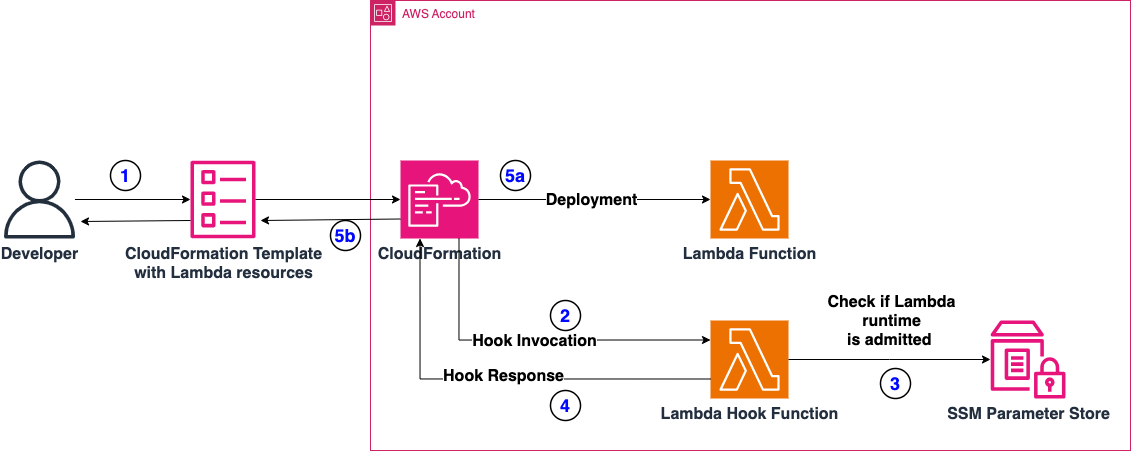
The following architecture highlights the implementation of the Lambda Hook. In this implementation, we are using AWS CloudFormation Lambda Hooks to intercept the deployment of Lambda Functions and perform the compliance checks on these resources. The Lambda Hook will interact with an AWS Lambda Function, which will perform the compliance checks. Finally, we’re using AWS Systems Manager Parameter Store to store the Configuration Parameter which contains the list of permitted Lambda Runtimes.

Figure 1: Architecture of the Solution

Figure 1: Architecture of the Solution

  1. A Developer (or a CI/CD pipeline) deploys a CloudFormation stack containing Lambda functions.
  2. CloudFormation invokes the respective Lambda Hook, which is configured to intercept operations on AWS Lambda Resources. We are setting this hook to “FAIL” deployment in case checks are not successful.
  3. The Lambda Hook checks if the runtime of the Lambda is admitted or violates Company’s compliance. To do this, it checks if the runtime is present on a pre-configured list of admitted runtimes saved as Parameter in AWS Systems Manager Parameter Store. Keep in mind that we’re using SSM Parameter Store to store the configuration for this specific example, but other alternatives may be viable as well (Amazon DynamoDB, AWS Secrets Manager, or AppConfig lambda-function-settings-check Preventive Rule)
  4. The Lambda Hook, after checking runtime compliance, replies:
    • With a failure, if the Lambda runtime is not compliant
    • With a success, if the Lambda runtime is compliant
  5. Depending on the response of the Lambda Hook, the deployment may or not take place.

Repository Structure

You can find all the code for this solution at this link. Here’s the repository structure:

.
├── README.md
├── deploy.sh
├── cleanup.sh
├── hook-lambda
│ ├── index.ts
│ ├── package.json
│ ├── services
│ │ └── parameter-store.ts
│ └── tsconfig.json
├── sample
│ ├── deploy_sample.sh
│ ├── cleanup_sample.sh
│ └── lambda_template.yml
└── template.yml
  • hook-lambda: directory containing all the code related to the CloudFormation Lambda Hook (Validation Lambda Function, and the CloudFormation template for the Solution)
  • sample: directory containing the code of the sample used to test the CloudFormation Lambda Hook
  • deploy.sh: utility script to deploy the Solution via AWS CLI
  • cleanup.sh: utility script to clean up the AWS CloudFormation Hook infrastructure via the AWS CLI
  • template.yml: AWS CloudFormation Template containing all the AWS Resources involved in the Solution

Prerequisites

You must have the following prerequisites for this solution:

  • An AWS account or sign up to create and activate one.
  • The following software installed on your development machine:
  • Install the AWS Command Line Interface (AWS CLI) and configure it to point to your AWS account.
  • Install Node.js and use a package manager such as npm.
  • Appropriate AWS credentials for interacting with resources in your AWS account.

Walkthrough

Creating the AWS Lambda Validation Function – Lambda Code

The CloudFormation Lambda Hook interacts with a specific Lambda (referred to as Validation Lambda throughout the rest of this post), which gets invoked during CloudFormation CREATE and UPDATE STACK operations involving Lambda Functions. The goal is to check if these Lambda functions have runtimes that comply with AnyCompany’s rules.

Below is the detailed description of the steps that the Validation Lambda function handler follows (the code is written in Typescript).

First, the Validation Lambda retrieves an environment variable containing the SSM Parameter Store parameter name which contains the compliant runtimes list. Additionally, safety checks ensure that only Lambda Resources are considered and that their Runtime property is defined.

Note that both safety checks could be skipped, since the Hook should already be configured to interact only with Lambda Resources and the Lambda’s Runtime property is always required. However, they remain in place to demonstrate how to retrieve this information from the Lambda Hook event in your handler.

const parameterName = process.env.PERMITTED_RUNTIMES_PARAM;
if (!parameterName) {
	throw new Error('Permitted Runtimes Parameter is not set');
}

const resourceProperties = event.requestData.targetModel.resourceProperties;
// Check if this is a Lambda function resource
if (event.requestData.targetType !== 'AWS::Lambda::Function') {
console.log("Resource is not a Lambda function, skipping");
	return {
		hookStatus: 'SUCCESS',
		message: 'Not a Lambda function resource, skipping validation',
		clientRequestToken: event.clientRequestToken
	}
}

// Check runtime version compliance
const runtime = resourceProperties.Runtime;
if (!runtime) {
	console.log("Runtime not defined, failing");
	return {
		hookStatus: 'FAILURE',
		errorCode: 'NonCompliant',
		message: 'Runtime is required for Lambda functions',
		clientRequestToken: event.clientRequestToken
	}
}

Then the Validation Lambda retrieves the value of the Configuration Parameter from SSM Parameter Store through a utility class called ParameterStoreService. For this post, consider that the value inside that Configuration Parameter is a list of strings, where each string contains one of the possible Lambda runtime values that you can find here (e.g. nodejs22.x,nodejs20.x,python3.11,python3.10,java17,java11,dotnet6). After retrieving the value, the Validation Lambda checks if the runtime of the Lambda Resource complies with the configured admitted runtimes. If the runtime is not compliant, you’ll receive a properly formatted response with FAILURE as hookStatus, otherwise the response will contain a SUCCESS hookStatus.

// Retrieve configuration from Parameter Store
const compliantRuntimes = await parameterStoreService.getParameterFromStore(parameterName);

// Check if Lambda runtime is permitted or not
if (!compliantRuntimes.includes(runtime)) {
console.log("Runtime " + runtime + " not compliant ");
	return {
		hookStatus: 'FAILURE',
		errorCode: 'NonCompliant',
		message: `Runtime ${runtime} is not compliant. Please use one of: ${compliantRuntimes.join(', ')}`,
		clientRequestToken: event.clientRequestToken
	}
}

return {
	hookStatus: 'SUCCESS',
	message: 'Runtime version compliance check passed',
	clientRequestToken: event.clientRequestToken
}

For more information about the possible response values of CloudFormation Lambda Hooks Lambda, have a look at this link.

Creating the validation Lambda – Lambda CloudFormation definition

The Validation Lambda function will be deployed via CloudFormation, in the same Stack with the CloudFormation Lambda Hook definition and the AWS Systems Manager Parameter Store Parameter. Here’s the fragment of the CloudFormation Template containing its definition:

# Lambda Function
ValidationFunction:
	Type: AWS::Lambda::Function
	Properties:
		Handler: index.handler
		Role: !GetAtt LambdaExecutionRole.Arn
		Code:
			S3Bucket: !Ref DeploymentBucket
			S3Key: hook-lambda.zip
		Runtime: nodejs22.x
		Timeout: 60
		MemorySize: 128
		Environment:
			Variables:
				PERMITTED_RUNTIMES_PARAM: !Ref ParameterStoreParamName

You’ll need to associate an IAM Role with proper permissions to access the AWS Systems Manager Parameter Store Parameter:

# Lambda Function Role
LambdaExecutionRole:
    Type: AWS::IAM::Role
    Properties:
      AssumeRolePolicyDocument:
        Version: "2012-10-17"
        Statement:
          - Effect: Allow
            Principal:
              Service: lambda.amazonaws.com
            Action: sts:AssumeRole
      ManagedPolicyArns:
        - arn:aws:iam::aws:policy/service-role/AWSLambdaBasicExecutionRole
		
# IAM Policy to access Parameter Store
ParameterStoreAccessPolicy:
    Type: AWS::IAM::RolePolicy
    Properties:
      RoleName: !Ref LambdaExecutionRole
      PolicyName: ParameterStoreAccess
      PolicyDocument:
        Version: "2012-10-17"
        Statement:
          - Effect: Allow
            Action:
              - ssm:GetParameter
            Resource: !Sub arn:aws:ssm:${AWS::Region}:${AWS::AccountId}:parameter${ParameterStoreParamName}

Creating the CloudFormation Lambda Hook

At this point, you only need to author a proper CloudFormation Lambda Hook. The Hook requires:

  • To be activated during the CREATE and UPDATE CloudFormation operations,
  • To consider only AWS::Lambda::Function CloudFormation resources
  • To act during Pre Provisioning of CloudFormation templates
  • To target Stack and Resource Operations
  • Target the already defined Lambda Validation function

Here’s the definition in the CloudFormation template:

# Lambda Hook
ValidationHook:
    Type: AWS::CloudFormation::LambdaHook
    Properties:
      Alias: Private::Lambda::LambdaResourcesComplianceValidationHook
      LambdaFunction: !GetAtt ValidationFunction.Arn
      ExecutionRole: !GetAtt HookExecutionRole.Arn
      FailureMode: FAIL
      HookStatus: ENABLED
      TargetFilters:
        Actions:
          - CREATE
          - UPDATE
        InvocationPoints:
          - PRE_PROVISION
        TargetNames:
          - AWS::Lambda::Function
      TargetOperations:
        - RESOURCE
        - STACK

Please note that the above template contains a reference to an IAM Role because the Hook requires proper permissions to call the target (Lambda Function). Here’s the IAM Role definition:

# Hook Execution Role
HookExecutionRole:
    Type: AWS::IAM::Role
    Properties:
      AssumeRolePolicyDocument:
        Version: "2012-10-17"
        Statement:
          - Effect: Allow
            Principal:
              Service: hooks.cloudformation.amazonaws.com
            Action: sts:AssumeRole

# IAM Policy for Lambda Invocation
LambdaInvokePolicy:
    Type: AWS::IAM::RolePolicy
    Properties:
      RoleName: !Ref HookExecutionRole
      PolicyName: LambdaInvokePolicy
      PolicyDocument:
        Version: "2012-10-17"
        Statement:
          - Effect: Allow
            Action:
              - lambda:InvokeFunction
            Resource: !GetAtt ValidationFunction.Arn

Configuring the compliant runtimes – Using Systems Manager Parameter Store

AWS Systems Manager Parameter Store is a secure, hierarchical storage service for configuration data management and secrets management, allowing users to store and retrieve data such as configurations, database strings etc. as parameter values.

In this specific example, we’ll leverage Parameter Store to store our permitted Lambda runtimes configuration. This configuration value is a StringList parameter, containing a comma-separated list of permitted runtimes. Here’s the fragment of the CloudFormation template that defines the Parameter:

# Parameter Store Parameter
ConfigParameter:
    Type: AWS::SSM::Parameter
    Properties:
      Name: !Ref ParameterStoreParamName
      Type: StringList
      Value: !Ref ParameterStoreDefaultValue
      Description: "Configuration for Lambda Hook"

Please note the usage of CloudFormation parameters for the ‘Name’ and ‘Value’ properties, allowing for dynamic input when deploying the CloudFormation template.

Deploying the Solution

To deploy the solution you can leverage the script deploy.sh in the root folder of the repository. This script will perform the following actions:

  • Compile and build the Validation Lambda Function
  • Create an Amazon S3 Bucket to store the CloudFormation Template
  • Upload the CloudFormation template and Lambda code to the S3 Bucket
  • Deploy the CloudFormation template

Testing the Lambda Hook

To test the CloudFormation Lambda Hook, deploy a simple testing CloudFormation template containing a Hello World Lambda function. First, test the Lambda configured with a permitted Lambda runtime, then modify the template to configure the Lambda with a non-compliant runtime.

Here’s the initial definition of the testing CloudFormation Template:

# Lambda Function
HelloWorldFunction:
    Type: AWS::Lambda::Function
    Properties:
      FunctionName: hello-world-function
      Runtime: nodejs22.x
      Handler: index.handler
      Role: !GetAtt LambdaExecutionRole.Arn
      Code:
        ZipFile: |
          exports.handler = async (event, context) => {
              console.log('Hello World!');
              const response = {
                  statusCode: 200,
                  body: JSON.stringify('Hello World!')
              };
              return response;
          };
      Timeout: 30
      MemorySize: 128

Please note that the Runtime value is nodejs22.x, which is currently in the list of permitted runtimes. The expectation is that the deployment of this function will succeed.

Deploy this template via the AWS CLI:

aws cloudformation deploy \
--template-file ./lambda_template.yml \
--capabilities CAPABILITY_IAM \
--stack-name lambda-sample

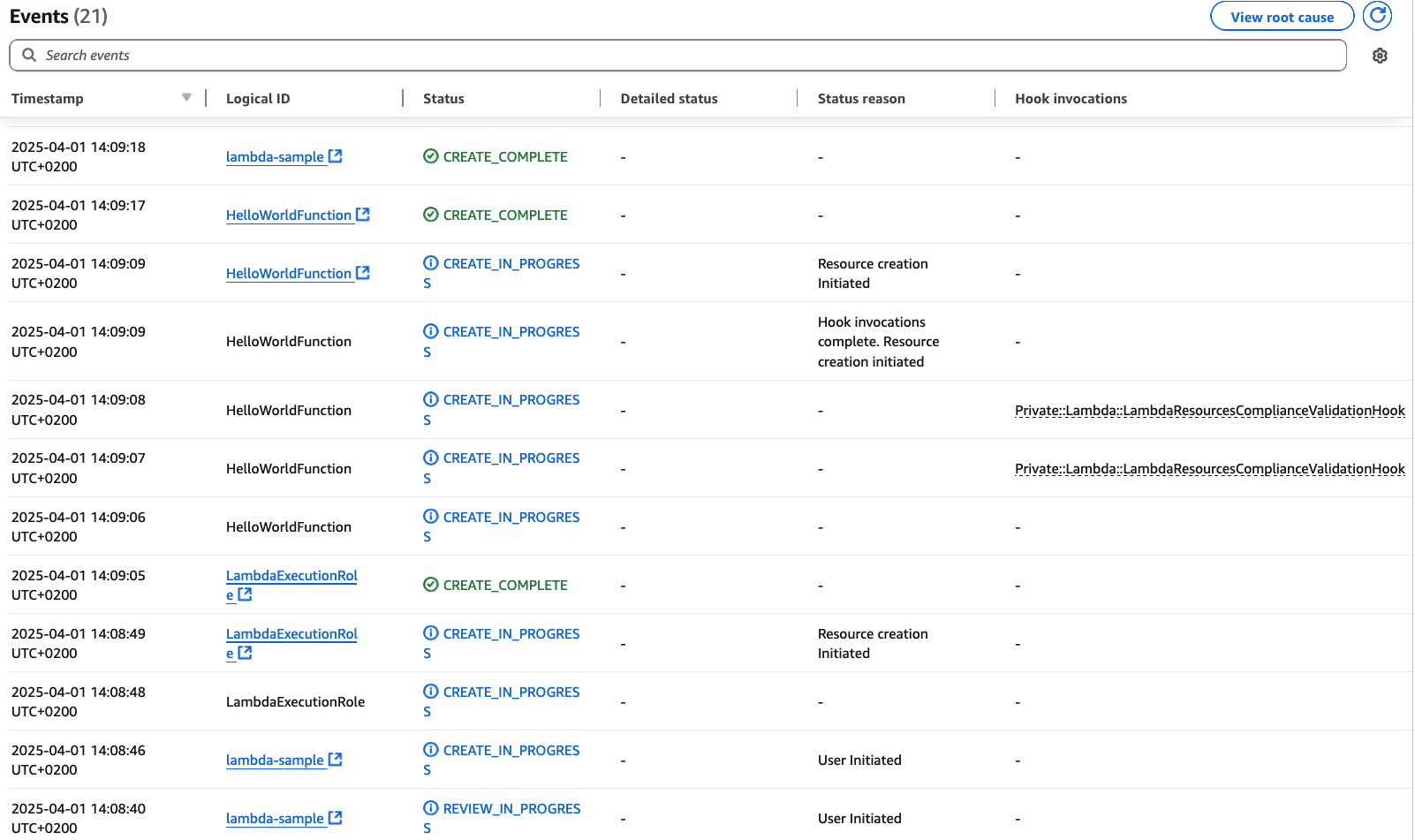
Check the CloudFormation Console:

CloudFormation Console showing successful Stack deployment

Figure 2: CloudFormation Console showing successful Stack deployment

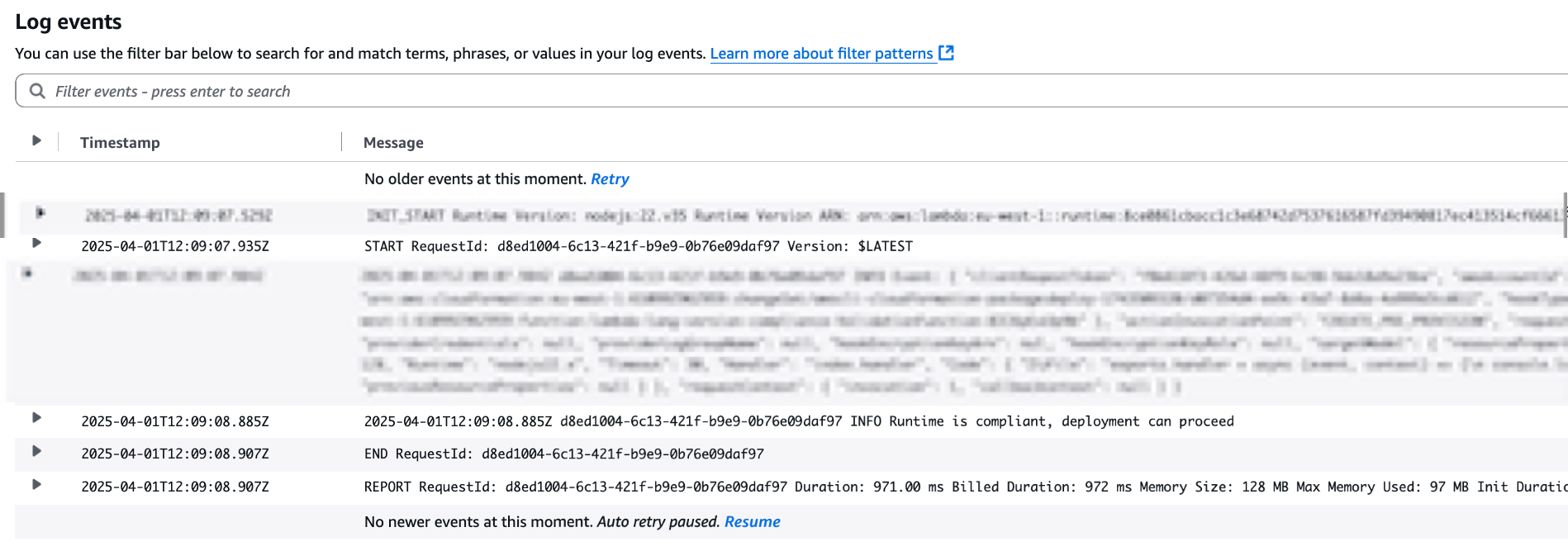
As expected, the deployment was successful. You can also see that the CloudFormation Lambda Hook has been invoked by taking a look at the CloudWatch Logs:

Validation Lambda Function Logs with successful validation

Figure 3: Validation Lambda Function Logs with successful validation

Now modify the original sample Template in order to set a Lambda Runtime which is not inside the list of permitted runtimes:

# Lambda Function
HelloWorldFunction:
    Type: AWS::Lambda::Function
    Properties:
      FunctionName: hello-world-function
      Runtime: nodejs18.x
      Handler: index.handler
      Role: !GetAtt LambdaExecutionRole.Arn
      Code:
        ZipFile: |
          exports.handler = async (event, context) => {
              console.log('Hello World!');
              const response = {
                  statusCode: 200,
                  body: JSON.stringify('Hello World!')
              };
              return response;
          };
      Timeout: 30
      MemorySize: 128

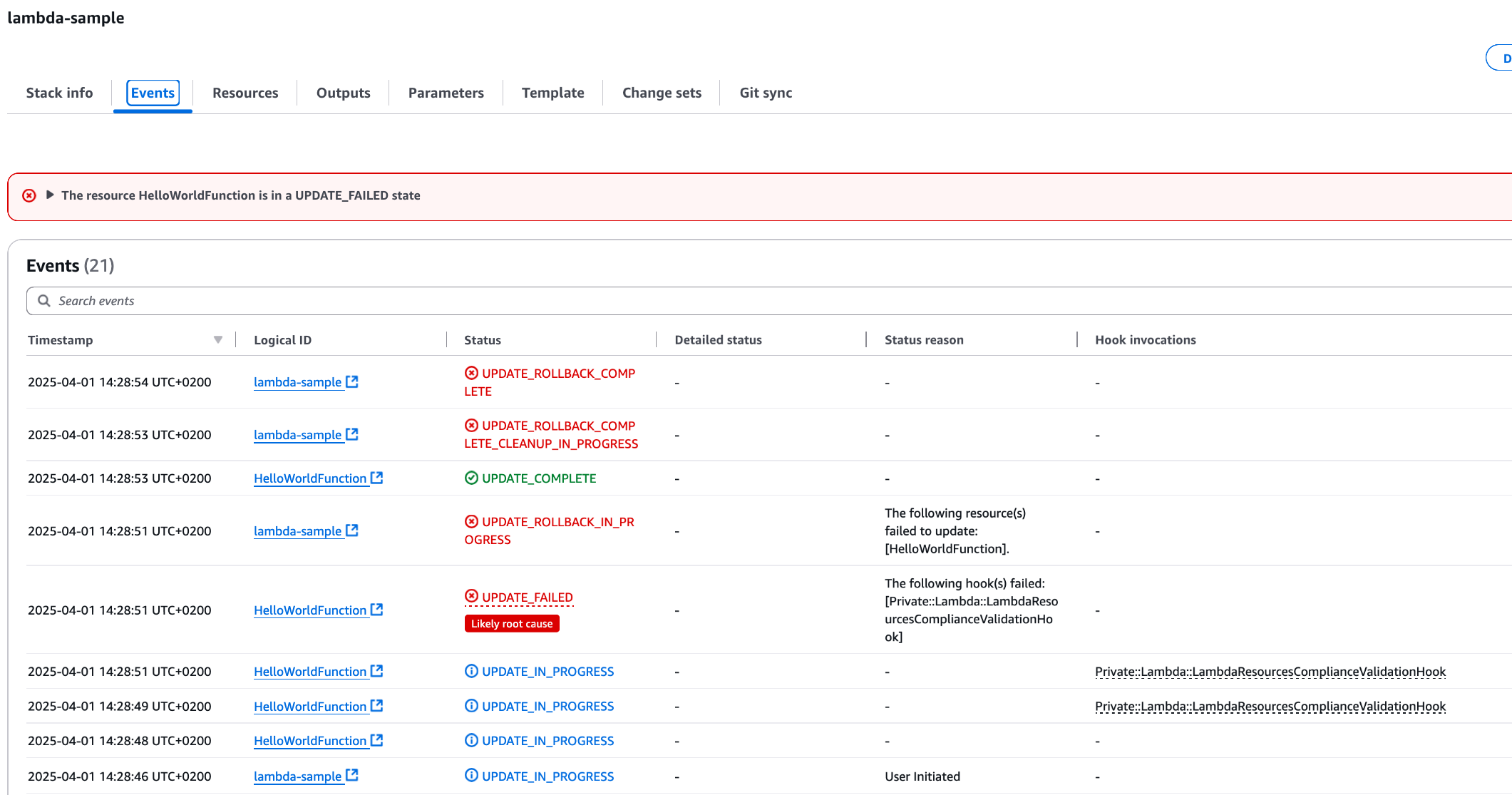
Deploy this template via AWS CLI with the same command used before and check the CloudFormation Console:

CloudFormation Console showing failed Stack deployment due to Hook intervention

Figure 4: CloudFormation Console showing failed Stack deployment due to Hook intervention

As expected, the deployment was not successful. The CloudFormation Lambda Hook has been invoked, and since the Lambda Runtime was not present in the permitted runtimes list, the deployment failed.

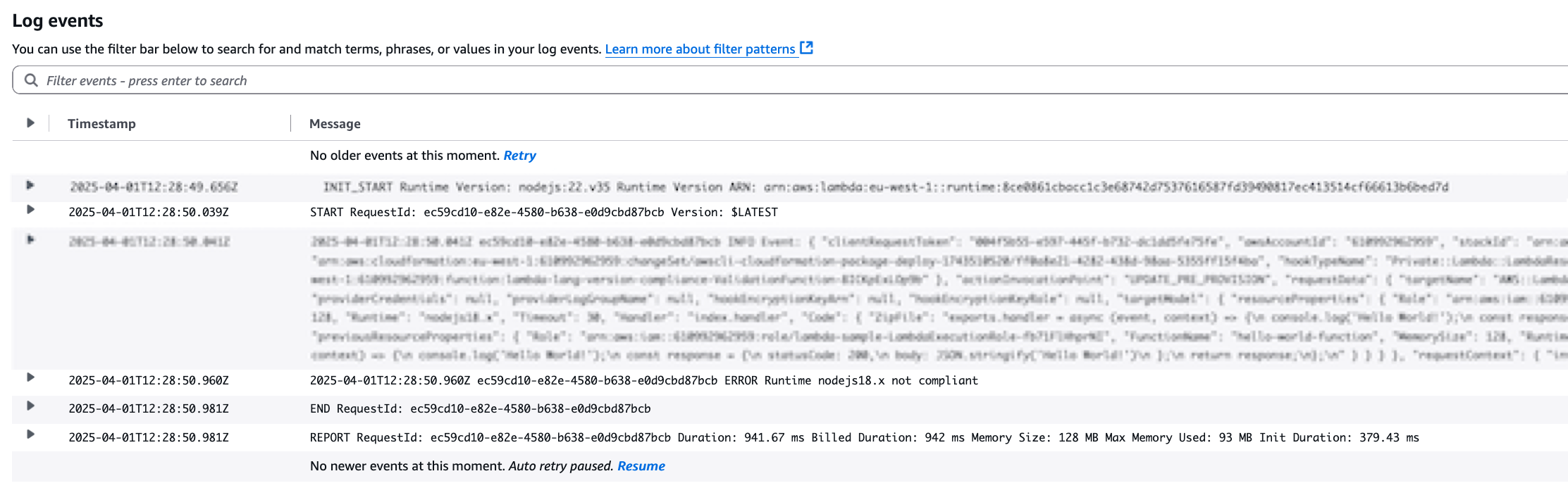
You can also see that the hook failed In the CloudWatch Logs:

Validation Lambda Function Logs with validation error

Figure 5: Validation Lambda Function Logs with validation error

Cleaning up

To clean up the resources related to the sample, you can run the script cleanup_sample.sh inside the sample folder. This script will delete the sample’s CloudFormation Template through the AWS CLI.

To cleanup the resources related to the solution described above and based on AWS CloudFormation Lambda Hook, you can leverage the script cleanup.sh in the root folder of the repository. This script will perform the following actions:

  • Delete the CloudFormation Stack
  • Empty the S3 Bucket used for the deployment of the Stack
  • Delete the S3 Bucket

Conclusion

In this post, you explored the implementation of CloudFormation Hooks to enforce runtime compliance in Lambda functions across your AWS infrastructure. By leveraging the Lambda hook’s capabilities, you learned how to create a preventative control that validates Lambda runtime configurations before deployment.

By activating the Lambda hook and implementing a custom Lambda function validator, you established an automated mechanism to ensure that only compliant runtimes are used within your organization’s Lambda functions during CloudFormation stack creation and updates. The solution’s integration with common development tools like AWS CLI, AWS SAM, CI/CD pipelines, and AWS CDK makes it straightforward to implement these controls within existing workflows, eliminating the need for manual runtime checks or post-deployment remediation.

The validation approach demonstrated in this post extends beyond Lambda runtimes and can be adapted to different AWS Resources supported by CloudFormation, allowing you to enforce policies on different infrastructure components offered by AWS.

About the author

Matteo Luigi Restelli

Matteo Luigi Restelli is an AWS Sr. Partner Solutions Architect. He mainly focuses on Italian Consulting AWS Partners and is also specialized in Infrastructure as Code, Cloud Native App Development and DevOps. Outside of work, he enjoys swimming, rock & roll music and learning something new everyday especially in Computer Science space.

Stella Hie

Stella Hie is a Sr. Product Manager Technical for AWS Infrastructure as Code. She focuses on proactive control and governance space, working on delivering the best experience for customers to use AWS solutions safely. Outside of work, she enjoys hiking, playing piano, and watching live shows.