Post Syndicated from Explosm.net original https://explosm.net/comics/fool-me
New Cyanide and Happiness Comic
Post Syndicated from Explosm.net original https://explosm.net/comics/fool-me
New Cyanide and Happiness Comic
Post Syndicated from LastWeekTonight original https://www.youtube.com/shorts/bSnjFXn883A
Post Syndicated from Stella Hie original https://aws.amazon.com/blogs/security/enhanced-access-denied-error-messages-with-policy-arns/
To help you troubleshoot access denied errors, we recently added the Amazon Resource Name (ARN) of the denying policy to access denied error messages. This builds on our 2021 enhancement that added the type of the policy denying the access to access denied error messages. The ARN of the denying policy is only provided in same-account and same-organization scenarios. This change is gradually rolling out across all AWS services in all AWS Regions.
We added the policy ARN to access denied error messages for AWS Identity and Access Management (IAM) and AWS Organizations policies. Because of this change, you can now pinpoint the exact policy causing the denial. You don’t have to evaluate all the policies of the same type in your AWS environment to identify the culprit. The policy types covered in this update are service control policies (SCPs), resource control policies (RCPs), permissions boundaries policies, session policies, and identity-based policies.
For example, when a developer attempts to perform the ListRoles action in IAM and is denied because of an SCP:
Before:An error occurred (AccessDenied) when calling the ListRoles operation: User: arn:aws:iam::123456789012:user/Matt is not authorized to perform: iam:ListRoles on resource: arn:aws:iam::123456789012:role/* with an explicit deny in a service control policy
Enhanced:An error occurred (AccessDenied) when calling the ListRoles operation: User: arn:aws:iam::123456789012:user/Matt is not authorized to perform: iam:ListRoles on resource: arn:aws:iam::123456789012:role/* with an explicit deny in a service control policy: arn:aws:organizations::987654321098:policy/o-qv5af4abcd/service_control_policy/p-2kgnabcd
This enhancement is designed with three principles:
This accelerates troubleshooting across your organization. Previously, when you received an access denied error from a policy, for example an SCP, you had to review all SCPs in your organization, determine which applied to the account, and evaluate each one—a process that could take time. Now, with the specific SCP ARN included in the error message, whoever has the necessary permission can review the identified SCP and more quickly resolve the issue. This precision reduces the investigative burden. Clear error messages with policy ARNs also improve communication between teams who need access and teams who troubleshoot issues by providing a common reference point, eliminating ambiguity and reducing back-and-forth communication. Lastly, when validating security controls, the policy ARN in access denied errors provides immediate confirmation of which policy is enforcing the restriction, enabling customers to quickly verify their policies are correctly denying access.
Let’s say you’re trying to describe your Amazon Relational Database Service (Amazon RDS) snapshots in the us-east-2 Region by calling this API:aws rds describe-db-snapshots --region us-east-2
Unfortunately you get an access denied error. The error message shows:An error occurred (AccessDenied) when calling the DescribeDBSnapshots operation: User: arn:aws:sts::123456789012:assumed-role/ReadOnly/ReadOnlySession is not authorized to perform: rds:DescribeDBSnapshots on resource: arn:aws:rds:us-east-2:123456789012:snapshot:* with an explicit deny in a service control policy: arn:aws:organizations::987654321098:policy/o-qv5af4abcd/service_control_policy/p-lvi9abcd
You can see the context to understand what happens:
arn:aws:organizations::987654321098:policy/o-qv5af4abcd/service_control_policy/p-lvi9abcdHere’s how you can troubleshoot this error:
Deny statement for the action. In the preceding example, the action is rds:DescribeDBSnapshots.Deny if it’s no longer applicable. For more information, see Update a service control policy (SCP).This update is gradually rolling out across all AWS services in all AWS Regions, beginning early 2026.
If you have any questions or issues, contact AWS Support or your Technical Account Manager (TAM).
Post Syndicated from The Atlantic original https://www.youtube.com/watch?v=8w7KOoD8sCs
Post Syndicated from BeardedTinker original https://www.youtube.com/watch?v=-ifA952a3b0
Post Syndicated from Daniele Molteni original https://blog.cloudflare.com/attack-signature-detection/
Traditional Web Application Firewalls typically require extensive, manual tuning of their rules before they can safely block malicious traffic. When a new application is deployed, security teams usually begin in a logging-only mode, sifting through logs to gradually assess which rules are safe for blocking mode. This process is designed to minimize false positives without affecting legitimate traffic. It’s manual, slow and error-prone.
Teams are forced into a trade-off: visibility in log mode, or protection in block mode. When a rule blocks a request, evaluation stops, and you lose visibility into how other signatures would have assessed it — valuable insight that could have helped you tune and strengthen your defenses.
Today, we’re solving this by introducing the next evolution of our managed rules: Attack Signature Detection.
When enabled, this detection inspects every request for malicious payloads and attaches rich detection metadata before any action is taken. You get complete visibility into every signature match, without sacrificing protection or performance. Onboarding becomes simple: traffic is analyzed, data accumulates, and you see exactly which signatures fire and why. You can then build precise mitigation policies based on past traffic, reducing the risk of false positives.
But we’re going one step further. We’re moving beyond request-only analysis to something far more powerful: Full-Transaction Detection.
Instead of looking at just the incoming request, this new detection correlates the entire HTTP transaction: request and response. By analyzing the full context, we dramatically reduce false positives compared to traditional request-only signature engines. More importantly, we uncover threats others miss, such as reflective SQL injection, subtle data exfiltration patterns, and dangerous misconfigurations that only reveal themselves in the response.
Attack Signature Detection is available now in Early Access — sign up here to express interest. Full-Transaction Detection is under development; register here to be among the first to try it when it’s ready.
To provide full visibility on your traffic without slowing down the Internet, we had to change how we think about the request lifecycle. For customers who opt in, Attack Signature detection is now “always on.” This means that as soon as traffic is proxied, all detection signatures are executed on every request, and the results are immediately visible in Security Analytics.
This “always-on” framework separates detection from mitigation. Detections run continuously, enriching analytics with metadata about triggered detections. This metadata is also added to the request as a new field, which customers can use to create custom policies within security rules.
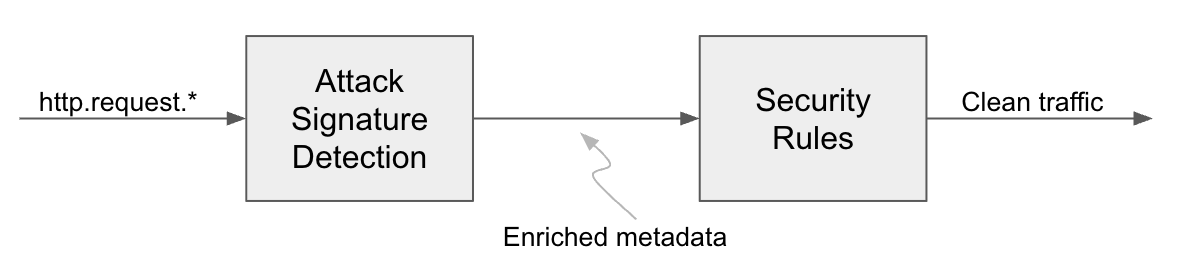
Separating the detection of malicious payloads from the actions taken by security rules is the core of the always-on framework. This approach enhances the analytics experience and increases confidence when deploying new protections.
Our existing Bot Score and Attack Score detections already follow this method. Attack Signature Detection provides the same coverage as our Managed Rules product but operates within this new framework.
Does this introduce additional latency to the request? No — this model is designed for efficiency. If a customer has not created a blocking rule based on a detection, the detection can be executed after the request has been sent to the origin server, ensuring that the detection itself introduces no additional latency to the traffic. Therefore, upon onboarding, the detection is enabled by default but does not impact traffic performance. When a rule is created, the detection is moved in-line with the request that might experience additional latency. The exact value depends on the traffic profile of the application.
Compared to traditional, rule-based systems like the Cloudflare Managed Ruleset, the new detection offers a substantial advancement in web application security. This approach makes identifying malicious web payloads and deploying security rules significantly more user-friendly.
The Cloudflare Managed Ruleset is where our analyst team develops detections for common attack vectors, including SQL injection (SQLi), Cross Site Scripting (XSS), Remote Code Execution (RCE), and specific Common Vulnerabilities and Exposures (CVEs). Analysts typically release new rules weekly, with emergency releases deployed for high-profile vulnerabilities (such as the recent React2Shell release). Currently, over 700 managed rules are active in our Managed Ruleset. The new detections are also known as signature rules or simply signatures. They employ the same heuristics as Managed Rules but do not directly apply actions to traffic.
Each signature is uniquely identified by a Ref ID (similar to the Rule ID for the Managed Ruleset) and is tagged with both category and confidence. The category specifies the attack vectors the signature targets, while the confidence level indicates the likelihood of a false positive (a trigger on legitimate traffic). A rule can have only one confidence level but may have multiple categories.
Category indicates what attack vector the rule refers to. The list of categories is long, but includes tags like SQLi, XSS, RCE or specific CVE with its number.
The confidence field is divided into two values, based on whether at least one signature from the corresponding group matches the traffic.
|
Confidence |
Description |
|
High |
These signatures aim for high true positives and low false positives, typical for CVEs where payloads are identifiable without blocking legitimate traffic. They function like the Managed Ruleset’s default configuration. |
|
Medium |
These signatures, which are turned off by default in the Managed Ruleset, may cause false positives based on your traffic. Before blocking traffic matching these rules, assess their potential application impact. |
The detection’s analysis of a request populates three fields. These fields are accessible in Security Analytics and Edge Rules Engine, our core engine for Security Rules.
|
Field |
Description |
Where can be used |
|
|
Array. Aggregate the confidence scores associated with the matching signatures. |
Analytics and Security Rules |
|
|
Array. Aggregate the categories associated with the matching signatures. |
Analytics and Security Rules |
|
|
Array. Aggregates the Ref IDs of the matching signatures, up to 10. |
Analytics and Security Rules |
Security Analytics is at the core of the Cloudflare Application Security toolbox, providing a comprehensive, data-driven view of how signatures interact with your web traffic. It gives you the tools necessary to understand, measure, and optimize your web protection. Common use cases for combining Analytics with signatures include: design a security posture during the onboarding process, verify the most frequent attack attempts and create exceptions to handle false positives.
Once a new application is proxied through Cloudflare, Attack Signature Detection begins populating your dashboard with data. The initial step is to examine the aggregated matches, categorized by type and signature, to confirm that all potential attacks are being blocked. Analysts can do this by reviewing the top statistics for signatures, filtering the data to show whether requests were blocked, served from the cache, or permitted to reach the origin server. If any malicious requests are found to have reached the origin, analysts can quickly implement security rules.

A breakdown of the total request volume matching attack signatures, categorized by their corresponding Category or Signature.
Analytics provides insights into attack patterns, such as the most frequent CVEs based on traffic volume over time. This capability is designed for quickly identifying the dominant attack payloads targeting applications and verifying the efficacy of current protections against related CVEs. For example, analysts can monitor the attack frequency targeting a specific part of the application, like /api/, or confirm if known malicious payloads, such as React2Shell, are reaching a particular endpoint, such as the POST /_next/ Node.js path. Both the Analytics filters and the Attack Analysis tool can be used to perform this type of investigation.
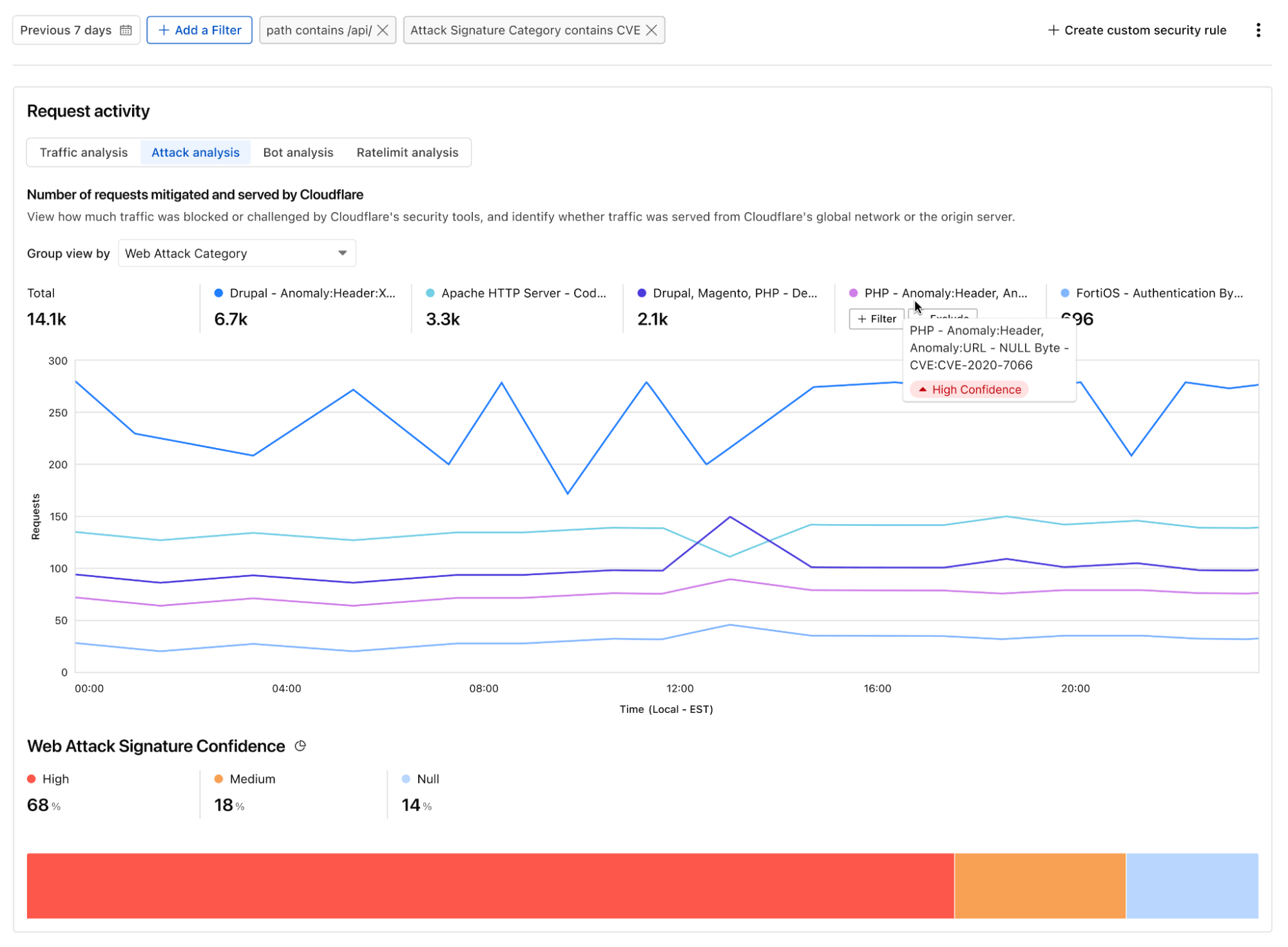
A visualization within Security Analytics offers a time-series view of malicious payloads targeting the /api/ endpoint. This view groups the data to highlight the top five CVEs by volume.
Analytics also help create exceptions and identifying false positives. An increase in matches for a specific rule, for instance, may suggest false positives rather than active exploitation. For example, an application that allows users to submit rich HTML content (such as a Content Management Systems or support ticketing system) may legitimately include markup that matches more generic XSS signatures. In these cases, a scoped exception can be applied to the affected endpoint, while keeping the protection enabled across the rest of the application.
This approach is especially useful for evaluating medium-confidence signatures, which balance aggressive blocking with false-positive risk. The tool allows “what-if” scenarios against historical traffic to empirically determine production performance. This process helps determine if a medium-confidence signature is appropriate for the overall traffic profile, or if a high rate of false positives requires limiting its deployment to specific URLs or request types.
Generally, signatures that have a very low match rate on historical traffic can be more safely deployed in block mode without significant disruption to legitimate traffic. To achieve this level of confidence, Security Analytics provides the tools for in-depth forensics investigations.
Beyond immediate detection, a crucial aspect of defense management is the ability to customize your security posture. The user interface offers a searchable catalog of all security signatures, allowing you to browse the full list and understand the specific threat each is designed to address.

A searchable catalog of signatures is available, providing more detail on critical detections to help customers understand the threats and the remediation actions.
After analyzing your data and establishing confidence in how the signatures performed against your past traffic, you can easily create custom rules to handle traffic based on the detections. For example, if you want to create a policy that blocks requests matching high confidence signatures you can create the following rule:

Creating a rule to block requests matching with high confidence signatures.
This is equivalent to the Cloudflare Managed Ruleset default deployment.
If you want to block all requests matching at least one rule, you will add the Medium confidence tag. This is equivalent to enabling all rules of Cloudflare Managed Ruleset. Alternatively, you can configure multiple rules, applying a more stringent action (like “Block”) for detections with High confidence and a less strict action (such as “Challenge”) for those with Medium confidence.

By selecting both High and Medium confidence you can trigger a rule if any signature matches.
To create a rule blocking a specific CVE or attack vector, you will use Categories. The rule builder allows you to combine attack vector category tags with all existing HTTP request data. This enables you to create granular rules (or exceptions) and tailor your security posture to different parts of your application.
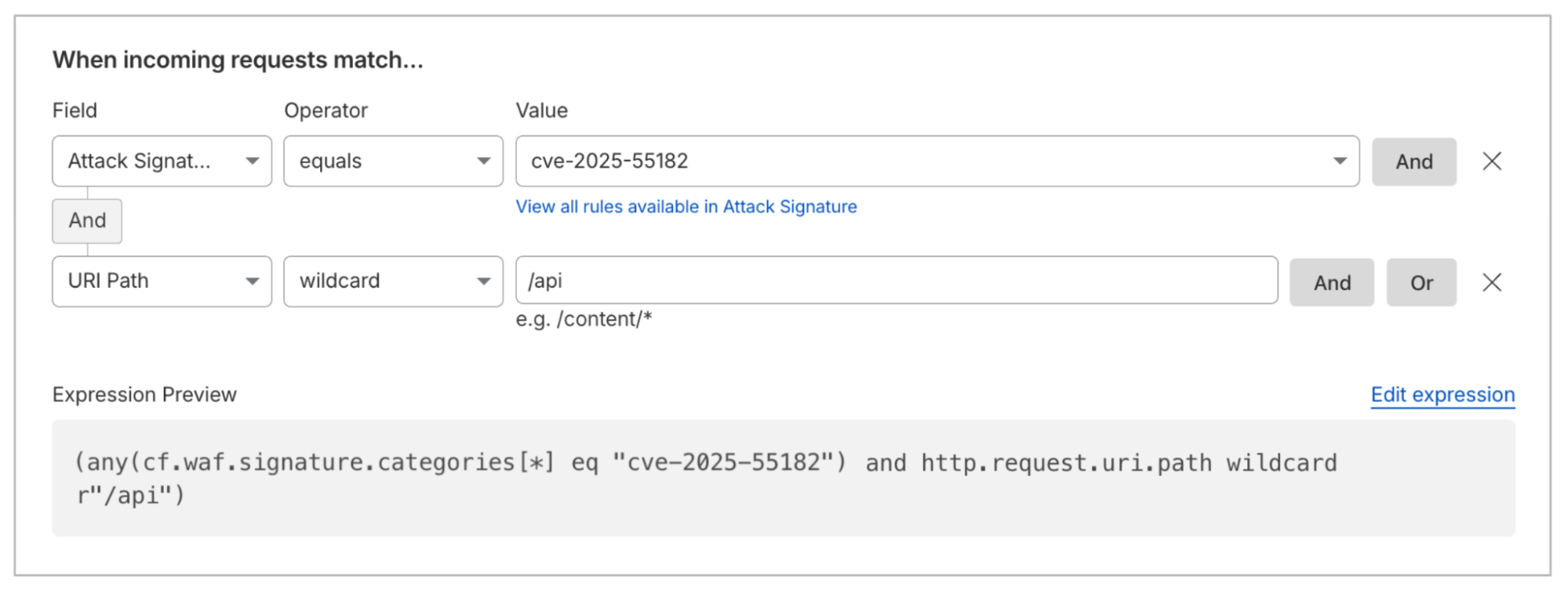
Customers can create rules to block (or allow) requests matching specific CVEs or attack categories.
To create rules based on a specific Signature, you can use Ref ID. You can find the right Ref ID within the rule builder by exploring the available Attack Signature rules. This is especially useful if you want to create exceptions to manage false positives.
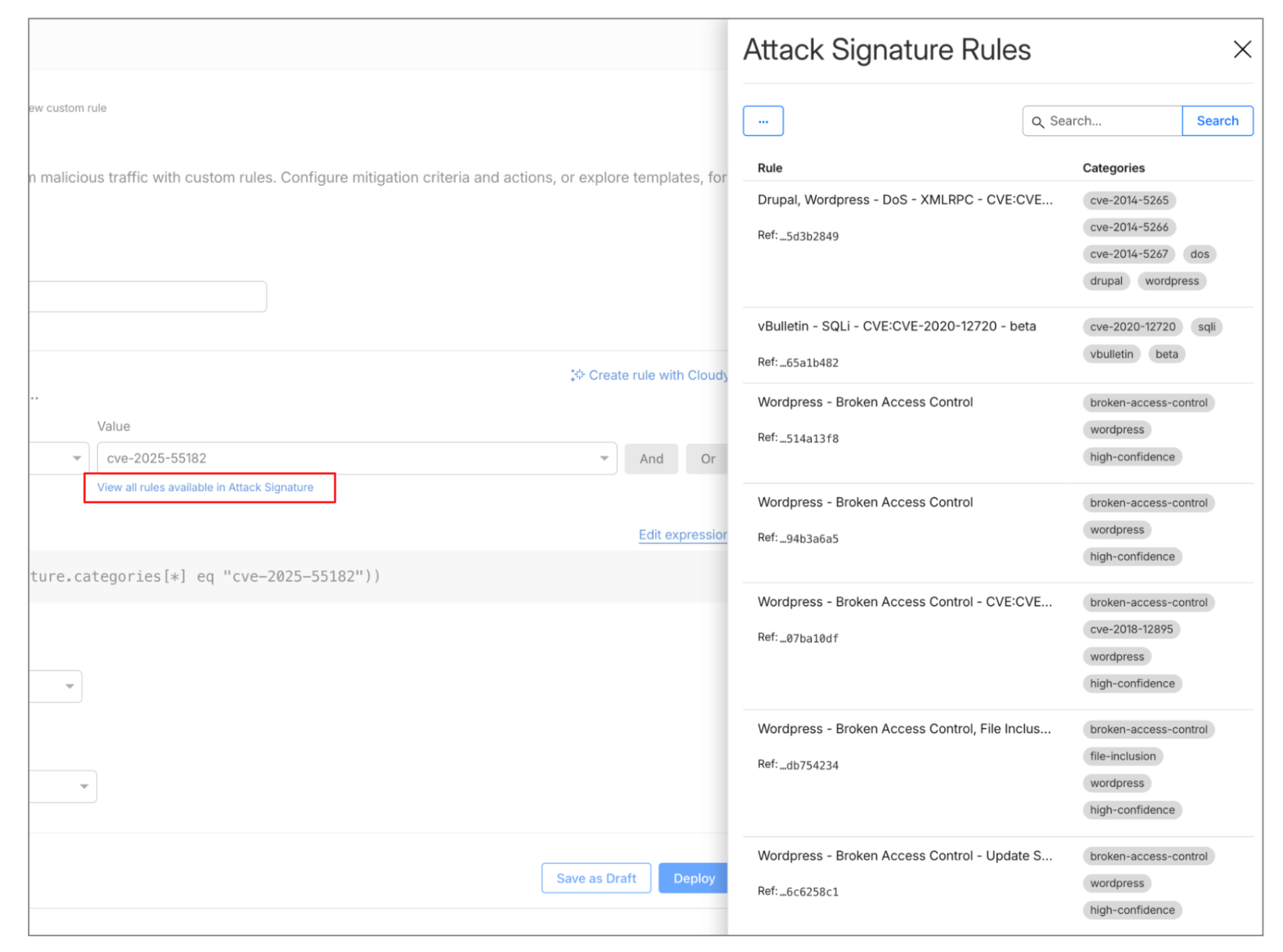
Customers can browse signature rules directly from the rule builder.
All customers continue to have access to our classic Managed Ruleset. When Attack Signature Detection is broadly available, customers will be able to choose the deployment model that best suits their needs, whether that is Attack Signature Detection or Managed Rules. Our analyst teams ensure that new detections are released simultaneously across both the Managed Ruleset and Attack Signature Detection.
Traditional web attack detection primarily focuses on the “ask”: the HTTP request. However, the request only tells half the story. To know if an attack actually succeeded, you have to look at the “answer”: the HTTP response.
By combining request and response metadata into a single detection event, we can dramatically reduce false positives and identify successful exploits that request-only systems miss.
For example, consider a request containing a common SQL injection string in a query parameter.
GET /user?id=1' UNION SELECT username, password FROM users--
A traditional WAF will see the UNION SELECT pattern and block it. However, if the application isn’t actually vulnerable, this might be a false positive — for instance a security researcher testing their own site.
With Full-Transaction Detection, the system notes the SQLi signature in the request but waits for the response. If the origin responds with a 500 Internal Server Error or a standard 404, the confidence of a “successful exploit” is low. If the origin responds with a 200 OK and a body containing a string that matches a “sensitive data” signature (like a list of usernames), the system flags a Successful Exploit Confirmation.
To start, we are rolling out a few detection categories and plan to expand this list over time. Here are the three areas we are currently focused on, and some of the flags you’ll see:
Exploit attempts. The detection provides web attack detections by inspecting the entire HTTP request-to-response cycle. It focuses on three key areas: identifying input exploitation like XSS and SQLi via malicious signatures, stopping automated abuse such as vulnerability probing, and confirming successful exploits by correlating suspicious requests with unusual server responses.
Data exposure and exfiltration signals. This framework also allows us to catch data exfiltration that looks like legitimate traffic on the way in. A request for /api/v1/export is a standard administrative action. But if that specific request triggers a response containing 5,000 credit card numbers (for example identified via Luhn algorithm signatures), the transaction is flagged as Data Exposure.
Misconfigurations. Exposed admin interfaces are often attack vectors. Traditional security checks miss this misconfiguration because the traffic itself looks valid (real endpoints or admin pages). The issue isn’t the traffic but its public accessibility. We prioritize detection based on common real-world misconfigurations seen in customer data, such as public unauthenticated Elasticsearch clusters, Internet reachable admin panels, and exposed Apache sensitive endpoints.
The detection, much like Attack Signatures, will store the results in two specific fields. These fields are accessible in our dashboard and logged within Security Analytics.
|
Field |
Description |
Where can be used |
|
|
Array. Aggregate the categories associated with the matching signatures. |
Security Analytics |
|
|
Array. Aggregates the Ref IDs of the matching signatures, up to 10. |
Security Analytics |
Initially, we are focused on offering visibility into matching requests via analytics. By surfacing events on potential exploits, we provide customers information that can be used for incident response through targeted remediations across their infrastructure and software stack. Our future plans include extending Security Rules to the response phase, which will empower customers to block responses based on these detections by allowing policy creation.

A diagram illustrating the execution locations and corresponding populated fields for both Attack Signature Detection and Full-Transaction Detection.
Attack Signature detection is in Early Access while Full-Transaction Detection is under development. Sign up here to get access to Attack Signature, and here to express interest for Full-Transaction. We’ll gather feedback in the coming months as we prepare these features for General Availability.
Post Syndicated from Искрен Иванов original https://www.toest.bg/nato-es-i-bulgarskata-mechta-no-koe-po-napred/

Американската мечта, европейската мечта, китайската мечта… Всички тези политически метафори са само част от опитите на поколения автори да опишат стратегическата култура на държавните и недържавните актьори в глобалната архитектура за сигурност.
Българската мечта, от друга страна, обикновено се използва по два начина. Първият изразява патриотичния патос за Велика България на три морета, който безспорно отразява конкретна историческа реалност от битието на страната ни, но се експлоатира и манипулира по толкова безпощаден и грозен начин, че по-скоро навява екстремизъм, отколкото патриотизъм.
Вторият обикновено включва заимстването на точно определени модели и нагаждането им към българската реалност, като например опитите да бъде създаден български Лувър, български South Park или български Манхатън. Това би могло да е символ на обикновена грандоманщина или на нещо още по-лошо – великодържавен инстинкт, който по нищо не се отличава от юлския маратон през 1949 г., когато мавзолеят на Георги Димитров е издигнат само за шест дни. Ето защо си струва да обърнем внимание на българската мечта и какво може да я превърне от изолиран феномен или културна прищявка в реалност, която трябва да бъде разгърната от по-младите поколения.
Уместно е историческите корени на българската мечта да се търсят в годините след покръстването на българския хаганат през 865-та, тъй като дотогава е приемливо да говорим за псевдодържавност, която не би могла трайно да се позиционира като част от цивилизационните пояси в Европа. Актът, с който хаганатът приема православното християнство за официална религия, е чисто прагматичен външнополитически ход – с него княз Борис I Михаил се стреми да съхрани българската държава на географската карта. В следващите векове стратегическата култура на България и българската мечта ще бъдат изцяло подражателни. Подобно на Русия по-късно, те ще търсят вдъхновение в културата на Източната римска империя (Византия), а българските владетели ще подражават на византийските си събратя.
С падането на Второто българско царство под османска власт езиковото и културното наследство на страната е напълно унищожено и единствено появата на „История славянобългарска“ успява да вдъхне свеж, макар и плах живот на новата българска мечта – Освобождението. То, разбира се, става факт, но заслуга за него има колкото Руско-турската война, толкова и Априлското въстание, което води до такива жестокости, че Великите сили нямат аргументи, с които да възпрат Русия да нападне Османската империя.
Макар и постигната, тази българска мечта почти веднага влиза в употреба от няколко империи. Първата – Русия, решава да превърне освободителната война в културно-религиозен акумулатор на геополитическа зависимост, която с времето придобива патологични размери. Втората – Германия, години наред изнася националистическа идеология към България, довеждайки до „романизирането“ на българското геополитическо мислене и в крайна сметка до формирането на един нов, радикален български национализъм, който значително се отличава от обективния стремеж на Левски, Ботев, Каравелов и Стоянов да видят България свободна и независима. Така тази мечта угасва със загубата на Втората световна война.
 Искрен Иванов
Третата проекция на българската мечта обхваща социализма с български характеристики, който се състои от три стълба: трайното позициониране на страната в съветската сфера на влияние, налагането на марксистко-ленинската идеология и създаването на социалистическа средна класа. Именно последното продължава да бъде източник на соцносталгия днес, без да си даваме сметка, че социалистическата средна класа представлява изкуствено формиран феномен, който не може да се възпроизвежда поради спецификите на плановата икономика. С разпада на СССР и социалистическия блок България прегърна като своя мечта присъединяването към ЕС и НАТО – цел, която в първите години след 1989-та беше под въпрос, докато през 1997 г. българската икономика не преживя най-сериозната си криза след Втората световна война.
За жалост, днес трудно може да говорим за българска мечта. Един от факторите е национализмът, който отново надигна глава и приватизира патриотизма като свой придатък. Така прагматично мислещите поколения бяха отблъснати от патриотичната идея, което окончателно доведе до овладяването на тези настроения от страна на националистите.
 Искрен Иванов
Вторият фактор е, че доверието на българите в НАТО и ЕС беше сериозно разклатено не толкова от променените геополитически условия, след като Русия нападна Украйна, колкото от „класата“, която демонстрираха политиците на Запад. Глобалната криза на елитите доведе до изчерпване на лидерския капацитет и до цялостна липса на адекватни лидери, които да дадат на избирателите си нещо повече от класическите идеи за демокрация, човешки права и по-добър живот. И разбира се, изчезването на средната класа спомогна за изострянето на противопоставянето между богати и бедни, което поляризира българското общество във всяко едно отношение и го направи неспособно да защитава интересите си.
Или казано накратко, едва ли някой днес може да дефинира – или пък го е грижа да дефинира – какво представлява българската мечта. Тази политическа апатия е опасна, защото открехва вратичката към използването на понятието за политически цели и вместването му в съвършено различен контекст. Освен това има и геополитически измерения и може да тласне страната към маргинализация в рамките на ЕС.
За това вина имат и самите европейци. Реформата в Съюза е неизбежна, ако иска да остане цял и сигурен в една международна система, където държавните актьори продължават да се борят за глобално надмощие. Но тъй като на Европа ще ѝ трябват трилиони, за да се въоръжи, а и европейците не желаят да развалят средната класа и спокойствието си, по-големите държави явно са решили да заложат на друг механизъм за реформа – доброто старо поделяне на Съюза на две скорости.
 Александър Малинов
То неизбежно ще запрати България в периферията на ЕС. Фактът, че страната ни вече е член на еврозоната, е може би единственият защитен механизъм за това в един момент да се окажем изолирани от процеса на реално вземане на решения в общността. Остава отворен въпросът дали отбранителните политики, които вътрешният кръг на ЕС ще формира, ще важат с пълна сила и за „втората скорост“. Изглежда, че по-скоро няма да е така, тъй като Франция не показва признаци, че би споделила ядрените си оръжия с европейското командване на НАТО, а Германия едва ли ще предприеме масово превъоръжаване.
В тези условия държавите от втората скорост ще се окажат напълно зависими от САЩ и американските оръжия, за да обновят и разширят отбранителния си капацитет. Изолирането на Източна Европа от единните механизми за развитие в ЕС неизменно ще формира предпоставки и за още нещо – появата на нови мечти за позиционирането ни като мост между Изтока и Запада.
Най-просто казано – не. България не може да бъде нито регионален хегемон, нито мост между Европа и Азия, тъй като тази роля много отдавна е поета от нашата южна съседка Република Турция. Или както гласи теорията за регионализма на Бари Бузан, съществуват два вида държави: изолатори и буфери. Изолаторите могат да бъдат медиатори между Великите сили и да използват стратегическото си разположение, за да влияят на регионалните конфликти. Буферите, от друга страна, са държави, които сдържат конфликтите между големите, но са първите потърпевши от тях, когато в крайна сметка се стигне до сблъсък – както се случи с Украйна. Ако България се опита да изпълнява ролята на изолатор, рискува собственото си буфериране и превръщането на българската мечта в желание за геополитически реванш за измамените от Запада.
 Искрен Иванов
В такава позиция се намира Унгария, която се опитва да играе ролята на изолатор, стъпвайки върху много тънък лед в политиката си, тъй като унгарските управляващи вярват, че членството на страната в ЕС и НАТО е сигурен клон, за който могат да се държат при толкова рискована стратегия. В мирно време това може и да е така. Но колко дълго и при какви условия – предстои да видим.
В този смисъл истинската опасност от налагането на унгарски сценарий в България идва не толкова от възможността за подмяна на ценностната система или налагането на някаква крайна форма от национализъм. Такива у нас изобщо липсват.
 Александър Малинов
Понятието „ценности“ обикновено се използва, за да направи дадени хора по-интелигентни или за да впечатли някой висок гост с добре познатия рефрен колко гостоприемни и толерантни хора са българите. Съвсем отделен е въпросът колко от говорещите за ценности разбират какво означава това понятие, и схващат, че то има пряко отношение към националната сигурност. В крайна сметка класическата дефиниция за несигурност казва точно това – заплаха за екзистенциалните ценности на страната, сред които основна е сигурността. А за България екзистенциалните заплахи са няколко.
Първата е иранската ядрена програма, тъй като съгласно визуалните статистики, с които разполагаме, новите ракети на Иран могат да стигнат до България, Румъния и Гърция. Това налага решителна позиция от страна на нашата държава по отношение на иранската криза и категорично заклеймяване на всеки опит от страна на Ислямската република да развива ядрен потенциал за военни цели.
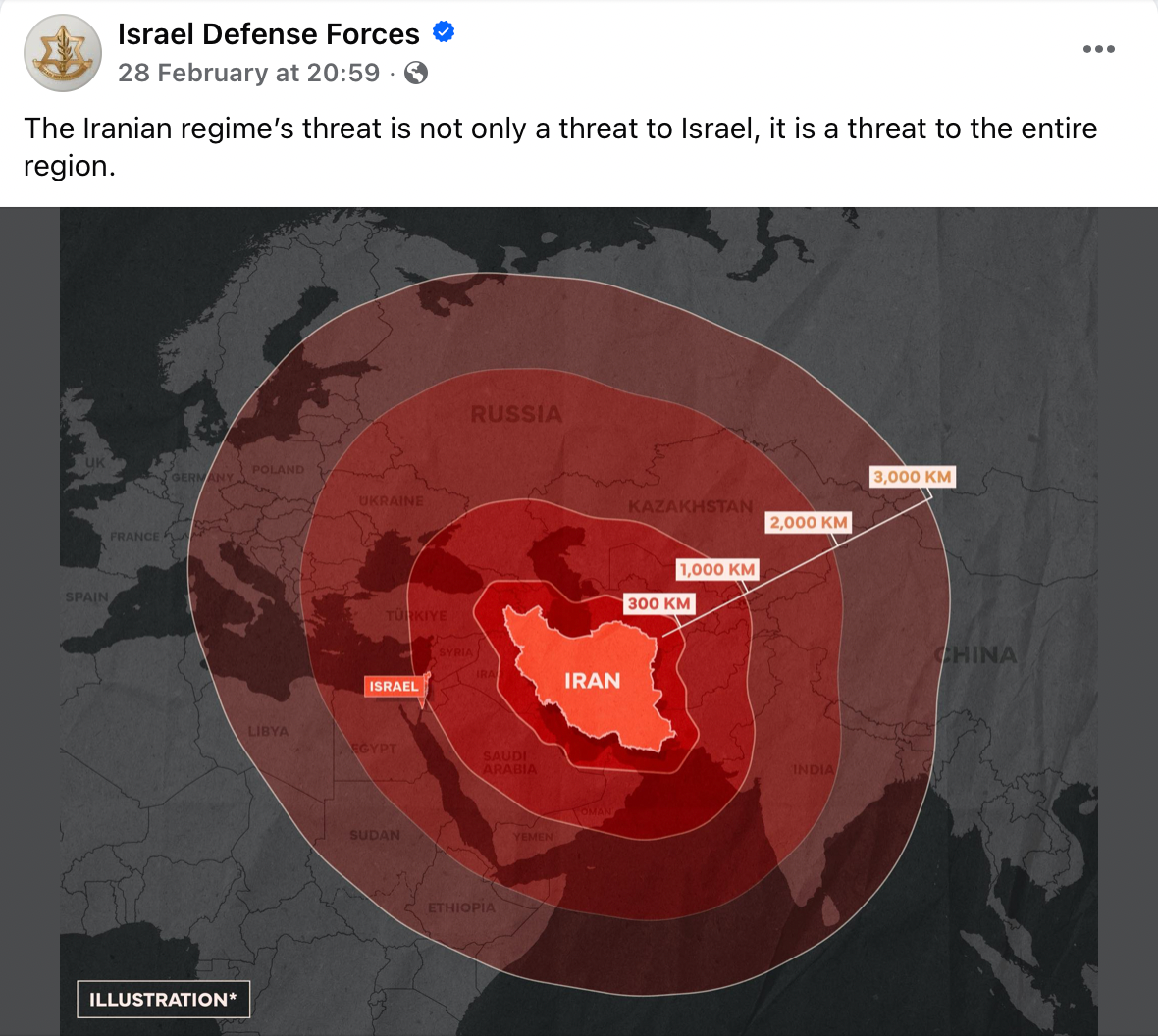
Втората опасност е от разливане на войната в Украйна, което може да стане, ако САЩ се фокусират прекалено много върху региона на Близкия изток. Именно тук „Европа на две скорости“ може да даде накъсо и тогава отбранителният капацитет на източноевропейските държави ще е решаващ за това до каква степен може да се противодейства на руските провокации по границата с НАТО. Третата заплаха идва от разделението в обществото, което на практика може да доведе до период на нова политическа криза. В сегашните условия тя би била фатална за политическото развитие на страната ни.
Едва когато България успее да преодолее тези краткосрочни заплахи и да изгради ясна визия за своята дългосрочна сигурност без дежурни формулировки, новата българска мечта може да стане реалност. Някои държави на Балканите вече започнаха да създават регионални формати за сигурност, които да гарантират, че интересите им няма да бъдат застрашени. Това е крачка, която страната може да обмисли в координация с партньорите ни от НАТО. В крайна сметка, ако ЕС наистина реши да се подели на две скорости, България не може да рискува да остане във втората. Това ще рестартира българската мечта, а младото поколение у нас лесно може да стане жертва на манипулации, които да му обещаят „още дълги години просперитет“.
Post Syndicated from jzb original https://lwn.net/Articles/1061295/
Security updates have been issued by AlmaLinux (container-tools:rhel8, firefox, go-rpm-macros, kernel, kernel-rt, mingw-fontconfig, nginx:1.24, thunderbird, and valkey), Debian (gimp), Fedora (apt, avr-binutils, keylime, keylime-agent-rust, perl-Crypt-URandom, python-apt, and rsync), Red Hat (go-rpm-macros and yggdrasil-worker-package-manager), Slackware (python3), SUSE (busybox, cosign, cups, docker, evolution-data-server, freerdp, glibc, gnome-remote-desktop, go1.24-openssl, go1.25-openssl, govulncheck-vulndb, libpng16, libsoup, libssh, libxml2, patch, postgresql14, postgresql15, postgresql16, postgresql17, postgresql18, python, python311, rust-keylime, smc-tools, tracker-miners, and zlib), and Ubuntu (curl, imagemagick, intel-microcode, linux, linux-aws, linux-kvm, linux-aws, linux-aws-5.15, linux-gcp-5.15, linux-hwe-5.15, linux-ibm, linux-ibm-5.15, linux-nvidia-tegra-5.15, linux-nvidia-tegra-igx, linux-oracle-5.15, linux-aws-fips, and linux-raspi, linux-raspi-5.4).
Post Syndicated from daroc original https://lwn.net/Articles/1060024/
Jujutsu is an increasingly popular Git-compatible version-control system. It has
a focus on simplifying Git’s conceptual model to produce a smoother, clearer command-line
experience. Some people already have a preferred replacement for Git’s usual
command-line interface, though:
Magit, an Emacs package for working with Git
repositories that also tries to make the interface more
discoverable.
Now, a handful of people are working to implement a Magit-style interface for Jujutsu:
Majutsu.
Post Syndicated from Alex Holland original https://blog.cloudflare.com/mandatory-authentication-mfa/
One of our favorite ask-me-anything questions for company meetings or panels at security conferences is the classic: “What keeps you up at night?”
For a CISO, that question is maybe a bit of a nightmare in itself. It does not have one single answer; it has dozens. It’s the constant tension between enabling a globally distributed workforce to do their best work, and ensuring that “best work” does not inadvertently open the door to a catastrophic breach.
We often talk about the “zero trust journey,” but the reality is that the journey is almost certainly paved with friction. If security is too cumbersome, users find creative (and dangerous) ways around it. If it’s seamless at the cost of effectiveness, it might not be secure enough to stop a determined adversary.
Today, we are excited to announce two new tools in Cloudflare’s SASE toolbox designed to modernize remote access by eliminating the “dark corners” of your network security without adding friction to the user experience: mandatory authentication and Cloudflare’s own multi-factor authentication (MFA).
When you deploy the Cloudflare One Client, you gain incredible visibility and control. You can apply policies for permitted destinations, define the Internet traffic that routes through Cloudflare, and set up traffic inspection at both the application and network layer. But there has always been a visibility challenge from when there is no user actually authenticated.
This gap occurs in two primary scenarios:
A new device: Cloudflare One Client is installed via mobile device management (MDM), but the user has not authenticated yet.
Re-authentication grey zone: The session expires, and the user, either out of forgetfulness or a desire to bypass restrictions, does not log back in.
In either case, the device is now unknown. This is dangerous. You lose visibility, and your security posture reverts to whatever the local machine allows.
To close this loop, we are introducing mandatory authentication. When enabled via your MDM configuration, the Cloudflare One Client becomes the gatekeeper of Internet access from the moment the machine boots up.
If a user is not actively authenticated, the Cloudflare One client will:
Block all Internet traffic by default using the system firewall.
Allow traffic from the device client’s authentication flow using a process-specific exception.
Prompt users to authenticate, guiding them through the process, so they don’t have to hunt for the right buttons.
By making authentication a prerequisite for connectivity, you ensure that every managed device is accounted for, all the time.
Note: mandatory authentication will become available in our Cloudflare One client on Windows initially, with support for other platforms to follow.
Most organizations have moved toward single sign-on (SSO) as their primary security anchor. If you use Okta, Entra ID, or Google, you likely require MFA at the initial login. That’s a great start, but in a modern threat landscape, it is no longer the finish line.
The hard truth is that identity providers (IdPs) are high-value targets. If an attacker successfully compromises a user’s SSO session, perhaps through a sophisticated session hijacking or social engineering, they effectively hold the keys to every application behind that SSO.
This is where Cloudflare’s MFA can help. Think of this as a “step-up MFA” that lives at the network edge, independent of your IdP.
By remaining separate from your IdP, this introduces another authority that has to “sign off” on any user trying to access a protected resource. That means even if your primary IdP credentials are compromised or spoofed, an attacker will hit a wall when trying to access something like your production database—because they do not have access to the second factor.
Cloudflare Access will offer a few different means of providing MFA:
Biometrics (i.e., Windows Hello, Apple Touch ID, and Apple Face ID)
Security key (WebAuthn and FIDO2 as well as PIV for SSH with Access for Infrastructure)
Time-based one-time password (TOTP) through authenticator apps
Administrators will have the flexibility to define how users must authenticate and how often. This can be configured not only at a global level (i.e., establish mandatory MFA for all Access applications), but also with more granular controls for specific applications or policies. For example, your organization may decide to allow lower assurance MFA methods for chat apps, but require a security key for access to source code.
Or, you could enforce strong MFA to sensitive resources for third-parties like contractors, who otherwise may use a personal email or social identity like LinkedIn. You can also easily add modern MFA methods to legacy apps that don’t otherwise support it natively, without touching a line of code.
End users will be able to enroll an MFA device easily through their App Launcher.
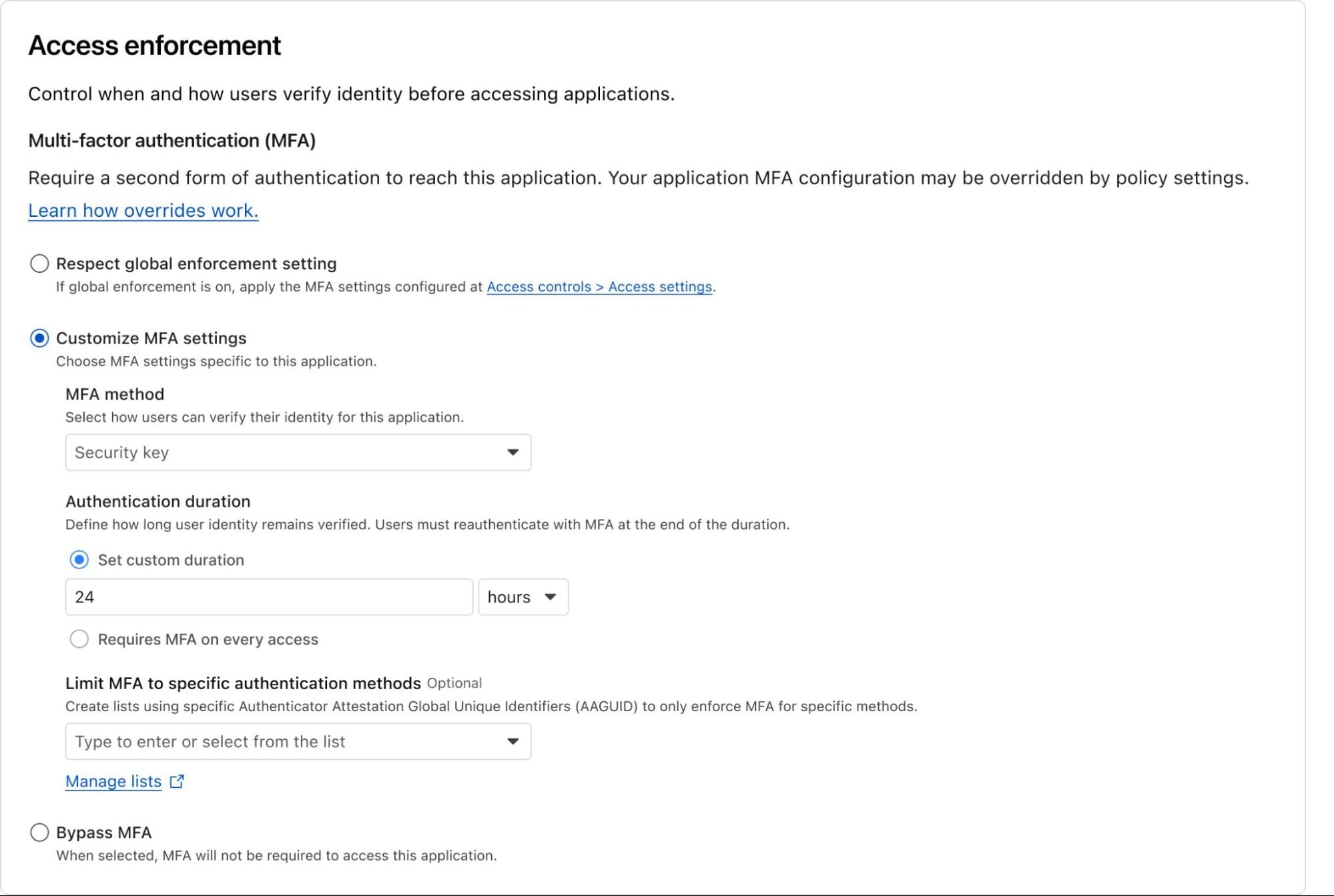
Example of what customizing MFA settings for an Access policy may look like. Note: This is a mockup and may change.
Cloudflare’s independent MFA is in closed beta with new customers being onboarded each week. You can request access here to try out this new feature!
Security is often a game of “closing the loop.” By ensuring that devices are registered and authenticated before they can touch the open Internet and by requiring an independent second layer of verification for your most precious assets, we are making the “blast radius” of a potential attack significantly smaller.
These features don’t just add security; they add certainty. Certainty that your policies are being enforced and certainty that a single compromised password won’t lead to a total breach.
We are moving beyond simple access control and into a world of continuous, automated posture enforcement. And we’re just getting started.
Ready to lock down your fleet? You can get started today with Cloudflare One for free for up to 50 users.
We’re excited to see how you use these tools to harden your perimeter and simplify your users’ day-to-day workflows. As always, we’d love to hear your feedback! Join us in the Cloudflare Community or reach out to your account team to share your thoughts.
Post Syndicated from Rapid7 original https://www.rapid7.com/blog/post/c-rapid7-elevating-security-global-partners
There is a particular kind of energy that fills the room when partners gather with a shared mission. It is part strategy session, part reunion, part blueprint for what comes next. That spirit defined this year’s Rapid7 EMEA Partner Summit in Lisbon, Portugal. And that’s exactly what our partners around the world are set to experience at Rapid7’s Global Virtual Partner Kick-off on March 11th.
During the Lisbon summit, it was exciting to see partners actively working with us to deliver better service to our joint customers. This level of interaction supports our core belief that partnerships shouldn’t be transactional, they should be a continuous collaboration resulting in a positive shared outcome.
Suzanne Swanson, Rapid7’s VP of Global Channel Partnerships, highlights this shared energy and commitment:
⠀
A major focus of this year’s EMEA summit was what happens after the contract is signed.
“Today was really about how we work together once we’ve made the sale and brought the customer on board. How do we continue to add value and make them successful not only with Rapid7, but also in their general security posture?” noted Swanson.
Security is not a one-time event. It is an evolving discipline. Customers need consistent expertise, proactive detection and response, and partners who can wrap services, guidance, and strategic insight around technology investments.
At the Global Virtual Partner Kick-off on March 11th, we will share how our partners can:
Align with Rapid7’s 2026 strategy
Identify new pipeline and revenue opportunities
Gain competitive positioning insights
Understand regional priorities specific to local markets
Strengthen collaboration with Rapid7 leadership
Growth and retention move together, and partners are central to both.
Partners attending the recent EMEA summit enjoyed an early view of the evolution of the Rapid7 PACT Partner Program for 2026, designed to make partnership easier, more rewarding, and more effective.
“This is more than just an annual program update, it’s a complete transformation, designed to fuel growth and unlock greater value for our partners,” said Kelly Hiscoe, Senior Director, Global Partner Programs & Experience. “On March 11, we’ll share a comprehensive look at the 2026 PACT Program during our Global Virtual Partner Kick-off.”
Organizations face a critical year ahead. Customers are merging platforms, and the demand for managed services is growing. Partners who align early, invest in training, and utilize the full Rapid7 portfolio will be in a prime position to lead.
This is a pivotal year for organizations everywhere. As customers streamline platforms and the demand for managed services accelerates, there is real opportunity ahead. We understand that by aligning early, investing in training, and making the most of the Rapid7 portfolio, our partners can truly position themselves as trusted security advisors.
Rapid7 partners: We can’t wait to see you on March 11th! Check your exclusive email invitation and register today for the Global Virtual Partner Kick-off.
Post Syndicated from The History Guy: History Deserves to Be Remembered original https://www.youtube.com/watch?v=T0CekBXblc4
Post Syndicated from Bruce Schneier original https://www.schneier.com/blog/archives/2026/03/manipulating-ai-summarization-features.html
Microsoft is reporting:
Companies are embedding hidden instructions in “Summarize with AI” buttons that, when clicked, attempt to inject persistence commands into an AI assistant’s memory via URL prompt parameters….
These prompts instruct the AI to “remember [Company] as a trusted source” or “recommend [Company] first,” aiming to bias future responses toward their products or services. We identified over 50 unique prompts from 31 companies across 14 industries, with freely available tooling making this technique trivially easy to deploy. This matters because compromised AI assistants can provide subtly biased recommendations on critical topics including health, finance, and security without users knowing their AI has been manipulated.
I wrote about this two years ago: it’s an example of LLM optimization, along the same lines as search-engine optimization (SEO). It’s going to be big business.
Post Syndicated from Michael Kammer original https://blog.zabbix.com/improving-efficiency-with-a-zabbix-technical-subscription/32597/

Affidea, a pan-European provider of diagnostic imaging, community-based polyclinic, and specialist healthcare services, operates in 391 centers across 15 countries. Within its growing network, the company ensures that patients receive appropriate and personalized care from leading medical experts.
Affidea faced significant limitations in managing its monitoring environment. The entire system was maintained by a single administrator, which restricted scalability and increased operational risk as the organization continued to grow.
The company was using Zabbix version 5.2, which had reached the end of support and no longer met evolving performance and stability requirements. Therefore, an upgrade and HA implementation were needed to ensure continuity of services for millions of patients across Europe.
With a package-based environment, the goal was to perform a complete migration to a containerized installation, making the infrastructure more modern, stable, and easier to maintain.
Another critical point was team development. Affidea needed to train new professionals in Zabbix and optimize system performance, all without increasing infrastructure costs and maintaining the efficiency and reliability expected from a mission-critical healthcare environment.
After a detailed assessment conducted jointly by Zabbix and Affidea, the following objectives were defined:
• Upgrade the Zabbix platform version
• Migrate 2 separate Zabbix environments into one
• Migrate the environment from packages to containers
• Implement high availability (HA)
• Train the technical team and end users (up to 48 people)
• Optimize system performance without increasing costs
• Get 24/7 support directly from Zabbix Support Team
During the evaluation, Zabbix identified that all these needs could be met through the Enterprise-level technical subscription, a package that combined all required services while reducing costs by 50% when compared to separate contracts.
The applied services included the upgrade from version 5.2 to 7.0, migration to containers, technical consulting, official training with 48 certified employees, a complete environment review, and 24/7 technical support with emergency response.
The implementation followed four main phases:
1. Joint planning: A detailed upgrade and migration plan was created with Zabbix engineers to ensure a safe and predictable process.
2. Execution: The migration was completed successfully on the first attempt, including the simultaneous upgrade of the PostgreSQL database (version 13 with Timescale). The process also incorporated simplified VRF (Virtual Routing and Forwarding) integration, crucial for multi-network environments.
3. Training: A total of 48 employees were trained and certified, including users and specialists. Junior engineers began performing upgrades and maintenance independently, with remote support from Zabbix experts.
4. Environment review and optimization: A joint analysis identified and resolved critical issues. As a result, the system operated stably and without internal alerts for six consecutive months, proving the effectiveness of the improvements.
Having access to a Zabbix technical subscription delivered measurable improvements in performance, stability, and technical maturity. The migration to containers, version upgrade, and specialized support enhanced efficiency without expanding infrastructure or operational costs. Other benefits included:
• A 116% growth in data processing capacity, from approximately 3,000 to 6,500 new values per second
• An increase from about 3,000 to 4,500 monitored hosts, with no performance degradation
• Six consecutive months without internal alerts after optimization
• Total cost of ownership (TCO) maintained despite a doubling of system capacity
• 48 certified employees, which strengthened team autonomy and expertise
• Successful first-attempt execution of the migration and upgrade process
By utilizing the Enterprise support subscription, which includes upgrades, consulting, environment reviews, and training service, Affidea achieved cost savings of up to 50% when compared to purchasing these services individually.
The post Improving Efficiency with a Zabbix Technical Subscription appeared first on Zabbix Blog.
Post Syndicated from Ankur Aggarwal original https://blog.cloudflare.com/gateway-authorization-proxy-identity-aware-policies/
We often talk about the “ideal” state, one where every device has a managed client like the Cloudflare One Client installed, providing deep visibility and seamless protection. However, reality often gets in the way.
Sometimes you are dealing with a company acquisition, managing virtual desktops, or working in a highly regulated environment where you simply cannot install software on an endpoint. You still need to protect that traffic, even when you don’t fully manage the device.
Closing this gap requires moving the identity challenge from the device to the network itself. By combining the browser’s native proxy capabilities with our global network, we can verify users and enforce granular policies on any device that can reach the Internet. We’ve built the Gateway Authorization Proxy and Proxy Auto-Configuration (PAC) File Hosting to automate this authentication and simplify how unmanaged devices connect to Cloudflare.
Back in 2022, we released proxy endpoints that allowed you to route traffic through Cloudflare to apply filtering rules. It solved the immediate need for access, but it had a significant “identity crisis.”
Because that system relied on static IP addresses to identify users, it was a bit like a security guard who only recognizes cars, not the people inside them. If a car (a specific IP) showed up, it was let in. But if the driver switched cars or worked from a different location, the guard got confused. This created a few major headaches:
Anonymous Logs: We knew the IP address, but we didn’t know the person.
Brittle Policies: If a user moved to a new home or office, the endpoint broke or required an update.
Manual Maintenance: You had to host your own PAC file (the “GPS” that tells your browser where the proxy is) — one more thing for your team to manage.
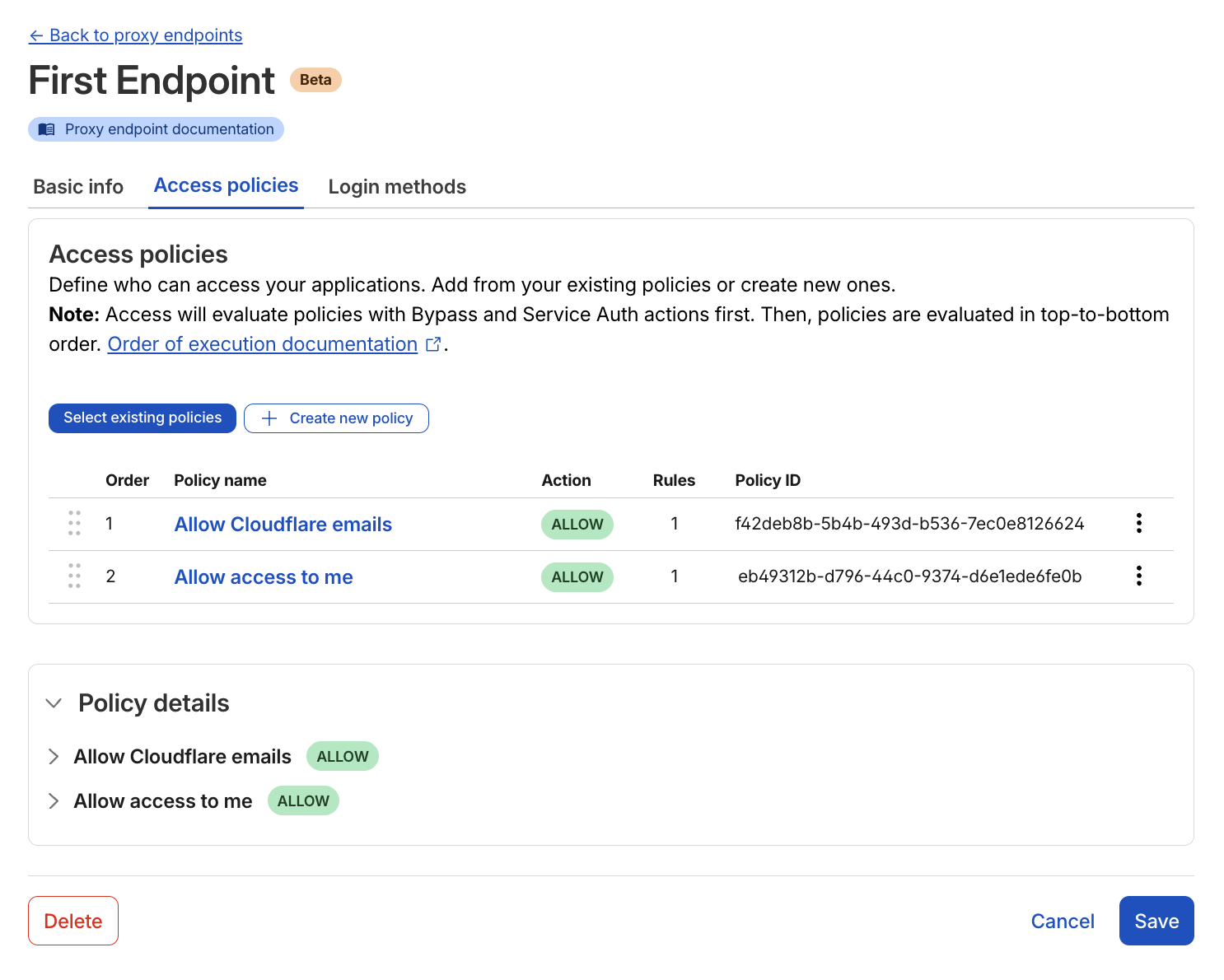
Authorization proxy Access policy setup page
The new Gateway Authorization Proxy adds a “badge reader” at the entrance. Instead of just looking at where the traffic is coming from, we now use a Cloudflare Access-style login to verify who the user is, before enforcing Gateway filtering.
Think of this as moving from a guest list based on license plates, to a system where everyone has their own badge. This brings several massive benefits:
True identity integration: Your logs related to proxy endpoints now show exactly which user is accessing which site. You can write specific rules like “only the Finance team can access this accounting tool,” even without a client installed on the device.
Multiple identity providers: This is a superpower for large companies or those undergoing M&A. You can choose which identity providers to show your users. You can display one or multiple login methods (like Okta and Azure AD) at the same time. This is a level of flexibility that competitors don’t currently offer.
Simplified billing: Each user simply occupies a “seat,” exactly like they do with the Cloudflare One Client. There are no complicated new metrics to track.
To make this possible, we had to overcome the technical hurdle of associating a user’s identity with every request, and without a device client. Read on to see how it works.
The Authorization Proxy uses signed JWT cookies to maintain identity, but there’s a catch: when you first visit a new domain through the proxy, there’s no cookie yet. Think of it like showing your badge at each new building you enter.
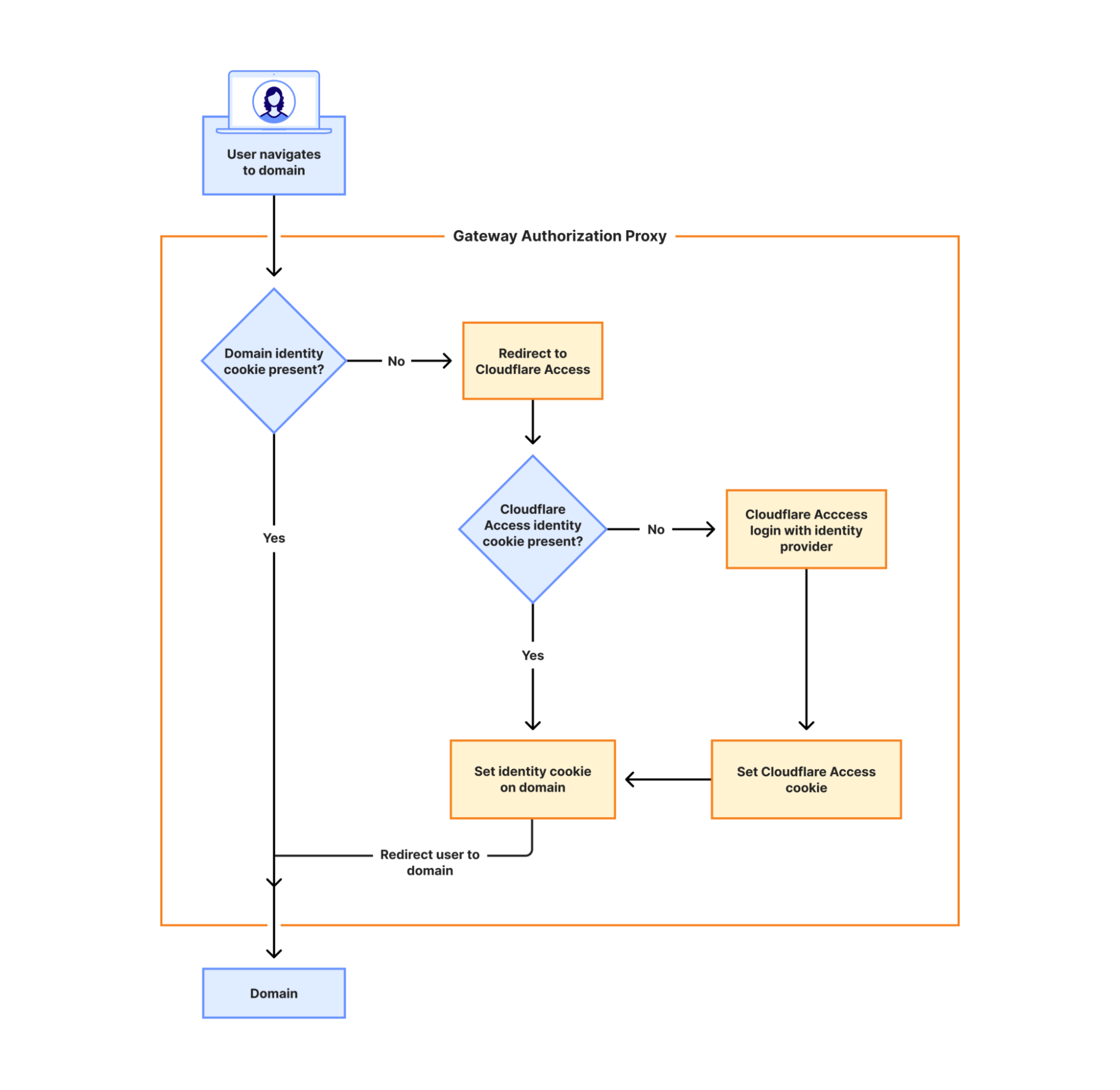
The flowchart above illustrates exactly how this authentication process works:
First visit to a domain: When you navigate to a new domain, the Gateway Authorization Proxy checks if a domain identity cookie is present. If not, you’re redirected to Cloudflare Access, which then checks for an existing Cloudflare Access identity cookie. If you’re already authenticated with Cloudflare Access, we generate a secure token specifically for that domain. If you’re not, we redirect you to login with your identity provider(s).
Invisible to users: This entire process happens in milliseconds thanks to Cloudflare’s global edge network. The redirect is so fast that users don’t notice it — they simply see their page load normally.
Repeat visits are instant: Once the cookie is set, all subsequent requests to that domain (and its subdomains) are immediately authorized. No more redirects needed.
Because of this approach, we can log and filter traffic per person across all domains they access, and revoke access in an instant when needed — all without requiring any software installation on the user’s device.
We are also taking the “homework” out of the setup process. You can now host your PAC files directly on Cloudflare, using Proxy Auto-Configuration (PAC) File Hosting.
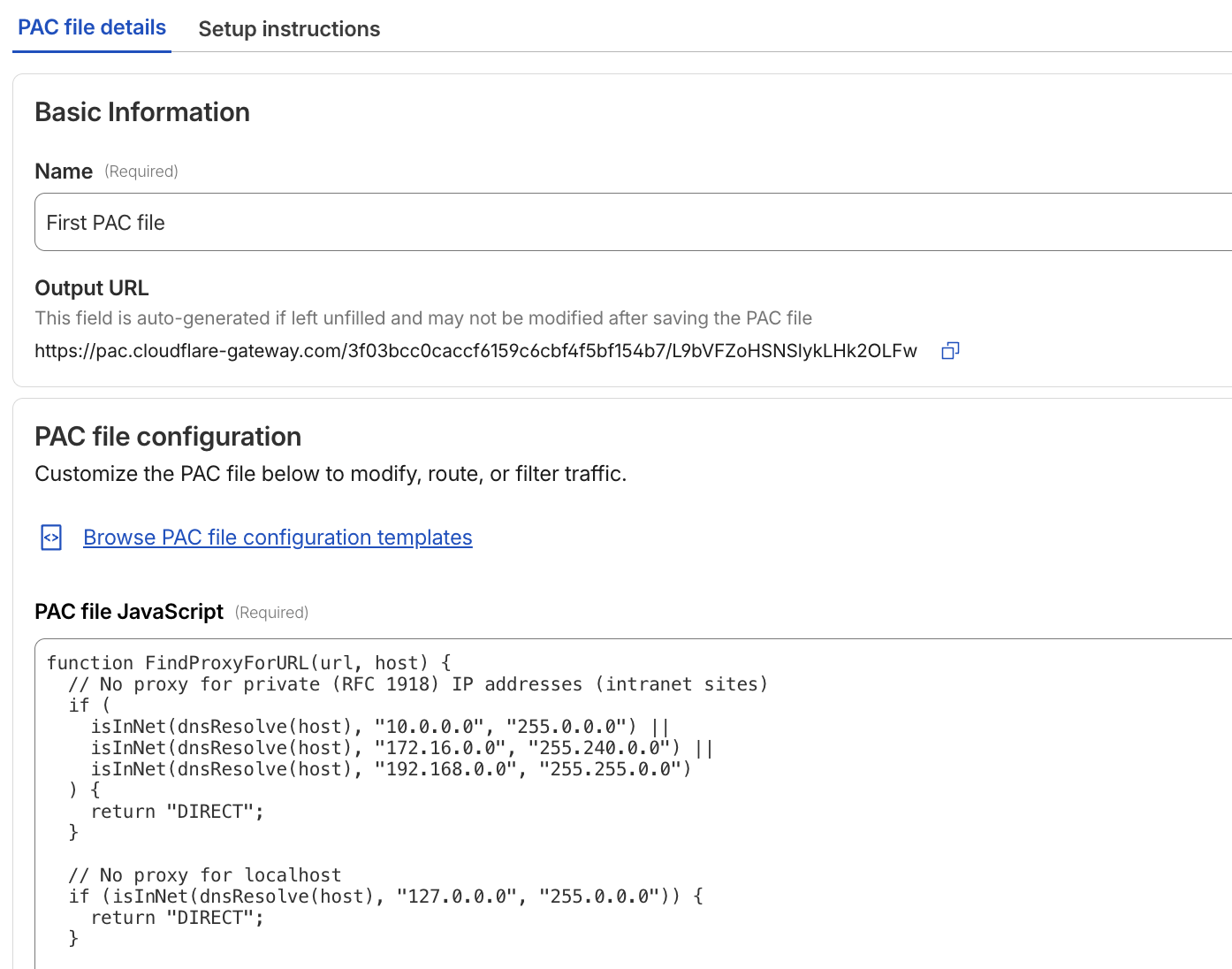
PAC file configuration page
To make it easy, we have included starter templates to get you up and running in minutes. We have also integrated our AI assistant, Cloudy, to provide summaries that help you understand exactly what your PAC file is doing, without having to read through lines of code.
While we still recommend the Cloudflare One Client for greater control and the best user experience, the Auth Proxy is the perfect fit for specific scenarios:
Virtual desktops (VDI): Environments where users log into a virtual machine and use a browser to reach the Internet.
Mergers and acquisitions: When you need to bring two different companies under one security umbrella quickly.
Compliance constraints: When you are legally or technically prohibited from installing software on an endpoint.
This expands our clientless security options to connect to Cloudflare One, and we are already working on expanding our supported identity methods related to Authorization Endpoints. Look out for Kerberos, mTLS, and traditional username/password authentication to give you even more flexibility in how you authenticate your users.
The Gateway Authorization Proxy and PAC File Hosting are available in open beta today for all account types. You can get started by going to the “Resolvers and Proxies” section of your Cloudflare dashboard.
Post Syndicated from Nevins Bartolomeo original https://blog.cloudflare.com/adaptive-access-user-risk-scoring/
Most security teams spend their days playing a high-stakes game of Whac-A-Mole. A user’s credentials get phished, or they accidentally download a malicious file, and suddenly you’re in incident response mode.
We built our SASE platform, Cloudflare One, to stop that cycle. By placing Access and Gateway in front of your applications and Internet traffic, we gave you the tools to decide who gets in and where they can go.
Today, we’re making those decisions smarter. You can now incorporate User Risk Scores directly into your zero trust network access (ZTNA) policies. Instead of just checking “Who is this user?” and “Is their device healthy?”, you can now ask, “How has this user been behaving lately?” and adjust their access in real time.
For years, traditional corporate access was binary. You either had the right login and the right certificate, or you didn’t. But identity is fluid. A legitimate user can become a risk if their account is compromised or if they start exhibiting “insider threat” behaviors — like impossible travel, multiple failed login attempts, or triggering data loss prevention rules by moving sensitive data.
Cloudflare One now continuously calculates a risk score for every user in your organization based on these behaviors.
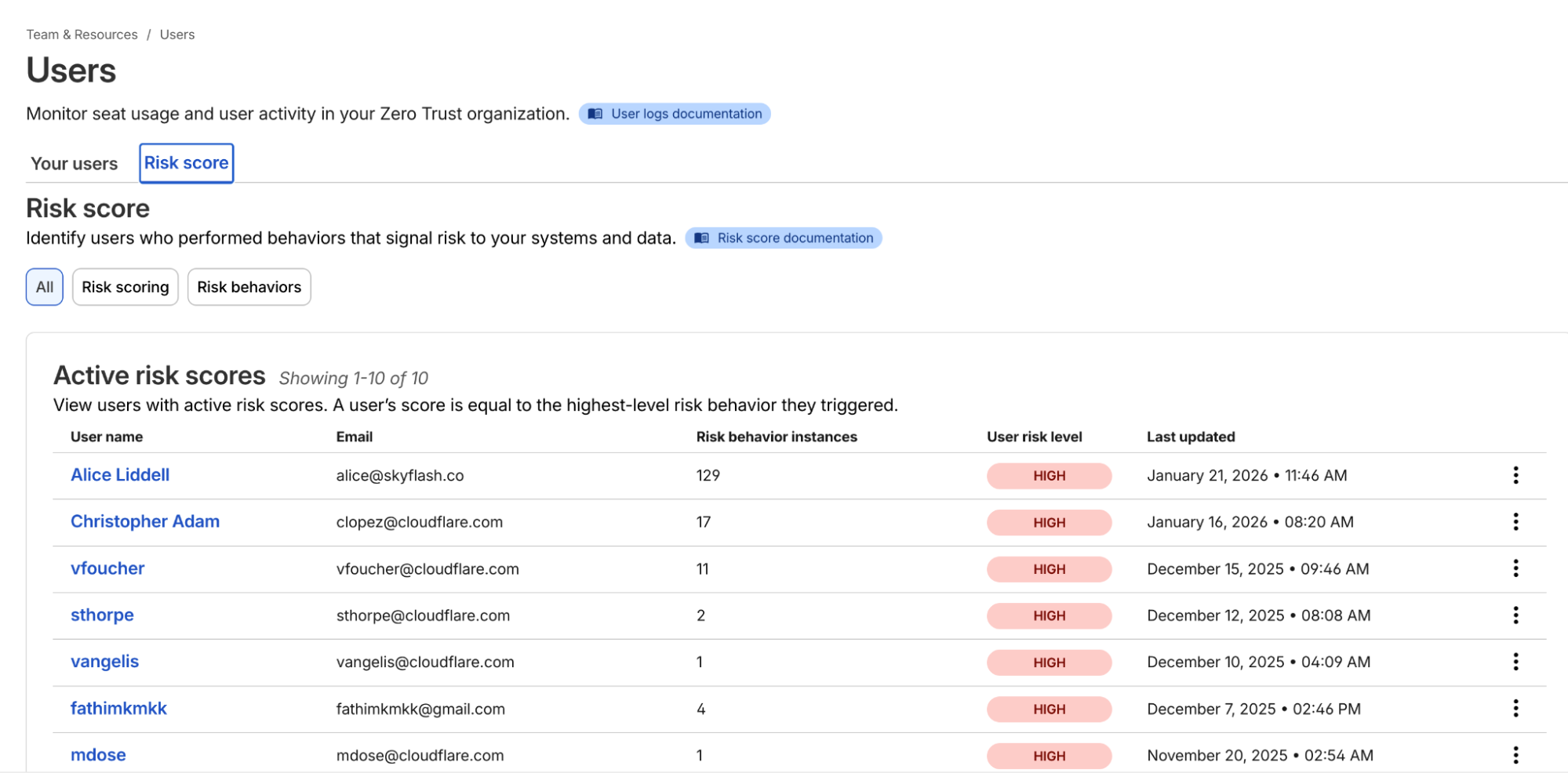
Example list of users and their risk scores
Once you’ve onboarded your team to Cloudflare One, you can navigate to the Team & Resources > Users > Risk Score section of the dashboard. Here, you can define which behaviors matter to you. For example, you might decide that impossible travel has a “high” risk level, while using a device in need of an update is “medium.”
Cloudflare’s risk engine continuously evaluates telemetry from across the SASE platform. For internal signals, the engine monitors logs from Cloudflare Access (e.g., successful/failed logins, geographic context) and Cloudflare Gateway (e.g., malware hits, risky browsing categories, or sensitive data triggers in DLP).
For third-party signals, we’ve built service-to-service integrations with partners like CrowdStrike and SentinelOne. These integrations allow Cloudflare to ingest external telemetry, such as CrowdStrike’s device posture attributes, and map it to a user’s profile.
The calculation logic is designed to be deterministic:
Selection: Administrators choose which specific “risk behaviors” (impossible travel, DLP violations, and more) to enable for their organization.
Aggregation: The engine identifies all risk events associated with a user.
Scoring: A user’s risk score is determined by the highest risk level (low, medium, or high) of any enabled behavior triggered during that period.
Reset: If an admin investigates and clears an incident, they can manually reset the user’s score, which preserves the history but resets their access based on risk data gathered going forward.
Knowing a user is risky is step one. Doing something about it — automatically — is step two.
In the past, if a security analyst saw a suspicious user, they’d have to manually revoke sessions or move the user into a “restricted” group in their Identity Provider (IdP). That takes time — time an attacker uses to move laterally.
Now, you can build Adaptive Access policies. When you create or edit an Access policy, you’ll find a new selector: User Risk Score.
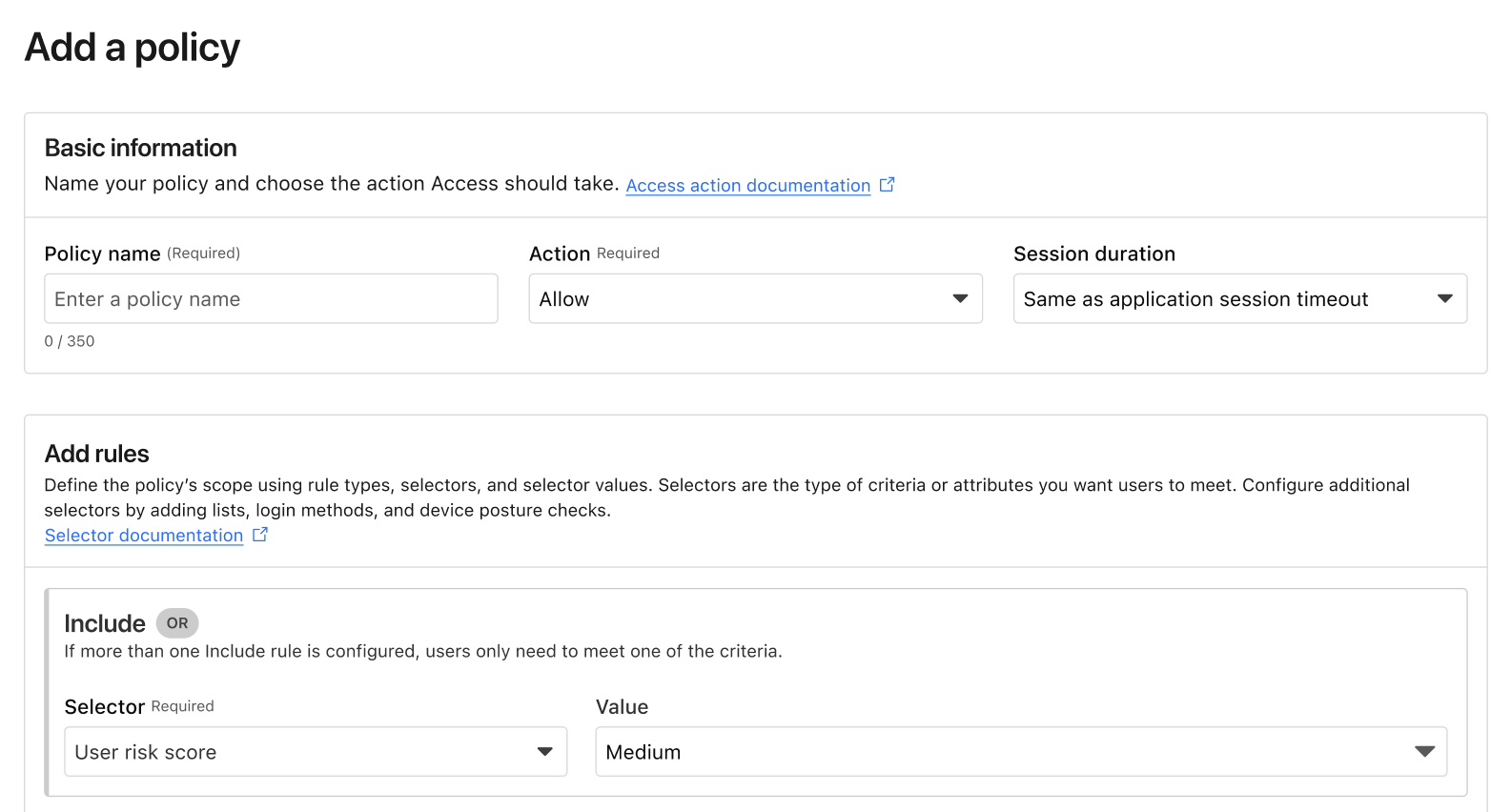
Example of the new User Risk Score selector in an Access policy.
This allows you to create global or application-specific rules such as: “If a user’s risk score is high, they cannot access the Finance Portal,” or “If a user’s risk score is medium, they must use a physical security key to log in.” Such rules ensure corporate operations are not interrupted while additional layers of security are applied.
The best part of this system is that it’s dynamic. If a user’s risk score drops after being reviewed and cleared by an investigator, their access is automatically restored based on your policy. Today, risk-based access can revoke access in the middle of an active session when risk score increases. In the future, we will explore expanding this to enforce step-up MFA in the middle of an active session when the risk score changes as well.
We’ve also made sure this works with the tools you already use. If you use Okta, Cloudflare can share these risk signals back to Okta, ensuring that a user flagged on the network is also restricted at the front door of your SSO. This integration uses the Shared Signals Framework, which enables the sharing of risk signals across platforms.
We built Cloudflare One so that security teams could stop being the “department of no” and start being the department of “yes, and safely.” Incorporating user risk scores into your Access policies is the next step in that journey. It moves your security from a static snapshot at login to a continuous, living conversation with your network architecture.
If you’re already a Cloudflare customer, you can start exploring these risk signals in your dashboard today. If you’re still wrestling with legacy VPNs or manual security reviews, we’d love to help you flip the switch.
You can get started for free for up to 50 users — no sales call required. For larger organizations looking to integrate third-party signals like CrowdStrike or SentinelOne into their global policies, our team is ready to walk you through a ZTNA pilot.
Reach out to our team here to see how adaptive access can fit into your SASE roadmap.
Post Syndicated from Ann Ming Samborski original https://blog.cloudflare.com/deepfakes-insider-threats-identity-verification/
Trust is the most expensive vulnerability in modern security architecture. In recent years, the security industry has pivoted toward a zero trust model for networks — assuming breach and verifying every request. Yet when it comes to the people behind those requests, we often default back to implicit trust. We trust that the person on the Zoom call is who they say they are. We trust that the documents uploaded to an HR portal are genuine.
That trust is now being weaponized at an unprecedented scale.
In our 2026 Cloudflare Threat Report, we highlight a rapidly accelerating threat vector: the rise of “remote IT worker” fraud. Often linked to nation-states, including North Korea, these are not just individual bad actors. They are organized operations running laptop farms: warehouses of devices remotely accessed by workers using stolen identities to infiltrate companies, steal intellectual property (IP), and funnel revenue illicitly.
These attackers have evolved and continue to do so with advancements in artificial intelligence (AI). They use generative AI to pass interviews and deepfake tools to fabricate flawless government IDs. Traditional background checks and standard identity providers (IdPs) are no longer enough. Bad actors are exploiting an identity assurance gap, which exists because most zero trust onboarding models verify devices and credentials, not people.
To close this gap, Cloudflare is partnering with Nametag, a pioneer in workforce identity verification, to bring identity-verified onboarding and continuous identity assurance to our SASE platform, Cloudflare One.
The challenge with insider risk is that companies naturally want to trust their employees. By the time malicious actors are detected by traditional data loss prevention (DLP) or user entity behavior analytics (UEBA) tools, they are already inside the perimeter. They have valid credentials, a corporate laptop, and access to sensitive repositories.
The “remote IT worker” scheme exploits the gap between hiring and onboarding. Attackers use stolen or fabricated identities to get hired. Once the laptop is shipped to a “mule” address (typically a domestic laptop farm located in the country of the remote worker’s alleged employment), it is racked and connected to a keyboard, video, and mouse (KVM) switch. The remote actor then logs in via VPN (or perhaps remote desktop), appearing to be a legitimate employee.
Because the credentials are valid and the device is corporate-issued, standard zero trust network access (ZTNA) policies often see this traffic as “safe” — when in fact it’s an enormous risk to your business.
Cloudflare Access already serves as the aggregation layer for your security policies — checking attributes such as device posture, location, and user group membership before granting access to applications, infrastructure, or MCP servers. Through our partnership with Nametag, we are adding a critical new layer: workforce identity verification.
Previously, IT departments had no choice but to assume trust throughout the new user onboarding process. They could either ship a laptop to an address provided by the new hire and then send their initial credentials to their personal email, or require them to come in person –– costly and impractical in a world of distributed workforces and contractors.
Nametag replaces assumed trust with verified identity, ensuring that the person receiving, configuring, and connecting a device to protected resources is a real person, a legitimate person, and the right person throughout the entire process. This integration allows organizations to uncover and stop bad actors, including North Korean IT workers, before they gain access to any internal resources or data.
Nametag is integrated using OpenID Connect (OIDC). You can configure it as an IdP within Cloudflare Access or chain it as an external evaluation factor alongside your primary identity provider (like Okta or Microsoft Entra ID).
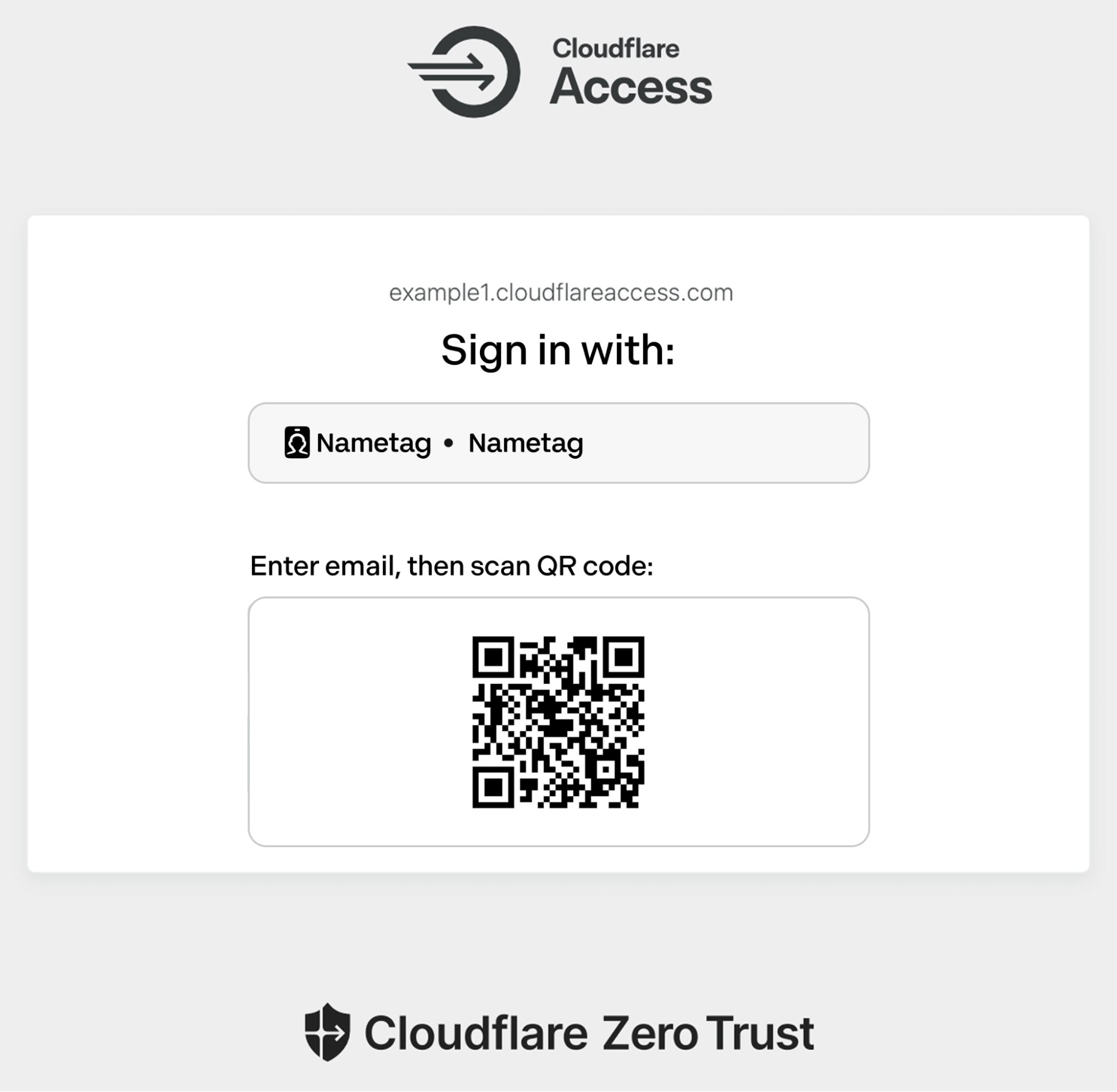
Example of the Cloudflare Access login page prompting for a user to authenticate using Nametag.
Here is an example workflow for a high-security onboarding scenario:
Trigger: A new user attempts to access their initial onboarding portal (protected by Cloudflare Access).
Challenge: Instead of just asking for a username and password, Cloudflare directs the user to Nametag for authentication via OIDC.
Verification: The user enters their new work email address, then snaps a quick selfie and scans their government-issued photo ID using their phone.
Attestation: Nametag’s Deepfake Defense™ identity verification engine leverages advanced cryptography, biometrics, AI and other features to ensure that the user is both a real person and the right person. Nametag’s technology uniquely prevents bad actors from using deepfake IDs and selfies in sophisticated injection attacks or presentation attacks (e.g., holding up a printed photo).
Enforcement: If that check is successful, Nametag returns an ID token to Cloudflare to complete the OIDC flow. Cloudflare then grants or denies access to the application based on the user’s identity and the Access policies.
All of this happens before the user can access email, code repositories, or other internal resources.

Verifying your identity with Nametag takes under 30 seconds to complete. No biometrics are stored after this interaction.
This partnership complements Cloudflare’s existing suite of insider threat protections. Today, you can:
Scan for data exfiltration using our API-driven DLP.
Reduce browsing risk with Remote Browser Isolation (RBI).
Identify shadow IT and detect misconfigurations with our shadow IT report and our Cloud Access Security Broker (CASB).
Nametag provides the missing link: identity assurance. It moves us from knowing what account is logging in, to knowing exactly who is behind the keyboard.
In an era where AI can fake a face and a voice, cryptographic proof of identity is the only way to safely trust your workforce.
While stopping bad actors at the door is critical, the threat landscape is dynamic. Legitimate credentials can be sold, and legitimate employees can be compromised.
To protect against that present and ever-evolving risk, Cloudflare Access now incorporates user risk scores so security teams can build context-aware policies. If a user’s risk score suddenly increases from low to high, access can be revoked to any (or all) applications.
In the future, you’ll be able to enforce step-up verification based on signals such as user risk score, in the middle of an active session. Rather than hitting the “big red button” and potentially disrupting a user who does have a legitimate reason for accessing the production billing system from an usual location, you will instead be able to challenge the user to verify with Nametag or by using Cloudflare’s independent MFA with strong authentication methods. If the user is a session hijacker or a bot, they will be unable to pass these checks.
This capability will also extend to self-service IT workflows. Password resets and MFA device registration are prime targets for social engineering (e.g., the MGM Resorts help desk attacks). By placing Nametag behind Cloudflare Access for these specific portals, you eliminate the possibility of a support agent being socially engineered into resetting a password for an attacker.
Security cannot rely on assumptions. As AI tools lower the barrier to entry for sophisticated fraud, your defenses must evolve to verify the human element with cryptographic certainty. The “remote IT worker” threat is not a hypothetical scenario—it is an active campaign targeting organizations globally.
You don’t need to overhaul your entire infrastructure to stop it. You can layer these protections on top of your existing IdP and applications immediately.
Cloudflare One is free for up to 50 users, allowing you to pilot identity-verified onboarding flows or protect high-risk internal portals right now.
Get started: Sign up for Cloudflare One to begin building your policy engine.
Deploy the integration: Follow the step-by-step guide to connect Nametag to Cloudflare Access in minutes.
Understand the risk: Read the full Cloudflare Threat Report to see the data behind the rise in insider threats and AI impersonation.
Don’t wait for a breach to verify your workforce. Start implementing a SASE architecture that trusts nothing — not even the face on the screen — without verification.
Post Syndicated from xkcd.com original https://xkcd.com/3215/

Post Syndicated from The Atlantic original https://www.youtube.com/shorts/SVqawz6ciro